
September 2014
© 2014 Fluke Corporation. All rights reserved. Specifications are subject to change
without notice. All product names are trademarks of their respective companies.
820-2
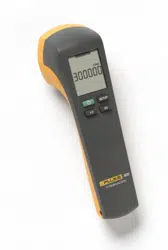
Stroboscope
Users Manual
1.888.610.7664 sales@GlobalTestSupply.com
Fluke-Direct.com

LIMITED WARRANTY AND LIMITATION OF LIABILITY
This Fluke product will be free from defects in material and
workmanship for two years from the date of purchase. This
warranty does not cover fuses, disposable batteries, or
damage from accident, neglect, misuse, alteration,
contamination, or abnormal conditions of operation or
handling. Resellers are not authorized to extend any other
warranty on Fluke’s behalf. To obtain service during the
warranty period, contact your nearest Fluke authorized
service center to obtain return authorization information,
then send the product to that Service Center with a
description of the problem.
THIS WARRANTY IS YOUR ONLY REMEDY. NO OTHER
WARRANTIES, SUCH AS FITNESS FOR A PARTICULAR
PURPOSE, ARE EXPRESSED OR IMPLIED. FLUKE IS
NOT LIABLE FOR ANY SPECIAL, INDIRECT,
INCIDENTAL OR CONSEQUENTIAL DAMAGES OR
LOSSES, ARISING FROM ANY CAUSE OR THEORY.
Since some states or countries do not allow the exclusion
or limitation of an implied warranty or of incidental or
consequential damages, this limitation of liability may not
apply to you.
1.888.610.7664 sales@GlobalTestSupply.com
Fluke-Direct.com

i
Table of Contents
Title Page
Introduction ................................................................ 1
How to Contact Fluke ................................................. 1
Safety ......................................................................... 2
Symbols ..................................................................... 3
Standard Equipment .................................................. 4
Features ..................................................................... 5
Auto Off ................................................................... 8
Low-Battery Indicator .............................................. 8
Product Use ............................................................... 9
Default Settings ....................................................... 9
Setup Menu ............................................................. 10
Range ...................................................................... 10
External Trigger ....................................................... 11
Maintenance .............................................................. 11
How to Clean the Product ....................................... 12
How to Change the Batteries .................................. 12
Specifications ............................................................. 14
Mechanical Specifications ....................................... 14
Environmental Specifications .................................. 14
Miscellaneous Specifications .................................. 16
1.888.610.7664 sales@GlobalTestSupply.com
Fluke-Direct.com

iii
List of Tables
Table Title Page
1. Symbols ..................................................................... 3
2. The Product ............................................................... 6
3. Display ....................................................................... 7
List of Figures
Figure Title Page
1. The Product ............................................................... 5
2.
External Trigger Connector Polarity ........................... 11
3. Battery Replacement ................................................. 13
1.888.610.7664 sales@GlobalTestSupply.com
Fluke-Direct.com

1
Introduction
The 820-2 Stroboscope (the Product) uses an adjustable LED
strobe light to show the movement of mechanical parts. The
frequency range is 30 flashes per minute (FPM) to 300,000 FPM.
How to Contact Fluke
To contact Fluke, call one of the following telephone numbers:
•
Go to to register your product, download manuals, and find more
information.
To view, print, or download the latest manual supplement, visit
1.888.610.7664 sales@GlobalTestSupply.com
Fluke-Direct.com

820-2
Users Manual
2
Safety
A Warning identifies conditions and procedures that are dangerous
to the user.
Warning
To prevent possible personal injury:
• Read all safety information before you use the
Product.
• Carefully read all instructions.
• Use the Product only as specified, or the
protection supplied by the Product can be
compromised.
• Do not touch the moving target object when you
use the Product. In stroboscopic light, object
movement can appear still or slowed.
• Do not use the Product around explosive gas,
vapor, or in damp or wet environments.
• Do not use the Product around personnel that
are susceptible to epileptic seizures.
• Do not use the Product if it is damaged.
1.888.610.7664 sales@GlobalTestSupply.com
Fluke-Direct.com

Stroboscope
Symbols
3
Symbols
Symbols used in the manual or on the Product are shown in Table 1.
Table 1. Symbols
Symbol Definition
Risk of danger. Important information. See manual.
Battery
Conforms to relevant Australian EMC standards.
Conforms to European Union directives.
Conforms to relevant South Korean EMC Standards.
This product complies with the WEEE Directive
(2002/96/EC) marking requirements. The affixed label
indicates that you must not discard this
electrical/electronic product in domestic household
waste. Product Category: With reference to the
equipment types in the WEEE Directive Annex I, this
product is classed as category 9 "Monitoring and
Control Instrumentation" product. Do not dispose of
this product as unsorted municipal waste. Go to
Fluke’s website for recycling information.
1.888.610.7664 sales@GlobalTestSupply.com
Fluke-Direct.com

820-2
Users Manual
4
Standard Equipment
If an item below is missing or damaged, contact Fluke. The Product
comes with:
• Quick Reference Guide
• Safety Information
• International Registration Card
• Statement of Quality
• Hard Case
• AA Batteries (3)
• External Trigger Input Connector
1.888.610.7664 sales@GlobalTestSupply.com
Fluke-Direct.com
Stroboscope
Features
5
Features
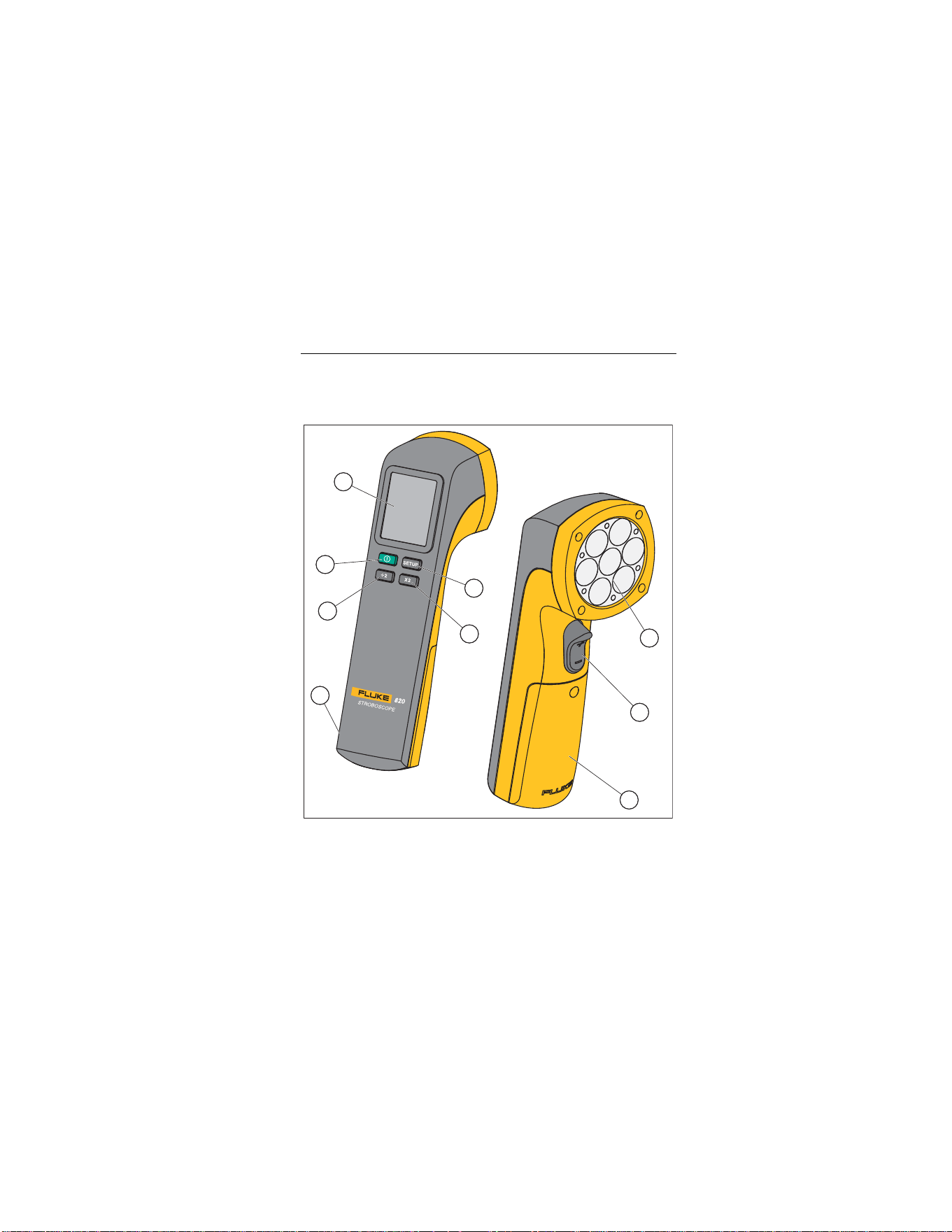
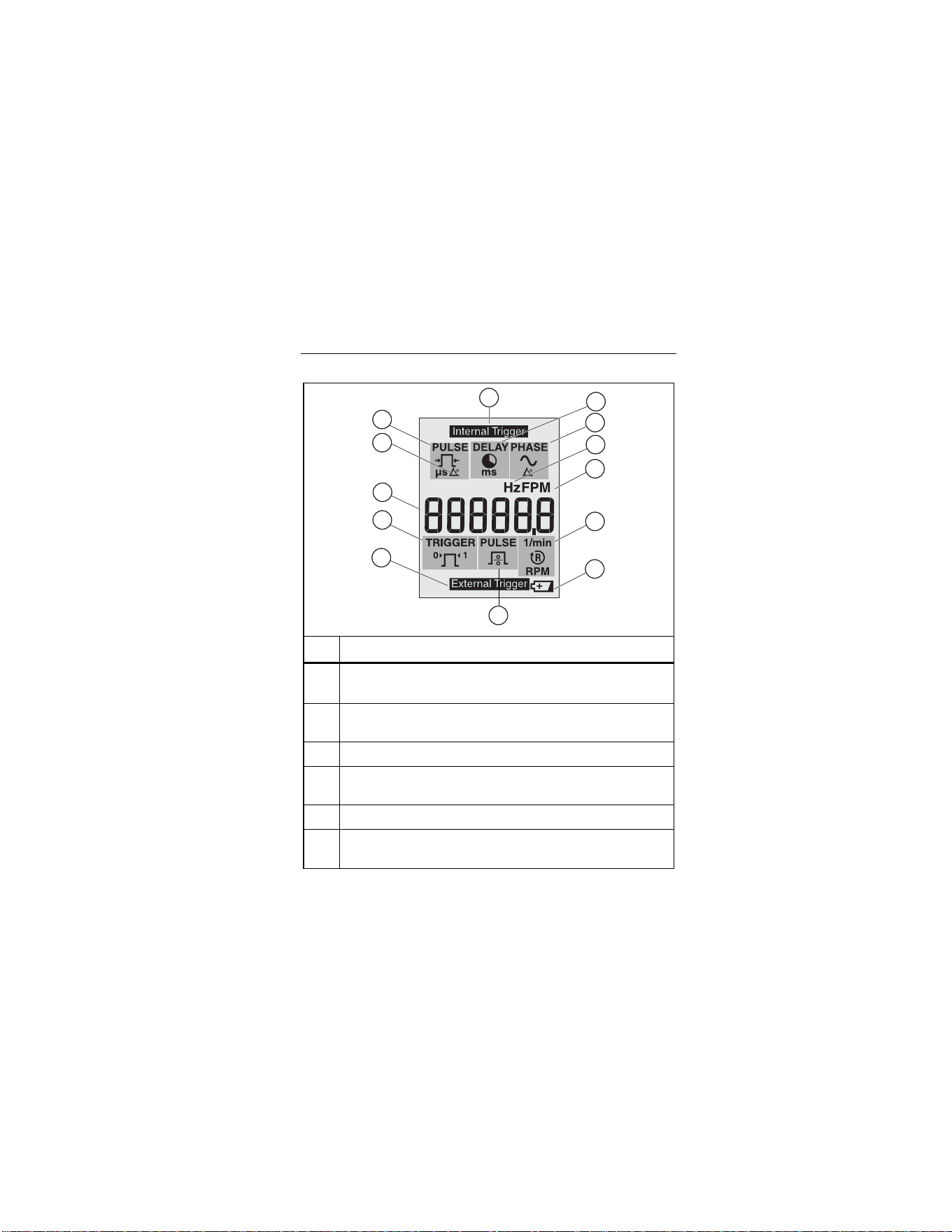
Figure 1, Table 2, and Table 3 show the Product.
5
7
8
9
6
3
2
1
4
gsh01.eps
Figure 1. The Product
1.888.610.7664 sales@GlobalTestSupply.com
Fluke-Direct.com

820-2
Users Manual
6
Table 2. The Product
Item Description
Display
Power Button- Push to turn on the Product.
Push and hold for 2 seconds to turn off the
Product.
Push to divide the current set value by two.
The scroll speed increases when is
continuously held down.
External trigger connection
Setup- Push to move between different
settings and modes.
Push to double the current set value. Speed of
the scroll increases when this button is held down.
LED strobe
Push the trigger () up to increase the current set
value. Push down to decrease the current set
value. Speed increases when is held down.
Battery compartment
1.888.610.7664 sales@GlobalTestSupply.com
Fluke-Direct.com
Stroboscope
Features
7
Table 3. Display
1
2
3
4
5
11
9
8
7
13
10
12
6
gsh02.eps
Item Description
Adjustable pulse width in microseconds (μs). Adjustment
is accessed in the Setup Menu.
Adjustable pulse width in degrees. Adjustment is
accessed in the Setup Menu.
Primary display. Six digits with decimal.
Set external trigger edge to 0 for positive and 1 for
negative. Adjustment is accessed in the Setup Menu.
External trigger input is connected.
Set the external trigger pulse divider from 1 to 255.
Adjustment is accessed in the Setup Menu.
1.888.610.7664 sales@GlobalTestSupply.com
Fluke-Direct.com

820-2
Users Manual
8
Table 3. Display (cont.)
Item Description Item Description
Low battery. Replace
the battery.
1/min or RPM for
external trigger input.
Flashes per minute
(FPM), default at power
up.
Flashes per second.
Adjustment is
accessed in the Setup
Menu.
Pulse delay in degrees
(Phase degree).
Adjustment is
accessed in the Setup
Menu.
Pulse delay in
milliseconds (ms).
Adjustment is
accessed in the Setup
Menu.
Internal trigger
Auto Off
To conserve battery power, the Product turns off after 15 minutes
of non-use.
Low-Battery Indicator
The low-battery indicator is shown when the battery is low. When
the low-battery indicator shows (), change the batteries.
1.888.610.7664 sales@GlobalTestSupply.com
Fluke-Direct.com

Stroboscope
Product Use
9
Product Use
The subsequent sections tell you how to use the Product.
Push to turn on the Product. Push and hold for 2
seconds to turn off the Product.
Default Settings
To set the Product to the default settings, push and hold and
.
The default settings are:
• 1000 FPM
• 16.7 Hz
• 333 Pulse μs
• 2.0 Pulse deg
• 0 Delay ms
• 0 Phase deg
• External pulse divider = 1
• External trigger edge = 0 (positive)
1.888.610.7664 sales@GlobalTestSupply.com
Fluke-Direct.com

820-2
Users Manual
10
Setup Menu
When you push , the display shows the Setup menu. From the
Setup menu, you can change these parameters:
• Hz setting – Adjust the flashes per seconds in Hz.
• Pulse width in μs () – Adjust the flash intensity in
microseconds of pulse width.
• Pulse width in degrees () – Adjust the flash intensity in
degrees of flash rate.
• Delay in ms () – Adjust the delay time in milliseconds
between internal trigger and flash. Precise adjustments of the
observation position can be made with this setting.
• Phase degree () – Adjust the degrees of phase shift
between internal trigger and flash. Precise adjustments of the
observation position can be made with this setting.
• External trigger pulse divider () – Set the external trigger
divider, to adjust the flash rate.
• External trigger edge () – Set the external trigger edge to
either positive (0) or negative (1).
Push , , and to make adjustments to each parameter.
Push to change parameters and to enter and exit the Setup
menu.
Range
When the external trigger is >5 kHz, -OL- shows on the display.
When the external trigger is <0.5 Hz, -UL- shows on the display.
1.888.610.7664 sales@GlobalTestSupply.com
Fluke-Direct.com
Stroboscope
Maintenance
11
External Trigger
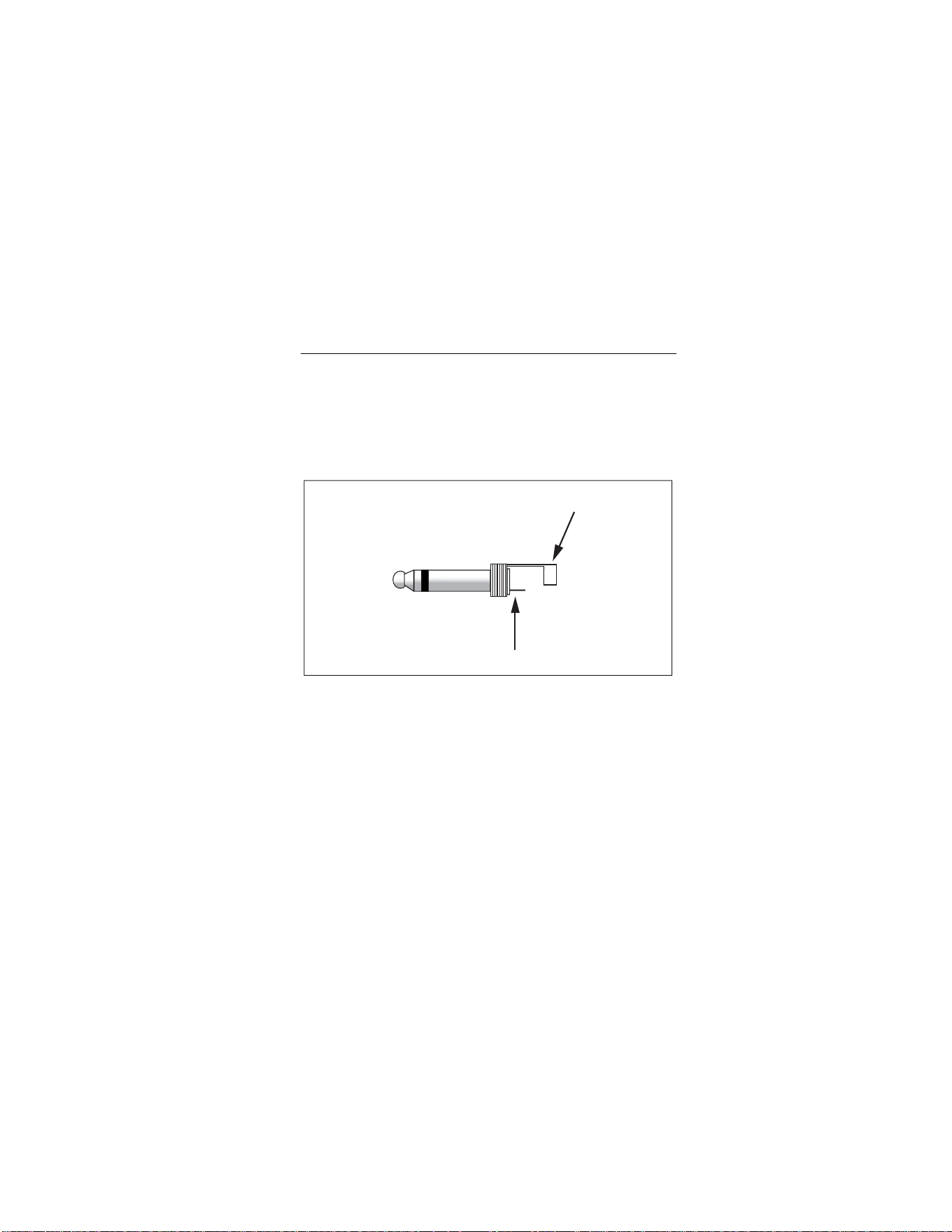
Use the External Trigger Input Connector for outside trigger
sources. When the Connector is plugged into the Product (see
Figure 1, item ) the Product displays . Table 3
shows what options are available when an external trigger is
used. For Connector polarity information, see Figure 2.
+
-
gsh04.eps
Figure 2. External Trigger Connector Polarity
Maintenance
Caution
The Product contains no user-serviceable parts. To
prevent damage to the Product, do not open the
case. For service, see “How to Contact Fluke”.
1.888.610.7664 sales@GlobalTestSupply.com
Fluke-Direct.com

820-2
Users Manual
12
How to Clean the Product
Regularly clean the case with a damp cloth and mild detergent.
Caution
To prevent damage to the Product, do not use
abrasives or solvents to clean the Product case.
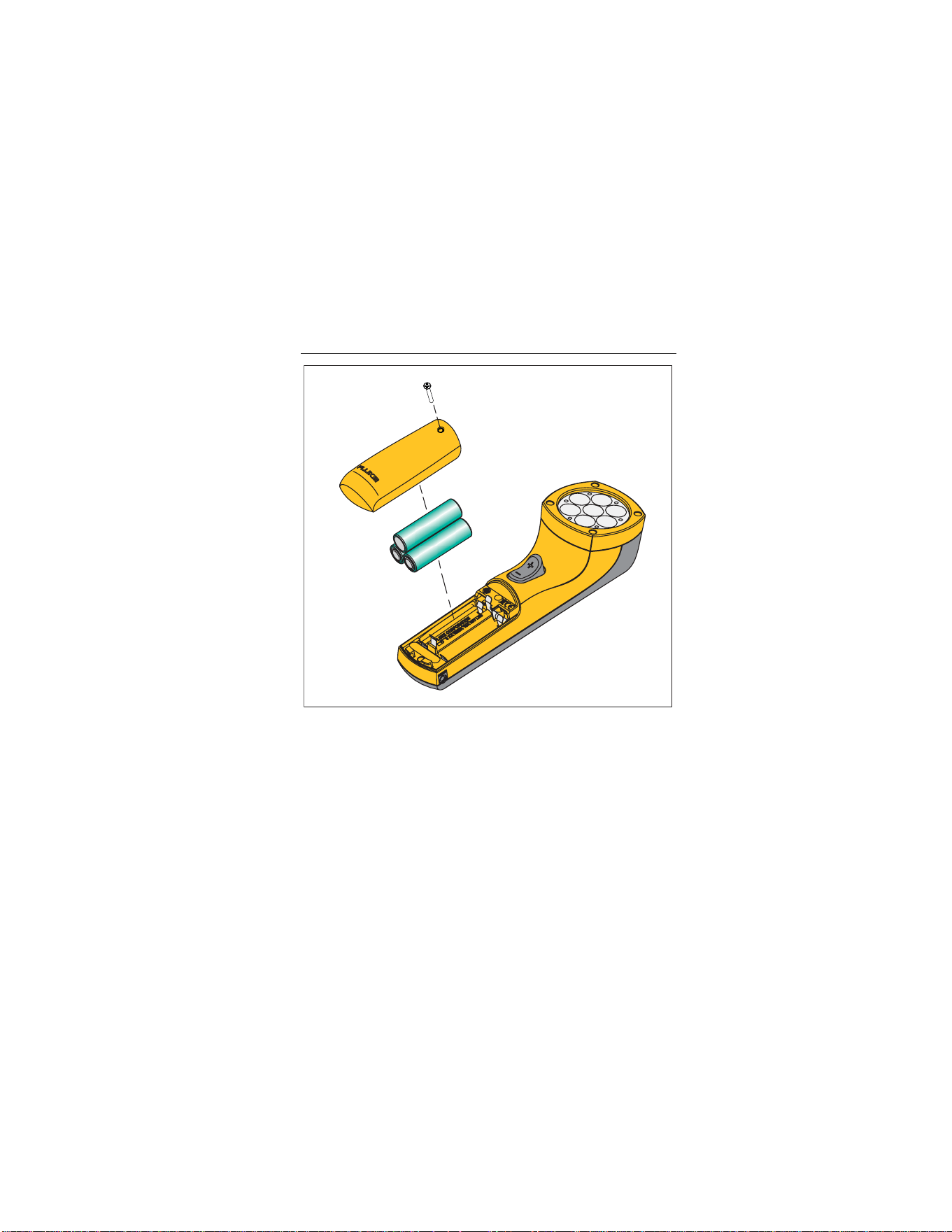
How to Change the Batteries
The Product is energized by three AA (LR6) batteries. When the
low battery symbol shows on the display (), replace the
batteries. See Figure 3.
Caution
To prevent damage to the Product:
• Be sure that the battery polarity is correct
to
pre
vent battery
leakage.
• Remo
ve batteries to prevent battery lea
kage
and
damage to the Product if it is not used fo
r
an exte
nded period.
1.888.610.7664 sales@GlobalTestSupply.com
Fluke-Direct.com
Stroboscope
Maintenance
13
gsh03.eps
Figure 3. Battery Replacement
1.888.610.7664 sales@GlobalTestSupply.com
Fluke-Direct.com

820-2
Users Manual
14
Specifications
Mechanical Specifications
Size (H x W x L) .................. 5.71 cm x 6.09 cm x 19.05 cm
(2.25 in x 2.4 in x 7.5 in)
Weight .... ............................ 0.24 kg (0.53 lb)
Environmental Specifications
Operating Temperature ....... 0 °C to +45 °C (+32 °F to +113 °F)
Storage Temperature .......... -10 °C to +50 °C (+14 °F to +122 °F)
Operating Humidity .......... Non-condensing, < +50 °F (< +10 °C)
90 %RH, +10 °C to +30 °C
(+50 °F to +86 °F)
75 %RH, +30 °C to +40 °C
(+86 °F to +104 °F)
45 %RH, +40 °C to +50 °C
(+104 °F to +122 °F)
(Without Condensation)
Absorption/Corrosion ........ +30 °C (+86 °F), 95 %RH, 5 days
Product functions normally
Operating Altitude ............... 2,000 m
Storage Altitude .................. 12,000 m
Vibration .............................. MIL-PRF-28800F Class 2
1.888.610.7664 sales@GlobalTestSupply.com
Fluke-Direct.com

Stroboscope
Specifications
15
Safety ................................. IEC 61010-1:Pollution Degree 2
Electromagnetic
Environment ....................... IEC 61326-1:Industrial
Group1 ISM equipment: group 1 contains all ISM equipment in
which there is intentionally generated and/or used conductively
coupled radio-frequency energy which is necessary for the
internal functioning of the equipment itself.
Class A equipment is suitable for use in non-domestic locations
and/or directly connected to a low-voltage power supply
network. Class A equipment may have potential difficulties in
ensuring electromagnetic compatibility in other environments,
due to conducted as well as radiated disturbances.
Electromagnetic
Compatibility ...................... Applies to use in Korea only.
Class A Equipment (Industrial
Broadcasting & Communication
Equipment)
[1]
[1] This product meets requirements for industrial (Class A)
electromagnetic wave equipment and the seller or user should take
notice of it. This Equipment is intended for use in business
environments and is not to be used in homes.
1.888.610.7664 sales@GlobalTestSupply.com
Fluke-Direct.com

820-2
Users Manual
16
Miscellaneous Specifications
Battery Type ........................ 3 x AA Alkaline LR6
Flash Frequency
Range ............................. 30 FPM to 300,000 FPM
0.5 Hz to 5000 Hz
Accuracy ........................ 0.02 %
Resolution ....................... 30 FPM to 999 FPM = 0.1
1000 FPM to 300,000 FPM = 1
0.5 Hz to 999 Hz = 0.1
1000 Hz to 5000 Hz = 1
Frequency Setting .............. FPM or Hz
Flash Pulse
Duration ........................ Adjustable in μs or degrees
Delay ............................. Adjustable in ms or degrees
Light
Color ............................. Approx. 6500 K
Emission Output ........... 4800 lx @ 6000 FPM
30 cm (11.9 in) at 3°
External Trigger
Method .......................... Connector to externally control trigger
Frequency Range ......... 0.5 Hz to 5000 Hz
High Level ..................... 3 V to 32 V
Low Level ..................... <1 V
Minimum Pulse Width ... 50 μs Connection
1.888.610.7664 sales@GlobalTestSupply.com
Fluke-Direct.com
