1
Getting Started Guide
Cat. No. DWVAA
VOICE DIMMER
with Amazon Alexa Built-in
WEB VERSION

WEB VERSION

3
Table of Contents
Welcome to the My Leviton family . . . . . . . . . . . . . . . . . . . . . . . . . .5
Get started with Alexa
. . . . . . . . . . . . . . . . . . . . . . . . . . . . . . . . . . . .6
Use your voice to ask Alexa
. . . . . . . . . . . . . . . . . . . . . . . . . . . . . . . . 7
Decora Smart Voice Dimmer
. . . . . . . . . . . . . . . . . . . . . . . . . . . . . . . . 8
At a glance
. . . . . . . . . . . . . . . . . . . . . . . . . . . . . . . . . . . . . . . . . . . . . . . 9
Features
. . . . . . . . . . . . . . . . . . . . . . . . . . . . . . . . . . . . . . . . . . . . . . . . 10
Your Voice Dimmer works with
. . . . . . . . . . . . . . . . . . . . . . . . . . . .11
Before you install
. . . . . . . . . . . . . . . . . . . . . . . . . . . . . . . . . . . . . . . . 12
What you need to make it work
. . . . . . . . . . . . . . . . . . . . . . . . . . . . 12
Identify your wires (single pole installation)
. . . . . . . . . . . . . . . . . 13
Wire your Voice Dimmer (single pole installation)
. . . . . . . . . . . . 14
Identify your wires (3-way installation)
. . . . . . . . . . . . . . . . . . . . . 15
Common 3-way installation
. . . . . . . . . . . . . . . . . . . . . . . . . . . . . . . 16
Test
. . . . . . . . . . . . . . . . . . . . . . . . . . . . . . . . . . . . . . . . . . . . . . . . . . . . 17
Install
. . . . . . . . . . . . . . . . . . . . . . . . . . . . . . . . . . . . . . . . . . . . . . . . . .18
Get the App
. . . . . . . . . . . . . . . . . . . . . . . . . . . . . . . . . . . . . . . . . . . . . 19
Launch the app
. . . . . . . . . . . . . . . . . . . . . . . . . . . . . . . . . . . . . . . . . . 20
Add to your home network
. . . . . . . . . . . . . . . . . . . . . . . . . . . . . . . . 20
Test app control
. . . . . . . . . . . . . . . . . . . . . . . . . . . . . . . . . . . . . . . . . 21
Just ask Alexa (test voice control)
. . . . . . . . . . . . . . . . . . . . . . . . . 22
Connect to My Leviton partners (optional)
. . . . . . . . . . . . . . . . . . 23
What to do if
. . . . . . . . . . . . . . . . . . . . . . . . . . . . . . . . . . . . . . . . . . . .24
Factory default
. . . . . . . . . . . . . . . . . . . . . . . . . . . . . . . . . . . . . . . . . . 25
Status light
. . . . . . . . . . . . . . . . . . . . . . . . . . . . . . . . . . . . . . . . . . . . .25
Safety first
. . . . . . . . . . . . . . . . . . . . . . . . . . . . . . . . . . . . . . . . . . . . . . 26
Warranty and compliance
. . . . . . . . . . . . . . . . . . . . . . . . . . . . . . . . . 27
WEB VERSION
4
CALL
1-800-824-3005 (USA)
1-800-405-5320 (Canada)
ONLINE
leviton.com/decorasmart
CHAT
www.leviton.com
EMAIL
dssupport@leviton.com
We are here to help
WEB VERSION
5
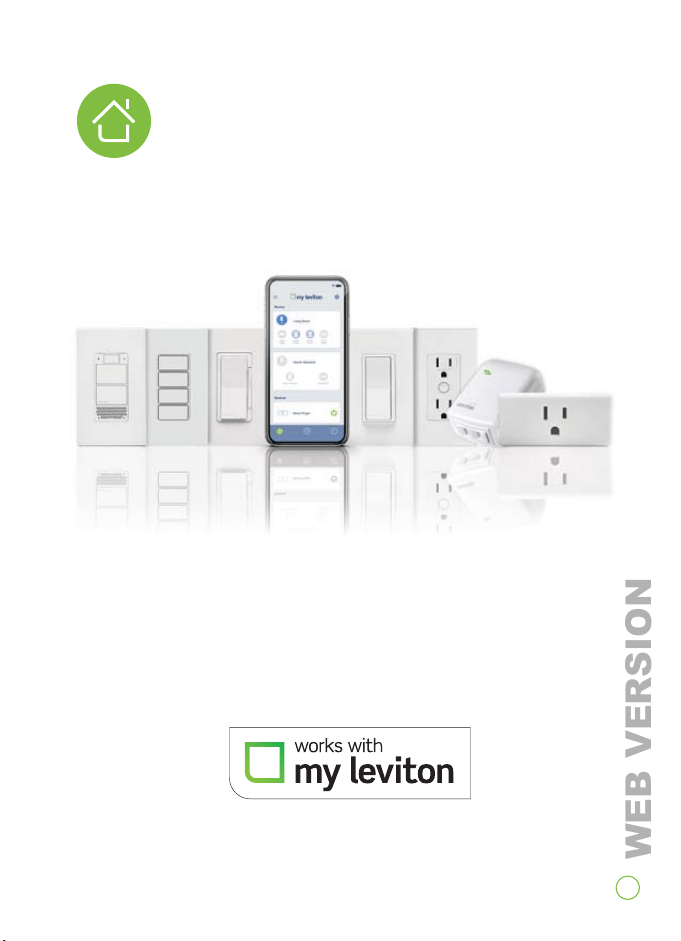
See the complete line of My Leviton™ app compatible
dimmers, switches, plug-ins and controllers at
leviton.com/decorasmart
Welcome to the
My Leviton™ family
WEB VERSION

Get Started
with Alexa
You can talk to Alexa on your Decora Smart™
Voice Dimmer. With Alexa, you can ask to play
music, hear the news, check weather, control
smart home devices and more.
Download the My Leviton app from Apple App
Store® or Google Play™ to set up Alexa on your
Decora Smart Voice Dimmer.
“Alexa, what’s in
the news?”
6
WEB VERSION
7
Smart Home
Control compatible devices such as lights,
thermostats, TVs, locks and more.
News and Information
Ask Alexa for your flash news briefing,
sports updates, weather reports and more.
Timers and Alarms
Use Alexa to start a timer when cooking
in the kitchen or set an alarm to wake
up in the morning.
Announcements
Have Alexa announce important
messages across all compatible Alexa
devices in your home.
Music
Use Alexa to play music from a variety of
music services.
Fun and Games
Bring out Alexa's fun side by asking her to
play a game or tell a joke.
Get the Alexa App
The Alexa app lets you easily manage your alarms,
music, shopping lists and more.
Go to alexa.amazon.com on your smartphone to
get the app.
Use Your Voice to Ask Alexa
“Alexa, turn on the bedroom light.”
“Alexa, what’s in the news?”
“Alexa, set a timer for 15 minutes.”
“Alexa, announce that dinner is ready.”
“Alexa, play jazz.”
“Alexa, tell me a joke.”
WEB VERSION
8
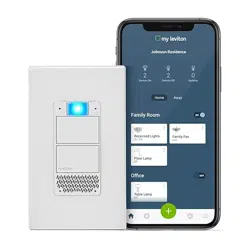
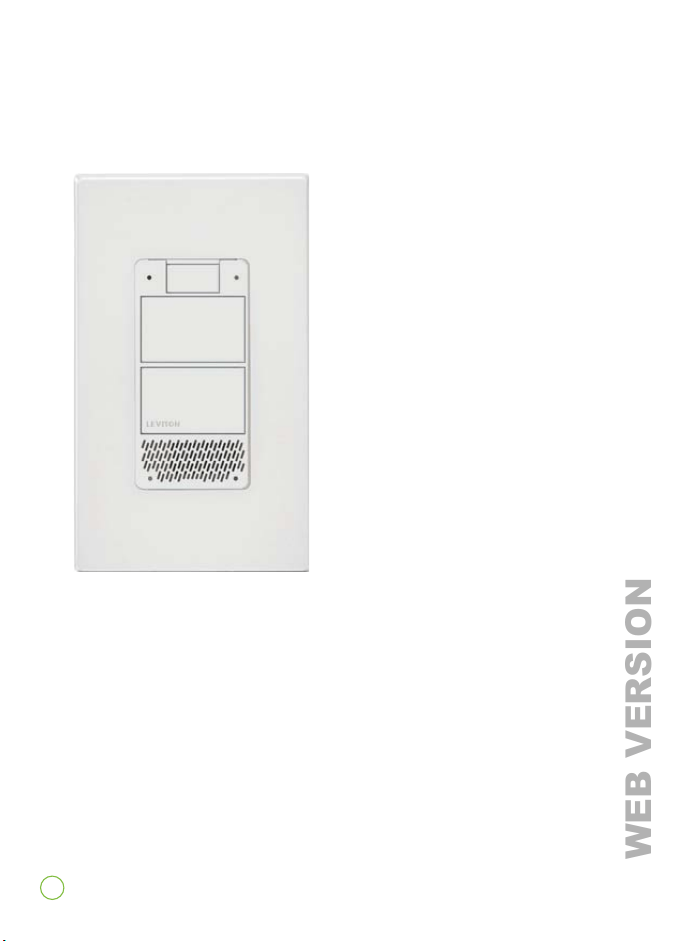
The Decora Smart Voice
Dimmer with Amazon Alexa
Built-in provides hands-free
lighting control and the many
benefits of Amazon Alexa Voice
Services integrated directly
into your home to make life
simpler and easier.
Your Voice Dimmer connects to
Wi-Fi and uses the My Leviton
app. Combine your Voice
Dimmer with other Decora
Smart Wi-Fi devices to create
an easy Wi-Fi lighting solution
with built-in voice control,
scheduling, lighting scenes and
app control from anywhere.
US and foreign patents pending. Patents covering this
product can be found at leviton.com/patents.
Decora Smart™ Voice Dimmer
WEB VERSION
9
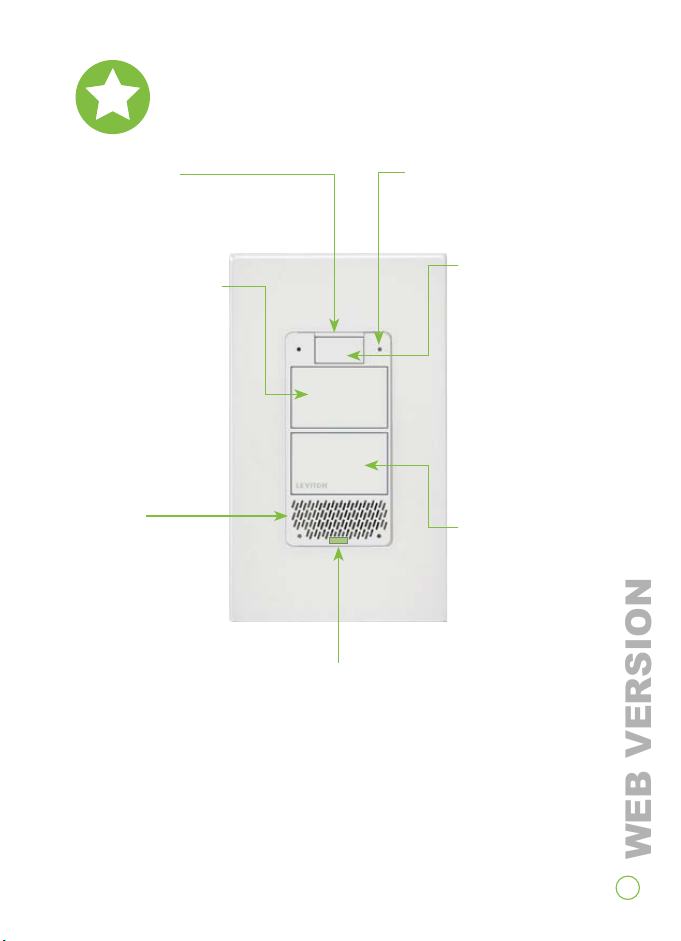
Pull Tab
Pull out to disable power or
reset your dimmer.
Status Indicator Light
• Illuminates when the lights are
o so you can find the dimmer in
the dark.
• Provides connectivity and device
status feedback.
• Advanced settings available in
the My Leviton app.
On/Bright Button
• Press once to turn
on lights.
• Press and hold to
brighten lights,
then release when
the desired lighting
level is reached.
Microphones
Picks up your voice for Alexa
interaction.
Speaker
Audio output for
Alexa services.
Mics O/On,
Action Button
• Lights up to show
Alexa status.
• Press to activate
Alexa.
• Press and hold to
turn o the mics.
The status light will
turn red. Press and
hold again to turn
mics back on.
O/Dim Button
• Press once to turn
o lights.
• Press and hold to
dim lights, then
release when the
desired lighting level
is reached.
At a glance
WEB VERSION

10
Full Range Dimming
Best-in-class dimming performance with custom settings in the
My Leviton app for preset lighting levels, fade rates, bulb types
and more.
Single Pole or 3-Way/Multi-Location
Control the same lights from multiple locations using either the
Decora Digital™ DD00R for remote dimming or the DD0SR for
remote switching.
Features
For more information and features visit:
leviton.com/decorasmart
O Means O
Ensures low-wattage LED bulbs always turn o.
Language Support
Alexa interaction in English, Spanish and French.
WEB VERSION
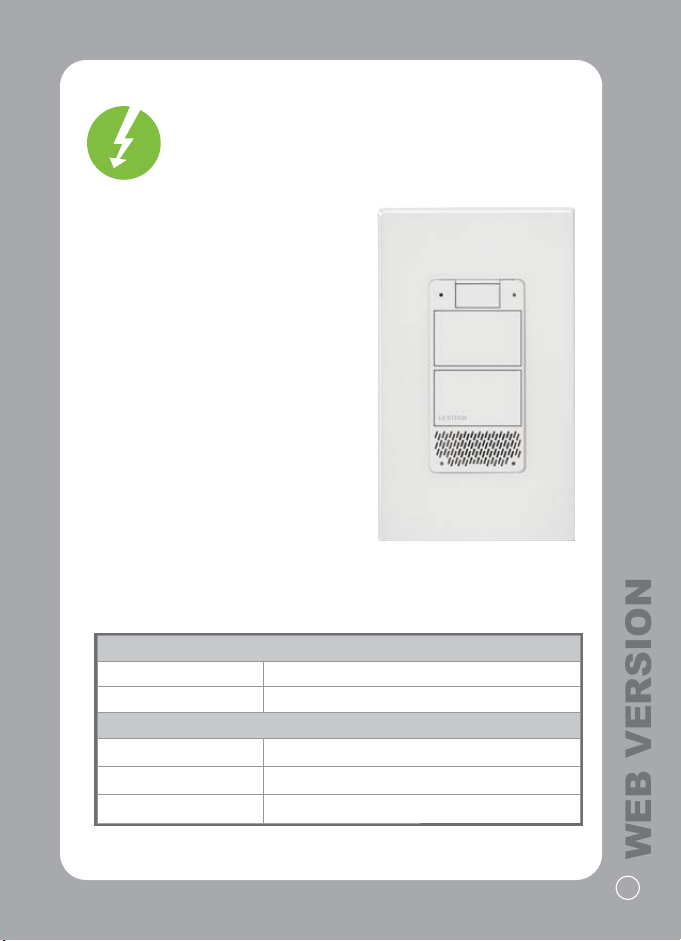
RATINGS
LED / CFL 300W - 120VAC, 50/60Hz
Incandes
cent 300W - 120VAC, 50/60Hz
NETWORK
Wi-Fi 802.11 a/b/g/n @ 2.4GHz
Security
WPA or WPA2
Bluetooth v4.1
Your Voice Dimmer
works with:
Your Voice Dimmer is compatible
with dimmable LED, dimmable
CFL and incandescent bulbs.
Your Voice Dimmer should not be
used with electronic low voltage,
motor loads or aluminum wire.
To ensure proper communication
do not use metal wallplates.
For LED compatibility
recommendations, go to
leviton.com/LED.
11
WEB VERSION
1212
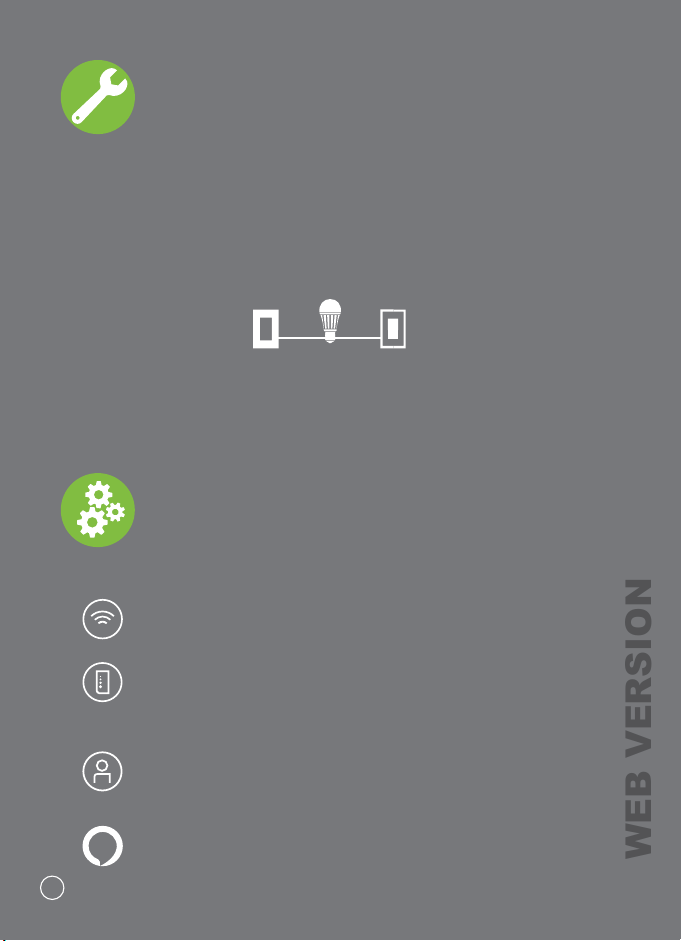
To install and use your Voice Dimmer:
What you need to make it work
• A 2.4GHz Wi-Fi network with high speed internet.
• An iOS (11.0 or later) or Android (6.0 or later) mobile
device. NOTE: Make sure Wi-Fi and Bluetooth are
enabled on your mobile device.
• A My Leviton™ cloud account set up through the
My Leviton app.
• An active Amazon account to enable Alexa.
Before you install
Installation requires electrical knowledge.
If you are unsure of any steps, consult an electrician.
Things to consider:
If light(s) are controlled from more than one location, you will
need a Decora Digital Remote. See page 16 or the Leviton DD00R
or DD0SR remote installation manual for wiring instructions.
• Use a DD00R for remote dimming.
• Use a DD0SR for remote switching.
WEB VERSION
13
NOTE: Before you wire, check to make sure a strong Wi-Fi
signal is present at the location where you want to install
your Voice Dimmer.
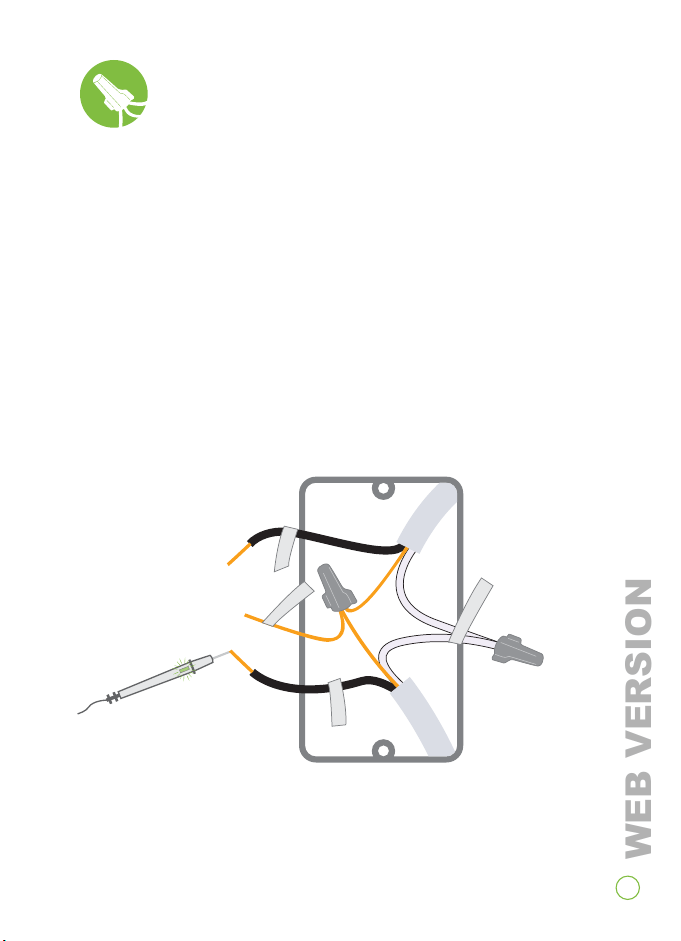
Identify your wires
WARNING: TO AVOID FIRE, SHOCK OR DEATH, turn off power
at the circuit breaker.
1. Remove wallplate and disconnect switch.
2. Ensure disconnected wires are not touching.
3. Restore power. Carefully test wires with voltage tester to find
the hot (line) wire.
4. Turn off power at the circuit breaker.
5. Mark the wires as shown:
Two or
more white
(neutral) wires
a hot (line) wire
(find with voltage tester)
a load wire
a copper ground
NEUTRAL
LINE
LOAD
GROUND
(for single pole installation)
If your wall box contains a different wiring configuration, contact
Leviton tech support or consult an electrician.
WEB VERSION
14
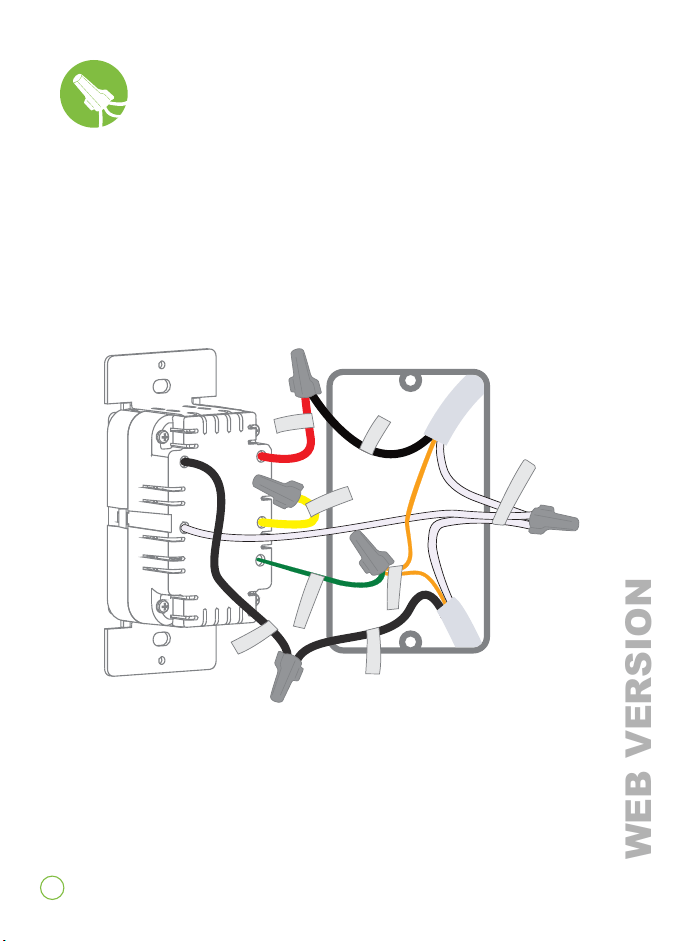
Single Pole Installation
1. Work on only one connection at a time.
2. Connect wires as shown.
NOTE: Neutral connection is required.
Wire your Voice Dimmer
GROUND
NEUTRAL
LOAD
TRAVELER
LINE
LINE
LOAD
GROUND
If your wall box contains a different wiring configuration,
contact Leviton tech support or consult an electrician.
WEB VERSION
15
NOTE: Before you wire, check to make sure a strong Wi-Fi
signal is present at the location where you want to install
your Voice Dimmer.
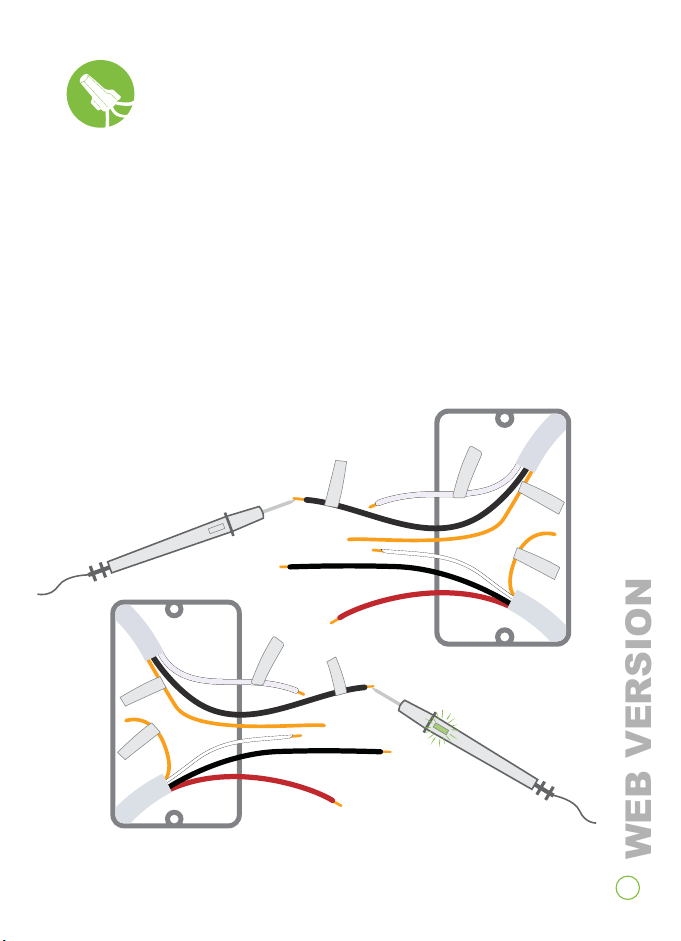
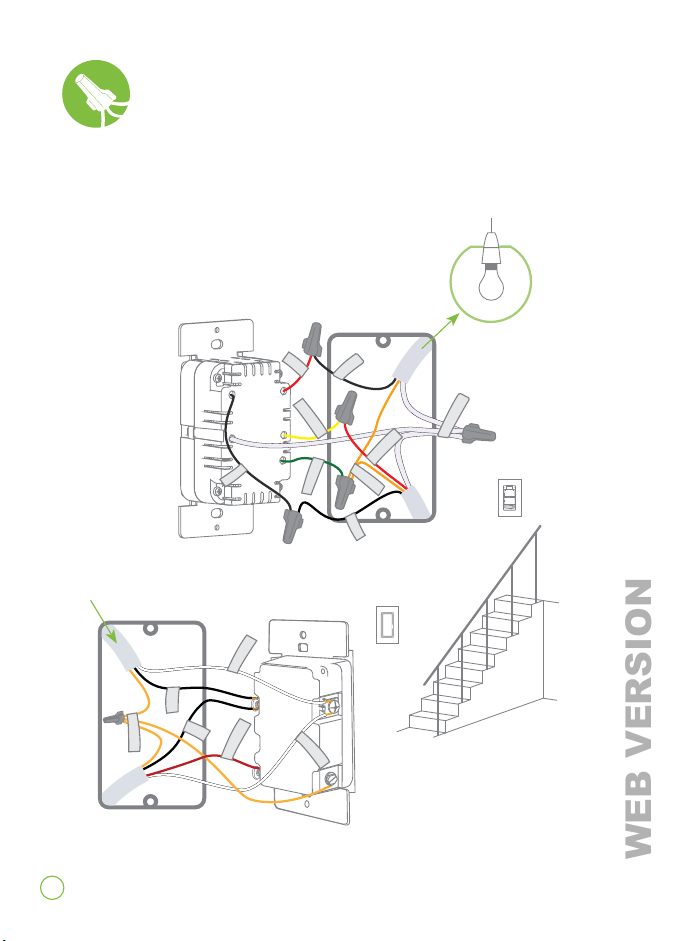
Identify your wires
WARNING: TO AVOID FIRE, SHOCK OR DEATH, turn off power
at the circuit breaker.
1. Remove wallplate and disconnect switch.
2. Ensure disconnected wires are not touching.
3. Restore power. Carefully test wires with voltage tester to find
the hot (line) wire.
4. Turn off power at the circuit breaker.
5. Mark the wires as shown:
If your wall box contains a different wiring configuration, contact
Leviton tech support or consult an electrician.
(for 3-way installation)
GROUND
LOAD
NEUTRAL
GROUND
LINE
GROUND
NEUTRAL
GROUND
LOAD
LINE
TRAVELER
TRAVELER
WEB VERSION
16
LINE
NEUTRAL
LOAD
TRAVELER
GROUND
LOAD
LINE
BK
YL/RD
WH
LINE
LINE
NEUTRAL
NEUTRAL
GROUND
TRAVELER
TRAVELER
GROUND
Use the wiring method below to install your Voice Dimmer
in the same wall box as the load connection.
Common 3-way installation
1. Work on only one connection at a time.
2. Connect wires as shown.
NOTE: Neutral connection is required.
Remote DD00R-DL
or DD0SR-DL
Voice Dimmer
From
branch
circuit
To l ight
If your wall box contains a different wiring configuration,
contact Leviton tech support or consult an electrician.
WEB VERSION
17
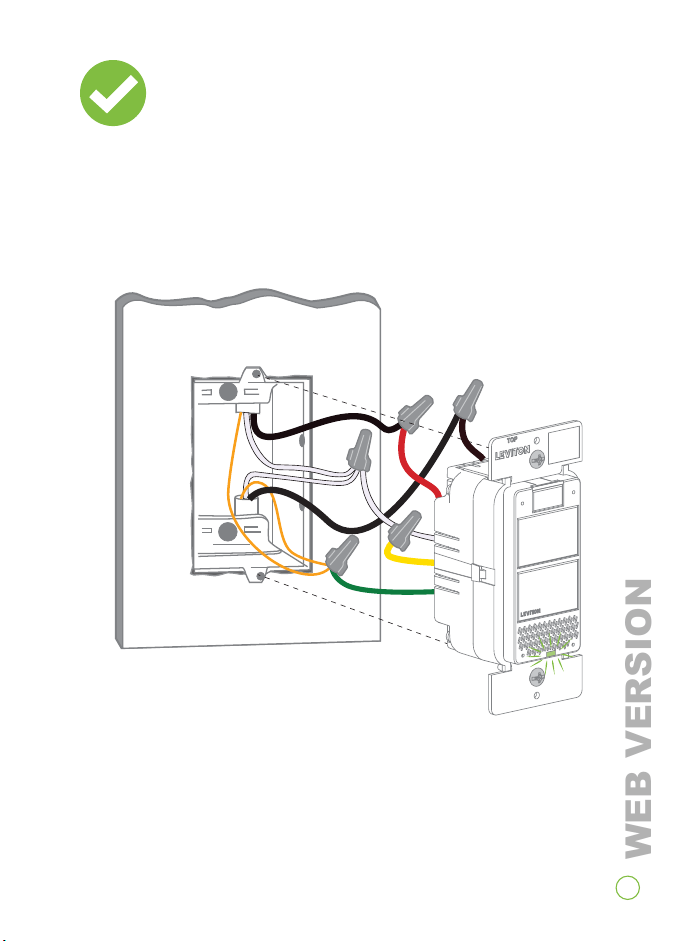
Test
Restore power. Status light should flash green indicating your
Voice Dimmer is ready to be configured.
*Single pole wiring shown.
WEB VERSION
18
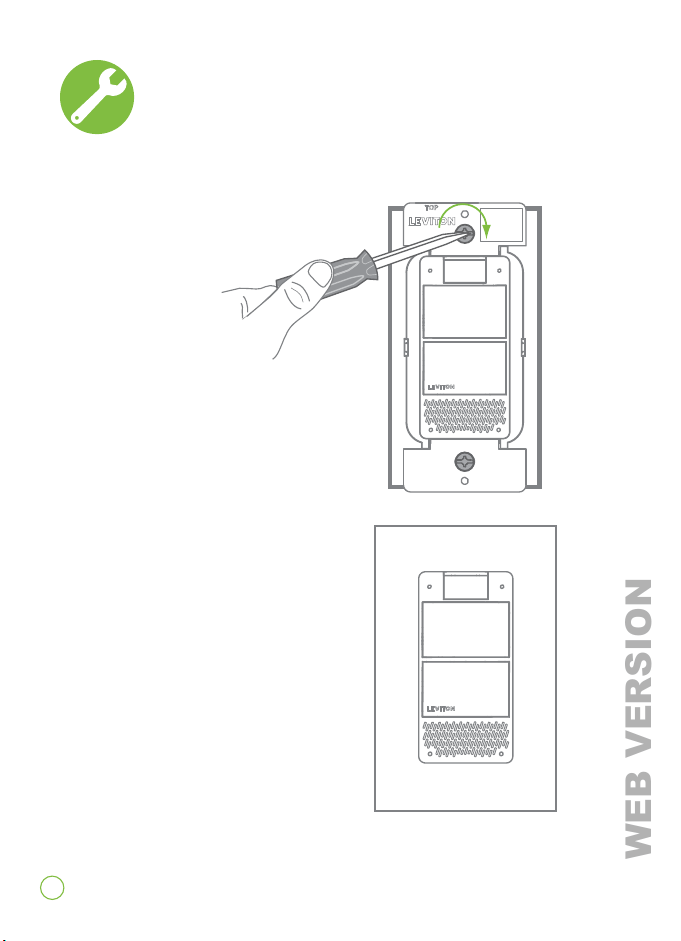
Turn o power at circuit breaker before proceeding.
1. Gently push wires into wall box.
Screw Voice Dimmer to box.
2. Snap on Decora
®
wallplate.
Restore power.
3. Test control of your lights
by pressing the ON and OFF
buttons.
Congratulations!
Your Decora Smart™ Voice Dimmer
is ready to to be added to your Wi-Fi network.
Install
WEB VERSION
19
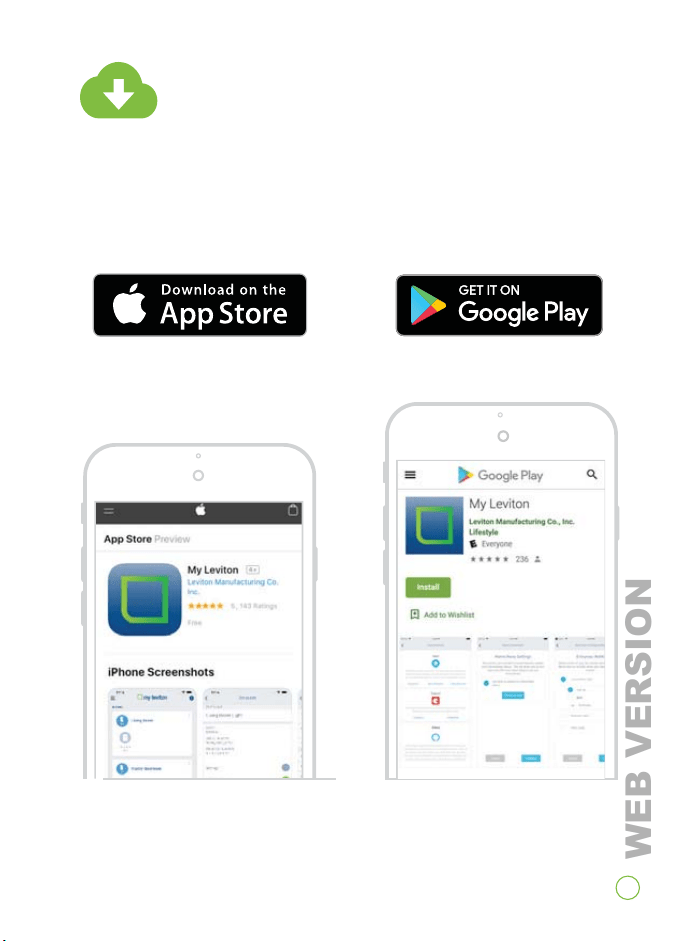
Get the app
Visit my.leviton.com and select the link
for your smartphone or tablet.
WEB VERSION
20
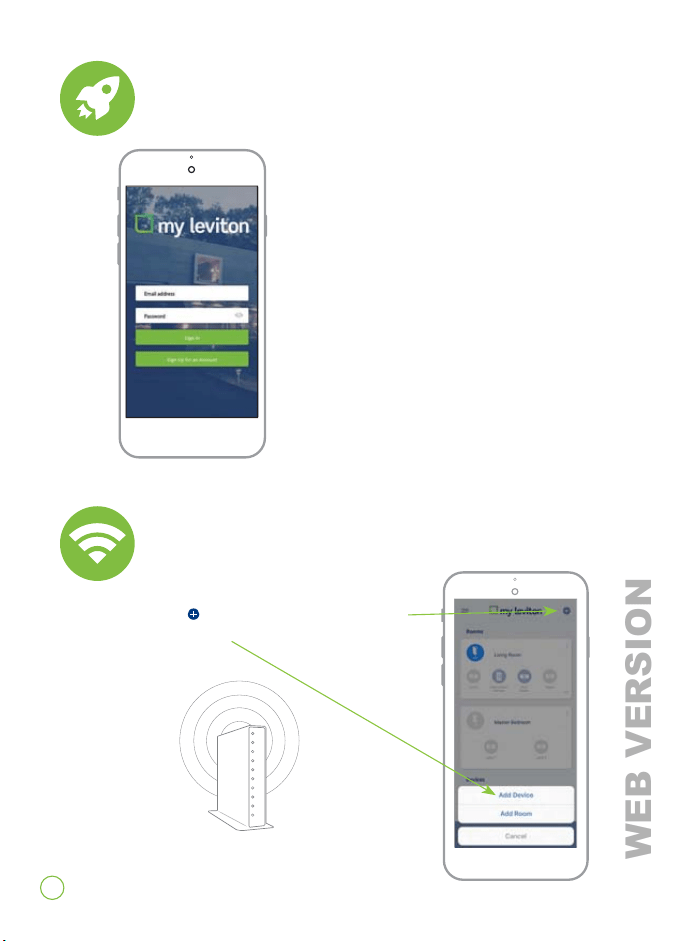
Launch the app
1. Launch the My Leviton app.
2. Log in or choose Sign Up
for an Account.
3. Follow the instructions on
the screen.
1. Select the in the upper right corner
to add a device.
Add to your home network
WEB VERSION
21
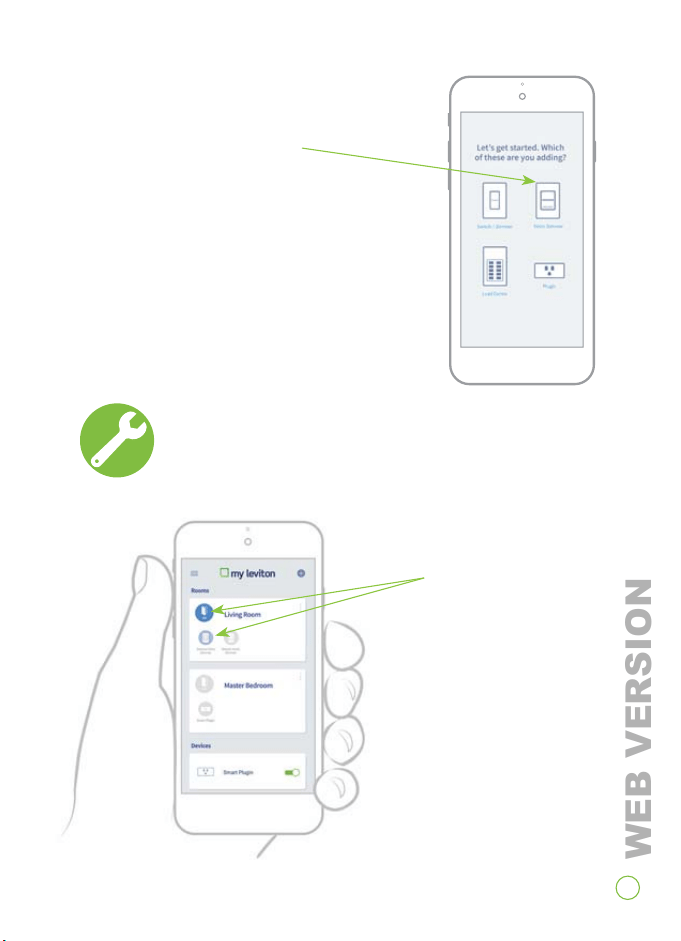
1. Open the My Leviton app.
2. Tap icon to turn on and o.
Test app control
2. Select Voice Dimmer.
3. Follow the app instructions to set up
your Voice Dimmer and register with
Amazon Alexa.
WEB VERSION
22
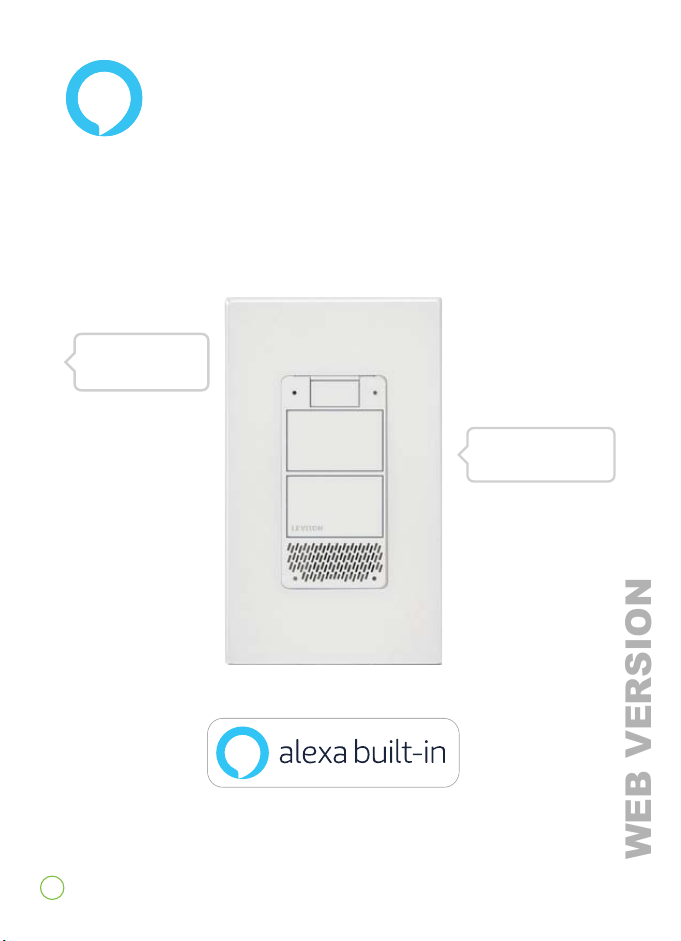
Just Ask Alexa
Test Voice Control
*Make sure you have followed the steps in the My Leviton app to
enable Alexa.
“Okay, turning on the
kitchen lights.”
“Alexa, turn on
the kitchen lights.”
WEB VERSION
23
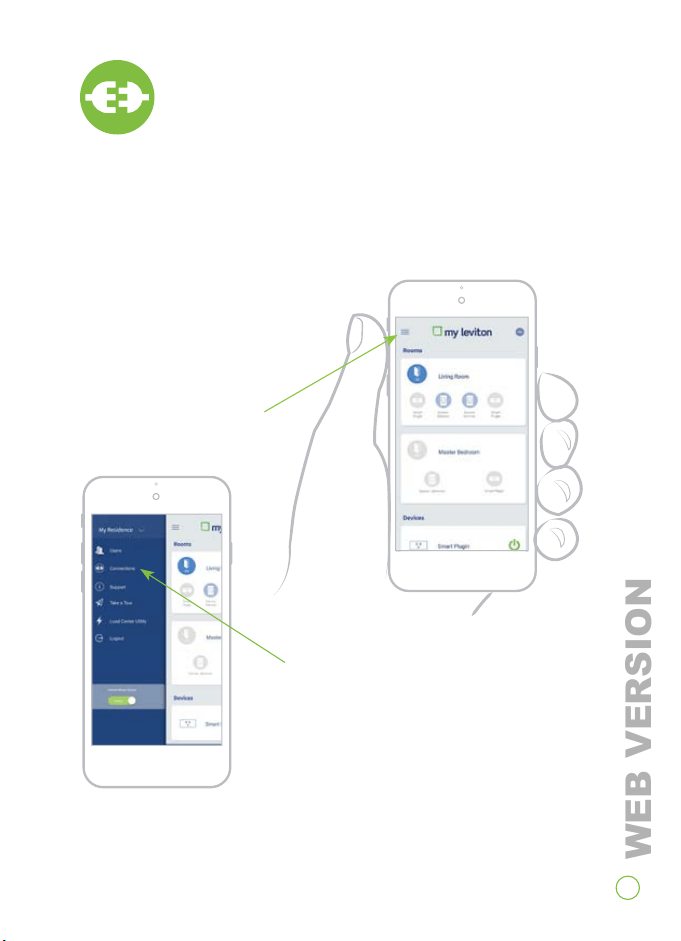
Connect to
My Leviton partners (optional)
To integrate with
another service:
1. Tap menu icon in
upper left corner.
2. Tap Connections, choose
desired service and follow
app instructions.
Visit my.leviton.com for a complete list of
compatible smart home products.
WEB VERSION

24
What to do if...
If your Voice Dimmer is not performing as expected, visit
leviton.com/decorasmart or contact technical services.
Alexa is not working:
• Using the My Leviton app, select your Voice Dimmer, then
select "Device Settings." On the "Device Info" screen select
"Reconfigure."
• Follow the prompts to configure your Voice Dimmer and
enable Alexa.
Not connected to Wi-Fi:
• Using the My Leviton app, select your Voice Dimmer, then
select "Device Settings." On the "Device Info" screen select
"Reconfigure."
• Follow the prompts to configure your Voice Dimmer and
update the Wi-Fi settings.
Indicator lights are on but light fixture is o and does
not respond:
• Check wiring to confirm hot, neutral, and load.
• Ensure the white conductor is a neutral.
Lights flicker at low end of dimming range:
• Use the My Leviton app to increase the minimum dim level.
Intermittent dimmer operation:
• Confirm the load does not exceed its ratings.
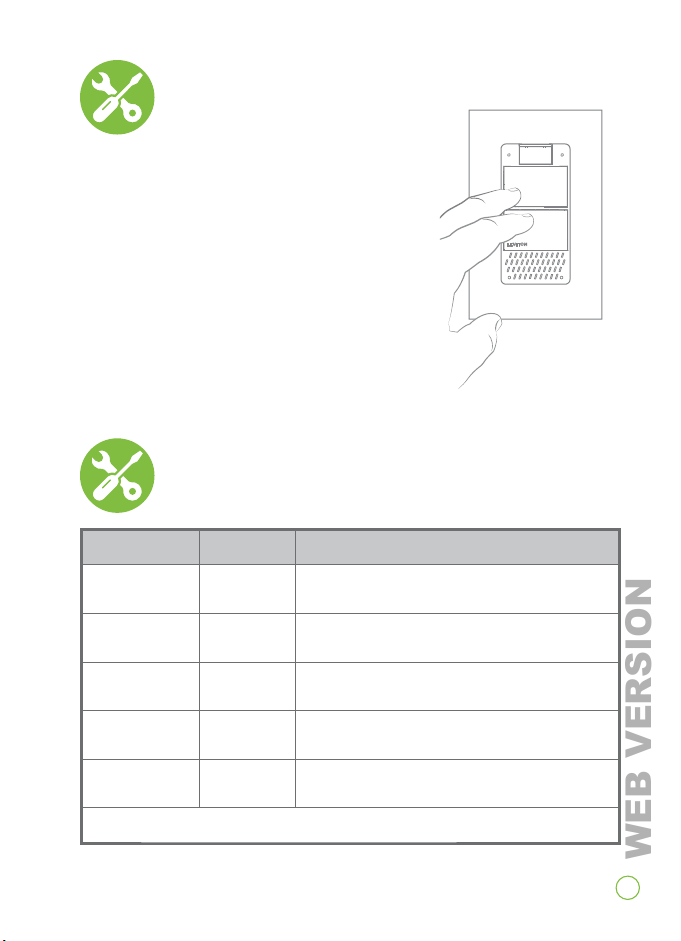
To place the Voice Dimmer into Setup Mode:
• Hold the ON and OFF button together for 7 seconds.
WEB VERSION
25
To reset to factory settings:
1. Hold the ON and OFF button together for
7 seconds.
2. Release when the status light starts
flashing green.
3. Press and hold the ON button for 7
seconds. Release when the status light
flashes red/amber and the dimmer
will reset.
Factory default
COLOR ACTIVITY STATUS
Green Flashing In setup mode and ready to be added to a
Wi-Fi network
Green Slow Blink Connecting or re-connecting to a Wi-Fi
network
Green or O Solid Normal operation; can be configured
in setup
Amber Slow Blink Dimmer was not able to connect to the
Wi-Fi network
Green, Red,
Amber
Flashing Identify feature triggered from the My
Leviton app
Please see my.leviton.com support for additional diagnostic assistance.
Status light
WEB VERSION

26
WARNING: TO AVOID FIRE, PERSONAL INJURY OR DEATH DO NOT USE for the control
of high power heating appliances such as portable heaters. There can be unexpected
consequences if not used with care. For example, an empty coee pot can be remotely
turned on. If that should happen, your coee pot could be damaged from overheating.
If an electric heater is turned on by remote control while clothing is draped over it, a fire
could result. This module will not control lighting that is used with electronic low-voltage
and high frequency power supply transformers, nor high pressure discharge lamps (HID
lighting). This includes mercury-vapor, sodium vapor and metal halide lamps.
WARNINGS:
• This product is to be installed and/or used in accordance with electrical codes
and
regulations.
• Indoor use only.
• If you are unsure about any part of these instructions, consult an electrician.
• Unplug unit when servicing loads.
• Save this instruction sheet. It contains important technical data along with testing
a
nd troubleshooting information which will be useful after installation is complete.
CAUTION:
• Leviton Wi-Fi enabled devices rely on Wi-Fi communication. Increasing the number of
W
i-Fi devices can aect Wi-Fi performance. Consult the network’s wireless access
point specifications to determine the maximum number of supported Wi-Fi devices. For
installations with a large number of Leviton Wi-Fi devices, a high performance wireless
access point capable of supporting a large number of devices may be required.
ADDITIONAL RATINGS:
• Purpose of control: Operating Control
• Action Control Type: 1
• Pollution Degree: 2
• Impulse Voltage: 2500V
• Disconnection Type: Micro
Safety first
WEB VERSION

27
Limited 2 Year Warranty
Copyright and Trademark Information
Decora is a registered trademark and Decora Smart is a trademark of Leviton Manufacturing Co., Inc.
Wi-Fi, Google Play, Android, App Store, Apple iOS and Google Assistant are the trademarks of their
respective owners and any use of such marks by Leviton is under license. Alexa, and related logos are
trademarks of Amazon.com, Inc. or its affiliates. Use herein of other third party trademarks, service
marks, trade names, brand names and/or product names are for informational purposes only, are/may
be the trademarks of their respective owners; such use is not meant to imply affiliation, sponsorship, or
endorsement. No part of this document may be reproduced, transmitted or transcribed without the
express written permission of Leviton Manufacturing Co., Inc.
Copyright 2020 Leviton Mfg. Co., Inc.
For Leviton’s limited product warranty, go to www.leviton.com. For a printed copy of the warranty,
call 1-800-824-3005.
US and foreign patents pending. Patents covering this product can be found at Leviton.com/patents.
This product includes certain open source software. For more information and instructions on how to
obtain a copy, go to the website my.leviton.com/opensource.
FOR CANADA ONLY
For warranty information and/or product returns, residents of Canada should contact Leviton in
writing at Leviton Manufacturing of Canada Ltd to the attention of the Quality Assurance Department,
165 Hymus Blvd, Pointe-Claire (Quebec), Canada H9R 1E9 or by telephone at 1-800-405-5320.
FCC COMPLIANCE STATEMENT
The enclosed device complies with Part 15 of the FCC Rules. Operation is subject to the following
two conditions: (i.) This device may not cause harmful interference (ii.) This device must accept any
interference received, including interference that may cause undesired operation. Any changes
or modifications not expressly approved by Leviton could void the user’s authority to operate this
equipment. This equipment has been tested and found to comply with the limits for a Class B digital
device, pursuant to part 15 of the FCC Rules. These limits are designed to provide reasonable protection
against harmful interference in a residential installation. This equipment generates uses and can radiate
radio frequency energy and, if not installed and used in accordance with the instructions, may cause
harmful interference to radio communications. However, there is no guarantee that interference will not
occur in a particular installation. If this equipment does cause harmful interference to radio or television
reception, which can be determined by turning the equipment o and on, the user is encouraged to try to
correct the interference by one or more of the following measures:
• Reorient or relocate the receiving antenna.
• Increase the separation between the equipment and receiver.
• Connect the equipment into an outlet on a circuit dierent from that to which the receiver is connected.
• Consult the dealer or an experienced radio/TV technician for help.
FCC CAUTION
Any changes or modifications not expressly approved by Leviton Manufacturing Co., Inc., could void the
user’s authority to operate the equipment.
FCC SUPPLIER’S DECLARATION OF CONFORMITY:
Model DWVAA – Decora Voice™ Dimmer with Amazon Alexa Built-In is manufactured by Leviton
Manufacturing Co., Inc. 201 N. Service Road, Melville, NY 11747. This device complies with part 15 of the
FCC Rules. Operation is subject to the following two conditions: (1) This device may not cause harmful
interference, and (2) this device must accept any interference received, including interference that may
cause undesired operation.
IC STATEMENT
This device complies with Industry Canada license-exempt RSS standard(s). Operation is subject to the
following two conditions: (1) this device may not cause interference, and (2) this device must accept any
interference, including interference that may cause undesired operation of the device.
RF EXPOSURE AND CO-LOCATION:
To comply with FCC OET Bulletin 65 and ISED RF exposure limits for general population and uncontrolled
exposure, this device shall be installed and operated with a minimum distance of 7.9 inches (20 cm)
between the radiator and your body. Also, must not be co-located or operated in conjunction with any
other antenna or transmitter.
WEB VERSION

28
If you need help...
CALL
1-800-824-3005 (USA)
1-800-405-5320 (Canada)
ONLINE
leviton.com/decorasmart
CHAT
www.leviton.com
EMAIL
Leviton Manufacturing Co., Inc.
201 North Service Road, Melville, NY 11747
Telephone: 1-800-824-3005
Visit Leviton’s website at www.leviton.com
© 2020 Leviton Manufacturing Co., Inc. All rights reserved.
Specifications subject to change at any time without notice.
DI-000-DWVAA-02B
WEB VERSION
