QUICK START GUIDE
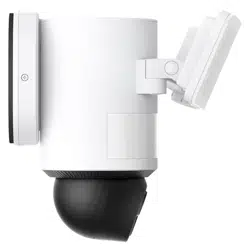
Floodlight Cam E340
Anker Innovations Limited. All rights reserved. eufy Security and eufy Security Logo are
trademarks of Anker Innovations Limited, registered in the United States and other
countries. All other trademarks are the property of their respective owners.
51005004126 V2

01
SAFETY INSTRUCTIONS
• Check your local laws for installation. If you are outside of North
America, installation and wiring must be performed by a licensed
electrician.
• This manual is for informational purposes only. Working with electricity
can be dangerous, so it's important to take proper safety precautions.
Hire a licensed electrician if you are not comfortable or inexperienced
with the processes and tools described.
• Disconnect power at the fuse or circuit breaker before installation.
• Do not install the product near flammable surfaces.
• To avoid the risk of shock, injury, or death, always be cautious when
working with electricity.
• Make sure the floodlight camera is properly grounded.
• The floodlight camera must be mounted on a wall and on a UL-listed
junction box.
• Vérifiez les lois locales pour l'installation. Si vous êtes en dehors de
l'Amérique du Nord, l'installation et le câblage doivent être effectués
par un électricien agréé.
• Ce manuel est à titre informatif seulement. Travailler avec l'électricité
peut être dangereux, il est donc important de prendre les précautions
de sécurité appropriées. Engagez un électricien agréé si vous n'êtes pas
à l'aise ou inexpérimenté avec les processus et les outils décrits.
• Déconnectez l'alimentation au fusible ou au disjoncteur avant
l'installation.
• Ne pas installer le produit près de surfaces inflammables.
• Pour éviter le risque de choc, de blessure ou de décès, soyez toujours
prudent lorsque vous travaillez avec l'électricité.
• Assurez-vous que la caméra de projecteur est correctement mise à la
terre.
• La caméra de projecteur doit être montée sur un mur et sur une boîte
de jonction homologuée UL.
0302
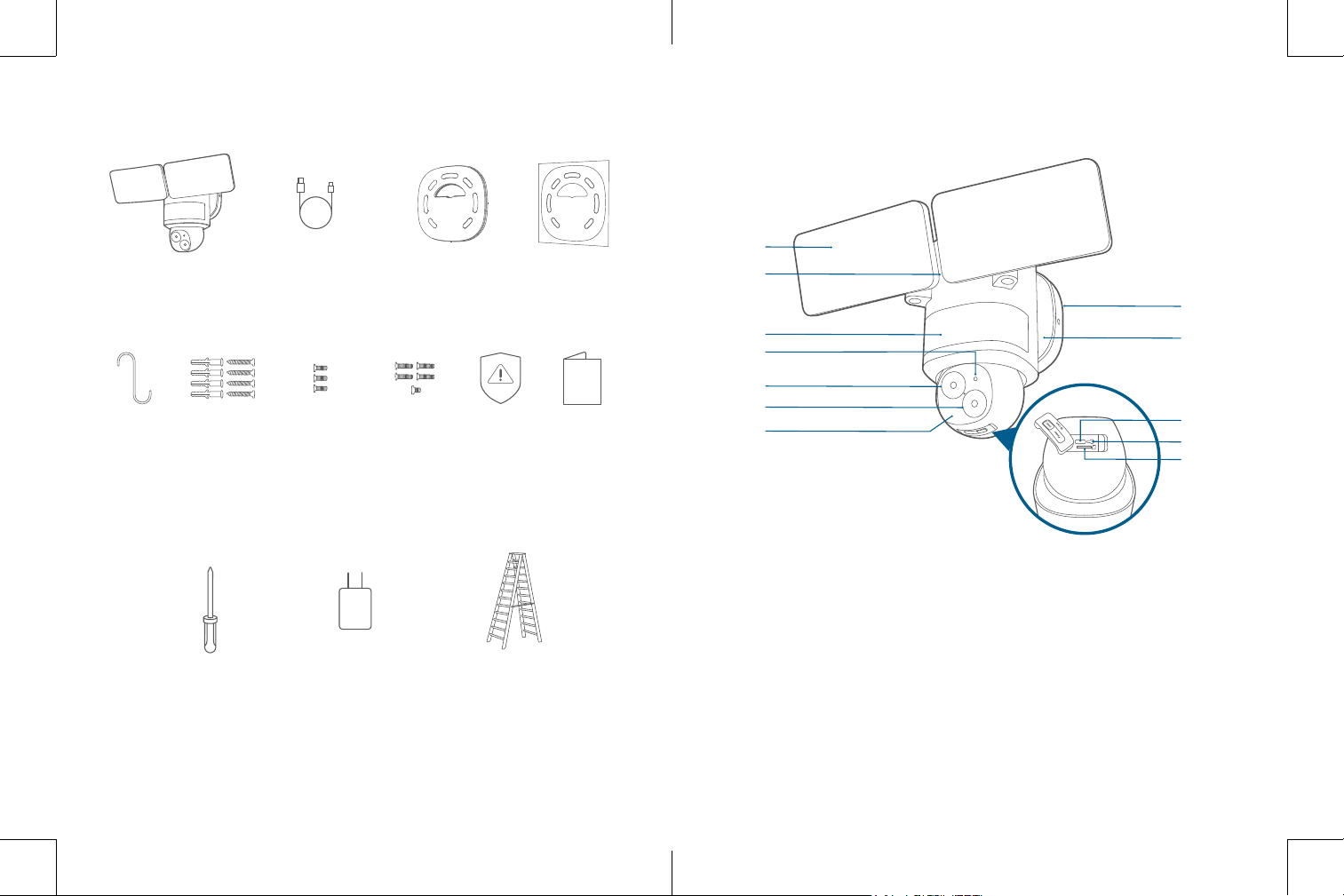
AT A GLANCE
⑩
⑧
⑦
④
⑪
①
②
③
⑤
⑥
⑫
⑨
SYNC
①
Floodlight
⑧
Power Input (For Quick Setup)
②
Speaker
⑨
SYNC Button
③
Motion Sensor Component
⑩
microSD Card Slot
④
System Indicator
Insert a microSD card* (not provided) to
store recordings
⑤
Telephoto Camera
⑥
Wide Angle Camera
⑪
Mounting Bracket
⑦
Infrared Component
⑫
Mounting Base
*Use at least a Class 10 microSD card with a maximum of 128 GB.
WHAT'S IN THE BOX
Floodlight Cam E340
Model: T8425
USB Cable
(For Quick Setup Only)
Mounting Bracket
(Pre-installed on
Camera)
Positioning
Sticker
Installation
Hook
Wall Screws
(Bag A)
Base Screws
(Bag B)
Bracket and
Earth Screws
(Bag C)
Warning
Sticker
Quick Start
Guide
WHAT YOU NEED (Not Provided)
#2 or #1 Phillips
Crosshead Screwdriver
5V/1A USB
Power Adapter
Ladder
(If necessary)
0302
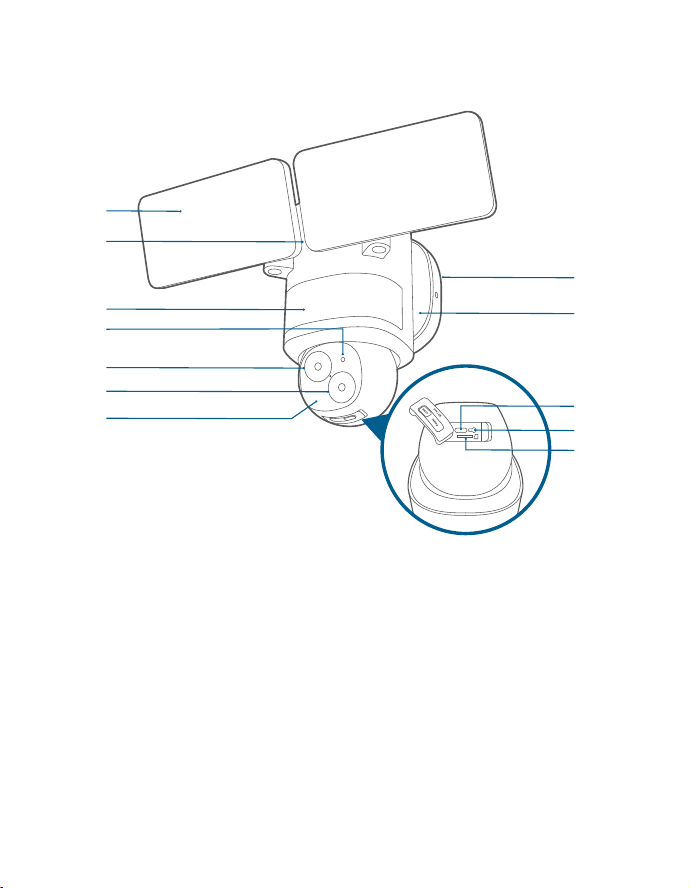
AT A GLANCE
⑩
⑧
⑦
④
⑪
①
②
③
⑤
⑥
⑫
⑨
SYNC
①
Floodlight
⑧
Power Input (For Quick Setup)
②
Speaker
⑨
SYNC Button
③
Motion Sensor Component
⑩
microSD Card Slot
④
System Indicator
Insert a microSD card* (not provided) to
store recordings
⑤
Telephoto Camera
⑥
Wide Angle Camera
⑪
Mounting Bracket
⑦
Infrared Component
⑫
Mounting Base
*Use at least a Class 10 microSD card with a maximum of 128 GB.
WHAT'S IN THE BOX
Floodlight Cam E340
Model: T8425
USB Cable
(For Quick Setup Only)
Mounting Bracket
(Pre-installed on
Camera)
Positioning
Sticker
Installation
Hook
Wall Screws
(Bag A)
Base Screws
(Bag B)
Bracket and
Earth Screws
(Bag C)
Warning
Sticker
Quick Start
Guide
WHAT YOU NEED (Not Provided)
#2 or #1 Phillips
Crosshead Screwdriver
5V/1A USB
Power Adapter
Ladder
(If necessary)
0504
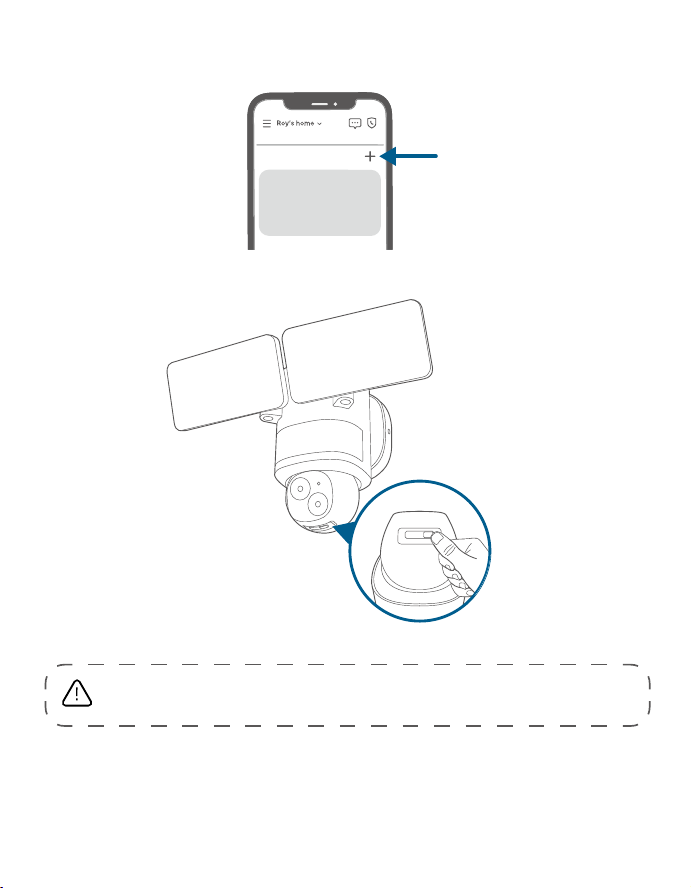
3. Tap + in the app and follow the in-app instructions to add the
camera.
My Devices
4. Disconnect from the power adapter, then close the USB port cover.
SYNCPower
SD Card
Shut power off at the
breaker
If you don’t know where your
breaker is or how to turn off
power to your floodlight circuit,
consult with a licensed electrician.
SETTING UP THE SYSTEM
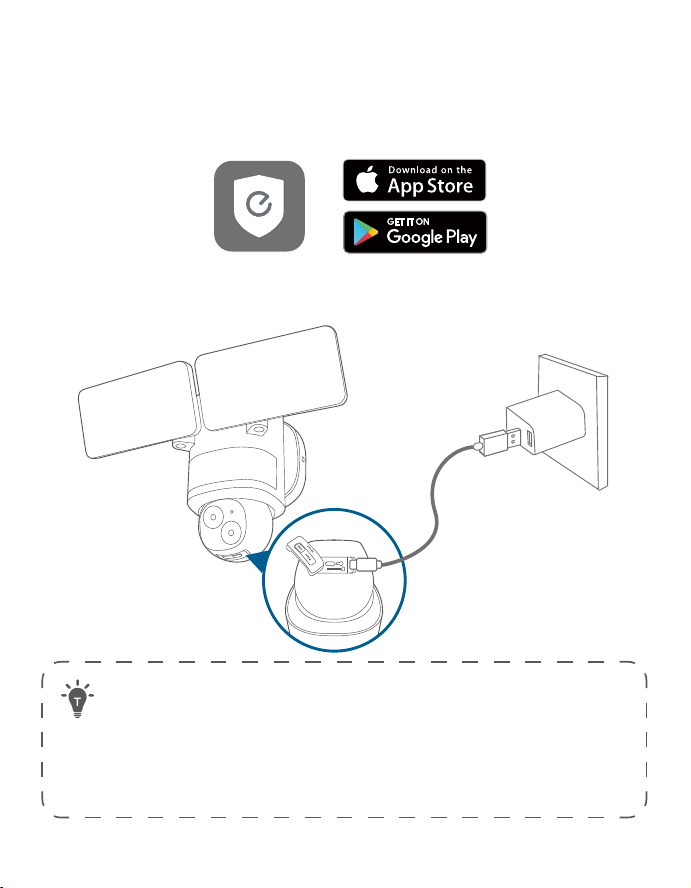
1. Download and install the eufy Security app, then sign in or create an
account.
2. Power on the floodlight camera by using the USB-C charging cable and
a power adapter (5V/1A, not provided).
SYNC
The USB port cover must be closed to prevent water from entering the
floodlight camera.
• To avoid scratching the floodlight camera, do not peel off the
protective film for the time being.
• The floodlights will only light up when in wired power mode. The USB-
powered connection is used for setting up the camera safely inside
your home.
• Make sure you can stream video from your floodlight camera BEFORE
INSTALLATION.
0504
3. Tap + in the app and follow the in-app instructions to add the
camera.
My Devices
4. Disconnect from the power adapter, then close the USB port cover.
SYNCPower
SD Card
Shut power off at the
breaker
If you don’t know where your
breaker is or how to turn off
power to your floodlight circuit,
consult with a licensed electrician.
SETTING UP THE SYSTEM
1. Download and install the eufy Security app, then sign in or create an
account.
2. Power on the floodlight camera by using the USB-C charging cable and
a power adapter (5V/1A, not provided).
SYNC
The USB port cover must be closed to prevent water from entering the
floodlight camera.
• To avoid scratching the floodlight camera, do not peel off the
protective film for the time being.
• The floodlights will only light up when in wired power mode. The USB-
powered connection is used for setting up the camera safely inside
your home.
• Make sure you can stream video from your floodlight camera BEFORE
INSTALLATION.
0706
PREPARING FOR
INSTALLATION (IMPORTANT)
Check local laws for installation
If you are outside of North America, installation and wiring must be
performed by a licensed electrician. Always follow code standards when
installing wired connections.
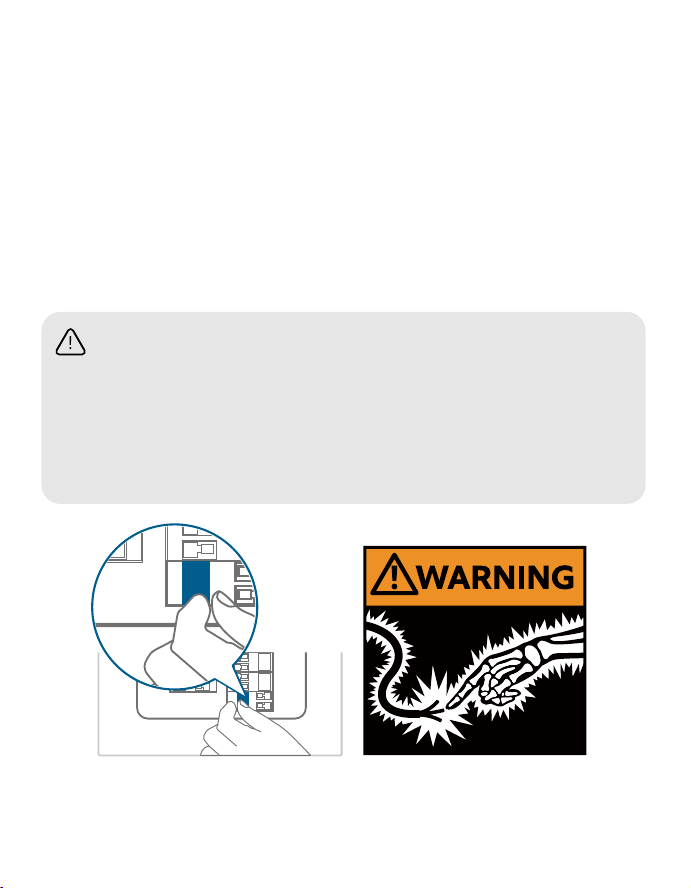
Shut Power Off at the Breaker
OFF
OFF
WARNING:
electrical shock
•
•
• Properly ground fixture.
• Always follow code standards when installing wired
connections.
• If you are outside of North America, installation and
wiring must be performed by a licensed electrician.
Shut power off at the
If you don’t know where your
breaker is or how to turn off
power to your floodlight circuit,
consult with a licensed electrician.
Risk of Electrical Shock
• Turn off the power at your circuit breaker or fuse box before
continuing, consult with a licensed electrician if needed.
• Switch on/off the lights to make sure the electricity to the installation
area is shut off.
• Verify that the power supply is a 100~240 VAC 50/60 Hz power source.
• Keep the breaker off at any time during the installation process.
NOTE: Do not use a dimmer switch or timer for this product.
INSTALLING YOUR
FLOODLIGHT CAMERA
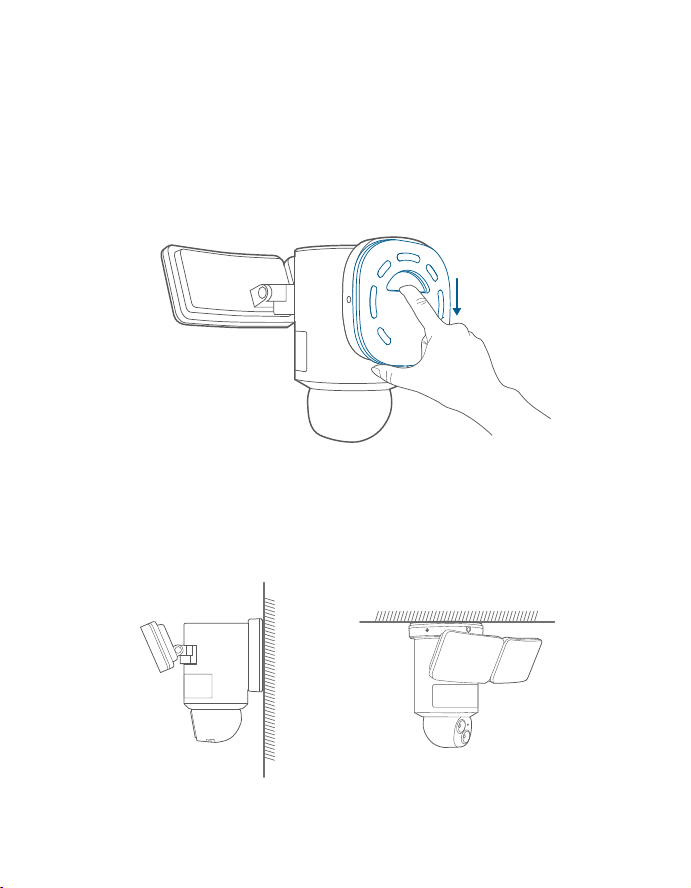
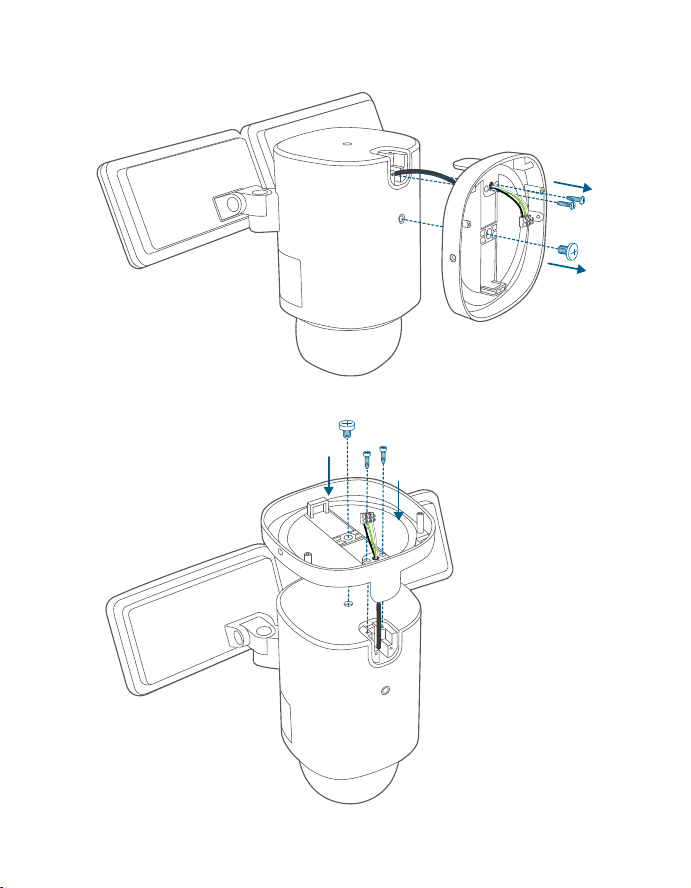
Separate the Mounting Bracket
Separate the mounting bracket from the camera and set it aside for later
installation.
Select a Location
You can mount the floodlight camera vertically on a wall or hang it from a
ceiling. With the power off at the breaker, remove the existing floodlight
if you have one.
WARNING: Risk of
electrical shock
Disconnect power at the
fuse or circuit breaker
before installing.
Verify that the supply
voltage is correct.
Connect fixture to a 100
VAC~240 VAC 50/60 Hz
power source.
Always follow code standards when installing wired
If you are outside of North America, installation and
wiring must be performed by a licensed electrician.
Wall Mounting Overhang Mounting
0706
PREPARING FOR
INSTALLATION (IMPORTANT)
Check local laws for installation
If you are outside of North America, installation and wiring must be
performed by a licensed electrician. Always follow code standards when
installing wired connections.
Shut Power Off at the Breaker
OFF
OFF
WARNING:
electrical shock
•
•
• Properly ground fixture.
• Always follow code standards when installing wired
connections.
• If you are outside of North America, installation and
wiring must be performed by a licensed electrician.
Shut power off at the
If you don’t know where your
breaker is or how to turn off
power to your floodlight circuit,
consult with a licensed electrician.
Risk of Electrical Shock
• Turn off the power at your circuit breaker or fuse box before
continuing, consult with a licensed electrician if needed.
• Switch on/off the lights to make sure the electricity to the installation
area is shut off.
• Verify that the power supply is a 100~240 VAC 50/60 Hz power source.
• Keep the breaker off at any time during the installation process.
NOTE: Do not use a dimmer switch or timer for this product.
INSTALLING YOUR
FLOODLIGHT CAMERA
Separate the Mounting Bracket
Separate the mounting bracket from the camera and set it aside for later
installation.
Select a Location
You can mount the floodlight camera vertically on a wall or hang it from a
ceiling. With the power off at the breaker, remove the existing floodlight
if you have one.
WARNING: Risk of
electrical shock
Disconnect power at the
fuse or circuit breaker
before installing.
Verify that the supply
voltage is correct.
Connect fixture to a 100
VAC~240 VAC 50/60 Hz
power source.
Always follow code standards when installing wired
If you are outside of North America, installation and
wiring must be performed by a licensed electrician.
Wall Mounting Overhang Mounting
0908
For overhang mounting, reinstall the mounting base first.
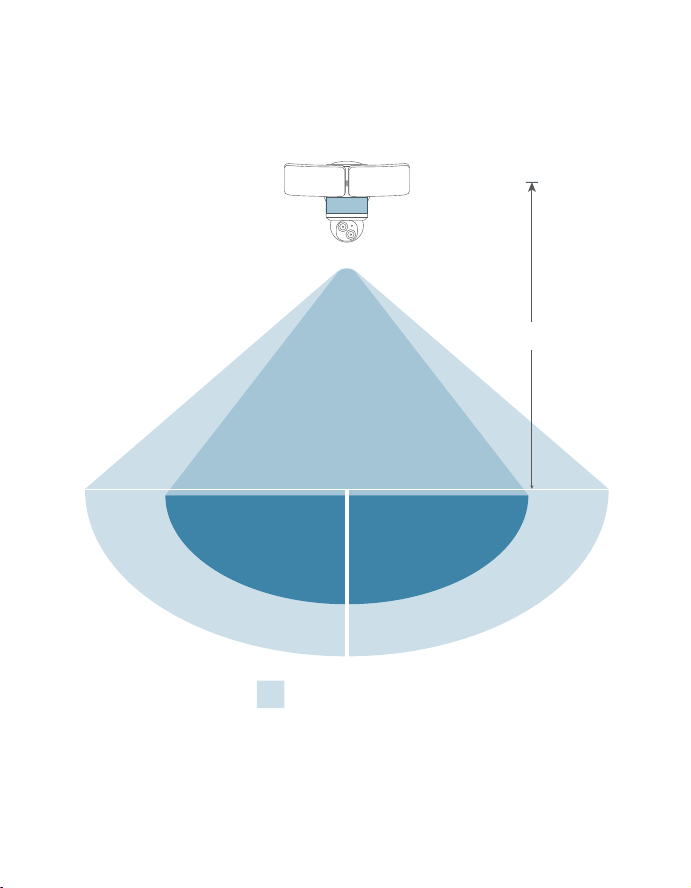
Recommended Height
We recommend mounting the camera 8 ft (2.44 m) above the ground
to achieve up to 40 ft (12 m) of motion detection range.
Up to 40 ft (12 m)
8 ft (2.44 m)
0908
For overhang mounting, reinstall the mounting base first.
Recommended Height
We recommend mounting the camera 8 ft (2.44 m) above the ground
to achieve up to 40 ft (12 m) of motion detection range.
Up to 40 ft (12 m)
8 ft (2.44 m)
1110
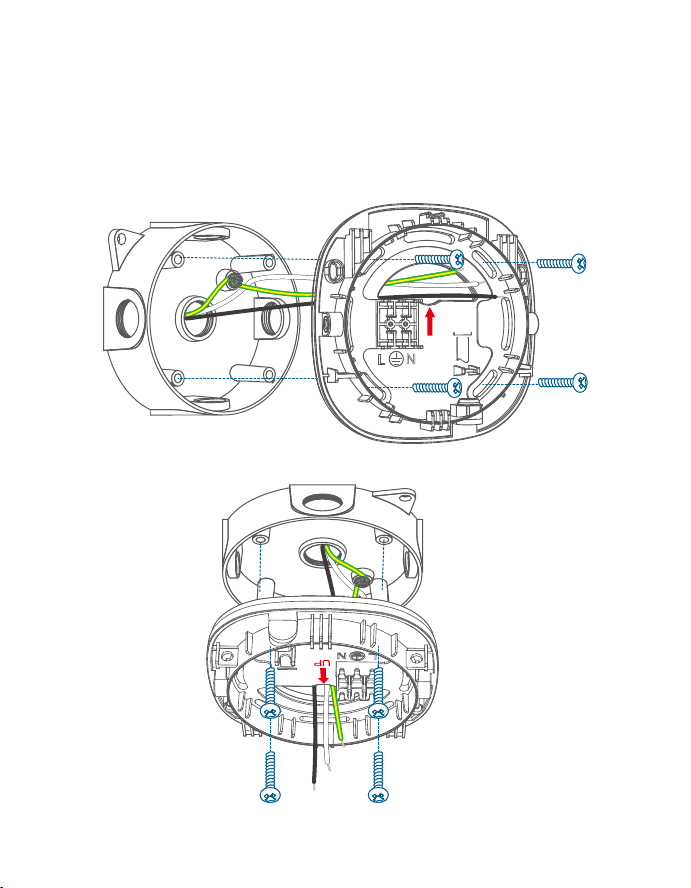
Install the Mounting Bracket
1. Run the existing wires through the hole of the junction box.
2. Hold the mounting bracket onto the junction box, align the screw
holes, remove the foam from the holes, then secure the mounting
bracket on the wall or ceiling with the Bracket Screws (Bag C).
Wall Mounting
UP
Overhang Mounting
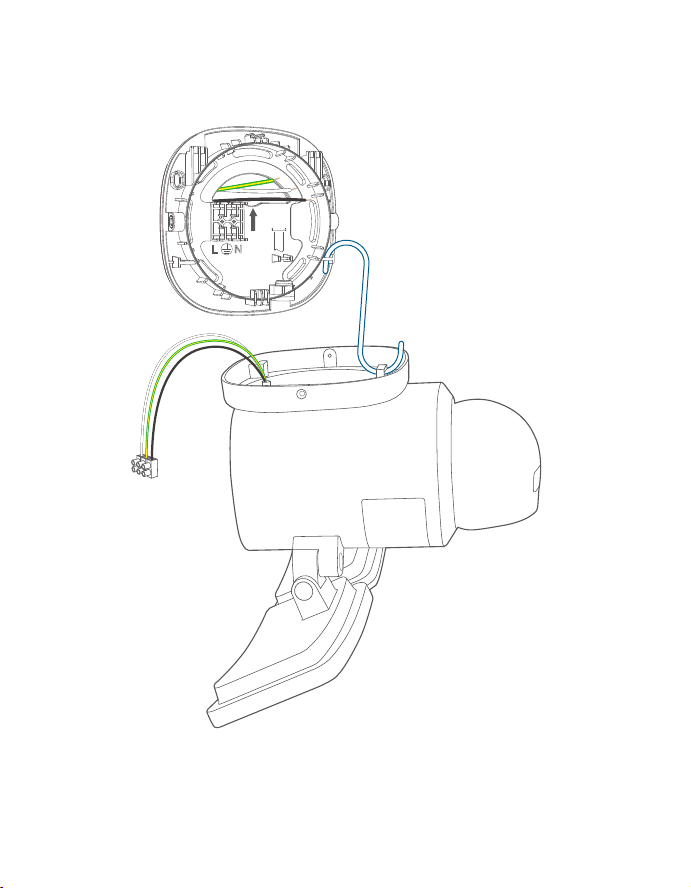
Connect Wires
1. Hang your camera on the bracket with the provided hook while
connecting the wires.
UP
1110
Install the Mounting Bracket
1. Run the existing wires through the hole of the junction box.
2. Hold the mounting bracket onto the junction box, align the screw
holes, remove the foam from the holes, then secure the mounting
bracket on the wall or ceiling with the Bracket Screws (Bag C).
Wall Mounting
UP
Overhang Mounting
Connect Wires
1. Hang your camera on the bracket with the provided hook while
connecting the wires.
UP
1312
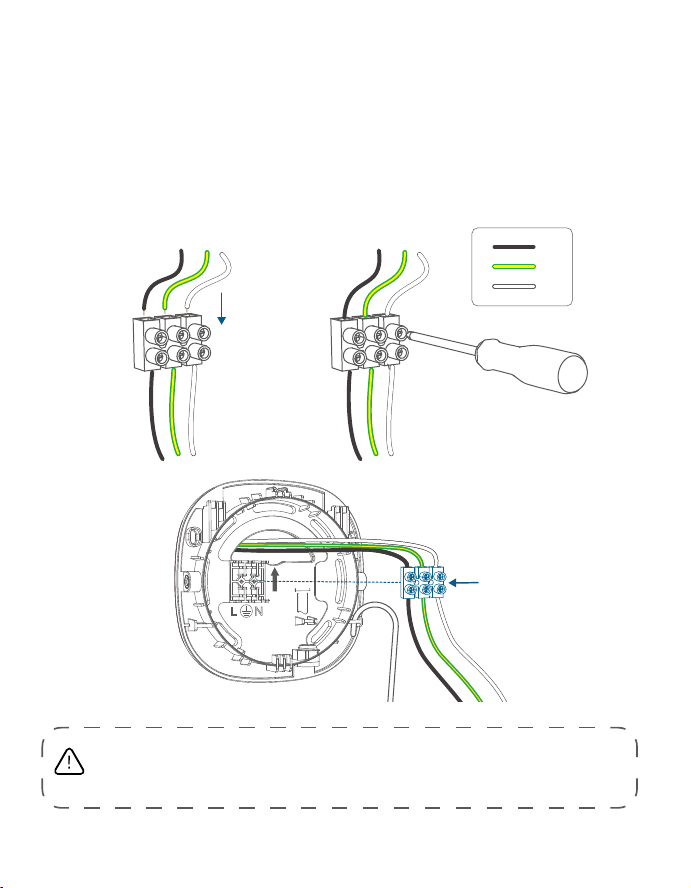
2. Separately connect the junction box's ground wire (bare copper /
green / green & yellow), live wire (black), and neutral wire (white) to
the floodlight camera's ground wire (green & yellow), live wire (black),
and neutral wire (white) using wire connectors, then secure the
connections with a screwdriver.
• If the existing ground wire has been connected to the junction
box, or if there is no ground wire, connect the floodlight camera's
ground wire directly to the junction box or mounting plate.
UP
① ②
③
L
G
N
Never cross-connect. The wires must be connected with matching colors.
If you have problems with the proper operation of the floodlight camera,
consult a licensed technician.
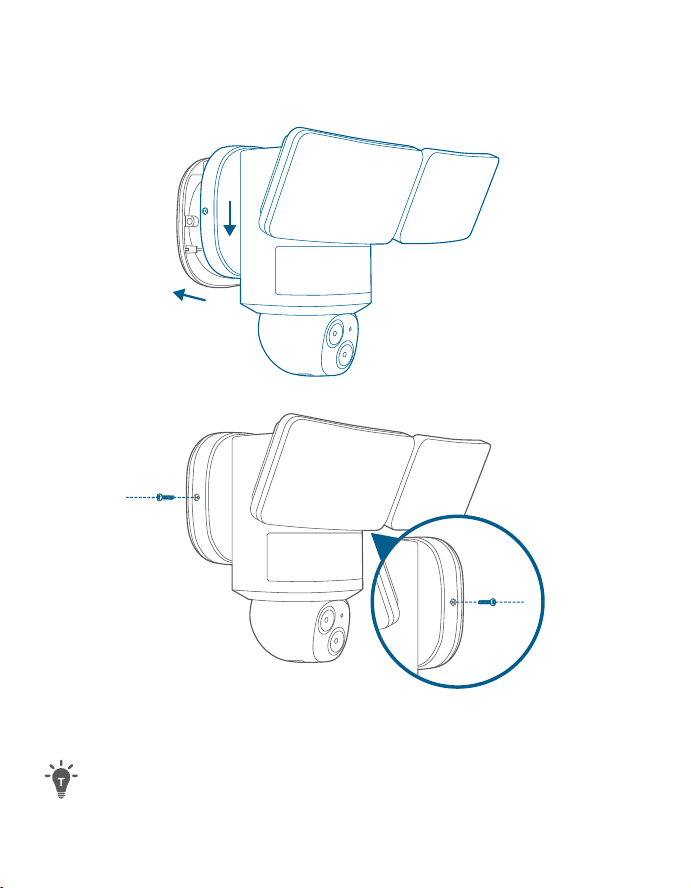
Place the Camera on the Mounting Bracket
1. Remove the hook, snap the mounting base onto the mounting
bracket, align the holes, and secure it with 2 Base Screws (Bag B).
②
①
②
①
2. Remove the label and protective film from the floodlight.
Clean the camera with a lens cleaning cloth.
1312
2. Separately connect the junction box's ground wire (bare copper /
green / green & yellow), live wire (black), and neutral wire (white) to
the floodlight camera's ground wire (green & yellow), live wire (black),
and neutral wire (white) using wire connectors, then secure the
connections with a screwdriver.
• If the existing ground wire has been connected to the junction
box, or if there is no ground wire, connect the floodlight camera's
ground wire directly to the junction box or mounting plate.
UP
① ②
③
L
G
N
Never cross-connect. The wires must be connected with matching colors.
If you have problems with the proper operation of the floodlight camera,
consult a licensed technician.
Place the Camera on the Mounting Bracket
1. Remove the hook, snap the mounting base onto the mounting
bracket, align the holes, and secure it with 2 Base Screws (Bag B).
②
①
②
①
2. Remove the label and protective film from the floodlight.
Clean the camera with a lens cleaning cloth.
1514
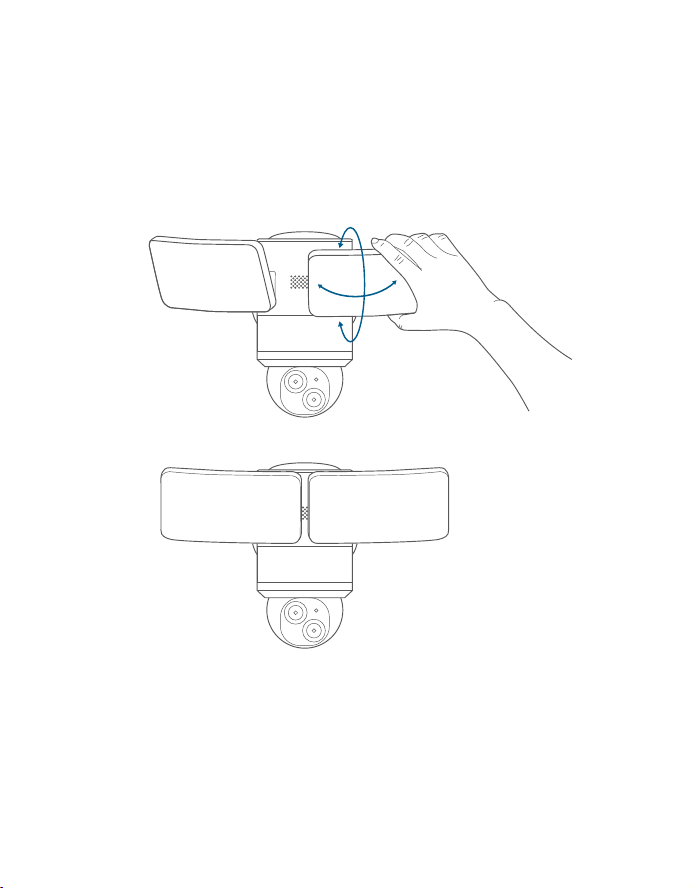
ADJUSTING THE LIGHTING
ANGLE
Manually pull up and down or left and right to adjust the floodlight
vertically or horizontally.
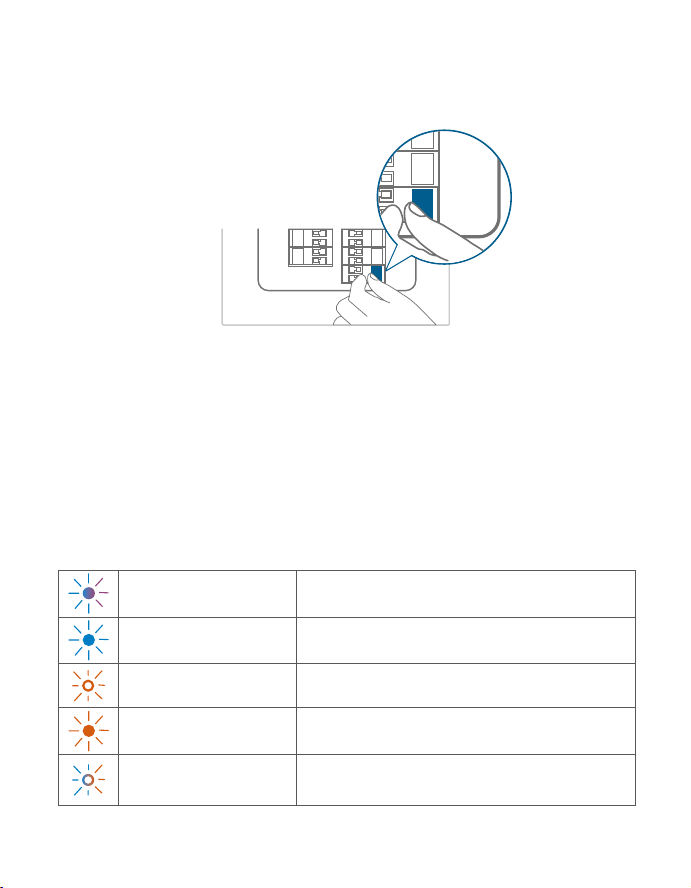
RESTORING POWER
1. Switch on the main circuit breaker in the house.
ON
ON
In case the floodlight camera is not powered on, switch off the circuit
breaker before checking the wiring of the floodlight camera.
2. Now you can access various features and change settings in the
eufy Security app.
For troubleshooting, check the Help section in the eufy Security app.
LED LIGHT GUIDE
Solid Violet System is initializing
Solid Blue Working normally or ready for setup
Blinking Red Not connected to the internet
Solid Red Recording or the live stream is being viewed
Flashing Blue and Red
Firmware upgrade in progress
Note: Keep the camera connected to a power source
1514
ADJUSTING THE LIGHTING
ANGLE
Manually pull up and down or left and right to adjust the floodlight
vertically or horizontally.
RESTORING POWER
1. Switch on the main circuit breaker in the house.
ON
ON
In case the floodlight camera is not powered on, switch off the circuit
breaker before checking the wiring of the floodlight camera.
2. Now you can access various features and change settings in the
eufy Security app.
For troubleshooting, check the Help section in the eufy Security app.
LED LIGHT GUIDE
Solid Violet System is initializing
Solid Blue Working normally or ready for setup
Blinking Red Not connected to the internet
Solid Red Recording or the live stream is being viewed
Flashing Blue and Red
Firmware upgrade in progress
Note: Keep the camera connected to a power source

1716
SAFETY INSTRUCTIONS
• This equipment is not suitable for use in locations where
children are likely to be present. This equipment is not intended
for use by children.
• CET ÉQUIPEMENT NE CONVIENT PAS À UNE UTILISATION
DANS DES ENDROITS OÙ DES ENFANTS SONT SUSCEPTIBLES
D’ÊTRE PRÉSENTS. CET ÉQUIPEMENT N’EST PAS DESTINÉ À ÊTRE
UTILISÉ PAR DES ENFANTS.
• Do not use the product in any way other than described herein
in order to avoid personal injury or property damage.
• N’utilisez pas le produit d’une autre manière que celle décrite
dans les présentes afin d’éviter des blessures corporelles ou
des dommages matériels.
• User should comply with the laws and regulations of the
corresponding countries and regions where the equipment is
located (used), abide by professional ethics, pay attention to
safety obligations, and strictly prohibit the use of our products
or equipment for any illegal purposes. Our company will
not be responsible for any violators' legal liability under any
circumstances.
• L’utilisateur doit se conformer aux lois et réglementations
des pays et régions correspondants où l’équipement est situé
(utilisé), respecter l’éthique professionnelle, prêter attention
aux obligations de sécurité et interdire strictement l’utilisation
de nos produits ou équipements à des fins illégales. Notre
société ne sera en aucun cas responsable de la responsabilité
légale des contrevenants.
• An appropriate disconnect device shall be provided as part of
the building installation
• An all-pole mains switch in accordance with Annex L shall be
incorporated in the electrical installation of the building
• Un dispositif de déconnexion approprié doit être prévu dans le
cadre de l’installation du bâtiment.
• Un interrupteur secteur tous pôles conforme à l’annexe L est
incorporé dans l’installation électrique du bâtiment
• The luminaire internded to be mounted on or over an outlet
box and shall be provided with supply conductors long enough
to extend 150mm(6 in) into the outlet box.
• Le luminaire doit être monté sur ou au-dessus d'une boîte de
sortie et doit être fourni avec des conducteurs d'alimentation
suffisamment longs pour s'étendre de 150mm (6po) dans la
boîte de sortie.
•
Caution, risk of electric shock
• Attention, risque de choc électrique
THIS PRODUCT MUST BE INSTALLED IN ACCORDANCE
WITH THE APPLICABLE INSTALLATION CODE BY A
PERSON FAMILIAR WITH THE CONSTRUCTION AND
OPERATION OF THE PRODUCT AND THE HAZARDS
INVOLVED
CE PRODUIT DOIT ÊTRE INSTALLÉ SELON LE CODE
D’INSTALLATION PERTINENT, PAR UNE PERSONNE QUI
CONNAÎT BIEN LE PRODUIT ET SON FONCTIONNEMENT
AINSI QUE LES RISQUES INHÉRENTS
MIN 90°C SUPPLY CONDUCTORS
LES FILS D’ALIMENTATION 90°C MIN
1716
SAFETY INSTRUCTIONS
• This equipment is not suitable for use in locations where
children are likely to be present. This equipment is not intended
for use by children.
• CET ÉQUIPEMENT NE CONVIENT PAS À UNE UTILISATION
DANS DES ENDROITS OÙ DES ENFANTS SONT SUSCEPTIBLES
D’ÊTRE PRÉSENTS. CET ÉQUIPEMENT N’EST PAS DESTINÉ À ÊTRE
UTILISÉ PAR DES ENFANTS.
• Do not use the product in any way other than described herein
in order to avoid personal injury or property damage.
• N’utilisez pas le produit d’une autre manière que celle décrite
dans les présentes afin d’éviter des blessures corporelles ou
des dommages matériels.
• User should comply with the laws and regulations of the
corresponding countries and regions where the equipment is
located (used), abide by professional ethics, pay attention to
safety obligations, and strictly prohibit the use of our products
or equipment for any illegal purposes. Our company will
not be responsible for any violators' legal liability under any
circumstances.
• L’utilisateur doit se conformer aux lois et réglementations
des pays et régions correspondants où l’équipement est situé
(utilisé), respecter l’éthique professionnelle, prêter attention
aux obligations de sécurité et interdire strictement l’utilisation
de nos produits ou équipements à des fins illégales. Notre
société ne sera en aucun cas responsable de la responsabilité
légale des contrevenants.
• An appropriate disconnect device shall be provided as part of
the building installation
• An all-pole mains switch in accordance with Annex L shall be
incorporated in the electrical installation of the building
• Un dispositif de déconnexion approprié doit être prévu dans le
cadre de l’installation du bâtiment.
• Un interrupteur secteur tous pôles conforme à l’annexe L est
incorporé dans l’installation électrique du bâtiment
• The luminaire internded to be mounted on or over an outlet
box and shall be provided with supply conductors long enough
to extend 150mm(6 in) into the outlet box.
• Le luminaire doit être monté sur ou au-dessus d'une boîte de
sortie et doit être fourni avec des conducteurs d'alimentation
suffisamment longs pour s'étendre de 150mm (6po) dans la
boîte de sortie.
•
Caution, risk of electric shock
• Attention, risque de choc électrique
THIS PRODUCT MUST BE INSTALLED IN ACCORDANCE
WITH THE APPLICABLE INSTALLATION CODE BY A
PERSON FAMILIAR WITH THE CONSTRUCTION AND
OPERATION OF THE PRODUCT AND THE HAZARDS
INVOLVED
CE PRODUIT DOIT ÊTRE INSTALLÉ SELON LE CODE
D’INSTALLATION PERTINENT, PAR UNE PERSONNE QUI
CONNAÎT BIEN LE PRODUIT ET SON FONCTIONNEMENT
AINSI QUE LES RISQUES INHÉRENTS
MIN 90°C SUPPLY CONDUCTORS
LES FILS D’ALIMENTATION 90°C MIN

1918
NOTICE
NOTICE (United States of America)
FCC Statement
This device complies with Part 15 of the FCC Rules. Operation is subject to the
following two conditions: (1) this device may not cause harmful interference,
and (2) this device must accept any interference received, including interference
that may cause undesired operation.
Warning: Changes or modifications not expressly approved by the party
responsible for compliance could void the user's authority to operate the
equipment.
Note: This equipment has been tested and found to comply with the limits for
a Class B digital device, pursuant to Part 15 of the FCC Rules. These limits are
designed to provide reasonable protection against harmful interference in a
residential installation.
This equipment generates uses and can radiate radio frequency energy and, if
not installed and used in accordance with the instructions, may cause harmful
interference to radio communications. However, there is no guarantee that
interference will not occur in a particular installation. If this equipment does
cause harmful interference to radio or television reception, which can be
determined by turning the equipment off and on, the user is encouraged to
try to correct the interference by one or more of the following measures: (1)
Reorient or relocate the receiving antenna. (2) Increase the separation between
the equipment and receiver. (3) Connect the equipment into an outlet on a
circuit different from that to which the receiver is connected. (4) Consult the
dealer or an experienced radio/TV technician for help.
FCC Radio Frequency Exposure Statement
The device has been evaluated to meet general RF exposure requirements. The
device can be used in fixed/mobile exposure condition. The min separation
distance is 20cm.
Notice: Shielded cables
All connections to other computing devices must be made using shielded
cables to maintain compliance with FCC regulations.
The following importer is the responsible party
Company Name: POWER MOBILE LIFE, LLC
Address: 10900 NE 8th St, Ste 501, Bellevue WA 98004
Telephone:1-800-988-7973
NOTICE (Canada)
IC Statement
This device complies with Industry Canada licence-exempt RSS standard(s).
Operation is subject to the following two conditions:
(1)this device may not cause interference, and
(2)this device must accept any interference, including interference that may cause
undesired operation of the device.
Le présent appareil est conforme aux CNR d'Industrie Canada applicables aux
appareils radio exempts de licence. L'exploitation est autorisée aux deux conditions
suivantes:
(1)l'appareil nedoit pas produire de brouillage, et
(2)l'utilisateur de l'appareil doit accepter tout brouillage radioélectrique subi, même
si le brouillage est susceptible d'en compromettre le fonctionnement.
This Class B digital apparatus complies with Canadian ICES-003.
Cet appareil numérique de la classe B est conforme à la norme NMB-003 du
Canada.
IC RF Statement
When using the product, maintain a distance of 20cm from the body to ensure
compliance with RF exposure requirements.
Lors de l'utilisation du produit, maintenez une distance de 20 cm du corps afin de
vous conformer aux exigences en matière d'exposition RF.
5150~5250 MHz can be used indoor only.
5150~5250 MHz peut être utilisé à l'intérieur uniquement.

1918
NOTICE
NOTICE (United States of America)
FCC Statement
This device complies with Part 15 of the FCC Rules. Operation is subject to the
following two conditions: (1) this device may not cause harmful interference,
and (2) this device must accept any interference received, including interference
that may cause undesired operation.
Warning: Changes or modifications not expressly approved by the party
responsible for compliance could void the user's authority to operate the
equipment.
Note: This equipment has been tested and found to comply with the limits for
a Class B digital device, pursuant to Part 15 of the FCC Rules. These limits are
designed to provide reasonable protection against harmful interference in a
residential installation.
This equipment generates uses and can radiate radio frequency energy and, if
not installed and used in accordance with the instructions, may cause harmful
interference to radio communications. However, there is no guarantee that
interference will not occur in a particular installation. If this equipment does
cause harmful interference to radio or television reception, which can be
determined by turning the equipment off and on, the user is encouraged to
try to correct the interference by one or more of the following measures: (1)
Reorient or relocate the receiving antenna. (2) Increase the separation between
the equipment and receiver. (3) Connect the equipment into an outlet on a
circuit different from that to which the receiver is connected. (4) Consult the
dealer or an experienced radio/TV technician for help.
FCC Radio Frequency Exposure Statement
The device has been evaluated to meet general RF exposure requirements. The
device can be used in fixed/mobile exposure condition. The min separation
distance is 20cm.
Notice: Shielded cables
All connections to other computing devices must be made using shielded
cables to maintain compliance with FCC regulations.
The following importer is the responsible party
Company Name: POWER MOBILE LIFE, LLC
Address: 10900 NE 8th St, Ste 501, Bellevue WA 98004
Telephone:1-800-988-7973
NOTICE (Canada)
IC Statement
This device complies with Industry Canada licence-exempt RSS standard(s).
Operation is subject to the following two conditions:
(1)this device may not cause interference, and
(2)this device must accept any interference, including interference that may cause
undesired operation of the device.
Le présent appareil est conforme aux CNR d'Industrie Canada applicables aux
appareils radio exempts de licence. L'exploitation est autorisée aux deux conditions
suivantes:
(1)l'appareil nedoit pas produire de brouillage, et
(2)l'utilisateur de l'appareil doit accepter tout brouillage radioélectrique subi, même
si le brouillage est susceptible d'en compromettre le fonctionnement.
This Class B digital apparatus complies with Canadian ICES-003.
Cet appareil numérique de la classe B est conforme à la norme NMB-003 du
Canada.
IC RF Statement
When using the product, maintain a distance of 20cm from the body to ensure
compliance with RF exposure requirements.
Lors de l'utilisation du produit, maintenez une distance de 20 cm du corps afin de
vous conformer aux exigences en matière d'exposition RF.
5150~5250 MHz can be used indoor only.
5150~5250 MHz peut être utilisé à l'intérieur uniquement.

2120
NOTICE (Australia)
Do not use the Device in the environment at too high or too low temperature, never
expose the Device under strong sunshine or too wet environment.
The suitable temperature for the device and accessories is -20°C to 40°C.
It is recommended to supply the device in an environment with a temperature that
ranges from 5°C~25°C.
When supplying, please place the device in an environment that has a normal room
temperature and good ventilation.
Your product is designed and manufactured with high-quality materials
and components, which can be recycled and reused.
This symbol means the product must not be discarded as household
waste and should be delivered to an appropriate collection facility for
recycling. Proper disposal and recycling help protect natural resources,
human health, and the environment. For more information on the
disposal and recycling of this product, contact your local municipality,
disposal service, or the shop where you bought this product.
The Bluetooth® word mark and logos are registered trademarks
owned by the Bluetooth SIG, Inc. and any use of such marks by
Anker Innovations Limited is under license. Other trademarks and
trade names are those of their respective owners.
NOTICE (Europe and United Kingdom)
This product complies with the radio interference requirements
of the European Community.
Declaration of Conformity
Hereby, Anker Innovations Limited declares that this device is in compliance with
the essential requirements and other relevant provisions of Directive 2014/53/
EU.For the declaration of conformity, visit the Web site: https://uk.eufylife.com/
This product complies with the radio interference requirements of the United
Kingdom
This product complies with the radio interference requirements
of the United Kingdom.
Declaration of Conformity
Hereby, Anker Innovations Limited declares that this device is in compliance with
Radio Equipment Regulations 2017(SI 2017/1206). The full text of the UK declaration
of conformity is available at the following internet address: https://uk.eufylife.com/
Do not use the Device in the environment at too high or too low temperature, never
expose the Device under strong sunshine or too wet environment.
The suitable temperature for the device and accessories is -20°C to 40°C.
It is recommended to supply the device in an environment with a temperature that
ranges from 5°C~25°C.
When supplying, please place the device in an environment that has a normal room
temperature and good ventilation.
RF exposure information
The Maximum Permissible Exposure (MPE) level has been calculated based on
a distance of d=20 cm between the device and the human body. To maintain
compliance with RF exposure requirement, use product that maintain a 20cm
distance between the device and human body.
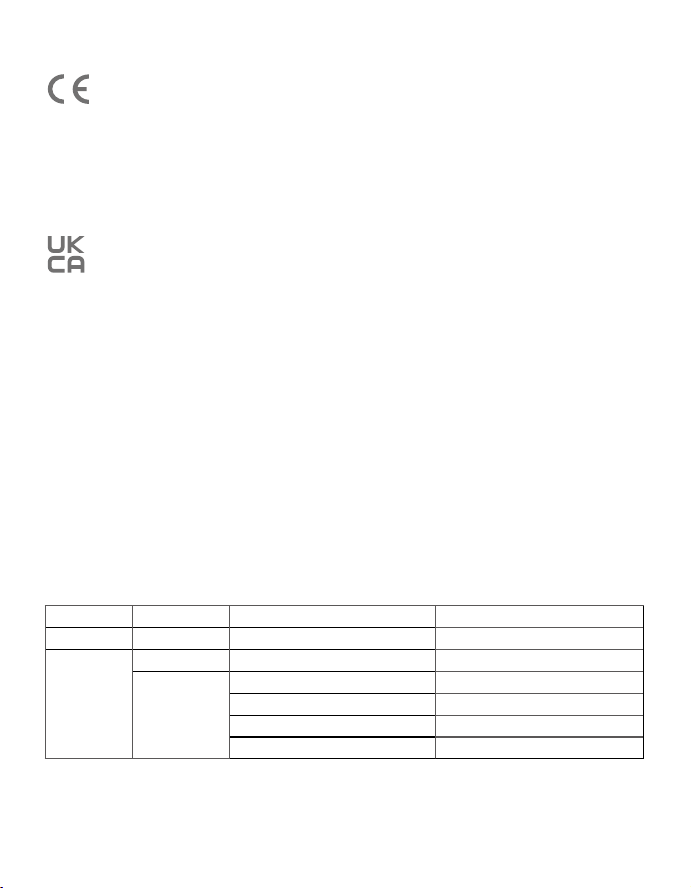
Frequency bands and power as below:
Function Bands Operation Frequency Max.Power
Bluetooth 2.4GHz 2402-2480 MHz EIRP 7.25 dBm
Wi-Fi
2.4GHz 2412-2472MHz EIRP 19.85 dBm
5GHz
5150-5250MHz EIRP 20.65 dBm
5250-5350MHz EIRP 19.57 dBm
5470-5725MHz EIRP 18.65 dBm
5725-5850MHz EIRP 13.95 dBm
2120
NOTICE (Australia)
Do not use the Device in the environment at too high or too low temperature, never
expose the Device under strong sunshine or too wet environment.
The suitable temperature for the device and accessories is -20°C to 40°C.
It is recommended to supply the device in an environment with a temperature that
ranges from 5°C~25°C.
When supplying, please place the device in an environment that has a normal room
temperature and good ventilation.
Your product is designed and manufactured with high-quality materials
and components, which can be recycled and reused.
This symbol means the product must not be discarded as household
waste and should be delivered to an appropriate collection facility for
recycling. Proper disposal and recycling help protect natural resources,
human health, and the environment. For more information on the
disposal and recycling of this product, contact your local municipality,
disposal service, or the shop where you bought this product.
The Bluetooth® word mark and logos are registered trademarks
owned by the Bluetooth SIG, Inc. and any use of such marks by
Anker Innovations Limited is under license. Other trademarks and
trade names are those of their respective owners.
NOTICE (Europe and United Kingdom)
This product complies with the radio interference requirements
of the European Community.
Declaration of Conformity
Hereby, Anker Innovations Limited declares that this device is in compliance with
the essential requirements and other relevant provisions of Directive 2014/53/
EU.For the declaration of conformity, visit the Web site: https://uk.eufylife.com/
This product complies with the radio interference requirements of the United
Kingdom
This product complies with the radio interference requirements
of the United Kingdom.
Declaration of Conformity
Hereby, Anker Innovations Limited declares that this device is in compliance with
Radio Equipment Regulations 2017(SI 2017/1206). The full text of the UK declaration
of conformity is available at the following internet address: https://uk.eufylife.com/
Do not use the Device in the environment at too high or too low temperature, never
expose the Device under strong sunshine or too wet environment.
The suitable temperature for the device and accessories is -20°C to 40°C.
It is recommended to supply the device in an environment with a temperature that
ranges from 5°C~25°C.
When supplying, please place the device in an environment that has a normal room
temperature and good ventilation.
RF exposure information
The Maximum Permissible Exposure (MPE) level has been calculated based on
a distance of d=20 cm between the device and the human body. To maintain
compliance with RF exposure requirement, use product that maintain a 20cm
distance between the device and human body.
Frequency bands and power as below:
Function Bands Operation Frequency Max.Power
Bluetooth 2.4GHz 2402-2480 MHz EIRP 7.25 dBm
Wi-Fi
2.4GHz 2412-2472MHz EIRP 19.85 dBm
5GHz
5150-5250MHz EIRP 20.65 dBm
5250-5350MHz EIRP 19.57 dBm
5470-5725MHz EIRP 18.65 dBm
5725-5850MHz EIRP 13.95 dBm
22
Customer Service
12-month limited warranty
(US) +1 (800) 988-7973
(UK) +44 (0) 1604 936200
(DE) +49 (0) 69 9579 7960
(
中国
) +86 400 0550 036
( 日本
) +81 03 4455 7823
(AU) +61 3 8331 4800
(Egypt) +20 8000000826
(UAE) +971 8000320817
(Kuwait) +965 22069086
(Saudi Arabia) +966 8008500030
Anker Innovations Limited
Room 1318-19, Hollywood Plaza, 610 Nathan Road, Mongkok,
Kowloon, Hong Kong
@EufyOfficial @EufyOfficial @EufyOfficial
5150~5350 MHz can be used indoor only.
The following importer is the responsible party (contract for EU matters):
Anker Innovations Deutschland GmbH I Georg-Muche-Strasse 3, 80807 Munich,
Germany
The following importer is the responsible party (contract for UK matters):
Anker Technology (UK) Limited | GNR8, 49 Clarendon Road, Watford,
Hertfordshire, WD17 1HP, United Kingdom
Your product is designed and manufactured with high-quality materials
and components, which can be recycled and reused.
This symbol means the product must not be discarded as household
waste and should be delivered to an appropriate collection facility for
recycling. Proper disposal and recycling help protect natural resources,
human health, and the environment. For more information on the
disposal and recycling of this product, contact your local municipality,
disposal service, or the shop where you bought this product.
22
Customer Service
12-month limited warranty
(US) +1 (800) 988-7973
(UK) +44 (0) 1604 936200
(DE) +49 (0) 69 9579 7960
(
中国
) +86 400 0550 036
( 日本
) +81 03 4455 7823
(AU) +61 3 8331 4800
(Egypt) +20 8000000826
(UAE) +971 8000320817
(Kuwait) +965 22069086
(Saudi Arabia) +966 8008500030
Anker Innovations Limited
Room 1318-19, Hollywood Plaza, 610 Nathan Road, Mongkok,
Kowloon, Hong Kong
@EufyOfficial @EufyOfficial @EufyOfficial
5150~5350 MHz can be used indoor only.
The following importer is the responsible party (contract for EU matters):
Anker Innovations Deutschland GmbH I Georg-Muche-Strasse 3, 80807 Munich,
Germany
The following importer is the responsible party (contract for UK matters):
Anker Technology (UK) Limited | GNR8, 49 Clarendon Road, Watford,
Hertfordshire, WD17 1HP, United Kingdom
Your product is designed and manufactured with high-quality materials
and components, which can be recycled and reused.
This symbol means the product must not be discarded as household
waste and should be delivered to an appropriate collection facility for
recycling. Proper disposal and recycling help protect natural resources,
human health, and the environment. For more information on the
disposal and recycling of this product, contact your local municipality,
disposal service, or the shop where you bought this product.

QUICK START GUIDE
Floodlight Cam E340
Anker Innovations Limited. All rights reserved. eufy Security and eufy Security Logo are
trademarks of Anker Innovations Limited, registered in the United States and other
countries. All other trademarks are the property of their respective owners.
51005004126 V2
