A Division of Snow Joe
®
, LLC Model iON100V-21SB-RM Form No. SJ-iON100V-21SB-RM-880E-V1
OPERATOR’S MANUAL
CORDLESS SNOW BLOWER
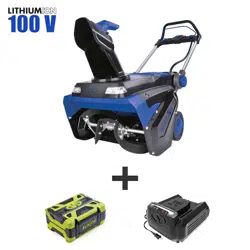
100-VOLT MAX* | 5.0 Ah | 21-INCH | LED LIGHTS
R
THANKS FOR YOUR PURCHASE
OF A REMANUFACTURED PRODUCT.
snowjoe.com
To make sure you get the most out of
your
product, be sure to register online at
to enjoy full product support.
PASTE UPC LABEL HERE

© 2020 by Snow Joe
®
, LLC
All rights reserved. Original instructions.
SAVE THESE INSTRUCTIONS
2
A Division of Snow Joe
®
, LLC
Model iON100V-21SB-RM Form No. SJ-iON100V-21SB-RM-880E-V1
OPERATOR’S MANUAL
CORDLESS SNOW BLOWER
100-VOLT MAX* | 5.0 Ah | 21-INCH | LED LIGHTS
R
IMPORTANT!
Safety Instructions
All Operators Must Read These
Instructions Before Use
Read all instructions when using cordless snow blowers.
Basic safety precautions should always be followed to reduce
the risk of re, electric shock, and personal injury.
General Safety Rules
Notice the personal safety alert symbol m used in this
manual to draw your attention to a WARNING given
along with the particular operating instruction. This
means that the operation requires special ATTENTION,
CAUTION, and AWARENESS.
• Keep work area clean and well lit – Cluttered, dark areas
invite accidents.
• Use the right product – Do not use this machine for any
job except that for which it is intended.
•
mCAUTION! – Exercise caution to avoid slipping or falling.
Wear protective footwear that will protect your feet and
improve your footing on slippery surfaces.
• Use safety glasses – Also use safety footwear, snug-tting
clothing, protective gloves, hearing and head protection.
• Stay alert – Watch what you are doing. Use common
sense. Do not operate the snow blower when you are tired
or under the inuence of alcohol or drugs.
• Store indoors – When not in use, the snow blower should
be kept dry and stored out of the reach of children in a high
or locked place.
• Maintain snow blower with care – Follow instructions for
lubricating and changing accessories.
mWARNING! Always disengage the switch bar lever,
and disconnect the battery pack; wait for all movement to
stop before making any adjustments, inspecting, servicing,
changing accessories, cleaning the snow blower, or when
any other dangerous conditions present. Any such operation
should be performed after revolving parts inside the snow
blower stop completely. Such preventive safety measures
reduce the risk of starting the power tool accidentally.
mWARNING! When replacing any parts, you must strictly
observe the instructions and procedures described in this user
manual. Special care should be paid to any rubber parts, since
these parts may increase the engine load and decrease its
mechanical power if damaged.
mWARNING! If you notice that the snow blower is not
running properly or hear abnormal sounds from the engine
when it is in use, immediately stop the machine, disconnect
the battery pack, and contact Snow Joe
®
+ Sun Joe
®
customer
service center at 1-866-SNOWJOE (1-866-766-9563).
• Moving parts present risks – Keep your face, hair,
clothing, hands, and feet away from moving parts. All
guards and safety attachments must be installed properly
before using the unit. Shut o and disconnect the battery
pack before touching any parts other than the handles
and switch.
For all Snow Blowers
• Do not use on graveled surfaces unless the snow blower is
adjusted for such a surface in accordance with the manual.
• Keep children away. All visitors should be kept a safe
distance from work area.
• Dress properly. Do not wear loose clothing or jewelry. They
can be caught in moving parts.
• Wear rubber boots when operating the snow blower.
• Operation of the snow blower in the hand-held position is
unsafe, except in accordance with the special instructions
for such use provided in the operator's manual.
• Avoid accidental starting – Make sure the safety button is
o and the switch bar lever is disengaged before inserting
the battery pack into the unit. Do not transport the
snow blower with the safety button and the switch bar
lever engaged.
• Keep hands away from moving parts.
• Keep guards in place and in working order.
• Do not force the snow blower. Use the snow blower at
the rate for which it was designed to ensure optimal
performance and safe operation.
• Do not overreach. Keep proper footing and balance at
all times.
mWARNING! If the snow blower strikes any object,
follow these steps:
i) Stop the snow blower and remove the battery pack.
ii) Inspect for damage.
iii) Repair any damage before restarting and operating
the snow blower.

3
For Walk-behind
Snow Blowers
This snow blower is capable of amputating hands and feet
and throwing objects. Failure to observe the following safety
instructions could result in serious injury.
Training
1. Read, understand and follow all instructions on the
machine and in the manual before operating this unit. Be
thoroughly familiar with the controls and the proper use of
the equipment. Know how to stop the unit and disengage
the controls quickly.
2. Never allow children to operate the equipment.
Never allow adults to operate the equipment without
proper instruction.
3. Keep the area of operation clear of all persons, particularly
small children.
4. Exercise caution to avoid slipping or falling. Especially
when operating the snow blower in reverse.
Preparation
1. Thoroughly inspect the area where the equipment is to be
used and remove all doormats, sleds, boards, wires, and
other foreign objects.
2. Do not operate the equipment without wearing adequate
winter garments. Avoid loose tting clothing that can get
caught in moving parts. Wear footwear that will improve
footing on slippery surfaces.
3. Never attempt to make any adjustment while the
motor is running, except when specically
recommended by manufacturer.
4. Always wear safety glasses or eye shields during
operation or while performing an adjustment or repair
to protect eyes from foreign objects that may be thrown
from the machine.
Operation
1. Do not put hands or feet near or under rotating parts.
Keep clear of the discharge opening at all times.
2. Exercise extreme caution when operating on or crossing
gravel drives, walks, or roads. Stay alert for hidden
hazards or trac.
3. After striking a foreign object, stop the motor, remove
the battery, thoroughly inspect the snow blower for any
damage, and repair the damage before restarting and
operating the snow blower.
4. If the unit start to vibrate abnormally, stop the motor and
check immediately for the cause. Vibration is generally a
warning of trouble.
5. Stop the motor whenever you leave the operating position,
before unclogging the auger/impeller housing or discharge
chute, and when making any repairs, adjustments or
inspection.
6. When cleaning, repairing, or inspecting the snow blower,
stop the motor and make sure the auger/impeller and all
moving parts have stopped.
7. Do not run the motor indoors. Except when starting
the motor and for transporting the snow blower in or
out of the building. Open the outside doors. Exhaust
fumes are dangerous.
8. Exercise extreme caution when operating on slopes.
9. Never operate the snow blower without proper guards and
other safety protective devices in place and working.
10. Never direct the discharge toward people or areas
where property damage can occur. Keep children and
others away.
11. Do not overload the machine at high transport speeds
on slippery surfaces. Look behind and use care when
operating in reverse.
12. Do not overload the machine capacity by attempting to
clear snow at too fast a rate.
13. Disengage the power to the auger/impeller when snow
blower is transported or not in use.
14. Use only attachment and accessories approved by the
manufacturer of the snow blower.
15. Never operate the snow blower without good visibility or
light. Always be sure of your footing, and keep a rm hold
on the handle. Walk; Never run.
16. Never touch a hot motor.
Clearing a Clogged Discharge Chute
mWARNING! Rotating blades can cause serious injury.
Never attempt to unclog or clean unit while auger is running.
Hand contact with the rotating impeller/auger inside the
discharge chute is the most common cause of injury
associated with snow blowers. Never use your hand to clean
out the discharge chute.
To clean the chute:
1. SHUT THE MOTOR OFF AND REMOVE THE
BATTERY PACK.
2. Wait 10 seconds to be sure the auger blades have
stopped completely.
3. Always use a clean-out tool, such as Snow Joe
®
universal chute clean-out tool (Model SJCOT). Visit
snowjoe.com to purchase.
Maintenance and Storage
1. Check shear bolts and other bolts at frequent intervals
for proper tightness to be sure the equipment is in safe
working condition.
2. Always refer to the operator's manual for important details
if the snow blower is to be stored for an extended period.
3. Maintain or replace safety and instruction labels,
as necessary.
4. Run the machine a few minutes after plowing snow to
prevent freeze-up of the auger/impeller.

4
Battery + Charger
Safety Instructions
We pay a great deal of attention to the design of every battery
pack to ensure that we supply you with batteries that are safe,
durable and have a high energy density. The battery cells have
a wide range of safety devices. Each individual cell is initially
formatted and its electrical characteristic curves are recorded.
This data is then used exclusively to be able to assemble the
best possible battery packs.
Despite all the safety precautions, caution must always be
exercised when handling batteries. The following points must
be obeyed at all times to ensure safe use. Safe use can only
be guaranteed if undamaged cells are used. Incorrect handling
of the battery pack can cause cell damage.
IMPORTANT! Analyses conrm that incorrect use and poor
care of high-performance batteries are the main factors
responsible for personal and/or product damage.
mWARNING! Use only approved replacement batteries;
other batteries may damage the cordless snow blower
and cause it to malfunction, which can lead to serious
personal injury.
mCAUTION! To reduce the risk of injury, charge the
iON100V-5AMP lithium-ion battery pack only in its designated
lithium-ion charger, the iON100V-RCH. Other types of chargers
present risk of re, personal injury and damage. Do not wire
a battery pack to a power supply plug or car cigarette lighter.
Such misuse will permanently disable or damage the
battery pack.
• Avoid dangerous environments – Do not charge the
battery pack in rain, snow or in damp or wet locations.
Do not use the battery pack or charger in the presence of
explosive atmospheres (gaseous fumes, dust or ammable
materials) because sparks may be generated when inserting
or removing the battery pack, which could lead to a re.
• Charge in a well-ventilated area – Do not block the
charger vents. Keep them clear to allow for proper
ventilation. Do not allow smoking or open ames near a
charging battery pack. Vented gases may explode.
NOTE: The safe temperature range for the battery is -4°F
(-20°C) to 113°F (45°C). Do not charge the battery outside
in freezing weather; charge it at room temperature.
• Maintain charger cord – When unplugging the charger, pull
the plug, not the cord, from the receptacle to reduce the
risk of damage to the electrical plug and cord. Never carry
the charger by its cord or yank it by the cord to disconnect
it from the receptacle. Keep the cord away from heat, oil
and sharp edges. Make sure the cord will not be stepped
on, tripped over or subjected to damage or stress when the
charger is in use. Do not use the charger with a damaged
cord or plug. Replace a damaged charger immediately.
• Do not use an extension cord unless it is absolutely
necessary – Using the wrong, damaged or improperly
wired extension cord poses a risk of re and electric shock.
If an extension cord must be used, plug the charger into a
properly wired 18 gauge or larger extension cord with the
female plug matching the male plug on the charger. Make
sure that the extension cord is in good electrical condition.
• Charger iON100V-RCH is rated for 100 – 120 volt AC
only – The charger must be plugged into an
appropriate receptacle.
• Use only recommended attachments – Use of an
attachment not recommended or sold by the battery
charger or battery pack manufacturer may result in risk of
re, electric shock or personal injury.
• Unplug charger when not in use – Make sure to remove
battery packs from unplugged chargers.
mWARNING! To reduce the risk of electric shock,
always unplug the charger before performing any cleaning or
maintenance. Do not allow water to ow into the charger. Use
a Ground Fault Circuit Interrupter (GFCI) to reduce
shock hazards.
• Do not burn or incinerate the battery pack – Battery
packs may explode, causing personal injury or damage.
Toxic fumes and materials are created when battery packs
are burned.
• Do not crush, drop or damage the battery pack – Do not
use the battery pack or charger if they have sustained a
sharp blow, been dropped, run over or have been damaged
in any way (i.e. pierced with a nail, hit with a hammer,
stepped on, etc.).
• Do not disassemble – Incorrect reassembly may pose
a serious risk of electric shock, re or exposure to toxic
battery chemicals. If the battery or charger are damaged,
contact an authorized Snow Joe
®
+ Sun Joe
®
dealer or
call the Snow Joe
®
+ Sun Joe
®
customer service center at
1-866-SNOWJOE (1-866-766-9563) for assistance.
• Battery chemicals cause serious burns – Never let a
damaged battery pack contact the skin, eyes or mouth.
If a damaged battery pack leaks battery chemicals, use
rubber or neoprene gloves to safely dispose of it. If skin
is exposed to battery uids, wash the aected area with
soap and water and rinse with vinegar. If eyes are exposed
to battery chemicals, immediately ush with water for 20
minutes and seek medical attention. Remove and dispose
of contaminated clothing.
• Do not short circuit – A battery pack will short circuit if
a metal object makes a connection between the positive
and negative contacts on the battery pack. Do not place a
battery pack near anything that may cause a short circuit,
such as paper clips, coins, keys, screws, nails and other
metallic objects. A short-circuited battery pack poses a risk
of re and severe personal injury.
• Store your battery pack and charger in a cool, dry
place – Do not store the battery pack or charger where

5
temperatures may exceed 104ºF (40ºC), such as in
direct sunlight or inside a vehicle or metal building during
the summer.
Information about the battery
1. The battery pack supplied with your cordless snow blower
is only partially charged. The battery pack has to be
charged completely before you use the tool for the
rst time.
2. For optimum battery performance, avoid low discharge
cycles by charging the battery pack frequently.
3. Store the battery pack in a cool place, ideally at 59°F
(15°C) and charged to at least 40%.
4. Lithium-ion batteries are subject to a natural aging
process. The battery pack must be replaced at the latest
when its capacity falls to just 80% of its capacity when
new. Weakened cells in an aged battery pack are no
longer capable of meeting the high power requirements
needed for the proper operation of your snow blower,
and therefore pose a safety risk.
5. Do not throw battery packs into an open re as this poses
a risk of explosion.
6. Do not ignite the battery pack or expose it to re.
7. Do not exhaustively discharge batteries. Exhaustive
discharge will damage the battery cells. The most
common cause of exhaustive discharge is lengthy storage
or non-use of partially discharged batteries. Stop working
as soon as the performance of the battery falls noticeably
or the electronic protection system triggers. Place the
battery pack in storage only after it has been fully charged.
8. Protect the battery and the tool from overloads. Overloads
will quickly result in overheating and cell damage inside
the battery housing even if this overheating is not
apparent externally.
9. Avoid damage and shocks. Immediately replace batteries
that have been dropped from a height of more than one
meter or those that have been exposed to violent shocks,
even if the housing of the battery pack appears to be
undamaged. The battery cells inside the battery may have
suered serious damage. In such instances, please read
the waste disposal information for proper battery disposal.
10. If the battery pack suers overloading and overheating,
the integrated protective cuto will switch o the
equipment for safety reasons. If this situation happens,
stop the tool and let the battery cool down for a few
minutes before restarting.
11. Use only original battery packs. The use of other batteries
poses a re risk and may result in injuries or an explosion.
Information about the charger and the
charging process
1. Please check the data marked on the rating plate of the
battery charger. Be sure to connect the battery charger
to a power supply with the voltage marked on the rating
plate. Never connect it to a dierent mains voltage.
2. Protect the battery charger and its cord from damage.
Keep the charger and its cord away from heat, oil and
sharp edges. Have damaged cords repaired without delay
by a qualied technician at an authorized Snow Joe
®
+
Sun Joe
®
dealer or call the Snow Joe
®
+ Sun Joe
®
customer service center at 1-866-SNOWJOE
(1-866-766-9563).
3. Electrical plugs must match the outlet. Never modify
the plug in any way. Do not use any adapter plugs with
grounded appliances. Unmodied plugs and matching
outlets will reduce the risk of electric shock.
4. Keep the battery charger, battery pack(s) and the cordless
tool out of the reach of children.
5. Do not use the supplied battery charger to charge other
cordless tools.
6. During periods of heavy use, the battery pack will become
warm. Allow the battery pack to cool to room temperature
before inserting it into the charger to recharge.
7. Do not overcharge batteries. Do not exceed the maximum
charging times. These charging times only apply to
discharged batteries. Frequent insertion of a charged or
partially charged battery pack will result in overcharging
and cell damage. Do not leave batteries in the charger for
days on end.
8. Never use or charge batteries if you suspect that it has
been more than 12 months since the last time they were
charged. There is a high probability that the battery
pack has already suered dangerous damage
(exhaustive discharge).
9. Charging batteries at a temperature below 50°F (10°C) will
cause chemical damage to the cells and may cause a re.
10. Do not use batteries that have been exposed to heat
during the charging process, as the battery cells may have
suered dangerous damage.
11. Do not use batteries that have suered curvature or
deformation during the charging process or those that
exhibit other atypical symptoms (gassing, hissing,
cracking, etc.)
12. Never fully discharge the battery pack (maximum
recommended depth of discharge is 80%). A complete
discharge of the battery pack will lead to premature aging
of the battery cells.

6
Protection from
environmentalinuences
1. Wear suitable work clothes. Wear safety goggles.
2. Protect your cordless tool and the battery charger from
moisture and rain. Moisture and rain can cause dangerous
cell damage.
3. Do not use the cordless tool or the battery charger near
vapors and ammable liquids.
4. Use the battery charger only in dry conditions and at an
ambient temperature of 50°F - 104°F (10°C - 40°C).
5. Do not keep the battery charger in places where the
temperature is liable to reach over 104°F (40°C). In
particular, do not leave the battery charger in a car that is
parked in the sunshine.
6. Protect batteries from overheating. Overloads,
overcharging and exposure to direct sunlight will result
in overheating and cell damage. Never charge or work
with batteries that have been overheated – replace them
immediately, if possible.
7. Store the charger and your cordless tool only in dry
locations with an ambient temperature of 50°F - 104°F
(10°C - 40°C). Store your lithium-ion battery packs in a
cool, dry place at a temperature of 50°F - 68°F (10°C -
20°C). Protect the battery pack, charger and cordless tool
from humidity and direct sunlight. Only place fully charged
batteries in storage (charged to at least 40%).
8. Prevent the lithium-ion battery pack from freezing. Battery
packs that were stored below 32°F (0°C) for more than 60
minutes must be discarded.
9. When handling batteries, be wary of electrostatic charge.
Electrostatic discharges can damage the electronic
protection system and the battery cells. Avoid electrostatic
charging and never touch the battery poles.
7
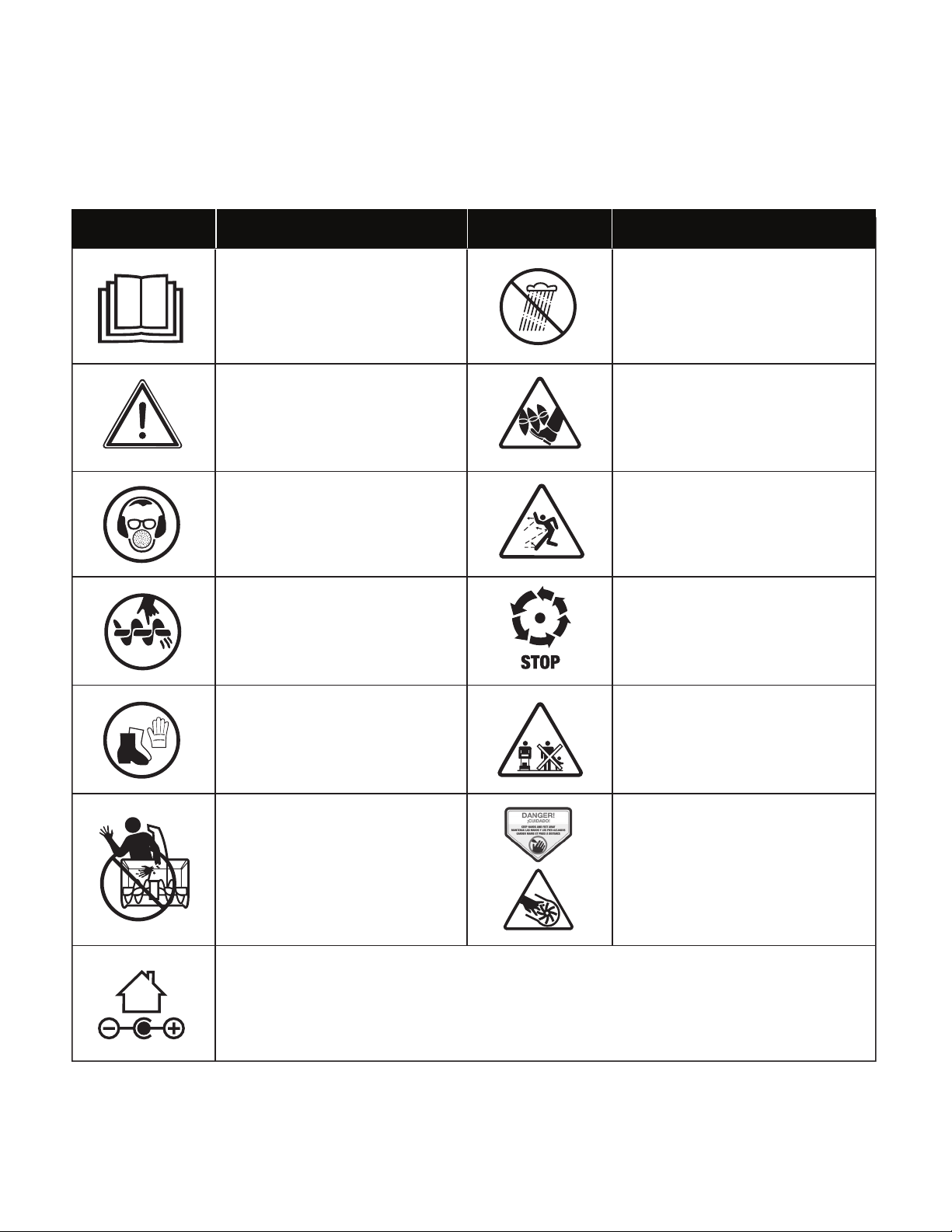
Safety Symbols
The following table depicts and describes safety symbols that may appear on this product. Read, understand and follow all
instructions on the machine before attempting to assemble and operate.
The rotating part will continuously
run for several seconds after you
turn o the machine.
READ THE OPERATOR'S
MANUAL(S) – Read, understand
and follow all instructions in the
user manual(s) before attempting
to assemble and operate.
SAFETY ALERT – Indicates a
precaution, a warning or a danger.
Wear hearing protection.
Wear eye protection.
Wear breathing protection.
WARNING! Do not expose the
unit to rain or wet conditions.
Keep dry.
CAUTION! Beware of stones and
other foreign objects that could
be thrown from the appliance.
DANGER! Cutting/dismemberment
hazard – Keep hands away from the
rotating auger. Do not use hands to
unclog rotor housing. Stop motor
before removing debris.
DANGER! Cutting/dismemberment
hazard - Keep feet away from the
rotating auger.
Symbols SymbolsDescriptions Descriptions
Indoor use only. Only use battery charger indoors.
Do not use hands to unclog chute.
Keep hands, feet and clothing
away from the rotating auger to
avoid injury.
Keep bystanders and children a
safe distance (at least 33 ft/10 m)
away from the work area.
Wear protective gloves and non-slip
footwear when using the machine
and handling debris.
8
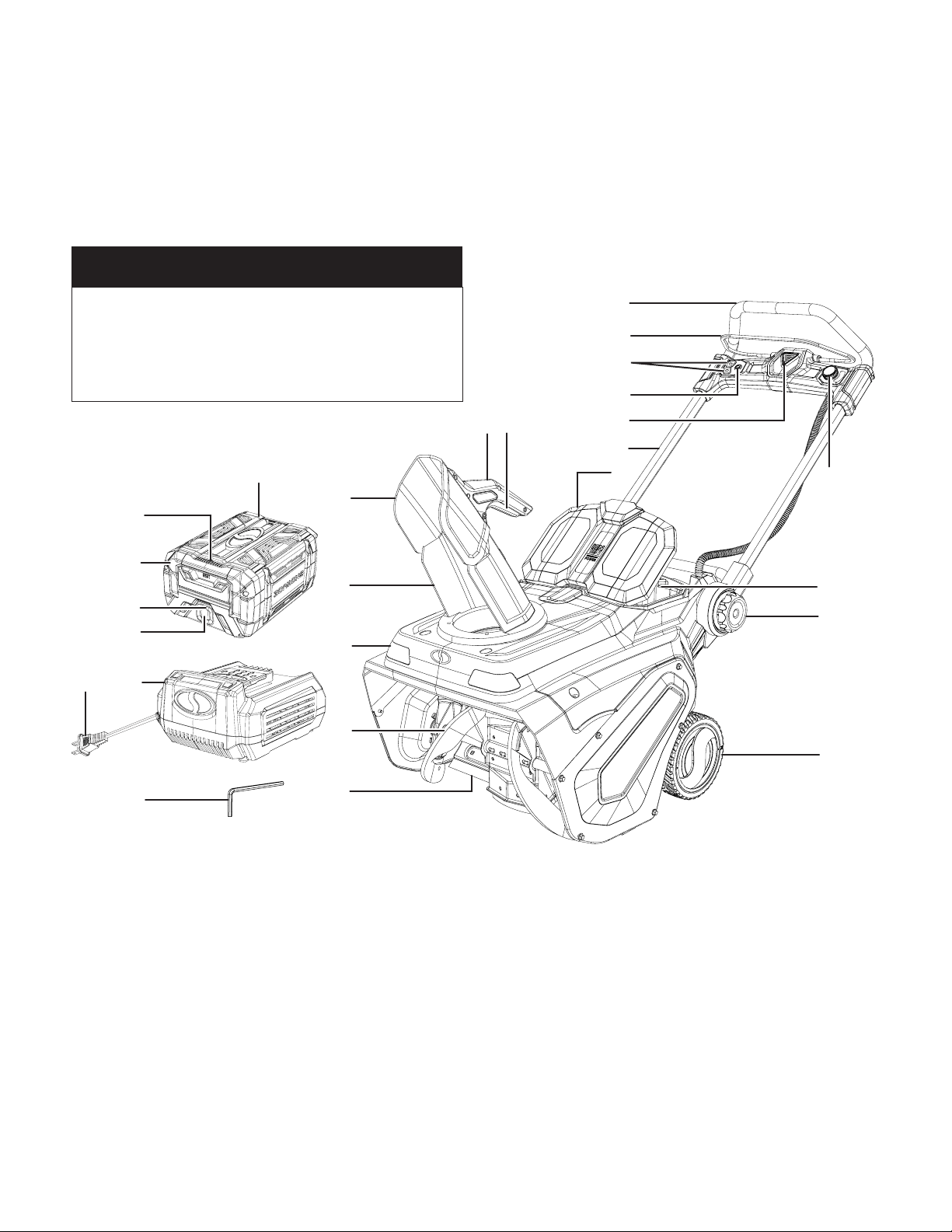
Know Your Cordless Snow Blower
Read the owner’s manual and safety rules carefully before operating your cordless snow blower. Compare the illustration below
to the actual unit in order to familiarize yourself with the location of the various controls and adjustments. Save this manual for
future reference.
1
2
3
4
5
6
7
89
10
11
12
13
14
19
22
23
20
2425
15
16
17
18
1. Soft grip
2. Switch bar level
3. Chute rotate buttons (left and right)
4. LED light button
5. Safety button
6. Handle frame
7. Battery compartment cover
8. Chute deector trigger
9. Chute deector handle
10. Chute deector
11. Discharge chute
12. LED lights (2)
13. Auger blades
14. Scraper bar
15. Wheels (2)
16. Handle frame locks (2)
17. Battery compartment
18. Auger speed dial
19. iON100V-5AMP lithium iON battery
20. 0.35 watt LED light
21. Battery handle
22. Battery indicator
23. Push button for battery indicator
24. iON100V-RCH battery quick charger
25. Charger plug
26. Hex key wrench
21
26
ONE AND DONE!
This equipment is powered by just one Snow Joe
®
100-Volt 5.0 Ah lithium-ion battery (included).
Additional batteries will provide extended runtime,
and are sold separately. Battery options available at
snowjoe.com.
9
Technical Data
Motor ............................................................. 2800 W Brushless
Battery Voltage Max* .................................................. 100V D.C.
Battery Capacity ...............................................................5.0 Ah
Battery Runtime Max ...................................................... 13 min
(clears up to 1,680 sq ft of 3 in. snow)
Charger Input..................................................... 100 – 120V AC,
50 – 60 Hz, 520 W
Charger Output ..................................................... 100V DC 4A
Charging Time Max .................................................. 1 hr 40 min
(for full charge)
No Load Speed ..................................1000 – 1500 ± 10% RPM
Auger ....................................................... 2-blade paddle auger
Clearing Width ...................................................... 21 in. (53 cm)
Depth of Snow Cut ................................................12 in. (30 cm)
Throw Distance Max ................................................... 30 ft (9 m)
Plowing Capacity Max ........................................... 1067 lbs/min
(484 kg/min)
Stages .................................................................... Single stage
Type of Snow ............................................................ Light, uy
Directional Control .................................. 180º auto-rotate chute
LED Light ............................................................ 2.5 watt (each)
Weight (snow blower alone) ................................. 62 lbs (28 kg)
Weight .............................................................. 69 lbs (31.4 kg)
(snow blower with battery installed)
*Initial no-load voltage, when fully charged, peaks at 100 volts; nominal voltage
under typical load is 86.4 volts
.
NOTE: Battery runtime may vary depending on snow
conditions.
Unpacking
Carton Contents:
• Cordless snow blower with handle frame
• Discharge chute assembly
• iON100V-5AMP lithium-ion battery (1)
• iON100V-RCH battery quick charger
• Discharge chute screws (3)
• Hex key
• Manuals with registration card
1. Carefully remove the cordless snow blower and check to
see that all of the above items are supplied.
2. Inspect the product carefully to make sure no breakage or
damage occurred during shipping. If you nd damaged or
missing parts, DO NOT return the unit to the store. Please
call the Snow Joe
®
+ Sun Joe
®
customer service center at
1-866-SNOWJOE (1-866-766-9563).
NOTE: Do not discard the shipping carton and packaging
material until you are ready to use the cordless snow
blower. The packaging is made of recyclable materials.
Properly dispose of these materials in accordance with
local regulations or save the packaging for long-term
product storage.
IMPORTANT! The equipment and packaging material are
not toys. Do not let children play with plastic bags, foils
or small parts. These items can be swallowed and pose a
suocation risk!
Assembly
mWARNING! To avoid serious personal injury, read and
understand all safety instructions provided.
mWARNING! Unpacking and assembly should be
completed on a at and stable surface, with adequate space
for moving the machine and its packaging.
Adjusting the Handle Frame
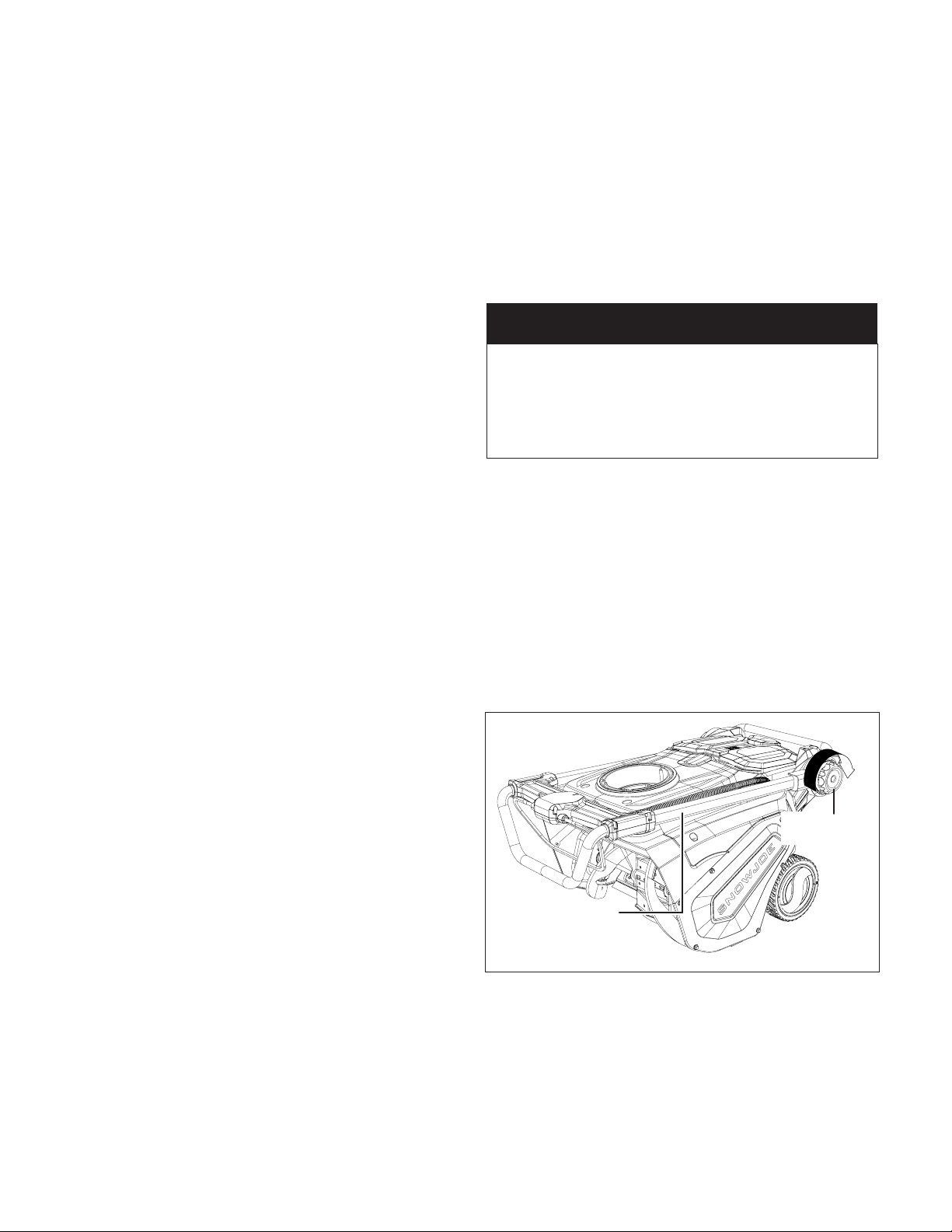
1. Unlock the handle frame by rotating the handle frame
locks on both sides clockwise (Fig. 1).
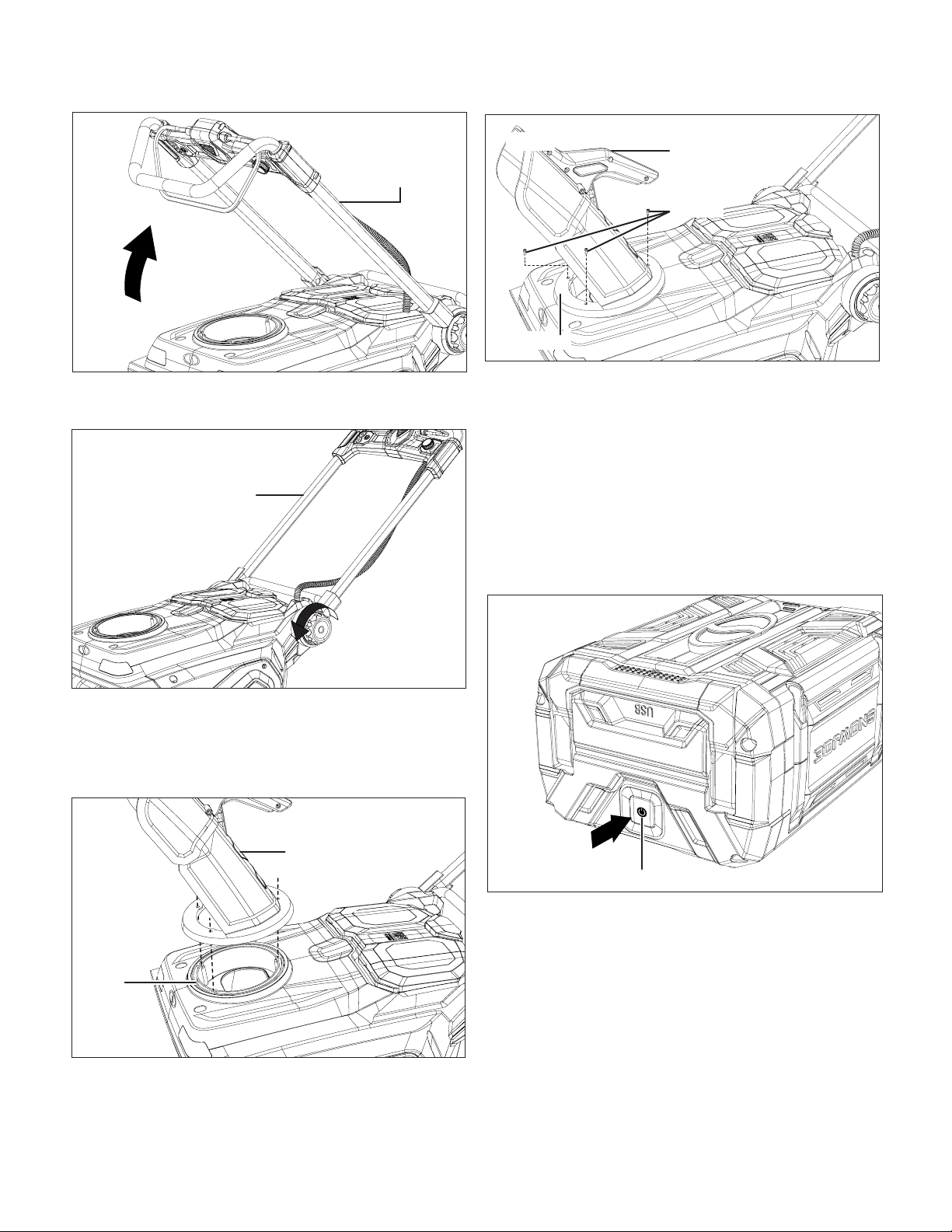
2. Rotate the handle frame up in a comfortable operation
position (Fig. 2).
ONE AND DONE!
This equipment is powered by just one Snow Joe
®
100-Volt 5.0 Ah lithium-ion battery (included).
Additional batteries will provide extended runtime,
and are sold separately. Battery options available at
snowjoe.com.
Fig. 1
Handle frame
Handle
frame lock
10
3. Lock the handle frame in position by rotating the handle
frame locks on both sides counter-clockwise (Fig. 3).
Discharge Chute Assembly
1. Place the discharge chute assembly onto the gear plate,
aligning the 3 holes in the gear plate, and push down until
the chute is ush and at against the housing (Fig. 4).
2. Use the 3 discharge chute screws to secure the discharge
chute assembly to the gear plate as shown. Tighten with
the provided hex key (Fig. 5).
Battery Pack Operation
This equipment is powered by either one or two lithium-ion
batteries (additional batteries sold separately). The battery
packs are completely closed and maintenance free.
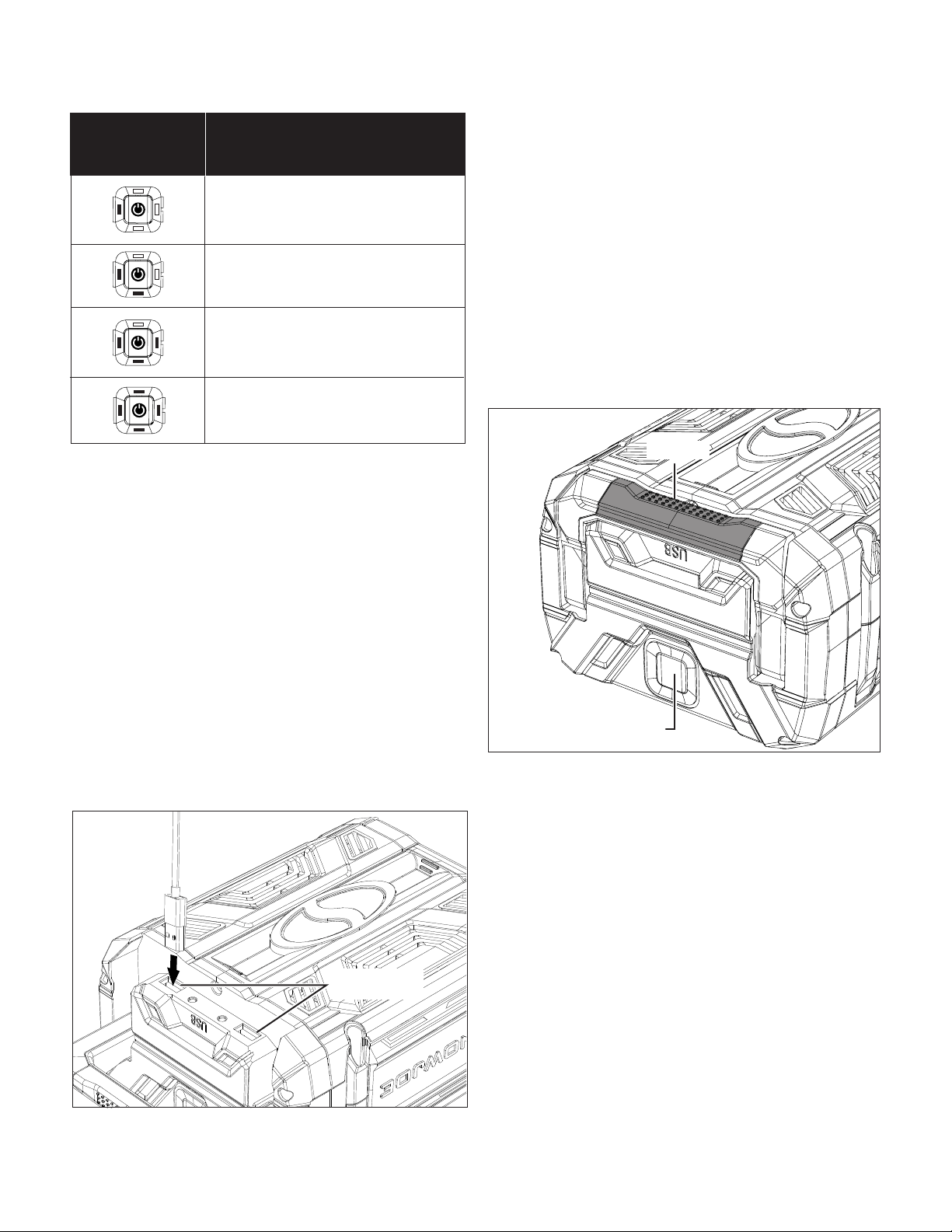
Battery Charge Level Indicator
The battery pack is equipped with a push button for checking
the charge level. Simply press the push button to read o the
battery charge level from the LEDs of the battery indicator
(Fig. 6):
• All 4 level monitoring LEDs are lit: Battery charge level
is high.
• 3 level monitoring LEDs are lit: Battery charge level is
decreasing.
• 2 level monitoring LEDs are lit: Battery charge level is
decreasing. Stop work as soon as possible.
• 1 level monitoring LED is lit: Battery is at. Stop work
IMMEDIATELY and charge the battery. Otherwise the
battery’s service life will be greatly shortened.
Fig. 2
Handle frame
Fig. 3
Handle frame
Rotate to
lock
Fig. 4
Discharge
chute assembly
Gear
plate
Fig. 5
Screws
Gear plate
Discharge chute
assembly
Fig. 6
Charge level indicator push button
Press
11
NOTE: If the charge level button does not appear to be
working, place the battery pack on the charger and charge
as needed.
NOTE: Immediately after using the battery pack, the charge
level button may display a lower charge than it will if checked
a few minutes later. The battery cells “recover” some of their
charge after resting.
USB Charging Port
The iON100V-5AMP lithium-iON battery is equipped with 2
USB charging ports, which can provide 5 V power for most
smart phones, tablets, wearables and other USB devices.
To charge with the battery, connect a USB cable that came
with your selected electronic device to one of the USB ports
under the handle of the iON100V-5AMP battery pack and to
your device. The charging process will start immediately
(Fig. 7).
NOTE: If you experience any issues with charging your
particular device, ensure that the battery pack is fully charged.
mWARNING! Make sure the battery’s USB ports are
not contaminated with lint or other debris. Use a canned-air
type of product periodically to ensure that the port openings
are clear.
LED light
The iON100V-5AMP battery is equipped with a 0.35 watt LED
light located on the handle, which is good for camping and
emergency illumination. To turn on the LED light, open the
carry handle, and press the battery push button twice in a row.
To turn o the LED light, press the battery push button twice
again (Fig. 8).
Charger Operation
m
WARNING! Charge only the iON100V-5AMP lithium-ion
battery pack in compatible iON100V-RCH battery
charger. Other types of batteries may cause personal injury
and damage.
To reduce the risk of electric shock, do not allow water to ow
into the charger's AC/DC plug.
When to Charge the iON100V-5AMP
Lithium-Ion Battery
NOTE: The iON100V-5AMP lithium-ion battery pack does
not develop a "memory" when charged after only a partial
discharge. Therefore, it is not necessary to run down the
battery pack before placing it into the charger.
• Use the battery charge indicator lights to determine when to
charge your iON100V-5AMP lithium-ion battery packs.
The battery is at 20% capacity and
requires charging
Light IndicatorsLights
The battery is at 50% capacity and
requires charging soon
The battery is at 70% capacity
The battery is at full capacity
Fig. 7
USB charging
ports
Fig. 8
LED light
Push twice to start/stop
12
• You can "top-o" your battery pack's charge before starting
a big job or after a long day of use.
Charging the Battery Packs
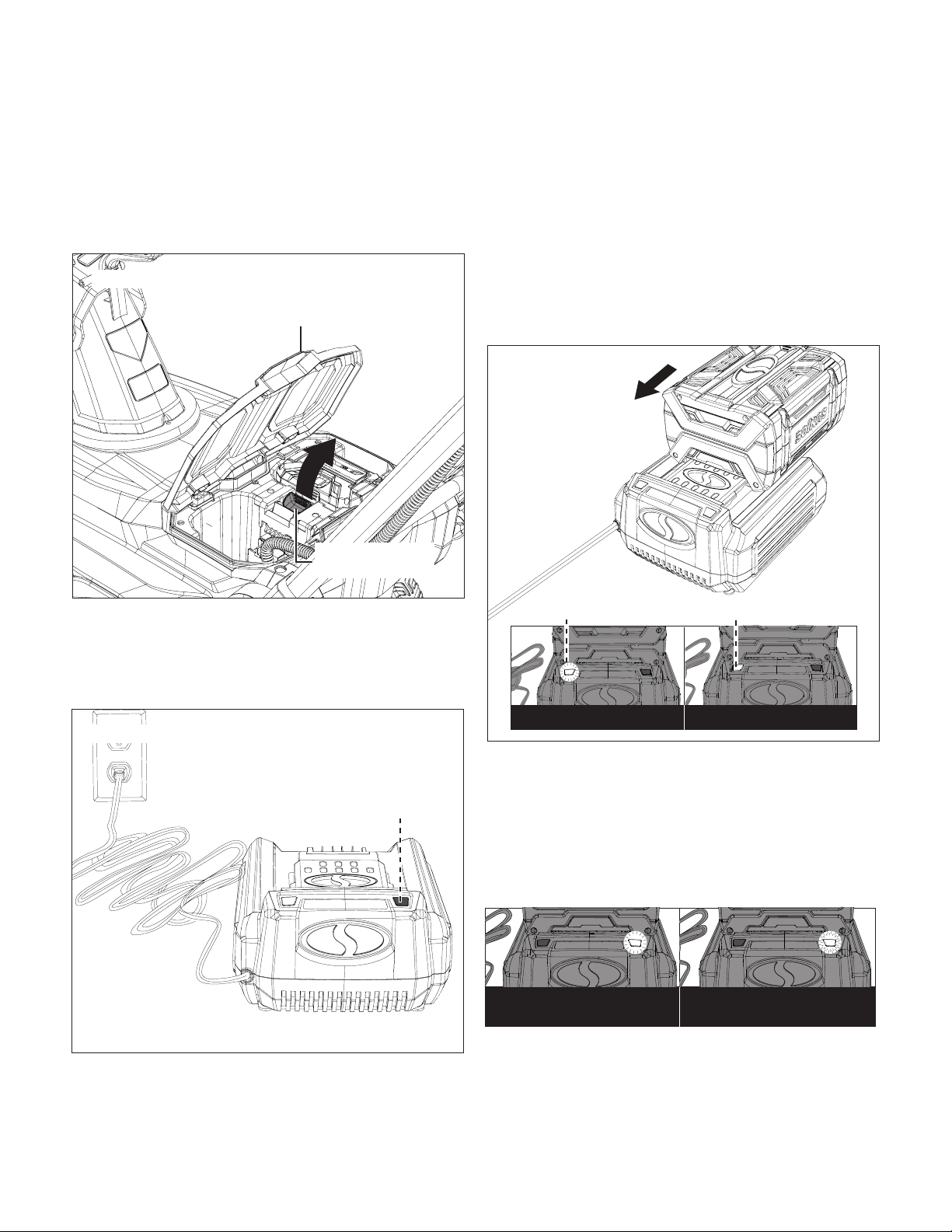
1. Flip open the battery compartment cover, push the battery
releasing button to release the battery pack. Pull the
battery out of the equipment. (Fig. 9).
2. Check that the mains voltage is the same as that marked
on the rating plate of the battery charger. Then, insert the
charger's plug into the electrical wall outlet. When you
plug in the charger, the red light will illuminate steadily
(Fig. 10).
mCAUTION! Charger iON100V-RCH is rated for 100 –
120 volt AC only. DO NOT plug the charger into any outlet that
will provide power with a higher voltage. Over voltage charging
will be harmful to both the battery and charger, and may cause
the charger to burn out.
3. Place the battery pack into the charger by sliding the
pack as shown until it clicks into the position. When the
battery is inserted properly, the green light will slowly
ash to indicate that the battery is charging. The red light
will turn o. You will also hear a fan sound (Fig. 11).
4. When the green light stays on, the battery is fully charged
(Fig. 11).
NOTE: If the green light is o while the red light ashes slowly,
this indicates a temperature abnormality (i.e. that the battery
pack is too hot). If the green light is o while the red light
ashes rapidly, this indicates there's something wrong with the
charger or the battery. Wait for a while and try to reinsert the
battery into the charger. If the situation still persists, contact
Snow Joe
®
+ Sun Joe
®
customer service at 1-866-SNOWJOE
(1-866-766-9563).
5. A fully discharged iON100V-5AMP battery pack with
an internal temperature in the normal range will fully
charge in 1 hour and 40 minutes (between 50ºF/10ºC and
104ºF/40ºC). Heavily discharged battery packs may take
longer to charge completely.
Fig. 9
Battery compartment cover
Battery releasing
buttons
Fig. 10
Red
Fig. 11
Charging Fully Charged
Slowlyashgreen
Green
Temperature abnormal
(slowlyashingred)
Something is wrong
(rapidlyashingred)
13
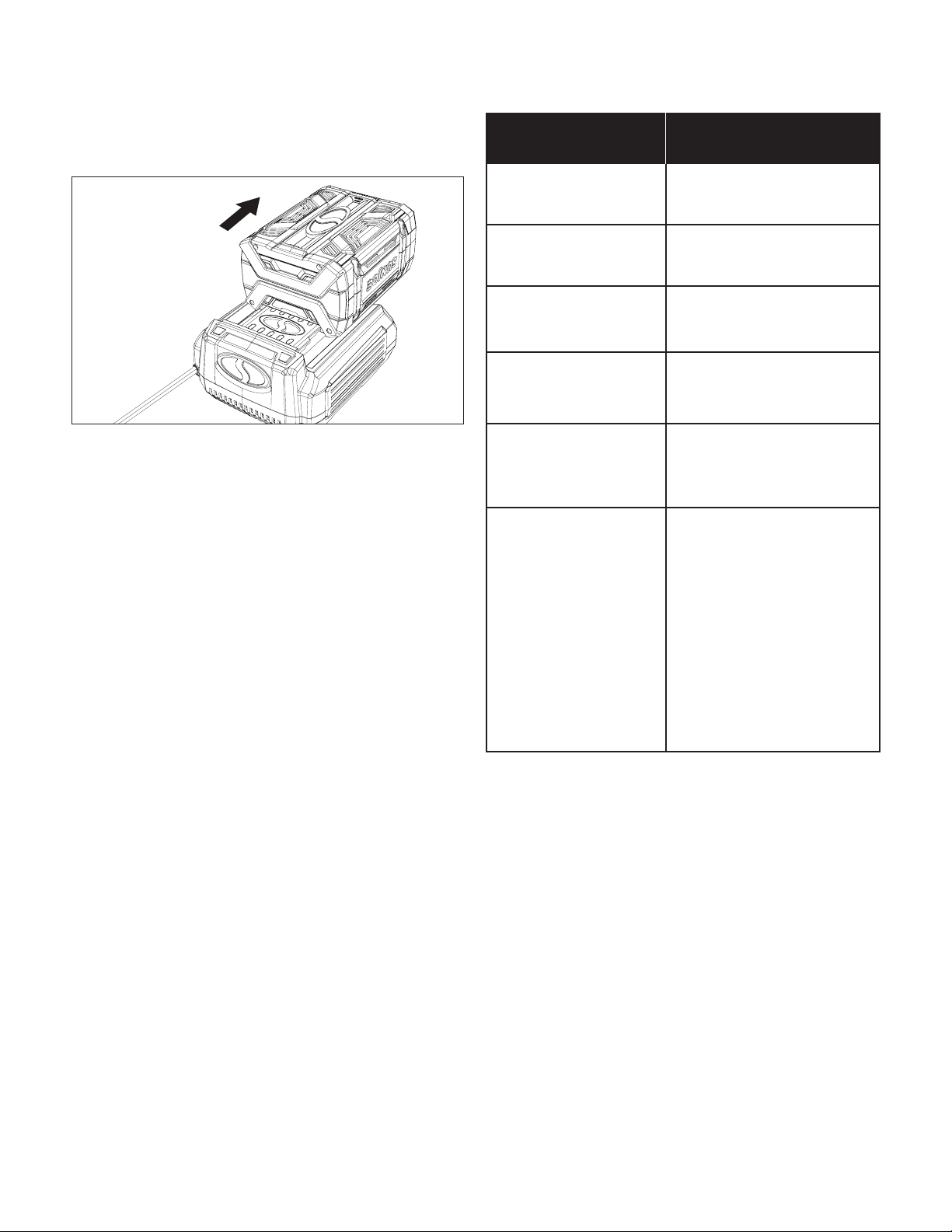
6. When charging is complete, remove the battery from the
charger by pulling the battery backward to unlock it from
the charger (Fig. 12).
7. Timely recharging of the battery will help prolong the
battery's life. You must recharge the battery pack when
you notice a drop in the equipment's power.
IMPORTANT! Never allow the battery pack to become
fully discharged as this will cause irreversible damage to
the battery.
Charger Light Indicator Table
Use the table below to determine charger light patterns and
possible causes. For all other issues, contact Snow Joe
®
+
Sun Joe
®
customer service center at 1-866-SNOWJOE
(1-866-766-9563).
Operations
m
WARNING! AVOID INJURY. Read and understand the
entire safety section before proceeding.
NOTE: Before inserting the battery, verify that the snow
blower’s auger and rubber plates are rmly secured. Perform a
test run to ensure that the rotor turns freely.
Starting + Stopping
mWARNING! The auger starts rotating immediately after
the snow blower is switched on. Keep hands and feet away
from the auger.
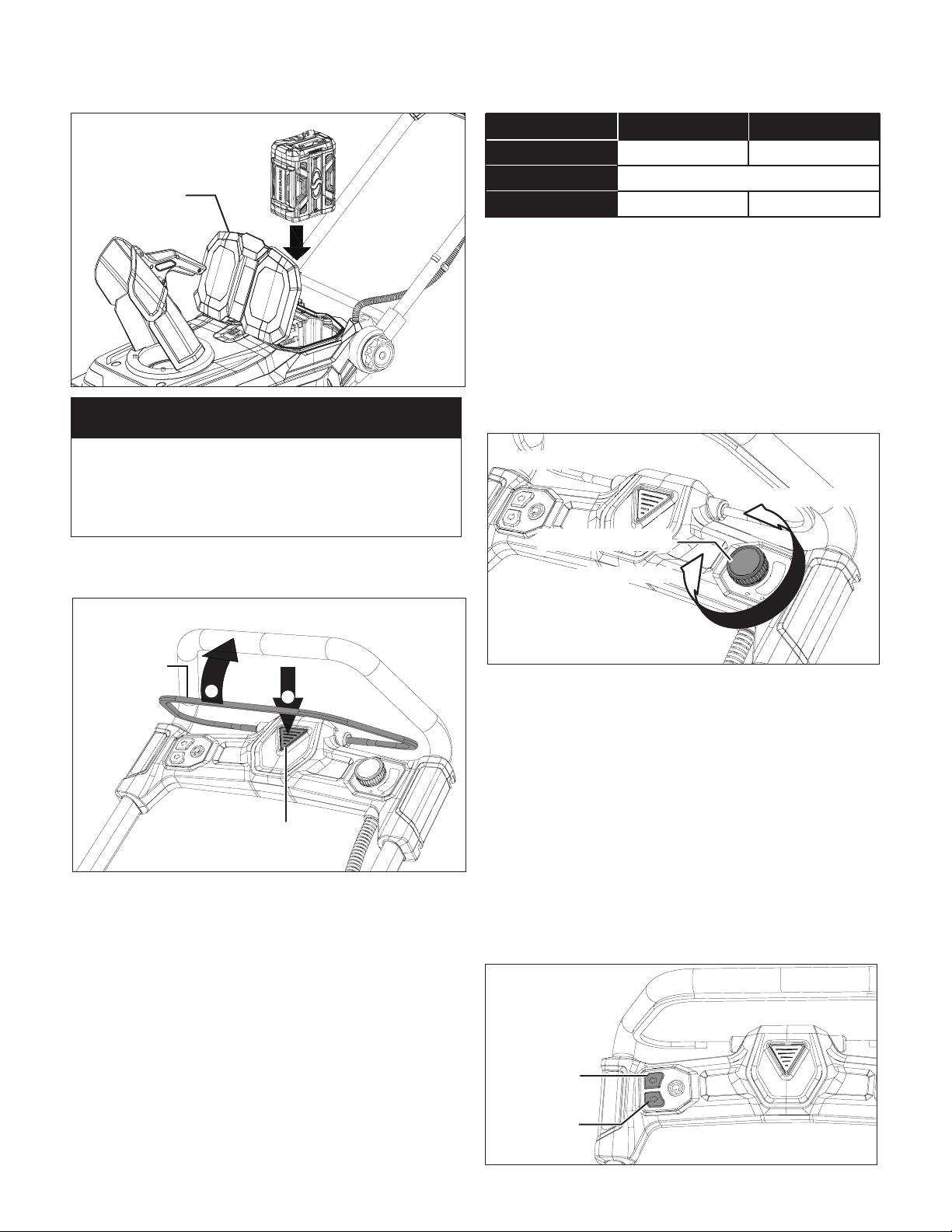
1. Open the battery compartment cover and then push the
battery pack down until it clicks and locks into position
(Fig. 13). Either side of the battery compartments may be
used. Close the cover.
Fig. 12
Possible Cause
(Solution)
• Red Light – Steady
• Green Light – O
• No load charging –
There's no battery inserted
in the charger.
• Red Light – O
• Green Light – Slowly
ashes
• Normal charging – The
battery is being charged.
• Red Light – O
• Green Light – Steady
• Fully charged – The battery
is fully charged and the
charging process is nished.
• Red Light – O
• Green Light – Rapidly
ashes
• Discharged – The battery is
heavily discharged. It may
take longer time for charging.
• Red Light – Slowly
ashes
• Green Light – O
• Temperature abnormal –
Charging process will start
when battery returns to
normal temperature.
• Over current charging –
The current coming through
the charger is greater
than what the charger can
support. Stop charging as
soon as possible.
• Abnormal performance
– Something is wrong with
the battery or the charger.
Contact Snow Joe
®
+
Sun Joe
®
customer service
at 1-866-SNOWJOE
(1-866-766-9563).
• Red Light – Rapidly
ashes
• Green Light – O
Indication
14
2. To switch the snow blower ON, press the safety switch
button, then squeeze the switch bar lever (Fig. 14).
3. Once the snow blower starts, release the safety switch
button and proceed with operation.
4. To power OFF, release the switch bar lever.
Adjust Auger Speed
This snow blower is equipped with auger speed adjustment
system, which can set the auger speed from low to high.
Follow the instruction to set the auger speed to t in the
working environment. Consider the working time, snow
volume, and the surroundings when adjusting the auger speed.
In general, lower auger speed provides longer battery runtime,
but smaller plowing capacity and shorter throw distance.
Check attached table for the specs that can be aected by the
auger speed.
NOTE:
Battery runtime may vary depending on snow conditions.
NOTE: The specs in above table are based on the power
provided by one Snow Joe
®
iON100V-5AMP battery that
comes with the unit. Dierent battery combinations will aect
the specs.
1. To increase the auger speed, scroll the speed adjustable
dial counterclockwise with the switch bar level squeezed
(Fig. 15).
2. To reduce the auger speed, scroll the speed adjustable
dial clockwise with the switch bar lever squeezed (Fig. 15).
Changing Throw Direction and
Throw Height
mWARNING! Never direct the snow discharge chute at
the operator, at bystanders, at vehicles or at nearby windows.
The discharged snow and foreign objects accidentally picked
up by the snow blower can cause serious damage and
personal injury.
Always orient the discharge chute in the opposite direction
from where you, bystanders, surrounding vehicles or windows
are located.
1. The discharge chute can be adjusted 180 degrees by
pressing the chute rotate button in the desired direction
(Fig. 16).
Fig. 13
Battery
compartment
cover
NOTE
This snow blower can be powered by either one (1)
5 AMP Snow Joe
®
100-Volt lithium-ion battery or any
combination of two (2) Snow Joe
®
100-Volt lithium-ion
batteries.
Fig. 14
Safety button
Switch bar
level
1
2
1067 lbs/min (484 kg/min)
MIN. Auger Speed MAX. Auger Speed
Battery Runtime
Plowing Capacity
Throw Distance
13 min
6.5 min
25 ft (7.6 m) 30 ft (9 m)
Fig. 15
Speed adjusting dial
Increase speed
Reduce speed
Fig. 16
Press to turn
chute right
Press to turn
chute left
15
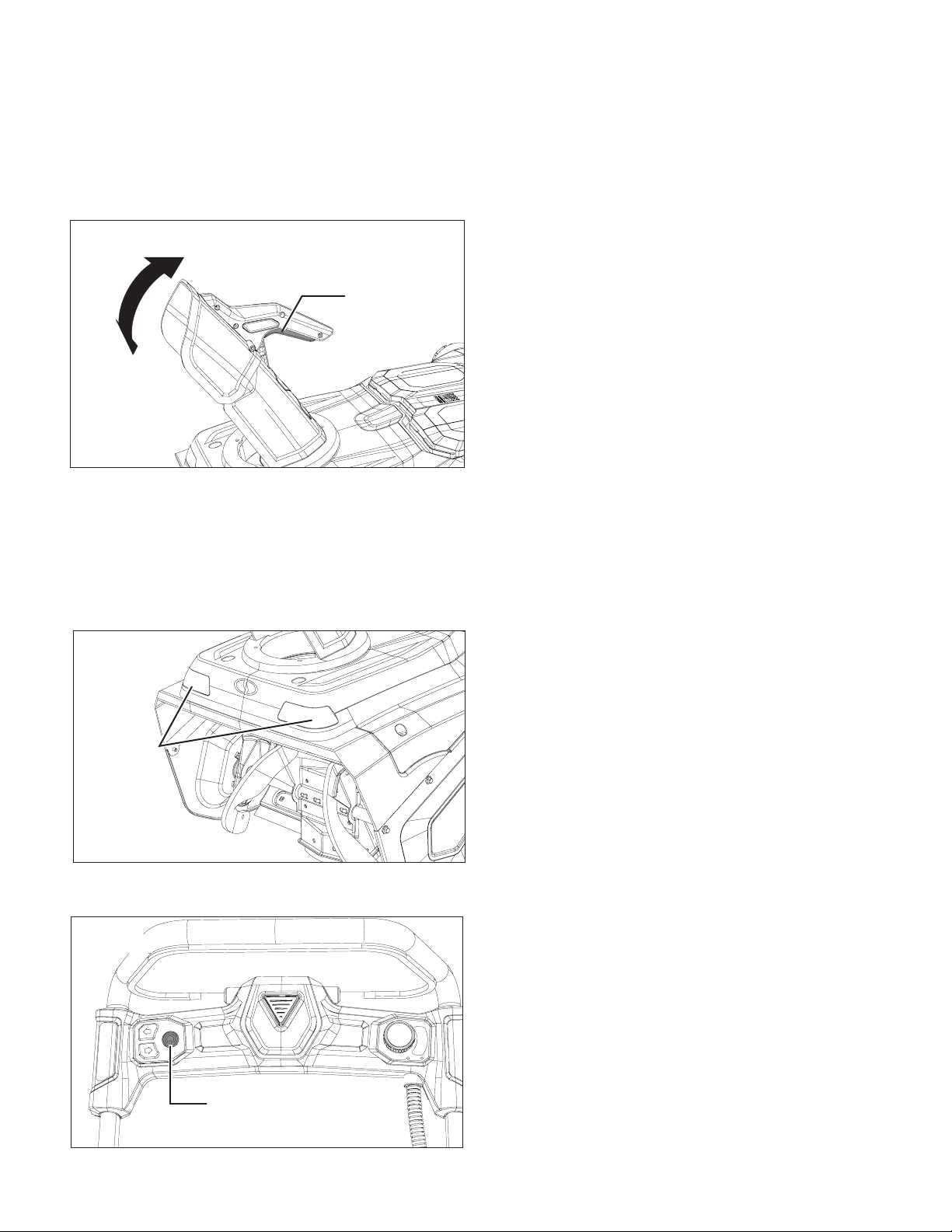
2. The chute deector on the top of the discharge chute
controls the height of the snow stream. To adjust the
height that the snow is thrown, squeeze the trigger on
the chute-deector handle, and then raise/lower the
chute deector. Release the trigger on the chute deector
handle to lock the chute deector in place (Fig. 17).
NOTE: ALWAYS position discharge chute deector at a safe
angle before engaging the auger. DO NOT throw snow any
higher than necessary.
LED Headlights
The LED headlights are located on the front of the snow
blower (Fig. 18).
1. To turn on the LED light, press the LED light button
(Fig. 19).
2. To turn o, press the LED light button again.
NOTE: After you have nished using your snow blower,
remember to turn OFF the light switch.
Operating Tips
mWARNING! Foreign objects, such as rocks, broken
glass, nails, wire, or string, can be picked up and thrown by
the snow blower, causing serious personal injury. Remove all
foreign objects from the area to be plowed before operating
the snow blower.
Snow is best removed as soon as possible after snow fall.
1. Keep the area of operation free of foreign objects that
can become thrown by the blades. Perform a thorough
inspection of the area since some objects may be hidden
from view by surrounding snow. If the snow blower hits
an obstruction or picks up a foreign object during use,
stop the snow blower, remove the battery, remove the
obstruction, and inspect the unit for damage. Repair or
replace any damaged part before restarting and
operating the unit.
2. Keep children, pets, and bystanders away from the area of
operation. Be aware that the normal noise of the machine
when turned on may make it dicult for you to hear
approaching people.
3. To clear an area, run unit in an overlapping series of paths.
For large areas, start in the middle and throw snow to
each side, so snow is not cleared more than once.
4. Note the wind direction. If possible, move in the same
direction as the wind so that the snow is not thrown
against the wind (and thus back into your face and on the
just cleared path).
5. Do not push the snow blower with excessive force. Do not
exceed the unit's intake or throw rate.
6. Some parts of the snow blower may freeze under extreme
temperature conditions. Do not attempt to operate the
snow blower with frozen parts. If the parts freeze while the
snow blower is in use, stop the snow blower, remove the
battery, and inspect for frozen parts. Free all parts before
restarting or operating the snow blower. Never force
controls that have frozen.
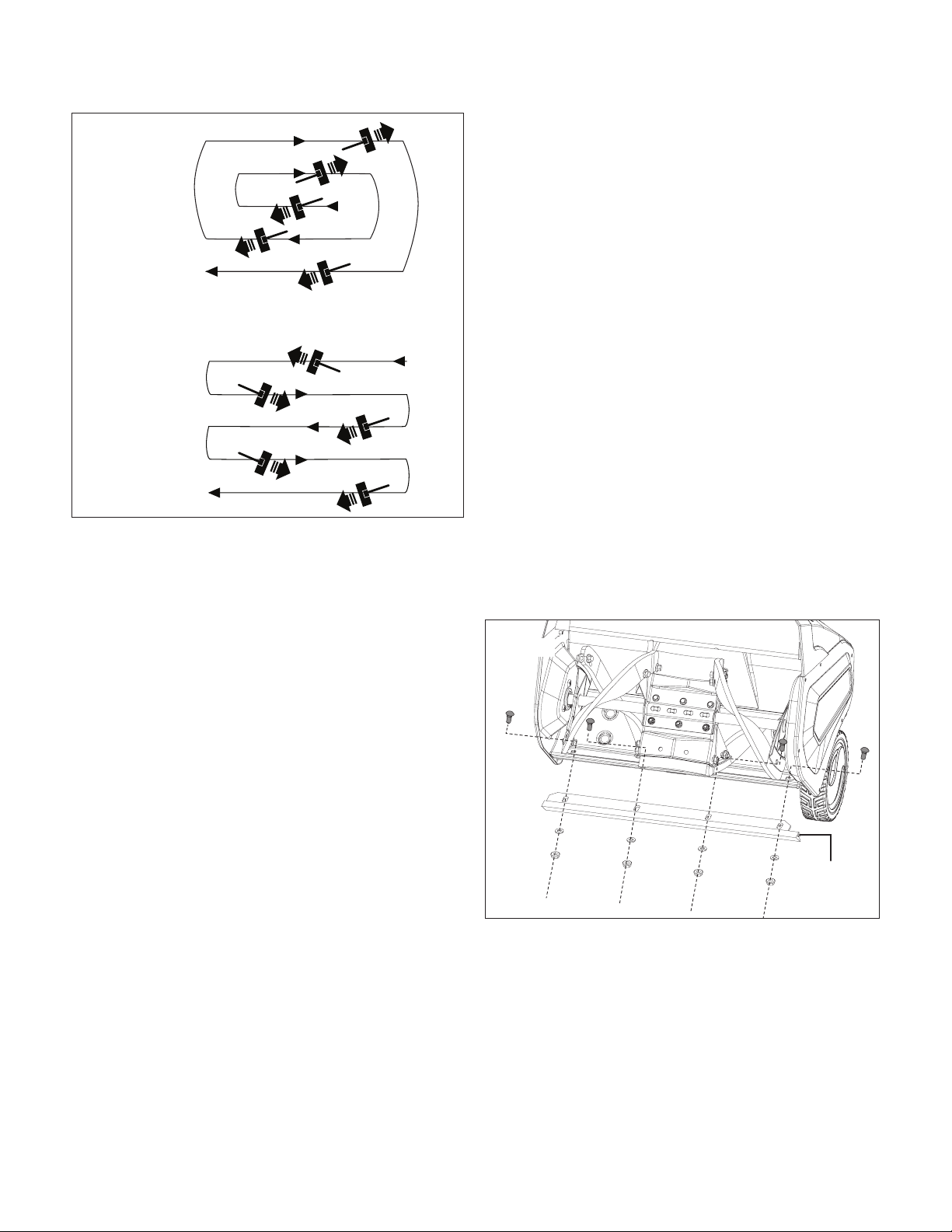
7. For larger areas, a denite pattern of operation is required
to thoroughly clean an area of snow. These patterns
will avoid throwing snow in unwanted places, a well as
eliminate the need for a second removal of snow (Fig. 20).
Pattern A: Throw the snow to the right or left side where
it is possible. For areas such as a long driveway, it is
advantageous to start in the middle. Plow from one end to
the other, throwing snow to both sides.
Pattern B: If the snow can only be thrown to one side of
the area to be cleared, start on the opposite side.
Fig. 17
Chutedeector
trigger
Fig. 18
LED lights
Fig. 19
LED light button
16
Maintenance
To order genuine replacement parts or accessories for the
Snow Joe
®
iON100V-21SB-RM cordless snow blower, please
visit snowjoe.com or contact the Snow Joe
®
+ Sun Joe
®
customer service center at 1-866-SNOWJOE (1-866-766-
9563).
mWARNING! Make sure to turn o the switch and
remove the battery before performing any maintenance task on
your snow blower.
General Maintenance Tips
1. Do not attempt to repair the machine unless you have the
proper tools and instructions for disassembly and repair of
the machine.
2. Check bolts and screws at frequent intervals for proper
tightness to ensure that the equipment is in safe
working condition.
3. After each snow removal, shut o the motor, wait for all
revolving parts to stop completely, remove the battery and
wipe residual ice and snow o the unit.
Proper Care for Battery + Charger
mWARNING! To reduce the risk of injury, always unplug
the charger and remove the battery pack from the charger
before performing any maintenance task. Never disassemble
the battery pack or charger. Contact your Snow Joe
®
+
Sun Joe
®
dealer or the Snow Joe
®
+ Sun Joe
®
customer
service center for ALL repairs.
1. To reduce the risk of injury and damage, never immerse
your battery packs or charger in liquid or allow any liquid
to ow inside these components.
2. Clean out dust and debris from charger vents and
electrical contacts by blowing with compressed air.
3. Use only mild soap on a damp cloth to clean the battery
pack and charger, keeping away from all electrical
contacts. Certain cleaning agents and solvents are harmful
to plastics and other insulated parts. Some of these
include gasoline, turpentine, lacquer thinner, paint thinner,
chlorinated cleaning solvents, ammonia and household
detergents containing ammonia. Never use ammable
or combustible solvents around battery packs, battery
chargers or tools.
4. The iON100V-RCH lithium-ion battery charger has no
serviceable parts.
Replacing Scraper Bar
IMPORTANT! Damage to auger housing will result if the
scraper bar wears down too far.
To replace scraper bar:
1. Position unit on a hard, at, smooth level surface.
2. Detach the worn scraper bar from the snow blower by
removing the 4 sets of nuts, washers and bolts that hold it
in place (Fig. 21).
3. Install the new scraper bar and fasten it securely to
the snow blower with the original sets of nuts, washers
and bolts.
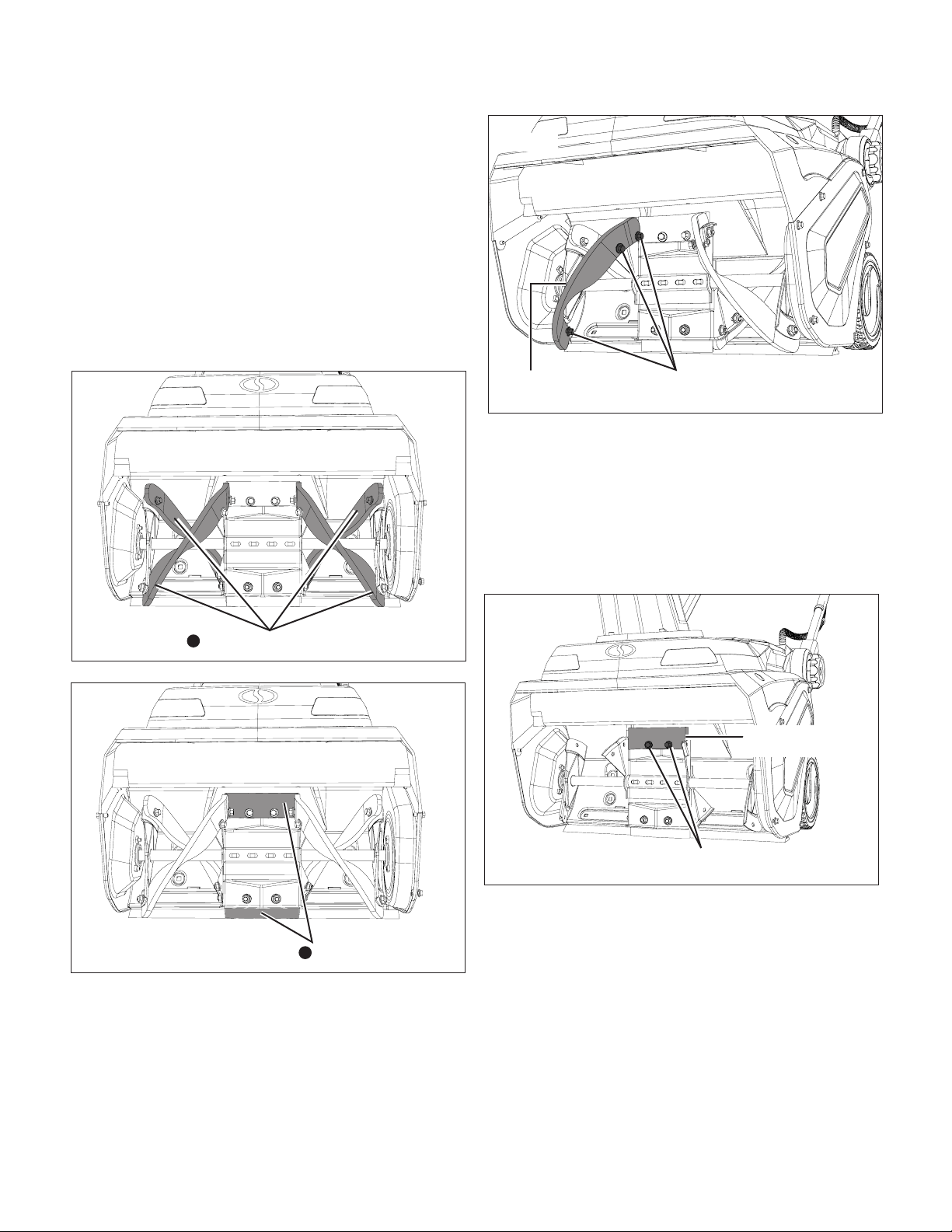
Replacing Auger Blades
During use, the auger blades will wear down over time, which
will eventually cause incomplete cleaning. If the unit cannot
plow snow completely and leaves snow on ground, consider
changing the auger blades.
mWARNING! Replacing the auger blades involves
close operation with the auger and the blades. To avoid
injury caused by unintentional starting, make sure the battery
(or batteries) are not inserted before proceeding with the
operation, and wear heavy duty gloves during operation.
Fig. 20
pattern A
pattern B
Fig. 21
Scraper
blade
17
Tools Required (Not Provided):
• 10 mm wrench
• 13 mm wrench
• Heavy duty gloves
In total there are 6 blade pieces xed by 16 sets of screws,
washers and nuts in the unit. When replacing worn auger
blades, pay close attention to the order in which you remove
them. Remove the 4 blade pieces on the sides rst, and then
the 2 blade pieces xed on the middle steel plate. Assemble
the new auger blades in the reverse order of the disassembly
(Figs. 22 – 23).
1. To remove the rst blade on the side, use a 10 mm
wrench to hold the bolt steady, and use a 13 mm wrench
to loosen and remove the nut. Repeat the operation to
remove all 3 sets of bolt and nut, and gently remove the
blade from the auger (Fig. 24).
2. Follow the same instruction to remove the other 3 blades
located on the sides. Rotate the auger when working on
the blades on the back.
3. After 4 blades on the side are removed, move to the two
blade pieces that are xed on the middle steel plate. Use
the 10 mm wrench to hold the bolt steady, and use the 13
mm wrench to loosen and remove the nut. Repeat on the
other nut and bolt set, and gently remove the blade from
the central plate (Fig. 25).
4. Rotate the auger to expose the other blade on the plate.
Follow the same instruction to remove it.
5. After all old blades are removed, follow the reverse order
to assemble the new blades. Use the original sets of
hardware to secure the blades on the auger.
Fig. 22
Blades on the sides
1
Fig. 23
Blades on the plate
2
Fig. 24
Remove the 3 sets of
bolt and nut
Blade to be
removed
Fig. 25
Blade to be
removed
Remove the 2 sets of
screws, washers and nuts
18
Replacing Auger Belt
Tools Required (Not Provided):
• 10 mm wrench (2)
• Needle nose pliers
• Heavy duty gloves
1. Position unit on a hard, at, smooth level surface, with the
battery (or batteries) removed.
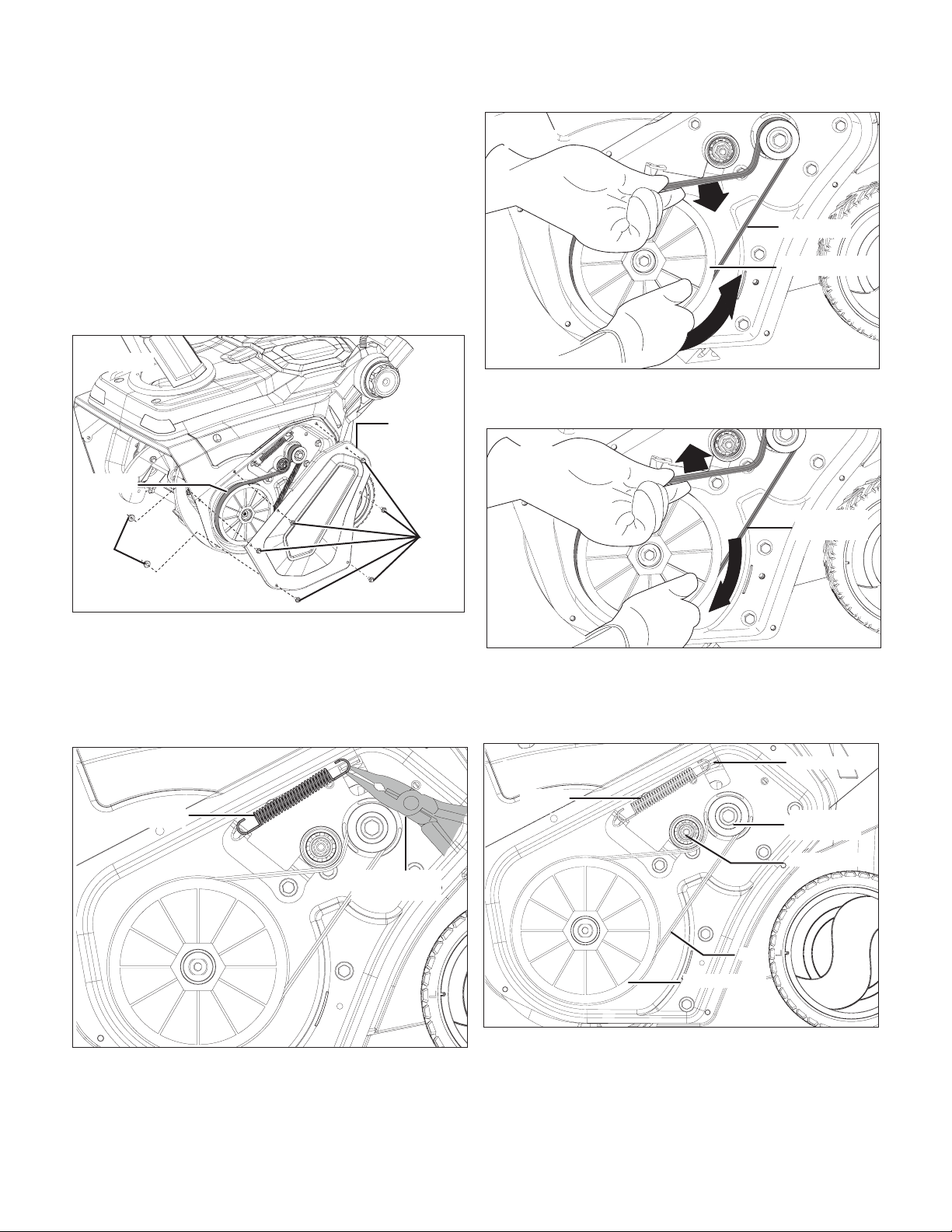
2. Use 2 10 mm wrenches to remove the bolts and nuts that
are used to x the right side panel. Then remove the right
side panel to expose the belt, as shown (Fig. 26).
NOTE: The 2 bolts located on the left have 2 nuts on the back,
while the other 4 bolts don't. Use one 10 mm wrench to hold
the left two bolts steady and remove the nuts with the other 10
mm wrench rst, and then remove all the bolts.
3. Use the needle nose pliers to remove the spring from the
hook to release the belt tension (Fig. 27).
4. Remove the drive belt by slowly turning the auger pulley
counterclockwise while pulling the belt outwards (Fig. 28).
5. Install the new drive belt, rotating it onto the pulleys
(Fig. 29).
NOTE: Rotate the new drive belt rst around the engine pulley,
then the idle pulley, and nally around the auger pulley. Slowly
turn the auger pulley clockwise to drive the belt inwards
(Fig. 30).
6. Use needle nose pliers to reinstall the spring onto the
hook to tension the belt. Replace the side panel on the
unit, secure with the original hardware. The snow blower is
ready to use.
Fig. 26
Right side
panel
Bolts
Nuts
Old belt
Fig. 27
Needle nose
pliers
Spring
Fig. 28
Drive belt
Auger pulley
Fig. 29
New drive
belt
Fig. 30
Spring
Spring hook
Engine
pulley
Idle pulley
Auger pulley
Belt
19
Storage
1. Examine the cordless snow blower thoroughly for worn,
loose or damaged parts. Should you need to repair or
replace a part, contact an authorized Snow Joe
®
+
Sun Joe
®
dealer or call the Snow Joe
®
+ Sun Joe
®
customer service center at 1-866-SNOWJOE
(1-866-766-9563) for assistance.
2. Clean the snow blower before storing or transporting.
Be sure to secure the unit while transporting.
3. Remove the battery pack from the cordless snow blower
before storing.
4. Store the cordless snow blower indoors in a locked, dry
place out of the reach of children to prevent unauthorized
use or damage.
Battery+ChargerO-SeasonStorage
1. Do not expose your battery pack(s) or charger to water,
rain or allow them to get wet. This could permanently
damage the charger and the battery packs. Do not use oil
or solvents to clean or lubricate your battery pack as the
plastic casing can become brittle and crack, causing a
serious risk of injury.
2. Store the battery packs and charger at room temperature
away from moisture. Do not store in damp locations where
corrosion of terminals may occur. As with other battery
pack types, permanent capacity loss can result if the pack
is stored for long periods of time at high temperatures
(over 120ºF/49ºC).
3. iON100V-5AMP battery packs maintain their charge
during storage longer than other battery pack types.
As a general practice, it is best to unplug the battery
charger and remove the battery pack when they are not
in use. Recharge the battery pack every 6 months to
50% capacity (2 lights on) during o-season storage to
maintain optimal battery performance.
Battery Caution +
Disposal Information
Always dispose of your battery pack according to federal,
state, and local regulations. Contact a recycling agency in your
area for recycling locations.
mCAUTION! Even discharged battery packs contain
some energy. Before disposing, use electrical tape to cover
the terminals to prevent the battery pack from shorting, which
could cause a re or explosion.
mWARNING! To reduce the risk of injury or explosion,
never burn or incinerate a battery pack even if it is damaged,
dead or completely discharged. When burned, toxic fumes
and materials are emitted into the surrounding atmosphere.
1. Batteries vary according to device. Consult your manual
for specic information.
2. Install only new batteries of the same type in your product
(where applicable).
3. Failure to insert batteries in the correct polarity, as
indicated in the battery compartment or manual, may
shorten the life of the batteries or cause batteries to leak.
4. Do not mix old and new batteries.
5. Do not mix Alkaline, Standard (Carbon-Zinc) or
Rechargeable (Nickel Cadmium, Nickel Metal Hydride, or
Lithium-Ion) batteries.
6. Do not dispose of batteries in re.
7. Batteries should be recycled or disposed of as per state
and local guidelines.
Service + Support
If your Snow Joe
®
iON100V-21SB-RM cordless snow blower
requires service or maintenance, please call the Snow Joe
®
+
Sun Joe
®
customer service center at 1-866-SNOWJOE
(1-866-766-9563).
Model + Serial Numbers
When contacting the company, reordering parts or arranging
service from an authorized dealer, you will need to provide the
model and serial numbers, which can be found on the decal
located on the housing of the unit. Copy these numbers into
the space provided below.
Record the following numbers from the housing or handle of your
new product:
i O N 1 0 0 V - 2 1 S B - R M
Model #:
Serial #:

20
iON100V-RCH
Federal Communications Commission
(FCC)
mWARNING! Any changes or modications to this unit
not expressly approved by the party responsible
for compliance could void the user's authority to operate
the equipment.
Class B device:
NOTE: This equipment has been tested and found to comply
with the limits for a Class B digital device, pursuant to part 15
of the FCC Rules.
These limits are designed to provide reasonable protection
against harmful interference in a residential installation.
This equipment generates, uses and can radiate radio
frequency energy and, if not installed and used in accordance
with the instructions, may cause harmful interference to
radio communications.
However, there is no guarantee that interference will not occur
in a particular installation.
If this equipment does cause harmful interference to radio or
television reception, which can be determined by turning the
equipment o and on, the user is encouraged to try to correct
the interference by one or more of the following measures:
• Reorient or relocate the receiving antenna.
• Increase the separation between the equipment
and receiver.
• Connect the equipment into an outlet on a circuit dierent
from that to which the receiver is connected.
• Consult the dealer or an experienced radio/TV technician
for help.

21
Troubleshooting
m
WARNING! Always turn the tool OFF and remove the battery before performing any adjustments, maintenance, or
repairs to your cordless snow blower.
Unit will not
start
The auger doesn't
rotate while the
motor is running
1. Batteries are at.
2. Batteries are not locked in
position.
3. The safety button is not depressed
1. Auger belt is wore out
2. Auger belt is not assembled properly
1. Charge the batteries
2. Reinsert the battery, and try to start the machine
again.
3. Depress the safety button, and pull the switch bar
lever.
1. Change the auger belt
2. Check the auger belt, make sure it's assembled
tightely on the rail
Problem Possible Cause Solution
Chute doesn't
rotate when
pressing the
button
1. There's no power.
2. Too much wet snow are accumulated
around the chute and preventing the
chute rotating.
1. Make sure the batteries are charged and locked in
position.
2. Clean the wet snow around the chute.
Snow left on
the ground after
cleaning
1. Worn out auger blades
2. Worn out scraper bar
1. Replace the blades
2. Replace the scraper bar
22
Optional Accessories
mWARNING! ALWAYS use only authorized Snow Joe
®
+ Sun Joe
®
replacement parts and accessories. NEVER use
replacement parts or accessories that are not intended for use with this cordless snow blower. Contact Snow Joe
®
+ Sun Joe
®
if you are unsure whether it is safe to use a particular replacement part or accessory with your cordless snow blower. The use of
any other attachment or accessory can be dangerous and could cause injury or mechanical damage.
NOTE: Accessories are subject to change without any obligation on the part of Snow Joe
®
+ Sun Joe
®
to provide notice of such
changes. Accessories can be ordered online at snowjoe.com or via phone by contacting the Snow Joe
®
+ Sun Joe
®
customer
service center at 1-866-SNOWJOE (1-866-766-9563).
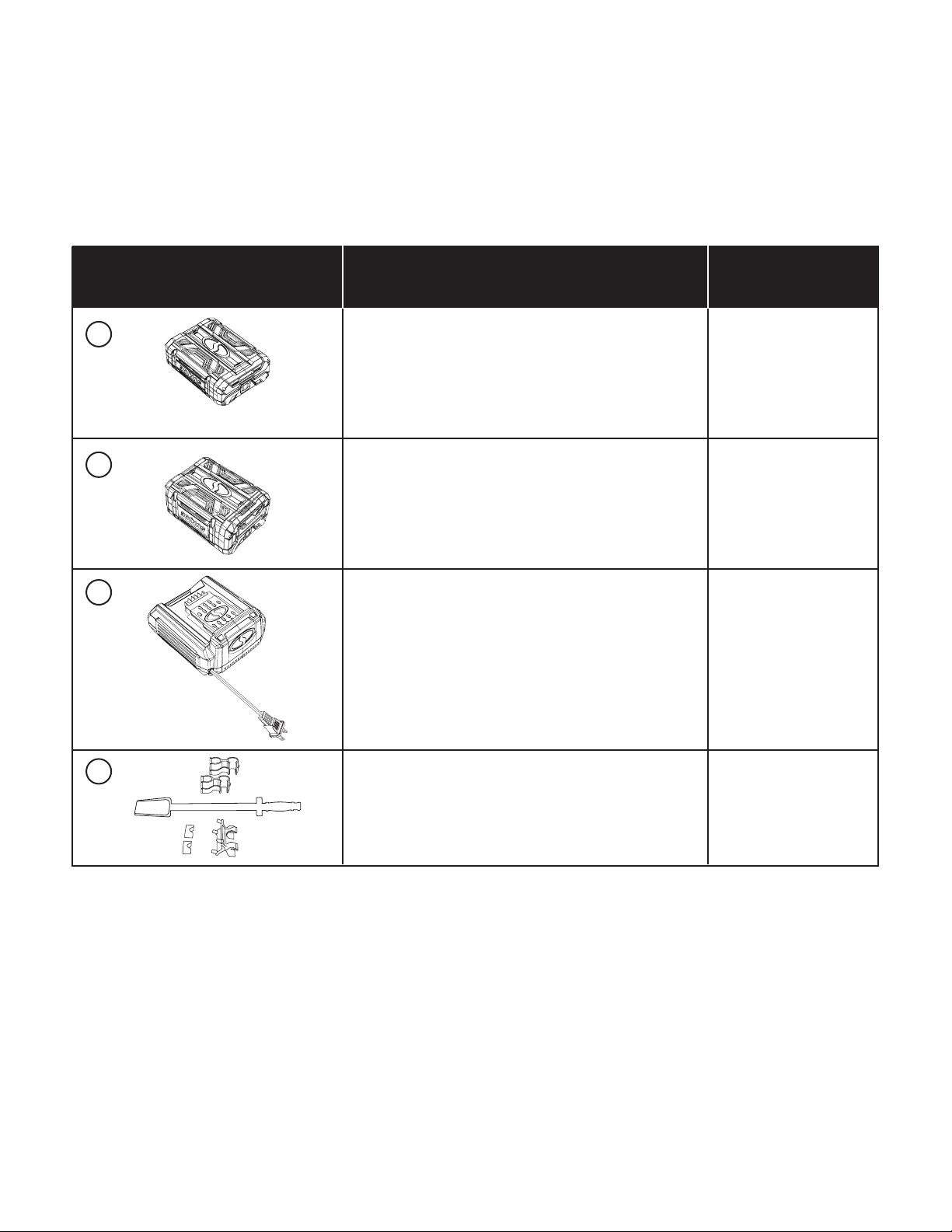
Universal Snow Thrower
Chute Clean-Out Tool
SJCOT
ModelAccessories Item
1
2
3
4
iON100V-2.5AMP
iON100V-5AMP
100V Battery Quick Charger
iON100V-RCH
100V 2.5 Ah Lithium-Ion Battery
Battery Charge Time Max: 50 min
Battery Runtime Max:
2 x iON100V-2.5AMP:
13 min (clears up to 1,680 sq ft of 3 in. snow)
iON100V-2.5AMP + iON100V-5AMP:
19.5 min (clears up to 2,515 sq ft of 3 in. snow)
100V 5.0 Ah Lithium-Ion Battery
Battery Charge Time Max: 1 hr 40 min
Battery Runtime Max:
iON100V-5AMP:
13 min (clears up to 1,680 sq ft of 3 in. snow)
2 x iON100V-5AMP:
26 min (clears up to 3,355 sq ft of 3 in. snow)

23
SNOW JOE
®
+ SUN JOE
®
REFURBISHED GOODS WARRANTY
GENERAL CONDITIONS:
Snow Joe
®
+ Sun Joe
®
operating under Snow Joe
®
, LLC warrants
this refurbished product to the original purchaser for 90 days
against defects in material or workmanship when used for normal
residential purposes. If a replacement part or product is needed,
it will be sent free of charge to the original purchaser except as
noted below.
The duration of this warranty applies only if the product is put to
personal use around the household. It is the owner’s responsibility
to correctly perform all maintenance and minor adjustments
explained in the owner’s manual.
HOW TO OBTAIN YOUR REPLACEMENT PART OR PRODUCT:
To obtain a replacement part or product, please visit
snowjoe.com/help or email us at [email protected] for
instructions. Please be sure to register your unit beforehand to
speed up this process. Certain products may require a serial
number, typically found on the decal axed to the housing
or guard of your product. All products require a valid proof
of purchase.
EXCLUSIONS:
• Wearing parts like belts, augers, chains and tines are
not covered under this warranty. Wearing parts can be
purchased at snowjoe.com or by calling 1-866-SNOWJOE
(1-866-766-9563).
• Batteries are covered in full for 90-days from the date of
purchase.
Snow Joe
®
+ Sun Joe
®
may from time to time change the design
of its products. Nothing contained in this warranty shall be
construed as obligating Snow Joe
®
+ Sun Joe
®
to incorporate
such design changes into previously manufactured products, nor
shall such changes be construed as an admission that previous
designs were defective.
This warranty is intended to cover product defects only.
Snow Joe
®
, LLC is not liable for indirect, incidental or
consequential damages in connection with the use or misuse of
the Snow Joe
®
+ Sun Joe
®
products covered by this warranty.
This warranty does not cover any cost or expense incurred
by the purchaser in providing substitute equipment or service
during reasonable periods of malfunction or non-use of this
product while waiting for a replacement part or unit under this
warranty. Some states do not allow exclusions of incidental or
consequential damages so the above exclusions may not apply
in all states. This warranty may give you specic legal rights in
your state.
HOW TO REACH US:
We’re here to help Monday through Friday from 9AM to 7PM EST
and Sunday 9AM to 4PM. You can reach us at 1-866-SNOWJOE
(1-866-766-9563), online at snowjoe.com, via email at
[email protected] or tweet us @snowjoe.
EXPORTS:
Customers who have purchased Snow Joe
®
+ Sun Joe
®
products exported from the United States and Canada should
contact their Snow Joe
®
+ Sun Joe
®
distributor (dealer) to obtain
information applicable to your country, province or state. If for
any reason, you are not satised with the distributor’s service,
or if you have diculty obtaining warranty information, contact
your Snow Joe
®
+ Sun Joe
®
seller. If in the event your eorts are
unsatisfactory, please reach out to us directly.

snowjoe.com
