Owner's Manual
Original Instructions
Portable air conditioner
Models:
KPC05AK-A3NNA1C
KPC05AK-A3NNA2C
KPC05AK-A3NNA2B
K
KPC06AK-A3NNA1C
KPC06AK-A3NNA2C
KPC06AK-A3NNA2B
KPC06AK-A3NNA3B
K
Thank you for choosing our product.
Please read this Owner’s Manual carefully before operation and
retain it for future reference.

Content
Operation Notices
Operation Environment ...........................................................................................1
Safety Warning ........................................................................................................2
Part's Name .............................................................................................................3
Operation Guide
Operation Introduction for Control Panel .................................................................4
Buttons on Remote Controller ..................................................................................6
Introduction for Icons on Display Screen .................................................................6
Introduction for Buttons on Remote Controller .........................................................7
Function Introduction for Combination Buttons ........................................................9
Operation Guide .................................................................................................... 10
Replacement of Batteries in Remote Controller .....................................................1 0
Maintenance
Clean and Maintenance...........................................................................................11
Malfunction
Malfunction Analysis ...............................................................................................13
Installation Notice
Installation Precaution ............................................................................................16
Preparation before Installation ................................................................................17
Installation
Removing Collected Water ....................................................................................19
Installation in a double-hung sash window.............................................................22
Installation in a sliding sash window.......................................................................
Install Wire Hook ....................................................................................................18
Operation Test .......................................................................................................32
Installation and Disassembly of Heat Discharge Pipe ...........................................30
Attached Sheet
Electric Schematic Diagram...................................................................................32
This appliance is not intended for use by persons (including children) with reduced physical,
sensory
or mental capabilities or lack of experience and knowledge, unless they have been given supervision
or instruction concerning use of the appliance by a person responsible for their safety.
Children should be supervised to ensure that they do not play with the appliance.
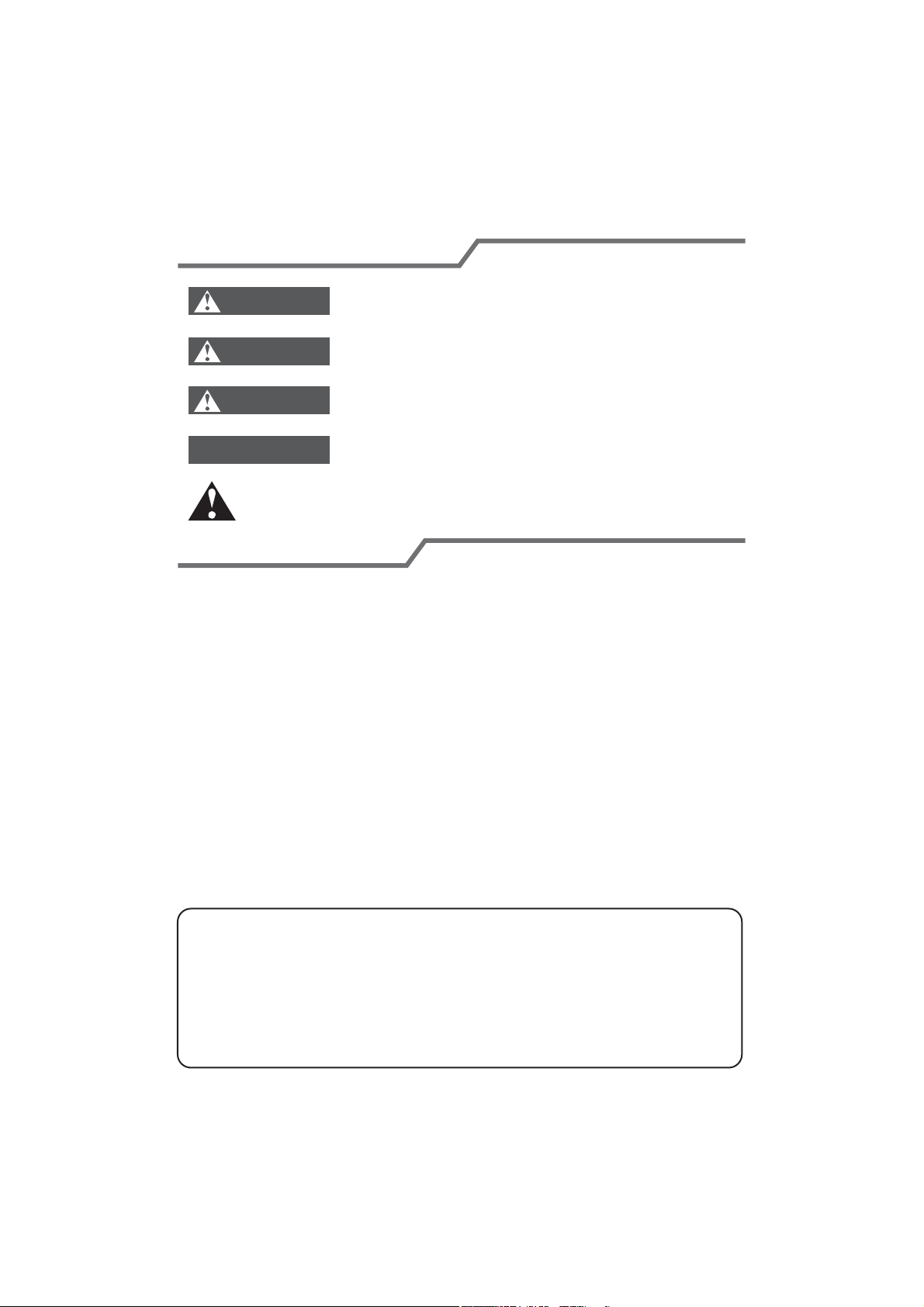
Explanation of Symbols
1.Damage the product due to improper use or misuse of the product;
2.Alter, change, maintain or use the product with other equipment without abiding
by the instruction manual of manufacturer;
After verification, defects are due to improper operation during transportation of
product;
4.
Operate, repair, maintain the unit without abiding by instruction manual or related
regulations;
5.
After verification, the problem or dispute is caused by the quality specification or
performance of parts and components that produced by other manufacturers;
6.
The damage is caused by natural calamities, bad using environment or force
majeure.
7.
After verification, the defect of product is directly caused by corrosive gas;3.
Exception Clauses
Manufacturer will bear no responsibilities when personal injury or
property loss is caused by the following reasons.
Indicates a hazardous situation that, if not avoided, will
result in death or serious injury.
Indicates a hazardous situation that, if not avoided, could
result in death or serious injury.
Indicates a hazardous situation that, if not avoided, may
result in minor or moderate injury.
Indicates important but not hazard-related information,
used to indicate risk of property damage.
Indicates a hazard that would be assigned a signal word
WARNING or CAUTION.
DANGER
WARNING
CAUTION
NOTICE
If it needs to install, move or maintain the air conditioner, please contact dealer
or local service center to conduct it at first. Air conditioner must be installed,
moved or maintained by appointed unit. Otherwise, it may cause serious
damage or personal injury or death.
1
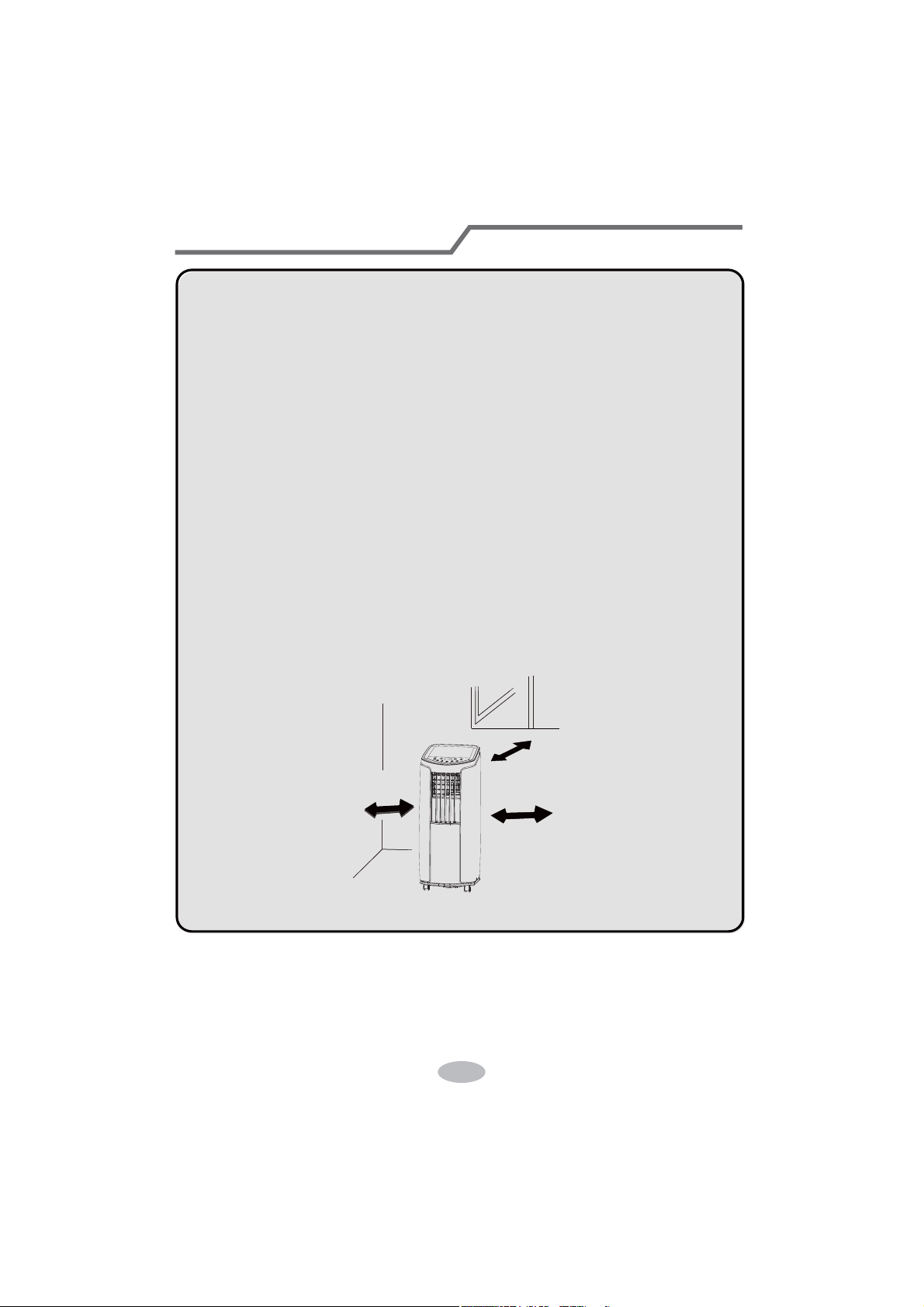
Operation Environment
The air conditioner must be operated within the temperature range:
at smooth and flat ground.
Avoid direct sunshine.
61°F~95°F(16°C ~ 35°C).
The appliance is for indoor use only.
The appliance must be positioned so that the plug is accessible.
This air conditioner can only be used for family, not for
commercial industry.
Reserved space around the air c
at least.
Do not operate the air conditioner at humid environment.
Please keep air inlet and air outlet clean, no obstacles.
During operation, close doors and windows to improve cooling effect.
Please put the air conditioner at smooth and flat ground for operation
to avoid noise and vibration.
This air conditioner is equipped with castors. Castors should slide
Prohibit inclining or turning over the air conditioner. If there’s abnor-
mity,please disconnect power immediately and contact dealer.
12inchs
12inchs
12inchs
2
Safety Warning
If the supply cord is damaged, it must be replaced by the
manufacturer or its service agent or a similarly qualified person
in order to avoid a hazard.
Before cleaning or maintaining the air conditioner, please turn off
air conditioner and pull out the power plug.
Before operation, please confirm whether power specification
complies with that on nameplate.
Please use the grounded power. Make sure the gorunding is reliable.
Do not insert or pull out the power plug with wet hands.
If abnormal condition occurs (e.g. burned smell), please
disconnect power at once and then contact local dealer.
Do not splash or pour water on air conditioner. Otherwise, it may
cause short circuit or damage to air conditioner.
When nobody is taking care of the unit, please turn it off and
remove the power plug or disconnect power.
Children and disabled people are not allowed to use the
portable room air conditioner without supervision.
If drainage hose is used, ambient temperature can't be lower than
0.
Otherwise, it will cause water leakage to air conditioner.
Do not use an extension cord.
Prohibit operating the unit in the bathroom or laundry room.
Prohibit inserting any objects into the air conditioner.
Do not repair or disassemble the air conditioner by yourself.
Do not put or hang dripping objects above the air conditioner.
Keep children from playing or climbing on the air conditioner.
Far away from fire source, inflammable and explosive objects.
Make sure the power cord hasn’t been pressed by hard objects.
Prohibit operating heating equipment around the air conditioner.
Do not pull or drag the power cord to pull out the power plug or
move the air conditioner.
This appliance can be used by children aged from 8 years and
above and persons with reduced physical,sensory or mental
capabilities or lack of experience and knowledge if they have
been given supervision or instruction concerning use of the
appliance in a safe way and understand the hazards involved.
resu dna gninaelC.ecnailppa eht htiw yalp ton llahs nerdlihC
maintenance shall not be made by children without supervision.
3
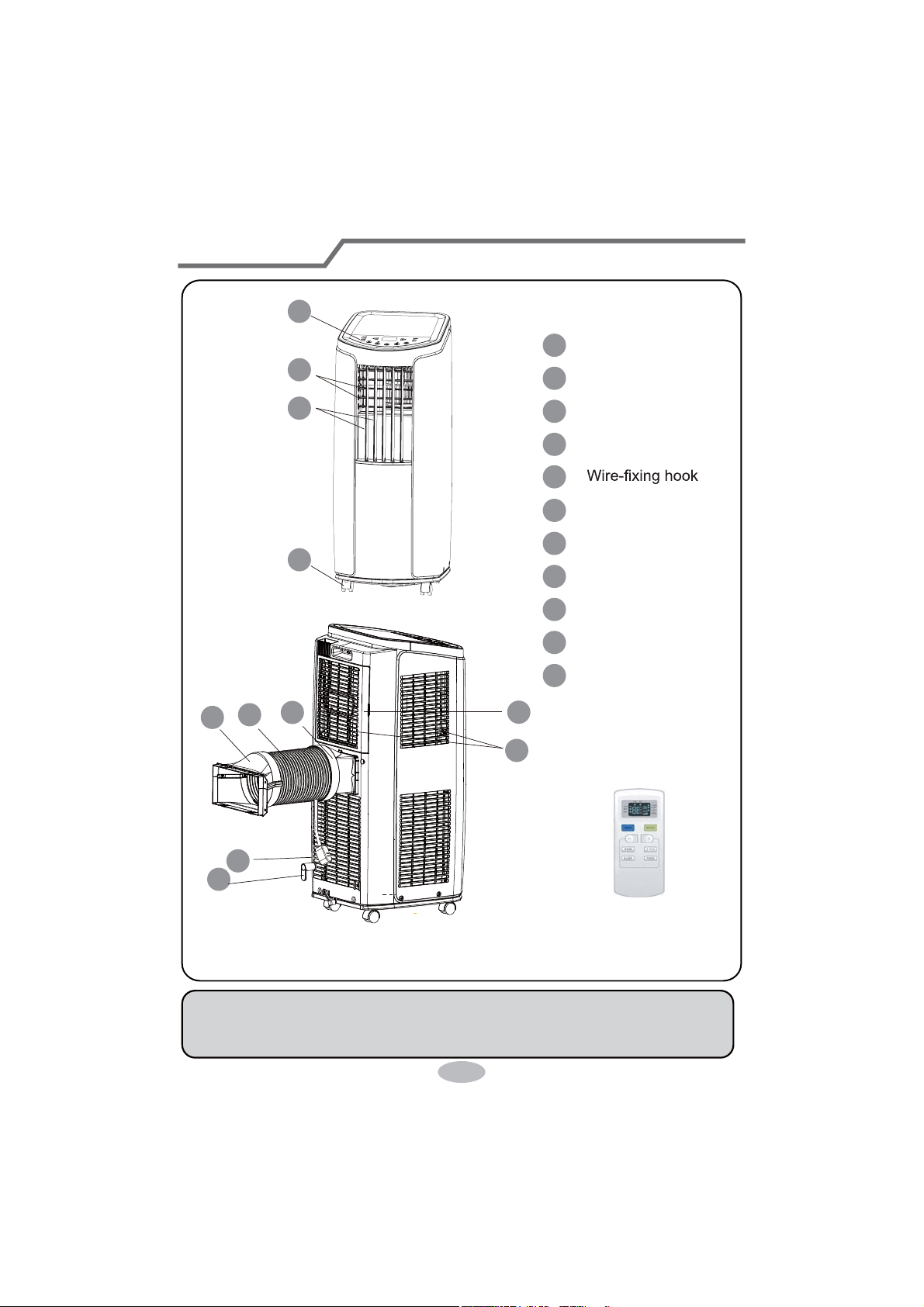
1
Controller panel
2
Guide louver
3
Swing louver
4 Castor
10 Heat discharge pipe
11 Joint B+C
5
6
Plug of power cord
7 Filter
8 Air inlet
9 Joint
A
Remote controller
This picture is only for reference. Please refer to the actual product
for the appearance.
1
11
10
9
6
5
7
8
2
3
4
Part's Name
NOTICE:
Heat discharge pipe and other installation accessories can't be discarded.
4
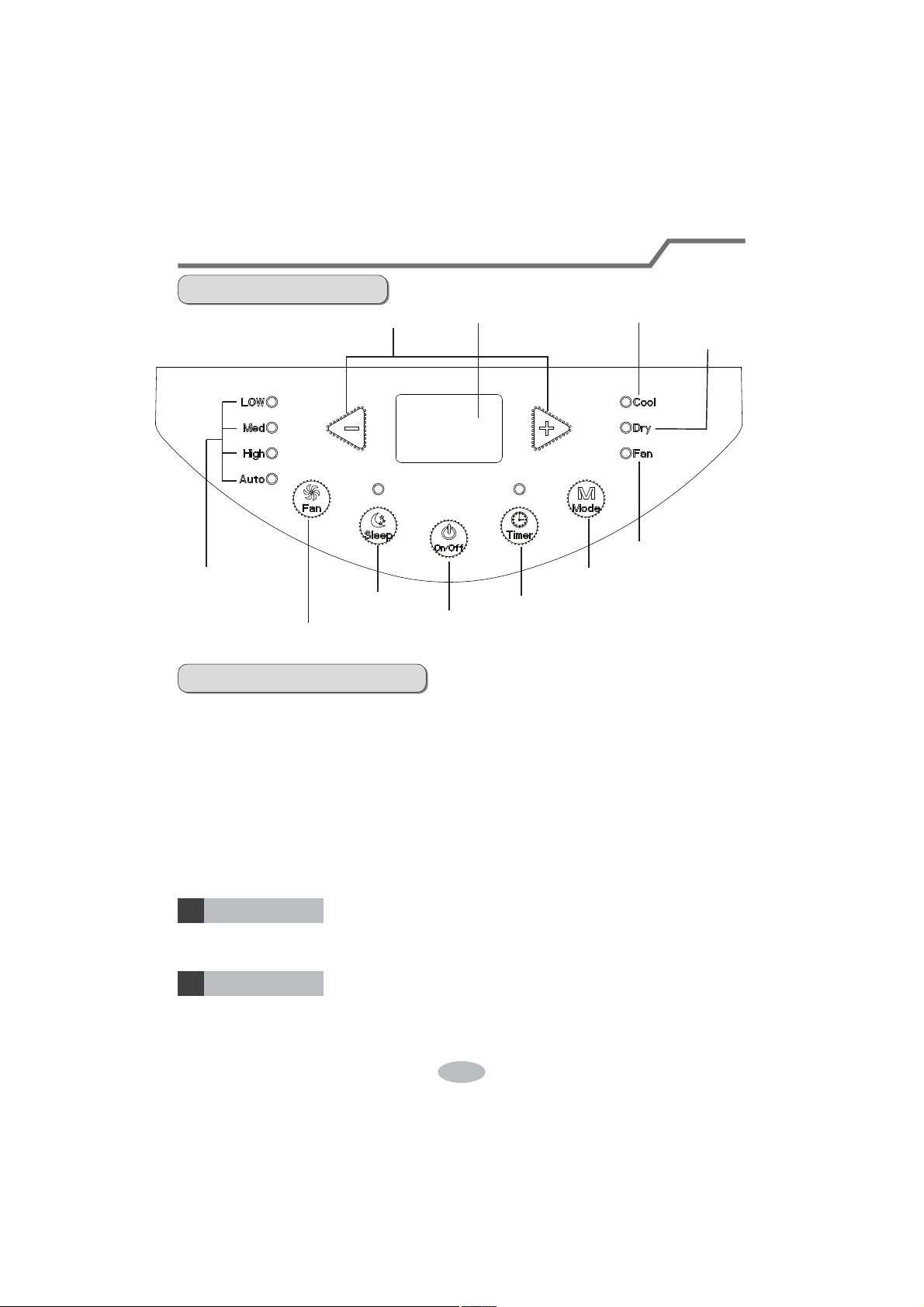
1DPHRIFRQWUROSDQHO
ON/OFF button
M button
+ / - button
an speed indicator
ual-8 nixie tube
an mode indicator
ool mode indicator
ry mode indicator
Sleep button
Fan button
Timer button
2SHUDWLRQRIFRQWUROSDQHO
1RWH
After putting through the power, the air conditioner will give out a sound. After
that, you can operate the air conditioner by the control panel.
Under ON status, after each pressing of the button on control panel, the air
conditioner will give out a sound. Meanwhile, corresponding indicator on control
panelwill be bright.
under cooling mode, while it won’t display under other modes.
this button can turn on or turn off the air conditioner.
Under cooling mode, press “+” or “-” button to increase or decrease set
or fan mode, this button is invalid.
ON/OFF button
+ / - button
2SHUDWLRQ,QWURGXFWLRQIRU&RQWURO3DQHO
5
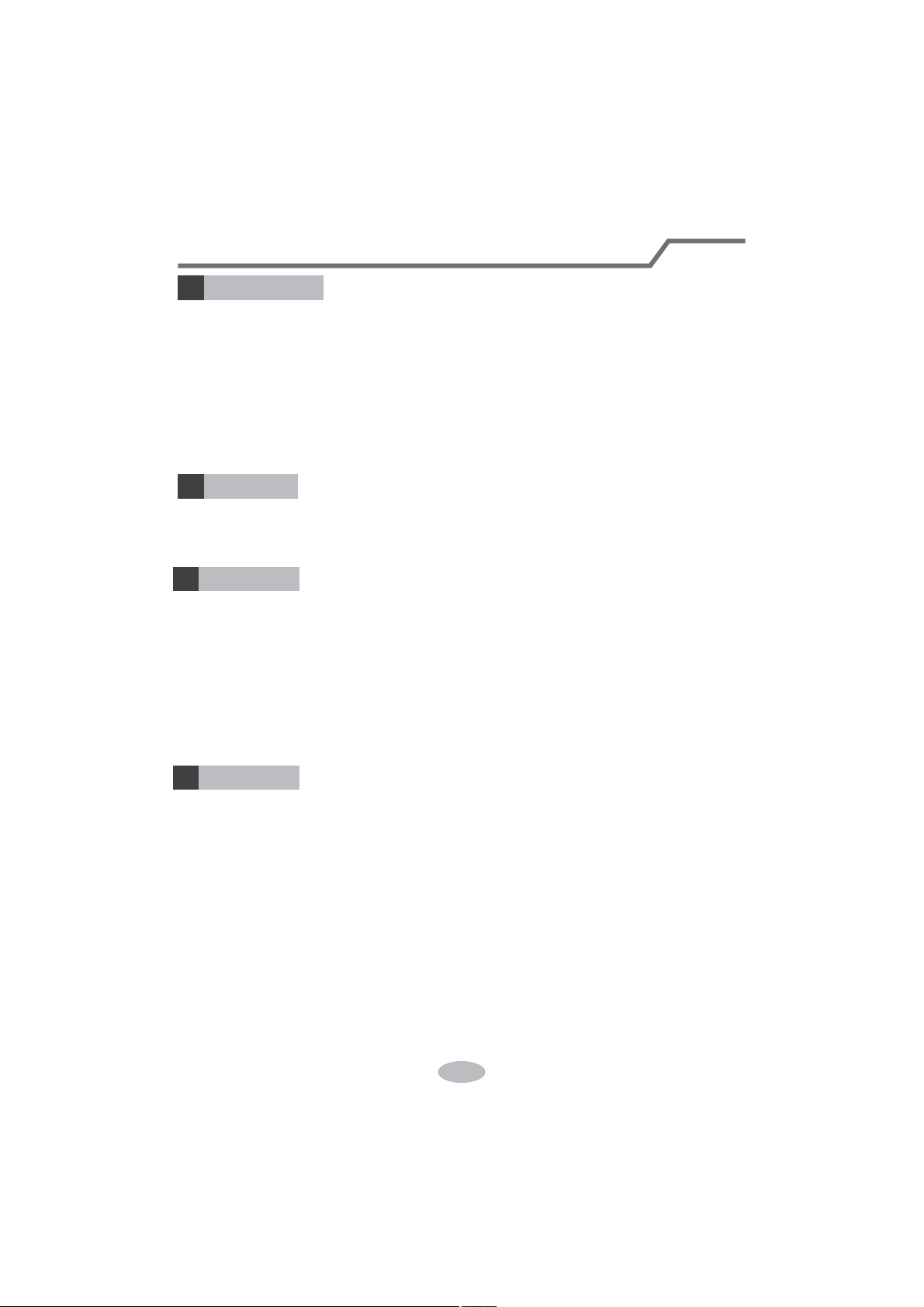
Press this button and the mode will circulate according to below sequence:
RFAN
COOL:ie tube displays
set temperature. Temperature setting range is 61°F(16°C)~(30°C).
RY: tube won’t
display.
FAN: Under this mode, the air conditioner only blow fan. Fan indicator is bright.
y.
Mode button
3
Press this button and the fan speed will circulate as “low spee
Fan button
4
Timer button
5
Press timer button to enter into timer setting mode. Under this mode, press " "
or " " button to adjust the timer setting. Timer setting will increase or decrease
0.5 hour by pressing " " or " " button within 10 hours, while timer setting will
increase or decrease 1 hour by pressing " " or " " button beyond 10 hours.
After timer setting is finished, the unit will display temperature if there’s no
operation for 5s. If timer function is started up, the upper indicator will keep the
display status. Others, it won’t be displayed. Under timer mode, press timer button
again to cancel timer mode.
+
+
+
Sleep button
6
Press sleep button to enter into sleep mode. If the controller operates at cooling
mode, after sleep mode is started up, preset temperature will increase by 2°F(1°C)
within 1 hour ;preset temperature will increase by 4°F(2°C) within 2 hours and then
the unit will operate at this temperature all the time; Sleep function is not available
for fan mode, drying mode and auto mode. If sleep function is started up, the upper
indicator will keep the display status. Others, it won’t be displayed.
Operation Introduction for Control Panel
Buttons on remote controller
Introduction for icons on display screen
21
3
45
67
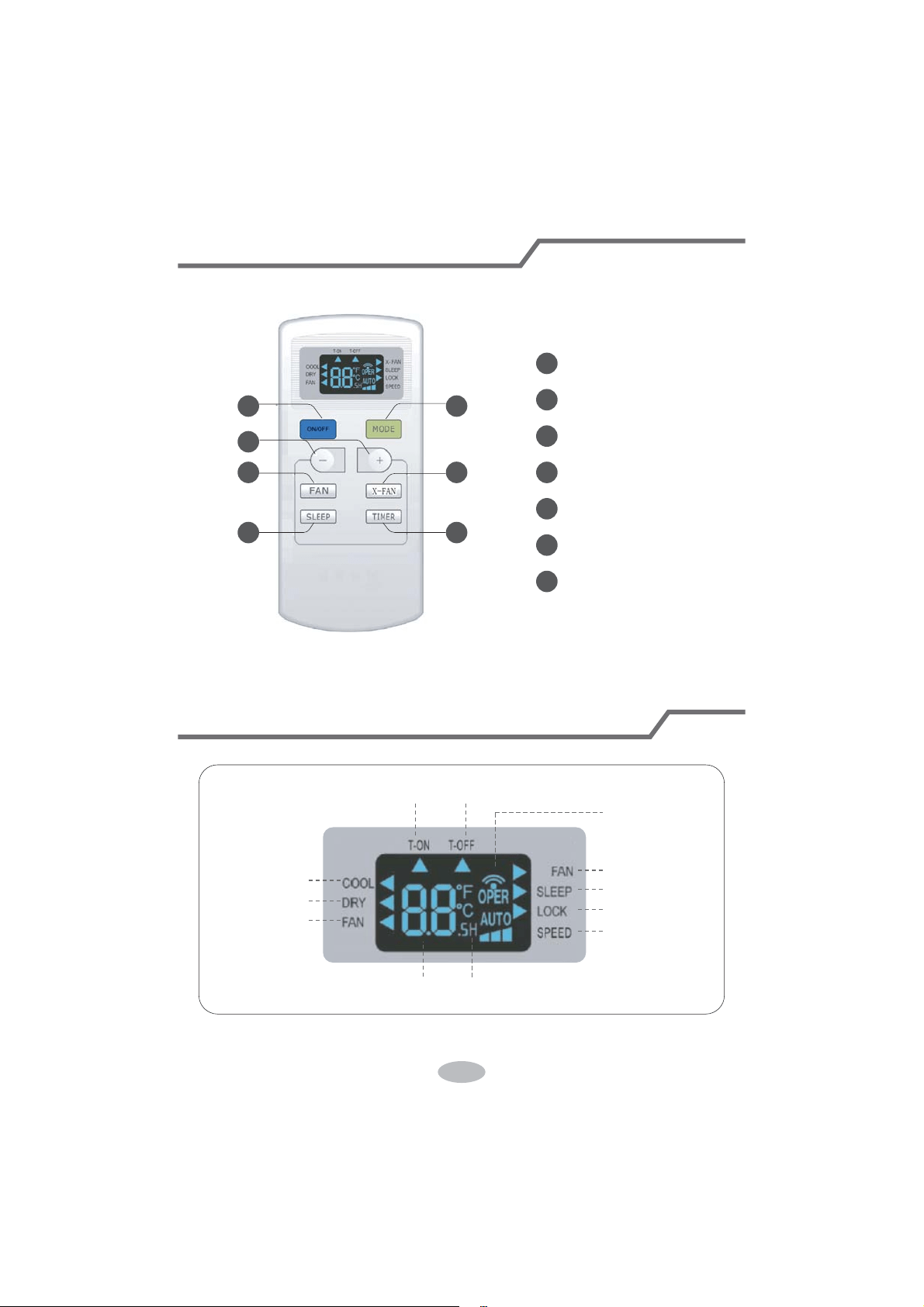
ON/OFF button
MODE button
+/- button
FAN button
X-FAN button
SLEEP button
TIMER button
Timer on Timer off
Sending signal
x-fan operation
sleep operation
lock
set speed
Set timeSet temperature
fan operation
dry operation
cool operation
X-
Introduction for buttons on remote controller
Note:
When power is connected(stand by condition), you can operate the air conditioner
through the remote controller.
When unit is on, each time you press the button on remote controller, the sending
signal icon " " on the display of remote controller will blink once. If the air con-
ditioner gives out a beep sound, it means the signal has been sent.
ff, set temperature will be displayed on the remote controller (If the
light of indoor unit display is turned on, the corresponding icon will be displayed);
When unit is on, it will display the icon of the on-going function.
Press this button to turn unit on/off.
ON/OFF button
1
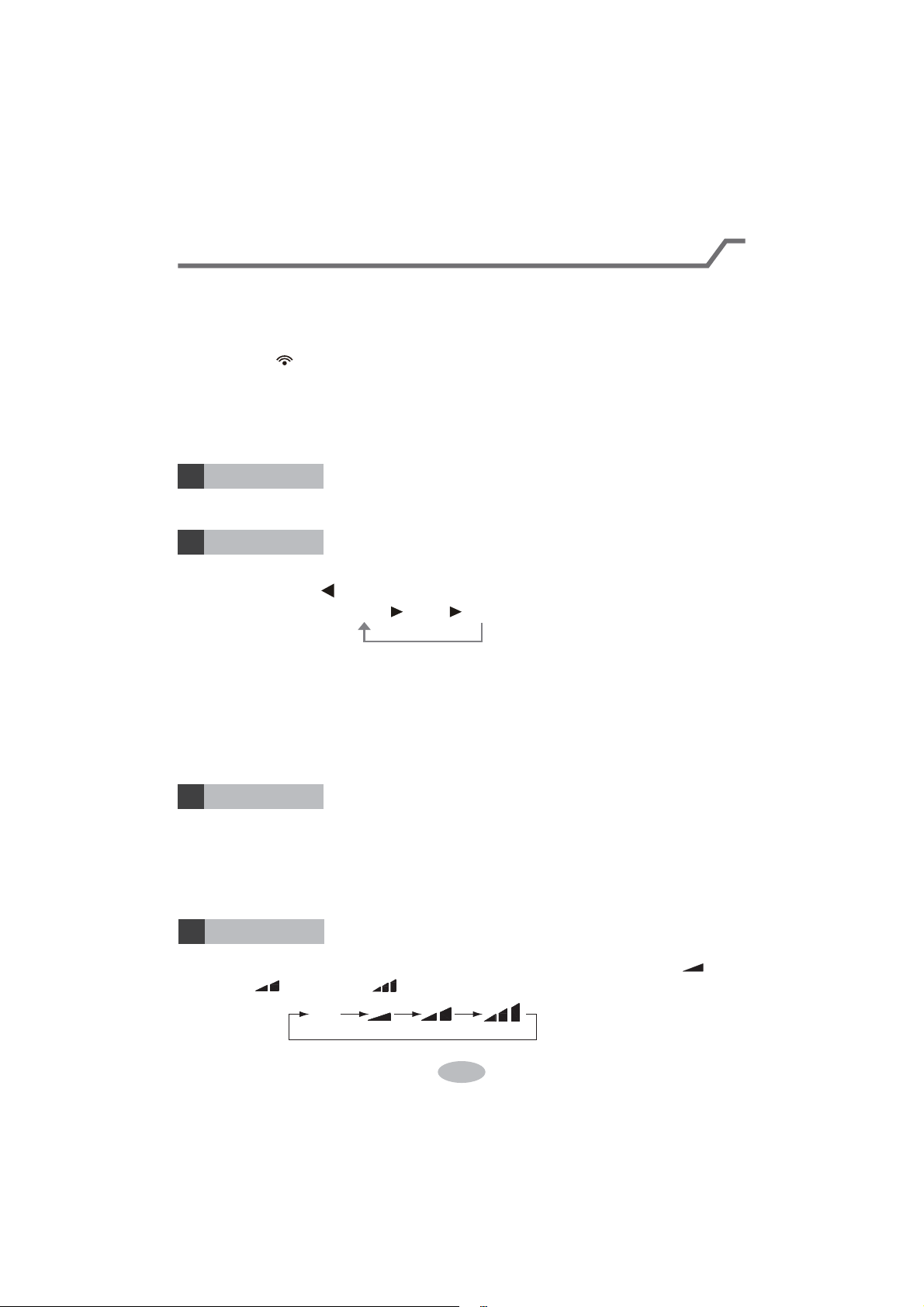
Pressing this button once can select your required mode circularly as below (the
corresponding icon " " will be lit up after the mode is selected):
ner will operate under cool mode. Then
press + or - button to adjust set temperature. Press FAN button to adjust fan speed.
er will operate at low fan speed under dry
mode. In dry mode, fan speed can't be adjusted.
er will operate in fan mode only. Then
press FAN button to adjust fan speed.
COOL DRY FAN
MODE button
2
Pressing + or - button once will increase or decrease set temperature by 1°F(°C).
Hold + or - button for 2s, set temperature on remote controller will change quickly.
Release the button after your required set temperature is reached.
Timer On or Timer Off, press + or - button to adjust the time. (See
TIMER Button for setting details)
+ / - button
3
Pressing this button can select fan speed circularly as: AUTO, SPEED 1 ( ),
SPEED 2 ( ), SPEED 3 ( ).
AUTO
FAN button
4
Introduction for buttons on remote controller
Note:
ll
6
7
5
l
Note:
Introduction for buttons on remote controller
Function introduction for combination buttons
Press “+” and “-” buttons simultaneously can turn on or turn off child lock function.
When child lock function is started up, LOCK indicator on remote controller is ON.
If you operate the remote controller, remote controller won’t send signal.
Note:
The interval between two motions can't
troller will exit setting status.
Child lock function
Temperature display switchover function
Under OFF status, press “-” button and “MODE” button simultaneously can switch
between °C and °F.
Under switch-on or switch-off state, you may hold "+"and "FAN" buttons
simultaneously for 3 seconds to set the lamp on or off and send the code. After
being energized the lamp is defaulted on.
Light function
1
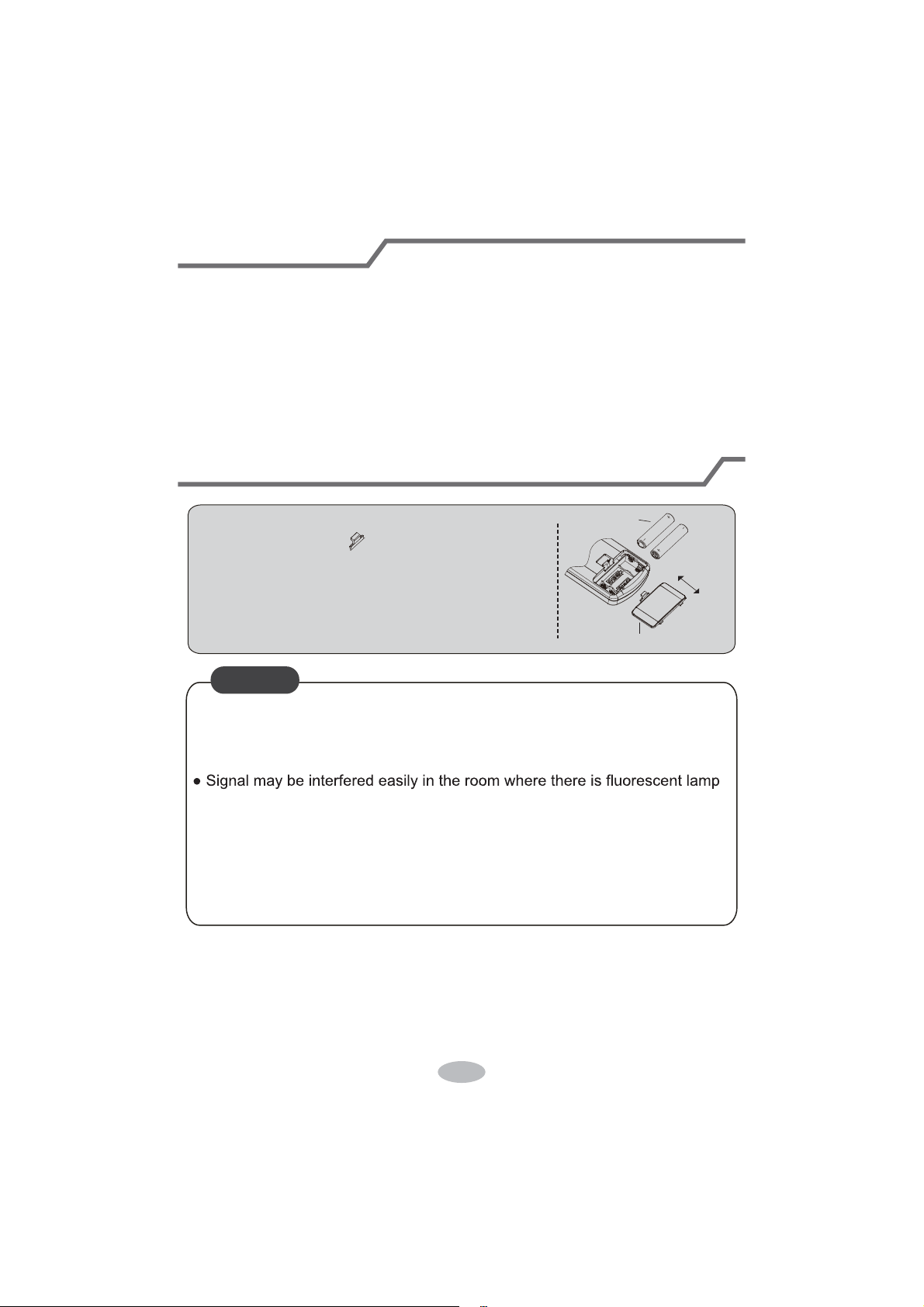
Operation guide
Replacement of batteries in remote controller
: Y
T
A
NOTICE
11
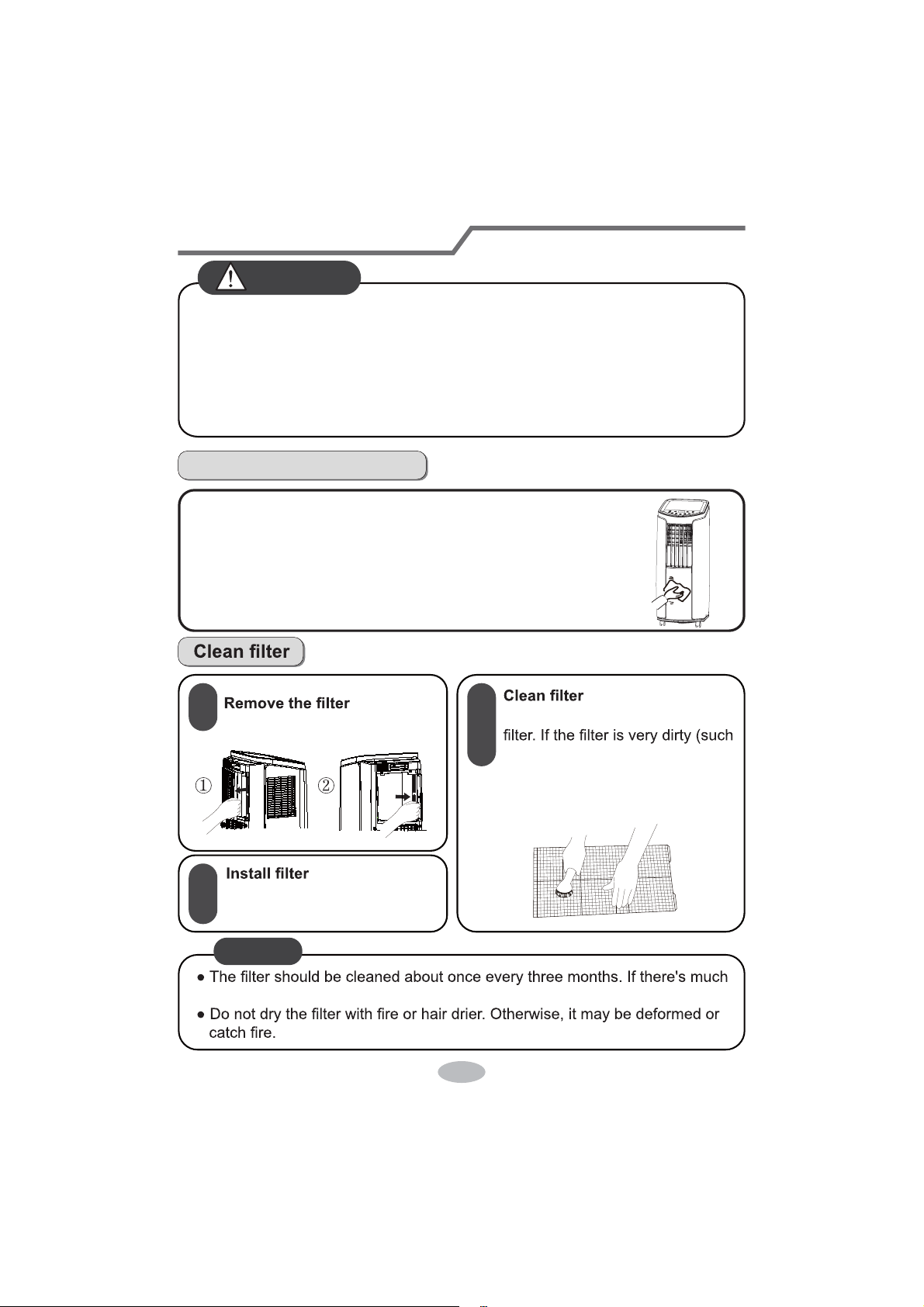
Clean and Maintenance
Clean outer case and grille
Clean grille: Use cleaner or soft brush to clean it.
2
Clean outer case:
If there's dust on the surface of outer case, please use soft towel
to wipe it. If the outer case is very dirty (such as grease), please
use neutral abluent to wipe it.
After the filter is cleaned and
dried, reinstall it well.
1
3
Use cleaner or water to clean the
NOTICE
dust in the operation environment, you can increase clean frequency.
as grease), use warm water 104°F
(40°C) melted with neutral
abluent to clean it and then put at
shady place to dry it.
2
WARNING
Before cleaning the air conditioner, please turn off the unit and disconnect
power. Otherwise, it may cause electric shock.
Do not wash air conditioner with water. Otherwise, it may cause electric shock.
Do not use volatile liquid (such as thinner or gas) to clean the air conditioner.
Otherwise, it may damage the appearance of air conditioner.
Do not use liquid or corrosive detergent clean the appliance and do not splash
water or other liquid onto it, otherwise, it may damage the plastic components,
even cause electric shock.
&OHDQDQG0DLQWHQDQFH
&OHDQKHDWGLVFKDUJHSLSH
Remove the pipe from air conditioner, clean and dry it , and then
instruction for "Installation and disassembly of heat discharge pipe").
&KHFNLQJEHIRUHXVHVHDVRQ
1. Check whether air inlets and air outlets are blocked.
2. Check whether plug and socket are in good condition.
4. Check whether batteries installed in remote controller.
6. Check whether pipe is damaged.
&KHFNLQJDIWHUXVHVHDVRQ
1. Disconnect power supply.
3. Remove dust and sundries on the air conditioner.
4.
Eliminate accumulated water in chassis (refer to the section of "Drainage way"
5. Check whether window bracket is damaged or not. If yes, please contact dealer.
/RQJWLPHVWRUDJH
If you don't use the air conditioner for a long time, please maintain it by following
steps for good performance:
disassembled.
1RWLFHIRUUHFRYHU\
local recycle bin.
consultant service center for the correct disposal method.
1
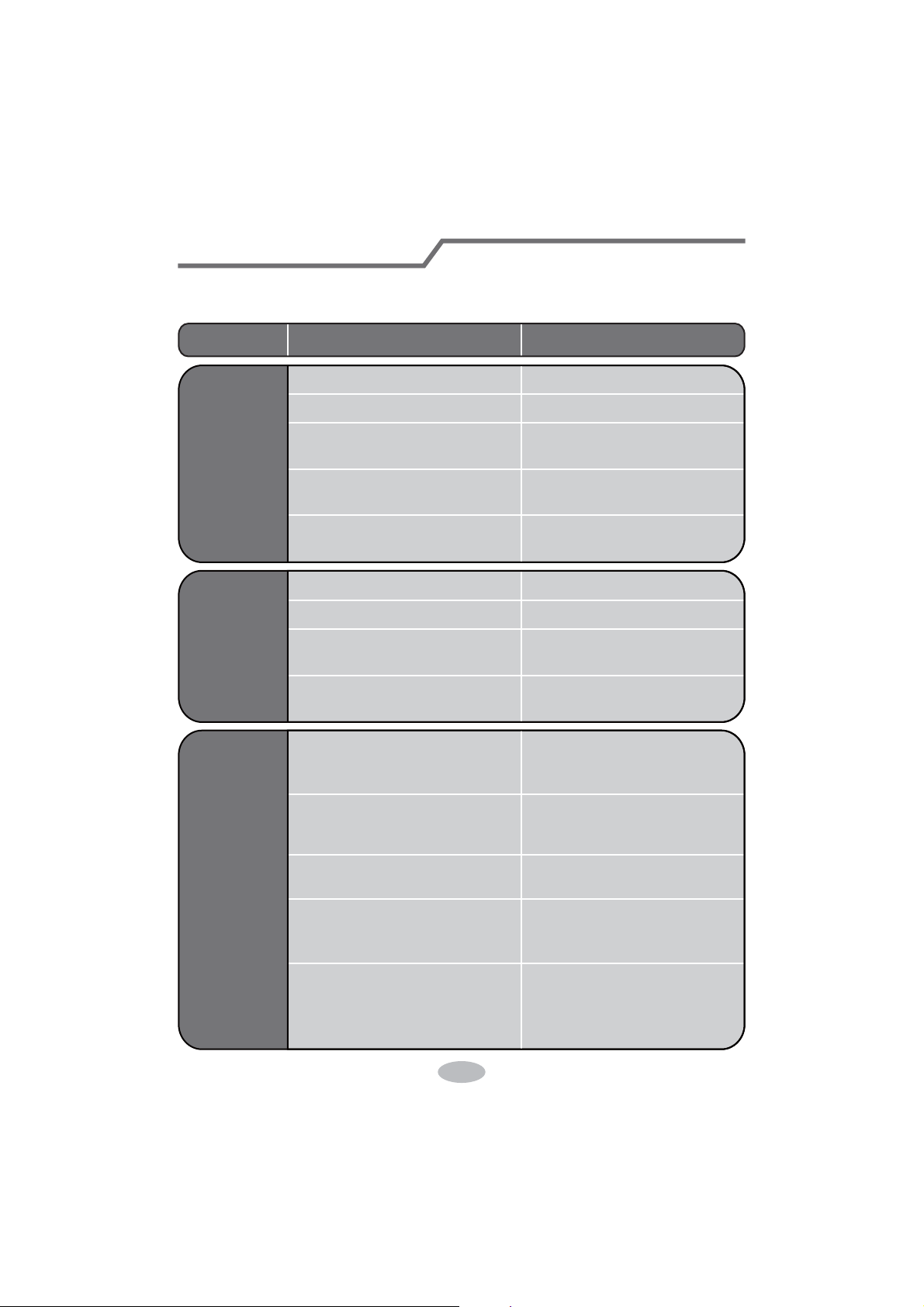
0DOIXQFWLRQ$QDO\VLV
Please check below items before asking for maintenance. If the malfunction still
Phenomenon Troubleshooting Solution
Air conditioner
can't operate
Air conditioner
can't receive
signal from
remote contr-
oller or remote
controller is
not sensible.
Poor cooling
ert the plug after about 3min,
and then turn on the unit.
The receiving range of remote
ed this range.
controller. If the power is low,
please replace the batteries.
close to air conditioner.
and try it again.
replace air switch or fuse.
replace circuit.
on the unit again.
1
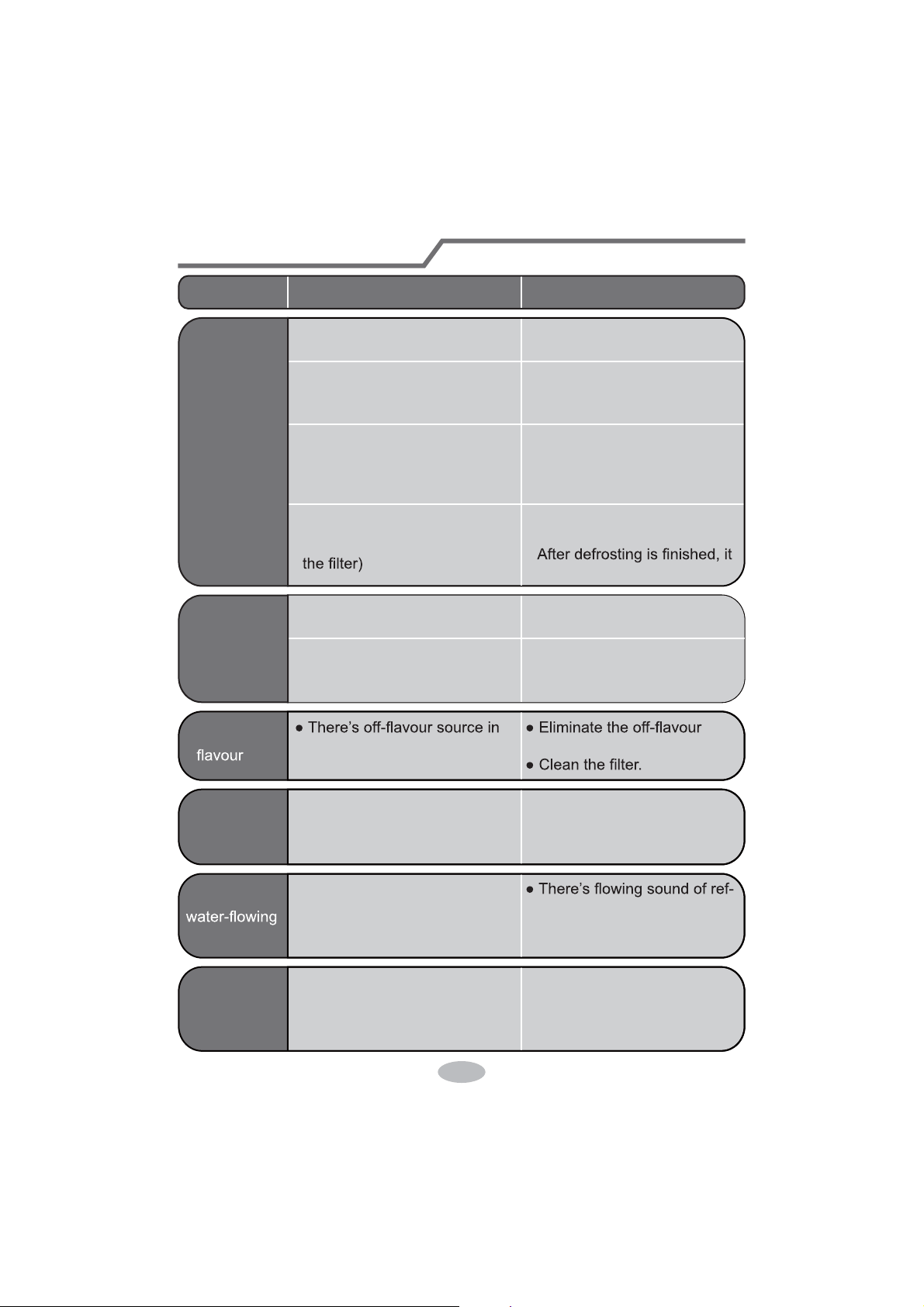
Phenomenon Troubleshooting Solution
T
T
61°F(16°C)~
Malfunction analysis
hetherevaporatorisfros
r
ff
r
r
Y
f
r
Y
"PAPA"
f
14
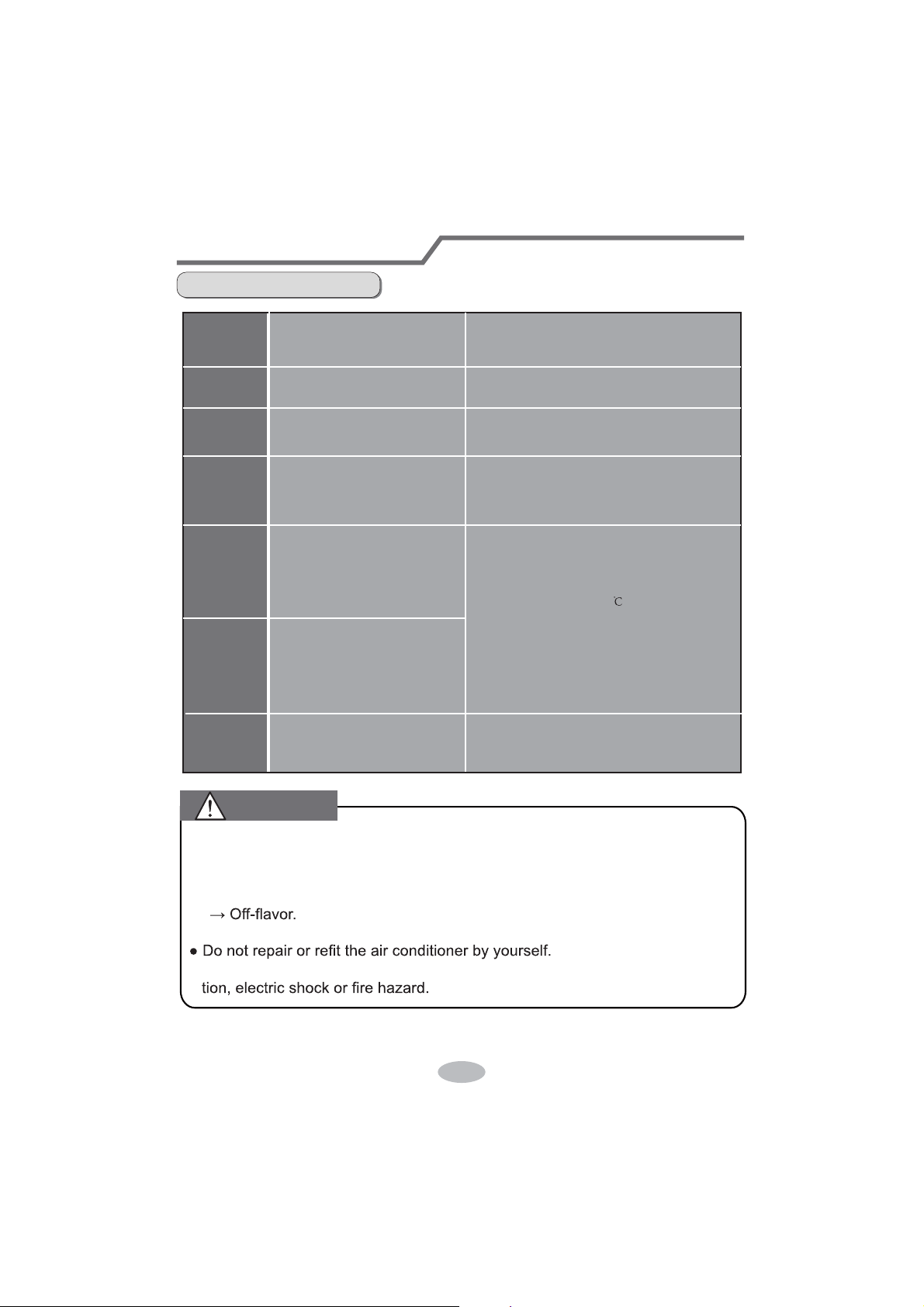
15
Malfunction analysis
Malfunction code
Chassis is full of water.
Malfunction of ambient
temperature sensor.
Please contact professional person to deal
with it.
Malfunction of evaporator
temperature sensor.
Please contact professional person to deal
with it.
1. Pour out the water inside chassis.
2. If "H8" still exits, please contact professional
person to maintain the unit.
If there're following phenomenon, please turn off the air conditioner and discon-
nect the power immediately, and then contact dealer immediately.
If operate the air conditioner under abnormal condition, it may cause malfunc-
aged.
Abnormal sound during operation.
Water leakage
F0
F2
F1
H8
H3
E8
F4
1.Refrigerant is leaking
2.System is blocked
1. Re-energize the unit after turning off and
pulling out the plug for 30min;
2. If there's still malfunction, please contact
after-sales service.
Overload protection for compressor
Overload malfunction
1.Check if the unit is under high-temperature
and high-humidity environment; if ambient
temperature is too high, power off the unit and
then energize it for operation after the ambient
temperature drops to 35 below.
2. Check if the evaporator and condenser are
blocked by some objects; if yes, take away the
objects, power off the unit and then energize
it for operation.
3. If the malfunction still occur, please contact
our after-sales service center.
Outdoor tube temperature
sensor is open/short-circuited.
Please
contact after-sale service person
to deal with it.
WARNING
Observe all governing codes and ordinances.
Do not use damaged or non-standard power cord.
Installation Precaution
WARNING
Be caution during installation and maintenance. Prohibit incorrect operation
to prevent electric shock, casualty and other accidents.
Selection of installation location
Requirements for electric connection
2.
objects spread in the air.
3.
The place with high-frequency devices (such as welding machine, medical equipment).
The place near coast area.
4.
Basic requirement
Installing the unit in the following places may cause malfuncti
on. If it is unavoidable,
please
consult the local dealer:
5.
The place with oil or fumes in the air.
The place with sulfureted gas.
6. Other places with special circumstances.
1.
2.
Air inlet should be far away from obstacles and do not put any objects near air outlet.
Otherwise, it will affect the radiation of
heat discharge pipe.
3. Please try your best to keep far away from fluorescent lamp.
4.
Select a location where the noise and outflow air emitted by the outdoor unit will not affect
neighborhood.
Requirement of air conditioner
The appliance shall not be installed in the laundry.
1. Must follow the electric safety regulations when installing the unit.
2.
3.
According to the local safety regulations, use qualified power supply circuit.
WARNING:
Safety precaution
4.
5.
Properly connect the live wire, neutral wire and grounding wire of power socket.
For appliances with type Y attachment,the instructions shall contain the substance of
the following.If the supply cord is damaged,it must be replaced by the manufacturer, its
service agent or similarly qualified persons in order to avoid a hazard.
6.
Be sure to cut off the power supply before proceeding any work related to electricity and
safety.
7.
Do not put through the power before finishing installation.
8.
9.
The air conditioner is first class electric appliance. It must be properly grounding with
specialized grounding device by a professional. Please make sure it is always grounded
effectively, otherwise it may cause electric shock.
The yellow-green wire or green wire in air conditioner is grounding wire, which can't be
used for other purposes.
10.
The grounding resistance should comply with national electric safety regulations.
The appliance shall be installed in accordance with national wiring regulations.
16
support
17
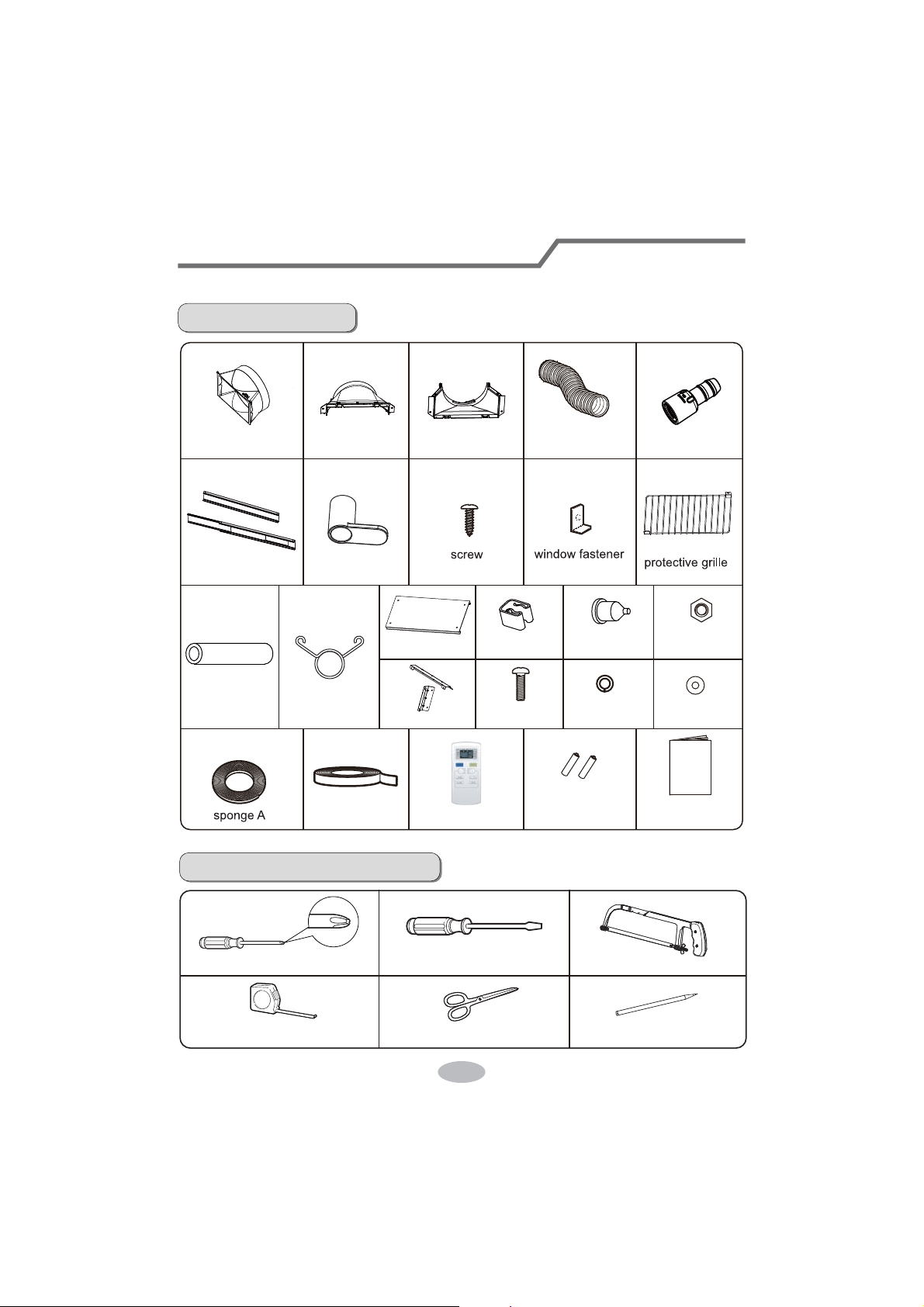
Preparation before installation
Note:
check if the accessories are available before installation.
Accessory list
Tools needed for installation
cross screwdriver
gauge
straight screwdriver
scissors
saw
pencil
heat discharge
pipe
window panel
sponge B
battery
(AAA 1.5V) user's manual
remote controller
joint Bjoint A joint C
wire hook
Adapter
drainage pipe pipe hoop
rubber plugpipe clip
bolt
nut
washer
spring washer
rain shield
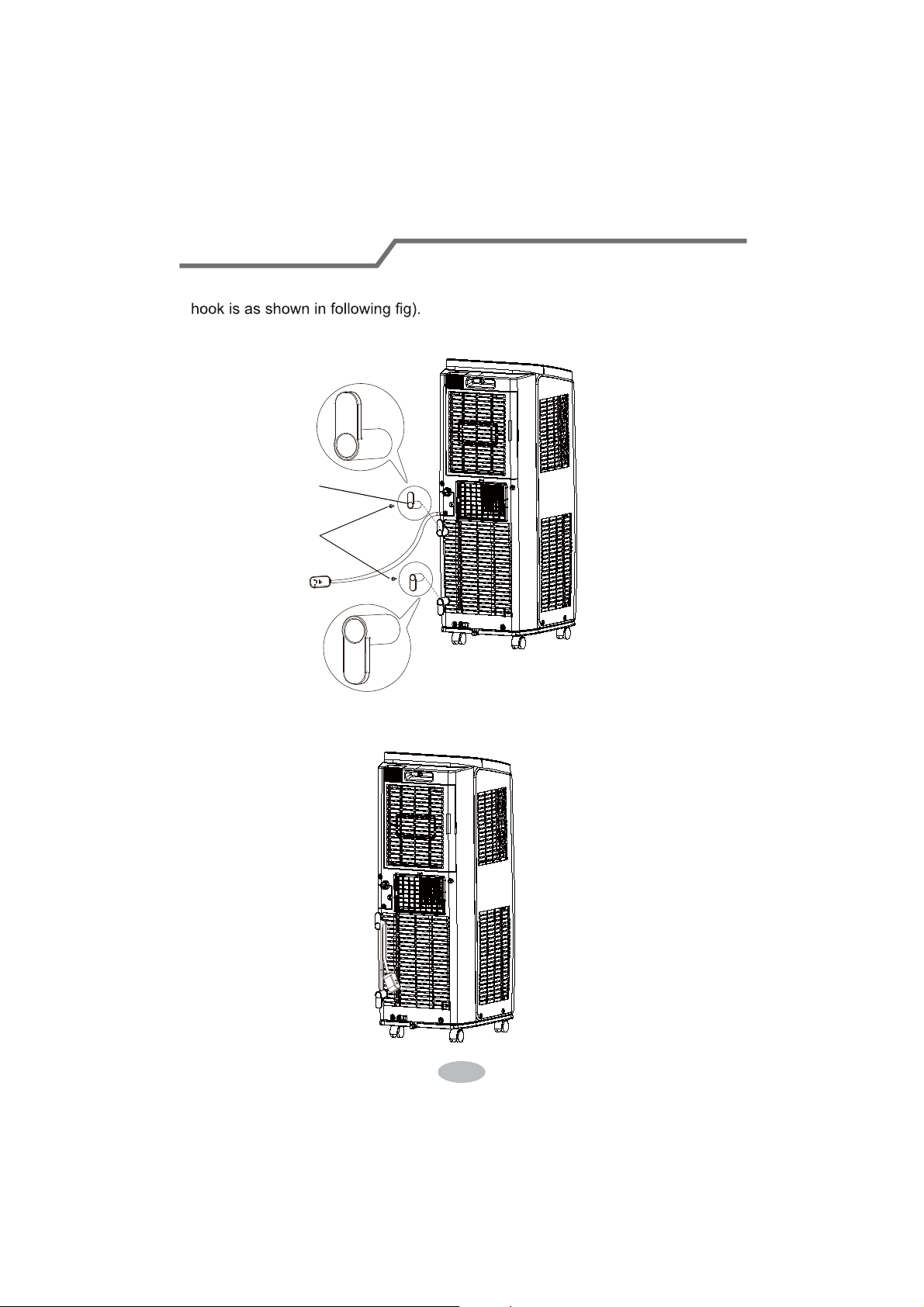
Install Wire Hook
Assemble the wire hook at the back of the unit with screws (the direction of wire
ook.
direction of wire hook is downward
screw
wire hook
18
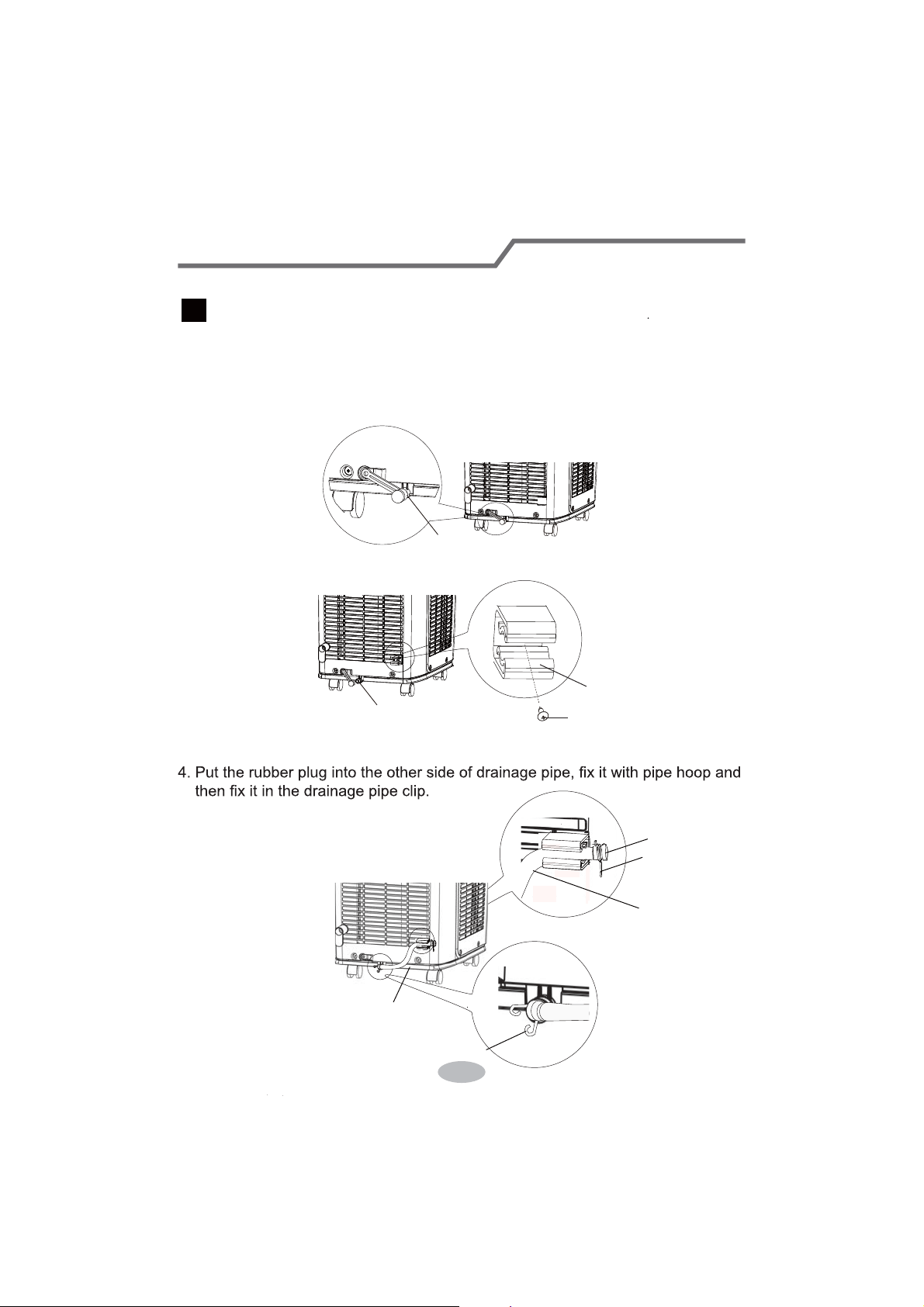
Removing Collected Water
19
1. Remove the rubber plug at drainage port.
2. Fix the drainage pipe clip on the right of rear side plate near drainage port with
a screw.
3. Put the drainage pipe into drainage port and screw it up, and then bind it with
pipe hoop.
drainage port
drainage port
drainage pipe clip
screw
Note:
When using the continuous drainage option from the bottom hole, install
drainage pipe before using, otherwise poor drainage will affect normal
operation of the unit.
There are 2 ways to remove collected water:
Instructions for drainage pipe installation as follows.
Use the continuous drainage option from the bottom hole
1
pipe hoop
drainage pipe
drainage
pipe clip
pipe hoop
rubber plug
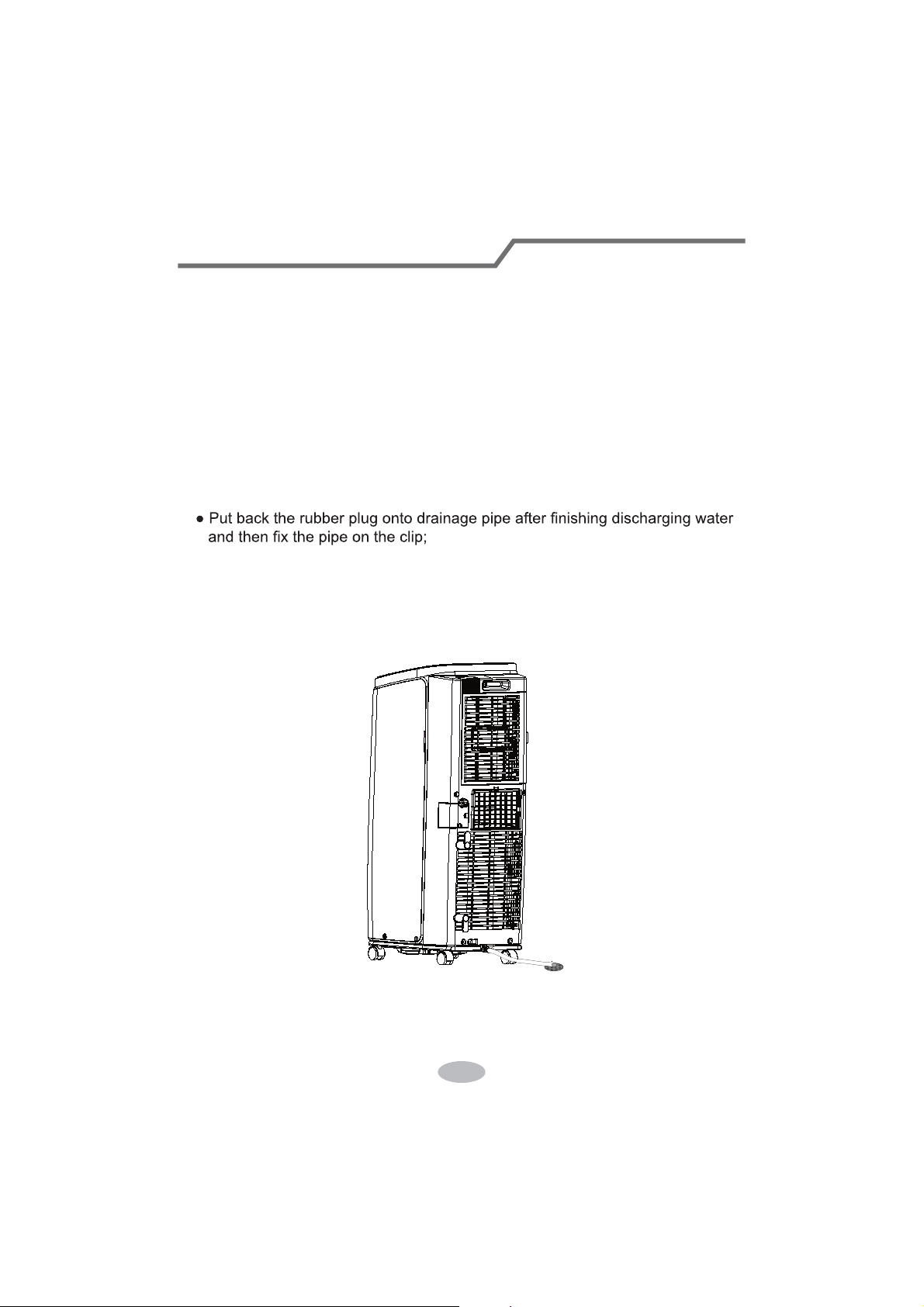
Removing Collected Water
1. In cooling or drying operation, the condensation water will be drained to the
chassis and spattered by water-striking motor.
nd drained to
outdoor. So usually, only a little condensation water will be accumulated inside
the chassis and you do not need to discy.
r
displayed to remind user to discharge water:
do not tilt the unit and
Tand pull out the rubber plug on the
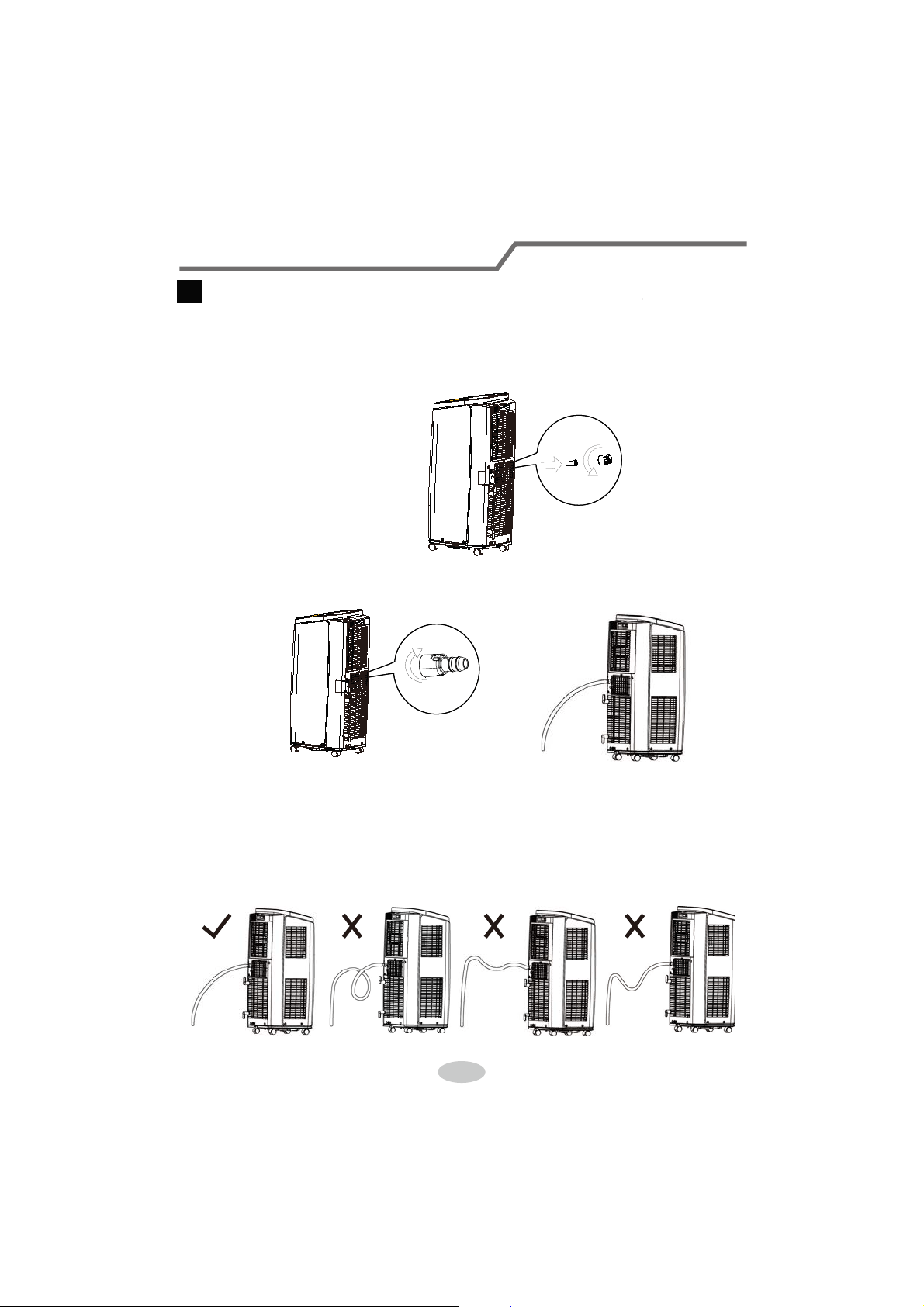
1. Remove the continuous drain cap 1 by turning it counter clockwise then remove
the rubber stopper 2 from the spout.
2. Screw the drain connector to(included
in the package) the spout by turning
clockwise.
3. Insert the drainage hose into
drain connector.
ATTENTION:
Removing Collected Water
When using continuous drainage option from the middle hole, place portable
on a level surface and make sure garden hose is clear of any obstructions
and is directed downward. Placing portable on an uneven surface or
improper hose installation may result in water filling up the chassis and
causing the unit to shut off. Empty water in the chassis if shut off occurs,
then check portable location and hose for proper setup.
Note:
Water can be automatically emptied into a floor drain by attaching 14mm inner
diameter hose (not included).
Use the continuous drainage option from the middle hole
2
2
22
Installation in a double-hung sash window
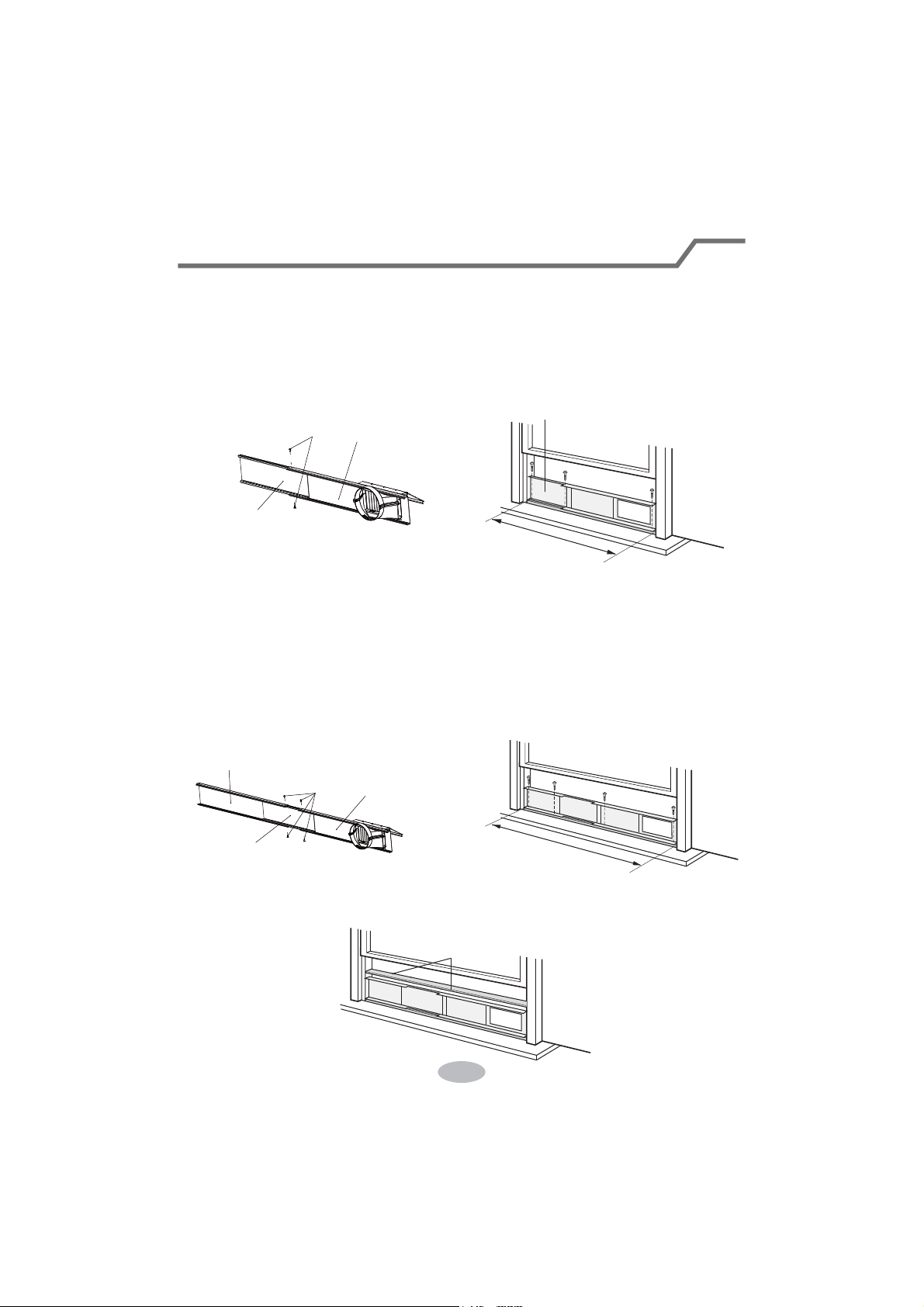
(Note: If the inner width of window is below 20.5"(520mm), please remove the
adjusting panel from window panel and then cut the window panel to make its width
the same as the width of window.)
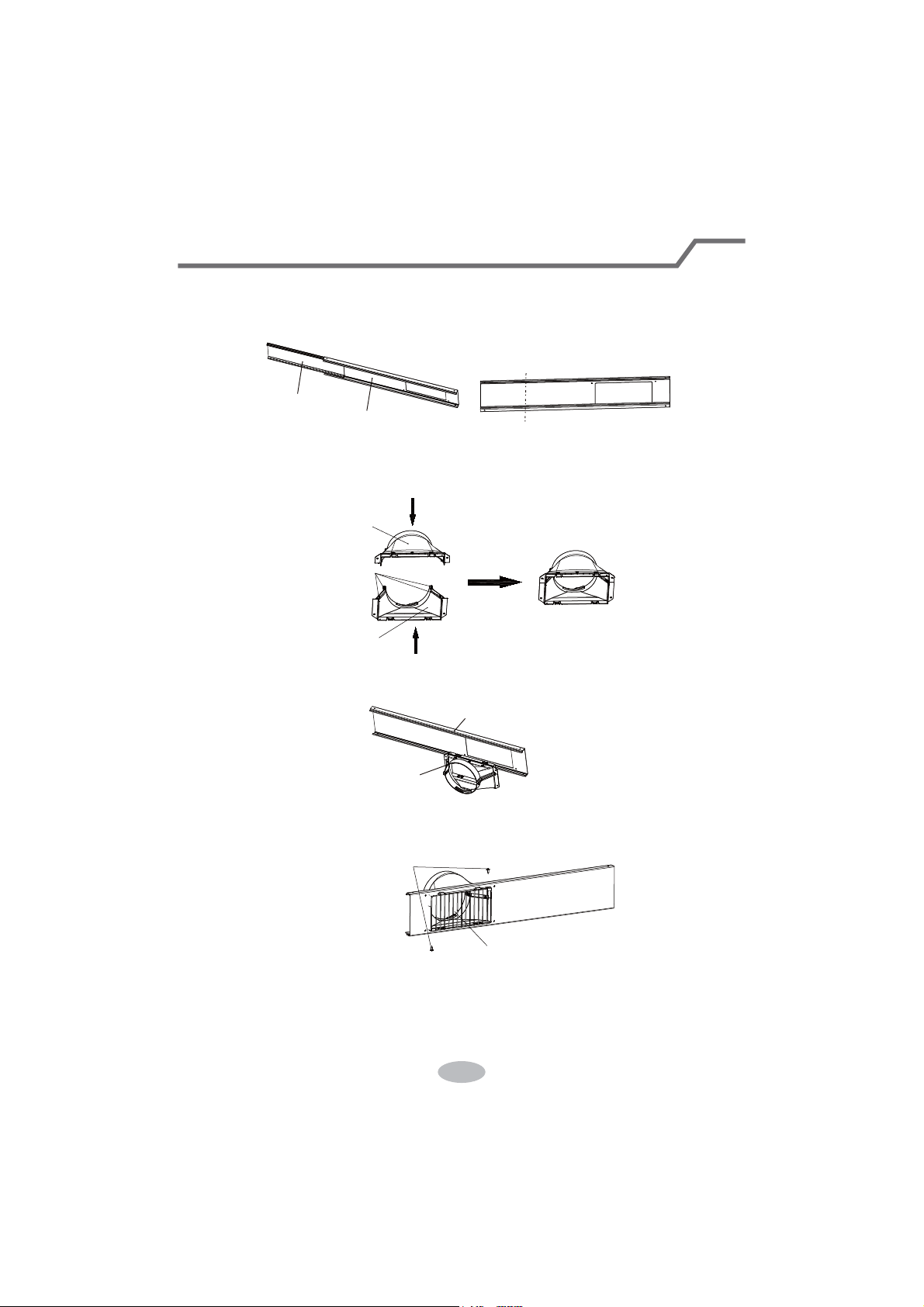
1. Install rear clip — aim the rear clip(upper) at the rear clip(lower),fix them together,
press the clasp forcibly in to the groove.
adjusting panel
window panel
cut
clasp
rear connector (lower)
rear connector (upper)
window panel
2. Clamp joint B+C into the inner side of window panel along the direction of arrow.
joint B+C
inner side
3. Fix the protective grille on joint B+C with screws.
washer and bolt.
screws
protective grille
4. Fix the support on the outer side of window panel withnuts, spring washer,
23
Installation in a double-hung sash window
nut
nut
spring washer
spring washer
washer
screws
washer
bolt
support
rain shield
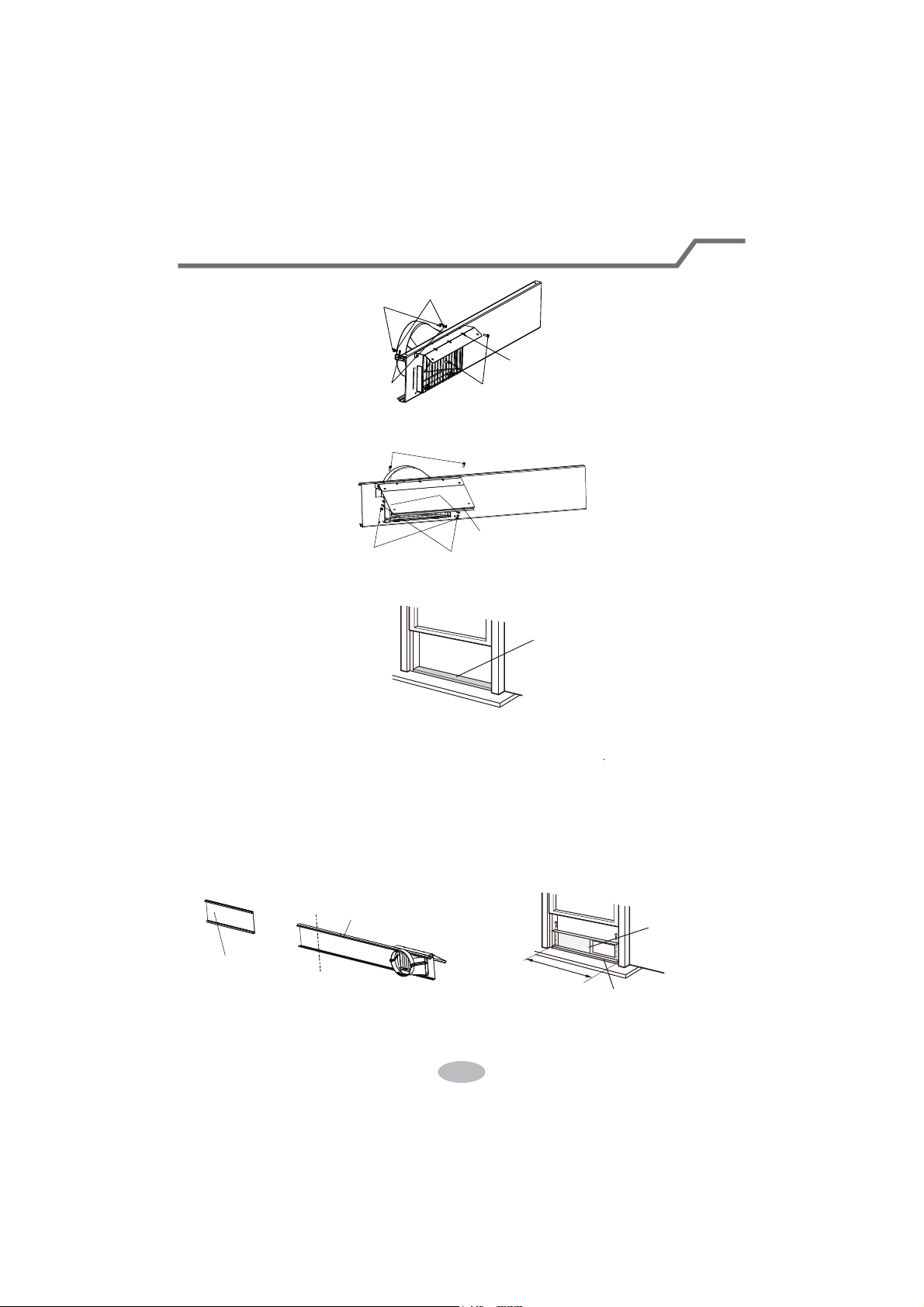
5. Fix the rain shield on the support with nuts, spring washer, washer and bolt.
6. Cut the sponge B to a proper length and attach it to the window sash.
7. Attach the window panel to the window stool.
7.1 If the inner width of the window is less than 20.5"(520mm)
The window panel cannot be installed in windows less than 20.5"(520mm) wide.
(1) Remove the adjustment panel from the window panel, and cut the window
panel to the same width as the window.
(2) Open the window sash and place the window panel on the window stool.
(3) Secure the window panel to the window stool with screws.
sponge B (adhesive)
Cut
adjustment panel
Window panel assemble
Window panel
<20.5"
Window stool
24
Installation in a double-hung sash window
7.2 If the inner width of the window is between 20.5"(520mm) and 37.4"(950mm)
inclusive.
(1) Open the window sash and place the window panel on the window stool.
(2) Slide the adjustment panel to fit the window stool width.
(3) Secure the window panel to the window stool with screws.
7.3 If the inner width of the window is between 37.4" (950mm) and 56.7" (1440mm)
8. Cut the sponge B to a proper length and attach it to the window panel.
inclusive.
(1) Attach the extension panel to the adjustment panel.
(2) Open the window sash and place the window panel on the window stool.
(3) Slide the adjustment and extension panels to fi t the window stool width.
(4) Secure the window panel to the window stool withscrews.
Adjustment panel
Window panel assemble
adjustment panel
Screws
Extension panel
adjustment panel
Window panel assemble
Screws
20.5"~37.4"
37.4"~56.7"
sponge B
(adhesive type)
25
Installation in a double-hung sash window
Installation in a sliding sash window
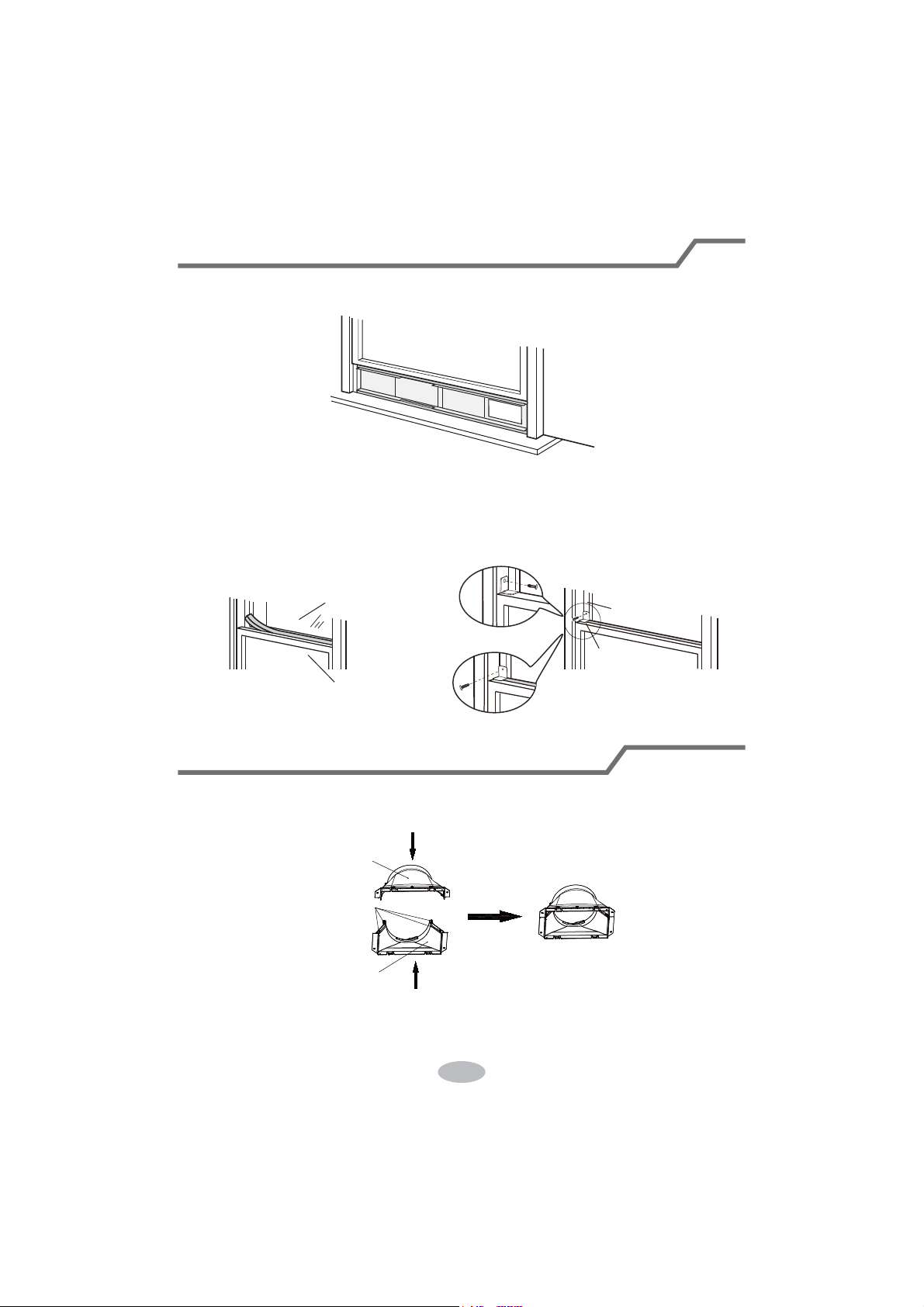
9. Close the window sash securely against the Window panel.
window sash
10. Cut the sponge A to a proper length and seal the gap between upper part of inner
window sash and outer window sash.
vertically.
11. Fix the inner window with window bracket and screw, so that it can not slide
sponge A
outer window
inner window
plastic window
wooden window
window bracket
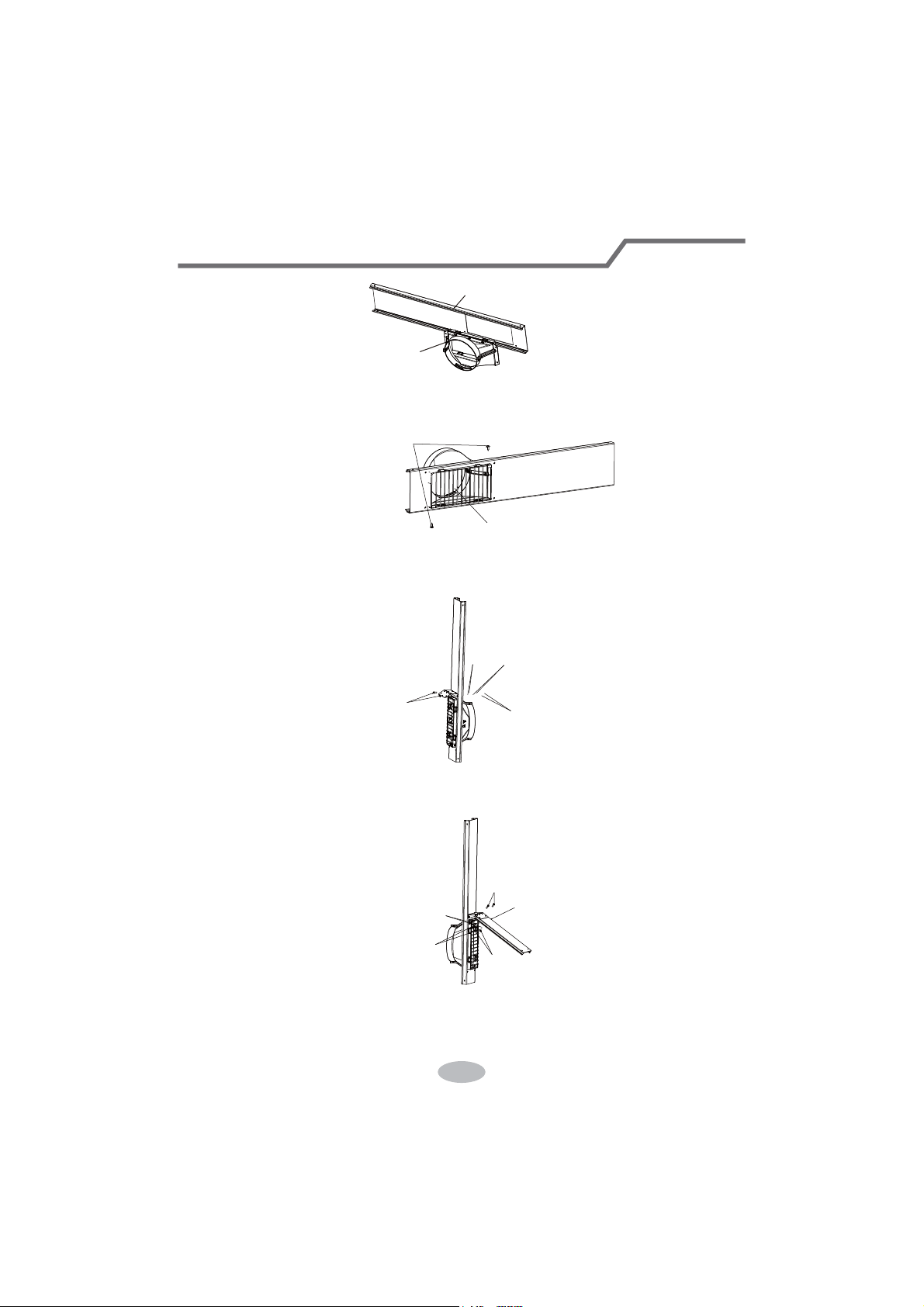
1. Install rear clip — aim the rear clip(upper) at the rear clip(lower),fix them together,
press the clasp forcibly in to the groove.
clasp
rear connector (lower)
rear connector (upper)
2. Clamp joint B+C into the inner side of window panel along the direction of arrow.
26
Installation in a sliding sash window
window panel
joint B+C
inner side
3. Fix the protective grille on joint B+C with screws.
washer and bolt.
screws
washer
Bolt
Nut
Nut
Screws
Washer
Spring washer
Rain Shield
Spring Washer
protective grille
4. Fix the support on the outer side of window panel with nuts, spring washer,
5. Fix the rain shield on the support with nuts, spring washer, washer and bolt.
sponge B (adhesive)
27
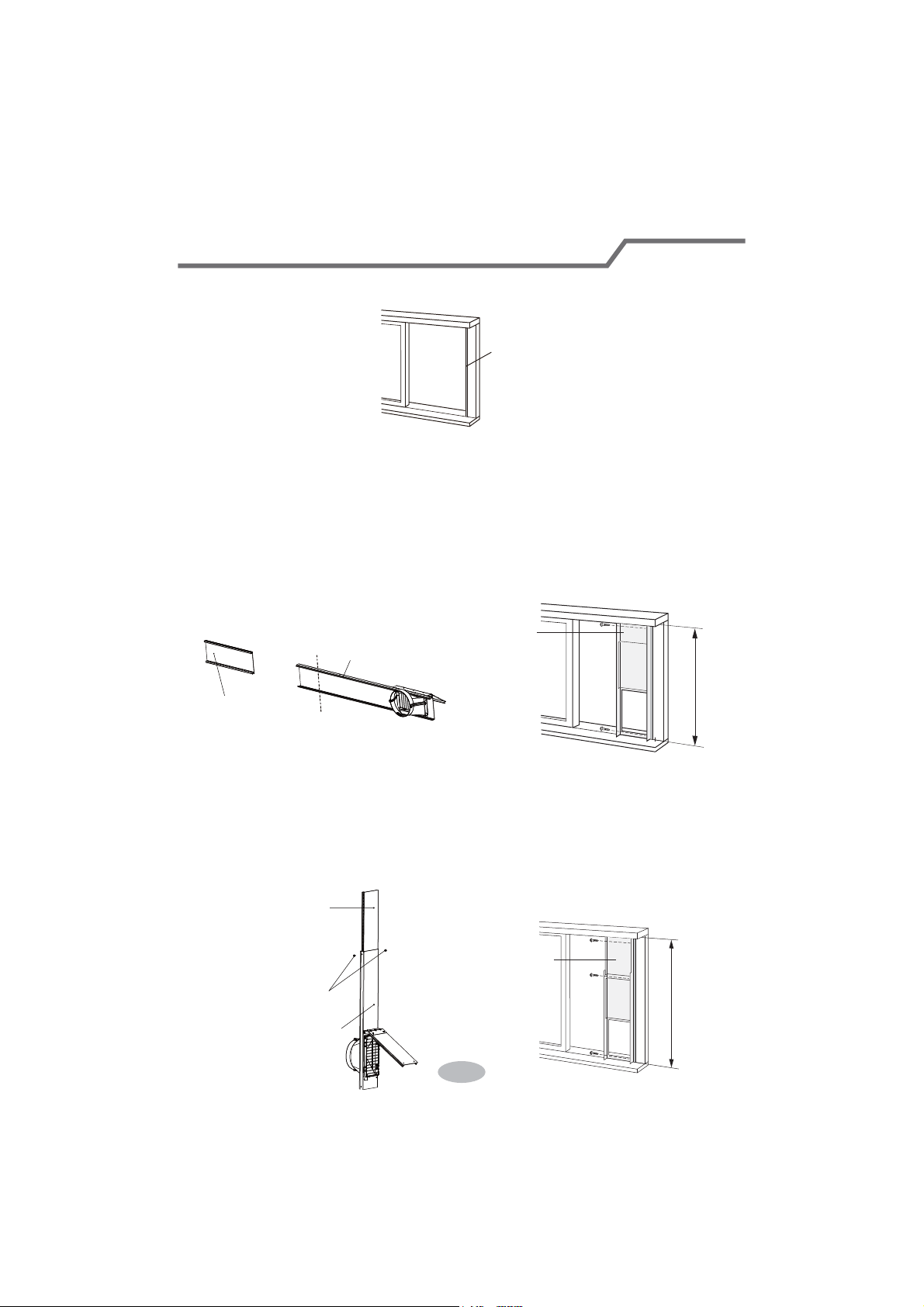
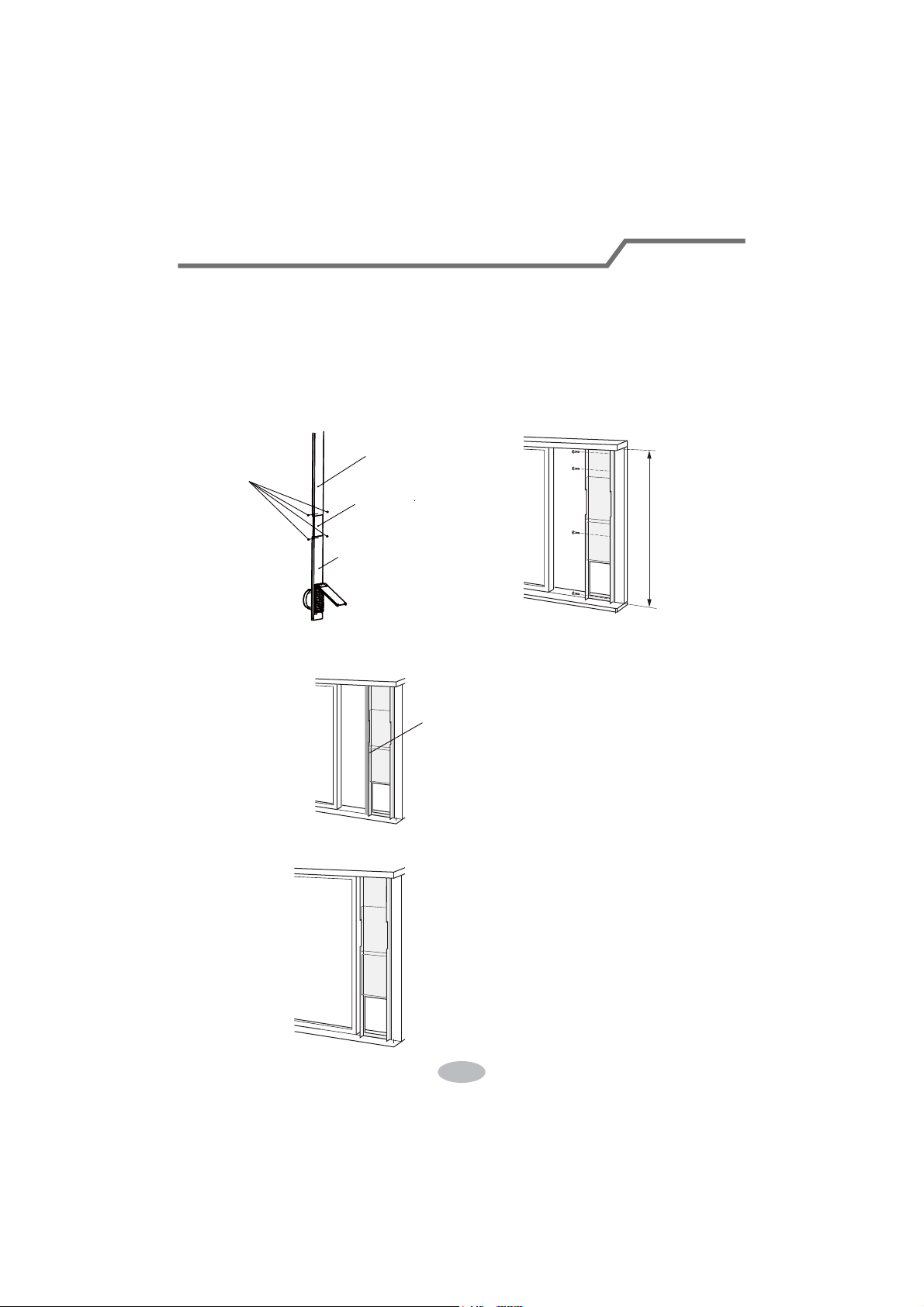
6. Cut the sponge B to a proper length and attach it to the window stool.
7. Install the window panel into the window stool.
7.1 If the heigth of the window is less than 20.5"(520mm).
The window panel cannot be installed in windows less than 20.5"(520mm) high.
(1) Remove the adjustment panel from the window panel, and cut the window
panel to the same width as the window.
(2) Open the window sash and place the window panel on the window stool.
(3) Secure the window panel to the window stool with screws.
7.2 If the inner width of the window is between 20.5" (520mm) and 37.4"(950mm)
inclusive.
(1) Open the window sash and place the window panel on the window stool.
Window
panel
<20.5"
Adjustment
panel
20.5"~37.4"
Screws
Adjustment panel
Window panel
assemble
(2) Slide the adjustment panel to fit the window stool height.
(3) Secure the window panel to the window stool with screws.
Cut
adjustment panel
Window panel assemble
Installation in a sliding sash window
28
7.3 If the inner width of the window is between 37.4" (950mm) and 56.7" (1440mm)
8. Cut the sponge B to a proper length and attach it to the window panel.
9. Close the window securely against the window panel.
inclusive.
(1) Attach the extension panel to the adjustment panel.
(2) Open the window sash and place the window panel on the window stool.
(3) Slide the adjustment and extension panels to fit the window stool height.
(4) Secure the window panel to the window stool with screws.
Screws
Extension panel
adjustment panel
Window panel assemble
37.4"~56.7"
sponge B (adhesive)
Installation in a sliding sash window
29
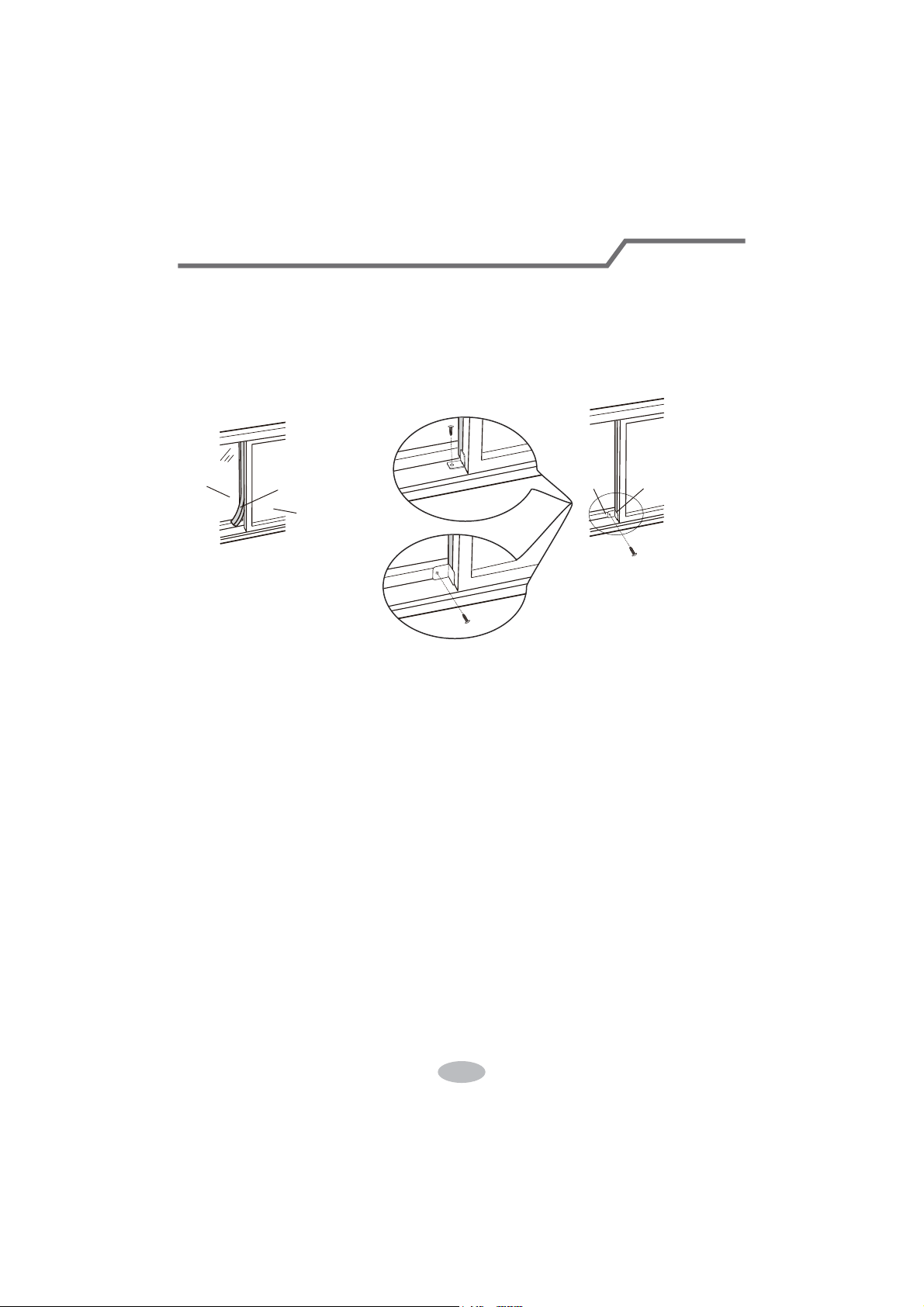
10. Cut the sponge A to a proper length and seal the gap between left side of inner
window sash and outer window sash.
11. Fix the inner window with window bracket and screw, so that it can not slide
horizontally.
window
sash
outer window
sponge A
inner window
plastic window
wooden window
window bracket
Installation in a sliding sash window
Installation and Disassembly of Heat Discharge Pipe
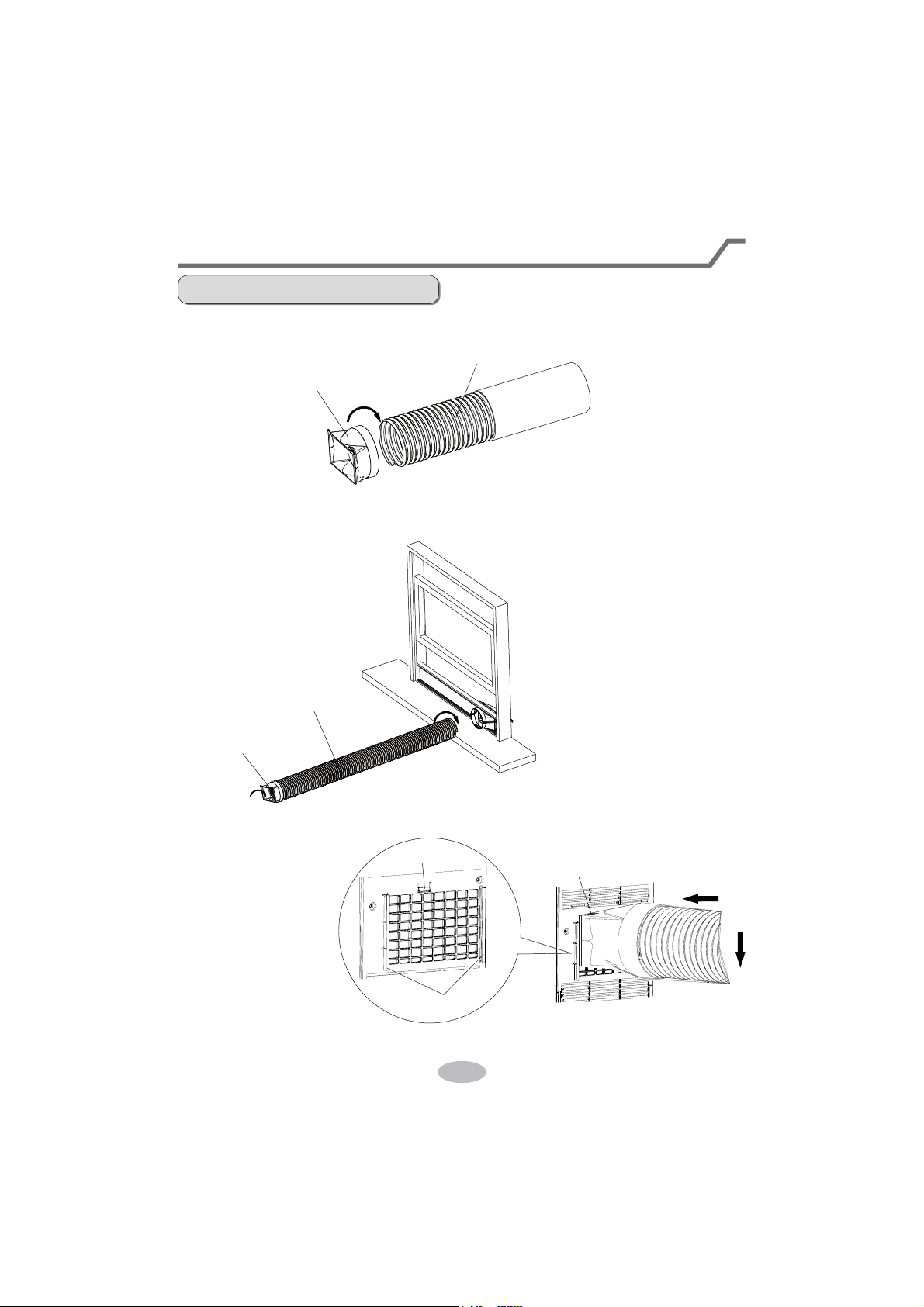
Install heat discharge pipe
1. Rotate joint A clockwise into the heat discharge pipe.
. Install anather side of heat discharge pipe clockwise into protective grille sub-assy.
3. Insert joint A of heat
discharge pipe (the
side with "TOP" is
upwards) into the
groove until you
hear a sound.
groove
clasp
Join A
clockwise
Heat discharge pipe
the side with "TOP" is upwards
heat discharge pipe
clockwise
Join A
Installation and Disassembly of Heat Discharge Pipe
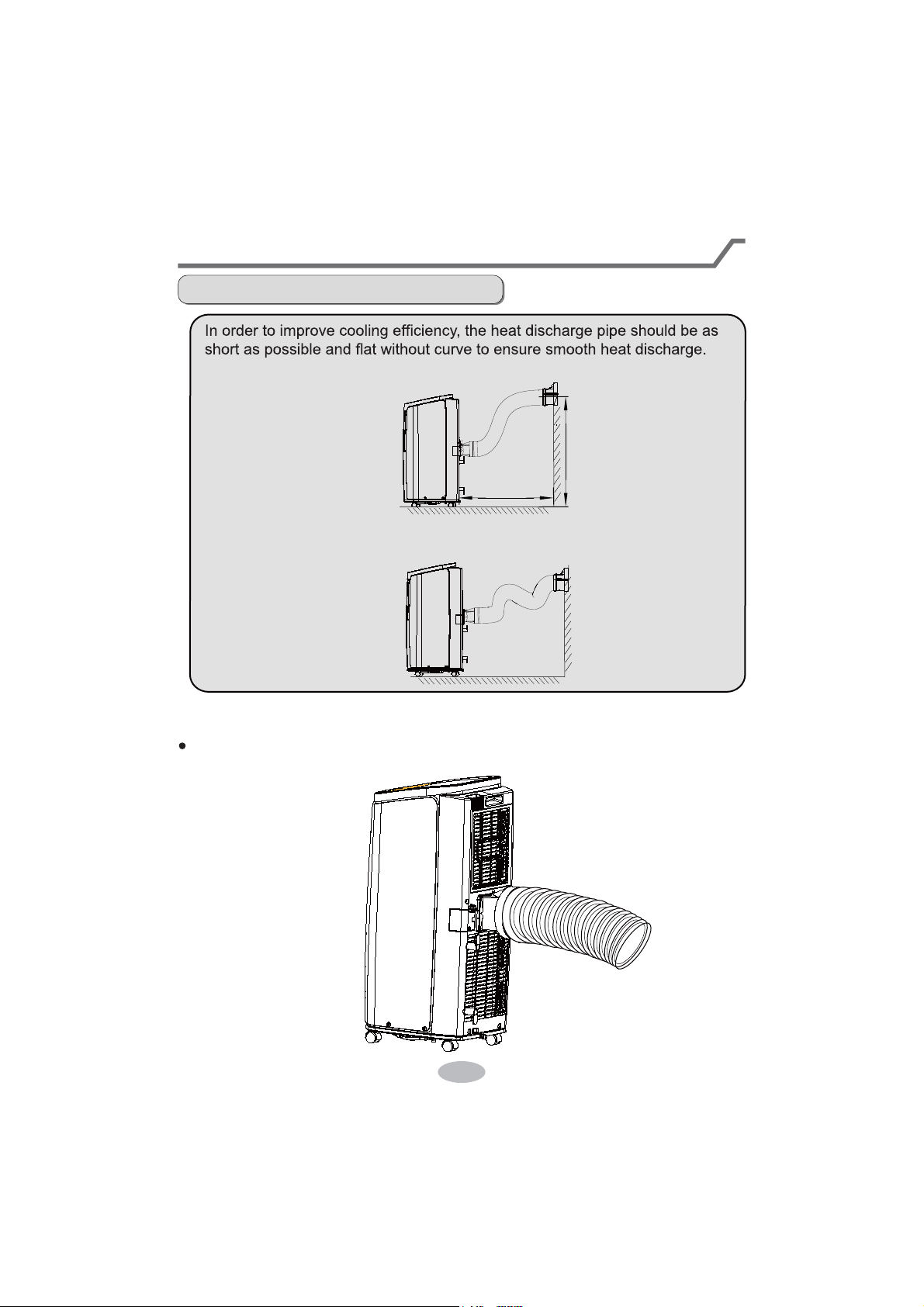
Note of Installingheat discharge pipe
correct
wrong
The length of the heat discharge pipe is less than 40 inchs. It is recommended to
use it with shortest length.
When installing,heat discharge pipe should be as flat as possible. Don’t prolong
the pipe or connect it with other heat discharge pipe.
31
The discharge pipe is suggested to be installed according to below figure by the manufacturer.
User can adjust the installation method of the discharge pipe basing on the requirement, while
the similar installation methods as below which will lead to unsmoothly air-out are not allowed.
under 51 inchs
about 24 inchs
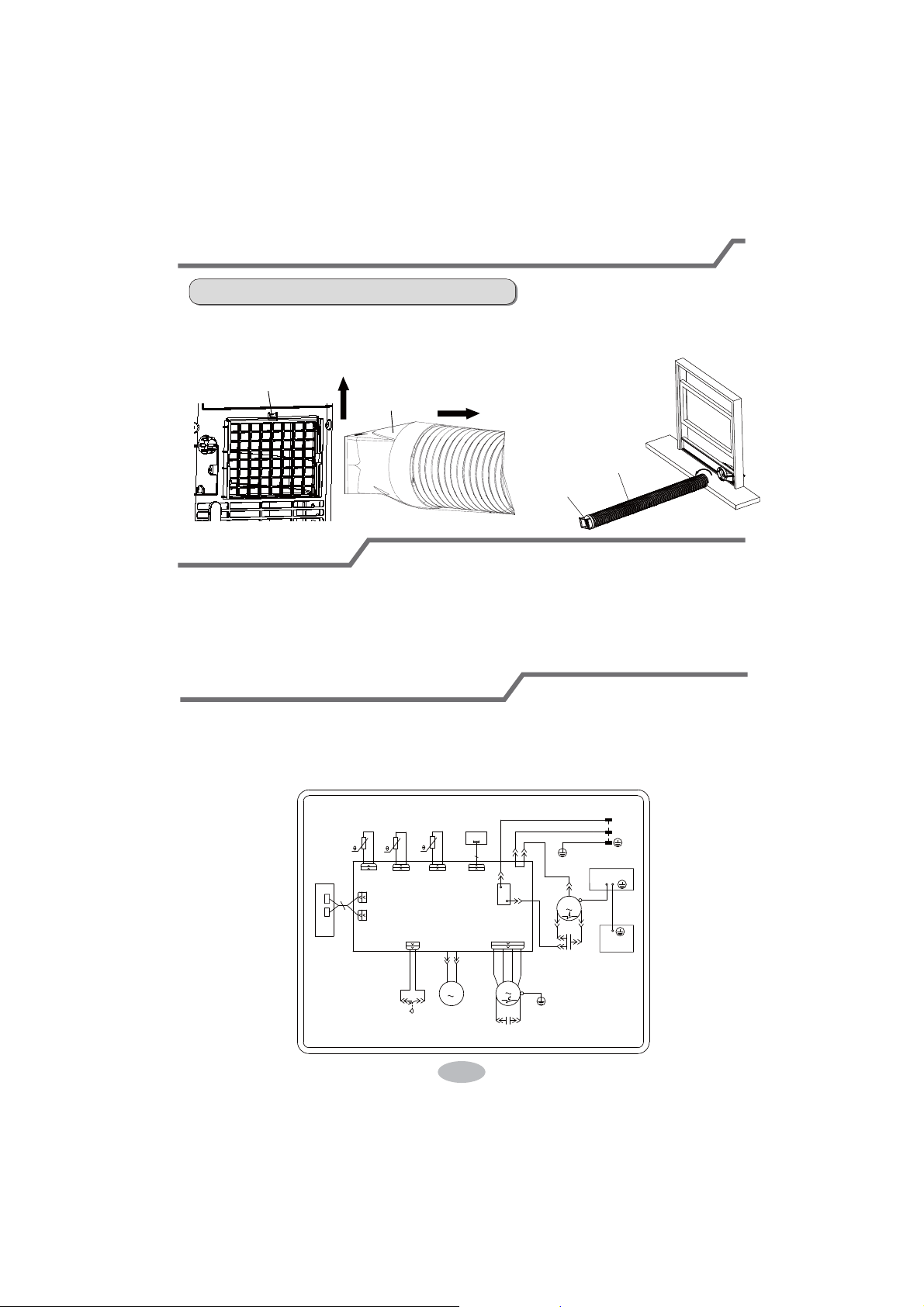
Disassemble heat discharge pipe
2.1. Remove heat discharge pipe
from protective grille sub-assy.
Remove joint A:
Press the clasp and lift joint A upwards to
remove it.
upwards
clasp
disassemble
Heat discharge pipe
Anticlockwise
Join A
joint A
Installation and Disassembly of Heat Discharge Pipe
32
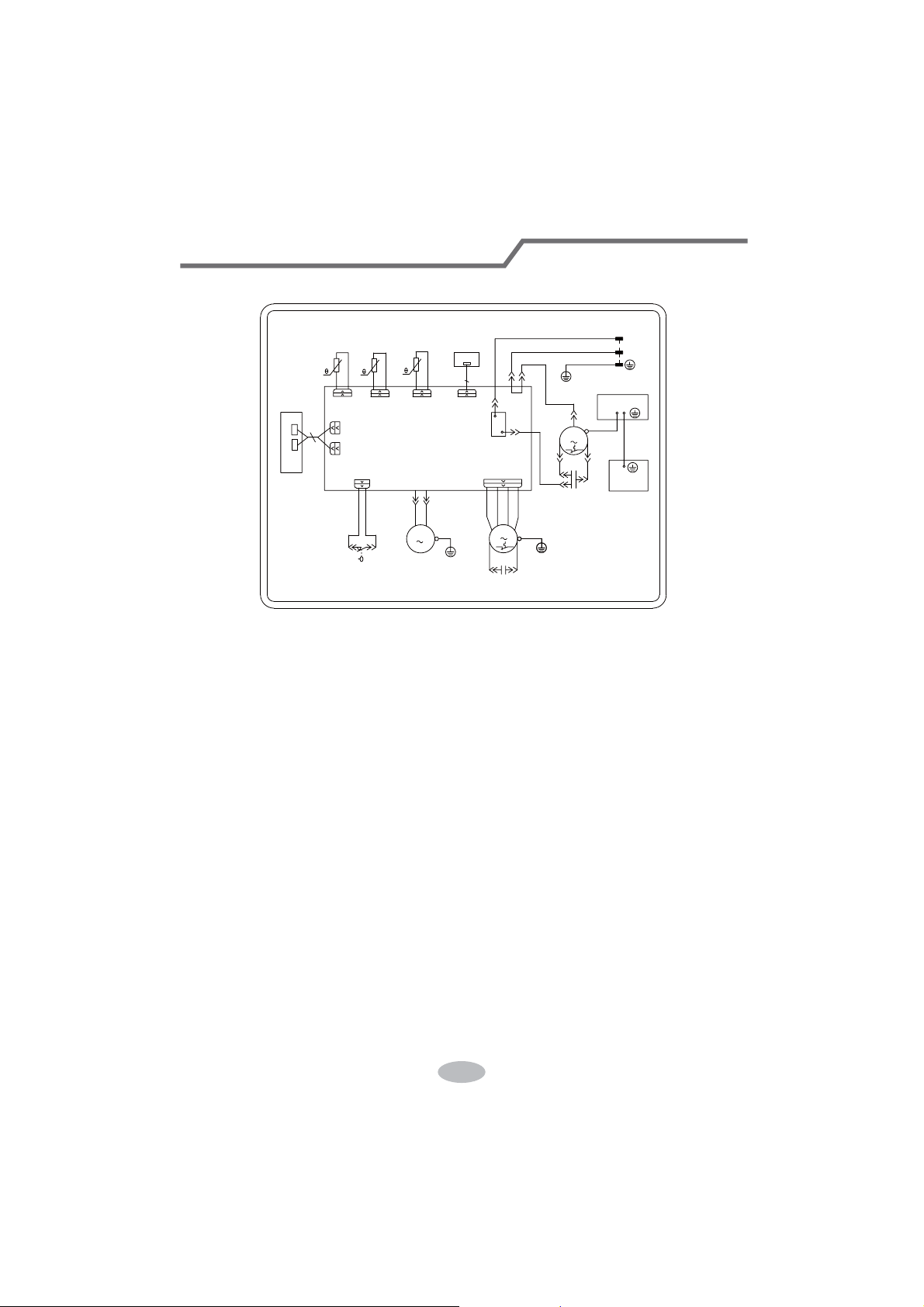
Electric Schematic Diagram
TestOperation
ller to start the unit.
Put through the power supply and then press ON/OFF button on remote contro-
Press mode button to select auto, cooling, drying, fan or heating function, and
then check if the unit operates normally.
If ambient temperature is below 61°F(16°C), the unit can't operate in cooling mode.
50
28778%(
28778%(7(03
57
6(1625
6:,7&+
:$7(5/(9(/
6(1625
78%(7(03
78%(
5(&
5(&(,9(5
57
57
%2$5'
',63/$<
%2$5'
5220
32:(5
/
1
%8
1
6
&203
<(*1
&
<(
&$3
.
$&/
&203
$3
1
:$7(5
',63
5'
)$1
5'
%8
6$
&20
:+
+,*+:3
5'
',63
52207(03
',63
$3
0
%1
02725
)$1
5'
&$3
6(1625
*
$3
%.
1&
*
<(*1
',63
&203
0$,1%2$5'
&$3$&,725
<(*1
*
:+%8
%2;
*1<(*1
%.%1
*
(/(&75,&%2;
:$7(502725
0
The Electric schematic diagram are subject to change without notice. Please refer
to which one on the unit,
KPC05AK-A3NNA2B、KPC05AK-A3NNA1C、KPC05AK-A3NNA2C、
PC06AK-A3NNA2B、PC06AK-A3NNA3B
33
Electric Schematic Diagram
、、
50
28778%(
28778%(7(03
57
6(1625
6:,7&+
:$7(5/(9(/
6(1625
78%(7(03
78%(
5(&
5(&(,9(5
57
57
%2$5'
',63/$<
%2$5'
5220
32:(5
/
1
%8
1
6
&203
<(*1
&
<(
&$3
.
$&/
&203
$3
1
:$7(5
',63
5'
)$1
5'
%8
6$
&20
:+
+,*+:3
5'
',63
52207(03
',63
$3
0
%1
02725
)$1
5'
&$3
6(1625
*
$3
%.
1&
',63
&203
0$,1%2$5'
&$3$&,725
<(*1
*
%2;
:+%8
*1<(*1
%.%1
*
(/(&75,&%2;
:$7(502725
0
*
<(*1
*
1*(<1*(<