


3
Safety and warnings 5
Control panel 9
WiFi connection 12
Dry cycles 13
Dry preparation 14
Getting started quickly 17
Drying cycle options 19
Customising a dry cycle 22
Caring for your dryer 24
Before you call for service 31
Fault codes 33
Troubleshooting 34
Manufacturer’s warranty 40
Customer care 42
CONTENTS
Registration
To register your product visit our website: fisherpaykel.com/register

5
SAFETY AND WARNINGS
WARNING!
Electric Shock Hazard
Failure to follow this advice may result in
electric shock or death.
• If you are using an extension cord or a portable
electrical outlet device (eg multi-socket outlet
box), ensure that it is positioned so that it does
not come into contact with water or moisture.
WARNING!
Fire Hazard
• Only dry fabrics that have been washed
with water.
• Do not use heat to dry articles containing foam
rubber or similarly textured rubber–like materials,
dry on ‘Time Dry’.
• Never stop a tumble clothes dryer before the end
of the drying cycleunless all items are removed
and spread out in order to dissipate the heat.
• A clothes dryer produces combustible lint;
the lint filter must be cleaned before each
drying cycle.
• Failure to follow the warnings outlined in these
user instructions can cause a fire hazard.
• Failure to follow these instructions can result in
death or personal injury.

6
SAFETY AND WARNINGS
READ AND SAVE THIS GUIDE
When using this appliance, follow basic precautions, including thefollowing:
General
z
The appliance must not be supplied through an external switching device, such as a
timer, or connected to a circuit that is regularly switched on and off by a utility.
z
We do not recommend the use of extension cords or portable electrical outlet devices
for safety reasons.
z
Do not touch or operate the machine with wet hands or with bare-feet.
z
A damaged power cord must be replaced by a Fisher & Paykel trained and supported
service technician, its service agent or similarly qualified persons in order to avoid
a hazard. The appliance must not be operated until it is repaired, as there is risk of
electric shock.
z
Do not operate this machine if it has been damaged during transport. Contact your
Fisher&Paykel dealer or Fisher & Paykel trained and supported service technician.
z
This dryer has been designed for domestic use only, not for commercial applications,
such as massage/beauty clinics where there may be increased lint accumulation or
flammable materials in the atmosphere or load.
z
The tumble dryer is intended only for drying textile material washed in water.
z
Undergarments that contain metal reinforcements should not be placed in the dryer.
Damage to the dryer can result if the metal reinforcements come loose during drying. If
you wish to dry these items use a drying rack or place in a garment bag.
z
Check and remove all objects from pockets, eg lighters and matches.
z
Never dry rubber articles, or any plastic items or film, eg plastic lined
tablecloths andbaby bibs.
z
Clothes should go through the cool down/airing phase in the final part of the cycle.
This ensures items are left at a temperature where they will not be damaged. Ifforany
reason the dryer is stopped before the cycle has finished, dry clothes should be
removed immediately and not left in the dryer. Clothes should be quickly spread out
flat to cool so heat can dissipate, not left bunched up, eg in a clothes basket.
z
Do not operate this product without the lint filter in place or allow lint to accumulate in
or around the dryer.
z
This dryer is not intended for use by persons (including children) with reduced physical,
sensory or mental capabilities, or lack of experience and knowledge, unless given
supervision or instruction concerning the use of the dryer by a person responsible
for their safety.
z
Children should be supervised to ensure they do not play with the dryer.
z
Unplug the machine from the power supply when it is not in use.
z
Do not swing on or put weight on the door.
z
In the event of a power outage your dryer will resume automatically when
power is restored.
z
Never attempt to repair the dryer yourself.
z
Do not install the dryer behind a lockable door, sliding door, or behind a door where
the hinge is on the opposite side to that of the dryer in such a way that the full opening
of the door is inhibited. Ensure the dryer door can always be opened fully.
z
The only user-removable parts of the dryer are the filters and drying rack. No other
parts are designed to be removed by anyone other than aFisher & Paykel trained and
supported service technician.
z
For problems that cannot be solved from information in this user guide, turn off and
unplug your dryer and contact a Fisher & Paykel trained and supported service technician.

7
SAFETY AND WARNINGS
z
Exhaust air must not be discharged into a flue which is used for exhausting fumes from
appliances burning gas or other fuels.
z
Do not overload your dryer beyond its rated capacity:
MODEL MAXIMUM CAPACITY (KG)
DH9060P2 9
DH9060PG2 9
*Capacity refers to the maximum dry weight of items the dryer can dry at any one time
z
Never put dripping wet clothes in or on top of the dryer as excess water may cause an
electrical hazard.
z
Do not under any circumstances dry an electric blanket or any other electrical, plastic
or rubber items in your dryer, unless the care label specifically states it is safe to do so.
Never dry these items at high temperatures.
z
Do not dry curtains in your dryer. Sunlight makes them brittle and they may
disintegrate during drying.
z
Do not use the water collected in the water tank for drinking or food processing.
z
Never run the dryer without the water tank in place.
z
If the water tank becomes full, the tumble dryer will pause drying and will sound an
alarm. You must empty the water tank before the dryer can continue drying. Empty the
tank, replace it back in the housing then press
to resume the cycle.
Lint
z
Accumulated lint in the dryer can become a fire hazard; it also reduces the efficiency of
the dryer by causing longer drying times and increased power consumption.
z
Clean the lint filter before every load.
z
Ensure the area around the dryer is clear of lint.
z
At regular intervals have the interior of the dryer cleaned of any accumulated lint.
This must be done by a Fisher & Paykel trained and supported service technician.
This must be done when the dryer installation is changed from free standing.
z
If the lint filter becomes damaged, contact your Fisher & Paykel trained and supported
service technician to arrange getting a new filter. Do not operate your dryer with a
damaged lint filter or without the filter in place, as this will cause damage to your dryer.
Spontaneous combustion
To reduce the risk of fire in a tumble dryer the following should be observed:
z
Items that have been spotted or soaked with vegetable oil or cooking oil are a fire
hazard and should not be placed in a tumble dryer.
z
Oil-affected items can ignite spontaneously, especially when exposed to heat sources
such as a tumble dryer. The items become warm causing an oxidation reaction in the
oil. This oxidation creates heat. If the heat cannot escape the items can become hot
enough to catch fire. Piling, stacking or storing oil-affected items can prevent heat from
escaping creating a fire hazard.
z
If it is unavoidable that fabrics that contain vegetable oil, cooking oil or have been
contaminated by hair care products be placed in a tumble dryer, they should first be
washed in hot water with extra detergent — this will reduce, but not eliminate the fire
hazard. The cool down cycle of the dryer should be used to reduce the temperature
ofthese items. They should not be removed from the tumble dryer and piled or
stacked while hot.

8
z
Items that have previously been cleaned in, washed in, soaked in or spotted with
flammable liquids or solids, eg petrol/gasoline, kerosene, dry cleaning solvents,
vegetable or cooking oil, acetone, denatured alcohol, some brands of spot removers,
turpentine, waxes and wax removers or other flammable or explosive substances should
not be placed in a tumble dryer.
z
Do not dry unwashed items in the tumble dryer.
z
The dryer is not to be used if industrial chemicals have been used for cleaning.
z
Fabric Softeners or similar products should not be used in a tumble dryer to
eliminate the effects of static electricity, unless this practice is specifically
recommended by the manufacturer of the fabric softener product.
z
Rubber backed articles, foam rubber (latex foam), clothes or pillows fitted with
foam rubber pads, fibreglass, shoes containing rubber, shower caps, babies waterproof
napkin covers and waterproof textiles should not be dried in the dryer. These materials
can when heated produce fire by spontaneous combustion.
z
When using STREAM REFRESH on unwashed clothing ensure there are no flammable
substances on them.
Disposal
z
Extreme care must be taken when disposing of your old appliance to avoid hazards.
z
When disposing of the dryer, it is recommended that the door is removed to avoid
children getting trapped inside, and that the electrical cable is cut off close to the dryer.
SAFETY AND WARNINGS
9
!0
!2!1
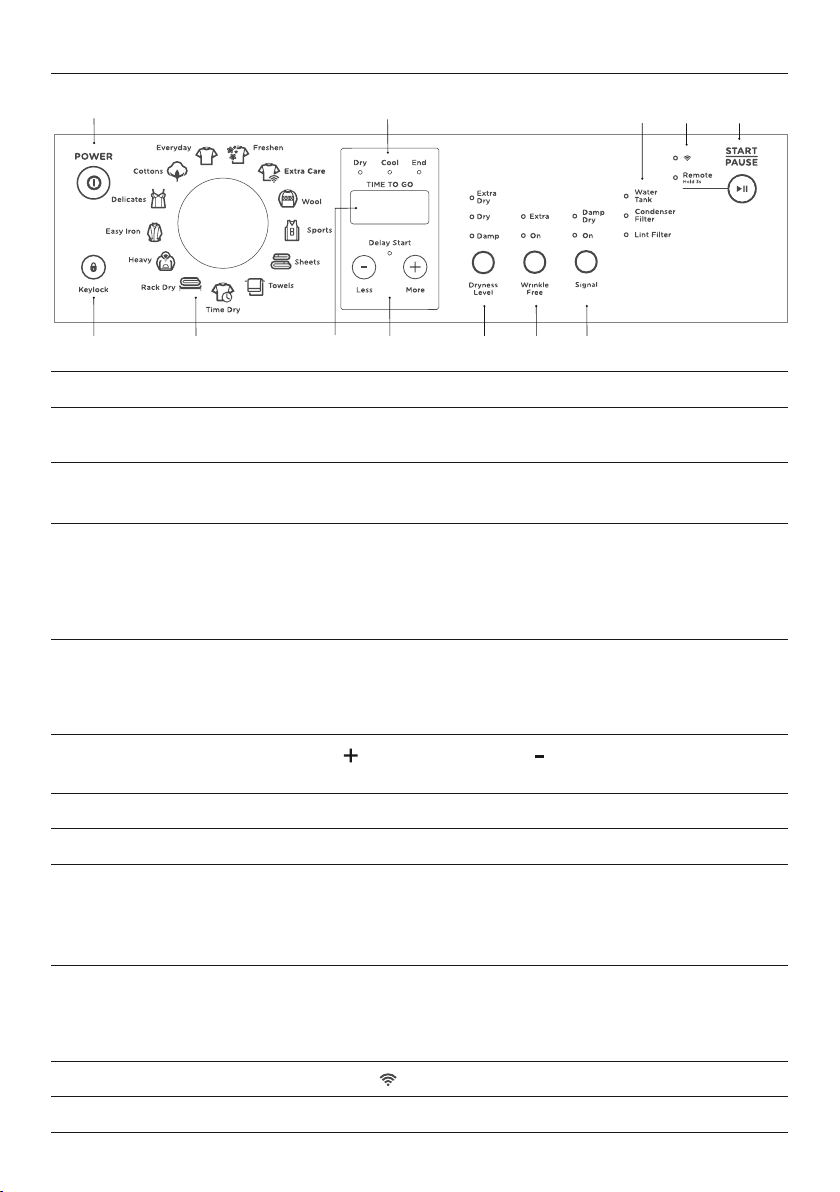
1 POWER Press to turn the dryer ON/OFF.
2 Keylock Press and hold to disable all buttons on the display panel, except
POWER button. This prevents accidental button presses.
3 SmartTouch™
control dial
Rotate to select your desired drying cycle.
z
The icon illuminates to indicate the selected drying cycle.
4 Digital display
screen
Shows the following:
z
TIME TO GO – the remaining time in the cycle that is
currently running.
z
Delayed start time of dry cycle.
z
Notifications if an error is detected or a warning is necessary.
5 Progress lights The progress lights indicate what part of the cycle the dryer has
reached (
DRY, COOL or END). All three lights are on at the start of
the cycle. The light for the current part of the cycle flashes, and
each one goes out as the cycle progresses.
6 Delay Start
Less/More
Press
MORE
to increase andLESS to decrease the delay
start time.
7 Dryness Level Allows you to select the level of dryness for your load.
8 Wrinkle Free Allows you to select a
WRINKLE FREE option for your cycle.
9 Signal This button has two functions:
z
Alert you that the dryer has finished.
z
Alert you to remove items once your load reaches the
damp dry stage.
!0 Water Tank,
Condenser,
Lint Filter
The lights will flash when the dryer is switched on as a
remindertoempty the water filter, or clean the condenser and
lintfilter. The warning light will also flash on and off during the
cycle if the filtersbecome blocked.
!1 WIFI
The LED beside
illuminates when functionality is activated.
!2 START/PAUSE Press to start or pause the selected drying cycle.
2
3 6 7 8 9
1 5
4
CONTROL PANEL
10
CONTROL PANEL
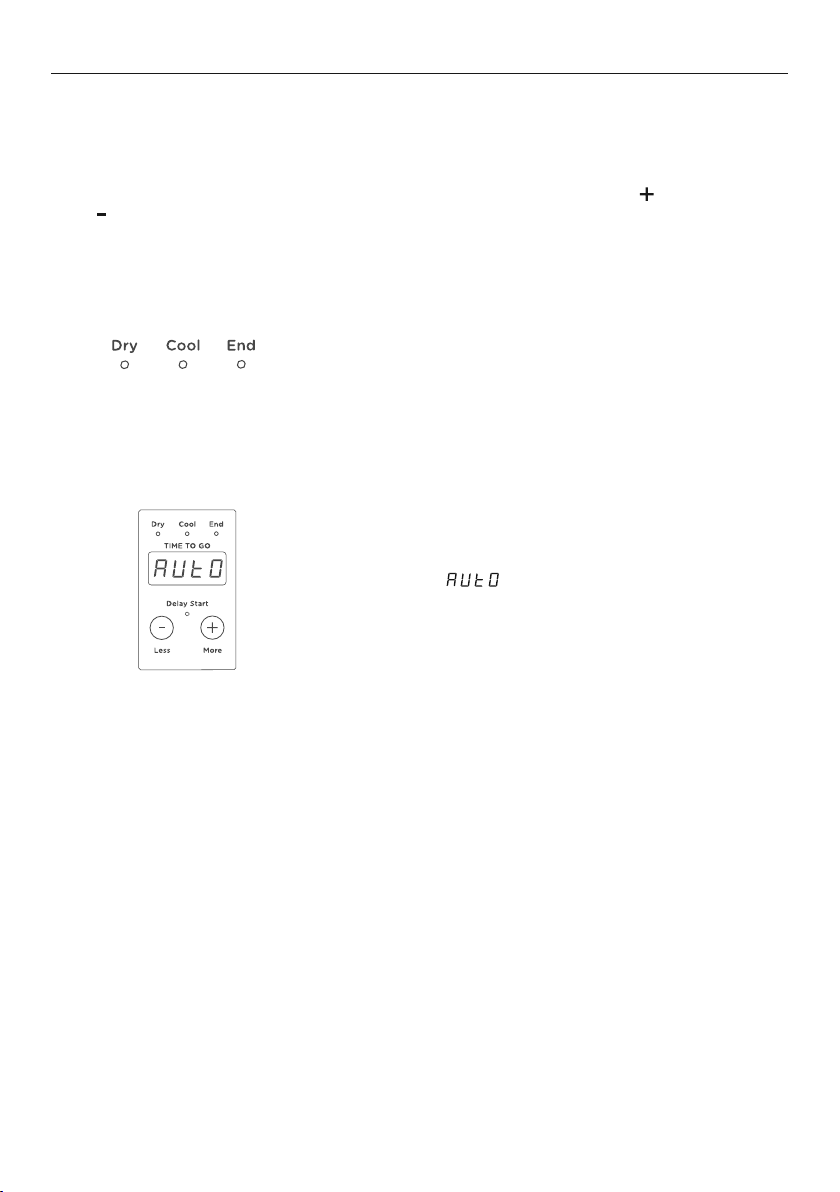
Timed cycles
When a timed cycle is selected the machine dries for the selected time regardless
ofthelevel of moisture in the load. It is important to check the items throughout thetimed
programmes to avoidover drying. Timed cycles include
TIME DRY, RACK DRY and WOOL.
Timed programmes of 10 to 150 minutes can be selected using the
MORE
and
LESS buttons.
When the dryer has sensed that the load is dry it
will automatically go into an airing or cool down
cycle. DuringCOOL the drum tumbles and cool air
is blown throughthe clothes. This cools the load to
reduce creasing ifthe clothes are left in the dryer.
Airing/Cool down
Time to go
Your dryer displays approximately how many
minutes the cycle you are running has remaining if
you have chosen one of the TIME DRY cycles. Ifyou
have chosen an automatic cycle (ie not TIME DRY)
the word will appear on the screen until it
reaches the cool down phase, atwhich time the
dryer will display how long the cycle has left to go.
A number of factors can influence the overall cycle
time, eg the fabric type of garments, load size, the
wetness of the load, environmental conditions etc.
11
CONTROL PANEL
1
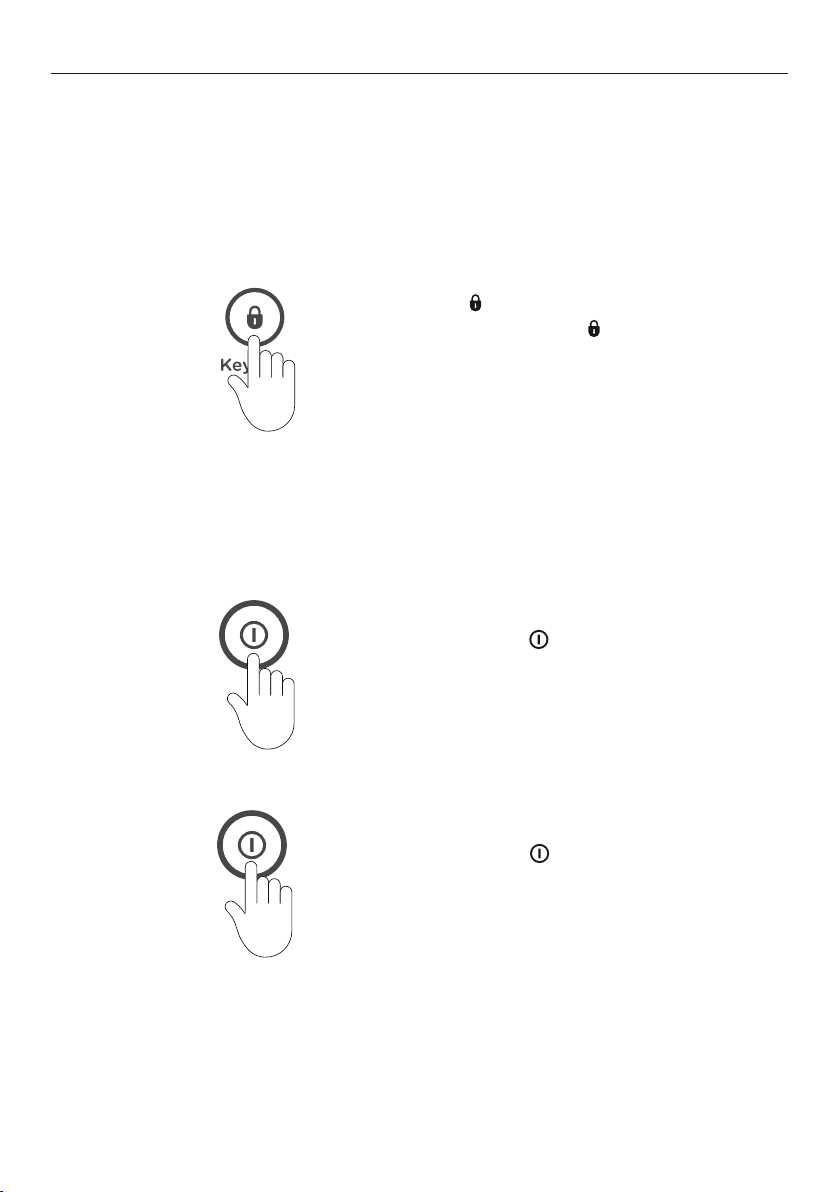
If a button is pressed while KEYLOCK is
activated, the KEYLOCK button will flash.
To turn your dryer on:
Press
POWER
, then press and hold the
KEYLOCK two seconds. This will activate the
control panel. Dry cycles and options can now
be selected.
1
Press for two seconds.
When activated, the
button is illuminated.
Keylock
Keylock can be used to lock the buttons on your dryer when not in use. This will avoid
accidental button pushes.
To turn Keylock
ON or OFF:
If Keylock is
ON and the dryer is turned OFF:
2
To stop or power OFF your dryer at any time:
Press
POWER
.
12
Your appliance can be connected to your home wireless network and operated remotely
using the app.
Getting started
z
Ensure your home WiFi network is turned on.
z
You will be given step by step guidance on both your appliance and mobile device.
z
It may take up to 15 minutes
to connect your appliance.
WIFI CONNECTION
On your mobile device:
1 Download the app from www.fisherpaykel.com/connect
2 Register and create an account.
3 Add your appliance and set up the WiFi connection.
4 Follow the prompts in the app to complete the setup.
Connecting to your home WiFi
Turning off your home WiFi
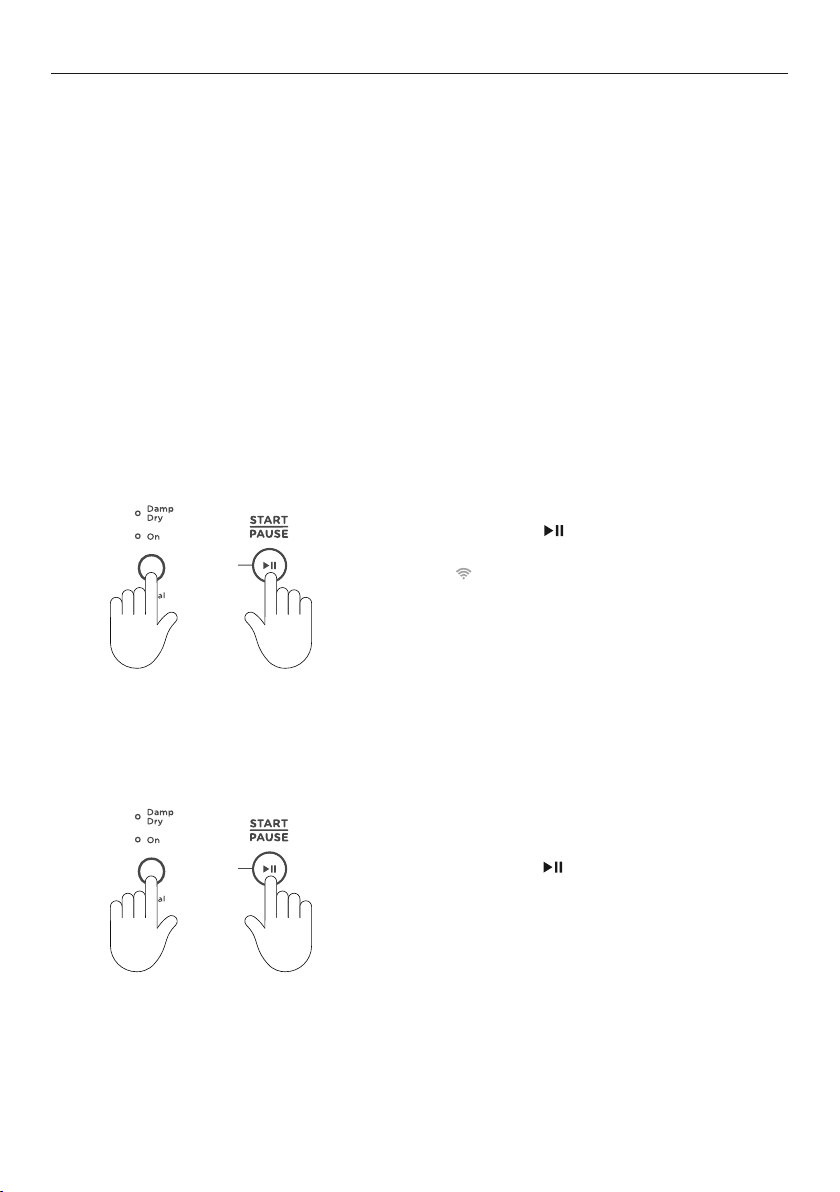
Press and hold
and SIGNAL buttons
simultaneously for three seconds.
The
LED will flash continuously until a
stable connection is achieved.
Once connected, the LED stops flashing and
will remain illuminated.
Press and hold
and SIGNAL buttons
simultaneously for three seconds to
disconnect the WiFi and switch off the LED.
To reconnect to your home WiFi, repeat the steps in ‘Connecting to your home WiFi’.
+
+
13
DRY CYCLES
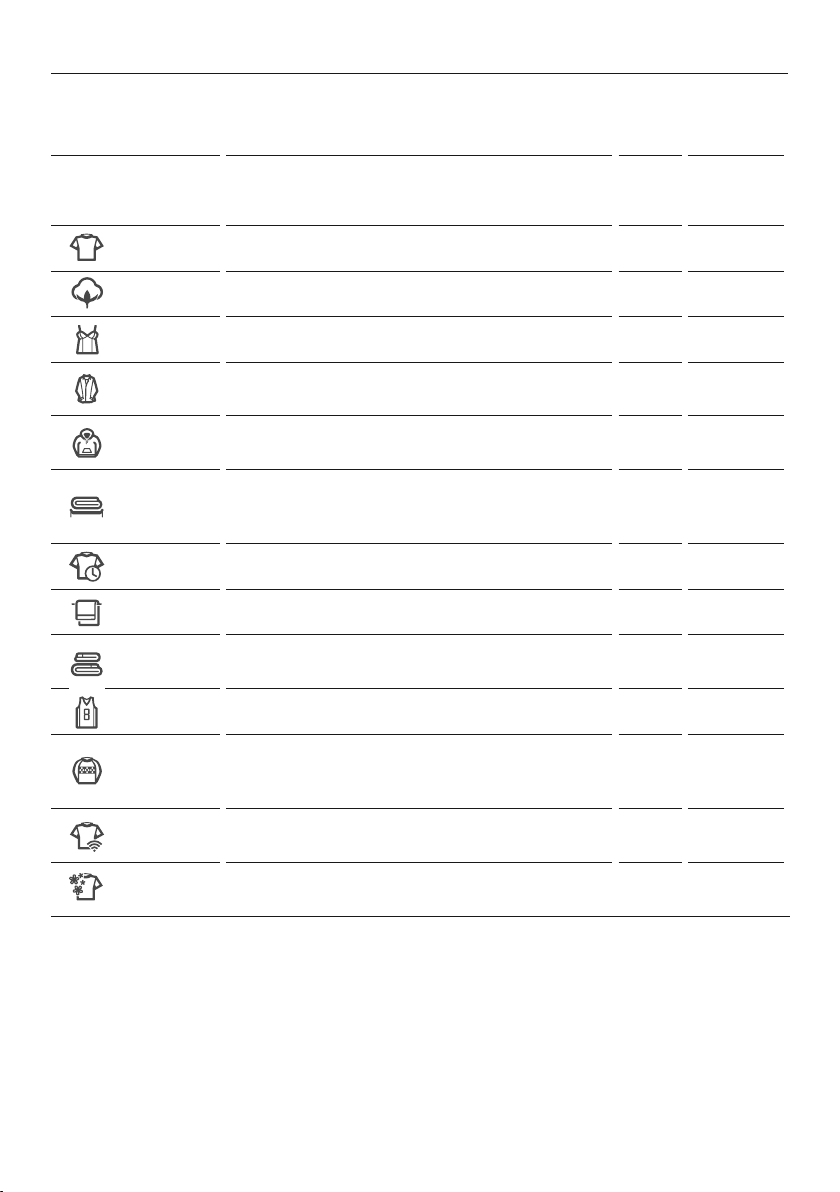
Your dryer has a number of dry cycles, selecting the most appropriate cycle for each load
will help ensure you get the best drying result.
CYCLE DESIGNED FOR
MAX
LOAD
(KG)
DEFAULT
DRYNESS
LEVEL*
Everyday
Auto sensing cycle for mixed loads. 9 Dry
Cottons**
Auto sensing cycle for cotton clothes. 9 Dry
Delicates
Auto sensing cycle for delicate garments. 4 Dry
Easy Iron
Auto sensing cycle that leave garments ready to iron
with the WRINKLE FREE option automatically selected.
4 Damp/Dry
Heavy
A longer, auto sensing cycle for durable garments. 9
Dry/
Extra Dry
Rack Dry
Timed cycle for use with the drying rack, with
options from 30 to 150 minutes for items that cannot
be tumbled.
3 n/a
Time Dry
Timed cycle with options from 30 to 150 minutes. 9 n/a
Towels
Auto sensing cycle for drying bath and beach towels. 6 Dry
Sheets
Auto sensing cycle with reversing to reduce tangling
for large bedding items.
4 Dry
Sports
Auto sensing cycle designed for sports garments. 4 Dry
Wool
Timed cycle for use with drying rack, with options from
30 to 150 minutes for washable woolen items that
cannot be tumbled.
3 n/a
Extra Care
Auto sensing cycle for ultra delicate and heat
sensitive garments.
1 Dry
Freshen
A 15 minute cycle with a burst of heat to refresh
dry items.
2 n/a
*Dryness level is only an option on automatic sensing cycles. On TIME DRY and the RACK DRY
cycle, drynesswillvary depending on the load and its initial moisture content.
**
COTTONS cycle and DRY dryness level is the recommended cycle for everyday cotton items.
14
DRY PREPARATION
Sorting
Sort your garments before placing them into the dryer. Sortintoloads of similar items,
and loads that will likely take similar times to dry. Heavier items (egtowels, and flannelette
sheets) are best dried separately from lightweight items (egsynthetics, polyester-cotton
sheets and shirts). This prevents thepossibility of some items becoming over-dried whilst
others are still damp. Itwillalso help to extend the lifeofyour clothing and linen.
Care labels on garments provide valuable information about the fabric type and
howthegarment should be dried. Always follow the advice on the garment labels.
Onlydryitems in this dryer that have a care label stating tumble drying is suitable.
Drying your clothes as soon as you remove them from the washer will decrease thechance
of wrinkles forming, and dye transfer from coloured items to white items fromoccurring.
Separate coloured items from white/light items where possible, especially when new. Colour
run may be an issue, especially if you intend to delay the start of the drying cycle.
SPECIFIC
ITEM/DRYING
REQUIREMENTS
SUGGESTED
CYCLE AND
OPTIONS
COMMENTS
Towels Towels Towels produce a lot of lint and are best dried on
their own.
Sheets, pillowcases, duvet/
doona covers
Sheets Ensure duvet/doona cover openings are buttoned/
domed before placing inthe dryer.
Bulky items –
doonas,duvets, sleeping
bags, jackets
Sheets Dry only one bulky item at a time and place a
knotted towel into the dryer at the same time to
ensure thebulky item moves aroundevenly.
Business shirts, trousers,
other creasables
Easy Iron
WRINKLE FREE is automatically selected to help
minimise creasing once the drying cycle has finished.
Woolens, silks Wool Designed for items that could be damaged ifthey are
tumbled, eg woolens. Use the drying rack.
Delicates,
fine fabrics
Delicate or
Rack Dry
You can further reduce the dryness level to damp or
use
RACK DRY for verydelicate items.
Jeans Heavy Turn jeans inside out to help maintain their
appearance. Dry separately from other items.
Shoes, hats, soft toys or
other odd shapeditems
Rack Dry Check on the item regularly throughout the drying
cycle. Ensure the rack has been correctly fitted.

15
Before you load
z
Check pockets for items that could damage your clothes or get caught in the dryer.
z
Close zippers, hooks and eyes, and other fastenings (ie fasten the openings of duvet/
doona covers), and remove loose bra wires. These may damage both your dryer
and your clothes.
z
Items of clothing with screen-printing should be turned inside out toprevent
damage to the print.
z
Check the lint filter is clean and the water tank is empty (if the dryer is not set up
todrain automatically).
Loading
z
Garments need to be loaded correctly to minimise creasing and wrinkling, and to
ensurethe load is dried evenly.
z
Allow enough room in the dryer for clothes to tumble freely. Load the dryer in terms of
the space the garments take up when dry, rather than when they are wet.
z
Shake clothes out and load individually to help items dry evenly and reduce tangling.
z
Dry permanent press garments (business shirts) together on the EASY IRON cyclewith
the WRINKLE FREE option on. This will help reduce wrinkling and the need forironing.
Hang garments as soon as the drying cycle is complete to reduce the need for ironing.
Drying times
z
Drying very small loads is inefficient. Try to dry medium to large loads.
z
Heavier items (towels, flannelette sheets) will take longer to dry than light items
(synthetics and polyester cotton sheets and shirts).
z
Drying times can be reduced by spinning the wash load at the highest spin speed
suitable for the load type in your washing machine.
z
Check bulky items during the cycle to ensure even drying, pause the dryer and reposition
the item if necessary.
Lint
Some items are lint givers, while others are lint collectors. Always dry lint givers
and collectors separately.
LINT GIVERS LINT COLLECTORS
Towels Synthetics, eg polar fleece
Flannelette sheets Corduroy
Polyester cottons
Delicate or easily damaged items (eg nylon stockings, fine fabrics, delicate embroidered
fabrics) should be dried separately, using the
DELICATE or WOOL cycle, or if you do not want
them tumbled use the RACK DRY cycle.
DRY PREPARATION
16
DRY PREPARATION
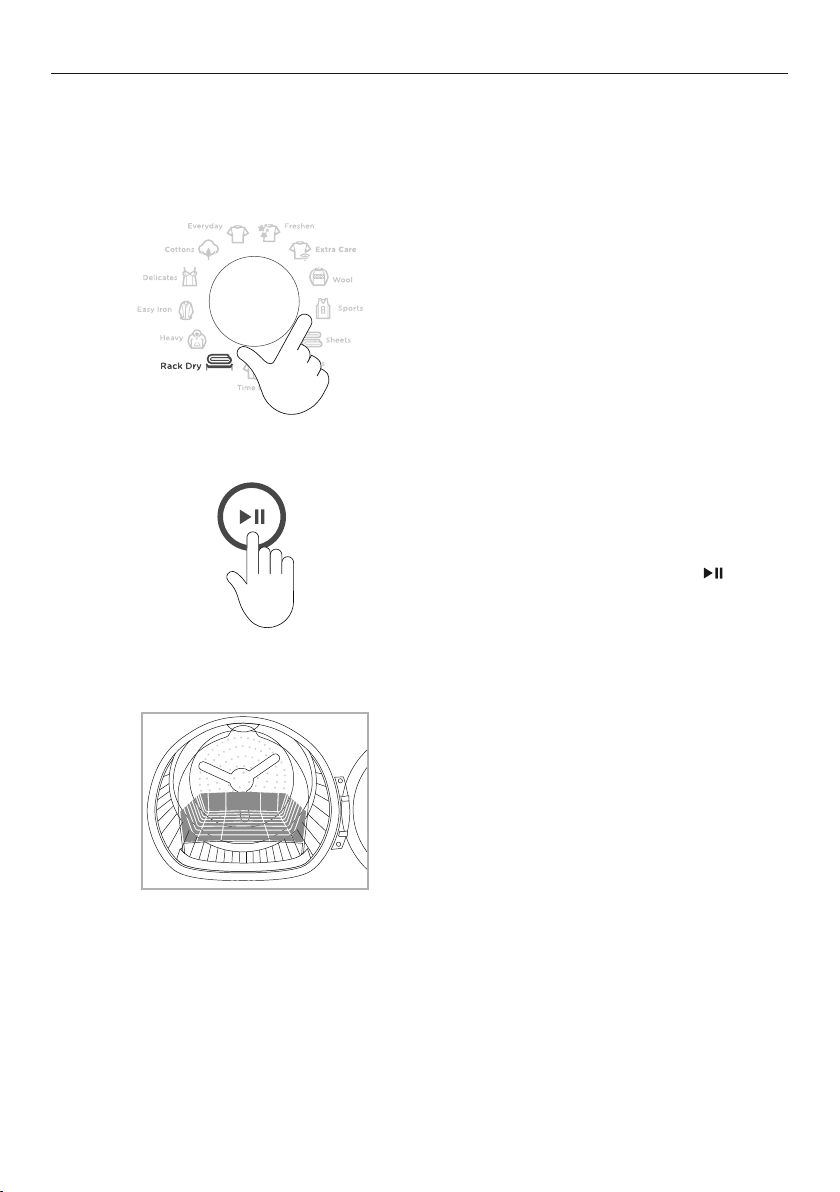
Drying rack
There are many items that would benefit from being dried on a dryingrack. For example
items such as sport shoes, soft toys, hats andwoollen items that may be damaged if they
are tumbled.
The drying rack is installed in your dryer
when it leaves the factory.
When you are using the drying rack you must
select the
RACK DRY or WOOL cycle.
If the rack is not properly installed or
if a garment has fallen from it, a user
prompt will appear on the digital display
screen. Replacetherack and press
to
resumethecycle.
1
2
Toremove the drying rack, tilt the top of the
rack towards you this will detach the legs
fromthe slots in the lint filter, gently remove
from the drum.
3
17
GETTING STARTED QUICKLY
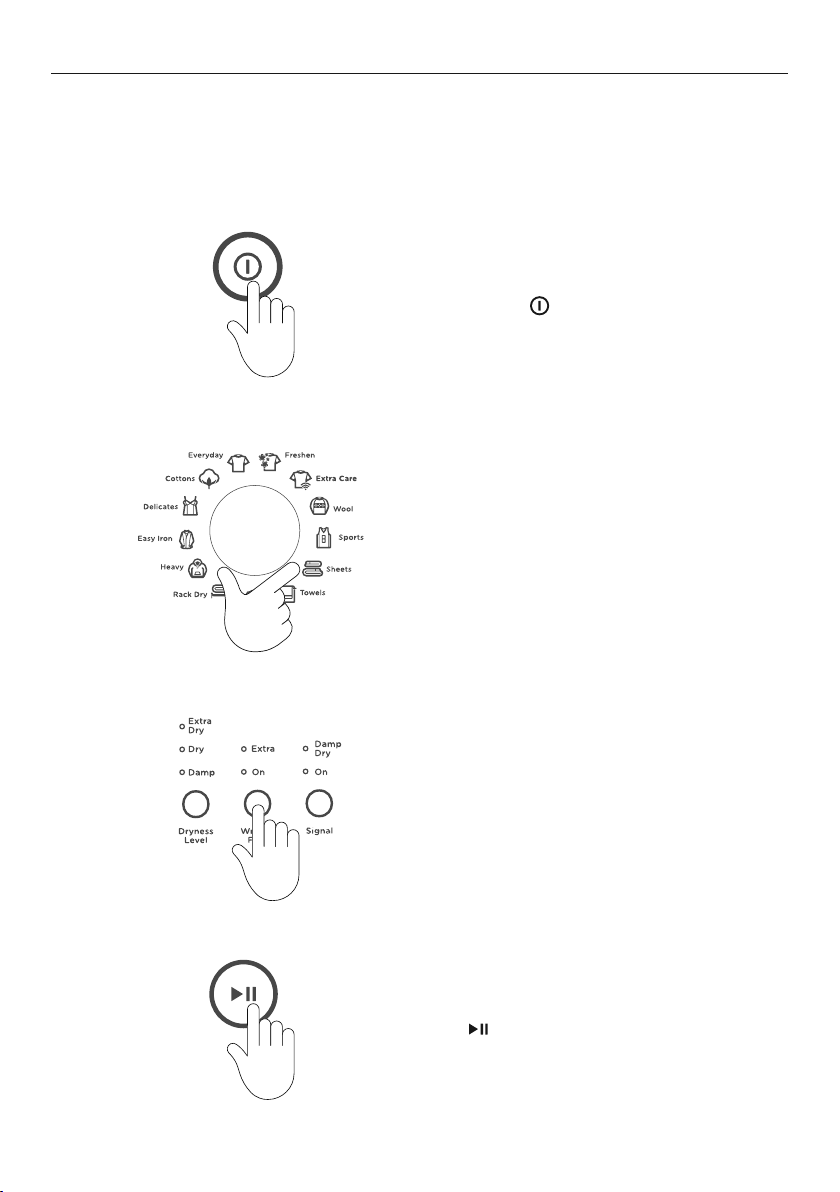
Check the lint and condenser filters are clean and replaced correctly before every load.
Ensure the water tank is empty or drain hose secure before using your dryer.
Sort and load items into the dryer drum, ensuring no items are in the way of the door. Close
the door (you will hear it click shut).
1
2
3
4
Press POWER to activate your dryer.
Select your desired drying cycle by
turning the SmartTouch™ Control Dial.
Select your preferred drying options (if
you wish to select options different from
the default options for thecycle).
If you make an invalid selection the dryer
will beep to alert you.
Press
to start the cycle.

18
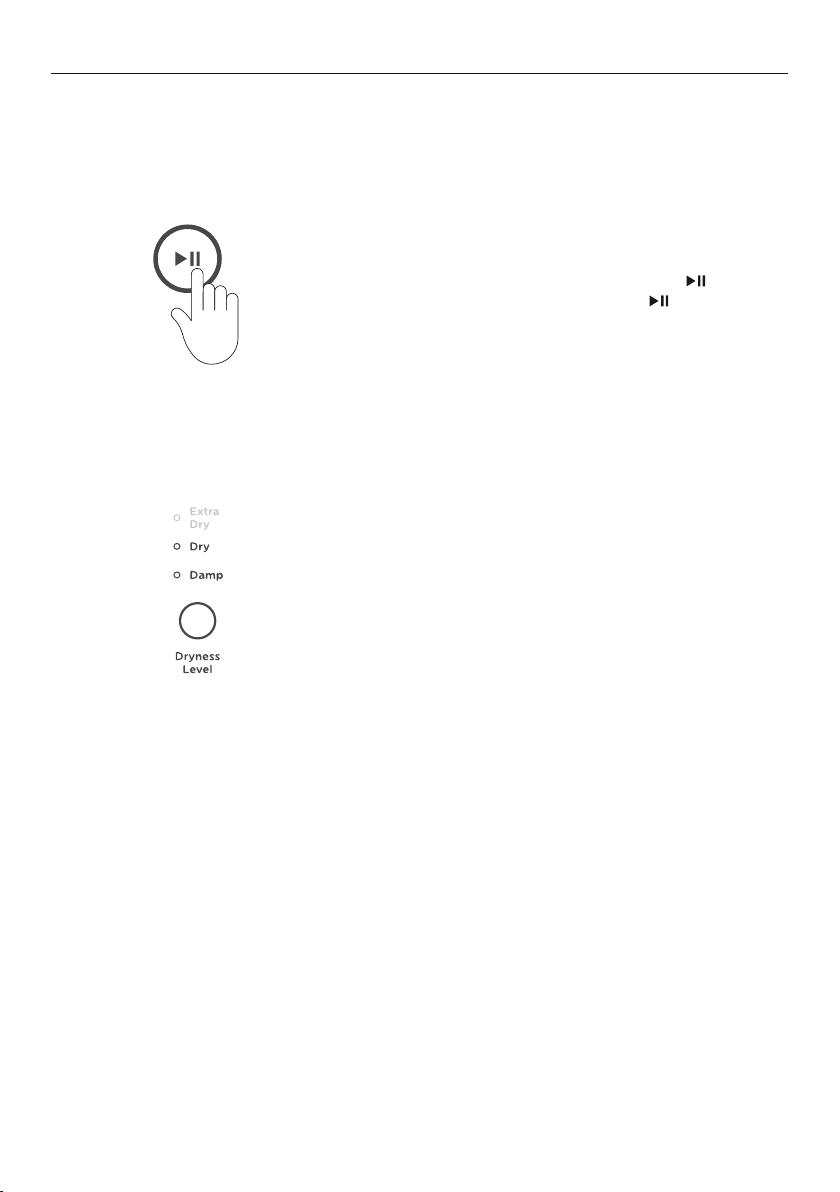
GETTING STARTED QUICKLY
4
If you wish to change a cycle or select a
different option once a drying cycle has
started, press
then select the new
cycle or option.
Press
to restart thedryer with the
new cycle and/or settings.
When the cycle finishes, your dryer will beep and then turn off automatically. If theWRINKLE
FREE
option has been selected the dryer will rotate the drum periodically blowing cool air
into the drum to help minimise wrinkling and creasing ofyour load.
If you wish to stop the dryer before the cycle has finished you MUST remove the clothes
IMMEDIATELY and spread them out to cool. DO NOT leave the clothes in the dryer or
bunched up in a clothes basket. Take extreme care as the drum and the load items may be
extremely hot.
Failure to follow the advice in this guide may result in damage to your garments and your
expectations of drying performance may not be met.
19
DRYING CYCLE OPTIONS
When your dryer senses that the clotheshave
driedto the dryness level selected, the dryer
willautomatically finish thecycle.
Two lights are used to show somedryness levels, eg
to achieve the
DAMP DRY setting boththe DRY and
the DAMP lights willbeilluminated.
There are five dryness levels that can be selected
from
DAMP through to EXTRA DRY. You can alter
the dryness level from the default to suityour load
depending on how dry you want youritemsto be.
All drying cycles default to the recommended options for that cycle based on the average
expected load to be dried using that cycle. You can vary the options (eg
DRYNESS LEVEL,
DRY TEMP) to create your desired cycle. Some options are not available on some cycles, for
clothes care reasons, or because the option is not appropriate for the cycle.
To change a drying option or options you have
selected after a cycle has started, press
and
select your new setting, then press again to
resume the cycle with the new settings.
1
Dryness Level
20
DRYING CYCLE OPTIONS
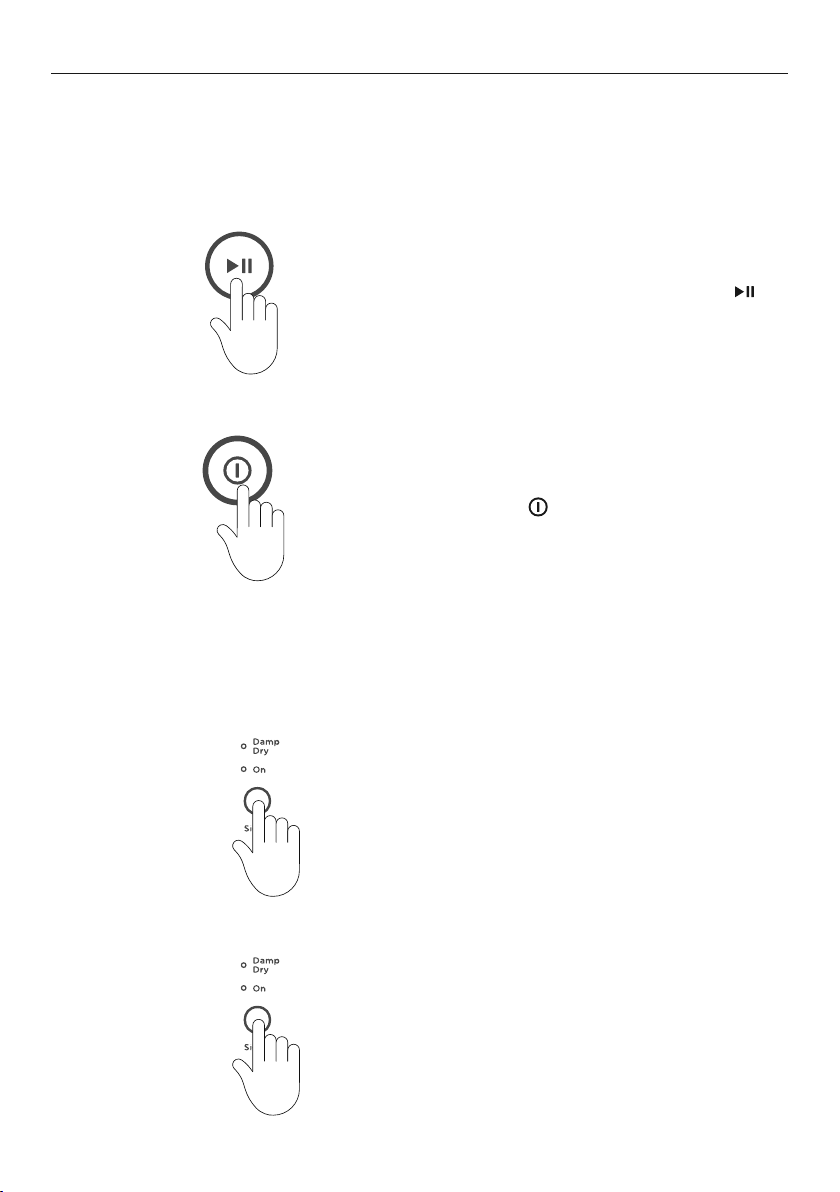
Wrinkle Free
To minimise wrinkling, select one of the
WRINKLE FREE options.
z
ON provides wrinkle free operationfor 1 hour.
z
EXTRA provides wrinkle free operationfor 24 hours.
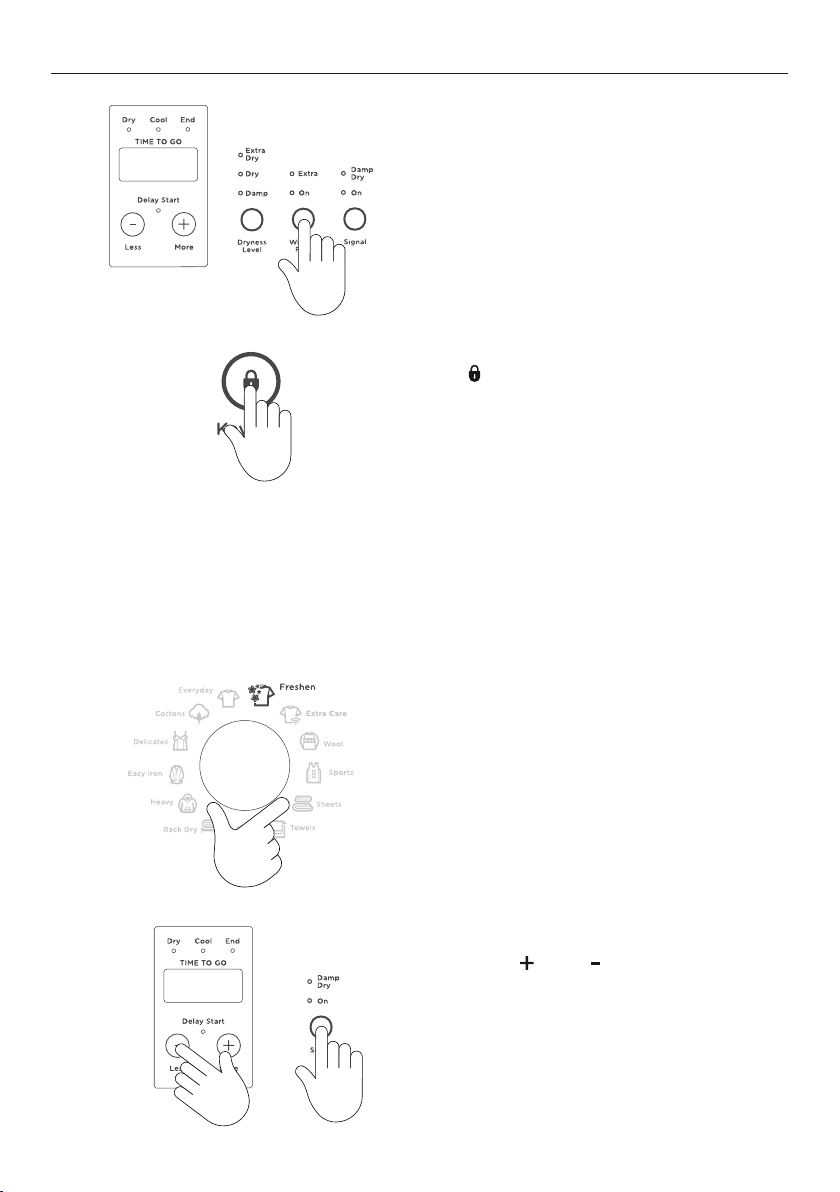
1
To stop the dryer at any point during the
WRINKLE FREE stage of the cycle, press
.
Youcanthen open the dryer door
andremove your items.
2
Press POWER to turn off your dryer.
Signal
The
SIGNAL option automatically defaults to on for all cycles.
1
To turn the SIGNAL off press the SIGNAL
button twice (no lights will illuminate).
2
To turn the SIGNAL on press the SIGNAL
button once.
21
DRYING CYCLE OPTIONS
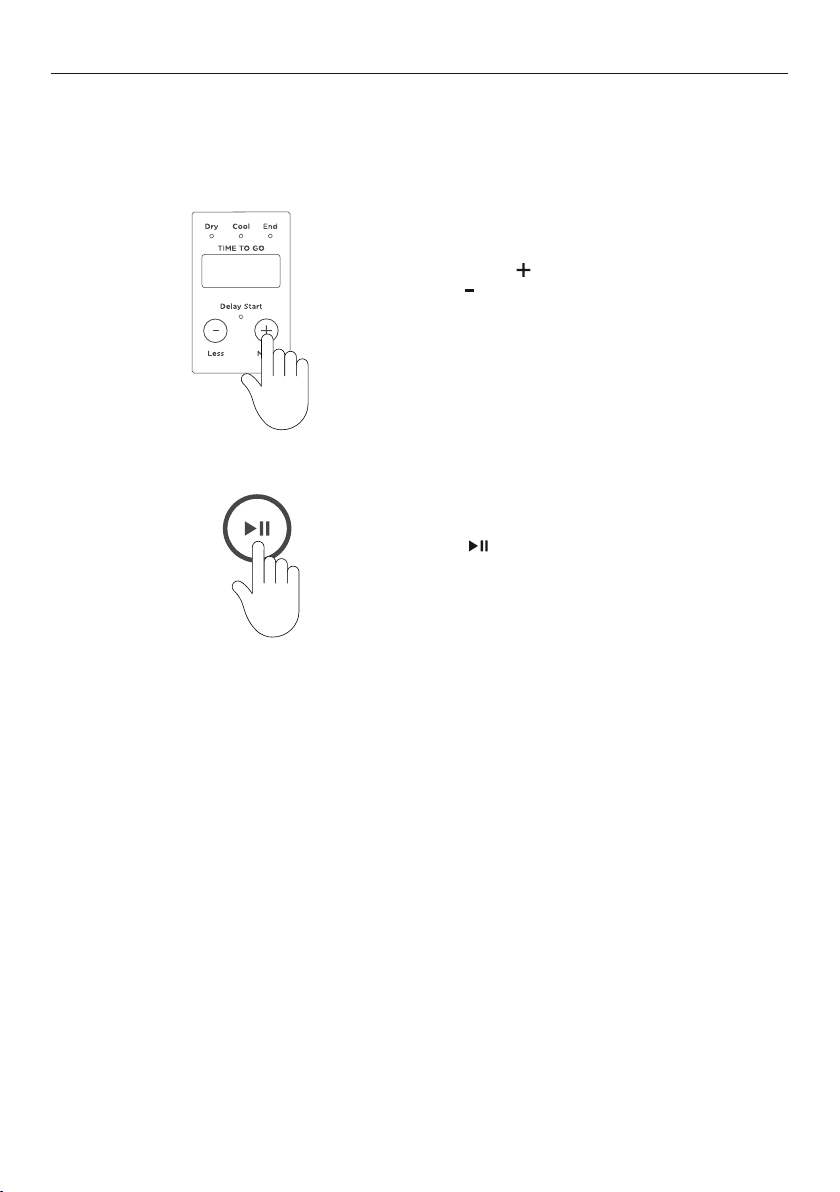
Delay Start
The
DELAY START option can delay the start of the dry cycle between 15 minutes and
12hours.
Press
MORE
to increase the delay time, and
LESS to decrease the time, or turn DELAY
START
off.
Avoid using
DELAY START for damp, non-colourfast items as this may cause dye run
to occur. DELAY START is not available for QUICK 30 and FRESHEN cycles.
2
Press
to confirm your selection and start
the countdown. The display screen will show
the time until the cycle is set to begin.
1
22
CUSTOMISING A DRY CYCLE
After using your dryer a few times you may discover there are some drying options
youprefer for some cycles. You can programme your dryer to remember the dryingoptions
you prefer for each drying cycle. For instance, you may want to set theEASY IRON cycle to
a different dryness setting or programme the EVERYDAY cycleso it automatically has the
WRINKLE FREE option selected.
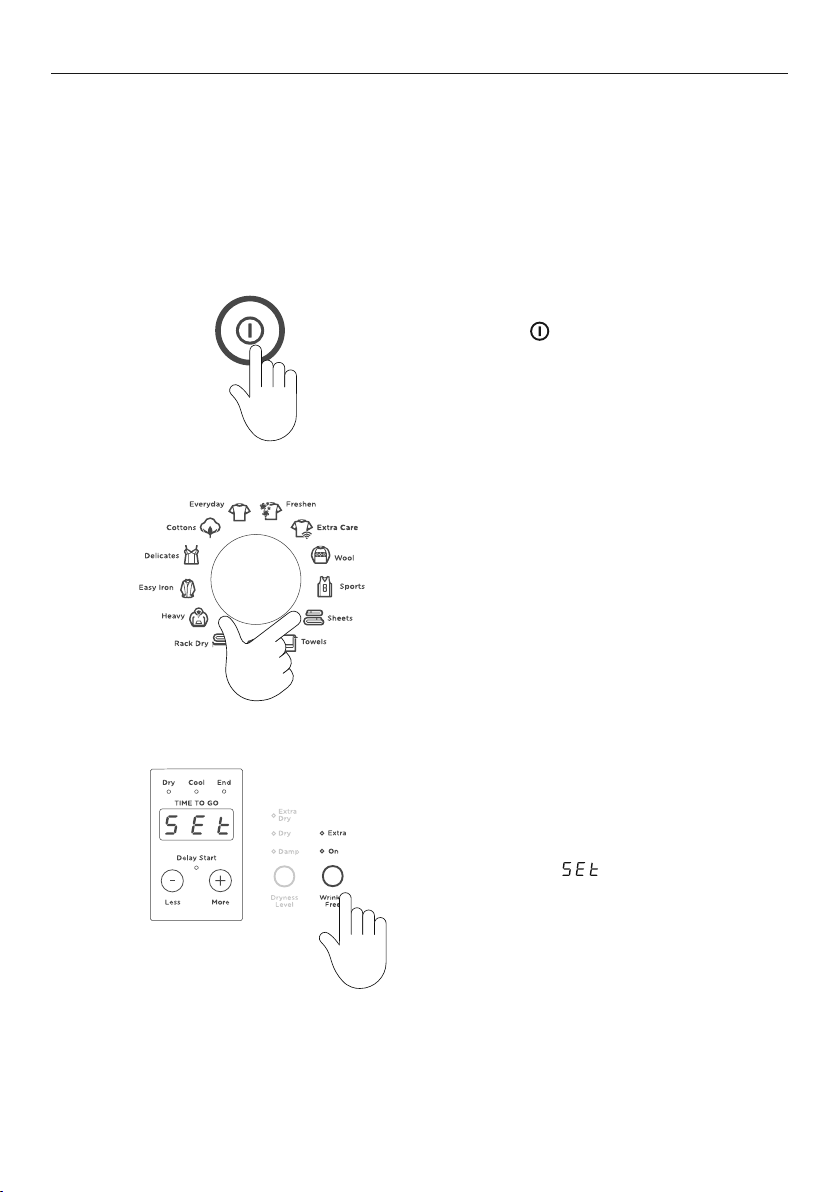
To customise a cycle
1
Press POWER
to activate your dryer.
2
Turn the dial to select the dry cycle you wish
to customise.
Press the button of the option you want
to customise (eg WRINKLE FREE) for
threeseconds. The lights will flash and the
display will show
to indicate that the
dryer is in optionadjustment mode.
3
23
CUSTOMISING A DRY CYCLE
5
Press
once to save your customised cycle.
A long beep will sound to confirm that your
changes have been saved.
Ensure the customised dry cycle option is
saved before customizing any other options.
Select your preferred setting for this option.
Only a single dry cycle option can be
customised at a time.
To customise other dry cycle options or change the saved settings, simply repeat
these steps.
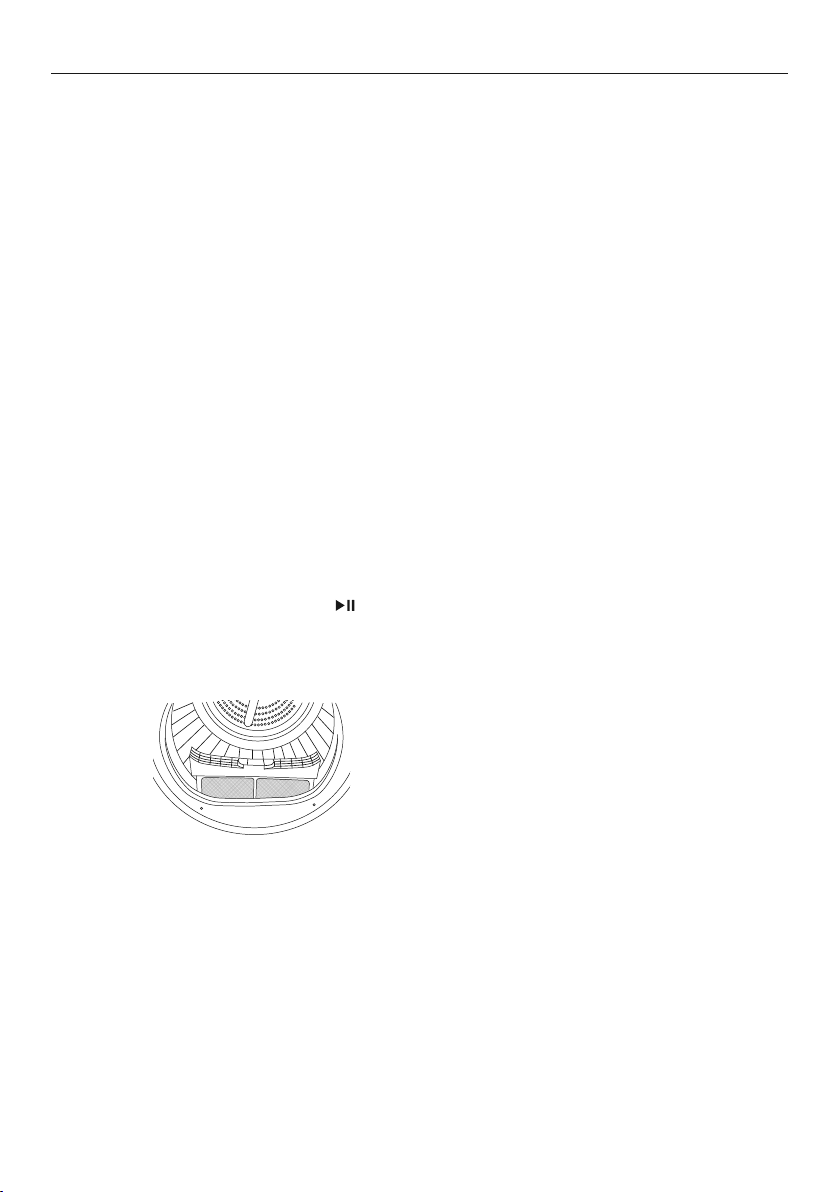
Reset defaults
You can reset your dryer to the default settings it left the factory with:
Turn the dial to select the
FRESHEN cycle.
Press
MORE
, LESS and SIGNAL together
for three seconds.
Your dryer will now be reset to the default
settings it left the factory with.
1
2
+
4
24
CARING FOR YOUR DRYER
When you have finished using your dryer
z
Unplug the dryer from the power socket.
z
Wipe around the door to remove any remaining condensation and foreign matter.
z
Clear the lint and condenser filters and empty the water tank (if not set up to
automatically drain).
Cleaning the control panel and outer surfaces of the dryer
Use a soft damp cloth to wipe all surfaces, then wipe dry. Avoid using chemical or scouring
cleaners, as these will damage the paint and plastic surfaces of your dryer.
Cleaning the inside of your dryer
It is important to occasionally clean the inside of your dryer. If the drum has anyresidual
dirt or lint stuck to it, remove this and wipe it clean with a damp cloth. Donot leave any
metal objects in the drum, as these may cause rust.
Cleaning the filters
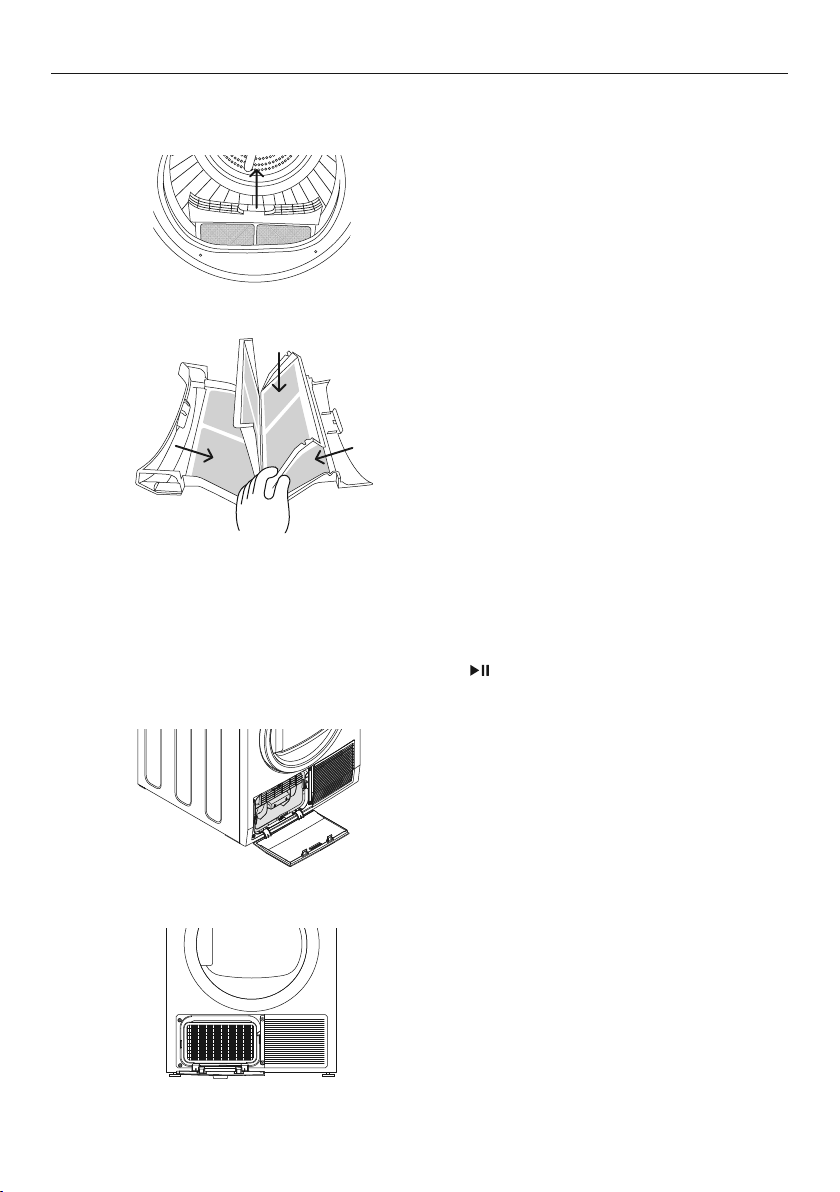
Cleaning the door lint filter
Lint is generally formed during wearing and washing. Fibres (ielint) released from
theclothes during the drying cycle are collected in the lint filter.
It is important to clean the door lint filter after every load, as the lint produced in the drying
process can become a fire hazard if it is allowed to accumulate in or around your dryer.
A warning light will flash at the start of every cycle to remindyou to clean the door lint
filter, then turns off once youpress
to start your cycle. The warning light will flash on
and off during the cycle if the door lint filter becomes blocked. When this occurs the lint
filter should be cleaned immediately.
The door lint filter is located in the door
opening (at the bottom).
25
CARING FOR YOUR DRYER
Open the dryer door.
Remove the lint filter by pulling it up and out
of the filter slot.
1
2
To clean the door lint filter:
Open it out and wipe the surfaces clean with
your hand or a soft cloth.
Close the lint filter and place it back in the
opening. Ensurethe filter is fitted correctly
back in place before operating the dryer.
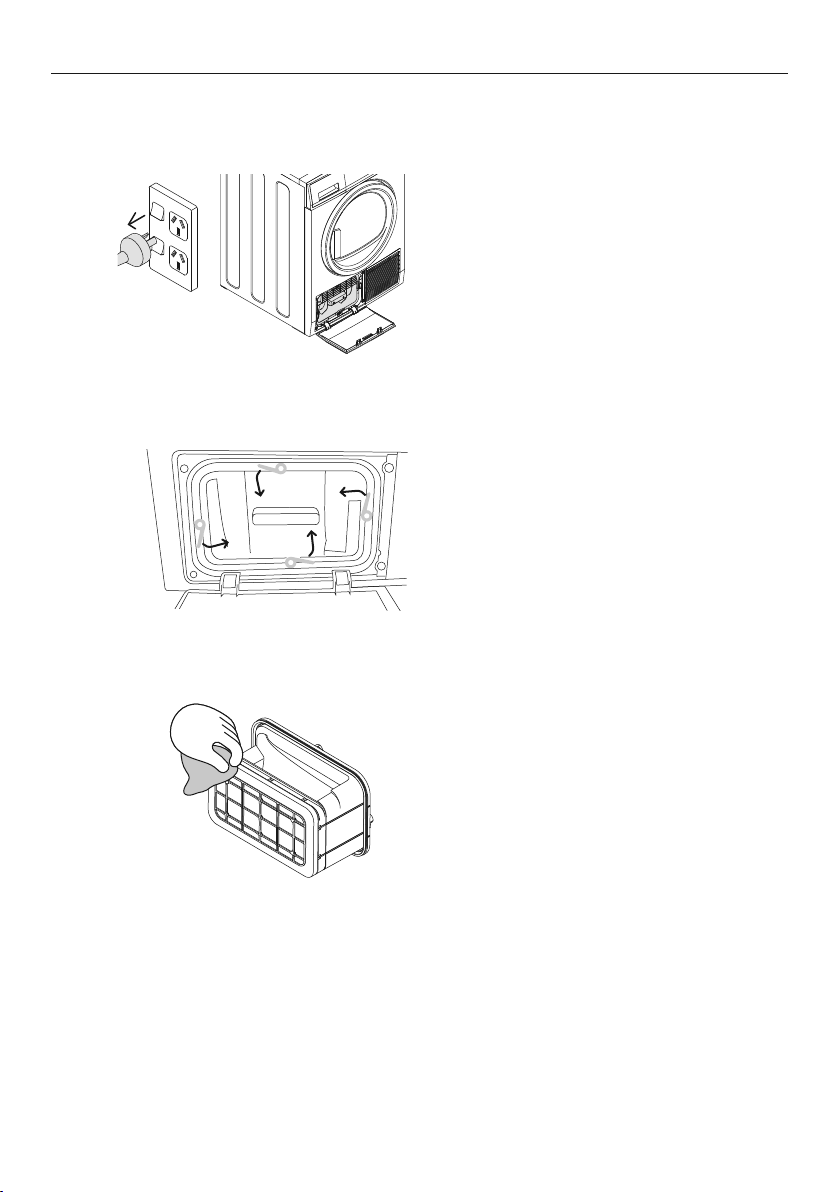
Cleaning the condenser filter, foam and evaporator grid
To maintain optimum performance of your dryer the condenser filter, foam andevaporator
grid must be cleaned. The condenser filter and lint filter lights will flash when the condenser
filter requires cleaning, then turn off once you press
to start your cycle.
Evaporator grid
The evaporator grid is located behind the
condenser filter.
Condenser filter
The condenser filter is located below the
door on the left-hand side.
26
CARING FOR YOUR DRYER
To clean the condenser filter:
Switch off the power supply and remove
thepower plug.
Open the condenser filter cover.
Turn the four condenser lock levers 90°
thenpull out the condenser filter.
Use your hand, a cloth or a vacuum
with a crevice nozzle to remove any
lint build-up from the mesh surface of
the filter.
1
2
3
27
CARING FOR YOUR DRYER
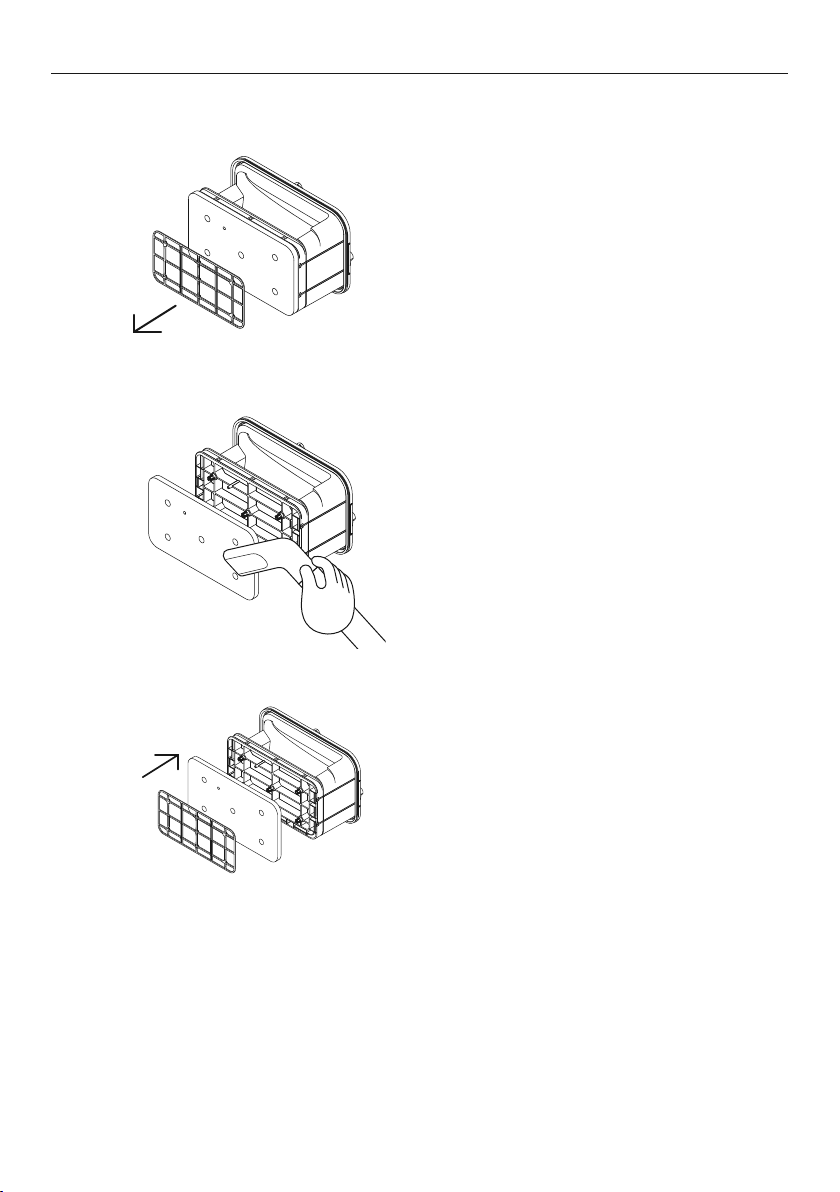
To clean the filter foam:
Remove the bracket securing the foam to
condenser filter.
1
Remove the foam and vacuum lint build-up
with a crevice nozzle.
2
Replace the filter foam and secure with
the bracket.
3
The condenser filter foam should be replaced regularly, three filter foams are provided with
your dryer. Further replacement filter foam can be purchased from fisherpaykel.com or
from your Fisher & Paykel trained and supported service technician.
28
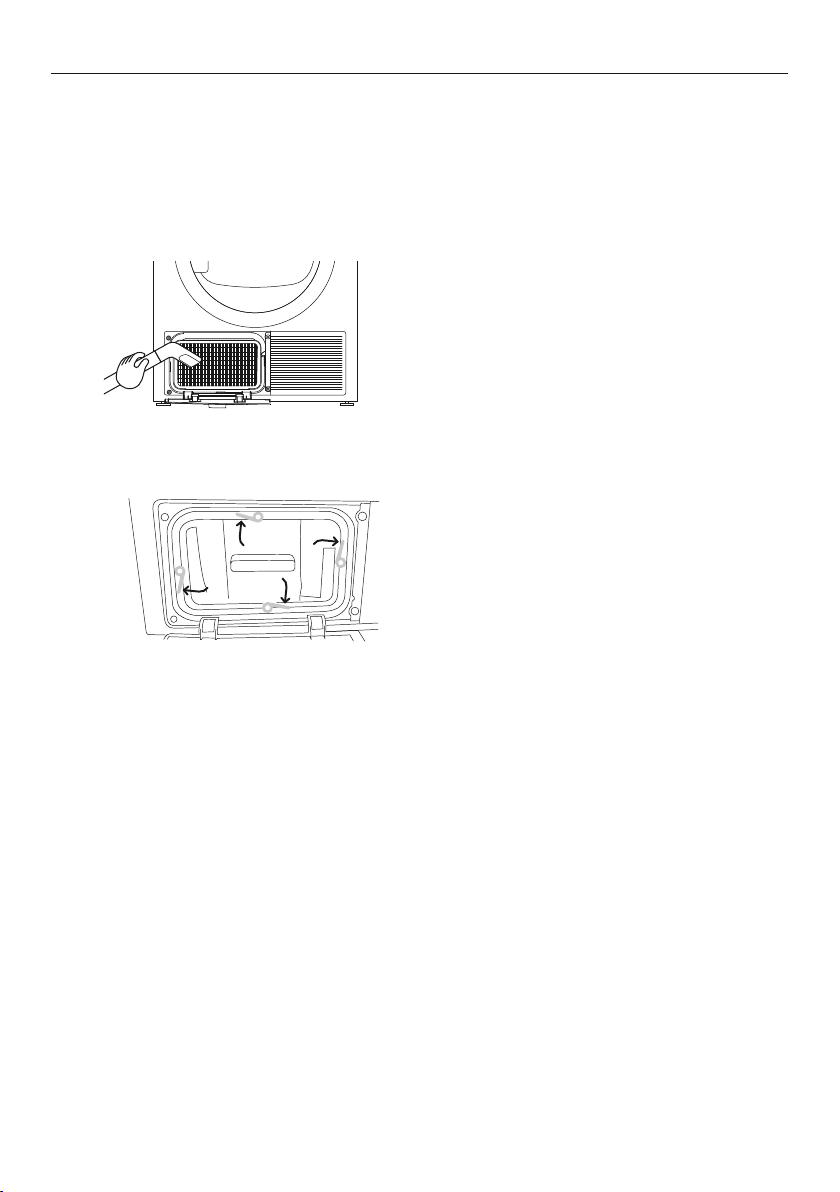
To clean the evaporator grid:
With the condenser filter removed you will be able to see the evaporator grid.
Cut Hazard. The surface of the evaporator has sharp edges and contact may result in
injury. Handle with care when cleaning the grid andalways keep blades away from fingers
andbody.
Ifthesurface of the evaporator grid is
dirty, clean it carefully with avacuum
cleaner using a dusting brush or anarrow
crevice tool. Begentle and do not bend the
finemetalfins.
1
Replace the condenser filter.
Turn the four condenser filter lock levers to
lock the condenser filter back inplace. Ensure
the locksare engaged securely.
Close the condenser filter cover.
2
CARING FOR YOUR DRYER
29
Cleaning the sensors
There are sensors in your dryer that detect whether the laundry is dry or not. Thesesensors
need to be cleaned periodically (we recommend approximately fourtimes a year).
To clean the sensor:
Open the door of your dryer. Allow the dryer
to cool if drying hasbeen carried out.
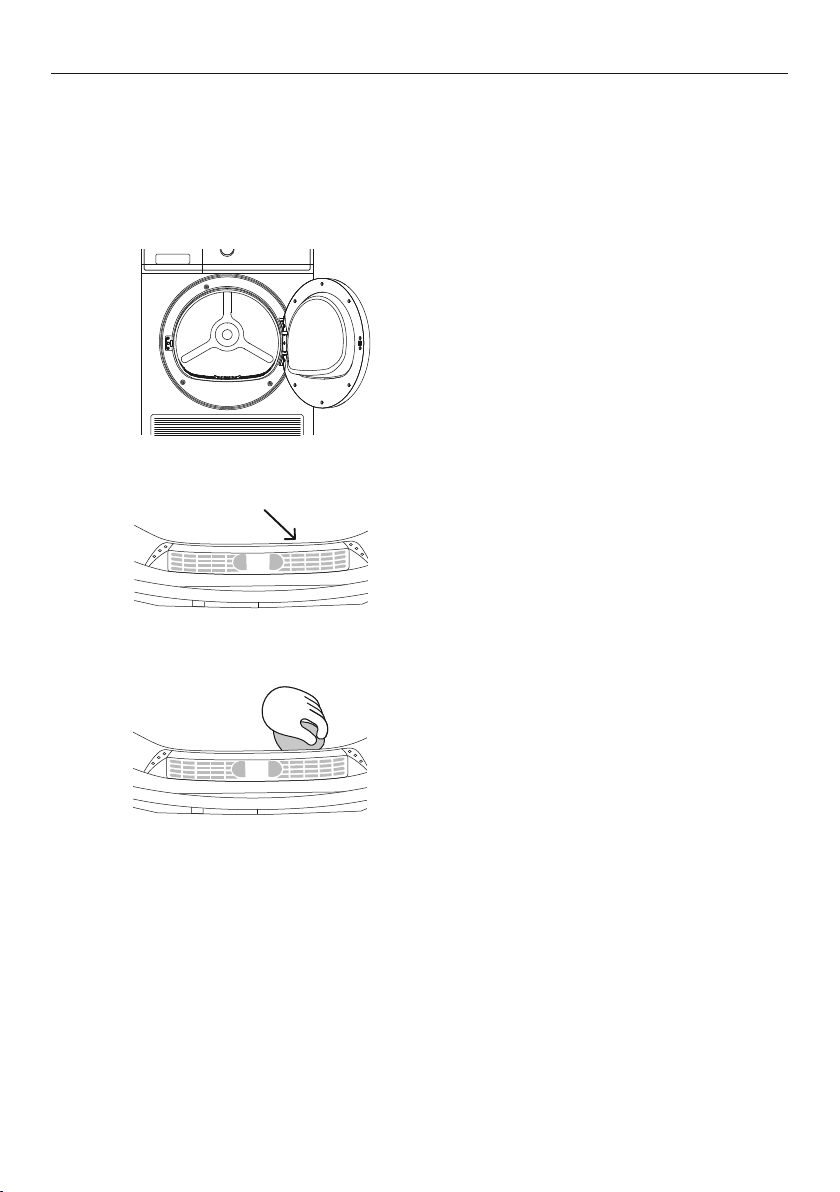
Locate the metal sensors just behind
thelint filter.
Wipe the sensors with a soft cloth,
dampened withvinegar and dry with a clean
dry soft cloth.
1
2
3
CARING FOR YOUR DRYER
30
Emptying the water collection tank
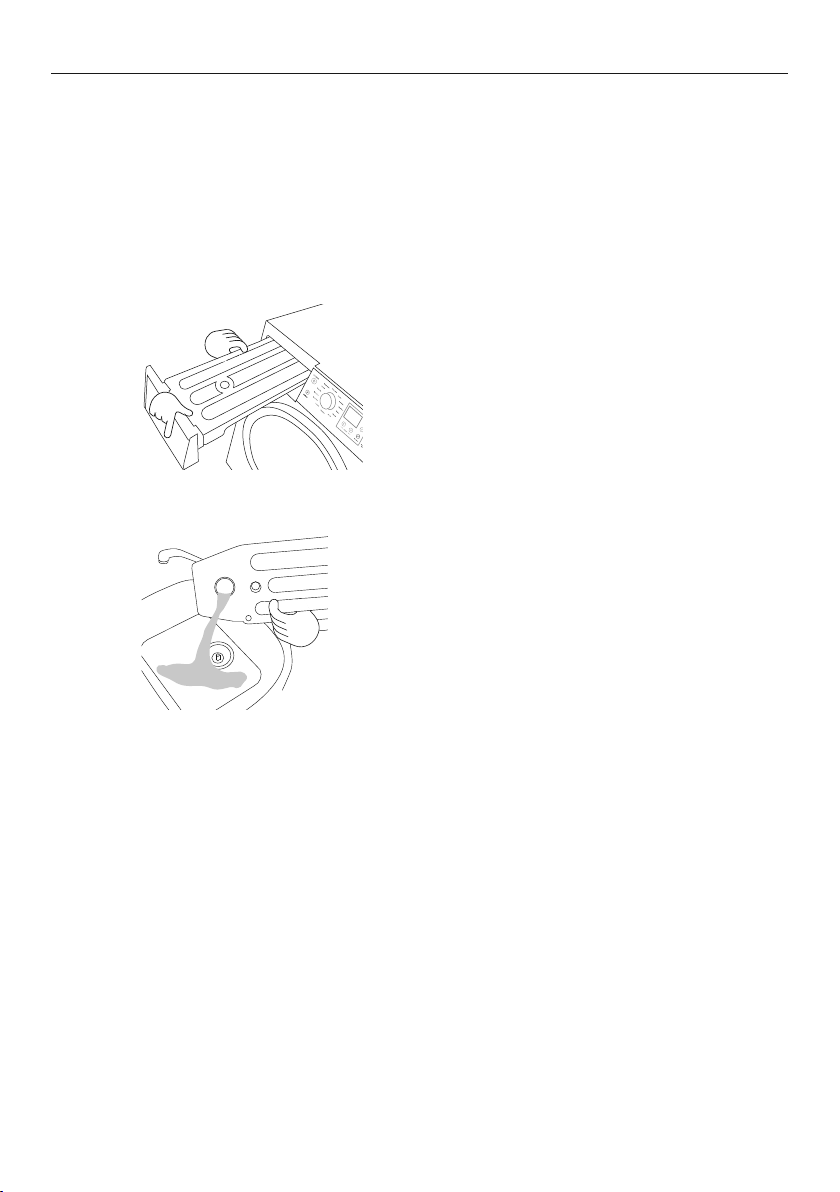
During the drying cycle, steam condenses into water andis collected in the water tank,
located at the top left of the dryer. It is important to empty the water tank after every load.
Ifthewater tank becomes full during operation, thedryer will pause, display a user prompt
and beep to alert you.
Remove the water tank by holding onto
the handleand pulling outwards gently.
Ensurethe tank is kept level when removed
to prevent the water from spilling.
Never run the dryer without the water tank in place unless thedrainhosehasbeeninstalled.
You do not need to empty the water tank ifyou have set up the drain hose to drain the
waterautomatically.
1
2
Pour the water down the sink or into a
bucket, andthen put the tank back in place.
To empty the water tank:
CARING FOR YOUR DRYER
31
BEFORE YOU CALL FOR SERVICE
User warnings
Your dryer is capable of diagnosing a number of its own problems. It will sound a
continuous series of beeps and display a user prompt when it has a problem that you can
correct yourself. To stop the beeps sounding, press any button on the control panel. Donot
try to continue your drying cycle once you stop the noise. You must address theproblem
the dryer is alerting you to.
Check the below table before you call for service.
PROBLEM DISPLAYED AS WHAT TO DO
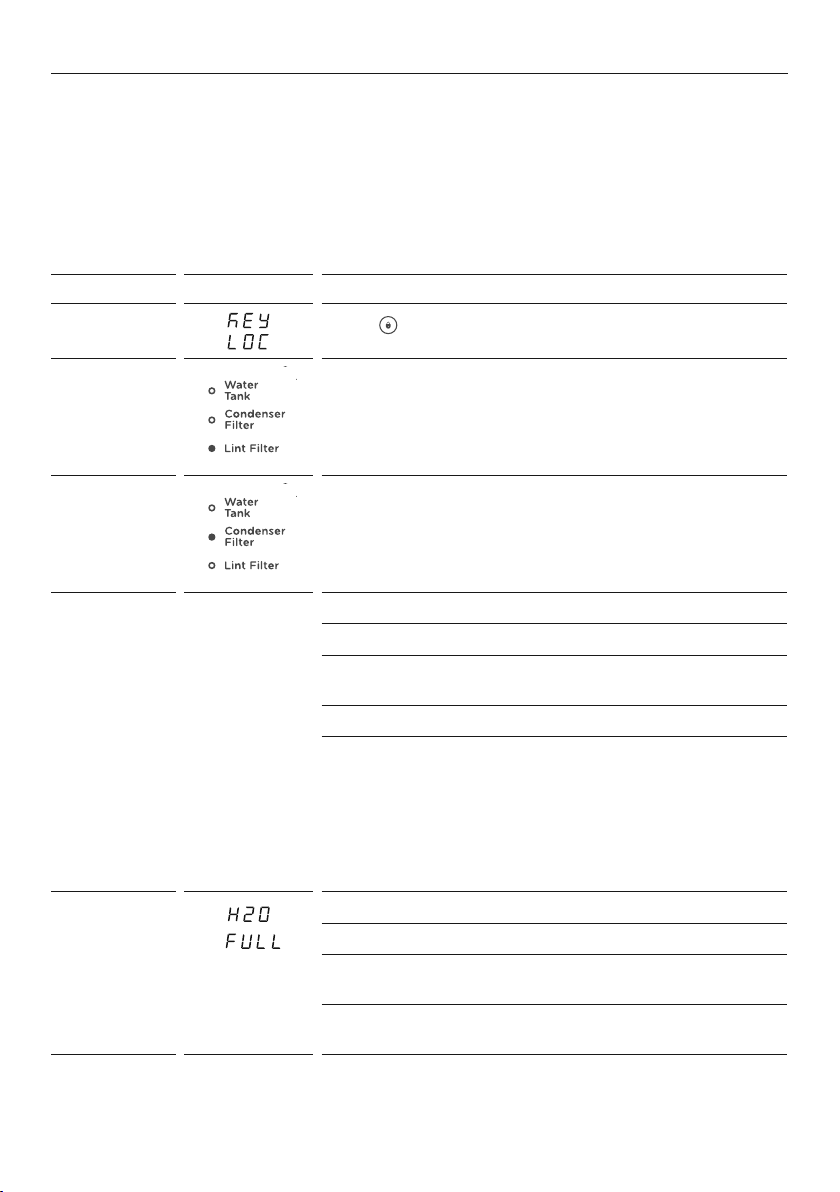
Keylock is
activated
Press for twoseconds todeactivate the KEYLOCK.
Clean lint
filter
Refer to page 24 ‘Cleaning the door lint filter’.
Clean
condenser
filter
Refer to page 25 ‘Cleaning the condenser filter, foam
and evaporator grid’.
The lint and/
or condenser
filter is
blocked and
needs to be
emptied
c1n
both
Iint
fLtr
Empty the lint filter and then replace it.
Check the lint filter is not damaged.
Check there is nothing else stuck in the lint filter holder
which may be blocking the air flow.
Check the lint filter is in place correctly in your dryer.
Clean the condenser filter and the foam filter (refer
to ‘Caring for your dryer’). Ensure the foam filter has
been replaced correctly on the condenser filter. Ensure
the condenser filter unit has been placed or replaced
correctly into your dryer.
If the error continues you may need to replace the filter
foam, refer to ‘Clean the filter foam’ for details.
The water
tank is full
and needs to
be emptied
Check if the water tank is full.
Empty the water tank.
If using the drain hose, check whether the water tank
ordrain hose is blocked.
Check the drain hose is still attached at the back
ofthedryer, and is not kinked or squashed.

32
The door is
not closed
Close the door fully and press .
Try opening and closing the door again.
Reposition the load, ensure the load is correctly inthe
drum and that protruding items are not preventing the
door from closing.
The drying
rack is not
inplace
Fit the drying rack.
Once you have addressed the issue the user prompt was alerting you to, try using your
dryer as per usual. If the issue persists, call your Fisher & Paykel trainedandsupported
service technician.
BEFORE YOU CALL FOR SERVICE

33
FAULT CODES
When a continuous series of beeps sound, all the lights turn off onthe control panel
and a number appears on the display, a fault hasoccurred. The dryer will automatically
enter this mode if a fault occurs. The word FAULT will be shown in the control panel
display followed by a number. To stop the beeps, press any button then perform the
following steps:
1 Turn your dryer off at the power point.
2 Wait one minute and turn it back on.
3 Check your dryer is installed correctly, refer to your separate installation guide.
4 Remove your load from the dryer and retry.
5 Perform a
TIME DRY cycle, eg TIME DRY for 30 minutes.
6 If the fault re-occurs repeat steps 1 and 2.
7 If the dryer still will not work call a Fisher & Paykel trained and supported
servicetechnician to arrange service, refer to ‘Before you call for service’.
Recordthefaultcode number displayed and the serial number of your dryer
(locatedonthe rear of the dryer, or on the insideof the door below the glass)
beforecalling. The fault code will indicateto the service technician what the
problemcould potentially be.
If a fault code is being displayed, you can still turn your dryer off by pressing
POWER
.
34
TROUBLESHOOTING
The following is a list of problems you may encounter when using this appliance and some
suggestions that may help to correct the problem. If you still have problems, contact your
Fisher & Paykel trained and supported service technician.
PROBLEM POSSIBLE CAUSES WHAT TO DO
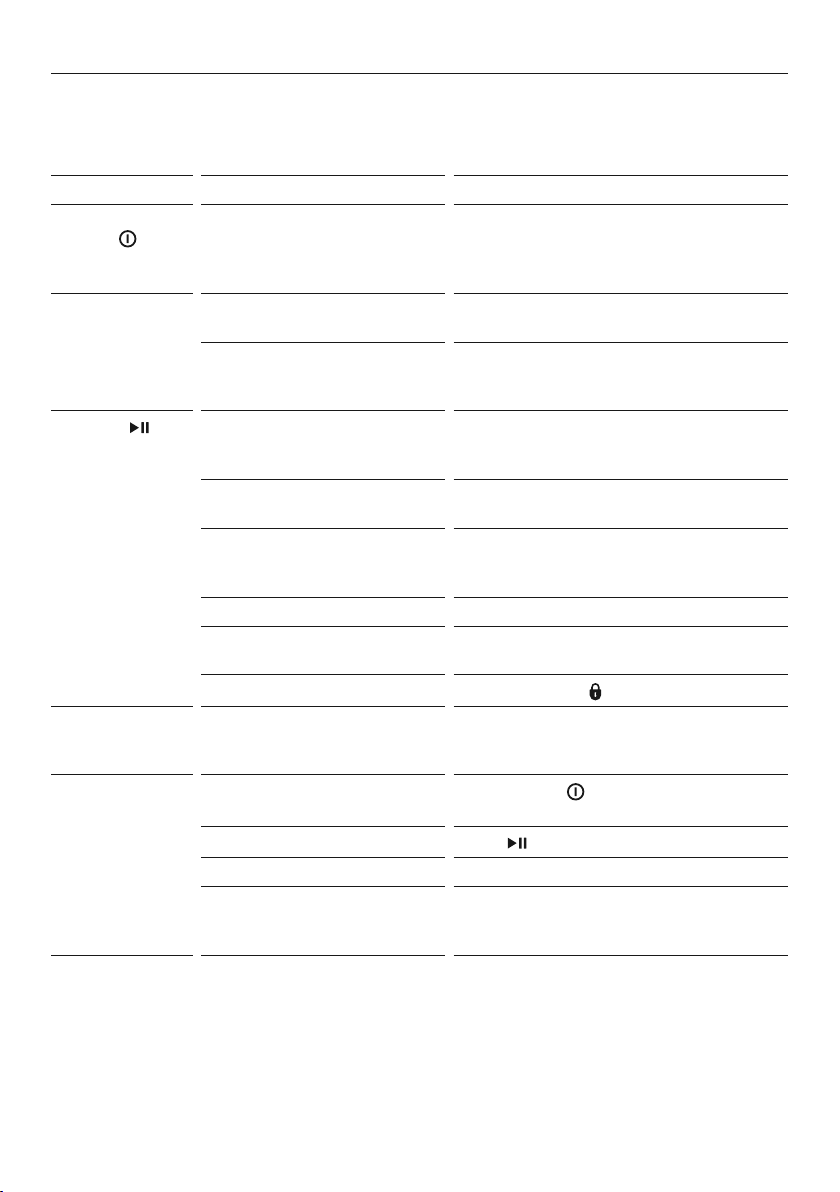
Pressing
POWER does
not turn on
thedryer
Fault with household
power supply.
Try plugging in and turning on another
electrical device.
Dryer does
notheat
Full water tank. Refer to ‘Emptying the water
collection tank’.
The dryer has progressed
to
COOL.
Check the progress lights – are
COOLorEND lights illuminated?
Referto‘Control panel’.
Pressing
does not start
thedrying cycle
Dryer door not closed
properly.
Open and close the door. Checkthat
the lint filter is correctly in place and not
obstructing the door.
Is the dryer displaying a user
warning or fault code?
Refer to ‘User warnings’ and
‘Customising a dry cycle’.
Water tank full or not
properly in place.
Refer to ‘Emptying the water collection
tank’. Ensure the water tank is properly
inplace.
Dryer is overloaded. Remove some items from the dryer.
DELAY START function is set. Refer to ‘Delay Start’ for
more information.
KEYLOCK is ON.
To disable press
forthree seconds.
Dryer keeps
stopping
andstarting
The
WRINKLE FREE option
hasbeen selected.
Refer to ‘User warnings’ for
more information.
Dryer stops
working
mid-cycle
Power failure.
Press
POWER
and restart the
desiredcycle.
Dryer has been paused.
Press
to restart thecycle.
Dryer door is open. Ensure the door is firmly shut.
Items fell off the rack
whenusing
RACK DRY cycles.
Ensure the rack is installed correctly
(refer to ‘Drying rack’) and replace
garments thatmay have fallen from it.
35
TROUBLESHOOTING
PROBLEM POSSIBLE CAUSES WHAT TO DO
Dryer is taking
toolong.
Results were
notsatisfactory.
Drying cycle selected not
appropriate for the load.
Select an appropriate cycle for the
load. Refer to ‘Drying rack’.
Dryness level selected not
appropriate for the load.
Select a higher dryness level.
Refer to ‘Lint’.
Dryer overloaded for
thecycle.
Some cycles have a lower max load
size. Refer to ‘Drying rack’.
Try dividing the load in half and
dryhalf at a time.
Lint filter, condenser filter,
filter foam or evaporator
grid isblocked.
Clean the lint filter, condenser filter,
filter foam and evaporator grid.
If the problem continues the foam
filter may need to be replaced, refer to
‘Clean the filter foam’.
Water tank is full. Refer to ‘Emptying the water
collection tank’.
Environmental conditions
maybe affecting
dryer operation.
In particularly hot or cold conditions
the dryer will take longer to dry a load
and beless efficient.
Ensure the dryer is installed in a
well-ventilated, dust-free environment.
Donot operate this dryer behind
closeddoors (ie inside a cupboard).
Load overly wet at the
start of cycle.
Remove more water from the
load before placing it in the dryer,
egselecta faster spin speed on your
washer, if appropriate for your load.
Load was damp dry at
thestart of cycle.
If the load had been partially air dried,
eg has been washed and placed on
the line, use a
TIME DRY cycle and
monitor the dryness of your clothes.
Dryer not draining water
out properly.
Check the drain hose (if connected)
forblockages or damage.
Youmayneed to call for service
referto ‘Before you call for service’.
Items got tangled. Try separating items and
dryingsimilaritems together.
Referto‘Loading’ forfurther tips.
36
TROUBLESHOOTING
PROBLEM POSSIBLE CAUSES WHAT TO DO
Dryer is not
draining
Drain hose not connected
tothe water tank.
Ensure the drain hose is connected
correctly. Refer to your installation
guide for guidance on draining.
Water tank not in
place correctly.
Ensure water tank is properly
inplace.
Drain hose or drain blocked
ordamaged.
Check drain hose (if connected)
anddrain for blockages or damage.
Clothes getting too
hot or damaged
Cycle selected not
appropriate for the load.
Ensure the cycle selected is
appropriatefor items in the load.
Referto ‘Drying rack’.
Items removed from dryer
before the end of cycle cool
down had finished.
Removing items before cool down
maydamage clothing if it is not
spread out and exposed to air to
coolonce removed from the dryer.
Dryer is beeping
and displaying
acode on the
digital display
Dryer has a fault. Try turning the dryer off and waiting
one minute before turning it back on.
Refer to ‘Customising a dry cycle’.
Small puddle
ofwater coming
from under
thedryer
Water tank not correctly
inplace.
Ensure the water tank is correctly
in place.
Water tank may need
tobeemptied.
Refer to ‘Emptying the water
collection tank’.
Water tank may be damaged. Check the water tank for any signs
ofdamage.
Drain hose may not be
attached properly at the
dryer end.
Ensure the drain hose is attached
properly. Refer to your installation
guide for guidance on draining.
Drain hose could
be damaged.
Check the drain hose for damage.
Drain hose has slipped
outofthe drain.
Ensure the drain hose is securely
fixed in place. Sometimes drain hoses
can move or get displaced, which
may lead to water draining onto
the floor.
Drain may be blocked. Check the drain for any blockages.
Dryer door not closing
properly, affecting the seal.
Ensure the dryer door is closed
properly and there is nothing
obstructing the door opening.
Inlet hose not
correctly tightened.
Check inlet hose and tighten
connection if necessary.
37
TROUBLESHOOTING
PROBLEM POSSIBLE CAUSES WHAT TO DO
Small amount
ofwater in
thedrum at
endofcycle
Water tank needs to
be emptied.
Refer to ‘Emptying the water
collection tank’.
Environmental conditions
maybe affecting
dryer operation.
If conditions are particularly hot,
humidor cold, it is possible vaporised
water may re-condense in the drum
oron the inside of the door.
Noises Dryer is overloaded. Remove some items from the dryer.
Dryer has a fault. Continuous beeping or a musical
seriesof beeps with a message
displayed on the display.
Referto‘Customising a dry cycle’.
Beeps signalling the end
ofadrying cycle.
End of cycle beeps can be turned off.
Refer to ‘Drying cycle options’.
Dryer has not been
levelledproperly.
Refer to your installation guide for
guidance on levelling.
Dryer makes
unfamiliar noises.
At the start of the cycle the dryer
may make some unfamiliar noises
when the compressor turns on.
Thisis normal.
Vibration Dryer is not installed on
astable surface.
Ensure the dryer is installed on a
flat, stable surface. Refer to your
installation guide for guidance on
levelling.
Dryer is not level. Ensure the dryer is correctly levelled.
Refer to your installation guide for
guidance on levelling.
Dryer is overloaded. Remove some items from the dryer.
Creasing Cycle selection not
appropriate for the load.
Select the
EASY IRON cycle to
minimisecreasing.
Dryer is overloaded. Remove some items from the dryer.
DRYNESS LEVEL selected
toohigh for load type.
Try selecting a lower DRYNESS LEVEL.
WRINKLE FREE option
notselected.
Select the WRINKLE FREE option to
rotate the load at the end of the
drying cycle. Refer to ‘User warnings’.
Dye transfer White/light and coloured
items not separated
beforedrying.
Remember to separate white/light
and coloured items before placing
them in the dryer.
Wet items left sitting in
thedryer for long periods
oftime before drying.
Refer to ‘Sorting’ for tips to prevent
dye transfer.
38
TROUBLESHOOTING
PROBLEM POSSIBLE CAUSES WHAT TO DO
Linting Lint filter not cleaned
or replaced.
Ensure the lint filter is cleaned after
every cycle and replaced correctly.
Refer to ‘Cleaning the filters’.
Loads not sorted correctly. Dry lint-giving items separately
from lint receivers. Also, dry similar
colours together, eg light coloured
items withlight coloured items, dark
itemswith dark items.
Refer to ‘Sorting’, ‘Lint’.
Clothes over dried. Over drying clothes in the dryer
cancause them to attract lint.
Useanauto sensing cycle or ensure
you check your load if using the time
dry cycles to avoid over drying.
Referto ‘Drying rack’.
New items have been dried
inthe dryer recently.
Clean the lint filter and use
TIME DRY cycle to clear any
remaininglintfrom the dryer.
New towels or flannelette
sheets can leave lint in the
dryer, which may be picked
up by subsequent loads.
Fabric damage Instructions on care label
notfollowed.
Follow the instructions on the
carelabel of the items.
DRYNESS LEVEL selected
notappropriate for the
fabrictype.
Ensure the DRYNESS LEVEL selected
is appropriate for the fabric type.
Referto the items care label. Referto
‘Drying rack’.
Metal parts on the items or
inthe load.
Fasten zips and other clasps
beforeplacing items in the dryer.
Items not separated or
driedon an appropriate
cyclefor the fabric type.
Dry similar items together.
Ensureanappropriate cycle is
selected. Refer to ‘Drying rack’.
Items fell off the rack when
using
RACK DRY.
Ensure the rack is installed correctly
(refer to ‘Sorting’, ‘Drying rack’) and
only one or twogarments are placed
on the rackata time.
Used a
TIME DRY cycle
anddid not monitor the
dryness of clothes during
the cycle.
Ensure that clothes are checked
fordryness during the cycle
whenusing the timed programmes
toavoid over drying.

39
PROBLEM POSSIBLE CAUSES WHAT TO DO
Tangling Loads not separated
duringloading.
Try separating out larger items
fromsmaller items.
Items loaded into the
dryerincorrectly.
Load items individually into the
dryer. Do not place folded items
inthe dryer.
Incorrect cycle selection. Try using the
EASY IRON cycle to
dryshirts and the SHEETS cycle to
drysheets. Refer to ‘Drying rack’.
Load size too large. Try drying smaller load sizes.
Somecycles have a lower maximum
load size. Refer to ‘Drying rack’.
Delicate items not dried on
RACK DRY.
Dry pantyhose, bras, stockings
andany other delicate items prone
totangling on the RACK DRY cycle.
Sheets and duvet/doona
covers due to their size,
areprone to tangling.
Dry sheets and duvet/doona covers
separately from other laundry,
apartfrom towels. Ensure duvet/
doona covers are buttoned or
fastened closed before drying.
Tryadding a knotted towel to sheets
loads if you are experiencing a lot
oftangling.
TROUBLESHOOTING

40
MANUFACTURER’S WARRANTY
For New Zealand and Australia only. You automatically receive a 2 year Manufacturer’s
Warranty with the purchase of this heat pump clothes dryer covering parts and labour for
servicing within the country ofpurchase.
Fisher & Paykel undertakes to:
Repair or, at its option, replace without cost to the owner either for material or labourany
part of the product, the serial number of which appears on the product, which is found to
be defective within TWO YEARS of the date of purchase.
Note: This Manufacturer’s Warranty is an extra benefit and does not affect your legalrights.
This Manufacturer’s Warranty DOES NOT cover
A Service calls which are not related to any defect in the product. The cost of a
servicecall will be charged if the problem is not found to be a product fault.
For example:
1 Correcting the installation of the product.
2 Instructing you how to use the product.
3 Replacing house fuses or correcting house wiring or plumbing.
4 Correcting fault(s) caused by the user.
5 Noise or vibration that is considered normal, egdrain/fan sounds, machine noises
oruser warning beeps.
6 Correcting damage caused by pests, egrats, cockroaches, etc.
7 Poor drying performance due to incorrect installation and maintenance
egblockedlint filter, blocked condenser or full water tank.
8 Poor drying performance due to incorrect loading, egoverloading or underloading.
9 Damage from articles in the drum, eg bra wires, pens, crayons, dye transfer or
flammable material.
B Defects caused by factors other than:
1 Normal domestic use; or
2 Use in accordance with the product’s User guide.
C Defects to the product caused by accident, neglect, misuse or ‘act of God’.
D The cost of repairs carried out other than by a Fisher & Paykel trained and supported
service technician or the cost of correcting such repairs.
E Normal recommended maintenance as set out in the product’s User guide.
F Repairs when the appliance has been dismantled, repaired or serviced by other
thanaFisher& Paykel trained and supported service technician or the selling dealer.
G Pick-up and delivery.
H Transportation or travelling costs involved in the repair when the product is
installedoutside the Fisher & Paykel trained and supported service technician’s
normalservicearea.
Nothing in this Manufacturer’s Warranty is intended to, or does, limit any rights you
mayhave under law to recover the costs of inspecting or returning the goods to us.

41
MANUFACTURER’S WARRANTY
This product has been designed for use in a normal domestic (residential) environment.
This product is not designed for commercial use (whatsoever). Any commercial use
byacustomer will affect this product’s Manufacturer’s Warranty.
Service under this Manufacturer’s Warranty must be provided by a Fisher&Paykel trained
and supported service technician (refer to the ‘Before you call for service’). Such service
shall be provided during normal business hours. This Manufacturer’s Warranty certificate
should be shown when making any claim.
For Australian Customers
This Manufacturer’s Warranty is an extra benefit and does not affect your legal rights. Our
goods come with guarantees that cannot be excluded under the Australian Consumer Law.
You are entitled to a replacement or refund for a major failure and for compensation for
any other reasonably foreseeable loss or damage. You are also entitled to have the goods
repaired or replaced if the goods fail to be of acceptable quality and the failure does not
amount to a major failure.
Please keep this user guide in a safe place.

42
CUSTOMER CARE
Before you call for service or assistance
Check the things you can do yourself. Refer to your User guide and check:
1 Your product is correctly installed.
2 You are familiar with its normal operation.
3 You have read the ‘Customising a dry cycle’ and ‘Troubleshooting’ sections.
If after checking these points you still need assistance or parts, please refer to your nearest
Fisher&Paykel trained and supported service technician, Customer Care, or contact us
through our website fisherpaykel.com.
In New Zealand if you need assistance*
Call the Fisher & Paykel Customer Care Centre and talk to one of our
Customer CareConsultants.
Toll Free: 0800 FP CARE or 0800 372 273
Fax: (09) 273 0656
Website: fisherpaykel.com
Postal address: Fisher & Paykel Appliances Ltd, PO Box 58550, Botany, Auckland 2163
If you need service*
Fisher & Paykel has a network of Fisher & Paykel trained and supported service technicians
that can carry out any service necessary on your appliance. Our Customer Care Centre can
recommend a Fisher & Paykel trained and supported service technician in your area.
In Australia if you need assistance*
Call the Fisher & Paykel Customer Care Centre and talk to one of our
CustomerCareConsultants.
Toll Free: 1300 650 590
Fax: (07) 3826 9298
Website: fisherpaykel.com
Postal address: Fisher & Paykel Appliances Australia Pty Ltd, PO Box 798,
ClevelandQLD4163
If you need service*
Fisher & Paykel has a network of Fisher & Paykel trained and supported service technicians
that can carry out any service necessary on your appliance. Our Customer Care Centre
canrecommend a Fisher & Paykel trained and supported service technician in your area.
*If you call, write or contact us via our website please provide:
your name and address, model number, serial number, date of purchase and a complete
description of the problem. This information is needed in order to better respond to
yourrequest for assistance.
Product details can be found on the rear of the dryer, and/or on the inside of the door
below the glass (when the door is open).


42815B 11.21
FISHERPAYKEL.COM
© Fisher & Paykel Appliances 2021. All rights reserved.
The models shown in this guide may not be available in all markets
and are subject to change at any time.
The product specifications in this guide apply to the specific products and
models described at the date of issue. Under our policy of continuous product
improvement, these specifications may change at any time.
For current details about model and specification availability in your country,
please go to our website or contact your local Fisher&Paykel dealer.
