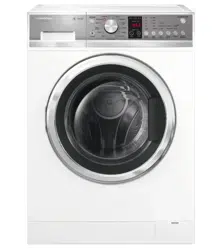
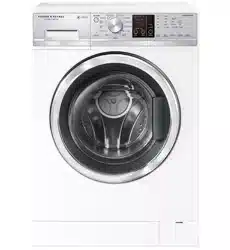
User manual Washing Machine
BEFORE YOU DO YOUR FIRST WASH
Before you start, it is a good idea to go through the following checklist:
- Have the packaging and transit bolts been removed?
- Is the drain hose threaded through the ‘U bend’ (with no more than 20 mm extended) and hooked into your standpipe or tub, or attached to a spigot?
- Is the hot hose connected to the hot valve (colour-coded orange)? Is the cold hose connected to the cold valve (colour-coded white)? Have the taps been turned on?
- Is the machine correctly levelled, feet are locked and cabinet corners clear of the floor and walls?
- Has the power cord been connected to an appropriate power supply and the power turned on?
- Have you performed the installation test cycle?
- We recommend you complete your first cycle with a half-load amount of detergent and without a load in order to remove any residues remaining in the machine from the manufacturing process.
IMPORTANT! You must ensure all 4 transit bolts have been removed from your washer before you start using it. If the transit bolts are not removed, they will damage your washer and YOUR MANUFACTURER’S WARRANTY WILL BE COMPROMISED.
GETTING STARTED QUICKLY
WH8560F and WH8060F models only
- Sort your washing carefully. Separate white/light colours from dark colours. Wash new, highly coloured and dark coloured items separately to prevent dye transfer. Refer to the ‘Sorting and loading’ section.
- Load your clothes individually into the wash drum. Close the door.
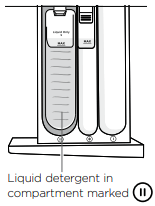
- Use ‘Low Sudsing’ or ‘Front Loader’ liquid, powder or pods. Place liquid detergent into the correct compartment in the dispenser drawer marked
 . If you wish to use powdered detergent you MUST remove the liquid detergent insert by firmly grasping and twisting the left hand side of the internal compartment and pulling upwards. If you are using detergent pods place them at the back of the drum before you load your clothing. For more information on detergent refer to the ‘Detergent and fabric softener’ section.
- If you wish to use fabric softener, place it in the compartment marked with a
 . For more information on fabric softener refer to the ‘Detergent and fabric softener’ section.
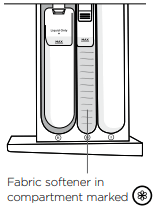
IMPORTANT! Fabric softener should not be used if you have selected the ‘Super Quick’ cycle.
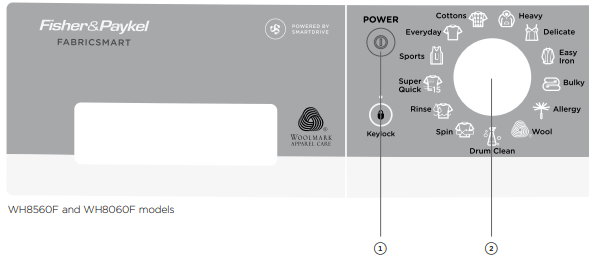
- Press ‘POWER’ to activate your washer.
- Select your wash cycle by turning the SmartTouch™ Control Dial.
- Choose your wash options, if you wish to select options different from the default options for the cycle.
- Touch
 to start the cycle.
- If you make an invalid selection the washer will beep to alert you.
- When the cycle finishes, your washer will perform end of cycle beeps and then turn off automatically.
- If you wish to stop your washer at any point during a cycle simply touch to pause the cycle. There may be a slight delay while the drum comes to a stop, then the door will unlock. Under certain conditions however the door will remain locked for safety reasons (refer to the ‘Safety features’ section).
- If you wish to cancel or change the wash cycle once a cycle has started, simply touch the button then select the new cycle. Touch to restart the washer.
IMPORTANT!
- For the best fabric and colour care, remove your clothes as soon as the cycle has finished.
- Failure to follow the advice in this guide may result in damage to your garments and your expectations of wash performance may not be met.
WH8560P, WH8060P and WH7560P models only
- Sort your washing carefully. Separate white/light colours from dark colours. Wash new, highly coloured and dark coloured items separately to prevent dye transfer. Refer to the ‘Sorting and loading’ section.
- Load your clothes individually into the wash drum. Close the door.
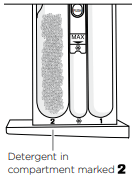
- Use ‘Low Sudsing’ or ‘Front Loader’ liquid, powder or pods. Place liquid detergent into the correct compartment in the dispenser drawer marked . If you wish to use powdered detergent you MUST remove the liquid detergent insert by firmly grasping and twisting the left hand side of the internal compartment and pulling upwards. If you are using detergent pods place them at the back of the drum before you load your clothing. For more information on detergent refer to the ‘Detergent and fabric softener’ section.
- If you wish to use fabric softener, place it in the compartment marked with a . For more information on fabric softener refer to the ‘Detergent and fabric softener’ section.
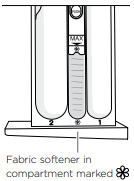
IMPORTANT! Fabric softener should not be used if you have selected the ‘Quick’ or ‘Super Quick’ cycles.
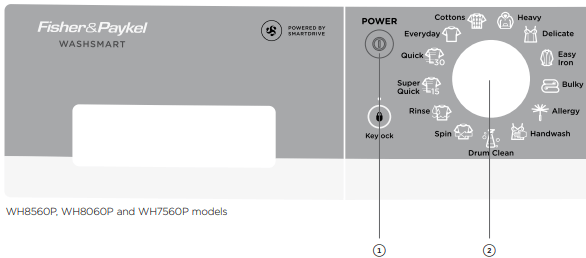
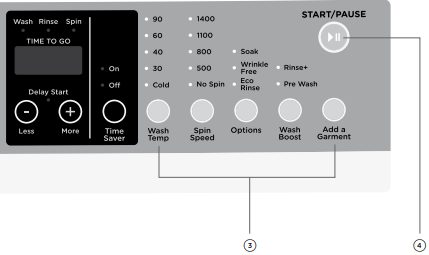
- Press ‘POWER’ to activate your washer.
- Select your wash cycle by turning the SmartTouch™ Control Dial.
- Choose your wash options, if you wish to select options different from the default options for the cycle.
- Touch to start the cycle.
- If you make an invalid selection the washer will beep to alert you.
- When the cycle finishes, your washer will perform end of cycle beeps and then turn off automatically.
- If you wish to stop your washer at any point during a cycle simply touch to pause the cycle. There may be a slight delay while the drum comes to a stop, then the door will unlock. Under certain conditions however the door will remain locked for safety reasons (refer to the ‘Safety features’ section).
- If you wish to cancel or change the wash cycle once a cycle has started, simply touch the button then select the new cycle. Touch to restart the washer.
IMPORTANT!
- For the best fabric and colour care, remove your clothes as soon as the cycle has finished.
- Failure to follow the advice in this guide may result in damage to your garments and your expectations of wash performance may not be met.
WH8560J and WH7560J models only
- Sort your washing carefully. Separate white/light colours from dark colours. Wash new, highly coloured and dark coloured items separately to prevent dye transfer. Refer to the ‘Sorting and loading’ section.
- Load your clothes individually into the wash drum. Close the door.
- Place detergent in the correct compartment in the detergent dispenser drawer marked
 . Use Low Sudsing or ‘Front Loader’ liquid or powder detergents. Alternatively use detergent pods. Place the pod at the back of the drum before you load in any clothing. For more information on detergent refer to the ‘Detergent and fabric softener’ section.
- Place fabric softener in the compartment marked with a
 . For more information on fabric softener refer to the ‘Detergent and fabric softener’ section.
IMPORTANT! Fabric softener must not be used if you have selected the ‘Quick’ cycle.
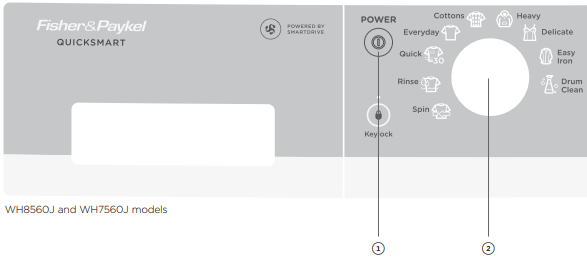
- Press ‘POWER’ to activate your washer.
- Select your wash cycle by turning the SmartTouch™ Control Dial.
- Choose your wash options, if you wish to select options different from the default options for the cycle.
- Touch to start the cycle.
- If you make an invalid selection the washer will beep at you.
- When the cycle finishes, your washer will perform end of cycle beeps to alert you and then turn off automatically.
- If you wish to stop your washer at any point during a cycle, simply touch to pause the cycle. There may be a slight delay while the drum comes to a stop, then the door will unlock. Under certain conditions however the door will remain locked for safety reasons (refer to the ‘Safety features’ section).
- If you wish to cancel or change the wash cycle once a cycle has started, simply touch the button then select the new cycle. Touch to restart the washer.
IMPORTANT!
- For the best fabric and colour care, remove your clothes as soon as the cycle has finished.
- Failure to follow the advice in this guide may result in damage to your garments and your expectations of wash performance may not be met.
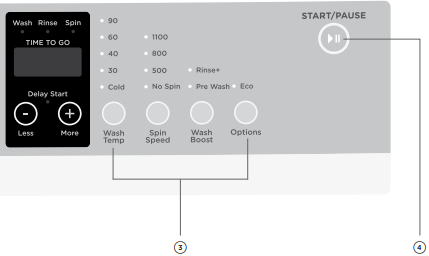
WASHER CONTROLS
SmartTouch™ Control Dial
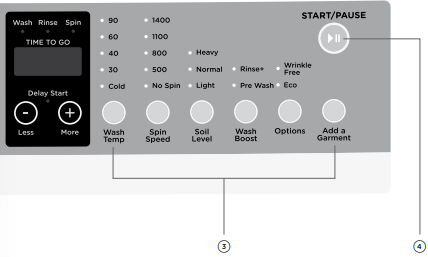
The SmartTouch™ Control Dial provides easy and efficient wash cycle selection. As you rotate the dial, the icon of the wash cycle selected will be illuminated, along with the default settings for that cycle on the right side of the control panel.
SmartTouch™ buttons
The smooth, easy clean buttons enable easy selection of options with lights clearly showing the selections you are making.
Digital display screen
The digital display screen provides feedback on how long the wash cycle has to go. If you have programmed a ‘Delay Start’, the time remaining until the cycle will start will be displayed here, along with any messages to help you with the overall running of your washer (eg user warnings).
Time to go
Your washer displays approximately how many minutes the cycle you are running has remaining, so that you can tell at a glance when your washing will be finished.
Please be aware that a number of factors can influence the overall cycle time, eg the water flow rate, water pressure, whether hot water is being used from the tap or the water is heated by the internal heater, load size, cycle and option selections. Therefore cycle times will vary. Unexpected events in a wash cycle (eg out of balance, oversudsing) can lengthen the cycle time. The time remaining is constantly updated taking these factors into account, which may mean the time displayed for the cycle becomes longer than was initially estimated.
Progress lights
The progress lights indicate what part of the cycle the washer is currently on (wash, rinse or spin). All three lights are on at the beginning of the cycle. The light for the current part of the cycle flashes, and each one goes out when that part of the cycle is complete.
Keylock mode
Keylock can be used to lock the buttons on your washer. This will avoid accidental button pushes. For more detail please refer to the ‘Wash cycle options’ section.
Drum light (WH8560F, WH8060F models only)
Your machine has a drum light to help assist you when loading and unloading your washing machine. When you press ‘POWER’, the LED light in the drum will turn on, after 2 minutes it will automatically turn off. At the end of the cycle, the drum light will turn on again for 5 minutes to help facilitate unloading.
SORTING AND LOADING
Before you load
- Check pockets for items that could damage your clothes or get caught in the washer.
- Close zippers, hooks and eyes, and other fastenings (ie fasten the opening of duvet/ doona covers), and remove loose bra wires. All these can damage both your washer and your clothes.
- Place delicate items, such as lingerie, in a mesh laundry bag before placing in the machine.
- Pre-treat any stains, taking care not to spray pre-treaters on your washer as they can cause damage to the plastic surfaces.
Loading
Your washer will be more efficient when washing larger loads, so try to collect enough items to loosely fill the drum when the items are dry.
IMPORTANT!
- Do not overload your washing machine beyond its rated capacity.
- Please do not under any circumstances wash an electric blanket in your washer unless the care label specifically states it is safe to do so.
- Do not wash curtains in this washer, as sunlight makes them brittle and they may disintegrate during washing.
DETERGENT AND FABRIC SOFTENER
Detergent type
Your washer requires low sudsing detergent to prevent oversudsing problems. Low sudsing detergent comes in powder, liquid or pod form and is labelled ‘Front Loading’, ‘Low Suds’, ‘High Efficiency’ or ‘HE’.
Using top loading detergent in your front loader washer may lead to excessive suds formation, which will lengthen the cycle time as the machine waits for the suds to dissolve.
Where do I put my detergent?
WH8560F, WH8060F, WH8560P, WH8060P and WH7560P models only
Liquid detergent
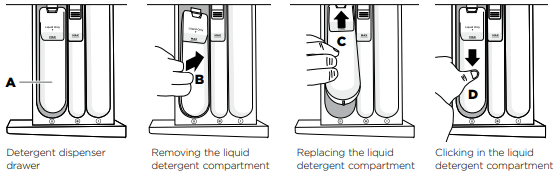
Is added to the main wash compartment on the left side of the dispenser drawer marked with a  (A). As the machine fills, water is flushed into this compartment and is mixed with the detergent, the detergent solution is then delivered into the drum. There may be a small volume of water left in the liquid detergent dispenser at the end of the cycle. This is normal.
Powdered detergent
If you wish to use powdered detergent, the liquid detergent compartment MUST be removed from the dispenser drawer. To do this firmly grasp and twist the left hand side of the internal compartment and pull upwards (B). To replace the liquid detergent compartment slide it back into the drawer marked (C). Press down in the middle until it clicks (D).
IMPORTANT!
- If using liquid detergent ensure the liquid detergent compartment is installed.
- If using powder ensure the liquid detergent compartment has been removed.
- Make sure the detergent drawer is completely closed before starting the cycle.
WH8560J and WH7560J models only
Powdered or liquid detergent
Is added to the main wash detergent compartment on the left side of the dispensing drawer marked with a . As the machine fills, water is flushed through this compartment to deliver a detergent solution into the drum.
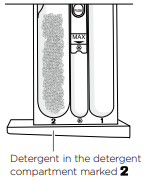
IMPORTANT!
- Make sure the detergent drawer is completely closed before starting the cycle.
- If you select the ‘Pre Wash’ option, you must use a powdered detergent in the main wash detergent compartment.
Pods
Detergent pods are a ‘no mess’ alternative to powdered or liquid detergent. They must be placed at the back of the drum prior to loading your clothes. This will ensure they are activated quickly in the wash. Do not place pods in the detergent dispenser drawer or on top of your clothes.
Pre Wash
If you wish to use the ‘Pre Wash’ option, liquid or powdered detergent only must be placed in the pre wash detergent compartment on the right side of the drawer, marked with either a  or
or  . When you select ‘Pre Wash’, the pre wash compartment is flushed at the start of the cycle. For more information refer to ‘Wash cycle options’.
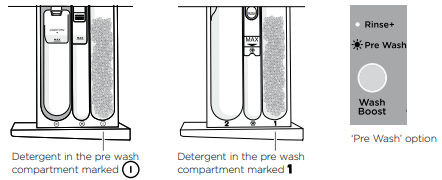
WASH CYCLE OPTIONS
All wash cycles default to the recommended options for that cycle based on the average expected load to be washed. You can vary the options (eg ‘Wash Temp’, ‘Spin Speed’) to create your desired cycle. Note: some options are not available on some cycles, for clothes care reasons, or because the option is not appropriate for the cycle.
To change a wash option or options you have selected after a cycle has started, touch and select your new setting, then touch again to resume the cycle with the new setting or settings. Note: some options may not be available for selection under certain conditions and after particular stages of the cycle have passed.
Wash Temp
Your washer offers five wash temperatures:

- Simply touch the ‘Wash Temp’ button to increase or decrease the wash temperature.
- The washer will fill with both hot and cold water to achieve the selected wash temperature. If required the washer will heat the water to the selected temperature.
- Some temperatures are not available on some cycles as a safeguard for your clothes (eg 90°C on the ‘Delicate’ cycle).
IMPORTANT!
When 90°C temperature is selected, the door glass will become hot. Do not touch the glass part of the door. Keep children away from the washer.
Time Saver (WH8560F and WH8060F models only)
Your washer offers a ‘Time Saver’ feature that when selected adjusts the cycle programming, by combining special temperature profiling and a unique tumble sequence. The result – excellent wash performance combined with time savings.
This option can be selected on the ‘Everyday’, ‘Cottons’, ‘Heavy’, ‘Easy Iron’, ‘Allergy’ and ‘Sports’ cycles.
Please be aware that a number of factors can influence the amount of time saved on a cycle, including the load size, cycle chosen, water flow rate and load distribution during spin.
Spin Speed
- Your WH8560F, WH8060F, WH8560P, WH8060P or WH7560P model of washer offers four spin speeds: 500 rpm, 800 rpm, 1100 rpm and 1400 rpm, plus an additional ‘No Spin’ option.
- Your WH8560J or WH7560J model of washer offers three spin speeds: 500 rpm, 800 rpm, 1100 rpm, plus an additional ‘No Spin’ option.
- Simply increase or decrease the spin speed by touching the ‘Spin Speed’ button.
- Selecting ‘No Spin’ will end the cycle after the rinse, allowing you to remove items you wish to drip dry. Note: the washer will complete the default wash and rinse spins for the cycle; only the final spin will not be completed. If you have removed the items you wish to drip dry and there are items remaining that you would like to proceed to spin, press ‘POWER’ and select the ‘Spin’ cycle. If necessary, modify the spin speed to best care for your load (ie spin delicate items at 500 rpm for best garment care).
Soil Level (WH8560P, WH8060P and WH7560P models only)
The ‘Soil Level’ option lets you adjust the wash to suit the amount of soil in your load. For example, select ‘Heavy’ for dirty clothes; for items that are only lightly soiled, select ‘Light’. This adjusts the wash time accordingly to give the load the right amount of agitation to remove the soil.
Wash Boost
Pre Wash
For extra dirty loads you can perform a ‘Pre Wash’. Your washer will start the wash with a short wash in cool water to remove excess soil. After this the machine will drain and then fill at the selected temperature for the main wash.
Simply touch the ‘Wash Boost’ button and select ‘Pre Wash’ when choosing your wash options. Note: ‘Pre Wash’ cannot be selected after a wash cycle has been started, ie if you touch and try to select ‘Pre Wash’ it will be unavailable. ‘Pre Wash’ must be selected at the start of the cycle.
If you use the ‘Pre Wash’ option, liquid or powdered detergent needs to be placed in the correct detergent compartment. The pre wash compartment is on the right hand side of the drawer, marked  or . When you select ‘Pre Wash’, the compartment is flushed at the start of the cycle.
WH8560F, WH8060F, WH8560P, WH8060P and WH7560P models only
The detergent for the main wash can either be a powder or a liquid. Place this in the compartment marked . If using liquid, ensure the internal compartment is installed.
WH8560J and WH7560J models only
The detergent for the main wash MUST be a powder, and should be placed in the compartment marked .
Rinse+
If you have a particularly dirty load, or you have sensitive skin and wish to give your clothes an extra rinse, select ‘Rinse+’ from the ‘Wash Boost’ options. Your load will undergo an extra rinse to get rid of any residual detergent or soil in the items. Note: ‘Rinse+’ will not be available if the ‘Eco’/’Eco Rinse’ option has been selected.
Keylock
This option enables you to deactivate the buttons on the display panel, except for the ‘Power’ and ‘Keylock’ buttons. This prevents accidental button presses.
To turn Keylock mode ON or OFF when the washer is powered on:
- Touch and hold the
 button for 2 seconds.
Note: when activated, the light above the button is illuminated.
If Keylock mode is activated and the machine is powered off:
- To turn your washer on, press the ‘POWER’ button, then touch and hold the button for two seconds. Select your wash cycle, options and then touch to start the cycle.
- To turn the washer off at anytime when keylock is activated simply press the ‘POWER’ button.
- Delay Start
The ‘Delay Start’ option enables you to delay the start of the wash cycle from between 5 minutes and 12 hours. Times you can select are 5 min, 15 min, 30 min, 1 hour, then hourly up to 12 hours. This can be useful to time your washing to finish when you arrive home from work, or to start once you have finished in the shower. Some stain removers also require you to spray them on then leave for several minutes, before washing. Your washer will wait for the selected time then start without you having to wait or remember to start your machine.
To programme a ‘Delay Start’ time, simply touch the ‘More’ + button to increase the delay time and ‘Less’ - button to decrease the time or turn ‘Delay Start’ off. Touch to confirm your selection and start the countdown. Once started, the time will count down on the digital display screen in 1 minute increments, the ‘Delay Start’ light will flash and the light will stop flashing and turn on solid.
Note: if you hold the ‘More’ + button down, the time displayed on the screen will increase after every half a second (more convenient than touching the button repetitively).
To remove a ‘Delay Start’ time once it is counting down, simply touch , then touch the ‘Less’ - button to decrease the time to zero. Touch to start the cycle immediately.
Note: we suggest that you avoid using ‘Delay Start’ for damp, non-colourfast items as this may cause dye run to occur. We also recommend you use powder detergent when you use the ‘Delay Start’ function (WH8560J and WH7560J models only).
After using your washer a few times you may discover there are some wash options you prefer for some cycles.
You can programme your washer to remember the wash options you prefer for each wash cycle. For instance, you may want to set the ‘Easy Iron’ cycle to cold wash temperature or set the ‘Everyday’ cycle so it gives you Rinse+ every cycle.
To customise a cycle:
- Press ‘POWER’ to turn the machine on.
- Turn the dial to select the cycle you wish to customise.
- Touch and hold any of the wash option buttons for 3 seconds. The cycle icon will flash on and off to indicate that the product is in cycle adjustment mode. The display will show
 .
.
- Select the wash options you prefer by touching the relevant option button.
- Touch to save the selected settings.
Your washer will automatically remember your changes for all future washes you do on this cycle.
Factory Reset
You can reset your washer to the default settings it left the factory with:
- Turn the dial to select ‘Spin’.
- Touch and hold the ‘Delay Start’ ‘More’ +, the ‘Delay Start’ ‘Less’ - and ‘Options’ buttons together for 3 seconds
 will appear on the screen and the machine will beep.
- Your washer will now be reset to the default settings.
CARING FOR YOUR WASHER
When you have finished using your washer
- Unplug the machine from the power socket.
- Wipe around the door and in the rubber gasket to remove any remaining water and foreign matter.
- Turn off the taps to prevent the chance of flooding should a hose burst.
Cleaning your washer
Before you start cleaning your washer, ensure that it is disconnected from the power (ie unplug the machine from the power socket).
Cleaning the control panel and outer surfaces of the washer
Use a soft damp cloth to wipe all surfaces, then wipe dry. Avoid using chemical or scouring cleaners, as these will damage the paint and plastic surfaces of your washer.
Cleaning the detergent dispenser drawer
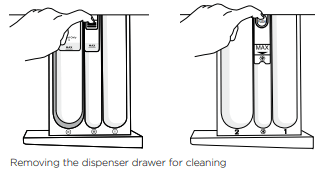
Wipe out the detergent dispenser drawer with a damp cloth. Clean it regularly, especially if you use fabric softener. To remove the drawer, pull it open, push down on the tab in the fabric softener compartment and pull out. Rinse it out under warm water and replace.
Cleaning the inside of your washer
It is important that you regularly clean the inside of your machine using the ‘Drum Clean’ cycle. After 100 cycles  icon will flash every time you turn your washer on to remind you to do this. If your washer starts to smell this is a sign that you should complete a ‘Drum Clean’ cycle. We recommend that you do not have any items in the washer when you run this cycle.

Cleaning steps
- Add approximately 2 full scoops of a good quality powdered detergent directly into the main wash detergent compartment of the dispenser drawer (marked or ) or use a drum cleaning product specifically designed for front loading washing machines (follow manufacturer’s instructions).
- Press ‘POWER’ to turn your machine on and select the ‘Drum Clean’ cycle.
- Touch to start the cycle (refer to the ‘Wash cycles’ section).
Cleaning the drum and the door
- Use a soft damp cloth to wipe the door, cleaning any water marks or residue off it.
- Wipe the rubber seal around the door. Remove any items or lint accumulating in the bottom of the seal catchment and wipe out any water accumulated here. If this is not cleaned out, unpleasant odours will develop.
- If the drum has any residual dirt or lint stuck to it, remove this and wipe the drum clean. Do not leave any metal objects in the drum as these may rust and cause staining.
- WH8560F and WH8060F models also have a self cleaning door flush that directs a portion of the rinse water over the door during various stages of the cycle to help to clean hair and insolubles from the inside of the door and surrounding parts. We still recommend that you manually clean it with a soft cloth periodically as per the instructions above.
Cleaning the pump filter
The pump has a filter to trap foreign objects that enter the washer along with clothing. The pump filter can be accessed from the front of the washer.
To clean the filter:
This should be cleaned out approximately once a month.
- Turn the power off and unplug the machine.
- Use a coin to open the filter cover. Place the edge of the coin into the slot and tilt upwards whilst levering the cover open.
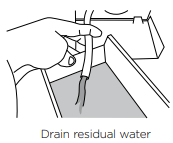
- Unhook the pump outlet hose and pull it out (about 150 mm). Remove the plug and allow any water (approximately 250 ml) to drain into a shallow dish.
- After the draining process is complete, replace the plug into the hose and refit the hose back into the housing.
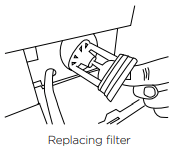
- Remove the filter by turning anti-clockwise. Clean and rinse under a tap.
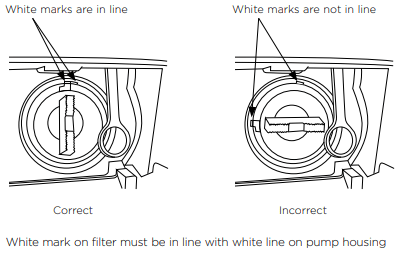
- Replace the filter by turning clockwise until the white mark on the filter is in line with the white line on the pump housing.
7. Close the filter cover.
Cleaning the hoses
Each hose has a filter in it, preventing any solid contaminants in the water entering your washing machine. Occasionally you should disconnect the water inlet hoses where they connect to the taps, check these for any build up of dirt and wash this out.
Nappy sanitisers/bleach
Nappy sanitisers and bleach are very corrosive to metal surfaces. DO NOT tip the contents of a nappy bucket into your machine. Rinse and wring items out thoroughly before placing them in the machine.
Moving your washer
If you need to move your washer a considerable distance (eg moving house), remember to replace the transit bolts before moving it. These will protect internal components of the washer from damage.
To replace the transit bolts, pull out the bolt-hole covers in the back of the machine. Push the transit bolt rubber grommets and plastic spaces into the hole left and tighten it with the spanner provided with the product.
Make sure any water in the washer is drained out. This can be done by cleaning out the pump filter (refer to ‘Caring for your washer’ section ‘Cleaning the pump filter’).
IMPORTANT!
- Leave the door to your washer open when it is not in use to allow the washer to dry out, otherwise it will develop unpleasant odours. When leaving the door open like this, it is extremely important that children and pets are kept away from the washer so they cannot be accidentally trapped inside it.
- Aside from the detergent dispenser, water hoses, and the pump filter, no other parts are designed to be removed from the machine for cleaning. Do not attempt to remove any other part of the machine.
BEFORE YOU CALL FOR SERVICE
User warnings
Your washer is capable of diagnosing a number of its own problems. It will sound a continuous series of beeps and display a code when it has a problem that you can correct yourself. All control panel lights will turn off and the code will be displayed to inform you what the problem is. To stop the beeps, press any button on the control panel. Do not try to continue washing once you stop the noise. You must address the problem the washer is alerting you to.
Check this chart before you call for service.
| PROBLEM |
DISPLAYED AS |
WHAT TO DO |
| Water is not getting to the machine. |
 |
Check the taps have been turned on.
If there is no hot water connection the machine will heat the water itself, but there must be a cold water connection to the cold valve.
Check the hose connections. If the cold water supply is connected to the hot valve and there is no connection to the cold valve the machine will not fill.
Check the inlet hose filters are not blocked, the hoses are not kinked and are attached correctly.
Check that the drain hose is not too low or pushed into the standpipe too far. This will cause the water to siphon out of the machine.
Check the cold water temperature does not exceed the 35°C temperature requirement.
Check the water flow rate. It maybe too low.
|
| Wash load is out of balance. |
 |
Touch to try the spin again.
If the out of balance persists, pause the cycle, manually redistribute the load and touch to spin again. If necessary, stop the cycle, select ‘Spin’ and touch .
If the problem persists, check the machine is correctly levelled.
|
| Too many suds. |
 |
Machine will stop and flash  for 10 minutes while waiting for suds to dissipate. The machine will not beep during this time. After 10 minutes the machine will automatically restart. At any point during that 10 minutes you can touch to restart the machine, but it is recommended that the machine be left to restart automatically. for 10 minutes while waiting for suds to dissipate. The machine will not beep during this time. After 10 minutes the machine will automatically restart. At any point during that 10 minutes you can touch to restart the machine, but it is recommended that the machine be left to restart automatically.
Check you are using a suitable detergent.
Check you are not overdosing the detergent.
Check the standpipe height for the drain does not exceed 1200 mm.
|
| Door is locked. |
 |
The temperature in the drum is over 60°C therefore it is not safe to open the door. Wait until the temperature drops below 60°C.
Check the water level in the drum. If the level is above the bottom of the door seal, the door cannot be opened. Use the ‘Add a Garment’ button if you wish to add or remove items (WH8560F, WH8060F WH8560P, WH8060P and WH7560P models only).
If the drum is still moving, wait for it to stop before attempting to open the door.
|
| Door is open. |
 |
Close the door fully and touch .
Try opening and closing the door again.
Reposition the load, make sure the load is correctly in the drum and that protruding items are not stopping the door from closing.
|
FAULT CODES
When a continuous series of beeps is sounded, all the lights turn off on the control panel and a number appears on the display, a fault has occurred. The washer will automatically enter this mode if a fault occurs. The fault code will be displayed as followed by a number on the digital display. To stop the sound, touch any button and perform the following steps:
- Turn your machine off at the power point.
- Wait one minute and turn it back on.
- Check your machine is correctly levelled (refer to page 7).
- Remove your wash load.
- Perform a ‘Rinse’ cycle.
- If the fault re-occurs repeat steps 1 and 2.
- If the machine still will not work you will be required to call a Fisher & Paykel service technician to arrange service (refer to the ‘Customer Care’ section). Record the fault code number displayed and the serial number of your washer (located on the rear of the machine, and/or above the drum opening when the door is open) before calling. The fault code will indicate to the Repairer what the problem could potentially be.
If a fault code is being displayed, you can still turn your washer off by pressing ‘POWER’.
TROUBLESHOOTING
The following is a list of problems you may encounter when using this appliance and some suggestions that may help to correct the problem. If you still have problems, please contact your Fisher & Paykel service technician.
Solving operating problems
| PROBLEM |
POSSIBLE CAUSES |
WHAT TO DO |
| Washer not turning on. |
Power not switched on at the wall. |
Switch the power on at the wall. Then touch ‘POWER’. |
| Household power supply not working. |
Try plugging in another electrical appliance. |
| Keylock may be activated. |
Touch and hold the ‘POWER’ button for 2 seconds. Refer to page 32. |
| Touching does not start the fill. |
Washer door not closed properly. |
Open and reclose door. |
| The washer is waiting for a command from you. |
If is flashing then the washer is waiting for a command from you. |
| The washer has detected a fault. |
Check if a code is being displayed on the panel. (Refer to pages 37 – 39). |
| Hot and cold taps not turned on. |
Check that both hot and cold taps are turned on (if using cold inlet only ensure inlet valve cap is installed on the hot valve on the machine). |
| Hot and cold taps not connected to the corresponding valve on the machine. |
Check the cold tap is connected to the cold valve on the machine and the hot tap is connected to the hot valve. |
| Blocked hose filters. |
Check the tap end of the inlet hoses for blockages. |
| Inlet hose leaking, twisted or damaged. |
Check the inlet hose for leaks or damage. Check that the inlet hose is not twisted. |
| Faulty water supply. |
Check taps that aren’t connected to the machine are working. |
| Delay start maybe set. |
Refer to page 32. |
| Washer stops working mid cycle. |
The washer has detected a fault. |
Refer to pages 37 – 39. |
| Power or water failure. |
Check the power and/or water is working correctly. |
| Washer has been paused. |
Touch the button to continue. |
| Too many suds. |
Washer is waiting for suds to dissolve before continuing the cycle. |
| Washer drains while filling. |
Drain hose too low. |
Ensure the height of the drain hose is at least 800 mm from the floor level (refer to page 9). |
| Drain hose sitting in water. |
Clear the drain. |
| Washer is not draining. |
Drain hose blocked. |
Clear the drain hose. |
| Pump filter blocked. |
Clear the pump filter (refer to page 35). |
| Drain hose higher than 1200 mm above floor level. |
Lower the level of the drain hose (refer to page 9). |
| Filling continuously. |
Drain hose not connected to standpipe or tub. |
Connect drain hose correctly (refer to page 9). |
| Machine siphoning. |
Ensure standpipe or tub is at least 800 mm from the floor level. |
| Poor rinsing. |
Incorrect detergent used. |
Use low sudsing, front loader detergent only (refer to page 22). |
| Too much detergent used. |
Ensure the correct dose of detergent is used for the load size and soil level (refer to page 24). |
| Not spinning properly. |
Load has gone out of balance. |
Open door and redistribute load, then restart the washer. |
| Machine is not level. |
Ensure machine is correctly levelled (refer to page 7). |
| Suds build up. |
Check the amount of detergent used, reduce if necessary. |
| Too many soap suds. |
Incorrect type of detergent used. |
Use low sudsing, front loader detergent only (refer to page 22). |
| Too much detergent used. |
Ensure the correct dose of detergent is used for the load size and soil level (refer to page 24). |
| Small puddle of water from under the machine. |
Inlet hose or drain hose leaking. |
Check inlet hoses and the drain hose are correctly attached and not damaged. |
| Lots of suds. |
Suds may have leaked and then dissolved. |
| Detergent dispenser blocked. |
Clean detergent dispenser drawer (refer to page 34). |
| Detergent dispenser drawer not fully closed. |
Close detergent dispenser drawer fully and ensure it remains closed during the cycle. |
| Damage to door seal. |
Check seal inside door for damage. If it sustains any damage it will need to be replaced. |
| Cycle time longer than usual/Inaccurate time reading/ Adjustment of time remaining during cycle. |
Wash time is approximate. |
Wash time may be influenced by a number of factors (refer to page 18). |
| Low water pressure or flow rate. |
Ensure that inlet hose filters are not blocked. |
| Out of balance or oversudsing. |
Recovery from out of balance or oversudsing will extend cycle time (refer to page 37). |
| Washing a large load. |
Be aware that it will take longer for the machine to fill. |
| Selecting various options. |
Be aware that some options will extend cycle time. |
| Detergent or fabric softener remaining in detergent dispenser at the end of the cycle. |
Detergent drawer not properly closed or was opened part way through the cycle. |
Ensure the detergent dispenser drawer is fully closed at the start of the cycle and remains closed throughout the cycle. |
| Dirty or blocked detergent dispenser. |
Clean the detergent dispenser (refer to page 34). |
| Liquid sitting at the ‘Max’ level at the end of the cycle indicates a blockage. |
Clean the fabric softener dispenser (refer to page 34). |
| Dispenser over loaded with detergent. |
Clean out remaining detergent and refer to page 24 for dosing information. |
| Washing very wet at the end of the cycle. |
Cycle selected not appropriate. |
Particularly short or delicate cycles have shorter spins which can result in wetter washing at the end of the cycle. |
| Incorrect spin speed for load selected. |
Select a faster spin speed. |
| An out of balance load has occurred. |
The washer compensates for the out of balance by using a lower spin speed, to reduce noise and potential damage to itself. |
| Vibrating. |
Transit bolts left in place. |
Ensure transit bolts are removed prior to use of the machine (refer to page 5). |
| Washer may not be level. |
Ensure washer is installed on an appropriate surface and levelled correctly (refer to page 7). |
| Load is out of balance. |
Wash an average sized load rather than a smaller load or a single item. Washing one item at a time is not recommended as it is difficult for the washer to balance a single item during spin. |
| Creasing. |
Washer overloaded. |
Do not overload washer. |
| Incorrect cycle for load type. |
Use the ‘Easy Iron’ or ‘Handwash’ cycle for creasable items. |
| Spin speed too fast. |
Select a slower spin speed. |
| Wet clothes left in washer or laundry basket. |
Laundry left sitting wet is more likely to crease. If not removing clothes from washer immediately at end of cycle, select the ‘Wrinkle Free’ option (WH8560F, WH8060F, WH8560P, WH8060P and WH7560P models only). Do not leave wet washing sitting in a washing basket. |
| Wash temperature too hot for load type. |
Select a lower wash temperature. Check items care label for correct care. |
| Items not sorted correctly. |
Sort load so that items of similar weight are washed together (refer to page 20). |
| Poor soil Removal. |
Incorrect wash cycle selected. |
Select a wash cycle that is appropriate for the amount of dirt (refer to pages 26 – 28). |
| Insufficient detergent. |
Ensure the correct dose of detergent is used for the load size and soil level (refer to page 24). |
| Washer overloaded. |
Ensure the washer is not overloaded in terms of its capacity or the cycle selected (refer to pages 26 – 28). |
| Items require a longer wash time. |
Select a higher soil level option if available (WH8560P, WH8060P and WH7560P models only). |
| Load was particularly dirty. |
Select ‘Pre Wash’ for particularly dirty loads (refer to page 30). |
| Items not sorted correctly |
Wash heavily and lightly soiled garments separately. |
| Washer dirty from previous wash. |
After washing particularly dirty clothing, we recommend putting the washer through a ‘Rinse’ cycle after the load has been removed, to wash away any remnants of dirt and to prevent it contaminating future washes. |
| Incorrect wash temperature selected in relation to the type of soil. |
Select a wash temperature suitable for the type of soil, eg warm for greasy soils, cold for muddy soils. Increasing the wash temperature generally improves soil removal and overall wash performance. |
| Dye transfer |
Coloured items not washed separately from white/light coloured items. |
Remember to separate whites and colours. |
| New or non-colourfast items not washed separately. |
Wash non-colourfast items separately and select ‘Cold’ wash temperature. |
| Wet items have been left sitting for too long. |
Remove items from washer as soon as the cycle is finished, or if items are not to be removed from the washer immediately select ‘Wrinkle Free’. |
| Wash temperature. |
Consider the wash temperature you select for your coloured items. Lower the temperature if you are concerned. |
| Black or grey marks on clothes. |
Correct amount of detergent. |
Ensure the correct dose of detergent is used for the load size and soil level (refer to page 24). |
| Washer needs to be cleaned. |
Empty the machine and complete a ‘Drum Clean’ cycle (refer to page 34). |
| Tangling. |
Items not sorted correctly. |
Separate larger items from smaller items. |
| Washer loaded incorrectly. |
Load items loosely and individually into the washer (ie not folded). |
| Incorrect cycle for load type selected. |
Use the ‘Easy Iron’ cycle to wash shirts. |
| Washer overloaded in terms of its capacity or the cycle selected. |
Try washing average to smaller load sizes. |
| Delicate items. |
Wash pantyhose, bras and any other delicate items prone to tangling in a mesh laundry bag. |