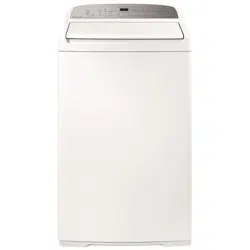
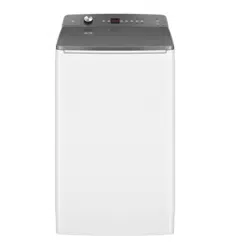
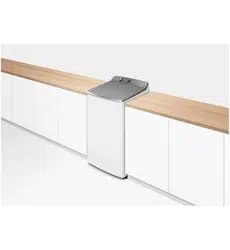
User Manual Washing Machine
INSTALLATION INSTRUCTIONS
Product and minimum clearance dimensions
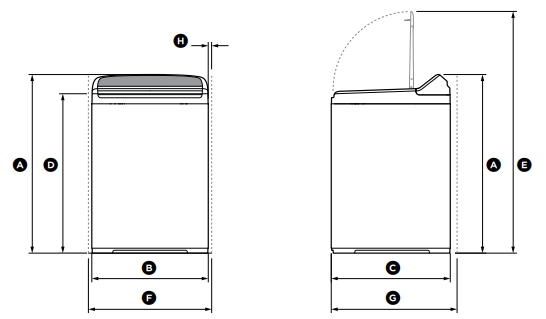
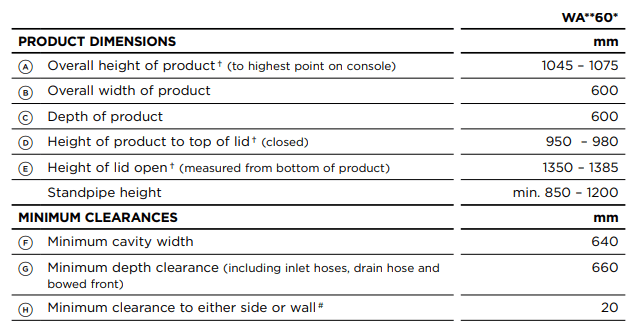
†Includes adjustable mounted feet and the range of movement.
# Applies either side.

Note: maximum capacity may differ according to market, and the associated standards.
Unpacking
To ensure the best performance from your new washer please follow the instructions below.
Removing the packaging
1 Remove the outer packaging.
2 Tilt the washer backwards and walk it off the base packer one foot at a time (ensure the lid is still taped down).
3 Remove the base packer from under the washer by tilting the washer backwards and pulling the packer out the front.
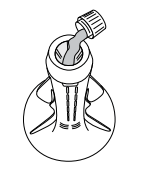
4 Remove the tape, lift the lid and remove the bowl packer from the bowl.
5 Remove the hoses and accessories.
6 Keep the base packer and bowl packer in case they are required for future transit.
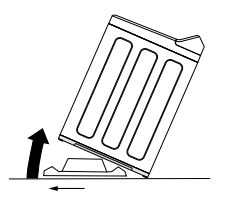
Tilt washer backwards to remove packer
IMPORTANT!
Please ensure that the base packer has been removed BEFORE OPERATING your washer.
Location
IMPORTANT!
Install the washer on a solid and level floor surface ensuring it has at least 20 mm clearance on each side. The washer must not be installed on any textured floor coverings (eg carpets, rugs).
In your washer you will find:
- 1 hose guide.
- 2 inlet hoses.
Drain hose
- Carefully pull the drain hose out from the back of the washer by pulling the exposed part of the hose downward and outward.
- To guide the drain hose over the tub or standpipe the hose guide MUST be fitted to the drain hose.
IMPORTANT!
To prevent siphoning the drain hose should not extend more than 20 mm from the end of the guide. The height of the standpipe or tub should be between 850 – 1200 mm. The drain hose can be trimmed to length.
3. Place the drain hose in the tub or standpipe. Do not fit the hose to a drain spigot. Drainage must not be airtight in order to prevent siphoning.
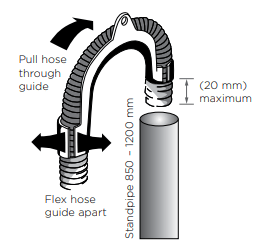
Fitting the drain hose guide
Electrical connection
- This appliance must be supplied with a 220 – 240 V, 50 Hz, sinusoidal, 10 A electrical supply.
- Check the power cord for damage, making sure it is not squashed or twisted.
- A damaged power cord must be replaced by a Fisher & Paykel trained and supported service technician, in order to avoid a hazard.
- The appliance must not be operated until it is repaired, as there is a risk of electric shock.
Draining
- Regularly check that your standpipe or tub is free from lint or other obstructions, which may affect how your washer works or may cause flooding.
- In multi-storey apartments or any upper floor, the washer should be installed on a floor equipped with a drain.
- Draining must comply with local by-laws.
Water supply
IMPORTANT!
Your cold water should not exceed 35°C and your hot water should not exceed 65°C. Temperatures above these may cause the washer to fault or cause damage to the washer.
- If you have an uncontrolled water heating source (eg a wet back or solar heating system) you should fit a tempering valve. This will ensure the hot water temperature remains within safe limits.
- Contact your registered plumber to select and install the tempering valve.
- Inlet water static pressure: Max. 1 MPa (150 psi) Min. 34 KPa (5 psi)
- Inlet water flow rate at tap: Min. 6 litres/min
IMPORTANT!
- This appliance must be installed in accordance with the installation instructions before use.
- Provide accessibility to the plug or incorporate a switch in the fixed wiring in accordance with the wiring rules to allow disconnection of the appliance from the supply after installation.
- Do not operate this washer if it has been damaged during transport. Contact your Fisher & Paykel dealer or Fisher & Paykel trained and supported service technician.
Inlet hoses
IMPORTANT!
WARNING:Failure to adhere to the following instructions may result in a flood and damage to property.
- New hose sets provided with the washer shall be used to connect the washer to the water supply.
- Old hose sets should not be used.
- ● We recommend replacing the inlet hoses every 5 years.
- ● Hoses should be checked from time to time and replaced if any wear, cuts, bulges, kinks or leaks are found.
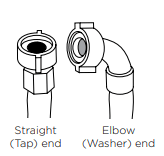
Inlet hose ends
- Connect the straight ends of the inlet hoses to the taps (there are washers fitted in both ends). Connect the red connector hose to Hot, and the white connector hose to Cold.
- Connect the elbow ends of the inlet hoses to the corresponding washer inlet valves. Inlet valves are marked on the back of the washer. Ensure the Hot valve is connected to the hot tap and the Cold valve is connected to the cold tap.
H = Hot C = Cold
Cold water supply only:
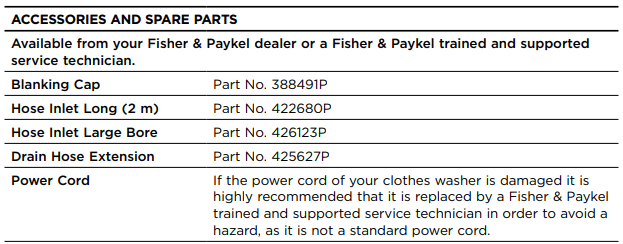
If you only have a cold water supply, a blanking cap MUST be connected to the Hot inlet valve. The cap prevents water leaking out of the hot valve. The cap is available from your Fisher & Paykel dealer or Fisher & Paykel trained and supported service technician, Part No. 388491P. This appliance incorporates backflow protection complying with AS3500.1. No further backflow protection is required for connection to the water supply.
Note: your washer does not have an internal heater to heat water.
Should you wish to use cold water only for all wash cycles, refer to ‘Customising wash cycles’ on how to program your washer to remember your wash preferences.
Levelling instructions
It is IMPORTANT to level the washer to ensure good spin performance.
A spirit level is provided with your washer. Use this to level your washer, always placing it on a clean, flat surface. The washer is level when the bubble sits in the centre, within the two lines.
Your washer is equipped with self-locking feet at the front to ensure they do not move once you have levelled your washer. To adjust the feet, tilt the washer back and twist to move them up or down.
Note: after levelling, the corners of the washer should be clear of the floor and the washer must not rock in any direction.
- Move the washer to its final position using the top corners to manoeuvre the product into place (do not push on the centre front of the washer). We recommend a minimum clearance of 20 mm each side and 40 mm at the rear of the washer.
- Open the lid, place the spirit level at the centre front of the top deck forward of the lid lock slot. Level the washer from side to side by winding up or down the front feet (Fig.1).
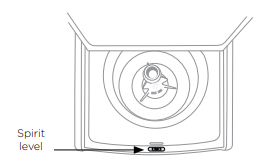
Fig.1 Levelling side to side
3. With the lid closed, tilt the washer forward away from the wall approximately 100 mm (Fig.2), the self-adjusting feet will release. Gently lower the washer back down.
4. Open the lid, place the spirit level at either the right hand or left hand side of the top deck. Level the washer from front to back using the front feet only (Fig.3), winding both feet in or out equally. Tilt the washer forward again and lower back down (Fig.2).
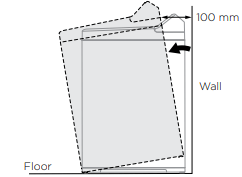
Fig.2 Tilt washer forward
5. Re-check the washer is level. Move the spirit level around to all positions once more, checking the washer is level in all areas. Repeat step 4 if necessary. Check the washer does not rock from side to side, front to back, or corner to corner.
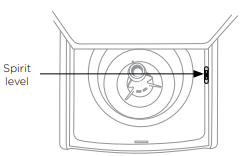
Fig.3 Levelling from front to back
IMPORTANT!
- Keep your spirit level for the next time you move or reposition your washer.
- If moving or transporting your washer in the future, ensure you tape the lid down beforehand.
Completing your installation
- Turn on the water and check all hose connections for leaks. Make sure there are no kinks in the hoses. Check the hose connections for leaks again after 24 hours.
- Uncoil power cord, remove and discard the plastic pin cover, and plug into wall socket.
- Connect the appliance to an earthed outlet protected by a fuse of suitable capacity.
IMPORTANT!
Do not touch or operate the washer with wet hands or with bare feet.
Installation test cycle
Your washer must be correctly installed before use. Check the installation and operation of the washer using the following procedure:
- Touch ‘POWER’
 to activate your washer.
- Touch both the
 and ‘Options’ buttons at the same time, and hold for three seconds.
- Touch
 to start the installation test cycle. The display will show and the lid will lock.
- The washer will beep to signal the end of the installation test cycle. If there are no faults found, the washer will automatically turn off at the end of the installation test cycle. Any faults will be displayed on the screen (refer to the back of this user guide to help identify faults). If you need further assistance, please contact a Fisher & Paykel trained and supported service technician or our Customer Care Centre. Refer to ‘Customer Care’ section for contact details.
Note: WA7060M QuickSmart™ washer only – a manual check of the inlet hose connections will be required as the installation test cycle will not verify if the hot and cold inlet hoses are connected the correct way around.
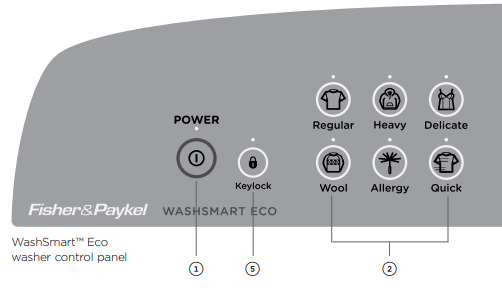
GETTING STARTED QUICKLY – WASHSMART™ ECO WASHER
Before you start
- It is important to sort your clothes, particularly separating white/light colours from dark colours, as well as separating out sheets and towels. Refer to the ‘Sorting’ and ‘Loading’ sections.
- Wash new, highly coloured and dark coloured items separately to prevent dye transfer onto other items.
- Sort lint givers and lint collectors (refer to the ‘Sorting’ section).
- Close bra clasps, do up zippers and check pockets.
- Place your clothes directly into the wash bowl.
- Place the load evenly around the agitator (refer to ‘Sorting’ and ‘Loading’ sections).
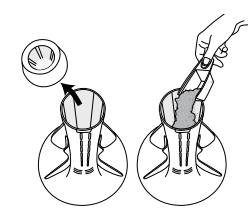
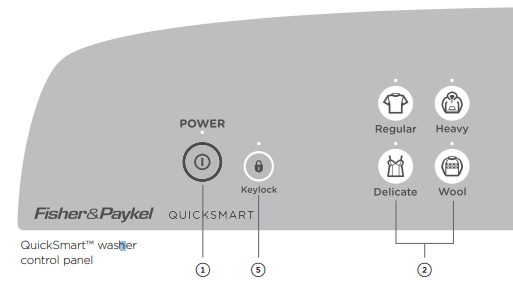
- Remove fabric softener dispenser cup.
Detergent
- Follow the manufacturer’s instructions on the detergent package.
- Use the size of the load as a guide to the amount of detergent to use (refer to the ‘Detergent’ section).
- Pour the detergent down the centre of the agitator stem.
- Replace the fabric softener dispenser cup (this stops small articles falling down the centre of the agitator).
Fabric softener
If you wish to use fabric softener, place it in the fabric softener dispenser cup on the top of the agitator (refer to the ‘Fabric Softener’ section).
IMPORTANT!
Fabric softener must not be used if you have selected the ‘Quick’ cycle or the ‘Eco Rinse’ option (refer to the ‘Fabric softener’ section).
Using your washer
The buttons require only a gentle touch to activate.
- Touch ‘POWER’
 to activate your WashSmart™ Eco washer.
- Select your desired wash cycle by gently touching the wash cycle button of your choice (refer to ‘Wash cycles’ section).
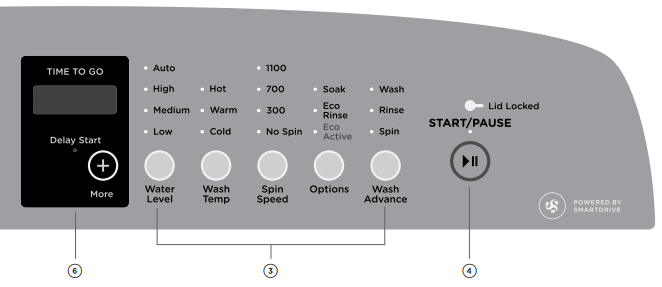
- Choose your wash options, eg you may want a ‘Warm’ wash temperature and a ‘Slow’ spin speed (refer to the ‘Wash options’ section).
- Touch
 to start the cycle. The washer will start to fill with water and select the correct wash action for your load.
For best fabric and colour care, remove your clothes as soon as the cycle has finished.
5. Use ‘Keylock’ mode to lock the buttons on the display, which prevents them from being activated accidently by a washing basket or little fingers (refer to the ‘Washer controls’ section).
6. ‘Delay Start’ allows you to delay the start of your wash by 5 mins up to 18 hours (refer to the ‘Wash options’ section).
If you wish to stop your WashSmart™ Eco washer
● Touch .
During a spray rinse or spin, there will be a slight delay while the bowl slows to a stop and the lid is unlocked.
IMPORTANT! Failure to follow the advice in this guide may result in damage to your garments, and your expectations of wash performance may not be met.
GETTING STARTED QUICKLY – WASHSMART™ WASHER
Before you start
- It is important to sort your clothes, particularly seeparating white/light colours from dark colours, as well as separating out sheets and towels. Refer to the ‘Sorting’ and ‘Loading’ sections.
- Wash new, highly coloured and dark coloured items separately to prevent dye transfer onto other items.
- Sort lint givers and lint collectors (refer to the ‘Sorting’ section).
- Close bra clasps, do up zippers and check pockets.
- Place your clothes directly into the wash bowl.
- Place the load evenly around the agitator (refer to ‘Sorting’ and ‘Loading’ sections).
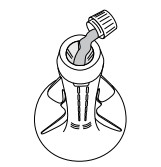
- Remove fabric softener dispenser cup.
Detergent
- Follow the manufacturer’s instructions on the detergent package.
- Use the size of the load as a guide to the amount of detergent to use (refer to the ‘Detergent’ section).
- Pour the detergent down the centre of the agitator stem.
- Replace the fabric softener dispenser cup (this stops small articles falling down the centre of the agitator).
Fabric softener
If you wish to use fabric softener, place it in the fabric softener dispenser cup on the top of the agitator (refer to the ‘Fabric Softener’ section).
IMPORTANT!
Fabric softener must not be used if you have selected the ‘Quick’ cycle or the ‘Eco Rinse’ option (refer to the ‘Fabric softener’ section).
Using your washer
The buttons require only a gentle touch to activate.
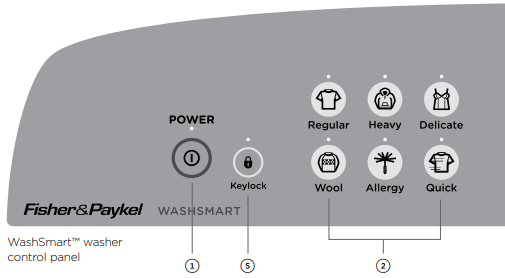
- Touch ‘POWER’ to activate your WashSmart™ Eco washer.
- Select your desired wash cycle by gently touching the wash cycle button of your choice (refer to ‘Wash cycles’ section).
- Choose your wash options, eg you may want a ‘Warm’ wash temperature and a ‘Slow’ spin speed (refer to the ‘Wash options’ section).
- Touch to start the cycle. The washer will start to fill with water and select the correct wash action for your load.
For best fabric and colour care, remove your clothes as soon as the cycle has finished.
5. Use ‘Keylock’ mode to lock the buttons on the display, which prevents them from being activated accidently by a washing basket or little fingers (refer to the ‘Washer controls’ section).
6. ‘Delay Start’ allows you to delay the start of your wash by 5 mins up to 18 hours (refer to the ‘Wash options’ section).
If you wish to stop your WashSmart™ Eco washer
● Touch .
During a spray rinse or spin, there will be a slight delay while the bowl slows to a stop and the lid is unlocked.
IMPORTANT! Failure to follow the advice in this guide may result in damage to your garments, and your expectations of wash performance may not be met.
GETTING STARTED QUICKLY – QUICKSMART™ WASHER
Before you start
- It is important to sort your clothes, particularly separating white/light colours from dark colours, as well as separating out sheets and towels. Refer to the ‘Sorting’ and ‘Loading’ sections.
- Wash new, highly coloured and dark coloured items separately to prevent dye transfer onto other items.
- Sort lint givers and lint collectors (refer to the ‘Sorting’ section).
- Close bra clasps, do up zippers and check pockets.
- Place your clothes directly into the wash bowl.
- Place the load evenly around the agitator (refer to ‘Sorting’ and ‘Loading’ sections).
- Remove fabric softener dispenser cup.
Detergent
- Follow the manufacturer’s instructions on the detergent package.
- Use the size of the load as a guide to the amount of detergent to use (refer to the ‘Detergent’ section).
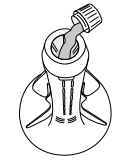
- Pour the detergent down the centre of the agitator stem.
- Replace the fabric softener dispenser cup (this stops small articles falling down the centre of the agitator).
Fabric softener
If you wish to use fabric softener, place it in the fabric softener dispenser cup on the top of the agitator (refer to the ‘Fabric Softener’ section).
IMPORTANT!
Fabric softener must not be used if you have selected the ‘Quick’ cycle or the ‘Eco Rinse’ option (refer to the ‘Fabric softener’ section).
Using your washer
The buttons require only a gentle touch to activate.
- Touch ‘POWER’ to activate your WashSmart™ Eco washer.
- Select your desired wash cycle by gently touching the wash cycle button of your choice (refer to ‘Wash cycles’ section).
- Choose your wash options, eg you may want a ‘Warm’ wash temperature and a ‘Slow’ spin speed (refer to the ‘Wash options’ section).
- Touch to start the cycle. The washer will start to fill with water and select the correct wash action for your load.
For best fabric and colour care, remove your clothes as soon as the cycle has finished.
5. Use ‘Keylock’ mode to lock the buttons on the display, which prevents them from being activated accidently by a washing basket or little fingers (refer to the ‘Washer controls’ section).
6. ‘Delay Start’ allows you to delay the start of your wash by 5 mins up to 18 hours (refer to the ‘Wash options’ section).
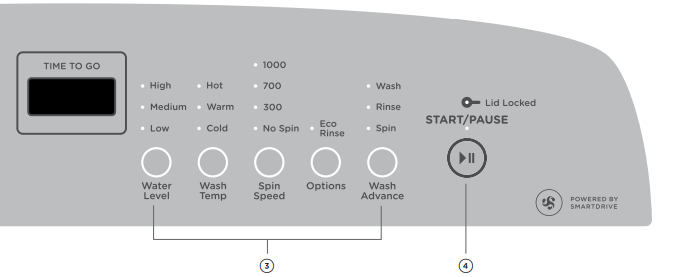
If you wish to stop your WashSmart™ Eco washer
● Touch .
During a spray rinse or spin, there will be a slight delay while the bowl slows to a stop and the lid is unlocked. IMPORTANT! Failure to follow the advice in this guide may result in damage to your garments, and your expectations of wash performance may not be met.
WASHER CONTROLS
SmartTouch™ buttons
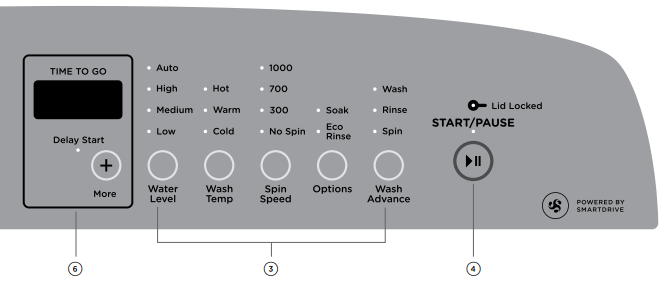
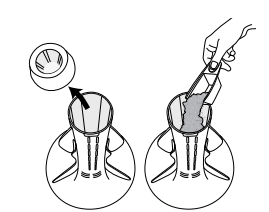
The smooth, easy clean buttons require only a gentle touch to activate. Use these to power your washer on and off, start and pause your washer, select your cycle and wash options, activate keylock and programme a delay start.
Digital display screen
The digital display screen provides feedback on how long the wash cycle has to go, to keep you informed throughout the cycle. The screen also displays your ‘Delay Start’ selection, should you choose one (this option is not available on the QuickSmart™ washer model). The delayed time remaining will show on the screen until the washer starts. The screen will also display messages to help you with the overall running of your washer.
Time to go
Your washer will display how many minutes a wash cycle has remaining, so that you can tell at a glance when your washing will be finished. Once you have selected your wash cycle and options, the time the wash cycle will take to complete will be displayed. Please be aware that actual cycle times may vary as they are influenced by a number of factors, eg the flow rate of your water supply, the load size and cycle selection.
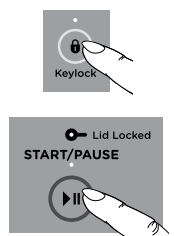
Keylock mode
Keylock can be used to lock the buttons on your washer when not in use. This will avoid accidental button pushes from items left on the lid of the washer and also from any little fingers.
To turn ‘Keylock’ mode ON or OFF:
- Touch and hold the
 button for 2 seconds.
Note: when activated, the light above the button is illuminated.
If ‘Keylock’ mode is activated:
- To turn your washer on, touch and hold the ‘POWER’ button for 2 seconds. This will activate the control panel. ‘Keylock’ mode will remain activated.
- To pause your washer at any time during the cycle, touch and hold the button for 2 seconds, or touch the button twice in quick succession.
- To stop your washer or power off at any time, touch and hold the ‘POWER’ button for 2 seconds or touch the ‘POWER’ button twice in quick succession.
WASHER SAFETY FEATURES
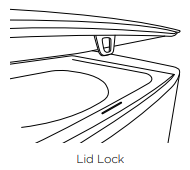
Lid Lock
The lid of your washer is locked for some parts of the wash cycle, ensuring safety for you and your family while it is operating.
The ‘Lid Locked’ light (above the button) is illuminated when the lid lock is activated, letting you know at a glance if you can open the lid or not.
To unlock the lid at any time during the cycle touch .
If the lid is left open, your washer will be unable to lock the lid, and the cycle will be halted. The washer will beep to alert you and display a warning message on the screen. If this occurs, close the lid and touch .
IMPORTANT!
- Do not put anything down the lid lock slot in the top deck of your washer.
- Do not try to disable the lid lock. Ensure that children or infirmed persons are well supervised when around your washer.
Auto drain
- Unsupervised clothes washers filled with water can present a drowning hazard to small children. In order to minimise any risk of this type of accident, your washer has been pre-programmed to know when this potential hazard is created and drains the wash water to a safe level.
- If you pause or power off your washer at any time during the wash cycle when there is water in the bowl, the washer will activate the auto drain function after 3 minutes. This will drain the water in the wash bowl to an acceptable level, minimising any potential hazard.
- A warning message
 will be displayed on the digital display while auto drain is in operation. The cycle can be restarted at anytime by touching ‘POWER’ and/or.
ECO-ACTIVE™ WASH – WASHSMART™ ECO WASHER ONLY
Your WashSmart™ Eco washer uses a dual-action wash to give excellent wash performance whilst taking great care of your clothes. We call this the Eco-Active™ wash. The two parts to the Eco-Active™ wash are explained below:
Detergent activating wash (front-loader type wash)
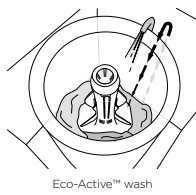
For both ‘Eco-Active™, On’ and ‘Eco-Active™, Off’ selections, your WashSmart™ washer fills the bowl at the selected temperature with just enough water so that your clothes are 100% saturated. This small amount of water flows down through the clothes, into the bowl base, mixes with the detergent, then is pumped up a specially designed portal and back onto the clothes in a cascade effect. This wash action thoroughly dissolves and activates the detergent.
The concentrated solution of detergent and water rapidly targets stains and soils at the fibre-level of fabrics, boosting soil removal and accelerating the wash process.
Agitation wash (top-loader type wash)
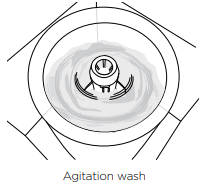
If you have selected ‘Eco-Active™, On’ after recirculating the sudsy water through your clothes your WashSmart™ Eco washer will fill with just enough cold water to suspend the clothes in the diluted solution. The flexible finned agitator then provides just enough mechanical action to separate the soil from the clothes.
On WashSmart™ Eco washer the ‘Allergy’ cycle bypasses the detergent activating wash and proceeds directly to the agitation wash.
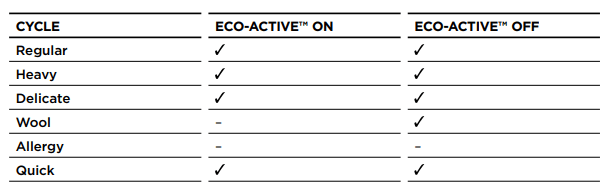
Note: Eco-Active™ wash is not available with the WashSmart™ washer or QuickSmart™ washer models.
WASH CYCLES – WASHSMART™ ECO WASHER
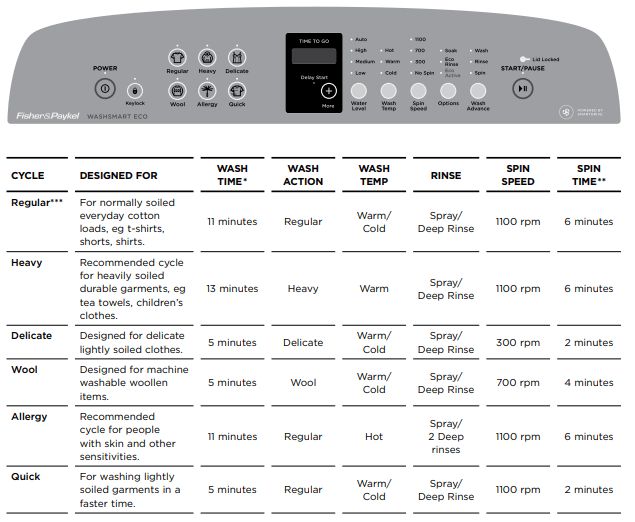
* Refers to the agitation time in the ‘wash’ part of the cycle, not the total time taken to complete a cycle.
** Refers to the length of time when at the maximum spin speed.
*** The ‘Regular’ cycle, ‘Auto’ water level, ‘Warm/Cold’ wash temp, ‘1100’ spin speed, ‘Eco-Active’ and ‘Eco Rinse’ selected is the recommended water and energy saving cycle for normally soiled, everyday washing.
Note: for users in markets with cold supply only, the wash temperature will default to cold wash temperature.
WASH CYCLES – WASHSMART™ WASHER
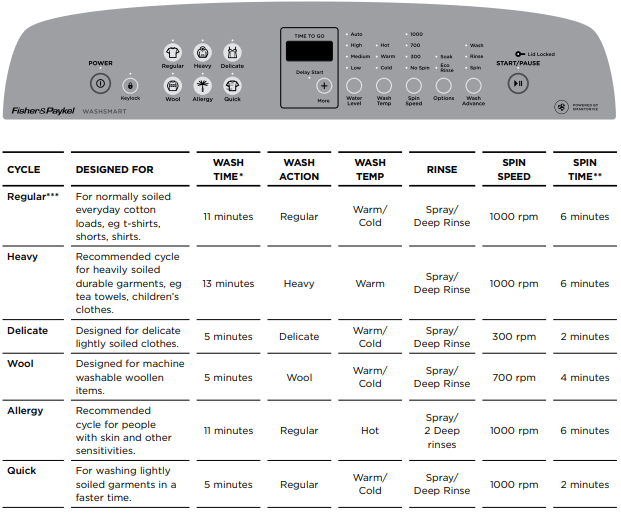
* Refers to the agitation time in the ‘wash’ part of the cycle, not the total time taken to complete a cycle.
** Refers to the length of time when at the maximum spin speed.
*** The ‘Regular’ cycle with ‘Auto’ water level, ‘Warm/Cold’ wash temp, ‘1000’ spin speed and ‘Eco-Rinse’ selected is the recommended water and energy saving cycle for normally soiled, everyday washing.
Note: for users in markets with cold supply only, the wash temperature will default to cold wash temperature.
WASH CYCLES – QUICKSMART™ WASHER
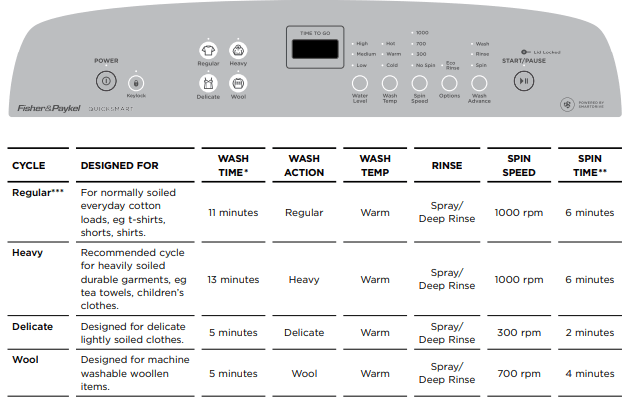
* Refers to the agitation time in the ‘wash’ part of the cycle, not the total time taken to complete a cycle.
** Refers to the length of time when at the maximum spin speed.
*** The ‘Regular’ cycle with ‘High’ water level, ‘Warm’ wash temp, ‘1000’ spin speed and ‘Eco-Rinse’ selected is the recommended water and energy saving cycle for normally soiled, everyday washing.
Note: for users in markets with cold supply only, the wash temperature will default to cold wash temperature .
WASH OPTIONS
Water Level
Auto water level (not available on QuickSmart™ washer) Your washer has the ability to automatically select the most efficient water level for the load.
- Place your clothes in the washer.
- Select the wash cycle (and select ‘Auto’ water level if not automatically selected).
- Touch . The washer will automatically fill to the correct water level for the load, for both phases of the wash.
- When washing an unusual load, eg large bulky garments, items or pillows, we recommend you select the ‘Delicate’ cycle.
- If there is already water in the bowl, it is best to manually select the water level.
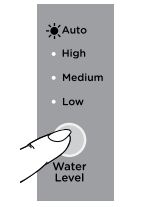
Selecting ‘Auto’ water level
Manual water level selection
The agitator has five levels marked on its stem that can be used to help you select the correct water level. Select the correct water level by using the mark nearest to the top of the load.
- The levels marked on the agitator do not correspond exactly to the level of the water. They indicate the level of dry clothes suitable for the water level.
- Your washer may occasionally add water during agitation. This is to maintain the water level due to the release of air trapped in the garments.
- Out of balance loads, tangling or splash-over can be caused by selecting a water level that is too high.
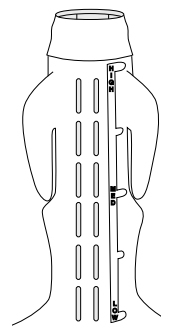
Water level guide on agitator
Wash Temp
WashSmart™ Eco washer and WashSmart™ washer offer 5 wash temperatures, and an additional setting, ‘Controlled Cold’.
The wash temperature selected is used in the detergent activating part of the wash. If Eco-Active™ is ‘On’ the temperature will be colder for the second part of the wash. When Eco-Active™ ‘Off’ is selected, the bowl will fill with the wash temperature selected.
WashSmart™ Eco washer: for the ‘Allergy’ cycle the bowl will fill with water at the temperature selected by the user. There is no Eco-Active™ section in the wash cycle.
The temperature of cold tap water varies widely depending on your location and the season. We have developed ‘Controlled Cold’, which adds a small amount of warm water, when necessary, to raise your cold water wash to 20°C for a more effective wash (refer to the ‘Changing pre-set options’ section for detail on how to set ‘Controlled Cold’ as the default temperature for your cold water wash).
QuickSmart™ washer offers 3 wash temperatures; Cold and Hot will be the temperature of the water supply.
Spin Speed
Your washer offers 3 spin speeds: WashSmart™ Eco washer has 1100 rpm, 700 rpm and 300 rpm, and WashSmart™ washer and QuickSmart™ washer have 1000 rpm, 700 rpm and 300 rpm, plus the additional ‘No Spin’ option. Simply increase or decrease your spin speed by touching the ‘Spin Speed’ button.
Note: some spin speeds are not available on some cycles for best clothes care (eg ‘Delicate’ cycle).
Use the ‘No Spin’ option to:
- Remove drip dry garments from a mixed load before the wash goes into ‘Spin’.
- Minimise the clothes creasing when they are left to sit in the bottom of the bowl at the end of the cycle.
When you have selected ‘No Spin’, the cycle will end after the rinse allowing you to remove drip dry items before you spin the remaining items. Once drip dry items have been removed, touch ‘POWER’ , select the ‘Spin’ cycle (change the spin speed if necessary, eg select ‘300’ for delicate or creasable items) and touch .
Your washer will optimise the spin speed according to the level of out of balance in the load.
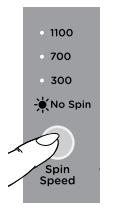
Selecting the ‘No Spin’ option (WashSmart™ Eco washer panel is shown)
Options
Note: in some instances it is possible to select multiple options on one cycle.
Soak (WashSmart™ Eco washer and WashSmart™ washer only)
Use the ‘Soak’ option to soak clothes during the agitation wash phase. Ensure items are colourfast before using ‘Soak’.
When you select ‘Soak’ your washer will soak for a period of 2 hours before completing ‘Rinse’ and ‘Spin’. During ‘Soak’ your washer will agitate for a few seconds every minute.
Note: if the ‘Soak’ option is selected on a ‘Quick’ cycle, the soak time will be one hour only.
Soak is not available on the Wool cycle.
To exit ‘Soak’ early, touch and select ‘Rinse’. Change the spin speed if necessary (eg select ‘300’ if washing delicate or creasable items) and touch .
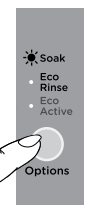
Selecting the ‘Soak’ option (WashSmart™ Eco washer panel is shown)
Eco Rinse
Use the ‘Eco Rinse’ option to save water. The ‘Eco Rinse’ option uses a spray rinse which has been specially designed to use at least 25% less water than a traditional rinse. Use this option when you want to use less detergent and less water. However, if you have low water pressure or sensitive skin it is better to use a traditional rinse.
The ‘Eco Rinse’ option has not been designed to be used with fabric softener, as it does not have a deep rinse to dispense the softener correctly. Fabric softener should not be used if this option is selected.
Note: ‘Eco Rinse’ is available on selected cycles only. If you try to select this option on other cycles your washer will skip over the option. The wash cycle will take slightly longer when the ‘Eco Rinse’ option is selected.
There are some wash loads that may not suit being washed using the ‘Eco Rinse’ option. For instance, loads that have a lot of sand or sawdust in them or garments where the colour still runs from them.
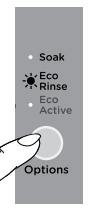
Selecting the ‘Eco Rinse’ option (WashSmart™ Eco washer panel is shown)
IMPORTANT! DO NOT use your washer to soak items in bleach or sanitiser and if you’ve soaked items in a bucket, do not tip the contents of the bucket into your washer. The chemicals in these products are very corrosive to metal surfaces and can damage your washer. Rinse and wring items out thoroughly before placing them in your washer.
Delay Start (not available on QuickSmart™ washer)
The ‘Delay Start’ option can delay the start of the wash cycle by 5 minutes up to 18 hours. This can be useful to time your washing to finish when you arrive home from work, or to start once you have finished in the shower. Simply touch the ‘More’ +button to scroll through to your desired delayed start time, or to turn delay start off. Touch to confirm your selection and start the countdown. The display screen will show the time until the cycle is set to begin.
Note: we suggest that you avoid using ‘Delay Start’ for damp, non-colourfast items as this may cause dye run to occur.
Clothes care safeguards
To avoid accidentally damaging your clothes there are a few options that your washer will not accept. For example, you cannot select a ‘Hot’ wash on the ‘Delicate’ and ‘Wool’ cycles.
Washing bulky items
Forcing large items into the washer may result in them being damaged during washing. Make sure there is enough room in the washer for items to move when being washed.
Some items float up during the wash (eg duvets/doonas, water-proof and waterresistant items and pillows). If they sit too high they may touch stationary parts of the washer during agitate or spin. To minimise the chance of this happening, ensure bulky items are pushed back down into the water after fill, and pushed down again to sit below the medium high water level mark on the agitator before ‘Spin’. Select a ‘Spin Speed, 300’.
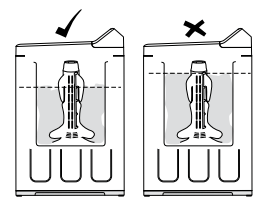
IMPORTANT! To prevent an out of balance load or splash-over we recommend washing all bulky items, including water-proof and water-resistant items, on the ‘Delicate’ cycle.
If you wish to re-spin the load at a faster speed make sure the load is sitting below the medium-high mark before spinning.
Washing woollens
Many woollen items carry a ‘Machine Washable’ care claim. The fibres of these woollens have been treated to prevent felting when they are machine washed.
- Check the care label.
- Use a wool detergent.
- Use the specially designed ‘Wool’ cycle.
- To dry woollens lie them flat on a towel and pat into shape. Dry out of direct sunlight.
Most handcrafted garments are not made of machine washable wool and we recommend that you wash them by hand only. Hand washed woollens may be spun in your washer (select ‘Spin Speed, 700’).
Note: some wool underlays and sheepskin products can be washed in a washing machine but could produce excessive amounts of lint that may cause pump blockages. Bulky items should sit below the medium high water level mark. 33 CUSTOM
CUSTOMISING WASH CYCLES
To customise a cycle
You can program your washer to remember the wash options you prefer for each wash cycle. For instance, you may want to set the ‘Regular’ cycle to default to a ‘Warm’ wash or set ‘Heavy’ cycle to include a ‘Soak’.
WashSmart™ Eco washer, WashSmart™ washer and QuickSmart™ washer
- Touch ‘POWER’ .
- Touch and hold the wash cycle button you wish to customise eg ‘Regular’, for 3 seconds. You will hear 2 beeps and the screen will display
 .
.
- Select your preferred settings eg ‘Low’, ‘Cold’, ‘700’, ‘Eco-Rinse’.
- Touch the cycle button to store your settings. You will hear a long beep to confirm the changes have been saved.
- Power off your washer.
To change your customised wash cycle simply repeat these steps.
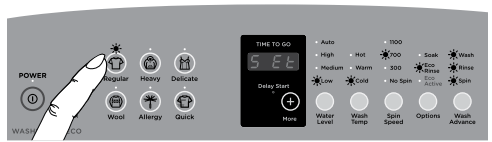
WashSmart™ Eco washer and WashSmart™ washer (WashSmart™ Eco washer panel is shown) Customsing a wash cycle, eg ‘Regular’ cycle
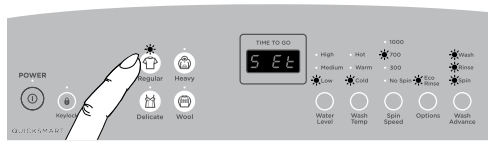
QuickSmart™ washer Customising a wash cycle, eg ‘Regular’ cycle
CHANGING PRE-SET OPTIONS
Option Adjustment mode
After using your washer a number of times you may want to fine tune some of the options to suit your wash needs.
There are a number of pre-set options, which can be altered:
- The wash temperatures, including changing the ‘Cold’ wash temperature to ‘Controlled Cold’.
- The out of balance recovery routine.
- The number of beeps at the end of the cycle.
- Resetting to factory default settings.
To enter Option Adjustment mode
1. Turn your washer on at the wall but do not touch ‘POWER'
2. Touch and hold the andbuttons together for 3 seconds. You will hear 3 quick beeps indicating you have entered Option Adjustment mode. The washer will show the default setting for the ‘Cold’ wash temperature.
- The diagram on page 35 shows how the wash cycle icons relate to the options you can change.
- The ‘Changing pre-set options’ section explains the different options in more detail.
3. Use buttons on the panel to make your changes to the pre-set options.
4. Touch ‘POWER’ to return to normal mode. Your washer will automatically remember your changes.
To change or reset any of the options, repeat the above steps.
Adjusting your options
1. Enter Option Adjustment mode (refer to page 34).
2. The diagram below shows how the wash cycle icons relate to the options you can change. It also shows what will be displayed when you first enter Option Adjustment mode. Options you can change are accessible using the ‘Heavy’ ‘Delicate’, ‘Wool’ and ‘Regular’ cycles.
Use this diagram to help you adjust the options, ie select the ‘Regular’ cycle button to modify the wash temperature, select the ‘Heavy’ cycle button to change the out of balance (OOB) recovery process, and so on.
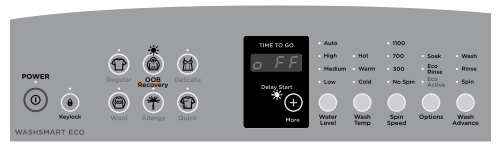
WashSmart™ Eco washer and WashSmart™ washer (WashSmart™ Eco washer panel is shown) Option Adjustment mode
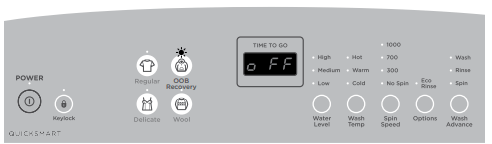
QuickSmart™ washer Option Adjustment mode
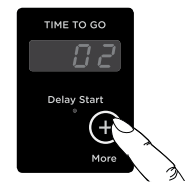
3. WashSmart™ Eco washer and WashSmart™ washer: Use the ‘Delay Start’, ‘More’ button on the panel to scroll through the available settings of your selected option, eg to increase or decrease the temperature of your warm wash temperature, or to change the number of beeps at the end of the cycle.
QuickSmart™ washer : Uses ‘Water Level’ to scroll through the available settings.
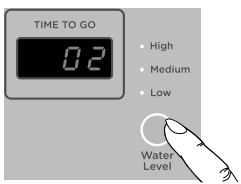
Wash temperatures
All wash temperatures can be individually adjusted if you think they are too hot or too cold.
Note: the hot temperature will be the same as the hot water supply temperature.
- Enter Option Adjustment mode (refer to page 34).
- Select the ‘Regular’ cycle.
- Select the wash temperature you want to adjust, eg ‘Hot’, by touching the ‘Wash Temp’ button. The digital display screen displays the current setting.
- WashSmart™ Eco washer and WashSmart™ washer: Touch the ‘More’ + button to increase or decrease to the desired temperature (the temperature setting options will scroll around). Each increment is equal to approximately 1.0°C. QuickSmart™ washer: Touch the ‘Water Level’ button to increase or decrease to the desired temperature (the temperature settings will scroll around). Each increment is equal to approximately 2.0°C.
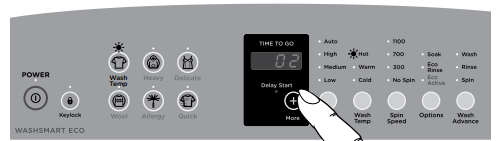
WashSmart™ Eco washer and WashSmart™ washer (WashSmart™ Eco washer panel is shown) Adjusting the temperature setting, eg increasing the ‘Hot’ wash temperature by 2°C
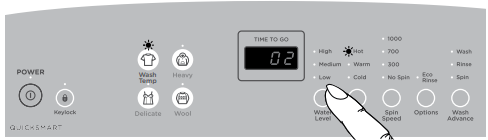
QuickSmart™ washer Adjusting the temperature setting, eg increasing the ‘Hot’ wash temperature by 2°C
Controlled Cold (not available on QuickSmart™ washer)
If the temperature of your cold water supply is very low and you choose to do a ‘Cold’ wash, you will not get an effective wash. The ‘Controlled Cold’ option solves this problem by adding a small amount of hot water to raise the temperature of the wash to approximately 20°C.
- Enter Option Adjustment mode (refer to page 34).
- Select the ‘Regular’ cycle.
- Select ‘Cold’ wash temperature by touching the ‘Wash Temp’ button (if not already selected).
- The digital display shows the temperature adjustment possible. The default setting is
 , which is the same temperature as the incoming water from the supply for cold water.
- To get ‘Controlled Cold’, touch the ‘More’ + button until
 is displayed. Your washer will now adjust the cold temperature to approximately 20°C. Each of the remaining settings equals an approximate 1.0°C temperature increase or decrease from this point (excluding
  ).
).
- Touch ‘POWER’ to save the setting (if you wish to make no other changes)
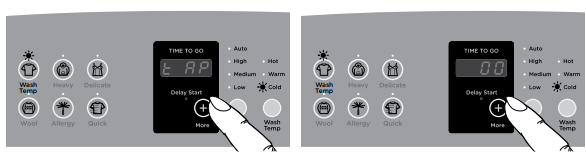
WashSmart™ Eco washer and WashSmart™ washer (WashSmart™ Eco washer panel is shown) Changing the cold wash temperature setting from cold tap to ‘Controlled Cold
Note: if you always use ‘Cold’ or Controlled Cold’ water, we recommend that a ‘Warm’ or ‘Hot’ wash be used regularly, eg every 5th wash should be at least a warm one. Warm water is needed to help maintain the cleanliness of your washer.
Out of balance recovery routine
When your washer is spinning it can sense if the wash load is out of balance. If an out of balance load is detected, the washer will stop and re-try spinning one more time. If it still senses an unbalanced load there are two options the washer can take.
Automatic recovery OFF (the default setting)
Your washer will stop, beep, and show  in three phases on the display screen. You must redistribute the load more evenly yourself. Use this option if you wish to conserve water.
Automatic recovery ON
Your washer will try to automatically correct the out of balance load. It will fill with water and agitate to redistribute the load before trying to spin up again.
To change the out of balance (OOB) recovery option:
- Enter Option Adjustment mode (refer to page 34).
- Select the ‘Heavy’ cycle.
- WashSmart™ Eco washer and WashSmart™ washer: Touch the ‘More’ + button to turn automatic recovery
 or
or  . QuickSmart™ washer: Touch the ‘Water Level’ button to turn automatic recovery
  or
or 
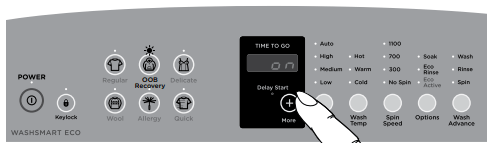
WashSmart™ Eco washer and WashSmart™ washer (WashSmart™ Eco washer panel is shown) Changing the OOB routine
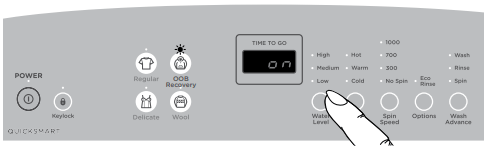
QuickSmart™ washer Changing the OOB routine
End of cycle beeps
The beeps signalling the end of the cycle can be increased or decreased. The default setting is 5 beeps.
To modify the number of beeps sounding at the end of the cycle:
- Enter Option Adjustment mode (refer to page 34).
- Select the ‘Wool’ cycle.
- WashSmart™ Eco washer and WashSmart™ washer: Touch the ‘More’ button to increase or decrease the number of beeps, or for no beeps to sound at the end of the cycle (the end of cycle beep options will scroll around). QuickSmart™ washer: Touch the ‘Water Level’ button to increase or decrease the number of beeps, or for no beeps to sound at the end of the cycle.
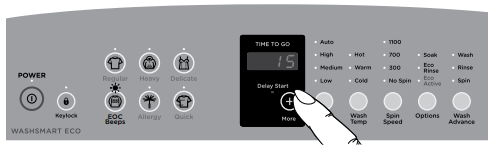
WashSmart™ Eco washer and WashSmart™ washer (WashSmart™ Eco washer panel is shown) Modifying the number of beeps to signal the end of the cycle
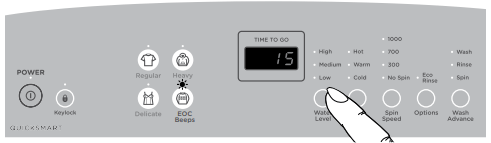
QuickSmart™ washer Modifying the number of beeps to signal the end of the cycle
Remember, to save changes and exit from the Option Adjustment mode (ie to return to normal operating mode), touch the ‘POWER’ button.
Factory reset
You can reset your washer to the settings it left the factory with:
- Enter Option AdSjustment mode (refer to page 34).
- Select the ‘Delicate’ cycle.
- The display will show
 . Touch and holdQuick for 3 seconds to reset your washer to its factory settings.
Note: this action will reset the washer to the default settings, exit Option Adjustment mode and restart the washer in normal operating mode.
Touch ‘POWER’ to exit if you do not wish to reset your washer.
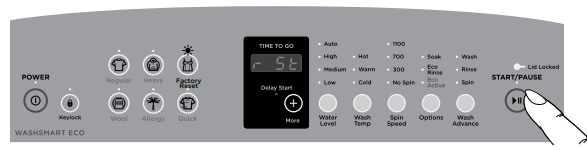
WashSmart™ Eco washer, WashSmart™ washer and QuickSmart™ washer (WashSmart™ Eco washer panel is shown) Changing the washer back to the factory default settings
CARING FOR YOUR WASHER
When you have finished using your washer
- Turn off the taps to prevent the chance of flooding should a hose burst.
- Turn off the power at the wall.
Cold water washing
If you always wash with cold water, we recommend that a ‘Warm’ or ‘Hot’ wash be used at regular intervals, eg every 5th wash should be at least a warm one.
Cleaning your washer
Note: ensure the power is turned off at the wall before cleaning your washer.
- Clean the surfaces of your washer with a soft damp cloth only and wipe dry. Do not use scouring or spray cleaners as they can damage the paint, plastic and panel surfaces.
- Clean the fabric softener dispenser after each cycle using warm soapy water.
- To remove the agitator for cleaning, unscrew the nut down the centre of the agitator by turning anti-clockwise.
- The soft close lid is not designed to be removable for cleaning. Do not attempt to remove the lid.
IMPORTANT! The agitator must be fully pushed onto the shaft when refitting. Tighten the nut firmly by hand. Ensure the agitator is not loose.
Cleaning the inside of your washer
If you use fabric softener or do regular cold water washing, it is important that you occasionally clean the inside of your washer.
We recommend that you do not wash clothes during these procedures.
WashSmart™ Eco washer and WashSmart™ washer
- Fill your washer with hot water. Touch ‘POWER’ , select the ‘Allergy’ cycle, ‘High’ water level, ‘700’ spin speed and ‘Soak’ option.
- Add about 2 scoops of a concentrated powdered detergent down the centre of the agitator.
- Touch .
- Let the washer complete the cycle.
- Select and run a ‘Regular’ cycle on ‘High’ water level to remove any remaining detergent and scrud.
QuickSmart™ washer
- Fill your washer with hot water. Touch ‘POWER’ , select the ‘Regular’ cycle, ‘High’ water level, ‘Hot’ water temperature and ‘700’ spin speed. Check that ‘Eco Rinse’ is not selected.
- Add about 2 scoops of a concentrated powdered detergent down the centre of the agitator.
- Touch .
- Let the washer complete the cycle.
- Select and run a ‘Regular’ cycle on ‘High’ water level to remove any remaining detergent and scrud.
Products that might damage your washer
- Concentrated bleaches, laundry pre-soakers/sanitisers, stain removers and hydrocarbon solvents (eg petrol and paint thinners) can cause damage to the surfaces eg control panel, and components of your washer.
- Be careful when washing garments stained with solvents as they are flammable. DO NOT put them in your dryer.
- Use of dyes in your washer may cause staining of the plastic components. The dye will not damage the washer but we suggest you thoroughly clean your washer afterwards. We do not recommend the use of dye strippers in your washer.
Washer sounds and beeps
- Your washer may make sounds that you will not have heard from other clothes washers.
- While draining, your washer may give several low thuds. Your washer is checking that the water has drained before spinning.
- Your washer will beep if you have used ‘No Spin’ and at the end of the cycle.
- If your washer is beeping continuously or giving a musical series of beeps, refer to the ‘Before you call for service’ section.
Automatic lint system
Your washer has a self-cleaning lint system. The washer automatically separates the lint from the wash water, traps the lint between the inner and outer bowls and flushes it out at the end of the wash.
Saving water, energy and the environment
Water efficient washing machines will save you money, but it is also worth thinking about energy use, recycling water and the environment. Some options to consider are:
- Turn the washer off at the wall when not in use.
- Turn off the taps when not in use.
- Wash full loads rather than several smaller loads.
- Use the ‘Auto’ water level option/function (where available).
- Use the ‘Eco-Active™’ wash and Eco-Rinse option/functions (where available).
- Follow instructions on the detergent packet – do not overdose.
- Use concentrated detergent – it costs less per wash.
- Consider re-using the washing machines grey water on the garden or for flushing your toilet – more information can be found on government websites promoting energy and water saving.
BEFORE YOU CALL FOR SERVICE
Please read the following pages before you call for service.
Your washer is capable of diagnosing its own problems. If your washer gives a musical series of beeps every 5 seconds it is telling you that it has a problem which you can solve using the checklist below.
Your washer sounds a musical series of beeps* every 5 seconds and displays a user warning on the screen:
The washer is not getting any hot water.
- Hot water supply is not hot enough to maintain the wash temperature you have selected. Select a lower wash temperature.
- Inlet hose filters may be blocked and should be cleaned or replaced.
- There may be a kink in the hose. Undo the hose to remove the kink, and reattach. Damaged hoses should be replaced.
- Ensure hot tap has been turned on.
- Check inlet hoses are connected to the correct taps.
The washer is not getting any cold water.
- Ensure cold tap has been turned on.
- Inlet hose filters may be blocked and should be cleaned or replaced.
- There may be a kink in the hose. Undo the hose to remove the kink, and reattach. Damaged hoses should be replaced.
- Check inlet hoses are connected to the correct taps.
- Cold water temperature exceeds recommended limits (refer to ‘Installation instructions – Water supply’).
- The flow rate of the supply water is too slow. Refer to a registered plumber for advice.
The washer is not getting any water.
- Ensure taps have been turned on.
- Inlet hose filters may be blocked and should be cleaned or replaced.
- There may be a kink in the hose. Undo the hose to remove the kink, and reattach. Damaged hoses should be replaced.
- The drain hose is too low or the drain hose is pushed into the standpipe too far and the water is siphoning out of the washer (refer to ‘Installation instructions – Drain hose’).
- The flow rate of the supply water is too slow. Refer to a registered plumber for advice.
The washer is out of balance.
- Wash load is out of balance. Ensure the washer is stationary. Manually redistribute the load.
- Check the washer is level. (Refer to ‘Installation instructions – Levelling instructions’ for more information).
The washer has too many suds
- The washer has a suds build-up (too much detergent may have been used for the amount of soil in the load). Wait for suds to dissolve (about 20 min). Rinse clothes using a deep rinse.
- Check the standpipe height does not exceed 1200 mm.
- If the symptom persists, call your Fisher & Paykel dealer or Fisher & Paykel trained and supported service technician.
The lid can’t lock or the lid is open.
- Make sure the lid is closed.
- Touch. (Refer to ‘Washer safety features – Lid lock’ for more information).
- If the symptom persists call your Fisher & Paykel dealer or Fisher & Paykel trained and supported service technician.
The washer is overloaded.
- The washer is overloaded and can not agitate. Ensure the washer is stationary. Remove items until the remaining ones can move freely.
- Select a higher water level.
The washer has stopped.
- The power was cut to the washer. The washer will restart automatically. No action is required.
The washer has stopped. 
- The or ‘POWER’ button was touched and the washer was inactive for 3 minutes. The washer will automatically drain to a safe level. Touch any button to stop autodraining then touch to resume the wash cycle.
The washer is on but the display is blank
- The washer was unattended without starting a cycle for a period of time. Touch ‘POWER’ to activate.
* The beeps are the same sound your washer makes when you turn it on at the wall.
FAULT CODES
When a continuous series of beeps is sounded, all the lights turn off on the control panel and a number appears on the display, a fault has occurred. The washer will automatically enter this mode if a fault occurs. The fault code will be displayed as a number on the digital display. To stop the sound, touch any button and perform the following steps:
- Turn your washer off at the power point.
- Wait 1 minute and turn it back on.
- Remove your wash load.
- Perform a ‘Rinse’ cycle.
- If the washer will still not work you will be required to call a Fisher & Paykel trained and supported service technician to arrange service (refer to the ‘Customer Care’ section). Record the fault code number displayed and the serial number of your washer (located on the rear of the washer) before calling. The fault code will indicate to the repairer what the problem could potentially be.
If a fault code is being displayed, you can still turn your washer off by touching ‘POWER’ .
TROUBLESHOOTING
The following is a list of problems you may encounter when using this appliance and some suggestions that may help to correct the problem. If you still have problems, please contact your Fisher & Paykel trained and supported service technician or our Customer Care Centre.
Solving operating problems
Washer not turning on.
POSSIBLE CAUSES
- Household power supply not working.
Switch the power off at the wall and wait 60 seconds before turning power on again.
- Power not switched on at the wall.
Try plugging in another electrical appliance.
- Keylock may be activated.
Try holding down the ‘POWER’ button for 2 seconds. (Refer to ‘Washer controls – Keylock mode’ page 18).
Washer not filling with water when touched.
POSSIBLE CAUSES
- Inlet taps not turned on.
Check that both the hot and cold taps are turned on.
- Blocked inlet hose filters.
Clear blockages from inlet hose filters.
Refer to ‘Wash options – Delay start’ page 31 for more information about the ‘Delay Start’ function.
Washer is filling continuously.
POSSIBLE CAUSES
- Drain hose is not installed correctly
Ensure drain hose is located in standpipe or tub.
Ensure standpipe is at least 850 mm high but no more than 1200 mm high.
- Washer could be siphoning.
To prevent siphoning ensure the drain hose does not extend more than 20 mm from the end of the hose guide. (Refer to Installation instructions – Drain hose’ page 6).
Washer is not spinning properly.
POSSIBLE CAUSES
- The load could be out of balance.
Pause washer and manually redistribute the load.
Check the washer is level and does not rock in any direction. (Refer to ‘Installation instructions – Levelling instructions’ page 9).
Check the washer does not have suds build up.
Spin speed sounds slower than normal.
POSSIBLE CAUSES
- Clothes are unevenly distributed in the bowl.
Washer has compensated by lowering the spin speed.
- The outer wash bowl may still be hot from being filled with hot water.
The washer has slowed the spin speed as a protective measure.
Washer is continually going out of balance.
POSSIBLE CAUSES
Check the washer is level and does not rock in any direction. (Refer to ‘Installation instructions – Levelling instructions’ page 9).
- Too much water for the load
Ensure an appropriate water level is selected for the load size (or select ‘Auto’ water level).
Refer to ‘Changing pre-set options – Out of balance’ page 38 for more information to change the out of balance recovery mode.
Too much or too little water when filling on auto water level.
POSSIBLE CAUSES
- The washer needs to determine the correct water level for the load.
Refer to the ‘Wash options’ section page 28.
- Some loads do not suit ‘Auto’ water level, eg pillows.
Manually select the most appropriate water level for the load.
Washer is making noises.
POSSIBLE CAUSES
Load is out of balance.Touch and redistribute the load.
Refer to the ‘Caring for your washer’ section.
Small puddle coming from under the washer.
POSSIBLE CAUSES
- The water level is too high for the amount of clothes and has caused excessive splashing.
Select a lower water level. (Refer to ‘Wash options – Water level’ page 28).
- Large bulky garments (eg pillows, duvet) can cause splashing.
Wash on the ‘Delicate’ cycle. (Refer to ‘Wash options – Washing bulky items’ page 32).
Creasing.
POSSIBLE CAUSES
- Overloading of the washer. Inappropriate cycle selection.
Try selecting a lower spin speed.
- Inappropriate cycle selection.
Choose ‘Delicate’ cycle as this cycle has been designed to minimise creasing.
- Spin speed too high. Wash temperature too high for items.
Try selecting a lower spin speed.
Do not leave wet clothes to sit in the washer or laundry basket.
- Wash temperature too high for items.
Try selecting a lower wash temperature.
Sort your load so that items of similar weight are washed together
Poor soil removal.
- Wash cycle selected not suited to soil level in load.
Are you using the most appropriate wash cycle for the amount of dirt?
- Warm wash water is too cold.
Refer to ‘Changing pre-set options – Wash temperatures’ page 36.
- Not enough detergent for load size or amount of soil.
Refer to the detergent package for the manufacturers recommended dosage.
- White clothes are better washed separately.
Separate light and heavily soiled items, as clothes can pick up soil from dirty wash water.
- Cold water wash is too cold.
Refer to ‘Changing pre-set options – Wash temperatures’ page 37.
- Wash temperature not suited to soil type in load.
Blood and mud are better washed in cold water, while oily soils are better washed in warmer water.
Try reducing your load size.
- A full load of items of the same size eg sheets may not wash as well.
Loads made up of articles of varying sizes will wash better.
- Hard water requires more detergent than soft water.
If you have hard water, try adding more detergent.
Tangling.
POSSIBLE CAUSES
- Washing with too much water (underloading) can cause the clothes to tangle around one another.
Select an appropriate water level for the load size, or select ‘Auto’ water level. (Refer to ‘Wash options page 28).
- Items wrapped around the agitator when loading.
Place items, especially sheets, in the bowl as loose parcels.
Linting.
POSSIBLE CAUSES
- Some items in load more likely to release or pick up lint.
Wash lint givers (eg towels, flannelette sheets) separately from lint collectors (eg synthetic fabrics).
Try reducing your load size.
- Not enough detergent to hold the lint in suspension.
Try using more detergent.
- Overdrying in a dryer can cause a build-up of static electricity in synthetic fabrics and cause them to attract lint.
Try not to over dry items when using your dryer.
Detergent residue.
POSSIBLE CAUSES
Try reducing your load size.
- Did you use the recommended amount of detergent?
Try using less detergent.
- Some detergents need to be pre dissolved before being added to the washer.
Check the detergent instructions.
- Cold ambient temperatures, cold washes and/or short agitation times may not allow the detergent to dissolve properly.
Try pre-dissolving the detergent before adding it to the washer.
Black or grey marks on clothes.
POSSIBLE CAUSES
- A build up caused by the interaction of fabric softener and detergent can flake off and mark clothes.
Refer to ‘Fabric Softener’ and ‘Caring for your washer’ pages 24 and 41.
- Insufficient detergent for the amount of soil on the clothes, can result in grey marks on clothes.
Make sure you are using enough detergent for the amount of dirt in your wash load. Refer to ‘Detergent’ page 23.
Empty washer and put through a ‘Bowl Clean’ cycle. (Refer to ‘Caring for your washer - Cleaning the inside of your washer’ page 41).
Dye transfer.
POSSIBLE CAUSES
- Washing dark coloured and light coloured items together.
Remember to separate whites and colours.
- Keep wet or damp dark coloured and light coloured items separate.
Wash and dry non-colourfast clothes separately.
Non-colourfast clothes left sitting in a washer or laundry basket can transfer dye onto other clothes.