CongratuJations
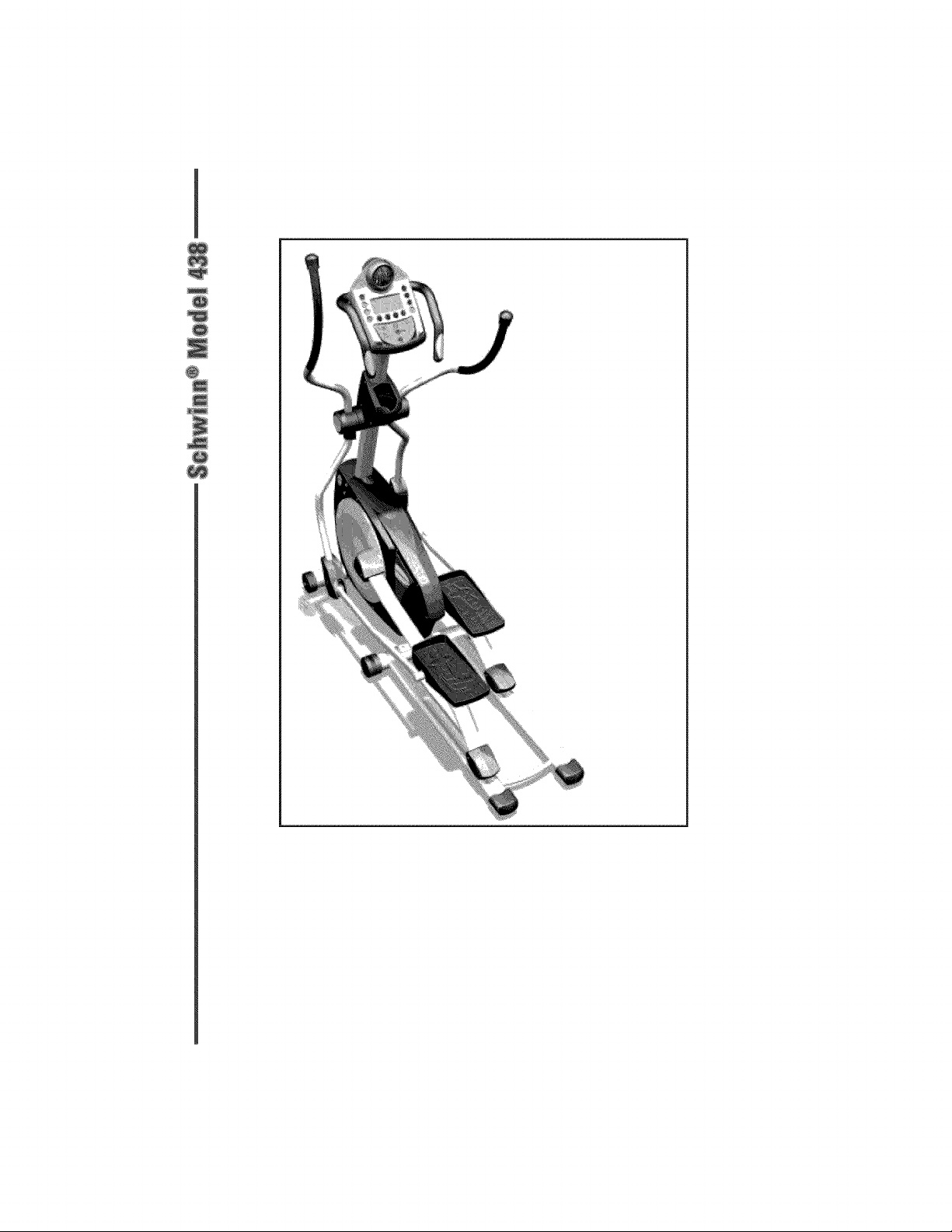
Thank you tbr making the Schwinn _ Elliptical Trainer Model 438 a part of your
exercise program. For many years to come, you will be able to rely on the quality
of Schwinn's _'craftsmanship and durability. We have included some general fitness
guidelines tbr your use and hope you will find the inlbrmation valuable in assisting
you in your pursuit of a healthy lifestyle.
The Schwinn _ 438 elliptical trainer will enable you to customize and monitor your
workouts to:
A Increase your energy level
A Increase cardiovascular and aerobic fitness
A Increase lower and upper body muscle strength
_' Decrease your overall percentage of body t:at
Whether you are just getting started in an exercise program or are already
physically fit, the Schwinn _ 438 elliptical trainer is designed to be an efficient,
easy, and enjoyable way to achieve an improved level of fitness. You can exercise
your way to a more fit and healthy body. The on-board digital computer enables
you to accurately monitor your progress by tracking time, distance, speed, calories,
and strides per minute.
This Assembly Guide and Owner's Manual contains all the inlbrmation you need
to operate and enjoy your Schwinn _ elliptical trainer. Please read the manual in
its entirety belbre attempting to exercise on the Schwinn _ 438 elliptical trainer.
Pay special attention to the satL'ty notices at the beginning of the owner's manual
to avoid serious iniury to yoursetf or damage to the equipment. Take a moment to
thoroughly review the parts and hardware lists and required tools before getting
started with the assembly process.
If you find any parts or hardware missing, or should you need assistance with
assembling your Schwinn _ Elliptical Trainer Model 438, contact Customer Service
at 800-864-1270 or write to:
Nautilus, Inc.
World Headquarters
16400 SE Nautilus Drive
Vancouver, Washington 98683
USA
Assembly Guide
Parts Diagram ....................................... 3
Parts List .............................................. 4
Hardware List ....................................... 5
Assembly Instructions .......................... 6
Owner's Manual
Safeguards .......................................... 17
Features .............................................. 19
Operation ............................................ 20
Maintenance ....................................... 46
Fitness Guide ..................................... 48
Workout Log ...................................... 57
Warranty ............................................. 58
FOR DETAILED INSTRUCTIONS AND INFORMATION ON
HOW TO USE AND CARE FOR YOUR SCHWINN _'_ELLIPTICAL
TRAINER MODEL 438, REFER TO THE OWNER'S MANUAL
SECTION STARTING ON PAGE 17.
l

ToolsRequired
The tools below are required during the assembly of your Schwinn _ 438 ettipitcal
trainer. They are included with the product.
4ramAllen Wrench
6ramAllen Wrench
5ramAllen Wrench
Open EndWrench
<1
Philips Screwdriver
Complete Parts Diagram
Q
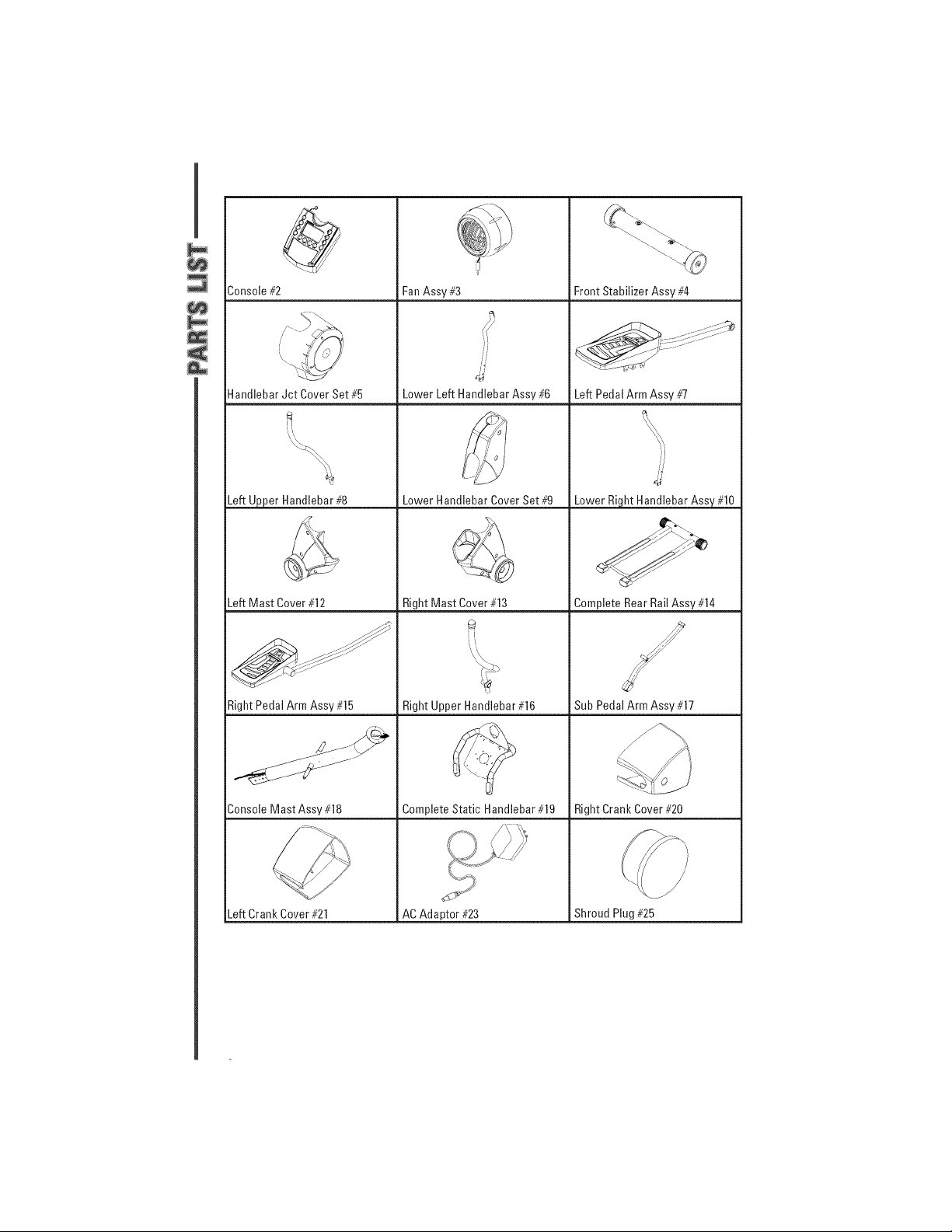
Console #2
Handlebar Jct Cover Set #5
Fan Assv #3
Lower Left Handlebar Assv #6
Front Stabilizer Assv #4
Left Pedal Arm Assv #7
Left Upper Handlebar #8 Lower Handlebar Cover Set #9 Lower Right Handlebar Assy #10
Left Mast Cover #12 Right Mast Cover #13 Complete Rear Rail Assv #14
:l
Right Pedal Arm Assv #15 Right Upper Handlebar #16 Sub Pedal Arm Assv #17
Console Mast Assv #18 Complete Static Handlebar #19 Right Crank Cover #20
Left Crank Cover #21 AC Adaptor #23 Shroud Plug #25
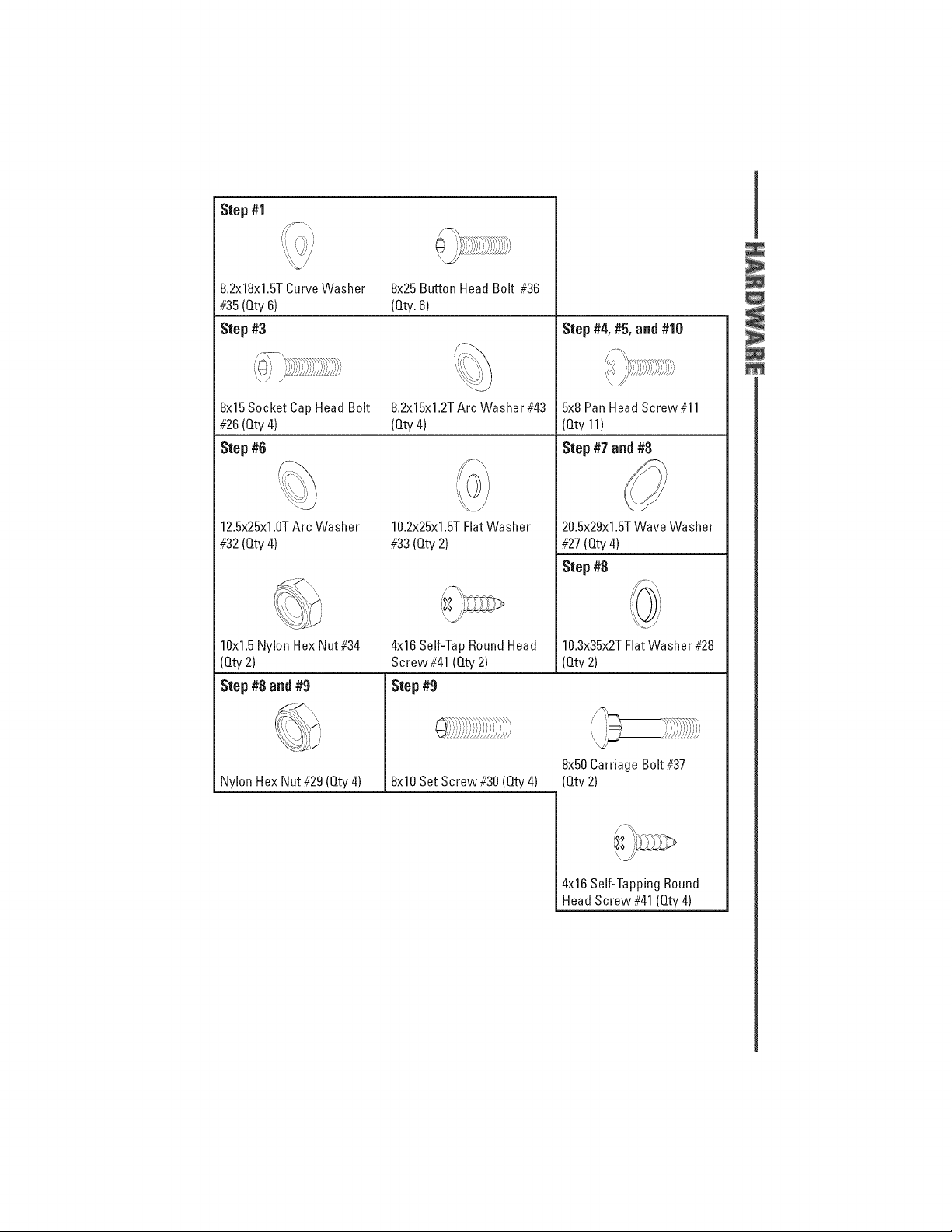
Step #1
8.2x18x1.STCurveWasher
#35(Qty 6)
Step #3
8x25 Button Head Bolt #36
(Qty.6)
Step #4, #5, and #10
8x15Socket Cap Head Bolt 8.2x15x1.2TArc Washer#43 5x8 PanHead Screw#11
#26(Qty 4) (Qty4) (Qty 11)
Step #6 Step #7 and #8
10.2x25x1.STFlatWasher
#33(Qty 2)
12.Sx25x1.0TArc Washer
#32(Qty 4)
10xl.5 Nylon FlexNut #34 4x16Self-Tap Round Head
20.Sx29x1.STWave Washer
#27(Qty4)
Step #8
10.3x35x2TFlatWasher #28
(Qty2)
Step #8 and #9
Nylon FlexNut #29(Qty 4)
Screw#41(Qty2)
Step #9
(Qty 2)
8x10Set Screw #30 (Qty4)
8x50Carriage Bolt #37
(Qty 2)
4)<16Self-Tapping Round
Head Screw #41 (Qty4)

introduction
Read and [bttow each step carefully and in proper order to avoid missing any
steps. Be sure to have all parts and tools on hand {'or a particular step belbre
beginning assembly {'or that step. If you discover parts are missing, contact
Customer Service at 800-864-1270.
Step 1--Assemble the Front Stabilizer and Rear Rail Assembly
Parts
N/A Main Frame (Qty l)
#4 Front Stabilizer (Qty 1)
#14 Rear Rail Assembly (Qty 1)
Hardware
#35 8.2xl8xl.5T Curve Washer
(Qty 6)
#36 8x25 Button Head Bolt
(Qty 6)
1-1
1-2
Attach the Front Stablizer (#4)
to the Main Frame with two (2)
Button Head Bolts (#36) and
two (2) Curve Washers (#35).
Attach the Rear Rail Assembly
(#14) to the Main Frame with
[bur (4)Button Head Bolts (#36)
and tbur (4) Curve Washers
(#35).
Main Frame
36
Figure A-1
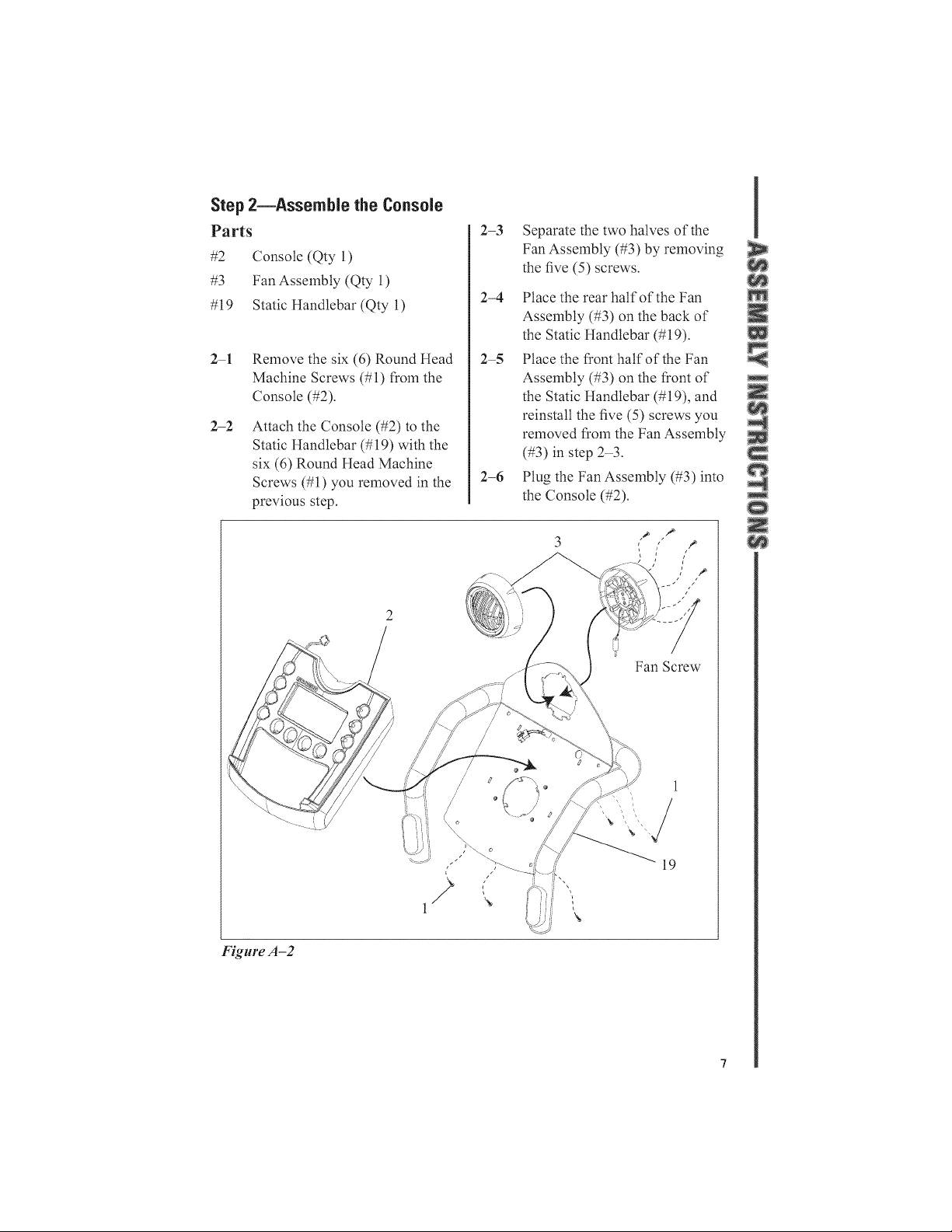
Step 2--Assemble the Console
Parts
#2 Console (Qty l)
#3 Fan Assembly (Qty 1)
#19 Static Handlebar (Qty 1)
2-1
2-2
Remove the six (6) Round Head
Machine Screws (#1)from the
Console (#2).
Attach the Console (#2) to the
Static Handlebar (#19) with the
six (6)Round Head Machine
Screws (#1) you removed in the
previous step.
2-3
Separate the two halves of the
Fan Assembly (#3) by removing
the five (5) screws.
2-4 Place the rear half of the Fan
Assembly (#3) on the back of
the Static Handlebar (#19).
2-5 Place the front half of the Fan
Assembly (#3) on the front of
the Static Handlebar (#19), and
reinstall the five (5) screws you
removed from the Fan Assembly
(#3) in step 23.
2-6 Plug the Fan Assembly (#3) into
the Console (#2).
Fan Screw
Figure A-2
//
\
19
I
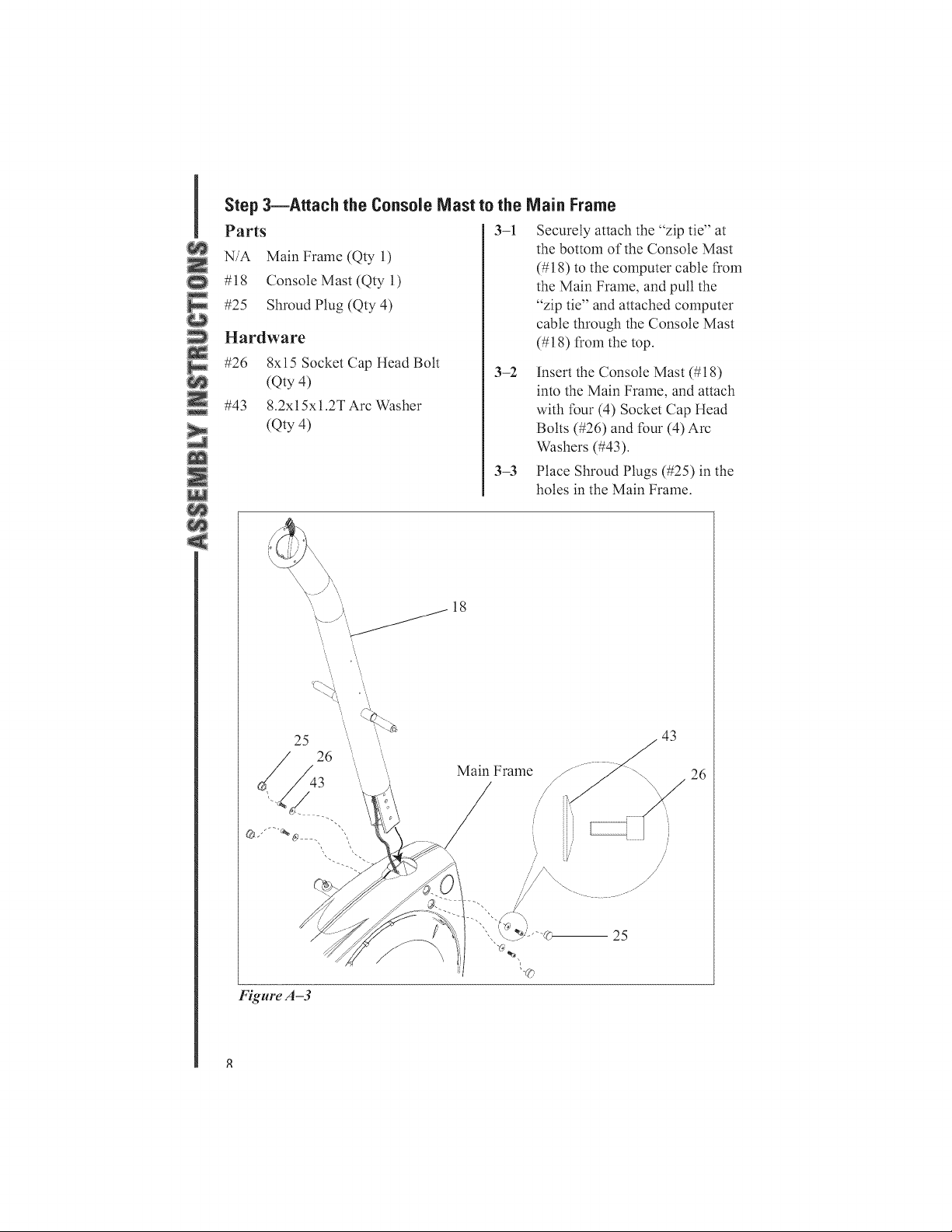
Step 3--Attach the Console Mast to the Main Frame
Parts
N/A Main Frame (Qty l)
#18 Console Mast (Qty 1)
#25 Shroud Plug (Qty 4)
Hardware
#26 8xl 5 Socket Cap Head Bolt
(Qty 4)
#43 8.2xl 5x 1.2T Arc Washer
(Qty 4)
3-1
3-2
3-3
Securely attach the "zip tie" at
the bottom of the Console Mast
(#18) to the computer cable from
the Main Frame, and pull the
"zip tie" and attached computer
cable through the Console Mast
(#18) from the top.
Insert the Console Mast (#l 8)
into the Main Frame, and attach
with {bur (4) Socket Cap Head
Bolts (#26) and {bur (4) Arc
Washers (#43).
Place Shroud Plugs (#25) in the
holes in the Main Frame.
_18
25
26
Main Frame
43
26
Figure A-3
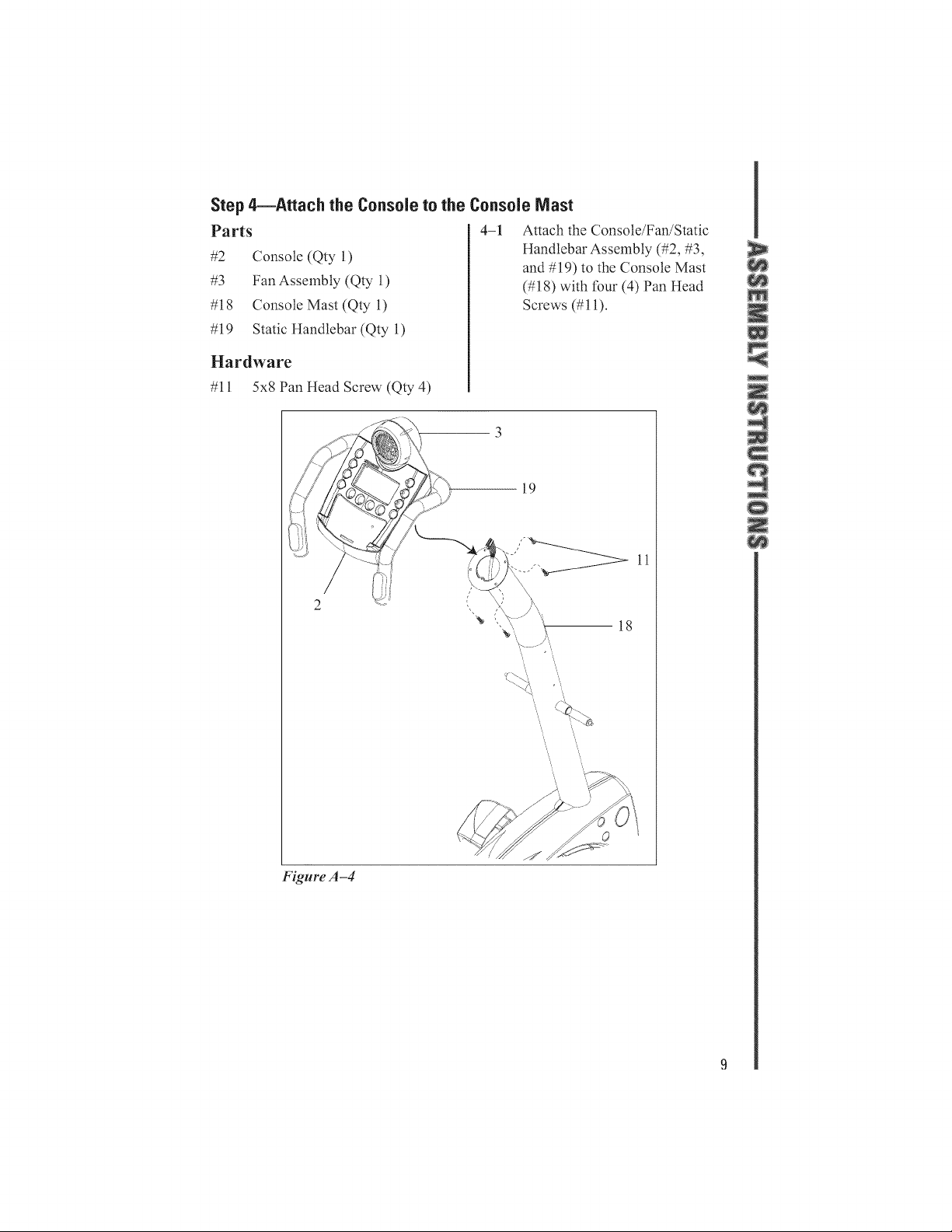
Step 4--Attach the Console to the Console Mast
Parts
#2 Console (Qty 1)
#3 Fan Assembly (Qty 1)
#18 Console Mast (Qty l)
#19 Static Handlebar (Qty 1)
Hardware
#11 5x8 Pan Head Screw (Qty 4)
4-1 Attach the Console/Fan/Static
Handlebar Assembly (#2, #3,
and #19) to the Console Mast
(#18) with four (4) Pan Head
Screws (#11).
19
Figure A-4
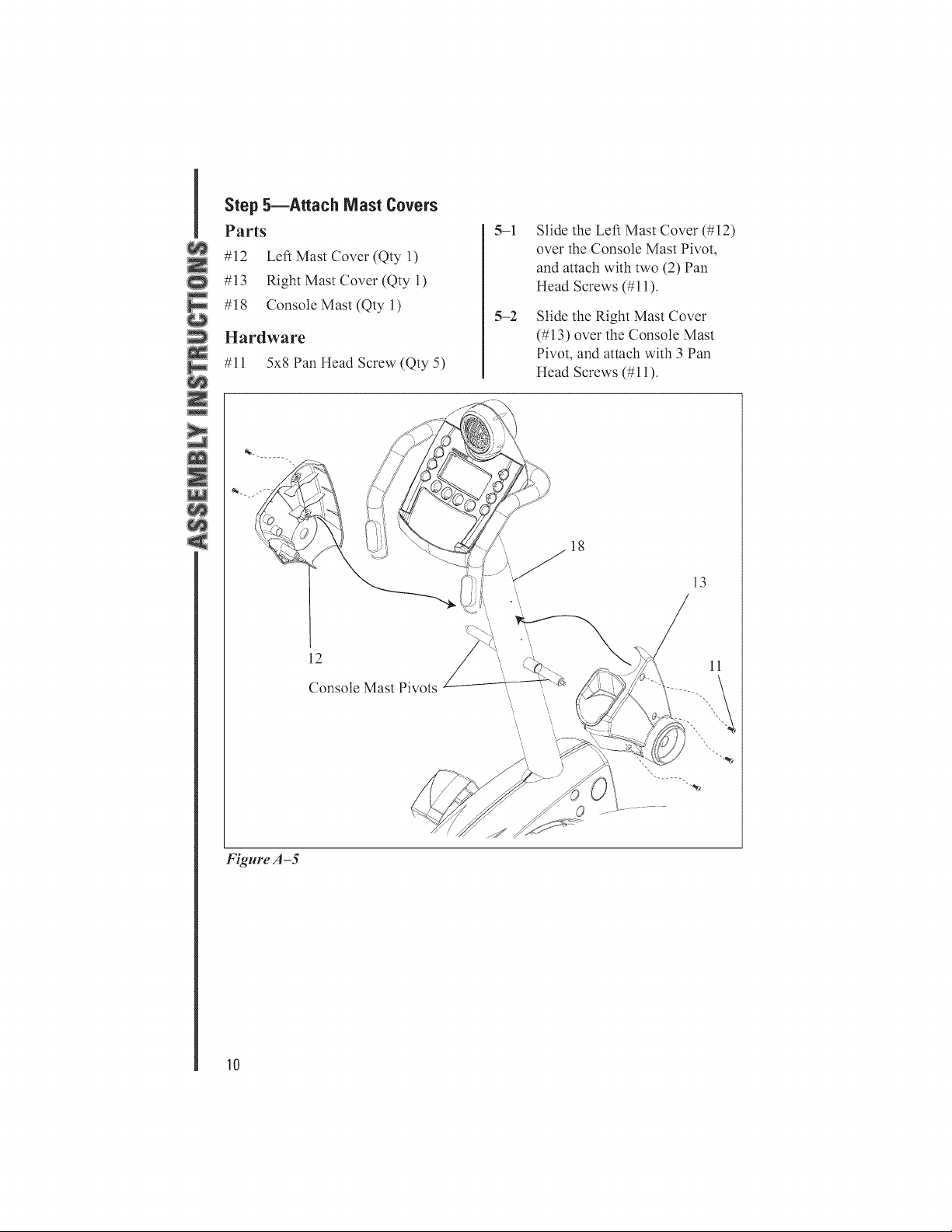
Step 5--Attach Mast Covers
Parts
#12 Left Mast Cover (Qty 1)
#13 Right Mast Cover (Qty 1)
#18 Console Mast (Qty 1)
Hardware
#11 5x8 Pan Head Screw (Qty 5)
5-1
5-2
Slide the Leti Mast Cover (#12)
over the Console Mast Pivot,
and attach with two (2)Pan
Head Screws (#11).
Slide the Right Mast Cover
(#13) over the Console Mast
Pivot, and attach with 3 Pan
Head Screws (#11).
12
Console Mast Pivots
18
13
11
Figure A-5
10
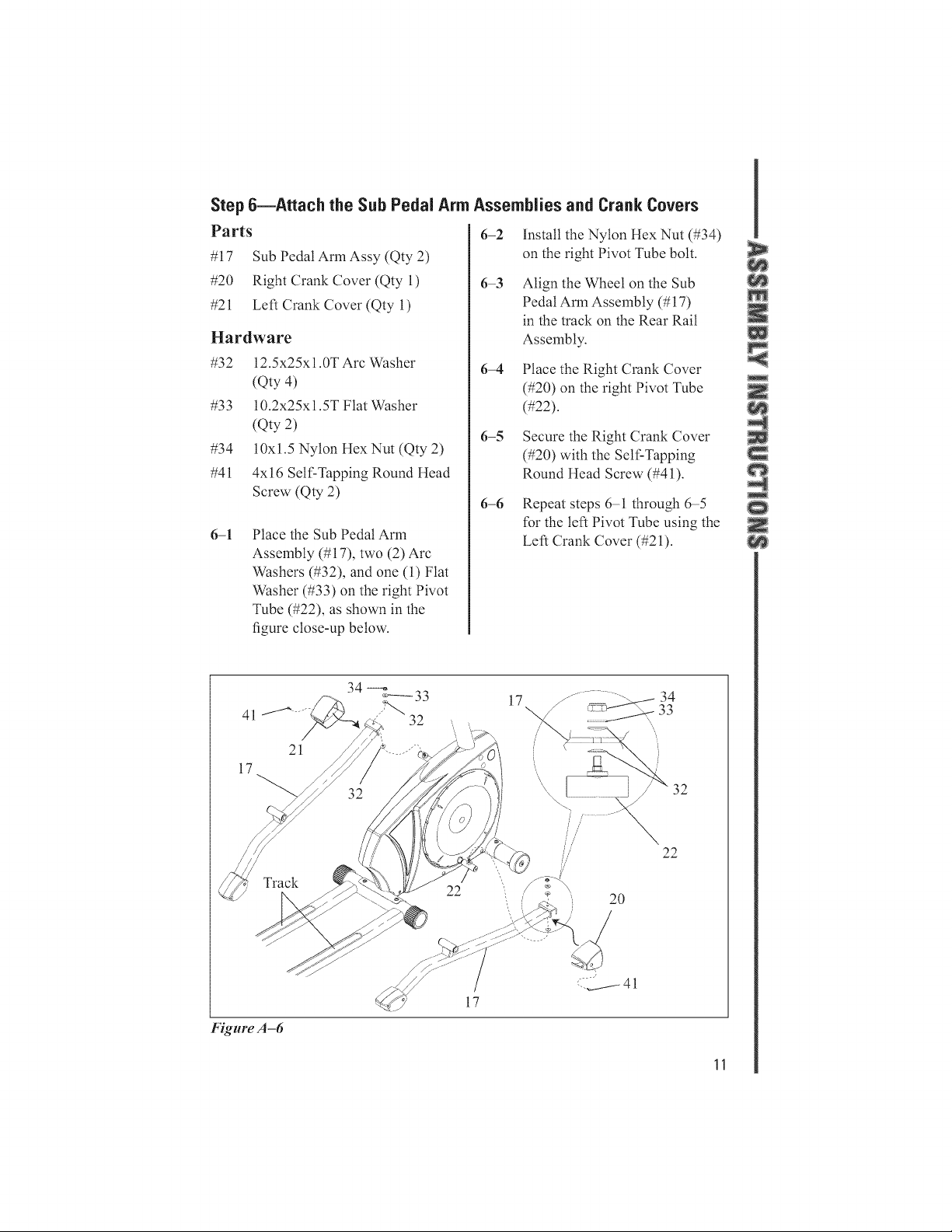
Step 6--Attach the Sub Pedal Arm Assemblies and Crank Covers
Parts
#17 Sub Pedal Arm Assy (Qty 2)
#20 Right Crank Cover (Qty 1)
#21 Let1 Crank Cover (Qty 1)
Hardware
#32 12.5x25x1.0T Arc Washer
(Qty 4)
#33 10.2x25x1.5T Flat Washer
(Qty 2)
#34 10xl.5 Nylon Hex Nut (Qty 2)
#41 4xl 6 Self-Tapping Round Head
Screw (Qty 2)
6-1
Place the Sub Pedal Arm
Assembly (#17), two (2)Arc
Washers (#32), and one (1)Flat
Washer (#33) on the right Pivot
Tube (#22), as shown in the
figure close-up below:
6-2
6-3
6-4
6-5
6-6
Install the Nylon Hex Nut (#34)
on the right Pivot Tube bolt.
Align the Wheel on the Sub
Pedal Arln Assembly (#17)
in the track on the Rear Rail
Assembly.
Place the Right Crank Cover
(#20) on the right Pivot Tube
(#22).
Secure the Right Crank Cover
(#20) with the Self-Tapping
Round Head Screw (#41).
Repeat steps 6-1 through 6-5
{'orthe let1 Pivot Tube using the
Let1 Crank Cover (#21).
41
17
21
17 ............... 34
32
22
//
//
2O
22
Figure A-6
17
11
I
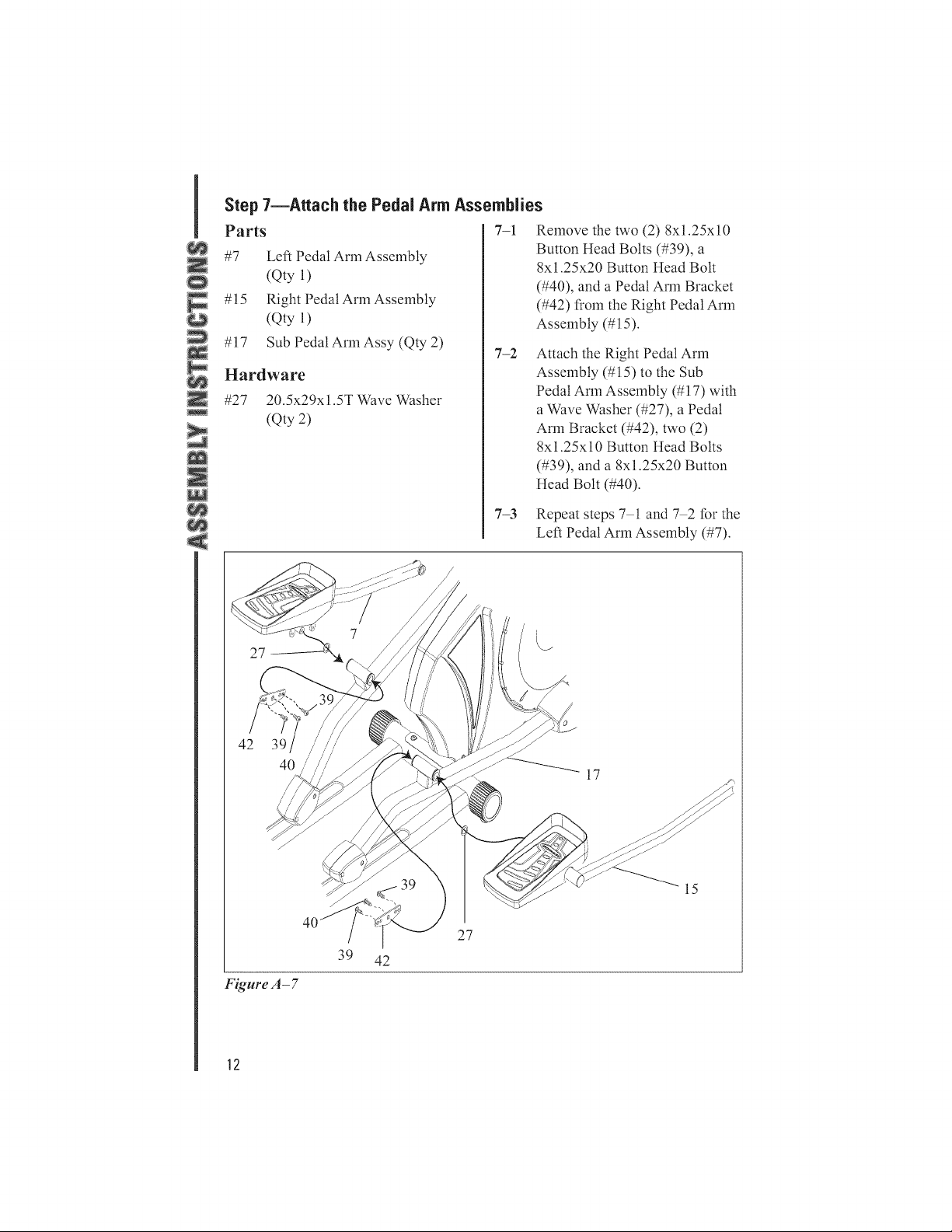
Step 7--Attach the Pedal Arm Assemblies
Parts 7-1 Remove the two (2) 8xl.25x10
#7 Button Head Bolts (#39), a
8xl.25x20 Button Head Bolt
(#40), and a Pedal Arm Bracket
#15 (#42) from the Right Pedal Arm
Assembly (#15).
#17
Let1 Pedal Arm Assembly
(Qty l)
Right Pedal Arm Assembly
(Qty l)
Sub Pedal Arln Assy (Qty 2)
Hardware
#27 20.5x29xl.5TWave Washer
(Qty 2)
7-2
Attach the Right Pedal Arm
Assembly (#15) to the Sub
Pedal Arm Assembly (#17) with
a Wave Washer (#27), a Pedal
Arm Bracket (#42), two (2)
8x1.25xl 0 Button Head Bolts
(#39), and a 8x1.25x20 Button
Head Bolt (#40).
7-3 Repeat steps7 1 and 7 2tbrthe
Let1 Pedal Arm Assembly (#7).
27
42 39
40/
17
Figure A- 7
J
27
39 42
15
12
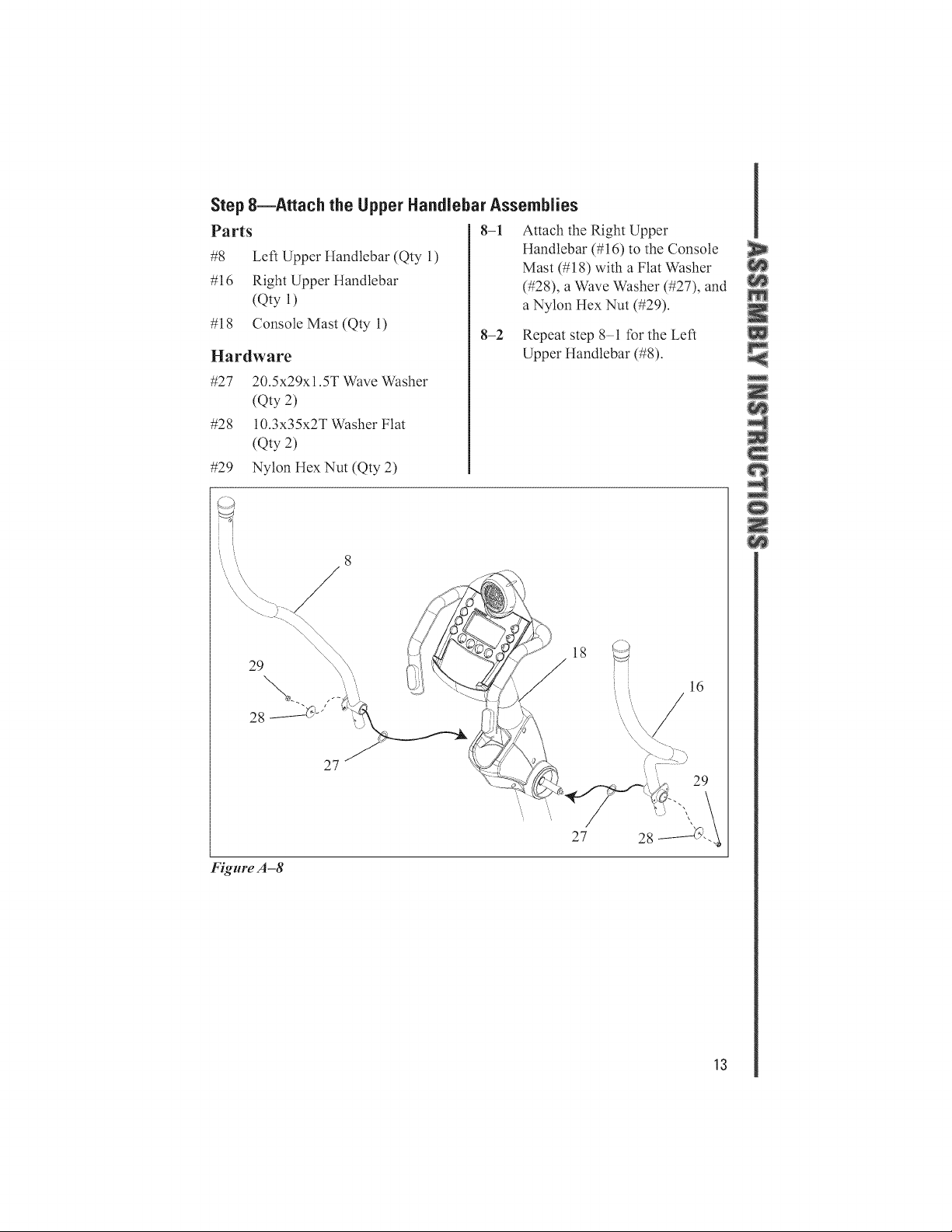
Step 8--Attach the Upper Handlebar Assemblies
Parts
#8 Left Upper ltandlebar (Qty 1)
#16 Right Upper ltandlebar
(Qty l)
#18 Console Mast (Qty l)
Hardware
#27 20.5x29xl.5T Wave Washer
(Qty 2)
#28 10.3x35x2T Washer Flat
(Qty 2)
#29 Nylon HexNut (Qty 2)
8-1 Attach the Right Upper
Handlebar (#16) to the Console
8-2
Mast (#18) with a Flat Washer
(#28), a Wave Washer (#27), and
a Nylon llex Nut (#29).
Repeat step 81 tbr the Left
Upper llandlebar (#8).
29
Figure A-8
27 /
18 ._
27
13
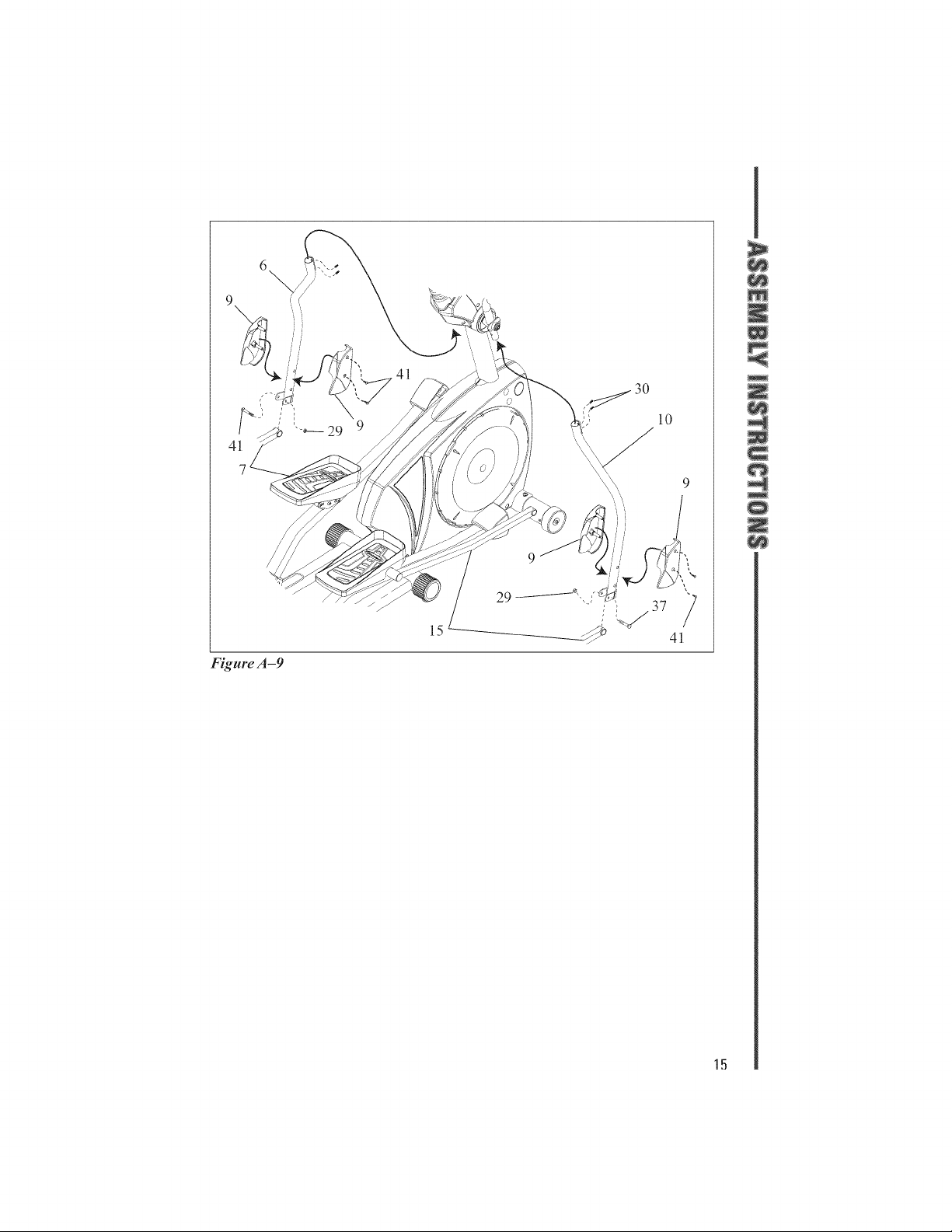
Step 9--Attach the Lower Handlebar Assemblies
Parts
#6 Lower Left Handlebar Assembly
(Qty 1)
#7 Left Pedal Arm Assembly
(Qty 1)
#8 Left Upper Handlebar (Qty 1)
#9 Lower Handlebar Cover Set
(Qty 2)
#10 Lower Right Handlebar
Assembly (Qty l)
# 15 Right Pedal Arm Assembly
(Qty l)
#16 Right Upper Handlebar
(Qty l)
Hardware
#29 Nylon llexNut (Qty 2)
#30 8x10 Set Screw (Qty 4)
#37 8x50 Carriage Bolt (Qty 2)
#41 4xl 6 Self-Tapping Round Head
Screw (Qty 4)
9-1
9-2
Attach the Lower Right
Handlebar Assembly (#10) to
the Right Upper Handlebar
(#16) using the two (2) Set
Screws (#30).
Attach the Lower Right
Handlebar (#10) to the Right
Pedal Arm Assembly (#15)
using a Nylon ltex Nut (#29),
and a Carriage Bolt (#37).
9-3 Secure the Lower Handlebar
Cover Set (#9) to the Lower
Right Handlebar Assembly
(#10) with two (2) Self-Tapping
Round Head Screws (#41).
9-4 Repeat steps 91 through 93
tbr the Lower Left Handlebar
Assembly (#6).
1,1
6
4_
Figure A-9
15

Stop lO--Attach the Handlebar Junction Cover Set
Parts
#5 Handlebar Junction Cover Set
(Qty 2)
#8 Left Upper Handlebar (Qty 1)
#16 Right Upper Handlebar
(Qty l)
Hardware
#11 5x8 Pan Head Screw (Qty 4)
10-1
10-2
Attach the Handlebar Junction
Cover Set (#5) to the Right
Upper Handlebar (#16) with two
(2) Pan Head Screws (#11) and
the Cap.
Repeat step 101 tbr the Left
Upper llandlebar (#8).
ll
16
Cap 5
Figure A -10
\
Cap
16
important Safety information
Do not discard this Owner's Manual. It contains important inlbrmation on the
proper and safe operation of your Schwinn _ Elliptical Trainer Model 438.
The tbltowing is a list of warning labels used throughout this manual:
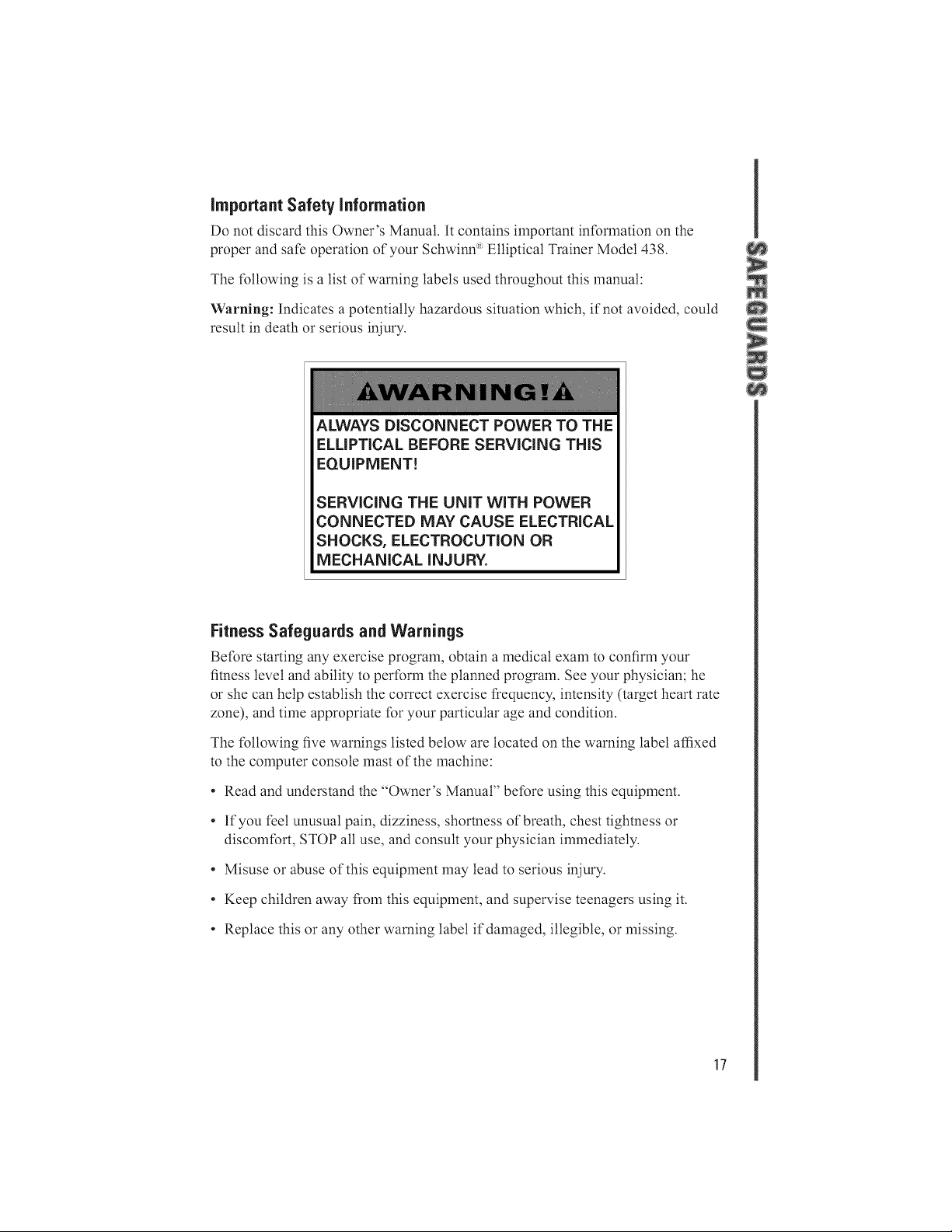
Warning: Indicates a potentially hazardous situation which, if not avoided, could
result in death or serious iniury.
ALWAYS DISCONNECT POWER TO THE
ELLiPTiCAL BEFORE SERViCiNG THiS
EQUIPMENT!
SERViCiNG THE UNiT WiTH POWER
CONNECTED MAY CAUSE ELECTRICAL
SHOCKS, ELECTROCUTION OR
MECHANICAL INJURY.
Fitness Safeguards and Warnings
Belbre starting any exercise program, obtain a medical exam to confirm your
fitness level and ability to perlbrm the planned program. See your physician; he
or she can help establish the correct exercise frequency, intensity (target heart rate
zone), and time appropriate tbr your particular age and condition.
The tbllowing five warnings listed below are located on the warning label affixed
to the computer console mast of the machine:
o Read and understand the "Owner's Manual" betbre using this equipment.
o If you tL'elunusual pain, dizziness, shortness of breath, chest tightness or
discomtbrt, STOP all use, and consult your physician immediately.
o Misuse or abuse of this equipment may lead to serious iniury.
o Keep children away t?om this equipment, and supervise teenagers using it.
o Replace this or any other warning label if damaged, illegible, or missing.
17
Other important Safeguards and Warnings
, The equipment is not designed fbr, and is not safe fbr, use by people weighing
more than 300 pounds (136 kilograms).
" Follow all instructions in the Schwinn _'_Elliptical Trainer Model 438Assembly
Guide al_d Owl_er ;' Mal_ual. Use the machine only as outlined in the manual's
operating instructions.
, The owner must ensure that all users of this equipment are adequately intbrmed
of all warnings, precautions, and instructions.
, Keep the area within 39 inches (100 centimeters) of the equipment on all sides
clear of all obstructions, children, bystanders, and pets.
, Warn bystanders to keep a safe distance from the equipment, especially t?om the
moving pedals.
. Use the equipment only on a solid, level surfiace. Cover the floor or carpeting
beneath the equipment tbr protection.
, Keep fingers and other objects away from moving parts of the equipment.
. Always wear athletic shoes tbr tbot protection. Do not wear loose clothing that
could become entangled in the drive mechanism.
. Do not allow anyone other than the user to touch the machine while it is in
operation.
. Care should be taken when mounting or dismounting the machine.
, Do not operate in damp or wet conditions.
. Belbre each use, inspect the equipment tbr loose, broken, or worn parts. If any
are present, do not use the equipment.
, The safety of the equipment can only be ensured if it is regularly examined and
maintained. (See the maintenance section of the Schwilm _'_'Elliptical Yrail_er
Model 438 Assembly Guide al_d Owl_er _' Mul_ual.)
. Service the equipment only in accordance with the maintenance section in the
Schwim_ :'_Elliptical Yruiner Model 438 Assembly Guide al_d Owner :s'Mulmal.
Always disconnect the power supply betbre servicing the machine.
. This elliptical is tbr home use only. Do not use in a commercial, institutional, or
rental setting.
18
Schwinn ® Model 438 Features
[] Synchronized Arms
For a total body workout.
Heavy Duty Construction
Sturdy construction stands up to the most intense
workout enviromnent.
FootPJatform
Two-piece, padded, open-ended tbot plates tbr
all sizes that move along with your natural tbot
motion.
Computer
Feature-packed computer with 16 levels of
resistance and 24 programs. Backlit LCD with
LED and scrolling alphanmneric prompts.
[] Four User Settings
Reprogramming not required tbr multiple-user
households.
[] Grip andTelemetricHeart Rate
For monitoring your workouts.
[] 3-Speed,AdjustableAir-FIow Fan
Keeps you coot while you workout.
TransportWheels
Built-in transport wheels allow a single individual
to easily move and position the elliptical trainer
across any flat surf:ace.
[] FrameStabilizers
Oversize frame stabilizers tbr added stability.
19
Using Your Schwinn ® Elliptical Trainer Model 438
Before operating your Schwinn _ 438 elliptical trainer, read the
warnings listed on pages 17 and 18 of this manual.
CONSULT YOUR PHYSICIAN BEFORE STARTING
ANY EXERCISE PROGRAM. He or she can help establish
the exercise frequency, intensity, (including determining your
maximum and minimum heart rate and target heart rate zones),
and the exercise time appropriate {'oryour particular age and
condition.
If you have not been exercising or are pregnant or have a
heart condition or any physical limitation, failure to consult
your physician before engaging in physical exercise, such as
using this elliptical trainer, could result in serious injury or
death. If while using this elliptical trainer you have any pain
or tightness in your chest, an irregular heart beat, shortness of
breath, feet faint, or have any discomfort, STOP and consult
your physician immediately.
Getting Started
Plug the AC adapter into the back of the console.
To start using your Schwinn _ elliptical trainer, stand on the
tbot pedals, with the front of your shoes close to the front
edge of the tbot platlbrm. Place your hands at a comlbrtabte
position on the upper body arms. Move your highest tbot
tbrward, and tbltow the natural path of the machine.
Start on a level that is comlbrtable to familiarize yourself with
the machine. Once you are comlbrtabte, start adjusting the
level to achieve the desired workout.
m Fuji Bo@y/LowerBe@y
You can use your Schwinn _ elliptical trainer {'ora complete
body workout or lower body workout only. If you choose
not to use your arms, place them on the stationary handles
in front of you. Remember, the more muscles you use, the
more calories you burn.
m Forwar@/Reverse
You can use your Schwinn _ 438 elliptical trainer in the
tbrward and reverse directions to vary the muscles you work
out. This will also vary your workout, helping you to stay
2O
motivated. To change directions, simply slow the pedals
down until they stop, and switch directions.
m Resistance ControJ
You can change the resistance level in your Schwinn _ 438
elliptical trainer at any time during your workout. Adjusting
your level will allow you to increase or decrease your
intensity level. Use the console to control the resistance.
Overview of the Schwinn ®438 EJiiptical Computer
Your Schwinn _ 438 elliptical trainer is equipped with a
versatile computer console, which includes:
° Backlit LCD
° LED and scrolling alpha-nmneric prompts
, 3 speed, air-flow direction adjustable t:an
, Magazine rack
° Four user settings
° Quick Start
, One manual program
• Ten profile programs
, Three heart rate control programs
° Four user settings
, Eight custom user-defined programs (two tbr each of the
tbur user settings)
, Time trial program
° Fitness test
° Calorie goal
, BMI (Body Mass Index)
, Recovery mode
° Results mode
, Fitness smnmary
, Switchable English/metric capability
, Auto shut-off
This computer provides you with important inlbrmation about
your workout as well as controls the resistance levels. The
tbllowing sections describe how to utilize the many functions
this computer provides. Keep this manual accessible tbr future
reference, as you will want to experiment with the various
21
functions while you become familiar with your Schwinn _ 438
elliptical trainer.
Computer Console Design
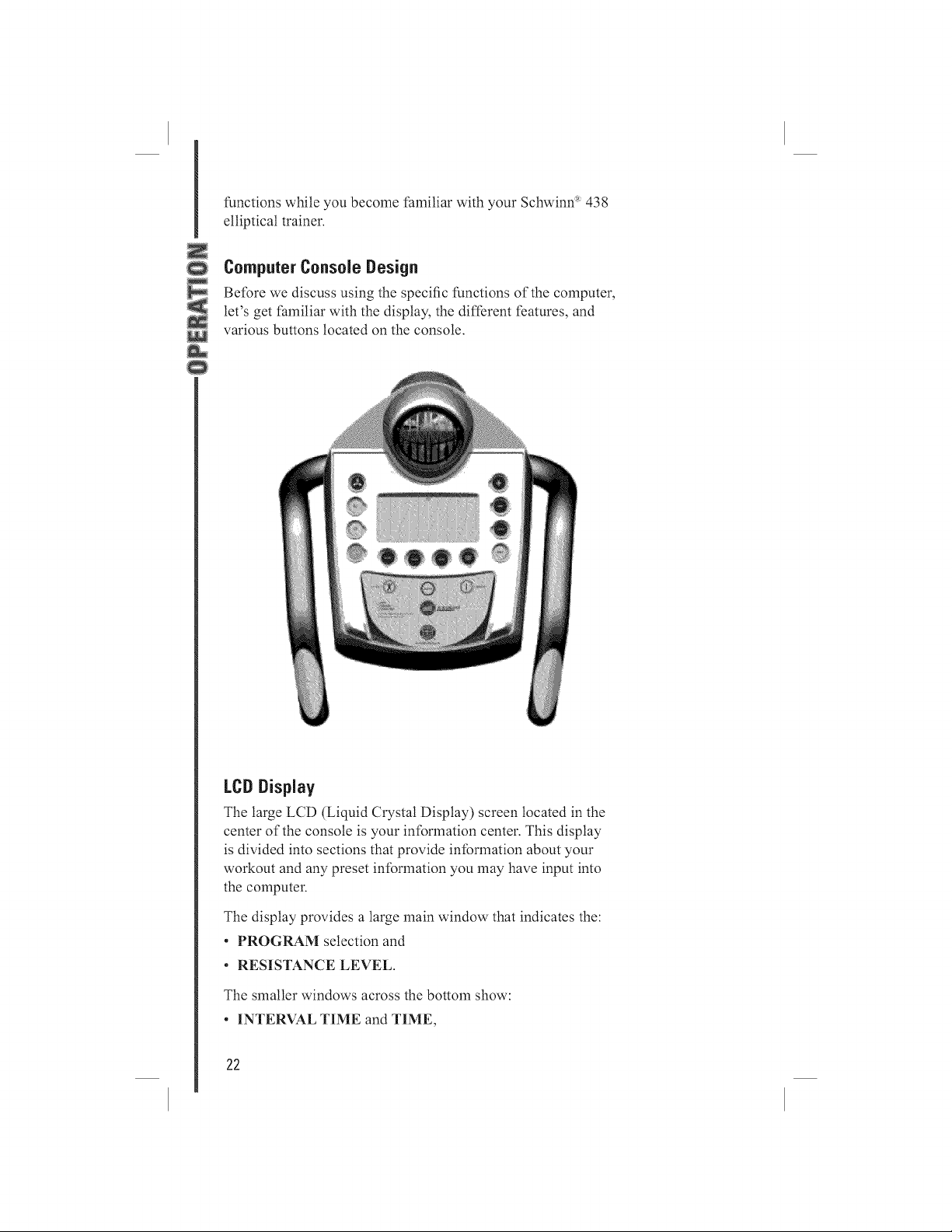
Be/bre we discuss using the specific functions of the computer,
let's get/hmiliar with the display, the different features, and
various buttons located on the console.
LCD Display
The large LCD (Liquid Crystal Display) screen located in the
center of the console is your intbrmation center. This display
is divided into sections that provide intbrmation about your
workout and any preset intbrmation you may have input into
the computer.
The display provides a large main window that indicates the:
° PROGRAM selection and
, RESISTANCE LEVEL.
The smaller windows across the bottom show:
, INTERVAL TIME and TIME,
22
. RPM and WATTS, DISTANCE, and
. HEART (PULSE)RATE.
The next larger window on the right side of the display shows:
° SPEED and CALORIES,
° ENGLISH or METRIC operating mode, and
° the motion indicator relative to your SPEED.
The icon also indicates that the program is running. The large
main area of the display shows the program profile you are
using. Within this profile are "bricks," or rectangles, that are
stacked vertically and indicate the relative resistance level and
course profile. The computer is capable of offering 16 di{li2rent
levels of resistance. One "brick" represents the lowest level,
and eight "bricks" represent the highest level. You can view
your exercise level by reti2rencing the level numbers displayed
on the let1 and right side of the "brick" display. Levels l, 3, 5,
7, 9, 1l, 13, and 15 display on the let1 side and levels 2, 4, 6,
8, 10, 12, 14, and 16 display on the right. The highest value
displayed is the resistance level at which you are working out.
In addition, you will notice there are 12 cotmnns of these
"bricks" lined up horizontally across the bottom of the display
center. Each profile program is 50 cotmnns or "intervals" long,
so each of these columns or "intervals" represents one-fi{iieth
of your workout time. For example, if you enter a workout
time of 25 minutes, each colmnn or "interval" time will last
a duration of 30 seconds. Since the display shows the first 12
colmnns of your workout program as you progress through
the workout, the program will scroll to the let1. The flashing
"bricks" on the leti-most colmnn let you know where you
are in your workout, and other colmnns to the right show the
upcoming course profile.
The manual, heart rate control, custom, and time trial
programs will display in the 12-interval colmnns, as viewed
on the LCD screen, and do not scroll as you advance through
the workout.
m Alphanumeric Display
Within the LCD display the computer features a "message
center" that prompts you to input specific data and values
to make the elliptical trainer easy to operate and gets you to
your workout quickly.
23
Using the Schwinn ®438 Computer
m LCDDisplay Descdptiens
TIME Displays the workout time. The
time wilt count down from the
time you entered when beginning
the program and shows the time
remaining for your workout. The
time starts to count up once it
reaches zero.
INTERVAL TIME
RPM
WATTS
DISTANCE
PULSE
SPEED
CALORIES
Displays the interval time. The
interval time will count down,
showing the time remaining befbre
the program moves to the next
column.
Displays the current pedal
revolutions per minute (rpm).
Displays the current power you
are producing at a given resistance
level. A watt is a measure of
workload similar to horsepower
(in fiact, one horsepower is equal to
746 watts).
Displays the estimated distance
traveled (miles or kilometers).
Displays your current heart rate
beats per minute (bpm). You must
grip each heart rate contact sensor
pod to enable the computer to
detect your heart rate.
Displays the estimated speed (miles
or kilometers per hour).
Displays the estimated calories you
have burned during the exercise.
m CenseJeButtens and Butten Funcfiens
START/PAUSE
Used to start and pause the
workout. When in a program,
pressing this button will pause the
workout. Press this button again to
restart the clock and the program
where you left off:
24
UP/DOWN
ENTER
SCAN
RESET
QUICK START
RESULTS
RECOVERY
FAN
Used to change resistance level or
to adjust values such as program
time.
Confirms or enters your selection.
These three buttons enable the user
to alternately view INTERVAL
TIME or TIME, RPM or WATTS,
and SPEED or CALORIES.
Pressing RESET in the Program
mode will bring you back to the
"ENTER PROGRAM" screen.
Pressing the RESET button down
['or 2 seconds will reset the console,
perform the "power-up" step, and
erase all memory information.
When the screen displays "ENTER
PROGRAM," pressing this button
wilt start the Manual program. This
is a "one-touch" way of starting the
Manual program.
Press START/PAUSE first, and
then press this button to end the
program and see the smnmary
results of your workout: TOTAL
TIME, TOTAL DISTANCE,
AVERAGE SPEED, AVERAGE
WATTS, AVERAGE PULSE,
and TOTAL CALORIES. Once
you press this button, your workout
wilt end. You cannot go back and
resmne your workout where you
left oil: See START/PAUSE above
{'orintbrmation regarding pausing
and restarting your workout.
Press this button to measure and
obtain your heart rate recovery
score. See the section "Recove W
Test" on page 30.
The console tL'atures a {'anwith
adjustable louvers to direct airflow
to cool you offwhile working out.
Pressing this button turns the [:an on
or oil:
25
Auto Shut-Off (Sleep Mode)
The console will automatically shut off in approximately
two minutes without use or input. There is no on/off switch.
MfQrmation Node
The computer enables you to switch between English or
metric units by pressing and holding the UP and DOWN
buttons simultaneously tbr three seconds. Use the UP or
DOWN button to select ENGLISH or METRIC, and
press ENTER to confirm. The computer will enter the
lntbrmation mode. By tbllowing the displayed menu and
prompts in the Information mode, you will be able to:
Select ENGLISH measurement units, which sets the
computer tbr:
, Miles
, Mites/hour
, Pounds
, Inches
Or select METRIC measurement units, which sets the
computer tbr:
, Kilometers
, Kilometers/hour
, Kilograms
, Centimeters
Press ENTER, which wilt display the software version.
Press ENTER again to exit the Information mode, and the
computer will bring you to the "ENTER PROGRAM"
mode.
Grip Heart Rate
This Schwinn _' elliptical trainer is equipped with grip heart
rate sensors located on the handlebars. You must contact
these sensors with both hands so that the computer can
detect your pulse. The computer uses information detected
by the grip heart rate sensors ['or many of the software
features. Make sure you are griping the pods, and look
[br the flashing "heart" icon and pulse rate located on the
lower right portion of the LCD display (to the left of the
motion indicator), indicating that a pulse signal is being
received. This is extremely important ['or the tteart Rate
26
ControlandFitnessTestprograms.Thecomputermust
receiveasteady,consistentsignaltbrthedurationofthese
programstooperatecorrectly.If thereisnodisplay,please
see"IMPORTANTThingsYouShouldKnowBelbre
Exercising"onpage32tbrmoreinlbrlnation.
Software Features
m Quick Stare
This is a "one-touch" way of starting the Manual program.
m Nanua_ Node
You manually adjust the resistance level during your
workout to make the program easier or more challenging.
m Ten PrQNe Programs
The computer o ftL'rsa variety of fun and exciting profile
programs to keep you motivated and on track to achieving
your fitness goals:
, Profile Program
, Profile Program
, Profile Program
, Profile Program
, Profile Program
, Profile Program
, Profile Program
, Profile Program
, Profile Program
, Profile Program
1 Ride in the Park
2 Rolling Hills
3 Plateau
4 Speed Intervals
5 Strength Intervals
6 Pyramid Intervals
7 Ramp Interval 1
8 Ramp Interval 2
9 Pikes Peak
10 Cross-Training
mThree Heart Rate Control {H.R.C.}Programs
These programs enable you to workout in three different
heart rate zones: 60% to 70% of maximum heart rate,
70% to 80% of maximum heart rate, and 80% to 90% of
maximum heart rate. The zones are calculated based upon
your age and the percent of maximum heart rate you select
to exercise in.
Please note: You must either use the chest strap or grip the
heart rate sensor pods located on the handlebars in order
tbr the computer to read your pulse and tbr the tleart Rate
Control programs to work effectively.
27
60%70% of maximum heart rate Generat Fitness Zone .....................
Fat Burning Exercise within this zone improves general
fitness, begins to develop endurance, and contributes greatly
to weight control and management by utilizing mostly t:at
calories tbr energy.
70%80% of maximum heart rate Aerobic Workout
Zone Endurance Training Exercise within this zone
increases overall fitness, improves cardiovascular efficiency
and endurance.
80%90% of maximum heart rate Anaerobic Workout
Zone Perlbrmance Training Exercise within this zone
maximizes fitness and athletic perlbrmance. Important: We
strongly recommend you consult with your physician before
exercising in this zone.
Four User Settings
Each user setting allows the you to set up and store into the
computer memory your name, weight, height, age, and sex.
Each user setting allows tbr two different workout profiles,
which you can customize.
Time TriN
This program enables you to workout against a "pacer" to
determine how long it takes you to cover a preset distance.
You preset the speed of the "pacer" as the baseline of your
workout, and race to the end of'the preset distance. At the
end of the Time Trial, the computer displays the watts,
distance, and speed you achieved.
Fitness Test
The Fitness Test is one of the best ways to measure
improvements in your physical fitness level. The test
measures your fitness by comparing your power output (in
watts) to your heart rate. In general, as you become "more
fit," you will produce more power (watts) at a given heart
rate. As the test starts, the power (watts) slowly increases.
This means you wilt work harder and, as a result, your heart
rate increases. The watts continue to increase automatically
until your heart rate reaches the "test zone." This zone
is individually computed to be near 75 percent of your
maximum heart rate. When you reach the "test zone" the
elliptical holds the watts steady for three minutes. This
is to allow you to reach a steady state (where your heart
rate has become basically steady). At the end of the three
28
minutes, the computer measures your heart rate, and the
power (watts). These nmnbers, along with inlbrmation about
your age and weight, are put into a tbrmula and produce a
"Fitness Score."
Note: The Fitness Test is an excellent way to measure
changes in your own fitness level. It is not designed to be
used to compare one person's score to another person's
score. This is because the test protocol only estimates your
"Maximum Heart Rate."
m galQrie Goam
The Calorie Goat tL'ature lets you select an amount of
calories you would like to burn during your workout.
When selecting CALORIE GOAL, use the UP or DOWN
buttons to select the amount of calories you wish to burn
from 10990. Each increment will change the calories by
ten. Confirm your selected value by pressing the ENTER
button.
The console will prompt you to choose a profile program.
Use the UP or DOWN buttons to select a profile program,
and press the ENTER button to confirm your selection.
During the program, the calorie display will count down
from the number of calories you entered to zero.
m Bedy Mass Index {BMI)Measurement
BMI is a useful tool that shows the relationship between
weight and height associated with body ["atand health risk.
The table below gives a general rating and BMI scorel:
BMI
Underweight Below 18.5
Normal 18.5-24.9
Overweight 25.0-29.9
Obesity 30.0and above
There are limitations, however. It may overestimate body
["at in athletes and others who have a muscular build. It may
also underestimate body ["at in older persons and others who
have lost muscle mass.
1. SOURCE: Centers %r Disease Control and Prevention (CDC), Atlanta, GA. The CDC is an agency of the l+ederal Department of
Health and Human Services.
29
When choosing the BMI program you will be prompted
to enter your height and weight, and the computer will
calculate and display your Body Mass Index. The console
will display "IDEAL BMI RANGE." The ideal or normal
range is 18.524.9. The console wilt also display your ideal
weight range tbr your height.
CONSULT YOUR PHYSICIAN FOR MORE
INFORMATION ABOUT BMI AND THE WEIGHT
THAT IS APPROPRIATE FOR YOU.
Recover},Test
Recovery Test shows how quickly your heart recovers from
an exercise state to a more restful state, hnproved recovery
is an indicator of increasing fitness. For the console to
perlbrm the Recovery Test, two things must happen. You
must press the RECOVERY button, and the console must
be displaying your heart rate. When both of these situations
occur, then the console will perlbrln the Recovery Test.
The console will show "01:00 STOP," and the time will
begin to count down. Stop exercising but continue to grip
the heart rate sensors. After five seconds, the display will
show "00:55 RELAX" and continue to count down to
00:00.
For the entire minute, the console will also show your heart
rate. You must grip the heart rate sensors tbr the duration of
the test. The display will continue to show "RELAX" and
your heart rate until the clock counts down to 00:00. The
console will then calculate your recovery score.
Recovery Score - Your heart rate at 1:00 (the beginning of
the test) minus your heart rate at 00:00 (the end of the test).
The display wilt show "SCORE (RECOVERY SCORE)."
This wilt remain on the display tbr five seconds, then you
can press RESULTS to view a smnmary of your workout
and end the program, or press START to resmne working
out where you left off.
The higher the Recovery Test Score value, the quicker
your heart rate is returning to a more restthl state, and is an
indication of improving fitness. By recording these values
over time you can see the trend toward better health!
When you press the RECOVERY button and there is no
heart rate signal or display, the console will show "NEED
3O
HR,"andtheHEARTRATEicononthedisplaywiltblink.
Thismessagewill showtbrfiveseconds,thentheprogram
willresume.Youmustseeyourheartrateonthedisplay,
andthenyoumustpushtheRECOVERYbuttonagainto
perlbrmthetest.
Helpful Tip: For a more relevant score, tW to obtain a
steady heart rate tbr three minutes belbre pressing the
RECOVERY button. This will be easier to achieve and
obtain tbr best results in the Quick Start or Manual program
so that you can control level of resistance.
Please note: The RECOVERY button does not function
when you are in the BMI program.
m Results Mode
When you complete a program, the Results mode wilt
automatically display and show your basic workout
statistics. Manually pressing the RESULTS button during
your workout wilt also end the program and display your
basic workout statistics. You cannot return to your workout
after pressing the RESULTS button.
To have the option of either ending your workout and seeing
your workout results or pausing your workout so you can
return to where you left off, perlbrm the tbltowing steps:
To STOP or PAUSE the program:
1 Press the START/PAUSE button to pause your
workout. The display wilt show "PRESS RESULT
OR PRESS START."
Press the RESULTS button to have the computer
show your workout results and end the program, or
press START/PAUSE to resume the program where
you left off.
In Results mode, the console will display:
"GREAT JOB" This will hold tbr approximately three
seconds.
"YOUR RESULTS" This will hold tbr approximately
three seconds.
The display will show the tbtlowing workout results:
SPEED Displays your average speed.
TIME Displays your total time.
31
DISTANCE
CALORIES
WATTS
HEART RATE:
Displays the total distance traveled.
Displays total calories burned.
Displays the average watts.
Displays your average heart rate.
Pressing the RESET button wilt bring you back to
"ENTER PROGRAM." After 60 seconds, the console will
automatically return to "ENTER PROGRAM."
iMPORTANT Things You Should Know Before
Exercising
[] The values calculated or measured by the computer are [br
exercise ret?:rence purposes only, NOT FOR MEDICAL
PURPOSES.
Pulse rate The pulse rate will display after the system has
detected tbur stable pulse signals. Pulse rate is then updated
after receiving every two signals.
Please note: If your heart rate goes above 199, the "l" wilt
flash. So a heart rate of 224 will be displayed as "124", and
the "1" wilt be flashing.
Pulse rate readout While the grip heart rate feature is a
quick and convenient way to check your heart rate, it is
generally not as accurate as a wireless transmitter belt and is
subject to occasional misreadings and intertL'rence. You may
t?om time to time find inconsistencies with the heart rate
display on your display console.
There are many external thctors that can affect the heart rate
display. Some t:actors that influence the reliability of the
heart rate signal include:
[] the enviromnent where the equipment is used,
[] the physiology of the users themselves, and
[] Electro-Magnetic lntertL'rence (EMI) produced by such
items as televisions, computers, microwave ovens,
cellular and cordless telephones, and fluorescent lights.
By moving the product away from such items, you may be
able to avoid many heart rate display problems.
[] Resistance controt You can control the resistance of
your elliptical trainer by using the UP or DOWN buttons.
You increase the resistance by pressing the UP button or
32
decrease the resistance by pressing the DOWN button. You
wilt notice a slight lag in time while the electronic brake
adjusts to your input, so make sure to allow tbr this and
don't over-compensate.
[] Sleep mode The console will enter Sleep mode, and the
system will turn off automatically if there is no input tbr
approximately two minutes. Press any button to return
the computer to its pre-"sleep" state, or press and hold the
RESET button tbr two seconds to clear the computer.
Console Operation--Quick Start
[] Quick Start
Press QUICK START to take you immediately to the
Manual program. "RESISTANCE LEVEL" will be at
level 1. Time will start from 00:00 and count up.
[] Changing Levels
You can increase or decrease the resistance level by pressing
the UP or DOWN buttons at any time.
[] Stop or Pause the Program
Press the START/PAUSE button to pause your workout.
The display will show "PRESS RESULT OR PRESS
START." If you press the RESULTS button, the computer
will show your workout results and end the program. If
you press START/PAUSE, the computer will resume the
program where you left off.
ConsoJeOperation--Manual Program
[] Semect Program
1 Press any button to power up the console; "ENTER
PROGRAM" appears in the atphanmneric display.
To access the Manual program, scroll through the
display using the UP or DOWN buttons until you
reach "MANUAL," and press ENTER.
[] Enter Level
1 At the "ENTER LEVEL" screen, select the desired
resistance level by pressing the UP or DOWN
buttons to select a level from 1 to 16.
33
2
Confirm your selection by pressing ENTER. The
default resistance level wilt be the last level you
entered (previous workout).
m EnterTime
When the "ENTER TIME" screen appears, select
the desired time by pressing the UP or DOWN
buttons. The default time will be the last time you
entered (previous workout). The minimum time you
can enter is two minutes.
2 Confirm your selection by pressing ENTER.
m EnterWeight
1 At the "ENTRWEIGHT..." screen, select the
appropriate weight in pounds or kilograms by
pressing the UP or DOWN buttons.
2 Press ENTER to confirm your selection.
Start
Press START when the "PRESS START" screen appears.
"MANUAL" will display, confirming you are about to start
the Manual program. You can now begin exercising.
Changing Levels
You can increase or decrease the resistance level by pressing
the UP or DOWN buttons at any time.
Stop or Pause the Pro{Iram
1 Press the START/PAUSE button to stop or pause
your workout. The display will show "PRESS
RESULT OR PRESS START."
2
To stop the program, press the RESULTS button; the
computer wilt show your workout results and end the
program.
To pause the program, press START/PAUSE; the
computer will resume the program where you left off
Console Operation--Selecting a ProfiJe Program
m Semect Program
1 Press any button to power up the console; "ENTER
PROGRAM" appears in the alphanumeric display.
34
To access the profile programs, scroll through the
display by using the UP or DOWN buttons until you
reach "PROGRAMS."
Press ENTER; the program profile and name will
appear in the display.
Press the UP or DOWN buttons to select your
desired program.
Press ENTER to confirm your selection.
m Enter LevN
When the "ENTER LEVEL" appears on the display,
scroll to the desired resistance level by pressing the
UP or DOWN buttons to select a level from ] to 16.
Confirm you selection by pressing ENTER. The
default resistance level wilt be the last level you
entered (previous workout).
m Enter Time
At the "ENTER TIME" screen, select the desired
time by pressing the UP or DOWN buttons. The
default time wilt be the last time you entered
(previous workout). The minimum time you can enter
is two minutes.
2 Press ENTER to confirm your selection.
m Enter Weight
1 At the "ENTRWEIGHT..." screen, select the
appropriate weight in pounds or kilograms by
pressing the UP or DOWN buttons.
Press ENTER to confirm your selection.
Press START when the "PRESS START" screen appears.
The preset program you selected wilt display to confirm
your selection. You can now begin exercising.
m Stop or Pause the Program
Press the START/PAUSE button to stop or pause
your workout. The display will show "PRESS
RESULT OR PRESS START."
35
2
To stop the program, press the RESULTS button; the
computer wilt show your workout results and end the
program.
To pause the program, press START/PAUSE; the
computer will resume the program where you left off.
Console Operation--HRC (Heart Rate Control)
Please note: You must either use the wireless chest strap or
grip the heart rate sensor pods located on the handlebars [br
the computer to read your pulse and [br the heart rate control
programs to work effectively.
Based on your age, the elliptical trainer wilt calculate a
maximum heart rate and the heart rate zones described below:
These rates are based on average fitness tbr persons your age.
You may be more or less fit, and your actual maximum heart
rate and zones may be correspondingly higher or lower. You
should theretbre consult your physician tbr the maximum
heart rate that is right tbr you and the heart rate zones in which
you can safely exercise.
m Select Program
1 Press any button to power up the console; "ENTER
PROGRAM" appears in the alphanmneric display.
2
To access the Heart Rate Control programs, scroll
through the display by pressing the UP or DOWN
buttons until you reach "HRC," and then press
ENTER.
m Eater Age
1 When the "ENTER AGE" appears on the display,
select your age by pressing the UP or DOWN
buttons.
2 Confirm your selection by pressing ENTER.
Hear_ Rate Zone
At the "ENTER HEART RATE ZONE" screen,
press the UP or DOWN buttons to scroll through the
heart rate zones:
. ItRC 6070 (Select this zone [br [:at burning.)
Exercise within this zone improves general fitness,
begins to develop endurance, and contributes
36
greatly to weight control and management by
utilizing mostly t:at calories tbr energy.
IIRC 7080 (Select this zone tbr an aerobic
workout.)
Exercise within this zone increases overall ftness,
improves cardiovascular effciency, and endurance.
IIRC 8090 (Select this zone tbr an anaerobic
workout.)
Exercise within this zone maximizes fitness and
athletic perlbrmance.
WE STRONGLY RECOMMEND YOU
CONSULT WITH YOUR PHYSICIAN
BEFORE EXERCISING IN THIS ZONE.
Each zone will flash three times, tbttowed by the
heart beats per minute (bpm) associated with that
zone. These will also flash three times.
Select the appropriate zone by pressing the UP or
DOWN buttons.
3 Press ENTER to confirm your selection.
m Enter Time
When "ENTER TIME" appears on the display,
select the desired time by pressing the UP or DOWN
buttons. The minimum time you can enter is 12
minutes.
2 Press ENTER to confirm your selection.
m Enter Weight
1 At the "ENTRWEIGHT..." screen, select the
appropriate weight in pounds or kilograms by
pressing the UP or DOWN buttons.
Press ENTER to confirm your selection.
Press START when the "PRESS START" screen appears;
"HRC" will display, confirming your selection. You can now
begin exercising.
37
[;hangingLevels
You can only increase or decrease the resistance level by
pressing the UP or DOWN buttons when in the first interval
column, which is the warm-up column. This enables you to
set your starting warm-up level. A longer warm-up at lower
resistance can burn more calories than a shorter warm-up at
higher resistance. After the program exits the first interval
warm-up column, the UP and DOWN buttons become
inoperative, and the program automatically adjusts the
resistance to bring you into your selected zone.
The program is designed to slowly bring you up to your
selected heart rate workout zone, hold you within that zone
by reading your heart rate, and adjust the level of resistance
to keep your workout within that zone. The program then
slowly brings you down into a cool-down zone at the end of
the program by reducing the resistance level in the last two
columns.
As a precaution, if your heart rate is above your selected
heart rate zone and the resistance level is at the minimum
level tbr 30 seconds, the message "SLOW DOWN" will
appear in the alphanumeric display. If after one more minute
your heart rate is still above your selected heart rate zone,
the message "STOP" will display and the program will end.
Stopor Pause the Program
Press the START/PAUSE button to stop or pause
your workout. The display will show "PRESS
RESULT OR PRESS START."
2
To stop the program, press the RESULTS button; the
computer wilt show your workout results and end the
program.
To pause the program, press START/PAUSE; the
computer will resume the program where you left off.
CONSULT YOUR PHYSICIAN FOR THE HEART
RATE ZONE APPROPRIATE FOR YOU.
Console Operation--Custom 01 and Custom02
m Semect Program
1 Press any button to power up the console; "ENTER
PROGRAM" appears in the alphanumeric display.
38
To access the Custom 01 and Custom 02 programs,
scroll through the display by pressing the UP
or DOWN buttons until you reach "CUSTOM
PROGS."
3
4
Press ENTER; "CUSTOM 01" will flash.
Press the UP or DOWN buttons to alternate between
the two programs.
Press ENTER to confirm your selection.
m Enter Time
When "ENTER TIME" appears on the display,
select the desired time by pressing the UP or DOWN
buttons. The dethult time will be the last time you
entered (previous workout). The minimum time you
can enter is two minutes.
2 Press ENTER to confirm your selection.
m Enter Weight
1 At the "ENTRWEIGHT..." screen, select the
appropriate weight in pounds or kilograms by
pressing the UP or DOWN buttons.
Press ENTER to confirm your selection.
Press START when the "PRESS START" screen appears.
Depending on your choice when entering "CUSTOM
PROGS," "CUSTOM 01" or "CUSTOM 02" will display,
confirming your selection. You can now begin exercising,
set up, or change your custom program.
m Set IJp a Custom Program
You can set up your Custom program profile in each interval
as you exercise. The flashing "bricks" indicate your position
and interval location within the program.
Press the UP or DOWN buttons to select your desired
resistance level as the program progresses through each
interval. The console wilt store this profile in memory,
which can then be accessed the next time you want to
exercise within this Custom program.
39

ChangeanExistingProgram
Press the UP or DOWN buttons as you exercise in each
interval to override your old custom program. The console
will automatically store this new profile in memory and will
then be the new del:ault Custom program.
Stopor Pause the Program
Press the START/PAUSE button to stop or pause
your workout. The display will show "PRESS
RESULT OR PRESS START."
2
To stop the program, press the RESULTS button; the
computer wilt show your workout results and end the
program.
To pause the program, press START/PAUSE; the
computer will resmne the program where you left oft:
Console Operation--T. T. Program (Time TriM)
m SemectProgram
1 Press any button to power up the console; "ENTER
PROGRAM" appears in the alphanmneric display.
2
To access the Time Trial program, scroll through
the display by pressing the UP or DOWN buttons
until you reach "T.T.PROGRAM," and then press
ENTER.
Distance
When "ENTER DIST" appears on screen, select
the desired distance by pressing the UP or DOWN
buttons.
2
Press ENTER to confirm your selection. You can
select the desired distance in one-tenth-of-a-mite or
kilometer increments.
Pacer Spee_
At the "PACER SPEED" screen, select the desired
pacer speed by pressing the UP or DOWN buttons.
You can select the desired pacer speed in one-tenth-
of-a-mile or kilometer increments.
2 Press ENTER to confirln your selection.
4O
m Enter Weight
1 At the "ENTRWEIGHT..." screen, select the
appropriate weight in pounds or kilograms by
pressing the UP or DOWN buttons.
Press ENTER to confirm your selection.
Press START when the "PRESS START" screen appears.
"T.T.PROGRAM" will display, confirming your selection.
You can now begin exercising.
The "pacer" is represented by the top flashing "brick," and
you are represented by the bottom flashing "brick."
m Change LevNs
Increase or decrease the resistance level by pressing the
UP or DOWN buttons at any time. Changing levels in this
program is like changing gears on a bike. To increase or
decrease your speed, press the UP or DOWN buttons.
m End ef Program
The program ends when you complete your preset distance.
m Step er Pause the Program
Press the START/PAUSE button to stop or pause
your workout. The display will show "PRESS
RESULT OR PRESS START."
To stop the program, press the RESULTS button; the
computer will show your workout results and end the
program.
To pause the program, press START/PAUSE; the
computer will resmne the program where you let1 off:
Console Operation--Fitness Test
Please note: You must either use the wireless chest strap or
grip the heart rate sensor pods located on the handlebars tbr
the computer to read your pulse and tbr the program to work
effectively.
m SemectProgram
1 Press any button to power up the console; "ENTER
PROGRAM" appears in the alphanmneric display.
41
2
To access the Fitness Test, scroll through the display
by pressing the UP or DOWN buttons until you
reach "FITNESS TEST," and then press ENTER.
m Enter Age
1 When the "ENTER AGE" screen appears, select
your age by pressing the UP or DOWN buttons.
2 Press ENTER to confirm your selection.
m Enter Weight
1 At the "ENTRWEIGHT..." screen, select the
appropriate weight in pounds or kilograms by
pressing the UP or DOWN buttons.
2 Press ENTER to confirm your selection.
Stare
Press START when the "PRESS START" screen appears;
"FITNESS TEST" will display, confirming your selection.
You can now begin exercising.
The program begins at level l, and it wilt automatically
adjust to bring you into a pre-determined "test zone" based
upon an estimated maximum heart rate. Once you are in the
"test zone," the resistance level will remain constant.
The time clock will begin to count down from three
minutes. During the last 30 seconds, the console wilt
record the average watts, average heart rate, and generate a
"Fitness Score." It is important to keep your rpm's steady
tbr the whole three minutes to maintain a steady heart rate.
The Fitness Test is an excellent way to measure changes
in your own ftness level. It is not designed to be used to
compare one person's score to another person's score. This
is because the test protocol only estimates your maximum
heart rate.
Please note: The Fitness Test is a special program that
requires uninterrupted exercise. After the initial fitness test
set-up, certain buttons become inoperative after starting the
program test:
[] START/PAUSE
[] RESULTS
[] RECOVERY
42
Console Operation--Calorie Goal
The Calorie Goal program enables you to select an amount of
calories you would like to burn and lets you choose a profile
program to achieve that goal. Your exercise is complete when
the calories count down to zero.
m SemectProgram
1 Press any button to power up the console; "ENTER
PROGRAM" appears in the atphanmneric display.
To access the Calorie Goal program, scroll through
the display by pressing the UP or DOWN buttons
until you reach "CALORIE GOAL," and then press
ENTER.
m Enter CaIQries
When the "ENTER CALS" screen appears, select
the desired calories to burn by pressing the UP or
DOWN buttons.
2 Press ENTER to confirm your selection; a profile
program and name will appear in the display.
3 Press the UP or DOWN buttons to select your
desired profile program.
4 Press ENTER to confirm your selection.
m Enter LevN
l At the "ENTER LEVEL" screen, select the desired
resistance level from 1 to 16 by pressing the UP or
DOWN buttons. The default resistance level will be
the last level you entered (previous workout).
2 Press ENTER to confirm your selection.
m Enter Weight
1 At the "ENTRWEIGHT..." screen, select the
appropriate weight in pounds or kilograms by
pressing the UP or DOWN buttons.
Press ENTER to confirm your selection.
Press START when the "PRESS START" screen appears;
"CALORIE GOAL" will display, confirming your
selection. You can now begin exercising.
43
Time will begin counting up and calories will begin
counting down from your preset calorie goal value until the
display reaches zero. When you have reached your calorie
goat, the computer displays "GREAT JOB," tbllowed by
"YOUR RESULTS." The display will show a smnmary of
your workout:
[] Total Time
[] Total Distance
[] Average Speed
[] Average Watts
[] Average Pulse
[] Total Calories
Change LevNs
You can increase or decrease the resistance level by pressing
the UP or DOWN buttons at any time.
Stopor Pause the Program
Press the START/PAUSE button to stop or pause
your workout. The display will show "PRESS
RESULT OR PRESS START."
2
To stop the program, press the RESULTS button; the
computer wilt show your workout results and end the
program.
To pause the program, press START/PAUSE; the
computer will resmne the program where you let1 o1I:
Console Operation--Body Mass index (BMI)
BMI is a useful tool that shows the relationship between
weight and height associated with body t:at and health risk.
[] Semect Program
1 Press any button to power up the console; "ENTER
PROGRAM" appears in the alphanumeric display.
2
To access the BMI program, scroll through the
display by pressing the UP or DOWN buttons until
you reach "BMI," and then press ENTER.
44
mEnterWeight
1 Atthe"ENTRWEIGHT..."screen,selectthe
appropriateweightinpoundsorkilogramsby
pressingtheUPorDOWNbuttons.
2 Press ENTER to confirm your selection.
m Enter Height
1 When the "ENTRHEIGHT" screen appears, select
the appropriate height in inches or centimeters by
pressing the UP or DOWN buttons.
2 Press ENTER to confirm your selection.
The computer wilt calculate and display your BMI. Next, ideal
BMI wilt display: 18.5 to 24.9, tbllowed by your ideal weight.
Please note: The BMI program is a special program that
requires certain specific input, so certain buttons become
inoperative while in the BMI program. The tbllowing buttons
only work during the set-up phase of the program and become
inoperative atier you start the program:
[] START/PAUSE
[] ENTER
[] UP OR DOWN
[] RESULTS
[] RECOVERY
CONSULT YOUR PHYSICIAN FOR MORE
INFORMATION ABOUT BMI AND THE WEIGHT
THAT IS APPROPRIATE FOR YOU.
Using the Chest Strap Transmitter
The Schwinn _ 438 elliptical trainer has built-in wireless
heart rate monitoring capability. When you wear the chest
strap transmitter during your workout, the elliptical trainer's
computer heart rate display will continuously read out your
heart rate in beats per minute. Helpful tip: For the most
effective transmission, wet the back of the chest strap (the side
that goes against your skin) belbre putting it on.
45
Moving your Schwinn ®438 Elliptical Trainer
To move the Schwinn _ 438 elliptical trainer,
carefully lift the rear end of the machine. Steer
the machine to the desired location. Be gentle
while moving the unit as any sharp impact
directly or indirectly to the computer can affect
computer operation.
Leveling your Schwinn ® Elliptical Trainer
Level the elliptical trainer to compensate tbr
uneven surl:aces. To level the Schwinn _ 438
elliptical trainer, raise or lower the two leveling
bolts located on the underside of the rear
stabilizer by screwing them in or out as needed.
Maintaining Your EJiiptical Trainer
ALWAYS DISCONNECT POWER TO THE
ELLiPTiCAL BEFORE SERViCiNG THiS
EQUIPMENT!
SERViCiNG THE UNiT WITH POWER
CONNECTED MAY CAUSE ELECTRICAL
SHOCKS, ELECTROCUTION OR
MECHANICAL iNJURY.
IMPORTANT: To avoid damaging the finish on
your elliptical trainer and computer, never use a
petroleum-based solvent when cleaning. Avoid
getting excessive moisture on the computer.
Daily: Belbre each use, inspect tbr loose,
broken, damaged, or worn parts. Do
not use your elliptical trainer if tbund
in this condition; repair or replace.
Weekly: Wipe any dust, dirt, or grime from the
surfaces. Use a damp cloth to wipe
your elliptical trainer and computer
t?ee of sweat.
46
Monthly:Checkallboltsandscrewsandtightenasnecessary.
Keepallthetoolssuppliedwiththeellipticaltrainertopertbrmfuture
maintenance.
Call your authorized Schwinn _ Fitness products distributor if you have any
questions on the proper use or maintenance of this equipment, or contact Schwinn _
Fitness products Customer Service at 1-800-864-1270.
l
l
47
Fitness Guidelines
by Juy Bluhnik
m Exerciseand HeaRh
It is not a secret that lack of exercise is increasingly becoming a major health
issue. Obesity is on the rise, and being overweight can contribute to an increased
risk in heart attack, diabetes, high blood pressure and other life threatening
illnesses.
Most people do not get enough activity during the day to make up tbr the time
they spend at their desks, driving their cars or sitting in front of their televisions.
We have learned that exercising is not simply something we must do to look
good and have a great body. Exercise is a requirement tbr health, and overall
wellness, not to mention it can help you feet great!
The good news is that we are seeing more and more research that indicates
we don't have to work out intensely to see the benefits. Sure, it is great if you
can workout tbr thirty to tbrty minutes at a time, five days a week. But it is not
essential. Shorter bouts of exercise can have a great effect (especially if you are
just starting out), and a little bit of exercise at a time is much better than none at
all.
And what is really exciting is that research indicates that whether you are young
or old, people who workout at light to moderate intensities may have an easier
time sticking to their exercise programs than those people who work out harder
and more often.
So, you do not need to be an athlete or a fitness "die-hard" to benefit from
exercise.., you j ust need to get started, work out at levels that are comtbrtable
and enjoyable to you and stick with it!
Your New Home FRness Program
There are many great reasons why home exercise equipment has increased in
popularity over the years, but topping the list is convenience. For any fitness
program to be successful, it must be something you will stick to on a regular
basis. With home exercise equipment, you can roll out of bed, put on a pair
of sweats and start working out while the co ftL'e is brewing. No getting in the
car and having to drive to the health club. No standing in line waiting tbr the
equipment to become available.
And there is the comlbrt and satkty t:actor. Who wants to walk or run outside
when it is dark or is raining'? Or try to ride a bike in the middle of heavy traffic?
With your home exercise equipment, you can exercise in the comtbrt and
security of your air-conditioned home.
Privacy and cleanliness are also important. Now you can exercise without
feeling rushed or that anyone is looking at you (which is great if you are
48
embarrassed about carrying around a ti_'w extra pounds). No more sharing
sweaty equipment, or wondering if you will catch athlete's tbot in the health
club shower.
The biggest advantage, however, may simply be the time factor. With work
schedules ever-changing and busy family obligations, a home gym o ftL'rs
the benefit of being able to work out when it is most convenient tbr you. No
classes to time your schedule around, or peak times to avoid. This is especially
convenient if you have children at home.
It couldn't be easier!
Steps To Getting Started
Once you have made the commitment to start exercising at home, here are some
suggestions that may help you stay motivated.
m The First Step Is the Nost DiNeult
Any new habit is difficult to establish at first, but it can be done. Be patient, and
plan to start slow and easy. Less is more when you are first starting out ... don't
overdo it!
m 6et a Physical Exam
If you have been inactive tbr several years or new to an exercise program,
be sure to consult with your doctor before beginning any exercise program.
Especially if you are over 30, have health problems or have a history of heart
disease in your t:amily.
m Nan for YourHome FitnessCenter
Set aside an area or a room in your house or apartment that is exclusively tbr
fitness, and make sure that it is as comlbrtabte as possible, so you'll enjoy using
it. If you like music, watching television or looking outside while exercising,
make sure these things are accessible. Remember, if you don't enjoy the space
you are exercising in, you won't be motivated to continue your program.
m Find an exercise bu@dy.
Research has shown that starting an exercise program with someone can
increase your chances of sticking to it. If you have a buddy that is also starting a
program, you can encourage, motivate and challenge each other.
m Nake [itness a part of your sche@ule.
Include it in your daily planner just as you would any other appointment. Plan
ahead tbr the week so that you can be sure to fit it in. Even if you are pressed tbr
time one day, a little exercise is better than none at all. Do what you can to fit it
in, even if you have less time than you hoped tbr.
49
m Use Positive Affirmations
Affirmations will help you program your subconscious to accept new beliefs.
Saying to yourself a couple of times a day, "l am living a healthier lifestyle by
exercising several times per week at home," can help you stay on track.
Set GoNs
Setting goals can be helpful in keeping you motivated, but remember to keep
them realistic. Short-term and long-terln goals can make this easier. How many
days do you want to exercise this week? How many workouts would you like to
have done in ninety days or a year'.)
Components of Fitness
Over the past 25 years, many people have [bcused on walking, running, cycling,
swimming and other types of aerobic activity as their only means of exercise.
However, we have learned that two other components of fitness are just as
important. These other two components are nmscle strength and flexibility. So in
addition to having a strong heart and lungs, we also need to be able to pick up a
full bag of groceries and tie our shoes without having to sit down.
When developing your home fitness program, it is only appropriate that you
develop all three components in order to achieve balanced overall fitness. Let's
take a look at all three components:
m CardiQvascuJar Fitness
Training the heart and lungs to be stronger and deliver more oxygen throughout
your body with less etlbrt. It can help reduce the risk of heart disease, and help
you manage your weight. It is the cornerstone of fitness, and can be achieved in
many ways such as walking or running on the treadmill or outdoors, climbing
stairs, cycling, or using a StairMasteff stepper or swimming in the pool or
ocean.
For many years, it was suggested that moderate level cardiovascular activity
(activities that make you sweat and breathe and a moderate pace) should be done
three to tour days a week tbr 1545 minutes at a time. It is now recommended
that you attempt to do some cardiovascular activity EVERY day, if possible.
The good news is that the cardiovascular activity does not need to be moderately
intensive everyday, nor does it need to be sustained tbr 1545 minutes at a time.
So while it is ideal to challenge your heart and lungs by doing something like
a strong power walk every other day tbr 1545 minutes, it is more important to
make sure you do at least a little bit of cardiovascular activity every day, even if
you don't do it/br very long or very intensely.
For example, you might try using your Schwinn _, exercise bicycle tbr a
5O
scheduled,moderatelevelworkoutIbr2030 minutesonMonday,Wednesday,
FridayandSunday(seetheintensitymonitoringsectionIbrfurtherdetailson
howhardtoworkout).Ontheotherdays,youmighttrygoingIbraleisurely
stroll10minutesinthemorningandintheevening(orwheneveryoucanfit it
in).
Whateveryoudo,justmakesureyougetyourbodymoving,andyourheartand
lungspumpingIbrsomeperiodoftimeeveryday.
m JVJuscuJarstrength
Training your muscles to remain strong using resistance such as dumbbells,
elastic tubing or your body weight. In the past decade, we have learned that
building or maintaining muscular strength is extremely important tbr a balanced
fitness program. And it is especially important as we get older.
We have learned through a variety of studies that those individuals who just
train aerobically (without strength training) do maintain their cardiovascular
endurance over the years, but they generally lose lean muscle mass as they
get older. However, those individuals who combine strength training and
cardiovascular training can maintain their lean body mass as they get older.
What this means is that if you just do cardiovascular activity, your body will
naturally lose muscle mass as you get older, and that means that you will
actually get "t:atter" as you age, unless you incorporate strength training.
We have also learned that consistent strength training helps maintain bone
and muscle mass as we get older. For women, strength training (along with
cardiovascular training) may also protect against post-menopausal bone loss and
osteoporosis in their later years.
And strength training is not complicated. 1t is recommended that you do 8-12
repetitions of 810 major muscle groups at least two days a week. However, you
don't have to do all these exercises at once. You can break them up into shorter
workouts throughout the day. For example, you can do just upper body exercises
in the morning, and your lower body exercises in the evening. Or, you can
alternate strength exercises with cardiovascular exercise (often known as circuit
training) by switching back and tbrth every couple of minutes.
The best part is you don't need complicated equipment or fancy machines. You
can do everything you need to do with a simple pair of dmnbbells, or you can try
the new Nautilus '_ SetectTech '_'dumbbells, which provide you a wide variety
of weight options in a revolutionary all-in-one dmnbbetl. You can use elastic
tubing, or simply do body weight exercises such as push-ups or lunges.
m FJexibiJity
Being able to bend, reach, twist and turn with comfort and ease as we pertbrm
daily tasks, play or exercise. It is perhaps the most ignored component of fitness,
51
butcertainlytheeasiestonetoincorporateintoourdailylivesbecauseit canbe
doneanywhereandahnostatanytime.
Tomaintainyourflexibility,yousimplyneedtostretch.Thiscouldbeassimple
asreachingtbryourtoes,orreachingoverheadwhenyouwakeupin the
morning.Ormaybeyouenjoyit somuchthatyouwouldbeinterestedintrying
theNautilus_'yogaworkoutvideo.Youcanevenincorporatestretchingintoyour
strengthtrainingworkoutsbystretchingthemusclesyouhaveusedimmediately
alteryouhavecompletedyourexerciseset.
Likecardiovasculartraining,it isrecommendedthatyoustretcheveryday.
However,youdonotneedtocreateatbrmatizedprogram.Youcansimplymake
surethatyoustretchyourmajormusclegroupsthroughouttheday.Makesure
youincludeyourthighs,calves,hamstrings,back,chest,neckandshoulders.
Do what feels good, but also remember to mix it up. Don't just do traditional
"reach and hold" stretches. Also, try gently moving through a range of motion
that is comlbrtable to you. For example, you don't have to stretch your neck
simply by pulling on your head with your hand. You can also just rotate the neck
slowly around and look side to side.
Nutritioa
Of course, every good health and fitness program will also include a good nutrition
component. Good nutrition is likely the most important t:actor in maintaining ideal
body weight and managing weight loss.
There are a variety of schools of thought regarding which nutrition program, diet
or eating plan is best. While we do not promote or endorse any particular one, here
are some things to consider that will help you get on the road to a healthy diet:
m Understand Caloric Bamance
How many calories you intake, and how many calories you burn offwill
determine whether you will gain or lose weight day to day. It is impossible to
achieve weight loss without some sort of "caloric deficit" that can be obtained
through cutting calories, or burning offmore than you take in. The wisest
approach is to do a little of both cutting calories and exercising. It is the only
proven long-term weight management program that is successful. You should
ensure that you are consmning at least 1,200 calories per day total. A total
weight loss of no more than two pounds per week is recommended tbr long-term
weight management.
Eat a Variety nf Foods
Regardless of your eating plan, you should be sure to include a variety of tbods
in your diet, maximizing your intake of fruits and vegetables whenever possible.
Colorful meals and snacks that are divided amongst the tour tbod groups will
ensure that you obtain the nutrients needed tbr your body to function at optimal
52
levels.Anydietthat[bcusesonjustone[bodgroupsourceorprocessed[hods
canbeunhealthyinthelongrun,andshouldbeavoided.Don't[bcustoomuch
onanyparticularmeatorsnack,butratheronyouroverallintakeofavarietyof
different[hodsduringanygivenday.
mDrinkWater
Our bodies are made up of over 70 percent water, and most of us don't drink
enough. Carry water with you everywhere you go, and drink as often as you can.
This helps the body function at optimum levels, and can significantly help with
weight management.
m Eat More 0Ren and Be Mindful o[ Your Portions
Research has shown that it can be helpful to eat smaller meals more often
versus three larger meals a day if you are looking to promote healthy weight
maintenance or weight loss. And we have discovered that many portions we eat
are much larger than necessary, and can be laden with calories. So, try snacking
more and not eating so many large meals, and share your snacks or [hod with
others (or break your portions in halt) to help manage your caloric intake.
Monitoring Your Intensity
When you are doing cardiovascular workouts, it is important that you work at the
appropriate intensities when you are first starting out. It is also important that you
workout at a variety of intensities after you have built a fitness base.
Research in recent years has indicated that one of the best ways to monitor your
cardiovascular intensity is to pay close attention to how you are feeling when
you workout. Most individuals can do a very good job of choosing the correct
intensities if they simply categorize how they feet into one of ['our intensity
"zones."
These zones could be described the tbllowing ways:
Zone Description
1 Easy
Warm-up
Cool-down
2 Challenging,but comfortable
Steady endurance pace
3 Challenging,and slightly uncomfortable
Race pace
Borderline out of breath
4 Breathless
Not maximum,but winded
Can't keep the pace for very long
53
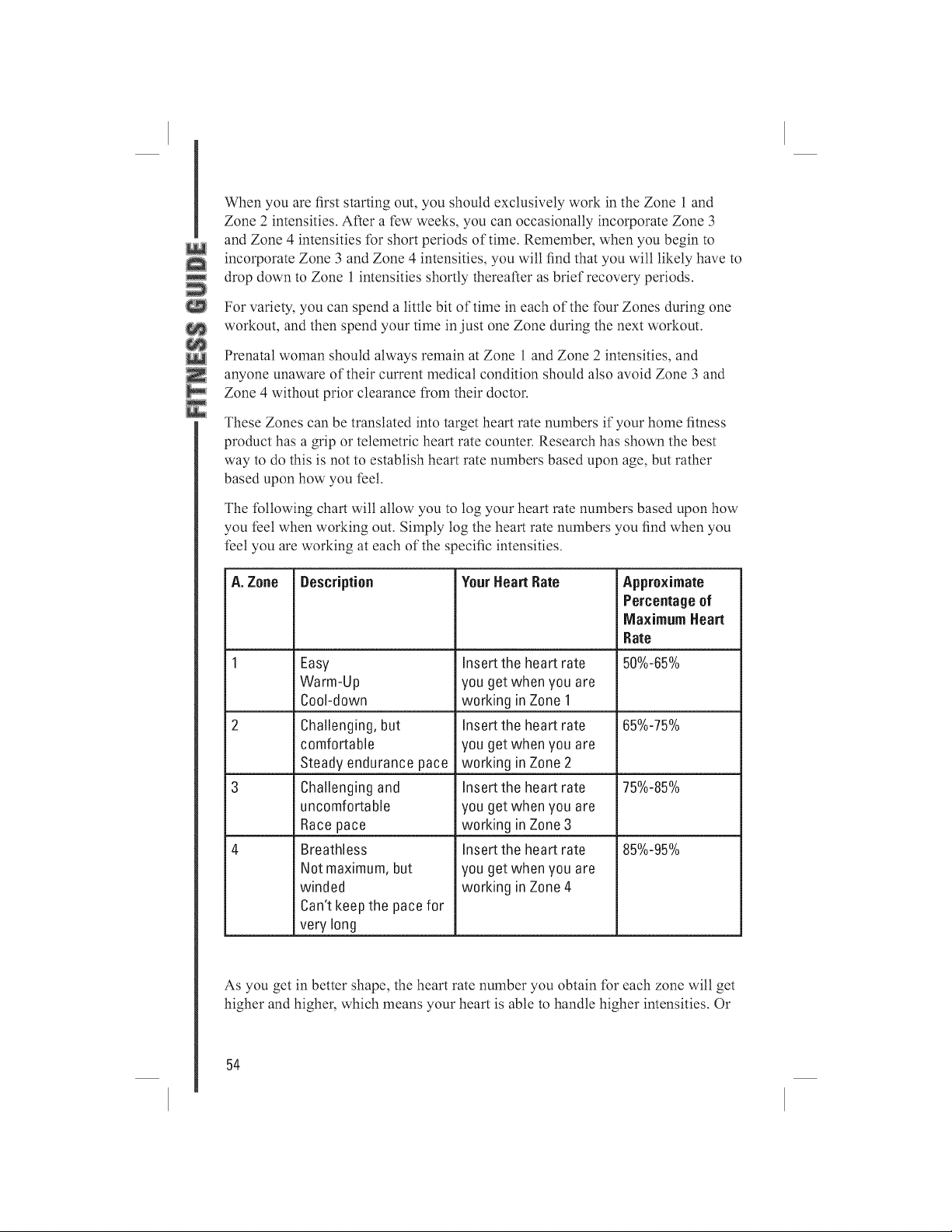
When you are first starting out, you should exclusively work in the Zone 1 and
Zone 2 intensities. Alier a ti_'wweeks, you can occasionally incorporate Zone 3
and Zone 4 intensities ['or short periods or,time. Remember, when you begin to
incorporate Zone 3 and Zone 4 intensities, you will find that you wilt likely have to
drop down to Zone 1 intensities shortly therealier as brief recovery periods.
For variety, you can spend a little bit or,time in each or,the ['our Zones during one
workout, and then spend your time in just one Zone during the next workout.
Prenatal woman should always remain at Zone 1 and Zone 2 intensities, and
anyone unaware or,their current medical condition should also avoid Zone 3 and
Zone 4 without prior clearance from their doctor.
These Zones can be translated into target heart rate nmnbers if'your home fitness
product has a grip or telemetric heart rate counter. Research has shown the best
way to do this is not to establish heart rate nmnbers based upon age, but rather
based upon how you feet.
The tbltowing chart will allow you to log your heart rate numbers based upon how
you feet when working out. Simply log the heart rate nmnbers you find when you
feet you are working at each of the specific intensities.
A. Zone
Description
Easy
Warm-Up
Cool-down
Challenging, but
comfortable
Steady endurance pace
Challenging and
uncomfortable
Race pace
Breathless
Not maximum,but
winded
Can't keepthe pace for
very long
YourHeart Rate
Insert the heart rate
you get when you are
working in Zone 1
Insert the heart rate
you get when you are
working in Zone 2
Insert the heart rate
you get when you are
working in Zone 3
Insert the heart rate
you get when you are
working in Zone 4
Approximate
Percentageof
Maximum Heart
Rate
50%-65%
65%-75%
75%-85%
85%-95%
As you get in better shape, the heart rate nmnber you obtain ['or each zone will get
higher and higher, which means your heart is able to handle higher intensities. Or
54
youmayfindthatyournumbersdon'tchange,butyouareabletostayinZone3
andZone4longerthanyouusedto.
Don't get too attached to any specific nmnber or target heart rate. If you train
properly, you will notice nmnbers that used to be ditticult have now become easier.
You wilt also notice that if you are sick or over-tired, you may find that numbers
that usually/L'et/:aMy easy are one day much harder, and it is a good sign to take
a break. If you notice that nmnbers that are usually very challenging are one day
fairly easy, then it is a good time to push yourself
Listening to your body, and using your heart rate nmnbers (when available) will
enable you to keep track of your intensity and see your progress as you train.
Boating the Dropout Odds
The Surgeon General's Report on Physical Activity and Health smnmarizes a few
main points:
1. Regular physical activity oilers substantial improvements in health and
well-being tbr a majority of Americans.
2. If you exercise regularly, you'll reduce your risk of heart attack, cancer,
diabetes, high blood pressure, osteoporosis and even the common cold.
3. Regular exercise, regardless of the intensity, can help you control stress,
sleep problems and depression.
The benefits of exercise and activity are AMAZING! And yet, only 22 percent of
Americans engage in exercise tbr 20 minutes a day. And even among individuals
who begin exercise programs, the dropout rate is about 50 percent.
So, how do you beat these odds? The answer appears to be in how your start and
maintain your exercise program as well as how you create a habit of exercise.
Why are you starting an exercise program? For most individuals, it is to lose
weight and look better, which are great reasons. However, since changes in your
body shape and size can be gradual, and won't happen overnight, it is important to
tbcus on other benefits so that you will remain motivated.
Thrive on the energy that exercise gives you. Watch your health risks scores go
down. Pay attention to how much easier everyday activity is. Notice how much
better you are sleeping. These kind of additional benefits wilt continue to keep you
motivated if you make them just as important to you as weight loss.
Additionally, try not to view exercise as punishment. Look at it as an investment
in your health. If you don't tL'et motivated to workout one day, think of something
that is appealing to you that is active, and change your workout. Try not to let your
workout become routine or mundane, and always remember that some exercise is
better than none at all. So, if you feet you are not motivated to continue, stop your
55
workout early, or skip a day. It just might be the thing you need to get you excited
about your next workout.
Possibly the most important thing is to keep progressing your exercise program
slowly. Big increases in time or intensity can set you up {'or iniury, and cause you
to drop out. Unless you are a world-class athlete, there is no reason to workout at
world-class levels. Remember to give yourself some days off and get proper rest.
Finally, try to anticipate lapses. If you are traveling, or your schedule is becoming
busier, and you are tL'arful you may get offtrack, try planning ahead. For example,
book a hotel that has a workout facility or change up your workout so that you
keep your interest high and your boredom low. The bottom line is you must be
creative and innovative to keep up your fitness program. With some imagination
and planning, it is easy to do.
Exercise is one of life's joys. It energizes you, helps you look and tL'el better and
puts you on the road to better health. Your home fitness equipment and gym is
worth its weight in gold. Congratulations on making the choice to get started!
Suggested reading:
The Complete Home fTtness Hundbook by Edmund Burke, Human Kinetics
Publisher.
f'ull Body f'lexibiliOp by Jay Blahnik, Human Kinetics Publisher.
Building Strength and Stamina by Wayne Wescott, PhD, Human Kinetics
Publisher.
Cross-Training<f!)r Dummies by Tony Ryan and Martica lleaner, For Dummies
Publisher.
56
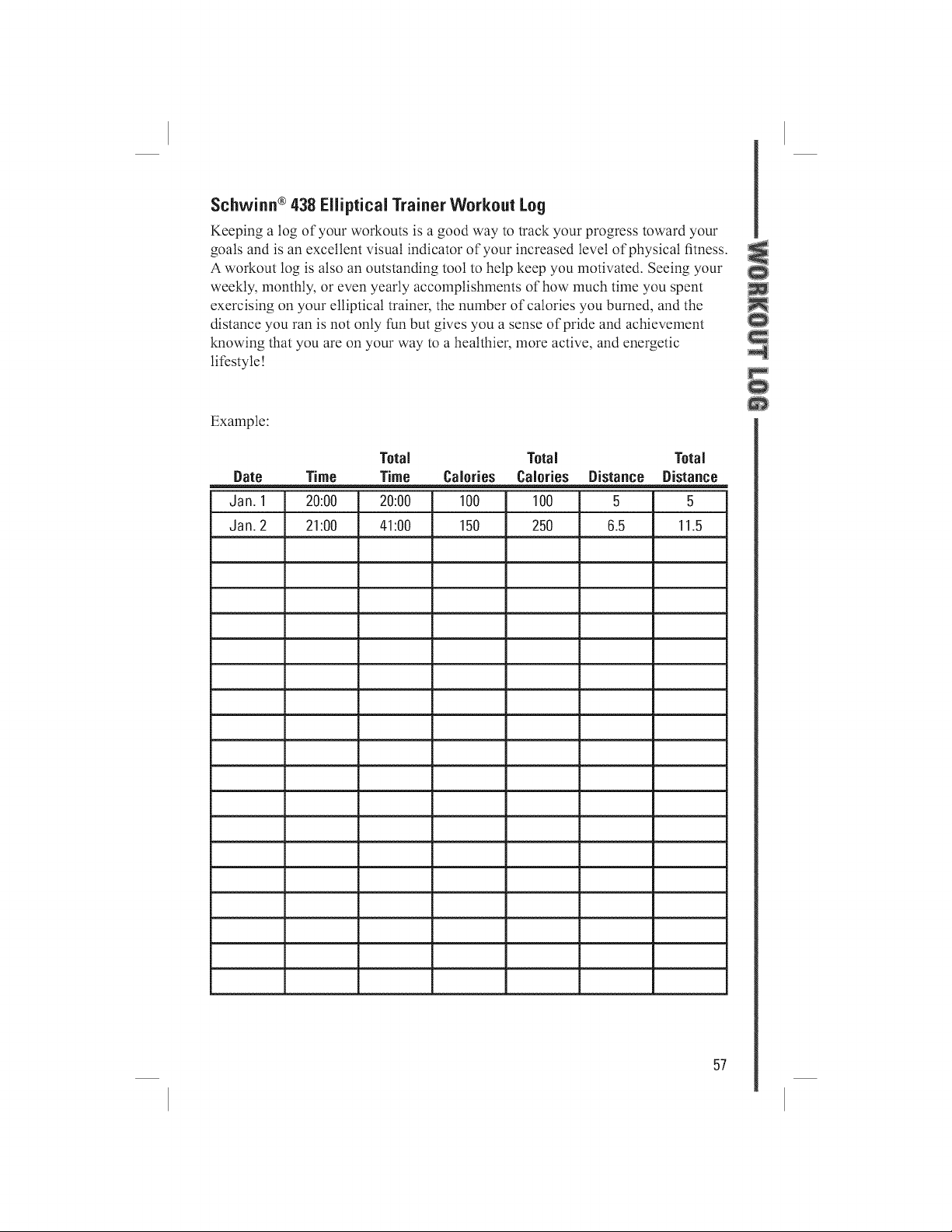
Schwinn ®438 Elliptical Trainer Workout Log
Keeping a log of your workouts is a good way to track your progress toward your
goals and is an excellent visual indicator of your increased level of physical fitness.
A workout log is also an outstanding tool to help keep you motivated. Seeing your
weekly, monthly, or even yearly accomplishments of how much time you spent
exercising on your elliptical trainer, the nmnber of calories you burned, and the
distance you ran is not only thn but gives you a sense of pride and achievement
knowing that you are on your way to a healthier, more active, and energetic
lifestyle!
Example:
Total Total Total
Date Time Time Calories Calories Distance Distance
Jan. 1 20:00 20:00 100 100 5 5
Jan. 2 21:00 41:00 150 250 6.5 11.5
57
SCHWJRR®FITNESSLIMITEDWARRANTYFOREXERCISEPRODUCTS
All Schwinn _'exercise products are warranted to the retail purchaser to be i-'ree i-'rolndefects in
materials and workmanship. Warranty coverage valid to the original purchaser only, and proof
of purchase will be required. Any product sold or placed in an application not recolnmended by
Schwinn _'Fitness will void any warranty coverage set forth by Schwinn _'Fitness warranty policies
and procedures.
TiME PERIOD
Residential Environlnent:
• 30 years on frame
• 3 years on parts
• 2 years on electronics
• 1 year on labor
This warranty excludes wear items that need to be replaced due to normal wear and tear.
THiS WARRANTYDOESROT COVER
• Any component on original equipment which carries a separate consmner warranty of the parts
supplier.
• Normal wear and tear.
• Any damage, *idlure or loss caused by accident, misuse, neglect, abuse, improper asselnfily,
improper maintenance, or *idlure to follow instructions or warnings in the Owner's Manual.
• Use of products in a manner or environment for which they were not designed.
LiMiTATiONS
The foregoing warranties are in lieu of and exclude all other warranties not expressly set forth
herein, whether express or implied by operation of law or otherwise, including, but not limited to,
warranties of merchantability or fitness for a particular purpose. Nautilus, lnc. (Nautilus) shall in no
event be liable for incidental or consequential losses, damages or expenses in connection with its
exercise products. Nautilus' liability hereunder is expressly limited to the replacement of goods not
complying with this warranty or, at Nautilus' election, to the repayment of an amount of the purchase
price of the exercise product in question. Some states do not permit the exclusion or limitation
of implied warranties or incidental or consequential damages, so the preceding limitations and
exclusions may not apply to you.
PROCEDURES
Warranty selwice will be performed by an authorized Schwinn _'Fitness Dealer. The original
purchaser must provide proof of purchase. Selwice calls and/or transportation to and from the
authorized Schwinn _' Dealer is the responsibility of the purchaser.
• Nautilus will have the option to repair or replace any exercise product(s), which require warranty
selwice.
• Nautilus will replace any equipment frame that is structurally defective with a new frame or
replace the unit with a unit of equal value. Nautilus is not responsible for labor charges in
replacing defective fralnes.
• In the event a product cannot be repaired, Nautilus will apply a limited credit reimbursement
toward another Schwinn _'exercise product of equal or greater value.
• Nautilus is not responsible for dealer labor charges for component changeovers completed after
the labor-related warranty period(s) stated herein.
• lfyou elect to repair an exercise product or part yourselL using the selwices of someone other
than an authorized Schwinn _'Fitness Dealer, or use a replacement part not supplied by Nautilus,
Nautilus shall not be liable for any cost, damage, *idlure or loss caused by the use of such
unauthorized service or parts.
• See your authorized Schwinn _'Fitness Dealer for service or write to:
Schwinn Fitness Technical Selwices, Nautilus lnc., World Headquarters, 16400 SE Nautilus Drive,
Vancouver, WA 98683; or call 1-800-864-1270 for assistance or questions.
58