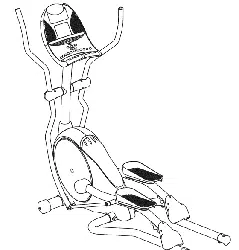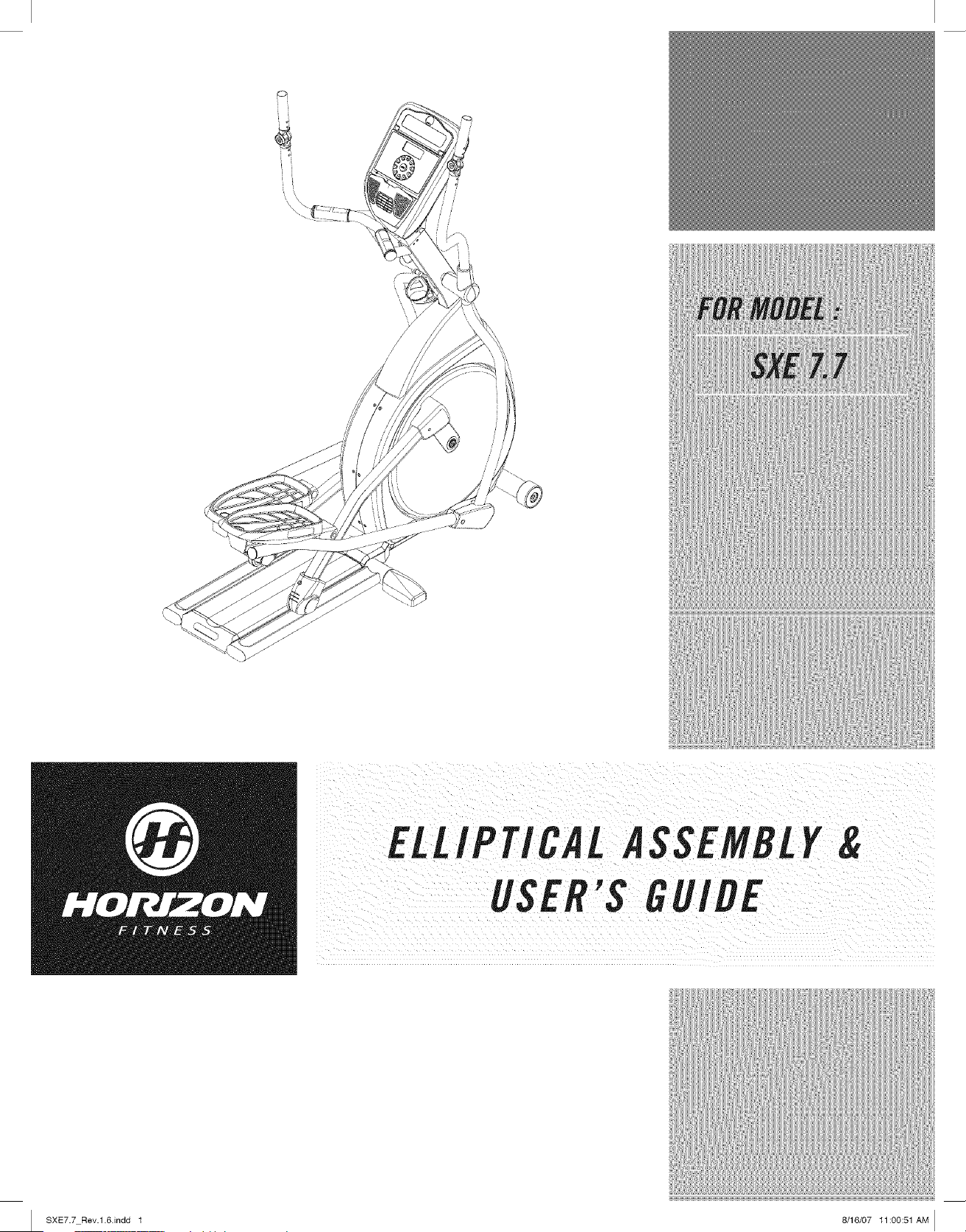
ELLIPTICAL ASSEMBLY&
USER'S GUIDE
I SXE7.7 Rev.l.6.indd 1 8/16/07 11:00:51 AM I
!ii........................................................................................................................................................................................iJ _!!!!!!!!!!!!!!!!!!!!!!!!!!!!!!!!!!!!!!!!!!!!!!i
CONGRATULATIONSand TttAflKYOUforyourpurchaseof this HorizonFitnessefliptical/
Whetheryour goal is to win races or simply enjoy a fuller, healthier fifestyle, a Horizon Fitness elliptical
can help you attain it- adding club-quafity performance to your at-home workouts, with the ergonomics
and innovative features you need to get stronger and healthier, faster. Because we're committed to
designing fitness equipment from the inside out, we use only the highest quafity components. It's a
commitment we back with one of the strongest frame-to-brake warranty packages in the industry.
Youwant exerciseequipment that offers the most comfort, the best reliability and the highest quality
in its class.
Horizon Fitnessdelivers.
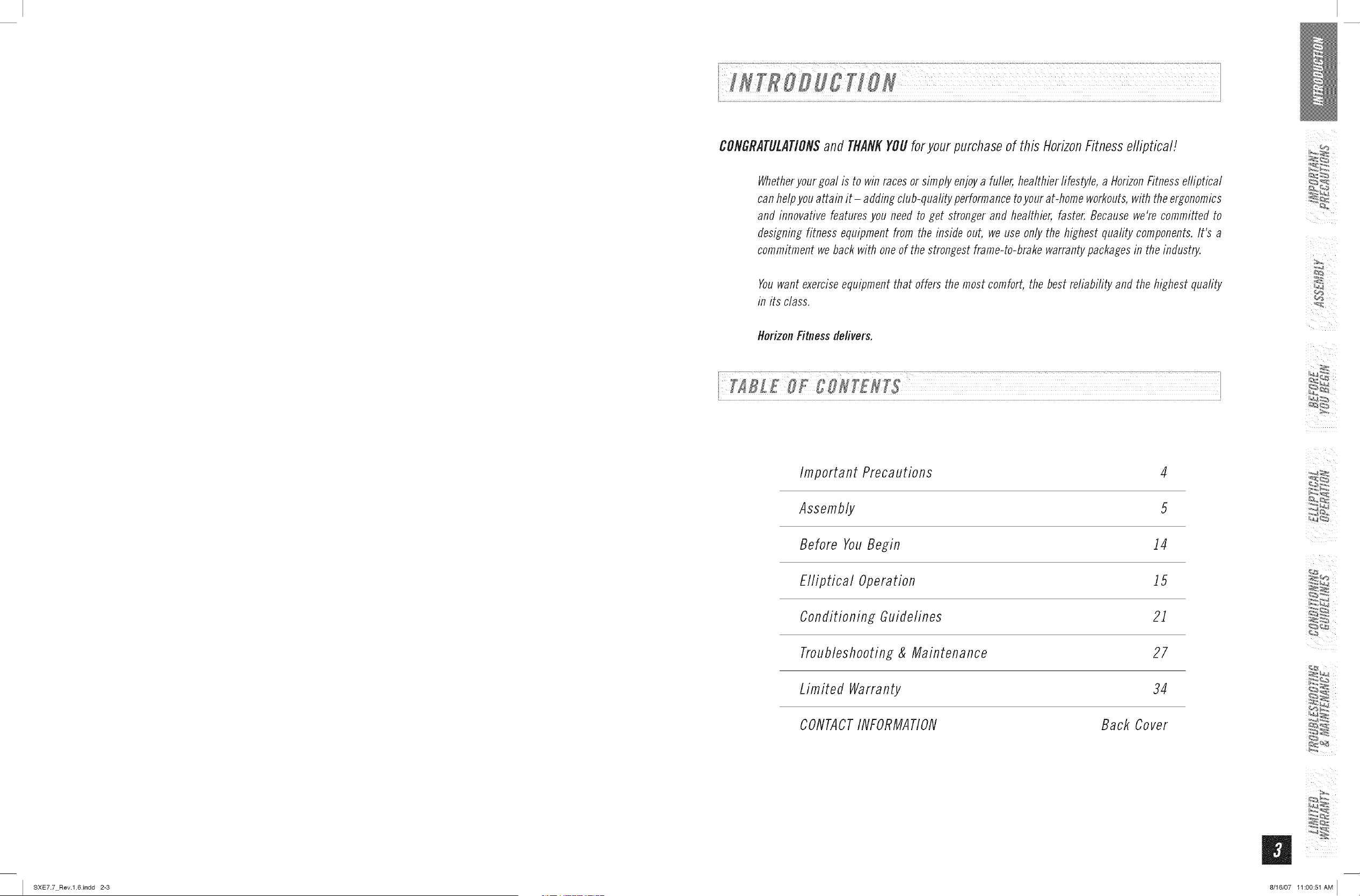
Important Precautions
4
Assembly 5
Before YouBegin i4
Elliptical Operation 15
Conditioning Guidelines 2i
Troubleshooting & Maintenance 27
Limited Warranty 34
CONTACTINFORMATION Back Cover
I SXE7.7 Rev.l.6.indd 2-3 8/16/07 11:00:51 AM I
iiI_¢_,i
_iii i
I SXE7.7 Rev.l.6Jndd 4-5
SAVETHESEINSTRUCtiONS
Read all instructions before using this elliptical. Whenusing an electrical product, basic precautions
should alwaysbefollowed,including thefollowing: Readaft instructions beforeusing this elliptical It is the
responsibifityof the ownerto ensurethat aft usersof this efliptical are adequatelyinformed of aft warnings
and precautions. If you have any questionsafter reading this manual, contact Searsat the numberlisted
on the backcoverof this manual
If you experience any kind of pain, including, but not limited to chest pains, nausea, dizziness, or
shortness of breath, stop exercising immediately and consult your physician before continuing.
o Maintain a comfortable pace. Do not sprint above 80 rpms on this machine.
o Tomaintain balance, it is recommended to keep a grip on the handlebars while exercising, mounting or
dismounting the machine.
o Do not wear clothes that might catch on any part of the elliptical
o Do not turn pedal arms by hand.
o Make sure handlebars are secure before each use.
o Do not insert or drop any object into any opening.
• Unplug elliptical before moving or cleaning it. Toclean, wipe surfaces down with soap and slightly damp
cloth only,:never use solvents. (SeeMAINTENANCE)
o This elliptical should not be used by persons weighing more than 275 pounds. Failure to comply will void
the warranty.
o This elliptical is intended for in-home use only. Do not use this elliptical in any commercial, rental, school
or institutional setting. Failure to comply will void the warranty.
o Do not use elliptical in any location that is not temperature controlled, such as but not limited to garages,
porches, pool rooms, bathrooms, carports or outdoors. Failure to comply may void the warranty.
o Use the elliptical only as described in this manual
o Keep the topside of the foot support clean and dry.
o Care should be taken when mounting or dismounting the equipment. Before mounting or dismounting,
move the pedal on the mounting or dismounting side to its lowest position and bring the machine to a
complete stop.
o Disconnect aft power before servicing the equipment.
essentialthatyoureiiipticaiiS,Sedonlyindoors,in ciimaiecontroiiedroom:ffyoureiiipU_ai_asbee,
i exposedto colder iemperaturesor high moistureClimateS; it is Strongly,recommendedthat the elliptical is
rme! q te_!ra!u (o tim Se: Fa!,q ay !!!s! ,rem!t ! !,c tr!,! ! !a'!!re
IMPORTANT..READTHESESAFETYINSTRUCtiONSBEFOREUSE!
ii! ii i i!i!ili !i ii i ii, ii iil i! ii i ii!!i!i !!ii il i i i!i:
Thereare severalareasdunng the assemblyprocessof a elflpticat that specialattention must bepa_d It zs
i very important to follow the assemblyinstructions correctlyand to makesure all parts arefirmly tightened,
the assembly,instructions are not foilowed correctly, not
i tightened and will seem loose and may cause irritating noisesl Toprevent damage to the
i assembly,instructionsmust be reviewedand correctiveactions should be taken.
i
UNPACKING
Unpackthe product whereyou will be usingit. Placethe product on a level flat surface.It is recommended
that you place a protective covering onyour floor. During each assemblystep, ensure that ALL nuts and
bolts are in placeand partially threadedin beforecompletelytightening anyONEbolt.
NOTE:A light application of grease may aid in the installation of hardware.Anygrease, such as lithium
bike greaseis recommended.
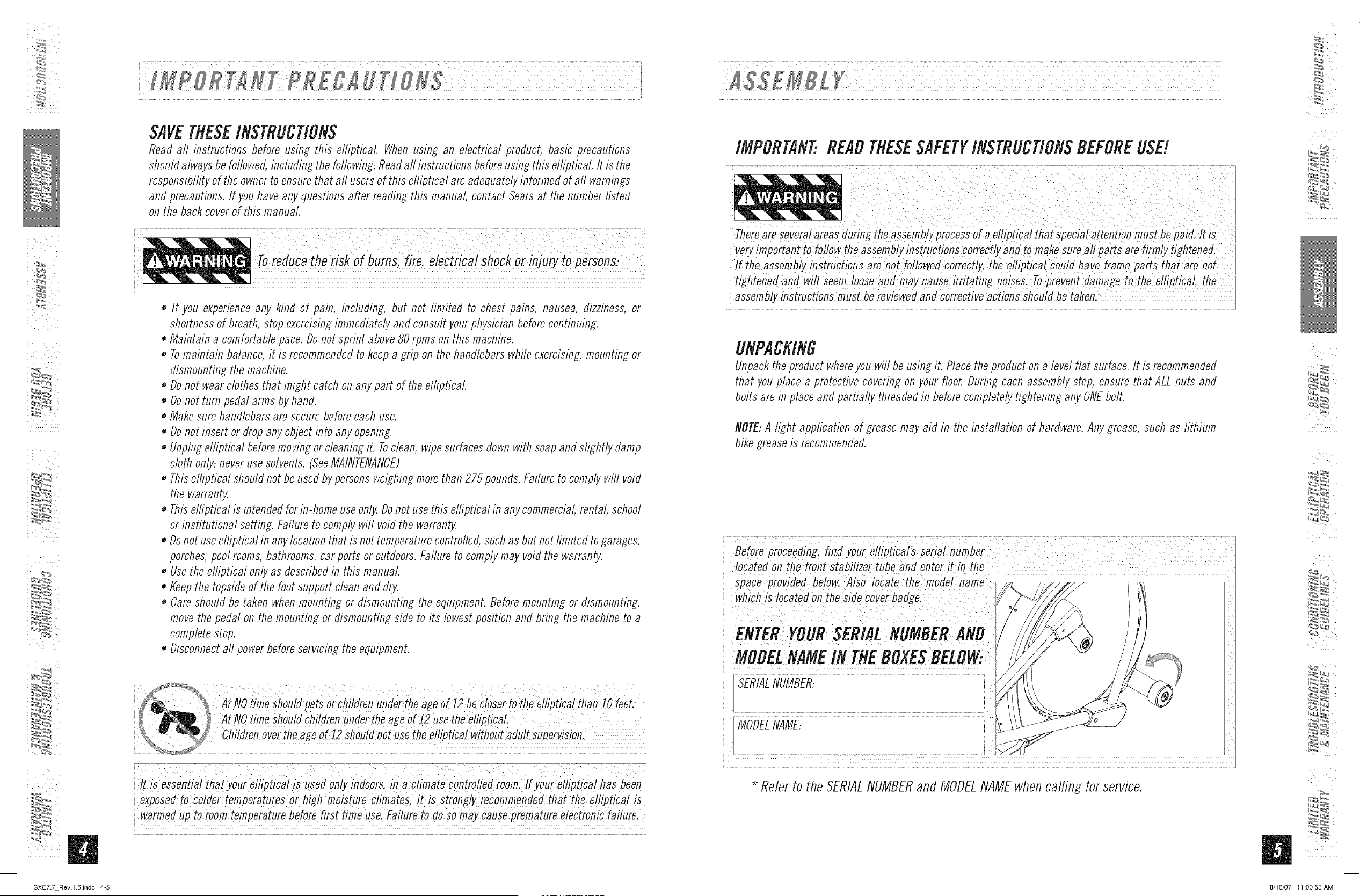
MODELNAME:
i l
Referto the SERIALNUMBERand MODELNAMEwhencafling for service.
8/16/07 11:00:55 AM I
1:2_i
_iii i
I SXE7.7 Rev.l.6Jndd 6-7
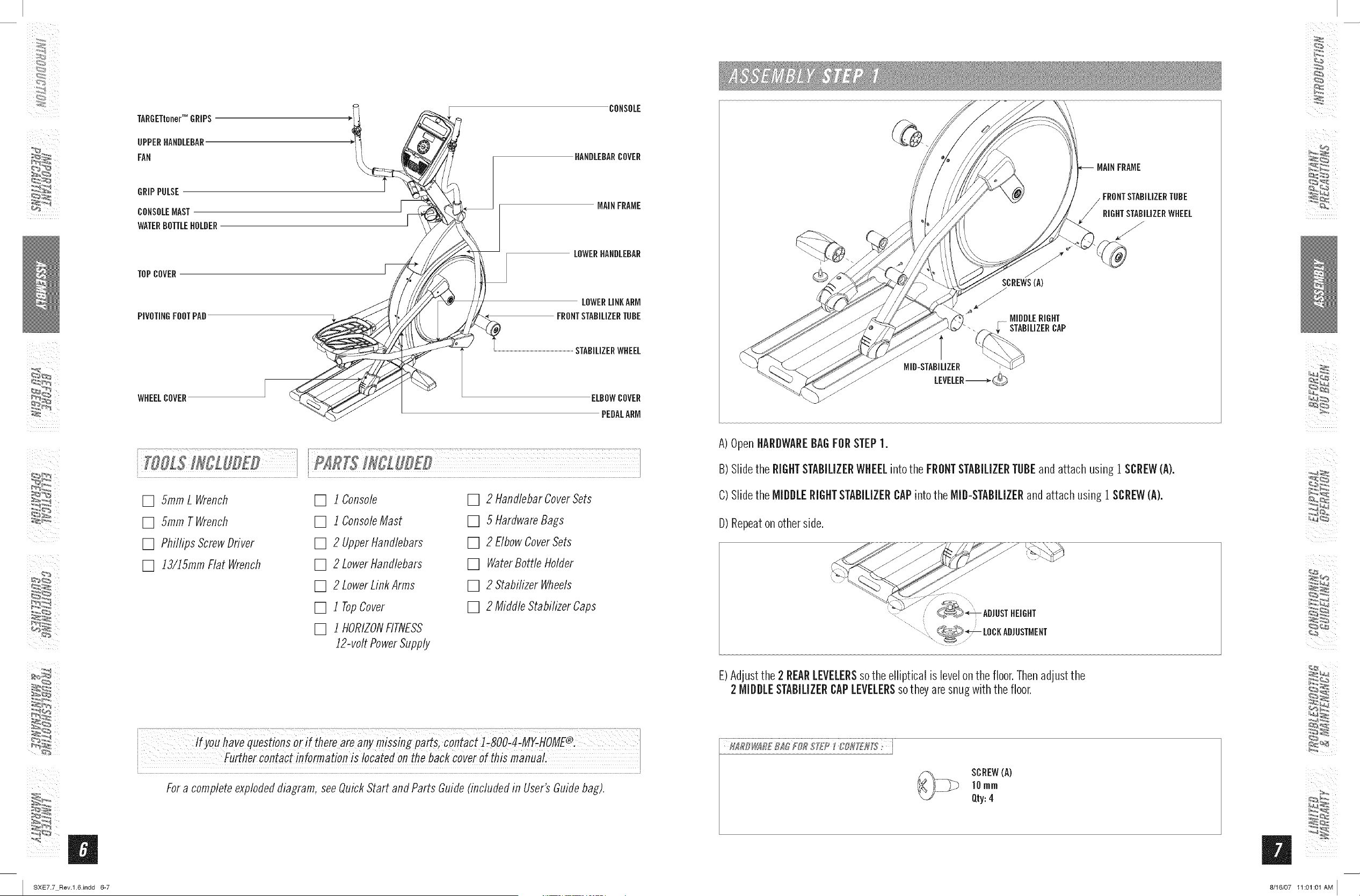
TARGETtonerTM GRIPS
UPPERHANDLEBAR
FAN
CONSOLE
HANDLEBARCOVER
GRiPPULSE
CONSOLEMAST
WATERBOTTLEHOLDER
TOPCOVER
PIVOTINGFOOTPAD
MAINFRAME
LOWERHANDLEBAR
LOWERLINKARM
FRONTSTABILIZERTUBE
STABiLiZERWHEEL
WHEELCOVER ELBOWCOVER
PEDALARM
[] 5ramL Wrench
[] 5ram TWrench
[] Phillips ScrewDriver
[] ]3/15mm Flat Wrench
[] i Console
[] ] ConsoleMast
[] 2 Upperl-tandlebars
[] 2 LowerHandlebars
[] 2 LowerLinkArms
[] i TopCover
[] i HORIZONFITNESS
]2-volt PowerSupply
[] 2 HandlebarCoverSets
[] 5 HardwareBags
[] 2 ElbowCoverSets
[] WaterBottle Holder
[] 2 StabilizerWheels
[] 2 Middle StabilizerCaps
co,taCt! 8OO MY-HOME®
i Furthercontact information !s locatedon theback coverofthismanuaL
Fora completeexplodeddiagram,seeQuickStart and Parts Guide(includedin User'sGuidebag).
SCREWS(A)
/
MIDDLERIGHT
STABILIZERCAP
MID-STABILIZER
LEVELER-_,-_
A)OpenHARDWAREBAGFORSTEP1.
B) Slidethe RIGHTSTABILIZERWHEELintothe FRONTSTABILIZERTUBEand attach using 1 SCREW(A).
C) Slidethe MIDDLERIGHTSTABILIZERCAPinto the MID-STABILIZERand attach using 1SCREW(A).
D) Repeatonotherside.
\ ...............................................................
E)Adjustthe 2 REARLEVELERSsothe elliptical is levelonthe floor.Thenadjustthe
2 MIDDLESTABILIZERCAPLEVELERSsotheyare snugwith thefloor.
SCREW(A)
]0 rnrn
Qty:4
_,r,
8/18/07 11:01:01 AM I
I_ i
_iii i
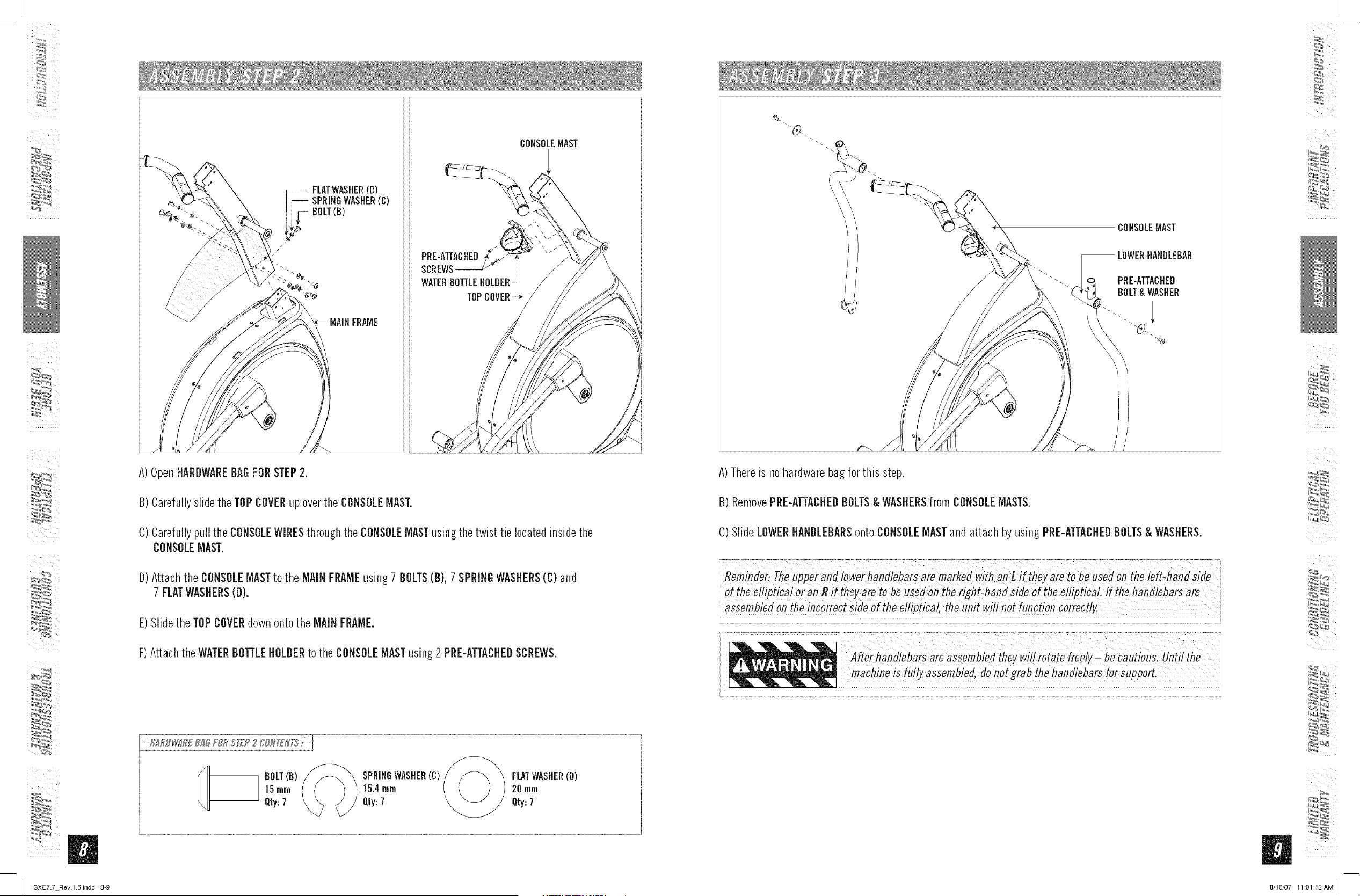
i FLATWASHER(B)
SPRINGWASHER(C)
BOLT(B)
PRE-ATTACHEB
SCREWS
WATERBOTTLEHOLDER-
TOPCOVER_-_
A)OpenHARDWAREBAGFORSTEP2.
B) Carefullyslide the TOPCOVERupoverthe CONSOLEMAST.
C) Carefullypull the CONSOLEWIRESthroughthe CONSOLEMASTusingthe twist tie locatedinsidethe
CONSOLEMAST.
D) Attach the CONSOLEMASTto the MAiNFRAMEusing 7 BOLTS(B), 7 SPRINGWASHERS(C) and
7 FLATWASHERS(D).
E)Slidethe TOPCOVERdownontothe MAiNFRAME.
F)Attach theWATERBOTTLEHOLDERto the CONSOLEMASTusing2 PRE-ATTACHEDSCREWS.
CONSOLEMAST
A)Thereis no hardwarebag for this step.
B) RemovePRE-ATTACHEDBOLTS& WASHERSfrom CONSOLEMASTS.
C) Slide LOWERHANDLEBARSonto CONSOLEMASTandattach by using PRE-ATTACHEDBOLTS& WASHERS.
ioft/Tee!!ipt!ca!oran_ift/Teyaretobe.se_/o,7t/Teright_/Ta,_iS!Ued t/Te_!!iPt!_L!f_/_e/_an_/!ebar_ar_
!!em!!e ! !nc!rrec! !!_e !! the !!!ip!!ca th w!!! n! n!fi!, !or!e!
_,r,
I SXE7.7 Rev.l.6.indd 8-9 8/16/07 11:01:12AM I
/:2_ i
_iii i
BOLT(F) FLATWASHER(G)
FLATWASHER(E)
PEDALARM
SPACER(H)
PEHALARM
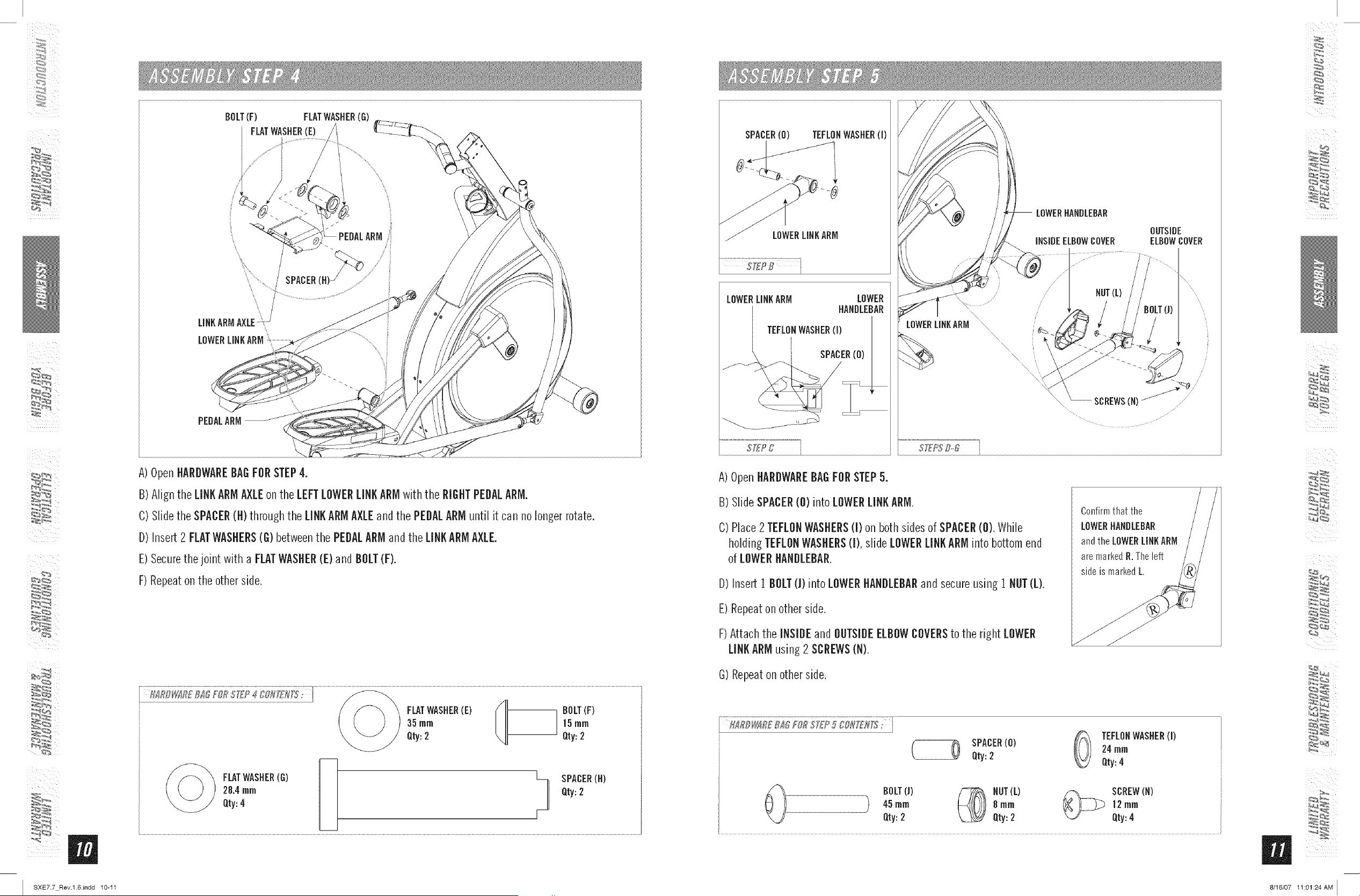
A)OpenHARDWAREBAGFORSTEP4.
B) Align the LINKARMAXLEon the LEFTLOWERLINKARMwith the RIGHTPEDALARM.
C) Slidethe SPACER(H) throughthe LINKARMAXLEand the PEDALARMuntil it can no longer rotate.
D) Insert 2 FLATWASHERS(G) betweenthe PEDALARMand the LINKARMAXLE.
E)Securethejoint with a FLATWASHER(E)and BOLT(F).
F) Repeaton the other side.
Qty:28"4FLAT4rnrnWASHER(G) _-- [--L/ SPACERQty:2 (H)
SPACER(0) TEFLONWASHER(I)
LOWERLINKARM LOWER
HANDLEBAR
/ TEFLONWASHER(I)
/
/
\
LOWERMNKARM
LOWERHANDLEBAR
OUTSIDE
iNSiDEELBOWCOVER ELBOWCOVER
//
........ NUT(L)
yyi
A)OpenHARDWAREBAGFORSTEP5.
B) SlideSPACER(0) intoLOWERLINKARM.
C) Place2 TEFLONWASHERS(I) on both sidesof SPACER(0). While
holding TEFLONWASHERS(I), slide LOWERLINKARMinto bottom end
of LOWERHANDLEBAR.
D) Insert 1 BOLT(]) into LOWERHANDLEBARand secureusing 1 NUT(L).
E) Repeaton other side.
F)Attach the INSIDEand OUTSIDEELBOWCOVERSto the right LOWER
LINKARMusing2 SCREWS(N).
Confirmthat the
LOWERHAHHLEHAH
andthe LOWERLINKARM
aremarkedH.Theleft
sideis markedL.
G)Repeaton other side.
TEFLONWASHER(I)
SPACER(0) 24rnrn
Qty:2 Qty:4
BOLT(J) _ HOT(L) /_ SCREW(H)
45rnrn _ 8 rnrn _ 12rnrn
Qty:2 Qty:2 Qty:4
_,r,
I SXE7.7 Rev.l.6.indd 10-11 8/16/07 11:01:24AM I
_iii i
UPPER
HANDLEBARCOVERS
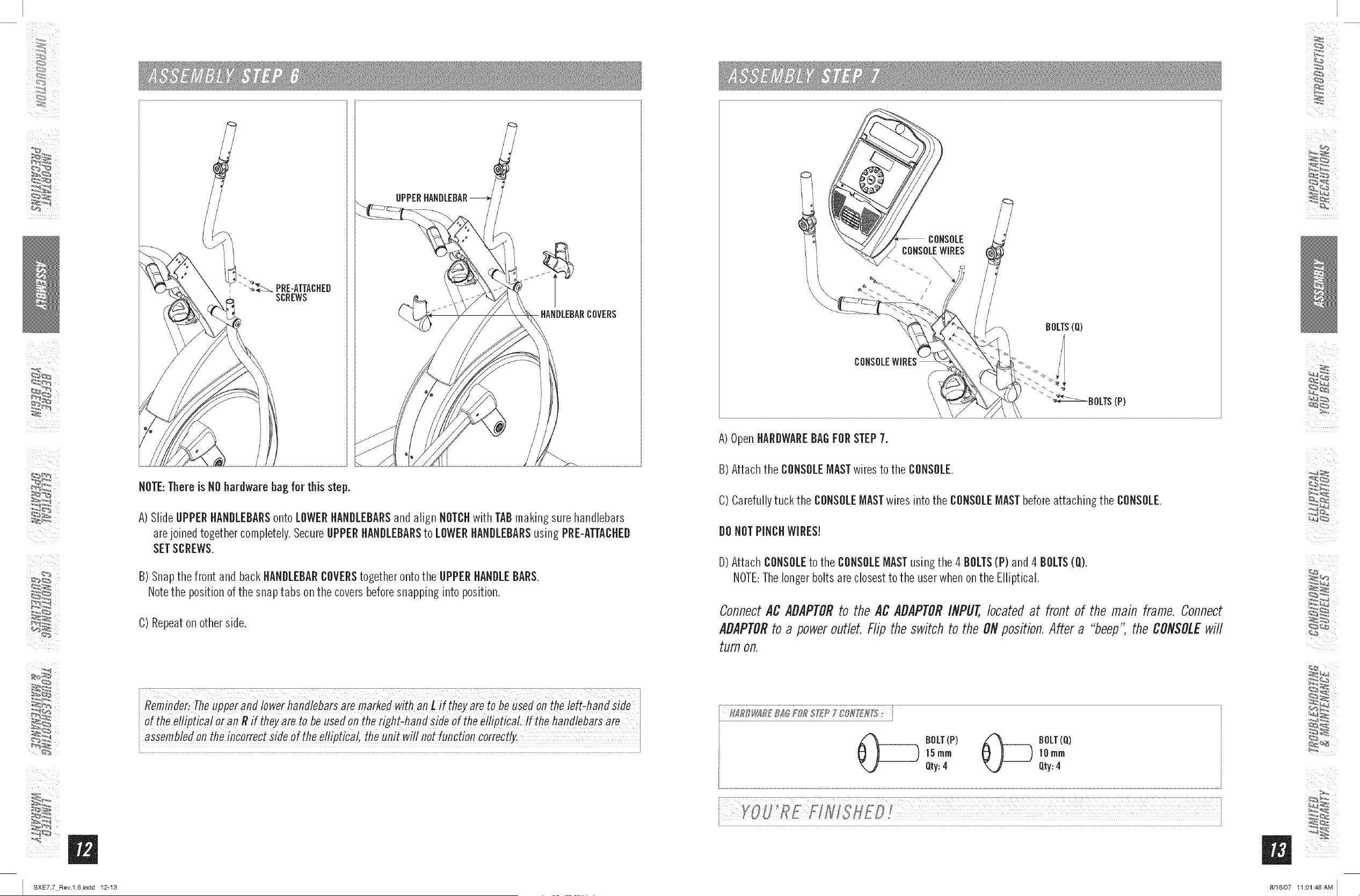
NOTE:Thereis NOhardware bag for this step.
A)Slide UPPERHANDLEBARSonto LOWERHANDLEBARSand align NOTCHwith TABmakingsure handlebars
arejoined together completely.SecureUPPERHANDLEBARSto LOWERHANDLEBARSusing PRE-ATTACHED
SETSCREWS.
B) Snapthe front and backHANDLEBARCOVERStogether ontothe UPPER HANDLEBARS.
Notethe positionof the snap tabs on the coversbeforesnapping into position.
C) Repeaton other side.
i Reminder:Theupper anf! iowerhandlebarsare marked with a_L usedon the ieft_haids;ide
iof the eiiipiicai or an R if theyare to be used o_the right ha_ side of the ellipficaL if the ha_d!ebarsare
i assemb!ed °n the inc°rrect side of the e!/ipt!ca1,the un!twi!/not function correctly"
A)OpenHARDWAREBAGFORSTEP7.
B) Attach the CONSOLEMASTwires to the CONSOLE.
C) Carefullytuck the CONSOLEMASTwires into the CONSOLEMASTbeforeattaching the CONSOLE.
DO NOT PINCHWIRES!
D) Attach CONSOLEto the CONSOLEMASTusing the 4 BOLTS(P) and 4 BOLTS(O).
NOTE:Thelongerbolts are closestto the userwhenonthe Elliptical.
ConnectACADAPTORto the AC ADAPTORIflPUT,bcatefl at front of the main frame.Connect
ADAPTORto a poweroutlet. Flip theswitch to the ONposition.After a "beep', the CONSOLEwill
turnon.
_[_) BOLT(P) _ BOLT(Q)
]5ram ]Omm
Qty:4 Qty:4
i YOUREFINISH£D
_,r, _
I SXE7.7 Rev.l.6.indd 12-13 8/16/07 11:01:48AM I
!
CONGRATULATIONS!onchoosingyour elliptical. You'vetakenan important step in developingand
sustaining an exerciseprogram! Yourelliptical is a tremendouslyeffective tool for achievingyour personal
fitness goals. Regularuse of your elliptical can improvethe quality of your life in so many ways.
HEREAREJUSTA FEWOFTHEHEALTHBENEFITSOFEXERCISE:
WeightLoss
A HealthierHeart
o ImprovedMuscle Tone
o IncreasedDaily EnergyLevels
The key to reaping these benefits is to develop an exercise habiL Your new
elliptical will help you efiminate obstacles that prevent you from exercising.
Inclement weather and darkness won't interfere with your workout when you
use your elliptical in the comfort of your home. This guide provides you with
basic information for using and enjoying your new machine.
LOCAtiONOFTHEELLIPtiCAL
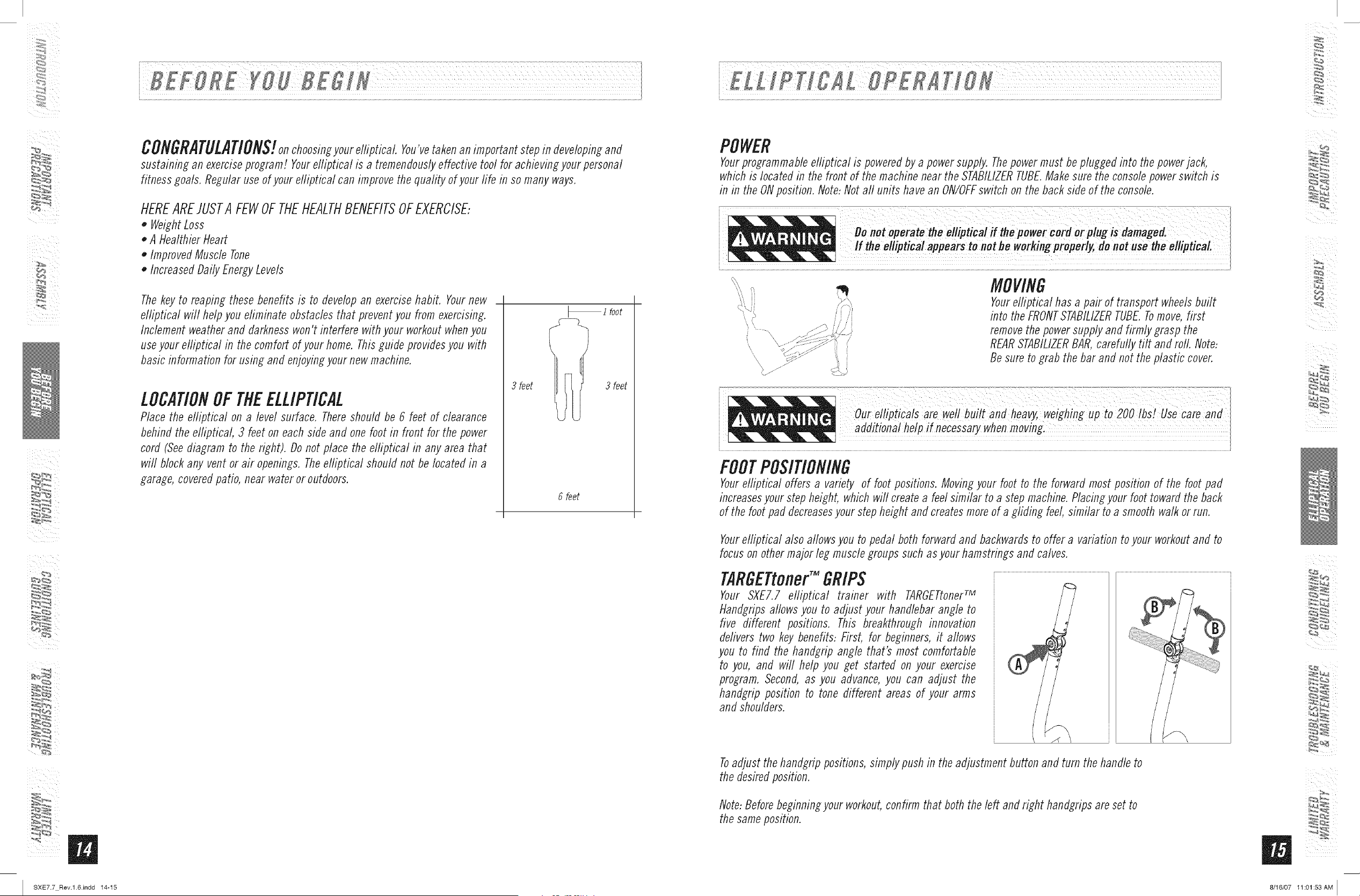
Placethe elliptical on a level surface. Thereshould be 6 feet of clearance
behind the e/ripfical, 3 feet on each side and one foot in front for the power
cord (Seediagram to the right). Do not place the e/riptical in any area that
wifl block any vent or air openings. Theelriptical should not be located in a
garage,coveredpatio, near water or outdoors.
i foot
3 feet 3 feet
6 feet
POWER
Yourprogrammableelliptical is poweredbya powersupply. Thepowermust be plugged into the powerjack,
which is located in the front of the machine near the STABILIZERTUBE.Makesure the consolepowerswitch is
in in the ONposition. Note:Not aft units have an ON/OFFswitch on the back side of the console.
\\
\
MOVING
Yourelliptical has a pair of transport wheelsbuilt
into the FRONTSTABILIZERTUBE.Tomove,first
removethe powersupply and firmly grasp the
REARSTABILIZERBAR,carefully flit and roll. Note:
Be sure to grab the bar and not the _lastic cover.
o,reHipticaisareweH a,dhe vy,wei h!, to2OOi s!Usecare
FOOTPOSITIONING
Yourelliptical offers a variety of foot positions. Movingyour foot to the forward most position of the foot pad
increasesyour step height, which will create a feelsimilar to a step machine.Placingyour foot toward the back
of the foot pad decreasesyour stepheight and createsmoreof a griding feel,similar to a smooth walk orrun.
Yourelliptical also allowsyou to pedal both forward and backwardsto offer a variation to your workoutand to
focuson othermajor leg musclegroups such as your hamstrings and calves.
TARGETtoner"GRIPS
Your SXE7.7 elliptical trainer with TARGETtoner_
Handgrips allows you to adjust your handlebar angle to
five different positions. This breakthrough innovation
deriverstwo key benefits: First, for beginners,it allows
you to find the handgrip angle that's most comfortable
to you, and will help you get started on your exercise
program. Second,as you advance,you can adjust the
handgrip position to tone different areas of your arms
and shoulders.
Toadjust the handgrippositions,simply pushin the adjustment buttonand turn the handleto
the desiredposition.
Note:Beforebeginningyour workout,confirm that both the left and right handgrips are set to
the sameposition.
5
I SXE7.7 Rev.l.6.indd 14-15 8/16/07 11:01:53AM I
_iii i
I
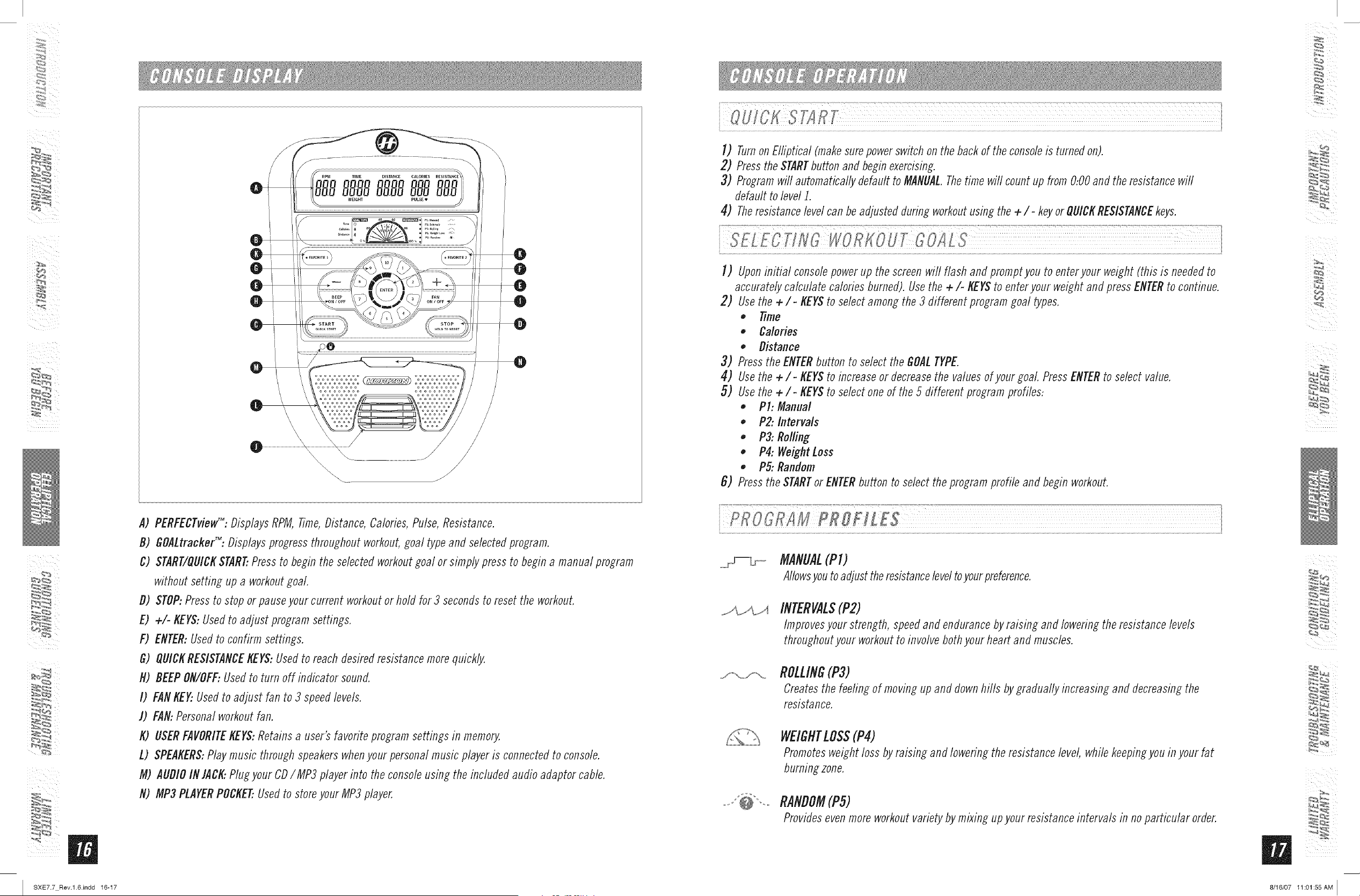
A) PERFECTvieW":Displays RPM,Time,Distance,Calories,Pulse,Resistance.
B) GOALtrackeF%Displaysprogressthroughoutworkout,goal typeand selectedprogram.
C) START/QUICKSTART..Pressto begin the selectedworkoutgoal or simply press to begin a manual program
without setting up a workoutgoal.
B) STOP:Pressto stop orpauseyour current workoutor hold for 3 secondsto reset the workout.
E) ÷/- KEYS:Usedto adjust program settings.
F) ENTER:Usedto confirm settings.
G) QUICKRESISTANCEKEYS:Usedto reachdesired resistancemore quickly.
N) DEEPON/OFF:Usedto turn off indicator sound.
I) FANKEY..Usedto adjust fan to 3 speedlevels.
J) FAN:Personalworkoutfan.
K) USERFAVORITEKEYS:Retains a user's favorite programsettings in memory.
L) SPEAKERS:Play music throughspeakerswhenyour personalmusic player is connectedto console.
M) AUDIOINJACK:Plugyour CDIMP3 player into the consoleusing the includedaudio adaptorcable.
N) MP3PLAYERPOCKET..Usedto storeyour MP3 player.
]) Turnon Elliptical (makesurepowerswitch on the backof theconsoleis turnedon).
2) PresstheSTARTbutton and beginexercising.
3) Programwill automaticallydefault to MANUAL.Thetime will count up from 0:00 and the resistancewill
default to level J.
4) Theresistancelevelcan be adjustedduring workoutusing the +/- keyor QUICKRESISTANCEkeys.
]) Uponinitial consolepowerup thescreenwin flash and promptyou to enteryour weight (this is neededto
accuratelycalculate caloriesburned). Usethe +/- KEYSto enter your weight and pressENTERto continue.
2) Usethe +/- KEYSto selectamong the 3 different programgoal types.
Time
• Calories
• Distance
3) Pressthe ENTERbutton to select the GOALTYPE.
4) Usethe +/- KEYSto increaseor decreasethe valuesof your goal PressENTERto select value.
5) Usethe +/- KEYSto selectone of the 5 different program profiles:
• PI: Manual
• P2: Intervals
• P3: Rolling
• P4: WeightLoss
, P5: Random
6) Pressthe STARTorENTERbutton to select theprogram profile and begin workout.
o \ ! j
MANUAL(PI)
AIIowsyouto adjust theresistanceleveltoyourpreference.
INTERVALS(P2)
Improvesyour strength, speedand endurancebyraisingand lowering the resistance levels
throughoutyour workoutto involve bothyour heart and muscles.
j-_.o,ro-_ ROLLING(P3)
Createsthe feeling of movingup and downhills by gradually increasing and decreasingthe
resistance.
WEIGHTLOS$(P4)
Promotesweight loss by raising and lowering theresistance level, whilekeepingyouin your fat
burningzone.
RANDOM(PS)
Providesevenmore workoutvariety bymixing upyour resistanceintervals in no particular order.
5
I SXE7.7 Rev.l.6Jndd 16-17 8/16/07 11:01:55AM I
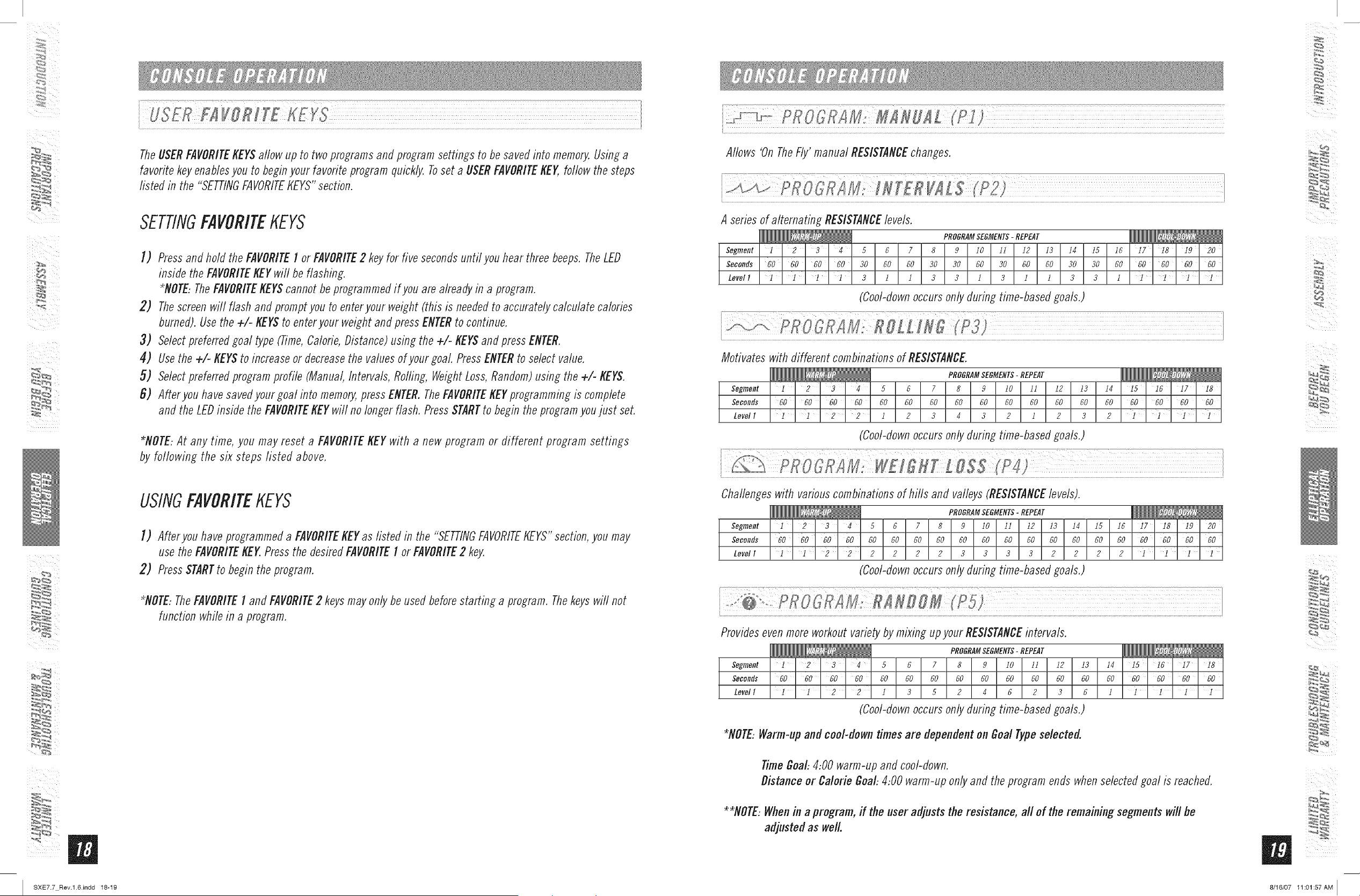
TheUSERFAVORITEKEYSallow up to two programsand programsettings to be savedinto memory.Usinga
favoritekey enablesyou to beginyour favoriteprogram quickly. Toset a USERFAVORITEKEY,follow the steps
listed in the "SETTINGFAVORITEKEYS"section.
SETTINGFAVORITEKEYS
I) Pressandhold theFAVORITEI or FAVORITE2 keyfor five secondsuntil youhear three beeps.TheLED
inside the FAVORITEKEYwifl be flashing.
*NOTE..TheFAVORITEKEYScannotbe programmedif you are already in a program.
2) Thescreenwill flash and promptyou to enteryour weight (this is neededto accuratelycalculate calories
burned).Usethe +/- KEYSto enteryour weightand press ENTERto continue.
3) Selectpreferredgoal type (Time,Calorie,Distance) using the +/- KEYSand press ENTER.
4) Usethe +/- KEYSto increaseor decreasethe values of your goal PressENTERto select value.
5) Selectpreferredprogramprofile (Manual,Intervals, Rolling, WeightLoss,Random)using the +/- KEYS.
6) Afler you have savedyour goal into memory,press ENTER.TheFAVORITEKEYprogrammingis complete
and the LEDinside the FAVORITEKEYwill no longer flash. PressSTARTto begin theprogramyoujust set.
*NOTE:At any time, you may reset a FAVORITEKEYwith a new program or different program settings
by following the six steps listed above.
USINGFAVORITEKEYS
I) After you have programmeda FAVORITEKEYas listed in the "SETTINGFAVORITEKEYS"section,you may
usethe FAVORITEKEY.Pressthe desiredFAVORITEI or FAVORITE2 key.
2) PressSTARTto begin the program.
*NOTE..The FAVORITEI and FAVORITE2 keys may only be used before starting a program. The keys will not
function while in a program.
Allows 'On TheFly' manual RESISTANCEchanges.
A series of alternating RESISTANCElevels.
PROGRAMSEGMENTS-REPEAT
Segment 1 2 3 4 5 6 7 8 9 10 11 12 13 14 15 16 17 18 19 20
Seconds 60 60 60 60 30 60 60 30 30 60 30 60 60 30 30 60 60 60 60 60
Level I l l l 3 I I 3 3 i 3 i i 3 3 I l l
(Cool-downoccursonly during time-basedgoals.)
Motivates with different combinationsof RESISTANCE.
PROGRAMSEGMENTS- REPEAT
Segment 1 2 ' 3 ' 4 5 6 7 8 9 I0 11 12 13 14 15 16 17 18
Seconds 60 60 60 60 60 60 60 60 60 60 60 60 60 60 60 60 60 60
Level I I 2 3 4 3 2 I 2 3 2
(Cool-downoccursonly during time-basedgoals.)
Challengeswith variouscombinationsof hills and valleys(RESISTANCElevels).
PROGRAMSEGMENTS-REPEAT
Segment 1 2 3 4 5 6 7 8 9 I0 11 12 13 14 1:5 16 17 18 19 20
Seconds 60 60 60 60 60 60 60 60 60 60 60 60 60 60 60 60 60 60 60 60
Level I i i 2 2 2 2 2 2 3 3 3 3 2 2 2 2 i i ] ]
(Cool-downoccursonly during time-basedgoals.)
Providesevenmore workoutvariety by mixing upyour RESISTANCEintervals.
PROGRAMSEGMENTS- REPEAT
Segment i 3 5 6 7 8 9 i0 II 12 13
Seconds 60 60 60 60 60 60 60 60 60 60 60 60 60
Levell 1 ' 1 ' 2 ' 2 1 3 5 2 4 6 2 3 6
(Cool-downoccursonly during time-basedgoals.)
14 I5 iG i7 I8
60 60 60 60 60
; i i 1 i
*NOTE:Warm-up and cool-down times are dependent on Goal Type selected.
TimeGoal:4:00 warm-up and cool-down.
Distance or Calorie Goal:4:00 warm-uponly and the programends whenselectedgoal is reached.
**NOTE:Whenin a program, ff the user adjusts the resistance, all of the remaining segments will be
adjusted as well.
_,r, _
I SXE7.7 Rev.l.6Jndd 18-19 8/16/07 11:01:57AM I
_iii i
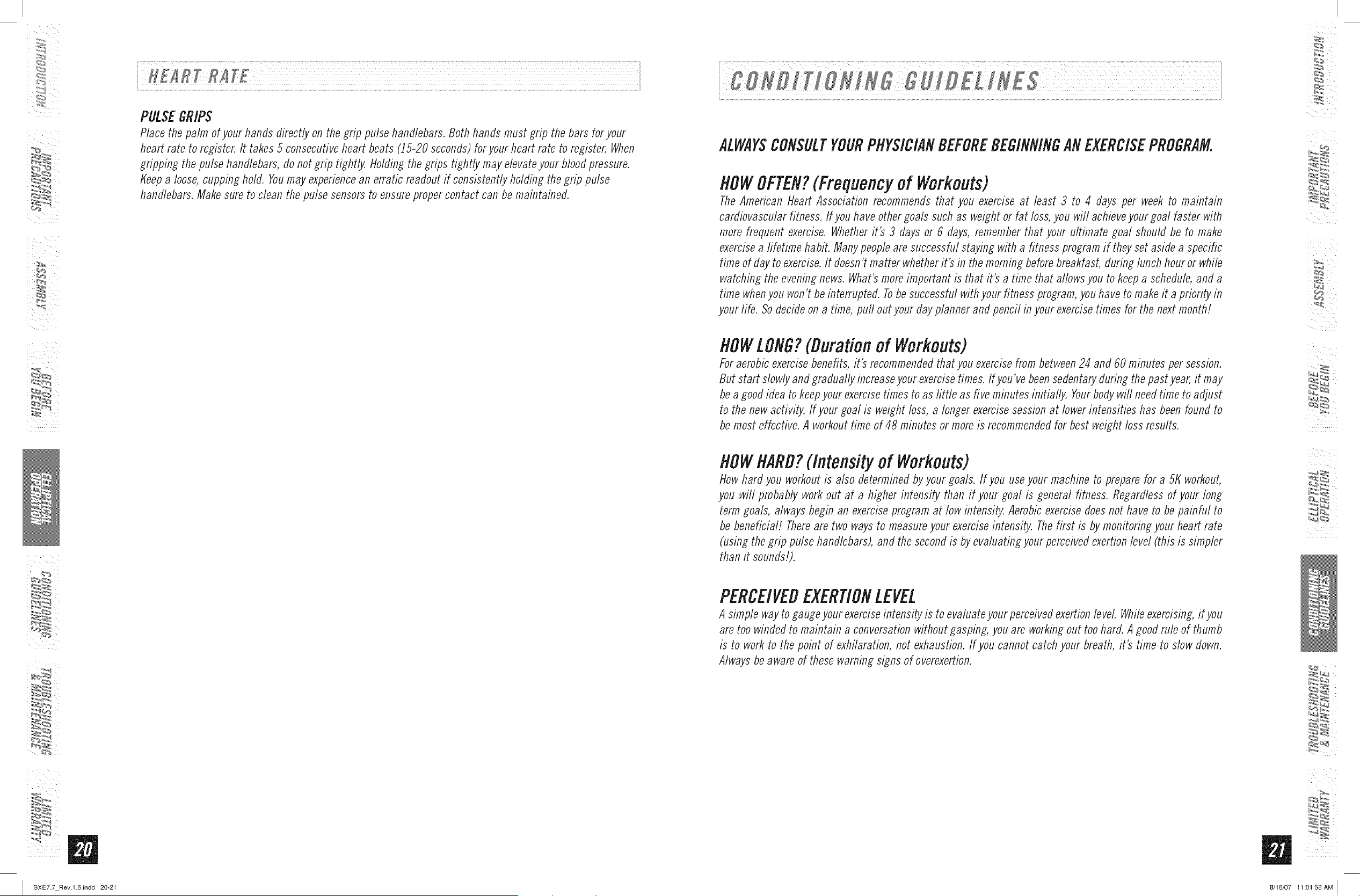
PULSEGRIPS
Place the palm of your hands directly on the grip pulse handlebars. Both hands must grip the bars for your
heart rate to register. It takes 5 consecutive heart beats (15-20 seconds) for your heart rate to register. When
gripping the pulse handlebars, do not grip tightly. Holding the grips tightly may elevate your blood pressure.
Keep a Ioose, cupping hold. Youmay experience an erratic readout if consistently holding the grip pulse
handlebars. Make sure to clean the pulse sensors to ensure proper contact can be maintained.
ALWAYSCONSULTYOURPHYSICIANBEFOREBEGINNINGANEXERCISEPROGRAM.
HOWOFTEN?(Frequencyof Workouts)
The American Heart Association recommends that you exercise at least 3 to 4 days per week to maintain
cardiovascular fitness. If you have other goals such as weight or fat loss, you will achieve your goal faster with
more frequent exercise. Whether it's 3 days or 6 days, remember that your ultimate goal should be to make
exercise a fifetime habit. Many people are successful staying with a fitness program if they set aside a specific
time of day to exercise. It doesn't matter whether it's in the morning before breakfast, during lunch hour or while
watching the evening news. What's more important is that it's a time that allows you to keep a schedule, and a
time when you won't be interrupted. Tobe successful with your fitness program, you have to make it a priority in
your life. So decide on a time, puff out your day planner and pencil in your exercise times for the next month!
HOWLONG?(Durationof Workouts)
For aerobic exercise benefits_ it's recommended that you exercise from between 24 and 60 minutes per session.
But start slowly and gradually increase your exercise times. If you've been sedentary during the past year, it may
be a good idea to keep your exercise times to as tittle as five minutes initially. Your body will need time to adjust
to the new activity. If your goal is weight loss, a longer exercise session at lower intensities has been found to
be most effective. A workout time of 48 minutes or more is recommended for best weight loss results.
HOWHARD?(Intensity of Workouts)
How hard you workout is also determined by your goals, lf you use your machine to prepare for a 5/( workout,
you will probably work out at a higher intensity than if your goal is general fitness. Regardless of your long
term goals, always begin an exercise program at low intensity. Aerobic exercise does not have to be painful to
be beneficial! There are two ways to measure your exercise intensity. The first is by monitoring your heart rate
(using the grip pulse handlebars), and the second is by evaluating your perceived exertion level (this is simpler
than it sounds!).
PERCEIVEDEXERTIONLEVEL
A simple way to gauge your exercise intensity is to evaluate your perceived exertion level. While exercising, if you
are too winded to maintain a conversation without gasping, you are working out too hard. A good rule of thumb
is to work to the point of exhilaration, not exhaustion. If you cannot catch your breath, it's time to slow down.
Always be aware of these warning signs of overexertion.
_,r, _
SXE7.7 Rev.l.6Jndd 20-21 8/16/07 11:01:58AM [
_iii i
SXE7.7 Rev.l.6Jndd 22-23
............................. -?
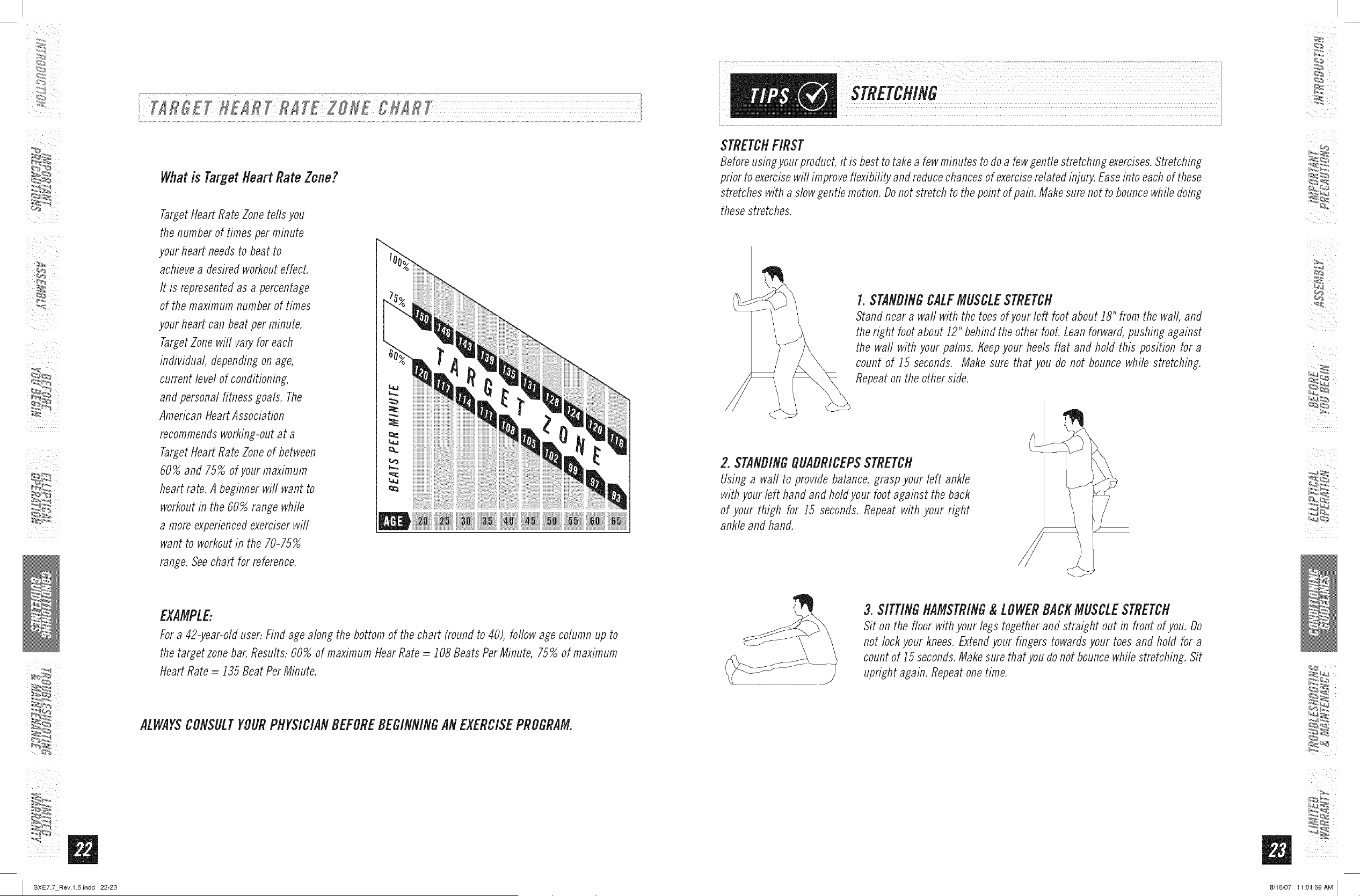
Whatis TargetHeart RateZone?
Target Heart Rate Zone tells you
the number of times per minute
your heart needs to beat to
achieve a desired workout effect.
It is represented as a percentage
of the maximum number of times
your heart can beat per minute.
Target Zone will vary for each
individual, depending on age,
current level of conditioning,
and personal fitness goals. The
American Heart Association
recommends working-out at a
Target Heart Rate Zone of between
60% and 75% of your maximum
heart rate. A beginner will want to
workout in the 60% range while
a more experienced exerciser will
want to workout in the 70-75%
range. See chart for reference.
iiiiiiiiiiiiii
EXAMPLE:
For a 42-year-old user: Find age along the bottom of the chart (round to 40), follow age column up to
the target zone bar. Results: 60% of maximum dear Rate = 108 Beats Per Minute, 75% of maximum
Heart Rate _i 135 Beat Per Minute.
ALWAYSCONSULTYOURPHYSICIANBEFOREBEGINNINGANEXERCISEPROGRAM.
STRETCHFIRST
Before using your product, it is best to take a few minutes to do a few gentle stretching exercises. Stretching
prior to exercise will improve flexibility and reduce chances of exercise related injury. Ease into each of these
stretches with a slow gentle motion. Do not stretch to the point of pain. Make sure not to bounce while doing
these stretches.
I. STANDINGCALFMUSCLESTRETCH
Stand near a wall with the toes of your left foot about i8" from the wall, and
the right foot about 12" behind the other foot. Lean forward, pushing against
the waft with your palms, tfeep your heels flat and hold this position for a
count of i5 seconds. Make sure that you do not bounce while stretching.
Repeat on the other side.
2. STANDINGQUADRICEPSSTRETCH
Using a wall to provide balance, grasp your left ankle
with your left hand and hold your foot against the back
of your thigh for i5 seconds. Repeat with your right
ankle and hand.
/
3. SITTINGHAMSTRING&LOWERBACKMUSCLESTRETCH
Sit on the floor with your legs together and straight out in front of you. Do
not lock your knees. Extend your fingers towards your toes and hold for a
count of 15 seconds. Make sure that you do not bounce while stretching. Sit
upright again. Repeat one time.
_,r, _
8/16/07 11:01:59 AM I
W`4RMUP
The first 2 to 5 minutes of a workout should be devoted to warming up. The warm-up will limber your
muscles and prepare them for more strenuous exercise. Make sure that you warm-up on your product at a
slow pace. The warm up should gradually bring your heart rate into your Target Heart Rate Zone.
COOLDOWfl
Never stop exercising suddenly! A cool-down period of 3-5 minutes allows your heart to readjust to the
decreased demand. Make sure that your cool down period consists of a very slow pace to allow your heart
rate to lower. After the cool-down, repeat the stretching exercises listed above to loosen and relax your
muscles.
An important step in developing a long term fitness program is to determine your goals. Is your primary
goal for exercising to lose weight? Improve muscle? Reduce stress? Prepare for the spring racing schedule?
Knowing what your goals are will help you develop a more successful exercise program. Below are some
common exercise goals:
o Weight Loss - lower intensity, longer duration workouts
o Improve Body Shape and Tone- interval workouts, alternate between high and low intensities
o Increased Energy Level - more frequent daily workouts
o Improved Sports Performance - high intensity workouts
o Improved Cardiovascular Endurance - moderate intensity, longer duration workouts
If possible try to define your personal goals in precise, measurable terms, and then putyour goals in writing.
The more specific you can be, the easier it will be to track your progress. If your goals are long term, divide
them up into monthly and weekly segments. Longer term goals can lose some of the immediate motivation
benefits. Short term goals are easier to achieve. Your console provides you with several readouts that can
be used to record your progress. Youcan track Distance, Calories or Time.
KEEPINGANEXERCISEDIARY
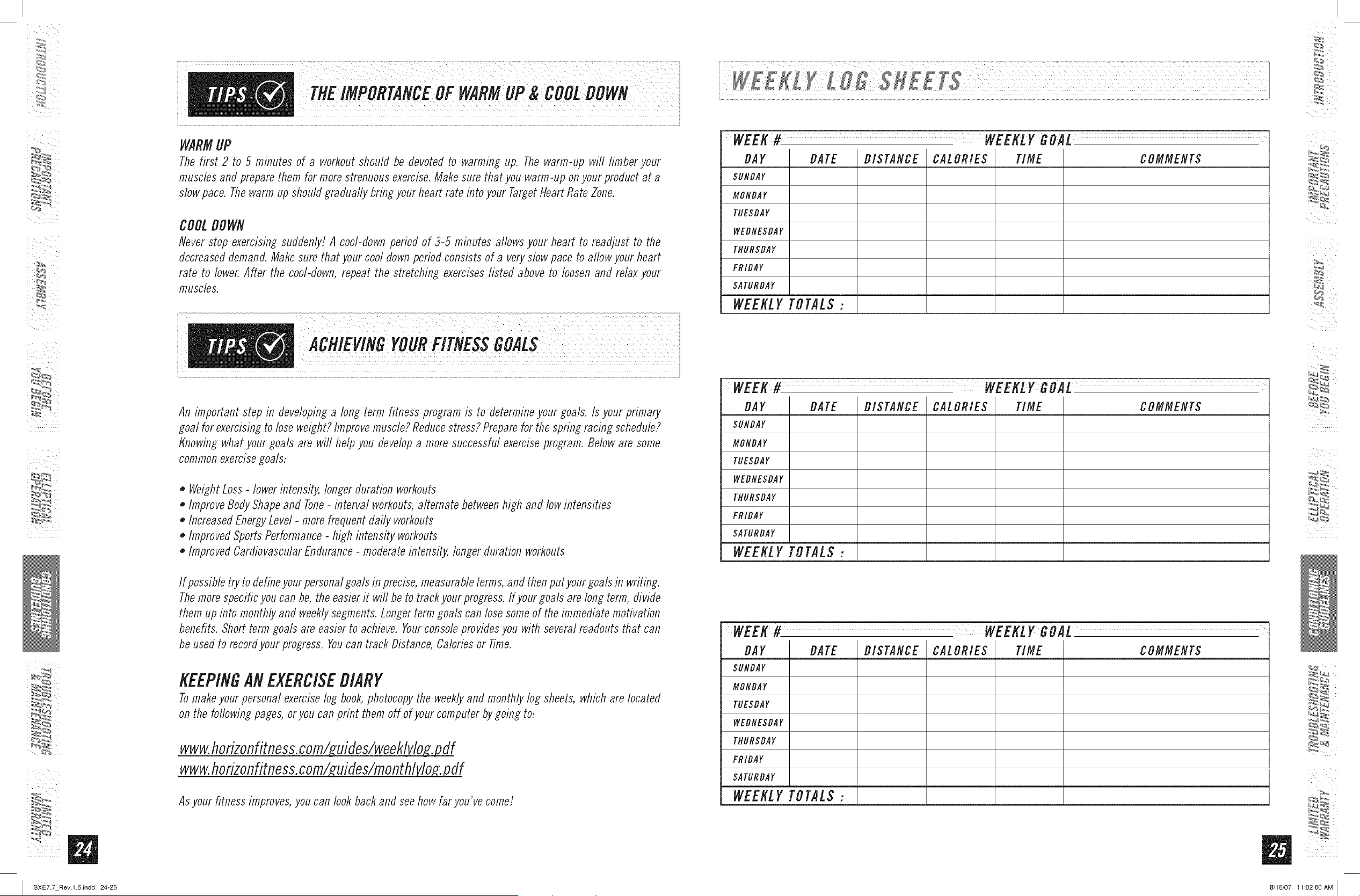
Tomake your personal exercise log book, photocopy the weekly and monthly log sheets, which are located
on the following pages, or you can print them off of your computer by going to:
www.horizonfitness,corn/_uifles/weeklv_
www.horizonfitness,corn/_uifles/rnonthly_
Asyour fitness improves,you can look backand seehow far you've come/.
WEEK# WEEKLY G0,4L
DAY BATE DISTANCE CALORIES TIME COMMENTS
SUNDAY
MONDAY
TUESDAY
WEDNESDAY
THURSDAY
FRIDAY
$ATURDAY
WEEKLY TOT'4L$ :
WEEK# WEEKLY G0'4L
DAY BATE DISTANCE CALORIES TIME COMMENTS
SUNDAY
MONDAY
TUESDAY
WEDNESDAY
THURSDAY
FRIDAY
SATURDAY
WEEKLY TOT'4L$ :
5
WEEK# WEEKLY G0,4L
DAY BATE DISTANCE CALORIES TIME COMMENTS
SUNDAY
MONDAY
TUESDAY
WEDNESDAY
THURSDAY
FRIDAY
SATURDAY
WEEKLY TOT'4L$ :
I SXE7.7 Rev.l.6Jndd 24-25 8/16/07 11:02:00AM I
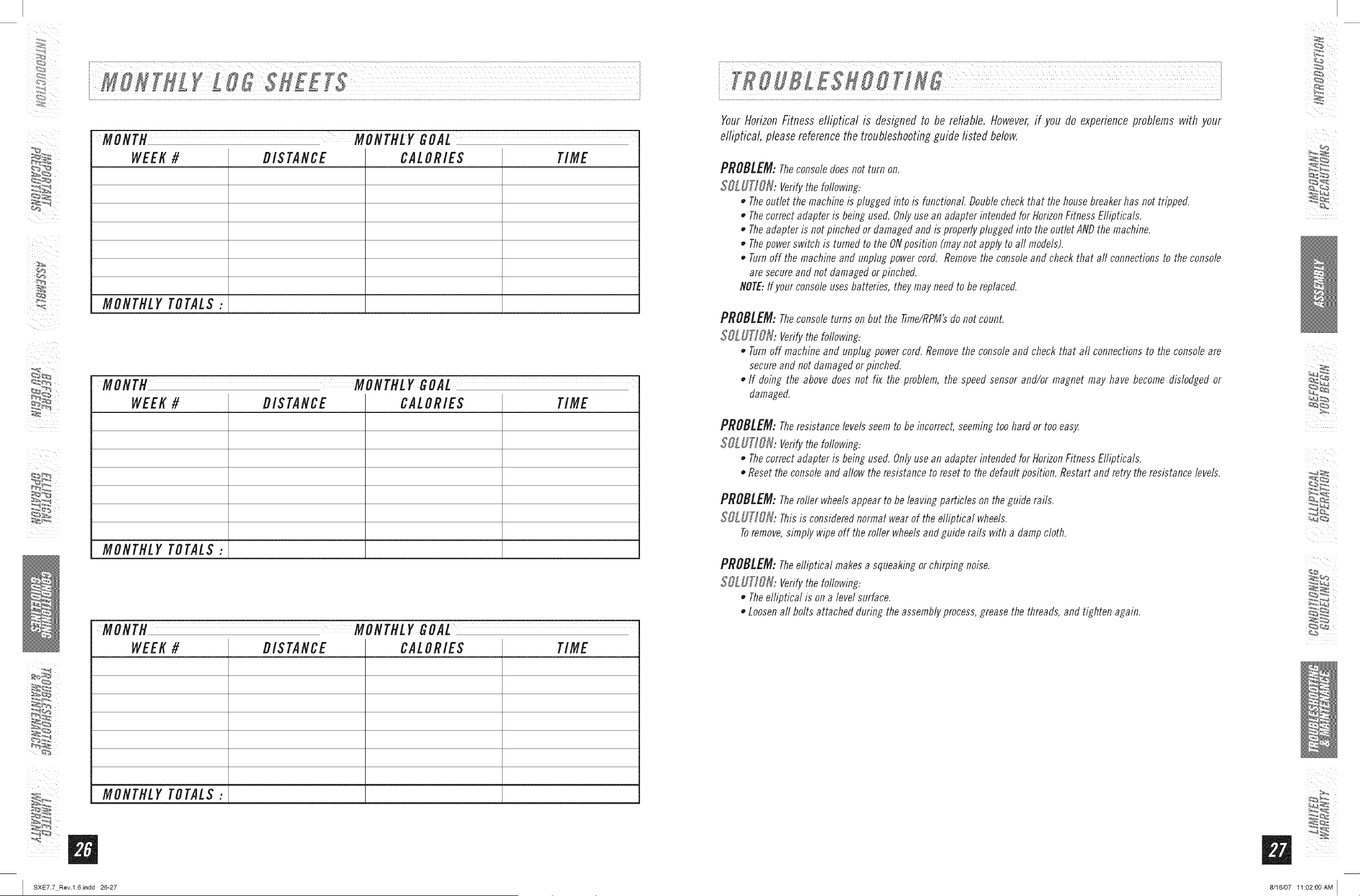
MONTE MONTHLY GOAL
WEEK # DIS TANCE CALORIE$ TIME
MONTHLY TOTALS:
MONTH MONTHLY GOAL
WEEK# DIS TANCE CALORIE$ TIME
MONTHLY TOTALS:
MONTH MONTHLY GOAL
WEEK # DIS TANCE CALORIE$ TIME
MONTHLY TOTALS:
_'_
I SXE7.7 Rev.l.6Jndd 26-27
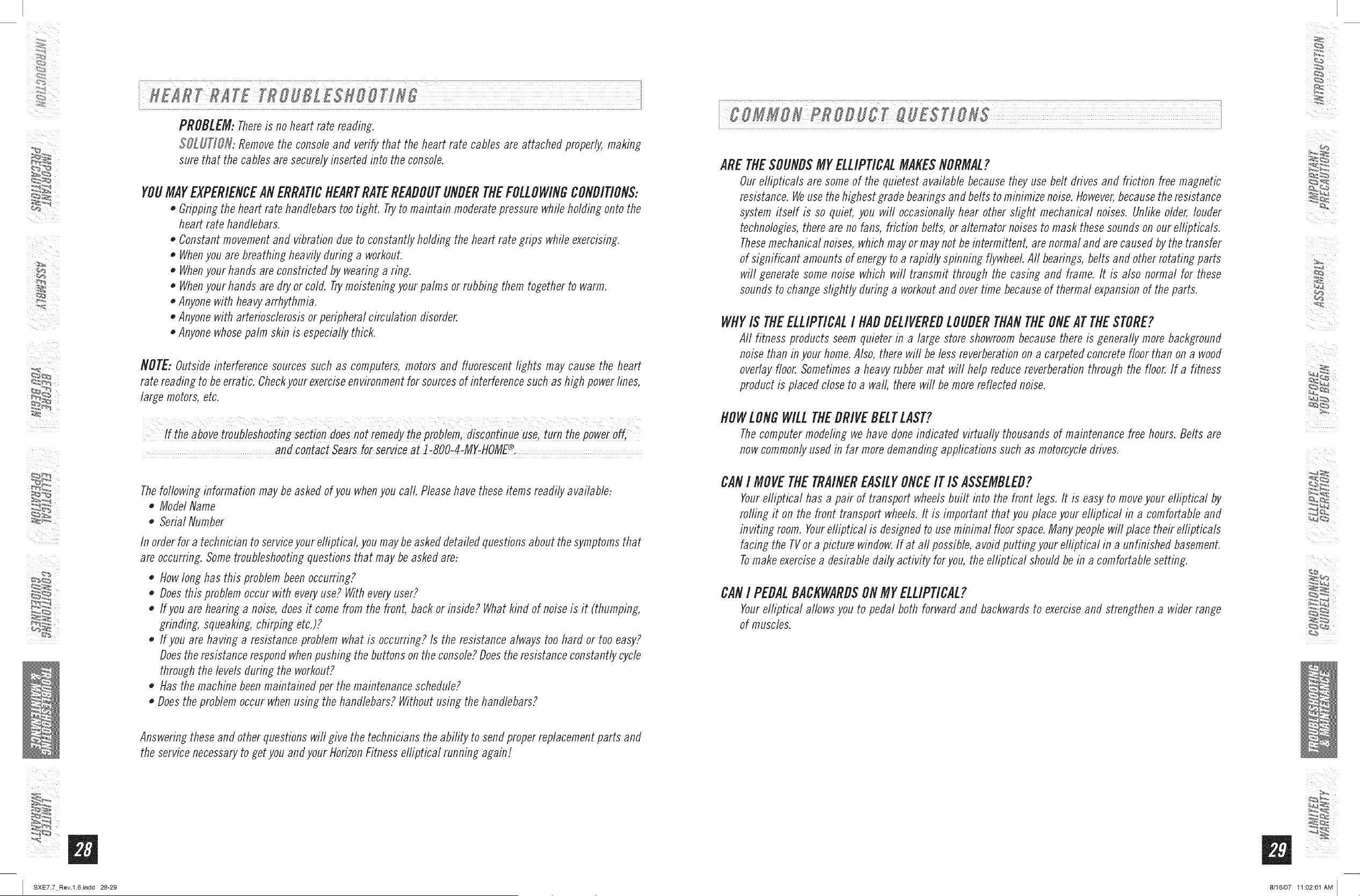
YourHorizonFitness elliptical is designed to be reliable. However,if you do experienceproblems with your
elliptical, pleasereferencethe troubleshootingguide listed below.
PROBLEM: Theconsoledoes not turn on,
SOLUTIOH: Verifythe foflowing:
• Theoutlet the machine is plugged into is functional Doublecheck that the housebreakerhas not tripped.
• Thecorrect adapter is being used. Onlyusean adapter intended for HorizonFitness Ellipticals,
• Theadapter is not pinched or damaged and is properlyplugged into the outlet ANDthe machine,
• Thepower switch is turned to the ONposition (maynot apply to aft models),
• Turnoff the machine and unplug power cord. Removethe consoleand check that aft connections to the console
are secureand not damaged or pinched.
NOTE:If your consoleuses batteries, they may need to be replaced.
PROBLEM:Theconsoleturns onbut the fime/RPM'sdo not count.
SOLUTION: Verifythe foflowinf:
• Turnoff machine and unplug power cord. Removethe consoleand check that all connections to the console are
secureand not damaged or pinched.
If doing the above does not fix the problem, the speed sensor and/or magnet may have become dislodged or
damaged.
PROBLEM: Theresistance levelsseem to be incorrect, seemingtoo hard or too eas_
SOLUTION: Verifythe foflowing:
• Thecorrect adapter is being used. Onlyusean adapter intended for HorizonFitness Ellipticals,
• Reset the consoleand aflow the resistance to reset to the default position, Restart and retry the resistance levels,
PROBLEM:Theroller wheelsappear to be leaving particles on the guide rails,
S_T_,,: Thisis considerednormal wear of the elliptical wheels,
Toremove,simply wipe off the roller wheelsand guide rails with a damp cloth,
PROBLEM:Theelliptical makes a squeaking or chirping noise,
SOL UTIOR: Verifythe following:
Theelliptical is on a level surface,
• Loosenall bolts attached during the assembly process,grease the threads, and tighten again,
_,r,
!iii i
8/16/07 11:02:00 AM I
_iii i
I SXE7.7 Rev.l.6Jndd 28-29
PROBLEM:Thereis no heart rate reading.
SOLUtiON: Removethe consoleand verify that the heart rate cables are attached properly,making
sure that the cables are securelyinserted into the console.
YOUMAYEXPERIENCEANERRAtiCHEARTRATEREADOUTUNDERTHEFOLLOWINGCONDItiONS:
o Gripping the heart rate handlebars too tight. Tryto maintain moderate pressure while holding onto the
heart rate handlebars.
o Constant movement and vibration due to constantly holding the heart rate grips while exercising.
o Whenyou are breathing heavily during a workout.
o Whenyour hands are constricted by wearing a ring.
o Whenyour hands are dry or cold. Trymoistening your palms or rubbing them together to warm.
o Anyone with heavy arrhythmia.
o Anyone with arteriosclerosis or peripheral circulation disorder.
o Anyone whose palm skin is especially thick.
NOTE: Outside interferencesourcessuch as computers, motors and fluorescent lights may cause the heart
rate readingto beerratic. Checkyour exerciseenvironmentfor sourcesof interferencesuch as high powerlines,
large motors,etc.
/
ff the above troubleshooting Section does not remedy the probbin, discontbue use, turn the power off,
®
and contact Sears for service at ]=800=4-MY=HOME' :
Thefollowing information maybe askedof you whenyou call. Pleasehave these items readily available:
o ModelName
o Serial Number
In order for a technician to service your elliptical, you may be asked detailed questions about the symptoms that
are occurring. Some troubleshooting questions that may be asked are:
o How long has this problem been occurring?
o Does this problem occur with every use? With every user?
o If you are hearing a noise, does it come from the front, back or inside? What kind of noise is it (thumping,
grinding, squeaking, chirping etc.)?
o If you are having a resistance problem what is occurring? Is the resistance always too hard or too easy?
Does the resistance respond when pushing the buttons on the console? Does the resistance constantly cycle
through the levels during the workout?
o Has the machine been maintained per the maintenance schedule?
o Does the problem occur when using the handlebars? Without using the handlebars?
Answeringtheseand otherquestions will give the techniciansthe ability to sendproperreplacementparts and
the servicenecessaryto get you and your HorizonFitnesselliptical running again!
ARETEESOUNDSMYELLIPtiCALMAKESNORMAL?
Our ellipticals are some of the quietest available because they use belt drives and friction free magnetic
resistance. Weuse the highest grade bearings and belts to minimize noise. However, because the resistance
system itself is so quiet, you wifl occasionally hear other slight mechanical noises. Unlike older, louder
technologies, there are no fans, friction belts, or alternator noises to mask these sounds on our e//ipticals.
Thesemechanical noises, which may or may not be intermittent, are normal and are caused by the transfer
of significant amounts of energy to a rapidly spinning flywheel Aft bearings, belts and other rotating parts
will generate some noise which will transmit through the casing and frame. It is also normal for these
sounds to change slightly during a workout and over time because of thermal expansion of the parts.
WHYIS TIlEELLIPtiCALI HADDELIVEREDLOUDERTHANTHEONEATTHESTORE?
All fitness products seem quieter in a large store showroom because there is generally more background
noise than in your home. Also, there will be less reverberation on a carpeted concrete floor than on a wood
overlay floor. Sometimes a heavy rubber mat will help reduce reverberation through the floor. If a fitness
product is placed close to a waft, there will be more reflected noise.
flOWLONGWILLTHEDRIVEBELTLAST?
The computer modeling we have done indicated virtually thousands of maintenance free hours. Belts are
now commonly used in far more demanding applications such as motorcycle drives.
CANI MOVETHETRAINEREASILYONCEITIS ASSEMBLED?
Yourelliptical has a pair of transport wheels built into the front legs. It is easy to move your elliptical by
roiling it on the front transport wheels. It is important that you place your elliptical in a comfortable and
in viting room. Yourefliptical is designed to use minimal floor space. Many people will place their e/liptica/s
facing the TVor a picture window. If at aft possible, a void putting your elliptical in a unfinished basement.
Tomake exercise a desirable daily activity for you, the elliptical should be in a comfortable setting.
CANI PEDALBACKWARDSONMYELLIPtiCAL?
Yourelliptical allows you to pedal both forward and backwards to exercise and strengthen a wider range
of muscles.
5
ii
_N
_,r, _
8/16/07 11:02:01 AM I
U
WHATKINDOFROUTINEMAINTENANCEIS REQUIRED?
We use sealed bearings throughout our ellipticals so lubrication is not needed. The most important
maintenance step is to simply wipe your perspiration off the trainer after each use.
HOWDOI CLEANMYELLIPtiCAL?
Clean with soap and water cleaners only. Never use solvents on plastic parts.
Cleanliness of your elliptical and its operating environment will keep maintenance problems
and service calls to a minimum. Forthis reason,HorizonFitness recommendsthat the following
preventivemaintenanceschedulebe followed.
AFTEREACHUSE(DAILY)
Turnoff the elliptical by unplugging thepowercord from the wall outlet
o Wipe down the elliptical with a damp cloth. Never use solvents, as they can cause damage to the
elliptical.
o Inspect the power cord. Replace the power cord if damaged.
o Make sure the power cord is not underneath the elliptical or in any other area where it can become
pinched orcut.
Toremovepowerfro,.tkeeilctiCat,thepower mUStbediscon'eCtedfrom
wai!°qtl t:
WEEKLY
Cleanunderneaththeelliptical, following thesesteps:
o Turn off the efliptical
o Move the efliptical to a remote location.
o Wipe or vacuum any dust particles or other objects that may have accumulated underneath the
elliptical.
o Return theefliptical to its previousposition.
EVERYMONTH
o Inspect all assemblybolts and pedals on the machine for propertightness.
o Clean any debris off of the pedal arm wheels and guide rails.
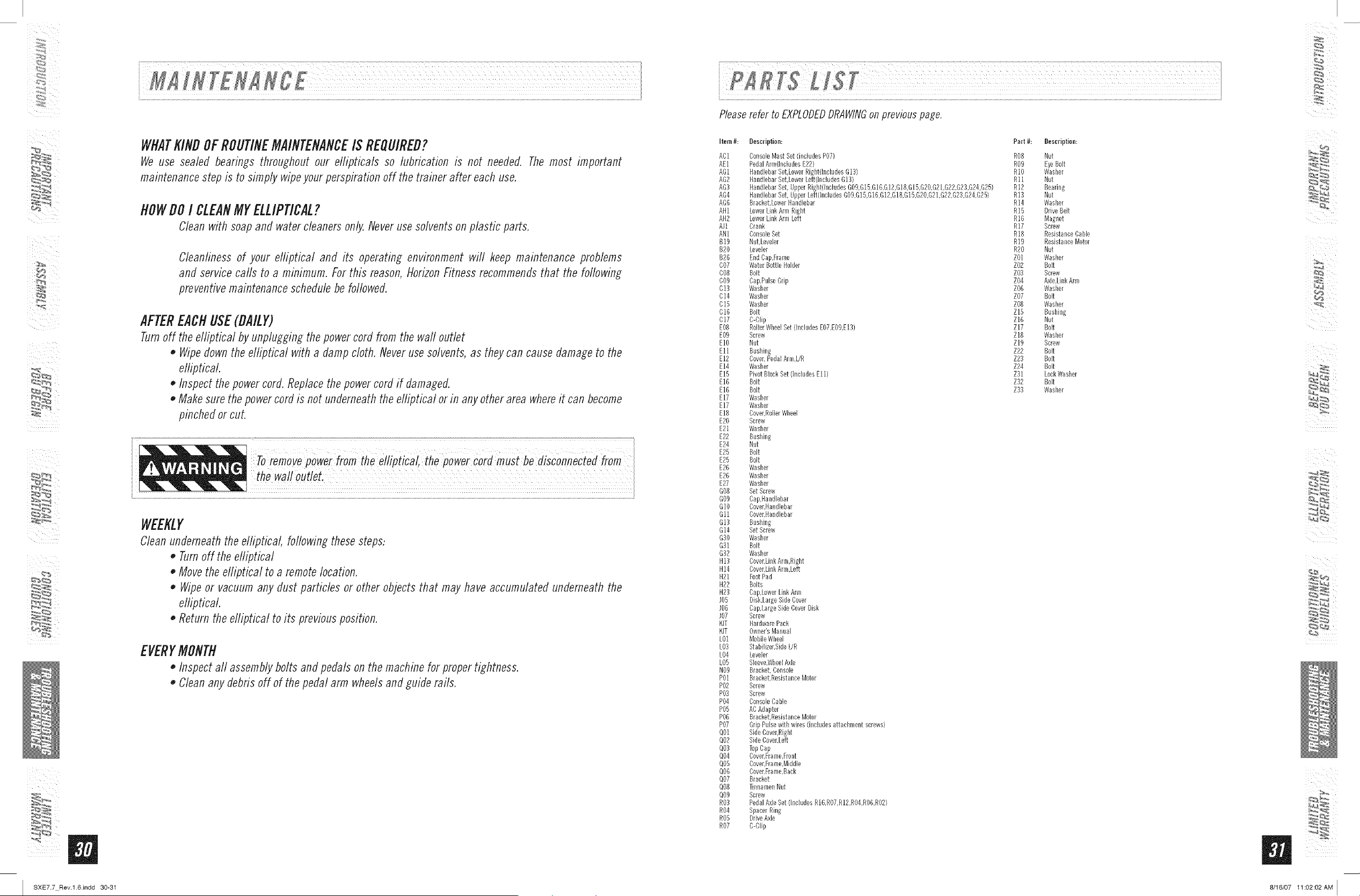
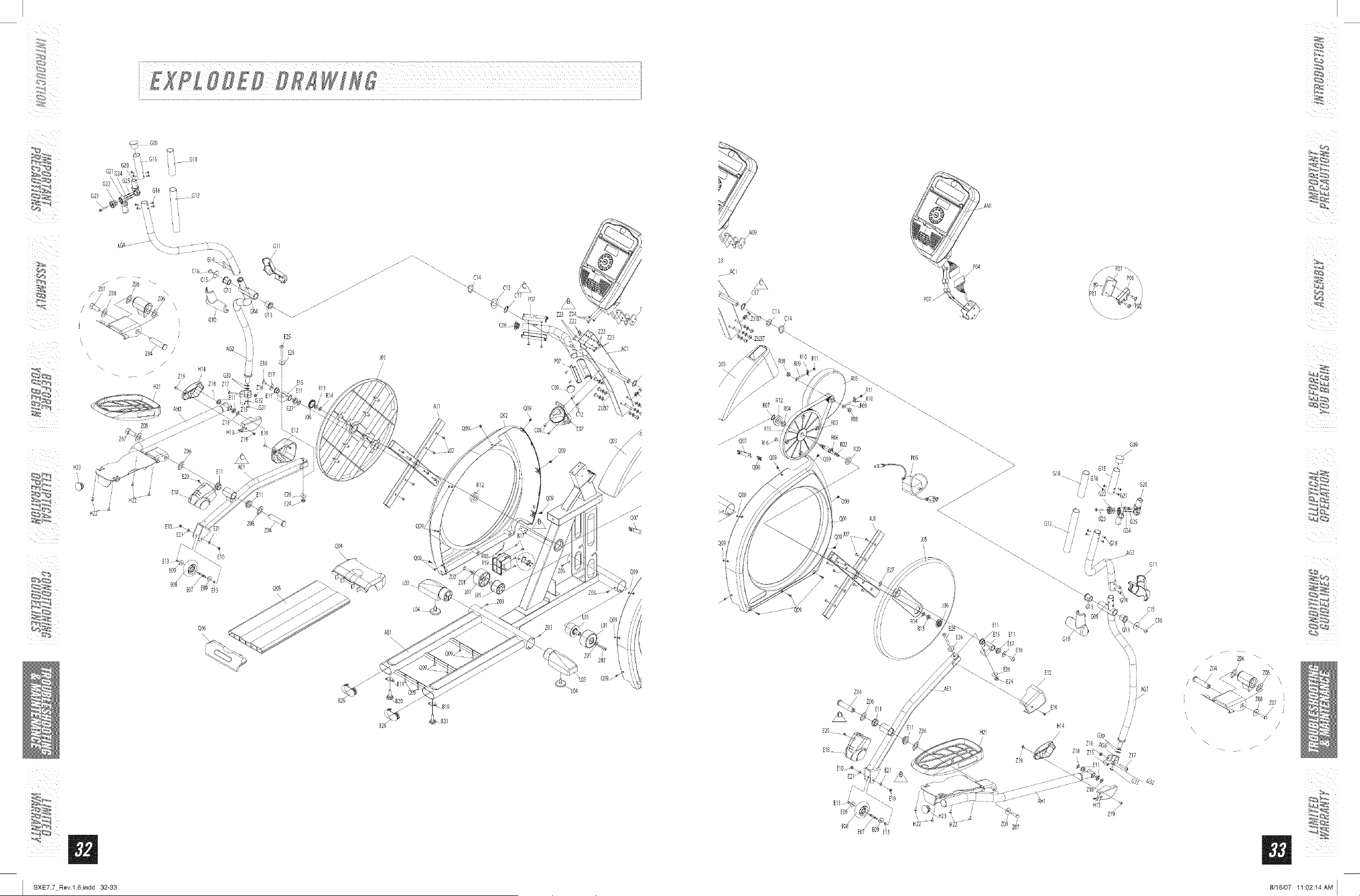
Pleaserefer to EXPLODEDDRAWINGonprevious page,
item #: Description:
AC1 ConsoleMast Set(includes P07)
ALl PedalAnn(includesE22)
An1 HandlebarSet.LowerRight(IncludesB13)
An2 HandlebarSet.LowerLeft(IncludesG13)
AG3 HandlebarSet, UpperRight(includesGO9.G15.G1B.G12.G18,G15.G20.G21.G22.G23.G24,G25)
AG4 HandlebarSet, UpperLeft(IncludesGOB,G15,G16,G12,G18,G15.G20.G21.G22.G23.G24.G25)
AG6 Bracket.LowerHandlebar
AH1 LowerLink ArmRigbt
AH2 LowerLink ArmLeft
AJ1 Crank
AN1 ConsoleBet
B19 Nut.LeveLer
B20 Leveler
B26 EndCap,Frae/e
C07 WaterBottle Holder
COB Bolt
CO9 Cap,PulseGrip
C13 Washer
C14 Wasber
C15 Wasber
C16 Bolt
C17 C-Clip
E08 RollerWbee[Set (includesEO7.EOB.E13)
E09 Screw
EIO Nut
Ell Bushing
E12 Cover,PedalArm.UR
El4 Wasber
El5 PivotBlockSet (includesEll)
E1B Bolt
E1B Bolt
E17 Wasber
E17 Wasber
E18 Cover.RollerWheel
E20 Screw
E21 Wasber
E22 Busbing
E24 Nut
E25 Bolt
E25 Bolt
E2B Wasber
E2B Wasber
E27 Wasber
BOB Set Screw
GO9 Cap,Handlebar
BlO Cover,Handlebar
Gll Cover.Handlebar
B13 Busbing
B14 Set Screw
B30 Washer
B31 Bolt
B32 Wasber
H13 Cover,Link Arm,Rigbt
H14 Cover.LinkArm.Left
H21 FootPad
H22 Bolts
H23 Cap,LowerLink Arm
J05 Disk.LargeSideCover
JOB Cap,LargeSideCoverDisk
J07 Screw
KIT HardwarePack
KIT Owner'sManual
L01 MobileWheel
LO3 Stabilizer,BideL/R
L04 Leveler
bO5 Sleeve.WheelAxle
NO9 Bracket,Console
P01 Bracket.ResistanceMotor
P02 Screw
P03 Screw
P04 ConsoleCable
P05 ACAdapter
POB Bracket,ResistanceMotor
P07 Grip Pulsewitb wires (includesattaebmentscrews)
QOl SideCover,Right
Q02 SideCover,Left
QO3 TopCap
Q04 Cover.Frame.Front
Q05 Cover,Frame,Middle
Q06 Cover,Frame,Back
Q07 Bracket
QOB ThelamenNut
Q09 Screw
RO3 PedalAxleSet (includesR16.RO7.R12,RO4,ROB,R02)
RO4 SpacerRing
R05 DriveAxle
R07 C-Clip
Part #:
ROB
RB9
R1B
Rll
R12
R13
R14
R15
R1B
R17
R1B
R19
R2O
ZB1
ZO2
ZB3
ZO4
ZO6
ZO7
ZB8
Z15
Z16
Z17
Z1B
Z19
Z22
Z23
Z24
Z31
Z32
Z33
BeseripDoe:
Nut
EyeBolt
Washer
Nut
Bearing
Nut
Washer
DriveBelt
Magnet
Screw
ResistanceCable
ResistanceMotor
Nut
Washer
Bolt
Screw
Axle,LinkArm
Washer
Bolt
Washer
Bushing
Nut
Bolt
Washer
Screw
Bolt
Bolt
Bolt
LockWasher
Bolt
Washer
5
Z
Z
SXE7.7 Rev.l.6.indd 30-31 8/16/07 11:02:02AM I
G15 i G18
i
/
/
z_ /
/ "> E16
H14
.... "" Z19 G3O E17
H21
AH2
EIO.--_
G31
Z19 _i
E25
E26
J05
E15
R13
E27
E26
E24J_
R12
QO9
QO2
P07
_'07
%9
Z22
Z23
ACI
%9
/
NO9
23
.... ACI
\
Cl7
/
\
CI4
\
\
RIO RII _
E20
E18
R06
R20
%1
Z04
/ zo_
EIO.--_
. AN1
G18
Ell
_E15 Ell
E12
/
E19
HI4
ZO6 H21 /
\\\
d'13
G11
/
iAGI
/ /
/ /
Z08 Z07
/
/
ii:%
Z
L
Z
I SXE7.7 Rev.l.6.indd 32-33 8/16/07 11:02:14AM I
i¸
OneYearLimited Warranty
Whenassembled,operatedand maintainedaccordingto all instructions suppliedwith theproduct,if this Elliptical
machine fails due to a defect in material or workmanship within one year from the date of purchase, call
J-8OO-4-MY-HOME®to arrange for freerepair.
AdditionalLimited Warrantyon Specific Parts
Fromthe date of purchasefor the time periodslisted below,the following specific parts will besupplied freeof
charge if they fail due to a defect in material or workmanship.After the first year from the date of purchase,you
pay for labor to havethem installed.
BRAKEWARRANTY= Lifetime
FRAMEWARRANTY= Lifetime
All warrantycoverageis void if this product is ever usedfor other than private householdpurposes.
Thiswarranty gives you specific legal rights, anfl you may also have other rights which varyfrom state to
state.
Sears,Roebuckand Co.,HoffmanEstates,IL 60]79
m
I SXE7.7 Rev.l.6.indd 34-35 8/16/07 11:02:18 AM I

Your Home
For repair-in your home-of all major brand appliances,
lawn and garden equipment, or heating and cooling systems,
no matter who made it, no matter who sold it!
For the replacement parts, accessories and
owner's manuals that you need to do-it-yourself.
For Sears professional installation of home appliances
and items like garage door openers and water heaters.
1-800-4-MY-HOME ® (1-8004694663)
Call anytime, day or night (U.S.A. and Canada)
iiiiiiiiiiiiiiiiii_
www.sears.oom www.sears.oa
iiiiiiiiiiiiiii_:i:i:i iiiiiiiiiiiiiiiiiii
our.or.e
For repair of carry-in items like vacuums, lawn equipment,
and electronics, call or go on-line for the location of your nearest
TM
® Registered Trademark / ' Trademark / sM Service Mark of Sears Brands, LLC
SM
® Marca Registrada / TM Marca de F_brica / Marca de Servicio de Sears Brands, LLC
Mc Marque de MDcommerce / Marque d_pos_e de Sears Brands, LLC © Sears Brands, LLC
SXEZ7Rev,1.6 I © 2007 HorizonFitne88ProductsI Designed& En_'ineeredin the U.S,A.I Madein China
I SXE7.7 Rev.l.6.indd 36 8/16/07 11:02:19AM I