Z337 SPEAKER SYSTEM
WITHBLUETOOTH
®
Complete Setup Guide
完整设置指南
完整設定指南
설치 가이드

English 3
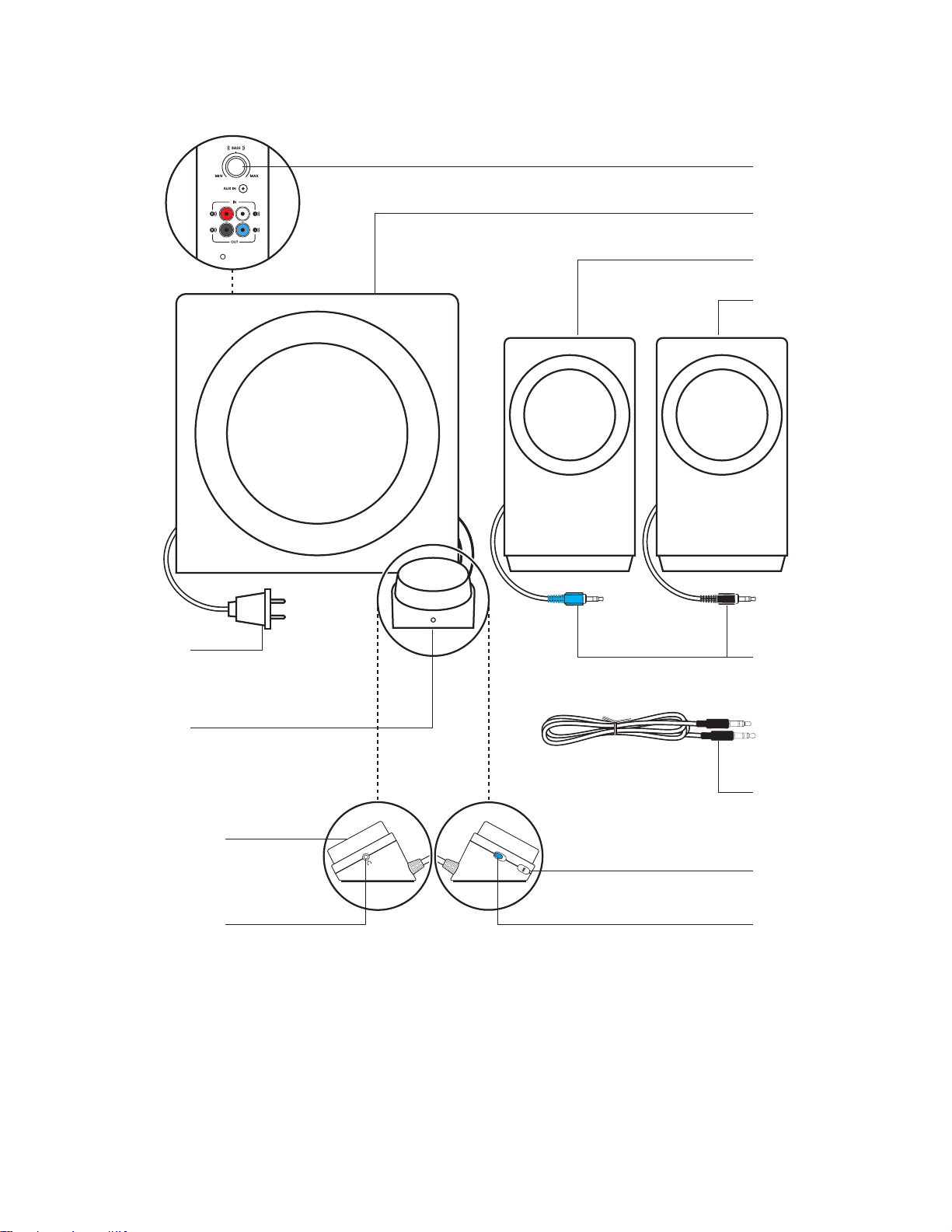
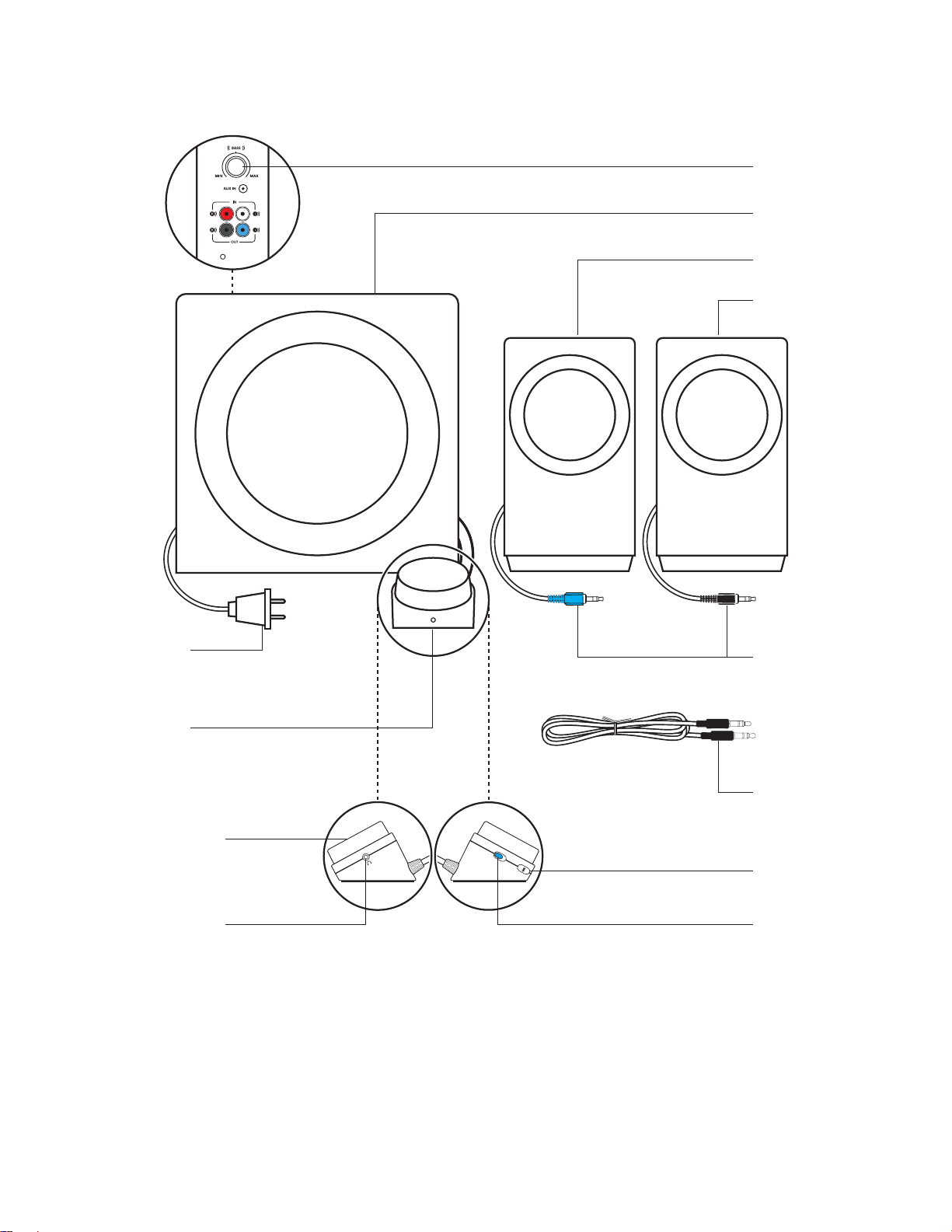
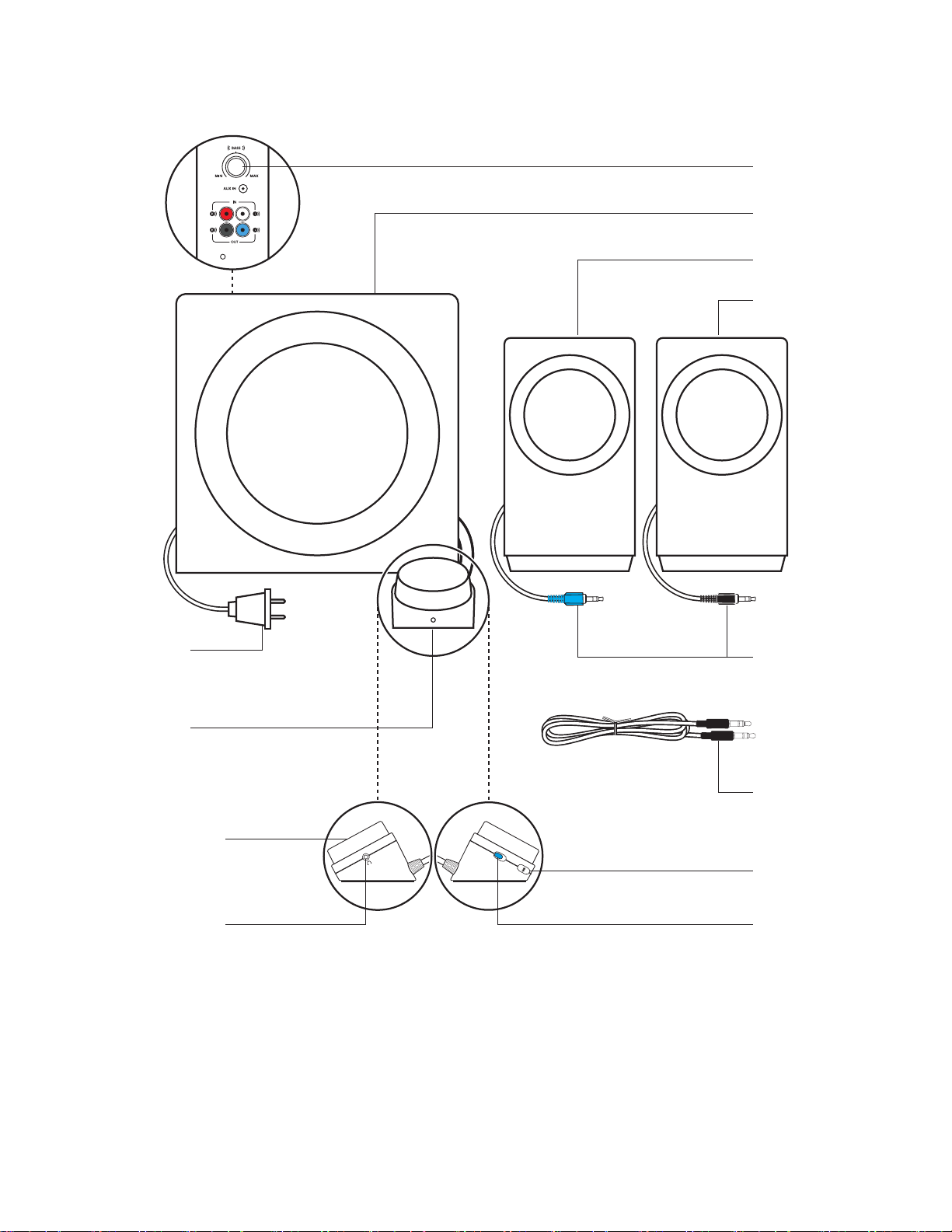
KNOW YOUR PRODUCT
Wired
control pod
Power plug
Volume control
knob
Headphone jack
Subwoofer
Bass control
RCA cable
tosubwoofer
3.5 mm audiocable
Power on/o button
Bluetooth
pairingbutton
Left satellite
Right satellite
English 4
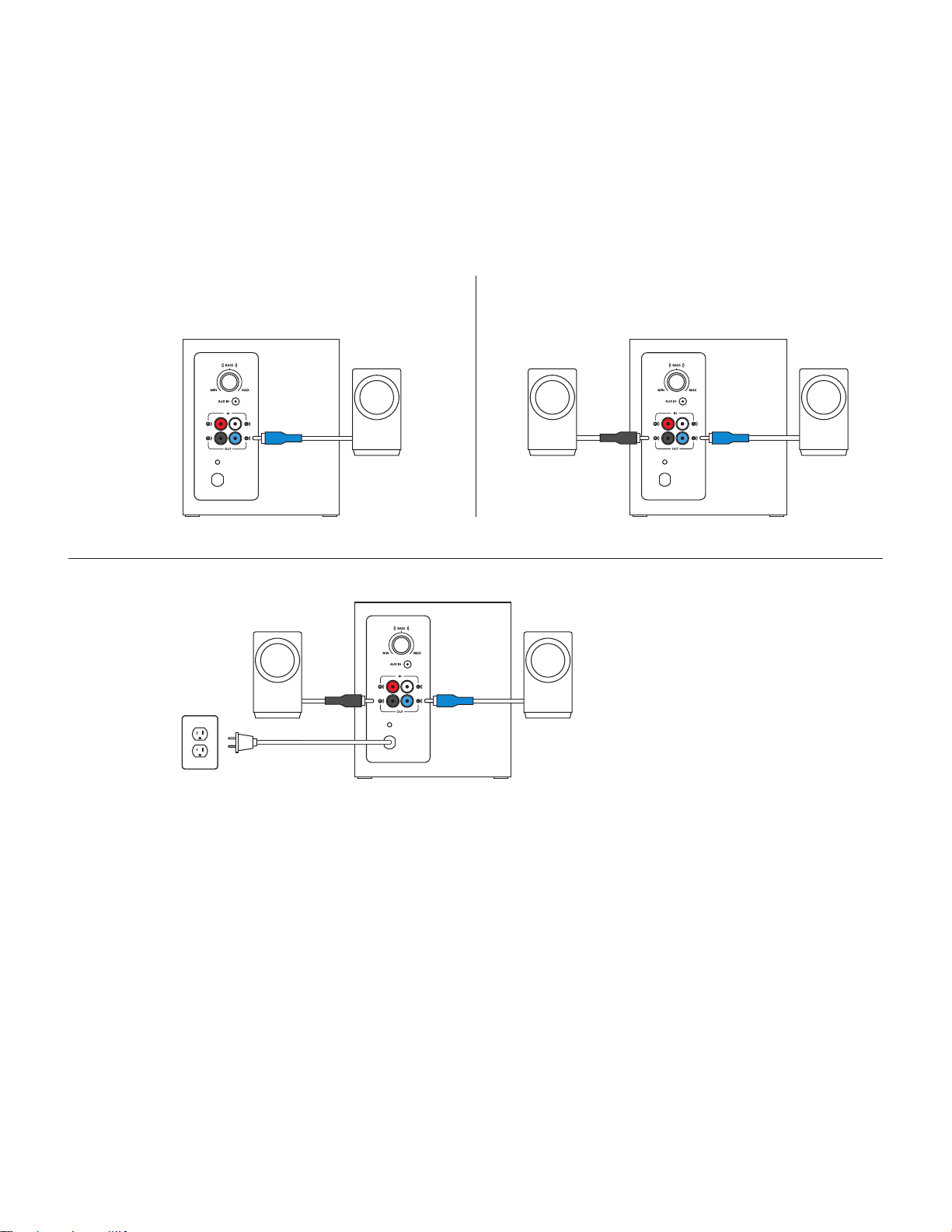
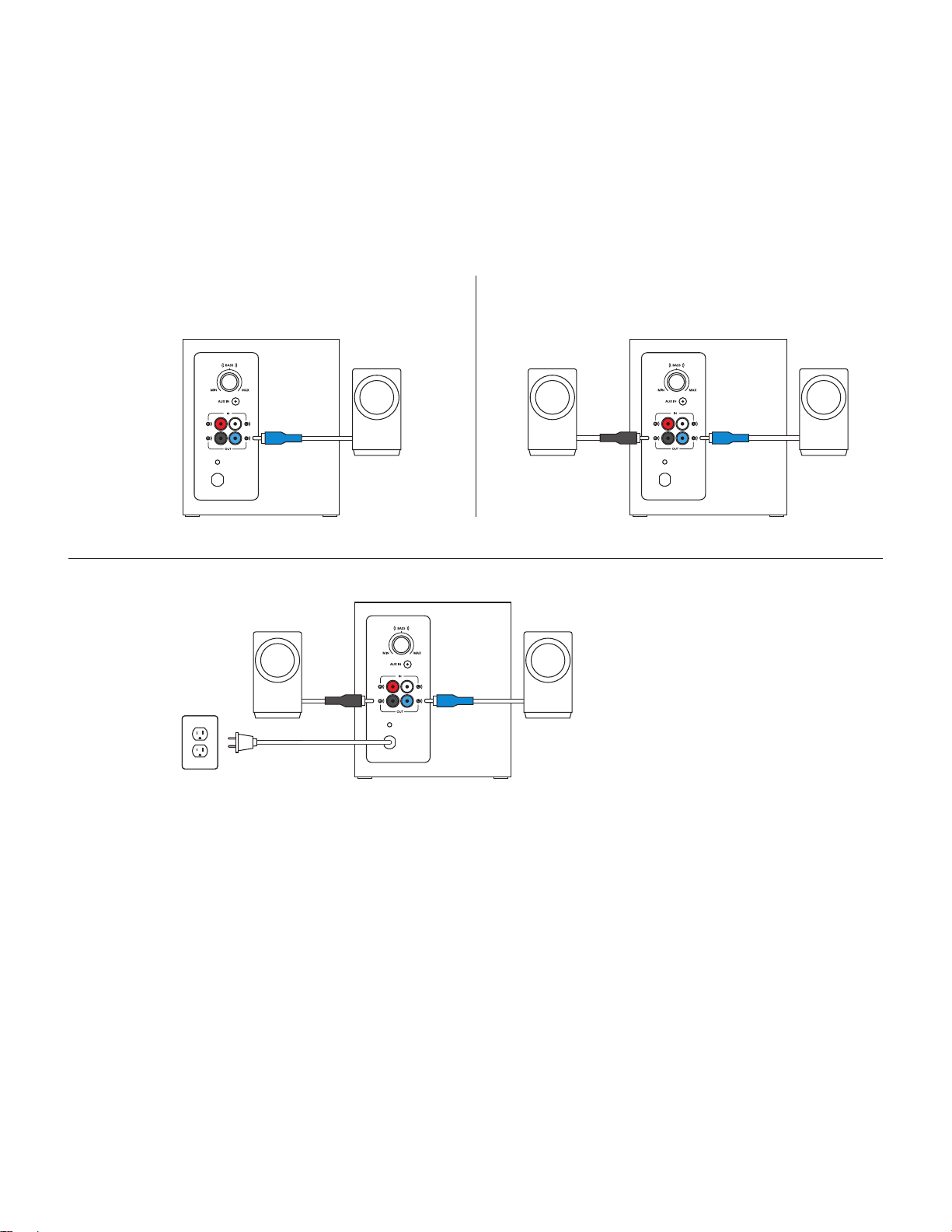
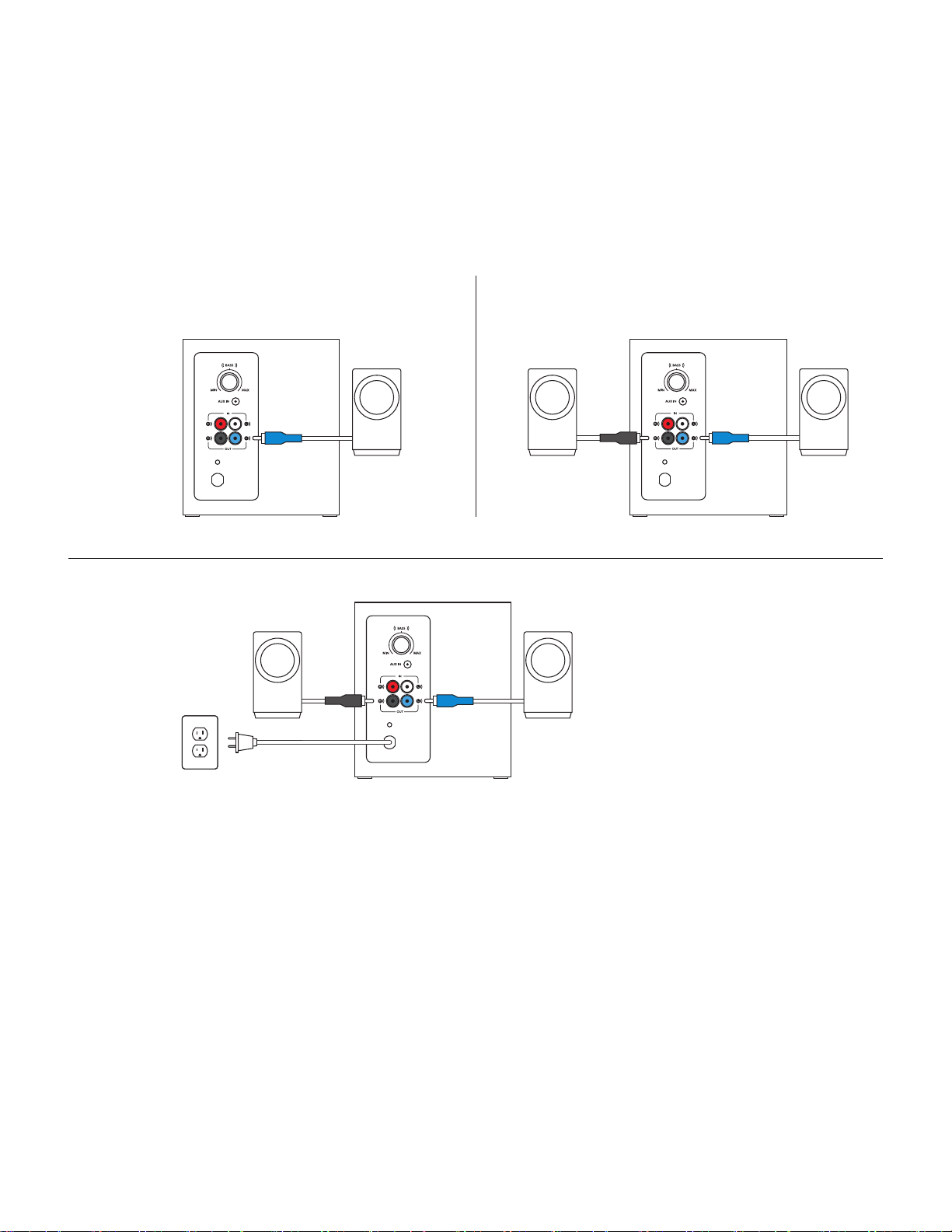
CONNECT THE SPEAKERS
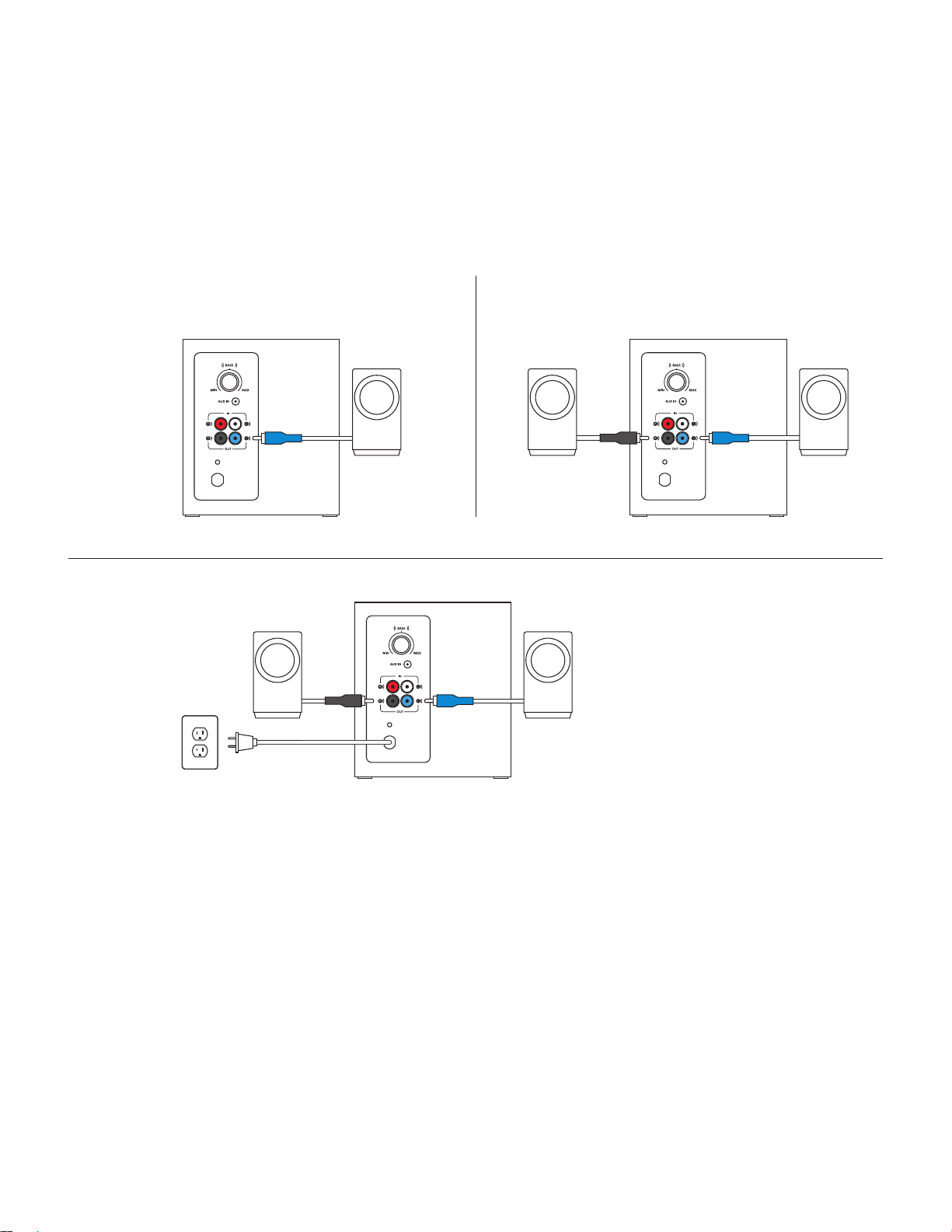
1. Plug the blue RCA connector on the left satellite into the blue subwoofer jack.
2. Plug the black RCA connector on the right satellite into the black subwoofer jack.
3. Plug the power plug into an electrical outlet.
21
3
English 5
CONNECT TO AUDIO SOURCE
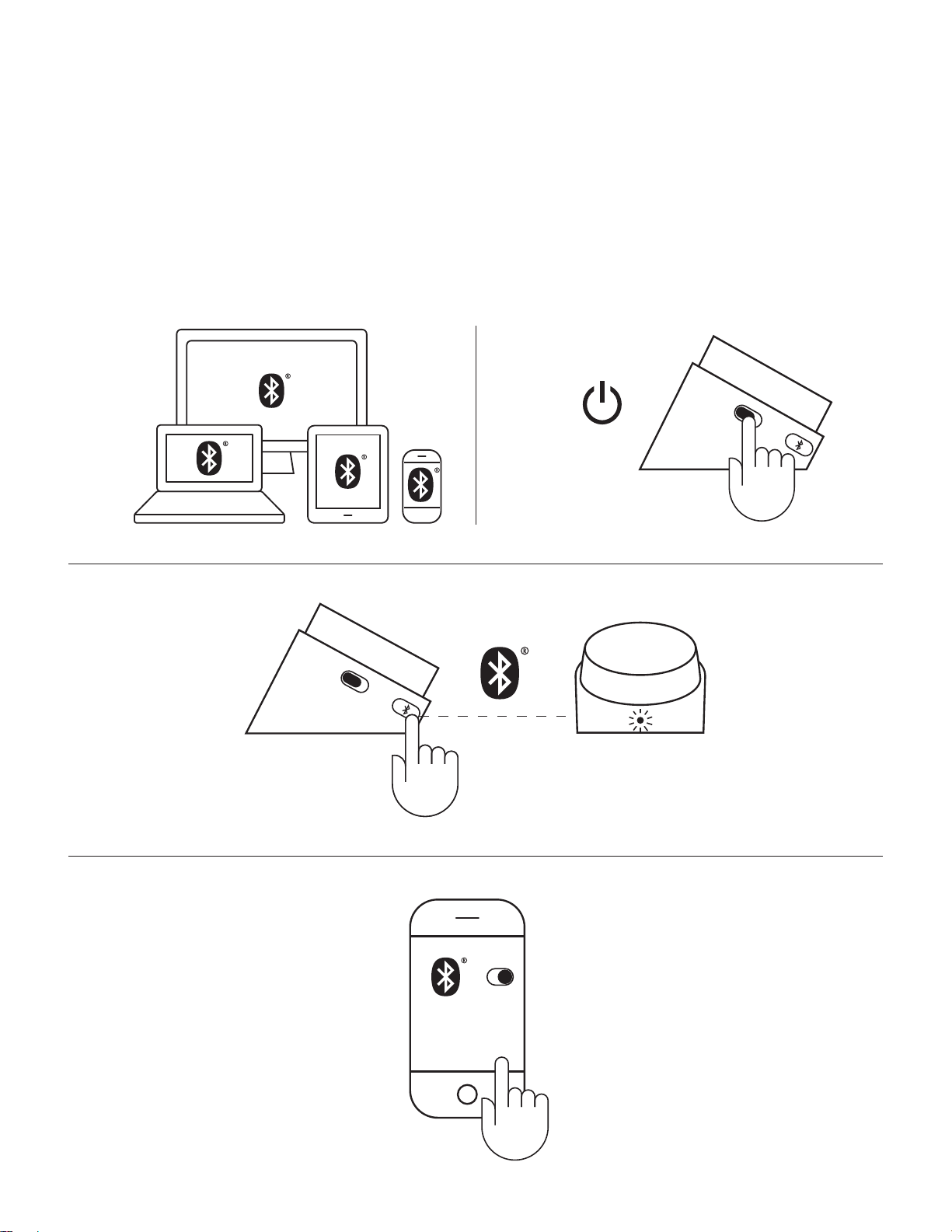
Using Bluetooth
®
:
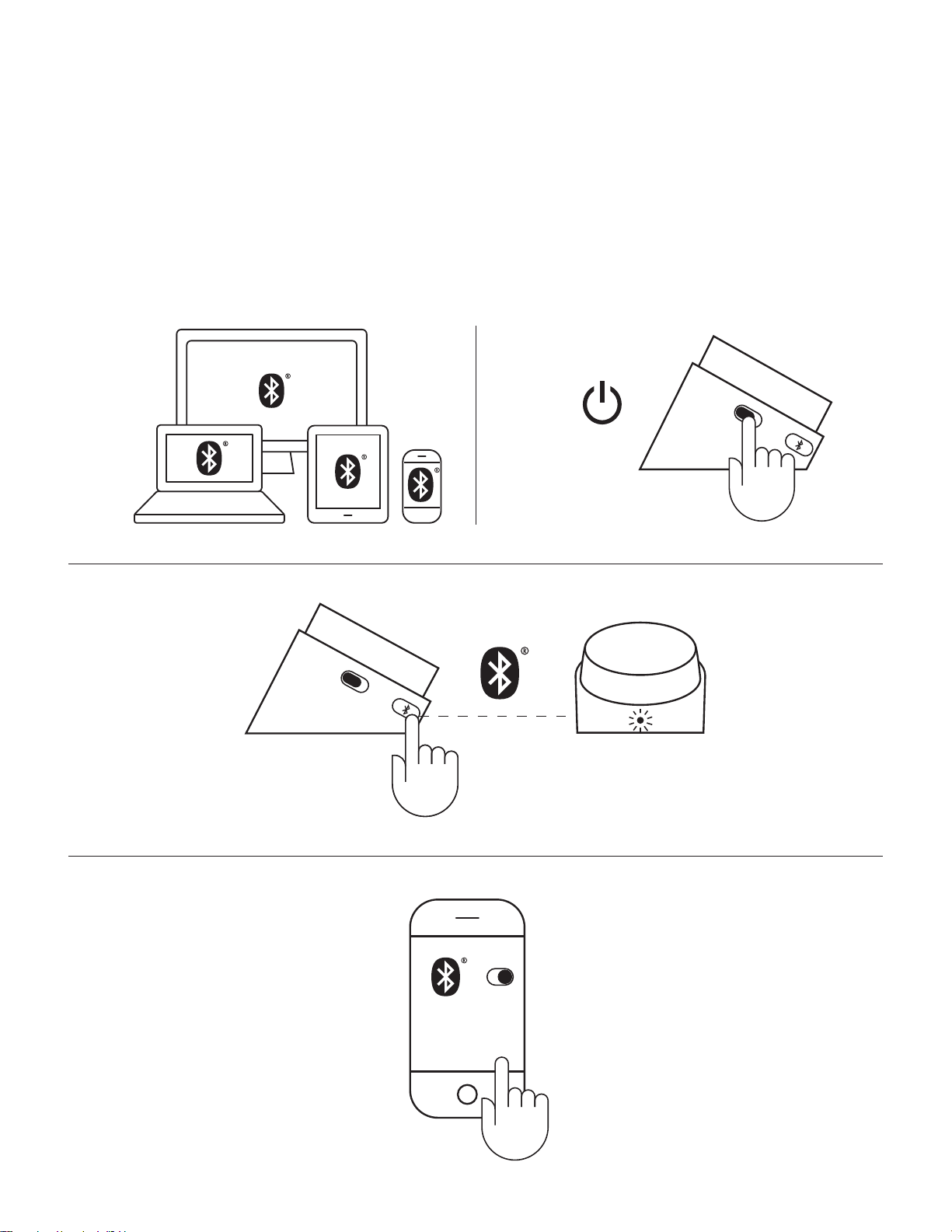
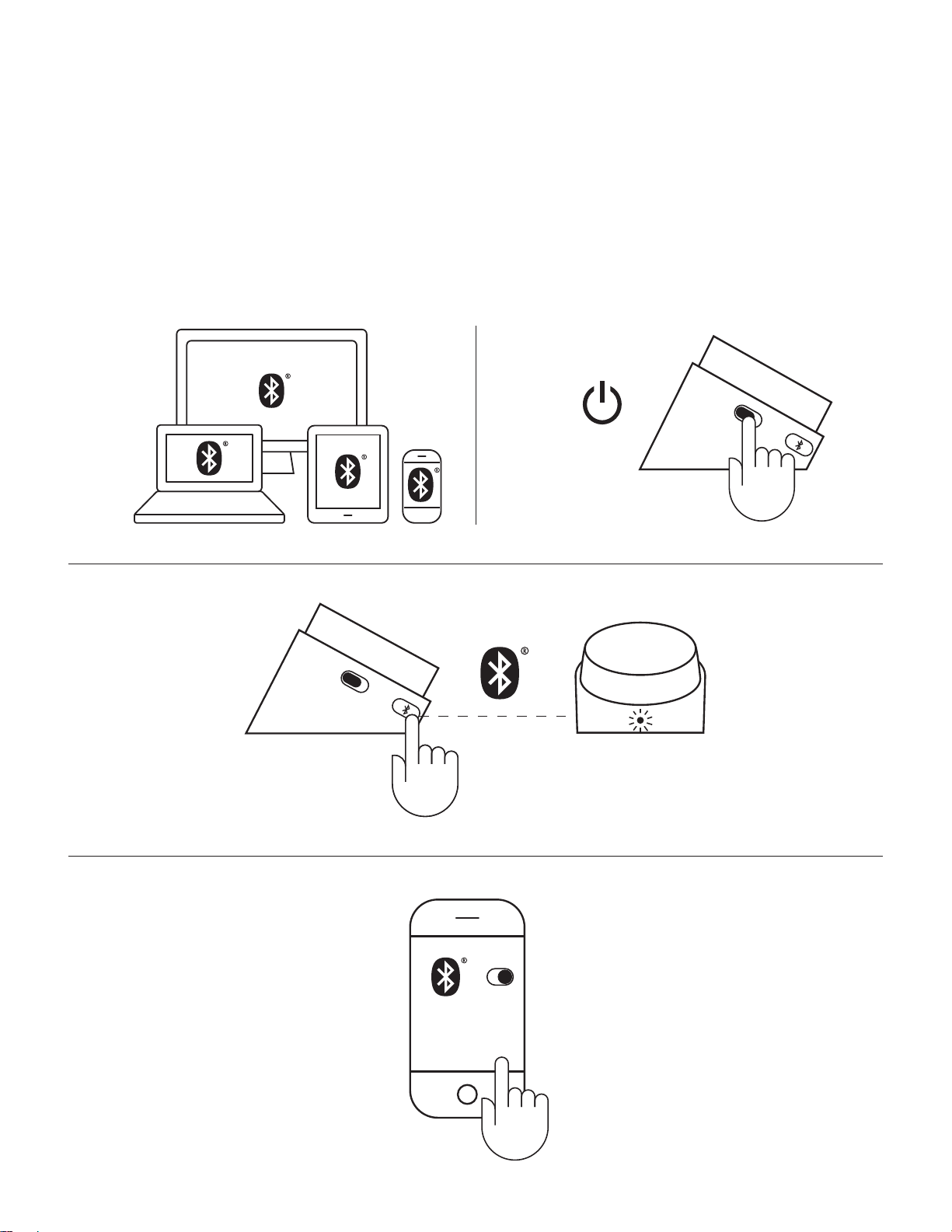
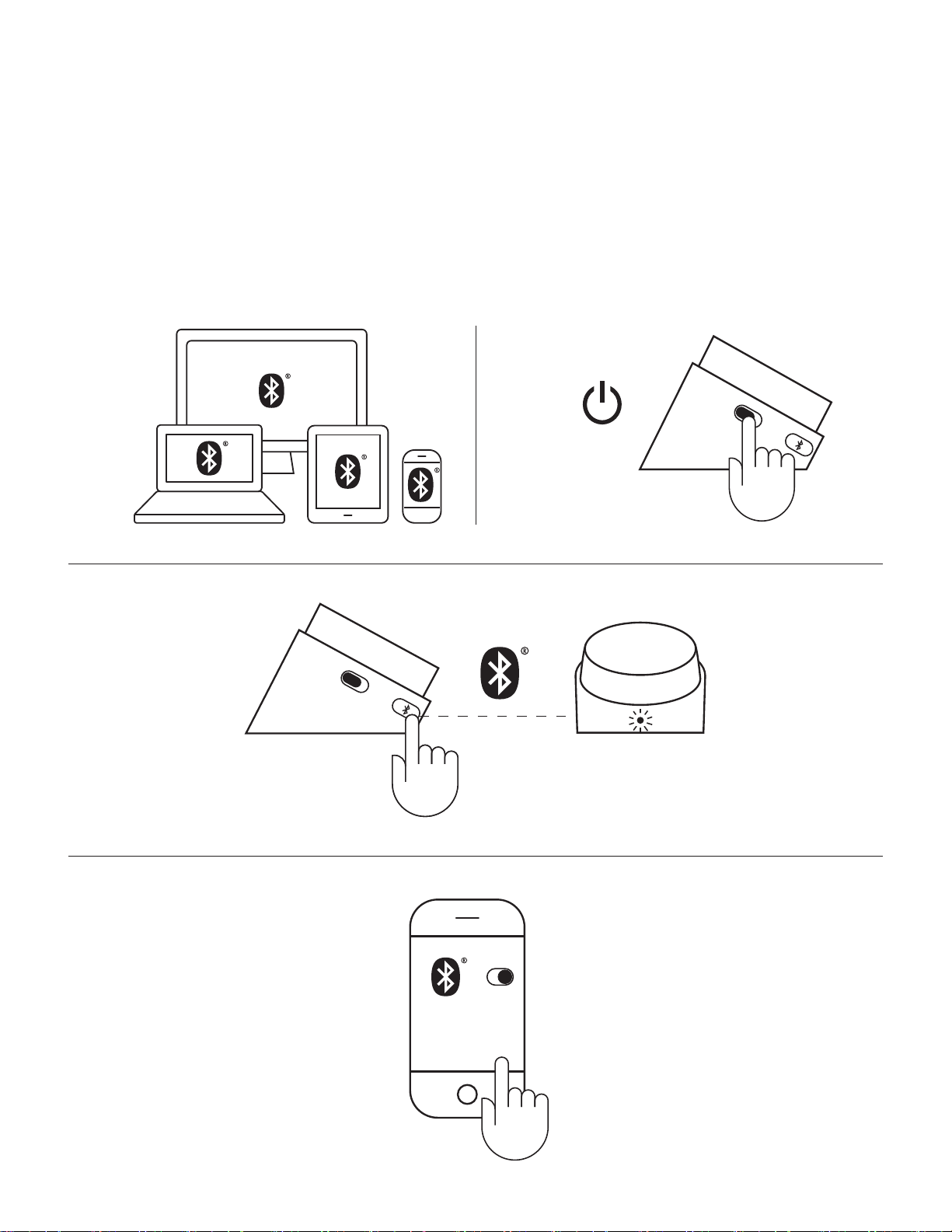
1. Turn on Bluetooth on your device.
2. Turn the speakers on.
3. Press and hold the Bluetooth button to activate pairing mode. The LED on the control pod will blink quickly.
4. Select and connect to “Logitech Z337” on your Bluetooth device list.
5. To pair with your second device via Bluetooth, repeat step 3 and step 4. Make sure to turn on Bluetooth on your device.
2
4
1
3
Z337
Logitech

English 6
CONNECT TO AUDIO SOURCE (CONT’D)
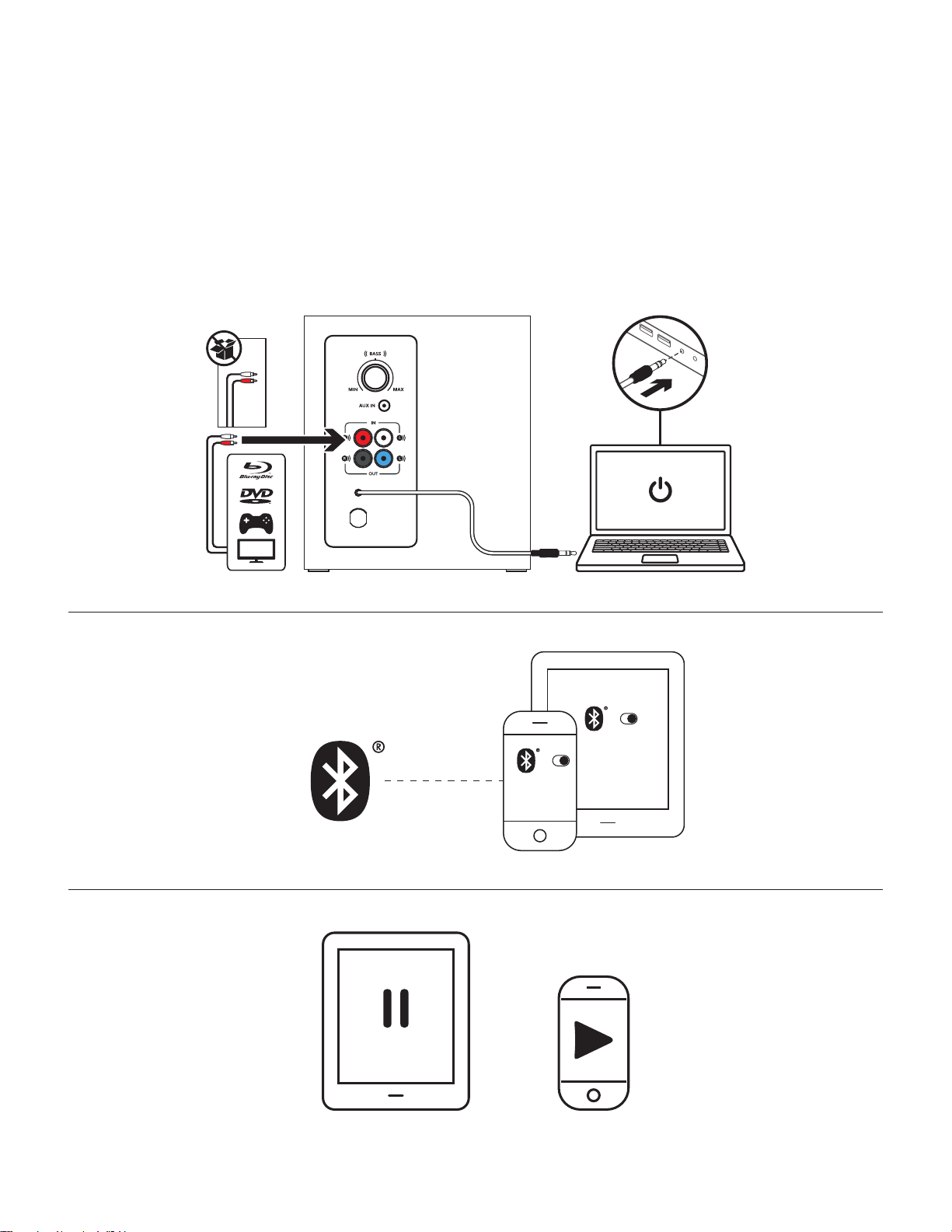
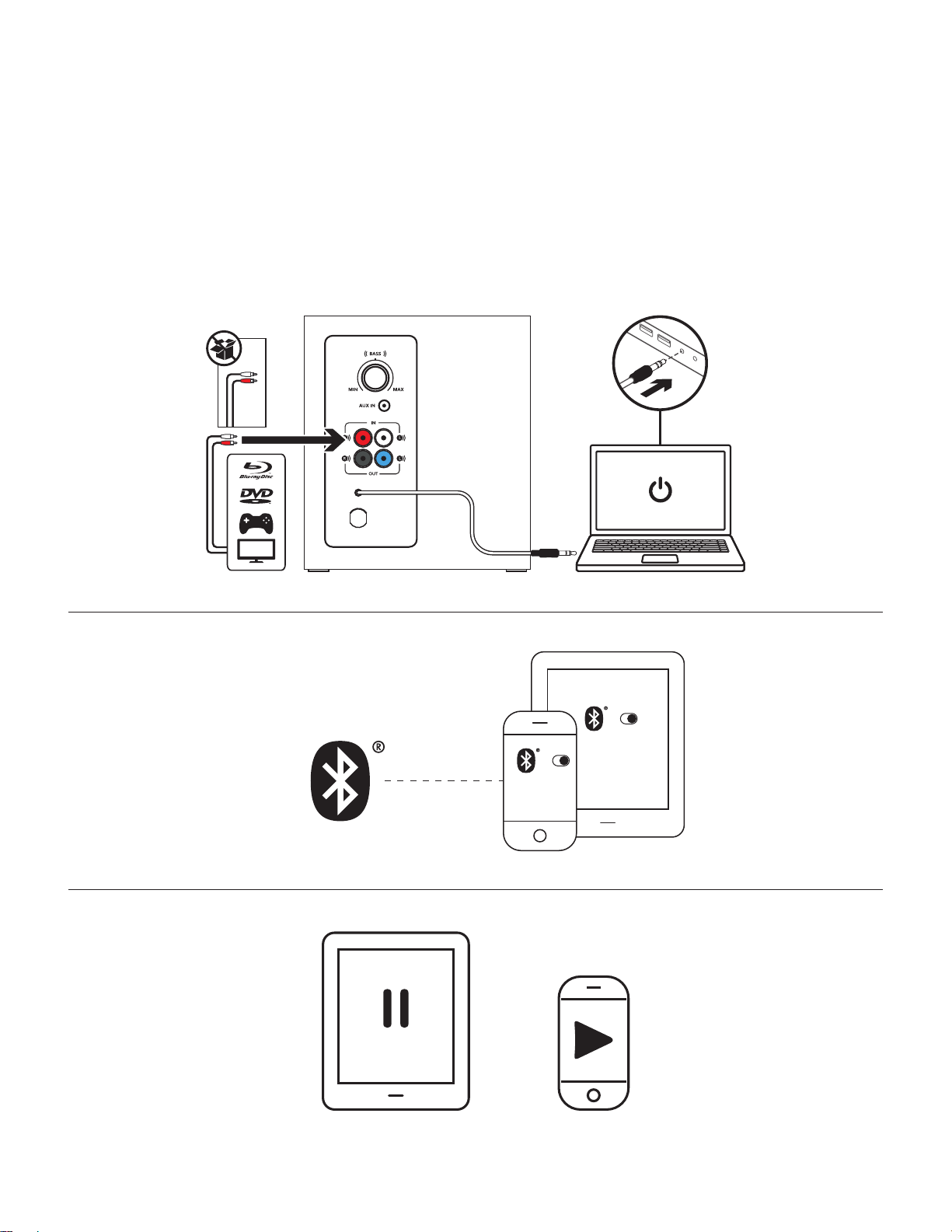
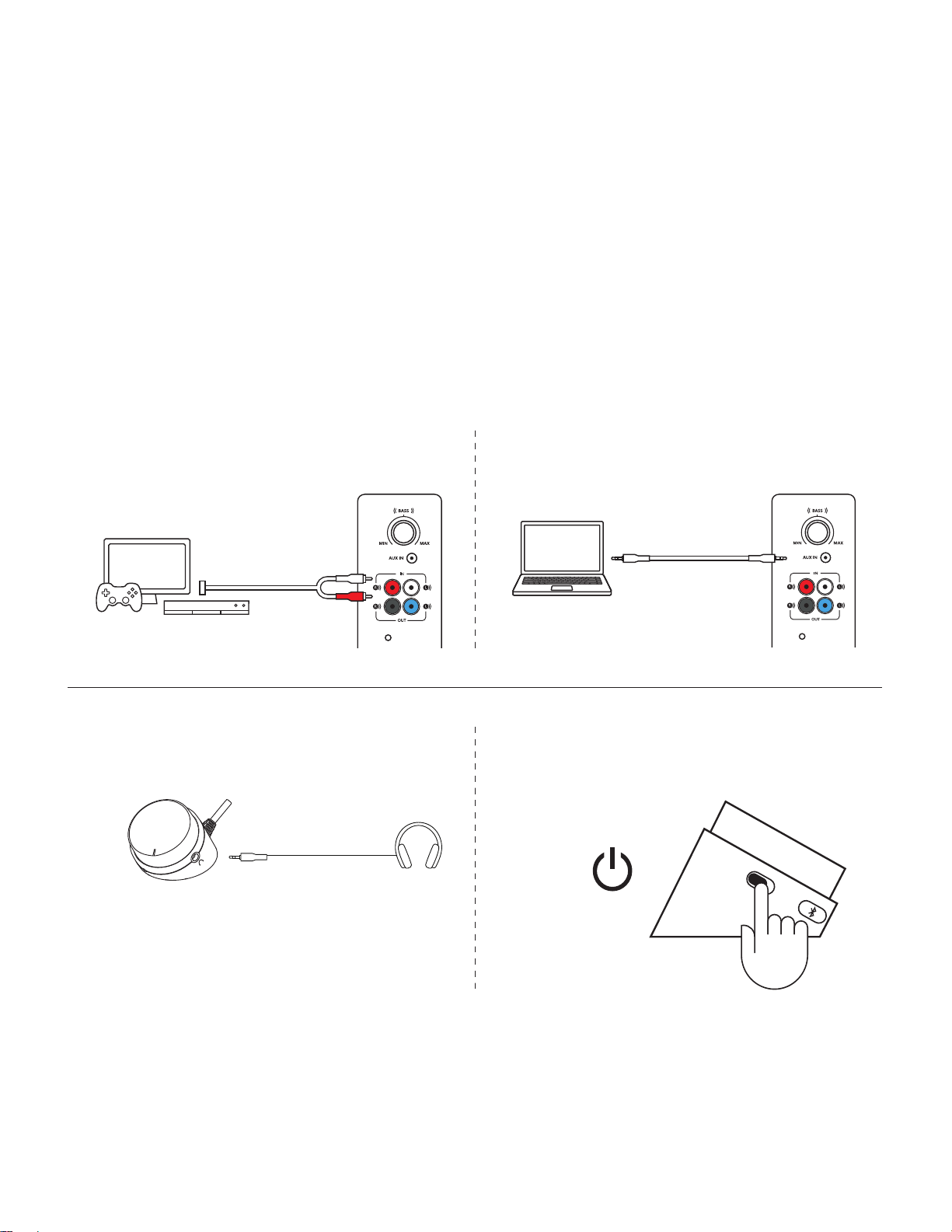
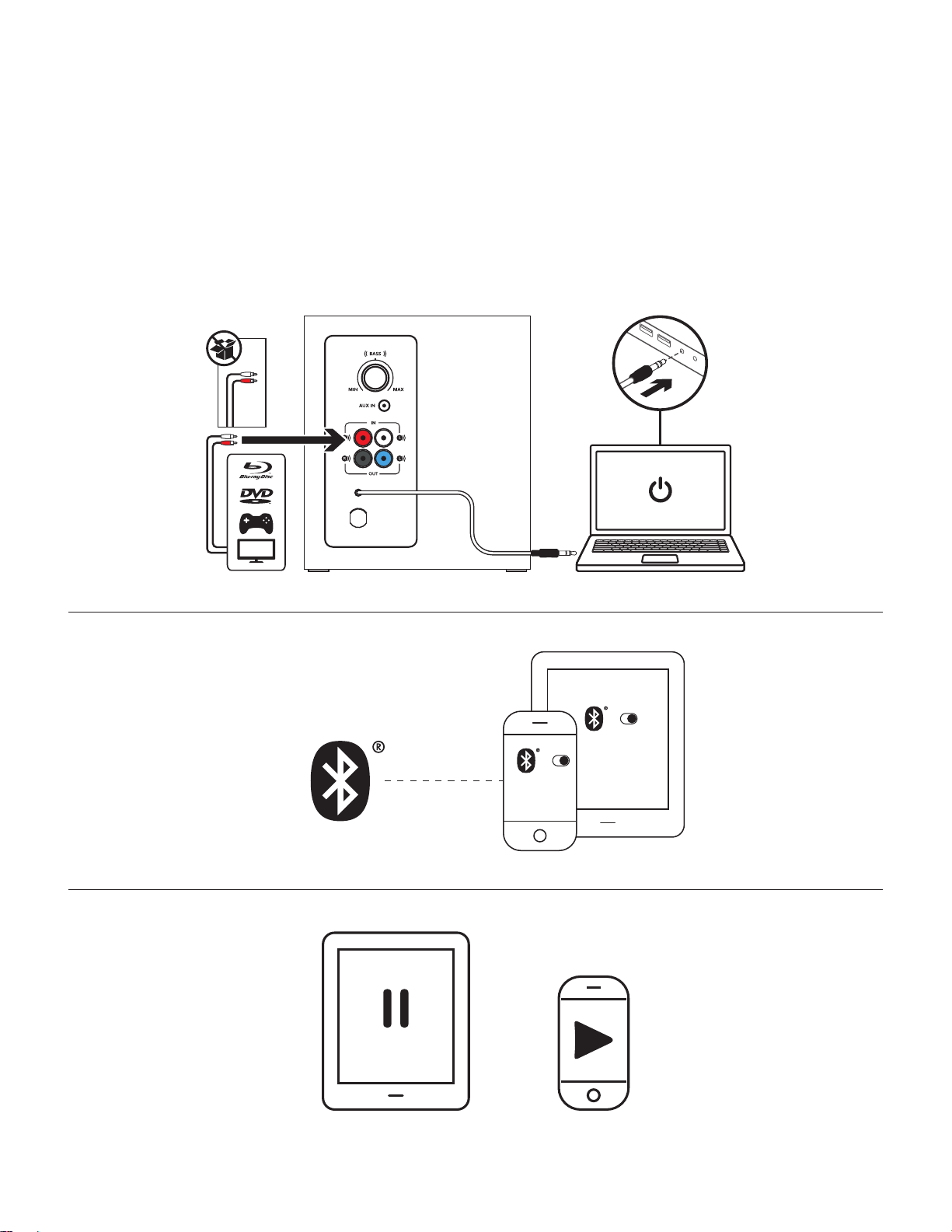
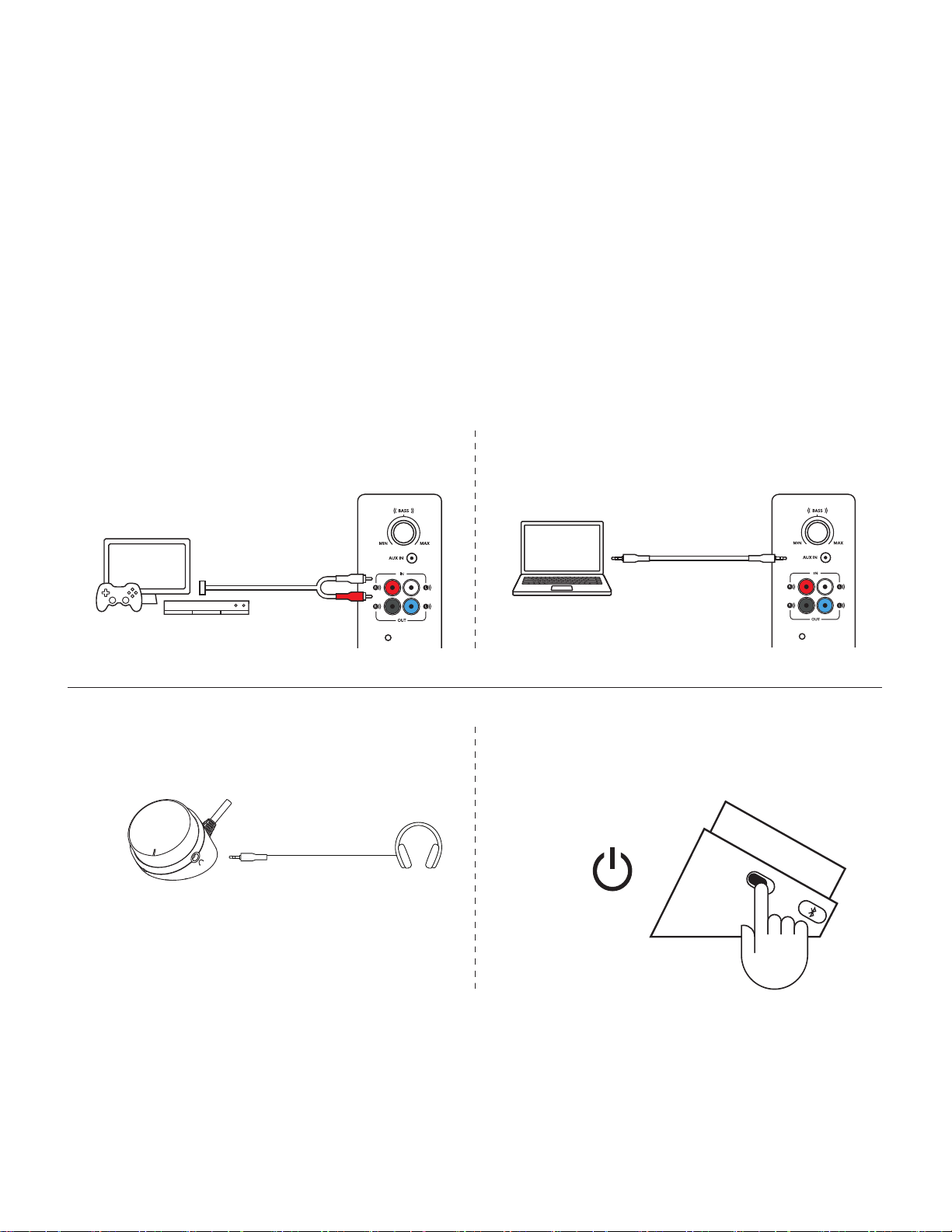
1A. For RCA connection:
Connect one end of the RCA cable to the corresponding RCA jack on the back of the subwoofer.
Thenconnectthe other end of the cable to the RCA outlet on your device (TV and gaming console, etc.).
Note: the RCA cable is not included in the box and must be purchased separately.
1B. For 3.5 mm connection:
Connect one end of the provided 3.5 mm cable to the auxiliary input on the back of the subwoofer.
Thenconnectthe other end of the cable to the 3.5 mm audio jack on your device.
2. Plug your headphones into the headphone jack on the control pod. Adjust the volume either from
thecontrolpodor the audio source.
3. Power speakers on/o by sliding the power on/o button on the wired control pod.
1A 1B
2 3
English 7
CONNECT TO THREE DEVICES SIMULTANEOUSLY
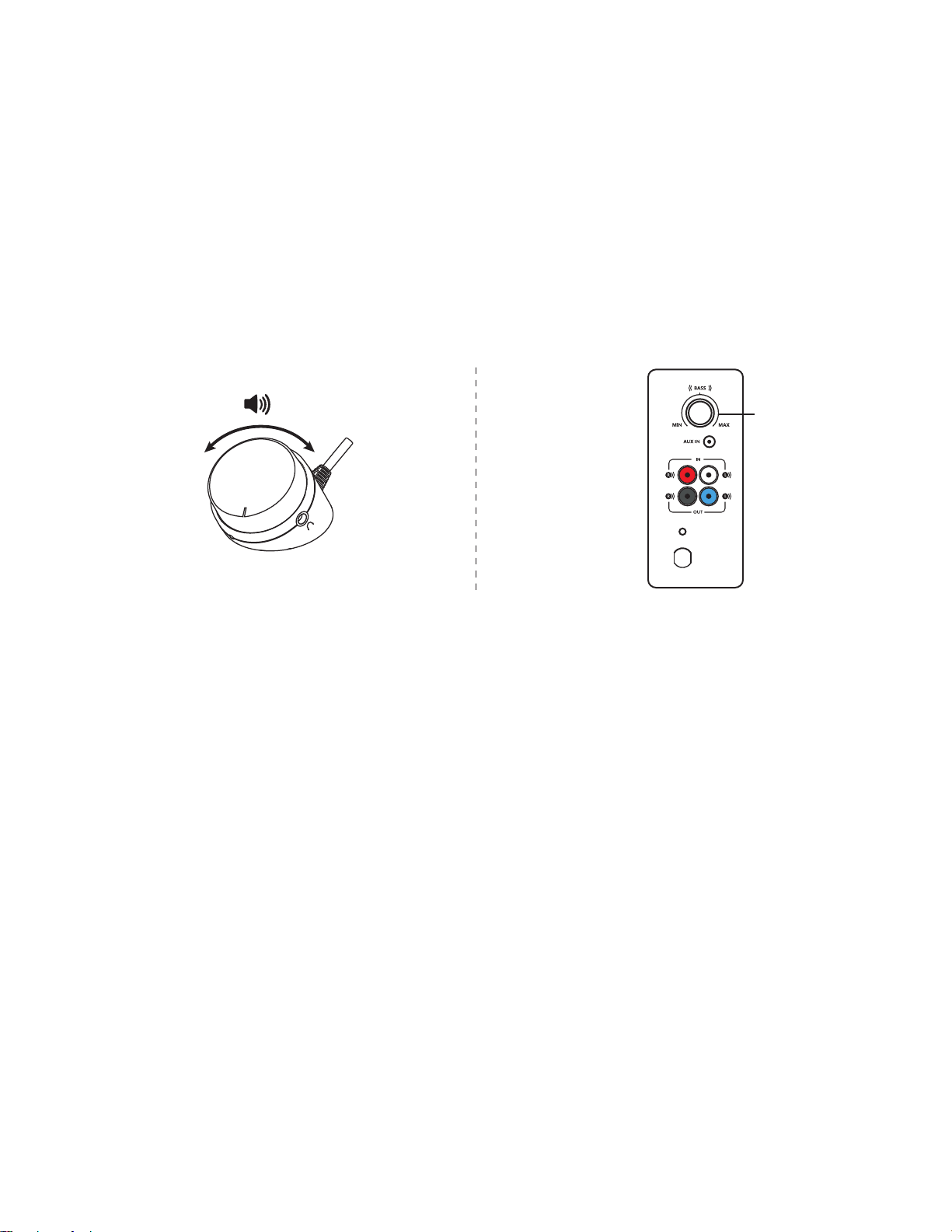
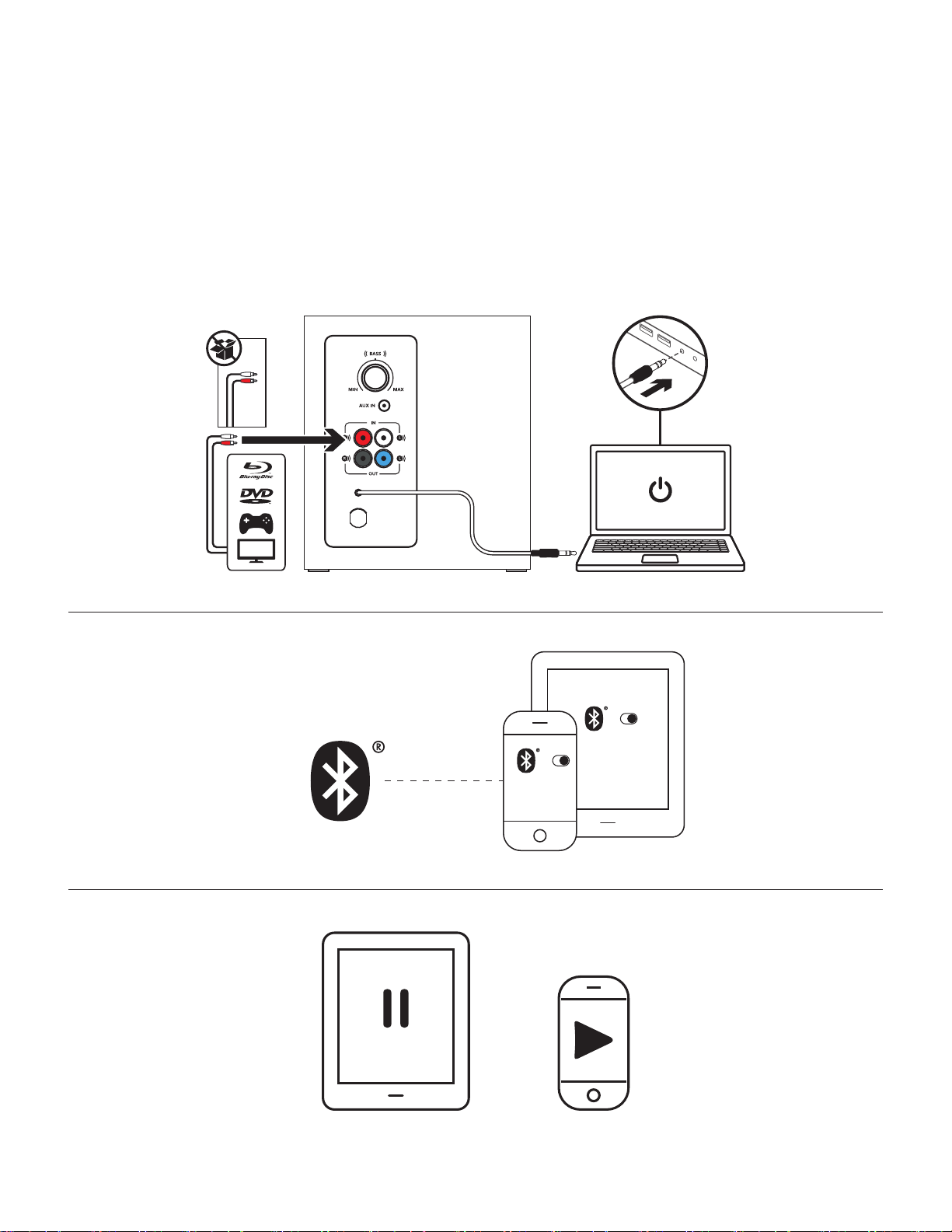
1. Connect up to three devices at the same time through the RCA connector on the back of the subwoofer,
the 3.5mm cable on the subwoofer and Bluetooth.
2. You can pair up to eight Bluetooth source devices with your speakers and connect to 2 of them at once.
3. To switch between audio sources just pause audio on one connected device and play audio from the other
connected device.
1
2
3
Z337
Logitech
Z337
Logitech
English 8
www.logitech.com/support/Z337
1 2
- +
BASS
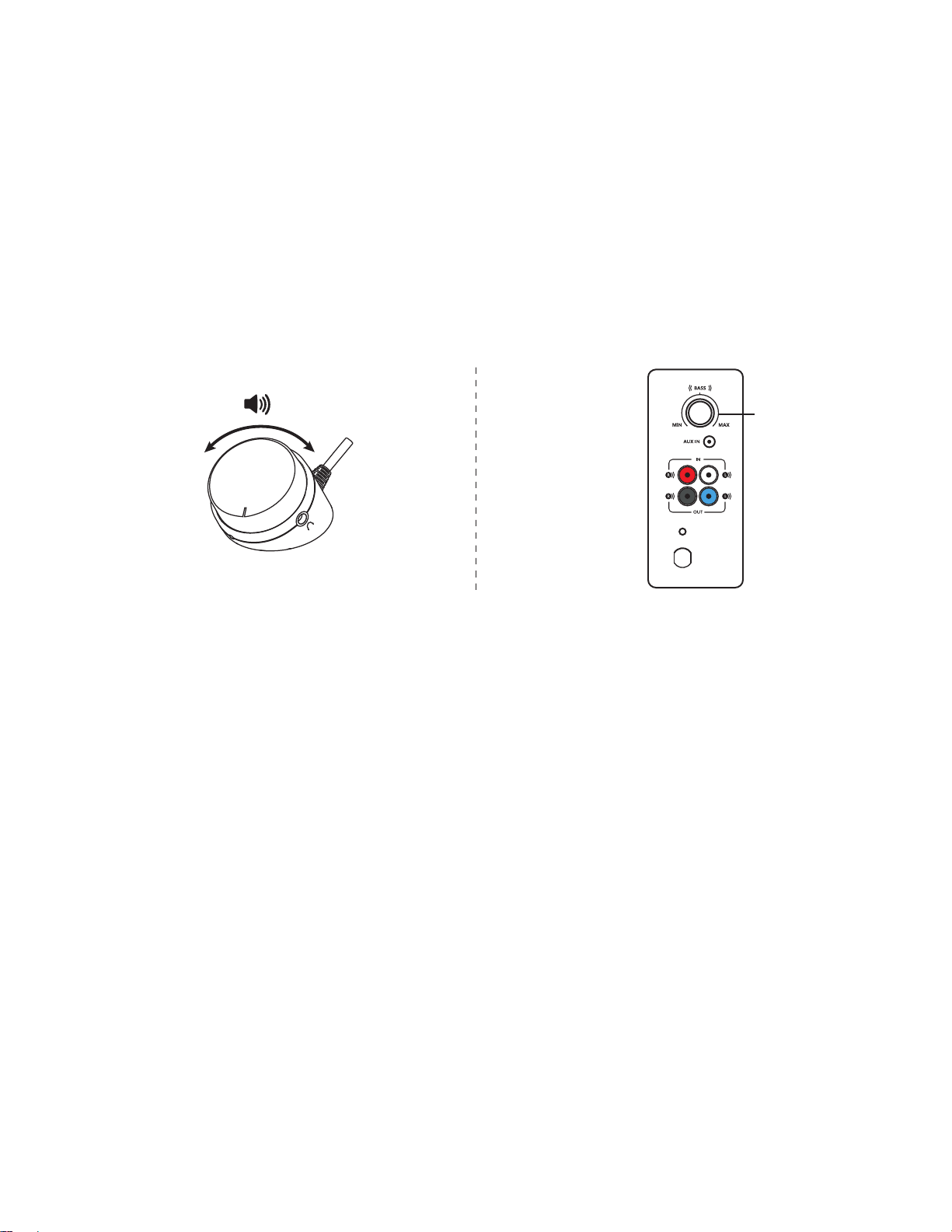
ADJUST THE VOLUME
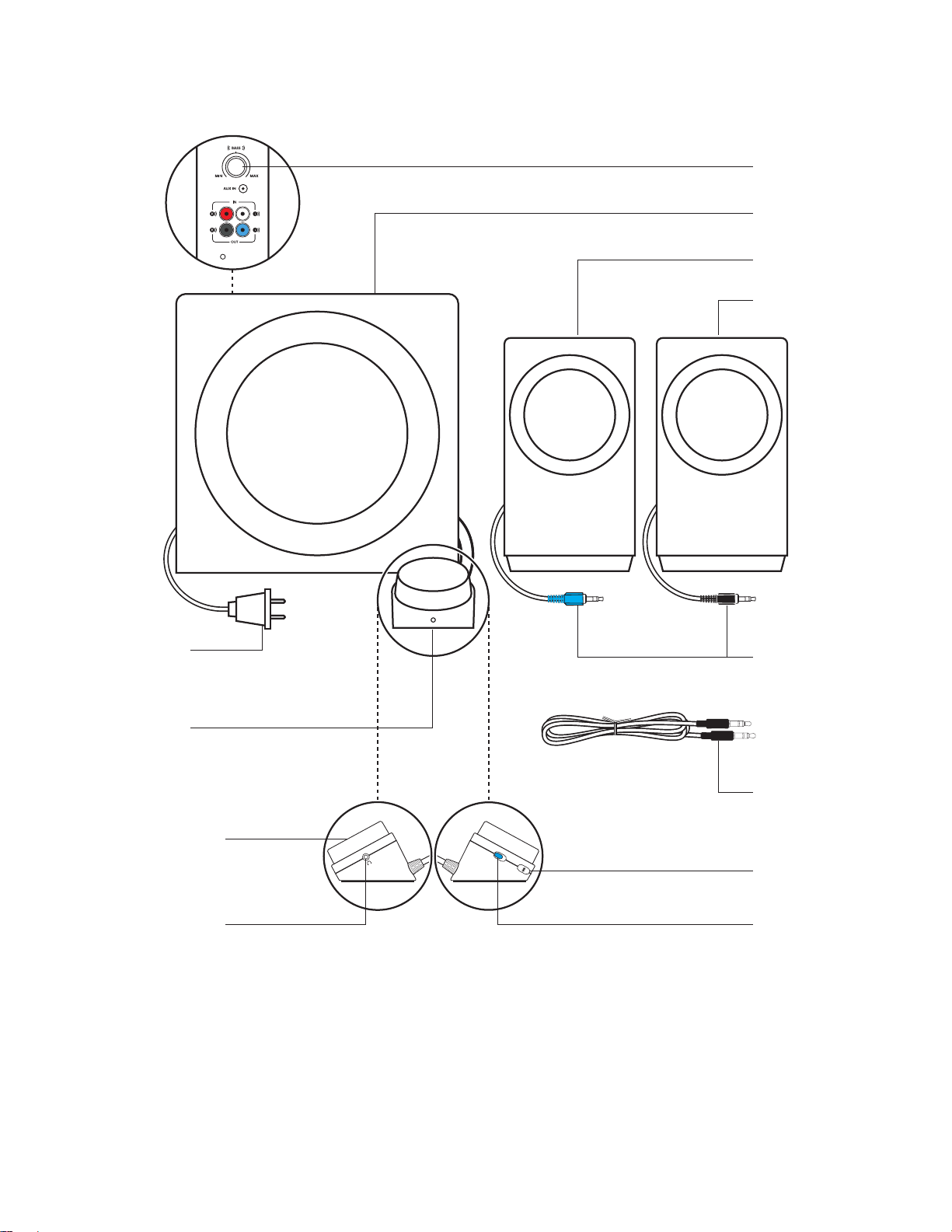
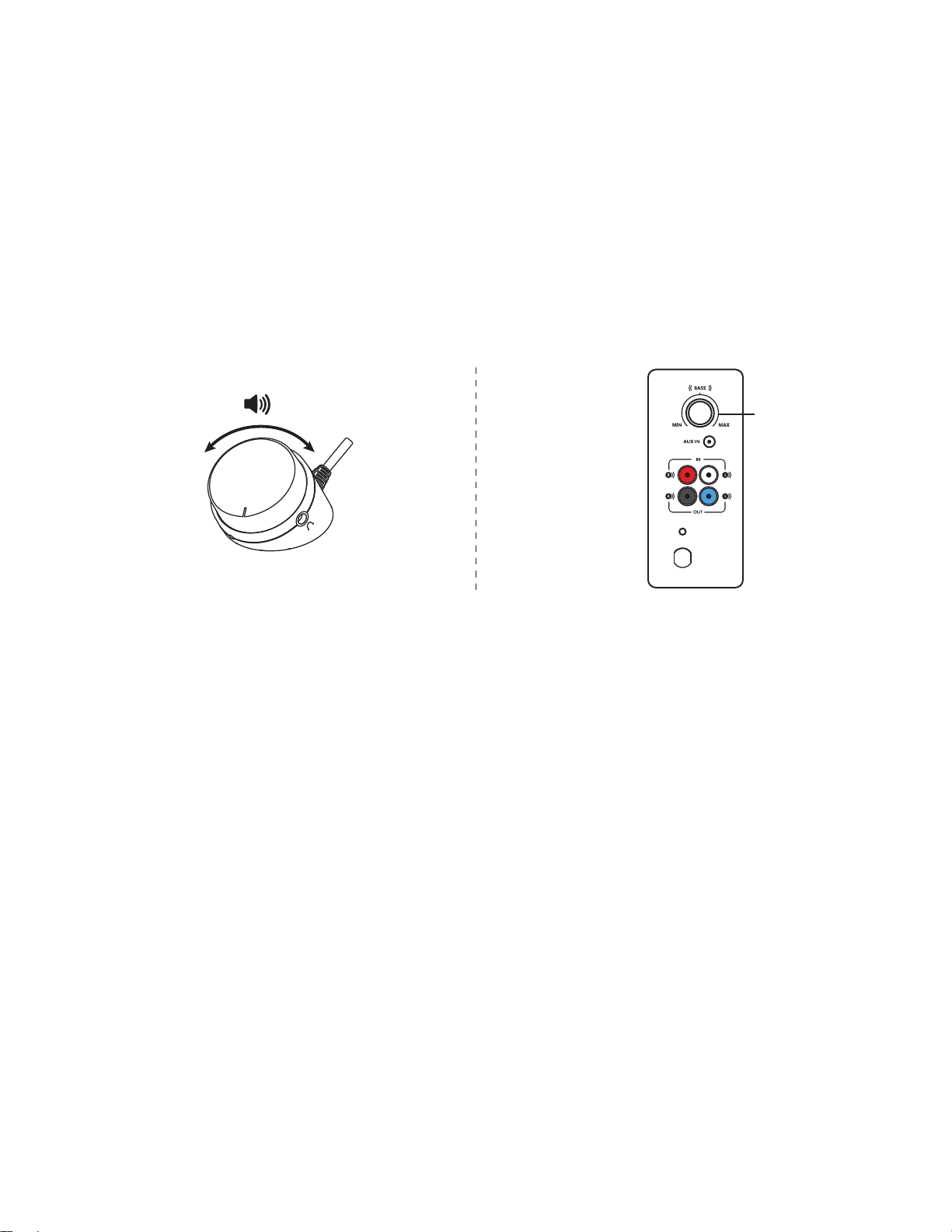
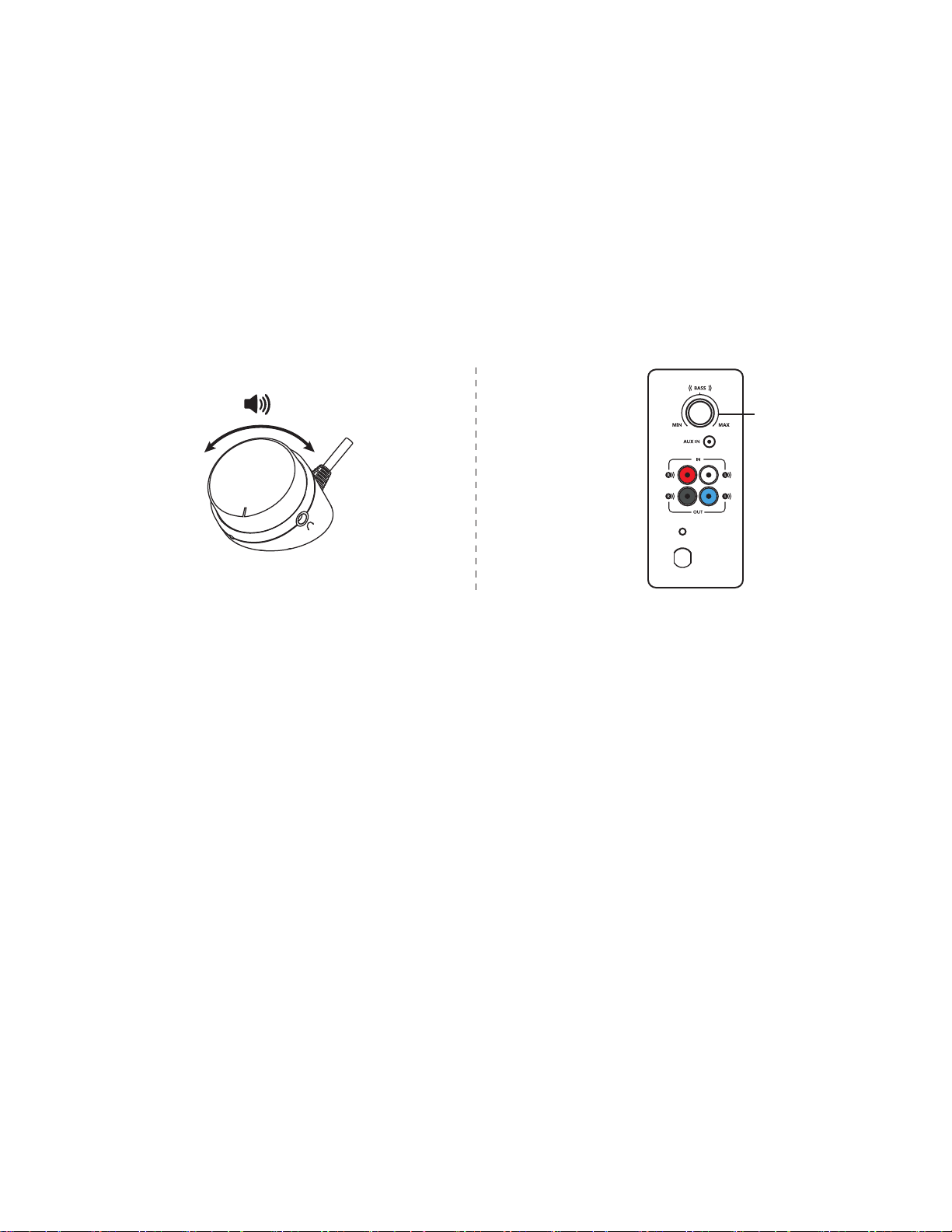
1. Adjust the volume of Z337 with the knob on the control pod.
Turn the knob clockwise (to the right) to increase volume.
Turn the knob counter-clockwise (to the left) to decrease volume.
ADJUST THE BASS
2. Adjust the bass level by turning the bass control knob located at the back of your subwoofer.
Turn bass knob to the right for deeper bass or to the left for less bass.
BASS
简体中文 9
了解您的产品
有线控制器
电源插头
音量控制旋钮
耳机插孔
低音炮
低音控制
连接低音炮的 RCA 线缆
3.5 毫米音频连接线
电源打开/关闭按钮
蓝牙
配对按钮
左卫星音箱
右卫星音箱
简体中文 10
连接音箱
1. 将左侧卫星音箱上的蓝色 VGA 插头插入蓝色低音炮端口。
2.将右侧卫星音箱上的黑色 VGA 插头插入黑色低音炮端口。
3.将电源线插入电源插座。
21
3
简体中文 11
连接音源
使用
蓝牙
™
:
1. 在设备上开启
蓝牙
。
2.打开音箱。
3.按住
蓝牙
按钮激活配对模式。控制器的 LED 指示灯将快速闪烁。
4.在设备的
蓝牙
设备列表中选择“罗技 Z337”。
5.要通过
蓝牙
与第二台设备配对,请重复步骤 3 和步骤 4。请 确 保 已 在 设 备 上 开 启
蓝牙
。
2
4
1
3
Z337
Logitech

简体中文 12
连 接 音 源( 续 )
1A. RCA 连接:
将 RCA 线缆的一端连接到低音炮背面的相应 RCA 插 孔 。将 线 缆 的 另 一 端 连 接 设 备 的 RCA 插孔(电视和游戏主机等)
注:RCA 线 缆 未 随 附 ,需 另 购 。
1B. 3.5 毫米连接:
将随附的 3.5 毫米线缆的一端连接到低音炮背面的辅助输入。随后将线缆的另一端连接至设备的 3.5 毫米音频插孔。
2. 将耳机插入控制器上的耳机插孔。通过控制器或音源调节音量。
3. 滑动有线控制器上的电源开关按钮打开或关闭音箱。
1A 1B
2 3
简体中文 13
可同时连接三台设备
1. 通过低音炮背面的 RCA 端口和低音炮上的 3.5 毫米线缆以及
蓝牙
同时连接多达三个设备。
2.最多可将八个
蓝牙
音 源 设 备 与 音 箱 配 对 ,并 且 可 同 时 连 接 2 个音源设备。
3.要在音源之间切换,只需暂停一台连接设备上的音频,然后播放来自其他连接设备的音频。
1
2
3
Z337
Logitech
Z337
Logitech
繁體中文 15
瞭解您的產品
線控裝置
電源插頭
音量控制鈕
耳機插孔
重低音音箱
低音控制鈕
連接到重低音音箱的
RCA 連接線
3.5 公釐音訊連接線
電源開啟/關閉按鈕
藍牙
配對按鈕
左衛星音箱
右衛星音箱
繁體中文 16
連接音箱
1. 將右衛星音箱的藍色 RCA 接頭插入到藍色重低音音箱插孔。
2. 將右衛星音箱的黑色 RCA 接頭插入到黑色重低音音箱插孔。
3.將電源插頭插入到電氣插座。
21
3
繁體中文 17
連接到音訊來源
使用
藍牙
:
1. 開啟裝置上的
藍牙
功 能。
2. 開啟音箱電源。
3.按住
藍牙
按鈕不放以啟動配對模式。線控裝置上 LED 指 示 燈 會 快 速 閃 爍。
4.在您的
藍牙
裝置清單中,選擇並連線到「羅技 Z337」。
5.若要與您的第二個裝置透過
藍牙
配 對,請 重 複 步 驟 3 和步驟 4。確認您的裝置已開啟
藍牙
功 能。
2
4
1
3
Z337
Logitech
繁體中文 18
連接到音訊來源 (續)
1A. RCA 連 接:
將 RCA 連接線的一端連接到相應的重低音音箱上相應的 RCA 插孔。將連接線的另一端,連接到裝置 (電 視、遊 戲 主 機 等 )
上的 RCA 插 孔。
注 意:包 裝 盒 內 未 隨 附 RCA 連 接 線,需 另 購。
1B. 3.5 公 釐 連 接:
將隨附的 3.5 公釐連接線的一端,連接到重低音音箱背面的輔助輸入埠。然後將連接線的另一端,連接到裝置上的 3.5 公釐
音 訊 插 孔。
2. 將耳機插入到線控裝置上的耳機插孔。利用線控裝置或音訊來源調整音量。
3. 撥動線控裝置上的電源開啟/關 閉 按 鈕,開 啟 /關閉音箱電源。
1A 1B
2 3
繁體中文 19
最多可同時連線三台裝置
1. 透過重低音音箱背面的 RCA 接頭和重低音音箱上的 3.5mm 連接線,以及藍牙功能,最多可同時連接到三個裝置。
2. 您最多可以將八個
藍牙
音源裝置與音箱建立配對,並同時連線到其中的 2 個 裝 置。
3.若要切換音訊來源,只須暫停一個已連接之裝置上的音訊,然後從另一個已連接的裝置播放音訊。
1
2
3
Z337
Logitech
Z337
Logitech
한국어 21
제품 설명
유선 컨트롤 포드
전원 플러그
볼륨 컨트롤 노브
헤드폰 잭
서브우퍼
베이스 컨트롤
RCA 케이블로
서브우퍼 연결
3.5mm 오디오 케이블
전원 켜기/끄기 버튼
Bluetooth
페어링 버튼
왼쪽 위성 스피커
오른쪽 위성 스피커
한국어 22
스피커 연결
1. 파란색 서브우퍼 잭에 좌측 스피커의 파란색 RCA 커넥터를 연결합니다.
2. 검은색 서브우퍼 잭에 우측 스피커의 검은색 RCA 커넥터를 연결합니다.
3. 전원 플러그를 전기 콘센트에 연결합니다.
21
3
한국어 23
오디오 소스 연결
Bluetooth
®
사용:
1. 장치에서
Bluetooth
를 켭니다.
2. 스피커의 전원을 켭니다.
3. 페어링 모드를 활성화하려면
Bluetooth
버튼을 길게 누르십시오. 컨트롤 포드의 LED가 빠르게 깜박입니다.
4.
Bluetooth
장치 목록에서 "로지텍 Z337"을 선택하고 연결하십시오.
5.
Bluetooth
를 통해 두 번째 기기와 페어링하려면 3단계와 4단계를 반복하십시오. 기기의
Bluetooth
를 켰는지 확인하십시오.
2
4
1
3
Z337
Logitech
한국어 24
오디오 소스 연결(계속)
1A. RCA 연결의 경우:
RCA 케이블의 한쪽 끝을 서브우퍼의 뒤쪽에 있는 해당 RCA 잭에 연결하십시오. 그다음 케이블의 다른 쪽 끝을
장치의 RCA 콘센트에 연결하십시오(TV, 게임 콘솔 등).
참고: RCA 케이블은 박스에 포함되지 않으며 따로 구매하셔야 합니다.
1B. 3.5mm 연결의 경우:
제공된 3.5mm 케이블의 한 쪽 끝을 서브우퍼 뒷면에 있는 보조 입력에 연결합니다. 그다음 케이블의 다른 쪽
끝을 장치의 3.5mm 오디오 잭에 연결하십시오.
2. 컨트롤 포드의 헤드폰 잭에 헤드폰을 연결합니다. 컨트롤 포드 또는 오디오 소스에서 볼륨을 조절하십시오.
3. 유선 컨트롤 포드의 전원 켜기/끄기 버튼을 눌러 전원 스피커를 켜거나 끕니다.
1A 1B
2 3
한국어 25
최대 3개 장치를 동시에 연결할 수 있습니다
1. 서브우퍼 뒷면의 RCA 커넥터와 서브우퍼의 3.5mm 케이블 및 Bluetooth로 최대 3개의 장치를 동시에
연결하십시오.
2. 최대 8개의 Bluetooth 소스 장치를 스피커와 페어링하며 그 중 2개를 동시에 연결할 수 있습니다.
3. 오디오 소스 사이를 전환하려면 연결된 장치 중 하나의 오디오를 일시 중지하고 연결된 다른 장치에서
오디오를 재생하십시오.
1
2
3
Z337
Logitech
Z337
Logitech

WEB-621-001234.002
© 2019 Logitech. Logitech, Logi and other Logitech marks are owned by Logitech
and may be registered. All other trademarks are the property of their respective
owners. Logitech assumes no responsibility for any errors that may appear in
this manual. Information contained herein is subject to change without notice.
www.logitech.com/support/Z337
