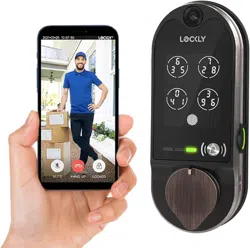
INSTALLATION GUIDE
DEADBOLT EDITION
SMART LOCK w/ HD
VIDEO DOORBELL
VISION
Lockly Secure can be fitted for both
right swing doors and left swing doors.
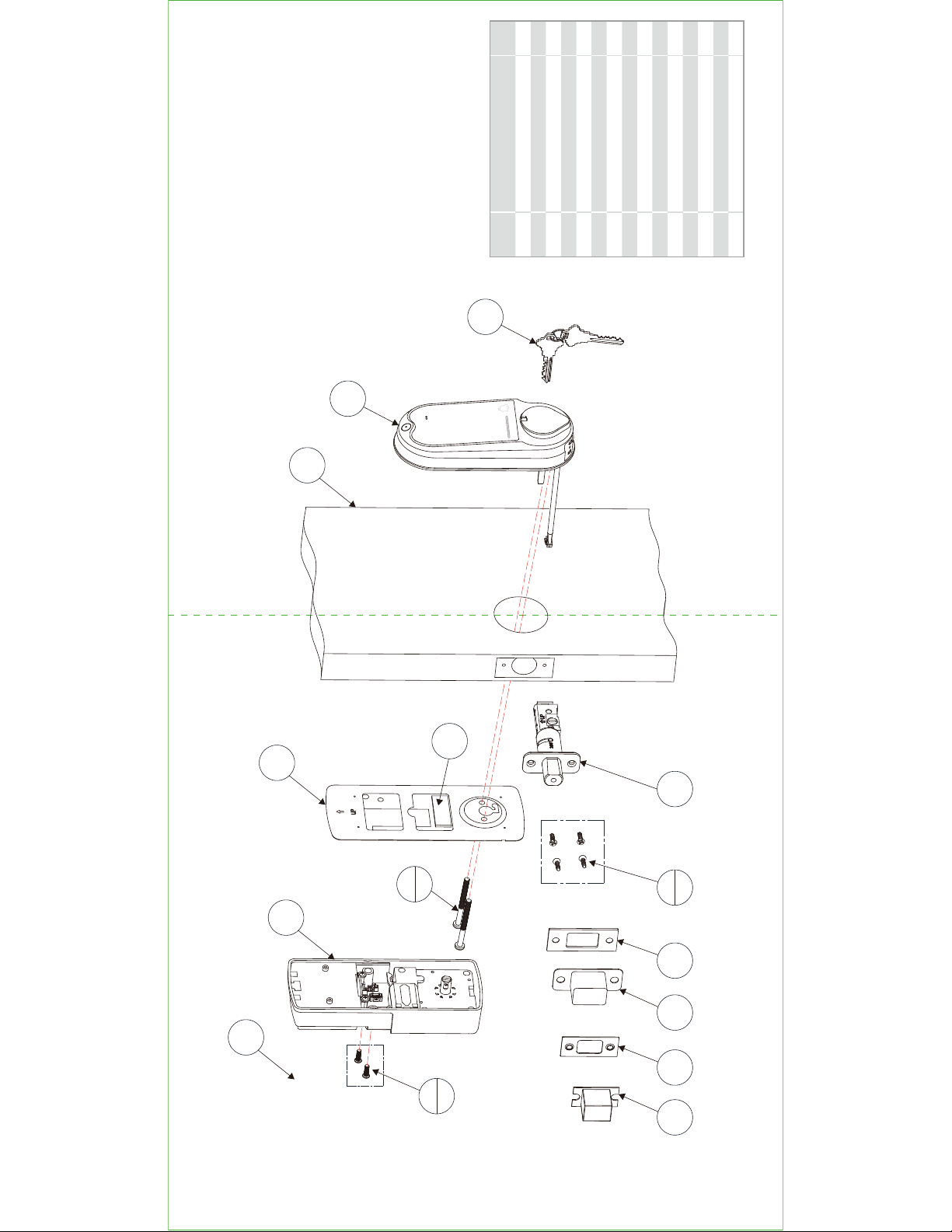
Parts List
Labeled
As
Description Count
A Keys 1
B Exterior Assembly 1
C Exterior 1
D Mounting Plate 1
E Adhesive 1
F UNF10-32*60mm Screw 2
G Interior Assembly 1
H PM4*12MM Screw 2
I Battery Cover 1
J Deadbolt 1
K KA4*20MM Screw 4
L-1 Strike Plate(Optional) 1
M-1 Adhesive(Optional) 1
L-2 Strike Plate(Optional) 1
M-2
Strike Plate(Optional)
1
STEP 1: PREPARE DOOR FOR INSTALLATION
A
B
C
D
G
I
H
2x
J
K
4x
L-1M-1L-2M-2
E
F
2x
STEP 1: PREPARE DOOR FOR INSTALLATION
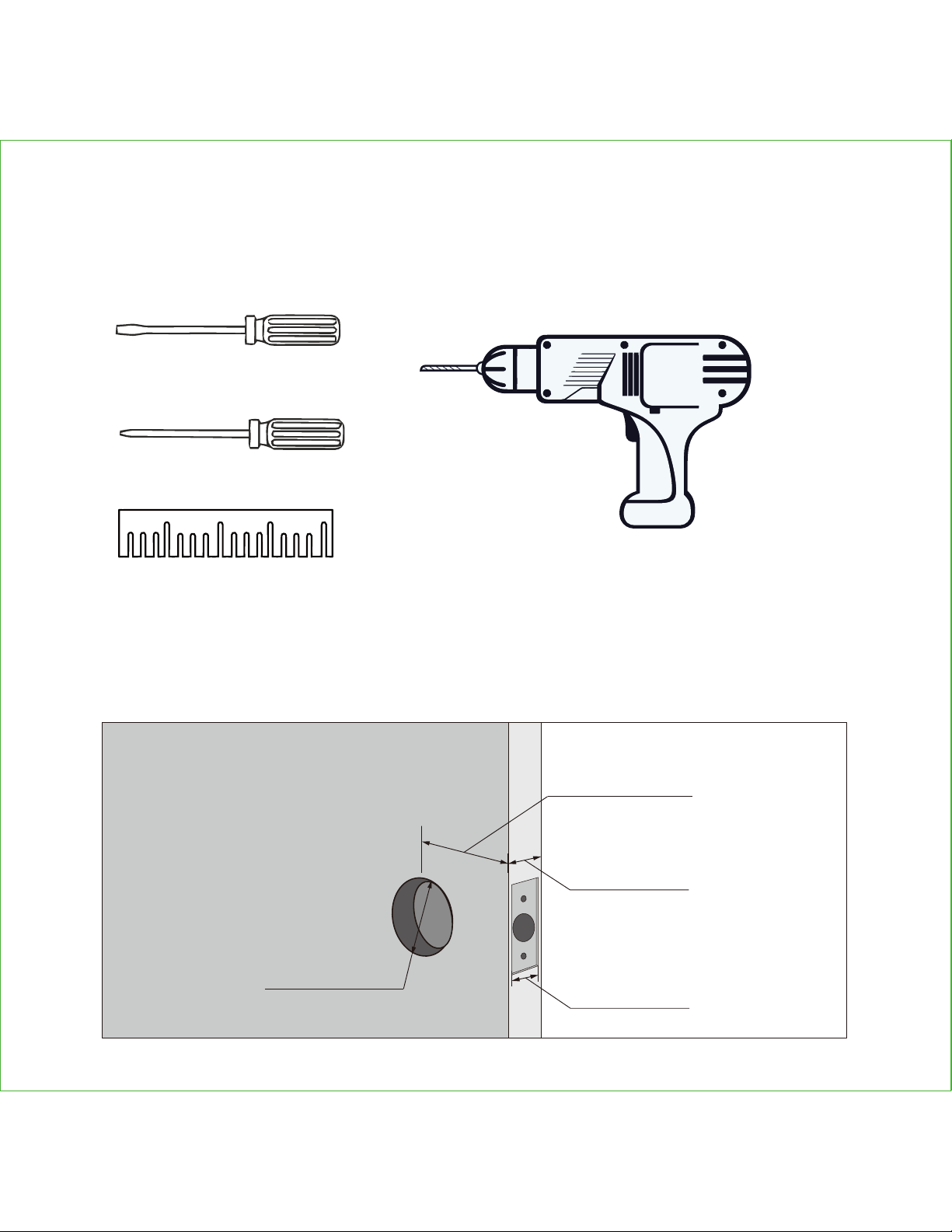
1.1: To complete installation, you would need the following:
1.2: Prepare door and remove existing lock. If necessary, use provided
Installation Template to prepare door.
Phillips Screwdriver
Flathead Screwdriver
Ruler
Screwdriver with drill bits
(optional)
1-⅜" (35mm)
to 2" (50mm)
1" (25mm)
2-⅜" (60mm)
or 2-¾" (70mm)
2-⅛" (54mm)
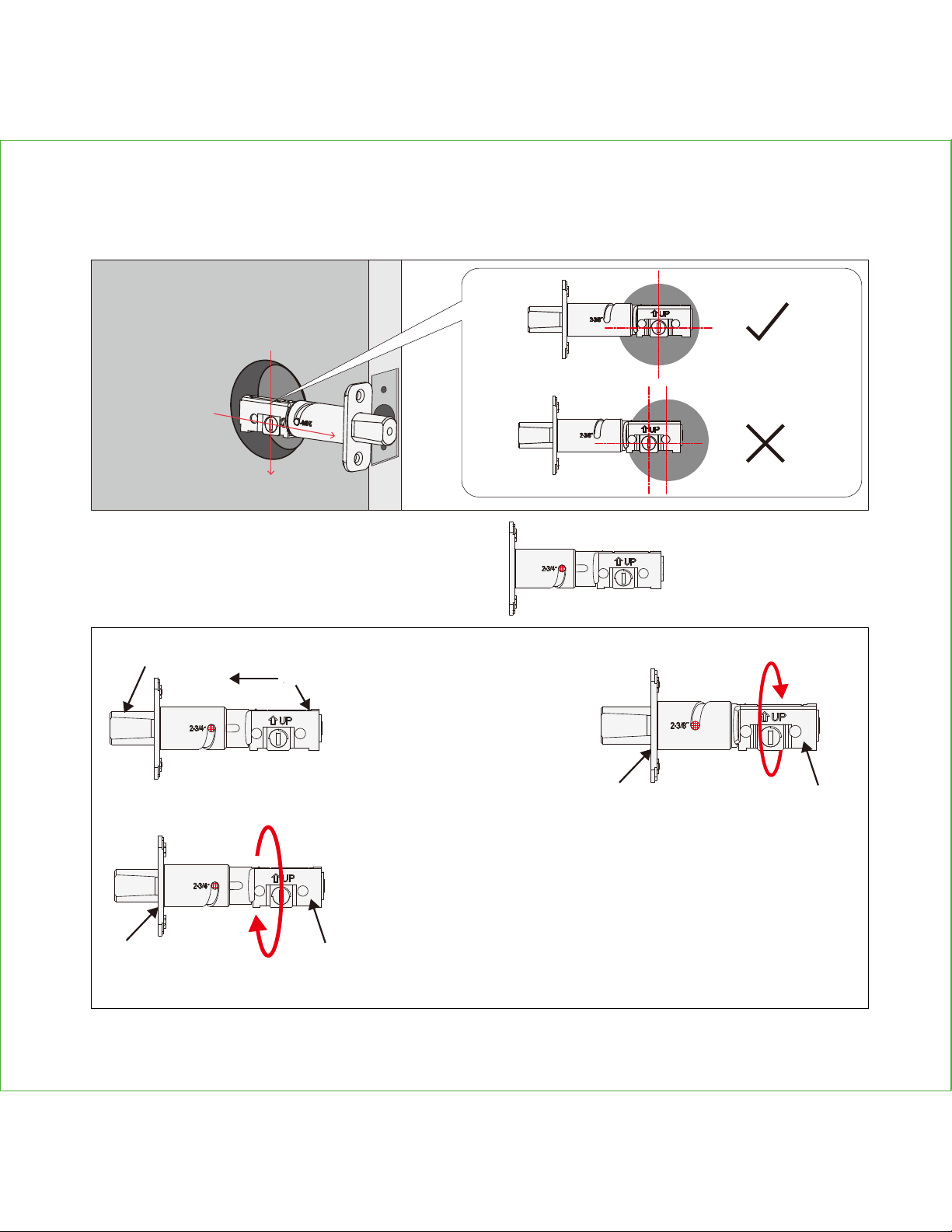
STEP 2. ADJUST DEADBOLT AND INSTALL
2.1: Deadbolt slit hole must be aligned to the center of the door hole. If not
adjust as shown below:
2.1.1:
Wear gloves during adjustment
to prevent pinching your hands)
Hold the metal
plate (c) and twist
the deadbolt body
(d) clockwise till it
snaps to 2-3/8"
To return to default status,
while the deadbolt (b) is
extended, hold the metal
plate (c) and twist the dead-
bolt body (d) counter-clock-
wise till it snaps to 2-3/4"
(b)
(a)
(c) (d)
(c)
(d)
Push the crank
(a) to extend the
deadbolt (b)
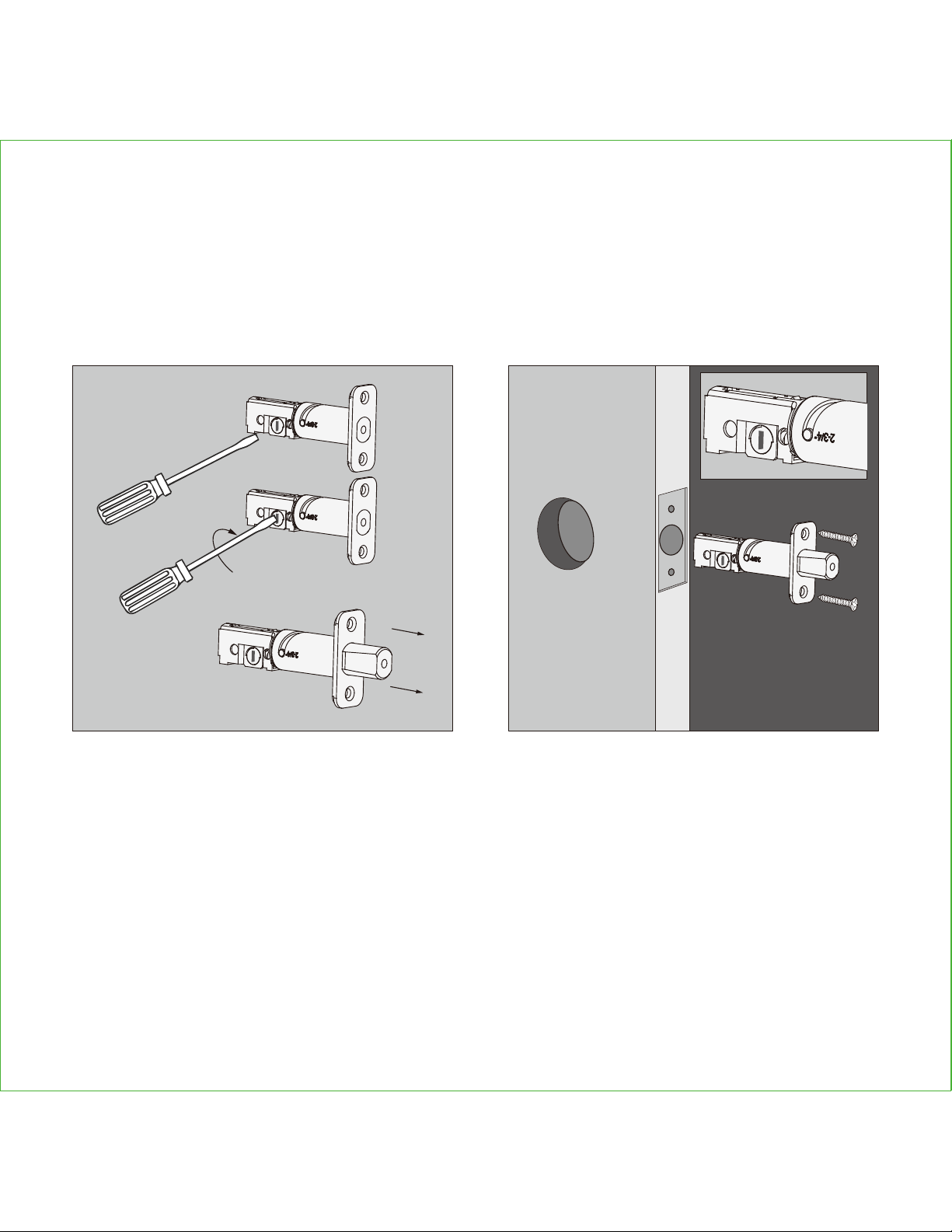
STEP 2. ADJUST DEADBOLT AND INSTALL
2.2: Extend the deadbolt by inserting a
flat head screwdriver on the slit hole or
by pushing the crank towards the metal
face plate.
2.3: Insert the Deadbolt to the edge
door hole, make sure that its right side
up and the slit hole is in vertical position,
then fastened with 2 screws (K)
K(2X)
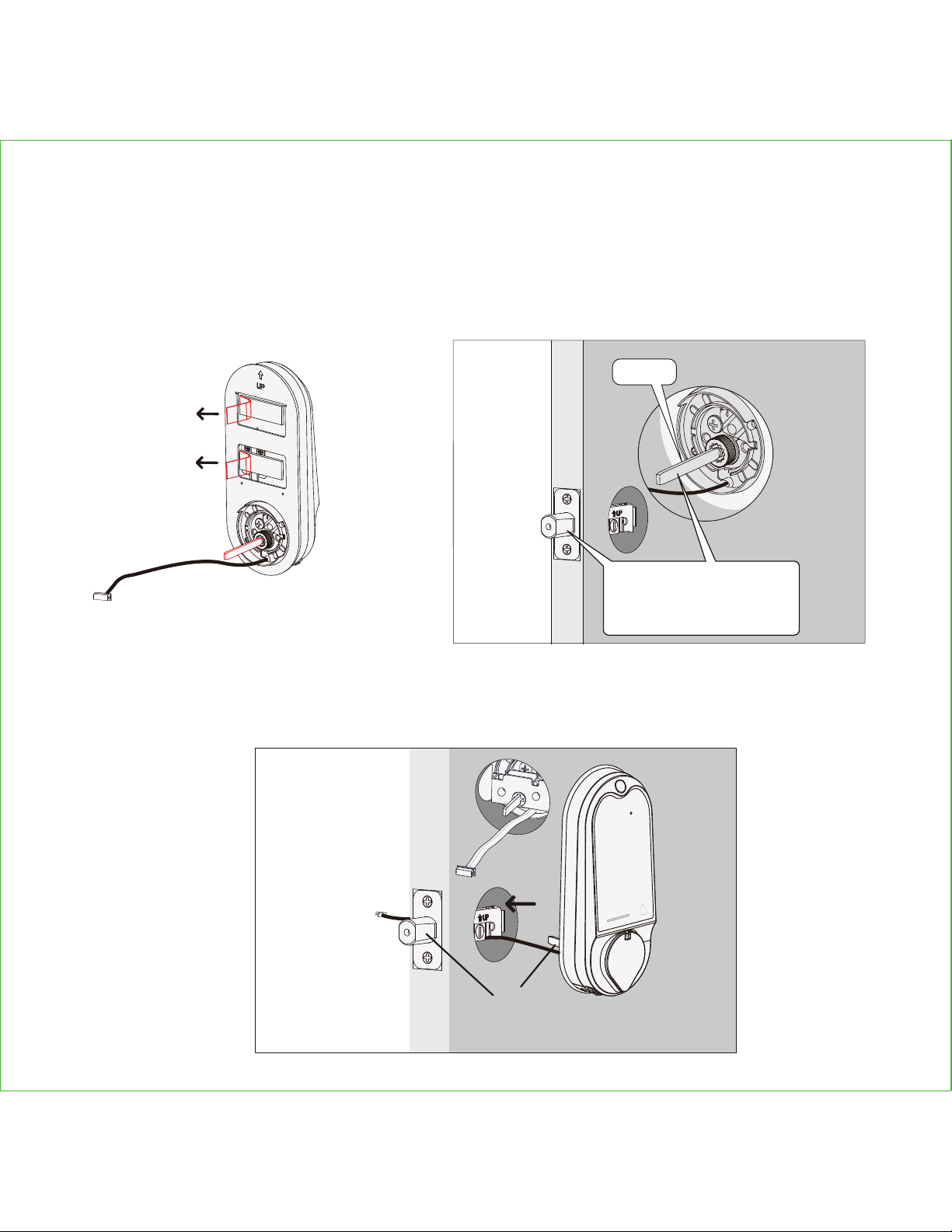
STEP 3. INSTALLING THE EXTERIOR ASSEMBLY
3.1: To secure Exterior
Assembly of lock, peel the
cover off the adhesive strips
3.3: Place the exterior assembly on the door by inserting the torque blade on a vertical
position to the deadbolt slit hole + and guide the cable under the deadbolt. Secure and
fastened with the adhesive strips.
3.2: Before placing the exterior assembly on the
door, make sure the torque blade is in vertical
position and the deadbolt is extended.
EXTERIOR VIEW
(1)
Vertical
When installing the exterior assembly,
make sure the deadbolt is fully
extended and the slit hole is vertically
positioned on the bottom, the torque
blade should be inserted in a vertical
position.
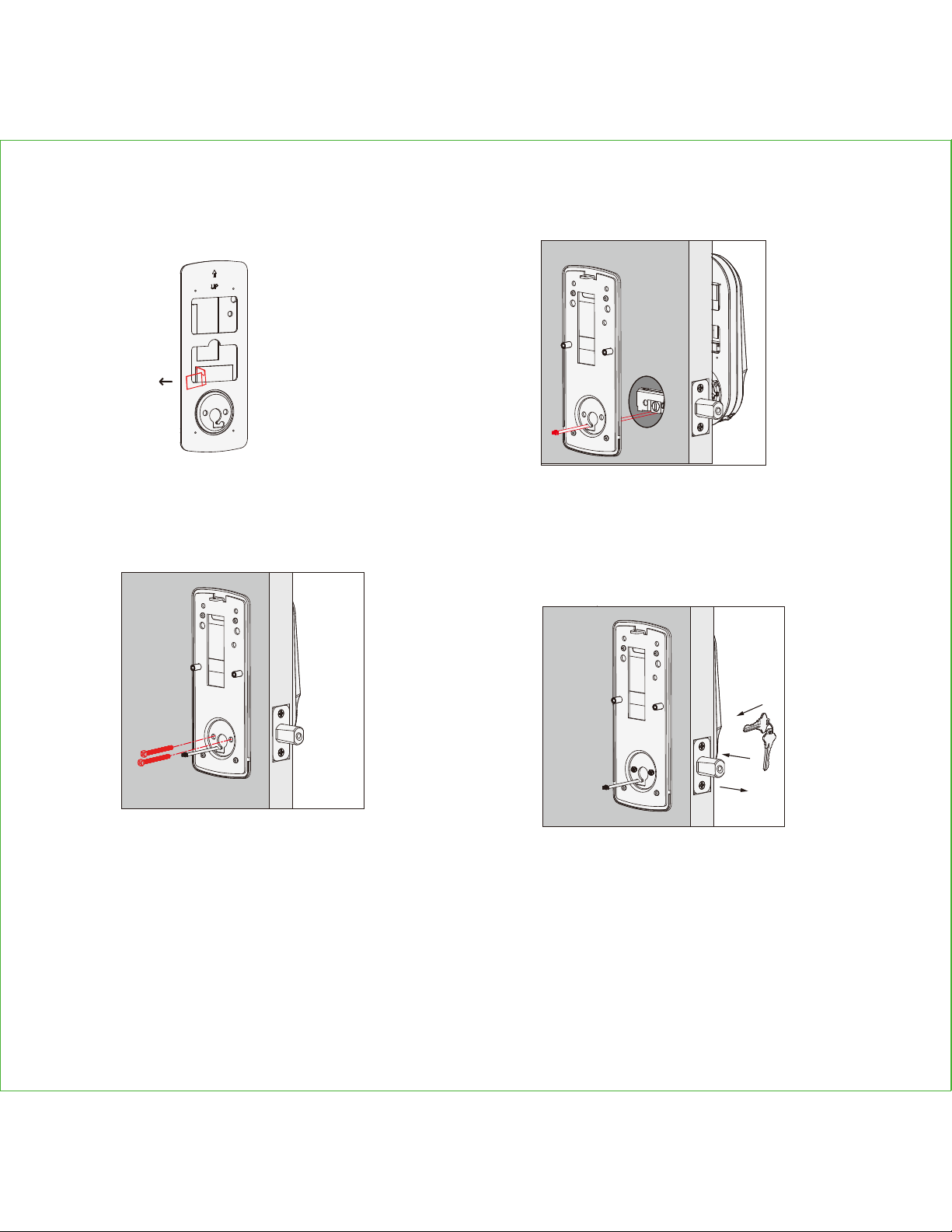
STEP 4. INSTALLING THE INTERIOR ASSEMBLY
4.1: Peel of the cover
off the adhesive strip on
the mounting plate.
4.3: Without using any tools, insert 2
screws (G) on the side of the torque
blade. By using hand carefully, turn
the screws clockwise to catch the
thread, then counter clockwise to
make sure they are not cross threaded
and turns smoothly. Make five turns
before using a screw driver to tighten
the screws until the mounting plate is
securely placed to the door.
4.4: Before installing the interior
assembly, use the physical key and
try to unlock/lock to check if the
deadbolt is moving and not stuck. Do
not forget to take out the key before
proceeding to next steps.
4.2: Place the mounting plate on the
interior side of the door. Guide the cable
to the opening ear on the side of mounting
plate and make sure the torque blade is at
the center of the mounting plate.
G(2X)
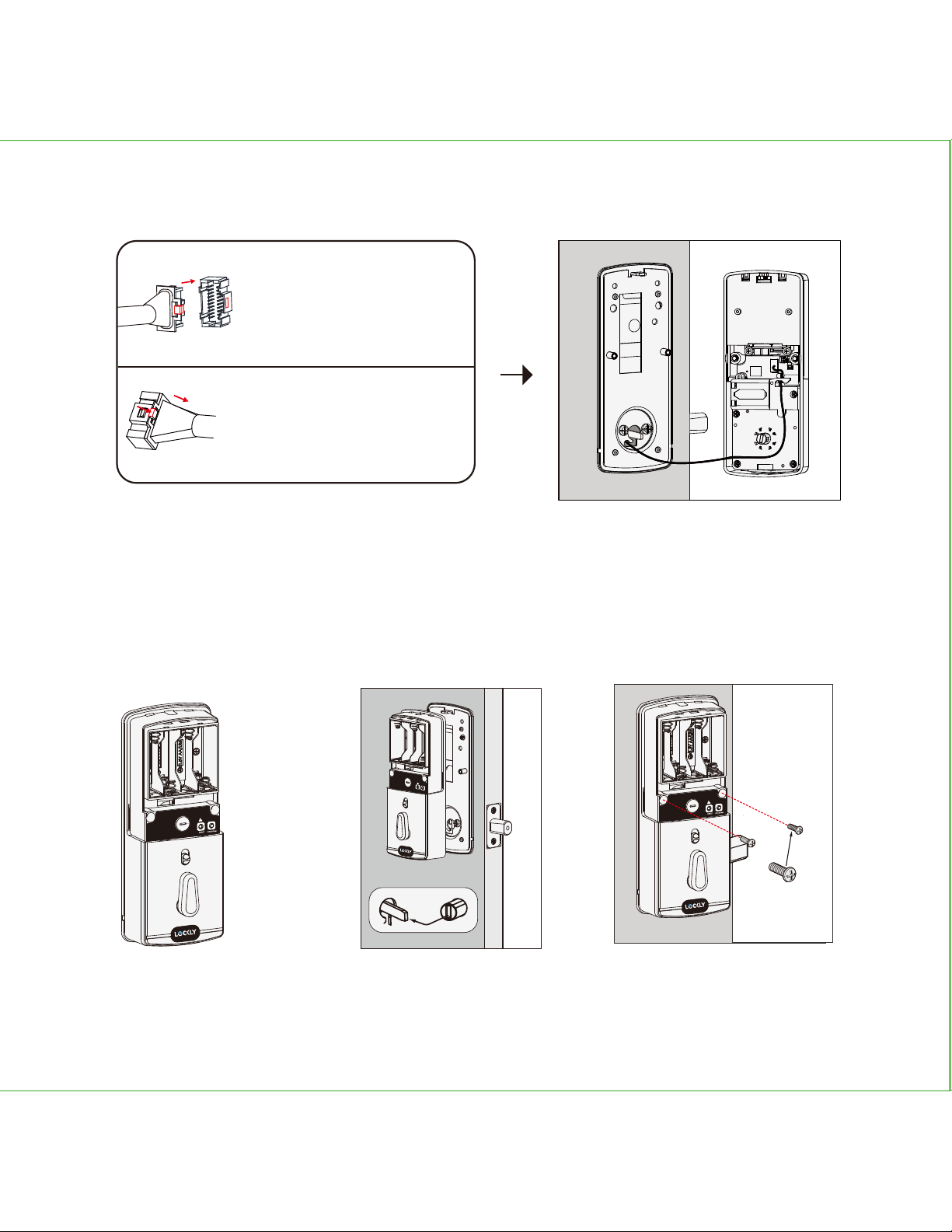
Plug the cable that is coming
through the door into the Interior
lock. Make sure you match the
direction of the plug correctly and
matching the red side of
the plug with the red side on the
lock. Secure the connection by
ensuring the snap is inserted tightly.
In case you need to reinstall the lock
and disconnect the cable, make
sure to press the snap to release the
plug before carefully pulling it out.
Do not force to pull the plug as this
may result to lose connection and
damage the lock.
STEP 4. INSTALLING THE INTERIOR ASSEMBLY
4.6: Before placing the
interior assembly to the
mounting plate, ensure
the thumb turn is vertical.
4.5:
4.7: Place the interior
assembly against the
mounting plate and make
sure the torque blade is
inserted to the thumb turn
shaft.
4.8 Secure the interior
assembly with 2 screws (I)
I(2X)
RESET
PROGRAM
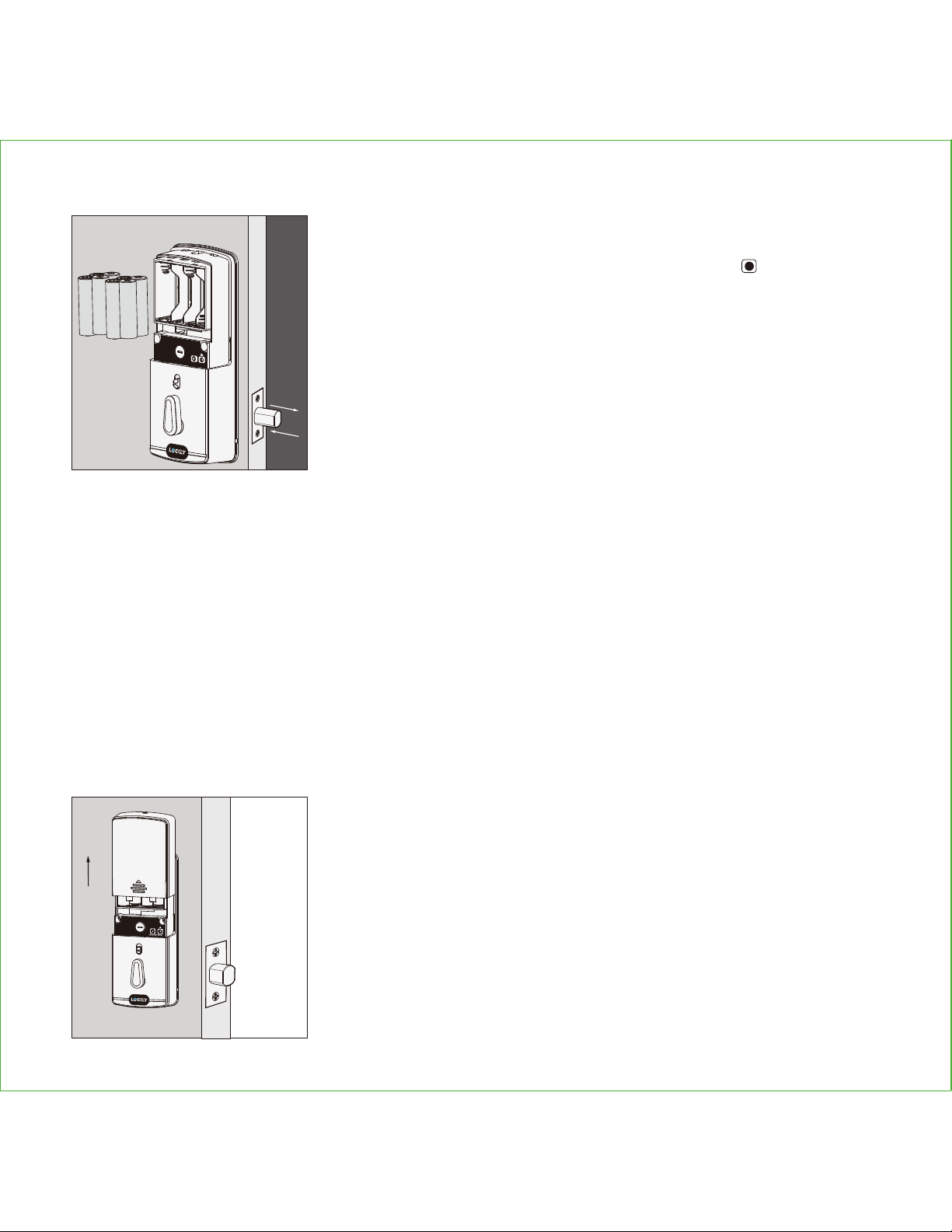
5.1:
First install 3 of the 4 batteries. Before installing the last
battery, press and hold the PROGRAM button while
installing the last battery until you hear a beep from Lockly.
Lockly will then perform a self check and the keypad screen
will start to initiate. This self check will automatically determine
and set your door lock to a left open or right open door.
5.2:
After you checked that the lock manually lock and
unlock and deadbolt moves smoothly, Install the battery
cover with screw (H) and fastened.
The self-check process is very important step to ensure the installation is done properly.
After the lock finished the self-check, manually lock and and unlock your door by using the
thumb turn and the key to make sure the deadbolt moves smoothly. If you feel that there is
a tight tension while you are turning, it means that the lock may have not been installed
straight. Go back to Step 2 and re-install the lock.
To check if your lock was installed correctly, manually unlock your door by using the thumb
turn, then brush your hand across the screen on the outside. Your lock should lock the
deadbolt. If your lock automatically unlocks after it has been locked, it means that your
lock was installed incorrectly - proceed to Step 2 to make sure your lock was installed with
the deadbolt extended and the torque blade was inserted vertically while the deadbolt
was extended.
STEP 5. INSTALLING BATTERIES
+
-
+
-
+
-
+
-
PROGRAM
RESET
Congratulations! You have completed the Lockly Vision installation.
To complete the setup of Lockly Vision smart lock and video doorbell, download the Lockly
App and follow on-screen instructions to complete your setup and installation.
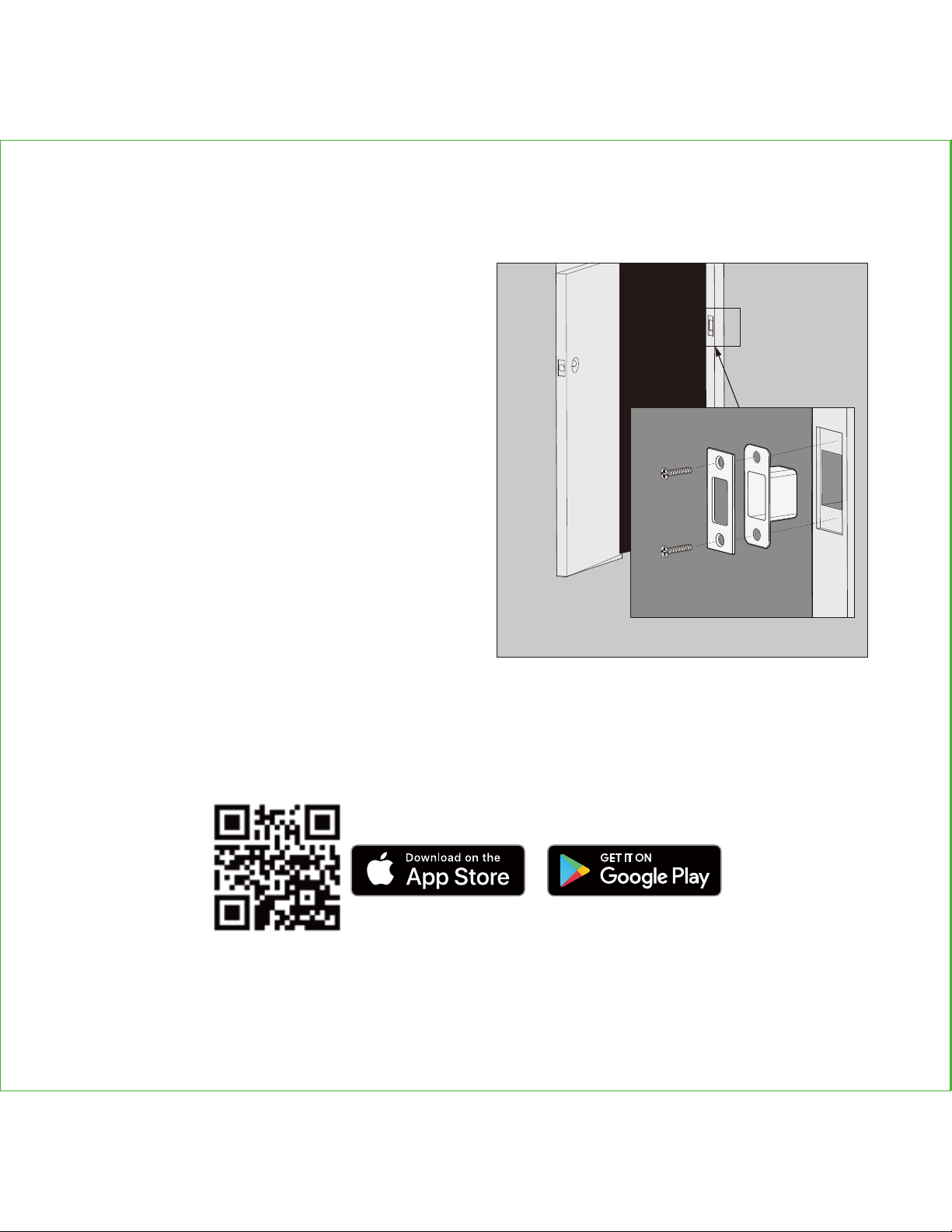
Install the door strike.
Install the door strike to your door frame and
proceed to the last step of installation of your
new lock. You may use our supplied door
strike or use your existing door strike as long as
the dead bolt moves smoothly in and out of
the door strike.
As there are many types of doors, you may
need to make slight adjustments so the dead
bolt moves smoothly. If anything is rubbing
against the deadbolt when locking and
unlocking, you may experience a warning
sound (rapid beeping) indicating that the lock
is experiencing misalignment or something is
blocking the deadbolt.
L
K(2X)
N
STEP 6: INSTALLING THE DOOR STRIKE
Scan or visit Lockly.com/app

NEXT >
Certified
FCC Warning:
This device complies with Part 15 of the FCC Rules. Operation is subject to the following two
conditions: (1) This device may not cause harmful interference, and (2) this device must accept
any interference received, including interference that may cause undesired operation.
NOTE 1: This equipment has been tested and found to comply with the limits for a Class B digital
device, pursuant to part 15 of the FCC Rules. These limits are designed to provide reasonable
protection against harmful interference in a residential installation. This equipment generates, uses
and can radiate radio frequency energy and, if not installed and used in accordance with the
instructions, may cause harmful interference to radio communications. However, there is no
guarantee that interference will not occur in a particular installation. If this equipment does cause
harmful interference to radio or television reception, which can be determined by turning the
equipment off and on, the user is encouraged to try to correct the interference by one or more of
the following measures:
- Reorient or relocate the receiving antenna.
- Increase the separation between the equipment and receiver.
- Connect the equipment into an outlet on a circuit different from that to which the receiver is
connected.
- Consult the dealer or an experienced radio/TV technician for help.
NOTE 2: Any changes or modifications to this unit not expressly approved by the party responsible
for compliance could void the user's authority to operate the equipment.
FCC Radiation Exposure Statement
The Secure Link Wi-Fi Hub complies with FCC radiation exposure limits set forth for an uncontrolled
environment. It should be installed and operated with minimum distance 20cm between the
radiator & your body.
IC WARNING
This device contains licence-exempt transmitter(s) that comply with Innovation,Science and Economic
Development Canada’s licence-exempt RSS(s).
Operation is subject to the following two conditions:

VISION
IMPGD79820200116
We’re here to help!
https://lockly.com/help
(1) This device may not cause interference.
(2) This device must accept any interference, including interference that may cause undesired
operation of the device.
L’émetteur/récepteur exempt de licence contenu dans le présent appareil est conforme aux CNR
d’Innovation, Sciences et Développement économique Canada applicables aux appareils radio
exempts de licence. L’exploitation est autorisée aux deux conditions suivantes:
1. L’appareil ne doit pas produire de brouillage;
2. L’appareil doit accepter tout brouillage radioélectrique subi, même si le brouillage est susceptible
d’en compromettre le fonctionnement.
WARNING: This product contains DEHP and other chemicals known to the State of California
to cause cancer and birth defects, or other reproductive harm. For more information go to
www.P65Warnings.ca.gov

For an online version of this installation guide and videos, visit:
http://lockly.com/help
VISION
