Operating and Installation
Instructions
Microwave Oven
To prevent accidents and machine damage, read these instructions
before installation or use.
en-US, CA M.-Nr. 12 003 550
PRECAUTIONS TO AVOID POSSIBLE EXPOSURE TO
EXCESSIVE MICROWAVE ENERGY
2
PRECAUTIONS TO AVOID POSSIBLE EXPOSURE TO EXCESSIVE
MICROWAVE ENERGY
(a) Do not attempt to operate this oven with the door open since
open-door operation can result in harmful exposure to microwave
energy. It is important not to defeat or tamper with the safety
interlocks.
(b) Do not place any object between the oven front face and the
door or allow soil or cleaner residue to accumulate on sealing
surfaces.
(c) Do not operate the oven if it is damaged. It is particularly
important that the oven door close properly and that there is no
damage to the: (1) Door (bent), (2) hinges and latches (broken or
loosened), (3) door seals and sealing surfaces.
(d) The oven should not be adjusted or repaired by anyone except
properly qualified service personnel.

Contents
3
PRECAUTIONS TO AVOID POSSIBLE EXPOSURE TO EXCESSIVE
MICROWAVE ENERGY ...................................................................................... 2
IMPORTANT SAFETY INSTRUCTIONS ............................................................ 6
Before using for the first time .......................................................................... 18
Installation.......................................................................................................... 19
Installation dimensions........................................................................................ 19
Installation in a tall or base cabinet................................................................ 19
Side view ........................................................................................................ 20
Connections and ventilation........................................................................... 21
Installing the microwave oven............................................................................. 22
Electrical connection ........................................................................................... 23
Caring for the environment .............................................................................. 25
Overview............................................................................................................. 26
Control panel ..................................................................................................... 27
On/Off button ...................................................................................................... 28
Display................................................................................................................. 28
Sensor buttons.................................................................................................... 28
Symbols............................................................................................................... 30
Using the appliance........................................................................................... 31
Selecting a menu option ..................................................................................... 31
Changing a setting in a list .................................................................................. 31
Changing the setting with a segment bar ........................................................... 31
Selecting an operating mode or function............................................................ 31
Entering numbers ................................................................................................ 32
Microwave operation ........................................................................................ 33
How it works........................................................................................................ 33
Suitable dishware................................................................................................ 33
Suitable dishware........................................................................................... 34
Unsuitable dishware....................................................................................... 35
Testing dishware............................................................................................. 36
Cover.............................................................................................................. 36
Before first use .................................................................................................. 37
Basic settings...................................................................................................... 37

Contents
4
Settings .............................................................................................................. 38
Settings overview ................................................................................................ 38
Accessing the “Settings” menu........................................................................... 39
Language ......................................................................................................... 39
Time..................................................................................................................... 39
Volume................................................................................................................. 39
Units .................................................................................................................... 40
Keeping Warm..................................................................................................... 40
Quick MW............................................................................................................ 40
Popcorn............................................................................................................... 40
Oven compartment query ................................................................................... 40
Safety .................................................................................................................. 41
Showroom program............................................................................................. 41
Factory default..................................................................................................... 41
Operation............................................................................................................ 42
Tips for cooking with the microwave .................................................................. 42
Using the turntable.............................................................................................. 42
Changing values and settings for a cooking process ......................................... 43
Changing the microwave power level ............................................................ 43
Setting additional durations ........................................................................... 43
Changing set cooking durations .................................................................... 44
Deleting the set cooking durations................................................................. 44
Interrupting and resuming a cooking process..................................................... 45
Canceling a cooking process .............................................................................. 45
Timer................................................................................................................... 46
Quick MW and Popcorn .................................................................................... 47
Automatic Programs ......................................................................................... 49
Overview of automatic programs ........................................................................ 49
Using automatic programs .................................................................................. 49
Using the Baconautomatic program ............................................................. 49
Using the Potatoesautomatic program.......................................................... 50
Using the Fish Filletautomatic program......................................................... 50
Using the Vegetablesautomatic program ...................................................... 50
Using the Riceautomatic program................................................................. 51

Contents
5
Recipes................................................................................................................ 51
Potatoes in a curry sauce............................................................................... 52
Chicken breast in mustard sauce................................................................... 52
Salmon in white wine sauce........................................................................... 53
Minestrone...................................................................................................... 53
Carrots in a chervil cream sauce.................................................................... 54
Red berry fruit compote ................................................................................. 54
Meatballs........................................................................................................ 55
White cabbage stew....................................................................................... 55
Additional applications ..................................................................................... 56
Defrost................................................................................................................. 56
Reheat ................................................................................................................. 58
Cooking ............................................................................................................... 61
Canning ............................................................................................................... 62
Cleaning and care ............................................................................................. 64
Unsuitable cleaning agents ................................................................................. 65
Removing soiling ................................................................................................. 65
Frequently Asked Questions ............................................................................ 67
Customer Service.............................................................................................. 70
Contact in the event of a fault ............................................................................. 70
Appliance warranty and product registration ...................................................... 70
IMPORTANT SAFETY INSTRUCTIONS
6
When using the appliance, follow basic safety precautions, including the
following:
Read all instructions before installation and use of the oven to prevent
accidents and machine damage.
WARNING - To reduce the risk of burns, electric shock, fire, injury to persons,
or exposure to excessive microwave energy:
This appliance complies with current safety requirements.
Improper use of the appliance can lead to personal injury and
material damage.
Read all instructions before installing or using the oven for the first
time. Only use the appliance for its intended purpose.
Keep these operating instructions in a safe place and pass them
on to any future user.
Read and follow the specific “PRECAUTIONS TO AVOID
POSSIBLE EXPOSURE TO EXCESSIVE MICROWAVE ENERGY”
found at the beginning of this manual.
Only use the appliance for its intended purpose. Install or locate
this appliance only in accordance with the provided installation
instructions and all local codes.
Appropriate use
This microwave oven is intended for domestic use and use in
other similar environments.
This microwave oven must not be used at altitudes exceeding
6562ft. (2000m).
The microwave oven is not intended for outdoor use.
The microwave oven is intended to cook, defrost, reheat and can
food in domestic settings only.
All other types of use are not permitted.
IMPORTANT SAFETY INSTRUCTIONS
7
Risk of fire due to flammable materials.
If flammable items are dried in the microwave oven, the moisture in
the items will evaporate. This could cause the materials to dry out
and possibly self-ignite.
Never use the microwave oven to store or dry items which could
ignite easily.
This microwave oven can only be used by people with reduced
physical, sensory, or mental capabilities or lack of experience and
knowledge if they are supervised while using it.
They may only use it unsupervised if they have been shown how to
do so in a safe manner. They must be able to understand and
recognize the possible dangers caused by incorrect operation.
The oven compartment is equipped with special bulbs to cope
with particular conditions (e.g., temperature, moisture, chemical
resistance, abrasion resistance, and vibration). These special bulbs
must only be used for the purpose for which they are intended. They
are not suitable for room lighting. Replacement bulbs should only be
installed by a Miele authorized technician or by Miele Customer
Service.
Safety with children
Children should be supervised in the vicinity of the microwave
oven. Never allow children to play with the microwave oven.
Burn Hazard - Do not allow children to use the microwave oven.
Risk of suffocation from packaging material. While playing,
children may become entangled in packaging material (such as
plastic wrapping) or pull it over their head, presenting the risk of
suffocation.
Keep packaging material away from children.
IMPORTANT SAFETY INSTRUCTIONS
8
Risk of injury caused by hot surfaces. Children’s skin is far more
sensitive to high temperatures than that of adults. External parts of
the microwave oven such as the control panel and the vent become
quite hot.
Do not let children touch the microwave oven when it is in operation.
Risk of injury from the open door. The oven door can support a
maximum weight of 17.5lbs (8kg). Children could injure themselves
on an open door.
Do not let children sit on the door, lean against it, or swing on it.
Technical safety
This appliance must be installed and connected in compliance
with the installation instructions.
Unauthorized installation, maintenance, and repairs can cause
considerable danger for the user. Installation, maintenance, and
repairs should only be carried out by a Miele authorized technician.
Maintenance by the user: Never repair or replace any part of the
appliance unless the instructions specifically recommend doing so.
Service work should only be performed by a qualified technician.
Damage to the microwave oven can compromise your safety.
Check the microwave oven for visible signs of damage. Do not use a
damaged microwave oven.
IMPORTANT SAFETY INSTRUCTIONS
9
Temporary or permanent operation on an autonomous power
supply system or a power supply system that is not synchronized
with the grid power supply (e.g., island networks, back-up systems)
is possible. A prerequisite for operation is that the power supply
system complies with the specifications of EN50160 or an
equivalent standard.
The function and operation of the protective measures provided in
the domestic electrical installation and in this Miele product must
also be maintained in isolated operation or in operation that is not
synchronized with the grid power supply, or these measures must be
replaced by equivalent measures in the installation. As described, for
example, in the current version of VDE-AR-E 2510-2.
Operating a damaged microwave oven can result in microwave
leakage and present a hazard to the user. Do not use the microwave
oven if:
- The door is warped.
- The door hinges are loose.
- Holes or cracks are visible in the casing, the door, or the oven
compartment walls.
The electrical safety of this appliance can only be guaranteed
when correctly grounded. It is essential that this basic safety
requirement is fulfilled. If in doubt, the electrical installation should
be checked by a qualified electrician.
Proper installation: Make sure that your appliance has been
installed correctly and that it has been grounded by a qualified
technician.
The connection data (voltage and frequency) on the data plate of
the microwave oven must match the domestic electrical supply in
order to avoid the risk of damage to the microwave oven. Compare
this before connecting the appliance to the domestic electrical
supply. If in any doubt, consult a qualified electrician.
IMPORTANT SAFETY INSTRUCTIONS
10
Power bars and extension cords do not guarantee the required
safety of the appliance. Do not use these to connect the microwave
oven to the power supply.
For safety reasons, only use the microwave oven when it has been
fully installed.
This appliance must not be used in a non-stationary location (e.g.,
on a ship).
Risk of injury due to electric shock. Any contact with live
connections or tampering with the electrical or mechanical
components of the microwave oven will endanger your safety and
may lead to appliance malfunctions.
Do not open the microwave oven housing under any circumstances.
While the appliance is under warranty, repairs should only be
undertaken by a service technician authorized by Miele Customer
Service. Otherwise the warranty will be invalidated.
Miele can only guarantee the safety of the appliance when original
Miele parts are used. Faulty components must only be replaced with
genuine Miele parts.
If the power cord is damaged, it must be replaced with a special
power cord by a Miele authorized technician (see “Installation –
Electrical connection”).
During installation, maintenance, and repair work, the microwave
oven must be completely disconnected from the power supply. To
ensure this:
- The circuit breakers have been switched off, or
- the fuses of the electrical installation have been completely
removed, or
- the plug (if present) is removed from the outlet. To do this, pull the
plug not the cord.
IMPORTANT SAFETY INSTRUCTIONS
11
The microwave oven requires a sufficient supply of cool air for
efficient operation. Make sure that the supply of cool air is not
hindered in any way (e.g., by installing heat insulation strips in the
cabinet niche). In addition, the required supply of cool air must not
be excessively heated by other heat sources.
If the microwave oven is built in behind a cabinet door front, do
not close the cabinet door while the microwave oven is in use. Heat
and moisture can build up behind the cabinet door when closed.
This can result in damage to the microwave oven, cabinet niche, and
floor. Leave the cabinet door front open until the microwave oven
has cooled down completely.
Correct use
Do not let food sit in the oven for an extended period of time
before or after cooking. Doing so can result in food poisoning or
sickness.
Smother the fire or flames, or use a dry chemical extinguishing
agent or foam fire extinguisher.
Never store flammable liquids and materials in, above or under the
microwave oven.
Do not obstruct the flow of combustion and ventilation air.
This microwave oven must only be used for cooking food.
Corrosive chemicals and vapors as well as fumes, vapors or heat
given off by glues, plastics or flammable liquids and materials could
be hazardous. Do not use it as a dryer, kiln, dehumidifier, etc.
To avoid fueling any flames, do not open the microwave oven
door if smoke occurs inside the appliance. Interrupt the process by
turning the appliance off and disconnecting it from the power. Do not
open the door until the smoke has dissipated.
Due to the high temperatures radiated, objects left near the
microwave oven could catch fire. Do not use the microwave oven to
heat up the room.
IMPORTANT SAFETY INSTRUCTIONS
12
Oils and fats are a fire hazard if allowed to overheat. Never leave
the microwave oven unattended when cooking with oil or fats. Never
attempt to put out oil or fat fires with water. Turn the microwave oven
off and extinguish the flames by leaving the door closed.
Fire hazard. If using alcohol in your recipes, please be aware that
high temperatures can cause the alcohol to evaporate. The vapor
can catch fire on hot surfaces.
Do not heat undiluted alcohol in the appliance.
Food which is stored in the oven interior or left there to be kept
warm can dry out, and the moisture released can lead to corrosion
damage in the microwave oven. The control panel, countertop and
surrounding cabinetry can also be damaged.
Always cover food that is left in the appliance.
The microwave oven is not suitable for cleaning or disinfecting
items. Items can get extremely hot. There is a risk of burning when
items are removed from the microwave oven.
Always ensure that food is sufficiently heated.
Many factors will affect the overall cooking time, including the type,
amount and nature of the food, its initial temperature, and changes
to the recipe. Some foods may contain microorganisms which are
only destroyed by thorough cooking. Therefore, when cooking or
reheating food, it is particularly important that food is heated at
adequate temperatures for a sufficient amount of time. When in
doubt, select a longer cooking or reheating time.
It is important that the temperature in the food being cooked is
evenly distributed and sufficiently high.
You can ensure this by stirring or turning the food, and observing a
sufficiently long standing time (see charts), which should be added
to the time needed for reheating, defrosting, or cooking.
During the standing time, the temperature is distributed evenly in the
food.
IMPORTANT SAFETY INSTRUCTIONS
13
Always remember that times for cooking, reheating and defrosting
in a microwave oven are usually considerably shorter than in the
case of traditional methods of food preparation. Excessively long
cooking times can lead to food drying out and burning, or may even
cause it to catch fire.
Do not dry bread, rolls, flowers, herbs, etc., in the microwave oven
as these could also catch fire.
When heating food, and in particular liquids, using microwave
power, the boiling point may be reached without the typical bubbles
being produced. The liquid does not boil evenly throughout. This
boiling delay can result in the liquid boiling over explosively. Take
care when taking the container out of the microwave oven, as the
hot liquid can cause severe scalding. Under certain circumstances,
the pressure can be so high that the door opens automatically.
Stir liquids well before heating or cooking. After heating, wait at least
20seconds before removing the container from the microwave oven.
In addition, you can place a glass rod or similar item, if available, in
the container during the heating process.
Risk of injury caused by hot food. When you heat food up, the
heat is created directly in the food itself. For this reason, the
dishware will remain cooler than the food (except when you use
ovenproof stoneware). The dishware is only warmed by the heat of
the food.
Before serving, always check the temperature of the actual food
itself after taking it out of the oven. The temperature of the container
is not an indication of the temperature of the food or liquid in it. This
is particularly important when preparing food for babies,
children, and the elderly or infirm. After heating food, especially
food for babies and small children, stir the food or shake the
container and check that the temperature does not pose any danger
of burning. Double check after it has been left to stand.
IMPORTANT SAFETY INSTRUCTIONS
14
Risk of injury from increased pressure in sealed containers or
bottles. Pressure can build up when reheating food or drinks in
sealed containers or bottles, which can cause them to explode.
Never cook or reheat food or liquids in sealed containers or bottles.
Open containers beforehand and with baby bottles, the screw top
and nipple must be removed.
If you cook eggs without their shells, the yolks could explode due
to the resulting pressure.
Prick the yolk several times before cooking to avoid this.
Eggs heated in their shell can burst, even after they have been
removed from the microwave oven.
Eggs can only be cooked in their shells in a specially designed egg-
boiling device. Do not reheat hard-boiled eggs in the microwave
oven.
Food with a thick skin or peel, such as tomatoes, sausage,
potatoes, and eggplant can burst when heated or cooked.
Pierce or score the skin of these foods several times to allow steam
to escape.
Do not use a thermometer containing mercury or liquid as these
are not suitable for use with very high temperatures and break very
easily.
To check food temperature, first interrupt the cooking process. Only
use a thermometer specifically approved for food use to measure the
temperature of the food.
Cushions or pads filled with cherry kernels, gel, etc., such as
those used in aromatherapy, can ignite when heated, even after they
have been removed from the microwave oven.
Do not heat these up in the microwave oven.
IMPORTANT SAFETY INSTRUCTIONS
15
Moisture can collect in the hollow spaces on dishware and lids
with hollow handles or knobs. When the moisture evaporates,
pressure can build up and the item can explode. If the hollow recess
is sufficiently ventilated, the item can be used.
Do not use dishware with hollow knobs or handles.
Non-microwave-safe plastic dishes can suffer damage or damage
the microwave oven.
Do not use any containers or cutlery made from or containing metal,
aluminum foil, lead crystal glassware, temperature-sensitive plastics,
wooden utensils or cutlery, metal clips, or plastic or paper-covered
wire ties. Do not use bowls with milled rims, or plastic pots with the
foil lid only partially removed (see the requirements specified for
dishware in the section on microwave operation).
Fire hazard due to containers made of flammable materials.
Plastic disposable containers must meet the requirements specified
for dishware in the section on microwave operation.
Do not leave the microwave oven unattended when heating or
cooking food in disposable containers made of plastic, paper, or
other flammable materials.
Heat-retaining bags usually contain a thin layer of aluminum foil
that reflects microwave radiation. As a result, the paper surrounding
the aluminum foil can become so hot that it combusts.
Do not use heat-retaining packaging, such as bags for roasted
chicken, for warming food.
If the microwave oven is used without food or the food is loaded
incorrectly, the appliance can become damaged.
Do not use the microwave oven to preheat dishware or to dry herbs.
Risk of injury from the open door. You could bang into the open
door. Do not leave the door open unnecessarily.
IMPORTANT SAFETY INSTRUCTIONS
16
The door can support a maximum load of 17.5lbs (8kg). Do not
lean or sit on an open door, or place heavy items on it. Make sure
that nothing gets trapped between the door and the oven
compartment. This could damage the microwave oven.
The following applies to stainless steel surfaces:
Adhesives will damage the coated stainless steel surface and
cause it to lose its dirt-repellent protective coating. Do not use sticky
notes, adhesive tape, or other types of adhesive on the stainless
steel surface.
Magnets can cause scratches. Do not use the stainless steel
surface as a magnetic notice board.
IMPORTANT SAFETY INSTRUCTIONS
17
Cleaning and care
Risk of injury due to electric shock. The steam from a steam
cleaning appliance could reach live electrical components and cause
a short circuit. Never use a steam cleaner for cleaning.
Risk of burns. The appliance interior can get hot during use.
Clean the appliance interior and accessories as soon as they have
cooled down. Waiting too long can make cleaning unnecessarily
difficult and, in extreme cases, impossible.
Risk of fire. Under certain conditions, strong grease and gunk
buildup can damage the appliance and even be dangerous.
Follow the instructions on cleaning in "Cleaning and care".
Only clean parts listed in these operating and installation
instructions.
Scratches on the door glass can cause the glass to break. Do not
use abrasive cleaners, hard sponges, brushes, or sharp metal tools
to clean the door glass.
Try to prevent the interior walls being splashed with food
containing salt. If this does happen, wipe it away thoroughly to avoid
corrosion to stainless steel surfaces inside the oven compartment.
In warm, moist environments, there is a higher probability of pest
infestations. Ensure the microwave oven and the area surrounding it
are always kept clean.
Damage caused by pests is not covered by the warranty.
Accessories
Only use original Miele accessories. Using parts or accessories
from other manufacturers will invalidate the warranty, and Miele
cannot accept liability.
KEEP THE OPERATING AND INSTALLATION INSTRUCTIONS IN A SAFE
PLACE AND REVIEW THEM PERIODICALLY.
Before using for the first time
18
It is important to allow the
temperatures of the microwave oven
and the room to equalize. Otherwise,
the appliance electronics may not
function correctly.
After transportation, let the unpacked
microwave oven stand for approx.
2hours at room temperature before
using it.
Risk of suffocation from
packaging material
While playing, children may become
entangled in packaging material
(such as plastic wrapping) or pull it
over their head, presenting the risk of
suffocation.
Keep packaging material away from
children.
Remove all packaging material when
unpacking the microwave oven.
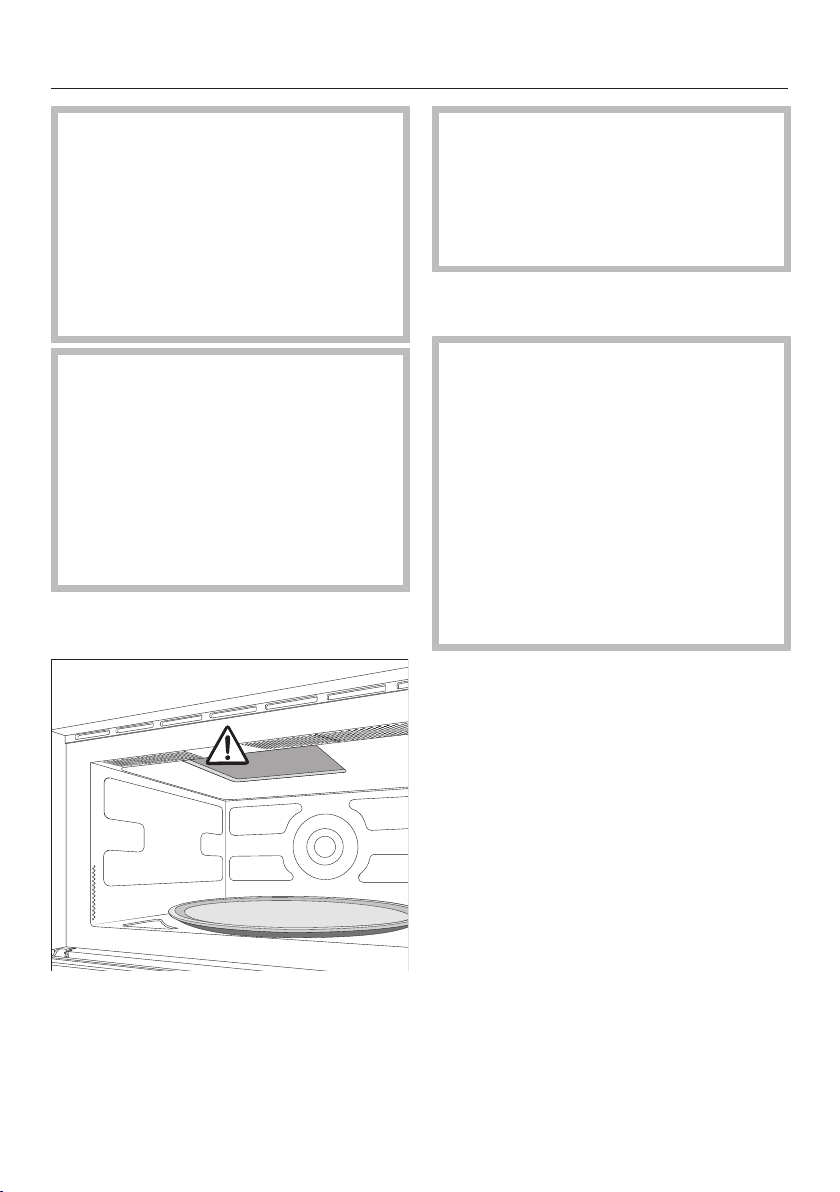
There is a cover protecting the
microwave outlet on the ceiling of
the oven, which is susceptible to
damage.
Never remove the cover from the
microwave outlet.
Check the microwave oven for any
damage.
Health risk posed by a faulty
microwave oven
Operating a damaged microwave
oven can result in microwave
leakage and present a hazard to the
user.
Do not use the microwave oven if:
–The door is warped.
–The door hinges are loose.
–Holes or cracks are visible in the
casing, the door, or the oven
compartment walls.
Clean the oven compartment and all
accessories with a soft sponge and
warm water.
Installation
*INSTALLATION*
19
When installing the microwave oven, ensure that there is unhindered ventilation
at the front of the appliance.
Do not block the ventilation slots with any objects.
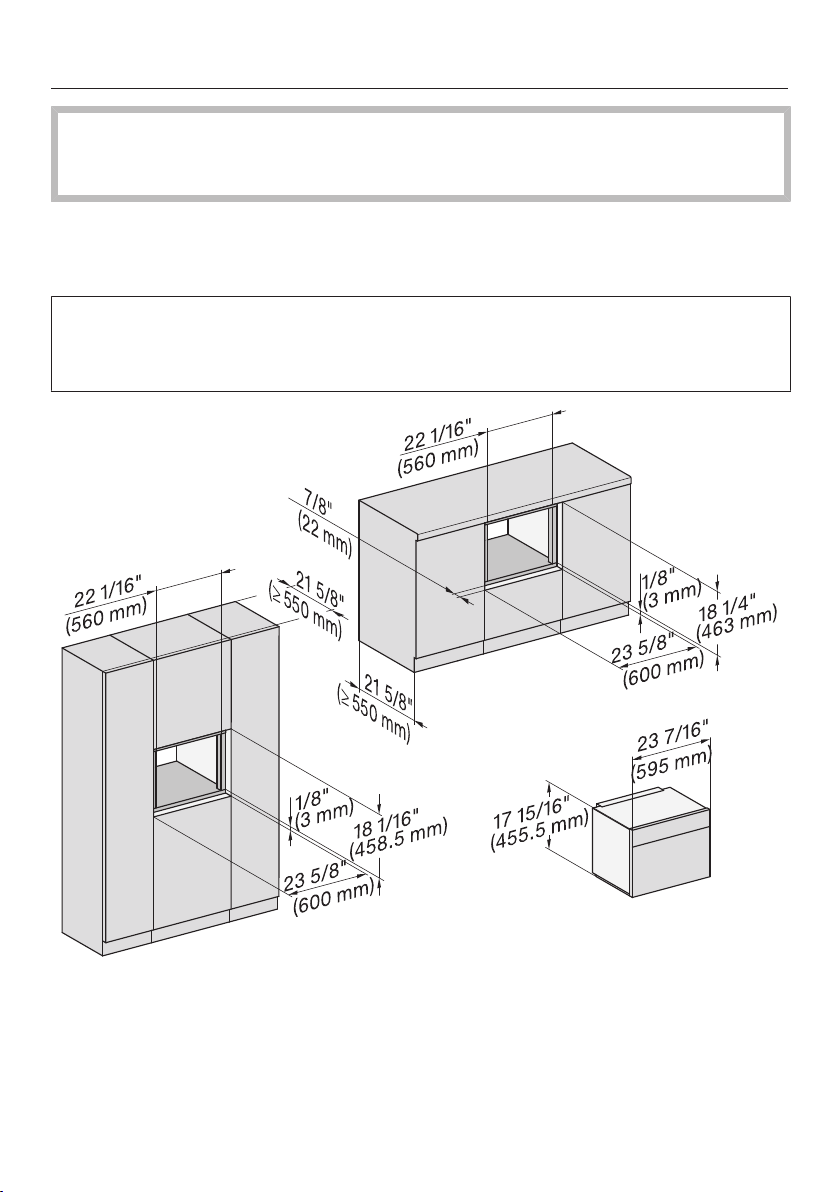
Installation dimensions
Installation in a tall or base cabinet
Miele microwave ovens can be installed flush or proud. Discuss your
requirements with your architect, kitchen designer, and installer.
More installation drawings are available on the Miele website.
Installation
*INSTALLATION*
20
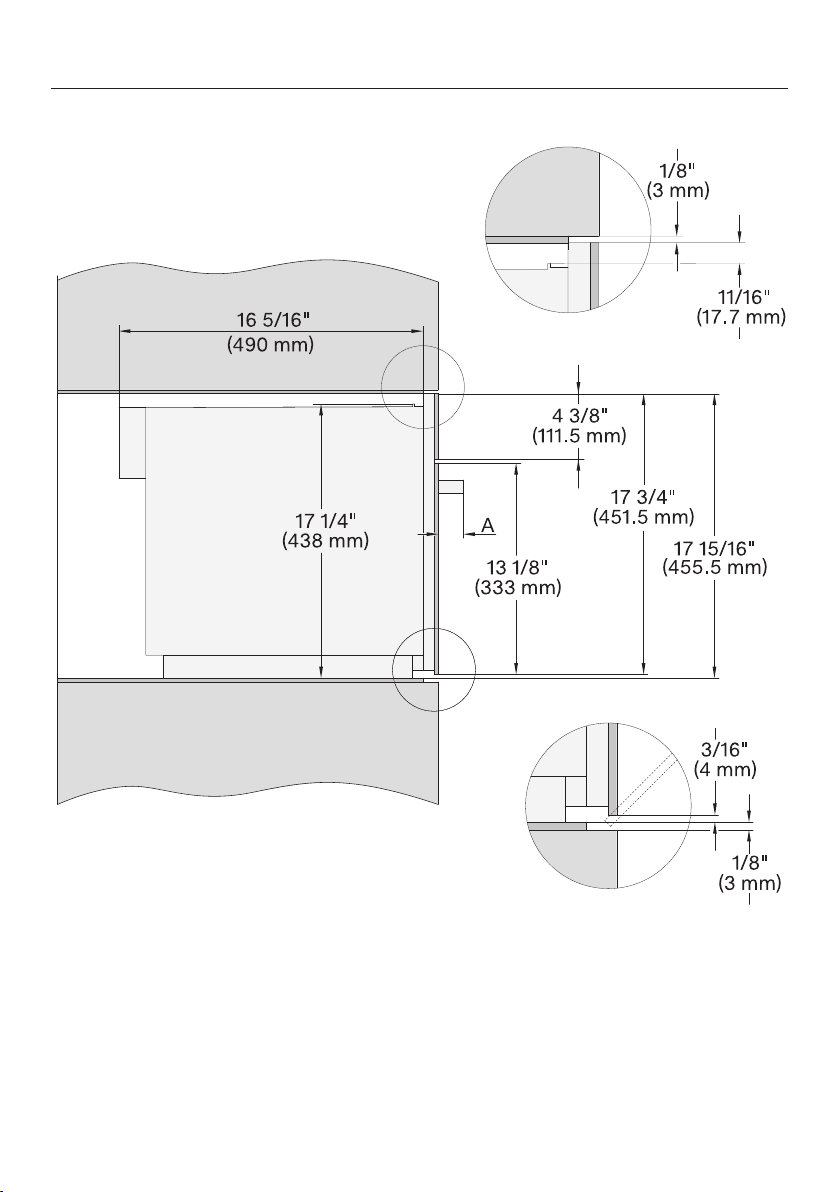
Side view
A M 72xx: 17/8" (47mm)
Installation
*INSTALLATION*
21
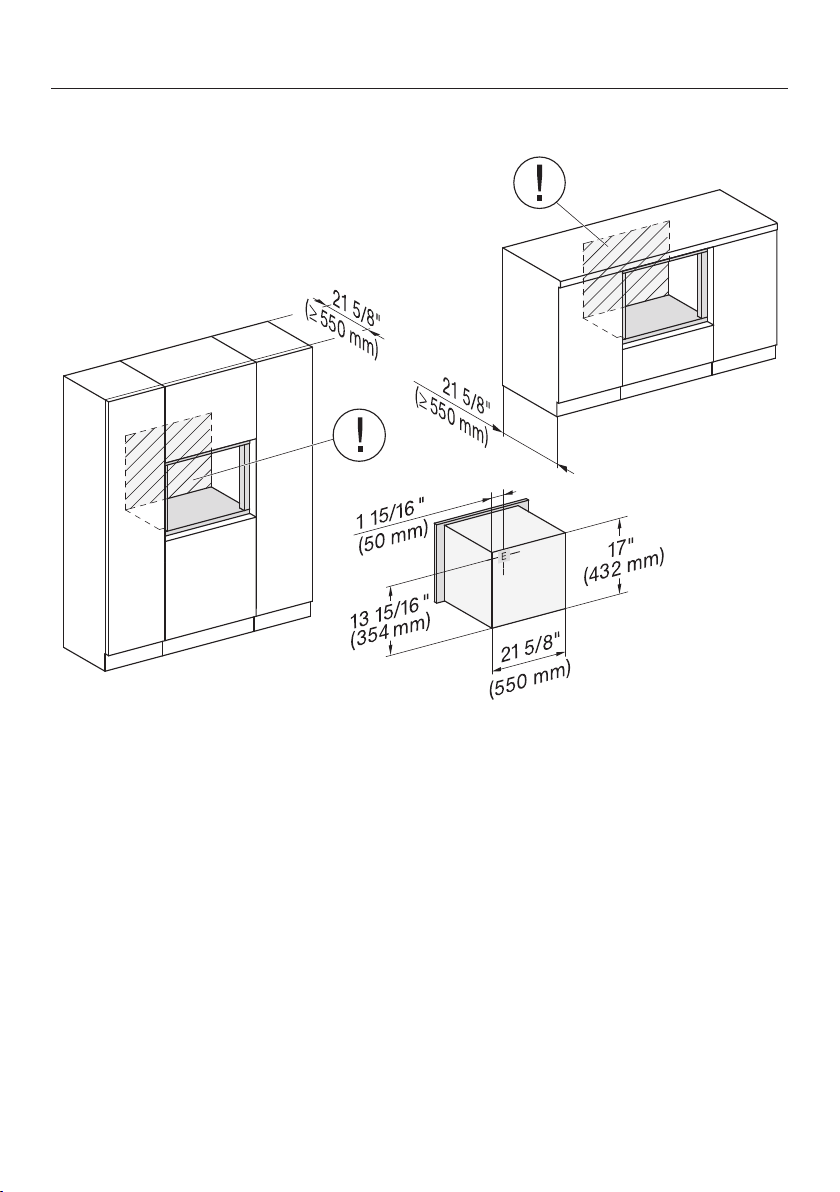
Connections and ventilation
The outlet for the electrical connection should be accessible, e.g., in an
adjacent kitchen cabinet. If the electrical connection is behind the microwave
oven, the kitchen cabinet needs to be deeper than specified.
E Electrical connection
Installation
*INSTALLATION*
22
Installing the microwave oven
For safety reasons, only use the
microwave oven when it has been
fully installed.
Securing the microwave oven in the
cabinet niche
Connect the microwave oven to the
power supply.
Do not carry the microwave oven by
the door handle. This could damage
the door.
Use the handles on each side of the
housing to carry the appliance.
Push the microwave oven into the
cabinet niche and align it in the
center of the cabinet niche. Pull the
cable with the plug through the rear
wall of the cabinet.
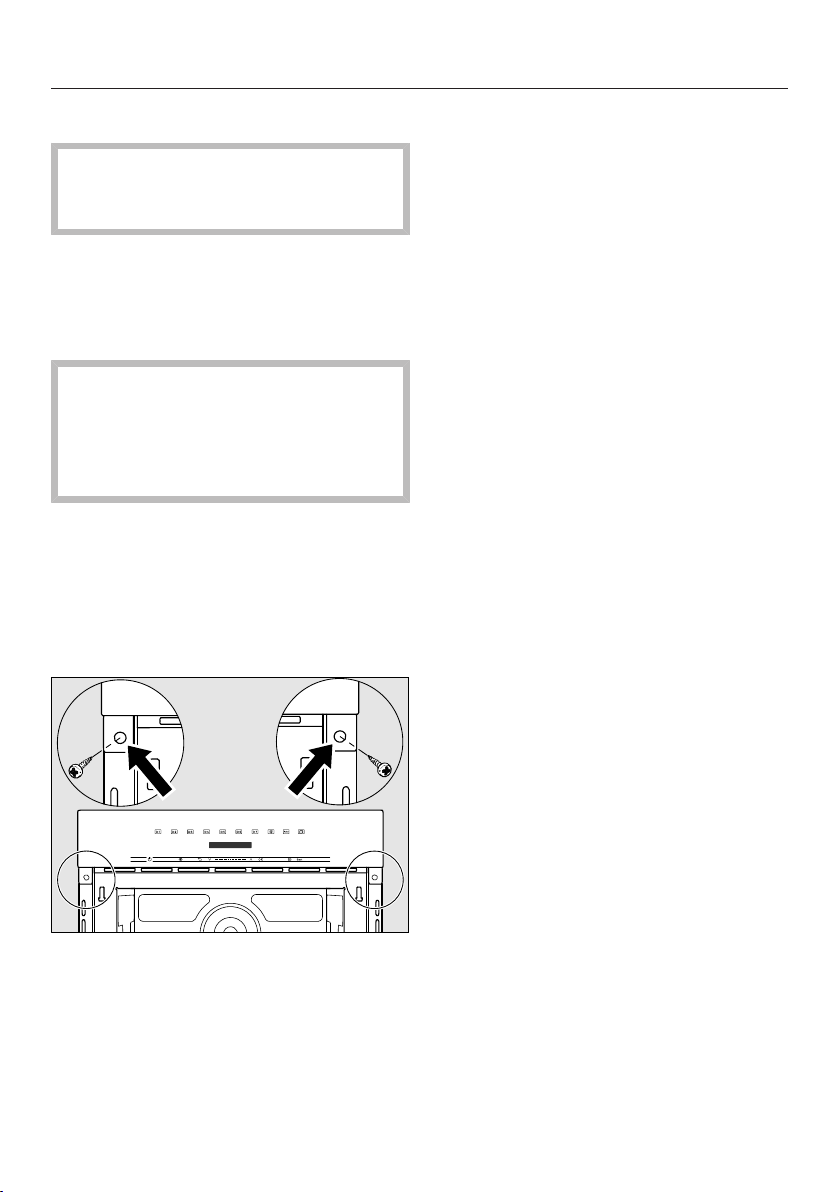
Open the door.
Use the screws supplied to secure
the microwave oven to the side walls
of the cabinetry through the holes in
the oven trim.
Installation
*INSTALLATION*
23
Electrical connection
Risk of injury due to electric
shock.
During installation, maintenance, and
repair work, the microwave oven
must be completely disconnected
from the power supply:
Disconnect the microwave oven from
the power supply by tripping the
breakers, or unplugging the power
cord from the outlet. To do this, pull
the plug not the cord.
Risk of injury.
Installation, repairs, and other work
by unqualified persons could be
dangerous. Miele cannot be held
liable for unauthorized work.
Installation, maintenance, and repairs
must only be carried out by a Miele
authorized technician.
The connection data (voltage,
frequency and max. rated load) on
the data plate of the microwave oven
must match the power supply in
order to avoid the risk of damage to
the microwave oven.
The connection data can be found
on the data plate, which is visible on
the front frame or at the back of the
microwave oven. Compare this
before connecting the appliance to
the power supply. If in any doubt,
consult a qualified electrician.
For safety reasons, the microwave
oven may only be used when it has
been fully installed.
The power cord plug must be
inserted into a suitable outlet that
has been installed and grounded in
compliance with all applicable local
codes.
WARNING: THIS APPLIANCE MUST
BE GROUNDED
Installer: Please pass these
instructions on to the customer.
Installation
*INSTALLATION*
24
Risk of injury caused by a
damaged microwave oven.
Damage to the microwave oven can
compromise your safety.
Check the microwave oven for visible
signs of damage. Do not use a
damaged microwave oven.
The microwave oven is supplied with a
plug for connection to a dedicated line
and junction box.
Install the microwave oven so that the
outlet is accessible. If the outlet is not
accessible, make sure that a suitable
means of disconnection is provided on
site for each pole.
Risk of fire by overheating.
Installing the appliance with a power
bar or an extension cord can
overload the cords.
Do not use power bars and
extension cords to connect the
microwave oven to the power supply.
If the power cord is damaged, it must
be replaced with a special power cord
of the same type (available from Miele).
For safety reasons, the power cord
must only be replaced by a Miele
authorized technician.
The max. rated load and the fuse
protection can be found in these
operating and installation instructions or
on the data plate. Compare this with the
data of the domestic electrical supply.
If in any doubt, consult a qualified
electrician.
Temporary or permanent operation on
an autonomous power supply system or
a power supply system that is not
synchronized with the grid power
supply (e.g., island networks, back-up
systems) is possible. A prerequisite for
operation is that the power supply
system complies with the specifications
of EN50160 or an equivalent standard.
The function and operation of the
protective measures provided in the
domestic electrical installation and in
this Miele product must also be
maintained in isolated operation or in
operation that is not synchronized with
the grid power supply, or these
measures must be replaced by
equivalent measures in the installation.
As described, for example, in the
current version of VDE-AR-E 2510-2.
Do not connect the appliance to energy
saving plugs or outlets. The reduction
of power to the appliance caused by
these devices will cause the appliance
to run hot and may damage it and/or
shorten its usable life.
Electrical connection
The microwave oven is equipped with a
7ft. (2.1m) long power cord with a
NEMA 5-15P molded plug for
connection to a 120V, 15A, 60Hz
power supply.
KEEP THE OPERATING AND
INSTALLATION INSTRUCTIONS IN A
SAFE PLACE.
Caring for the environment
25
Disposal of the packing
material
The cardboard box and packing
materials protect the appliance during
shipping. They have been designed to
be biodegradable and recyclable.
Ensure that any plastic wrappings,
bags, etc. are disposed of safely and
kept out of the reach of children.
Danger of suffocation!
Disposal of your old appliance
Electrical and electronic appliances
contain valuable materials. They also
contain certain substances, compounds
and components which were essential
for the proper functioning and safe use
of the equipment. Handling these
materials improperly by disposing of
them in your household waste can be
harmful to your health and the
environment. Therefore, please do not
dispose of your old appliance with
regular household waste and follow
local regulations on proper disposal.
Consult with local authorities, dealers or
Miele in order to dispose of and recycle
electrical and electronic appliances.
Miele assumes no responsibility for
deleting any personal data left on the
appliance being disposed. Please
ensure that your old appliance is kept
away from children until removal.
Observe safety requirements for
appliances that may tip over or pose an
entrapment hazard.
Overview
26
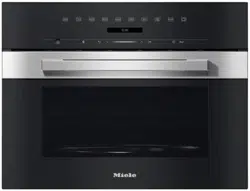
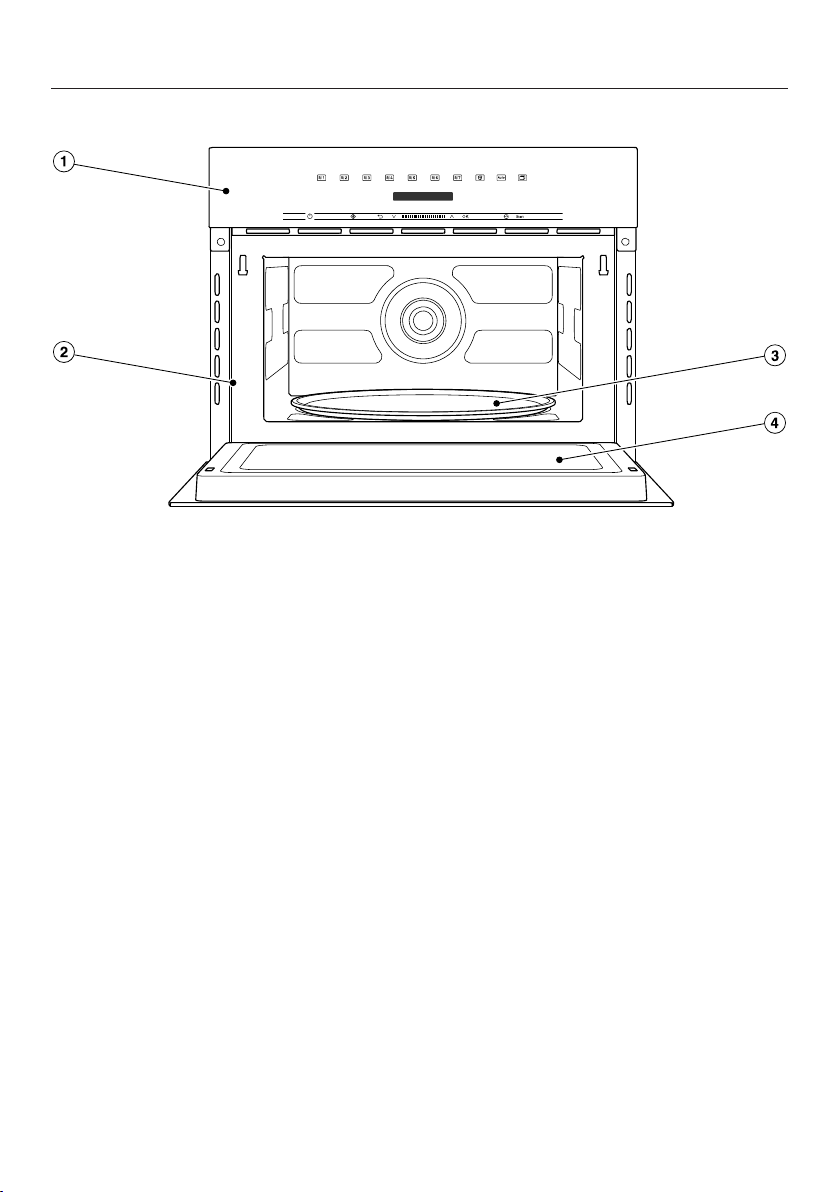
Microwave oven
a
Controls
b
Front frame and data plate with model identifier and serial number
Connection data (voltage/frequency/max. rated load): see back of the appliance
c
Turntable
d
Door
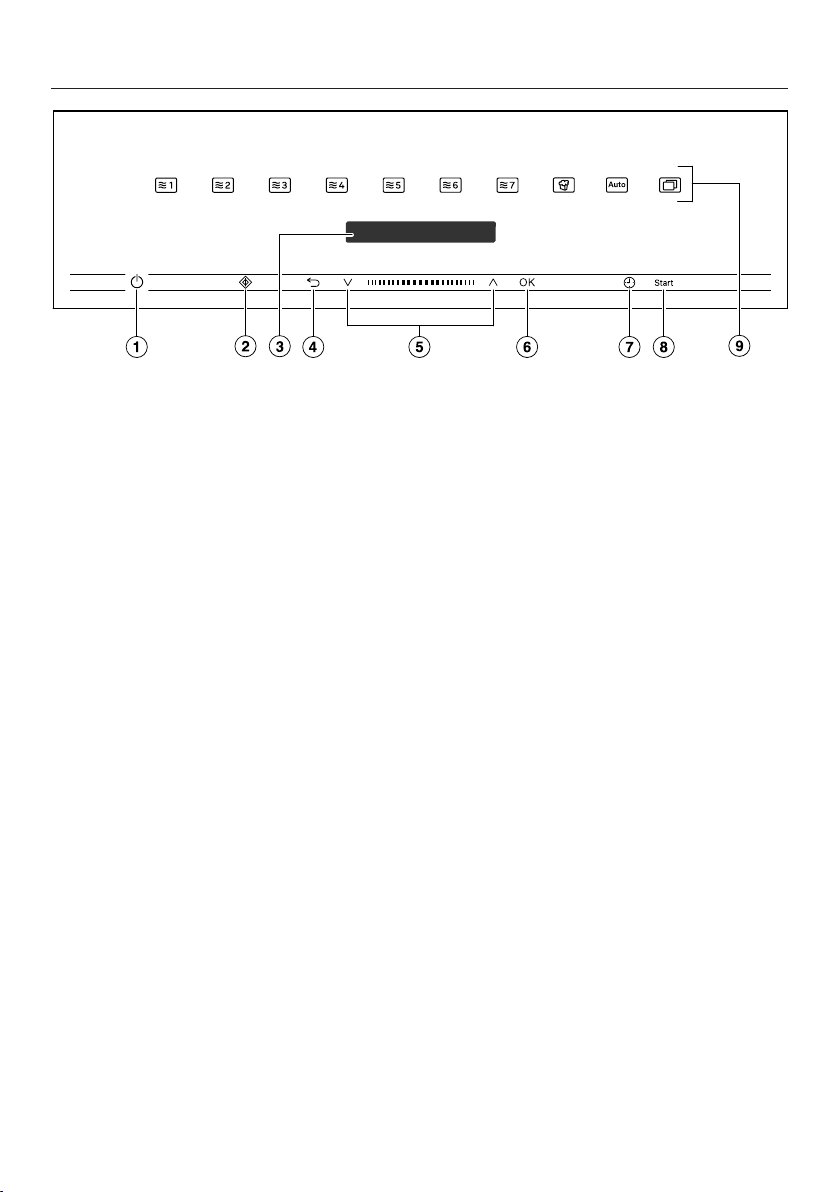
Control panel
27
a
Recessed On/Off button
For turning the microwave oven on
and off
b
sensor button
For starting the Quick MW function
c
Display
For displaying the time of day and
information on operation
d
sensor button
For going back a step and for
canceling a cooking program
e
Navigation area with and arrow
buttons
For scrolling through lists and for
changing values
f
OKsensor button
For accessing functions and saving
settings
g
sensor button
For setting a timer, the cooking
duration, or the start or finish time
for the cooking program
h
sensor button
For starting a cooking process
i
Sensor buttons
For selecting operating modes,
settings, and further applications

Control panel
28
On/Off button
The On/Off button is recessed and
reacts to touch.
Use this button to turn the microwave
oven on and off.
Display
The display is used for showing the
time of day or information about
operating modes, cooking durations,
automatic programs, and settings.
After turning the microwave oven on
with the On/Off button, Select
Operating Mode will appear in the main
menu.
Sensor buttons
The sensor buttons react to touch.
Every tap of a sensor button is
confirmed with an audible keypad tone.
You can turn this keypad tone off using
More| Settings | Volume| Keypad
tone.
If the display is dark, you have to
switch on the microwave oven before
the sensor buttons react.
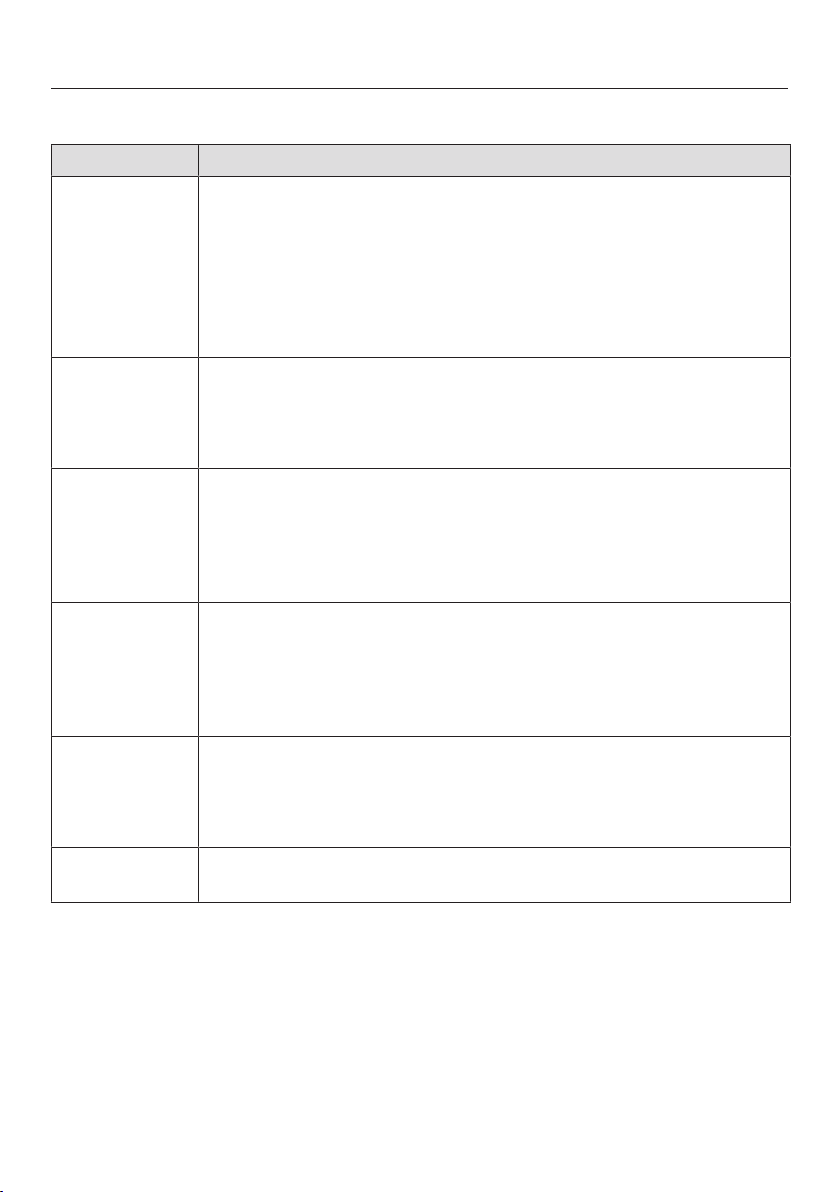
Sensor controls above the display
Information on the functions and
operating modes can be found under
“Operation”, “Settings“, “Automatic
programs”, and “Additional modes”.
Operating mode/microwave power
level
80W
150W
300W
450W
600W
750W
900W
Automatic program/mode/function
Popcorn
For starting the Popcornfunction
Automatic Programs
For accessing various automatic
programs
More
For accessing further modes and
settings
Defrost
For selecting various food
defrosting categories
Reheat
For selecting various food
reheating categories
Settings
For customizing the settings by
altering the defaults
Control panel
29
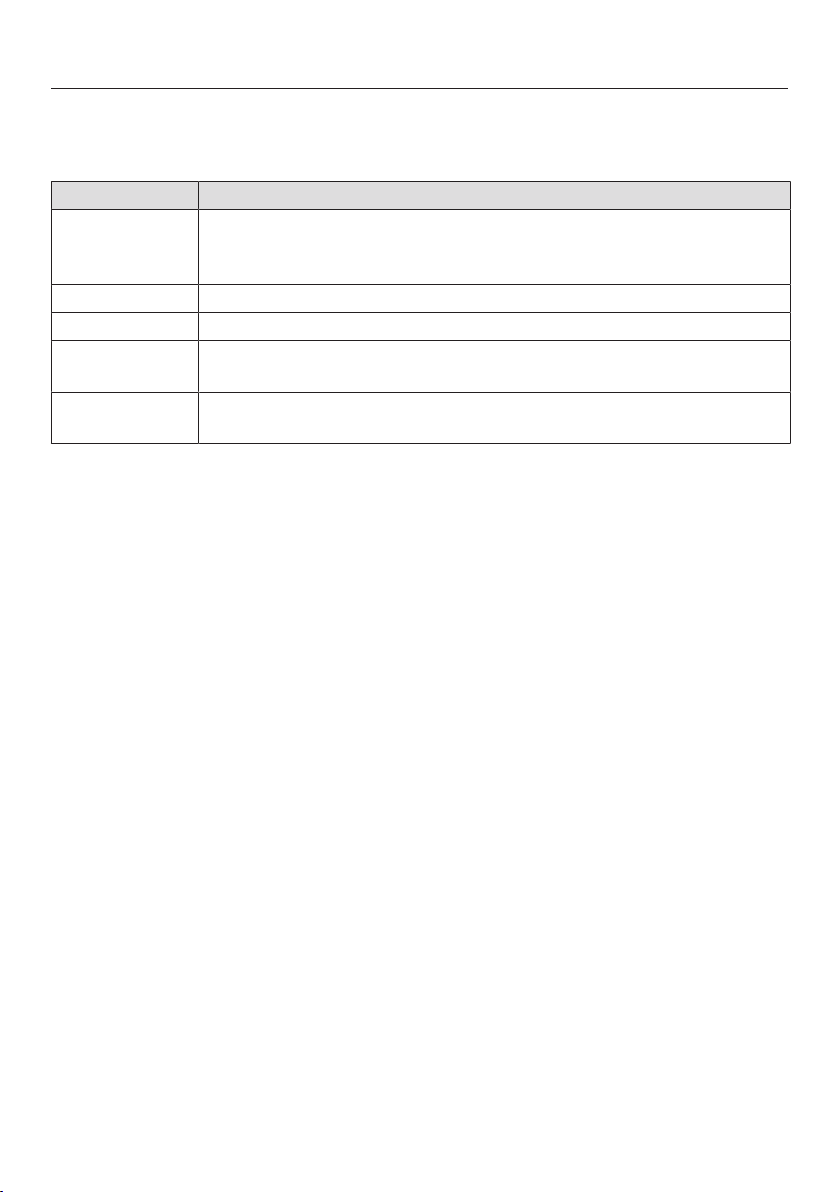
Sensor buttons under the display
Sensor button Function
Use this sensor button to start the Quick MW function. The
cooking process runs with maximum power level (900W)
and a cooking duration of 1minute (see section “Quick MW”).
Touching the sensor button repeatedly increases the cooking
duration in increments.
This function can only be used when no other cooking processes
are in use.
Depending on which menu you are in, this sensor button will
take you back a level or back to the main menu.
If a cooking program is in progress at the same time, use this
sensor button to cancel the program.
In the navigation area, use the arrow buttons or the area
between them to scroll up or down in the lists. The display
shows the menu option that you want to select.
You can change the values and settings using the arrow buttons
or the area between them.
OK As soon as you reach a confirmable value, message, or setting,
the OKsensor button will light up orange.
By selecting this sensor button you can access functions such
as the timer, save changes to values or settings, or confirm
instructions.
You can use this sensor button to set a timer (e.g., when boiling
eggs) at any point, even if a cooking program is in progress at
the same time.
You can also use this sensor button to set cooking durations.
As soon as the microwave is ready for you to start a cooking
process, this sensor control lights up green.
Control panel
30
Symbols
The following symbols may appear on the display:
Symbol Meaning
This symbol indicates that there is additional information and
advice about using the appliance. Select OK to confirm the
information.
Timer
A check indicates the option which is currently selected.
Some settings, e.g., display brightness and signal tone volume,
are selected using a segment bar.
The system lock prevents the microwave oven being switched on
by mistake (see “Settings” – “Safety”).

Using the appliance
31
Use the and arrow buttons or the
area between them in the
navigation area to use the microwave
oven.
As soon as you reach a confirmable
value, message, or setting, the
OKsensor button will light up orange.
Selecting a menu option
Touch the or arrow buttons or
swipe to the right or left in the
area until you reach the desired menu
option.
Tip: If you press and hold an arrow
button, the list continues scrolling
automatically until you release the arrow
button.
Confirm your selection with OK.
Changing a setting in a list
A check will appear beside the
current setting.
Touch the or arrow buttons or
swipe to the right or left in the
area until you reach the desired value
or setting.
Confirm with OK.
The setting is now saved. This will take
you back to the previous menu.
Changing the setting with a
segment bar
Some settings are represented by a
bar made up of segments.
If all of the segments are illuminated,
the maximum value is selected.
If none of the segments are illuminated
or if only one is, the minimum value is
selected or the setting is turned off
altogether (e.g., volume).
Touch the or arrow buttons or
swipe to the right or left in the
area until you reach the desired
setting.
Confirm your selection with OK.
The setting is now saved. This will take
you back to the previous menu.
Selecting an operating mode
or function
The sensor controls for the operating
modes and functions (e.g., More)
are located above the display (see
“Operation” and “Settings”).
Touch the sensor control for the
desired operating mode or function.
The sensor control on the control panel
lights up orange.
For operating modes and functions:
set values such as the cooking
duration or weight.
Under More: scroll through the
lists until you reach the desired menu
option.
Confirm with OK.
Using the appliance
32
Changing the operating mode
You can change to another operating
mode or function during a cooking
process.
The sensor control for the previously
selected operating mode or function
lights up orange.
Touch the sensor control of the new
operating mode or function.
The new operating mode will appear on
the display with its corresponding
recommended values.
The sensor control for the new
operating mode lights up orange.
Under More, scroll through the
lists until you reach the desired menu
option.
Entering numbers
Numbers that can be changed are
highlighted.
Touch the or arrow buttons or
swipe to the right or left in the
area until the desired number is
highlighted.
Tip: If you press and hold an arrow
button, the numbers continue scrolling
automatically until you release the arrow
button.
Confirm with OK.
The changed number is now saved.
This will take you back to the previous
menu.
Microwave operation
33
How it works
The microwave oven contains a
magnetron that converts electrical
energy into electromagnetic waves
(microwaves). These microwaves are
distributed evenly throughout the oven
compartment and are also reflected by
the metal walls inside the oven.
The microwaves penetrate the food
from all sides. Food consists of many
molecules. When subjected to
microwave energy, these molecules
(particularly the water molecules) start
to oscillate. This heats the food from
the outside to the inside. The more
water a food contains, the faster it is
reheated or cooked.
Advantages of the microwave oven
- Food can generally be cooked with
little or no liquid or cooking oil.
- The times for defrosting, reheating, or
cooking are shorter than with a
cooktop or oven.
- Vitamins, minerals, natural color, and
taste of the food are generally
retained.
Suitable dishware
In order for microwaves to reach the
food, they must be able to penetrate the
dishware being used. Microwaves can
pass through porcelain, glass,
cardboard, and plastics, but not metal.
Therefore, do not use metal containers
or dishware that contains metal. Metal
reflects the microwaves which can
create sparks and the microwaves are
not absorbed by the metal.
Danger of injury from increased
pressure in sealed containers or
bottles
Pressure can build up when
reheating food or drinks in sealed
containers or bottles, which can
cause them to explode.
Never cook or reheat solid or liquid
food in sealed containers or bottles.
Open containers beforehand and,
with baby bottles, remove the screw
top and teat.
Risk of fire due to unsuitable
dishware
Dishware that is not microwave-safe
can be destroyed and may damage
the microwave oven.
Only use microwave-safe dishware in
the microwave oven.
The material and shape of dishware
used affect reheating and cooking
durations.
Heat distribution is more even in round
and oval-shaped flat containers. Food is
reheated more evenly in these
containers than in square ones.
Microwave operation
34
Suitable dishware
Fire hazard due to flammable
materials
Disposable containers made out of
plastic, paper, or other flammable
materials can ignite, causing damage
to the microwave oven.
Do not leave the microwave oven
unattended when reheating or
cooking food in disposable
containers made of plastic, paper, or
other flammable materials.
You can use the following dishware and
materials:
- Heat-resistant glass and ceramic
glass
Exception: crystal glass as it contains
lead and may crack.
- Porcelain
– Without metallic decoration
Metallic decoration (e.g., gold rims
or cobalt blue) can cause sparking.
– Without hollow knobs and handles
Moisture can gather in hollow
knobs and handles. When the
moisture evaporates, pressure can
build up and the item can explode.
- Unpainted stoneware and stoneware
with underglaze paints
Danger of injury caused by hot
dishware.
Stoneware can get hot.
Use pot holders when using
stoneware.
- Plastic dishware and disposable
plastic containers
Tip: To protect the environment, avoid
the use of disposable containers.
Plastic dishware and bags that are
not heat-resistant may melt and fuse
with the food inside.
Only use plastic dishware or bags that
are heat-resistant. Plastic dishware
and bags must be heat-resistant to a
minimum of 230°F (110°C).
- Microwave-safe plastic dishware
Special plastic dishware designed for
use in microwave ovens is available
from retail outlets.
- Styrofoam dishware
For briefly heating food.
- Plastic boiling bags
For cooking and reheating. They
should be pierced before use. The
holes allow the steam to escape. This
prevents a build-up of pressure from
forming and the bag from bursting.
There are also special bags available
for steam cooking which do not need
to be pierced. Please follow
instructions given on the packet.
- Roasting bags and tubes
Please follow the manufacturer’s
instructions.
Risk of fire due to metal parts.
Metal parts such as metal clips or
plastic and paper ties that have wire
running through them can heat
flammable materials until they burn.
Do not use metal clips or plastic and
paper ties containing wire.
Microwave operation
35
Tip: Metallic dishes are not very
suitable for use in the microwave oven.
Metal reflects microwaves and
obstructs the cooking process.
Using aluminum foil trays and
aluminum foil can cause crackling
and sparks.
Place aluminum foil trays on the
turntable.
Aluminum foil and aluminum foil
trays must not touch the oven
compartment walls and must remain
at least 3/4" (2cm) from the walls at
all times.
- Aluminum foil trays without lids for
defrosting and reheating TV dinners
The food is only heated from the top.
If you remove the food from the
aluminum foil container and transfer it
to dishware suitable for use in a
microwave oven, the heat distribution
will generally be more even.
- Metal skewers or clips
The size of the cut of meat must be
much larger than the metal skewers
and clips.
Unsuitable dishware
Moisture can collect in the hollow
spaces on dishware and lids with
hollow handles or knobs. When the
moisture evaporates, pressure can
build up and the item can explode. If
the hollow recess is sufficiently
ventilated, the item can be used.
Do not use dishware with hollow
knobs or handles for cooking.
Do not use the following dishware and
material:
- Wire racks are not at all suitable for
use in the microwave.
- Metal containers
- Aluminum foil
Exception: in the case of unevenly
shaped cuts of meat – e.g., poultry –
small pieces of aluminum foil may be
used to cover thin parts for the last
few minutes of the process to ensure
even defrosting, reheating, or
cooking.
- Metal clips, or plastic or paper ties
containing wire
- Plastic containers where the
aluminum lid has not been
completely removed
- Crystal glass
- Utensils and dishware with metallic
decoration (e.g., gold rims, cobalt
blue)
- Dishware with hollow handles
- Plastic dishware made of melamine
Melamine absorbs microwave energy
and gets hot.
Microwave operation
36
When purchasing plastic dishware,
make sure that it is suitable for use in
a microwave oven.
- Wooden dishes
Water contained in wood evaporates
during the cooking process. This
causes the wood to dry and crack.
Testing dishware
Unsuitable dishware can cause sparks
or crackling noises during microwave
operation. If you are not sure whether
glass, porcelain, or stoneware dishware
is suitable, test it.
This test cannot be used to check
whether items with hollow grips or
handles are suitable for use.
Place the empty dishware on the
turntable.
Close the door.
Set the microwave power level to
(900W) and the cooking duration to
30seconds.
Start the process.
Observe the dishware during the
entire duration.
Immediately open the door if there
are sparks or crackling noises.
If there are sparks or if you can hear
crackling noises, the tested dishware is
not suitable for microwave use.
Cover
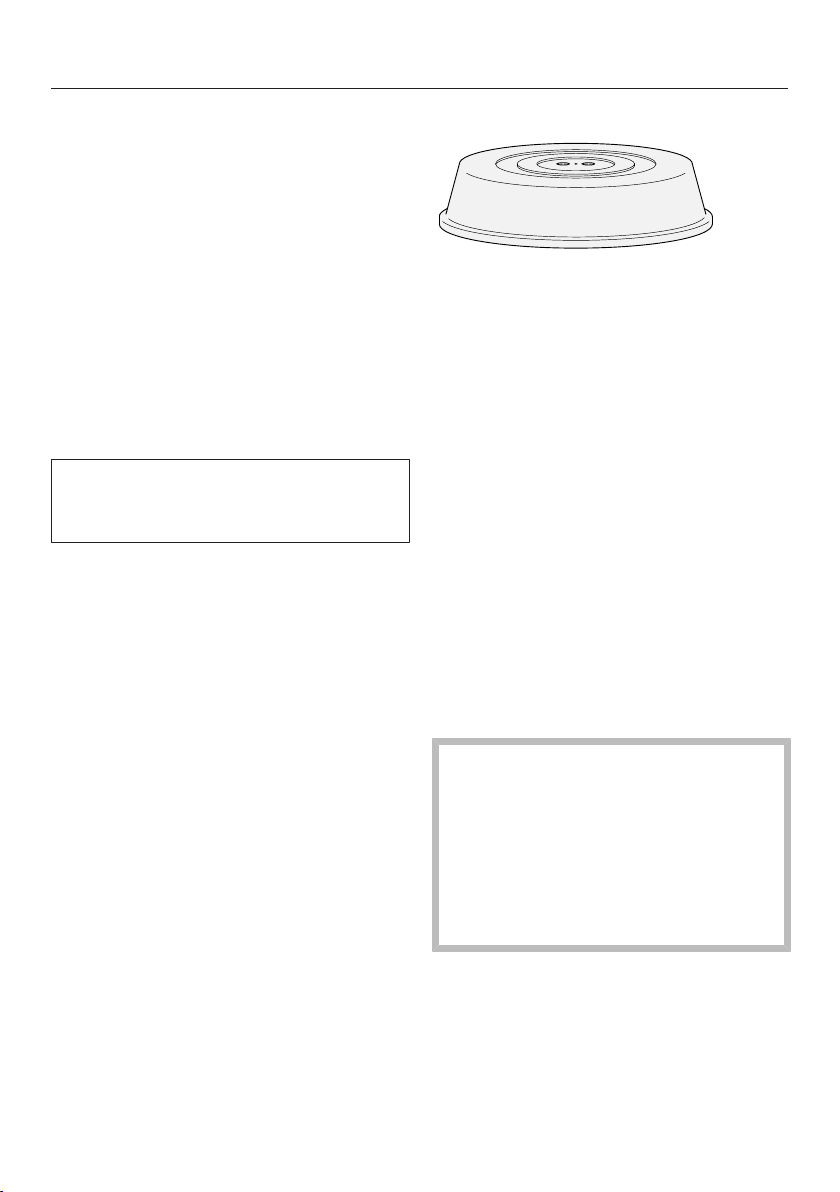
Tip: Covers are available from retail
outlets.
- A cover prevents too much steam
escaping, especially when cooking
foods which need longer to cook.
- It speeds up the process of heating
the food.
- It prevents food from drying out.
- It helps keep the oven compartment
clean.
When cooking in the microwave, use
a microwave-safe cover made of
glass or plastic.
Tip: Alternatively, use a cling film
suitable for use in a microwave oven.
Heat can cause normal cling film to
melt and fuse with the food.
The cover should not form a seal
with the container. If the container
has a narrow diameter, the steam
may not be able to escape. The
cover could get too hot and start to
melt.
Use containers with a sufficiently
large diameter.
Do not use a cover for heating or
reheating the following types of food:
- Food coated in breadcrumbs
- Food which requires a crisp finish,
e.g., toast
Before first use
37
Basic settings
You must make the following settings
before starting up for the first time. You
can change these settings again at a
later time (see “Settings”).
Danger of injury caused by hot
surfaces
The microwave oven gets hot during
operation.
For safety reasons, the microwave
oven may only be used when it has
been fully installed.
The microwave oven will switch on
automatically when it is connected to
the electrical supply.
Setting the language
Select the desired language.
If you have accidentally selected a
language that you don’t understand,
proceed as described in “Settings –
Language”.
Setting the location
Select the required location.
Setting the time
Set the time of day in hours and
minutes.
Confirm with OK.
Completing the commissioning
process
Follow any further instructions on the
display.
The appliance is now ready for use.
Settings
38
Settings overview
Menu option Available settings
Language ...| deutsch| english| ...
Location
Time Display
Clock display Off*| Clock display On| Night dimming
Time
12 h*| 24 h
Set
Volume Buzzer tones
Keypad tone
Display brightness
Units Weight
g| lb/oz| lb*
Keeping Warm On*
Off
Quick MW Power Level
80 W| 150 W| 300 W| 450 W| 600 W| 750 W| 900 W*
Duration
01:00*min–10:00min
Popcorn Duration
2:30min...3:20*min...3:50min
Oven compartment query On*
Off
Safety Sensor lock
On| Off*
System lock
On| Off*
Showroom program Demo mode
On| Off*
Factory default Reset
Do not reset
* Factory default

Settings
39
Accessing the “Settings” menu
The More| Settings menu allows
you to personalize your microwave
oven by adapting the factory default
settings to suit your requirements.
You cannot change settings while a
cooking process is in progress.
Select More.
Select Settings .
Select the setting you want.
You can check settings or change them.
Language
You can set your language and location.
Once you have selected and confirmed
your choice, the relevant language will
appear on the display.
Tip: If you have selected the wrong
language by mistake, select the
sensor control. Follow the symbol
to get back to the Language submenu.
Time
Display
Select how you want the time of day to
show on the display when the
microwave oven is switched off:
- Clock display On
The time of day is always visible on
the display.
- Clock display Off
The display is darkened to save
energy. The microwave oven has to
be switched on before you can use it.
- Night dimming
To save energy, the time of day only
shows on the display between
5:00am and 11:00pm. The display
remains dark at all other times.
Time
The time of day can be displayed in the
24 or 12-hour format (24 h or 12 h).
Set
Set the hours and the minutes.
If there is a power failure, the current
time of day will reappear once the
power has been restored. The time of
day is saved for approx. 150hours.
Volume
Buzzer tones
If audible signals are switched on, a
signal will sound at the end of a set
time.
-
Maximum volume
-
Audible signals are switched off
Keypad tone
The volume of the keypad tone that
sounds each time you tap a sensor
control is represented by a segment
bar.
-
Maximum volume
-
Keypad tone is switched off

Settings
40
Display brightness
The display brightness is represented
by a segment bar.
-
Maximum brightness
-
Minimum brightness
Units
Weight
When using automatic programs and
other modes, you can set the weight of
food in grams (g), pounds/ounces (lb/
oz), or pounds (lb).
Keeping Warm
At the end of a cooking process at
microwave power level (450W) or
higher and a cooking duration of
10minutes or more, the Keeping
Warmfunction will switch on
automatically if the door remains closed
and no sensor controls are pressed.
This will happen after approx. 2minutes
and will keep the food warm for up to
15minutes by using microwave power
level (80W).
- On
The Keeping Warmfunction is
switched on. Keeping Warm will
appear on the display.
Opening the door or operating one of
the sensor controls cancels the
function.
- Off
The Keeping Warmfunction is
switched off.
Quick MW
For quick start operation, the default
settings are a microwave power level
of (900W) and a cooking duration
of 1minute.
- Power Level
The following microwave power
levels can be selected: 80W, 150W,
300W, 450W, 600W, 750W, or
900W.
- Duration
The maximum cooking duration that
can be set depends on the
microwave power level selected:
80–750W: maximum 10minutes
900W: maximum 5minutes
Popcorn
For making popcorn with the
microwave, the default settings for
quick start operation are a microwave
power level of (900W) and a
cooking duration of 3:20minutes. You
can change the factory default settings
by selecting a cooking duration within
the range of 2:30–3:50minutes.
The microwave power level is set and
cannot be modified.
Oven compartment query
Operating the microwave oven while
empty can damage it.
Make sure that some food has
actually been placed inside the oven
before starting a cooking process.
This prompt reminds you that the
microwave oven must not be used
without any food inside it.
Settings
41
If you attempt to start a cooking
process without opening the door first,
the Place food in ovenprompt will appear
on the display.
There may not be any food inside the
microwave oven yet, given that you
have not opened the door for a long
time (approx. 20minutes). Confirm the
prompt with OK or by opening and
closing the door and selecting the
sensor control.
Safety
Sensor lock
The sensor lock prevents the cooking
process from being switched off by
mistake or settings from being
changed. When activated, the sensor
lock takes effect a few seconds after a
cooking process has been started,
thereby disabling all sensor controls
and fields on the display with the
exception of the On/Off button.
- On
The sensor lock is active. Touch the
OKsensor control for at least
6seconds to deactivate the sensor
lock for a short period of time.
- Off
The sensor lock is not active. All
sensor controls react to touch as
normal.
System lock
The system lock prevents the
microwave oven from being switched
on inadvertently.
The timer can still be used when the
system lock is active.
The system lock will remain activated
even after a power outage.
- On
The system lock is now active.
Before you can use the microwave
oven, touch the OKsensor control for
at least 6seconds.
- Off
The system lock is now deactivated.
You can use the microwave oven as
normal.
Showroom program
This function enables the microwave
oven to be demonstrated in showrooms
without heating up. Do not activate this
setting for domestic use.
Demo mode
If you have Demo mode activated,
Demo Mode on. Appl. will not heat up. will
appear when you switch on the
microwave oven.
- On
To activate Demo mode, touch the
OK sensor control for at least
4seconds.
- Off
To deactivate Demo mode, touch the
OK sensor control for at least
4seconds. You can use the
microwave oven as normal.
Factory default
- Reset
All changes made will be retained.
- Do not reset
All modified settings will be reset to
the factory default settings.
Operation
42
Tips for cooking with the
microwave
- You can choose from 7different
microwave power levels. The higher
the power level, the more microwaves
reach the food.
- When heating up foods that cannot
be stirred or turned during cooking,
or foods with very different
consistencies, it is best to use a
lower microwave power level. This
ensures that the heat is distributed
evenly.
Extend the cooking duration
accordingly to cook the food
properly.
- Food taken straight from the
refrigerator takes longer to defrost,
reheat, and cook than food which has
been kept at room temperature.
- Fresh vegetables contain more water
and cook more quickly than stored
vegetables.
- Frequent stirring or turning heats the
food more evenly, and it is therefore
ready in less time.
- The more food you place inside the
oven, the longer it will take to cook
(twice the amount = almost twice as
long). Reducing the quantity of food
shortens the cooking duration.
- The shape of the dishware and
material from which it is made may
affect the cooking duration (see
“Microwave operation – Suitable
dishware”).
Using the turntable
Placing food directly on the floor of
the oven can cause damage to the
microwave oven.
Always use the turntable, placing the
dishware on top.
The turntable begins turning
automatically whenever you start a
process. This ensures that the food
gets defrosted, reheated, or cooked
evenly.
Tips
- Do not place food directly on the
turntable when cooking, reheating, or
defrosting.
- Make sure that the dishware is
smaller than the turntable.
- Turn or stir food during cooking so
that it heats up evenly.
Switch on the microwave oven.
Select Operating Mode appears.
Place the dishware containing the
food on the turntable.
Select the required microwave power
level.
The prompt Duration 00:00min will
appear.
Set the required cooking duration.
Confirm with OK.
Operation
43
With microwave power level
(900W), the cooking duration is
limited to 15minutes.
The other microwave power levels
allow you to set a cooking duration of
up to 90minutes.
Operating the microwave continuously
at full power may result in the power
level being reduced by the overheating
protection (see “Frequently Asked
Questions”).
Select the sensor control.
The cooking process starts.
At the end of the cooking duration, End
will appear.
You can also keep the food warm at
the end of the cooking process (see
“Settings – Keeping Warm”).
After cooking, select the sensor
control for the selected operating
mode to end the cooking process.
Take the food out of the oven.
Switch off the microwave oven.
Changing values and settings
for a cooking process
Depending on the operating mode, you
can change the values or settings for a
cooking process as soon as it is
running.
Changing the microwave power level
You can use sensor controls
through to change the microwave
power level during a cooking process.
Select the required microwave power
level.
The cooking process continues running
without interruption for the remainder of
the cooking duration with the new
microwave power level.
Setting additional durations
Cooking results can be adversely
affected if there is a long delay
between the food being placed in the
oven and the start of cooking. Fresh
food can change color and even
spoil.
Select as short a time as possible
until the start of the cooking process.
You have placed the food in the oven
and selected an operating mode.
By entering Duration, Finish at, or Start at
via the sensor control, you can
automatically switch the cooking
process off or on and off.
Operation
44
- Duration
Enter the required cooking duration
for the food. The cooking process will
stop automatically once this duration
has elapsed. The maximum cooking
duration that can be set depends on
the operating mode that you have
selected.
- Finish at
Specify when you want the cooking
process to finish. The cooking
process will stop automatically at this
time.
- Start at
This function will only appear in the
menu if you have set a Duration or
Finish at time. With Start at, you have
to specify when you want the
cooking process to start.
Select the sensor control.
Set the required times.
Confirm with OK.
Changing set cooking durations
Select the sensor control.
Select the time you want.
Confirm with OK.
Select Change, if required.
The time will be highlighted.
Change the set time.
Confirm with OK.
Press the sensor control to
resume the cooking process.
These settings will be deleted in the
event of a power outage.
Tip: You can also adjust the cooking
duration via the navigation area.
Deleting the set cooking durations
You can only delete the times set for
Finish at and Start at. The cooking
duration must always be set.
Select the sensor control.
Select the time you want.
Confirm with OK.
Select Delete.
Confirm with OK.
Deleting Finish at or Start at also
deletes the set cooking duration.

Operation
45
Interrupting and resuming a
cooking process
You can interrupt a cooking process
(and resume it) at any time.
Open the door during the cooking
process.
The cooking process is interrupted and
the cooking duration is paused.
The following message is displayed:
Close the door. If you do not close the
door and resume the cooking process,
the microwave oven will switch off after
a while.
To resume the cooking process, close
the door and select the sensor
control.
The cooking process resumes and the
cooking duration continues to count
down.
Canceling a cooking process
Touch the sensor control for the
selected operating mode or the
sensor control.
Cancel process will appear on the
display.
Confirm with OK.
Any cooking durations set will be
deleted. The main menu will appear.

Timer
46
Using the Timerfunction
The timer can be used to time other
activities in the kitchen, e.g.,boiling
eggs.
The timer can also be used at the same
time as a cooking process for which
automatic start and finish times have
been set (e.g., as a reminder to stir the
food or add seasoning, etc.).
The maximum timer duration that can
be set is 90minutes and 00seconds.
Setting the timer
Example: you want to boil some eggs
and set a timer of 6minutes and
20seconds.
Select the sensor control.
Confirm with OK.
The prompt Timer00:00min will appear.
Using the navigation area, set 06:20.
Confirm with OK.
The timer duration is now saved.
When the microwave oven is switched
off, will be shown together with the
running timer instead of the time of day.
If you are in a menu, the timer will count
down in the background.
At the end of the timer duration, will
flash, the time will start counting up,
and an audible signal will sound.
Select the sensor control.
If required, confirm with OK.
The audible signal will stop and the
symbols on the display will go out.
Adjusting the timer during a cooking
process
Select the sensor control.
Select Timer.
Confirm with OK.
The prompt Timer00:00min will appear.
Set the required timer duration.
Confirm with OK.
Select the sensor control.
The timer duration is now saved.
The running cooking duration, the
symbol, and the timer countdown are
shown on the display side by side.
Changing the timer duration
Select the sensor control.
Select Timer if a cooking process is in
progress at the same time.
Select Change.
Confirm with OK.
The timer appears.
Change the time set for the timer.
Confirm with OK.
The altered timer duration is now saved.
Deleting the timer
Select the sensor control.
Select Timer if a cooking process is in
progress at the same time.
Select Delete.
Confirm with OK.
The timer is deleted.
Quick MW and Popcorn
47
These functions can only be used
when no other cooking processes are
in use.
Quick MW
If you select the sensor control, the
microwave starts with a set microwave
power level and cooking duration, e.g.,
to reheat a drink.
The maximum microwave power level
of (900W) and a cooking duration
of 1minute are set by default.
You can change the microwave power
level and the cooking duration. The
maximum cooking duration that can be
set depends on the microwave power
level selected (see “Settings – Quick
MW”).
Select the sensor control.
Touching it repeatedly increases the
cooking duration in increments.
The time left will appear on the display.
You can interrupt the cooking process
at any time with the sensor control.
Select Continue process and to
resume the cooking process, or Cancel
process to cancel it.
At the end of the cooking process,
Finishedappears on the display and an
audible signal sounds.
Select the sensor control.
The main menu will appear.
Popcorn
This function is suitable for making
microwave popcorn.
If you select the sensor control, the
microwave starts with a set microwave
power level and cooking duration.
Microwave popcorn is commercially
available in packs of various sizes. This
function is designed for a pack size of
approx.3.5oz (100g). A microwave
power level of (900W) and a
cooking duration of 3:20minutes are
set by default.
To accommodate different pack sizes,
you can adjust the cooking duration
within the range of 2:30–3:50minutes.
The microwave power level is set and
cannot be modified (see “Settings –
Popcorn”).
This function is not suitable for
making popcorn from kernels.
Only use this function with products
that are specifically labeled as
microwave popcorn.
If the pack containing the popcorn
comes into contact with the wall of
the oven interior and gets stuck
there, there is a risk of heat building
up.
Place the pack centrally on the
turntable so that it has enough room
to expand.
Quick MW and Popcorn
48
Place the microwave popcorn on the
turntable according to the
instructions on the packaging.
Select the sensor control.
Select the sensor control, if
required.
The time left will appear on the display.
You will be able to hear the corn
popping.
You can interrupt the cooking process
at any time by pressing the or
sensor controls.
Select Continue process and to
resume the cooking process, or Cancel
process to cancel it.
Stop the cooking process before the
end if the popping noises become
infrequent. Follow the instructions on
the pack.
Risk of injury caused by hot
popcorn
The pack containing the microwave
popcorn will be very hot at the end of
the cooking process.
Use pot holders to remove the
popcorn.

Automatic Programs
49
With the wide range of automatic
programs, you can achieve excellent
results with ease.
The automatic programs are weight-
dependent.
The More| Settings | Weight menu
allows you to set the required unit of
weight (g, lb/oz, lb).
Overview of automatic
programs
There are 13 automatic programs to
choose from when cooking food.
- Bacon
- Potatoes
- Chicken in sauce
- Fish Fillet
- Fish Fillet in sauce
- Soup
- Vegetables
- Frozen Meals
- Frozen Vegetables
- Fruit Dessert
- Meat in sauce
- Rice
- Casserole
Using automatic programs
Select Automatic Programs.
The list of automatic programs will
appear.
Select the automatic program that
you want to use.
Confirm with OK.
Use the arrow keys to choose
between the following options: Start
now, Start at, and Finish at.
Follow the instructions on the display,
e.g., Turn or Stir the food.
At the end of the cooking process,
allow the food to stand at room
temperature for approx. 2minutes.
This standing time allows the heat to
spread more evenly throughout the
food.
Using the Baconautomatic program
Use this program to make crispy bacon
in the microwave oven.
Select the Baconautomatic program.
Sandwich the bacon between two
sheets of paper towel and place it on
a microwave-safe plate.
Place the food on the turntable.
Follow the instructions on the display.

Automatic Programs
50
Using the Potatoesautomatic
program
This program can be used to cook
peeled, new, and bouillon potatoes.
Select the Potatoesautomatic
program.
Follow the instructions on the display.
About halfway through the cooking
duration, an audible signal will sound to
prompt you to turn or stir the food.
Tips
- When cooking peeled potatoes, place
them in a bowl with some salt while
they are still wet.
- When cooking new potatoes in their
skins, add approx. 1tbsp of water
per potato. Pierce the skin of the
potatoes with a fork or skewer.
- Enter the weight of the food,
including the water.
- Place the food on the turntable,
ensuring it is covered. For this, use a
cover or microwavable film, for
example.
Using the Fish Filletautomatic
program
Use this program to cook ready-
prepared fish fillets in the microwave.
Select the Fish Filletautomatic
program.
Place the ready-prepared, diced fish
fillet(s) in a microwave-safe oven
dish.
Enter the weight.
Place the food on the turntable,
ensuring it is covered. For this, use a
cover or microwavable film, for
example.
Follow the instructions on the display.
Using the Vegetablesautomatic
program
Select the Vegetablesautomatic
program.
Follow the instructions on the display.
About halfway through the cooking
duration, an audible signal will sound to
prompt you to turn or stir the food.
Tips
- Wash the vegetables and prepare
them as per the recipe.
- Place the vegetables and other
ingredients inside a cooking container
and add 3–4tbsp water.
- Season the vegetables as per the
recipe or to taste.
- Enter the weight of the food,
including the water. When cooking
vegetables in sauce, the weight
entered must include the sauce.
- Place the food on the turntable,
ensuring it is covered. For this, use a
cover or microwavable film, for
example.
Automatic Programs
51
Using the Riceautomatic program
Use this program to cook rice in the
microwave oven.
Select the Riceautomatic program.
Enter the weight of the dry rice.
Add boiling water to the rice using a
ratio of 1 part rice to 2 parts water.
Place the food on the turntable,
ensuring it is covered. For this, use a
cover or microwavable film, for
example.
Follow the instructions on the display.
Recipes
Here are some recipes for you to try
with the automatic programs.
For best results, we recommend using
the exact quantities and accessories
listed in the recipes.
If the weights given for the relevant
programs are exceeded, the food will
not be sufficiently cooked, so please
observe the guidelines.

Automatic Programs
52
Potatoes in a curry sauce
Serves 3
Ingredients
1onion | diced
1tbsp butter
1 lb (500g) potatoes, waxy | diced
1–2tbsp curry powder
1 cup (250ml) vegetable stock
1/4 cup (50ml) heavy cream
1/4 lb (125g) peas, frozen
Salt
Pepper
Accessories
Bowl, microwave-safe
Total time required: 35minutes
Method
Mix together all the ingredients in a
bowl.
Place the food on the turntable,
ensuring it is covered, and cook.
When a signal sounds, stir the
vegetables immediately.
Setting
Program: |Potatoes
Weight: 1 3/4 lb (800g)
Chicken breast in mustard
sauce
Serves 4
Ingredients
1/2 lb (250g) crème fraîche
1clove of garlic | crushed
4tbsp mustard, sweet
1½tsp salt
½tsp sage
4chicken breast fillets 1/2 lb (200g)
each, ready to cook
Accessories
Oven dish, microwave-safe
Total time required: 30minutes
Method
To make the sauce, mix together the
crème fraîche, garlic, mustard, salt, and
sage.
Place the chicken breast fillets in the
oven dish and spread the sauce over
the top.
Place the food on the turntable,
ensuring it is covered, and cook.
When a signal sounds, turn the chicken
breasts and baste with sauce
immediately.
Recover and continue cooking.
Setting
Program: |Chicken in sauce
Weight: 2 1/2 lb (1,100g)
Tip
Try using wholegrain mustard instead.

Automatic Programs
53
Salmon in white wine sauce
Serves 4
Ingredients
1.5lb (700g) salmon fillet | cut into four
fillets and ready to cook
1lemon | juiced and sliced
3garlic cloves | minced
2oz (50g) butter | cubed
1cup (200ml) white wine
1bunch dill | chopped coarsely
1bunch parsley | chopped coarsely
Accessories
Casserole dish, microwave-safe
Total time required: 25minutes
Method
Place all ingredients in the casserole
dish.
Place the food on the turntable,
ensuring it is covered, and cook.
Setting
Program: |Fish Fillet in sauce
Weight: 2.4 lb (1,100g)
Minestrone
Serves 4
For the minestrone
1/8lb (50g) bacon
1onion
1/3 lb (150g) celery
2tomatoes
1/3 lb (150g) carrots
1/4 lb (100g) beans, green, frozen
1/4 lb (100g) peas, frozen
1/8 lb (50g) pasta (small shells)
1tbsp mixed Italian herbs, frozen
1/2 cup (100ml) vegetable stock
For the garnish
1/4 lb (100g) hard cheese (Parmesan),
whole piece
Accessories
Glass dish with lid, microwave-safe
Grater, fine
Total time required: 40minutes
Method
Dice the bacon and onion. Dice the
celery and tomatoes, slice the carrots.
Put all of these into the glass dish.
Add the beans, peas, pasta, and herbs
along with the stock, and stir.
Place the food on the turntable,
ensuring it is covered, and cook.
When a signal sounds, stir the soup
immediately. Then, recover and
continue cooking.
Grate the Parmesan and sprinkle it over
the top just before serving.
Setting
Program: |Soup
Weight: 2.2 lb (1,000g)

Automatic Programs
54
Carrots in a chervil cream
sauce
Serves 2
Ingredients
3/4 lb (350g) carrots | sliced
1tsp butter
1/4 cup (50ml) vegetable stock
1/4 lb (75g) crème fraîche
1tbsp white wine
½tsp sugar
½tsp salt
1tbsp cornstarch
½tsp mustard
1–2tbsp chervil, fresh | chopped
Pepper
Accessories
Bowl, microwave-safe
Total time required: 35minutes
Method
Place the carrots in a bowl along with
the butter and vegetable stock.
Mix together the crème fraîche, white
wine, sugar, salt, cornstarch, mustard,
and chervil. Season with pepper to
taste. Add the sauce to the vegetables
and stir.
Place the food on the turntable,
ensuring it is covered, and cook.
When a signal sounds, stir the
vegetables immediately.
Setting
Program: |Vegetables
Weight: 1.2 lb (525g)
Red berry fruit compote
Serves 4
Ingredients
3/4 lb (400g) red berries (e.g.,
strawberries, raspberries), fresh or
frozen
1/2 cup (100ml) water
1/4 cup (50ml) strawberry syrup
1–2tbsp cornstarch
4 tsp (20ml) crème de cassis
Accessories
Bowl, microwave-safe
Total time required: 20minutes
Method
Place the berries in a bowl along with
the water and strawberry syrup.
Mix the cornstarch with 2tbsp water
and the crème de cassis, and add to
the berries.
Place the food on the turntable,
ensuring it is covered, and cook.
Setting
Program: |Fruit Dessert
Weight: 1 lb (500g)
Tip
Serve with vanilla ice cream or custard.

Automatic Programs
55
Meatballs
Serves 4
For the meatballs
1/3cup (40g) breadcrumbs
1/2 cup (110ml) water
1onion | finely diced
1/2 lb (250g) ground meat, pork
1/2 lb (250g) ground meat, beef
1egg, medium
1tsp salt
Pepper
For the sauce
1.5 oz (40g) butter | softened
1.5 oz (40g) plain white flour
2 cups (500ml) meat stock | cold
2tbsp heavy cream
1tbsp capers
1tsp sugar
Accessories
Oven dish, microwave-safe
Total time required: 30minutes
Method
Mix together the water and
breadcrumbs, and leave to soak.
Add the onion and ground meat to the
breadcrumbs. Add the egg, salt, and
pepper, and knead into a meat dough.
Shape into 8meatballs and place in the
oven dish.
Mix together the butter and flour. Divide
this mixture into small portions and place
next to the meatballs. Add the meat stock.
Place the food on the turntable,
ensuring it is covered, and cook.
When a signal sounds, immediately stir
the sauce gently until smooth.
Season with the cream, capers, and sugar
to taste. Recover and continue cooking.
Setting
Program: |Meat in sauce
Weight: 3 lb (1,400g)
White cabbage stew
Serves 4
Ingredients
1/2 lb (200g) ground meat, beef
½tsp salt
½tsp paprika, sweet
Pepper
1onion
1/2 lb (250g) potatoes
1/4 lb (100g) leeks
1/2 lb (250g) white cabbage
1/2 lb (250g) red beet
1 cup (250ml) beef stock
1½tsp salt
1/3 lb (150g) crème fraîche
1tbsp parsley | chopped
2tbsp red wine vinegar
Accessories
Bowl, microwave-safe, 9" (23cm)
Grater, coarse
Total time required: 45minutes
Method
Knead together the ground meat,
paprika, salt, and pepper. Form into
small meatballs and place in the bowl.
Dice the onion and potatoes. Cut the
leek into rings. Finely slice the white
cabbage. Coarsely grate the red beet.
Layer the vegetables on top of the
meatballs. Add the beef stock and salt.
Place the food on the turntable,
ensuring it is covered, and cook.
Stir in the crème fraîche and parsley.
Season with the red wine vinegar to
taste.
Setting
Program: |Casserole
Weight: 3 1/2 lb (1,600g)
Additional applications
56
This section provides information on the
following applications:
- Defrost
- Reheat
- Cooking
- Canning
Defrost
Gentle defrosting of frozen food means
that the vitamins and minerals are
generally retained.
Use the More| Defrost mode or
the following microwave power
levels:
- Microwave power level (80W)
For defrosting very delicate food,
e.g., cream, butter, gateau,
buttercream cake, and cheese
- Microwave power level (150W)
For defrosting everything else
When using this mode, enter the
weight or – if you have selected a
microwave power level – the
defrosting duration.
Always observe USDA/CFIA food
safety guidelines.
Risk of infection from bacteria.
Bacteria such as salmonella can
cause life-threatening food
poisoning.
It is particularly important to observe
food hygiene rules when defrosting
fish and meat, and in particular when
defrosting poultry.
Do not use the liquid produced
during defrosting.
Process the food as required as soon
as it has been defrosted.
Tips for defrosting
- Only use dishware that is microwave
safe.
- Remove the frozen food from its
packaging and defrost uncovered.
- Place frozen meat on an upturned
plate inside a glass or porcelain
container. This way the frozen food
will not be lying in the defrosted
liquid.
- Turn, separate, or stir the food about
halfway through the defrosting time.
- Meat, poultry, or fish does not need
to be fully defrosted before cooking.
Defrost until the food has started to
thaw. The surface will then be
sufficiently thawed to take herbs and
seasoning.
Additional applications
57
Tips for combining the Defrost
function with subsequent reheating/
cooking
Frozen food can be defrosted and
then reheated or cooked in the
microwave as well.
The time required depends on the
nature of the food, its initial
temperature, and the amount to be
cooked.
- Take the food out of its packaging
and place it inside a microwave-safe
dish.
- Cover the food.
Exception: chopped steak should be
left uncovered during cooking.
- Select microwave power level
(900W) first, followed by microwave
power level (450W).
- If the food has a high water content
(e.g., soups and vegetables), stir it
several times during cooking.
- Carefully separate and turn slices of
meat halfway through.
- Turn pieces of fish at the halfway
stage.
- Allow food to stand at room
temperature after defrosting and then
reheating/cooking it. This standing
time allows the heat to spread more
evenly throughout the food.
Using the Defrostmode
There are 13defrosting categories
covering different types of food. The
standing time for each one is approx.
10minutes.
Select More.
Select Defrost.
The following list will appear:
- Bread
- Cake
- Chicken Thighs
- Plated Meals
- Fish Fillet
- Fruit
- Meat Pieces
- Ground Meat
- Poultry
- Soup
- Sliced Meat
- Vegetables
- Fish
Select the desired food category.
Enter the weight of the food.
Follow the instructions on the display.
Tip: The More| Settings | Weight
menu allows you to set the required unit
of weight (g, lb/oz, lb).
Additional applications
58
Reheat
It is essential that the information in
“IMPORTANT SAFETY INSTRUCTIONS
– Correct use” is observed.
Always observe USDA/CFIA food
safety guidelines.
Danger of injury caused by hot
food.
If food for babies and children is
heated at too high a temperature,
they can burn themselves.
Only heat food for babies and
children for 30–60seconds at
microwave power level (450W).
After heating food – especially food
for babies and small children – stir
the food or shake the container, and
then taste the food to make sure it
will not burn the mouths of the
children.
Danger of injury from increased
pressure in sealed containers or
bottles
Pressure can build up when
reheating food or drinks in sealed
containers or bottles, which can
cause them to explode.
Never cook or reheat food or liquids
in sealed containers or bottles. Open
containers beforehand and, with
baby bottles, remove the screw top
and teat.
Danger of injury caused by hot
liquids.
When using the microwave oven to
heat food, particularly liquids, the
boiling point may be reached without
the typical bubbles being produced.
The liquid does not boil evenly
throughout.
This boiling delay can result in the
liquid boiling over explosively. Take
care when taking the container out of
the oven, as the hot liquid can cause
severe scalding. Under certain
circumstances, the pressure can be
so high that the door bursts open.
Stir liquids well before heating or
cooking.
After heating, wait at least
20seconds before removing the
container from the oven.
In addition, you can place a glass
rod or similar item, if available, in the
container during the heating process.
Food with a thick skin or peel, such
as tomatoes, sausages, potatoes,
and eggplant can burst when heated
or cooked.
Pierce or score the skin of these
foods several times to allow steam to
escape.
Eggs heated in their shell can burst,
even after they have been removed
from the oven.
Eggs can only be cooked in their
shells in a specially designed egg-
boiling device. Do not reheat hard-
boiled eggs in the microwave oven.
Additional applications
59
Danger of burning due to hot
surfaces.
The microwave oven gets hot during
operation. There is a risk of burning
yourself on the hot oven
compartment, dishware, or food.
Spots of condensation may form on
the bottom of the dishware.
Wear oven gloves when reaching into
the hot oven compartment and when
removing the dishware.
Tips on reheating
- Only use dishware that is microwave
safe.
- Always cover food when reheating it,
except when reheating food coated in
breadcrumbs.
- The time required depends on the
nature of the food, its initial
temperature, and the amount to be
cooked. For example, food taken
straight from the refrigerator takes
longer to reheat than food which has
been kept at room temperature. Take
note of the standing times.
- Turn, separate, or stir the food several
times. Stir the food from the outside
toward the middle, as food heats up
more quickly at the edges.
- The purpose of the standing time is
to allow the food to develop a more
even temperature.
- After reheating, allow the food to
stand at room temperature for a few
minutes to enable the heat to spread
more evenly throughout the food.
Using the Reheatmode
There are 8reheating categories
covering different types of food. The
standing time for each one is approx.
2minutes.
Select More.
Select Reheat.
The following list will appear:
- Bakes
- Chicken in sauce
- Plated Meals
- Fish Fillet in sauce
- Soup
- Meat in sauce
- Casserole
- Vegetables
Select the desired food category.
Enter the weight of the food.
Follow the instructions on the display.
Tip: The More| Settings | Weight
menu allows you to set the required unit
of weight (g, lb/oz, lb).
Additional applications
60
Examples of heating food
The information provided in this chart is intended as a guide only.
Food Quantity
[min]
Comment
Melting butter/
margarine
1/4lb (100g) 1:00–1:10 Do not cover
Melting
chocolate
1/4lb (100g) 3:00–3:30
Do not cover, stir halfway
through melting
Dissolving
gelatin
1packet + 5tbsp
water
0:10–0:30
Do not cover, stir halfway
through dissolving
Preparing flan
topping/fruit
glaze
1packet + 1cup
(250ml) liquid
4:00–5:00
Do not cover, stir halfway
through heating
Yeast dough Starter made with
1/2cup (100g)
flour
3:00–5:00 Cover and leave to proof
Chocolate
marshmallows
0.7oz (20g) 0:10–0:20
Place on a plate, do not
cover
Salad dressings
1/2 cup (125ml) 1:00–2:00
Heat uncovered at low
power to bring out flavor
Tempering
citrus fruits
1/3lb (150g) 1:00–2:00
Place on a plate, do not
cover
Softening ice
cream
1lb (500g) 1:00–3:00
Place inside oven,
uncovered
Skinning
tomatoes
3tomatoes 6:00–7:00
Cut a cross into the top of
each tomato, cover, and
heat in a little water. The
skins will slip off easily.
The tomatoes can get very
hot.
Making
strawberry jam
1lb (300g)
strawberries,
1½cups (300g)
gelling sugar
7:00–9:00
Mix the fruit and sugar in a
deep bowl, cover and
cook.
microwave power level, cooking duration
Additional applications
61
Cooking
It is essential that the information in
“IMPORTANT SAFETY INSTRUCTIONS
– Correct use” is observed.
Risk of infection due to
insufficient cooking
Highly perishable foods – e.g., fish –
must be cooked thoroughly.
Otherwise, they can pose a health
risk.
It is essential to cook highly
perishable foods for a sufficient
length of time.
Danger of burning due to hot
surfaces.
The microwave oven gets hot during
operation. There is a risk of burning
yourself on the hot oven
compartment, dishware, or food.
Spots of condensation may form on
the bottom of the dishware.
Wear oven gloves when reaching into
the hot oven compartment and when
removing the dishware.
Food with a thick skin or peel, such
as tomatoes, sausages, potatoes,
and eggplant can burst when heated
or cooked.
Pierce or score the skin of these
foods several times to allow steam to
escape.
Eggs heated in their shell can burst,
even after they have been removed
from the oven.
Eggs can only be cooked in their
shells in a specially designed egg-
boiling device. Do not reheat hard-
boiled eggs in the microwave oven.
If you cook eggs without their shells,
there is a risk of the yolks exploding
due to the resulting pressure.
Prick the yolk several times before
cooking to avoid this.
Tips for cooking
- Only use dishware that is microwave
safe.
- Always use a cover.
- The time required depends on the
nature of the food, its initial
temperature, and the amount to be
cooked. For example, food taken
straight from the refrigerator takes
longer to cook than food which has
been kept at room temperature. Take
note of the standing times.
- Fresh vegetables contain more water
than vegetables which have been
stored, and usually cook more
quickly. Add 3–4tbsp of water to
vegetables which have been stored.
- Turn, separate, or stir the food several
times. Stir the food from the outside
toward the middle, as food heats up
more quickly at the edges.
Additional applications
62
- The purpose of the standing time is
to allow the food to develop a more
even temperature.
- After cooking, allow the food to stand
at room temperature for a few
minutes to enable the heat to spread
more evenly throughout the food.
- If possible, use the automatic
programs for cooking.
- Select microwave power level
(900W) to start cooking and then
continue cooking at power level
(450W).
- When cooking foods that swell, such
as rice pudding or semolina, start
with microwave power level
(900W) and then switch to power
level (150W).
Canning
Risk of infection from bacteria.
The spores of the botulinum
bacterium are not sufficiently killed
by canning pulses and meat only
once. Toxins may form which can
lead to serious poisoning. These
spores are only destroyed by
canning the food again.
After they have cooled down, always
reheat pulses and meat a second
time within 2days.
If unsuitable materials are used,
there is a risk of generating sparks
and damaging the microwave oven
as a result.
Use microwave-safe canning jars
and seal them with clear adhesive
tape or clips suitable for microwave
use.
Do not use metal clips, jars with
screw-top lids, or cans, as these will
generate sparks.
Always observe USDA/CFIA food
safety guidelines.
Additional applications
63
Preparing fruit and vegetables
The instructions are for a maximum of
4jars with a capacity of 2cups (0.5l)
each.
Only use special jars from a specialist
retailer (microwave-safe canning jars
with glass lids, sealed with clear
adhesive tape).
Only use undamaged jars.
Rinse the jars with hot water before
canning and fill them up to a
maximum of 3/4" (2cm) below the
rim.
Seal the jars with clear adhesive tape
only.
Do not use metal clips, jars with
screw-top lids, or cans, as these will
generate sparks.
Place the jars on the turntable.
Canning fruit and vegetables
Select microwave power level
(900W).
Wait until bubbles rise evenly in the
jars. This takes about 3minutes per
jar. With 4jars, therefore, it takes
12minutes.
This is sufficient time for canning fruit
and cucumbers.
When canning other vegetables,
reduce the microwave power level to
microwave power level (450W)
as soon as bubbles become visible in
the jars.
Continue cooking at microwave
power level (450W) for approx.
15minutes if canning carrots and for
approx. 25minutes if canning peas.
Removing the jars after canning
Danger of injury caused by hot
surfaces
The jars will be very hot after
canning.
Use oven gloves when removing the
jars from the oven.
Take the jars out of the oven.
Cover the jars with a towel and leave
to stand for approx. 24hours in a
draft-free area.
After they have cooled down, always
reheat pulses and meat a second
time within 2days.
Remove the clips or the adhesive
tape and then make sure that all jars
are sealed properly.
Either boil open jars again or store
them in a cool place and consume the
canned fruit or vegetables
immediately.
Check the jars during storage. If jars
have opened during storage or if the
screw cap is bulging and does not
make a popping noise when opened,
destroy the contents.
Cleaning and care
64
Danger of injury caused by hot
surfaces
The microwave oven gets hot during
operation. There is a risk of burning
yourself on the hot oven
compartment or accessories.
Allow the oven compartment and
accessories to cool before manual
cleaning.
Risk of injury due to electric
shock
The steam from a steam cleaner
could reach live electrical
components and cause a short
circuit.
Never use a steam cleaner for
cleaning.
Fire hazard due to excessive
soiling
Under certain circumstances heavy
soiling can catch fire, damaging the
the microwave oven.
Clean the oven compartment and
inside of the door as soon as they
have cooled. Waiting too long to
clean the oven will make it much
more difficult to clean.
All surfaces could become
discolored or damaged if unsuitable
cleaning agents are used. The front
of the microwave oven is particularly
susceptible to damage from oven
cleaners.
All surfaces are susceptible to
scratching. Scratches on glass can
lead to breakage in some
circumstances.
Remove all cleaning agent residues
immediately.
Operating a damaged microwave
oven can result in microwave
leakage and present a hazard to the
user.
Check the door for damage. If any
damage is seen, the microwave oven
should not be used again until it has
been repaired by a service
technician. Contact Miele.

Cleaning and care
65
Unsuitable cleaning agents
To avoid damaging the surfaces of your
appliance, do not use:
- Cleaning agents containing soda,
ammonia, acids, or chlorides
- Cleaning agents containing descaling
agents on the front
- Abrasive cleaning agents
(e.g.,powder cleaners and cream
cleaners)
- Solvent-based cleaning agents
- Stainless-steel cleaners
- Dishwasher cleaning agents
- Oven cleaners
- Glass cleaners
- Cleaning agents for ceramic-glass
cooktops
- Hard, abrasive brushes or sponges
(e.g.,pot scourers, brushes, or
sponges which have been previously
used with abrasive cleaning agents)
- Eraser sponges
- Sharp metal scrapers
- Steel wool
- Spot cleaning with mechanical
cleaning agents
- Stainless-steel spiral pads
If soiling is allowed to sit for any length
of time, it may become impossible to
remove. If the appliance is used
frequently without being cleaned, it
may become very difficult to clean.
It is therefore best to remove any
soiling immediately.
Removing soiling
Moisture inside the microwave oven
can cause damage.
Do not use too much water on the
cloth or sponge and do not let water
or any other liquid find its way into
any internal oven openings.
Remove soiling immediately with
warm water, liquid dish soap, and a
clean sponge or a clean, damp
microfiber cloth.
Remove all cleaning agent residues
thoroughly with clean water.
After cleaning, wipe the surfaces dry
using a soft cloth.
- For heavier soiling, heat a glass of
water inside the oven compartment
for 2–3minutes until the water begins
to boil. The steam will collect on the
oven compartment walls and soften
the soiling. You will then be able to
remove the soiling (using a little dish
detergent if necessary).
- To neutralize odors in the oven
compartment, put a container of
water with some lemon juice inside
the microwave oven and heat for a
few minutes.
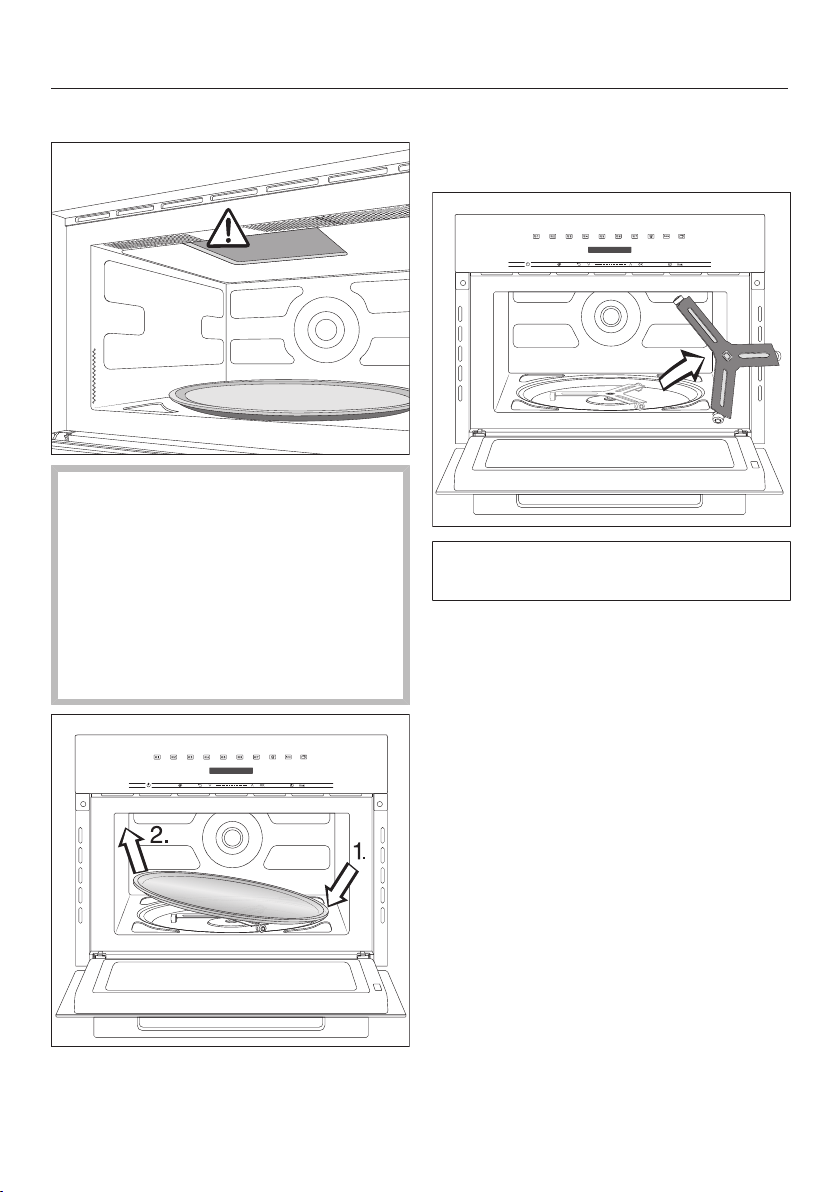
Cleaning and care
66
Cleaning the oven compartment
There is a cover protecting the
microwave outlet on the ceiling of
the oven, which is susceptible to
damage.
Never remove the cover from the
microwave outlet.
Do not use the abrasive side of the
dishwashing sponge to clean the
ceiling of the oven.
To remove the turntable, press down
on one side (1.) and lift it up by the
other (2.).
Wash the turntable in the dishwasher
or by hand with a weak solution of
dish detergent.
Do not turn the support manually, as
this can damage the drive motor.
Remove the support on which the
turntable normally rotates.
Clean the support and the floor of the
oven. Otherwise the turntable will not
rotate smoothly.
Clean the contact surfaces between
the turntable and the support.
Put the support back inside and
place the turntable on top.
Frequently Asked Questions
67
With the help of the following guide minor faults in the performance of the
machine, some of which may result from incorrect operation, can be remedied
without contacting the Service Department.
This guide may help you to find the reason for the fault, and how to correct it.
Problem Possible cause and solution
The display is dark. You have selected the Time| Display| Clock display Off
setting. As a result, the display remains dark when
the microwave is switched off.
As soon as you switch on the microwave oven, the
main menu will appear. If you want the time of day
to be displayed constantly, select theTime|
Display| Clock display On setting.
There is no power running to the microwave oven.
Check that the electrical plug of the microwave
oven is correctly inserted in the outlet.
Check if the breaker has tripped. If it has, contact
a qualified electrician or Miele Customer Service.
You cannot start a
cooking process.
The door is still open.
Check whether the door is closed properly.
There is no power running to the microwave oven.
Check that the electrical plug of the microwave
oven is correctly inserted in the outlet.
Check if the breaker has tripped. If it has, contact
a qualified electrician or Miele Customer Service.
The sensor controls do
not respond.
There is no power running to the microwave oven.
Check that the electrical plug of the microwave
oven is correctly inserted in the outlet.
Check if the breaker has tripped. If it has, contact
a qualified electrician or Miele Customer Service.
Place food in oven appears
on the display.
This prompt reminds you that the microwave oven
must not be used without any food inside it. There
may not be any food inside the microwave oven yet,
given that you have not opened the door for a long
time (approx. 20minutes).
Make sure that some food has actually been
placed inside the oven.
Confirm the prompt with OK or by opening and
closing the door and selecting the sensor control.
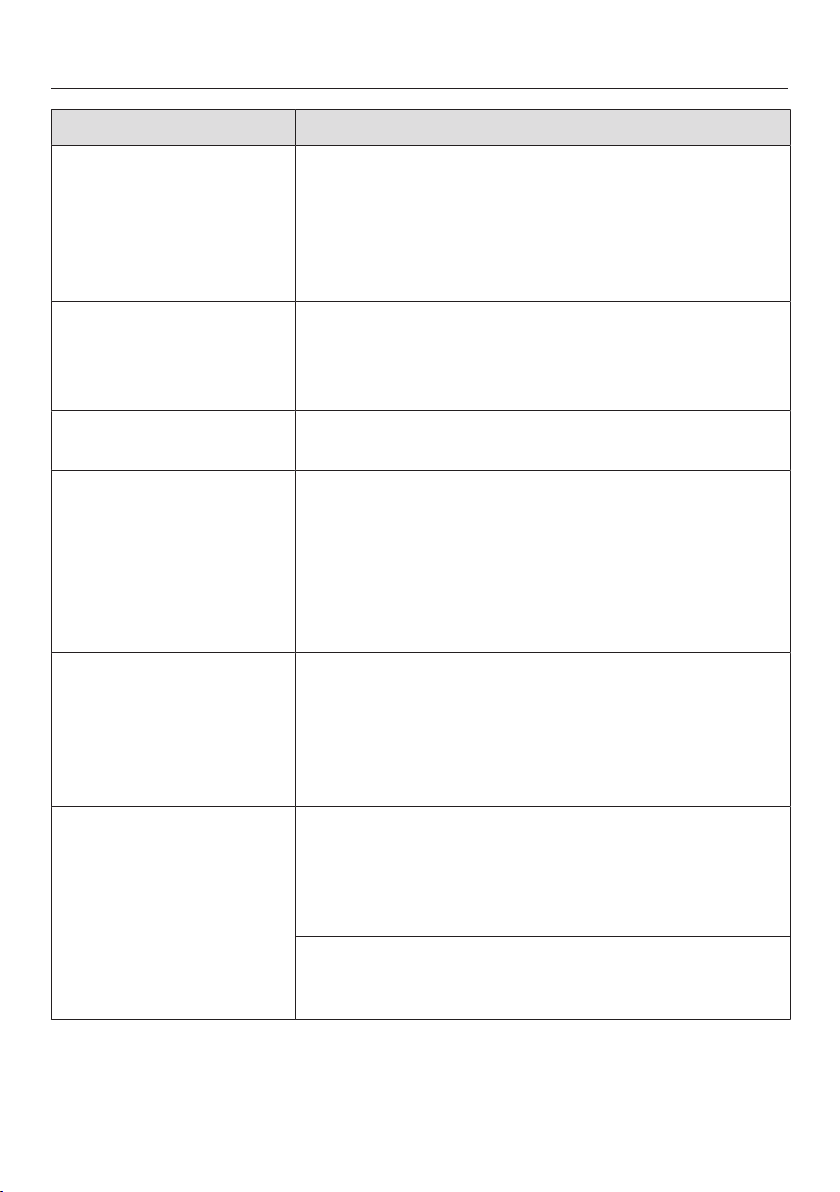
Frequently Asked Questions
68
Problem Possible cause and solution
Press OK for 6 seconds
appears on the display
when the oven is
switched on.
The system lock is activated.
You can deactivate the system lock for a cooking
process by touching the OKsensor control for at
least 6seconds.
If you want to permanently deactivate the system
lock, select theSafety| System lock | Off setting.
Power Failure appears on
the display.
There has been a brief power failure. This has caused
the current cooking process to stop.
Switch the microwave oven off and on again.
Restart the cooking process from the beginning.
12:00 appears on the
display.
There was a power failure for more than 150hours.
Reset the time of day.
The turntable is very
jerky.
The turntable, support, or floor of the oven may be
dirty.
Clean the turntable, support, and floor of the oven.
Clean the contact surfaces between the turntable
and the support.
Put the support back inside and place the
turntable on top.
A noise is heard after
the cooking process is
complete.
After the cooking process the cooling fan will
continue to run for a while after a program is
complete to prevent moisture from building up in
the oven, on the control panel or surrounding
cabinetry.
The cooling fan will turn off automatically.
An abnormal sound can
be heard during a
cooking process.
A metal dish has been used during a cooking
process.
Check if the metal dishes you have been using
generate sparks (see “Microwave operation –
Suitable dishware”).
The food was covered with aluminum foil during a
cooking process.
Remove the foil, if applicable.
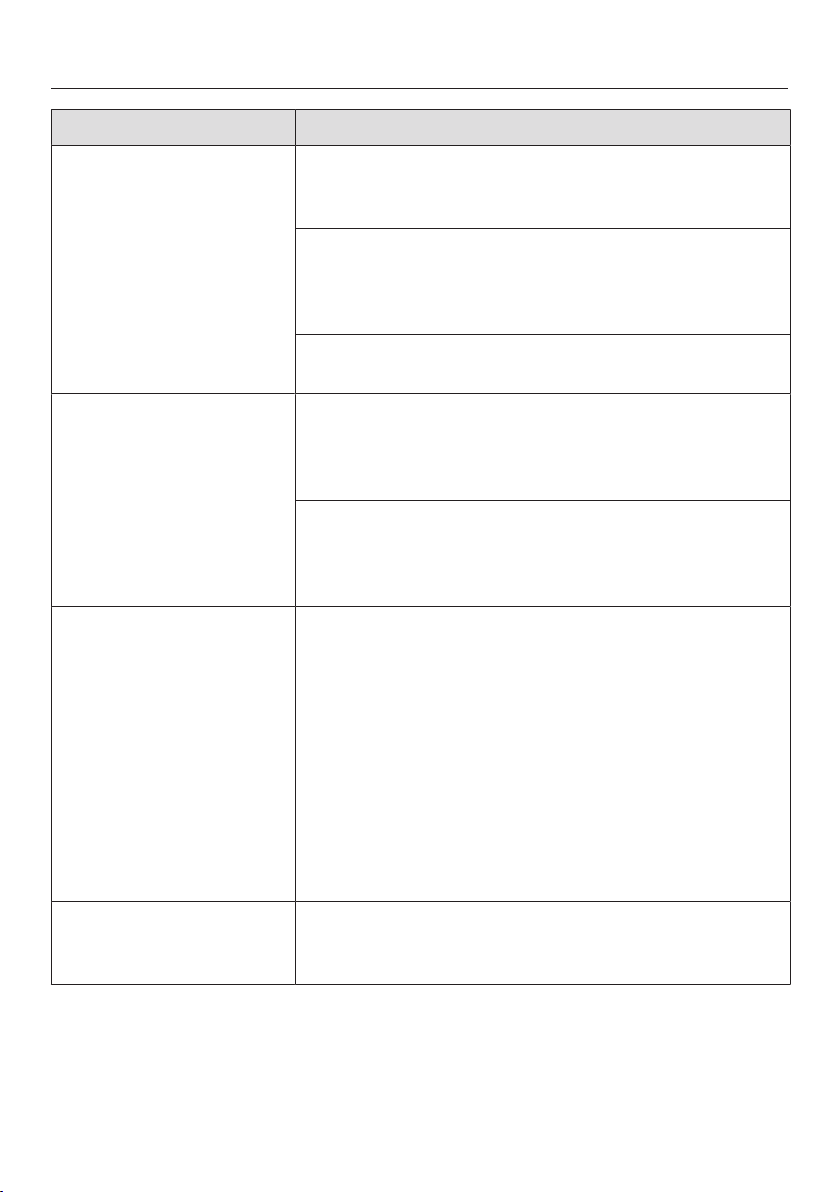
Frequently Asked Questions
69
Problem Possible cause and solution
The microwave oven
has switched itself off.
There is insufficient air circulation.
Check whether the vents are blocked.
Remove the obstructions, if applicable.
For safety reasons, the microwave oven is designed
to switch off if it overheats.
Resume the cooking process once the oven has
cooled down.
The microwave oven keeps switching itself off.
Contact Miele Customer Service.
The food has not been
defrosted, heated, or
cooked sufficiently on
completion of the
cooking process.
Check whether the cooking process was interrupted
without restarting it.
Restart the cooking process to ensure the food
gets defrosted, heated, or cooked properly.
The cooking duration you set was too short.
Check that the correct duration is selected for the
microwave power level. The lower the microwave
power level, the longer the duration required.
Food has cooled down
too quickly after being
reheated or cooked
using microwave power.
In the microwave, food begins to cook from the
outside first, the inside of the food relying on the
slower conduction of heat. If food is cooked at a high
microwave power level, it is possible that the heat
may not have reached the center of the food, so it is
hot on the outside but cold in the centre. During the
standing time, the heat is transferred to the center of
the food.
When reheating food with different densities, such
as with menu cooking, it is sensible to start with a
low microwave power level and select a longer
reheating duration.
The oven interior
lighting does not switch
on.
The lamp is faulty. You can operate the appliance as
usual, but the lamp has blown.
Contact Miele Customer Service.
Customer Service
70
Contact in the event of a fault
In the event of a fault which you cannot
remedy yourself, please contact your
Miele dealer or Miele Customer Service.
You can book a Miele Service Call
online at www.miele.com/service.
Contact information for Miele
Customer Service can be found at the
end of this document.
Please quote the model identifier and
serial number of your appliance (SN)
when contacting Miele Customer
Service. Both pieces of information can
be found on the data plate.
This information is given on the data
plate, which is visible on the front frame
of the oven when the door is fully open.
Appliance warranty and
product registration
You can register your product and/or
view the manufacturer´s warranty terms
and conditions for Miele appliances and
vacuum cleaners at
www.mieleusa.com.

9 Independence Way
Princeton, NJ 08540
www.mieleusa.com
U.S.A.
Miele, Inc.
National Headquarters
Please have the model and serial number
of your appliance available when
contacting Customer Service.
Canada
Importer
Miele Limited
Headquarters and Miele Centre
Customer Support
Phone: 888-99-MIELE (64353)
161 Four Valley Drive
Vaughan, ON L4K 4V8
www.miele.ca
Customer Care Centre
Phone:
800-565-6435
905-532-2272
International Headquarters
Miele & Cie. KG
Carl-Miele-Straße 29
33332 Gütersloh
Germany

M.-Nr. 12 003 550 / 00en-US, CA
M 7240 TC
