Operating Instructions
Microwave oven
To avoid the risk of accidents or damage to the appliance, it is
essential to read these instructions before it is installed and used for
the first time.
en-AU, NZ M.-Nr. 11 195 170

Contents
2
Warning and Safety instructions...................................................................... 5
Before using for the first time .......................................................................... 15
Installation.......................................................................................................... 16
Building-in dimensions........................................................................................ 16
Electrical connection........................................................................................... 21
Caring for the environment .............................................................................. 22
Guide to the appliance...................................................................................... 23
Accessories supplied........................................................................................ 24
Control panel ..................................................................................................... 25
Controls.............................................................................................................. 26
On/Off sensor................................................................................................. 26
Display................................................................................................................. 26
Sensor controls ................................................................................................... 26
Sensor controls above the display...................................................................... 26
Sensor controls under the display....................................................................... 27
Display symbols .................................................................................................. 28
Operating principles.......................................................................................... 29
Selecting a menu item or changing a value or setting ........................................ 29
Selecting the operating mode or function........................................................... 29
Cancelling cooking.............................................................................................. 29
Description of the functions............................................................................. 30
Modes of operation........................................................................................... 31
Functions............................................................................................................. 31
Microwave Solo mode.................................................................................... 31
Grilling ............................................................................................................ 31
Combination mode (Microwave + Grill).......................................................... 31
Automatic programmes.................................................................................. 31
Suitable containers for microwave use........................................................... 32
Material and shape.............................................................................................. 32
Testing containers ............................................................................................... 35
A microwave lid or cover..................................................................................... 35
Before using for the first time .......................................................................... 37
Altering the time of day ....................................................................................... 38

Contents
3
Settings .............................................................................................................. 39
Settings overview ................................................................................................ 39
Changing settings ............................................................................................... 40
Language ........................................................................................................... 40
Time..................................................................................................................... 40
Display............................................................................................................ 40
Clock format................................................................................................... 40
Set .................................................................................................................. 40
Volume................................................................................................................. 40
Buzzer tones................................................................................................... 41
Keypad tone ................................................................................................... 41
Display brightness............................................................................................... 41
Units .................................................................................................................... 41
Weight ............................................................................................................ 41
Keeping warm ..................................................................................................... 41
Quick MW............................................................................................................ 41
Popcorn............................................................................................................... 41
Oven compartment query ................................................................................... 41
Safety .................................................................................................................. 42
System lock ............................................................................................... 42
Sensor lock..................................................................................................... 42
Software version.................................................................................................. 42
Showroom programme........................................................................................ 42
Demo mode.................................................................................................... 42
Factory default..................................................................................................... 42
Operation............................................................................................................ 43
Opening the door ................................................................................................ 43
Placing a dish in the oven ................................................................................... 43
Turntable.............................................................................................................. 43
Closing the door.................................................................................................. 43
Starting a programme ......................................................................................... 43
Food in oven?................................................................................................. 44
Interrupting or restarting a programme ............................................................... 44
Altering settings................................................................................................... 44
Cancelling a programme ..................................................................................... 44
At the end of a programme ................................................................................ 44
Keeping warm ..................................................................................................... 44
Programming cooking durations ......................................................................... 45
Selecting Quick microwave................................................................................. 45
Changing the duration and power level ......................................................... 45
System lock......................................................................................................... 46

Contents
4
Using the minute minder ..................................................................................... 47
Changing the time set for the minute minder................................................. 47
Cancelling the minute minder......................................................................... 47
Minute minder + cooking process.................................................................. 47
Operation - Grilling............................................................................................ 48
Grilling without the Microwave function ............................................................. 48
Changing the grilling duration ........................................................................ 48
Combining grill and microwave........................................................................... 49
To change a cooking duration........................................................................ 50
Gourmet plate.................................................................................................... 51
Instructions for use.............................................................................................. 51
Searing/browning food........................................................................................ 51
Examples of use.................................................................................................. 52
Recipes................................................................................................................ 52
Operation - Automatic programmes................................................................ 57
Automatic programmes....................................................................................... 57
Cooking ........................................................................................................ 57
Defrosting............................................................................................................ 58
Reheating ............................................................................................................ 58
Popcorn ........................................................................................................ 59
Recipes - Automatic programmes................................................................... 60
Reheating ........................................................................................................... 70
Cooking .............................................................................................................. 72
Defrosting........................................................................................................... 73
Bottling ............................................................................................................... 74
Examples of use ................................................................................................ 75
Cleaning and care ............................................................................................. 76
Accessories supplied .......................................................................................... 78
Problem solving guide ...................................................................................... 79
After sales service............................................................................................. 82
Contact in case of fault ....................................................................................... 82
Warranty .............................................................................................................. 82

Warning and Safety instructions
5
This appliance complies with current safety regulations. However,
inappropriate use can lead to personal injury and damage to
property.
Read the Operating instructions carefully before using the
appliance. They contain important information on safety,
installation, use and maintenance of the appliance. This prevents
both personal injury and damage to the appliance.
In accordance with standard IEC 60335-1, Miele expressly and
strongly advises that you read and follow the instructions in
“Installation”, as well as in the “Warning and Safety instructions”.
Miele cannot be held liable for injury or damage caused by non-
compliance with these instructions.
Keep these instructions in a safe place and pass them on to any
future owner.
Correct application
The microwave oven is intended for use in private households.
This appliance is not intended for outdoor use.
Do not use the appliance at altitudes above 2000m.
The microwave oven is intended for domestic use only to cook,
defrost, and reheat food. Any other use is not permitted.
If flammable items were dried in the microwave oven, the moisture
in the items would evaporate. This could cause them to dry out and
possibly self-ignite. Never use the microwave oven to store or dry
items which could ignite easily.
This microwave oven is not intended for use by people (including
children) with reduced physical, sensory or mental capabilities or
lack of experience and knowledge, unless they have been given
supervision and instruction concerning its use by a person
responsible for their safety. They may only use the appliance
unsupervised if they have been shown how to use it in a safe way.
They must be able to recognise the dangers of misuse.

Warning and Safety instructions
6
This appliance is equipped with a special lamp to cope with
particular conditions (e.g. temperature, moisture, chemical
resistance, abrasion resistance and vibration). This special lamp
must only be used for the purpose for which it is intended. It is not
suitable for room lighting. Replacement lamps may only be fitted by
a Miele authorised technician or by Miele.
This microwave oven contains 1 light source of energy efficiency
class E.
Safety with children
Young children must not be allowed to use the appliance.
Older children may use the appliance without supervision if its
operation has been clearly explained to them and they are able to
use it safely. Children must be able to recognise and understand the
potential risks of improper use.
Children must not be allowed to clean or maintain the appliance
unsupervised.
Please supervise children in the vicinity of the microwave oven
and do not let them play with it.
Danger of suffocation! Whilst playing, children may become
entangled in packaging material (such as plastic wrapping) or pull it
over their head with the risk of suffocation. Keep packaging material
away from children.
Danger of burning! Children's skin is far more sensitive to high
temperatures than that of adults. When grilling with or without the
microwave function, the oven interior, the grill element and the door
will get hot. Do not let children touch the microwave oven when it is
in operation.
Danger of injury! The oven door can support a maximum weight of
8kg. Children could injure themselves on an open door. Do not let
children sit on the door, lean against it or swing on it.

Warning and Safety instructions
7
Technical safety
A damaged appliance could be dangerous. Check the appliance
for visible signs of damage. Do not use the appliance if it is
damaged.
If the electrical connection cable is damaged it must only be
replaced by a Miele authorised service technician in order to prevent
a hazard.
Temporary or permanent operation with a self-sufficient or non-
mains synchronous energy supply system (e.g. isolated networks,
back-up systems) is possible. A requirement for the operation is that
the energy supply system complies with all current local and national
requirements that apply to stand-alone, solar and/or battery
systems.
The protective measures provided in the domestic installation and in
this Miele product must also be assured in their function and
operation in isolated operation or in non-mains synchronous
operation, or replaced with equivalent measures in the installation.
Operating a damaged appliance can result in microwave leakage
and present a hazard to the user. Do not use the appliance if
– the appliance door is warped.
- the door hinges are loose.
– holes or cracks are visible in the casing, the door or the oven
interior walls.
Any contact with live connections or tampering with the electrical
or mechanical components of the microwave oven will endanger
your safety and may lead to appliance malfunctions. Do not open the
appliance housing under any circumstances.
Before connecting the appliance to the power supply, ensure that
the connection data on the data plate (voltage and frequency) match
the mains electricity supply. This data must correspond in order to
avoid the risk of damage to the appliance. If in doubt, consult a
qualified electrician.

Warning and Safety instructions
8
Do not use multi-socket adapters and extension leads to connect
the microwave oven to the electricity supply. They are a fire hazard
and do not guarantee the required safety of the appliance.
The electrical safety of this microwave oven can only be
guaranteed when continuity is complete between it and an effective
earthing system. It is essential that this standard safety requirement
is met to avoid the risk of damage or electric shock due to a missing
or disconnected protective conductor. If in any doubt, please have
the electrical installation tested by a qualified electrician.
For safety reasons, this appliance may only be used when it has
been built in.
Unauthorised installation, maintenance and repairs (including
removal of any cover) can cause considerable danger for the user.
Installation, maintenance and repairs must only be carried out by a
Miele authorised technician.
Any repairs not performed by a Miele authorised technician will
void the warranty.
During repairs or cleaning and maintenance, the microwave oven
must be disconnected from the mains power supply. It is only
completely isolated from the electricity supply when:
– the plug has been disconnected from the back of the appliance or
the appliance has been switched off at the wall socket and the plug
withdrawn.
Do not pull the mains connection cable but the mains plug to
disconnect your appliance from the mains electricity supply.
– the mains circuit breaker is switched off.
- the screw-out fuse is removed (in countries where this is
applicable).
The manufacturer can only guarantee the safety of the appliance
when Miele replacement parts are used. Faulty components must
only be replaced by genuine Miele spare parts.

Warning and Safety instructions
9
If the appliance is installed behind a kitchen furniture door, it may
only be used with the furniture door open. Do not close the furniture
door while the appliance is in use. Heat and moisture can build up
behind the closed furniture door. This can result in damage to the
appliance and furniture unit. Leave the furniture door open until the
appliance has cooled down completely.
The appliance must not be used in a non-stationary location (e.g.
on a ship).
Correct use
Danger of burning on the grill.
When grilling with or without the microwave function, the
microwave oven will get hot. You could burn yourself on the oven
interior walls, the grill element, food, accessories or the oven door.
Wear oven gloves when placing food in the oven or removing it,
and when adjusting oven shelves etc. in a hot oven.
Always ensure that food is sufficiently cooked or reheated.
The time required for this depends on a number of factors, such as
the nature of the food, its initial temperature, the amount to be
cooked and recipe variations.
Some foods may contain micro-organisms which are only destroyed
by thorough cooking at sufficiently high temperatures (over 70°C) for
long enough (a minimum of 10minutes). Therefore when cooking or
reheating foods, e.g. poultry, it is particularly important that food is
fully cooked through. If in any doubt that a sufficiently high
temperature has been reached, continue reheating for a little longer.
It is important that the temperature in the food being cooked is
evenly distributed and sufficiently high.
This can be achieved by stirring or turning the food, and observing a
sufficiently long standing time (see charts) which should be added to
the time needed for reheating, defrosting or cooking. During the
standing time the temperature is distributed evenly in the food.

Warning and Safety instructions
10
Always remember that times for cooking, reheating and defrosting
in a microwave oven are usually considerably shorter than with
traditional methods of cooking food.
Excessively long cooking durations can lead to food drying out and
burning, or could even cause it to catch fire. Fire hazard! There is
also a danger of fire if breadcrumbs, flowers, herbs etc. are dried in
the microwave oven. Do not dry these items in the microwave oven.
Cushions or pads filled with cherry kernels, wheat grain, lavender,
or gel, such as those used in aromatherapy can ignite when heated,
even after they have been removed from the microwave oven. Do not
heat these up in the microwave oven. Fire hazard!
The microwave oven is not suitable for cleaning or disinfecting
items. Items can get extremely hot and there is a danger of burning
when the item is removed from the appliance. Fire hazard!
The appliance can be damaged if it is used without food being
placed in it or if it is incorrectly loaded. Therefore do not use the
appliance to preheat crockery or to dry herbs or similar items.
Always ensure that food, a gourmet plate or a browning dish has
been placed in the microwave, and that the turntable is in place,
before switching on.
Pressure can build up when reheating food or drinks in sealed
containers, jars or bottles, which can cause them to explode. Never
cook or reheat food or liquids in sealed containers, jars or bottles.
With baby bottles, the screw top and teat must be taken off.

Warning and Safety instructions
11
Be careful when removing dishes from the appliance. Although heat
is not normally produced in the container itself by the microwaves
(apart from stoneware), heat transfer from the food to the container
may be considerable, making the container itself hot. The dish is only
warmed by the heat of the food. Before serving, always check the
temperature of the food itself after taking it out of the microwave. The
temperature of the container is not an indication of the temperature of
the food or liquid in it. This is particularly important when heating
food for babies, children, and the elderly or infirm. After reheating
food, especially food for babies and small children, stir the food or
shake the container and check that the temperature does not pose any
danger of burning. Double check after it has been left to stand.
When heating liquids, milk, sauces etc. using microwave power,
the boiling point of the liquid may be reached without the production
of the typical bubbles. Liquids do not boil evenly throughout. This
so-called 'boiling delay' can cause a sudden build-up of bubbles
when the container is removed from the oven or shaken, which can
lead to the liquid boiling over suddenly and explosively. Danger of
burning and scalding!
The formation of bubbles can be so strong that the pressure forces
the oven door open. Danger of injury and damage to the appliance!
Stir liquids well before heating. After heating, wait at least
20seconds before removing the container from the oven. In
addition, during heating a glass rod or similar item, if available, can
be placed in the container.
To avoid fuelling any flames, do not open the oven door if smoke
occurs in the oven interior.
Interrupt the process by switching the appliance off and disconnect
it from the electricity supply.
Do not open the door until the smoke has dispersed.
Oils and fats can ignite if allowed to overheat. Never leave the
microwave oven unattended when cooking with oil or fats. Do not
use the appliance for deep frying. Never attempt to put out oil or fat
fires with water. Switch the microwave oven off and extinguish the
flames by leaving the door closed.

Warning and Safety instructions
12
Due to the high temperatures radiated, objects left near the
microwave oven when it is in use could catch fire. Do not use the
appliance to heat up the room.
If using alcohol in your recipes, please be aware that high
temperatures can cause the alcohol to vaporise. The vapour can
catch fire on hot surfaces. Never heat undiluted alcohol in the
microwave, as it can easily ignite. Fire hazard!
Food which is stored in the oven or left in it to be kept warm can
dry out and the moisture released can lead to corrosion damage in
the microwave oven. This can also cause damage to the control
panel, benchtop and surrounding kitchen furniture. Always cover
food that is left in the oven to keep warm.
Try to avoid the interior walls being splashed with food or liquids
containing salt. If it does happen, wipe these away thoroughly to
avoid corrosion on the stainless steel surface.
The oven interior can get hot during use. Danger of burning! Clean
the oven interior and accessories as soon as it has cooled down.
Waiting too long can make cleaning unnecessarily difficult and in
some cases impossible. Stubborn soiling could damage the
microwave oven in certain circumstances and could even be
dangerous. Fire hazard!
Please refer to the relevant instructions in “Cleaning and care”.
Fire hazard! Plastic containers which are not suitable for use in
microwave ovens can be badly damaged and cause damage to the
appliance if used. Do not use any containers or cutlery made from or
containing metal, aluminium foil, lead crystal glassware,
temperature-sensitive plastics, wooden utensils or cutlery, metal
clips or plastic or paper covered wire ties. Do not use bowls with
milled rims, or plastic pots with the foil lid only partially removed (see
“Suitable containers for microwave use”).
Using these items could result in damage to the container and/or
present a fire risk.

Warning and Safety instructions
13
Disposable plastic containers must be specified by the manufacturer as
suitable for use in a microwave oven.
Do not leave the oven unattended when heating or cooking food in
disposable containers made of plastic, paper or other inflammable materials.
Heat-retaining packaging consists of, among other things, a thin
layer of aluminium foil. Microwaves are reflected by metal. This
reflected energy can, in turn, cause the outer paper covering to
become so hot that it ignites.
Do not use heat-retaining packaging for warming food in the
microwave oven, such as bags for grilled chicken.
If you cook eggs without their shells using microwave power, the
yolks could explode due to the resulting pressure. Prick the yolk
several times before cooking to avoid this.
Eggs heated in their shells using microwave power can burst,
even after they have been taken out of the oven. Eggs can only be
cooked in their shells in a specially designed egg-boiling device.
Do not reheat hard-boiled eggs in the microwave oven.
Food with a thick skin or peel, such as tomatoes, sausages,
potatoes and aubergines can burst when heated. Pierce or score the
skin of these types of food several times to allow steam to escape.
Dishes with hollow knobs or handles are not suitable for use in a
microwave oven. Moisture which has gathered in the hollow
recesses can cause pressure to build up and the items can explode
(this risk is reduced if the hollow recess is sufficiently ventilated). We
recommend that you do not use such dishes in the microwave oven.
Do not use a thermometer containing mercury or liquid as these are
not suitable for use with very high temperatures and break very easily.
To check food temperature, first interrupt the cooking process. Only
use a thermometer specifically approved for food use to measure the
temperature of the food.
The steam from a steam cleaner could reach electrical
components and cause a short circuit. Do not use a steam cleaner to
clean the appliance.

Warning and Safety instructions
14
The following applies for stainless steel surfaces:
The coated stainless steel surface can be damaged by adhesives
and will lose its dirt-repelling properties. Do not use sticky notes,
adhesive tape or other types of adhesive on the stainless steel
surface.
The surface is susceptible to scratching. Even magnets can cause
scratches.
Accessories
Only use original Miele accessories. If other parts are used,
warranty, performance and product liability claims will be invalidated.
Miele will guarantee to supply functional spare parts for a
minimum of 10years and up to 15years following the
discontinuation of your microwave oven.
The rack and gourmet plate supplied are designed for use with
microwave power and can be used for grilling with or without the
microwave function.
They must not, however, be used at the same time, as this would
damage the gourmet plate. Always place the gourmet plate directly
on the turntable.
The gourmet plate gets extremely hot when in use. Always use
oven gloves when handling it to avoid burns. Place it on a suitable
heat-resistant mat or pot rest.
The rack and the gourmet plate get hot during grilling (with or
without the microwave function).
Danger of burning!
Do not place the hot gourmet plate (or any other hot cooking
container) on a cold surface, such as a tiled or granite benchtop. The
glass tray or container could crack or shatter. Use a suitable heat-
resistant mat or pot rest.
Do not use the gourmet plate together with a commercially
available microwave cover because the cover would become too hot.
Before using for the first time
15
After unpacking, let the appliance
stand for approx. 2 hours at room
temperature after transporting it to its
final location before connecting it to
the electricity supply.
This is to allow time for the temperature
to equalise between the temperature in
the room and the appliance. This is
important for the correct electronic
functioning of the appliance.
Risk of suffocation from
packaging material.
Whilst playing, children may become
entangled in packaging material
(such as plastic wrapping) or pull it
over their head with the risk of
suffocation.
Keep packaging material away from
children.
Remove all packaging materials from
the appliance.
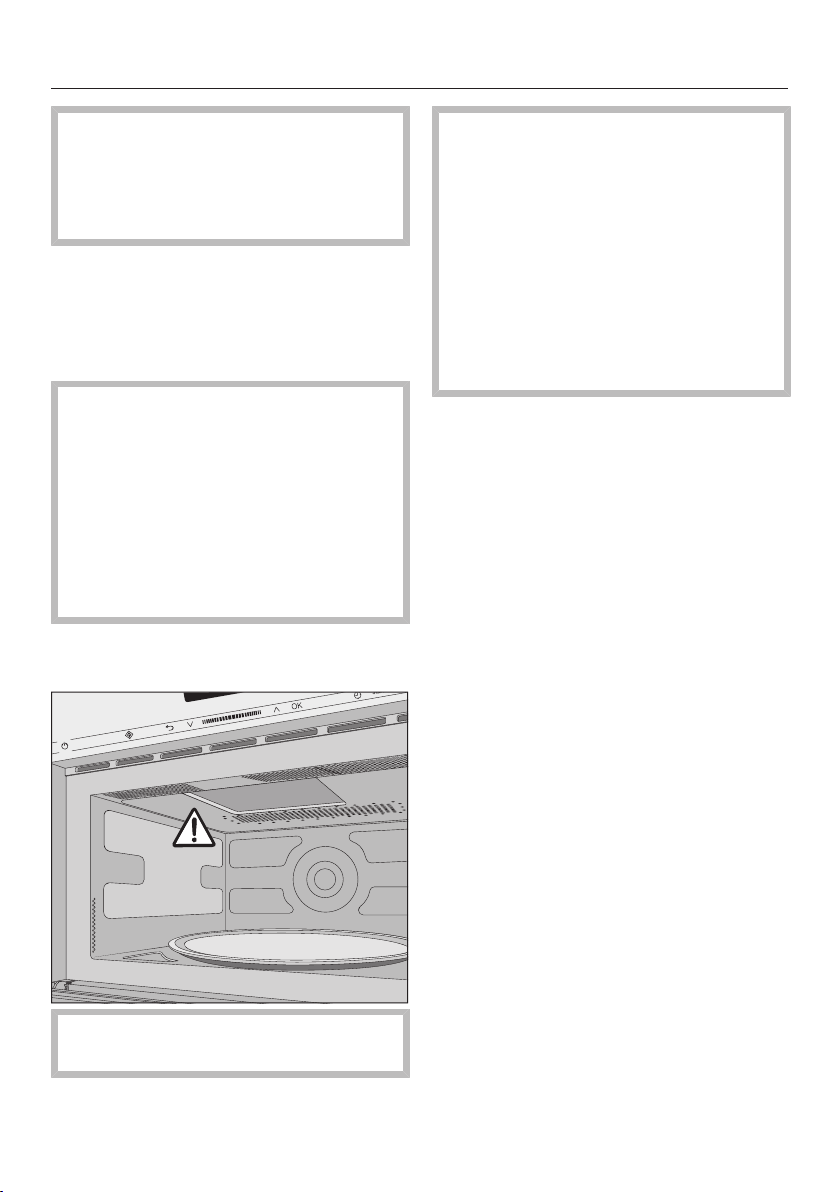
Do not remove the cover of the
microwave outlet inside the oven.
Check the appliance for any damage.
Danger to health due to a
defective device.
Operating a damaged appliance can
result in microwave leakage and
present a hazard to the user.
Do not use the appliance if
– the appliance door is warped.
- the door hinges are loose.
– holes or cracks are visible in the
casing, the door or the oven interior
walls.
Clean the inside of the microwave
oven and all the accessories with a
soft sponge and warm water.
Installation
*INSTALLATION*
16
When building in the appliance,
ensure that there is adequate
ventilation to the front of the
appliance.
Do not obstruct the air vents with
any objects.
Lifting the microwave oven by the
door handle could cause damage to
the door.
Use the handle cut-outs on the side
of the housing to lift the appliance.
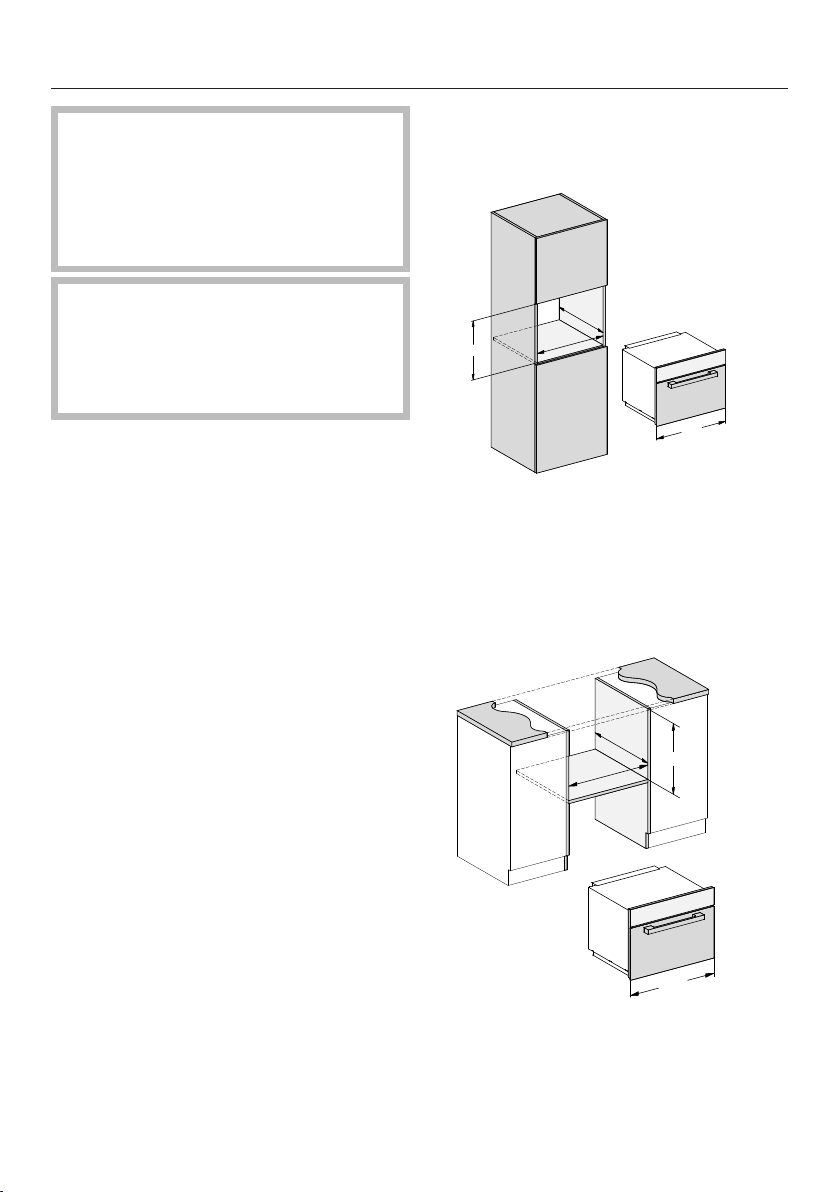
Building-in dimensions
Dimensions are given in mm.
Tall unit installation
595
450
562
>550
_
+6
+2
Base unit installation
595
460
+2
>550
__
>550
_
>550
__
>550
_
>550
_
+6
562
_
Installation
*INSTALLATION*
17
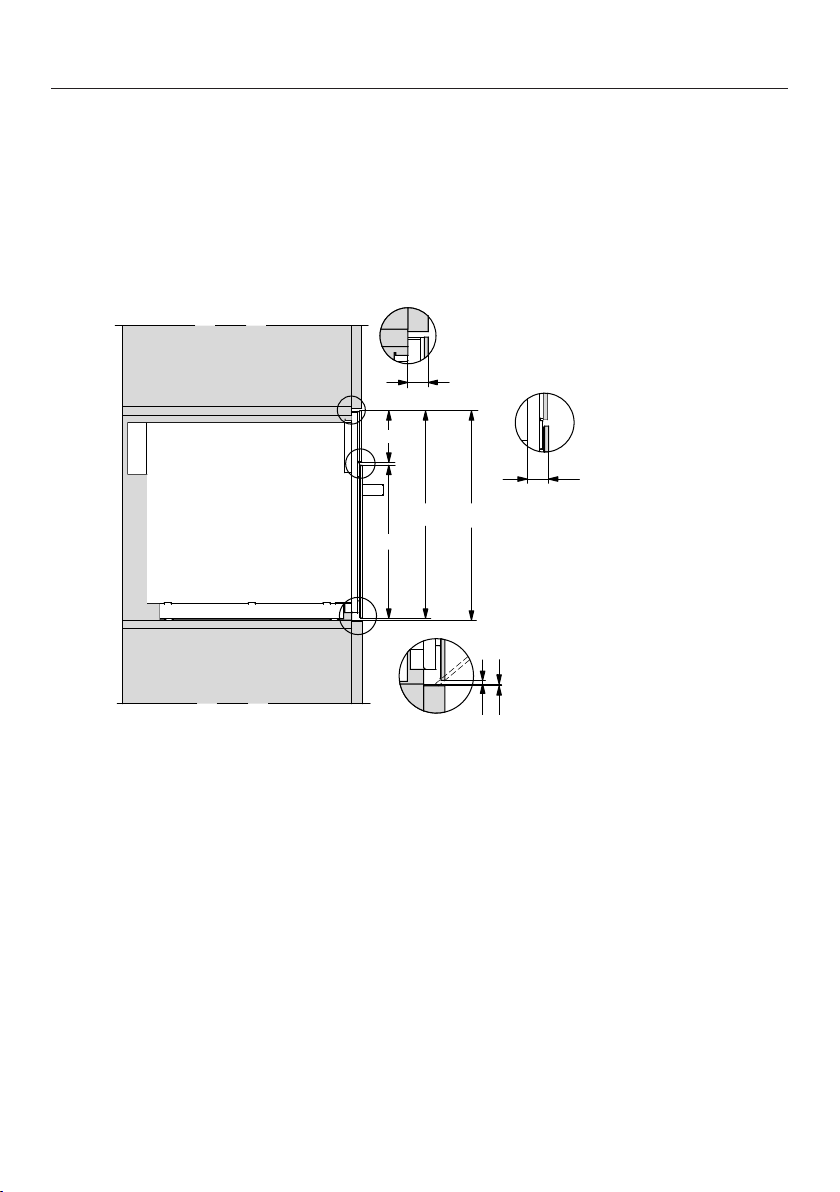
Side view
455,5
451,5
333
111,5
22
22* / 23,3**
4
min.2
* Glass
** Stainless steel
Installation
*INSTALLATION*
18
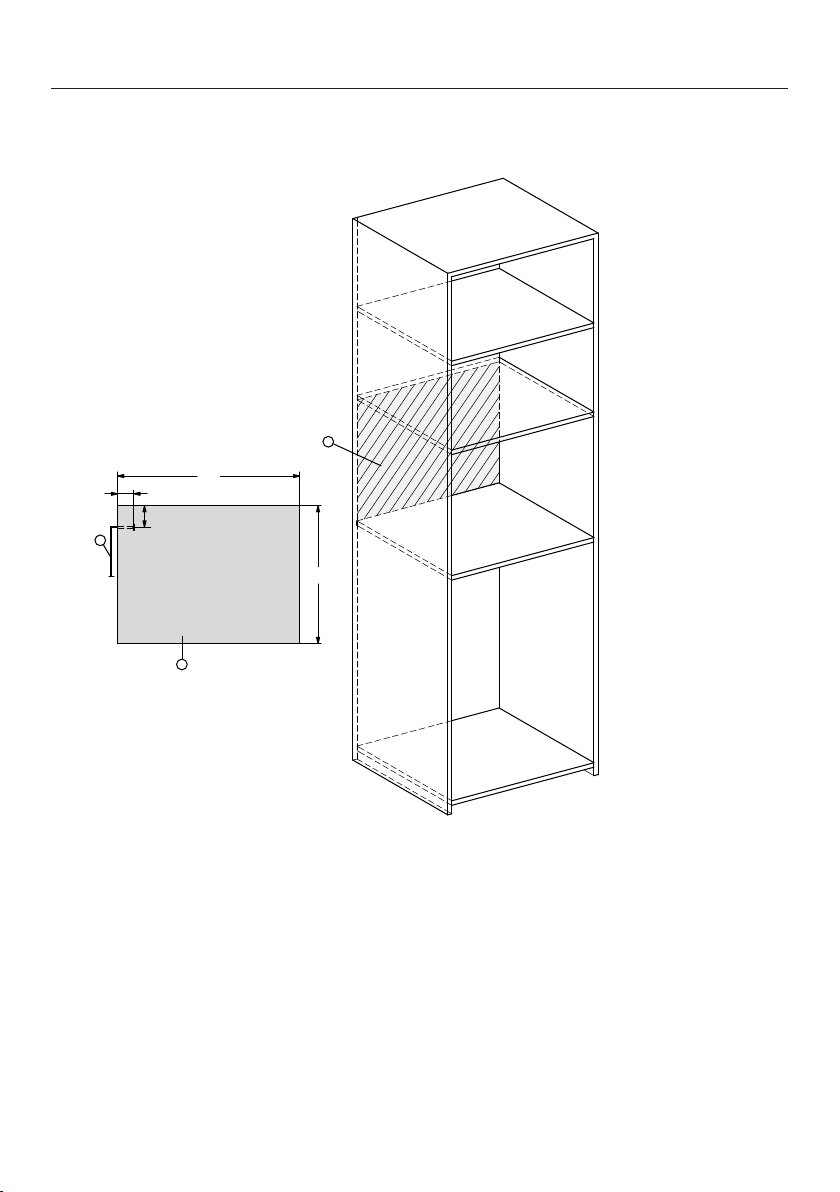
Tall unit connection
3
70
53
2
1
451,5
595
a
Front view
b
Mains connection cable,
length=1,600mm
c
No connections permitted in this area
Installation
*INSTALLATION*
19
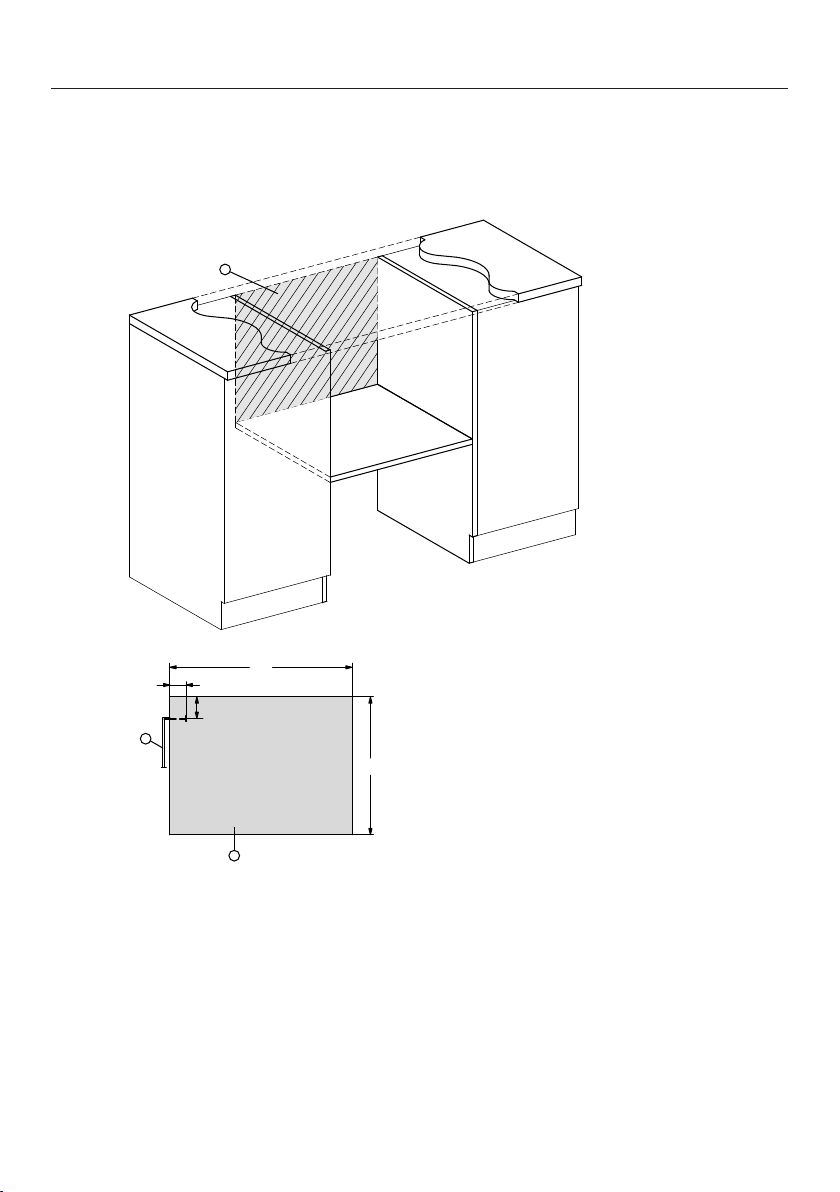
Base unit connection
3
70
53
2
1
451,5
595
a
Front view
b
Mains connection cable,
length=1,600mm
c
No connections permitted in this area
Installation
*INSTALLATION*
20
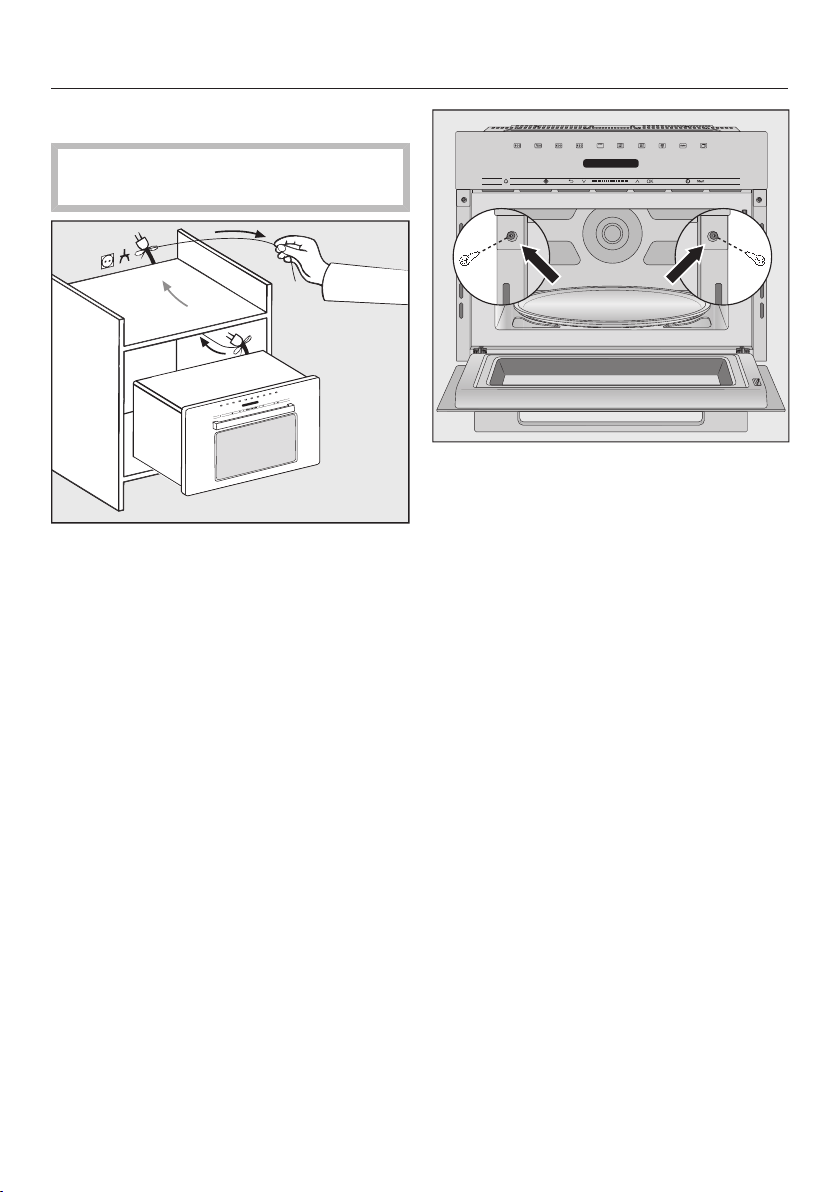
Carrying out installation
The appliance must be built in before
it can be used.
Slide the appliance into the niche.
Feed the cable with the plug through
the back of the furniture unit.
Align the appliance.
Open the appliance door and secure
the appliance into the side walls of
the furniture unit using the screws
provided.
Installation
*INSTALLATION*
21
Electrical connection
Danger of injury due to a
defective appliance.
Before connecting the appliance,
ensure that it has not been damaged
in any way.
Do not use a damaged appliance.
The appliance is supplied with a power
cord and plug for connection.
Make sure that the earthed socket is
freely accessible at all times. If the
switch is not accessible after
installation an additional means of
disconnection must be provided for all
poles.
Risk of fire from overheating.
Connecting the appliance to a multi-
socket plug adapter or to an
extension lead can overload the
cable.
The appliance must not be used with
so-called energy saving devices
either. These reduce the amount of
energy supplied to the appliance,
causing it to overheat.
Do not use an extension lead or
multi-socket plug adapter.
Connect the appliance directly with
the original cable without any
intermediate elements.
The electrical system must comply with
the applicable standards and with local
and national regulations.
If the connection cable is damaged, it
must only be replaced with a specific
connection cable of the same type
(available from Miele) in order to avoid a
hazard. For safety reasons, such
replacement may only be carried out by
a qualified and competent technician or
Miele.
The connection data can be found on
the data plate located on the front of
the oven interior or on the back of the
appliance.
Compare the specifications on the data
plate with those of the mains electricity
supply. The data must match.
If in any doubt, consult a qualified
electrician.
Temporary or permanent operation with
a self-sufficient or non-mains
synchronous energy supply system
(e.g. isolated networks, back-up
systems) is possible. A requirement for
the operation is that the energy supply
system complies with all current local
and national requirements that apply to
stand-alone, solar and/or battery
systems.
The protective measures provided in
the domestic installation and in this
Miele product must also be assured in
their function and operation in isolated
operation or in non-mains synchronous
operation, or replaced with equivalent
measures in the installation.
Caring for the environment
22
Disposal of the packing
material
The transport and protective packaging
has been selected from materials which
are environmentally friendly for
disposal, and can normally be recycled.
Recycling the packaging reduces the
use of raw materials in the
manufacturing process and also
reduces the amount of waste in landfill
sites. Ensure that any plastic
wrappings, bags etc. are disposed of
safely and kept out of the reach of
babies and young children. Danger of
suffocation.
Disposing of your old
appliance
Electrical and electronic appliances
often contain valuable materials. They
also contain specific materials,
compounds and components, which
were essential for their correct function
and safety. These could be hazardous
to human health and to the environment
if disposed of with your domestic waste
or if handled incorrectly. Please do not,
therefore, dispose of your old appliance
with your household waste.
Please dispose of it at your local
community waste collection / recycling
centre for electrical and electronic
appliances. You are also responsible for
deleting any personal data that may be
stored on the appliance prior to
disposal. Please ensure that your old
appliance poses no risk to children
while being stored prior to disposal.
Guide to the appliance
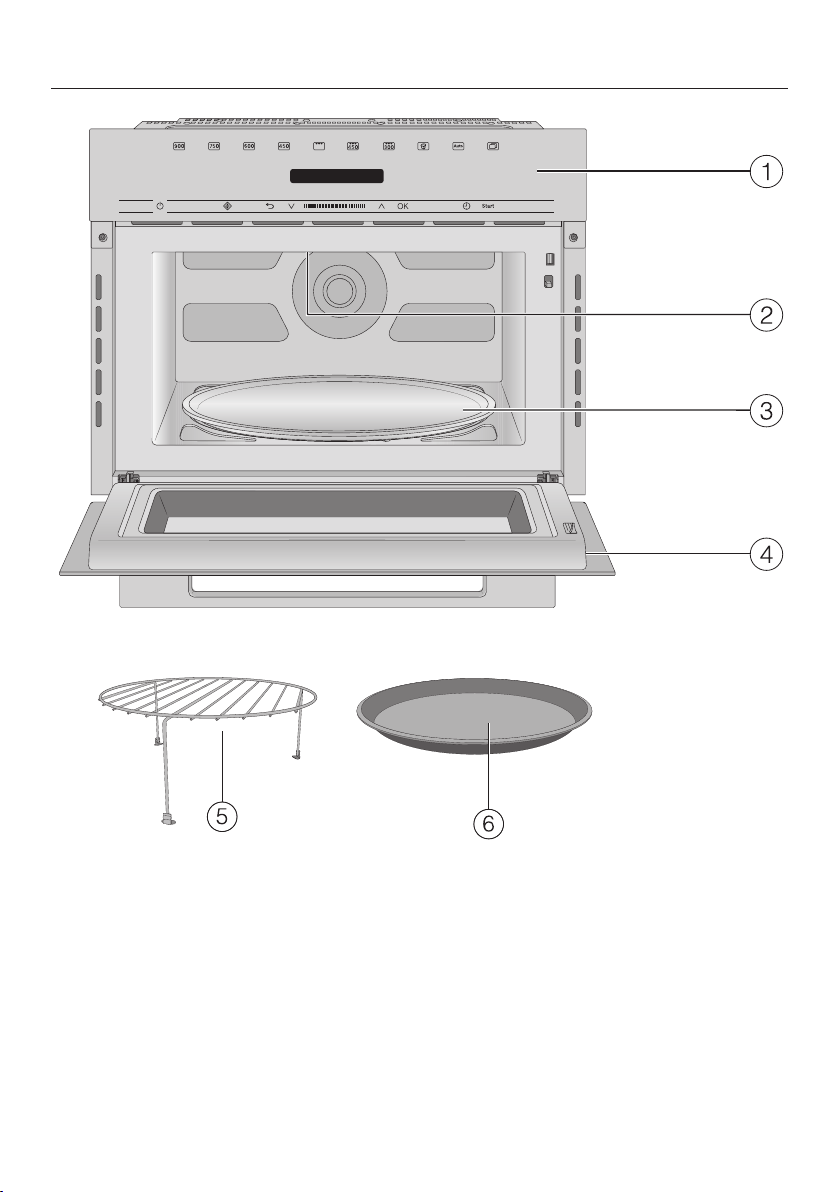
23
a
Control panel
b
Grill
c
Turntable
d
Door
e
Grilling rack
f
Gourmet plate

Accessories supplied
24
Grilling rack
The grilling rack can be used for all
functions with and without
microwave power, except for
Microwave Solo mode.
To avoid the grilling rack being used
inadvertently with Microwave Solo
mode, it should not be stored inside the
microwave oven.
Gourmet plate
The gourmet plate is a round, non-stick
grilling plate. It can be used to heat
snacks or small meals quickly whilst
maintaining crispness.
Useful tip: These products and others
can be ordered from the Miele online
shop.
They can also be ordered directly from
Miele (see the end of this booklet for
contact details).
Control panel
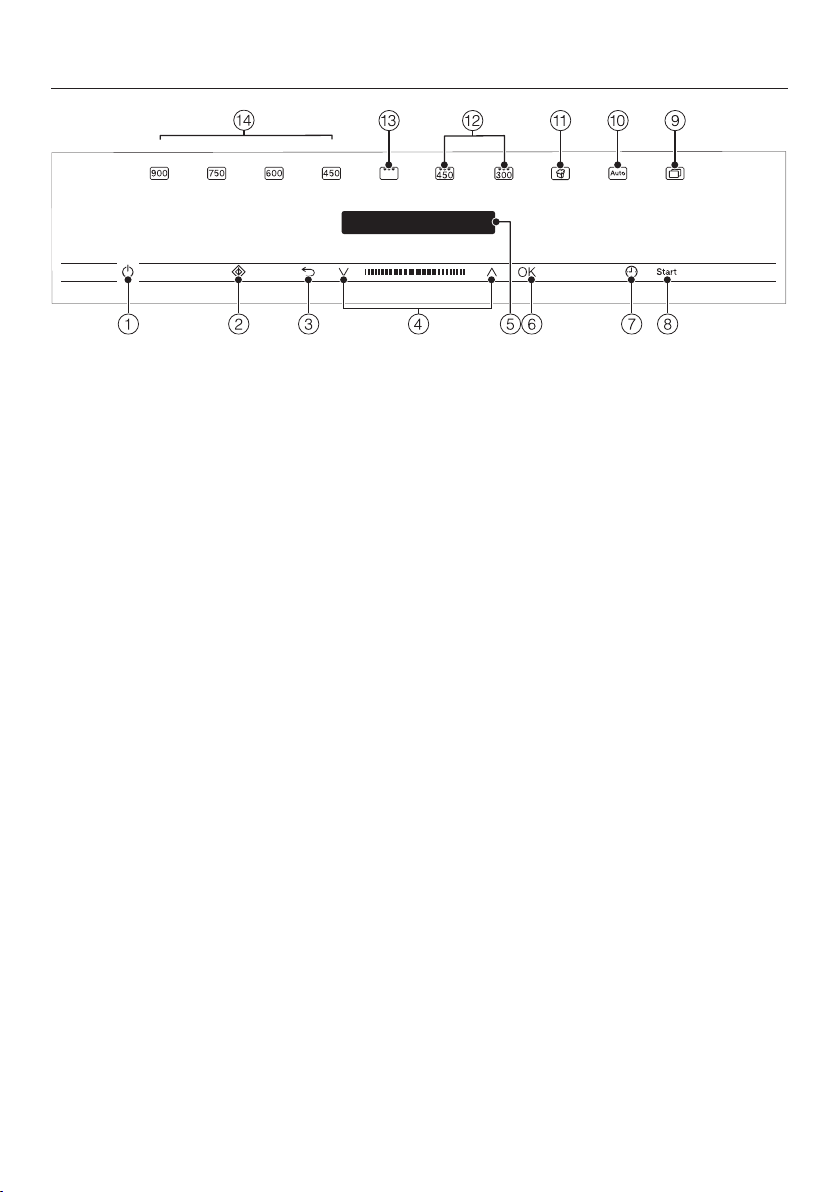
25
a
On/Off sensor
b
Quick MW sensor
c
sensor for going back a step and
for cancelling a cooking programme
d
Navigation area with the and sensors
for scrolling in the selection lists and for changing values
e
For displaying the time of day and information on operation
f
OK sensor for selecting functions and saving settings
g
sensor for setting a minute minder or a cooking duration
h
sensor for starting a cooking process
i
sensor for further programmes and settings
j
sensor for various Automatic cooking programmes
k
sensor for popcorn
l
Microwave + Grill combination mode
m
Grill mode
n
Different power levels of the microwave oven

Controls
26
On/Off sensor
The On/Off sensor control is
recessed and reacts to touch.
It switches the microwave on and off.
Display
The display is used for showing the
time of day or information about
functions, temperatures, cooking
durations, Automatic programmes and
settings.
After switching the microwave oven on
with the On/Off sensor, the main
menu will appear with the prompt Select
function.
Sensor controls
The sensors react to touch. Every touch
of the sensors is confirmed by an
audible tone. You can switch off this
keypad tone by selecting the Volume
setting and then selecting Keypad tone
and lowering the volume all the way
down with the arrow sensors.
If the display is dark, the sensors will
not react until the microwave oven is
switched on.
Sensor controls above the
display
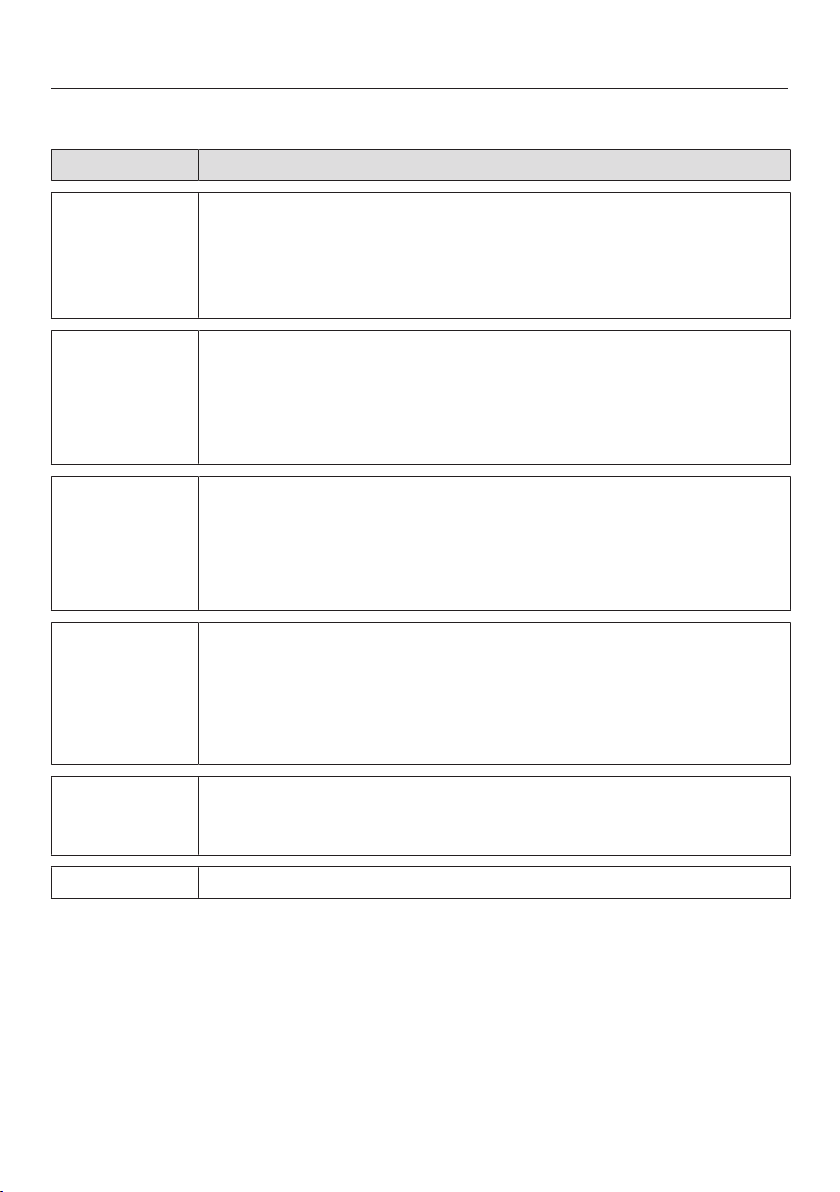
Here you will find the operating modes
and the further functions of the
microwave oven.
Operating mode/function
Power level 900 Watt
Power level 750 Watt
Power level 600 Watt
Power level 450 Watt
Grill
Combination mode
450 Watt + Grill
Combination mode
300 Watt + Grill
Popcorn
Automatic programmes
Further
(programmes and Settings )
300 W
150 W
80 W
Grill + 150 W
Defrost
Reheat
Settings
Controls
27
Sensor controls under the display
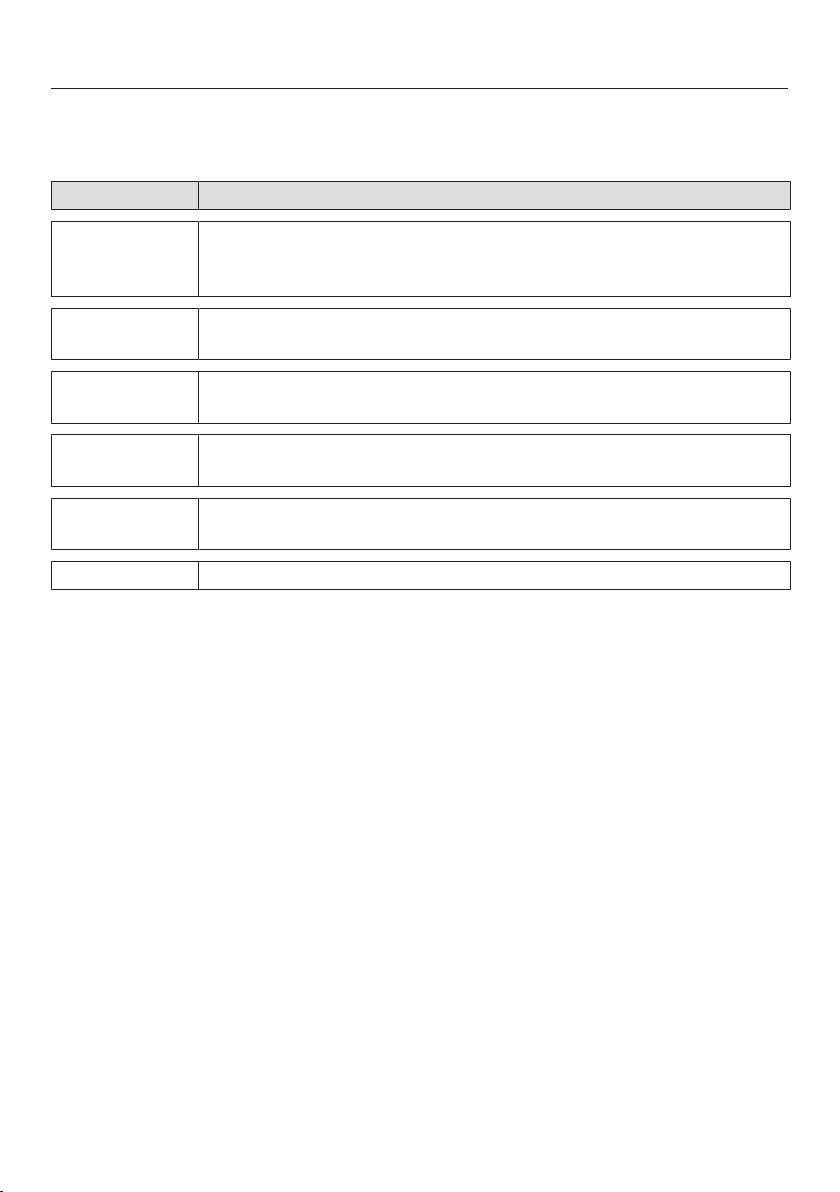
Sensor Function
Use this sensor control to start the Quick MW function. The
cooking process runs at the maximum power level (900W) and a
cooking duration of oneminute (see “Operation - Selecting
Quick microwave”). Touching the sensor control repeatedly
increases the cooking duration in increments.
Depending on which menu you are in, this sensor control will
take you back a level or back to the main menu.
If a cooking process is in progress, you can stop the cooking
process with this sensor and cancel it by touching the sensor
again.
In the navigation area, use the arrow sensors or the area
between them to scroll up and down in the selection lists. The
display shows the menu option that you want to select.
You can change the values and settings using the arrow sensors
or the area between them.
OK A function that appears in the display can be selected with OK.
The selected function can then be changed.
Confirm withOK to save changes.
If information appears in the display, selectOK to confirm the
message.
You can use this sensor to set a minute minder (e.g. for boiling
eggs) at any time, even when a cooking process is in progress.
You can also use this sensor to programme cooking durations.
Use this sensor to start a cooking process.
Controls
28
Display symbols
The following symbols may appear in the display:
Symbol Meaning
This symbol indicates that there is additional information and
advice about using the appliance. Select OK to access the
information.
… This indicates that there are more options available, which are
not visible because there is not enough space in the display.
Some settings, e.g. display brightness and signal tone volume,
are selected using a segment bar.
A tick next to a setting indicates that this option is currently
selected.
The system lock is switched on (see “Settings - Safety”). The
controls are locked.
Minute minder

Operating principles
29
Selecting a menu item or
changing a value or setting
The arrow sensors and and the
area between them have the
following functions:
- They select a menu item in a
selection list.
- They change a value (e.g. the weight
of the food) or a setting (e.g. the
volume of the signal tone).
Touch the applicable arrow sensor or
swipe to the right or left in thearea
between the arrow sensors until you
reach the desired menu option.
Useful tip: If you hold down the arrow
sensor, the selection list or the values
continue to scroll automatically until you
release the arrow sensor.
Confirm your selection withOK.
The current setting is marked with a .
Selecting the operating mode
or function
The sensors for the operating modes
and functions (e.g. settings) are located
above the display. An operating mode
or function is selected with the
corresponding sensor on the control
panel (see “Operation” and “Settings”).
Touch the sensor control of the
required operating mode or function.
The sensor on the control panel will
light up orange.
Set the values or scroll through the
selection lists until the required
setting appears.
Cancelling cooking
You can cancel a cooking process
using the function sensor control that
lights up orange or using the sensor.
Touch the sensor control for the
operating mode, or the sensor
twice to cancel the cooking process.
If you have set a cooking duration,
select Cancel process and confirm with
OK.
The main menu will appear.

Description of the functions
30
In a microwave oven there is a high-
frequency tube called a magnetron.
This converts electrical energy into
electromagnetic waves (microwaves).
These microwaves are distributed
evenly throughout the oven interior, and
are reflected off the metal appliance
walls. This enables the microwaves to
reach the food from all sides and heat it
up. Microwave distribution is improved
with the turntable engaged.
In order for microwaves to reach the
food, they must be able to penetrate the
cooking container being used.
Microwaves can pass through
porcelain, glass, cardboard and
plastics, but not metal. Therefore do not
use utensils that are made of metal or
contain metal, for example in the form
of gold or silver trim. The metal reflects
the microwaves and this could lead to
the creation of sparks. The microwaves
cannot be absorbed.
Microwaves pass through a suitable
container and into the food. All food
contains water molecules which, when
subjected to microwave energy, start to
oscillate 2.5 billion times a second. This
vibration creates heat. It first starts
developing around the outside of the
food and then slowly penetrates
towards the centre. The more water a
food contains, the faster it is heated or
cooked.
The heat is produced directly in the
food. This has the following
advantages:
– Food can generally be cooked without
adding liquid or cooking oil, or with just
a little water or oil.
– Cooking, reheating and defrosting in a
microwave oven is quicker than using
conventional methods.
– Nutrients, such as vitamins and
minerals, are generally retained.
– The colour, texture and taste of food
are not impaired.
Microwaves stop being produced as
soon as the cooking process is
interrupted or the appliance door is
opened. When the appliance is in
operation, the closed, sealed door
prevents microwaves escaping from the
appliance.

Modes of operation
31
In the microwave oven, food is cooked,
reheated or defrosted quickly.
You can use the microwave oven in the
following ways:
– Food can be defrosted, reheated or
cooked by entering a power level and a
duration.
– Deep-frozen, ready-made meals can
be defrosted and then heated or
cooked.
– The microwave oven can also be used
for other tasks, e.g. for proving yeast
dough, melting chocolate and butter,
dissolving gelatine, preparing cake
icing, and preserving small amounts of
fruit, vegetables and meat.
Functions
Microwave Solo mode
Suitable for defrosting, reheating and
cooking.
Grilling
Ideal for grilling thin cuts of meat, e.g.
steak or sausages.
Combination mode (Microwave +
Grill)
Ideal for browning dishes with toppings.
The microwave cooks the food, and the
grill browns it.
Automatic programmes
You can choose from the following
Automatic programmes:
You can choose from four different
categories of Automatic programmes.
- Cook
- Defrost
- Reheat
- Popcorn
The programmes are weight-
dependent.
You can specify the weight of food in
grams (g), pounds (lb) or pounds/ounces
(lb/oz) (see “Settings - Changing
settings”).
Suitable containers for microwave use
32
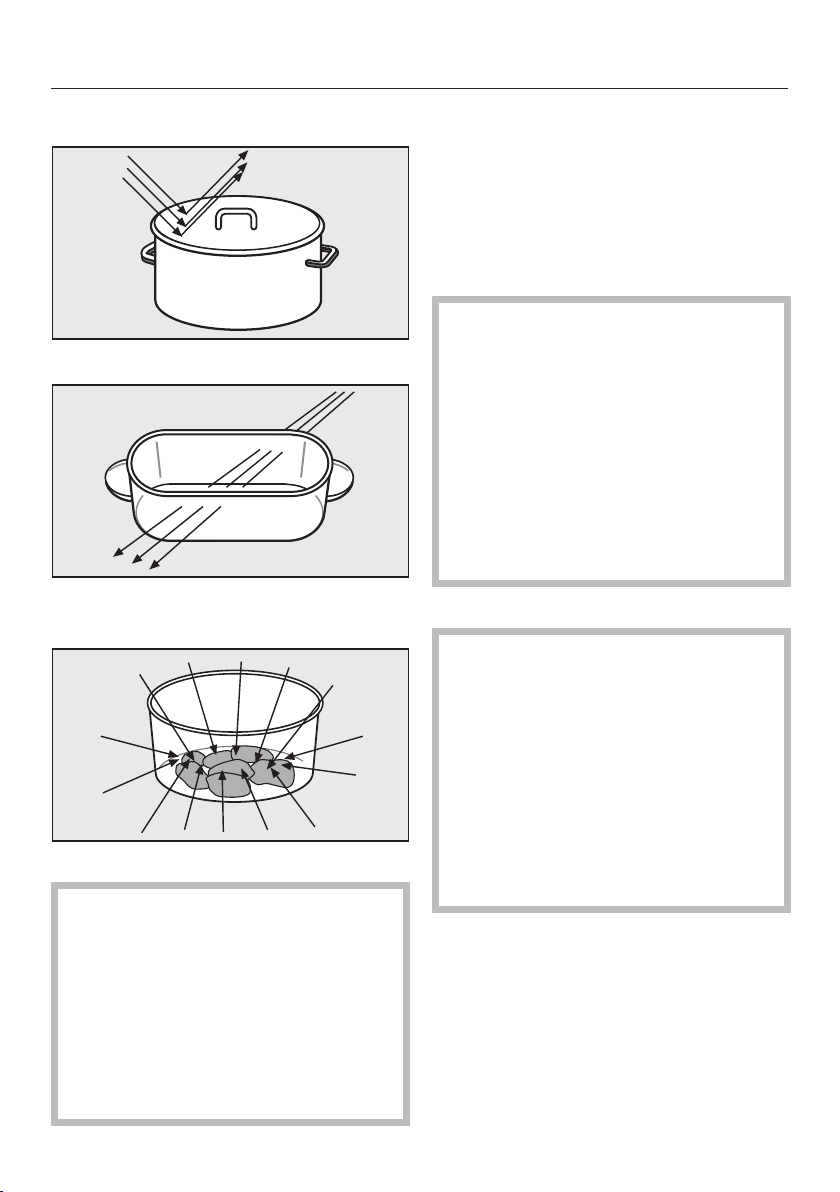
Microwaves
- are reflected by metal,
- pass through glass, porcelain, plastic
and cardboard,
- and are absorbed by food.
Risk of fire due to unsuitable
crockery.
Containers which are not suitable for
use in microwave ovens can be
badly damaged and cause damage
to the appliance if used.
Please observe the information on
suitable containers for microwave
use.
Material and shape
The material and shape of containers
used affect cooking results and times.
Heat distribution is more even in round
and oval shaped flat containers than in
rectangular containers, providing better
results.
Risk of injury due to hollow
handle parts and lid knobs.
Moisture can penetrate hollow
handles and lid knobs of crockery.
This can lead to a build-up of
pressure, which can cause the
hollow parts to crack or shatter with
the danger of injury.
Do not use crockery with hollow
handles or lid knobs, unless the
hollow parts are sufficiently vented.
Metal
Metal containers, aluminium foil,
metal cutlery, and china with
metallic decoration such as gold rims
or cobalt blue must not be used with
microwave mode. Metal reflects
microwaves and obstructs the
cooking process.
Do not use containers where the foil
lid has not been completely removed
as small pieces of foil can cause
sparking.
Exceptions:
- Ready-meals in aluminium foil dishes
These can be defrosted and reheated in
the microwave oven, if recommended
by the manufacturer. Important:
Remove the lid and make sure the foil
dish is at least 2cm from the oven walls
at all times. However, food is only
Suitable containers for microwave use
33
heated from the top. Transferring the
food from the aluminium foil container
to a dish suitable for microwave use will
result in a more even heat distribution.
Do not place aluminium foil dishes
on the rack, in case the dish sparks
or arcs.
- Pieces of aluminium foil
For even defrosting and to avoid
overcooking unevenly shaped cuts of
meat, poultry or fish, small pieces of
aluminium foil may be used to mask
wingtips or other thin parts for the last
few minutes of the programme.
Make sure that the aluminium foil is
at least 2 cm from the oven walls at
all times. It must not touch the walls.
- Metal meat skewers or clamps
These should only be used if they are
very small in comparison to the size of
the cut of meat.
Glazes and colours
Some dishes have glazes and
colours containing metallic
substances. These dishes are
unsuitable for microwave use.
Glassware
Heat-resistant glass or ceramic glass is
ideal for use in the microwave oven.
Crystal glass is unsuitable as it
usually contains lead which could
cause the glass to crack in the
microwave.
Porcelain
Porcelain is a suitable material.
However do not use porcelain with
gold or silver edging, or items with
hollow knobs or handles.
Earthenware
Decorated earthenware is only suitable
if the decoration is beneath an all-over
glaze.
Earthenware can get very hot and
may crack.
Wear oven gloves when removing
the dishes from the oven.
Wood
Water contained in wood evaporates
during the cooking programme. This
causes the wood to dry and crack.
Wooden dishes are therefore not
suitable.
Suitable containers for microwave use
34
Plastics
Damage caused by heat-
sensitive plastics.
Plastics must be heat-resistant to a
minimum of 110°C. Otherwise the
plastic may melt and fuse with the
food.
Use plastic containers only with
Microwave Solo mode.
Special plastic utensils designed for use
in microwave ovens are available from
retail outlets.
Melamine containers are not suitable.
They absorb energy and become hot.
When purchasing plasticware, make
sure that it is suitable for use in a
microwave oven.
Disposable containers, such as trays
made from polystyrene, can only be
used for very short, timed warming and
reheating of food.
Plastic boiling bags can be used for
cooking and reheating. They should
be pierced beforehand to allow the
steam to escape. This prevents a
build-up of pressure from forming
and the bag from bursting.
There are also special bags available for
steam cooking which do not need to be
pierced. Please follow the instructions
given on the packet.
Risk of fire due to unsuitable
material.
Do not use metal clips, plastic clips
containing metal parts, or paper ties
containing wire.
There is a danger that they will ignite
when heated.
Disposable containers
Disposable plastic containers must
have the characteristics listed under
“Plastics”.
Risk of fire due to unsuitable
crockery.
Disposable containers made out of
plastic, paper or other inflammable
materials can ignite.
Do not leave the appliance
unattended when reheating or
cooking food in disposable
containers made of plastic, paper or
other inflammable materials.
To protect the environment we do not
recommend the use of single-use
containers.
Suitable containers for microwave use
35
Testing containers
If in doubt as to whether glass,
earthenware or porcelain plates or
dishes are suitable for use in a
microwave oven, a simple test can be
performed:
Place the item you wish to test in the
centre of the oven.
Close the door.
Touch the sensor.
Select the 900 Watt power level.
Enter 30 seconds using the and
arrow sensors and confirm the entry
with OK.
Touch the sensor to start the
test.
If a crackling noise is heard during
the test accompanied by sparks,
switch the appliance off immediately
(touch and confirm with OK)! Any
crockery which causes this reaction
is unsuitable for use with microwave
power. If any doubt exists about the
suitability of containers, please
contact the manufacturer or supplier.
This test cannot be used to check
whether items with hollow knobs or
handles are suitable for microwave
use.
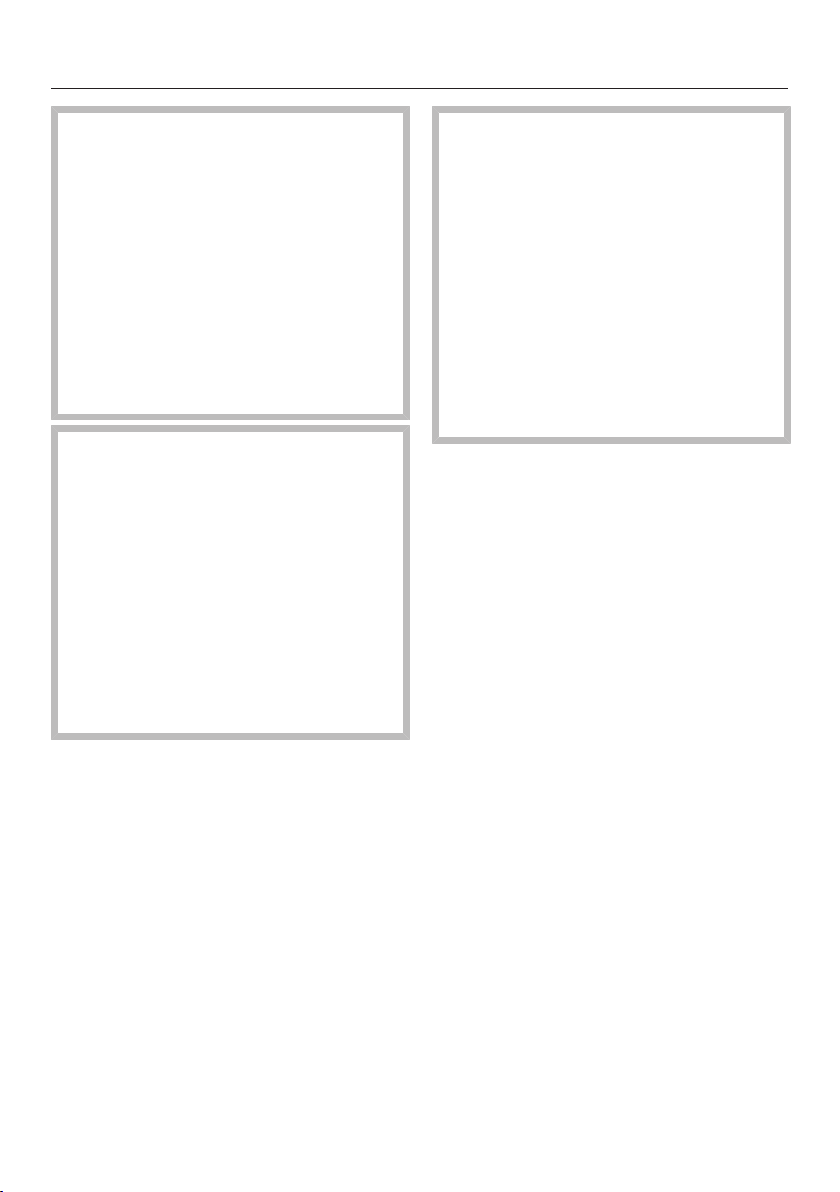
A microwave lid or cover
- prevents too much steam escaping,
especially when cooking foods which
need longer to cook, such as
potatoes.
- speeds up the cooking process.
- prevents food from drying out.
- helps keep the oven interior clean.
When using Microwave Solo, always
cover food with a microwave-safe lid.
Suitable covers are available from retail
outlets.
Alternatively, you can use cling film
recommended for use in a microwave
oven by the manufacturer. Normal cling
film may distort with the heat and fuse
with the food.
Suitable containers for microwave use
36
Damage caused by heat-
sensitive plastics.
The material of the microwave cover
must be able to withstand
temperatures of up to 110°C (see
manufacturer information). At higher
temperatures the plastic may distort
and fuse with the food.
Therefore the cover must only be
used in microwave ovens and only
with Microwave Solo mode without
the gourmet plate.
Damage due to covered
openings.
If a lid is used with a container which
only has a narrow diameter, the
cover could form a seal around the
container and there might not be
enough room for condensation to
escape through any holes in the top.
The cover could get too hot and start
to melt.
Make sure that the cover does not
form a seal.
Do not use a lid or cover when
- cooking food coated with
breadcrumbs.
- cooking meals which are to be given
a crisp finish, such as toast.
- the gourmet plate is being used.
Risk of explosion due to
pressure build-up.
Pressure can build up when
reheating food or drinks in sealed
containers, jars or bottles, which can
cause them to explode.
Sealed glass containers, such as jars
of baby food, must be opened before
they are placed in the microwave. Do
not attempt to heat them up
unopened. With baby bottles, the
screw top and teat must be taken
off.
Before using for the first time
37
The appliance must be built in before
it can be used.
When the microwave is connected to
the mains electricity, it is immediately
ready for use.
Welcome screen
The Miele logo appears. You will then
be requested to select some basic
settings which are needed before the
microwave oven can be used.
Follow the instructions in the display.
Setting the language
Use the arrow sensors to select the
language.
Confirm with OK.
If you have accidentally selected a
language that you don't understand,
proceed as described in “Settings –
Language”.
Setting the country
Use the arrow sensors to select the
country.
Confirm with OK.
Setting the time of day
Use the arrow sensors to set the time
of day.
Confirm with OK.
The display message Clock display off is
marked with a .
Confirm with OK.
The information Energy consumption -
appears in the display because energy
is saved when the time of day display is
switched off.
Touch OK.
Set-up finished appears in the display.
Confirm with OK.
Select function appears in the display.
The time of day display is set at the
factory to run in the background. The
display switches off and goes dark to
save energy.
You can change this setting if you
want to see the time of day at all times
(see “Settings - Changing settings”).
When the time of day is visible, all
sensor controls immediately react to
touch.
When the display is dark, the
appliance is switched off. The
appliance must be switched on using
the On/Off sensor before it can be
used again.
Useful tip: The time of day can be
displayed in 12-hour format (see
“Settings – Time – Clock Format”).

Before using for the first time
38
Altering the time of day
Switch on the appliance with the On/
Off sensor.
Select function appears in the display.
Touch the sensor.
Select the submenu Settings using
the arrow sensors and confirm with
OK.
Then select the submenu Timeusing
the arrow sensors and confirm with
OK.
Select Setusing the arrow sensors
and confirm with OK.
The current time of day is highlighted in
white in the display.
Change the time of day using the
arrow sensors and confirm with OK.
Touch the sensor repeatedly to
return to the first level.
Select function appears in the display.
Settings
39
Settings overview
Menu option Available settings
Language ...deutsch*, english...
Country
Time Display
(Clock display off*, Clock display on, Night dimming)
Clock format (24 h*, 12 h)
Set
Volume Buzzer tones
Keypad tone
Display brightness
Units Weight (g*, lb, lb/oz)
Keeping warm On*, Off
Quick MW Power level (...900 W*, 750 W, ...)
Duration (01:00*, customisable)
Popcorn Duration
03:20*, customisable between 2:30 and 3:50min
Oven compartment
query
On*, Off
Safety Sensor lock (Off*, On)
System lock (Off*, On)
Software version
Showroom
programme
Demo mode (Off*, On)
Factory default Do not reset, Reset
* Factory setting
Settings
40
Changing settings
You can select an alternative for some
settings of your appliance.
Please consult the chart for the
individual settings that can be changed.
The factory settings are marked with an
asterisk * in the chart.
To change a setting, proceed as
follows:
Touch the sensor.
Select Settings using the arrow
sensors.
Confirm your selection withOK.
You can now select the options listed
in the chart using the arrow sensors.
Confirm the desired item with OK.
Depending on the menu option, you
can now enter values or select one of
the sub-items with the arrow sensors.
Touch if you do not want to change
a setting and want to switch to another.
Touch when you have finished
changing settings.
The altered settings are retained after
a power cut.
Language
You can set the language and the
country.
The country can be selected if there
are different countries and language
variants available for the selected
language.
After selecting and confirming your
choice, the language you have selected
will appear in the display.
Useful tip: If you have selected the
wrong language by mistake, select.
Follow the symbol to get back to the
Language submenu.
Time
Display
Select the time of day display for when
the microwave oven is switched off:
- On
The time always appears in the
display. All sensor controls react to
touch immediately.
- Off
The display is dark to save energy.
The appliance needs to be switched
on before it can be used.
- Night dimming
To save energy, the time is only
visible in the display between
5:00am and 11:00pm. The display
remains dark at the other times. The
appliance needs to be switched on
before it can be used.
Clock format
The time of day can be displayed in the
24 or 12-hour format.
Set
Set the hours and then the minutes.
If there is a power cut, the current time
of day will reappear once power has
been restored. The time of day is
saved for approx. 150hours.
Volume
The volume of the signal tones is
represented by a segment bar.
-
maximum volume
-
The tone is switched off.

Settings
41
Buzzer tones
If signal tones are switched on, a tone
will sound when the set temperature is
reached and at the end of a set time.
Keypad tone
When the keypad tones are switched
on, a tone sounds when a sensor is
touched.
Display brightness
The display brightness is represented
by a segment bar.
-
maximum brightness
-
minimum brightness
Units
Weight
For Automatic programmes, you can set
the weight of food in grams (g), pounds
(lb) or pounds/ounces (lb/oz).
Keeping warm
The keeping warm function Keeping
warm will switch on automatically after
the end of a cooking programme which
has used at least 450W, providing the
door remains closed and no sensors
are pressed.
After approx. 2minutes, the food will be
kept warm using 80W for a maximum
period of 15minutes.
- On
The Keeping warmfunction is switched
on.
- Off
The Keeping warmfunction is switched
off.
Quick MW
Touching the sensor is sufficient to set
the appliance operating at maximum
power for 1minute.
Power and duration can be modified. This
means a frequently used cooking process
can be saved in this programme space.
- Power level
All available power levels can be
selected.
- Duration
At the maximum power level, a
maximum cooking duration of
5minutes can be programmed; for
other levels, a maximum cooking
duration of 10minutes.
Popcorn
This programme is suitable for making
microwave popcorn.
The factory setting of 3:20minutes can
be changed.
It can be set between 2:30 and
3:50minutes.
Oven compartment query
The food prompt is a reminder that the
appliance should not be used without
food inside it.
Operating the appliance without food
can damage the appliance.
If a cooking programme is started
without the door having first been
opened, the promptFood in oven? will
appear in the display.
It is possible that there is no food inside
the appliance because the door has not
been opened recently (in the last
20minutes).
The programme only starts after
confirming with OK or after the door
has been opened.
Settings
42
Safety
System lock
The system lock prevents the appliance
being used unintentionally, for example
by children.
The minute minder can still be set when
the system lock is on.
The system lock will remain switched
on even after a power outage.
- On
The system lock is switched on.
Before you can use the microwave
oven, you need to switch it on and
touch OK for at least 6seconds.
- Off
The system lock is deactivated. You
can use the microwave oven as
normal.
Sensor lock
The sensor lock prevents the
microwave being switched off or a
cooking programme being altered by
accident. Once activated, the sensor
lock prevents all sensor controls and
fields in the display from working a few
seconds after a programme has been
started.
- On
The sensor lock is switched on.
Before you can use a function, touch
OK for at least 6seconds. The
sensor lock is then deactivated for a
short time.
- Off
The sensor lock is deactivated. All
sensor controls react to touch as
normal.
Software version
The software version menu option is for
use by Miele service technicians. You
do not need this information for
domestic use.
Showroom programme
This function enables the microwave
oven to be demonstrated in showrooms
without heating up. Do not activate this
setting for domestic use.
Demo mode
If you switch the microwave oven on
while demo mode is activated, the
messageDemo mode will appear in the
display. The appliance does not heat
up.
- On
Touch OK for at least 4seconds to
activate demo mode.
- Off
Touch OK for at least 4seconds to
deactivate demo mode.
The microwave oven is fully
functional again.
Factory default
One setting can be used to reset all the
changes made to the initial state of the
microwave oven.
- Do not reset
All changes made are retained.
- Reset
All settings are reset to the factory
default settings.
Operation
43
Opening the door
If the microwave oven is being used,
opening the door will interrupt the
cooking programme.
Risk of injury from the open
door.
The oven door can support a
maximum weight of 8kg. Children
could injure themselves on an open
door.
Do not let children sit on the door,
lean against it or swing on it.
Placing a dish in the oven
Ideally the dish should be placed in the
middle of the oven compartment.
Turntable
The turntable helps the food to cook,
reheat or defrost evenly.
Do not operate the microwave
without the turntable in place.
The turntable starts turning
automatically when the appliance is
operated.
Do not cook, reheat or defrost food
directly on the turntable. Check that the
dish is not larger in size than the
turntable.
Turn or stir food during cooking, or turn
the dish so that it heats up evenly.
Closing the door
If the door has been opened during a
cooking process, touch Start to resume
cooking.
Starting a programme
The microwave power level is selected
by touching the corresponding sensor
control.
Touch the sensor for the required
power level.
The sensor on the control panel will
light up orange.
Use the arrow sensors to set the
cooking duration you want and
confirm your selection with OK.
Touch the sensor.
The cooking programme starts.
You can choose between 7power
levels.
The higher the power level, the more
microwaves reach the food.
When heating up food which cannot be
stirred or turned during cooking, as with
a plated meal, it is best to use a lower
microwave power level.
This ensures the heat is distributed
evenly. Heat for long enough to cook
the food properly.
The time required depends on:
- the initial temperature of the food.
Food taken straight from the
refrigerator takes longer to cook than
food which has been kept at room
temperature.
- the type and texture of the food.
Fresh vegetables contain more water
and cook more quickly than stored
vegetables.
- the frequency of stirring or turning
the food.
Frequent stirring or turning heats the
food more evenly, and it is therefore
ready in a shorter time.
- the amount of food.

Operation
44
As a general rule, allow approx. time
and a half for double the quantity.
For a smaller quantity, shorten the
duration accordingly.
- the shape and material of the
container.
Food in oven?
The messageFood in oven? is a reminder
that the appliance should not be used
without food inside it.
Operating the appliance without food
can damage the appliance.
If the Start sensor is touched without the
door having first been opened, Food in
oven? will appear in the display. It is
possible that there is no food in the
appliance because the door has not been
opened for quite some time. Start is
blocked until the door is opened.
Interrupting or restarting a
programme
At any time you can . . .
. . . interrupt a programme:
Open the appliance door.
The time stops counting down.
Close the door appears in the display.
. . . continue a programme:
Close the door and touch the
sensor.
The programme will continue.
Altering settings
If you discover after starting a
programme that . . .
. . . the microwave power level is too
high or too low, you can
select a new level.
. . . the duration set is too short or too
long, you can
change the time using the arrow
sensors and continue the programme
(by touching the sensor).
Cancelling a programme
Touch the sensor twice or touch
the selected power level.
Cancel process appears in the display.
Confirm with OK.
At the end of a programme
A signal tone will sound when the
cooking programme is finished. The
oven interior lighting goes out.
The signal tone is repeated several
times. Finished appears in the display.
Touch the sensor for the selected
power level to confirm.
Keeping warm
The Keeping warmfunction switches on
automatically at the end of a cooking
programme which has used at least
450W, providing the door remains
closed and no sensors are pressed.
After approx. 2minutes, the food will be
kept warm using 80W for a maximum
period of 15minutes.
Keeping warm appears in the display.
Opening the door or operating one of
the sensors cancels the function.
The Keeping warmfunction cannot be
selected as a separate function.
You can deselect this function (see
“Settings”).

Operation
45
Programming cooking
durations
Cooking results can be adversely
affected if there is a long delay
between the food being placed in the
oven and the start of cooking. Fresh
food can change colour and even
spoil.
Select as short a time as possible
until the start of the cooking process.
You can switch the cooking programme
on or off automatically by entering a
time for Finish at or Start at.
- Finish at
Specify when you want the cooking
programme to end. The microwave
oven will then switch off
automatically at this time.
- Start at
Specify when you want the programme
to start. The microwave oven will then
switch on automatically at this time.
Place the food in the oven.
Select the function you want.
Set the cooking duration and confirm
with OK.
Touch the sensor.
Select Finish at or Start at using the
arrow sensors and confirm with OK.
Specify the time that you want the
cooking programme to start or end
using the arrow sensors and confirm
with OK.
Start at and the start time appear in the
display.
Selecting Quick microwave
Touching the sensor is sufficient to
set the appliance operating at
maximum power for oneminute.
Touch the sensor.
If no further selection is made, the
microwave will operate at maximum
power for one minute.
Changing the duration and power
level
You can change the preset duration and
power level and save this as one of your
main applications.
Select .
Select Settings and confirm with OK.
Select Quick MW and confirm with OK.
Select Power level.
Power level and the saved power level
appear in the display.
If you want to change the power
level, confirm with OK.
The saved power level is marked with
.
Change the power level using the
arrow sensors and confirm the
selection with OK.
Then use the arrow sensors to select
Duration and touch OK.
Use the arrow sensors to set the
cooking duration you want and
confirm with OK.
The display will show Duration and the
selected time.
Touch repeatedly to return to the
main menu.

Operation
46
The modified power level and the
modified time are now saved and are
selected when the sensor is
touched.
The altered cooking durations you
have programmed are stored in the
event of a power failure and do not
have to be re-entered.
System lock
The system lock prevents the appliance
being used unintentionally, for example
by children.
Activating the system lock
Select .
Select Settings and confirm with OK.
Select Safety and confirm with OK.
Select System lock and then OK.
Select On and then OK.
Switch the appliance off to activate
the system lock.
The appliance functions are now locked
and can only be used if the system lock
is deactivated.
Only the minute minder can be used
when the system lock is activated (see
“Using the minute minder”).
The system lock will remain switched
on even after a power outage.
Interrupting the system lock
You can deactivate the system lock
temporarily.
Switch on the appliance with the On/
Off sensor.
System lock appears in the display.
Confirm with OK.
Press OK for 6 seconds appears in the
display.
Follow the prompt in the display.
The time is shown counting down in the
display.
The system lock is then suspended.
Enter the cooking programme you
want.
All sensors and programmes can be
selected freely until the appliance is
switched off.
The system lock is only reactivated after
the appliance is switched off.
Cancelling the system lock
Switch on the appliance with the On/
Off sensor.
System lock appears in the display.
Confirm with OK.
Press OK for 6 seconds appears in the
display.
Follow the prompt in the display.
The time is shown counting down in the
display.
The system lock is then deactivated.
Select .
Select Settings and confirm with OK.
Select Safety and confirm with OK.
Select System lock and then OK.
Select Off and then OK.
Switch off the appliance.
The system lock is now deactivated.
The appliance functions are available to
use again.

Operation
47
Using the minute minder
The minute minder can be used to time
any activity in the kitchen, e.g. boiling
eggs. The set time counts down in
seconds.
The minute minder can also be used at
the same time as a cooking programme
for which automatic switch-on and
switch-off times have been set (e.g. as
a reminder to season the food part way
through cooking).
Touch .
Min. minder appears in the display.
Use the arrow sensors to set the
required minute minder and confirm
with OK.
lights up in the display and the time
is counting down.
A signal tone will sound after the set
time has elapsed.
flashes and the time counts up. This
enables you to see how long ago the
minute minder time elapsed.
Touch the sensor to stop the
process.
Changing the time set for the minute
minder
Touch the sensor.
Change appears in the display. The
current minute minder time is stopped.
Confirm with OK.
Modify the time using the arrow
sensors and confirm with OK.
The minute minder time continues to
count down.
Cancelling the minute minder
Touch the sensor.
Change appears in the display. The
current minute minder is stopped.
Select Deleteusing the arrow sensors
and confirm with OK.
The minute minder is deleted.
Minute minder + cooking process
The minute minder can be used at the
same time as a cooking process and
counts down in the background.
Touch during the cooking
programme.
Select Min. minderusing the arrow
sensors and confirm with OK.
Use the arrow sensors to set the
required minute minder and confirm
with OK.
Touch .
The cooking duration and the minute
minder time are visible counting down
next to each other in the display.
Operation - Grilling
48
The grill has 4settings: Grill solo and
3combination settings where the grill is
used together with a specific
microwave power level.
If the total grilling duration required is
less than 15minutes, the grill should be
preheated for approx. 5minutes.
Thin, flat cuts of fish and meat should
usually be turned half way through
grilling for even results. Larger, chunkier
pieces should be turned several times.
Grilling times depend on the type and
thickness of the food and on the user's
preference for a rare, medium or well
done result.
When grilling directly on the rack, a
heat-resistant, microwave-safe
container should be placed underneath
the rack to catch any fat or juices.
Risk of damage due to
overheating.
The gourmet plate supplied is not
suitable for catching fat. It could
overheat when empty. This would
damage the coating.
Use a heat-resistant, microwave-safe
dish instead.
Place the food in a suitable dish.
Place the rack and a heat-resistant,
microwave-safe dish or the container
with the food to be cooked on the
turntable.
Danger of burning due to hot
dishes.
The rack and container will become
hot during cooking.
Wear oven gloves when removing
the dishes from the oven.
The container and grill rack will be
easier to clean if washed in soapy water
immediately after grilling.
The area on the ceiling around the grill
becomes discoloured over time. This is
an unavoidable consequence of use,
and does not impair the function of the
appliance in any way.
Grilling without the Microwave
function
Ideal for grilling thin cuts of meat, e.g.
steak or sausages.
Touch the sensor.
The sensor on the control panel will
light up orange.
Duration and 00:00 min appear in the
display.
Use the arrow sensors to set the
cooking duration you want and
confirm your selection with OK.
Touch the sensor.
The cooking programme starts.
A signal tone will sound when the
cooking programme is finished.
Changing the grilling duration
The grilling duration can be changed
during operation.
Touch an arrow sensor.
The programme is interrupted.

Operation - Grilling
49
Change the time using the arrow
sensors.
Continue the programme by touching
the sensor.
Selecting a start time or end time
The grilling time can be set to start at a
certain time and will end after the set
duration.
Touch the sensor.
The sensor on the control panel will
light up orange.
Duration and 00:00 min appear in the
display.
Use the arrow sensors to set the
cooking duration you want and
confirm your selection with OK.
Then touch the sensor.
Duration and the set duration for the
grilling programme are shown in the
display.
Choose between the options Start at
and Finish at using the arrow sensors.
WithStart at, you specify when you
want the grilling programme to start.
WithFinish at, you specify when you
want the grilling programme to end.
Alternatively, you can also selectMin.
minder here if you want to start a
minute minder for a separate process
in addition to the grilling programme.
Confirm your selection withOK.
Start at or Finish at appears in the
display, depending on which option you
have selected.
The time is also highlighted.
Use the arrow sensors to select the
start or end time you want and
confirm by touching OK.
Start at appears in the display and the
sensor lights up.
The grill programme will start at the
selected time.
A signal tone will sound when the
cooking programme is finished.
Combining grill and microwave
This function works well for baking and
browning. The microwave cooks the
food, and the grill browns it.
The grill can be combined with
3different microwave power levels:
150, 300 and 450watts.
It is not possible to switch between
these 3power levels during the cooking
process without interrupting the
programme.
The combinations and can be
selected directly on the control panel;
the combination can be found
under.
Select the combination you want by
touching the , orthe
sensor if you want to select.
The corresponding sensor on the
control panel will light up orange.
Duration and 00:00 min appear in the
display.
Use the arrow sensors to set the
cooking duration you want and
confirm your selection with OK.
Touch the sensor.

Operation - Grilling
50
The cooking programme starts.
A signal tone will sound when the
cooking programme is finished.
To change a cooking duration
The duration can be changed during
operation.
Touch an arrow sensor.
The programme is interrupted.
Change the time using the arrow
sensors.
Continue the programme by touching
the sensor.
Selecting a start time or end time
The cooking time can be set to start at
a certain time and will end after the
preset duration.
Select the combination function you
want to use.
The corresponding sensor on the
control panel will light up orange.
Duration and 00:00 min appear in the
display.
Use the arrow sensors to set the
cooking duration you want and
confirm your selection with OK.
Then touch the sensor.
Duration and the set duration for the
grilling programme are shown in the
display.
Choose between the options Start at
and Finish at using the arrow sensors.
WithStart at, you specify when you
want a programme to start.
WithFinish at, you specify when you
want a programme to end.
Alternatively, you can also selectMin.
minder at this point if you want to start
a minute minder for a separate
process in addition to the cooking
programme.
Confirm your selection withOK.
Start at or Finish at appears in the
display, depending on which option you
have selected.
The time is also highlighted.
Use the arrow sensors to select the
start or end time you want and
confirm by touching OK.
Start at appears in the display and the
sensor for the selected function lights
up.
The cooking programme starts at the
preset time.
A signal tone will sound when the
cooking programme is finished.
Gourmet plate
51
Instructions for use
Danger of burning due to hot
dishes.
The gourmet plate gets extremely hot
when in use.
Always use oven gloves when
handling it to avoid burns. Place it on
a suitable heat-resistant mat or pot
rest.
Before using for the first time
Before using the gourmet plate for the
first time, fill it with 400ml water and
add 2 to 3tbsp. vinegar or lemon juice.
Heat for 5minutes at 450W + Grill .
The gourmet plate has an easy-to-clean
anti-stick coating so that food can be
removed easily.
The coating is susceptible to cuts
and scratches.
Metallic or sharp objects can
damage the non-stick coating.
Therefore do not cut food up directly
on the plate.
Use wooden or plastic utensils to
mix or turn food.
Searing/browning food
Risk of fire from overheating.
Oils and fats can ignite if allowed to
overheat.
Never leave the appliance
unattended when cooking with oil or
fats.
Only use very little oil when grilling
with this dish. The anti-stick coating
will prevent food from sticking to it,
and this way you can reduce the
amount of heated oil used.
When using the gourmet plate, make
sure that the food is ready to transfer
to the gourmet plate as soon as the
gourmet plate has heated up.
Place the gourmet plate directly on
the turntable.
Sparking can damage the gourmet
plate and the oven interior.
Do not place the gourmet plate on
the rack. Make sure there is a gap of
approx. 2cm between the gourmet
plate and the interior walls of the
microwave oven so that sparking
cannot occur.
Heat the plate up at 450W + Grill
for up to max. 5minutes.
Risk of damage due to
overheating.
Do not overheat the empty gourmet
plate. This would damage the
coating.
For this reason do not place the
gourmet plate under the rack to
catch the fat when grilling.
If using oil for grilling, you can either
heat up the oil on the gourmet plate, or
you can heat the oil separately and then
add it to the plate.
Butter, however, should always be
added after heating up the gourmet
plate. It has a lower burning point than
oil and would get too dark or burn if
added too soon.

Gourmet plate
52
Always dry meat, poultry, fish and
vegetables thoroughly before placing
them on the gourmet plate.
Eggs can explode.
Do not use the gourmet plate to
cook eggs or reheat cooked eggs.
Examples of use
Pre-heat the gourmet plate directly on
the turntable for up to max. 5minutes
at 450W + Grill.
- Fish fingers (frozen), 150g +
1
1
/
2
tbsp. oil, 3 – 4minutes each
side
- Hamburgers, 2burgers + 1
1
/
2
tbsp.
oil, 3 – 4minutes each side
- Croquette potatoes (frozen), 10 –
12pieces + 1
1
/
2
tbsp. oil, 6 –
8minutes, turning halfway through
- Fillet steak, approx. 200g,
5minutes each side (according to
taste)
- Pizza (frozen), 300g, 7–
9minutes
- Pizza (fresh), without pre-heating,
15minutes approx. (depending on
topping)
Recipes
Preparation times given are the total
time required for preparation and
cooking. Standing time or time for
marinating food is quoted in addition to
preparation time.
Croque monsieur (serves 3)
Preparation time: 10– 15minutes
-
Ingredients
6slices of white bread
30g soft butter
75g Emmental cheese, grated
3 slices of ham
Method
Butter the bread. Add the cheese to
three of the bread slices in equal
amounts and arrange a slice of ham on
top of each. Place the remaining three
slices of bread on top of the ham with
the buttered side facing down. Pre-heat
the gourmet plate using 450W + Grill
for approx. 5minutes, then place the
bread on it. Place on the turntable and
cook using 450W + Grill for approx.
3minutes each side until golden.
Other fillings could include drained tuna
with finely sliced onion rings, or
pineapple, cheese and ham.

Gourmet plate
53
Vegetable stir fry (serves 3)
Preparation time: 25– 35minutes
-
Ingredients
2 onions
1
1
/
2
tbsp. oil
100g oyster mushrooms or button
mushrooms, cleaned
150g sliced carrots
100g broccoli florets
1 red capsicum or 100g frozen sliced
capsicums
1tomato
Salt and pepper
30 g grated Parmesan cheese
Method
Slice the onions into fine rings. Halve,
quarter and deseed the capsicum, and
then cut into strips. Dice the tomato.
Place the gourmet plate on the
turntable and pre-heat it using 450W +
Grill for approx. 5minutes. Add oil and
onion rings. Place gourmet plate back
on the turntable and cook using 450W
+ Grill for approx. 2minutes. Add the
mushrooms, carrots, broccoli, sliced
capsicum, diced tomato and seasoning.
Mix well. Cook using 450Watt + Grill
for approx. 6minutes. Turn and sprinkle
with Parmesan cheese before serving.
Home-made potato rösti
(serves 2)
Preparation time: 25– 30minutes
-
Ingredients
400g peeled potatoes
2small onions
50g Emmental cheese, grated
Salt and pepper
20 g butter
Method
Coarsely grate the potato and onion,
and mix with the cheese, salt and
pepper. Place the gourmet plate on the
turntable and pre-heat it using 450W +
Grill for approx. 5minutes. Melt the
butter on the hot gourmet plate. Add
the potato mixture and press it into the
gourmet plate. Place the gourmet plate
on the turntable and cook using 450W
+ Grill for approx. 8minutes. Turn over,
and cook for a further 4minutes until
golden.
Garnish with smoked salmon or strips
of ham, and serve with sour cream.

Gourmet plate
54
Pork fillets (serves 2)
Preparation time: 15– 20minutes
-
Ingredients
1 pork tenderloin (approx. 400 g)
4rashers of streaky bacon
Salt and pepper
10 g butter
200g sliced button mushrooms
200ml double cream
1
1
/
2
tbsp. brandy
Method
Cut the pork tenderloin into four pieces.
Season each piece with salt and
pepper, and wrap in a rasher of streaky
bacon. Secure with a cocktail stick if
necessary. Place the gourmet plate on
the turntable and pre-heat it using
450W + Grill for approx. 5minutes.
Add the butter to the plate, and place
the meat on top. Place on the turntable
and cook using 450W + Grill for
approx. 3minutes each side. Transfer
the meat to a serving dish, cover and
keep warm. Add the mushrooms, cream
and brandy to the meat juices and heat
at maximum power for approx.
4minutes. Serve with the meat.
Pork fillet in a Roquefort sauce
Preparation time: 10– 12minutes
-
Method
Cut 1 pork tenderloin into four thick
slices. Place on the pre-heated gourmet
plate and cook using 450W + Grill for
approx. 4minutes. Add 50ml white
wine, 125ml double cream, 2tbsp.
roux (made from 1tbsp. each flour and
melted butter) and 150g Roquefort
cheese. Stir the sauce until smooth,
and cook for a further 3minutes.

Gourmet plate
55
Curried chicken (serves 3)
Preparation time: 25– 35minutes
-
Ingredients
600g chicken or turkey breast fillets
1
1
/
2
tbsp. oil
1
1
/
2
tbsp. white wine
1
1
/
2
tbsp. apple juice
3
/
4
tbsp. lemon juice
Salt and freshly ground black pepper
1tsp. curry powder
1 pinch rosemary, ground
1 pinch ginger, ground
1 pinch cayenne pepper
1
/
2
tsp.Tabasco
20 g butter
Method
Dice the meat into 2x2cm pieces.
Combine the rest of the ingredients
apart from the butter, and pour over the
meat. Mix well, and leave to stand for
approx. 30minutes. Place the gourmet
plate on the turntable. Pre-heat it using
450Watt + Grill for approx. 5minutes.
Add the butter to the pre-heated plate,
then add the slightly drained meat.
Place the gourmet plate on the
turntable and cook using 450W + Grill
for approx. 4minutes, turn and cook for
a further 4minutes on the same setting.
Drain surplus liquid from the meat if
necessary so that it browns well.
Fisherman's salmon (serves 2)
Preparation time: 5– 10minutes
-
Ingredients
2salmon fillets (approx. 150g each)
3
/
4
tbsp. lemon juice
Salt, white pepper
Method
Drizzle the salmon with the lemon juice,
and leave to stand for approx.
10minutes. Place the gourmet plate on
the turntable and pre-heat using 450W
+ Grill for approx. 5minutes. Pat the
fish dry with kitchen paper, and place
on the gourmet plate, pressing it down
slightly. Place on the turntable and cook
using 450W + Grill for approx. 1
1
/
2
–
2minutes each side.
Serve with rice, hollandaise sauce or
melted butter and a fresh green salad.

Gourmet plate
56
Pineapple cake
Preparation time: 20– 25minutes
-
Base
2 eggs
80g caster sugar
1.5 ripe bananas
30g grated chocolate
100g flour
3
/
4
tsp. baking powder
Topping
1 tin of pineapple chunks (drained
weight 240g)
1
1
/
2
tbsp. brown sugar
1
1
/
2
tbsp. desiccated coconut
Method
Beat together the eggs and sugar until
creamy. Mash the bananas with a fork
and add to the egg mixture. Sift
together the flour and the baking
powder, stir in the grated chocolate and
fold into the mixture. Spread the
mixture into the gourmet plate. Scatter
the drained pineapple over the mixture
and sprinkle over the sugar and
desiccated coconut. Place the gourmet
plate on the turntable. Cook cake using
450Watt + Grill for approx. 10minutes
until golden. Cut into 8 slices.
Quick almond tart
Preparation time: 20– 25minutes
-
Base
100g flour
1
/
2
level 1 tsp. baking powder
75g butter or margarine
30g caster sugar
Topping
75 g butter
100g chopped almonds
1 tsp. bitter almond essence
30g caster sugar
2 tsp. vanilla sugar
75ml double cream
To glaze:
50g apricot jam
Method
Mix the flour, baking powder, butter and
sugar, and knead to a smooth dough.
Roll out the mixture into the gourmet
plate and build up the edges to 1cm.
Place the gourmet plate on the
turntable and pre-heat using 450W +
Grill for approx. 4minutes. For the
topping, melt the butter in a pan on the
stove, stir in the rest of the ingredients
and simmer for approx. 5minutes.
Whilst still hot, spoon the almond
mixture over the base. Place the
gourmet plate on the turntable and
bake using 450W + Grill for approx.
5minutes until golden. When cool,
spread with apricot jam. Cut into 8
slices.

Operation - Automatic programmes
57
All of the Automatic programmes are
weight dependent.
You can set the weight of food in grams
(g), pounds (lb) or pounds/ounces (lb/oz)
(see “Settings - Changing settings”).
There are four different categories of
Automatic programmes:
- Cook
- Defrosting
- Reheating
- Popcorn
The cooking programmes and the
popcorn programme can be selected
using the orsensor controls.
The Automatic programmes for the
defrosting and reheating categories can
be selected using the sensor and
then the arrow sensors.
Automatic programmes
Select the required Automatic
programme and confirm with OK.
Enter the weight of the food and
confirm with OK.
Use the arrow sensors to choose
between the options Start now, Start at
and Finish at.
Follow the instructions in the display,
for example Turn food or Stir food.
After cooking, leave the food to stand
at room temperature for the
suggested time (standing time) to
allow the heat to be distributed
evenly through the food.
Cooking
The grill is sometimes activated during
some of the following cooking
programmes.
Damage caused by heat-
sensitive plastics.
The material of a microwave cover
must be able to withstand
temperatures of up to 110°C (see
manufacturer information). At higher
temperatures the plastic may distort
and fuse with the food.
Only use microwave covers with
Microwave Solo mode.
On no account may a cover be used
if the grill is switched on, i.e. for
programmes marked with *.

Operation - Automatic programmes
58
You can choose between 23Automatic
programmes. The standing time for
each of these programmes is approx.
2minutes.
- Bacon
- Potatoes
- Chicken pieces *
- Chicken in sauce
- Fish fillet
- Fish fillet in sauce
- Frozen chips *
- Soup
- Vegetables
- Frozen bakes *
- Pizza - thin base *
- Pizza - thick base *
- Frozen ready meals
- Frozen vegetables
- Fruit compote
- Bakes *
- Grilled chicken *
- Fish bake *
- Grilled fish *
- Rotisserie *
- Meat in sauce
- Rice
- Casserole
* Grill activated at times
Defrosting
There are 13programmes for defrosting
different types of food. The standing
time for each of these programmes is
approx. 10minutes.
- Bread
- Cakes
- Chicken legs
- Plated meals
- Fish fillet
- Fruit
- Meat pieces
- Minced meat
- Poultry
- Soup
- Sliced meat
- Vegetables
- Fish
Reheating
There are 8Automatic programmes for
reheating different types of food. The
standing time for each of these
programmes is approx. 2 minutes.
- Bakes
- Chicken in sauce
- Plated meals
- Fish fillet in sauce
- Soup
- Meat in sauce
- Casserole
- Vegetables
Operation - Automatic programmes
59
Popcorn
This Automatic programme is suitable
for making microwave popcorn.
Microwave popcorn is commercially
available in packets of various sizes.
This programme is designed for a
packet size of approx.100g. The
duration for this programme can be
altered within a certain range to suit
different packet sizes (see “Settings -
Changing settings”).
The duration cannot, however, be
altered whilst the programme is running.
The programme is not suitable for
making popcorn from kernels.
Only use this Automatic programme
for popcorn which is specifically
labelled as microwave popcorn.
Place the packet on the turntable
according to the instructions on the
packaging.
Make sure that the packet has
enough room to expand. If it comes
into contact with the wall of the oven
interior and gets stuck there, a heat
build-up may occur.
Ensure that the packet can inflate
unhindered.
Touch .
The programme will start after a short
time. It will start immediately if the
sensor is touched.
You will soon hear the first kernels
popping.
Stop the programme before the end if
the popping noises become
infrequent. Follow the instructions on
the packaging.
Risk of burning on the hot
packet.
The packet is very hot.
Take care when removing it.

Recipes - Automatic programmes
60
Below are some recipe suggestions for
the Automatic programmes from the
“Cook” category. These can be
adapted to suit your requirements.
If the weight guidelines are
exceeded, the food will not cook
sufficiently.
It is important to follow the weight
guidelines given for each
programme.
Vegetables
Preparation
Place the prepared vegetables in a
container. Add 1½-2tbsp.water,
depending on freshness and moisture
content, and a little salt or other
seasoning. Enter the weight including
that of the water, place the covered
cooking container on the turntable and
cook. About halfway through the
cooking duration, a signal tone will
sound to prompt you to turn or stir the
food.
When cooking vegetables in a sauce,
the weight entered must include the
sauce. Do not exceed the maximum
weight guidelines.
Carrots in a chervil cream
sauce (serves2)
Preparation time: 25–35minutes
-
Ingredients
350g carrots, cleaned
5 g butter
50ml vegetable stock (instant)
75ml crème fraîche
½tbsp. white wine
Salt and pepper
1pinch of sugar
1
/
2
tsp. mustard
1-2tbsp. chervil, fresh, chopped or
1tbsp. chervil, dried and ground
Approx. 1tbsp. cornflour
Preparation
Peel carrots, then cut into batons or
slices (approx. 3–4mm thick). Combine
the rest of the ingredients, and pour
over the carrots in a bowl. Cover and
cook. Stir when the signal tone sounds.
-
Setting: Vegetables
Weight: 525g
Shelf level: Turntable

Recipes - Automatic programmes
61
Potatoes
This programme can be used to cook
boiled, jacket and bouillon potatoes.
-
Preparation
Enter the weight for the potatoes and
the cooking liquid.
For boiled potatoes, peel, wash and
drain the potatoes and place them in a
cooking container. Season with a little
salt, cover and cook.
When boiling potatoes, add approx.
½tbsp. water per potato. If cooking the
potatoes in their skins, pierce the skins
several times with a fork or skewer
before cooking, then cover the
container and cook.
Golden curried potatoes
(serves 3)
Preparation time: 25–35minutes
-
Ingredients
500g peeled potatoes
1 onion, finely diced
10 g butter
1 – 2tbsp. curry powder
250ml vegetable stock (instant)
50ml double cream
125g peas (frozen)
Salt and pepper
Preparation
Coarsely dice the potatoes (approx.
3x3cm) or use small potatoes. Mix
together all the ingredients in a suitably
large dish. Cover and cook. Stir when
the signal tone sounds, then continue
cooking.
-
Setting: Potatoes
Weight: 800g
Shelf level: Turntable
Rice
Use this programme for cooking rice in
the microwave.
-
Preparation
Enter the weight of the dry rice.
Add boiling water to the dry rice in the
ratio of 1part rice to 2parts water.
Cover and cook the rice.

Recipes - Automatic programmes
62
Vegetable gratin
(serves4)
Preparation time: approx. 40minutes
-
Ingredients
400g cauliflower or broccoli
400 g carrots
For the cheese sauce
20g margarine
20g flour
300ml vegetable stock (instant)
200ml milk
100g diced Emmental cheese
50g grated Gouda cheese
Salt, pepper, nutmeg
1tbsp. chopped parsley
Preparation
Cut the cauliflower or broccoli into
small florets, and thinly slice the carrots
(approx. 3mm thick). Place the
vegetables in a baking dish (approx.
24cm in diameter) and mix well. Melt
the margarine in a pan on the stove, stir
in the flour and then add the stock and
milk whilst continuing to stir. Stir in the
Emmental cheese, and simmer until the
cheese has melted. Season well with
nutmeg, salt and pepper and add the
parsley. Pour the sauce over the
vegetables, and sprinkle over the grated
Gouda cheese. Bake in the oven
uncovered.
-
Setting: Bakes
Weight: 1500g
Shelf level: Turntable
Potato cheese gratin (serves4)
Preparation time: 45 minutes
-
Ingredients
For the gratin
600g potatoes, floury
75g Gouda, grated
For the topping
250g cream
Salt, black pepper, nutmeg
Butter
For sprinkling
75g Gouda, grated
For the tin
1clove of garlic
Accessories
Microwave-safe ovenproof dish,
Ø26cm
Preparation
Rub the dish with the garlic clove.
To make the cream mixture, mix
together the cream, salt, pepper and
nutmeg.
Peel the potatoes and cut them into
slices 3–4mm thick. Mix the potatoes
with the cheese and the cream mixture,
and transfer to the ovenproof dish.
Sprinkle with gouda, then bake
uncovered.
-
Setting: Bakes
Weight: 1000g
Shelf level: Turntable

Recipes - Automatic programmes
63
Pork kebabs
(makes 8 kebabs)
Preparation time: approx. 25–35
minutes + 1hour standing time
-
Ingredients
1fillet of pork (approx. 300g)
1 red capsicum
2 onions
For the marinade
4tbsp. oil
Salt, pepper, paprika and chilli powder
8wooden skewers
Preparation
Cut the pork fillet into 16 cubes. Wash
the capsicum and cut into bite-sized
pieces. Cut the onions into eight pieces.
Place the meat, capsicum and onion
pieces alternately on the skewers. Mix
together the ingredients for the
marinade and brush the kebabs with
the mixture. Allow to marinate for
approx. one hour. Lay the kebabs on
the lightly oiled grill rack, brush with
butter and place in the oven together
with a heat-resistant, microwave-safe
dish. Turn halfway through grilling when
the signal tone sounds.
-
Setting: Rotisserie
Weight: approx. 100g per kebab
Shelf level: Rack and dish on turntable
Chicken kebabs (makes
8kebabs)
Preparation time: approx. 25–35
minutes + 1hour standing time
-
Ingredients
4chicken breasts each approx. 120g
4 tinned pineapple rings
16tinned apricot halves
For the marinade
2tbsp. oil
2tbsp. sesame oil
Salt and pepper
1
/
2
tsp. paprika
1
/
2
tsp. curry powder
A little chilli powder
Ground ginger or coriander, if desired
8wooden skewers
Preparation
Cut each chicken breast into 4 pieces.
Cut the pineapple slices into quarters.
Drain the tinned apricot halves well. Mix
all ingredients for the marinade
thoroughly.
Arrange the chicken pieces, pineapple
and apricots alternately on the wooden
skewers, brush with the marinade and
set aside for onehour. Lay the kebabs
on the lightly oiled grill rack, brush with
butter and place in the oven together
with a heat-resistant, microwave-safe
dish. Turn halfway through grilling when
the signal tone sounds.
-
Setting: Rotisserie
Weight: approx. 100g per kebab
Shelf level: Rack and dish on turntable

Recipes - Automatic programmes
64
Chicken thighs
Preparation
Brush the chicken thighs with butter or
oil and season. Place on the grill rack in
the oven together with a heat-resistant,
microwave-safe dish. Halfway through
cooking when a signal tone sounds,
turn the chicken thighs over and
continue to cook.
-
Setting: Chicken pieces
Whole chicken
Preparation
Cut the chicken in half. Brush with
melted butter or oil, and season. Then
place the chicken halves on the grill
rack in the oven with the cut side facing
upwards together with a heat-resistant,
microwave-safe dish. Halfway through
cooking when the signal tone sounds,
turn the chicken halves over and
continue to cook.
-
Setting: Grilled chicken
For grilling poultry
Preparation
For a good colour and flavour when
grilling chicken, sprinkle with a mixture
of paprika and curry powder. The
spices will give the skin an appetising
golden colour as well as enhance the
flavour.
Fish curry
(serves 4)
Preparation time: 35–45minutes
-
Ingredients
300g pineapple chunks
1 red capsicum
1 small banana
500g firm white fish
1 ½tbsp. lemon juice
30 g butter
100ml white wine
100ml pineapple juice
Salt, sugar and chilli powder
2 tbsp. cornflour
Preparation
Dice the fish and place in a suitable
container. Drizzle with lemon juice.
Quarter the capsicum, remove the
seeds and pith, and cut into narrow
strips. Peel and slice the banana. Add
to the fish along with the capsicum and
pineapple pieces, and mix well. Add the
butter. Mix together the wine, juice,
seasoning and cornflour to make a
smooth sauce and pour over the fish.
Mix everything thoroughly, then cover
and cook.
-
Setting: Fish fillet in sauce
Weight: approx. 1200g
Shelf level: Turntable

Recipes - Automatic programmes
65
Crispy fish pie
(serves2)
Preparation time: 25–35minutes
-
Ingredients
400g filleted perch or other white fish,
e.g. cod
1 ½tbsp. lemon juice
Salt, white pepper
50 g butter
2tsp. mustard
1 onion, finely diced
40g grated Gouda cheese
20g breadcrumbs
2 tbsp. fresh dill, chopped
Preparation
Drizzle the fish fillet with the lemon
juice, and leave to stand for approx. 10
minutes. Grease a flat oven dish with a
little butter. Pat the fish dry, season with
salt and pepper and place in the dish.
Mix the melted butter (450W, 40–
50sec.) with the mustard, onions,
Gouda cheese, breadcrumbs and dill,
and brush onto the fish. Bake until
golden.
-
Setting: Fish bake
Weight: approx. 600g
Shelf level: Turntable
Perch and tomato gratin
(serves4)
Preparation time: 35–45minutes
-
Ingredients
500g filleted rosefish or other white
fish, e.g. cod
1tbsp. lemon juice
500 g tomatoes
Herb seasoning salt
2tsp. ground oregano
150g grated Gouda cheese
Preparation
Cut the fish into pieces, drizzle with
lemon juice and leave to stand for
approx. 10minutes. Dice the tomatoes,
and place in a baking dish with the fish
and half of the cheese. Season
generously with herb salt and oregano,
and mix well. Sprinkle with the rest of
the cheese and bake uncovered.
-
Setting: Fish bake
Weight: approx. 1150g
Shelf level: Turntable

Recipes - Automatic programmes
66
Grilled trout
(serves4)
Preparation time: 25–30minutes
-
Ingredients
4 trout, 250g each
4–8 tbsp. chopped parsley
Salt, pepper, lemon juice
Flakes of butter
Preparation
Clean the trout, season inside and out
and stuff with herbs. Lay the trout on
the lightly oiled grill rack, brush with
butter and place in the oven together
with a heat-resistant, microwave-safe
dish.
-
Setting: Grilled fish
Weight: approx. 1000g
Shelf level: Rack and dish on turntable
Bacon
Use this programme to make crispy
bacon in the microwave.
-
Preparation
Place a sheet of kitchen paper on a
microwave-safe plate.
Place the bacon on top of the paper
and cover it with another sheet of
kitchen paper.
Select the Baconprogramme, enter the
number of rashers and start the
programme.

Recipes - Automatic programmes
67
Chicken breast in mustard
sauce
(serves4)
Preparation time: 30 minutes
-
Ingredients
250ml crème fraîche
1clove of garlic, crushed
4tbsp. sweet mustard
1
1
/
2
tsp salt
1
/
2
tsp sage
4chicken breast fillets (200g each),
ready to cook
Accessories
Microwave-safe ovenproof dish
Preparation
To make the sauce, mix together the
crème fraîche, garlic, mustard, salt and
sage.
Place the chicken breast fillets in the
ovenproof dish and spread the sauce
over the top. Cover and start the
programme.
Turn the chicken breast fillets over and
baste them with the sauce when the
instruction Turn appears in the display.
Cover and continue to cook.
-
Setting: Chicken in sauce
Weight: 1100g
Shelf level: Turntable
Useful tip
As an alternative, try using coarse grain
mustard instead.
Minestrone
(serves4)
Preparation time: 40minutes
Ingredients
50g bacon
1onion
150g celery
2 tomatoes
150 g carrots
100g green beans, frozen
100g peas, frozen
50g pasta (small shells)
1tbsp. mixed Italian herbs, frozen
100ml vegetable stock
100g hard cheese (Parmesan), whole
piece
Accessories
Glass dish with lid, microwave-safe
Preparation
Dice the bacon and onion. Dice the
celery and tomatoes. Cut the carrots
into slices. Put all of these into the glass
dish.
Add the beans, peas, pasta and herbs
along with the stock and stir. Cover and
start the programme.
Stir the soup occasionally and cover
and continue to cook.
Grate the parmesan and sprinkle it over
the soup.
-
Setting: Soup
Weight: 1000g
Shelf level: Turntable
Useful tip
Instead of pasta, you could also use
150g diced potatoes.

Recipes - Automatic programmes
68
White cabbage stew
(serves4)
Preparation time: 45minutes
Ingredients
200g beef mince
1
/
2
tsp salt
1
/
2
tsp sweet paprika
Pepper
1onion
250 g potatoes
100 g leeks
250g white cabbage
250g beetroot
250ml beef stock
1
1
/
2
tsp salt
1tbsp. red wine vinegar
150g crème fraîche
1tbsp. chopped parsley
Accessories
Microwave-safe bowl
Preparation
Knead together the mince, paprika, salt
and pepper. Form into small minced
meat balls and place in the bowl.
Dice the onion and potatoes. Cut the
leek into rings. Shred the white
cabbage. Grate the beetroot.
Layer the vegetables on top of the
meatballs. Add the beef stock and salt.
Cover and cook according to the
programme.
Stir in the crème fraîche and parsley.
Season with the red wine vinegar to
taste.
-
Setting: Casserole
Weight: 1600g
Shelf level: Turntable
Meatballs (serves4)
Preparation time: 30minutes
For the meatballs
40g breadcrumbs
110ml water
1 onion, finely diced
250g pork mince
250g beef mince
1 medium egg
1tsp. salt
Pepper
For the sauce
40g softened butter
40g plain white flour
500ml meat stock, cold
2tbsp. cream
1tbsp. capers
1 tsp lemon juice
Accessories
Microwave-safe ovenproof dish
Preparation
Mix together the water and
breadcrumbs and leave to soak.
Add the mince and onions to the
breadcrumbs. Add the egg, salt and
pepper, and knead into a meat dough.
Shape into 8meatballs and place in an
ovenproof dish.
Mix together the butter and flour; divide
this mixture into small portions and
place next to the meatballs. Add the
meat stock. Cover and cook according
to the programme.
When the signal tone sounds, carefully
stir the sauce until smooth. Season with
the cream, capers and lemon and
continue to cook.
-
Setting: Meat in sauce
Weight: 1400g
Shelf level: Turntable

Recipes - Automatic programmes
69
Frozen pizza
You can use the Pizza - thin base and
Pizza - thick base programmes to cook
frozen pizza.
The Pizza - thin baseprogramme is
suitable for thin, pre-baked pizzas; the
Pizza - thick baseprogramme is suitable
for thicker pizzas with dough that still
needs to rise in the oven.
-
Select the right programme depending
on the pizza.
Fish fillet
Season the ready-to-cook fish fillet
according to taste, place in a
microwave-safe, ovenproof dish, cover
with heat-resistant film or with a
microwave-safe cover, enter the weight
and cook.
Red berry compote
(serves4)
Preparation time: 15–20minutes
Ingredients
400g mixed berries
(e.g. strawberries, raspberries), fresh or
frozen
50 ml strawberry syrup
1–2 tbsp. cornflour
20ml crème de cassis
Preparation
Add 100ml water and the strawberry
syrup to the berries in a bowl.
Mix together the cornflour with 1tbsp.
water and the crème de cassis. Add to
the berries and cook according to the
programme.
-
Setting: Fruit compote
Weight: 500g
Shelf level: Turntable
Useful tip
Serve with vanilla ice cream or custard.
Reheating
70
Select the following microwave power
levels to reheat food:
Drinks 900W
Food 600W
Food for babies and
children
450W
Risk of burning due to hot food.
Food for babies and children must
not be too hot.
Reheat it for only 1/2 to 1 minute at
450 W.
Tips on reheating
Always use a lid or cover for reheating
food, except when a crispy finish is
required, e.g. crumbed poultry/meat.
Risk of explosion due to
pressure build-up.
Pressure can build up when
reheating food or drinks in sealed
containers, jars or bottles, which can
cause them to explode.
Sealed glass containers, such as jars
of baby food, must be opened before
they are placed in the microwave. Do
not attempt to heat them up
unopened. With baby bottles, the
screw top and teat must be taken
off.
Risk of injury from boiling liquids.
When heating liquids, milk, sauces
etc. using microwave power, the
boiling point of the liquid may be
reached without the production of
the typical bubbles. Liquids do not
boil evenly throughout. This so-
called 'boiling delay' can cause a
sudden build-up of bubbles when
the container is removed from the
oven or shaken, which can lead to
the liquid boiling over suddenly and
explosively. The formation of bubbles
can be so strong that the pressure
forces the oven door open.
Flash boiling can be avoided by
stirring liquids before heating them.
After heating, wait at least
20seconds before removing the
container from the oven. In addition,
a glass rod or similar item, if
available, can be placed in the
container during heating.
Eggs can explode.
Never reheat hard boiled eggs in the
microwave, even without the shell.
Reheating
71
Food taken straight from the refrigerator
takes longer to reheat than food which
has been kept at room temperature.
The reheating time required depends on
the nature of the food, its initial
temperature and the amount to be
cooked.
Always ensure that food is
sufficiently cooked or reheated.
If in any doubt that a sufficiently high
temperature has been reached,
continue reheating for a little longer.
Stir or turn larger amounts of food from
time to time during reheating. Stir the
food from the outside towards the
middle, as food heats more quickly
around the outside.
After reheating
Be careful when removing the dish
from the oven. It may be hot.
Although heat is not normally produced
in the container itself by the
microwaves (apart from stoneware),
heat transfer from the food to the
container may be considerable, making
the container itself hot.
Allow food to stand for a few minutes at
room temperature at the end of
cooking. This enables the heat to
spread evenly through the food.
Risk of burning due to hot food.
The food can be very hot after
reheating.
After reheating food, especially food
for babies and small children, stir the
food or shake the container and
check that the temperature does not
pose any danger.
Cooking
72
Place the food in a microwave-proof
dish and cover it.
When cooking, it is a good idea to
select a power level of 900 W to start
with, and when the food is hot reduce
the power level to 450 W for more
gentle continued cooking.
For dishes such as rice pudding or
semolina pudding, first select a power
level of 900W, and then reduce it to
150W for simmering.
Tips on cooking
Vegetable cooking durations depend on
the texture of the vegetables. Fresh
vegetables contain more water than
vegetables which have been stored,
and usually cook more quickly. Add a
little water to vegetables which have
been kept stored.
Food taken straight from the refrigerator
takes longer to cook than food which
has been kept at room temperature.
Stir or turn food from time to time
during cooking. This helps it cook more
evenly.
Health risk due to cooking time
being too short.
It is very important to make sure that
food which goes off easily, such as
fish, is cooked for a sufficient time.
When cooking these types of food,
ensure that the stated cooking
durations are observed.
Food with a thick skin or peel, such
as tomatoes, sausages, jacket potatoes
and aubergines, should be pierced or
the skin scored in several places before
cooking to allow steam to escape and
to prevent the food from bursting.
Risk of injury from eggs with
shells.
Eggs heated in their shells can burst,
even after they have been taken out
of the oven.
Eggs can only be cooked in their
shells in the microwave oven in a
specially designed egg-boiling device
available from specialist shops.
Risk of burning from eggs
without shells.
If you cook eggs without their shells
using microwave power, the yolks
could explode due to the resulting
pressure.
Eggs can be cooked without their
shells in the microwave oven only if
the yolk membrane has been
punctured several times first.
After cooking
Be careful when removing the dish
from the oven. It may be hot.
Although heat is not normally produced
in the container itself by the
microwaves (apart from stoneware),
heat transfer from the food to the
container may be considerable, making
the container itself hot.
Allow food to stand for a few minutes at
room temperature at the end of
cooking. This enables the heat to
spread evenly through the food.

Defrosting
73
Health risk due to refreezing.
Thawed or defrosted food loses
nutritional value through refreezing
and can go off.
Do not refreeze food once it has
thawed. Use it as quickly as
possible. Defrosted food may only be
refrozen after it has been cooked.
Select the following microwave power
settings to defrost food:
- 80W
for defrosting very delicate food, e.g.
cream, butter, gateau and cheese.
- 150W
for defrosting other types of food.
Remove the food from its packaging
and place in a microwave-proof
container. Defrost uncovered. Turn, stir
or separate the food about halfway
through the defrosting time.
To defrost meat, unpack the frozen
meat and place it on an upturned plate
in a glass or porcelain container so that
the meat juice can run off and be
collected. Turn halfway through
defrosting.
Health risk due to risk of
salmonella.
It is particularly important to observe
food hygiene rules when defrosting
poultry.
Do not use the liquid produced
during defrosting.
Meat and poultry need to be fully
defrosted before cooking.
Fish, on the other hand, can be partially
defrosted before cooking. Defrost so
that the surface is sufficiently soft to
take herbs and seasoning.
Defrosting and cooking
Deep-frozen food can be defrosted and
immediately heated or cooked.
First select 900W followed by 450W.
Remove the food from its packaging
and place in a covered microwave-
proof dish for defrosting and reheating
or cooking. Exception: Minced meat
should be left uncovered while cooking.
Food with a high water content such as
soup, stew and vegetables should be
stirred several times during the process.
Carefully separate and turn slices of
meat halfway through the programme.
Turn pieces of fish at the halfway stage.
After defrosting and reheating or
cooking allow the food to stand at room
temperature for a few minutes to enable
the heat to spread evenly through the
food.
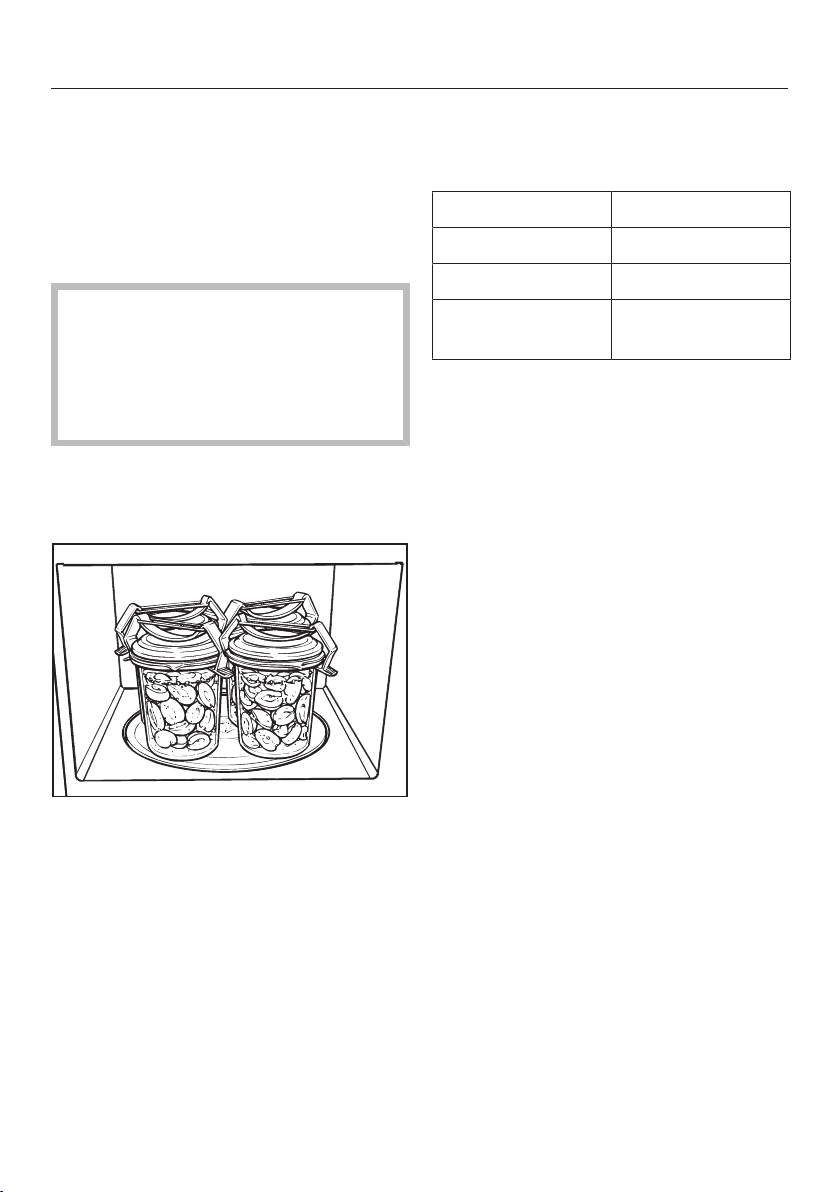
Bottling
74
You can preserve small portions of fruit,
vegetables and meat in microwave-safe
jars that are available from specialist
retailers. Prepare the jars in the usual
way.
Fill the jars no more than up to 2cm
below the rim.
Seal the microwave-safe preserving
jars with clear adhesive tape or clips
suitable for microwave use.
Never use metal clips, jars with
screw-on lids or cans in order to
prevent sparking.
For best results do not use more than
four
1
/
2
- litre jars at a time when
bottling.
Place the jars on the turntable.
Set to 900W and bring the jar
contents to the boil.
The time required depends on:
- the initial temperature of the
contents.
- the number of jars.
The amount of time required for the
contents in all jars to start bubbling
evenly is as follows:
1 jar approx. 3minutes
2 jars approx. 6minutes
3 jars approx. 9minutes
4 jars approx.
12minutes
This is sufficient time for bottling fruit
and cucumbers.
For vegetables, reduce the power to
450W once the produce starts boiling.
Cook
- carrots for approx. 15minutes
- peas for approx. 25 minutes.
After bottling
Remove jars from the oven, cover with
a towel and leave to stand in a draught-
free location for approx. 24hours.
Remove the clips or the adhesive tape
and make sure that all jars are sealed
properly.
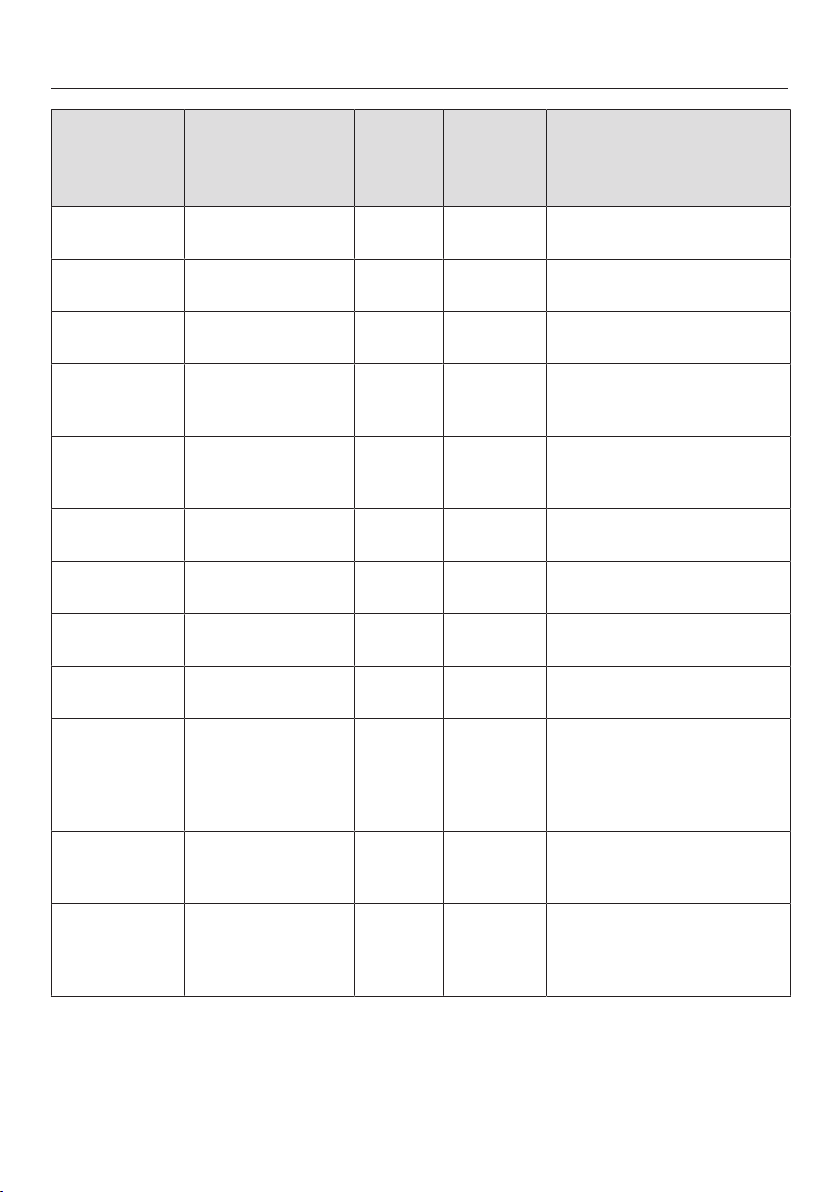
Examples of use
75
Food Quantity MW
power
level
(Watt)
Duration
(in
minutes)
Notes
Melting butter/
margarine
100 g 450 1:00–1:10 Do not cover
Melting
chocolate
100 g 450 3:00–3:30 Do not cover, stir halfway
through melting
Dissolving
gelatine
1 packet +
3tbsp. water
450 0:10–0:30 Do not cover, stir halfway
through dissolving
Preparing
flan topping/
jelly glaze
1 packet +
250ml liquid
450 4–5 Do not cover, stir halfway
through heating
Yeast dough Starter dough made
with
100g flour
80 3–5 Cover and leave to prove
Chocolate
marshmallows
20 g 600 0:10–0:20 Place on a plate, do not cover
Steeping oil for
salad dressing
125ml 150 1–2 Heat uncovered on gentle
heat
Tempering
citrus fruits
150 g 150 1–2 Place on a plate, do not cover
Softening ice
cream
500 g 150 1–3 Place open container in the
appliance
Skinning
tomatoes
3 pieces 450 6–7 Cut a cross into the top of
each tomato, cover, and heat
in a little water. The skins will
slip off easily. Take care, as
the tomatoes can get very hot.
Making
strawberry jam
300g strawberries,
300g jam sugar
900 7–9 Mix the fruit and sugar in a
deep container, cover and
cook.
Defrosting and
baking
part-baked
bread rolls
2 rolls 150 +
Grill
Grill
1–2
4–6
Place uncovered on the rack,
turning halfway through.
The information given in this chart is intended only as a guide.
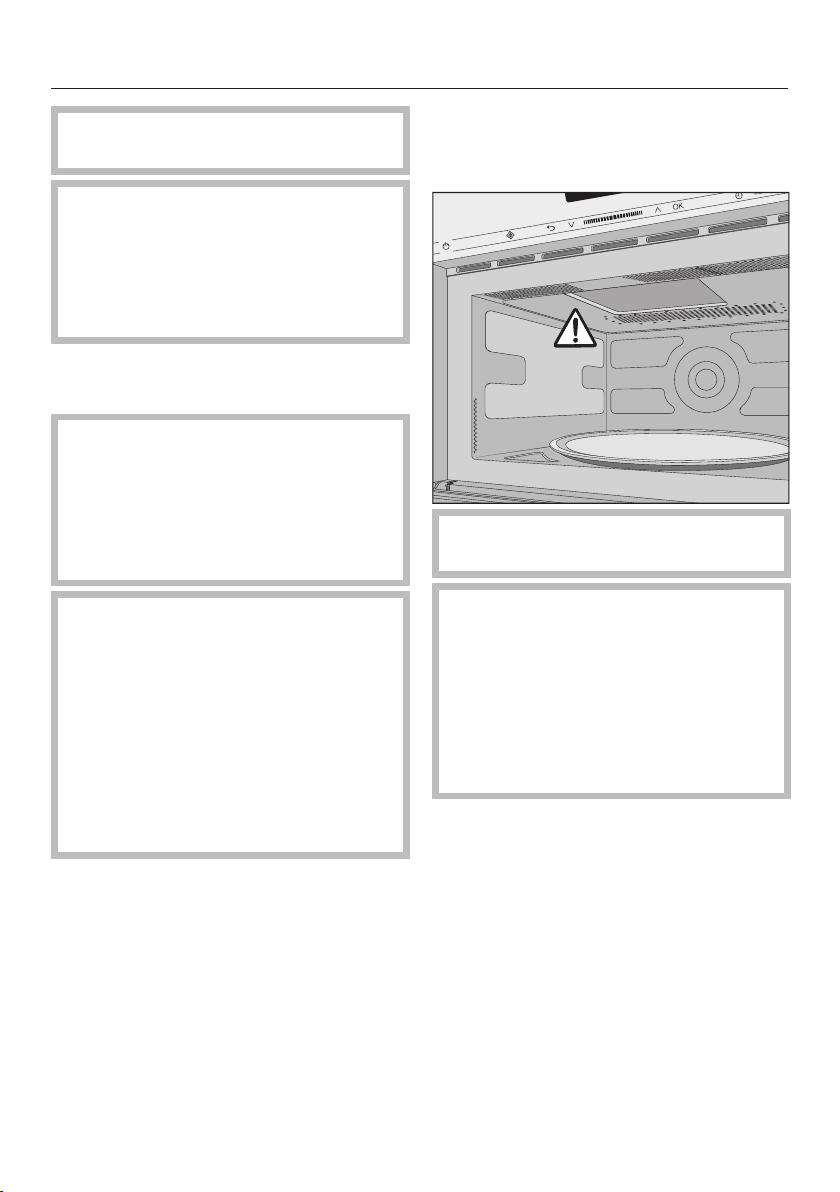
Cleaning and care
76
Disconnect the microwave oven from
the power supply before cleaning.
Under no circumstances should a
steam cleaner be used to clean the
microwave oven.
The steam could reach live electrical
components and cause a short
circuit.
Oven interior and inside of the
door
Risk of burning due to hot oven
compartment.
The oven compartment may be too
hot to clean immediately after use.
Clean the oven interior once it has
cooled down.
Fire hazard due to excessive
soiling.
Excessive soiling could damage the
appliance in certain circumstances
and could even be dangerous due to
the fire risk.
Do not wait too long to clean the
appliance as this will make cleaning
unnecessarily difficult and in extreme
cases, impossible.
The microwave oven interior and door
interior can be cleaned using a damp
cloth with a little washing-up liquid or a
mild detergent and water. Wipe dry with
a soft cloth.
For more heavy soiling, heat a glass of
water for 2 to 3 minutes until the water
begins to boil. The steam will collect on
the walls and soften the soiling. The
oven interior can now be wiped clean
using a little washing-up liquid if
necessary.
Do not remove the cover from the
microwave outlet inside the oven.
Do not let water or any object find its
way into or block the air vents of the
appliance.
Do not use too much water on the
cloth or sponge, otherwise water
may get into openings.
Do not use scouring agents. These
will scratch.
To neutralise odours in the microwave
oven, put a cup of water with some
lemon juice in the appliance and
simmer for a few minutes.
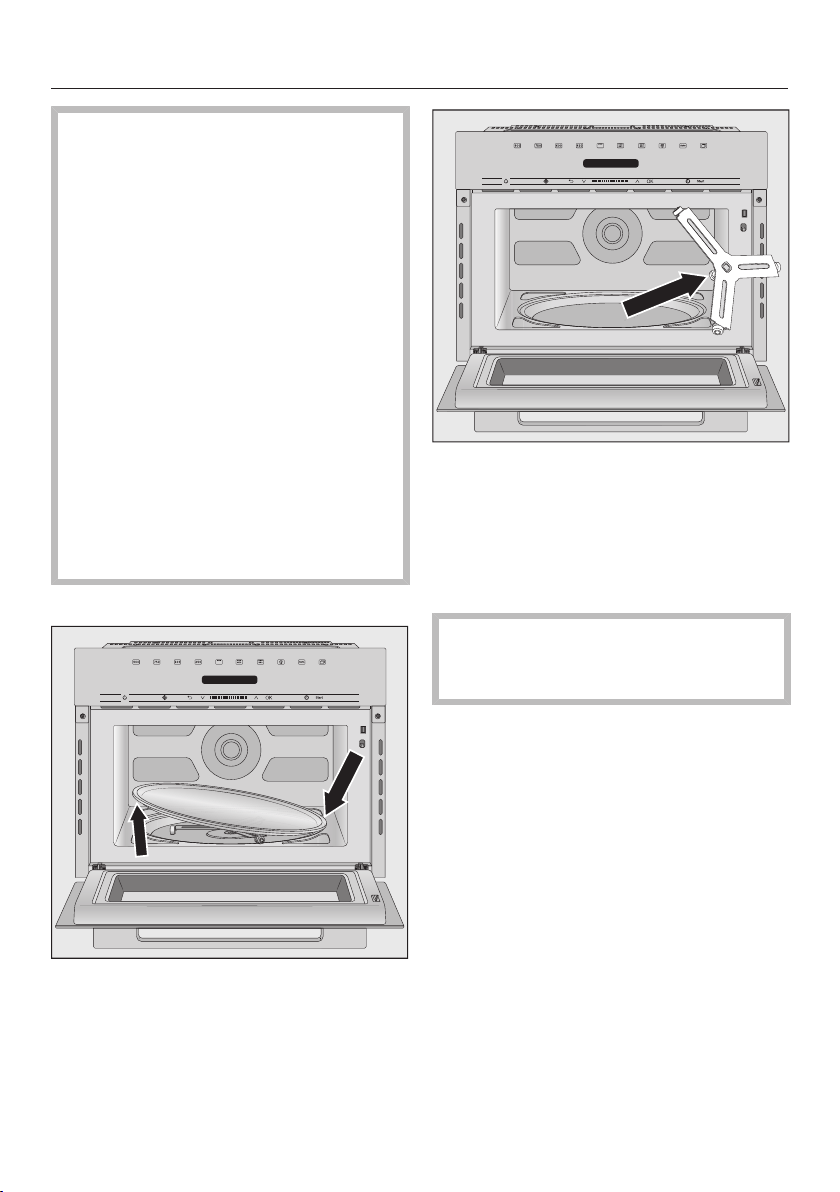
Cleaning and care
77
Danger to health due to a
defective device.
If any damage to the door or the
door seals is noticed, the appliance
must not be used until the fault has
been repaired by a Miele authorised
service technician. Operating a
damaged appliance can result in
microwave leakage and present a
hazard to the user.
The door should be kept clean at all
times and checked at regular
intervals for any signs of damage. Do
not use the appliance if
– the appliance door is warped.
- the door hinges are loose.
– holes or cracks are visible in the
casing, the door or the oven interior
walls.
To clean the interior:
Remove the turntable, and wash in
the dishwasher or by hand.
Always keep the roller ring
underneath it and the oven floor
clean. Otherwise the turntable will not
turn smoothly.
Clean the area between the turntable
and the roller ring.
Do not turn the turntable and/or
carrier manually, as this could
damage the drive motor.
Cleaning and care
78
Appliance front
Do not let water or any small
particles penetrate the vents in the
appliance.
Soiling that is left too long might
become impossible to remove and
could cause external surfaces to alter
or discolour.
Remove any soiling on the front of
the appliance straight away.
Clean the front with a soft sponge and a
solution of warm water and a little
washing-up liquid. Wipe dry using a
soft cloth.
A clean, damp microfibre cloth without
cleaning agent can also be used.
All surfaces of this appliance are
susceptible to scratching. Scratches
on glass surfaces could cause a
breakage in certain circumstances.
Contact with unsuitable cleaning
agents can alter or discolour all
surfaces.
Please observe the following
cleaning instructions.
To avoid damaging the surfaces of
the appliance, do not use:
- cleaning agents containing soda,
ammonia, acids or chlorides
- cleaning agents containing descaling
agents
- abrasive cleaning agents, e.g.
powder cleaners and cream cleaners
- solvent-based cleaning agents
- stainless steel cleaning agents
- dishwasher cleaner
- oven sprays
- glass cleaning agents
- hard, abrasive sponges and brushes,
e.g. pot scourers
- dirt erasers
- sharp metal scrapers.
Accessories supplied
Rack
Wash and dry the rack after each use. It
is dishwasher-proof. Remove stubborn
soiling with a stainless steel cleaner.
Gourmet plate
Clean the gourmet plate with hot water
and a cloth with a little washing-up
liquid to remove any grease.
Do not use steel wool, abrasive
sponges, or aggressive cleaning
agents.
Do not clean the gourmet plate in the
dishwasher.
If the gourmet plate has been used to
cook food with a strong aroma, you can
neutralise any odours by adding some
water and lemon juice to the gourmet
plate and heating it in the microwave
oven at maximum power for
2-3minutes. Rinse the gourmet plate
afterwards with clean water.
Problem solving guide
79
With the help of the following guide, minor faults in the performance of the
appliance, some of which may result from incorrect operation, can be remedied
without contacting Miele. This will save you time and money because you won't
need a service call.
Please note that a call-out charge will be applied to unnecessary service visits
where the problem could have been rectified as described in these operating
instructions.
Problem Possible cause and remedy
A programme will not
start.
Check whether
the appliance door is closed properly.
the system lock has been activated (see “System
lock”).
Food in oven? has appeared in the display. The door
has not been opened recently (in the last
20minutes) (see “Operation - Food in oven?”).
the appliance is plugged into the mains supply and
switched on at the socket.
the mains circuit breaker has tripped. If it has,
there could be a fault with the appliance, the
household electricity supply or another appliance
(disconnect the appliance from the electricity
supply and contact a qualified electrician or Miele,
see “After sales service”).
A noise can be heard
after a cooking process.
This is not a fault. The cooling fan will continue to
run for a while after a cooking programme to
prevent any humidity building up in the oven, on the
control panel or the oven housing unit. It will switch
off automatically.
The display is dark. The time of day display has been switched off.
Switch on the appliance using the On/Off
sensor.
The turntable does not
turn smoothly.
The area underneath the turntable could be dirty.
Check whether the oven floor underneath the
turntable is clean.
Check whether the surfaces between the turntable
and the roller ring are clean.
Clean the area underneath the turntable.
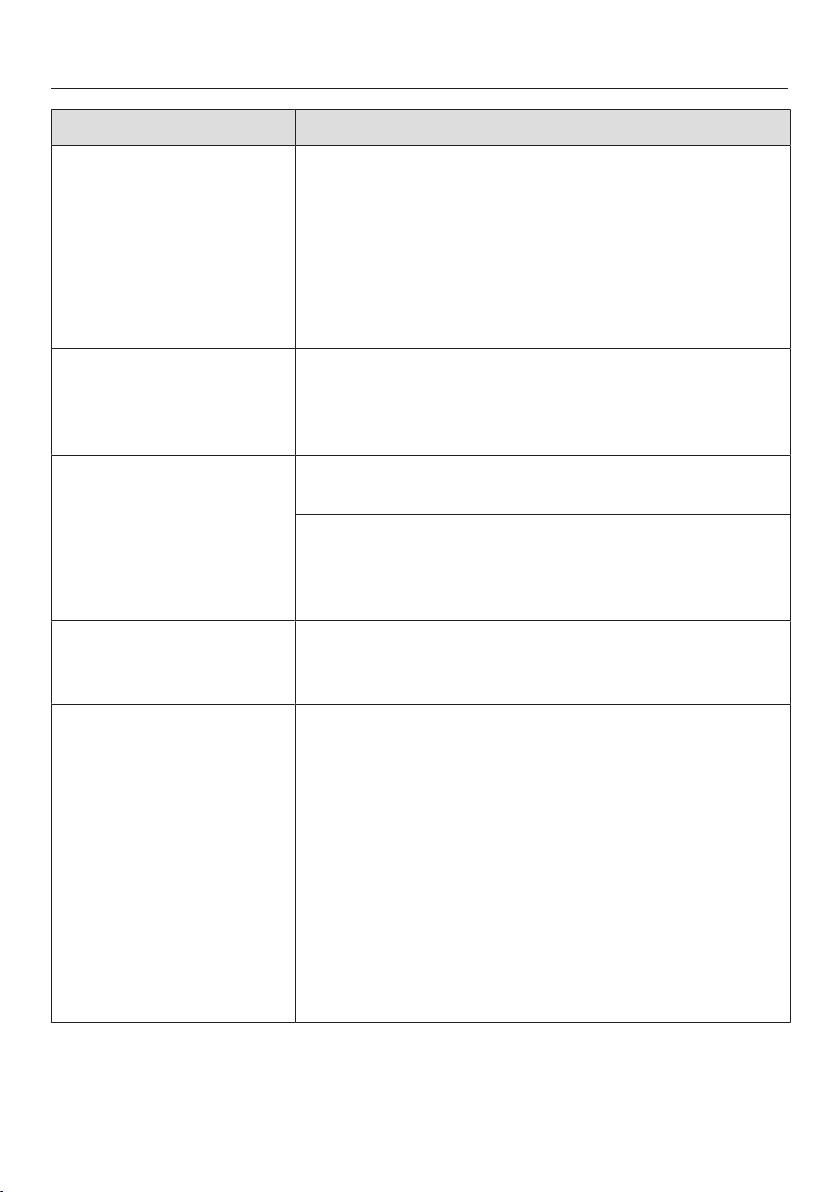
Problem solving guide
80
Problem Possible cause and remedy
Food is not adequately
defrosted, heated or
cooked at the end of
the selected cooking
duration.
The duration or power level were insufficient to cook
the food.
Check whether the correct power level was
selected for the duration set.
The lower the power level, the longer the duration
required.
Check whether the programme has been
interrupted and not restarted.
The microwave
operation works but not
the lighting.
The lamp needs to be replaced.
You can operate the appliance as normal, but without
the lighting.
Contact Miele if you need to replace the lamp.
Strange noises are
heard when the
microwave oven is
being used.
The food is covered with aluminium foil.
Remove the aluminium foil.
Sparks are being created by the use of crockery with
a metallic finish.
Please observe the information on suitable
containers for microwave use.
The time of day in the
display is not accurate.
The time of day must be reset following an
interruption to the power supply.
Set the correct time of day.
Food cools down too
quickly.
In a microwave oven, food begins to cook from the
outside first, the inside of the food relying on the
slower conduction of heat.
If food is cooked at a high power level, it is possible
that the heat may not have reached the centre of the
food, so it is hot on the outside but cold in the
centre. During standing time heat is transferred to the
centre of the food.
This may leave the food warm in the middle but
cool on the outside. When reheating food with
different densities, such as plated meals, it is
therefore recommended to select a lower power
level and lengthen the duration.
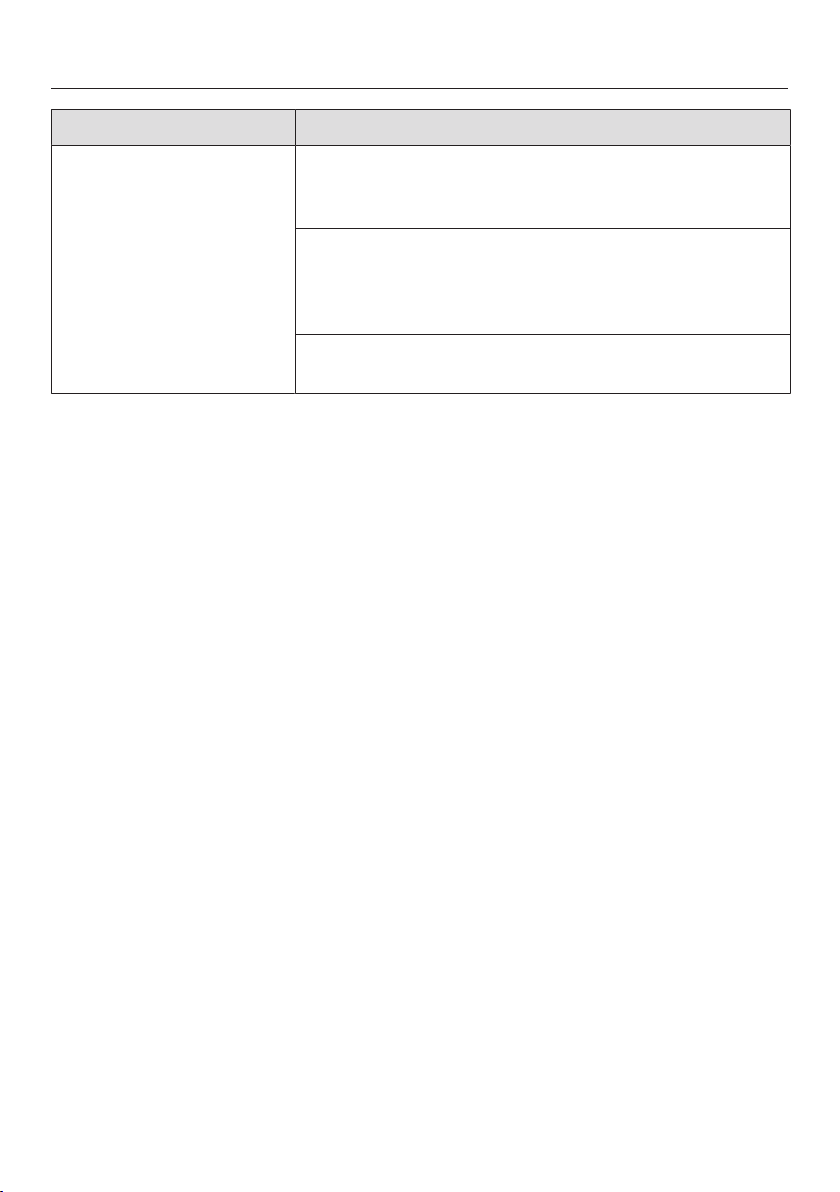
Problem solving guide
81
Problem Possible cause and remedy
The microwave oven
switches itself off
during a cooking,
reheating or defrosting
programme.
There may be insufficient air circulation.
Check whether the air inlet or outlet is blocked.
Remove any obstruction.
The appliance switches off automatically in cases of
overheating.
Cooking can be continued after a cooling-down
period.
If the appliance keeps switching itself off
Contact Miele.

After sales service
82
Contact in case of fault
In the event of any faults which you
cannot remedy yourself, please contact
Miele.
The contact details for Miele can be
found at the end of these operating
instructions.
When contacting Miele, please quote
the model and serial number of your
appliance.
This information can be found on the
data plate, which is located on the
inside of the appliance front.
Warranty
The manufacturer's warranty for this
appliance is 2 years.
For further information, please refer to
your warranty booklet.

Miele Head Office Melbourne:
1 Gilbert Park Drive
Knoxfield, VIC 3180
Miele Experience Centre South Melbourne:
206-210 Coventry Street
South Melbourne, VIC 3205
Miele Experience Centre and Office Sydney:
3 Skyline Place
Frenchs Forest, NSW 2086
Miele Experience Centre and Office Brisbane:
Tenancy 4C, 63 Skyring Terrace
Newstead, QLD 4006
Miele Experience Centre and Office Perth:
83-85 Sir Donald Bradman Drive
Hilton, SA 5033
Miele Experience Centre and Office Adelaide:
Miele Australia Pty. Ltd. Miele New Zealand Limited
Miele Global Headquarters
Germany
Miele & Cie. KG
Carl-Miele-Straße 29
33332 Gütersloh
Federal Republic of Germany
IRD 98 463 631
ACN 005 635 398
ABN 96 005 635 398
Miele Experience Centre Gold Coast:
131 Ferry Road
Southport, QLD 4215
Miele Experience Centre
and Head Office Auckland:
8 College Hill
Freemans Bay, Auckland 1011
Miele Experience Centre
Wellington:
183 Featherston Street
Wellington 6011
0800 464 353 (0800 4 MIELE)
www.miele.co.nz
205-207 Stirling Highway
Claremont, WA 6010
1300 464 353 (1300 4 MIELE)
www.miele.com.au
Miele Experience Centre Doncaster:
1136/7 Doncaster Shopping Centre
619 Doncaster Rd, Doncaster, VIC 3108

M.-Nr. 11 195 170 / 02en-AU, NZ
M 7244 TC
