USER MANUAL
Day Dawning ADH80
HEPA Air Purifier

CONTENTS
2
3
4
5
6
8
9
10
COMPONENTS
SPECIFICATIONS
SAFETY INSTRUCTIONS
INSTALLATION
OPERATION
MAINTENANCE
TROUBLESHOOTING
WARRANTY
1

COMPONENTS
2
Airoutlet
LED air quality indicator
Bottom cover
Touch-control panel
Air intake
LED nightlight
DC12V input
Air quality sensor
7-in-1 HEPA filter
12V DC home adapter 12V car cigarette adapter
FRONT BACK
DC12V INPUT
DC12V INPUT
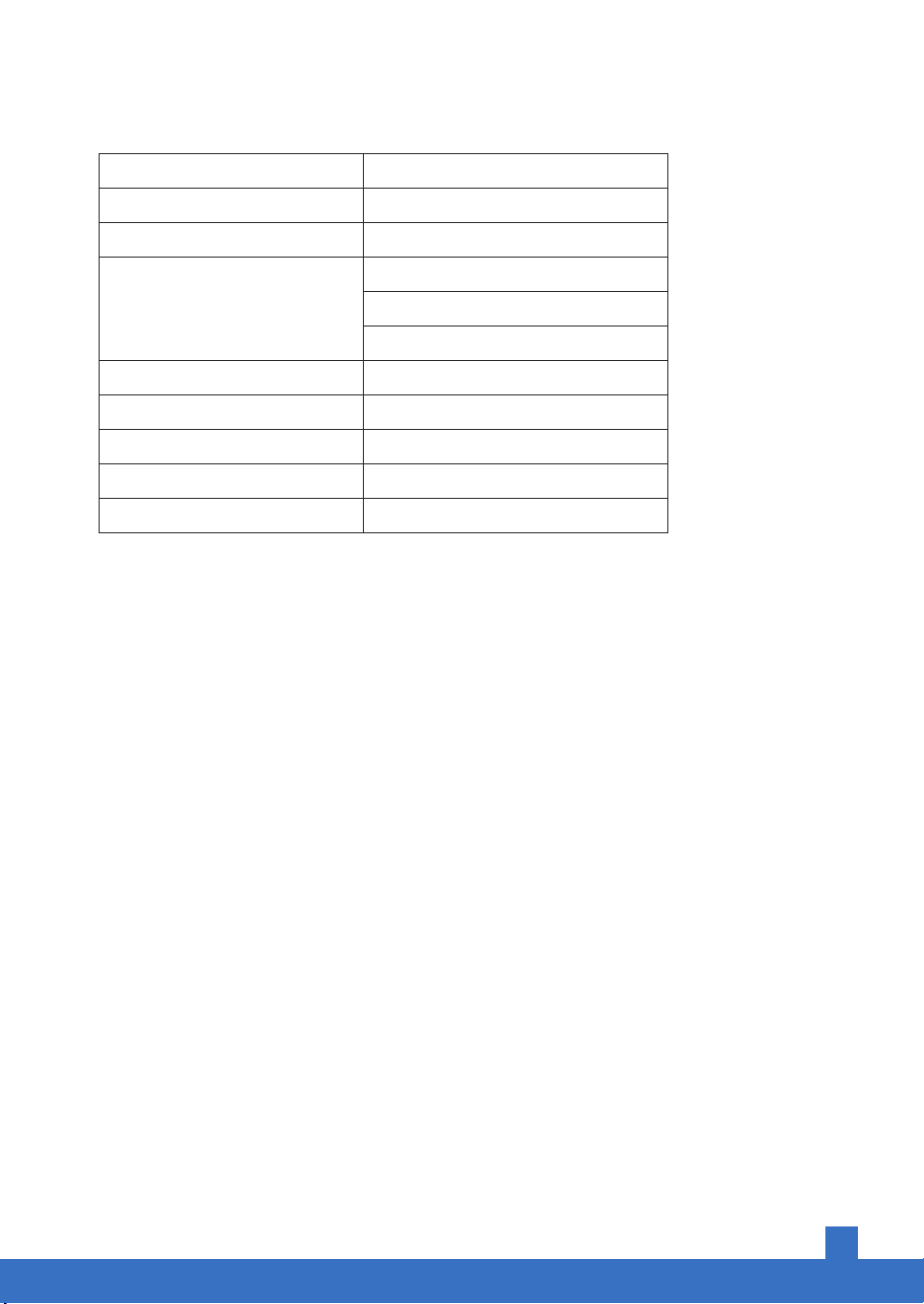
SPECIFICATIONS
CADR
Applicable Area
HEPA Filter Lifetime
Noise Level
LED Nightlight
Power Supply
Related Power
Standby Power
Operating TEMP
47CFM (80 m³/h)
160sq.ft. (15m²) Max.
> 6 months
< 42dB (High Speed)
< 35dB (Medium Speed)
< 22dB (Low Speed or Sleep Mode)
Blue / White
DC 12V
20W
< 0.8W
-10°C~55°C (14°F~131°F)
3

SAFETY INSTRUCTIONS
4
IMPORTANT:
Please read and comply with all of the instructions and warnings in the manual before using.
General Safety
Only use this air purifier as described in this manual.
• Ensure the DC adapter plug fits properly into an AC power outlet.
• When not being used, turn the air purifier off and disconnect it from its power source.
• DO NOT operate the unit if its cord or plug is damaged. Doing so may result in damage to the unit or
personal injury. Any damages must be replaced by the manufacturer or a qualified technician.
• Only use the Airthereal original adapter for this unit.
• Thoroughly dry your hands before operation.
• DO NOT immerse the air purifier in water or liquids. It may result in damage to the appliance, electric
shock, or fire.
• DO NOT use the air purifier outdoors.
• DO NOT use the air purifier in an enclosed space where flammable, combustible, or explosive gases
are present.
• DO NOT use in areas where toxic vapors, flammable dust, or oxygen tanks are present.
• DO NOT insert fingers or objects into the air outlet.
• Child supervision is required while the air purifier is on. Do not allow children to play with the air purifier.
Use & Care
• Always place the air purifier on a flat, level surface while operation.
• Always leave 15 inches (38 cm) of clearance space around all sides of the air purifier.
• DO NOT place anything on the top of the air purifier.
• Keep the air purifier away from bug sprays, oil residues, burning incense, or chemical fumes.
• Always unplug the appliance from the power supply before servicing.
• DO NOT attempt to repair the air purifier without professional guidance. Contact Customer Support
immediately if the air purifier fails to work.
• Only use Airthereal Day Dawning ADH80 filters for this unit.
• If you experience any problems while operating the air purifier, refer to the Troubleshooting section
in the manual. If the problem is NOT solved, contact Customer Support.
• If the unit is damaged or NOT functioning properly, contact Customer Support.
5
INSTALLATION
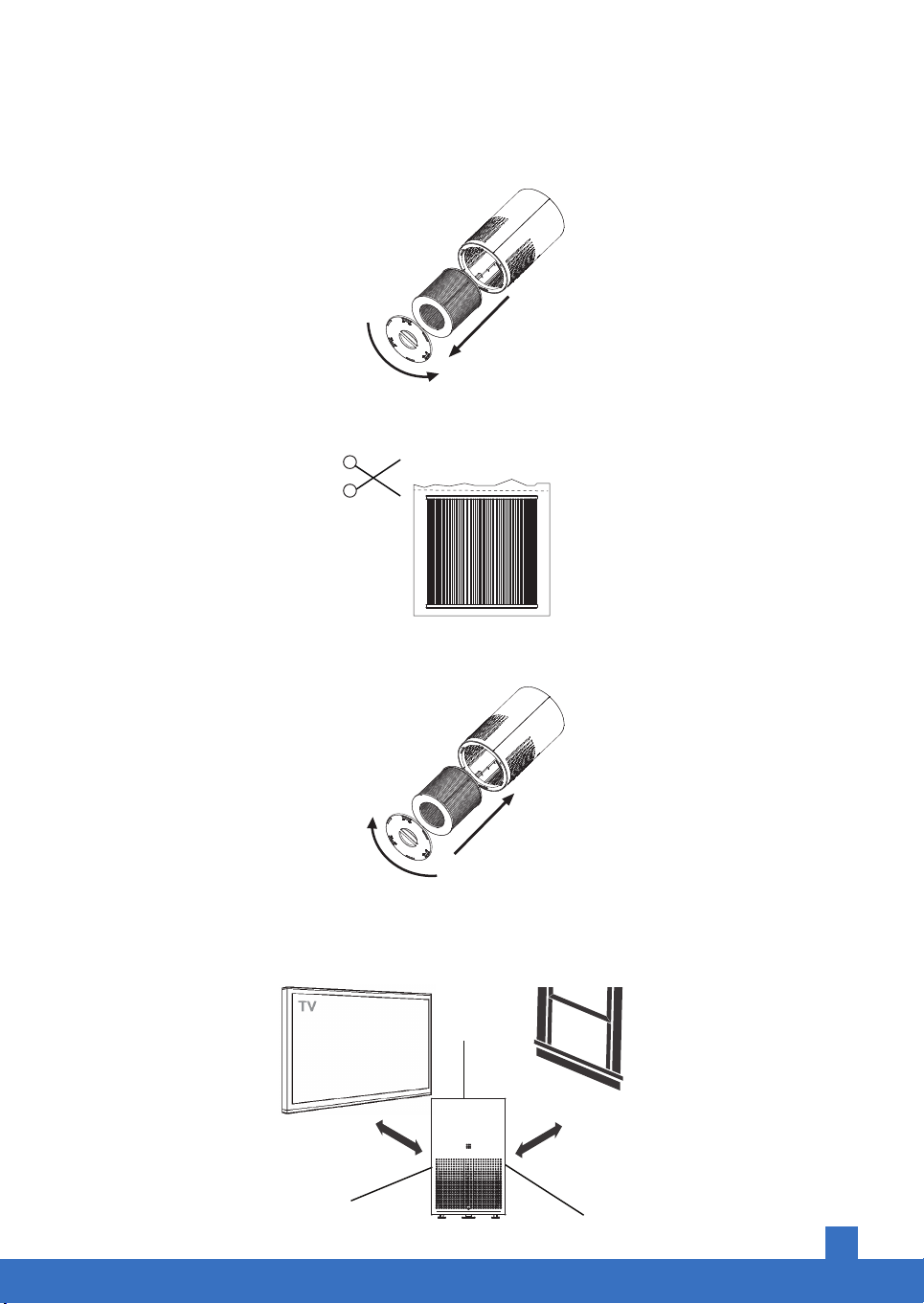
1. Rotate the bottom cover counterclockwise and remove the filter (which is sealed in plastic).
2. Remove the plastic seal from the filter (Note: the plastic seal must be removed, otherwise the
machine will not work properly).
3. Place the filter back into the unit. Make sure the tag of the filter is facing outward. Close the bottom
cover by rotating it clockwise.
4. Place the air purifier in a proper position at least 15 inches away from TVs, radios, and other electronic
products. Electromagnetic interference from certain electronics may cause the product to malfunction.
Only use the unit on firm and flat surfaces. Flimsy or slanted surfaces may result in abnormal noise
and vibrations.
15 inches
(38 cm)
15 inches
(38 cm)
6
OPERATION
Follow these instructions to reduce the risk of serious injury or death and to reduce risk of
damaging the unit.
1. This product comes with a regular adapter and a car adapter, making it suitable for indoor and car use.
2. Plug the adapter into a 120V power supply or the car cigarette lighter port. When plugged into a
proper power source, the adapter power indicator will light up red.
3. Turn on the air purifier - the air purifier power indicator will light up red.
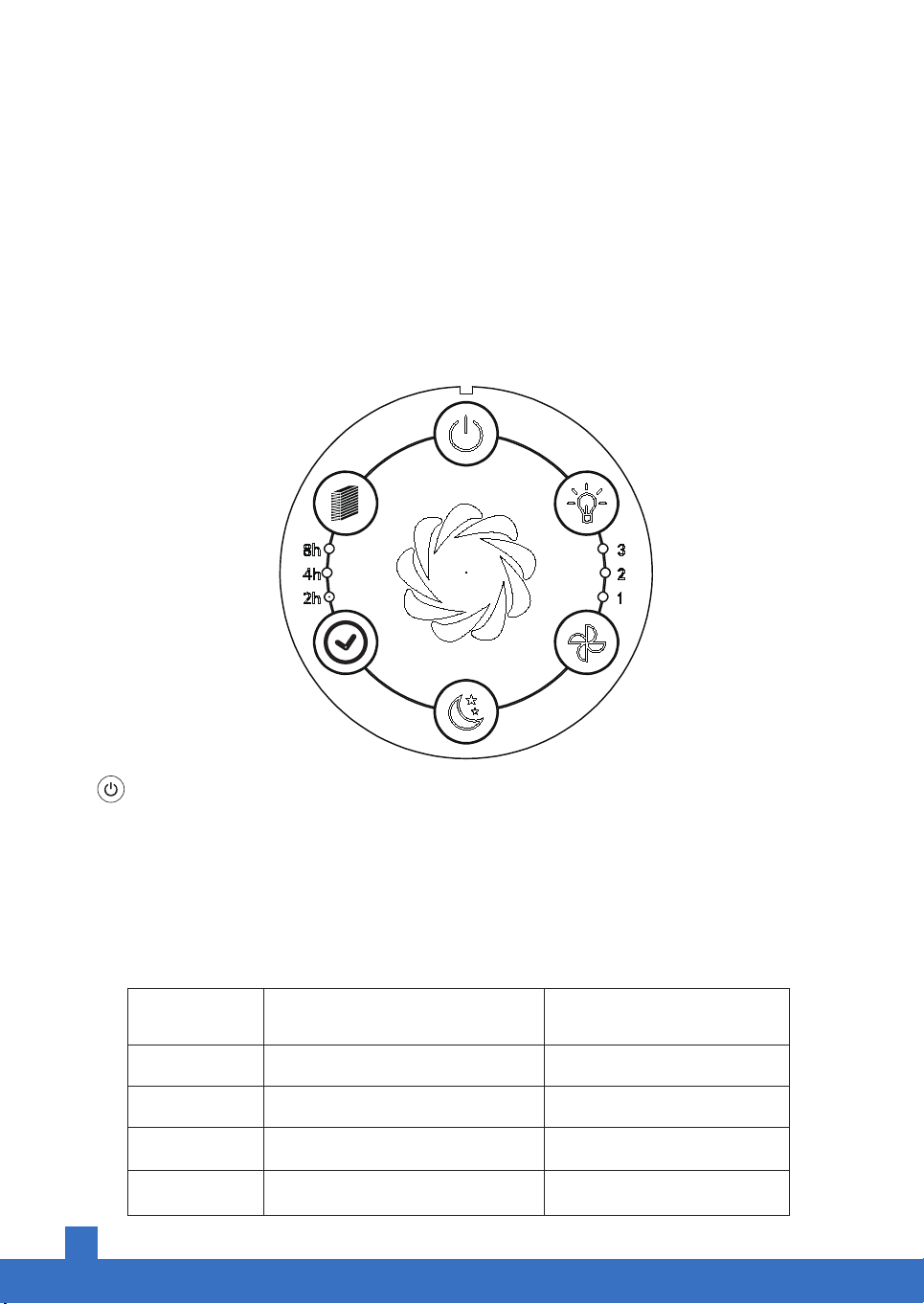
Power Button
Power on/off.
Press the button to switch on/off the air purifier. Once it beeps, the machine will start running on auto
mode. Meanwhile, the power button light will turn from red to white. The unit detects air quality and
will automatically change fan speeds in accordance with the surrounding environment after 10seconds.
Air quality indicator:
The table below shows air quality indicator colors and their corresponding air quality status and fan speed.
INDICATION AIR QUALITY STATUS AUTO FAN SPEED
GREEN
YELLOW
RED
BLUE
1 - LOW
2 - MEDIUM
3 - HIGH
2 – MEDIUM (Default Setting)
GOOD
MODERATE
UNHEALTHY
(10S PowerOnSensor Detecting)
Touch-control panel Introduction

7
Fan Speed
Press the button to switch the fan speed from low to high (low, medium, and high)
corresponding with the values 1, 2, and 3 on the panel.
Timer
When the power is turned on, pressing the timer button will cycle through
2hrs → 4hrs → 8hrs → Off → 2hrs etc. A green indicator light will appear next to the
selected option. After 2 seconds, the unit will begin timing.
• If the timer reaches 0, and the unit is turned on, the unit will automatically turn off.
• If the timer reaches 0, and the unit is turned off, the unit will automatically turn on.
Sleep Mode
LED
When the sleep mode is pressed, the LED nightlight and air quality indicators will be turned off. The
air purifier will only work at the lowest fan speed. Pressing the button a second time will turn off sleep
mode.
Press this button to turn on/off the LED nightlight. Each press will cycle through Light Blue Light →
White Light → Off → Blue light etc.
Child Lock Function:
Press the sleep and fan button simultaneously for 5 seconds to lock all buttons. Repeat the
process to unlock all buttons.
8
MAINTENANCE
Know the 7-in-1 HEPA Filter
It is recommended to replace the air filter every 6–8 months for optimal use, depending on the status
of the filter.
The following symptoms indicate that it’s time to replace the air filter:
• Increased noise
• Decreased airflow
• Clogged filters
• Odors emitting from the filter
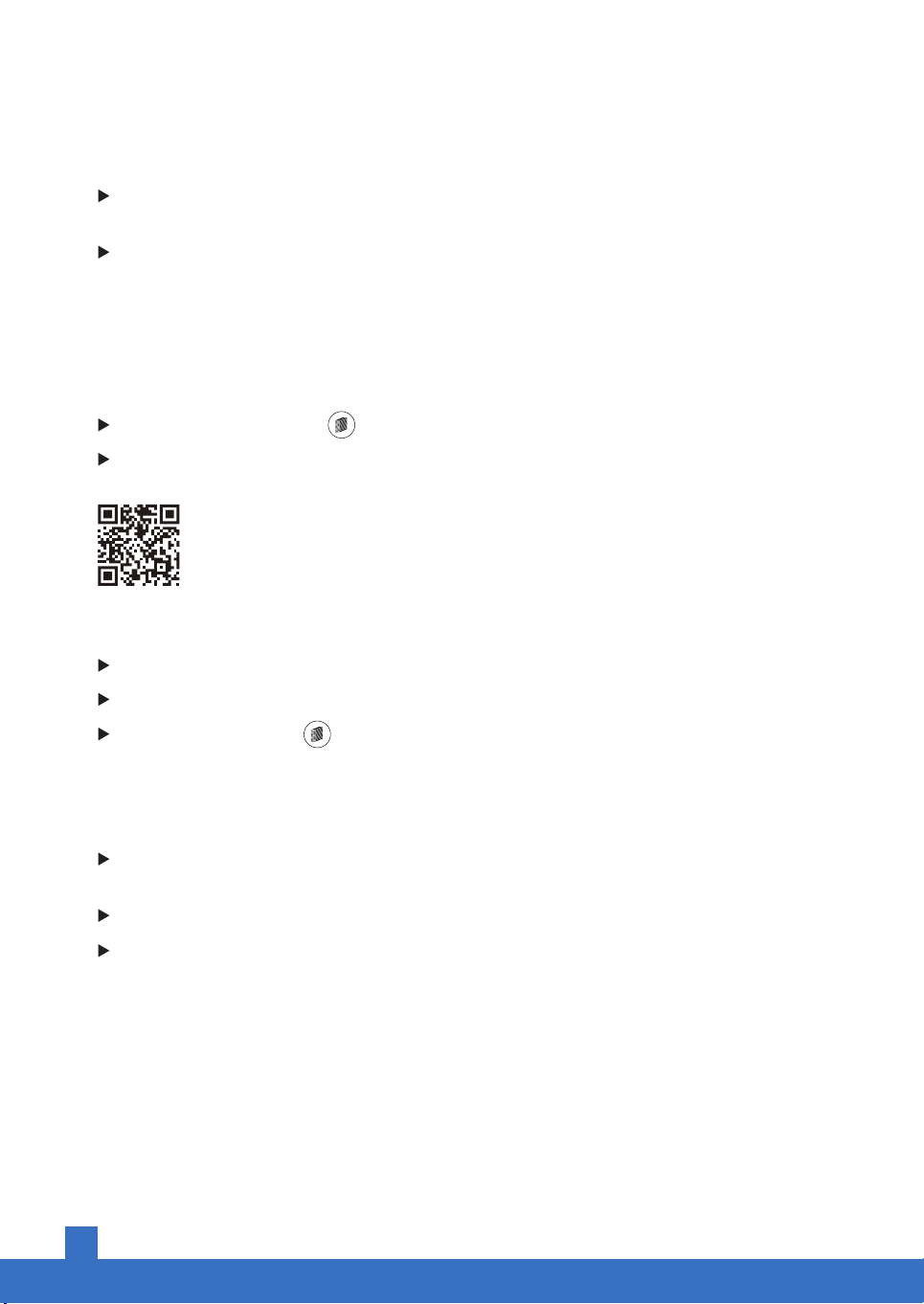
when the replacement icon lights up, it is a reminder to check and change the air filter.
Purchase a new Airthereal Replacement Filter.
Replace the Air Filter
Power off and unplug before operating.
Follow INSTRUCTIONS to remove and replace the filter.
Press and hold the button for 5 seconds to reset the replacement reminder.
Cleaning
Unplug the power cord before cleaning.
The unit’s exterior should be cleaned with a soft cloth moistened with mild soap. Thoroughly remove
soap film with dry cloth.
Open the bottom cover and clean the unit’s interior and air outlet with a vacuum cleaner.
For better maintenance, clean the air intake and air quality sensor hole every 2 months.
www.airthereal.com
Search on Amazon: ADH80 HEPA filter
Only Airthereal Day Dawning ADH80 filters are compatible with this unit.
9
TROUBLESHOOTING
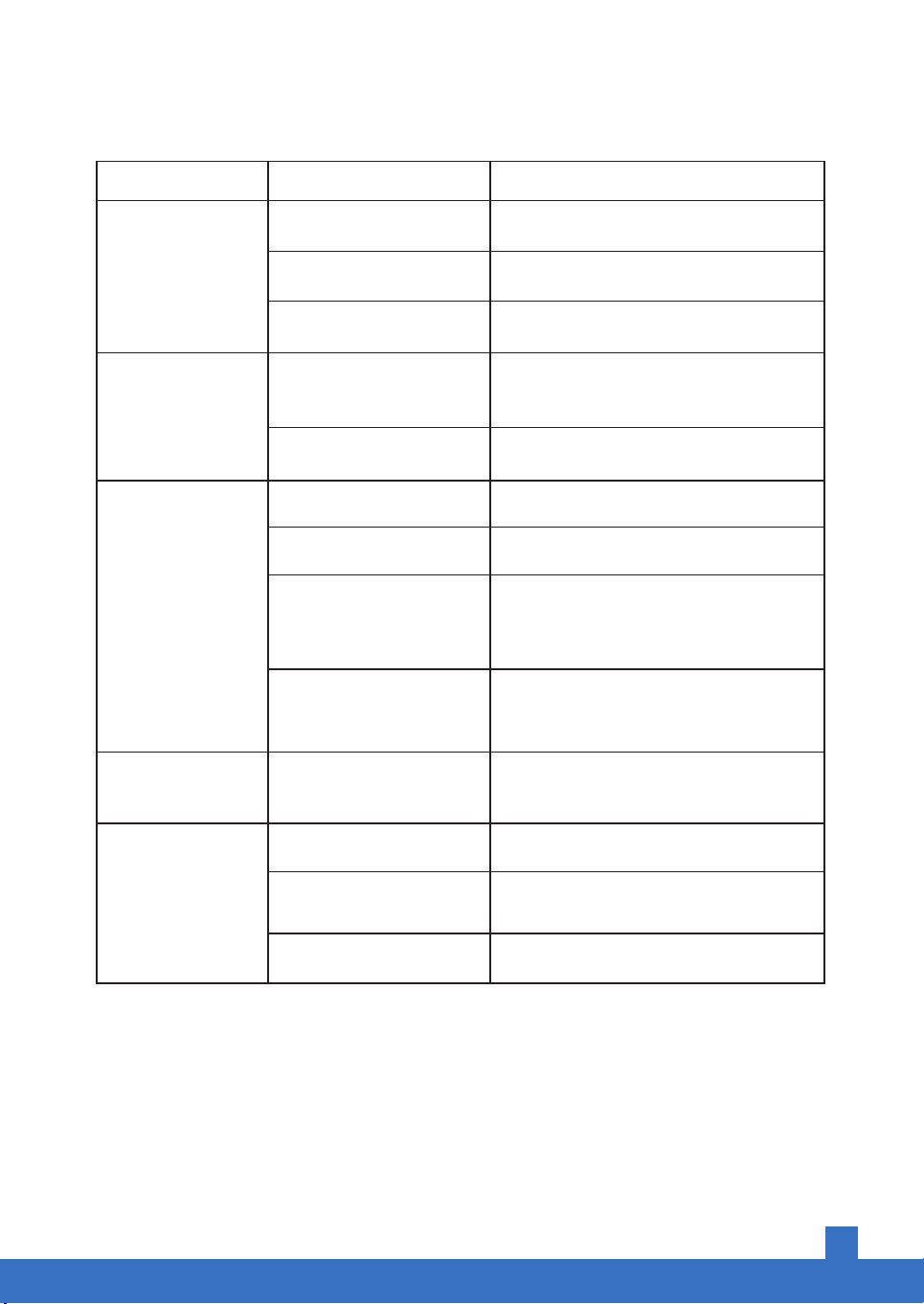
Issue Cause Solution
No power or
response.
Power cord is damaged or
DC adapter is defective.
Contact Customer Support.
Power outlet is not working
properly.
Try plugging the air purifier into a different
outlet.
The unit is defective or
malfunctioning.
Discontinue the unit immediately and
contact Customer Support.
Air Quality Indicator
keeps changing
colors?
Air Quality Indicator not
calibrated.
The unit defective or
malfunctioning.
Allow the air purifier to run for 30 seconds.
The unit will stabilize and select a status
based on the detected air quality.
Discontinue the unit immediately and
contact Customer Support.
Replace the air filters as instructed.
Properly install the filter as instructed.
Discontinue the unit immediately and
contact Customer Support. DO NOT
attempt to open the air purifier.
Place the air purifier on a hard and flat
surface.
Foreign object inside the
unit.
Dirty filters.
Filters installed improperly.
Flimsy or slanted surfaces
resulting in abnormal noise
and vibrations.
Unusual noise while
operating.
Ensure at least 15 inches (38 cm) of space
between the unit and other objects.
Not enough space around
the unit.
Significantly reduced
airflow.
Area exceeds unit’s range. ADH80 purifies up to 160 ft² (15 m²).
Remove objects that block the air intake
or outlet.
Properly place the filter as instructed.
Air intake or outlet is blocked.
Filter is not properly placed.
Poor air purification
quality.

10
WARRANTY
Product Name True HEPA Air Purifier
Model Airthereal Day Dawning ADH80
Manufacturer Warranty Period 2 Years
Please keep your order number and date of purchase for
future reference.
TERMS & POLICY
Quality has always been Airthereal’ top priority. For your 100% hassle-free shopping experience,
Airthereal provides 2-Year limited warranty for ADH80 Air Purifiers.
The below information can also be found at: airthereal.com/pages/warranty
• What’s covered?
Defects due to faulty materials and workmanship of the product.
• What’s NOT covered?
1. Damage caused by the owner when attempting to fix or altering the product by him or herself.
2. Damage caused by misuse, abuse, neglect, alterations, or unauthorized repair.
3. Natural depreciation.
• Warranty Period
The warranty will be effective for 2 years after the original date of purchase.
• Who’s covered?
This limited warranty is only effective for the original purchaser. It is NOT transferable.
• How to request warranty services?
To obtain the benefit of this warranty, please leave your message online
(https://airthereal.com/pages/warranty), or send an email to
[email protected]. Our customer service will address your issue in 24hs.
• What’s next? We will ...
1.Repair the item.
2.Replace the item if repairable.
3.Give a Full/Partial refund under certain circumstances.
ALL EXPRESSED AND IMPLIED WARRANTIES, INCLUDING THE WARRANTY OF
MERCHANTABILITY, ARE LIMITED TO THE PERIOD OF THE LIMITED WARRANTY.
A REAL ROOM, AN ETHEREAL AMBIANCE
DISPOSAL
This product must not be disposed of via normal household
waste after its service life. It must be taken to a collection station
that recycles electrical and electronic devices. The symbol on
the product, the operating instructions, and the packaging
indicate such disposal procedures. The materials are recyclable
in accordance with their respective symbols. By means of
re-use, material recycling, or any other form of recycling old
appliances, you are making an important contribution to the
protection of our environment.
www.airthereal.com
© 2019 West Ryder Technology, LLC
251 Little Falls Drive, Wilmington, DE 19808-1674,USA
