ACME the game company
Bedienungsanleitung
Bitte vor Inbetriebnahme sorgfältig lesen!
Anleitung
Manual
Manuel d’utilisation
Technische Daten
Abmessungen: 50x50x25mm
Gewicht: ca. 8g
Altersempfehlung: 10+ Jahre
Einsatzbereich: Indoor
Akku: 3,7V LiPo; 100mAh
Fernsteuerung: 2,4 GHz
Vers.: 1.1
© Copyright 2015
ACME the game company GmbH
www.acme-online.de
ACME the game company
Sicherheitshinweise
WARNUNG:
BEACHTEN SIE FOLGENDE HINWEISE,
UM STROMSCHLÄGE ODER SCHÄDEN
AM PRODUKT AUSZUSCHLIESSEN:
‐ VERWENDEN SIE AUSSCHLIESSLICH
EMPFOHLENE ZUBEHÖRTEILE
‐ DEMONTIEREN SIE NICHT DAS MODELL
‐ IM INNERN BEFINDEN SICH KEINE TEILE,
DIE VOM BENUTZER GEWARTET
WERDEN KÖNNEN.
LASSEN SIE WARTUNGSARBEITEN VON
QUALIFIZIERTEN KUNDENDIENST-MITARBEITERN
DURCHFÜHREN
SERVICE & SUPPORT
ACME the game company GmbH
Boikweg 24
33129 Delbrück
Germany
Tel: +49 2944 97 383 0
service@acme-online.de
oder
http://www.acme-online.de
Sicherheitshinweis für den LiPo-Akku und Ladevorgang
Wenn ein Akku nicht ordnungsgemäß angeschlossen wird, besteht Feuer- und Explosionsgefahr.
Laden Sie LiPo Akkus nur unter Aufsicht.
Unterbrechen Sie den Ladevorgang sollte sich der LiPo-Akku aufblähen oder verformen!
Lagern Sie LiPo-Akkus bei 15-25°C.
Vermeiden Sie die Erhitzung des verwendeten Akkus bei Entladung über 50° C
Nicht kurzschliessen, nicht ins Feuer werfen!
Verwenden Sie stets Original-Akkus.
Verwenden Sie nur den originalen LiPo-Akku
Wenn sich der Akku verformt, verfärbt oder weich wird, darf dieser nicht mehr verwendet werden
Lagern Sie den Akku bei Temperaturen zwischen 15° und 25° an trockenen und dunkeln Orten. Der
Ladezustand muss min. 75% betragen
Unzugänglich für Kinder und Tiere lagern
Fernhalten von Feuer, Wasser, Wärmequellen und Fremdstoffe die einen Kurzschluss verursachen können
Nur das Original Ladegerät verwenden und verwenden Sie eine feuerfeste Unterlage
Jegliche mechanische Belastung vermeiden und nicht öffnen
NIE KURZSCHLIESSEN
Sollten Gase oder Flüssigkeiten aus dem Akku austreten, dürfen Sie nicht mit dem Akku in Kontakt kommen
Jeder unsachgemäße Gebrauch kann zu gesundheitlichen Problemen führen
Entsorgen Sie verbrauchte Akkus sach- und fachgerecht
Der Akku darf nicht tiefentladen werden
CE Deklaration
Hiermit erklären wir, dass dieses Modell den
grundlegenden Anforderungen und den anderen relevanten
Vorschriften der Richtlinie 1999/5/EG entspricht. Eine Kopie
der Konformitätserklärung kann unter der oben genannten
Adresse angefordert werden.
WEEE Reg. Nr.: DE64989527
Benutzerinformation zur Entsorgung von elektrischen
und elektronischen Geräten
Entsprechend der Firmengrundsätze der ACME the
game company GmbH wurden hochwertige
wiederverwertbare Komponenten in diesem Produkt
verbaut. Dieses Symbol auf Produkten und/oder
Begleitdokumenten besagt, dass das Produkt am
Ende der Lebensdauer getrennt vom Hausmüll
entsorgt werden muss.
Bringen Sie diese Produkte, auch den Akku, zur
ordnungsgemäßen und umweltfreundlichen
Entsorgung zu Ihrer nächsten Sammelstelle (bzw.
Recyclinghof).
Dieses Produkt wird mit einem LiPo Akku betrieben.
Bringen Sie verbrauchte Akkus zu einer dafür
vorgesehenen Sammelstelle.
Nicht geeignet für Kinder unter 3 Jahren! Enthält verschluckbare Kleinteile! Empfohlen ab 10 Jahren!
www.acme-online.de
ACME the game company
Lieferumfang
Überprüfen Sie die Vollständigkeit bevor Sie das Modell in Betrieb nehmen!
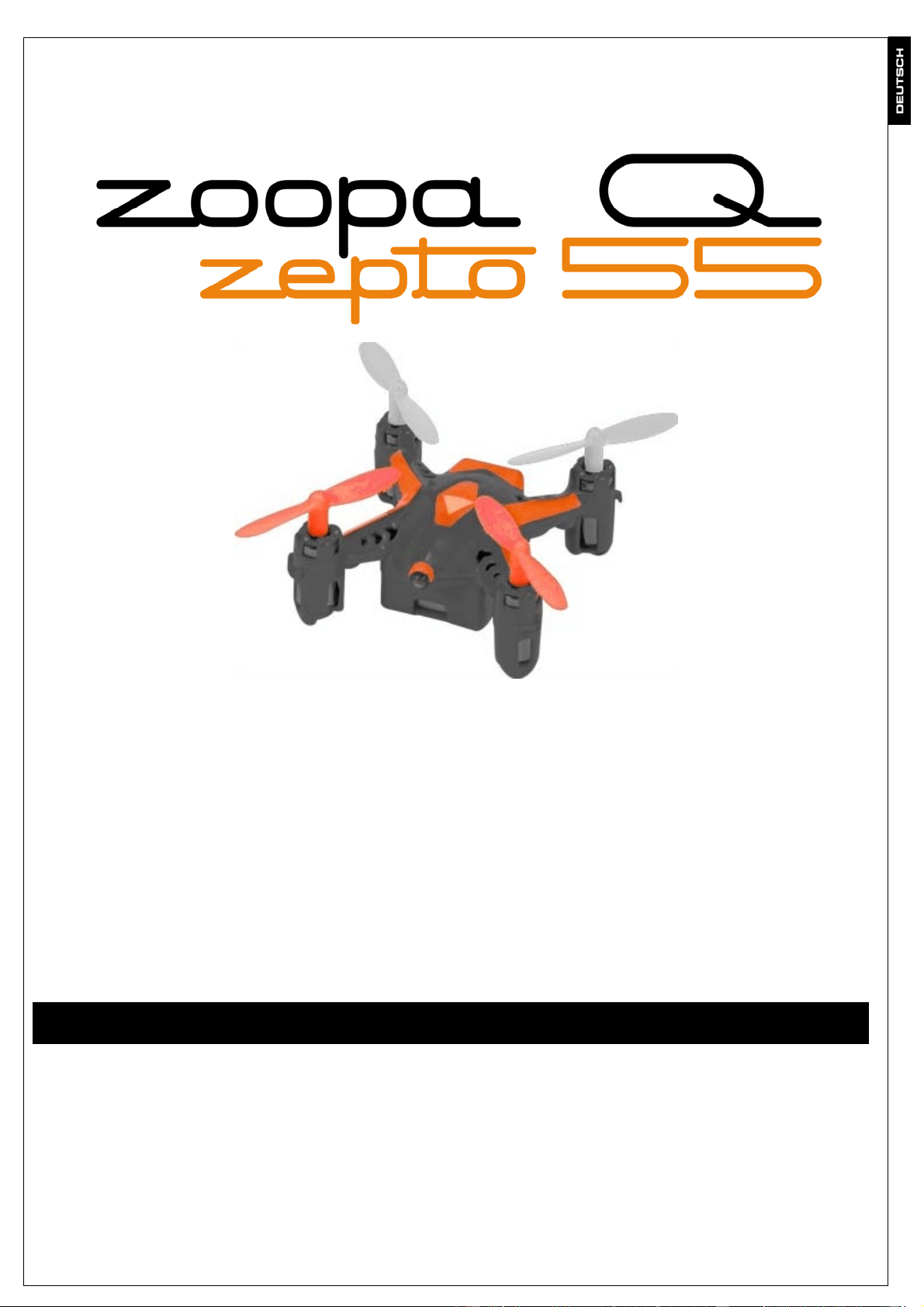
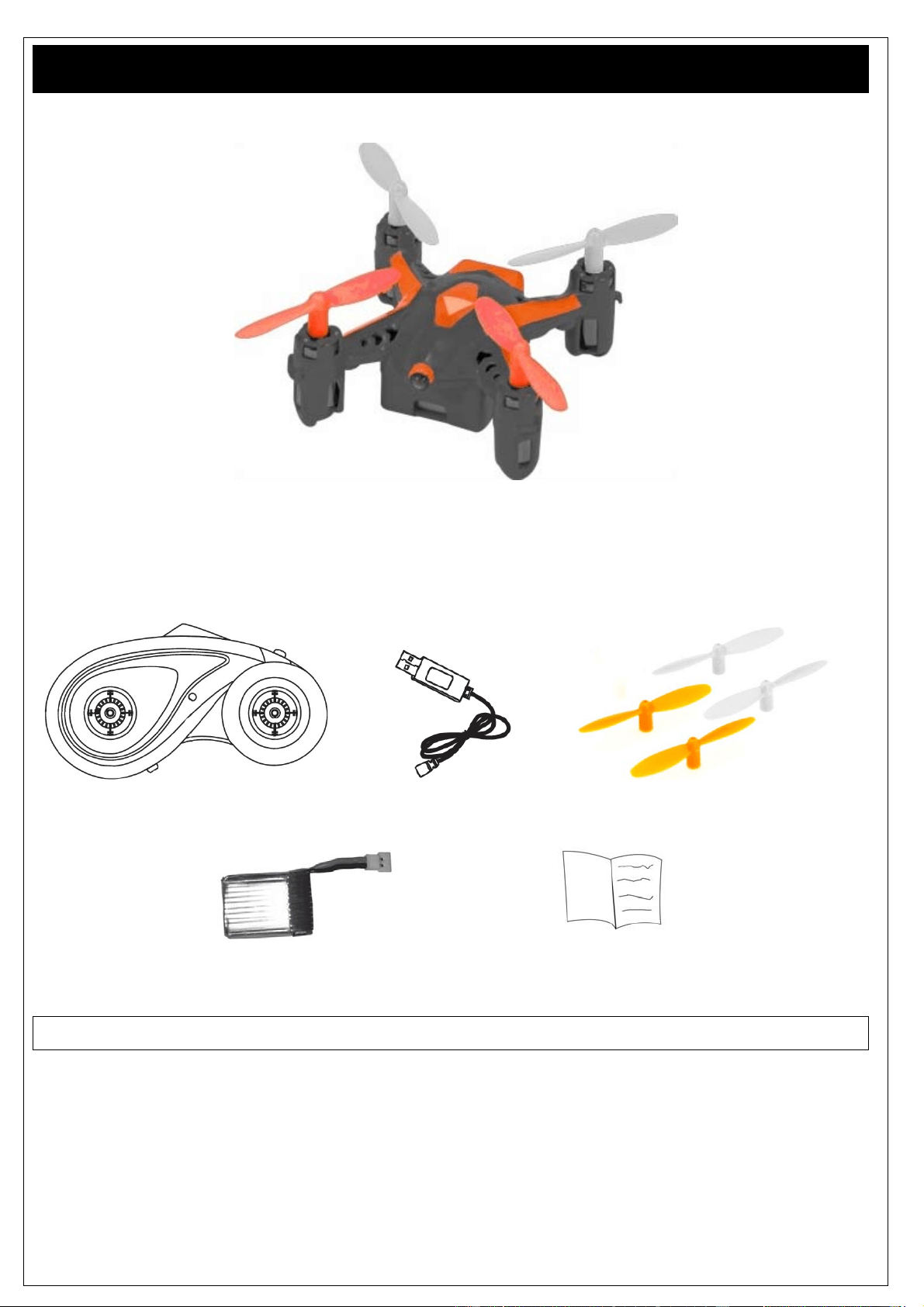
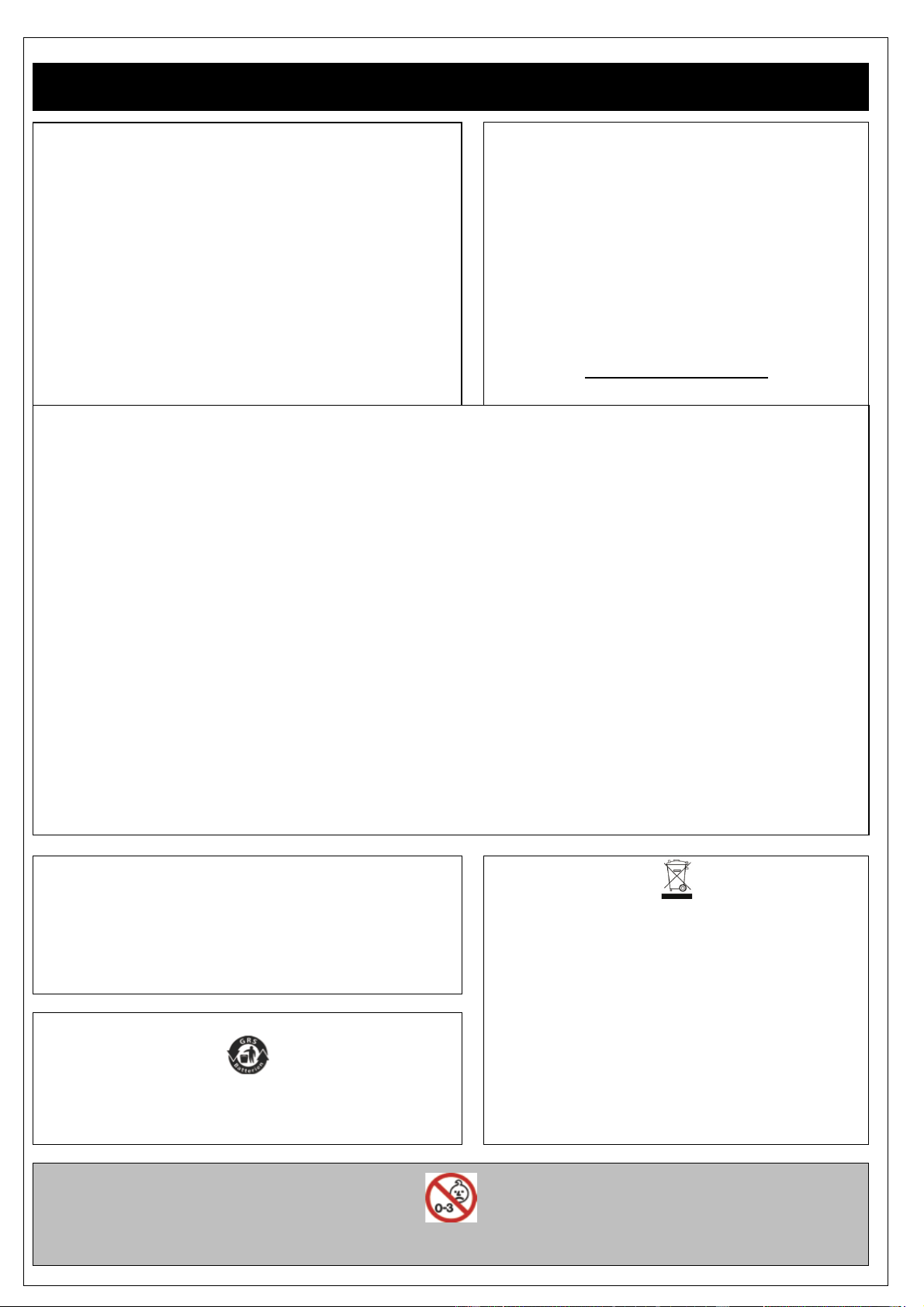
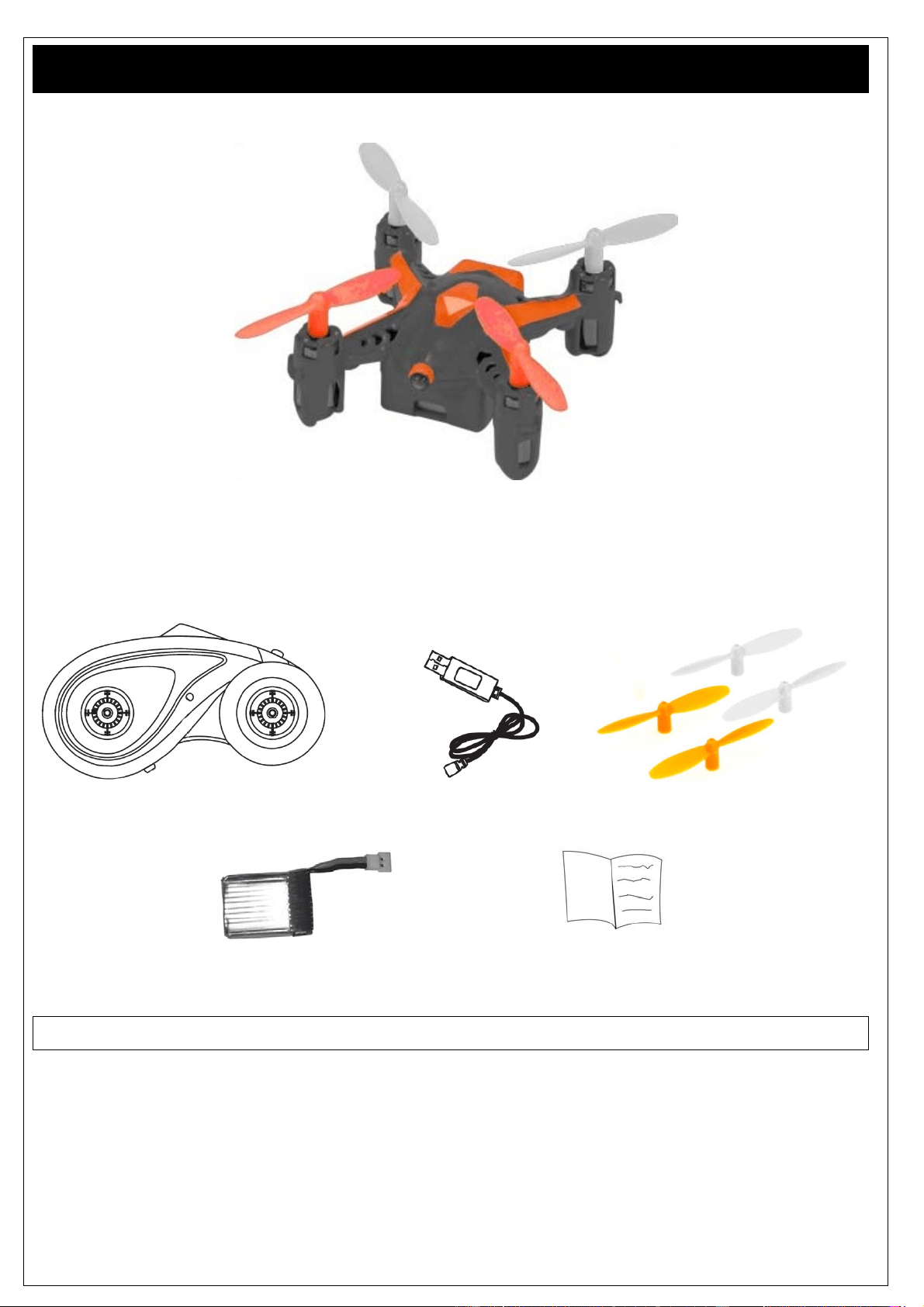
1x zoopa Q55 Quadrocopter
1x 2,4GHz Fernsteuerung 1x USB- Lademodul 1 Paar Ersatz Propeller
1x LiPo Akku (bereits verbaut) 1x Bedienungsanleitung
Für den Betrieb benötigen Sie 3 Stück AAA-Batterien
www.acme-online.de
ACME the game company
Aufbau und Funktionen
Bitte beachten!
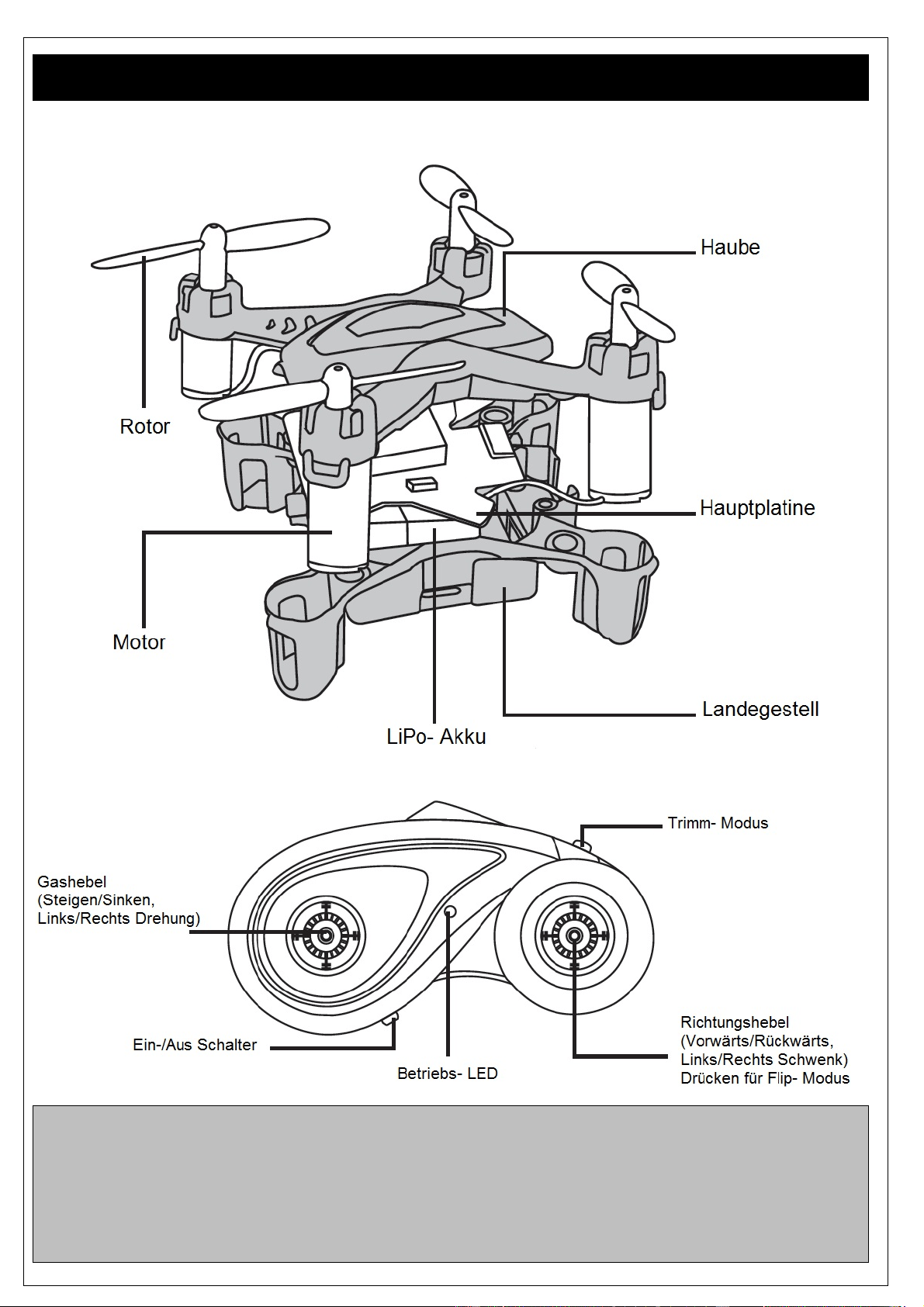
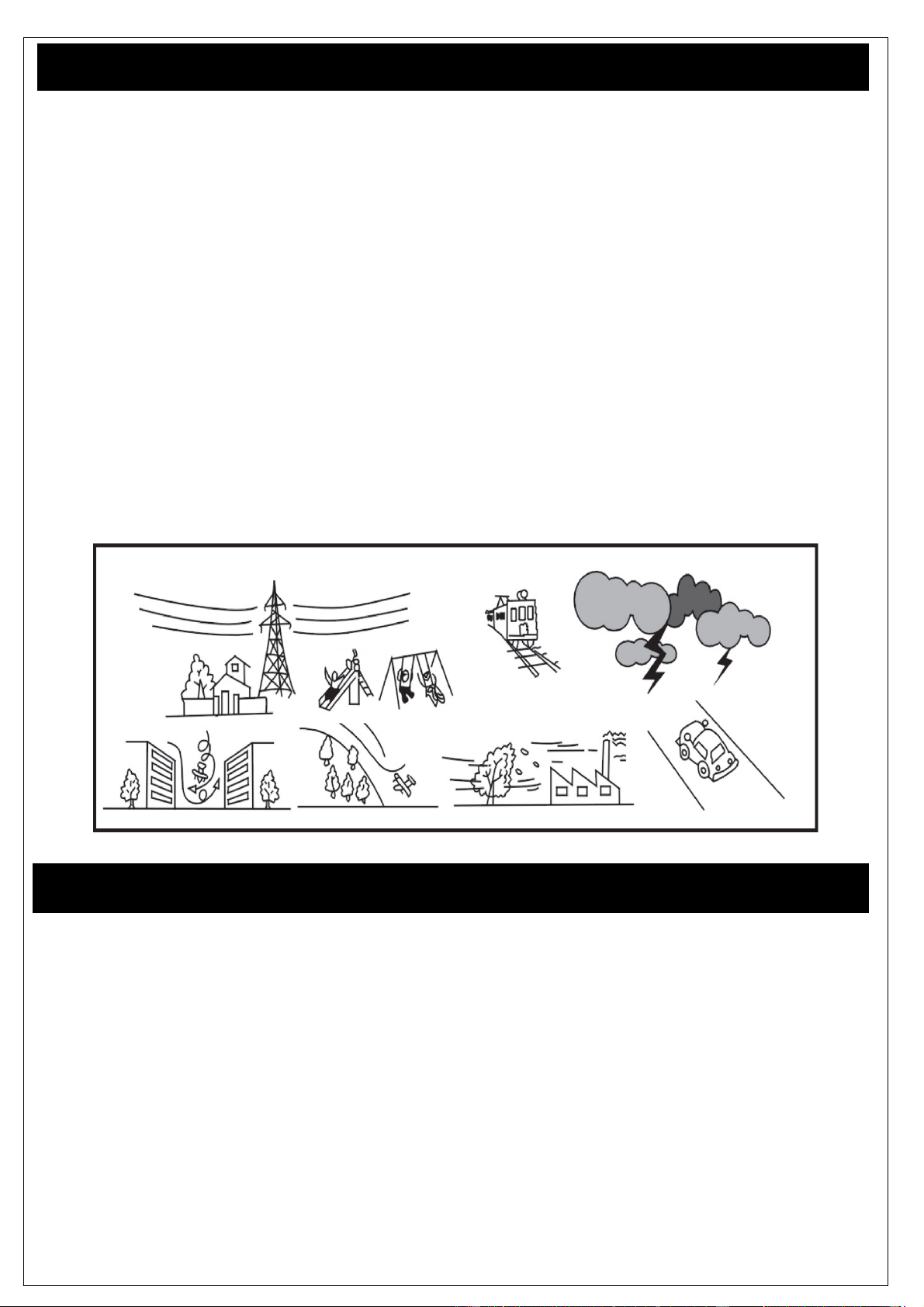
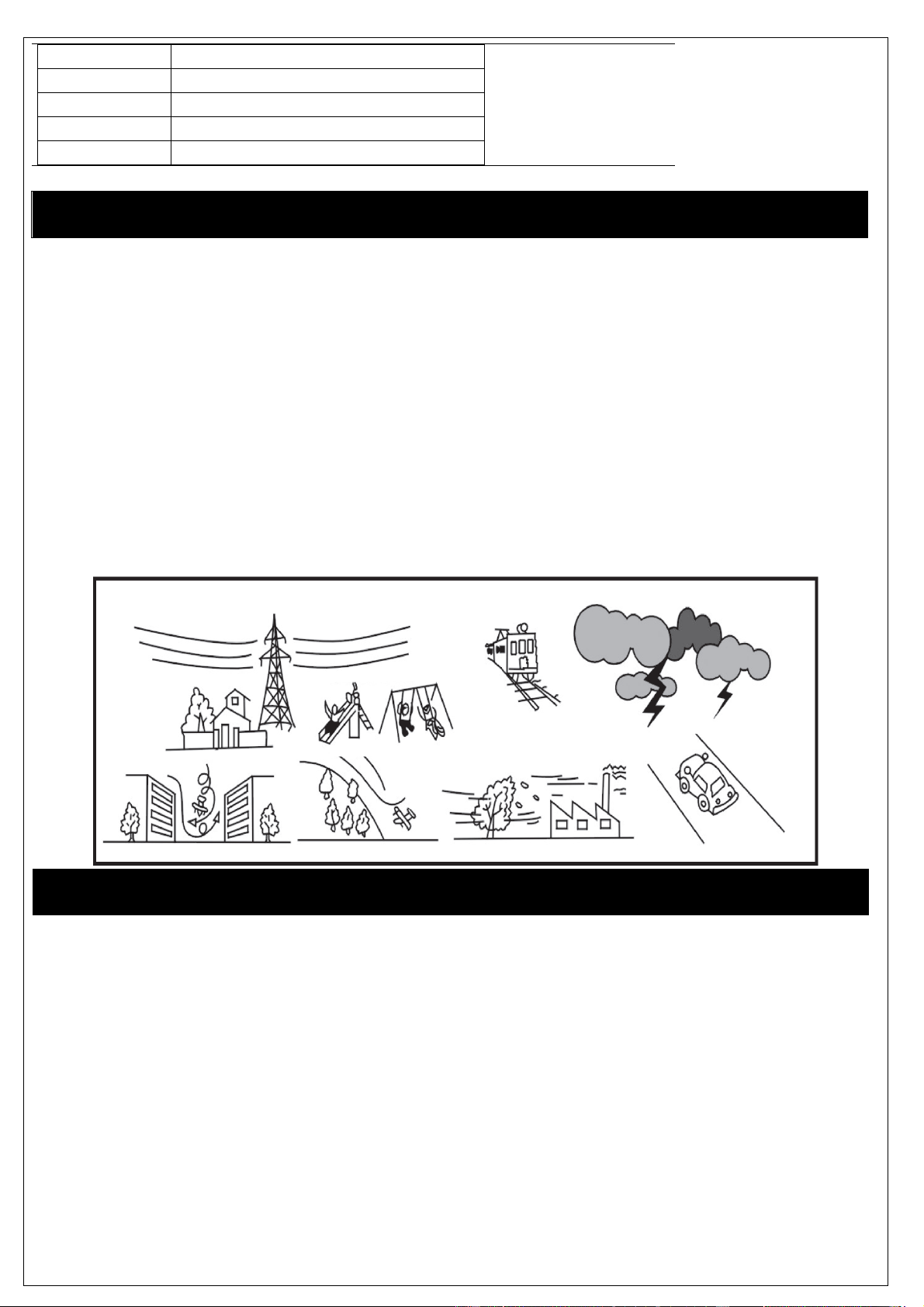
Fliegen Sie niemals, wenn sich in Ihrem Bereich Personen, Tiere oder Gegenstände befinden!
Fliegen Sie nicht bei starkem Wind oder Unwetter!
Stellen Sie sicher, dass Sie in dem Flugraum fliegen dürfen!
Schalten Sie die Fernsteuerung/Controller immer zuerst ein und stellen Sie sicher, dass dieser
während des Modellbetriebs eingeschaltet bleibt. Schalten Sie den Controller erst aus, wenn das
Modell ausgeschaltet ist!
www.acme-online.de
ACME the game company
Erste Schritte und Informationen
Lesen Sie die Anleitung vollständig durch.
Bei dem zoopa Q 55 zepto handelt es sich um ein RTF (Ready-to-Fly) Modell.
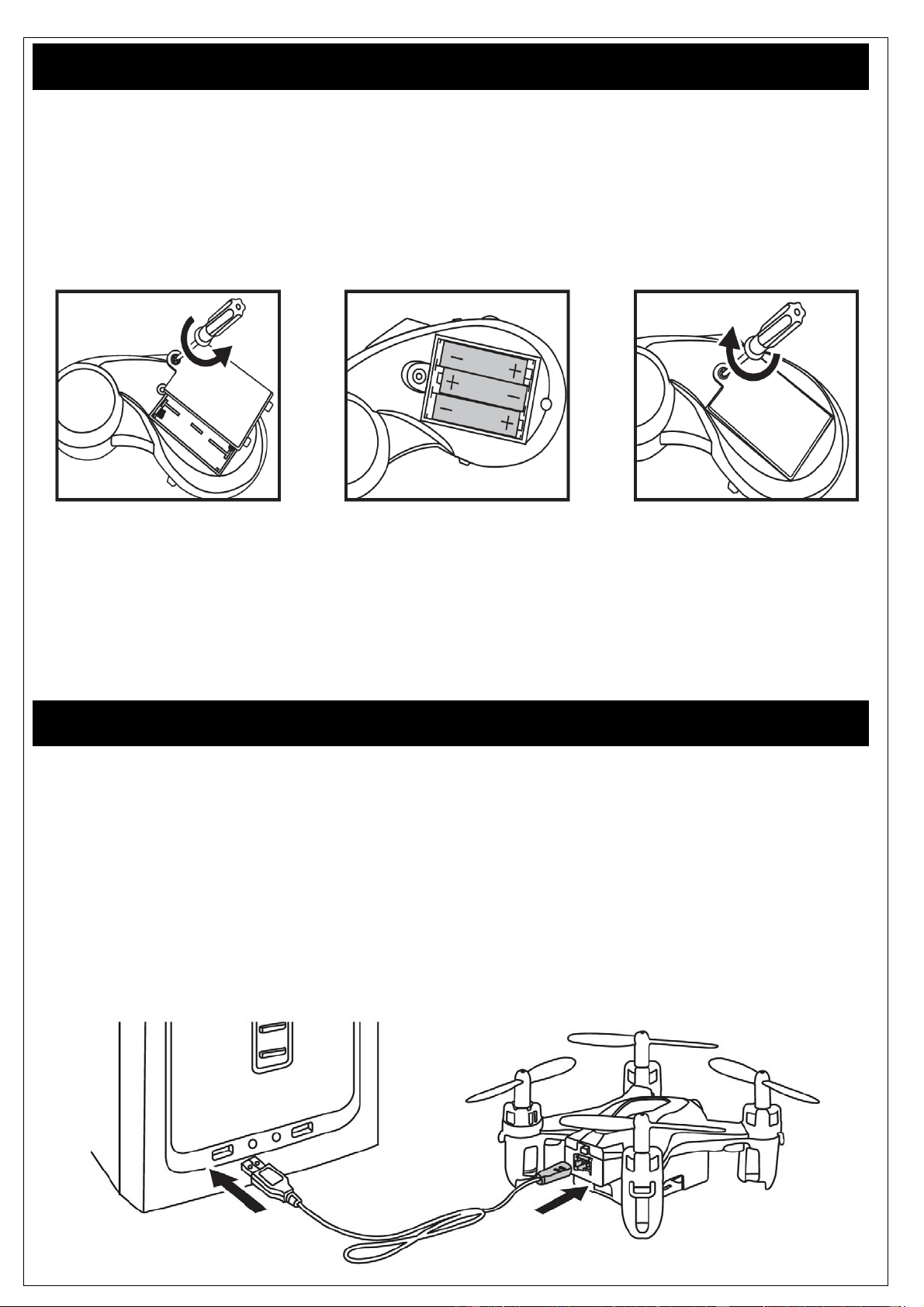
Zur Inbetriebnahme werden lediglich 3x 1,5V AAA-Mignon-Batterien für die Fernbedienung benötigt.
Legen Sie diese mit der richtigen Polung ausgerichtet (siehe Kennzeichnung im Inneren der
Fernsteuerung) in das abgebildete Fach ein und schließen die Fernbedienung mit der Abdeckung.
HINWEIS : Verwenden Sie ausschließlich Standard-Batterien (keine Akkus).
Bitte beachten Sie, dass die Batterien korrekt eingelegt sind (+/-) !
ACME the game company GmbH übernimmt keine Haftung für Privatsphärenverletzungen,
Personenschäden und Beschädigungen an Privateigentum, die durch den Nutzer des Modells
entstanden sind.
Bitte befolgen Sie sorgsam die Anweisungen dieser Anleitung Schritt für Schritt, um eine sachgemäße
Handhabung zu gewährleisten.
Laden des Akkus
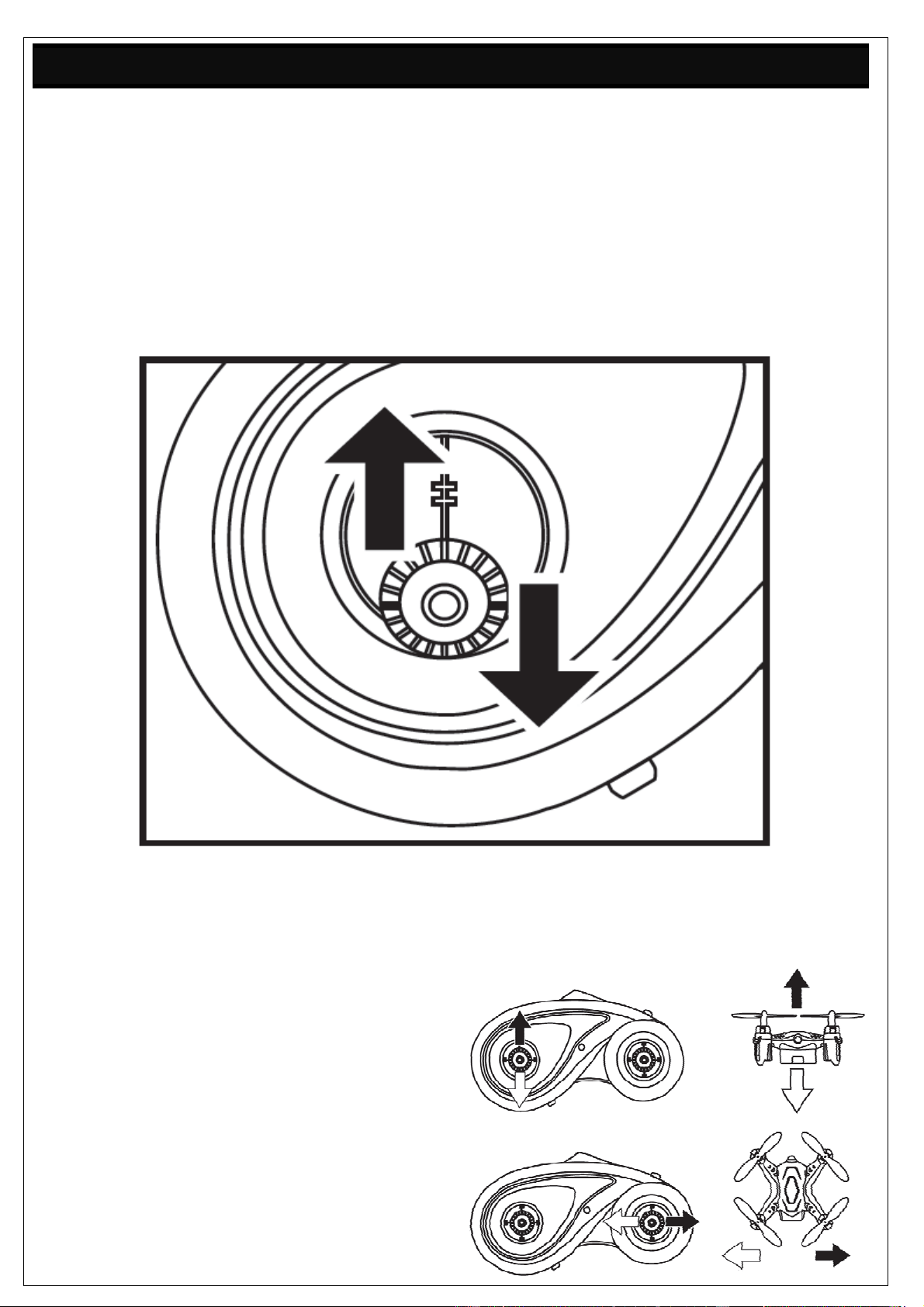
Der mitgelieferte LiPo Akku wird durch das enthaltene USB-Kabel/Lademodul aufgeladen.
Schließen Sie den Akku-Kontakt an die passende Buchse des USB- Kabels an. Beachten Sie, dass
dieser nur in eine Richtung angeschlossen werden kann. Orientieren Sie sich hierzu an der Führung
der Buchse.
Verbinden Sie nun das Lademodul mit einer USB- Quelle, z.B. Ihrem Computer.
Alternativ kann das Lademodul auch mit einem USB- Netzteil betrieben werden.
(Art. Nr. FCHD43).
Die rote LED im USB-Stecker leuchtet während des Ladeprozesses.
Sobald der Akku vollgeladen ist, schaltet sich die LED aus.
www.acme-online.de
ACME the game company
Erste Versuche und Flughinweise
Bevor Sie Ihre ersten Flugversuche machen, achten Sie darauf das sich keine weiteren Personen oder
Tiere im Umkreis befinden.
Halten Sie sich eine Fläche von 3x3 Metern frei!
Die orangefarbenen Rotorblätter stellen die Frontseite des Modells da. weißen Rotorblätter markieren
das Heck des Quadrocopters. Die unterschiedlichen Rotorfarben dienen der einfacheren Orientierung
während des Flugs.
Platzieren Sie den Quadrocopter auf einer geraden Ebene. Der Ein-/Aus Schalter ist an der Rückseite
des Modells angebracht. Schalten Sie das Modell ein.
Aktivieren (linker unterer Schiebeschalter) Sie nun die Fernbedienung und bewegen Sie den Linken
Gashebel zweimal hoch und runter. Der zoopa Q ist nun mit der Fernbedienung verbunden.
Geben Sie zunächst nur sehr wenig Gas, um die Funktion der Rotoren zu testen
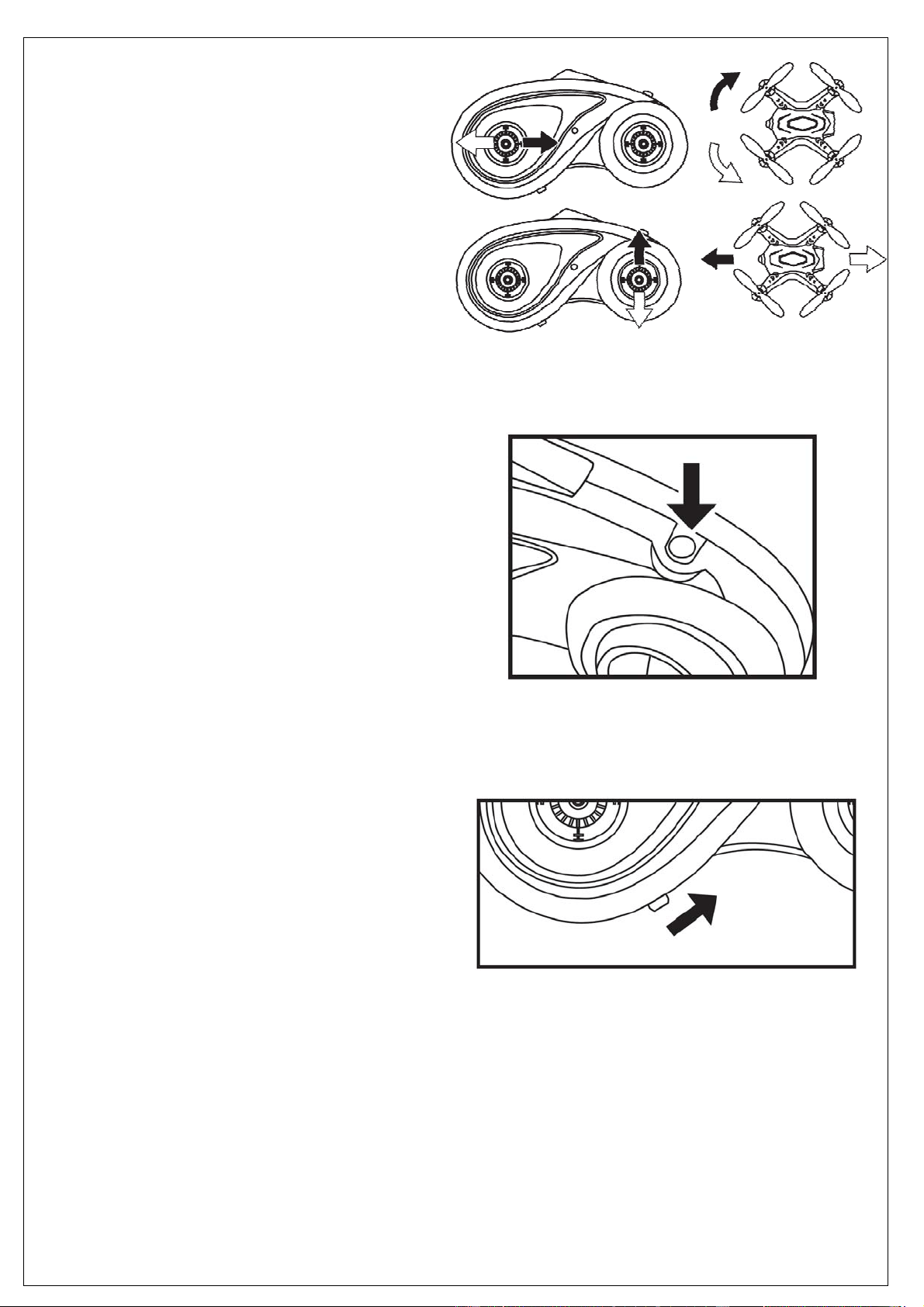
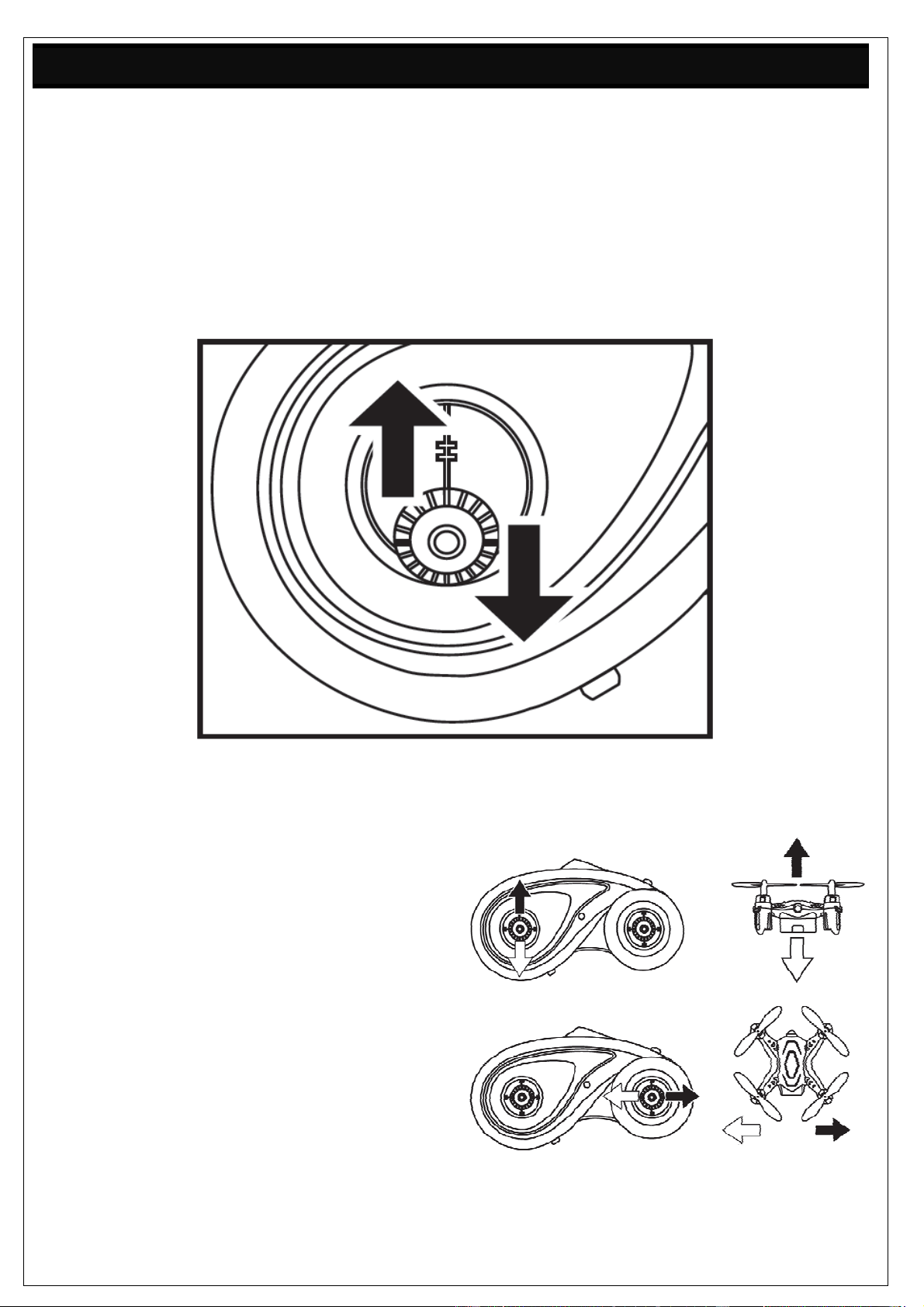
Steigen / Sinken
Bewegen Sie den Gashebel (linker) nach oben,
um das Modell steigen und ab um das Modell
sinken zu lassen.
Rechts / Links
Bewegen Sie den Controllstick (rechter) nach links
oder rechts, um das Modell nach links oder rechts
schwenken zu lassen.
www.acme-online.de
ACME the game company
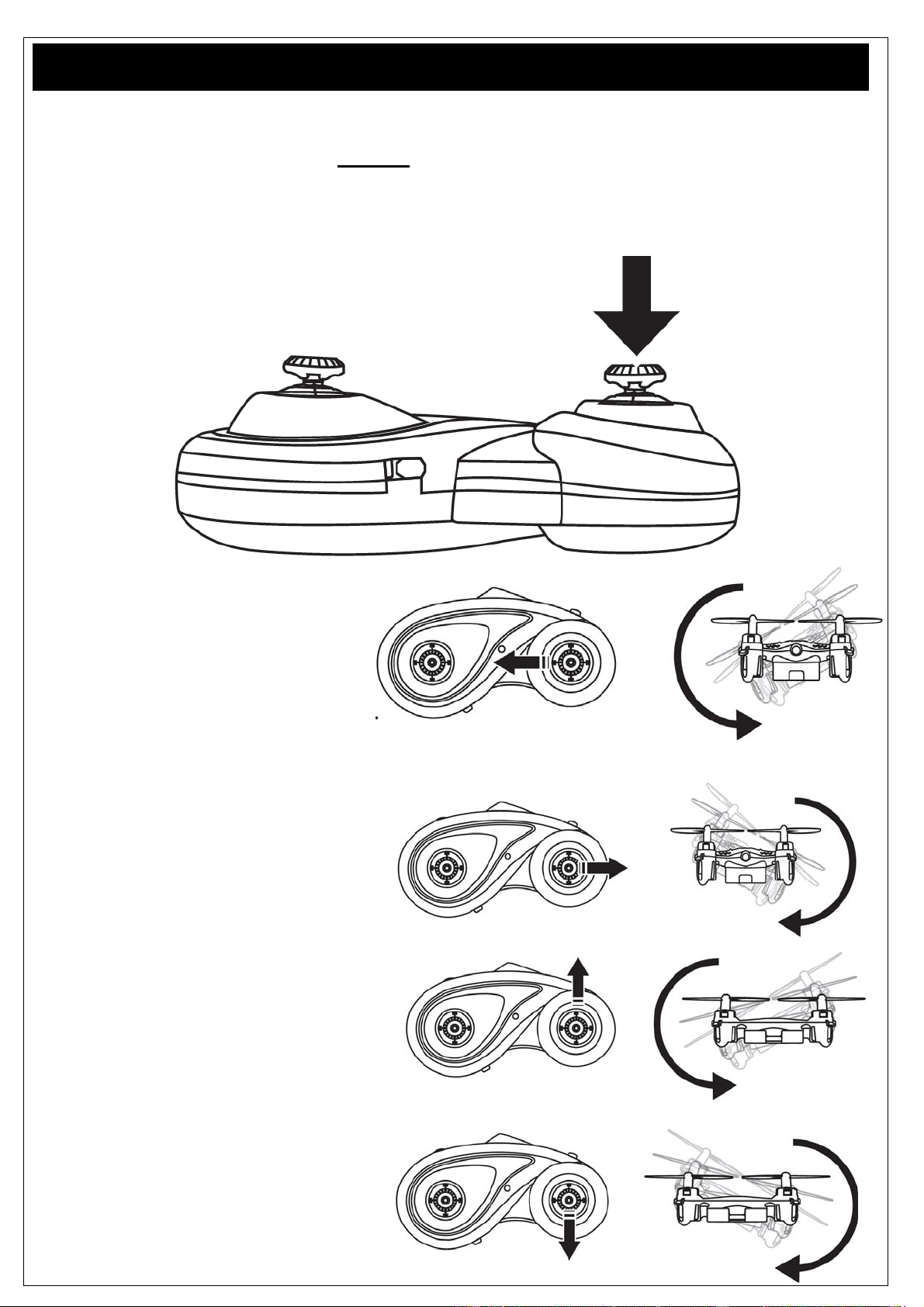
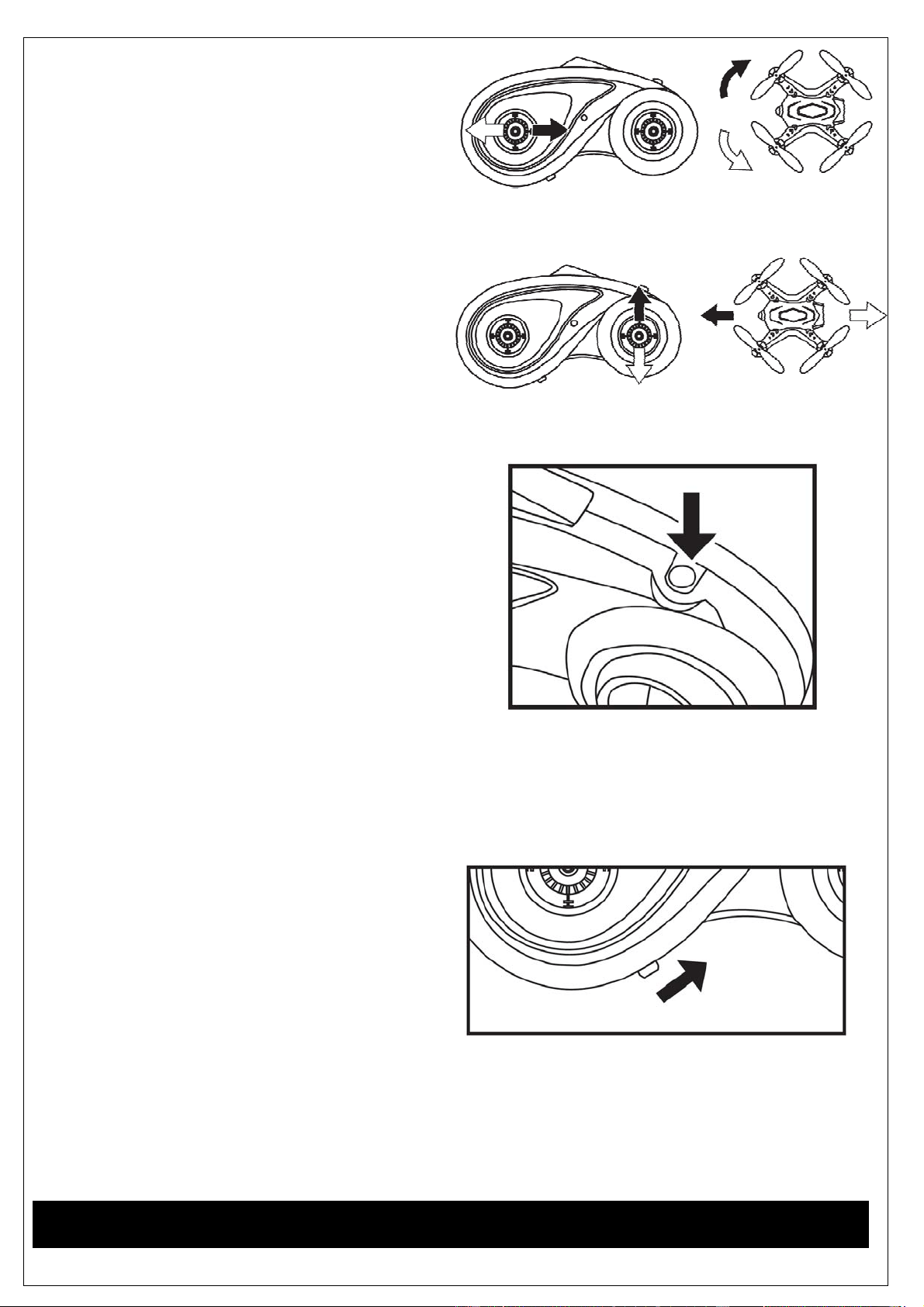
Drehung
Bewegen Sie den linken Hebel nach
links oder rechts, um das Modell um die
eigene Achse zu drehen.
Vorwärts / Rückwärts
Bewegen Sie den Controllstick (rechter)
nach oben, um nach Vorne
zu fliegen und nach unten, um rückwärts zu fliegen.
Trimmen
Sollte der Quadrocopter während des Flugs in eine
bestimmte Richtung abdriften, können Sie den
Trimm- Modus über die abgebildete Taste aktivieren
(oben rechts auf der Fernbedienung).
Betätigen Sie nun den rechten Stick (Richtungshebel),
um das Modell auszubalancieren. Steuern Sie immer in
die entgegengesetzte Richtung des Drifts.
Driftet Ihr zoopa Q zepto 55 beispielsweise nach Vorn,
so können Sie dies durch Rückwärtsfliegen im
Trimm- Modus korrigieren. Um den Trimm- Modus
wieder zu deaktivieren, drücken Sie die Taste erneut. Gibt es keine Aktivität seitens des Piloten,
beendet sich der Trimm- Modus nach 3 Sekunden selbstständig.
Anfänger- / Profi Modi
Der untere linke Schiebe schaltet die
Fernsteung (Position mitte) ein.
Auf der rechte Position wird das Modell agiler.
Dieses sollten Sie erst nach ein paar Akkuladungen
nutzen.
www.acme-online.de
ACME the game company
360° Flip Funktion
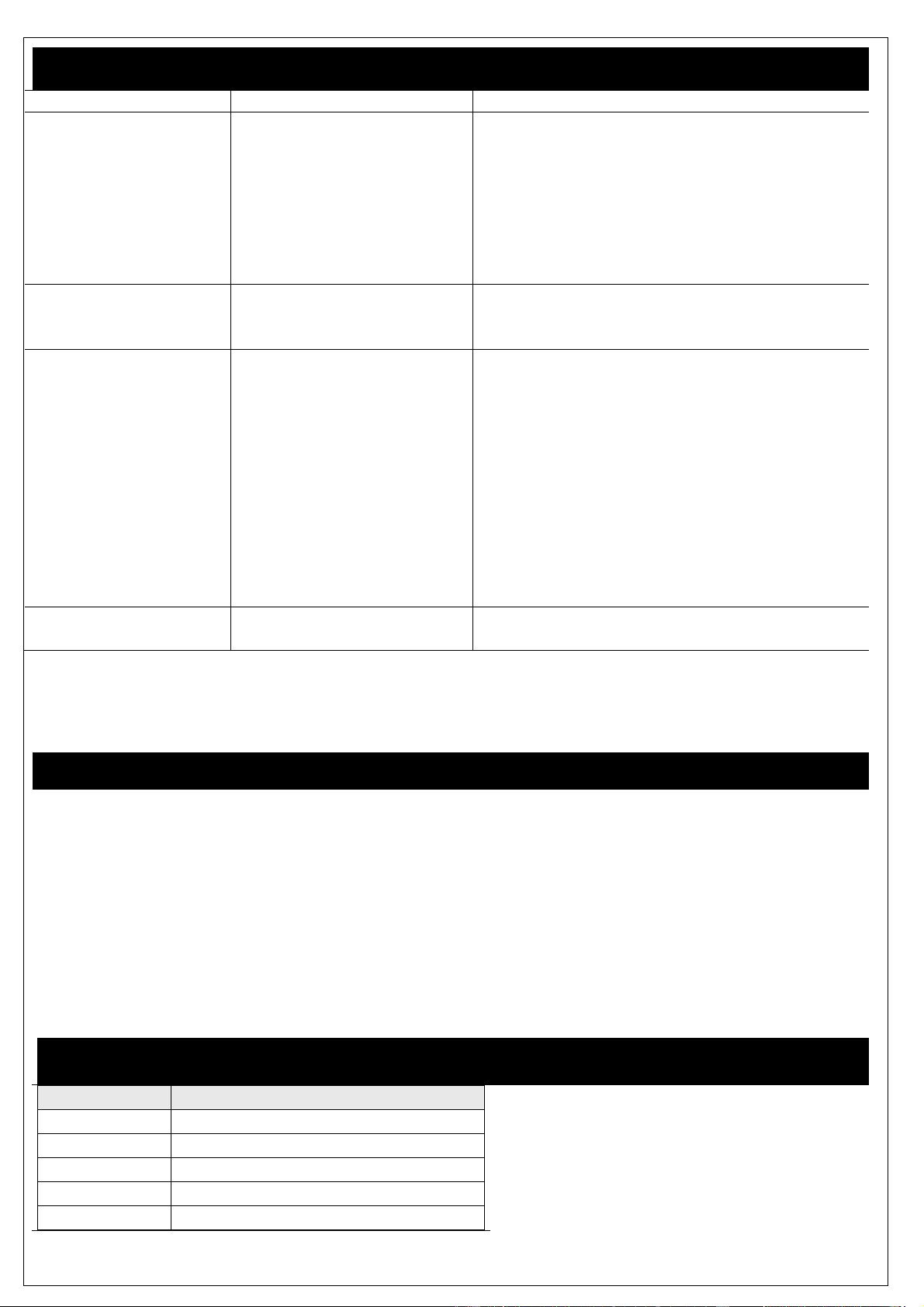
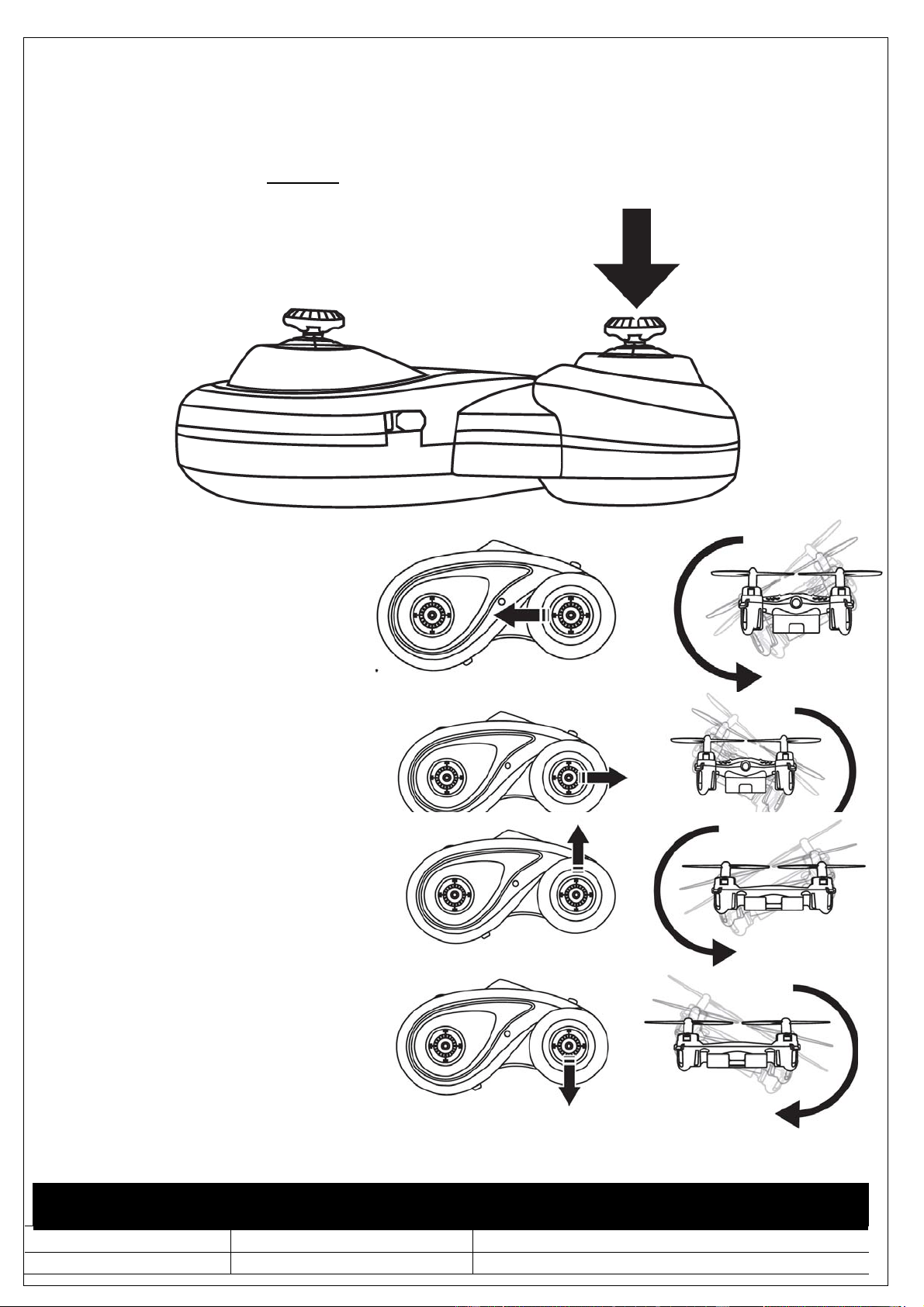
Das Modell bietet eine Flip Funktion an.
Um in den Flip- Modus zu gelangen, drücken Sie bitte den rechten Hebel nach unten. Stellen Sie
sicher, dass das Modell ausreichend Höhe gewonnen hat (mindestens 50cm). Führen Sie einen Flip
erst dann aus, wenn Sie mit der Steuerung des Modells vertraut sind. Wenn die Akkuleistung dafür
nicht mehr ausreicht, wird diese Option vom Modell nicht mehr ausgeführt.
Links- Flip
Um einen Links-Flip auszuführen,
bewegen Sie den rechten Hebel nach
links.
Rechts- Flip
Um einen Rechts- Flip auszuführen,
bewegen Sie den rechten Hebel nach
rechts.
Vorwärts- Flip
Um einen Vorwärts-Flip auszuführen,
bewegen Sie rechten Hebel nach vorne.
Rückwärts- Flip
Um einen Rückwärts -Flip auszuführen,
bewegen Sie rechten Hebel nach hinten.
www.acme-online.de
ACME the game company
Fehlersuche und Lösungen
Fehler Ursache Lösung
Das Modell reagiert
nicht auf
Steuerbefehle
Batterien der
Fernbedienung nicht
korrekt eingelegt.
Batterien sind leer
Modellakku leer
Batterien überprüfen
Batterien ersetzen
Laden Sie den Akku auf. Das Modell blinkt
über die LED´s.
Das Modell macht
merkwürdige
Geräusche
Propeller /Getriebe
beschädigt
Überprüfen Sie die Propeller/Getriebe. Ggf.
tauschen Sie diese aus
Die Fernsteuerung hat
keine Verbindung
zum Modell
Akku schwach
Batterien in der
Fernsteuerung sind leer
Akku defekt
Das Modell ist außer
Reichweite
Akku laden. Das Modell blinkt über die LED´s.
Batterien der Fern-bedienung austauschen
Ggf. muß der Akku ersetzt werden
Das Modell fliegt nicht
mehr ausreichend
Ein Motor hat nicht mehr
die volle Leistung
Überprüfen Sie alle Motoren auf Funktion.
Ggf. tauschen Sie diese aus
Bei weiteren Problemen können Sie uns jederzeit kontaktieren!
Unsere Kontaktdaten finden Sie auf der nächsten Seite unter “Service & Support”.
Akku Pflege
Um das Optimum aus dem eingebauten LiPo-Akku raus zuholen, beachten Sie bitte folgende Punkte:
-das Flugmodell nie eingeschaltet lagern, immer beim Nichtgebrauch ausschalten
-beim Lagern (länger als 2 Tage) den LiPo-Akku min. zu 85% laden
-bei längerer Lagerung (>5 Tage) immer wenn möglich die Verbindung vom Akku zum Flugmodell
abziehen
-Lagerung nur bei Zimmertemperatur
-Laden Sie den Akku regelmäßig alle 3 Monate nach, wenn das Flugmodell nicht genutzt wird
Wenn diese Punkte nicht beachtet werden, kann der LiPo-Akku beschädigt bzw. zerstört werden.
Dieses ist grundsätzlich bei LiPo-Akkus physikalisch bedingt und kann abgewandt werden.
Ersatz- und Zubehörteile
Artikelnummer Kurzbezeichnung
ZQ0055 zoopaQzepto55
ZQ0055‐A zoopaQzepto55ProppellerSet
ZQ0055‐B zoopaQzepto55LiPoAkku
ZQ0055‐C zoopaQzeptoUSB‐Kabel
ZQ0055‐D zoopaQzepto55Fernsteuerung
www.acme-online.de
ACME the game company
Gewährleistung und Garantie
Dem Verbraucher wird unbeschadet seiner Mängelansprüche gegenüber dem Verkäufer eine
Gewährleistung zu den nachstehenden Bedingungen eingeräumt:
» Neugeräte und deren Komponenten, die aufgrund von Fabrikations- und/oder Materialfehlern
innerhalb von 24 Monate ab Kauf einen Defekt aufweisen, werden von ACME the game company
nach eigener Wahl gegen ein dem Stand der Technik entsprechendes
Gerät kostenlos ausgetauscht oder repariert. Für Verschleißteile (z. B.: Akkus, Motoren usw.) gilt
diese Haltbarkeitsgarantie für 3 Monate ab Kauf.
» Diese Gewährleistung gilt nicht, soweit der Defekt der Geräte auf unsachgemäßer Behandlung
und/oder Nichtbeachtung der Anleitung beruht.
» Diese Gewährleistung erstreckt sich nicht auf vom Kunden selbsterbrachte Leistungen.
» Gewährleistungsansprüche sind sofort nach Kenntnis des Garantiefalles geltend zu machen.
» Ersetzte Geräte bzw. deren Komponenten, die im Rahmen des Austauschs an ACME the game
company zurückgeliefert werden, gehen in das Eigentum von ACME the game company über.
» Durch eine erbrachte Gewährleistung verlängert sich der Gewährleistung-Zeitraum nicht.
» Soweit kein Gewährleistungsfall vorliegt, behält sich ACME the game company vor, dem Kunden
den Austausch, die Reparatur oder die Versandkosten in Rechnung zu stellen. Der Kunde wird
hierüber vorab informiert.
Schäden durch mechanische Einwirkungen oder Umbauten sind von der Gewährleistung
ausgeschlossen.
Service & Support
ACME the game company GmbH
Boikweg 24
33129 Delbrück
Germany
Tel.: +49 2944-973830
E-Mail: [email protected]
Web: www.acme-online.de
www.acme-online.de
ACME the game company
Manual
Please read carefully before first use!
Manual
Technical Data
Size: 50x50x25mm
Weight: approx. 8g
Recommended Age: 10+ years
Field of use: Indoor
Battery: 3.7V LiPo; 100mAh
Controller: 2.4 GHz
Vers.: 1.0
© Copyright 2015 ACME the game company GmbH
www.acme-online.de
ACME the game company
Safety advice
WARNING:
NOTE THE FOLLOWING ADVICE,
TO AVOID DAMAGES AND SHORTCUTS:
ONLY USE RECOMMENDED SPARE PARTS
DO NOT DISSAMBLE THE PRODUCT
INNER PARTS CAN BE REPAIRED BY THE USER.
PLEASE CONTACT QUALIFIED STAFF IF YOU ARE NOT
FAMILIAR WITH RC-MODELS.
SERVICE & SUPPORT
ACME the game company GmbH
Boikweg 24
33129 Delbrück
Germany
Tel: +49 2944 973830
service@acme-online.de
or
http://www.acme-online.de
SAFETY ADVICE
Danger of fire and explosion occurs if a battery is not connected properly.
Always charge LiPo batteries under supervision.
Please stop charging if you notice a deformation or if the battery is blowing up!
Charge LiPo batteries at 15-25°C.
Avoid heating of over 50°C at discharge.
Do not shortcut, never throw into fire!
Only use original batteries.
-Always use the original LiPo- battery
-Do not use if the battery deforms, discolors or softens
-Store the battery at temperatures between 15° and 25° at dry and dark places. The charging capacity shall be at min.
75%
-Store away from children and pets
-Keep away from fire, water, heating sources and foreign matters that can cause a shortcut
-Always use the original charger which is placed on a fireproof surface
-Avoid mechanical exposure and do not open
-NEVER SHORTCUT
-Do not touch the battery if gas or liquid leaks out of the battery
-Improper handling may result into health problems
-Dispose wasted batteries properly
-Never exhaust the battery
CE Declaration
Herewith we declare that this item is in accordance with the
essential requirements and other relevant regulations of the
directive 1999/5/EC. A copy of the original declaration of
conformity can be obtained at the address above.
WEEE Reg. Nr.: DE64989527
Information for disposal of crossed Bin marked products
This symbol is marked on a product or packaging, it
means that the product including the batteries must
not be disposed of with your general household
waste. Only discard electrical/electronic items in
separate collection schemes, which cater for the
recovery and recycling of materials contained within.
Your co-operation is vital to ensure the success of
these schemes and for the protection of the
environment.
This product uses LiPo batteries. LiPo batteries are recyclable,
and a valuable resource. To dispose of the battery, remove it and
take it to a resource recovery facility.
ATTENTION!
Choking hazard – Not for children under 3 years!!!
www.acme-online.de
ACME the game company
Content of the box
Please check the completeness before you use the product!
1x zoopa Q55 Quadrocopter
1x 2.4GHz Controller 1x USB- Charger 1x spare propeller
1x LiPo Battery (already integrated) 1x Manual
Additionally, you need 3pcs. AAA batteries!
www.acme-online.de
ACME the game company
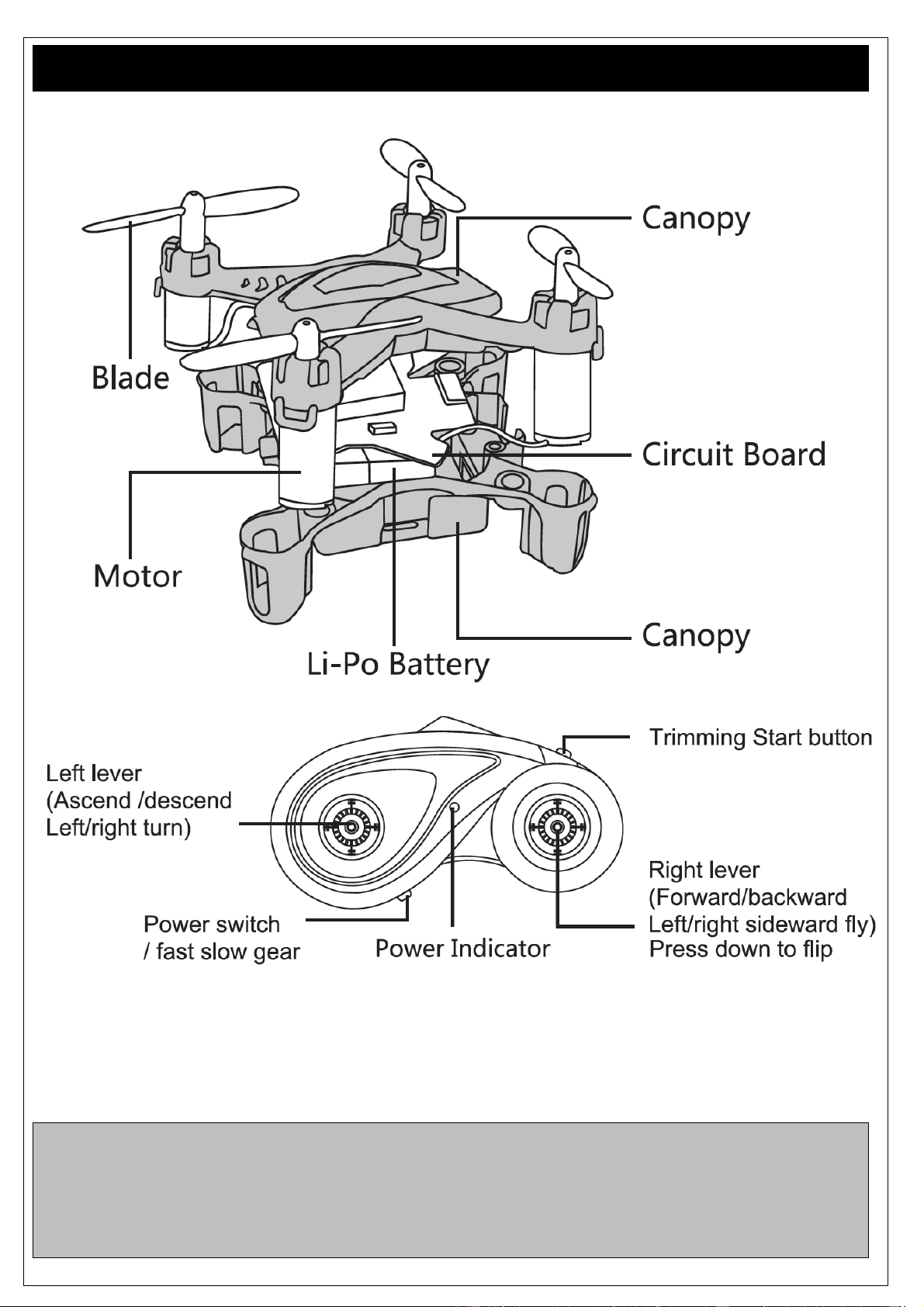
Structure
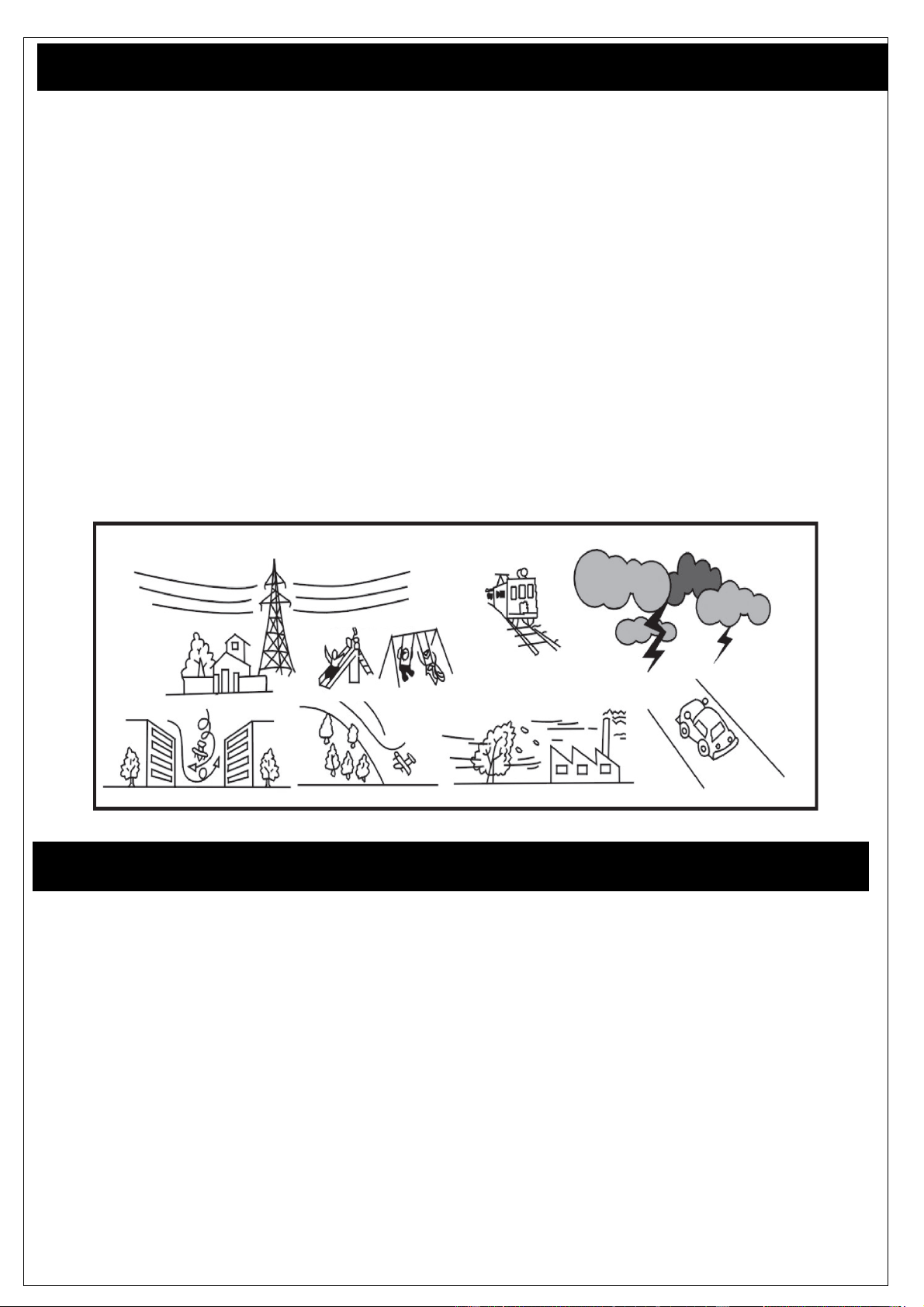
Please note!
Never fly if there are any people, animals or obstacles around!
Never fly at strong wind or bad weather!
Make sure that you are allowed to fly in the area you are using the model!
Always switch on the controller before you switch on the model and make sure that it is switched on
during the use. Do not switch the controller off while the model is working!
www.acme-online.de
ACME the game company
First steps and information
Carefully read this manual.
The zoopa Q 55 zepto is a RTF (Ready-to-Fly) model.
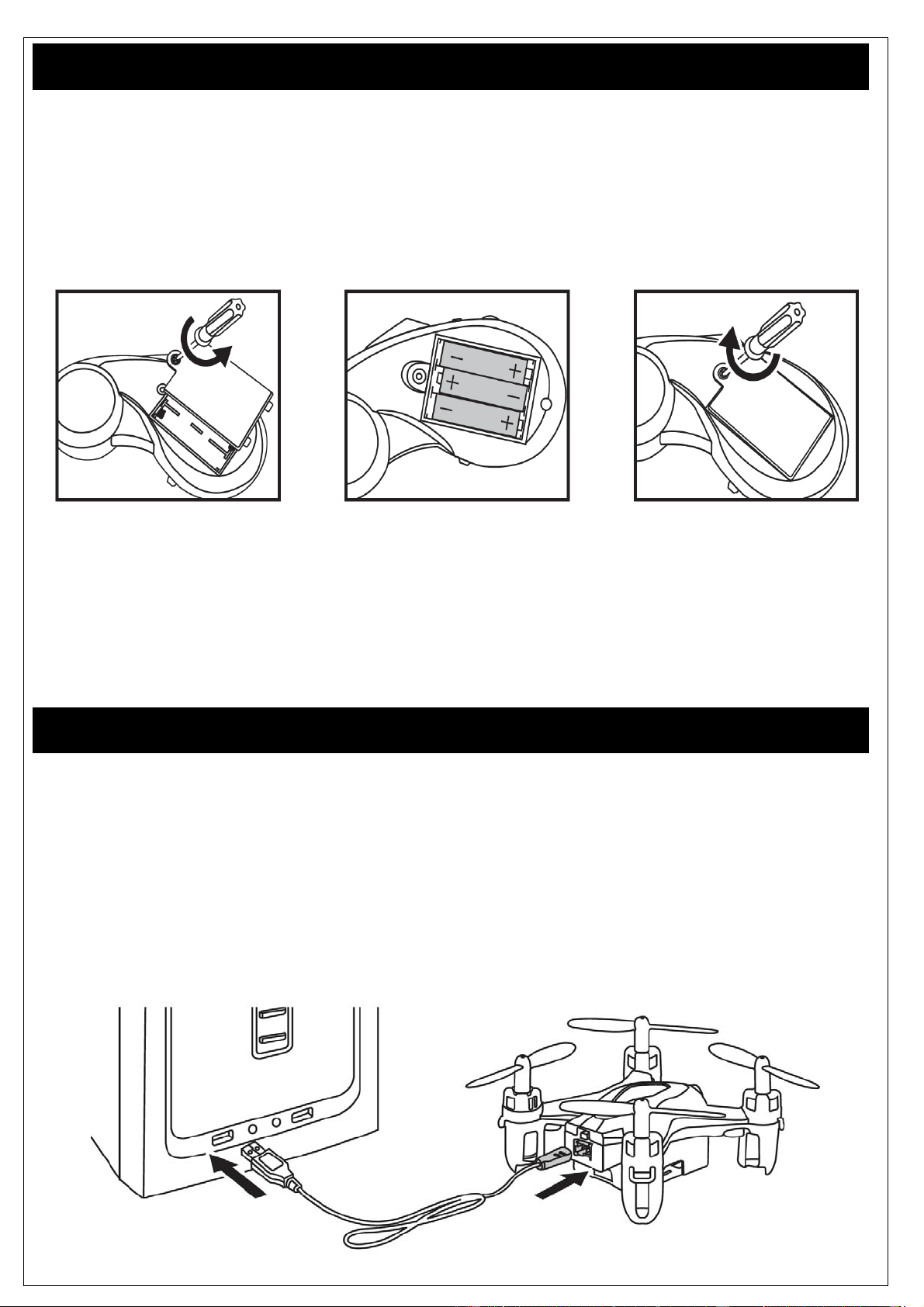
You additionally require 3pcs. 1.5V AAA Mignon batteries for the activation.
Please insert these under attention of the correct polarity (check marks on the inside of the controller)
and then close the controller with the cover of the battery case.
ATTENTION : Only use standard batteries (non-rechargeable). Make sure that these are inserted
correctly (+/-) !
ACME the game company GmbH assumes no liability for privacy violations, personal injury and
damage to private property caused by the user of the model.
Please follow carefully the instructions in this guide step by step, to ensure proper handling.
Charging the battery
The LiPo battery will be charged through the supplied USB- Charger.
Connect the battery with the charger and make sure that it is plugged correctly.
Now connect it to an USB source, for example your computer.
You can alternately use an USB power adaptor.
(Art. No. FCHD43).
The red LED inside the USB plug lights up during charging.
As soon as the battery is fully charged, the LED switches off.
www.acme-online.de
ACME the game company
First tries and flight advices
Before you start your first flight tests, make sure that there are no other people or animals around.
Keep an area of 3x3 meters free!
The orange blades show the front side of the model. The white blades show the tail of the
quadrocopter. The different colors provide a simple orientation during flight.
Place the quadrocopter on a plain surface. The On/Off- switch is placed on the backside of the model.
Switch it on.
Now power up the controller and Move the left gas stick up and down for two times.The zoopa Q and
the controller are now paired.
Power the gas slowly to test all functions at the beginning.
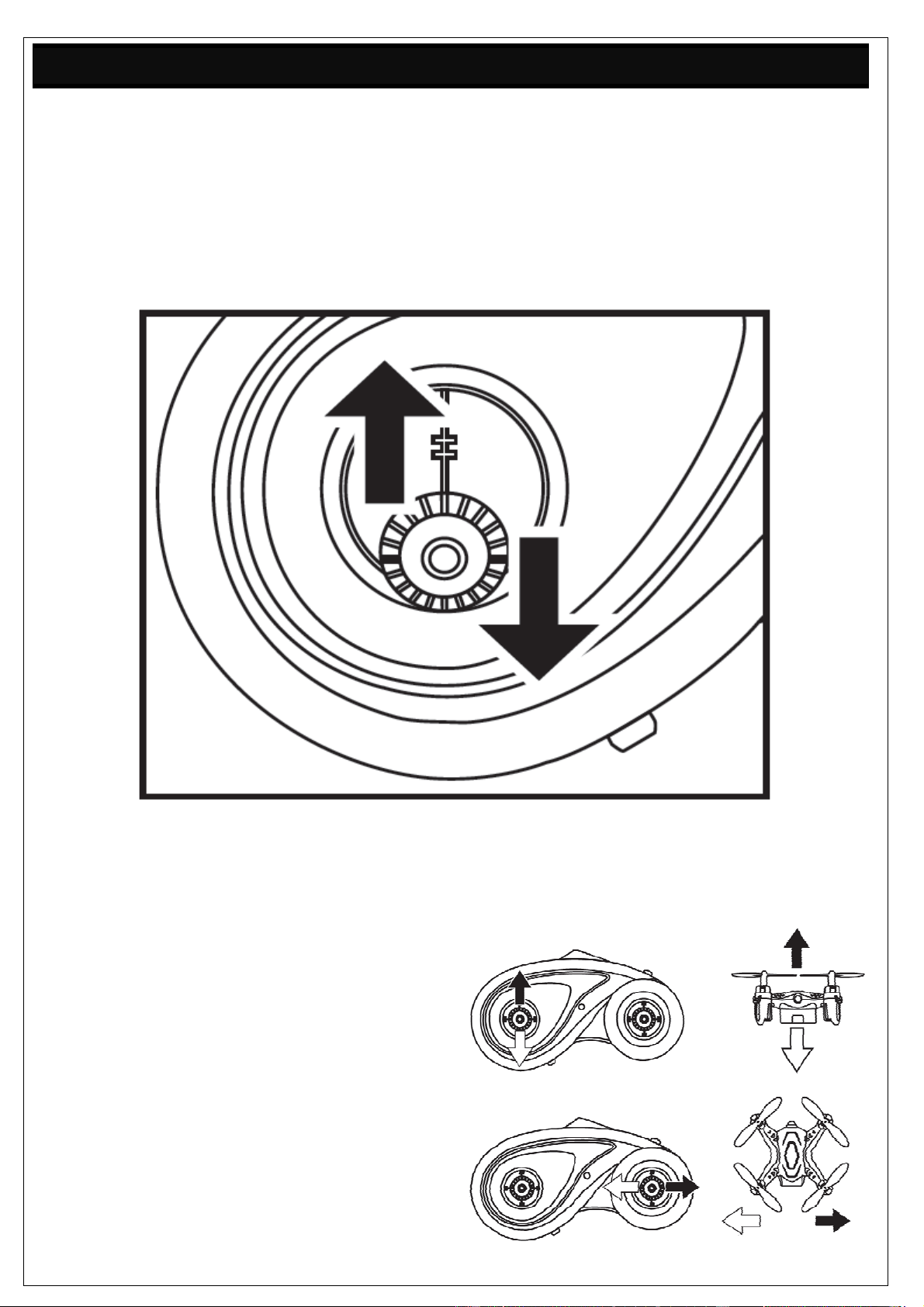
Rise/Descent
Move up the gas stick (left) to lift the model
and move it down to let it sink.
Right/Left
Move the Controllstick (right) to the left or right,
to let the model pan to the left and right.
www.acme-online.de
ACME the game company
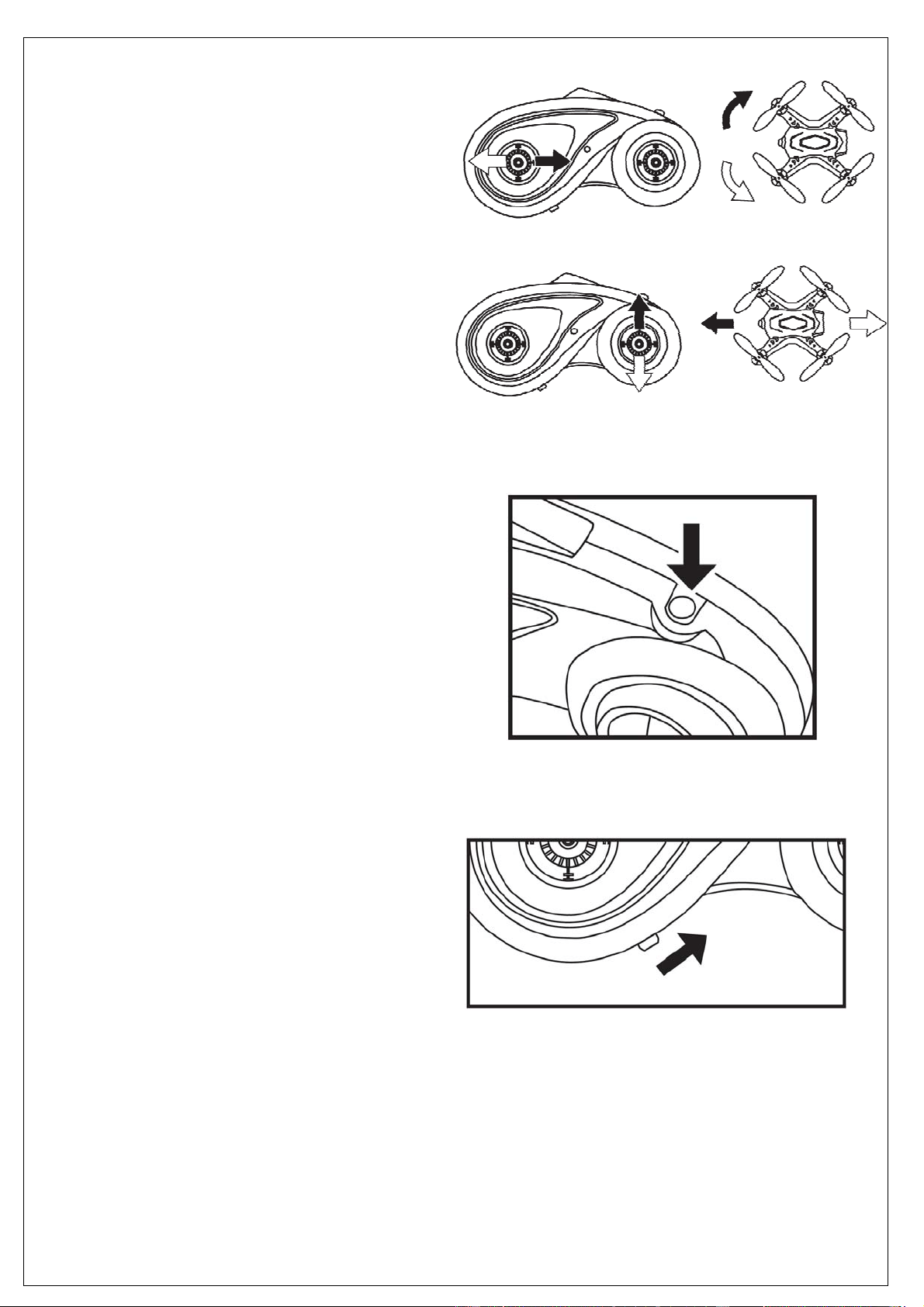
Turn
Move the left stick to the left and right,
to turn the model around its own axis.
Forwards/Backwards
Move the Controllstick (right) up and down,
to fly forwards or backwards.
Trim
If the quadrocopter is drifting towards one direction, you
can activate the trimming mode (upper right corner
of the controller).
You can now balance the model by using the right
stick (control stick). Always control towards the
opposite direction of the drift.
If for example your zoopa Q zepto 55 is drifting forwards,
You can balance that by flying backwards in the trim
mode. To deactivate this mode, press the button again.
If there’s no further activity by the user, the trim mode
will deactivate itself automatically after 3 seconds.
Beginner- / Professional Mode
The switch on the lower left side activates
the controller (middle position)
When moving the switch to the right, the
professional mode will be activated. This makes
the model faster and more agile. Only use this
mode if you are familiar with the quadrocopter.
www.acme-online.de
ACME the game company
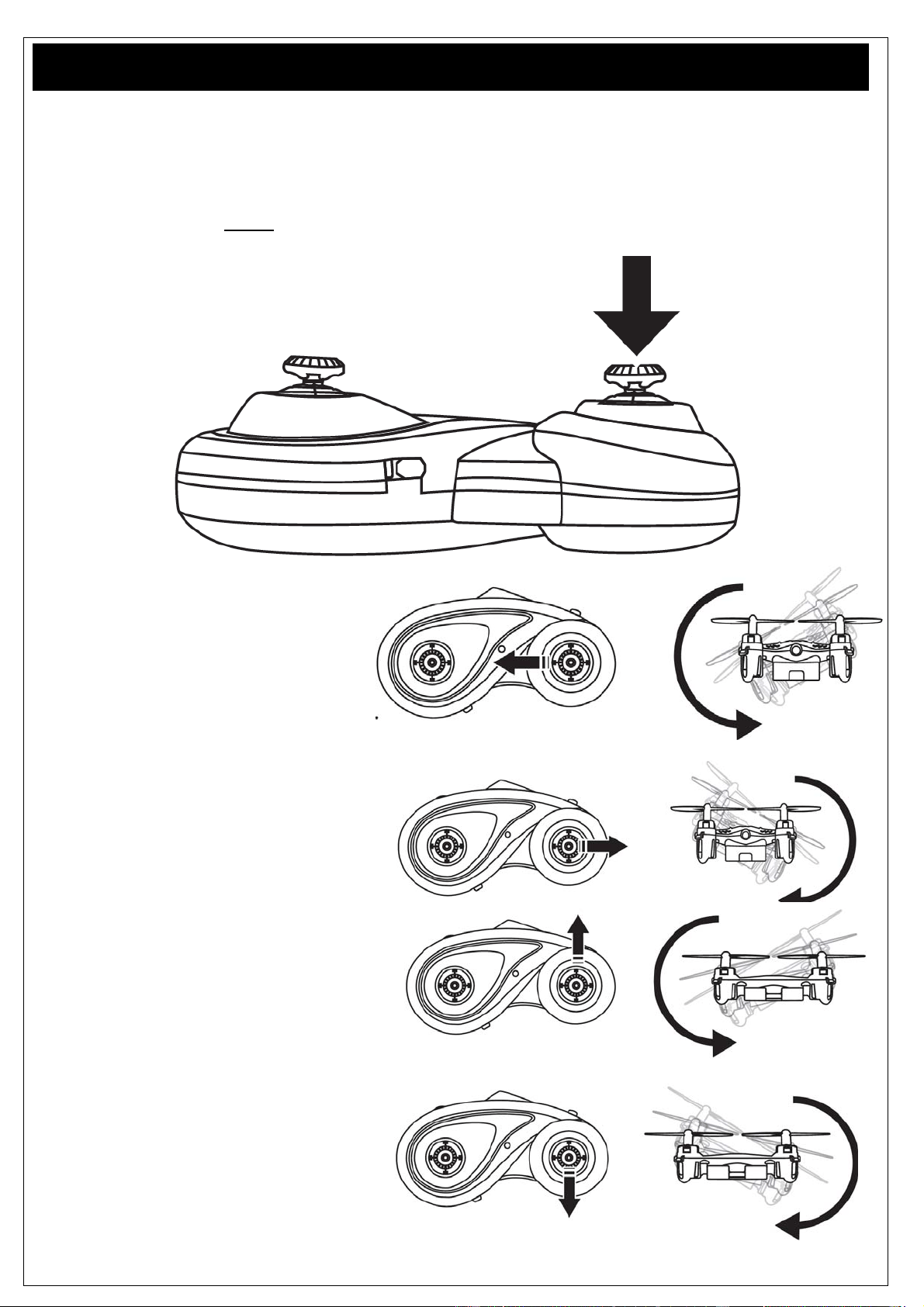
360° Flip Mode
The model offers a Flip Mode. Do not perform the flip before you are familiar with the model and the
controls.
To perform the flip, the model should have gained sufficient height (at least 50cm).
To enter the flip mode, press down the right control stick as shown on the picture.
Left flip
To perform a left flip,
move the stick to the left.
Right flip
To perform a right flip,
move the stick to the right.
Forward flip
To perform a forward flip,
move the stick up.
Backward flip
To perform a backward flip,
move the stick down.
www.acme-online.de
ACME the game company
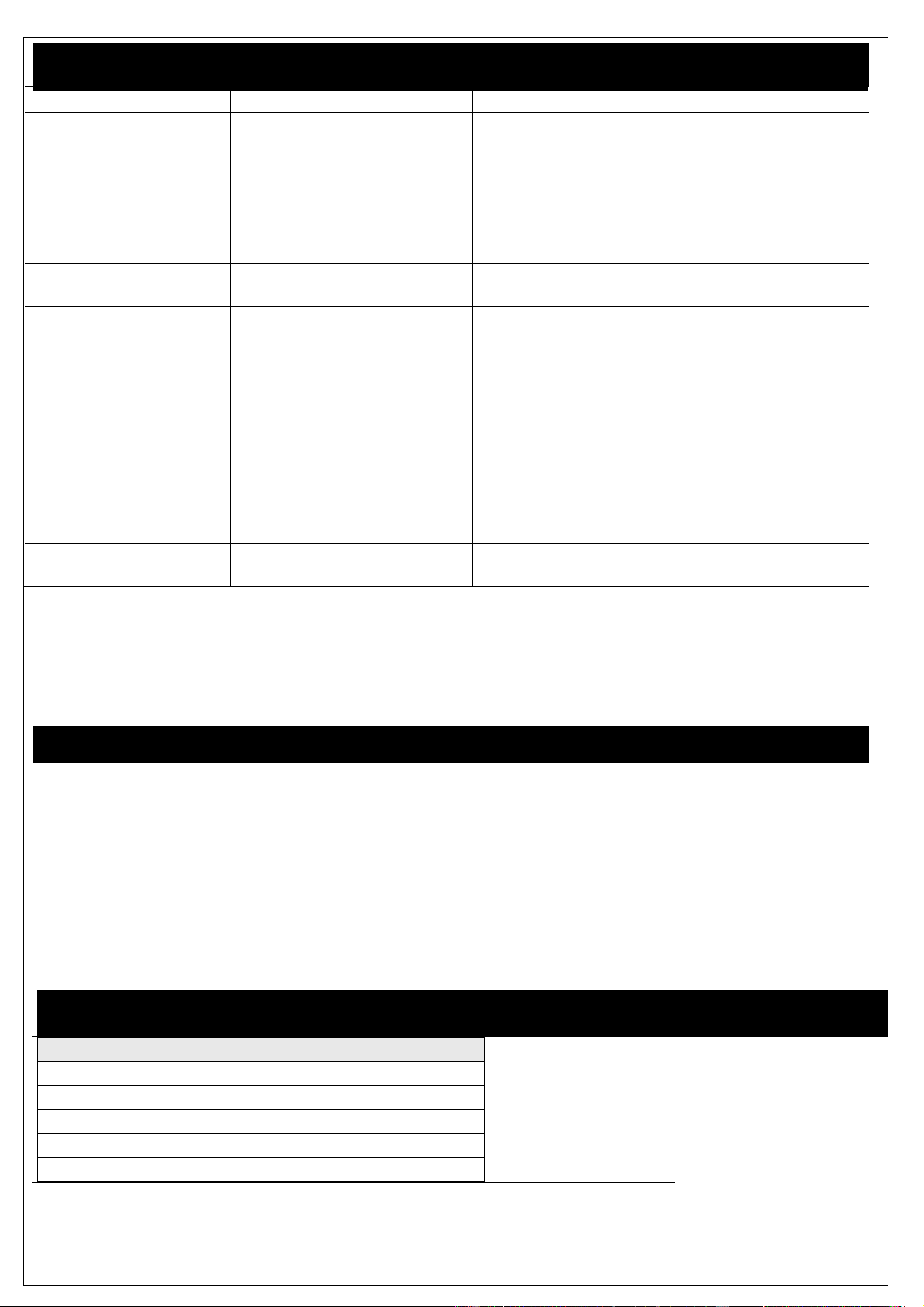
Troubleshooting
Error Source Solution
The model does not
react on commands
Controller batteries are not
inserted correctly.
Batteries are empty
Model battery empty
Check the batteries
Replace the batteries
Recharge the battery
The model makes
strange sounds
Blades/gears are damaged Check the blades/gears. Replace them if
needed
The controller has no
connection to the
model
Weak battery
Controller batteries are not
inserted correctly
Battery defective
The model is out of range
Recharge the battery
Replace the batteries
The battery needs to be replaced
The flight is not
sufficient
The motors have lost
performance
Check the motors and replace them if needed
If you have any further problems, feel free to contact us!
Our details are quoted on the following page at “Service & Support”.
Battery Maintenance
To get the best performance from the integrated LiPo- battery, please note:
-Never leave the model in activated state, always switch off when not using
-For storage (more than 2 days), charge the battery for at least 85%.
-For longer storage, (>5 days) disconnect the battery from the model.
-Only store at room temperature.
-Regularly charge the battery every 3 months if the model is not being used.
If these points are not followed, the LiPo battery can be damaged or destroyed.
Spares and Accessories
Art.No. Description
ZQ0055 zoopaQzepto55
ZQ0055‐A zoopaQzepto55RotorSet
ZQ0055‐B zoopaQzepto55LiPoBattery
ZQ0055‐C zoopaQzeptoUSB‐Charger
ZQ0055‐D zoopaQzepto55Controller
www.acme-online.de
ACME the game company
Warranty
The consumer is without prejudice to any claim against the seller granted a guarantee to the following
conditions:
» New devices and their components exhibiting defects within 24 months from the purchase due to
manufacturing and / or material faults, are ACME the game company at its option, reflecting the
current state of the art
Exchanged or repaired free device. For wear parts (eg batteries, motors, etc.), this warranty is valid
or 3 months from purchase.
» This warranty does not apply if the device defect is due to improper treatment and / or failure to
comply with these instructions.
» This warranty does not extend to self- paid by the customer services.
» Warranty claims are to make immediate payment of the Guarantee case.
» Ownership of devices or components that are returned to ACME the game company as part of the
exchange, shall become the property of ACME the game company.
» By services rendered under warranty, the warranty period is not extended.
» So far there is no warranty case to ACME the game company reserves the right to charge the
customer for replacement, repair, or shipping costs. The customer will be informed in advance.
Damages resulting from mechanical influences are not covered under warranty.
Service & Support
ACME the game company GmbH
Boikweg 24
33129 Delbrück
Germany
Tel.: +49 2944-973830
E-Mail: [email protected]
Web: www.acme-online.de
www.acme-online.de
ACME the game company
Manuel d’utilisation
A lire attentivement avant la première
utilisation!
Manuel
Caractéristiques techniques
Taille: 50x50x25mm
Poids: approx. 8g
Age recommandé: 10+ years
Utilisation: Intérieur
Batterie: 3.7V LiPo; 100mAh
Emetteur: 2.4 GHz
Vers.: 1.0
© Copyright 2015 ACME the game company GmbH
www.acme-online.de
ACME the game company
Conseil de sécurité
Avertissements:
Il est indispensable de suivre les instructions ci-après
afin d’éviter d’endommager votre caméra:
-NE PAS UTILISER LE PRODUIT EN CONDITIONS
PLUVIEUSES.
-N’UTILISER QUE LES ACCESSOIRES
COMPATIBLES
-NE PAS TENTER DE DEMONTER
-AUCUN COMPOSANT INTERNE NE NECESSITE
D’ENTRETIEN PARTICULIER
-LES REPARATIONS NE DOIVENT ETRE FAITES
QUE PAR LE PERSONNEL QUALIFIE.
SERVICE & SUPPORT
ACME the game company GmbH
Boikweg 24
33129 Delbrück
Allemagne
Tel: +49 2944 973830
service@acme-online.de
ou
http://www.acme-online.de
Conseils de sécurité
Risque d’incendie ou d’explosion en cas de mauvais branchement de la batterie.
Vous devez toujours surveiller votre batterie LiPo lorsqu’elle est en charge.
Ne pas charger la batterie si vous remarquez que celle-ci est déformée ou gonflée !
Charger votre batterie LiPo dans un endroit entre 15 et 25°.
Ne pas exposer à une température supérieure à 50°.
Ne pas mettre en court-circuit, ne pas jeter dans le feu !
N’utiliser que la batterie d’origine.
-Toujours utiliser la batterie LiPo d’origine
-Ne pas utiliser en cas de déformation, décoloration ou autre phénomène de déformation
-Conserver la batterie entre 15° et 25° dans un endroit sec à l’abri de la lumière. La capacité de stockage doit être d’au
moins 75%
-Conserver en dehors de la portée des enfants et des animaux
-Tenir à l’écart du feu, de toute source de chaleur ou tout autre élément qui pourrait être à l’origine d’un court-circuit
-N’utilise que le chargeur d’origine que vous positionnerez pour la charge sur une surface ignifugée
-Ne pas tenter de modifier la composition de la batterie et ne pas tenter de l’ouvrir.
-Une utilisation impropre de la batterie pourrait être néfaste pour la santé
-Vous devez rapporter la batterie en fin de vie dans un centre de valorisation des déchets
-Ne pas utiliser la batterie de manière trop intensive et laisser la repose entre chaque cycle de charge et décharge
Déclaration CE
Nous déclarons par la présente que ce produit est en
règle avec les directives relatives aux normes
2004/108/EC.
Une copie de l’original de la déclaration de
conformité est disponible sur simple demande à
l’adresse suivante : [email protected]e
WEEE Reg. Nr.: DE64989527
Informations relatives aux produits recyclables.
Le symbole ici présent sur le produit que vous venez
d’acheter signifie que celui-ci contient des composants
susceptibles d’être recyclés. Pour cette raison vous ne
pouvez pas jeter ce produit avec vos déchets ménagers. Il
est indispensable que vous preniez contact avec un centre
de recyclages des déchets sensibles afin d’assurer le
recyclage de ce produit.
Les batteries en fin de vie doivent être collectées en
vue d’être recyclées.
Vous devez pour cela vous rapprocher du centre de
collecte le plus proche de chez vous.
ATTENTION!
Risque d’étouffement – Ne convient pas aux enfants de moins de 3 ans!!!
www.acme-online.de
ACME the game company
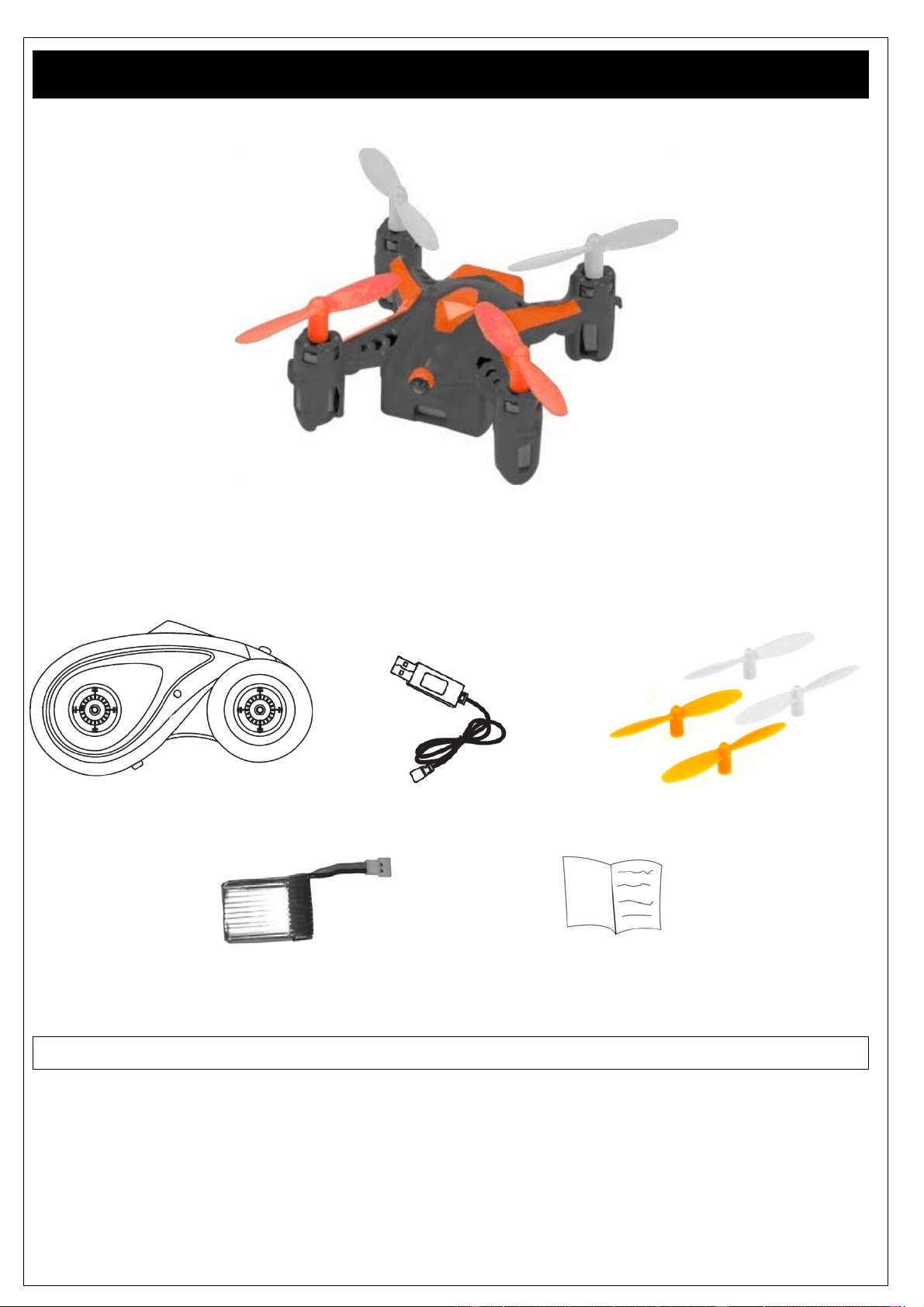
Contenu de la boite
Assurez-vous que le produit est complet avant de commencer à l’utiliser!
1x Quadrocoptère zoopa Q55
1x Emetteur en 2.4GHz 1x Chargeur USB 1x hélice de rechange
1x Batterie LiPo (déjà intégrée) 1x Manuel
Vous aurez besoin de 3 piles de type AAA!
www.acme-online.de
ACME the game company
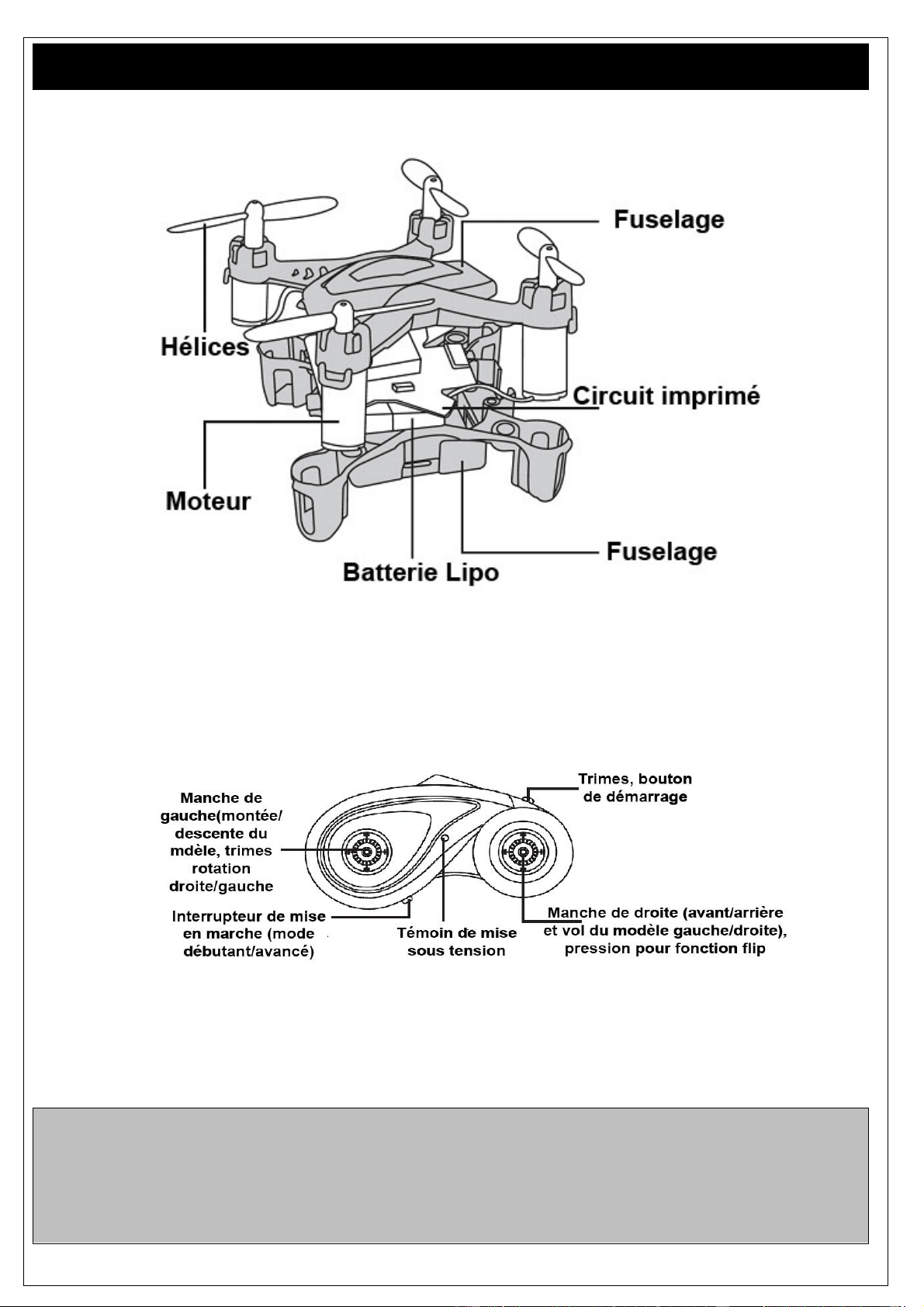
Structure
Note importante!
Ne pas voler en présence de personnes ou d’animaux pouvant être des obstacles !
Ne pas voler en cas de vent fort ou de mauvais temps
Assurez-vous d’avoir l’autorisation de voler dans la zone souhaitée!
Toujours allumer la télécommande en premier avant de branche le modèle ! A l’inverse vous devez
toujours déconnecter votre modèle avant d’éteindre la télécommande !
www.acme-online.de
ACME the game company
Premières étapes et informations
Lire attentivement ce manuel avant d’utiliser le produit.
Le zoopa Q 55 zepto est un modèle RTF (Ready-to-Fly) prêt à voler.
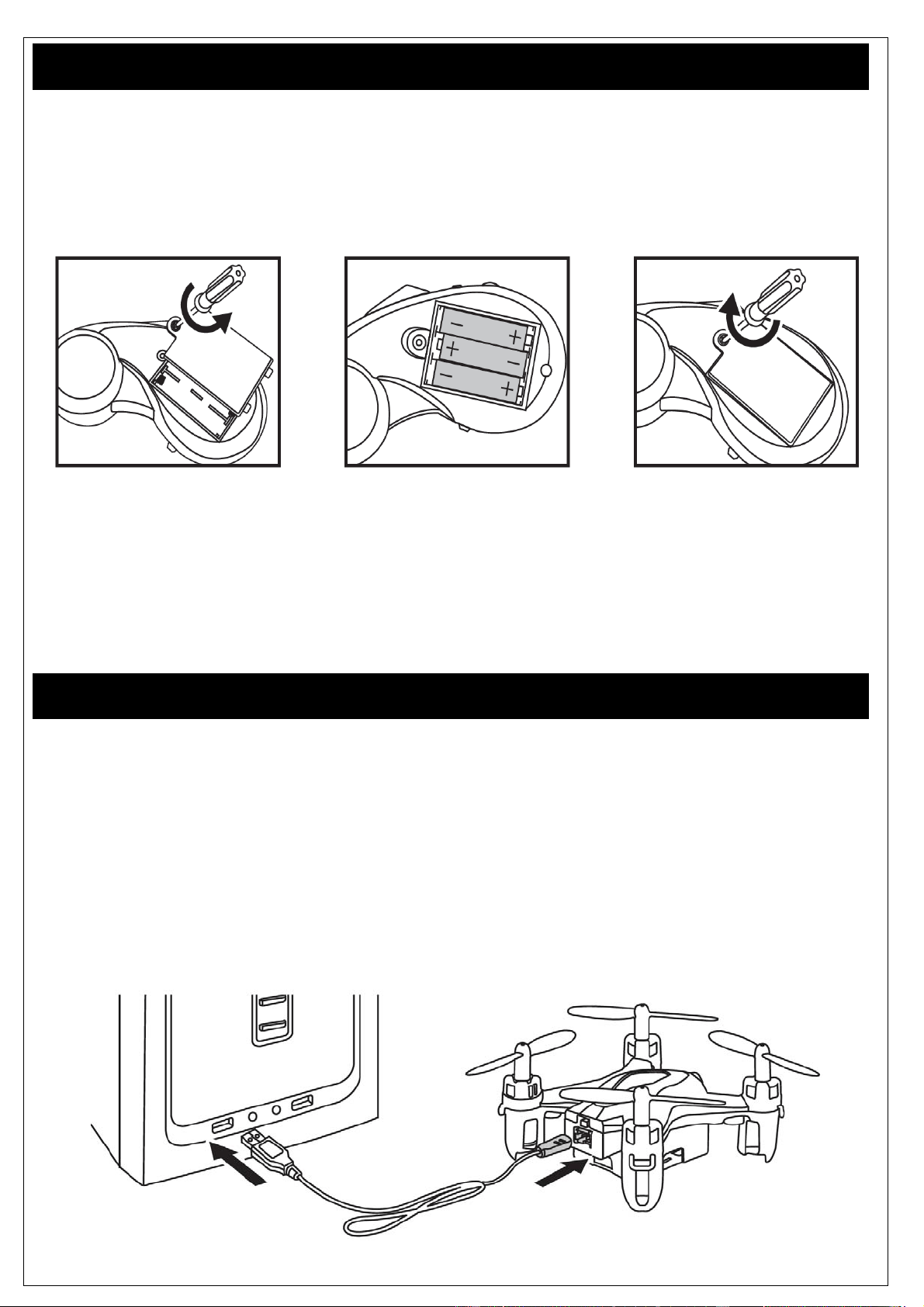
Vous aurez néanmoins besoin de 6 piles de type AA pour l’émetteur. Vérifier le bon positionnement
des piles dans leur logement avant de commencer à utiliser le modèle.
ATTENTION : N’utiliser que des piles standards (pas de piles rechargeables). Vérifier la bonne
polarité (+/-) !
ACME the game company GmbH ne peut être tenue comme resopnsable en cas de violation de la vie
privée, ou en cas de dommages causés à autruit par l’utilisation du présent modèle.
Lire attentivement ce manuel vous permettra s’utiliser ce modèle correctement.
Charge de la batterie
La batterie LiPo se charge avec le chargeur USB livré avec le modèle.
Connecter la batterie au chargeur et assurez-vous que le polarité est correcte.
Connecter à présent le chargeur USB à une source d’alimentation, par exemple votre ordinateur.
Vous pouvez également utiliser l’adaptateur secteur USB.
(Art. No. FCHD43).
Le témoin LED rouge présent sur le cordon de charge USB reste allumé durant la charge.
Une fois que la batterie est chargée, celui-ci va s’éteindre.
www.acme-online.de
ACME the game company
Premiers essais et conseils de vol
Avant de débuter le vol, vous devez vous assurer que aucun animal ou aucune personne ne se
trouvent à proximité.
Conserver une zone de vol d’au moins 3x3 mètres!
Les hélices avant sont de couleur orange et vous permettent de repérer l’avant du modèle.L’arrière du
modèle est équipé d’hélices noires. Il est important de garder ce code couleur our repérer le
positionnement du modèle dans l’espace.
Placer le quadrocoptère sur une surface plane. L’interrupteur On/Off est situé sur la face arrière du
modèle.
Le mettre sur ON. A présent, mettre l’émetteur sous tension, Actionner le manche des gaz situé à
gauche de haut en bas a deux reprises. Le modèle zoopa Q et l’émetteur sont à présent connectés.
Agir sur le manche de l’accélérateur avec précaution afin de tester progressivement toutes les
fonctions.
Montée/Déscente
Pousser sur le manche de l’accélérateur (de gauche)
pour que le modèle décolle. A l’inverse si vous tirez
sur ce manche, le modèle va attérrir.
Droite/Gauche
Agir sur le manche directionnel (de droite), vers la
gauche / droite pour que le modèle se déplace vers
la gauche ou vers la droite.
www.acme-online.de
ACME the game company
Rotation
Agir sur le manche de gauche, vers la gauche et
vers la droite pour que le modèle tourne sur son
axe.
Avant/Arrière
Agir sur le manche directionnel (de droite) vers le
haut et vers le bas, pour avancer ou reculer en vol.
Trimes
Si votre quadrocoptère à tendance à se diriger vers une
direction en particulier, il vous est possible d’activer les
réglages de trimes (en haut à droite de l’émetteur).
Dés lors, vous pourrez équilibrer votre modèle en
utilisant le manche de droite (manche directionnel)
Vous devez toujours agir sur les trimes à l’inverse d’où
le modèle à tendance à se diriger.
Par exemple, si le modèle Q zepto 55 se déplace vers
l’avant, vous devrez agir sur les trimes en plaçant le
manche vers l’arrière.
Pour désactiver ce mode, vous devrez à nouveau
appuyer sur le bouton. Si il n’y a aucun réglage de réalisé,
le mode trime sera désactivé après 3 secondes.
Débutant- / Mode avancé
L’interrupteur situé sur le bas de l’émetteur permet
de le mettre en marche (position du milieu)
Lorsque l’interrupteur est positionné à droite, le
mode avancé est actif. Le modèle est alors plus
rapide et plus agile. N’utiliser ce mode que
si vous êtes habitués au modèle.
Mode Flip 360°
www.acme-online.de
ACME the game company
Le modèle est équipé d’un mode flip. Ne pas tenter d’utiliser cette fonction si vous n’êtes pas habitué
au modèle.
Pour réaliser un flip, le modèle soit se situer à une hauteur d’au moins 50cm.
Pour accéder au mode Flip, appuyer sur le bouton de droite comme illustré sur l’image ci-après.
Flip à gauche
Pour réaliser un flip à gauche,
agir sur le manche vers la gauche.
Flip à droite
Pour réaliser un flip à droite,
agir sur le manche vers la droite.
Flip en avant
Pour réaliser un flip en avant,
agir sur le manche vers l’avant.
Flip en arrière
Pour réaliser un flip en arrière,
agir sur le manche vers l’arrière.
Problèmes d’utilisation
Erreur Origine Solution
Le modèle ne réagit Les piles de la Vérifier la polarité des piles de la
www.acme-online.de
ACME the game company
pas aux commandes télécommande ne sont pas
bien positionnées
Les piles sont vides
Les batteries du modèle
sont vides
télécommande
Changer les piles
Recharger les batteries
Le modèle fait un bruit
étrange
Les hélices / pignons sont
endommagés
Vérifier les hélices, les pignons. Si besoin,
remplacez les.
La télécommande
n’est pas connectée
au modèle réduit
Les batteries sont trop
faibles
Les piles de l’émetteur ne
sont pas insérées
correctement
La batterie est défectueuse
Le modèle est hors de
portée
Recharger les batteries
Remplacer les piles
La batterie soit être changée
Le vol ne dure pas
longtemps
Les moteurs sont trop usés Vérifier les moteurs et si besoin procéder au
remplacement
En cas d’autres problèmes, nous vous invitons à nous contacter! Nos coordonnées sont
situées sur la page suivante “Service & Support”.
Entretien de la batterie
Pour que la batterie LiPo de votre modèle ait le meilleur rendemment nous vous conseillons ce qui
suit :
-Ne jamais laisser le modèle branché lorsque vous ne l’utilisez plus. Placer le modèle sur Off après
utilisation.
-Pour conserver le modèle (+ de 2 jours), la batterie doit être chargée à 85% minimum.
-Pour conserver le modèle plus longtemps, (>5 jours), déconnecter la batterie du modèle.
-Conserver à température ambiante.
-Une charge tous les trois mois est conseillée lorsque vous n’utilisez pas le modèle.
Si vous ne respectez pas ces conseils, la batterie LiPo pourrait être endommagée ou détruite.
Pièces et accessoires
Art.No. Référence
www.acme-online.de
ACME the game company
ZQ0055 zoopaQzepto55
ZQ0055‐A zoopaQzepto55Pales
ZQ0055‐B zoopaQzepto55BatterieLiPo
ZQ0055‐C zoopaQzeptoChargeurUSB
ZQ0055‐D zoopaQzepto55Emetteur
Garantie
Le consommateur sans enguagé aucune action susceptible d’être préjudiciable au vendeur à le droià
une garante de son produit conformément aux conditions ci-après énnoncées :
»Un produit neuf qui durant un délai de 24 mois à partir de la date d’achat, présenterait des défauts de
conception ou de fabrication, ACME the game company assume un support durant toute la période.
Echange ou réparation à titre gratuit. Les pièces d’usure (batterie, moteurs, etc.), bénéficient d’une
garantie de 3 mois maximum.
" La garantie ne s’applique pas si le produit a fait l’objet d’une utilisation non conforme aux instructions
énnoncées dans cette notice.
" La garantie ne peut être allongée et ce même si le vendeur propose une extension.
" Les roduits ou composent qui seraient retournés à la société ACME the game company
deviendraient alors sa propriété.
"La société ACME the game company se réserve le droit de facturer au client toute réparation qui
pourrait dépasser le cadre de la garantie. Le client sera préalablement informé.
Les dommages qui résultent d’une influence méchanique ne sont pas couvert par la garantie.
Service & Support
ACME the game company GmbH
Boikweg 24
33129 Delbrück
Allemagne
Tel.: +49 2944-973830
E-Mail: [email protected]
Web: www.acme-online.de