
logitechG.com
FLIGHT RUDDER PEDALS
Professional Rudder Pedals with Toe Brake Simulation Controller
Pédales de palonnier avec frein à pied pour simulateur pro
USER GUIDE
|
GUIDE DE L’UTILISATEUR
4 English
GETTING STARTED
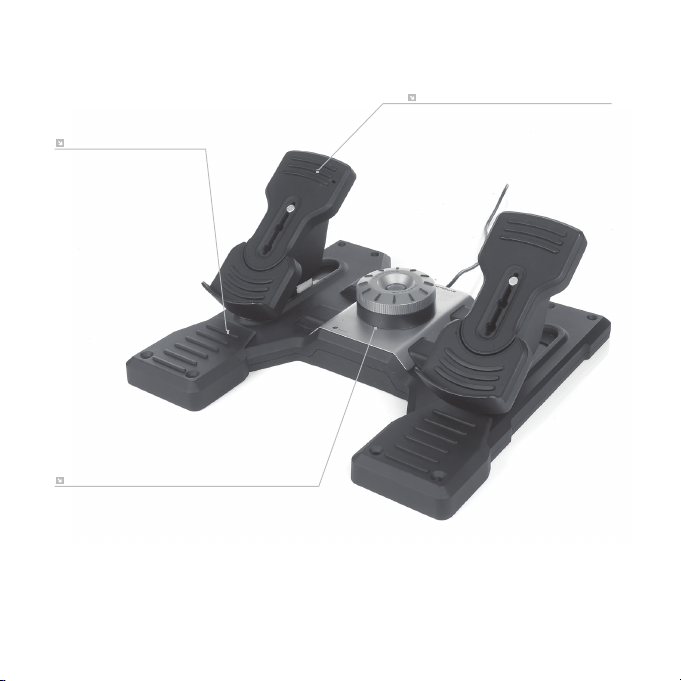
ADJUSTABLE PEDALS
3-stage pedal length adjustment
ADJUSTABLE TENSION
Adjust the resistance to suit any plane
REMOVABLE FOOT RESTS

5 English
INTRODUCTION
Logitech G Flight Rudder Pedals are solid 3-axis rudder pedals designed to maximize
realism by enabling foot control of the rudder and brakes function in ight simulation
PC Games. The Rudder Pedals work with any Logitech G Flight products.
THE USB CABLE
Insert the Logitech G Flight Rudder Pedals USB plug into one of your PC’s free USB
sockets.
INSTALLATION FOR WINDOWS
®
10, WINDOWS
®
8.1
ANDWINDOWS
®
7
DRIVER INSTALLATION
1 Visit logitech.com/support/rudder-pedals to download the latest drivers
and software for your operating system.
2 With device disconnected, follow the onscreen instructions to complete
the installation.
3 At the Driver Setup screen, only when prompted, insert USB cable into one
of your computer’s USB ports, then click Next.
4 At the Driver Setup screen, click Next to test your controller.
5 When the Logitech Controller screen appears, test the controls to verify device
operation. After the test, click OK.

6 English
SOFTWARE INSTALLATION
1 In the Software Setup screen, click Next and a pop-up box will ask if you “want to
trust software from Logitech.” Click yes, then click Next.
2 After installation, you have the option to Run Prole Editor, which will show you
the programming environment. To skip the Prole Editor now, uncheck the box
and click Finish to complete installation.
TECHNICAL SUPPORT
Online Support: support.logitech.com
