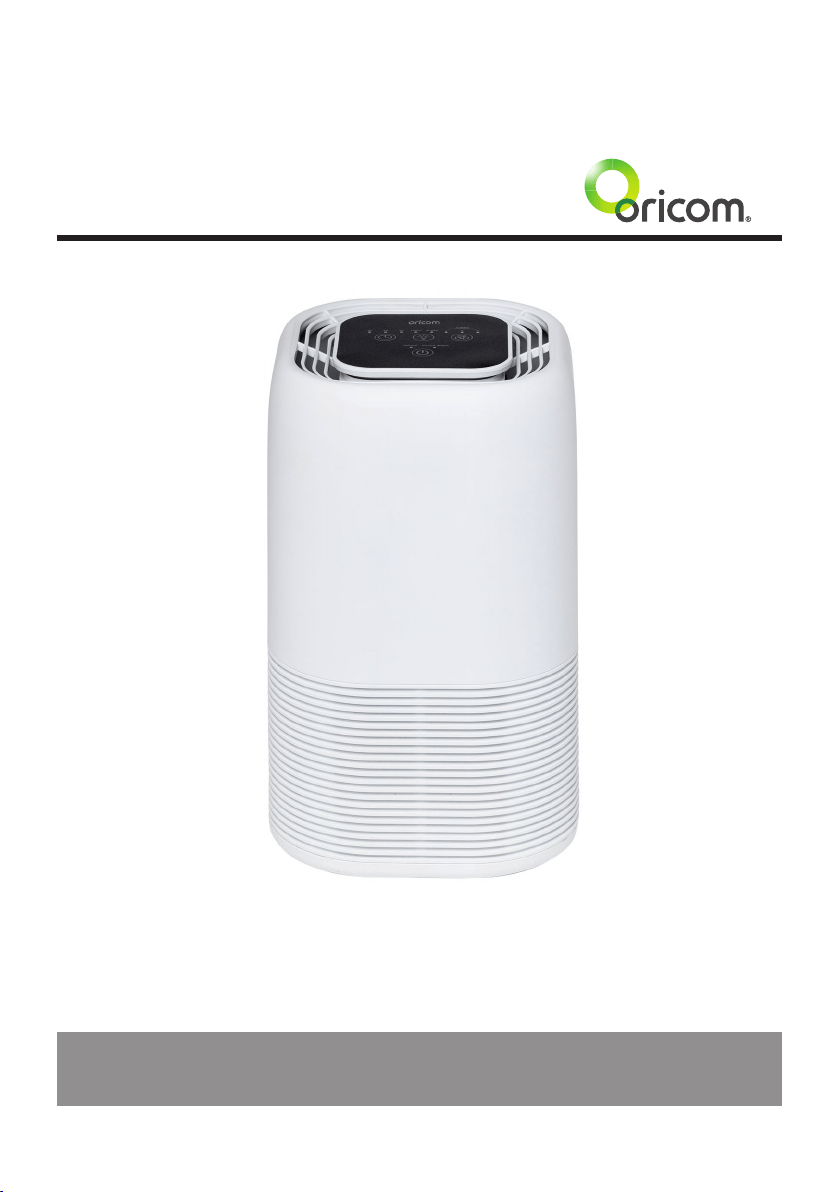
Oricom AP8030 Air Purier
User Guide
KEEP THIS USER GUIDE FOR FUTURE REFERENCE
Always retain your proof of purchase in case of warranty service.
www.oricom.com.au

2
Safety Information and Warnings .........................................................................3
Product Structure .................................................................................................5
Air Purifying System ............................................................................................6
Operating Instructions ..........................................................................................6
Operating the Air Purier ......................................................................................7
Installing & Removing Filters ................................................................................8
Specications ......................................................................................................9
Troubleshooting ...................................................................................................9
Express Warranty (Australia) ..............................................................................10
Need Help?
If you need assistance setting up or using your Oricom product now or in the future, call Oricom
Support.
Australia (02) 4574 8888
www.oricom.com.au
Mon-Fri 8am – 6pm AEST
New Zealand 0800 674 266
Mon-Fri 10am – 8pm NZST
Table of Contents

3
Safety Information and Warnings
This product should be used only in accordance with the specications outlined in this user guide.
Usage other than what has been specied here may result in serious injury.
When using electrical appliances, basic precautions should always be followed to reduce the risk of
re, electric shock and injury to persons, including the following;
•Priortorstuse,removeandsafelydiscardanypackagingmaterialandpromotionallabelsbefore
usingtheAP8030airpurier.
•Toeliminateapotentialchokinghazardforyoungchildren,discardtheprotectivecoverttedtothe
power plug of this air purier.
•Readallinstructionsbeforeuse.
•Keepthecordoutofheavytrafcareas.Toavoidarehazard,NEVERputthepowercordunder
rugs,nearheatregisters,radiator,stovesorheaters.
•Toprotectagainstelectricalhazards,DONOTimmerseinwaterorotherliquids.DONOTusenear
water.
•DONOTuseinhighhumidityareassuchasbathrooms/showers/swimmingpoolsorspas.
•Thisapplianceisnotintendedforusebypersons(includingchildren)withreducedphysical,
sensoryormentalcapabilities,orlackofexperienceandknowledge,unlesstheyhavebeengiven
supervisionorinstructionconcerninguseoftheappliancebyapersonresponsiblefortheirsafety.
•Childrenshouldalwaysbesupervised,inensuringthattheydonotplaywiththeairpurier.
•NEVERdroporinsertanyobjectintoanyopenings.
•DONOTcovercord.
•Arrangecordawayfromhightrafcareasandwhereitisnotatriphazard.
•DONOToperateifcordorplughasanysignsofdamage,ifmotorfanfailstorotate,orifithasbeen
dropped or damaged in any way.
•Thisdeviceisintendedforindooruseonly.UseAirPurieronlyforintendedhouseholduseas
described in this manual. Any other use not recommended by the manufacturer may cause re,
electricshockorinjurytopersons.DONOTuseforcommercialorindustrialuse.
•Whennotinuse,alwaysturnoffandunplugtheairpurierbeforemoving,openingthegrill,
changing lters, or cleaning the unit.
•Donotunplugtheairpurierbypullingonthepowercord.Alwaysunplugusingthepowerplug.
•DONOTplaceanythingontopoftheAirPurier.
•NEVERblocktheairopenings,grills/outletsorplaceonasoftsurfacesuchasabedorsofa.
•DONOTattempttorepairoradjustanyelectricalormechanicalfunctionsonthisunit.Doingsowill
voidyourwarranty.Theinsideoftheunitcontainsnouserserviceableparts.Allservicingshouldbe
performedbyqualiedpersonnelonly.
•TheAirpuriershouldnotbeusedwithanexternaltimer,oranyotherdevicethatswitchestheair
purier on automatically.
Safety Information and Warnings

4
Safety Information and Warnings
•WARNING:Toreducetheriskofreorelectricshock,donotusethisairpurierwithanysolid-state
speedcontroldevice.
Important warnings for all electrical products.
•Thepowercordshouldbefullyunwoundbeforeuse.
•A230VACpowersourceshouldbeusedtopowertheAirpurier.
•Regularcheckingandinspectionisrecommended,pleasecontactOricomSupportshouldyouhave
anyinquiries.
•DonotattemptanyrepairsonyourAirPurier.ContactOricomSupport.
•Duringtheeventofanelectricalstorm,theAirPuriershouldbedisconnectedfromthemains
powersource,toavoiddamagetothecomponents.
•Whennotinuse,theAirPuriershouldbeturnedoffandunplugged.
•TheAirPuriershouldbeplacedataminimumdistanceof20cmfromwalls,curtains,xtures,or
anyothersteamsensitivematerial,asadequatecirculationisrequiredonallsidesoftheAirPurier.
5
*Need some help? Call 02 4574 8888 or go to www.oricom.com.au
Product Structure
Product Structure
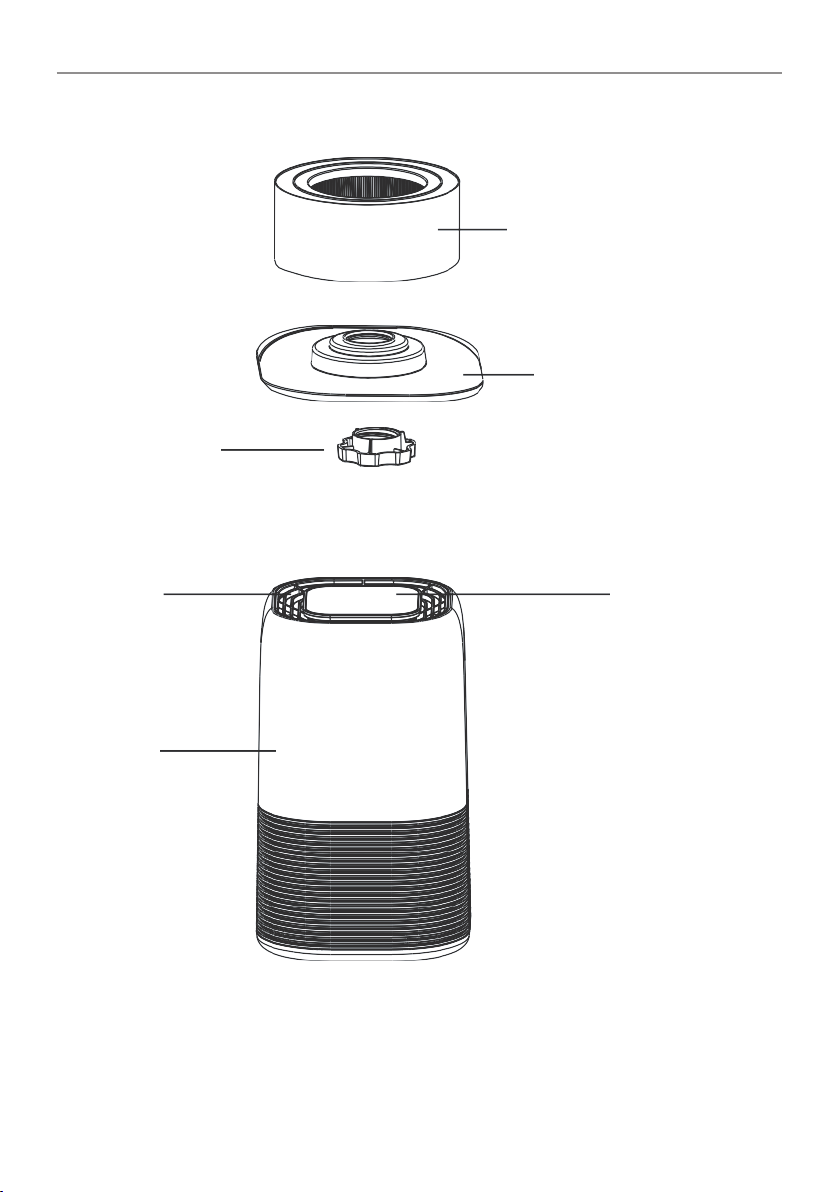
Air outlet Touch control panel
Main unit
Pre-lter, HEPA lter,
Activated Carbon lter
Base
Screw

6
*Need some help? Call 02 4574 8888 or go to www.oricom.com.au
Air Purifying System
Air Purifying System
Improveyourindoorairqualitywithmultiplelevelsofairpuricationtoensureafreshandodourfree
ambiance is maintained in the room. Easy-to-use controls are complimented by a stylish compact
design,meaningyoucaneasilymovefromroomtoroom.
Pre-Filter:Capturesinitialdustandallergenparticles.
HEPA-13 Filter:Capturesdust,smoke,pollenandotherallergens.
Activated Carbon Filter:Removesodoursfromtheair.
Instructions for Before First Use:
•AllpackagingfromtheAirPurifiershouldberemovedanddiscarded,beforeassemblingand
powering on.
•EnsureanypackagingisremovedfromthelterbeforeitisinstalledintheAirPurierandpowered
on.
•Selectasuitableatlocationandenvironmentfortheunittobesetup.
•Forproperairow,locatetheunitatleast20cmawayfromwallsandxtures,toensureadequate
air intake.
•Checkandconrmthereisnoblockagetoairintake.
•Oncetheabovehasbeenchecked,theAirPurifierisOKtobepluggedintomainspower,and
switched on. See below operating instructions.
Operating Instructions
BeforeOperatingtheAirPurier:
1.Carefullyremoveyourairpurierfromboxanddisposeofpackaging.
2. Take out the lter from the air purier and dispose of the plastic packaging.
3.Selectarm,levelandatlocationfortheairpurier.
Note: Forproperairow,locatetheunitatleast20cmfromanywallorfurniture.
4.Plugthepowercordintoa230VACoutlet.
IMPORTANT:Whenmovingtheairpurifier,takecaretosecurelylifttheunitwithtwohands,and
carefully place in the desired location, as per the warnings listed in this user guide.
7
*Need some help? Call 02 4574 8888 or go to www.oricom.com.au
Operating the Air Purier
Operating the Air Purier
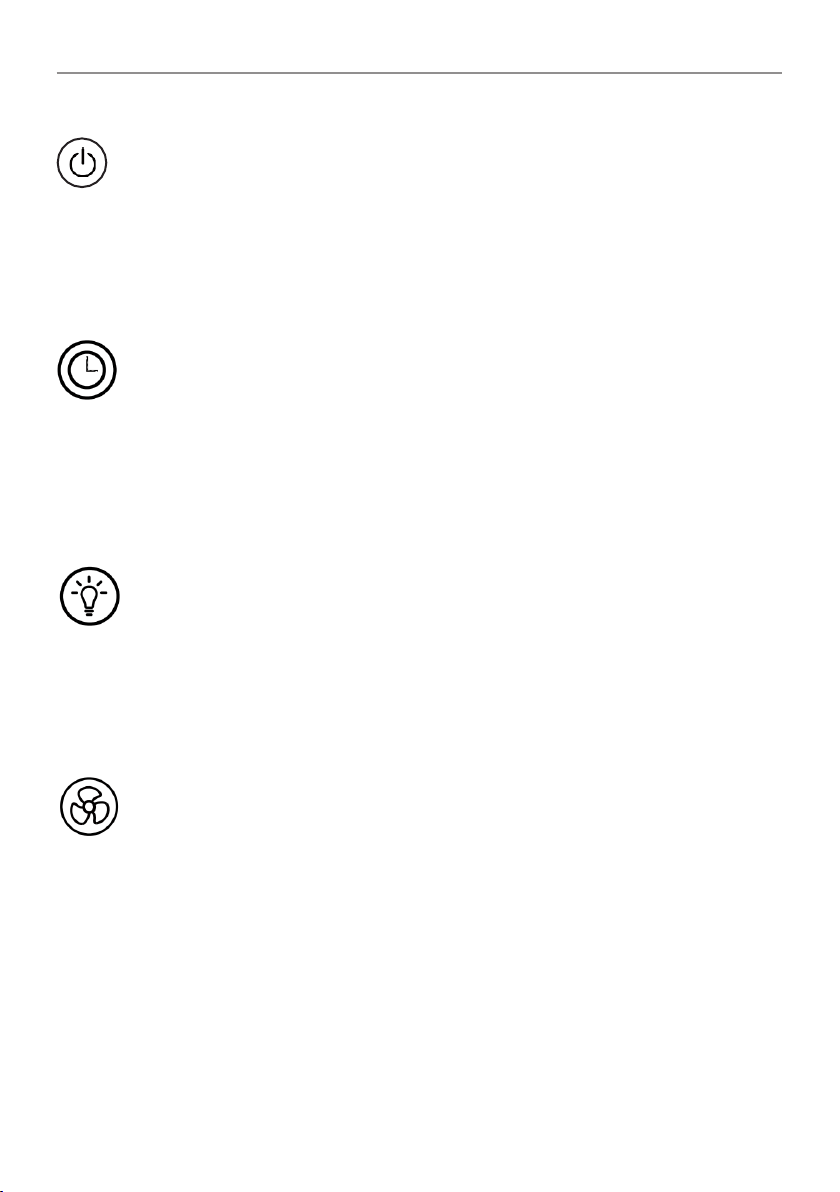
1. POWERbutton:
PressthisbuttontoswitchtheunitON/OFF.
Note:PressandholdPOWERButtonfor5secondstoresettheFilterResetindicator.
IMPORTANT:
AlwayssettheAirPurierdowngentlyonaatandlevelsurface.WhenmovingtheAirPurier,always
lift using two hands.
2. TIMERbutton:
1)Bypressingthisbutton,thepuriercanbetimedtooperateforintervalsof2hours,4hoursand
8 hours, stopping automatically when the selected operating time has elapsed.
2)Pressthe(TIMER)buttontoselecttherequiredoperatingtime.Alightautomaticallyindicatesthe
operating time duration selected.
3)Toselectthecontinuousoperatingmode,pressthebuttonrepeatedlyuntiltherearenomore
indicator lights lit up.
3.LIGHT/SLEEPbutton:
1)Pressthisbuttononetimetoturnonthenightlight.
2)PressthisbuttontwicetoturnonSleepmode.Theindicatorickersbeforeallindicatorsdimandair
purier will turn to low speed automatically.
3)Pressthisbuttonthreetimestoturnoffthenightlight.
4)Pressthisbuttonfourtimestoturnoffthesleepmodel&nightlight.
4. SPEEDbutton:
ThefanspeedcanbeadjustedwhentheAirPurierisinoperation(L/IM/IIH/IIITurbo/IV).Eachtime
that you press the (SPEED)button,thespeedisadjustedfromL(Low)toM(Medium)toH(High)toTB
(Turbo).
Wheninsleepmode,pressanybuttontoactivatethemachine,andsleepmodewillturnoff.
IMPORTANT: When the unit is not in use, switch it off and unplug it.
8
*Need some help? Call 02 4574 8888 or go to www.oricom.com.au
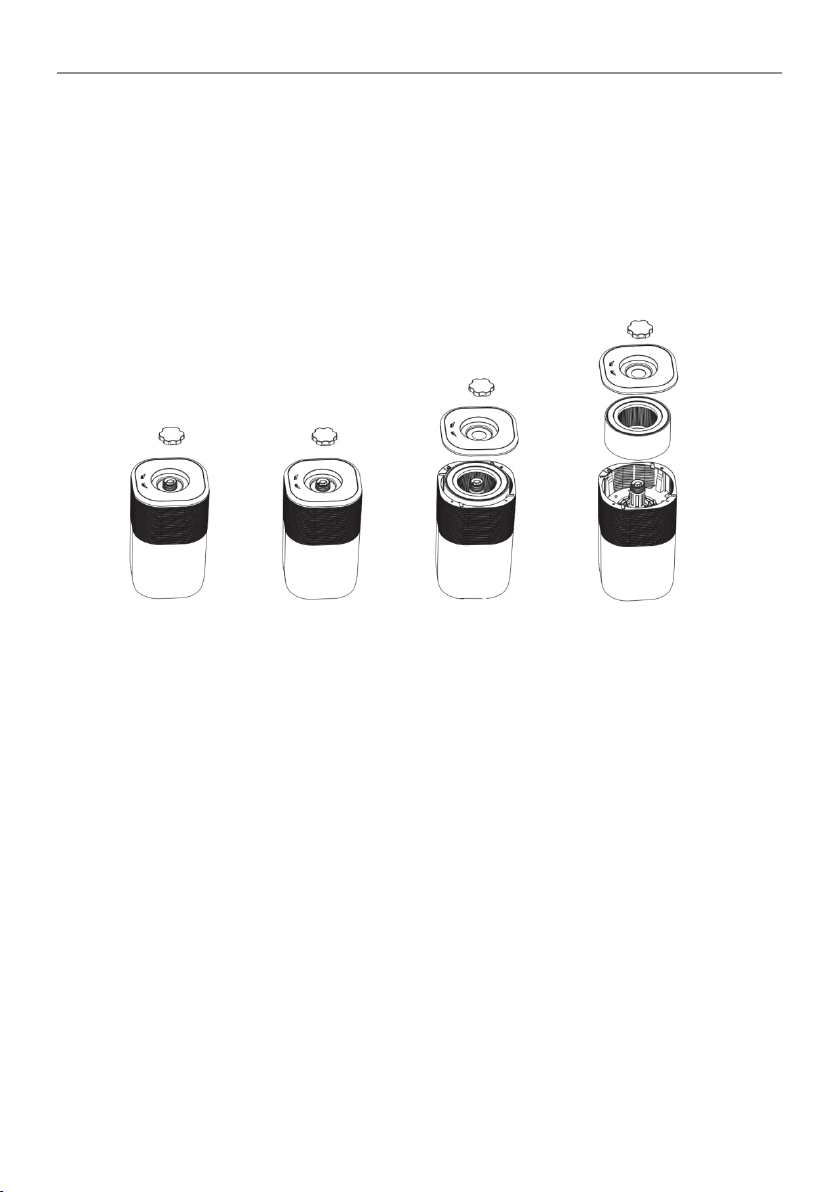
Installing & Removing Filters
Installing & Removing Filters
Filter replace indicator
When the FILTER RESET light switches on in red continuously, this indicates that it is time to replace
the lter.
Replacethefilteraccordingtothedirectionsbelow,thenpressthePOWER button holding for 5
seconds to reset the lter indicator. The FILTER RESET light will then turn off.
*TrueHEPAFilterlifeisapproximately6months.
1. Turn off and unplug the Air purier, turn the air purier upside down.
2.Removethescrewfromthebasethentwistthebasetoopen.
3.RemovethedirtylterandinsertthenewlterintotheAirPurier.
4.Reattachthebasetotheunitandsecureitwiththescrew.
Note:IfthelterisnotinplaceornotttedcorrectlytheAirpurierwillnotoperate.
Cleaning & maintaining
TheAirPuriershouldbecleanedatleastmonthlyusingaclean,dryandsoftcloth.Morefrequent
cleaningmayberequireddependingonenvironmentalconditions.
Ensure the air purier is switched off and disconnected from the power outlet and allow all parts to
cool before cleaning or storing.
NOTE:
-DoNOTstickanyforeignobjectsoryourngersinsideoftheunit.
-DoNOTusegasoline,benzine,thinner,harshcleaners,etc.onand/orintheunitwhilecleaningas
theywilldamagetheAirPurier.
NEVERusealcoholorothersolvents.

9
*Need some help? Call 02 4574 8888 or go to www.oricom.com.au
Specications & Troubleshooting
Filters
- The lter set is not washable.
-Theltershouldbecleanedonceeachmonthusingavacuumcleaner.
Note: The lter life is approximately 6 months if used 24 hours daily or 12 months if used 12 hours
daily.Filterlifewillvarydependingonenvironmentalconditions.
Replacement Filters
Replacementlterpartnumber:2B0136
Replacementlterscanbepurchasedfromwww.oricom.com.au.
Specications
Filter Life:Approx.6monthsdependingonusageandenvironmentalconditions.
Product Dimension:200.5x200.5x327mm
For Room Size: 10-15 m
2
Noise Level:30dB-55dB
Power Consumption: 45W
Weight:2.73kg(netweight)
Troubleshooting
Before reading through the troubleshooting below, ensure that the unit is unplugged from the mains.
PROBLEM SOLUTION
Unit will not turn on. •Conrmthattheproductispluggedintopoweroutlet,andthattheoutlet
is switched to ON.
•Checkthattheproducthasbeenassembledcorrectly.
•Checktoconrmthatthelterhasbeencorrectlyinstalled.
Inadequateairow. •Checkthatthelteriscleanandunobstructed.
•Ensurethattheairinlet/outletisfreefromobstructions.
Unit is too loud. •Checkthatthefanhasnotcomeintocontactwithaforeignobject.
•Checktoseeifthelterisreadyforreplacement.
•Checkthattheproducthasbeenassembledcorrectly,andthatthescrew
afxed to the base is tight.
•Checkthattheunitisonalevelsurface.

10
Express Warranty (Australia)
Express Warranty (Australia)
ThisExpressWarrantyisprovidedbyOricomInternationalPtyLtdABN46086116369,Unit1,
4SovereignPlace,SouthWindsorNSW2756,hereinafterreferredtoas“Oricom”.
Oricom warrants that the product is free from defects in materials or workmanship during the Express
WarrantyPeriod.ThisExpressWarrantydoesnotextendtoanyproductfromwhichtheserialnumber
hasbeenremovedorwaspurchasedoutsideofAustralia.
ThebenefitsofthisExpressWarrantyareinadditiontootherrightsandremediesyoumayhave
undertheAustralianConsumerLaw.Ourgoodscomewithguaranteesthatcannotbeexcludedunder
theAustralianConsumerLaw.Youareentitledtoareplacementorrefundforamajorfailureand
compensationforanyotherreasonablyforeseeablelossordamage.Youarealsoentitledtohavethe
goodsrepairedorreplacedifthegoodsfailtobeofacceptablequalityandthefailuredoesnotamount
toamajorfailure.Intheeventofaminorfailure,Oricomreservestherighttochoosetorepairor
replace the product.
TheExpressWarrantyPeriodwillbeaperiodof12monthsbeginningonthedateofpurchaseofthe
productevidencedbyyourdatedsalesreceipt.Youarerequiredtoprovideproofofpurchaseasa
conditionofreceivingExpressWarrantyservices.
Youareentitledtoareplacementproductorrepairoftheproductatourdiscretionaccordingtothe
terms and conditions of this document if your product is found to be faulty within the Express Warranty
Period.ThisExpressWarrantyextendstotheoriginalpurchaseronlyandisnottransferable.
ProductsdistributedbyOricomaremanufacturedusingnewmaterialsornewandusedmaterials
equivalenttonewinperformanceandreliability.Sparepartsmaybeneworequivalenttonew.Spare
partsarewarrantedtobefreefromdefectsinmaterialorworkmanshipforthirty(30)daysorforthe
remainderoftheExpressWarrantyPeriodoftheOricombrandedproductinwhichtheyareinstalled,
whicheverislonger.DuringtheExpressWarrantyPeriod,Oricomwillwherepossiblerepairandifnot
replacethefaultyproductorpartthereof.AllcomponentpartsremovedunderthisExpressWarranty
becomethepropertyofOricom.IntheunlikelyeventthatyourOricomproducthasarecurringfailure,
Oricommayalways,subjecttotheCompetitionandConsumerAct2010,atitsdiscretion,electto
provideyouwithareplacementproductofitschoosingthatisatleastequivalenttoyourproductin
performance.
NochangetotheconditionsofthisExpressWarrantyisvalidunlessitismadeinwritingandsignedby
anauthorisedrepresentativeofOricom.
Oricom will not be liable under this Express Warranty, and to the extent permitted by law will not be
liableforanydefect,loss,damageorinjuryarisingoutoforinconnectionwitha:
1. Failure by you to adhere to the warnings and follow the instructions set out in this user guide for the
proper installation and use of the product;
2. Willful misconduct or deliberate misuse by you of the product;
3.Anyexternalcausebeyondourcontrol,includingbutnotlimitedtopowerfailure,lightningorover
voltage;or

11
Express Warranty (Australia)
4.ModicationtotheproductorservicescarriedoutontheproductbyanyoneotherthanOricomor
Oricom’sauthorisedserviceprovider.
How to make a claim under your Express Warranty in Australia
Oricomhasasimplewarrantyprocessforyoutofollow:
•PleasecalloremailourCustomerSupportTeam,0245748888or[email protected].
•ACustomerSupportTeammemberwillverifyaftertroubleshootingwithyouifyourproduct
qualiesunderwarranty.Ifso,theywillgiveyouaProductReturnAuthorisationnumber.
•WewillthenemailaReturnAuthorisationformandaRepairNotice(ifnecessary),togetherwith
instructionsonhowtoreturntheproductforwarrantyservice.
PleasenotethatifaCustomerSupportTeammemberadvisesthatyourproductdoesnotqualifyfor
return,thiswarrantydoesnotapplytoyourproduct.Productsthatareauthorisedtobereturnedto
OricominAustraliamustincludeallofthefollowing:
•AcompletedReturnAuthorisationform
•AcopyofyourProofofPurchase(pleasekeepyouroriginalcopy)
•Thefaultyproduct,includingallaccessories.
Sendtheapprovedreturnsto:
OricomInternationalPtyLtd
LockedBag658
South Windsor NSW 2756 Australia
PleasenotethatthisExpressWarrantyexcludesexpensesincurredbyyouinreturninganyfaulty
producttous.Youmustarrangeandpayanyexpensesincurred(includingpostage,delivery,freight,
transportationorinsuranceoftheproduct)toreturnthefaultyproducttous,however,wewillarrange
deliveryoftherepairedorreplacedfaultyproducttoyou.
Important Information
Repair Notice
Pleasebeawarethattherepairofyourproductsmayresultinthelossofanyuser-generateddata
(suchasstoredtelephonenumbers,textmessagesandcontactinformation).Pleaseensurethatyou
havemadeacopyofanydatasavedonyourproductbeforesendingforrepair.Pleasealsobeaware
that products presented for repair may be replaced by refurbished products or parts of the same type
rather than being repaired.

12
Express Warranty (Australia)
Contact Details for Oricom support and Warranty claims in
Australia
OricomInternationalPtyLtd
Unit1,4SovereignPlace
South Windsor, NSW 2756
Australia
Email:[email protected]
Phone:(02)45748888
(Monday to Friday 8am to 6pm AEST)
Web:www.oricom.com.au
Fax:(02)45748898

ORICOM CUSTOMER SUPPORT
OricomhaveatrainedanddedicatedteamofCustomerSupportRepresentatives,eachwiththe
knowledgeandresourcestoassistinansweringyourquestionsquicklyandefciently.
Oricom Support - Australia
Forallproductenquiries,troubleshootingortodiscusstherangeofOricomproducts,feelfreeto
contactOricomorvisitourwebsiteforanswerstofrequentlyaskedquestions.
(02) 4574 8888
Monday - Friday 8am – 6pm AEST
Email:[email protected]
www.oricom.com.au
Oricom Support - New Zealand
0800 674 266
Monday - Friday 10am - 8pm NZST
Email:[email protected]
Ref:21102020
