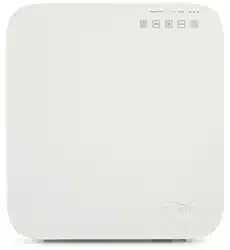
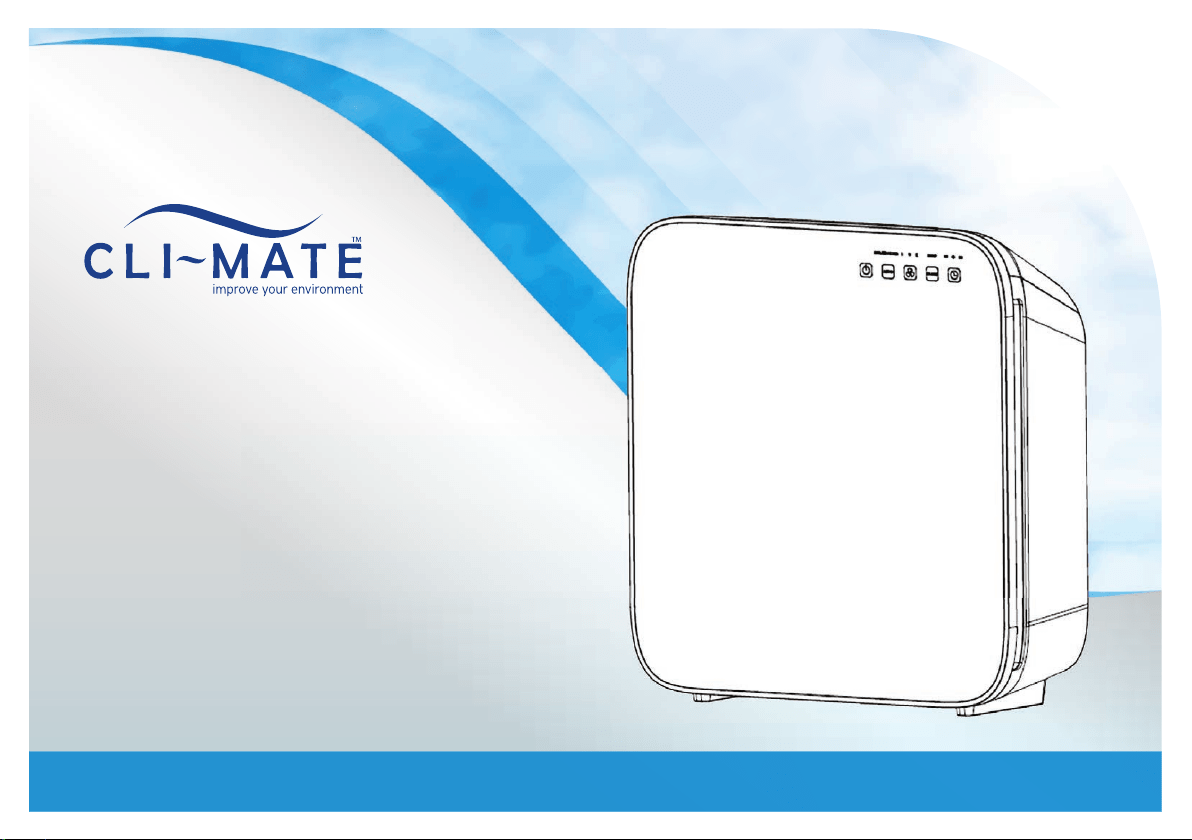
CLI-AP35 | Installation & Operating Instructions
Air
Purification
System
Congratulations on your purchase of a
Cli~Mate Air Purifi cation System
This Air Purifi er improves the quality of the air in your home by helping to eliminate
airborne matter such as allergens and unpleasant odours.
Note: Please read through the instructions carefully before using or installing the product and ensure that the
manual is kept in a safe place for future reference.
The system must be properly installed and located in accordance with the installation instructions before it is used.
During the set up of this product if you have any questions / comments / issues DO NOT RETURN TO STORE.
FOR SERVICE AND TECHNICAL ADVICE ON THIS PRODUCT, FREE CALL 1300 764 325.
Electrical Requirements:
Australia / New Zealand 220-240V 50/60Hz
Due to manufacturing alterations product may
vary slightly from the pictured.
CUSTOMER HOTLINE: 1300 764 325
Register your warranty online at
www.cli-mate.com.au/warranty-and-registration
Aquaport Corporation Pty Ltd
70 Hardys Road, Torrensville SA 5031
Telephone: 08 8354 0711
Facsimile: 08 8354 0722
Email: aquaport@aquaport.com.au
Web: www.cli-mate.com.au
Social: /climatebrand @climatebrand
New Zealand Customers
Telephone: 0800 210 190
Email: info@aquaport.co.nz

INSTALLATION AND OPERATING INSTRUCTIONS 1
SAFETY PRECAUTIONS
Read all instructions carefully.
• All components need to be installed in accordance with the user
manual instructions for correct per formance of unit.
• This appliance should be used in conjunction with a safety
switch.
• This appliance is not intended for use by persons (including
children) with reduced physical, sensor y or mental capabilities,
or lack of experience and knowledge, unless they have been
given supervision or instruction concerning use of the appliance
by a person responsible for their safety.
• Do not operate any appliance with a damaged cord or plug or
after the appliance malfunctions, or has been damaged in any
manner.
• If the supply cord is damaged, it must be replaced by the
manufacturer, its service agent or similarly qualifi ed persons in
order to avoid a hazard.
• Children should be supervised to ensure that they do not play
with the appliance.
• Do not use appliance for other than intended use.
• Do not disassemble, repair or re-form the unit, it may cause
injury, fi re or other malfunctions. A qualifi ed service agent must
make all service adjustments. Removing any par t or attempting
to service the unit will void the warranty.
• Unplug from outlet when not in use and before cleaning.
Never plug in or unplug unit with wet hands.
• Do not use unit outdoors or expose to greasy or
damp environments.
• Keep the air inlet and outlet free from air blocking materials
such as clothing, plastic bags or papers. Air fl ow is required for
the unit to operate effectively.
• Place unit on a fl at location at least 30cm from wall
or other appliances.
• When the unit is in operation, keep all body parts, jewellery, hair
and loose clothing away from the openings.
• Unit must be placed on a stable fl at surface to reduce possible
excessive vibration and noise.
• Keep the unit away from fi re, fl ammable gas, combustible
products or vapours, and corrosive substances.
• Do not operate the unit without fi lters.
• When transporting the air purifi er, always hold the handle at the
back of the unit.
• Do not remove the front cover of the unit when it is in operation.
• To protect against fi re, electric shock and personal injury, do not
immerse cord, plugs, or appliance in water or other liquid.
• Do not place on or near a hot gas, electric burner
or heating appliance.
• Check voltage to be sure that the voltage indicated on the
nameplate agrees with your voltage.
2 INSTALLATION AND OPERATING INSTRUCTIONS
PRODUCT FEATURES
Filter
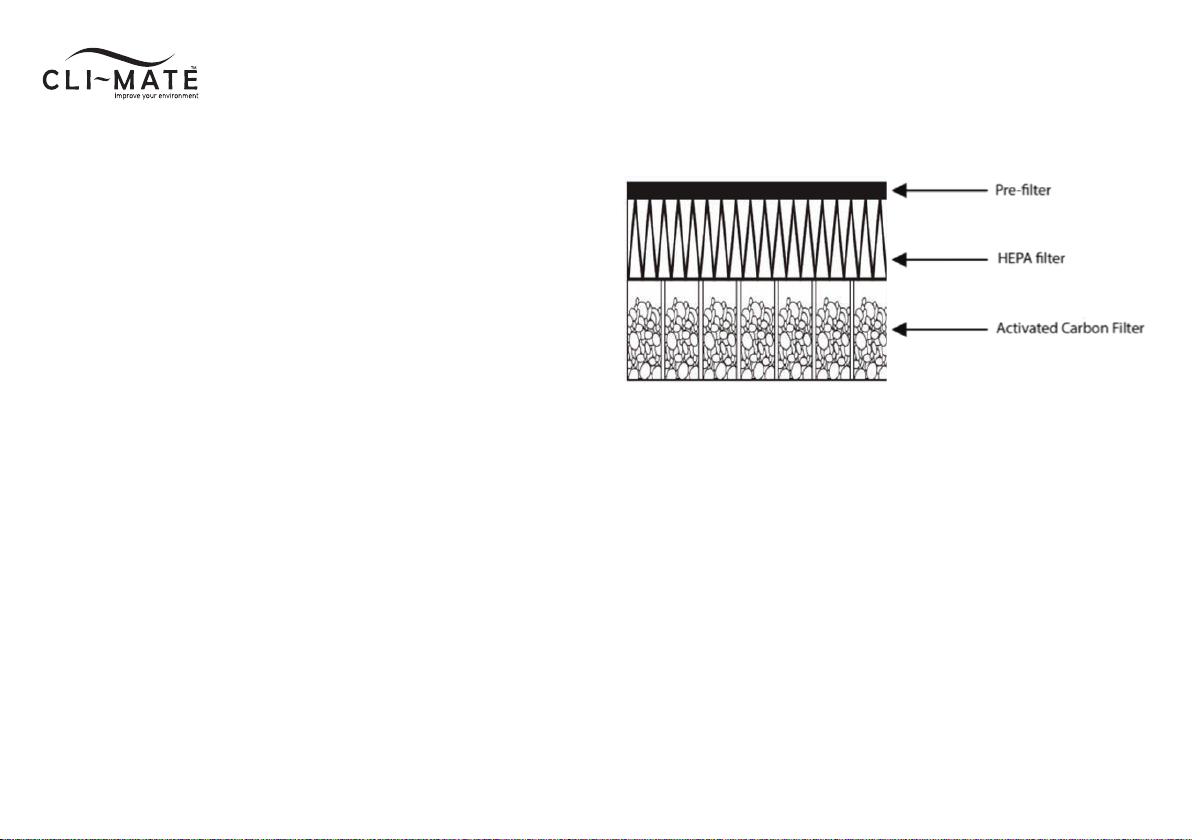
The 3 layer fi lter contains a Pre-fi lter, a HEPA fi lter and an activated
carbon fi lter.
• The Pre-fi lter traps larger par ticles such as dust, pet hair and
large-sized allergens.
• The HEPA fi lter (Grade H12) removes 99.5% of par ticles as
small as 0.3 microns and greater from the air. It is capable of
removing smoke, dust, pollen, pet dander, mold spores, bacteria
and allergens in the air.
• The Activated carbon fi lter absorbs common household odours,
VOCs, cigarette odours, chemical fumes and smoke.
INSTALLATION AND OPERATING INSTRUCTIONS 3
COMPONENT IDENTIFICATION
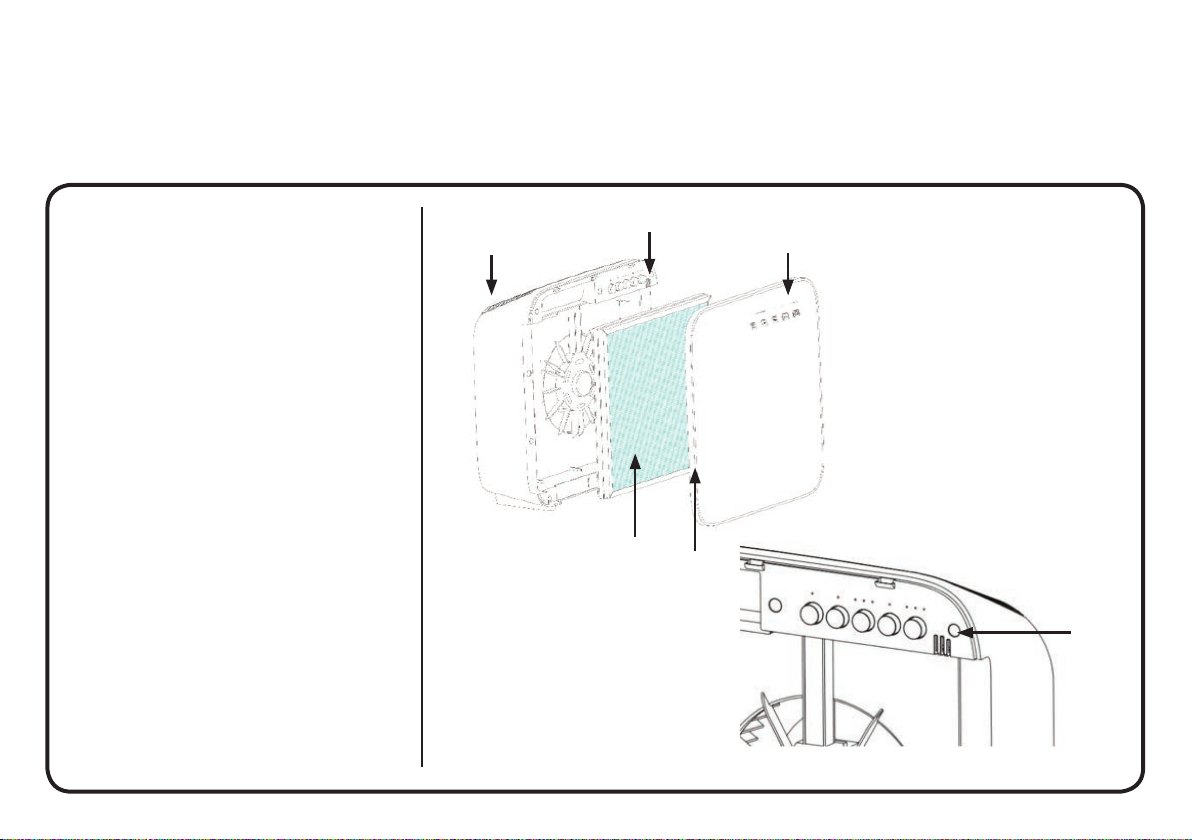
1. Front Cover
2. Control buttons
3. Air Outlet
4. Pre-fi lter, HEPA and active carbon fi lter
5. Dust and odour sensor
3
5
2
5
4
1
4 INSTALLATION AND OPERATING INSTRUCTIONS
CONTROL PANEL/BUTTONS
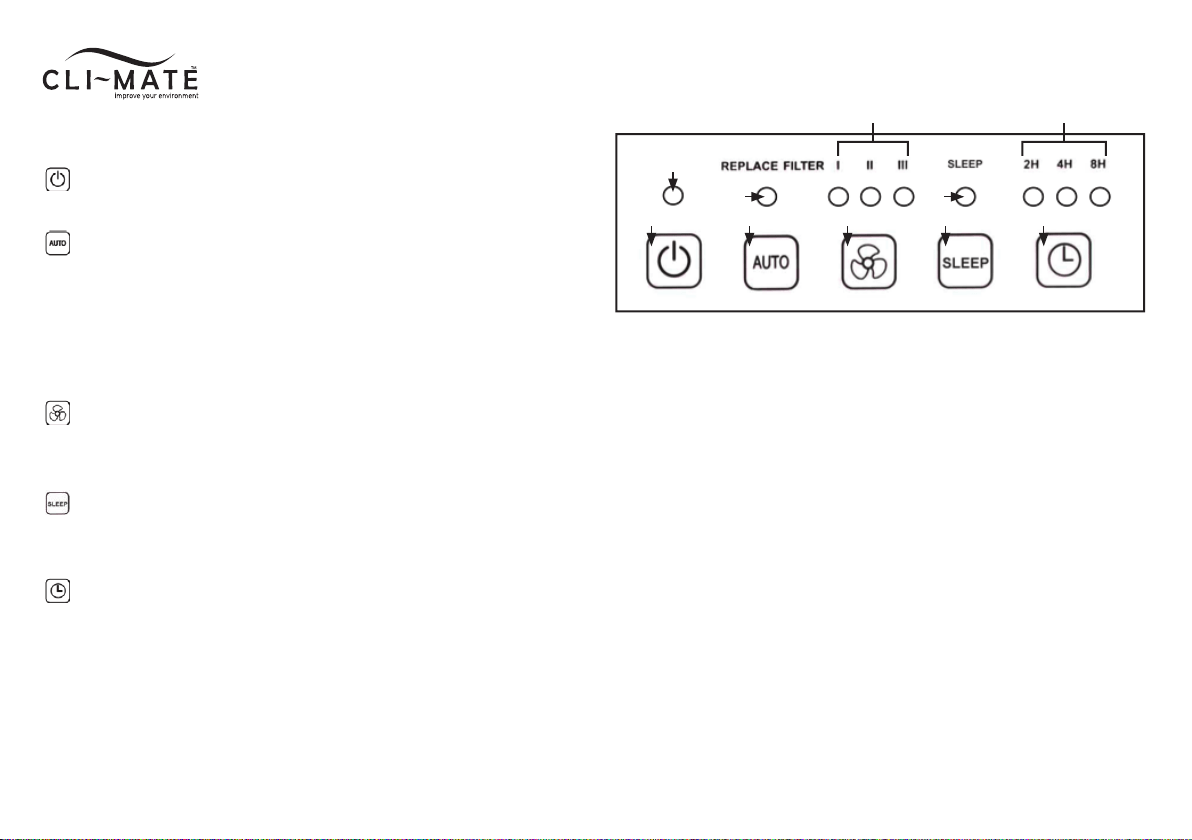
1. “POWER” BUTTON:
Turns unit on or off.
2. “AUTO” Mode:
In this mode, the speed of the air fl ow/fan speed will change
automatically depending on the air quality as detected by the dust
and odour sensor.
NOTE: The AUTO button is also used to reset the fi lter timer. Press
and hold button for 5 seconds to reset fi lter timer.
3. “SPEED” Options:
Allows selection for desired speed setting – low (I), medium (II),
high (III).
4. “SLEEP” Mode:
In this mode, the unit will continue to operate, but with the display
lights dimmed.
5. “TIMER”:
To set automatic OFF timer at 2, 4, 8 hour settings.
DISPLAY PANEL
A. Power Icon light illuminates when unit is on.
B. Auto Icon light illuminates when in AUTO mode.
NOTE: When the Auto icon light fl ashes, it indicates that the Filter
will need to be replaced.
C. Fan Speed Indicator Icon light illuminates on selected setting.
I - Low speed
II - Medium speed
III- High speed
D. Sleep Icon light illuminates when in sleep mode.
E. Timer Indicator Icon light illuminates on selected setting.
2H – 2 hours
4H – 4 hours
8H – 8 hours
1
A
B D
C E
2 3 4 5
INSTALLATION AND OPERATING INSTRUCTIONS 5
OPERATION INSTRUCTIONS
Important: Before fi rst use, open the front cover and unwrap
the fi lter before operation. See page 6 for fi lter details.
1. Plug the unit into a power socket. Ensure unit is located on a
fl at, stable and level sur face.
2. Press the POWER button
to turn the unit on. The unit will
start running and the display panel icon lights will illuminate
indicating the current settings.
3. To select AUTO mode, press the
button. The AUTO icon
light will illuminate and the fan speed of the unit will change
automatically depending on the air quality as detected by the
dust and odour sensor.
4. To select the fan SPEED, press the
button until the light
icon illuminates on the desired speed - low (I), medium (II),
high (III).
5. To select SLEEP mode, press the
button. The SLEEP icon
light will illuminate and all illuminated icon lights will dim. Unit
will remain in operation at the current selected settings.
6. To set automatic off TIMER press the
button until the light
icon illuminates on the desired time 2/4/8 hours. The unit will
automatically switch off when the duration has lapsed.
During the setup of this product, if you have any questions/
comments / issues, DO NOT RETURN TO STORE.
FOR SERVICE AND TECHNICAL ADVICE ON THIS PRODUCT FREE
CALL 1300 764 325.
CLEANING AND MAINTENANCE
Before carrying out any maintenance or cleaning of the unit, make
sure that the power to the unit is turned off and power cord is
unplugged from the power socket.
External cleaning of the unit:
• Do not clean the unit with any abrasives cleaning
agents or solvents.
• Do not apply any water directly onto the unit of cleaning.
• Only use a soft clean cloth for all cleaning purposes.
• Clean the air outlet with a dry cloth, soft brush or vacuum cleaner.
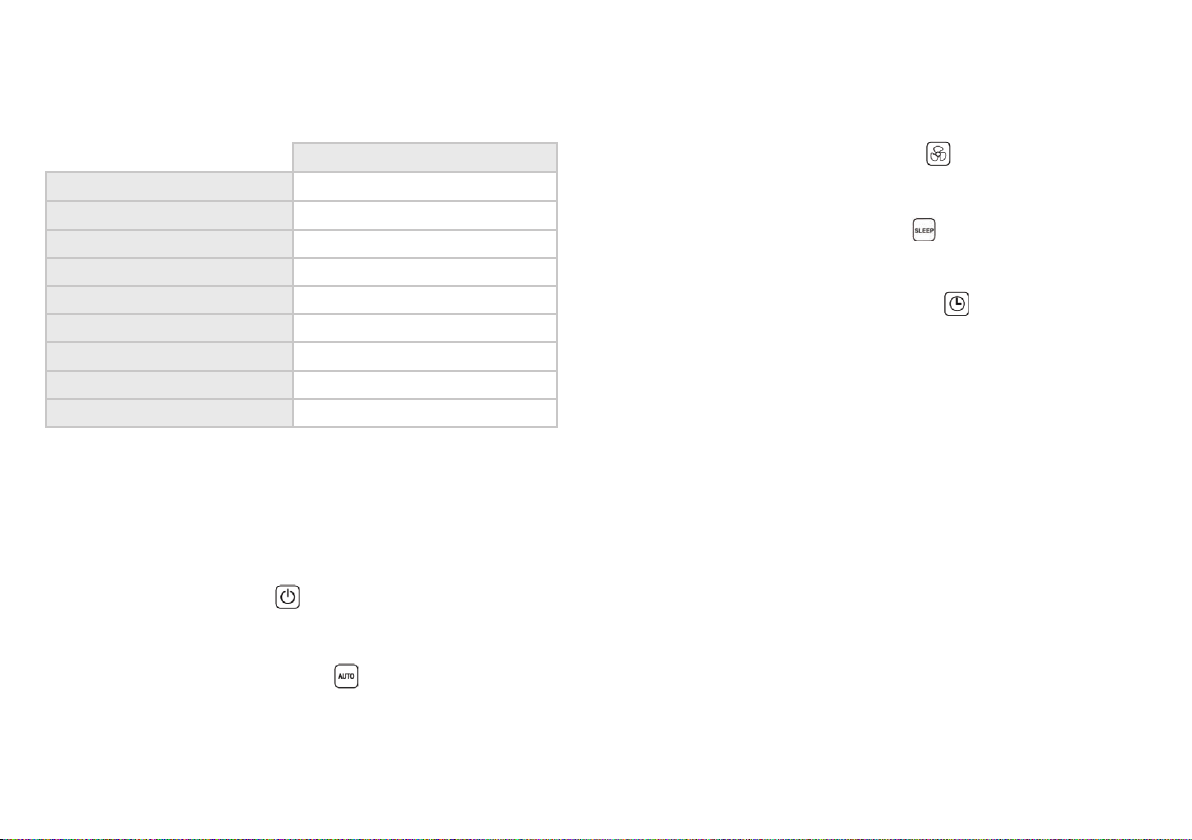
PRODUCT SPECIFICATIONS
Air Purifi er
Model Code CLI-AP35
Dimensions (mm)
390 (L) x 145(W) x 428(H) mm
Coverage area up to 30m
2
Power consumption 50 watts
Net weight 4.5 kgs
Clean air delivery rate ≥145 cfm
Noise level at High speed <50dB
Noise level at Low speed
<30dB
Replacement fi lter
CLI-AP35-RF
6 INSTALLATION AND OPERATING INSTRUCTIONS
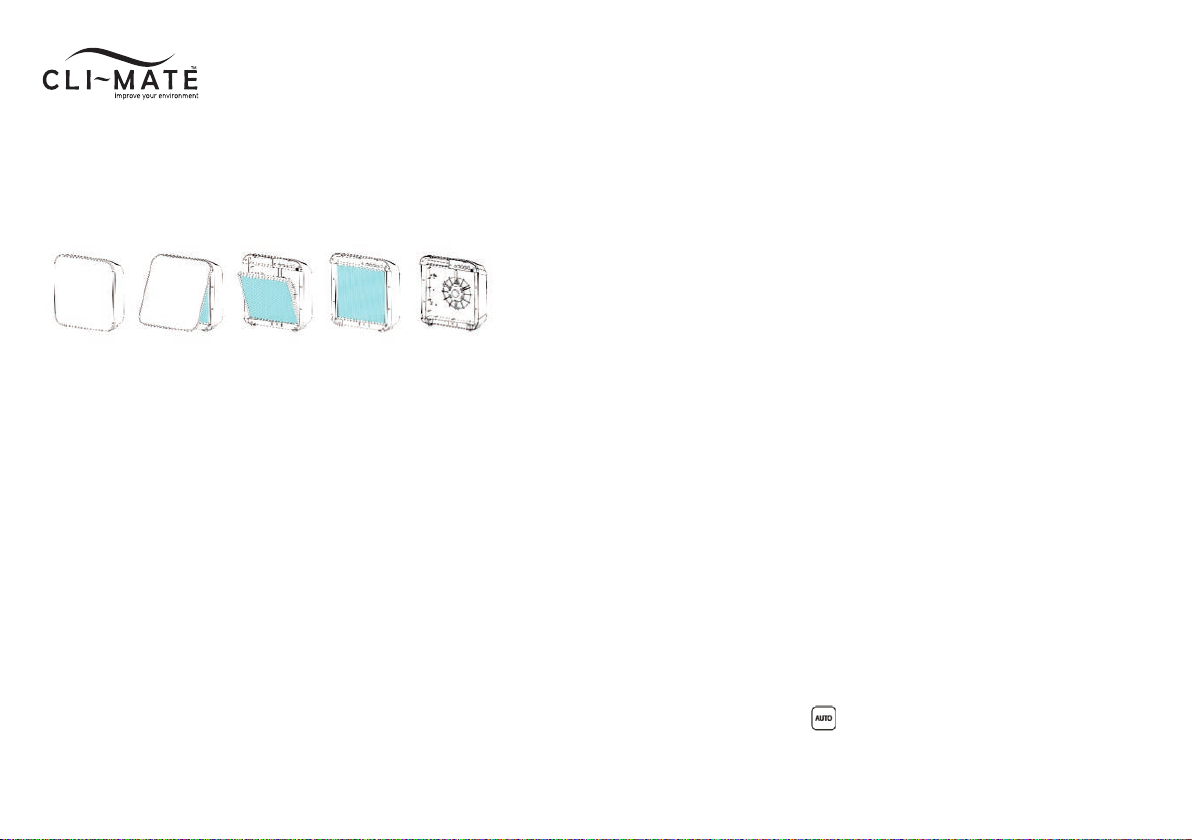
CLEANING THE PRE-FILTER, HEPA AND ACTIVATED CARBON FILTER
It is recommended that the Pre-fi lter (the removable black layer) is
cleaned every 1-2 weeks of operation, depending on the air quality
of the room.
To clean fi lters:
1. Turn the unit off and disconnect the power.
2. OPEN THE FRONT COVER: Place both hands at the bottom
corners of the front cover and pull out.
3. REMOVE THE FILTER: Pull out the fi lter by the belt attachment.
4. Gently peel away the Pre-fi lter (black layer), which is attached
by Velcro.
5. Run a vacuum cleaner with a nozzle or brush attachment
on low power setting along the HEPA (white side), Activated
Carbon (black side), and both sides of the Pre-fi lter to pick up
the dust and various particles.
6. Re-attach the Pre-fi lter layer and place the fi lter back into the
air purifi er.
Note: When placing the fi lter back into the air purifi er, ensure that
the fi lter belts and Pre-fi lter is facing outwards.
7. Reattach the front cover.
REPLACING THE FILTER
When the lifespan of the 3-layer fi lter reaches its end, the icon
light located under the “REPLACE FILTER” will fl ash, indicating that
it needs to be changed. Discard the old fi lter and replace with a
new one. It is not reusable.
The lifespan and duration of the fi lter depends on the air quality
and surrounding environment. The higher the level of pollutants,
the shorter the fi lter lifespan. It is advisable to change the fi lter at
least every 6 months of unit operation.
Cli~Mate Replacement Filter Product Code: CLI-AP35-RF
HOW TO REPLACE THE FILTER
1. Turn the unit off and disconnect the power.
2. OPEN THE FRONT COVER: Place both hands at the bottom
corners of the front cover and pull out.
3. REMOVE THE FILTER: Pull out the fi lter by the belt attachment
and discard.
4. INSTALL NEW FILTER: Replace with the new fi lter.
Ensure that the fi lter belts and Pre-fi lter is facing outwards.
5. Reattach the front cover.
6. Hold down the AUTO
button for 5 seconds to
reset the fi lter timer.
INSTALLATION AND OPERATING INSTRUCTIONS 7
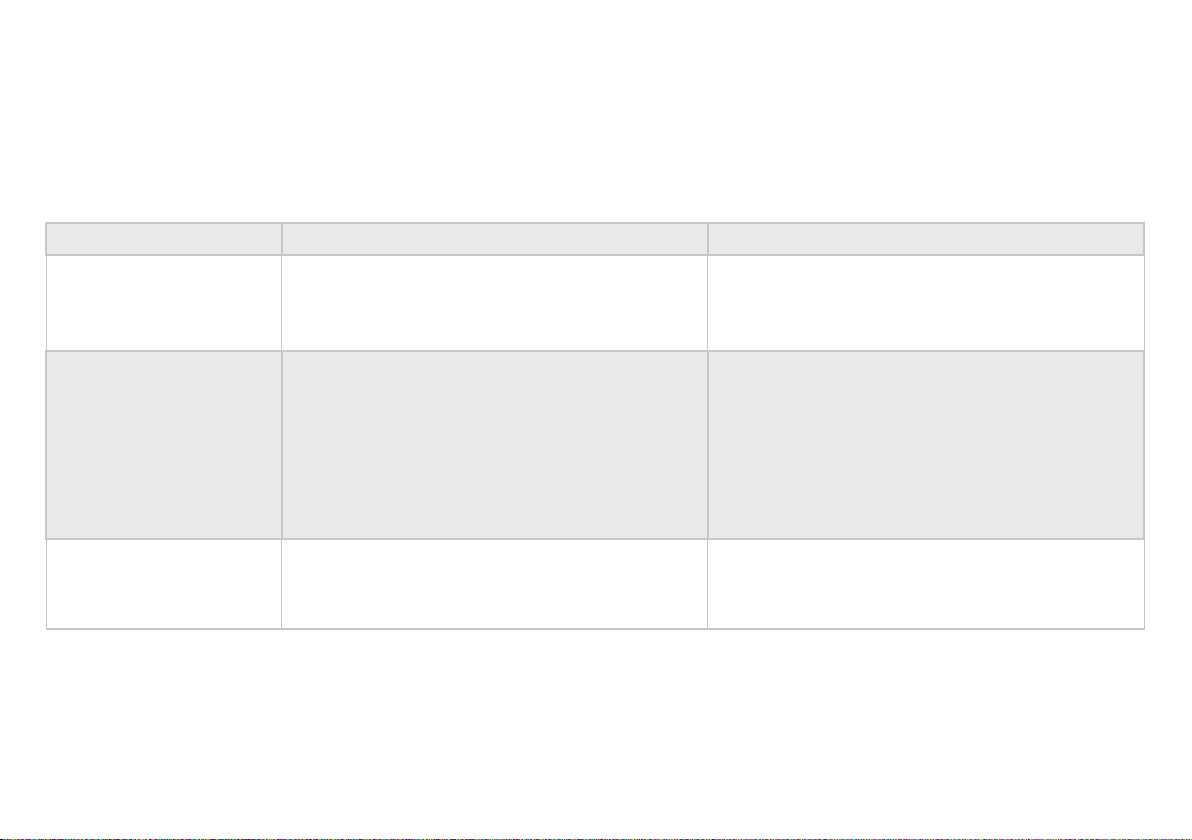
TROUBLE SHOOTING
BEFORE YOU CALL FOR SERVICE PLEASE REVIEW THE TROUBLE SHOOTING TIPS FIRST.
Problem Possible Causes What To Do
No Power
1. Unit is not plugged into a wall socket.
2. Front cover is not latched fi rmly in place.
3. The fi lter has not been installed fi rmly in place.
1. Check the connection to wall socket.
2. Remove and reinstall front cover.
3. Remove and reinstall the fi lter.
Unit overheating
1. Air ventilation around unit
not suffi cient.
2. Air inlet or air outlet is being obstructed or
blocked by foreign objects.
3. Internal malfunction.
1. There must be at least 30cm between unit and
wall or other appliances.
2. Ensure there are no object obstructing the air
inlet or air outlet.
3. Return unit to ser vice agent. Call customer care.
The unit is not effective
1. Filters may be heavily soiled and due for
replacement.
1. Replace fi lter.
8 INSTALLATION AND OPERATING INSTRUCTIONS
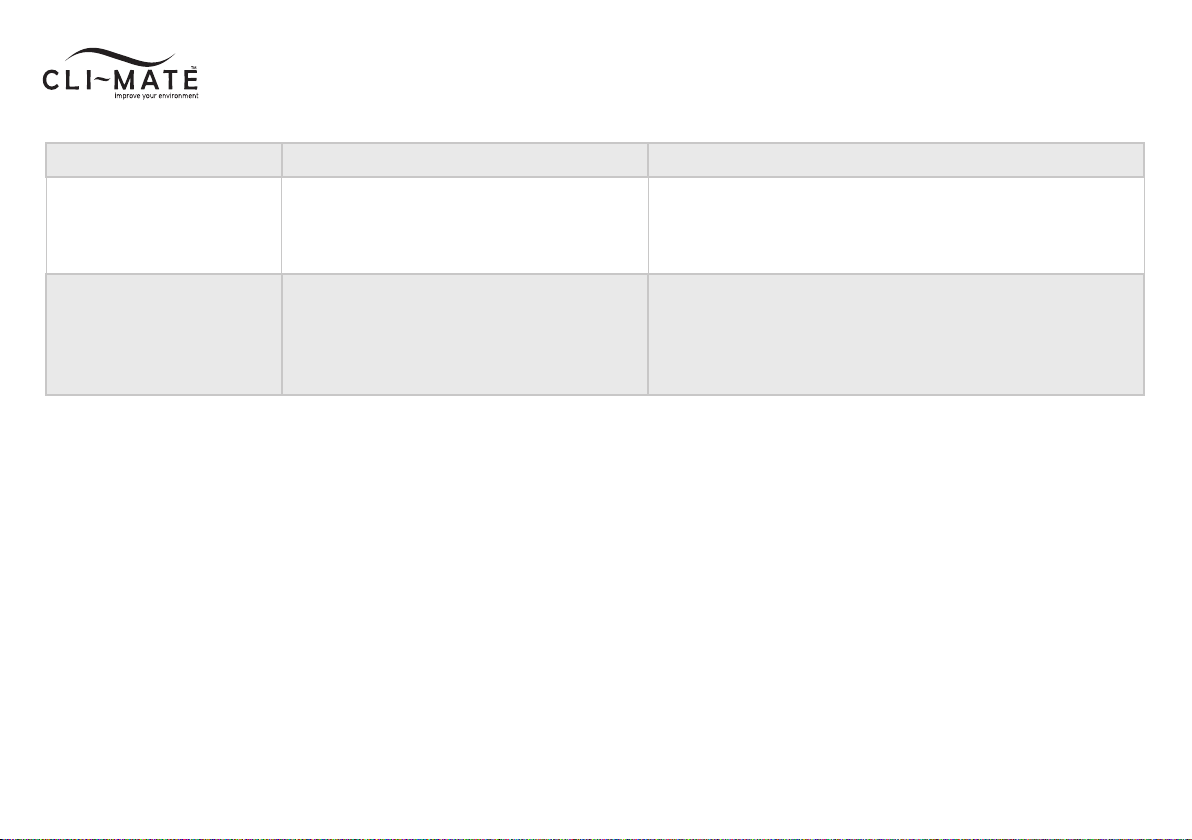
Problem Possible Causes What To Do
Odour coming from
the air outlet
1. Filter may be heavily soiled and due for
replacement.
1. Replace fi lter.
Excessive/loud noise
1. Unit is on an uneven surface.
2. Foreign objects have fallen into the unit.
3. Faulty internals.
1. Ensure the unit is placed on a level surface.
2. Ensure that no foreign objects have fallen into the unit
via the air outlet.
3. Call customer care.
Customer Care: 1300 764 325

INSTALLATION AND OPERATING INSTRUCTIONS 9
Your Aquaport Australian 1 Year Repair or Replacement Warranty
Aquaport warrants this appliance to the fi rst purchaser and subject
to the stated conditions:
Warranty covers any defects in material or workmanship in the
manufactured product within the fi rst twelve months from the
date of purchase.
To make a warranty claim you must call Aquaport on toll free number
1300 764 325 for instructions. If a product is found to be faulty there
is a 90 day return policy from the date of purchase.
For warranty claims outside of 90 days from date of purchase, product
will be repaired or replaced at our discretion. Repair or replacement
costs of the product will be covered under warranty by Aquaport.
Goods presented for repair may be replaced by refurbished goods of
the same type rather than being repaired. Refurbished par ts may be
used to repair the goods.
Warranty does not cover fi lters which are consumable unless proven to
have defects in material or workmanship in the manufactured product.
The benefi ts given to you by this warranty are in addition to other rights
and remedies of the consumer law in relation to the goods or ser vices
to which this warranty relates.
Our goods come with guarantees that cannot be excluded under
the Australian Consumer Law. You are entitled to a replacement or
refund for a major failure and compensation for any other reasonably
foreseeable loss or damage. You are also entitled to have the goods
repaired or replaced if goods fail to be of acceptable quality and the
failure does not amount to a major failure.
Conditions of this Warranty:
1. This product has been fully installed in accordance
with the user manual installation instructions.
2. The warranty extends only to repairing or replacing
any component that proves to be defective in material
or workmanship.
3. The warranty does not cover defects occasioned by
misuse, alterations, accidents, or used for other than the
intended purpose.
4. The warranty does not cover damage to the product
caused by accident, fi re, or fl oods, power surges or black outs
5. Proof of purchase is required for warranty claims.
Please keep purchase receipt in a safe place.
To enable us to register your warranty and provide service should a
problem occur, we recommend you register your warranty online at:
www.cli-mate.com.au/warranty-and-registration
Aquaport Corporation Pty Ltd
70 Hardys Road, Torrensville
South Australia 5031
Customer Care 1300 764 325
New Zealand Customers
Telephone: 0800 210 190
Email: info@aquaport.co.nz

CUSTOMER HOTLINE: 1300 764 325
Aquaport Corporation Pty Ltd
70 Hardys Road, Torrensville SA 5031
Telephone: 08 8354 0711
Facsimile: 08 8354 0722
Email: aquaport@aquaport.com.au
New Zealand Customers
Telephone: 0800 210 190
Email: info@aquaport.co.nz
Web: www.cli-mate.com.au
Social: /climatebrand @climatebrand