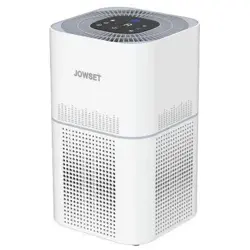
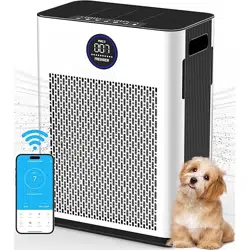
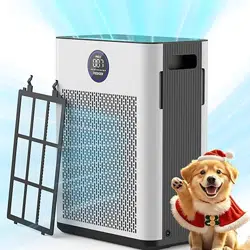
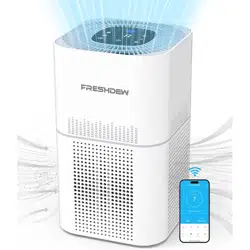
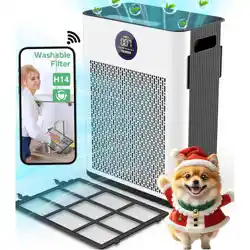
FRESHDEW USER MANUAL TRUE HEPA AIR PURIFIER
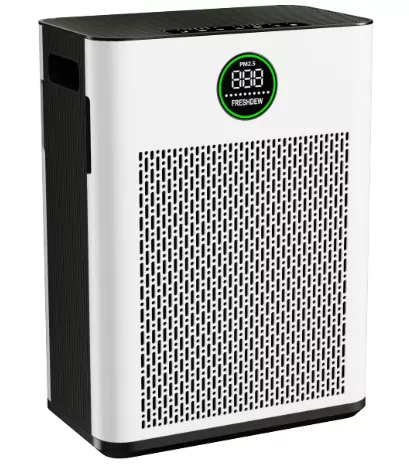
LIFETIME WARRANTY IF REPLACES THE FILTER ON TIME
YOUR SATISFACTION IS OUR TOP CONCERN
READ AND SAVE THESE INSTRUCTIONS
To reduce the risk of fire, electric shock, or other injury, follow all instructions and safety guidelines.
GENERAL SAFETY
- Only use your air purifier as described in this manual.
- Always place the air purifier on a firm, leveled surface.
- Do not use without removing the plastic wrap from the filter. The purifier will not filter air, and may overheat, causing a fire hazard.
- [IMAGE]
- Do not use your air purifier outdoors.
- Keep your air purifier away from water, and wet or damp areas. Never place in water or liquid.
- Do not use in excessively humid areas.
- Keep your air purifier away from heat sources.
- Do not use where combustible gases, vapors, metallic dust, aerosol (spray) products, or fumes from industrial oil are present.
- Keep 5ft /1.5m away from where oxygen is being administered.
- Supervise children when they are near the air purifier.
- Do not place anything into any opening on the air purifier.
- Do not sit or place heavy objects on the air purifier.
- Keep the inside of the air purifier dry. To prevent moisture buildup, avoid placing in rooms with major temperature changes or underneath air conditioners.
- Always unplug your air purifier before servicing (such as changing the filter).
POWER & CORD
- Keep the air purifier near the outlet it is plugged into.
- Never place the cord near any heat source.
- Do not cover the cord with a rug, carpet, or other covering. Do not place the cord under furniture or appliances.
- Keep the cord out of areas where people walk often. Place the cord where it will not be tripped over.
- Check your air purifier cord and plug connections. Faulty wall outlet connections or loose plugs can cause the outlet or plug to overheat. Be sure the plug fits tightly in the outlet.
- If the power adapter is damaged, please contact our customer service directly to replace with new replacement.
- This appliance is not intended for use by persons (including children) with reduced physical, sensory or mental capabilities, or lack of experience and knowledge, unless they have been given supervision or instruction concerning use of the appliance by a person responsible for their safety.
- Cleaning and user maintenance shall not be made by children without supervision.
- If the product needs to be shut down during use, please shut down normally and then unplug the power supply. Abnormal power failure may cause product failure!
- Children should be supervised to ensure that children do not play with electrical appliances.
- This air purifier has a polarized plug (one blade is wider than the other). To reduce the risk of electric shock, this plug is intended to fit in a polarized outlet only one way. If the plug does not fit fully in the outlet, reverse the plug. If it still does not fit, contact a qualified electrician. Do not attempt to defeat this safety feature.
SAVE THESE IMPORTANT INSTRUCTIONS FOR EASY REFERENCE.
PACKAGE CONTENTS
- 1 x Air Purifier
- 2 x H14 True HEPA Filter (Pre-Installed)
- 1 x Power Adapter
- 1 x User Manual
NOTE: Before use, please remove the protective tape from the machine, open the air purifier panel, remove the filter element inside the machine, and remove the packaging of the protective filter element. Then correctly install the filter element and cover the panel.
SPECIFICATION & UNIQUE FEATURES
- Power Supply: 100-240V 50/60hz
- Rated Power: 48W
- Operating Conditions: Temperature: 14°F–104°F / -10°C–40°C; Humidity: < 85% RH
- Noise Level: 22–58dB
Air Quality Indicator
This automatic sensor uses an infrared light to detect airborne particles and display the air quality with 4 colors.
| Indicator Color |
Air Quality |
PM2.5 Level |
| Blue |
Very Good |
0-35 |
| Green |
Good |
36-75 |
| Yellow |
Moderate |
76-115 |
| Red |
Polluted |
>116 |
Note: led display only shows air quality color, no digital display.
4 SPEEDS
1 - Low; 2 - Medium; 3 - High; 4 - Turbo(Top)
Auto Mode
Auto Mode adjusts the fan speed automatically based on air quality. For example, if the air quality is polluted, the PM2.5 indicator will be red, and the fan will be set to top speed.
Quiet Sleep Mode
All indicators will automatically turn off in sleep mode except sleep mode indicator on.
Timer
You can set a timer between 1-12 hours.
Replace Filter Indicator
Illuminates when it is time to replace the filter.
KNOW YOUR AIR PURIFIER
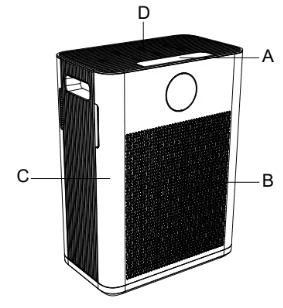
Front:
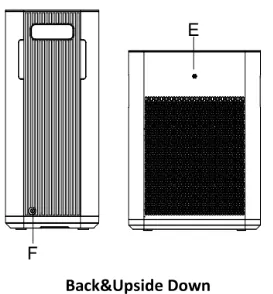
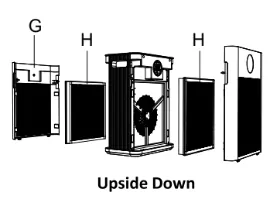
Back & Upside Down:
- A: Control Panel
- B: Air Outlet
- C: Body Shell
- D: Air Inlet
- E: Air Quality Sensor Cover
- F: Power Adapter Interface
- G: Air Filter Cover
- H: H14 HEPA Filter
Upside Down:
CONTROL PANEL
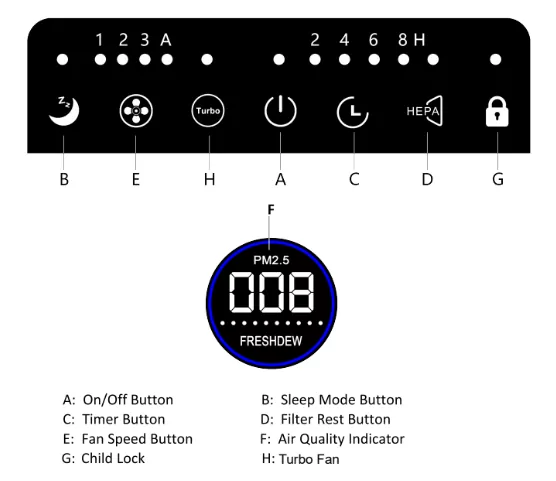
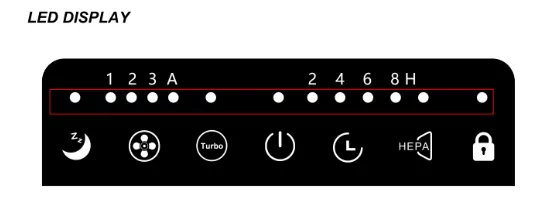

Note: when time left over 1H, it will shows hours left; only when less than 1H, it will show minutes left. For example, if you choose 4H, it will show 4H on led display. When only 58 minutes left, it will show 58M on led display.
HOW TO USE
BEFORE TURNING THE UNIT ON
- Take the air purifier out of the box and remove the clear protective plastic bag. Open bottom filter cover to take filter out, then take the power adapter out. Finally put air filter back and lock filter cover.
- Place the air purifier on a firm, leveled surface.
- Check if the voltage indicated on the appliance corresponds to the local power voltage before you connect the appliance.
- Please insert the plug into the power socket firmly. After switching the power on, you will hear "du" and the indicator light will flash 1 time, then only power on/off button indicator shows red.
- Do not block the air inlet and outlet, e.g. by placing items on the air outlet or in front of the air inlets closer than 20cm.
- For best results, or to address a specific air quality issue such as smoke, run the air purifier at high speed for 15-20 minutes before using a lower speed or Auto Mode, and keep windows and doors closed while the air purifier is on.
TURN ON/OFF
- To turn the air purifier on, press the power button

- Press power button again to turn off the air purifier.
- The air purifier will take about 15-20 seconds to detect the air quality each time it is turned on. During this time, the air quality indicator color will switch automatically from red, blue, green, yellow. After 15-20 seconds, the air quality indicator color will change based on the detected air quality.
Note: air purifier is automatically in auto mode when turn on every time.
Switch Fan Speed
- This air purifier has 4 fan speed settings: 1- Low, 2- Medium, 3- High and 4- Turbo(Top).
- The higher the fan speed setting, the faster the air will be purified. To select or change fan speed, press the fan speed button
 until the desired setting is reached.
- The LED display will change from 1 to 4 to show the speed you choose currently.
Auto Mode
- When at 4 - Top speed, press fan speed button again to switch to auto mode and LED Display will
 show. Then air purifier speed will automatically adjust based on air quality. If air quality is moderate, the PM2.5 indicator will be yellow, and air purifier will run at high speed.
- Press button again change to 1 speed, and auto mode turned off. Note: air purifier is automatically in auto mode when turn on every time, not the speed you used last time.
Timer
- Press the timer button
 until the desired timer setting is lit on the display. The timer button will cycle through the following settings: 1-2-3-4-5-6-7-8-9-10-11-12 hours and off. Once you choose a time, the timer will flash 10 times and start counting down. The LED Display will flash from fan speed to timer. Only time left within 1 hour, the led display will show how many minutes left.
- The air purifier will automatically power off once the timer is finished. If LED display does not show any timer, it means the timer function is not turned on.
- To cancel the timer at any time, press the timer button until LED display does not show any time left. For example, if you set 3H timer, then you need to press from 4-5-6-7-8-9-10-11-12, and press again to turn off the timer.
- The air purifier will run continuously when the timer function is off.
SLEEP MODE
- Press button
 to switch to sleep mode. All indicators will turn off automatically except the sleep mode indicator with only little light. Then press fan speed button to turn off sleep mode.
- Press Timer button can also turn off sleep mode, but the timer function will be active at same time, then you need to click timer button from 1 to 12H to turn off timer button.
Note: sleep mode indicator could not turn off. If you press on/off button at sleep mode, the air purifier will be turn off immediately.
HOW TO REPLACE FILTER
FILTER REPLACE INDICATOR
- For optimal performance, replace every 3,000 hours under normal usage conditions. The smart replace filter indicator
 illuminates when it is time to replace the True HEPA H14 filter based on the air purifier's hours of use.
Note: when reached to 3,000 hours, the filter reminder will keep flash until old filter replaced and filter replace indicator reset.
- Once the filter has been replaced, press and hold the filter replace filter button for 5 seconds to reset the indicator. If reset successfully, the filter replace indicator will turn off.
HOW TO REPLACE FILTER
NOTE: for safety consideration, please do unplug the power adapter before starting to replace filter.
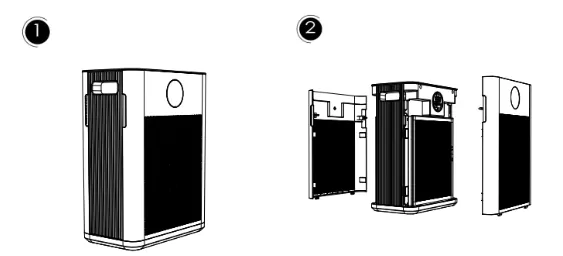
1. Gently snap the panel at the gap to ensure that the cover can be unlock
2. Take the old filter out
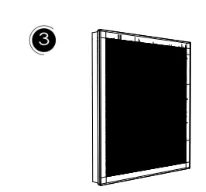
3. Remove the new filter protective bag before installation. Place the filter into the air purifier and instal the back cover properly
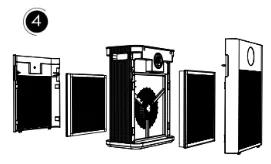
4. Tighten the filter buckle clockwise until it clicks into place
CARE & MAINTENANCE
Cleaning the Air Purifier
- Wipe the outside of the air purifier with a dry cloth. Do not clean with water or any other liquid to avoid risk of electric shock.
- Clean the white side of the filter with a brush or vacuum hose each month to prevent buildup of hair or dust. Do not clean the filter with water or other liquids.
Cleaning the Air Quality Sensor
If the air quality sensor is blocked by accumulated dust, the air quality indicator may not work correctly.
- Unplug the air purifier.
- Open the sensor cover.
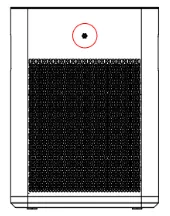
- Dry the sensor lens with a dry cotton swab.
- Close the sensor cover.
Storage
If not using the air purifier for an extended period of time, wrap the filter in plastic packaging and store in a dry place to avoid moisture damage.
When Should I Replace the Filter?
The filter should be replaced every 6-8 months (3000h). But you may need to replace your filter earlier or later depending on how often you use your air purifier. Using your air purifier in an environment with relatively high pollution may mean you will need to change the filter more often, even if the filter replace indicator not illuminates yet.
DISPOSAL AND RECYCLING
This air purifier should be recycled as electronic waste and the filter recycled as plastic.
TIPS TO BUY AIR PURIFIER
You can buy the air purifier from the amazon website or official website.
TROUBLE SHOOTING
| PROBLEM |
POSSIBLE CAUSE |
POSSIBLE SOLUTION |
| Air Purifier not operate |
Unit is not plugged in |
Plug the unit in |
| Power button not pressed |
Press the power button to turn the power on |
| No power to unit |
Check circuits, fuses, try a different outlet |
| Reduced airflow |
The back grille may be blocked |
Make sure side intakes are not blocked or the front outflow area |
| Pre-filter needs vacuuming |
Vacuum the pre-filter with the brush attachment of your vacuum cleaner |
| The filter needs to be replaced |
Replace the filter |
| Reduced odor removal |
The filter needs to be replaced |
Replace the filter |
| Excessive noise |
The unit is not level |
Place the unit on a flat and level surface |
| Replace filter light remains lit after filter replaced |
The replace filter indicator needs to be reset |
Press and hold the filter replace button for 5 seconds until the replace filter light turns off |
| Can't feel the effect |
Filter failure - replace the filter. |
Check if filter in correct location |
| Use in inappropriate places (excessive area) |
Use in bedroom, living room or other indoor places |
If your problem is not listed here, please contact our Customer Support: [email protected]