User Manual
EN - English
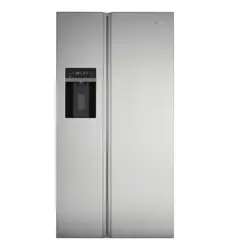
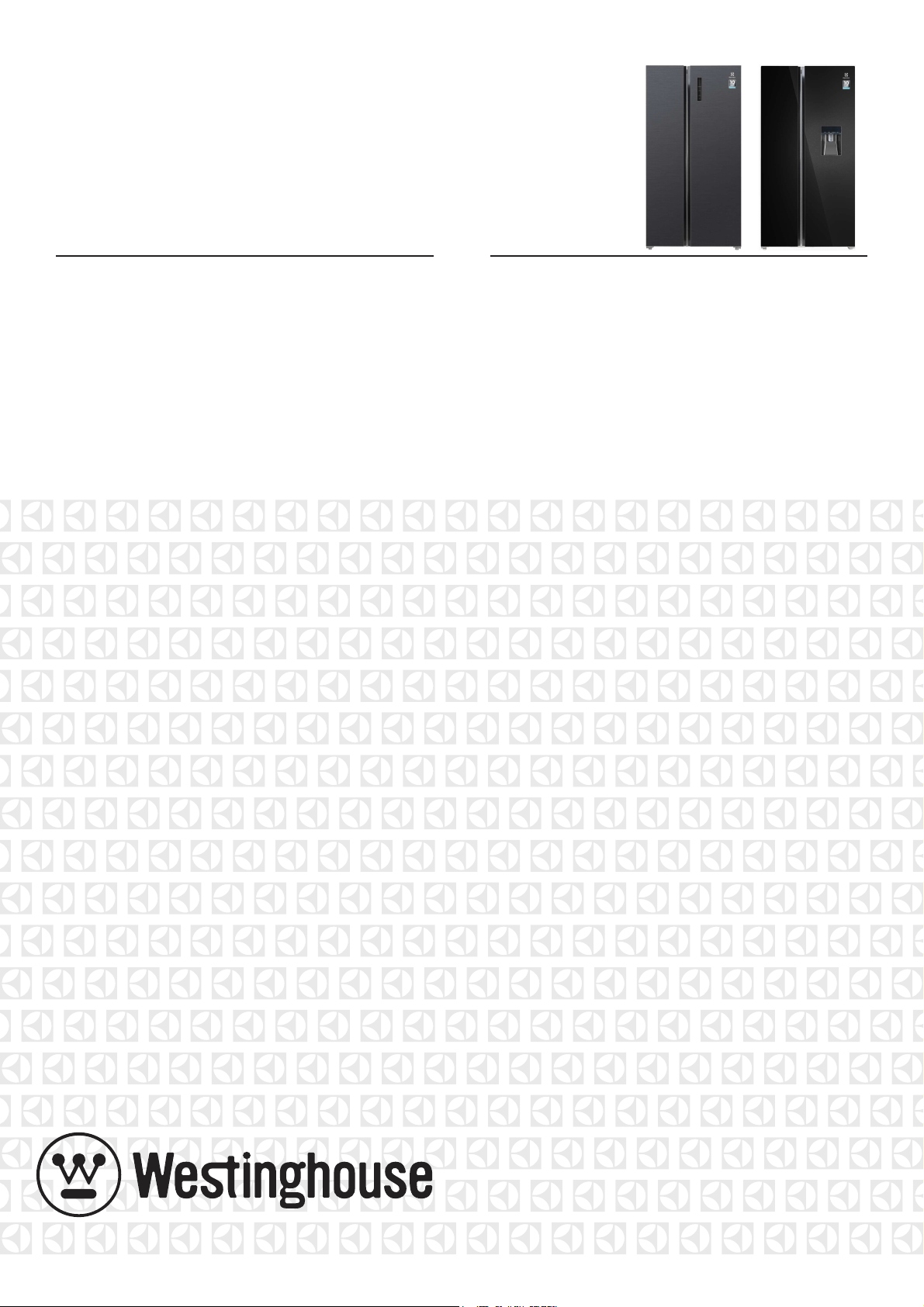
Refrigerator
WSE6640BA
WSE6630SA
WSE6630WA
2 Contents
Congratulations and thank you for choosing our refrigerator.
We are sure you will fi nd your new refrigerator a pleasure
to use. Before you use the refrigerator, we recommend that
you read through the entire user manual, which provides the
description of the refrigerator and its functions.
To avoid the risks that are always present when you use
an electric appliance, it is important that the refrigerator is
installed correctly and that you read the safety instructions
carefully to avoid misuse and hazards.
We recommend that you keep this instruction booklet
for future reference and pass it on to any future owners.
After unpacking the refrigerator please check if it is not
damaged. If in doubt, do not use the refrigerator and contact
your local Electrolux Customer Care Centre.
environmental tip
Information on disposal for users
• Most of the packing materials are recyclable.
Please dispose of those materials through your
local recycling depot or by placing them in appropriate
collection containers.
• If you wish to discard this refrigerator, please
contact your local authorities and ask for the
correct method of disposal.
• Local authorities will have the latest information
regarding safe disposal of the product.
• Incorrect disposal may expose the user to injury
from sharp objects, fl ammable gases or cause
environmental damage.
• Refrigerant gases within the unit should only be
discharged by qualifi ed persons. A licence may be
required by your local authorities to discharge or
reclaim the refrigerant gases. Incorrect discharge of
gases may expose the user to injury from fl ammable
gases or cause environmental damage.
•staff kitchen areas in shops, offi ces and other working
environments;
•farm houses and by clients in hotels, motels and other
residential type environments;
•bed and breakfast type environments;
•catering and similar non-retail applications.
Warning
This appliance contains fl ammable R600a refrigerant. Avoid
safety hazards by carefully installing, handling, servicing and
disposing of this appliance.
•Ensure that the tubing of the refrigerant circuit is not
damaged during transportation and installation.
• Leaking refrigerant may cause eye injuries or ignite.
• The room for installing appliance must be at least 1m3
per 8g of refrigerant. The amount of refrigerant in the
appliance can be found on the rating plate inside the
refrigerator appliance.
• If you are unsure of the refrigerant check the rating plate
inside the refrigerator compartment.
• It is hazardous for anyone other than an Authorized
Service Person to service this appliance.
•Keep ventilation openings in the appliance enclosure or
in the built-in structure, clear of obstruction.
Congratulations
warning
Warning: Risk of fire / flammable materials
Being ensured permissible content limitation of some toxic
chemicals (RoHS compliant)
RoHS
Compliant
Contents
3
4
5
6
7
8
9
10
11
11
12
Important safety instructions
Installing your new refrigerator
Refrigerator operation
Refrigerator features
Using the control panel
Refrigerator features
Using the control panel
Features of your refrigerator
Cleaning your refrigerator
Energy consumption
Noises
Food storage guide
Troubleshooting
13
Conditions of use
This appliance is designed and intended to be used in
household and similar applications such as;
14
Please read the user manual carefully and store in a handy
place for later reference.
The symbols you will see in this booklet have these meanings:
warning
This symbol indicates information concerning your
personal safety
caution
This symbol indicates information on how to avoid damaging
the appliance
tips and information
This symbol indicates tips and information about
use of the appliance
environmental tip
This symbol indicates tips and information about economical
and ecological use of the appliance
Meanings of symbols used in this manual are shown below:
This symbol indicates never to do this
This symbol indicates always do this
warning
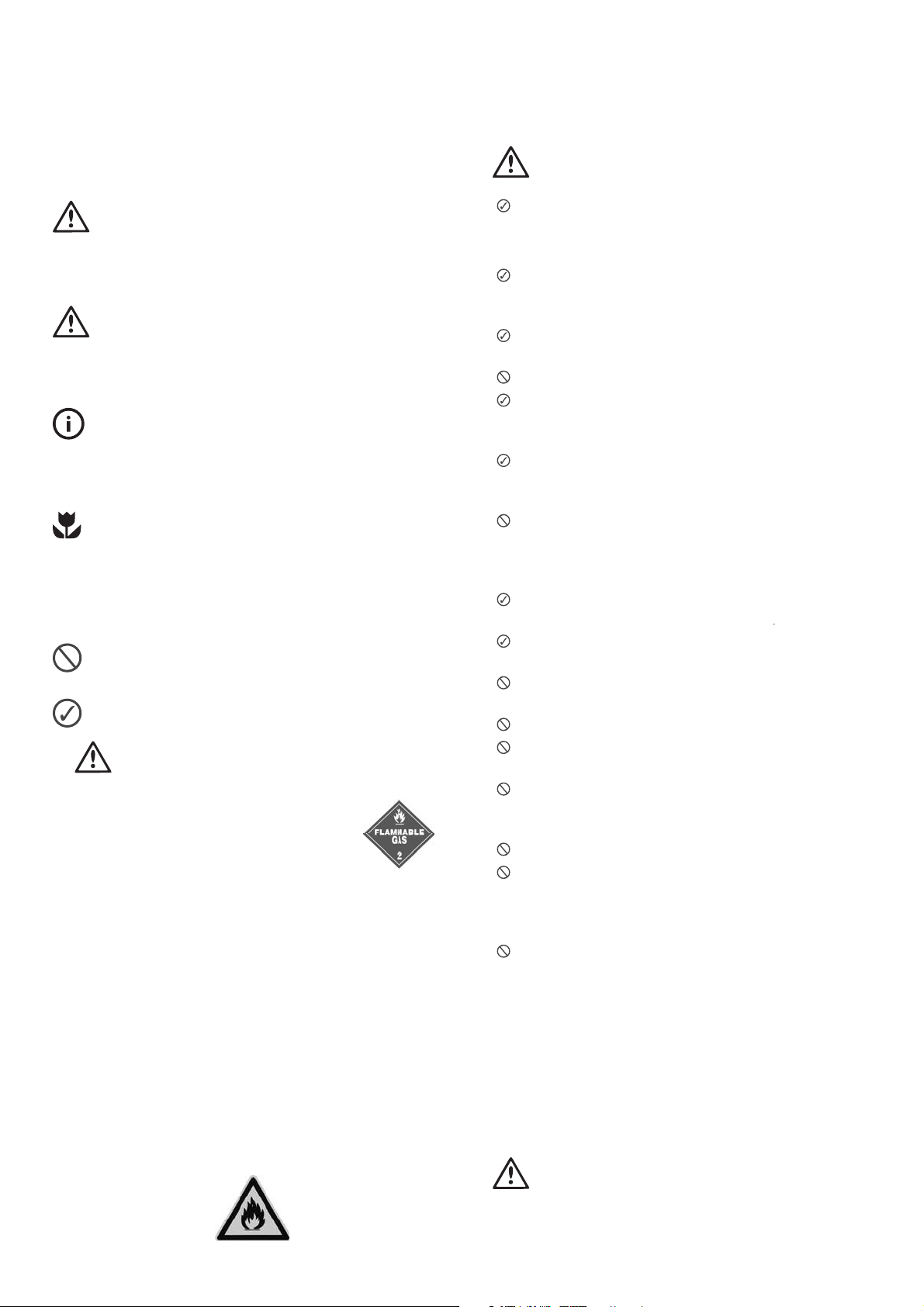
• If pressurised aerosol containers bear the
word ‘fl ammable’ and/or a small fl ame
symbol, do not store them inside any
refrigerator or freezer. If you do so, you
may cause an explosion.
• This appliance is not intended for use by persons
(including children) with reduced physical, sensory
or mental capabilities, or lack of experience and
knowledge, unless they have been given supervision or
instruction concerning use of the appliance by a person
responsible for their safety.
• Children should be supervised to ensure that they
do not play with the appliance.
• When you dispose of your old refrigerators and
freezers, remove any doors. Children can suff ocate if
they get trapped inside.
• This appliance contains insulation formed with
fl ammable blowing gases. Avoid safety hazards by
carefully disposing of this appliance.
Important safety instructions
warning
The appliance must be plugged into its own
dedicated 220-240V, 50Hz AC electrical outlet.
Ensure that the electric outlet is properly earthed
to ground. Consult a qualifi ed electrician if you are
unsure.
The plug must be accessible when the appliance
is in position.
Do not use an extension cord or adapter plug.
If the power cord is damaged, it must be replaced
by the manufacturer, its service agent or similarly
qualifi ed persons to avoid a hazard.
Unplug the appliance before cleaning and before
changing the light bulb to avoid.
electric shock.
Never unplug the appliance by pulling on the
power cord. Always grip the plug fi rmly, and pull
straight out of the receptacle to prevent damaging
the power cord.
Choose a location that is not too cold –
the temperature should be above 10°c
Put the appliance in a dry place, avoiding areas
of high moisture or humidity.
Don’t put the appliance in frosty or unprotected
areas, for example in a garage or on a verandah.
Don’t put the appliance in direct sunlight.
Don’t put the appliance near stoves, fi res
or heaters.
Do not use mechanical devices or other means
to accelerate the defrosting process, other than
those recommended by the manufacturer.
Do not damage the refrigerant circuit.
Do not use electrical appliances inside the
food storage compartments of the appliance,
unless they are of the type recommended by the
manufacturer.
Do not store explosive substances such as
aerosol cans with a fl ammable propellant in this
appliance.
When correctly installed, your appliance should:
• have adequate clearance to the back and sides
for air circulation (refer to page 4).
•be aligned to the surrounding cupboards.
• have doors that will self-close from a partially
open position.
warning
• Have the stability foot in place (see diagram on page
4) to prevent the appliance falling forward when a door
with heavy food load is opened.
Important safety instructions 3
Warning: Risk of fire / flammable materials
Installing your refrigerator
The appliance should arrive with the stability foot wound fully
up so it will not interfere with the operation of the rollers (see
diagram in Step 3 below).
caution
The rollers are designed for forward or backward
movement only. They are not castors. Moving the
refrigerator sideways may damage your fl oor and
the rollers.
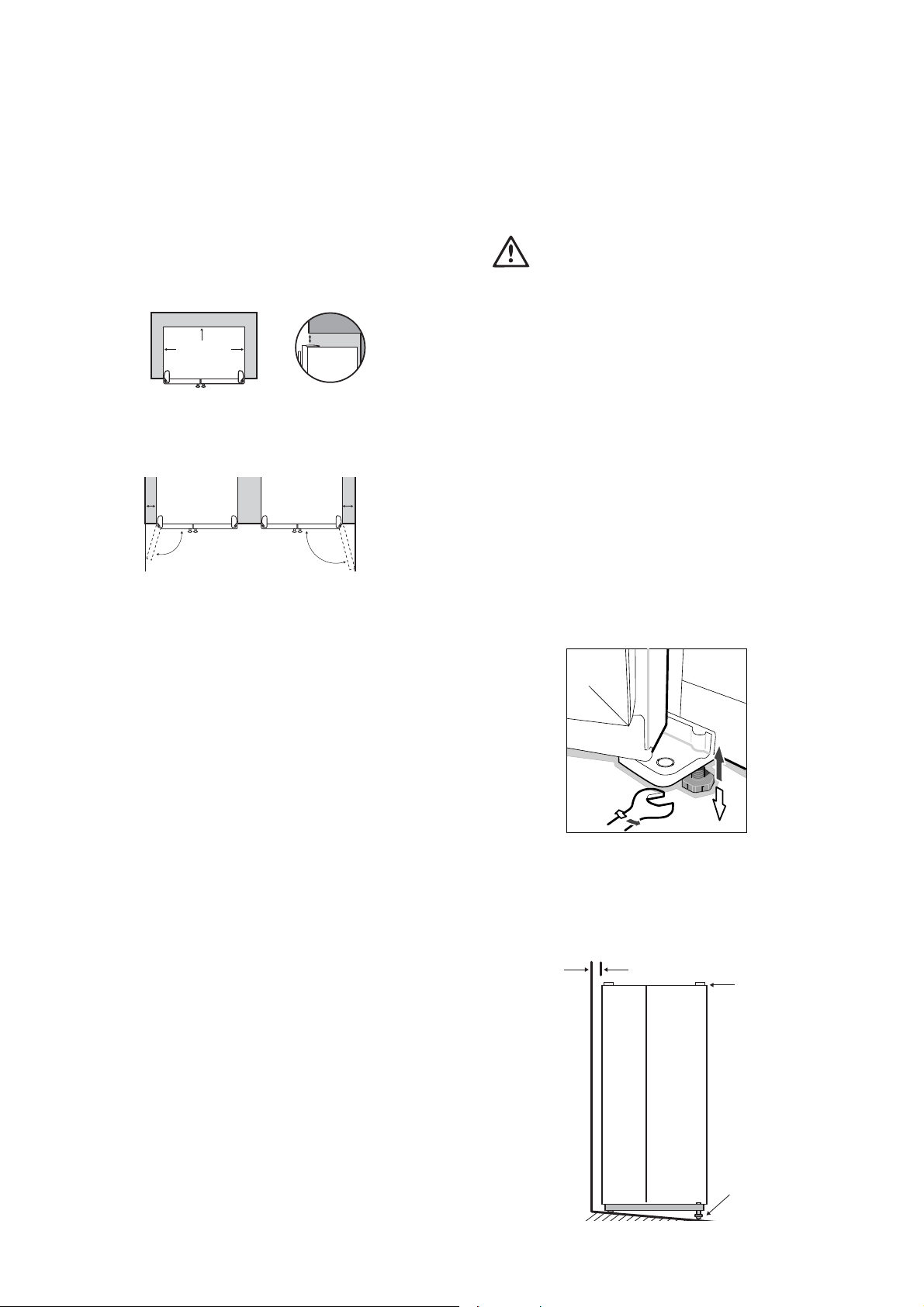
1
. Roll the refrigerator into its fi nal position.
2. The top of the refrigerator should be tilted back by
approximately 20mm. This will allow the doors to
self-close providing a consistent door seal and stability
when the doors are open.
3. When you have the appliance in its fi nal position,
it needs to be stabilized Wind the stability foot down
to the fl oor until it just makes contact with the fl oor.
Whenever you need to move the appliance, be sure
to wind the foot back up so that the appliance can roll
freely and be sure to reset it when reinstalling.
( The wrench opening size 30mm )
4. Check the alignment of the refrigerator to the surrounding
cupboards.
The top of the refrigerator should be on the
same level from side to side (see diagram below).
I f you need to adjust the level, use the adjustable rollers
as discussed in Step 3.
Installing your new refrigerator
Clearance around your refrigerator
Your Side by Side Refrigerator can be installed between
cupboards or fi xtures
but you must consider the following
spaces around the cabinet:
1. Allow a minimum of 10mm clearance on both sides.
2. Allow 30mm clearance at the back of the refrigerator.
3. Allow 10mm clearance above the hinge covers.
4. Allow a 349 or 427mm clearance on the hinge side of the
doors, if you place the refrigerator next to the wall. This
will make cleaning easier.
5. Make sure that cupboards or fi xtures do not stick out
further than the refrigerator cabinet.
Note: Refrigerator doors on all models are designed to sit
proud of cabinetry (not fl ush).
T
Top of refrigerator on
the same leve l i e.
horizontal
Adjust front rollers
for uneveness of floor
eg. wind this foot
down or up
Aligned to
cupboards
ie. even gap
4 Installing your new refrigerator
30mm
10mm
10mm
Recommended
airspace
CABINET
DOORS
10mm
Freezer
Door
Refrigerator
Door
349mm
427mm
Refrigerator operation 5
5. If the refrigerator rocks from one corner to the
opposite rear corner, this means that the fl oor is uneven;
you will need to put some packing under one of the
rear rollers. You could use thin pieces of solid material,
such as thin board, vinyl fl oor tiles or laminate. Place
the packing so that it will sit under one of the rear
rollers when the refrigerator is rolled into position.
6. You may now need to fi ne-tune the installation by
repeating Steps 3, 4 and 5.
7. Whenever you need to move the refrigerator, be sure to
wind the foot back up so that the refrigerator can
roll freely.
8. Clean
9. Leave standing in stable upright position for 2-3 hours
prior to turn “on”.
your refrigerator thoroughly following the
instructions on page 9 and wipe off any dust
that was
accumulated during shipping.
10. Plug the refrigerator into the power point. Don’t use
a double adaptor. If you need to roll the refrigerator
out to get at the power point, remember to raise the
stability foot before you do so.
11. We recommend that you let your refrigerator run for two
to three hours before you put any food in it .
It will
allow you to check that it is operating properly.
Your new refrigerator has been supplied with protective
plastic fi lm on the doors and cabinet, you can choose to
remove this fi lm as needed.
Congratulations! You have successfully installed your
new refrigerator.
caution
caution
Keep ventilation openings, in the appliance enclosure
or in the built-in structure clear of obstruction.
Refrigerator Operation
The refrigerator transfers heat from food placed inside the
appliance to the outside air.
This process makes the rear, the sides and the area
adjacent to the doors, particularly at initial start up, feel
warm to hot, this is normal.
There is a cooling coil located behind the rear wall of the
cabinet. This coil cools and removes moisture from the air.
A fan then circulates cold, dry air throughout the cabinet.
This air circulation means that food are refrigerated far
more quickly than in refrigerators where the air remains
relatively static.
Avoid placing food against air outlets as this will aff ect
air circulation.
A light frosting will occasionally occur on the cold interior
of the freezer when the door is opened frequently. This
is normal and will disappear after a few days in most
climates.
Make sure you fully close the freezer door after you load or
remove food. If the door is left partly open, a heavy frost will
coat the inside of the freezer . If a frost develops, remove it.
Ensure to properly close the door, so the frost will not reoccur.
Your new energy effi cient appliance uses a high-speed
compressor and other energy effi cient components that may
produce diff erent noises to your old appliance.
These sounds are normal and includes:
•compressor running noise.
•air movement noise from the small fan motor.
•occasional gurgling, similar to water boiling.
•a popping noise, heard during automatic defrosting.
•a clicking noise, just prior to the compressor starting up.
These noises are normal and will not cause the unit to alarm.
Tempe ratu
re Control
The factory default settings;
Refrigerator = 5°c Freezer = -18°c
If you want to change the tempe rature, follow the
instruction s in the section abou t the use r interface for your
model. Ensu re that you ma ke only small adju stment s and
wait 24 hou rs to see i f it’s correct to your liking.
Note: When you se t a tempe rature, you se t an av
e
r
age
t
empe rature for the whole refrige rator cabine t.
Checking the s oftness of ice cream i s a good indication
that your freezer is the right period, While checking
the tempe rature of water kept in the refrige rator is a
good way of checking the tempe rature of the food
compartmen t.
Tempe rature inside each compartmen t may vary,
depending on how much food you store and whe re you
place i t.
High or low room temperature may also affect the actual
temperature inside the refrigerator.
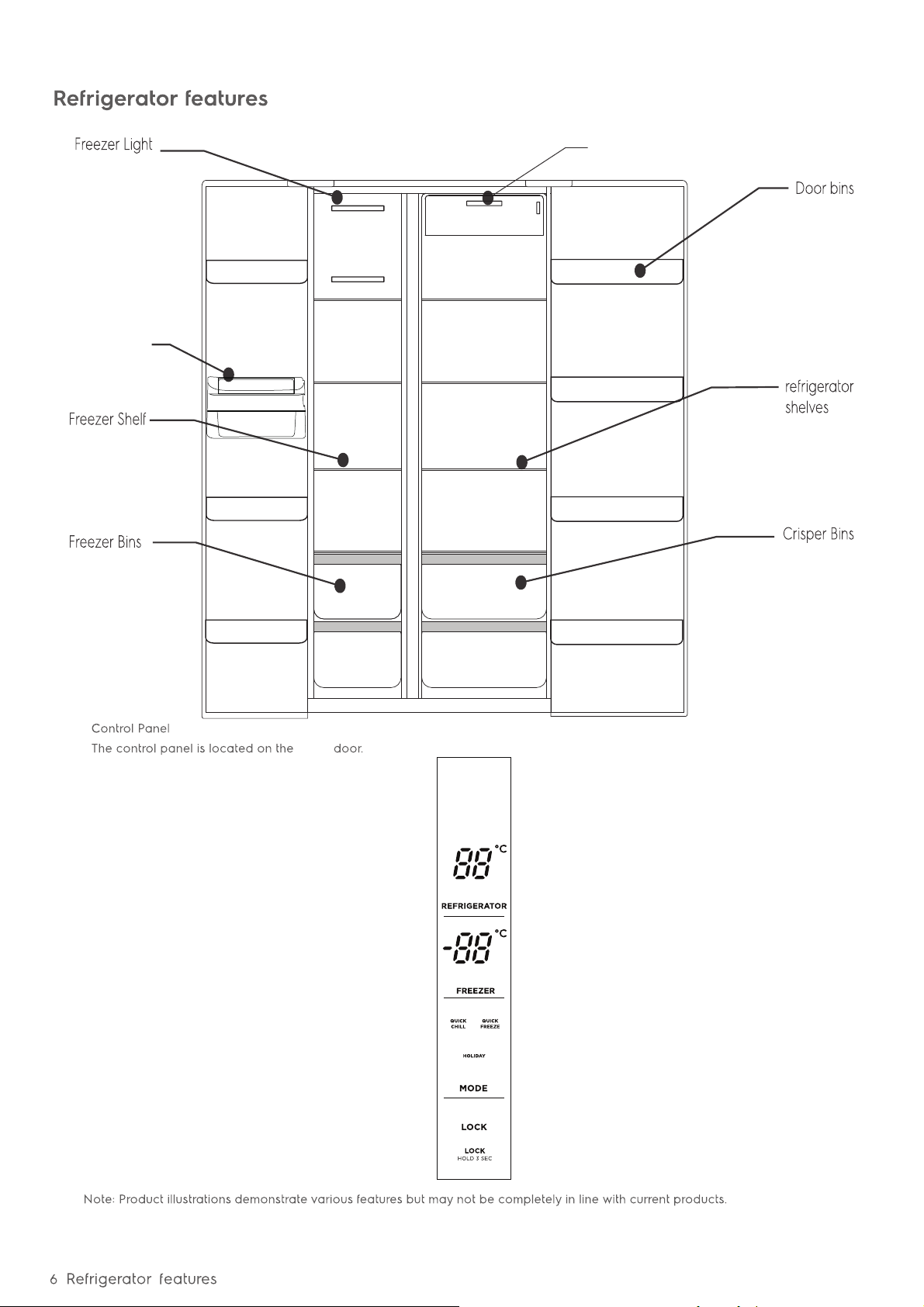
Refrigerator Light
fridge
Ice Twist Serve
(WSE6630SA, WSE6630WA)
Using the control panel 7
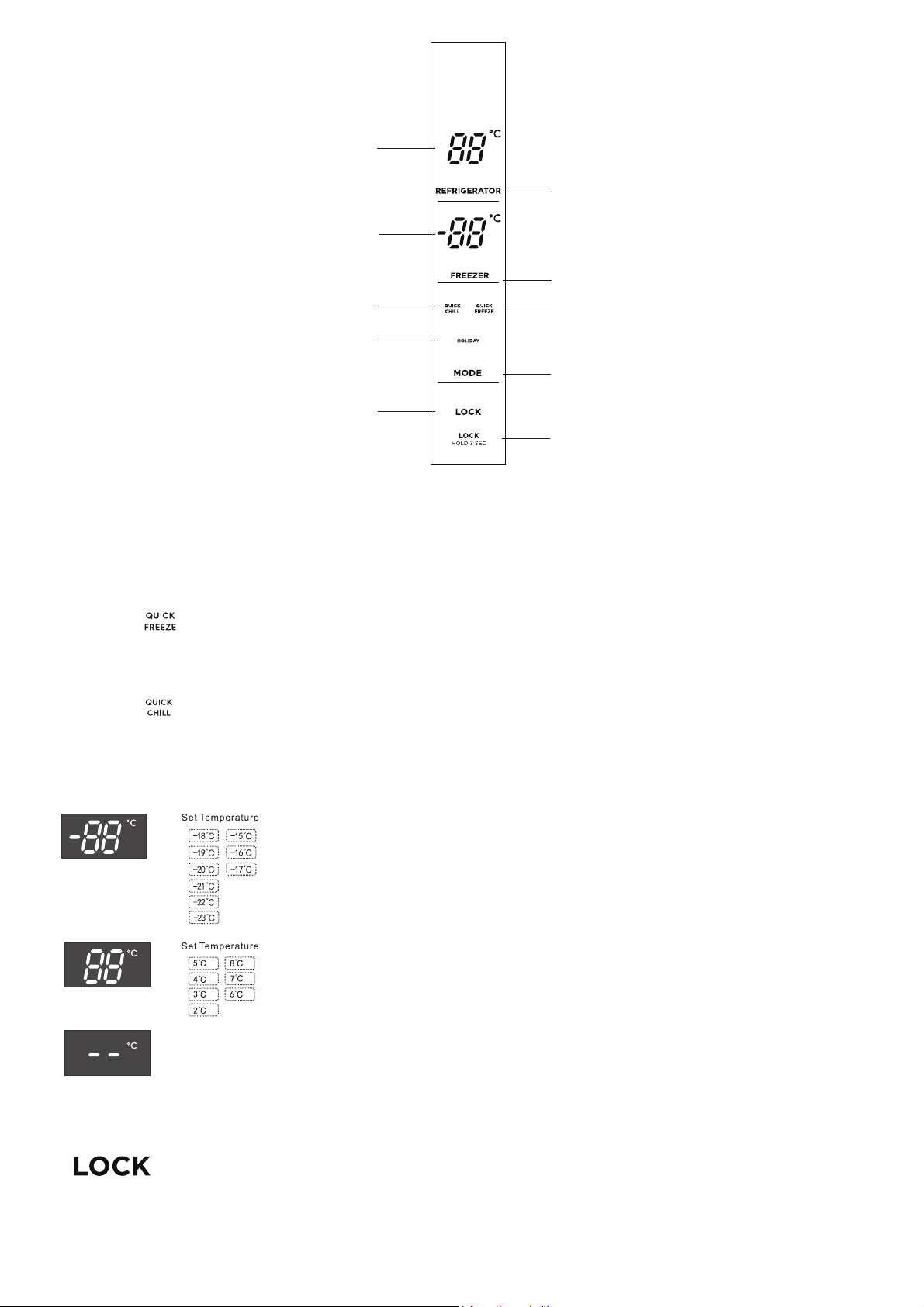
Function setting of the LED display
Note: the display will turn off after 20 seconds of inactivity, while the display will wake up if the button is touched again.
Using the control panel
Feature Selection - each press of the “MODE” button will cycle through the operating modes.
•Holiday Mode - the refrigerator will run at 8°c while the freezer will operate at -15°c.
•
•
Quick Freeze mode - When the super freezer mode is selected, the compressor will operate
continuously to freeze foods faster, and keep them fresh.The super freezer mode will
automatically turn off either after 24 hours of operation, or when the freezer reaches -28°C.
The super freezer icon will turn off, and the freezer will continue to operate at the normal set
temperature.
Quick Chill Icon - When the super fridge mode is selected, the fridge compartment reaches the
set temperature in the shortest period,in order to keep the food as fresh as possible.under this
mode,the set temperature of the fridge compartment locks on 2°C. The program runs 150mins
maximally then exits automatically, the super fridge icon goes out,which represent the super
fridge function is disable,the set temperature returns to the last one before the super fridge
mode operates.
Freezer compartment settings - the default temperature of the freezer is -18°c.
To change the temperature press the “FREEZER” button to cycle through the
set temperatures.
Fridge compartment settings - the default temperature of the refrigerator is 5°c.
To change the temperature press the ”REFRIGERATOR“ button to cycle through
the set temperatures.
Holiday
((Door Alarm))
Fridge compartment Shut down – Active this mode when no longer to use fridge compartment.
Activate the mode by press “REFRIGERATOR” button and hold 5 second display
will change to “- -” in fridge compartment.
To restart fridge compartment by re procedure press and hold “REFRIGERATOR” button 5
second display will change to last setting.
Lock button - Press the “LOCK hold 3sec” button to enable the lock mode . The lock icon will be
visible. While the refrigerator is in this mode the other buttons on the control panel will not
function, when the buttons are touched a chime will sound and the lock icon will flash. To exit
lock mode, press and hold the lock button for 3 seconds until the icon is no longer displayed.
Open door alarm - when the refrigerator or freezer door is left open for more than 1 minute the
alarm will sound to alert that the door is open. Closing the door will disable the alarm. The alarm
will continue every 30 seconds until the door is closed.
Feature Button
Lock/Unlock Button
Freezer
temperature
display
Refrigerator temperature
control
Refrigerator temperature
display
Freezer temperature
control
Quick Freeze Icon
Display
lock
Icon
Quick Chill Icon
Holiday mode Icon
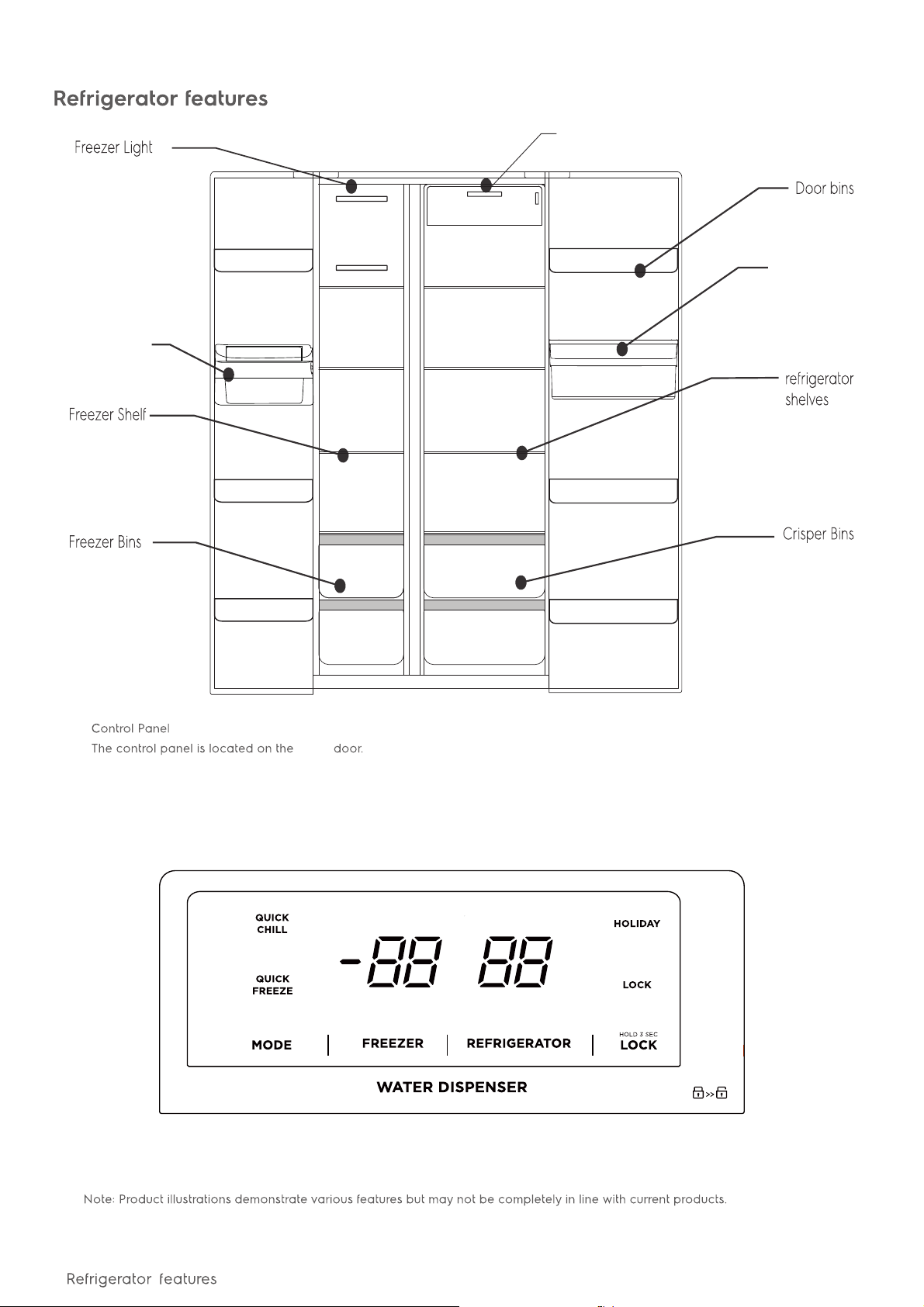
Refrigerator Light
fridge
Ice Twist Serve
8
water tank
(WSE6640BA)
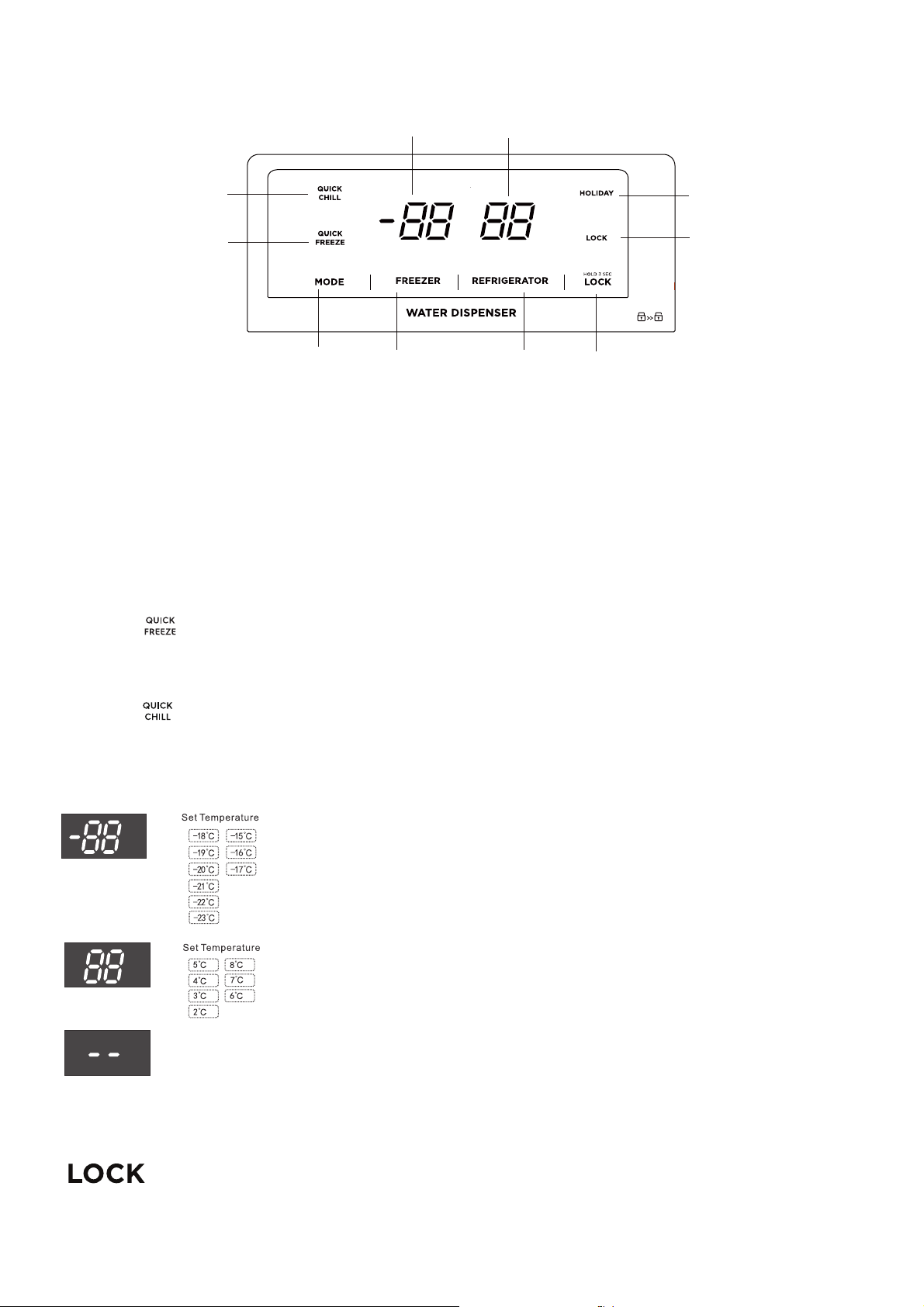
Using the control panel 9
Function setting of the LED display
Note: the display will turn off after 20 seconds of inactivity, while the display will wake up if the button is touched again.
Using the control panel
Feature Selection - each press of the “MODE” button will cycle through the operating modes.
•Holiday Mode - the refrigerator will run at 8°c while the freezer will operate at -15°c.
•
•
Quick Freeze mode - When the super freezer mode is selected, the compressor will operate
continuously to freeze foods faster, and keep them fresh.The super freezer mode will
automatically turn off either after 24 hours of operation, or when the freezer reaches -28°C.
The super freezer icon will turn off, and the freezer will continue to operate at the normal set
temperature.
Quick Chill mode - When the super fridge mode is selected, the fridge compartment reaches
the set temperature in the shortest period,in order to keep the food as fresh as possible.under
this mode,the set temperature of the fridge compartment locks on 2°C. The program runs
150mins maximally then exits automatically, the super fridge icon goes out,which represent the
super fridge function is disable,the set temperature returns to the last one before the super
fridge mode operates.
Freezer compartment settings - the default temperature of the freezer is -18°c.
To change the temperature press the “FREEZER” button to cycle through the
set temperatures.
Fridge compartment settings - the default temperature of the refrigerator is 5°c.
To change the temperature press the ”REFRIGERATOR“ button to cycle through
the set temperatures.
Holiday
((Door Alarm))
Freezer temperature
display
Refrigerator temperature
display
Holiday mode Icon
Display
lock
Icon
Quick Chill Icon
Quick Freeze Icon
Feature
Button
Refrigerator
temperature
Button
Lock/Unlock Button
Fridge compartment Shut down – Active this mode when no longer to use fridge compartment.
Activate the mode by press “REFRIGERATOR” button and hold 5 second display
will change to “- -” in fridge compartment.
To restart fridge compartment by re procedure press and hold “REFRIGERATOR” button 5
second display will change to last setting.
Lock button - Press the “LOCK hold 3sec” button to enable the lock mode . The lock icon will be
visible. While the refrigerator is in this mode the other buttons on the control panel will not
function, when the buttons are touched a chime will sound and the lock icon will flash. To exit
lock mode, press and hold the lock button for 3 seconds until the icon is no longer displayed.
Open door alarm - when the refrigerator or freezer door is left open for more than 1 minute the
alarm will sound to alert that the door is open. Closing the door will disable the alarm. The alarm
will continue every 30 seconds until the door is closed.
Freezer
temperature
Button
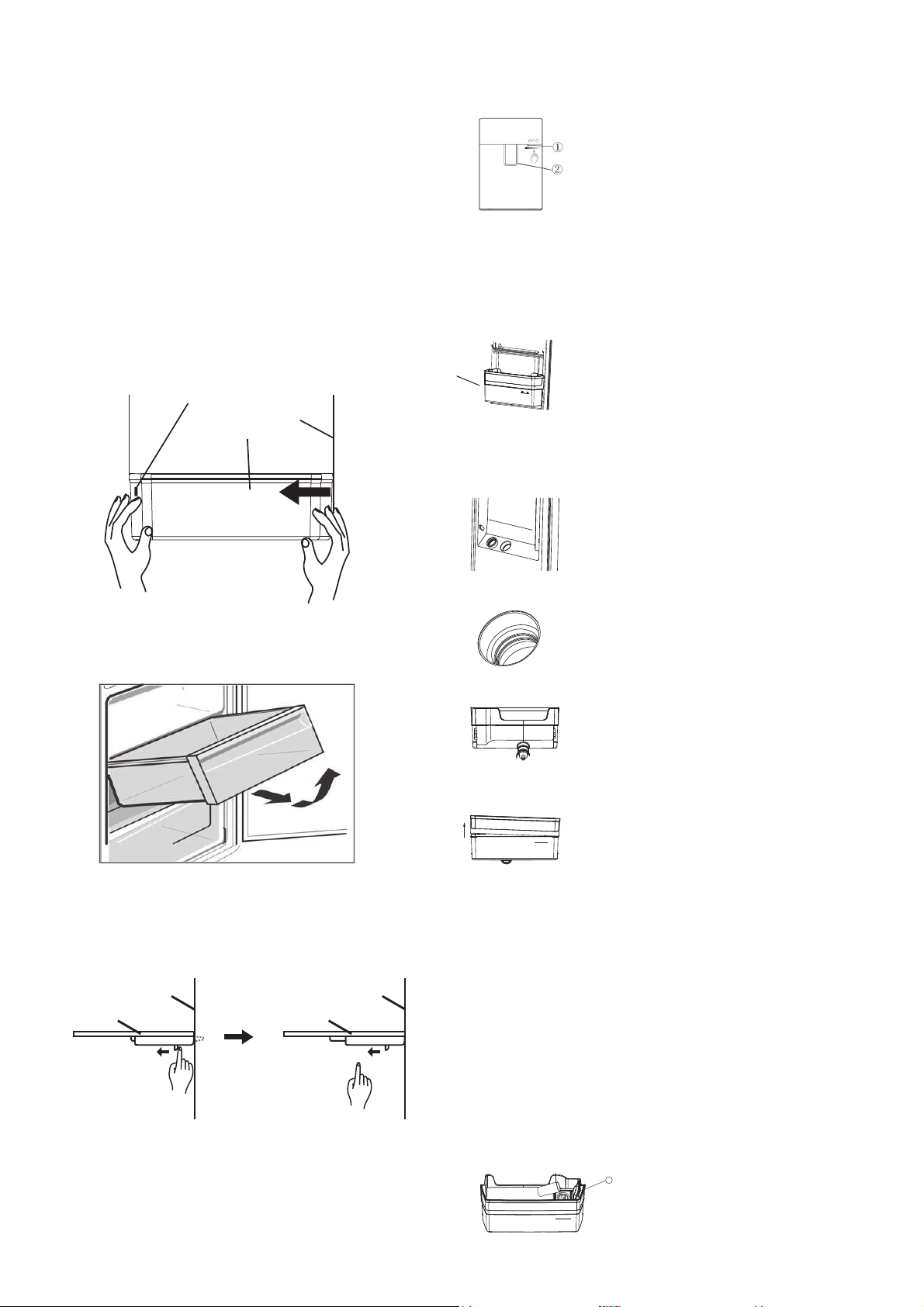
Crisper Bin
You can use the crisper bin to store vegetables, fruit
or smallgoods. To remove, pull it forward then up and
out.
Glass Shelves
When removing the glass shelf, please press the movable
pin under the shelf with both hands and push inward at the
same time. Then the glass shelf will be removed.
10 Features of your refrigerator
Features of your refrigerator
This section tells you how to make the most of the many
useful features and how to clean them.
Door storage bins
Disassembly: Hold both sides of the bottle shelf with both
hands. Push it from the side without the boss and push it
inward as the direction of the arrow. When pushing hard,
please note that the buckle on the edge of bottle shelf is
separated from the groove of the liner. Then bottle shelf
can be removed.
Installation :Hold both sides of the bottle shelf with both
hands. Install the buckle of the boss side at first. Then push
the other side inward slightly, the buckle can be fixed.
Gl
ass shelve
liner of cabinet
Glass shelve
liner of cabinet
Here is a boss on the liner
liner of door bottle
shelf
Instructions for child lock lever
Press the child's lock lever with your thumb as the direction as
below ① and the water lever ② will be locked to prevent children
from taking any water.
Press in the opposite direction to unlock and take water
Instructions for water tank assembly
MAX
2L
1.Hold both sides of the tank with hands and pull
the tank assembly off the door slightly in the
direc
tion indicated as below.
Notes: The transparent silicone parts of the
sealed water valve could be brought out
meantime when removing the water tank. If so,
remove them, and re-install them according to
the following steps.
1-1.Align the sealed part with the hole in the door
and place it in it.
1-2.It will be completed when the step of sealed
part can be fitted to the step in the hole.
2.Rotate counterclockwise to remove the water
valve assembly from the water tank for
cleaning.
3.Pinch the flange of the water tank cover
slightly upwards, and the water tank cover can
be separated from the water tank. Remove
the other side with the same method .The tank
and its cover can
be cleaned after disassembly.
4.Install the water valve by rotating it clockwise
after cleaning. When installing the tank cover,
install the one side at first (do not press it all the
way), then install the other side. Press firmly on
edges of the tank cover to fit the tank. Re-install
the entire water tank assembly at 45° to the
door. Press the outer edge of the water tank
slightly downwards to make it fit into the door.
Fill the tank with pure drink water( * )
1
MAX
2L
Open the inlet cover of water tank①.
Slowly fill the tank with pure drinking
water up to the maximum fill line marked
with “2L”. Then close the inlet cover①.
To prevent any spills, please use a
narrow-bore container to charge water.
*
Only direct drinking water or mineral water can
be stored in the water tank
LED lighting
Your refrigerator is fitted with long life LED lighting.
In the unlikely event the LED lights should fail, then the LED
lights should be serviced by the manufacturer, its service
agent or similarly qualifi ed technician. Refer to the
warranty page for contact details.
Cleaning your refrigerator Energy consumption
The following guide will help you reduce the running cost
of your new refrigerator. This will save you money and help
conserve our valuable energy resources.
1. Do not block air vents. Doing so may cause the
refrigerator to run longer and use more energy.
2. Do not set your freezer temperature too low. After 24 hours,
ice cream should be fi rm but able to be scooped out
with a spoon without bending the handle. If ice cream is
fi rmer than this (or too soft), adjust the freezer temperature
controls (see ‘Set Temperature’, page 7).
3. Ensure that the refrigerator doors seal properly as
you close them.
4. Before you open the refrigerator doors, decide what you
want to put in or take out. This will minimize the time you
have the doors open.
5. It is best to have the refrigerator in a place that is out of
direct
sunlight and away from heating appliances of any
kind. For e
xample, do not place the refrigerator next to a
cooker, st
ove or dishwasher.
6. Allow hot foods to cool to room temperature
before you put them in your freezer.
7. Thaw frozen foods in the refrigerator section.
8. If you keep the freezer compartment fi lled to
capacity, your food mass will help maintain the
freezer temperature when you open the door.
Turning off the refrigerator
If you are leaving for a short holiday, there is no need
to turn off your refrigerator .
If you are going on a long holiday and want to turn the
refrigerator off , follow the steps below.
1. Take all the food out of the refrigerator and freezer
compartments.
2. Switch off the refrigerator and remove the electric cord
from the power point.
3. Clean the inside.
4. Leave the doors open. This prevents bacteria from
growing and causing smells in the refrigerator.
Power failure
If there is a power
failure in your area, keep the door to the
freezer
closed. Most foods in your freezer will stay frozen for
24 hours.
Cleaning your refrigerator/energy consumption 11
Before cleaning: Turn appliance off at the power point, then
remove power cord from socket. This will make sure there
is no chance of getting an electric shock.
Doors and exterior
You should only clean the doors with lukewarm soapy water
and a soft
cloth. Rinse with clean water and then wipe the
surface
with clean water and a soft clean cloth to remove
soap r
esidue.
caution
Do not use stainless steel cleaners, abrasive pads or
other cleaners as they are likely to scratch the surface.
Damage to this product after delivery is not covered
by your warranty.
Interior
You should clean the appliance interior regularly. It will be
easiest to clean when the food supply is low. Wash the interior
with a soft cloth and use an unscented mild soap with luke-
warm water. Thoroughly dry all surfaces and removable parts.
Avoid getting water on appliance controls. If you have taken
out any removable parts, replace them and switch the power
on before re-stocking the appliance with food. Naturally,
you should keep the interior of your appliance hygienic by
promptly and thoroughly wiping up any food spills.
Door seals
Take care with Ensure to keep door seals clean.
Sticky
ood f and drink
can cause seals to stick to the cabinet
and tear when you open the door.
Wash seal with a mild detergent and warm
water. Rinse thoroughly and dry.
warning
Never use hot water, solvents, commercial kitchen
cleaners, aerosol cleaners, metal polishes, caustic or
abrasive cleaners, or scourers to clean this appliance,
as they will damage it. Many commercially available
cleaning products and detergents contain solvents
that will damage your refrigerator. When cleaning,
use only a soft cloth with an unscented mild soap
and lukewarm water.
warning
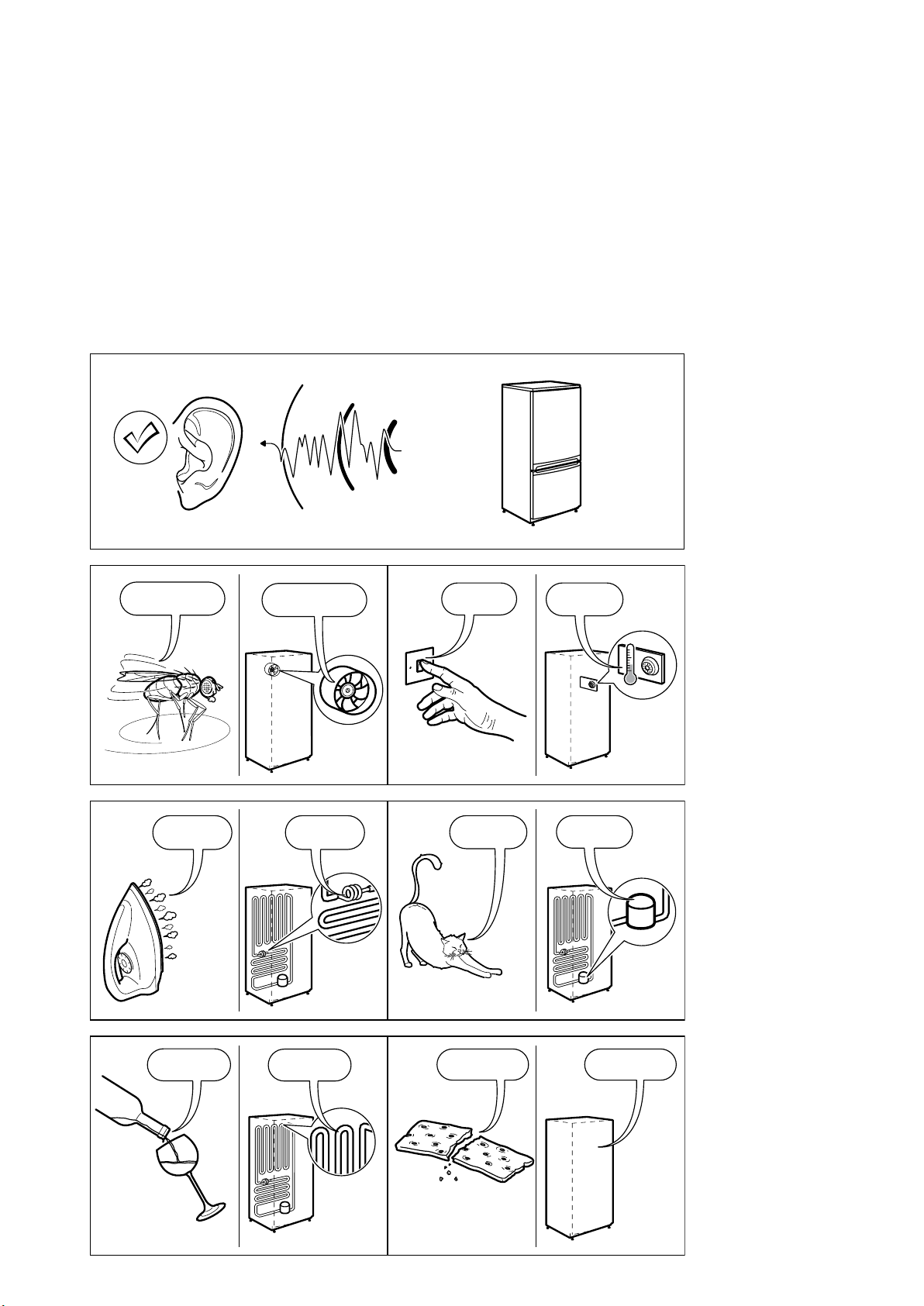
NOISES
BRRR!
HISSS!
CLICK!
BLUBB!
CRACK!
SSSRR
R!
OK
CLICK!
CLICK!
SSSRRR!
SSSRRR!
BRRR!
BRRR!
HISSS!
HISSS!
BLUBB!
BLUBB!
CRACK!CRACK!
A
p
p
liance noise
Your new refrigerator may make sounds that your old
one didn’t make. Because the sounds are new to you,
you might be concerned about them. Most of the new
sounds are normal. Hard surfaces, like the floor, walls
and cabinets, can make the sounds seem louder than
they actually are. The following describes the kinds of
sounds and what may be making them.”
12 NOISES

Food storage guide 13
Food storage guide
Category Product Refrigerator Freezer Storage tips
Meat
Sausages and mince 1-2 Days 2-3 Months Keep cold meat at the back of the
refrigerator where it is coldest.
Plastic can cause meat to sweat if
stored in refrigerator for more than
a day.
Roast can take up to 48 hours to
defrost properly, transfer frozen roast
to the refrigerator 2 days before use.
Chops and steak 3-4 Days 4-6 Months
Cold meats 3-5 Days 4-6 Months
Roasts 3-5 Days 12 Months
Poultry
Chicken 1-2 Days 2 Months If poultry takes on a smell or colour
you are unsure about it is best to
throw it out.
Whole eggs are not suitable for
freezing, slightly beaten eggs may
be frozen for four months.
Roast Chicken 3-5 Days 12 Months
Eggs 6 Weeks
Not Suitable
Seafood
Whole fish and fillets 2-3 Days 2 Months Store in an airtight container or foil.
Never freeze prawns in salty water
as this will dehydrate the flesh.
Lobster and crabs 1-2 Days 2 Months
Prawns 1-2 Days 2 Months
Dairy
Milk Until Expiry Date Not Suitable If dairy takes on a smell or colour
and you are unsure about it, it is best
to throw it out.
Depending on the variety hard
cheese can last from 2 weeks to
2 months.
Yoghurt 7-10 Days
Not Suitable
Hard Cheeses 2 Weeks – 2 Months
2 Months (Grated)
Soft Cheeses 1-2 Weeks Not Suitable
Butter 8 Weeks 12 Months
Fruit&
Vegetables
Every fruit and vegetable has a different
shelf life. Some stay fresh for a couple
of days e.g beans, others can last for a
couple of months e.g. onions.
8-12 Months
When freezing
chop and blanch
in small portions.
Keep vegetables in the crisper and
away from the air vents to avoid
freezing.
Don’t wash fruit and vegetables
before storing them in the
refrigerator as this can make them
susceptible to rotting.
Left overs
Homemade meals 3-4 Days 2-6 Months Store in sealed container.
Freeze meals in small portion sizes to
limit wastage.
TIPS & INFORMATION
IMPORTANT
Please note, use this information as a guide only,
actual storage times will vary depending on how
you use your refrigerator, climatic conditions and the
freshness of the food.
14 Troubleshooting
Troubleshooting
If you think something may be wrong with your refrigerator, you can carry out some easy checks before calling
for service. You may locate the problem, sparing yourself from inconvenience and saving time and money.
Problem Solution
When your appliance is
not operating
•Make sure that the power cord is plugged into the power outlet properly and that the outlet
is switched ‘ON’.
• Try running another appliance from the power outlet. If no power is coming from the outlet
you may have blown a fuse or tripped a circuit of your household power supply.
• Try adjusting the temperature control to a slightly “colder” position.
• It is normal for the freezer fan NOT to operate during the automatic defrost cycle, or for a short time after the
appliance is switched on.
When there
is refrigerator/
freezer noise
Modern refrigerators/freezers with increased storage capacity use high speed compressors. These can provide a
seemingly high level of sound which is quite normal. Normal operational sounds include:
• Occasional gurgling, similar to water boiling.
• Air fl ow noise (air circulates because of a small fan).
• A popping noise heard during automatic defrost.
Other strange sounds may mean that you need to check and take action. For example, noises may mean that:
• The cabinet is not level.
• The fl oor is uneven or weak.
• Bottles are badly placed and rattling.
• There are vibrations from an object on top of or behind or beside the refrigerator.
• The back of the refrigerator cabinet is touching the wall.
Remember it is quite normal for noise to seem louder when the refrigerator starts operating, or during quieter
periods such as night time.
If there are
odours inside
the appliance
• The interior may need cleaning.
• Some food produce odours.
• Some containers and wrapping can cause odours.
• Ask yourself if the odour started about the same time you started storing something unusual.
When the motor seems
to run more than
expected
Your new appliance provides you with large capacities in both the refrigerator section and the
separate freezer. It is normal for the motor to operate frequently. However, to keep operation to
a minimum, check the following:
• Are doors kept open too long or too often?
• Are controls set too cold? refer to “Using the control panel” for how to adjust.
• Have large amounts of warm food just recently been stored? Summer, festive seasons and holidays usually
mean a lot more work for your appliance.
• If the day is hot or the room is very warm, the appliance will need to run more than normal.
• The appliance will run more than normal just after you install it or when it has been turned off for a long time.
If the temperature in
the refrigerator is too
cold
• Refer to “Using the control panel” for how to adjust.
• Increase the temperature to avoid high energy consumption.
If heavy frosting occurs
in the freezer
Make sure you fully close the freezer and fridge doors. If the doors are left partly open a heavy frost will coat
the inside of the freezer. If a frost develops, remove it. Make sure properly close the doors and
the frost will not
reoccur.
If water drips
on the fl oor
The defrost water tray, (located at the back of the cabinet), may not be properly positioned, or the drain tube
may not be properly positioned to direct water into this tray. You may need to pull the refrigerator away from the
wall to check the tray and tube.
Freezer Door opens
after closing fridge
door
It is normal for the freezer door to momentarily open and re-close when the food compartment door is closed. If
the freezer door stays open, it indicates that the refrigerator cabinet needs to be tilted backwards a little further.
If you call a service person to solve this problem, you will be charged for the cost of a service call, as this is not a
warranty fault.
When temperature is
hot/warm on the
outside and rear side
of the Fridge
In normal operation, the fridge transfers heat from inside to outside of the cabinet. It is normal for the side and
rear of the fridge to feel warm/hot while operating. This will be more noticeable during start up and hot ambient
conditions.
If you have a problem, and the problem persists after you have made the checks mentioned above, contact your
nearest Electrolux approved Service Centre or the dealer you bought the refrigerator from. Be ready to quote the
model number, 9-digit PNC and 8-digit serial number, which is stated on the label inside the refrigerator compartment.
When there's leakage at water dispenser
1. Do not fill any beverage into water tank except for purified/mineral water
2. Make sure dispenser valve is tight enough
3. Clean water tank completely
This document sets out the terms and conditions of the product
warranties for Westinghouse Appliances. It is an important
document. Please keep it with your proof of purchase documents
in a safe place for future reference should there be a manufacturing
defect in your Appliance. This warranty is in addition to other rights
you may have under the Australian Consumer Law.
1. In this warranty:
(a) ‘ACL’ or ‘Australian Consumer Law’ means Schedule 2 to the
Competition and Consumer Act 2010;
(b) ‘Appliance’ means any Electrolux product purchased by you and
accompanied by this document;
(c) ‘ASC’ means Electrolux’s authorised serviced centres;
(d) ‘Westinghouse’ is the brand controlled by Electrolux Home Products
Pty Ltd of 163 O’Riordan Street, Mascot NSW 2020, ABN 51 004
762 341 in respect of Appliances purchased in Australia and Electrolux
(NZ) Limited (collectively “Electrolux”) of 3-5 Niall Burgess Road, Mount
Wellington, in respect of Appliances purchased in New Zealand;
(e) ‘WarrantyPeriod’meanstheperiodspeciedinclause3ofthis
warranty;
(f) ‘you’ means the purchaser of the Appliance not having purchased
the Appliance for re-sale, and ‘your’ has a corresponding meaning.
2. Application: This warranty only applies to new Appliances, purchased
and used in Australia or New Zealand and is in addition to (and does not
exclude, restrict, or modify in any way) other rights and remedies under
a law to which the Appliances or services relate, including any non-
excludable statutory guarantees in Australia and New Zealand.
3. Warranty Period: Subject to these terms and conditions, this warranty
continues for in Australia for a period of 24 months and in New Zealand
for a period of 24 months, following the date of original purchase of the
Appliance.Speciccomponentsarewarrantedagainstmanufacturing
defects in Australia and New Zealand for the periods listed below;
• Compressor – Further 3 years
• External Condenser – Further 3 years
• Evaporator – Further 3 years
• Drier – Further 3 years
4. Repair or replace warranty: During the Warranty Period, Electrolux
or its ASC will, at no extra charge if your Appliance is readily accessible
for service, without special equipment and subject to these terms and
conditions, repair or replace any parts which it considers to be defective.
Electrolux may, in its absolute discretion, choose whether the remedy
oeredforavalidwarrantyclaimisrepairorreplacement.Electroluxorits
ASC may use refurbished parts to repair your Appliance. You agree that
any replaced Appliances or parts become the property of Electrolux.
5. Travel and transportation costs: Subject to clause 7, Electrolux will
bear the reasonable cost of transportation, travel and delivery of the
Appliance to and from Electrolux or its ASC. Travel and transportation will
be arranged by Electrolux as part of any valid warranty claim.
6. Proof of purchase is required before you can make a claim under this
warranty.
7. Exclusions: You may not make a claim under this warranty unless the
defect claimed is due to faulty or defective parts or workmanship. This
warranty does not cover:
(a) lightglobes,batteries,ltersorsimilarperishableparts;
(b) parts and Appliances not supplied by Electrolux;
(c) cosmeticdamagewhichdoesnotaecttheoperationofthe
Appliance;
(d) damage to the Appliance caused by:
(i) negligence or accident;
(ii) misuse or abuse, including failure to properly maintain or service;
(iii) improper, negligent or faulty servicing or repair works done by
anyone other than an Electrolux authorised repairer or ASC;
(iv) normal wear and tear;
(v) power surges, electrical storm damage or incorrect power supply;
(vi) incomplete or improper installation;
(vii) incorrect, improper or inappropriate operation;
(viii) insect or vermin infestation;
(ix) failure to comply with any additional instructions supplied with
the Appliance;
In addition, Electrolux is not liable under this warranty if:
(a) the Appliance has been, or Electrolux reasonably believes that the
Appliance has been, used for purposes other than those for which
the Appliance was intended, including where the Appliance has
been used for any non-domestic purpose;
(b) theApplianceismodiedwithoutauthorityfromElectroluxinwriting;
(c) the Appliance’s serial number or warranty seal has been removed
or defaced.
8. How to claim under this warranty: To enquire about claiming under
this warranty, please follow these steps:
(a) carefully check the operating instructions, user manual and the
terms of this warranty;
(b) have the model and serial number of the Appliance available;
(c) have the proof of purchase (e.g. an invoice) available;
(d) telephone the numbers shown below.
9. Australia: For Appliances and services provided by Electrolux in
Australia: Electrolux goods come with guarantees that cannot be
excluded under the Australian Consumer Law. You are entitled to a
replacement or refund for a major failure and for compensation for any
other reasonably foreseeable loss or damage. You are also entitled to
have the Appliance repaired or replaced if the Appliance fails to be of
acceptable quality and the failure does not amount to a major failure.
‘Acceptable quality’ and ‘major failure’ have the same meaning as
referred to in the ACL.
10. New Zealand: For Appliances and services provided by Electrolux
in New Zealand, the Appliances come with a guarantee by Electrolux
pursuant to the provisions of the Consumer Guarantees Act, the Sale
of Goods Act and the Fair Trading Act. Where the Appliance was
purchased in New Zealand for commercial purposes the Consumer
Guarantee Act does not apply.
11.Condentiality: You accept that if you make a warranty claim, Electrolux
and its agents including ASC may exchange information in relation to you
to enable Electrolux to meet its obligations under this warranty.
Warranty
FOR SALES IN AUSTRALIA AND NEW ZEALAND
APPLIANCE: WESTINGHOUSE REFRIGERATORS AND FREEZERS
Important Notice
Before calling for service, please ensure that the steps listed in clause 8 above have been followed.
AUSTRALIA
FOR SERVICE
ortondtheaddressofyournearest
authorised service centre in Australia
PLEASE CALL 13 13 49
For the cost of a local call
FOR SPARE PARTS
ortondtheaddressofyournearest
spare parts centre in Australia
PLEASE CALL 13 13 50
For the cost of a local call
NEW ZEALAND
FOR SERVICE
ortondtheaddressofyournearest
authorised service centre in New Zealand
PLEASE CALL 0800 10 66 10
FOR SPARE PARTS
ortondtheaddressofyournearest
spare parts centre in New Zealand
PLEASE CALL 0800 10 66 20
Westinghouse.com/shop
For more information on all Westinghouse appliances, or for
dimension and installation information, call into your retailer,
phone or email our customer care team or visit our website
:
AUSTRALLA
phone:1300 363 640
fax:1800 350 067
email:[email protected]
web:westinghouse.com.au
NEW ZEALAND
phone:0800 436 245
fax:0800 225 088
email:[email protected]
web:westinghouse.com.nz