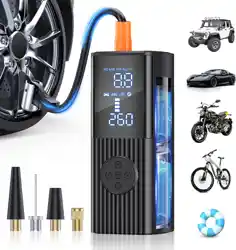
Hafuloky P015 Tire Inflator Portable Air Compressor 180PSI Cordless Air Pump

Product's Documents

Below are documents related to this product, you can read online or download:
P015 photo

1. Product Overview

Hafuloky Tire Inflator Portable Air Compressor, showing the main unit with digital display and LED light.

The Hafuloky P015 is a cordless, portable air compressor designed for inflating tires and other inflatables. It features a digital pressure gauge, automatic shut-off, and an integrated LED light.

Model: P015

Brand: Hafuloky

2. Included Items

  • Tire inflator (main unit) x1
  • Air hose x1
  • Atmospheric nozzle x1
  • Stingy mouthpiece x1
  • French adapter x1
  • Ball needle x1
  • USB charging cable x1
  • Storage bag x1
  • User manual x1
Package includes showing all accessories laid out.

3. Specifications

  • Maximum Pressure: 180 PSI
  • Inflation Rate: 36 Liters Per Minute (LPM)
  • Power Source: Built-in rechargeable battery / 12V DC car plug
  • Voltage: 12 Volts
  • Noise Level: ≤ 40 dB
  • Display: Digital LCD screen
  • Additional Features: LED light with 3 modes, 5V/2A USB output port
  • Unit Dimensions (LxWxH): 2.8" x 2.6" x 6.7"
  • Unit Weight: 0.86 kg (1.9 lbs)

4. Controls and Indicators

Close-up of the inflator's control panel showing the LCD screen and buttons.

Main Unit

  • LCD Display: Shows preset target pressure, real-time pressure, and selected unit (PSI, KPA, BAR, kg/cm²).
  • Power/Mode Button: Turns the unit on/off and cycles through the preset inflation modes (Bicycle, Motorcycle, Car, Ball) and Manual mode.
  • + / - Buttons: In Manual mode, used to increase or decrease the target pressure setting.
  • Unit Button: Cycles through the four pressure measurement units.
  • LED Light Button: Controls the integrated LED light. Press to cycle through three modes: steady on, flashing, and off.
  • USB Port (5V/2A): Can be used to charge external electronic devices or to recharge the inflator's internal battery.
  • Air Hose Connection Port: Located at the base of the unit.
  • Cooling Vents: Located on the sides for heat dissipation.

5. Charging the Unit

Diagram showing the USB Type-C port used for charging.
  1. Use the provided USB charging cable.
  2. Connect the cable to the USB port on the inflator.
  3. Connect the other end to a standard USB power adapter (not included) or a computer USB port.
  4. The unit can be used while charging. It is recommended to fully charge the unit before first use and after long periods of storage.

Note: The unit also operates via the 12V DC car power adapter when the internal battery is depleted.

6. Basic Operation

6.1 Attaching Accessories

  1. Screw the desired accessory (tire chuck, ball needle, etc.) onto the end of the air hose.
  2. Firmly connect the other end of the air hose to the port on the base of the inflator.

6.2 Setting the Target Pressure

  1. Press the Power/Mode button to turn on the unit.
  2. Press the Power/Mode button repeatedly to cycle to your desired preset mode (Bike, Motorcycle, Car, Ball) or to "Manual" mode.
  3. In Manual Mode:
    • Use the + and - buttons to set your desired target pressure.
    • Use the Unit button to switch between PSI, KPA, BAR, or kg/cm² if needed.
  4. The LCD will show the set target pressure.

6.3 Inflating

  1. Attach the hose accessory securely to the valve of the tire or inflatable item.
  2. The LCD will show the current (real-time) pressure.
  3. The inflator will start automatically and stop automatically when the preset target pressure is reached.
  4. After inflation is complete, disconnect the hose from the valve.
  5. Press and hold the Power button to turn off the unit, or it will auto-power off after a period of inactivity.

Auto Shut-Off Feature: The compressor will automatically stop when the preset pressure is reached to prevent over-inflation.

7. Using the LED Light

The LED light on top of the unit has three modes:

  1. Press the LED button once for a steady light (for illumination).
  2. Press again for a flashing light (for warning/signaling).
  3. Press a third time to turn the light off.

8. Using the USB Power Bank Function

The inflator can act as a power bank for USB devices like smartphones.

  1. Use your own USB cable to connect your device to the inflator's USB output port.
  2. The device should begin charging. The inflator must have battery charge remaining to provide power.

9. Safety and Maintenance

Safety Instructions

  • Do not use the inflator continuously for more than 10 minutes. Allow it to cool down for at least 10 minutes before resuming use if it becomes hot.
  • Do not submerge the unit in water or use it in rainy conditions.
  • Keep the cooling vents clear of obstructions.
  • Only use with the provided accessories or compatible replacements.
  • Do not exceed the maximum pressure rating of the item you are inflating.
  • Check the tire or item's recommended pressure before inflating.

Maintenance and Storage

  • Fully charge the unit before storing it for extended periods.
  • Store in the provided storage bag in a cool, dry place.
  • Keep the air hose and accessories clean and free from debris.
  • Do not attempt to disassemble or repair the unit yourself.

10. Troubleshooting

Problem Possible Cause Solution
Unit does not turn on. Battery is depleted. Connect to USB charger or 12V car power to recharge/operate.
Inflation stops prematurely or is slow. Unit is overheating. Stop using and allow the unit to cool down for 10 minutes.
Pressure reading seems inaccurate. Leak in hose connection or tire valve. Check and secure all connections. Ensure valve core is tight.
Unit does not auto-stop. Manual mode not set correctly; valve leak. Verify target pressure is set. Monitor inflation and stop manually if necessary. Check for leaks.
Air hose pops off. Connection not fully tightened. Ensure the hose is screwed firmly onto the inflator's port and the accessory.

Reference file: Hafuloky P015 Tire Inflator Portable Air Compressor 180PSI Cordless Air Pump

Specifications

Hafuloky P015 Questions and Answers

See other models: P008