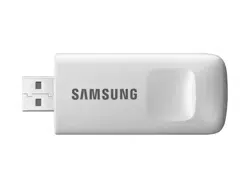

Samsung SMART HOME
ADAPTER
User manual
HD39J1230GW
• Thesesafetyprecautionsareforowner’ssafetyandpreventionofpropertydamage.
Therefore,pleasereadthismanualthoroughlybeforeusingyourproduct.
SMARTdongle_EN.indd 1 2016-04-22 오전 10:32:01

2
What is the SMART HOME ADAPTER? ........................... 3
ApplicationoftheSMARTHOMEADAPTER ..................3
Installation of the SMART HOME ADAPTER ................. 4
InstallingtheSMARTHOMEADAPTER ............................4
Installation of the Smart Home App ............................... 4
Setting up the network ....................................................... 5
Specicationofwired/wirelessrouterforthe
SamsungSMARTHOMEADAPTER ..................................... 6
Downloading the Samsung Smart Home App ............ 7
RegisteringforaSamsungaccount ...................................7
DownloadingtheSamsungSmartHomeApp ............. 8
Registeringtheproduct ........................................................... 9
Specication ......................................................................... 17
Open Source Announcement .......................................... 17
Safety information ............................................................. 18
Troubleshooting .................................................................. 21
Contents
SMARTdongle_EN.indd 2 2016-04-22 오전 10:32:01
3
What is the SMART HOME ADAPTER?
TheSMARTHOMEADAPTERisanoptionalaccessorythatisusedtoenableWi-Fiand/orruntheSamsungSmart
HomeApponcompatibleappliances(notincluded)ofSamsungElectronicsCo.,Ltd.
Application of the SMART HOME ADAPTER
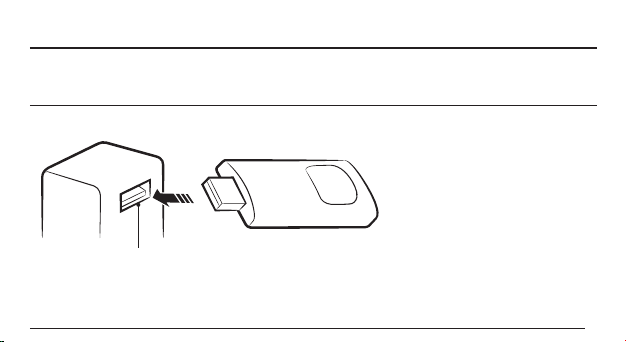
• UsetheSMARTHOMEADAPTERforcompatibleSamsungappliances.VisitSamsung.comforalistofcompatible
devices.
AppliancescompatiblewiththeSMARTHOME
ADAPTERwillhaveaporttoaccepttheadapter
SMARTdongle_EN.indd 3 2016-04-22 오전 10:32:01
4
Installation of the SMART HOME ADAPTER
Installing the SMART HOME ADAPTER
• Installtheadapteratthegivenpositionofeach
compatibleSamsungappliance.
• DownloadtheappropriatemanualatSamsung.com
foreachcompatibleapplianceandrefertoitfor
properinstallationposition.
Installation of the Smart Home App
[Setting the network]
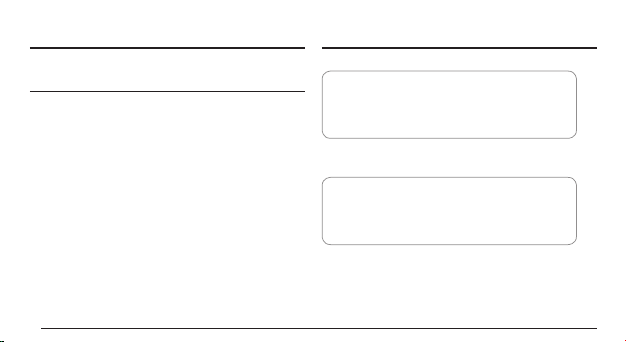
Connectthewired/wirelessroutertothe
SMARTHOMEADAPTERwirelessly.
[Registering Smart Home Service]
RegisterontheSmartHomeAppusingyour
smartphone.
SMARTdongle_EN.indd 4 2016-04-22 오전 10:32:01
5
Setting up the network
Note
• Forthecerticationandciphertypeofawiredorwirelessrouter,itisrecommendedtouseWPA/TKIPor
WPA2/AES.TheSMARTHOMEADAPTERdoesnotsupportanewWi-Ficertiedspecicationandnon-standard
Wi-Ficerticationtype.
• Thequalityofyourwirelessnetworkconnectioncanbeaffectedbysurroundingwirelessinterference.
• Ifaninternetserviceproviderregisteredtheuser'sPCorMACaddress(Identicationnumber)ofthemodem
permanently,theSMARTHOMEADAPTERcannotbeconnectedtotheInternet.Pleasecontacttheinternet
serviceproviderandinquireabouttheinternetconnectionprocesstoconnectadevice(e.g.SMARTHOME
ADAPTER)totheInternet.
• TheInternetmaynotbeconnectedduetoarewall.Pleasecontacttheinternetserviceproviderandrequest
asolution.
• Ifyouhavefollowedwhattheinternetserviceproviderdirectedbutstillcannotconnecttotheinternet,please
contacttheSamsungservicecenter.
SMARTdongle_EN.indd 5 2016-04-22 오전 10:32:01

6
Specication of wired/wireless router for the Samsung SMART HOME ADAPTER
LANportonthe
wall
LANcable
Wired/wirelessrouter
(supportsDHCPserver)
• Pleaserefertotheusermanualforinstallationof
yourwired/wirelessrouter.
• SamsungSMARTHOMEADAPTERsupportsthe
IEEE802.11b/g/n(2.4GHz),Soft-APmethod
communicationprotocol.
(SamsungElectronicsrecommendsuseof
IEEE802.11n.)
• Ifthewired/wirelessrouterisnotaWi-Ficertied
product,itmaynotconnecttotheSMARTHOME
ADAPTER.
SMARTdongle_EN.indd 6 2016-04-22 오전 10:32:01
7
Downloading the Samsung Smart Home App
Registering for a Samsung account
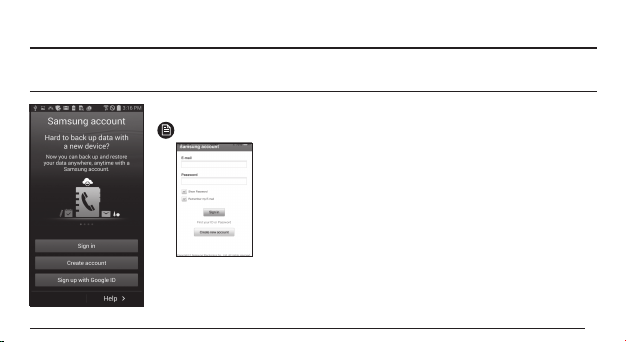
• BeforeusingtheSamsungSmartHomeApp,registerforaSamsungaccount.
Note
Samsungaccount
loginscreen(iphone)
• Ifanauto-loginisnotset,theSamsungAccountscreenwill
appearduringtheinitialsetup.
SMARTdongle_EN.indd 7 2016-04-22 오전 10:32:01
8
Downloading the Samsung Smart Home App
• YoucandownloadtheSamsungSmartHomeAppbysearching"SamsungSmartHome"onGooglePlaystore,
GalaxyAppsandiPhoneAppStore.
Note
• SamsungSmartHomeAppsupportsandroidoperatingsystem4.0(ICS)orhigherandisoptimizedforSamsung
Smartphones(GalaxySorNoteseries).IfyouruntheAppusingaSmartphonemanufacturedbyother
companies,somefunctionsmayoperatedifferently.
• ForiPhoneusers,iOS7orhigherissupportedbytheapp.
• SamsungSmartHomeAppissubjecttochangesandupdateswithoutnoticeforproductimprovement
purposes.
SMARTdongle_EN.indd 8 2016-04-22 오전 10:32:02

9
Registering the product
• BeforeusingtheSamsungSmartHomeApp,register
theproductforSamsungSmartHomeService.
Android
b
a
1
1 Search(a) or select(b) the
user's country and press
the Save button.
SMARTdongle_EN.indd 9 2016-04-22 오전 10:32:02
10
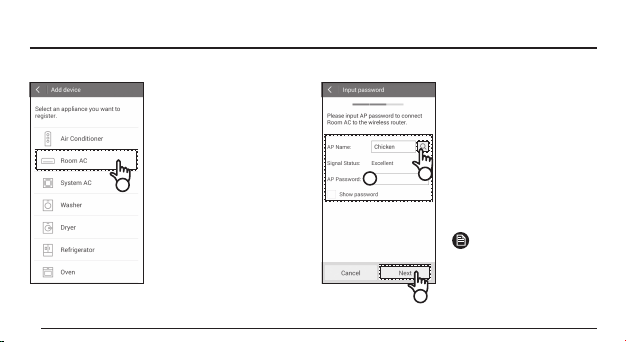
2
2 Select the icon for the
compatible appliance to
be registered.
d
c
3
3 Enter(c) the password
of the wireless router
which will be connected
and then press the Next
button.
– Ifyouwanttochange
theconnectedrouter,
presstheicon(d)and
selectthenameofthe
wirelessrouter.
Note
• Whentheguidancescreen
forchangingthenetwork
settingappears,uncheck
theboxthatsays'Smart
networkswitch'.
SMARTdongle_EN.indd 10 2016-04-22 오전 10:32:02
11
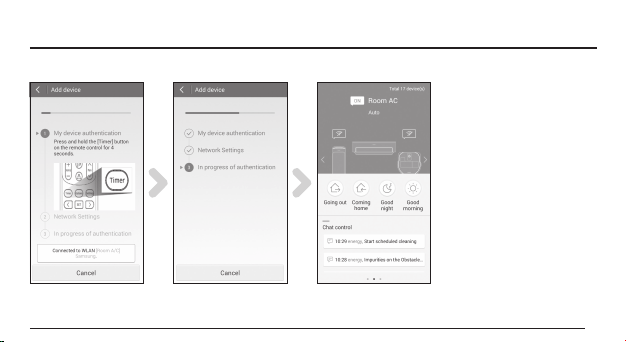
4 Set the compatible
Samsung appliance
according to the guidance
on the screen.
5 Network setting is
congured automatically.
6 When the product
registration is complete,
the main screen of the
Samsung Smart Home App
appears.
– Theiconforthe
connectedappliancewill
beactivatedonthemain
screen.
SMARTdongle_EN.indd 11 2016-04-22 오전 10:32:02
12
iOS
2
a
c
3
b
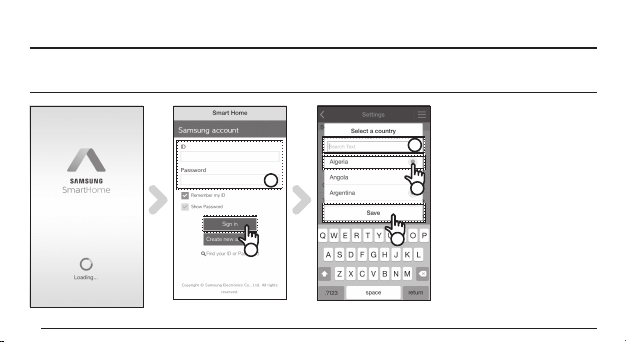
1 Run Samsung Smart Home
App.
2 Enter(a) the Samsung
account and then press the
Sign in button.
– However,iPhoneusers
mayneedtoperformthe
loginprocesseachtime
theyusetheAppsince
theirlogininformationis
notautomaticallysaved.
3 Search(b) or select(c) the
user's country and press the
Save button.
SMARTdongle_EN.indd 12 2016-04-22 오전 10:32:02
13
4
d
5
6
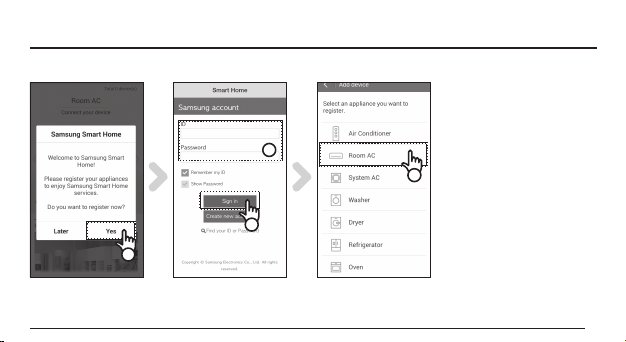
4 Press the Yes button to
register the product to
Samsung Smart Home
services.
5 Enter(d) the Samsung
account and then press the
Sign in button.
– Usethesameaccountas
theaccountwhichwas
usedfortheinitiallogin.
6 Select the icon for the
connected appliance that is
being registered.
SMARTdongle_EN.indd 13 2016-04-22 오전 10:32:03
14
e
9
8
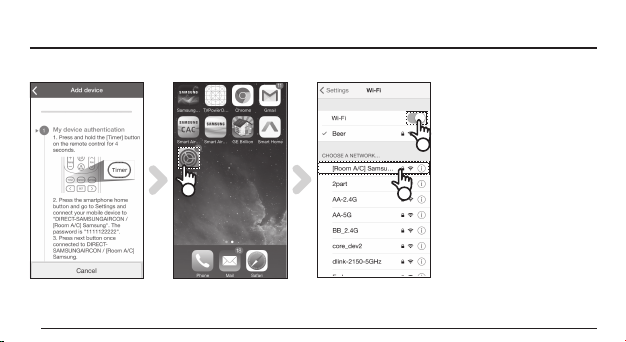
7 Con gure the connected
appliance according to the
guidance on the screen.
8 Run the Settings app on
your Smartphone.
9 Activate(e) Wi-Fi and
then select the connected
Samsung appliance.
SMARTdongle_EN.indd 14 2016-04-22 오전 10:32:03
15
10
f
11
12
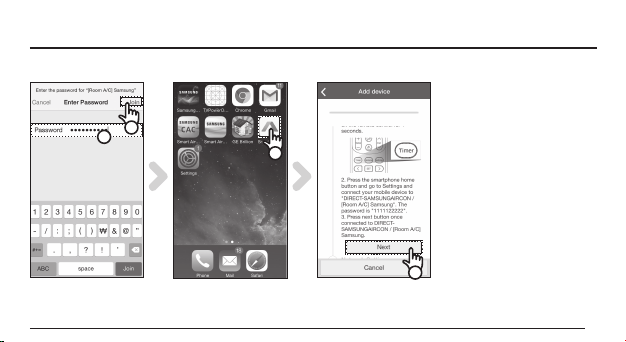
10 Enter(f) the password
"1111122222" and then
press the Join button.
11 Run the Samsung Smart
Home App on your
Smartphone.
12 Press the Next button
on the AP mode setting
screen.
SMARTdongle_EN.indd 15 2016-04-22 오전 10:32:03
16
g
h
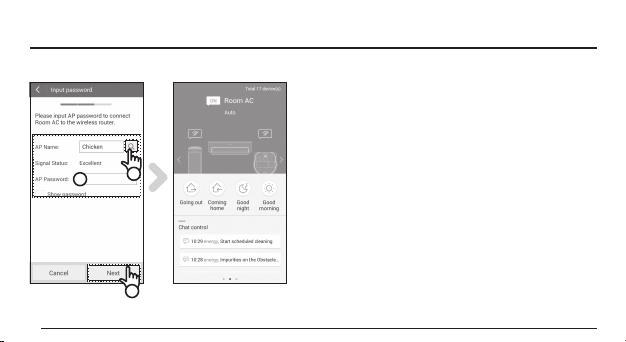
13
13 Enter(g) the password of wireless router which will
be connected and then press the Next button.
– Ifyouwanttochangetheconnectedrouter,press
theicon(h)andselectthenameofthewireless
router.
14 When the product registration is completed, the
main screen of the Samsung Smart Home App
appears.
– TheiconfortheconnectedSamsungappliancewill
beactivated.
SMARTdongle_EN.indd 16 2016-04-22 오전 10:32:03
17
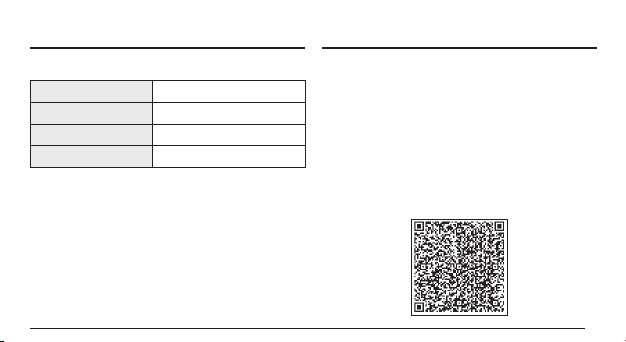
Specication
Dimensions 79.5x28.1x10.7mm
Weight 16g
Power consumption Maximum2.0W
Wireless LAN protocol IEEE802.11b/g/n(2.4GHz)
Open Source Announcement
Thesoftwareincludedinthisproductcontainsopensource
software.Youmayobtainthecompletecorrespondingsourcecode
foraperiodofthreeyearsafterthelastshipmentofthisproduct
bysendinganemailtomailto:oss.r[email protected].
Itisalsopossibletoobtainthecompletecorrespondingsource
codeinaphysicalmediumsuchasaCD-ROM;aminimalcharge
willberequired.
ThefollowingURLhttp://opensource.samsung.com/opensource/
Dongle/seq/0leadstothedownloadpageofthesourcecodemade
availableandopensourcelicenseinformationasrelatedtothis
product.Thisofferisvalidtoanyoneinreceiptofthisinformation.
SMARTdongle_EN.indd 17 2016-04-22 오전 10:32:03

18
Safety information
Thesesafetyprecautionsarefortheowner’ssafetyandpreventionofpropertydamage.Therefore,pleaseread
thismanualthoroughlybeforeusingyourproduct.
Themanufacturerisnotresponsibleforanyinjuryorpropertydamageoccurredbynotfollowingthesafetyinformation.
ThisproductisforcompatibleSamsungappliances,anditwillnotworkonotherdevices.VisitSamsung.comfor
compatibleappliances.
• If the product is getting hot, stop using it.
– Burningofskinmayoccurifskinisincontactwithahotdevice.
• Do not put the product near or in a heater(stove, microwave, etc.), a cooking utensil or a high
pressure vessel.
– Doingsomaysupplyheattotheproductormaycausere.
• Do not drop the product or give external shock to the product.
– Donotputorstoretheproductonaslant.Thisactionmaydroptheproduct.
– Iftheproductisdropped,itmaygetdamagedandmalfunction.
• To avoid bodily injury and harm to the product, please ensure that children, toddlers or pets do not
suck, bite or swallow the product.
SMARTdongle_EN.indd 18 2016-04-22 오전 10:32:03

20
• Do not attempt to repair, disassemble or modify the product yourself.
– Ifauserattemptstorepair,disassembleormodifytheproduct,regularservicecannotbe
guaranteed.
• Be careful when cleaning the product.
– Cleantheproductwithasoftcloth.
– Donotuseharshchemicalsordetergentforcleaningtheproduct.Doingsomaycauseproduct
discolorationorcorrosion.
• This equipment is a EMC device for home use (B grade), and it is intended primarily for use in all
areas of the home.
SMARTdongle_EN.indd 20 2016-04-22 오전 10:32:04

21
Troubleshooting
Download
The Samsung Smart Home App cannot be searched on Google Play store, GALAXY Apps or
iPhone App Store.
SamsungSmartHomeAppsupportsandroidoperatingsystem4.0(ICS)orhigher,andiOS
7orhigherforiphone.
Sign in
Samsung account cannot be accessed.
CheckyourIDandpasswordontheSamsungaccountscreen.
SMARTdongle_EN.indd 21 2016-04-22 오전 10:32:04

22
Connection
After installing the Samsung Smart Home App, the compatible Samsung appliance cannot
be connected to the App.
Unplugtheapplianceandpluginitagain,andthenreconguretheSamsungSmartHome
AppandWi-Fiagainaccordingtotheguidanceinthemanual.
The failure message appears when the device is being added to the Samsung Smart Home
App.
Theconnectionmayfailduetothedistancefromthewirelessrouterinstalledorother
factorswhichisatemporaryoccurrence.Tryagainafterawhile.Iftheproblempersists,
unplugtheSMARTHOMEADAPTERandplugitagain.
Function
The control function of Samsung Smart Home App does not work.
• CheckwhetherthecompatibleSamsungapplianceisconnectedtothewiredorwireless
routercorrectly.
• CheckwhetherthewiredorwirelessrouterisconnectedtotheInternetcorrectly.
SMARTdongle_EN.indd 22 2016-04-22 오전 10:32:04
Declaration of Conformity
Manufacturer
Samsung Electronics Co., Ltd.
Product details
Product : Smart Home Adapter
Model(s) : HD39J1230GW
Variant Model(s):
Declaration & Applicable standards
We hereby declare, that the product above is in compliance with the essential requirements of the R&TTE Directive (1999/5/EC) by application of:
EMC EN 301 489-1 V1.9.2
EN 301 489-17-V2.2.1
SAFETY EN 60950-1 : 2006+A11 : 2009+A1 : 2010+A12 : 2011+A2 : 2013
EN 62311 : 2008
RADIO EN 300 328 V1.9.1
and the Directive (2011/65/EU) on the restriction of the use of certain hazardous substances in electrical and
electronic equipment by application of EN 50581:2012.
Representative in the EU
Samsung Electronics Euro QA Lab.
Blackbushe Business Park, Saxony Way,
Yateley, Hampshire, GU46 6GG, UK
2016.03.17 Stephen Colclough / Director Regulatory Affaris
(Place and date of issue) (Name and signature of authorised person)
* This is not the address of Samsung Service Centre. For the address or the phone number of Samsung Service Centre, see the warranty card or contact the retailer where
you purchased your product.
SMARTdongle_EN.indd 23 2016-04-22 오전 10:32:04
24
44580/SDPPI/2016
1151
La operación de este equipo está sujeta
a las siguientes dos condiciones: (1) es
posible que este equipo o dispositivo no
cause interferencia perjudicial y (2) este
equipo o dispositivo debe aceptar cualquier
interferencia, incluyendo la que pueda
causar su operación no deseada.
AGREE PAR L'ANRT MAROC
Numéro d'agrément: MR 11313 ANRT 2016
Date d'agrément: 01/20/2016
TRC: TRC/SS/2016/36
SMARTdongle_EN.indd 24 2016-04-22 오전 10:32:04
25
This telecommunication
equipment conforms to NTC
technical requirement
Thisdevicecomplieswithpart15oftheFCCRules.
Operationissubjecttothefollowingtwoconditions:
(1)Thisdevicemaynotcauseharmfulinterference,and
(2)Thisdevicemustacceptanyinterferencereceived,
includinginterferencethatmaycauseundesired
operation.
Complies with
IDA Standards
DA100790
SMARTdongle_EN.indd 25 2016-04-22 오전 10:32:04

26
Anychangesormodicationstotheequipmentnot
expresslyapprovedbythepartyresponsiblefor
compliancecouldvoiduser’sauthoritytooperatethe
equipment.
Thisequipmenthasbeentestedandfoundtocomply
withthelimitsforaClassBdigitaldevice,pursuant
topart15oftheFCCRules.Theselimitsaredesigned
toprovidereasonableprotectionagainstharmful
interferenceinaresidentialinstallation.
Thisequipmentgenerates,usesandcanradiateradio
frequencyenergyand,ifnotinstalledandusedin
accordancewiththeinstructions,maycauseharmful
interferencetoradiocommunications.However,there
isnoguaranteethatinterferencewillnotoccurina
particularinstallation.Ifthisequipmentdoescause
harmfulinterferencetoradioortelevisionreception,
whichcanbedeterminedbyturningtheequipment
offandon,theuserisencouragedtotrytocorrectthe
interferencebyoneormoreofthefollowingmeasures:
SMARTdongle_EN.indd 26 2016-04-22 오전 10:32:04
27
– Reorientorrelocatethereceivingantenna.
– Increasetheseparationbetweentheequipmentandreceiver.
– Connecttheequipmentintoanoutletonacircuitdifferentfromthattowhichthereceiverisconnected.
– Consultthedealeroranexperiencedradio/TVtechnicianforhelp.
Note
Thisunitwastestedwithshieldedcablesontheperipheraldevices.Shieldedcablesmustbeusedwiththeunit
toinsurecompliance.
ThisSAMSUNGbrandproduct,assuppliedanddistributedbySAMSUNGanddeliverednew,intheoriginalcartontothe
originalconsumerpurchaser,iswarrantedbySAMSUNGagainstmanufacturingdefectsinmaterialsandworkmanshipfor
alimitedwarrantyperiodof:(12monthsPartsandLabor)
SMARTdongle_EN.indd 27 2016-04-22 오전 10:32:04
SMARTdongle_EN.indd 28 2016-04-22 오전 10:32:04
