Instruction for Use
2
3
450-455 mm
594-597 mm
19-22 m
45 mm
45 mm
45 mm
45 mm
mm 2 + 054
m Min
m
850
500 mm
545 mm Min.
560 + 8 mm
x 28 x
2x
1
2 mm
2 mm
mm
824
545 mm
450 mm
FIG. 1 FIG. 2
FIG. 2A
4
x 1
x 1
approx. 350 mm
x 2
560 + 1 mm
x 4
x 4
FIG. 3 FIG. 5
FIG. 4
FIG. 6
FIG. 7
5
A4
A1
A14
A13 A18
A3 A2 A5 A6 A8
A10
A7
A9
A16 A21 A15
A12
A
A19
A17
A22
A20
A23
6
D4
B
D
D3
D6
C1
C
C3
C2
00:00
PROFILE 1 QUANTITY
AROMA
SELECT BEVERAGE
ESPRESSO
ESPRESSO
COFFEE
COFFEE
CAPPUCCINO
CAPPUCCINO
LATTE
MACCHIATO
QUANTITY
LATTE
MACCHIATO
B2 B4
B6
B5B3
B7
B1
B11
B10
B9
B8
D1
D7
D2
D5
C5
C4
7
1
4 5
7
13 15
2 3
6
89
10
12
14
16
30
17 18
23 24
25
20
22
28
34
33
36
38 39
40
35
37
41
31
11
27
32
26
2119
29
8
1
4 5
7
13 15
2 3
6
89
10
12
14
16
30
17 18
23 24
25
20
22
28
34
33
36
38 39
40
35
37
41
31
11
27
32
26
2119
29
9
1
4 5
7
13 15
2 3
6
89
10
12
14
16
30
17 18
23 24
25
20
22
28
34
33
36
38 39
40
35
37
41
31
11
27
32
26
2119
29

10
SAFETY INSTRUCTIONS .......................................................11
Important to be read and observed .................... 11
Safety warnings .................................................. 11
Permitted use .....................................................11
Installation .........................................................12
Electrical warnings ............................................. 12
Cleaning and maintenance ................................. 13
SAFEGUARDING THE ENVIRONMENT ..................................13
Disposal of packaging materials ......................... 13
Scrapping of household appliances..................... 13
Declaration of conformity CE ............................... 13
BUILT-IN INSTALLATION ......................................................14
INTRODUCTION ...................................................................15
Letters in brackets ............................................... 15
Troubleshooting and repairs ............................... 15
Instruction for Use .............................................. 15
DESCRIPTION OF THE APPLIANCE .......................................15
Description of the appliance .............................. 15
Description of the homepage (main screen) ....... 15
Description of the accessories ............................. 15
Description of the milk container ........................ 15
BEFORE USE .........................................................................15
Checking the appliance ....................................... 15
SETTING UP THE APPLIANCE ...............................................15
TURNING THE APPLIANCE ON..............................................16
TURNING THE APPLIANCE OFF ............................................16
MENU SETTINGS ..................................................................16
Rinsing ...............................................................16
Beverages settings ............................................. 17
Set time .............................................................17
Auto-start ......................................................... 17
Auto-o (standby) ............................................ 17
Cup warmer ....................................................... 17
Coee temperature ........................................... 18
Water hardness .................................................. 18
Selecting the language ...................................... 18
Beep .................................................................. 18
Cup light ............................................................ 18
Demo mode ....................................................... 18
Emptying the circuit ........................................ 18
Default values .................................................... 19
Statistics ............................................................ 19
MAKING COFFEE ..................................................................19
Selecting the coee aroma ................................. 19
Selecting the coee quantity .............................. 19
Making coee using coee beans ....................... 20
Making coee using pre-ground coee .............. 20
Adjusting the coee mill ..................................... 20
Tips for a hotter coee ........................................ 21
MAKING CAPPUCCINOS AND MILK-BASED COFFEES...........21
Filling and attaching the milk container ............. 21
Adjusting the amount of froth ............................ 21
Making cappuccinos and milk-based coees auto-
matically .............................................................21
Cleaning the milk container after use ................ 22
DELIVERING HOT WATER .....................................................22
STEAM DELIVERY .................................................................22
Tips for using steam to froth milk ....................... 22
Cleaning the hot water/steam spout after use .... 22
CUSTOMISING THE BEVERAGES ........................................23
MEMORISING YOUR PERSONAL PROFILE ............................23
CLEANING ............................................................................23
Cleaning the machine ......................................... 23
Cleaning the machine's internal circuit ............... 23
Cleaning the coee grounds container................ 23
Cleaning the drip tray ......................................... 24
Cleaning the inside of the coee machine .......... 24
Cleaning the water tank ..................................... 24
Cleaning the coee spouts ..................................24
Cleaning the pre-ground coee funnel ............... 24
Cleaning the infuser ............................................ 24
Cleaning the milk container (D) .......................... 24
Cleaning the hot water/steam connection nozzle 25
DESCALE ..............................................................................25
SETTING WATER HARDNESS ................................................26
Measuring water hardness .................................. 26
Setting water hardness ...................................... 26
TECHNICAL DATA .................................................................26
DISPLAYED MESSAGES ........................................................27
TROUBLESHOOTING ............................................................32
CONTENTS
11
EN
SAFETY INSTRUCTIONS
Important to be read and observed
Before using the appliance, read these
safety instructions. Keep them nearby for
future reference. These instructions are
also available on docs.whirlpool.eu
These instructions and the appliance itself
provide important safety warnings, to be
observed at all times. The manufacturer
declines any liability for failure to observe
these safety instructions, for inappropriate
use of the appliance or incorrect setting of
controls.
Safety warnings
Children from 8 years old and above and
persons with reduced physical, sensory or
mental capabilities or lack of experience
and knowledge can use this appliance only
if they are supervised or have been given
instructions on safe use and understand
the hazards involved. Children must not
play with the appliance. Designated use:
this appliance is designed and made to
prepare coee and milk based beverages
and hot water. Any other use is considered
improper and thus dangerous. The manu-
facturer is not liable for damage deriving
from improper use of the appliance. The
surface of the heating element remains
hot after use and the outside of the appli-
ance may retain the heat for several min-
utes depending on use. To clean, follow
the instructions in the section “Cleaning”.
Cleaning and user maintenance shall not
be made by children unless they are above
8 years old and supervised. Keep the appli-
ance and power cord away from children
under 8 years of age.
WARNING: Accessible parts may become
hot during use, young children should be
kept away.
The appliance produce hot water. Take care
to avoid contact with splashes - Risk of
burns.
If the appliance is damage or not working
properly, do not attempt to carry out any
repairs. Switch the appliance o, unplug
from power supply and contact After-sales
Service.
Surfaces marked with this symbol
become hot during use (the sym-
bol is present in certain models
only).
WARNING: Models with glass surfaces:
do not use the appliance if the surface is
cracked.
Permitted use
CAUTION: the appliance is not intended to
be operated by means of an external timer
or separate remote controlled system.
CAUTION: To prevent damage to the ap-
pliance do not use alkaline cleaning agents
when cleaning, use a soft cloth and a mild
detergent.
This appliance is intended to be used only
in household application.

12
This appliance is Not intended to be used
in similar application such as: sta kitchen
areas in shops, oces and other working
environments; farm houses; by clients in
hotels, motels, bed & breakfast and other
residential environments.
This appliance is not for professional use.
Do not use the appliance outdoors.
Do not store explosive or ammable sub-
stances (e.g. gasoline or aerosol cans) in-
side or near the appliance - risk of re.
Installation
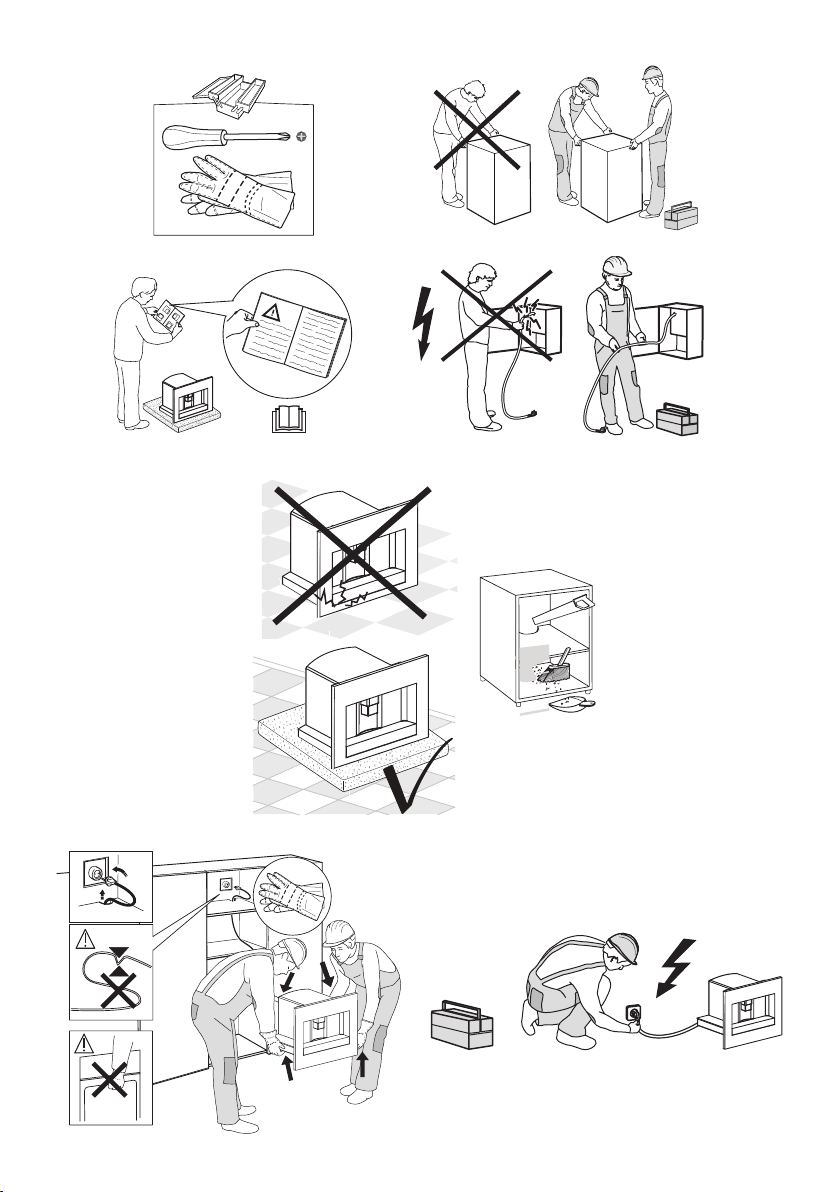
The appliance must be handled and in-
stalled by two or more persons - risk of
injury. Use protective gloves to unpack and
install - risk of cuts.
Installation, including water supply (if any)
and electrical connections, and repairs
must be carried out by a qualied techni-
cian. Do not repair or replace any part of
the appliance unless specically stated in
the user manual. Keep children away from
the installation site. After unpacking the
appliance, make sure that it has not been
damaged during transport. In the event
of problems, contact the dealer or your
nearest After-sales Service. Once installed,
packaging waste (plastic, styrofoam parts
etc.) must be stored out of reach of chil-
dren - risk of suocation. The appliance
must be disconnected from the power
supply before any installation operation -
risk of electrical shock. During installation,
make sure the appliance does not damage
the power cable - risk of re or electrical
shock. Only activate the appliance when
the installation has been completed.
The appliance can be installed above a
built-in oven only if the latter is equipped
with a cooling fan system.
Electrical warnings
Prior to connect the appliance verify that
the voltage on the rating plate corresponds
to the voltage in your home.
It must be possible to disconnect the appli-
ance from the power supply by unplugging
it if plug is accessible, or by a multi-pole
switch installed upstream of the socket
and the appliance must be earthed, in
conformity with national electrical safety
standards.
Do not use extension leads, multiple sock-
ets or adapters. The electrical components
must not be accessible to the user after in-
stallation. Do not use the appliance when
you are wet or barefoot. Do not operate
this appliance if it has a damaged power
cable or plug, if it is not working proper-
ly, or if it has been damaged or dropped.
If the power cable is damaged, it must
be replaced with an identical one - risk of
electrical shock.
Appliances with removable cord: avoid
splashes of water on the power cord con-
nector or socket at the back of the appli-
ance.
13
EN
WARNING: Avoid any spillage on the con-
nector and plug.
Cleaning and maintenance
WARNING: Ensure that the appliance
is switched o and disconnected from
the power supply before performing any
cleaning or maintenance operation - risk of
electrical shock. Never use steam cleaning
equipment.
Never immerse the appliance in water.
Empty regularly the drip tray to avoid over-
ow - Risk of injury.
Clean all the components thoroughly, tak-
ing particular care with parts in contact
with the coee and milk.
Always clean tubes inside milk container
after use - Risk of poisoning.
During rinsing, hot water is spilled from the
coee spouts. Avoid contact with splasches
of water - Risk of burns.
SAFEGUARDING THE ENVIRONMENT
Disposal of packaging materials
The packaging material is 100% recyclable and is marked with
the recycle symbol(
). The various parts of the packaging
must therefore be disposed of responsibility and in full compli-
ance with local authority regulations governing waste disposal.
Scrapping of household appliances
This appliance is manufactured with recyclable or reusable ma-
terials. Dispose of it in accordance with local waste disposal reg-
ulations. For further information on the treatment, recovery and
recycling of household electrical appliances, contact your local
authority, the collection service for household waste or the store
where you purchased the appliance. This appliance is marked in
compliance with European Directive 2012/19/EU, Waste Electri-
cal and Electronic Equipment (WEEE). By ensuring this product
is disposed of correctly, you will help prevent negative conse-
quences for the environment and human health.
The (
) symbol on the product or on the accompanying
documentation indicates that it should not be treated as domes-
tic waste but must be taken to an appropriate collection center
for the recycling of electrical and electronic equipment.
Declaration of conformity CE
This appliance has been designed, constructed and distributed
in compliance with the requirements of European Directives: LVD
2014/35/EU, EMC 2014/30/EU and RoHS 2011/65/EU.
This appliance, which is intended to come into contact with
foodstus, complies with European Regulation (
)
n.1935/2004.

14
BUILT-IN INSTALLATION
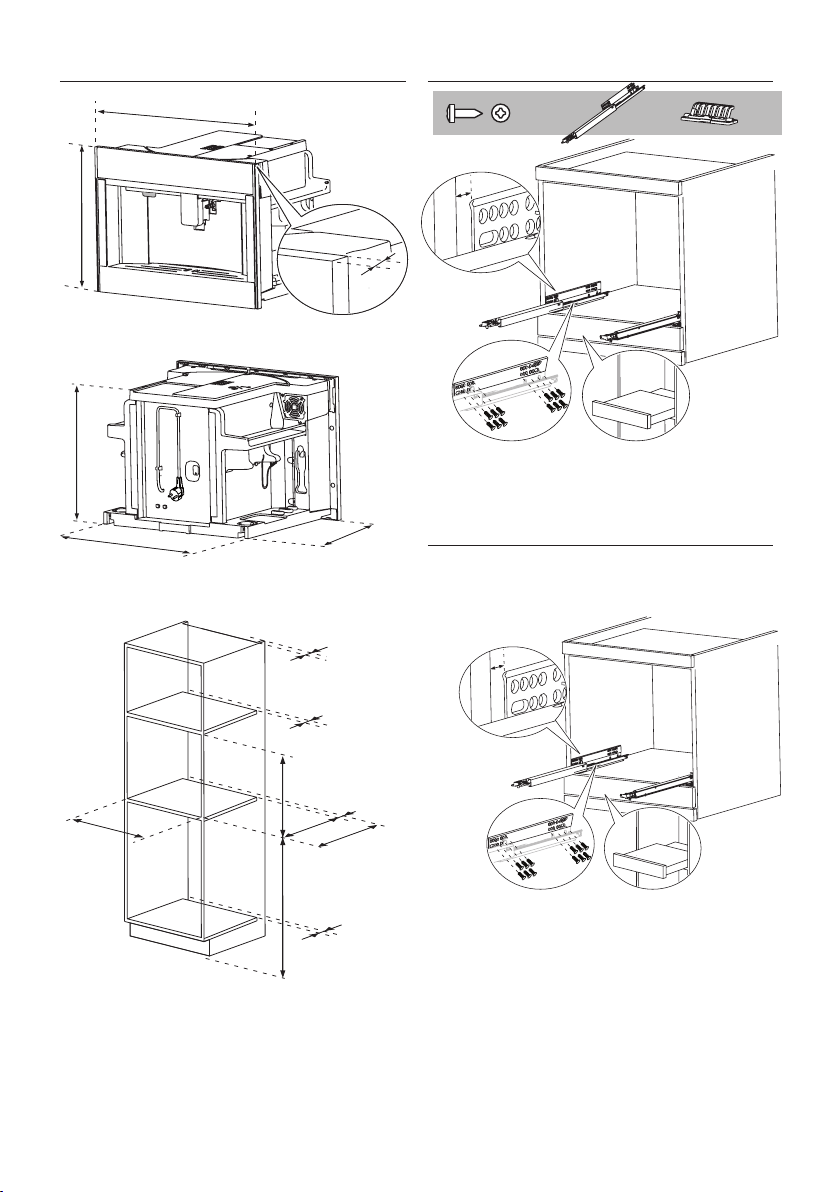
Verify the minimum measurements required for correct instal-
lation of the appliance. The coee machine must be installed in
a column and the column must be rmly xed to the wall with
commercially available brackets.
• Kitchen furniture in direct contact with the appliance must
be heat resistant (65°C min).
• To guarantee correct ventilation, leave a gap at the bottom
of the cabinet (see measurements in gure 1).
• Position the rails on the sides of the cabinet as shown in the
gure 2. Fix with the screws provided, then extract them
completely.
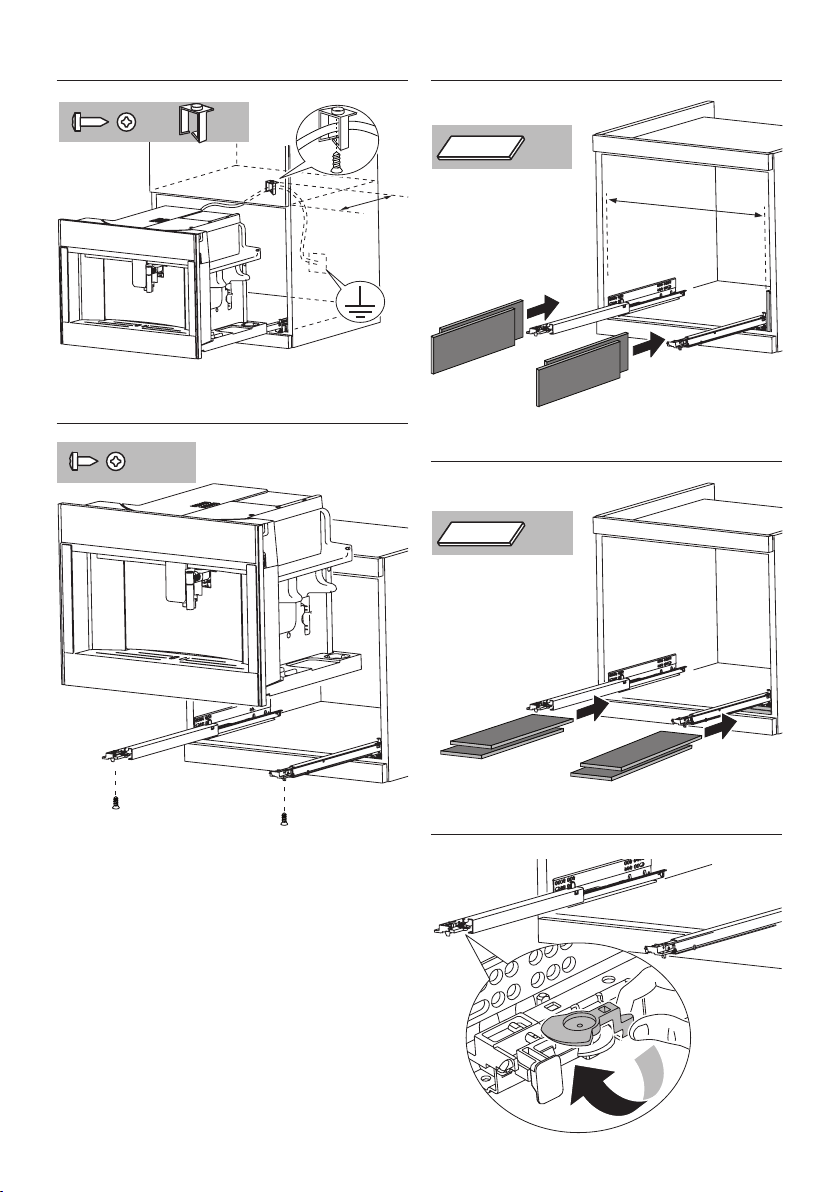
Position and x the lock hook with the four screws provid-
ed, as shown in the gure placing it in the centre of the
cabinet, ush with the front wall.
If the coee machine is installed over a warmer drawer, use
the top surface of this as a reference to position the rails
(g. 2A).
In this case, there will be no surface to rest the rails on and
the retaining hook must not be installed.
• Fix the power cable with the clip (g. 3). The power cable
must be long enough to allow the appliance to be extracted
from the cabinet to ll the coee bean container.
The appliance must be earthed in compliance with legis-
lation.
Electrical connections must be performed by a qualied
electrician following the instructions.
• Position the appliance on the rails, making sure the pins
are correctly inserted in the housings, then x it with the
screws supplied (g. 4). If the height of the appliance re-
quires adjusting, use the spacer disks provided.
• If necessary, correct alignment of the appliance by position-
ing the spacers supplied under or at the sides of the support
(g. 5-6).
• To lift the appliance in the front (max 2 mm), turn the latch
as shown in gure 7.
15
EN
INTRODUCTION
Letters in brackets
The letters in brackets refer to the legend in the Description of
the appliance.
Troubleshooting and repairs
In the event of problems, follow the information given in the
sections "Displayed messages" and "Troubleshooting".
If this does not resolve the problem, you should consult customer
services. For repairs, contact customer services only.
Instruction for Use
Read this Instruction for Use carefully before using the appliance.
• Keep this Instruction for Use.
• Failure to follow this Instruction for Use may result in burns
or damage to the appliance. The manufacturer is not liable
for damage deriving from failure to respect this Instruction
for Use.
The appliance has a cooling fan. This remains active while the
machine is on.
DESCRIPTION OF THE APPLIANCE
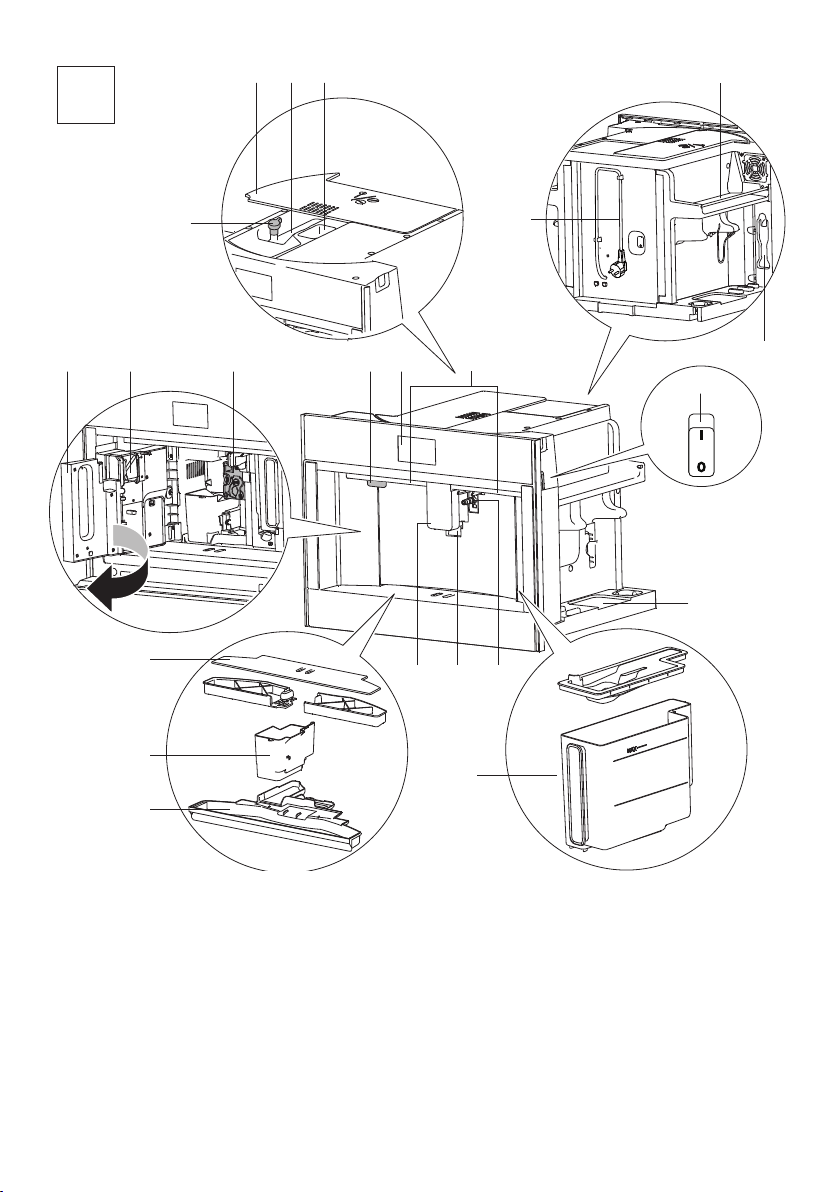
Description of the appliance
(page 5 - A)
A1. Cup tray
A2. Service door
A3. Coee guide
A4. Coee grounds container
A5. Infuser
A6. Interior lighting
A7. On/OFF/stand-by button
A8. Control panel
A9. Tray for objects
A10. Hot water/steam connection nozzle
A12. Water tank
A13. Coee spouts (adjustable height)
A14. Drip tray
A15. Beans container lid
A16. Beans container
A17. Grinding adjustment dial
A18. Cup lights
A19. Main switch
A20. Measure compartment
A21. Pre-ground coee funnel
A22. Power cord
A23. Cup warmer
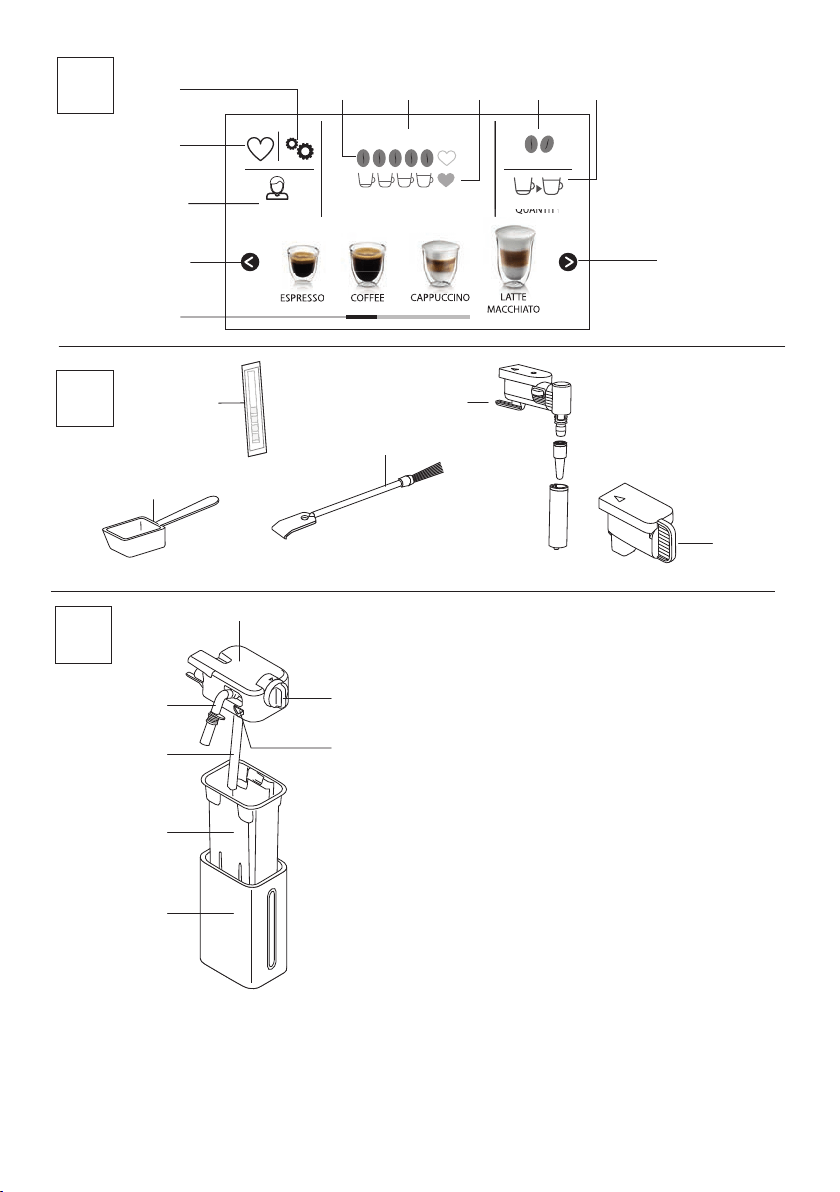
Description of the homepage (main screen)
(page 6 - B)
B1.
: menu to customise the beverages settings
B2. : appliance settings menu
B3. Selected aroma
B4. Clock
B5. Selected quantity
B6.
: aroma selection
B7. : quantity selection
B8.
: scroll arrow
B9. Beverages available for selection (press the
or
scroll arrows to display all the beverages, the bottom bar
indicates which screen you are viewing)
B10.
: scroll arrow
B11. Customisable proles (see “Memorising your personal prole”)
Description of the accessories
(page 6 - C)
C1. "Total Hardness Test" indicator paper
C2. Ground coee measure
C3. Cleaning brush
C4. Hot water/steam spout
C5. Connection nozzle cover
Description of the milk container
(page 6 - D)
D1. Froth adjustment and CLEAN dial
D2. Lid with milk frother
D3. Milk container
D4. Milk intake tube
D5. Frothed milk spout (adjustable)
D6. Thermal casing
D7. Lid release buttons
BEFORE USE
Checking the appliance
After removing the packaging, make sure the product is complete
and undamaged and that all accessories are present. Do not use
the appliance if it is visibly damaged. Contact customer services.
SETTING UP THE APPLIANCE
• Coee has been used to factory test the appliance and it is
therefore completely normal for there to be traces of coee
in the mill. The machine is, however, guaranteed to be new.
• You should customise water hardness as soon as possible
following the instructions in section “Setting water hard-
ness”.
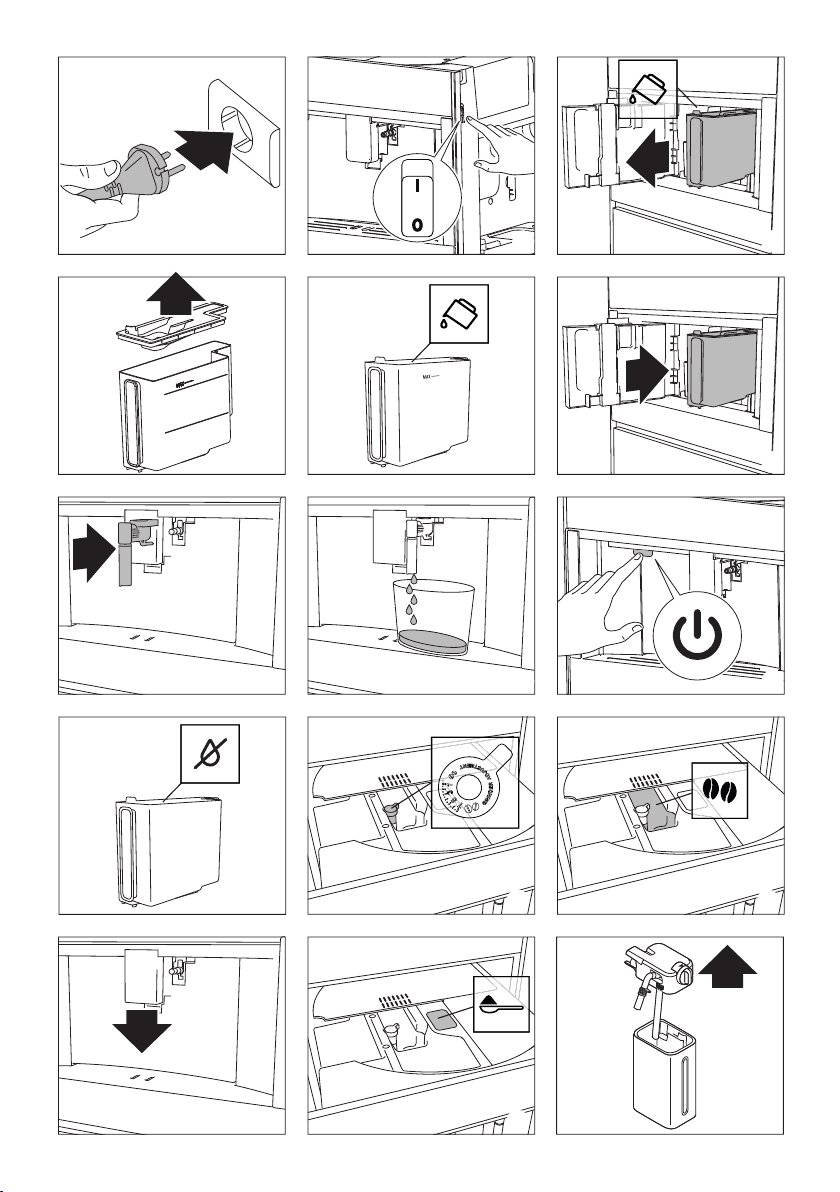
1. Connect the appliance to the mains electricity supply (g.
1) and make sure the main switch (A19) on the side of the
16
appliance is pressed down (g. 2);
2. SELECT LANGUAGE : press
(B10) or (B8) until the
ag corresponding to the required language appears on the
display (B), then press the ag;
Follow the instructions indicated on the appliance display:
1. FILL TANK WITH FRESH WATER : remove the water tank
(A12) (g. 3), open the lid (g. 4), ll to the MAX line
(marked on the inside of the tank) with drinking water (g.
5), close the lid and put the tank back in the appliance (g.
6);
2. INSERT WATER SPOUT : Check that the hot water/steam
spout (C4) is inserted on the connection nozzle (A10) (g.
7) and place a container holding a minimum of 100 ml un-
derneath (g. 8);
3. WATER CIRCUIT EMPTY PRESS OK TO START FILLING PRO-
CESS appears on the display;
4. Press to conrm. The appliance delivers water
from the spout (g. 8) then goes o automatically.
The coee machine is now ready for normal use.
• The rst time you use the appliance, you need to make 4-5
cappuccinos before it starts to give satisfactory results.
• The rst time you use the machine, the water circuit is emp-
ty and the appliance could be very noisy. The noise becomes
less as the circuit lls.
• When making the rst 5-6 cappuccinos, it is normal to hear
the noise of boiling water. After this, the noise becomes
less.
TURNING THE APPLIANCE ON
Before turning the appliance on, make sure the main switch
(A19) is pressed (g. 2). Each time the appliance is turned on, it
performs an automatic preheat and rinse cycle which cannot be
interrupted. The appliance is ready for use only after completion
of this cycle.
WARNING
During rinsing, a little hot water comes out of the coee spouts
(A13) and is collected in the drip tray (A14) underneath. Avoid
contact with splashes of water.
• To turn the appliance on, press the
button (A7) (g.
9). The message HEATING UP UNDERWAY PLEASE WAIT ap-
pears on the display.
• When heating is complete, the message changes to: RINS-
ING UNDERWAY, HOT WATER FROM SPOUTS. As well as
heating the boiler, this also heats the internal circuits by
circulating hot water.
The appliance is at temperature when the main screen (home-
page) appears.
TURNING THE APPLIANCE OFF
Whenever the coee machine is turned o after being used to
make coee, it performs an automatic rinse cycle.
WARNING
During rinsing, a little hot water ows from the coee spouts
(A13). Avoid contact with splashes of water.
• To turn the appliance o, press the
button (A7-
g.9).
• The message TURNING OFF UNDERWAY, PLEASE WAIT is
displayed, then (if applicable) the appliance performs a
rinse cycle and goes o (standby).
If you will not be using the appliance for some time, rst empty
the water circuit (see section “Emptying the circuit”), then un-
plug from the mains socket as follows:
• rst turn the appliance o by pressing the
button
(g. 9);
• release the main switch (A19) at the side of the appliance
(g. 2).
Do not press the main switch while the appliance is on.
MENU SETTINGS
Rinsing
Use this function to deliver hot water from the coee spouts
(A13), to clean and heat the appliance’s internal circuit. Place a
container with a minimum capacity of 100ml under the coee
and hot water spouts (g. 8).
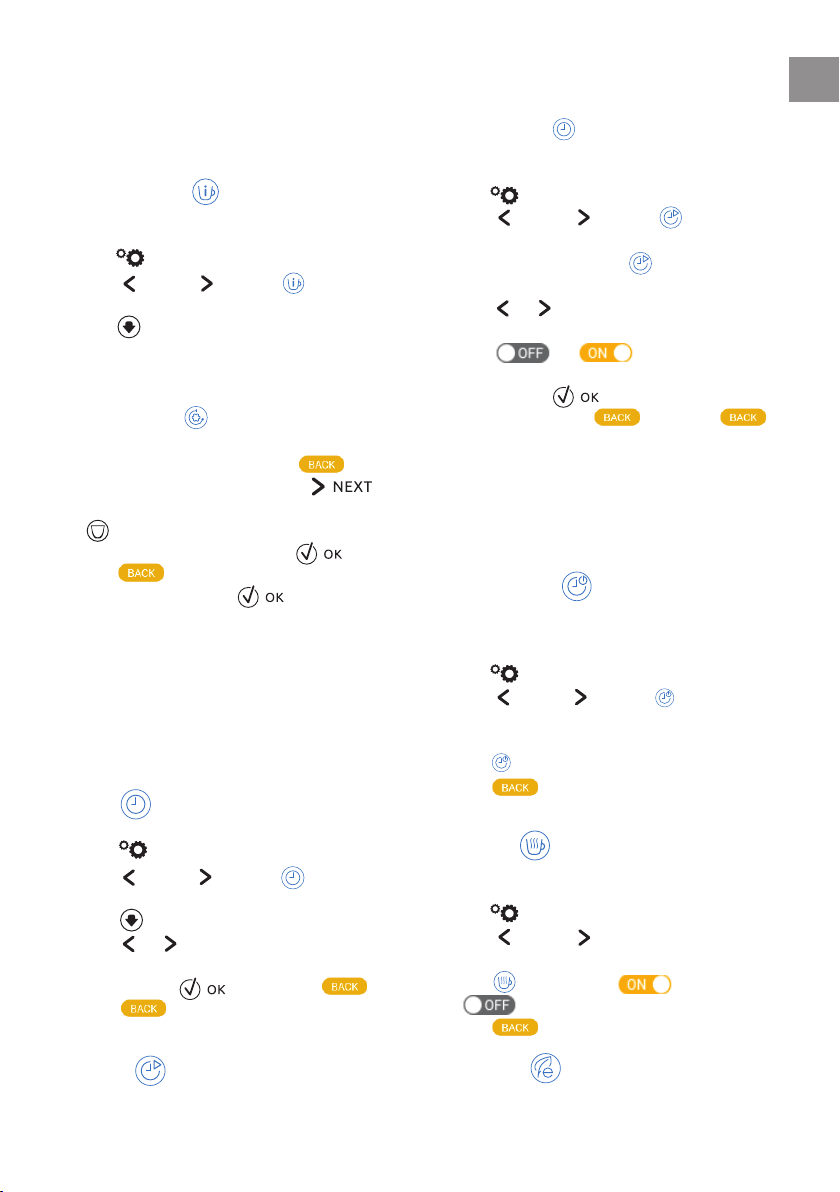
To enable the function, proceed as follows:
1. Press
(B2) to enter the menu;
2. Press
(B10) or (B8) until RINSING appears on
the display (B);
3. Press
to start rinsing.
WARNING
Do not leave the appliance unattended while hot water is being
delivered.
1. After a few seconds, hot water is delivered from the coee
spouts, to clean and heat the appliance’s internal circuit.
RINSING UNDERWAY, HOT WATER FROM SPOUTS appears on
the display, together with a progress bar which lls gradu-
ally as preparation proceeds;
2. To stop rinsing, press or wait for rinsing to stop
automatically.
17
EN
• If the appliance is not used for more than 3-4 days, when
switched on again, we strongly recommend performing
2/3 rinses before use;
• After cleaning, it is normal for the grounds container (A4) to
contain water.
Beverages settings
In this section, you can consult your customised settings and, if
you wish, reset the default values for each beverage.
1. Press (B2) to enter the menu;
2. Press
(B10) or (B8) until DRINKS SETTINGS
appears on the display (B);
3. Press . The values for the rst beverage appear on the
display;
4. The reference user pro le is highlighted on the display. The
values are displayed on vertical bars. The default value is
indicated by the
symbol, while the current value is
highlighted by the solid part of the vertical bar;
5. To go back to the settings menu, press
highlighted by the solid part of the vertical bar;
.
To scroll and display the beverages, press
;
6. To reset the default values for the beverage displayed, press
RESET ALL ;
7. CONFIRM RESET? : to con rm, press (to cancel,
press );
8. DEFAULT VALUES SET : press .
The beverage has been reset to the default values. Continue with
the other beverages, or go back to the settings menu.
• To change the beverages in another pro le, go back to the
homepage, select the required pro le (B11) and repeat the
procedure.
• To reset all the beverages in the pro le to the default val-
ues, see section “Default values”.
Set time
To adjust the time on the display (B), proceed as follows:
1. Press
(B2) to enter the menu;
2. Press
(B10) or (B8) until SET TIME appears
on the display (B);
3. Press
. The time setting panel appears on the display;
4. Press
or corresponding to the hours and minutes
until the current time is displayed;
5. To con rm, press (to cancel, press ), then
press to go back to the homepage.
The time is now set.
Auto-start
You can set the auto-start time in order to have the appliance
ready at a certain time (for example in the morning) so you can
make co ee immediately.
To enable this function, the time must already be set correctly
(see section “Set time
”).
To enable auto-start, proceed as follows:
1. Press
(B2) to enter the menu;
2. Press
(B10) or (B8) until AUTO-START ap-
pears on the display (B);
3. Select the function by pressing
. The time setting panel
appears on the screen;
4. Press
or corresponding to the hours and minutes
until the required auto-start time is displayed;
5. Press or to enable or disable au-
to-start.
6. To con rm, press (or cancel and go back to the set-
tings menu by pressing ), then press to
go back to the homepage.
The auto-start time is now set and the corresponding symbol is
displayed to indicate that the function has been enabled.
When the appliance is turned o using the main switch (A19),
the auto-start setting (if enabled) is lost.
Auto-o (standby)
Auto-o can be set so that the appliance goes o after 15 or 30
minutes, or 1, 2 or 3 hours.
To programme Auto-o , proceed as follows:
1. Press
(B2) to enter the menu;
2. Press
(B10) or (B8) until AUTO-OFF appears
on the display (B), together with the current selection (15
or 30 minutes, or 1, 2 or 3 hours);
3. Press
on the display to select the required value;
4. Press to go back to the homepage.
Auto-o is now programmed.
Cup warmer
To warm the cups before making co ee, it is possible to activate
the cup warmer (A23) and put it above the cups.
1. Press
(B2) to enter the menu;
2. Press
(B10) or (B8) until the display (B) shows
“CUP WARMER”;
3. Press to activate -
or de-activate -
the cup warmer.
4. Press to go back to the homepage.
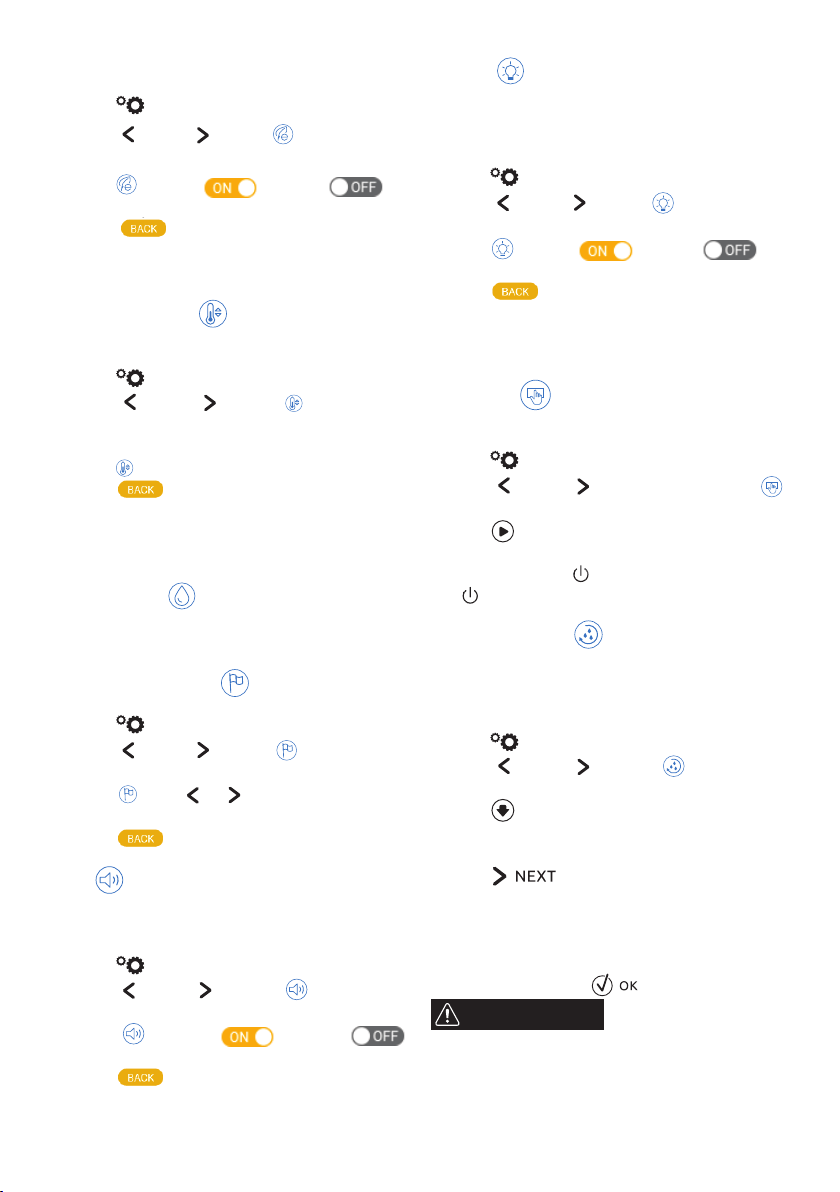
Energy saving
Use this function to enable or disable energy saving. When en-
abled, the function reduces energy consumption in compliance
18
with European regulations.
To disable or enable "Energy Saving", proceed as follows:
1. Press
(B2) to enter the menu;
2. Press
(B10) or (B8) until ENERGY SAVING ap-
pears on the display (B);
3. Press
to enable - or disable - en-
ergy saving.
4. Press
ergy saving.
to go back to the homepage.
The corresponding symbol appears on the display alongside the
time to indicate that the function has been enabled.
Co ee temperature
To modify the temperature of the water used to make the co ee,
proceed as follows:
1. Press (B2) to enter the menu;
2. Press
(B10) or (B8) until COFFEE TEMPERA-
TURE appears on the display (B) together with the current
selection (LOW, MEDIUM, HIGH or MAX);
3. Press to select the required temperature;
4. Press to go back to the homepage.
A di erent temperature can be set for each pro le (see section
“Memorising your personal pro le”).
Water hardness
For instructions on setting water hardness, see section “Setting
water hardness”.
Selecting the language
To modify the language of the display (B), proceed as follows:
1. Press (B2) to enter the menu;
2. Press
(B10) or (B8) until SET LANGUAGE ap-
pears on the display;
3. Press
: press or to display and select the ag
corresponding to the required language;
4. Press twice to go back to the homepage.
Beep
This enables or disables the beep emitted by the machine each
time an icon is pressed or an accessory is inserted/removed. To
disable or enable the beep, proceed as follows:
1. Press (B2) to enter the menu;
2. Press
(B10) or (B8) until BEEP appears on
the display (B);
3. Press
to enable - or disable -
the beep;
4. Press
to go back to the homepage.
Cup light
This function enables or disables the cup lights (A18). The lights
come on each time co ee beverages or hot milk is delivered and
during each rinse cycle.
To disable or enable this function, proceed as follows:
1. Press
(B2) to enter the menu;
2. Press
(B10) or (B8) until CUP LIGHTING ap-
pears on the display (B);
3. Press
to enable- or disable- the
cup lighting;
4. Press to go back to the homepage.
The interior lighting (A6) comes on when the appliance is turned
on.
Demo mode
By enabling this mode, the main functions of the machine are
shown on the display:
1. Press
(B2) to enter the menu;
2. Press
(B10) or (B8) until the display shows
DEMO MODE;
3. Press
to start the demo;
4. To exit from the DEMO MODE, rst turn the appliance o by
pressing the button
(A7, g. 9). Press again the button
to go back to the homepage.
Emptying the circuit
To avoid the water in the circuit freezing if the appliance is to be
left idle for a long period of time, or before taking it to customer
services, we recommend emptying the water circuit.
Proceed as follows:
1. Press (B2) to enter the menu;
2. Press
(B10) or (B8) until WATER CIRCUIT
EMPTYING appears on the display (B);
3. Press ;
4. EMPTY GROUNDS CONTAINER AND DRIP TRAY : extract and
empty the grounds container (A10) and drip tray (A14).
Press ;
5. INSERT GROUNDS CONTAINER AND DRIP TRAY : insert the
drip tray complete with grounds container;
6. PLACE 0.5l CONTAINER UNDER SPOUTS, PRESS OK TO START :
position a container under the co ee spouts (A13) and hot
water spout (C4). Press ( g. 8);
WARNING
Do not leave the appliance unattended while hot water is being
delivered.
1. RINSING UNDERWAY, PLEASE WAIT : the appliance performs
a rinse cycle from the co ee spouts;
2. EMPTY WATER TANK : extract the tank (A12) and empty it

19
EN
completely, then press ( g. 10);
3. (If the lter is installed) REMOVE WATER SOFTENER FILTER :
remove the lter from the tank. Press
;
4. INSERT WATER TANK, PRESS OK TO CONTINUE : insert the
water tank and press ( g. 6);
5. WATER CIRC. EMPTYING UNDERWAY : wait for the appli-
ance to empty the circuit; (Important: hot water from the
spouts!). As the water circuit empties, the appliance could
become noisier. This is part of normal operation.
6. EMPTY DRIP TRAY : remove, empty and reposition the drip
tray, then press
;
7. EMPTYING COMPLETE: PRESS OK TO TURN OFF : press
. The appliance goes o .
When turned on again, the appliance asks for the circuit to be
lled: follow the instructions from point 3 of section “Setting up
the appliance”.
Default values
This resets all menu settings and programmed quantities back
to the default values (with the exception of the language which
remains as set).
To reset the default values, proceed as follows:
1. Press (B2) to enter the menu;
2. Press
(B10) or (B8) until DEFAULT VALUES
appears on the display (B). Press ;
3. Press
RESET ALL to reset all the pro les to the original
parameters, otherwise select the required pro le (e.g. USER
1);
4. RESET DEFAULT VALUES : press to con rm (or
to leave the parameters unaltered);
5. DEFAULT VALUES RESET : press to con rm and
to go back to the homepage.
Statistics
This displays statistics relating to the machine. To display the
statistics, proceed as follows:
1. Press (B2) to enter the menu;
2. Press
(B10) or (B8) until STATISTICS appears
on the display (B);
3. Press
to verify all the available statistics by pressing
or ;
4. Press to go back to the homepage.
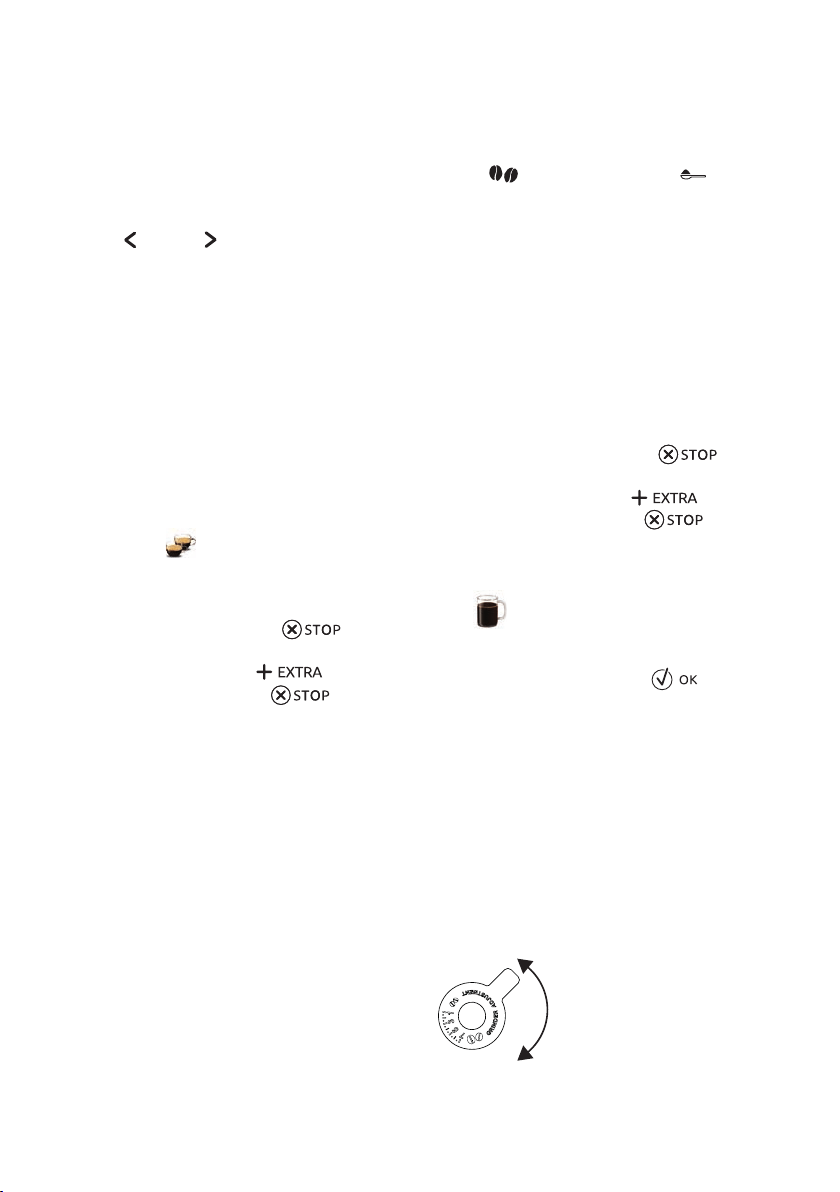
MAKING COFFEE
Selecting the co ee aroma
Select the required aroma from the homepage by press-
ing
AROMA (B6):
(see “Making co ee using
pre-ground co ee”)
EXTRA LIGHT AROMA
LIGHT AROMA
MEDIUM AROMA
STRONG AROMA
EXTRA STRONG AROMA
Custom (if programmed) /
Standard
After delivering the beverage, the aroma setting is reset to the
value.
Selecting the co ee quantity
Select the required quantity of co ee in the cup by press-
ing QUANTITY (B7) from the homepage:
SMALL SIZE
MEDIUM SIZE
LARGE SIZE
EXTRA LARGE SIZE
(EXTRA LARGE)
Custom quantity (if
programmed) / Standard
quantity
After delivering the beverage, the quantity setting is reset to the
value.
20
Making co ee using co ee beans
Do not use green, caramelised or candied co ee beans as they
could stick to the co ee mill and make it unusable.
1. Fill the beans container (A16) ( g. 12) with co ee beans;
2. Place a cup under the co ee spouts (A13);
3. Lower the spouts as near as possible to the cup ( g. 13).
This makes a creamier co ee;
4. Press
(B10) or (B8) until the required co ee is
displayed;
5. Then select your required co ee from the homepage:
• ESPRESSO
• DOPPIO+
• COFFEE
• LONG
• 2X ESPRESSO
• AMERICANO
6. Preparation begins. An image of the selected beverage ap-
pears on the display (B), together with a progress bar which
gradually lls as preparation proceeds.
• You can prepare 2 cups of ESPRESSO co ee at the same time
by pressing 2X
during preparation of 1 ESPRESSO (the
image is displayed for a few seconds at the start of prepara-
tion).
• While the machine is making co ee, delivery can be inter-
rupted at any moment by pressing
.
• As soon as delivery has ended, to increase the quantity
of co ee in the cup, just press
. When the re-
quired quantity is reached, press .
Once the co ee has been made, the appliance is ready to make
the next beverage.
Various alarm messages could be displayed while using the
appliance (FILL TANK, EMPTY GROUNDS CONTAINER, etc.).
Their meaning is explained in section “Displayed messages”.
• For hotter co ee, see section “Tips for a hotter co e e ”.
• If the co ee is delivered a drop at a time, too weak and not
creamy enough or too cold, read the tips in sections “Ad-
justing the co ee mill” and “Troubleshooting”.
• Preparation of each co ee can be customised (see sections
“Customising the beverages” and “Memorising your per-
sonal pro le”).
• If "Energy Saving" mode is active, you may have to wait a
few seconds before the rst co ee is delivered.
Making co ee using pre-ground co ee
• Never add pre-ground co ee when the machine is o or it
could spread through the inside of the machine and dirty it.
This could damage the appliance.
• Never use more than 1 level measure (C2) or it could dirty
the inside of the co ee machine or block the funnel (A21).
If you use pre-ground co ee, you can only make one cup of cof-
fee at a time.
1. Press
AROMA (B6) repeatedly until (pre-ground)
appears on the display (B).
2. Open the lid (A15).
3. Make sure the funnel (A21) is not blocked, then add one
level measure of pre-ground co ee ( g. 14).
4. Place a cup under the co ee spouts (A13).
5. Then select your required co ee (ESPRESSO, COFFEE, LONG,
AMERICAN) from the homepage;
6. Preparation begins. An image of the selected beverage ap-
pears on the display, together with a progress bar which
gradually lls as preparation progresses.
• While the machine is making co ee, delivery can be inter-
rupted at any moment by pressing .
• As soon as delivery has ended, to increase the quantity
of co ee in the cup, just press
. When the re-
quired quantity is reached, press .
Once the co ee has been made, the appliance is ready to make
the next beverage.
Making
LONG co ee:
Halfway through preparation, the message ADD PRE-GROUND
COFFEE, MAXIMUM ONE MEASURE is displayed. Add one level
measure of pre-ground co ee and press .
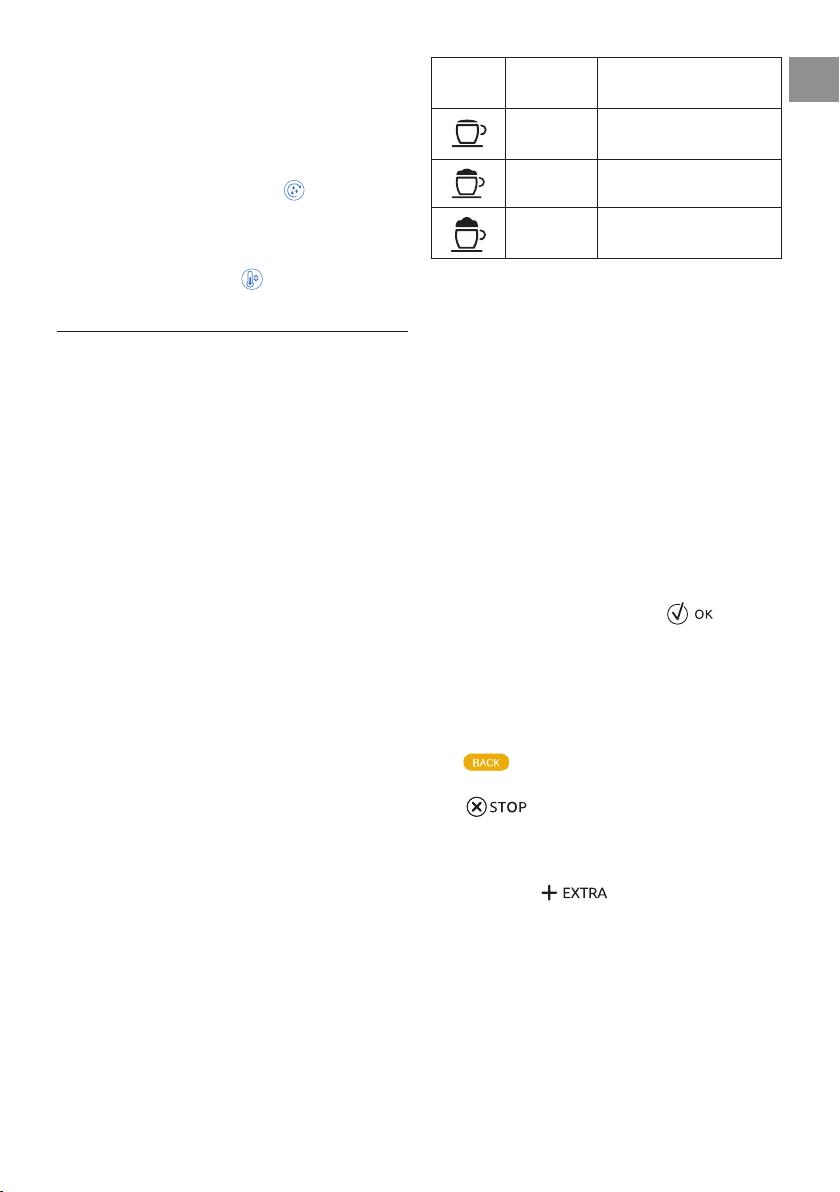
Adjusting the co ee mill
The co ee mill is set by default to prepare co ee correctly and
should not require regulating initially.
However, if after making the rst few co ees you nd that the
co ee is either too weak and not creamy enough or delivery is
too slow (a drop at a time), this can be corrected by adjusting the
grinding adjustment dial (A17, g. 11).
The grinding adjustment dial must only be turned when the
co ee mill is in operation during the initial phase of co ee
preparation.
If the co ee is delivered too slowly or not
at all, turn one click clockwise towards 7.
For fuller bodied creamier co ee, turn
one click anticlockwise towards 1 (do
not turn more than one click at a time
otherwise the co ee could be delivered
a drop at a time).
These adjustments will only be evident after at least 2 cups of
21
EN
co ee have been delivered. If this adjustment does not obtain
the desired result, turn the dial another click.
Tips for a hotter co ee
For hotter co ee, you should:
• perform a rinse cycle by selecting the "Rinsing" function in
the settings menu (section “Rinsing ”);
• warm the cups with hot water using the hot water function
(see section “Delivering hot water”);
• increase the co ee temperature in the settings menu (see
section “Co ee temperature ”).
MAKING CAPPUCCINOS AND MILK-BASED COFFEES
To avoid milk with poor froth or large bubbles, always clean the
milk container lid (D2) and hot water connection nozzle (A10)
as described in sections “Cleaning the milk container after use”,
“Cleaning the milk container” and “Cleaning the hot water/
steam connection nozzle”.
Filling and attaching the milk container
1. Remove the lid (D2) ( g. 15);
2. Fill the milk container (D3) with a su cient quantity of
milk, not exceeding the MAX level marked on the contain-
er ( g. 16). Each mark on the side of the container corre-
sponds to about 100 ml of milk;
• For a denser more even froth, you must use skimmed or
partially skimmed milk at refrigerator temperature (about
5°C).
• If "Energy Saving" mode is enabled, you may have to wait a
few seconds before the beverage is delivered.
1. Make sure the milk intake tube (D4) is correctly inserted in
the bottom of the milk container lid ( g. 17);
2. Place the lid back on the milk container;
3. Remove the hot water/steam spout (C4) ( g. 18);
4. Attach the milk container (D) to the connection nozzle
(A10) and push as far as it will go ( g. 19). The machine
emits a beep (if the beep function is enabled);
5. Place a su ciently large cup under the co ee spouts (A13)
and frothed milk spout (D5). Adjust the length of the milk
spout. To move it nearer the cup, simply pull it downwards
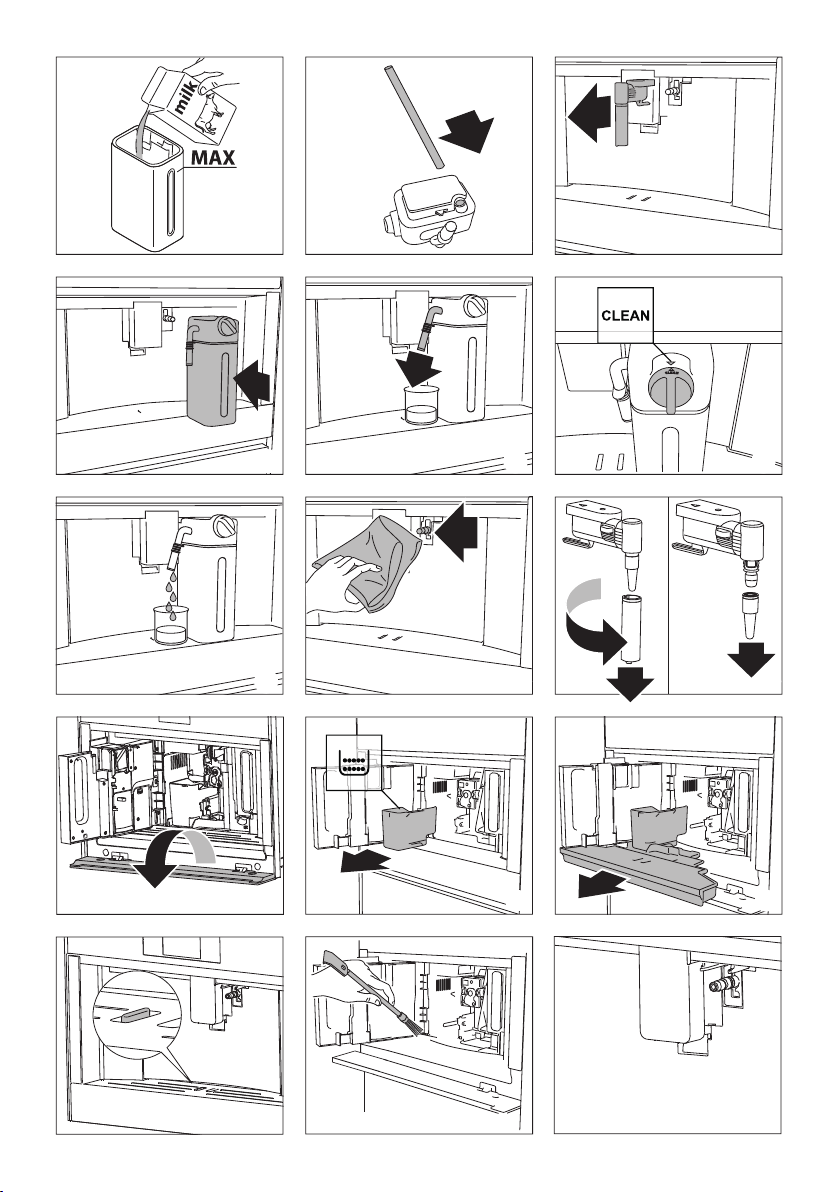
( g. 20).
5. Follow the instructions below for each function.
Adjusting the amount of froth
Turn the froth adjustment dial (D1) on the milk container lid to
adjust the amount of froth on the milk delivered while making
milk-based co ees. Follow the tips in the table below:
Dial
position
Description Recommended for
No froth CAFFELATTE /
HOT MILK
Min. froth
LATTE MACCHIATO
Max. froth CAPPUCCINO /
MILK (frothed milk)
Making cappuccinos and milk-based co ees auto-
matically
1. Fill the milk container (D) and attach it as described above.
2. Select the required beverage from the homepage:
• CAPPUCCINO
• LATTE MACCHIATO
• CAFFELATTE
• HOT MILK
• CAPPUCCINO+
• ESPRESSO MACCHIATO
• FLAT WHITE
• CAPPUCCINO MIX
3. A message on the display (B) instructs you to turn the froth
adjustment dial (D1) according to the froth required by the
original recipe. Turn the dial on the milk container lid (D2)
and con rm the selection by pressing .
4. After a few seconds, preparation begins automatically and
an image of the selected beverage appears on the display,
together with a progress bar which gradually lls as prepa-
ration progresses.
General indications when preparing all milk based drinks
• : press to interrupt preparation completely and go
back to the homepage.
• : press to interrupt milk or co ee delivery and
move on to the next delivery (if applicable) to complete the
beverage.
• At the end of delivery, to increase the quantity of co ee in
the cup, press .
• Preparation of each co ee can be customised (see sections
“Customising the beverages” and “Memorising your per-
sonal pro le”).
• Do not leave the milk container out of the refrigerator for
long periods. The warmer the milk (5°C is ideal), the poorer
the quality of froth produced.
Once the co ee has been made, the appliance is ready to make
the next beverage.

22
Cleaning the milk container after use
WARNING
When cleaning the internal tubes of the milk container, a little
hot water and steam leak out of the frothed milk spout (D5).
Avoid contact with splashes of water.
Each time you use a milk function, TURN DIAL TO <CLEAN> PO-
SITION TO START CLEANING appears on the display and the milk
frother lid must be cleaned:
1. Leave the milk container (D) in the machine (you do not
need to empty it);
2. Place a cup or other recipient under the frothed milk spout
( g. 20);
3. Turn the froth adjustment dial (D1) to CLEAN ( g. 21).
CLEANING MILK CONTAINER UNDERWAY PLACE A RECIPIENT
UNDER MILK SPOUT appears on the display (B) ( g. 22)
together with a bar which gradually lls as cleaning pro-
ceeds. Cleaning stops automatically;
4. Turn the dial back to one of the froth selections;
5. Remove the milk container and always clean the steam
connection nozzle (A10) ( g. 23).
• To prepare a number of cappuccinos and milk based co ees,
clean the milk container after you have prepared the last
beverage only. To proceed with making the next beverages,
when the CLEAN message is displayed, press
beverage only. To proceed with making the next beverages,
.
• If you do not clean the milk container, the
symbol ap-
pears on the display to remind you that it needs cleaning.
• The milk container can be kept in the refrigerator.
• In some cases, before cleaning you must wait for the appli-
ance to heat up.
DELIVERING HOT WATER
WARNING
Do not leave the appliance unattended while hot water is being
delivered.
1. Make sure the hot water/steam spout (C4) is attached cor-
rectly to the hot water/steam connection nozzle (A10);
2. Place a container under the spout (as close as possible to
avoid splashes);
3. Select HOT WATER from the homepage. The corre-
sponding image appears on the display (B), together with a
progress bar which lls gradually as preparation proceeds;
4. The machine delivers hot water, then delivery stops auto-
matically. To interrupt hot water delivery manually, press
.
• If "Energy Saving" mode is active, you may have to wait a
few seconds before hot water is delivered.
• Preparation of hot water can be customised (see sections
“Customising the beverages” and “Memorising your per-
sonal pro le”).
STEAM DELIVERY
WARNING
Do not leave the appliance unattended while steam is being
delivered.
1. Make sure the hot water/steam spout (C4) is attached cor-
rectly to the hot water/steam connection nozzle (A10);
2. Fill a container with the liquid to be heated or frothed and
immerse the hot water/steam spout in the liquid;
3. Select
STEAM from the homepage. The correspond-
ing image appears on the display (B), together with a pro-
gress bar which lls gradually as preparation proceeds and
after a few seconds, steam to heat the liquid is delivered
from the hot water/steam spout;
4. When the required temperature or level of froth is reached,
interrupt steam delivery by pressing ;
Always stop steam delivery before extracting the container con-
taining the liquid to avoid burns from splashes.
If “Energy saving” is active, you may have to wait a few seconds
before steam is delivered.
Tips for using steam to froth milk
• When choosing the size of the container, bear in mind that
the liquid doubles or triples in volume.
• For a richer denser froth, use skimmed or partially skimmed
milk at refrigerator temperature (about 5°C).
• For a creamier froth, rotate the container with slow move-
ments in an upward.
• To avoid milk with poor froth or large bubbles, always clean
the spout (C4) as described in the following section.
Cleaning the hot water/steam spout after use
Always clean the hot water/steam spout (C4) after use to avoid
the build-up of milk residues and prevent it from clogging.
1. Place a container under the hot water/steam spout and de-
liver a little water (see section “Delivering hot water”). Stop
delivery of hot water by pressing .
2. Wait a few minutes for the hot water/steam spout to cool
down, then extract ( g. 18). Hold the spout with one hand
and with the other, turn the cappuccino maker and pull it
downwards ( g. 24).
3. Also remove the steam connection nozzle by pulling it
downwards ( g. 24).
4. Check the hole in the connection nozzle is not blocked.
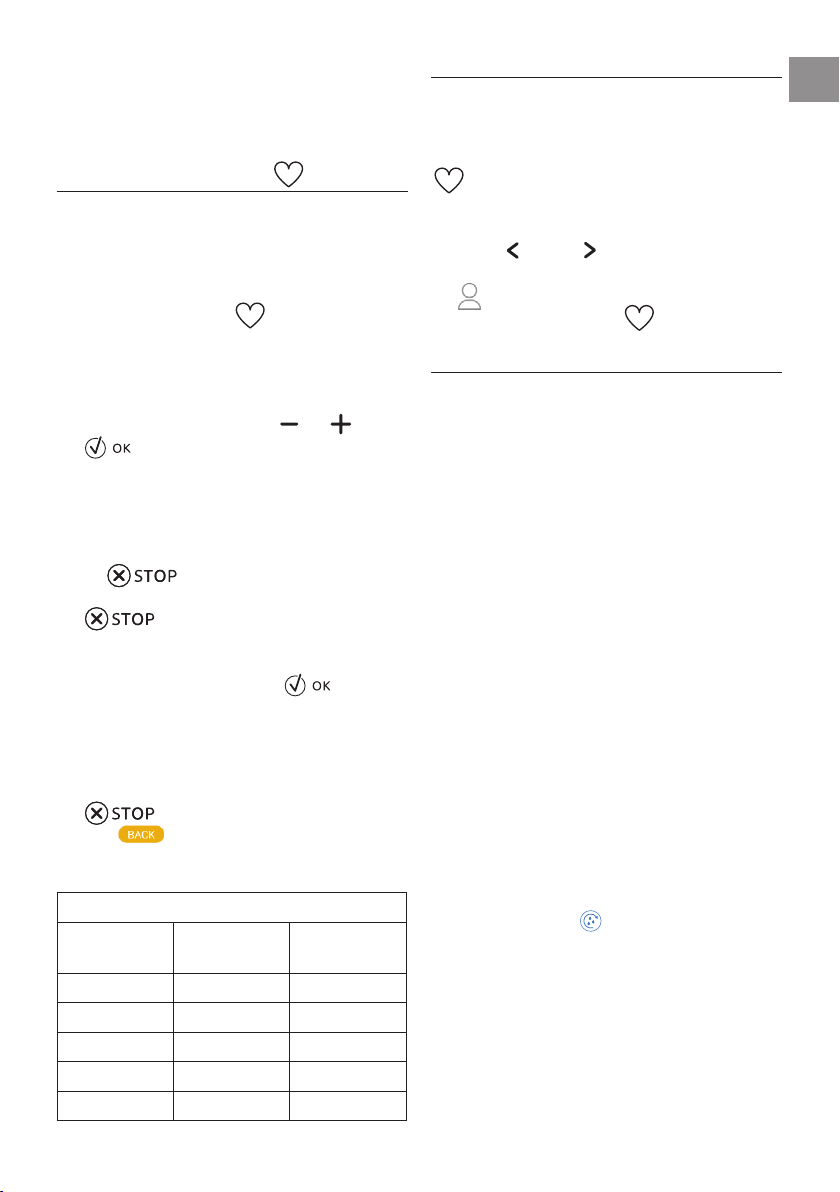
23
EN
5. Wash all parts with warm water.
6. Insert the connection nozzle, then the cappuccino maker
on the spout by pushing it upwards and turning it clockwise
until it is attached.
CUSTOMISING THE BEVERAGES
The aroma (when required) and quantity of the drinks can be
customised.
1. Make sure the pro le for which you want to customise the
beverage is active. You can select "MY" beverages for each
of the 6 pro les;
2. From the homepage, press
(B1);
3. To access the customising screen, choose the beverage you
want to customise. The corresponding accessories must be
inserted;
4. (Beverages with co ee only) CHOOSE COFFEE AROMA : Se-
lect the required aroma by pressing or and press
;
5. CUSTOMISING COFFEE QUANTITY (OR WATER) STOP TO
SAVE : Preparation begins and the appliance displays the
quantity customising screen in the form of a vertical bar.
The star alongside the bar represents the current quantity.
6. When the amount reaches the minimum quantity you can
set, is displayed.
7. When the required quantity in the cup is reached, press
.
8. SAVE NEW SETTINGS? : Press YES or NO .
The appliance con rms if the values have been saved or not (de-
pending on the previous selection). Press .
The appliance goes back to the homepage.
• Cappuccino and milk-based co ees: the co ee aroma is saved
rst, followed by the quantity of rst milk, then co ee;
• HOT WATER: the appliance delivers hot water. Press
to save the required quantity.
• Press
to save the required quantity.
to exit programming. The values will not be
saved.
Beverage quantity table
Beverage Standard
quantity
Programmable
quantity
ESPRESSO 40 ml 20-80 ml
LONG 160 ml 115-250 ml
COFFEE 180 ml 100-240 ml
DOPPIO+ 120 ml 80-180 ml
HOT WATER 250 ml 20-420 ml
MEMORISING YOUR PERSONAL PROFILE
The appliance allows you to memorise 6 di erent pro les, each
associated with a di erent icon.
The customised MY beverages AROMA and QUANTITY values are
saved in each pro le (see section “Customising the beverages
”). The order in which all the beverages are displayed is
based on the frequency of selection.
To select or enter a pro le, press on the pro le currently in use
(B11), press
(B10) or
(B8)
until the required pro le is
displayed, then press on the pro le.
• GUEST pro le: select this pro le to deliver beverages
with the default settings. The
function is not active.
CLEANING
Cleaning the machine
The following parts of the machine must be cleaned regularly:
• the appliance’s internal circuit;
• co ee grounds container (A4);
• drip tray (A14);
• water tank (A12);
• co ee spouts (A13);
• pre-ground co ee funnel (A21);
• infuser (A5), accessible after opening the infuser door (A2);
• milk container (D);
• hot water/steam connection nozzle (A10);
• control panel (B).
• Do not use solvents, abrasive detergents or alcohol to clean
the co ee machine. You need not use chemical products to
clean the machine.
• None of the components of the appliance can be washed in
a dishwasher with the exception of the milk container (D).
• Do not use metal objects to remove encrustations or co ee
deposits as they could scratch metal or plastic surfaces.
Cleaning the machine's internal circuit
If the appliance is not used for more than 3/4 days, before using
it again, we strongly recommend switching it on and:
1. performing 2-3 rinse cycles by selecting the "Rinse" func-
tion (section “Rinsing ”);
2. delivering hot water for a few seconds (section “Delivering
hot water”).
After cleaning, it is normal for the grounds container (A4) to
contain water.
Cleaning the co ee grounds container
When EMPTY GROUNDS CONTAINER appears on the display (B),
( g. 26) the grounds container must be emptied and cleaned. The

24
appliance cannot be used to make coee until you have cleaned
the grounds container (A4). Even if not full, the empty grounds
container message is displayed 72 hours after the rst coee has
been prepared. For the 72 hours to be calculated correctly, the ma-
chine must never be turned o with the main switch.
To clean (with the machine on):
1. Open the bottom door by rotating it downwards (g. 25).
2. Remove the drip tray (A14) (g. 27), empty and clean.
3. Empty the grounds container (A4) and clean thoroughly to
remove all residues left on the bottom. This can be done
using the spatula on the brush (C3) provided.
When removing the drip tray, the grounds container must be
emptied, even if it contains few grounds. If this is not done,
when you make the next coees, the grounds container may ll
up more than expected and clog the machine.
Cleaning the drip tray
The drip tray (A14) is tted with a level indicator (red) showing
the level of water it contains (g. 28). Before the indicator pro-
trudes from the cup tray (A1), the drip tray must be emptied and
cleaned, otherwise the water may overow the edge and dam-
age the appliance, the surface it rests on or the surrounding area.
To remove the drip tray, proceed as follows:
1. Remove the drip tray and coee grounds container (A4)
(g. 27);
2. Empty the drip tray and grounds container and wash them;
3. Insert the drip tray complete with grounds container.
Cleaning the inside of the coee machine
WARNING
Before cleaning internal parts, the machine must be turned o
(see section “Turning the appliance o”) and unplugged from
the mains power supply. Never immerse the coee machine in
water.
1. Check regularly (about once a month) that the inside of the
appliance (accessible after removing the drip tray (A14) ) is
not dirty.
2. If necessary, remove coee deposits with the brush (C3)
supplied (g. 29).
Cleaning the water tank
1. Clean the water tank (A12) regularly (about once a week)
with a damp cloth and a little mild washing up liquid. Rinse
thoroughly before lling the tank and putting it back in the
appliance.
Cleaning the coee spouts
1. Clean the coee spouts (A13) regularly (g. 31);
2. Check that the holes in the coee spouts are not blocked.
If necessary, remove coee deposits.
Cleaning the pre-ground coee funnel
Check regularly (about once a month) that the pre-ground coee
funnel (A21) is not blocked. If necessary, remove coee deposits
with the brush (C3) supplied.
Cleaning the infuser
The infuser must be cleaned at least once a month.
The infuser (A5) must not be removed when the appliance is on.
Do not use force to remove the infuser.
1. Make sure the machine is correctly turned o (see Turning
the appliance o).
2. Open the service door (A2).
3. Remove the drip tray (A14) and waste coee container (g.
27).
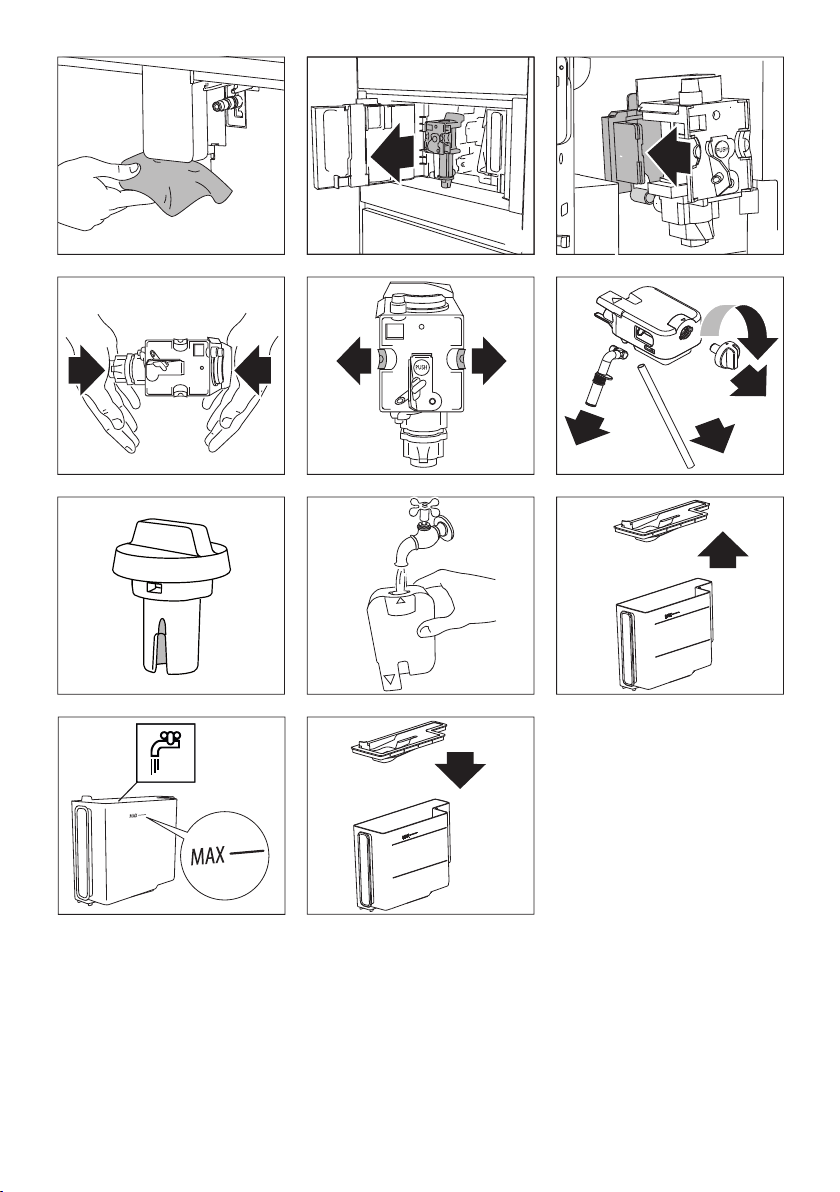
4. Press the two coloured release buttons inwards and at the
same time pull the infuser outwards (g. 32).
Do not use washing up liquid to clean the infuser. It would re-
move the lubricant applied to the inside of the piston.
5. Soak the infuser in water for about 5 minutes, then rinse.
6. After cleaning, replace the infuser (A5) by sliding it onto the
internal support and pin at the bottom, then push the PUSH
symbol fully in until it clicks into place (g. 33).
If you encounter diculty inserting the infuser, before inserting
it you must adapt it to the right dimension by pressing it force-
fully from the bottom and top as shown in the gure 34.
7. Once inserted, make sure the two coloured release buttons
have snapped out (g. 35).
8. Replace the drip tray and the coee ground container.
9. Close the service door.
Cleaning the milk container (D)
Clean the milk container each time you prepare milk as described
below:
1. Lift and remove the lid (D2);
2. Extract the milk container (D3) from the thermal casing
(D6), holding it by the two side grips.
The thermal casing must not be lled with or immersed
in water. Clean with a damp cloth only.
3. Remove the milk spout (D5) and intake tube (D4).
4. Turn the froth adjustment dial clockwise to the "INSERT"
position (g. 36) and pull o.
5. Wash all the components of the frother thoroughly with
25
EN
hot water and light washing-up liquid. All components and
the container are dishwasher safe, placing them in the top
basket of the dishwasher.
Make sure there are no milk residues on the hollow and
groove under the dial (
g. 37)
.
6. Rinse inside the froth adjustment dial seat ( g. 38) and the
milk frother connector hole.
7. Check that the intake tube and spout are not clogged with
milk residues.
8. Replace the dial (lining up the arrow with the word IN-
SERT), spout and milk intake tube.
9. Place the milk container in the thermal casing.
10. Place the lid back on the milk container.
Cleaning the hot water/steam connection nozzle
Each time you prepare milk, clean the connection nozzle (A10) to
remove milk residues from the gaskets ( g. 23).
DESCALE
• Before use, read the instructions and the labelling on the
descaler pack.
• You should use descaler product available at after sales
service. Using unsuitable descaler and/or performing des-
caling incorrectly may result in faults not covered by the
manufacturer's guarantee.
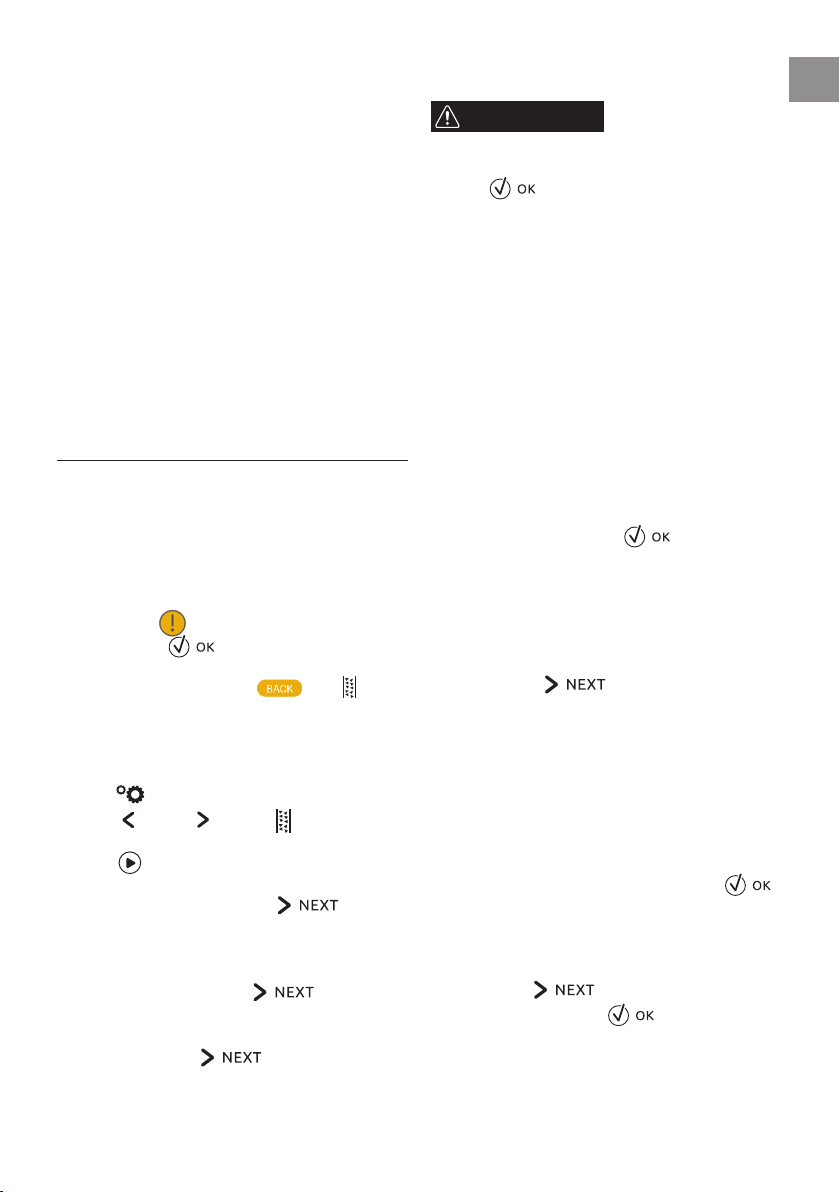
Descale the appliance when DESCALING NEEDED PRESS OK TO
START (~45min)
appears on the display (B): to descale
immediately, press
and follow the instructions from
point 4.
To descale the appliance later, press
. The symbol
appears on the display to remind you that the appliance needs
descaling (the message appears each time you turn the appli-
ance on).
To access the descaling menu:
1. Press
(B2) to enter the menu;
2. Press
(B10) or (B8) until DESCALE appears on
the display;
3. Press
to start the descaling cycle then follow the in-
structions on the display;
4. Empty the water tank (A12). Press
;
5. ADD DESCALER (LEVEL A) AND WATER (UP TO LEVEL B) ( g.
40); Pour the descaler into the tank up to the level A marked
inside the tank, then add water (one litre) up to level B and
put the water tank back. Press
;
6. EMPTY GROUNDS CONTAINER and DRIP TRAY ( g. 27): re-
move, empty and replace the drip tray (A14) and grounds
container (A4). Press
;
7. PLACE 2,5
l CONTAINER UNDER SPOUTS PRESS OK TO START
DESCALING :
Place an empty container with a minimum capacity of 2.5
litres under the hot water/steam spout (C4) and co ee
spouts (A13) ( g. 8);
WARNING
Hot water containing acid ows out of the hot water/steam
spout. Take care to avoid contact with splashes of this solution.
8. Press to con rm that you have added the descaling
solution. DESCALING UNDERWAY, PLEASE WAIT appears on
the display. The descale programme starts and the descaler
liquid comes out of the hot water/steam and co ee spouts.
A series of rinses and pauses is performed automatically to
remove all the scale residues inside the co ee machine;
After about 25 minutes, descaling stops:
9. RINSE AND FILL WATER TANK UP TO MAX LEVEL: the ap-
pliance is now ready to rinse with drinking water. Empty
the container used to collect the descaler solution. Extract
the water tank, empty, rinse under running water, ll with
drinking water up to the MAX level and put back in the ap-
pliance;
10. PLACE 2,5
l CONTAINER UNDER SPOUTS PRESS OK TO START
RINSING: Place the container used to collect the descaler
solution empty under the co ee spouts and hot water/
steam spout ( g. 8) and press
;
11. Hot water is delivered rst from the co ee spouts, then
from the hot water/steam spout and RINSING UNDERWAY,
PLEASE WAIT is displayed;
12. When the water in the tank has run out, empty the contain-
er used to collect the rinsing water;
13. (If the lter is installed) INSERT FILTER INTO ITS HOUSING
( g. 42). Press
and extract the water tank. Re-
place the water softener lter if removed previously;
14. RINSE AND FILL WATER TANK UP TO MAX LEVEL: Fill the tank
up to the MAX level with drinking water;
15. INSERT WATER TANK ( g. 6): Put the water tank back in the
appliance;
16. PLACE 2,5
l CONTAINER UNDER SPOUTS PRESS OK TO START
RINSING :
Place the container used to collect the descaler solution empty
under the hot water/steam spout ( g. 8) and press ;
17. Hot water is delivered from the hot water/steam spout and
RINSING UNDERWAY is displayed.
18. EMPTY DRIP TRAY ( g. 27): At the end of rinsing, remove,
empty and replace the drip tray (A14) and grounds contain-
er (A4). Press
;
19. DESCALE COMPLETE : press ;
20. FILL TANK WITH FRESH WATER : empty the container used to
collect the rinse water, remove the water tank and ll with
drinking water up to the MAX level, then put back in the
appliance.
Descaling is complete.
26
• If the descaling cycle is not completed correctly (e.g. no
electricity) we recommend repeating the cycle;
• After descaling, it is normal for the grounds container (A4)
to contain water.
• If the water tank has not been lled to the MAX level, at
the end of descaling, the appliance requests a third rinse to
guarantee that the descaler solution has been completely
eliminated from the machine's internal circuits. Before
starting rinsing, remember to empty the drip tray;
• The appliance may request descaling cycles at very short in-
tervals. This is normal and due to the appliance’s advanced
control system.
SETTING WATER HARDNESS
The DESCALING NEEDED - PRESS OK TO START (~45min)
message is displayed after a period of time established
according to water hardness.
The machine is set by default for a hardness level of 4. The ma-
chine can also be programmed according to the hardness of the
mains water in the various regions so that the machine needs to
be descaled less often.
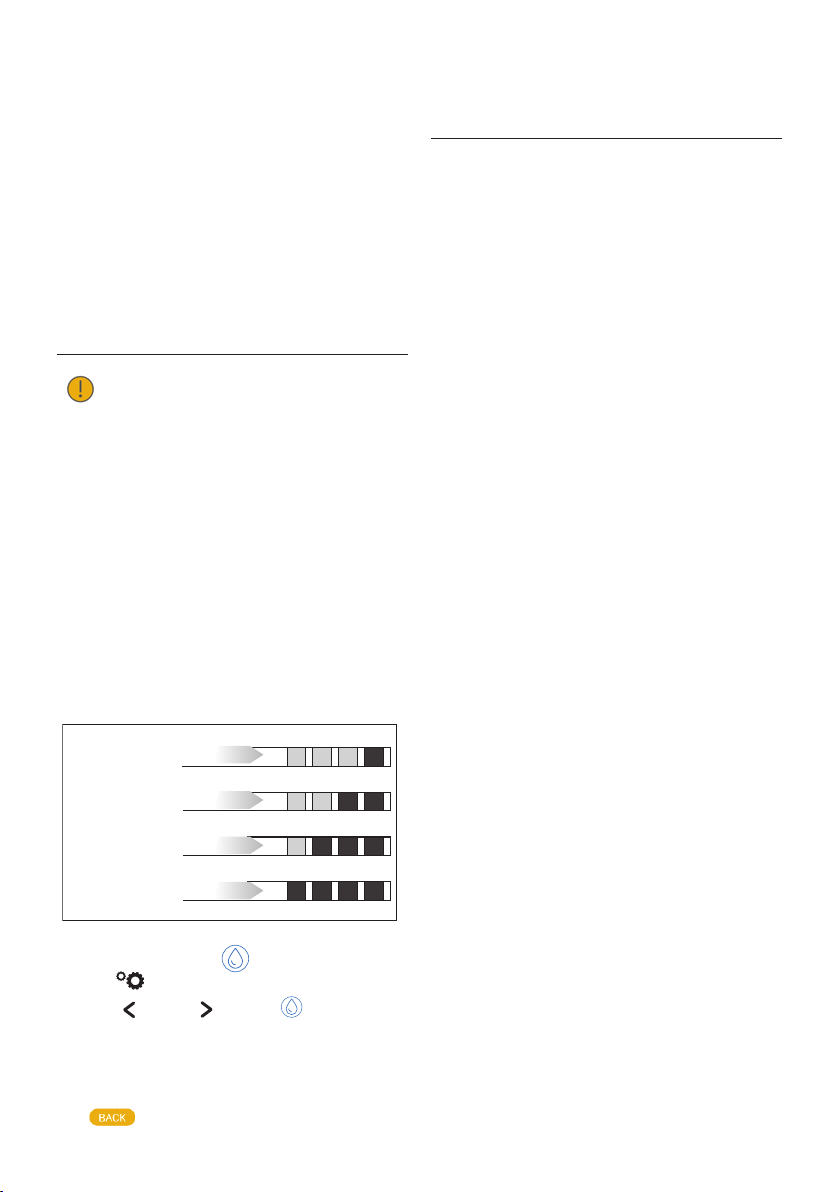
Measuring water hardness
1. Remove the "total hardness test" indicator paper (C1) from
its pack (attached to the instructions).
2. Immerse the paper completely in a glass of water for one
second.
3. Remove the paper from the water and shake lightly. After
about a minute, 1, 2, 3, or 4 red squares form, depending on
the hardness of the water. Each square corresponds to one
level.
soft water - level 1
slightly hard water - level 2
hard water - level 3
Very hard water - level 4
Setting water hardness
1. Press (B2) to enter the menu;
2. Press
(B10) or (B8) until WATER HARDNESS
appears on the display (B);
3. To change the level selected, press the symbol itself until
the required level is displayed (Level 1 = soft water; Level 4
= very hard water);
Press
= very hard water);
to go back to the homepage.
The machine is now reprogrammed with the new water hard-
ness setting.
TECHNICAL DATA
Voltage: 220-240 V~ 50/60 Hz max. 10 A
Absorbed power: 1350 W
Pressure: 15 bar
Water tank capacity: 2.5 litres
Size:LxHxD: 597x450x470 mm
Net weight: 20 kg
27
EN
DISPLAYED MESSAGES
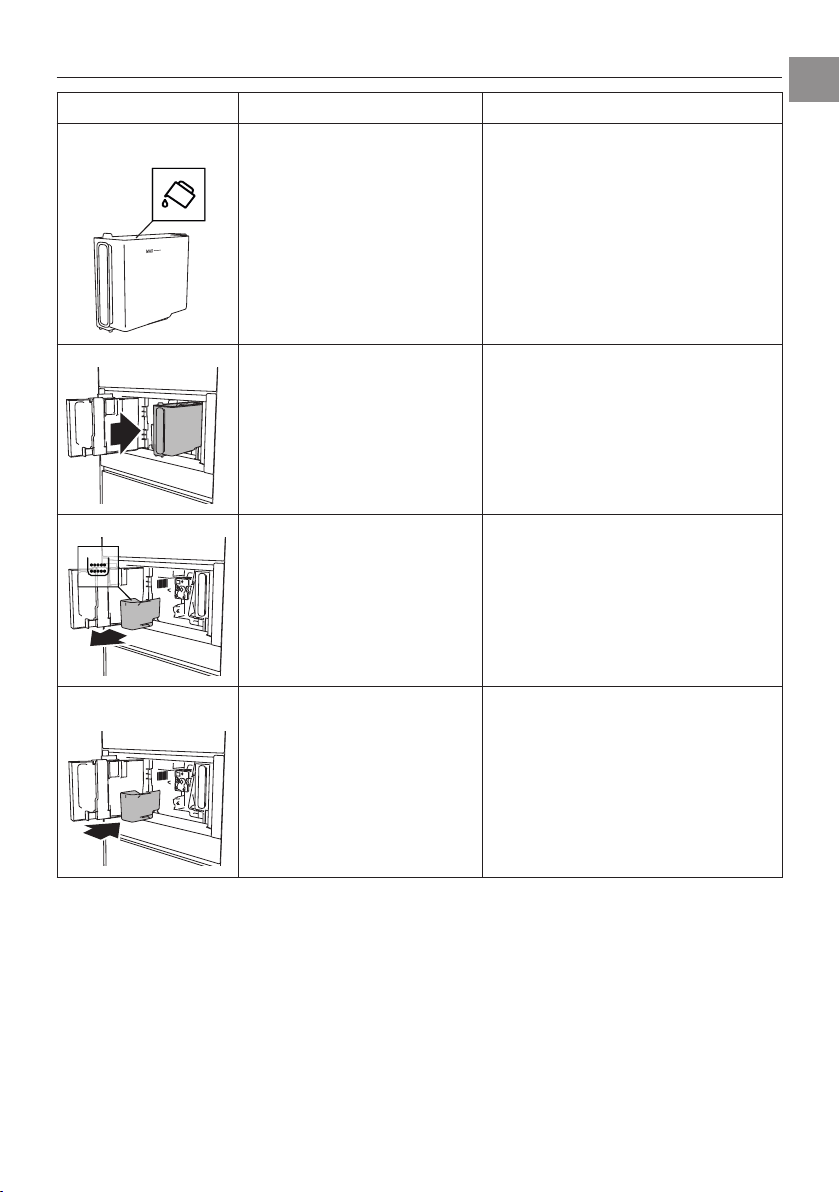
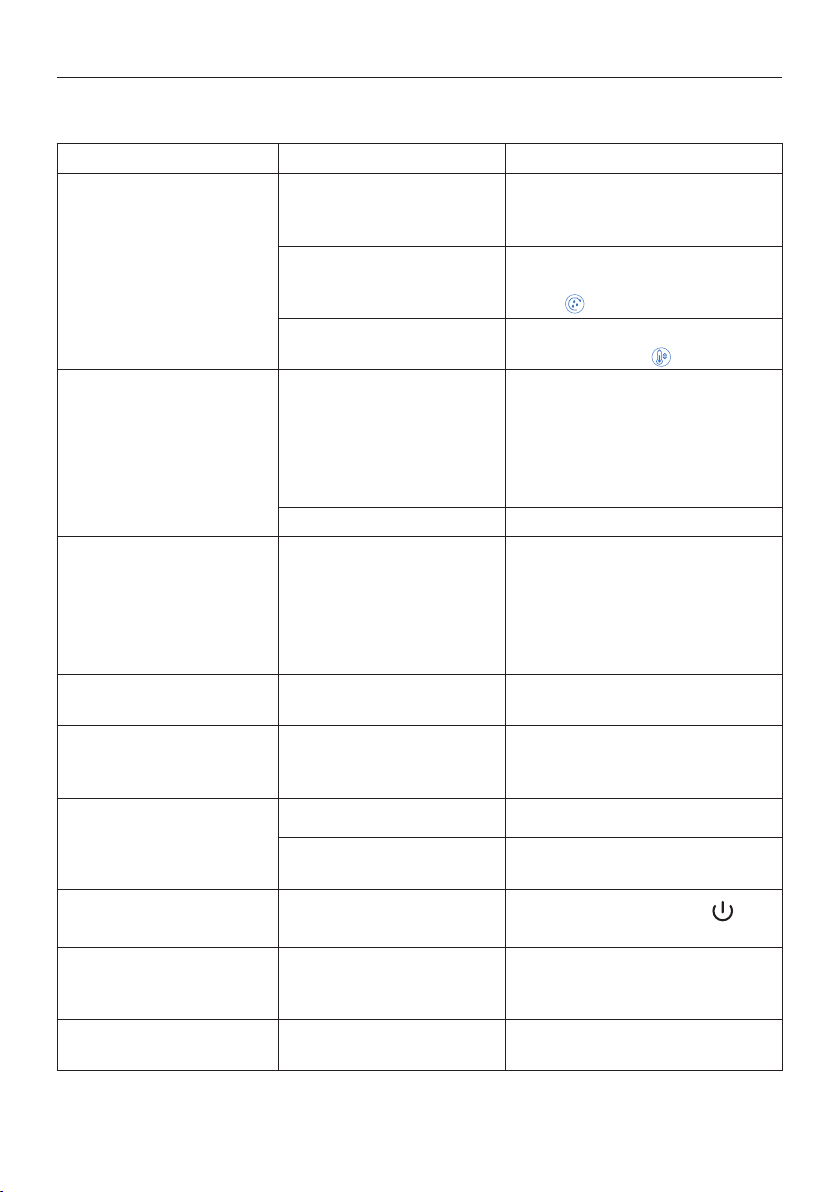
DISPLAYED MESSAGE POSSIBLE CAUSE REMEDY
FILL TANK WITH FRESH
WATER
Insu cient water in the tank
(A12)
. Fill the tank with drinking water and/or insert it
correctly, pushing it as far as it will go until it clicks
into place.
INSERT WATER TANK
The tank
(A12)
is not correctly in place. Insert the tank correctly and press as far as it will go.
EMPTY GROUNDS CONTAINER
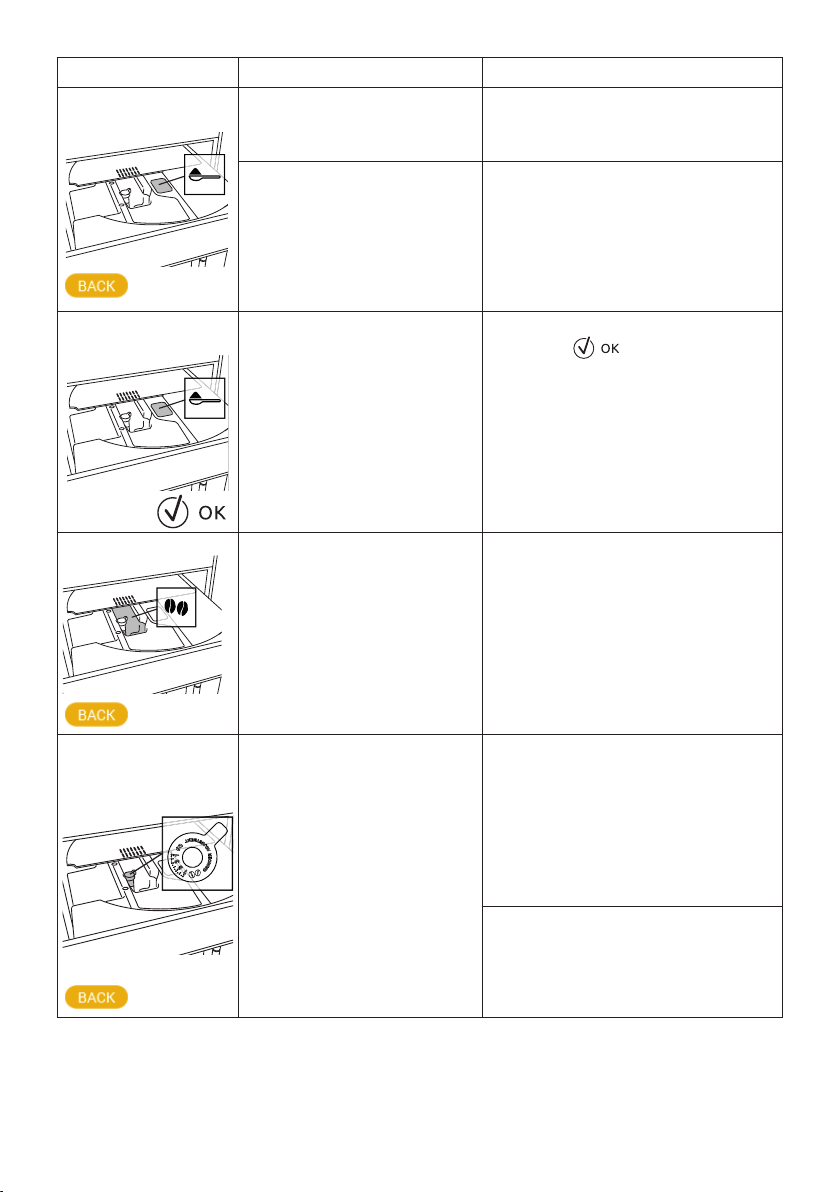
The grounds container (A4) is full.
Empty the grounds container and drip tray (A14), clean
and replace. Important: when removing the drip tray,
the grounds container must be emptied, even if it con-
tains few grounds. If this is not done, when you make
the next co ees, the grounds container may ll up
more than expected and clog the machine.
INSERT GROUNDS CONTAINER
AND
After cleaning, the grounds container
(A4)
has not been replaced.
Remove the drip tray (A14) and insert the grounds
container.
28
DISPLAYED MESSAGE POSSIBLE CAUSE REMEDY
ADD PRE-GROUND COFFEE
MAXIMUM ONE MEASURE
The "pre-ground co ee" function has
been selected without placing any pre-
ground co ee in the funnel
(A21)
.
Place pre-ground co ee in the funnel
( g. 14)
and
repeat delivery
The pre-ground co ee funnel
(A21)
is
clogged.
Empty the funnel with the help of the brush (C3) as
described in section “Cleaning the pre-ground
co ee funnel”.
ADD PRE-GROUND COFFEE
MAXIMUM ONE MEASURE
A LONG co ee with pre-ground co ee has
been requested
Place pre-ground co ee in the funnel (A21) ( g.
14) and press to continue and complete
delivery.
FILL BEANS CONTAINER
The co ee beans have run out. Fill the beans container
(A16 - g. 12)
.
GROUND TOO FINE. ADJUST
MILL 1 CLICK WHILE IN
OPERATION
The grinding is too ne and the co ee is
delivered too slowly or not at all.
Repeat co ee delivery and turn the grinding adjust-
ment dial
(A17)
one click clockwise towards "7" while
the co ee mill is in operation. If after making at least
2 co ees delivery is still too slow, repeat the correc-
tion procedure, turning the grinding adjustment dial
another click until delivery is correct (see section
“Adjusting the co ee mill”
)
. If the problem persists,
make sure the water tank (A12) is fully inserted.
Insert the hot water/steam spout (C4) in the appli-
ance and deliver a little water until the ow becomes
regular.
29
EN
DISPLAYED MESSAGE POSSIBLE CAUSE REMEDY
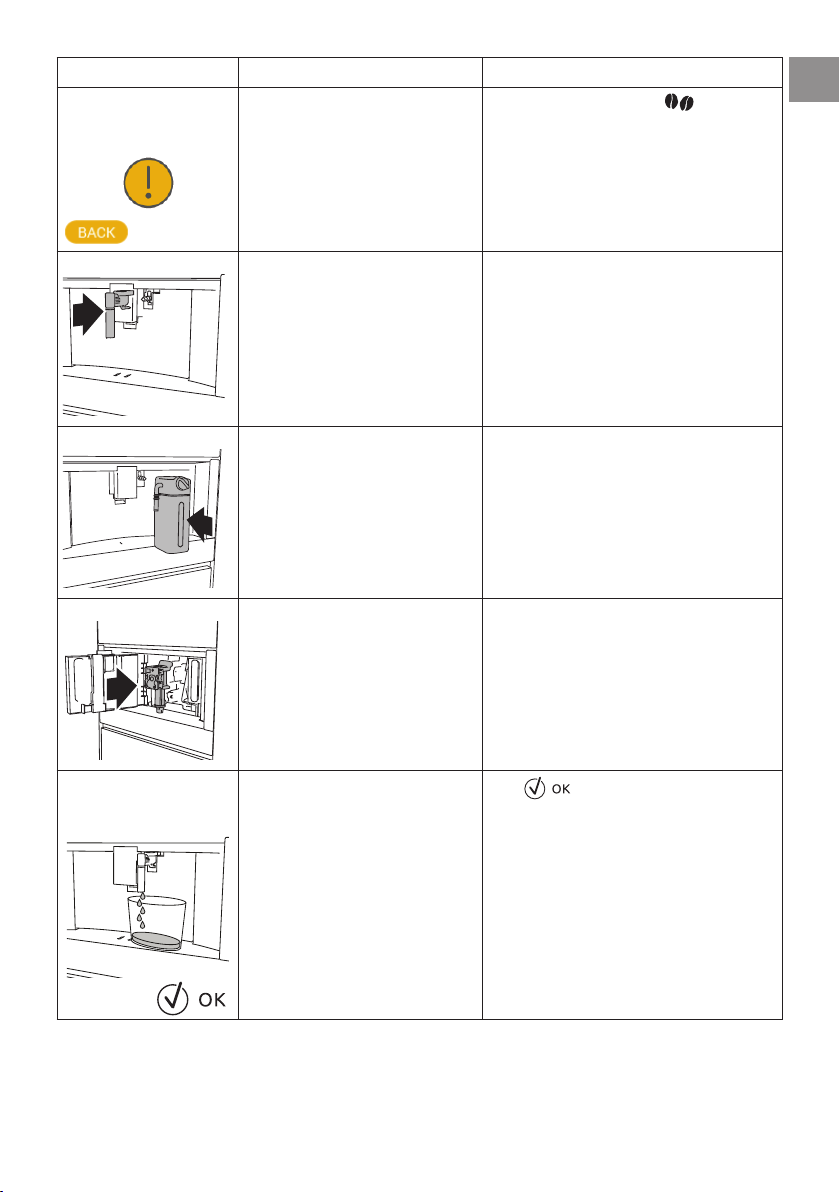
SELECT A MILDER TASTE OR
REDUCE PRE-GROUND COFFEE
QUANTITY
Too much co ee has been used.
Select a milder taste by pressing
AROMA (B6) or
reduce the quantity of pre-ground co ee (maximum
1 measure).
INSERT WATER SPOUT
The hot water spout (C4) is not inserted or
is inserted incorrectly
Insert the water spout as far as it will go.
INSERT MILK CONTAINER
The milk container (D) is not inserted
correctly.
Insert the milk container as far as it will go
( g. 19)
.
INSERT INFUSER ASSEMBLY
The infuser (
A5
) has not been replaced
after cleaning.
Insert the infuser as described in section “Cleaning
the infuser”.
WATER CIRCUIT EMPTY
PRESS OK TO START FILLING
PROCESS
The water circuit is empty
Press
to deliver water from the spout
(
C4)
until it ows out normally. Delivery stops
automatically.
If the problem persists, make sure the water tank
(A12) is fully inserted.
30
DISPLAYED MESSAGE POSSIBLE CAUSE REMEDY
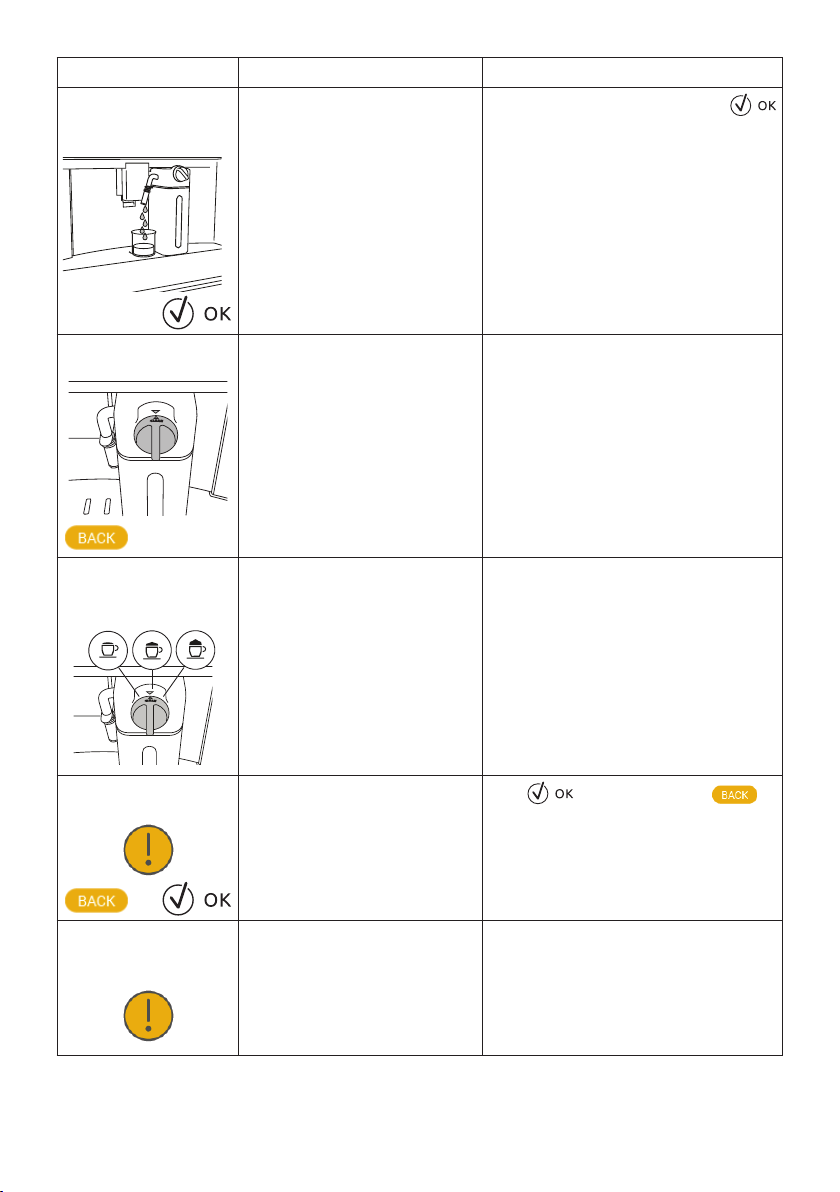
PRESS OK TO START CLEANING
PROCESS OR TURN MILK FROTH
ADJUSTMENT DIAL
The milk container has been inserted
with the froth adjustment dial (D1) in the
CLEAN position.
To proceed with the CLEAN function, press
or turn the froth adjustment dial to one of the milk
positions.
TURN DIAL TO <CLEAN> POSI-
TION TO START CLEANING
Milk has been delivered recently and the
tubes inside the milk container must be
cleaned (D).
Turn the froth adjustment dial (D1) to CLEAN
( g. 21).
TURN THE MILK FROTH
ADJUSTMENT DIAL TO MILK
POSITION
The milk container has been inserted
with the froth adjustment dial (D1) in the
CLEAN position.
Turn the dial to the required froth position.
DESCALING NEEDED
PRESS OK TO START (~45MIN)
The machine must be descaled.
Press
to start descaling or to
descale later. The descaling procedure described in
section “Descale” needs to be performed.
GENERAL ALARM. REFER TO
USER MANUAL / COFFEE
LINK APP
The inside of the appliance is very dirty. Clean the inside of the appliance thoroughly, as de-
scribed in section “Cleaning”. If the message is still
displayed after cleaning, contact Customer Services.
31
EN
DISPLAYED MESSAGE POSSIBLE CAUSE REMEDY
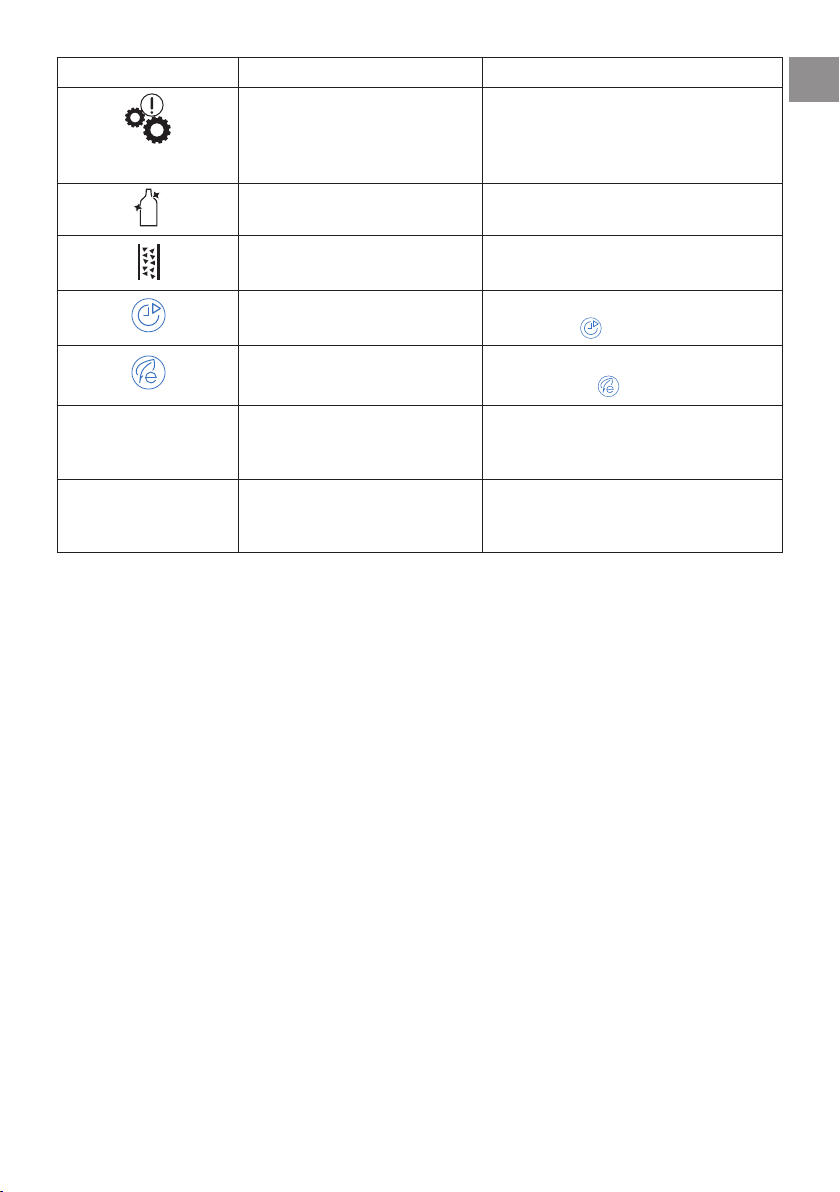
The appliance needs descaling. The descaling procedure described in section “Des-
cale” needs to be performed and/or the lter needs
replacing or removing as described in section “Water
softener lte r ”.
The tubes inside the milk container (D)
must be cleaned.
Turn the froth adjustment dial (D1) to CLEAN
(g. 21).
The machine must be descaled. The descaling procedure described in section “Des-
cale” needs to be performed.
The auto-start function is enabled. To disable the function, proceed as described in sec-
tion “Auto-start
”.
Energy saving is enabled. To disable energy saving, proceed as described in sec-
tion “Energy saving ”.
CLEANING UNDERWAY
PLEASE WAIT
The appliance has detected impurities in
its internal circuits.
Wait for the appliance to be ready for use again and
reselect the required beverage. Contact Customer
Services if the problem persists.
MACHINE TOO HOT Using the stirrers continuously for long
periods may cause the appliance to
overheat
Wait for the appliance to cool down.
32
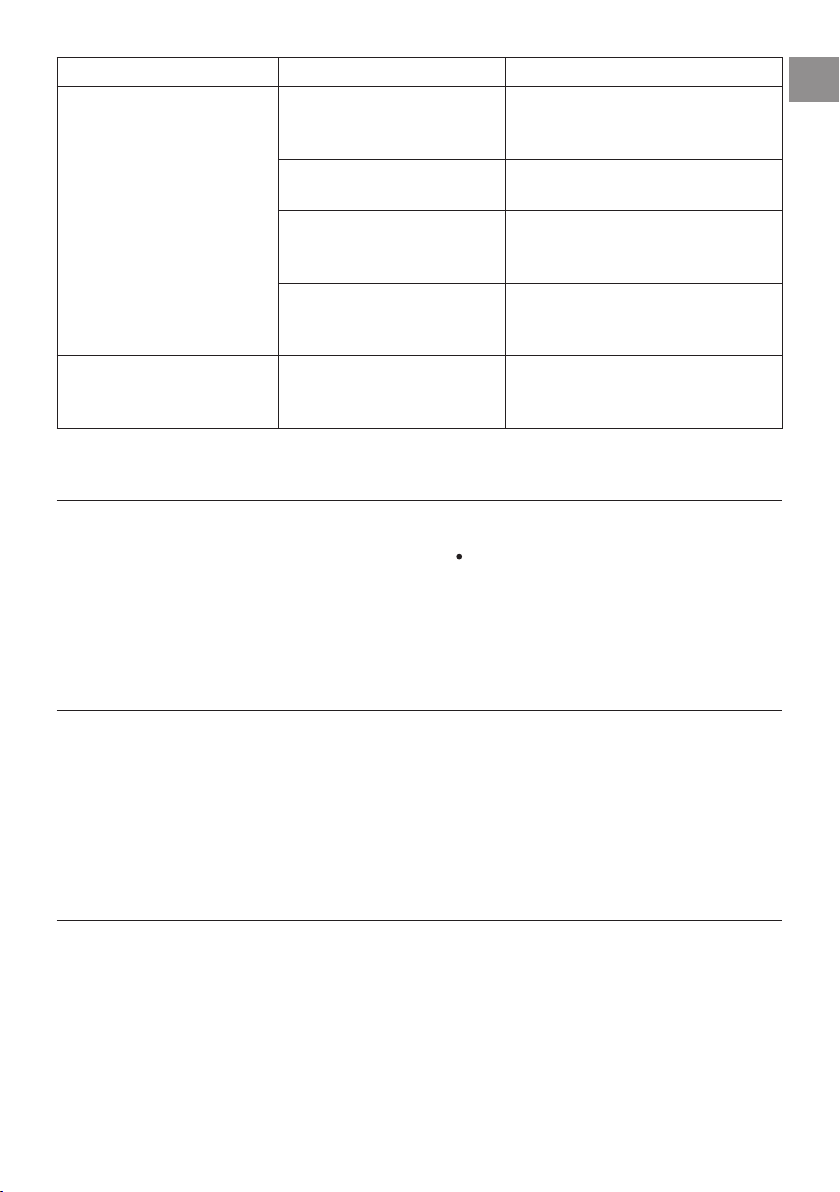
PROBLEM POSSIBLE CAUSE REMEDY
The coee is not hot. The cups were not preheated. Warm the cups by rinsing them with hot
water (Please note! you can use the hot water
function).
The infuser has cooled down because
2/3 minutes have elapsed since the
last coee was made.
Before making the coee, heat the infuser by
rinsing using the rinse function
(see section
“Rinsing ”).
A low coee temperature is set.
Set a hotter coee temperature in the menu (sec-
tion “Coee temperature ”).
The coee is weak or not creamy
enough.
The coee is ground too coarsely. Turn the grinding adjustment dial (A17) one
click anticlockwise towards "1" while the coee
mill is in operation (g. 11). Continue one click
at a time until coee delivery is satisfactory. The
eect is only visible after delivering 2 coees
(see section “Adjusting the coee mill”).
The coee is unsuitable. Use coee for espresso machines.
The coee is delivered too slowly or a
drop at a time.
The coee is ground too nely. Turn the grinding adjustment dial (A17) one
click clockwise towards "7" while the coee mill
is in operation (g. 11). Continue one click at a
time until coee delivery is satisfactory. The ef-
fect is only visible after delivering 2 coees (see
section “Adjusting the coee mill”).
Coee does not come out of one or
both of the spouts.
The coee spouts (A13) are blocked. Clean the spouts (g. 31).
The appliance will not make coee The appliance has detected impurities
in its internal circuits. "CLEANING UN-
DERWAY" is displayed.
Wait for the appliance to be ready for use again
and reselect the required beverage. Contact
Customer Services if the problem persists.
The appliance does not come on It is not plugged into the mains socket. Plug into the mains socket (g. 1).
The main switch (A19) is not turned
on.
Press the main switch (g. 2).
The infuser cannot be extracted The appliance has not been turned o
correctly
Turn the appliance o by pressing the button
(A7)
(see section “Turning the appliance o”).
At the end of descaling, the appliance
requests a third rinse
During the two rinse cycles, the water
tank (A12) has not been lled to the
MAX level
Follow the instructions displayed by the appli-
ance, but rst empty the drip tray (A14) to avoid
the water overowing.
The milk does not come out of the
milk spout (D5)
The lid (D2) of the milk container (D)
is dirty
Clean the milk container lid as described in sec-
tion “Cleaning the milk container”.
TROUBLESHOOTING
Below is a list of some of the possible malfunctions.
If the problem cannot be resolved as described, contact Customer Services.
33
EN
PROBLEM POSSIBLE CAUSE REMEDY
The milk contains large bubbles and
squirts out of the milk spout (D5) or
there is little froth
The milk is not cold enough or is not
semi-skimmed or skimmed.
Use skimmed or semi-skimmed milk at refriger-
ator temperature (about 5° C). If the result is not
as you wished, try changing brand of milk.
The froth adjustment dial (D1) is incor-
rectly adjusted.
Adjust following the instructions in section
“Adjusting the amount of froth”.
The milk container lid (D2) or froth ad-
justment dial (D1) is dirty
Clean the milk container lid and froth adjust-
ment dial as described in section “Cleaning the
milk container”.
The hot water/steam connection noz-
zle (A10) is dirty
Clean the connection nozzle as described in sec-
tion “Cleaning the hot water/steam connection
nozzle”.
The machine emits noises or small
pus of steam while not in use
The machine is ready for use, or has
recently been turned o, and conden-
sate is dripping into the hot vaporiser
This is part of normal operation. To limit the
phenomenon, empty the drip tray.
ESPRESSO
Origin Italy
PROCESS Grnding Coee powder 6-11gr (according to aroma)
Brewing Pre-infusion
Infusion high pressure (9-12 bar)
RESULT IN CUP Default Quantity ~ 40ml
Cream compact and nut-coloured
Taste intense
OCCASION OF USE short-term pleasure, every moment of the day
COFFEE
Origin Germany & Central Europe
PROCESS Grnding Coee powder 8-14gr (according to aroma)
Brewing Pre-infusion no pre infusion
Infusion high pressure (9-12 bar)
RESULT IN CUP Default Quantity ~ 180ml
Cream thinner than espresso
Taste balanced and delicate
OCCASION OF USE long-lasting pleasure, every moment of the day
LONG
Origin USA, Australia
PROCESS Grnding Coee powder 2 grindings of 5-9gr (according to aroma)
Brewing Pre-infusion no pre infusion
Infusion impulse mode lower pressure than espresso
RESULT IN CUP Default Quantity ~ 160ml
Cream thinner and lighter than espresso
Taste perfect for drip coee lovers
OCCASION OF USE long-lasting pleasure, every moment of the day

34
DOPPIO+
Origin Italy
PROCESS Grnding Coee powder 15gr
Brewing Pre-infusion reduced pre infusion
Infusion higher pressure than espresso
RESULT IN CUP Default Quantity ~ 120ml
Cream thicker and darker than espresso
Taste stronger than espresso
OCCASION OF USE need for energy
AMERICANO
Origin USA, UK
PROCESS Grnding Coee powder 6-11gr (according to aroma)
Brewing Pre-infusion
Infusion high pressure (9-12 bar)
RESULT IN CUP Default Quantity ~ 150ml
Cream thinner and lighter than espresso
Taste light and delicate
ESPRESSO MACCHIATO
Origin Italy
PROCESS Coee 6-11gr (according to aroma) (~ 30ml)
Milk few drops (~ 20ml)
Milk foam maximum level
Delivery order coee rst, milk afterwards
RESULT IN CUP Visual black with one thin layer or milk foam
Milk foam
OCCASION OF USE every moment of the day, people who want to taste a slightly sweet espresso
CAPPUCCINO
Origin Italy
PROCESS Coee balanced (~ 80ml)
Milk balanced (~ 70ml)
Milk foam maximum level
Delivery order milk rst, coee afterwards
RESULT IN CUP Visual separate layers of foam, coee and milk
Milk foam white with milky taste
OCCASION OF USE every moment of the day, people who want to taste coee and milk separately
CAPPUCCINO+
Origin Italy
PROCESS Coee Doppio+ (~ 120ml)
Milk ~ 70ml
Milk foam maximum level
Delivery order milk rst, coee afterwards
RESULT IN CUP Visual darker than cappuccino
Milk foam separate layers of foam, coee and milk, with milky taste
OCCASION OF USE need for energy, people who want a cappuccino with a strong coee taste

35
EN
CAPPUCCINOMIX
Origin Italy
PROCESS Coee balanced (~ 80ml)
Milk balanced (~ 70ml)
Milk foam maximum level
Delivery order coee rst, milk afterwards
RESULT IN CUP Visual uniformly brown milk drink
Milk foam light brown with coee taste
OCCASION OF USE every moment of the day, people who loves melted milk and coee tastes
LATTE MACCHIATO
Origin Italy
PROCESS Coee ~ 60ml
Milk ~ 90ml
Milk foam medium level
Delivery order milk rst, coee afterwards
RESULT IN CUP Visual separate layers of foam, coee and milk
Milk foam white with milky taste
OCCASION OF USE every moment of the day, people who want to taste coee and milk separately
FLAT WHITE
Origin USA, Australia
PROCESS Coee ~ 60ml
Milk ~ 200ml
Milk foam medium level
Delivery order milk rst, coee afterwards
RESULT IN CUP Visual separate layers of foam, coee and milk
Milk foam served in a ceramic cup white with milky taste
OCCASION OF USE every moment of the day, people who want to taste coee and milk separately
CAFFELATTE
Origin Italy
PROCESS Coee ~ 60ml
Milk ~240ml
Milk foam medium level
Delivery order milk rst, coee afterwards
RESULT IN CUP Visual separate layers coee and milk
Milk foam little layer of white foam with milky taste
OCCASION OF USE every moment of the day, people who want to taste coee and milk separately

400011239758