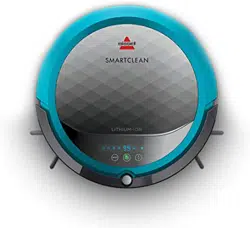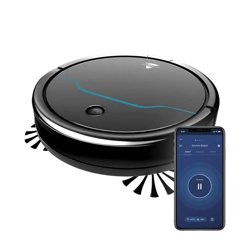
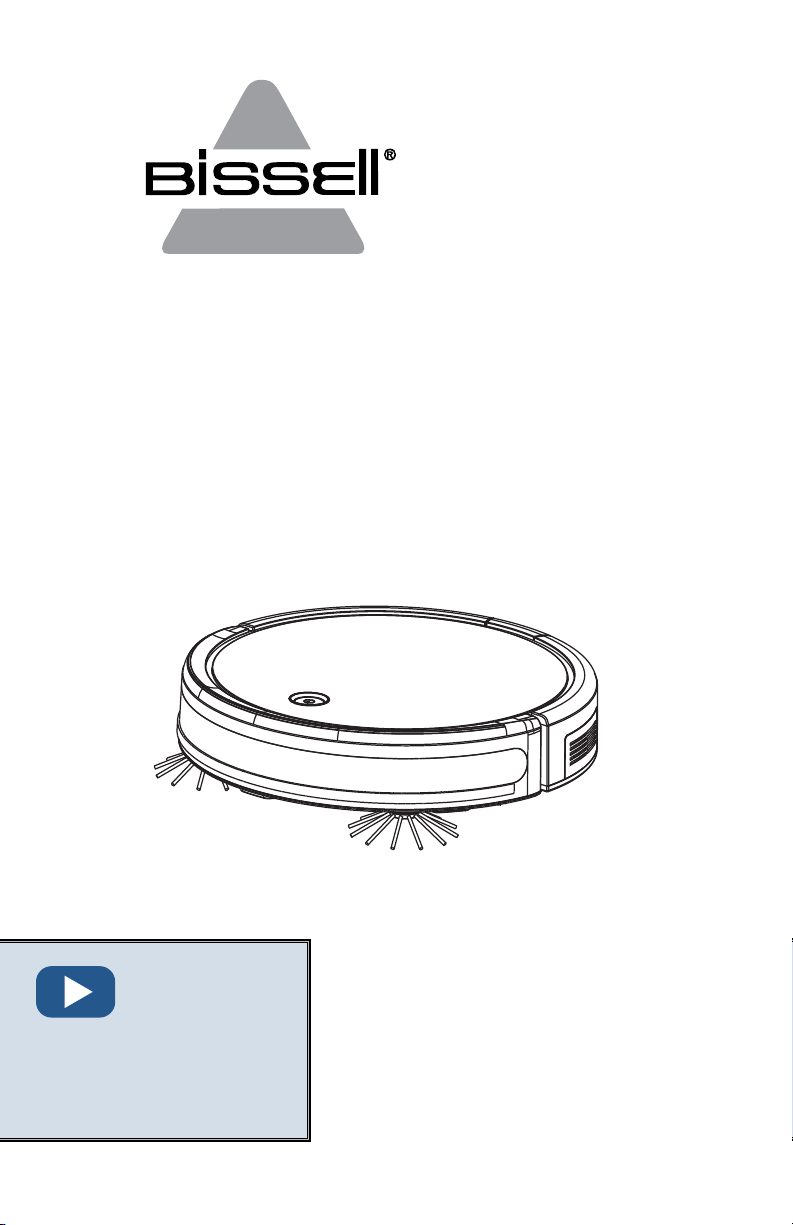
EV675
Robotic Vacuum
___________
USER GUIDE
2503 SERIES
More of a video person?
Find instructional videos for
all sections with this icon at
www.BISSELL.com/videos
2
www.BISSELL.com
WARNING
TO REDUCE THE RISK OF FIRE,
ELECTRIC SHOCK OR INJURY:
» Do not use outdoors or on wet surfaces.
» Do not allow to be used as a toy. Close attention
is necessary when used by or near children.
» Do not use for any purpose other than described
in this user guide. Use only manufacturer’s
recommended attachments.
» Do not charge with damaged Docking Station
or plug. If appliance is not working as it should,
has been dropped, damaged, left outdoors,
or dropped into water, have it repaired by a
qualified technician.
» Do not close a door on cord or plug, or pull cord
or plug around sharp edges or corners. Do not
run appliance over cord or plug. Keep cord or
plug away from heated surfaces.
» Do not unplug by pulling on cord. To unplug,
grasp the charger, not the cord.
» Do not handle charger, contact points,
Docking Station, or robot vacuum cleaner with
wet hands.
» Do not put any object into openings. Do not
use with any opening blocked; keep openings
free of dust, lint, hair, and anything that may
reduce air flow.
» Keep hair, loose clothing, fingers, and all parts
of body away from openings and moving parts.
» Do not use to pick up flammable or combustible
materials (lighter fluid, gasoline, kerosene, etc.)
or use in areas where they may be present.
» Do not use in an enclosed space filled with
vapors given off by oil-based paint, paint
thinner, some moth-proofing substances,
flammable dust, or other explosive or toxic
vapors.
» Do not use to pick up toxic material (chlorine
bleach, ammonia, drain cleaner, etc.).
» Do not pick up anything that is burning or
smoking, such as cigarettes, matches or
hot ashes.
» Do not use without Filter in place.
» Use only on dry, indoor surfaces.
» Keep appliance on a level surface.
» Do not carry the robot vacuum cleaner while
it is running.
» Remove the cords from other corded products
out of the area to be cleaned.
» Do not operate the vacuum in a room where an
infant or child is sleeping.
» Do not operate the vacuum in an area where
there are lit candles or fragile objects on
the floor.
» Do not operate the vacuum in a room that has
lit candles and/or fragile objects on furniture
that the vacuum may accidentally hit or bump.
» Do not allow children to sit on the vacuum.
» Prevent unintentional starting. Ensure the
ON/OFF switch is in the OFF position before
connecting to battery pack, picking up or
carrying the appliance. Do not carry the
appliance with your finger on the switch.
» Disconnect the battery pack from the appliance
before making any adjustments, changing
accessories or storing appliance. Such
preventive safety measures reduce the risk of
starting the appliance accidentally.
» Recharge only with the charger specified by the
manufacturer. A charger that is suitable for one
type of battery pack may create a risk of fire
when used with another battery pack.
» Use appliances only with specifically designated
battery packs. Use of any other battery packs
may create a risk of injury and fire.
» When battery pack is not in use, keep it away
from other metal objects, like paper clips, coins,
keys, nails, screws, or other small metal objects,
that can make a connection from one terminal
to another. Shorting the battery terminals
together may cause burns or a fire.
» Under abusive conditions, liquid may be ejected
from the battery; avoid contact. If contact
accidentally occurs, flush with water. If liquid
contacts eyes, additionally seek medical help.
Liquid ejected from the battery may cause
irritation or burns.
» Do not use a battery pack or appliance that is
damaged or modified. Damaged or modified
batteries may exhibit unpredictable behavior
resulting in fire, explosion or risk of injury.
» Do not expose a battery pack or appliance to
fire or excessive temperature. Exposure to
fire or temperature above 130° C may cause
explosion.
» Have servicing performed by a qualified repair
person using only identical replacement parts.
This will ensure that the safety of the product
is maintained.
» For use only with battery pack model INR18650
M26-4S1P.
» For use only with charger model
GSCU0600S019V12E.
» Do not modify or attempt to repair the
appliance or the battery pack.
» Do not charge the unit outdoors.
» Do not position Docking Station near stairs or
cliff edges.
» Follow all charging instructions. Keep the
temperature range between 40-104°F when
charging battery, storing unit or during use.
Charging improperly or at temperatures outside
of the specified range may damage the battery
and increase the risk of fire.
» Do not incinerate the appliance even if it is
severely damaged. The batteries can explode in
a fire.
WARNING
This product contains a lithium-ion
rechargeable battery. According to Federal
and State regulations,
removal and proper
disposal of lithium-
ion batteries is
required. For disposal
instructions see the
instructions on page 10.
IMPORTANT SAFETY INSTRUCTIONS
SAVE THESE INSTRUCTIONS
This model is for household use only.
WARNING
Read all safety warnings and instructions before using. Failure to follow the warnings and instructions
may result in electric shock, fire and/or serious injury.
WARNING
» Plastic film can be dangerous. To avoid danger of suocation, keep away from children.
» Do not plug in your vacuum cleaner UNTIL you are familiar with all instructions and operating
procedures.
» To reduce the risk of electrical shock, turn Power Switch OFF and disconnect polarized plug from
electrical outlet BEFORE performing maintenance or troubleshooting checks.
3
www.BISSELL.com
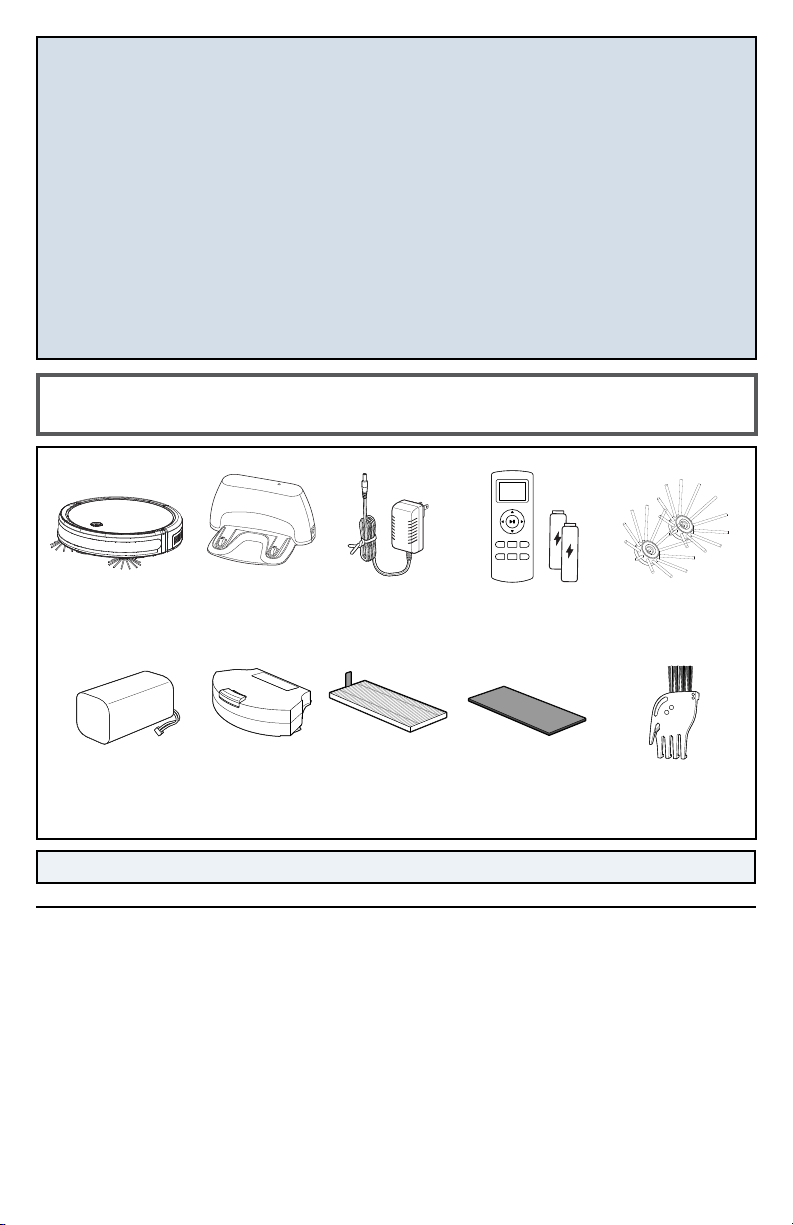
Package Contents
NOTE: Standard accessories may vary by model.
Pleated Filter
(Located inside Dust Bin)
FCC/IC CAUTION Changes or modifications not expressly approved
by the party responsible for compliance could void the user’s authority to
operate the equipment. This transmitter must not be co-located or operated
in conjunction with any other antenna or transmitter.
This device complies with Part 15 of FCC Rules and Industry Canada license-
exempt RSS standard(s). Operation is subject to the following two conditions:
(1) this device may not cause interference, and (2) this device must accept
any interference, including interference that may cause undesired operation
of this device.
Le présent appareil est conforme aux la partie 15 des règles de la FCC et
CNR d’Industrie Canada applicables aux appareils radio exempts de licence.
L’exploitation est autorisée aux deux conditions suivantes : (1) l’appareil ne
doit pas produire de brouillage, et (2) l’utilisateur de l’appareil doit accepter
tout brouillage radioélectrique subi, même si le brouillage est susceptible
d’en compromettre le fonctionnement.
The device has been evaluated to meet general RF exposure requirement.
This equipment complies with FCC’s RF radiation exposure limits set forth for
an uncontrolled environment. The device has been evaluated to meet general
RF exposure requirement. The device can be used in portable exposure
condition without restriction.
L’appareil a ete evalue pour repondre aux exigences generales d’exposition
RF. le dispositif de a ete evalues a repondre general rf exposition exigence.
NOTE: This equipment has been tested and found to comply with the limits
for a Class B digital device, pursuant to part 15 of the FCC Rules. These limits
are designed to provide reasonable protection against harmful interference
in a residential installation. This equipment generates, uses and can radiate
radiofrequency energy and, if not installed and used in accordance with
the instructions, may cause harmful interference to radio communications.
However, there is no guarantee that interference will not occur in a particular
installation. If this equipment does cause harmful interference to radio or
television reception, which can be determined by turning the equipment OFF
and ON, the user is encouraged to try to correct the interference by one or
more of the following measures:
» Reorient or relocate the receiving antenna.
» Increase the separation between the equipment and receiver.
» Connect the equipment into an outlet on a circuit different from that to
which the receiver is connected.
» Consult the dealer or an experienced radio/TV technician for help.
B IS S E L L®
EV675
Rechargeable
Li-Ion Battery
(pre-installed)
Dust Bin
(pre-installed)
Edge Cleaning
Brushes
Docking
Station
Power Adapter
(charger)
Remote Control
(2 AAA batteries included)
Safety Instructions...........2
Product View ................4
Setup .....................5-6
Operations ..................7
Maintenance & Care .......8-11
Troubleshooting ..........12-13
Warranty ...................14
Service .....................14
Product Registration........16
Parts & Supplies ............16
Cleaning ToolFoam Filter
(Located inside Dust Bin)

4
www.BISSELL.com
Getting to Know Your Robot
WARNING
Do not plug in your robot until you are familiar with all instructions and operating procedures.
3
3
2
5
6
6
1
9
12
7
3 3
4
4
4
8 8
10
11
13
1. Power Switch
2. Start, Stop, & Dock Button
3. Contact Points
(for automatic charging)
4. Cliff Sensors
5. Bumper
6. Edge Cleaning Brushes
7. Front Wheel
8. Rear Wheels
9. Dust Bin Release Button
10. Dust Bin (filters inside)
11. Brush Roll
12. DC Port
13. Removable Battery
5
www.BISSELL.com
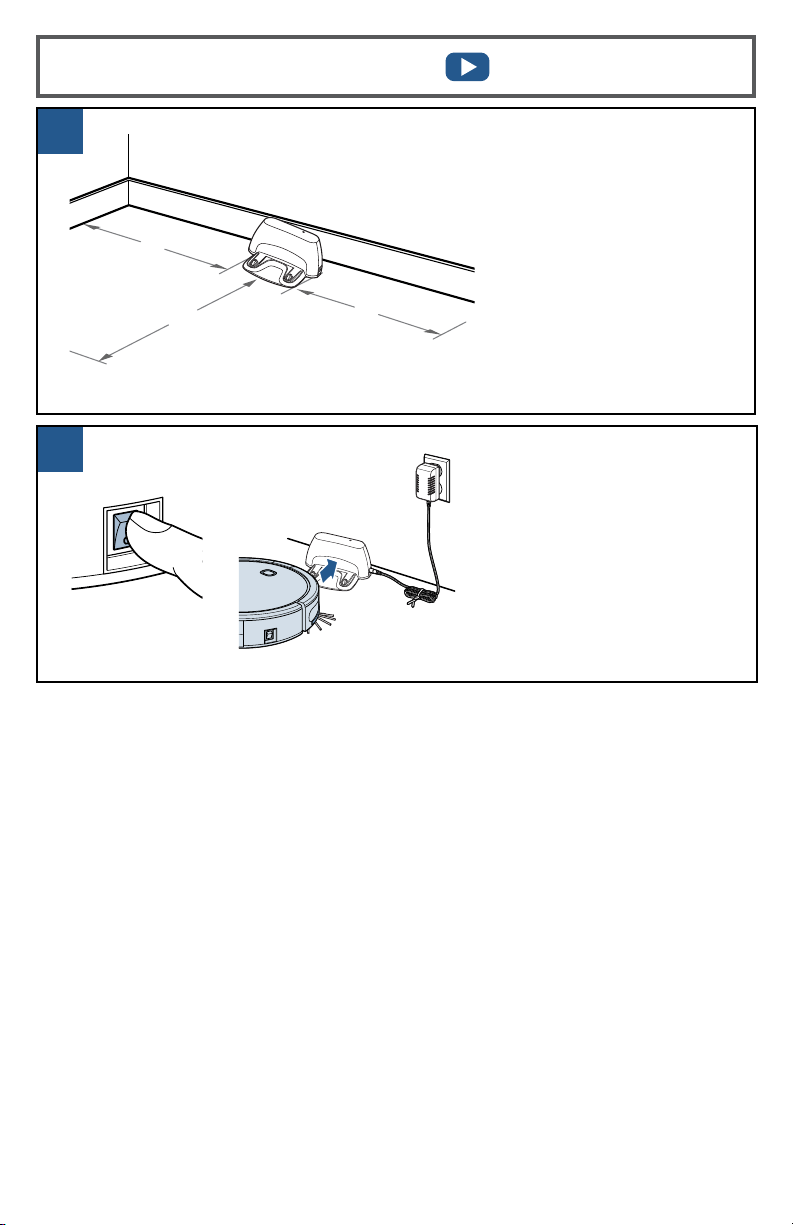
2
1
Setting Up Your Robot
Place the back of Docking
Station firmly against a
wall. Ensure there are at
least 40 inches to one
side, 40 inches to the
opposing side and no
obstructions in front of
the Docking Station.
Insert the Docking Station
power adapter plug into
the port on the side of the
Docking Station and then
plug the other end into the
wall outlet. Turn ON the unit’s
Power Switch and put on the
Docking Station. The first
charge will take 4-5 hours.
40"
79"
40"
6
www.BISSELL.com
1
1 32
2
2
1 3
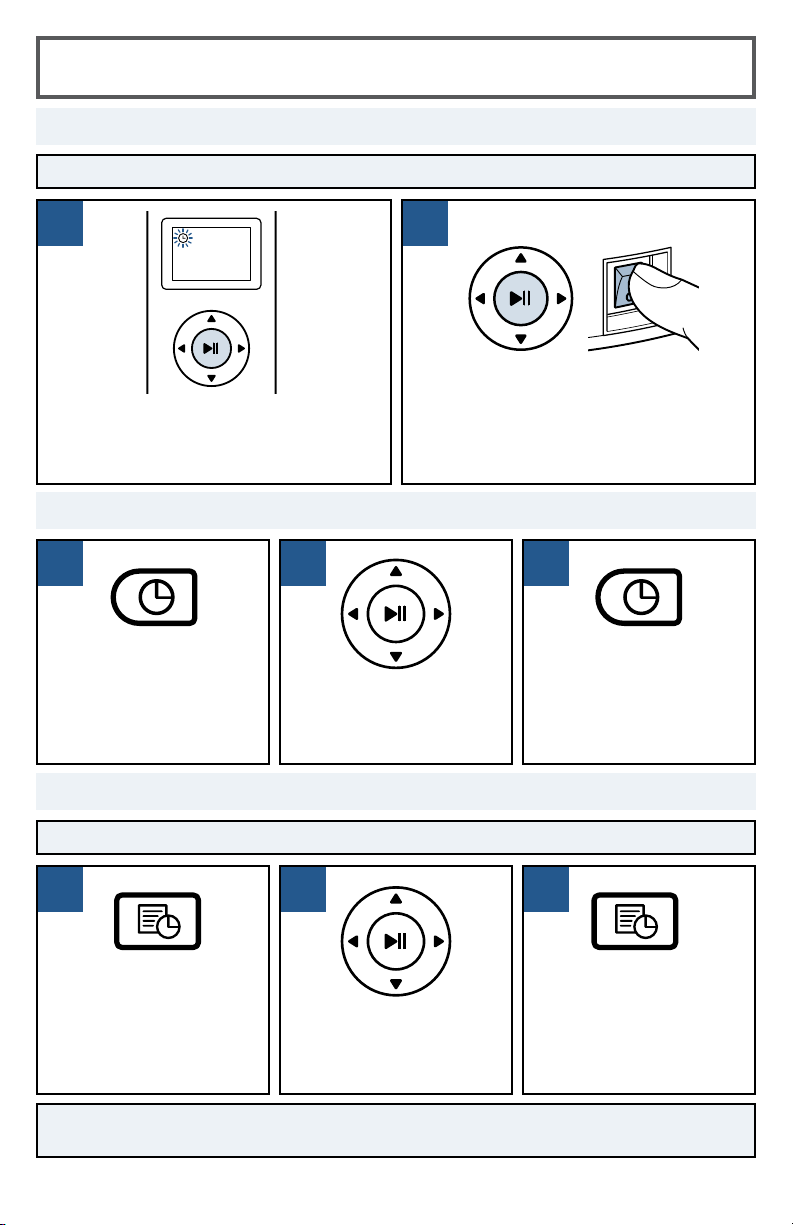
Setting Up the Remote Control
NOTE: Be sure the clock is set to the correct time before scheduling cleaning sessions.
NOTE: To cancel a scheduled cleaning session, press and hold the schedule button on
the remote.
Set the time by pressing
the clock button on the
Remote Control and
holding until the icon
flashes on the Remote
Control display.
Use the directional
arrows to set the hour
and minute.
Press the clock button
again to save the time
setting.
NOTE: The robot will
beep once to confirm
the time has been saved.
Press the schedule
button on the Remote
Control. The icon will
begin to flash on the
Remote Control display.
Use the directional
arrows to set the hour
and minute for your
robot to start cleaning.
Press the schedule
button again to save the
schedule setting.
NOTE: The robot will
beep once to confirm the
schedule has been saved.
Schedule Cleaning Sessions
Set the Clock
Pair the Remote to the Robot
While the Power Switch on the side of the
robot is OFF, OFF (0), press and hold the
play button on the remote for 5 seconds
until the clock icon on the display flashes.
Continue to hold the play button and turn
the robot ON (I).
NOTE: The robot will beep three times to
indicate that it has successfully paired.
NOTE: Be sure to install batteries in the remote.
7
www.BISSELL.com
1
4
3
2
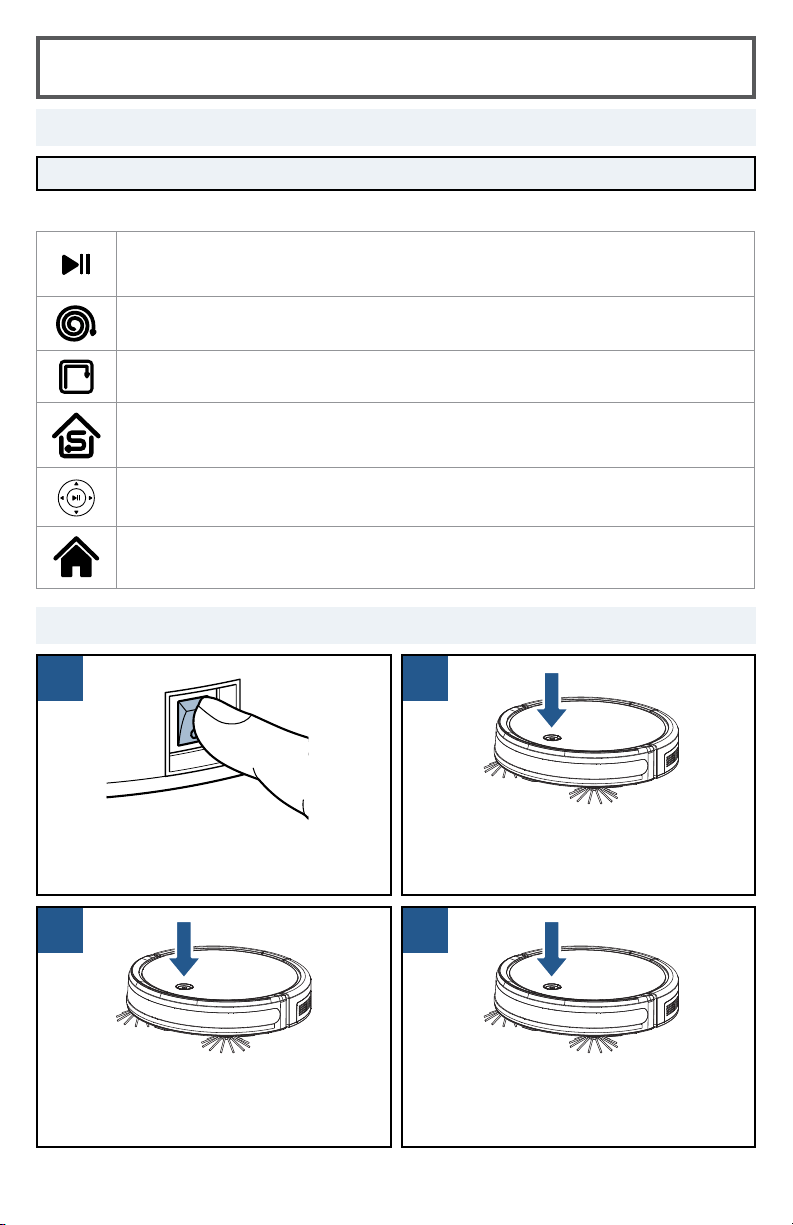
Getting Ready to Clean
Press the Power Switch to the
ON (I) position.
Press the Start/Stop Button twice to
return the robot to the Docking Station.
Press the Start/Stop Button on the top
of the robot to start cleaning.
When finished, press the Start/Stop
Button again to stop the robot.
Without Remote Control
With Remote Control
NOTE: Be sure the Power Switch on the Robot is set to the ON position.
You can change the cleaning pattern of the robot by pressing one of the following buttons:
Auto Mode
Robot will drive in a straight path until it encounters an obstacle and change
direction.
Spiral Mode
Best for concentrated cleaning.
Wall Mode
Best for cleaning along walls and edges.
Single Room Mode
Best for cleaning a single room. It’s recommended that you close any doors to
contain the robot.
Manual Mode
Best for directing the robot to a particular area.
Return to Dock
Press to return the robot to the Docking Station.
8
www.BISSELL.com
1
4
6
32
5
7
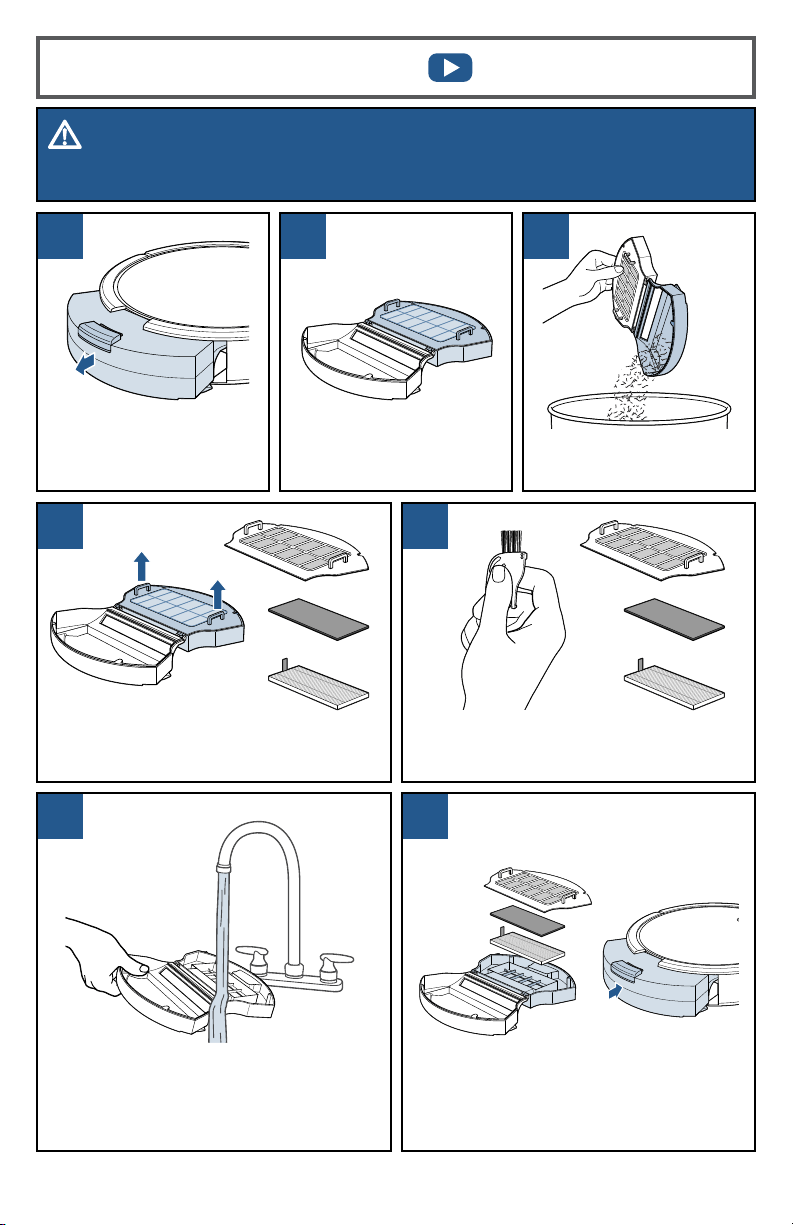
Empty the debris from
the Dust Bin.
Cleaning the Dust Bin
WARNING
To reduce the risk of electric shock, turn Power Switch OFF and disconnect plug from electrical outlet
before performing maintenance or troubleshooting checks.
Press the button on top
of the Dust Bin and pull
to remove.
Use the Cleaning Tool to brush the
filter cover and filters. Do not wash
the filters.
Open filter door by
pulling both sides apart.
With filters removed, rinse the Dust
Bin with tap water. Ensure Dust Bin is
completely dry before re-installing. It is
not necessary to wash every time.
Do not machine wash the Dust Bin.
Once clean, reinstall the filters and
filter cover, close and push back
into the unit.
Remove the filter cover, followed by the
Foam and Pleated Filters.
9
www.BISSELL.com
1
3 4
2
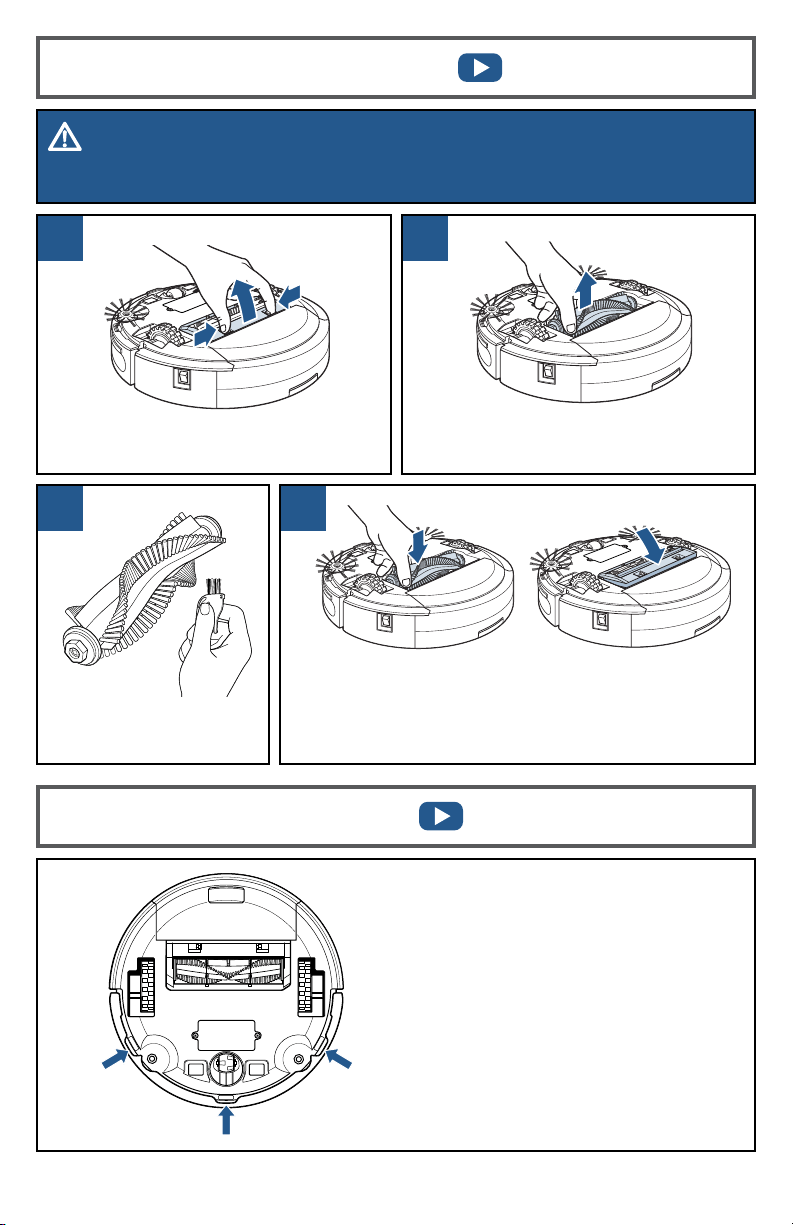
Clean the Brush Roll
with the Cleaning Tool.
Replace the Brush Roll and Brush Guard.
NOTE: The Brush Roll has two different end pieces.
Ensure the square-shaped end piece is inserted into
the square-shaped port.
Pinch the tabs on the Brush Guard
inward and pull to remove.
After repeated use, debris can
accumulate on the sensors of the
robot and the working efficiency can
be reduced.
To ensure the best efficiency, the
sensors should be cleaned off
periodically by brushing any debris
from them.
Before cleaning the sensors, ensure
the Power Switch on the robot is in
the OFF (0) position.
Lift to remove the Brush Roll.
Cleaning the Brush Roll
Cleaning the Sensors
WARNING
To reduce the risk of electric shock, turn Power Switch OFF and disconnect plug from electrical outlet
before performing maintenance or troubleshooting checks.
10
www.BISSELL.com
1
3 4
2
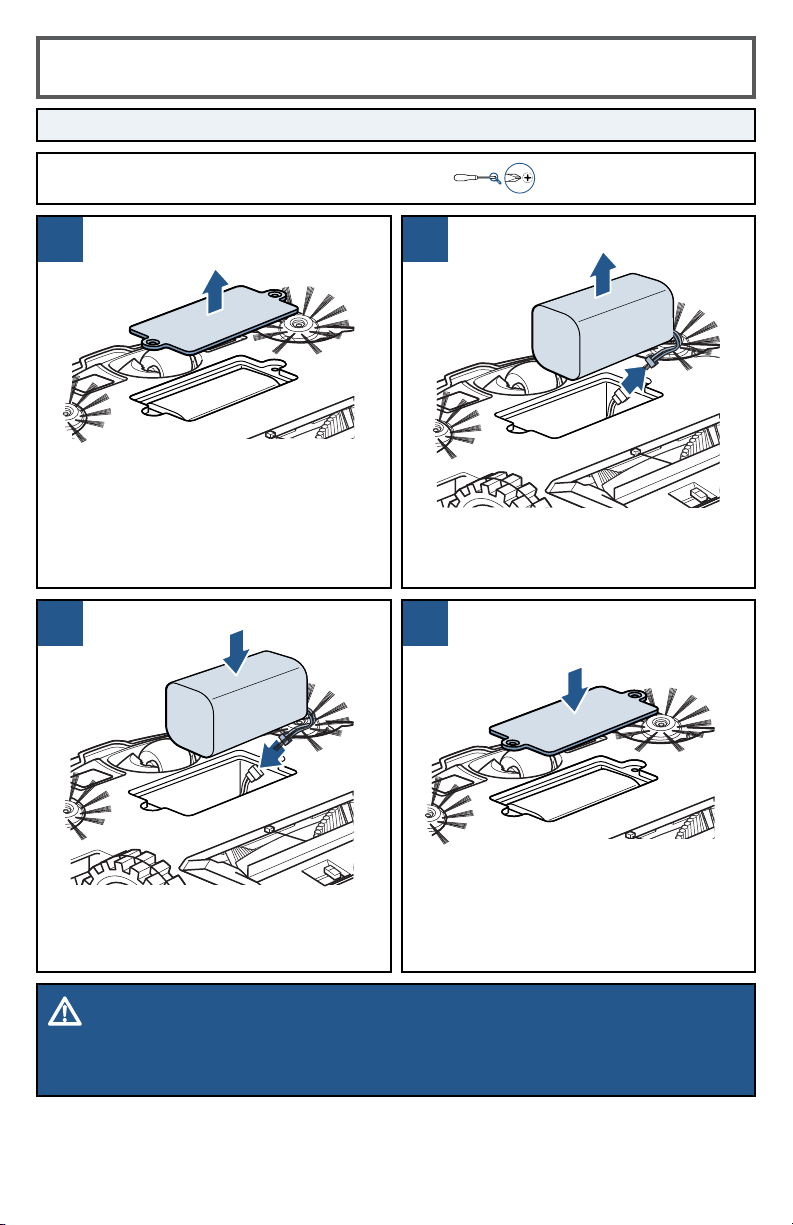
Replacing the Battery
DO NOT REMOVE THE PLASTIC SHRINK SLEEVE FROM THE BATTERY PACK.
Use a Phillips-head screwdriver to
replace the battery cover.
A Phillips-head screwdriver is required for this task.
WARNING - DISPOSAL OF BATTERY
If your robotic vacuum is to be disposed of, the battery should be removed and disposed of properly.
For specific battery disposal instructions, please contact RBRC (Rechargeable Battery Recycling
Corporation) 1-800-822-8837 or visit www.Call2Recycle.org.
Turn the Power Switch to the
OFF position. Use a Phillips-head
screwdriver to remove the two screws
and battery cover.
Remove the battery and disconnect.
Connect the new battery and install
into battery compartment.
11
www.BISSELL.com
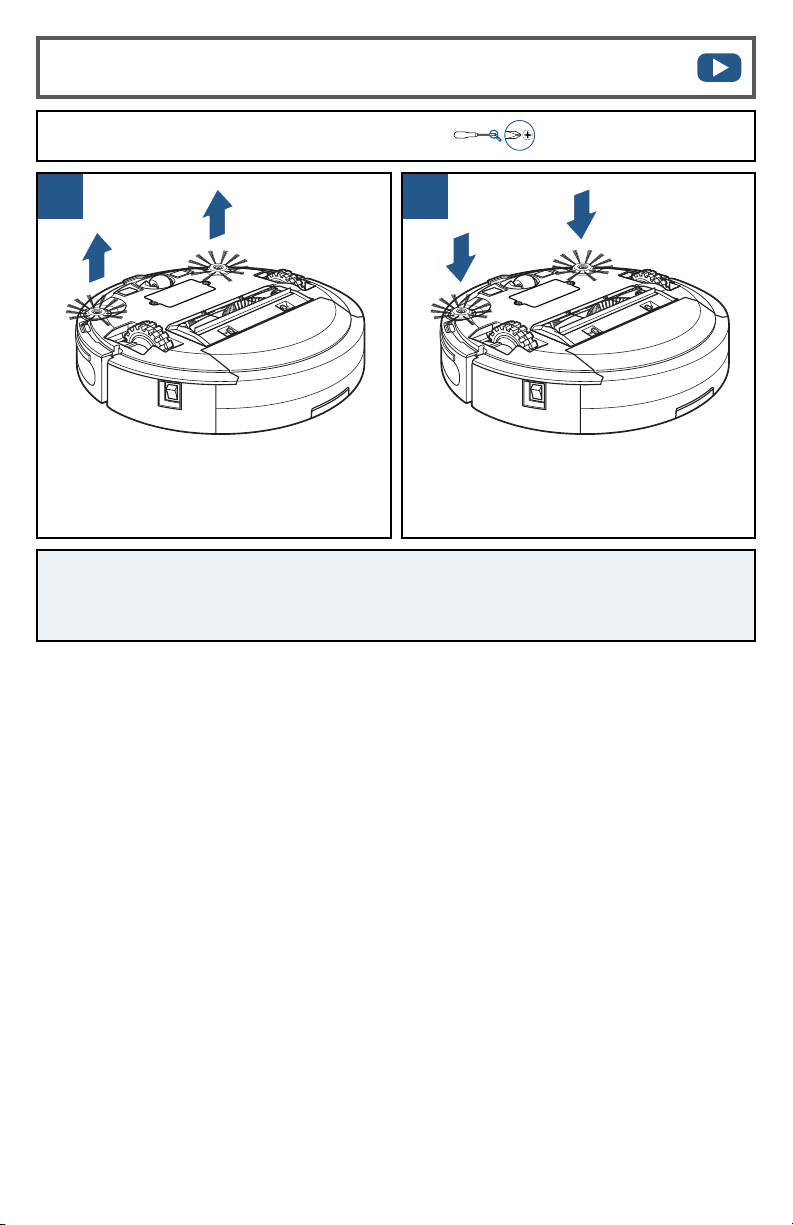
A Phillips-head screwdriver is required for this task.
1 2
Use a Phillips-head screwdriver to
remove the screw. Pull up on the base
of the brush.
Push the brush directly onto the
holder. Replace the screws with a
Phillips-head screwdriver.
Replacing the Edge Cleaning Brushes
NOTE: After being used for a period of time, the Edge Cleaning Brushes need to be
cleaned to work more eectively. Once removed, the Edge Cleaning Brushes can be
rinsed or soaked in water. Be sure they are completely dry before returning to the unit.

12
www.BISSELL.com
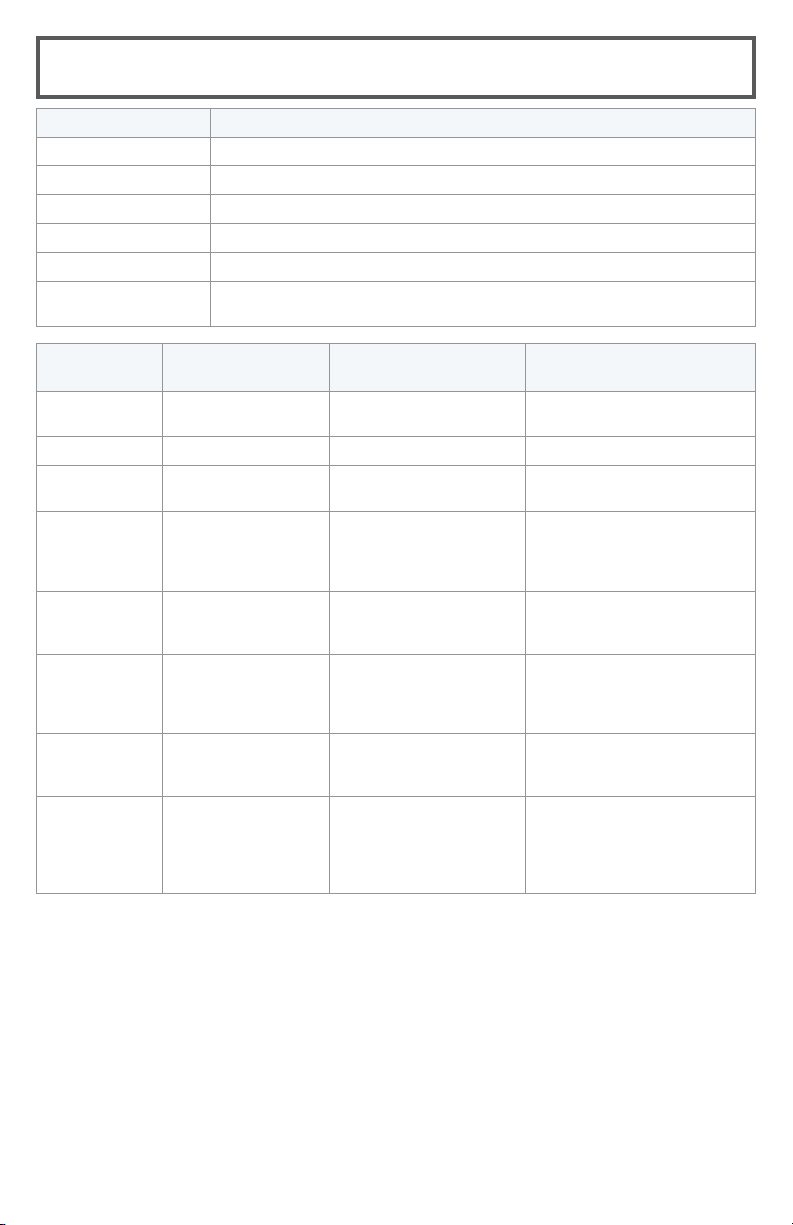
Troubleshooting
Problem Possible causes Remedies
Remote
Control
doesn’t work
properly
Power Switch on the robot is
turned OFF (0).
Turn ON (I) the Power Switch
located on the side of the robot.
The batteries need replacing. Replace with 2 AAA batteries.
The Remote Control is too far
from the robot.
Ensure the Remote Control is within
10 feet of the robot.
The Remote Control is not paired
with the robot.
Turn the robot OFF. Hold down the
start button on the remote control.
Once the clock flashes on the
display, continue to hold the start
button and turn ON the robot. The
robot will beep three times once
successfully paired.
Low or no
suction
The Dust Bin is full. Empty the Dust Bin.
One or both filters are missing or
clogged.
Check to see if the filters are in place
and clean as needed.
Edge
Cleaning
Brushes
don’t
operate
properly
Debris buildup on and around
Edge Cleaning Brushes.
If Edge Cleaning Brushes become
crooked or dirty, remove them per
instructions in the “Replacing Edge
Cleaning Brushes” section of this
guide, clean them with the provided
tool and soak them in hot water.
Let them dry completely before
re-installing them on the robot.
Robot won’t
start
The battery is not installed
properly.
Please refer to the battery
installation instructions found in this
guide.
Battery power is low. Charge the robot’s battery using the
Docking Station.
Error
indicator or
beep(s)
Multiple potential causes. Please refer to the “Status Light
and Error Notifications” section
of this guide. If the problem is not
resolved, turn OFF (0) the Power
Switch and then turn the Power
Switch back ON (I).
Doesn’t
return to
Docking
Station after
cleaning
Cleaning interrupted by error. Please refer to the “Status Light and
Error Notifications” section of this
guide.
Robot is too far away from the
Docking Station.
Limit or control the range of the
robot by closing off rooms, or by
using the manual cleaning arrows on
the remote control.
WARNING
To reduce the risk of electric shock, turn Power Switch OFF and disconnect plug from electrical outlet
before performing maintenance or troubleshooting checks.
13
www.BISSELL.com
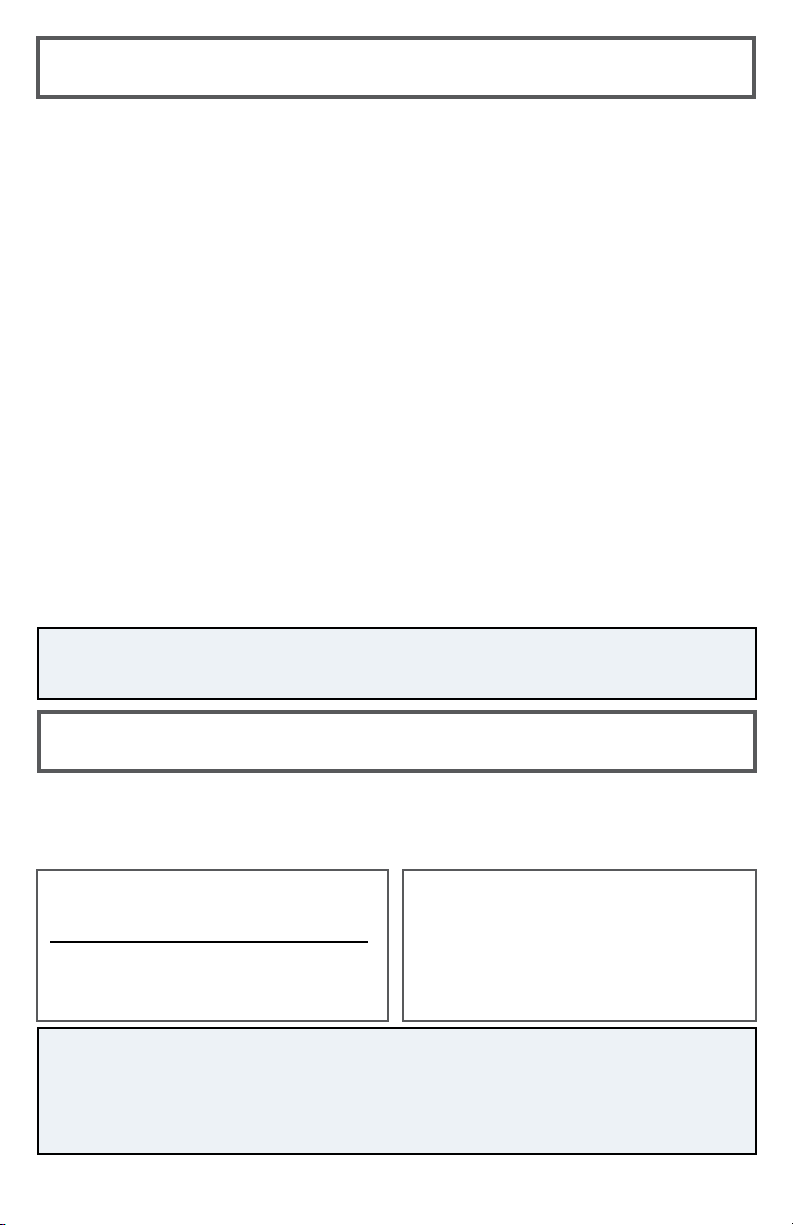
Status Light and Error Notifications
Status Light Color Status
Breathing Blue Charging
Power Light O Robot fully charged
Solid Blue Cleaning
Flashing Blue Returning to Docking Station
Flashing Red Error: Check Cliff Sensors, Battery Power Low, Robot is Trapped
Solid Red
Error: Check Wheels, Edge Cleaning Brushes, Brush Roll, and
Bumper
Status
Light Color
Error Notification Possible Cause Remedies
Flashing Red One beep Cliff Sensors are dirty. Clean the Cliff Sensors
with a dry cloth.
Flashing Red Two beeps Low power. Charge the robot battery.
Flashing Red Three beeps Robot is trapped. Turn OFF the robot and
move to a new location.
Flashing Red Four beeps Low suction. Empty the Dust Bin and
remove hair and debris
from suction inlet and
filters.
Solid Red One beep Wheels are stuck. Turn OFF the robot and
remove hair and debris
from wheels.
Solid Red Two beeps Edge Cleaning
Brushes are stuck.
Turn OFF the robot and
remove hair and debris
from Edge Cleaning
Brushes.
Solid Red Three beeps Brush Roll is stuck. Turn OFF the robot and
remove hair and debris
from Brush Roll.
Solid Red Four beeps Bumper is stuck. Turn OFF the robot and
tap the Bumper several
times to release any
debris that may have
accumulated.
14
www.BISSELL.com
If your BISSELL® product should require service:
Contact BISSELL Consumer Care.
If you need information about repairs or replacement parts, or if you have questions about
your warranty, contact BISSELL Consumer Care.
This warranty gives you specific legal rights,
and you may also have other rights which may
vary from state to state. If you need additional
instruction regarding this warranty or have
questions regarding what it may cover, please
contact BISSELL® Consumer Care by e-mail or
telephone as described below.
Limited One-Year Warranty
Subject to the *EXCEPTIONS AND EXCLUSIONS
identified below, upon receipt of the product
BISSELL will repair or replace (with new,
refurbished, lightly used, or remanufactured
components or products), at BISSELL’s option,
free of charge from the date of purchase by the
original purchaser, for one year, any defective or
malfunctioning part.
See information below on "If your BISSELL
product should require service".
This warranty applies to product used for
personal, and not commercial or rental service.
This warranty does not apply to fans or routine
maintenance components such as filters, belts
or brushes. Damage or malfunction caused by
negligence, abuse, neglect, unauthorized repair,
or any other use not in accordance with the user
guide is not covered. This warranty will only be
valid if the product is used in the same country in
which it was sold.
BISSELL IS NOT LIABLE FOR INCIDENTAL OR
CONSEQUENTIAL DAMAGES OF ANY NATURE
ASSOCIATED WITH THE USE OF THIS PRODUCT.
BISSELL’S LIABILITY WILL NOT EXCEED THE
PURCHASE PRICE OF THE PRODUCT.
Some states do not allow the exclusion or
limitation of incidental or consequential
damages, so the above limitation or
exclusion may not apply to you.
*EXCEPTIONS AND EXCLUSIONS FROM
THE TERMS OF THE LIMITED WARRANTY
THIS WARRANTY IS EXCLUSIVE AND IN LIEU
OF ANY OTHER WARRANTIES, EITHER ORAL
OR WRITTEN. ANY IMPLIED WARRANTIES,
WHICH MAY ARISE BY OPERATION OF LAW,
INCLUDING THE IMPLIED WARRANTIES OF
MERCHANTABILITY AND FITNESS FOR A
PARTICULAR PURPOSE, ARE LIMITED TO THE
ONE-YEAR DURATION FROM THE DATE OF
PURCHASE AS DESCRIBED ABOVE.
Some states do not allow limitations on how long
an implied warranty lasts, so the above limitation
may not apply to you.
Website:
www.BISSELL.com
E-mail:
www.BISSELL.com/email-us
Call:
BISSELL Consumer Care
1-800-237-7691
Monday – Friday 8am - 10pm ET
Saturday 9am - 8pm ET
Sunday 10am - 7pm ET
Warranty
Service
Please do not return this product to the store.
Other maintenance or service not included in the manual should be
performed by an authorized service representative.
For any questions or concerns, BISSELL is happy to be of service.
Contact us directly at 1-800-237-7691.
NOTE: Please keep your original sales receipt. It provides proof of date of purchase in
the event of a warranty claim.

Notes
©2018 BISSELL Homecare, Inc
Grand Rapids, Michigan
All rights reserved. Printed in China
Part Number 161-8182 11/18
Visit our website at: www.BISSELL.com
Registering is quick, easy and offers you benefits over the lifetime of your product.
You’ll receive:
Visit www.BISSELL.com/registration!
Visit the BISSELL website: www.BISSELL.com
When contacting BISSELL, have model number of cleaner available.
Please record your Model Number: ___________________
Please record your Purchase Date: ___________________
NOTE: Please keep your original sales receipt. It provides proof of purchase
date in the event of a warranty claim. See Warranty page for details.
BISSELL® Rewards Points
Automatically earn points for
discounts and free shipping on
future purchases.
Faster Service
Supplying your information now
saves you time should you need
to contact us with questions
regarding your product.
Product Support
Reminders and Alerts
We’ll contact you with any
important product maintenance
reminders and alerts.
Special Promotions
Optional: Register your email
to receive notice of offers,
contests, cleaning tips, and more!
Love yr BISSELL® product?
Don’t keep it a secret.
Let us, and millions of others, know what you think!
Leave your star-rating on BISSELL.com
www.BISSELL.com
Parts & Supplies
For Parts and Supplies, go to www.BISSELL.com and enter your model
number in the search field.
Register your product today!