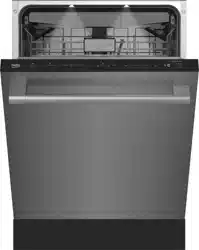
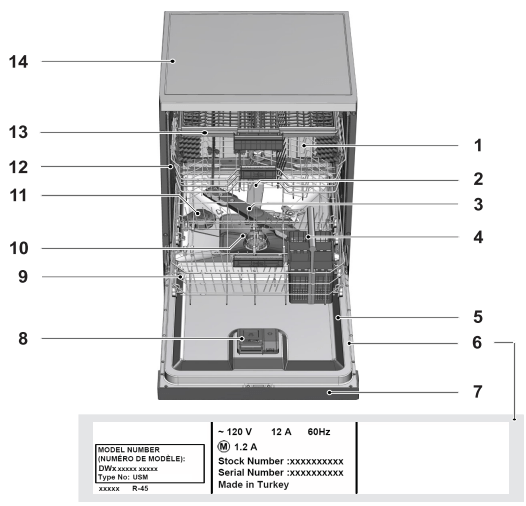
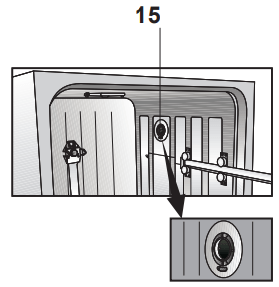
1. Upper basket 2. Upper impeller 3. Lower impeller 4. Cutlery basket 5. Door 6. Model and Serial Tag 7. Control panel 8. Detergent and rinse agent dispenser 9. Lower basket 10. Filters 11. Salt container (Select Models) 12. Upper basket rail 13. Upper cutlery basket (Select Models) 14. Tabletop (Select Models) 15. Turbo fan heat drying system (Select Models)
OPERATING THE PRODUCT
KEYS
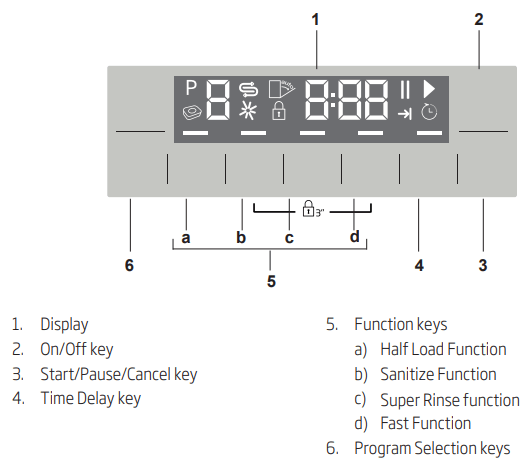
On / Off key
This key is used to turn the machine all on off.
Start / Pause / Cancel key
It is used to start, pause or cancel a selected programme or function.
Program Selection keys
They are used to select various programs selected from the Program Table on the following page..
Delayed Start key
Use this to the delay the program for a later time
PREPARING THE MACHINE
Open the door of the dishwasher.
Place the dishes in accordance with the instructions in the user manual.
Make sure that the upper and lower wah arms spin freely.
Put recommended amount of detergent into the detergent dispenser.
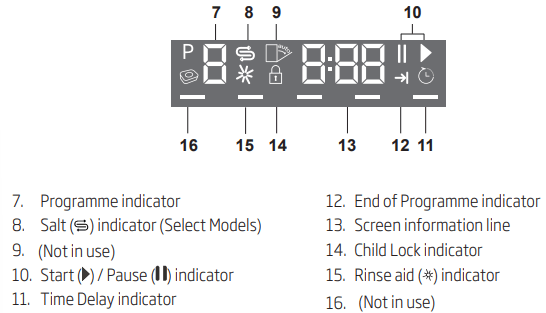
Check if the Salt and Rinse Aid indicators light and add salt and/or rinse aid if needed.
Close the door of the dishwasher.
PROGRAMME SELECTION
Press the On/Off button to turn on your machine.
Chose the desired program (See program table on next Page)
Press Programme Selection keys until the number of the programme you selected appears on the Programme indicator. Use P+ to switch to the next programme, and P- to switch to the previous one.
AUXILIARY FUNCTIONS
Washing programs of your dishwasher are designed to obtain the best cleaning result, considering the type of the soil, soiling degree and properties of the dishes to be washed.
Auxiliary functions are provided in order to enable you to save time, water and energy and to perform a more comfortable washing with conditions specific to you.
To add auxiliary function to the programe:
Select the desired washing programe by pressing the programe selection key.
In the selected washing programe, if auxiliary function is selected, its symbol will be displayed on the screen. If the function button is pressed again the symbol will disappear and selection is cancelled.
Selection will be cancelled when you press the function key again.
Half Load function
It is used to operate the machine without loading it completely.
Load your dishes in the machine as you like. You can use both upper and lower racks.
Turn the machine on with On/Off key.
Select the desired program and press the Half Load key. The Half Load indicator will light on the display in the Function Selected indicator.
Start the programme by pressing Start / Pause / Cancel key.
Super Rinse function
Depending on the type of the detergent used, if a detergent dissolving issue is encountered it will remove the resulting stains from the dishes and enables the optimum rinsing performance.
Fast Function
It shortens the time of the washing cycle selected and decreases water consumption by enabling washing under higher pressure.
Floor illumination Illuminates to show program is still running.
(Select Models)
Your machine reflects a light to the floor during the washing process. This light turns off after the washing process is complete.
Sanitize Function
Sanitize function raises the water temperature in the final rinse to meet the requirements of NSF/ANSI STANDARD 184 for Residential Dishwashers. Certified residential dishwashers are not intended for licensed food establishments.
At the end of a succesfull sanitization “S“ is displayed on the display. “S” is not displayed on the display if the cycle is interrupted or the water could not be heated to the required temperature.
Available programs are indicated on Program Table chart.
Note: Only sanitizing cycles have been designed to meet the requirements of NSF/ANSI Standard 184 for soil removal and sanitization efficacy. There is no intention, either directly or indirectly, that all cycles have passed sanitization performance tests.
Interior Lighting
(Select Models)
Some models have interior lighting to illuminate the interior when the door is opened.
Changing the interior lighting setting
1. After turning on the machine, press Time Delay and P+ keys simultaneously. Continue to press until the countdown 3, 2, 1 is completed on the display.
2. Press P+ key to activate the L: option. The interior lighting is turned off at "L:0" option and turned on at "L:1" option. Set the desired option with the Time Delay key.
3. Turn off the machine with On/Off key to save the changes.
Automatic Detergent Detection Feature
The product has a feature to automatically detect the type of the detergent and adjust the washing programe and drying system to the best performance. If special tablet detergent is used, the programe duration can be extended by 20 minutes in order to optimize the washing and drying performance.
Notice: Automatic detergent detection feature should be deactivated during the tests according to AHAM DW-1.
To deactivate:
After turning on the machine, press Time Delay and P+ keys simultaneously. Keep them pressed until the countdown 3, 2, 1 is completed on the display.
Press P+ key to activate the a: option. Automatic detergent detection feature is disabled at “a:0” option and enabled at "a:1" option. Set the desired option by pressing the Time Delay key.
Turn off the machine with On/Off key to save the changes.
PROGRAMMING THE WASHING TIME
Time Delay
If an economical electricity tariff is applied in your region, you can use the Time Delay function to wash your dishes during appropriate hours.
You can delay the start of the selected program until 24 hours. Time Delay cannot be set after the programme starts.
1. Press the Time Delay function key after selecting the washing programme and other auxiliary functions.
2. Once you press the Time Delay key, Display Information Line will show "0:30" and Time Delay indicator will start flashing.
3. Set the desired time by pressing the Time Delay key. Time will increase with increments of 30 minutes up to 6 hours and after that in 1 hour increments up to 24 hours every time you press the key.
4. Press Start / Pause / Cancel key to start countdown for the Time Delay. Time Delay indicator and Start / Pause indicator will light continuously until the end of the period. Time Delay is displayed on the Display Information Line. Selected programme will start as soon as the countdown is over.
Changing the settings while Time Delay function is enabled
While the Time Delay function is activated, you cannot make changes in the washing programme, auxiliary functions or the duration of delay time.
Programme and auxiliary functions cannot be set/ changed after the programme has started.
To cancel the Time Delay function
1. Press and hold Start / Pause / Cancel key for 3 seconds.
2. When the Start / Pause / Cancel key is pressed and hold, "3", "2", "1" appear on the Display Information Line. Time Delay indicator will turn off at the end of the cancellation process and delaying process is cancelled.
You can select and start a new programme following the cancellation of Time Delay function.
Time Delay function can not be set after the programme starts.
STARTING THE PROGRAMME
To start your machine after selecting the programme and auxiliary functions, press Start / Pause / Cancel key.
Once the programme starts a tune is played and the estimated time remained to the end of the programme will appear on the Display Information Line. Start / Pause / Cancel indicator starts lighting continuously.
If the door is opened while the machine is running, the machine will switch to the standby mode. Close the machine door and press Start/Pause/Cancel button. The programme will resume.
Your machine performs water softening depending on the hardness level of the supply water. Remaining time displayed towards the end in some programmes can be different from the time indicated at the beginning due to this process. The total time can also change while the programme is running depending on the ambient temperature where your machine is installed, temperature of the supply water and amount of the dishes.
Pay attention not to open the door of the machine when it is running. Stop the machine by pressing Start / Pause / Cancel key if you have to open the door. Then, open the door of the machine. There may be a rush of vapour when you open the door of your machine; be careful. Close the door of your machine and press Start/Pause/ Cancel key again. Programme will resume running.
The machine will remain silent in pause mode for some time in order to remove the water in the machine and on the dishes completely and to have the water softener cleaned, and then it will resume running in drying mode.
CHILD (KEY) LOCK
You may prevent other people from interrupting and changing the programme cycle and time delay while the machine is running.
To activate the Child Lock:
1. Pres Child (Key) Lock keys simultaneously and hold for 3 seconds.
2. "3", "2", "1" is displayed on Display Information Line and key lock is activated.
To deactivate the Child Lock:
1. Pres Child (Key) Lock keys simultaneously and hold for 3 seconds.
2. "3", "2", "1" is displayed on Display Information Line and key lock is cancelled.
CANCELLING THE PROGRAMME
1. Press Start/Pause/Cancel key for 3 seconds to cancel the programme.
2. Release the key when the Start / Pause indicator starts flashing. For a couple of minutes the machine will fulfill the necessary operations required to cancel the programme.
There might be residues of detergent or rinse aid left in the machine and / or on the pieces being washed depending on the step the programme you have cancelled was in.
SALT INDICATOR ()
Please check the salt indicator on the display to see whether there is adequate amount of softening salt in the dishwasher or not. You need to refill the salt reservoir with salt whenever salt warning indicator appears on the display of your machine.
Adjusting the water hardness level is explained in Water Softening System section.
Rinse Aid indicator ()
Please check the rinse aid indicator on the display to see whether there is adequate amount of rinse aid in the dishwasher or not. You need to refill the rinse aid reservoir with rinse aid whenever rinse aid warning indicator appears on the display of your machine.
Adjusting the amount of rinse aid
After turning on the machine, press Time Delay and P+ keys simultaneously. Keep them pressed until the countdown 3, 2, 1 is completed on the display.
Press P+ to move to position P on the display.
Set to the appropriate level with the Time Delay key.
Turn off the machine with On/Off key to save the changes.
No rinse aid dispensed in P:0 wash position.
1 dose of rinse aid is dispensed in P:1 position.
2 doses of rinse aid are dispensed in P:2 position.
3 doses of rinse aid are dispensed in P:3 position.
4 doses of rinse aid are dispensed in P:4 position.
END OF PROGRAMME
End of Programme indicator will light up once the washing programme is over.
Press the On/Off button to turn off your machine.
Close the tap.
Unplug the machine from the socket.
For energy saving, the product is automatically turned off following the completion of the programme or if the programme is not started.
Leave your dishes in the machine for about 15 minutes to cool down after they are washed. Your dishes will dry in a shorter time if you leave the door of your machine ajar during this period. This process will increase the drying effectiveness of your machine.
WATER CUT-OFF WARNING
If mains water is cut or water inlet tap is turned off the machine cannot take water in and E:02 icon will flash on the programme indicator. As long as the problem continues, washing programme is paused and the water inlet is checked regularly by the machine; when the water is restored E:02 icon will disappear after a while and the washing programme resumes.
OVERFLOWING WARNING
If the machine intakes too much water or there is leakage at any of the components then the machine will detect this and E:01 icon will flash on the Programme indicator. As long as the overflowing continues safety algorithm will be active and try to discharge the water. If overflowing stops and safety is assured, E:01 icon will disappear. If E:01 does not disappear, there is a permanent fault. In this case the authorised service should be contacted.
InnerClean
This program is recommended to be operated on each 1-2 months for machine cleaning and necessary hygiene. The program should be operated while the machine is empty.
In order to achieve an efficient result, it is recommended to use together with special machine cleaning agents.
Do not use this program to clean dishes. As it operates in high temperatures, it is harmful for the dishes.
DETERGENT
You can use powder, liquid/gel or tablet detergents in the machine.
Only use in the machine the detergents produced particularly for use with dishwashers. We recommend you not to use detergents that contain chlorine and phosphate as they are harmful for the environment.
ADDING DETERGENT
Pay attention to the warnings on the detergent packaging to get better washing and drying results. Contact the manufacturer of the detergent for further questions.
Do not put solvents into the detergent dispenser. There is the risk of explosion!
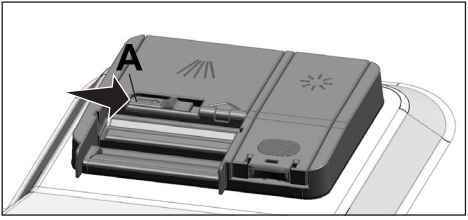
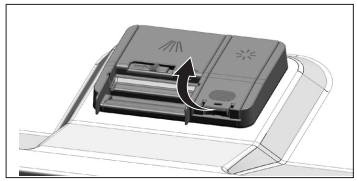
Put the detergent into the detergent dispenser just before operating the machine as illustrated below.
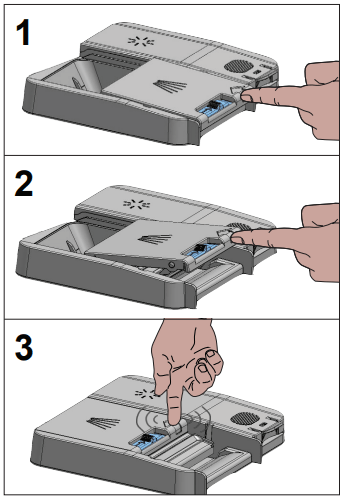
1. Push the latch to right to open the detergent dispenser lid (A).
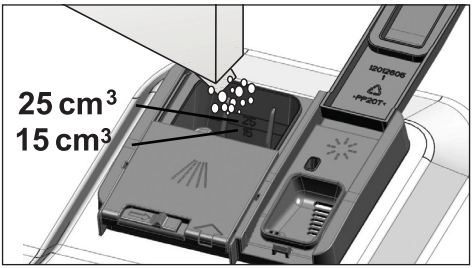
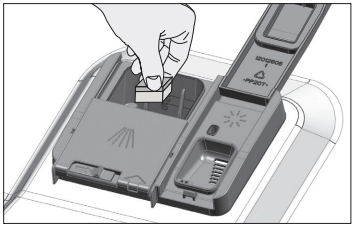
2. Put suggested amount of powder, liquid/gel or tablet detergent in the reservoir.
Inside the detergent dispenser there are level markings that help you use appropriate amount of powder detergent. When brimful, detergent dispenser will contain 1.5 Ounces (45 cm³) of detergent. Fill detergent up to .5 Ounces (15 cm³) or .85 ounces (25 cm³) level marks in the detergent dispenser according to fullness of the machine and/or soiling degree of the dishes. One tablet is enough if you are using detergent tablets.
3. Push the lid of the detergent dispenser to close it. A "click" will be heard when the lid is closed.
Use powder or liquid/gel detergent in short programs without prewash since the solubility of the tablet detergent changes depending on the temperature and time.
TABLET DETERGENTS
In addition to the conventional tablet detergents, there are also commercially available detergent tablets that show water softening salt and/or rinse aid effect. Some types of these detergents contain special-purpose components such as glass and stainless steel protectors. These tablets show their effects up to a certain water hardness level (59 gpg). Water softening salt and rinse aid must also be used together with the detergent if the water hardness level is above the mentioned level.
The best washing performance in dishwashers is obtained by using detergent, rinse aid and water softening salt individually.
Observe the instructions of the detergent manufacturer on the package when using tablet detergents.
Contact the detergent manufacturer if your dishes are wet and/or if you notice limescale spots particularly on your glasses after the washing program is over when using a tablet detergent.
When you switch to powder detergent from tablet detergent:
Make sure that salt (Select Models) and rinse aid reservoirs are full.
Set the water hardness to the highest level and perform an empty run.
After the empty washing cycle, review the user manual and readjust the water hardness level so as to suit the water supply.
Make the appropriate rinse aid settings.
RINSE AID
The rinse aid used in dishwashers is a special combination that aims to increase drying efficiency and prevent water or lime stains on the washed items. For this reason, care must be paid to have rinse aid in the rinse aid reservoir and to use rinse aids produced specially for dishwashers only.
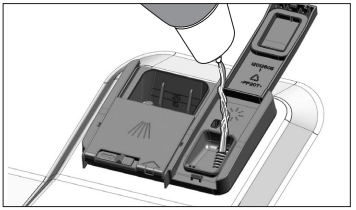
1. Open the lid of the rinse aid reservoir with the help of the latch.
2. Fill the reservoir until “MAX” level.
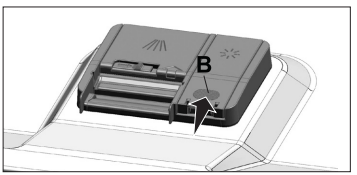
3. Slightly press the point (B) of the reservoir lid to close it.
4. If there are stains on tableware items after washing, level must be increased and if there is a blue trace after wiping them by hand, it must be decreased. This is set to position 3 as factory default.
The rinse aid adjustment is described under "Adjusting the amount of rinse aid" in the section for operating the machine.
Wipe clean any spilled rinse aid outside the reservoir. Rinse aid that spilled accidentally will cause foaming and it will eventually decrease washing performance.
ADJUSTING THE WATER SOFTENING SYSTEM
(Select Models)
Cleaning, rinsing and drying performance of your dishwasher will increase when water softening system is adjusted properly.
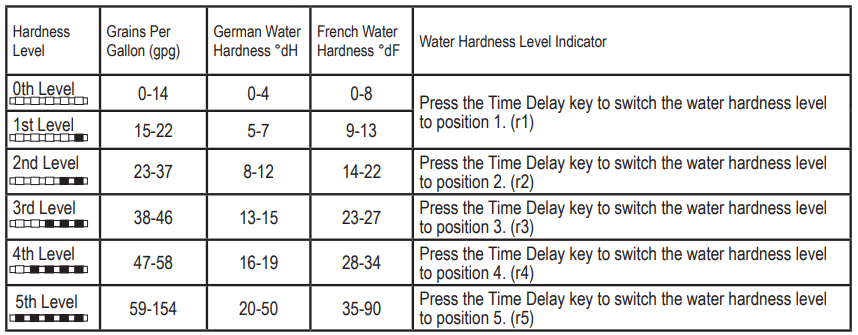
Adjust the new water hardness level according to the Water hardness level instruction in this booklet.
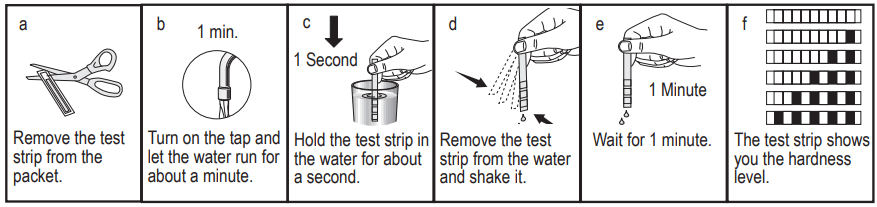
Use the test strip supplied with the product according to the steps given below to determine hardness level of your supply water.
After determining hardness level of the supply water:
Turn on the machine, press Time Delay and P+/P keys simultaneously. After the countdown (3,2,1) is displayed keep the keys pressed for a while.
Press P+/P key to activate the (r..) position.
Using Time Delay key, adjust water hardness level according to the hardness of the supply water. See “Water hardness level adjustment table” for correct setting.
Press On / Off key to save the setting.
Water hardness level adjustment table
If the hardness level of the supply water is above 154 gpg (grains per gallon) or if you are using well water, then it is recommended to use water purification devices and special filters.
If the hardness level of the supply water is below 22 gpg, there is no need to use salt in your dishwasher. If this is the case, “No Salt Warning Indicator” (if any) illuminates continuously on the panel of your machine.
If the water hardness level adjustment is set to level 1, the “No salt warning indicator” will illuminate continuously although it is not necessary to use salt. If you use salt under this condition, salt will not be consumed and the Salt indicator will not illuminate.
If you move your house, it is necessary to readjust water hardness level of your machine by considering the information given above according to the hardness level of the supply water in your new location. Your machine will display the most recently adjusted water hardness level.
FILLING THE DISHWASHER SALT DISPENSER
(Select Models)
Water softening system needs to be regenerated in order for the product operates with the same performance continuously. Dishwasher salt is used for this purpose.
Use only special softening salts produced particularly for the dishwashers in your machine.
It is recommended to use granule- or powder-formed softening salts in the water softening system. Do not use salts that do not completely dissolve in water such as table salt or rock salt. Otherwise the performance of the system may deteriorate in time.
Salt reservoir will be filled with water when you start the product. For this reason, add salt before operating the machine.
1. Firstly, take the lower basket out to add softening salt.
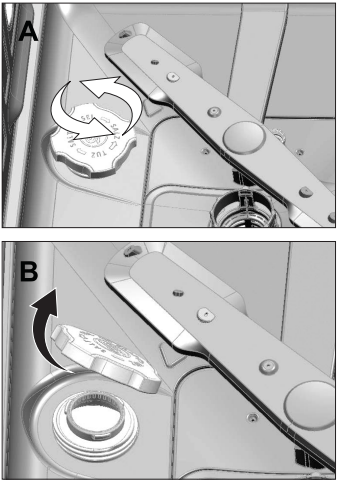
2. Turn the salt reservoir lid counterclockwise to open it (A, B).
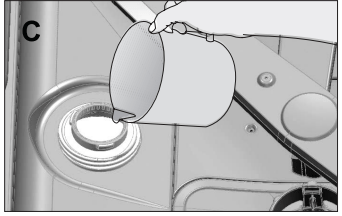
3. Add 4 cups of water to salt reservoir of your machine only in initial use (C).
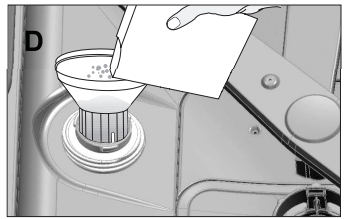
4. Fill the salt reservoir with salt by using the salt funnel (D). To speed up dissolution rate of salt in water, stir it with a spoon.
You can put about 4.4 Pounds of softening salt into the salt reservoir.
5. Replace the lid and tighten it when the reservoir is full.
You need to add salt right before starting the machine. Thus, the overflowing salty water will be flushed immediately, preventing the risk of corrosion in machine. In cases where you would not start washing immediately, run your machine empty in the shortest program.
Since different salt brands in the market have different particle sizes and since the water hardness may vary, dissolution of the salt in water may take a couple of hours. Therefore, Salt Indicator remains on for a while after adding salt into the machine.
CARE AND MAINTENANCE
CARING FOR YOUR DISHWASHER EXTERIOR
Cleaning the control panel: Use only soft cloth that is lightly dampened with mild detergent. Clean the control panel only with a moist cloth and clear water.
Cleaning the colored doors: Use only soft cloth that is lightly dampened with mild detergent.
Cleaning the stainless steel doors: Use a soft cloth with a cleaner made for cleaning stainless steel. For the best results, apply the stainless steel cleaner to a soft cloth and wipe the surface in the direction of the grain.
Cleaning the door gasket: Regularly clean the door gasket with a damp cloth to remove food particles and other debris. Use a gentle household cleaner for the outside and the door seals, and rinse thoroughly.
CARING FOR YOUR DISHWASHER INTERIOR
NOTICE: Cleaning your dishwasher at regular intervals ensures longer product life and reduces the risk of recurring problems. Always disconnect the power to machine before cleaning.
CAUTION: When cleaning the underside of the main filter, care must be taken on the sharp outer edge to avoid the risk of cut type injuries.
CLEANING THE FILTERS
Clean the filters at least once a week in order for the machine operates efficiently. Check if food residues are left on the filters. If there are food residues on filters, take them out and clean well under running water.
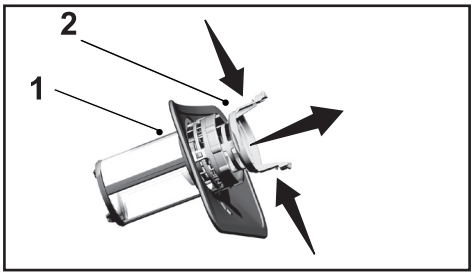
1. Turn the micro filter (1) and coarse filter (2) assembly counterclockwise and pull it out from its seating.
2. Pull out the metal / plastic filter (3) from the seating.
3. Press the two pawls on the coarse filter inwards and separate the coarse filter from the assembly.
4. Clean all three filters under tap water by means of a brush.
5. Replace the metal/plastic filter.
6. Place the coarse filter into the microfilter. Make sure that it is properly seated. Turn the coarse filter clockwise until a “click” sound is heard.
Do not use the dishwasher without filter.
Incorrect placement of the filters will reduce washing efficiency.
CLEANING THE HOSE FILTER
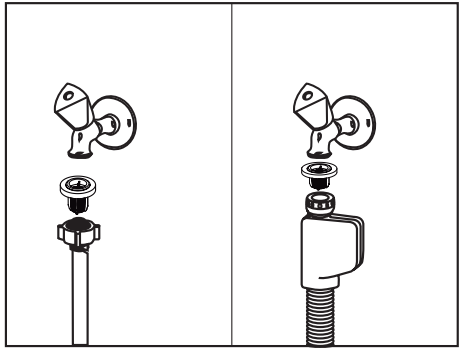
Damages on the machine that may be caused by impurities coming from the urban supply water or your own water installation (such as sand, dirt, rust, etc.) can be prevented by means of the filter attached to the water inlet hose. Check the filter and the hose regularly and clean them if necessary.
Turn off the tap and remove the hose.
After taking out the filter, clean it under running tap water.
Place the cleaned filter back to its seat in the hose.
Install the hose to tap.
(Select Models)
CLEANING THE WASH ARMS
Clean the wash arms at least once a week in order for the machine operates efficiently.
LOWER WASH ARMS
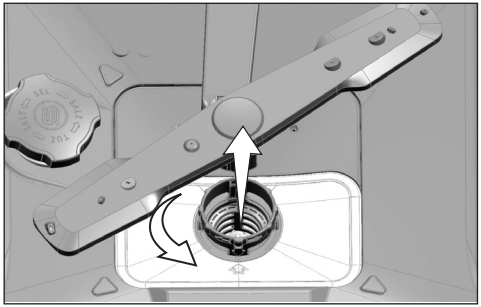
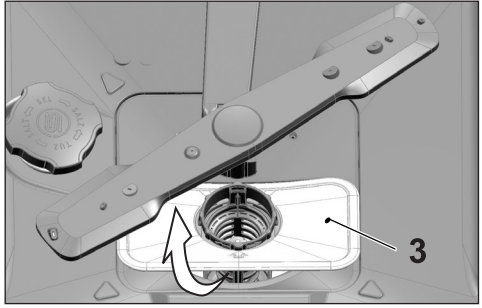
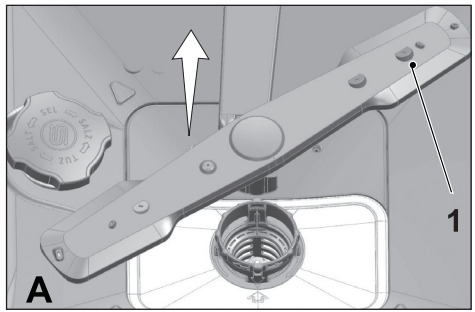
Check if the holes on the lower wash arms (1) are clogged. If they are clogged, remove and clean the impeller. Pull the lower wash arms up to remove it.
UPPER WASH ARMS
Check if the holes on the upper impeller (1) are clogged. If they are clogged, remove and clean the wash arms. Turn its nut to left to remove the upper wash arms. Make sure that the nut is tightened well when installing the upper wash arms.
TROUBLESHOOTING
Machine does not start.
Power cable is unplugged. >>> Check if the power cable is plugged in.
Cicuit Breaker is blown. >>> Check the Cicuit Breaker in your house.
Water is cut. >>> Make sure that the water inlet tap is open.
Door of the machine is open. >>> Make sure that you have closed the door of the machine.
On / Off button is not pressed. >>> Make sure that you have turned on the machine by pressing the On / Off button.
Dishes are not washed clean
Dishes are not placed orderly in the machine. >>> Load the dishes as described in the user manual.
Selected program is unsuitable. >>> Select a program with a higher temperature and cycle time.
Wash arms are stuck. >>> Prior to starting the program, turn the lower and upper Wash arms by hand to make sure that they rotate freely.
Wash arms holes are clogged. >>> Lower and upper Wash arms holes might be clogged with small food particles and debris. Clean the Wash arms regularly as illustrated in section “Cleaning and Care”.
Filters are clogged. >>> Check if the filter system is clean. Clean the filter system regularly as illustrated in section “Cleaning and Care”.
Filters are installed incorrectly. >>> Check the filter system and make sure that it is installed correctly.
Baskets are overloaded. >>> Do not overload the baskets in excess of their capacity.
Detergent is stored under unsuitable conditions. >>> If you are using powder detergent, do not store the detergent package in humid places. Keep it in a closed container if possible. For ease-of-storing, we recommend you to use tablet detergents.
Detergent is not sufficient. >>> If you are using powder detergent, adjust the amount of detergent according to the soiling degree of your dishes and/or program definitions. We recommend you to use tablet detergents for optimum results.
Rinse aid is not sufficient. >>> Check the rinse aid indicator and add rinse aid if necessary. Increase the rinse aid setting if there is enough amount of rinse aid in the machine.
Detergent dispenser lid is left open. >>> Make sure that the detergent dispenser lid is closed tightly after adding detergent.
Dishes are not dry at the end of cycle
Dishes are not placed orderly in the machine. >>> Place your dishes in a way that no water will accumulate in them.
Rinse aid is not sufficient. >>> Check the rinse aid indicator and add rinse aid if necessary. Increase the rinse aid setting if there is enough amount of rinse aid in the machine.
Machine is unloaded right after the program is over. >>> Do not unload your machine right after washing process is completed. Slightly open the door and wait for evacuation of the steam inside for a while. Unload the dishes after the pieces cool down to a touchable level. Start unloading process from the lower basket. Thus, dropping of water remained on a piece at upper basket onto the pieces at lower basket is prevented.
Selected program is unsuitable. >>> Since rinsing temperature is low at program with short duration, drying performance will also be low. Select program with longer duration for a higher drying performance.
Surface quality of the kitchen utensils is deteriorated. >>> Desired washing performance can not be obtained at kitchen utensils with deteriorated surfaces and it is not suitable to use such utensils in terms of hygiene as well. Also, water can not flow easily on deteriorated surfaces. It is not recommended to wash such kitchen utensils in dishwasher.
It is normal that drying complaints can be experienced with Teflon kitchen utensils. It is associated with the structure of Teflon. Since the surface tensions of Teflon and water are different, water droplets will remain as beads on the Teflon surface.
Stains remaining on dishes when cycle has completed.
Selected program is unsuitable. >>> Select a program with a higher temperature and cycle time.
Surface quality of the kitchen utensils is deteriorated. >>> Tea and coffee stains or other dye spots may not be cleaned in dishwasher when they have penetrated in deteriorated surfaces. Desired washing performance can not be obtained at kitchen utensils with deteriorated surfaces and it is not suitable to use such utensils in terms of hygiene as well. It is not recommended to wash such kitchen utensils in dishwasher.
Detergent is stored under unsuitable conditions. >>> If you are using powder detergent, do not store the detergent package in humid places. Keep it in a closed container if possible. For ease-of-storing, we recommend you to use tablet detergents.
Lime traces remain on dishes and glassware gains a misty appearance
Rinse aid is not sufficient. >>> Check the rinse aid indicator and add rinse aid if necessary. Increase the rinse aid setting if there is enough amount of rinse aid in the machine.
Water hardness setting is low or salt level is insufficient >>> Measure the hardness of the supply water appropriately and check the water hardness setting.
Salt leakage exists. >>> Pay attention not to spill salt around the salt filling hole while adding salt. Make sure that the salt reservoir lid is tightly closed after finishing the filling process. Run the prewash program to remove the salt that spilled inside the machine. Since the salt granules that will remain under the lid will dissolve during prewash, causing the lid loosen, check the lid once again at the end of the program.
There is a different odor in the machine
A new machine has a peculiar odor. It will fade out after a couple of washing.
Filters are clogged. >>> Check if the filter system is clean. Clean the filter system regularly as illustrated in section “Cleaning and Care”.
Dirty dishes are kept in dishwasher for 2-3 days. >>> If you are not going to start the machine right after you have put the dishes into it, remove the remnants on the dishes and run the Prewash program without detergent every 2 days. In such cases, do not close the door of the machine completely in order to avoid odor build up in machine. You can also use commercially available odor removers or machine cleaners.
Rust, discoloration or surface deterioration occurs on dishes
Salt leakage exists. >>> Salt may cause deterioration and oxidation on metal surfaces. Pay attention not to spill salt around the salt filling hole while adding salt. Make sure that the salt reservoir lid is tightly closed after finishing the filling process. Run the prewash program to remove the salt that spilled inside the machine. Since the salt granules that will remain under the lid will dissolve during prewash, causing the lid loosen, check the lid once again at the end of the program.
Salty food remnants have remained on dishes for a long time. >>> If silverware soiled with such foods will be kept waiting in machine, dirt must be removed by prewash or dishes must be washed without being kept waiting.
Electric installation is not grounded. >>>Check if your machine is connected to the actual grounding line. Otherwise, the static electric created in the product causes arcs on the surfaces of metal items creating pores, removing the protective cover on the surface and causing discoloration.
Intensive cleansers such as bleaches are used. >>> Protective cover on metal surfaces gets damaged and looses its efficiency in time when it gets in contact with cleansers such as bleach. Do not wash your dishes with bleach.
Metal items particularly such as knives are used for purposes other then their intended uses. >>> Protective cover on the edges of knives may get damaged when they are used for purposes such as opening cans. Do not use metal kitchen utensils out of their intended uses.
Silverware are made of low quality stainless steel. >>> Corrosion on such items is inevitable; they should not be washed in dishwashers.
Kitchen utensils that are already corroded are washed in dishwasher. >>> Rust on a corroded item can migrate to other stainless steel surfaces and cause corrosion on those surfaces as well. Such items should not be washed in dishwashers.
Detergent remains in detergent dispenser.
Detergent dispenser was damp when adding detergent. >>> Make sure that the detergent dispenser is dried well prior to filling it with detergent.
Detergent is added long before the washing process. >>> Pay attention to add detergent shortly before start-up of the washing.
Opening of the detergent dispenser lid is prevented during washing. >>> Place the dishes in a way that will not prevent the detergent dispenser lid from opening and the water going into the machine from impellers.
Detergent is stored under unsuitable conditions. >>> If you are using powder detergent, do not store the detergent package in humid places. Keep it in a closed container if possible. For ease-of-storing, we recommend you to use tablet detergents.
Wash Arm holes are clogged. >>> Lower and upper Wash Arm holes might be clogged with food remnants such as lemon pips. Clean the Wash Arm regularly as illustrated in section “Cleaning and Care”.
Decorations and ornaments on kitchen utensils are being erased.
Decorated glasses and decorated luster porcelains are not suitable for washing in the dishwasher. Manufacturers of glassware and porcelain tableware items do not recommend washing such kitchen utensils in the dishwashers either.
Dishes are scratched.
Kitchen utensils that contains or are made of aluminum should not be washed in dishwasher.
Salt leakage exists. >>> Pay attention not to spill salt around the salt filling hole while adding salt. Spilled salt can cause scratches. Make sure that the salt reservoir lid is tightly closed after finishing the filling process. Run the prewash program to remove the salt that spilled inside the machine. Since the salt granules that will remain under the lid will dissolve during prewash, causing the lid loosen, check the lid once again at the end of the program.
Water hardness setting is low or salt level is insufficient >>> Measure the hardness of the supply water appropriately and check the water hardness setting.
Dishes are not placed orderly in the machine. >>> When placing the glasses and other glassware into the basket lean them not against other dishes but the edges or racks of the basket or the glass support wire. Striking of the glasses to each other or to other dishes due to the impact of water during washing can cause breaks, or scratches on their surfaces.
A smear remains on glasses that resembles milk stain which can not be removed when wiped by hand. A bluish / rainbow appearance occurs when the glass is pointed to light.
Excessive rinse aid is used. >>>Lower rinse aid setting. Clean the spilled rinse aid when adding rinse aid.
Corrosion has occurred on glass due to soft water. >>> Measure the hardness of the supply water appropriately and check the water hardness setting. If your supply water is soft (<15 gpg), do not use salt. Choose programs that wash in higher temperatures (140-149 degress Fahrenheit). You can also use glass protective detergents that are commercially available.
Foam forms in the machine.
Dishes are washed with hand-wash detergent by hand but not rinsed before placing them into the machine. >>> Hand-wash detergents do not contain antifoam. There is no need to hand-wash the dishes before placing them into the machine. Removing the coarse soil on the dishes under tap water, with a sponge or towel.
Rinse aid has spilled into the machine when adding rinse aid. >>> Take care that rinse aid is not spilled in the machine when you are filling it. Clean any spilled rinse ait with the help of a tissue paper/towel.
Lid of the rinse aid reservoir is left open. >>> Make sure that the lid of the rinse aid reservoir is closed after adding rinse aid.
Kitchen utensils are broken.
Dishes are not placed orderly in the machine. >>> Load the dishes as described in the user manual.
Baskets are overloaded. >>> Do not overload the baskets in excess of their capacity.
Water remains in the dishwasher at the end of the program.
Filters are clogged. >>> Check if the filter system is clean. Clean the filter system regularly as illustrated in section “Cleaning and Care”.
Discharge hose is clogged/blocked. >>> Check the discharge hose. If necessary, remove the discharge hose, clear the blockage and insert is as illustrated in the user manual.
If you cannot eliminate the problem although you follow the instructions in this section, consult your dealer or the Authorized Service Agent. Never try to repair a nonfunctional product yourself.
 )
) )
)