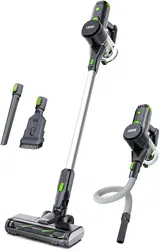
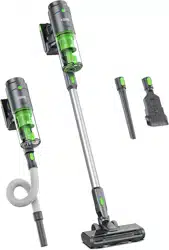
User guide Vacuum Cleaner
BATTERY
- This vacuum cleaner contains batteries that are non-replaceable. For the purposes of recharging the battery, only use the detachable supply unit provided with this vacuum cleaner.
- The vacuum cleaner is powered by an internal, rechargeable Li - ion battery.
- DO NOT attempt to disassemble or replace the battery yourself as this may cause overheating, fire or injury.
- DO NOT expose the battery to any direct heat source, including fire or direct sunlight . This is a fire hazard .
- The battery must be removed from the vacuum cleaner before it is scrapped .
- DO NOT dispose of the vacuum cleaner or the Battery Rack in fire water or other liquids . This is to avoid any explosion hazards .
- DO NOT dispose of the Li - ion battery in your household waste .
- Dispose of it following your local environmental laws and regulations .
- Do not heat above 140 " F ( 60 ° C ) or incinerate the battery pack Keep the battery pack away from children .
PACKING LIST
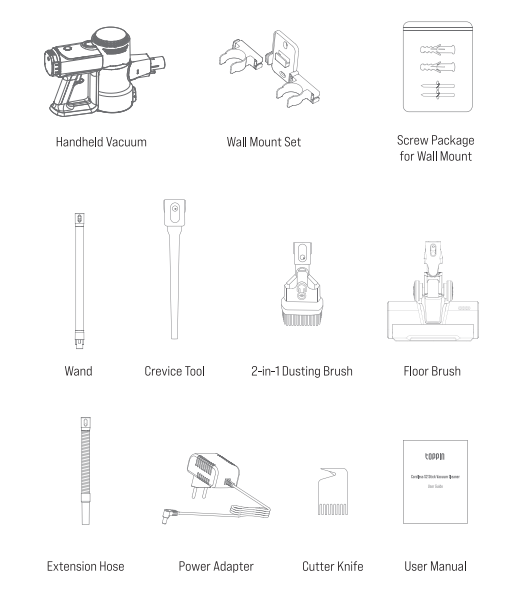
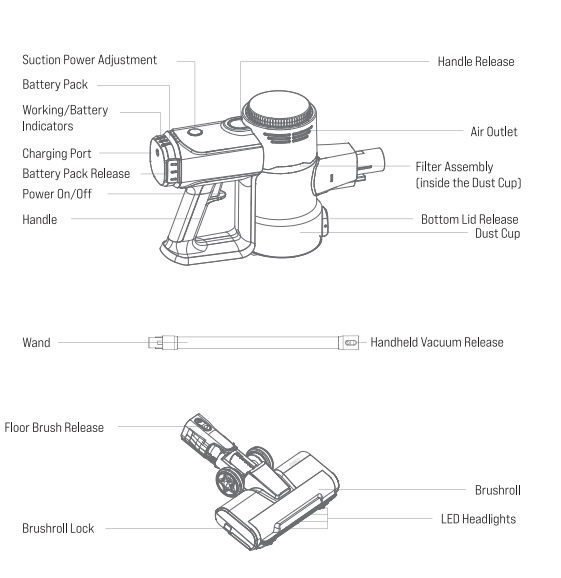
PRODUCT OVERVIEW
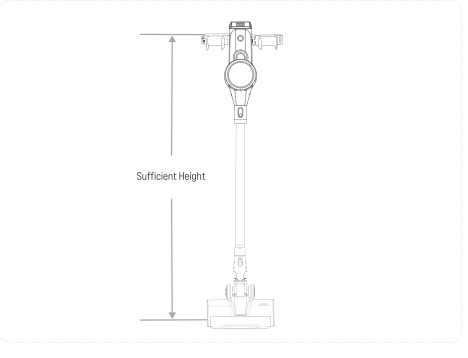
GETTING STARTED
INSTALLING THE WALL MOUNT SET
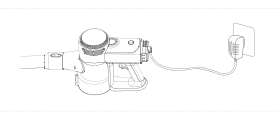
CHARGING
Important: Please fully change your vacuum cleaner before first use.
Option 1: In the vacuum cleaner
Option 2: Out of the vacuum cleaner
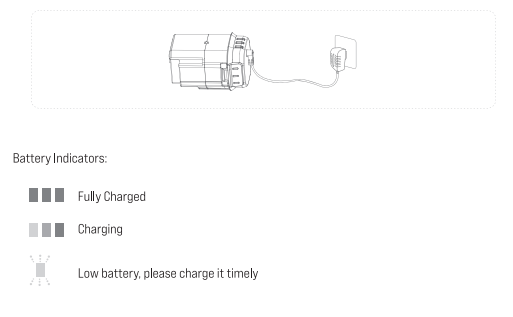
Note:
- Do not charge the vacuum cleaner when it's powered on. Do not take out the Battery Pack while connecting to the Handheld Vacuum for charging.
- It takes about 3-5 hours to reach a full charge
- To extend the battery's lifespan, recharge the vacuum cleaner at least once every 3 months if not using it for long periods of time
- Do not open the Battery Pack and replace the battery by yourself. If the vacuum cleaner won't charge, please contact us at [email protected] for further assistance.
ASSEMBLY AND USAGE
ASSEMBLY OF YOUR VACUUM CLEANER
Important: Please replace or assemble any accessories when the vacuum cleaner is powered off
- For cleaning floors and carpets

Tip: The LED headlights on the Floor Brush will be on when the vacuum cleaner is working to help you clean better in dark enviroments
- For cleaning sofa gaps/ cailings/ curtains
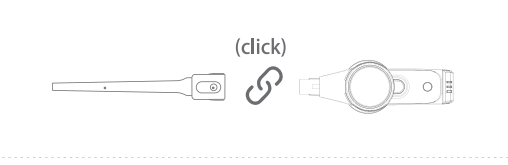
- For cleaning keyboards/ curtains
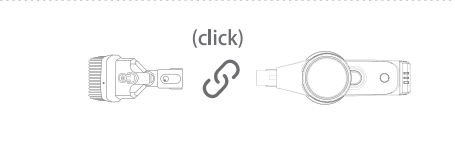
USAGE OF YOUR VACUUM CLEANER
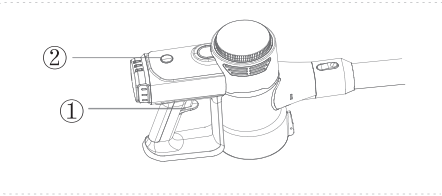
- Press the Power On/Off button to start cleaning; Press again to stop cleaning.
- Press the Suction Power button to switch among minimum, medium and maximum suction power.
MAINTENANCE AND CARE
HANDHELD VACUUM
Dust Cup: Please empty the Dust Cup in time when the dust reaches the MAX mark on the cup.
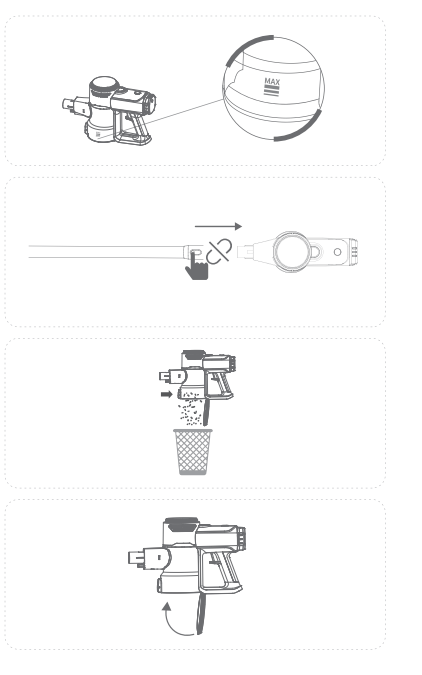
- Power off the vacuum cleaner.
- Press the Handheld Vacuum Release button to remove the Handheld Vacuum.
- Align the bottom of the Dust Cup with your home trash bin, then press the Bottom Lid Release button to empty the dust.
- Close the lid untilit clicks.
Filter Assembly
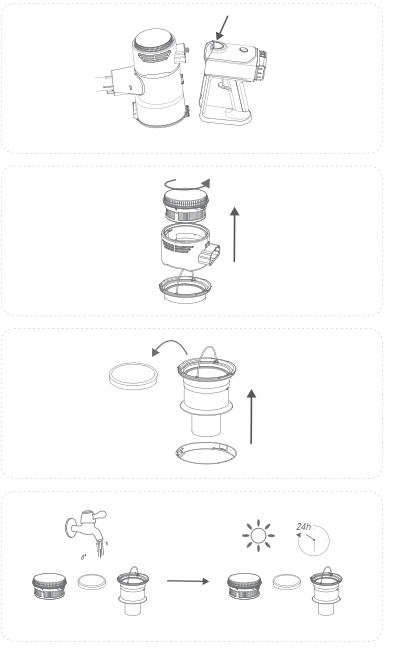
- Power off the vacuum cleaner.
- Press the Handle Release button to separate the Handle and the Handheld Vacuum.
- Rotate the Handheld Vacuum Head counterclockwise and take out the HEPA filter.
- Lift the handle of the Filter Assembly and take it out then take out the MIF sponge.
- Wash all the parts of the Filter Assembly and leave them dry completely for a minimum of 24 hours.
- Reinstall the parts of the Filter Assembly in reverse order.
WAND
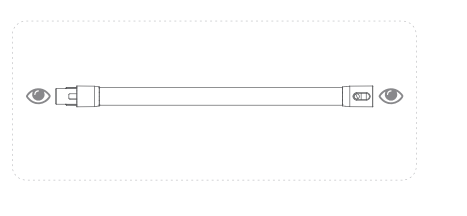
- Remove the Wand and check for any blockages regularly.
- Reinstall after clearing the blockages.
BRUSHROLL
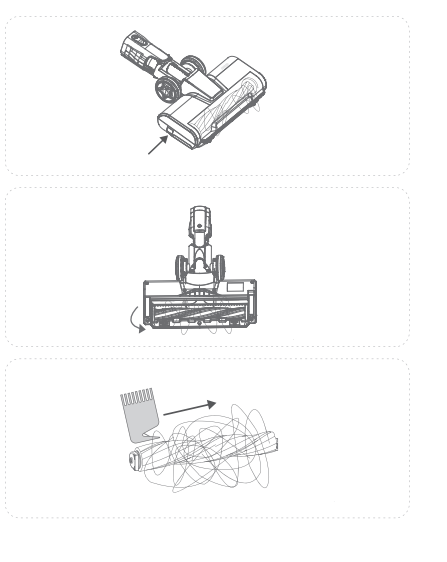
- Power off the vacuum cleaner.
- Press the Brushroll Lock button on the left side of the floor brushroll and lift the fixing cover
- Lift one end of the Brushroll and take it out.
- Clean carpet fibres. debris and use cutter knife to clean the entangled hair on the Brushroll.
- Reinstall the Brushroll in reverse order.
Notes:
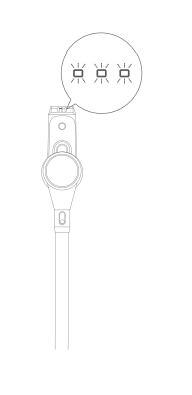
- The Floor Brush has a preset automatic protection function.
- When the Floor Brush is entangled or blocked, the protection program will help cut off the power, and the floor Brushroll will stop rotating.
- The Working/Battery Indicators will keep flashing.
- Please turn off the vacuum cleaner immediately, remove the Battery Pack and clear the blockages in time following the above steps.
TROUBLESHOOTING GUIDE
If you need any further assistance. please feel free to contact us at [email protected].
1. QI. The vacuum cleaner cannot start cleaning.
- Make sure the vacuum cleaner is fully charged before use.
- Try another socket to check if there is any short circuit.
2. Q2. The suction power of the vacuum cleaner is too weak to pick up debris.
- Adjust the suction power to the maximum level.
- Check if the Filter Assembly needs cleaning. If yes, please follow the instructions of cleaning the filter assembly to clean it.
- Check if the Dust Cup is full. If yes, please clean the Dust Cup in time.
- Check the Motorized Floor Nozzle and Wand for any blockages. Please clear the blockages in time if there is any.
- Remove any entangled hair, carpet fibers and debris on the Brushroll.
- Make sure the Dust Cup and the Filter Assembly are installed correctly.
3. Q3. The Brushroll stopped rotating, and the three Working/Battery Indicators keep flashing simultaneously.
- Check if the vacuum cleaner has run out of battery or if you have powered off the vacuum cleaner accidentally.
- Check if the preset automatic protection has been activated due to entangled hair, carpet fibers and debris on the floor Brushroll.
4. Q4. The running time of the vacuum cleaner is too short.
- Make sure the vacuum cleaner is fully charged before use.
5. Q5. The Working/Battery Indicators are off while charging.
- Check if the power socket has power.
- Make sure the Power Adapter is plugged into the socket correctly.
- Make sure the power adapter cord is plugged into the Charging Port on the vacuum cleaner correctly.
6. Q6. There is dust leaking out of the vacuum.
- Check if the Dust Cup is full. If yes, please empty the Dust Cup in time.
- Check if the Dust Cup is broken.If yes, please replace it timely.
- Make sure the Dust Cup and the Filter Assembly are installed correctly.
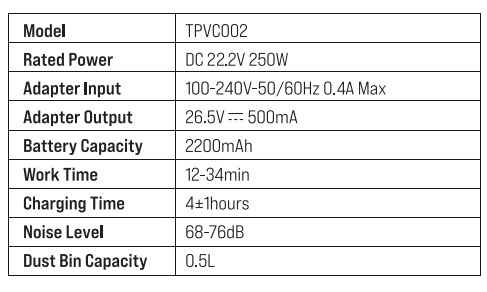
Specifications
IMPORTANT SAFETY INSTRUCTIONS
READ THESE INSTRUCTIONS BEFORE USING THIS VACUUM CLEANER. IT IS INTEND
ED FOR HOUSEHOLD USE ONLY.
- This vacuum cleaner can be used by children aged from 8 years and above and persons with reduced physical, sensory or mental capabilities or lack of experience and knowledge if they have been given supervision or instruction concerning use of the appliance in a safe way and understand the hazards involved
- DO NOT let children play with or operate the vacuum cleaner. as this may cause injury. DO NOT operate it close to unattended babies or children.
- The vacuum cleaner is only to be used with the power supply unit provided with the appliance.
- DO NOT use or purchase accessories or replacement parts from unauthorized outlets.Only use original parts made by Toppin and contact us directly if you need an accessory or replacement part.
- Always power off the vacuum cleaner before assembling or removing any accessories.
- Suitable for dry locations ONLY. DO NOT operate the vacuum cleaner or close to wet surfaces when using it to vacuum dust. Do not expose it to moisture, rain or snow.
- DO NOT install, charge or use this vacuum cleaner outdoors, in a bathroom or near a pool.
- DO NOT operate the vacuum cleaner with wet hands.
- DO NOT use the vacuum cleaner to pick up burning or smoking objects such as cigarettes or hot ashes etc. This is a fire hazard.
- DO NOT use the vacuum cleaner to pick up water or flammable liquid such as oil and gasoline. or use in the presence of vapors.
- DO NOT apply any fragrance or scented products to the Filter Assembly of the vacuum cleaner. This is a fire hazard.
- DO NOT use if the power cable or plug appears to be damaged.
- Ensure that the Dust Cup or the Filter Assembly are firmly in place before using the vacuum cleaner.
- Keep hair. fingers. and all parts of the body away from all the openings and moving parts of the vacuum cleaner. Do not point the Wand or parts at your eyes or ears or put them in your mouth.
- Do not put any objects into all the openings. Do not use the vacuum cleaner with any opening blocked. Keep the vacuum cleaner free of bunches of lint, hair and anything that may reduce airflow.
- To prevent accidents, be careful to keep your hands and fingers away from the Power On/Off button until you are ready to begin vacuuming, especially when picking up or carrying the vacuum cleaner.
- The Power Adapter must be removed from the socket before cleaning or maintaining. Cleaning and maintenance shall not be done by the children without any adult supervision.
- Unplug the vacuum cleaner when not in use for extended periods of time. Be extra careful when cleaning on stairs.
- Toppin will accept no liability or responsibility for fires, explosions or electrical shocks caused by improper operation, dismantling the vacuum cleaner or by not adhering to the above safety instructions.