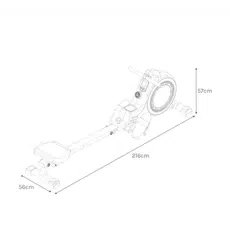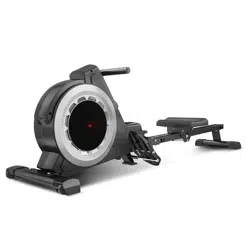
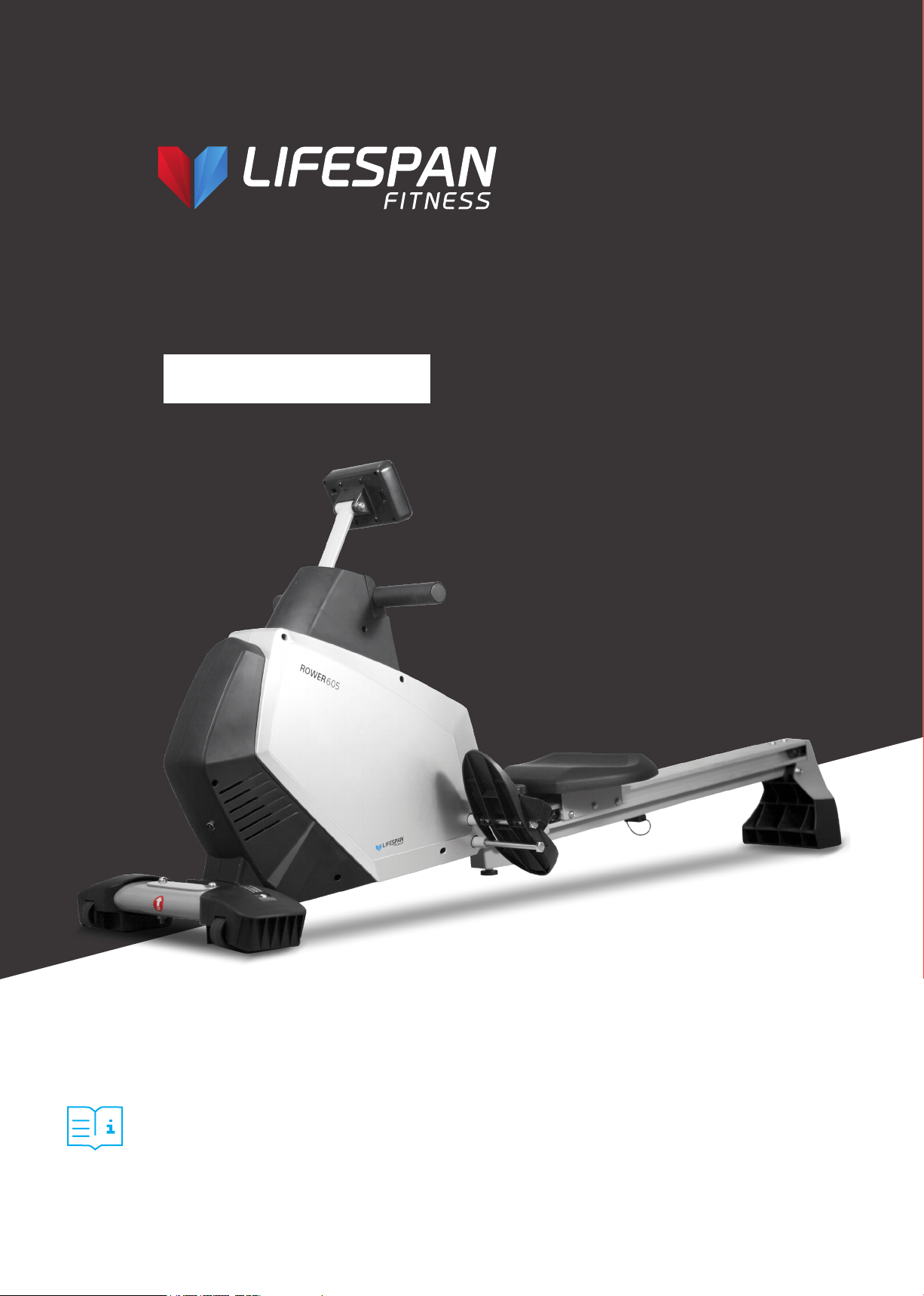
Product may vary slightly from the item pictured due to model upgrades.
Read all instructions carefully before using this product.
Retain this owner’s manual for future reference.
NOTE:
This manual may be subject to updates or changes. Up to date manuals are available through our
website at www.lifespanfitness.com.au
ROWER-605
USER MANUAL



4
TABLE OF
CONTENTS
I. Important Safety Instructions . . . . . . . . . . . . . . . . . . . . . . . . . . . . . . . 05
II. Care Instructions . . . . . . . . . . . . . . . . . . . . . . . . . . . . . . . . . . . . . . . . . . . . . 06
III. Assembly Instructions . . . . . . . . . . . . . . . . . . . . . . . . . . . . . . . . . . . . . . . 07
IV. Folding Instructions . . . . . . . . . . . . . . . . . . . . . . . . . . . . . . . . . . . . . . . . . . 10
V. Operation Guide . . . . . . . . . . . . . . . . . . . . . . . . . . . . . . . . . . . . . . . . . . . . . . . 11
VI. Exercise Guide . . . . . . . . . . . . . . . . . . . . . . . . . . . . . . . . . . . . . . . . . . . . . . . . . 17
VIII. Parts List . . . . . . . . . . . . . . . . . . . . . . . . . . . . . . . . . . . . . . . . . . . . . . . . . . . . . . 20
IX. Warranty . . . . . . . . . . . . . . . . . . . . . . . . . . . . . . . . . . . . . . . . . . . . . . . . . . . . . . . 22
| TABLE OF CONTENTS
5
I. IMPORTANT SAFETY
INSTRUCTIONS
WARNING: Read all instructions before using this machine.
It is important your machine receives regular maintenance to prolong its useful life. Failing to
regularly maintain your machine may void your warranty.
Please keep this manual with you at all times.
• It is important to read this entire manual before assembling and using the equipment. Safe and
effective use can only be achieved if the equipment is assembled, maintained and used properly.
PLEASE NOTE: It is your responsibility to ensure that all users of the equipment are informed of all
warnings and precautions.
• Before starting any exercise program you should consult your doctor to determine if you have any
medical or physical conditions that could put your health and safety at risk, or prevent you from
using the equipment properly. Your doctor’s advice is essential if you are taking medication that
affects your heart rate, blood pressure or cholesterol level.
• Be aware of your body’s signals. Incorrect or excessive exercise can damage your health. Stop
exercising if you experience any of the following symptoms: pain, tightness in your chest, irregular
heartbeat, and extreme shortness of breath, lightheadedness, dizziness or feelings of nausea. If you
do experience any of these symptoms, you should consult your doctor before continuing with your
exercise program.
• Keep children and pets away from the equipment. This equipment is designed for adult use only.
• Use the equipment on a solid, flat level surface with a protective cover for your floor or carpet.
To ensure safety, the equipment should have at least 2 meters of free space around it.
• Before using the equipment, check that the nuts and bolts are securely tightened. If you hear any
unusual noises coming from the equipment during use and assembly, stop immediately. Do not use
the equipment until the problem has been rectified.
• Wear suitable clothing while using the equipment. Avoid wearing loose clothing that may get caught
in the equipment or that may restrict or prevent movement.
• This equipment is designed for indoor and family use only.
• Care must be taken when lifting or moving the equipment so as not to injure your back.
IMPORTANT SAFETY INSTRUCTIONS |

6
• Always keep this instruction manual and assembly tools at hand for reference.
• The equipment is not suitable for therapeutic use.
• The pulse or heart rate sensors are not medical devices. Various factors, including the user’s
movement, may affect the accuracy of heart rate readings. The pulse sensors are intended only as
exercise aids in determining heart rate trends in general.
II. CARE INSTRUCTIONS
• Lubricate moving joints with grease after periods of usage.
• Be careful not to damage plastic or metal parts of the machine with heavy or sharp objects.
• The machine can be kept clean by wiping it down using dry cloth.
• All nuts and bolts are to be checked and tightened on a regular basis. This includes pedals and other
moving parts. Failure to do so may cause damage to your thread and void your warranty.
• Check AC adaptor is plugged in correctly and do not use if cord is damaged.
| CARE INSTRUCTIONS
7
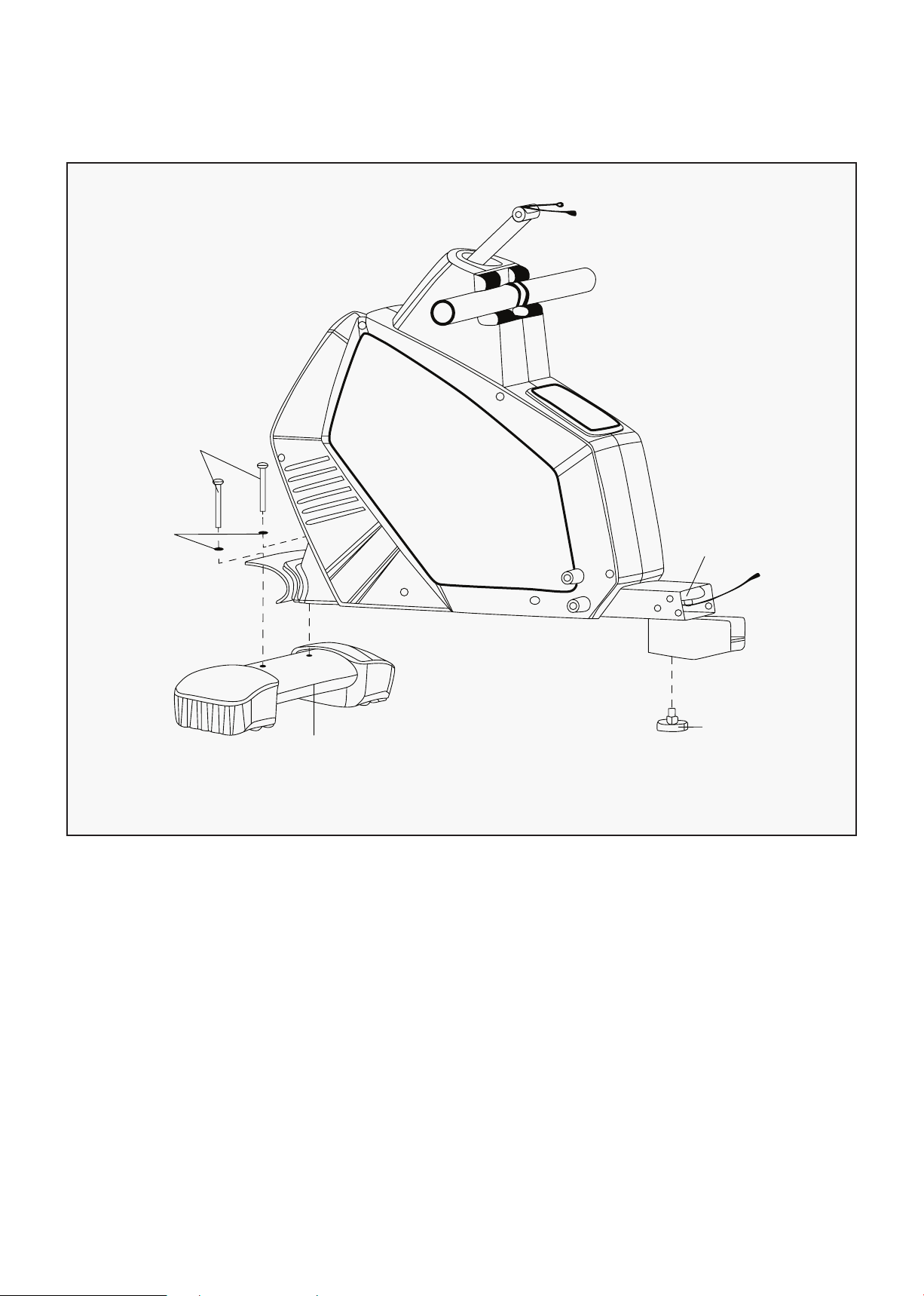
III. ASSEMBLY INSTRUCTIONS
1. Attach the front bottom tube (2) on to the main frame (1) with the inner hex bolts (4) and flat washer
(5) as shown in above.
2. Attach the adjustable knob (20) to the main frame (1).
ASSEMBLY INSTRUCTIONS |
STEP 1
4
5
2
1
20
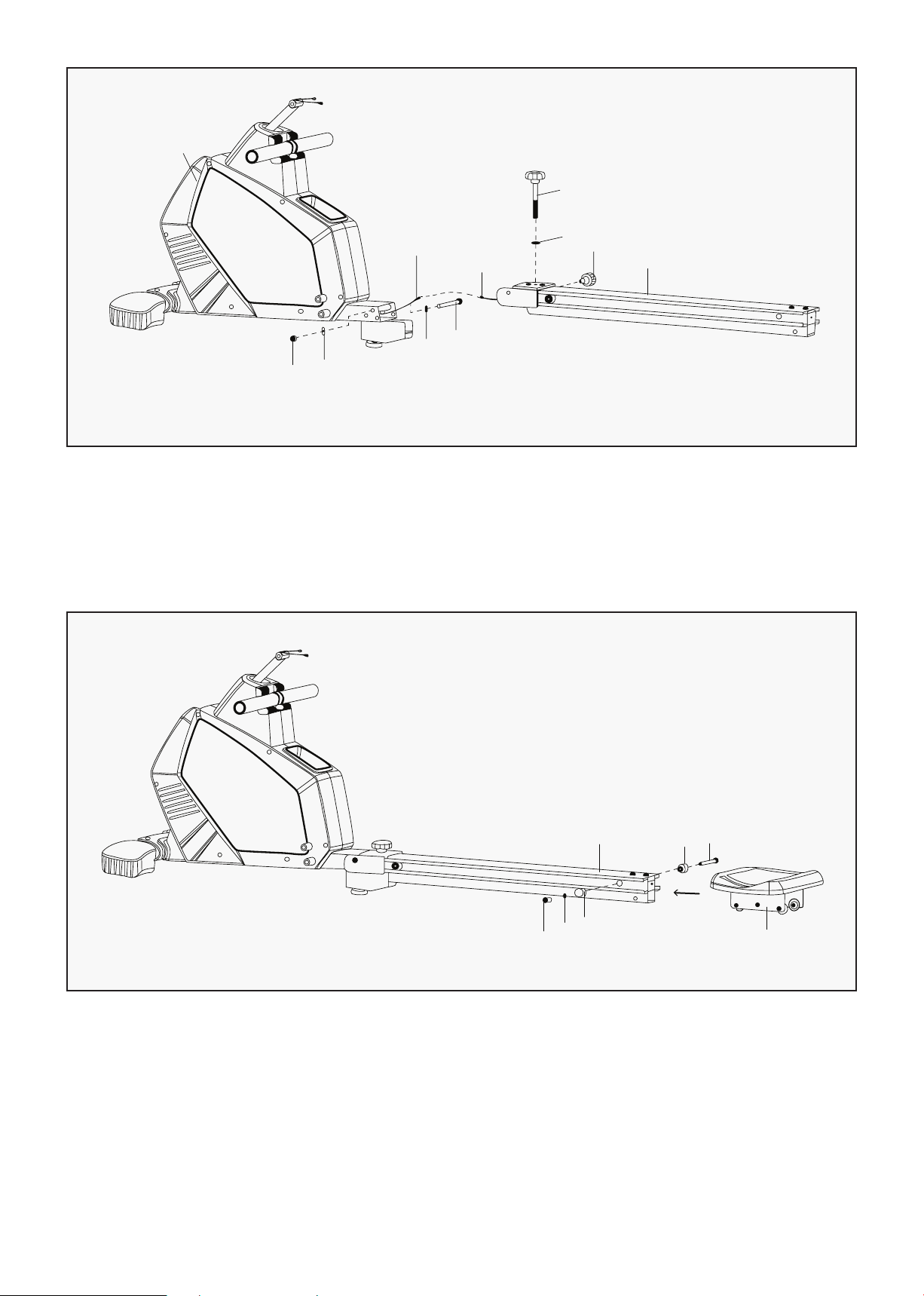
8
1. Connect the wire of Receiver (46) with Sensor extended wire (37). Then attach the guide rail (6) to the
main frame (1) with outer hex bolt (8), flat washer (9), nylon nut (10) and spring bolt (14) as shown in
FIG 2.
2. Fix the main frame (1) and guide rail (6) well with knob (32) and flat washer (13).
STEP 2
| ASSEMBLY INSTRUCTIONS
1
10
9
9
8
37
46
32
13
14
6
1. Remove the axle for the limiting base (16), limiting base (15), flat washer (17) and cross screw (18).
2. Install the glide saddle post (27) onto the guide rail (6) like the arrow shown in FIG 3.
STEP 3
18
17
15
6
15
16
27
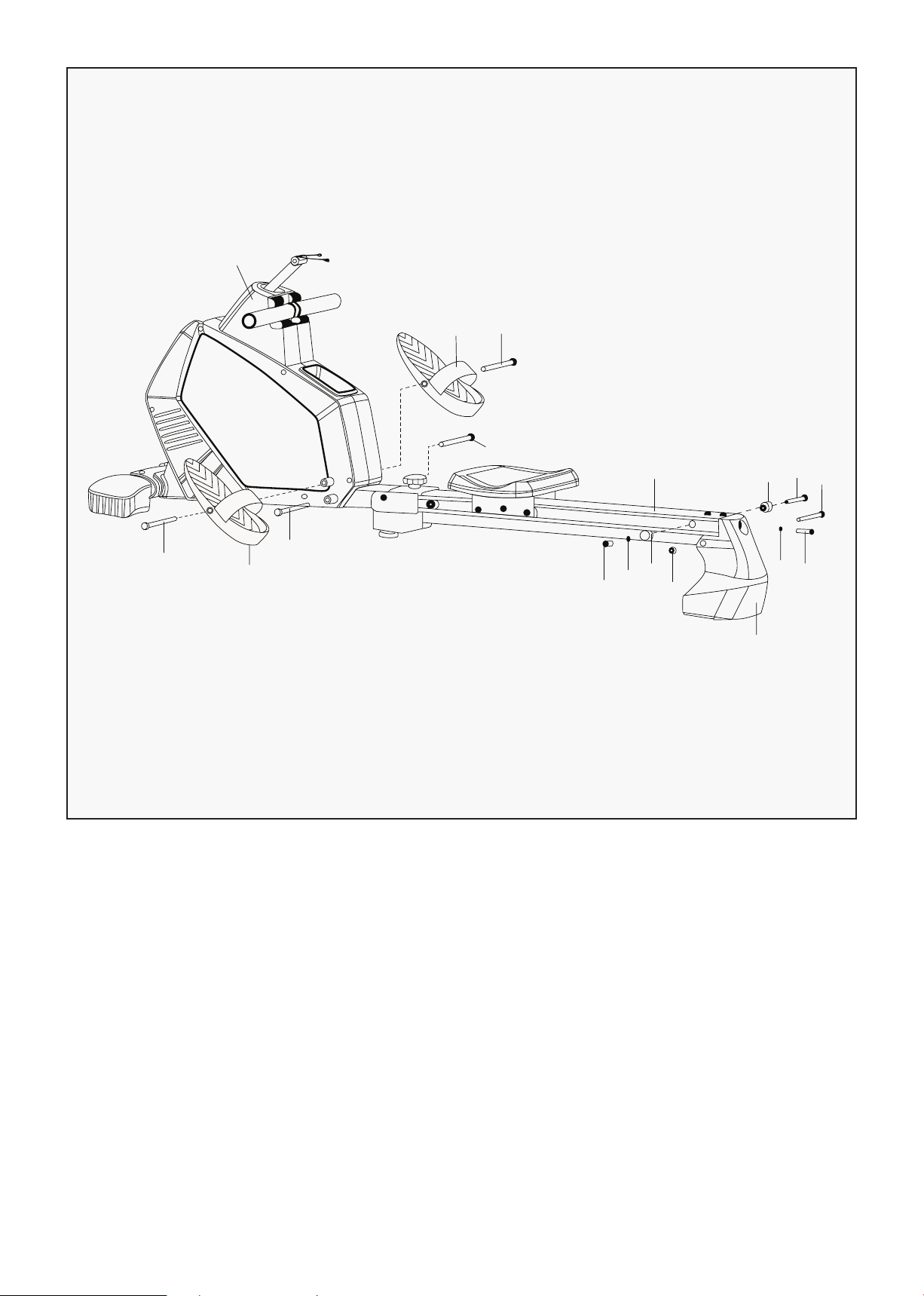
9
1. Attach the tail boom (24) to the guide rail (6) with inner hex bolt (22), nylon nut (10).
2. Attach the limiting base (15) to the guide rail (6) with axle for limiting base (16), flat washer (17) and
cross screw (18).
3. Attach the pedal (34) to the main frame (1) with the long bolt (33). Then attach the tail boom (24) to
the guide rail (6) with inner hex bolt (23) and flat washer (5).
ASSEMBLY INSTRUCTIONS |
STEP 4
1
34 33
33
33
34
33
6
18
17
15
10
24
23
5
22
16
15
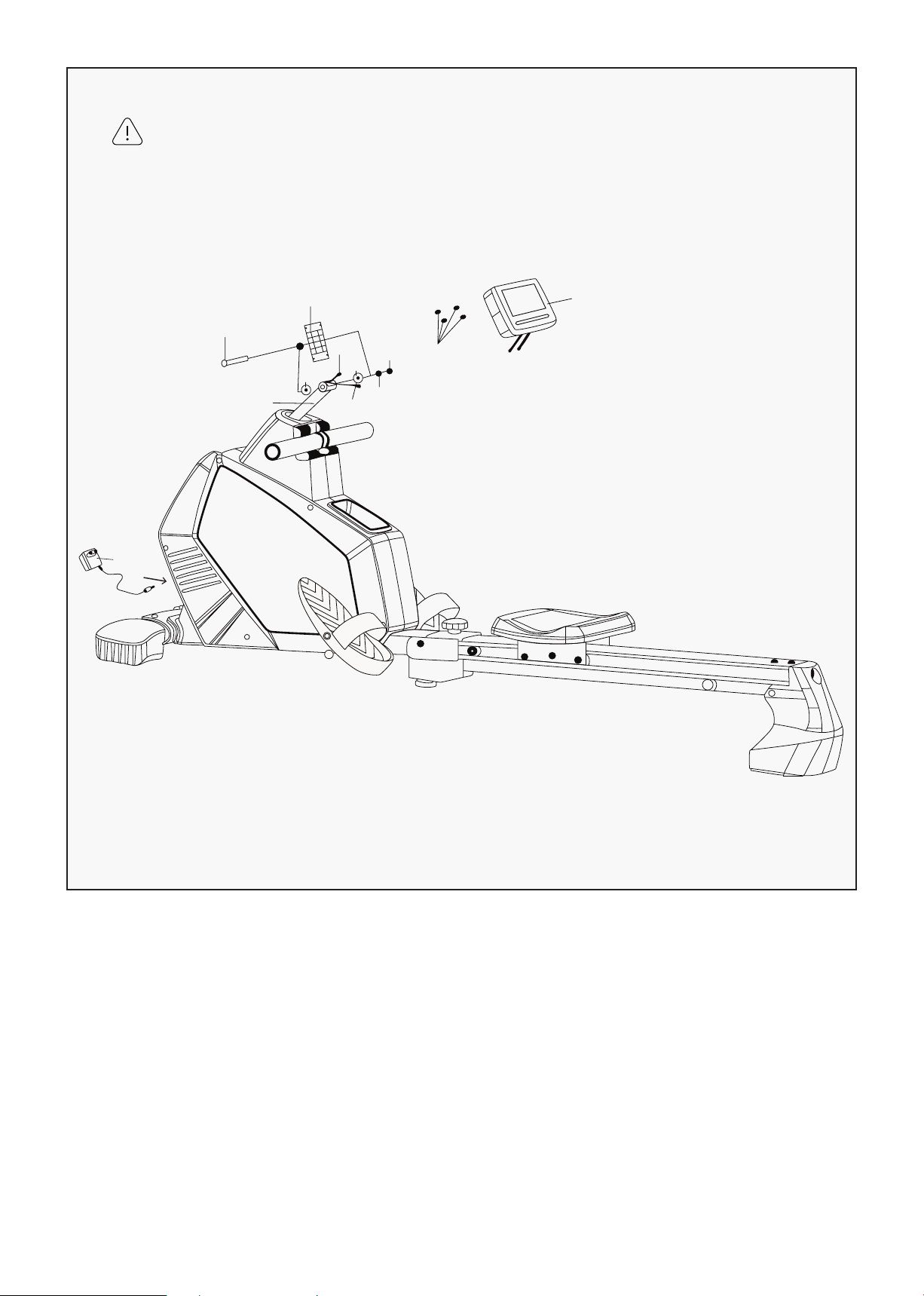
10
1. Extract the DC line (49) and sensor extensive wire (37) from the hole of console fixer (42).
2. Attach the console fixer (42) to the swing tube (48) with carriage bolt (43), cushion (44), flat
washer (5) and nylon nut (31).
3. Connect the motor wire (49) and sensor extended wire (37) with the wire of console (38). Then lock
the console (38) to console fixer (42) with screw (39).
4. Connect the adapter (47) to the power input port on the front of the machine.
STEP 5
38
39
31
5
37
49
44
44
42
43
48
WARNING:
Take care not to damage internal wires
when inserting bolt 43.
| ASSEMBLY INSTRUCTIONS
47
11
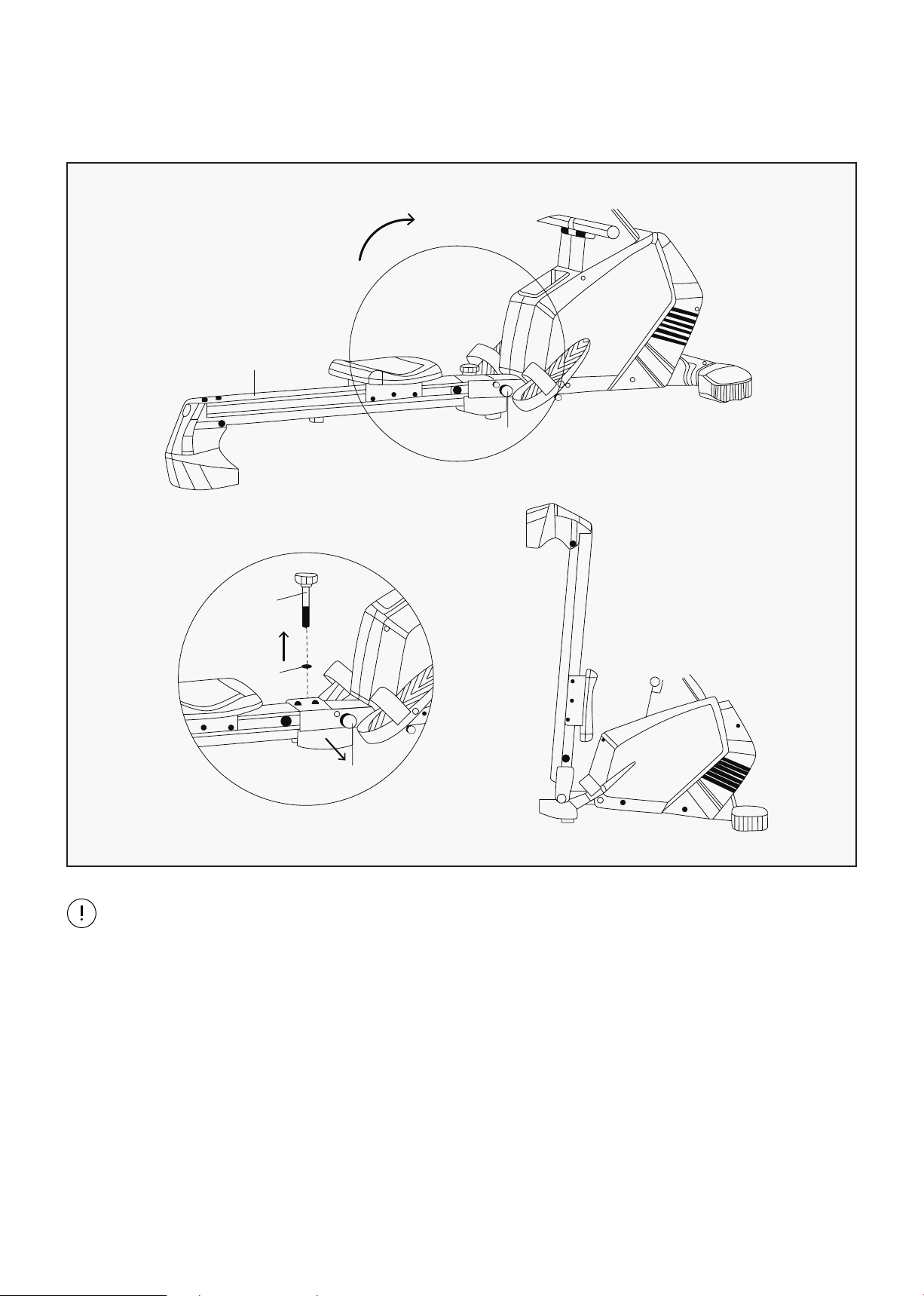
IV. FOLDING INSTRUCTIONS
6
14
32
13
14
B
NOTE:
Machine may be folded when not in use as per the diagram. It can be folded as per the picture
above. When you do this please take care of your hands.
A. Remove the knob (32) by loosening it in an anticlockwise direction then pulling the knob and
washer (13) together.
B. Remove the spring knob (14). Fold guide rail (6) easily to the suitable position as shown in the
following picture. Finally, tighten the guide rail (41) with the spring knob (14).
C. NOTE: The Rowing machine should look like picture B when fully folded.
FOLDING INSTRUCTIONS |
12
V. OPERATION GUIDE
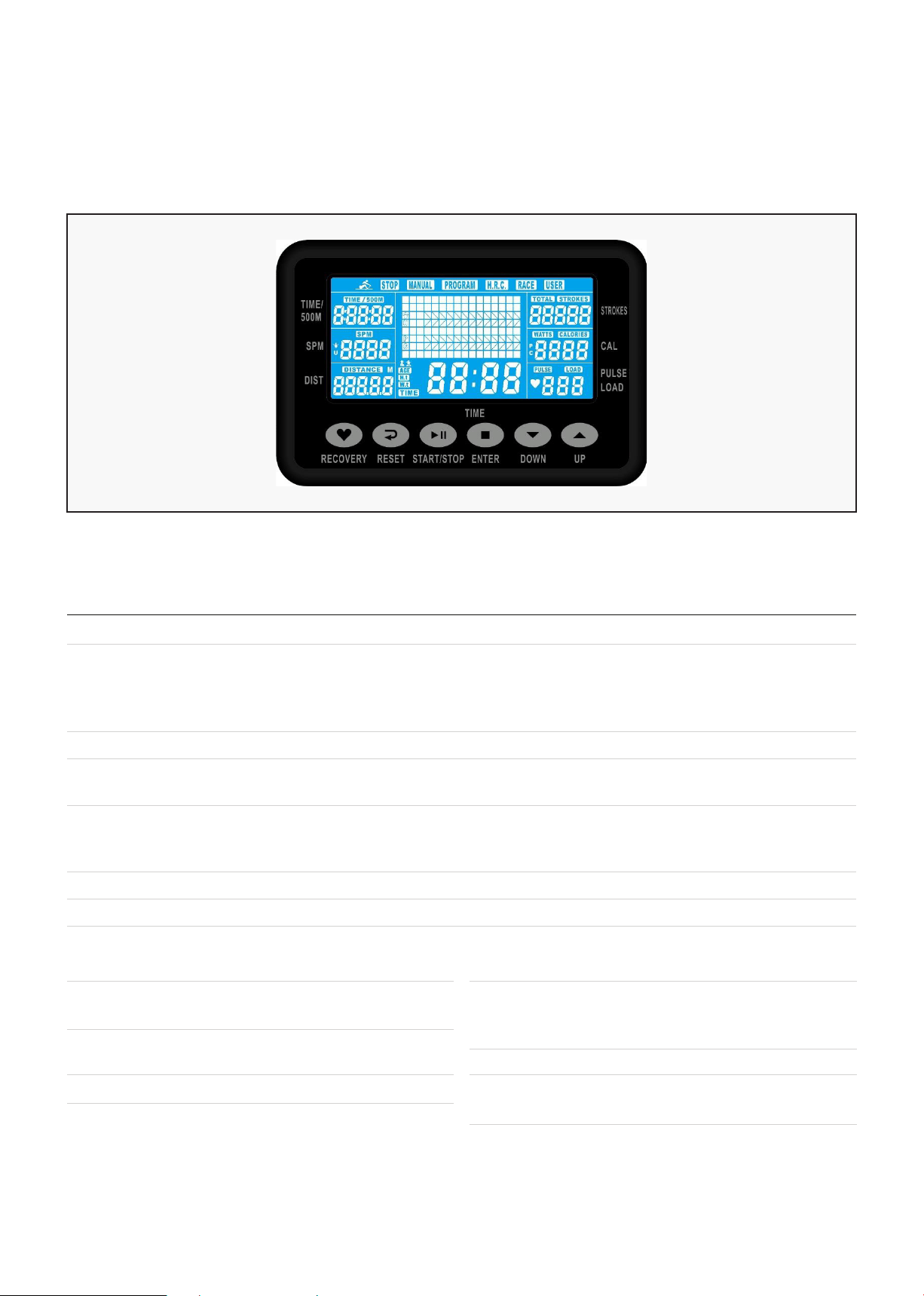
OVERVIEW
SPM 0~999 • Strokes per minute.
TIME/500m 0.0 ~ 99:00min. • Time per 500m;
• Scans every 6 seconds to display estimated
remaining time to finish 500 meters based
on current speed.
METERS 0~9999m • Setting range 50~1000.
CALORIES 0 ~ 9999 Cal. • Calories burnt during rowing. 1 = 10 calories.
• Setting range 0~9990.
STROKES 0~9999 • The movements when complete rowing.
• Scan and calculate Total strokes in every 6
seconds.
PULSE 30-240 BPM • 0-30~240Bpm.
WATT 0~999 • Display user exercise power.
Training Values Display Range Description/Setting Range
DISPLAY & BUTTON FUNCTIONS
Button Function
UP • Increase resistance level.
• Function selection.
DOWN • Decrease resistance level.
• Function selection.
ENTER • Confirm setting or selection.
RESET • Hold for 2 seconds, computer
will reboot.
Button Function
• Reset all values to zero.
• Return to main menu after
finishing a workout.
START/STOP • Start or Stop workout.
RECOVERY • Track user Heart rate in recovery
phase.
| OPERATION GUIDE
13
Acoustic Signals
All settings made with the computer are confirmed with an acoustic signal:
• 1 short beep = setting confirmed
• 2 short beeps =unable to confirm setting
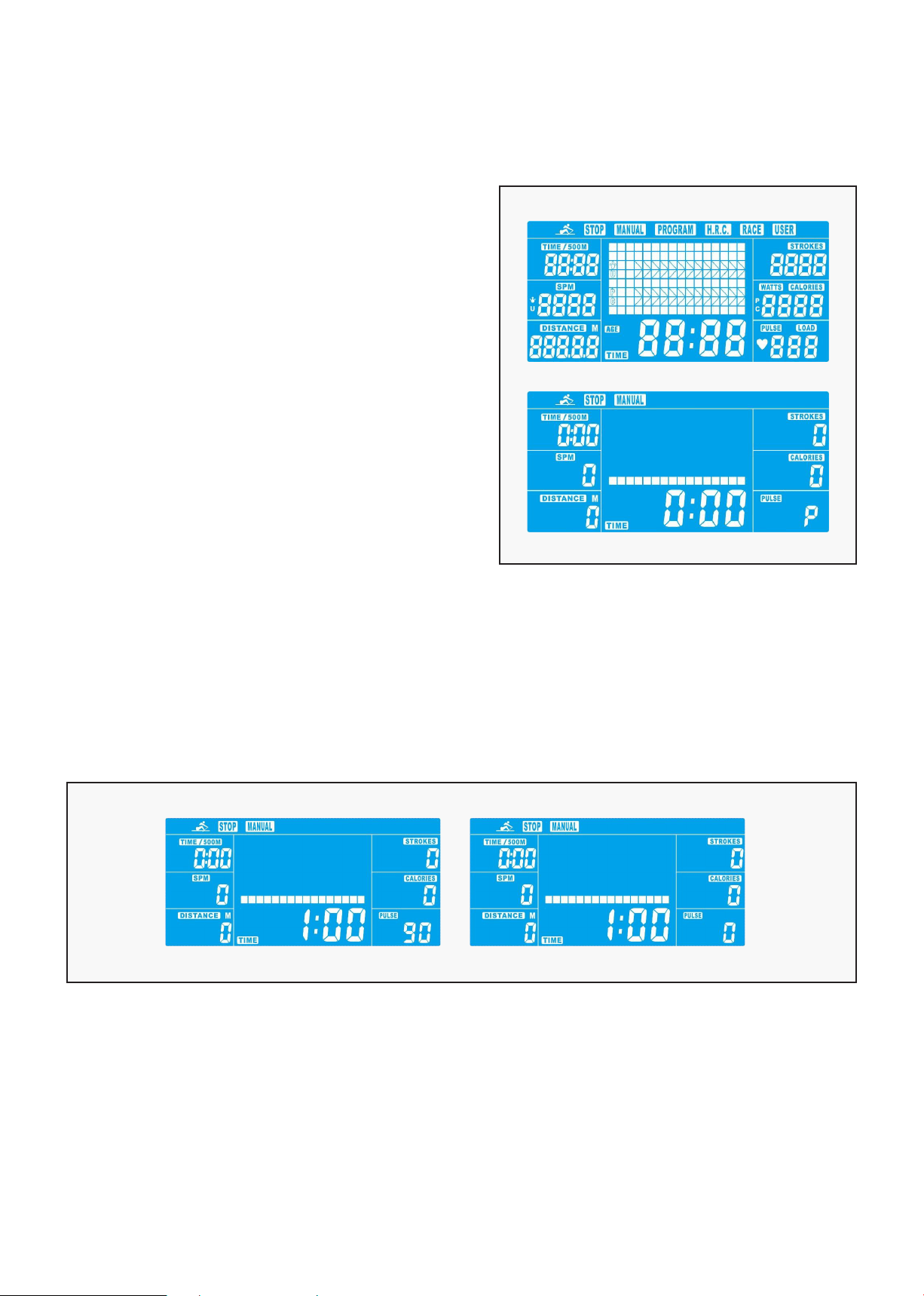
CHOOSING THE MODE
In starting state
MANUAL-->PROGRAM-->H.R.C.-->RACE-->USER
will flash at the top of the display.
Use UP and DOWN buttons to choose desire MODE
and confirm by pressing ENTER.
If you have previously selected a program or started
your workout, press RESET to return to the starting
state.
QUICK START (MANUAL)
• Press START/STOP to start workout immediately
without entering further settings.
• Press UP and DOWN keys to input personal targets and press ENTER to confirm. The following fields
will flash in turn:
A. Resistance level (1~16)
B. TIME (or METERS) (Time and Meters can’t preset at the same time.)
C. Calories
D. Pulse
Use UP & DOWN to set values and confirm your selection with the ENTER button.
Press START/STOP to start workout.
As soon as one of the set values reaches the personal target, the computer will beep twice and stop.
• You can adjust the level of resistance while rowing by pressing UP and DOWN keys. The newly set level
value will be shown in the profile (default value is Level 1).
• Press START/STOP to end workout.
OPERATION GUIDE |
14
PROGRAM MODE (PROGRAM)
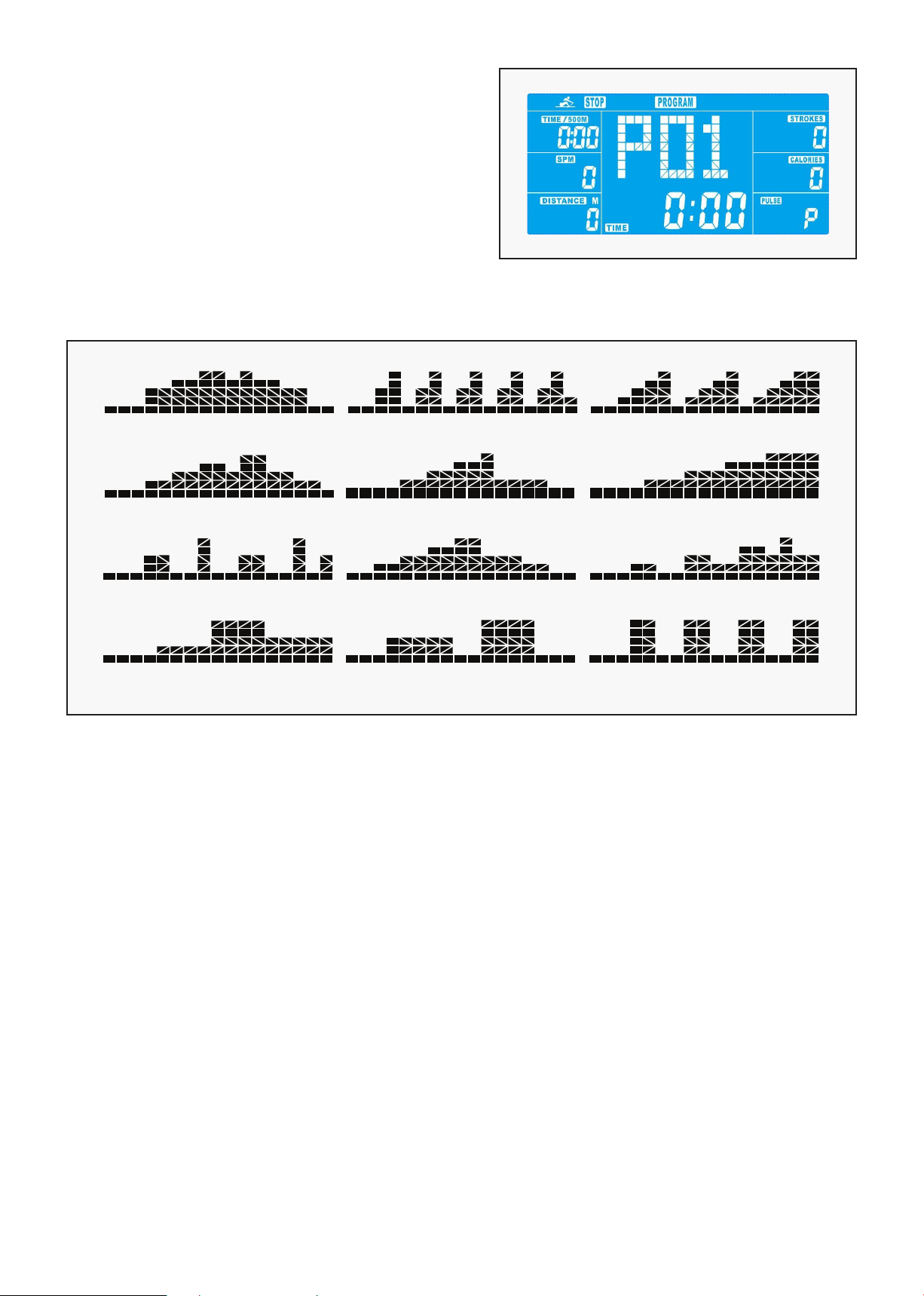
• Programs are pre-set with 12 profiles. Press UP and
DOWN to select one from the 12 available programs.
A. Resistance level (1~16)
B. TIME
• Press START/STOP to start workout.
• You can adjust resistance level on the paddles by
pressing the UP and DOWN keys. The newly set level
value will be shown on the display profile (default value is Level 1).
• Program profiles:
1 1 1
1
1 1
1 1 1
1 1 1
PROGRAM 1 PROGRAM 2 PROGRAM 3
PROGRAM 4 PROGRAM 5 PROGRAM 6
PROGRAM 7 PROGRAM 8 PROGRAM 9
PROGRAM 10 PROGRAM 11 PROGRAM 12
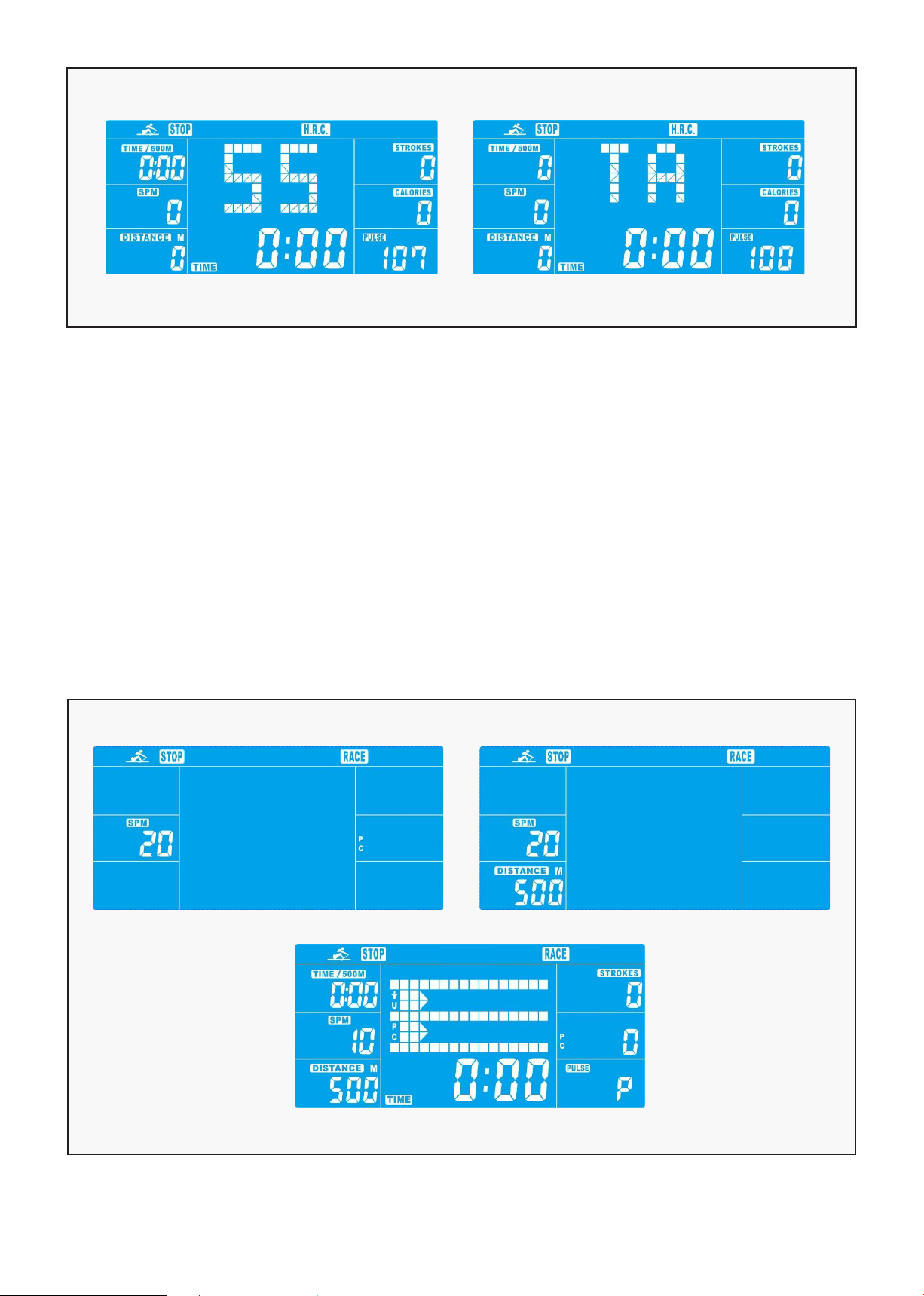
HEART RATE CONTROL PROGRAMS (H.R.C.)
In this program, the machine will react to your pulse as measured by wireless heart rate monitor. In
addition, simple graphics also show you whether you need to need to increase or decrease workout
intensity to reach target heart rate. Available options are:
• HRC55: 55% Max heart rate. Ideal for beginners and for general fat burning.
• HRC75: 75% Max heart rate. Suitable for experienced users and athletes.
• HRC90: 90% Max heart rate. The anaerobic range of 90% is only suitable for competitive athletes and
short sprint exercises.
• TA: Set a custom target heart rate between 30 and 240. Seek advice from your medical professional if
you are unsure as to what heart rate you should set.
• Set the desired session TIME with UP & DOWN buttons and press ENTER button to confirm.
• Press START/STOP to start workout.
For this program, it is necessary to wear the chest belt so that computer can detect and display your
heart rate value.
| OPERATION GUIDE
15
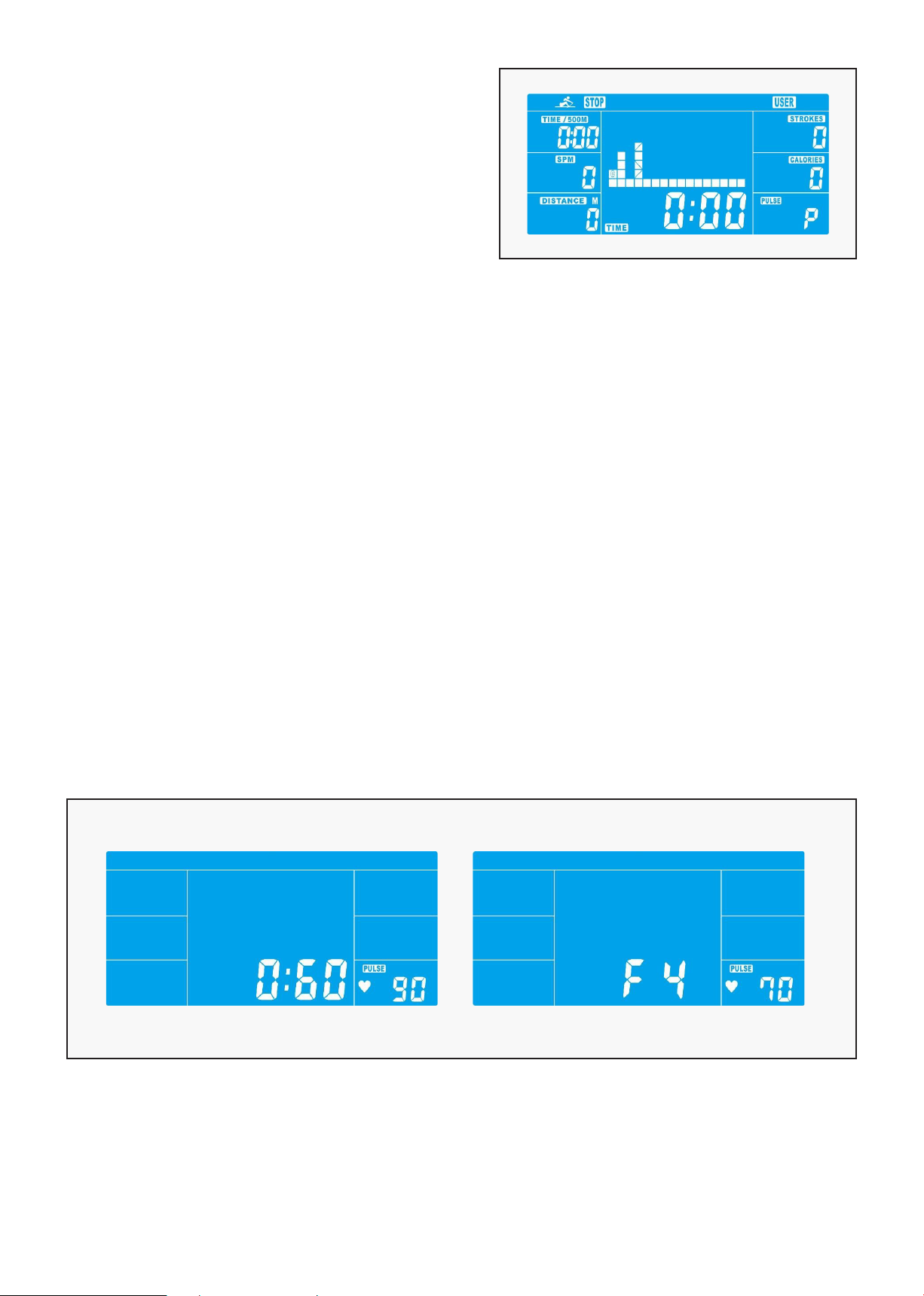
COMPETITION MODE (RACE)
In this program you will be rowing against the computer.
• Use UP/DOWN keys to select RACE and press ENTER to confirm.
• Use UP/DOWN keys to set SPM confirm by pressing ENTER.
• Use UP/DOWN keys to select desired rowing METERS and confirm by ENTER.
• Use UP/DOWN keys to adjust resistance level.
• Press START/STOP to start workout. Computer will display USER & Computer workout status.
• Press UP and DOWN to adjust resistance level during workout.
Once the User or the Computer finishes, the computer will stop and show Computer win or User win.
• Press START/STOP to end workout.
OPERATION GUIDE |
16
USER-DEFINED PROGRAMS (USER PROGRAM)
Design and save your own programs.
• Use UP/DOWN keys to select USER PROGRAM and
press ENTER to confirm. The first bar will be
displayed.
• Use UP/DOWN keys to set resistance level and
confirm with MODE button. The next bar will be
displayed.
• Continue this process to set up all 16 bars. The maximum resistance level is 16. To finish or quit
setting, hold down the ENTER button.
• Set the desired session TIME with UP/DOWN buttons and press ENTER to confirm.
• Press START/STOP to start workout.
Once the program is complete, the computer will beep twice and stop.
• You can adjust the level of resistance while rowing by pressing UP and DOWN keys. The newly set level
value will be shown in the profile (default value is Level 1).
• Press START/STOP to end workout.
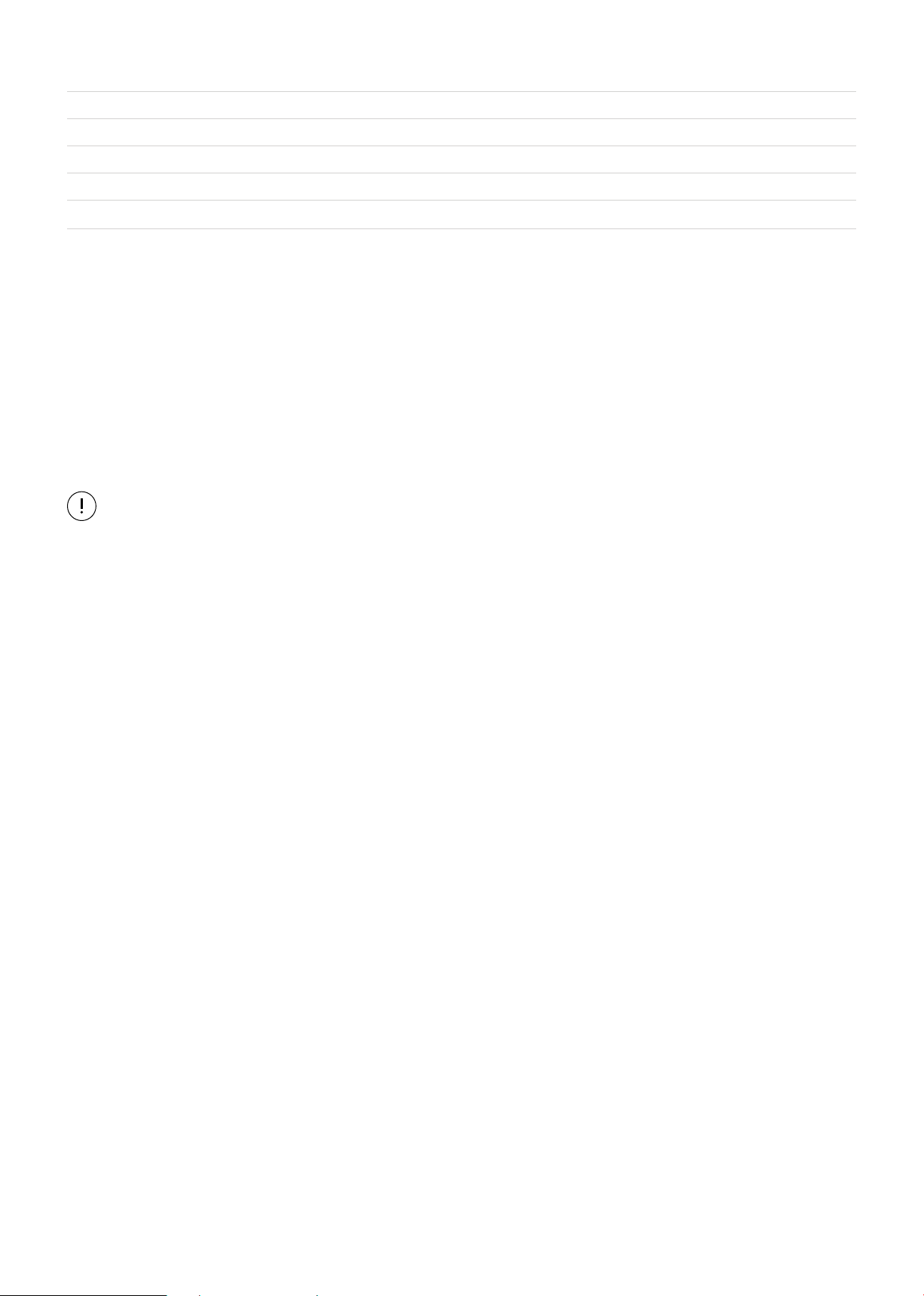
RECOVERY
It is recommended to end an intensive rowing session with a recovery phase. During this phase you
should be able to relax and row without strong resistance until your pulse slows close to its usual rate.
• Press RECOVERY button and ensure chest belt is on correctly.
TIME will show with countdown from 60 seconds to 0, all other functions are not available.
Once the 60 seconds is up, the recovery phase is over, an evaluation of the achieved heart rate will be
shown.
| OPERATION GUIDE
17
1.0 Outstanding
1.0 < F < 2.0 Excellent
2.0 < F < 2.9 Good
3.0 < F < 3.9 Fair
4.0 < F < 5.9 Below Average
6.0 Poor
If you achieve values between 4 and 6, you could restart the recovery program to gradually slow your
heart rate further.
TROUBLESHOOTING
E-2: Motor stroke over the normal range. Plug the adaptor in again. Repower the console for the motor to
return to normal range.
E-7: Check for damage to computer cables.
If only a "P" is shown instead of pulse value, the computer is not detecting a heart rate signal.
Check that you are wearing the wireless heart rate monitor correctly.
OPERATION GUIDE |
18
VI. EXERCISE GUIDE
PLEASE NOTE:
Before beginning any exercise program, consult your physician. This is important especially if you are
over the age of 45 or individuals with pre-existing health problems.
The pulse sensors are not medical devices. Various factors, including the user’s movement, may
affect the accuracy of heart rate readings. The pulse sensors are intended only as an exercise aid in
determining heart rate trends in general.
Exercising is great way to control your weight, improving your fitness and reduce the effect of aging and
stress. The key to success is to make exercise a regular and enjoyable part of your everyday life.
The condition of your heart and lungs and how efficient they are in delivering oxygen via your blood to
your muscles is an important factor to your fitness. Your muscles use this oxygen to provide enough
energy for daily activity. This is called aerobic activity. When you are fit, your heart will not have to work
so hard. It will pump a lot fewer times per minute, reducing the wear and tear of your heart.
So as you can see, the fitter you are, the healthier and greater you will feel.
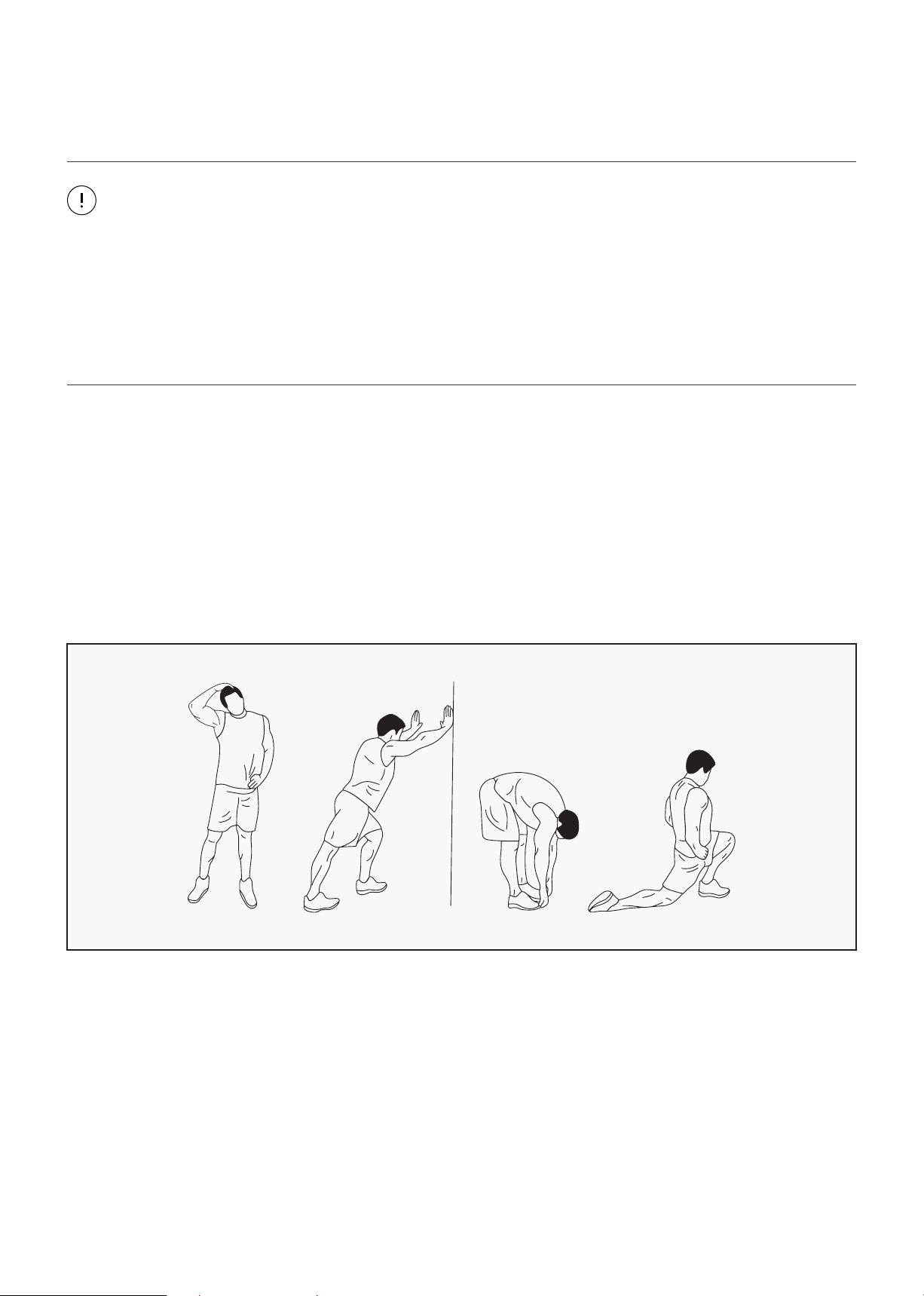
WARM UP
Start each workout with 5 to 10 minutes of stretching and some light exercises. A proper warm-up
increases your body temperature, heart rate and circulation in preparation for exercise. Ease into your
exercise.
| EXERCISE GUIDE
19
TRAINING ZONE EXERCISE
After warming up, increase the intensity to your desired exercise program. Be sure to maintain your
intensity for maximum performance. Breathe regularly and deeply as you exercise.
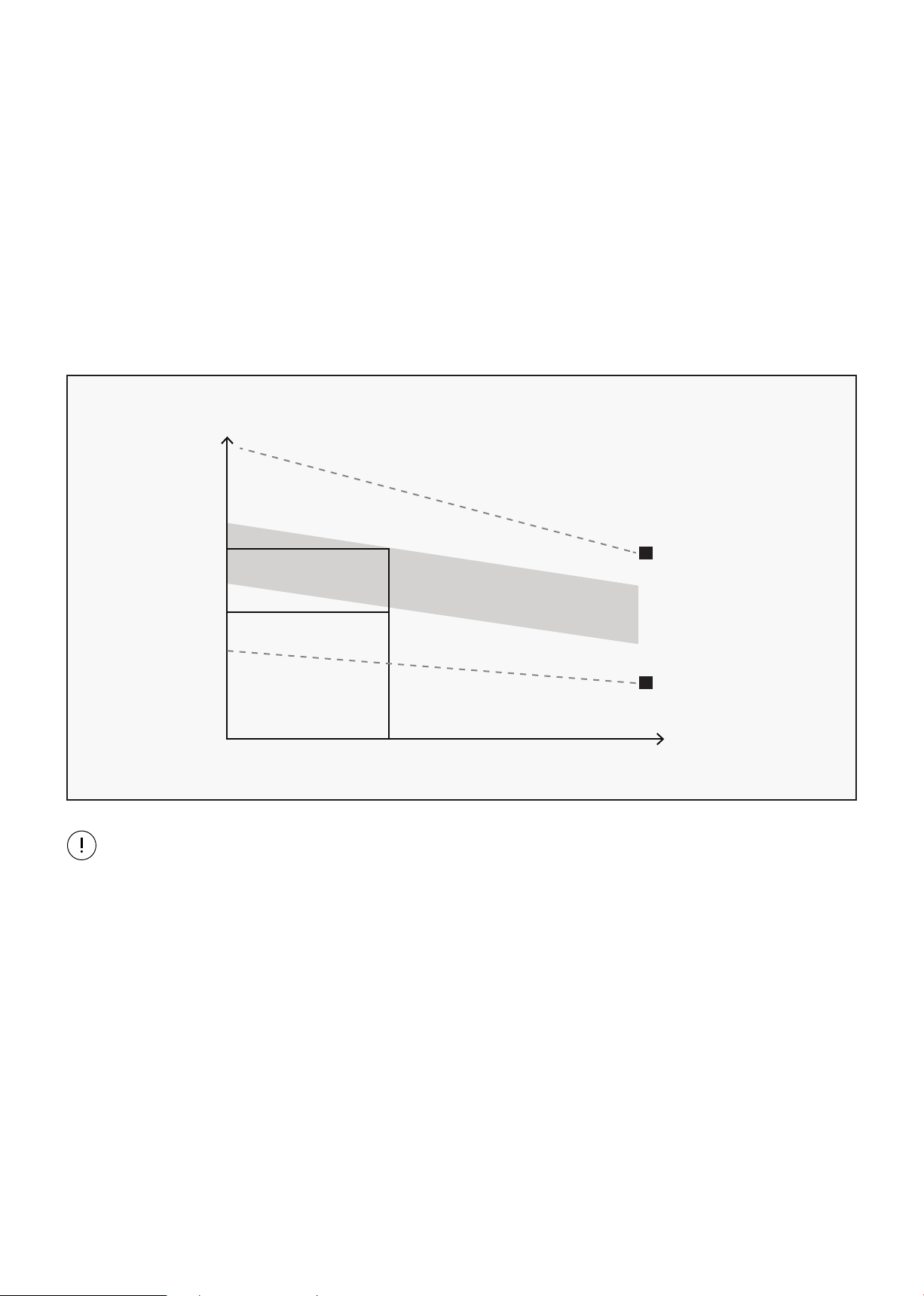
WORKOUT GUIDELINES
This is how your pulse should behave during general fitness exercise. Remember to warm up and
cool down for a few minutes.
TARGET ZONE
MAXIMUM
85%
70%
COOL DOWN
AGE
HEART RATE
200
180
160
140
120
100
80
20 25 30 35 40 45 50 55 60 65 70 75
COOL DOWN
Finish each workout with a light jog or walk for at least 1 minute. Then complete 5 to 10 minutes of
stretching to cool down. This will increase the flexibility of your muscles and will help prevent post-
exercise problems.
EXERCISE GUIDE |
20
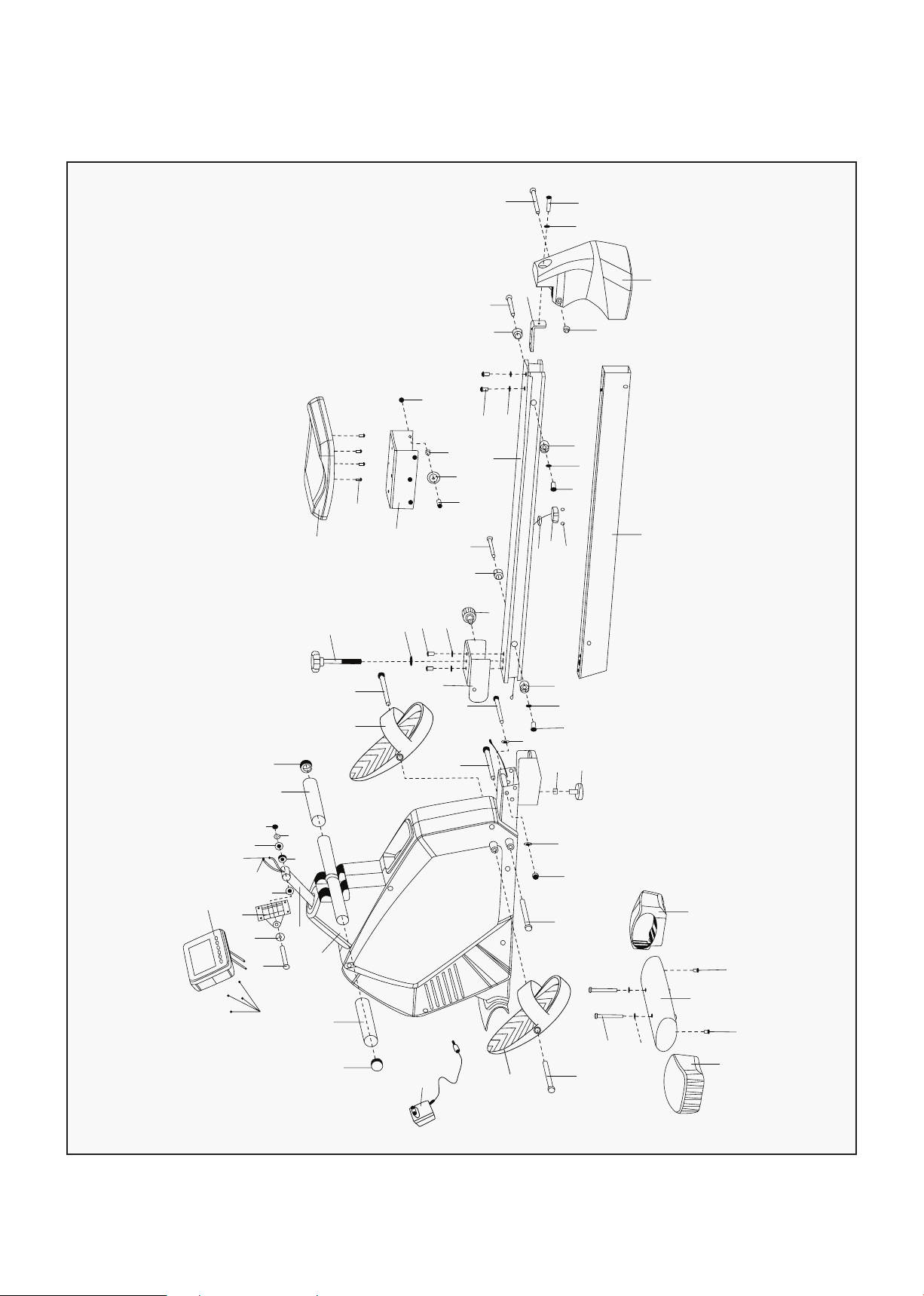
VI. EXPLODED DIAGRAM
38
39
43
44
42
48
45
37
49
44
31
5
45
1
36
35
36
35
47
34
33
33
4
5
3L
40
40
2
3R
10
9
19
20
18
17
15
9
8
33
11
33
34
32
13
12
5
15
14
16
41
46
40
7
18
17
15
6
28
30
29
31
27
26
25
12
5
21
15
16
10
24
5
23
22
| EXPLODED DIAGRAM

21
VIII. PARTS LIST
No. Description Qty
1 Main Frame 1
2 Front Bottom Tube 1
3L/R Front End Cap 1 pr
4 Inner Hex Bolt M8X75 2
5 Flat Washer D8X1.5 8
6 Guide Rail 1
7 Lead Rail Tube 1
8 Outer Hex Bolt M10X125 1
9 Flat Washer D10X2 2
10 Nylon Nut M10 2
11 Connected U-shape Plate 1
12 Screw M8X20 4
13 Flat Washer D12X2.5 1
14 Spring Knob 1
15 Limiting Base 4
16 Axle for Limiting Base 10.9X80 2
17 Flat Washer D6XD16X1.2 2
18 Cross Screw M6*15 2
19 Bolt M10 1
20 Adjustable Knob 1
21 L-shaped Connected Plate 1
22 Inner Hex Bolt M10X110 1
23 Inner Hex Bolt M8X45 1
24 Tail Boom 1
25 Seat 1
No. Description Qty
26 Cross Screw M6X20 4
27 Glide Saddle Post 1
28 Screw M8X28 6
29 Spacer 6
30 Roller 6
31 Nylon Nut M8 7
32 Knob 1
33 Long Bolt M12X155 X16 4
34 Pedal 2
35 Round Bushing 2
36 Foam Grip 2
37 Sensor Extended Wire 1
38 Console 1
39 Screw 4
40 Screw ST4.2X18 4
41 Bushing 1
42 Console Fixer 1
43 Carriage Bolt M8*74 1
44 Cushion 2
45 Alloy Bushing 2
46 Receiver 1
47 Adaptor 1
48 Swing Tube 1
49 Motor Wire 1
50 Extensible Cover 1
PARTS LIST |
22
IX. WARRANTY
| WARRANTY
AUSTRALIAN CONSUMER LAW
Many of our products come with a guarantee or warranty from the manufacturer. In addition, they come
with guarantees that cannot be excluded under the Australian Consumer Law. You are entitled to a
replacement or refund for a major failure and compensation for any other reasonably foreseeable loss
or damage.
You are entitled to have the goods repaired or replaced if the goods fail to be of acceptable quality and
the failure does not amount to a major failure. Full details of your consumer rights may be found at
www.consumerlaw.gov.au.
Please visit our website to view our full warranty terms and conditions:
http://www.lifespanfitness.com.au/warranty-repairs
WARRANTY AND SUPPORT
Any claim against this warranty must be made through your original place of purchase.
Proof of purchase is required before a warranty claim may be processed.
If you have purchased this product from the Official Lifespan Fitness website, please visit
https://lifespanfitness.com.au/warranty-form
For support outside of warranty, if you wish to purchase replacement parts or request a repair or
service, please visit https://lifespanfitness.com.au/warranty-form and fill in our Repair/Service
Request Form or Parts Purchase Form.
Scan this QR code with your device to go to lifespanfitness.com.au/warranty-form


WWW.LIFESPANFITNESS.COM.AU