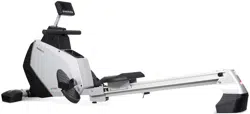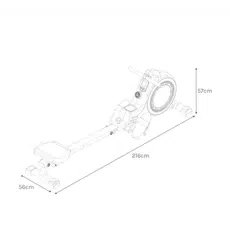
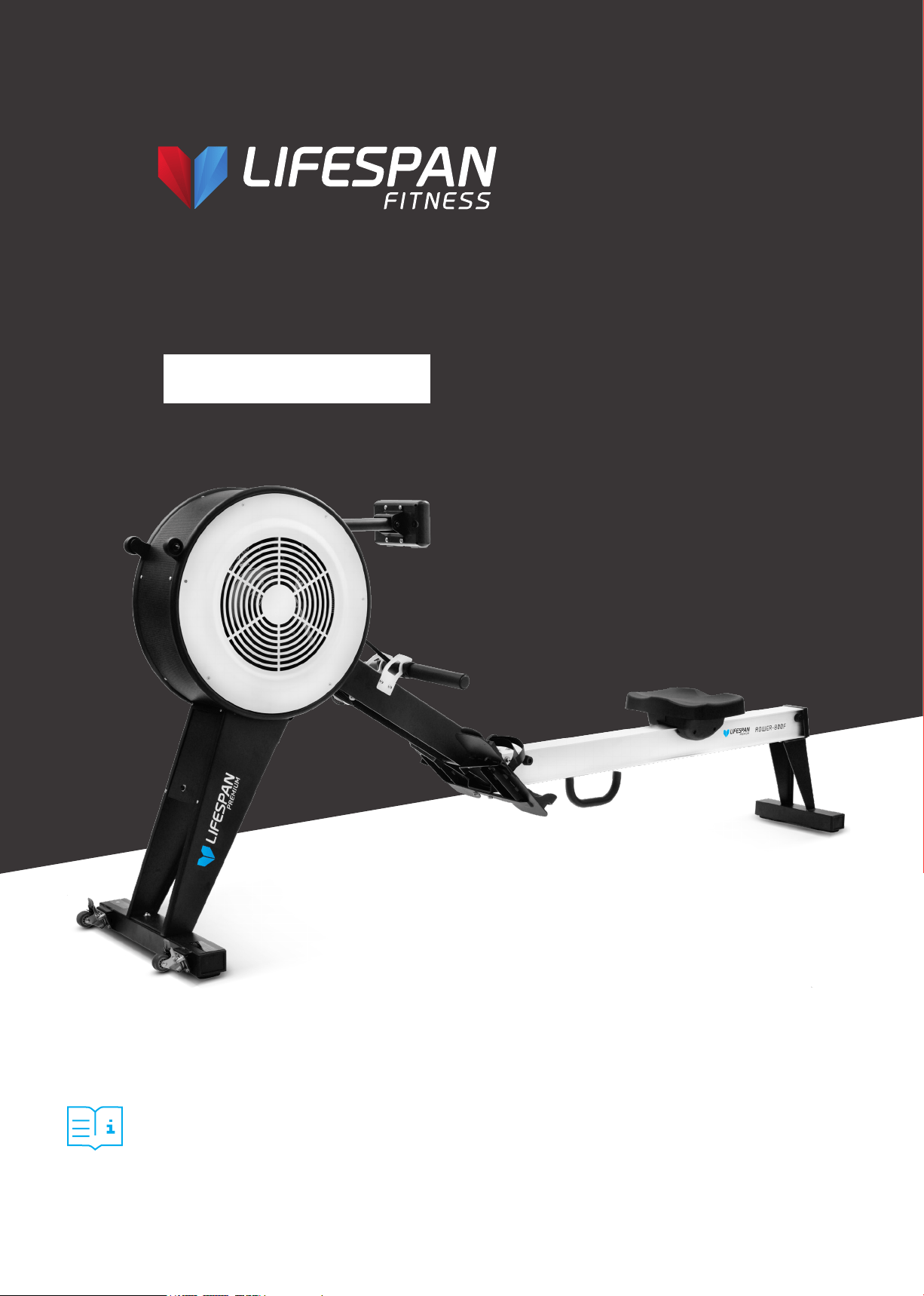
Product may vary slightly from the item pictured due to model upgrades.
Read all instructions carefully before using this product.
Retain this owner’s manual for future reference.
NOTE:
This manual may be subject to updates or changes. Up to date manuals are available through our
website at www.lifespanfitness.com.au
ROWER-800F
USER MANUAL



4
TABLE OF
CONTENTS
I. Important Safety Instructions . . . . . . . . . . . . . . . . . . . . . . . . . . . . . . . 05
II. Care Instructions . . . . . . . . . . . . . . . . . . . . . . . . . . . . . . . . . . . . . . . . . . . . . 06
III. Assembly Instructions . . . . . . . . . . . . . . . . . . . . . . . . . . . . . . . . . . . . . . . 07
IV. Operation Guide . . . . . . . . . . . . . . . . . . . . . . . . . . . . . . . . . . . . . . . . . . . . . . 11
V. Exercise Guide . . . . . . . . . . . . . . . . . . . . . . . . . . . . . . . . . . . . . . . . . . . . . . . . 16
VI. Exploded Diagram . . . . . . . . . . . . . . . . . . . . . . . . . . . . . . . . . . . . . . . . . . . . 18
VII. Parts List . . . . . . . . . . . . . . . . . . . . . . . . . . . . . . . . . . . . . . . . . . . . . . . . . . . . . . 20
VIII. Warranty . . . . . . . . . . . . . . . . . . . . . . . . . . . . . . . . . . . . . . . . . . . . . . . . . . . . . . 22
| TABLE OF CONTENTS
5
I. IMPORTANT SAFETY
INSTRUCTIONS
WARNING: Read all instructions before using this machine.
It is important your machine receives regular maintenance to prolong its useful life. Failing to
regularly maintain your machine may void your warranty.
Please keep this manual with you at all times.
• It is important to read this entire manual before assembling and using the equipment. Safe and
effective use can only be achieved if the equipment is assembled, maintained and used properly.
PLEASE NOTE: It is your responsibility to ensure that all users of the equipment are informed of all
warnings and precautions
• Before starting any exercise program you should consult your doctor to determine if you have any
medical or physical conditions that could put your health and safety at risk, or prevent you from
using the equipment properly. Your doctor’s advice is essential if you are taking medication that
affects your heart rate, blood pressure or cholesterol level.
• Be aware of your body’s signals. Incorrect or excessive exercise can damage your health. Stop
exercising if you experience any of the following symptoms: pain, tightness in your chest, irregular
heartbeat, and extreme shortness of breath, lightheadedness, dizziness or feelings of nausea. If you
do experience any of these symptoms, you should consult your doctor before continuing with your
exercise program.
• Keep children and pets away from the equipment. This equipment is designed for adult use only.
• Use the equipment on a solid, flat level surface with a protective cover for your floor or carpet.
To ensure safety, the equipment should have at least 2 meters of free space around it.
• Before using the equipment, check that the nuts and bolts are securely tightened. If you hear any
unusual noises coming from the equipment during use and assembly, stop immediately. Do not use
the equipment until the problem has been rectified.
• Wear suitable clothing while using the equipment. Avoid wearing loose clothing that may get caught
in the equipment or that may restrict or prevent movement.
• This equipment is designed for indoor and family use only.
• Care must be taken when lifting or moving the equipment so as not to injure your back.
IMPORTANT SAFETY INSTRUCTIONS |

6
• Always keep this instruction manual and assembly tools at hand for reference.
• The equipment is not suitable for therapeutic use.
• The pulse or heart rate sensors are not medical devices. Various factors, including the user’s
movement, may affect the accuracy of heart rate readings. The pulse sensors are intended only as
exercise aids in determining heart rate trends in general.
II. CARE INSTRUCTIONS
• Lubricate moving joints with grease after periods of usage.
• Be careful not to damage plastic or metal parts of the machine with heavy or sharp objects.
• The machine can be kept clean by wiping it down using dry cloth.
• All nuts and bolts are to be checked and tightened on a regular basis. This includes pedals and other
moving parts. Failure to do so may cause damage to your thread and void your warranty.
• Check AC adaptor is plugged in correctly and do not use if cord is damaged.
| CARE INSTRUCTIONS
7
III. ASSEMBLY INSTRUCTIONS
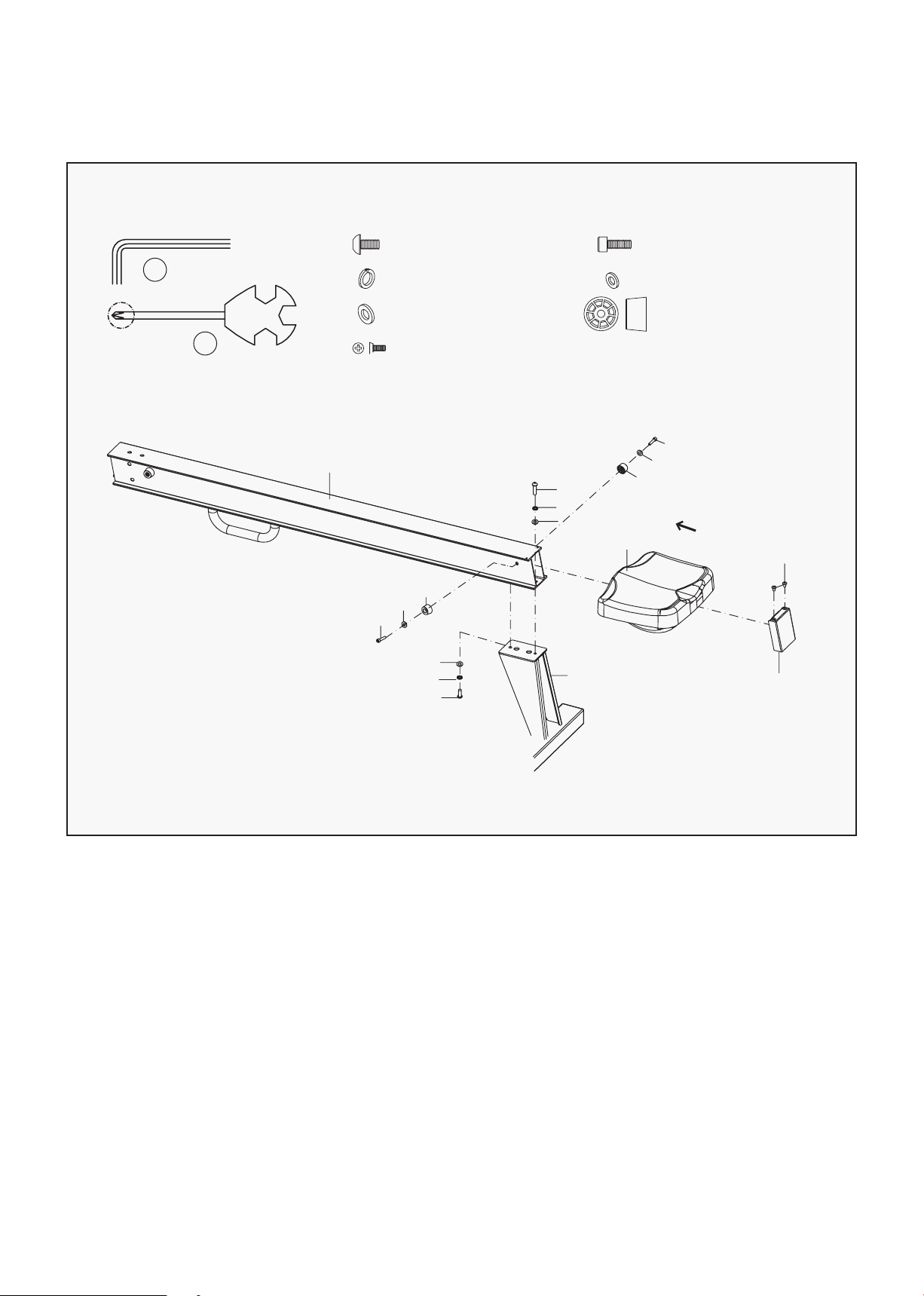
1. Secure rear support frame(40) with aluminium rail(41) using bolts(30), spring washers(38) and
washers (31) by spanner (A);
2. Attach seat (51) onto aluminium rail (41);
3. Install locating mounts (66) to aluminium rail (41) using bolts (67) and washers (68) by spanner (A);
4. Attach back end cap (77) to aluminium rail (41) using screws (11) by spanner(B).
ASSEMBLY INSTRUCTIONS |
STEP 1
A
B
#30 M8*20*S5 2PCS
#38 d8 2PCS
#31 d8*Φ20*2 2PCS
#11 M5*10 2PCS
#67 M6*30*S5 2PCS
#68 d6 2PCS
#66 Φ27 2PCS
41
67
68
66
31
38
30
40
30
38
31
51
67
68
66
11
77
8
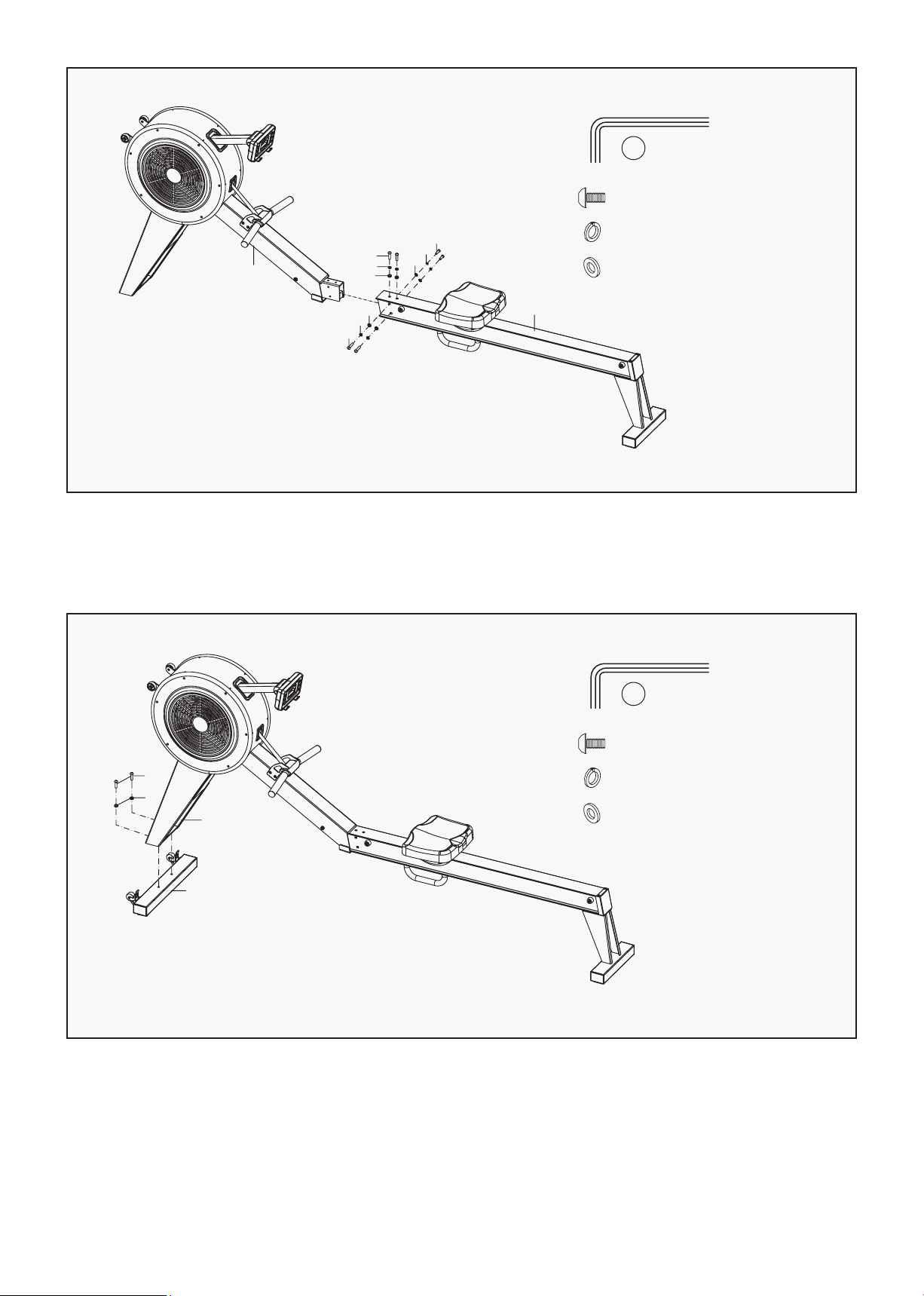
1. Connect aluminium rail (41) with main frame (24);
2. Then secure them using bolts (30), spring washers (38) and washers (31) by spanner (A).
STEP 2
A
#30 M8*20*S5 6PCS
#38 d8 6PCS
#31 d8*Φ20*2 6PCS
24
30
38
31
31
38
30
31
38
30
41
1. Attach front stabilizer (48) to main frame (24) using bolts (30) and washer (31) by spanner (A).
STEP 3
A
#30 M8*20*S5 6PCS
#38 d8 6PCS
#31 d8*Φ20*2 6PCS
48
24
31
30
| ASSEMBLY INSTRUCTIONS
9
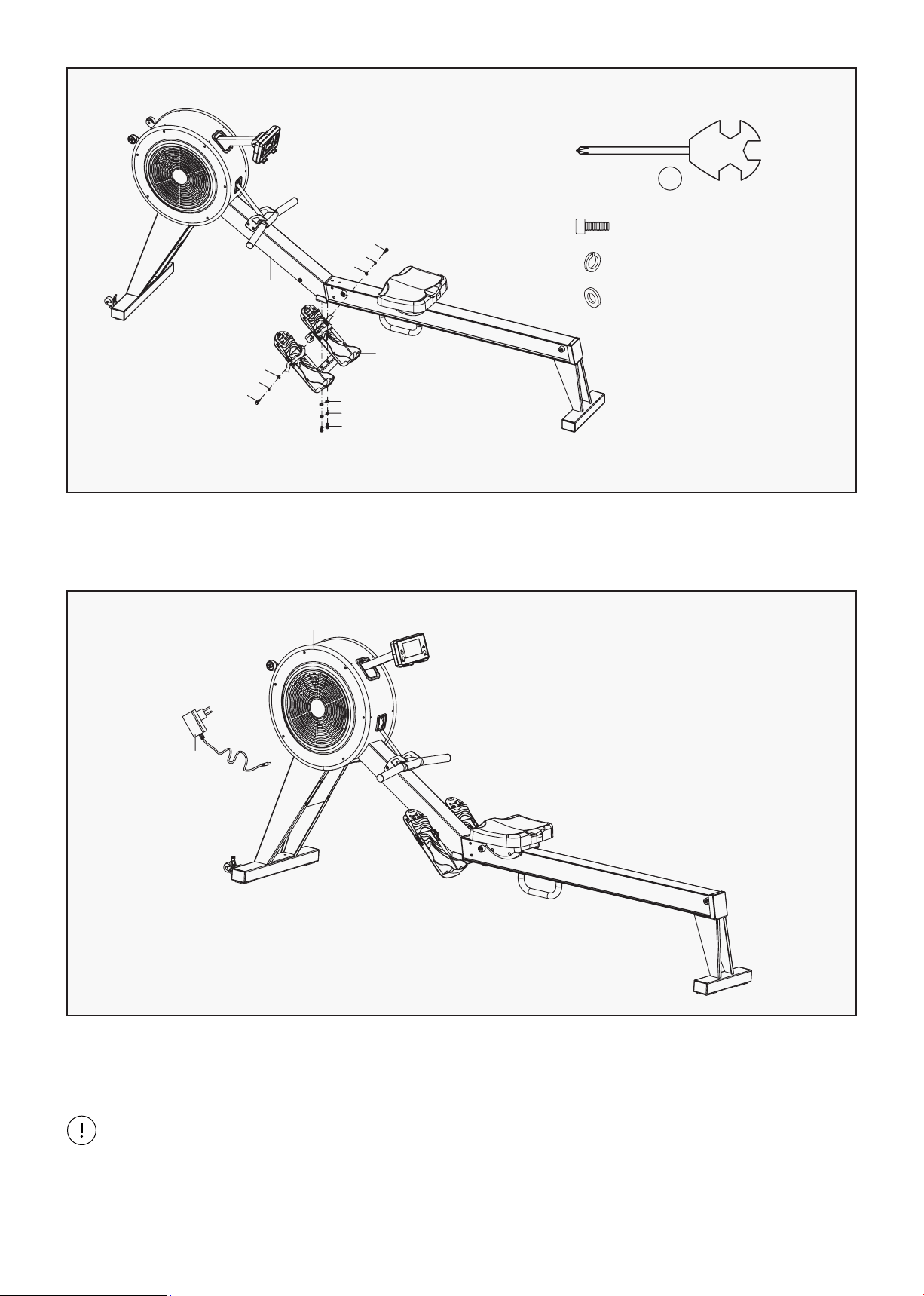
1. Secure pedal plate (39) to main frame (24) using bolts (37), spring washers (38) and washers (31)
by wrench (B).
ASSEMBLY INSTRUCTIONS |
STEP 4
#37 M8*20*S13 4PCS
#38 d8 4PCS
#31 d8*Φ20*2 4PCS
1. Insert the adapter line (8) to power hole on the back of main frame (24), then plug the adapter
into an outlet.
STEP 5
B
S13
24
31
38
37
31
38
37
39
31
38
37
Attention: Cut off the power source when not in use for many days.
8
24
10
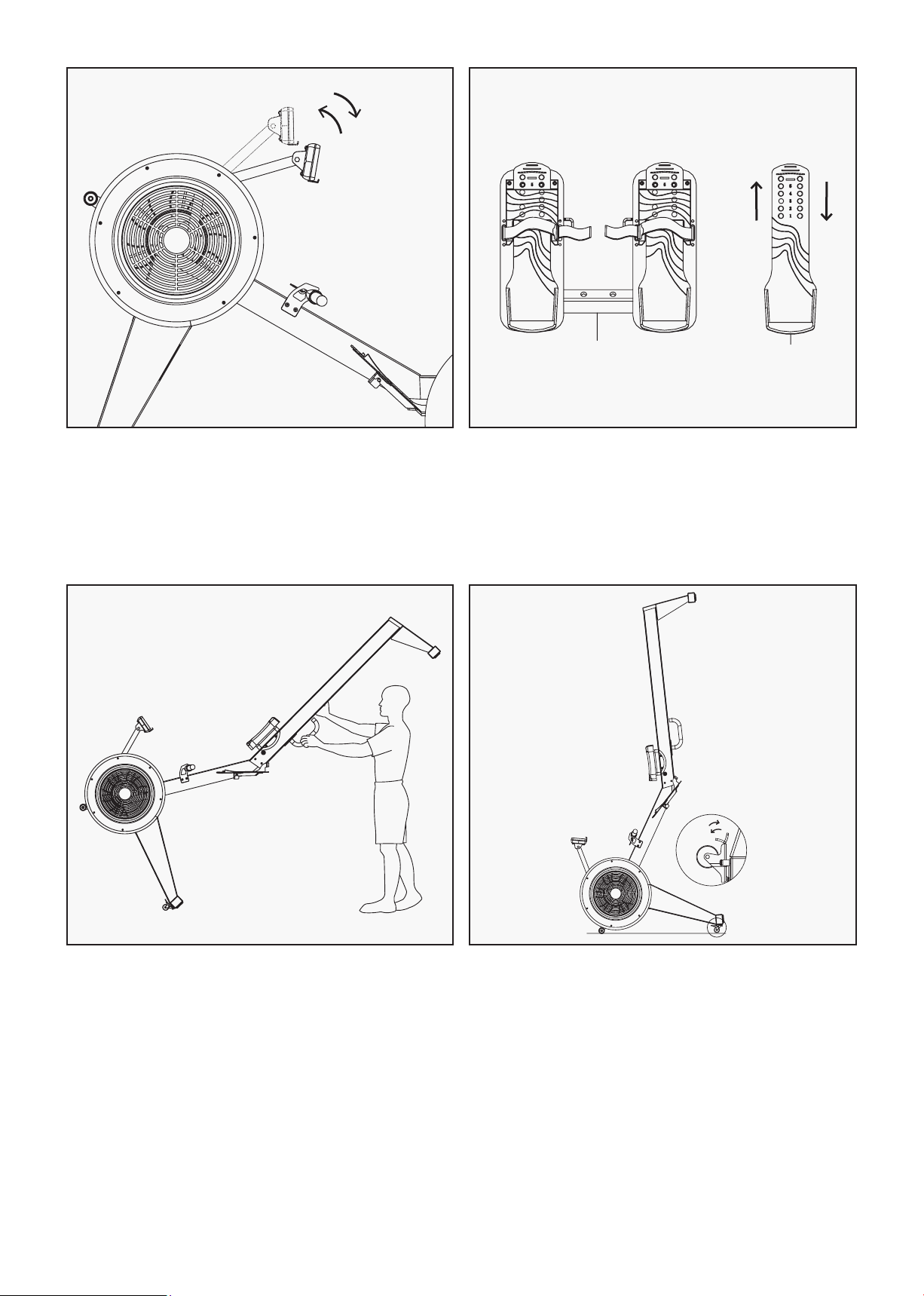
The rotation angle of computer post can be
adjusted to obtain the best view of the console
LCD Screen.
ADJUSTING DISPLAY ANGLE
The pedal strap and the pedal is adjustable and
can be personalised to fit the user’s foot size.
ADJUSTING PEDAL STRAPS
39
44
To move the machine, one hand hold the
handlebar, another hand hold the rail to lift
up the rail until the transportation wheels on
the front stabilizer touch the ground. With the
wheels on the ground, you can transport the
bike to the desired location with ease.
MOVING THE MACHINE
When not in use you can save space by pulling
down the brake pad of the caster (32) and
stand up the rowing machine.
STORING THE MACHINE
| ASSEMBLY INSTRUCTIONS

11
IV. OPERATION GUIDE
COUNT: Showing your current speed. Range: 0.0~999 count.
RPM: Showing the current rotate per minute. Range: 0~999.
TIME: The accumulative exercise time, range: 0:00~99M59S. The preset time range is 5:00~99M00S.
The computer will start to count down from preset time to 0:00 with average time for each resistance
level. When it reaches to zero, the program will stop and computer alarm. If you do not preset the time, it
will run with one-minute decrement each resistance level.
DIST: The exercise accumulative distance. Range: 0.0~99.9~999KM the preset distance range:
1.0~99.0~999. When the distance reaches 0, the program will stop, and the computer will alarm.
CALORIE: The exercise accumulative calories burnt. Range: 0.0~99.9~999 the preset calories range:
10.0~90.0~990. When the calorie reaches 0, the program will stop, and the computer will alarm.
PULSE: Showing the exercise heart rate value. Range: 60~240BPM (beat per minute).
RESISTANCE LEVEL: Showing level. Range:1~16.
WATT: Show the exercise watt, the interval should be 10, between 30-350.
OPERATION GUIDE |
1. DISPLAY
I. ENTER:
• In "stop" mode, press ENTER button to enter program selection and setting value which flash in
related window.
A. When you choose the program, press Enter to confirm the one you like.
B. When in setting, press ENTER to confirm the value that you would like to preset.
• During the start mode, press ENTER to choose to display the count or RPM or switch automatically.
II. START/STOP:
• Press START/STOP button to start or stop the programs.
• During any mode, hold down this button for 2 seconds to totally reset the computer.
III. UP:
• In stop mode and the dot matrix character flash, press this button to select the program up. If the
related window value flash, press this button to increase the value.
• During the start mode, press this button to increase the training resistance.
2. BUTTONS

12
IV. DOWN:
• In stop mode and the dot matrix character flash, press this button to select the program down. If the
related window value flash, press this button to decrease the value.
• During the start mode, press this button to decrease the training resistance.
NOTE:
• To press or rotate of UP, DOWN button should be followed by different model.
• It is suggested to cover your finger within the marked region to select functions in case of
any wrong action.
I. Turn on the computer.
Plug in one end of the adaptor to the AC electrical source and connect the other end to the computer.
The computer will beep and enter into initial mode.
II. Program select and value setting.
• Manual Program and Pre-set Program P1~P10
A. Press UP, DOWN button to select the program that you like.
B. Press ENTER button to confirm the selected program and enter time setting window.
C. The time will flash, and then press UP, DOWN button to set up your desired time.
Press ENTER to confirm the value.
D. The distance will flash, and then press UP, DOWN button to set up the desired distance value
Press ENTER to confirm the value.
E. The calories will flash, and then press UP, DOWN to set up the desired calories to be consumed.
Press ENTER to confirm the value.
F. Press START/ STOP to begin exercise.
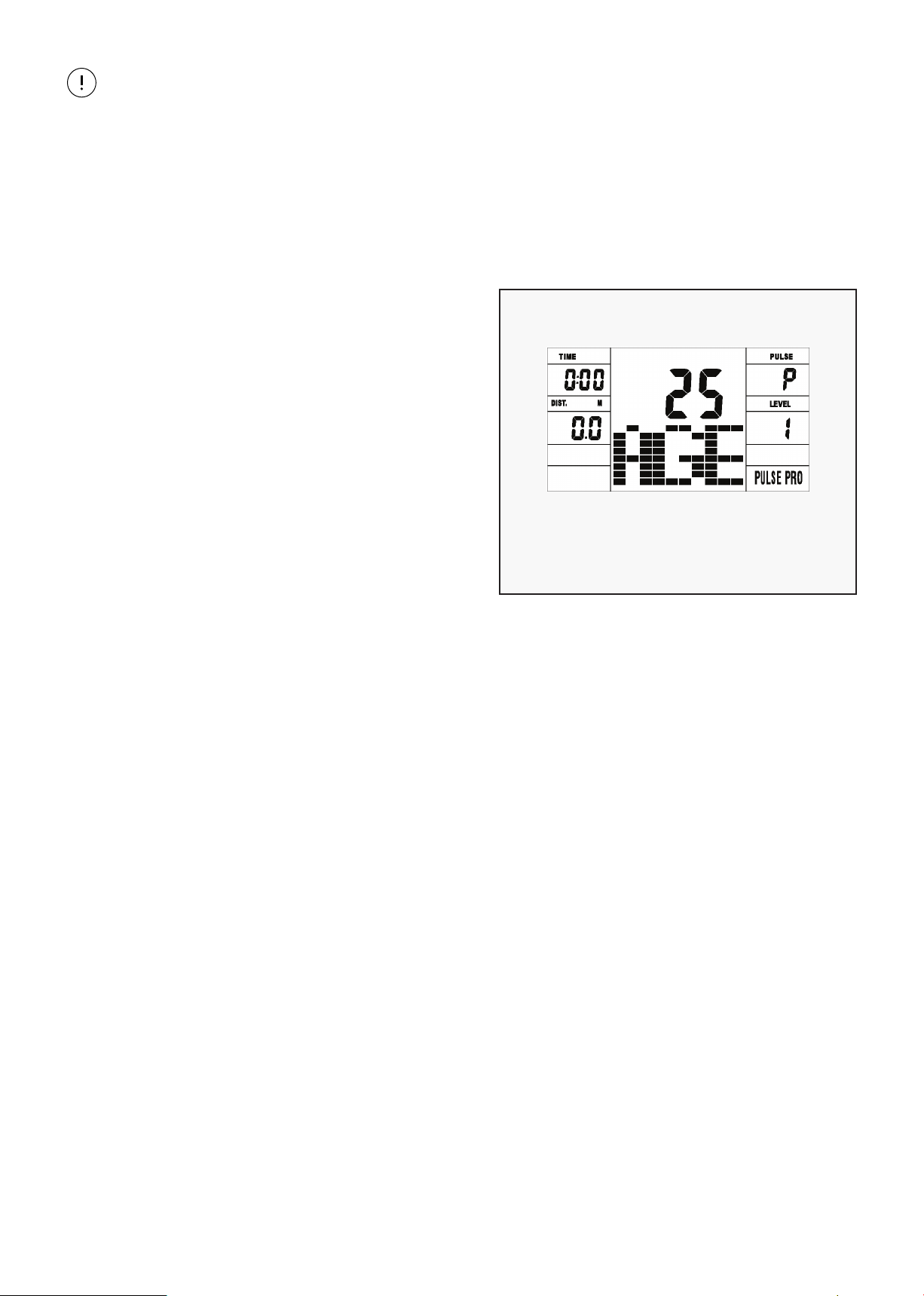
• Watt Control Program (WATT PRO: P16)
A. Press UP, DOWN to select the watt control program.
B. Press ENTER to confirm the selected watt control program and enter into time setting window.
C. The time will flash, and then press UP, DOWN button to set up the desired time.
Press ENTER to confirm the value.
D. The distance will flash, and then press UP, DOWN button to set up the desired distance value.
Press ENTER to confirm the value.
E. The calories will flash, and then press UP, DOWN button to set up the desired calories to be
consumed. Press ENTER to confirm the value.
F. The watt display will flash, and then press UP, DOWN button to set up the watt to do the
exercise. Press ENTER to confirm the value.
G. Press START/ STOP to begin exercise.
3. OPERATION
| OPERATION GUIDE
13OPERATION GUIDE |
NOTE:
The WATT value is decided by the TORQUE and RPM. In this program, the WATT value will keep at
constant value. It means that if you peddle quickly, the load resistance will decrease and if you
peddle slowly, the load resistance will increase to ensure you at the same watt value.
• Heart Rate Control Program: 55% H.R, 75% H.R and 95% H.R (PULSE PRO: P17-P19)
The maximum heart rate depends on different age and this program will ensure you do the healthy
exercise within maximum heart rate.
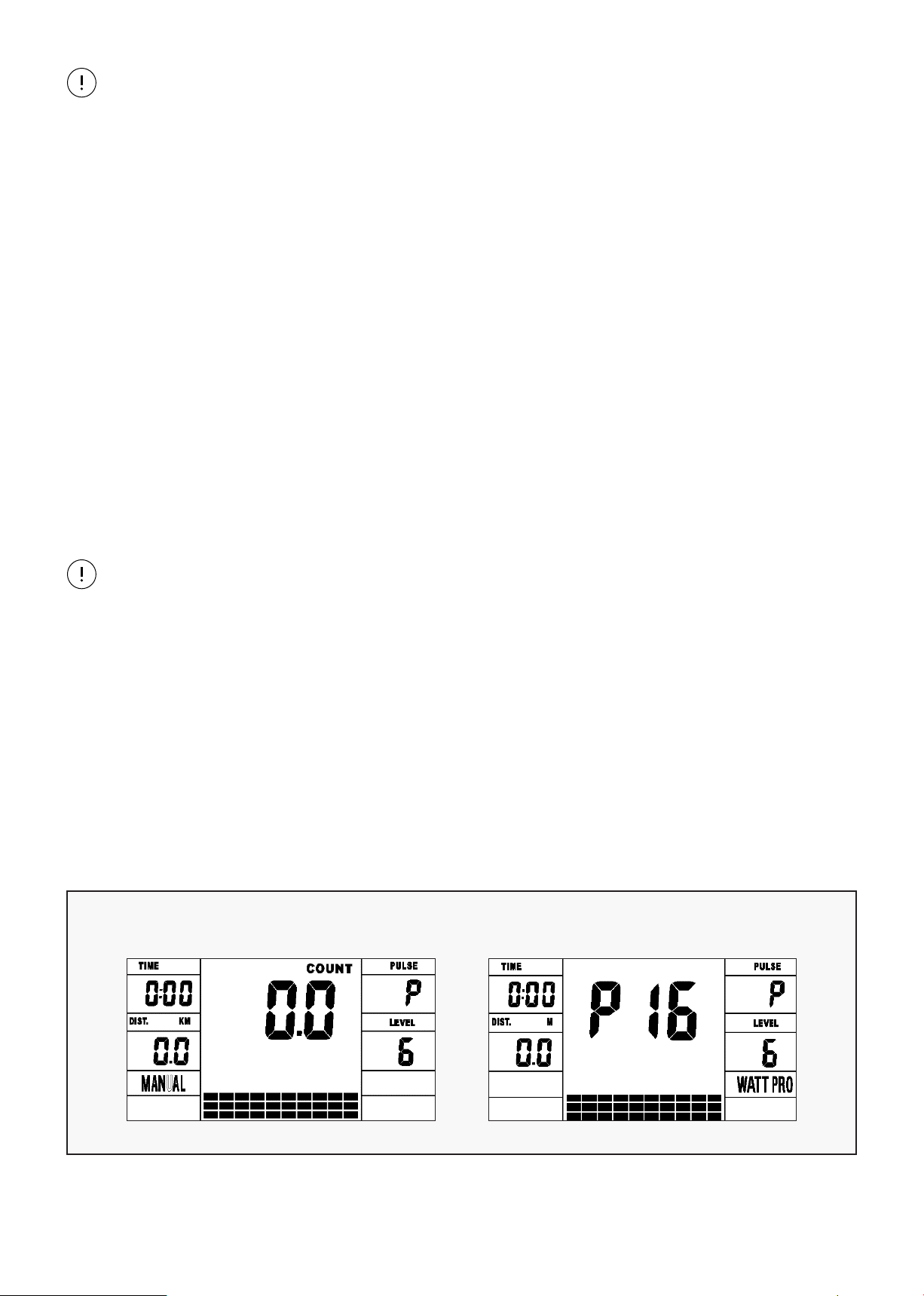
A. Press UP, DOWN button to choose the
heart rate control program.
B. Press ENTER to confirm the heart rate
control program and enter AGE setting
window.
C. The time will flash, and then press UP,
DOWN button to set up the desired time.
Press ENTER to confirm the value.
D. The distance will flash, and then press UP,
DOWN button to set up the desired
distance value. Press ENTER to confirm the
value.
E. The calories will flash, and then press UP,
DOWN button to set up the desired
calories to be consumed. Press ENTER to
AGE SETTING WINDOW
confirm the value.
F. The age will flash, and then press UP, DOWN button to set the user’s age. Press ENTER to
confirm the value.
G. When the target heart rate control program flash, the computer will display the user’s target
heart rate according to user’s age.
H. Press START/ STOP to begin exercise.
• Heart Rate Control Program: Target Heart Rate (PULSE PRO: P20)
The user can set any target heart rate to do the exercise.
A. Press UP, DOWN button to select TARGET HEART RATE program.
B. Press ENTER to confirm your choice and enter time setting window.
C. The time display will flash, and then press UP, DOWN button to set the desired time to do the
exercise. Press ENTER to confirm the value.
D. The distance will flash, and then press UP, DOWN button to set up the desired distance value.
Press ENTER to confirm the value.
E. The calories will flash, and then press UP, DOWN button to set up the desired calories to be
consumed. Press ENTER to confirm the value.
F. The target heart rate will flash, and then press UP, DOWN button to set up your target heart
rate. Press ENTER to confirm the value.
G. Press START/ STOP to begin exercise.
14
NOTE:
During exercise, the user’s heart rate value depends on resistance level and count. The heart rate
control program is to ensure your heart rate within the preset value. When the computer detects
your current heart, rate is higher than preset, it will decrease the resistance level automatically
or you may slow down exercise. If your current heart rate is lower than preset, it will increase
resistance and you may count up.
• User Profile Programs: CUSTOM1~CUSTOM5 (P11-P15)
A. Press UP, DOWN button to select the user.
B. Press ENTER to confirm your choice and enter time setting window.
C. The time display will flash, and then press UP, DOWN button to set up the desired time to do
the exercise. Press ENTER to confirm the value.
D. The distance will flash, and then press UP, DOWN button to set up the desired distance value.
Press ENTER to confirm the value.
E. The calories will flash, and then press UP, DOWN button to set up the desired calories to be
consumed. Press ENTER to confirm the value.
F. The first resistance level will flash, and then press UP, DOWN button to set the desired load
resistance. Press ENTER to confirm. Then repeat above operation to set the resistance from
2 to 10.
NOTE:
If the computer is also equipped with wireless heart rate measuring via the transmitter belt, and
with hand pulse function, the hand-measurement-signal-detecting is preferred. If the computer
is also equipped with wireless heart rate measuring via the transmitter belt, and with hand pulse
function, the hand-measurement-signal-detecting is preferred.
ADAPTER
Input: AC 230V Output: 8VDC 500MA
4. PROGRAMS
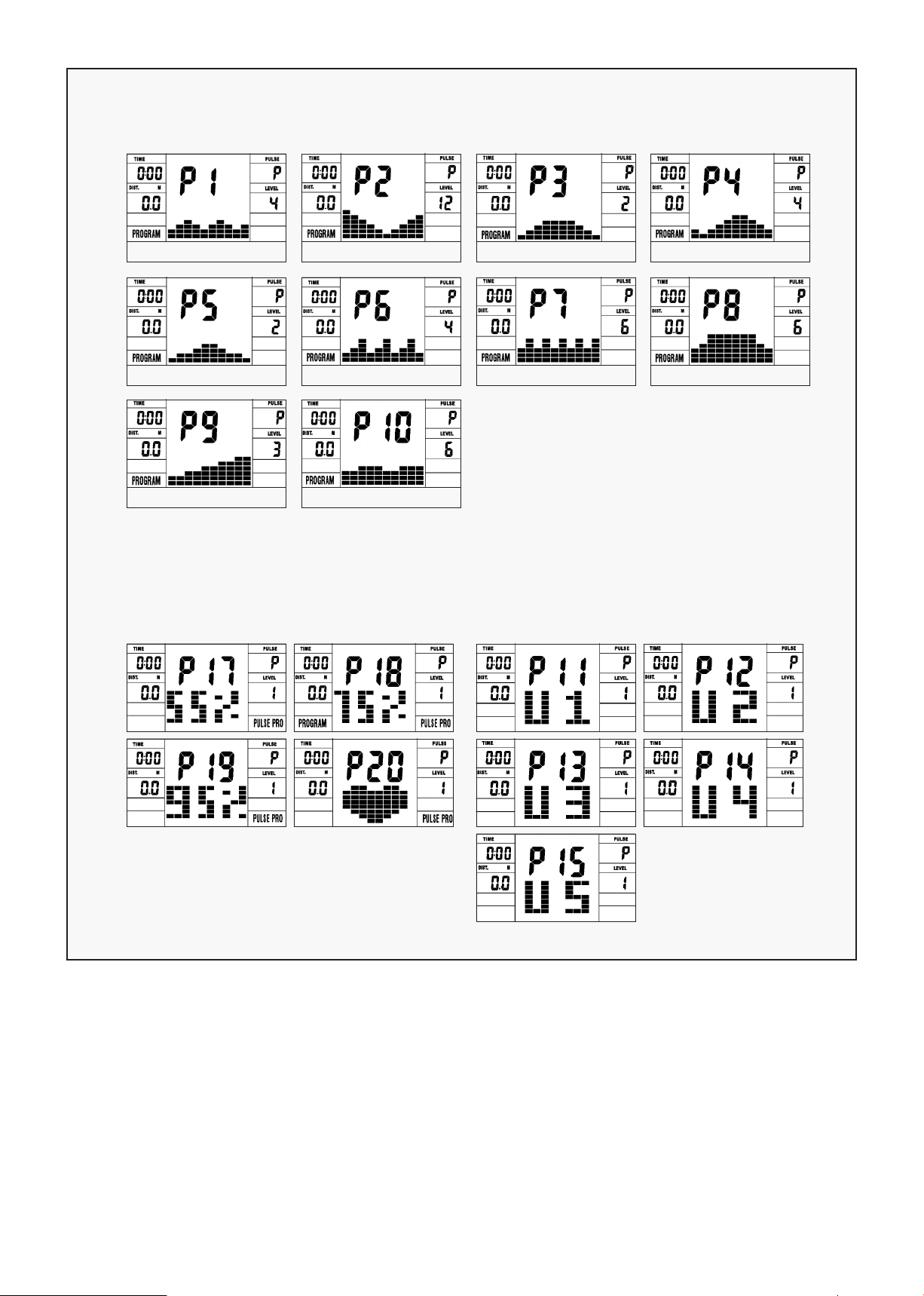
• 21 Programs
1 Manual Program 1 Watt Control Program (WATT PRO: P16)
| OPERATION GUIDE
15OPERATION GUIDE |
10 Preset Program Profile (PROGRAM: P1-P10)
P1: ROLLING P2: VALLEY P3: FATBURN P4: RAMP
P5: MOUNTAIN P6: INTERVAL P7: CARDIO P8: ENDURANCE
P9: SLOPE P10: RALLY
4 Heart Rate Control Program:
(PULSE PRO: P17-P20)55%H.R,
75%H.R, 95%H.R and TARGET H.R
5 User Setting Programs:
CUSTOM1 to CUSTOM5
(P11 ~ P15)
1. Record the user’s data of 5 User Setting Programs.
2. Display Count (RPM), TIME and WATT., CAL and DIST, at the same time.
3. The computer will turn off automatically if there is no operation, count signal and pulse signal over
4 minutes. Meanwhile, it will store your current exercise data and urn the loading resistance to the
minimum. Once you press any button or in motion, the computer will turn on automatically.
16
V. EXERCISE GUIDE
PLEASE NOTE:
Before beginning any exercise program, consult your physician. This is important especially if you are
over the age of 45 or individuals with pre-existing health problems.
The pulse sensors are not medical devices. Various factors, including the user’s movement, may
affect the accuracy of heart rate readings. The pulse sensors are intended only as an exercise aid in
determining heart rate trends in general.
Exercising is great way to control your weight, improving your fitness and reduce the effect of aging and
stress. The key to success is to make exercise a regular and enjoyable part of your everyday life.
The condition of your heart and lungs and how efficient they are in delivering oxygen via your blood to
your muscles is an important factor to your fitness. Your muscles use this oxygen to provide enough
energy for daily activity. This is called aerobic activity. When you are fit, your heart will not have to work
so hard. It will pump a lot fewer times per minute, reducing the wear and tear of your heart.
So as you can see, the fitter you are, the healthier and greater you will feel.
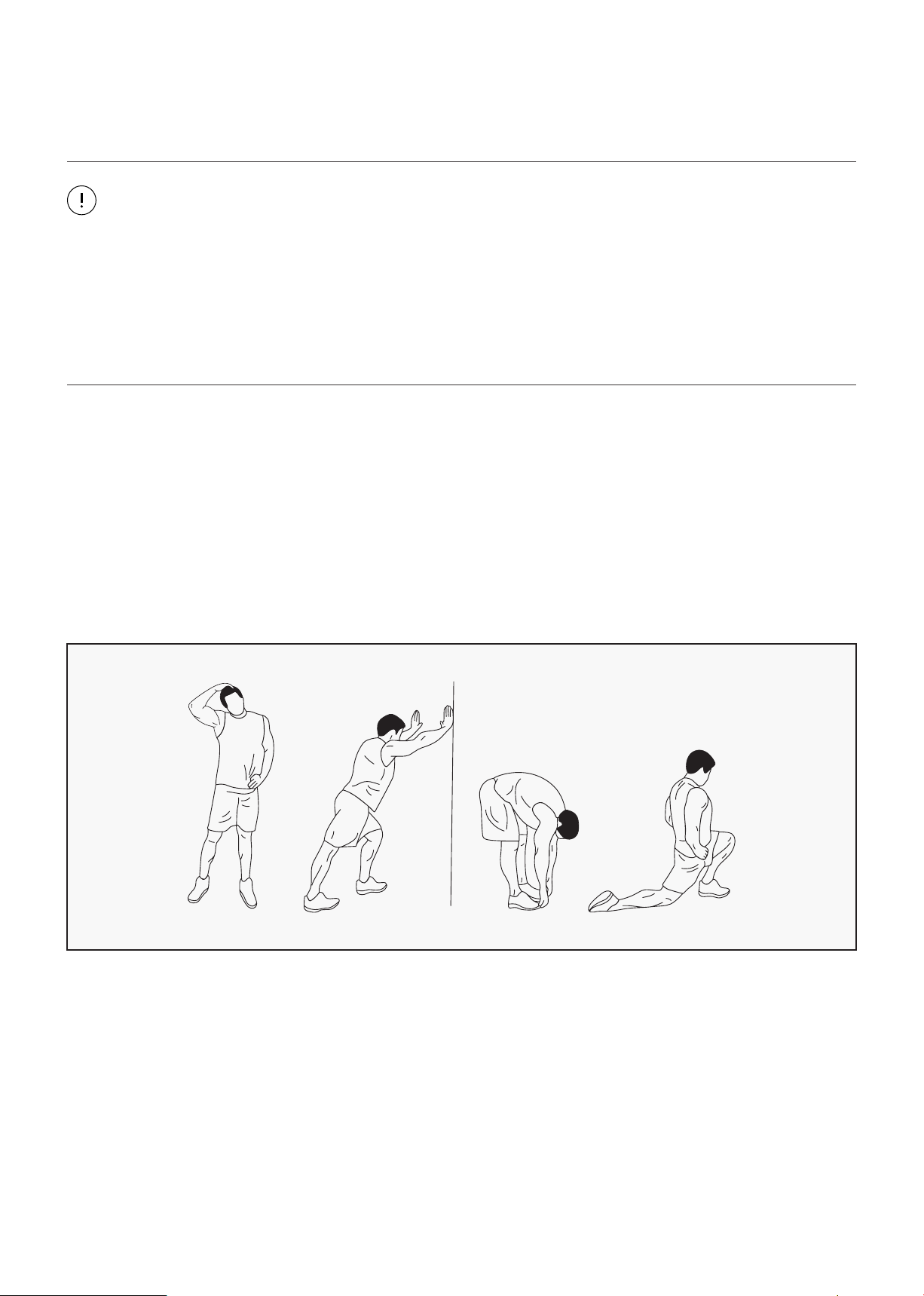
WARM UP
Start each workout with 5 to 10 minutes of stretching and some light exercises. A proper warm-up
increases your body temperature, heart rate and circulation in preparation for exercise. Ease into your
exercise.
After warming up, increase the intensity to your desired exercise program. Be sure to maintain your
intensity for maximum performance. Breathe regularly and deeply as you exercise.
| EXERCISE GUIDE
17EXERCISE GUIDE |
COOL DOWN
Finish each workout with a light jog or walk for at least 1 minute. Then complete 5 to 10 minutes of
stretching to cool down. This will increase the flexibility of your muscles and will help prevent post-
exercise problems.
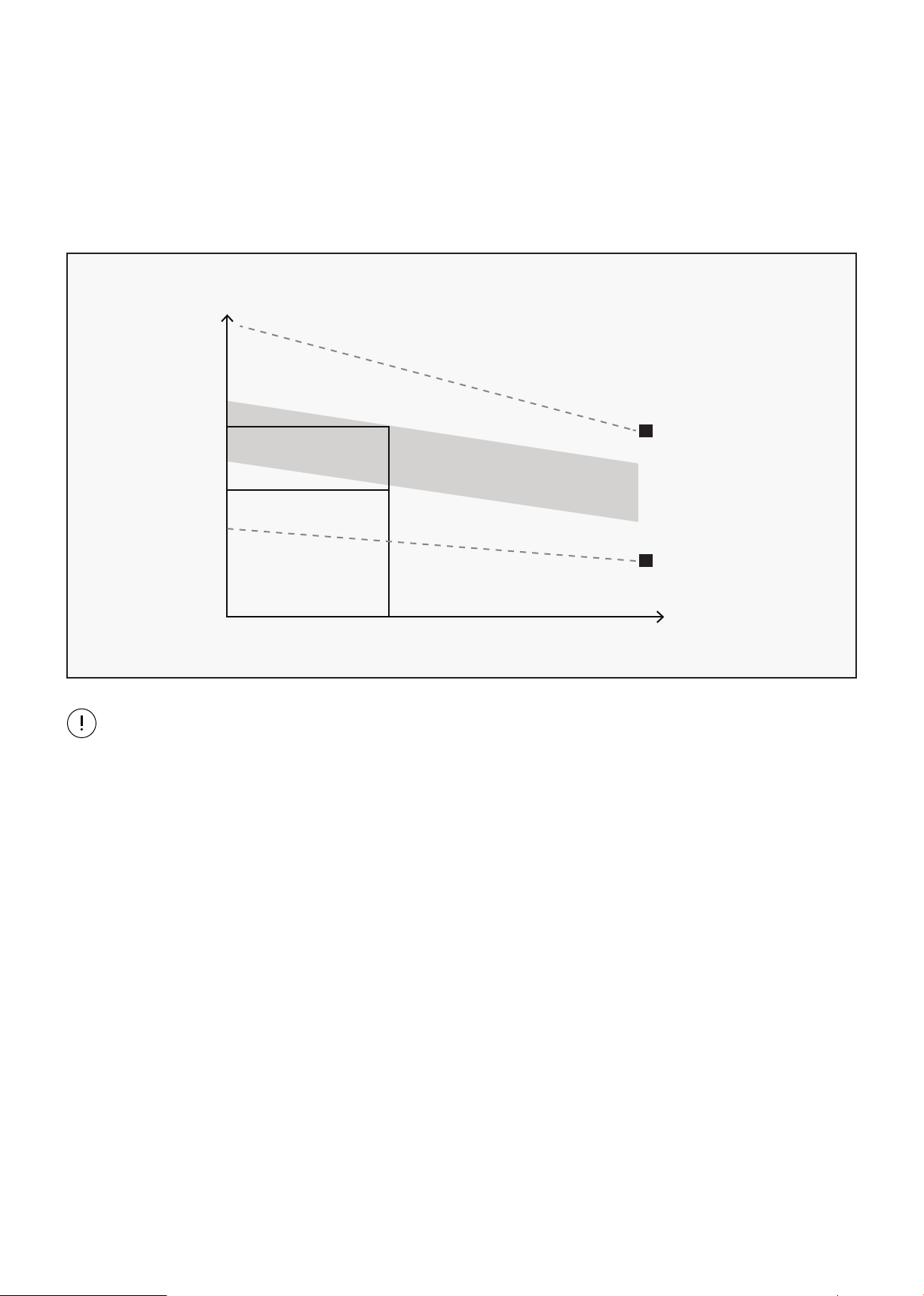
WORKOUT GUIDELINES
This is how your pulse should behave during general fitness exercise. Remember to warm up and
cool down for a few minutes.
TARGET ZONE
MAXIMUM
85%
70%
COOL DOWN
AGE
HEART RATE
200
180
160
140
120
100
80
20 25 30 35 40 45 50 55 60 65 70 75
18
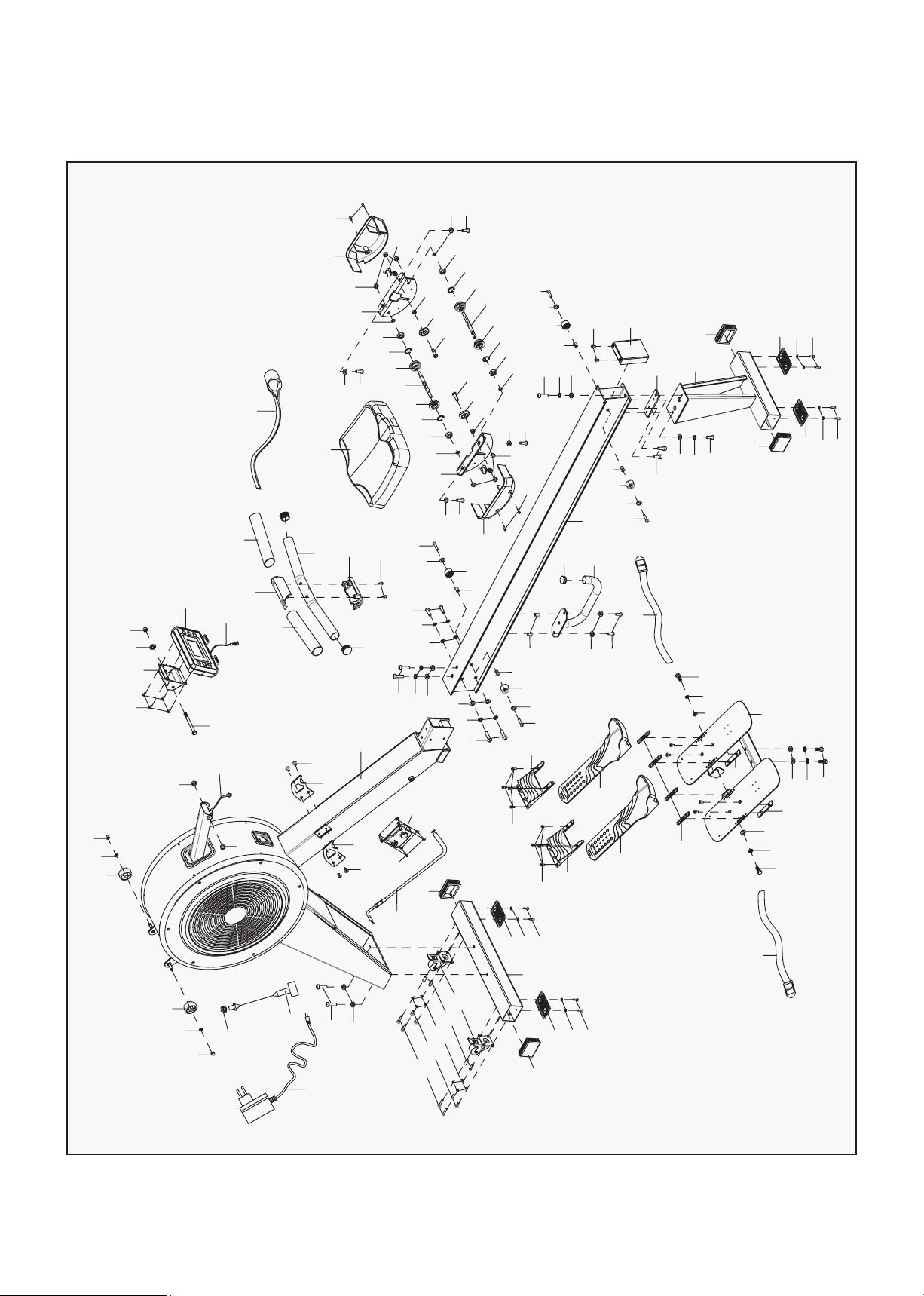
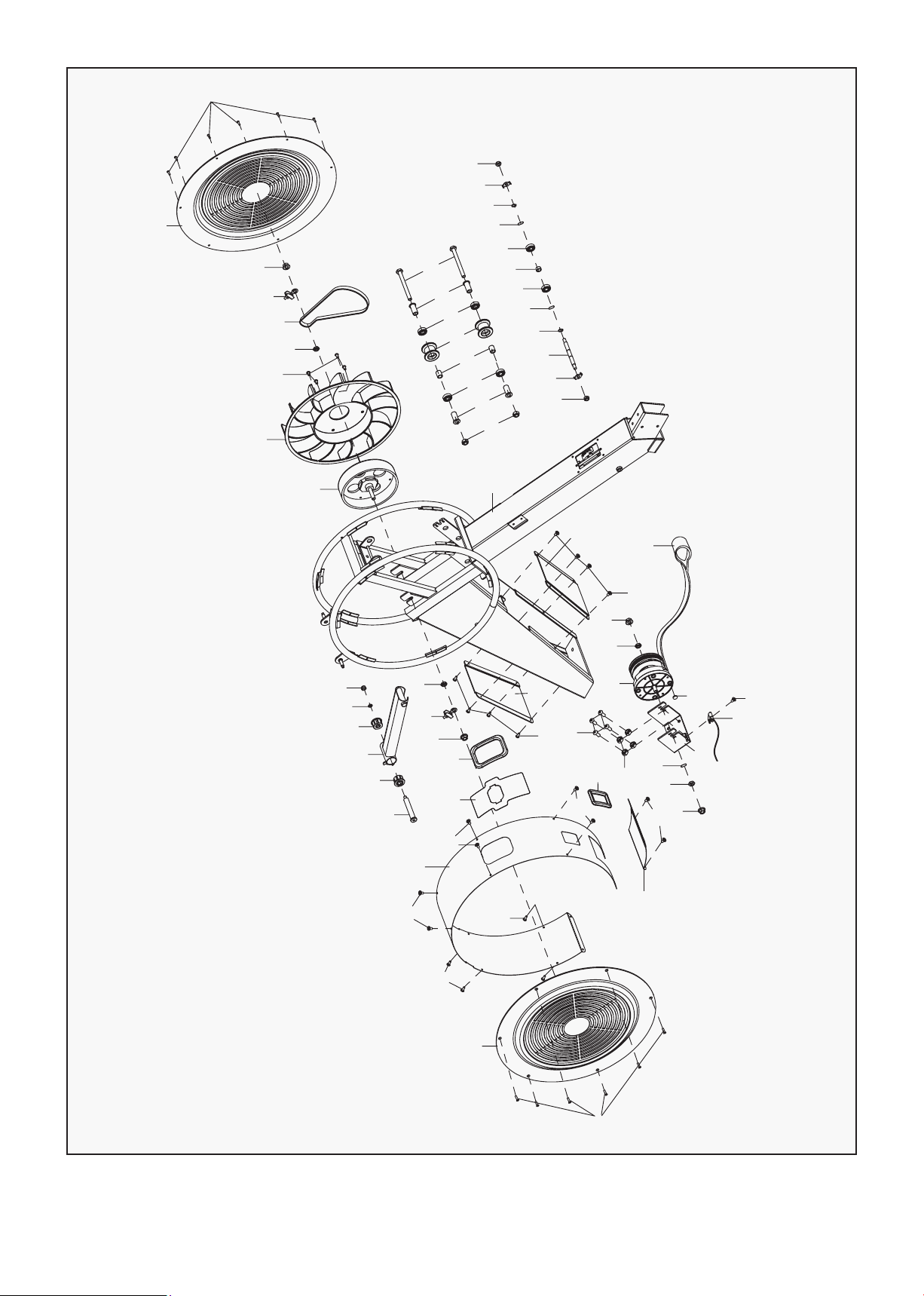
VI. EXPLODED DIAGRAM
75
74
73
73
74
75
10
9
8
30
31
34
33
35
36
32
7
26
26
29
28
27
29
28
27
48
22
20
5
6
20
22
24
30
38
31
31
38
30
31
38
30
67
68
66
69
69
68
72
70
71
41
46
45
42
42
45
44
44
43
46
37
38
31
47
31
38
37
47
31
38
37
39
76
76
3
12
15
2
13
14
1
1a
16
18
16
17
17
25
19
21
68
67
69
66
62
63
65
50
51
62
63
64
56
62
63
31
38
30
11
77
78
40
26
26
29
28
27
29
28
27
31
38
30
79
67
68
66
69
69
66
68
67
62
63
62
55
54
52
53
52
54
55
60
58
59
59
58
60
57
62
55
54
52
53
52
54
55
62
57
56
65
64
61
| EXPLODED DIAGRAM
19EXPLODED DIAGRAM |
49
104
103
23
23
23
107
23
83
23
106
90
23
100
99
89
63
108
112
3
4
109
99
100
23
50
111
23
110
105
100
61
99
80
81
82
81
13
14
24
97
96
101
98
102
100
61
104
49
85
92
86
93
91
86
92
84
90
88
87
95
89
86
94
86
89
95
88
90
20
VII. PARTS LIST
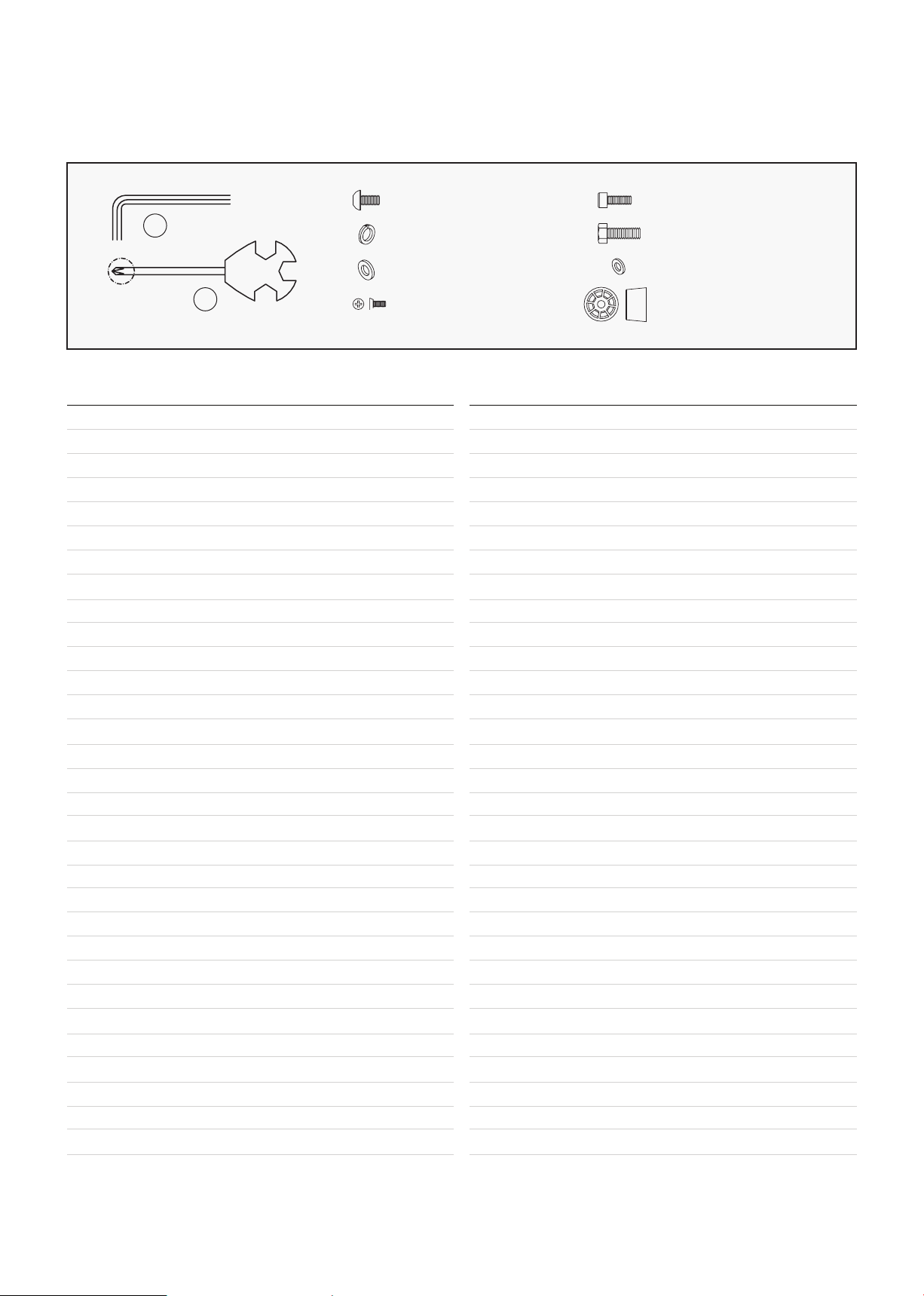
No. Description Qty
A
B
#30 M8*20*S5 10PCS
#38 d8 12PCS
#31 d8*Φ20*2 14PCS
#11 M5*10 2PCS
#67 M6*30*S5 2PCS
#68 d6 2PCS
#66 Φ27 2PCS
S5
S14
S13
S15
#37 M8*20*S13 4PCS
1 Console 1
2 Console Connector 1
3 Sensor 2
4 Screw 1
5 Screw ST4.2*10 4
6 Motor 1
7 Tension Wire 1
8 Adapter 1
9 Power Line 1
10 Thin Nut M12 1
11 Bolt M5*10 6
12 Bolt M8*90 1
13 Washer d8*Φ20*2 2
14 Nylon Nut M8*H7.5*S13 2
15 Bolt M4*12 4
16 Foam Grip 2
17 Round End Cap Φ32 2
18 Upper Cover of Handlebar 1
19 Bottom Cover of Handlebar 1
20 Handlebar Seat 2
21 Screw ST4.2*13 2
22 Bolt M6*10 4
23 Bolt M4*10 4
24 Main Frame 1
25 Handlebar 1
26 End Cap J50*70 4
27 Screw ST4.2*19 12
28 Washer d5*10*1.0 8
29 Footpad 4
30 Bolt M8*20*S5 10
31 Washer d8*Φ20*2 14
No. Description Qty
32 Caster 2
33 Bolt M5*12 4
34 Bolt M5*25 4
35 Spring Washer d5 8
36 Spacer 5.2*10*15 4
37 Bolt M8*20*S13 4
38 Spring Washer d8 12
39 Pedal Plate 1
40 Rear Support Frame 1
41 Aluminum Rail 1
42 Bolt M4*6 8
43 Strap Fixation 4
44 Pedal 2
45 Pedal Plate 2
46 Strap 2
47 Holder for Pedal 2
48 Front Stabilizer 1
49 Bolt M4*10 12
50 Mesh belt 22*2150 1
51 Seat 1
52 Roller for Seat Slider 4
53 Axle 2
54 Washer d22*1.2 4
55 Bearing 608 4
56 Nylon Nut 6
57 Seat Slider 2
58 Roller Φ35*8 2
59 Bolt M8*28 2
60 Spacer 12.5*8.2*4.5 2
61 Hex Head Bolt 4
62 Washer d8*Φ16*1.5 8
| PARTS LIST

21PARTS LIST |
63 Bolt M8*20 4
64 Bolt M5*12 4
65 Seat Cover 2
66 Locating Mount 2
67 Bolt M6*30 2
68 Washer d6*Φ12*1 4
69 Nut M6*14 4
70 End Cap Φ25 1
71 Handlebar 1
72 Bolt M6*20 2
73 Transportation Wheel 2
74 Washer d8*φ12*1.5 2
75 Cap Nut M6*H11*S10 2
76 Short Bushing 2
77 Back End Cap 1
78 Nut Plate 1
79 Bolt 2
80 Bolt Φ14*81.5 1
81 Bushing Φ32 2
82 Computer Post 1
83 Ditchplatte 1
84 Bolt M10*112 2
85 Nylon Nut M10*H9.5*S17 2
86 Bearing 6000 6
87 Pressure Shaft 1
88 Locating Plate 2
89 Wave Washer d10 3
90 Nylon Nut M8*H7.5*S13 6
91 Pulley 2
92 Spacer 4
93 Spacer Φ15*Φ10.2*19 2
94 Spacer Φ15*Φ10.2*8 1
95 Washer d10*1.0 2
96 Fanwheel 1
97 Flywheel 1
98 Nut M10*1*H5*S17 1
99 Nut M10*1*H5*S17 3
100 Nut 4
101 Bolt M6*10 4
102 Belt 1
103 Fan Shell Connector 1
104 Chain Cover 2
105 Seal Ring 1
106 Seal Ring 1
107 Fan Shell 1
108 Round Magnet 1
109 Ribbon Wheel 1
110 Front Plate 1
111 Rear Plate 1
112 Scroll Wheel 1
A Spanner S5 1
B Wrench S13-14-15 1
No. Description Qty No. Description Qty
22
VIII. WARRANTY
| WARRANTY
AUSTRALIAN CONSUMER LAW
Many of our products come with a guarantee or warranty from the manufacturer. In addition, they come
with guarantees that cannot be excluded under the Australian Consumer Law. You are entitled to a
replacement or refund for a major failure and compensation for any other reasonably foreseeable loss
or damage.
You are entitled to have the goods repaired or replaced if the goods fail to be of acceptable quality and
the failure does not amount to a major failure. Full details of your consumer rights may be found at
www.consumerlaw.gov.au.
Please visit our website to view our full warranty terms and conditions:
http://www.lifespanfitness.com.au/warranty-repairs
WARRANTY AND SUPPORT
Any claim against this warranty must be made through your original place of purchase.
Proof of purchase is required before a warranty claim may be processed.
If you have purchased this product from the Official Lifespan Fitness website, please visit
https://lifespanfitness.com.au/warranty-form
For support outside of warranty, if you wish to purchase replacement parts or request a repair or
service, please visit https://lifespanfitness.com.au/warranty-form and fill in our Repair/Service
Request Form or Parts Purchase Form.
Scan this QR code with your device to go to lifespanfitness.com.au/warranty-form


WWW.LIFESPANFITNESS.COM.AU