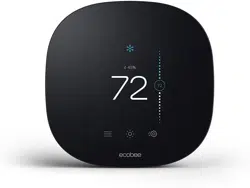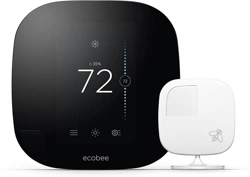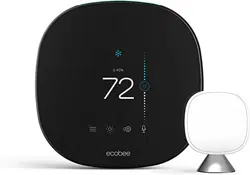

How to install
your ecobee
1
Download the ecobee app
The ecobee app has instructions, step-by-step videos,
and diagrams customized to your wiring setup. Register
your ecobee after installation to unlock smart features
like Amazon Alexa.
2
Important Information
Look out for these icons at the bottom of each step.
They indicate useful tips and important reminders.
TIPS
WARNINGS
Rc
G
Y1
Y2
O/B
PEK
ACC-
ACC+
W2
W1
R
H
C
Rc
G
Y1
Y2
O/B
PEK
ACC-
ACC+
W2
W1
R
H
C
3
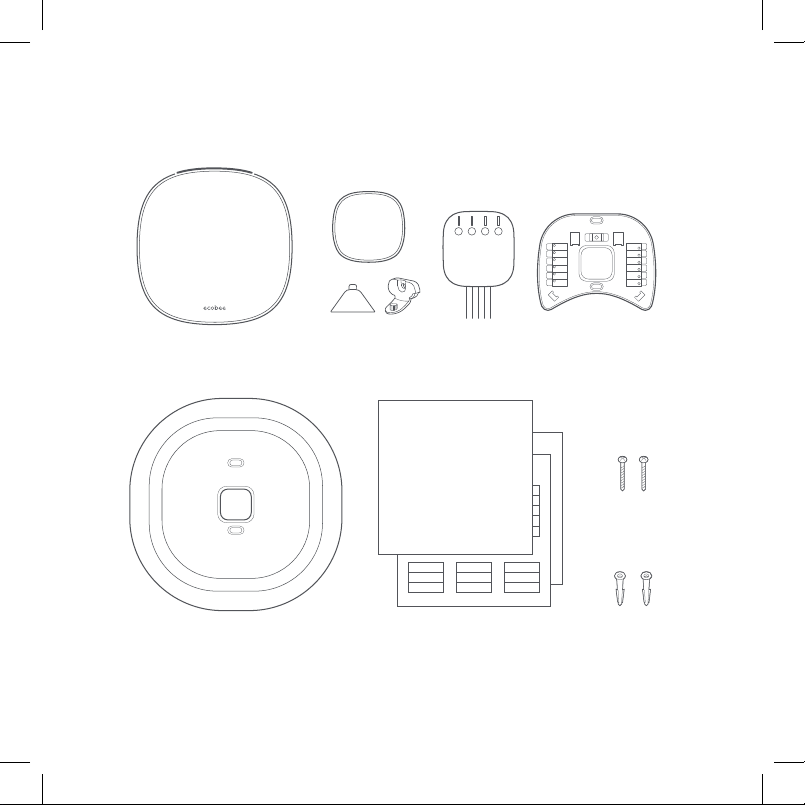
First things first. Here’s what you’ll find in the box:
SmartThermostat BackplateSmartSensor, stand,
and wall-mount
Power Extender
Kit (PEK)
Drywall plugs
(x2)
Screws
(x2)
Install guide (this booklet)
quick start guide & wire labels
Trim plate
4
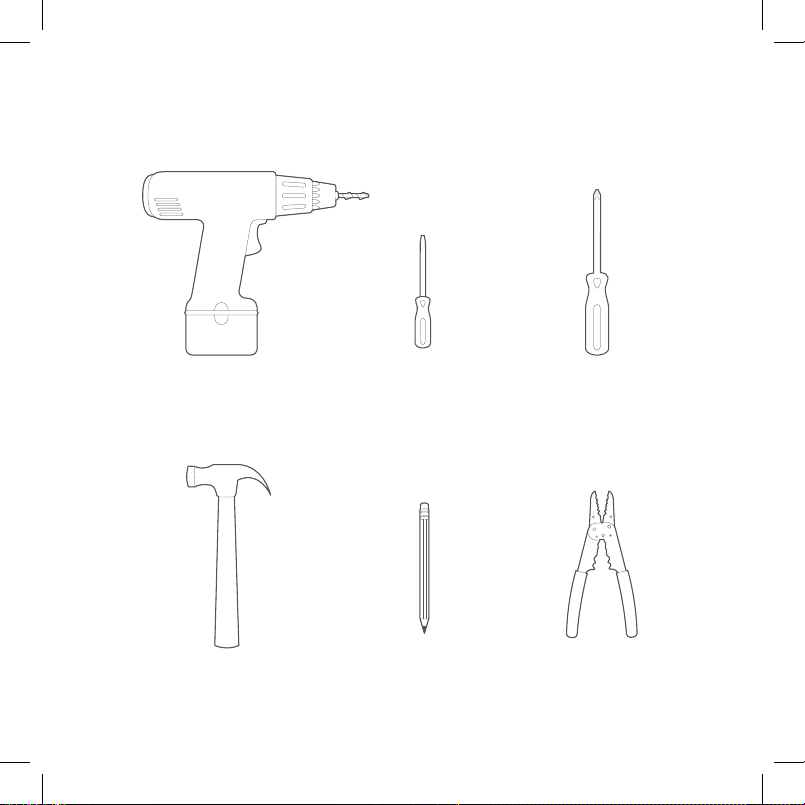
You may also need these tools:
Drill for mounting
anchors (3/16” drill bit)
Small flathead
screwdriver
Phillips
screwdriver
Hammer Pencil Wire stripper
ON
OFF
ON
OFF
5
STEP 1
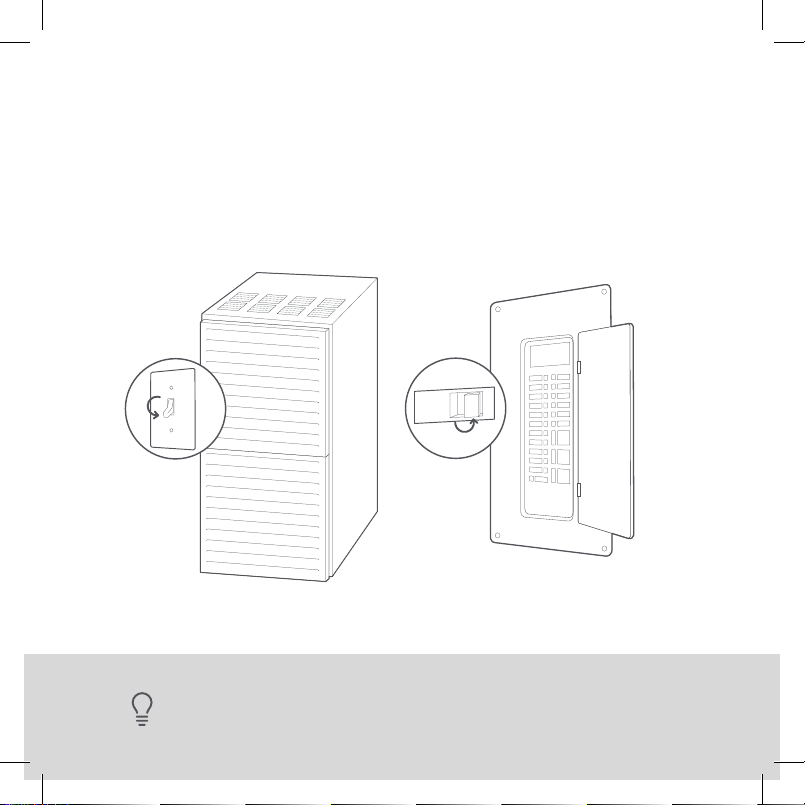
Power o your Heating, Ventilation, and Air Conditioning
(HVAC) system by using the master switch or circuit
breaker box. This is important for your safety.
TIP: Look for your master switch or circuit breaker box in the basement, attic,
utility closet, or behind a wall panel near the thermostat.
6
TIP: If you have a boiler, check to see that the main flame is extinguished.
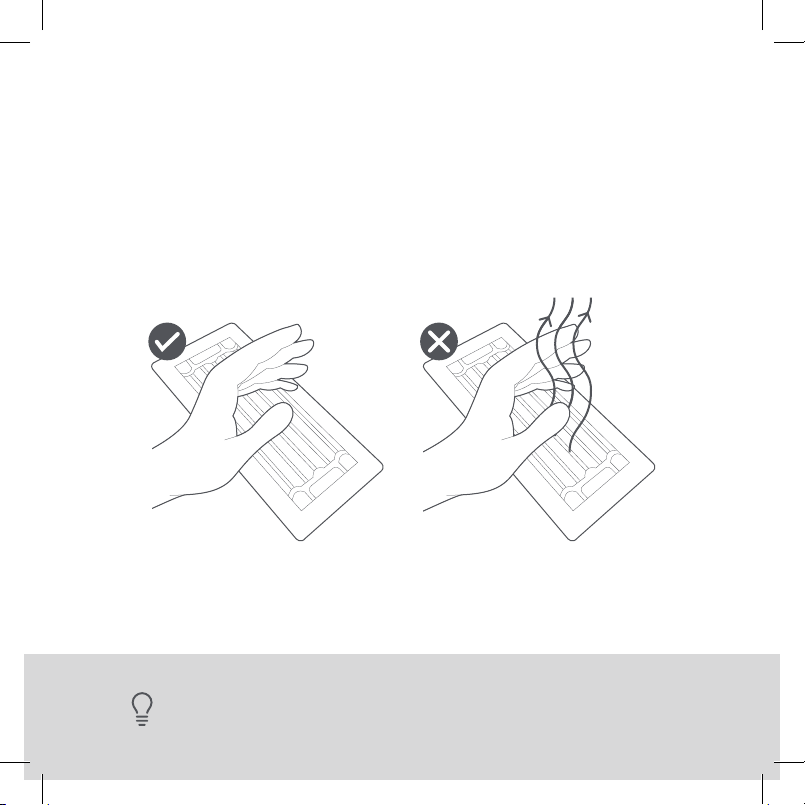
STEP 2
Confirm your system is o by turning on your heat (during
winter) or your AC (during summer). Wait a few minutes—
you should not feel air coming from your vents.
7
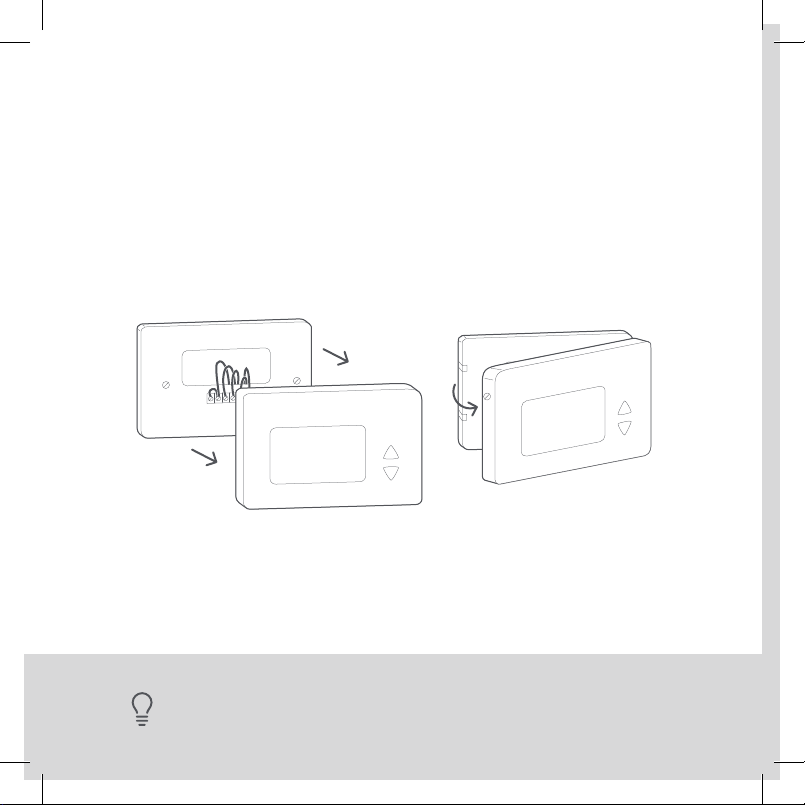
STEP 3
Remove your old thermostat cover from the wall.
TIP: Many thermostats simply pop o or unclip from the base, while others
may have screws that you will need to remove.
110 VAC
OR
120 VAC
OR
240 VAC
WARNING
HIGH VOLTAGE
L1 L2
YES NO
8
Sadly, you might
not be compatible.
you can double-check at
ecobee.com/compatibility
Great, please continue
to the NEXT PAGE.
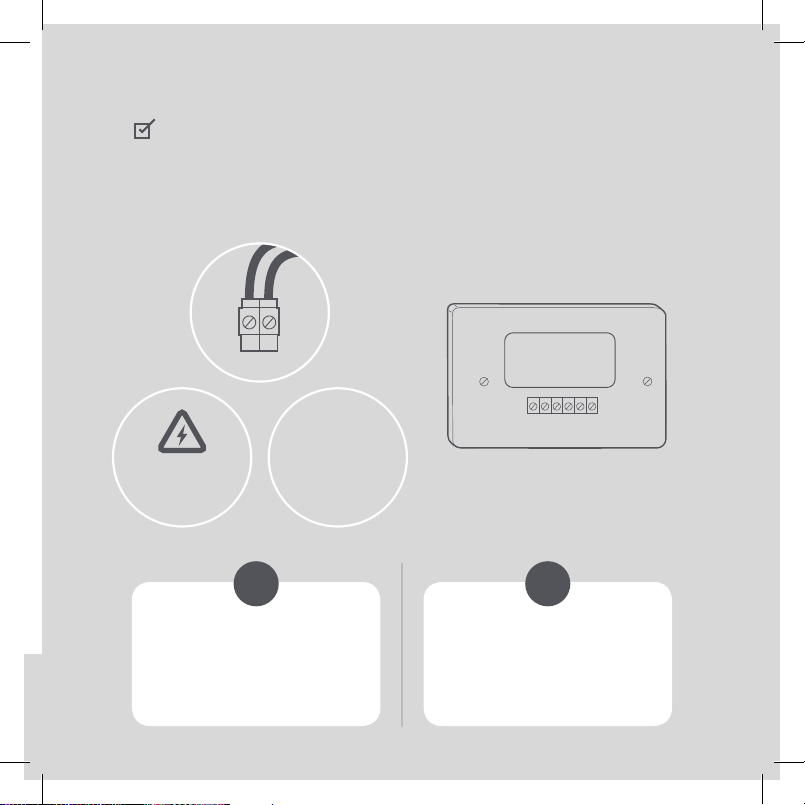
CHECKPOINT: COMPATIBILITY
Does your old thermostat’s backplate have any
of these indicators?
9
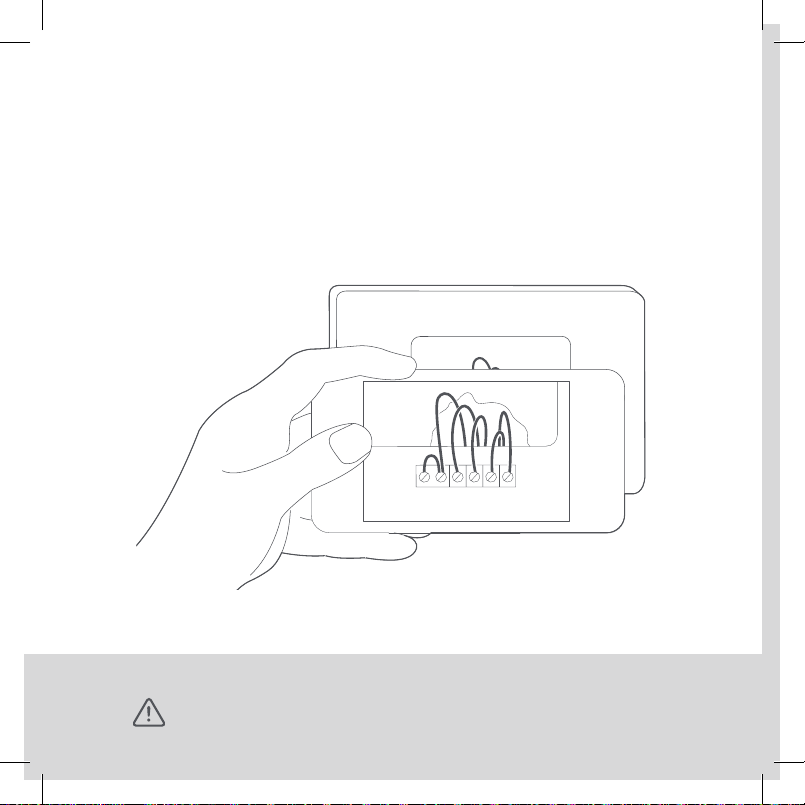
STEP 4
Take a picture of the wires connected to the terminals of
your old thermostat. You may need to reference this photo
later on.
WARNING: ecobee is designed for 24VAC with a 2A maximum current.
Do not connect it to line (high) voltage or millivolt systems.
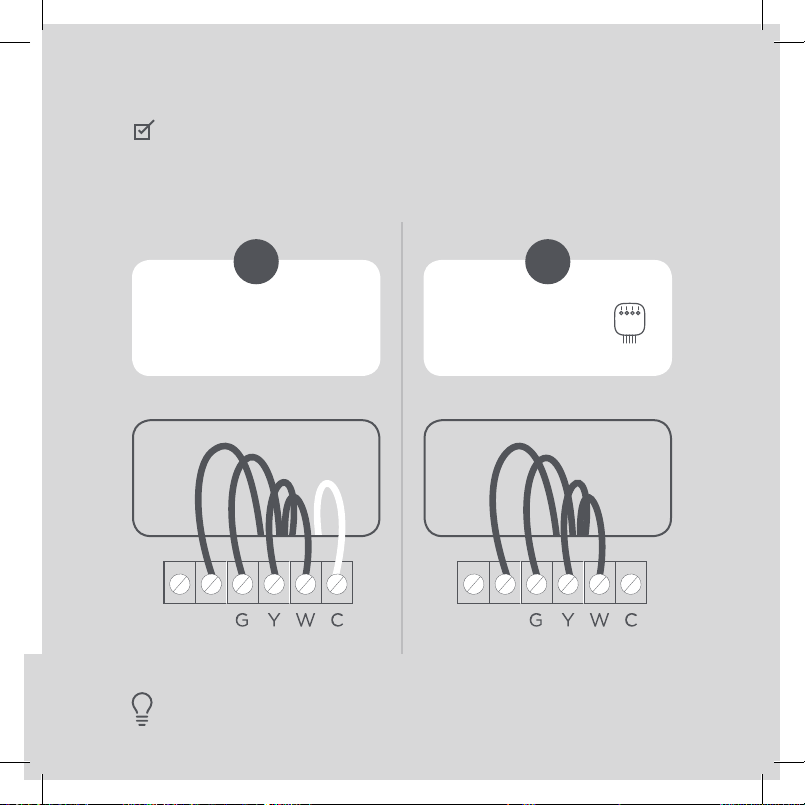
TIP: The wiring on your old thermostat may look dierent—
just check to see if there’s a C wire.
YES NO
RC RH
RC RHRC RH
RC RH
10
CHECKPOINT: C WIRE
Do you have a C wire connected to your old thermostat?
Great! Continue
to the NEXT PAGE.
Go to PAGE 24 to
install with a PEK.
11
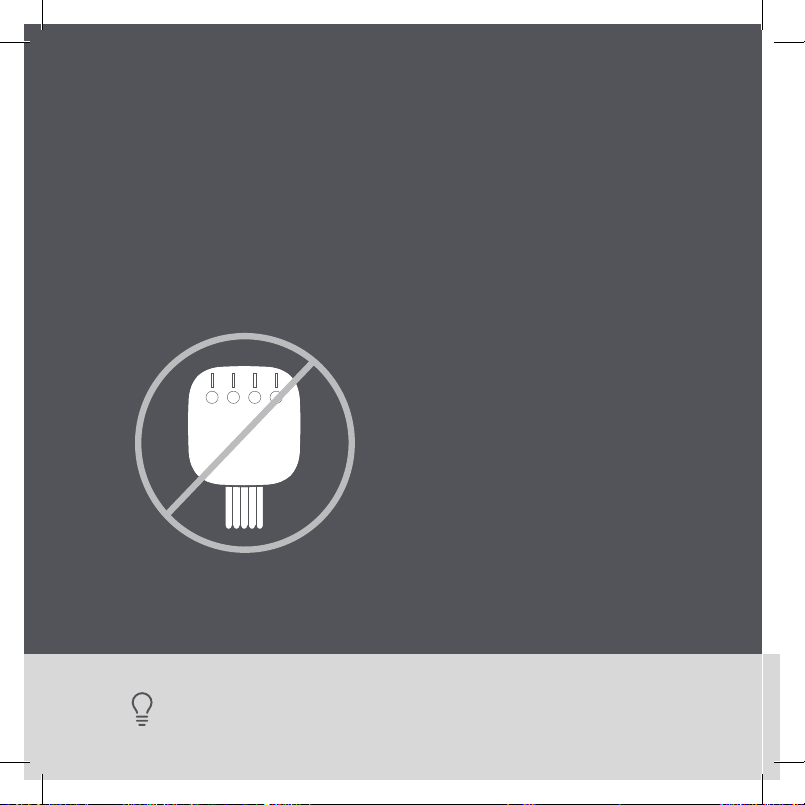
TIP: To install accessories (humidifier, dehumidifier or ventilator) please
refer to the wiring diagrams at ecobee.com/wiring
Install your ecobee
with a C wire
If you have a C wire, it will power your ecobee. You won’t
need the Power Extender Kit (PEK) included in the box.
W/W1
Y/Y1
Rc
RC RH
12
STEP 5
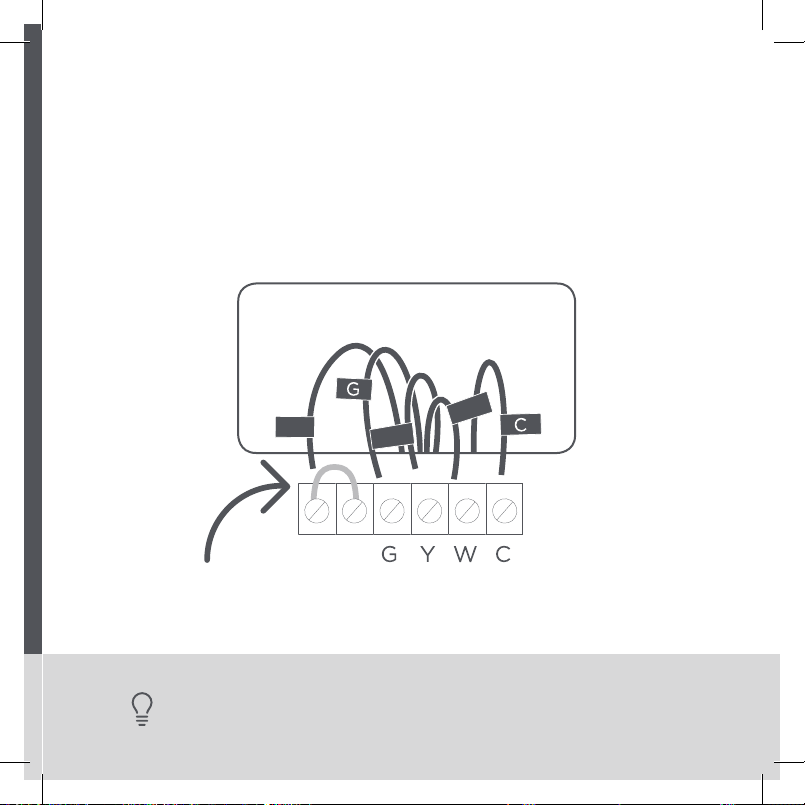
Carefully disconnect and label the wires from your old
thermostat one at a time, using the labels provided.
TIP: If you have a jumper between RC, RH, or R, leave it alone.
Only label the wires that run from your wall into a terminal block.
R
C
RC RH
W/W1
Y/Y1
13
STEP 6
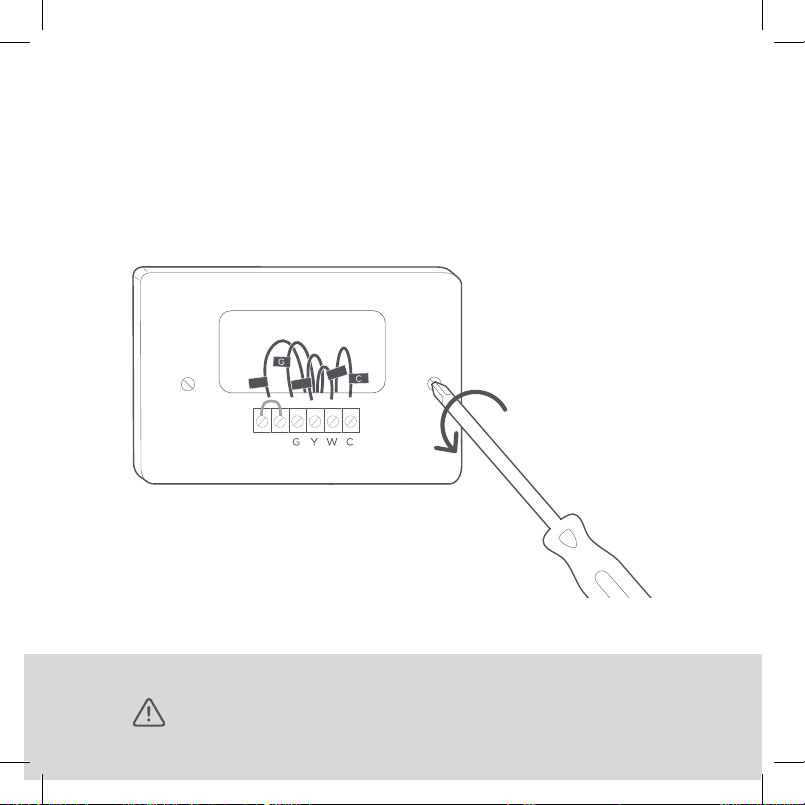
Unscrew the mounting plate of your old thermostat
to remove it from the wall.
WARNING: Be careful, as some thermostats may contain mercury.
Recycle your old thermostat safely with your local hazardous waste facility.
Backplate
Trim plate
14
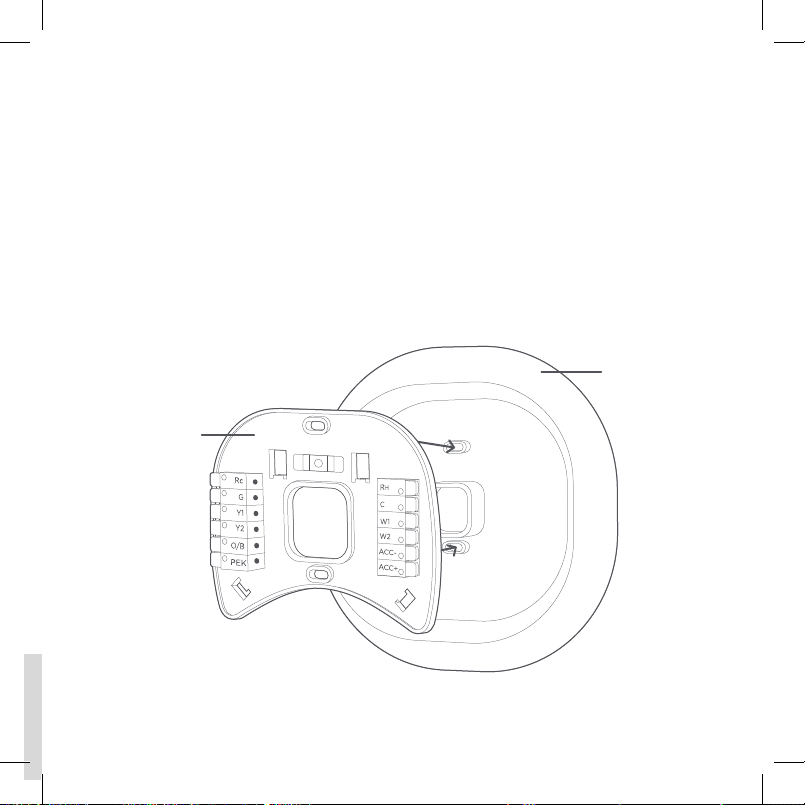
STEP 7
Decide if you want to use the trim plate with your ecobee.
The trim plate is useful if you want to hide marks or holes
left on the wall by your old thermostat.
If using the trim plate, align the mounting holes on the trim
plate and backplate and press them into place together.
Rc
G
Y/Y1
W/W1
C
15
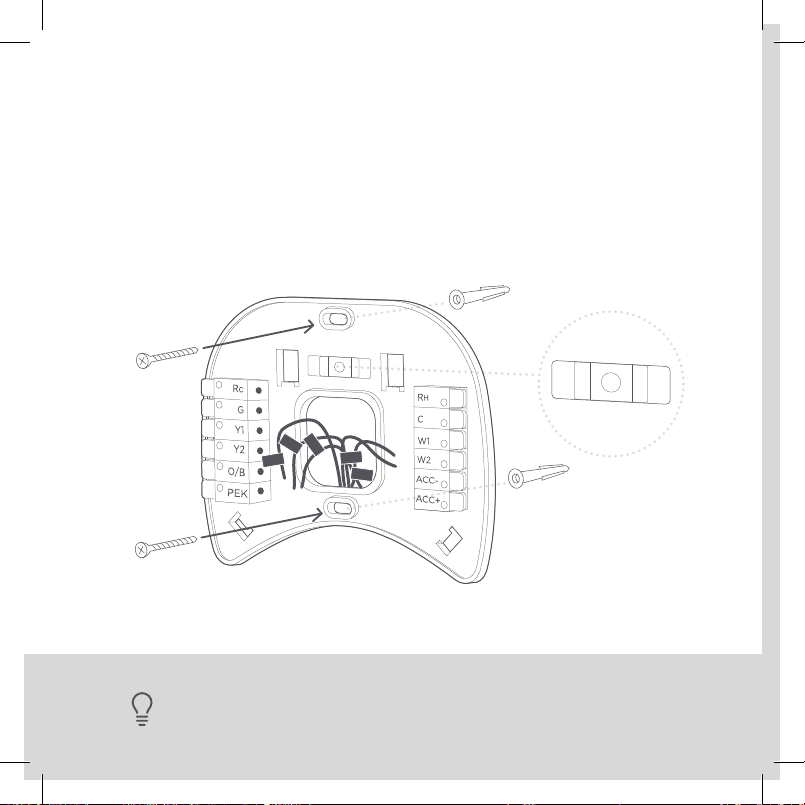
STEP 8
Pull the wires through the hole in the middle of the
backplate and then attach the backplate to the wall
using the drywall anchors and screws provided.
TIP: Use a 3/16" drill bit to drill a hole for the drywall anchors.
ACC-
ACC+
W2
W1
R
H
C
Rc
G
Y1
Y2
O/B
PEK
ACC-
ACC+
W2
W1
R
H
C
Rc
G
Y1
Y2
O/B
PEK
R
G
C
W/W1
Y/Y1
R
G
C
W/W1
Y/Y1
R
H
YES NO
ACC-
ACC+
W2
W1
R
H
C
Rc
G
Y1
Y2
O/B
PEK
ACC-
ACC+
W2
W1
R
H
C
Rc
G
Y1
Y2
O/B
PEK
R
G
C
W/W1
Y/Y1
R
G
C
W/W1
Y/Y1
R
H
16
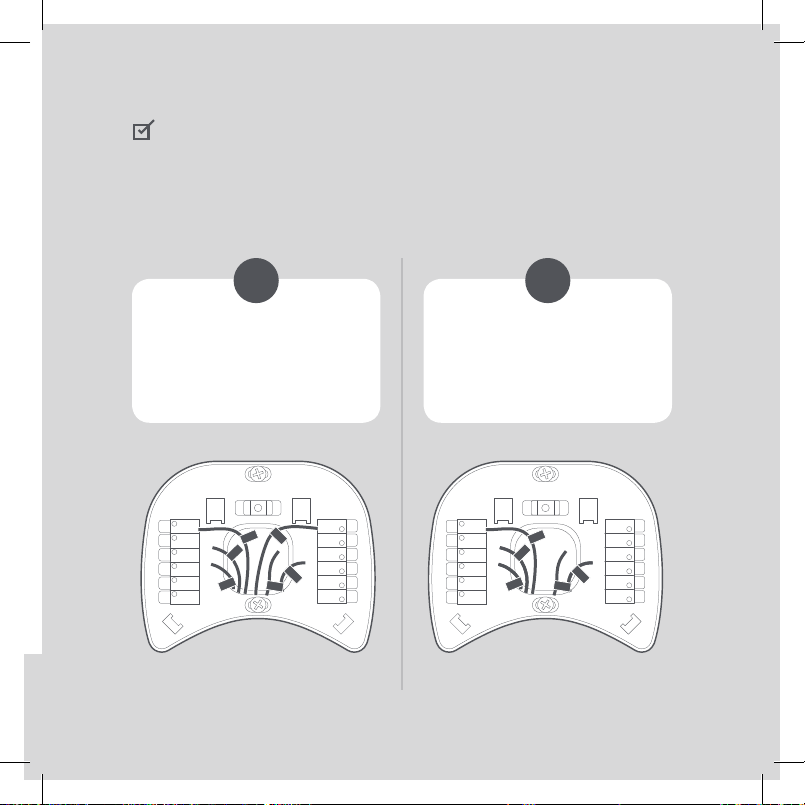
CHECKPOINT: INSERT YOUR R WIRE(S)
Do you have more than one R wire?
(That includes R, RC, and RH)
Insert your wires:
R or RC ➔ RC
RH ➔ RH
Insert your single wire:
R, RC, or RH ➔ RC
Rc
G
Y1
Y2
O/B
PEK
ACC-
ACC+
W2
W1
R
H
C
Rc
G
C
W/W1
Y/Y1
Rc
G
Y1
Y2
O/B
PEK
ACC-
ACC+
W2
W1
R
H
C
Rc
G
C
W/W1
Y/Y1
17
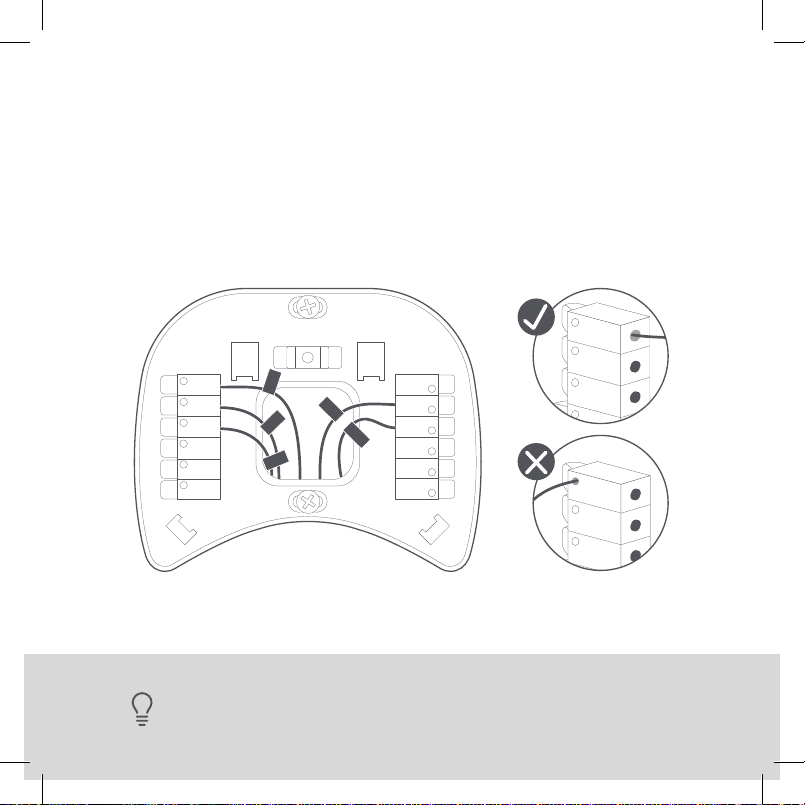
STEP 9
Insert your remaining wires into the side (not the front)
of their corresponding terminal blocks.
TIP: Press the terminal block levers to insert the wires more easily.
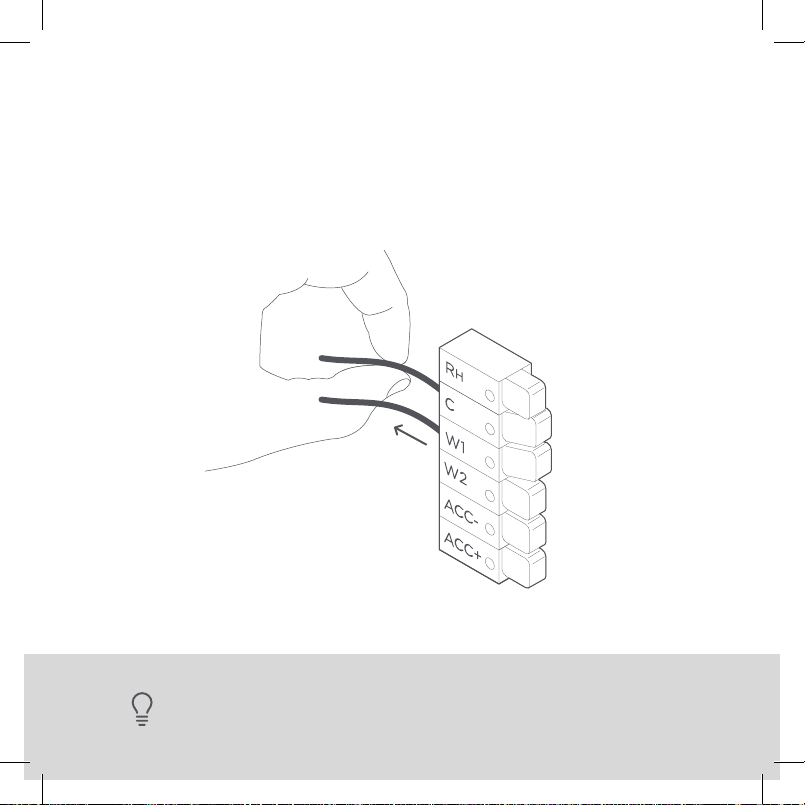
18
STEP 10
Tug on the wires gently to ensure they
are securely connected.
TIP: When a wire has been connected correctly,
the lever on that block will lower.
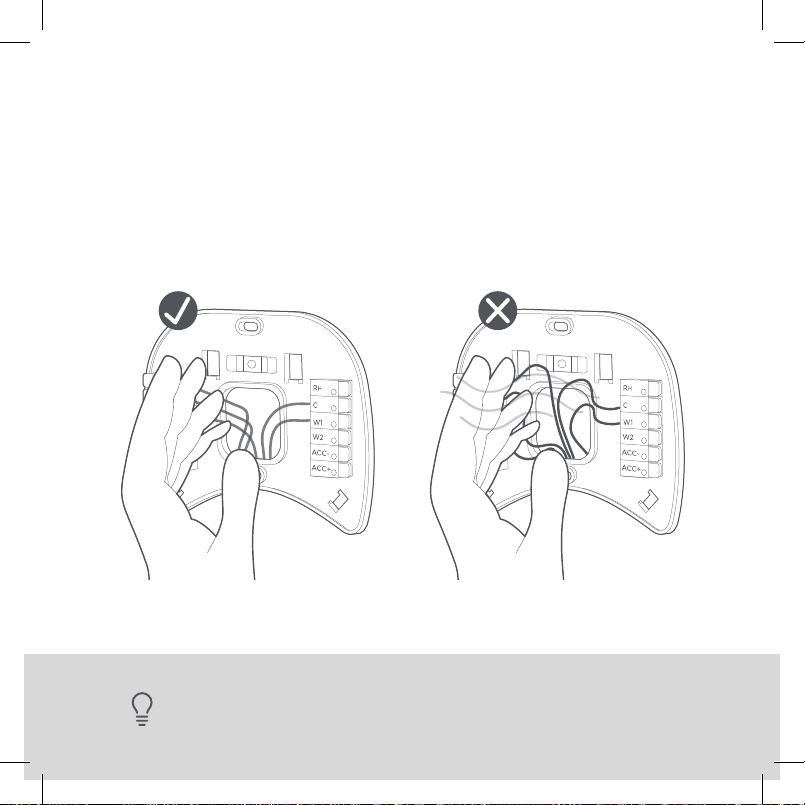
TIP: Large holes behind your thermostat will aect temperature readings.
Prevent drafts by covering the hole(s).19
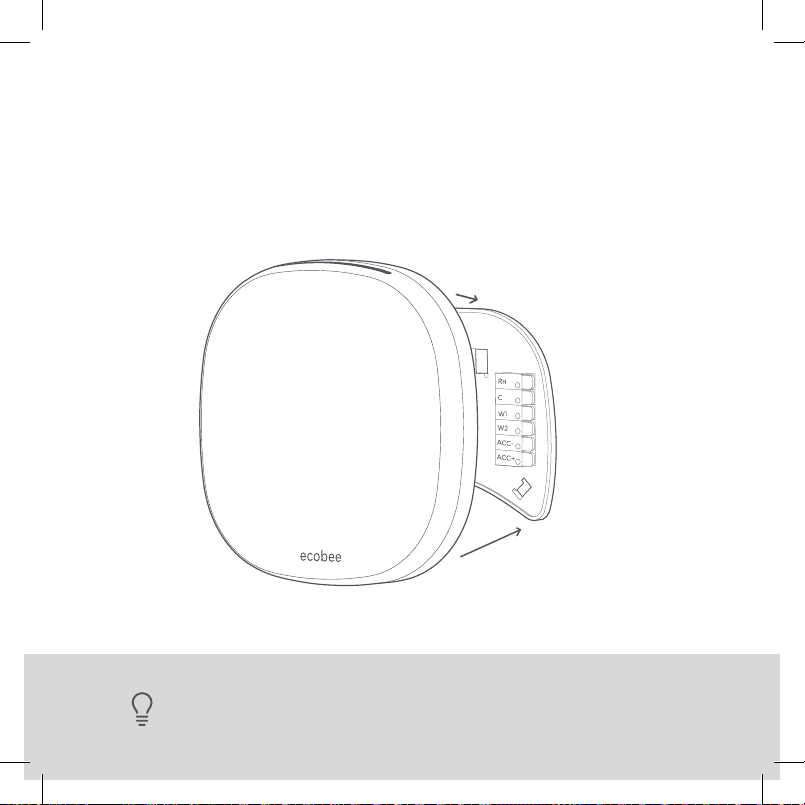
STEP 11
Carefully push any excess wires back into the hole
and ensure there are no drafts coming from the hole(s)
in the wall.
20
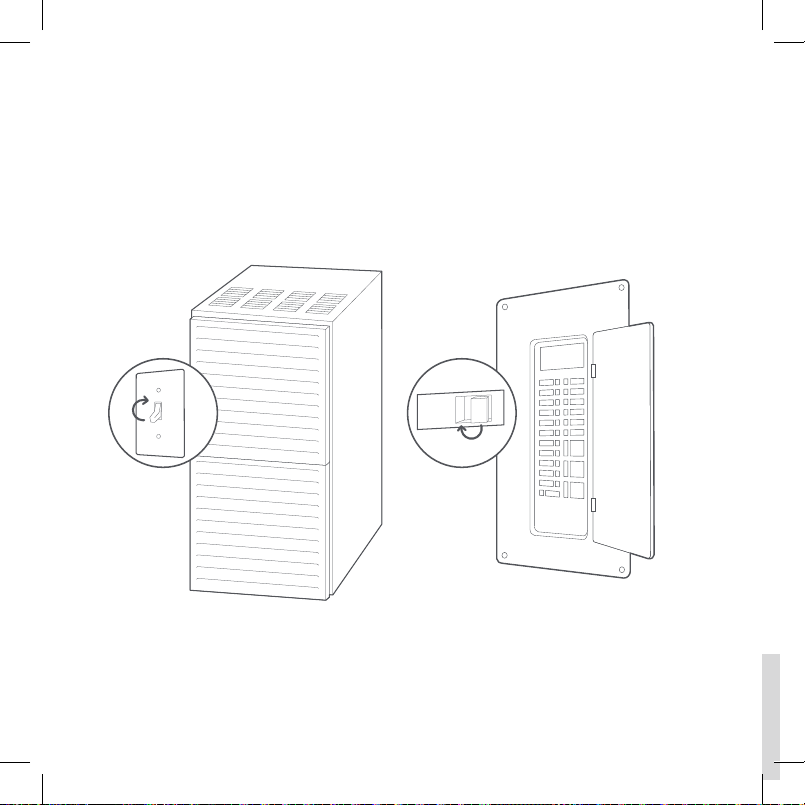
STEP 12
Gently press your ecobee into the backplate
until it ‘clicks’ into place.
TIP: If the thermostat ‘rocks’ or is not flush with the wall, be sure the excess
wires are pushed all the way into the wall.
ON
OFF
ON
OFF
21
STEP 13
Turn the power to your HVAC system back on using the
master switch or at the circuit breaker box.
22
TIP: If your thermostat does not power on, please see the troubleshooting
section on PAGE 48.
Congratulations, you did it!
Say hi to your new ecobee! To complete your setup and
registrations, follow the instructions on your ecobee screen.

23
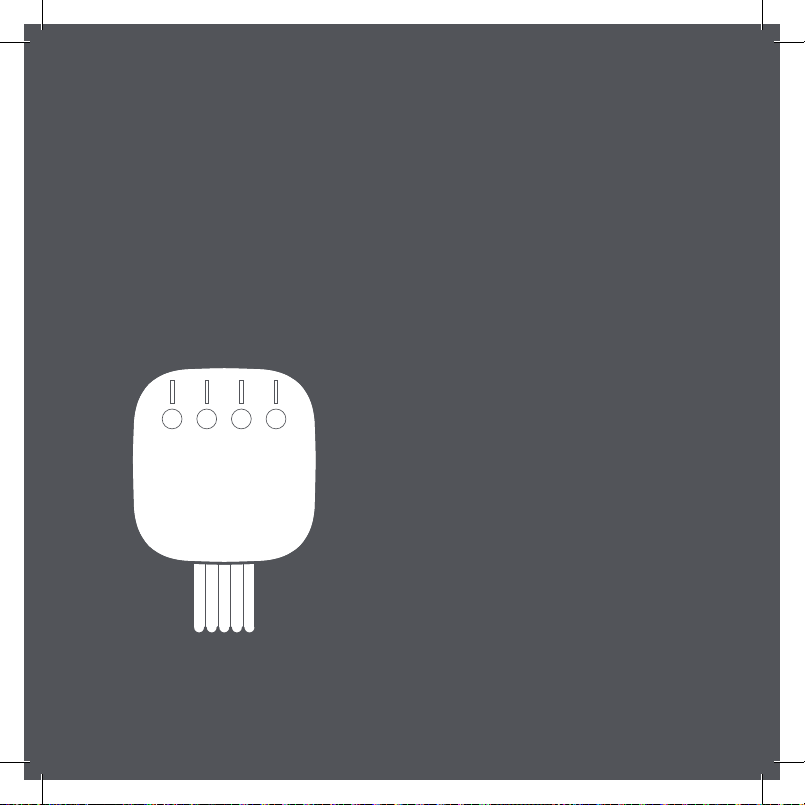
We can help you find a pro
Installation with the Power Extender Kit (PEK) will require
you to handle electrical wiring. If you’d rather leave it up to
a professional, we can help you find one quickly.
ecobee.com/proinstall
24
Install your ecobee
without a C wire
If you don’t have a C wire, you’ll need to use the Power
Extender Kit (PEK) included to reliably power your ecobee.
RC RH
RC RH
RC RH
RC RH
YES NO
Continue to the
NEXT PAGE
The Power Extender Kit
will work with your system!
Contact us
Visit our compatibility checker
at ecobee.com/compatibility
25
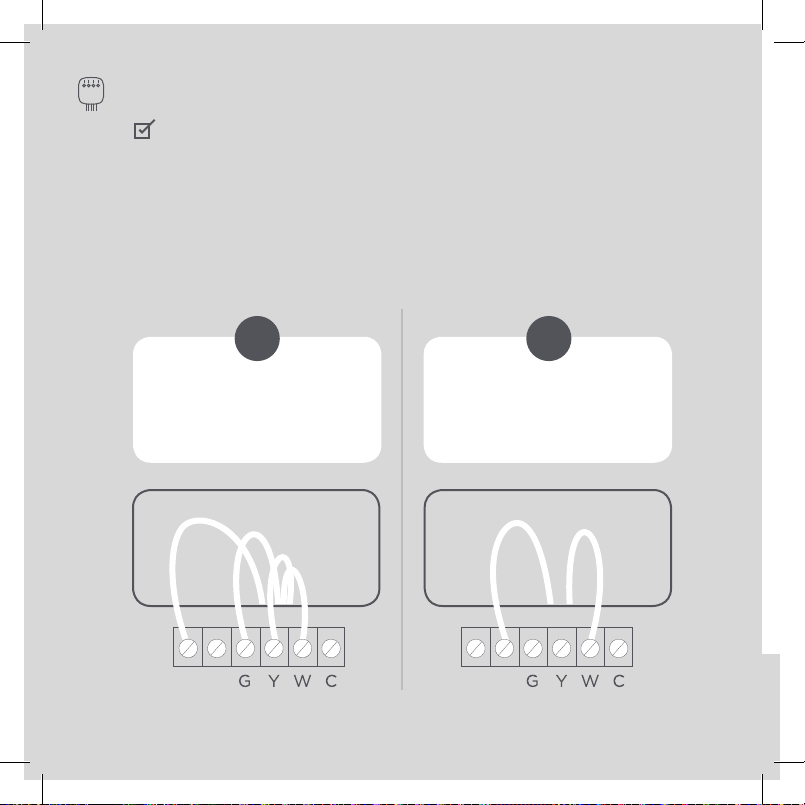
CHECKPOINT: 3 OR 4 WIRES
The Power Extender Kit requires your system to have either
of the following: 4 wires W/W1, Y/Y1, G, and R (or RC or RH)
or 3 wires Y/Y1, G, and R (or RC or RH)
Do you have these wires?
ecobee wire labels
Label wires at your:
Thermostat Control Board
26
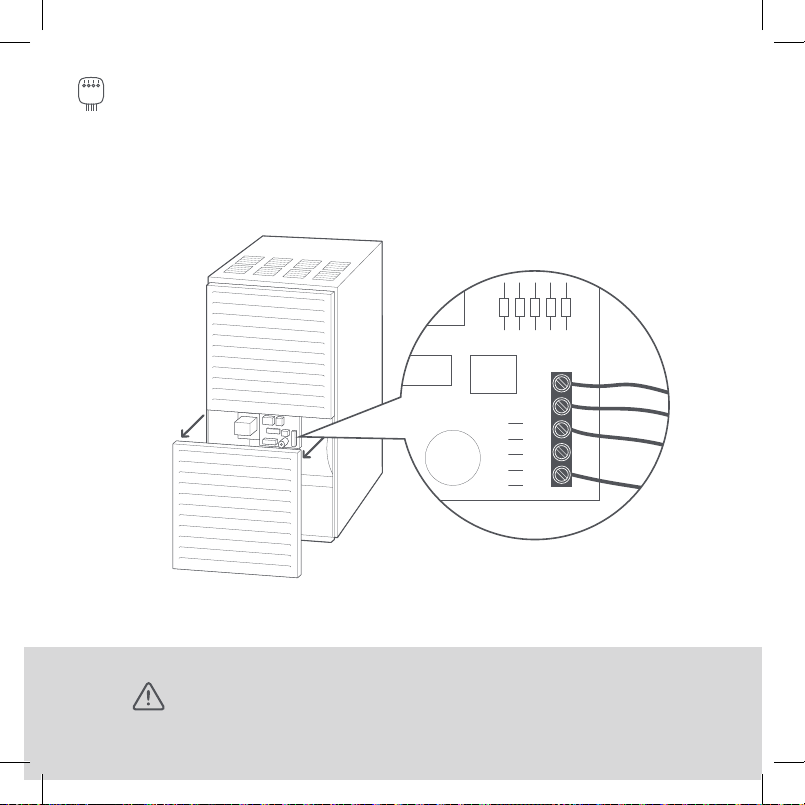
STEP 5
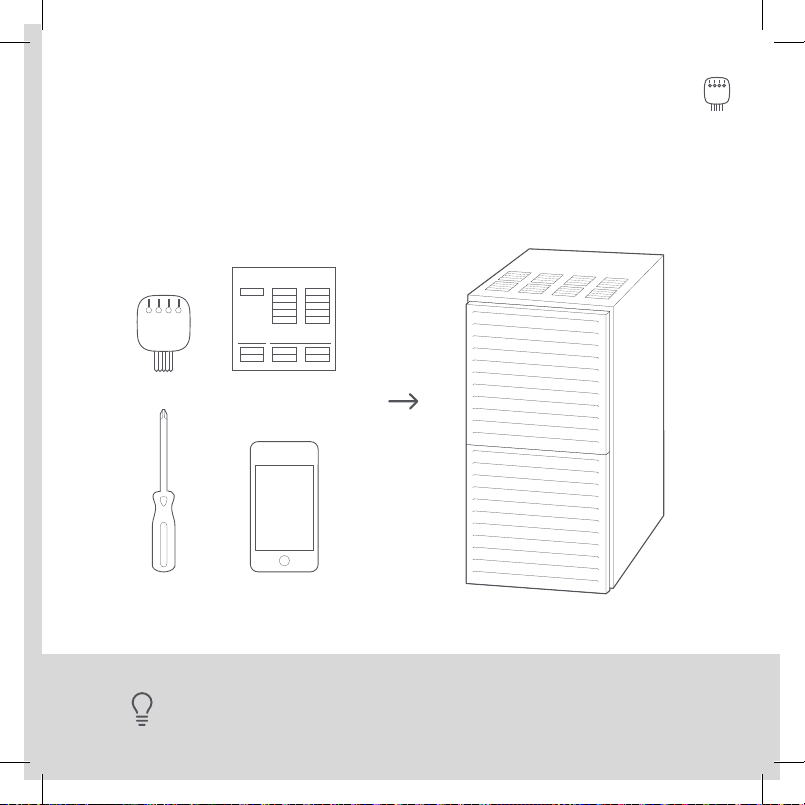
Take your Power Extender Kit, wire labels, tools,
your smartphone, and go to your HVAC system.
TIP: Your HVAC system can most often be found in your
basement or your attic.
Control board
Y
W
G
C
R
27
STEP 6
Open your HVAC system’s cover to reveal the control board.
WARNING: HVAC systems contain high voltage wires. Use caution when
working with the control board. If you’d rather leave it up to a professional,
we can help you find one quickly. Visit ecobee.com/proinstall
Y
W
G
C
R
28
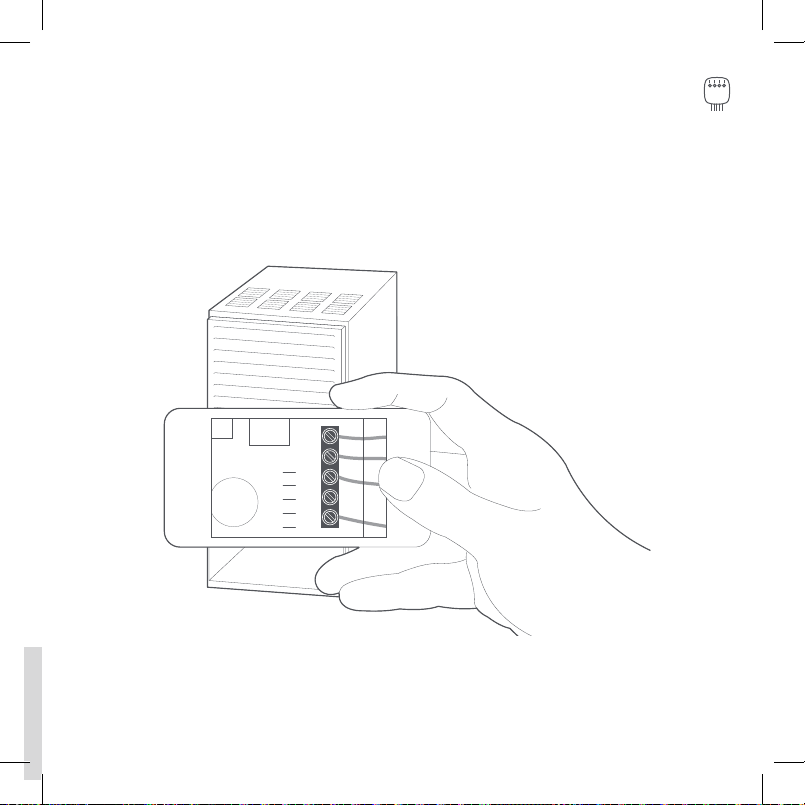
STEP 7
Take a picture of the wires connected to your control board.
You may need to reference this photo later on.
Y
W
G
C
R
W
Y
G
R
29
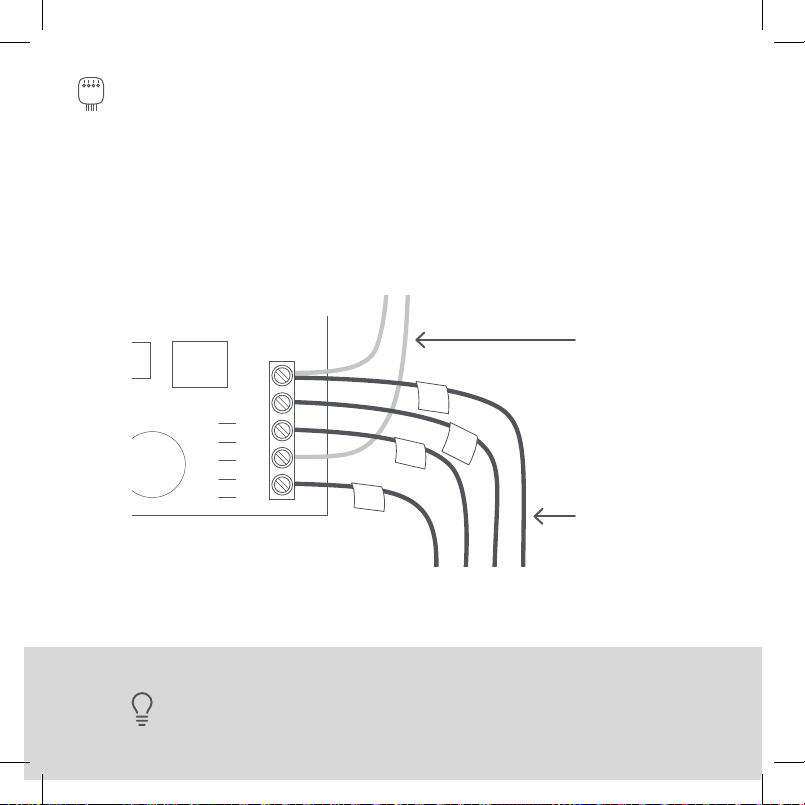
STEP 8
Label only the R, Y or Y1, G, and W or W1 wires with the
matching labels provided. If you have more than one wire
going into these terminals, only label those going to your
thermostat.
Wires going
to your A/C
(ignore these)
Wires going to
your thermostat
TIP: If you have wires connected to both
Rc
and
Rh
terminals at the control
board you may have a two transformer system. Please contact support
Find detailed step-by-step videos at ecobee.com/installation
W
Y
R
Y
W
G
C
R
G
Y
W
G
C
R
30
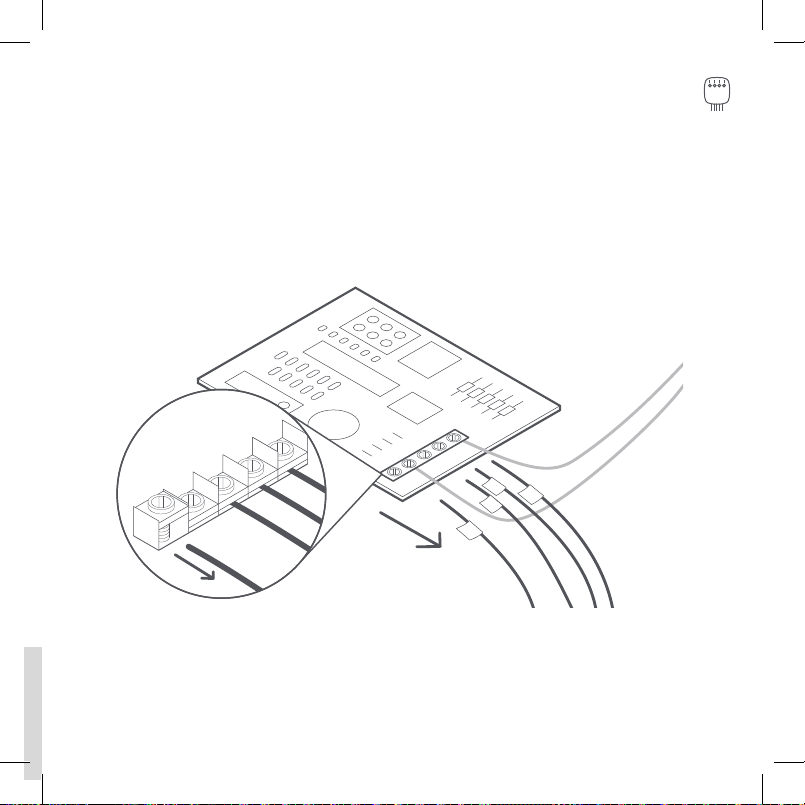
STEP 9
Disconnect the wires labeled R, Y, G, and W from the
control board.
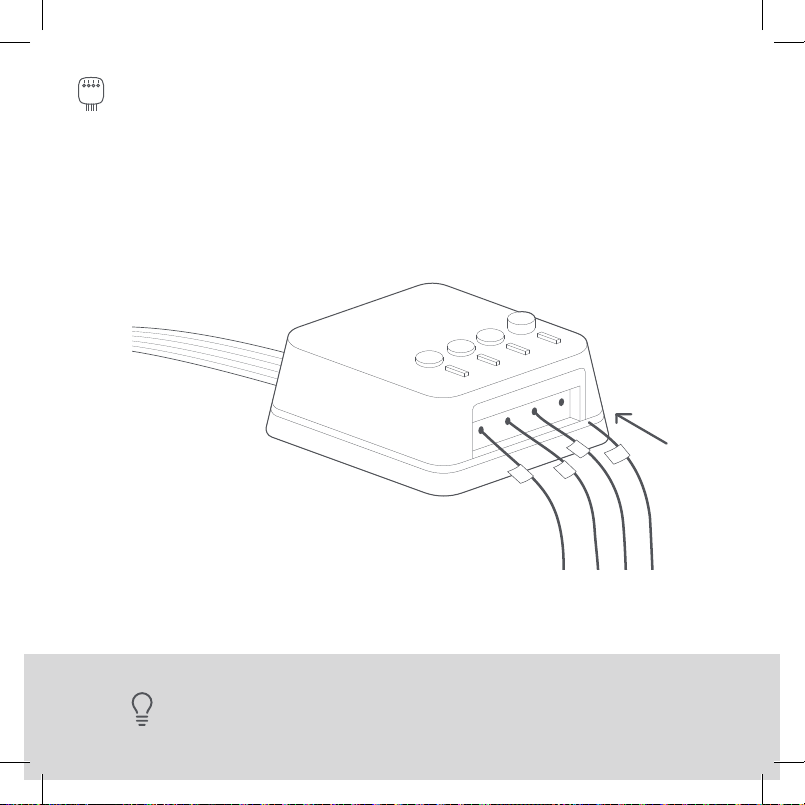
R
G
Y
W
W
G
Y
R
31
STEP 10
Connect the wires you disconnected from the control
board into their matching gray terminal blocks on the
Power Extender Kit.
TIP: Press the buttons to insert the wires more easily.
Find detailed step-by-step videos at ecobee.com/installation
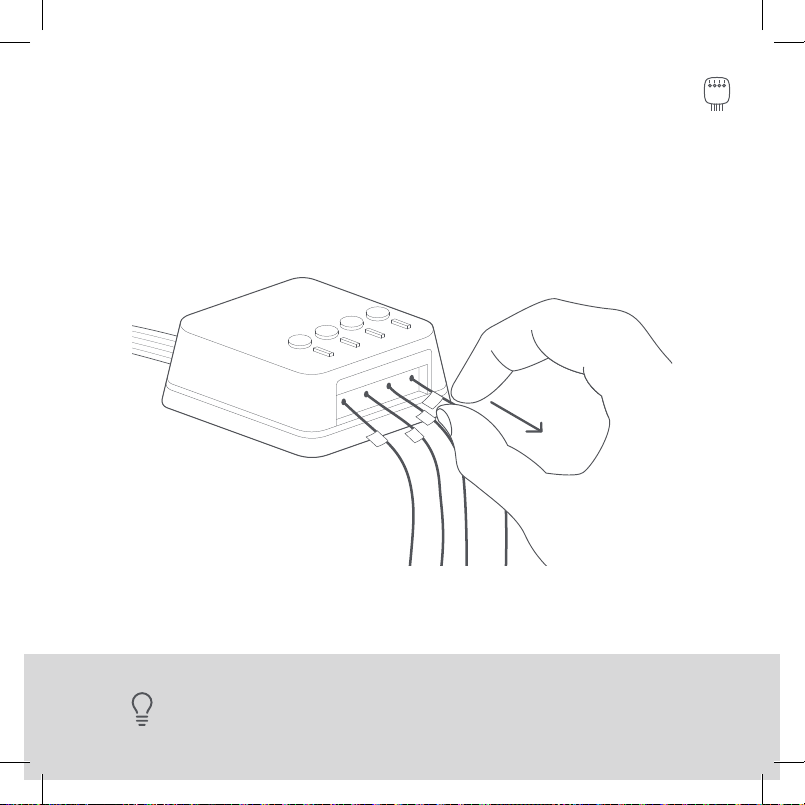
R
G
Y
W
G
Y
R
W
32
STEP 11
Tug on the wires gently to ensure they are securely
connected.
TIP: When a wire has been connected correctly, the button
on that block will lower.
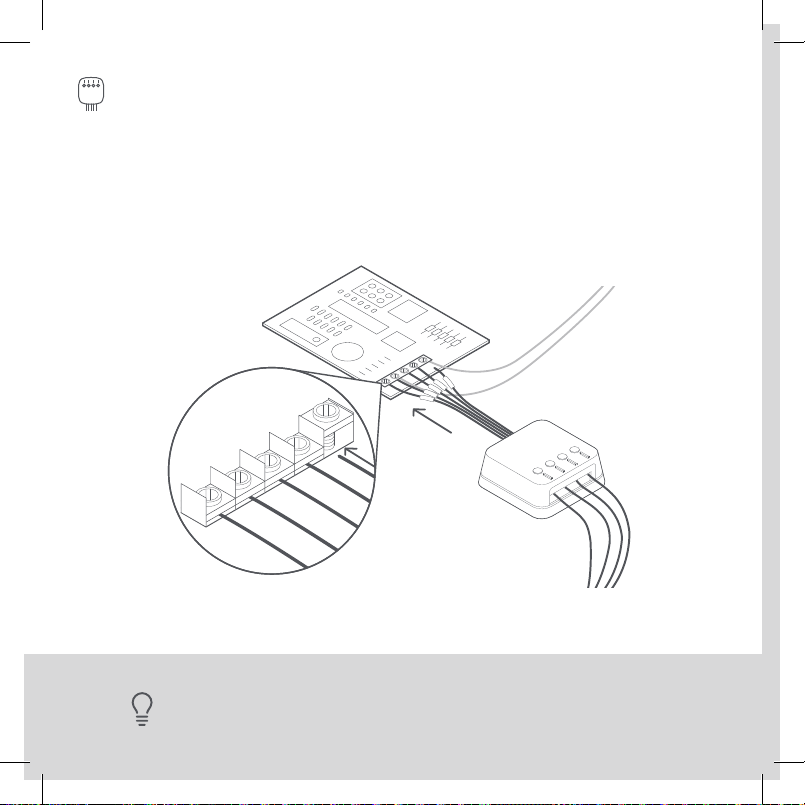
Y
W
G
C
R
R G Y W
Y
W
G
C
R
33
STEP 12
Connect the five white wires coming out of your Power
Extender Kit to their corresponding terminals on the
control board.
TIP: Once again, tug on the wires gently to ensure they are securely connected.
Find detailed step-by-step videos at ecobee.com/installation
BEFORE
AFTER
BEFORE
AFTER
34
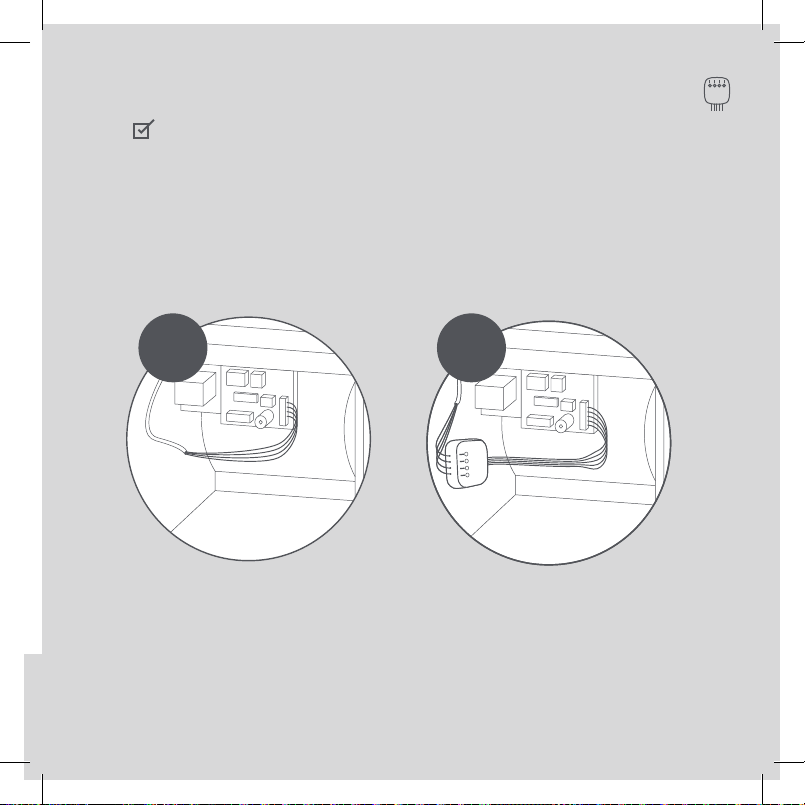
CHECKPOINT: POWER EXTENDER KIT
Check that you have installed the Power Extender Kit
correctly. It should be installed between your thermostat
wiring and your control board.
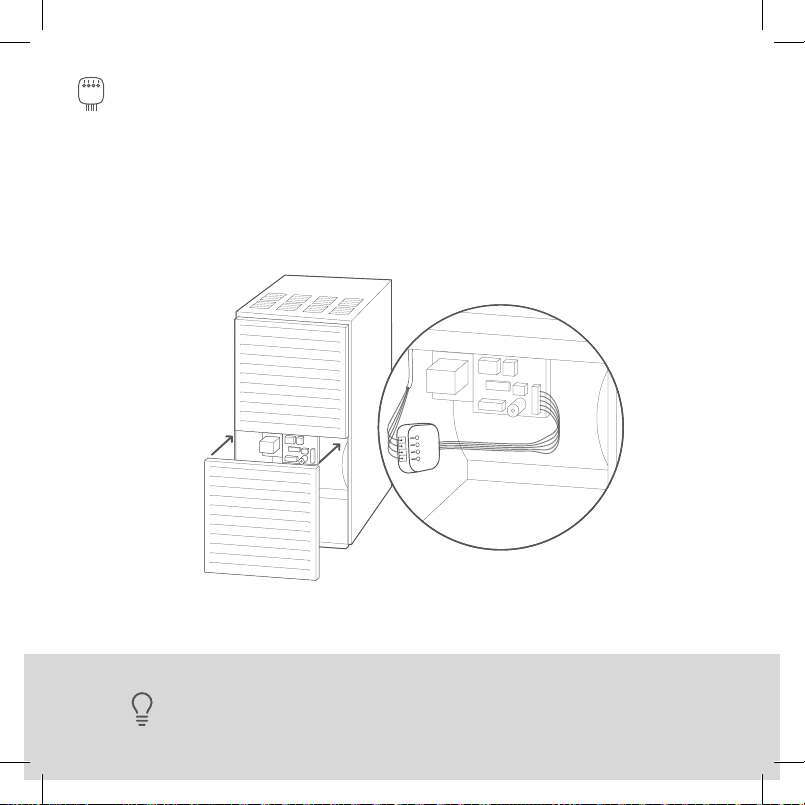
35
STEP 13
Mount the Power Extender Kit inside your HVAC system,
taking care not to strain the wires. Close the HVAC cover
panel securely and return to your thermostat.
TIP: Make sure your HVAC panel is fully closed. Some systems will
not turn on if the cover panel has not been closed properly.
Find detailed step-by-step videos at ecobee.com/installation
W/W1
Y/Y1
Rc
RC RH
36
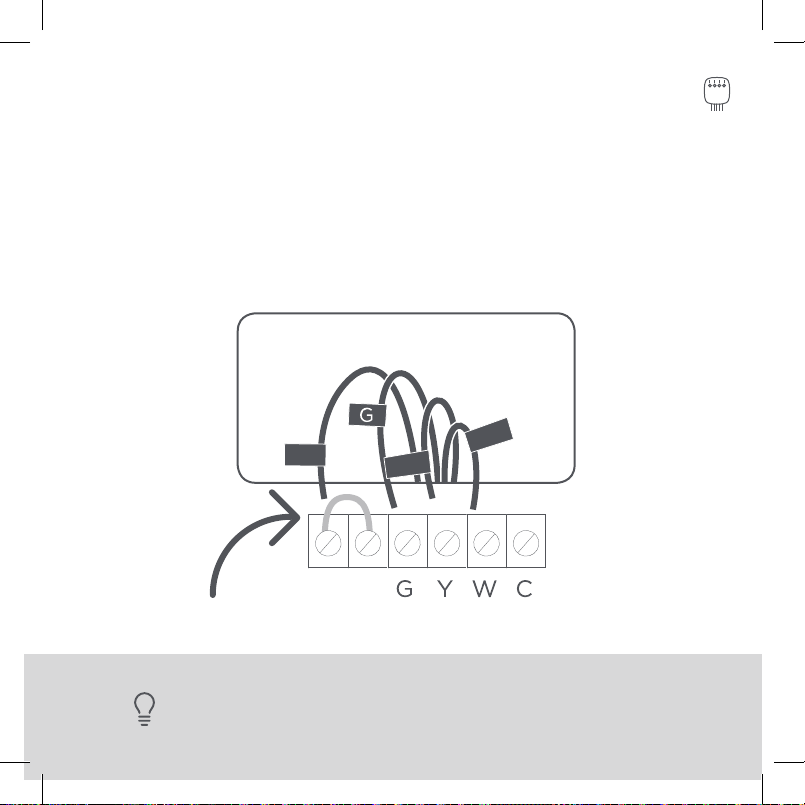
STEP 14
Back at your thermostat:
Carefully disconnect and label the wires from your old
thermostat one at a time, using the labels provided.
TIP: If you have a jumper between R
c
, R
h
, or R, leave it alone.
Only label the wires that run from your wall into a terminal block.
R
C
W/W1
Y/Y1
RC RH
37
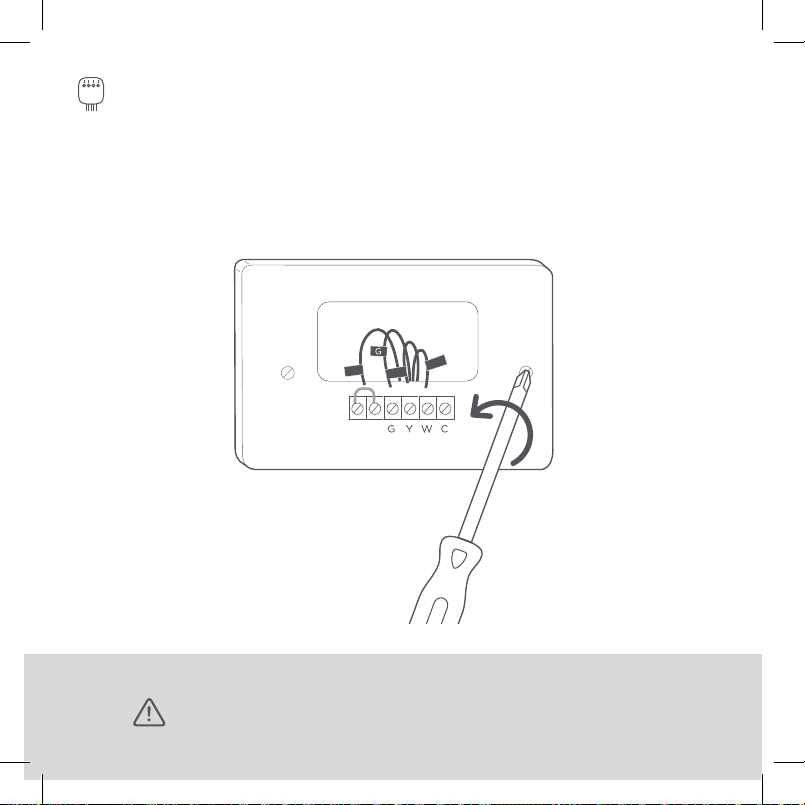
STEP 15
Unscrew the mounting plate of your old thermostat to
remove it from the wall.
WARNING: Be careful, as some thermostats may contain mercury.
Recycle your old thermostat safely with your local hazardous waste facility.
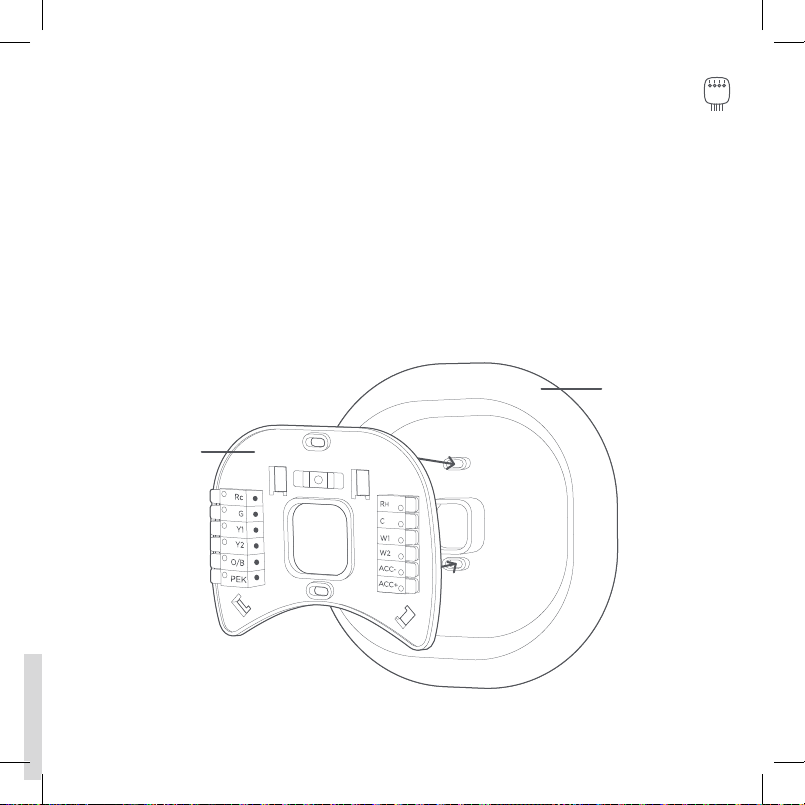
STEP 16
Decide if you want to use the trim plate with your ecobee.
The trim plate is useful if you want to hide marks or holes
left on the wall by your old thermostat.
If using the trim plate, align the mounting holes on the trim
plate and backplate and press them into place together.
Backplate
Trim plate
38
Rc
G
Y/Y1
W/W1
C
39
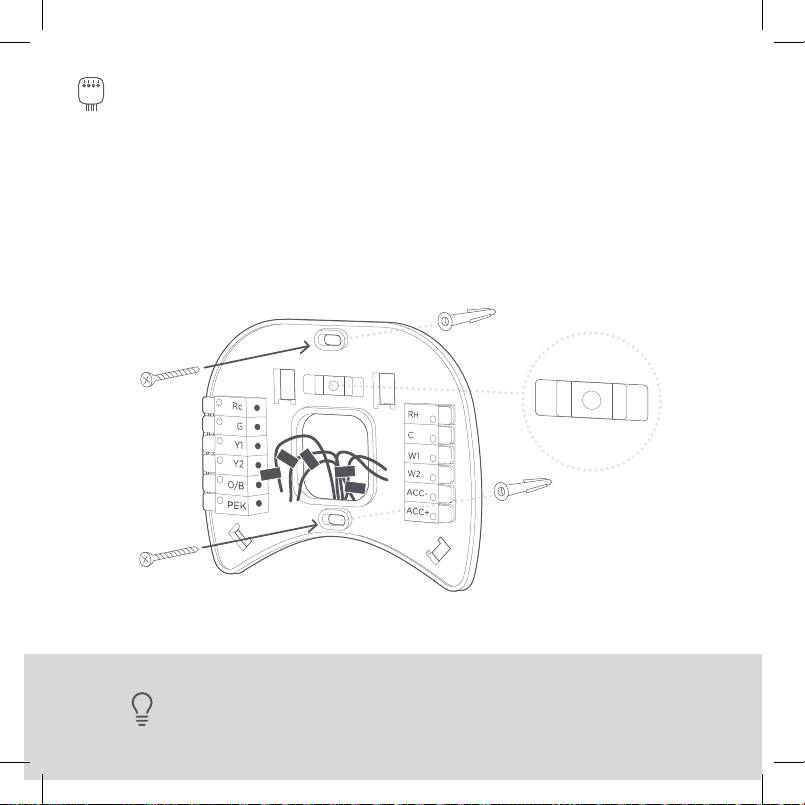
STEP 17
Pull the wires through the hole in the middle of the backplate
and then attach it to the wall using the drywall anchors and
screws provided.
TIP: Use a 3/16” drill bit to drill a hole for the drywall anchors.
Rc
G
Y1
Y2
O/B
PEK
ACC-
ACC+
W2
W1
R
H
C
Rc
R
H
G
C
W/W1
PEK
Y/Y1
THERMOSTAT CONTROL BOARD
40
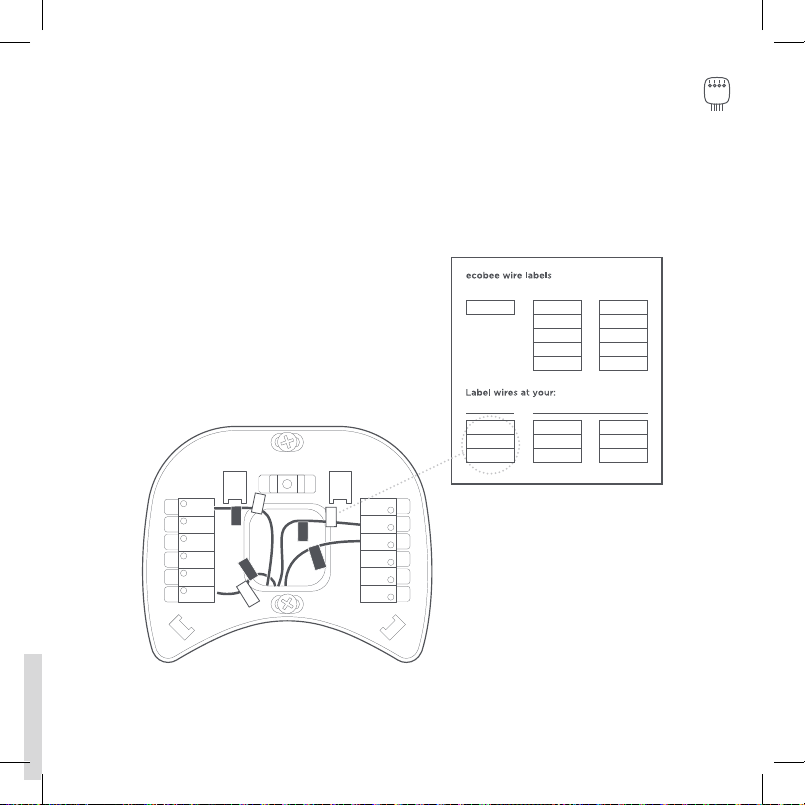
STEP 18
Remove the Rc, C, and PEK labels from the label sheet and
attach them to the wires as shown below:
R/RC/RH ➔ RC
G ➔ C
Y ➔ PEK
Rc
G
Y1
Y2
O/B
PEK
ACC-
ACC+
W2
W1
R
H
C
Rc
R
H
G
C
W/W1
PEK
Y/Y1
Rc
G
Y1
Y2
O/B
PEK
ACC-
ACC+
W2
W1
R
H
C
Rc
R
H
G
C
W/W1
PEK
Y/Y1
41
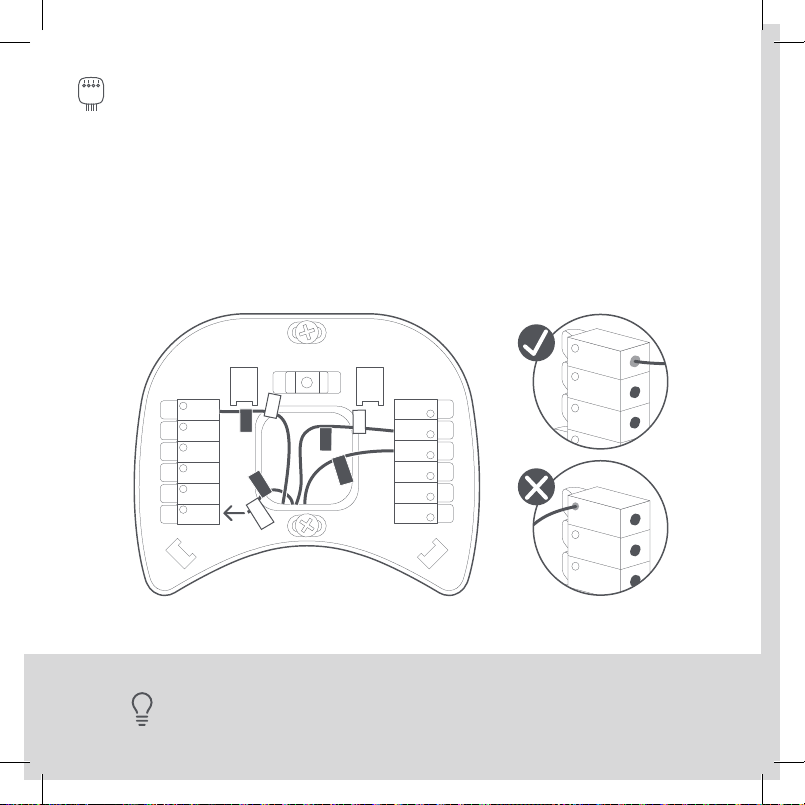
TIP: Press the terminal block levers to insert the wires more easily.
STEP 19
First, connect these 3 wires as shown: RC, C, PEK.
Then, connect any remaining wires to their
corresponding terminal.
ACC-
ACC+
W2
W1
R
H
C
Rc
G
Y1
Y2
O/B
PEK
Rc
R
H
G
C
W/W1
PEK
Y/Y1
YES NO
Continue to the
NEXT PAGE.
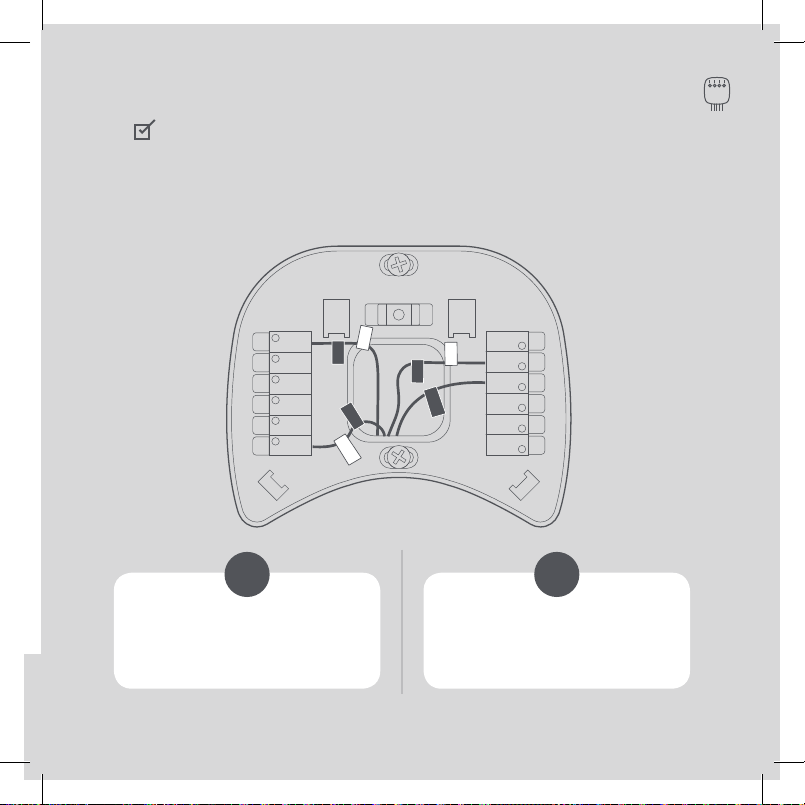
Please ensure that your
wiring is as shown above.
42
CHECKPOINT: DON’T SKIP AHEAD
Did you connect the correct wires to the RC, C, and PEK
terminals, as shown below?
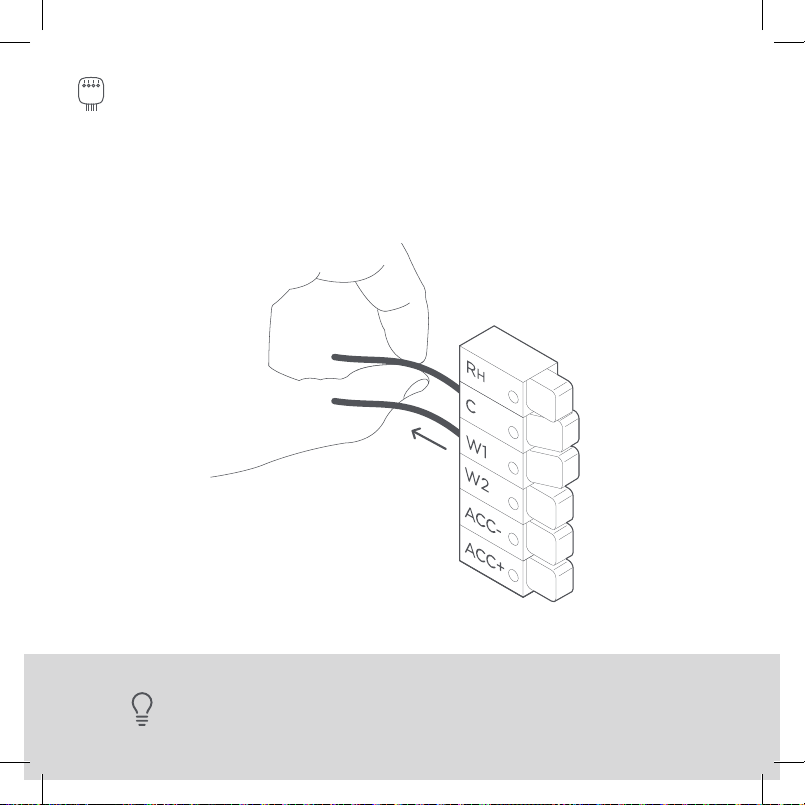
43
STEP 20
Tug on the wires gently to ensure they
are securely connected.
TIP: When a wire has been connected correctly, the lever on that block will lower.
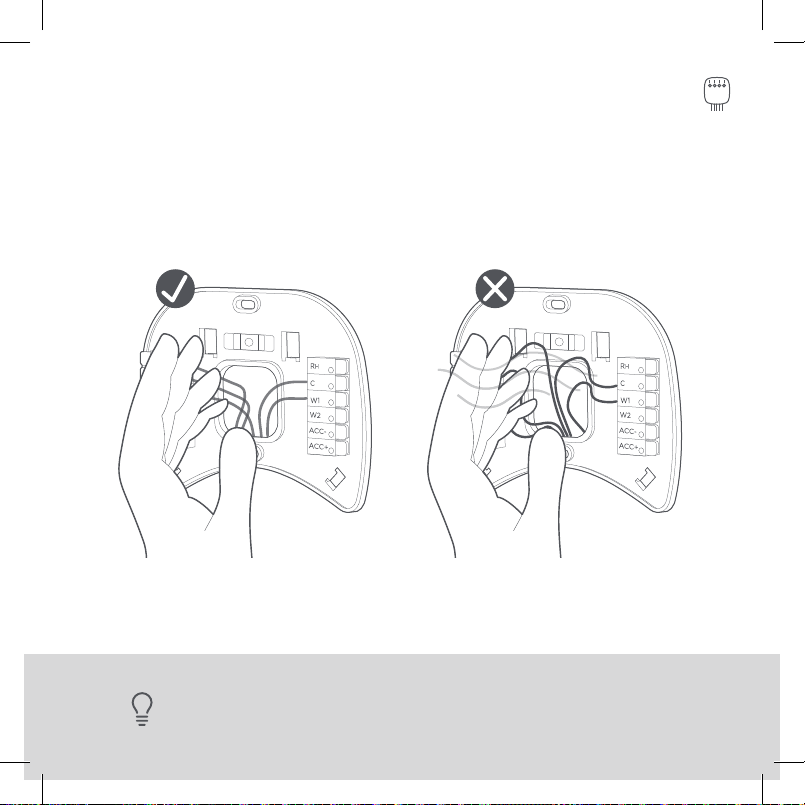
44
STEP 21
Carefully push any excess wires back into the hole and ensure
there are no drafts coming from the hole(s) in the wall.
TIP: Large holes behind your thermostat will aect temperature readings.
Prevent drafts by covering the hole(s).
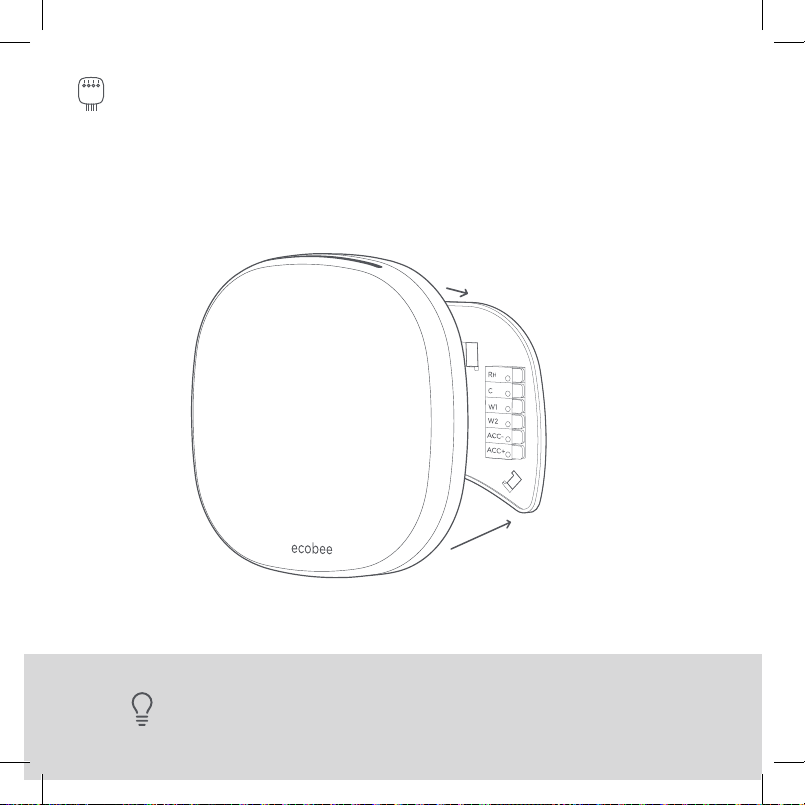
45
STEP 22
Gently press your ecobee into the backplate
until it ‘clicks’ into place.
TIP: If the thermostat ‘rocks’ or is not flush with the wall, be sure the excess
wires are pushed all the way into the wall.
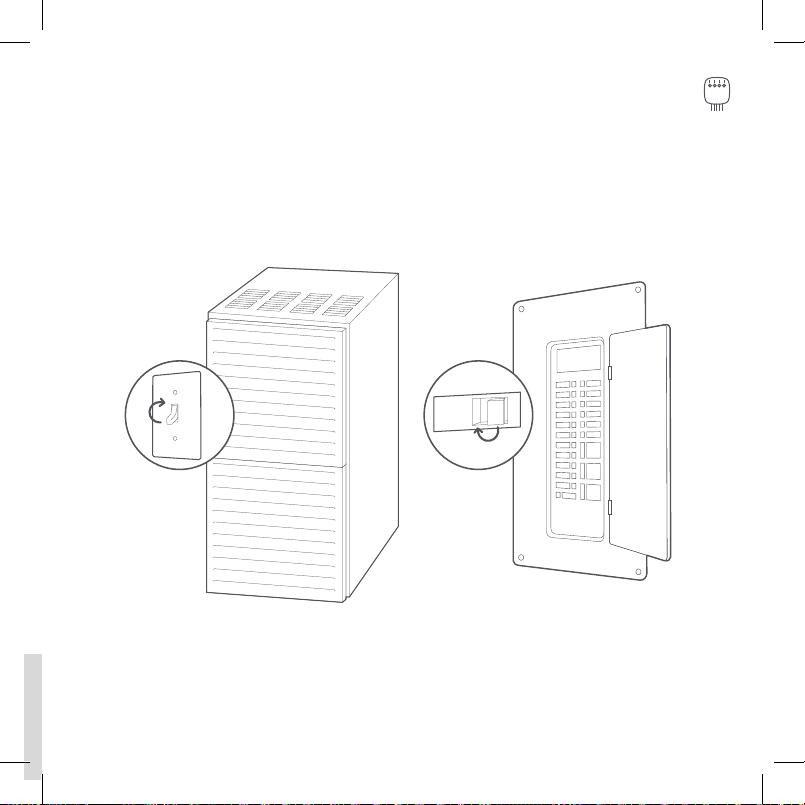
ON
OFF
ON
OFF
46
STEP 23
Turn the power to your HVAC system back on using the
master switch or at the circuit breaker box.
47
Congratulations, you did it!
Say hi to your new ecobee! To complete your setup and
registrations, follow the instructions on your ecobee screen.

48
Troubleshooting
49
TROUBLESHOOTING
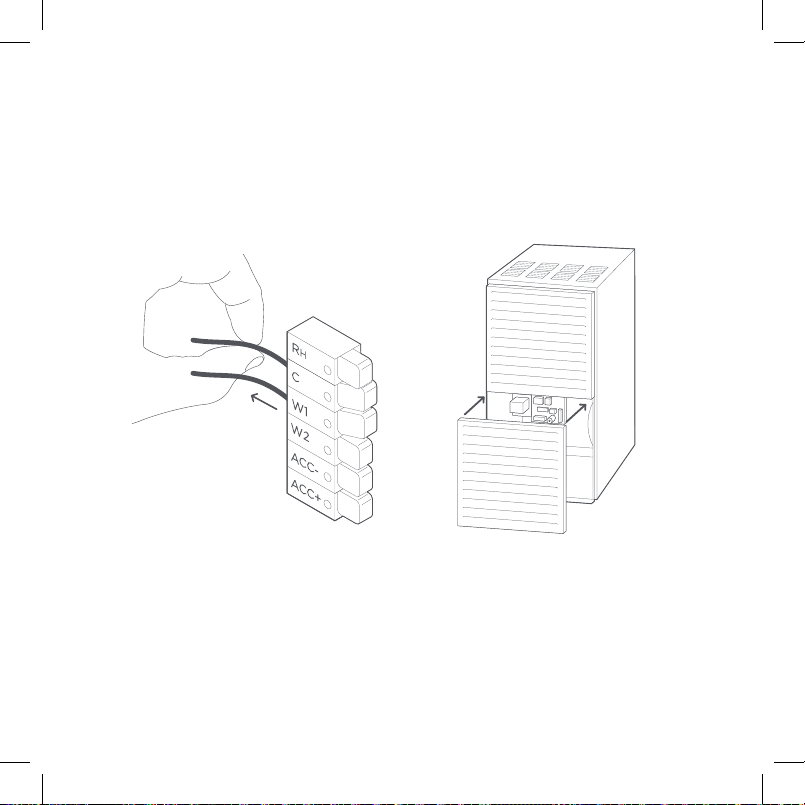
If your ecobee doesn’t turn on, please try these steps:
1. Check that all wires are properly
inserted into the terminal blocks
at the thermostat. Tug on the wires
to ensure they are not loose.
2. Make sure your HVAC cover panel is
closed. Some systems will not turn
on if the cover panel has not been
closed properly.
R
Rc
PEK
ACC-
ACC+
W2
W1
R
H
Rc
R
H
G
C
W/W1
PEK
Y/Y1
G
Y1
Y2
O/B
C
50
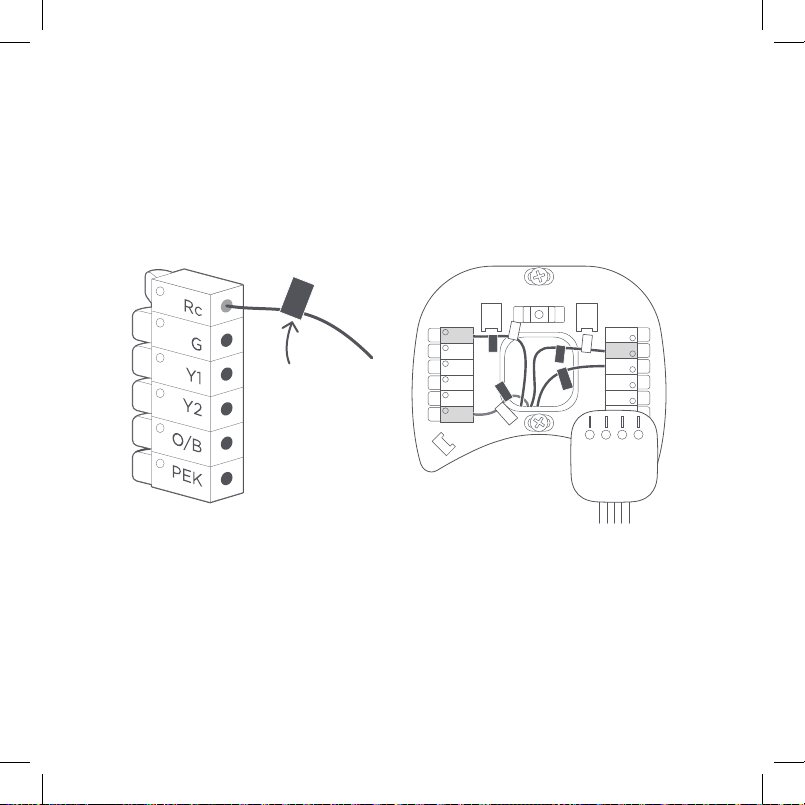
3. If you have only one R wire
(either R, R
c
, or R
h
), make sure it’s
inserted into the Rc terminal.
4. If you installed the Power Extender
Kit, make sure you inserted the
wires into the correct terminals.
Your R, RC,
or RH wire
TROUBLESHOOTING

51
Still need help?
WE’RE HERE FOR YOU
Have questions or concerns? Get in touch.
1.877.932.6233
ecobee.com/support
WE CAN HELP YOU FIND A PRO
Installation requires you to uninstall your old device
and handle electrical wiring. If you’d rather leave it up to
a professional, we can help you find one quickly.
ecobee.com/proinstall
INSTALLING ACCESSORIES?
To install accessories (humidifier, dehumidifier or ventilator)
please refer to the wiring diagrams at ecobee.com/wiring

52
Approvals
This product was designed and built in accordance
to RoHS directive 2002/95/EC and contains no
hazardous substances as defined by this directive.
FCC Compliance Statement Compliance Notice:
This equipment has been tested and found to
comply with the limits for a Class B digital device,
pursuant to part 15 of the FCC Rules. These limits
are designed to provide reasonable protection
against harmful interference in a residential
installation. This equipment generates, uses and can
radiate radio frequency energy and, if not installed
and used in accordance with the instructions, may
cause harmful interference to radio communications.
However, there is no guarantee that interference will
not occur in a particular installation. If this equipment
does cause harmful interference to radio or
television reception, which can be determined by
turning the equipment o and on, the user is
encouraged to try to correct the interference by one
or more of the following measures:
· Reorient or relocate the receiving antenna.
· Increase the separation between the equipment
and receiver.
· Connect the equipment into an outlet on a circuit
dierent from that to which the receiver is
connected.
· Consult the dealer or an experienced radio/TV
technician for help.
This device complies with part 15 of FCC rules.
Operation is subject to the following two conditions:
1. This device may not cause harmful interference.
2. This device must accept any interference received,
including interference that may cause undesired
operation.
Change or modifications that are not expressly
approved by the manufacturer could void the user’s
authority to operate the equipment.
RF Exposure Information:
This equipment complies with FCC radiation
exposure limits set forth for an uncontrolled
environment. In order to avoid the possibility of
exceeding the FCC radio frequency exposure limits,
human proximity to the antenna shall not be less
than 8 inches during normal operation.
Innovation, Science and Economic Development
Canada (ISED) | Compliance Notice:
This device contains licence-exempt transmitter(s)/
receiver(s) that comply with Innovation, Science and
Economic Development Canada’s licence-exempt
RSS(s). Operation is subject to the following two
conditions:
1. This device may not cause interference.
2. This device must accept any interference,
including interference that may cause undesired
operation of the device.
Innovation, Sciences et Développement
économique Canada (ISDE) | Avis de conformité:
L’émetteur/récepteur exempt de licence contenu
dans le présent appareil est conforme aux CNR
d’Innovation, Sciences et Développement
LEGAL

53
from the date of purchase by the consumer
(“Customer”), the ecobee (the “Product”) shall be
free of defects in materials and workmanship under
normal use and service. During the warranty period,
ecobee shall, at its option, repair or replace any
defective Products, at no charge. Any replacement
and/or repaired device are warranted for the
remainder of the original warranty or ninety (90)
days, whichever is longer. A proof-of-purchase will
be required from the Customer in order for ecobee
to provide a replacement and/or repaired device.
This Warranty is valid only for Product installed in
the country in which it is purchased.
If the product is defective, call Customer Service at
1-877-932-6233. ecobee will make the determination
whether a replacement product can be sent to you
or whether the product should be returned to our
address.
In the event of a failure of a Product, Customer may:
a. If Customer did not purchase the Product directly
from ecobee, contact the third party contractor
from whom the Product was purchased to obtain
an equivalent replacement product, provided the
contractor determines that the returned Product
is defective and Customer is otherwise eligible to
receive a replacement product;
b. Contact ecobee directly for service assistance at
1-877-932-6233 and ecobee will make the
determination whether an advance equivalent
replacement Product can be sent to Customer
with return shipping supplies (in which case a
hold shall be put on Customer’s credit card for the
value of the replacement Product until ecobee
has received the defective Product). Product
should be returned to our address. If the returned
Product is found by ecobee to be defective and
Customer is otherwise eligible to receive a
replacement product, no amount shall be charged
to Customer’s credit card; or
économique Canada applicables aux appareils radio
exempts de licence. L’exploitation est autorisée aux
deux conditions suivantes :
1. L’appareil ne doit pas produire de brouillage;
2. L’appareil doit accepter tout brouillage
radioélectrique subi, même si le brouillage est
susceptible d’en compromettre le fonctionnement.
RF Exposure Statement:
This equipment complies with IC RSS-102 radiation
exposure limits set forth for an uncontrolled
environment. This transmitter must be installed to
provide a separation distance of at least 8 inches
from all persons and must not be collocated or
operating in conjunction with any other antenna or
transmitter.
Énoncé sur l’exposition aux fréquences radio :
Cet équipement est conforme aux limites
d’exposition aux fréquences radio d’IC RSS-102
définies pour un environnement non contrôlé. Cet
émetteur doit être installé à au moins 20 cm de toute
personne et ne doit pas être colocalisé ou fonctionner
en association avec une autre antenne ou émetteur.
FCC ID: WR92221123114
IC: 7981A-2221123114
CAN ICES-3 (B)/NMB-3(B)
Warning: Changes or modifications not expressly
approved by ecobee Inc. could void the user’s
authority to operate the equipment
Avertissement : les changements qui ne sont pas
expressément autorisés par ecobee Inc. pourraient
annuler votre droit d’usage du matériel..
3-Year Limited Warranty
ecobee warrants that for a period of three (3) years

54
c. Ship the defective Product directly to ecobee, in
which case Customer shall contact ecobee
directly at 1-877-932-6233, so ecobee can make
the required shipping arrangements. Upon receipt
of the defective Product, ecobee will ship an
equivalent replacement product to Customer,
provided the returned Product is found by ecobee
to be defective and Customer is otherwise eligible
to receive a replacement product.
This warranty does not cover removal or
reinstallation costs and shall not apply if the
damages were found to be caused by something
other than defects in materials or workmanship,
including without limitation, if the Product:
· Was operated/stored in abnormal use or
maintenance conditions;
· Is repaired, modified or altered, unless ecobee
expressly authorizes such repair, modification or
alteration in writing;
· Was subject to abuse, neglect, electrical fault,
improper handling, accident or acts of nature;
· Was not installed by a licensed Heating Ventilating
and Air Conditioning (HVAC) contractor; or
· Was installed improperly.
ecobee’s sole responsibility shall be to repair or
replace the Product within the terms stated above.
ECOBEE SHALL NOT BE LIABLE FOR ANY LOSS
OR DAMAGE OF ANY KIND, INCLUDING ANY
SPECIAL, INCIDENTAL OR CONSEQUENTIAL
DAMAGES RESULTING, DIRECTLY OR INDIRECTLY,
FROM ANY BREACH OF ANY WARRANTY,
EXPRESS OR IMPLIED, OR ANY OTHER FAILURE
OF THIS PRODUCT. Some US states and Canadian
provinces do not allow the exclusion or limitation of
incidental or consequential damages, so the above
limitation or exclusion may not apply to you.
ecobee’s responsibility for malfunctions and defects
in materials and workmanship is limited to repair
and replacement as set forth in this warranty
statement. All express and implied warranties for
the product, including but not limited to any implied
warranties and conditions of merchantability and
fitness for a particular purpose, are limited to the
three-year duration of this limited warranty. No
warranties, whether expressed or implied, will apply
after the limited warranty period has expired. Some
US states and Canadian provinces do not allow
limitations on how long an implied warranty lasts,
so this limitation may not apply.
ecobee neither assumes responsibility for nor
authorizes any other person purporting to act on its
behalf to modify or to change this warranty, nor to
assume for it any other warranty or liability
concerning this product.
This warranty gives you specific rights, and you may
also have other rights which vary from jurisdiction to
jurisdiction. If you have any questions regarding this
warranty, please write to ecobee Customer Service.
Legal Notice
Use of the HomeKit™ logo means that an electronic
accessory has been designed to connect specifically
to iPod
®
, iPhone
®
, or iPad
®
, respectively, and has
been certified by the developer to meet Apple
®
performance standards. Apple is not responsible for
the operation of this device or its compliance with
safety and regulatory standards. Please note that
the use of this accessory with iPod, iPhone, or iPad
may aect wireless performance. Apple, iPhone,
iPad, and iPod touch are trademarks of Apple Inc.,
registered in the U.S. and other countries. HomeKit
is a trademark of Apple Inc.

770-00092
We’re here to help.
ecobee.com
1.877.932.6233
© 2019 ecobee, Inc. All rights reserved. ecobee
and the ecobee logo are trademarks of ecobee Inc.,
registered in the U.S. and other countries.