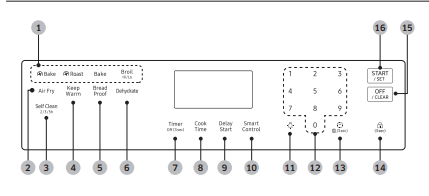
Timer Off (3 sec): Activates or deactivates the timer.
Cook Time: Set the cooking time.
Delay Start: Set the oven to start at a certain time.
Smart Control: Activates the Easy connection.
Oven Light: Turn on/Turn off the oven light.
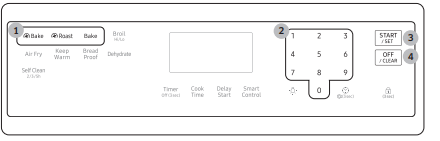
Numbers: Use to set the times, temperatures, or presets.
Clock: Set the clock time.
Lock: Press and hold for 3 seconds to lock the control panel and the door to prevent accidents.
OFF/CLEAR: Cancel the current operation but not the timer.
START/SET: Start a function or set the time.
Before you start
Clock
You must set the clock correctly to ensure the automatic features work properly.
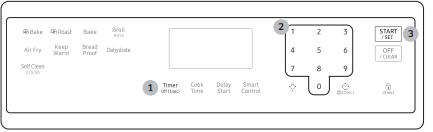
To set the clock time
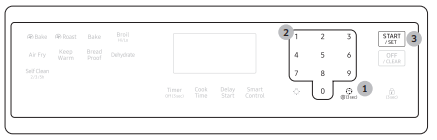
Press the .
Enter the current time using the number pad.
Press START/SET to confirm the settings.
NOTE: You can set/change the clock or the kitchen timer before you start a cooking mode or while most cooking modes are operating. However, you cannot set or change the time if a time based function is operating (Time Bake, for example) or the Sabbath option is enabled.
Oven vent/cooling vent
The oven vent is located under the oven Control panel. Proper air circulation prevents oven burner combustion problems and ensures good performance.
Do not block the vent or its surroundings.
Use caution when placing items near the vent. Hot steam can cause them to overheat or melt.
Cooktop
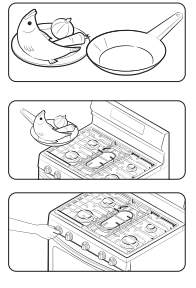
STEP 1 Put all ingredients into a cooking container (pan, pot, etc).
STEP 2 Place the container on a surface burner.
STEP 3 Ignite the surface burner.
Gas burners
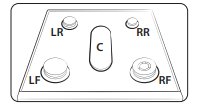
Each burner has a corresponding knob that lets you to set the flame level from LO to HI. In addition, each burner knob has a Lite setting. Turning a knob to Lite ignites the corresponding burner. The burner indicators are located above each knob and show which burner the knob controls. Each burner is designed for specific cooking purposes. See the table below.
Ignition
Make sure all surface burners are properly installed. To light a burner:
Push in the control knob, and then turn it to the Lite position. You will hear a “clicking” sound indicating the electronic ignition system is working properly.
After the surface burner lights, turn the control knob to shift it out of the Lite position and turn off the electronic ignition system.
Turn the control knob to adjust the flame level.
Manual ignition
If there is a power failure, you can ignite the burner manually. Use caution when doing this.
Hold a long gas grill lighter to the surface burner you want to light.
Push in the control knob for that burner, and then turn it to the Lite position. Turn on the grill lighter to ignite the burner.
After the burner is lit, turn the control knob to adjust the flame level.
Flame level
The flames on the burners should always stay under the cookware, and should not extend beyond the cookware bottom at any time.
WARNING
Flames larger than the cookware bottom may result in a fire or physical injury.
When you set a burner to simmer, do not turn the burner knob quickly. Watch the flame to make sure it stays on.
After turning on a surface burner, make sure that the burner has ignited. Adjust the level of the flame by turning the burner knob.
Always turn off the surface burner controls before removing cookware. All surface burner controls should be turned OFF when you are not cooking.
Always turn the burners off before you go to sleep or go out.
If you smell gas, turn off the gas to the range and call a qualified service technician. NEVER use an open flame to locate a leak.
Cookware
Requirements
Flat bottom and straight sides.
Tight-fitting lid.
Well-balanced with the handle weighing less than the main portion of the pot or pan.
Material characteristics
Aluminum: An excellent heat conductor. Some types of food may cause the aluminum to darken. However, anodized aluminum cookware resists staining and pitting.
Copper: An excellent heat conductor but discolors easily.
Stainless steel: A slow heat conductor with uneven cooking performance, but is durable, easy to clean, and resists staining.
Cast-Iron: A poor conductor but retains heat very well.
Enamelware: Heating characteristics depend on the base material.
Glass: A slow heat conductor. Use only glass cookware that is specified for range top cooking or oven use.
Size limitations
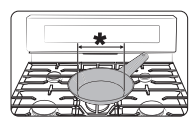
Always make sure cookware handles are turned to the side or rear of the cooktop and not over other surface burners. This will minimize the chance of burns, spillovers, and the ignition of flammable materials that can be caused if pots or pans are bumped accidently.
When using glass cookware, make sure it is designed for range top cooking.
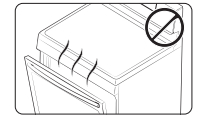
Never leave plastic items on the cooktop. Hot air from the vent can melt or ignite plastic items or cause build up of dangerous pressure in closed plastic containers. You may get severe burns if you touch the surfaces near the vent while the oven is operating.
Make sure you hold the handle of a wok or a small one-handled pot while cooking.
Griddle
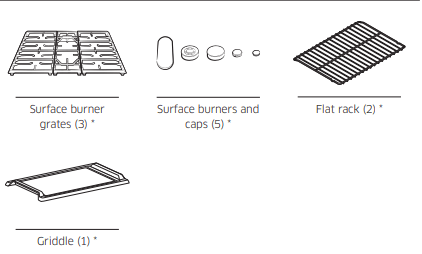
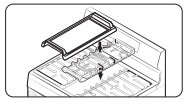
The removable coated griddle provides an extra cooking surface. This is useful especially when cooking meat, pancakes, or other foods requiring a large cooking area.
The griddle can be used only with the center burner on the center grate. Use caution when putting the griddle on the center grate.
In most cases, you should preheat the griddle before cooking. See the table below
Gas oven
STEP 1 Put all ingredients in a heat-safe container.
STEP 2 Select a cooking mode, and then start preheating.
STEP 3 Place the container on a rack.
STEP 4 Close the door and start cooking
Using the oven racks
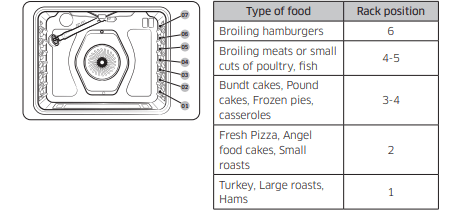
The rack positions: Your oven range comes with 2 racks and 7 rack positions. The rack positions are delineated by rack guides which support the racks. Each rack guide has a stop that prevents the rack from loosening during the oven's operation. Each rack has stoppers that need to be placed correctly on the rack guides. The stoppers prevent the racks from accidently coming out of the oven completely when you pull the racks out.
Inserting and removing an oven rack
To insert an oven rack
Place the rear end of the rack on a rack guide.
Slide the rack into the rack guide while holding the front end of the rack.
To remove an oven rack
Pull out the rack until it stops.
Pull up the front end of the rack and remove it from the rack guide.
Rack and Pan placement
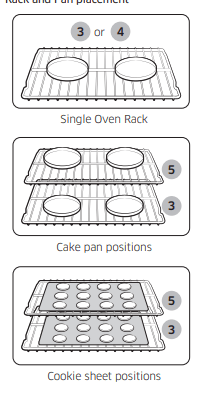
Centering the baking pans in the oven as much as possible will produce better results. If baking with more than one pan, place the pans so each has at least 1˝ to 1½˝ of air space around it.
When baking on a single oven rack, place the oven rack in position 3 or 4. See the figure on the left.
When baking cakes and cookies on multiple racks, place the oven racks in positions 3 and 5. See the figure on the left.
Cooking mode
Make sure to close the door before you start cooking.
If you leave the door open for 20-30 seconds while the oven is in convection baking/ roasting, baking, or broiling modes, the oven burner shuts off. To restart the burner, close the door.
Minimum and maximum settings
All the features listed in the table below have minimum and maximum time or temperature settings. A beep will sound each time a pad on the control panel is pressed and the entry is accepted. An error tone will sound in the form of a long beep if the entered temperature or time is below the minimum or above the maximum setting for the feature.
Baking and Roasting
Press Bake, Roast, or Bake.
If necessary, use the number pad to change the default temperature. You can set the oven to any temperature from 175 °F to 550 °F.
Press START/SET. The oven preheats until it reaches the temperature you set. It will beep when it reaches the set temperature. When preheating is complete, place the food in the oven, and then close the door.
When cooking is complete, press OFF/CLEAR, and then take out the food.
Convection cooking
The convection fan at the back of the oven circulates hot air evenly throughout the oven cavity so that food is evenly cooked and browned in less time than with regular heat.
Convection baking
Ideal for foods being cooked using multiple racks.
Good for large quantities of food.
Provides the best performance for cookies, biscuits, brownies, cupcakes, cream puffs, sweet rolls, angel food cake, and bread.
Cookies bake best when cooked on flat cookie sheets.
When convection baking using a single rack, place the rack in rack position 3 or 4.
When convection baking using two racks, place the racks in positions 3 and 5 (Cakes, Cookies).
The oven automatically adjusts the temperature for convection baking.
Convection roasting
Good for larger, tender cuts of meat, uncovered.
For best performance, place a broiler pan and grid under the meat or poultry. The pan catches grease spills and the grid prevents grease spatters.
Heated air circulates over, under, and around the food. Meat and poultry are browned on all sides as if they were cooked on a rotisserie.
Broiling
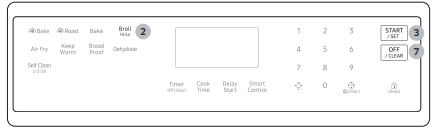
Broiling uses the oven broil burner at the top of the oven to cook and brown food. Meat or fish must be put on a broiling grid in a broiling pan. Preheating for minutes before broiling is recommended.
Put food on a broiling grid in a broiling pan.
Press Broil once for Hi temperature broiling or twice for Lo.
Press START/SET to start the broiler.
Let the oven pre-heat for 5 minutes.
Place the pan on the desired rack, and then close the oven door.
When one side of the food is browned, turn it over, close the oven door, and start cooking the other side.
When cooking is complete, press OFF/CLEAR.
Air Fry mode
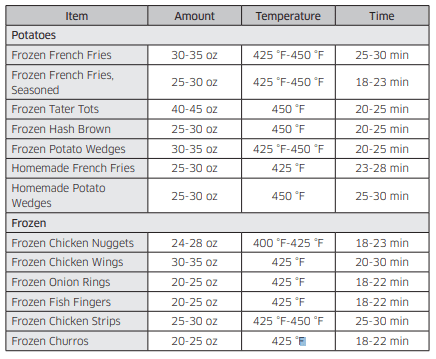
This feature uses hot air for crispier and healthier frozen or fresh foods without any or less oil than normal convection modes. For best results, use this mode in single oven mode and place the Air Fry tray in position 3. The temperature can be set between 350 °F and 500 °F. Preheating is not necessary for this mode. Follow recipe or package directions for set temperature, time, or quantity.
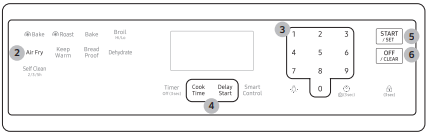
How to set the oven for Air Fry mode
Place the tray on rack position 3.
Press Air Fry.
Enter the suggested temperature for your food as recommended by its instructions using the number pad.
If necessary, set the Cook Time and Delay Start.
Press START/SET.
When cooking is complete, press OFF/CLEAR, and then take out the food.
Air Fry mode guide
Cooking options
Timer: The kitchen timer gives you an extra timer you can use to time cooking tasks such as boiling eggs. It does not, however, start or stop any cooking operation. You can set the timer from 1 minute to 9 hours and 59 minutes.
Press Timer Off (3 sec).
Enter a desired time using the number pad.
When done, press START/SET.
To cancel the Timer settings, press and hold Timer Off (3 sec) for 3 seconds.
When the set time elapses, the oven beeps and displays the “End” message. Press OFF/CLEAR to delete the message.
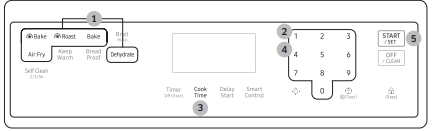
Cook Time: Cook Time sets the oven to cook foods at a set temperature for a set length of time. The oven automatically turns off when it finishes.
Mode: Bake / Bake / Roast / Air Fry / Dehydrate
Press the pad corresponding to a desired cooking mode such as Bake.
If necessary, change the temperature using the number pad.
Press Cook Time.
Set the cooking time between 1 minute and 9 hours and 59 minutes (9:59) using the number pad.
Press START/SET. The oven will automatically turn on and start preheating. The temperature will increase until it reaches the temperature you set. The oven starts cooking for the amount of time you set.
When preheating is complete, put the container with the food on a rack, and then close the door.
When the cooking time has elapsed, the oven will automatically shut off and then beep.
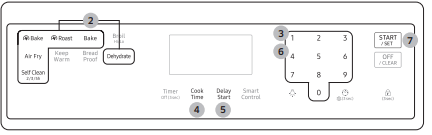
Delay Start: The Delay Start function lets you use the kitchen timer to automatically start and stop another cooking program. You can set Delay Start so that it delays the automatic start of a cooking operation you select by up to 12 hours.
Place the container with the food on a rack, and then close the door.
Press the pad corresponding to a desired cooking mode such as Bake.
If necessary, change the temperature using the number pad.
If necessary, press Cook Time and set the cooking time. (See "Cook Time" on previous page.)
Press Delay Start to change the time elements.
Set the starting time using the number pad.
Press START/SET.
The oven starts cooking at the set time, and turns off automatically when it completes cooking.
Special features
Keep Warm: Keep cooked food warm at a low temperature for up to 3 hours.
Place the container with the food on a rack, and then close the door.
Press Keep Warm.
Press START/SET. The oven heats up to 175 °F (80 °C).
Bread Proof: The Bread Proof function automatically provides the optimum temperature for the bread proof process, and therefore does not have a temperature adjustment. If you press Bread Proof when the oven temperature is above 100 ˚F, Hot will appear in the display. Because this function produces the best results when started while the oven is cool, we recommend that you wait until the oven has cooled down and Hot disappears from the display.
Press Bread Proof.
Press START/SET.
Press OFF/CLEAR at any time to turn off the Bread Proof function.
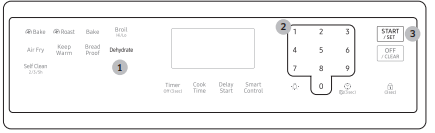
Dehydrate: Dehydrate dries food or removes moisture from food via heat circulation. After drying the food, keep it in a cool and dry place. For fruit, adding lemon or pineapple juice or sprinkling sugar on the fruit helps the fruit retain sweetness
Press Dehydrate. The default temperature is 150 ˚F.
Enter the temperature you want on number pad. (100 ˚F-225 ˚F.)
Press START/SET.
Oven lock: Lock the control panel and the door to prevent accidental operations and/or product tipping.
Press and hold the for 3 seconds to lock or unlock both the control panel and the door. When the Oven Lock is on, the oven panel does not operate and the oven door is locked and cannot be opened.
Maintenance
Cleaning
Control panel
First, lock the control panel and the door to prevent accidental operations and/or product tipping.
Press and hold for 3 seconds to lock both the control panel and the door.
Clean the control panel using a soft cloth dampened with plain water, warm soapy water, or glass cleaner. Do not spray cleansers directly onto the control panel.
When done, press and hold again for 3 seconds.
WARNING
Make sure the control panel turns off and all surfaces of the range are cool before cleaning. Otherwise, you can get burned.
If the range has been moved away from the wall, make sure the Anti-Tip device is reinstalled properly when the range has been put into place again. Otherwise, the range may tip over, causing physical injuries.
Do not use steel-wool or abrasive cleansers of any kind. These can scratch or damage the surface.
Stainless steel surface
Remove any spills, spots, and grease stains using a soft, wet cloth.
Apply an approved stainless steel cleanser to a cloth or paper towel.
Clean one small area at a time, rubbing with the grain of the stainless steel if applicable.
When done, dry the surface using a soft, dry cloth.
Repeat steps 2 through 4 as many times as necessary.
CAUTION
Do not use a steel-wool pad or abrasive cleanser on stainless steel surfaces. It will scratch the surface.
Do not spray any type of cleanser into the manifold holes. The ignition system is located in those holes and must be kept free of moisture.
Racks
To keep the racks clean, remove them from the cavity, and soak them in lukewarm soapy water. Then, scour soil off of the racks using a plastic scouring pad. If the racks do not slide in and out smoothly after you have cleaned them, rub the side rail guides with wax paper or a cloth containing a few drops of cooking oil. This will help the racks glide more easily on their tracks.
CAUTION
Do not leave the racks in the oven during the self-cleaning cycle. The extreme heat generated in this cycle can permanently peel off the rack coating and make it difficult to slide the racks on the guide rails.
Do not spray cooking oil or lubricant directly onto the racks.
Air Fry Tray
To keep the Air Fry Tray clean, remove them from the cavity, and soak them in Lukewarm soapy water. Then, scour soil off of the Air Fry Tray using a plastic scouring pad.
NOTE: The Air Fry Tray is dishwasher-safe
CAUTION: Do not leave the Air Fry Tray in the oven during the self-cleaning cycle. The extreme heat generated in this cycle can permanently peel off the air fry coating, their color will turn slightly blue and finish will be dull.
Oven
Wear the glove during cleaning.
Door
Do not remove the inner gasket of the oven door for cleaning.
Use soap and water to thoroughly clean the top, sides, and front of the oven door. Rinse well. You may use a glass cleaner on the outside glass of the oven door. DO NOT immerse the door in water. DO NOT spray or allow water or the glass cleaner to enter the door vents. DO NOT use oven cleaners, cleaning powders, or any harsh abrasive cleaning materials on the outside of the oven door.
DO NOT clean the oven door gasket. The oven door gasket is made of a woven material which is essential for a good seal. Care should be taken not to rub, damage, or remove this gasket.
Door inner side
Inner surface: Clean the inner side of the door manually using a soapy plastic scouring pad, and then wipe with a dry cloth. Take care not to get the gasket wet or allow moisture into the door.
Inner glass: The inner glass is cleaned automatically during the self-cleaning cycle.
Door outer side
Outer surface: Follow the cleaning instructions for the stainless steel surface in the previous section.
Outer glass: Clean the outer glass using a glass cleanser or soapy water. Rinse and dry thoroughly. Take care not to get the gasket wet or allow moisture into the door.
CAUTION: Do not let moisture enter the door or contact the door gasket. Moisture may reduce the gasket’s performance.
Burner controls
Make sure all surface burner knobs are in the OFF position.
Pull knobs off the control valve stems.
Clean the knobs in warm, soapy water. Then, rinse and dry them thoroughly.
Clean the stainless steel surfaces using stainless steel cleaner.
Re-attach the knobs to the control valve stems.
Cooktop surface
The porcelain-enameled cooktop surface needs to be kept clean. We recommend that you remove food spills immediately after they take place.
Turn off all surface burners.
Wait until all burner grates cool down, and then remove them.
Clean the cooktop surface using a soft cloth. If food spills run into gaps of the burner components, remove the burner cap and the head, and wipe up the spills.
When cleaning is finished, reinsert the burner components, and then put the burner grates back into position.
Burner grates and components
Turn off all surface burners and make sure they have all cooled down.
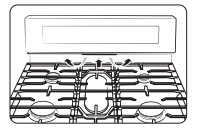
Remove the center burner grate(C) following both sides grates.(L/R)
Remove the burner caps from the burner heads.
Remove the burner heads from the valve manifolds to reveal the starter electrodes.
Clean all removable grates and burner components in warm, soapy water. Do not use steel-wool pads or abrasive cleaners.
Rinse and dry grates and burner components thoroughly.
Return the burner heads to their positions on top of the manifold valves. Make sure a starter electrode is inserted through the hole in each burner head.
Return the burner caps to their positions on top of the burner heads. To ensure proper and safe operation, make sure the burner caps lie flat on top of the burner heads.
Reinstall the burner grates in their respective positions.
Turn on each burner and check if it operates properly. After verifying that a burner operates normally, turn it off.
Burner reinstall guide
Double Ring burner head
Orient the burner head so that the opening for the electrode lines up with the electrode.
Install the burner head so that the electrode passes through the opening for the electrode. Make sure the burner head lies flat on the stove top.
Round burner head
Orient the burner head so that the opening for the electrode lines up with the electrode.
Install the burner head so that the electrode passes through the opening for the electrode. Make sure the burner head lies flat on the stove top.
Oval burner
Orient the burner head so that the opening for the electrode lines up with the electrode.
Install the burner head so that the electrode passes through the opening for the electrode. Make sure the burner head lies flat on the stove top.
Burner Cap
Match the burner caps to the burners by size, and then reinstall the caps on the burner heads.
Self-cleaning
This self-cleaning oven uses high temperatures (well above cooking temperatures) to burn off leftover grease and residue completely, or reduce them to a finely powdered ash that you can wipe away with a damp cloth.
CAUTION
Do not leave small children unattended near the range during the self-cleaning cycle. The outside surfaces of the range can get extremely hot. • Some birds are extremely sensitive to fumes from a self-cleaning oven. Relocate birds to a well-ventilated room away from the range.
Do not line the oven, oven racks, or oven bottom with aluminum foil. Doing so will result in poor heat distribution, produce poor baking results, and cause permanent damage to the oven interior. The aluminum foil will melt onto and adhere to the interior oven surfaces.
Do not force the oven door open during the self-cleaning cycle. This will damage the automatic door-locking system. The door automatically locks when the selfcleaning cycle is started and stays locked until the cycle is cancelled and the oven temperature is below 400 °F.
Use caution when opening the oven door after the self-cleaning cycle. The gas oven will still be VERY HOT and hot air and steam might escape when the door is open.
Wipe off any excess spillage before using the self-cleaning operation.
Do not use oven cleaners. Commercial oven cleaners or oven liners should NEVER be used in or around any part of the oven. Residue from oven cleaners will damage the inside of the oven during a self-cleaning operation.
To perform the self-cleaning cycle
Make sure the door lock is released. Remove all racks from the oven cavity.
1. Make sure the oven door is closed completely and unlocked.
2. Press Self Clean once. Then, select the cleaning time by pressing Self Clean one or more times in accordance with the table below.
3. Press START/SET. The oven door is locked and the oven begins to heat up.
4. When the self-cleaning cycle is complete, the oven beeps 10 times. The door will remain locked and the Lock icon will blink until the oven temperature falls below 400 °F (204 °C).
5. When the Lock icon changes to an open lock, you can open the oven door. The Lock icon changes to an open lock when the oven temperature drops below 400 °F (204 °C).
6. Press OFF/CLEAR to display the time of the day
To delay starting a self-cleaning cycle
1. Make sure the oven door is closed completely and unlocked.
2. Press Self Clean once. Then, select the cleaning time by pressing Self Clean one or more times in accordance with the table below.
3. Press Delay Start.
4. Set the time you want the oven to start self-cleaning using the number pad.
5. Press START/SET. The oven door locks, and the oven will start self-cleaning at your specified time.
To cancel the self-cleaning cycle
You may find it necessary to stop or interrupt a self-cleaning cycle due to smoke in the oven. To turn off the self-cleaning cycle, press OFF/CLEAR. The cycle turns off, but the door remains locked and the Lock icon blinks until the oven temperature falls below 400 °F (204 °C).
After self-cleaning
The door stays locked until the internal oven temperature falls below 400 °F.
When the oven has cooled down, wipe the oven surfaces with a cloth to remove ash residue.
Stubborn stains can be removed using a steel-wool pad. Lime deposits can be removed using a vinegar-soaking cloth.
If you are not satisfied with the cleaning results, repeat the cycle. “HOT” appears on the display until the oven cools down. Wait until the message disappears, and then start a new cycle.
The cooling fan automatically runs for certain amount of time after self-cleaning.
Self-cleaning does not operate within 2 hours after running the self-cleaning cycle.
Replacing the oven light
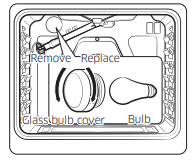
Oven light
The oven light is a standard 40-watt appliance bulb. It comes on when you open the oven door.
Turn off the oven.
Make sure the oven and oven light are cool.
Open the door, and remove the glass cover by turning it counterclockwise.
Remove the oven light from the socket by turning it counterclockwise.
Insert a new 40-watt appliance bulb into the socket, and then turn it clockwise to tighten.
Reinsert the glass cover, and then turn it clockwise to tighten.
Removing and reinstalling the oven door
How to remove the door
1. Open the door completely.
2. Pull the hinge locks down toward the door frame to the unlocked position.
3. Firmly grasp both sides of the door at the top.
4. Close the door to the door removal position, which is approximately 5 degrees from vertical.
5. Lift the door up and out until the hinge arms are clear of the slots.
How to reinstall the door
1. Firmly grasp both sides of the door at the top.
2. With the door at the same angle as the removal position, slide the indentations of the hinge arms into the bottom edges of the hinge slots. The notches in each hinge arm must be fully inserted into the bottoms of each slot.
3. Open the door fully. If the door will not open fully, the indentations are not inserted correctly in the bottom edges of each slot.
4. Push the hinge locks up against the front frame of the oven cavity into the locked position.
5. Close the oven door.
How to remove and reinstall the Storage drawer
Slide open the drawer until it stops.
Pull the drawer with lifting it for removal.
Clean the drawer in warm, soapy water using a cloth or soft brush. Then, rinse and dry it thoroughly.
Push in the drawer while slightly lifting the front to close it.
Troubleshooting
Checkpoints
Gas safety
You smell gas.
The surface burner knob is not in the OFF position and the burner is not lit.
Turn the burner knob to OFF.
There is a gas leak.
Clear the room, building, or area of all occupants. Immediately call your gas supplier from a neighbor’s phone. Do not call from your phone. It is electrical and could cause a spark that could ignite the gas. Follow the gas supplier’s instructions. If you cannot reach your gas supplier, call the fire department.
Surface burner
All burners do not ligh
The power cord is not plugged into the electrical outlet.
Make sure the electrical plug is plugged into a live, properly grounded outlet.
A fuse in your home may be blown or the circuit breaker may have tripped.
Replace the fuse or reset the circuit breaker.
The gas supply is not properly connected or turned on.
See the Installation Instructions that came with your range.
Surface burners do not light.
The control knob is not set properly.
Push in the control knob and turn it to the Lite position.
The burner caps are not in place. The burner base is misaligned.
Clean the electrodes. Put the burner cap on the burner head. Align the burner base.
Surface burner clicks during operation.
The control knob has been left in the Lite position.
After the burner lights, turn the control knob to a desired setting. If the burner still clicks, contact a service technician.
The burners do not burn evenly
Surface burner components and caps are not assembled correctly and level.
The surface burners are dirty
Clean the surface burner components
Very large or yellow surface burner flames.
The wrong burner orifice is installed.
Check the burner orifice size. Contact your installer if you have the wrong orifice (LP gas instead of natural gas or natural gas instead of LP gas).
Surface burners light but oven burners do not light.
The oven door lock is turned on.
The display will show the Lock icon. Hold the oven door open and press for 3 seconds. The oven will beep and the Lock icon will turn off
The Gas Pressure Regulator shut off switch is in the off position
Call a qualified service technician.
Oven
The oven control beeps and displays an information code.
There may be an issue with your oven. See the “Information codes” chart on page 50.
Press OFF/CLEAR, and then restart the oven. If the problem persists, disconnect all power to the range for at least 30 seconds and then reconnect the power. If this does not solve the problem, call for service.
The oven will not turn on.
The oven is not completely plugged into the electrical outlet
Make sure the electrical plug is fully inserted into a live, properly grounded outlet.
A fuse in your home may be blown or the circuit breaker may have tripped
Replace the fuse or reset the circuit breaker.
The oven temperature is too hot or cold.
The oven temperature needs to be adjusted and recalibrated
See page 32.
The oven burner will not shut off.
The oven door lock is turned on.
The display will show the Lock icon. Hold the oven door open and press for 3 seconds. The oven will beep and the Lock icon will turn off.
The Sabbath function has been activated.
SAb and the time of day will show in the display. All other controls and signals will be deactivated. To turn off the oven only, press OFF/CLEAR. To cancel the Sabbath function and reactivate the controls and signals, press and hold Bake and Number 1 simultaneously for 3 seconds.
The oven light (lamp) will not turn on.
The oven door lock is turned on.
The display will show the Lock icon. Hold the oven door open, and then press for 3 seconds. The oven will beep and the Lock icon will turn off
The Sabbath function has been activated.
SAb and the time of day will show in the display. All other controls and signals will be deactivated. To cancel the Sabbath function and reactivate the light switch and other controls, press and hold Bake and Number 1 simultaneously for 3 seconds.
A loose or burned-out bulb. See page 43.
The switch operating the oven light needs to be replaced.
Call for a qualified service technician.
The oven smokes excessively during broiling.
Meat or food was not properly prepared before broiling.
Cut away excess fat and/or fatty edges that may curl.
Improperly positioned top oven rack
See the broiling guide.
The controls are not being set properly.
See page 24
Greasy buildup on oven surfaces.
Regular cleaning is necessary when broiling frequently
Cooking is finished, but the cooling fan is still running.
The fan automatically runs for a certain amount of time to ventilate the inside of the oven.
This is not a product malfunction. The fan is designed to run automatically for a period of time to cool down the oven.
The oven will not self-clean.
The oven door lock is turned on
The display will show the Lock icon. Hold the oven door open, and then press for 3 seconds. The oven will beep and the Lock icon will turn off.
The oven is too hot.
Let the oven cool down, and then reset the controls. The self-clean cycle will not lock the oven door if the oven temperature is too hot. The door must lock before the selfclean cycle can start.
The self-cleaning oven controls are not properly set.
Reset the self-cleaning oven controls. (See page 41.)
A surface burner is on.
Turn off the surface burner. Self-clean will not operate if a surface burner is on.
A crackling or popping sound.
This is normal.
This is the sound of the metal heating and cooling during any cooking or cleaning function.
Excessive smoking during a selfcleaning cycle.
This is the first time the oven has been cleaned.
This is normal. The oven will always smoke more the first time it is cleaned. Wipe up all excessive soil before starting the selfcleaning cycle. If smoke persists, press OFF/CLEAR. Open the windows to clear the smoke from the room. After the oven has cooled and unlocked, wipe up excessive soil, and then reset the oven for self-cleaning
The oven door will not open after a self-cleaning cycle.
This is normal.
The oven door will stay locked until the oven temperature drops below 400 °F.
The oven is not clean after a selfcleaning cycle.
A fine dust or ash is normal.
This can be wiped clean with a damp cloth. Set the self-cleaning cycle for a longer cleaning time. The cycle was not long enough to burn off the dirt buildup. Extremely dirty ovens require hand-cleaning of excessive spillovers and food buildup before you start a self-cleaning cycle. Multiple self-cleaning cycles may be necessary to completely clean the oven.
here is steam or smoke coming from under the control panel.
This is normal.
The oven vent is located there. More steam is visible when you are using the convection functions or when baking or roasting multiple items at the same time.
A burning or oily odor coming from the vent.
This is normal for a new oven and will disappear within 1/2 hour of the first bake cycle.
To speed the process, set a self-cleaning cycle for a minimum of 3 hours. (See page 41.)
Strong odor.
This is temporary.
The insulation around the inside of the oven emits an odor the first few times the oven is used.
The oven racks are difficult to slide.
This is normal.
Apply a small amount of vegetable oil to a paper towel, and then wipe the edges of the oven racks with the paper towel. Racks become dull and hard to slide if they are left in the oven during a self-clean cycle.
Fan noise.
This is normal.
The convection fan runs until the function is over or the door is opened.
The convection fan is not working.
This is normal.
The fan starts automatically when the oven reaches the preheat temperature.
Others
The product is not level.
The appliance has been installed improperly. The leveling leg(s) is (are) damaged or uneven.
Make sure the floor is level, strong, and stable. If the floor sags or slopes, contact a carpenter. Check and level the range. (See the Installation Instructions.)
The kitchen cabinets are not properly aligned and make the range appear to be not level.
Ensure that cabinets are square and provide sufficient room for installation.
The display goes blank.
The electrical outlet Ground Fault Interrupter (GFI or GFCI) has been tripped and needs to be reset. Your digital control has been damaged.
Replace the fuse or reset the circuit breaker.
Food does not bake or roast properly in the oven
The wrong cooking mode was selected. See page 22.
The oven racks have not been positioned properly for the foods being cooked. See page 21.
Incorrect cookware or cookware of improper size is being used. See page 18.
The oven temperature needs to be adjusted and recalibrated. See page 32.
There is aluminum foil on racks and/or oven bottom. Remove foil.
The clock or timers are not set correctly. See pages 15
Food does not broil properly in the oven.
The oven controls are not set properly. See page 24.
The oven door was not closed during broiling. See page 24.
The rack has not been properly positioned. See the broiling guide on page 24.
Information codes
Code: Meaning
: Oven sensor malfunction
: The oven is overheating.
: Check the Control PBA NTC Sensor.
: Check the PBA NTC Sensor.
: Check the PBA NTC Sensor.
: Control pad malfunction.
: Door lock malfunction.
: PCB signal malfunction.
: Touch IC and PCB signal malfunction.
Solution
Press OFF/CLEAR, and then restart the oven.
If the problem persists, disconnect all power to the oven range for at least 30 seconds and then reconnect the power.
Code : Oven vent blocked.
Solution
If oven vent or cover air is blocked by aluminum foil or others, remove that and restart oven.
To reset error, disconnect power or tap OFF/CLEAR after opening the oven door at least 60 seconds.
It sure can! In fact, this range even comes with the necessary compatible conversion kit. Samsung does recommend using a licensed professional to perform the conversion. This is due simply to the many risks associated with gas and propane.
#6 Can the convection fan be turned off? I've read it's best to turn it off when baking.
We've made it even easier than that for you. This model offers separate buttons on the control panel for standard bake and convection bake. So all you'll need to do is select whichever option you wish to use each time you use the oven.
#7 Can this be converted to propane and do you make the changes?
Yes, this model can be converted to run on LP (liquid propane), and it even comes with a compatible conversion kit. Samsung does recommend using a licensed professional to perform the conversion due to the risks associated with gas and propane.
 .
.






 Bake,
Bake, 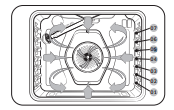



 for 3 seconds to lock or unlock both the control panel and the door. When the Oven Lock is on, the oven panel does not operate and the oven door is locked and cannot be opened.




 : Oven sensor malfunction
 : The oven is overheating.
 : Check the Control PBA NTC Sensor.
 : Check the PBA NTC Sensor.
 : Check the PBA NTC Sensor.
 : Control pad malfunction.
 : Door lock malfunction.
 : PCB signal malfunction.
 : Touch IC and PCB signal malfunction.
 : Oven vent blocked.