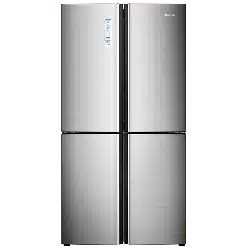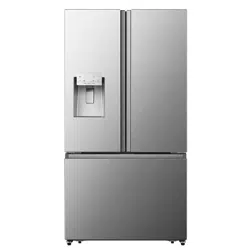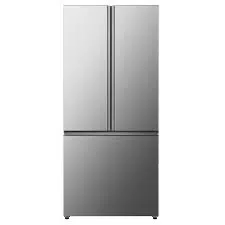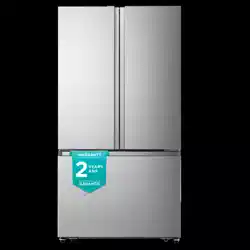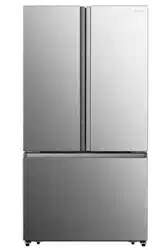
For questions about features, operation/performance, parts or service, call:
1-855-344-7367
Model:
RF26N6AFE
Refrigerator Use & Care Guide
............................................................................................................................... 19
Helpful tips
Table of Contents
Brief introduction
Important safety instructions
Installing your new appliance
Description of the appliance
Display controls
Using your appliance
Cleaning and care
Troubleshooting
Disposal of the appliance
..................................................................................................................... 1
.................................................................................................. 2
................................................................................................ 4
.............................................................................................. 10
...................................................................................................................... 11
............................................................................................................ 13
............................................................................................................... 17
..................................................................................................................... 21
.................................................................................................... 24
Brief Introduction
Please ensure that everyone using this
appliance is familiar with its operation
and safety features. It is important that
you install the appliance correctly and
pay careful attention to the safety
instructions.
We recommend that you keep this user’s
manual with the appliance for future
reference.
This appliance is intended to be used
in households and similar applications
such as:
Thank you for your choosing Hisense. We
are sure you will find your new refrigerator
a pleasure to use. Before you use the
appliance, we recommend that you
carefully read through these instructions ,
which provide details about installing and
using the product.
This appliance is not intended for use by
persons (including children) with reduced
physical, sensory or mental capabilities, or
lack of experience and knowledge, unless
they have supervision or been given
instruction concerning use of the appliance.
Children should be supervised to ensure
that they do not play with the appliance.
Do not store explosive substances such as
aerosol cans with a flammable propellant
in this appliance.
Connect to potable water supply only.
Do not use mechanical devices or other
means to accelerate the defrosting
process, other than those
recommended by the manufacturer.
Do not damage the refrigerant circuit.
Do not use electrical appliances inside
the food storage compartments of the
appliance, unless they are of the type
recommended by the manufacturer.
When disposing of the appliance do so
only at an authorized waste disposal
center. Do not expose to flame.
If the power cord is damaged, it must be
replaced by the manufacturer, its
service agent or similarly qualified
persons in order to avoid a hazard.
WARNING
1
Kitchen areas in shops, offices and other
working environments.
Hotels, motels and other residential
environments.
Bed and breakfast environments.
Catering and similar non-commericial
applications.
General safety and daily use
It is important to use your appliance
safely. We recommend that you follow the
guidelines below.
Store any food in accordance with the
storage instructions from the manufacturer.
Important Safety Instructions
Safety for children and
other persons
Don't try to repair the appliance yourself.
It is dangerous to alter the
specifications or modify this product in
any way. Any damage to the power
cord may cause a short circuit, fire or
electric shock.
Don’t place too much food directly
against the air outlet on the rear wall
of both the refrigerator and freezer
compartment, as it may affect
important air circulation.
Don’t place hot items near the plastic
components of this appliance.
has been thawed out.
Don’t store bottled or canned drinks
(especially carbonated drinks) in the
freezer compartment. Bottles and cans
may explode.
Use caution consuming popsicles or ice
cubes straight from the freezer as this can
cause freezer burn to the mouth and lips.
Keep all packaging away from children
to avoid risk of suffocation.
Protect children from being scalded by
touching the compressor at the rear
bottom of appliance
Don’t place items on top of the
appliance as this could cause injury
should they fall off.
Never allow children to play with the
appliance by hanging or standing over
or on the doors, racks, shelves and
drawers etc.
Electrical Safety
To avoid the risks that are always present
when using an electric appliance, we
recommend that you pay attention to
the instructions about electricity belo
w.
Unpack and check through the
appliance. Should any damage be
evident, don’t plug in the appliance but
contact the shop immediately from
which you purchased it. Keep all
packing materials in this case.
We recommend that you wait for 4 hours
before connecting the appliance to
allow the refrigerant to flow back into
the compressor.
The appliance must be applied with
single phase alternating current of
110~115V/60Hz. If the voltage fluctuates
exceeding the upper limit, A.C.
automatic voltage regulator of more
than 350W should be applied to the
refrigerator for safety use.
The power plug must be accessible
when the appliance is installed.
This appliance must be grounded.
This appliance is fitted with a plug,
in accordance with local standard.
The plug should be suitable for use in all
houses fitted with sockets in accordance
with current specifications.
Electrical Safety
To avoid the risks that are always present
when using an electric appliance, we
recommend that you pay attention to
the instructions about electricity below.
2
Frozen food should not be refrozen once
it
If the fitted plug is not suitable for your
socket outlets, it should be cut off and
carefully disposed of. To avoid a
possible shock hazard, do not insert the
discarded plug into a socket. If in doubt
contact a qualified, registered
electrician.
Do not use extension cords or multiple
sockets which could cause overloading
of wiring circuits and could cause a fire.
Always plug your appliance into its own
individual electrical socket which has
a voltage rating that matched the
rating plate.
Make sure that the plug is not squashed
or damaged. Otherwise, it may cause
short circuit, electric shock or overheat
and even cause a fire.
Do not insert the power plug if the
socket is loose, there is a risk of electric
shock or fire.
Switch off the appliance and
disconnect it from the main power
before you clean or move it.
Never unplug the appliance by pulling
on the electrical cord. Always grip the
plug firmly and pull straight out from the
socket to prevent damaging the power
cord.
Do not operate the appliance without
the cover of interior lighting.
Any electrical component must be
replaced or repaired by a qualified
electrician or authorized service
engineer. Only genuine replacement
parts should be used.
Do not use electrical appliances such
as ice cream makers inside the food
storage compartments of the
appliance unless they are approved
by the manufacturer.
To avoid eye injury, do not look directly
into the LED light located in the refrigerator
compartment. If it is not functioning
correctly, consult a qualified, registered
electrician or replace it in accordance
with the “Cleaning and Care” chapter.
The refrigerant isobutane (R600a) is
contained within the refrigerant circuit of
the appliance. During transportation and
installation of the appliance, ensure that
none of the components of the refrigerant
circuit become damaged.
The refrigerant (R600a) is flammable.
Don't store products which contain
flammable propellants (e.g. spray cans)
or explosive substances in the appliances.
Avoid open flames (candles, lamps etc. )
and other sources of ignition.
Thoroughly ventilate the room in which
the appliance is situated.
Refrigerant
Caution: Risk of Fire
3
Should the refrigerant circuit
be damaged:
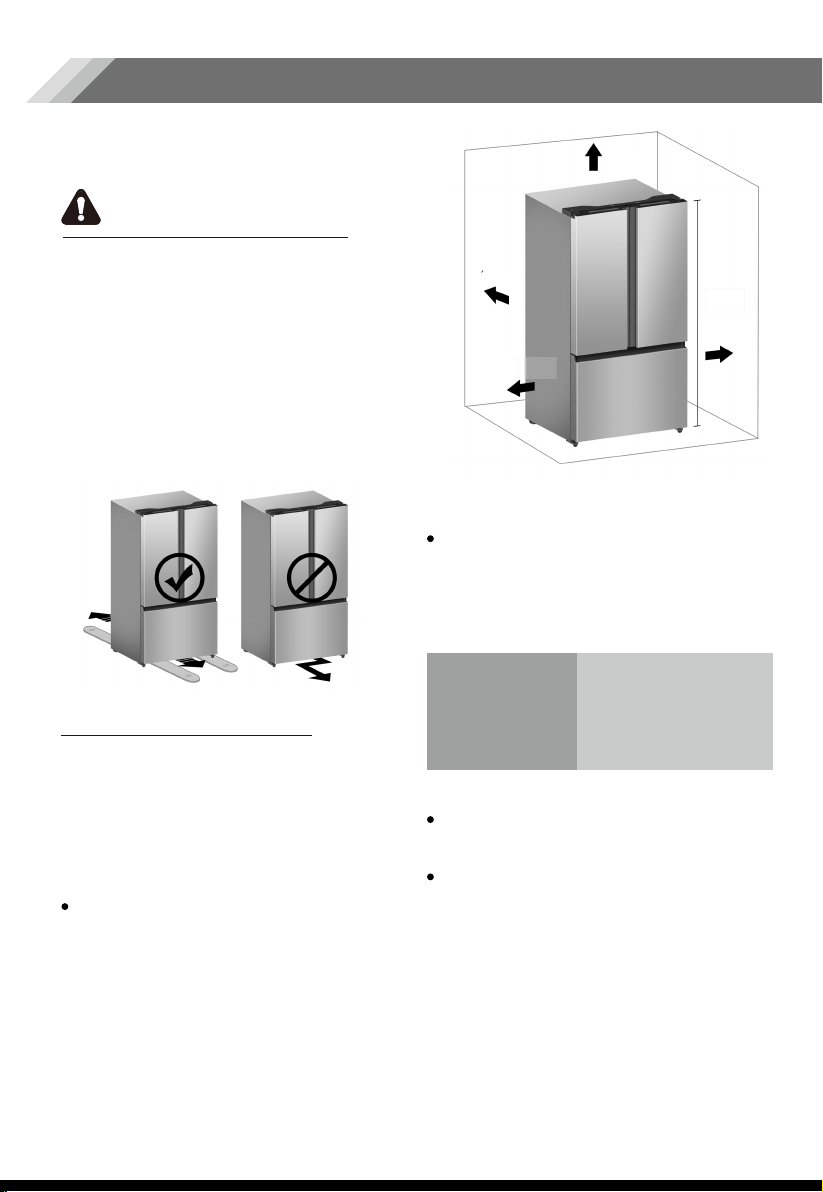
clearance from its top, at least 1/ 2"
the fridge to the wall, at least 2" of
2" of clearance from the back of
Installing Your New Appliance
WARNING
Before using the appliance for the first time,
you should be informed of the following tips.
For proper installation, this refrigerator
must be placed on a level surface of
hard material that is the same height
as the rest of the flooring. This surface
should be strong enough to support a
fully loaded refrigerator.
The rollers, which are not casters,
should be only used for forward or
backward movement. Moving the
refrigerator sideways may damage
your floor and the rollers.
Suggestion:
It is advisable for there to be at least
from its side to the wall and a clear
space in front to allow the doors to
open 125°. As shown in the following
diagrams.
In order to improve efficiency of the
cooling system and save energy, it is
necessary to maintain good ventilation
around the appliance for the dissipation
of heat. For this reason, sufficient clear
space should be available around the
refrigerator.
Ventilation of appliance
This appliance performs well within the
climate class from N to T shown in the table
below. It may not work properly if left at a
temperature above or below the
indicated range for a long period.
Stand your appliance in a dry place to
avoid high moisture.
Keep the appliance out of direct sunlight,
rain or frost. Stand the appliance away
from heat sources such as stoves, fires or
heaters.
Climate class
SN
N
ST
T
Ambient temperature
4
Note:
2 "
2 "
1/2"
1/2 "
70"
+10°C a +32°C
+16°C a +32°C
+16°C a +38°C
+16°C a +43°C
SN
N
ST
T
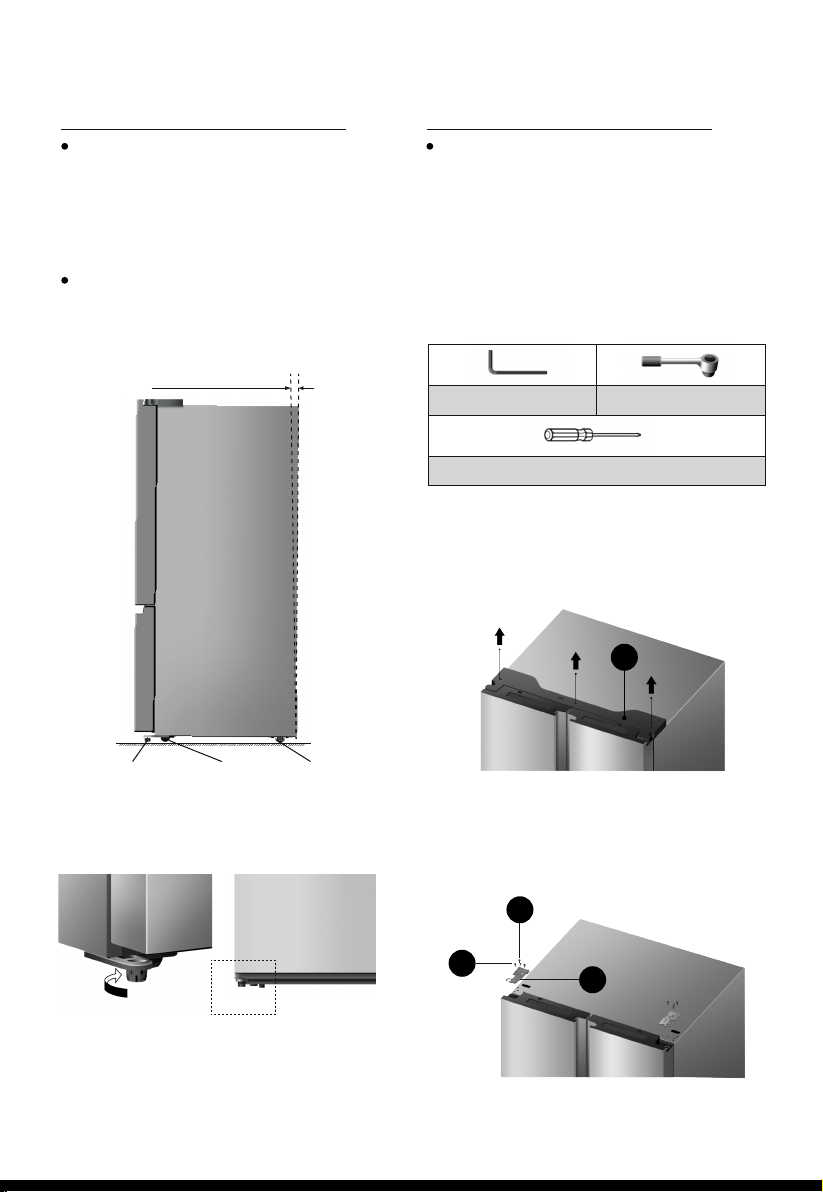
For sufficient leveling and air circulating
in the lower rear section of the
appliance, the bottom feet may need
to be adjusted. You can adjust them
manually by hand or by using a suitable
tool.
To allow the doors to self-close, tilt the
top backwards by 0.4" - 0.6".
Leveling of appliance
In case your home access door is too
narrow for the refrigerator to pass
through, remove the refrigerator doors
and drawers. If you do not need to
remove the appliance doors, proceed
to ‘Installing Water Lines’ on page 8.
If you need to remove the doors,
continue below.
Door Removal
Tools you will need(Not provided):
Adjustable
bottom feet
Front roller Rear roller
0.4"~0.6"
Adjustable
bottom feet
Allen Wrench (5/32",4mm)
Philips Screwdriver
Wrench (5/16",8mm)
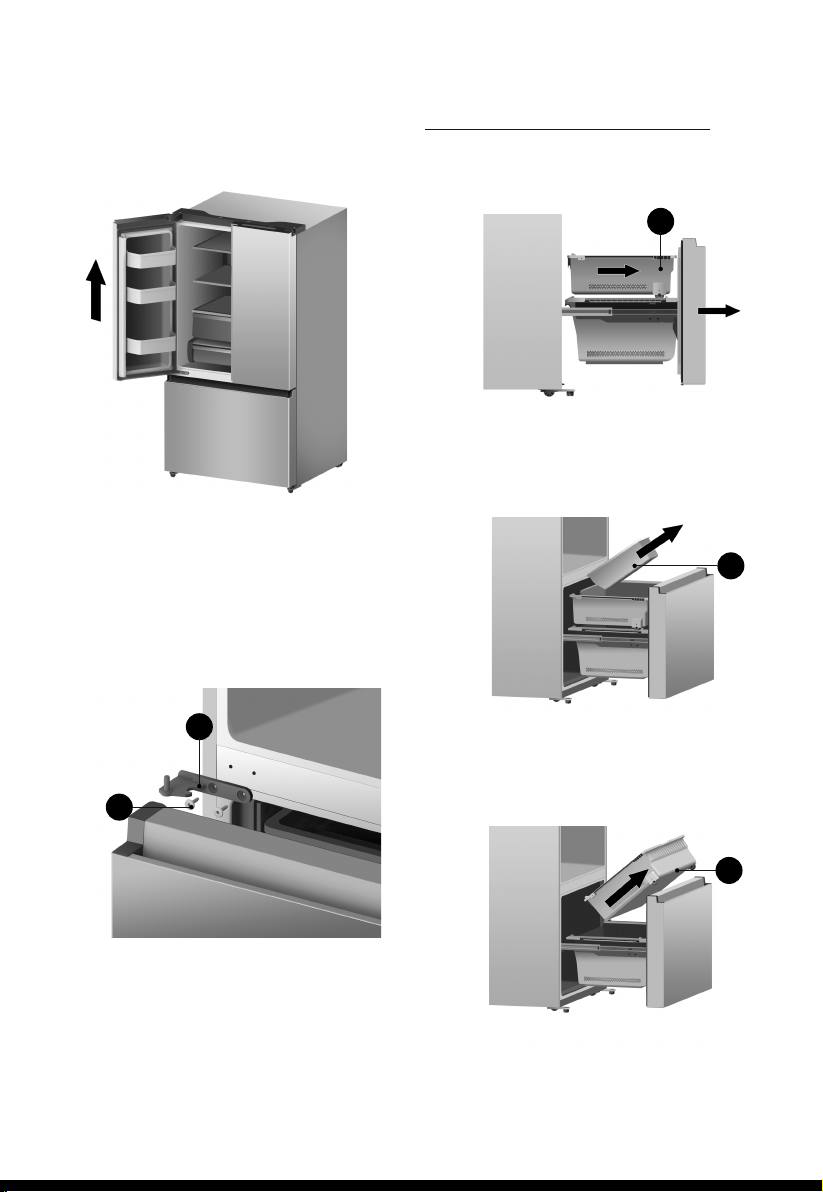
With the door closed, remove the 3 screws
holding the top cover (A) with Philips (+)
screwdriver, and then remove the top
cover with the entireharness attached.
Remove the screws (B) fixed on the hinges
with a wrench (5/16",8mm) and 1 ground
screw (C) attached to the hinge with
Philips (+) screwdriver. Remove the upper
left and right door hinges (D).
A
B
D
C
1.
2.
5
3.
1.
2.
3.
4.
Remove the 4 hex head bolts hinges (E)
with an Allen wrench (5/32",4mm).
Remove the lower left and right door
hinges (F).
Pull out the freezer door and the upper
freezer drawer (G) to the final position.
Take out the ice storage box (H) by
lifting it up in the direction of the arrow.
Take out the upper freezer drawer (G)
by lifting it up from the rail system.
Disassembling the freezer door
Use both hands to open the door more
than 90°. Lift it up and take it off.
G
G
H
F
E
6
4.You need to purchase several item to
compalet this connection.You may find
these items sold as a kit at local hardware
store.
Re-assembling the freezer door
To reattach the drawer after you moved
the appliance to its final location,
assemble the parts in reverse order.
A water dispenser with a filter is one of the
helpful features on your new appliance.
To help promote better health, the water
filter removes unwanted particles from your
water. However, it does not sterilize or
destroy microorganisms. You may need
to purchase a water purifying system to
do that.
In order for the ice maker to operate
properly, a water line is required.
-the maximum inlet water pressure is 700kPa;
-the minimum inlet water pressure is 207kPa.
Installing the water lines
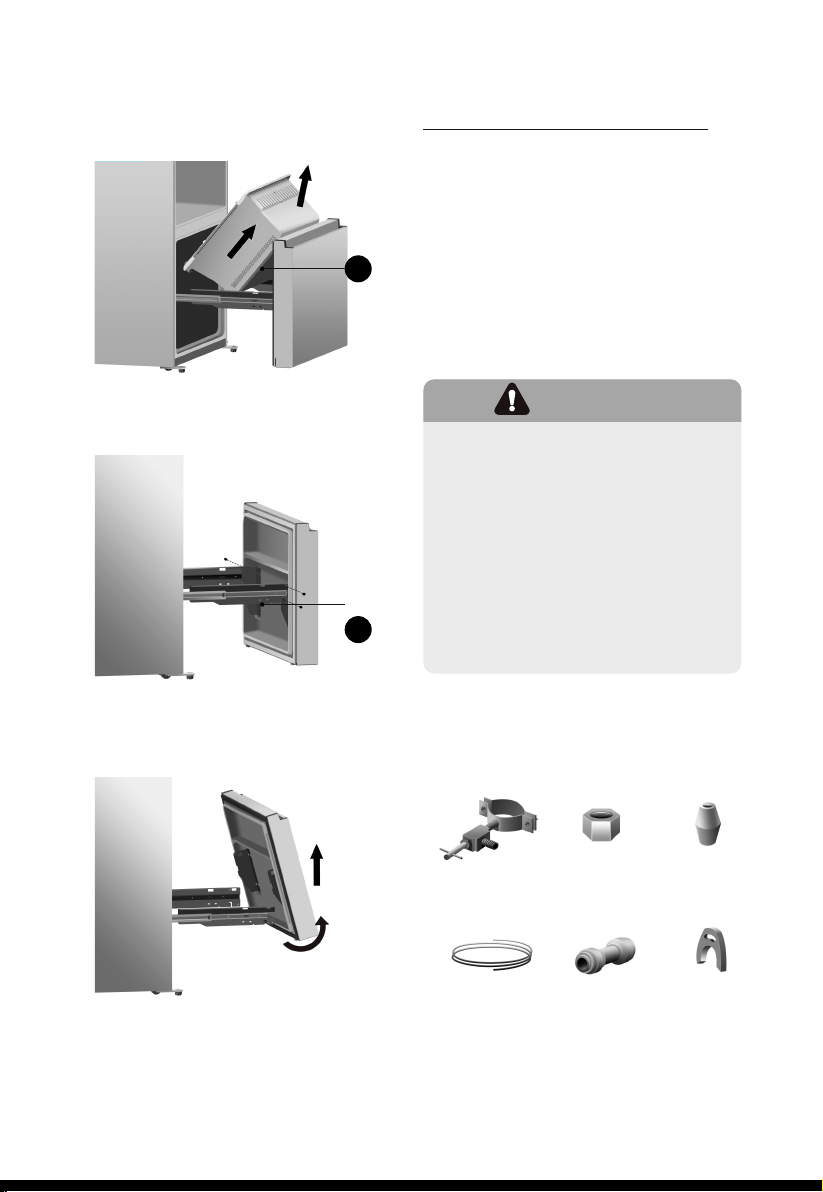
Remove the lower freezer drawer (C)
by lifting it up.
Remove the 4 screws attached to the
supporting frame (D).
C
Pull out the freezer door and lift it upin
the direction of the arrow.
1. Power drill and 1/4’’ drill bit.
2. 1/2’’ or adjustable wrench.
3. Flatblade and Philips head screwdrivers.
D
1 ferrule
(sleeve)
What you need to have before you star
Saddle-type
Shut offvalve
(1/4” outlet)
one 1/4”
compression
1/4” extension
tubing
1 Coupler 2 Clips
4.
5.
6.
7
D
WARNING!
The water connection must be made
by a qualified plumber. Operation
outside the water pressure range
may cause malfunction, severe and
damaging water leaks.
Under normal conditions, a200cc
(5.75 oz.) cup can be filled in about
10 seconds.
If the refrigerator is installed in an area
with low water pressure (below 30psi),
you can install a booster pump to
compensate for the low pressure.
5.
8
1.
2.
3.
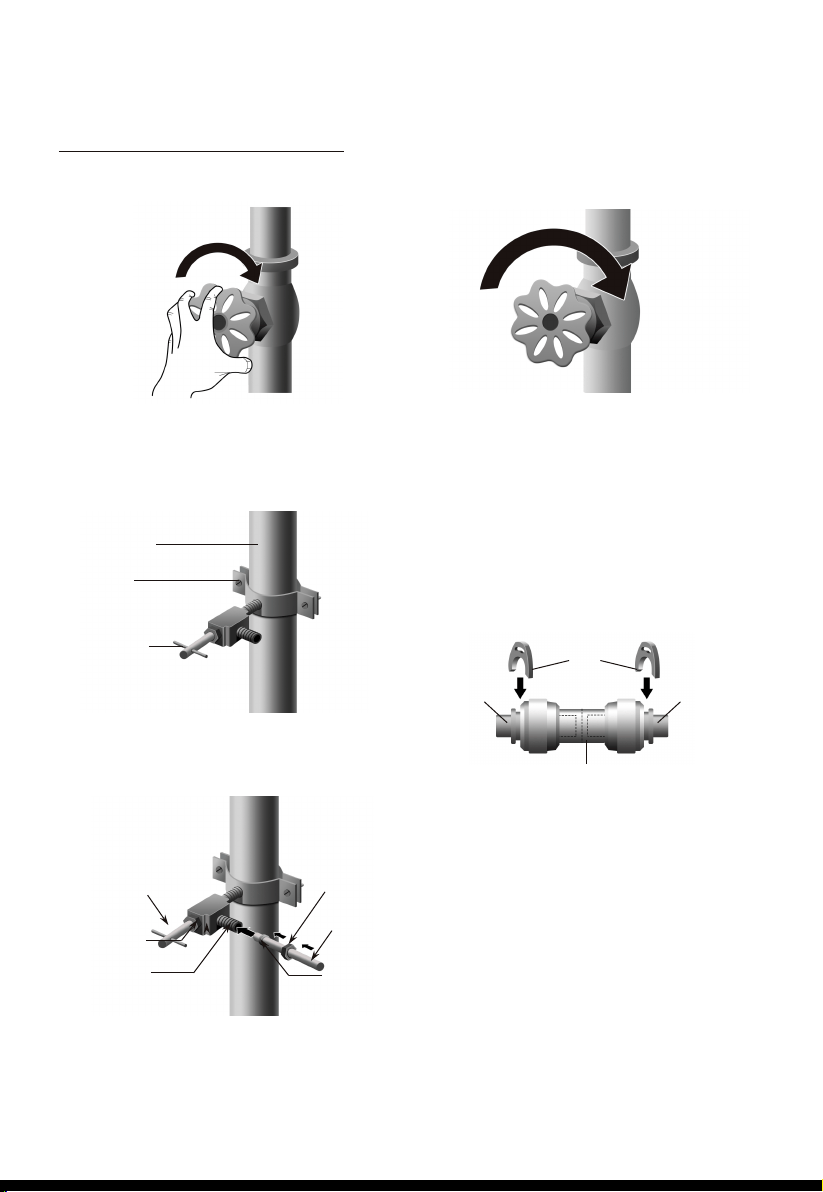
First, shut off the main water supply.
Connecting to the
water supply line
Cold water line
Pipe clamp
Shut off Valve
Using a power drill and a 1/4’’ drill bit
drill into the cold-water line and
connect the saddle-type shutoff valve.
Connect 1/4’’ extension tubing to shutoff
valve outlet.
Flush the tubing. Turn the main water
supply on and flush out the tubing until
the water is clear. Then, shut the water
off at the water valve after about a quart
of water has flushed through the tubing.
4.
Outllet Valve
Packing Nut
Saddle-Type
Shutoff Valve
Compression Nut
1/4” Extension
tubing
Ferrule(sleeve)
Connect the extension tubing line with
the line on the back of the fridge via
the coupler. Fully insert the extension
tubing into the coupler, and then insert
the clip onto the coupler to lockup the
tubing. Do the same with the other
end. After both clips are inserted,
check the line to make sure it is held
firmly by the clip.
Note:
Ensure that the water line does not get
pinched or bent when installing.
This can result in improper water flow
through the line and will affect the
functionality of the fridge.
Clip
Water line Water line
Coupler
9
Note:
Use only the new tubing supplied with
the refrigerator. Old tubing should not
be used.
After connected to the water supply line,
please open the water valve to flush the
filter for 5 minutes before use. The initial
dark discoloration of water is normal.
When you connect the water line to the
appliance and press the lever of the
dispenser for the first time, it is normal that
there will be a sound of exhaust coming
out from the appliance.
1.The water line must be
connected to the cold water
pipe. If it is connected to the hot
water pipe, it may cause the
purifier to malfunction.
2.Avoid contamination of pipes
during installation.
3.Connect to potable water
supply only.
WARNING!
CAUTION!
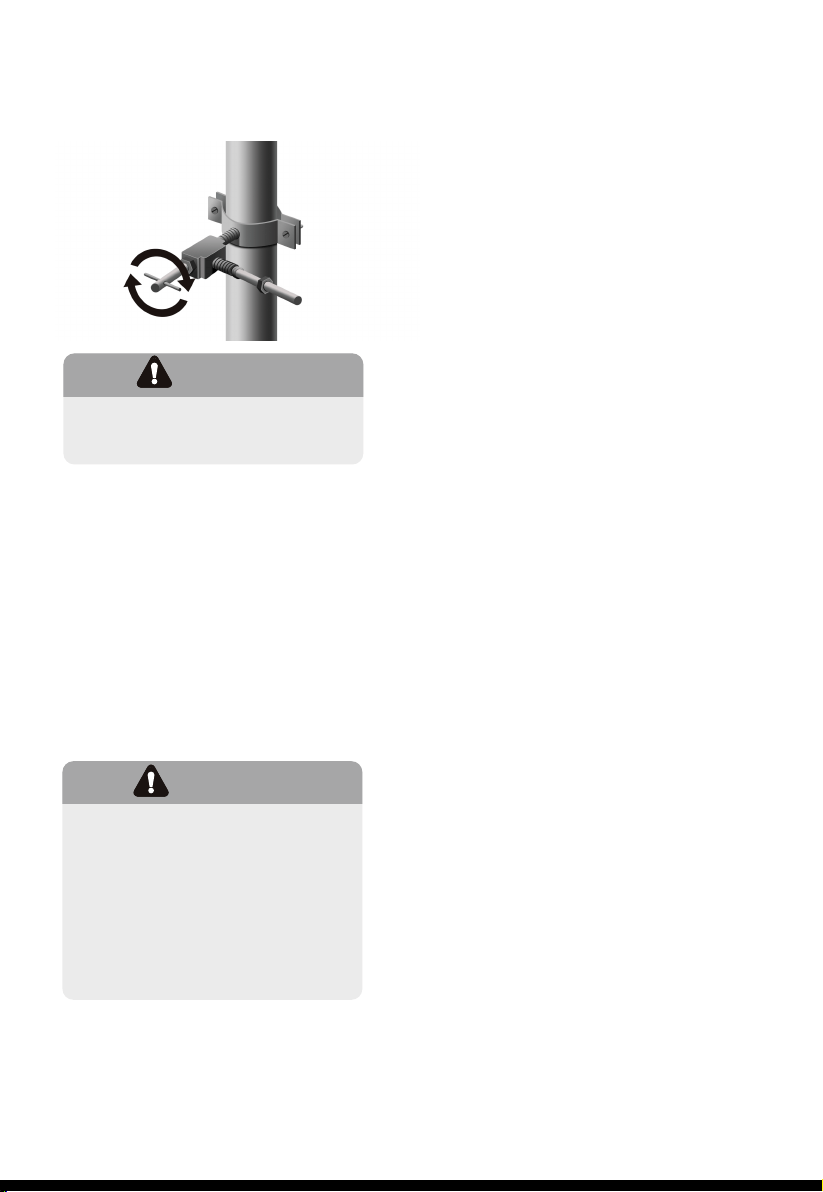
Check to see if leaks occur at the
water line connections
6.
Turn the water on and check
for leakage.
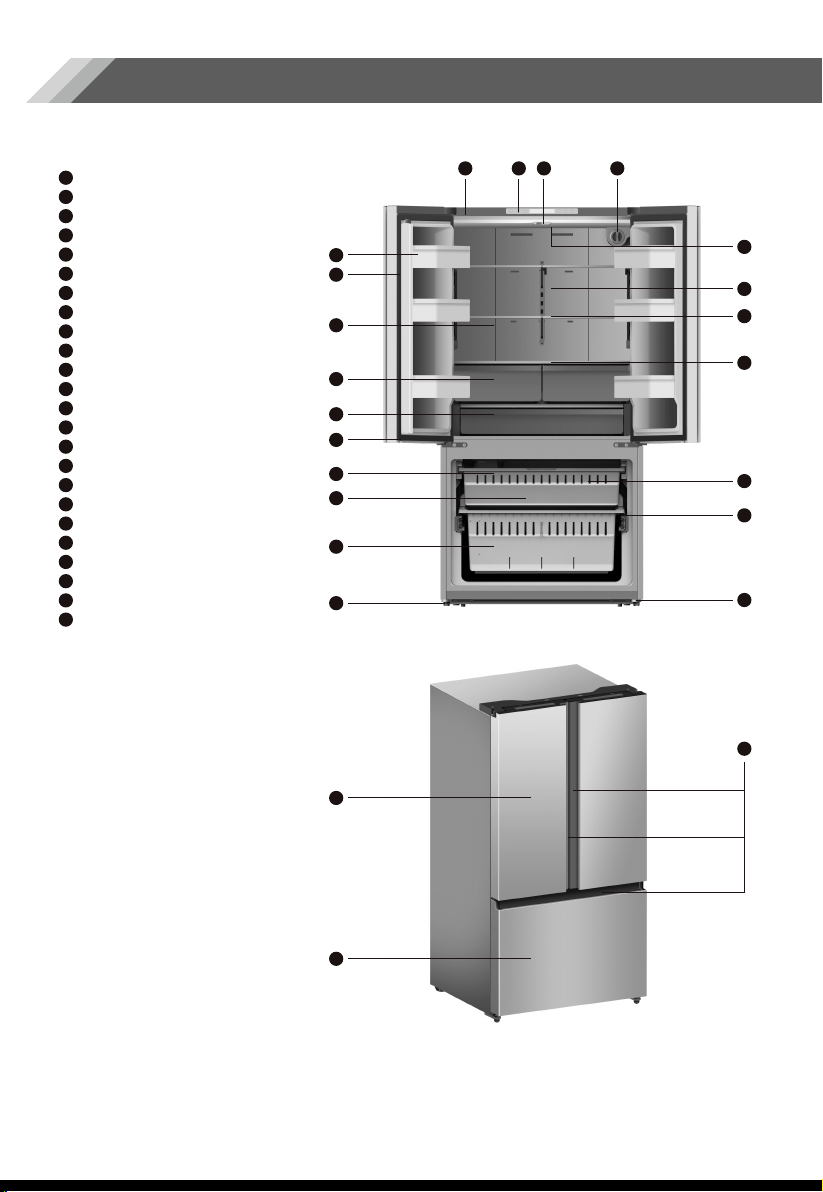
Description of the Appliance
10
Door bins
Vertical baffle part
Water dispenser (inside)
Fruit and vegetables crisper
Full width pantry
Freezer LED light
Ice maker (inside)
Ice bucket (inside)
Lower freezer drawer
Adjustable bottom feet
Top cover
Control panel
Vertical baffle guide block
Water filter
Refrigerator LED light (inside)
Air channel
Glass shelf
Criper Cover
Upper freezer drawer
Lower drawer partition (inside)
Roll wheel
Refrigerator door
Freezer door
Handles
1
11
1
2
3
4
12 13 14
24
23
22
21
20
19
18
17
16
15
14
11
12
13
10
9
8
7
6
5
4
3
2
5
7
9
10
21
22
23
24
8
6
15
16
18
17
19
20
from to in one degree increments.
2°C
You can touch the “Fridge” icon to
activate the mode to control the fridge
temperature. When you touch the
button continuously, the temperature will
be set in the following sequence.
Display Controls
11
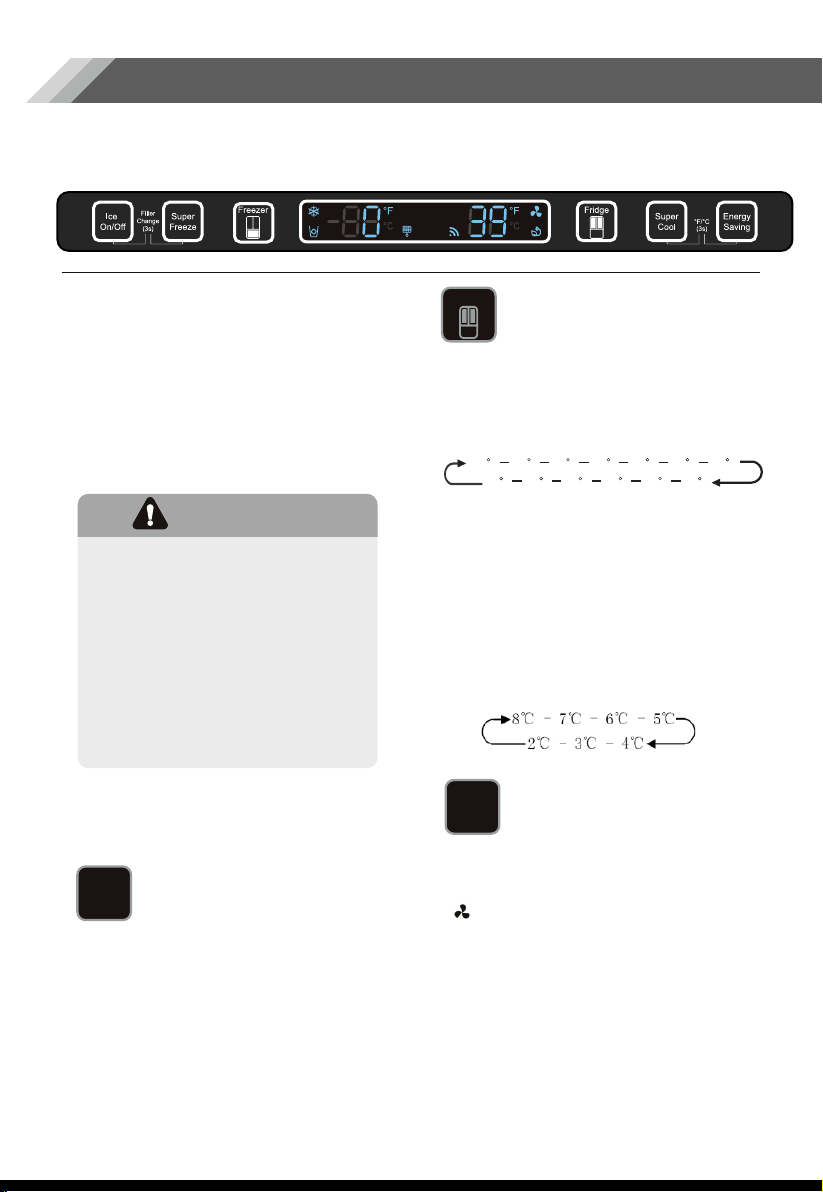
Your product has one control panel which is installed on the top cover. Use your
appliance according to the following control guidelines.
When the appliance is powered on for
the first time, the backlighting of the
icons on the display panel start working.
If no buttons have been touched or the
doors are closed, the backlighting will
turn off after 60 seconds.
The control panel consists of two areas
about temperature, and one area
about different modes.
This button controls the ice maker. You
can touch the “Ice On/Off” button to
control the ice maker. When the “Ice
On/Off” function light is on, the ice
maker is working. If you want to lock
the ice maker, please touch the “Ice
On/Off” button again until the button
light is off.
CAUTION!
When you set a temperature,
you set an average temperature for
the whole refrigerator cabinet.
Temperatures inside each
compartment may vary from the
temperatures displayed on the
panel, depending on how much
food you store and where you place
it. High or low room temperature
may also affect the actual
temperature inside the appliance.
Ice Control
Fridge Temperature
Control
If you want to decrease the time needed
to cool products in the Fridge, please
touch this button. The Super Cool icon
“ ” will be illuminated, and the fridge
temperature setting displays at 35°F.
Super cool automatically switches off
after 3 hours, and the refrigerator
temperature setting will revert back to
the previous setting.
When Super Cool function is on, you can
touch the “Super Cool” button again to
switch it off. The fridge will not retain the
Super Cool function when powered off.
Super Cool
Fridge
Ice
On/Off
Super
Cool
Note:
If you want to exchange the “°F” to “°C”,
please press and hold the “Super Cool”
and “Energy Saving” buttons for
3 seconds.
47
F
46
F
45
F
44
F
43
F
42
F
41
F
40
F
39
F
38
F
37
F
36
F
35
F
If you have set the temperature type to
Celsius, the temperature settings cycle
8°C
The control panel will light up when the
door is open, or you touch any button.
The light will go off without touching any
buttons or if the doors have been closed
for over one minute.
When the refrigerator is powered on, all
the icons of the control panel will light up
for 3 seconds, and a buzzer sounds.
The temperature setting reverts back to
the previous setting.
If you want to decrease the time needed
to freeze products in the freezer, please
touch this button, the Super Freeze icon
“ ” will be illuminated, the freezer
temperature setting displays -12°F.
Super Freeze can quickly lower the
temperature and freeze your food faster
than usual. This can retain more of the
vitamins and nutrients in fresh food and
keep your food longer.
The Super Freeze mode allows you to
freeze items inside with maximum speed.
We recommend that you let the
appliance operate for 6 hours first.
Super Freeze automatically switches off
after 26 hours, and the freezer
temperature setting will revert back to
the previous setting.
When the Super Freeze function is on,
you can touch the “Super Freeze” button
again to switch off. If power cutoff
happens while Super Freeze is activated,
the Super Freeze will not remain active
after power is resupplied.
Before that, please check that the new
filter is the same filter type that came with
your fridge and can be correctly used in
your refrigerator.
After you change the water filter, push
and hold the “Ice On/Off” buttons for 3
seconds to make the blinking stop. When
you replace the water filter, some water
may leak from the filter and lines. Please let
the water flow into a pan and wipe up any
leakage that may have occurred.
12
Super Freeze
In general, you should change the water
filter every 6 months to ensure the highest
possible water quality.
After the refrigerator has dispensed
about 300 gallons of water, the filter icon
“ ” will blink, reminding you to replace
the water filter.
First of all, you need to purchase a new
water filer. You can purchase the new
filter from the retailer where you
purchased your refrigerator or the
Hisense after-sales service system.
Water Filter
Energy Saving
Super
Freeze
Energy
Saving
Note:
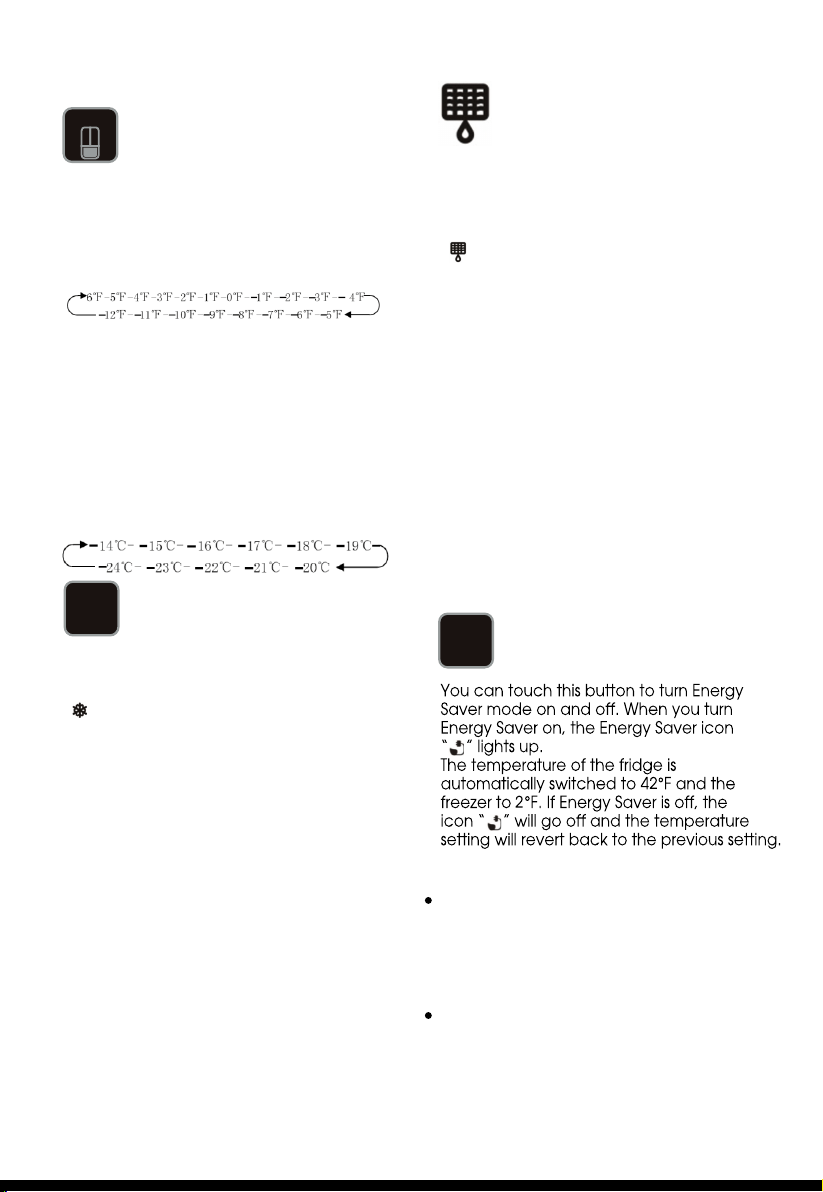
You can touch the “Freezer” button to
activate the mode to control the freezer
temperature. When you press the button
continuously, the temperature will be set in
the following sequence.
Freezer Temperature
Control
Freezer
Note:
If you want to exchange the “°F” to “°C”,
please press and hold the “Super Cool”
and “Energy Saving” buttons for
3 seconds.
If you have set the temperature type to
Celsius, the temperature settings cycle
from -14°C and -24°C in one degree
increments.
13
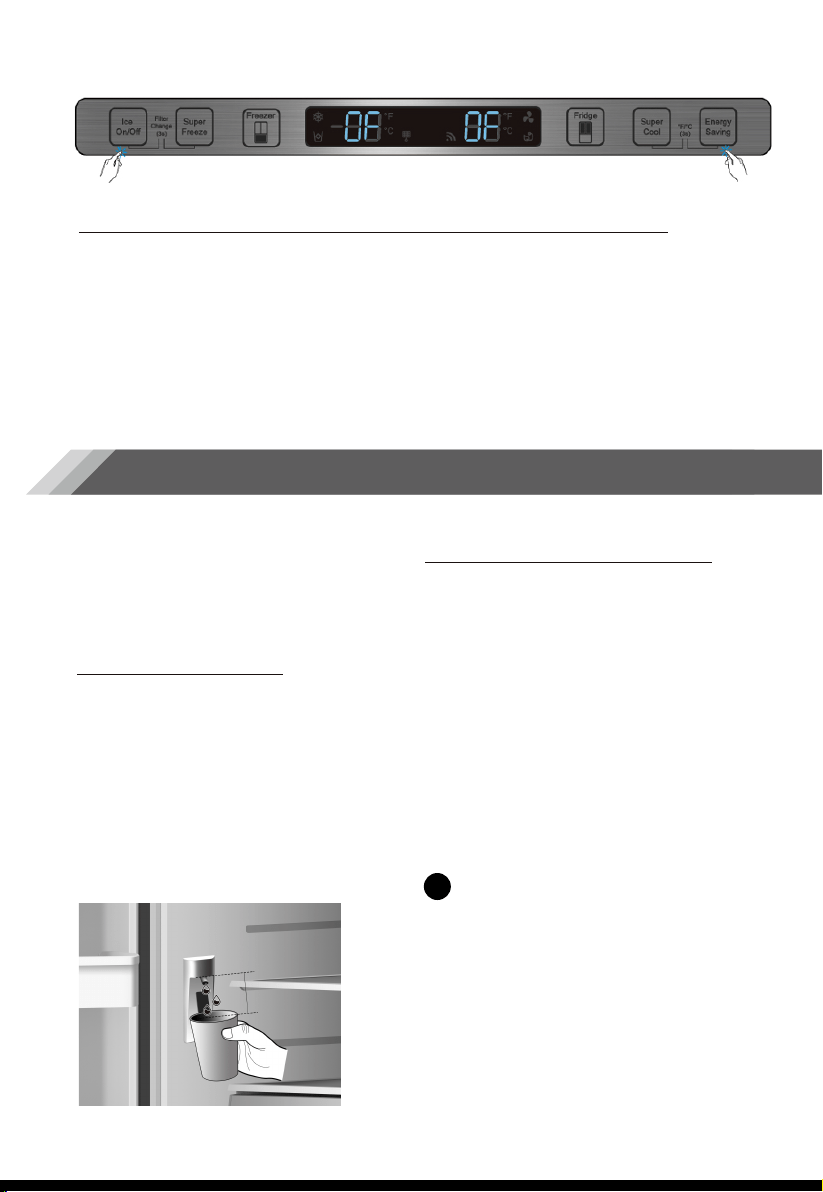
Demo mode is for store display, and it prevents the refrigerator from generating cool air.
In this of Cooling off Mode, the refrigerator may seem like it is working but it will not
make cool air. The indicators on the control panel will show double “0F”. To cancel this
mode, press and hold “Ice On/Off” and “Energy Saving” keys at the same time for 3
seconds until the buzzer beep three times and the display panel will light for 3 second.
Demo mode (Freezer/ Fridge Temperature Indicator moving)
Changing the water filter
To drink the freshest and cleanest water from
your refrigerator, change the filter on time.
To change the water filter, follow these steps:
This section tells you how to use most of
the useful features. We recommend that
you read through them carefully before
using the appliance.
Using your Appliance
The water dispenser is located in the left
side of the fridge. Open the refrigerator
doors, and push the water dispenser
button to get water. Then move your
glass down the dispenser lever in the
suggested position and press it.
Hold the glass underneath the dispenser
for 2~3 seconds after releasing the
dispenser button as water may continue
to dispense after the button is released.
Getting Cold Water
All water provided to the refrigerator flows
through an alkaline water filter.
In the filtering process, the pressure of the
water that has flowed out of the filter is
increased, and the water becomes
saturated with oxygen and nitrogen. When
water flows out into the air, the pressure
plummets and the oxygen and nitrogen get
supersaturated, which results in gas bubbles.
The water may temporarily look misty or
cloudy due to these oxygen bubbles. After a
few seconds, the water will look clear.
Water clouding phenomenon
About 1.6inch
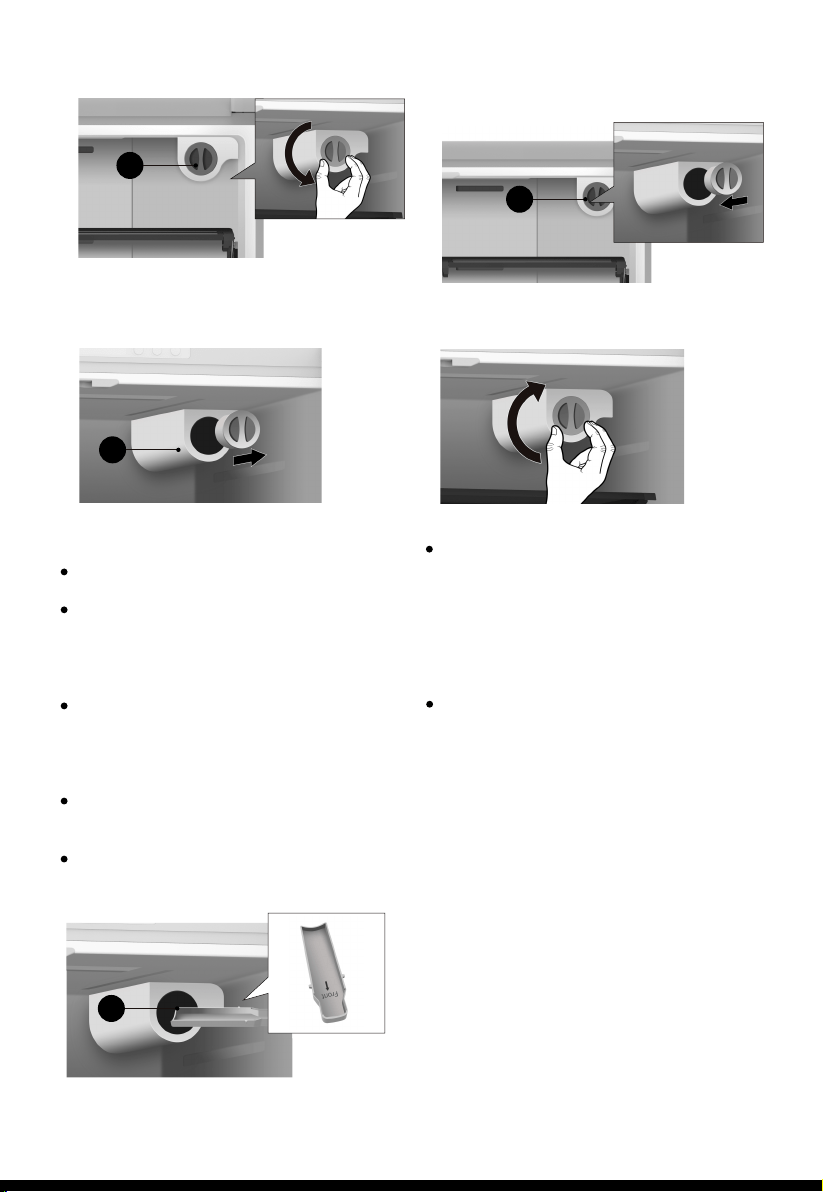
Shut off the water supply. Then turn the
water filter (K) about a 1/4 turn,
counter-clockwise.
1.
1
Removing any residual matter inside the
water supply line after installing the water
filter
1. After the water filter is replaced,
dispense 2.5 gallons of water (flush for
approximately 5 minutes) to remove
trapped air and contaminants from
the system.
2. Additional flushing may be required in
some households.
3. Open the refrigerator door and make
sure there are no water leaks coming
from the water filter.
14
Insert the new filter into the filter holder.
Push the filter, and then turn it clockwise
until it locks.
If you have trouble inserting the water
filter because of high water pressure, shut
off the water supply valve.
3.
4.
If you turned off the water supply, turn it
back on.
After turning on the water supply, you
should check the leaks. If leaks occur,
repeat the steps 1- 5. If leaks
persist, discontinue use and call
Hisense customer service..
5.
K
M
Note:
To change the water filter easily, shut off
the water supply valve.
Sometimes, it is hard to disassemble the
water filter because impurities in the
water cause it to stick. If you are having
difficulties, grip the water filter firmly and
pull it out.
When you pull the water filter, a little
water can leak from the opening.
This is normal. To minimize the water
leaks, keep the filter cartridge horizontal
when pulling it.
To prevent overflow, empty the water
filter tray (M) and dry around the filter
case.
To insert the new water filter, follow the
directions below.
2.
Pull the water filter (K) from the filter
holder (L).
K
L
Note:
15
The refrigerator compartment is provided
with six door baskets, which are suitable
for the storage of canned liquid, bottled
drinks and packaged food.
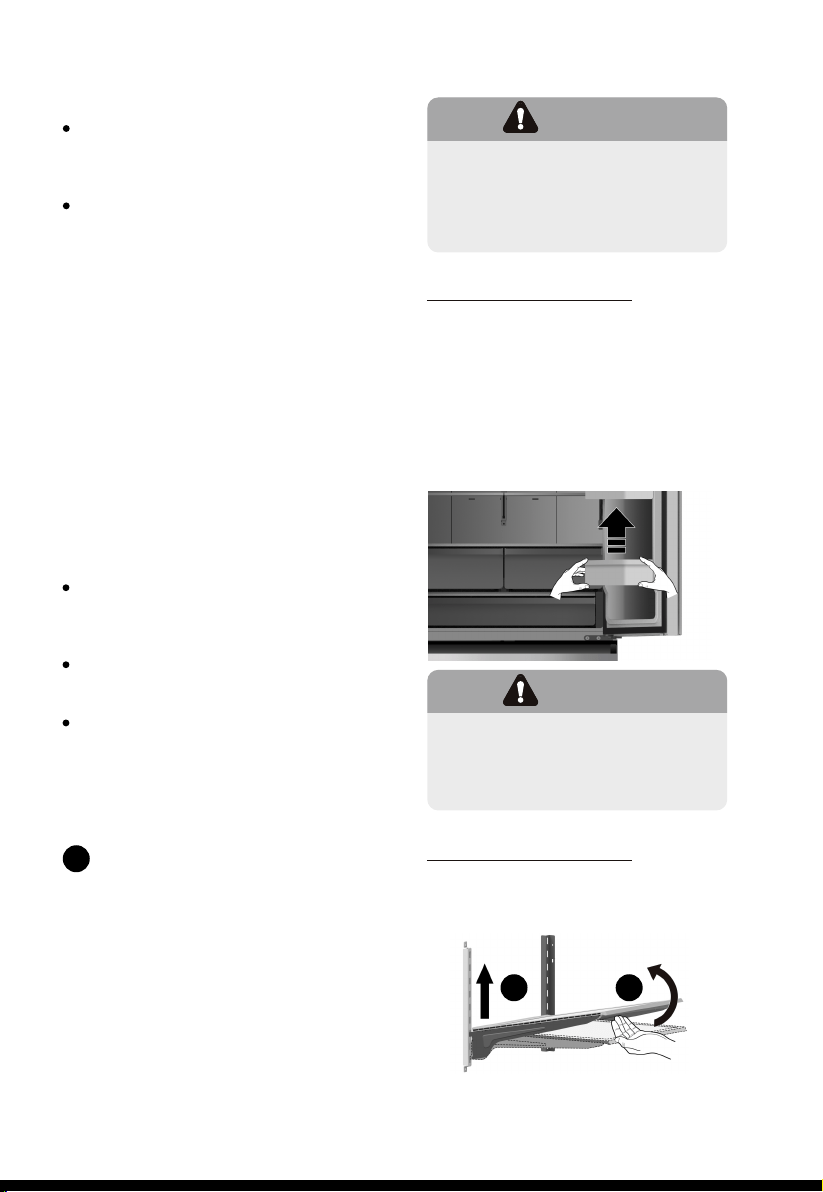
To remove the door baskets, simply lift
the racks up and pull straight out.
To relocate the door baskets, slide it in
above the desired location and push
down until it stops.
Door baskets
CAUTION!
Never close the refrigerator
door while the shelves, crisper
and/or telescopic slides are
extended. It may damage both
them and the refrigerator.
WARNING!
Do not place too many heavy
things in the baskets. Before you
liftup the door shelf vertically,
please take the food out.
To remove the glass shelves, tilt up the front
of the shelf in the direction shown (1) and
lift it up vertically (2).Pull the shelf out.
Glass shelves
2 1
Be sure to flush the dispenser thoroughly,
otherwise water may drip from the
dispenser. This means that there is still air
in the line.
Do not dispense the entire 2.5 gallon
amount continuously. Depress and
release the dispenser pad for cycles
of 30 seconds ON and 60 seconds OFF.
Check to see whether the sediment filter
in the reverse osmosis system is blocked.
Replace the filter if necessary.
Allow the storage tank on the reverse
osmosis system to refill after heavy usage.
If your refrigerator has a water filter,
it may further reduce the water pressure
when used in conjunction with a reverse
osmosis system. To resolve it, remove the
water filter.
Reverse osmosis water supply:
The pressure of the water supply coming
out of a reverse osmosis system going to
the water inlet valve of the refrigerator
needs to be between 30 and 100psi (207
and 700kPa). If a reverse osmosis water
system is connected to your cold water
supply, the water pressure to the reverse
osmosis system needs to be a minimum of
40 to 60 psi (276 to 414 kPa).If the water
pressure to the reverse osmosis system is
less than 40 to 60 psi (276 to 414 kPa):
Note:
2 Using your
fridge compartment
The refrigerator compartment is
suitable for storage of vegetables and
fruit. Food inside should be sealed for
storage in order to avoid losing moisture
or flavor permeating into other foods.
2
Press ICE On/Off to turn the ice maker On
and Off. The Ice Maker icon is “ ” illuminated
when the ice maker is functioning.
16
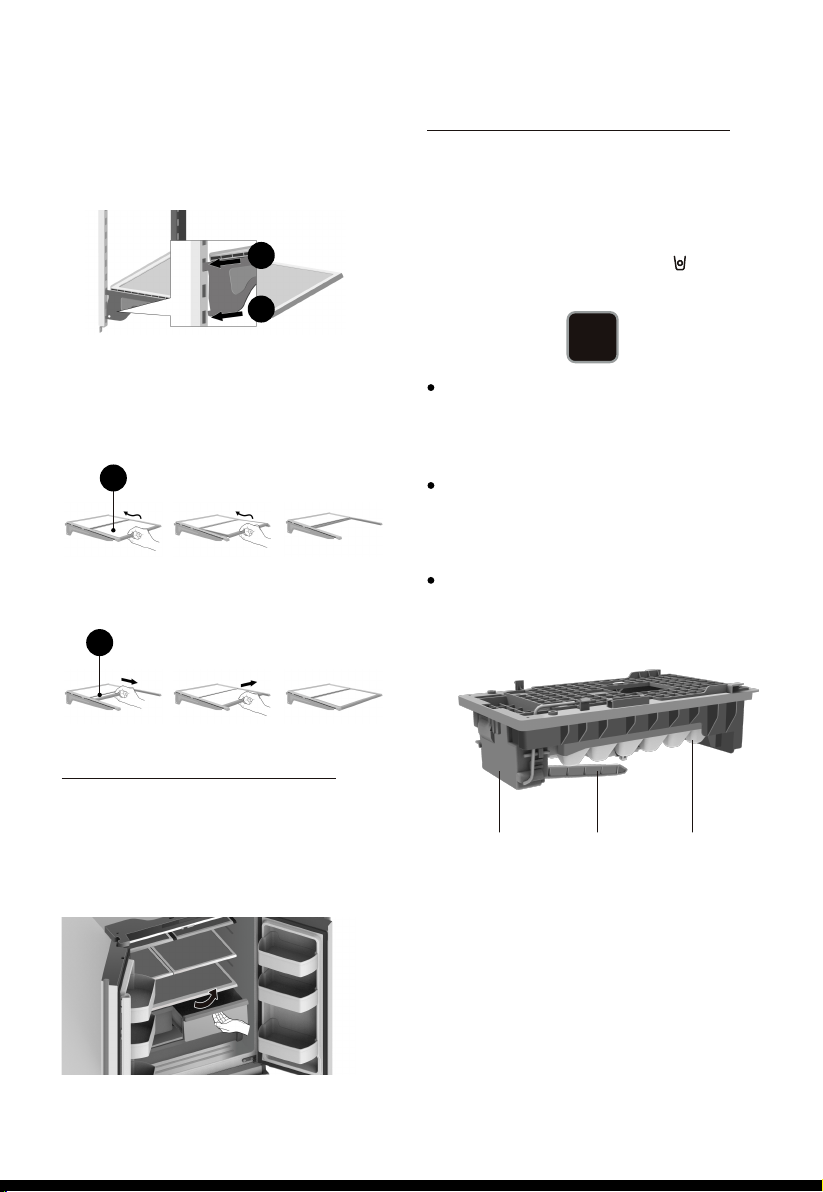
The crispers are suitable for storage of
vegetables and fruit. To take them out,
open the door to the final location first.
Then pull out the drawer and tilt up the
front of the crisper after moving slightly
in the direction of the arrow.
Vegetable and fruit crispers
To re-install the glass shelves, tilt the front of
the shelf up and guide the shelf hooks into
the slots at a desired height (1). Then lower
the front of the shelf so that the hooks can
drop into the slots (2).
The refrigerator compartment is also
provided with a foldable shelf. It can be
folded as required.
To fold the shelf, hold the removable
glass(N) and lift it up slightly, then push it
slightly in the direction of the arrow.
To unfold the shelf, hold the removable
glass(N) and pull it out slightly in the
direction of the arrow until it can’t move.
1
2
Following installation, allow 24 hours to
produce the first batch of ice. Discard
the first three batches of ice produced.
Allow 2 to 3 days to fill the ice storage
container.
If the ice in the ice container clumps,
break up ice using a plastic utensil and
discard. Do not use a sharp tool to break
up the ice. This can cause damage to
the ice container.
Do not store any items other than ice in
the ice storage container.
The freezer compartment is provided with
an upper drawer, a lower drawer and an
ice box. To remove all of them, refer to
page 8 for disassembly instruction.
Using the freezer compartment
Ice
On/Off
N
N
Feeler Arm Ice Storage
Container
Motor
17
To maintain good appearance of your
appliance, you should clean it regularly.
Spray water onto a cleaning cloth
instead of spraying directly on the
surface of the appliance. This helps
ensure an even distribution of moisture
to the surface.
Clean the doors, handles and cabinet
surfaces with a mild detergent and
then wipe dry with a soft cloth.
Exterior cleaning
You should clean the appliance interior
regularly. It will be easier to clean when
food stocks are low. Wipe the inside of
the fridge and freezer with a weak
solution of backing soda and water, and
then rinse with warm water using a
wrung-out sponge or cloth. Wipe
completely dry before replacing the
shelves and baskets. Thoroughly dry all
surfaces and removable parts before
putting them back into place.
Interior cleaning
For hygienic reasons the appliance
(including exterior and interior
accessories) should be cleaned at least
every two months.
Cleaning and Care
CAUTION!
1.Don’t use sharp objects to
clean with, as they are likely to
scratch the surface.
2.Don’t use thinner, car cleaner,
bleach, oil, abrasive cleansers or
organic solvent such as benzene
for cleaning. They may damage
the surface of the appliance
and may cause fire.
WARNING!
To avoid electrical shock, the
appliance must not be
connected to the main power
supply during cleaning. Before
cleaning, switch the appliance
off and remove the plug from
the main socket.
Although this appliance automatically
defrosts, a layer of frost may occur on
the freezer compartment’s interior walls if
the freezer door is opened frequently or
kept open too long. If the frost is too
thick, choose a time when the freezer is
nearly empty and proceed as follows:
Remove existing food and accessory
baskets, unplug the appliance from
the main power and leave the doors
open. Ventilate the room thoroughly to
accelerate the process.
When defrosting is completed, clean
your freezer as described above.
1.
2.
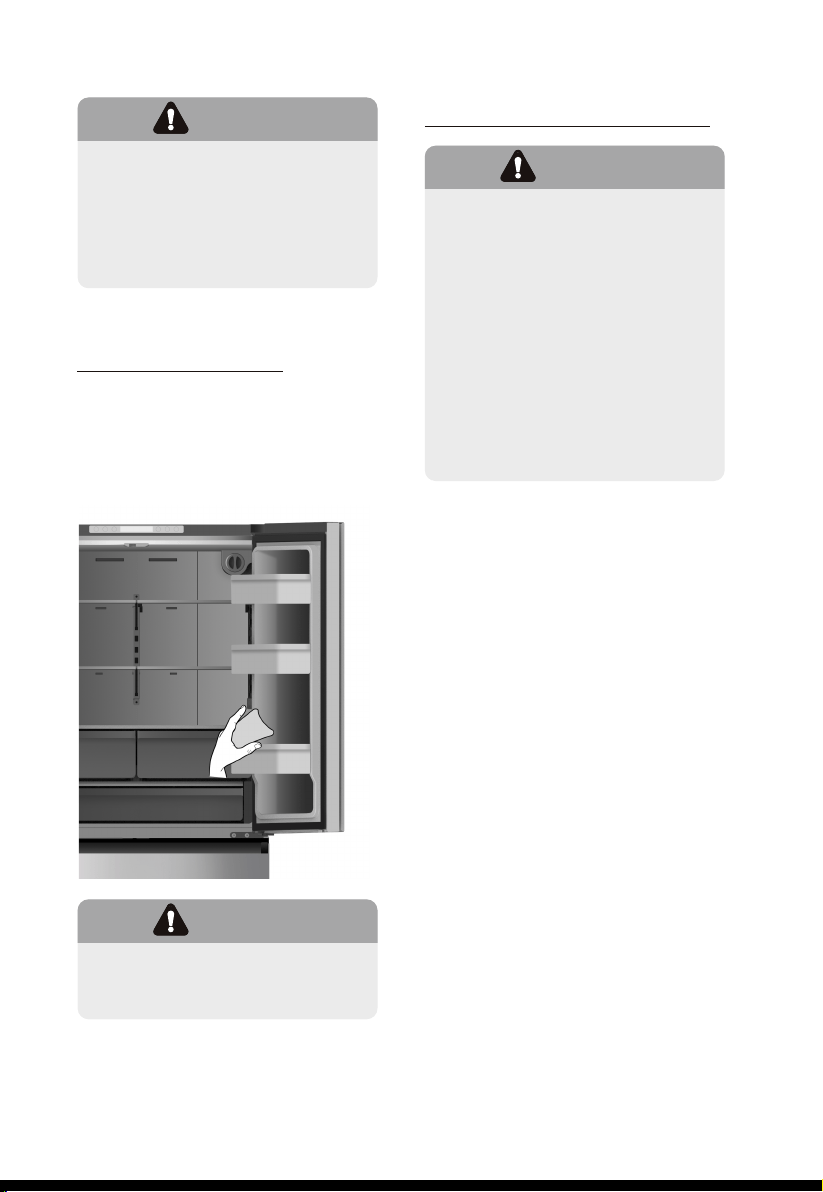
Replacing the LED light
18
Take care to keep door seals clean.
Sticky food and drinks can cause seals
to stick to the cabinet and tear when
you open the door. Wash seal with a
mild detergent and warm water. Rinse
and dry it thoroughly after cleaning.
Door seals cleaning
WARNING!
Do not use sharp objects to
remove frost from the freezer
compartment. Only after the
interior is completely dry should
the appliance be switched back
on and plugged back into the
main socket.
CAUTION!
Only after the door seals are
completely dry should the
appliance be powered on.
WARNING!
The LED light must be replaced
by a competent person. If the
LED light is damaged, follow the
steps below:
1. Unplug your appliance.
2. Remove the light cover by
lifting up and pulling out.
3. Hold the LED light with one
hand and pull it while pressing
the connector latch with the
other hand.
4. Replace the LED light and
snap it correctly in place and
replace the light cover.
19
Energy Saving Tips
We recommend that you follow the tips
below to save energy.
Tips for fresh food
refrigeration
Try to avoid keeping the door open for
long periods in order to conserve energy.
Ensure the appliance is away from any
sources of heat (direct sunlight, electric
oven or cooker etc.)
Don’t set the temperature colder than
necessary.
Don’t store warm food or evaporating
liquid in the appliance.
Place the appliance in a well
ventilated, humidity freeroom. Please
refer to Installing your New Appliance
chapter.
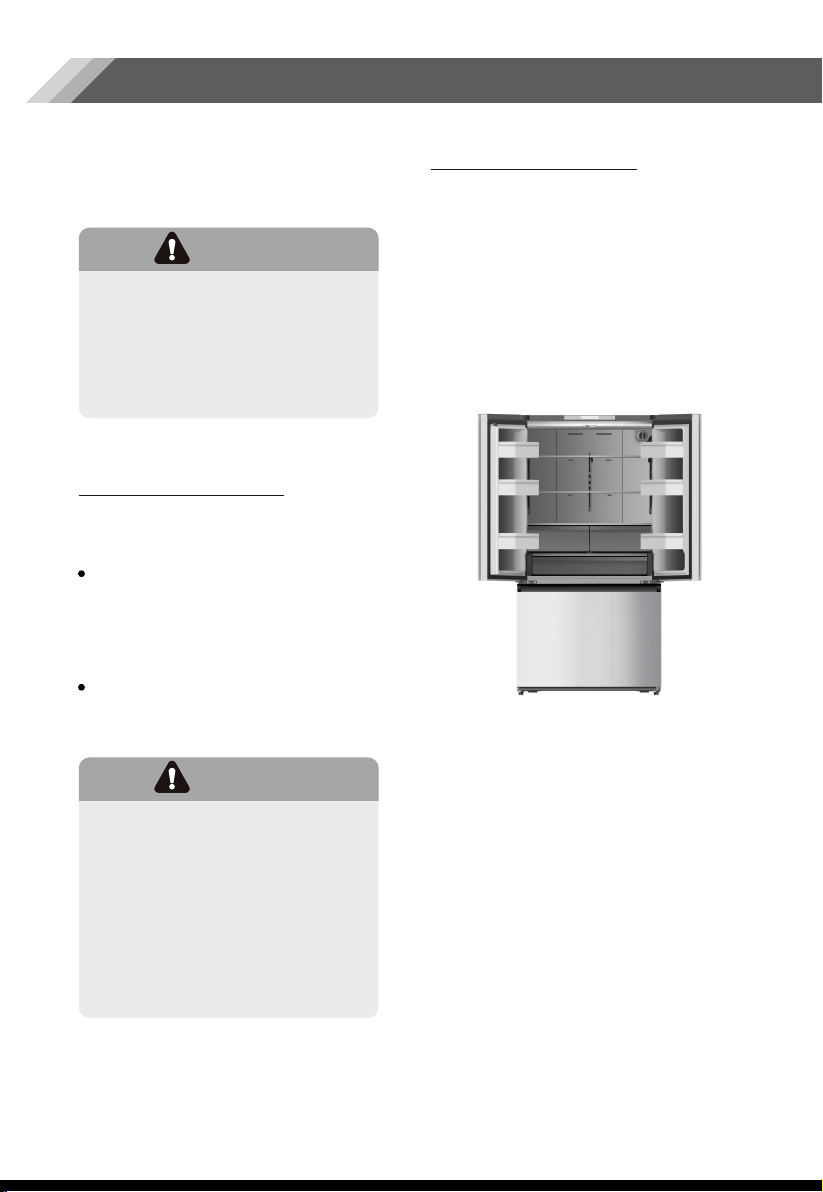
If the diagram shows the correct
combination for the drawers, crisper and
shelves, do not adjust the combination as
this is designed to be the most energy
efficient configuration.
Do not place hot food directly into the
refrigerator or freezer, the internal
temperature will increase resulting in the
compressor having to work harder and
consume more energy.
Do cover or wrap the food, particularly if it
has a strong flavor.
Place food properly so that air can
circulate freely around it.
For Meat: (all types) wrap in cling wrap
and place on the glass shelf above the
vegetable drawer. Always follow food
storage times and use by dates
suggested by manufacturers.
Cooked food, cold dishes, etc.:
They should be covered and placed on
any shelf.
Fruit and vegetables:
They should be stored in the special
drawer provided.
Butter and cheese:
Should be wrapped in airtight foil or
plastic film wrap.
Milk bottles:
Should have a lid and be stored in the
door racks.
Tips for refrigeration
When first starting-up or after a period
out of use, let the appliance run at least
2 hours on the higher settings before
putting food in the compartment.
Prepare food in small portions to enable
it to be rapidly and completely frozen
and to make it possible to subsequently
thaw only the quantity required.
Wrap up the food in aluminum foil or
cling wraps which are airtight.
Do not allow unfrozen food to touch the
food which is already frozen to avoid
temperature rise of the latter.
Tips for freezing
Helpful Tips
20
Tips for the storage
of frozen food
Iced products (ice cubes, popsicles): if
consumed immediately after removal
from the freezer compartment, will
probably cause frost burns to the skin.
It is recommended to label and date
each frozen package in order to keep
track of the storage time.
Ensure that frozen food has been stored
correctly by the food retailer
Once defrosted, food will deteriorate
rapidly and should not be re-frozen. Do
not exceed the storage period indicated
by the food manufacturer.
Switching off your appliance
If the appliance needs to be switched off
for an extended period, the following
steps should be taken to prevent mold on
the appliance.
Remove all food.
Remove the power plug from the
main socket.
Clean and dry the interior thoroughly.
Ensure that all the doors are wedged
open slightly to allow air to circulate.
1.
2.
4.
3.
Troubleshooting
21
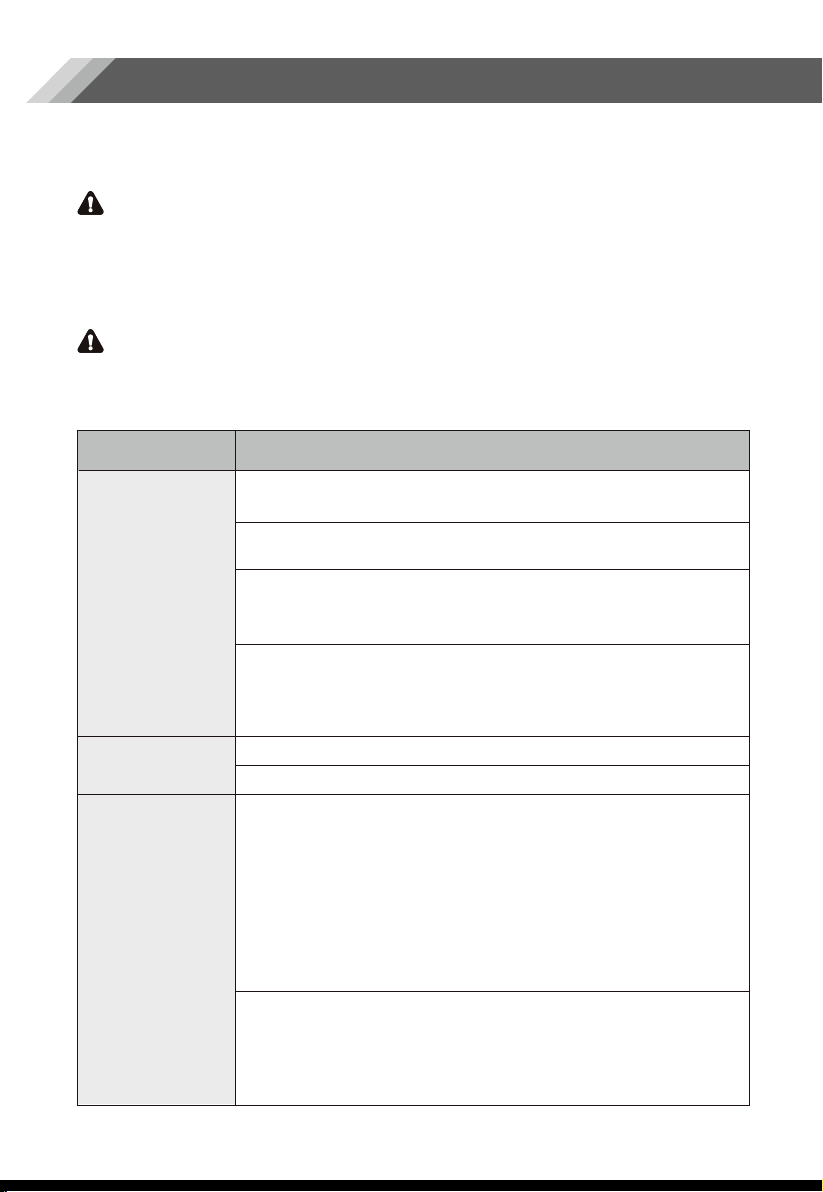
Problem Possible Cause & Solution
WARNING
•
•
•
•
•
•
•
If you experience a problem with your appliance or are concerned that the appliance is
not functioing correctly, you can carry out some easy checks before calling for service,
please see below.
1.Don’t try to repair the appliance yourself. If the problem persists after you have made
the checks mentioned below, contact a qualified electrician, authorized service
technician or the shop where you purchased the product.
2.A child entrapment warning statement is included below.
DANGER
Risk of child entrapment. Before you throw away your old refrigerator or freezer:
- Take off the doors.
- Leave the shelves in place so that children may not easily climb inside.
Appliance is
not working
correctly
Noise from the
appliance
Odors from the
compartments
Check whether the power cord is plugged into the power
outlet properly.
The room temperature may be too low. Try setting the
refrigerator or freezer temperature to a colder level to solve
this problem.
It is normal that the freezer is not operating during the defrost
cycle, or for a short time after the appliance is switched on to
protect the compressor.
Other unusual noises are due to the reasons below and may
need you to check and take action:
The cabinet is not level.
The back of appliance is touching the wall.
Bottles or containers have fallen or are rolling.
The sounds below are quite normal:
Compressor running noises.
Air movement noise from the small fan motor in the freezer
compartment or other compartments.
Gurgling sound similar to water boiling.
Popping noise during automatic defrosting.
Clicking noise before the compressor starts.
Clicking noise when you get the water.
The motor running noises when you get ice.
The interior may need to be cleaned
Some food, containers or wrapping may cause odors.
Check the fuse or circuit of your power supply, replace
if necessary.
22
The motor runs
continuously
A layer of frost
occurs in the
compartment
Temperature
inside is too
warm
Temperature
inside is too cold
Doors can’t
be closed easily
Hear water
bubbling in the
refrigerator
The light is
not working
•
The LED light may be damaged. Refer to replace LED lights
in“ Cleaning and Care” chapter.
The control system has disabled the lights due to the door
being kept open too long. Close and reopen the door to
reactivate the lights.
•
•
•
•
•
•
It is normal to frequently hear the sound of the motor, it will
need to run more when in following circumstances:
Temperature setting is set colder than necessary.
Large quantity of warm food has recently been stored
within the appliance.
The temperature outside the appliance is high.
Doors are kept open too long or too often.
After first installing the appliance or if it has been switched
off for a long time.
Check that the air outlets are not blocked by food and
ensure food is placed within the appliance to allow sufficient
ventilation. Ensure that door is fully closed. To remove the
frost, please refer to the Cleaning and Care chapter.
You may have left the doors open too long or too frequently;
or the doors are kept open by some obstacle; or the
appliance is located with insufficient clearance at the sides,
back and top.
Increase the temperature by following the “Display
Controls” chapter.
Check whether the top of the refrigerator is tilted back by
0.4"-0.6"(10-15mm) to allow the doors to self-close, or if
something inside is preventing the doors from closing.
This is normal. The bubbling comes from the refrigerant
coolant liquid circulating through the refrigerator.
23
Ice is not
making
Water dispenser
is not
functioning
•
•
•
•
•
•
•
•
•
•
•
Did you wait for 12 hours after installation of the water
supply line before making ice? If it is not sufficiently cool,
it may take longer to make ice, such as when first
installed.
Is the water line connected and the water valve open?
Did you manually stop the ice making function? Make
sure you do not set the “Ice Off” mode.
Is there any ice blocked within the ice maker bucket?
Is the water pressure less than 30psi? Install a booster
pump to compensate for the low pressure.
Is the freezer temperature too warm? Try setting the
freezer temperature lower.
Ice maker is not making the ice fast enough. Please wait
for at least 90 minutes.
Is the water line connected and the water valve open?
Has the water line been crushed or kinked? Make sure the
waterline is free and clear of any obstruction.
Is the water tank frozen because the refrigerator
temperature is too low? Try selecting a warmer setting on
the display panel.
Check if the filter is properly installed. If it is not properly
installed, the water dispenser may not work.
Disposal of the Appliance
Correct Disposal of this product
24
DANGER
WARNING
Packaging materials with the recycle symbol are recyclable.
Dispose of the packaging into a suitable waste collection container to recycle it.
1. Pull out the main plug from the main socket.
2. Cut off the power cord and discard with the main plug.
Refrigerators contain refrigerant and gases in the insulation. Refrigerant and gases
must be disposed of professionally as they may cause eye injuries or ignition.
Ensure that tubing of the refrigerant circuit is not damaged prior to proper disposal.
This symbol on the product or in its packing indicates that
this product may not be treated as household waste.
Instead, it should be taken to the appropriate waste
collection point for the recycling of electrical and electronic
equipment. By ensuring this product is disposed of correctly,
you will help prevent potential negative consequences for
the environment and human health, which could otherwise
be caused by the inappropriate waste handling of this
product. For more detailed information about the recycling
of this product, please contact your local council, your
household waste disposal service, or the shop where you
purchased the product.
It is prohibited to dispose of this appliance as household waste.
Packaging materials
Before disposal of the appliance

Copyright Statement
© 2019 Hisense Company Ltd. All Rights Reserved.
All material in this User Manual is the property of Hisense Company Ltd. and its subsidiaries, and is
protected under US, CANADA, MEXICO and International copyright and/or other intellectual property
laws. Reproduction or transmission of the materials, in whole or in part, in any manner, electronic, print,
or otherwise, without the prior written consent of Hisense Company Ltd. is a violation of Hisense Company
Ltd. rights under the aforementioned laws.
No part of this publication may be stored, reproduced, transmitted or distributed, in whole or in part,
in any manner, electronic or otherwise, whether or not for a charge or other or no consideration,
without the prior written permission of Hisense Company Ltd.
Requests for permission to store, reproduce, transmit or distribute materials may be made to one of the
following addresses:
USA:
CANADA:
MEXICO:
Hisense, and any and all other Hisense product names, logo’s, slogans or marks are registered trademarks
of Hisense Company Ltd. and its subsidiaries. All other trademarks are the property of their respective holders.
© 2019. All rights reserved. Hisense and the Hisense logo are registered trademarks of Hisense. Other
brand and product names are registered trademarks of their respective owners.
Hisense USA Corporation
7310 McGinnis Ferry Road
Suwanee, GA 30024
Hisense Canada Co., Ltd
2283 Argentia Road, Unit 16
Mississauga, ON, Canada
LSN 5Z2
Hisense Mexico S. de R.L. de C.V.
Blvd. Miguel de Cervantes Saavedra No 301
Torre Norte Piso 2, Col. Ampliación Granada
Miguel Hidalgo, Ciudad de México, C.P. 11520
Disclaimer:
Images throughout this document are for illustrative purposes only and may differ from the actual product.