Clear Comfort
®
Pro
7-day Programmable
Thermostat
User Guide
Model 83521
IMPORTANT: Make sure to label your wires with
the included wire labels before removing your old
thermostat (see page 8).
We also recommend taking a picture of the current
wiring before disconnecting.
Downloaded from www.ManualsFile.com manuals search engine
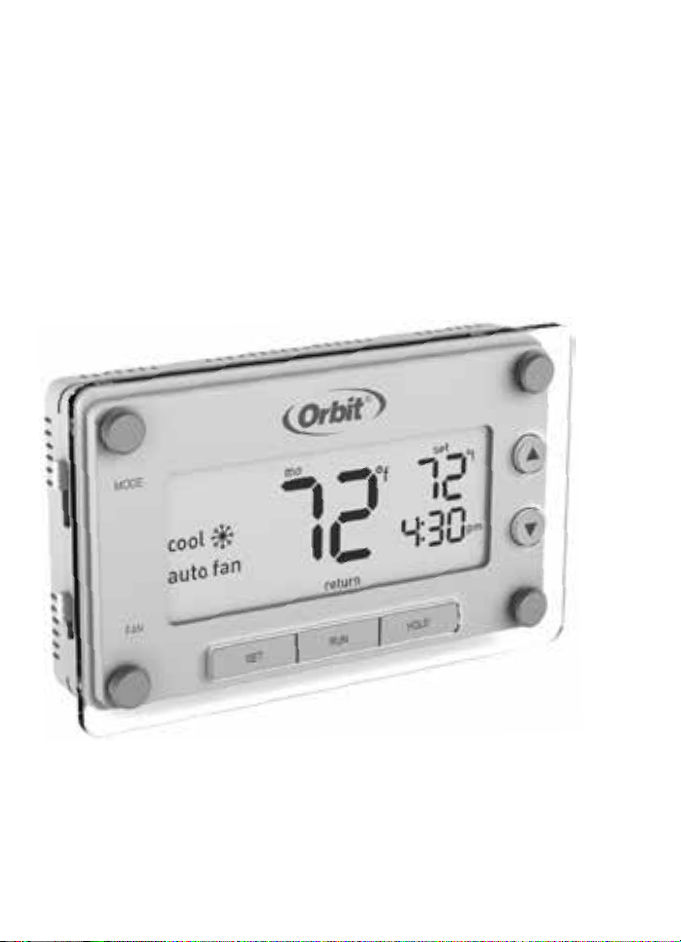
Clear Comfort
®
Pro
7-day Programmable
Thermostat
User Guide
Model 83521
IMPORTANT: Make sure to label your wires with
the included wire labels before removing your old
thermostat (see page 8).
We also recommend taking a picture of the current
wiring before disconnecting.
Downloaded from www.ManualsFile.com manuals search engine

i 1
TABLE OF CONTENTS
Thank you for purchasing the Clear Comfort® Pro thermostat from Orbit
®
.
We are excited to provide you a long-lasting thermostat that blends style with function.
Features
• Easily program 7 individual days or copy one programmed day to another
• Pre-programmed and ready to go with Energy Star
®
seings
• Large backlit display is easy to read
• Early start ensures the desired temperature is reached at the scheduled time
• Precision control keeps the temperature within 1°F of set level
• Override the schedule temporarily or permanently
Quick Reference
Easy 1-2-3 Operation ..................................................................... 2
Thermostat Controls ....................................................................3
Display Screen .................................................................................4
Before You Begin............................................................................ 5
Installation
Installing Your Thermostat.......................................................... 7
Temperature Format .................................................................... 17
Reset Buon....................................................................................17
Advanced System Setup ............................................................18
Operation
Set Time and Day ......................................................................... 22
Select Mode and Fan Seings ................................................23
Programmed Schedules .............................................................24
Energy Star
®
Programmed Schedule ....................................25
Modifying the Programmed Schedule .................................26
Using the Copy Feature............................................................. 27
Overriding Schedules Temporarily........................................28
Overriding Schedules Permanently ...................................... 29
Turning Off Schedules .............................................................. 30
Compressor Protection ..............................................................31
Early Start........................................................................................32
Appendices
Replacing the Baeries ..............................................................33
Troubleshooting ............................................................................34
Customer Assistance ................................................................. 40
Warranty ...........................................................................................41
Downloaded from www.ManualsFile.com manuals search engine

i 1
TABLE OF CONTENTS
Thank you for purchasing the Clear Comfort® Pro thermostat from Orbit
®
.
We are excited to provide you a long-lasting thermostat that blends style with function.
Features
• Easily program 7 individual days or copy one programmed day to another
• Pre-programmed and ready to go with Energy Star
®
seings
• Large backlit display is easy to read
• Early start ensures the desired temperature is reached at the scheduled time
• Precision control keeps the temperature within 1°F of set level
• Override the schedule temporarily or permanently
Quick Reference
Easy 1-2-3 Operation ..................................................................... 2
Thermostat Controls ....................................................................3
Display Screen .................................................................................4
Before You Begin............................................................................ 5
Installation
Installing Your Thermostat.......................................................... 7
Temperature Format .................................................................... 17
Reset Buon....................................................................................17
Advanced System Setup ............................................................18
Operation
Set Time and Day ......................................................................... 22
Select Mode and Fan Seings ................................................23
Programmed Schedules .............................................................24
Energy Star
®
Programmed Schedule ....................................25
Modifying the Programmed Schedule .................................26
Using the Copy Feature............................................................. 27
Overriding Schedules Temporarily........................................28
Overriding Schedules Permanently ...................................... 29
Turning Off Schedules .............................................................. 30
Compressor Protection ..............................................................31
Early Start........................................................................................32
Appendices
Replacing the Baeries ..............................................................33
Troubleshooting ............................................................................34
Customer Assistance ................................................................. 40
Warranty ...........................................................................................41
Downloaded from www.ManualsFile.com manuals search engine

2 3
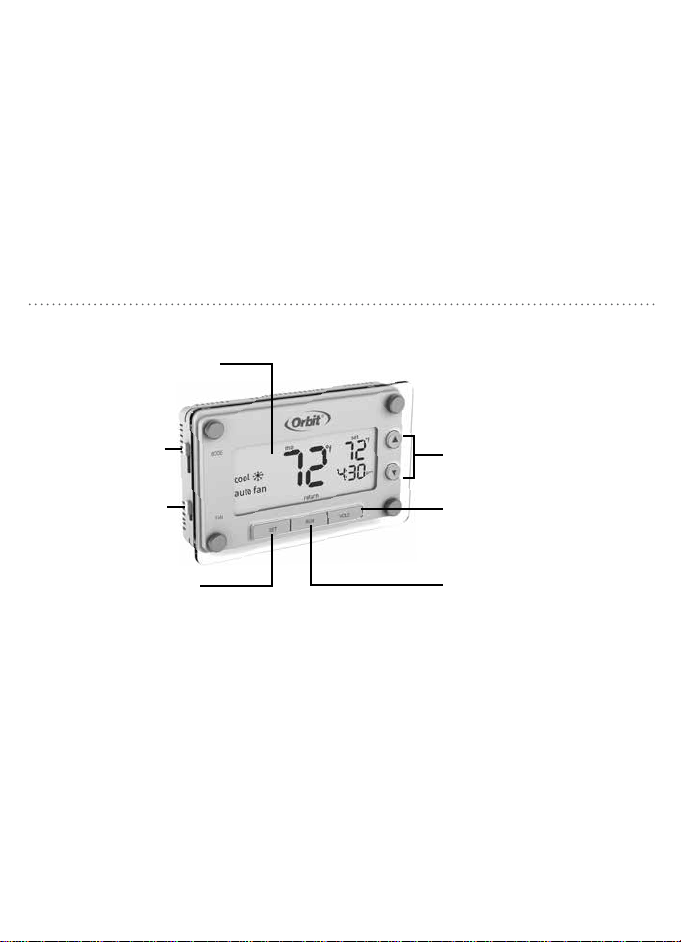
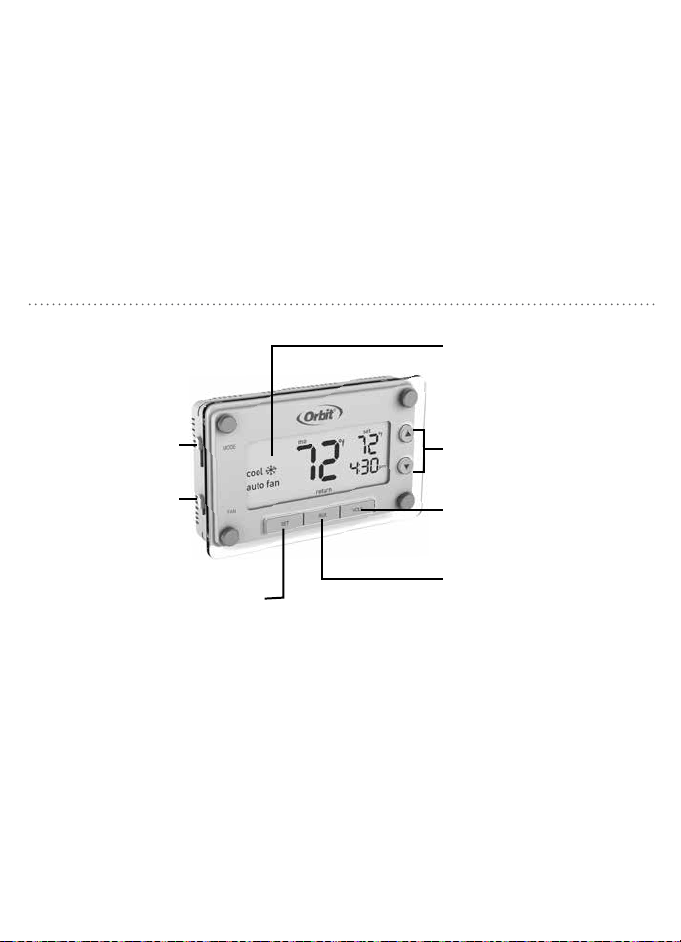
MODE Switch:
Select between
Heat/Off/Cool
p/q Buons: Press to
adjust temperature or use to
navigate during set up
HOLD: Press to override
programmed schedule
RUN: Press to resume
programmed schedule
FAN Switch:
Select between
Auto Fan/Fan On
SET: Press to set
schedule, time, and day
Backlit Screen:
Press any buon to activate
1. Set the time and day ........................................................................................................................See page 20
2. Select whether to heat or cool ....................................................................................................See page 21
3. Select fan seing ...............................................................................................................................See page 21
Your thermostat is now ready to use, simply press RUN. If you do not wish to use
the preprogrammed Energy Star
®
thermostat seings you can:
Modify the programmed schedule ...................................................................................................See page 24
Temporarily override the programmed schedule ....................................................................... See page 26
Permanently override the programmed schedule ..................................................................... See page 27
EASY 1-2-3 OPERATION THERMOSTAT CONTROLS
Downloaded from www.ManualsFile.com manuals search engine
2 3
MODE Switch:
Select between
Heat/Off/Cool
p/q Buons: Press to
adjust temperature or use to
navigate during set up
HOLD: Press to override
programmed schedule
RUN: Press to resume
programmed schedule
FAN Switch:
Select between
Auto Fan/Fan On
SET: Press to set
schedule, time, and day
Backlit Screen:
Press any buon to activate
1. Set the time and day ........................................................................................................................See page 20
2. Select whether to heat or cool ....................................................................................................See page 21
3. Select fan seing ...............................................................................................................................See page 21
Your thermostat is now ready to use, simply press RUN. If you do not wish to use
the preprogrammed Energy Star
®
thermostat seings you can:
Modify the programmed schedule ...................................................................................................See page 24
Temporarily override the programmed schedule ....................................................................... See page 26
Permanently override the programmed schedule ..................................................................... See page 27
EASY 1-2-3 OPERATION THERMOSTAT CONTROLS
Downloaded from www.ManualsFile.com manuals search engine
4 5
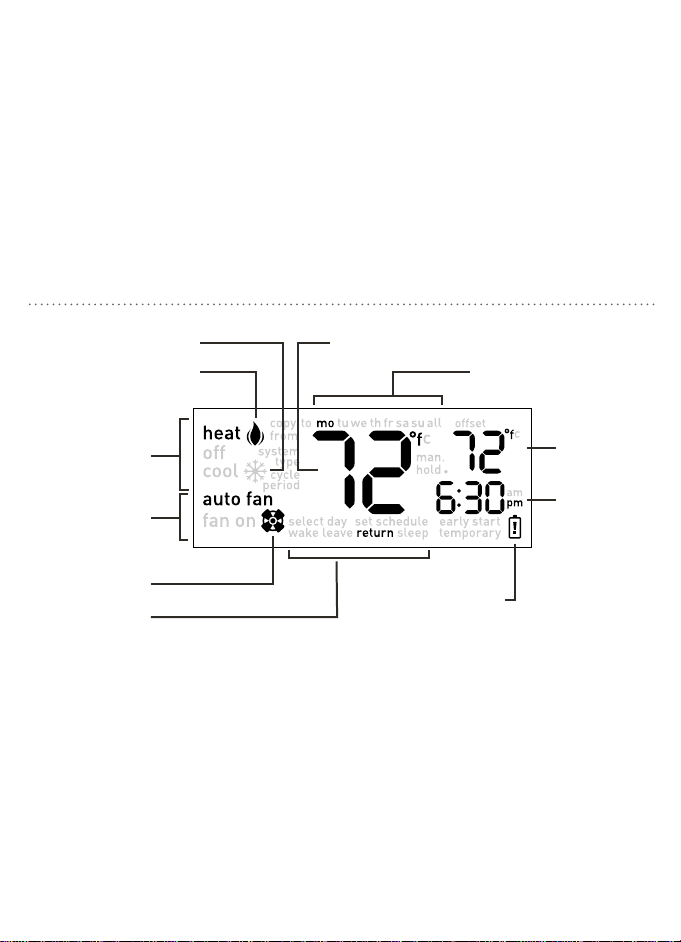
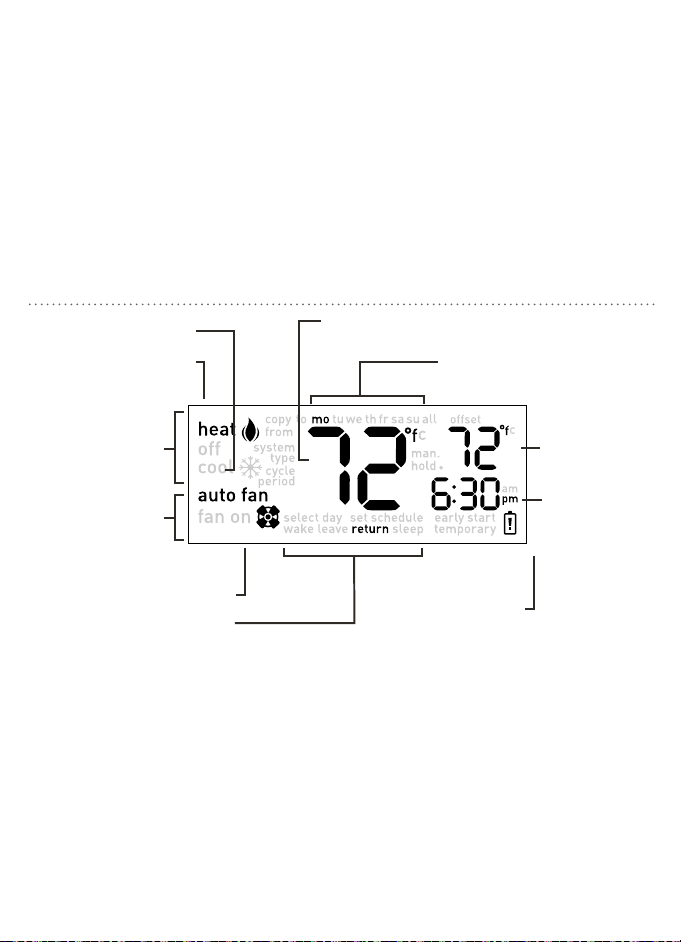
Heating system is on
Fan seing
Fan is activated
Room temperature
Reminder to
change baeries
Desired
temperature
seing
Schedule period
Current day of the week
Current time
Indicate which
mode the
system is in
Cooling system is on
This thermostat is compatible with
the following systems:
• Gas, oil or electric furnace
• Central air conditioner
• 2 wire hot water system with or without pump
• Millivolt system
• Central heating and cooling system
• Heat pump without auxiliary/backup heat
Tools Required For Installation
• Phillips screwdriver
• Wire cuers/strippers
• Drill with 3/16" (4.8 mm) drill bit
• Level
BEFORE YOU BEGINDISPLAY SCREEN
This thermostat is not compatible with
base board heaters (or other line voltage
heating), multi-stage heating or cooling
systems, or 3-wire hydronic systems.
Downloaded from www.ManualsFile.com manuals search engine
4 5
Heating system is on
Fan seing
Fan is activated
Room temperature
Reminder to
change baeries
Desired
temperature
seing
Schedule period
Current day of the week
Current time
Indicate which
mode the
system is in
Cooling system is on
This thermostat is compatible with
the following systems:
• Gas, oil or electric furnace
• Central air conditioner
• 2 wire hot water system with or without pump
• Millivolt system
• Central heating and cooling system
• Heat pump without auxiliary/backup heat
Tools Required For Installation
• Phillips screwdriver
• Wire cuers/strippers
• Drill with 3/16" (4.8 mm) drill bit
• Level
BEFORE YOU BEGINDISPLAY SCREEN
This thermostat is not compatible with
base board heaters (or other line voltage
heating), multi-stage heating or cooling
systems, or 3-wire hydronic systems.
Downloaded from www.ManualsFile.com manuals search engine

6 7
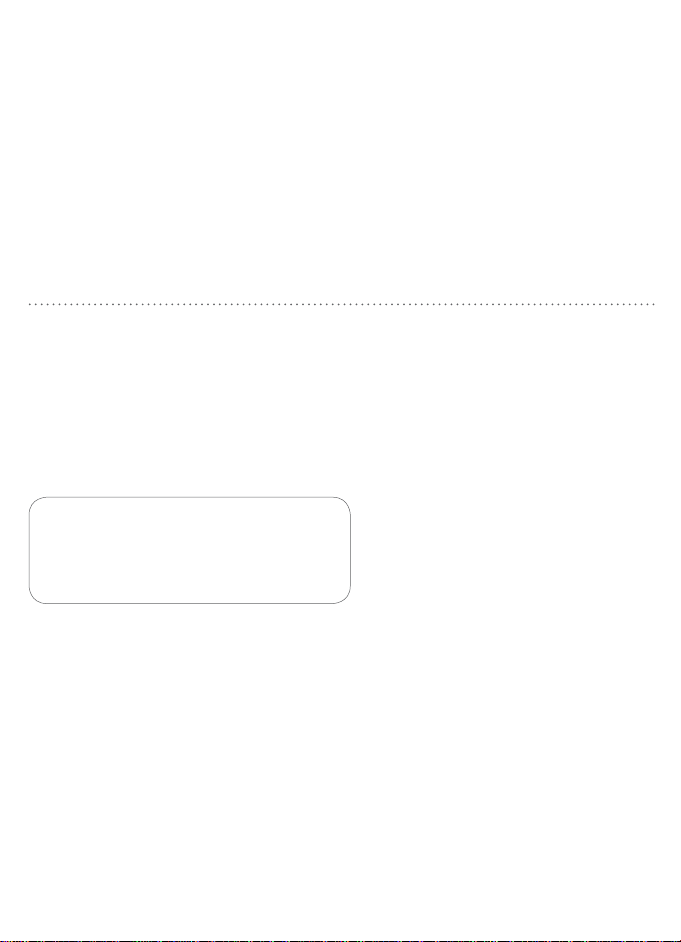
Take a picture or make note of
the current wiring for reference.
Mercury Notice: If your old thermostat
contains mercury contact your local waste
management authority for information on
how to safely dispose of it.
When replacing an existing thermostat,
position your new Clear Comfort® Pro
thermostat in the same location as your
old one, unless the conditions that follow
suggest otherwise. For a new installation,
follow these guidelines for placement:
• Place the thermostat in a room or hallway that
is used oen; position on an inside wall about 5'
(1.52 m) from the floor.
• Avoid installing the thermostat in overly warm
areas (e.g., near a television, lamp, radiator, or
fireplace), in direct sunlight, or
on a wall that has hot water pipes or that is
opposite a stove.
1
Switch Off Power
Turn off the power to the heating
and cooling equipment.
2
Remove Cover
Remove the front cover from the
old thermostat.
TIPS FOR INSTALLATION INSTALLING YOUR THERMOSTAT
• Avoid installing the thermostat in
overly chilled areas, such as in a dray area (e.g.,
stairwell, door, or window),
on a wall separating an unheated room,
or where air circulation is poor
(e.g., in a corner or behind a door).
• Avoid installing the thermostat in damp areas, as
this can lead to corrosion.
• Do not install the thermostat until construction
work is complete, the area is dust free, and
painting is completed.
• If the thermostat housing is cold, wait for it to
reach room temperature before installing.
Y W
G
0/B
Y W
RC
R
G
R
Downloaded from www.ManualsFile.com manuals search engine
6 7
Take a picture or make note of
the current wiring for reference.
Mercury Notice: If your old thermostat
contains mercury contact your local waste
management authority for information on
how to safely dispose of it.
When replacing an existing thermostat,
position your new Clear Comfort® Pro
thermostat in the same location as your
old one, unless the conditions that follow
suggest otherwise. For a new installation,
follow these guidelines for placement:
• Place the thermostat in a room or hallway that
is used oen; position on an inside wall about 5'
(1.52 m) from the floor.
• Avoid installing the thermostat in overly warm
areas (e.g., near a television, lamp, radiator, or
fireplace), in direct sunlight, or
on a wall that has hot water pipes or that is
opposite a stove.
1
Switch Off Power
Turn off the power to the heating
and cooling equipment.
2
Remove Cover
Remove the front cover from the
old thermostat.
TIPS FOR INSTALLATION INSTALLING YOUR THERMOSTAT
• Avoid installing the thermostat in
overly chilled areas, such as in a dray area (e.g.,
stairwell, door, or window),
on a wall separating an unheated room,
or where air circulation is poor
(e.g., in a corner or behind a door).
• Avoid installing the thermostat in damp areas, as
this can lead to corrosion.
• Do not install the thermostat until construction
work is complete, the area is dust free, and
painting is completed.
• If the thermostat housing is cold, wait for it to
reach room temperature before installing.
Y W
G
0/B
Y W
RC
R
G
R
Downloaded from www.ManualsFile.com manuals search engine
8 9
INSTALLING YOUR THERMOSTATINSTALLING YOUR THERMOSTAT
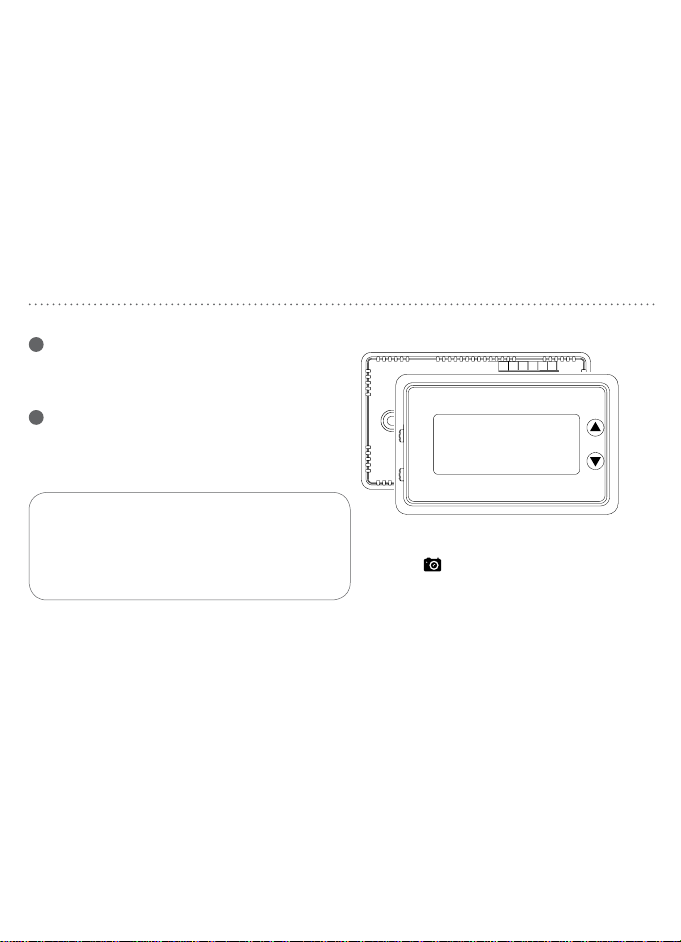
4
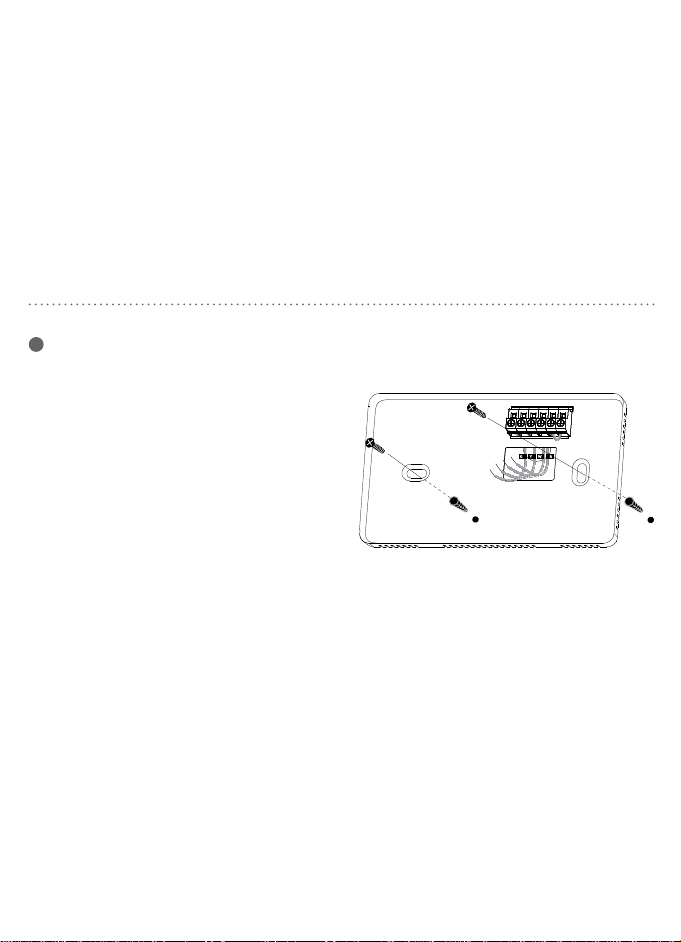
Mount New Base
a. Remove the thermostat body from
the base by gently pulling them apart.
b. Place the base flat against the wall by
feeding the wires through the opening
below the wiring terminal.
c. Level the base and mark the holes for
the mounting screws with a pencil.
d. Remove the base and drill holes at
marked positions. Insert the provided
wall anchors.
e. Feed wires back through the opening
and aach the base to the wall with
the screws provided.
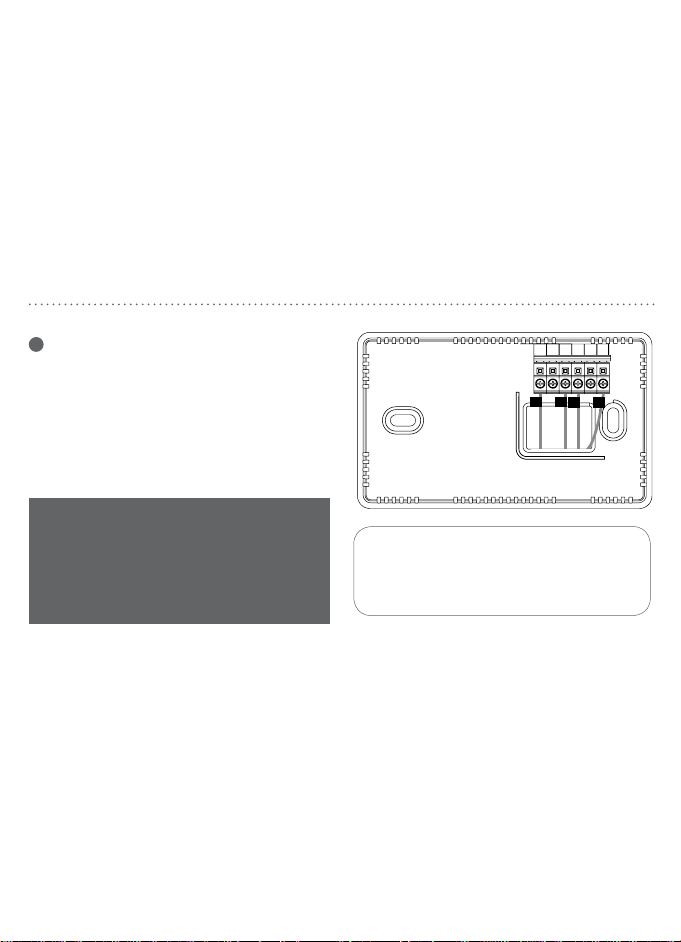
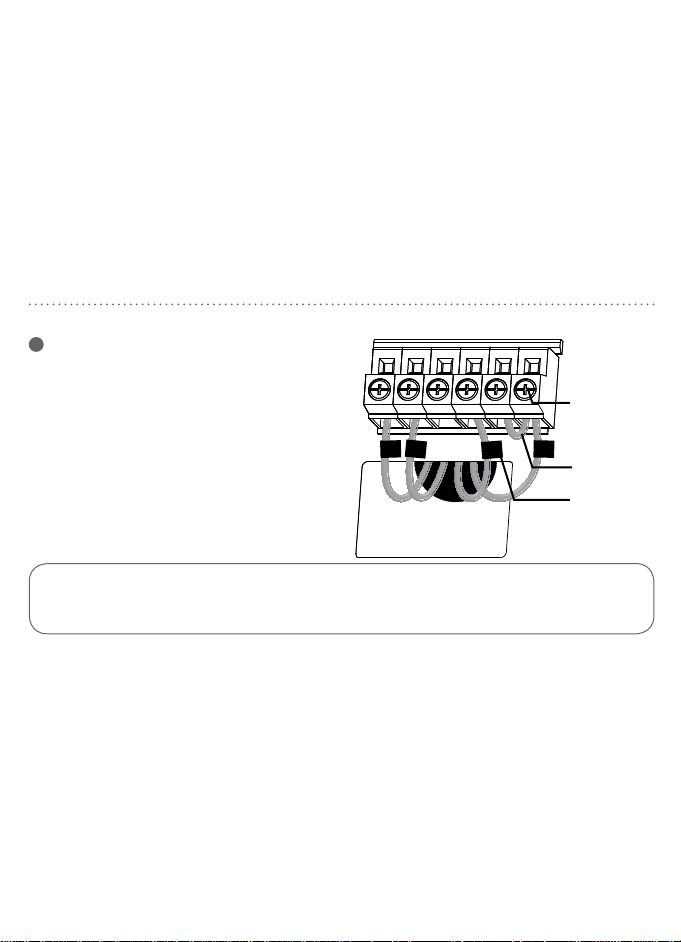
3
Label Wires
Use the supplied wire labels to identify the
wire by its terminal leer and not the color.
Once the wires are labeled, disconnect the
wires and remove the base.
While labeling and removing the
individual wires DO NOT let the wire
fall back inside the wall.
B B
G G
R R
V
/
VR V
/
VR
X X
Y2 Y2
H H
RC RC
W W
X1 X1
C C
L L
RH RH
W1
X2 X2
W1
E E
O O
T T
W2
Y Y
W2
F F
P P
U U
W3
Y1 Y1
W3
AUX
AUX
G O/B Y W RC R
Y W
G
0/B
Y W
RC
R
G
R
Downloaded from www.ManualsFile.com manuals search engine
8 9
INSTALLING YOUR THERMOSTATINSTALLING YOUR THERMOSTAT
4
Mount New Base
a. Remove the thermostat body from
the base by gently pulling them apart.
b. Place the base flat against the wall by
feeding the wires through the opening
below the wiring terminal.
c. Level the base and mark the holes for
the mounting screws with a pencil.
d. Remove the base and drill holes at
marked positions. Insert the provided
wall anchors.
e. Feed wires back through the opening
and aach the base to the wall with
the screws provided.
3
Label Wires
Use the supplied wire labels to identify the
wire by its terminal leer and not the color.
Once the wires are labeled, disconnect the
wires and remove the base.
While labeling and removing the
individual wires DO NOT let the wire
fall back inside the wall.
B B
G G
R R
V
/
VR V
/
VR
X X
Y2 Y2
H H
RC RC
W W
X1 X1
C C
L L
RH RH
W1
X2 X2
W1
E E
O O
T T
W2
Y Y
W2
F F
P P
U U
W3
Y1 Y1
W3
AUX
AUX
G O/B Y W RC R
Y W
G
0/B
Y W
RC
R
G
R
Downloaded from www.ManualsFile.com manuals search engine
10 11
CAUTION: Stripping too much insulation from the end of a wire creates the
potential for shorting between wires and could prevent proper function of the thermostat.
INSTALLING YOUR THERMOSTATINSTALLING YOUR THERMOSTAT
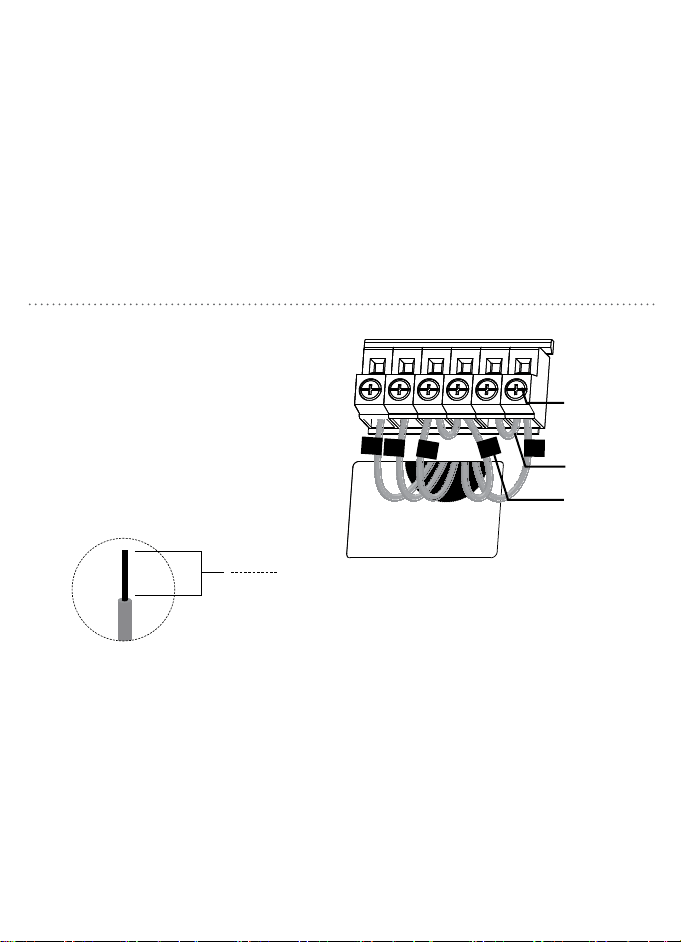
Wire Installation for Heat Pump Systems
a. Loosen the screws on each terminal.
b. Insert jumper wire into the Y and W
terminals.
c. Insert each labeled wire into the matching
terminal and tighten the screws.
d. Wrap exposed areas of any unused wire
with electrical tape.
5
Wire Installation
for Conventional Systems
a. Loosen the screws on each terminal.
Note: Remove jumper wire if you have both
R and RC wires.
b. Insert each labeled wire into the matching
terminal and tighten the screws.
c. Wrap exposed areas of any unused wire
with electrical tape.
d. Continue to page 12.
R
O
G
W
R
W
Y
O
G
screw screw
labeled
wire
labeled
wire
3/8"
9.5 mm
Note: Expose 3/8" of each wire for proper installation.
RR RCRC WW YY GG O/BO/B
jump wire
jump wire
Downloaded from www.ManualsFile.com manuals search engine
10 11
CAUTION: Stripping too much insulation from the end of a wire creates the
potential for shorting between wires and could prevent proper function of the thermostat.
INSTALLING YOUR THERMOSTATINSTALLING YOUR THERMOSTAT
Wire Installation for Heat Pump Systems
a. Loosen the screws on each terminal.
b. Insert jumper wire into the Y and W
terminals.
c. Insert each labeled wire into the matching
terminal and tighten the screws.
d. Wrap exposed areas of any unused wire
with electrical tape.
5
Wire Installation
for Conventional Systems
a. Loosen the screws on each terminal.
Note: Remove jumper wire if you have both
R and RC wires.
b. Insert each labeled wire into the matching
terminal and tighten the screws.
c. Wrap exposed areas of any unused wire
with electrical tape.
d. Continue to page 12.
R
O
G
W
R
W
Y
O
G
screw screw
labeled
wire
labeled
wire
3/8"
9.5 mm
Note: Expose 3/8" of each wire for proper installation.
RR RCRC WW YY GG O/BO/B
jump wire
jump wire
Downloaded from www.ManualsFile.com manuals search engine
12 13
INSTALLING YOUR THERMOSTATINSTALLING YOUR THERMOSTAT
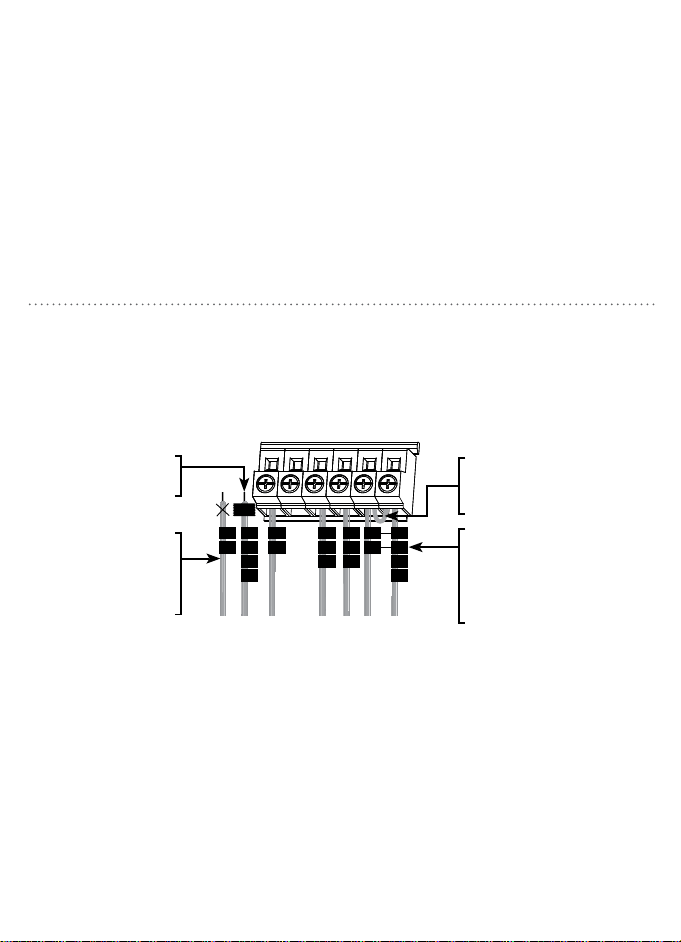
Less Common Heat Pump Systems
Wire Installation for Less Common
Conventional Systems
R
Rh
V
Rc
R
W
W1
H
Y
M
Y1
G
F
C
C1
B
X
Y2
W2
TAPE
R
VR
V
Rc
R
Y
M
Y1
O
B
H
G
F
C
X
B
Aux
W
W1
W2
TAPE
L
F
E
X
R
R
RC
RC
W
W
Y
Y
G
G
O/B
O/B
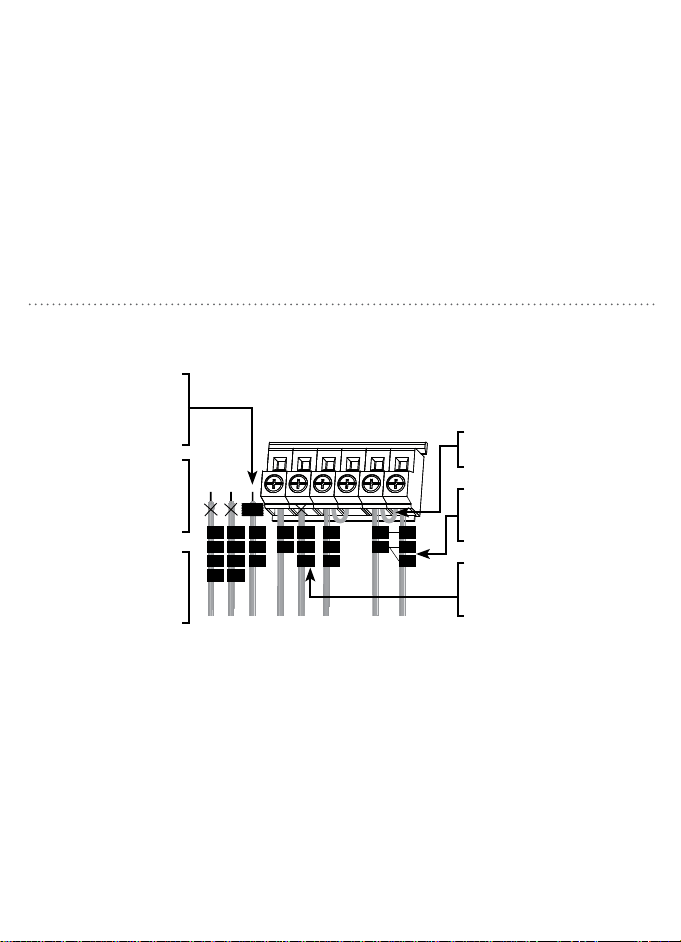
Note: Most systems can be wired using the
wiring diagrams and instructions on pages 10
& 11. If your thermostat wiring does not match
those wiring configurations, use the diagrams
and instructions on pages 12 & 13.
Note: Most systems can be wired using the
wiring diagrams and instructions on pages 10
& 11. If your thermostat wiring does not match
those wiring configurations, use the diagrams
and instructions on pages 12 & 13.
If Y2 or W2 wires are
present, the Orbit
thermostat is not
compatible with your
system.
If your existing thermostat
has V1, W1, and W2 wires,
stop now and contact a
qualified HVAC technician
for assistance.
If your existing thermostat
has L, F, E, or Aux wires,
the Orbit thermostat is
not compatible with your
system.
Remove metal jumper
connecting R & Rc terminals
only if your system requires
both R & Rc wires.
Leave the metal jumper
in place, connecting the
R & Rc terminals.
If your existing thermostat has
both V and VR wires, stop now
and contact a qualified HVAC
technician for assistance.
If your existing thermostat has
a separate O and B wire, stop
now and contact a qualified
HVAC technician for assistance.
If your existing thermostat has
both R & Rh wires, remove
metal jumper between the R
& Rc terminals. Connect the R
wire to the Rc terminal and the
Rh wire to the R terminal.
Wrap all C, C1 B or X
wires with electrical tape.
Do not connect them.
If your existing thermostat
has a C wire, it should be
wrapped with electrical
tape and not connected to
your new thermostat.
Downloaded from www.ManualsFile.com manuals search engine
12 13
INSTALLING YOUR THERMOSTATINSTALLING YOUR THERMOSTAT
Less Common Heat Pump Systems
Wire Installation for Less Common
Conventional Systems
R
Rh
V
Rc
R
W
W1
H
Y
M
Y1
G
F
C
C1
B
X
Y2
W2
TAPE
R
VR
V
Rc
R
Y
M
Y1
O
B
H
G
F
C
X
B
Aux
W
W1
W2
TAPE
L
F
E
X
R
R
RC
RC
W
W
Y
Y
G
G
O/B
O/B
Note: Most systems can be wired using the
wiring diagrams and instructions on pages 10
& 11. If your thermostat wiring does not match
those wiring configurations, use the diagrams
and instructions on pages 12 & 13.
Note: Most systems can be wired using the
wiring diagrams and instructions on pages 10
& 11. If your thermostat wiring does not match
those wiring configurations, use the diagrams
and instructions on pages 12 & 13.
If Y2 or W2 wires are
present, the Orbit
thermostat is not
compatible with your
system.
If your existing thermostat
has V1, W1, and W2 wires,
stop now and contact a
qualified HVAC technician
for assistance.
If your existing thermostat
has L, F, E, or Aux wires,
the Orbit thermostat is
not compatible with your
system.
Remove metal jumper
connecting R & Rc terminals
only if your system requires
both R & Rc wires.
Leave the metal jumper
in place, connecting the
R & Rc terminals.
If your existing thermostat has
both V and VR wires, stop now
and contact a qualified HVAC
technician for assistance.
If your existing thermostat has
a separate O and B wire, stop
now and contact a qualified
HVAC technician for assistance.
If your existing thermostat has
both R & Rh wires, remove
metal jumper between the R
& Rc terminals. Connect the R
wire to the Rc terminal and the
Rh wire to the R terminal.
Wrap all C, C1 B or X
wires with electrical tape.
Do not connect them.
If your existing thermostat
has a C wire, it should be
wrapped with electrical
tape and not connected to
your new thermostat.
Downloaded from www.ManualsFile.com manuals search engine
14 15
Electric
Heat
Gas/Oil
Heat
Heat Heat
(B) (O)
INSTALLING YOUR THERMOSTAT
Electric
Heat
Gas/Oil
Heat
Heat Heat
(B) (O)
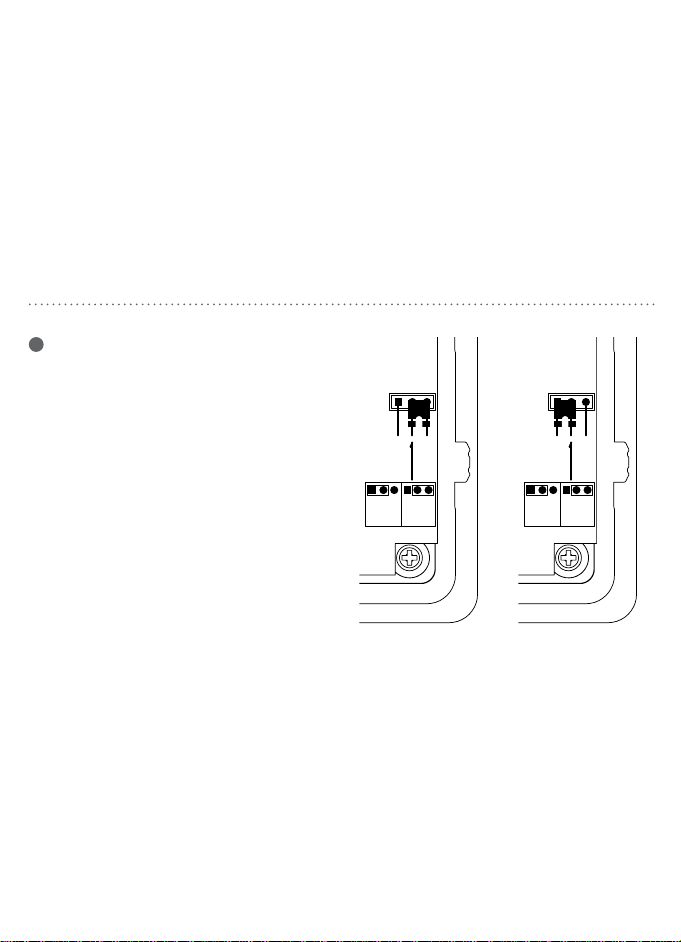
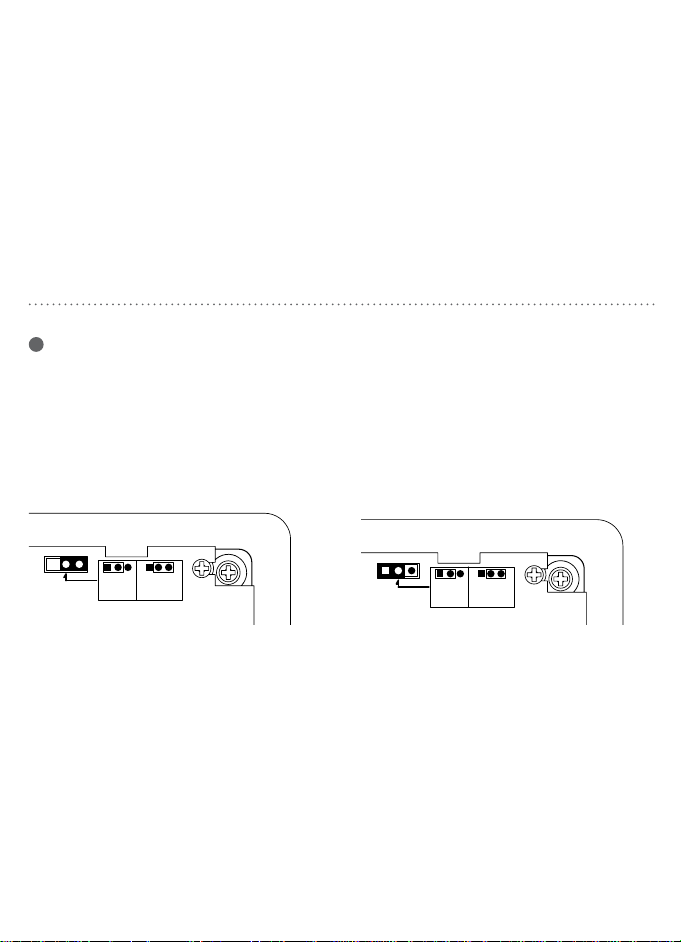
7
Set Fan Control Jumper
Correct placement of this J2 jumper
optimizes energy use and comfort levels
for the connected system type.
INSTALLING YOUR THERMOSTAT
O B
Electric
Heat
Gas/Oil
Cool
Heat Cool
(B) (O)
Electric
Heat
Gas/Oil
Cool
Heat Cool
(B) (O)
6
Set Heat Pump Jumper
The following instructions are necessary
to check the J3 jumper placement if you
have a heat pump system.
O Leave the jumper in the Cool (O)
factory-set position if you connected an
O wire to the O/B terminal.
B Move the jumper to the Heat (B)
position if you connected a B wire to the
O/B terminal.
Gas/Oil Heat
For gas or oil systems leave the jumper in the
Gas/Oil Heat factory-set position.
Electric Heat
For electric and heat pump systems move
the jumper to the Electric Heat position.
Downloaded from www.ManualsFile.com manuals search engine
14 15
Electric
Heat
Gas/Oil
Heat
Heat Heat
(B) (O)
INSTALLING YOUR THERMOSTAT
Electric
Heat
Gas/Oil
Heat
Heat Heat
(B) (O)
7
Set Fan Control Jumper
Correct placement of this J2 jumper
optimizes energy use and comfort levels
for the connected system type.
INSTALLING YOUR THERMOSTAT
O B
Electric
Heat
Gas/Oil
Cool
Heat Cool
(B) (O)
Electric
Heat
Gas/Oil
Cool
Heat Cool
(B) (O)
6
Set Heat Pump Jumper
The following instructions are necessary
to check the J3 jumper placement if you
have a heat pump system.
O Leave the jumper in the Cool (O)
factory-set position if you connected an
O wire to the O/B terminal.
B Move the jumper to the Heat (B)
position if you connected a B wire to the
O/B terminal.
Gas/Oil Heat
For gas or oil systems leave the jumper in the
Gas/Oil Heat factory-set position.
Electric Heat
For electric and heat pump systems move
the jumper to the Electric Heat position.
Downloaded from www.ManualsFile.com manuals search engine
16 17
INSTALLING YOUR THERMOSTAT
G O/B Y W RC R
MODE
FAN
SET RUN HOLD
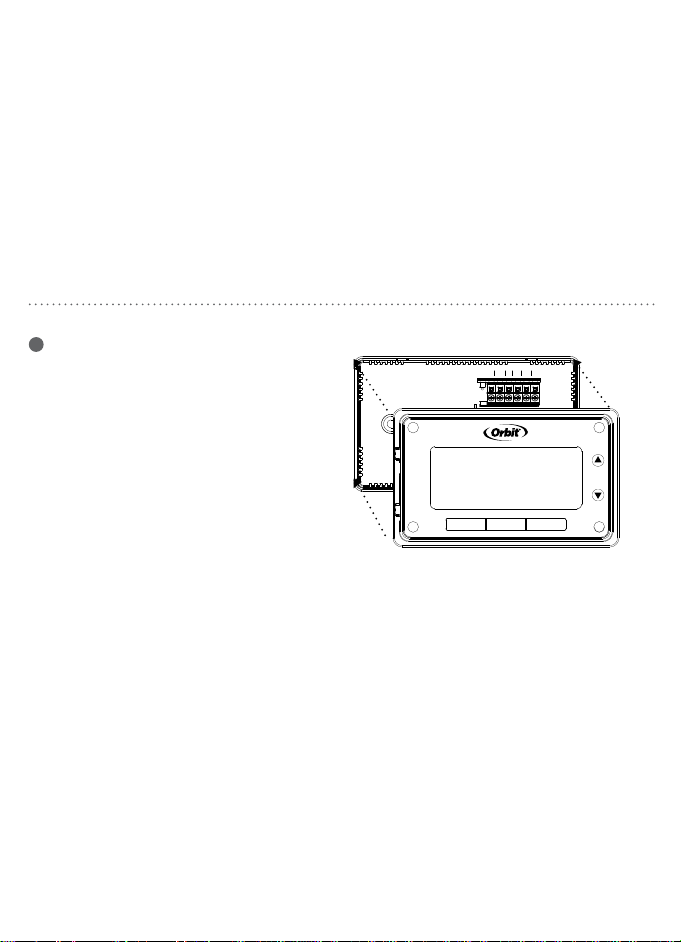
8
Completing an installation
a. Insert three Energizer® or Duracell® AAA
alkaline baeries.
b. Install the thermostat body by gently
pushing it onto the base until it “clicks” into
place. Verify that there are no gaps in the
side housing.
c. Turn the power back on to the heating and
cooling equipment.
RESET BUTTONTEMPERATURE FORMAT
Switching Between
Fahrenheit (°F) and Celsius (°C)
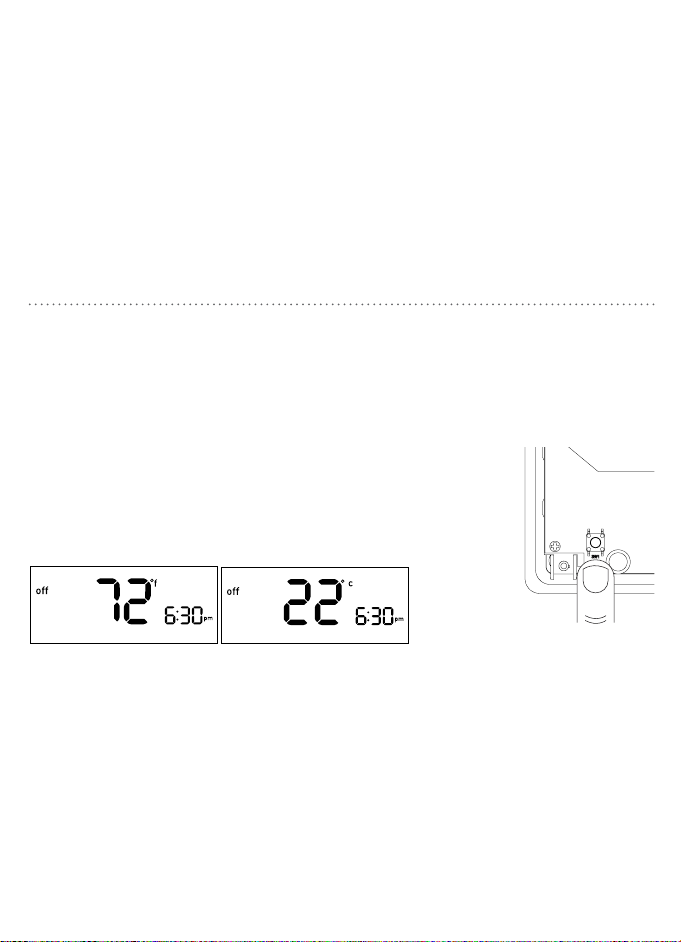
1. Slide the MODE switch to the
off position.
2. While holding p press SET.
3. Release both buons.
4. Repeat steps 2 and 3 to toggle
between °F and °C.
RESET
THERMOSTATFIGMINIMUMOFFTIMEMU
Off
Arrow down
Arrow up
To access the RESET buon, remove the
thermostat body from its base by gently
pulling them apart.
• Press and hold for five seconds to reset all
system seings and temperature gauges back to
factory defaults.
Note: Be careful not to
touch the black surface
on which the reset button
is mounted, and do not
clean it if dusty.
Downloaded from www.ManualsFile.com manuals search engine
16 17
INSTALLING YOUR THERMOSTAT
G O/B Y W RC R
MODE
FAN
SET RUN HOLD
8
Completing an installation
a. Insert three Energizer® or Duracell® AAA
alkaline baeries.
b. Install the thermostat body by gently
pushing it onto the base until it “clicks” into
place. Verify that there are no gaps in the
side housing.
c. Turn the power back on to the heating and
cooling equipment.
RESET BUTTONTEMPERATURE FORMAT
Switching Between
Fahrenheit (°F) and Celsius (°C)
1. Slide the MODE switch to the
off position.
2. While holding p press SET.
3. Release both buons.
4. Repeat steps 2 and 3 to toggle
between °F and °C.
RESET
THERMOSTATFIGMINIMUMOFFTIMEMU
Off
Arrow down
Arrow up
To access the RESET buon, remove the
thermostat body from its base by gently
pulling them apart.
• Press and hold for five seconds to reset all
system seings and temperature gauges back to
factory defaults.
Note: Be careful not to
touch the black surface
on which the reset button
is mounted, and do not
clean it if dusty.
Downloaded from www.ManualsFile.com manuals search engine
18 19
The following four features are done in a
flow-through setup. The system will walk you
through each feature. To access only one
feature, follow these steps then press SET
until you come to the feature you would like
to adjust.
1. Slide the MODE switch to the off
position.
2. While holding the RESET buon press
SET, “offset” will appear on the display.
Note: Do not hold the reset button for more
than five seconds.
3. Release both buons.
Note: The system will automatically exit if no
buon is pressed within 12 seconds.
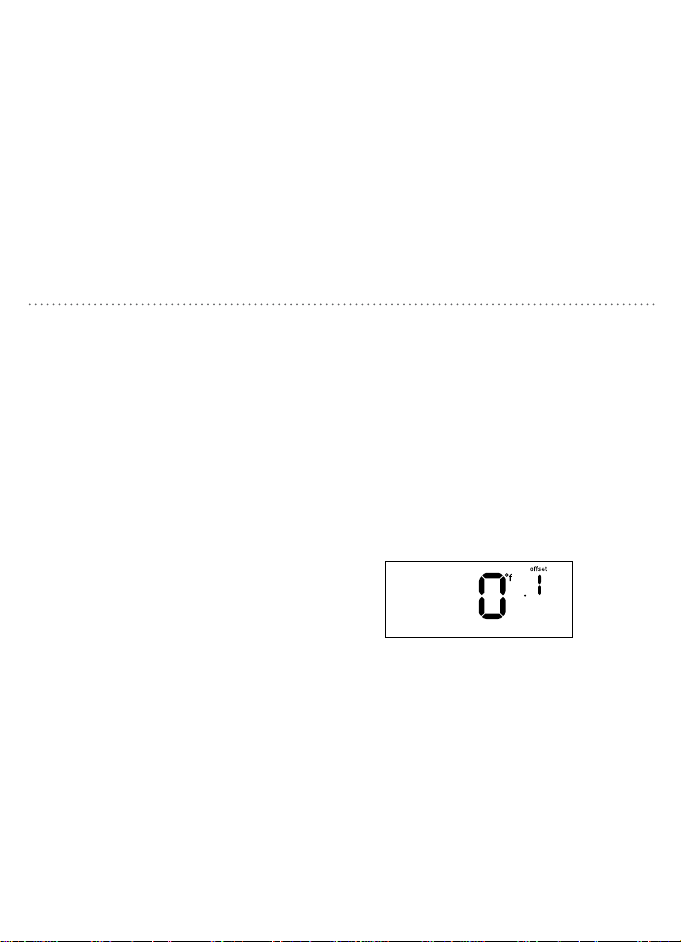
Offset the temperature display to read +/- 9°
F (+/- 4.5° C). This thermostat has a highly
accurate temperature sensor; if you desire
to match the display with other devices this
offset feature can be used.
Note: Using this feature does not change the actual
temperature.
1. Press p or q to change the offset
amount.
2. Press SET to advance to the next step.
To exit, press SET four times.
TEMPERATURE OFFSET ADVANCED SYSTEM SETUP EARLY START SYSTEM TYPE
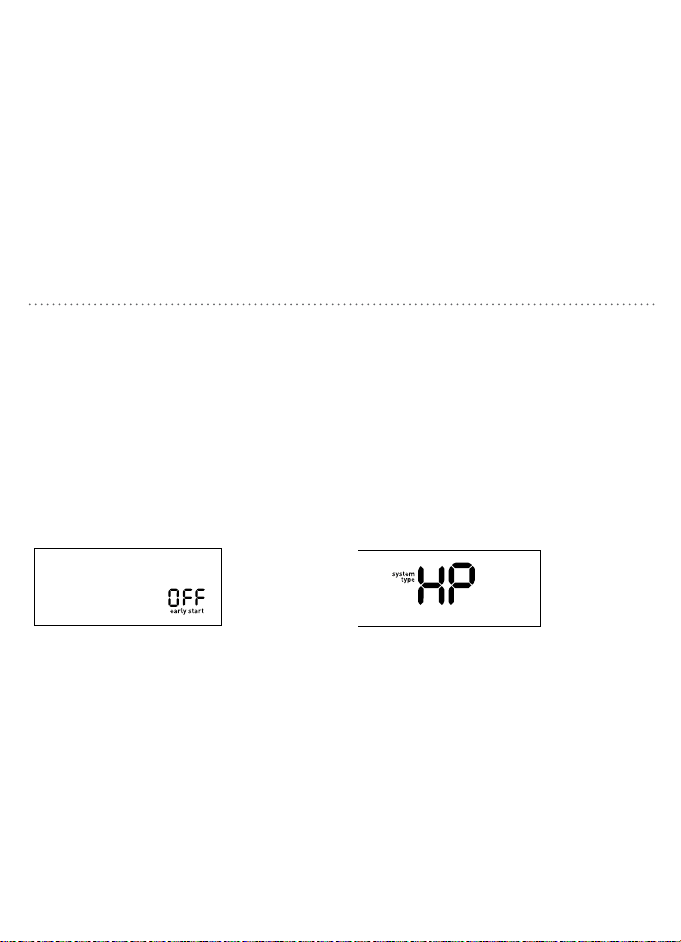
Your thermostat comes preprogrammed
with early start functionality turned off. This
function allows the heating or cooling system
to turn on before the programmed start time
so that the room temperature matches the
set temperature at the start time.
1. Press p or q to toggle between OFF
and ON.
2. Press SET to advance to the next step.
To exit, press SET three times.
Your thermostat is set at the factory to
operate a standard fossil fuel furnace
heating system.
1. Press p or q to toggle between the
heat systems being used.
• If using a Heat Pump select HP.
• If using a Furnace select F.
2. Press SET to advance to the next step.
To exit, press SET two times.
Downloaded from www.ManualsFile.com manuals search engine
18 19
The following four features are done in a
flow-through setup. The system will walk you
through each feature. To access only one
feature, follow these steps then press SET
until you come to the feature you would like
to adjust.
1. Slide the MODE switch to the off
position.
2. While holding the RESET buon press
SET, “offset” will appear on the display.
Note: Do not hold the reset button for more
than five seconds.
3. Release both buons.
Note: The system will automatically exit if no
buon is pressed within 12 seconds.
Offset the temperature display to read +/- 9°
F (+/- 4.5° C). This thermostat has a highly
accurate temperature sensor; if you desire
to match the display with other devices this
offset feature can be used.
Note: Using this feature does not change the actual
temperature.
1. Press p or q to change the offset
amount.
2. Press SET to advance to the next step.
To exit, press SET four times.
TEMPERATURE OFFSET ADVANCED SYSTEM SETUP EARLY START SYSTEM TYPE
Your thermostat comes preprogrammed
with early start functionality turned off. This
function allows the heating or cooling system
to turn on before the programmed start time
so that the room temperature matches the
set temperature at the start time.
1. Press p or q to toggle between OFF
and ON.
2. Press SET to advance to the next step.
To exit, press SET three times.
Your thermostat is set at the factory to
operate a standard fossil fuel furnace
heating system.
1. Press p or q to toggle between the
heat systems being used.
• If using a Heat Pump select HP.
• If using a Furnace select F.
2. Press SET to advance to the next step.
To exit, press SET two times.
Downloaded from www.ManualsFile.com manuals search engine
20 21
MINIMUM CYCLE PERIOD
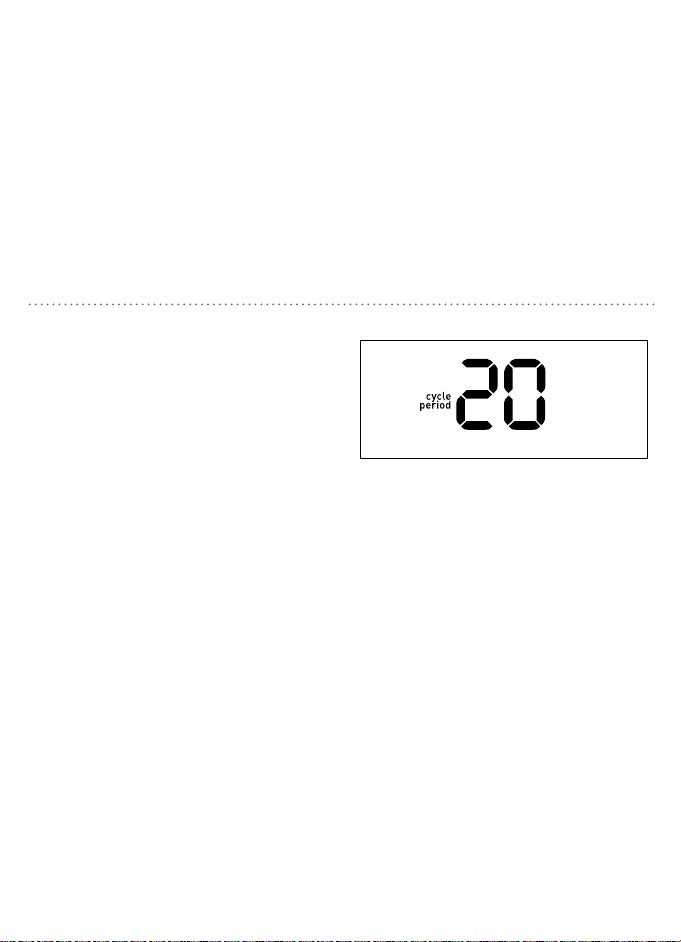
Changing the minimum cycle period to six
minutes or greater enables smart logic.
Your thermostat will learn, over time, the
best cycle times for your system and home
conditions. Using smart logic can optimize
energy use and comfort level, and allow for
seing the thermostat to turn on the system
more or less frequently.
1. Press p or q to select the desired
cycle period.
2. Press SET to accept the cycle period
and exit.
• If Heat Pump (HP) has been selected,
it will toggle between 60, 30, 20, 15,
12 and 0.
• If Furnace (F) has been selected, it will
toggle between 60, 30, 20, 15, 12, 10, 8,
6 and 0.
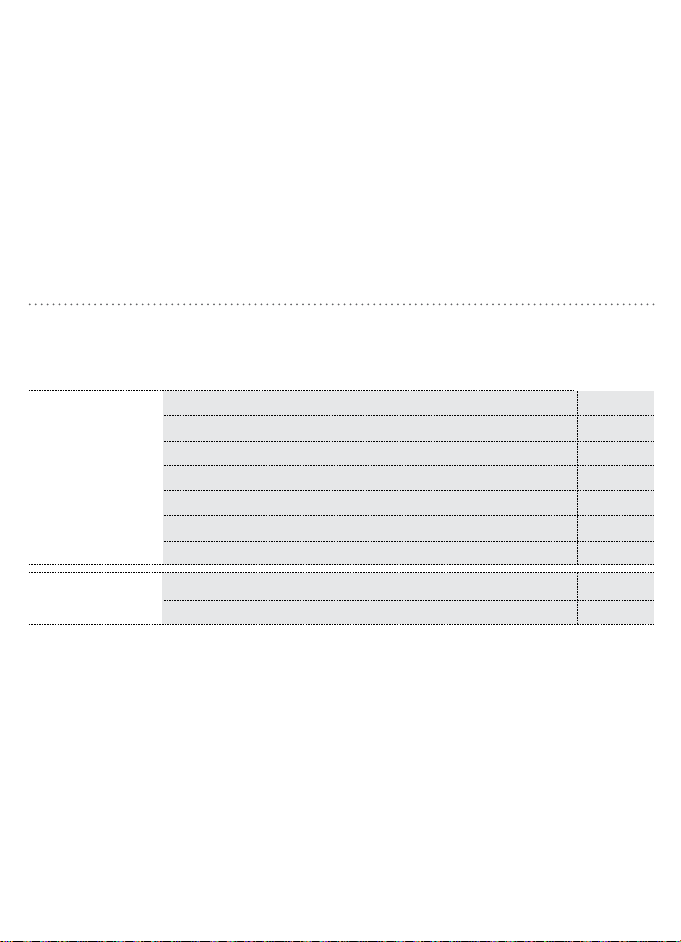
1-Stage heat pump 20
Compressor 20
1-Stage gas furnace heat with electric fan 12
1-Stage gas furnace heat with gas fan 12
1-Stage oil furnace 12
Steam and gravity 60
Hot water system 20
High efficiency furnace 20
Electric furnace 6
System Type
Cycle Period
(Minutes)
F
HP
MINIMUM CYCLE PERIOD
Common Cycle Period Seings
Downloaded from www.ManualsFile.com manuals search engine
20 21
MINIMUM CYCLE PERIOD
Changing the minimum cycle period to six
minutes or greater enables smart logic.
Your thermostat will learn, over time, the
best cycle times for your system and home
conditions. Using smart logic can optimize
energy use and comfort level, and allow for
seing the thermostat to turn on the system
more or less frequently.
1. Press p or q to select the desired
cycle period.
2. Press SET to accept the cycle period
and exit.
• If Heat Pump (HP) has been selected,
it will toggle between 60, 30, 20, 15,
12 and 0.
• If Furnace (F) has been selected, it will
toggle between 60, 30, 20, 15, 12, 10, 8,
6 and 0.
1-Stage heat pump 20
Compressor 20
1-Stage gas furnace heat with electric fan 12
1-Stage gas furnace heat with gas fan 12
1-Stage oil furnace 12
Steam and gravity 60
Hot water system 20
High efficiency furnace 20
Electric furnace 6
System Type
Cycle Period
(Minutes)
F
HP
MINIMUM CYCLE PERIOD
Common Cycle Period Seings
Downloaded from www.ManualsFile.com manuals search engine
22 23
SET TIME AND DAY
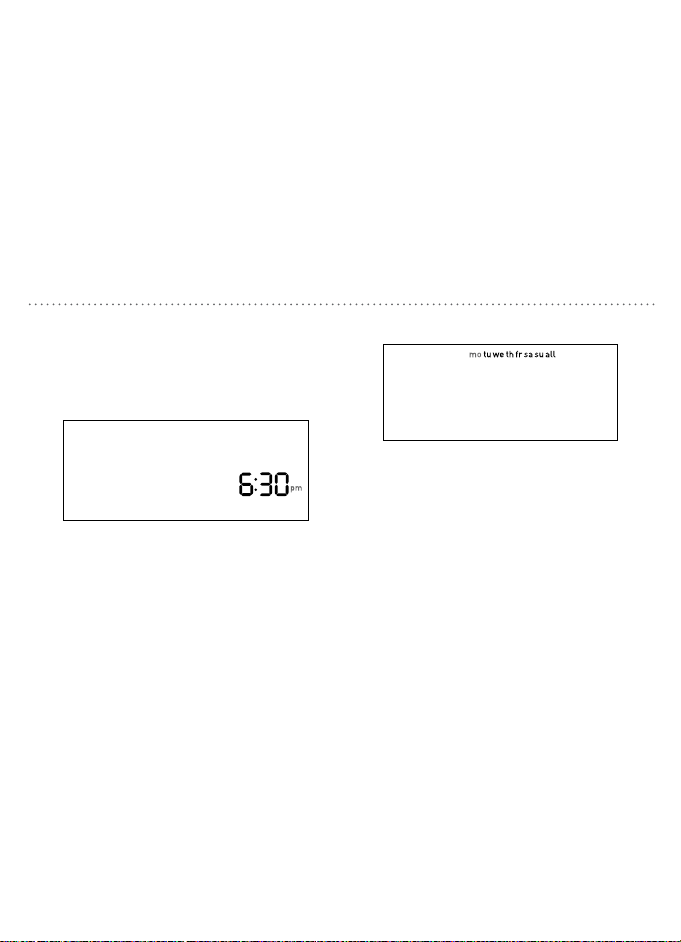
Set the time and day
1. With the thermostat in off mode, press SET.
2. Press p or q to adjust the time.
3. Press SET to accept the time and continue.
Note: Press and hold p or q to advance
the time faster.
MODE
4. Press p or q to select the day of the
week.
5. Press SET to accept the day of the
week and exit.
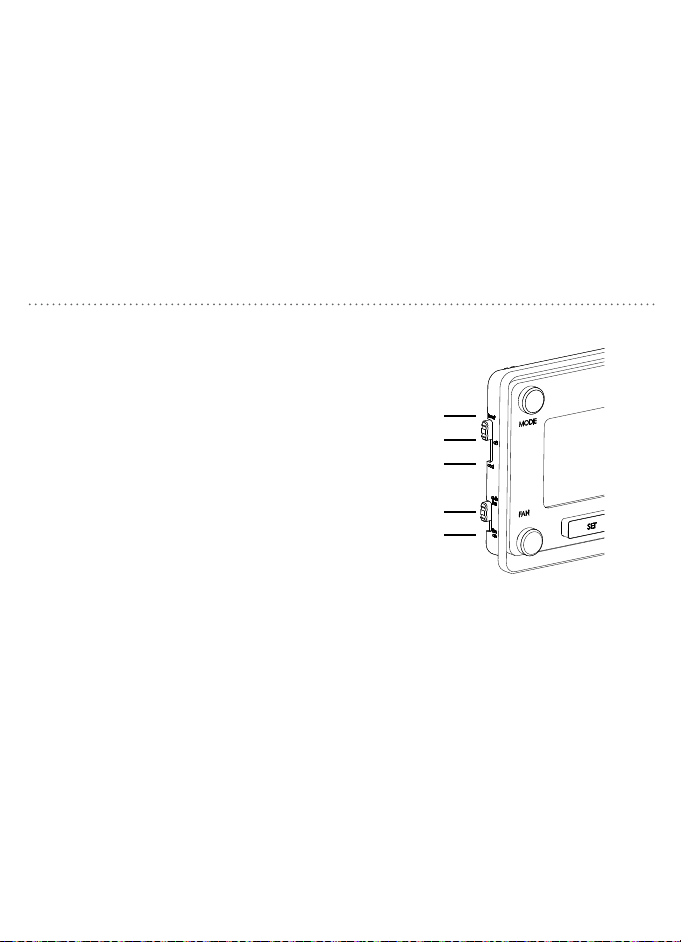
SELECT MODE AND FAN SETTINGS
Slide the mode switch to whether you
want to heat or cool to achieve the set
temperature.
• heat—System will activate heating to reach the
set temperature.
• off—Systems are off.
• cool—System will activate cooling to reach the
set temperature.
Slide the fan switch to the appropriate
seing to operate fan.
• auto fan—Fan will run automatically when
heating or cooling is activated.
• fan on—Fan will run continuously.
Note: Auto fan is the most commonly used seing.
heat
off
cool
auto fan
fan on
Downloaded from www.ManualsFile.com manuals search engine
22 23
SET TIME AND DAY
Set the time and day
1. With the thermostat in off mode, press SET.
2. Press p or q to adjust the time.
3. Press SET to accept the time and continue.
Note: Press and hold p or q to advance
the time faster.
MODE
4. Press p or q to select the day of the
week.
5. Press SET to accept the day of the
week and exit.
SELECT MODE AND FAN SETTINGS
Slide the mode switch to whether you
want to heat or cool to achieve the set
temperature.
• heat—System will activate heating to reach the
set temperature.
• off—Systems are off.
• cool—System will activate cooling to reach the
set temperature.
Slide the fan switch to the appropriate
seing to operate fan.
• auto fan—Fan will run automatically when
heating or cooling is activated.
• fan on—Fan will run continuously.
Note: Auto fan is the most commonly used seing.
heat
off
cool
auto fan
fan on
Downloaded from www.ManualsFile.com manuals search engine

24 25
wake Set it to the time you wake up and the temperature you want
it to be at that time.
leave Set it to the time you leave the house and the temperature
you want while you are out.
return Set it to the time you return home and the temperature you
want it to be when you arrive.
sleep Set it to the time you go to sleep and the temperature you
want it while you are sleeping.
PROGRAMMED SCHEDULES
The thermostat schedule is divided into four periods
for you to program for maximum energy savings.
ENERGY STAR
®
PROGRAMMED SCHEDULE
For optimal energy savings your thermostat is preprogrammed with the following schedule for
each day of the week. Simply switch your thermostat to the heat or cold mode and press RUN.
Period Start Time Heat Cool
wake 6:00 am 70°F 78°F
leave 8:00 am 62°F 85°F
return 6:00 pm 70°F 78°F
sleep 10:00 pm 62°F 82°F
Downloaded from www.ManualsFile.com manuals search engine

24 25
wake Set it to the time you wake up and the temperature you want
it to be at that time.
leave Set it to the time you leave the house and the temperature
you want while you are out.
return Set it to the time you return home and the temperature you
want it to be when you arrive.
sleep Set it to the time you go to sleep and the temperature you
want it while you are sleeping.
PROGRAMMED SCHEDULES
The thermostat schedule is divided into four periods
for you to program for maximum energy savings.
ENERGY STAR
®
PROGRAMMED SCHEDULE
For optimal energy savings your thermostat is preprogrammed with the following schedule for
each day of the week. Simply switch your thermostat to the heat or cold mode and press RUN.
Period Start Time Heat Cool
wake 6:00 am 70°F 78°F
leave 8:00 am 62°F 85°F
return 6:00 pm 70°F 78°F
sleep 10:00 pm 62°F 82°F
Downloaded from www.ManualsFile.com manuals search engine
26 27
1. Switch the thermostat to the MODE
you want to program (heat or cool) and
press SET.
2. Press p or q to scroll between days
and press SET when the day you would
like to schedule is flashing.
3. Press p or q to set your wake start
time and press SET to accept the time.
MODIFYING THE PROGRAMMED SCHEDULE
4. Press p or q to set the wake
temperature and press SET to accept the
temperature and proceed.
5. Follow steps 3 and 4 to set
the time and temperature for
the remaining periods.
6. Continue to set up each day individually
or use the copy feature to copy one day
to another (see page 25) or press RUN to
save and exit.
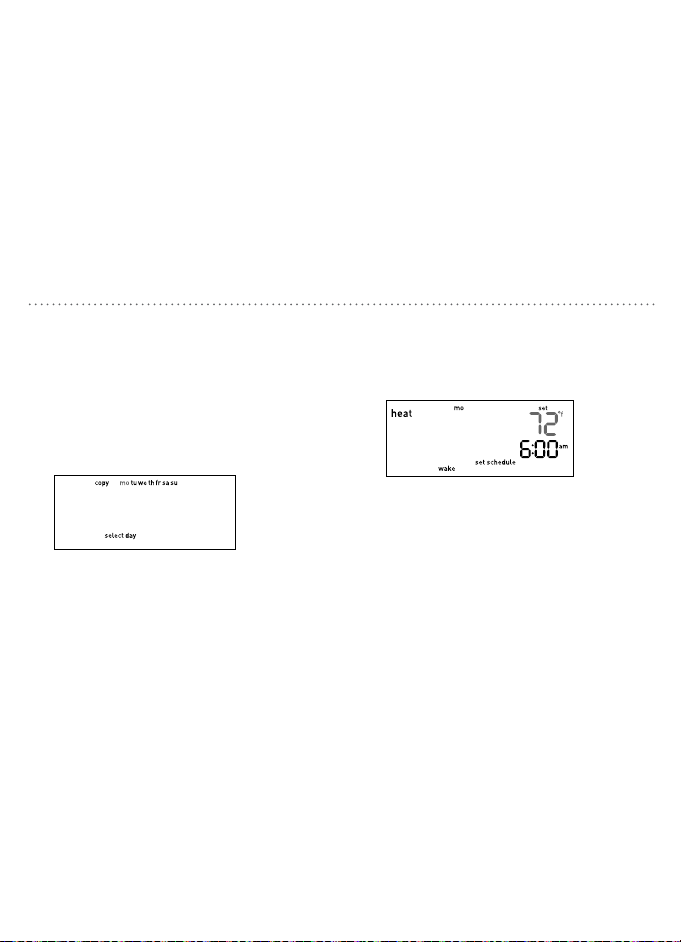
From the days of the week menu you can
copy a schedule from a single day to one or
more days. To access that menu, if you are not
already there, switch the thermostat to the
MODE you want to program (heat or cool)
and press SET.
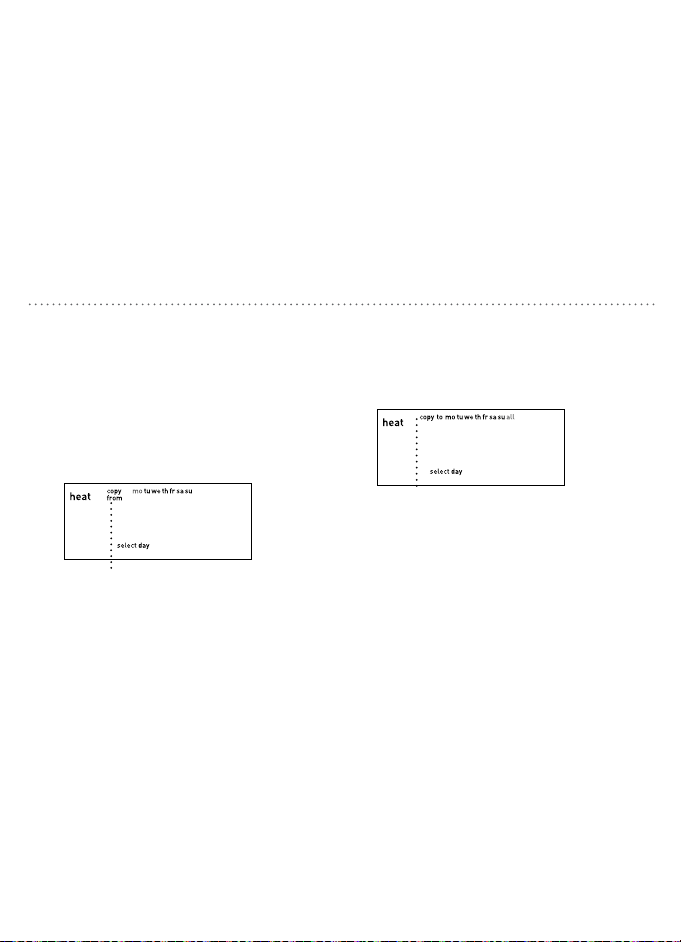
1. Press p or q to scroll to copy and press
SET when the word “copy” is flashing.
“Copy from” will appear on the display.
USING THE COPY FEATURE
2. Press p or q to select the day you would
like to copy and press SET when that day
is flashing.
3. Press p or q to select the day you
would like to copy to. You can select an
individual day or select all to have your
schedule copied to every day of the
week.
4. Press SET to advance to the next step or
RUN to save and exit.
“Copy to” will appear on the display.
Downloaded from www.ManualsFile.com manuals search engine
26 27
1. Switch the thermostat to the MODE
you want to program (heat or cool) and
press SET.
2. Press p or q to scroll between days
and press SET when the day you would
like to schedule is flashing.
3. Press p or q to set your wake start
time and press SET to accept the time.
MODIFYING THE PROGRAMMED SCHEDULE
4. Press p or q to set the wake
temperature and press SET to accept the
temperature and proceed.
5. Follow steps 3 and 4 to set
the time and temperature for
the remaining periods.
6. Continue to set up each day individually
or use the copy feature to copy one day
to another (see page 25) or press RUN to
save and exit.
From the days of the week menu you can
copy a schedule from a single day to one or
more days. To access that menu, if you are not
already there, switch the thermostat to the
MODE you want to program (heat or cool)
and press SET.
1. Press p or q to scroll to copy and press
SET when the word “copy” is flashing.
“Copy from” will appear on the display.
USING THE COPY FEATURE
2. Press p or q to select the day you would
like to copy and press SET when that day
is flashing.
3. Press p or q to select the day you
would like to copy to. You can select an
individual day or select all to have your
schedule copied to every day of the
week.
4. Press SET to advance to the next step or
RUN to save and exit.
“Copy to” will appear on the display.
Downloaded from www.ManualsFile.com manuals search engine
28 29
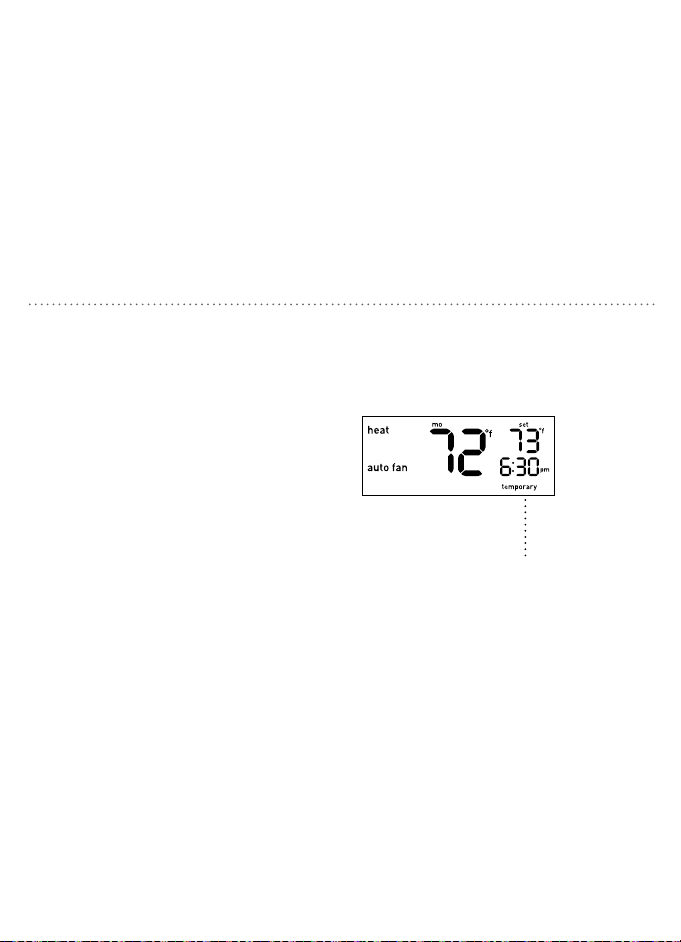
Press p or q to raise or lower the
temperature. This temporary adjustment
will remain until the start time of the next
period. The word “temporary” will be
displayed leing you know the temperature
has been adjusted.
Note: Pressing the p or q button once will
turn on the backlight. To change the setpoint
temperature press either button more than once.
OVERRIDING SCHEDULES TEMPORARILY
You can remove the temporary seing at any
time by pressing RUN, the system will return
to your previous programmed schedule.
“Temporary” will appear on the display.
OVERRIDING SCHEDULES PERMANENTLY
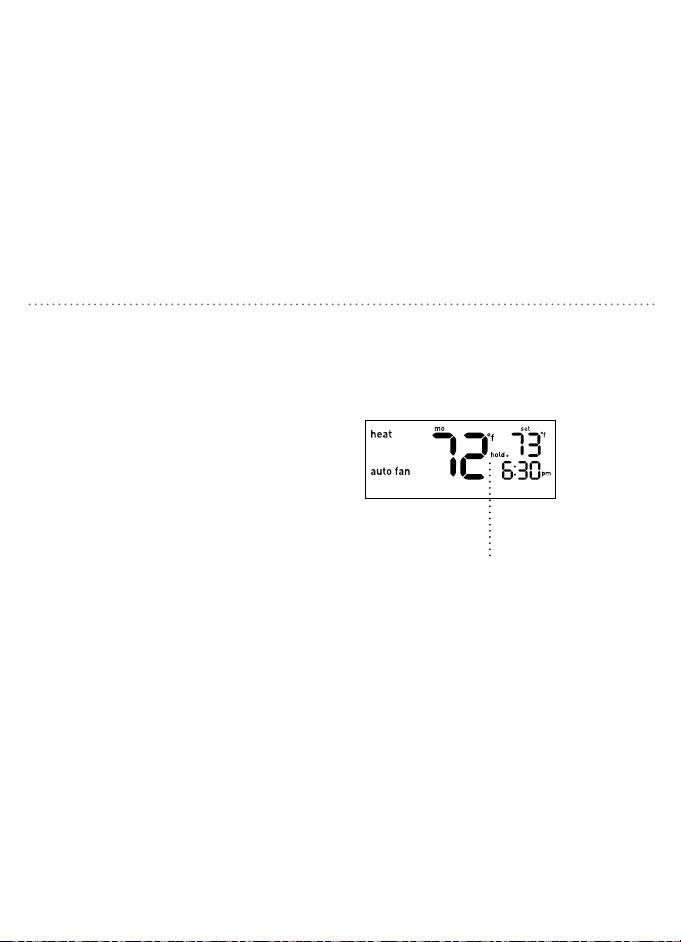
Press HOLD to override the programmed
schedule. All programmed temperature
changes for all periods will be ignored.
While the system is in hold you can manually
change the temperature at any given time
by pressing p or q. The thermostat will
maintain this temperature change until you
manually change it again or remove the hold.
You can remove the hold at any time by
pressing RUN, the system will return to your
previous programmed schedule.
“Hold.” will appear on the display.
Downloaded from www.ManualsFile.com manuals search engine
28 29
Press p or q to raise or lower the
temperature. This temporary adjustment
will remain until the start time of the next
period. The word “temporary” will be
displayed leing you know the temperature
has been adjusted.
Note: Pressing the p or q button once will
turn on the backlight. To change the setpoint
temperature press either button more than once.
OVERRIDING SCHEDULES TEMPORARILY
You can remove the temporary seing at any
time by pressing RUN, the system will return
to your previous programmed schedule.
“Temporary” will appear on the display.
OVERRIDING SCHEDULES PERMANENTLY
Press HOLD to override the programmed
schedule. All programmed temperature
changes for all periods will be ignored.
While the system is in hold you can manually
change the temperature at any given time
by pressing p or q. The thermostat will
maintain this temperature change until you
manually change it again or remove the hold.
You can remove the hold at any time by
pressing RUN, the system will return to your
previous programmed schedule.
“Hold.” will appear on the display.
Downloaded from www.ManualsFile.com manuals search engine
30 31
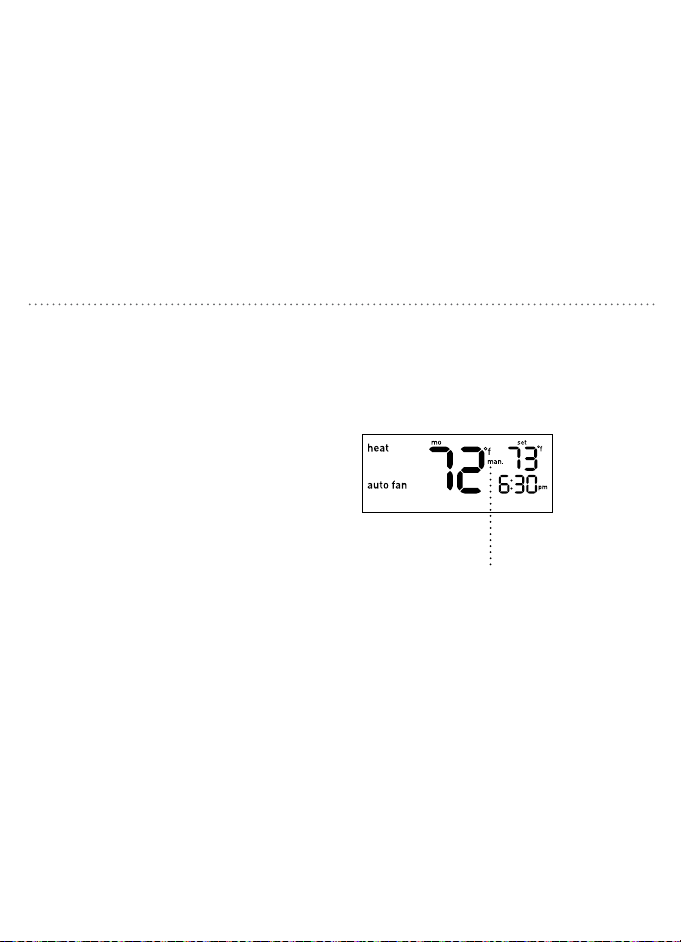
Press HOLD for five seconds until the
manual indicator “man.” appears on the
screen.
Your thermostat now functions as a non-
programmable device with no scheduled
program. SET, RUN, and HOLD will not work
while in this seing. If it is too hot or too
cold, you will have to manually change the
temperature. Press p or q to raise or lower
the temperature.
You can exit the manual seing at any time by
pressing RUN for five seconds, the system will
return to your previous programmed schedule.
TURNING OFF SCHEDULES
“Man.” will appear on the display.
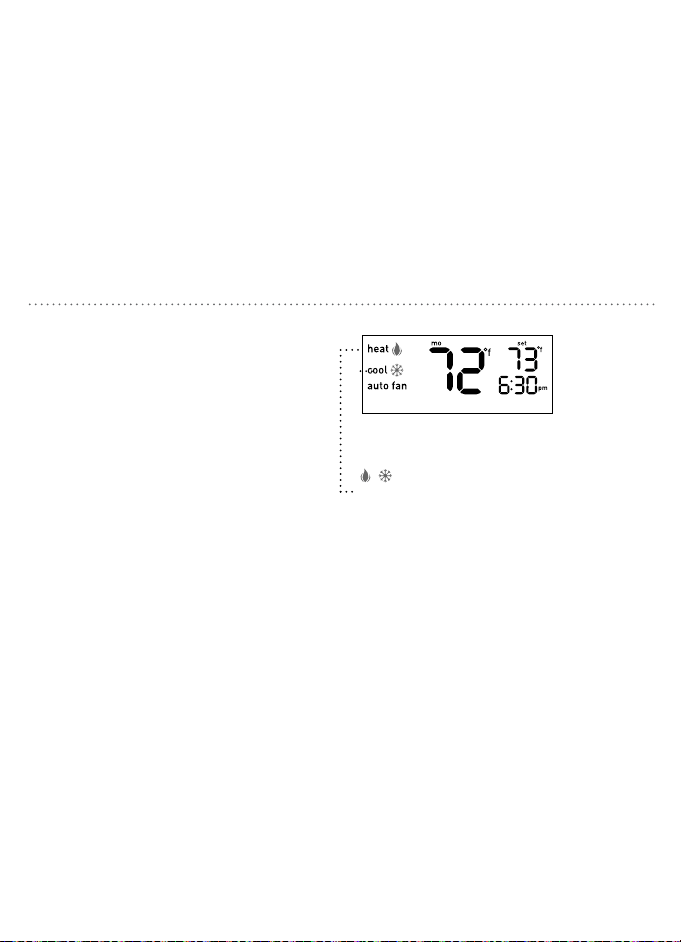
BUILT IN COMPRESSOR PROTECTION
This function helps protect against damage
to the compressor in your air conditioning
or heat pump system. The compressor is
forced to wait five minutes aer turning off
before it can turn on again. The appropriate
MODE indicator icon will flash on the display
whenever this feature is running.
/ flashes while minimum off time
is being enforced.
Downloaded from www.ManualsFile.com manuals search engine
30 31
Press HOLD for five seconds until the
manual indicator “man.” appears on the
screen.
Your thermostat now functions as a non-
programmable device with no scheduled
program. SET, RUN, and HOLD will not work
while in this seing. If it is too hot or too
cold, you will have to manually change the
temperature. Press p or q to raise or lower
the temperature.
You can exit the manual seing at any time by
pressing RUN for five seconds, the system will
return to your previous programmed schedule.
TURNING OFF SCHEDULES
“Man.” will appear on the display.
BUILT IN COMPRESSOR PROTECTION
This function helps protect against damage
to the compressor in your air conditioning
or heat pump system. The compressor is
forced to wait five minutes aer turning off
before it can turn on again. The appropriate
MODE indicator icon will flash on the display
whenever this feature is running.
/ flashes while minimum off time
is being enforced.
Downloaded from www.ManualsFile.com manuals search engine

32 33
EARLY START FUNCTIONALITY THERMOSTAT CARE
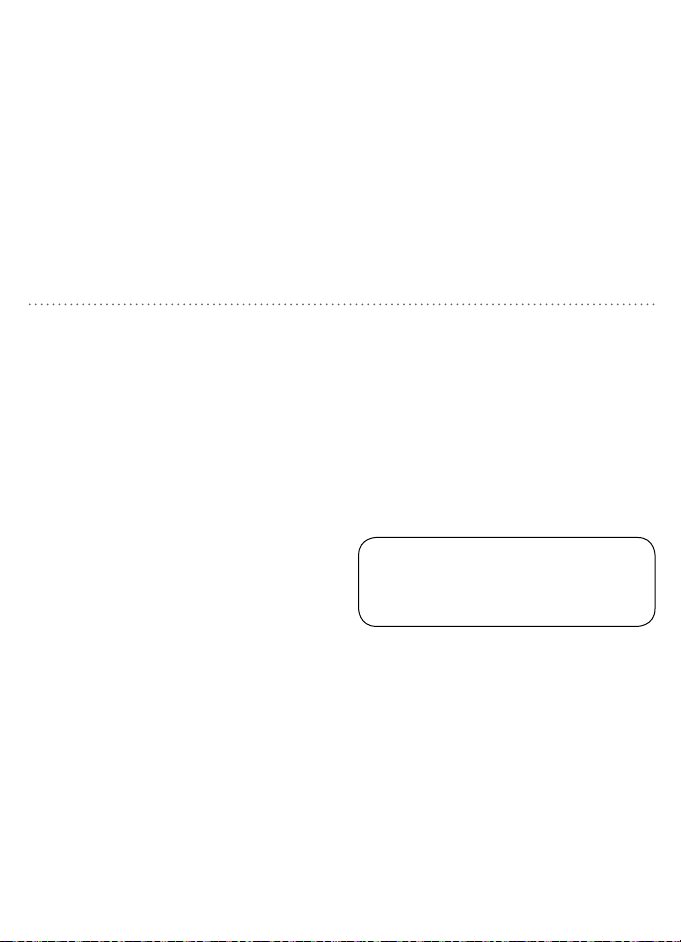
This function allows the heating or cooling system
to turn on before the programmed start time
so that the room temperature matches the set
temperature at the start time.
Example:
Your Wake time is set for 6:30 am with a
temperature of 72°. Your system will turn on before 6:30
am, so the temperature is 72° when you wake up.
Note: To turn on this function see page 17.
To prevent damage to the clear lens over the
thermostat face, use a so coon cloth and
clean with mild soap and water only.
DO NOT use paper towels or other abrasive
cloths. DO NOT spray any liquid directly
onto the thermostat.
It is recommended that the baeries
in the thermostat be replaced once
a year or before leaving the home for
a prolonged period of time.
1. Switch the system MODE to off before
changing the baeries.
2. Remove the thermostat body from its
base by gently pulling them apart.
3. Turn the thermostat over and remove
old baeries.
4. Replace them with fresh Energizer
®
or Duracell
®
alkaline AAA baeries,
carefully observing the required
polarities.
5. Reinstall the thermostat body onto its
base by gently pushing it until it “clicks”
into place.
Note: If the batteries are not changed within 7
days after the Low Battery Indicator appears
on the display, the set temperature will
increase by 10°F in cool mode, or decrease by
10°F in heat mode as a further reminder. After
90 days, or less, depending on the condition of
the batteries, the system will turn off and the
Low Battery Indicator will flash on the display.
WARNING: Failure to change
batteries in a timely fashion can lead
to uncontrolled heating and cooling.
REPLACING THE BATTERIES
Downloaded from www.ManualsFile.com manuals search engine
32 33
EARLY START FUNCTIONALITY THERMOSTAT CARE
This function allows the heating or cooling system
to turn on before the programmed start time
so that the room temperature matches the set
temperature at the start time.
Example:
Your Wake time is set for 6:30 am with a
temperature of 72°. Your system will turn on before 6:30
am, so the temperature is 72° when you wake up.
Note: To turn on this function see page 17.
To prevent damage to the clear lens over the
thermostat face, use a so coon cloth and
clean with mild soap and water only.
DO NOT use paper towels or other abrasive
cloths. DO NOT spray any liquid directly
onto the thermostat.
It is recommended that the baeries
in the thermostat be replaced once
a year or before leaving the home for
a prolonged period of time.
1. Switch the system MODE to off before
changing the baeries.
2. Remove the thermostat body from its
base by gently pulling them apart.
3. Turn the thermostat over and remove
old baeries.
4. Replace them with fresh Energizer
®
or Duracell
®
alkaline AAA baeries,
carefully observing the required
polarities.
5. Reinstall the thermostat body onto its
base by gently pushing it until it “clicks”
into place.
Note: If the batteries are not changed within 7
days after the Low Battery Indicator appears
on the display, the set temperature will
increase by 10°F in cool mode, or decrease by
10°F in heat mode as a further reminder. After
90 days, or less, depending on the condition of
the batteries, the system will turn off and the
Low Battery Indicator will flash on the display.
WARNING: Failure to change
batteries in a timely fashion can lead
to uncontrolled heating and cooling.
REPLACING THE BATTERIES
Downloaded from www.ManualsFile.com manuals search engine

34 35
Problem:
No heating/cooling system activation
Solution:
1. Verify MODE switch is in proper heat or cool mode.
2. Check baeries. Replace if necessary. (See “Replacing the Baeries,” page 31).
3. Check set temperature. Set temperature should read above room temperature in heat
mode and below room temperature in cool mode.
4. Verify Heating/Cooling power switch isn’t off.
5. Verify that the circuit breaker isn’t tripped.
6. Verify that the furnace door is closed securely.
7. Check for loose or crossed wiring in the thermostat wiring terminal.
8. Verify that copper wires are not exposed and touching other wires.
9. Verify that the O/B jumper is installed appropriately. (See “Set Heat Pump Jumper” page
12).
10. Verify that the FAN jumper is installed appropriately.
(See “Set Fan Control Jumper” page 13).
TROUBLESHOOTING
Problem:
No fan/fan runs continuously
Solution:
1. If the fan runs continuously, verify that the thermostat is in the AUTO position not the ON
position.
2. Let the thermostat sit (do not touch) for 30 minutes to allow the temperature to stabilize.
3. Verify that the G wire in the thermostat wiring terminal is connected properly.
4. Verify Heating/Cooling power switch isn’t off.
5. Verify that the circuit breaker isn’t tripped.
6. Verify that the furnace door is closed securely.
7. Check for loose or crossed wiring in the thermostat wiring terminal.
8. Verify that copper wires are not exposed and touching other wires.
9. Verify that the fan jumper is installed appropriately. (See “set fan control jumper” page 13).
TROUBLESHOOTING
Downloaded from www.ManualsFile.com manuals search engine

34 35
Problem:
No heating/cooling system activation
Solution:
1. Verify MODE switch is in proper heat or cool mode.
2. Check baeries. Replace if necessary. (See “Replacing the Baeries,” page 31).
3. Check set temperature. Set temperature should read above room temperature in heat
mode and below room temperature in cool mode.
4. Verify Heating/Cooling power switch isn’t off.
5. Verify that the circuit breaker isn’t tripped.
6. Verify that the furnace door is closed securely.
7. Check for loose or crossed wiring in the thermostat wiring terminal.
8. Verify that copper wires are not exposed and touching other wires.
9. Verify that the O/B jumper is installed appropriately. (See “Set Heat Pump Jumper” page
12).
10. Verify that the FAN jumper is installed appropriately.
(See “Set Fan Control Jumper” page 13).
TROUBLESHOOTING
Problem:
No fan/fan runs continuously
Solution:
1. If the fan runs continuously, verify that the thermostat is in the AUTO position not the ON
position.
2. Let the thermostat sit (do not touch) for 30 minutes to allow the temperature to stabilize.
3. Verify that the G wire in the thermostat wiring terminal is connected properly.
4. Verify Heating/Cooling power switch isn’t off.
5. Verify that the circuit breaker isn’t tripped.
6. Verify that the furnace door is closed securely.
7. Check for loose or crossed wiring in the thermostat wiring terminal.
8. Verify that copper wires are not exposed and touching other wires.
9. Verify that the fan jumper is installed appropriately. (See “set fan control jumper” page 13).
TROUBLESHOOTING
Downloaded from www.ManualsFile.com manuals search engine

36 37
Problem:
Incorrect room temperature
Solution:
1. Let the thermostat sit (do not touch) for 30 minutes to allow the temperature to stabilize.
2. Check placement of thermostat; make sure it’s not in an unusually dray or heated area.
3. Verify that the wall hole for wires is insulated properly.
4. Check Temperature Offset (see “Temperature Offset,” page 16).
Problem: Buons below display do not function
Solution: Verify that the thermostat is not in MANUAL mode
(see “Turning Off Schedules,” page 28).
TROUBLESHOOTING
Problem: Not reaching set temperature
Solution:
1. Verify that the MODE switch is in proper heat or cool mode.
2. Verify that Heating/Cooling systems are working properly.
(See “No heating/cooling system activation,” page 32.)
3. Check for loose or crossed wiring in the thermostat wiring terminal.
4. Check Temperature Offset (see “Temperature Offset,” page 16).
5. Check placement of thermostat; make sure it’s not in an unusually dray or heated area.
6. Verify that the wall hole for wires is insulated properly.
7. Verify that the O/B jumper is installed appropriately. (See “Set Heat Pump Jumper” page
12).
Problem: Wrong temperature scale displayed
Solution: See “Temperature Format,” page 15.
TROUBLESHOOTING
Downloaded from www.ManualsFile.com manuals search engine

36 37
Problem:
Incorrect room temperature
Solution:
1. Let the thermostat sit (do not touch) for 30 minutes to allow the temperature to stabilize.
2. Check placement of thermostat; make sure it’s not in an unusually dray or heated area.
3. Verify that the wall hole for wires is insulated properly.
4. Check Temperature Offset (see “Temperature Offset,” page 16).
Problem: Buons below display do not function
Solution: Verify that the thermostat is not in MANUAL mode
(see “Turning Off Schedules,” page 28).
TROUBLESHOOTING
Problem: Not reaching set temperature
Solution:
1. Verify that the MODE switch is in proper heat or cool mode.
2. Verify that Heating/Cooling systems are working properly.
(See “No heating/cooling system activation,” page 32.)
3. Check for loose or crossed wiring in the thermostat wiring terminal.
4. Check Temperature Offset (see “Temperature Offset,” page 16).
5. Check placement of thermostat; make sure it’s not in an unusually dray or heated area.
6. Verify that the wall hole for wires is insulated properly.
7. Verify that the O/B jumper is installed appropriately. (See “Set Heat Pump Jumper” page
12).
Problem: Wrong temperature scale displayed
Solution: See “Temperature Format,” page 15.
TROUBLESHOOTING
Downloaded from www.ManualsFile.com manuals search engine

38 39
TROUBLESHOOTING
Problem: Temperature does not change at programmed start time for a given period
Solution:
1. Verify that the HOLD feature is not active (see “Overriding the Schedules Permanently,”
page 27).
2. Check the programmed schedule (see “Modifying the Programmed Schedule,” page 24).
3. Verify that the thermostat is not in MANUAL mode (see “Turning Off Schedules,” page 28).
Problem: Heat/cool system doesn’t respond immediately
Solution:
1. To protect your compressor, the thermostat default is to wait five minutes before responding.
(see “Minimum Cycle Period Adjustment,” page 18).
2. If the problem persists aer waiting five minutes, check baeries.
Replace if necessary (see “Replacing the Baeries,” page 31).
TROUBLESHOOTING
Problem:
Set temperature is 10°F above (in cool mode) or 10°F below (in heat mode) desired temperature
Solution: Check baeries. Replace if necessary (see “Replacing the Baeries,” page 31).
Problem: System turns on too frequently
Solution: The Orbit Clear Comfort™ Pro thermostat uses smart logic to turn on once every
cycle period to maximize comfort and temperature stability. To adjust the cycle period, see
“Minimum Cycle Period Adjustment,” page 18. To turn off smart logic, set the cycle period back
to the default seing of 0.
Problem: Display is blank/Low Baery Indicator on
Solution:
1. Replace baeries (see “Replacing the Baeries,” page 31).
2. Check for loose or crossed wiring in thermostat wiring terminal.
Downloaded from www.ManualsFile.com manuals search engine

38 39
TROUBLESHOOTING
Problem: Temperature does not change at programmed start time for a given period
Solution:
1. Verify that the HOLD feature is not active (see “Overriding the Schedules Permanently,”
page 27).
2. Check the programmed schedule (see “Modifying the Programmed Schedule,” page 24).
3. Verify that the thermostat is not in MANUAL mode (see “Turning Off Schedules,” page 28).
Problem: Heat/cool system doesn’t respond immediately
Solution:
1. To protect your compressor, the thermostat default is to wait five minutes before responding.
(see “Minimum Cycle Period Adjustment,” page 18).
2. If the problem persists aer waiting five minutes, check baeries.
Replace if necessary (see “Replacing the Baeries,” page 31).
TROUBLESHOOTING
Problem:
Set temperature is 10°F above (in cool mode) or 10°F below (in heat mode) desired temperature
Solution: Check baeries. Replace if necessary (see “Replacing the Baeries,” page 31).
Problem: System turns on too frequently
Solution: The Orbit Clear Comfort™ Pro thermostat uses smart logic to turn on once every
cycle period to maximize comfort and temperature stability. To adjust the cycle period, see
“Minimum Cycle Period Adjustment,” page 18. To turn off smart logic, set the cycle period back
to the default seing of 0.
Problem: Display is blank/Low Baery Indicator on
Solution:
1. Replace baeries (see “Replacing the Baeries,” page 31).
2. Check for loose or crossed wiring in thermostat wiring terminal.
Downloaded from www.ManualsFile.com manuals search engine

40 41
For technical assistance, please call:
1-800-488-6156 or 1-801-299-5555.
Before returning this thermostat to the store, please call:
1-800-488-6156 or 1-801-299-5555.
Orbit, Inc.
North Salt Lake, UT 84054
www.orbitonline.com
© 2015 Orbit, Inc.
All rights reserved.
Made in China
CUSTOMER ASSISTANCE
Orbit, Inc. warrants to its customers that its products will be free from defects
in materials and workmanship for a period of three years from the date of purchase.
We will replace, free of charge, the defective part or parts found to be defective
under normal use and service for a period of up to three years aer purchase
(proof of purchase required). We reserve the right to inspect the defective part prior to
replacement.
Orbit, Inc. will not be responsible for consequential or incidental cost or damage caused by the
product failure. Orbit, Inc. liability under this warranty is limited solely to the replacement or
repair of defective parts.
To exercise your warranty, return the unit to the dealer with a copy of your sales receipt.
All trade names are registered trademarks of the respective manufacturers listed.
WARRANTY INFORMATION
Downloaded from www.ManualsFile.com manuals search engine

40 41
For technical assistance, please call:
1-800-488-6156 or 1-801-299-5555.
Before returning this thermostat to the store, please call:
1-800-488-6156 or 1-801-299-5555.
Orbit, Inc.
North Salt Lake, UT 84054
www.orbitonline.com
© 2015 Orbit, Inc.
All rights reserved.
Made in China
CUSTOMER ASSISTANCE
Orbit, Inc. warrants to its customers that its products will be free from defects
in materials and workmanship for a period of three years from the date of purchase.
We will replace, free of charge, the defective part or parts found to be defective
under normal use and service for a period of up to three years aer purchase
(proof of purchase required). We reserve the right to inspect the defective part prior to
replacement.
Orbit, Inc. will not be responsible for consequential or incidental cost or damage caused by the
product failure. Orbit, Inc. liability under this warranty is limited solely to the replacement or
repair of defective parts.
To exercise your warranty, return the unit to the dealer with a copy of your sales receipt.
All trade names are registered trademarks of the respective manufacturers listed.
WARRANTY INFORMATION
Downloaded from www.ManualsFile.com manuals search engine

42 43
Clear Comfort
®
Pro
Termostato programable
para 7 días
Guía del usuario
Modelo 83521
IMPORTANTE: Etiquetar los cables con las
etiquetas de los cables incluidos antes de
retirar su viejo termostato (consulte la página
8). También recomendamos tomar una foto de
los cables de corriente antes de desconectar.
Downloaded from www.ManualsFile.com manuals search engine
42 43
Clear Comfort
®
Pro
Termostato programable
para 7 días
Guía del usuario
Modelo 83521
IMPORTANTE: Etiquetar los cables con las
etiquetas de los cables incluidos antes de
retirar su viejo termostato (consulte la página
8). También recomendamos tomar una foto de
los cables de corriente antes de desconectar.
Downloaded from www.ManualsFile.com manuals search engine

i 1
ÍNDICE
Gracias por comprar el termostato Clear Comfort® Pro de Orbit®.
Nos complace suministrarle un termostato duradero que combina estilo con funcionalidad.
Características
• Permite programar fácilmente 7 días de manera individual o copiar la programación de un día en otro
• Preprogramado y listo para usar con configuraciones Energy Star®
• Pantalla grande, fácil de leer con iluminación de fondo
• El inicio temprano garantiza que se alcance la temperatura deseada a la hora programada
• El control de precisión conserva la temperatura dentro de 1 °F del nivel establecido
• Permite anular temporal o permanente el horario programado
Referencia rápida
Funcionamiento tan fácil como contar 1-2-3 ......................2
Controles del termostato ..........................................................3
Pantalla de visualización ........................................................... 4
Antes de comenzar.......................................................................5
Instalación
Instalación del termostato .........................................................7
Formato de la temperatura ..................................................... 17
Botón de reinicio ......................................................................... 17
Configuración avanzada del sistema ................................... 18
Funcionamiento
Configuración de la hora y el día ........................................ 22
Selección de la modalidad
y configuración del ventilador ..............................................23
Horarios programados..............................................................24
Horario programado Energy Star® ...................................... 25
Modificación del horario programado .............................. 26
Uso de la función de copia ......................................................27
Anulación temporal de horarios ........................................... 28
Anulación permanente de horarios ....................................29
Desactivación de horarios ....................................................30
Protección del compresor ...................................................... 31
Inicio temprano ..........................................................................32
Apéndices
Reemplazo de las baterías ..................................................... 33
Localización y solución de problemas ...............................34
Asistencia al cliente .................................................................. 40
Garantía ..........................................................................................41
Downloaded from www.ManualsFile.com manuals search engine

i 1
ÍNDICE
Gracias por comprar el termostato Clear Comfort® Pro de Orbit®.
Nos complace suministrarle un termostato duradero que combina estilo con funcionalidad.
Características
• Permite programar fácilmente 7 días de manera individual o copiar la programación de un día en otro
• Preprogramado y listo para usar con configuraciones Energy Star®
• Pantalla grande, fácil de leer con iluminación de fondo
• El inicio temprano garantiza que se alcance la temperatura deseada a la hora programada
• El control de precisión conserva la temperatura dentro de 1 °F del nivel establecido
• Permite anular temporal o permanente el horario programado
Referencia rápida
Funcionamiento tan fácil como contar 1-2-3 ......................2
Controles del termostato ..........................................................3
Pantalla de visualización ........................................................... 4
Antes de comenzar.......................................................................5
Instalación
Instalación del termostato .........................................................7
Formato de la temperatura ..................................................... 17
Botón de reinicio ......................................................................... 17
Configuración avanzada del sistema ................................... 18
Funcionamiento
Configuración de la hora y el día ........................................ 22
Selección de la modalidad
y configuración del ventilador ..............................................23
Horarios programados..............................................................24
Horario programado Energy Star® ...................................... 25
Modificación del horario programado .............................. 26
Uso de la función de copia ......................................................27
Anulación temporal de horarios ........................................... 28
Anulación permanente de horarios ....................................29
Desactivación de horarios ....................................................30
Protección del compresor ...................................................... 31
Inicio temprano ..........................................................................32
Apéndices
Reemplazo de las baterías ..................................................... 33
Localización y solución de problemas ...............................34
Asistencia al cliente .................................................................. 40
Garantía ..........................................................................................41
Downloaded from www.ManualsFile.com manuals search engine

2 3
Interruptor MODE
(MODALIDAD):
Seleccione entre
Calefacción/
Apagado/
Refrigeración)
p/q Botones: Presione
para ajustar la temperatura
o utilice para navegar
durante la configuración
HOLD (SUSPENDER):
Presione para anular el
horario programado
RUN (EJECUTAR):
Presione para reanudar el
horario programado
FAN
(VENTILADOR):
Seleccione entre
Ventilador
automático/
Ventilador activado
SET (CONFIGURAR): Presione
para configurar el horario, la
hora y el día
Pantalla con
iluminación de fondo:
Presione cualquier botón
para activar
1. Configure la hora y día ................................................................................................Consulte la página 20
2. Seleccione calefacción o refrigeración .................................................................. Consulte la página 21
3. Seleccione la configuración del ventilador........................................................... Consulte la página 21
Su termostato está ahora listo para usar, simplemente presione RUN (ejecutar). Si no desea
utilizar la configuración Energy Star® preprogramada del termostato, puede:
Modificar el horario programado ...................................................................................Consulte la página 24
Anular temporalmente el horario programado.........................................................Consulte la página 26
Anular permanentemente el horario programado .................................................. Consulte la página 27
FUNCIONAMIENTO TAN FÁCIL COMO CONTAR 1-2-3 CONTROLES DEL TERMOSTATO
Downloaded from www.ManualsFile.com manuals search engine
2 3
Interruptor MODE
(MODALIDAD):
Seleccione entre
Calefacción/
Apagado/
Refrigeración)
p/q Botones: Presione
para ajustar la temperatura
o utilice para navegar
durante la configuración
HOLD (SUSPENDER):
Presione para anular el
horario programado
RUN (EJECUTAR):
Presione para reanudar el
horario programado
FAN
(VENTILADOR):
Seleccione entre
Ventilador
automático/
Ventilador activado
SET (CONFIGURAR): Presione
para configurar el horario, la
hora y el día
Pantalla con
iluminación de fondo:
Presione cualquier botón
para activar
1. Configure la hora y día ................................................................................................Consulte la página 20
2. Seleccione calefacción o refrigeración .................................................................. Consulte la página 21
3. Seleccione la configuración del ventilador........................................................... Consulte la página 21
Su termostato está ahora listo para usar, simplemente presione RUN (ejecutar). Si no desea
utilizar la configuración Energy Star® preprogramada del termostato, puede:
Modificar el horario programado ...................................................................................Consulte la página 24
Anular temporalmente el horario programado.........................................................Consulte la página 26
Anular permanentemente el horario programado .................................................. Consulte la página 27
FUNCIONAMIENTO TAN FÁCIL COMO CONTAR 1-2-3 CONTROLES DEL TERMOSTATO
Downloaded from www.ManualsFile.com manuals search engine
4 5
El sistema de calefacción
está activado
Configuración
del ventilador
El ventilador está activado
Temperatura de la
habitación
Recordatorio de
cambio de baterías
Configuración
de temperatura
deseada
Período del horario
Día actual de la semana
Hora actual
Indica en cuál
modalidad se
encuentra el
sistema
El sistema de
refrigeración está activado
PANTALLA DE VISUALIZACIÓN
Este termostato es compatible con los
siguientes sistemas:
• Sistema de calefacción de gas, aceite o eléctrico
• Aire acondicionado central
• Sistema de agua caliente de dos cables con o sin
bomba
• Sistema de milivoltios
• Sistema de calefacción y refrigeración central
• Bomba de calor sin calefacción auxiliar/de respaldo
Herramientas necesarias para la instalación
• Destornillador de estrella
• Alicate para cortar cables/pelacables
• Taladro con broca de 3/16" (4.8 mm)
• Nivel
Este termostato no es compatible con sistemas de
calefacción de zócalo (u otra calefacción de voltaje en
línea), sistemas de calefacción o de refrigeración de
etapas múltiples ni sistemas hidrónicos de 3 cables.
ANTES DE COMENZAR
Downloaded from www.ManualsFile.com manuals search engine
4 5
El sistema de calefacción
está activado
Configuración
del ventilador
El ventilador está activado
Temperatura de la
habitación
Recordatorio de
cambio de baterías
Configuración
de temperatura
deseada
Período del horario
Día actual de la semana
Hora actual
Indica en cuál
modalidad se
encuentra el
sistema
El sistema de
refrigeración está activado
PANTALLA DE VISUALIZACIÓN
Este termostato es compatible con los
siguientes sistemas:
• Sistema de calefacción de gas, aceite o eléctrico
• Aire acondicionado central
• Sistema de agua caliente de dos cables con o sin
bomba
• Sistema de milivoltios
• Sistema de calefacción y refrigeración central
• Bomba de calor sin calefacción auxiliar/de respaldo
Herramientas necesarias para la instalación
• Destornillador de estrella
• Alicate para cortar cables/pelacables
• Taladro con broca de 3/16" (4.8 mm)
• Nivel
Este termostato no es compatible con sistemas de
calefacción de zócalo (u otra calefacción de voltaje en
línea), sistemas de calefacción o de refrigeración de
etapas múltiples ni sistemas hidrónicos de 3 cables.
ANTES DE COMENZAR
Downloaded from www.ManualsFile.com manuals search engine

6 7
Cuando cambie un termostato existente,
coloque su nuevo termostato
Clear Comfort® Pro en el mismo lugar
donde tenía el anterior, a menos que
las condiciones siguientes sugieran algo
diferente. Para una nueva instalación, siga
estas pautas para la ubicación:
• Coloque el termostato en una habitación o
pasillo que se use a menudo; instálelo en una
pared interior aproximadamente a 5 pies (1.52
m) del piso.
• Evite instalar el termostato en áreas
excepcionalmente cálidas (p. ej., cerca de un
televisor, lámpara, radiador o chimenea), bajo
luz solar directa o en una pared que tenga
tubería de agua caliente o que esté opuesta a
CONSEJOS PRÁCTICOS PARA LA INSTALACIÓN
una estufa.
• Evite instalar el termostato en áreas
excepcionalmente frías, tales como un área
con corrientes de aire (p. ej., escaleras,
puerta o ventana), en una pared que separe
una habitación sin calefacción o donde la
circulación del aire sea deficiente (p. ej., en
una esquina o detrás de una puerta).
• Evite instalar el termostato en áreas
inusualmente húmedas ya que esto puede
conducir a la formación de corrosión.
• No instale el termostato hasta que el trabajo
de construcción haya finalizado, no exista
polvo y el trabajo de pintura haya concluido.
• Si la carcasa del termostato está fría, espere
a que alcance la temperatura ambiente antes
de instalarlo.
Tome una foto o anote el cableado
actual para referencia.
Aviso sobre el mercurio: Si su termostato
existente contiene mercurio, comuníquese
con el organismo de gestión de desechos
local para obtener información sobre cómo
desecharlo de forma segura.
1
Corte el suministro de energía eléctrica
Apague el suministro de energía al equipo de
calefacción y refrigeración.
2
Retire la cubierta
Retire la cubierta frontal del termostato existente.
INSTALACIÓN DEL TERMOSTATO
Y W
G
0/B
Y W
RC
R
G
R
Downloaded from www.ManualsFile.com manuals search engine
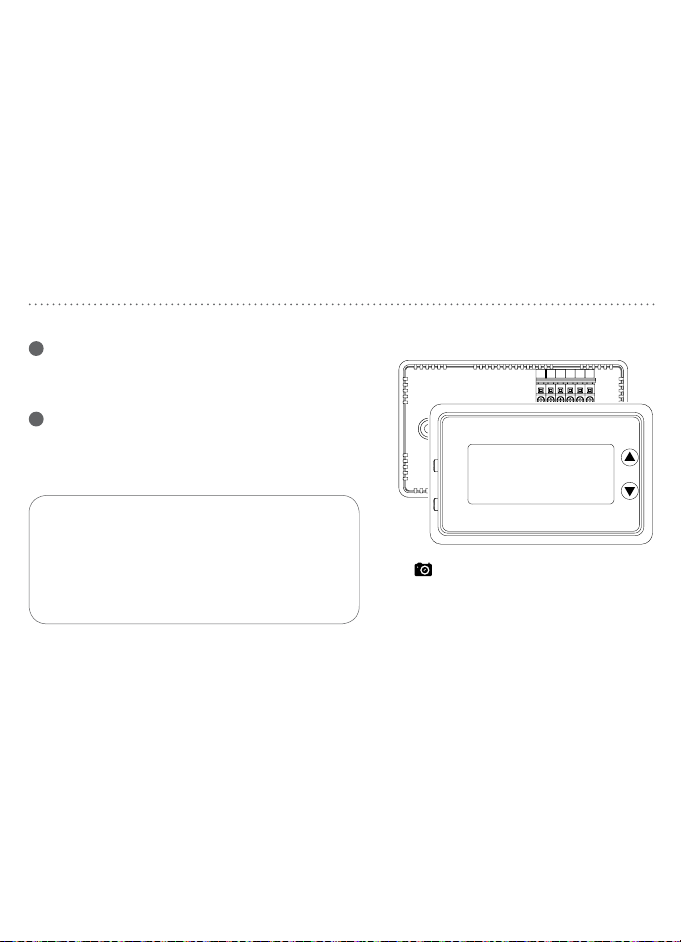
6 7
Cuando cambie un termostato existente,
coloque su nuevo termostato
Clear Comfort® Pro en el mismo lugar
donde tenía el anterior, a menos que
las condiciones siguientes sugieran algo
diferente. Para una nueva instalación, siga
estas pautas para la ubicación:
• Coloque el termostato en una habitación o
pasillo que se use a menudo; instálelo en una
pared interior aproximadamente a 5 pies (1.52
m) del piso.
• Evite instalar el termostato en áreas
excepcionalmente cálidas (p. ej., cerca de un
televisor, lámpara, radiador o chimenea), bajo
luz solar directa o en una pared que tenga
tubería de agua caliente o que esté opuesta a
CONSEJOS PRÁCTICOS PARA LA INSTALACIÓN
una estufa.
• Evite instalar el termostato en áreas
excepcionalmente frías, tales como un área
con corrientes de aire (p. ej., escaleras,
puerta o ventana), en una pared que separe
una habitación sin calefacción o donde la
circulación del aire sea deficiente (p. ej., en
una esquina o detrás de una puerta).
• Evite instalar el termostato en áreas
inusualmente húmedas ya que esto puede
conducir a la formación de corrosión.
• No instale el termostato hasta que el trabajo
de construcción haya finalizado, no exista
polvo y el trabajo de pintura haya concluido.
• Si la carcasa del termostato está fría, espere
a que alcance la temperatura ambiente antes
de instalarlo.
Tome una foto o anote el cableado
actual para referencia.
Aviso sobre el mercurio: Si su termostato
existente contiene mercurio, comuníquese
con el organismo de gestión de desechos
local para obtener información sobre cómo
desecharlo de forma segura.
1
Corte el suministro de energía eléctrica
Apague el suministro de energía al equipo de
calefacción y refrigeración.
2
Retire la cubierta
Retire la cubierta frontal del termostato existente.
INSTALACIÓN DEL TERMOSTATO
Y W
G
0/B
Y W
RC
R
G
R
Downloaded from www.ManualsFile.com manuals search engine
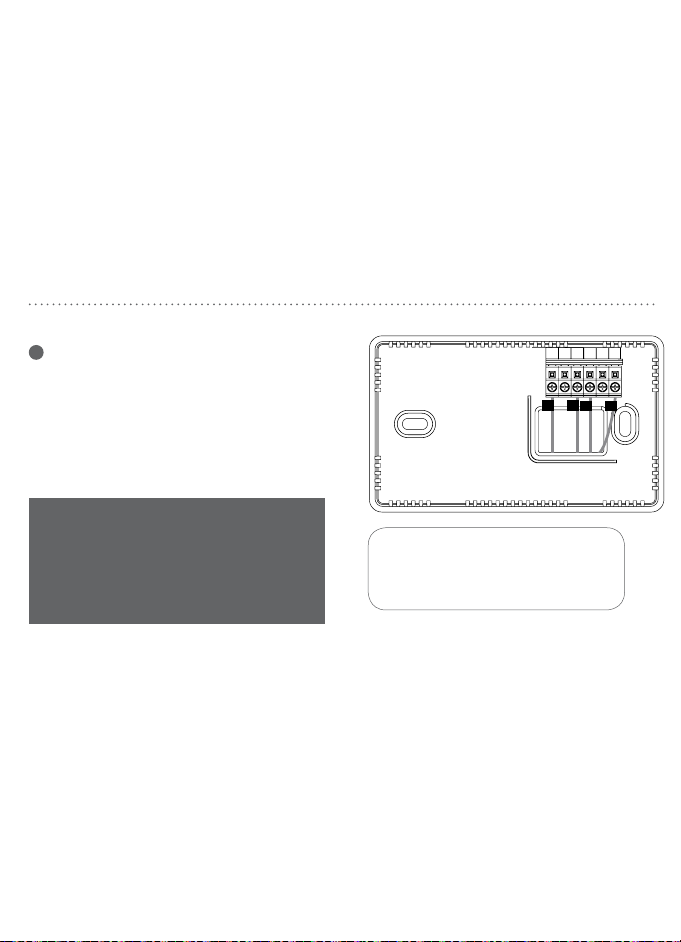
8 9
INSTALACIÓN DEL TERMOSTATO
3
Etiquete los cables
Utilice las etiquetas de cables que se suministran
para identificar el cable por la letra de su terminal
y no por el color. Una vez que los cables estén
etiquetados, desconéctelos y retire la base.
Mientras etiqueta y retira los cables
individuales, NO deje que los cables se
vuelvan a introducir en la pared.
Y W
G
0/B
Y W
RC
R
G
R
B B
G G
R R
V
/
VR V
/
VR
X X
Y2 Y2
H H
RC RC
W W
X1 X1
C C
L L
RH RH
W1
X2 X2
W1
E E
O O
T T
W2
Y Y
W2
F F
P P
U U
W3
Y1 Y1
W3
AUX
AUX
INSTALACIÓN DEL TERMOSTATO
4
Monte la nueva base
a. Retire el cuerpo del termostato de la base
halándolo suavemente para separarlo.
b. Coloque la base de forma plana contra la
pared introduciendo los cables a través de
la abertura que se encuentra debajo del
terminal de cableado.
c. Nivele la base y marque con un lápiz los
agujeros de los tornillos de montaje.
d. Retire la base y taladre agujeros en las
posiciones marcadas. Inserte los tarugos de
pared que se suministran.
e. Introduzca los cables nuevamente a través
de la abertura y fije la base a la pared con
los tornillos que se suministran.
G O/B Y W RC R
Downloaded from www.ManualsFile.com manuals search engine
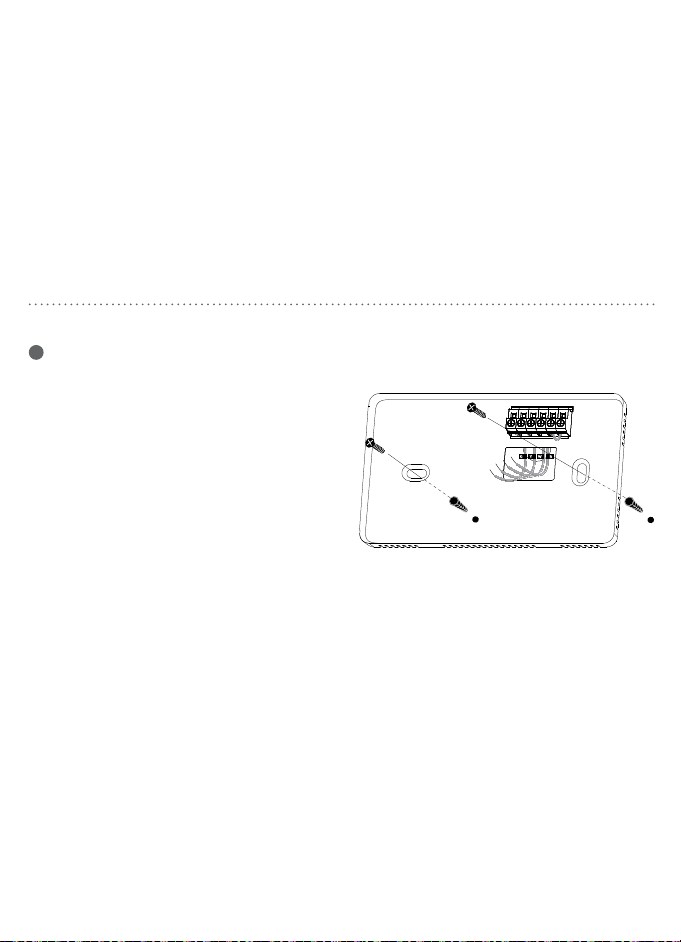
8 9
INSTALACIÓN DEL TERMOSTATO
3
Etiquete los cables
Utilice las etiquetas de cables que se suministran
para identificar el cable por la letra de su terminal
y no por el color. Una vez que los cables estén
etiquetados, desconéctelos y retire la base.
Mientras etiqueta y retira los cables
individuales, NO deje que los cables se
vuelvan a introducir en la pared.
Y W
G
0/B
Y W
RC
R
G
R
B B
G G
R R
V
/
VR V
/
VR
X X
Y2 Y2
H H
RC RC
W W
X1 X1
C C
L L
RH RH
W1
X2 X2
W1
E E
O O
T T
W2
Y Y
W2
F F
P P
U U
W3
Y1 Y1
W3
AUX
AUX
INSTALACIÓN DEL TERMOSTATO
4
Monte la nueva base
a. Retire el cuerpo del termostato de la base
halándolo suavemente para separarlo.
b. Coloque la base de forma plana contra la
pared introduciendo los cables a través de
la abertura que se encuentra debajo del
terminal de cableado.
c. Nivele la base y marque con un lápiz los
agujeros de los tornillos de montaje.
d. Retire la base y taladre agujeros en las
posiciones marcadas. Inserte los tarugos de
pared que se suministran.
e. Introduzca los cables nuevamente a través
de la abertura y fije la base a la pared con
los tornillos que se suministran.
G O/B Y W RC R
Downloaded from www.ManualsFile.com manuals search engine
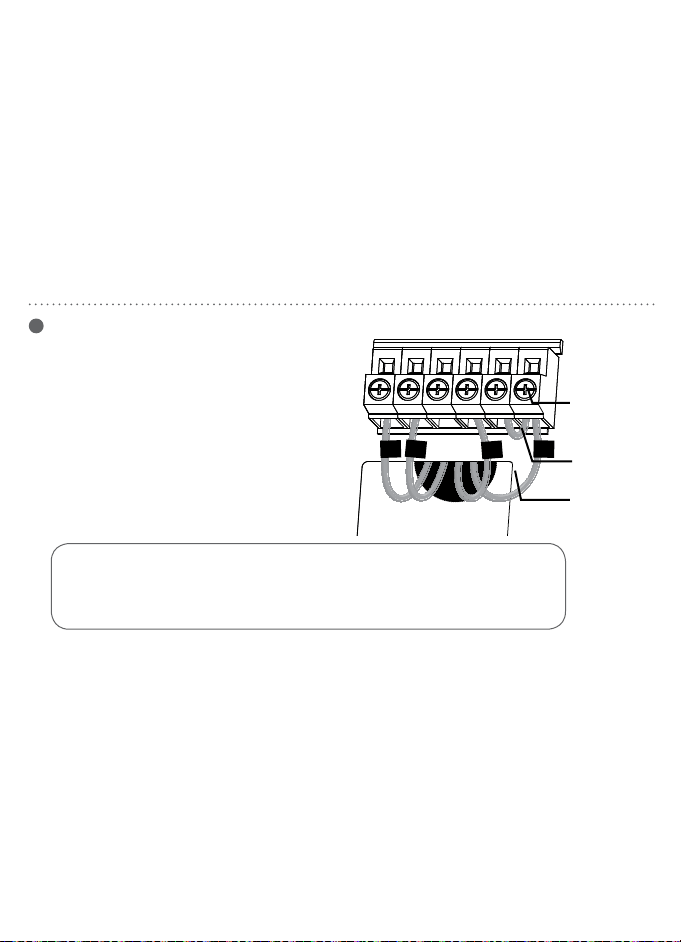
10 11
R
O
G
W
R
W
Y
O
G
PRECAUCIÓN: Pelar demasiado aislante del extremo de un cable crea
el potencial para un cortocircuito entre los cables y podría obstaculizar el
funcionamiento adecuado del termostato.
INSTALACIÓN DEL TERMOSTATO
5
Instalación de los cables
en sistemas convencionales
a. Afloje los tornillos de cada terminal.
Nota: Retire el cable de puente si tiene
cables R y RC.
b. Inserte cada cable etiquetado en el terminal
correspondiente y apriete los tornillos.
c. Envuelva con cinta aislante las áreas expuestas
de cualquier cable no utilizado e introdúzcalos
nuevamente en la pared.
d. Continúe en la página 12.
tornillo
cable de
puente
cable
etiquetado
RRCWYG O/B
INSTALACIÓN DEL TERMOSTATO
Instalación de cables para sistemas
de bomba de calor
a. Afloje los tornillos de cada terminal.
b. Inserte el cable de puente en los
terminales Y y W.
c. Inserte cada cable etiquetado en el
terminal correspondiente y apriete los
tornillos.
d. Envuelva con cinta aislante las áreas
expuestas de cualquier cable no utilizado
e introdúzcalo nuevamente en la pared.
tornillo
cable de
puente
cable
etiquetado
3/8"
9.5 mm
Nota: Debe quedar expuesto 3/8" de cada cable .
RRCWYG O/B
Downloaded from www.ManualsFile.com manuals search engine
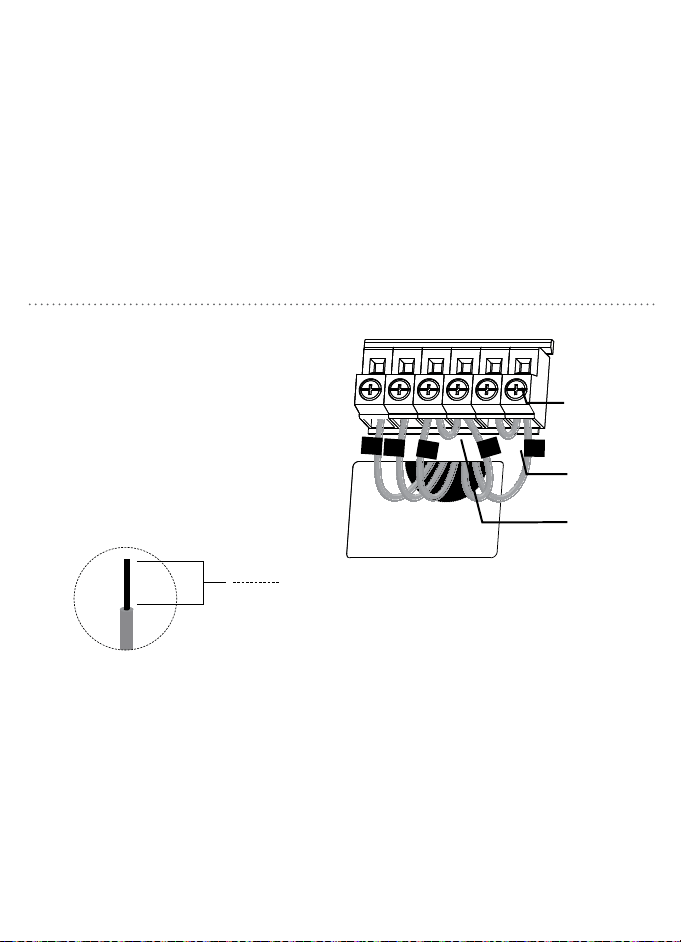
10 11
R
O
G
W
R
W
Y
O
G
PRECAUCIÓN: Pelar demasiado aislante del extremo de un cable crea
el potencial para un cortocircuito entre los cables y podría obstaculizar el
funcionamiento adecuado del termostato.
INSTALACIÓN DEL TERMOSTATO
5
Instalación de los cables
en sistemas convencionales
a. Afloje los tornillos de cada terminal.
Nota: Retire el cable de puente si tiene
cables R y RC.
b. Inserte cada cable etiquetado en el terminal
correspondiente y apriete los tornillos.
c. Envuelva con cinta aislante las áreas expuestas
de cualquier cable no utilizado e introdúzcalos
nuevamente en la pared.
d. Continúe en la página 12.
tornillo
cable de
puente
cable
etiquetado
RRCWYG O/B
INSTALACIÓN DEL TERMOSTATO
Instalación de cables para sistemas
de bomba de calor
a. Afloje los tornillos de cada terminal.
b. Inserte el cable de puente en los
terminales Y y W.
c. Inserte cada cable etiquetado en el
terminal correspondiente y apriete los
tornillos.
d. Envuelva con cinta aislante las áreas
expuestas de cualquier cable no utilizado
e introdúzcalo nuevamente en la pared.
tornillo
cable de
puente
cable
etiquetado
3/8"
9.5 mm
Nota: Debe quedar expuesto 3/8" de cada cable .
RRCWYG O/B
Downloaded from www.ManualsFile.com manuals search engine
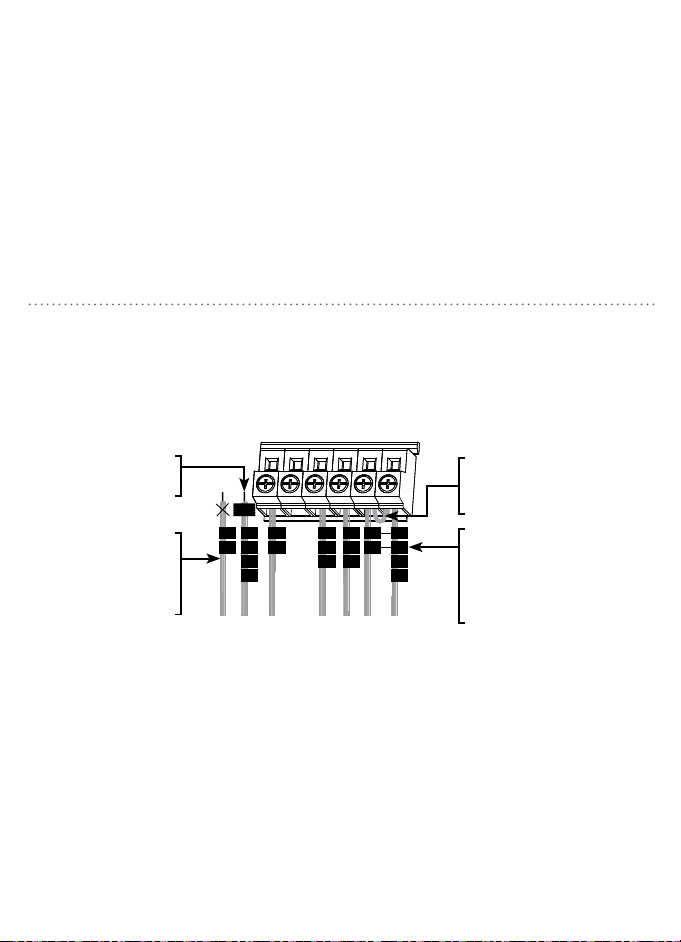
12 13
INSTALACIÓN DEL TERMOSTATOINSTALACIÓN DEL TERMOSTATO
Cableado menos común para
sistemas de bomba de calor
Cableado menos común para
sistemas convencionales
R
Rh
V
Rc
R
W
W1
H
Y
M
Y1
G
F
C
C1
B
X
Y2
W2
TAPE
R
VR
V
Rc
R
Y
M
Y1
O
B
H
G
F
C
X
B
Aux
W
W1
W2
TAPE
L
F
E
X
R
R
RC
RC
W
W
Y
Y
G
G
O/B
O/B
Nota: La mayoría de los sistemas se puede conectar
utilizando los diagramas de cableado y las instrucciones
en las páginas 10 y 11. Si el cableado de su termostato no
coincide con las configuraciones de cableado, utilice los
diagramas y las instrucciones en las páginas 12 y 13.
Nota: La mayoría de los sistemas se puede conectar
utilizando los diagramas de cableado y las instrucciones
en las páginas 10 y 11. Si el cableado de su termostato no
coincide con las configuraciones de cableado, utilice los
diagramas y las instrucciones en las páginas 12 y 13.
Si hay cables Y2 o W2,
el termostato Orbit no
es compatible con su
sistema.
Si su termostato existente
tiene los cables V1, W1 y
W2, pare y comuníquese
con un técnico calificado
de sistema de HVAC.
Si su termostato existente
tiene cables L, F, E o Aux,
el termostato Orbit no es
compatible con su sistema.
Retire el puente metálico
conectando los terminales R
y Rc solamente si su sistema
necesita los cables R y Rc.
Deje el puente metálico en su
lugar, conectando los terminales
R y Rc.
Si su termostato existente
tiene los cables V y VR, pare y
comuníquese con un técnico
calificado de sistema de HVAC.
Si su termostato existente tiene
cables O y B separados, pare
y comuníquese con un técnico
calificado de sistema de HVAC.
Si el termostato existente
tiene los cables R y Rh, retire
el puente metálico entre los
terminales R y Rc. Conecte el
cable R al terminal Rc y el cable
Rh al terminal R.
Cubra todos los cables
C, C1 B o X con cinta
eléctrica. No los conecte.
Si su termostato existente
tiene un cable C, se debe
cubrirlo con cinta eléctrica
y no se debe conectarlo a
su termostato nuevo.
Downloaded from www.ManualsFile.com manuals search engine
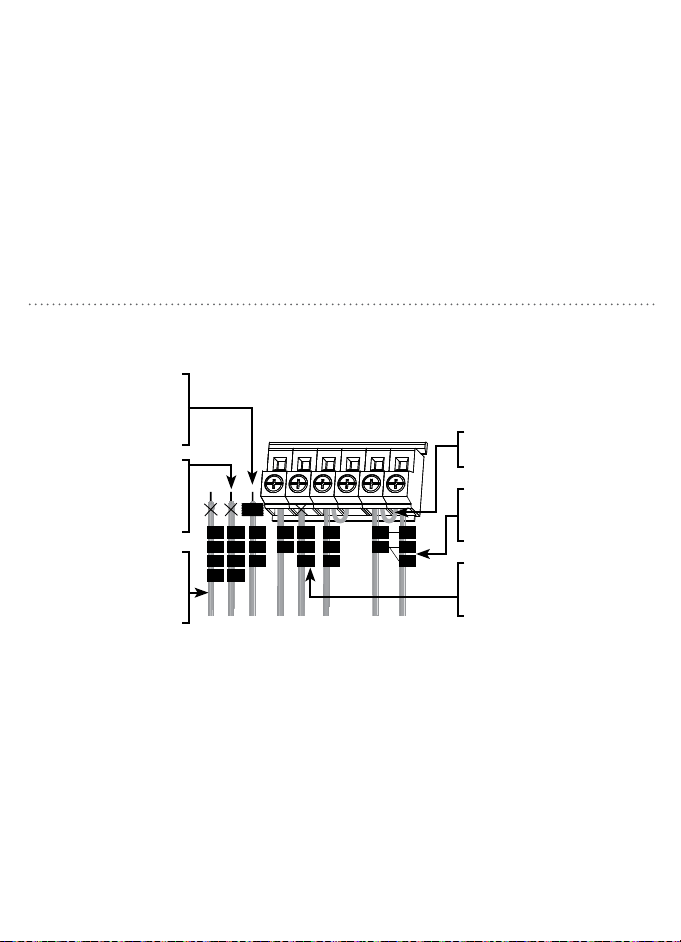
12 13
INSTALACIÓN DEL TERMOSTATOINSTALACIÓN DEL TERMOSTATO
Cableado menos común para
sistemas de bomba de calor
Cableado menos común para
sistemas convencionales
R
Rh
V
Rc
R
W
W1
H
Y
M
Y1
G
F
C
C1
B
X
Y2
W2
TAPE
R
VR
V
Rc
R
Y
M
Y1
O
B
H
G
F
C
X
B
Aux
W
W1
W2
TAPE
L
F
E
X
R
R
RC
RC
W
W
Y
Y
G
G
O/B
O/B
Nota: La mayoría de los sistemas se puede conectar
utilizando los diagramas de cableado y las instrucciones
en las páginas 10 y 11. Si el cableado de su termostato no
coincide con las configuraciones de cableado, utilice los
diagramas y las instrucciones en las páginas 12 y 13.
Nota: La mayoría de los sistemas se puede conectar
utilizando los diagramas de cableado y las instrucciones
en las páginas 10 y 11. Si el cableado de su termostato no
coincide con las configuraciones de cableado, utilice los
diagramas y las instrucciones en las páginas 12 y 13.
Si hay cables Y2 o W2,
el termostato Orbit no
es compatible con su
sistema.
Si su termostato existente
tiene los cables V1, W1 y
W2, pare y comuníquese
con un técnico calificado
de sistema de HVAC.
Si su termostato existente
tiene cables L, F, E o Aux,
el termostato Orbit no es
compatible con su sistema.
Retire el puente metálico
conectando los terminales R
y Rc solamente si su sistema
necesita los cables R y Rc.
Deje el puente metálico en su
lugar, conectando los terminales
R y Rc.
Si su termostato existente
tiene los cables V y VR, pare y
comuníquese con un técnico
calificado de sistema de HVAC.
Si su termostato existente tiene
cables O y B separados, pare
y comuníquese con un técnico
calificado de sistema de HVAC.
Si el termostato existente
tiene los cables R y Rh, retire
el puente metálico entre los
terminales R y Rc. Conecte el
cable R al terminal Rc y el cable
Rh al terminal R.
Cubra todos los cables
C, C1 B o X con cinta
eléctrica. No los conecte.
Si su termostato existente
tiene un cable C, se debe
cubrirlo con cinta eléctrica
y no se debe conectarlo a
su termostato nuevo.
Downloaded from www.ManualsFile.com manuals search engine
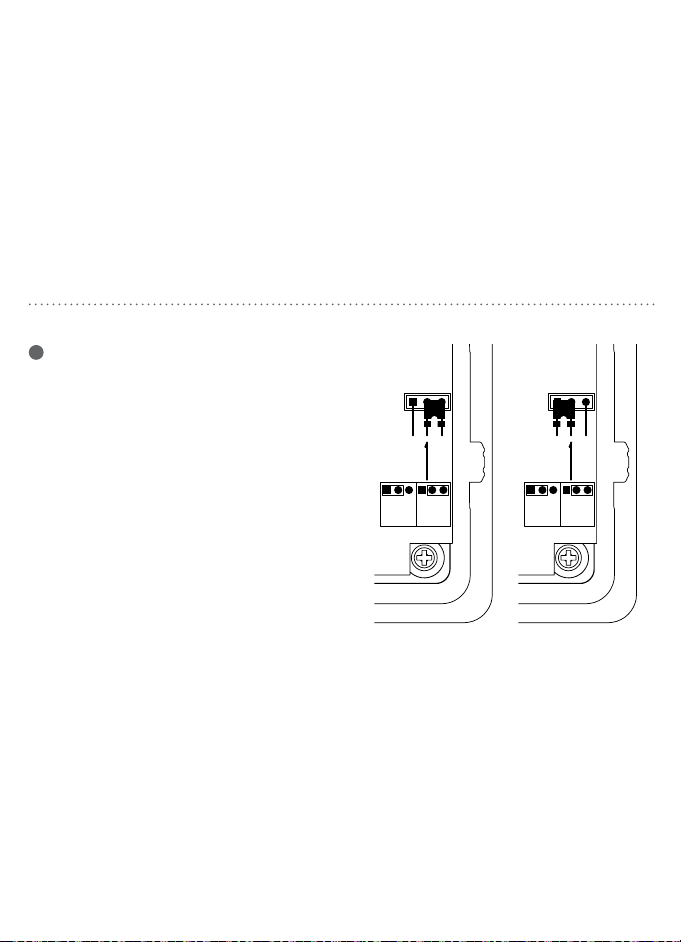
14 15
INSTALACIÓN DEL TERMOSTATO
O B
Electric
Heat
Gas/Oil
Cool
Heat Cool
(B) (O)
Electric
Heat
Gas/Oil
Cool
Heat Cool
(B) (O)
6
Configuración del puente de la bomba
de calor
Las siguientes instrucciones son necesarias
para revisar la colocación del puente J3 si
tiene un sistema de bomba de calor.
O Deje el puente en la posición Cool (O)
[refrigeración (O)] con que viene de
fábrica si conectó un cable O al terminal
O/B.
B Mueva el puente a la posición Heat (B)
[calefacción (B)] si conecta un cable O al
terminal O/B.
INSTALACIÓN DEL TERMOSTATO
Electric
Heat
Gas/Oil
Heat
Heat Heat
(B) (O)
Electric
Heat
Gas/Oil
Heat
Heat Heat
(B) (O)
7
Configuración del puente
de control del ventilador
La colocación correcta de este puente J2 optimiza el uso de la energía y los niveles de
confort del tipo de sistema conectado.
Calefacción de gas/aceite
Para los sistemas de gas o aceite, deje
el puente en la posición Gas/Oil Heat
(calefacción de gas/aceite) con la cual viene
de fábrica.
Calefacción eléctrica
Para los sistemas eléctricos y de
bomba de calor, mueva el puente a
la posición Electric Heat (calefacción
eléctrica).
Downloaded from www.ManualsFile.com manuals search engine
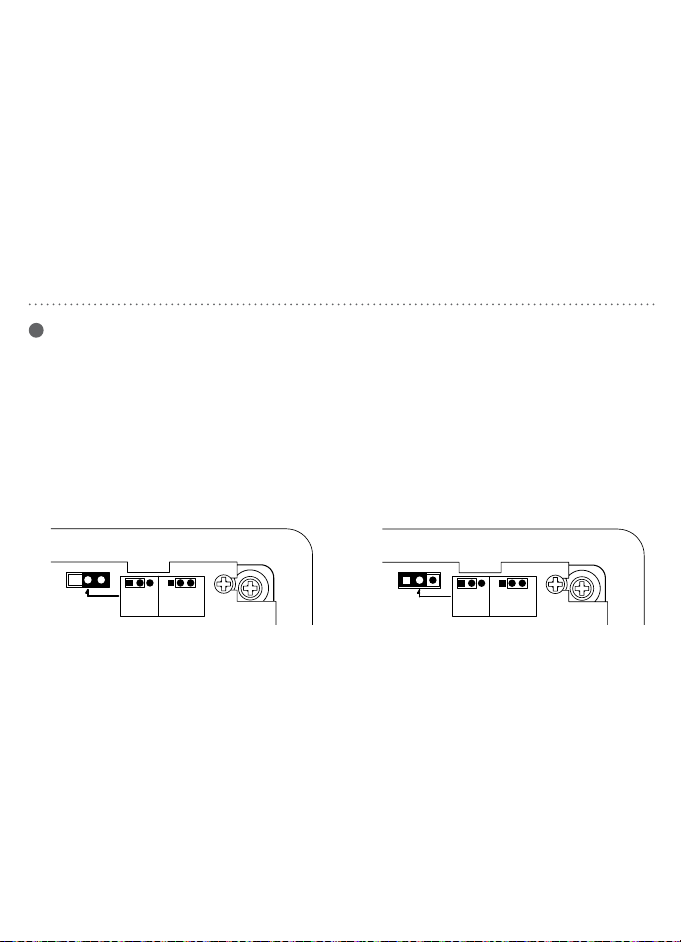
14 15
INSTALACIÓN DEL TERMOSTATO
O B
Electric
Heat
Gas/Oil
Cool
Heat Cool
(B) (O)
Electric
Heat
Gas/Oil
Cool
Heat Cool
(B) (O)
6
Configuración del puente de la bomba
de calor
Las siguientes instrucciones son necesarias
para revisar la colocación del puente J3 si
tiene un sistema de bomba de calor.
O Deje el puente en la posición Cool (O)
[refrigeración (O)] con que viene de
fábrica si conectó un cable O al terminal
O/B.
B Mueva el puente a la posición Heat (B)
[calefacción (B)] si conecta un cable O al
terminal O/B.
INSTALACIÓN DEL TERMOSTATO
Electric
Heat
Gas/Oil
Heat
Heat Heat
(B) (O)
Electric
Heat
Gas/Oil
Heat
Heat Heat
(B) (O)
7
Configuración del puente
de control del ventilador
La colocación correcta de este puente J2 optimiza el uso de la energía y los niveles de
confort del tipo de sistema conectado.
Calefacción de gas/aceite
Para los sistemas de gas o aceite, deje
el puente en la posición Gas/Oil Heat
(calefacción de gas/aceite) con la cual viene
de fábrica.
Calefacción eléctrica
Para los sistemas eléctricos y de
bomba de calor, mueva el puente a
la posición Electric Heat (calefacción
eléctrica).
Downloaded from www.ManualsFile.com manuals search engine
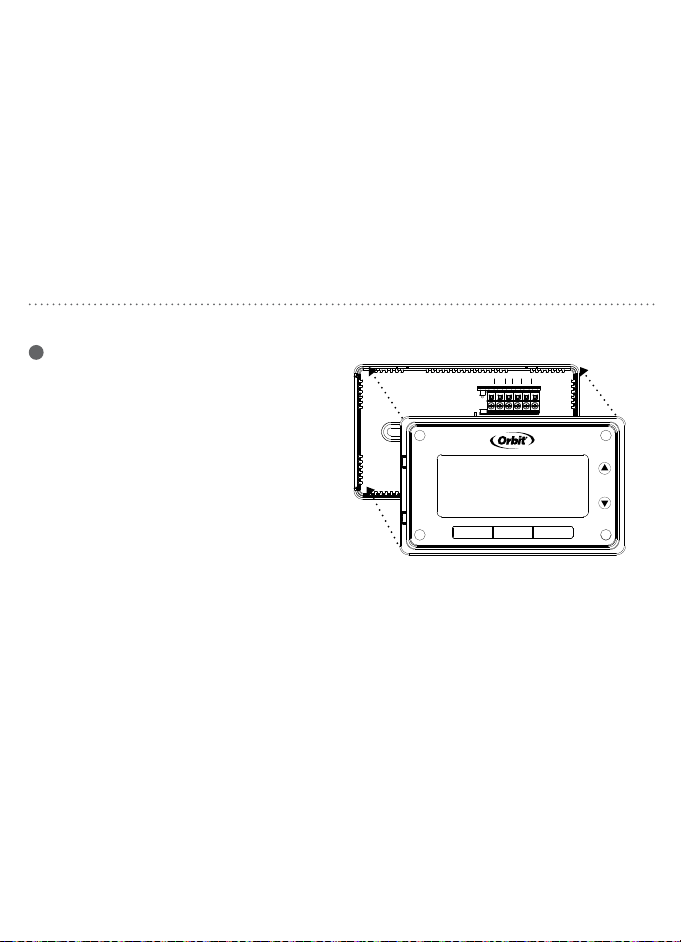
16 17
INSTALACIÓN DEL TERMOSTATO
G O/B Y W RC R
MODE
FAN
SET RUN HOLD
8
Finalización de la instalación
a. Inserte tres baterías alcalinas AAA
Energizer® o Duracell®.
b. Instale el cuerpo del termostato
empujándolo suavemente en la base hasta
que calce en su lugar. Verifique que no haya
separaciones en la carcasa lateral.
c. Conecte nuevamente la electricidad al
equipo de calefacción y refrigeración.
BOTÓN DE REINICIOFORMATO DE TEMPERATURA
Cambio entre grados Fahrenheit (°F)
y Centígrados (°C)
1. Coloque el interruptor MODE
(modalidad) a la posición Off (apagado).
2. Mientras sostiene p presione SET
(configurar).
3. Suelte ambos botones.
4. Repita los pasos 2 y 3 para alternar entre
°F y °C.
RESET
THERMOSTATFIGMINIMUMOFFTIMEMU
Off
Arrow down
Arrow up
Para acceder al botón RESET (reinicio),
retire el cuerpo del termostato de la base
halándolo suavemente para separarlo.
• Presione y sosténgalo durante cinco segundos
para reiniciar todas las configuraciones del
sistema y los indicadores de temperatura a los
parámetros predeterminados de fábrica.
Nota: Tenga cuidado de no
tocar la superficie negra
en la cual se encuentra
montado el botón de reinicio
y no lo limpie si tiene polvo.
Downloaded from www.ManualsFile.com manuals search engine
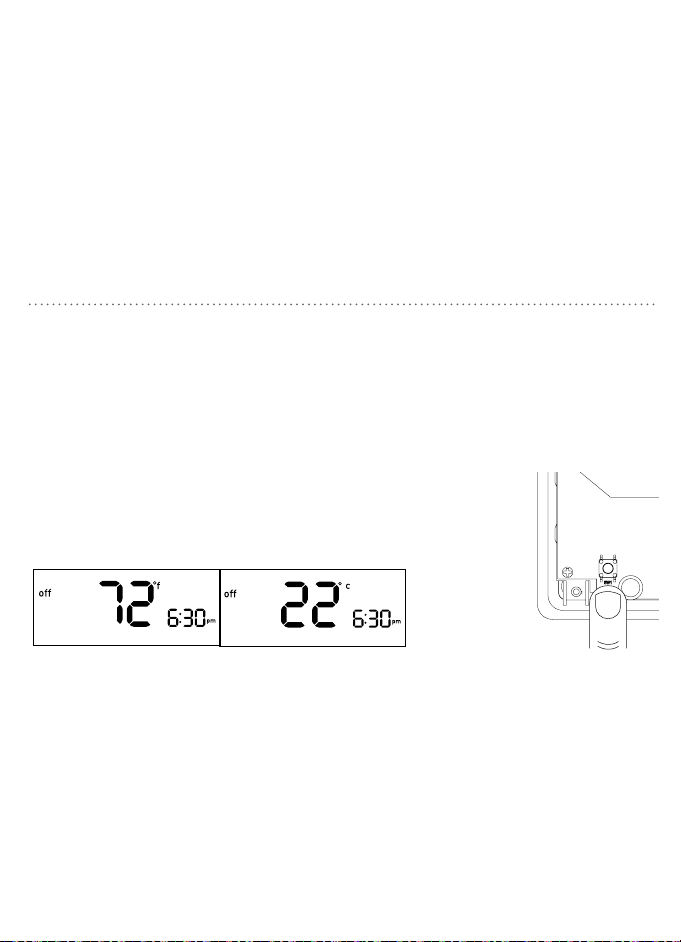
16 17
INSTALACIÓN DEL TERMOSTATO
G O/B Y W RC R
MODE
FAN
SET RUN HOLD
8
Finalización de la instalación
a. Inserte tres baterías alcalinas AAA
Energizer® o Duracell®.
b. Instale el cuerpo del termostato
empujándolo suavemente en la base hasta
que calce en su lugar. Verifique que no haya
separaciones en la carcasa lateral.
c. Conecte nuevamente la electricidad al
equipo de calefacción y refrigeración.
BOTÓN DE REINICIOFORMATO DE TEMPERATURA
Cambio entre grados Fahrenheit (°F)
y Centígrados (°C)
1. Coloque el interruptor MODE
(modalidad) a la posición Off (apagado).
2. Mientras sostiene p presione SET
(configurar).
3. Suelte ambos botones.
4. Repita los pasos 2 y 3 para alternar entre
°F y °C.
RESET
THERMOSTATFIGMINIMUMOFFTIMEMU
Off
Arrow down
Arrow up
Para acceder al botón RESET (reinicio),
retire el cuerpo del termostato de la base
halándolo suavemente para separarlo.
• Presione y sosténgalo durante cinco segundos
para reiniciar todas las configuraciones del
sistema y los indicadores de temperatura a los
parámetros predeterminados de fábrica.
Nota: Tenga cuidado de no
tocar la superficie negra
en la cual se encuentra
montado el botón de reinicio
y no lo limpie si tiene polvo.
Downloaded from www.ManualsFile.com manuals search engine
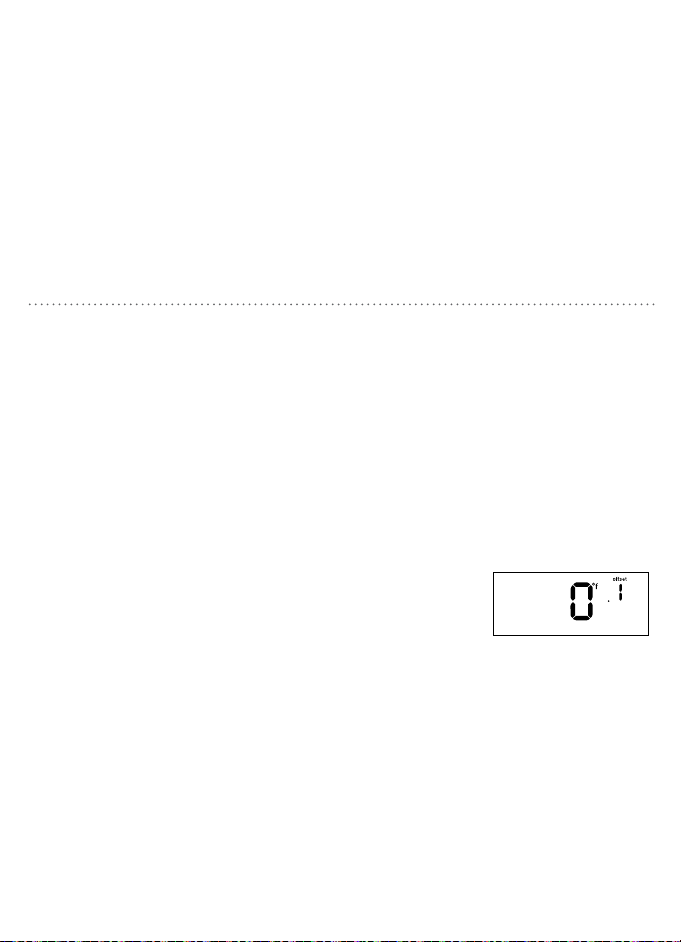
18 19
Las siguientes cuatro funciones se realizan
en una configuración fluida. El sistema le
conducirá a través de cada función. Para
acceder solo a una función, siga estos pasos y
presione SET (configurar) hasta que llegue a
la función que desea ajustar.
Desplace la pantalla de la temperatura
para que aparezca +/- 9° F (+/- 4.5° C). Este
termostato tiene un sensor de temperatura
muy preciso; si desea acoplar la pantalla con
otros dispositivos puede utilizar esta función
de desplazamiento.
Nota: Utilizar esta función no cambia
la temperatura real.
DESPLAZAMIENTO DE LA TEMPERATURA
1. Presione p / q para cambiar
la cantidad desviada.
2. Presione SET (configurar) para avanzar al
siguiente paso.
Para salir,
presione SET
(configurar)
cuatro veces.
1. Coloque el interruptor MODE (modalidad)
en la posición Off (apagado).
2. Mientras mantiene presionado el botón
RESET (reinicio), la palabra “offset”
(desplazamiento) aparecerá en la pantalla.
Nota: No mantenga presionado el botón RESET
(reinicio) durante más de cinco segundos.
3. Suelte ambos botones.
Nota: El sistema saldrá automáticamente si no se
presiona el botón dentro de 12 segundos.
CONFIGURACIÓN AVANZADA DEL SISTEMA
INICIO TEMPRANO TIPO DE SISTEMA
Su termostato viene preprogramado
con la funcionalidad de inicio temprano
desactivada. Esta función permite que el
sistema de calefacción o refrigeración se
active antes de la hora de inicio programada
para que la temperatura de la habitación sea
la configurada a la hora de inicio.
1. Presione p/q para alternar entre OFF
(apagado) y ON (encendido).
2. Presione SET (configurar) para avanzar
al siguiente paso.
Para salir, presione SET (configurar) tres
veces.
Su termostato viene configurado de fábrica
para que funcione con un sistema de
calefacción estándar de combustible fósil.
1. Presione p/q para alternar entre el
sistema de calefacción en uso.
• Si utiliza una bomba de calor seleccione HP.
• Si utiliza un sistema de calefacción
seleccione F.
2. Presione SET (configurar) para avanzar
al siguiente paso. Para salir, presione SET
(configurar) dos veces.
Downloaded from www.ManualsFile.com manuals search engine
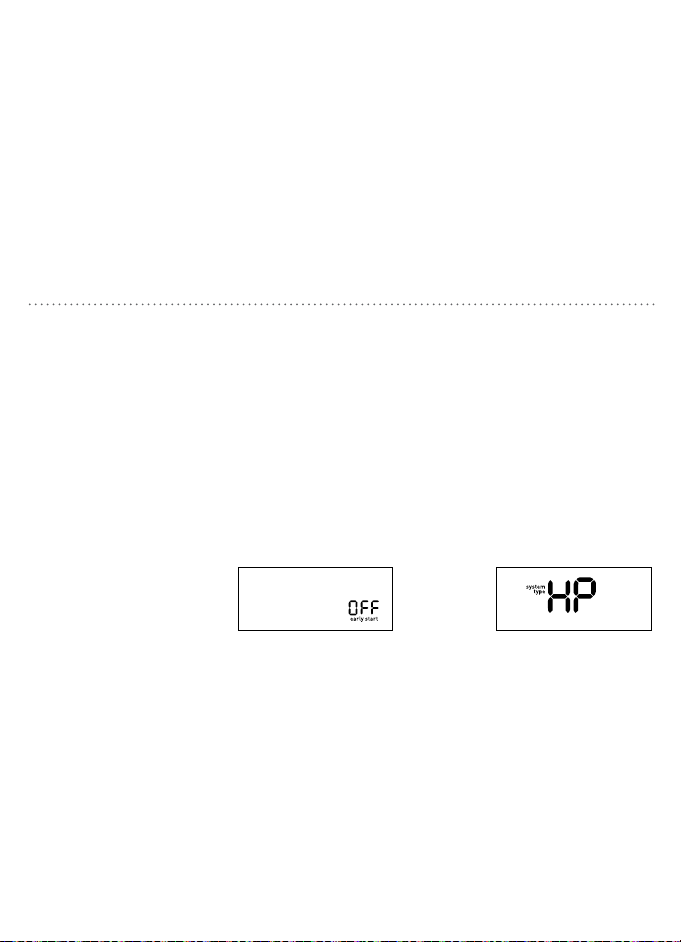
18 19
Las siguientes cuatro funciones se realizan
en una configuración fluida. El sistema le
conducirá a través de cada función. Para
acceder solo a una función, siga estos pasos y
presione SET (configurar) hasta que llegue a
la función que desea ajustar.
Desplace la pantalla de la temperatura
para que aparezca +/- 9° F (+/- 4.5° C). Este
termostato tiene un sensor de temperatura
muy preciso; si desea acoplar la pantalla con
otros dispositivos puede utilizar esta función
de desplazamiento.
Nota: Utilizar esta función no cambia
la temperatura real.
DESPLAZAMIENTO DE LA TEMPERATURA
1. Presione p / q para cambiar
la cantidad desviada.
2. Presione SET (configurar) para avanzar al
siguiente paso.
Para salir,
presione SET
(configurar)
cuatro veces.
1. Coloque el interruptor MODE (modalidad)
en la posición Off (apagado).
2. Mientras mantiene presionado el botón
RESET (reinicio), la palabra “offset”
(desplazamiento) aparecerá en la pantalla.
Nota: No mantenga presionado el botón RESET
(reinicio) durante más de cinco segundos.
3. Suelte ambos botones.
Nota: El sistema saldrá automáticamente si no se
presiona el botón dentro de 12 segundos.
CONFIGURACIÓN AVANZADA DEL SISTEMA
INICIO TEMPRANO TIPO DE SISTEMA
Su termostato viene preprogramado
con la funcionalidad de inicio temprano
desactivada. Esta función permite que el
sistema de calefacción o refrigeración se
active antes de la hora de inicio programada
para que la temperatura de la habitación sea
la configurada a la hora de inicio.
1. Presione p/q para alternar entre OFF
(apagado) y ON (encendido).
2. Presione SET (configurar) para avanzar
al siguiente paso.
Para salir, presione SET (configurar) tres
veces.
Su termostato viene configurado de fábrica
para que funcione con un sistema de
calefacción estándar de combustible fósil.
1. Presione p/q para alternar entre el
sistema de calefacción en uso.
• Si utiliza una bomba de calor seleccione HP.
• Si utiliza un sistema de calefacción
seleccione F.
2. Presione SET (configurar) para avanzar
al siguiente paso. Para salir, presione SET
(configurar) dos veces.
Downloaded from www.ManualsFile.com manuals search engine
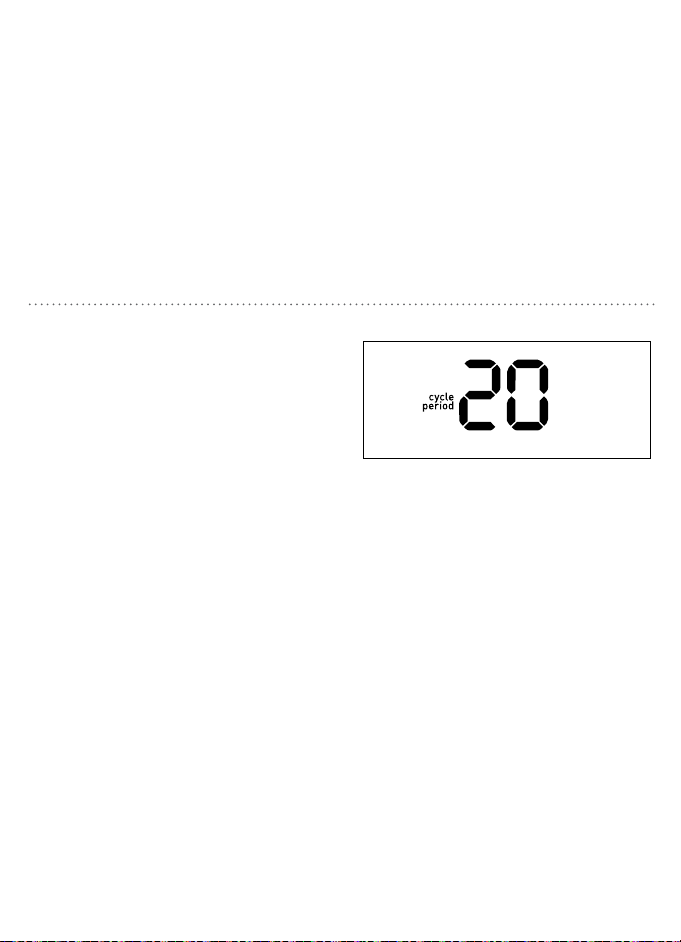
20 21
PERÍODO MÍNIMO DEL CICLO
Cambiar el periodo de ciclo mínimo de seis
minutos o mayor habilita la lógica inteligente.
Su termostato aprender, con el tiempo, los
mejores tiempos de ciclo para su sistema
y caseros condiciones. Utilizando la lógica
inteligente puede optimizar el uso de
energía y el nivel de comodidad, y permiten
establecer el termostato para encender el
sistema más o menos frecuencia.
1. Presione p/q para cambiar el período
del ciclo deseado.
2. Presione SET (configurar) para aceptar
el período del ciclo y salir.
• Si ha seleccionado la bomba de calor
(HP), alternará entre 60, 30, 20, 15, 12
y 0.
• Si ha seleccionado el sistema de
calefacción (F) alternará entre 60, 30,
20, 15, 12, 10, 8, 6 y 0.
Bomba de calor de 1 etapa 20
Compresor 20
Sistema de calefacción de gas de 1 etapa
con ventilador eléctrico
12
Sistema de calefacción de gas de 1 etapa
con ventilador de gas
12
Sistema de vapor y gravedad 12
Sistema de agua caliente 60
Sistema de calefacción de gran eficiencia 20
Sistema de calefacción eléctrica
20
Tipo de sistema 6
Tipo de sistema Período del ciclo
(minutos)
HP
PERÍODO MÍNIMO DEL CICLO
F
Downloaded from www.ManualsFile.com manuals search engine
20 21
PERÍODO MÍNIMO DEL CICLO
Cambiar el periodo de ciclo mínimo de seis
minutos o mayor habilita la lógica inteligente.
Su termostato aprender, con el tiempo, los
mejores tiempos de ciclo para su sistema
y caseros condiciones. Utilizando la lógica
inteligente puede optimizar el uso de
energía y el nivel de comodidad, y permiten
establecer el termostato para encender el
sistema más o menos frecuencia.
1. Presione p/q para cambiar el período
del ciclo deseado.
2. Presione SET (configurar) para aceptar
el período del ciclo y salir.
• Si ha seleccionado la bomba de calor
(HP), alternará entre 60, 30, 20, 15, 12
y 0.
• Si ha seleccionado el sistema de
calefacción (F) alternará entre 60, 30,
20, 15, 12, 10, 8, 6 y 0.
Bomba de calor de 1 etapa 20
Compresor 20
Sistema de calefacción de gas de 1 etapa
con ventilador eléctrico
12
Sistema de calefacción de gas de 1 etapa
con ventilador de gas
12
Sistema de vapor y gravedad 12
Sistema de agua caliente 60
Sistema de calefacción de gran eficiencia 20
Sistema de calefacción eléctrica
20
Tipo de sistema 6
Tipo de sistema Período del ciclo
(minutos)
HP
PERÍODO MÍNIMO DEL CICLO
F
Downloaded from www.ManualsFile.com manuals search engine
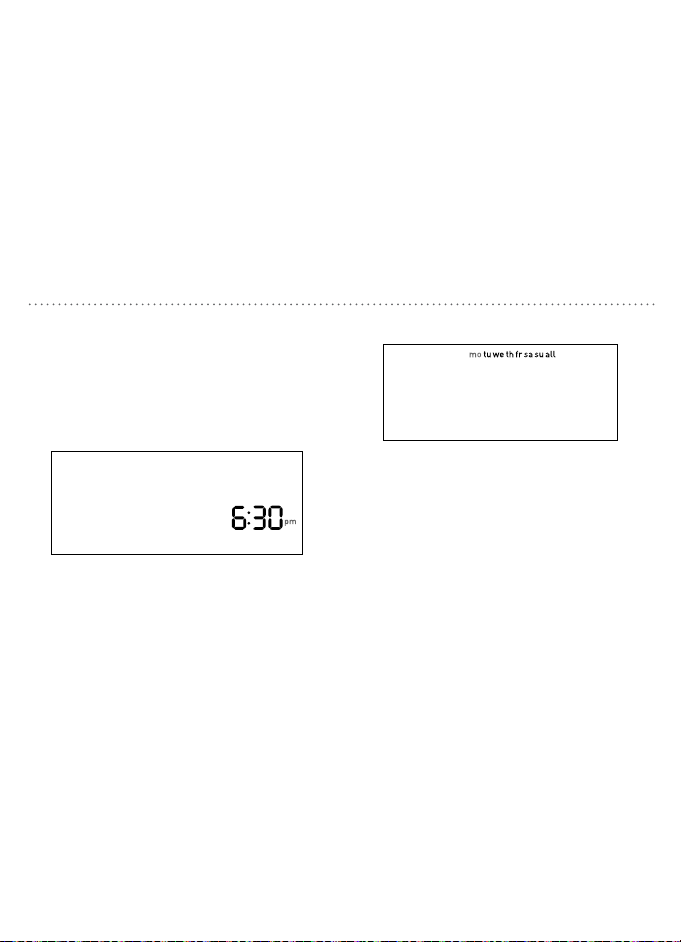
22 23
CONFIGURACIÓN DE LA HORA Y EL DÍA
Configure la hora y el día
1. Con el termostato en la modalidad de
apagado, presione SET (configurar).
2. Presione p/q para ajustar la hora.
3. Presione SET (configurar) para aceptar la
hora y continuar.
Nota: Presionar y sostener p/q cambiará la hora
más rápidamente.
MODE
4. Presione p/q para seleccionar el día de
la semana.
5. Presione SET (configurar) para aceptar el
día de la semana y salir.
SELECCIÓN DE LA MODALIDAD Y CONFIGURACIÓN DEL VENTILADOR
Deslice el interruptor de modalidad hacia
calefacción o refrigeración para alcanzar la
temperatura establecida.
• heat (calefacción)—El sistema activará la
calefacción para alcanzar la temperatura
establecida.
• off (apagado)—Los sistemas están apagados.
• cool (refrigeración)—El sistema activará la
refrigeración para alcanzar la temperatura
establecida.
Coloque el interruptor del ventilador en
la posición adecuada de funcionamiento.
• auto fan (ventilador automático)—El ventilador
funcionará automáticamente cuando se active
la calefacción o la refrigeración.
• fan on (ventilador activado)—El ventilador
funcionará continuamente.
Nota: La configuración auto fan
(ventilador automático) es la que se utiliza
más frecuentemente.
heat (calefacción)
off (apagado)
cool (refrigeración)
auto fan
(ventilador automático)
fan on
(ventilador activado)
Downloaded from www.ManualsFile.com manuals search engine
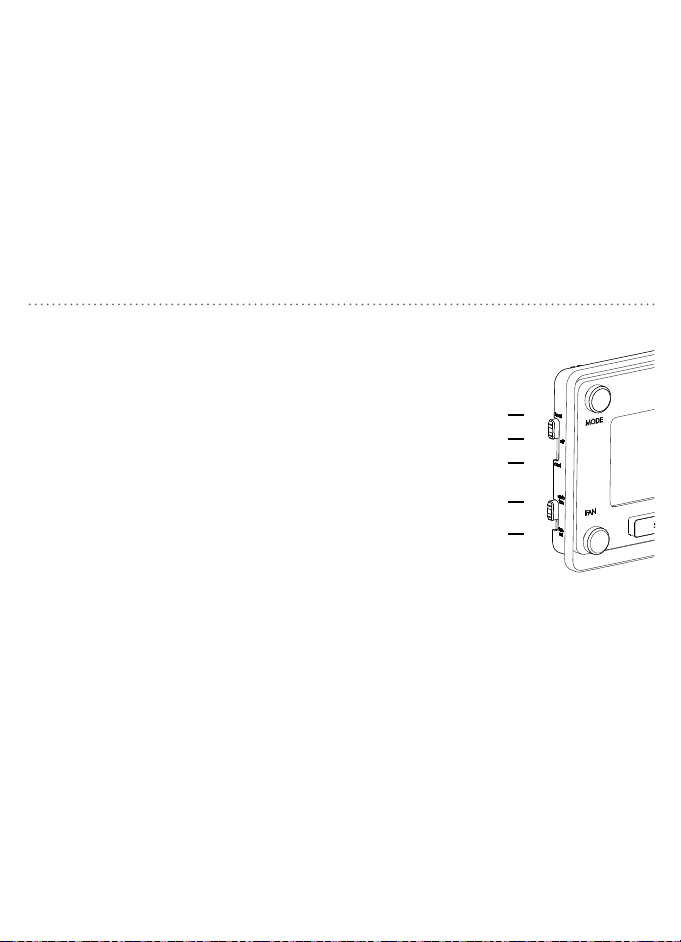
22 23
CONFIGURACIÓN DE LA HORA Y EL DÍA
Configure la hora y el día
1. Con el termostato en la modalidad de
apagado, presione SET (configurar).
2. Presione p/q para ajustar la hora.
3. Presione SET (configurar) para aceptar la
hora y continuar.
Nota: Presionar y sostener p/q cambiará la hora
más rápidamente.
MODE
4. Presione p/q para seleccionar el día de
la semana.
5. Presione SET (configurar) para aceptar el
día de la semana y salir.
SELECCIÓN DE LA MODALIDAD Y CONFIGURACIÓN DEL VENTILADOR
Deslice el interruptor de modalidad hacia
calefacción o refrigeración para alcanzar la
temperatura establecida.
• heat (calefacción)—El sistema activará la
calefacción para alcanzar la temperatura
establecida.
• off (apagado)—Los sistemas están apagados.
• cool (refrigeración)—El sistema activará la
refrigeración para alcanzar la temperatura
establecida.
Coloque el interruptor del ventilador en
la posición adecuada de funcionamiento.
• auto fan (ventilador automático)—El ventilador
funcionará automáticamente cuando se active
la calefacción o la refrigeración.
• fan on (ventilador activado)—El ventilador
funcionará continuamente.
Nota: La configuración auto fan
(ventilador automático) es la que se utiliza
más frecuentemente.
heat (calefacción)
off (apagado)
cool (refrigeración)
auto fan
(ventilador automático)
fan on
(ventilador activado)
Downloaded from www.ManualsFile.com manuals search engine

24 25
wake (despertar) Configure a la hora en que se despierta y a la temperatura
que desea en ese momento.
leave (marcharse) Configure a la hora en que se marcha de la casa y a la
temperatura que desea mientras esté fuera.
return (regresar) Configure a la hora en que regresa a su casa y a la
temperatura que desea cuando llegue.
sleep (dormir) Configure a la hora en que se va a dormir y a la temperatura
que desea mientras está durmiendo.
HORARIOS PROGRAMADOS
El horario del termostato se divide en cuatro períodos
para que pueda programar el máximo ahorro de energía.
HORARIO PROGRAMADO ENERGY STAR
®
Para un óptimo ahorro de energía su termostato está preprogramado con el siguiente horario
para cada día de la semana. Simplemente cambie su termostato a la modalidad de calefacción
o refrigeración y presione RUN (ejecutar).
Período Hora de inicio Calefacción Refrigeración
wake (despertar) 6:00 a.m. 70 °F (21.1 °C) 78°F (25.6 °C)
leave (marcharse) 8:00 a.m. 62°F (16.7 °C) 85°F (29.4 °C)
return (regresar) 6:00 p.m. 70°F (21.1 °C) 78°F (25.6 °C)
sleep (dormir) 10:00 p.m. 62°F (16.7 °C) 82°F (27.8 °C)
Downloaded from www.ManualsFile.com manuals search engine
24 25
wake (despertar) Configure a la hora en que se despierta y a la temperatura
que desea en ese momento.
leave (marcharse) Configure a la hora en que se marcha de la casa y a la
temperatura que desea mientras esté fuera.
return (regresar) Configure a la hora en que regresa a su casa y a la
temperatura que desea cuando llegue.
sleep (dormir) Configure a la hora en que se va a dormir y a la temperatura
que desea mientras está durmiendo.
HORARIOS PROGRAMADOS
El horario del termostato se divide en cuatro períodos
para que pueda programar el máximo ahorro de energía.
HORARIO PROGRAMADO ENERGY STAR
®
Para un óptimo ahorro de energía su termostato está preprogramado con el siguiente horario
para cada día de la semana. Simplemente cambie su termostato a la modalidad de calefacción
o refrigeración y presione RUN (ejecutar).
Período Hora de inicio Calefacción Refrigeración
wake (despertar) 6:00 a.m. 70 °F (21.1 °C) 78°F (25.6 °C)
leave (marcharse) 8:00 a.m. 62°F (16.7 °C) 85°F (29.4 °C)
return (regresar) 6:00 p.m. 70°F (21.1 °C) 78°F (25.6 °C)
sleep (dormir) 10:00 p.m. 62°F (16.7 °C) 82°F (27.8 °C)
Downloaded from www.ManualsFile.com manuals search engine
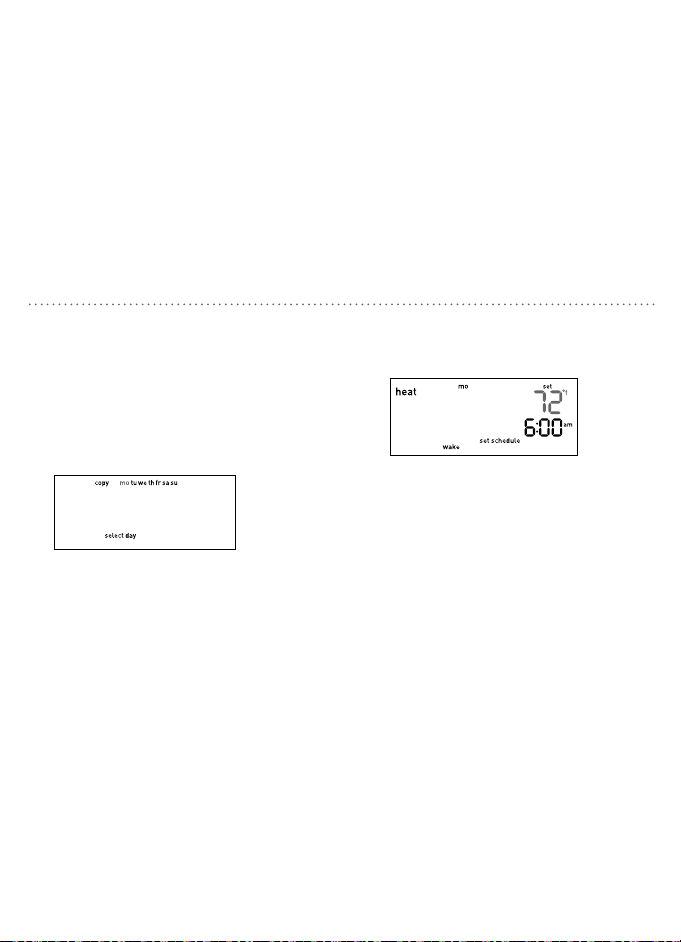
26 27
1. Cambie el termostato a MODE (modalidad)
para programar a heat o cool (calefacción o
refrigeración), según lo que desee, y presione
SET (configurar).
2. Presione p/q para desplazarse entre días y
presione SET (configurar) cuando el día que
desee programar esté destellando.
3. Presione p/q para seleccionar la hora
de inicio de despertar y presione SET
(configurar) para aceptar la hora.
MODIFICACIÓN DEL HORARIO PROGRAMADO
4. Presione p/q para configurar la
temperatura al despertarse y presione
SET (configurar) para aceptar la
temperatura y proceder.
5. Siga los pasos 3 y 4 para configurar la
hora y la temperatura de los períodos
restantes.
6. Continúe configurando cada día
individualmente o utilice la función de
copia para copiar un día para el siguiente
(consulte la página 25) o presione RUN
(ejecutar) para guardar y salir.
Del menú de los días de la semana puede
copiar un horario de un solo día a uno o
más días. Para acceder a ese menú, si no
está aún allí, cambie el termostato a MODE
(modalidad) para programar a heat o cool
(calefacción o refrigeración), según lo que
desee, y presione SET (configurar).
1. Presione p/q para desplazarse a
copiar y presione SET (configurar)
cuando la palabra “copy” (copiar) esté
destellando.
Las palabras “copy from” (copiar de)
aparecerán en la pantalla.
Las palabras “copy to” (copiar a)
aparecerán en la pantalla.
USO DE LA FUNCIÓN DE COPIA
2. Presione p/q para seleccionar el día que
desea copiar y presione SET (configurar)
cuando ese día esté destellando.
3. Presione p/q para seleccionar el día al
que desea copiarlo. Puede seleccionar
un día individual o todos para copiar su
horario a cada día de la semana.
4. Presione SET (configurar) para avanzar
al siguiente paso. Para salir, presione
RUN (ejecutar).
Downloaded from www.ManualsFile.com manuals search engine
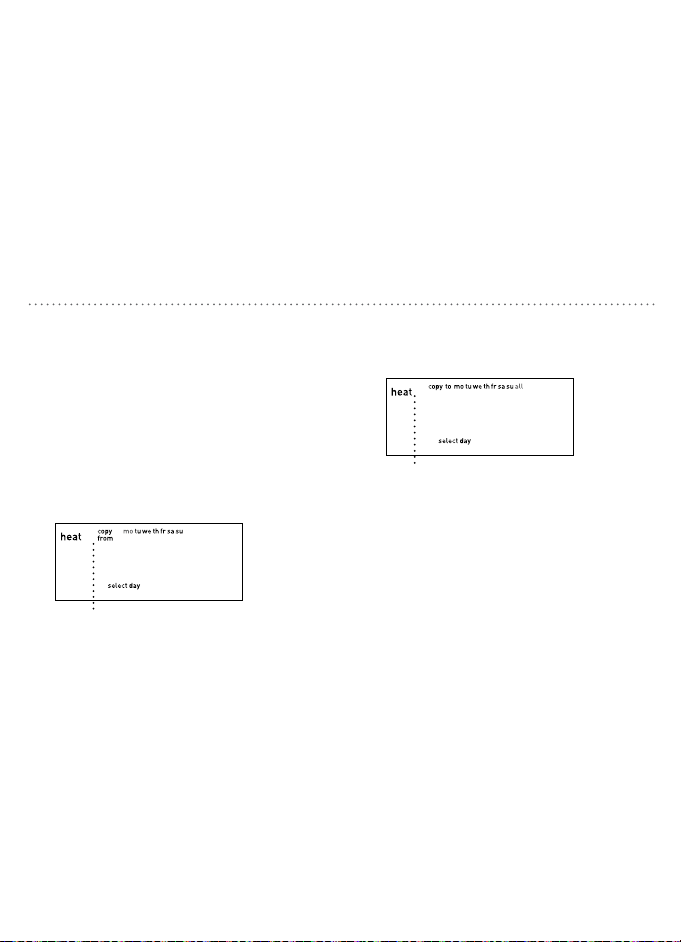
26 27
1. Cambie el termostato a MODE (modalidad)
para programar a heat o cool (calefacción o
refrigeración), según lo que desee, y presione
SET (configurar).
2. Presione p/q para desplazarse entre días y
presione SET (configurar) cuando el día que
desee programar esté destellando.
3. Presione p/q para seleccionar la hora
de inicio de despertar y presione SET
(configurar) para aceptar la hora.
MODIFICACIÓN DEL HORARIO PROGRAMADO
4. Presione p/q para configurar la
temperatura al despertarse y presione
SET (configurar) para aceptar la
temperatura y proceder.
5. Siga los pasos 3 y 4 para configurar la
hora y la temperatura de los períodos
restantes.
6. Continúe configurando cada día
individualmente o utilice la función de
copia para copiar un día para el siguiente
(consulte la página 25) o presione RUN
(ejecutar) para guardar y salir.
Del menú de los días de la semana puede
copiar un horario de un solo día a uno o
más días. Para acceder a ese menú, si no
está aún allí, cambie el termostato a MODE
(modalidad) para programar a heat o cool
(calefacción o refrigeración), según lo que
desee, y presione SET (configurar).
1. Presione p/q para desplazarse a
copiar y presione SET (configurar)
cuando la palabra “copy” (copiar) esté
destellando.
Las palabras “copy from” (copiar de)
aparecerán en la pantalla.
Las palabras “copy to” (copiar a)
aparecerán en la pantalla.
USO DE LA FUNCIÓN DE COPIA
2. Presione p/q para seleccionar el día que
desea copiar y presione SET (configurar)
cuando ese día esté destellando.
3. Presione p/q para seleccionar el día al
que desea copiarlo. Puede seleccionar
un día individual o todos para copiar su
horario a cada día de la semana.
4. Presione SET (configurar) para avanzar
al siguiente paso. Para salir, presione
RUN (ejecutar).
Downloaded from www.ManualsFile.com manuals search engine
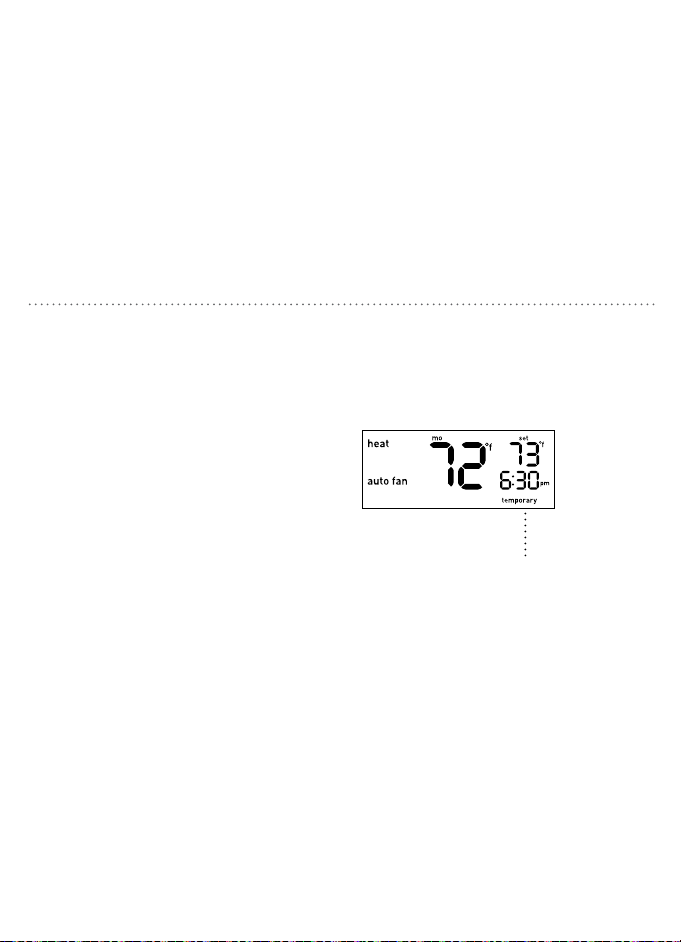
28 29
Presione p/q para elevar o disminuir
la temperatura. Este ajuste temporal
permanecerá hasta la hora de inicio del
siguiente período. La palabra “temporary”
(temporal) aparecerá en la pantalla
informándole que se ha ajustado la
temperatura.
Nota: Presionar el botón p/q una vez encenderá
la iluminación de fondo. Para cambiar el punto de
ajuste de la temperatura presione cualquier botón
más de una vez.
ANULACIÓN TEMPORAL DEL HORARIO
Puede eliminar la configuración temporal
en cualquier momento presionando RUN
(ejecutar); el sistema regresará al horario
previamente programado.
La palabra “temporary” (temporal)
aparecerá en la pantalla.
ANULACIÓN PERMANENTE DE HORARIOS
Presione HOLD (suspender) para anular el
horario programado. Todos los cambios de
temperatura programados para todos los
períodos se ignorarán.
Mientras el sistema está en hold
(asuspender) puede cambiar manualmente
la temperatura en cualquier momento dado
presionando p/q. El termostato mantendrá
este cambio de temperatura hasta que lo
cambie manualmente de nuevo o elimine la
suspensión.
Puede eliminar la suspensión en cualquier
momento presionando RUN (ejecutar), el
sistema regresará al horario previamente
programado.
La palabra “hold” (suspender) aparecerá
en la pantalla.
Downloaded from www.ManualsFile.com manuals search engine
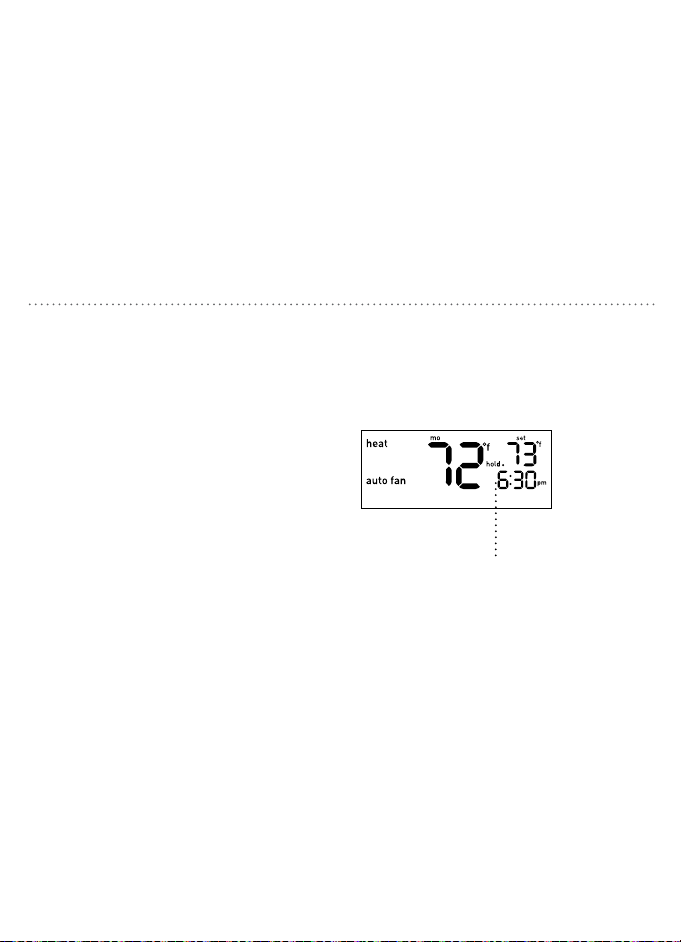
28 29
Presione p/q para elevar o disminuir
la temperatura. Este ajuste temporal
permanecerá hasta la hora de inicio del
siguiente período. La palabra “temporary”
(temporal) aparecerá en la pantalla
informándole que se ha ajustado la
temperatura.
Nota: Presionar el botón p/q una vez encenderá
la iluminación de fondo. Para cambiar el punto de
ajuste de la temperatura presione cualquier botón
más de una vez.
ANULACIÓN TEMPORAL DEL HORARIO
Puede eliminar la configuración temporal
en cualquier momento presionando RUN
(ejecutar); el sistema regresará al horario
previamente programado.
La palabra “temporary” (temporal)
aparecerá en la pantalla.
ANULACIÓN PERMANENTE DE HORARIOS
Presione HOLD (suspender) para anular el
horario programado. Todos los cambios de
temperatura programados para todos los
períodos se ignorarán.
Mientras el sistema está en hold
(asuspender) puede cambiar manualmente
la temperatura en cualquier momento dado
presionando p/q. El termostato mantendrá
este cambio de temperatura hasta que lo
cambie manualmente de nuevo o elimine la
suspensión.
Puede eliminar la suspensión en cualquier
momento presionando RUN (ejecutar), el
sistema regresará al horario previamente
programado.
La palabra “hold” (suspender) aparecerá
en la pantalla.
Downloaded from www.ManualsFile.com manuals search engine
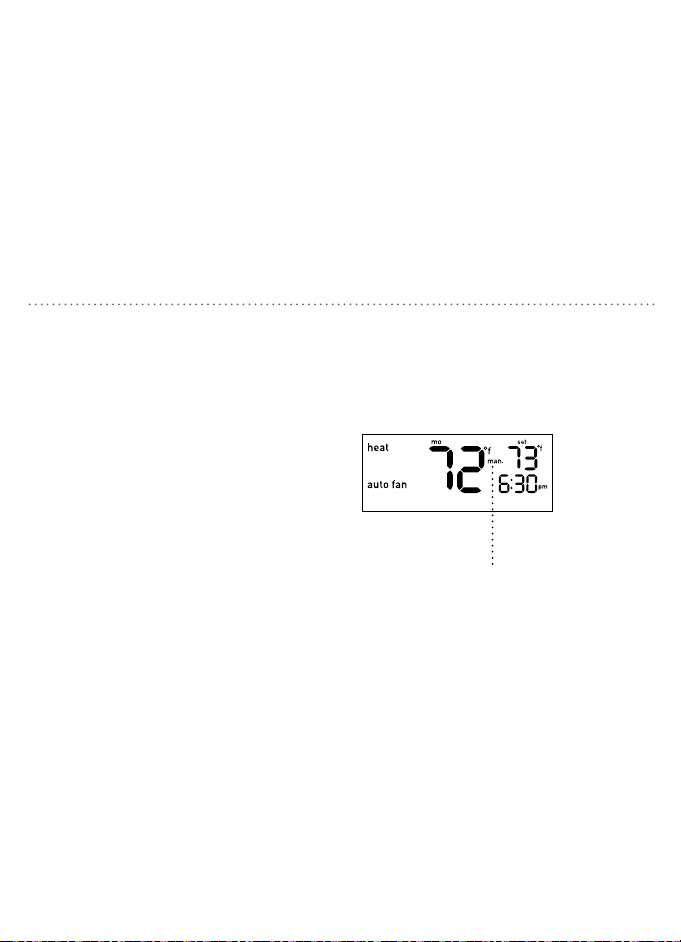
30 31
Presione HOLD (suspender) durante cinco
segundos hasta que el indicador “man.”
(manual) aparezca en la pantalla.
Su termostato funciona ahora como un
dispositivo no programable sin ningún
programa de horario. SET (configurar),
RUN (ejecutar) y HOLD (suspender) no
trabajarán en esta configuración. Si está
muy cálido o muy frío, podrá cambiar
manualmente la temperatura. Presione
p/q para elevar o disminuir la temperatura.
DESACTIVACIÓN DE HORARIOS
Puede salir de la configuración manual
en cualquier momento presionando RUN
(ejecutar) durante cinco segundos; el
sistema regresará al horario previamente
programado.
La palabra “man.” (manual)
aparecerá en la pantalla.
PROTECCIÓN INTEGRADA DEL COMPRESOR
Esta función contribuye a proteger de
daños el compresor de su sistema de aire
acondicionado o bomba de calor. Obliga al
compresor a esperar cinco minutos después
de apagarlo antes de que se pueda activar
nuevamente. El icono de indicación de
MODE (modalidad) pertinente destellará
en la pantalla cuando esta función esté
trabajando.
/ El icono de heat (calefacción) o
cool (refrigeración) destellará cuando
se esté implementando el tiempo de
apagado mínimo.
Downloaded from www.ManualsFile.com manuals search engine
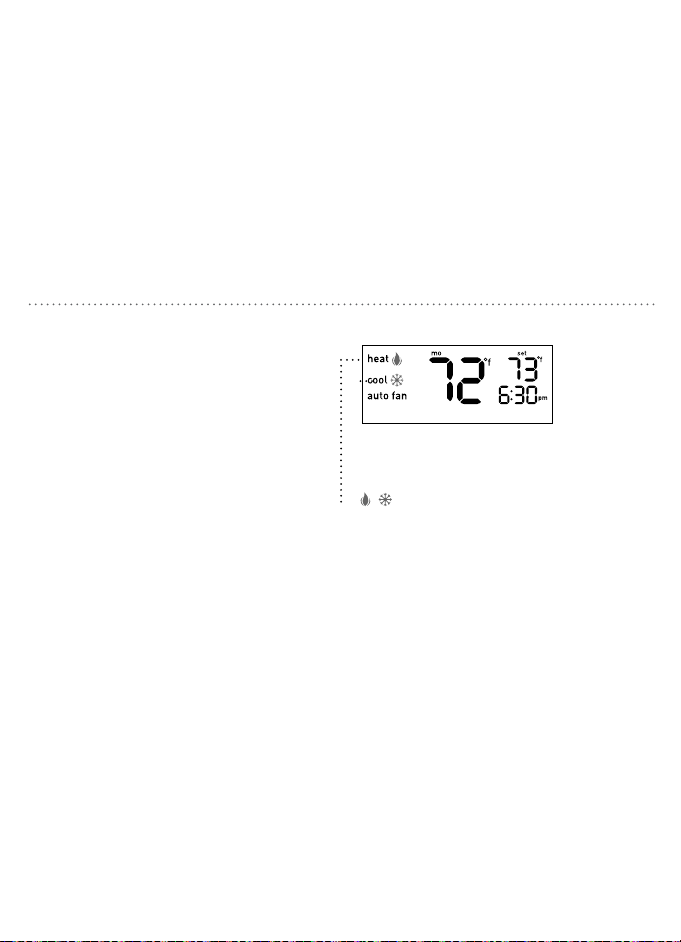
30 31
Presione HOLD (suspender) durante cinco
segundos hasta que el indicador “man.”
(manual) aparezca en la pantalla.
Su termostato funciona ahora como un
dispositivo no programable sin ningún
programa de horario. SET (configurar),
RUN (ejecutar) y HOLD (suspender) no
trabajarán en esta configuración. Si está
muy cálido o muy frío, podrá cambiar
manualmente la temperatura. Presione
p/q para elevar o disminuir la temperatura.
DESACTIVACIÓN DE HORARIOS
Puede salir de la configuración manual
en cualquier momento presionando RUN
(ejecutar) durante cinco segundos; el
sistema regresará al horario previamente
programado.
La palabra “man.” (manual)
aparecerá en la pantalla.
PROTECCIÓN INTEGRADA DEL COMPRESOR
Esta función contribuye a proteger de
daños el compresor de su sistema de aire
acondicionado o bomba de calor. Obliga al
compresor a esperar cinco minutos después
de apagarlo antes de que se pueda activar
nuevamente. El icono de indicación de
MODE (modalidad) pertinente destellará
en la pantalla cuando esta función esté
trabajando.
/ El icono de heat (calefacción) o
cool (refrigeración) destellará cuando
se esté implementando el tiempo de
apagado mínimo.
Downloaded from www.ManualsFile.com manuals search engine

32 33
FUNCIONALIDAD DE INICIO TEMPRANO MANTENIMIENTO DEL TERMOSTATO
Esta función permite que el sistema de
calefacción o refrigeración se active antes
de la hora de inicio programada para que
la temperatura de la habitación sea la
configurada a la hora de inicio.
Ejemplo:
Su hora de despertar está configurada
para las 6:30 a.m. con una temperatura de 72 °F
(22.2 °C). Su sistema se encenderá antes de las 6:30
a.m. para que la temperatura esté en 72 °F (22.2 °C)
cuando despierte.
Nota: Para activar esta función, consulte la página
17.
Para evitar daños al lente transparente del
termostato, limpie con agua y jabón suave
únicamente y use un paño suave de algodón.
NO use toallas de papel ni otras telas
abrasivas. NO rocíe líquido directamente en
el termostato.
Se recomienda el reemplazo de las baterías
del termostato una vez al año o antes de
marcharse de la vivienda por un período
prolongado de tiempo.
1. Cambie la modalidad del sistema a off
(apagado) antes de cambiar las baterías.
2. Retire el cuerpo del termostato de
la base halándolo suavemente para
separarlo.
3. Dele vuelta al termostato y retire las
baterías existentes.
4. Reemplácelas con baterías alcalinas
AAA Energizer® o Duracell®,
observando cuidadosamente las
polaridades requeridas.
5. Vuelva a instalar el cuerpo del termostato
en su base presionándolo suavemente
hasta que calce en su lugar.
Nota: Si no se cambian las baterías en el lapso de 7
días después de que aparezca Indicador de batería
con poca carga en la pantalla, la temperatura
establecida aumentará 10 °F en la modalidad cool
(refrigeración) o disminuirá 10 °F en la modalidad
heat (calefacción) como recordatorio adicional.
Después de 90 días o menos, dependiendo de las
condiciones de las baterías, el sistema se apagará
y el Indicador de batería con poca carga destellará
en la pantalla.
ADVERTENCIA: No cambiar las baterías
oportunamente puede provocar que la
calefacción o la refrigeración funcionen
de manera incontrolable.
REEMPLAZO DE LAS BATERÍAS
Downloaded from www.ManualsFile.com manuals search engine
32 33
FUNCIONALIDAD DE INICIO TEMPRANO MANTENIMIENTO DEL TERMOSTATO
Esta función permite que el sistema de
calefacción o refrigeración se active antes
de la hora de inicio programada para que
la temperatura de la habitación sea la
configurada a la hora de inicio.
Ejemplo:
Su hora de despertar está configurada
para las 6:30 a.m. con una temperatura de 72 °F
(22.2 °C). Su sistema se encenderá antes de las 6:30
a.m. para que la temperatura esté en 72 °F (22.2 °C)
cuando despierte.
Nota: Para activar esta función, consulte la página
17.
Para evitar daños al lente transparente del
termostato, limpie con agua y jabón suave
únicamente y use un paño suave de algodón.
NO use toallas de papel ni otras telas
abrasivas. NO rocíe líquido directamente en
el termostato.
Se recomienda el reemplazo de las baterías
del termostato una vez al año o antes de
marcharse de la vivienda por un período
prolongado de tiempo.
1. Cambie la modalidad del sistema a off
(apagado) antes de cambiar las baterías.
2. Retire el cuerpo del termostato de
la base halándolo suavemente para
separarlo.
3. Dele vuelta al termostato y retire las
baterías existentes.
4. Reemplácelas con baterías alcalinas
AAA Energizer® o Duracell®,
observando cuidadosamente las
polaridades requeridas.
5. Vuelva a instalar el cuerpo del termostato
en su base presionándolo suavemente
hasta que calce en su lugar.
Nota: Si no se cambian las baterías en el lapso de 7
días después de que aparezca Indicador de batería
con poca carga en la pantalla, la temperatura
establecida aumentará 10 °F en la modalidad cool
(refrigeración) o disminuirá 10 °F en la modalidad
heat (calefacción) como recordatorio adicional.
Después de 90 días o menos, dependiendo de las
condiciones de las baterías, el sistema se apagará
y el Indicador de batería con poca carga destellará
en la pantalla.
ADVERTENCIA: No cambiar las baterías
oportunamente puede provocar que la
calefacción o la refrigeración funcionen
de manera incontrolable.
REEMPLAZO DE LAS BATERÍAS
Downloaded from www.ManualsFile.com manuals search engine

34 35
Problema: No se activa el sistema de calefacción/refrigeración
Solución:
1. Verifique que el interruptor de modalidad esté en la modalidad adecuada de heat
(calefacción) o cool (refrigeración).
2. Revise las baterías: Reemplácelas si fuese necesario. (Consulte la sección “Reemplazo de
las baterías”, página 31).
3. Revise la temperatura. La temperatura establecida debe estar por encima de la
temperatura de la habitación en la modalidad heat (calefacción) y por debajo de la
temperatura de la habitación en la modalidad cool (refrigeración).
4. Verifique que el interruptor de encendido para Calefacción/Refrigeración no esté apagado.
5. Verifique que el interruptor de circuito no se haya disparado.
6. Verifique que la puerta del sistema de calefacción esté cerrada de forma segura.
7. Revise si hay cableado suelto o cruzado en el terminal cableado del termostato.
8. Verifique que los cables de cobre no estén expuestos ni tocando otros cables.
9. Verifique que el configuración del puente de la bomba de calor esté en la modalidad
adecuada. (Consulte la pagina 12)
10. Verifique que el configuración del puente de control del ventilador esté en la modalidad
adecuada. (Consulte la pagina 13)
LOCALIZACIÓN Y SOLUCIÓN DE PROBLEMAS
Problema:
El ventilador no funciona/funciona continuamente
Solución:
1. Si el ventilador funciona continuamente, verifique que el termostato esté en la posición
AUTO (automático) y no en la posición ON (activado).
2. No toque el termostato durante 30 minutos para permitir que la temperatura se estabilice.
3. Verifique que el cable G del terminal cableado del termostato esté conectado
adecuadamente.
4. Verifique que el interruptor de encendido para Calefacción/Refrigeración no esté apagado.
5. Verifique que el interruptor de circuito no se haya disparado.
6. Verifique que la puerta del sistema de calefacción esté cerrada de forma segura.
7. Revise si hay cableado suelto o cruzado en el terminal cableado del termostato.
8. Verifique que los cables de cobre no estén expuestos ni tocando otros cables.
9. Verifique que el configuración del puente de control del ventilador esté en la modalidad
adecuada. (Consulte la pagina 13)
LOCALIZACIÓN Y SOLUCIÓN DE PROBLEMAS
Downloaded from www.ManualsFile.com manuals search engine

34 35
Problema: No se activa el sistema de calefacción/refrigeración
Solución:
1. Verifique que el interruptor de modalidad esté en la modalidad adecuada de heat
(calefacción) o cool (refrigeración).
2. Revise las baterías: Reemplácelas si fuese necesario. (Consulte la sección “Reemplazo de
las baterías”, página 31).
3. Revise la temperatura. La temperatura establecida debe estar por encima de la
temperatura de la habitación en la modalidad heat (calefacción) y por debajo de la
temperatura de la habitación en la modalidad cool (refrigeración).
4. Verifique que el interruptor de encendido para Calefacción/Refrigeración no esté apagado.
5. Verifique que el interruptor de circuito no se haya disparado.
6. Verifique que la puerta del sistema de calefacción esté cerrada de forma segura.
7. Revise si hay cableado suelto o cruzado en el terminal cableado del termostato.
8. Verifique que los cables de cobre no estén expuestos ni tocando otros cables.
9. Verifique que el configuración del puente de la bomba de calor esté en la modalidad
adecuada. (Consulte la pagina 12)
10. Verifique que el configuración del puente de control del ventilador esté en la modalidad
adecuada. (Consulte la pagina 13)
LOCALIZACIÓN Y SOLUCIÓN DE PROBLEMAS
Problema:
El ventilador no funciona/funciona continuamente
Solución:
1. Si el ventilador funciona continuamente, verifique que el termostato esté en la posición
AUTO (automático) y no en la posición ON (activado).
2. No toque el termostato durante 30 minutos para permitir que la temperatura se estabilice.
3. Verifique que el cable G del terminal cableado del termostato esté conectado
adecuadamente.
4. Verifique que el interruptor de encendido para Calefacción/Refrigeración no esté apagado.
5. Verifique que el interruptor de circuito no se haya disparado.
6. Verifique que la puerta del sistema de calefacción esté cerrada de forma segura.
7. Revise si hay cableado suelto o cruzado en el terminal cableado del termostato.
8. Verifique que los cables de cobre no estén expuestos ni tocando otros cables.
9. Verifique que el configuración del puente de control del ventilador esté en la modalidad
adecuada. (Consulte la pagina 13)
LOCALIZACIÓN Y SOLUCIÓN DE PROBLEMAS
Downloaded from www.ManualsFile.com manuals search engine

36 37
Problema:
Temperatura incorrecta en la habitación.
Solución:
1. No toque el termostato durante 30 minutos para permitir que la temperatura se estabilice.
2. Revise la colocación del termostato. Compruebe que no existan corrientes de aire
inusuales o que el área esté excepcionalmente cálida.
3. Verifique que el agujero de la pared donde van los cables tenga el aislante adecuado.
4. Revise el desplazamiento de la temperatura (consulte la sección Desplazamiento de la
temperatura, página 16).
Problema: Los botones debajo de la pantalla no funcionan
Solución: Verifique que el termostato no esté en la modalidad MANUAL (consulte
“Desactivación de horarios” en la página 28).
Problema: Se muestra la escala de temperatura errónea.
Solución: Consulte la sección “Formato de temperatura”, pág. 15).
LOCALIZACIÓN Y SOLUCIÓN DE PROBLEMAS
Problema: No alcanza la temperatura establecida
Solución:
1. Verifique que el interruptor MODE (modalidad) esté en la posición adecuada de heat
(calefacción) o cool (refrigeración).
2. Verifique que los sistemas de calefacción/refrigeración estén funcionando adecuadamente.
(Consulte la seccion “No se activa el sistema calefaccion/refrigeracion”, pagina 32).
3. Revise si hay cableado suelto o cruzado en el terminal cableado del termostato.
4. Revise el desplazamiento de la temperatura (consulte la sección “Desplazamiento de la
temperatura”, página 16).
5. Revise la ubicación del termostato; cerciórese de que no existan corrientes de aire
inusuales o que el área esté excepcionalmente cálida.
6. Verifique que el agujero de la pared donde van los cables tenga el aislante adecuado.
7. Verifique que el configuración del puente de control del ventilador esté en la modalidad
adecuada. (Consulte la pagina 13)
LOCALIZACIÓN Y SOLUCIÓN DE PROBLEMAS
Downloaded from www.ManualsFile.com manuals search engine

36 37
Problema:
Temperatura incorrecta en la habitación.
Solución:
1. No toque el termostato durante 30 minutos para permitir que la temperatura se estabilice.
2. Revise la colocación del termostato. Compruebe que no existan corrientes de aire
inusuales o que el área esté excepcionalmente cálida.
3. Verifique que el agujero de la pared donde van los cables tenga el aislante adecuado.
4. Revise el desplazamiento de la temperatura (consulte la sección Desplazamiento de la
temperatura, página 16).
Problema: Los botones debajo de la pantalla no funcionan
Solución: Verifique que el termostato no esté en la modalidad MANUAL (consulte
“Desactivación de horarios” en la página 28).
Problema: Se muestra la escala de temperatura errónea.
Solución: Consulte la sección “Formato de temperatura”, pág. 15).
LOCALIZACIÓN Y SOLUCIÓN DE PROBLEMAS
Problema: No alcanza la temperatura establecida
Solución:
1. Verifique que el interruptor MODE (modalidad) esté en la posición adecuada de heat
(calefacción) o cool (refrigeración).
2. Verifique que los sistemas de calefacción/refrigeración estén funcionando adecuadamente.
(Consulte la seccion “No se activa el sistema calefaccion/refrigeracion”, pagina 32).
3. Revise si hay cableado suelto o cruzado en el terminal cableado del termostato.
4. Revise el desplazamiento de la temperatura (consulte la sección “Desplazamiento de la
temperatura”, página 16).
5. Revise la ubicación del termostato; cerciórese de que no existan corrientes de aire
inusuales o que el área esté excepcionalmente cálida.
6. Verifique que el agujero de la pared donde van los cables tenga el aislante adecuado.
7. Verifique que el configuración del puente de control del ventilador esté en la modalidad
adecuada. (Consulte la pagina 13)
LOCALIZACIÓN Y SOLUCIÓN DE PROBLEMAS
Downloaded from www.ManualsFile.com manuals search engine

38 39
LOCALIZACIÓN Y SOLUCIÓN DE PROBLEMAS
Problema: La temperatura no cambia a la hora de inicio programada de un período dado
Solución:
1. Verifique que la función HOLD (suspender) no esté activa (Consulte la sección “Anulación
permanente de horarios, página 27).
2. Revise el horario programado (consulte la sección “Modificación del horario programado”,
pág. 24).
3. Verifique que el termostato no esté en la modalidad MANUAL (Consulte “Desactivación de
horarios”, página 28).
Problema: Calefacción/refrigeración del sistema no responde de inmediato
Solución:
1. Para proteger su compresor, la programacion predeterminada del termostato debe esperar
cinco minutos antes de responder. (Consulte la seccion “Ajuste del período mínimo del ciclo”,
página 18).
2. Si el problema persiste después de esperar cinco minutos, revise las baterías.
Cámbielas si fuese necesario (Consulte la sección “Reemplazo de las baterías”, página 31).
LOCALIZACIÓN Y SOLUCIÓN DE PROBLEMAS
Problema:
La temperatura establecida está 10 °F por encima (en la modalidad de refrigeración) o 10 °F por
debajo (en la modalidad de calefacción) de la temperatura deseada.
Solución: Revise las baterías: Cámbielas si fuese necesario (consulte la sección “Reemplazo de
las baterías”, página 31).
Problema: El sistema se enciende demasiado frecuentemente
Solución: El termostato Clear Comfort™ Pro de Orbit utiliza una lógica inteligente para
activarse una vez en cada período del ciclo para maximizar el confort y la estabilidad de la
temperatura. Para ajustar el período del ciclo, consulte la sección “Ajuste del período del ciclo
mínimo” página 18. Para desactivar la lógica inteligente, establezca el período del ciclo de nuevo
a la configuración por defecto de 0 (cero).
Problema: La pantalla está en blanco/el indicador de batería con poca carga está encendido
Solución:
1. Cambie las baterías (consulte la sección “Reemplazo de las baterías”, página 31).
2. Revise si hay cableado suelto o cruzado en el terminal cableado del termostato.
Downloaded from www.ManualsFile.com manuals search engine

38 39
LOCALIZACIÓN Y SOLUCIÓN DE PROBLEMAS
Problema: La temperatura no cambia a la hora de inicio programada de un período dado
Solución:
1. Verifique que la función HOLD (suspender) no esté activa (Consulte la sección “Anulación
permanente de horarios, página 27).
2. Revise el horario programado (consulte la sección “Modificación del horario programado”,
pág. 24).
3. Verifique que el termostato no esté en la modalidad MANUAL (Consulte “Desactivación de
horarios”, página 28).
Problema: Calefacción/refrigeración del sistema no responde de inmediato
Solución:
1. Para proteger su compresor, la programacion predeterminada del termostato debe esperar
cinco minutos antes de responder. (Consulte la seccion “Ajuste del período mínimo del ciclo”,
página 18).
2. Si el problema persiste después de esperar cinco minutos, revise las baterías.
Cámbielas si fuese necesario (Consulte la sección “Reemplazo de las baterías”, página 31).
LOCALIZACIÓN Y SOLUCIÓN DE PROBLEMAS
Problema:
La temperatura establecida está 10 °F por encima (en la modalidad de refrigeración) o 10 °F por
debajo (en la modalidad de calefacción) de la temperatura deseada.
Solución: Revise las baterías: Cámbielas si fuese necesario (consulte la sección “Reemplazo de
las baterías”, página 31).
Problema: El sistema se enciende demasiado frecuentemente
Solución: El termostato Clear Comfort™ Pro de Orbit utiliza una lógica inteligente para
activarse una vez en cada período del ciclo para maximizar el confort y la estabilidad de la
temperatura. Para ajustar el período del ciclo, consulte la sección “Ajuste del período del ciclo
mínimo” página 18. Para desactivar la lógica inteligente, establezca el período del ciclo de nuevo
a la configuración por defecto de 0 (cero).
Problema: La pantalla está en blanco/el indicador de batería con poca carga está encendido
Solución:
1. Cambie las baterías (consulte la sección “Reemplazo de las baterías”, página 31).
2. Revise si hay cableado suelto o cruzado en el terminal cableado del termostato.
Downloaded from www.ManualsFile.com manuals search engine

40 41
Para asistencia técnica, llame al:
1-800-488-6156 o 1-801-299-5555.
Antes de devolver este termostato a la tienda, llame al:
1-800-488-6156 o 1-801-299-5555.
Orbit, Inc.
North Salt Lake, UT 84054
www.orbitonline.com
© 2015 Orbit, Inc.
Todos los derechos reservados.
Hecho en China
ASISTENCIA AL CLIENTE
Orbit, Inc. garantiza a sus clientes que sus productos no tendrán defectos en los materiales
ni en la mano de obra durante un período de tres años a partir de la fecha de compra.
Reemplazaremos, sin cargo, el componente o los componentes defectuosos en condiciones de
uso y mantenimiento normales durante un período de hasta tres años después de la compra (se
requiere comprobante de compra). Nos reservamos el derecho de inspeccionar el componente
defectuoso antes de reemplazarlo.
Orbit, Inc. no se responsabilizará por los daños ni costos incidentales ni resultantes
ocasionados por la falla del producto. La responsabilidad de Orbit, Inc. en virtud de esta
garantía se limita únicamente al reemplazo o a la reparación de los componentes defectuosos.
Para hacer valer su garantía, devuelva la unidad a su distribuidor con una copia del recibo de
venta. Todos los nombres comerciales son marcas comerciales registradas de los fabricantes
respectivos mencionados.
INFORMACIÓN DE LA GARANTÍA
Downloaded from www.ManualsFile.com manuals search engine

40 41
Para asistencia técnica, llame al:
1-800-488-6156 o 1-801-299-5555.
Antes de devolver este termostato a la tienda, llame al:
1-800-488-6156 o 1-801-299-5555.
Orbit, Inc.
North Salt Lake, UT 84054
www.orbitonline.com
© 2015 Orbit, Inc.
Todos los derechos reservados.
Hecho en China
ASISTENCIA AL CLIENTE
Orbit, Inc. garantiza a sus clientes que sus productos no tendrán defectos en los materiales
ni en la mano de obra durante un período de tres años a partir de la fecha de compra.
Reemplazaremos, sin cargo, el componente o los componentes defectuosos en condiciones de
uso y mantenimiento normales durante un período de hasta tres años después de la compra (se
requiere comprobante de compra). Nos reservamos el derecho de inspeccionar el componente
defectuoso antes de reemplazarlo.
Orbit, Inc. no se responsabilizará por los daños ni costos incidentales ni resultantes
ocasionados por la falla del producto. La responsabilidad de Orbit, Inc. en virtud de esta
garantía se limita únicamente al reemplazo o a la reparación de los componentes defectuosos.
Para hacer valer su garantía, devuelva la unidad a su distribuidor con una copia del recibo de
venta. Todos los nombres comerciales son marcas comerciales registradas de los fabricantes
respectivos mencionados.
INFORMACIÓN DE LA GARANTÍA
Downloaded from www.ManualsFile.com manuals search engine

• Replaces thermostats for 1-stage gas furnaces with electric or gas fan,
1-stage oil systems, 1-stage heat pumps, and 1-stage cooling systems.
• Not compatible with base board heaters (or other line voltage heating),
multi-stage heating or cooling systems, or 3-wire hydronic systems.
• Requires 3 AAA baeries
Includes: Mounting Hardware, Installation Guide
• Reemplaza termostatos para sistemas de calefacción de una etapa de gas con
ventilador eléctrico o de gas, sistemas de aceite de una etapa, bombas de calor
de una etapa y sistemas de refrigeración de una etapa.
• No es compatible con los calefactores de zócalo (u otros calefactores de voltaje
en línea), sistemas de calefacción o refrigeración de etapas múltiples o sistemas
hidrónicos de tres cables.
• Requiere 3 baterías AAA
Incluye: Dotación sica de montaje, guía de instalación
83521-24 rD
Downloaded from www.ManualsFile.com manuals search engine

• Replaces thermostats for 1-stage gas furnaces with electric or gas fan,
1-stage oil systems, 1-stage heat pumps, and 1-stage cooling systems.
• Not compatible with base board heaters (or other line voltage heating),
multi-stage heating or cooling systems, or 3-wire hydronic systems.
• Requires 3 AAA baeries
Includes: Mounting Hardware, Installation Guide
• Reemplaza termostatos para sistemas de calefacción de una etapa de gas con
ventilador eléctrico o de gas, sistemas de aceite de una etapa, bombas de calor
de una etapa y sistemas de refrigeración de una etapa.
• No es compatible con los calefactores de zócalo (u otros calefactores de voltaje
en línea), sistemas de calefacción o refrigeración de etapas múltiples o sistemas
hidrónicos de tres cables.
• Requiere 3 baterías AAA
Incluye: Dotación sica de montaje, guía de instalación
83521-24 rD
Downloaded from www.ManualsFile.com manuals search engine