INSTALLER MANUAL
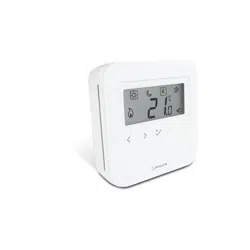
Wired Digital Thermostat
Model: AHTR5024
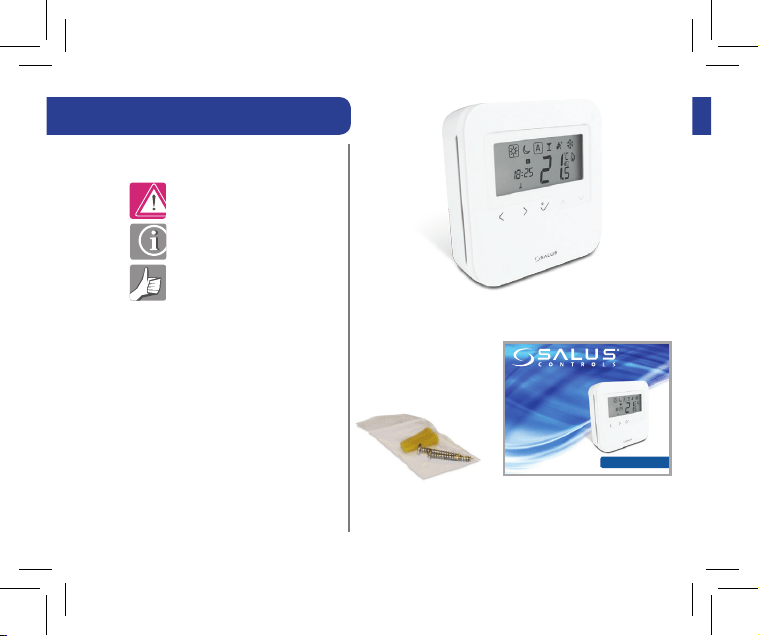
Contents of the box
Manual Contents:
Box Contents
Introduction
Product Compliance and
Safety Information
Installation
User Interface
Status/LED indication
Installers notes
Warranty
Icons used in this manual:
Safety
Important info
Your benefit
Fixing Screws 1 x Installer Manual
INSTALLER MANUAL
Wired Digital Thermostat
Model: AHTR5024
AHTR5024 Thermostat
2 AHTR5024 Instruction Manual
Product Compliance and Safety Info

Product Compliance and Safety Info
AHTR5024 Instruction Manual 3
This equipment has been tested and found to comply with the limits for a
Class B digital device, pursuant to Part 15 of the FCC Rules. These limits are
designed to provide reasonable protection against harmful interference in
a residential installation. This equipment generates uses and can radiate
radio frequency energy and, if not installed and used in accordance with
the instructions, may cause harmful interference to radio communications.
However, there is no guarantee that interference will not occur in a
particular installation. If this equipment does cause harmful interference
to radio or television reception, which can be determined by turning
the equipment off and on, the user is encouraged to try to correct the
interference by one or more of the following measures:
• Reorient or relocate the receiving antenna.
• Increase the separation between the equipment and receiver.
• Connect the equipment into an outlet on a circuit different from that to which
the receiver is connected.
• Consult the dealer or an experienced radio/TV technician for help.

4 AHTR5024 Instruction Manual
Changes or modifications not expressly approved by the party responsible
for compliance could void the user’s authority to operate the equipment.
This device complies with part 15 of the FCC Rules. Operation is subject
to the following two conditions: (1) This device may not cause harmful
interference, and (2) this device must accept any interference received,
including interference that may cause undesired operation.
This Class B digital apparatus complies with Canadian ICES-003.
Cet appareil numérique de la classe B est conforme à la norme NMB-003
du Canada.
Product Compliance and Safety Info Continued
Product Compliance and Safety Info Continued

AHTR5024 Instruction Manual 5
Safety Information
Use in compliance with safety regulations. The unit is to be used for the control of
room temperature inside the house.
Installation
This accessory must be fitted by a competent person, and installation must comply
with the guidance, standards and regulations applicable to the city, country or state
where the product is installed. Failure to comply with the relevant standards could
lead to prosecution.
Changes or modifications not expressly approved by the party responsible
for compliance could void the user’s authority to operate the equipment.
This device complies with part 15 of the FCC Rules. Operation is subject
to the following two conditions: (1) This device may not cause harmful
interference, and (2) this device must accept any interference received,
including interference that may cause undesired operation.
This Class B digital apparatus complies with Canadian ICES-003.
Cet appareil numérique de la classe B est conforme à la norme NMB-003
du Canada.
Product Compliance and Safety Info Continued

Product Description
Installing the unit
Thank you for purchasing the SALUS AHTR5024 Thermostat. This thermostat is a
device that lets you customize the heating and cooling of your home as needed.
The AHTR5024 device from SALUS North America is a stylish and accurate digital
room thermostat that is fitted with a large easy to read LCD screen and one touch
buttons. You can now simply adjust your home temperature as desired in order to
create a comfortable home environment.
We hope you enjoy our product.
Install the AHTR5024 digital room thermostat roughly about 1.5m above floor level.
It should be mounted in a location where the thermostat is easily accessible and
away from direct sunlight. You can mount the thermostat directly on the wall or you
can install it on top of a wall-box.
6 AHTR5024 Instruction Manual
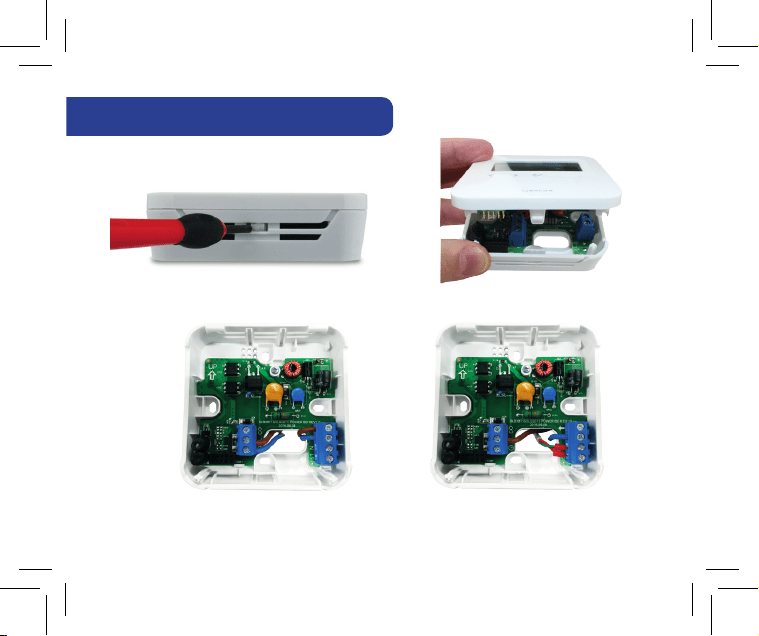
1. Mounting the Thermostat
Gently remove front housing.
Without floor sensor With floor sensor
Thank you for purchasing the SALUS AHTR5024 Thermostat. This thermostat is a
device that lets you customize the heating and cooling of your home as needed.
The AHTR5024 device from SALUS North America is a stylish and accurate digital
room thermostat that is fitted with a large easy to read LCD screen and one touch
buttons. You can now simply adjust your home temperature as desired in order to
create a comfortable home environment.
We hope you enjoy our product.
Install the AHTR5024 digital room thermostat roughly about 1.5m above floor level.
It should be mounted in a location where the thermostat is easily accessible and
away from direct sunlight. You can mount the thermostat directly on the wall or you
can install it on top of a wall-box.
AHTR5024 Instruction Manual 7
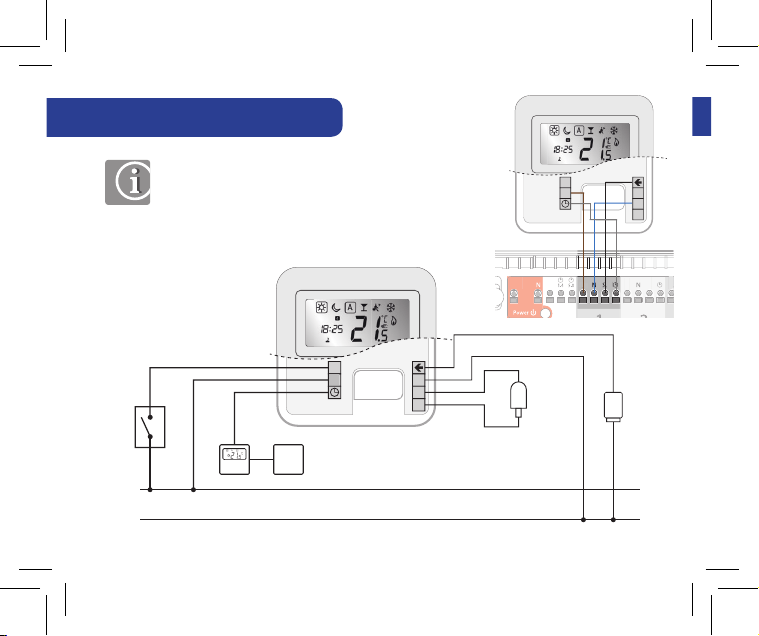
2. Terminal Connection
N
N
L
CO
L
N
S1
ACTUATOR
OPTIONAL
EXTERNAL
PROBE
E.G.
HEAT
PUMP
OUTPUT
TO MULTIPLE
DEVICES
NSB
OUTPUT
230VAC
50Hz
N
CO
L
N
S1
Note: You can wire the thermostat directly to
the AKL08 wiring centre or to an actuator
(purchased separatly).
8 AHTR5024 Instruction Manual
24VAC
50Hz
H
H
H
H
N
CO
L
N
S1
L
N
CO
L
N
S1
H
N
CO
L
N
S1
H
N
CO
L
N
S1
H
N
CO
L
N
S1
SH
N
CO
L
N
S1
H
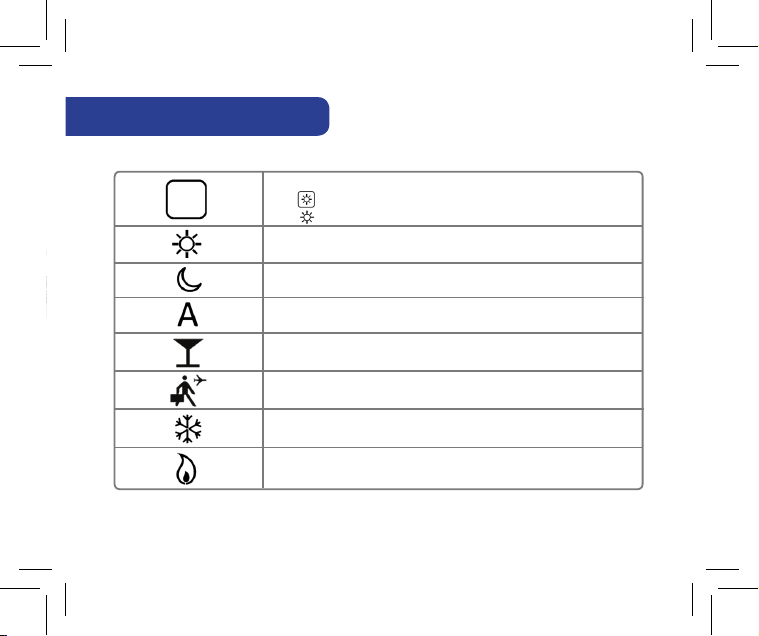
3. Thermostat Icons
BOX means to select mode.
e.g. means Hi temp is selected
means the Hi temp is not selected.
Sunny: Hi comfortable temperature
Moon: Low comfortable temperature
Indicates AUTO ON or AUTO OFF
Frost Protection Indicator:
Frost protection is active, not available in cooling mode.
Indicates that the Party Mode is active
Indicates that the Holiday Mode is ON.
Heat Mode indicator: Indicates heating is running
N
CO
L
N
S1
AHTR5024 Instruction Manual 9
N
CO
L
N
S1
H
5. Button Functions
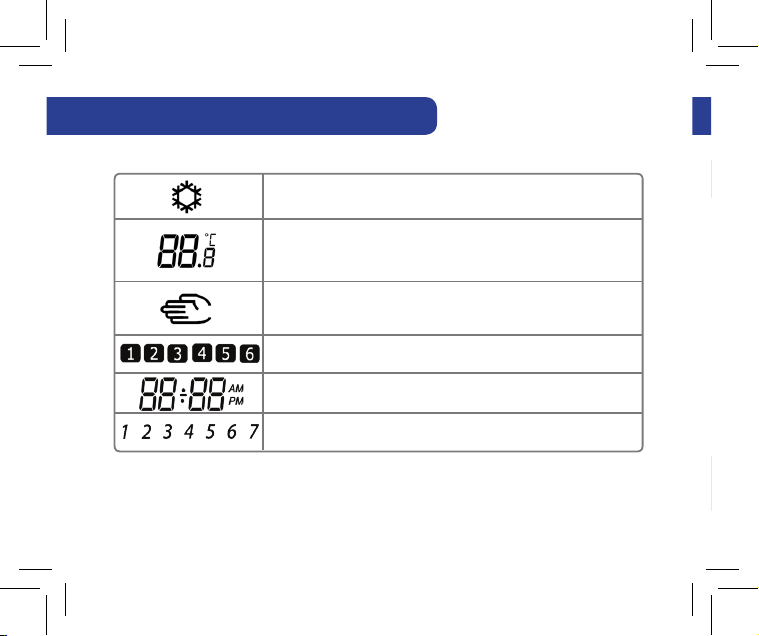
4. Thermostat Icons Continued
Programs number indicator.
Indicates the time.
Indicates the the day of the week
Temporary override indicator:
The hand will appear until the next programs starting time.
Cool Mode indicator:
The icon is flashing when cooling mode is active
Temperature indicator
• Display the room temperature
• Display the set temp
10 AHTR5024 Instruction Manual
5. Button Functions
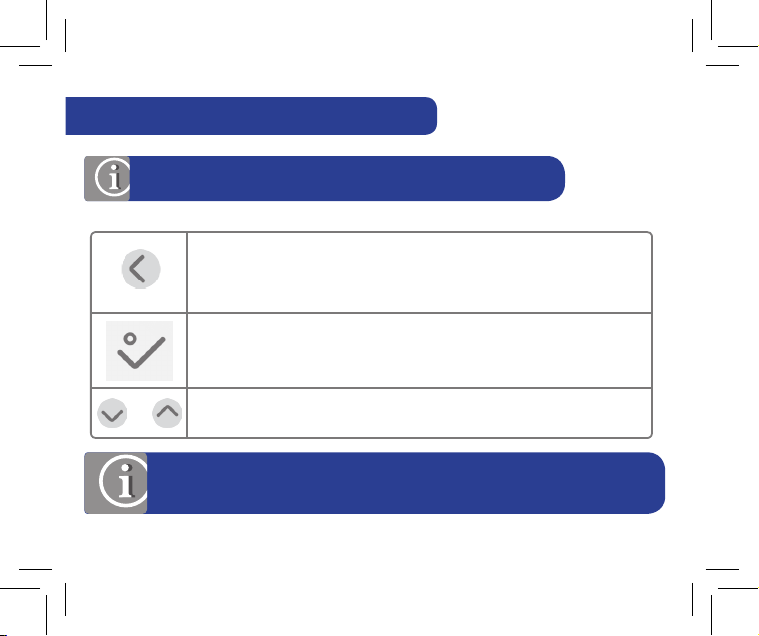
Mode selection.
Long press to return home without saving.
OK key. Short press to confirm selection.
Long press to save and return home.
Long press to enter Temperature offset Heat/Cool.
Decrease or increase Setpoint Temperature.
OR
Note: LCD backlight is activated by pressing any key.
Temporary override indicator:
The hand will appear until the next programs starting time.
AHTR5024 Instruction Manual 11
Note: For changing the temperature display from °C to °F , go to
Installer Mode Menu and change d00 value to 1.
6. Setting Date and Time
6. Setting Date and Time
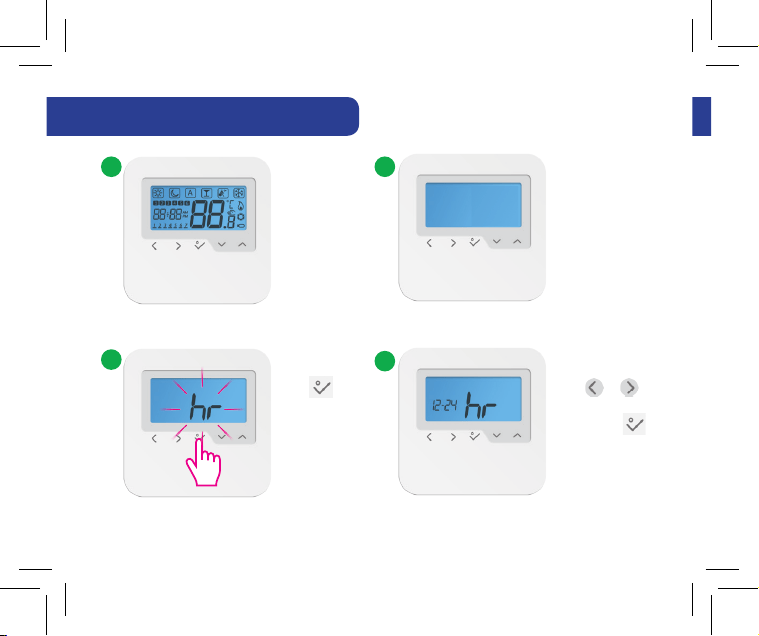
When you first power up your device you
will have to set up the date and time.
Press to
confirm.
Press or to
choose 12/24 hr
then press
to confirm.
3
1 2
4
12 AHTR5024 Instruction Manual
X.x
6. Setting Date and Time
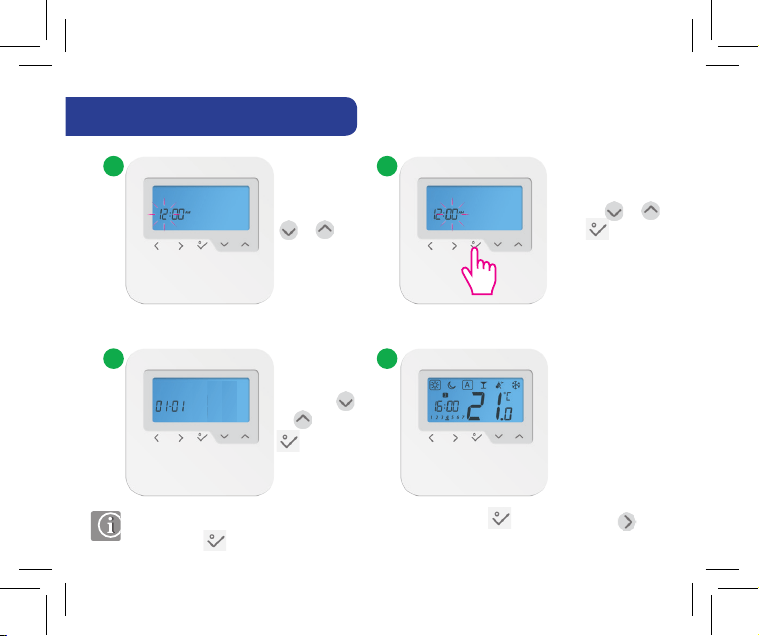
Set the hour
by using
or
Set the minutes
by using or .
Press to
confirm.
5 6
Set the date
using the
or . Press
to confirm.
7 8
Note: You can access the date and hour by long pressing . After that press
and to confirm.
When you first power up your device you
will have to set up the date and time.
AHTR5024 Instruction Manual 13
16
7. Setting Your Programs
Program Prole 1
7. Setting Your Programs
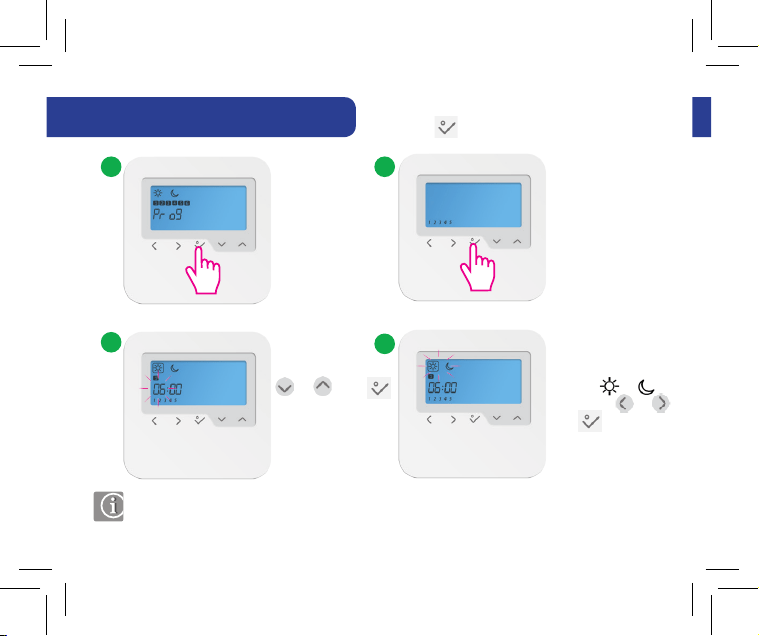
You can customise your programs by long
pressing when on the program screen.
3
2
4
1
Set the hour using
or . Press
to confirm. Repeat
the procedure for
setting the minutes.
Select the desired
program or
by pressing or .
Press to confirm.
Note: If you want to select another Program Profile (from the available 5), please enter
in Installer Mode, choose option d17 and after that select the desired program.
14 AHTR5024 Instruction Manual
7. Setting Your Programs
You can select and customise
any of the following programs:
Program Prole 1
5 days (Monday to Friday)
Program
Program
Time
Heat set
point
Cool set
point
1 6:00 Sunny Sunny
2 9:00 Moon Moon
3 16:00 Sunny Sunny
4 23:00 Moon Moon
5 --:-- --:-- --:--
6 --:-- --:-- --:--
2 days (Saturday to Sunday)
Program
Program
Time
Heat set
point
Cool set
point
1 7:00 Sunny Sunny
2 23:00 Moon Moon
3 --:-- --:-- --:--
4 --:-- --:-- --:--
5 --:-- --:-- --:--
6 --:-- --:-- --:--
You can customise your programs by long
pressing when on the program screen.
Select the desired
program or
by pressing or .
Press to confirm.
Note: If you want to select another Program Profile (from the available 5), please enter
in Installer Mode, choose option d17 and after that select the desired program.
AHTR5024 Instruction Manual 15
7. Setting Your Programs
Program Prole 3
7. Setting Your Programs
Program Prole 2
5 days (Monday to Friday)
Program
Program
Time
Heat set
point
Cool set
point
1 6:00 Sunny Sunny
2 22:30 Moon Moon
3 --:-- --:-- --:--
4 --:-- --:-- --:--
5 --:-- --:-- --:--
6 --:-- --:-- --:--
2 days (Saturday to Sunday)
Program
Program
Time
Heat set
point
Cool set
point
1 7:00 Sunny Sunny
2 23:00 Moon Moon
3 --:-- --:-- --:--
4 --:-- --:-- --:--
5 --:-- --:-- --:--
6 --:-- --:-- --:--
16 AHTR5024 Instruction Manual
7. Setting Your Programs
Program Prole 3
5 days (Monday to Friday)
Program
Program
Time
Heat set
point
Cool set
point
1 5:00 Sunny Sunny
2 8:00 Moon Moon
3 14:00 Sunny Sunny
4 22:00 Moon Moon
5 --:-- --:-- --:--
6 --:-- --:-- --:--
2 days (Saturday to Sunday)
Program
Program
Time
Heat set
point
Cool set
point
1 7:30 Sunny Sunny
2 22:30 Moon Moon
3 --:-- --:-- --:--
4 --:-- --:-- --:--
5 --:-- --:-- --:--
6 --:-- --:-- --:--
Program Prole 2
AHTR5024 Instruction Manual 17
Program Prole 5
7. Setting Your Programs
Program Prole 4
5 days (Monday to Friday)
Program
Program
Time
Heat set
point
Cool set
point
1 6:00 Sunny Sunny
2 9:00 Moon Moon
3 15:00 Sunny Sunny
4 22:30 Moon Moon
5 --:-- --:-- --:--
6 --:-- --:-- --:--
2 days (Saturday to Sunday)
Program
Program
Time
Heat set
point
Cool set
point
1 7:30 Sunny Sunny
2 23:00 Moon Moon
3 --:-- --:-- --:--
4 --:-- --:-- --:--
5 --:-- --:-- --:--
6 --:-- --:-- --:--
18 AHTR5024 Instruction Manual
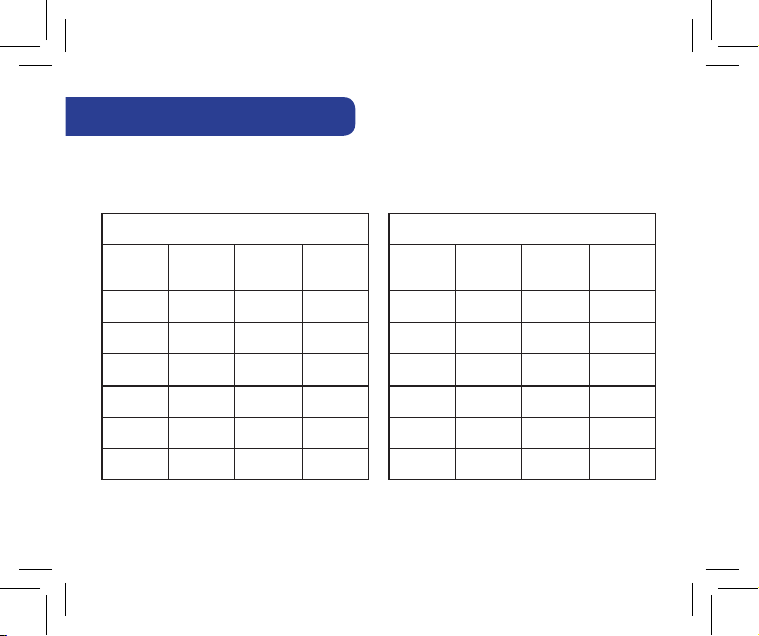
7. Setting Your Programs
Program Prole 5
5 days (Monday to Friday)
Program
Program
Time
Heat set
point
Cool set
point
1 6:00 Sunny Sunny
2 10:00 Moon Moon
3 16:00 Sunny Sunny
4 23:00 Moon Moon
5 --:-- --:-- --:--
6 --:-- --:-- --:--
2 days (Saturday to Sunday)
Program
Program
Time
Heat set
point
Cool set
point
1 7:30 Sunny Sunny
2 23:30 Moon Moon
3 --:-- --:-- --:--
4 --:-- --:-- --:--
5 --:-- --:-- --:--
6 --:-- --:-- --:--
Program Prole 4
AHTR5024 Instruction Manual 19
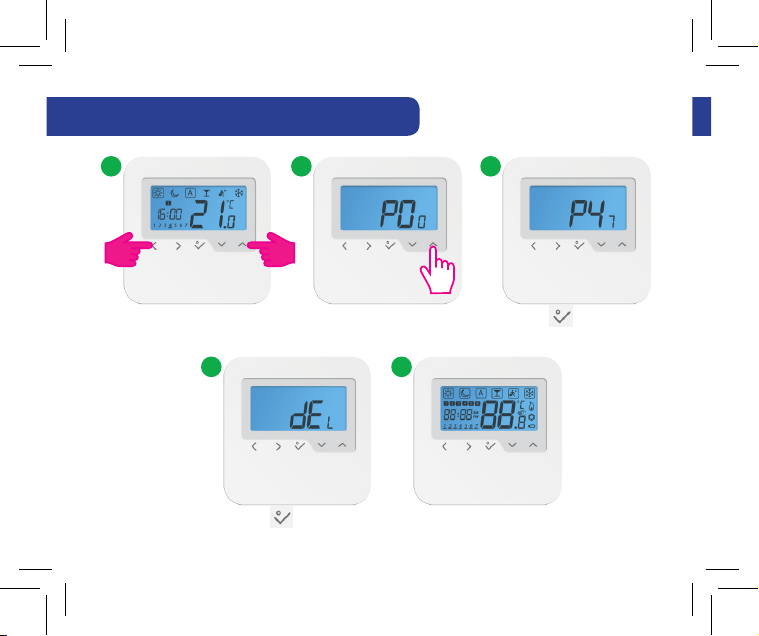
9. Installer Mode
8. How to reset the thermostat
31 2
Press the indicated keys
together for 3 seconds.
Select P47 if you want to
reset to factory settings.
Press to confirm.
4 5
Press to confirm.
20 AHTR5024 Instruction Manual
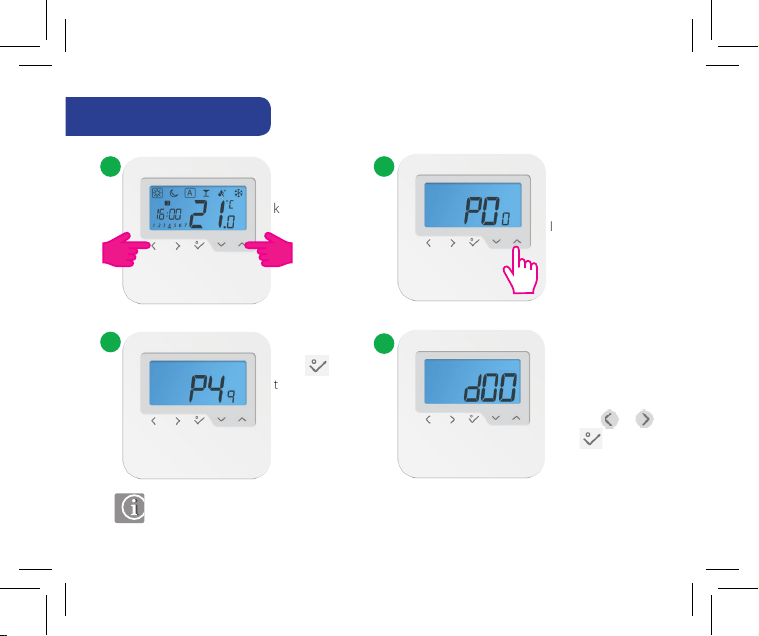
9. Installer Mode
Select P49 if you
want to enter
Installer Mode.
You have reached
the Installer Mode.
Select your option
by using or .
Press to confirm.
Press
to confirm.
Press the indicated
keys together for
3 seconds.
3
1 2
4
Note: This function allows you to customise your thermostat as you desire.
In order to do this please consult the tables on the next pages.
AHTR5024 Instruction Manual 21
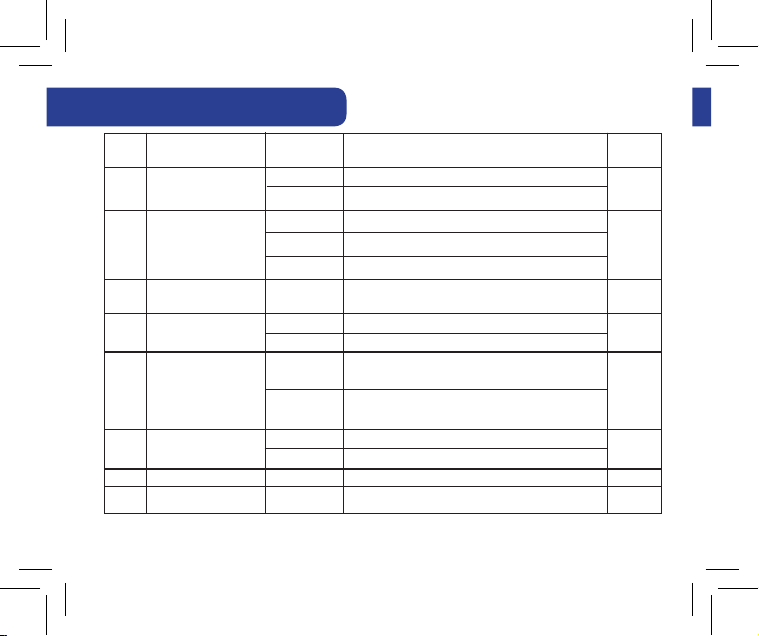
10. Functions explained
10. Functions explained
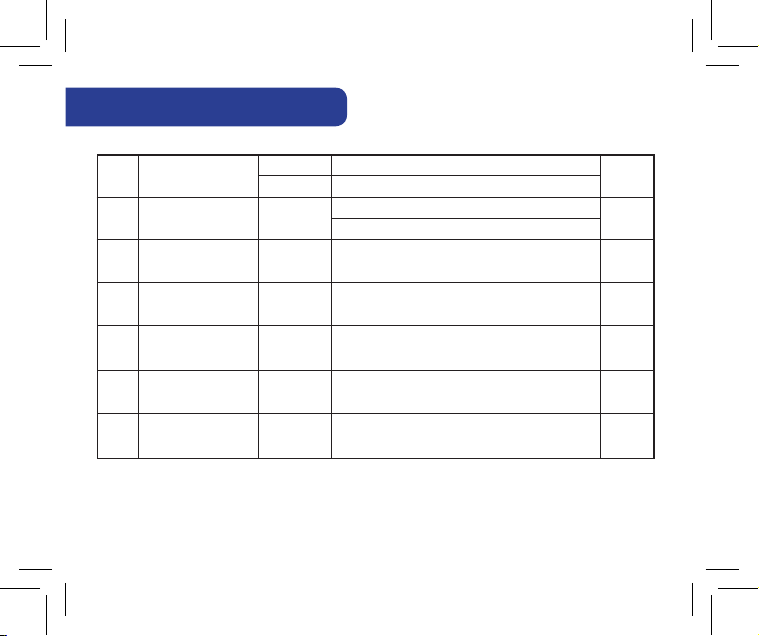
d05
dxx
d01
d02
d07
d08
d03
d04
Heating Control
Room temp. oset
Valve Protection
Frost Setpoint
OUT sensor probe (S1/S2)
Air sensor or Floor sensor
Cooling Control
0
-3.0oC to + 3.0oC
0/1
5ºC - 17ºC
0
0
1
2
1
1
1
2
PWM (Pulse-width modulation)
Oset room temp measuring error (in 0.5ºC / 32.9 oF)
0 = VP disabled 1 = Enable
Out sensor probe not connected
A: if d03 = 0, IN sensor controls Tr
ON-OFF: 0.5ºC (± 0.25ºC) / 32.9 oF (±32.45 oF)
F: if d03 = 0, IN sensor controls Tr
A: if d03 = 1, IN disabled and OUT controls Tr
ON-OFF: 1.0ºC (± 0.5ºC) / 33.8 oF (± 32.9 oF)
F: if d03 = 1, IN disabled and OUT controls Tr Floor Protection
Out sensor probe connected
ON-OFF: 0.5ºC (± 0.25ºC) / 32.9 oF (±32.45 oF)
ON-OFF: 1.0ºC (± 0.5ºC) / 33.8 oF (± 32.9 oF)
0
0.0ºC / 32 oF
1
5.0ºC / 41 oF
0
0
2
D setting function
Parameter/
Values
Default
value
Denition
22 AHTR5024 Instruction Manual
d00
Select oC/oF
0
1
Select oC
Select oF
0
26.6 oF to 37.4 oF
41 oF - 62.6oF
10. Functions explained
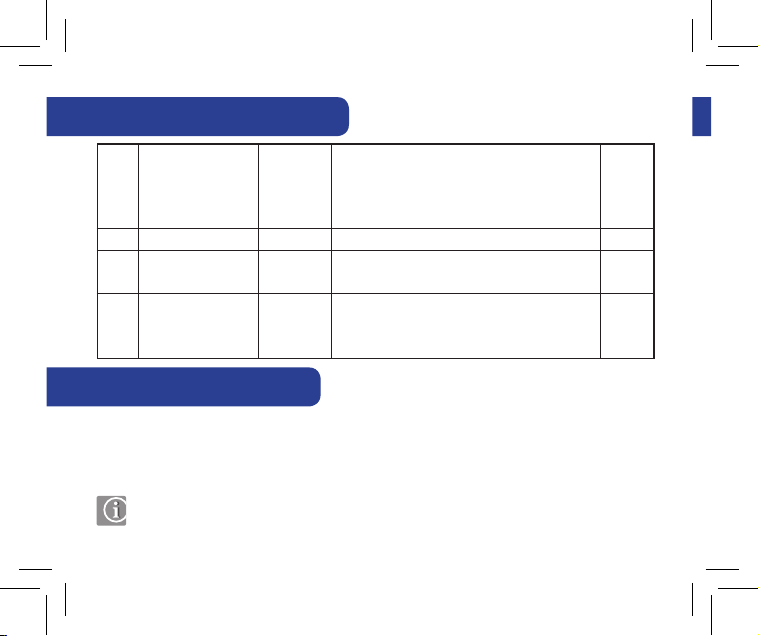
d09
d11
12/24 Hour Format
Daylight Saving Time
0
0
1
1
12hr
O
24hr
On
(DST)
1
1
d12
Maximum limitation of
heating setpoint
5ºC - 35ºC
35 ºC
d13
Maximum limitation of
cooling setpoint
5ºC - 40ºC
5 ºC
d14
Floor sensor protection limit
(heating high limit-HL)
11ºC - 45ºC
Turn o relay output when oor sensing temp >
27 ºC
d15
d16
Floor sensor protection limit
Floor sensor protection limit
(heating low limit-LL)
(cooling)
6ºC - 40ºC
6ºC - 45ºC
Turn on relay output when oor sensing temp <
Turn o relay output when oor sensing temp <
10 ºC
6ºC
protecting limit, step is 0.5ºC (32.9 oF)
protecting limit, step is 0.5ºC (32.9 oF)
protecting limit, step is 0.5ºC (32.9 oF)
AHTR5024 Instruction Manual 23
95 oF
41 oF
80.6 oF
50 oF
42.8 oF
41 oF - 104 oF
41 oF - 95 oF
51.8 oF - 113 oF
42.8 oF - 104 oF
42.8 oF - 113 oF
12. Party Mode
10. Functions explained
d17
d18
d19
d20
Preset program selection
Heat/Cool Mode Selection
Cooling Blocked
Actuators loading selection
for dierent temperature
compensation.
1: x 1 actuator loading 2: x 2 actuators loading
3: x 3 actuators loading 4: x 4 actuators loading
5: x 5 actuators loading
1-5
0 or 1
0 or 1
1 to 5 1
0
0
0: No connection 1: Connection
1: Cooling disabled
0: Cooling allowed
Select one of these 5 default programs. Once selected,
default program will overwrite present program.
Selected default program can be edited by the user in
the User Setting Mode.
1
11. Cooling Blocked
When When the thermostat is set on Cooling Disabled (d19-->1) it will block the cooling
function for single rooms until the device will receive the heating command. During the
periods of cooling blocked no special indicator will be displayed on the LCD screen. Ice flake
will also be turned off.
Note:
d19 will be available only if d18 is set on 1 (Heat/Cool Mode selection Connected).
24 AHTR5024 Instruction Manual
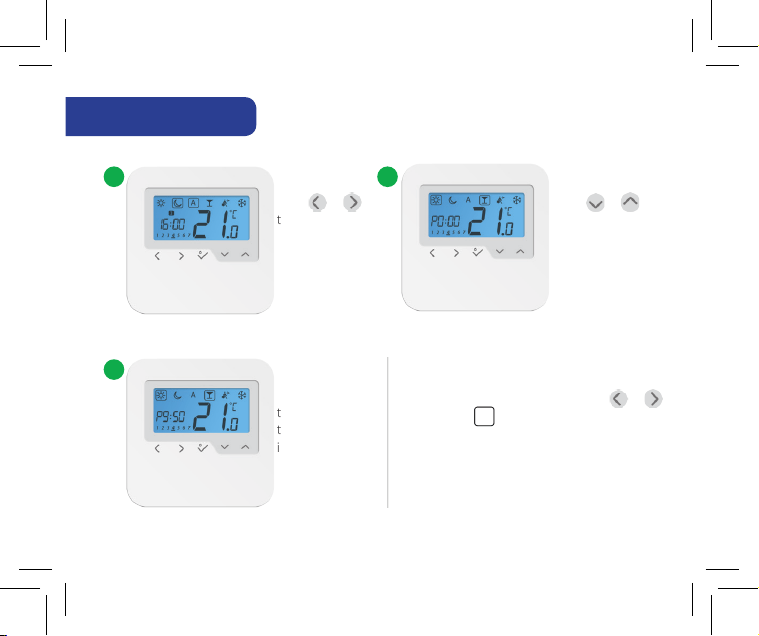
The maximum
time allowed on
the Party Mode
is 9 h 50 min and
can be set from
0-10 min.
3
If you want to exit Party Mode, press or
to move the (box) to a different program.
Once Party Mode ends the countdown
automatically resets to 0.
12. Party Mode
Press or
to select
Party Mode.
Press or to
select the time for
Party Mode.
1 2
Note: d19 will be available only if d18 is set on 1 (Heat/Cool Mode selection Connected).
AHTR5024 Instruction Manual 25
15. Temperature Offset
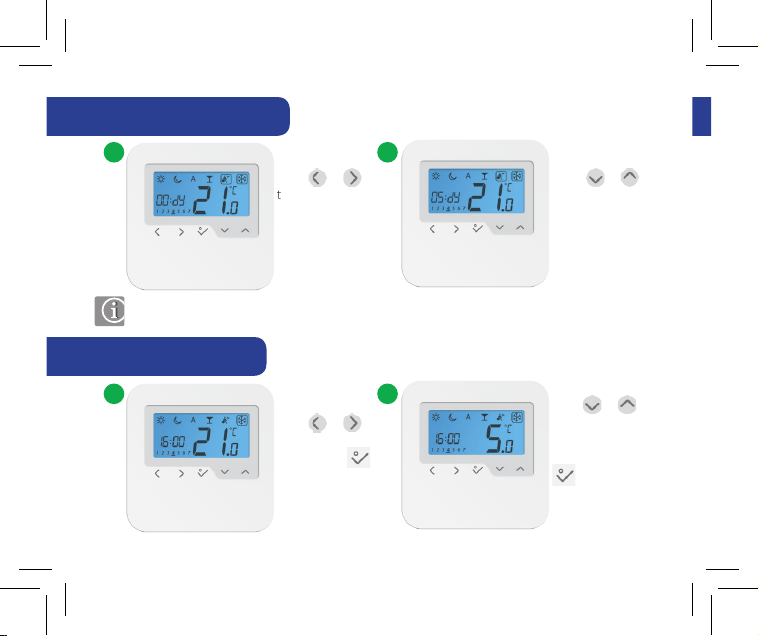
13. Vacation Mode
14. Frost Mode
Press or
to select
Vacation Mode.
Press or to
select the number
of vacation days.
1 2
Note: Vacation Modes ends when it reaches day 0. After that the device goes
back to Auto Mode.
1 2
Press or
to select Frost
Mode. Press
to confirm.
Press or
if you want to
change the Frost
Mode temp. Press
to confirm.
26 AHTR5024 Instruction Manual
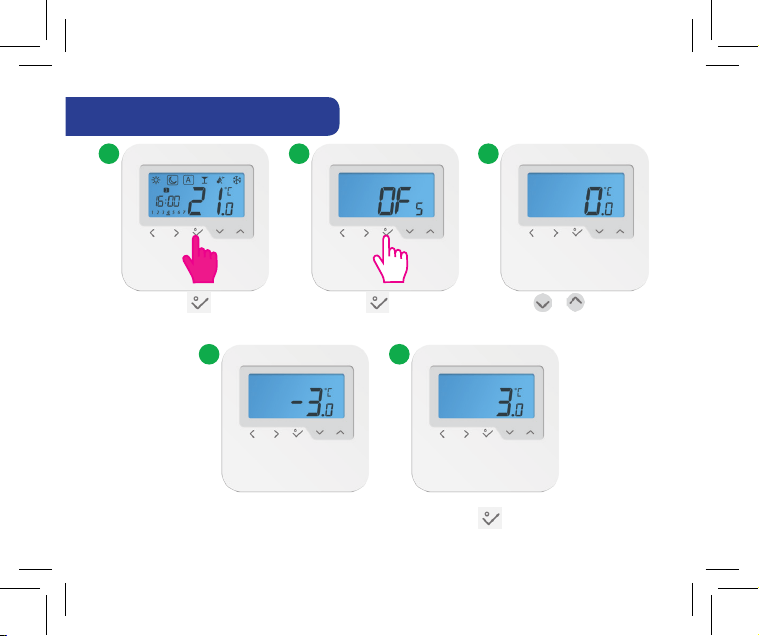
15. Temperature Offset
31 2
Long press in order
to enter Settings Mode.
Press to enter
Setting Mode.
Press or in order to
set the Temperature Offset.
4 5
The Temperature Offset can be set at any value
between -3ºC (26.6 °F) and +3ºC(26.6 °F). Press to confirm.
Note: Vacation Modes ends when it reaches day 0. After that the device goes
back to Auto Mode.
AHTR5024 Instruction Manual 27
Notes
Technical
Specification
Model: AHTR5024
Voltage 24 VAC, +/-10%, 50/60 Hz
Operating performance 24 V, 18W
Temperature setback Adjustable
Temperature range 5°C – 35°C (41ºF - 95ºF)
Span +/-0,5°C(32,9ºF)OR+/-0,25°C (32,45ºF)
Storage temperature -20°C to +60°C (-4ºF to +140ºF)
Ambient temperature 0 °C up to 45 °C (32ºF up to 113ºF)
Degree of protection P 30
Conformity according to FCC and IC
Housing material PC, V2
Color RAL 9010 pure white
Connection Screw terminal
Weight 125 g net / 170 g gross (4.40oz/5.99oz)
Puls-wide-modulation (PWM) Yes
Clock, Timer Yes, programmable
Profile Modes 3 ( Sun, Moon, Automatic)
Heating and Cooling Yes, automatically Change Over
on the Wiring Centre
Parameter adjustment Yes, in Installer Mode
Dimensions 85mm*85mm*25mm (3.34in*3.34in*0.98in)
28 AHTR5024 Instruction Manual

Notes
...................................................................................................................................................................................
...................................................................................................................................................................................
...................................................................................................................................................................................
...................................................................................................................................................................................
...................................................................................................................................................................................
...................................................................................................................................................................................
...................................................................................................................................................................................
...................................................................................................................................................................................
...................................................................................................................................................................................
...................................................................................................................................................................................
...................................................................................................................................................................................
..................................................................................................................................................................................
AHTR5024 Instruction Manual 29

Warranty
Notes
...................................................................................................................................................................................
...................................................................................................................................................................................
...................................................................................................................................................................................
...................................................................................................................................................................................
...................................................................................................................................................................................
...................................................................................................................................................................................
...................................................................................................................................................................................
...................................................................................................................................................................................
...................................................................................................................................................................................
...................................................................................................................................................................................
...................................................................................................................................................................................
..................................................................................................................................................................................
30 AHTR5024 Instruction Manual

Warranty
Customer Name: ......................................................................................................................................
Customer Address: .................................................................................................................................
.............................................................................................................................................................................
....................................................................................... Post Code: ............................................................
Tel No: ................................................................ Email: .............................................................................
Engineers Company: .............................................................................................................................
Tel No: ................................................................ Email: .............................................................................
Instalation Date: .......................................................................................................................................
Engineers Name: ......................................................................................................................................
Engineers Signature: .............................................................................................................................
SALUS North America warrants that this product (AHTR5024) will be free from
any defect in materials or workmanship, and shall perform in accordance
with its specification, for a period of five years from the date of installation.
SALUS North America sole liability for breach of this warranty will be (at its
option) to repair or replace the defective product.
AHTR5024 Instruction Manual 31
SALUS North America is a member of the Computime Group
Issue Date: Oct 2016
00188
For PDF Installation guide please go to www.salusna.com
Maintaining a policy of continuous product development SALUS Controls plc reserve the right to change specification,
design and materials of products listed in this brochure without prior notice.
www.salusna.com
SALUS NORTH AMERICA,
850 MAIN STREET, REDWOOD CITY, CA 94063
EMAIL: SALES@SALUSNA.COM
TEL:
+1-650-360-1725