User guide.

2
GENERAL SAFETY
INFORMATION
• This appliance is not
intended for use by persons
(including children) with
reduced physical, sensory,
or mental capabilities, or
lack of experience and
knowledge, unless they
are closely supervised and
instructed concerning use of
the appliance by a person
responsible for their safety.
Close supervision is necessary
when any appliance is used
by or near children. Children
should be supervised to
ensure that they do not play
with the appliance.
• Do not use outdoors.
NEVER LEAVE THE
NUTRIBULLET
®
UNATTENDED
WHILE IT IS IN USE
ALWAYS UNPLUG THE
NUTRIBULLET
®
WHEN NOT
IN USE
HEAT & PRESSURE SAFETY
• Always use extreme care and
attention when blending hot
liquids or hot ingredients. The
release of thermal energy
from the ingredients and
friction from the rotating
blades (during the blending
process) can further heat
and pressurize the mixture.
Only operate with vented lid
securely attached.
• Allow blender to cool before
assembling or disassembling
parts and before cleaning
the appliance.
Use extra caution when
blending hot liquids and
ingredients in the pitcher.
Never turn the power on
while using the pitcher
without the vented lid
cap inserted and locked
into the pitcher lid, as
ingredients can splash
and if hot or warm, could
potentially cause thermal
injury or property damage.
Important safeguards.
Warning! To avoid the risk of serious injury, carefully read all
instructions before operating your NutriBullet
®
. When using any
electrical appliance, basic safety precautions should always be
observed, including the following important information.
Save these instructions!
FOR HOUSEHOLD USE ONLY
!

3
completely before carefully
opening, pointed away from
your body to avoid injury.
BLADE SAFETY
Blades are sharp! Handle
carefully. Use care when
handling any blade. To
avoid laceration injury, do
not handle or touch any
blade edge.
AVOID CONTACT WITH
MOVING PARTS! Keep
hands and utensils out of
and away from blades
while blending food to
reduce the risk of severe
personal injury. Only use the
provided tamper to direct
ingredients to the blades.
• After blending, turn the
unit o. Wait to remove the
pitcher from the motor base
until the blades come to a
full stop and the unit powers
down completely. Taking the
vessel o the unit prior to
complete power down can
cause damage to the blade
coupling or motor gear.
Never use the NutriBullet
®
Smart Touch Blender™
without adding liquid, as
doing so may damage
the blades.
• The cyclonic action
®
of your
NutriBullet
®
Smart Touch
Blender™ requires the use
of liquids to make smoothies
and other nutritious items.
The NutriBullet
®
Smart Touch
Steam and splattering
ingredients can escape
through the pitcher lid,
potentially scalding and/
or burning the user. NEVER
blend hot liquids or
ingredients in your pitcher
without the pitcher lid and
vented lid cap attached and
locked. The vented lid cap
allows steam and pressure
to escape, while guarding
against excess splashing.
Before blending hot
ingredients, carefully examine
the pitcher lid to make
sure the vent slots are not
obstructed or blocked.
When blending hot liquids,
add liquid and solid
ingredients to your pitcher
below their respective MAX
lines. Attach the pitcher
lid with the vented lid cap
inserted and locked. Press
POWER and begin blending
by selecting the desired
program or if you are using
manual speeds, start blending
on the LOW setting. Once
ingredients are integrated,
adjust speed as needed.
If the NutriBullet
®
blends
for longer than one minute,
friction from the blades can
cause ingredients to heat and
generate internal pressure
inside the vessel. If a blending
vessel becomes warm to the
touch, turn o the machine
and allow the vessel to cool
WARNING!
WARNING!

4
Blender™ is not intended to
be used without liquids, or as
an ice crusher. ALWAYS ADD
LIQUID to your recipe.
• DO NOT USE the NutriBullet
®
Smart Touch Blender™ for
grinding dry ingredients such
as grains, cereal, or coee, as
this may damage the motor
and blade.
PITCHER SAFETY
• Pitcher lid must be locked onto
the pitcher in order to operate
the unit.
• With recipes that require
certain ingredients to be
incorporated during blending,
first add the base ingredients,
seal the pitcher lid with vented
lid cap attached, and begin
blending. Then, once the
ingredients are well mixed,
twist open the vented lid cap
and carefully pour or drop
ingredients into the mixture.
If your blended mixture is hot
or warm, use caution when
opening the vented lid cap.
Open the vented lid cap slowly.
• Keep hands and utensils,
other than the tamper
provided, out of container
while blending to reduce the
risk of severe injury to persons
or damage to the blender.
The cover must remain in
place when using the tamper
through the cover opening.
A scraper may be used but
must be used only when the
blender is not running.
• If you need to push ingredients
closer to the blade, ONLY USE
THE TAMPER PROVIDED with
the NutriBullet
®
Smart Touch
Blender™ configuration.
DO NOT use any apparatus
other than the tamper to push
ingredients toward the blade.
The tamper is specifically
designed not to come in
contact with the blade.
Spatulas, spoons and other
tools can make contact with
the blade, which may result
in damage to the machine,
damage to property, and
possible injury.
• NEVER USE YOUR FINGERS
OR ANY PART OF YOUR HAND
TO PUSH INGREDIENTS
DOWN TOWARD THE BLADE.
Only use the provided tamper.
ELECTRICAL SAFETY
Do not use this product
in locations with dierent
electrical specifications or
plug types. Do not operate
with any type of plug
adapter or voltage converter
device, as these may cause
electrical shorting, fire,
electric shock, personal
injury, or product damage.
• The use of attachments,
including canning jars, is
not recommended and may
cause fire, electric shock,
personal injury, or product
damage and will void the
product’s warranty.
• To avoid the risk of electric
shock, never immerse the
WARNING!

5
is unplugged, and the thermal
breaker cools down suciently.
• This appliance has important
markings on the plug. The
attachment plug or entire
cord set is not suitable for
replacement. If damaged, the
appliance will be replaced.
STOVETOP
HEATING SAFETY
To heat items that have
been blended at room
temperature or cooler
(21°C/70°F or less), transfer
mixture to a stove top
pot to heat. Always use a
thermometer to test the
internal temperature of
cooked ingredients; they may
feel cool to the touch, yet still
be hot inside.
The NutriBullet
®
Smart Touch
Blender™ is not intended for
use on the stove top. Do not
place the motor base or any
NutriBullet
®
accessory on the
stove or immerse in boiling
water. This may result in
damage to the accessory.
• Do not place any of the
NutriBullet
®
Smart Touch
Blender™ parts in a
microwave, oven, in a stove
top pot, or immerse in boiling
water, as this may result in
damage to the part.
• Do not place on or near a hot
gas or electric burner, or in a
heated oven.
cord, plug, or motor base of
the NutriBullet
®
in water or
other liquids. Discontinue
use if the cord, plug, or
motor base is damaged.
• Always POWER OFF and
UNPLUG the NutriBullet
®
Smart Touch Blender™ when
it is not in use or BEFORE
assembling, disassembling,
changing accessories, or
cleaning. Do not attempt to
handle the NutriBullet
®
Smart
Touch Blender™ until all parts
have stopped moving.
• To unplug, grasp the plug and
pull from the outlet. Never pull
from the power cord.
• Do not let cord hang over
edge of table or counter,
or touch hot surfaces. Do
not pull, twist, or damage the
power cord. Do not allow the
cord to touch hot surfaces,
including the stove.
• The Smart Touch Blender™
is ready to operate when
unit is plugged in and power
icon is illuminated. Avoid
inadvertent contact with the
touch screen display.
• If the motor stops working,
unplug the motor base and let
it cool for at least 15 minutes
before attempting to use
it again. Your NutriBullet
®
Smart Touch Blender™ has
an internal thermal breaker
that shuts o the motor when
it overheats. The thermal
breaker will reset when the unit
WARNING!

6
• Avoid blending the following
seeds and pits, as they contain
a chemical known to release
cyanide into the body when
ingested: apple seeds, cherry
pits, plum pits, peach pits, and
apricot pits. Fruit pits may also
cause damage to the pitcher.
ADDITIONAL
INSTRUCTIONS FOR
PROPER USAGE
.
• TO AVOID LEAKAGE, DO NOT
OVERFILL THE PITCHER!
Your pitcher is marked
with two MAX lines: one for
solid ingredients (higher
line) and one for liquids
(lower line). When filling the
blender, make sure your
ingredients do not exceed
their respective MAX lines.
Exceeding either MAX line
can result in leakage, and
may lead to dangerous
pressurization, which can
cause the vessel and blade
assembly to separate,
potentially resulting in
personal injury and/or
property damage.
• The pitcher is specific to the
exact model of NutriBullet
®
Smart Touch Blender™ you
possess. Use of incompatible
parts (parts from other
models) may result in
damage to your NutriBullet
®
Smart Touch Blender™ or
create safety hazards. When
ordering replacement parts
on nutribullet.com or via
customer service, please
VENTILATION WARNINGS
• To prevent a fire hazard, power
base openings (underneath
the motor base) should be
free of dust or lint and never
obstructed with flammable
materials such as newspapers,
tablecloths, napkins, dish
towels, place mats or other
similar type materials.
• CAUTION! Always operate
the NutriBullet
®
Smart Touch
Blender™ on a level surface,
leaving unobstructed space
beneath and around the motor
base to permit proper air
circulation. Vents on the bottom
of the product are provided for
ventilation to ensure reliable
motor operation and to
prevent overheating.
MEDICAL SAFETY
• The information contained in
the User Guide and Recipe
Guide is not meant to replace
the advice of your physician.
Always consult your physician
regarding health and
nutrition concerns.
MEDICATION INTERACTIONS:
• If you are taking any
medication, especially
cholesterol-lowering
medication, blood
thinners, blood pressure
drugs, tranquilizers, or
antidepressants, please check
with your physician before
trying any of the recipes
contained in this user guide or
recipe guide.

7
specify the machine model to
ensure you receive parts that
are compatible with your unit.
• Always use genuine
NutriBullet
®
replacement
parts. After market parts are
not made to NutriBullet’s
specifications and may
damage your unit or cause
serious injury.
• Periodically inspect all
NutriBullet
®
components
for damage or wear that
may impair proper function
or present an electrical
hazard. Make sure that the
power cord and plug are
undamaged. Discontinue
use and replace blending
vessels if you detect cracking,
cloudiness, or damage to
the plastic. Ensure that the
blades rotate freely and that
the structure is undamaged.
Make sure that the motor
base is unobstructed and
clean. Follow maintenance
recommended in the User
Guide and never operate
your NutriBullet
®
with
damaged components.
If your NutriBullet
®
malfunctions in any way,
immediately discontinue use
and contact customer service
at 1 (800) 523-5993.
You may purchase new
NutriBullet
®
cups, pitchers, and
easy-twist extractor blades
at nutribullet.com or by
contacting customer service.
!
Never purchase after market
parts for your NutriBullet.
Always use genuine NutriBullet
replacement parts.
Save these
instructions!
If you have any comments,
questions, or concerns, please
go to nutribullet.com.
Or call customer service at:
1 (800) 523-5993.
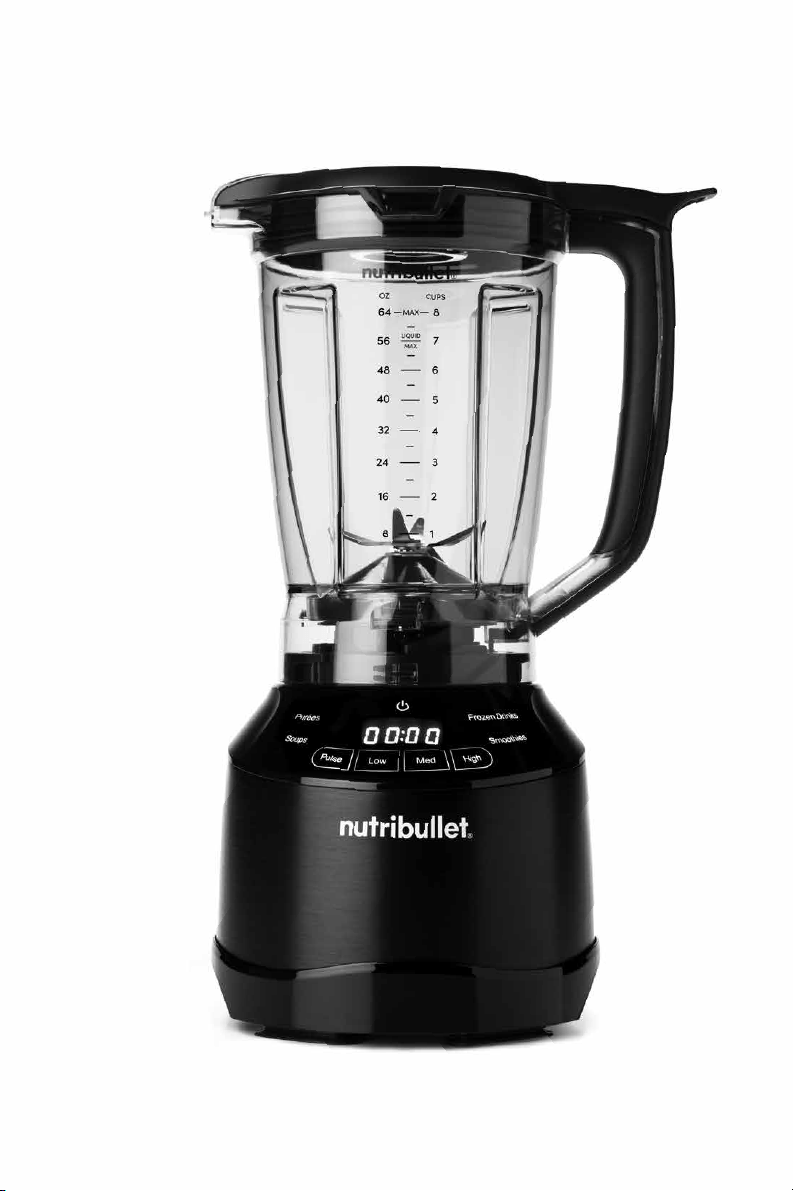
8

9
Contents.
Thank you for purchasing the
NutriBullet
®
Smart Touch Blender™.
10 What’s included
11 Assembly guide
12 Getting started
12 Safety guide
12 Pitcher assembly & use
16 Blending control panel
16 Manual speeds
18 Intelligent programs
20 Care & maintenance
20 How to clean the NutriBullet
®
21 How to store
21 Replacement parts
22 NutriBullet
®
Smart Touch Blender
™
one-year limited warranty
25 Warranty registration
10
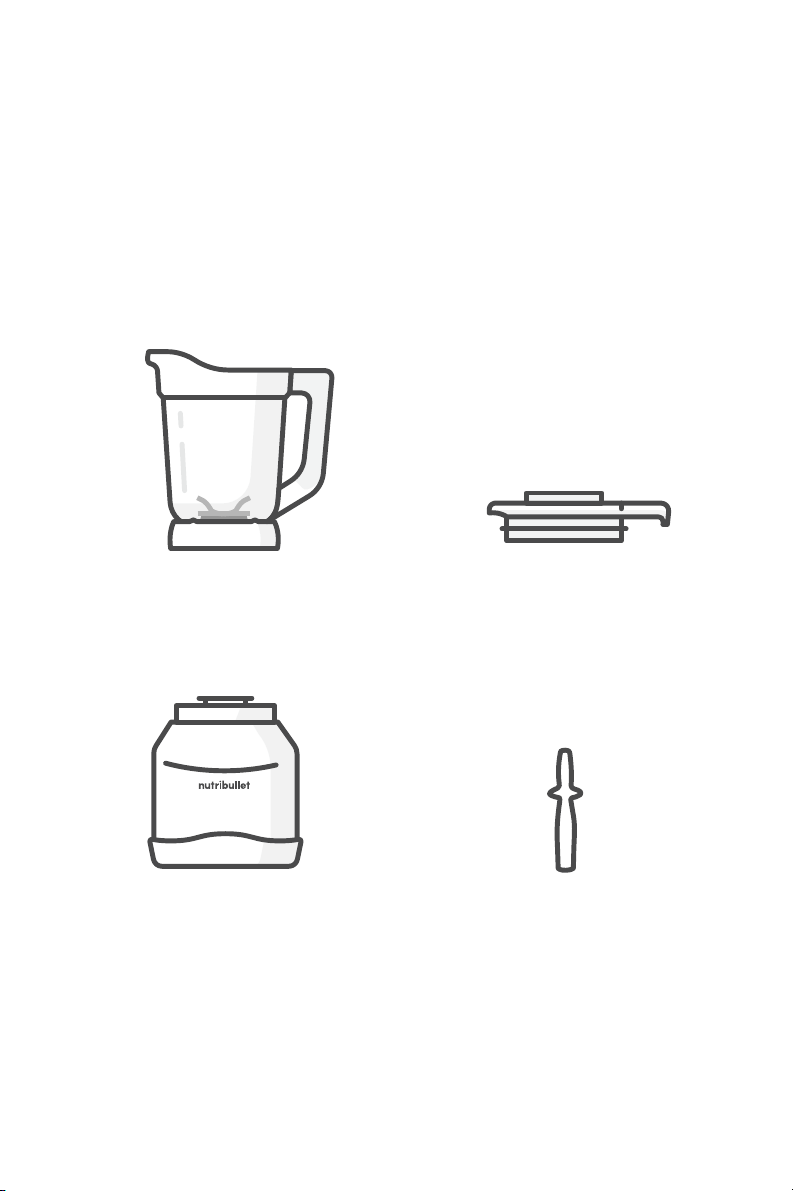
What’s included.
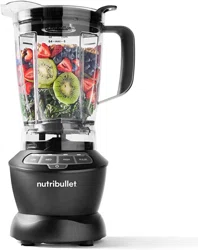
1 pitcher with
integrated blade
1 motor base
1 pitcher lid
with lid cap
& pour spout
1 tamper
11
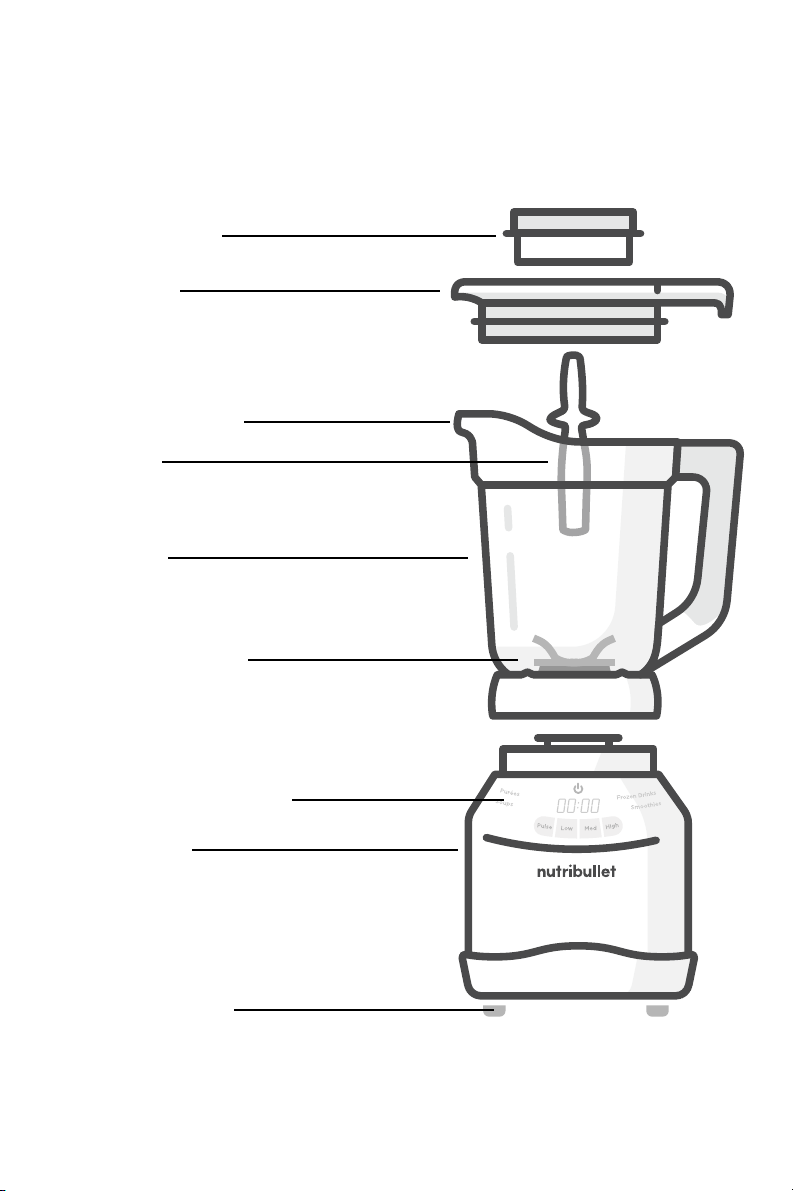
Assembly guide.
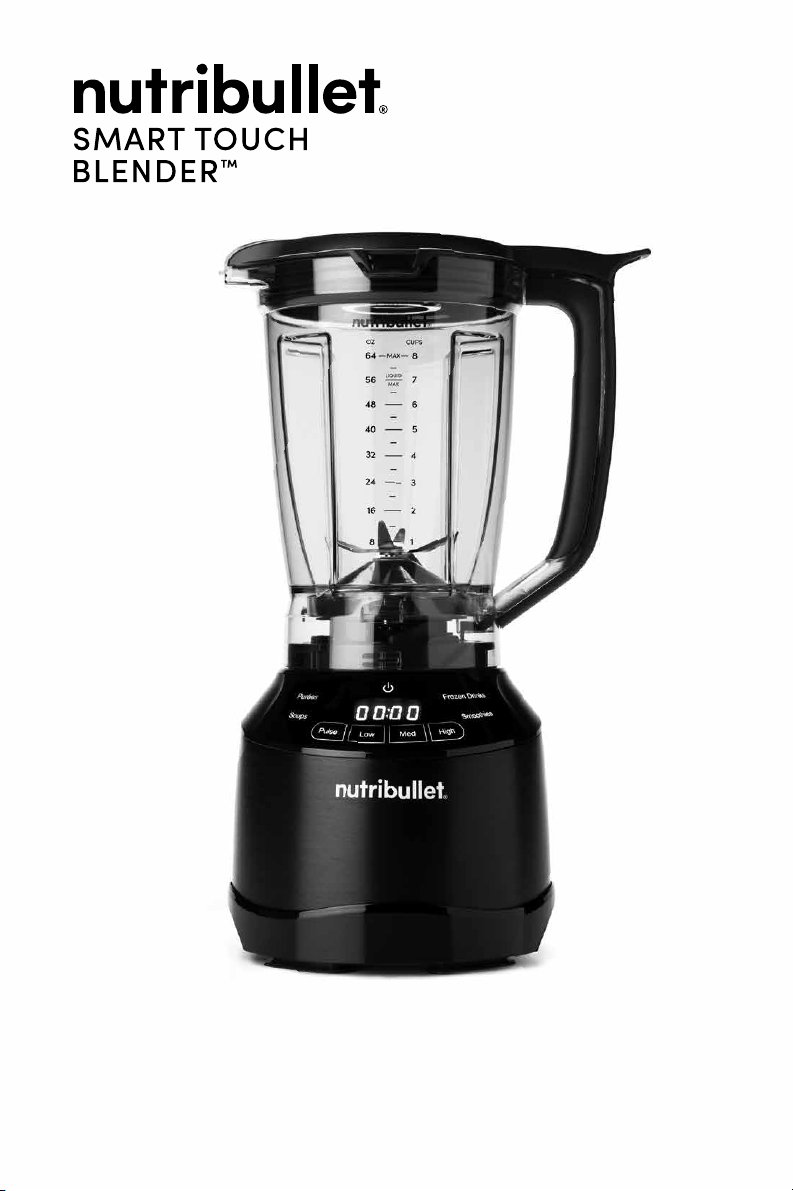
pitcher lid
pitcher
tamper
easy-pour spout
integrated blade
blender control panel
motor base
suction cup feet
vented lid cap

Steam and splatters can escape
through the vented lid, potentially
causing scalding and/or burns.
NEVER blend hot liquids in your
pitcher without the pitcher lid
and vented lid cap attached. The
vented lid cap is ventilated to allow
steam and pressure to release,
while guarding against excess
splashing. NEVER blend hot liquids
in your NutriBullet cups or any
other sealed vessel.
When blending hot liquids, add
liquid and solid ingredients to your
vented pitcher below their respective
MAX lines. Attach the pitcher lid
with the vented lid cap inserted.
Press POWER , then select desired
program or begin blending on
LOW setting. Once ingredients are
integrated and the mixture is level
(no splashing), increase speed
as needed.
Always use care when opening
the pitcher lid after blending hot
ingredients making sure that excess
pressure has been released.
PLEASE KEEP
THESE IMPORTANT
SAFEGUARDS IN
MIND WHEN USING
THE APPLIANCE:
• Make sure the base is plugged in
for use.
• Never run the appliance while empty.
• Appliance accessories are not
intended to be used in the microwave
as it may damage the accessories.
• Never leave the appliance
unattended while in use.
Use extra caution when
blending hot liquid or
ingredients in the pitcher.
WARNING!
Getting started.
Pitcher assembly
& use.
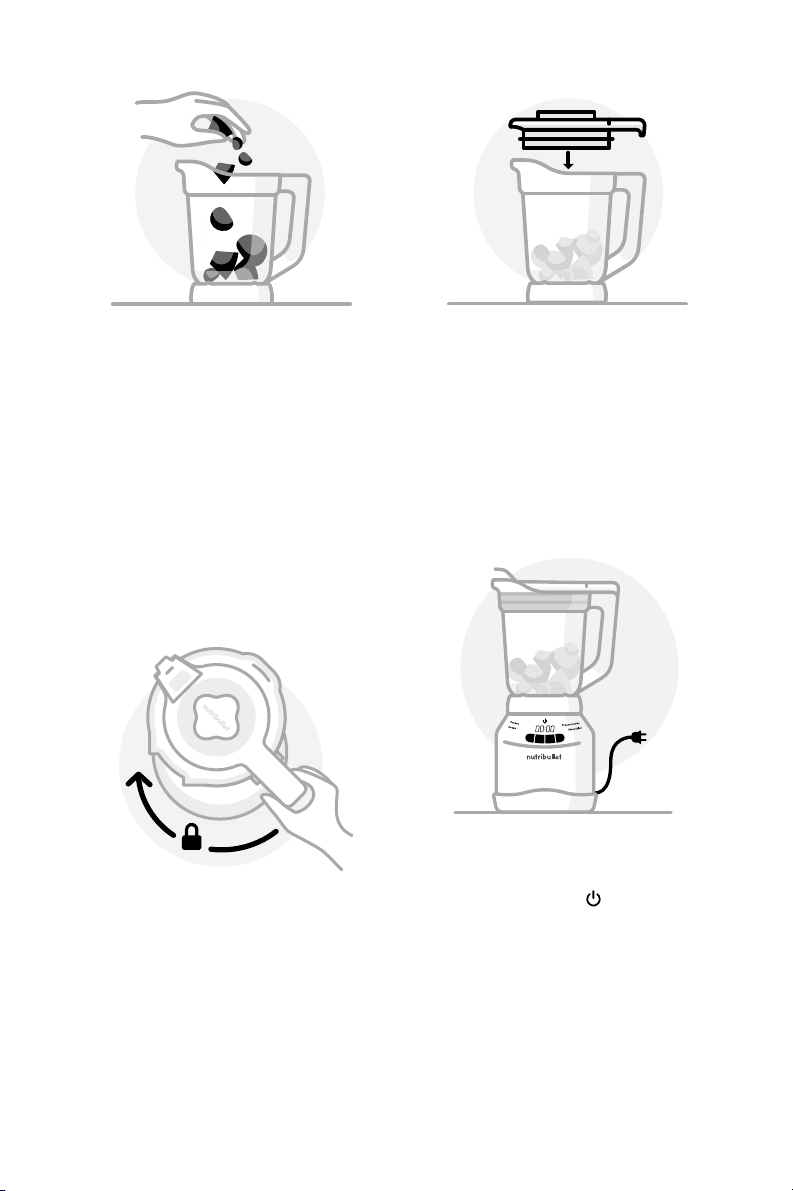
Place the motor base on
a clean, dry, level surface
such as a counter or table.
1
Review all warning and caution
statements in the Important Safeguards
section (pg 2-7) and on the previous
page before proceeding to Step 1.
12
13
Place the pitcher (lid-side up)
onto the motor base and twist
clockwise to lock it into place.
When you hear the click, it’s
locked and ready to blend.
NOTE: You may need to twist the
pitcher slightly until you feel
it settle into the grooves on top of
the base.
4
2
Place the pitcher on a
clean, dry, level surface.
Add the ingredients to the
pitcher, making sure they do
not exceed the MAX line.
3
Place the lid on top of the
pitcher and press down firmly
until locked in place. Place the
lid cap over the lid opening,
then press down and twist
until locked in place.
NOTE: The blending pitcher is
marked with two MAX lines: one for
solid ingredients (higher line) and
one for liquids (lower line). When
filling the blender, make sure your
ingredients do not exceed their
respective MAX lines.
NOTE: The motor will not run unless
the lid is locked in place.
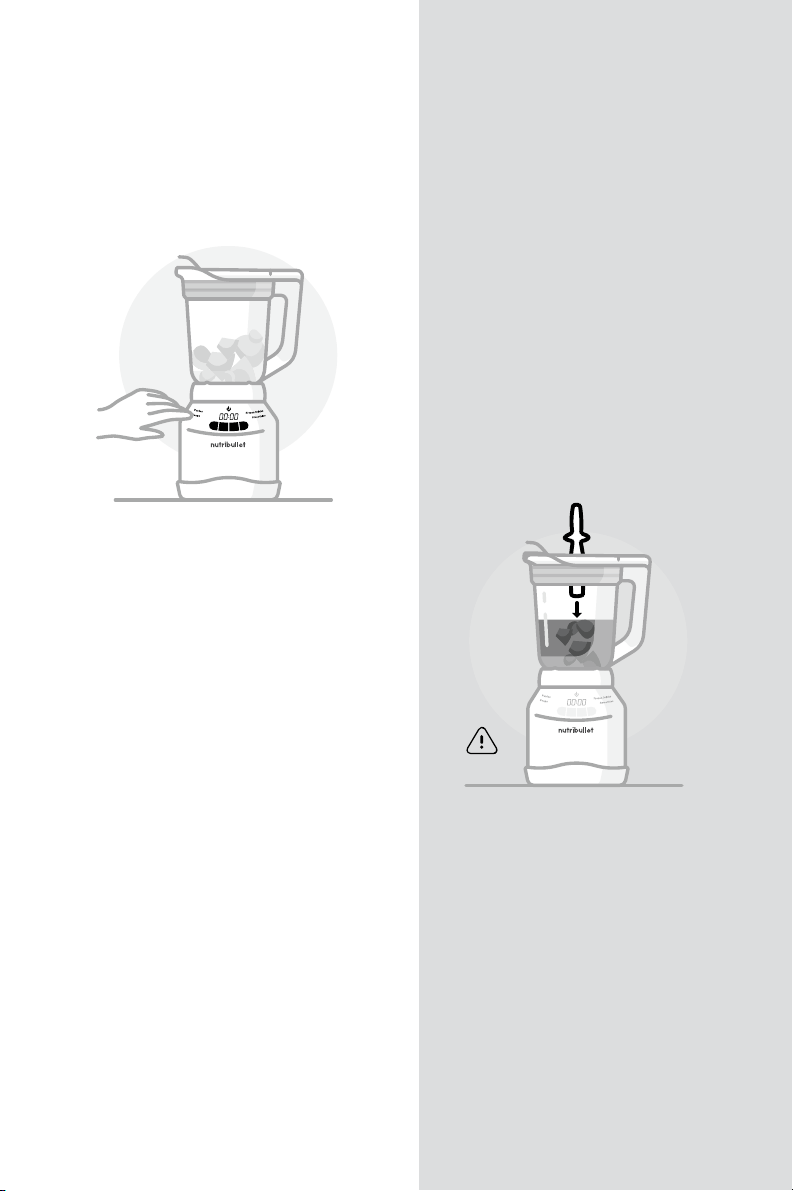
5
Plug the power cord into
an electrical outlet and
press POWER to turn
on the blender. Once the
pitcher is fully locked and
the unit is plugged in, the
Blending Control Panel will
illuminate and the unit will
be ready to operate.
NOTE: If pitcher lid and pitcher are
not fully secured onto the base,
control panel will not illuminate.
14
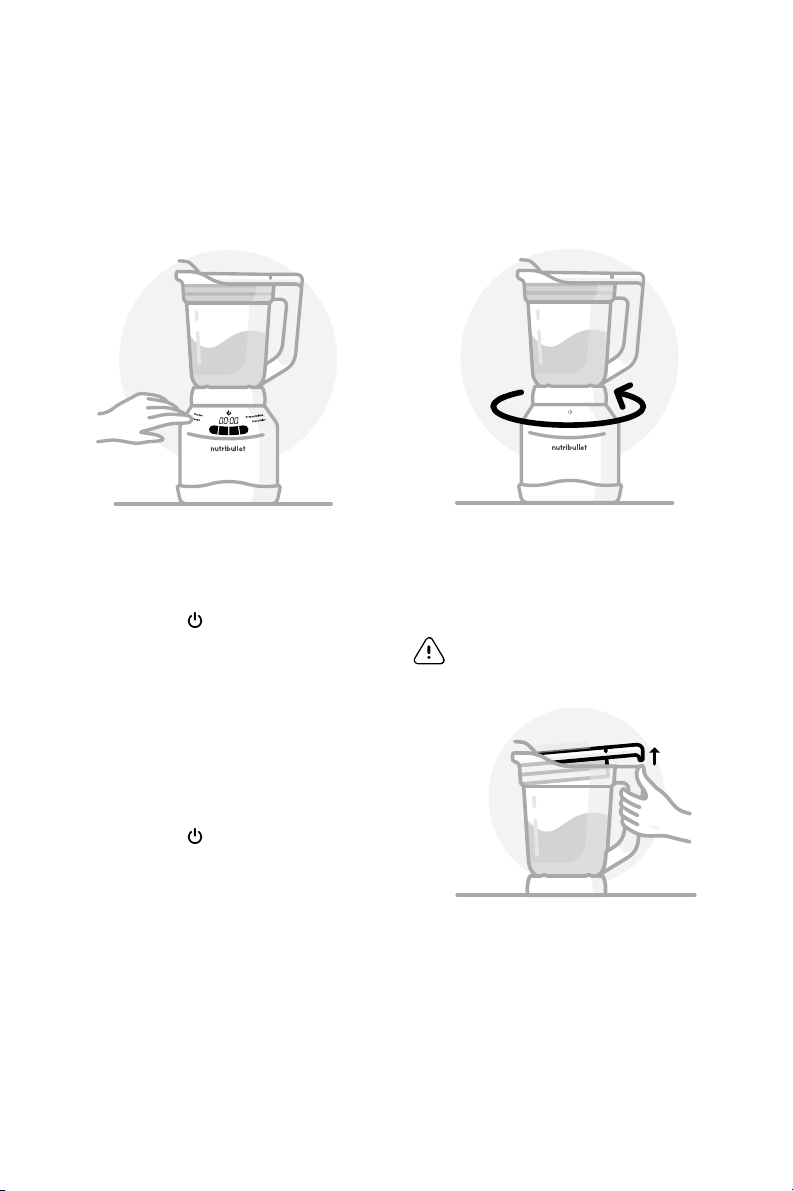
6
To begin blending, select
a manual speed or
program on the Blending
Control Panel. To pause
blending, press the current
speed or program once,
the unit will stop running
and the timer will pause. To
resume blending, press a
manual speed or the same
program again.
NOTE: Go to the blending control
panel section on pages 16-19 for
speed and program definitions,
images, and other information.
CAUTION: Do not use any
apparatus other than the
tamper to push ingredients
toward the blade. The tamper
is specifically designed not to
come in contact with the blade.
Spatulas, spoons and other
tools are long enough to reach
the blade, which may result
in damage to the machine,
damage to property, and
possible injury.
NOTE: If you need to add
additional ingredients while
blending, switch the setting to
LOW and remove the lid cap
from the pitcher lid, leaving the
lid attached. Add ingredients
through the hole in the top
of the lid, followed by the
tamper if necessary. Replace
the lid cap, then increase to
your desired speed. DO NOT
attempt to add items through
the vent hole when blending
HOT ingredients.
15
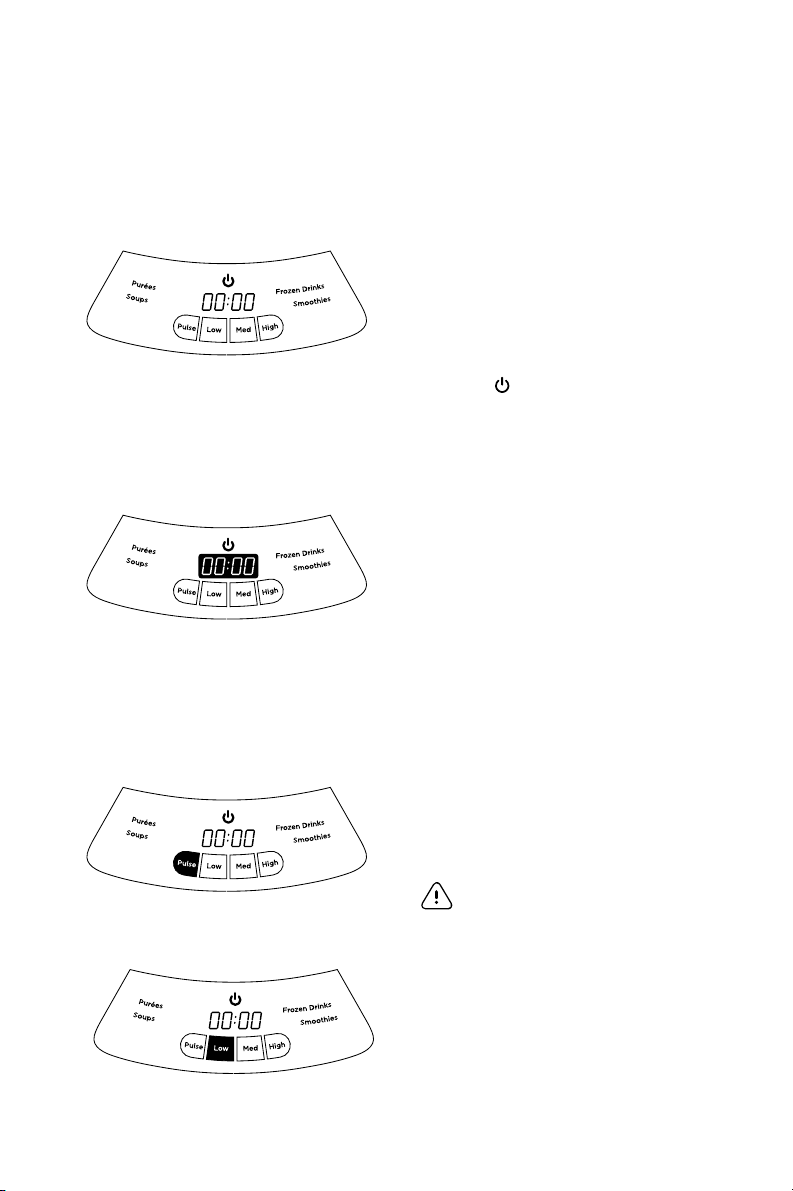
Twist pitcher counterclockwise
and lift o the motor base.
Pour and enjoy!
WARNING: Blades are sharp. Never
insert your hands into the pitcher.
When you have reached your
desired consistency, stop
the appliance by pressing
POWER . If you are using
a program, you will hear
a beep when the program
has completed. Wait for the
blades to stop turning. The
unit will enter idle-mode.
The timer will reset and the
Blending Control Panel will
remain illuminated. Press
POWER again to turn o
the unit completely and the
illuminated display will
turn o.
7
8
NOTE: Press up with your thumb on
the tab near handle first to loosen
pitcher lid for easy removal!
16
Blending control panel:
manual speeds.
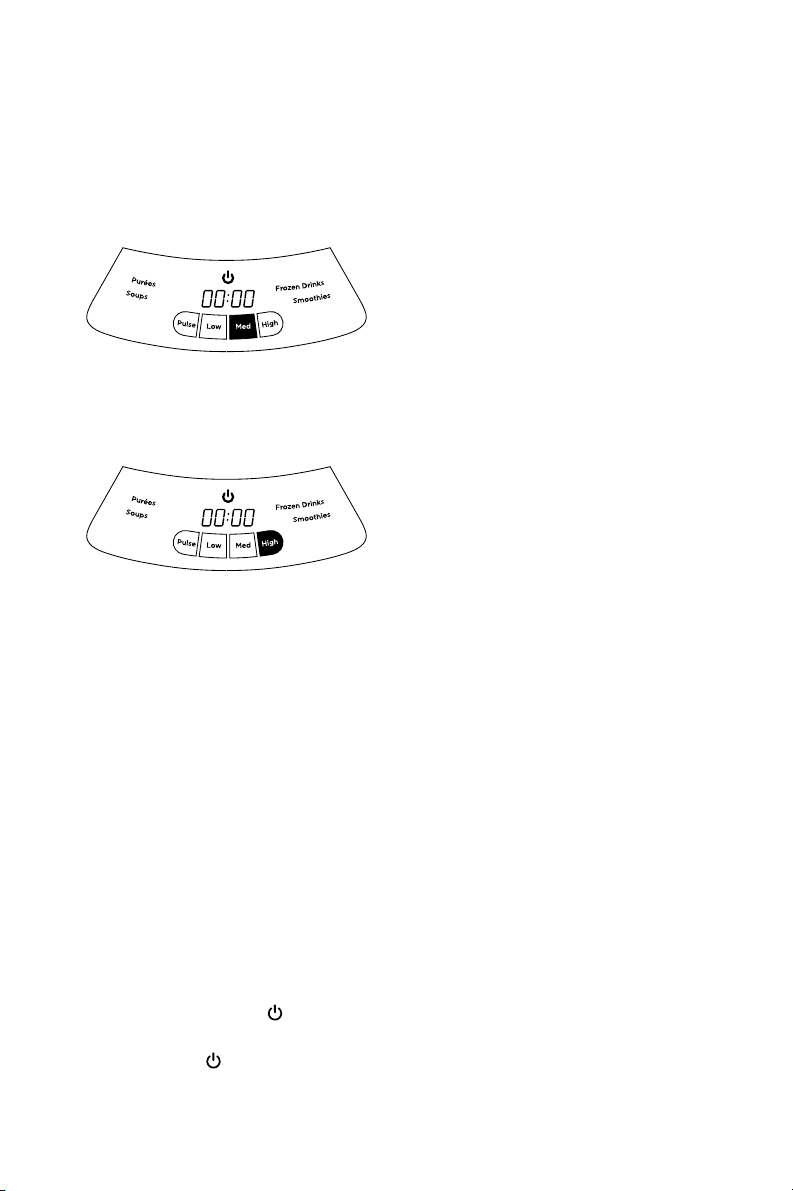
TIMER
When using a blending speed:
timer starts at zero (00:00) and
increases during operation,
showing time elapsed since
blending began. When using
program presets: timer counts
down during operation until
program is completed.
PULSE
Use to control chopping
and processing.
WARNING: DO NOT use this setting
with hot ingredients.
TURNING ON/OFF
The power button controls the
master power of the appliance.
When pitcher with pitcher lid
is locked in place, pressing
POWER will indicate the motor
is powered on and the Blending
Control Panel will illuminate.
LOW SPEED
Use to mix thin batters,
gravies and marinades. Or, to
scramble eggs, process cooked
foods and uncooked fruits.
17
MEDIUM SPEED
Use to cream soups, blend
sauces and spreads, or mix dips.
Also great for grinding nuts,
making mixed drinks, powdered
drinks or milkshakes.
HIGH SPEED
Use to liquefy thick mixtures
and extract frozen fruits and
vegetables into smoothies.
TO SELECT A SPEED
Press the desired speed once
to turn on. The selected speed
will illuminate and the rest of
the speeds will dim. To toggle to
another blending speed, press
the inactive, dimmed speed
desired. To pause blending
at any point, press the active
speed, the motor will stop and
the timer will pause counting.
To resume blending, press a
manual speed button again. To
return to main blending control
panel, press POWER once. To
fully power down after pausing,
press POWER twice and
unplug the unit.
PULSE
Press and release the PULSE
button to chop ingredients. If you
hold the PULSE button down,
it will continue to run until you
release it. Do not hold and run
the pulse continuously for more
than one minute.
NOTE: If the unit stops running and
power and timer display are flashing,
your device may be overheated.
Unplug your device and wait 15 minutes.
Plug back in to reset.
18
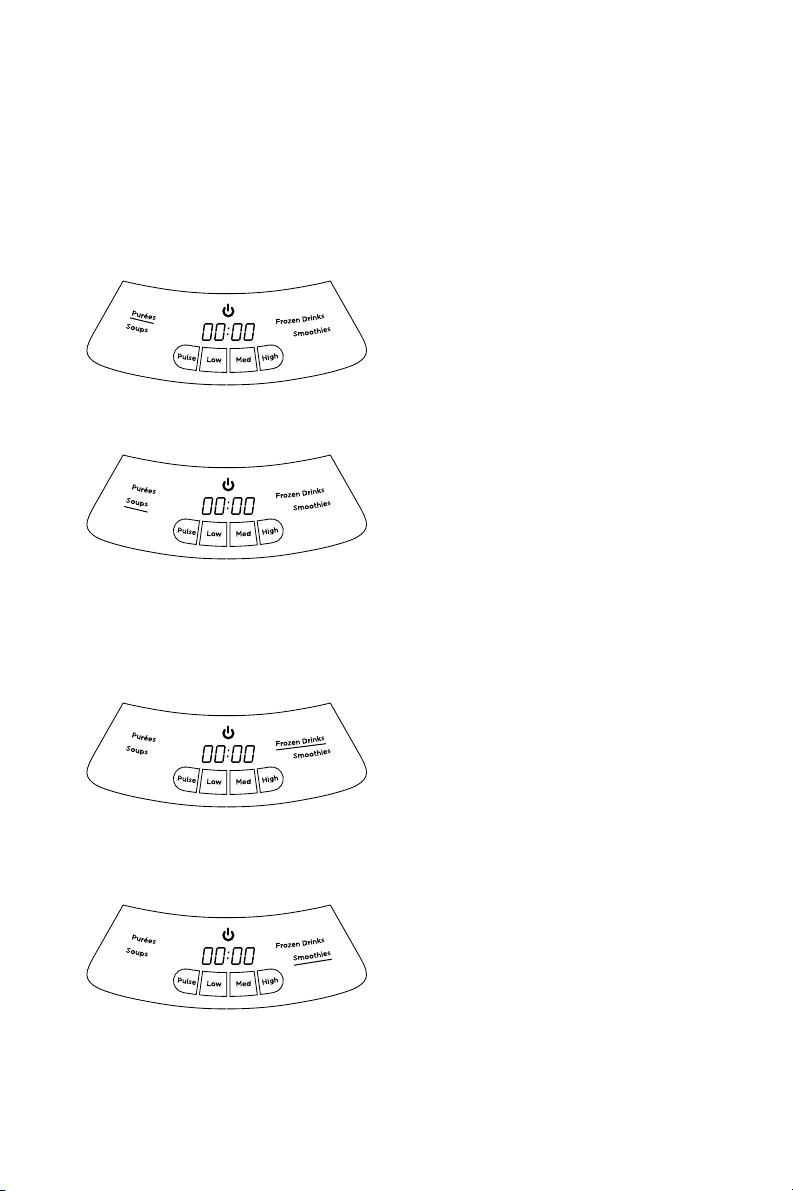
PURÉES
Delivers a perfectly smooth
texture — ideal for dips, sauces
and spreads of all kinds.
SOUPS
Blends sweet or savory
ingredients into the silkiest of
ready to heat soups and
chilled gazpachos.
NOTE: The Soup program does not heat
the ingredients you are blending.
FROZEN DRINKS
Perfect for ice-blended
mocktails or cocktails, and
frappe style drinks.
SMOOTHIES
Easily turn fresh or frozen fruits
and vegetables into sippable
nutritious smoothies.
Blending control panel:
intelligent programs.

19
TO SELECT A PROGRAM
Press the desired program to
turn on. The selected program
will illuminate and the rest of
the blending control panel
will disappear. The program
will start to run, and timer will
countdown until the program is
complete. When the program
is complete, there will be
an audible alert and main
blending control panel will
be illuminated. To pause a
program before completion,
press the active program. The
motor will stop and the timer
will pause counting. To resume
the program, press the program
button again. To return to main
blending control panel, press
POWER once. To fully power
down, press POWER twice and
unplug the unit.
Our intelligent programs are
expertly designed to give you
the perfect results every time.
During each program, the unit
may pulse, change speeds,
and blend as needed until the
program is complete.
NOTE: If the unit stops running and
power and timer display are flashing,
your device may be overheated.
Unplug your device and wait 15 minutes.
Plug back in to reset.

20
Care & maintenance.
• Do not attempt to remove any
pieces from the motor base.
• Use a sponge or dish cloth
dampened with warm soapy
water to wipe down the
motor base until clean.
• To clean leakage residue
from the motor base, wipe
with a damp sponge and
warm water.
• If necessary, you may use
a small brush to scrub the
actuator system area to
ensure it’s clean.
WARNING: Never submerge
the motor base in water.
NUTRIBULLET
®
PITCHER:
WARNING: Blades are sharp!
Use caution when cleaning
the pitcher.
• The pitcher is top-rack
dishwasher-safe. We
recommend rinsing and
briefly scrubbing it with a
dish brush to remove any
remaining debris before
placing in the dishwasher.
NEVER use the sanitize cycle
to wash the pitcher — heat
this high can warp the plastic.
• If preferred, hand-wash the
pitcher with soap and water.
Stuck-on ingredients might
require extra scrubbing
Here’s how to clean
the NutriBullet
®
:
STEP 1:
The most important thing —
ALWAYS POWER OFF THE UNIT
and UNPLUG the motor base
from the power outlet when it
is not in use. Do not attempt to
handle the appliance until all
parts have stopped moving!
This includes during assembly
and disassembly, while
changing accessories during
cleaning, and any time you
leave the machine unattended.
STEP 2:
Detach the pitcher from the
motor base.
STEP 3:
Clean the individual
components (motor base,
pitcher) as recommended on
the following pages.
MOTOR BASE:
• To avoid risk of injury, NEVER
attempt to clean the actuator
system on the motor base
while the NutriBullet
®
Smart
Touch Blender™ is plugged in.

21
Replacement parts.
To order additional parts and accessories, please visit our website
at nutribullet.com/shop/accessories or feel free to contact
customer service: 1 (800) 523-5993.
from a dish brush or sponge.
The blades are sharp. Use
caution to not touch blades
while hand-washing pitcher.
• Regularly check the
structure of the pitcher and
twisting threads for cracking,
crazing, or breakage.
If damaged, replace
immediately to prevent
possible personal injury.
TAMPER
• Always hand-wash the
tamper with soap and water.
Stuck-on ingredients might
require extra scrubbing from
a dish brush or sponge.
How to store:
Store the NutriBullet
®
pitcher
upright with the pitcher lid
secured on top. Do not place
anything on top of the pitcher
lid. Store remaining pieces in a
safe place where they will not
be damaged and won’t
cause harm.

22
NutriBullet
®
Smart
Touch Blender
™
one-
year limited warranty.
LIMITED WARRANTY
FOR NUTRIBULLET
®
NutriBullet's limited warranty
obligations are confined to the
terms set forth below:
NutriBullet, LLC (“NutriBullet”)
warrants this NutriBullet
®
against defects in materials
and workmanship for a period
of one year from the date
of original retail purchase.
This limited warranty is valid
only in the country in which
the product is purchased
and comes with the product
at no extra charge, however
shipping and processing fees
will be incurred for returns,
replacements and or refunds.
If a defect exists, and
NutriBullet
®
is obligated under
this limited warranty, at its
option NutriBullet
®
will (1) repair
the product at no charge, using
new or refurbished replacement
parts, (2) exchange the product
with a product that is new or
that has been manufactured
from new or serviceable used
parts and is at least functionally
equivalent to the original
product, or (3) refund the
purchase price of the product. A
replacement product assumes
the remaining warranty of the
original product. A repaired
product has a one-year
warranty from the date of
repair. When a product or part
is exchanged, any replacement
item becomes your property
and the replaced item becomes
NutriBullet’s property. When a
refund is given, your product
becomes NutriBullet’s property.
OBTAINING WARRANTY
SERVICE
For limited warranty service,
simply call our customer
service department at 1 (800)
523-5993 or contact us via
email from our website at
nutribullet.com, simply click
the contact us link, fill out and
submit the customer contact
form and we will be glad to
help you. When you contact our

23
customer service department
you will be asked for your
name, address, telephone
number and to provide proof of
the original purchase (receipt)
containing a description of the
product(s), purchase date, and
the appropriate NutriBullet
®
serial number(s). Before you
send your product for limited
warranty service please make
sure to keep a copy of all
relevant documents for your
files (receipt, etc.). It is always
recommended to purchase
product insurance and tracking
services when sending your
product for service. Remember,
shipping and processing fees
will be incurred and are not
covered by the one-year
limited warranty.
EXCLUSIONS & LIMITATIONS
This NutriBullet
®
One-Year
Limited Warranty applies only to
NutriBullet
®
products distributed
by or for NutriBullet
®
that can
be identified by the “NutriBullet”
trademark, trade name, logo
and bar code. NutriBullet
®
Smart Touch Blender™ One-
Year Limited Warranty does not
apply to any other products that
may appear to be authentic,
but were not distributed/sold by
NutriBullet, LLC.
Normal wear and tear is not
covered by this limited warranty.
This limited warranty applies
to consumer use only, and
is void when the product
is used in a commercial or
institutional setting.
This limited warranty extends
only to the original consumer
purchaser and is not
transferable. In addition, proof of
purchase must be demonstrated.
Repair or replacement of
the product (or, if repair or
replacement is not feasible, a
refund of the purchase price)
is the exclusive remedy of the
consumer under this limited
warranty. NutriBullet, LLC shall
not be liable for any incidental
or consequential damages for
breach of this limited warranty
or any implied warranty on
this product.
This limited warranty gives
you specific legal rights, and
you may also have other rights
which vary from state to state.
NutriBullet
®
is not liable for
any damage to products not
covered by this warranty (e.g.,
cups, book, User Guide).
This limited warranty does not
apply: (a) to damage caused
by accident, abuse, misuse,
or misapplication; (b) to
damage caused by improper
maintenance (including
unauthorized parts service);

24
(c) to a product or a part that
has been modified in any way;
(d) if any NutriBullet
®
serial
number or trademark has been
removed or defaced; and or (e)
if the product has been used
with an adapter/converter.
THIS LIMITED WARRANTY
AND THE REMEDIES SET
FORTH ABOVE ARE EXCLUSIVE
AND IN LIEU OF ALL OTHER
WARRANTIES, REMEDIES
AND CONDITIONS, WHETHER
ORAL OR WRITTEN, EXPRESS
OR IMPLIED. NUTRIBULLET
®
SPECIFICALLY DISCLAIMS ANY
AND ALL IMPLIED WARRANTIES,
INCLUDING, WITHOUT
LIMITATION, WARRANTIES
OF MERCHANTABILITY AND
FITNESS FOR A PARTICULAR
PURPOSE. IF NUTRIBULLET
CANNOT LAWFULLY DISCLAIM
IMPLIED WARRANTIES UNDER
THIS LIMITED WARRANTY,
ALL SUCH WARRANTIES,
INCLUDING WARRANTIES
OF MERCHANTABILITY AND
FITNESS FOR A PARTICULAR
PURPOSE ARE LIMITED IN
DURATION TO THE DURATION
OF THIS LIMITED WARRANTY.
No NutriBullet
®
reseller, agent, or
employee is authorized to make
any modification to this warranty.
NUTRIBULLET IS NOT
RESPONSIBLE FOR DIRECT,
SPECIAL, INCIDENTAL OR
CONSEQUENTIAL DAMAGES
RESULTING FROM ANY
BREACH OF WARRANTY
OR CONDITION, OR UNDER
ANY OTHER LEGAL THEORY,
INCLUDING BUT NOT LIMITED
TO LOST PROFITS, DOWNTIME,
GOODWILL, DAMAGE TO
OR REPLACEMENT OF
EQUIPMENT AND PROPERTY.
NUTRIBULLET
®
SPECIFICALLY
DOES NOT REPRESENT THAT
IT WILL BE ABLE TO REPAIR
ANY PRODUCT UNDER THIS
LIMITED WARRANTY.
Some states and provinces
do not allow the exclusion
or limitation of incidental
or consequential damages
or exclusions or limitations
on the duration of implied
warranties or conditions,
so the above limitations or
exclusions may not apply to
you. This warranty gives you
specific legal rights, and you
may also have other rights
that vary by state or province.
25
Warranty registration.
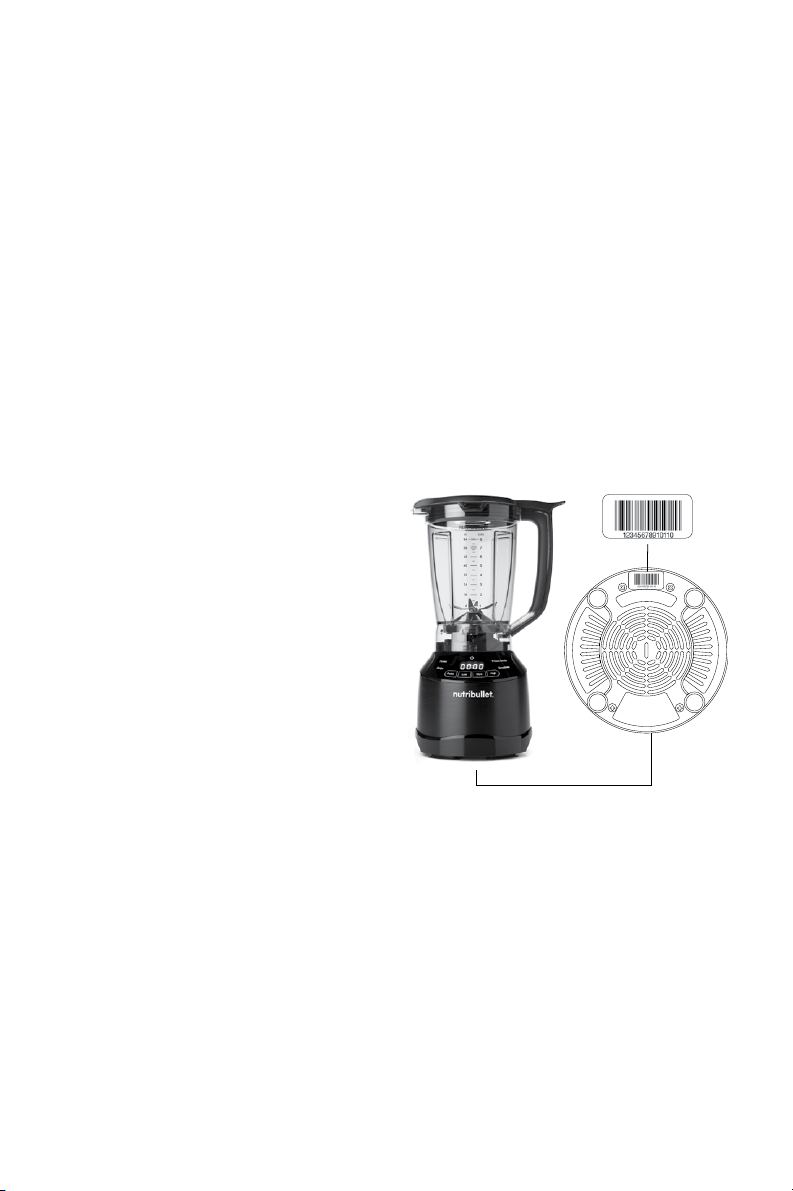
How to find serial number
under the motor base.
Please visit nutribullet.com/
warranty-registration or call
1 (800) 523-5993 to register
your new NutriBullet
®
Smart
Touch Blender™. You will
be asked to enter the Serial
Number* of your product, along
with the purchase date and
place of purchase.
The registration will enable us
to contact you in the unlikely
event of product safety
notification. By registering
your product you acknowledge
to have read and understood
the instructions for use, and
warnings set forth in the
accompanying instructions.


1 (800) 523-5993 | nutribullet.com
NutriBullet, LLC | www.nutribullet.com | All rights reserved.
NutriBullet
®
and the NutriBullet logo are trademarks of CapBran Holdings, LLC
registered in the U.S.A. and worldwide.
Illustrations may dier from the actual product. We are constantly striving
to improve our products, therefore the specifications contained herein
are subject to change without notice.
201117_NBF50420