User manual
In the box
Assembling your machine
Getting started
Caring for your floors
The LCD screen
Charging your machine
Changing your click-in battery
Emptying your bin
Cleaning your bin
Washing your filter
Washing your High Torque XL brush bar
Washing your Laser Slim Fluffy™ brush bar
Washing your Soft roller brush bar
Washing your tools
Using your High Torque XL cleaner head
Looking for blockages
Clearing blockages from your Soft roller cleaner head
Clearing blockages from your Hair screw tool
2
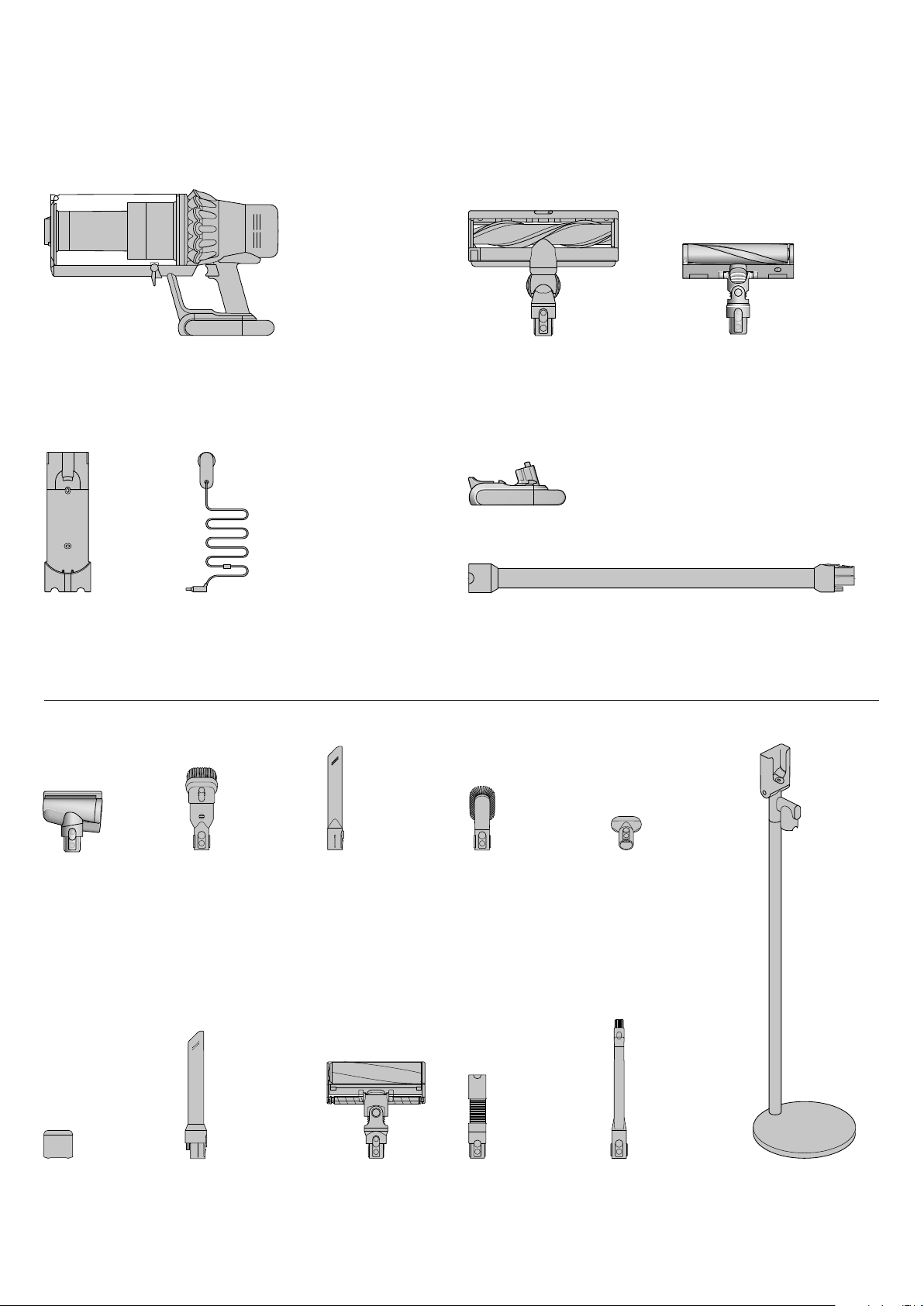
Flexi-crevice tool
Extends and bends.
For hard-to-reach
places around your
home and car.
In the box
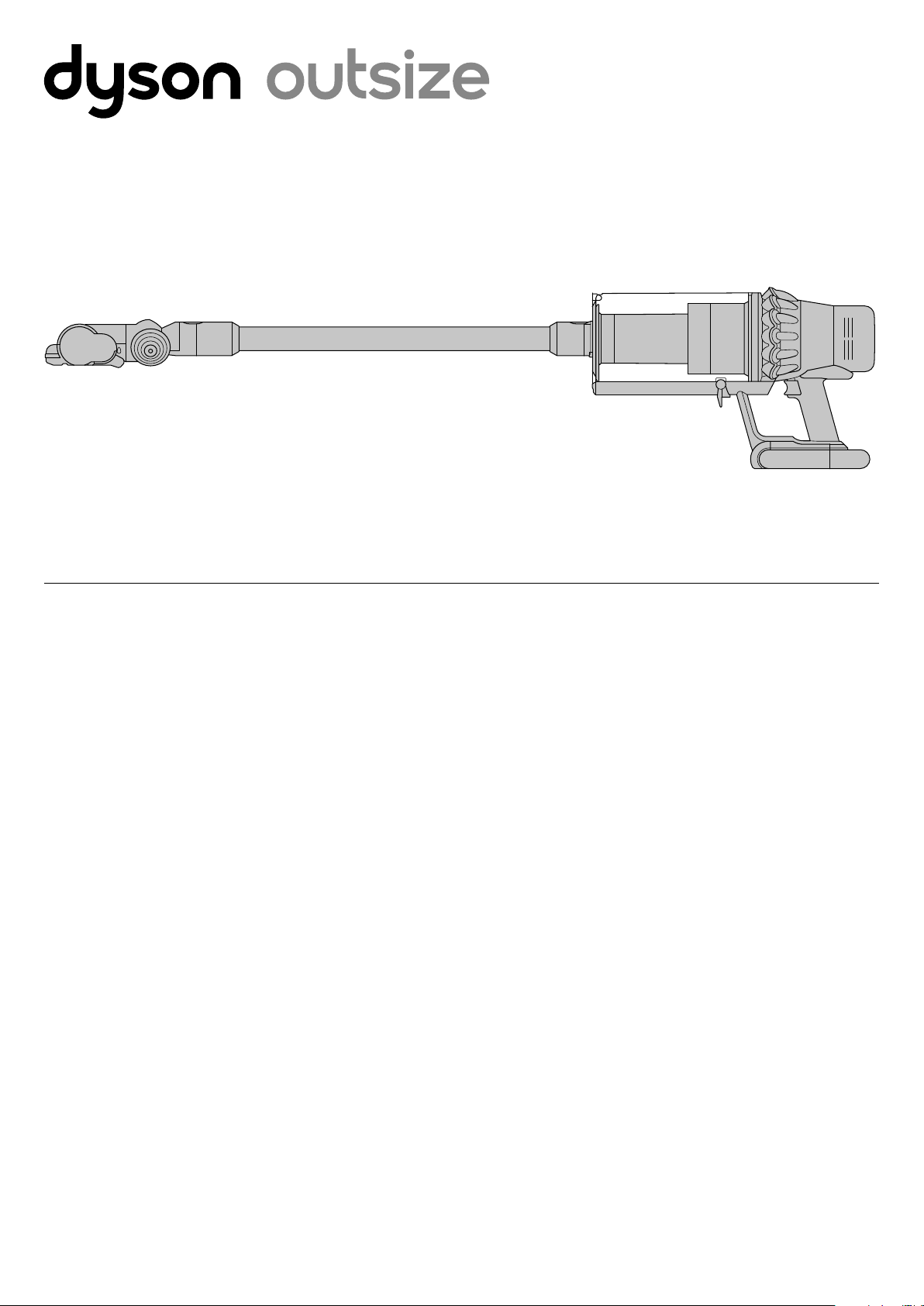
Vacuum cleaner main body
Some tools may not be included.
You can buy additional tools at Dyson.com
Combination tool
Two tools in one –
brush and wide nozzle.
For simple switching
between tasks.
Soft roller cleaner head
Engineered with soft woven
nylon and anti-static carbon
fibre, for hard floors.
Grab and Go dock
Free-standing aluminium
dock, engineered to store
and charge your Dyson
Outsize vacuum and tools.
Crevice tool
Designed for precise
cleaning around edges
and narrow gaps.
Wand clip
Clips to your vacuum’s
wand to hold tools.
WandCharger
Charges your vacuum
with or without the dock.
Dock
Your Dyson vacuum
drops into the wall-
mounted charging dock,
ready for your next clean.
High Torque XL cleaner head
Extra-wide 12-inch wide High Torque
XL cleaner head with Dyson DLS™
(Dynamic Load Sensor) system.
Laser Slim Fluffy™ cleaner head
A precisely-angled laser makes
invisible dust visible on hard floors.
Additional click-in battery
Hair screw tool
Anti-tangle conical
brush bar spirals hair
off and into the bin.
Motor-driven cleaning
for smaller spaces.
Soft dusting brush
Enclosed in a skirt
of soft nylon bristles for
gentle, vacuum-assisted
dusting of delicate
objects and surfaces.
Stubborn dirt brush
Stiff nylon bristles
dislodge ground-in dirt
from coarse carpets,
high traffic areas and
car interiors.
Light pipe crevice tool
Crevice tool with LED lights
lets you reach into dark,
narrow spaces and see
where you’re cleaning.
Extension hose
Adds up to 61cm of
flexible reach to any tool
attachment, to clean
up high or down low
in your home or car.
3
Auto
Boost
Eco
Auto Med
100%
5%
English
Ελληνικ
Espanol
Čeština
中文
한국어
English EnglishEnglish
Eco
Auto
Boost
Eco
Auto Med
100%
5%
English
Ελληνικ
Espanol
Čeština
中文
한국어
English EnglishEnglish
Eco
Intensive cleaning for
ground-in dirt.
Maximum run time
for longer cleans all
around your home.
Power modes
Your machine has three power
modes for different tasks.
Change power modes quickly
using a single button.
Assembling your machine
Getting started
The optimum balance of power and run time.
Attach your High Torque XL cleaner head to activate
Auto mode. Dyson DLS™ technology automatically
changes motor speed between floor types.
Caring for
your floors
Check that the underside of the cleaner head
or tool is clean and free from any objects that
may cause damage.
Before vacuuming your flooring, rugs,
and carpets, check the manufacturer’s
recommended cleaning instructions.
The brush bar on your machine can damage
certain carpet types and floors. Some carpets
will fuzz if a rotating brush bar is used when
vacuuming. If this happens, we recommend
vacuuming without the motorised floor tool
and consulting with your flooring manufacturer.
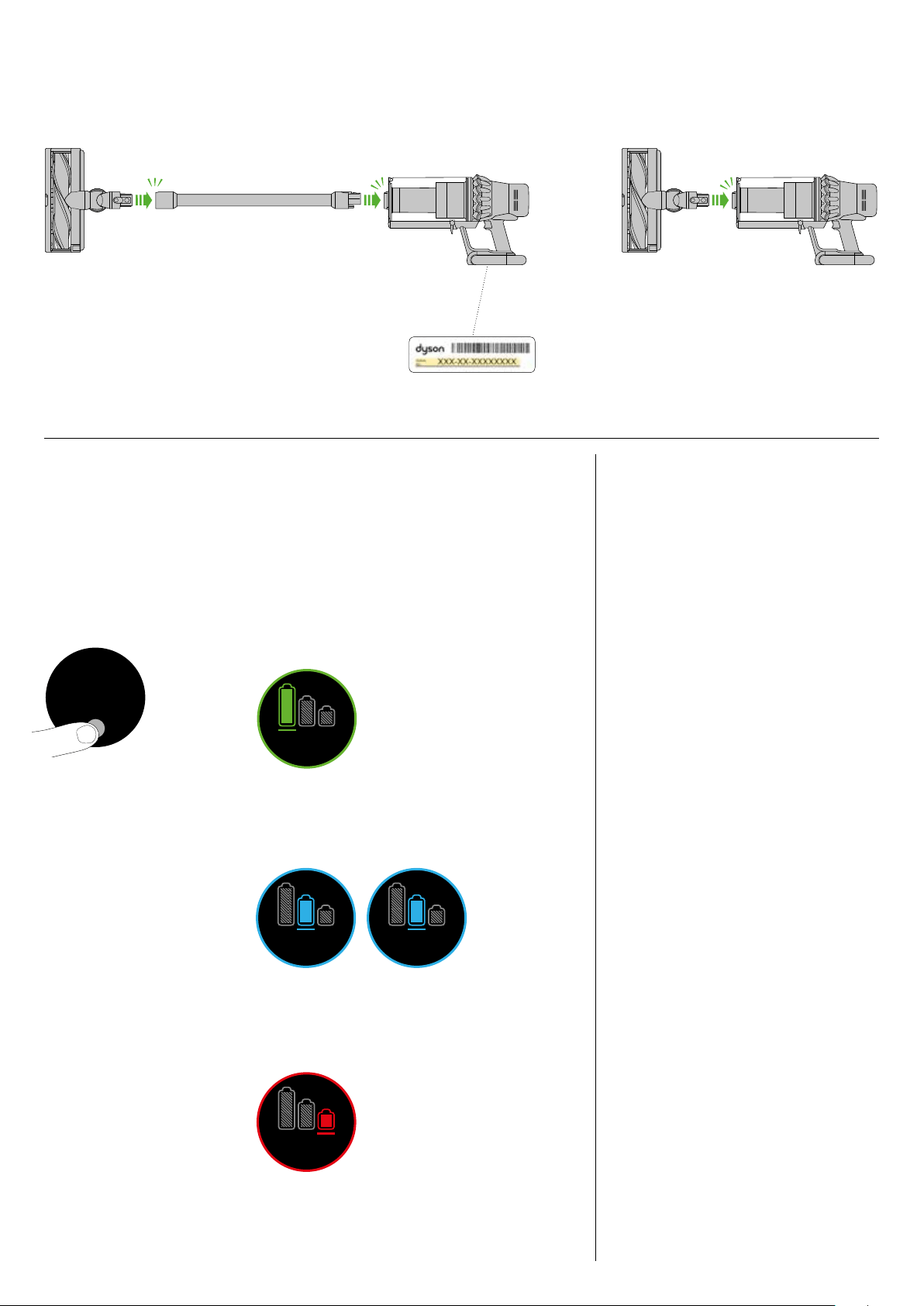
You can register your machine using the serial
number found on the bottom of your machine.
Fully charge both batteries.
before using for the first time.
clik clik
clik
Boost
Eco
Auto
Med
100%
English
Espanol
English English
selected
4:50 Auto
Low
run time
Exit
Off
On
Boost
Eco
Auto
Med
100%
English
Espanol
English English
selected
4:50 Auto
Low
run time
Exit
Off
On
4
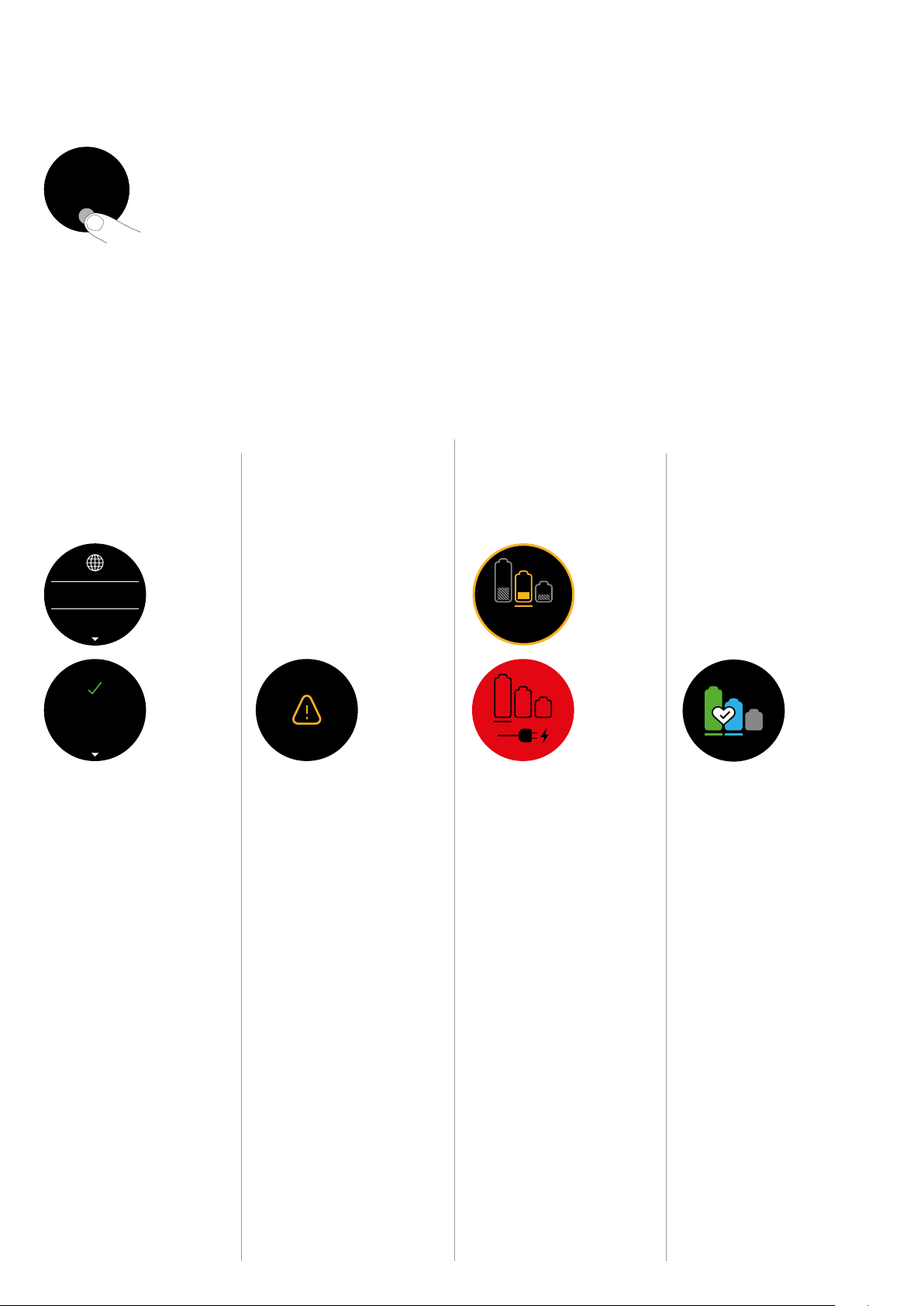
To exit the settings menu. Tap to
scroll through the selection menu.
Select ‘Exit menu’.
When the battery needs charging,
your machine will pulse three times
and a red warning icon will appear
on the screen.
The alerts you might see are:
Filter – the filter isn’t fitted correctly,
or needs cleaning.
Blockage – your machine has a
blockage that needs removing.
Exit settings menu
Alerts
The LCD screen
To change the language on your
screen, press the button and hold
until the language list appears.
Release the button.
Tap the button to scroll through
the language list to your preferred
language. Press and hold the
button until the countdown ends.
A green tick will appear on the
screen to show your language
selection is complete.
To cancel your selection, release the
button during the countdown.
To get the best performance and
life from your battery, use Eco or
Med mode.
Ensure both batteries are charged.
Change
language
Run time
countdown
Change alert
settings
Battery health
Boost
Eco
Auto Med
100%
English
Espanol
English English
selected
4:50 Auto
Low
run time
Exit
Off
On
Boost
Eco
Auto Med
100%
English
Espanol
English English
selected
4:50 Auto
Low
run time
Exit
Off
On
Boost
Eco
Auto Med
100%
English
Espanol
English English
selected
4:50
Auto
Low
run time
Exit
Off
On
Boost
Eco
Auto Med
100%
English
Espanol
English English
selected
4:50 Auto
Low
run time
Exit
Off
On
Boost
Eco
Auto Med
100%
English
Espanol
English English
selected
4:50 Auto
Low
run time
Exit
Off
On
Boost
Eco
Auto Med
100%
English
Espanol
English
English
selected
4:50 Auto
Low
run time
Exit
Off
On
Settings menu
Control the settings on your machine using the button.
To enter the settings menu, press and hold the button
until the menu screen appears. Tap to scroll through
the options available.
When the battery needs charging,
your machine will pulse three times
and a low run time icon will appear
on the screen.
When your battery is empty,
a red warning icon will appear
on the screen.
You can turn the alert motor pulse
off. Your motor will no longer pulse
but alert information will continue
to be displayed on the LCD screen
when your machine needs your
attention.
Turning off Alerts will not turn off
the blockage alert pulsing. This is
to ensure you clear any blockages,
preventing damage to your
machine.
Tap to scroll through the settings
menu. Select the ‘Alerts’ option.
Scroll to select on or off. Hold the
button until the countdown ends
and a tick appears on the screen.
To cancel your selection, release
the button during the countdown.
5
It’s important to fully charge your new machine
before using it for the first time, and after
every clean. This is because the battery and
monitoring system’s algorithm ‘learns’ over
time, and fully charging your machine helps
it to more accurately calculate and display
remaining run time.
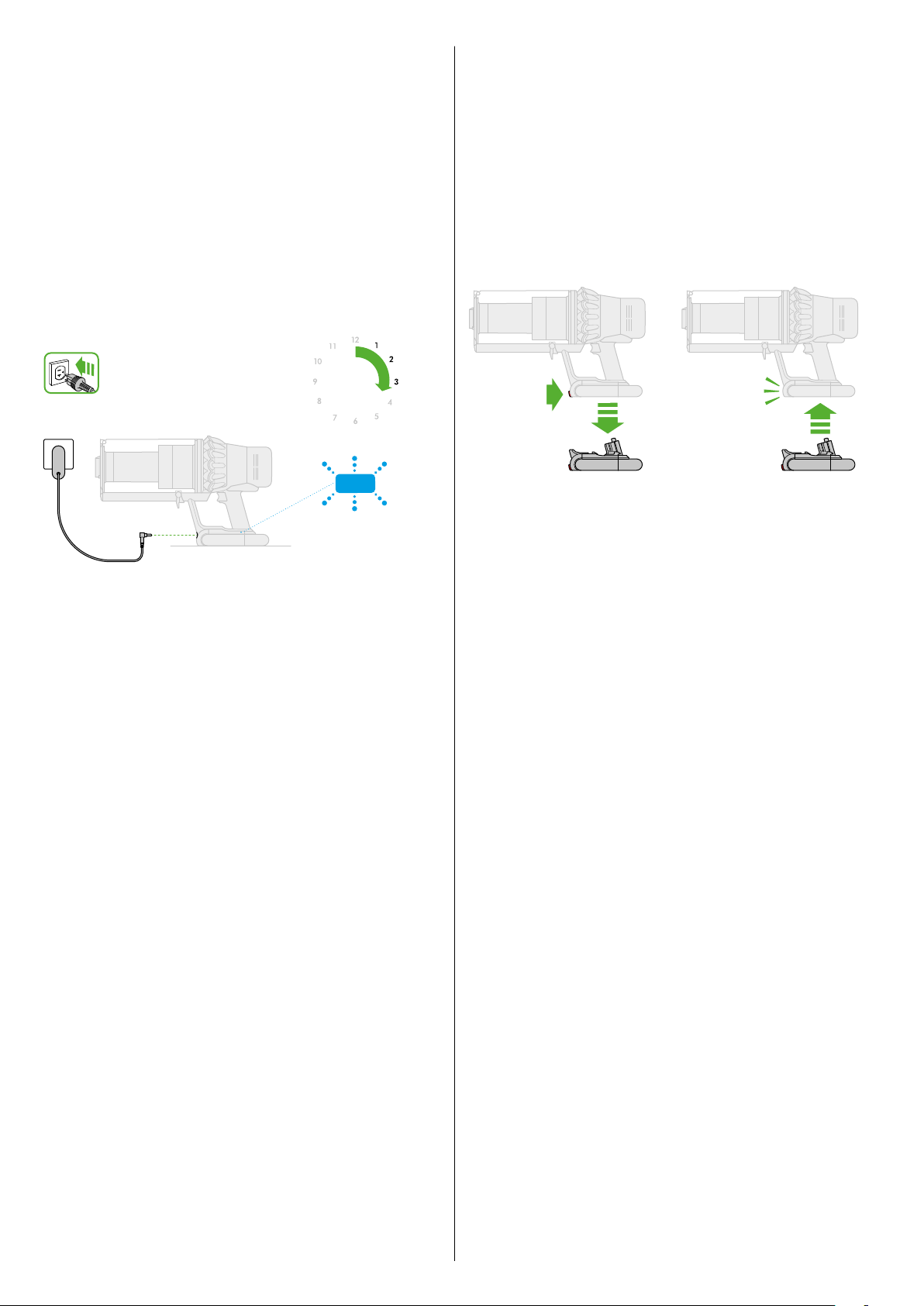
Charging your machine
Connect to charger either directly or in the dock.
The blue LEDs on either side of the battery will flash during charging.
When the battery is fully charged, both LEDs will light for 5 seconds.
Your battery is fully charged when the display shows 100%.
Your machine won’t operate if the ambient temperature is below
10°C (50°F). This is designed to protect both the motor and battery.
Changing your click-in battery
To remove a battery
Hold your hand under the battery
to support it.
Press the red battery release button
and slide the battery off the handle.
Place the battery on charge.
To install a battery
Slide the battery onto the handle
until it clicks securely in place.
Where you have additional batteries,
we recommend that you alternate the
batteries to maintain even performance.
4.5hrs
clik
clik
6
clik
clik
2
1 3
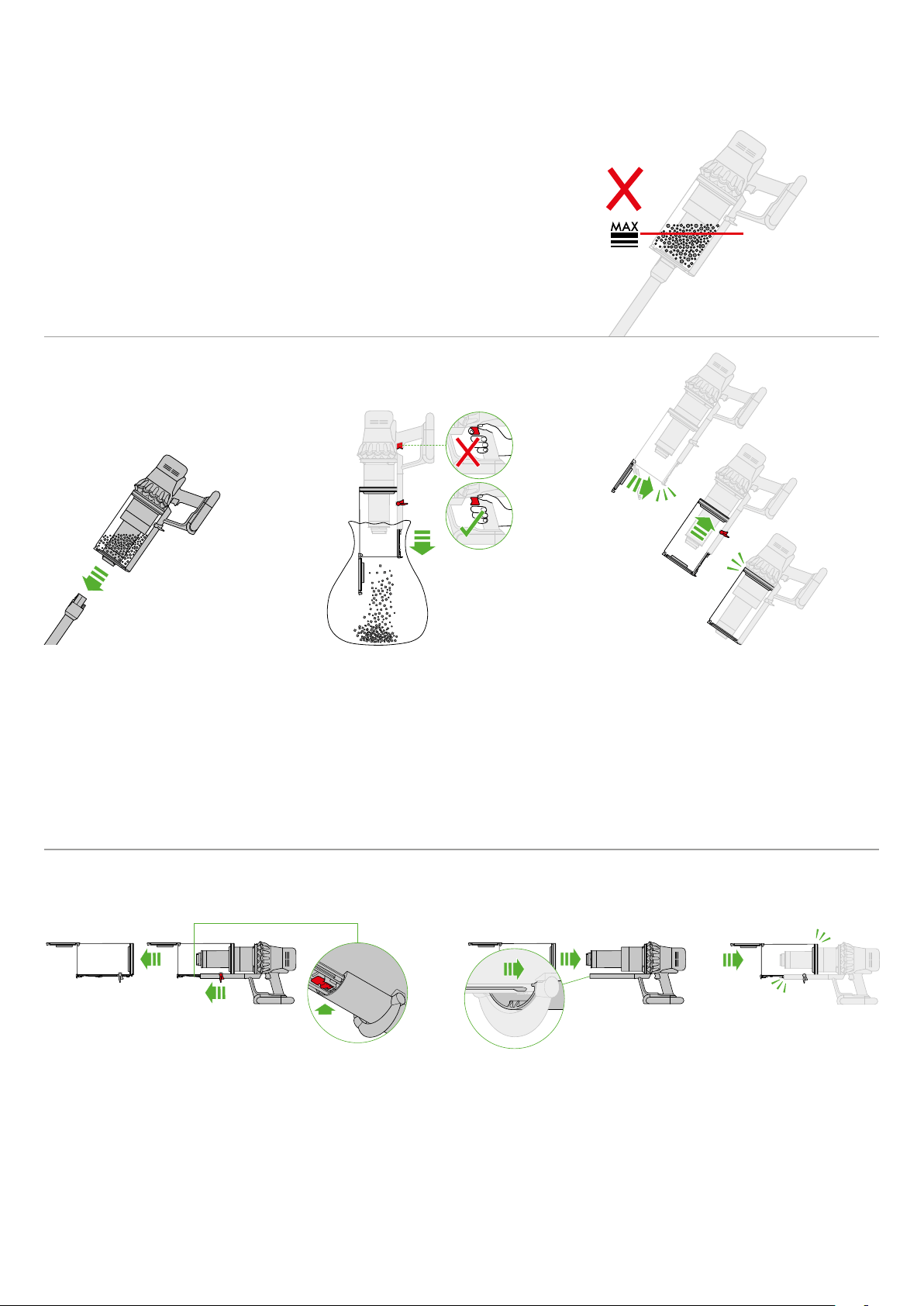
Emptying your bin
To release the dirt:
Hold the machine over the bin in a downwards
position.
Firmly push the red bin release button. The bin will
slide down, cleaning the shroud as it goes and the
bin base will open.
The bin base won’t open if the red bin release
button isn’t pushed down all the way.
Press the red wand release button
and pull the wand away from the bin.
To minimise dust/allergen contact when emptying,
cover the clear bin tightly in a dust proof bag while
you empty. Remove the clear bin carefully from the
bag. Seal the bag tightly and dispose.
Be careful not to pull the power trigger
while the clear bin is open for emptying.
To close the clear bin:
Push the bin base upwards until the clear bin
and bin base click into place.
Empty as soon as the dirt reaches
the MAX level – don’t overfill.
Using the machine when the dirt
is above the MAX line may cause
the dirt to reach the filter and
more frequent maintenance
will be required.
Be careful not to pull the power
trigger while the clear bin is open
for emptying.
Cleaning your bin
If it is necessary to clean your bin, empty the bin
as shown in the ‘Emptying your bin’ section.
Press the red button located on the bin runner
to release the bin and slide the bin off the runner.
Clean the bin with a damp cloth only.
Make sure that the bin and seals are completely
dry before replacing.
To refit the bin, insert the spine on to the
bin runner.
Close the bin by pushing the bin base upwards
until the bin and bin base click into place.
The bin isn’t dishwasher safe and the use
of detergents, polishes or air fresheners
to clean the bin isn’t recommended as this
may damage your machine.
clik
clik
clik
clik
clik
clik
clik
clik
clik
7
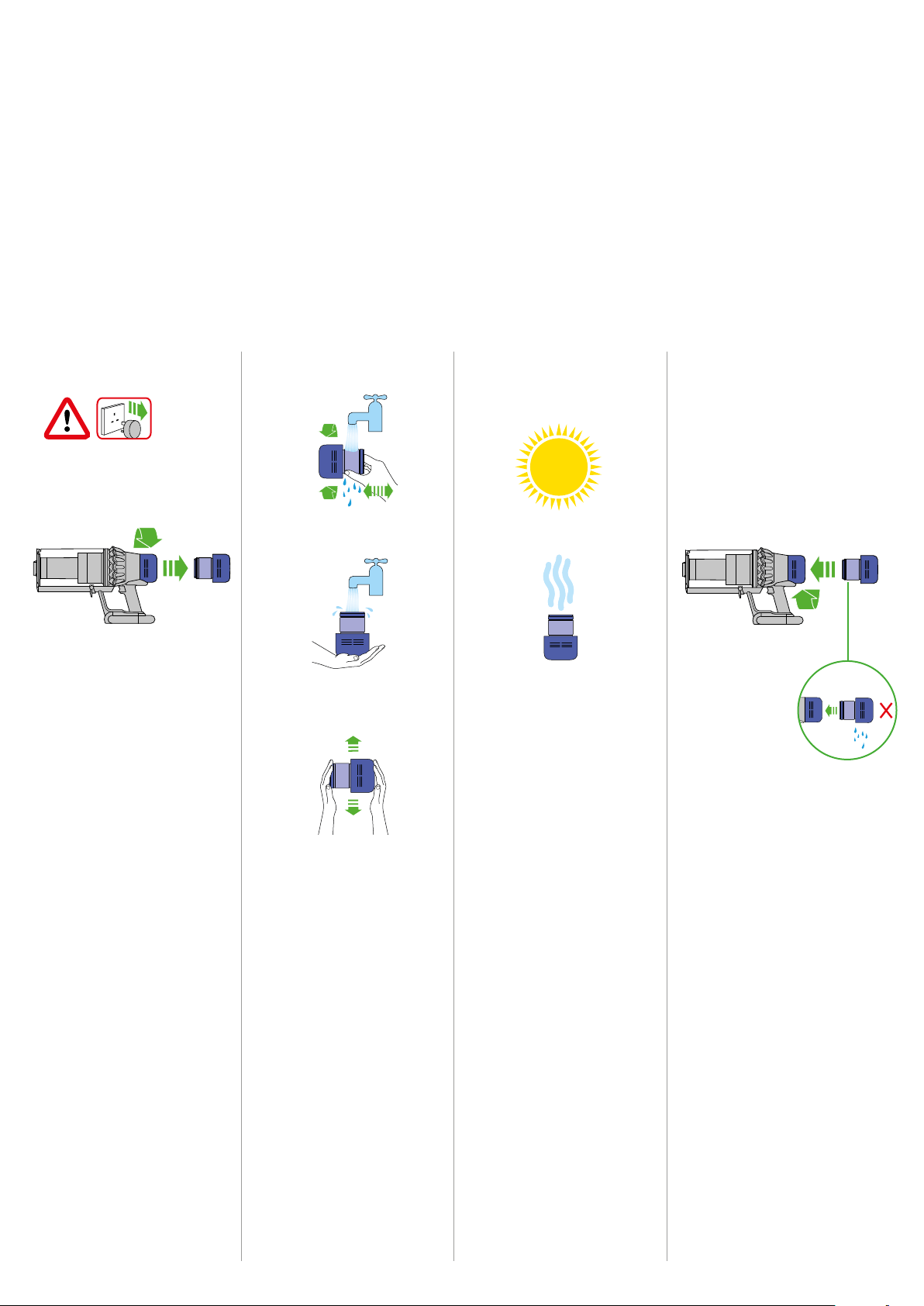
Washing your filter
Check that the filter unit is
completely dry.
To refit, position the filter unit in
place on the main body and twist
clockwise until it clicks into place.
The filter unit may require more
frequent washing if vacuuming fine
dust or if used mostly in Boost mode.
Don’t put any part of your machine
in a dishwasher, washing machine,
tumble dryer, oven, microwave or
near a naked flame.
Wash the filter unit in cold
water only.
Wash the pleated paper element
of the filter unit first; hold the filter
unit under a cold water tap with
the foam element downwards
and run cold water over the
pleated paper.
To always get the best performance from your
machine, it is important to regularly clean the
filters and check for blockages.
The LCD display will alert you when the filter unit
needs washing. We recommend that you wash your
filter at least once a month or when your machine
alerts you.
Remove the filter unit by twisting it
anti-clockwise. Gently pull it away
from the machine.
Tap the filter unit gently, to remove
any excess dust and debris before
washing it.
Wash the foam element of the filter
unit next; hold the filter unit under
a cold water tap with the foam
element downwards so that dirty
water does not contaminate the
pleated paper element. Run cold
water over the inside and outside of
the foam element and squeeze the
foam gently to expel the dirt.
Repeat washing both parts of the
filter unit until the water runs clear.
Gently shake the filter unit to
remove any excess water and leave
to drain with the foam element end
facing up.
Leave the filter unit to dry
completely in a dry environment
with good airflow, for a minimum
of 24 hours.
2
1 3 4
1 2 3
8
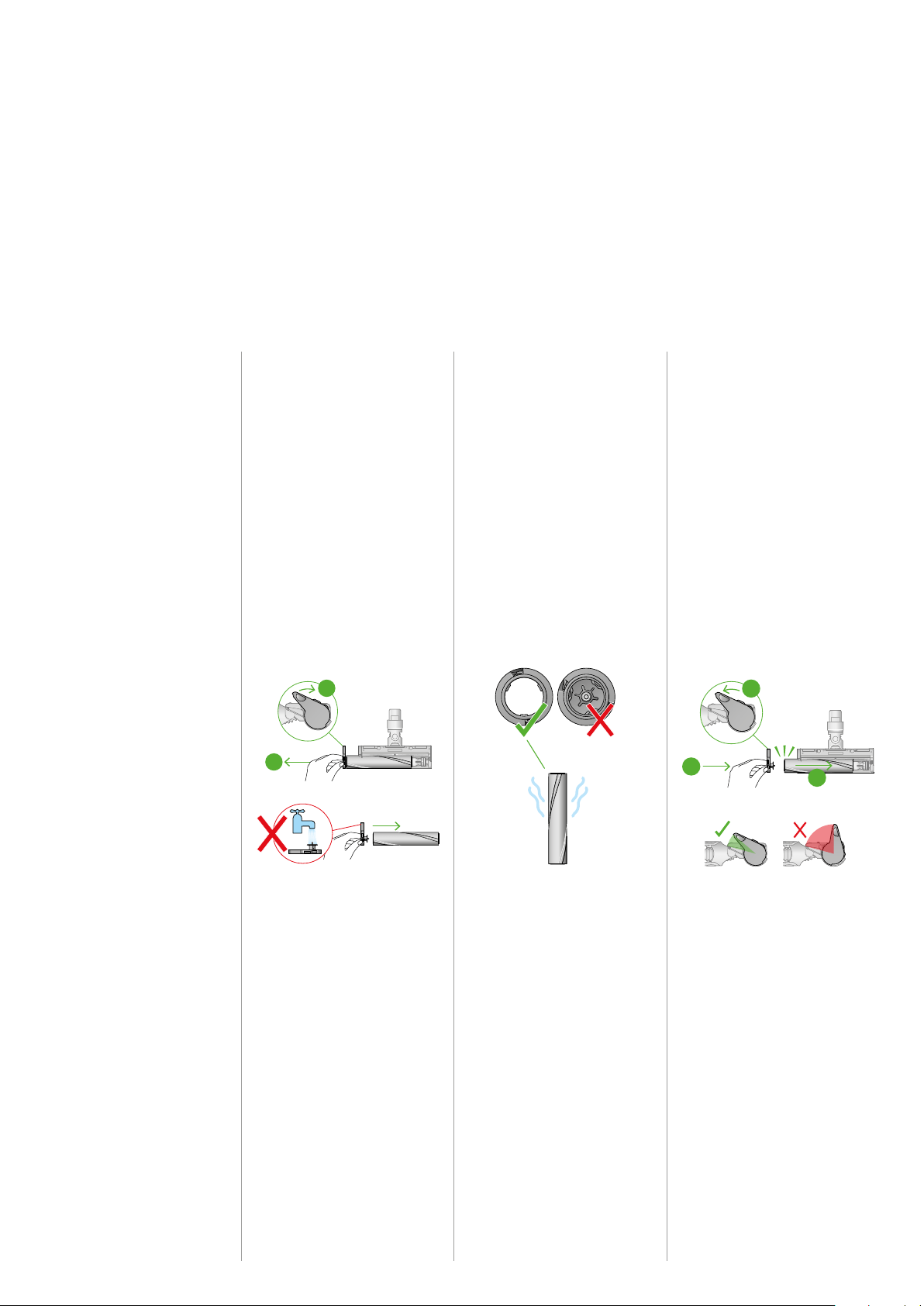
Washing your High Torque XL brush bar
Don’t put your brush bar in a dishwasher,
washing machine, tumble dryer, oven,
microwave or near a naked flame.
Only use cold water to wash your brush bar
and don’t use any detergents.
Lift the red catch on the cleaner head to
release the brush bar.
Slide the brush bar out of the cleaner head.
Twist the end cap and remove it from the
brush bar. Don’t wash the end cap.
Hold your brush bar under cold tap water
and gently rub to remove any lint or dirt.
Stand the brush bar upright and leave to
dry completely. Make sure your brush bar
is completely dry before refitting.
The cleaner head housing is not washable
and should only be wiped over with a damp
lint-free cloth.
2
1 3
To maintain optimum performance, check and wash your
brush bar regularly.
Make sure your machine is disconnected from the charger
and take care not to touch the trigger.
9
2
3
1
2
1
2
3
1
2
1
2
3
1
2
1
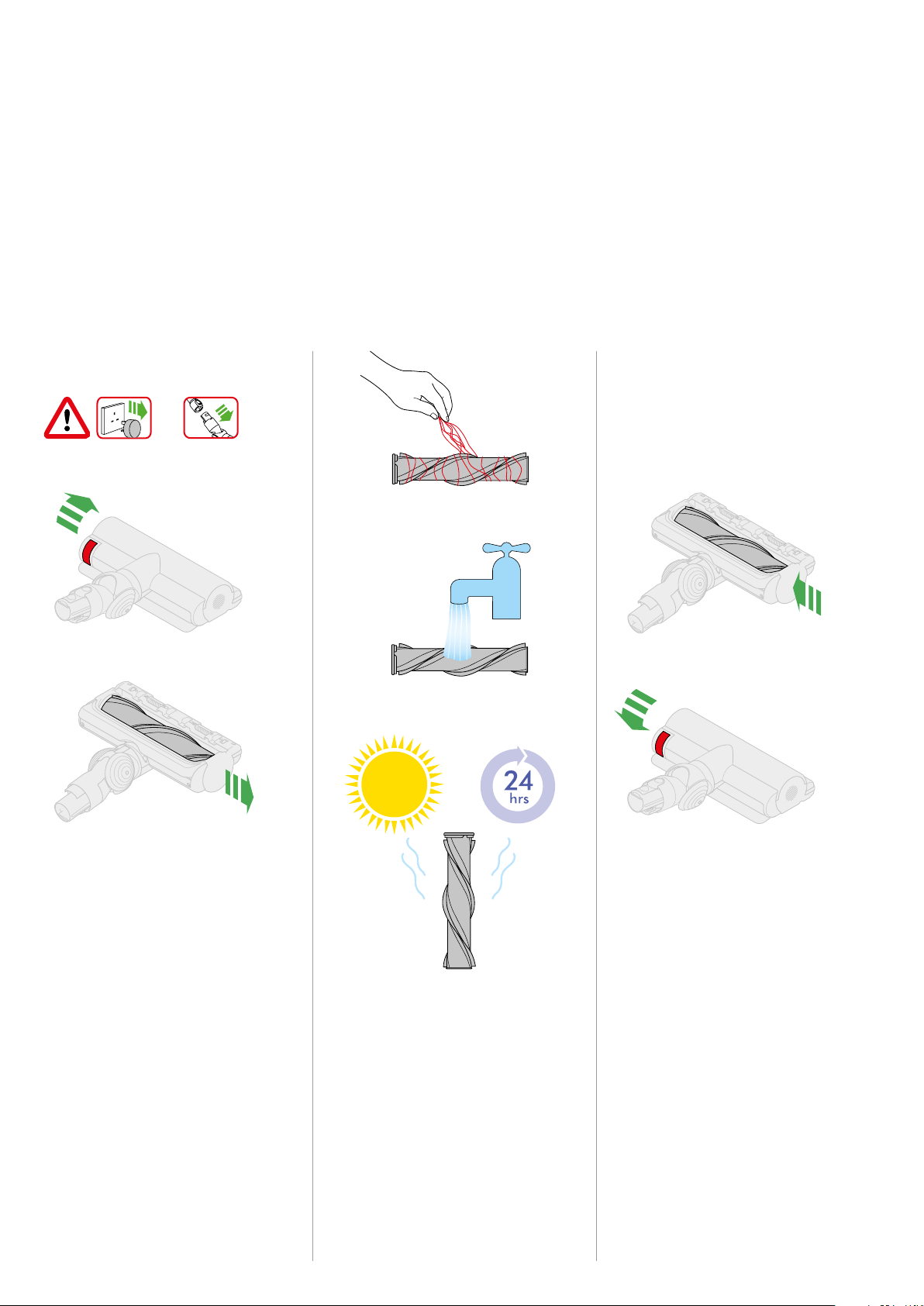
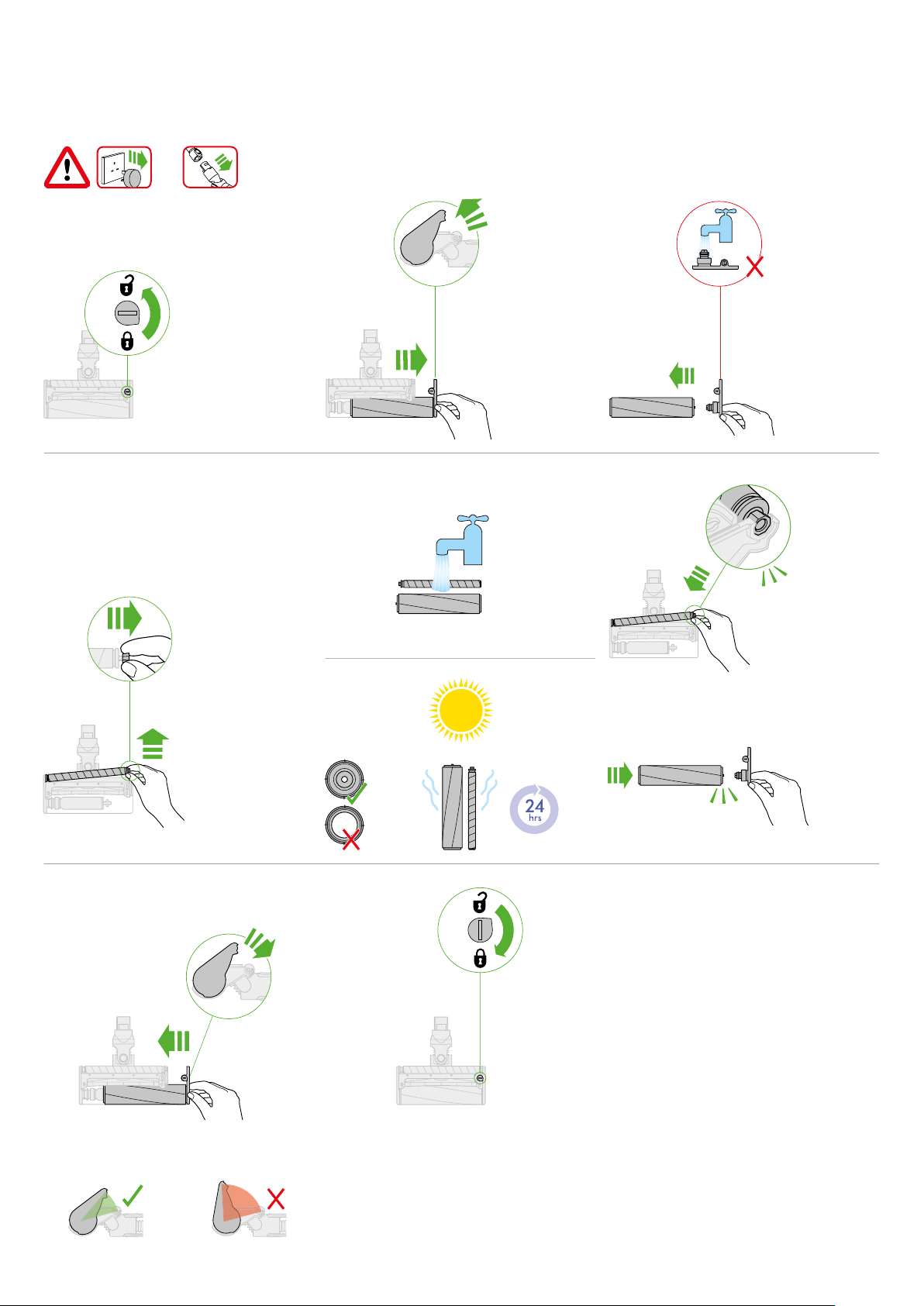
Washing your Laser Slim Fluffy™ brush bar
Replace your brush barRemove your brush bar Wash and dry your brush bar
Don’t put any part of your
machine in a dishwasher
or use detergents, polishes
or air fresheners.
Press the cleaner head release
button on the end of the wand.
Place the cleaner head upside
down.
Push the end cap up fully and
pull the brush bar out of the
cleaner head.
Hold your brush bar under
running water and gently rub
to remove any lint or dirt.
Stand your brush bar upright as
shown. Leave to dry completely
for at least 24 hours.
Before replacing, check that
your brush bar is completely dry.
Reattach the end cap to your
brush bar.
Slide your brush bar into the
cleaner head.
Push the end cap back down
to the closed position.
To maintain optimum
performance, keep your laser
lens clean. Only clean the lens
when the cleaner head is not
attached to your machine.
Use a soft, dry, lint-free cloth
to wipe the lens.
Cleaning your laser lens
Your Laser Slim Fluffy™ cleaner head has a washable brush
bar. To maintain optimum performance, check and wash
your brush bar regularly.
Make sure your machine is disconnected from the charger
and take care not to touch the trigger.
2
1 3 4
The end cap should
be attached to the
cleaner head at an
angle less than 90°,
any angle greater
than this will not allow
the end cap to close.
The brush bar has an
open end and a closed
end. Stand upright,
with the closed end
facing upwards, to dry.
The end cap is located
at the side of the cleaner
head. Push this upwards
to unlock the brush bar.
Don't wash the end cap.
10
1
2
1
2
2
1
click
click
1
5 6
7 8
2 3
4
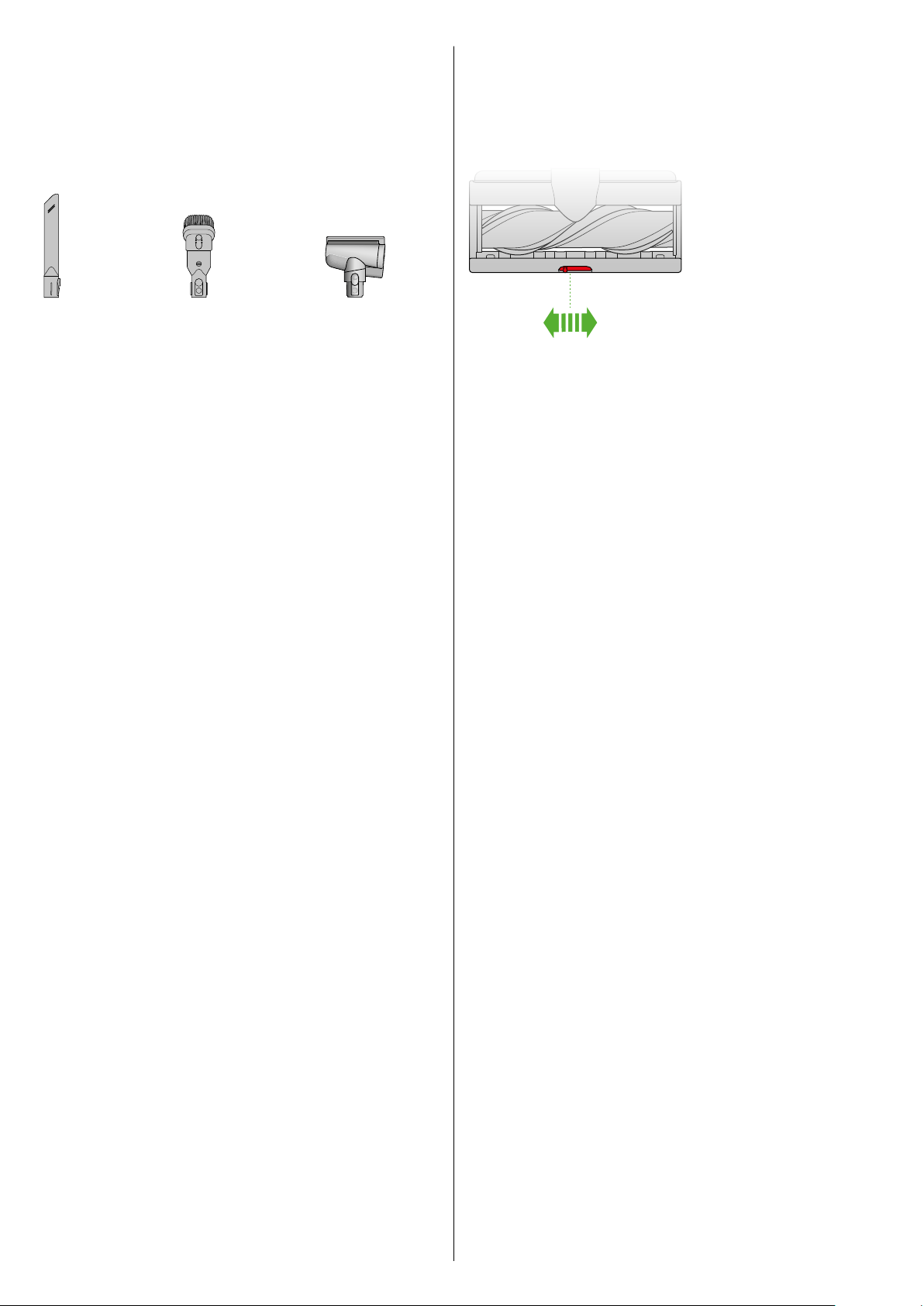
Washing your Soft roller brush bar
11
Washing your tools
Don’t put any part of your machine in a dishwasher
or use detergents, polishes or air fresheners.
Wash with cold tap water.
Make sure your tool is completely dry before using.
Your Hair screw tool and Light pipe crevice tool are not
washable. Wipe with a damp, lint free cloth, without touching
the connector ends.
Combination tool
Crevice tool
Using your High Torque XL
cleaner head
Your High Torque XL cleaner head has a slider
control to adjust the suction of the cleaner head.
To select the suction required, move the suction
control slider on top of the cleaner head.
+
Maximum suction for ground in dust and debris
For vacuuming durable floor coverings, hard floors and heavily
soiled carpets and rugs.
Suction for dust and debris
For vacuuming lightly-soiled carpets, rugs and hard flooring.
For vacuuming large debris such as peanuts or rice.
–
Suction for deep pile carpets and delicate flooring
For vacuuming deep pile carpets or rugs and flooring where
you experience greater resistance.
For vacuuming lightly soiled floors, and delicate flooring such
as vinyl, parquet and lino.
Hair screw tool
12
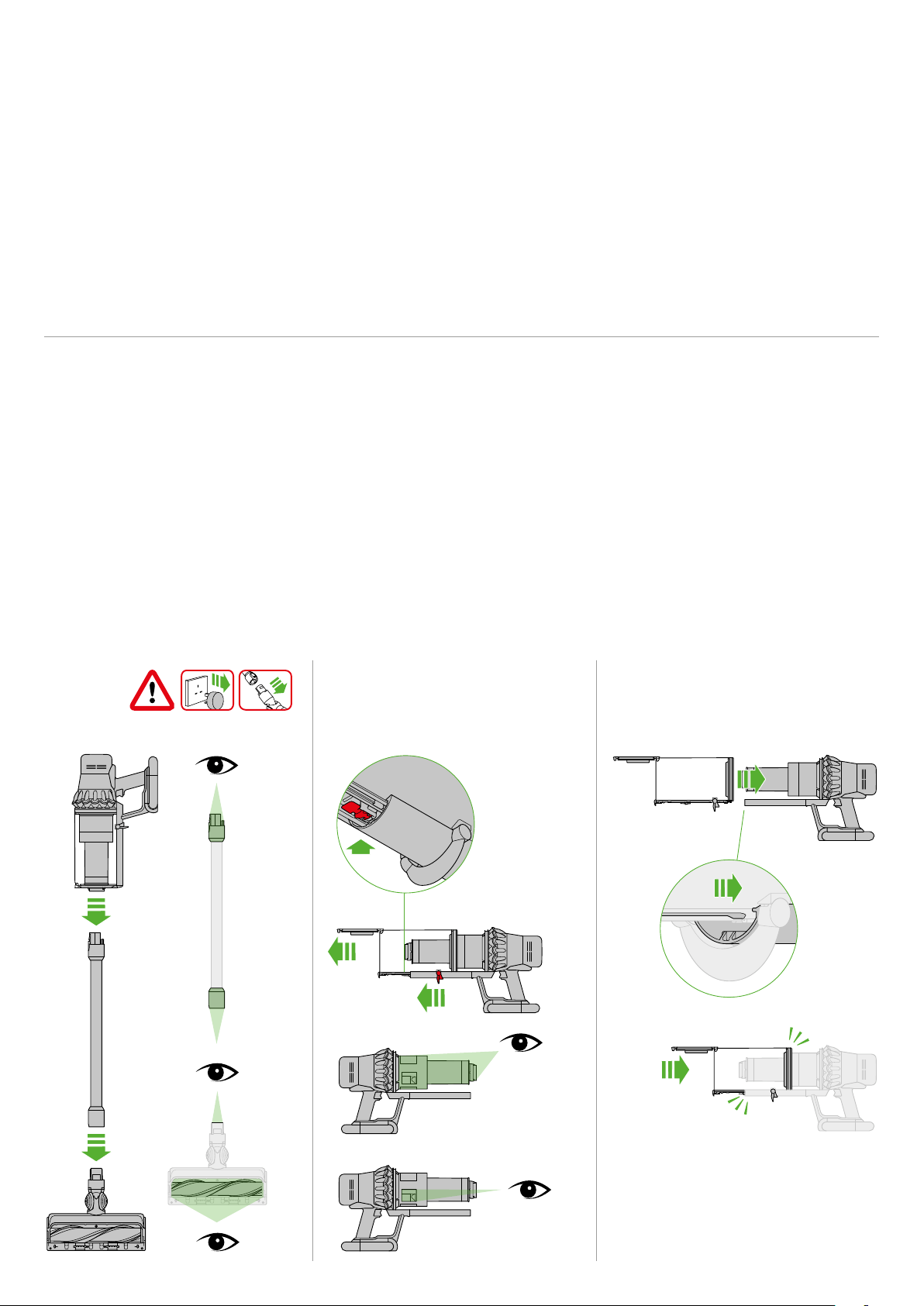
Looking for blockages
Your machine is fitted with an automatic cut-out.
If any part becomes blocked, the machine may
automatically cut out.
The motor will pulse and the LCD screen
will indicate that there is a blockage.
Be careful not to pull the power trigger
while looking for blockages.
Make sure any blockages are clear and all
parts are refitted before using your machine.
2
1 3
Beware of sharp objects when checking for blockages.
Clearing blockages is not covered by your guarantee.
If you can’t clear an obstruction from the cleaner head, you may need to
remove the brush bar. Use a coin to unlock the fastener, slide the brush
bar out of the cleaner head and remove the obstruction. Replace the
brush bar and securely tighten the fastener.
Make sure it is fixed firmly before using your machine.
Your machine has carbon fibre brushes. Take care if coming into
contact with them, as they may cause minor skin irritation. Wash your
hands after handling the brushes.
clik
clik
clik
13
1
2
1
2
21 3
54
Clearing blockages from your Soft roller cleaner head
14
Put your brush bar back into position and
press firmly until it clicks back into position.
Check the red locking lever is in the
unlocked position. Align the cleaner head
cover with the guide on the main body.
Push it down until it clicks into position.
Push the red locking lever up until it clicks
into position and push the base plate back
into place.
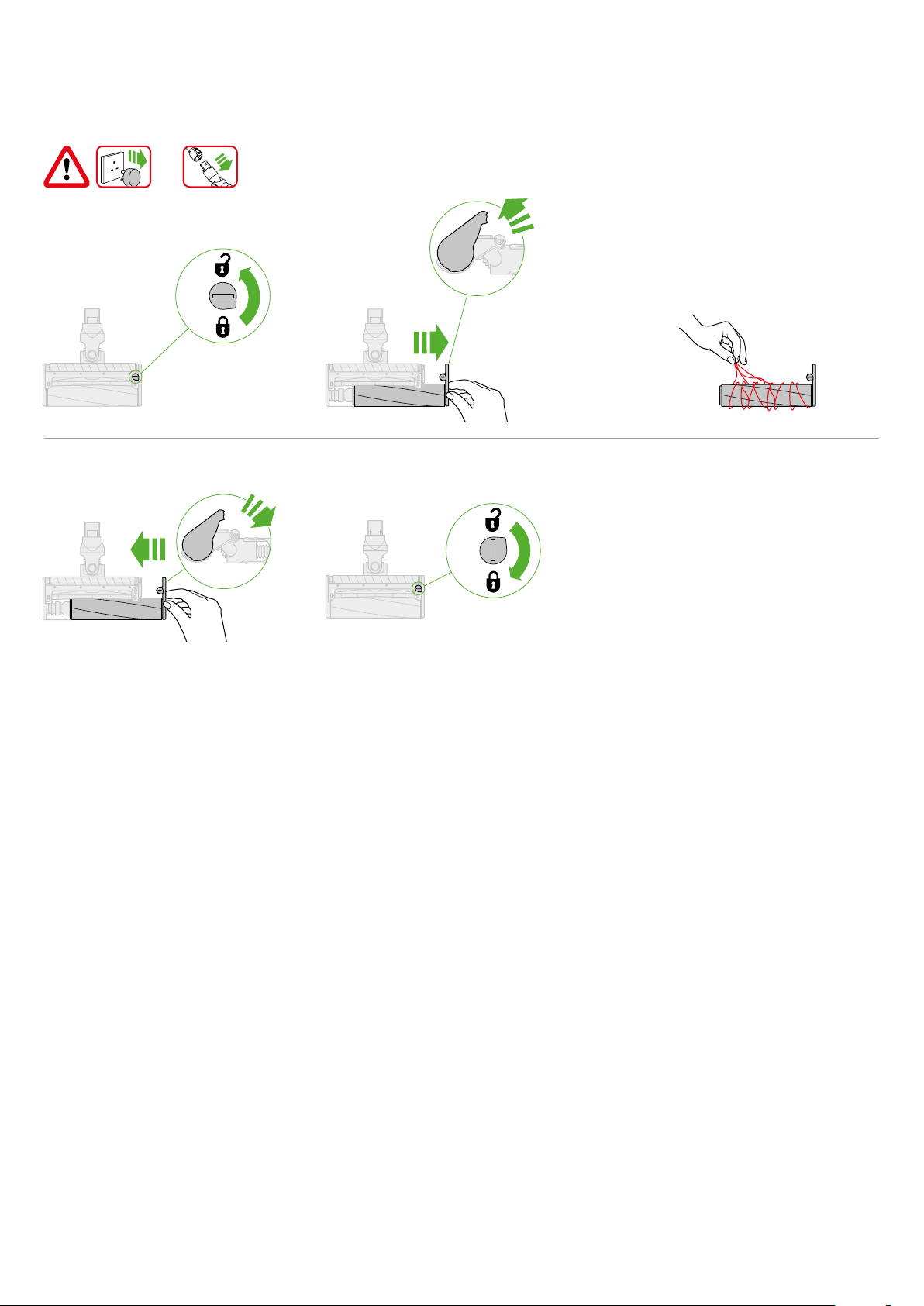
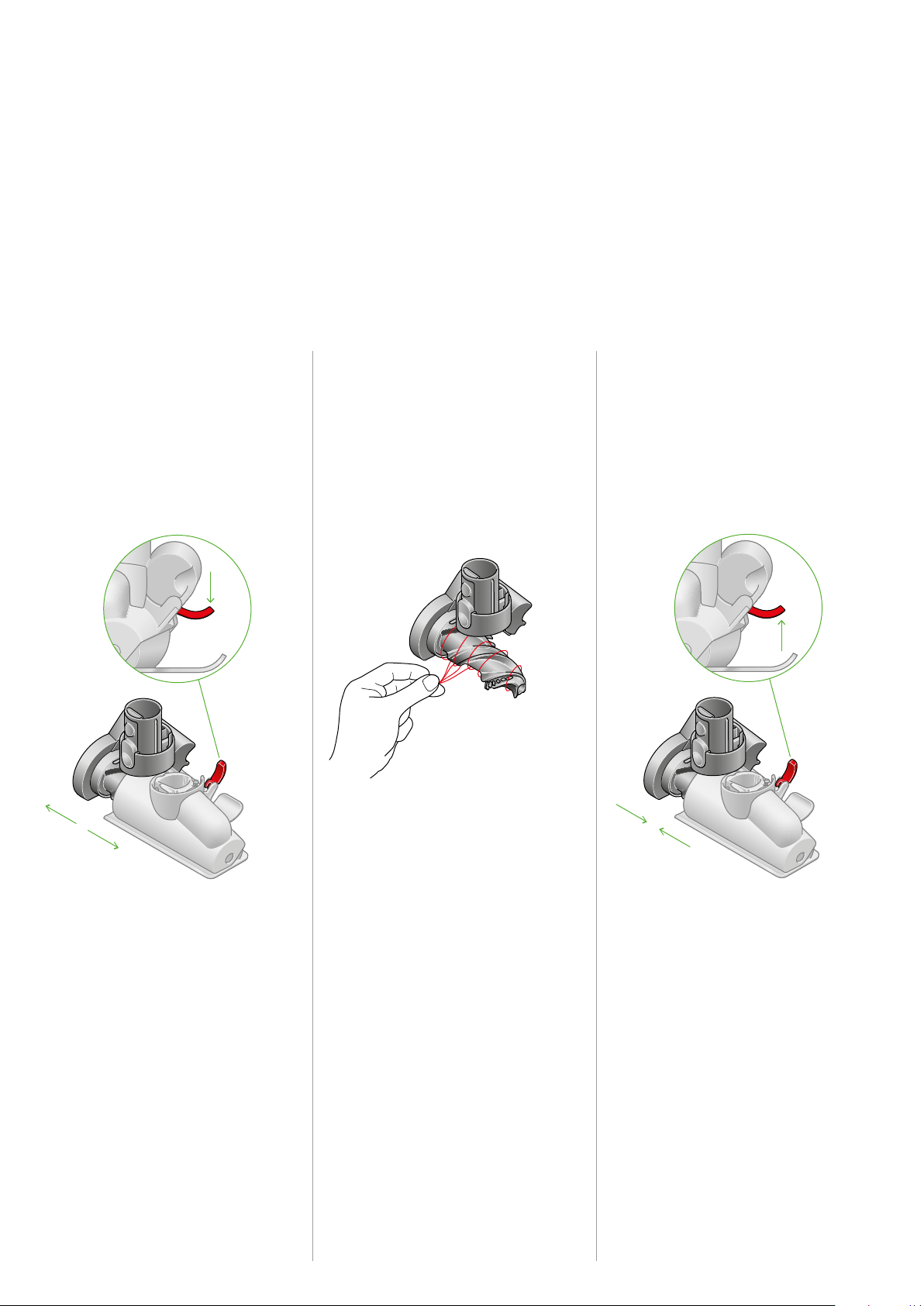
Clearing blockages from your Hair screw tool
Remove the cover and brush bar
Pull your brush bar firmly to remove it from
the main body.
Check and remove any obstructions from
all three parts of your Hair screw tool.
Your Hair screw tool isn't washable.
Wipe over with a damp lint-free cloth.
Don’t put any part of your machine in
a dishwasher or use detergents, polishes
or air fresheners.
Remove the Hair screw tool from the wand
or machine.
Push the base plate open. Press the red
lever down to release the cleaner head cover.
Pull the cleaner head cover off the main
body of the tool.
Look for obstructions Re–assemble Hair screw tool
2
1 3
Your Hair screw tool doesn’t have a washable brush bar.
To maintain optimum performance, check your brush bar
regularly and clear any obstructions.
Make sure your machine is disconnected from the charger
and take care not to touch the trigger.
The curved locking lever
located on the back of the tool.
Remove any hair or fibres
that have been wrapped
around the brush bar.