SV12 JN.00000 PN.000000-00-00 00.00.00
VERSION NO.01
Contents
In the box
Getting started
The LED Screen
How to prepare your
PencilWash™ cleaner
How to use your PencilWash™ cleaner
Maintenance
Looking after your machine
Disassembling your machine
Support and service
User guide
Dyson logo
PencilWash logo
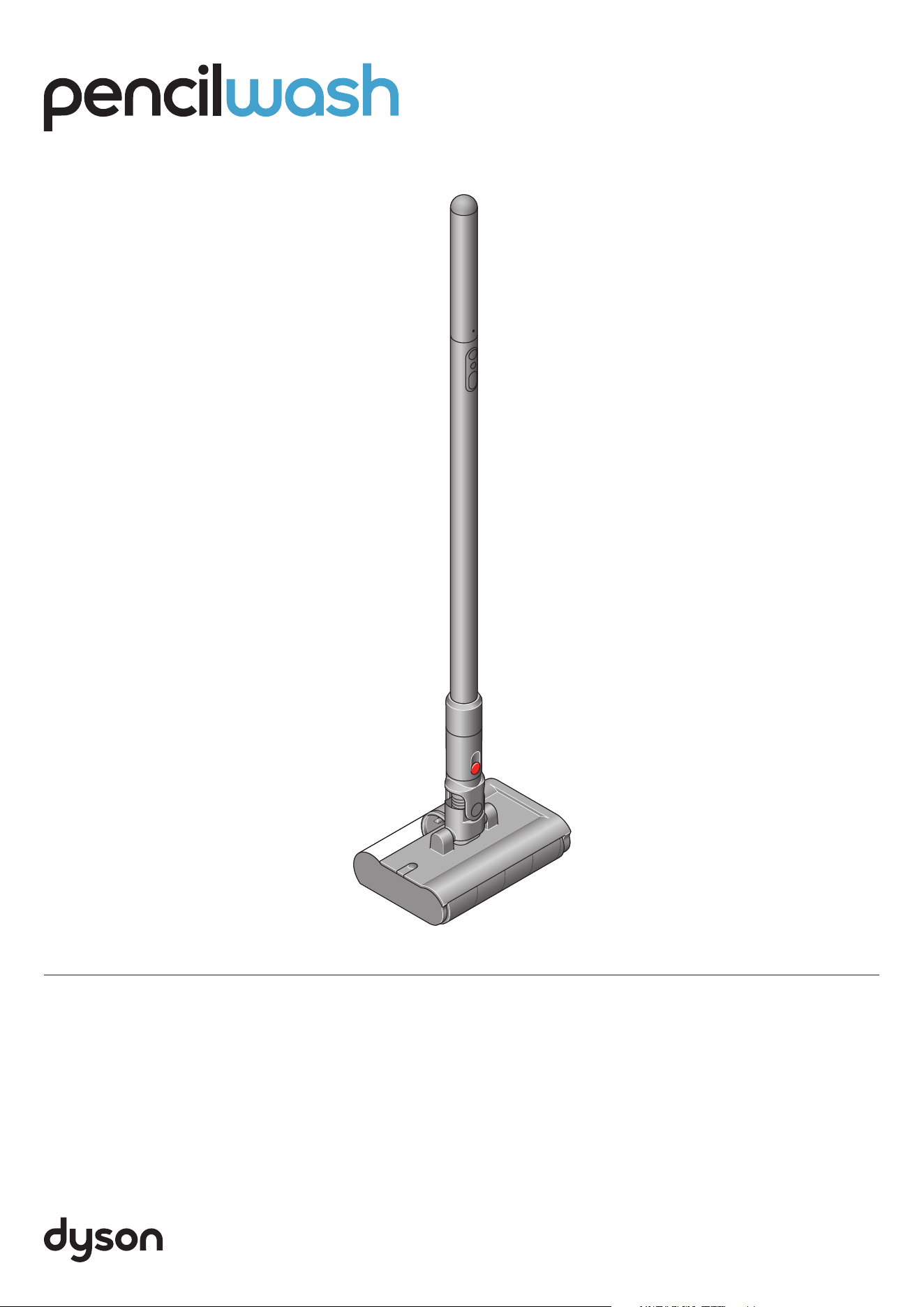
Dyson PencilWash cleaner
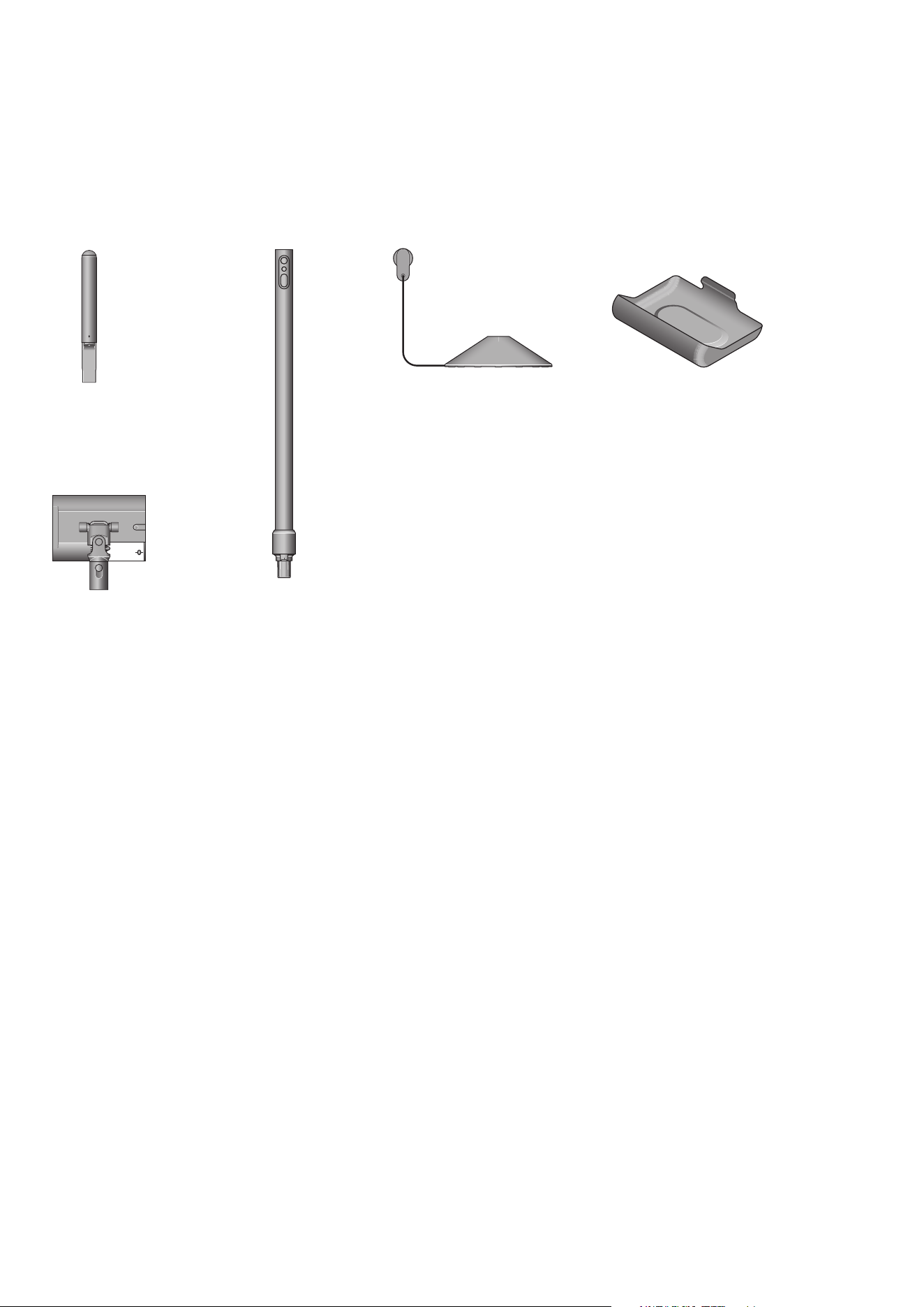
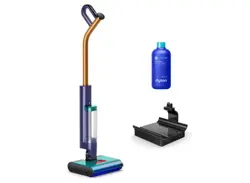
In the box
Cleaner head clip-on drip tray
Your machine is boxed in 3 parts:
1. Battery
2. PencilWash™ wand
3. PencilWash™ cleaner head
Click the battery to the top end of the wand. Attach the wand
to the cleaner head. Fully charge before first use.
To store and transport the
PencilWash™ cleaner head.
Charging dock with stand, plug,
connector and cable. Charges your
machine ready for your next clean.
Wand charging dockBattery
PencilWash™ wand
PencilWash™ cleaner head
Remove spills and stains
from hard floors with the
PencilWash™ cleaner head.
click
click
click
Getting started
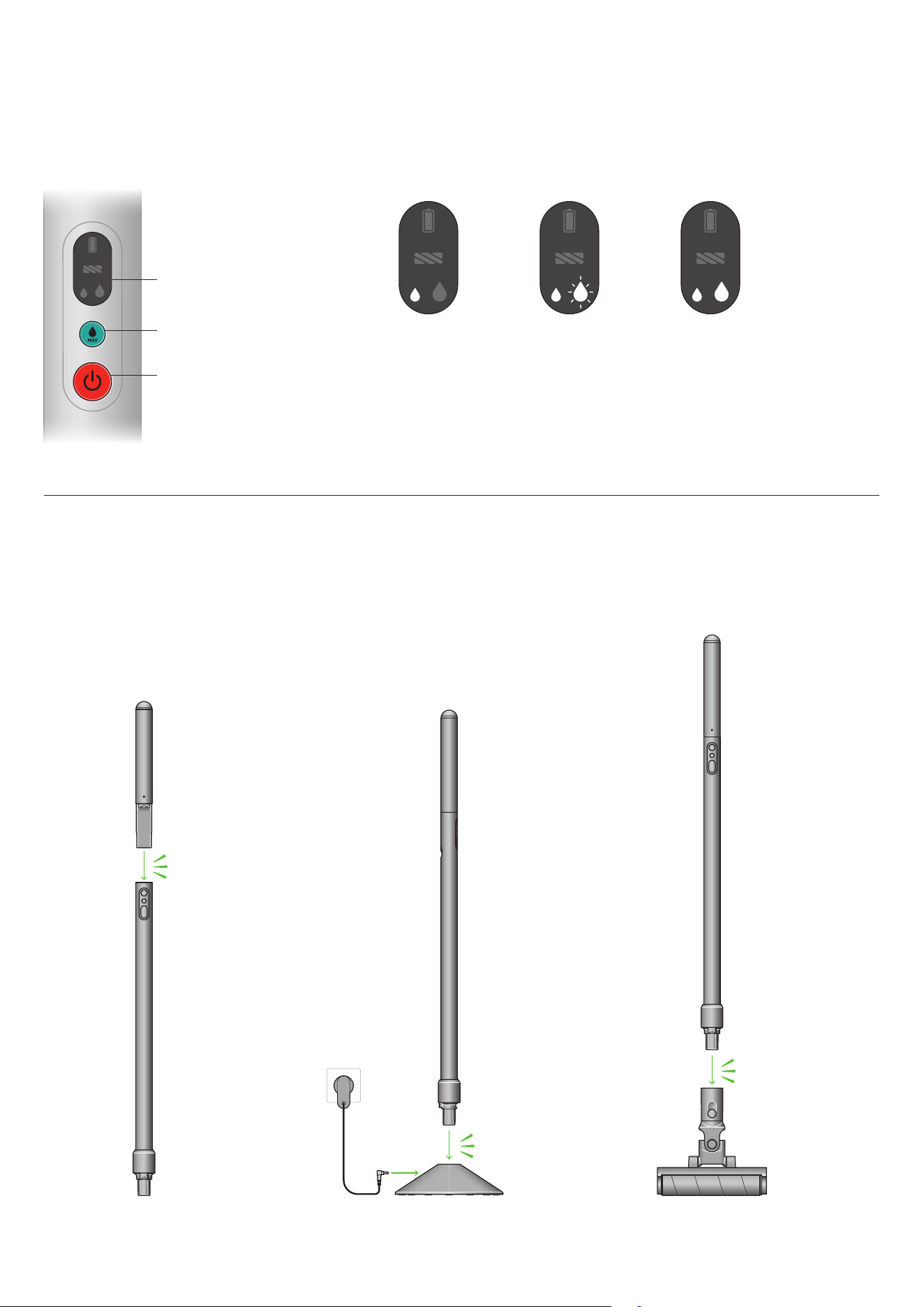
Get to know your machine’s controls
Power on / off but t on
MAX button
LED screen
Modes
MAX mode 2Standard mode MAX mode 1
Step 1
Click the battery into the top part
of the wand until it locks in place.
Step 2
Place the wand on the wand charging
dock and fully charge before first use.
Step 3
Click the wand into the cleaner head.
The control section is located on
your device’s wand, just below where
the battery attaches. From the top
to bottom are the LED screen, MAX
button, and the Power button.
Your machine has
one solid LED light
illuminated when in
Standard mode.
Your machine has
one solid LED light
illuminated and one
blinking LED when
in Max mode 1.
Your machine has
two solid LED lights
illuminated when in
Max mode 2.
Your wand slots
into the dock using
the cleaner head
attachment point.
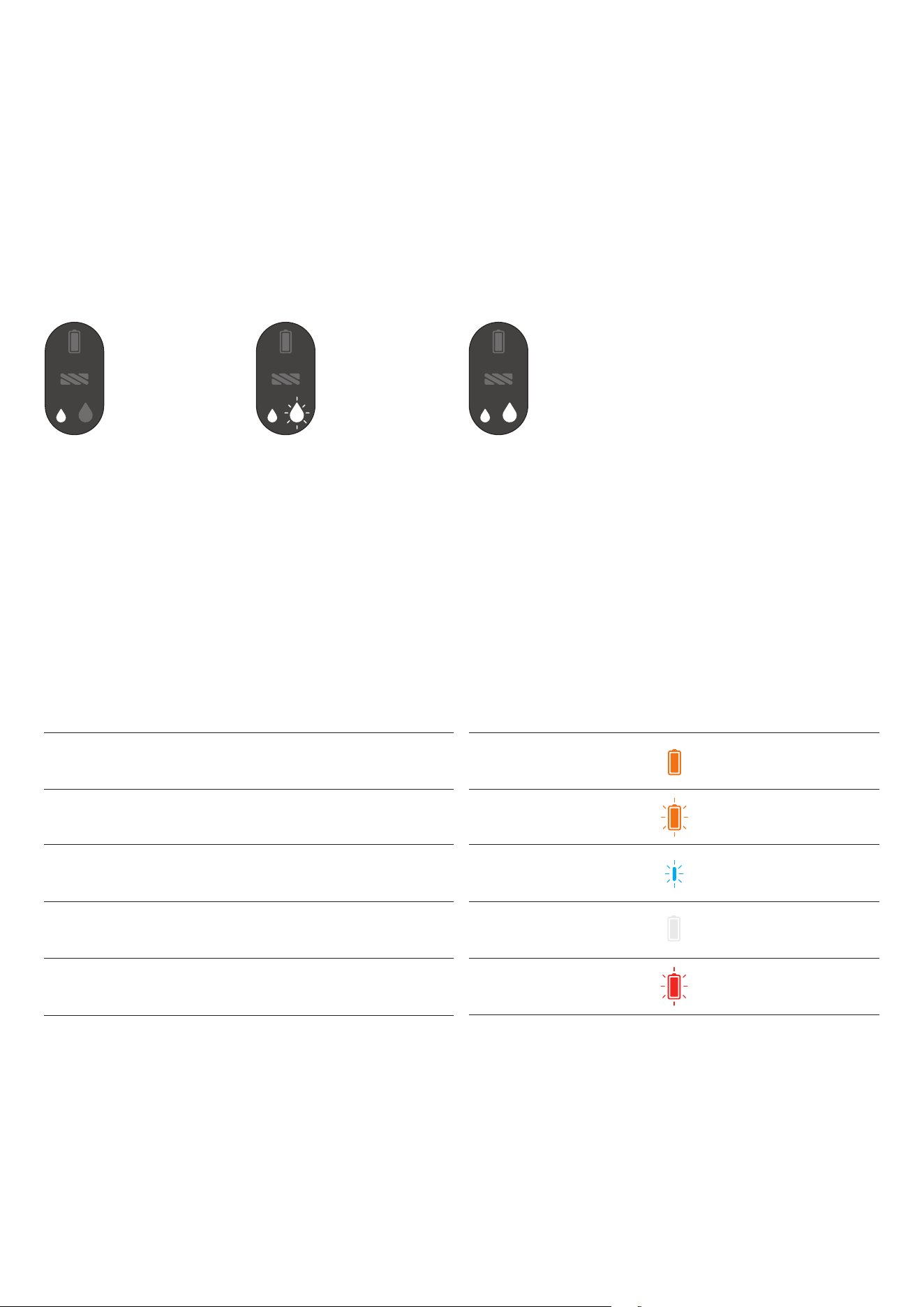
The LED screen displays helpful information and alerts,
such as the selected mode and battery status.
The LED screen
Tip: Use MAX mode sparingly to prevent rapid depletion of clean water tank.
Cleaning
Press the power button to begin cleaning.
Choose the power mode to suit the task.
Standard or MAX.
Battery is low (5%-10%)
Battery is charging
Battery is critical (<5%)
Non-Dyson battery detected
Main body fault
LED is solid orange.
LED is blue and blinking.
LED is orange and blinking quickly.
LED is solid white.
LED is red and blinks for 5 seconds.
MAX mode 2
For cleaning larger areas of stains
and dried-on dirt.
Press and hold the MAX button to
activate. The mode will last for a
maximum of 60 seconds, or until
you release the button, before
returning to the default mode.
Standard mode
For everyday cleaning,
light spills and debris.
Your machine’s default mode.
MAX mode 1
For spot-cleaning stains and
dried-on dirt.
Press and release the MAX button
once to activate. The mode
will last for 5 seconds before
returning to the default mode.
Your machine has one solid
LED light illuminated when in
Standard mode.
Your machine has one solid LED
light illuminated and one blinking
LED when in Max mode 1.
Your machine has two solid
LED lights illuminated when
in Max mode 2.
How to prepare your PencilWash™ cleaner
click
click
50%
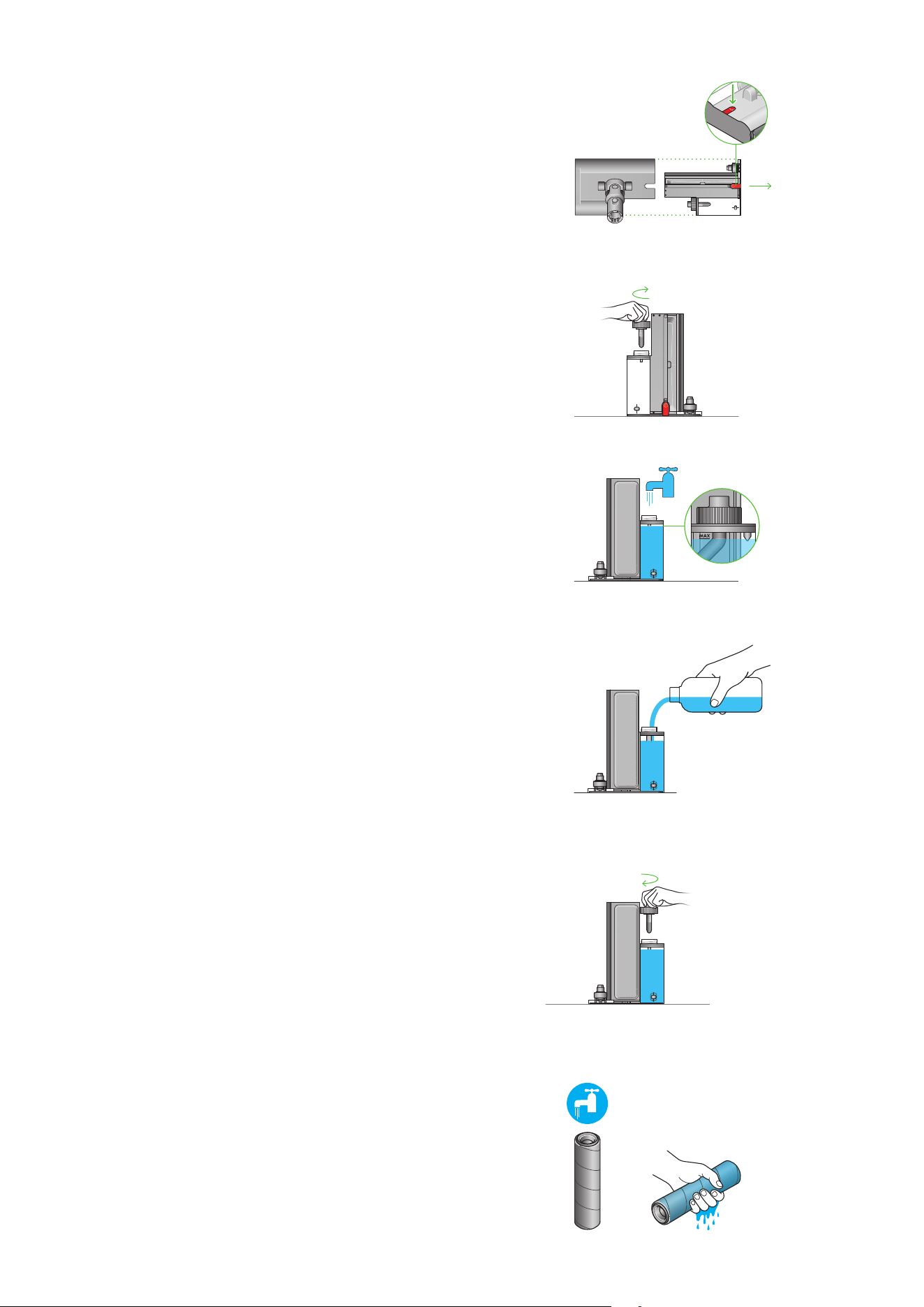
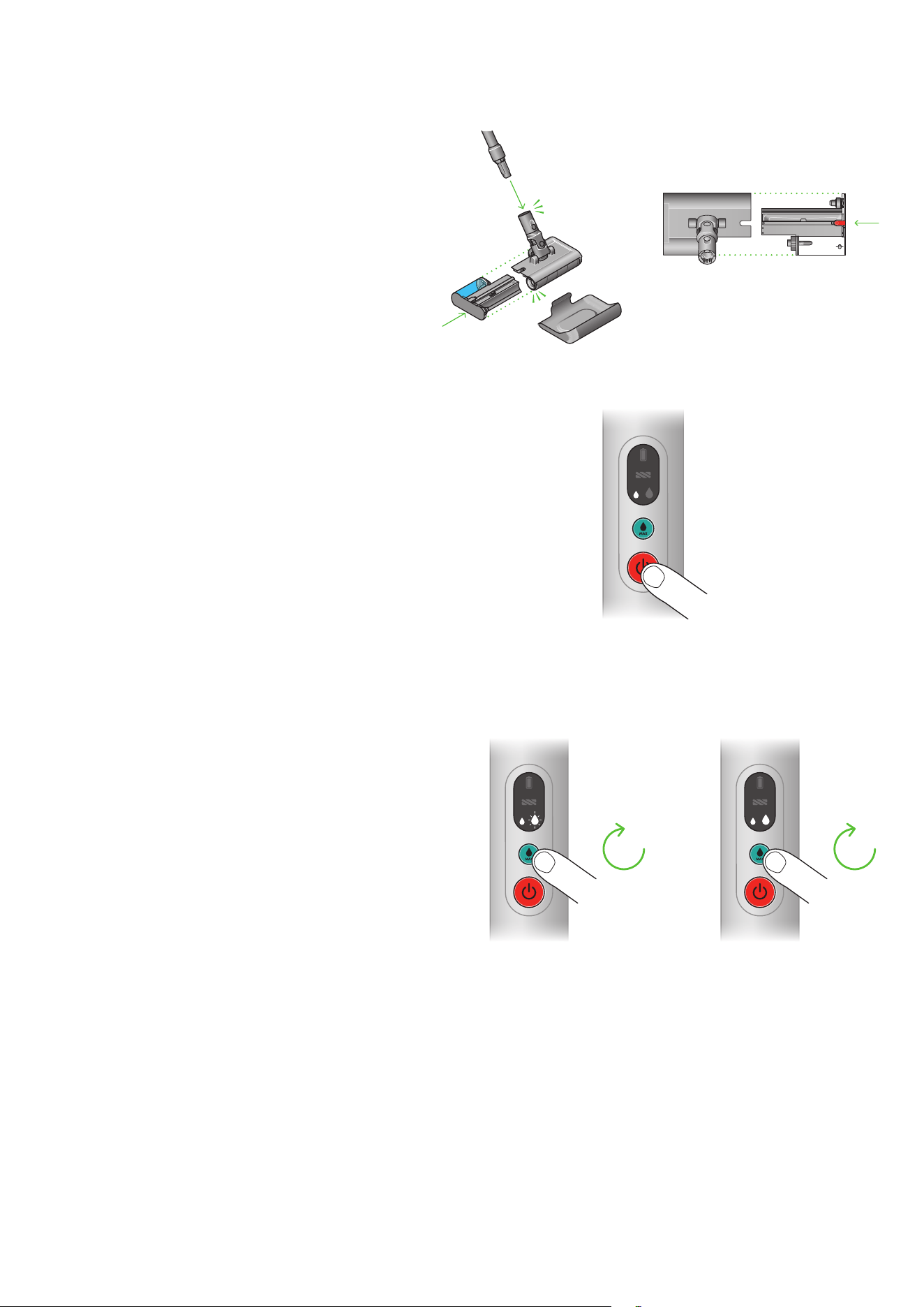
Step 1
Hold the wet roller head level and upright. Press and hold the
red quick-release button and slide out the removable cassette
from the main body. This cassette includes the roller, clean
water tank, and waste tray.
Step 2
Once removed, turn the cassette so that the clean water
tank cap faces upwards. Unscrew the cap.
Step 3
Fill the clean water tank with water to the ‘MAX’ line,
or just below if adding cleaning solution.
Step 5
Once full, refit the cap securely on the clean water tank.
click
click
50%
click
click
50%
click
click
50%
Step 4
Add 10ml of 01 Cleaning solution/02 Probiotic Cleaning
solution/Non-foaming detergent. This step is optional.
Step 6
Before first use, detach the roller and thoroughly hydrate
under running water. Squeeze away any excess liquid
and refit to the cassette.
With the roller facing
away from you, the
Quick-release button is
located on the top-right
side of the cleaner head.
How to use your PencilWash™ cleaner
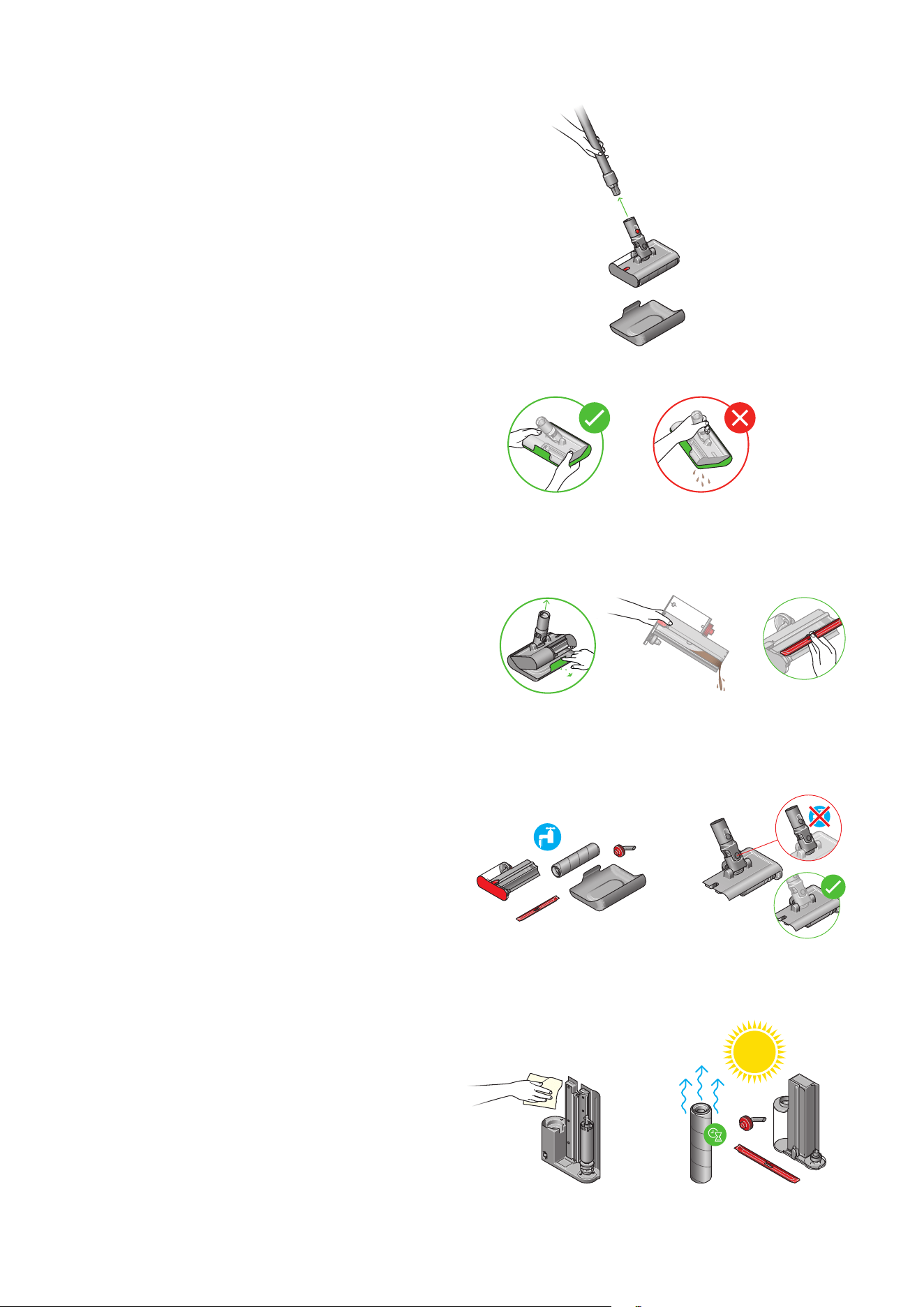
Step 2
Start your machine by pressing the power button.
Allow 10 seconds for the roller to be fully hydrated.
You can use your machine until the clean water tank runs
low or the battery runs out. To resume cleaning after one
of these events, simply empty the waste tray, refill your
clean water tank and/or recharge the wand.
Do not attempt to use your machine with an empty clean
water tank.
Step 3
Your machine starts with Standard mode as default.
Press and release the MAX button once to activate the mode for
5 seconds, or press and hold the MAX button to activate MAX
mode for a maximum of 60 seconds.
Cleaning tips
For maximum pickup, move your machine at a slow pace
across the debris and spills. For best results, clean in
overlapping passes.
Step 1
Refit the removable cassette into the main body of the cleaner head.
Ensure the rail of the cassette aligns with that of the main body
to ensure a correct fit. You should hear a click once securely fitted.
Then, attach the wet roller head to your machine’s wand.
click
click
50%
5
sec
60
sec
Ensure the rail of your removable cassette aligns
with the rail on your cleaner head to for a correct fit.
Maintenance
Step 2
Hold the cleaner head level in the drip tray when transporting
to the sink to clean.
Step 3
Hold the cleaner head over a sink. Remove it from the drip tray.
Hold the wet roller head level and upright. Press and hold the
red quick-release button and slide out the removable cassette
from the main body.
Next, remove the long red rectangular cover and empty the
waste tank.
Step 4
Disassemble your PencilWash™ cleaner head into the parts seen
here. Every part of the cleaner head (excluding the neck) can
be washed with water and a household anti-bacterial solution,
diluted according to the manufacturer’s recommended ratio.
Do not get water on the neck of your cleaner head, as it may
damage its connection to the wand.
Step 5
After washing, leave the wet roller upright, as shown, to air-dry
in a warm, well-ventilated space. Leave for at least 24 hours.
Use a cloth to wipe away any dirt or excess water from the main
body of the cleaner head, waste tray and clean water tank.
Step 1
Turn off your machine and detach your Dyson PencilWash™
cleaner head from the wand. Place the cleaner head in the
drip tray immediately to prevent dirty water spillage.
Recommended after every use
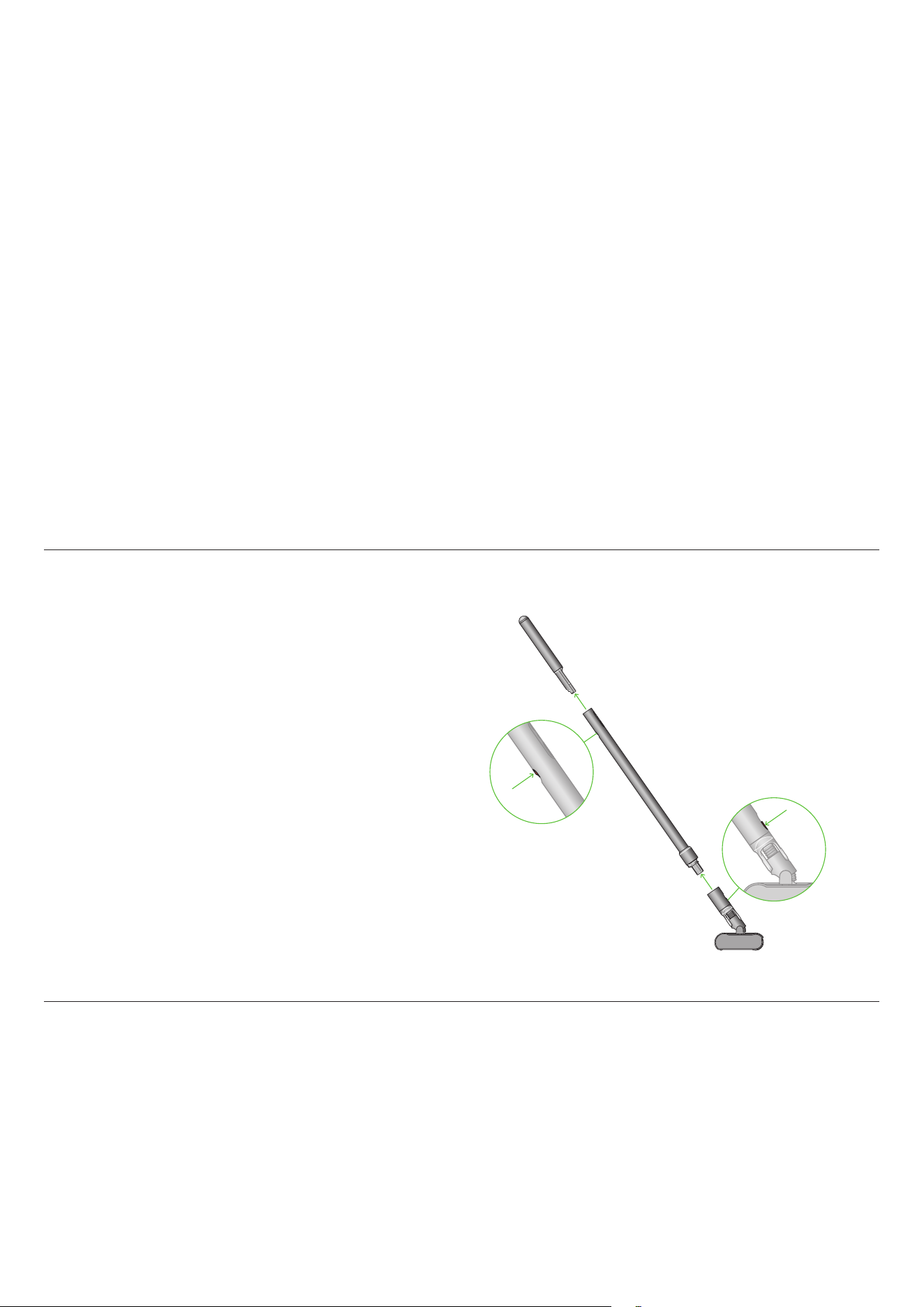
The cleaner
head release
is located on
the neck of the
cleaner head.
The dirty water tank
cover slots over the
dirty water tank.
Disassembling your machine
Looking after your machine
Support and service
Should you need to store or repackage your machine, detach the
cleaner head and battery from the main body, as shown opposite.
Battery and performance tips
Store your PencilWash™ wand on the dock and the cleaner head on
its drip tray. Store the dock in a cool environment (<95° F) to best
maintain battery health.
Always make sure there is water in the water tank while using the
machine. Do not use the cleaner without any water.
Avoid storing the cleaner with a dirty tank and dirty roller –
always empty and clean after use.
Use MAX mode for stubborn stains.
Best performance achieved with 01 Cleaning Solution/02
Probiotic Cleaning Solution.
Replace the roller
To help maintain performance, we recommend you replace
your PencilWash™ cleaner’s microfiber roller every six months –
depending on how often you use your machine.
Replacement rollers are available at Dyson.com.
Visit dyson.com/support for videos, tips, and spare parts ordering.
Contact Dyson Customer Care for assistance.
The battery release button is located
on the rear of your machine’s wand
near where the battery attaches. The
cleaner head release is located on
the neck of the cleaner head.