
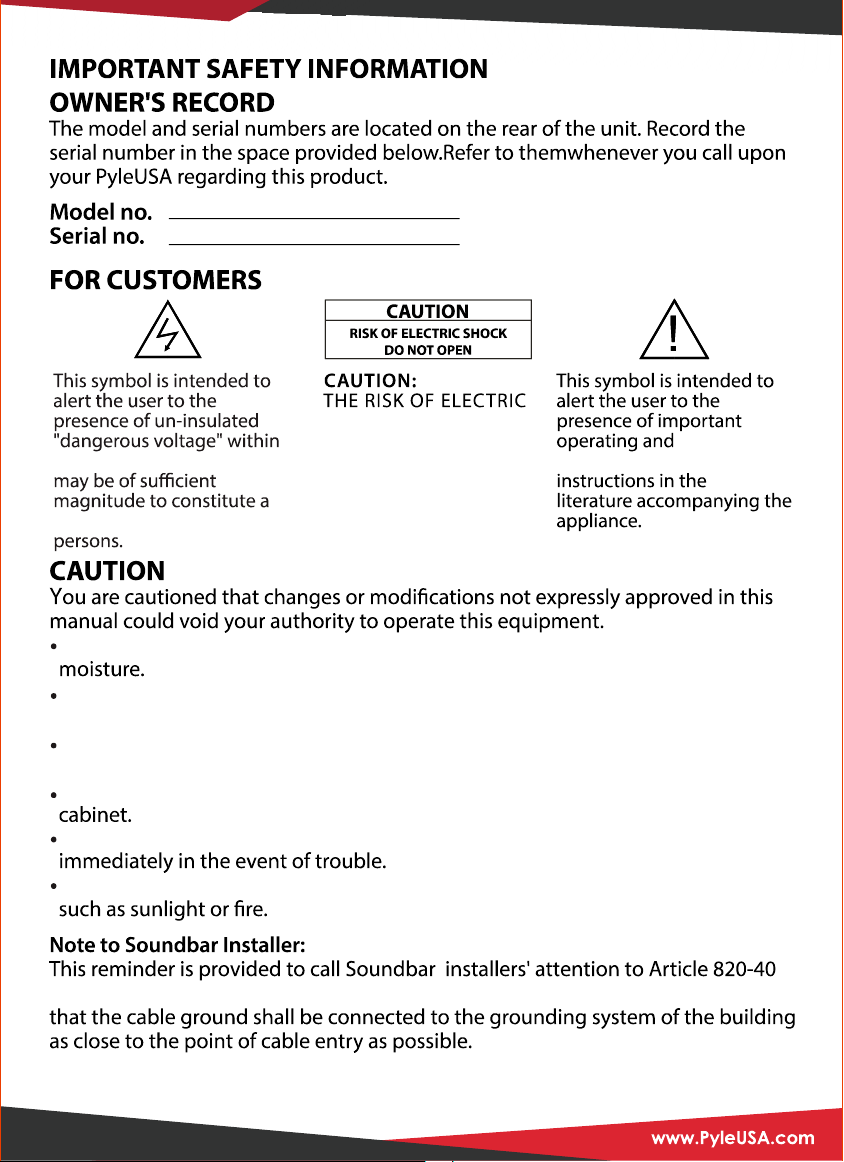
the product’s enclosure,it
risk of electric shock to
SHOCK. DO NOT REMOVE
COVER(OR BACK).REFER
SERVICING TO QUALIFIED
SERVICE RERSONNEL.
TO REDUCE
maintenance(servicing)
To reduce the risk of fire or electric shock, do not expose this apparatus to rain or
To prevent fire, do not cover the ventilation of the apparatus with newspapers,
table-cloths, curtains and etc. Do not place lighted candles on the apparatus.
To prevent fire or shock hazard, do not place objects filled with liquid, such as
vases, on the apparatus.
Do not install the appliance in a confined space, such as a bookcase or built-in
Install this system so that the power cord can be unplugged from the wall socket
Batteries or batteries installed apparatus shall not be exposed to excessive heat
of the NEC that provides guidelines for proper grounding, in particular, specifies
1
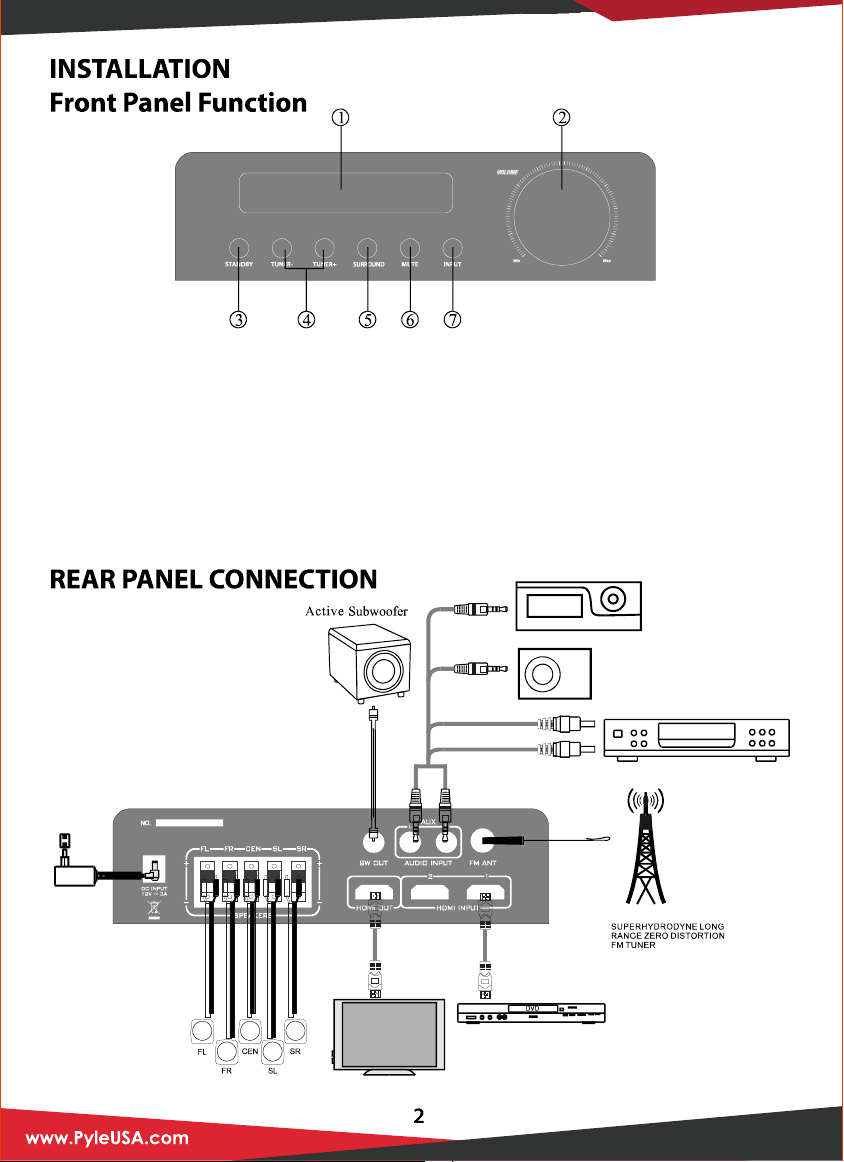
1. LED Display Window
2. Volume Control Knob
3. Stand By Adjustment Knob
4. Tuner Adjustment Knob
5. Virtual Surround Adjustment Knob
6. Mute Adjustment Knob
7. Input Adjustment Knob
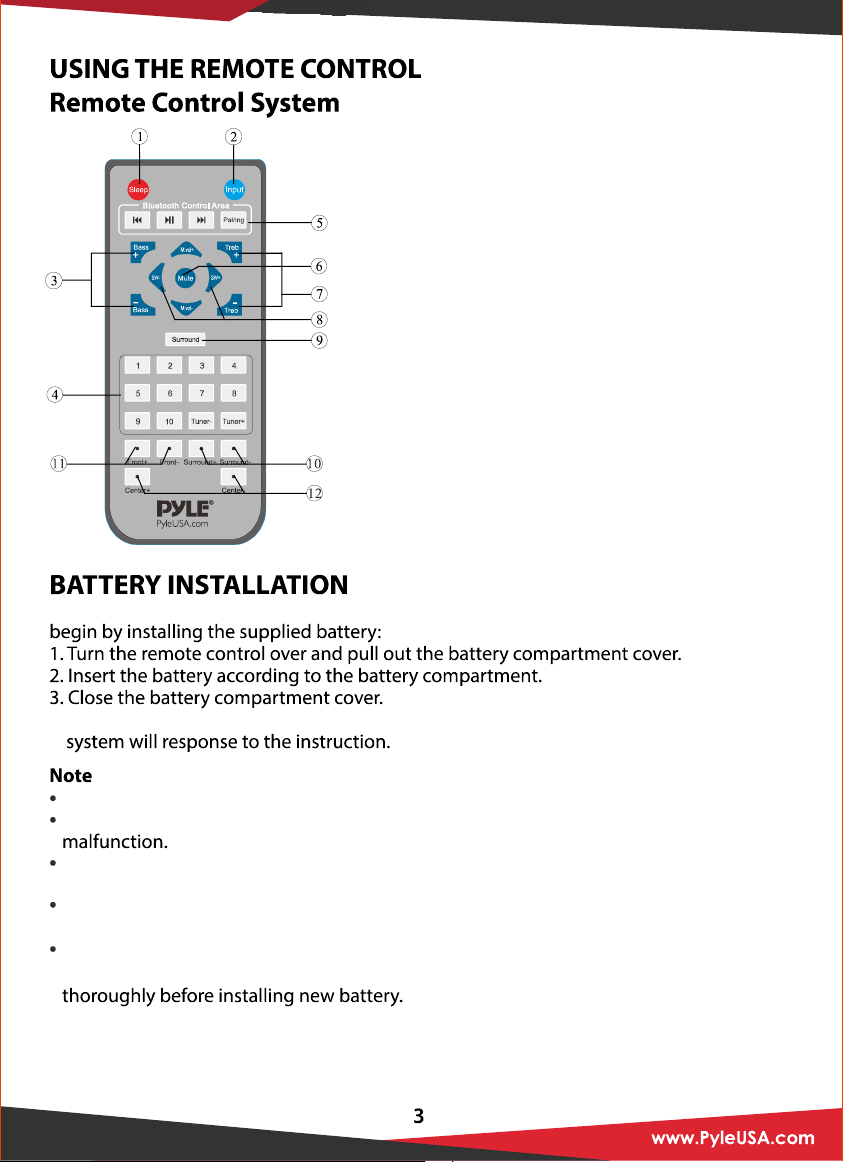
1. SLEEP MODE SELECTOR
2. INPUT MODE SELECTOR
3. BASS VOLUME ADJUST SELECTOR
4. TUNER CONTROL AREA
5. BLUETOOTH CONTROL AREA SELECTOR
6. MUTE CONTROL SELECTOR
7. TREBLE VOLUME ADJUST SELECTOR
8. SUBWOOFER VOLUME ADJUST SELECTOR
(FOR ACTICE SUBWOOFER)
9. VIRTUAL SURROUND CONTROL SELECTOR
10. SURROUND VOLUME ADJUST SELECTOR
11. FRONT VOLUME ADJUST SELECTOR
12. CENTER VOLUME ADJUST SELECTOR
Since the remote control will be used for many units to control operations, you should
4. Test the unit by pressing Mute or any mode key. If the battery is inserted correctly, the
Do not leave the remote control in an extremely hot or humid place.
Do not expose the remote sensor to direct sunlight or lighting apparatus that may cause
If you do not intend to use the remote control for an extended period of time, remove
the batteries to avoid possible damage from battery leakage and corrosion.
If you find that the remote control can’t be used at a normal distance to the main unit,
then the battery could be weak, so you need to replace the battery with a new one.
If battery leaks, remove it immediately, and properly displace it. Avoid touching the
leaked material and splashing it to clothing, etc. Clean the battery compartment
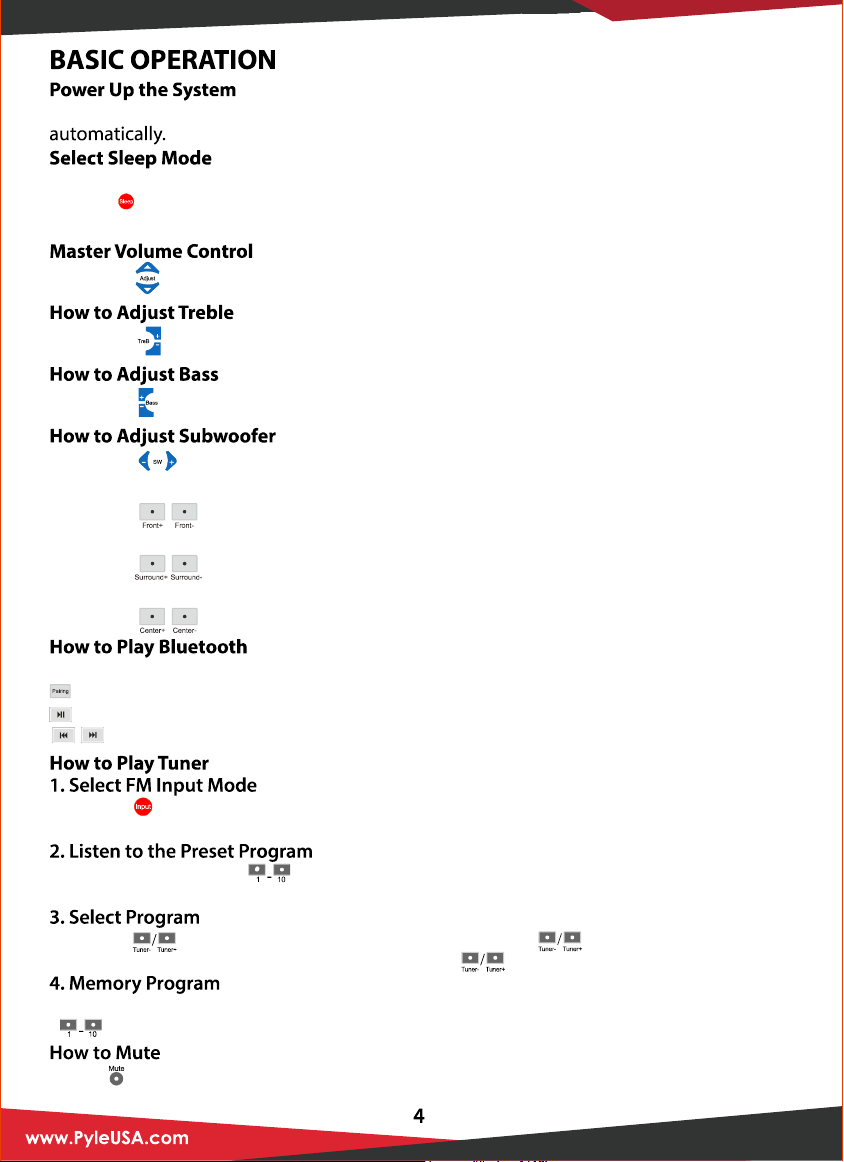
Connect the AC adaptor and turn on the”power” in the back panel, the system will open
Sleep mode allows you to make the system sleep at a selected time.
1. Press” “ key or press the sleep button on the front panel to select sleep mode.
2. Wake up the system by pressing the same key when the system in the sleep mode.
Press the” “ key on the front panel to adjust the main channel volume.
Press the “ “ to adjust the treble volume.
Press the “ “ to adjust the bass volume.
Press the “ “ to adjust the bass volume.
Select Bluetooth on remote control
: Pari up your Bluetooth device with audio
: Bluetooth play and pause
: Bluetooth skip track
Press the “ “ key to choose the FM input mode. The LED will display the last turner
frequency, for example: 87.5.
Press the number keys” “ to select the radio program that you already saved. Once
selected, screen will display the radio program’s frequency in the memory area.
Press the” “ key to adjust the band of tuner. Press the “ “ key for 2 seconds, the FM
will search automatically. Then you can press the” “ key once to stop the function.
When you receive a clear radio program and want to save the channel, press one of the
“ “ 10 number key fo 2 seconds to assign that number key to that channel.
Press “ “ key to turn sound off/on. Press again to restore the audio to the original level.
How to Adjust Front
How to Adjust Surround
How to Adjust Center
Press the “ “ to adjust the front volume.
Press the “ “ to adjust the surround volume.
Press the “ “ to adjust the center volume.
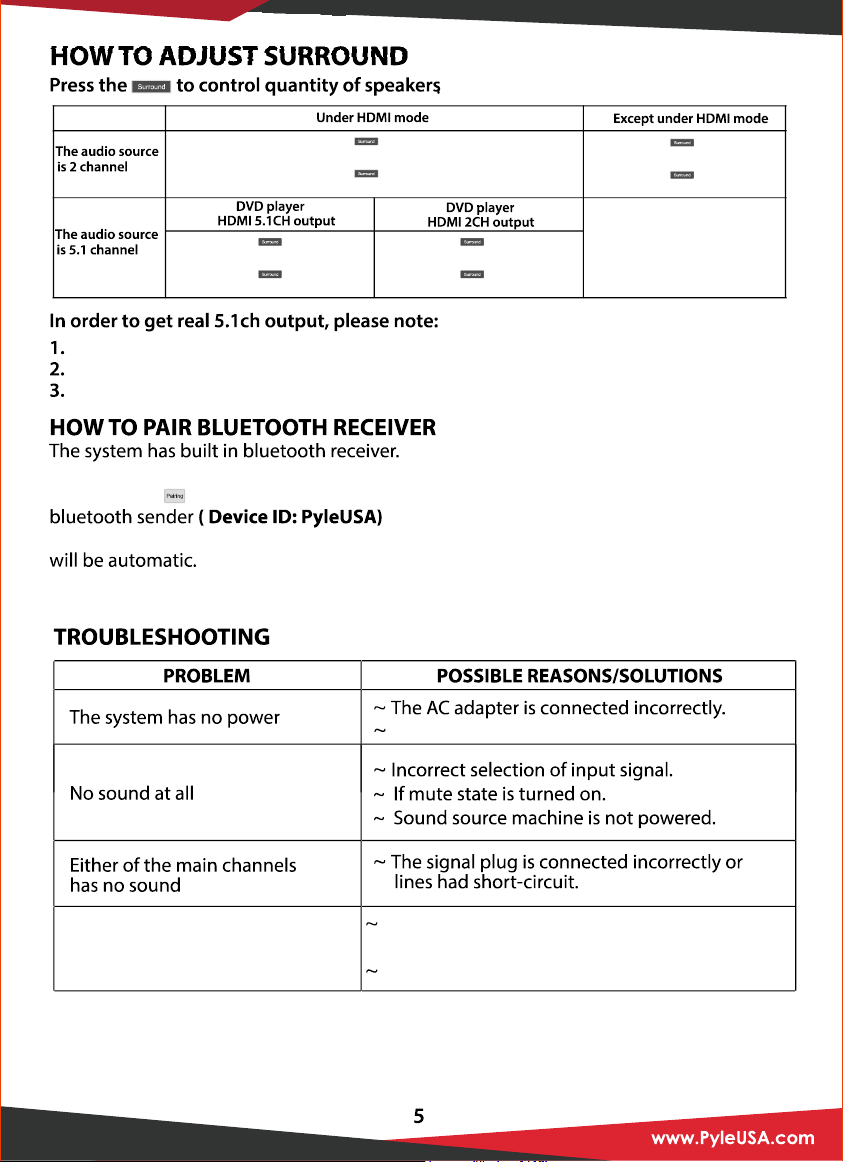
1.Press the ,display ”ON”:
analogy five channel signal
2.Press the ,display ”OFF”:
2.1CH output
1.Press the ,display ”ON”:
analogy five channel signal
2.Press the ,display ”OFF”:
Real five channel signal
1.Press the ,display ”ON”:
analogy five channel signal
2.Press the ,display ”OFF”:
2.1CH output
It does not exist.
1.Press the ,display ”ON”:
analogy five channel signal
2.Press the ,display ”OFF”:
2.1CH output
Get real 5.1ch output only in HDMI mode.
Audio source must be real 5.1ch to get 5.1ch signal.
Set up DVD player to 5.1ch audio output.
If you are pairing the bluetooth from a mobile phone for the first time, Open the system
and press the key on the remote and the LED will show “pair”. Then search for the
by your own bluetooth sender(mobile phone).
If the system have been paired already with the bluetooth sender, the next time you pair
Abnormal LED screen dsiplay
It may be affected by exterior strong disturbance,
turn off first and turn on again.
Avoid direct sunlight/heat.
After that you can enjoy music by the bluetooth receiver.
The socket has no power.