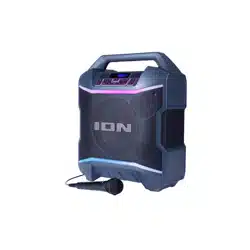
Block Party Ultra
Quickstart Guide English ( 3 – 10 )
Guía de inicio rápido Español ( 11 – 18 )
Guide d’utilisation rapide Français ( 19 – 26 )
Guida rapida Italiano ( 27 – 34 )
Schnellstart-Anleitung Deutsch ( 35 – 42 )
Snelstartgids Nederlands ( 43 – 50 )
Appendix English ( 51 )

2

3
Quickstart Guide (English)
Introduction
Thank you for purchasing the Block Party Ultra. At ION, your entertainment is as important to
us as it is to you. That’s why we design our products with one thing in mind—to make your life
more fun and more convenient.
Box Contents
Block Party Ultra
Microphone and Cable
1/8” (3.5 mm) Stereo Aux Cable
Power/Charging Cable
Remote Control
Quickstart Guide
Safety & Warranty Manual
Support
For the latest information about this product (documentation, technical specifications, system
requirements, compatibility information, etc.) and product registration, visit ionaudio.com.
For additional product support, visit ionaudio.com/support.
Rechargeable Batteries
Rechargeable lead-acid batteries are the same type used in automobiles. As with your car
battery, how you use this battery has a significant impact on its lifespan. With proper use and
treatment, a lead-acid battery can last for years. Here are some recommendations for getting
the longest life from the internal battery.
General Usage
Fully charge the battery before using it.
Charge the battery completely after each use.
Storage
For best product longevity, do not store at exceedingly hot (greater than
90°F/32°C) or exceedingly cold (less than 32°F/0°C) temperatures.
It is acceptable to leave your sound system plugged in. This will not
overcharge the battery.
If you leave the battery level low and do not charge it for 6 months, it may
permanently lose capacity.
Repair
If the battery fails to charge, check your fuse near the power cable input. If your
fuse is intact and it still will not charge, contact ION Audio at ionaudio.com.
Disposal
Bring the unit to a recycling center or dispose of in accordance with local
ordinances.
4
iPA115
BLOCK PARTY ULTRA
MIC1 MIC2
AUXIN
LINK OUT
CHARGE
INPUT RANGE FUSE
100-240~50/60HZ,120W T2AL 250V
5V 1A
Quick Setup
1. Make sure all items listed in the Box Contents are included in the box.
2. Read the Safety & Warranty Manual before using the product.
3. Make sure the battery is completely charged prior to first use for maximum battery life.
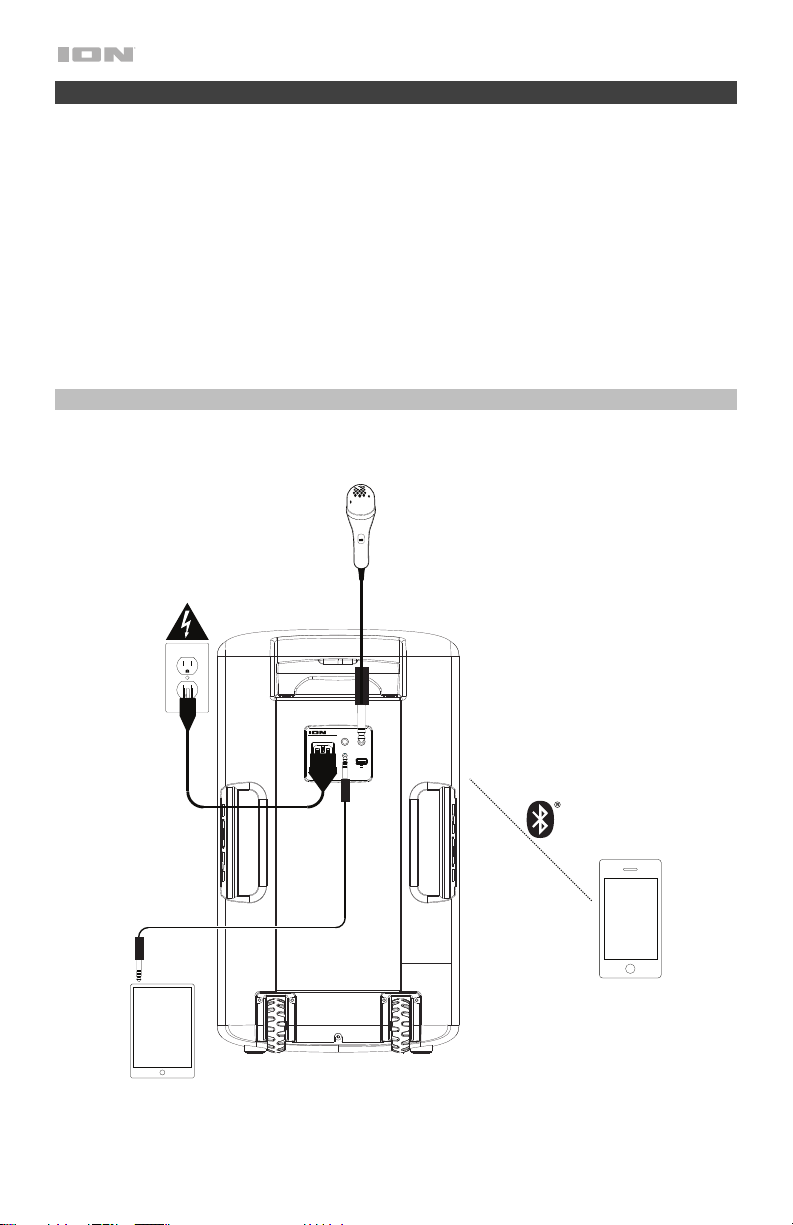
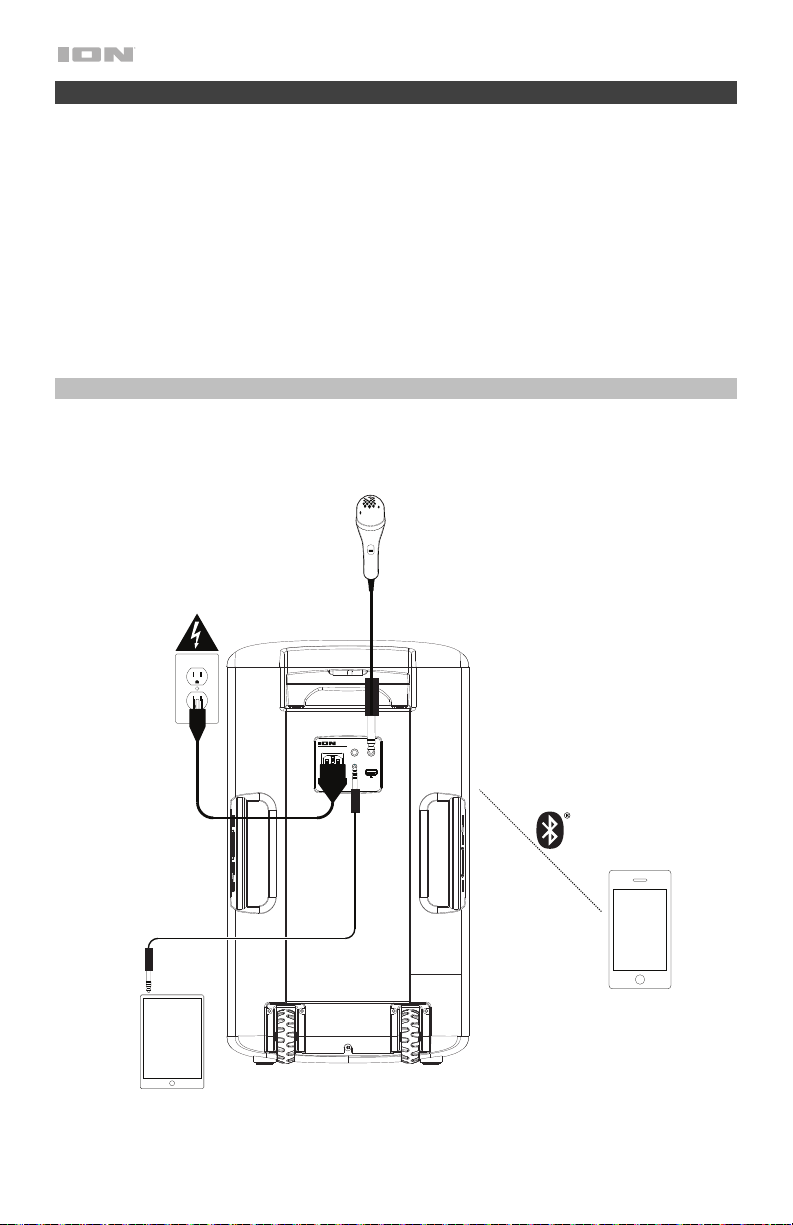
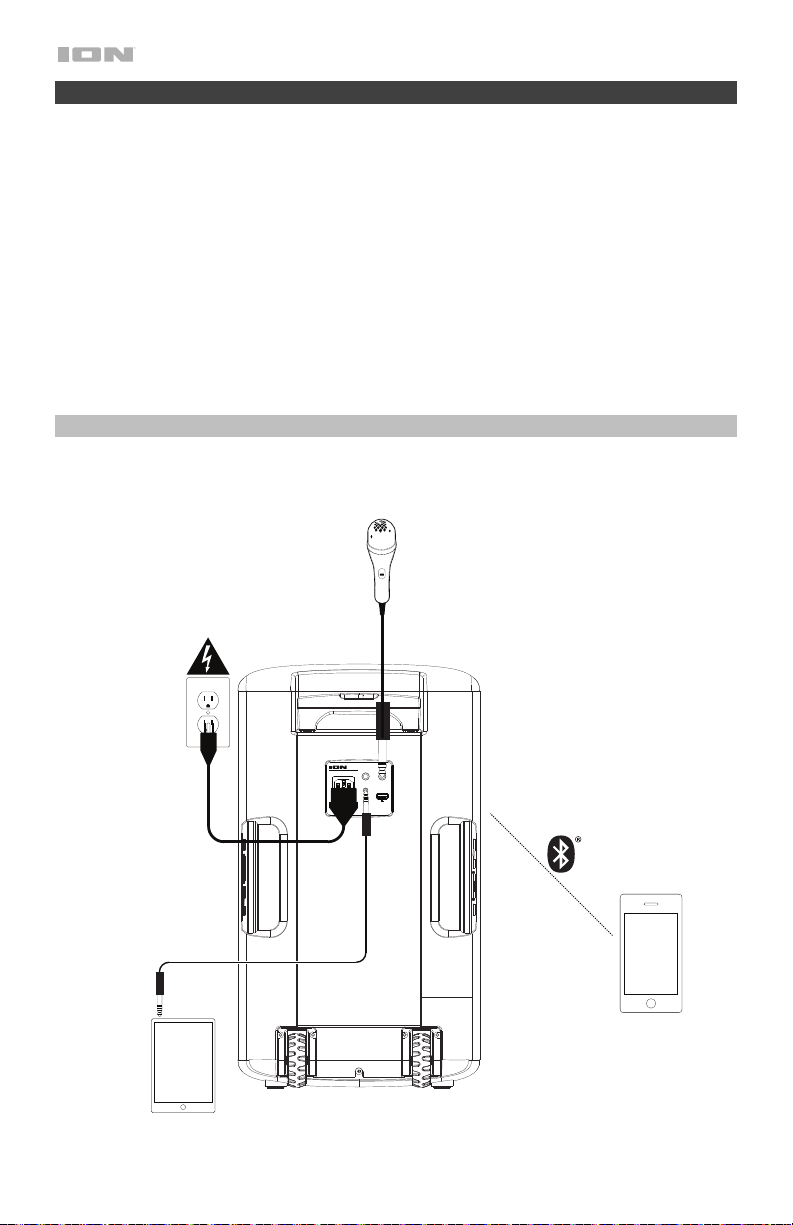
4. Study the Connection Diagram.
5. Ensure the Master Volume on Block Party Ultra is at zero.
6. Connect your devices.
7. Raise the volume to a comfortable level.
8. Return the Master Volume to zero when you are finished using Block Party Ultra.
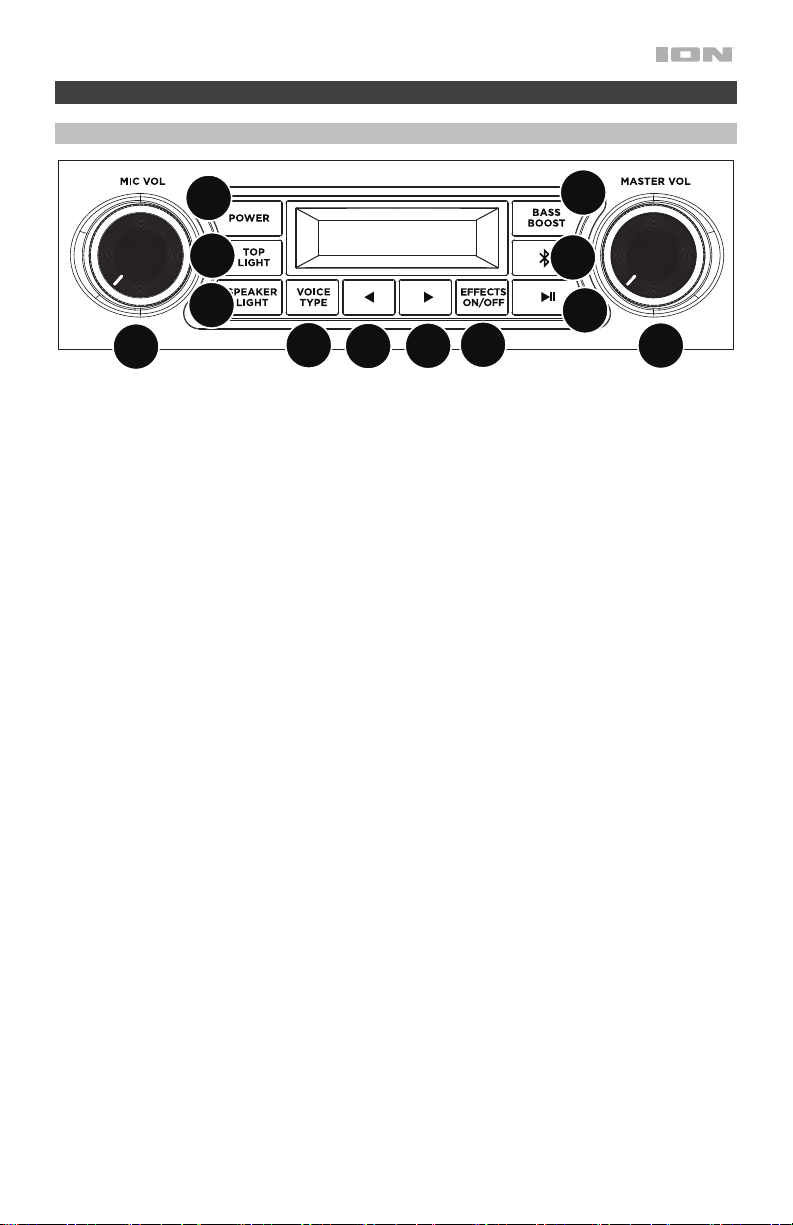
Connection Diagram
Items not listed under Introduction > Box Contents are sold separately.
Power
Bluetooth
Device
Microphone
Tablet, MP3
pla
y
er, etc.
5
Features
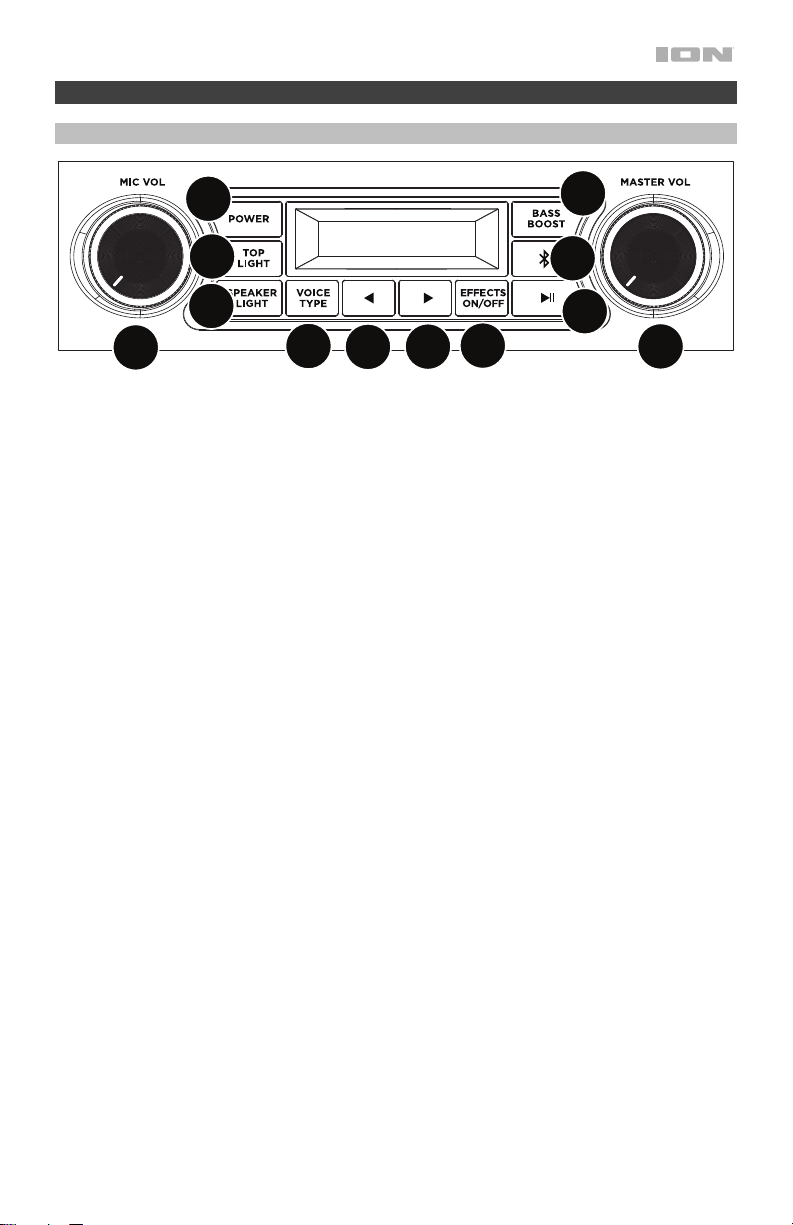
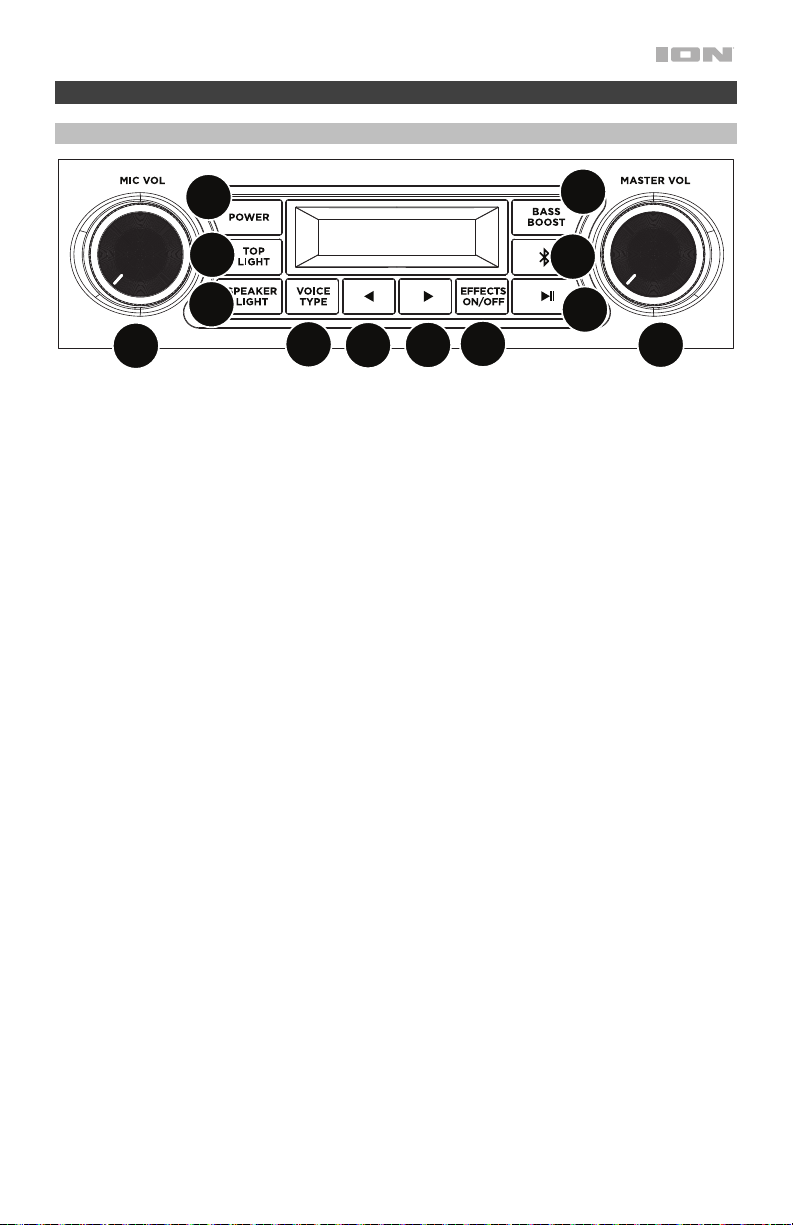
Front Panel
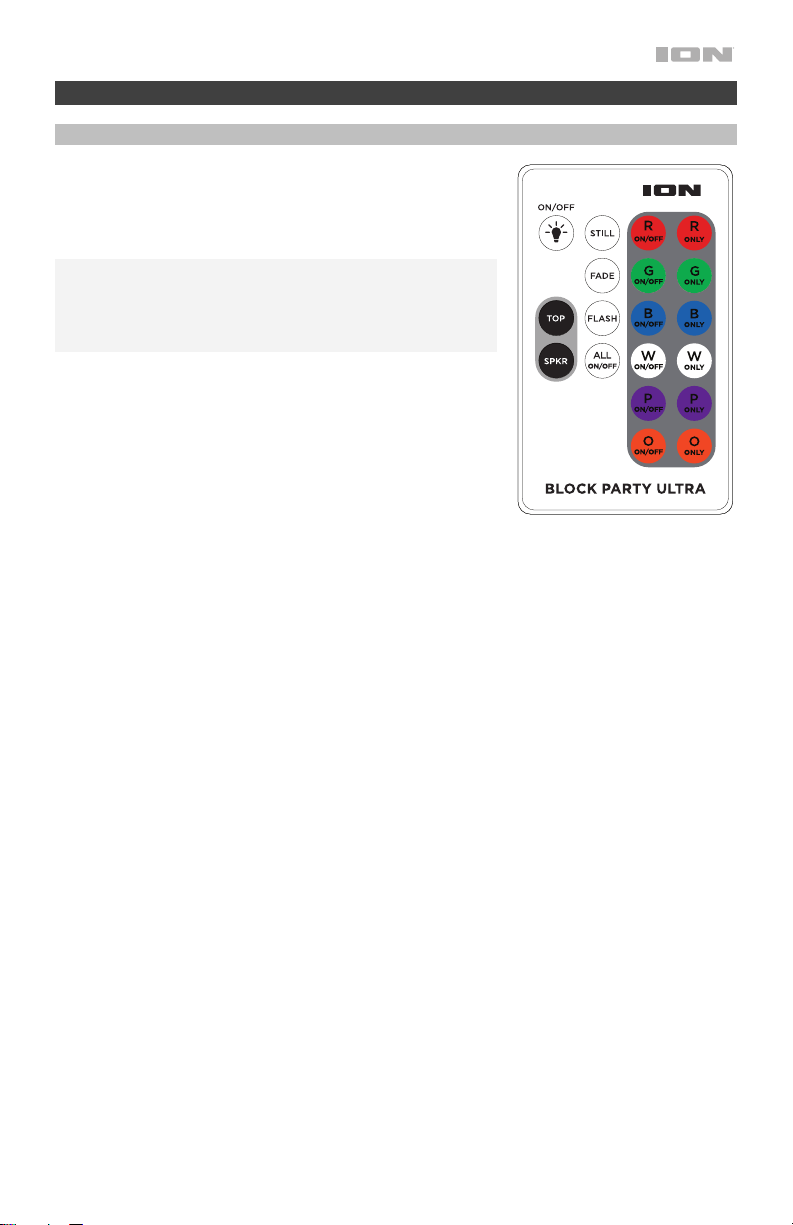
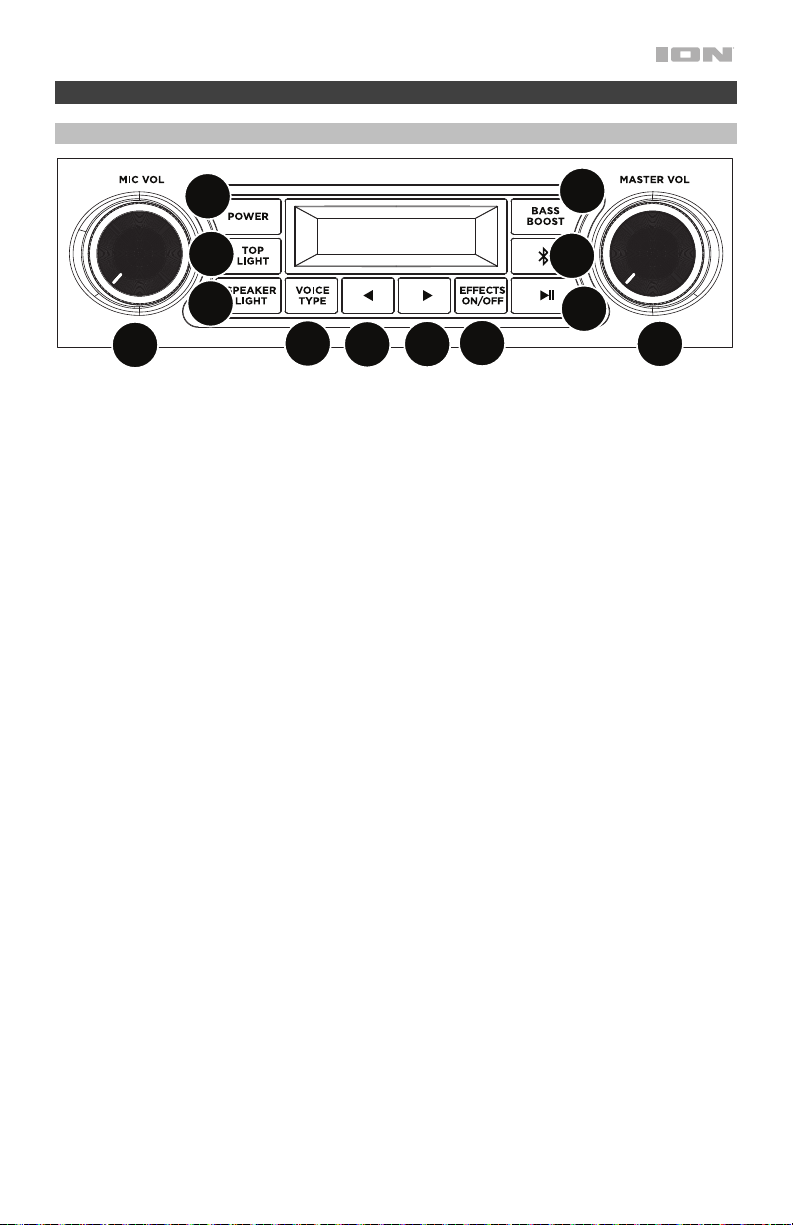
1. Power Button: Press and hold to turn Block Party Ultra on or off. Please note that while
Block Party Ultra is connected to a power source, it does not need to be powered on to
charge the battery. When the power is on, the display will show the power indicator.
2. Bluetooth Button: Press and release the Bluetooth button to disconnect a paired
Bluetooth device. See Pairing a Bluetooth Device for more details.
3. Play/Pause: Press to play or pause a track from a connected Bluetooth device.
4. Voice Effect On/Off: Press this button to activate/deactivate the built-in effects. The built-
in effects are applied to both microphone inputs.
5. Voice Type: Press this button to select an effect category. See Operation > Effects for a
complete list of available effects.
6. Voice Effect ►: Press this button to select the next effect.
7. Voice Effect ◄: Press this button to select the previous effect.
8. Top Light On/Off: Press this button to turn the dome lights on/off. See Operation > Light
Modes for more details.
9. Speaker Light On/Off: Press this button to turn the woofer lights on/off. See Operation >
Light Modes for more details.
10. Bass Boost: Press this button to enhance the overall bass frequency response.
11. Master Volume Control: This adjusts the speaker’s main mix volume, which includes the
Microphone Input, Auxiliary Input, and the audio of a paired Bluetooth device.
12. Mic Volume: Adjusts the input gain for the connected microphones.
1
2
3
4
5
6
7
8
9
11
12
10
6
Display Features
• Charging Indicator: When the power cable is connected, movement of the battery
segments shows the battery is charging. When fully charged, all battery segments will be
lit without blinking. When the power cable is disconnected, the battery segment shows the
level of the battery.
• Lightning Bolt Icon: The lightning bolt icon will illuminate when the power cable is
connected to wall power.
• Bluetooth Icon: The Bluetooth icon will be lit solid when a device is paired to Block Party
Ultra.
• Power Icon: The power icon will be lit when Block Party Ultra is powered on. The power
icon will not be lit when Block Party Ultra is powered off.
• Bass Boost Icon: The Bass Boost icon will be on when the Bass Boost function is
activated. The icon will be off when the function is deactivated.
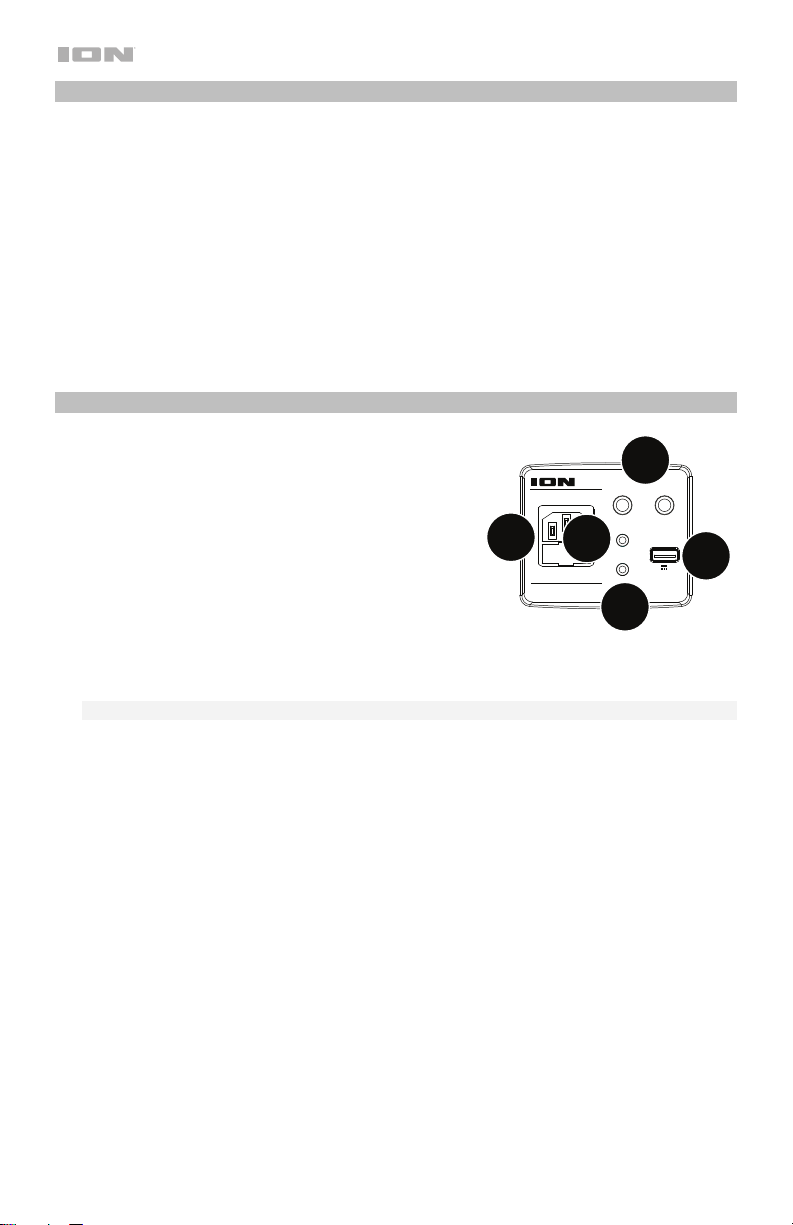
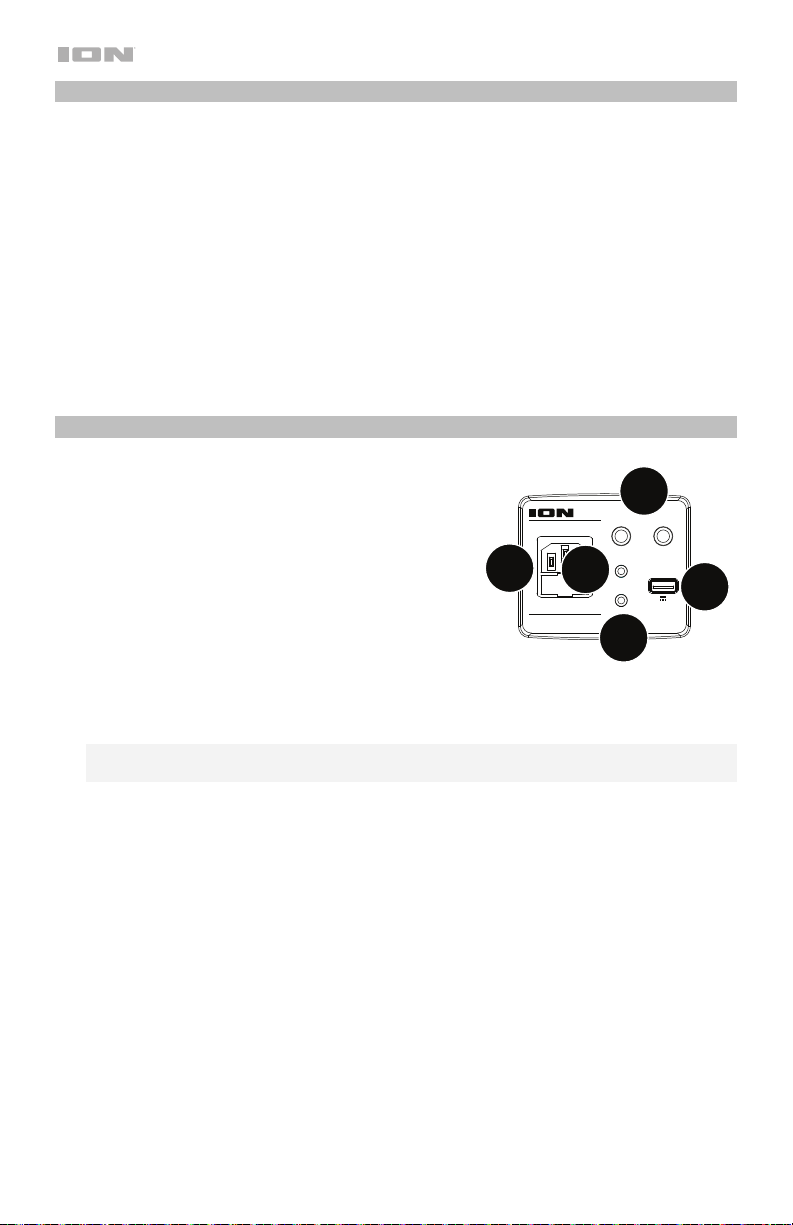
Rear Panel
1. Microphone Inputs: These mono inputs accept a
1/4” (6.35 mm) input such as a microphone, guitar,
or other musical instrument.
2. Auxiliary Input: This stereo 1/8” (3.5 mm) input can
be used to connect a CD player, MP3 player, or
other audio source.
3. Speaker Link: Connect two or more Block Party
Ultra’s together using a 1/8” (3.5 mm) stereo aux
cable from the Speaker Link of one Block Party
Ultra to the Aux Input of the second Block Party
Ultra.
4. USB Charging Port: Connect your device’s charge cable here to charge it. USB charging
only functions when the unit’s power is turned on.
Note: To charge smartphones and tablets faster, put the device’s screen to sleep.
5. Power Cable Input: Insert the included power cable here to charge the unit. Note that the
Block Party Ultra can be used with the power cable while it simultaneously charges the
battery.
9
iPA115
BLOCK PARTY ULTRA
MIC1 MIC2
AUXIN
LINK OUT
CHARGE
INPUT RANGE FUSE
100-240~50/60HZ,120W T2AL 250V
5V 1A
2
1
4
5
3
7
Operation
Remote Control
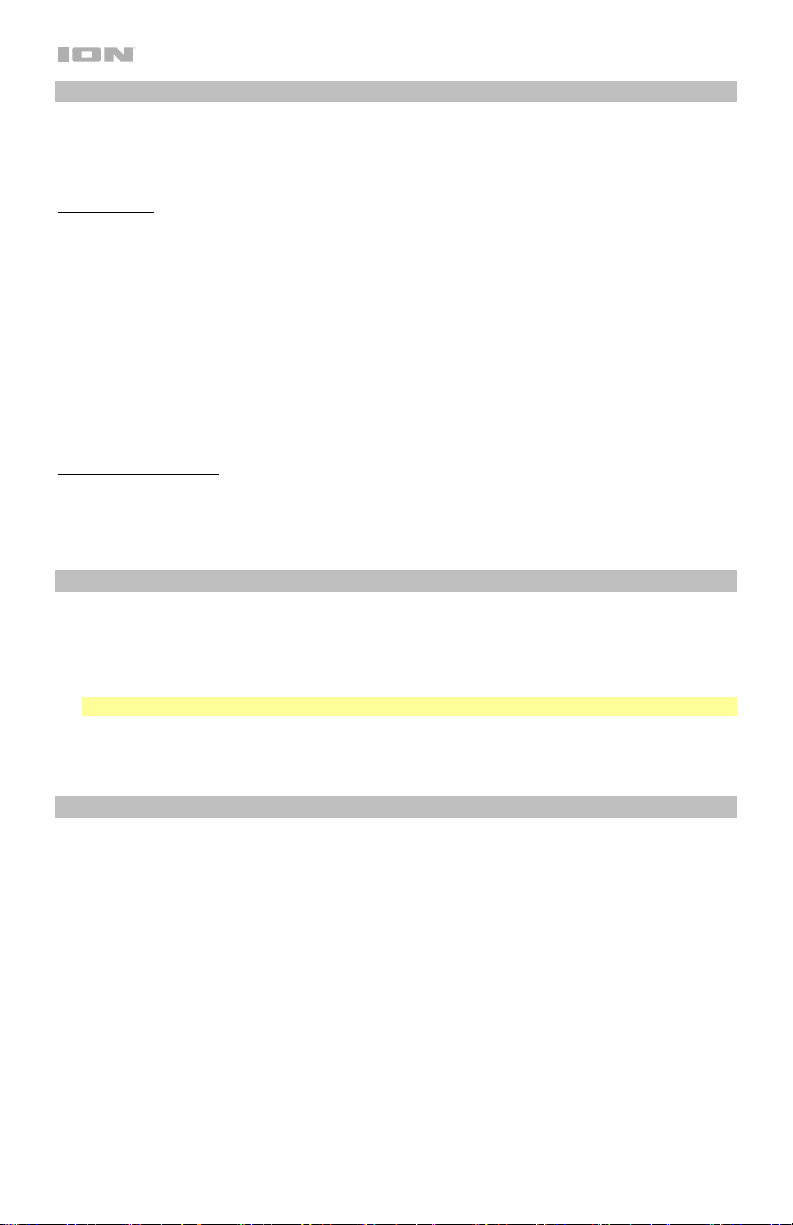
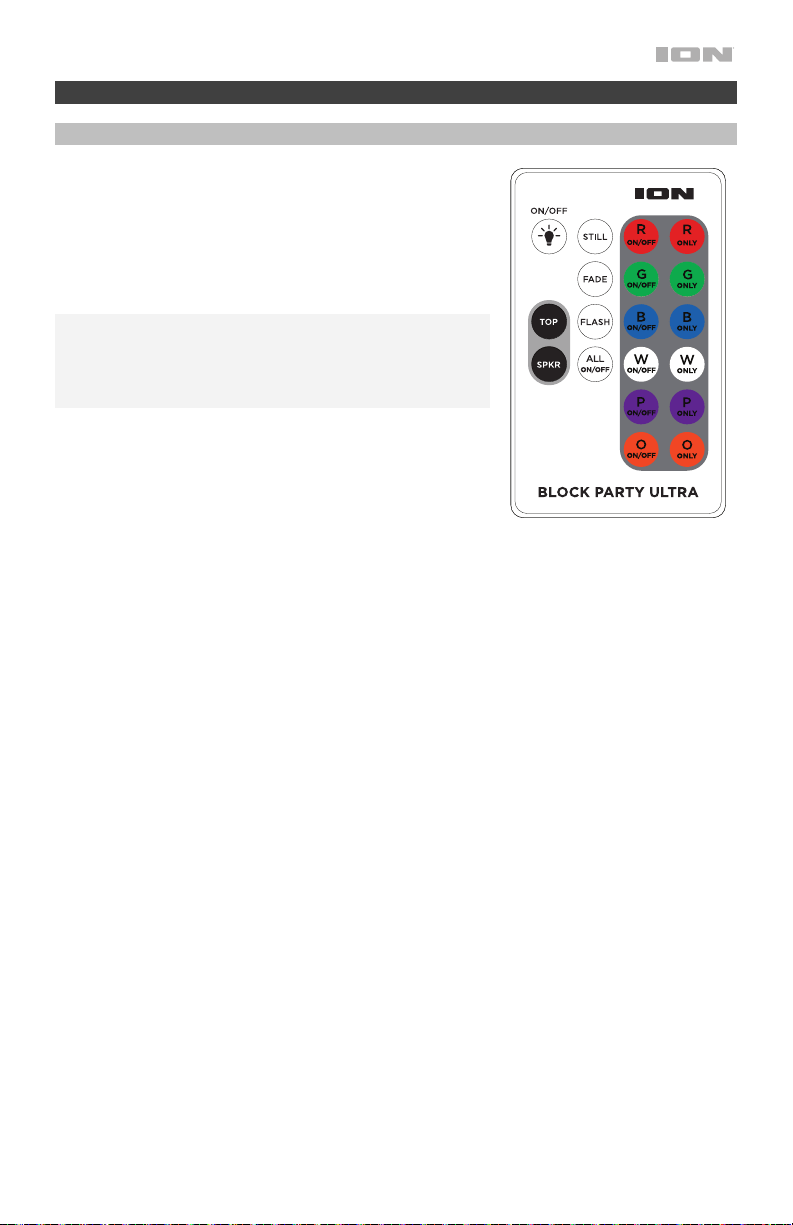
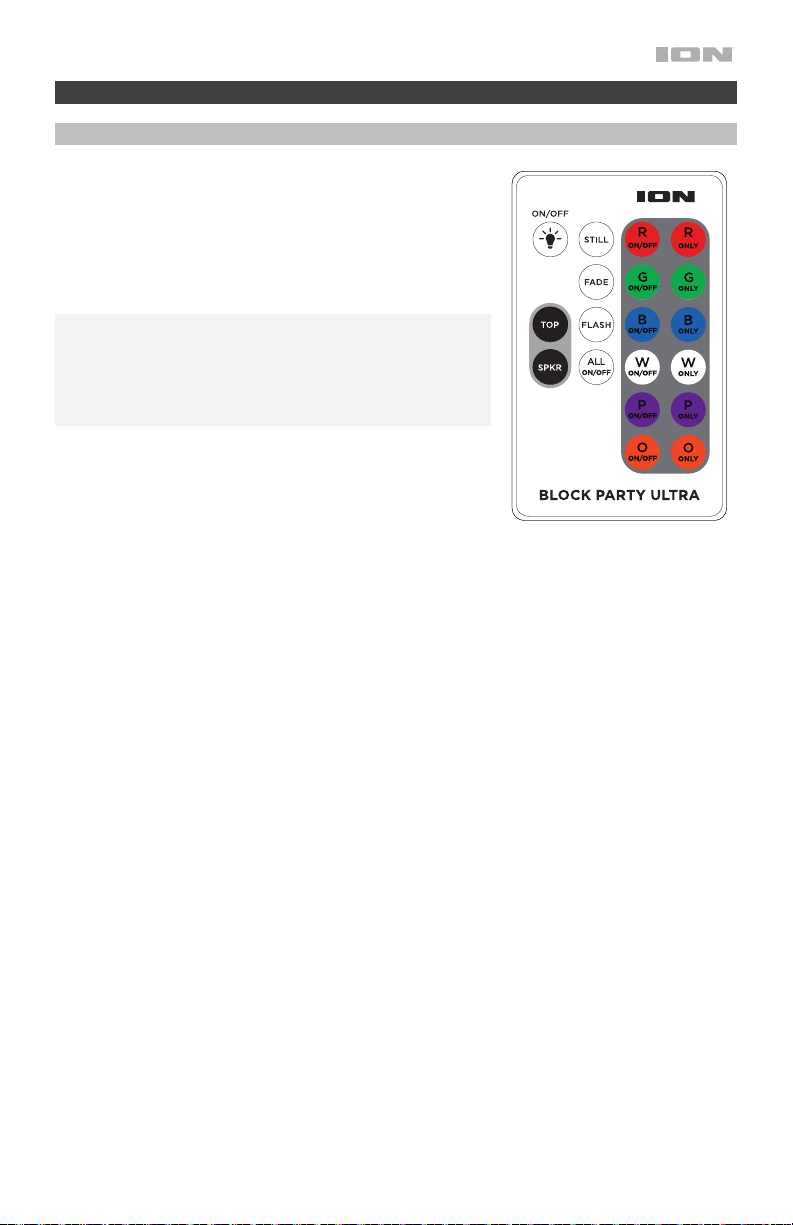
Use the remote control to select individual colors, and power
the lights on/off. Point the remote control at the front sensor
on the dome light and press the button of the option you
would like to select. See Light Modes for more details.
Note: Before using the remote control for the first time, pull
out the tab attached to the battery compartment. To change
the remote control battery, follow the diagram located on the
back of the remote control. Use a 3V DC CR2025 lithium
button cell battery for replacement.
• On/Off = Switches the dome and cone lights on or off.
• R On/Off = Switches the red color on or off.
• G On/Off = Switches the green color on or off.
• B On/Off = Switches the blue color on or off.
• W On/Off = Switches the white color on or off.
• P On/Off = Switches the purple color on or off.
• O On/Off = Switches the orange color on or off.
• R Only = Switches only the red color on.
• G Only = Switches only the green color on.
• B Only = Switches only the blue color on.
• W Only = Switches only the white color on.
• P Only = Switches only the purple color on.
• O Only = Switches only the orange color on.
• Still = See the Light Modes section for Mode details.
• Fade = See the Light Modes section for Mode details.
• Flash = See the Light Modes section for Mode details.
• All On/Off = Switches all colors on/off.
• Top = Turns the dome lights on.
• Spkr (speaker) = Turns the cone lights on.
8
Light Modes
Select from one of the light modes for the dome and woofer lights using the remote control.
Individual color buttons can be de-selected to have only the colors you want displayed without
interrupting the mode.
Dome Lights
When the Top Light button is pressed, the colors will turn on and slowly cycle through
different color combinations. Press the Top Light button again to have the colors quickly cycle
through different color combinations. When music begins to play, the lights will react to the
beat of the music, cycling to the different color combinations. At any time, a color can be
selected to toggle that color on or off. Pressing All Off will turn all colors off. Then, select
which colors you wish to illuminate. Press the Fade button to create fading effects, slowly
cycling from one color to the next. Press the Flash button to create flash effects. If the Top
Light button is pressed again, the lights will turn off. When the Still button is pressed, all 6
colors are on, and the lights are static (no motion). At any time, a color can be selected to
toggle that color on or off. Pressing All Off will turn all colors off. Then, select which colors you
wish to illuminate.
Woofer (Cone) Lights
When the Speaker Light button is first pressed, the colors will slowly fade from one color to
the next. If the Speaker Light button is pressed again, the lights will quickly change color along
with the beat of the music. If the Speaker Light button is pressed again, the lights will turn off.
Pairing a Bluetooth Device
1. Turn on your Bluetooth device.
2. Power on Block Party Ultra.
3. Navigate to your Bluetooth device’s setup screen, find Block Party Ultra and connect.
Note: If your Bluetooth device prompts for a pairing code, enter “0000”.
4. To disconnect pairing while the Bluetooth icon is lit solid, press the Bluetooth button.
5. To connect to another Bluetooth device, repeat step 3.
Connecting Two Speakers
To link two Block Party Ultra speakers:
1. Plug a 1/8” (3.5 mm) cable into the Speaker Link output located on the rear panel of one
Block Party Ultra.
2. Plug the other end of the 1/8” (3.5 mm) cable into the 1/8” Aux input of another Block
Party Ultra.
3. Power on both speakers. Use the Mic Volume on the second speaker to adjust the input
signal level.

9
Effects
FX Group C: Gender Effects
1. Barry
2. Male to Female
3. Female to Male
4. Pop Eye
5. Olive
6. Tinker Bell
7. Octivator
8. Prankster
9. Munchkin
10. Way Down
11. Ventriloquist
12. Hip Deep
13. Stadium
14. Station
15. David & Goliath
FX Group A: Core Effects
1. Super Star
2. On Stage
3. Auto-Pain
4. Modern Pop Tuned
5. Star
6. Super Group
7. Arena
8. Lead Singer
9. Grunge
10. Modern Rap
11. Classic Rap
12. Rock Out
13. Rockabilly
14. Church
15. Cathedral
FX Group B: Harmony Effects
1. Barbershop
2. Chapel Girls
3. Trio
4. Bohemian
5. Rhapsody
6. Group Harmony
7. Tuned Girls
8. Girl Pop
9. Tuned Girl Group
10. Tuned On Stage
11. Angelic Choir
12. Country Ladies
13. Country Gent
14. Hmmmm
FX Group D: Novelty Effects
1. D-Vader
2. Aliens
3. Flea
4. Froggy
5. Little Robot
6. Evil Robot
7. Robot Chorus
8. Monster
9. Psycho
10. Warehouse
11. Flange
12. Telephone
13. Echo
14. Big Echo
15. Grand Canyon

10
Troubleshooting
If the unit is not charging: Make sure the power cable is properly connected to the power
input and the power outlet.
If the sound is distorted: Try lowering the volume control of your sound source, musical
instrument, or microphone. Also, try to reduce the overall volume of Block Party Ultra using
the Master Volume knob.
If there is too much bass: Try adjusting the tone or EQ control on your sound source to lower
the bass level. This will allow you to play the music louder before clipping (distortion) occurs.
If there is a high-pitched whistling noise when using microphones: This is probably
feedback. Point the microphone away from the speaker.
If you can’t hear the microphone over the music volume: Turn down the music volume
from your source.
If you can’t play music from a flash drive: The USB port is only for charging USB devices.
If you cannot connect your audio device to Block Party Ultra via Bluetooth:
• Have your audio device (e.g., smartphone or tablet) and Block Party Ultra as close
together as possible while trying to connect. Make sure both the audio device and Block
Party Ultra are unobstructed by walls, furniture, etc.
• Reset the Bluetooth connection on Block Party Ultra to disconnect Block Party Ultra from
any other audio device and restart the search process. If this does not work right away,
power off Block Party Ultra and then power it back on. See Pairing a Bluetooth Device
for more information.
• Reset the Bluetooth connection on your audio device by turning Bluetooth off and back
on. You can find this under the Bluetooth menu in the Settings for your phone or other
audio device.
If this does not work, and you have connected to Block Party Ultra before, find Block
Party Ultra in the list of available or previously connected devices in your audio device's
Bluetooth menu, tap the "gear" or “i” icon located next to it and then select Unpair or
Forget. Turn Block Party Ultra off and back on and try pairing again once it reappears in
your available devices list.
Note: If Block Party Ultra has been paired to another audio device recently that is still
within range, you may need to repeat this process with that audio device to fully
disconnect.

11
Guía de inicio rápido (Español)
Introducción
Gracias por comprar el Block Party Ultra. En ION, su entretenimiento es tan importante para nosotros
como para usted. Por eso es que diseñamos nuestros productos con una sola cosa en mente—hacer
que su vida sea más divertida y cómoda.
Contenido de la caja
Block Party Ultra
Micrófono y cable
Cable auxiliar estéreo de 3,5 mm (1/8 pulg.)
Cable de alimentación / carga
Control remoto
Guía de inicio rápido
Manual sobre la seguridad y garantía
Soporte
Para obtener la información más reciente acerca de este producto (documentación, especificaciones
técnicas, requisitos de sistema, información de compatibilidad, etc.) y registrarlo, visite
ionaudio.com.
Para obtener soporte adicional del producto, visite ionaudio.com/support.
Baterías recargables
Las baterías de plomo-ácido recargables son del mismo tipo que se usa en los automóviles. Al igual
que con la batería del vehículo, la forma en que se usa tiene una influencia significativa en la
duración de su vida útil. Con un uso y tratamiento correctos, una batería de plomo-ácido puede
durar varios años. He aquí algunas recomendaciones para prolongar la vida útil de la batería interna.
Uso general
Cargue completamente la batería antes de usarla.
Cargue la batería completamente después de cada uso.
Almacenamiento
Para lograr la mayor longevidad del producto, no lo almacene a
temperaturas muy altas (superiores 32°C/90°F) o muy frías (inferiores a
0°C/32°F).
Es aceptable dejar su sistema de sonido enchufado. No sobrecargará la
batería.
Si deja que el nivel de la batería baje y no la carga durante 6 meses, puede
perder permanentemente su capacidad.
Reparación
Si la batería no se carga, compruebe su fusible cerca de la entrada del cable
de alimentación. Si el fusible está intacto y la batería sigue sin cargarse,
póngase en contacto con ION Audio en ionaudio.com.
Disposición final
Lleve la unidad a un centro de reciclaje o deséchela de acuerdo a las
ordenanzas locales.
12
iPA115
BLOCK PARTY ULTRA
MIC1 MIC2
AUXIN
LINK OUT
CHARGE
INPUT RANGE FUSE
100-240~50/60HZ,120W T2AL 250V
5V 1A
Instalación rápida
1. Asegúrese de que todos los artículos indicados en Contenido de la caja estén incluidos
en ella.
2. Lea el manual sobre la seguridad y la garantía antes de utilizar el producto.
3. Para asegurar una máxima vida útil de la batería, asegúrese de que esté completamente
cargada antes de utilizarla por primera vez.
4. Estudie el Diagrama de conexión.
5. Asegúrese de que el volumen maestro del Block Party Ultra esté en cero.
6. Conecte sus dispositivos.
7. Suba el volumen hasta un nivel confortable.
8. Regrese el volumen maestro a cero cuando termine de usar el Block Party Ultra.
Diagrama de conexión
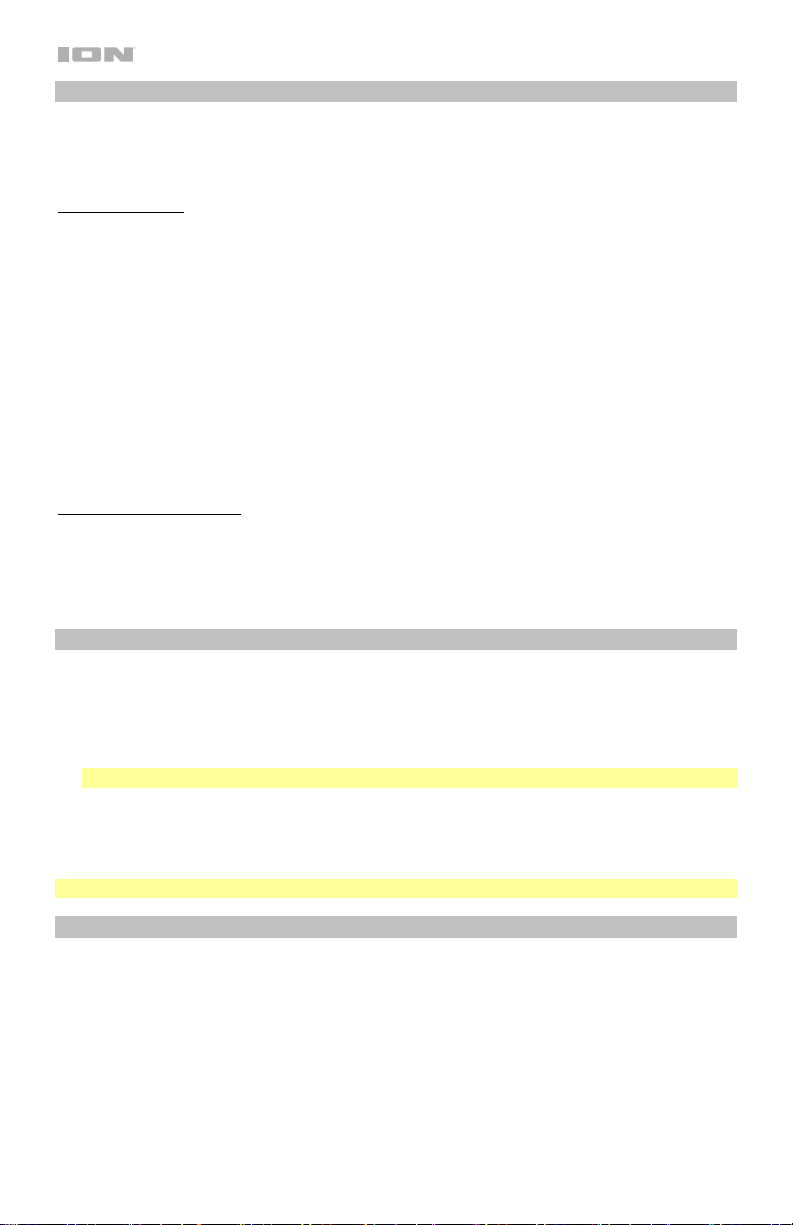
Los elementos que no se enumeran en Introducción > Contenido de la caja se venden por separado.
Suministro
eléctrico
Dispositivo
Bluetooth
Micrófono
Tableta,
reproductor
de MP3, etc.
13
Operación
Panel frontal
1. Botón de encendido: Tenga en cuenta que mientras el Block Party Ultra está conectado
a un suministro eléctrico, no es necesario encenderlo para que cargue la batería. Cuando
el altavoz está encendido, la pantalla mostrará el indicador de encendido.
2. Botón Bluetooth: Presione y suelte el botón Bluetooth para vincular a un dispositivo
Bluetooth. Pulse el botón Bluetooth para desconectar un dispositivo Bluetooth apareado.
Para más información, consulte Cómo aparear un dispositivo Bluetooth.
3. Reproducir/Pausa: Pulse para reproducir o hacer pausa en una pista de un dispositivo
Bluetooth conectado.
4. Efecto de voz encendido/apagado: Pulse este botón para activar/desactivar los efectos
integrados. Los efectos integrados se aplican a ambas entradas de micrófono.
5. Tipo de voz: presione este botón para seleccionar una categoría de efecto. Consulte
Operación > Efectos para obtener una lista completa de los efectos disponibles.
6. Efecto de voz ►: presione este botón para seleccionar el siguiente efecto.
7. Efecto de voz ◄: presione este botón para seleccionar el efecto anterior.
8. Superior Luces encendidas / apagadas: Presione este botón para encender / apagar la
luz del domo. Ver Operación > Modos de luz para más detalles.
9. Luces de altavoz encendidas / apagadas: Presione este botón para encender / apagar
las luces del woofer. Ver Operación > Modos de luz para más detalles.
10. Bass Boost: Pulse este botón para mejorar la respuesta en frecuencia general de los
graves.
11. Control de volumen maestro: Este control ajusta el volumen de la mezcla principal del
altavoz, que incluye la entrada de micrófono, la entrada auxiliar, y el audio de un
dispositivo Bluetooth apareado.
12. Volumen del micrófono: ajusta la ganancia de entrada para los micrófonos conectado.
1
2
3
4
5
6
7
8
9
11
12
10
14
Características de la pantalla
• Indicador de carga: Con el indicador de carga de la batería, cuando el cable de
alimentación está conectado, el movimiento de los segmentos de la batería muestra que se
está cargando. Una vez completamente cargada, todos los segmentos de la batería estarán
encendidos sin parpadear. Cuando se desconecta el cable de corriente, el segmento de la
batería muestra en nivel de la misma.
• Icono del relámpago: El icono del relámpago se encenderá cuando el cable de corriente
esté conectado a una toma de corriente de pared.
• Icono de Bluetooth: El icono de Bluetooth se enciende con luz azul continua cuando hay
un dispositivo apareado al Block Party Ultra.
• Icono de encendido: El icono de encendido se encenderá cuando el Block Party Ultra se
encienda. Este icono de encendido no se encenderá cuando Block Party Ultra está
apagado.
• Icono de Bass Boost: El icono de Bass Boost se iluminara cuando la función esté
activada. El icono estará apagado cuando la función esté desactivada.
Panel trasero
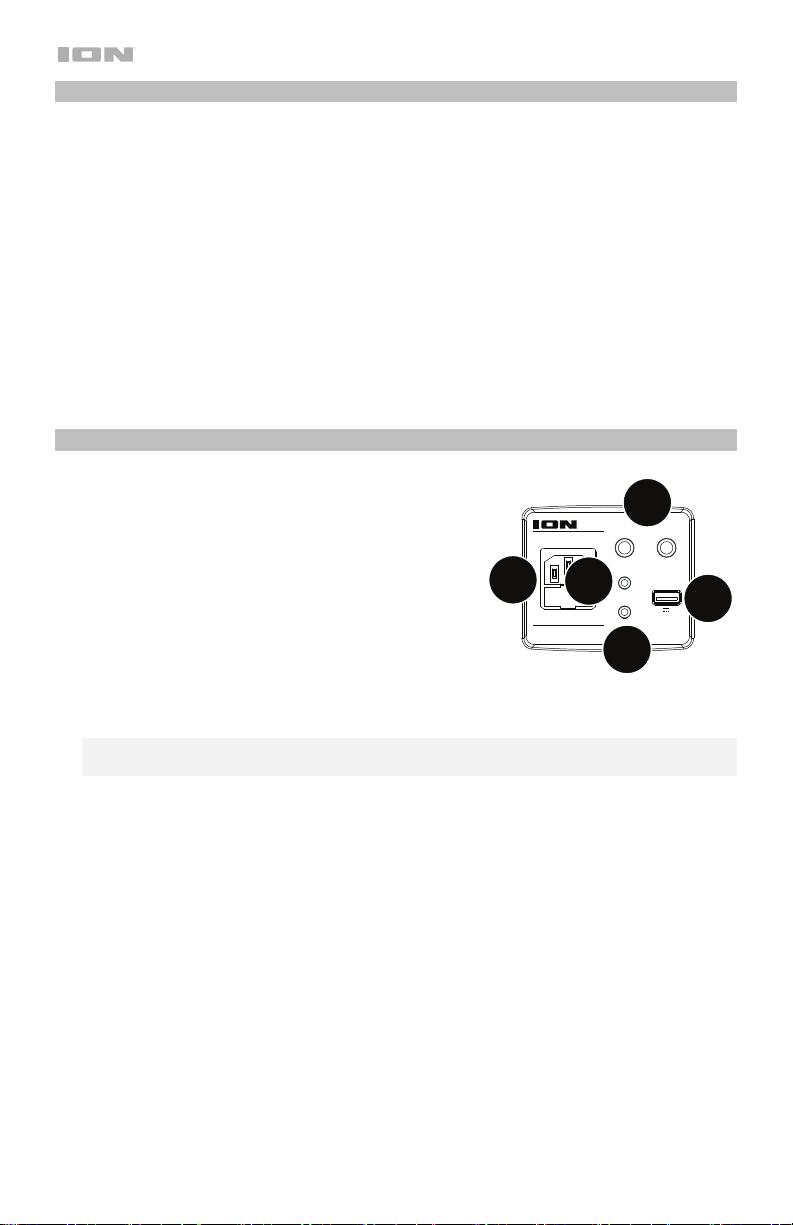
1. Micrófono (6,35 mm): Esta entrada mono admite
una entrada de 6,35 mm (1/4 pulg.) tal como un
micrófono, una guitarra u otro instrumento musical.
2. Entrada auxiliar: Esta entrada de 3,5 mm (1/8 pulg.)
estéreo se puede usar para conectar un reproductor
de CD, MP3 u otra fuente de audio.
3. Enlace de altavoces: Conecte dos o más Block
Party Ultra entre sí mediante un cable auxiliar
estéreo de 3,5 mm (1/8 pulg.) desde la salida de
enlace de altavoces de un Block Party Ultra hasta
la entrada auxiliar del segundo Block Party Ultra.
4. USB estación: Conecte aquí el cable de carga de su dispositivo para cargarlo. La carga
por USB funciona solamente cuando la unidad está encendida.
Nota: Para cargar sus teléfonos inteligentes (smartphones) y tabletas más rápido, ponga
la pantalla de su dispositivo en estado de reposo.
5. Entrada del cavo de alimentación: Inserte aquí el cable de alimentación incluido para
alimentación la unidad. Tenga en cuenta que el Block Party Ultra puede funcionar con el
adaptador de potencia mientras se carga simultáneamente la batería.
9
iPA115
BLOCK PARTY ULTRA
MIC1 MIC2
AUXIN
LINK OUT
CHARGE
INPUT RANGE FUSE
100-240~50/60HZ,120W T2AL 250V
5V 1A
2
1
4
5
3
15
Funcionamiento
Control remoto
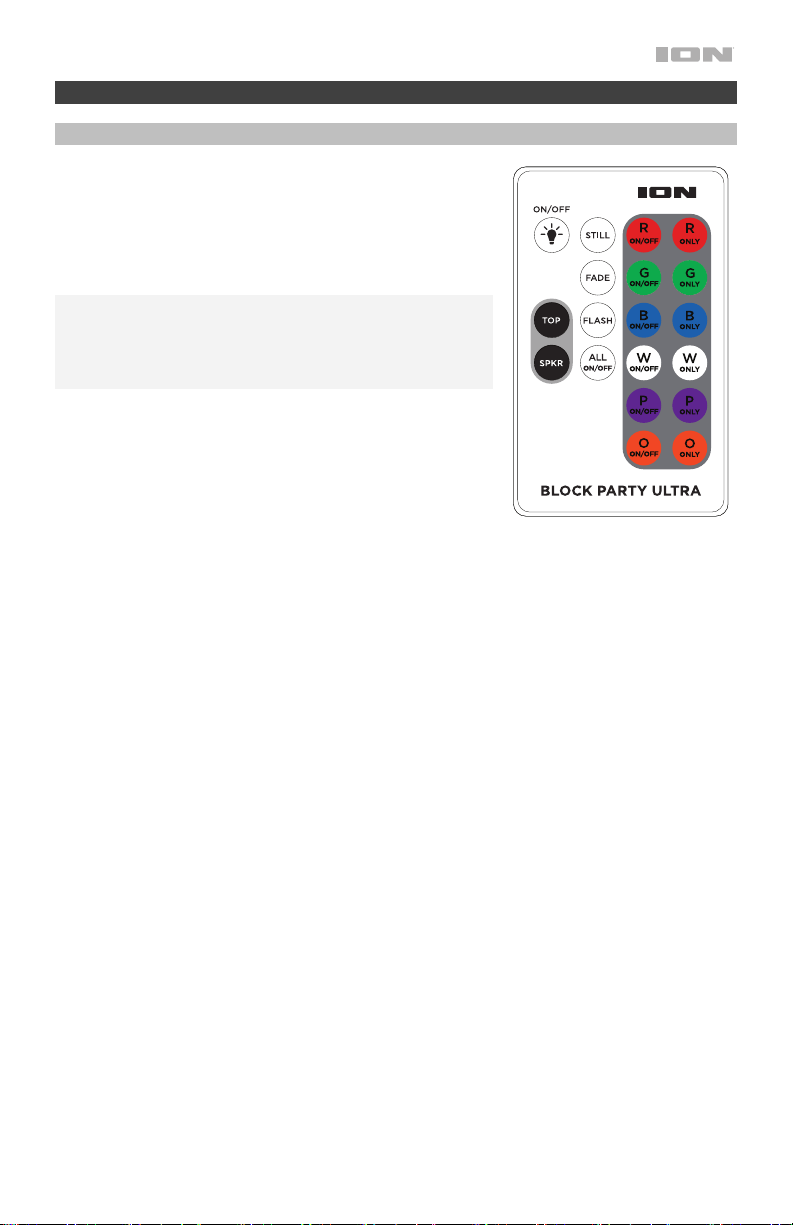
Utilice el control remoto para ajuste el temporizador de la
luz, seleccionar los colores individuales y encender/apagar
la unidad. Apunte el control remoto al sensor delantero del
domo de luces y pulse el botón de la opción que desea
seleccionar. Consulte los detalles de cada modo en la
sección Modos de luz.
Nota: Antes de utilizar el control remoto por primera vez,
extraiga la lengüeta fijada al compartimiento de las pilas.
Para cambiar la batería del control remoto, siga el diagrama
ubicado en el reverso del mismo. Utilice una pila de celda
tipo botón de litio CR2025 de 3V CC como reemplazo.
• ALL ON/OFF = Enciende y apaga los colores.
• R ON/OFF = Enciende y apaga el color rojo.
• G ON/OFF = Enciende y apaga el color verde.
• B ON/OFF = Enciende y apaga el color azul.
• W ON/OFF = Enciende y apaga el color blanco.
• P On/Off = Enciende y apaga el color púrpura.
• O On/Off = Enciende y apaga el color naranja.
• R Only = Enciende solo el color rojo.
• G Only = Enciende solo el color verde
• B Only = Enciende solo el color azul.
• W Only = Enciende solo el color blanco.
• P Only = Enciende solo el color púrpura.
• O Only = Enciende solo el color naranja.
• Estático = Consulte los detalles de cada modo en la sección Modos de luz.
• Desvanecimiento = Consulte los detalles de cada modo en la sección Modos de luz.
• Parpadeo = Consulte los detalles de cada modo en la sección Modos de luz.
• Todo encendido / apagado = Activa / desactiva todos los colores.
• Superior = Enciende las luces del domo.
• Spkr (altavoce) = Enciende las luces de cono.
16
Modos de luz
Seleccione uno de los modos de iluminación para el domo y las luces del woofer usando el
control remoto. Los botones de color individuales se pueden des-seleccionar para dejar
solamente aquellos colores que desea que se muestren sin interrumpir el modo.
Luces del domo:
Cuando se pulsa el botón de las luces del superior, los colores se encenderán y alternarán
entre diferentes combinaciones de colores. Pulse nuevamente el botón de las luces del
superior para que los colores alternen rápidamente entre diferentes combinaciones de
colores. Cuando la música empiece a sonar, las luces reaccionarán al ritmo de la música,
alternando entre las diferentes combinaciones de colores. En cualquier momento se puede
seleccionar un color para encenderlo o apagarlo. Al pulsar All Off (Apagar todo) se apagan
todos los colores. Luego, seleccione los colores que desea encender. Pulse el botón Fade
(Desvanecimiento) para crear efectos de desvanecimiento, cambiando lentamente de un color
a otro. Pulse el botón Flash para crear efectos de parpadeo. Si este botón de las luces del
superior se pulsa nuevamente, las luces se apagarán. Al presionar el botón Still (Estático), los
6 colores se encienden y las luces permanecen estáticas (no se mueven). En cualquier
momento se puede seleccionar un color para encenderlo o apagarlo. Al pulsar “All Off” (todo
apagado) se apagan todos los colores. Luego, seleccione los colores que desea encender.
Luces del woofer (cono)
Cuando el botón de la luz del altavoz se pulsa una vez, los colores se desvanecerán
lentamente de uno a otro. Si el botón de la luz del altavoz se pulsa nuevamente, las luces
cambiarán de color rápidamente siguiendo el ritmo de la música. Si el botón de la luz del
altavoz se pulsa una vez más, las luces se apagarán.
Cómo aparear un dispositivo Bluetooth
1. Encienda su dispositivo Bluetooth.
2. Encienda el Block Party Ultra.
3. Navegue a la pantalla de configuración de su dispositivo Bluetooth, busque “Block Party
Ultra” y conéctelo a él.
Nota: Si su dispositivo Bluetooth solicita un código de apareamiento, ingrese 0000.
4. Para desconectar el apareamiento cuando el icono de Bluetooth esté encendido
permanentemente, mantenga pulsado el botón de Bluetooth.
5. Para conectarse a otro dispositivo Bluetooth, repita el paso 3.
Nota: El alcance máximo se logra cuando se utilizan dispositivos con Bluetooth 4.0 o superior.
Conexión de dos altavoces
Cómo enlazar dos altavoces Block Party Ultra:
1. Enchufe un cable 3,5 mm (1/8 pulg.) en la salida de mezcla ubicada en el panel trasero de
uno de los Block Party Ultra.
2. Enchufe el otro extremo del cable en la entrada Aux 1/8” del otro Block Party Ultra.
3. Encienda ambos altavoces. Utilice el volumen de microphone del segundo altavoz para
ajustar el nivel de la señal de entrada.

17
Efectos
Grupo de efectos C: Efectos de género
Grupo de efectos D: Efectos novedosos
1. Barry 1. D-Vader
2. Male to Female 2. Aliens
3. Female to Male 3. Flea
4. Pop Eye 4. Froggy
5. Olive 5. Little Robot
6. Tinker Bell 6. Evil Robot
7. Octivator 7. Robot Chorus
8. Prankster 8. Monster
9. Munchkin 9. Psycho
10. Way Down 10. Warehouse
11. Ventriloquist 11. Flange
12. Hip Deep 12. Telephone
13. Stadium 13. Echo (Eco)
14. Station 14. Big Echo
15. David & Goliath 15. Grand Canyon
Grupo de efectos A: Efectos principales
1. Super Star
2. On Stage
3. Auto-Pain
4. Modern Pop Tuned
5. Star
6. Super Group
7. Arena
8. Lead Singer
9. Grunge
10. Modern Rap
11. Classic Rap
12. Rock Out
13. Rockabilly
14. Iglesia
15. Cathedral
Grupo de efectos B: Efectos de armonía
1. Barbershop
2. Chapel Girls
3. Trio
4. Bohemian
5. Rhapsody
6. Group Harmony
7. Tuned Girls
8. Girl Pop
9. Tuned Girl Group
10. Tuned On Stage
11. Angelic Choir
12. Country Ladies
13. Country Gent
14. Hmmmm

18
Solución de problemas
Si la unidad no se carga: Asegúrese de que el cable de alimentación esté conectado
correctamente a la entrada de corriente y a la toma de corriente.
Si el sonido está distorsionado: Pruebe bajando el control de volumen de su fuente de
sonido o instrumento musical. Pruebe también reduciendo el volumen general del Block Party
Ultra.
Si los graves son demasiado fuertes: Intente ajustando el control de tono o ecualización de
su Block Party Ultra o fuente de sonido para reducir el nivel de graves. De esta forma podrá
reproducir la música con más volumen antes de que se produzca el recorte (distorsión).
Si hay un silbido agudo cuando se usa un micrófono: Probablemente sea realimentación.
Apunte el micrófono apartándolo del altavoz.
Si no puede oír el micrófono por arriba del volumen de la música: Disminuya el volumen
de la música en su fuente.
Si no puede conectar su dispositivo de audio al Block Party Ultra mediante Bluetooth:
• Mantenga su dispositivo de audio (por ej., teléfono inteligente [smartphone] o tableta) y el
Block Party Ultra lo más cerca posible entre sí al realizar la conexión. Asegúrese que
tanto el dispositivo de audio como el Block Party Ultra no estén obstruidos por paredes,
muebles, etc.
• Reinicie la conexión Bluetooth del Block Party Ultra para desconectarlo Block Party Ultra
de cualquier otro dispositivo de audio y reinicie el proceso de búsqueda. Si esto no
funciona en seguida, apague el Block Party Ultra y luego vuelva a encenderlo. Para más
información, consulte Cómo aparear un dispositivo Bluetooth.
• Reinicie la conexión Bluetooth de su dispositivo de audio apagando el Bluetooth y luego
volviendo a encenderlo. Puede encontrar esta opción dentro del menú Bluetooth en los
ajustes de su teléfono o dispositivo de audio.
Si esto no funciona y ya se había conectado al Block Party Ultra anteriormente, busque
Block Party Ultra en la lista de dispositivos disponibles o previamente conectados en el
menú Bluetooth de su dispositivo de audio, toque el icono de engranaje o "i" ubicado
junto a él y luego seleccione Desaparear u Olvidar. Apague el Block Party Ultra, luego
vuelva a encenderlo e intente aparearlo nuevamente una vez que vuelva a aparecer en su
lista de dispositivos disponibles.
Nota: Si Block Party Ultra ya ha sido recientemente apareado con otro dispositivo de
audio que aún se encuentre dentro del alcance, es posible que tenga que repetir este
proceso con ese dispositivo de audio para desconectarlo completamente.

19
Guide d'utilisation rapide (Français)
Présentation
Merci d’avoir fait l’acquisition de l'enceinte Block Party Ultra. Chez ION, votre divertissement
est aussi important pour nous qu’il l’est pour vous. C’est pourquoi nous concevons nos
produits avec une seule chose en tête — rendre la vie plus amusante et plus pratique.
Contenu de la boîte
Block Party Ultra
Microphone et câble
Câble auxiliaire stéréo 3,5 mm (1/8 po)
Câble d'alimentation
Télécommande
Guide d'utilisation rapide
Consignes de sécurité et informations concernant la garantie
Assistance
Pour les toutes dernières informations concernant la documentation, les spécifications
techniques, la configuration requise, la compatibilité et l’enregistrement du produit, veuillez
visiter ionaudio.com.
Pour de l’assistance supplémentaire, veuillez visiter ionaudio.com/support.
Piles rechargeables
Les piles au plomb rechargeables sont du même type que les batteries utilisées dans les
automobiles. Comme pour la batterie de votre automobile, la manière dont vous l'utilisez a un
impact direct sur sa durée de vie. Cependant, avec une bonne utilisation la pile au plomb peut
avoir une durée de vie de plusieurs années. Voici quelques recommandations pour prolonger
au maximum la durée de vie de la pile interne.
Utilisation
générale
Chargez complètement la batterie avant de l’utiliser.
Rechargez la batterie complètement après chaque utilisation.
Entreposage
Pour optimiser la longévité du produit, ne pas entreposer dans des
températures extrêmement chaudes (supérieur à 32°C/90°F) ou extrêmement
froides (moins de 0°C/32°F).
Il est acceptable de laisser votre système audio branché. Cela ne surchargera
pas la batterie.
Si vous laissez le niveau de batterie s’affaiblir sans la recharger pendant 6
mois, elle risquerait de perdre sa capacité de charge de façon permanente.
Réparation
Si la batterie ne parvient plus à se recharger, vérifier le fusible situé près de
l'entrée du câble d'alimentation. Si le fusible est intact et que la batterie ne se
recharge toujours pas, contactez ION Audio à ionaudio.com.
Élimination
Apportez l’appareil dans un centre de recyclage ou disposez selon les
règlements de votre municipalité.
20
iPA115
BLOCK PARTY ULTRA
MIC1 MIC2
AUXIN
LINK OUT
CHARGE
INPUT RANGE FUSE
100-240~50/60HZ,120W T2AL 250V
5V 1A
Démarrage rapide
1. Veuillez vous assurer que tous les articles énumérés dans le Contenu de la boîte de ce
guide sont inclus dans la boîte.
2. Veuillez lire le livret des consignes de sécurité et des informations sur la garantie avant
d'utiliser le produit.
3. Veuillez vous assurer d'avoir complètement chargé la batterie avant la première utilisation
afin d’augmenter sa durée de vie.
4. Veuillez examiner le Schéma de connexion.
5. Veuillez vous assurer que le bouton volume général du Block Party Ultra est à zéro.
6. Raccordez tous vos appareils.
7. Réglez le volume à un niveau confortable.
8. Lorsque vous avez terminé d’utiliser le Block Party Ultra, remettez le bouton volume
général à zéro.
Schéma de connexion
Les éléments qui ne figurent pas dans le Présentation > Contenu de la boîte sont vendus
séparément.
Tablette,
lecteur
de MP3,
etc.
Microphone
Appareil
Bluetooth
Alimentation
21
Caractéristiques
Panneau avant
1. Touche d'alimentation : Veuillez noter que lorsque le Block Party Ultra est branché à
une source d’alimentation, il peut recharger la pile sans être sous tension. Lorsque
l'appareil est sous tension, l'écran affiche l'indicateur d'alimentation.
2. Touche Bluetooth : Appuyez sur cette touche bouton Bluetooth et relâchez-le pour le
coupler à un périphérique Bluetooth. Enfoncer puis relâcher la touche Bluetooth permet
de déjumeler un appareil Bluetooth connecté. Veuillez consulter la section Jumelage
d'un périphérique Bluetooth afin d’en savoir plus.
3. Lancer/interrompre la lecture : Appuyez sur cette touche pour lancer la lecture ou
interrompre une piste sur un périphérique Bluetooth connecté.
4. Effets de voix d’activer/désactiver : Cette touche permet d’activer et de désactiver les
effets de voix intégrés. Les effets intégrés sont ajoutés aux deux entrées microphone.
5. Type de voix : Appuyez sur cette touche pour sélectionner une catégorie d'effet. Voir
Fonctionnement > Effets pour une liste complète des effets disponibles.
6. Effets de voix ► : Appuyez sur pour sélectionner l'effet suivant.
7. Effets de voix ◄ : Appuyez sur pour sélectionner l'effet précédente.
8. Lumières du haut allumée / éteinte : Appuyez sur cette touche pour allumer / éteindre
le plafonnier. Voir Opération > Modes d'éclairage pour plus de détails.
9. Lumières de haut-parleur allumées / éteintes : Appuyez sur cette touche pour allumer
/ éteindre le woofer. Voir Opération > Modes d'éclairage pour plus de détails.
10. Bass Boost : Cette touche permet d'augmenter la réponse en basse fréquence.
11. Volume général : Ce bouton permet de régler le volume du mix général qui comprend
l'entrée microphone, l’entrée auxiliaire, et l'audio d'un périphérique Bluetooth jumelé.
12. Volume du microphone : Règle le gain d'entrée pour les microphones connectés.
1
2
3
4
5
6
7
8
9
11
12
10

22
Fonctions d'écran
• Indicateur de charge : Lorsque le câble d'alimentation est connecté, le mouvement des
segments de batterie de l'indicateur de charge indique que la batterie est en charge.
Lorsque complètement chargée, tous les segments de la batterie s'allument sans clignoter.
Lorsque le câble d'alimentation est débranché, le segment de l'indicateur de charge indique
le niveau de charge.
• Icône éclair : L’icône éclair s'allume lorsque le câble d’alimentation est branché à une
prise secteur.
• Icône Bluetooth : L’icône Bluetooth s’allume lorsqu'un périphérique est jumelé à
l’enceinte Block Party Ultra.
• Icône d'alimentation : L’icône d'alimentation s’allume lorsque l’enceinte Block Party Ultra
est sous tension. Cette icône d'alimentation ne sera pas allumé lorsque Block Party Ultra
est éteint.
• Icône de Bass Boost : L’icône de Bass Boost s’allume lorsque la fonction est activée.
Cette icône sera éteinte lorsque la fonction est désactivée.
Panneau arrière
1. Microphone (6,35 mm) : Cette entrée mono peut
accueillir un câble de 6,35 mm (1/4 po) pour
microphone, guitare ou un autre instrument de
musique.
2. Entrée auxiliaire : Cette entrée stéréo 3,5 mm (1/8
po) permettent de brancher un smartphone, un
lecteur MP3 ou autres sources audio.
3. Sortie de raccordement en série : Cette sortie
permet de raccorder deux enceintes Block Party
Ultra ou plus, en branchant une extrémité du câble
auxiliaire stéréo de 3,5 mm (1/8 po) à la sortie de
raccordement en série d'une des enceintes Block Party Ultra, puis l’autre extrémité à
l’entrée auxiliaire de la seconde enceinte.
4. Port de rechargement USB : Branchez le câble de rechargement de votre périphérique
à cette prise pour le recharger. Le rechargement de la pile par la connexion USB
fonctionne uniquement lorsque l’appareil est allumé.
Remarque : Pour recharger plus rapidement vos smartphones et tablettes, mettez
l'écran de votre périphérique en veille.
5. Entrée du câble d'alimentation : Brancher le câble d'alimentation ci-inclus ici pour
d'alimentation l'appareil. Sachez qu'il est possible d'utiliser le Block Party Ultra tout en le
rechargeant à l'aide de l'adaptateur d'alimentation.
9
iPA115
BLOCK PARTY ULTRA
MIC1 MIC2
AUXIN
LINK OUT
CHARGE
INPUT RANGE FUSE
100-240~50/60HZ,120W T2AL 250V
5V 1A
2
1
4
5
3
23
Fonctionnement
Télécommande
Utilisez la télécommande pour réglez la minuterie,
sélectionner les couleurs individuelles et mettre le Holiday
Party Plus sous et hors tension. Pointez la télécommande
vers le récepteur sur l’avant du dôme et appuyez sur la
touche de l'option que vous souhaitez sélectionner. Veuillez
consulter la section Modes d’éclairage pour plus
d’information.
Remarque : Avant d’utiliser la télécommande pour la
première fois, retirez la languette du compartiment à pile.
Pour changer la pile de la télécommande, suivez le schéma
situé à l'arrière de la télécommande. Utilisez une pile de
rechange au lithium CR2025 de 3 V CC.
• All On/Off = Allume et éteint toutes les couleurs.
• R On/Off = Alllume et éteint la couleur rouge.
• G On/Off = Allume et éteint la couleur verte.
• B On/Off = Allume et éteint la couleur bleue.
• W On/Off = Allume et éteint la couleur blanche.
• P On/Off = Allume et éteint la couleur pourpre.
• O On/Off = Allume et éteint la couleur orange.
• R Only = Allume seulement la couleur rouge.
• G Only = Allume seulement la couleur verte.
• B Only = Allume seulement la couleur bleue.
• W Only = Allume seulement la couleur blanche.
• P Only = Allume seulement la couleur pourpre.
• O Only = Allume seulement la couleur orange.
• Fixe = Veuillez consulter la section Modes d’éclairage pour plus d’information.
• Fondu = Veuillez consulter la section Modes d’éclairage pour plus d’information.
• Clignotement = Veuillez consulter la section Modes d’éclairage pour plus d’information.
• All On / Off = Active / désactive toutes les couleurs.
• Supérieur = Allume les lumières du dôme.
• Spkr (sortie) = allume les lumières du cône.
24
Modes d’éclairage
Sélectionnez l'un des modes d'éclairage pour le dôme et le haut-parleur des graves à l'aide de
la télécommande. Chacune des touches de sélection des couleurs peut être désélectionnée
afin de n’allumer que les couleurs que vous souhaitez sans interrompre le mode.
Lumières du dôme
Lorsque la touche Haut Light est enfoncée, les lumières s’allument et défilent lentement à
travers toutes les combinaisons de couleurs possibles. Appuyer sur la touche Haut Light de
nouveau, permet de défiler rapidement à travers toutes les combinaisons de couleurs. Lorsque
la musique commence à jouer, les lumières réagissent au rythme de la musique, et défilent
rapidement à travers toutes les combinaisons de couleurs. À tout moment, une couleur peut
être activée ou désactivée. Appuyer sur la touche All Off permet de désactiver toutes les
couleurs. Ensuite, il est possible d’activer uniquement les couleurs souhaitées. Appuyer sur la
touche Fade permet de créer des effets de fondu et de passer lentement d’une couleur à
l’autre. Appuyer sur la touche Flash permet de créer des effets flash. Si la touche Haut Light
est de nouveau enfoncée, les lumières s’éteindront. En appuyant sur le bouton Still (Fixe), les
6 couleurs sont activées et les lumières sont statiques (aucun mouvement). À tout moment,
une couleur peut être activée ou désactivée. Appuyer sur la touche All Off permet de
désactiver toutes les couleurs afin de pouvoir sélectionner uniquement celles souhaitées.
Lumières du haut-parleur des graves (cône)
Lorsque la touche Haut-parleur Light est enfoncée, les couleurs se fondent lentement d’une à
l’autre. Si la touche Haut-parleur Light est de nouveau enfoncée, les lumières changent
rapidement de couleur et réagissent au rythme de la musique. Si la touche Haut-parleur Light
est de nouveau enfoncée, les lumières s’éteindront.
Jumelage d'un périphérique Bluetooth
1. Veuillez mettre votre périphérique Bluetooth sous tension.
2. Mettez l’enceinte Block Party Ultra sous tension.
3. Accédez à l'écran de configuration de votre périphérique Bluetooth, recherchez « Block
Party Ultra » et lancez le jumelage.
Remarque : Si votre périphérique Bluetooth vous demande d’entrer un code de jumelage,
entrez 0000.
4. Pour supprimer la connexion lorsque l'icône Bluetooth est allumée, enfoncez puis relâchez
la touche Bluetooth.
5. Pour jumeler un autre périphérique Bluetooth, répétez les étape 3.
Remarque : La plage maximale peut être atteinte avec l’utilisation d’appareils dotés de
Bluetooth 4.0 ou de versions ultérieures.
Relier deux enceintes
Pour relier deux enceintes Block Party Ultra :
1. Branchez un câble 3,5 mm (1/8 po) à la lien haut-parleur du panneau arrière d'une des
Block Party Ultra.
2. Branchez l’autre extrémité du câble 3,5 mm (1/8 po) à l’entrée aux de l’autre enceinte
Block Party Ultra.
3. Mettez les deux enceintes sous tension. Utilisez le bouton du volume du microphone sur
la deuxième enceinte afin de régler le niveau d’entrée du signal.

25
Effets
Groupe d’effets C : Effets selon le
sexe de la voix
Groupe d’effets D : Effets spéciaux
1. Barry 1. D-Vader
2. Male to Female 2. Aliens
3. Female to Male 3. Flea
4. Pop Eye 4. Froggy
5. Olive 5. Little Robot
6. Tinker Bell 6. Evil Robot
7. Octivator 7. Robot Chorus
8. Prankster 8. Monster
9. Munchkin 9. Psycho
10. Way Down 10. Warehouse
11. Ventriloquist 11. Flange
12. Hip Deep 12. Telephone
13. Stadium 13. Echo
14. Station 14. Big Echo
15. David & Goliath 15. Grand Canyon
Groupe d’effets A : Effets de base
1. Super Star
2. On Stage
3. Auto-Pain
4. Modern Pop Tuned
5. Star
6. Super Group
7. Arena
8. Lead Singer
9. Grunge
10. Modern Rap
11. Classic Rap
12. Rock Out
13. Rockabilly
14. Church
15. Cathedral
Groupe d’effets B : Effets d'harmonie
1. Barbershop
2. Chapel Girls
3. Trio
4. Bohemian
5. Rhapsody
6. Group Harmony
7. Tuned Girls
8. Girl Pop
9. Tuned Girl Group
10. Tuned On Stage
11. Angelic Choir
12. Country Ladies
13. Country Gent
14. Hmmmm

26
Guide de dépannage
Si l’appareil ne se recharge pas : Veuillez-vous assurer que le câble d’alimentation secteur
est correctement branché à l’entrée d’alimentation et à une prise secteur.
Lorsqu'il y a de la distorsion : Essayez de diminuer le volume sur l'appareil d'entrée audio ou
l'instrument de musique. Essayez également de diminuer le volume de la Block Party Ultra.
Lorsqu'il y a trop de basses fréquences : Essayez de régler le niveau de tonalité et
d'égalisation de la Block Party Ultra ou de la source d'entrée audio afin de diminuer le niveau
des basses fréquences. Cela vous permettra d'augmenter le volume de la musique avant que
l'écrêtage se produise.
Lorsqu'il y a un sifflement aigu lors de l'utilisation d'un microphone : Ceci est
probablement causé par la rétroaction (effet Larsen). Dirigez le microphone loin de l'enceinte.
Si vous ne pouvez entendre le microphone à cause du volume trop élevé de la musique :
Baissez le volume de la musique provenant de la source.
Si vous ne pouvez connecter votre appareil audio à la Block Party Ultra par connexion
Bluetooth :
• Veillez à ce que votre appareil audio (p. ex., smartphone ou tablette) et la Block Party
Ultra soient le plus près possible l’un de l’autre lors du jumelage. Veillez également à ce
qu’aucun obstacle ne se trouve entre l’appareil audio et la Block Party Ultra, comme des
murs, des meubles, etc.
• Réinitialisez la connexion Bluetooth sur la Block Party Ultra afin de supprimer toute
connexion à la Block Party Ultra et recommencer le processus de recherche d’appareil.
Si cela ne fonctionne pas immédiatement, mettez la Block Party Ultra hors tension et de
nouveau sous tension. Veuillez consulter la section Jumelage d'un périphérique
Bluetooth afin d’en savoir plus.
• Réinitialisez la connexion Bluetooth sur l’appareil audio en désactivant et réactivant la
connexion Bluetooth. Vous pouvez effectuer ceci à partir du menu Bluetooth dans les
Réglages de votre smartphone ou autre appareil audio.
Si cela ne fonctionne pas et que vous avez déjà connecté votre appareil à la Block Party
Ultra auparavant, veuillez rechercher la Block Party Ultra dans la liste des appareils
disponibles ou précédemment connectés dans le menu Bluetooth de votre appareil
audio, puis appuyer sur l'icône engrenage ou « i » située à côté de « Oublier cet
appareil ». Mettez la Block Party Ultra hors tension et de nouveau sous tension et
réessayez de la jumeler une fois qu’elle apparaît dans la liste des appareils disponibles.
Remarque : Si la Block Party Ultra a été récemment jumelée à un autre appareil audio
qui est toujours dans son champ de portée, il se peut que vous deviez répéter ce
processus avec cet appareil audio afin de supprimer la connexion.

27
Guida rapida (Italiano)
Introduzione
Grazie per aver acquistato il Block Party Ultra. Per noi di ION, il tuo divertimento è importante
quanto lo è per te. Ecco perché progettiamo i nostri dispositivi con un unico obiettivo in
mente: rendere la tua vita più comoda e divertente.
Contenuti della confezione
Block Party Ultra
Microfono e cavo
Carica/Cavo di alimentazione
Cavo aux stereo da 3,5 mm (1/8")
Telecomando
Guida rapida
Istruzioni di sicurezza e garanzia
Assistenza
Per le ultime informazioni in merito a questo prodotto (documentazione, specifiche tecniche,
requisiti di sistema, informazioni sulla compatibilità, ecc.) e per effettuarne la registrazione,
recarsi alla pagina ionaudio.com.
Per ulteriore assistenza sul prodotto, recarsi alla pagina ionaudio.com/support.
Batterie ricaricabili
Le batterie ricaricabili al piombo-acido sono dello stesso tipo di quelle utilizzate nelle automobili.
Come nel caso della batteria dell’auto, la maniera in cui si utilizza questa batteria ha un notevole
impatto sulla sua vita utile. Con un utilizzo adeguato, una batteria al piombo-acido può durare
per anni. Ecco alcune raccomandazioni per garantire la massima durata dalla batteria interna.
Utilizzo generico
Caricare a fondo il prodotto prima dell’uso.
Caricare a fondo il prodotto prima di riporlo.
Come riporre
l’apparecchio
Per la massima longevità del prodotto, evitare di riporlo a temperature
eccessivamente elevate (superiori a 32°C/90°F) o eccessivamente fredde
(meno di 0°C/32°F).
L’impianto audio può essere lasciato collegato. Così facendo la batteria
non si sovraccarica.
Se si lascia il livello della batteria basso e non la si ricarica per 6 mesi,
potrebbe perdere capacità in via permanente.
Riparazioni
Se la batteria non si carica, verificare le condizioni del fusibile presso
l’ingresso del cavo di alimentazione. Se il fusibile non è intatto e non si
carica, contattare il dipartimento parti di ricambio alla pagina ionaudio.com.
Come eliminare
l’apparecchio
Recarsi con l’apparecchio presso un centro di riciclaggio oppure
eliminarlo in conformità con le normative locali.
28
iPA115
BLOCK PARTY ULTRA
MIC1 MIC2
AUXIN
LINK OUT
CHARGE
INPUT RANGE FUSE
100-240~50/60HZ,120W T2AL 250V
5V 1A
Inizio rapido
1. Assicurarsi che tutti gli elementi elencati nel paragrafo Contenuti della confezione siano
contenuti nella confezione stessa.
2. Leggere attentamente le istruzioni di sicurezza e garanzia prima di utilizzare il prodotto.
3. Per garantire la massima durata della batteria, assicurarsi di averla caricata
completamente prima del primo utilizzo.
4. Studiare lo Schema dei collegamenti.
5. Assicurarsi che il volume Master del Block Party Ultra sia su zero.
6. Collegare i dispositivi.
7. Alzare il volume fino al livello desiderato.
8. Una volta finito di utilizzare il Block Party Ultra, riportare il volume Master a zero.
Schema dei collegamenti
Elementi non elencati sotto Introduzione > Contenuti della confezione sono venduti separatamente.
Tablet, lettore
MP3, ecc.
Microfono
Dispositivo
Bluetooth
Alimentazione
29
Caratteristiche
Pannello anteriore
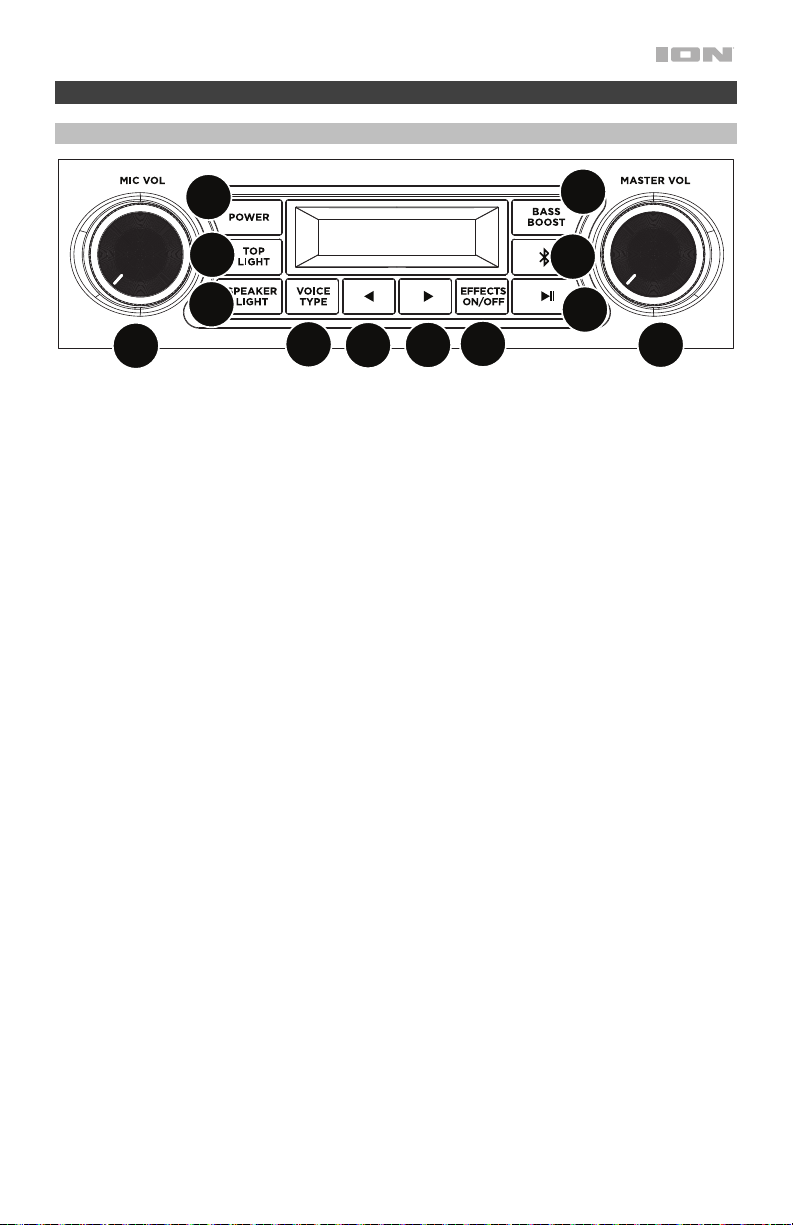
1. Tasto di alimentazione: Va notato che quando il Block Party Ultra è collegato ad una
fonte di alimentazione, non deve essere necessariamente acceso per caricare la batteria.
Quando l'alimentazione è accesa, a display compare l'indicatore di alimentazione.
2. Tasto Bluetooth: Premere e rilasciare il pulsante Bluetooth per accoppiare un dispositivo
Bluetooth. Premendo e rilasciando il tasto Bluetooth si scollega un dispositivo Bluetooth
collegato. Si prega di consultare Associazione di un dispositivo Bluetooth per ulteriori
informazioni.
3. Play/Pause: premere questo tasto per riprodurre o mettere in pausa una traccia da un
dispositivo Bluetooth collegato.
4. Effetto vocale On/Off: premere questo tasto per attivare o disattivare gli effetti
incorporati. Gli effetti incorporati sono applicati a entrambi gli ingressi microfono.
5. Tipo di voce: premere questo pulsante per selezionare una categoria di effetti. Vedi
Operazione > Effetti per un elenco completo degli effetti disponibili.
6. Effetto vocale ►: premere questo tasto per selezionare l'effetto successiva.
7. Effetto vocale ◄: premere questo pulsante per selezionare l'effetto precedente.
8. Superiore Luci accese / spente: Premere questo pulsante per accendere / spegnere la
dome. Vedi Operazione > Modalità luce per maggiori dettagli.
9. Altoparlante Luci accese / spente: premere questo tasto per accendere / spegnere le
spie del woofer. Vedi Operazione > Modalità luce per maggiori dettagli.
10. Bass Boost: premere questo tasto per migliorare la risposta di frequenza complessiva dei
bassi.
11. Comando volume Master: questo comando regola il volume principale di mix
dell'altoparlante, che comprende l'ingresso microfono, l'ingresso ausiliario (aux), e l'audio
di un dispositivo Bluetooth accoppiato.
12. Volume microfono: regola il guadagno in ingresso per i microfoni collegati.
1
2
3
4
5
6
7
8
9
11
12
10
30
Funzioni di visualizzazione
• Indicatori di carica: Quando il cavo di alimentazione è collegato, il movimento dei
segmenti della batteria al livello dell'indicatore di carica indica che la batteria è in carica.
Una volta completata la ricarica, tutti i segmenti della batteria saranno accesi senza
lampeggiare. Quando la batteria è scarica, il segmento inferiore dell’indicatore lampeggia.
• Icona a fulmine: l'icona a fulmine si illumina quando il cavo di alimentazione è collegato
a una presa a parete.
• Icona Bluetooth: Quando un dispositivo è collegato al Block Party Ultra, l'icona
Bluetooth è illuminata in maniera fissa.
• Icona di alimentazione: Quando il Block Party Ultra è acceso, l’icona di alimentazione
sarà illuminato. Questa icona di alimentazione non si illumina quando Block Party Ultra è
spento.
• Icona Bass Boost: L'icona Bass Boost verrà letta quando la funzione Bass Boost è
attivata. L'icona si spegne quando la funzione è disattivata.
Pannello posteriore
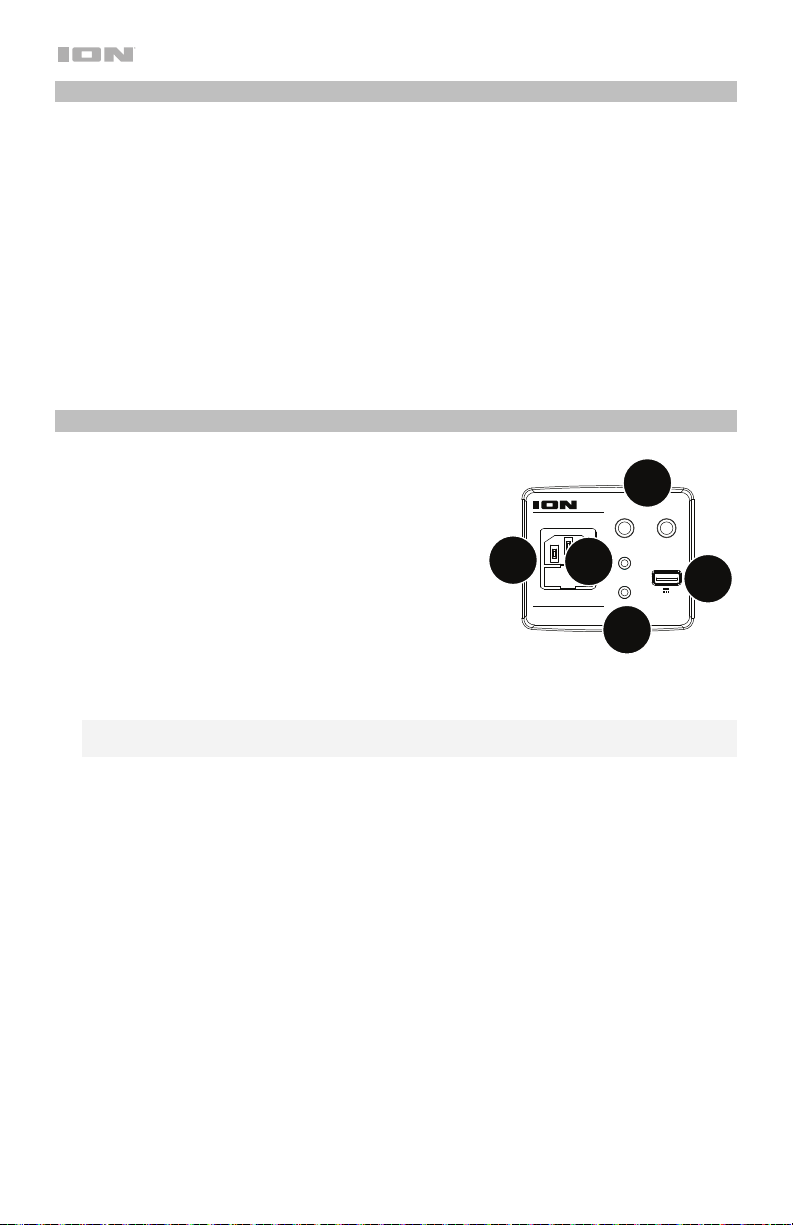
1. Ingressi microfono 6,35 mm (1/4"): questi ingressi
mono accettano un ingresso da 6,35 mm (1/4”)
come un microfono, una chitarra o un altro
strumento musicale.
2. Ingresso ausiliario: questo ingresso stereo da 3,5
mm (1/8”) può essere utilizzato per collegare un
smartphone, un lettore MP3 o altre sorgenti audio.
3. Speaker Link: collega due o più Block Party Ultra
usando un cavo stereo da 3,5 mm (1/8”) dal
collegamento Speaker di un Block Party Ultra
all'ingresso Aux del secondo Block Party Ultra.
4. Porta di carica USB: collegare a questo livello il cavo di ricarica del dispositivo per
ricaricarlo. La carica tramite USB funziona unicamente quando l'apparecchio è acceso.
Nota bene: per caricare smartphone e tablet più in fretta, mettere lo schermo del
dispositivo in stand-by.
5. Ingresso cavo di alimentazione: inserire il cavo di alimentazione in dotazione per
alimentazione l'apparecchio. Il Block Party Ultra può funzionare con il cavo di
alimentazione anche durante la ricarica della batteria.
9
iPA115
BLOCK PARTY ULTRA
MIC1 MIC2
AUXIN
LINK OUT
CHARGE
INPUT RANGE FUSE
100-240~50/60HZ,120W T2AL 250V
5V 1A
2
1
4
5
3
31
Operazione
Telecomando
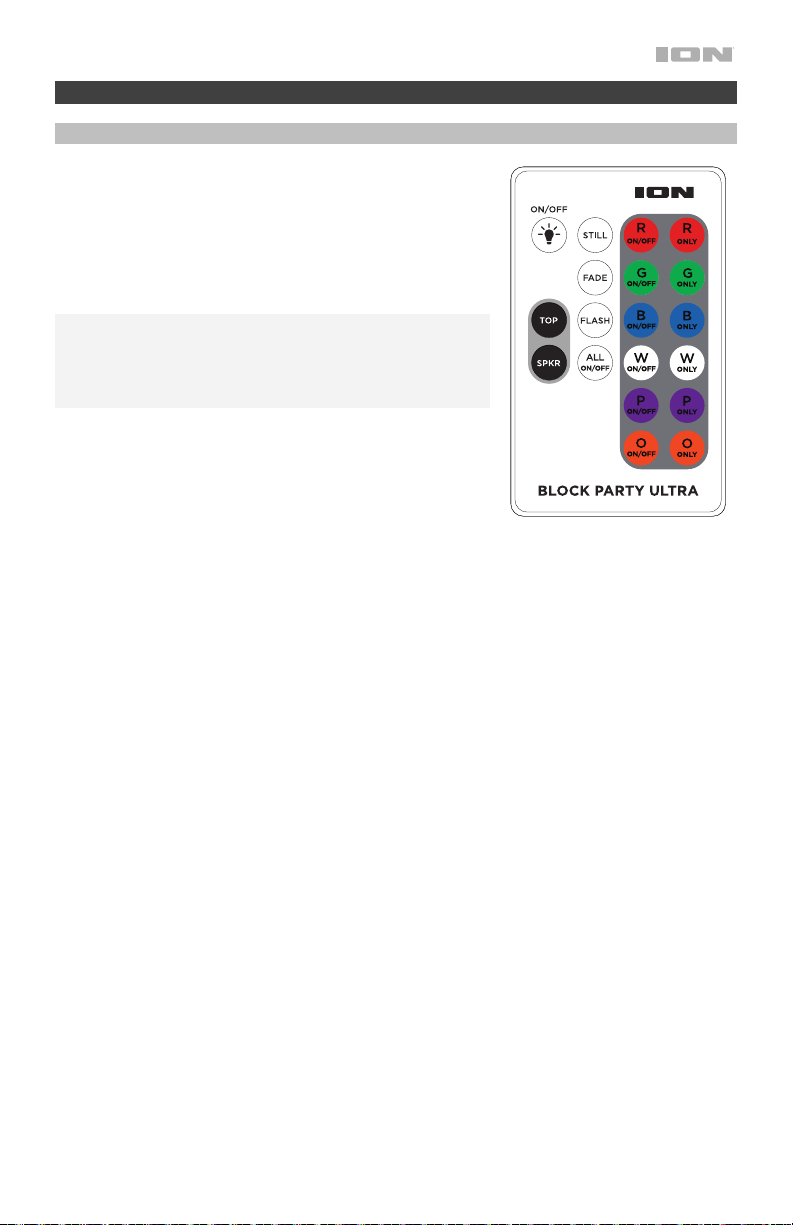
Servirsi del telecomando per impostare il timer delle luci,
selezionare i singoli colori e accendere/spegnere
l'apparecchio. Puntare il telecomando verso il sensore
anteriore sulla lampada e premere il pulsante relativo
all'opzione che si desidera selezionare. Si veda lo schema
per la descrizione dei tasti. Si veda il paragrafo Modalità
luci per maggiori dettagli in merito alle modalità.
Nota bene: prima di utilizzare il telecomando per la prima
volta, estrarre la linguetta fissata allo scomparto batterie.
Per sostituire la batteria del telecomando, seguire lo
schema situato sul retro del telecomando. Servirsi di una
batteria 3V CC CR2025 al litio.
• ON / OFF = Accende e spegne i colori.
• R ON/OFF = Accende o spegne il colore rosso.
• G ON/OFF = Accende o spegne il colore verde.
• B ON/OFF = Accende o spegne il colore blu.
• W ON/OFF = Accende o spegne il colore bianco.
• P ON/OFF = Accende o spegne il colore viola.
• O ON/OFF = Accende o spegne il colore arancia.
• R Only = Accende solo il colore rosso.
• G Only = Accende solo il colore verde.
• B Only = Accende solo il colore blu.
• W Only = Accende solo il colore bianco.
• P Only = Accende solo il colore viola.
• O Only = Accende solo il colore arancia.
• Still (ferma) = Si veda il paragrafo Modalità luci per maggiori dettagli in merito alle
modalità.
• Sfuma = Si veda il paragrafo Modalità luci per maggiori dettagli in merito alle modalità.
• Lampeggia = Si veda il paragrafo Modalità luci per maggiori dettagli in merito alle
modalità.
• All On / Off = Attiva / disattiva tutti i colori.
• Superiore = accende le luci della cupola.
• Spkr (altoparlante) = accende le luci del cono.
32
Modalità luci
Selezionare una delle modalità di illuminazione della cupola e delle luci del woofer servendosi
del telecomando. I tasti dai singoli colori possono essere deselezionati per avere solo i colori
che si desiderano senza interrompere la modalità.
Luci cupola
Quando il pulsante Superiore Light viene premuto, i colori si accendono e scorrono
lentamente in varie combinazioni. Premere nuovamente il tasto Superiore Light per far
scorrere i colori rapidamente tra le varie combinazioni. Quando la musica inizia a suonare, le
luci reagiscono al ritmo della musica scorrendo tra le varie combinazioni. In qualsiasi momento
è possibile selezionare un colore per farlo commutare tra acceso e spento. Premendo All Off
tutti i colori si spengono. Quindi, selezionare i colori che si vogliono accendere. Premere il
tasto Fade per creare effetti sfumati scorrendo lentamente da un colore all’altro. Premere il
tasto Flash per creare effetti lampeggianti. Se il tasto Superiore Light viene premuto
nuovamente, le luci si spengono. Quando viene premuto il pulsante tasto Still, tutti e 6 i colori
sono accesi e le luci sono statiche (non si muovono). In qualsiasi momento è possibile
selezionare un colore per farlo commutarle tra acceso e spento. Premendo All Off tutti i colori
si spengono. Quindi, selezionare i colori che si vogliono accendere.
Luci del woofer (cono)
Quando il tasto Altoparlante Light viene premuto una prima volta, i colori sfumano lentamente
da uno all’altro. Se il tasto Altoparlante Light viene premuto nuovamente, le luci cambieranno
rapidamente colore a tempo con la musica. Se il tasto viene premuto nuovamente, le luci si
spengono.
Accoppiamento di un dispositivo Bluetooth
1. Accendere il dispositivo Bluetooth.
2. Accendere il Block Party Ultra.
3. Navigare nella schermata di configurazione del dispositivo Bluetooth, trovare “Block Party
Ultra” e collegarlo. Una volta collegato un dispositivo, l'icona Bluetooth sarà illuminata in
maniera fissa.
Nota bene: se il dispositivo Bluetooth richiede un codice, digitare 0000.
4. Per annullare il collegamento, premere e rilasciare il tasto Bluetooth.
5. Per collegarlo ad un altro dispositivo Bluetooth, ripetere il passo 3.
Collegare i due altoparlanti
Per collegare i due altoparlanti Block Party Ultra:
1. Collegare un cavo 3,5 mm (1/8”) nell’
collegamento altoparlanti situata nel pannello
posteriore di un Block Party Ultra.
2. Collegare l’altra estremità del cavo 3,5 mm (1/8”) nell’Ingresso aux di un altro Block Party
Ultra.
3. Accendere entrambi gli altoparlanti. Utilizzare l’Microfono Volume sul secondo
altoparlante per regolare il livello di segnale di ingresso.

33
Effetti
Gruppo FX C: Effetti per genere Gruppo FX D: Effetti novità
1. Barry 1. D-Vader
2. Male to Female 2. Aliens
3. Female to Male 3. Flea
4. Pop Eye 4. Froggy
5. Olive 5. Little Robot
6. Tinker Bell 6. Evil Robot
7. Octivator 7. Robot Chorus
8. Prankster 8. Monster
9. Munchkin 9. Psycho
10. Way Down 10. Warehouse
11. Ventriloquist 11. Flange
12. Hip Deep 12. Telephone
13. Stadium 13. Echo
14. Station 14. Big Echo
15. David & Goliath 15. Grand Canyon
Gruppo FX A: Effetti principali
1. Super Star
2. On Stage
3. Auto-Pain
4. Modern Pop Tuned
5. Star
6. Super Group
7. Arena
8. Lead Singer
9. Grunge
10. Modern Rap
11.
Classic Rap
12. Rock Out
13. Rockabilly
14. Church
15. Cathedral
Gruppo FX B: Effetti armonici
1. Barbershop
2. Chapel Girls
3. Trio
4. Bohemian
5. Rhapsody
6. Group Harmony
7. Tuned Girls
8. Girl Pop
9. Tuned Girl Group
10. Tuned On Stage
11. Angelic Choir
12. Country Ladies
13. Country Gent
14. Hmmmm

34
Risoluzione di problemi
Se l’apparecchio non si ricarica: assicurarsi che il cavo di alimentazione sia collegato
adeguatamente all'ingresso di alimentazione e a una presa elettrica.
Il suono è distorto: provare ad abbassare il volume della propria fonte audio o dello
strumento musicale. Inoltre, provare a ridurre il volume complessivo del Block Party Ultra.
Eccessivi bassi: provare a regolare la tonalità o il comando EQ sul Block Party Ultra o a livello
della fonte audio per abbassare il livello dei bassi. Ciò permetterà di suonare la musica più
forte prima che salti (che si verifichi distorsione).
Se quando si utilizzano i microfoni si verifica un fischio ad alto pitch: si tratta
probabilmente di ritorno. Puntare il microfono lontano dall'altoparlante.
Se non si sente il microfono al di sopra della musica: abbassare il volume della musica dalla
fonte.
Se non è possibile collegare il vostro dispositivo audio a Block Party Ultra tramite
Bluetooth:
• Avvicinare il più possibile il vostro dispositivo audio (es. smartphone o tablet) e Block
Party Ultra mentre provate a connetterli. Assicurarsi che il dispositivo audio e Block Party
Ultra non siano ostacolati da pareti, mobili, ecc.
• Ripristinare la connessione Bluetooth di Block Party Ultra per scollegare Block Party Ultra
da qualsiasi altro dispositivo audio e riavviare il processo di ricerca. Se non funziona
subito, spegnere Block Party Ultra e riavviarlo nuovamente. Consultare Accoppiamento
di un dispositivo Bluetooth per ulteriori informazioni.
• Ripristinare la connessione Bluetooth sul vostro dispositivo audio spegnendo e
riavviando il Bluetooth. Potete trovarlo nel menù Bluetooth delle Impostazioni del vostro
telefono o di un altro dispositivo audio.
Se ancora non funziona e avete già collegato Block Party Ultra in passato, cercate Block
Party Ultra nella lista dei dispositivi disponibili o collegati in precedenza al Bluetooth del
vostro dispositivo audio, cliccare sulla “ruota” o sull’icona a “i” situata accanto e
selezionare Scollega o Dimentica. Spegnere e riaccendere Block Party Ultra, poi
provare ad allinearlo nuovamente una volta ricomparso nella lista dei dispositivi
disponibili.
Nota bene: se Block Party Ultra è stato allineato da poco ad un altro dispositivo audio
che si trova nelle vicinanze, è possibile ripetere il procedimento con quel dispositivo
audio per scollegarlo completamente.
35
Schnellstart-Anleitung (Deutsch)
Einführung
Vielen Dank für den Kauf von Block Party Ultra. Ihre Unterhaltung ist uns bei ION genauso
wichtig wie Ihnen. Darum entwerfen wir unsere Produkte stets nur mit einem einzigen Ziel vor
Augen: Ihr Leben einfacher und unterhaltsamer zu machen.
Lieferumfang
Block Party Ultra
Mikrofon und Kabel
Nachladen/Netzkabel
3,5 mm (1/8") Stereo-Aux-Kabel
Fernbedienung
Schnellstart-Anleitung
Sicherheitshinweise und Garantieinformationen
Kundendienst
Für die neuesten Informationen zu diesem Produkt (Dokumentation, technische Daten,
Systemanforderungen, Informationen zur Kompatibilität etc.) und zur Produktregistrierung
besuchen Sie bitte: ionaudio.com.
Für zusätzlichen Produkt-Support besuchen Sie ionaudio.com/support.
Wiederaufladbare Batterien
Bei wiederaufladbaren Bleibatterien handelt es sich um die gleiche Art von Batterien, die in
Autos verwendet werden. Und wie bei Ihrer Autobatterie ist es auch für die Benutzungsdauer
dieser Batterie von äußerster Wichtigkeit, wie sie verwendet wird. Bei vorschriftsmäßigem
Gebrauch und richtiger Pflege kann eine Bleibatterie jahrelang halten. Lesen Sie die
nachstehenden Empfehlungen, um aus der eingebauten Batterie das Beste herauszuholen.
A
llgemeine
V
erwendung
Laden Sie den Akku vollständig auf, bevor Sie ihn verwenden.
Laden Sie den Akku nach jedem Gebrauch vollständig auf.
A
ufbewahrung
Lagern Sie das Produkt nie bei extrem warmen (mehr als 32°C/90°F) oder
übermäßig kalten (weniger als 0°C/32°F) Temperaturen, um die optimale
Langlebigkeit zu erzielen.
Sie können Ihr Sound-System angesteckt lassen. Der Akku wird dabei nicht
überladen.
Wenn Ihr Akku einen niedrigen Ladestand hat und Sie ihn 6 Monate lang
nicht aufladen, kann er dauerhaft an Kapazität verlieren.
Reparatur
Wenn sich der Akku nicht aufladen lässt, überprüfen Sie die Sicherung in der
Nähe des Netzkabelanschlusses. Wenn Ihre Sicherung intakt ist und sich der
A
kku weiterhin nicht aufladen lässt, kontaktieren Sie ION Audio über
ionaudio.com.
Entsorgung
Bringen Sie das Gerät in ein Recyclingzentrum oder entsorgen Sie es
entsprechend lokaler Verordnungen.
36
iPA115
BLOCK PARTY ULTRA
MIC1 MIC2
AUXIN
LINK OUT
CHARGE
INPUT RANGE FUSE
100-240~50/60HZ,120W T2AL 250V
5V 1A
Schnelles Einrichten
1. Stellen Sie sicher, dass alle im Lieferumfang aufgelisteten Teile in der Verpackung
enthalten sind.
2. Lesen Sie die Sicherheitshinweise und Garantieinformationen bevor Sie das Produkt
verwenden.
3. Stellen Sie sicher, dass der Akku vor der ersten Verwendung vollständig aufgeladen ist, um
eine maximale Akkulebensdauer zu erzielen.
4. Werfen Sie einen Blick auf die Anschlussdiagramm.
5. Stellen Sie sicher, dass die Gesamtlautstärke des Block Party Ultra auf Null steht.
6. Anschluss Ihres Geräts.
7. Erhöhen Sie die Lautstärke auf ein angenehmes Niveau.
8. Bringen Sie die Gesamtlautstärke wieder auf Null, wenn Sie den Block Party Ultra nicht
verwenden.
Anschlussdiagramm
Teile, die nicht unter Einführung > Lieferumfang angegeben sind, sind separat erhältlich.
Tablet, MP3-
Player, usw.
Mikrofon
Bluetooth-Gerät
Stromversorgung
37
Funktionen
Vorderseite
1. Power-Taste: Beachten Sie bitte, dass beim Anschluss des Block Party Ultra an ein
Stromnetz das Gerät nicht eingeschaltet werden muss, um die Batterie aufzuladen. Wenn
das Gerät eingeschaltet ist, zeigt das Display das Netzanzeige an.
2. Bluetooth-Taste: Drücken Sie die Bluetooth-Taste, und lassen Sie sie los, um sie mit
einem Bluetooth-Gerät zu koppeln. Durch Drücken und Loslassen der Bluetooth-Taste
wird ein verbundenes Bluetooth-Gerät getrennt. Weitere Informationen finden Sie unter
Koppeln eines Bluetooth-Geräts.
3. Wiedergabe/Pause: Drücken Sie diese Taste, um einen Track eines angeschlossenen
Bluetooth-Geräts zu spielen oder zu pausieren.
4. Gesangseffekt Ein/Aus: Drücken Sie diese Taste, um die eingebauten Effekte zu
aktivieren/deaktivieren. Die eingebauten Effekte werden auf beide Mikrofoneingänge
angewendet.
5. Voice Type: Drücken Sie diese Taste, um eine Effektkategorie auszuwählen. Eine
vollständige Liste der verfügbaren Effekte finden Sie unter Betrieb > Effekte.
6. Voice-Effekt ►: Drücken Sie, um den nächsten Effekt.
7. Voice-Effekt ◄: Drücken Sie, um den vorherigen Effekt.
8. Oben Lichter an / aus: Drücken Sie diese Taste, um die Deckenleuchte ein- /
auszuschalten. Weitere Informationen finden Sie unter Betrieb > Licht-Modi.
9. Sprecher Lichter an / aus: Drücken Sie diese Taste, um die Woofer-LEDs ein- /
auszuschalten. Weitere Informationen finden Sie unter Betrieb > Licht-Modi.
10. Bass Boost: Drücken Sie diese Taste, um den Bass-Frequenzgang insgesamt zu
verstärken.
11. Gesamtlautstärkeregler: Regelt die Gesamtlautstärke des Lautsprechers. Dies beinhaltet
den Mikrofon-Eingang, den AUX-Eingang, und das Audiosignal eines gekoppelten
Bluetooth-Geräts.
12. Mic Volume: Stellt die Eingangsverstärkung für die angeschlossenen Mikrofone ein.
1
2
3
4
5
6
7
8
9
11
12
10
38
Funktionen anzeigen
• Ladeanzeigen: Wenn das Netzkabel eingesteckt ist, zeigt die Batterieladeanzeige eine
Bewegung auf den Batteriesegmenten an, um anzuzeigen, dass die Batterie geladen
wird. Wenn das Gerät voll aufgeladen ist, werden alle Akkusegmente durchgehend
leuchten (ohne zu blinken). Wenn der Batteriestand niedrig ist, blinkt das untere
Batteriesegment.
• Blitzsymbol: Das Blitzsymbol leuchtet auf, wenn das Netzkabel an eine Steckdose
angesteckt ist.
• Bluetooth-Symbol: Das Bluetooth-Symbol leuchtet, wenn ein Gerät mit dem Block Party
Ultra gekoppelt ist.
• Netz-Symbol: Das Symbol wird gelesen, wenn der Tailgater eingeschaltet wird. Das
Stromversorgungssymbol wird nicht gelesen, wenn der Tailgater ausgeschaltet ist.
• Bass Boost-Symbol: Das Bass Boost-Symbol wird gelesen, wenn die Bass Boost-
Funktion aktiviert ist. Das Symbol wird ausgeschaltet, wenn die Funktion deaktiviert ist.
Rückseite
1. Mikrofoneingänge (6,35 mm): Diese Mono-
Eingänge können 6,35 mm (1/4") wie ein Mikrofon,
eine Gitarre oder ein anderes Musikinstrument
aufnehmen.
2. Speaker Link: Verbinden Sie zwei oder mehr Block
Party Ultra über ein 3,5 mm (1/8”) Stereo-Aux-
Kabel vom Speaker Link eines Block Party Ultra mit
dem Aux-Eingang des zweiten Block Party Ultra.
3. AUX-Eingang: Dieser 3,5 mm (1/8”) Stereo-
Eingang kann dazu verwendet werden, einen
Smartphone, einen MP3-Player oder eine andere
Audio-Quelle anzuschließen.
4. USB-Ladeanschluss: Schließen Sie das Ladekabel Ihres Geräts hier an, um es
aufzuladen. Das Laden via USB funktioniert nur, wenn das Gerät eingeschaltet ist.
Hinweis: Um Ihre Smartphones und Tablets schneller aufzuladen, bringen Sie den
Bildschirm des Geräts in den Ruhemodus.
5. Netzkabel-Eingang: Schließen Sie hier das mitgelieferte Netzkabel zum Netz der Batterie
an. Der Block Party Ultra kann mit dem Netzkabel betrieben werden und gleichzeitig die
Batterie laden.
9
iPA115
BLOCK PARTY ULTRA
MIC1 MIC2
AUXIN
LINK OUT
CHARGE
INPUT RANGE FUSE
100-240~50/60HZ,120W T2AL 250V
5V 1A
2
1
4
5
3
39
Betrieb
Fernanleitung
Verwenden Sie die Fernbedienung zum stellen Sie den
Lichttimer ein, zum Wählen der einzelnen Farben und zum
Ein-/Ausschalten des Geräts. Richten Sie die
Fernbedienung auf den Empfänger an der Lichtkuppel und
drücken die Taste für die gewünschte Option. Siehe
Diagramm für die Tastenbeschreibungen. Siehe Abschnitt
Licht-Modi für nähere Details zu den Modi.
Hinweis: Bevor Sie die Fernbedienung zum ersten Mal
verwenden, ziehen Sie den Streifen aus dem Batteriefach
heraus. Um die Batterie der Fernbedienung zu wechseln,
sehen Sie sich das Diagramm auf der Rückseite der
Fernbedienung an. Als Ersatz verwenden Sie eine 3V DC
CR2025 Lithium-Knopfzelle.
• ALLE EIN/AUS = Schaltet die Farben ein oder aus.
• R EIN/AUS = Schaltet die rote Farbe ein oder aus.
• G EIN/AUS = Schaltet die grüne Farbe ein oder aus.
• B EIN/AUS = Schaltet die blaue Farbe ein oder aus.
• W EIN/AUS = Schaltet die weiße Farbe ein oder aus.
• P EIN/AUS = Schaltet die Farbe ein bi aus.
• O EIN/AUS = Schaltet die orange Farbe ein bi aus.
• R Only = Aktiviert nur die Farbe rot.
• G Only = Aktiviert nur die Farbe grün.
• B Only = Aktiviert nur die Farbe blau.
• W Only = Aktiviert nur die Farbe weiss.
• P Only = Aktiviert nur die Farbe lila.
• O Only = Aktiviert nur die Farbe orange.
• Stillstehend = Siehe Abschnitt Licht-Modi für nähere Details zu den Modi.
• Überblenden = Siehe Abschnitt Licht-Modi für nähere Details zu den Modi.
• Flash = Siehe Abschnitt Licht-Modi für nähere Details zu den Modi.
• All On / Off = Schaltet alle Farben ein / aus.
• Ober = Schaltet die Deckenbeleuchtung ein.
• Spkr (lautsprecher) = Schaltet das Konuslicht ein.
40
Licht-Modi
Wählen Sie mit der Fernbedienung einen der Lichtmodi für die Kuppel- und Woofer-
Beleuchtung aus. Einzelne Farbtasten können deaktiviert werden, damit nur die gewünschten
Farben angewendet werden ohne den Modus zu unterbrechen.
Kuppel-Lichter
Wenn die Oben-Taste gedrückt wird, werden die Farben eingeschaltet und durchlaufen
langsam verschiedene Farbkombinationen. Drücken Sie erneut auf die Oben-Taste, um die
Farben schnell die verschiedene Farbkombinationen durchlaufen zu lassen. Wenn die Musik
zu spielen beginnt, reagieren die Lichter auf den Takt der Musik und durchlaufen die
verschiedenen Farbkombinationen. Eine Farbe kann jederzeit zu- oder ausgeschaltet werden.
Drücken Sie Alle Aus, um alle Farben auszuschalten. Wählen Sie anschließend aus, welche
Farben Sie verwenden möchten. Drücken Sie die Fade-Taste, um Ausblendeffekte zu
erstellen, bei denen langsam von einer Farbe zur nächsten gewechselt wird. Drücken Sie die
Flash-Taste, um Flash-Effekte zu erstellen. Wenn die Oben-Taste erneut gedrückt wird,
werden die Lichter ausgeschaltet
Wenn die Stillstehend-Taste gedrückt wird sind alle 6
Farben eingeschaltet, und die Lichter sind statisch (keine Bewegung). Eine Farbe kann
jederzeit zu- oder ausgeschaltet werden. Drücken Sie „Alle Aus“, um alle Farben
auszuschalten. Wählen Sie anschließend aus, welche Farben Sie verwenden möchten.
Woofer (Kegel) Lichter
Wenn die Sprecher Licht-Taste zum ersten Mal gedrückt wird, gehen die Farben langsam von
einer Farbe zur nächsten über. Wenn die Sprecher Licht-Taste erneut gedrückt wird, ändern
sich die Lichter schnell mit dem Takt der Musik. die Sprecher-Lichttaste erneut gedrückt wird,
werden die Lichter ausgeschaltet.
Koppeln eines Bluetooth-Geräts
1. Schalten Sie Ihr Bluetooth-Gerät ein.
2. Schalten Sie den Block Party Ultra ein.
3. Navigieren Sie zum Setup-Bildschirm Ihres Bluetooth-Geräts, wählen Sie “Block Party
Ultra” und stellen Sie eine Verbindung her. Das Bluetooth-Symbol leuchtet bei einer
Verbindung dauerhaft.
Hinweis: Wenn Ihr Bluetooth-Gerät die Eingabe eines Koppel-Codes anfordert, geben Sie
0000 ein.
4. Drücken Sie kurz die Bluetooth-Taste, um die Verbindung zu trennen.
5. Um ein anderes Bluetooth-Gerät zu verbinden, wiederholen Sie die Schritt 3.
Verbinden von zwei Lautsprechern
So verbinden Sie zwei Block Party Ultra-Lautsprecher:
1. Schließen Sie ein 3,5 mm (1/8")-Kabel an den Lautsprecherverbindung auf der Rückseite
eines Block Party Ultra an.
2. Stecken Sie das andere Ende des 3,5 mm (1/8")-Kabels in den Aux-Eingang eines
anderen Block Party Ultra.
3. Schalten Sie beide Lautsprecher ein. Verwenden Sie die Mikrofonlautstärke am zweiten
Lautsprecher, um den Eingangssignalpegel einzustellen.

41
Effekte
FX-Gruppe C: Stimmlagen
FX-Gruppe D: Originelle Effekte
1. Barry 1. D-Vader
2. Male to Female 2. Aliens
3. Female to Male 3. Flea
4. Pop Eye 4. Froggy
5. Olive 5. Little Robot
6. Tinker Bell 6. Evil Robot
7. Octivator 7. Robot Chorus
8. Prankster 8. Monster
9. Munchkin 9. Psycho
10. Way Down 10. Warehouse
11. Ventriloquist 11. Flange
12. Hip Deep 12. Telephone
13. Stadium 13. Echo
14. Station 14. Big Echo
15. David & Goliath 15. Grand Canyon
FX-Gruppe A: Grundeffekte
1. Super Star
2. On Stage
3. Auto-Pain
4. Modern Pop Tuned
5. Star
6. Super Group
7. Arena
8. Lead Singer
9. Grunge
10. Modern Rap
11. Classic Rap
12. Rock Out
13. Rockabilly
14. Church
15. Cathedral
FX-Gruppe B: Harmonie-Effekte
1. Barbershop
2. Chapel Girls
3. Trio
4. Bohemian
5. Rhapsody
6. Group Harmony
7. Tuned Girls
8. Girl Pop
9. Tuned Girl Group
10. Tuned On Stage
11. Angelic Choir
12. Country Ladies
13. Country Gent
14. Hmmmm

42
Fehlerbehebung
Wenn das Gerät nicht aufgeladen wird: Stellen Sie sicher, dass das Netzkabel
ordnungsgemäß mit dem Netzeingang und einer Stromquelle verbunden ist.
Der Ton klingt verzerrt: Drehen Sie den Lautstärkeregler an Ihrer Tonquelle oder dem
Musikinstrument zurück. Versuchen Sie auch, das Gesamtvolumen des Block Party Ultra zu
reduzieren.
Zu viel Bass: Versuchen Sie, den Ton- oder EQ-Regler des Block Party Ultra oder Ihrer
Tonquelle anzupassen, um den Bass zu verringern. Dies ermöglicht Ihnen, die Musik lauter
abzuspielen, bevor der Klang verzerrt.
Bei der Verwendung von Mikrofonen tritt einer hoher Pfeifton auf: Hier handelt es sich
wahrscheinlich um einen Rückkopplungseffekt. Richten Sie es so ein, dass die Mikrofone vom
Lautsprecher wegzeigen.
Wenn das Mikrofon im Vergleich zur Musik zu leise eingestellt ist: Verringern Sie die
Musiklautstärke Ihrer Quelle.
Wenn Sie Ihr Audiogerät nicht über Bluetooth mit Block Party Ultra verbinden können:
• Positionieren Sie Ihr Audiogerät (z. B. Smartphone oder Tablet) und Block Party Ultra so
nahe wie möglich zueinander, um eine Verbindung herzustellen. Stellen Sie sicher, dass
sowohl das Audiogerät als auch Block Party Ultra nicht von Wänden, Möbeln usw.
blockiert werden.
• Setzen Sie die Bluetooth-Verbindung am Block Party Ultra zurück, um Block Party Ultra
von einem anderen Audiogerät zu trennen und starten den Suchvorgang neu. Wenn dies
nicht sofort funktioniert, schalten Sie Block Party Ultra aus und dann wieder ein. Weitere
Informationen finden Sie unter Koppeln eines Bluetooth-Geräts.
• Setzen Sie die Bluetooth-Verbindung auf Ihrem Audiogerät zurück, indem Sie Bluetooth
aus- und wieder einschalten. Sie finden dies unter dem Bluetooth-Menü in den
Einstellungen für Ihr Telefon oder anderes Audiogerät.
Wenn dies nicht funktioniert und Sie bereits eine Verbindung zu Block Party Ultra
hergestellt haben, suchen Sie in der Liste der verfügbaren oder zuvor verbundenen Geräte
im Bluetooth-Menü Ihres Audiogerätes nach Block Party Ultra, tippen neben dem Gerät
auf das "Zahnrad"-Symbol oder “i” und wählen dann Trennen oder Gerät ignorieren.
Schalten Sie Block Party Ultra aus und wieder ein und versuchen Sie es erneut, sobald es
wieder in der Liste der verfügbaren Geräte angezeigt wird.
Hinweis: Wenn Block Party Ultra kürzlich mit einem anderen Audiogerät gekoppelt wurde,
das sich noch in Reichweite befindet, müssen Sie diesen Vorgang möglicherweise mit
diesem Audiogerät wiederholen, um die Verbindung vollständig zu trennen.

43
Snelstartgids (Nederlands)
Introductie
Bedankt voor uw aankoop van de Block Party Ultra. Bij ION vinden wij entertainment even
belangrijk als u. Daarom ontwerpen wij onze producten met één doel voor ogen: u het leven
leuker en aangenamer maken.
Inhoud van de doos
Block Party Ultra
Microfoon en kabel
Opladen / Stroomkabel
3,5 mm (1/8") stereo aux-kabel
Afstandsbediening
Snelstartgids
Veiligheids-en garantie handleiding
Ondersteuning
Voor de laatste informatie over dit product (documentatie, technische specificaties, systeem
vereisten, informatie over compatibiliteit, enz.) en productregistratie, bezoek ionaudio.com.
Voor aanvullende productondersteuning naar ionaudio.com/support.
Herlaadbare accu’s
Oplaadbare loodzwavelzuuraccu’s zijn van hetzelfde type dat gebruikt wordt in auto’s. Zoals
met de accu van uw auto wordt de levensduur ervan in grote mate bepaald door uw gebruik
ervan. Bij een juist gebruik en behandeling kan een loodzwavelzuuraccu jaren meegaan. Hier
zijn wat aanbevelingen voor het zo lang mogelijk laten meegaan van de interne accu.
A
lgemeen gebruik
Laad de accu voor gebruik volledig op.
Laad de accu na elk gebruik volledig op.
Opslag
Voor een optimale levensduur mag u de accu niet in een te warme (meer
dan 32°C/90°F) of te koude omgeving (minder dan 0°C/32°F) bewaren.
Uw geluidssysteem mag aangesloten blijven. Dat zal de accu niet overladen.
A
ls u het accuniveau laag houdt en 6 maanden lang niet herlaadt, dan kan
zich een permanent capaciteitsverlies voordoen.
Herstellen
A
ls de accu niet wil opladen, controleer dan de zekering naast de
stroomingang. Als uw zekering intact is en het apparaat nog steeds niet
wil opladen, neem dan contact op met ION Audio op ionaudio.com.
V
erwijdering
Breng de accu naar een recyclagecentrum of verwijder hem conform de
plaatselijke wetgeving.
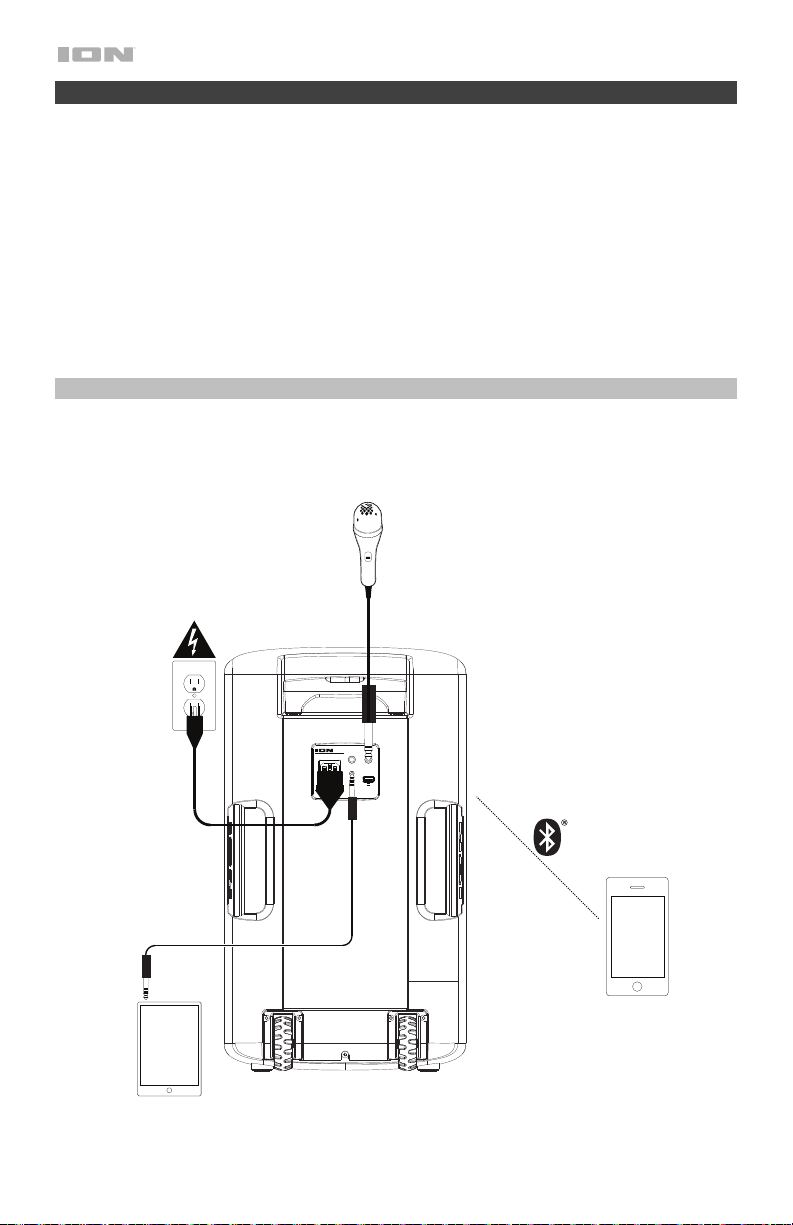
44
iPA115
BLOCK PARTY ULTRA
MIC1 MIC2
AUXIN
LINK OUT
CHARGE
INPUT RANGE FUSE
100-240~50/60HZ,120W T2AL 250V
5V 1A
Snelstart
1. Zorg ervoor dat alle artikelen, opgesomd in Inhoud van de doos, zich in de doos
bevinden.
2. Lees de veiligheid-en garantie handleiding vooraleer het product te gebruiken.
3. Zorg ervoor dat de accu voor het eerste gebruik volledig is opgeladen, voor een maximale
levensduur.
4. Bestudeer het Aansluitschema.
5. Zorg ervoor dat het hoofdvolume op Block Party Ultra op nul staat.
6. Sluit uw apparaten aan.
7. Verhoog het volume tot een aangenaam niveau.
8. Zet het hoofdvolume terug op nul wanneer u Block Party Ultra stopt te gebruiken.
Aansluitschema
Artikelen die niet zijn opgesomd in Introductie > Inhoud van de doos worden afzonderlijk verkocht.
Tablet, MP3
spele, enz.
Microfoon
Stroom
Bluetooth-apparaat
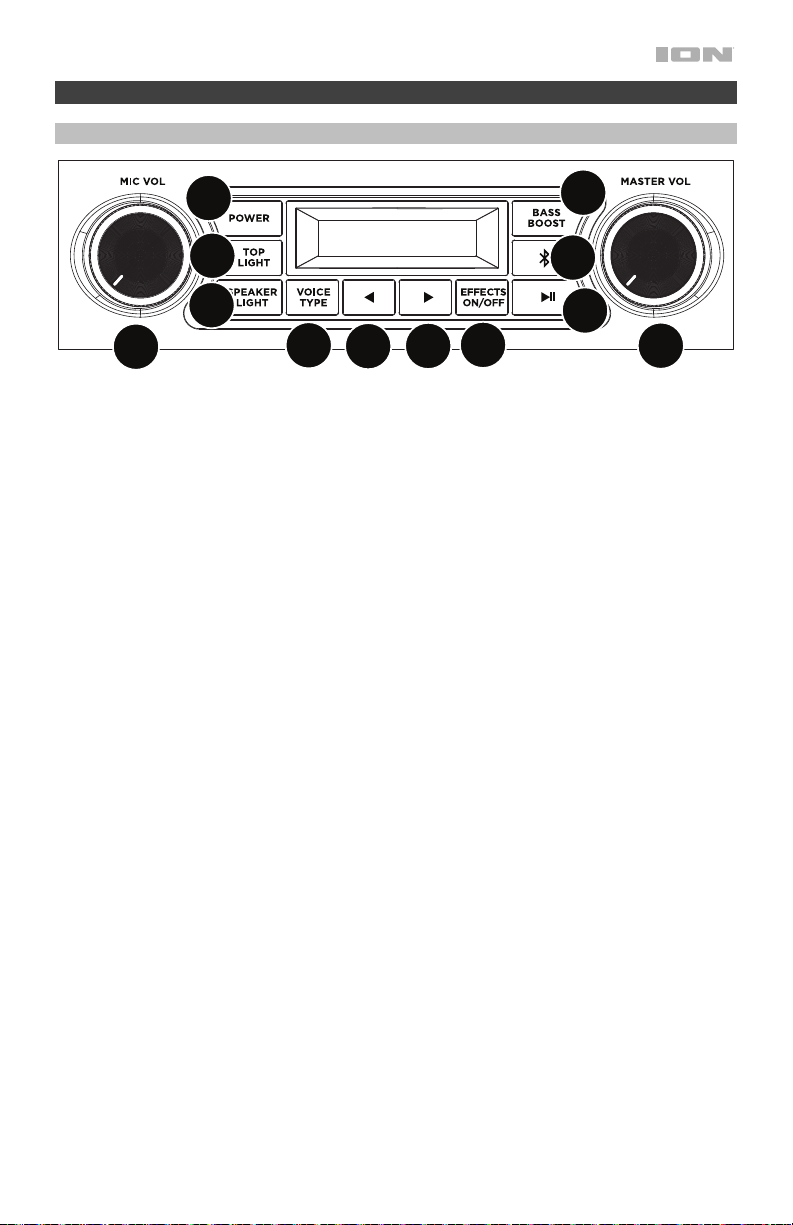
45
Kenmerken
Achterpaneel
1. Stroom-knop: Opmerking wanneer de Block Party Ultra aangesloten is op een
vermogensbron, hoeft deze niet ingeschakeld te zijn om de batterij te laten opladen.
Wanneer het apparaat is ingeschakeld, verschijnt op het scherm de stroomindicator.
2. Bluetooth-knop: Druk op de Bluetooth-knop en laat deze los om te koppelen met een
Bluetooth-apparaat. Druk op de Bluetooth-knop en laat deze los om een gekoppeld
Bluetooth-apparaat te ontkoppelen. Zie Bediening > Een Bluetooth-apparaat koppelen
voor meer informatie.
3. Afspelen/pauzeren: Indrukken om een nummer vanaf een verbonden Bluetooth-apparaat
af te spelen of te pauzeren.
4. Stemeffect aan/uit: Druk op deze knop om de ingebouwde effecten te activeren/uit te
schakelen. De ingebouwde effecten worden toegepast op beide microfooningangen.
5. Stemtype: druk op deze knop om een effectcategorie te selecteren. Zie Bediening >
Effecten voor een complete lijst met beschikbare effecten.
6. Stemeffect ►: druk op deze knop om het volgende effect.
7. Stemeffect ◄: druk op deze knop om het vorige effect.
8. Boven Licht aan / uit: Druk op deze knop om de lichtkoepel in of uit te schakelen. Zie
Bediening > Lichtmodi voor meer informatie.
9. Spreker Licht aan / uit: druk op deze knop om de wooferverlichting in of uit te schakelen.
Zie Bediening > Lichtmodi voor meer informatie.
10. Bass Boost: Druk op deze knop om de basfrequenties te benadrukken.
11. Hoofdvolumeregeling: Hiermee past u het maximale volume van de hoofdmix in de
luidspreker aan. Tot de hoofdmix behoren de microfooningang, de aux-ingang, en het
geluidssignaal van een gekoppeld Bluetooth-apparaat.
12. Mic Volume: Past de ingangsversterking voor de aangesloten microfoons aan.
1
2
3
4
5
6
7
8
9
11
12
10
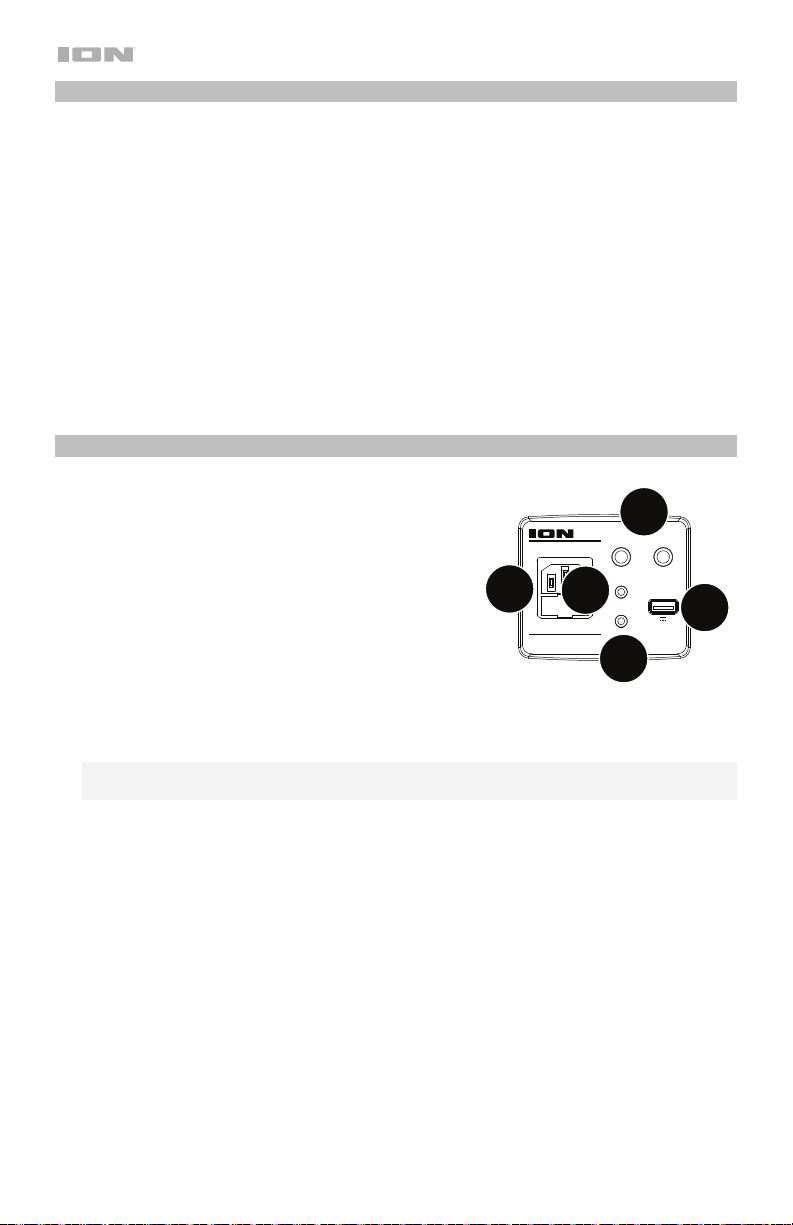
46
Schermfuncties
• Oplaadindicator: Wanneer de voedingskabel is aangesloten, geven de bewegende
batterijonderdelen op de laadindicator aan dat de batterij wordt opgeladen. Van zodra hij
volledig is opgeladen, gaan alle batterijsegmenten branden, zonder te knipperen. Wanneer
de stroomkabel wordt losgekoppeld, geven de segmenten het accuniveau weer.
• Bliksempictogram: Wanneer de stroomkabel op het stopcontact is aangesloten, begint
het pictogram met de bliksem te branden.
• Bluetooth-pictogram: Het Bluetooth-pictogram blijft branden wanneer de Block Party
Ultra is gekoppeld aan een apparaat.
• Stroom-pictogram: Het stroom-pictogram zal worden branden wanneer Block Party
Ultra is ingeschakeld. Het stroom-pictogram wordt niet branden als Block Party Ultra is
uitgeschakeld.
• Bass Boost-pictogram: Het Bass Boost-pictogram zal worden branden als de functie
Bass Boost is geactiveerd. Het pictogram is uitgeschakeld als de functie is
gedeactiveerd.
Voorpanel
1. Microfooningangen 6,35 mm (1/4"): deze mono-
ingangen accepteren een 6,35 mm (1/4”) invoer
zoals een microfoon, gitaar of ander
muziekinstrument.
2. Aux-ingang: Deze stereo 3,5 mm (1/8”) ingang kan
worden gebruikt om een cd-speler, mp3-speler of
andere geluidsbron te verbinden.
3. Luidsprekerkoppeling: Sluit twee of meer Block
Party Ultra's aan elkaar met behulp van een 3,5 mm
(1/8”) stereo aux-kabel van de luidsprekerlink van
een Block Party Ultra naar de AUX-ingang van de
tweede Block Party Ultra.
4. USB-oplaadpoort: Sluit hier de oplaadkabel van uw apparaat aan om het op te laden.
Opladen met USB werkt alleen als het apparaat is ingeschakeld.
Opmerking: Zet het scherm van uw apparaat in slaapstand om uw smartphone en tablet
sneller op te laden.
5. Stroomkabel-ingang: Steek de meegeleverde stroomkabel hierin om de unit op te
stroom. Merk op dat de Block Party Ultra kan worden gebruikt met de stroomkabel terwijl
tegelijkertijd laadt de batterij.
9
iPA115
BLOCK PARTY ULTRA
MIC1 MIC2
AUXIN
LINK OUT
CHARGE
INPUT RANGE FUSE
100-240~50/60HZ,120W T2AL 250V
5V 1A
2
1
4
5
3
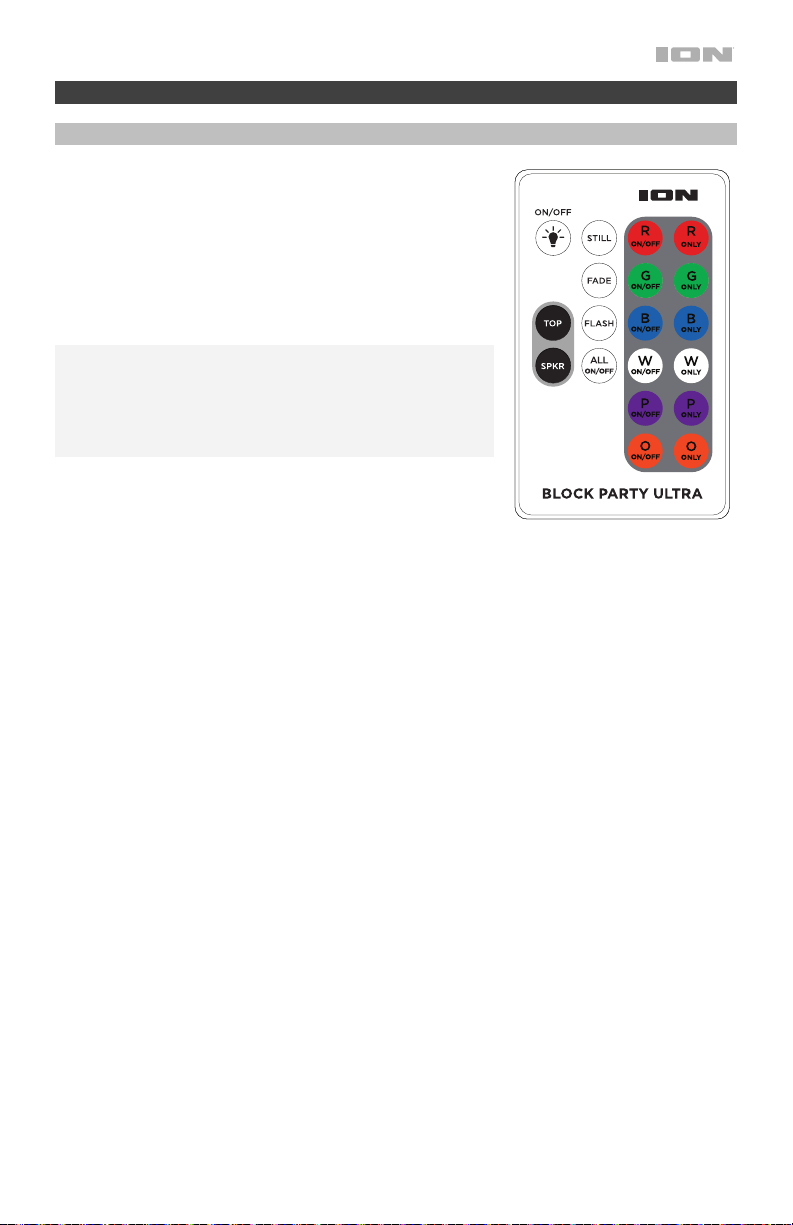
47
Bediening
Fernanleitung
Gebruik de afstandsbediening om de rookmachine te
starten/stoppen, selecteer afzonderlijke kleuren en schakel
het apparaat aan/uit. Om de afstandsbediening te
gebruiken, richt u deze op de voorste sensor op de
lichtkoepel en drukt u op de knop van de optie die u wilt
selecteren. Zie hieronder voor knopbeschrijvingen.
Raadpleeg het hoofdstuk Lichtmodi voor details over de
modi.
Opmerking: Voor de afstandsbediening de eerste maal te
gebruiken, verwijder het lipje dat bevestigd is aan de
batterijruimte. Om de batterij van de afstandsbediening te
vervangen, raadpleeg het schema op de achterkant van de
afstandsbediening. Gebruik een 3V DC CR2025 lithium
knoopcel batterij ter vervanging.
• On/Off = Zet alle kleuren aan of uit
• R On/Off = Zet de Rode kleur aan of uit.
• G On/Off = Zet de Groene kleur aan of uit.
• B On/Off = Zet de Blauwe kleur aan of uit.
• W On/Off = Zet de Witte kleur aan of uit.
• P On/Off = Zet de Purper kleur aan of uit.
• O On/Off = Zet de Oranje kleur aun of uit.
• R Only = Activeert alleen het rood.
• G Only = Activeert alleen het groen.
• B Only = Activeert alleen het blauw.
• W Only = Activeert alleen het wit.
• P Only = Activeert alleen het purper.
• O Only = Activeert alleen het oranje.
• Stil = raadpleeg het hoofdstuk Lichtmodi voor details over de modi.
• Kleurovergang = raadpleeg het hoofdstuk Lichtmodi voor details over de modi.
• Knipperen = raadpleeg het hoofdstuk Lichtmodi voor details over de modi.
• Alles aan / uit = schakelt alle kleuren in / uit.
• Boven = Schakelt de lichtkoepel in.
• Spkr (Luidspreker) = schakelt de kegellampen in.
48
Lichtmodi
Een van de lichtmodi selecteren voor de lichtkoepel en woofer-verlichting met behulp van de
afstandsbediening. Afzonderlijke kleurknoppen kunnen worden gedeselecteerd om alleen de
kleuren te hebben die u wilt weergeven zonder de modus te onderbreken.
Lichtkoepels
Wanneer u op de Boven knop drukt, worden de kleuren ingeschakeld en zullen langzaam
verschillende kleurencombinaties doorlopen. Druk nogmaals op de Boven knop om de kleuren
snel door verschillende kleurencombinaties te laten navigeren. Wanneer muziek begint te
spelen, reageren de lichten op het ritme van de muziek en gaan ze naar de verschillende
kleurencombinaties navigeren. Op elk moment kan een kleur worden geselecteerd om die
kleur in of uit te schakelen. Alle kleuren zullen uitgeschakeld worden door op All Off (Alles Uit)
te drukken. Selecteer vervolgens welke kleuren u wilt verlichten. Durk op de Fade (Vervagen)
knop om vervagende effecten te creëren, door langzaam te navigeren van de ene kleur naar
de volgende. Druk op de Flash knop om flitseffecten te maken. Als de Boven knop opnieuw
wordt ingedrukt, gaat het licht uit. Wanneer op de knop Still (Stil) wordt gedrukt, zijn alle 6
kleuren actief en staan de lichten stil (geen beweging). Er kan op elk moment een kleur worden
geselecteerd door de kleur in kwestie in of uit te schakelen. Door te drukken op “Allemaal” uit
worden alle kleuren uitgeschakeld. Kies vervolgens welke kleuren u wilt tonen.
Woofer (Kegel) Lichten
Wanneer u eerst op de Speaker Light (Spreker
Licht) knop drukt, vervagen de kleuren
langzaam van de ene kleur naar de andere. Als de Spreker Light-knop opnieuw wordt
ingedrukt, zullen de lampjes snel van kleur veranderen, samen met het ritme van de muziek.
Als de Spreker Light knop opnieuw wordt ingedrukt, gaat het licht uit.
Een Bluetooth-apparaat koppelen
1. Zet uw Bluetooth-apparaat aan.
2. Zet de Block Party Ultra aan.
3. Navigeer naar het instelscherm van uw Bluetooth-apparaat, zoek naar Block Party Ultra en
maak verbinding. Bij koppeling blijft het Bluetooth-pictogram branden.
Opmerking: Als uw Bluetooth-apparaat om een koppelingscode verzoekt, voer dan 0000
in.
4. Bluetooth-knop indrukken en loslaten om een koppeling te verbreken.
5. Om het te verbinden met een ander Bluetooth-apparaat, herhaalt u stap 3.
Twee luidsprekers met elkaar verbinden
Twee Block Party Ultra-luidsprekers koppelen:
1. Sluit een 3,5 mm (1/8”) -kabel aan op de luidspreker link op het achterpaneel van een
Block Party Ultra.
2. Sluit het andere uiteinde van de 3,5 mm (1/8”) kabel aan op de eingeben van een andere
Block Party Ultra.
3. Zet beide luidsprekers aan. Met microfoon volume op de tweede luidspreker kunt u het
niveau van het ingangssignaal aanpassen.

49
Effecten
FX-Groep C: Mannelijk of vrouwelijke
stemmen
FX-Groep D: Speciale effecten
1. Barry 1. D-
V
ader
2. Man naar vrouw 2. Aliens
3.
V
rouw naar man 3. Flea
4. Pop Eye 4. Froggy
5. Olive 5. Little Robot
6. Tinker Bell 6. Evil Robot
7. Octivator 7. Robotkoo
r
8. Grappenmake
r
8. Monste
r
9. Eekhoorn 9. Psycho
10. Naar beneden 10. Magazijn
11. Buikspreke
r
11. Flange
12. Heupdiep 12. Telefoon
13. Stadion 13. Echo
14. Station 14. Grote echo
15. David en Goliath 15. Grand Canyon
FX-Groep A: Hoofdeffecten
1. Super Star
2. On Stage
3. Auto-Pain
4. Modern Pop Tuned
5. Star
6. Super Group
7. Arena
8. Lead Singe
r
9. Grunge
10. Modern Rap
11. Classic Rap
12. Rock Out
13. Rockabilly
14. Church
15. Cathedral
FX-Groep B: Harmony Effects
1. Barbershop
2. Chapel Girls
3. Trio
4. Bohemian
5. Rhapsody
6. Group Harmony
7. Tuned Girls
8. Girl Pop
9. Tuned Girl Group
10. Tuned On Stage
11. Angelic Choi
r
12. Country Ladies
13. Country Gent
14. Hmmmm

50
Problemen oplossen
Als het apparaat niet wordt opgeladen: Controleer of de stroomkabel naar behoren is
aangesloten op de stroomingang en het stopcontact.
Het geluid is vervormd: Probeer het volumeniveau van uw geluidsbron of muziekinstrument
te verlagen. Probeer ook het algemene volume van Block Party Ultra te verlagen.
Er zijn teveel bassen: Probeer de toon- of EQ-bedieningsknop op Block Party Ultra of uw
geluidsbron bij te regelen om het basniveau te verlagen. Dit stelt u in staat de muziek luider te
zetten vooraleer “afgeknipte” (vervormde) klanken optreden.
Er is een hoge fluitende pieptoon bij het gebruik van een microfoon: Dit is waarschijnlijk
feedback. Richt de microfoon weg van de luidspreker.
Als het geluid van de microfoon niet boven de muziek uitkomt: Verlaag het volume van de
muziek van uw geluidsbron.
Als u uw audioapparaat niet kunt aansluiten op Block Party Ultra via Bluetooth:
• Houd uw audioapparaat (bv. smartphone of tablet) en Block Party Ultra zo dicht mogelijk
bij elkaar wanneer u verbinding probeert te maken. Zorg ervoor dat zowel het
audioapparaat als Block Party Ultra geen hinder ondervinden van muren, meubels, enz.
• De Bluetooth-verbinding op Block Party Ultra opnieuw instellen om Block Party Ultra te
ontkoppelen van een ander audioapparaat en herstart het zoekproces. Als dit niet meteen
werkt, zet Block Party Ultra dan eerst uit en vervolgens terug aan. Zie Een Bluetooth-
apparaat koppelen voor meer informatie.
• De Bluetooth-verbinding op uw audioapparaat opnieuw instellen door Bluetooth uit en dan
weer aan te zetten. Hiervoor kunt u terecht in het Bluetooth-menu van de Instellingen van
uw telefoon of ander audioapparaat.
Als dat niet werkt en u voorheen al verbinding hebt gemaakt met Block Party Ultra, zoek
dan naar Block Party Ultra in de lijst met beschikbare of voorheen aangesloten apparaten
in het Bluetooth-menu van uw audioapparaat, tik op het tandwielpictogram of het "i"-
pictogram naast de naam en kies vervolgens Ontkoppelen of Vergeten. Zet Block Party
Ultra uit en opnieuw aan en probeer opnieuw te koppelen zodra het opnieuw verschijnt in
uw lijst met beschikbare apparaten.
Opmerking: Als Block Party Ultra onlangs werd gekoppeld met een ander audioapparaat
dat zich nog steeds binnen het bereik bevindt, dan moet u dit proces mogelijk ook met dat
audioapparaat herhalen om volledig te kunnen ontkoppelen.
51
Appendix (English)
Technical Specifications
Output Power
120 W (peak)
Drivers Low-Frequency: 10.0” / 254 mm woofer
High-Frequency: 1.0” / 25.4 mm tweeter
Frequency Response
75 Hz – 18 kHz
Bluetooth Specifications Profile: A2DP, AVRCP
Range: Up to 65 feet / 20 meters *
Microphone Type
Dynamic microphone (included)
USB Charging Port 1 USB, +5 V, 1 A
Battery Battery life: Up to 100 hours
Recharge time: 12 hours
Type: 12V 7 aH Sealed Lead-acid
Power Connection: IEC
Input Voltage: 100–240 VAC, 50/60 Hz
Fuse: T2AL 250V
Dimensions
(width x depth x height)
21.4” x 12.2” x 11.3” / 543.6 x 309.9 x 287 mm
Weight
25.1 lbs. / 11.4 kg
Specifications are subject to change without notice.
* Bluetooth and wireless reception and range are affected by walls, obstructions, and movement. For
optimal performance, place the product in the center of the room so it is unobstructed by walls, furniture,
etc.
** Battery life may vary based on temperature, age, and volume usage of product.
Trademarks & Licenses
ION Audio is a trademark of ION Audio, LLC, registered in the U.S. and other countries.
The Bluetooth word mark and logos are owned by the Bluetooth SIG, Inc. and any use of such marks by
ION Audio is under license.
All other product names, company names, trademarks, or trade names are those of their respective owners.

ionaudio.com
Manual Version 1.4