
Rapid Charging
Terra 54-CJG
User Guide
Pod Point Terra 54 CJG User Guide PP-D-190099-3
T54CJG-UK-UG

Pod Point Terra 54-CJG User Guide PP-D-190099-3
T54CJG-UK-UG
User Guide
The Terra 54 CJG charger is a 50kW DC rapid charger with a 22kW AC output - charge two
EVs simultaneously using both DC and AC charging systems. This user guide is for CJG SKU
only - please check with Pod Point if you’re unsure of the SKU of your charger.
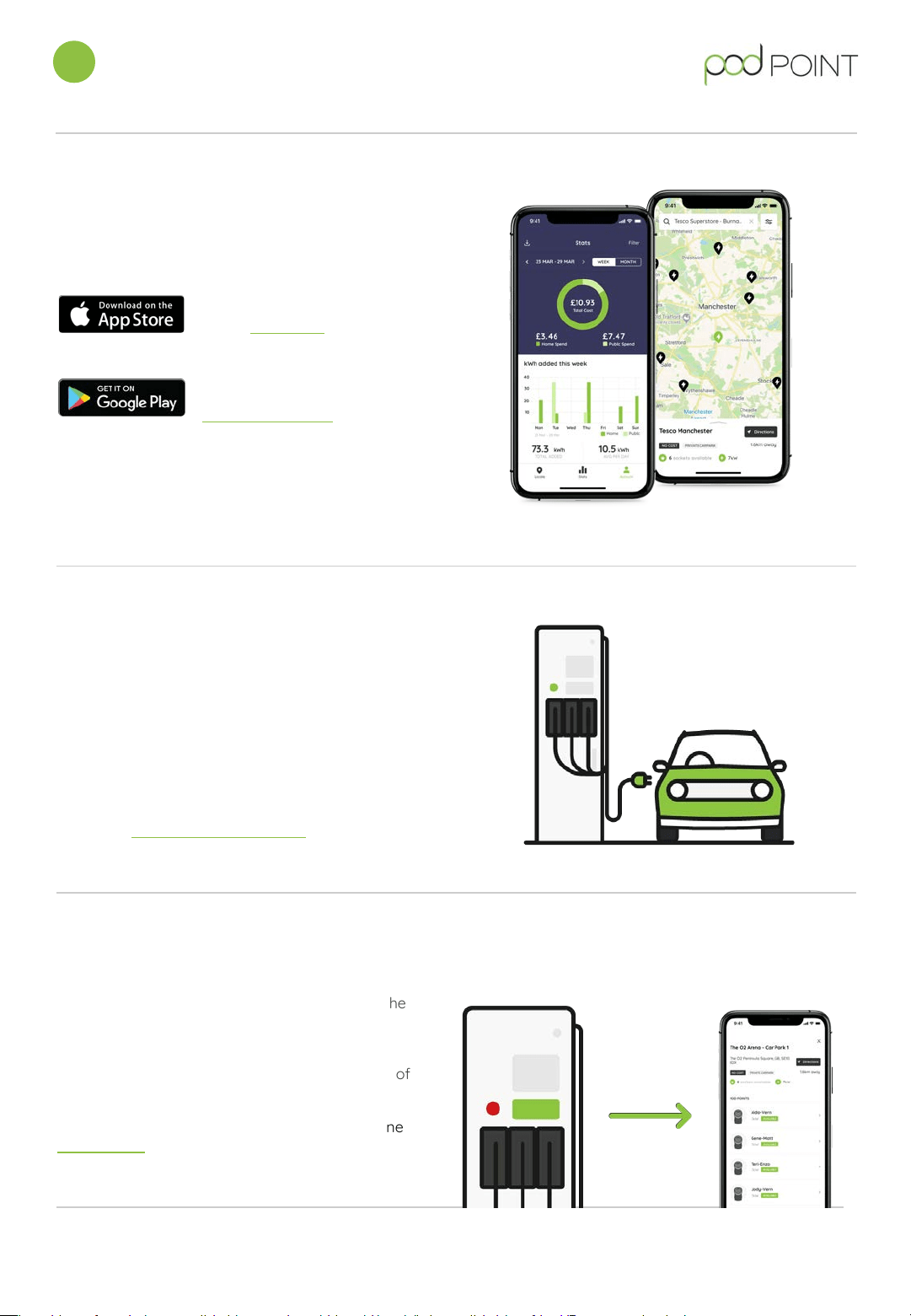
The Pod Point App is available for both iOS and
Android mobile devices.
For iOS devices, download
on the App Store.
For Android devices,
download on the
Google Play store.
You’ll need to create a Pod Point account in our
app to use our network . If payment is required
to charge, you’ll need to load enough funds to
cover your entire charging session.
1. Download the Pod Point App
3. Connect your vehicle to start
Using either the AC Type 2 (22kW) or DC
CCS/CHAdeMO (50kW) charging cable, connect the
Terra 54 to your vehicle.
If you are unsure on which cable to use, please check
with your vehicle manufacturer or your vehicle
documentation.
After more charging information on your vehicle?
Check our vehicle charging guides.
4. Find your charger in-app
Use the name of the charger to locate it within the
Pod Point App. The name can be found on the
sticker on the front of the unit.
You can also search by the address or postcode of
the chargepoint.
You can also find all of our chargers on our online
Charge Map. (charge.pod-point.com)
Charging and paying with the Pod Point App
1
Pod Point Terra 54 CJG User Guide PP-D-190099-3
T54CJG-UK-UG
7. Stopping a charging session
You’ll be able to stop your charging session via
the Pod Point App - press the orange button
underneath the charging cable you’re using -
wait a few moments and charging will stop.
Until you’ve fully stopped charging your charging
cable will be locked in place for security.
Even if you press stop on the Terra 54’s screen -
you’ll have to stop via the Pod Point App.
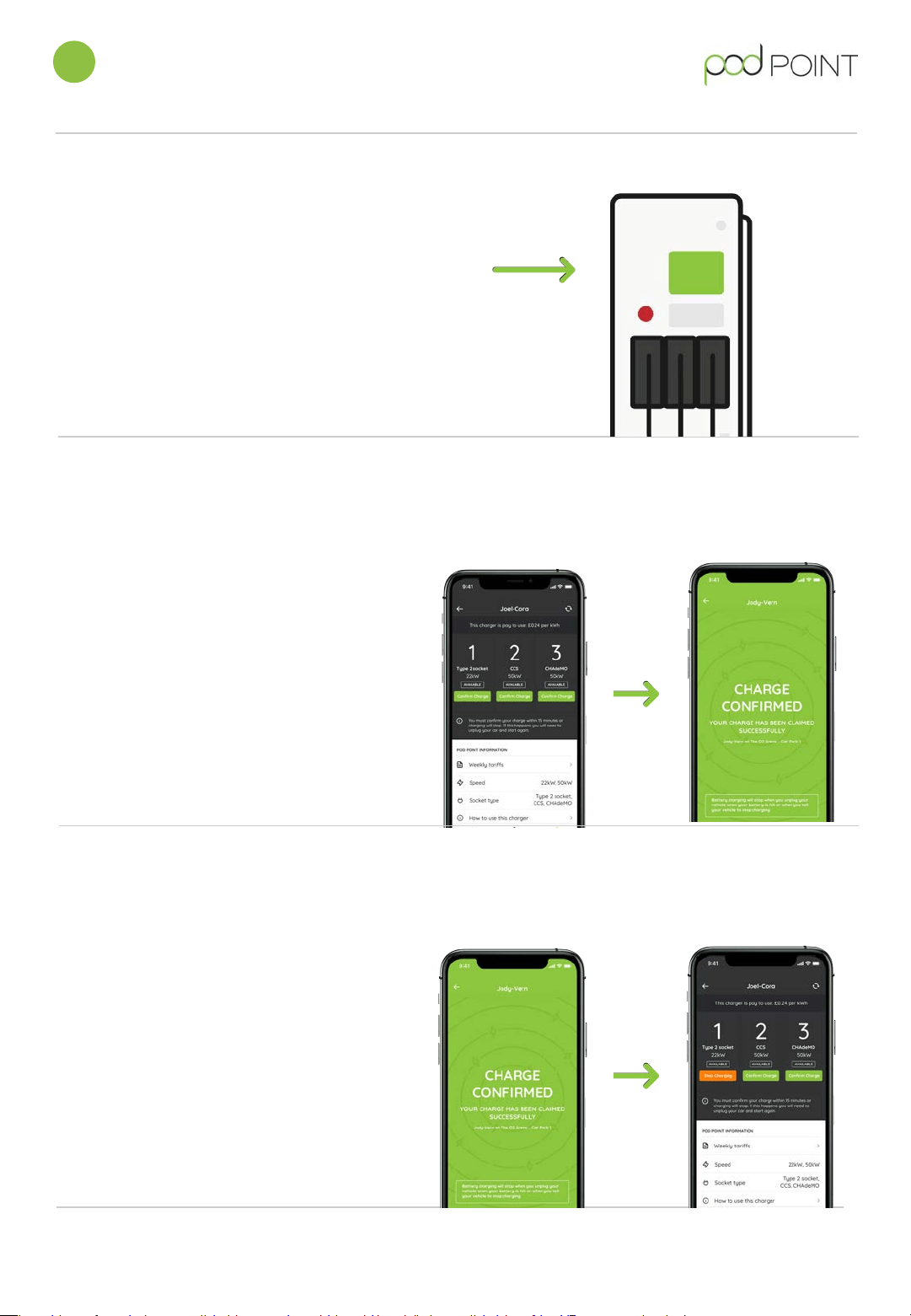
6. Confirm to start charging
To successfully start a charge on the Terra 54
CJG, you will need to confirm charge via the Pod
Point App.
If your session is not confirmed then charging will
not start.
To confirm your charge simply tap the “Confirm
Charge” button in-app underneath the cable
selection you are charging from (see screen 1)
you will then see screen 2 in-app to confirm you
have started charging.
1. Charger detail screen
2. Charging screen
Charging and paying with the Pod Point App
1
Pod Point Terra 54 CJG User Guide PP-D-190099-3
T54CJG-UK-UG
6. Press start on the Terra 54
touchscreen
Press the start button the Terra 54’s touch screen,
you’ll then be asked to authenticate your charge
within the Pod Point App.