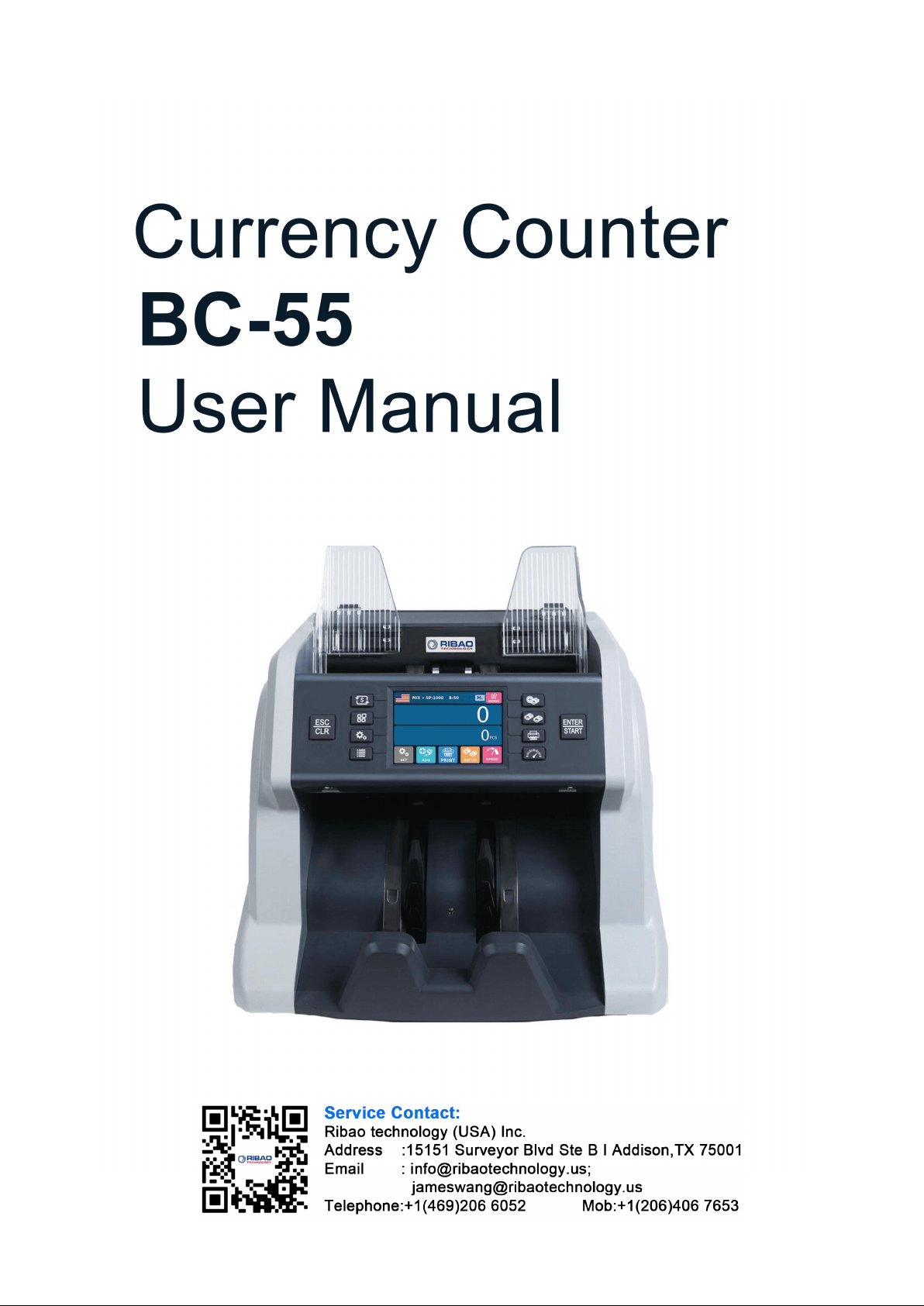

BC-55 User Manual V1.5
1
Contents
Contents....................................................................................................................................................................... 1
1. Machine Overview..................................................................................................................................................2
1.1 Preface............................................................................................................................................................ 2
1.2 Statement........................................................................................................................................................ 2
2. Installation Precautions..........................................................................................................................................3
2.1 Installation Instructions.................................................................................................................................. 3
2.2 Installation and Use Location.........................................................................................................................3
3. Complete Machine Diagram..................................................................................................................................4
3.1 Front Appearance............................................................................................................................................4
3.2 Back Appearance............................................................................................................................................ 5
3.3 Top Appearance.............................................................................................................................................. 6
4. Technical Parameters............................................................................................................................................. 7
5. Description of Display and Operation Interface................................................................................................. 8
5.1 Display Appearance........................................................................................................................................8
5.2 Operating Instructions for Function Keys......................................................................................................8
5.3 Display Interface and Touch Screen Description...........................................................................................9
6. Operating Instructions.........................................................................................................................................10
6.1 Start-up......................................................................................................................................................... 10
6.2 Selection of Counting Mode.........................................................................................................................11
6.2.1 Single Currency Counting Mode.......................................................................................................11
6.2.2 Automatic Recognition Mode........................................................................................................... 14
6.2.3 Multi-currency Mix Counting Mode.................................................................................................18
6.3 Batch Setting.................................................................................................................................................20
6.4 Counting Speed Setting and Function Description...................................................................................... 20
6.5 Accumulation Function On...........................................................................................................................21
7. Check Information and Print Information........................................................................................................23
7.1 Check Details of Counting........................................................................................................................... 23
7.2 Check the Serial Number..............................................................................................................................24
7.3 Print Information.......................................................................................................................................... 25
7.4 Check the Counting List Information...........................................................................................................25
8. User Setting........................................................................................................................................................... 29
8.1 Preferences Setting....................................................................................................................................... 29
8.2 Basic Setting................................................................................................................................................. 33
9. Common Error Codes Descriptions....................................................................................................................40
10. Software Upgrade............................................................................................................................................... 41
11. Daily Maintenance.............................................................................................................................................. 42
11.1 Clean the hopper sensor..............................................................................................................................42
11.2 Clean the drum roller shaft and feed roller shaft........................................................................................43
11.3 Clean the stacker sensor............................................................................................................................. 43
11.4 Clean the internal sensors........................................................................................................................... 44
12. Accessories........................................................................................................................................................... 46

BC-55 User Manual V1.5
2
1. Machine Overview
1.1 Preface
Thank you for purchasing our products. This instruction manual contains the operation steps and precautions
for using this product, in order to improve the use and working efficiency of the product, please read this manual
carefully before using, so as to operate the product accurately. Please contact your local agent if you encounter
any problem.
We reserve the right to change the contents of this instruction manual at any time without notice.
1.2 Statement
This product is used for counting banknotes. Our company does not assume any responsibility for any
loss arising from the application of this product for any purpose other than the above without our company's
permission, and for any loss caused by any modification of this product not by our company or by any agents
not authorized by our company. If you need to install or transport this product, please consult your local
agent to reduce (avoid) product damage due to installation errors or transportation shocks.
This product is used for counting banknotes described in the specification. Please do not use this
product for any other purposes.
This product is only used in corresponding countries or regions and may not be used in other countries
or regions due to the difference between power supply specifications and safety standards.
Please understand that the contents of this manual are subject to change without prior notice.
The appearance and technical specifications of this product are subject to change without prior notice.
Therefore, the actual product may be different from the instructions in this manual.
This product may not be changed or modified in any form without the explicit written authorization of
our company.
BC-55 User Manual V1.5
3
2. Installation Precautions
2.1 Installation Instructions
1) Please contact your nearest sales store or our designated distributor if you need to install this product.
2) This machine is specially designed for indoor use. Please do not install or use it outdoors.
3) Please do not install it in places that cannot bear the weight of this product or in places that are inclined or
uneven.
4) Do not use or place combustible materials, inflammables and volatile items such as thinners around/inside
this product.
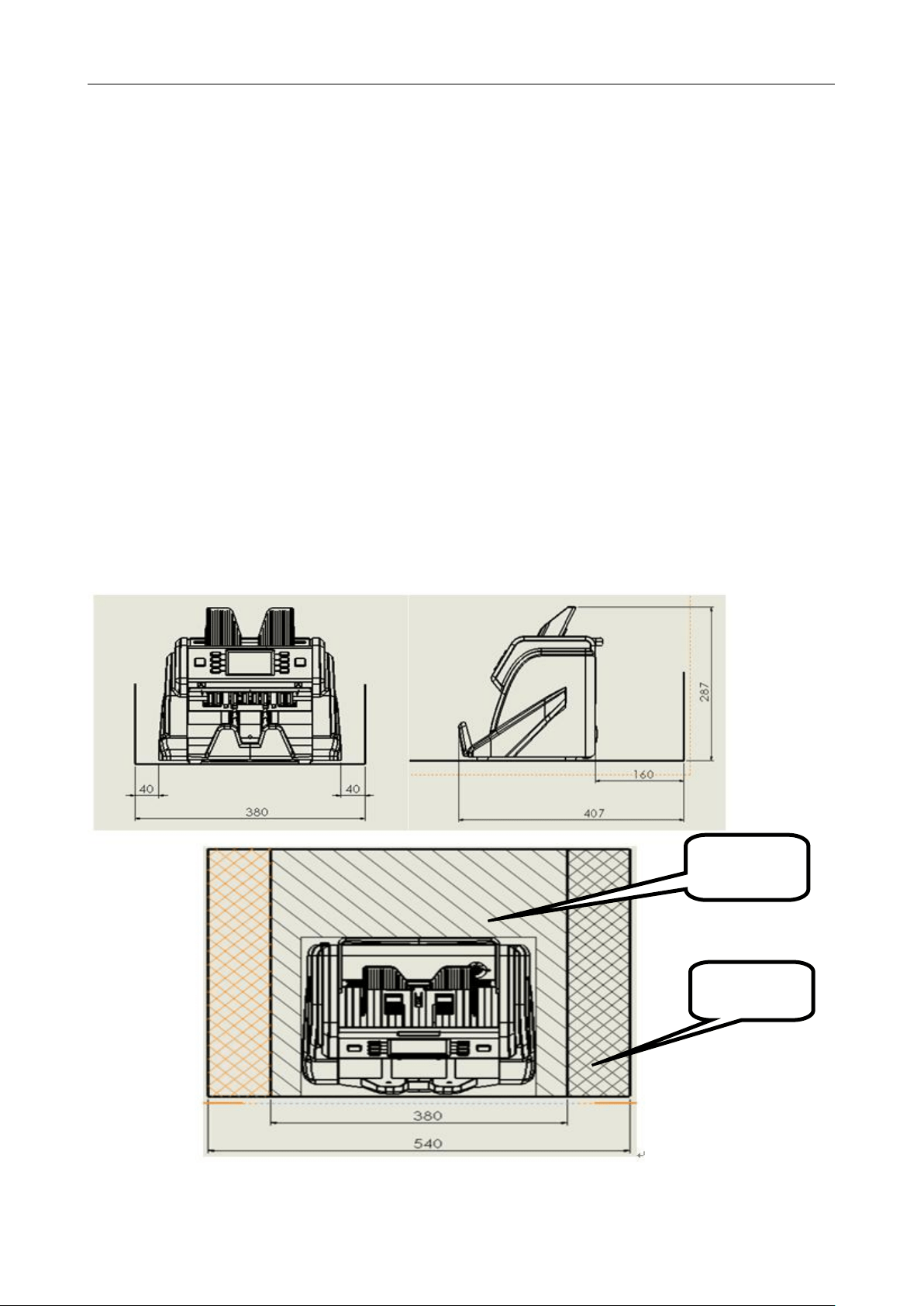
2.2 Installation and Use Location
As shown in the figure, please stay away from the surrounding walls and reserve sufficient operation space
for placement of banknotes, opening or closing of the cover plate, as well as for maintenance.
Unit (mm)
Installation
space
Maintenance
space
BC-55 User Manual V1.5
4
3. Complete Machine Diagram
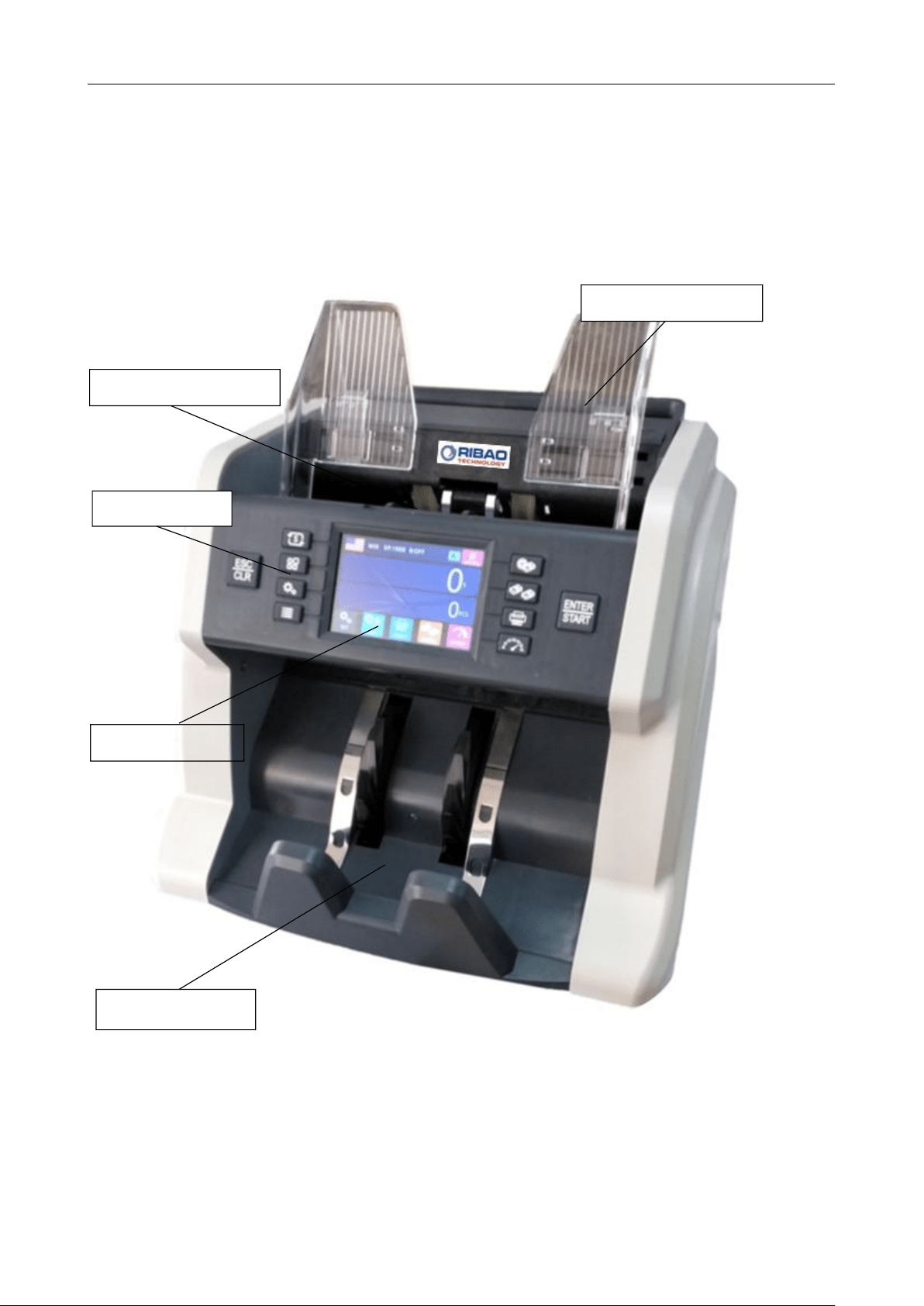
3.1 Front Appearance
Stacker
Hopper
Note Guider
Display
Key Button
BC-55 User Manual V1.5
5
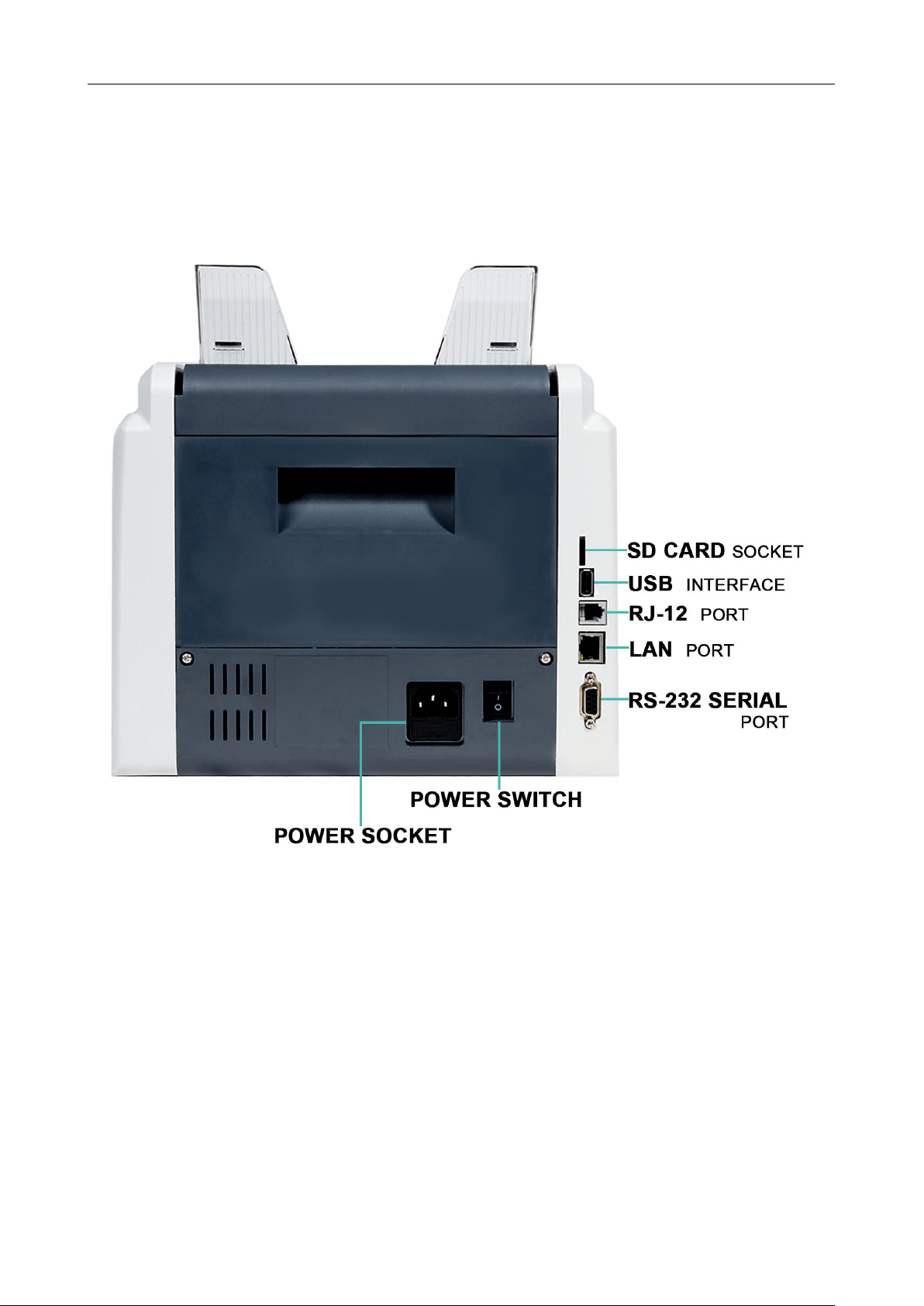
3.2 Back Appearance
BC-55 User Manual V1.5
6
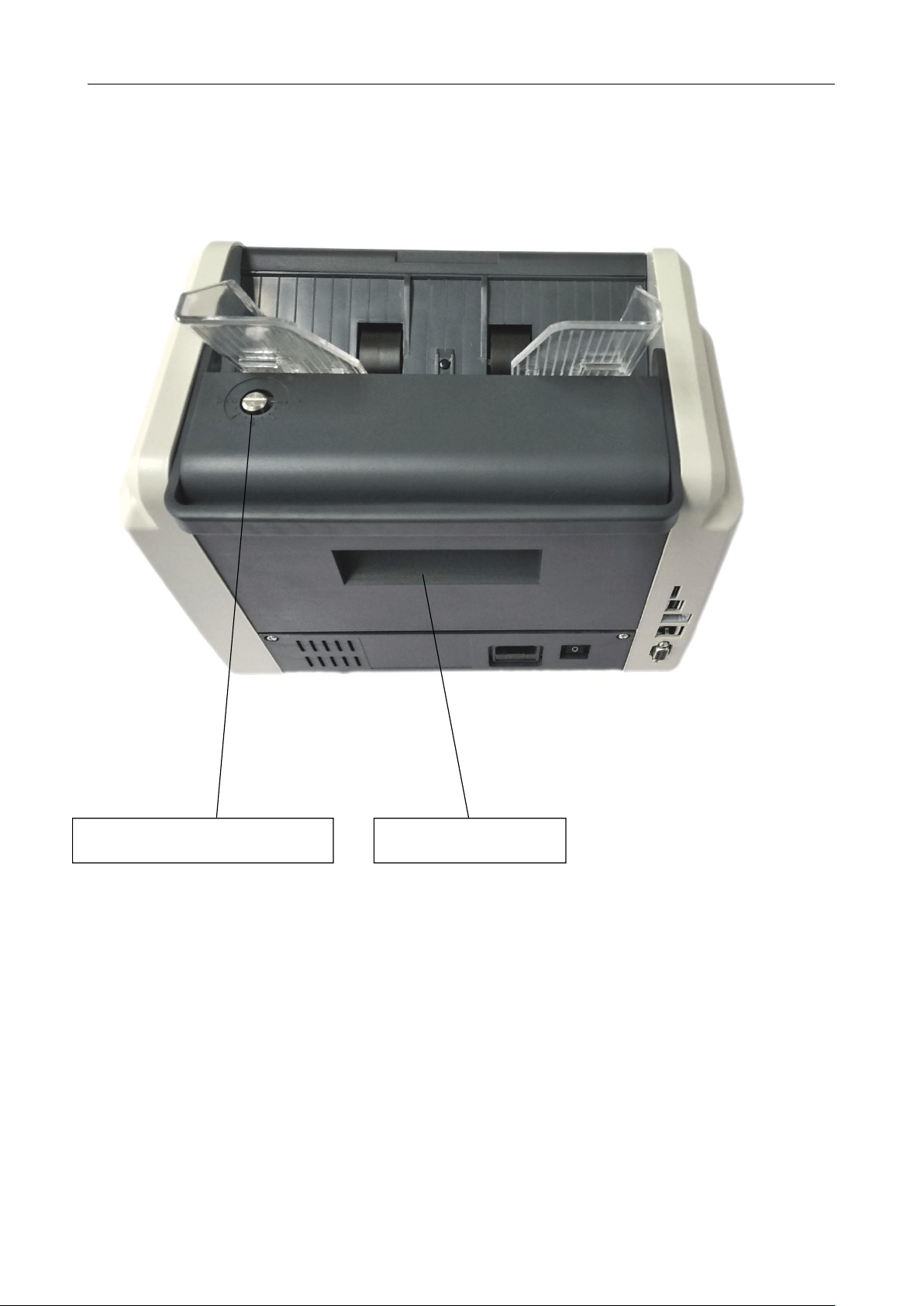
3.3 Top Appearance
Feed gap adjusting knob
Rear lid open button

BC-55 User Manual V1.5
7
4. Technical Parameters
Overall dimensions
(length×width×height)
300mm×247mm×287mm
Weight
About 7KG
Capacity of banknote inlet
600
Capacity of banknote receiving port
200
Display
3.5 inch TFT touch screen
Interface
RS-232/LAN/RJ12/SD/USB
Currency support capacity
the standard software includes 5 currencies, if you need more
currencies, please call us or contact us by email.
Countable Note Size
Length: 100mm~180mm
Width: 50mm~90mm
Countable Note thickness
0.05mm~0.12mm
Counting speed
800/1000/1200pcs/minute (MIX, SDC mode)
800/1000/1200/1500pcs/min (CNT mode)
Counting mode
MIX, SDC, CNT
Batch number
0~200
Counterfeit detection function
UV/MG/MT/IR
Power requirement
AC 220V 50Hz ±10%
AC 110V 60Hz ±10%
Noise during operation
60-75DB
Power consumption
≤15W standby
≤50W operation
Use environment
Ambient temperature (0~40
℃
)/humidity (40~90%)
Air pressure (70-106kpa)
Storage environment
Ambient temperature (-40~55
℃
)/humidity (10~95%)
Air pressure (70-106kpa)
BC-55 User Manual V1.5
8
5. Description of Display and Operation Interface
5.1 Display Appearance
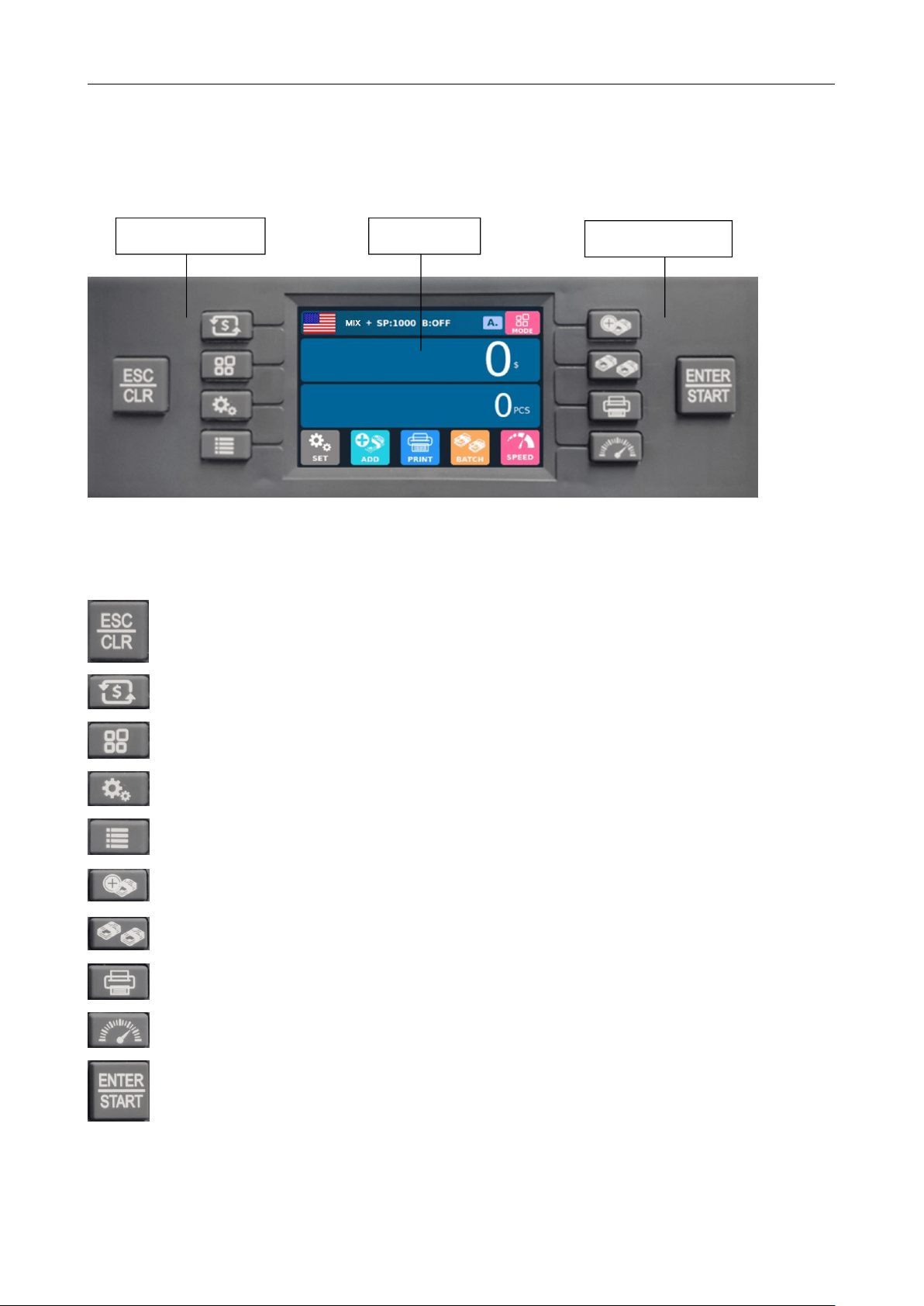
5.2 Operating Instructions for Function Keys
Return key, to return to the previous interface when the function is set; Clear key.
Currency selection key.
Mode switch key.
Function key.
Counting information check key.
Accumulation function switch key.
Preset switch key.
Data printing key.
Speed switch key.
Start key, start the machine manually; Save key after selecting and entering, confirming or
modifying the function.
Display
Operational key
Operational key
BC-55 User Manual V1.5
9
5.3 Display Interface and Touch Screen Description
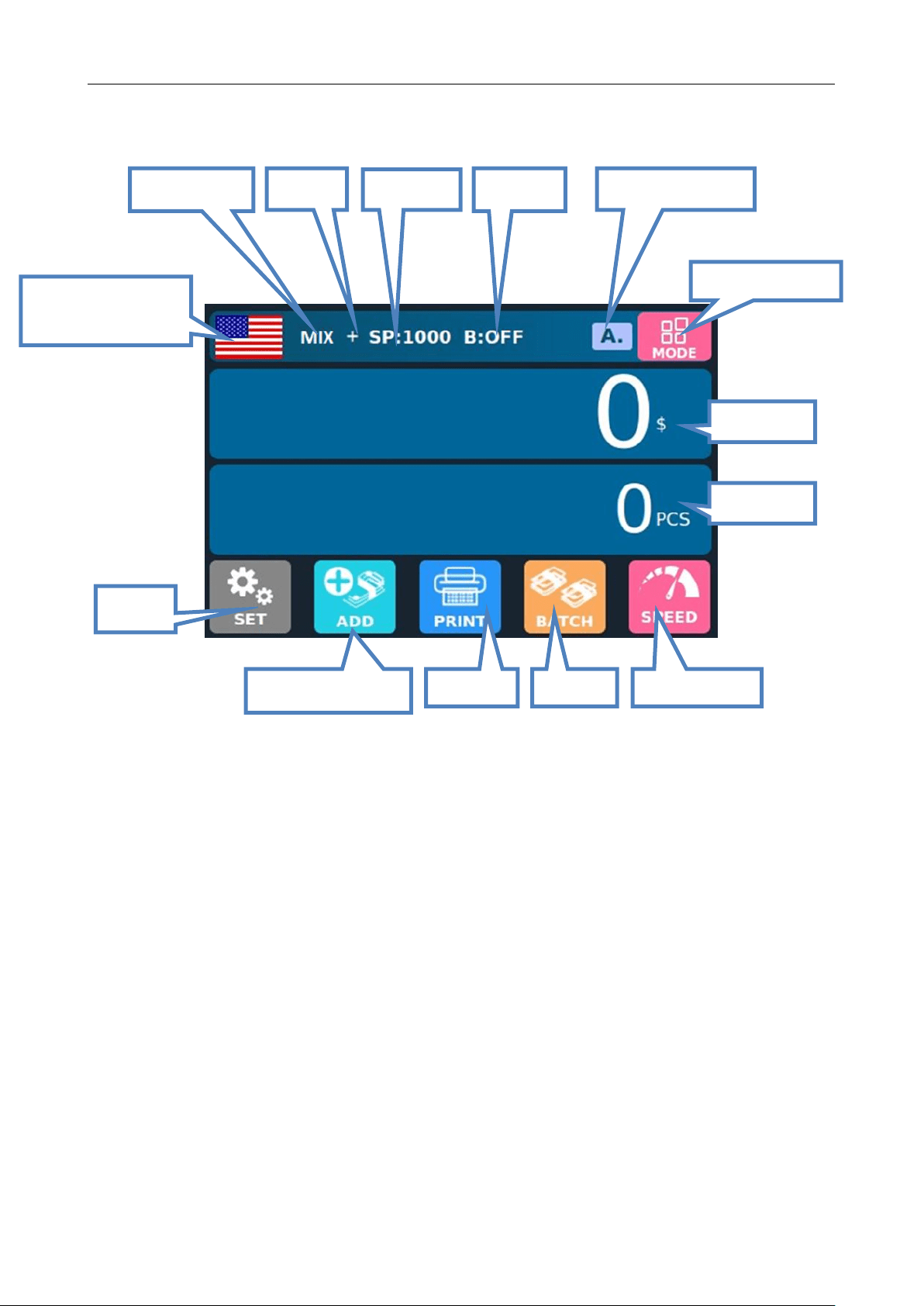
Automatic/manual
mode
Function
key
Number of
banknotes
Counting
amount
Counting mode
switch key
Accumulative function
key
Print key
Batch key
Speed switch key
Counting
speed
Preset
quantity
Counting mode
Currently selected
currency and currency
selection key
Accumulati
on
BC-55 User Manual V1.5
10
6. Operating Instructions
6.1 Start-up
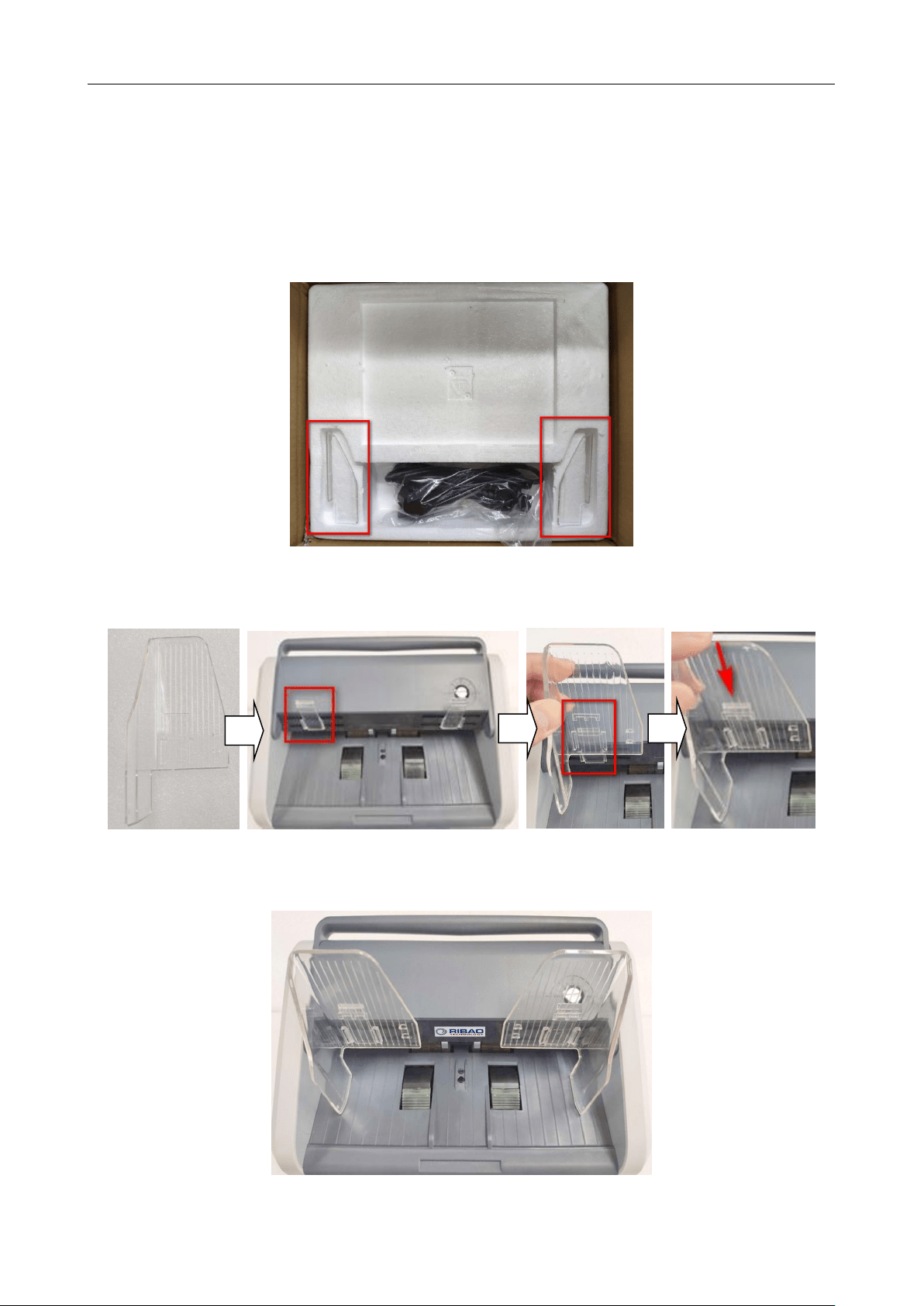
Reminder: To ensure smooth counting please install the left and right Note Guider in the box. Please check
below picture.
Take out the left Note Guider, install the click into the rail of the Note Guider, and press the Note Guider
until you hear a clicking sound, it means the Note Guider is installed in position.
Then take out the right Note Guider, intall it in the same way. After you finish both, the machine looks like
this:
BC-55 User Manual V1.5
11
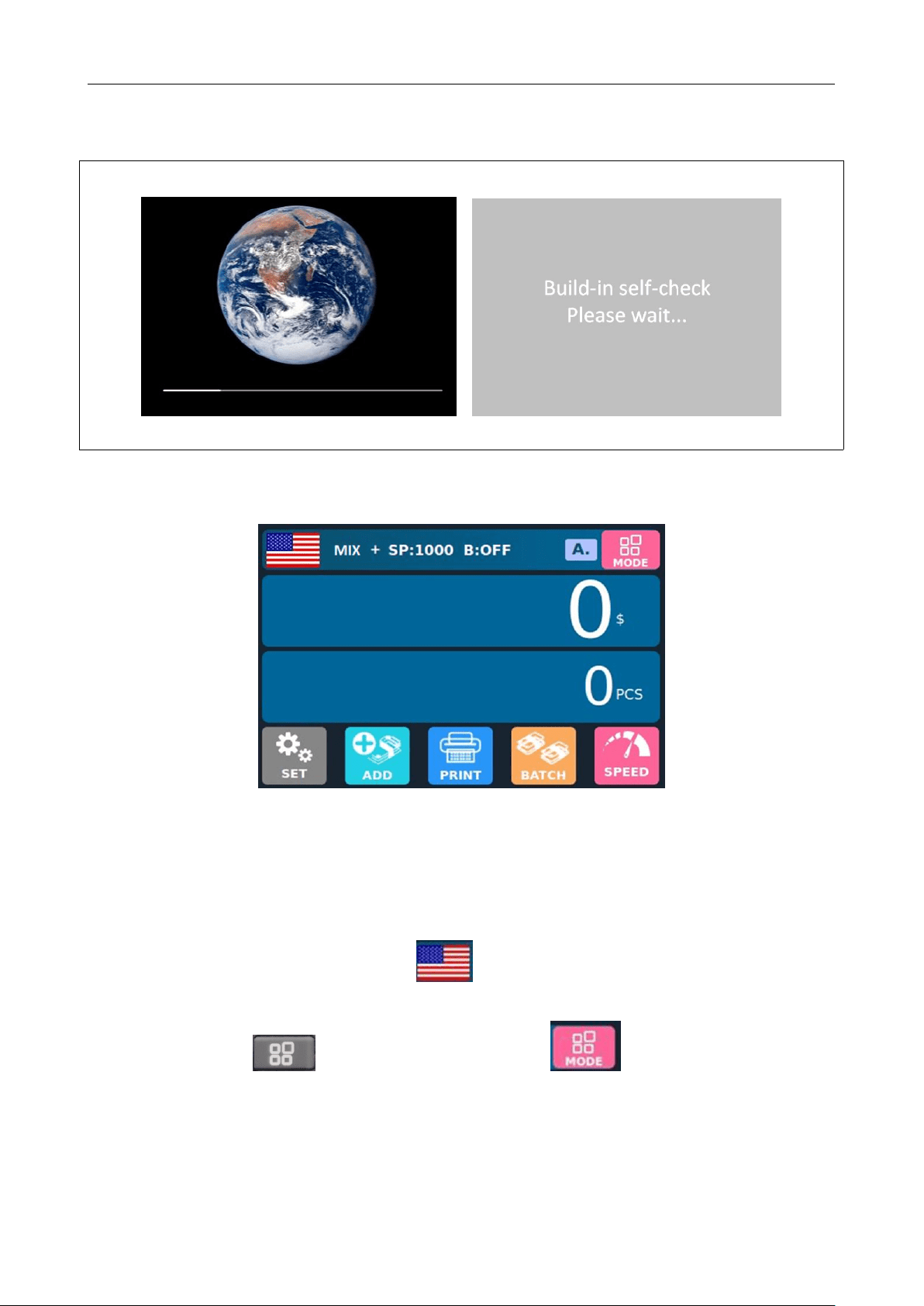
Turn on the switch after connecting the machine to the power supply. First, the machine enters the
self-checking interface, as shown in the following figure:
Please wait patiently for about 1 minute, and the machine will enter the main counting interface after
self-check succeeds, as shown in the following figure:
6.2 Selection of Counting Mode
6.2.1 Single Currency Counting Mode
After the machine is turned on, a flag graphic appears in the upper left corner,indicating that the
machine is in the US dollars counting mode.
By pressing the key of the keypad or touching the key in the upper right corner of the
display screen, three counting modes can be cyclically switched, and the three counting modes will be cyclically
switched according to the MIX-CNT-SDC sequence.
BC-55 User Manual V1.5
12
6.2.1.1 <Mix> Mix Counting Mode
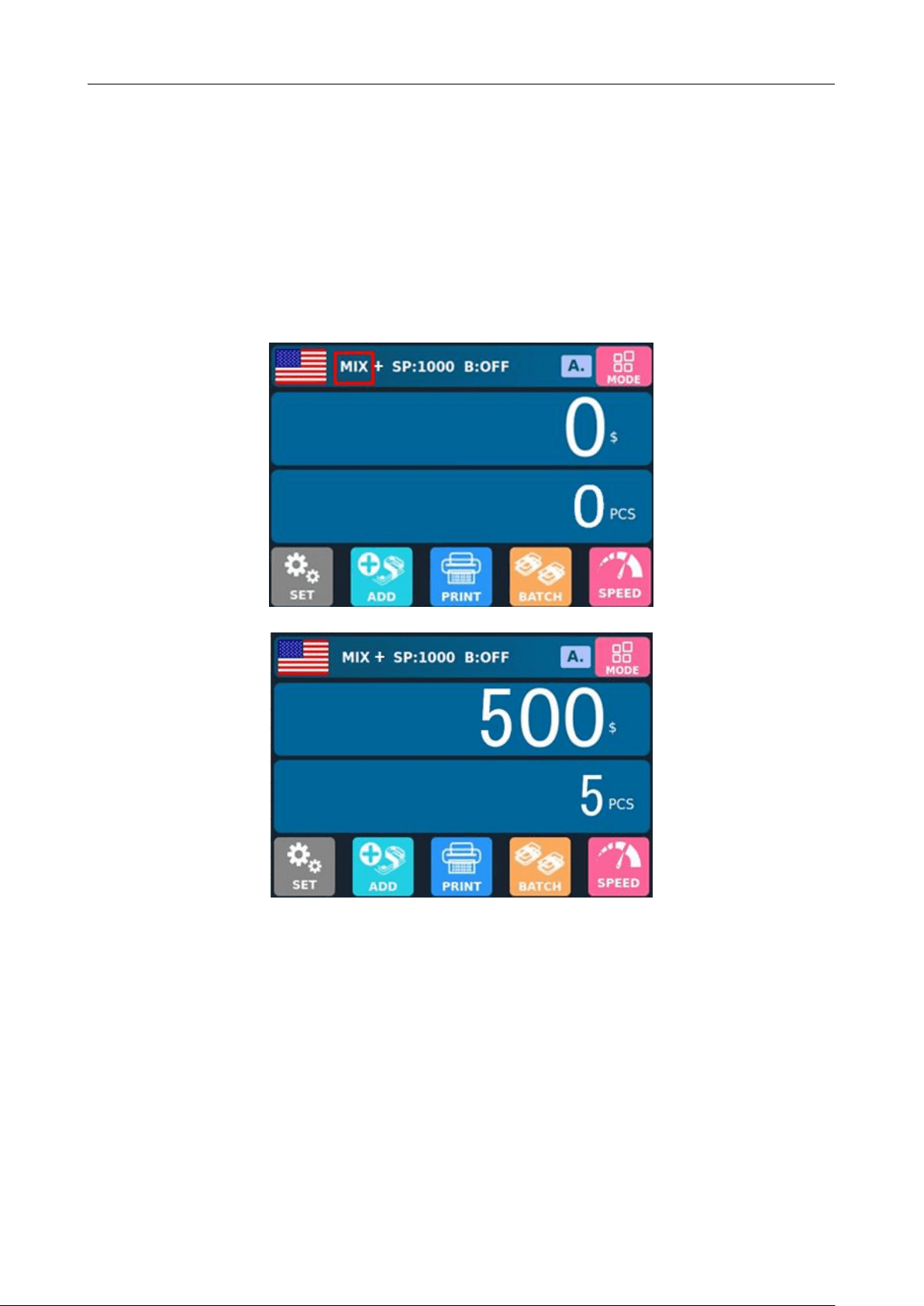
The following figure shows the interface of the machine in MIX Counting Mode. In this mode, the
machine will count the banknotes of all denominations of US dollars, and count and save the detailed
information of the counted banknotes at the same time, including the total amount and the total number of
banknotes in stacker, so as to facilitate users to check. In this mode, the machine has three counting speed
(800/1000/1200 pcs/minute) options.
Initial Interface of MIX Counting Mode
Interface after Counting
6.2.1.2 <SDC> Single Counting Mode
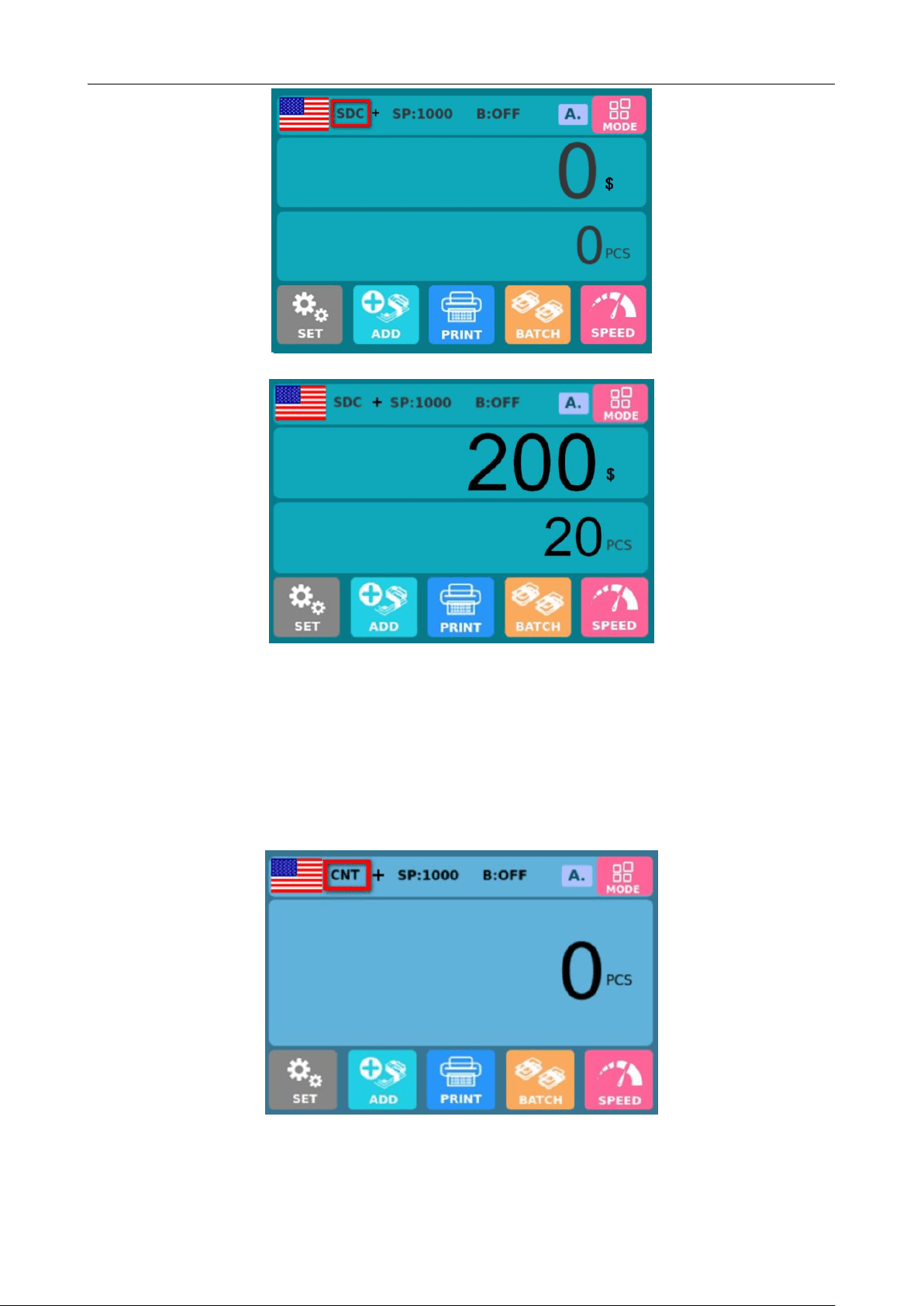
The following figure shows the interface of the machine in SDC Single Counting Mode. In this mode,
the machine will count the banknotes of the same denomination of US dollars with the first banknote counted
as a reference, and count and save the detailed information of the counted banknotes at the same time,
including the total amount and the total number of banknotes in the stacker, so as to facilitate users to check.
In this mode, the machine has three counting speed (800/1000/1200 sheets/minute) options.
BC-55 User Manual V1.5
13
Initial Interface of SDC Single Counting Mode
Interface after Counting
6.2.1.3 <CNT> Count Mode
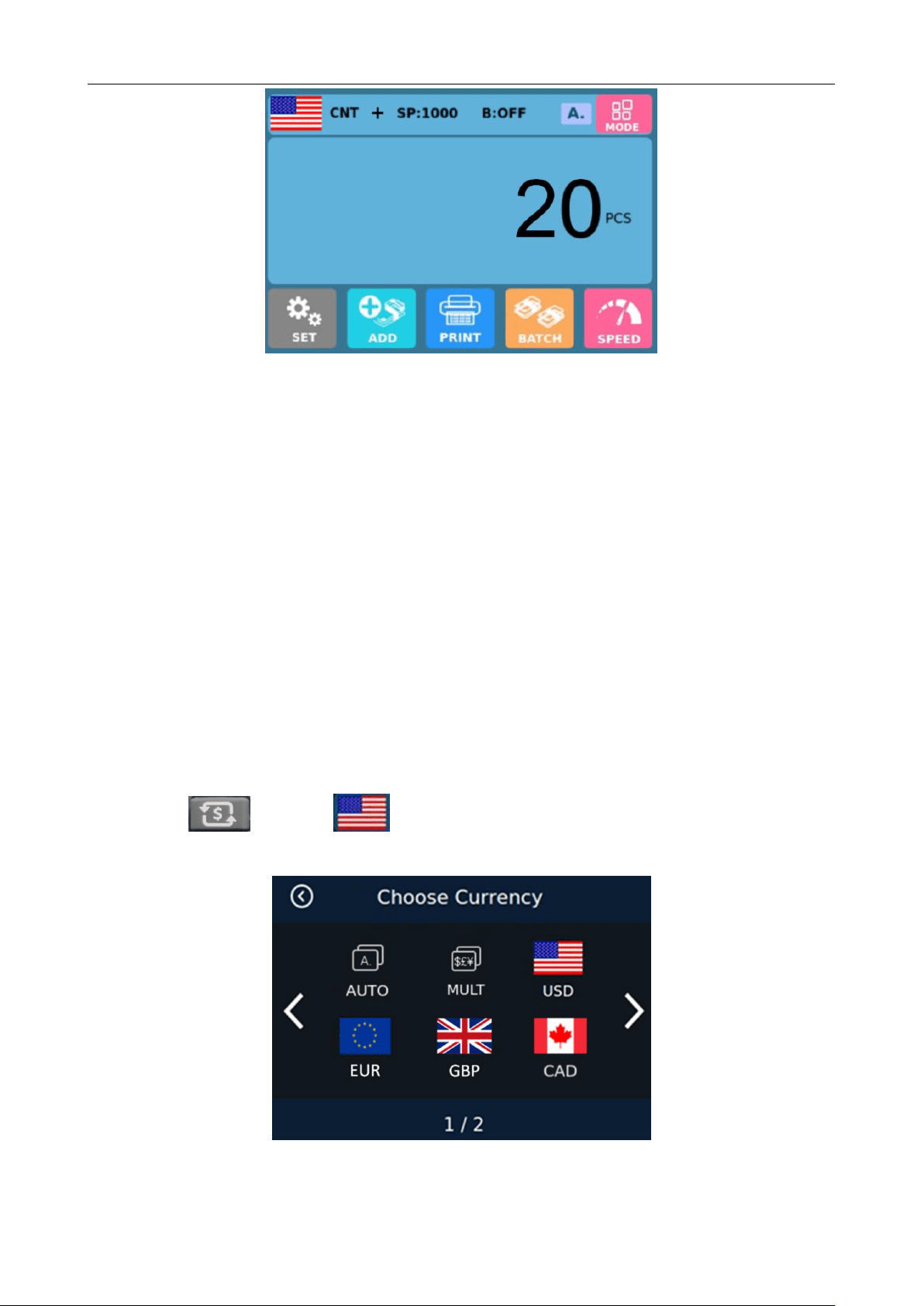
The following figure shows the interface of the machine in CNT Count Mode. This mode does not limit
currency, and only counts the number of banknotes; It only works with double note detection function and no
other counterfeit detection function. In this mode, the machine has four counting speed (800/1000/1200/1500
sheets/minute) options.
Initial Interface of CNT Count Mode
BC-55 User Manual V1.5
14
Interface after Counting
Note: In MIX Counting Mode and SDC Single Counting Mode, the machine has the functions of image
acquisition, magnetic detection, ultraviolet detection and double note detection. While in CNT Counting
Mode, there is only a double note detection function.
6.2.2 Automatic Recognition Mode
Automatic recognition: Refers to the automatic recognition of banknote counting mode. In the process of
counting banknotes, the machine uses the first banknote passing through the sensor as the judgment rule to
recognize banknotes of all denominations of the same country. When banknotes from other countries are
recognized, the machine will alarm and stop. At this time, banknotes from other countries need to be taken out,
and the machine will continue counting. The machine can only recognize the currency of the country displayed in
the program.
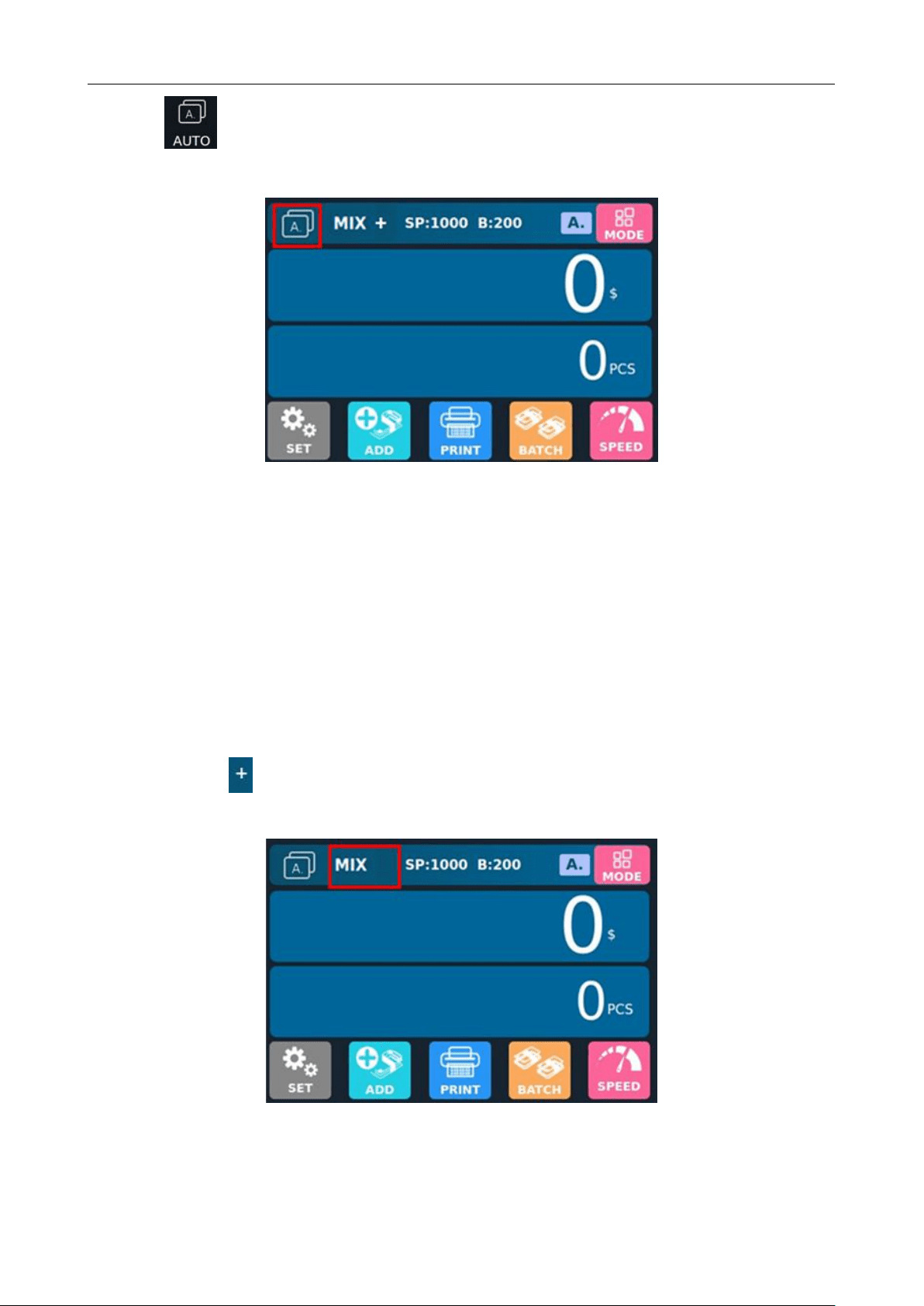
Press the key or the flag on upper left corner of the display to enter the currency selection
interface, as shown in the following figure:
Currency Selection Interface
BC-55 User Manual V1.5
15
Click the automatic identification mode, and the display screen will be automatically adjusted to the
main interface after selection, as shown in the following figure:
In the automatic recognition mode, there is only one MIX Counting Mode, and the display of machine
counting information will be different when the accumulation function is off and on.
When the accumulation function is off, the machine will only record and display the details of the current
counting after each counting.
When the accumulation function is on, the machine will accumulate and count the details of current and
previous counting after each counting.
6.2.2.1 Accumulation Function Off
There is no sign between "MIX" and "Speed" at the top of the display, indicating that the accumulation
function is off at this time.
The accumulation function is off, and the symbol "+" does not appear.
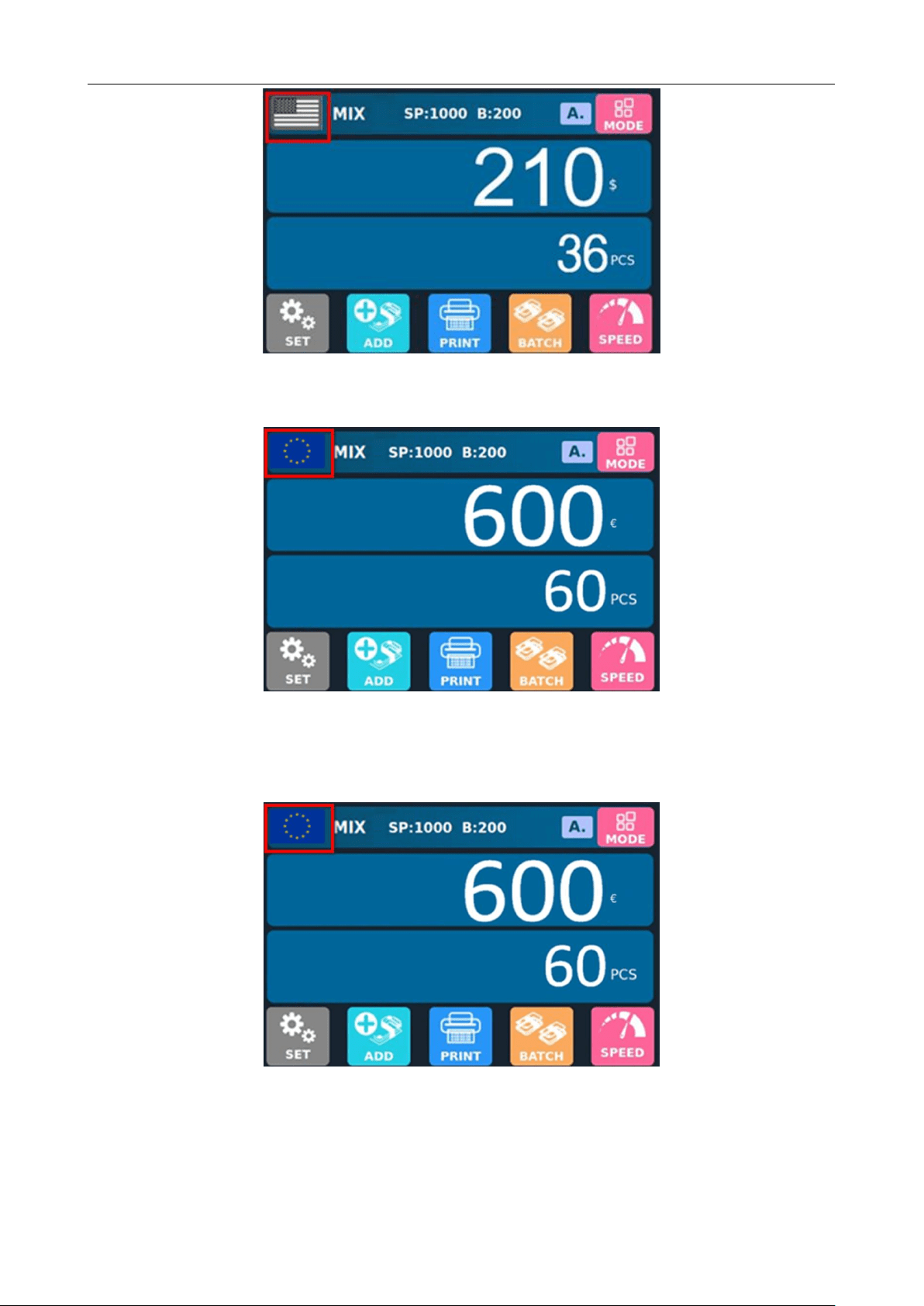
Example: Put a handful of US dollars into the machine to count. The interface of the machine displays as
follows at the end of counting: The flag in the upper left corner is identified as US dollars.
BC-55 User Manual V1.5
16
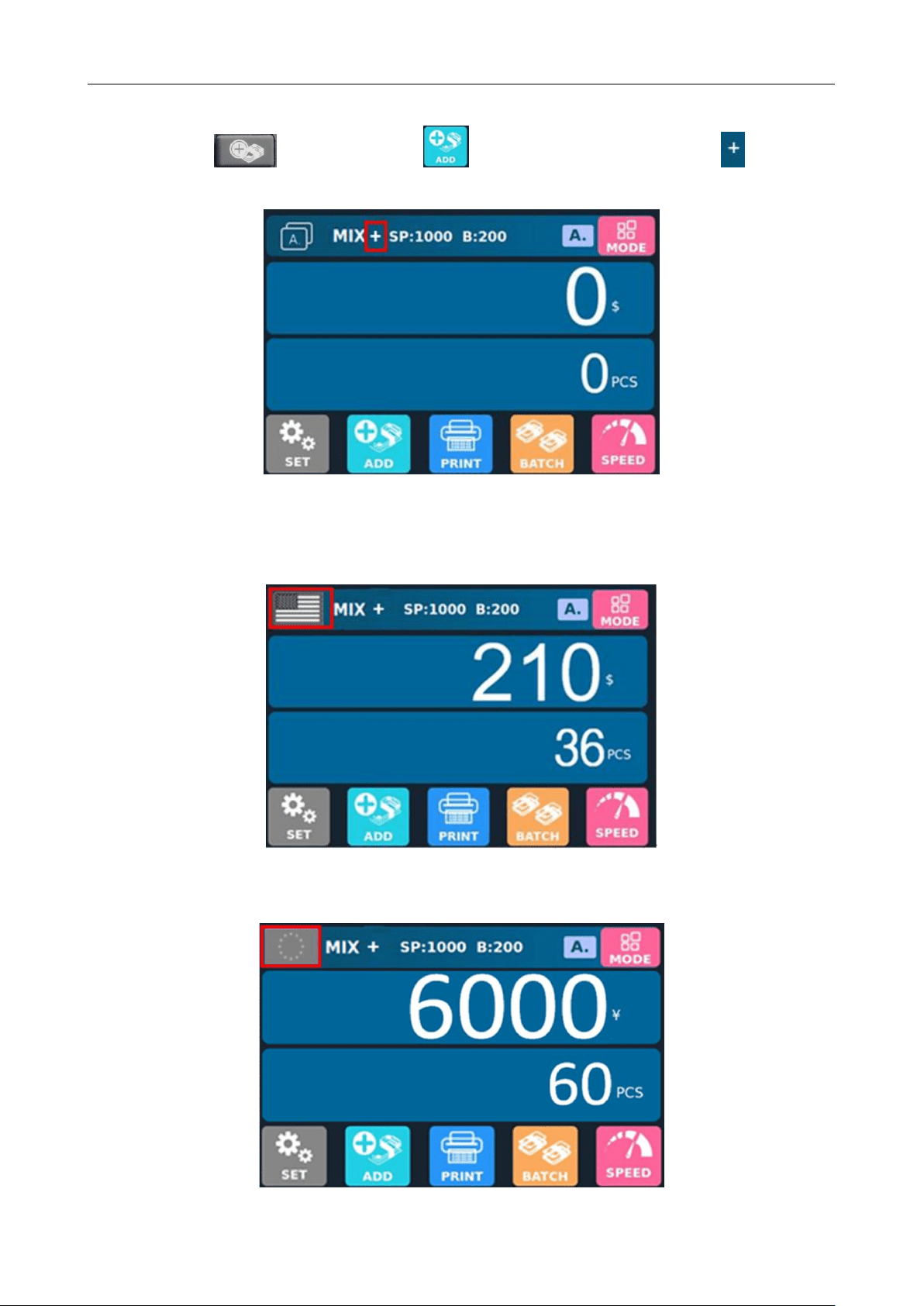
Take out the US dollars in the stacker, then put the Euro into the machine to count. The machine interface
displays as follows at the end of counting: The flag in the upper left corner is identified as Euro.
After the banknotes in the stacker are taken out, the machine will only display the total number and total
amount of banknotes counted for the current time, and will not display the details of the previous US dollars, as
shown in the following figure:
Only the details of the current counting will be displayed after the counting is finished
BC-55 User Manual V1.5
17
6.2.2.2 Accumulation Function On
Press the key or click on the button at bottom of the screen, and a symbol will appear at
the top of the display.
The interface of accumulation function on in the automatic mode
Example: Put US dollars into the machine for counting first, and the machine interface displays as follows at
the end of counting: The flag in the upper left corner is identified as US dollars.
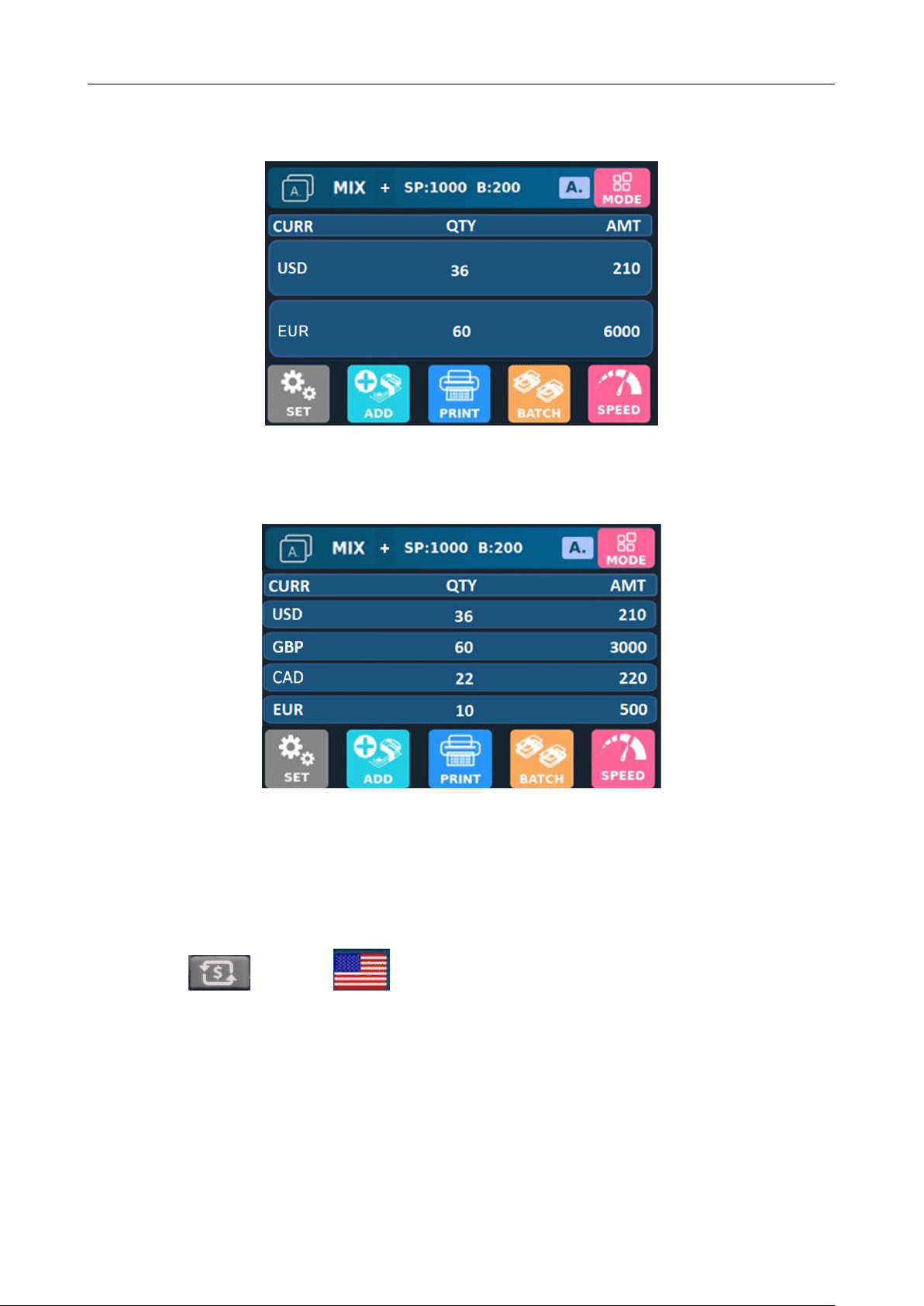
Take out the US dollars in the stacker, then put the Euro into the machine to count. The machine interface
displays as follows at the end of counting: The flag in the upper left corner is identified as Euro.
BC-55 User Manual V1.5
18
After the banknotes in the stacker are taken out, the machine will count and accumulate the details of the
previous and current counting, and the following interface will appear:
After the banknotes are put in again, the upper left corner of the machine will still recognize the banknote
type and change the flag icon. After the banknotes in the stacker are taken out, the machine will continue to
accumulate the banknote counting details. If we put in US dollars for banknote counting, then put in Pounds, CAD,
EUR, and finally take out the banknotes in the stacker, the machine will display the following interface:
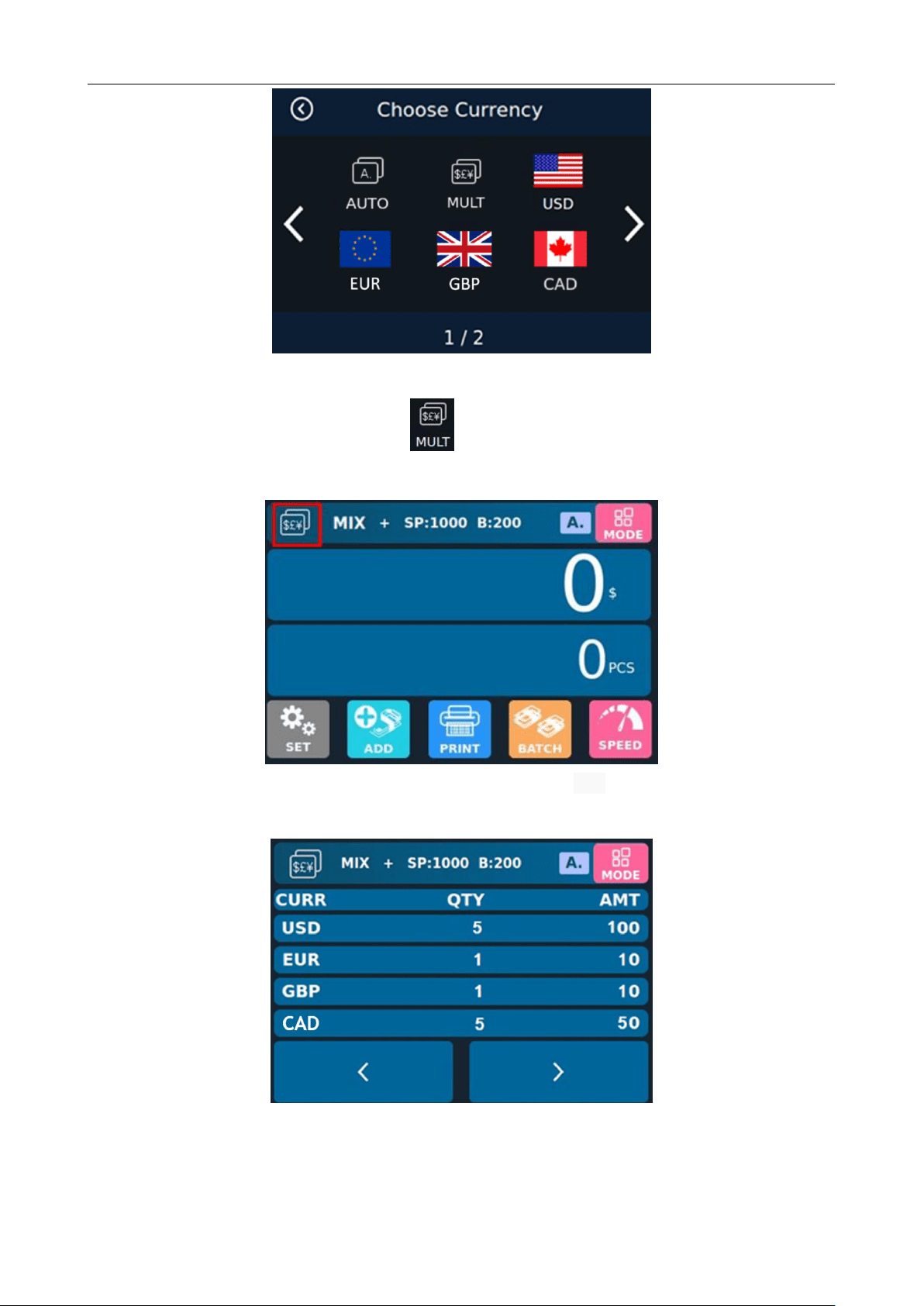
6.2.3 Multi-currency Mix Counting Mode
Multi-currency Mix Counting: Banknotes from multiple countries are mixed together and put into a machine
to count. The machine can recognize all the currencies displayed on display.
Press the key or the flag on upper left corner of the display to enter the currency selection
interface, as shown in the following figure:
BC-55 User Manual V1.5
19
Currency Selection Interface
Click on the Multi-country Mix Counting Mode , and the display screen will be automatically adjusted to
the main interface after selection, as shown in the following figure:
Example: Put a handful of banknotes (including US dollars,Euro,GBP,CAD) into the machine to count.
Details of counting after counting are shown in the following figure:
Details of Multi-country Mix Counting
BC-55 User Manual V1.5
20
6.3 Batch Setting
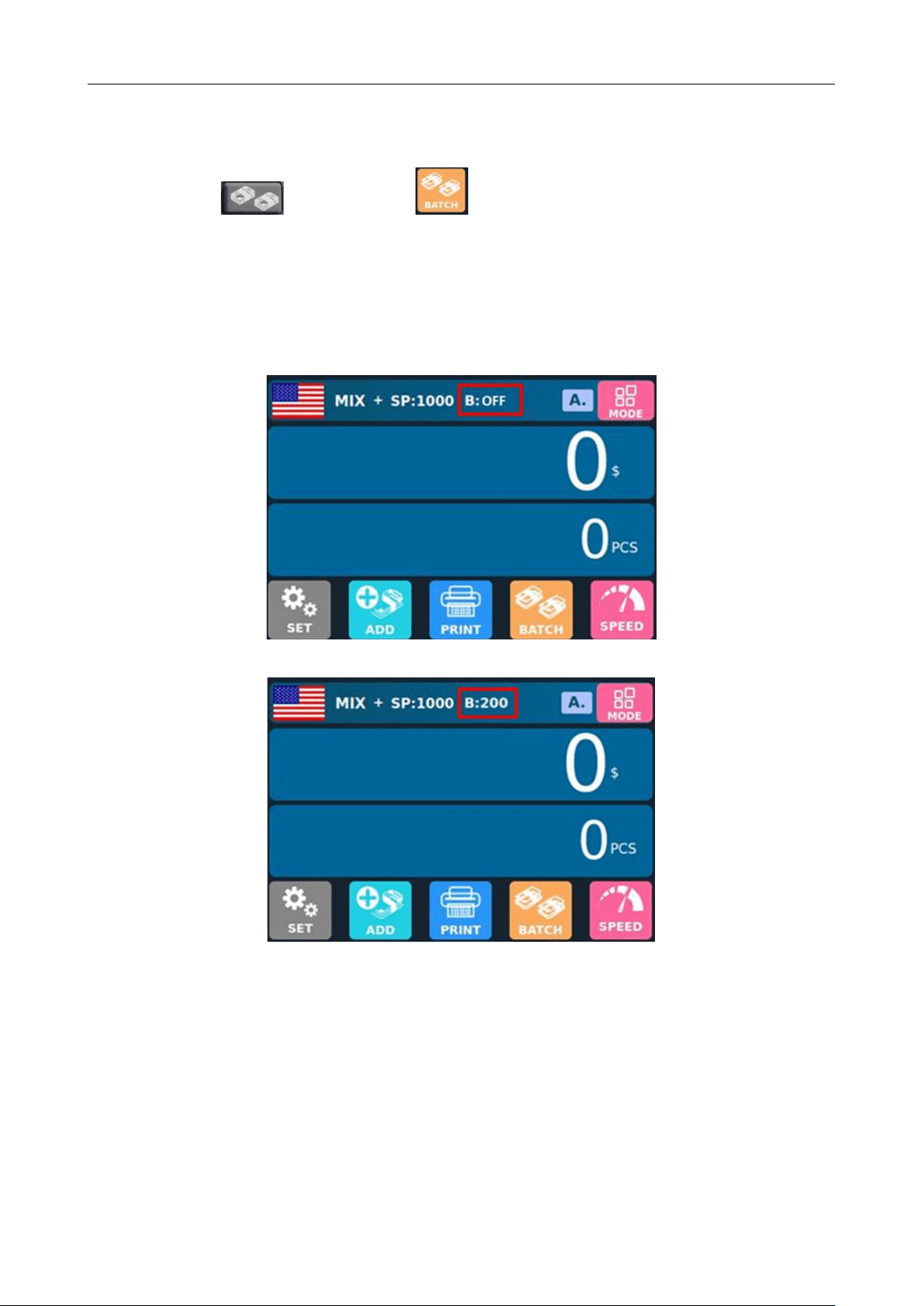
Press the key or touch the key below the display to select the Batch number in the
banknote counting interface. The default is 7 options of 200/100/50/20/10/5/off. You can also change the
preset number of 6 digital file bits. Please refer to the introduction of Batch setting function 8.1.2 for details.
When the Batch function is turned off, the Batch quantity of the machine is 200. When the count reaches 200,
the machine will stop running automatically.
The preset number is off
The preset number is 200
6.4 Counting Speed Setting and Function Description
There are four counting speed options: 1500, 1200, 1000 and 800 (Note: 1500 is only optional in CNT
Counting Mode). The default speed is 1200 in the three modes. If setting is required, different counting
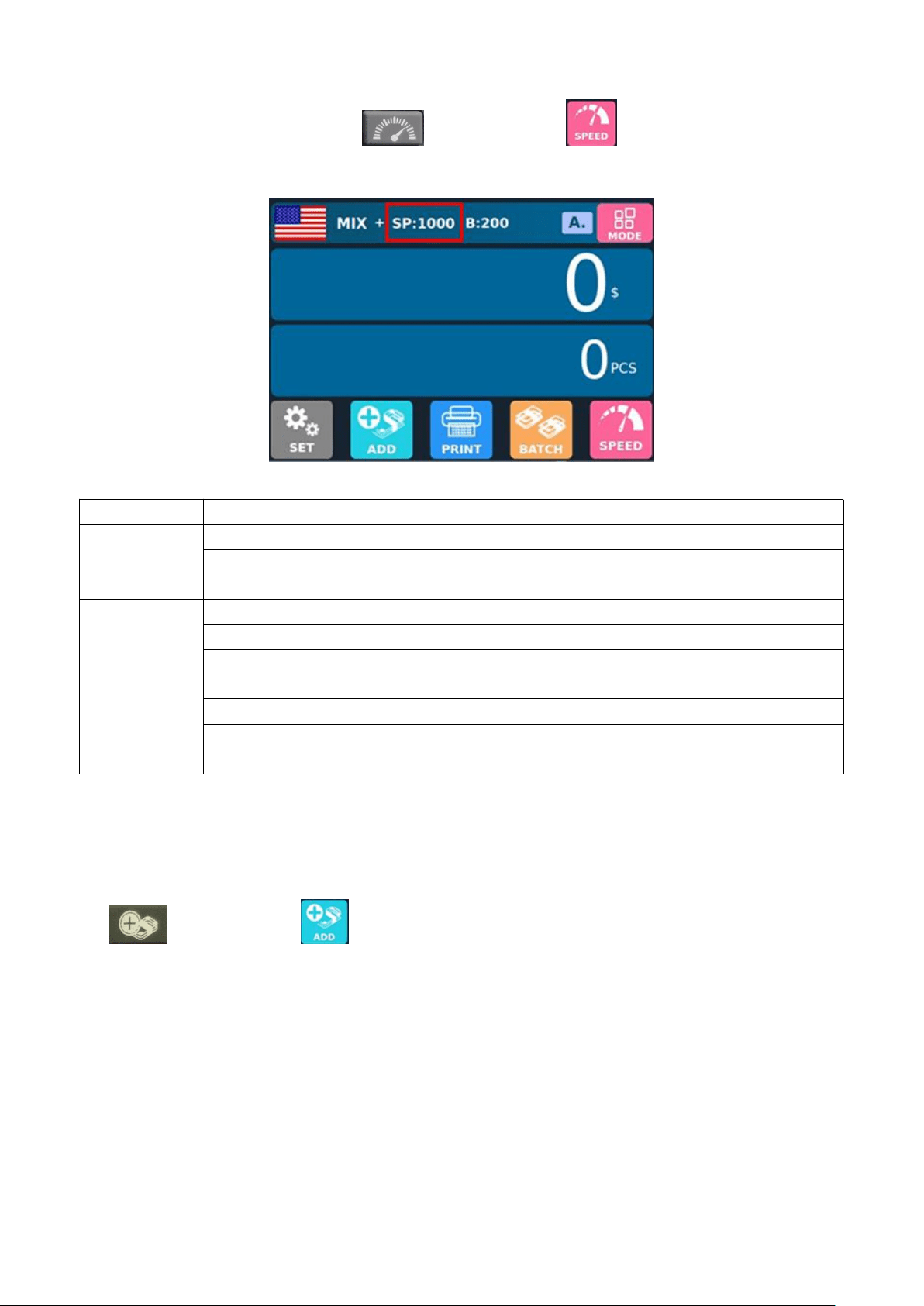
BC-55 User Manual V1.5
21
speeds can be switched by pressing the key or touching the key in any counting mode. As
shown in the figure below, the counting speed is set to 1000 in Mix Counting Mode.
Function description at each counting speed:
Counting mode
Speed mode
Applicable working mode
MIX Counting
Mode
800 pcs/minute
Counting, amount counting, serial number reading functions on
1000 pcs/minute
Counting, amount counting, serial number reading functions on
1200 pcs/minute
Counting, amount counting
SDC Single
Counting Mode
800 pcs/minute
Counting, amount counting, serial number reading functions on
1000 pcs/minute
Counting, amount counting, serial number reading functions on
1200 pcs/minute
Counting, amount counting
CNT Count
Mode
800 pcs/minute
Counting only, without amount counting
1000 pcs/minute
Counting only, without amount counting
1200 pcs/minute
Counting only, without amount counting
1500 pcs/minute
Counting only, without amount counting
6.5 Accumulation Function On
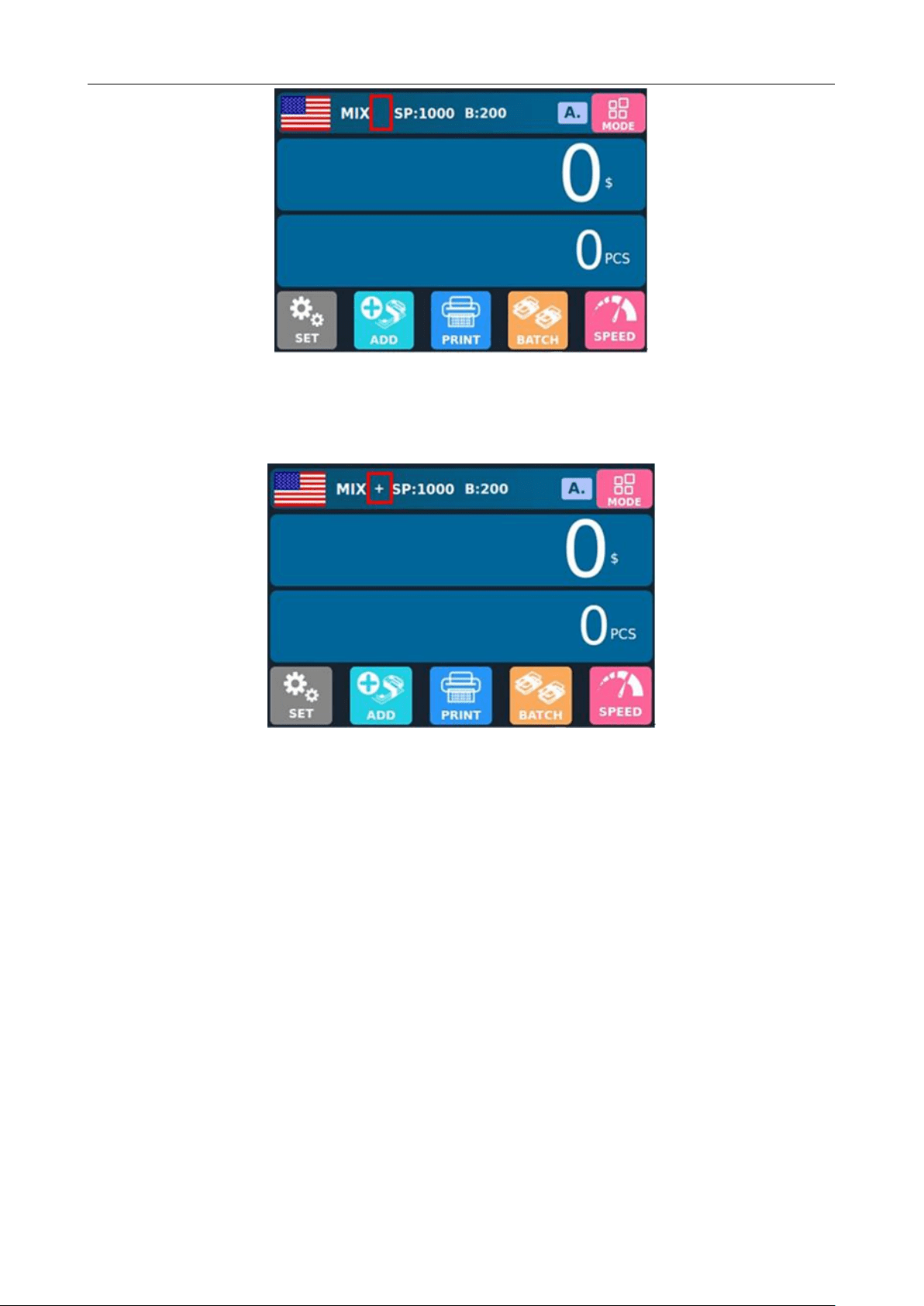
In any counting mode, the accumulation function of the number of sheets can be enabled by pressing
the key or touching the key. No "+" symbol appears between "MIX" and "Speed" at the top of
the display screen, indicating that the accumulation function is disabled at this time.
BC-55 User Manual V1.5
22
The accumulation function is disabled, and the symbol "+" does not appear.
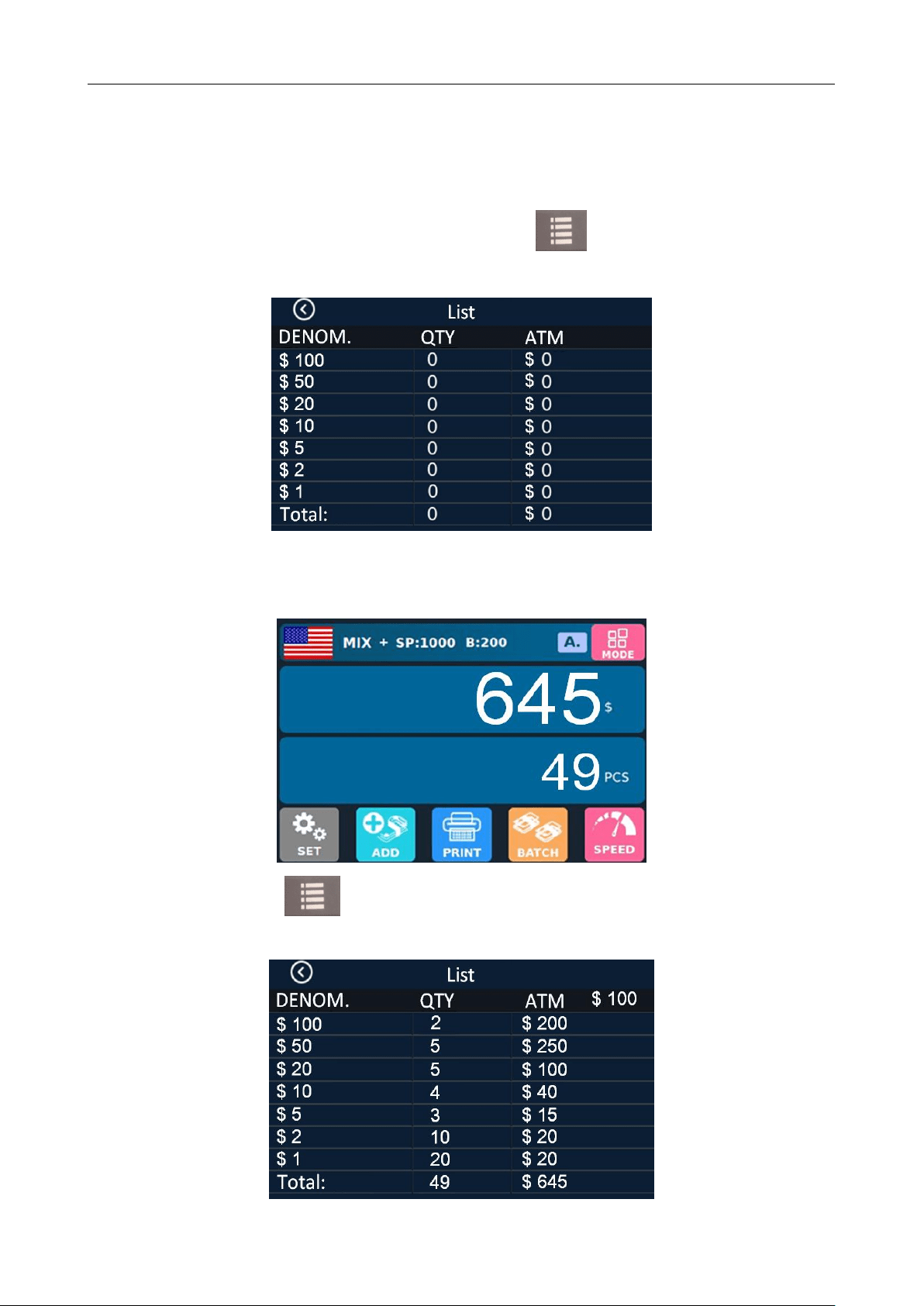
A "+" sign appears between "MIX" and "speed" at the top of the screen, indicating that the accumulation function
is enabled.
The accumulation function is enabled, and the symbol "+" appears
a) After a handful of banknotes is counted and not taken away from the stacker, the machine will display the
total quantity and total amount of banknotes counted this time; If the banknotes are removed from the stacker,
the machine will display the total quantity and total amount of the current and previously counted banknotes;
At this time, press the CLR key once and the information of the last counting will be cleared, and press the
CLR key twice and all counting information will be cleared.
b) In the process of counting, the machine will automatically delete the information of the counted banknotes
and prompt the need to count the banknotes again if there is any error.
c) In the accumulation mode, when checking the serial number, the machine only displays the serial number
of the last 200 banknotes.
BC-55 User Manual V1.5
23
7. Check Information and Print Information
7.1 Check Details of Counting
In MIX Counting or SDC Single Counting Mode, press the key upon the completion of counting
to enter the interface shown in the following figure to check the details of counting:
For example, put a handful of Japanese yen into the machine to count, and the machine interface displays at
the end of counting as follows:
At this time, press the key to enter the interface shown in the following figure to check the
details of counting:
BC-55 User Manual V1.5
24
This interface is used to check the number of banknotes of various denominations and the total amount
of this denomination, as well as the total amount of all amounts. At the same time, banknotes can also be
counted by directly placing them under this interface. To exit this interface, please press ESC or touch
the key in the upper left corner.
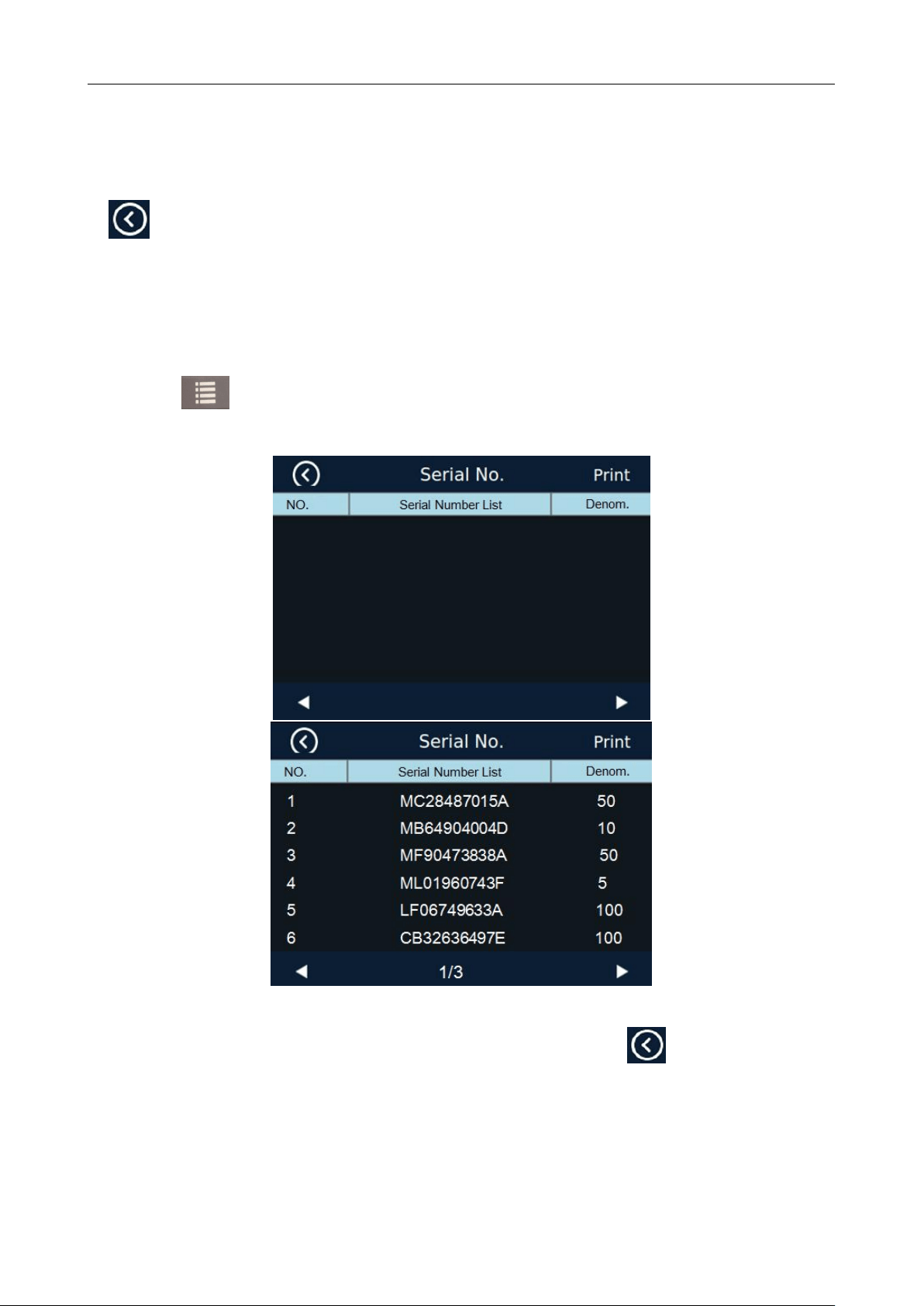
7.2 Check the Serial Number
Press the key again under the interface of Check Details of Counting to enter the interface shown
in the figure below to view the serial number:
You can check and verify the counted normal banknote serial number under this interface, and touch left
or right to turn the page for checking. To exit this interface, press ESC or touch in the upper left corner.
Note: This interface is only displayed when the serial number reading is on (that is, SP:800 or
1000).
BC-55 User Manual V1.5
25
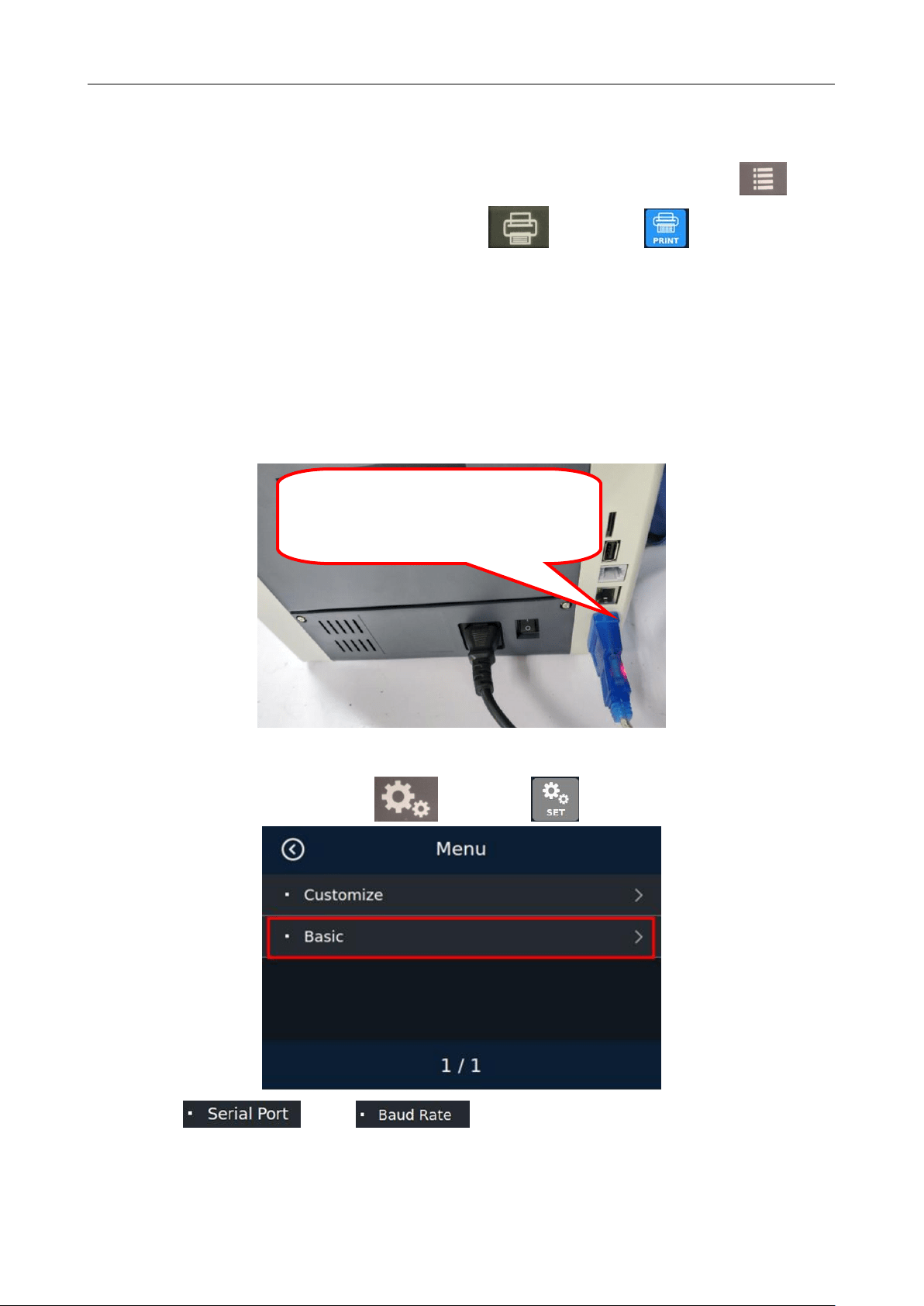
7.3 Print Information
When the external printer has been connected and can be printed, after counting, press the key to
enter the detail list checking interface, and then press the key or touch key, the printer will
automatically print the detail and total amount of counting. If you press the PRINT key under the serial
number checking interface, the serial number list will be printed.
7.4 Check the Counting List Information
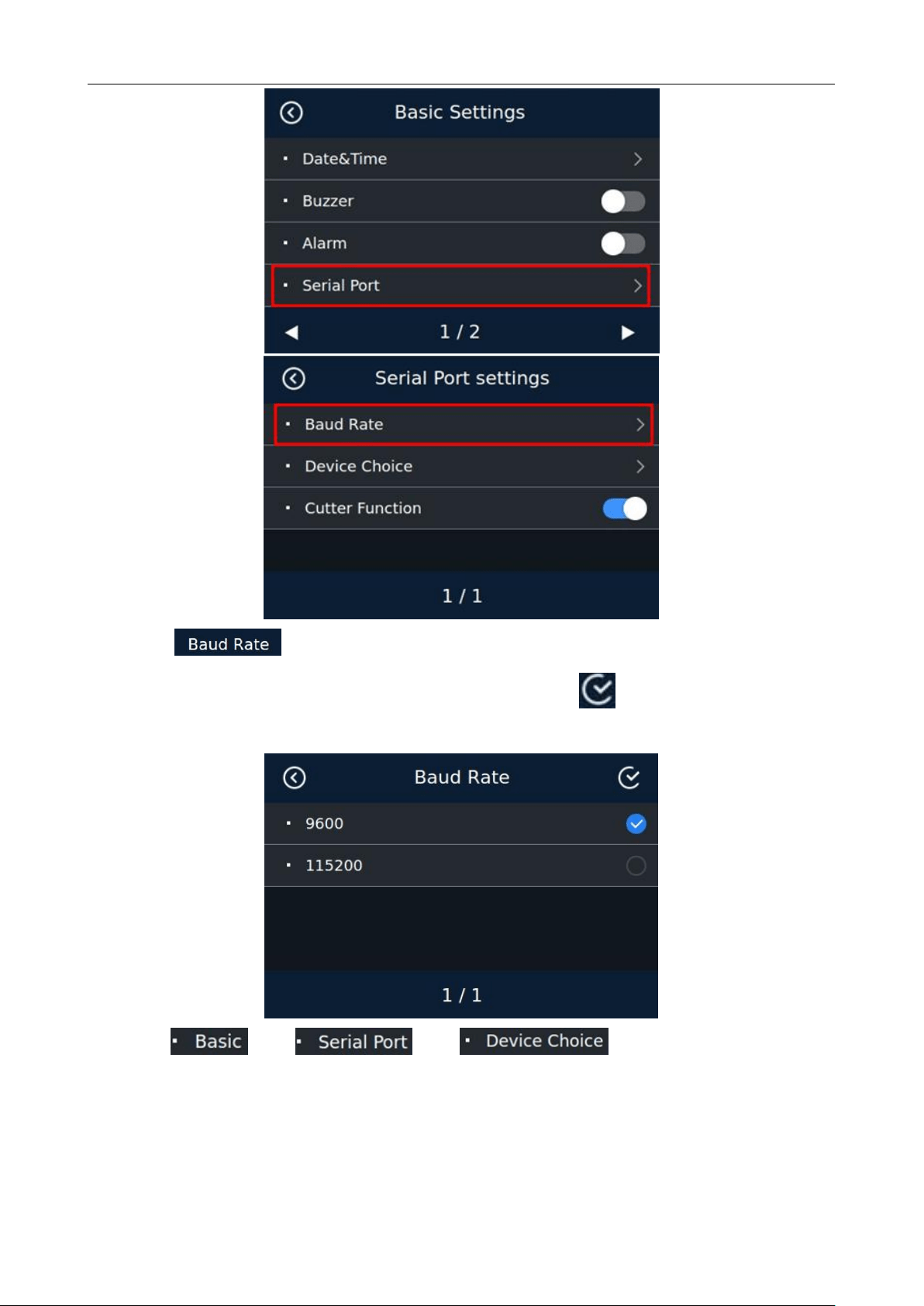
7.4.1 Plug-in of Serial Wire Harness
7.4.2 Machine Setup
Turn on the power switch, press the key or touch key to enter the user setting interface:
Select " "——" ".
USB to 232 data cable, One end of 232 is
connected to the 232 female head end of the
machine, and the USB end is plugged into the
computer.
BC-55 User Manual V1.5
26
In the " " selection interface, touch 9600 or 115200 to select the corresponding baud rate
according to the actual situation of the external device. And click the key in the upper right corner to
save. The machine will prompt you to restart.
Select" "——" "——" "again.
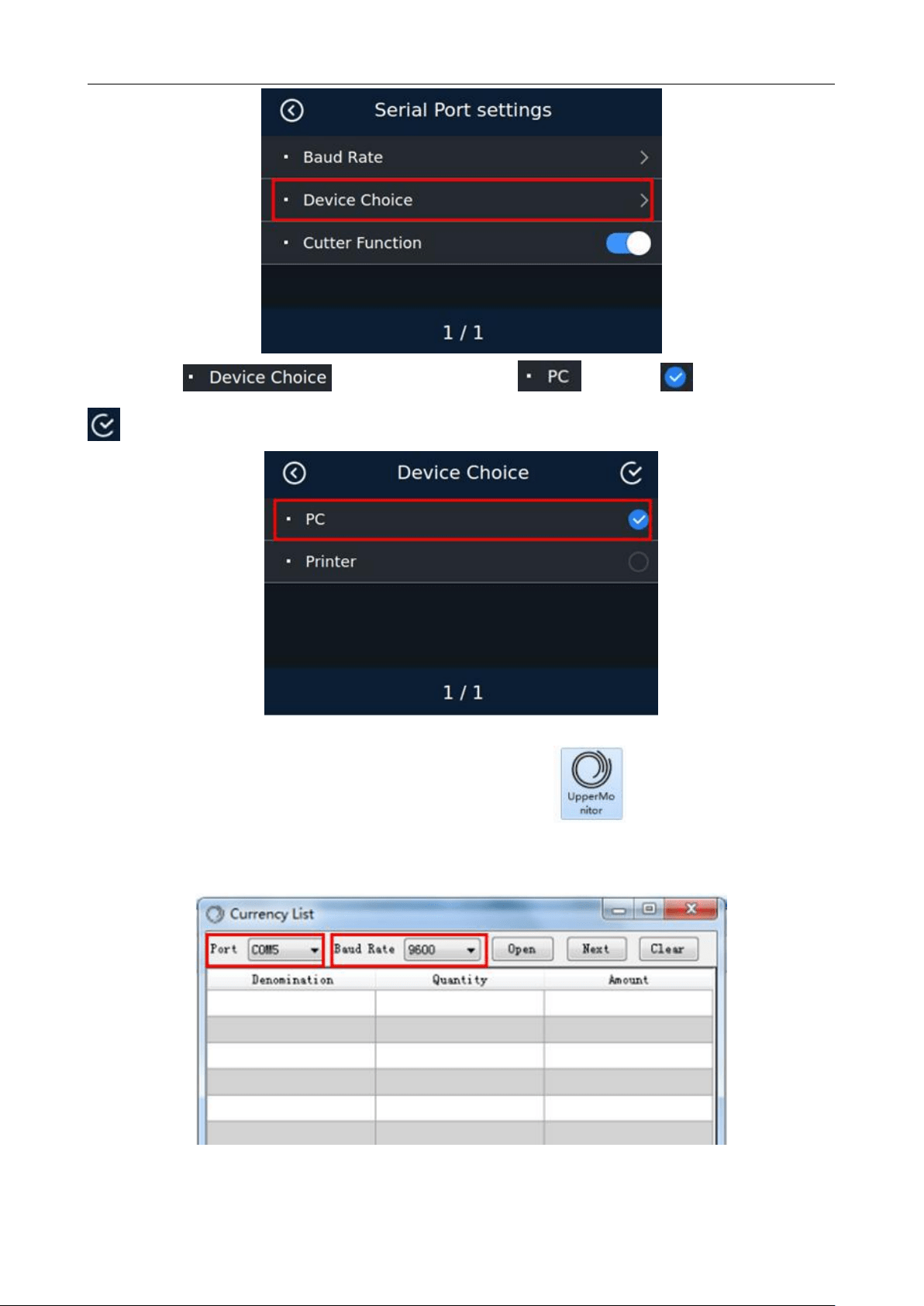
BC-55 User Manual V1.5
27
In the " " interface, please type behind " " and then click the
key in the upper right corner to save.
7.4.3 Collect List Information
Open the upper computer software provided by our company.
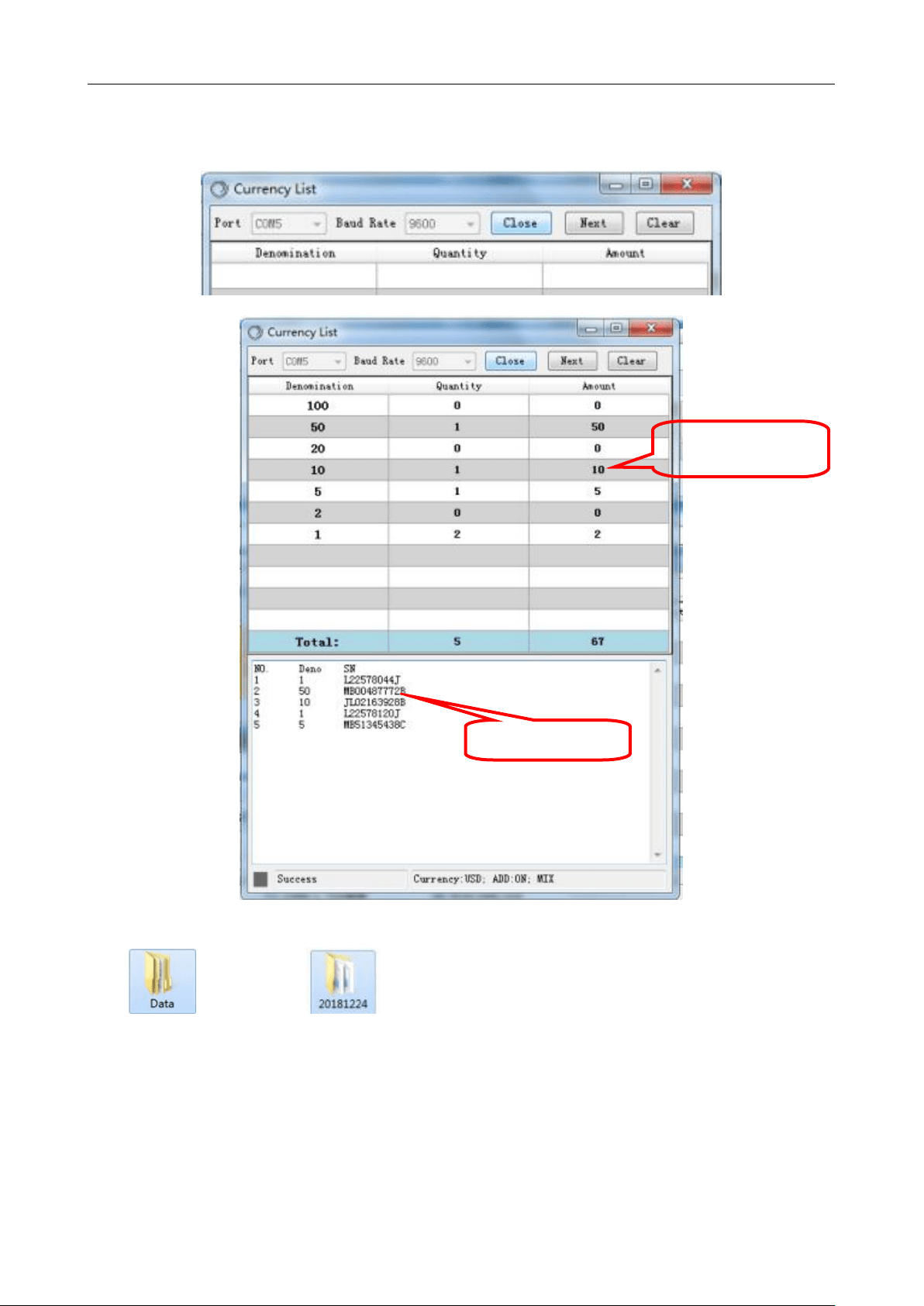
Select serial port and baud rate, and the baud rate must be consistent with the baud rate selected on the
machine.
BC-55 User Manual V1.5
28
Press the Open key again, the font of serial port and baud rate will be dimmed, OPEN will be changed
to CLOSE, and then counting can be performed and the counting information can be checked:
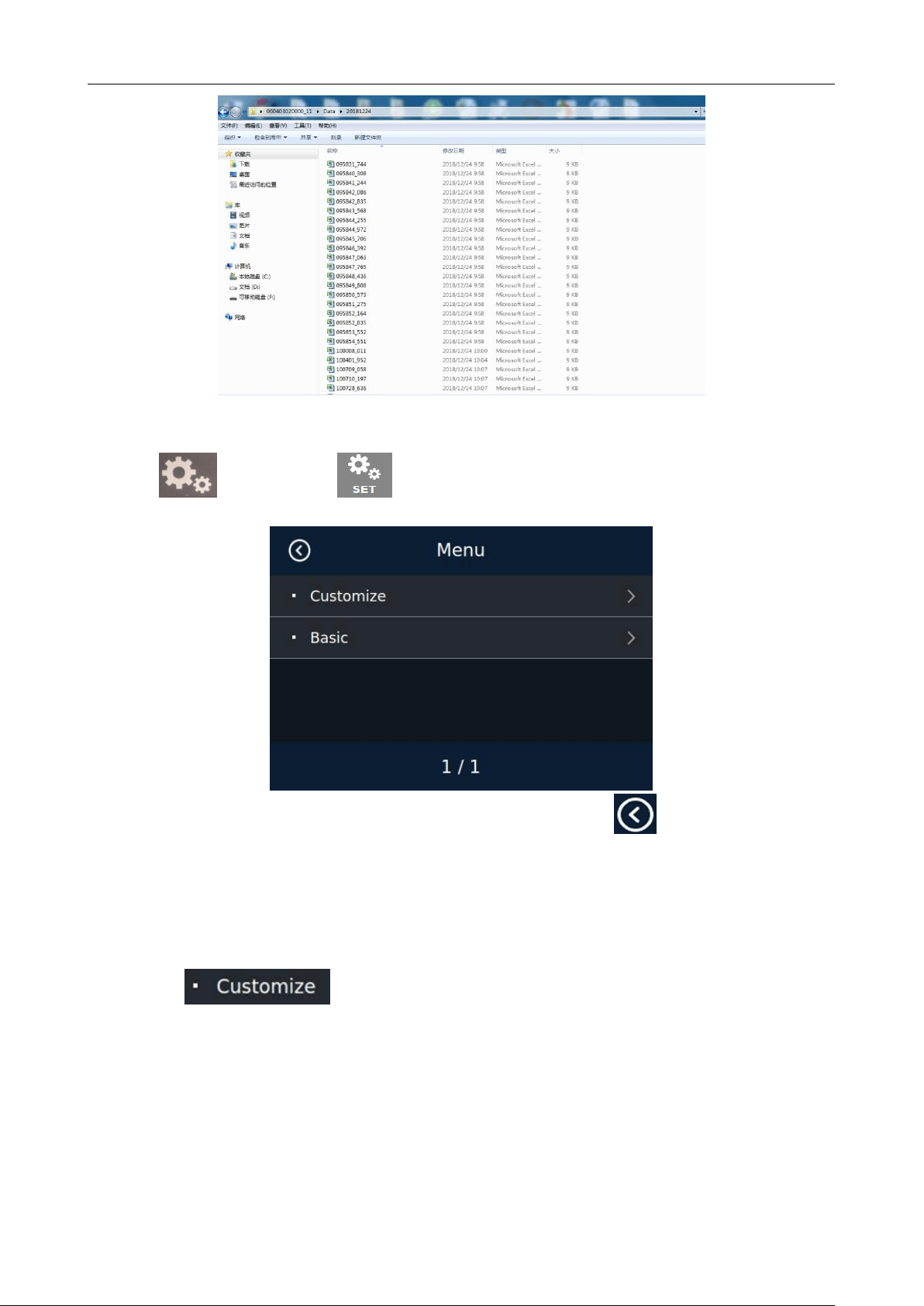
At the same time, the folder stored in the upper computer will automatically generate a Data
folder . Open the folder to find the corresponding list information.
Details of Counting
Serial Number
BC-55 User Manual V1.5
29
8. User Setting
Press the key or touch the key to enter the user setting interface as shown in the following
figure:
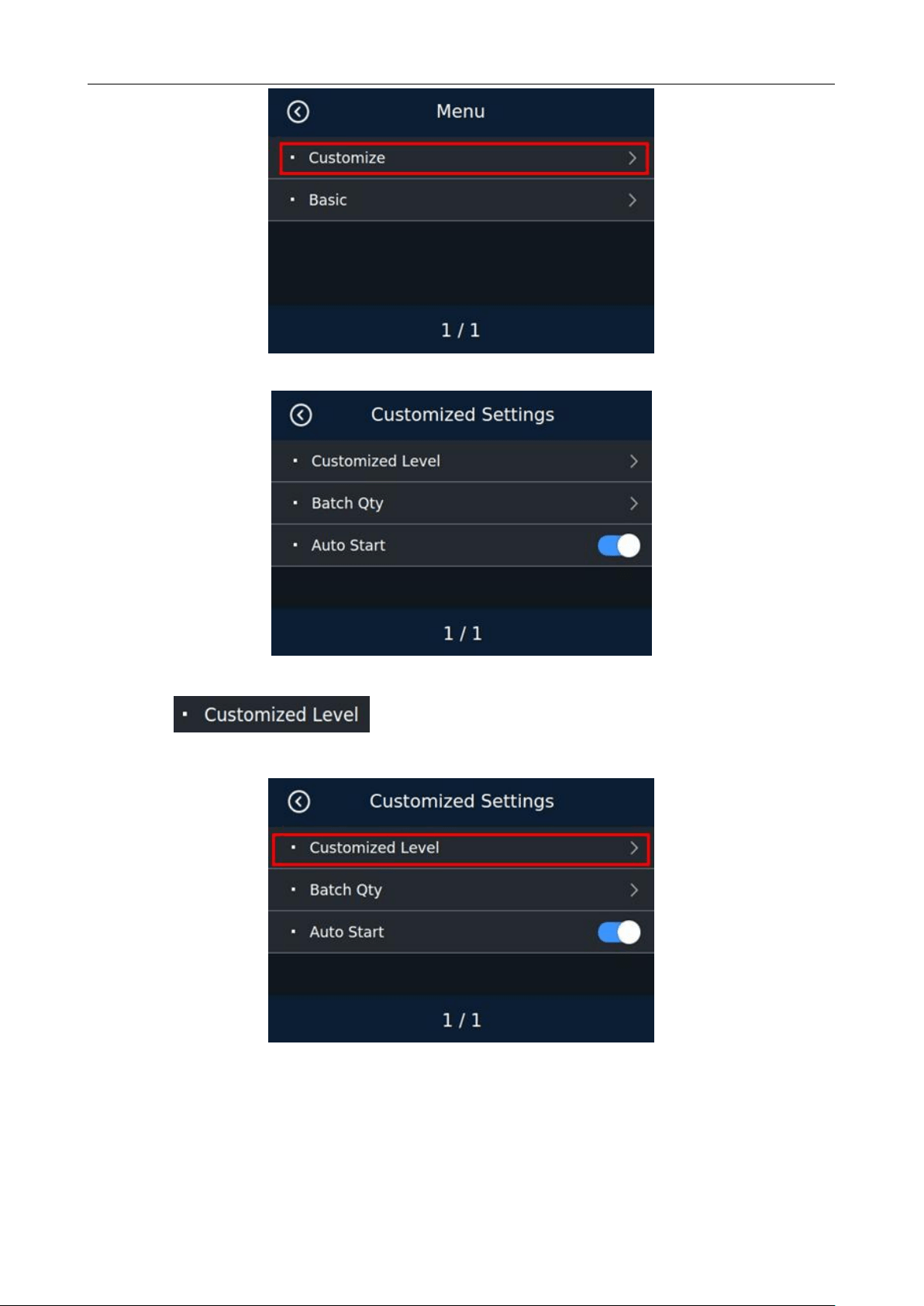
Touch the corresponding option to enter the next level, press ESC or touch to return to the previous
level interface.
8.1 Preferences Setting
Touch “ ” option to enter the preferences setting interface, which contains three
parameter settings of false detection gear, preset number and auto-start:
BC-55 User Manual V1.5
30
8.1.1 Counterfeit detection level setting
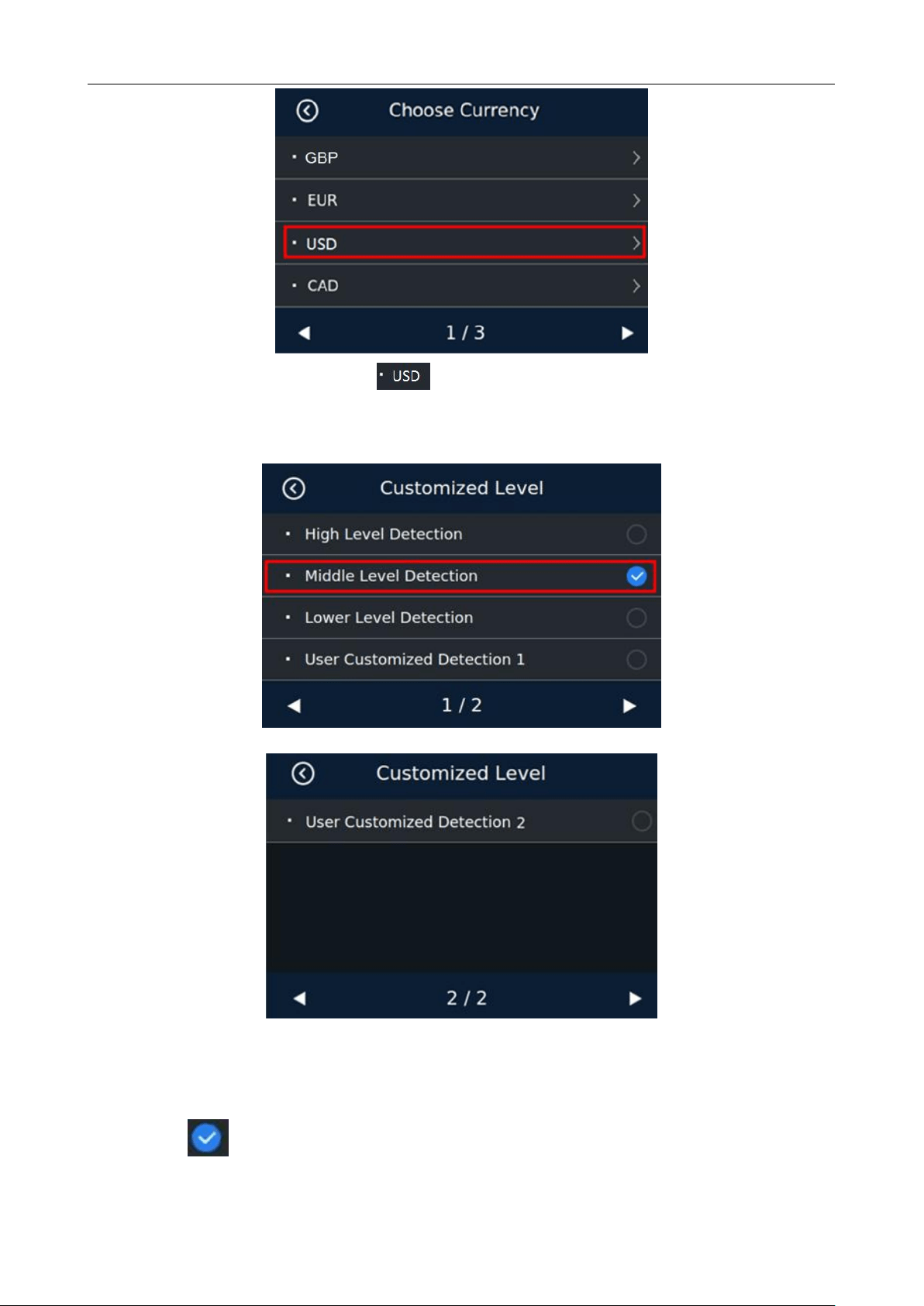
Touch“ ”option to enter the Counterfeit detection level setting, as shown in the
following figure:
The currency selection interface will appear:
BC-55 User Manual V1.5
31
Take US dollors as an example, touch " "to enter the interface of Japanese yen counterfeit detection
setting, as shown in the following figure:
False detection gear setting interface 1
False detection gear setting interface 2
There are three levels optional under this setting interface: High, medium and low. The higher the level
is, the higher the counterfeit detection sensitivity will be. Users can select the appropriate file location and
touch the back to confirm saving. The default level is medium. Customized counterfeit detection 1 and
customized counterfeit detection 2 are not recommended for customers to directly change and use.
BC-55 User Manual V1.5
32
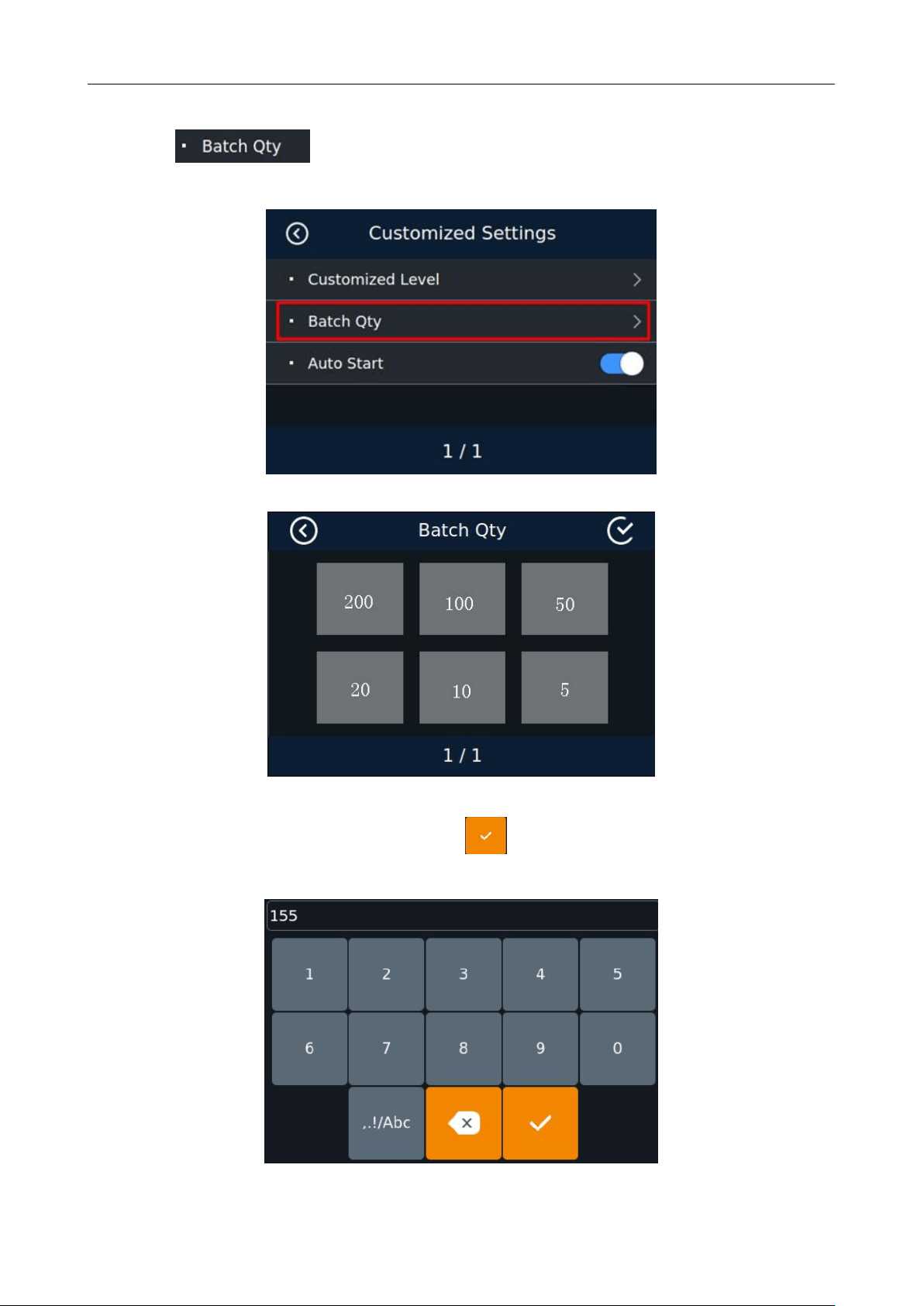
8.1.2 Batch setting
Touch“ ”option under the preference setting interface to enter the following interface
as shown in the figure:
Touch the corresponding Batch number under this setting interface, directly enter the value to be
changed (155 as shown in the figure below), and touch to confirm and exit. As shown in the following
figure:
BC-55 User Manual V1.5
33
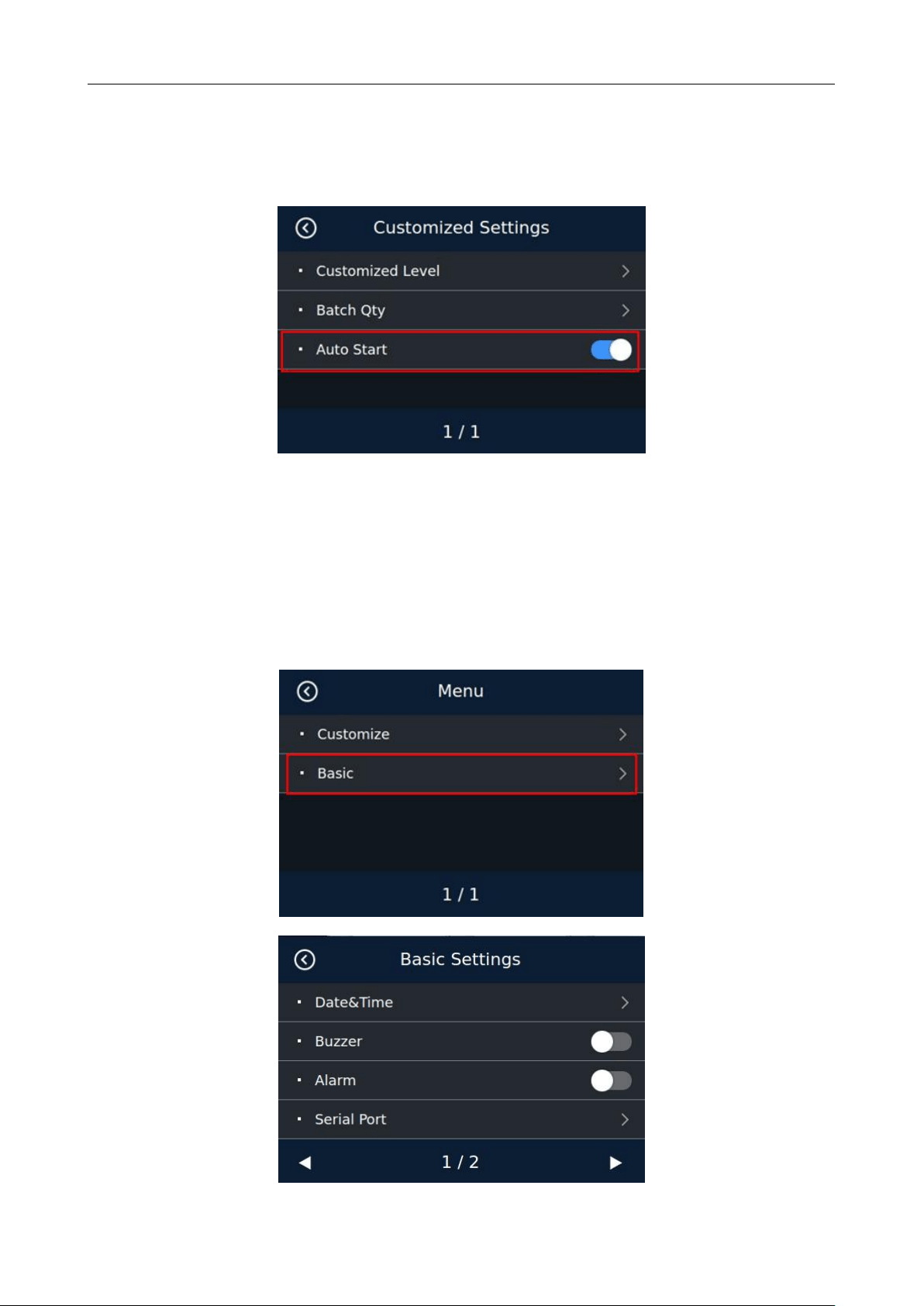
8.1.3 Auto-start function setting
Touch the auto-start option under the preference setting interface to switch on and off, as shown in the
figure:
After this function is turned on, the machine will automatically start counting when banknotes are
placed at the hopper
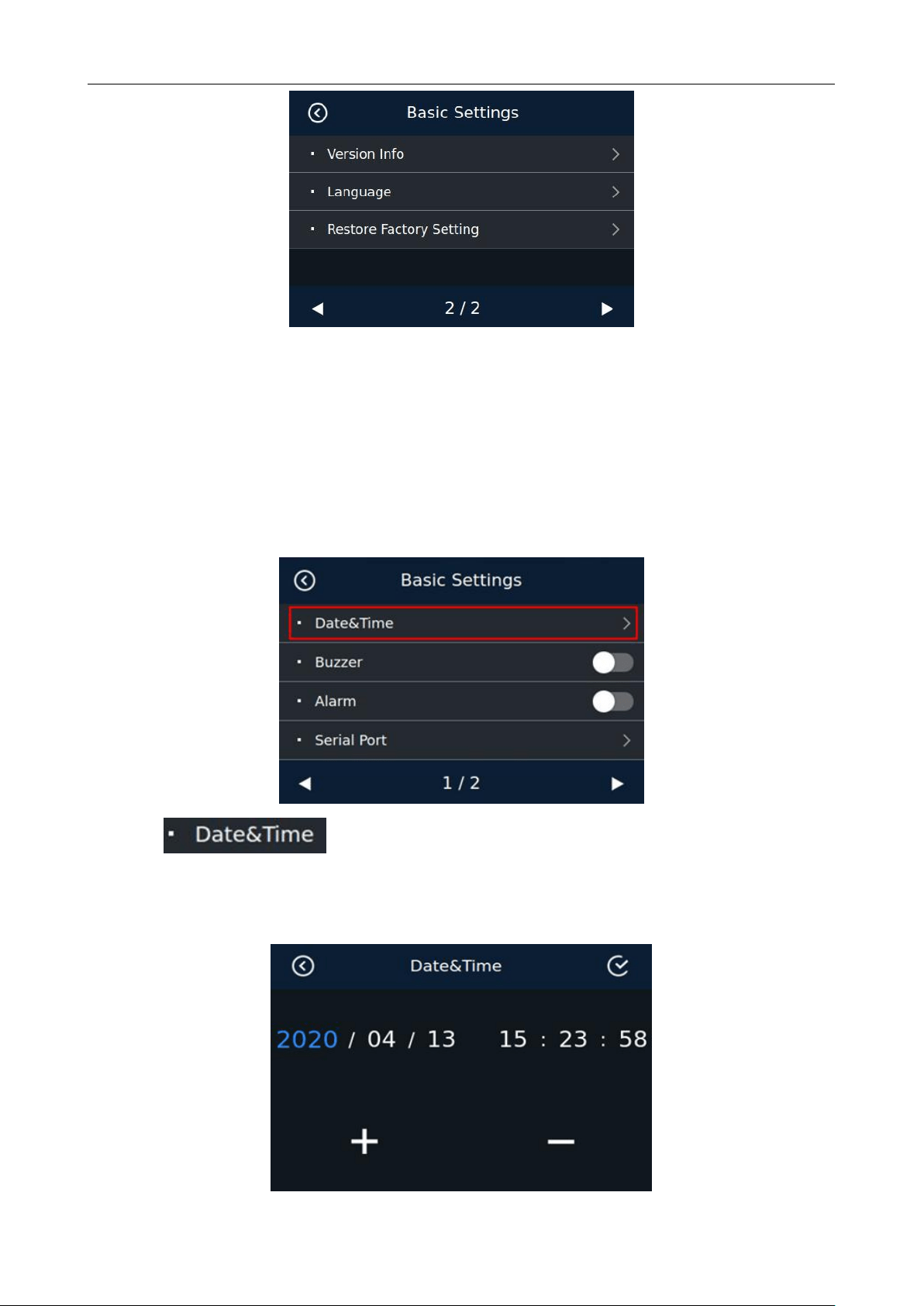
8.2 Basic Setting
Touch the basic setting option in the menu interface to enter the basic setting interface:
BC-55 User Manual V1.5
34
Under this interface, there are 7 items that can be checked or changed, including date/time, buzzer,
alarm, serial port, version information, language, and factory settings. Touch left and right keys to check or
change the items.
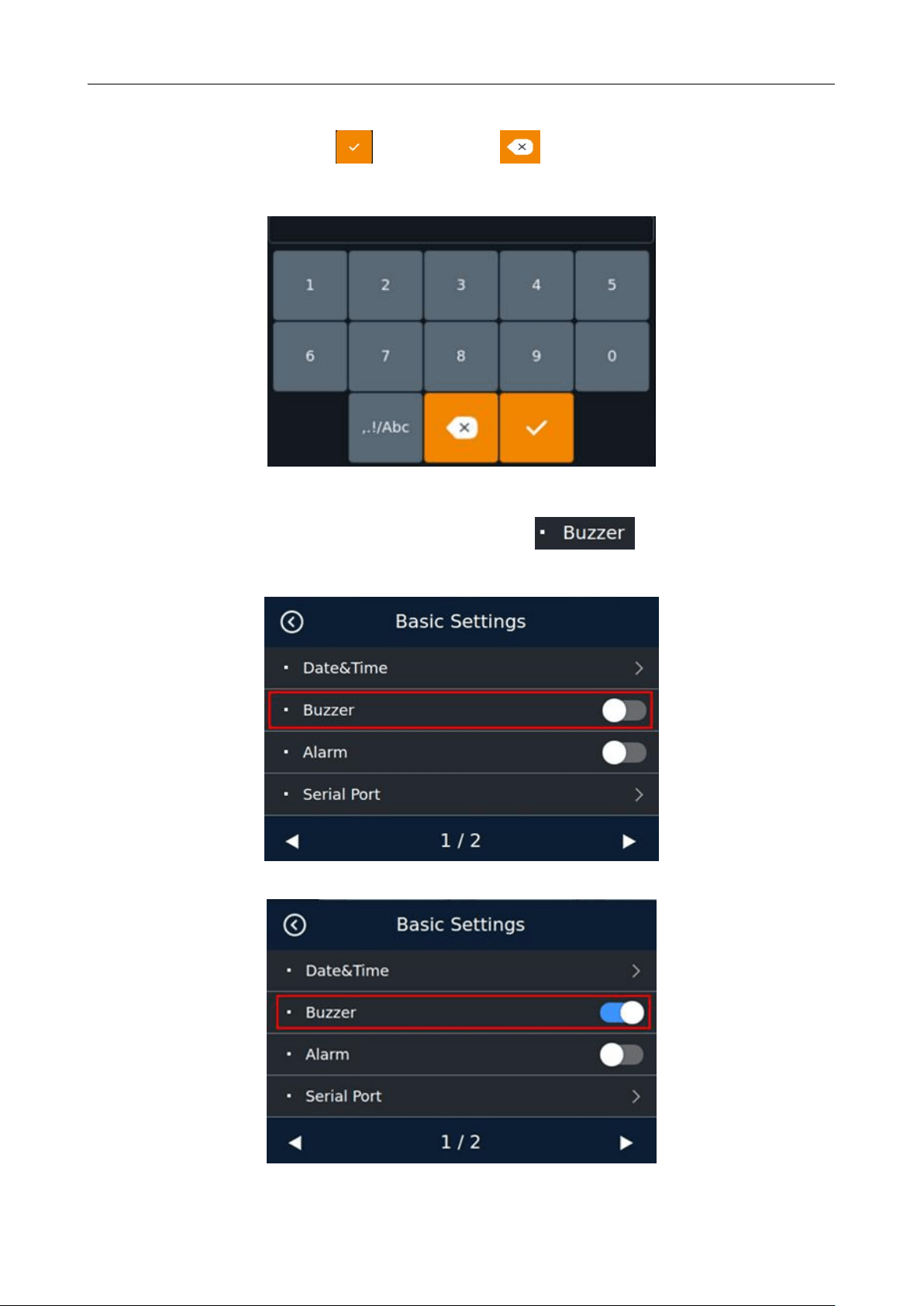
8.2.1 Date and Time Setting
Touch the date and time option in the basic setting interface to enter the time setting interface, as shown
in the following figure:
Touch to enter the time and date setting interface, as shown below:
Touch the corresponding value once, touch the "+" key to increase the value by 1, and touch the "-"key
to decrease the value by 1, as shown in the following figure:
BC-55 User Manual V1.5
35
Touch the corresponding numerical value twice to enter the number change interface, directly touch the
corresponding number input, touch key to save ,and key to delete, as shown in the following
figure:
8.2.2 Buzzer Setting
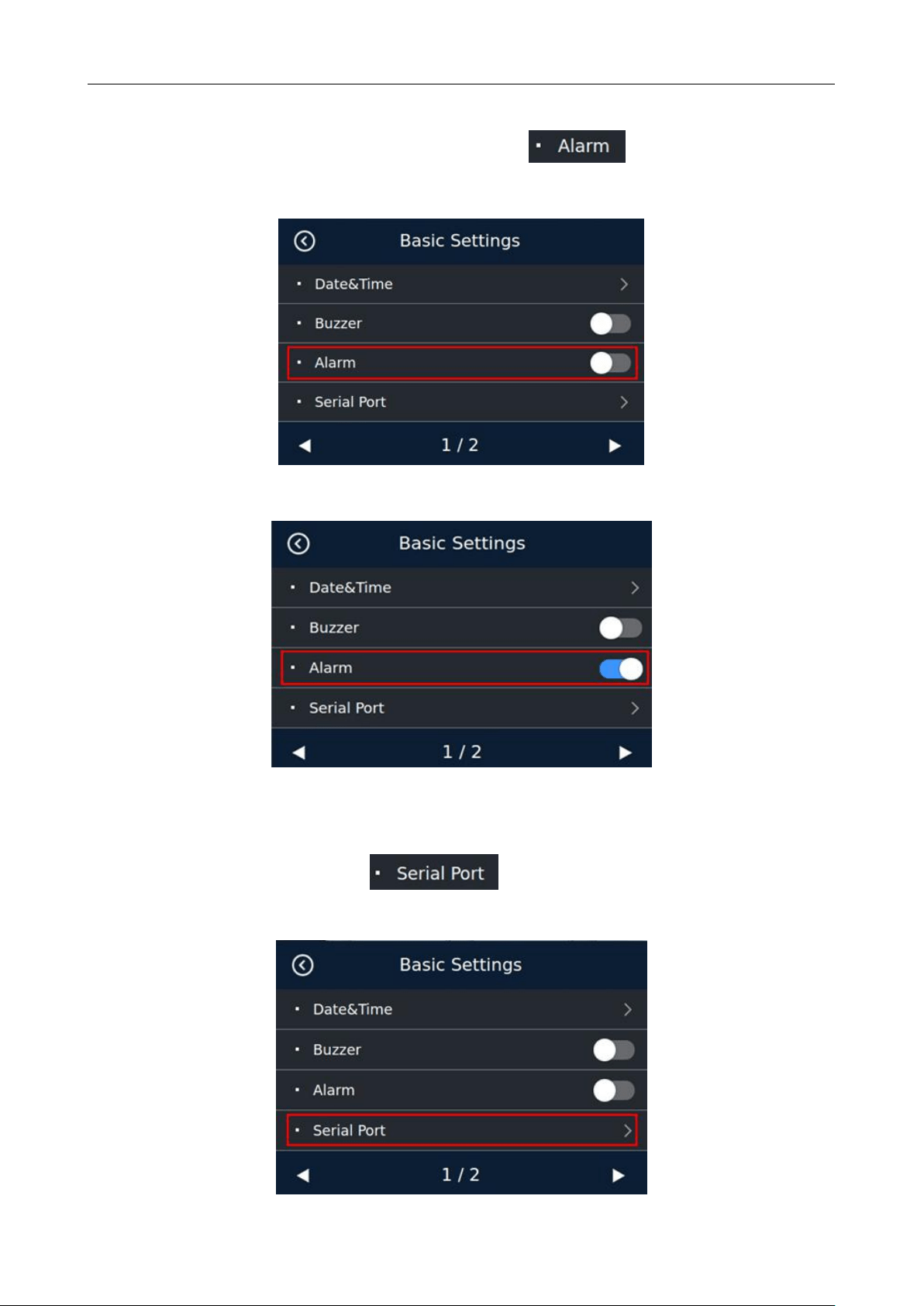
In the basic setting interface, touch the switch button of the option to control the buzzer
on and off.
The above picture shows the buzzer off
The above picture shows the buzzer on
BC-55 User Manual V1.5
36
8.2.3 Alarm Setting
In the basic setting interface, touch the switch button of the option to control the alarm on
and off.
The above picture shows the alarm off
The above picture shows the alarm on
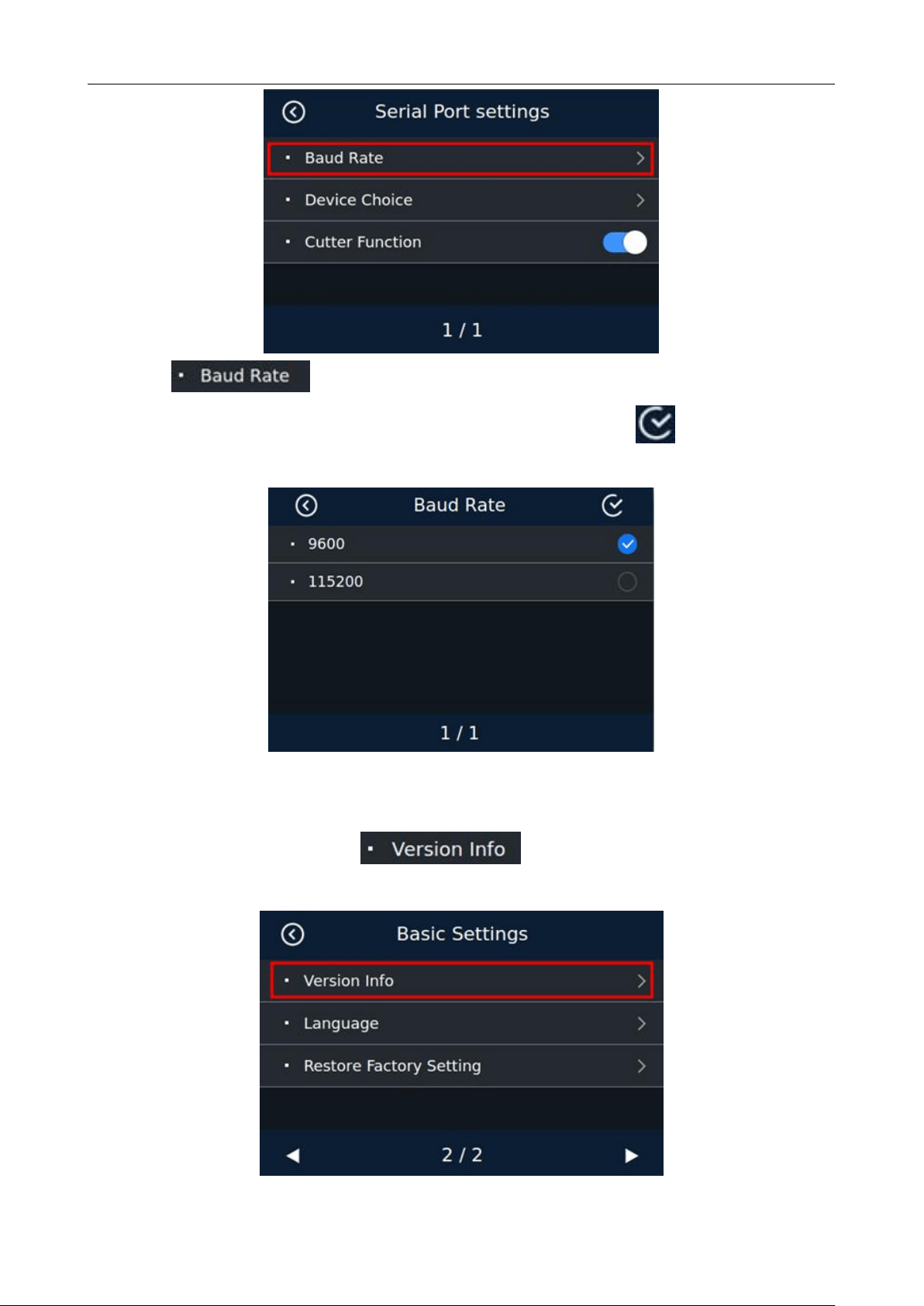
8.2.4 Serial Port Setting
In the basic setting interface, touch option to enter the serial port baud rate setting
interface.
BC-55 User Manual V1.5
37
In the selection interface, touch 9600 or 115200 to select the corresponding baud
rate according to the actual situation of the external device. And then click the key in the upper right
corner to save.The machine will prompt you to restart the machine.
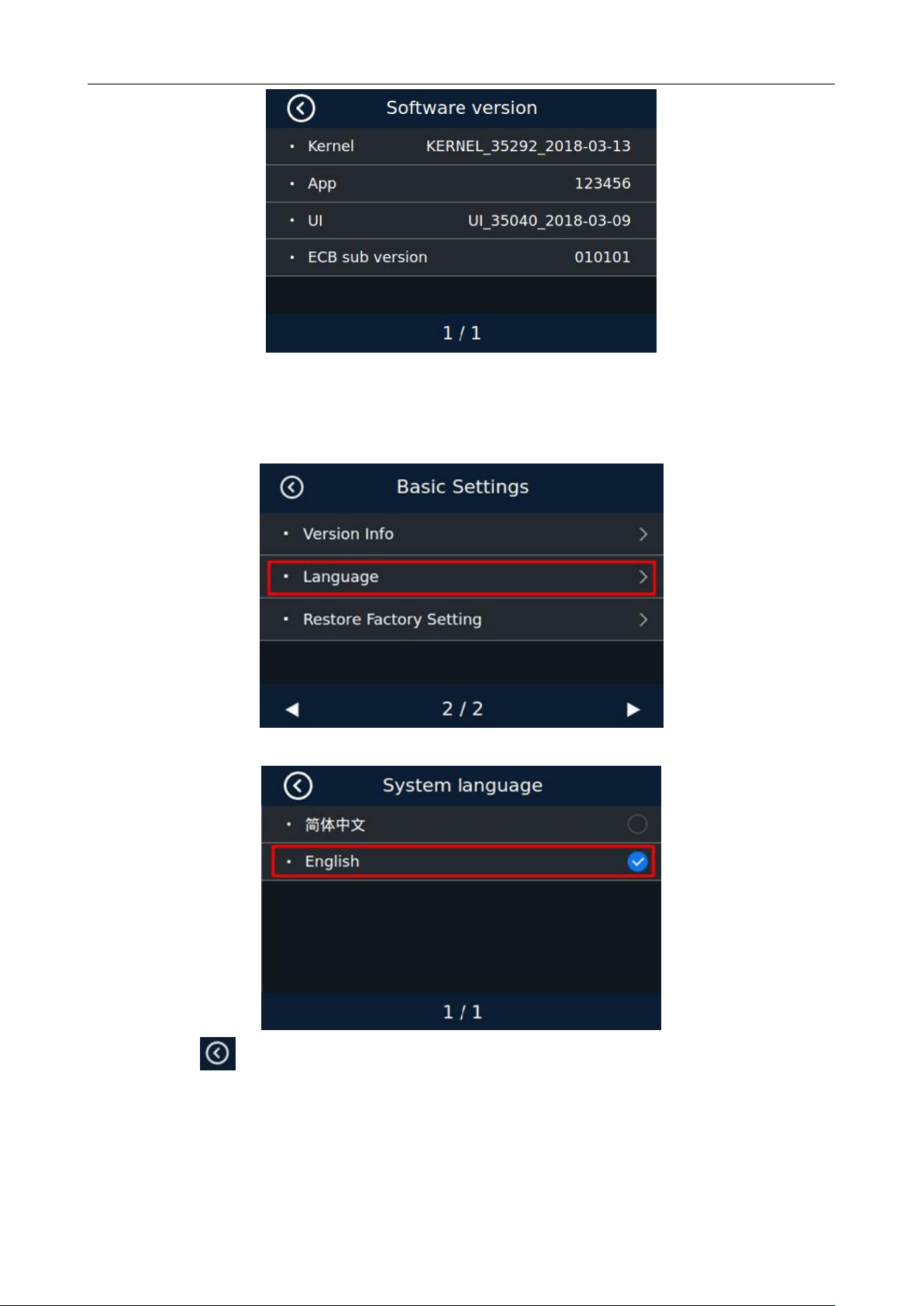
8.2.5 Software Version Viewing
In the basic setting interface, touch option to enter the software version viewing
interface, as shown in the following figure:
BC-55 User Manual V1.5
38
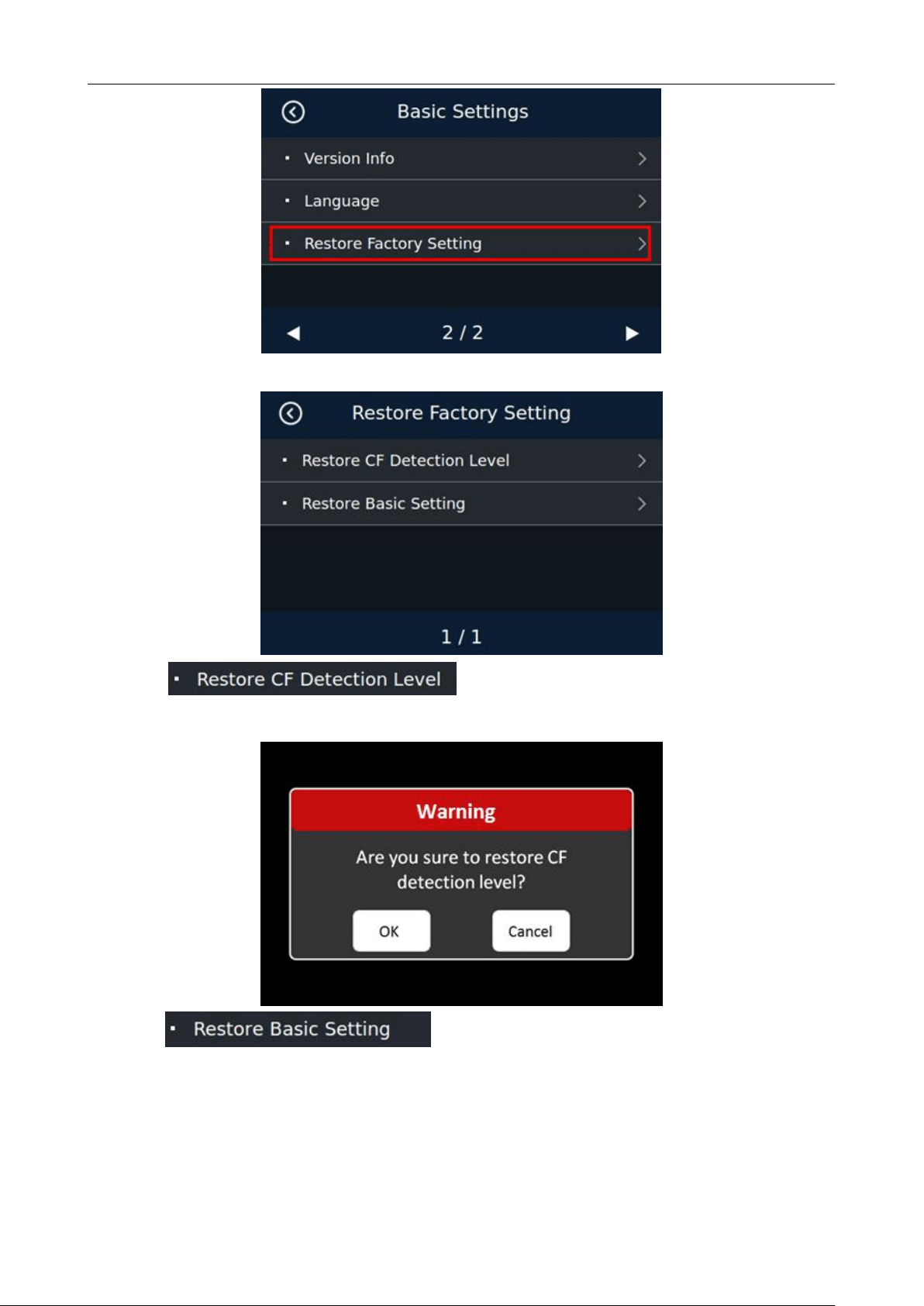
8.2.6 Language Setting
Touch the language option in the basic setting interface to enter the language setting interface, as shown
in the following figure. Touch the corresponding language type to select it.
Click on the key on top left corner of the screen to restart the machine according to the prompt.
8.2.7 Restore Factory Setting
Touch the Restore Factory Setting option in the Basic Setting interface to enter the Restore Factory
Setting interface, as shown in the following figure:
BC-55 User Manual V1.5
39
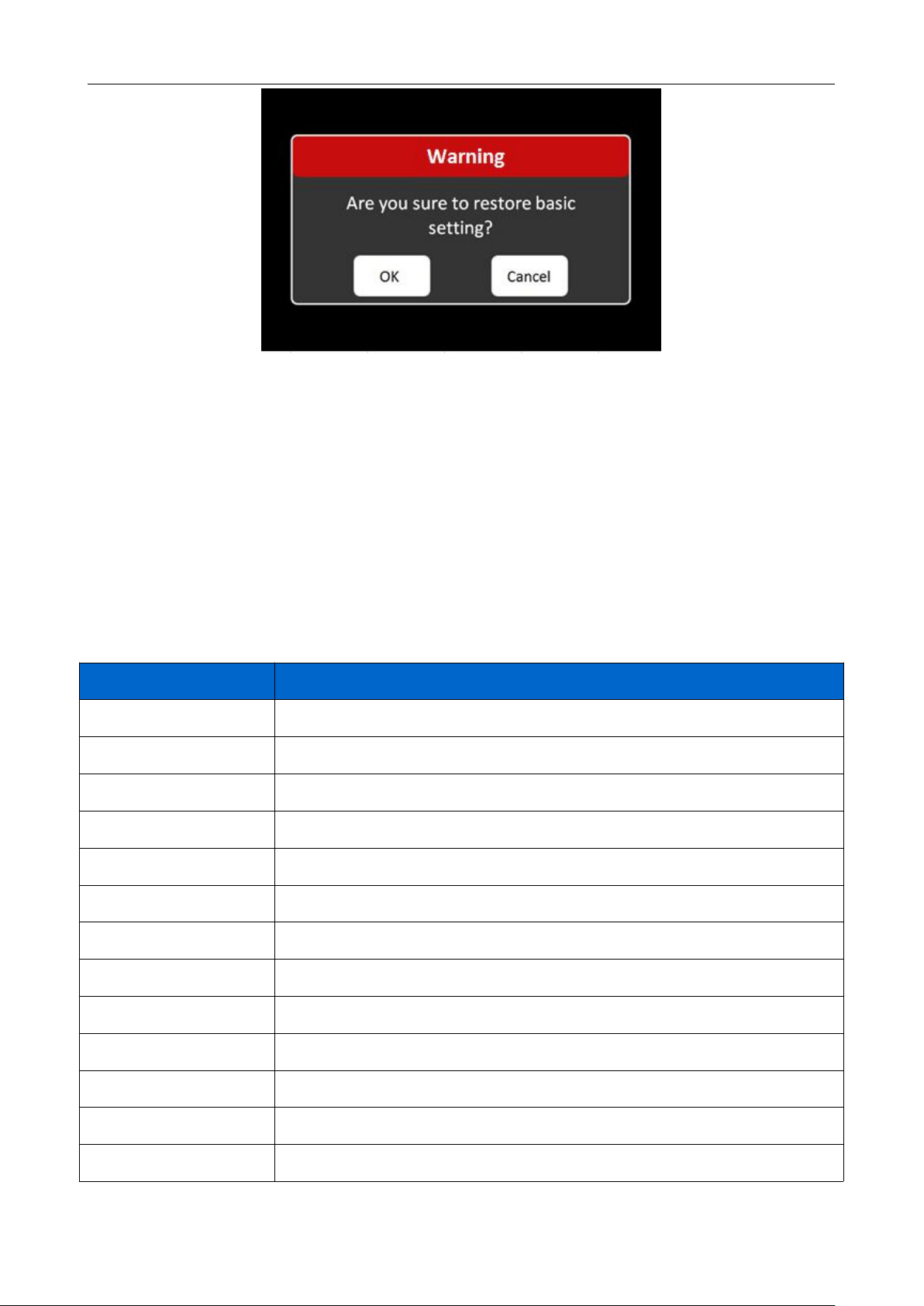
Touch option. Click OK to restore all counterfeit detection
levels to factory settings;
Touch option. Click OK to restore all counterfeit detection
levels to factory settings.
BC-55 User Manual V1.5
40
9. Common Error Codes Descriptions
In the process of using the machine, the machine may show abnormal state, resulting in abnormal
operation, and the machine will display corresponding fault information. The following provides the
phenomenon when the machine malfunctions. Please refer to the maintenance manual for specific handling
methods. If the user still cannot solve the problem according to the maintenance manual, please contact the
local agent.
System error code:
Code
Code meaning
3001
Virtual device open
3002
Virtual device error
3004
Network error
3008
Display communication error
3009
RTC ERROR
3101
MOTOR ERROR
3102
INCODE ERROR
3310
PS2 ERROR
3401
LOWER CIS ERROR
3402
UPPER CIS ERROR
3501
HOPPER SENSOR ERROR
3502
STACKER SENSOR ERROR
3901
PASSAGE OPEN

BC-55 User Manual V1.5
41
Counting error code:
Error reporting code
Reason for error
51
White light image, image denomination not recognized
151-159
Infrared images, each code represents a counterfeit detection point with inconsistent
characteristics
202
Ultraviolet emission abnormal
203
Ultraviolet projection abnormal
351
Big magnetic number (BM)
463
Inconsistent edge magnetic characteristics (number)
471-482
Magnetic image abnormal, divided according to the magnetic head in which
abnormal signals appear
501
Serial number error
551, 555
Reject (tilt)
552
Reject (damage)
553, 556
Reject (chained)
554
Reject (incompletion)
557
Reject (sticked)
901
Different denominations, different from the first denomination
10. Software Upgrade
U-disk upgrade method is adopted for the software upgrade of this product, and the upgrade file (master
control software: .ZPK, e.g. BC55_1_20180413.DF61CBFADD1A723E.ZPK) needs to be copied
to the root directory of the U-disk (please do not change the file name or format of the upgrade file, and there
cannot be two or more upgrade files in the root directory of the U-disk), and then insert the USB disk into the
USB interface at the rear of the machine.
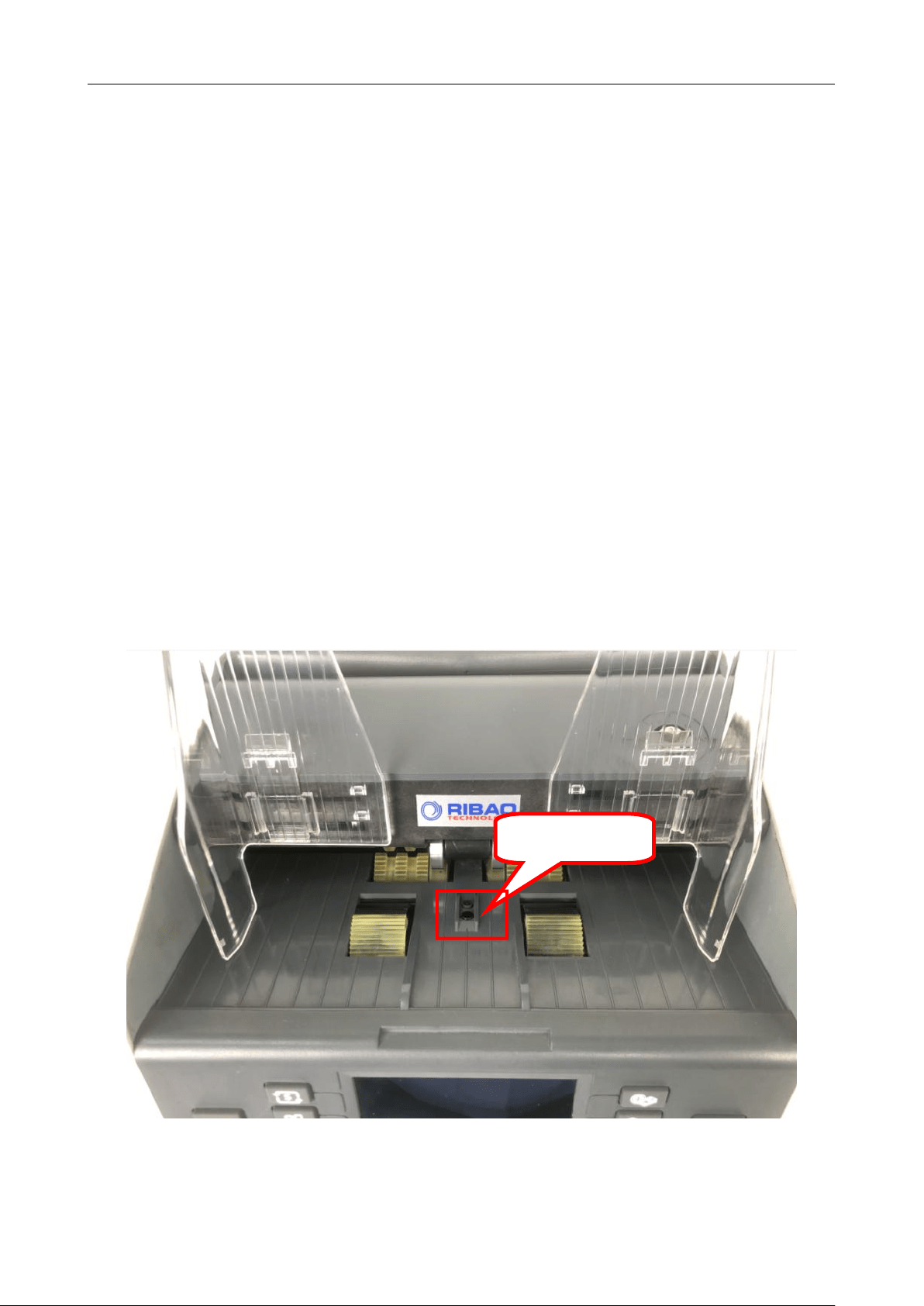
When the power switch is turned on, the machine will automatically recognize the upgrade file. Upon
successful recognition,the interface shows "Upgrade pack is found, update after 5 seconds" and it will
automatically enter the upgrade state after 5 seconds. The interface shows "Updating". The upgrade will be
BC-55 User Manual V1.5
42
completed within one minute. The interface shows "Update complete, Please remove the U-disk and reboot"
which means the upgrade is successful, and restart according to the prompt.
11. Daily Maintenance
Any dust, dirt or other substances sticking to the sensor will interfere with the normal operation of the
sensor and cause erroneous counting results. Therefore, the sensor and roller shaft shall be cleaned with the
attached cleaning tools as necessary every day.
Please turn off the power switch before cleaning to prevent electric shock or other injury accidents.
Please do not use chemicals such as benzene, thinner or water, which may cause fading or cracking of
the machine.
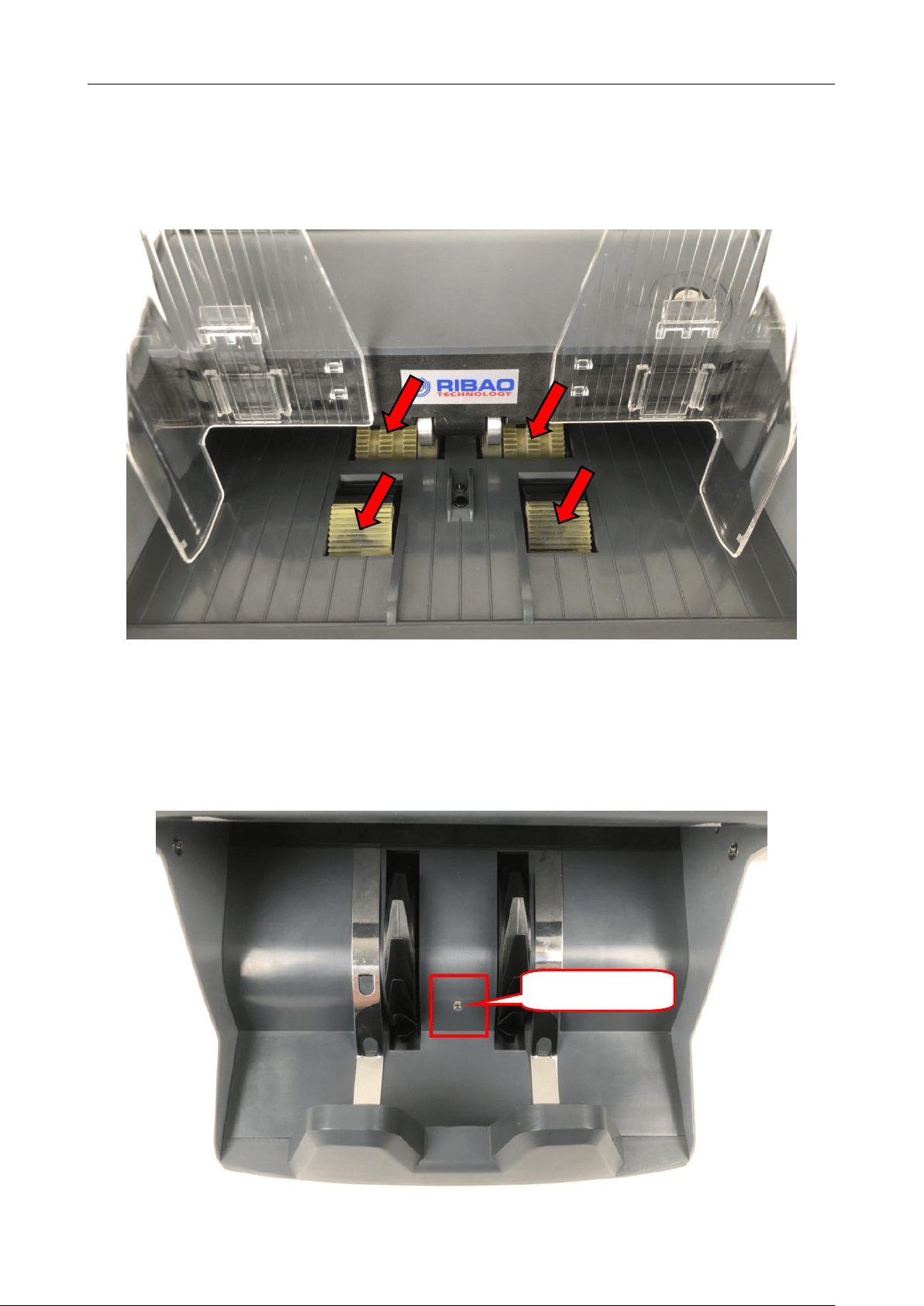
11.1 Clean the hopper sensor
As shown in the figure, clean the start-up sensor with nylon brush or cleaning cloth.
Hopper Sensor
BC-55 User Manual V1.5
43
11.2 Clean the drum roller shaft and feed roller shaft
As shown in the following figure, clean the drum roller shaft and feed roller shaft with nylon brush or
cleaning cloth.
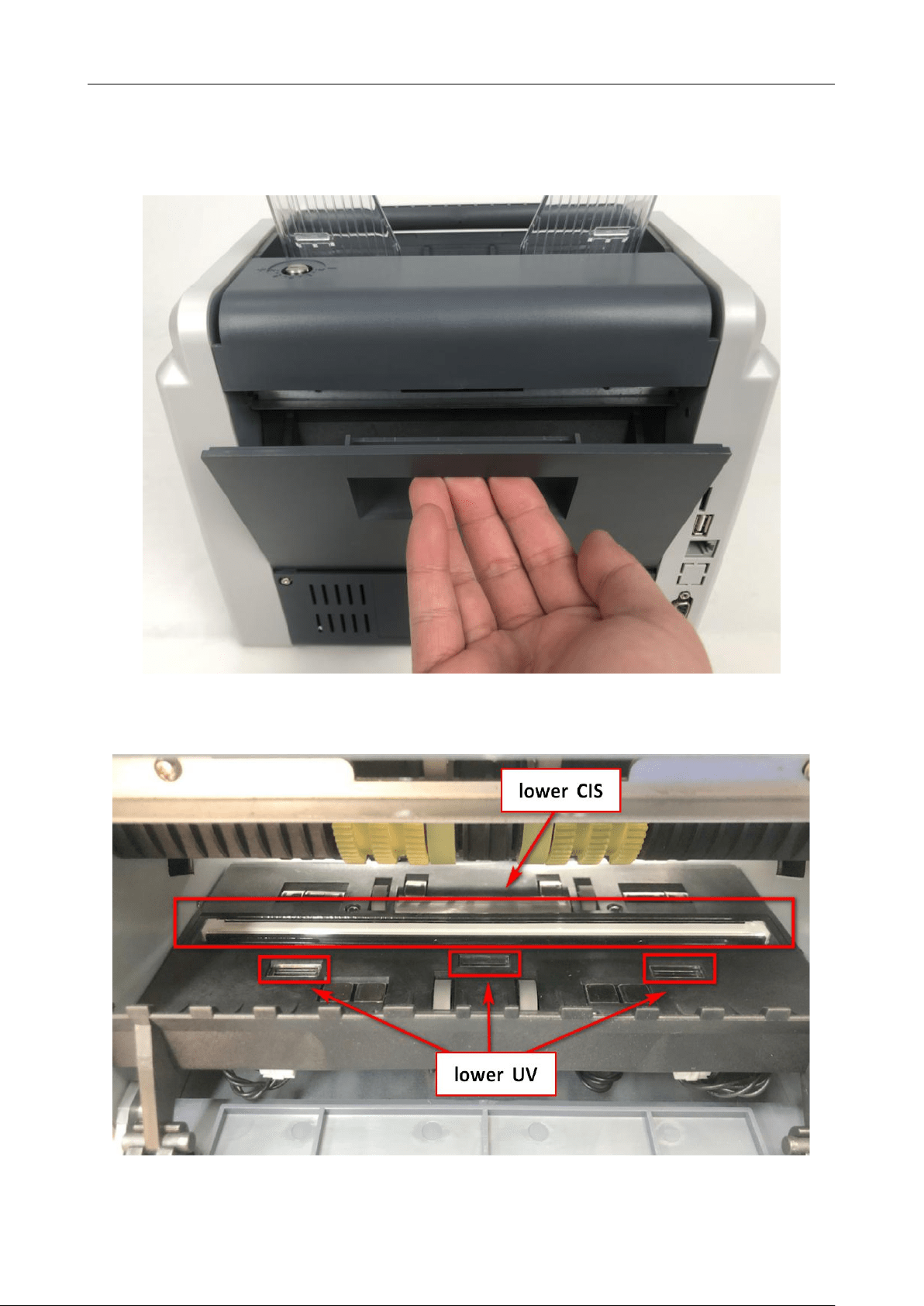
11.3 Clean the stacker sensor
As shown in the following figure, clean the sensor with nylon brush or cleaning cloth. (ST)
Stacker Sensor
BC-55 User Manual V1.5
44
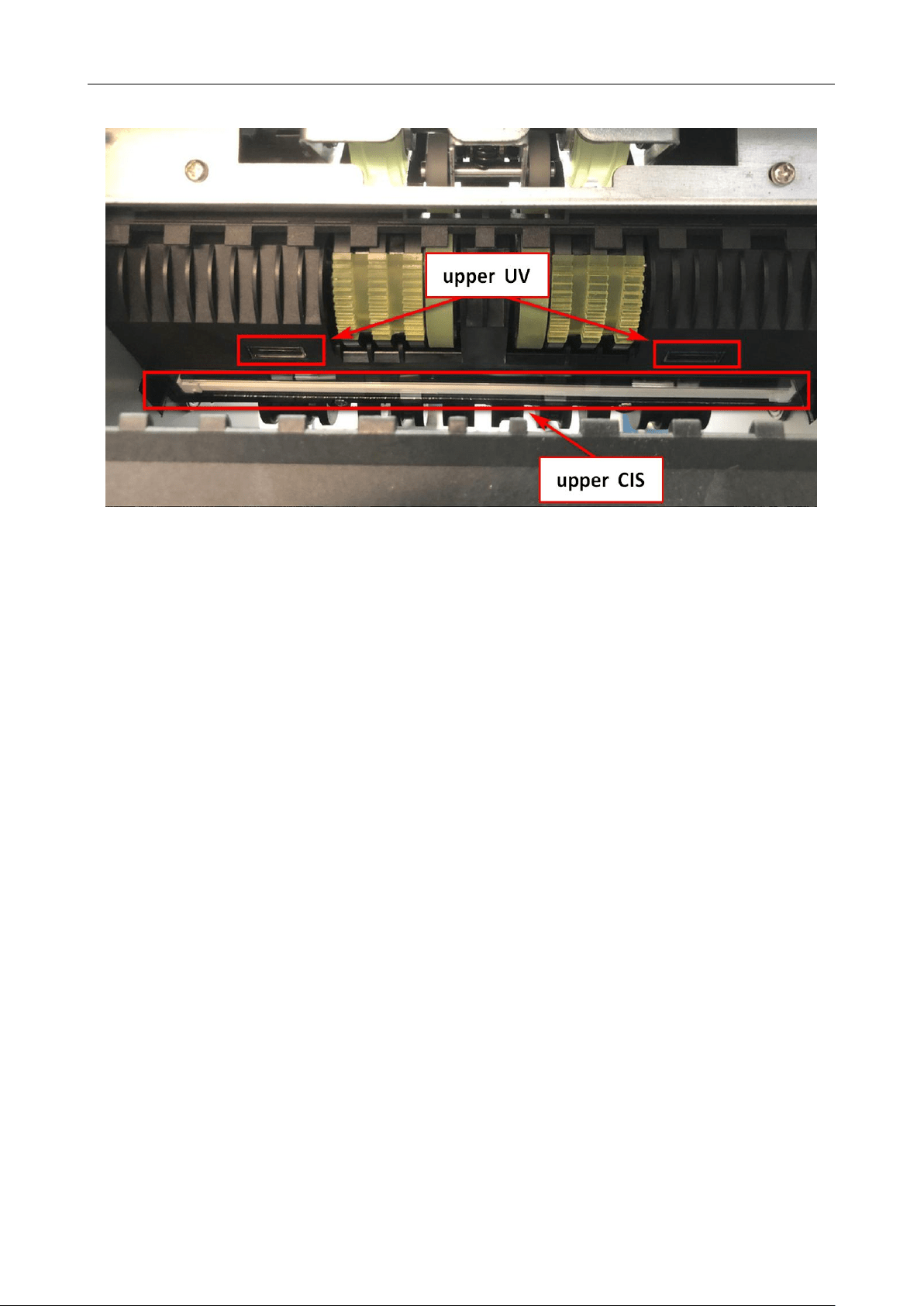
11.4 Clean the internal sensors
1) Pull the back cover in the direction shown in the figure to open the back cover.
2) Clean the lower UV sensor and lower CIS with nylon brush respectively as shown in the following figure.
BC-55 User Manual V1.5
45
3) Clean the upper UV sensor and upper CIS with nylon brush as shown in the following figure.

BC-55 User Manual V1.5
46
12. Accessories
1. Power cord 1
2. Nylon brush 1
3. Manual 1
4. External display (optional) 1
5. External printer (optional) 1
*** Our company reserves the right to change the Manual in order to continuously improve our
products. ***