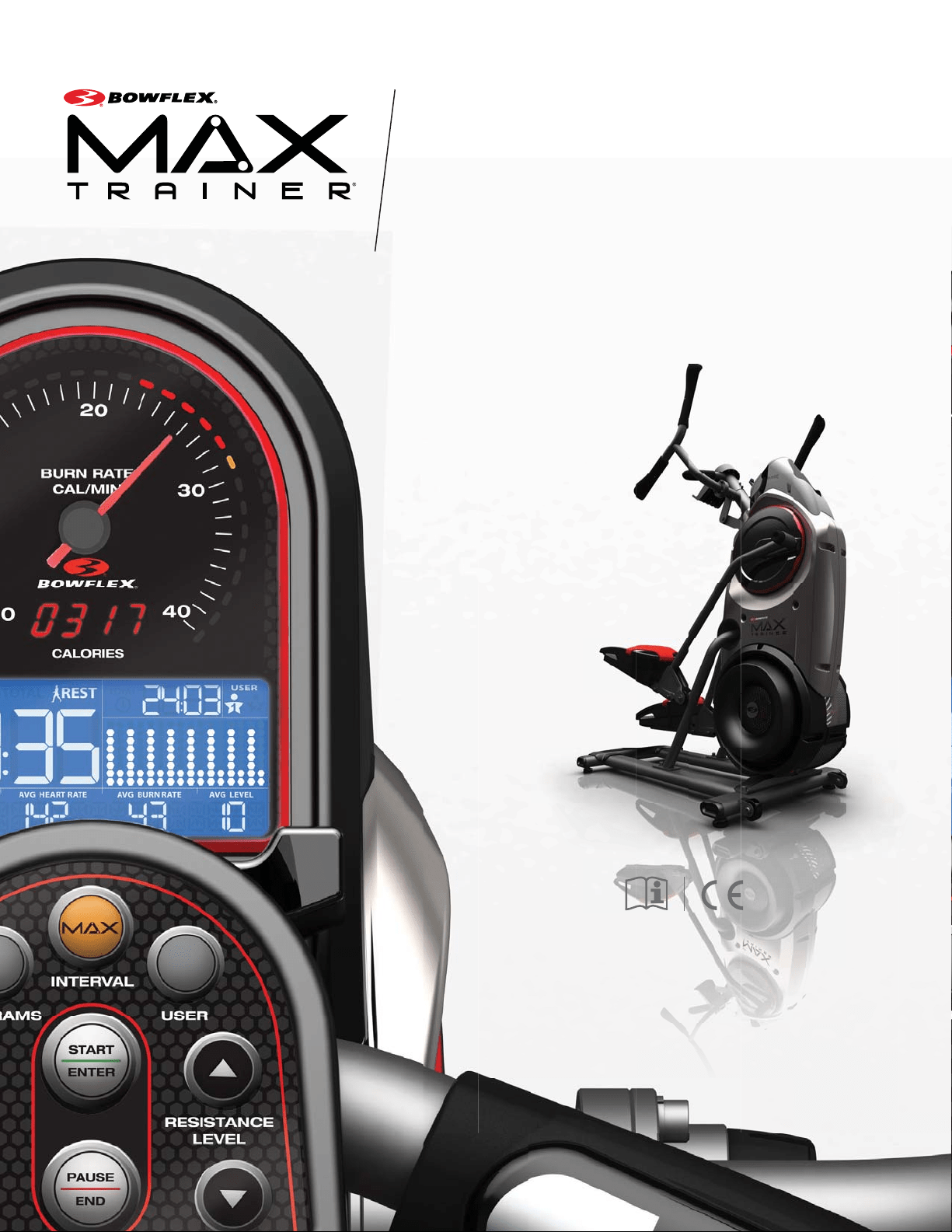
M5i
This product is compliant with the
applicable CE requirements.
ASSEMBLY / OWNER’S MANUAL

Assembly / Owner’s Manual
2
Important Safety Instructions 3
Safety Warning Labels / Serial Number 5
6SHFL¿FDWLRQV
%HIRUH$VVHPEO\
Parts 7
Hardware 8
Tools 8
Assembly 9
Moving the Machine 18
Leveling the Machine 18
Features 19
Console Features 20
Fitness Basics 25
Operations 31
Mounting / Dismounting 31
Getting Started 32
Power Up / Idle Mode 32
Manual (Quick Start) Program 33
MAX Workout Program 33
Workout Programs 34
3DXVHG5HVXOWV0RGH
(GLWD8VHU3UR¿OH
&XVWRPL]H0$;3URJUDP
Customize the Workout Goals 37
Console Setup Mode 38
Maintenance 39
Maintenance Parts 40
Troubleshooting 42
Body Weight Loss Guide 45
Table of Contents / Registration
To validate warranty support, keep the original proof of purchase and record the following information:
Serial Number __________________________
Date of Purchase ____________________
To register your product warranty, contact your local distributor.
)RUGHWDLOVUHJDUGLQJSURGXFWZDUUDQW\RULI\RXKDYHTXHVWLRQVRUSUREOHPVZLWK\RXUSURGXFWSOHDVHFRQWDFW\RXUORFDO%RZÀH[
GLVWULEXWRU7R¿QG\RXUORFDOGLVWULEXWRUJRWR www.nautilusinternational.com
Nautilus, Inc., www.nautilusinternational.com | Nautilus, Inc., 5415 Centerpoint Parkway, Groveport, OH 43125 USA | Printed in China | © 2014 Nautilus,
Inc. | ® indicates trademarks registered in the United States. These marks may be registered in other nations or otherwise protected by common law.
%RZÀH[WKH%ORJR%RZÀH[0D[7UDLQHU0D[7UDLQHU6HOHFW7HFK%RZÀH[7UDLQHU1DXWLOXV6FKZLQQDQG8QLYHUVDODUHWUDGHPDUNVRZQHGE\RU
licensed to Nautilus, Inc. Google Play is a trademark of Google Inc. App Store is a service mark of Apple Inc. The Bluetooth
®
word mark and logos are
UHJLVWHUHGWUDGHPDUNVRZQHGE\%OXHWRRWK6,*,QFDQGDQ\XVHRIVXFKPDUNVE\1DXWLOXV,QFLVXQGHUOLFHQVH3RODU2ZQ&RGH0\)LWQHVV3DODQG
Nut Thins are trademarks of their respective owners.
25,*,1$/0$18$/(1*/,6+9(56,2121/<
Assembly / Owner’s Manual
3
Important Safety Instructions
When using an electrical appliance, basic precautions should always be followed, including the following:
This icon means a potentially hazardous situation which, if not avoided, could result in death or serious injury.
Obey the following warnings:
Read and understand all warnings on this machine.
Carefully read and understand the Assembly instructions.
Carefully read and understand the Assembly instructions. Read and understand the complete Manual. Keep the Manual
for future reference.
To reduce the risk of electrical shock or unsupervised usage of the equipment, always unplug this machine from the
electrical outlet immediately after using and before cleaning.
To decrease the risk of burns, electric shock, or injury to persons, read and understand the complete Owner’s Manual.
Failure to follow these guidelines can cause a serious or possibly fatal electrical shock or other serious injury.
• Keep bystanders and children away from the product you are assembling at all times.
• Do not connect power supply to the machine until instructed to do so.
• The machine should never be left unattended when plugged in. Unplug from outlet when not in use and before cleaning, maintaining or repairing
the machine.
%HIRUHHDFKXVHH[DPLQHWKHPDFKLQHIRUGDPDJHWRSRZHUFRUGORRVHSDUWVRUVLJQVRIZHDU'RQRWXVHLIIRXQGLQWKLVFRQGLWLRQ&RQWDFW
your local distributor for repair information.
• Not intended for use by persons with medical conditions where those conditions may impact the safe operation of the machine or pose a risk of
injury to the user.
• Do not drop or put objects into any opening of the machine.
• Never operate this machine with the air openings blocked. Keep the air openings free of lint, hair and the like.
• Do not assemble this machine outdoors or in a wet or moist location.
0DNHVXUHDVVHPEO\LVGRQHLQDQDSSURSULDWHZRUNVSDFHDZD\IURPIRRWWUDI¿FDQGH[SRVXUHWRE\VWDQGHUV
• Some components of the machine can be heavy or awkward. Use a second person when doing the assembly steps involving these parts. Do
not do steps that involve heavy lifting or awkward movements on your own.
• Set up this machine on a solid, level, horizontal surface.
• Do not try to change the design or functionality of this machine. This could compromise the safety of this machine and will void the warranty.
• If replacement parts are necessary, use only genuine Nautilus replacement parts and hardware. Failure to use genuine replacement parts can
cause a risk to users, keep the machine from operating correctly and void the warranty.
• Do not use until the machine has been fully assembled and inspected for correct performance in accordance with the Manual.
5HDGDQGXQGHUVWDQGWKHFRPSOHWH0DQXDOVXSSOLHGZLWKWKLVPDFKLQHEHIRUH¿UVWXVH.HHSWKH0DQXDOIRUIXWXUHUHIHUHQFH
• Do all assembly steps in the sequence given. Incorrect assembly can lead to injury or incorrect function.
• SAVE THESE INSTRUCTIONS.

Assembly / Owner’s Manual
4
Before using this equipment, obey the following warnings:
Read and understand the complete Manual. Keep the Manual for future reference.
Read and understand all warnings on this machine. If at any time the Warning stickers become loose, unreadable or dislodged,
contact your local distributor for replacement stickers.
To reduce the risk of electrical shock or usage of the equipment, always unplug the power cord from the wall outlet and
the machine and wait 5 minutes before cleaning, maintaining or repairing the machine. Place the power cord in a secure location.
• Children must not be let on or near to this machine. Moving parts and other features of the machine can be dangerous to children.
• Not intended for use by anyone under 14 years of age.
&RQVXOWDSK\VLFLDQEHIRUH\RXVWDUWDQH[HUFLVHSURJUDPRUDQHZKHDOWKDQGGLHWSODQ6WRSH[HUFLVLQJLI\RXIHHOSDLQRUWLJKWQHVVLQ\RXU
chest, become short of breath, or feel faint. Contact your doctor before you use the machine again. Use the values calculated or measured
E\WKHPDFKLQH¶VFRPSXWHUIRUUHIHUHQFHSXUSRVHVRQO\7KHKHDUWUDWHGLVSOD\HGRQWKHFRQVROHLVDQDSSUR[LPDWLRQDQGVKRXOGEHXVHGIRU
reference only.
%HIRUHHDFKXVHH[DPLQHWKLVPDFKLQHIRUORRVHSDUWVRUVLJQVRIZHDU'RQRWXVHLIIRXQGLQWKLVFRQGLWLRQ0RQLWRUWKH3HGDOVDQG&UDQN
Arms closely. Contact your local distributor for repair information.
0D[LPXPXVHUZHLJKWOLPLWNJOEV'RQRWXVHLI\RXDUHRYHUWKLVZHLJKW
• This machine is for home use only.
'RQRWZHDUORRVHFORWKLQJRUMHZHOU\7KLVPDFKLQHFRQWDLQVPRYLQJSDUWV'RQRWSXW¿QJHUVRURWKHUREMHFWVLQWRPRYLQJSDUWVRIWKHH[HUFLVH
equipment.
• Set up and operate this machine on a solid, level, horizontal surface.
• Make the Pedals stable before you step on them. Use caution when you step on and off the machine.
• Do not operate this machine outdoors or in moist or wet locations.
.HHSDWOHDVWP´RQHDFKVLGHRIWKHPDFKLQHFOHDU7KLVLVWKHUHFRPPHQGHGVDIHGLVWDQFHIRUDFFHVVDQGSDVVDJHDURXQGDQG
emergency dismounts from the machine. Keep third parties out of this space when machine is in use.
'RQRWRYHUH[HUW\RXUVHOIGXULQJH[HUFLVH2SHUDWHWKHPDFKLQHLQWKHPDQQHUGHVFULEHGLQWKLVPDQXDO
• Perform all regular and periodic maintenance procedures recommended in the Owner’s Manual.
• Keep the Pedals and Handlebars clean and dry.
([HUFLVHRQWKLVPDFKLQHUHTXLUHVFRRUGLQDWLRQDQGEDODQFH%HVXUHWRDQWLFLSDWHWKDWFKDQJHVLQVSHHGDQGUHVLVWDQFHOHYHOFDQRFFXUGXULQJ
workouts, and be attentive in order to avoid loss of balance and possible injury.
• This machine cannot stop the Pedals or Upper Handlebars independently of the Resistance Fan. Reduce the pace to slow the Resistance Fan,
Upper Handlebars and Pedals to a stop. Do not dismount the machine until the Pedals and Upper Handlebars have come to a complete stop.
• Do not drop or put objects into any opening of the machine.
• Prior to use read and understand the Owner’s Manual. The appliance is not to be used by persons with functional limitations and impairments,
UHGXFHGSK\VLFDOVHQVRU\RUPHQWDOFDSDELOLWLHVRUODFNRIH[SHULHQFHDQGNQRZOHGJH
7KLVDSSOLDQFHLVQRWLQWHQGHGIRUXVHE\SHUVRQVLQFOXGLQJFKLOGUHQZLWKUHGXFHGSK\VLFDOVHQVRU\RUPHQWDOFDSDELOLWLHVRUODFNRIH[SHULHQFH
and knowledge, unless they have been given supervision or instruction concerning use of the appliance by a person responsible for their safety.
• Children should be supervised to ensure that they do not play with the appliance.
Assembly / Owner’s Manual
5
3URGXFW6SHFL¿FDWLRQ
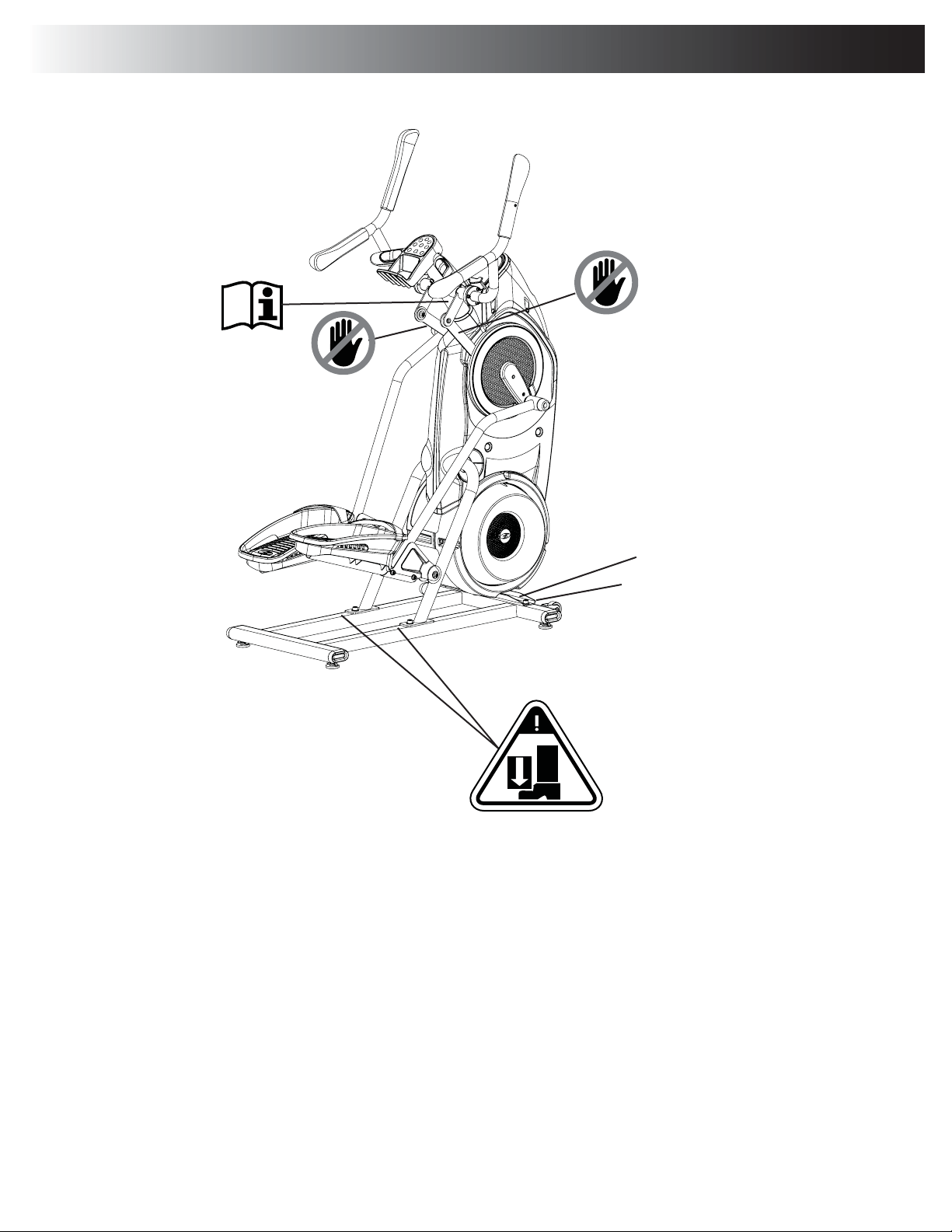
Label
Serial Number Label
Safety Warning Labels and Serial Number
Assembly / Owner’s Manual
6
Before Assembly
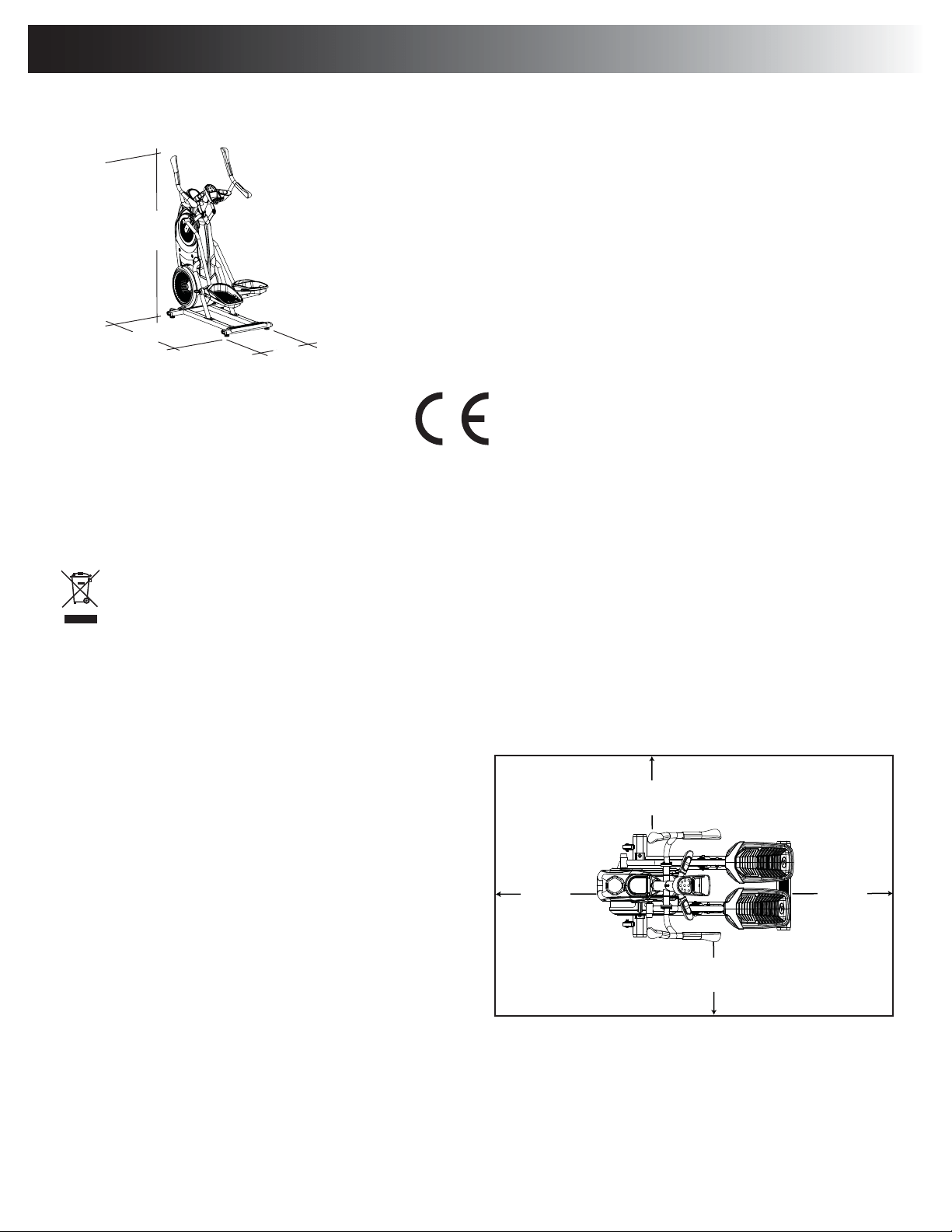
Select the area where you are going to set up and operate your machine. For safe operation, the location must be on a hard, level surface. Allow
DZRUNRXWDUHDRIDPLQLPXPFP[FP´[´%HVXUHWKDWWKHZRUNRXWVSDFH\RXDUHXWLOL]LQJKDVDGHTXDWHKHLJKWFOHDUDQFH
WDNLQJLQWRFRQVLGHUDWLRQWKHKHLJKWRIWKHXVHUDQGWKHPD[LPXPSHGDOKHLJKWRIWKH¿WQHVVPDFKLQH
Basic Assembly Tips
Follow these basic points when you assemble your machine:
• 5HDGDQGXQGHUVWDQGWKH³,PSRUWDQW6DIHW\,QVWUXFWLRQV´EHIRUH
assembly.
• Collect all the pieces necessary for each assembly step.
• Using the recommended wrenches, turn the bolts and nuts to
the right (clockwise) to tighten, and the left (counterclockwise)
to loosen, unless instructed otherwise.
• When attaching 2 pieces, lightly lift and look through the bolt
holes to help insert the bolt through the holes.
• The assembly requires 2 people.
Machine Mat
7KH%RZÀH[0D[7UDLQHU0DFKLQH0DWLVDQRSWLRQDODFFHVVRU\WKDWKHOSVNHHS\RXUZRUNRXWDUHDFOHDUDQGDGGVDOD\HURISURWHFWLRQWR\RXU
ÀRRU7KHUXEEHUPDFKLQHPDWSURYLGHVDQRQVOLSUXEEHUVXUIDFHZKLFKOLPLWVVWDWLFGLVFKDUJHDQGUHGXFHVWKHSRVVLELOLW\RIGLVSOD\RUUXQQLQJHU
URUV,ISRVVLEOHSXW\RXU%RZÀH[0D[7UDLQHU0DFKLQH0DWLQ\RXUVHOHFWHGZRUNRXWDUHDEHIRUH\RXEHJLQDVVHPEO\
To order the optional machine mat, contact your local distributor.
Specifications / Before Assembly
161.3 cm
( 63.5” )
124.5 cm
( 49” )
67.3 cm
( 26.5” )
2.46m (97”)
1.89m
(74.5”)
0.6m
( 24” )
0.6m
( 24” )
0.6m
( 24” )
0.6m
( 24” )
Maximum User Weight: NJOEV
Total Surface Area (footprint) of equipment: 7429.5 cm
2
Maximum Pedal Height: 48.5 cm ( 19.1 inches )
Machine Weight: NJOEV
Power Requirements:
Operational Voltage: 9VDC
Operating Current: 1.5A
$&3RZHU$GDSWHU 9$&+]
Heart Rate Chest Strap: 1 CR2032 battery
Complies with the following:
ISO 20957 Compliant SAA Compliant
DO NOT dispose of this product as refuse. This product is to be recycled. For proper disposal of this product, please follow the prescribed
methods at an approved waste center.
Assembly / Owner’s Manual
7
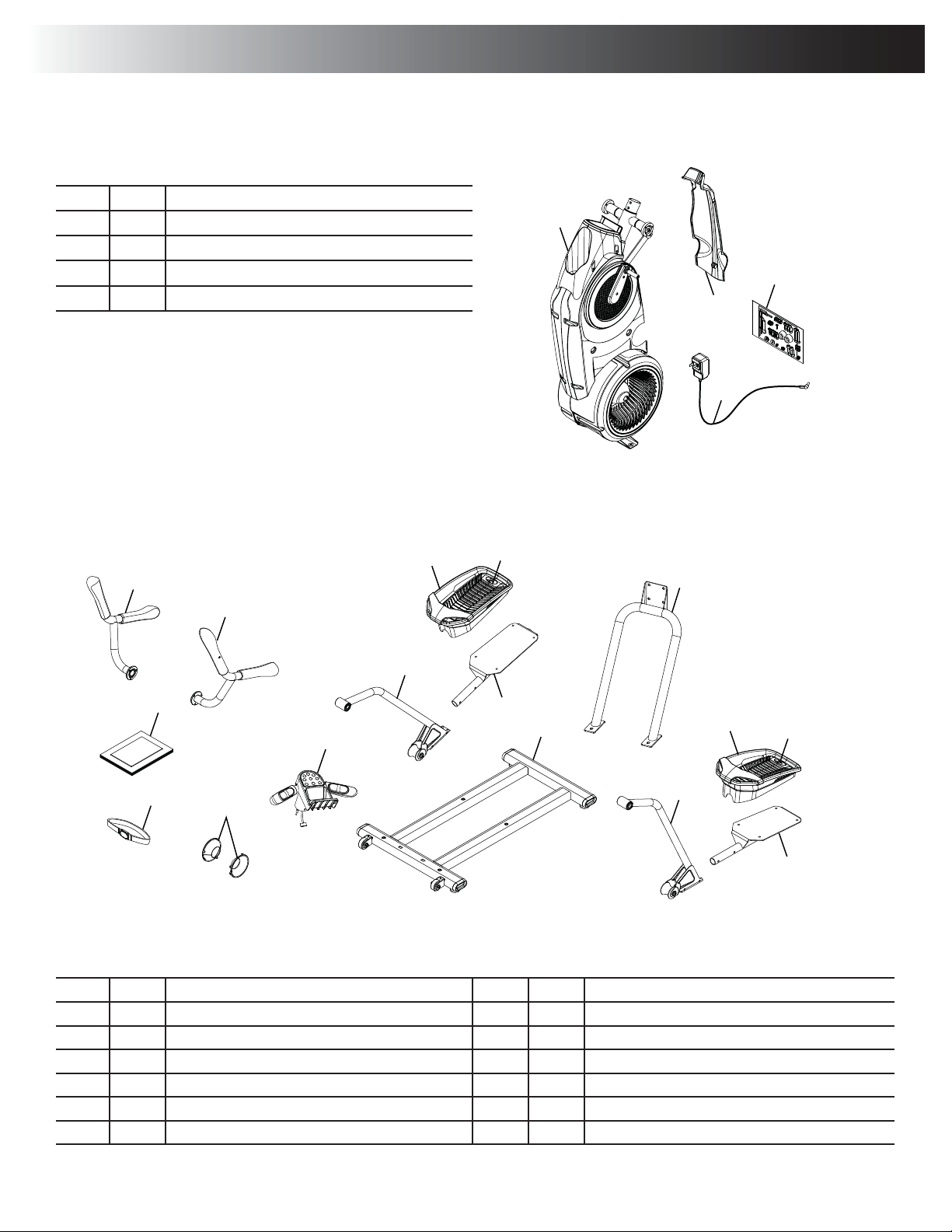
$GHFDOKDVEHHQDSSOLHGWRDOOULJKW³5´DQGOHIW³/´SDUWVWRDVVLVWZLWKDVVHPEO\
Item Qty Description Item Qty Description
5 1 Upper Handlebar, Right 11 1 Rail Assembly
1 Upper Handlebar, Left 12 1 Stabilizer Assembly
7 2 Leg 13 1 Static Handlebar Assembly
8 2 Foot Pad 14 2 Cap
9 2 Foot Pad Insert 15 1 Heart Rate Chest Strap
10 2 Pedal 1 Manual Kit
( 2 Boxes )
Box 1
Item Qty Description
1 1 Frame
2 1 Shroud, Rear
3 1 AC Adapter
4 1 Hardware Card
5
10
7
9
11
10
7
6
13
14
12
9
8
8
15
16
3
1
2
4
Box 2
Parts
Assembly / Owner’s Manual
8
To ol s
Included
#2
5 mm
PP
8 mm
13 mm
Hardware / Tools
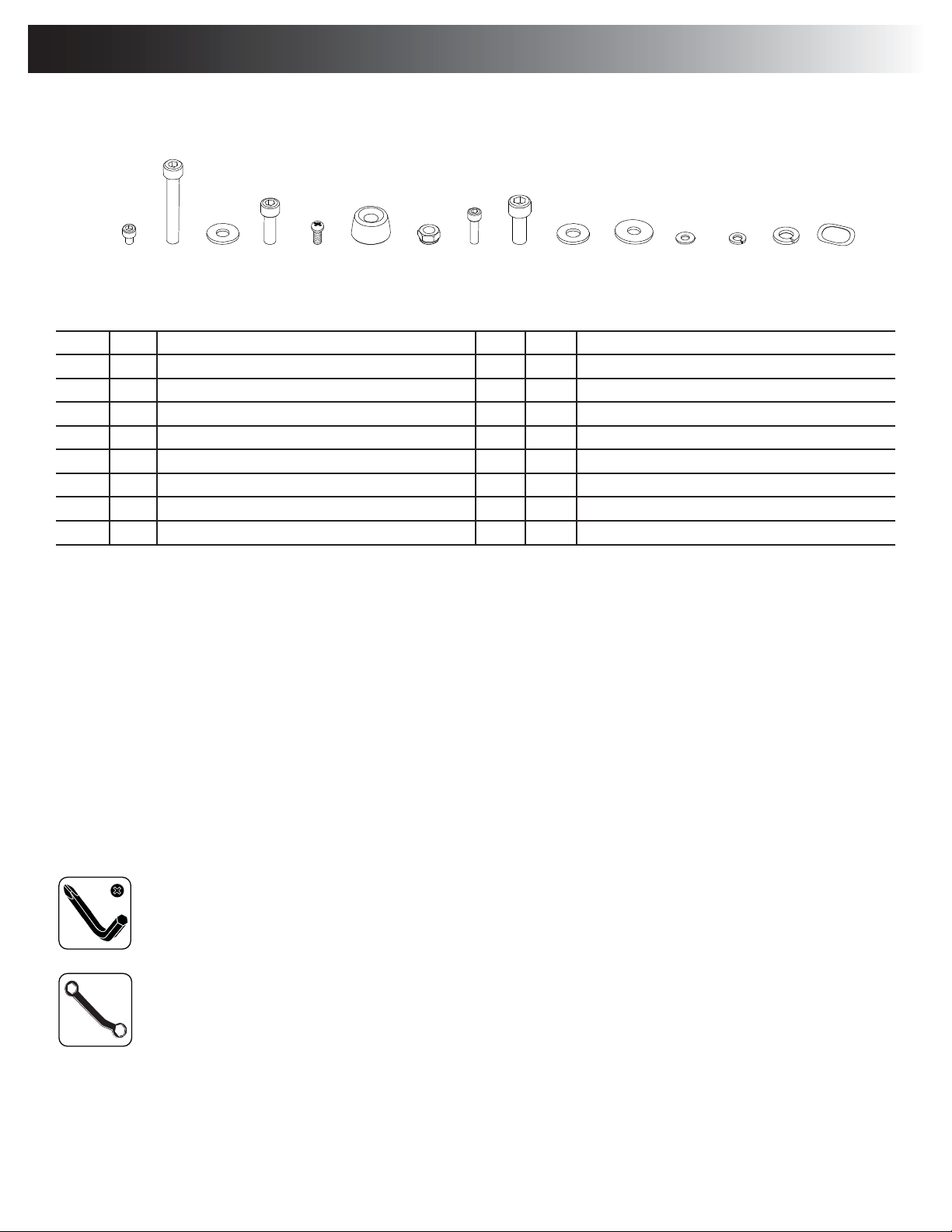
Item Qty Description Item Qty Description
A86RFNHW+HDG+H[6FUHZ0[[ I46RFNHW+HDG+H[6FUHZ0[[
B46RFNHW+HDG+H[6FUHZ0[[ J 4:DVKHU)ODW0[
C12:DVKHU)ODW0[ K2:DVKHU)ODW0[
D 6RFNHW+HDG+H[6FUHZ0[[ L4:DVKHU)ODW0[
E13DQ3KLOOLSV6FUHZ0[[ M10/RFN:DVKHU0
F2Cap N Lock Washer, M8
G 4 Lock Nut, M8 O 2 :DYH:DVKHU[
H106RFNHW+HDG+H[6FUHZ0[[
Note: Select pieces of Hardware have been provided as spares on the Hardware Card. Be aware that there may be remaining Hardware
after the proper assembly of your machine.
ABC D E F
GH
IJ K LMNO
Assembly / Owner’s Manual
9
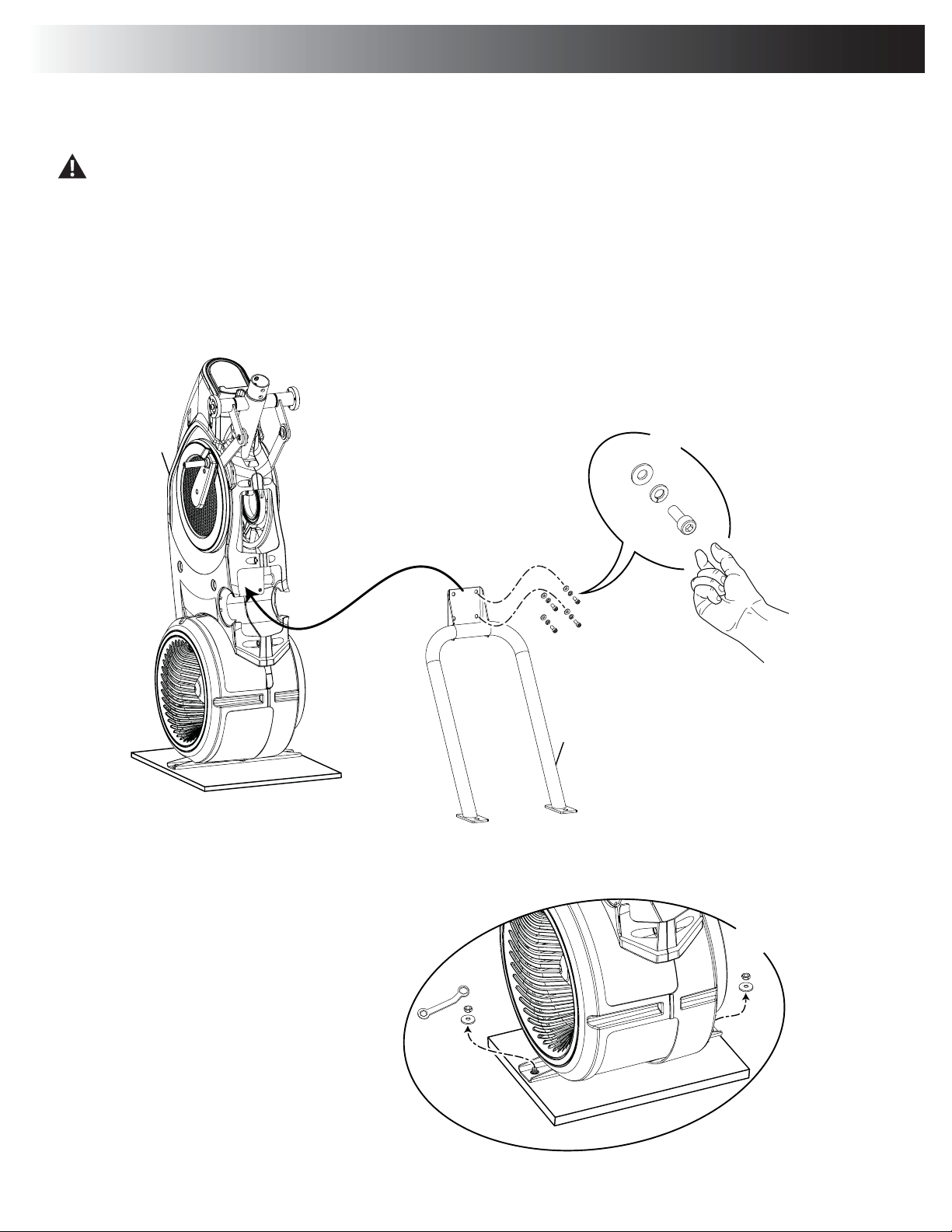
1. Attach Rail Assembly to Frame and then Release the Frame from the Shipping Plate
Some components of the machine can be heavy or awkward. Use a second person when doing the assembly steps involving these
parts. Do not do steps that involve heavy lifting or awkward movements on your own.
NOTICE: Hand tighten hardware.
13mm
X2
C
11
X4
N
D
1
Assembly
Assembly / Owner’s Manual
10
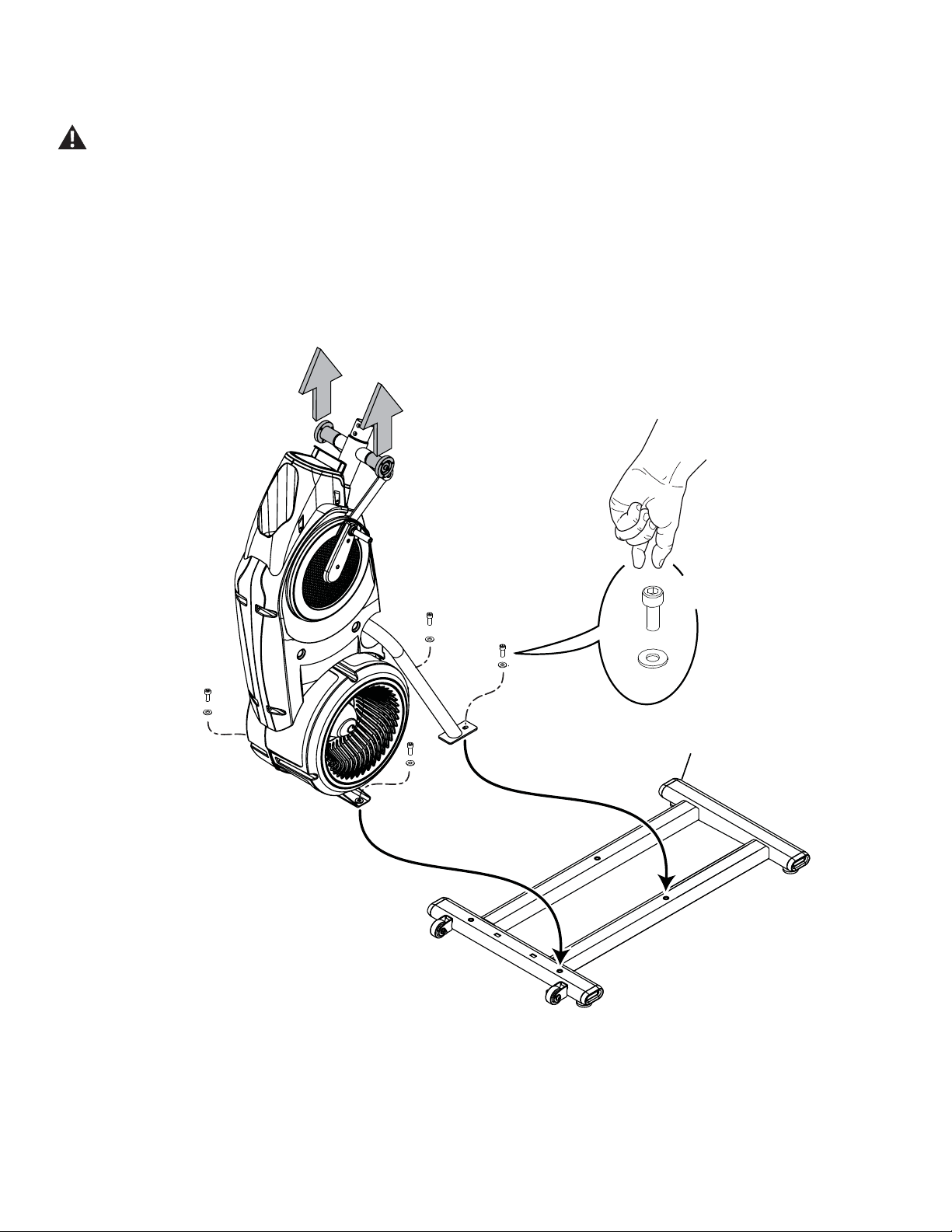
2. Carefully Lift the Frame Assembly from the Shipping Plate and Attach to the Stabilizer Assembly
Some components of the machine can be heavy or awkward. Use a second person when doing the assembly steps involving these
parts. Do not do steps that involve heavy lifting or awkward movements on your own. Lift the Frame Assembly from the exterior of
the pivot assembly as indicated below.
NOTICE: Once all hardware has been hand tightened, fully tighten ALL hardware from previous steps.
I
J
X4
12
Assembly / Owner’s Manual
11
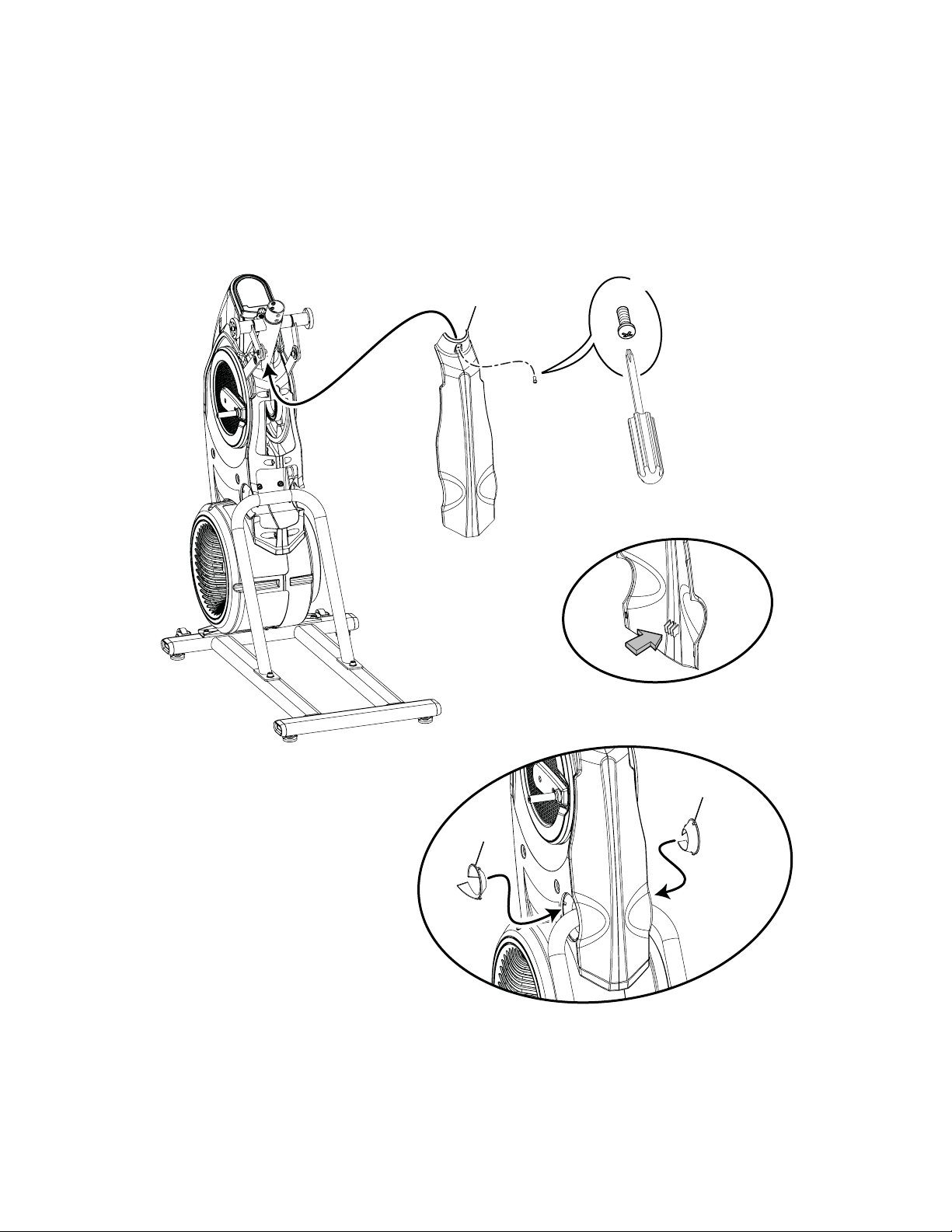
3. Attach Rear Shroud and Caps to the Frame Assembly
NOTICE:3ODFHWKHLQVLGHKRRNRIWKH5HDU6KURXGRQWKH)UDPH$VVHPEO\DQGWKHQSLYRWLWXSLQWRSODFH
14
14
2
#2
X1
E
Assembly / Owner’s Manual
12
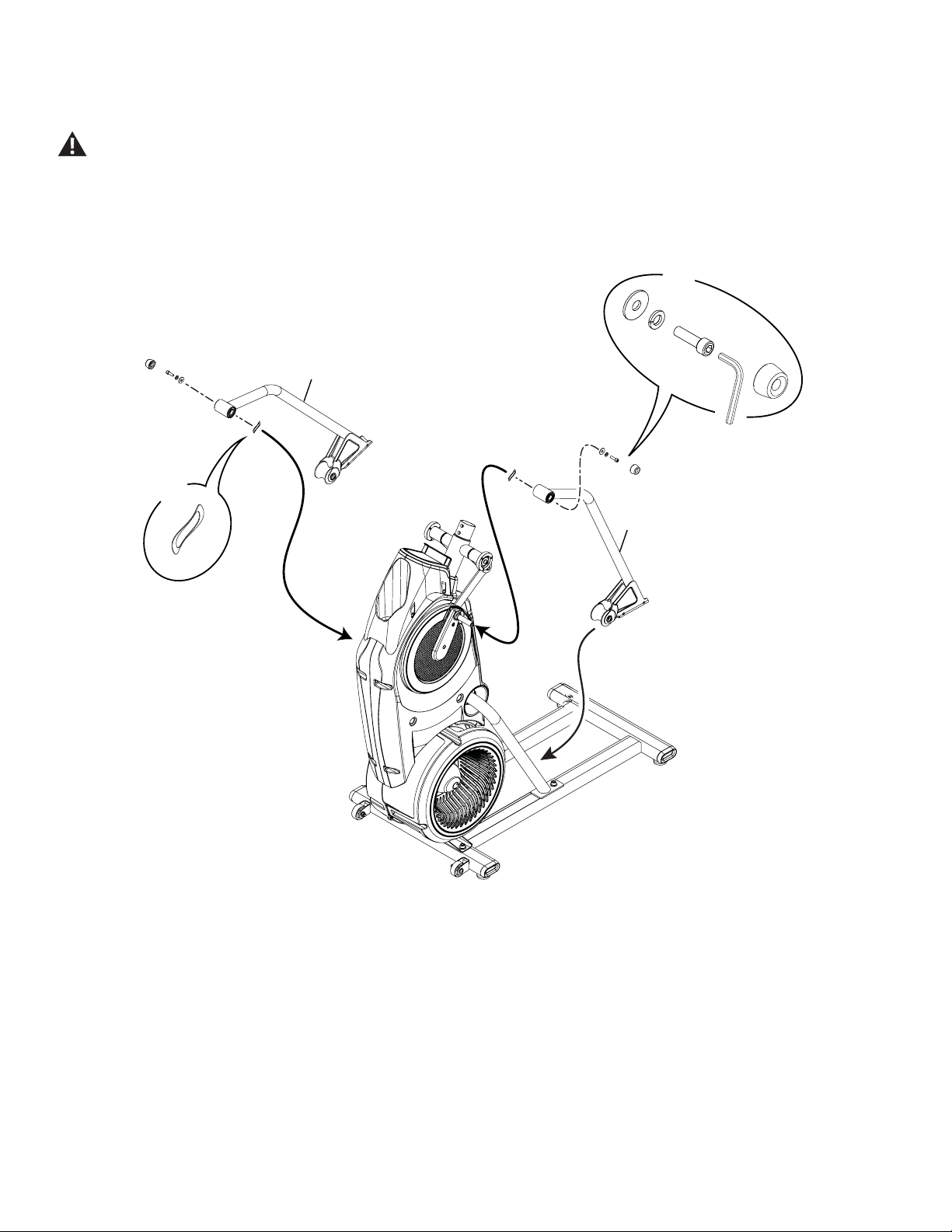
4. Attach Legs to Frame Assembly
Be aware that the Legs are connected and when either of these parts move the other does as well.
K
X2
N
D
F
6mm
7
7
X2
O
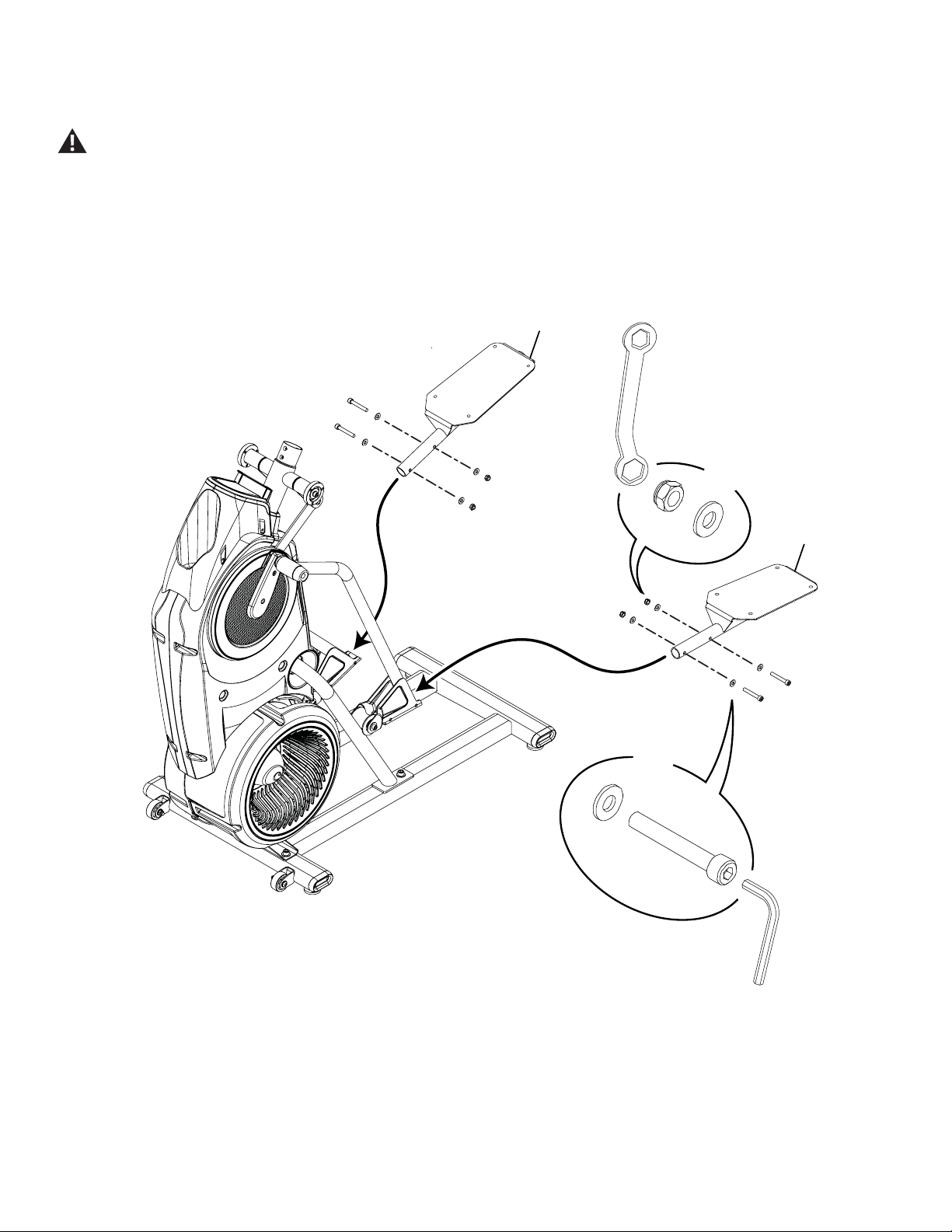
Assembly / Owner’s Manual
13
5. Attach Pedals to Frame Assembly
In order to avoid possible serious injury, when inserting the tube ends into the Leg Assemblies be careful to avoid fingers or hands
being caught or pinched.
B
X4
6mm
C
G
X4
C
10
10
13mm
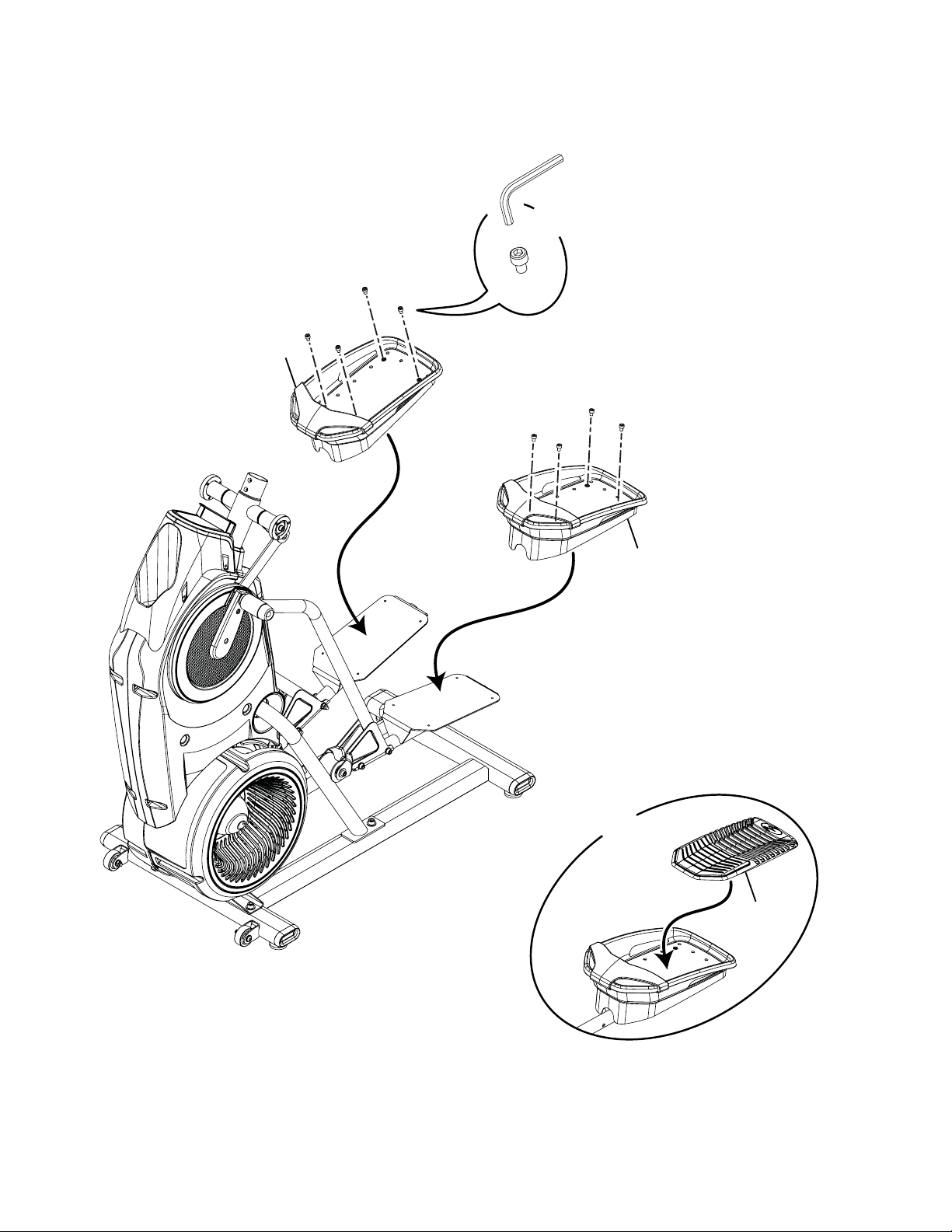
Assembly / Owner’s Manual
14
6. Connect the Foot Pads and then the Foot Pad Inserts
9
X2
X8
5mm
8
8
A
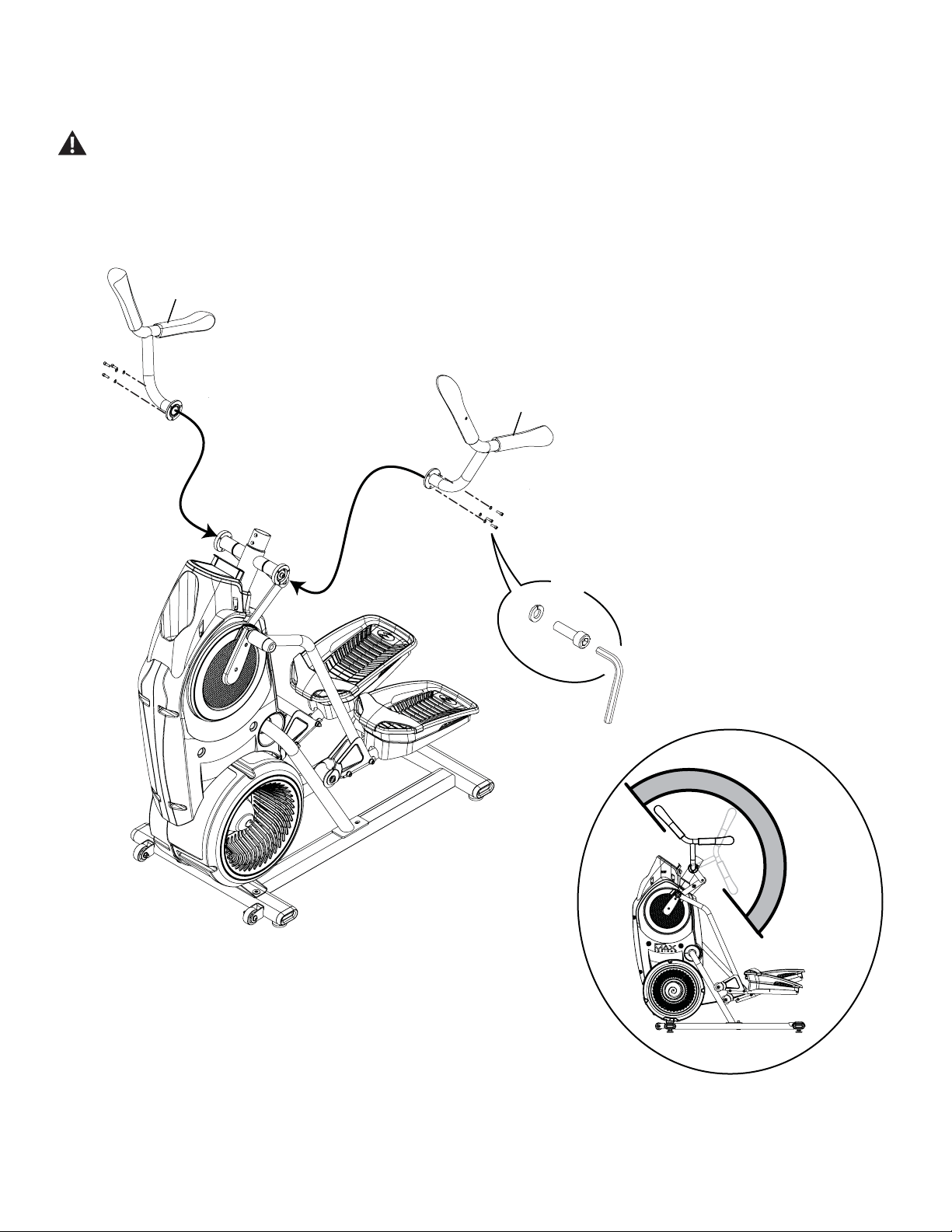
Assembly / Owner’s Manual
15
7. Attach the Upper Handlebars to Frame Assembly
Be aware that the Pedals and the Upper Handlebars are connected and when either of these parts move the other does as well.
Some components of the machine can be heavy or awkward. Use a second person when doing the assembly steps involving these
parts. Do not do steps that involve heavy lifting or awkward movements on your own.
NOTICE: Be sure to attach the Upper Handlebars so that they are in the range of operation for the User.
5
6
H
M
X6
5mm
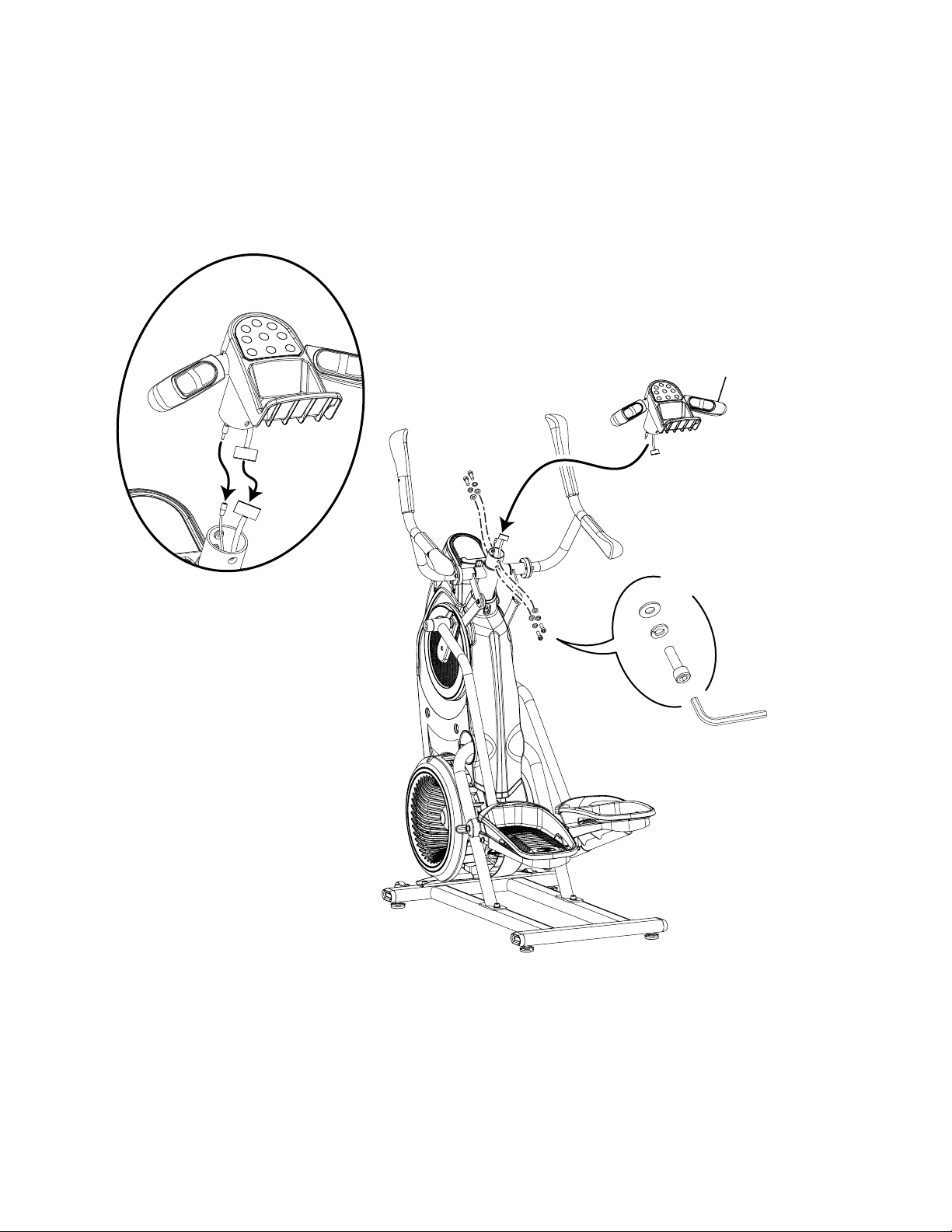
Assembly / Owner’s Manual
16
8. Connect the Static Handlebar Assembly to Frame Assembly
NOTICE: Do not crimp the Console Cable.
13
5mm
X4
L
M
H
Assembly / Owner’s Manual
17
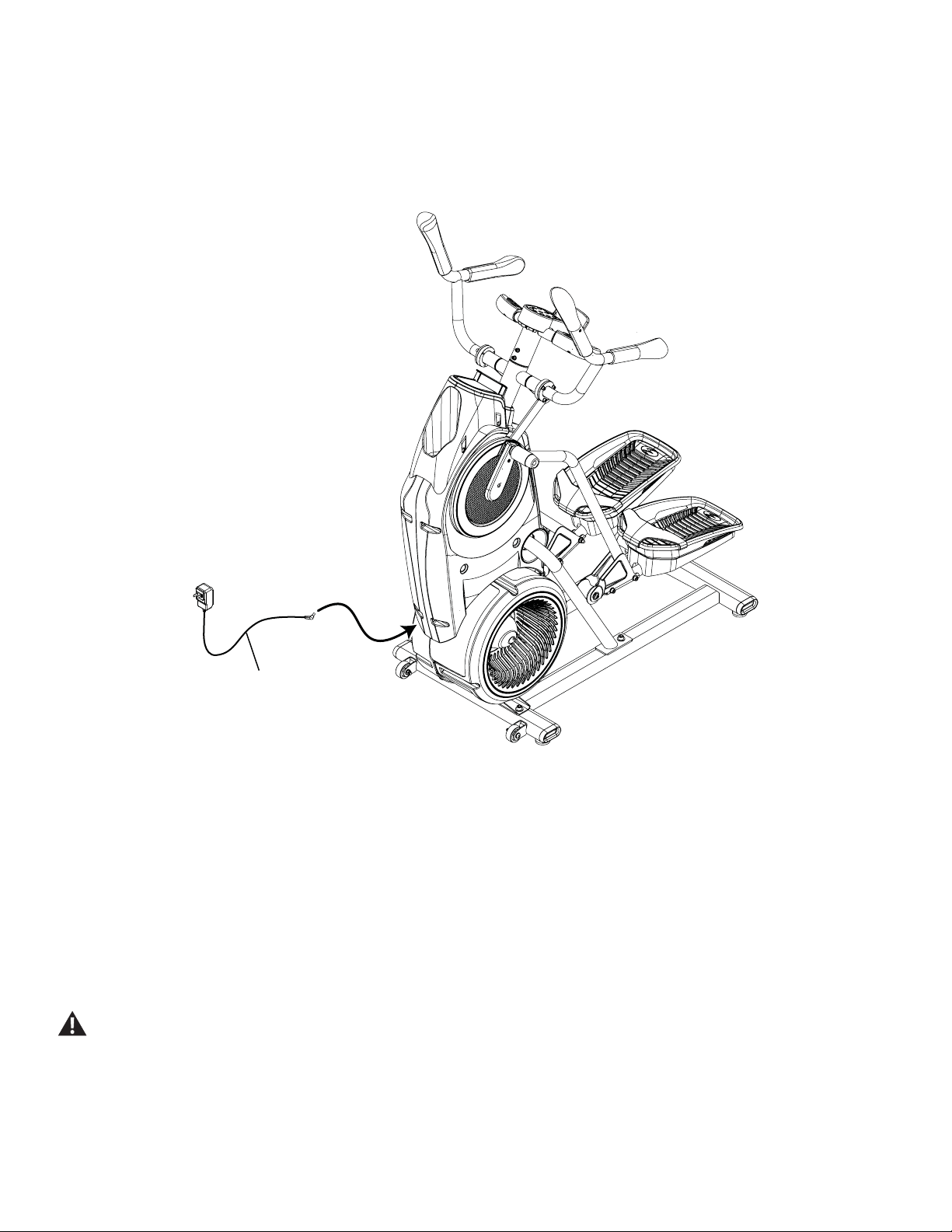
9. Connect the AC Adapter to the Frame Assembly
NOTICE: Be sure to use the appropriate AC Adapter plug for your region.
3
10. Final Inspection
Inspect your machine to ensure that all hardware is tight and components are properly assembled.
%HVXUHWRUHFRUGWKHVHULDOQXPEHULQWKH¿HOGSURYLGHGDWWKHIURQWRIWKLVPDQXDO
Do not use until the machine has been fully assembled and inspected for correct performance in accordance with the Owner’s
Manual.
Assembly / Owner’s Manual
18
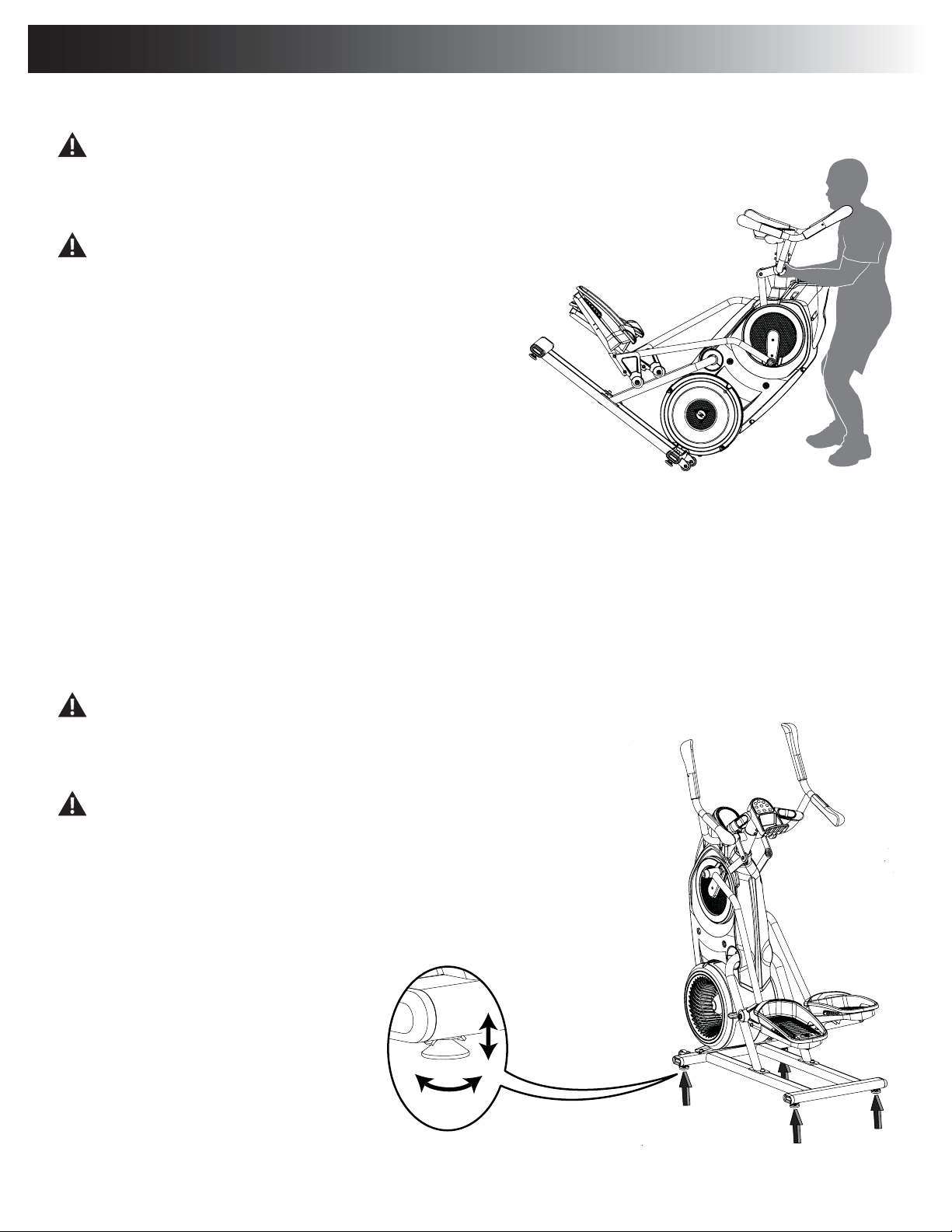
Moving the Machine
The machine may be moved by one or more persons depending on their physical abilities and capacities. Make sure that you and
RWKHUVDUHDOOSK\VLFDOO\ÀWDQGDEOHWRPRYHWKHPDFKLQHVDIHO\
1. Grasp the inner, unmoving part of the Pivot Assembly to carefully tilt the
machine toward you onto the transport rollers.
Be aware of the Handlebars and the weight of the machine before
tilting the machine.
2. Push the machine into position.
3. Carefully lower the machine into position.
NOTICE: Be careful when you move the machine. All abrupt motions can affect
the computer operation.
Leveling the Machine
7KHPDFKLQHQHHGVWREHOHYHOHGLI\RXUZRUNRXWDUHDLVXQHYHQRULIWKH5DLO$VVHPEO\LVVOLJKWO\RIIWKHÀRRU7RDGMXVW
1. Place the machine in your workout area.
/RRVHQWKHORFNLQJQXWVDQGDGMXVWWKHOHYHOHUVXQWLOWKH\DUHHYHQO\EDODQFHGLQFRQWDFWZLWKWKHÀRRU
Do not adjust the levelers to such a height that they detach or unscrew from the machine. Injury to you or damage to the machine
can occur.
3. Tighten the locking nuts.
Make sure the machine is level and stable before you exercise.
Adjustments
Assembly / Owner’s Manual
19
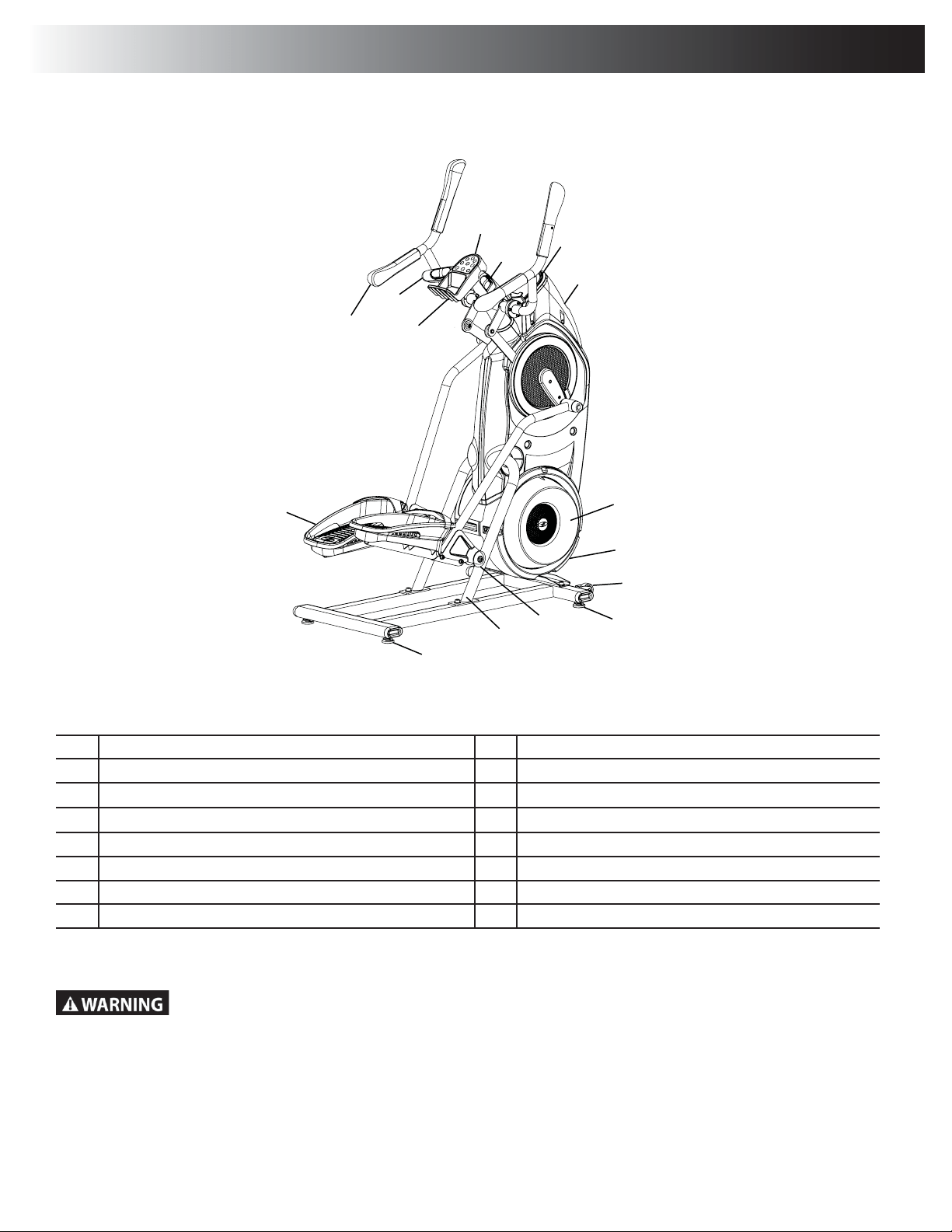
A Console Button Assembly I Roller
B Contact Heart Rate (CHR) Sensors J Rail Assembly
C Console Display K Pedal
D Water Bottle Holder L Storage Bin
E Resistance Fan M Static Handlebar
F Power Connector N Upper Handlebar
G Transport Roller O Bluetooth
®
Connectivity (not shown)
H Leveler
Use the values calculated or measured by the machine’s computer for reference purposes only. The heart rate
displayed is an approximation and should be used for reference only. Over exercising may result in serious injury or
death. If you feel faint stop exercising immediately.
F
E
G
H
H
J
I
K
B
C
A
M
N
L
D
Features
Assembly / Owner’s Manual
20
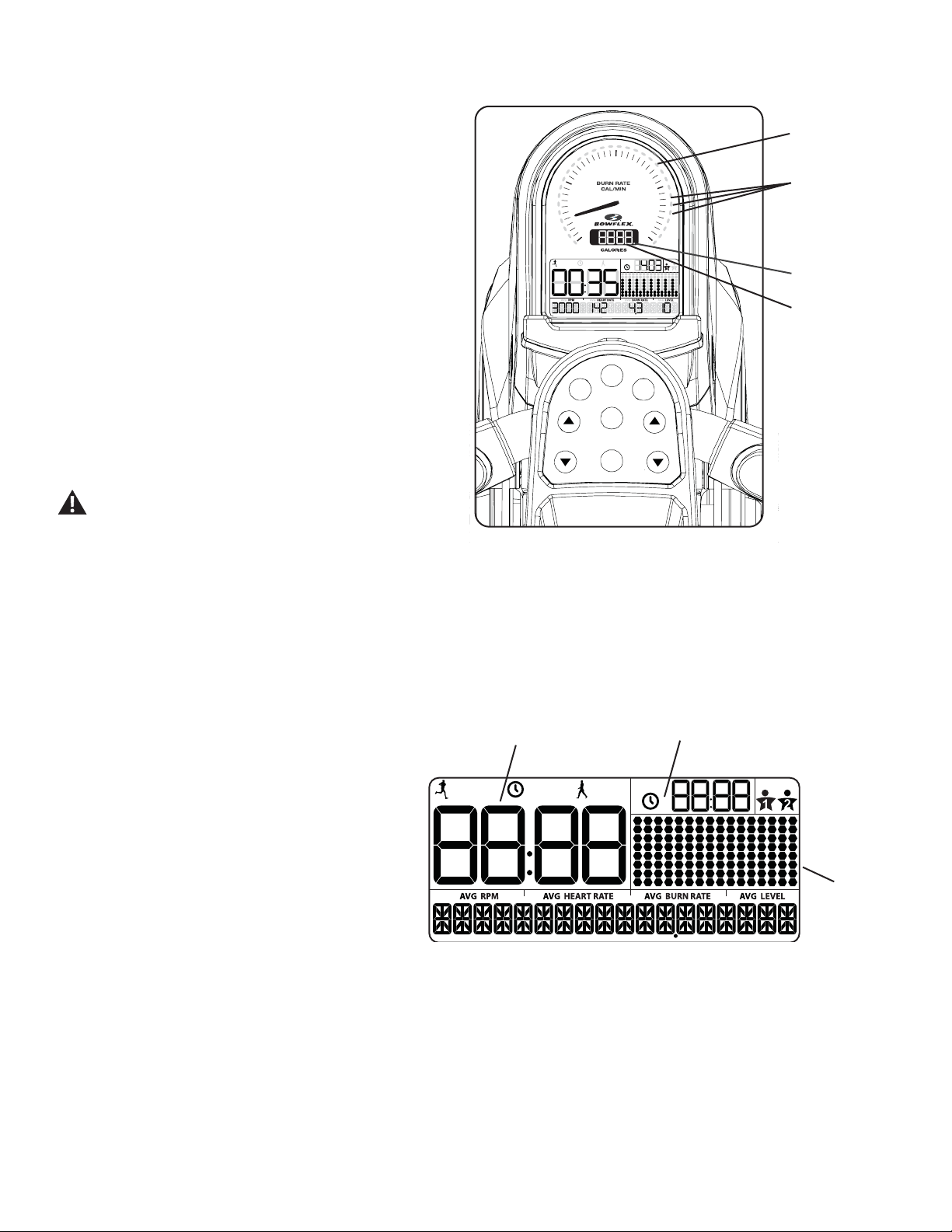
During an Interval workout, the ACTIVE segment will be red LEDs, and the REST segment will be green LEDs.
Maximum Burn Rate LED Marker
7KH0D[LPXP%XUQ5DWH/('0DUNHULVDQRUDQJH/('WKDWVKRZVWKHKLJKHVWUDWHRIFDORULHEXUQDFKLHYHGGXULQJWKHFXUUHQWZRUNRXW
Bluetooth
®
Synced Indicator Light
The Bluetooth
®
Synced Indicator Light shows when a device is paired with the App.
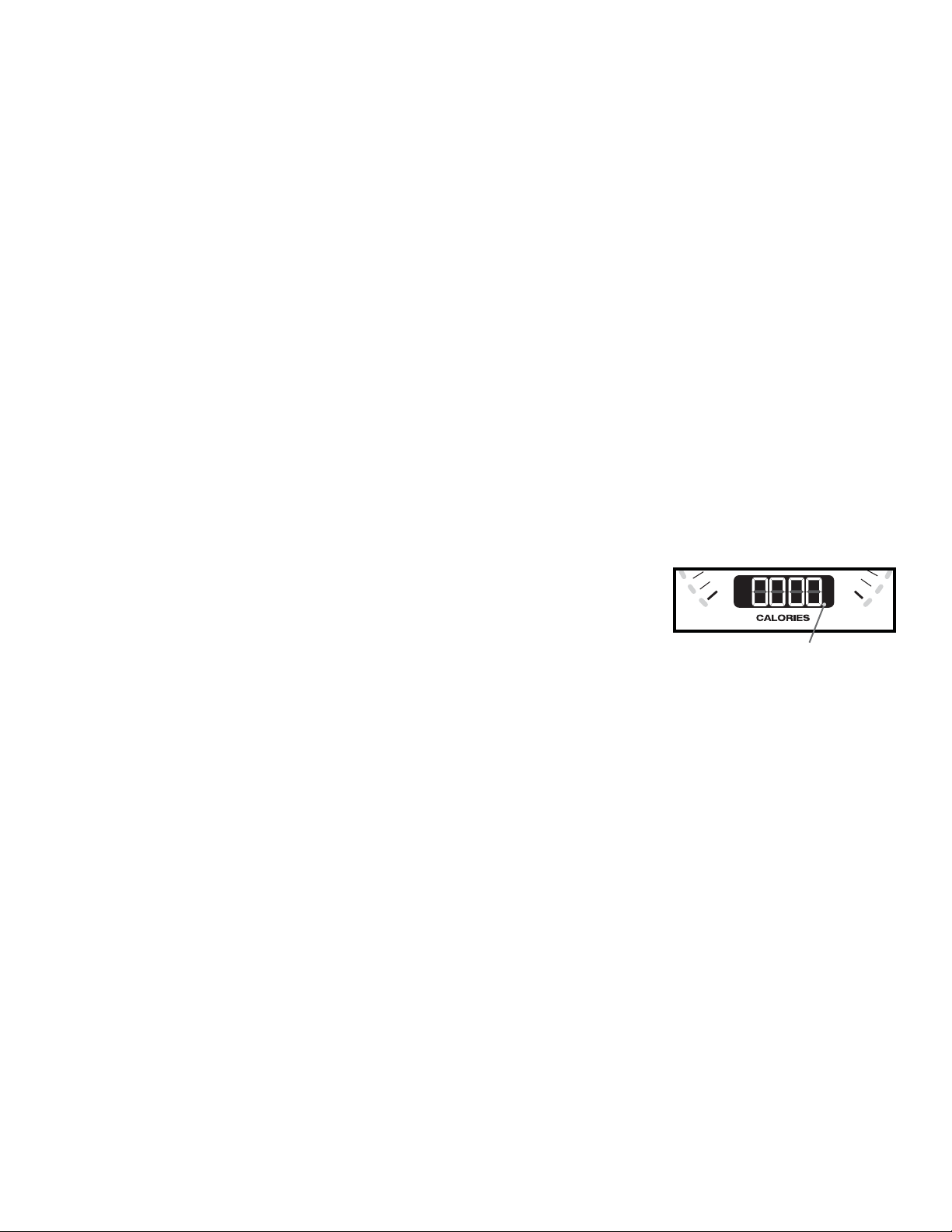
Calories
7KH&DORULHVGLVSOD\¿HOGVKRZVWKHHVWLPDWHG
calories that have been burned during the workout.
7KHPD[LPXPGLVSOD\LV
LCD Display Data
The console display shows the workout
measurements and current options.
Time
7KH7,0(GLVSOD\¿HOGVKRZVWKHWLPHFRXQWIRUWKHDFWLYHZRUNRXW7KHUHDUHWKUHHW\SHVRIWLPHGLVSOD\GHSHQGLQJRQWKHVW\OHRIZRUNRXW,QWHUYDO
Manual, or Standard.
ACTIVE:'XULQJDQ,QWHUYDOZRUNRXWWKH7,0(GLVSOD\ZLOOVKLIWEHWZHHQWKH$&7,9(DQG5(67LQWHUYDOVZLWKDQDXGLEOHFRQ¿UPDWLRQFRXQWLQJWKH
time down for the current segment. ACTIVE is the sprint, or high Intensity, segment of the Interval workout.
TOTAL: During a Manual workout, the TIME display will count up until the workout is ended. During a Standard workout, the total time of the workout
will count down.
7KHPD[LPXPGLVSOD\LV,IWKHWLPHFRXQWLVPRUHWKHZRUNRXWZLOOEHHQGHG
USER
TOT AL
ACTIVE
REST
TOT AL
Workout
Profile
Display
Time
Total Time
Console Features
The Console provides information about your workout on the display
screen.
Burn Rate Display
The Burn Rate Display shows the level of calories being burned per
minute. This rate is a function of Intensity, which is the current level
RI530SHGDOVSHHGDQGUHVLVWDQFHOHYHO$VHLWKHURIWKRVH
values increase, the Burn Rate will increase.
Target Burn Rate LED Range
The Target Burn Rate LED Range is a workout coach based on
WKHVHWWLQJVRIWKHVHOHFWHG8VHU3UR¿OH$UDQJHRI¿YH/('¶VDUH
DFWLYDWHGGXULQJDZRUNRXW7KH¿UVWRIWKH/('VLQWKHUDQJHLVD
suggested beginner level, with the higher LEDs being for a more
DGYDQFHG¿WQHVVXVHU7KH,QWHQVLW\RIWKHUDQJHLVEDVHGRQWKH
:RUNRXW3UR¿OH'LVSOD\
Note: %HVXUHWKH8VHU3UR¿OHLVFXUUHQWIRUDPRUHH[DFWFDORULH
burn rate and suggested target range.
The Target LED Range is a suggested workout level, and
VKRXOGRQO\EHIROORZHGLI\RXUSK\VLFDOÀWQHVVOHYHO
allows.
PAUSE/END
START
/ENTER
MAX
Interval
PROGRAMS
USER
USER
TOTAL
ACTIVE
REST
TOTAL
BURN
RATE
RESISTANCE
LEVEL
0
10
20
40
30
Target Burn Rate
LED Range
Bluetooth
®
Synced Indicator
Light
Calories
Burn Rate
Display

Assembly / Owner’s Manual
21
REST:7KHUHGXFHGZRUNRXWOHYHOGXULQJDQ,QWHUYDOZRUNRXWWKDWFRXQWVGRZQXQWLOWKHQH[W$&7,9(VHJPHQW
Total Time
7KH727$/7,0(GLVSOD\¿HOGVKRZVWKHWRWDOWLPHFRXQWRQO\GXULQJDQ,QWHUYDOZRUNRXW7KLVGLVSOD\ZLOOEHEODQNGXULQJD0DQXDORU6WDQGDUG
workout.
7KHPD[LPXPGLVSOD\LV,IWKHWLPHFRXQWLVPRUHWKHZRUNRXWZLOOEHHQGHG
8VHU3URĆOH
7KH86(5352),/(GLVSOD\VKRZVWKHVHOHFWHGXVHUSUR¿OH$XVHUSUR¿OHLVDOZD\VVHOHFWHG
1RWH)RUPRUHDFFXUDWHFDORULHFRXQWVDQGWDUJHW&DORULH%XUQ5DWHVFXVWRPL]H\RXU8VHU3UR¿OH
:RUNRXW3URĆOH'LVSOD\
7KH:RUNRXW3UR¿OH'LVSOD\DUHDVKRZVWKHFRXUVHSUR¿OHRIWKHSURJUDPLVHLWKHU%XUQ5DWHRU5HVLVWDQFH/HYHO(DFKFROXPQLQWKHSUR¿OHVKRZV
one interval (workout segment). The higher the column, the higher the intensity of the workout.
'XULQJD6WDQGDUGSURJUDPWKHSUR¿OHVKRZVWKHOHYHORIUHVLVWDQFH/HYHO7KH&RQVROHZLOODGMXVWWKH5HVLVWDQFH/HYHOGXULQJWKHZRUNRXW
'XULQJD60$57SURJUDPWKHSUR¿OHVKRZVWKHOHYHORI%XUQ5DWH7KH&RQVROHZLOODGMXVWWKHUHVLVWDQFHOHYHOWRHQFRXUDJHD8VHUUHDFKWKH
Targeted Burn Rate (based on the pedal speed).
7KHÀDVKLQJFROXPQVKRZVWKHFXUUHQWLQWHUYDO
RPM
7KH530GLVSOD\¿HOGVKRZVWKHPDFKLQHUHYROXWLRQVSHUPLQXWHSHGDOVSHHG7KHPD[LPXPGLVSOD\LV
Heart Rate
The Heart Rate display shows the heart rate in beats per minute (BPM) from the heart rate sensors. This value will not be shown if a heart rate signal
is not detected.
Consult a physician before you start an exercise program. Stop exercising if you feel pain or tightness in your chest, become short
of breath, or feel faint. Contact your doctor before you use the machine again. The heart rate displayed on the console is an
approximation and should be used for reference only.
Burn Rate
7KH%XUQ5DWHGLVSOD\¿HOGVKRZVWKHFXUUHQWUDWHDWZKLFKFDORULHVDUHEHLQJEXUQHGSHUPLQXWH7KH530DQG5HVLVWDQFH/HYHOGLUHFWO\FKDQJH
WKLVUDWH7KH8VHU3UR¿OHVHWWLQJVDOVRDIIHFWWKHUDWH8VHUZHLJKW
Level
7KH/HYHOGLVSOD\¿HOGVKRZVWKHFXUUHQW5HVLVWDQFH/HYHO7KHKLJKHUWKH5HVLVWDQFH/HYHOWKHKDUGHULWZLOOEHWRSXVKWKH3HGDOV
During a Smart workout, the Console will adjust the resistance level to encourage a User to reach the Targeted Burn Rate (based on the pedal
speed).
Keypad Functions
352*5$06EXWWRQ3XVKWRVHOHFWDZRUNRXWSURJUDPSXVKDQGKROGIRUVHFRQGVWRFXVWRPL]HWKHVHOHFWHGZRUNRXW
0$;,17(59$/EXWWRQ3XVKWRVWDUWWKH0$;,17(59$/ZRUNRXWSXVKDQGKROGIRUVHFRQGVWRHGLWWKHLQWHUYDOWLPHV$&7,9(DQG5(67DQG
Burn Rates for the MAX workout program.
86(5EXWWRQ3XVKWRVHOHFWWKHGHVLUHG8VHU3UR¿OHSXVKDQGKROGIRUVHFRQGVWRHGLWWKHVHOHFWHG8VHU3UR¿OH
Burn Rate Increase (cEXWWRQ,QFUHDVHVWKH7DUJHW%XUQ5DWHGXULQJDZRUNRXWRULQFUHDVHVDYDOXHWLPHDJHZHLJKWRUKHLJKW
67$57(17(5EXWWRQ)URPWKH:(/&20(VFUHHQVWDUWVD0DQXDOZRUNRXWVWDUWVDVHOHFWHG3URJUDPZRUNRXWRUUHVXPHVDSDXVHGZRUNRXW
Assembly / Owner’s Manual
22
Push to accept the displayed value for an option.
Resistance Level Increase (cEXWWRQ,QFUHDVHVWKHUHVLVWDQFHOHYHORIWKHZRUNRXW
Burn Rate Decrease (dEXWWRQ'HFUHDVHVWKH7DUJHW%XUQ5DWHGXULQJDZRUNRXWRUGHFUHDVHVDYDOXHWLPHDJHZHLJKWRUKHLJKW
3$86((1'EXWWRQ3DXVHVDQDFWLYHZRUNRXWHQGVDSDXVHGZRUNRXWRUgoes back to the previous screen.
Resistance Level Decrease (dEXWWRQ'HFUHDVHVWKHUHVLVWDQFHOHYHORIWKHZRUNRXW
&RQQHFWLYLW\RQ\RXU%RZćH[0D[7UDLQHU
®
cardio machine
7KH%RZÀH[0D[7UDLQHU
®
M5 cardio machine is equipped with Bluetooth
®
FRQQHFWLYLW\DQGFDQZLUHOHVVO\V\QFZLWKWKH³%RZÀH[0D[7UDLQHU
®
´
Fitness App on supported devices.
Note: )RUDFRPSOHWHOLVWRIVXSSRUWHGGHYLFHVYLVLWZZZERZÀH[PD[WUDLQHUFRP
)LWQHVV$SSê%RZćH[0D[7UDLQHU
®
2" )
7KH%RZÀH[0D[7UDLQHU
®
$SSV\QFVZLWK\RXU%RZÀH[0D[7UDLQHU
®
M5i to track total calories burned, time, watts, and more. Records and stores
every workout for quick reference. Plus, it automatically syncs your workout data with MyFitnessPal
®
to make hitting your daily goals easier than
ever! Track your results and share with friends and family.
'RZQORDGWKHIUHHVRIWZDUH$SSQDPHG³%RZÀH[0D[7UDLQHU
®
7KHVRIWZDUHDSSLVDYDLODEOHRQ*RRJOH3OD\DQG$SS6WRUH
Note: )RUDFRPSOHWHOLVWRIVXSSRUWHGGHYLFHVYLVLWZZZERZÀH[PD[WUDLQHUFRP
)ROORZWKHLQVWUXFWLRQVRQWKH$SSWRV\QF\RXUGHYLFHWRWKH%RZÀH[0D[7UDLQHU
®
cardio machine.
The Console will activate the Bluetooth
®
synced indicator light when a Bluetooth
®
enabled device is
synced.
Note: If the Bluetooth
®
synced indicator light is active and your Bluetooth
®
enabled device is not
V\QFHGWKH¿WQHVVPDFKLQHPD\KDYHV\QFHGWRDQRWKHU%OXHWRRWK
®
enabled device. Turn the
SRZHURIIWRWKHPDFKLQHZDLWPLQXWHVDQGUHVWDUWLWZLWK\RXUVPDUWGHYLFHQHDUWKH¿WQHVV
machine.
,IWKHV\QFHGLQGLFDWRUOLJKWGRHVQRWDFWLYDWHDQG\RXUVPDUWGHYLFHLVHQDEOHGGHDFWLYDWHDQGUHDFWLYDWHWKH%OXHWRRWK
®
wireless feature on
your smart device. Then click on the "Sync to Machine" button from within the App. When synced, the indicator light will activate.
Contact Heart Rate Sensors
Contact Heart Rate (CHR) sensors send your heart rate signals to the Console. The CHR sensors are the stainless steel parts of the Handlebars.
7RXVHSXW\RXUKDQGVFRPIRUWDEO\DURXQGWKHVHQVRUV%HVXUHWKDW\RXUKDQGVWRXFKERWKWKHWRSDQGWKHERWWRPRIWKHVHQVRUV+ROG¿UPEXW
not too tight or loose. Both hands must make contact with the sensors for the Console to detect a pulse. After the Console detects four stable pulse
signals, your initial pulse rate will be shown.
Once the Console has your initial heart rate, do not move or shift your hands for 10 to 15 seconds. The Console will now validate the heart rate.
0DQ\IDFWRUVLQÀXHQFHWKHDELOLW\RIWKHVHQVRUVWRGHWHFW\RXUKHDUWUDWHVLJQDO
• Movement of the upper body muscles (including arms) produces an electrical signal (muscle artifact) that can interfere with pulse detection. Slight
hand movement while in contact with the sensors can also produce interference.
• Calluses and hand lotion may act as an insulating layer to reduce the signal strength.
• Some Electrocardiogram (EKG) signals generated by individuals are not strong enough to be detected by the sensors.
• 7KHSUR[LPLW\RIRWKHUHOHFWURQLFPDFKLQHVFDQJHQHUDWHLQWHUIHUHQFH
0
40
Bluetooth
®
synced indicator
light

Assembly / Owner’s Manual
23
Remote Heart Rate Monitor
0RQLWRULQJ\RXU+HDUW5DWHLVRQHRIWKHEHVWSURFHGXUHVWRFRQWUROWKHLQWHQVLW\RI\RXUH[HUFLVH&RQWDFW+HDUW5DWH&+5VHQVRUVDUHLQVWDOOHGWR
send your heart rate signals to the Console. The Console can also read telemetry HR signals from a Heart Rate Chest Strap Transmitter that oper
DWHVLQWKHN+]N+]UDQJH
Note: The heart rate chest strap must be an uncoded heart rate strap from Polar Electro or an uncoded POLAR
®
compatible model. (Coded
POLAR
®
heart rate straps such as POLAR
®
OwnCode
®
chest straps will not work with this equipment.)
If you have a pacemaker or other implanted electronic device, consult your doctor before using a wireless chest strap or other
telemetric heart rate monitor.
The heart rate displayed on the console is an approximation and should be used for reference only.
Chest Strap
Using the heart rate transmitter chest strap lets you monitor your heart rate at any time during your workout.
Consult a physician before you start an exercise program. Stop exercising if you feel pain or tightness in your chest, become short
of breath, or feel faint. Contact your doctor before you use the machine again. Use the values calculated or measured by the
machine’s computer for reference purposes only.
To put on your chest strap:
$GMXVWWKHVWUDSOHQJWKWR¿WVQXJO\DQGFRPIRUWDEO\DJDLQVW\RXUVNLQ6HFXUHWKHVWUDSDURXQG\RXUFKHVWMXVWEHORZWKHFKHVWPXVFOHVDQG
buckle it.
2. Lift the transmitter off your chest and moisten the two Grooved Electrode Areas on the back.
&KHFNWKDWWKHZHWHOHFWURGHDUHDVDUH¿UPO\DJDLQVW\RXUVNLQ
The transmitter will send your heart rate to the machine’s receiver and display your estimated Beats Per Minute (BPM).
Always remove the transmitter before you clean the chest strap. Clean the chest strap regularly with mild soap and water, and thoroughly dry it.
Residual sweat and moisture may keep the transmitter active and drain the battery in the transmitter. Dry and wipe clean the transmitter after each
use.
Note: Do not use abrasives or chemicals such as steel wool or alcohol when you clean the chest strap, as they can damage the electrodes
permanently.
,IWKH&RQVROHGRHVQRWGLVSOD\DKHDUWUDWHYDOXHWKHWUDQVPLWWHUPD\EHDWIDXOW&KHFNWKDWWKHWH[WXUHGFRQWDFWDUHDVRQWKHFKHVWVWUDSDUH
making contact with your skin. You may need to lightly wet the contact areas. If no signal appears or you need further assistance, contact your local
distributor.
Before discarding a chest strap, remove the battery. Dispose of in accordance with local regulations and/or at approved recycling
centers.
Heart Rate Calculations
<RXUPD[LPXPKHDUWUDWHXVXDOO\GHFUHDVHVIURP%HDWV3HU0LQXWH%30LQFKLOGKRRGWRDSSUR[LPDWHO\%30E\DJH7KLVIDOOLQKHDUW
UDWHLVXVXDOO\OLQHDUGHFUHDVLQJE\DSSUR[LPDWHO\RQH%30IRUHDFK\HDU7KHUHLVQRLQGLFDWLRQWKDWWUDLQLQJLQÀXHQFHVWKHGHFUHDVHLQPD[LPXP
KHDUWUDWH,QGLYLGXDOVRIWKHVDPHDJHFRXOGKDYHGLIIHUHQWPD[LPXPKHDUWUDWHV,WLVPRUHDFFXUDWHWR¿QGWKLVYDOXHE\FRPSOHWLQJDVWUHVVWHVW
than by using an age related formula.
<RXUDWUHVWKHDUWUDWHLVLQÀXHQFHGE\HQGXUDQFHWUDLQLQJ7KHW\SLFDODGXOWKDVDQDWUHVWKHDUWUDWHRIDSSUR[LPDWHO\%30ZKHUHDVKLJKO\
trained runners may have readings of 40 BPM or lower.
Assembly / Owner’s Manual
24
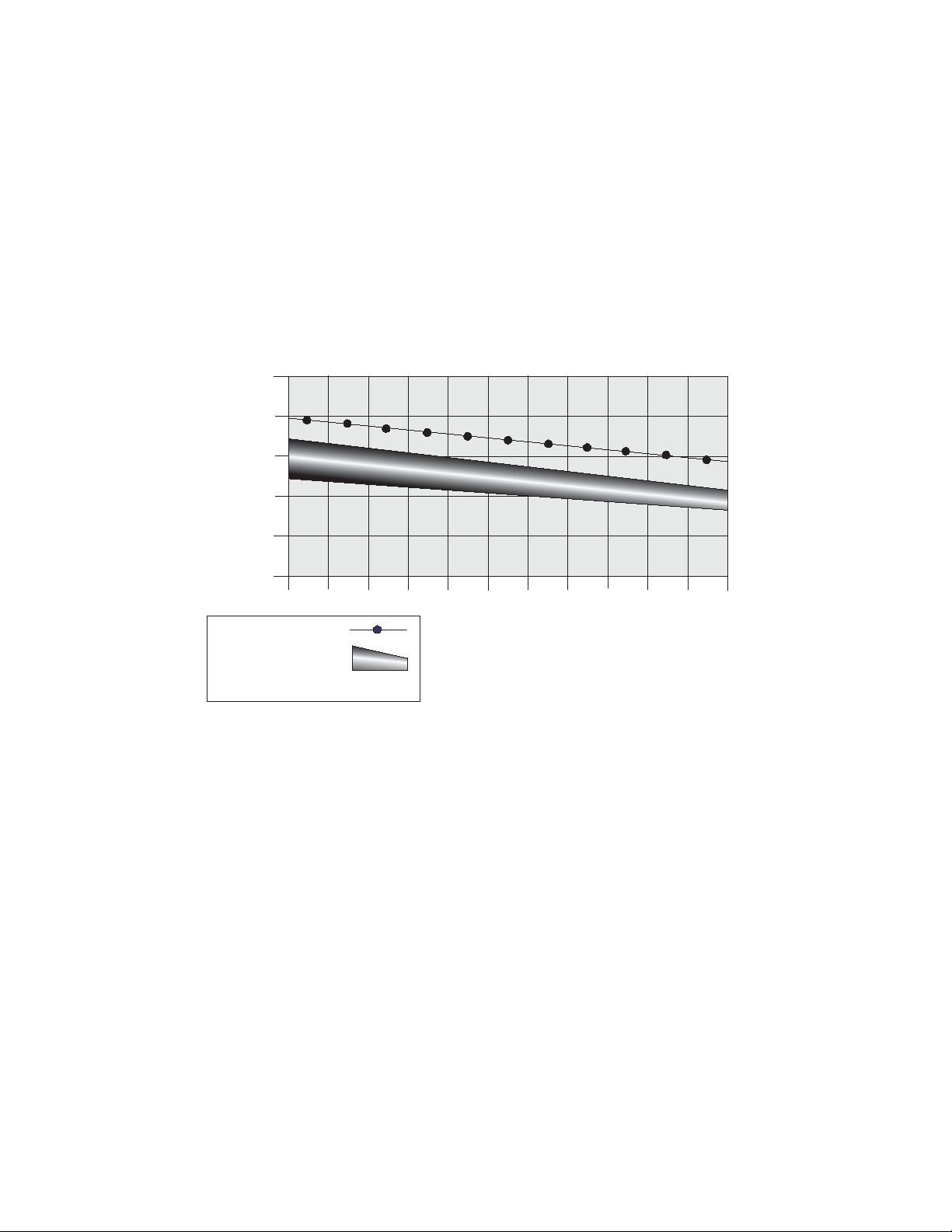
The Heart Rate table is an estimate of what Heart Rate Zone (HRZ) is effective to burn fat and improve your cardiovascular system. Physical condi
tions vary, therefore your individual HRZ could be several beats higher or lower than what is shown.
7KHPRVWHI¿FLHQWSURFHGXUHWREXUQIDWGXULQJH[HUFLVHLVWRVWDUWDWDVORZSDFHDQGJUDGXDOO\LQFUHDVH\RXULQWHQVLW\XQWLO\RXUKHDUWUDWHUHDFKHV
EHWZHHQ±RI\RXUPD[LPXPKHDUWUDWH&RQWLQXHDWWKDWSDFHNHHSLQJ\RXUKHDUWUDWHLQWKDWWDUJHW]RQHIRURYHUPLQXWHV7KHORQJHU
you maintain your target heart rate, the more fat your body will burn.
The graph is a brief guideline, describing the generally suggested target heart rates based on age. As noted above, your optimal target rate may be
higher or lower. Consult your physician for your individual target heart rate zone.
Note: $VZLWKDOOH[HUFLVHVDQG¿WQHVVUHJLPHQVDOZD\VXVH\RXUEHVWMXGJPHQWZKHQ\RXLQFUHDVH\RXUH[HUFLVHWLPHRULQWHQVLW\
20-24
FAT-BURNING TARGET HEART RATE
Heart Rate BPM (beats per minute)
Age
25-29
0
50
100
150
200
250
30-34 35-39 40-44 45-49 50-54 55-59 60-64 65-69 70+
196
191
186
181
176
171
166
161
156
151
146
167
162
158
154
150
145
141
137
133
128
126
Maximum Heart Rate
Target Heart Rate Zone
(keep within this range
for optimum fat-burning)
11 8
11 5
11 2
109
106
103
100
97
94
91
88
FAT-BURNING
ANAEROBIC
AEROBIC

Assembly / Owner’s Manual
25
Fitness Basics
Frequency
7RPDLQWDLQJRRGKHDOWKORVHZHLJKWDQGLPSURYH\RXUFDUGLRYDVFXODUHQGXUDQFHXVHWKH%RZÀH[0D[7UDLQHU
®
cardio machine a minimum of 3
times per week, around 14 minutes each day.
,I\RXDUHQHZWRH[HUFLVHRUUHWXUQLQJWRDUHJXODUH[HUFLVHSURJUDPDQG\RXDUHXQDEOHWRFRPIRUWDEO\FRPSOHWHPLQXWHVRIFRQWLQXRXVH[HU
FLVHDWRQHWLPHMXVWGR±PLQXWHVDQGJUDGXDOO\LQFUHDVH\RXUZRUNRXWWLPHXQWLO\RXFDQUHDFKDPLQXWHWRWDO
,I\RXUVFKHGXOHLVEXV\DQG\RXDUHXQDEOHWR¿WPLQXWHVRIFRQWLQXRXVH[HUFLVHLQWR\RXUGD\WU\DFFXPXODWLQJPLQXWHVE\GRLQJPXOWLSOH
VKRUWHUZRUNRXWVRQWKHVDPHGD\)RUH[DPSOHPLQXWHVLQWKHPRUQLQJDQGPLQXWHVLQWKHHYHQLQJ7KLVPD\EHDJUHDWZD\WRVWDUW\RXUFDUGLR
training if you are new to vigorous activity.
)RUEHVWUHVXOWVFRPELQH\RXU%RZÀH[0D[7UDLQHU
®
FDUGLRPDFKLQHZRUNRXWVZLWKDVWUHQJWKWUDLQLQJSURJUDPXVLQJD%RZÀH[
®
home gym or Bow
ÀH[
®
SelectTech
®
GXPEEHOOVDQGIROORZWKH%RZÀH[%RG\:HLJKW/RVV*XLGHLQFOXGHGLQWKLVPDQXDO
Consistency
%XV\ZRUNVFKHGXOHVIDPLO\REOLJDWLRQVDQGGDLO\FKRUHVFDQPDNHLWGLI¿FXOWWR¿WUHJXODUH[HUFLVHLQWR\RXUOLIH7U\WKHVHWLSVWRLQFUHDVH\RXU
chances of success:
6FKHGXOH\RXUZRUNRXWVWKHVDPHZD\\RXVFKHGXOHPHHWLQJVRUDSSRLQWPHQWV6HOHFWVSHFL¿FGD\VDQGWLPHVHDFKZHHNDQGWU\QRWWRFKDQJH
your workout times.
Make a commitment to a family member, friend or spouse, and encourage each other to stay on track each week. Leave messages with friendly
reminders to be consistent, and keep each other accountable.
0DNH\RXUZRUNRXWVPRUHLQWHUHVWLQJE\DOWHUQDWLQJEHWZHHQVWHDG\VWDWHVLQJOHVSHHGZRUNRXWVDQGLQWHUYDOWUDLQLQJYDULHGVSHHGZRUNRXWV7KH
%RZÀH[0D[7UDLQHU
®
cardio machine is even more fun when you add this kind of variety.
Apparel
,WLVLPSRUWDQWWRZHDUDSSURSULDWHVDIHDQGFRPIRUWDEOHIRRWZHDUDQGFORWKLQJZKHQXVLQJWKH%RZÀH[0D[7UDLQHU
®
cardio machine, including:
• 5XEEHUVROHGDWKOHWLFZDONLQJRUUXQQLQJVKRHV
• ([HUFLVHFORWKLQJWKDWDOORZV\RXWRPRYHIUHHO\DQGNHHSFRPIRUWDEO\FRRO
• Athletic support that provides stability and comfort.
• ([HUFLVHIULHQGO\ZDWHUERWWOHIRUFRQVWDQWK\GUDWLRQ
Assembly / Owner’s Manual
26
Warm-Up *
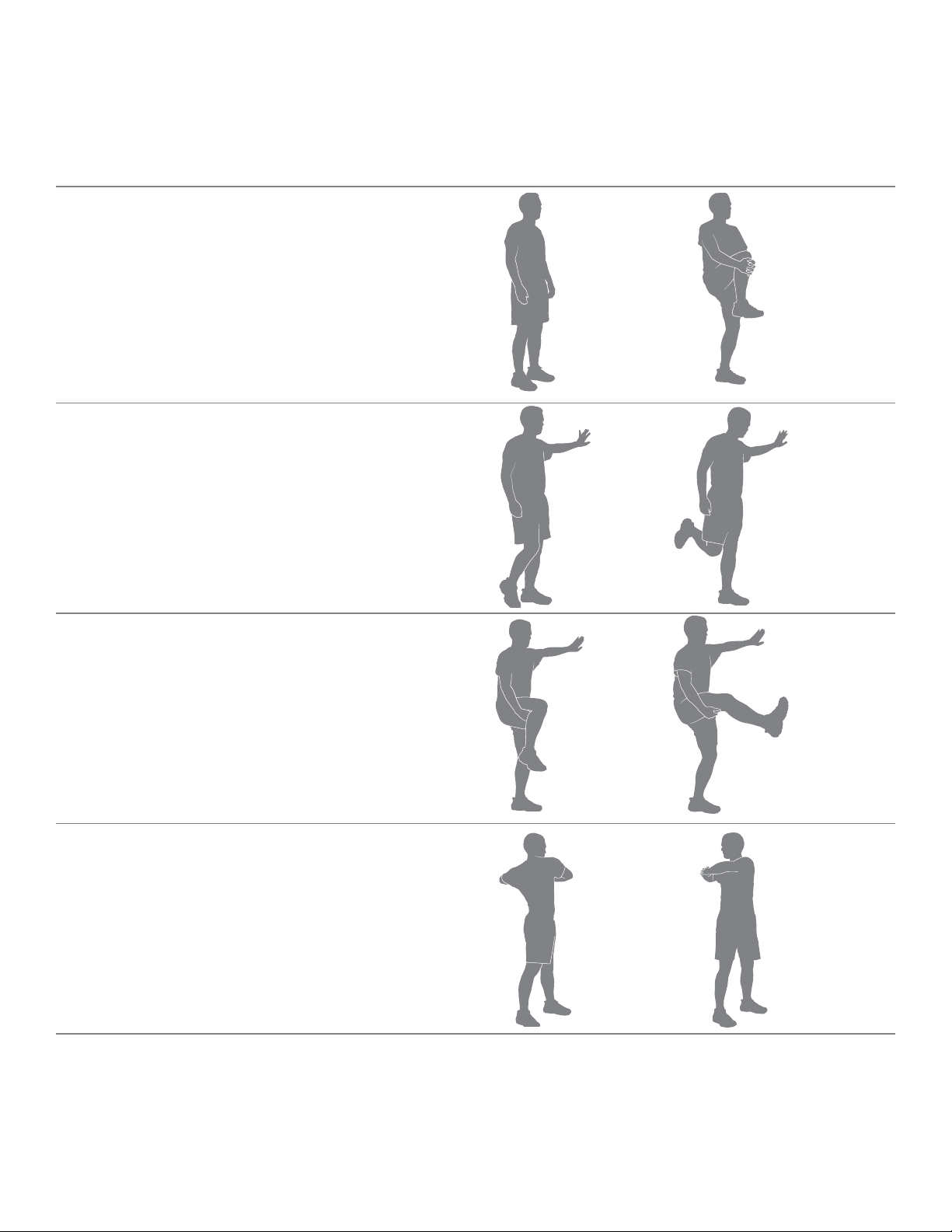
%HIRUH\RXXVH\RXU%RZÀH[0D[7UDLQHU
®
FDUGLRPDFKLQHFRQVLGHUGRLQJWKHVHG\QDPLFZDUPXSVWUHWFKHVZKLFKZLOOKHOSSUHSDUH\RXUERG\IRU
the workout:
Dynamic Knee Hug
Stand with the feet together. Bring one knee forward and up
toward the chest. Place the hands around the shin and pull
the knee into the chest. Release the stretch by putting the
IRRWRQWKHÀRRU(DFKUHSHWLWLRQRIWKHVHTXHQFHVKRXOGWDNH
WRVHFRQGV5HSHDWDVDFRQWLQXRXVFRQWUROOHGÀXLGVH
quence 10 or 20 times. Repeat the stretch with the other leg.
Dynamic Knee Bend
Stand with the feet together. Hold onto a wall for balance with
one hand, if necessary. Raise the heel of one foot toward the
JOXWHDOV5HOHDVHWKHVWUHWFKE\SXWWLQJWKHIRRWRQWKHÀRRU
Each repetition of the sequence should take 1 to 3 seconds.
5HSHDWDVDFRQWLQXRXVFRQWUROOHGÀXLGVHTXHQFHRU
times. Repeat the stretch with the other leg.
Dynamic Knee Kick
Stand tall and hold one leg up with the hands at hip height,
keeping the knee bent. Hold onto a wall for balance with one
hand, if necessary. Straighten the knee as far as comfortably
possible. Release the stretch by bending the knee. Each rep
etition of the sequence should take 1 to 3 seconds. Repeat
DVDFRQWLQXRXVFRQWUROOHGÀXLGVHTXHQFHRUWLPHV
Repeat the stretch with the other leg.
Dynamic Twist
6WDQGZLWKWKHIHHWVKRXOGHUZLGWKDSDUW%HQGWKHHOERZV
hold the arms out to the sides. Twist the upper body to one
side and then the other side as far as comfortably possible.
Each repetition of the sequence should take 1 to 3 seconds.
5HSHDWDVDFRQWLQXRXVFRQWUROOHGÀXLGVHTXHQFHRU
times
*6RXUFH-D\%ODKQLN¶V)XOO%RG\)OH[LELOLW\6HFRQG(GLWLRQ+XPDQ.LQHWLFVFRP
Assembly / Owner’s Manual
27
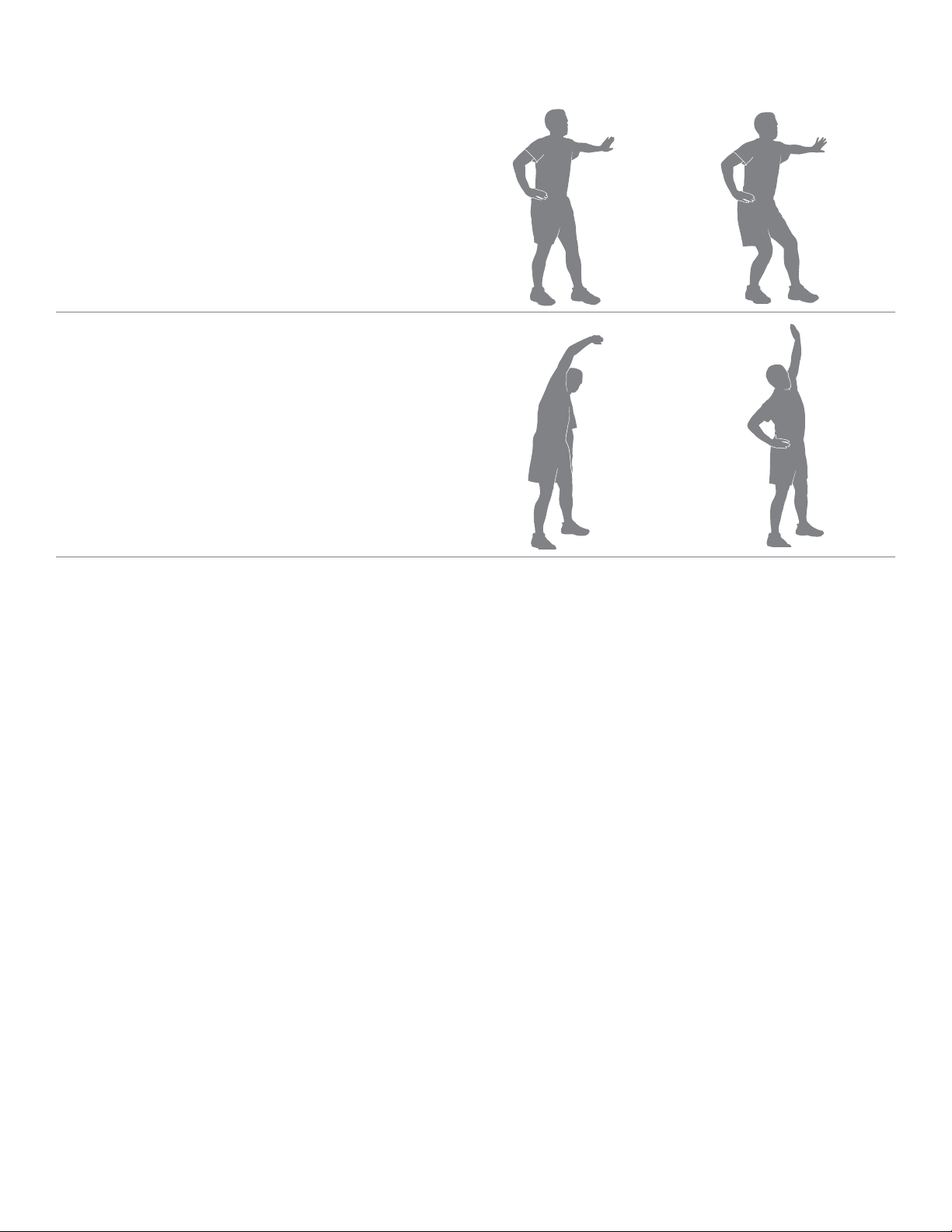
Dynamic Bent Knee Heel Press
6WDQGZLWKRQHIRRWIRUZDUGDQGRQHIRRWEDFNKLSZLGWK
apart and feet facing forward. Hold onto a wall for balance
with one hand, if necessary. Bend both knees putting weight
on the back heel. Release the stretch by returning to the start
position. Each repetition of the sequence should take 1 to 3
VHFRQGV5HSHDWDVDFRQWLQXRXVFRQWUROOHGÀXLGVHTXHQFH
10 or 20 times. Repeat the stretch with the other leg. Touch a
wall or hold onto something for balance, if necessary.
Dynamic Side Reach
Stand with the feet apart, the knees slightly bent and the
arms at the sides of the body. Reach with one hand above
the head and lean over to the opposite side. Release the
stretch by returning to the start position. Then reach with the
other hand to the opposite side. Use the other arm to support
the body weight on the thigh, if necessary. Each repetition
of the sequence should take 1 to 3 seconds. Repeat as a
FRQWLQXRXVFRQWUROOHGÀXLGVHTXHQFHRUWLPHV

Assembly / Owner’s Manual
28
Workouts
)ROORZWKHVHJXLGHOLQHVWRHDVH\RXUVHOILQWRDZHHNO\H[HUFLVHUHJLPHQ8VH\RXUMXGJPHQWDQGRUWKHDGYLFHRI\RXUSK\VLFLDQRUKHDOWKFDUH
SURIHVVLRQDOWR¿QGWKHLQWHQVLW\DQGOHYHORI\RXUZRUNRXWV
Consult a physician before you start an exercise program. Stop exercising if you feel pain or tightness in your chest, become short
of breath, or feel faint. Contact your doctor before you use the machine again. Use the values calculated or measured by the
machine’s computer for reference purposes only. The heart rate displayed on the console is an approximation and should be used
for reference only.
6WHDG\6WDWHDQG,QWHUYDO7UDLQLQJDUHW\SHVRIZRUNRXWV\RXFDQGRRQ\RXU%RZÀH[0D[7UDLQHU
®
cardio machine:
Steady State workouts
A Steady State workout involves slowly increasing your workout speed to a challenging, but comfortable, speed you can hold for most of your work
RXW*HWWLQJ\RXU+HDUW5DWHXSLQWRWKH)DW%XUQLQJ+HDUW=RQH]RQHIRUDQHQWLUHZRUNRXWZRXOGEHDJUHDW6WHDG\6WDWHZRUNRXW)RUH[DPSOH
KROGLQJDFDORULHVSHUPLQXWH%XUQ5DWHSDFHIRUWKHHQWLUHZRUNRXWH[FHSWGXULQJWKHZDUPXSDQGFRROGRZQ6WHDG\6WDWHZRUNRXWVKHOS\RX
EXLOGH[HUFLVHFRQ¿GHQFHVWDPLQDDQGHQGXUDQFHDQGDUHHVVHQWLDOWRDZHOOURXQGHGFDUGLRYDVFXODUWUDLQLQJSURJUDP
Interval Training workouts
$Q,QWHUYDO7UDLQLQJZRUNRXWLQYROYHVDGMXVWLQJ\RXUZRUNRXWLQWHQVLW\IRUVSHFL¿FOHQJWKVRIWLPHWRUDLVHDQGORZHU\RXUEUHDWKLQJUDWHKHDUWUDWH
and calorie burn. This form of workout allows you to burn more calories than a standard workout in a shorter period of time. Using the Calorie Burn
Rate display, you can adjust the intensity of your workout quickly to achieve your goals.
7KH%RZÀH[0D[7UDLQHU
®
FDUGLRPDFKLQHFRPELQHV³$&7,9(´DQG³5(67´VHJPHQWVWRFUHDWHDQ,QWHUYDOZRUNRXW'XULQJDQ³$&7,9(´
VHJPHQWSXVK\RXUVHOIWRDOHYHORIKLJKFDORULHEXUQWKDWFDQEHUHSHDWHGIRUWKHVHJPHQWV7KHQGXULQJWKH³5(67´VHJPHQWVDOORZ\RXUVHOI
WRGHFUHDVHWKHLQWHQVLW\DQGSUHSDUHIRUWKHQH[W³$&7,9(´VHJPHQW7KHVHH[WUHPHFKDQJHVLQLQWHQVLW\DORQJZLWKSXVKLQJ\RXUERG\WRZDUG
H[KDXVWLRQLVZKHUHWKHPD[LPXPEHQH¿WVDUHJDLQHGIURP,QWHUYDO7UDLQLQJZRUNRXWV
,QWHUYDO7UDLQLQJZRUNRXWVSURYLGHYDULHW\KHOSPLQLPL]HRYHUXVHLQMXULHVWKDWVRPHWLPHVRFFXUIURPGRLQJRQO\6WHDG\6WDWHZRUNRXWVPD[LPL]H
FDORULHEXUQDQGLPSURYH¿WQHVV
7KH%RZÀH[0D[7UDLQHU
®
cardio machine is designed to cushion your joints and muscles, and both Steady State and Interval Training workouts
should feel much more comfortable than walking or running outside on a hard surface or a treadmill.
After Burn Rate
$WWKHHQGRIDQLQWHQVH,QWHUYDO7UDLQLQJZRUNRXW\RXUERG\ZLOODFWXDOO\QHHGWRH[SHQGDGGLWLRQDOHQHUJ\WRUHSOHQLVK\RXUERG\¶VUHVHUYHV7KLV
DGGLWLRQDODPRXQWRIHQHUJ\WKDW\RXUERG\ZLOOEHXVLQJLVWKH$IWHU%XUQ5DWHRU(32&([FHVV3RVWH[HUFLVH2[\JHQ&RQVXPSWLRQ7KHOHYHORI
WKLVDGGLWLRQDOHQHUJ\UHTXLUHPHQWIRU\RXUERG\LVGLUHFWO\UHODWHGWRPDQ\IDFWRUV6RPHIDFWRUVDUH\RXUSK\VLFDO¿WQHVVOHYHOLQWHQVLW\OHYHORIWKH
LQWHUYDOWUDLQLQJZRUNRXWOHQJWKRIR[\JHQGHSULYDWLRQGXULQJWKHZRUNRXWDQGSK\VLFDOGHPDQGVGXULQJWKHUHFRYHU\SKDVH
In summary, your body may be burning more calories after your workout. So after an intense MAX Interval workout, you may feel the effects for
hours afterwards.
Assembly / Owner’s Manual
29
Workout Log
Use this log to track your workouts and progress. Tracking your workouts helps you stay motivated and achieve your goals.
Date Calories Burn Rate (aver
age)
Time RPM (average) Heart Rate (aver
age)
Level (average)
Cool-Down *
:KHQ\RXDUHGRQHXVLQJ\RXUFDUGLRPDFKLQHFRQVLGHUGRLQJWKHVHUHOD[LQJVWUHWFKHVZKLFKZLOOKHOS\RXUERG\UHFRYHUIURPWKHZRUNRXWDQG
PDNH\RXPRUHÀH[LEOH
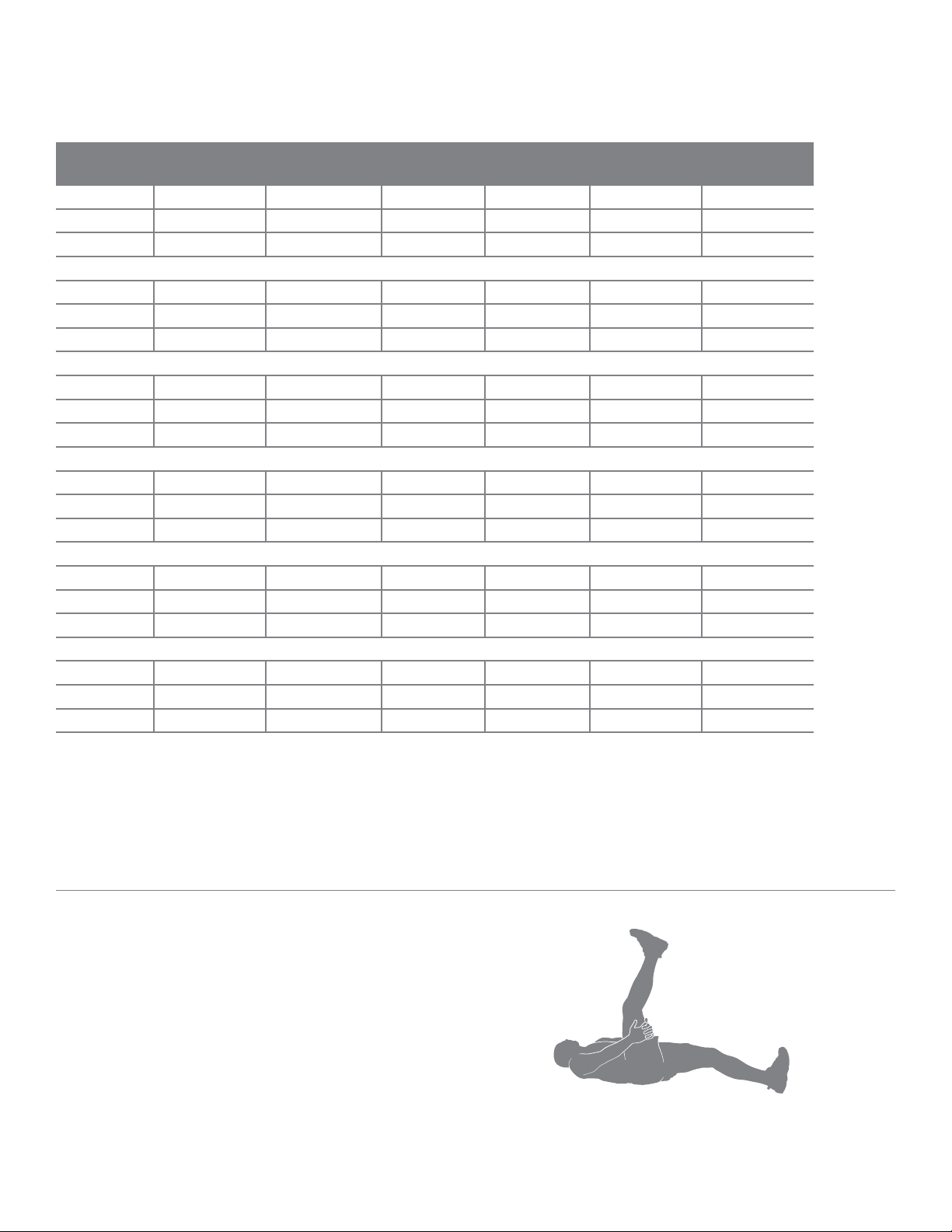
Lying Leg Raise
/LHRQWKHÀRRUIDFHXSZLWKWKHOHJVVOLJKWO\EHQW/LIWRQHOHJ
up toward the ceiling, keeping the knee straight. Place the
hands (or a strap) around the thigh and move the leg closer
to the head. Hold the stretch for 10 to 30 seconds. Repeat the
VWUHWFKRQWKHRWKHUOHJ.HHSWKHKHDGRQWKHÀRRUDQGGR
not round the spine.
Assembly / Owner’s Manual
30
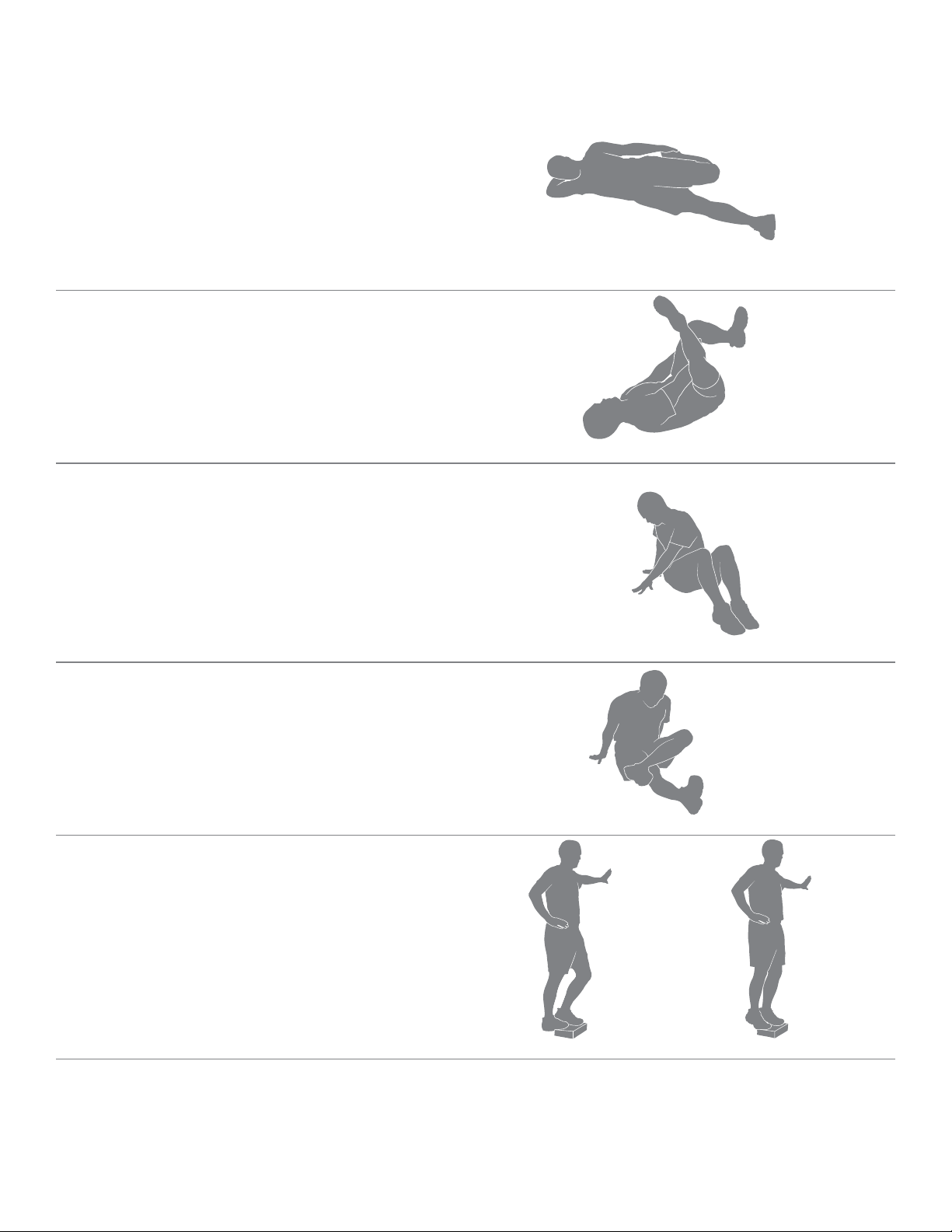
Side Lying Knee Bend
/LHRQWKHÀRRURQRQHVLGHRIWKHERG\DQGUHVWWKHKHDGRQ
the lower arm. Bend the top knee and hold the ankle with the
VDPHVLGHKDQGWKHQSXOOWKHKHHOWRZDUGWKHJOXWHDOV+ROG
the stretch for 10 to 30 seconds. Lie on the other side and
repeat the stretch with the other leg. Remember to hold the
knees close together.
Lying Figure Four
/LHRQWKHÀRRUIDFHXSZLWKWKHOHJVEHQW3ODFHRQHIRRW
DFURVVWKHWKLJKRIWKHRSSRVLWHOHJLQWKH¿JXUHIRXUSRVLWLRQ
5HDFKIRUWKHOHJRQWKHÀRRUDQGSXOOLWWRZDUGWKHFKHVW
Hold the stretch for 10 to 30 seconds. Repeat the stretch with
WKHRWKHUOHJ.HHSWKHKHDGRQWKHÀRRU
Seated Twist
6LWRQWKHÀRRUDQGH[WHQGWKHOHJVVWUDLJKWRXWLQIURQWRIWKH
ERG\ZLWKWKHNQHHVVOLJKWO\EHQW3ODFHRQHKDQGRQWKHÀRRU
behind the body and the other hand across the thigh. Twist
the upper body as far as comfortably possible to one side.
Hold the stretch for 10 to 30 seconds. Repeat the stretch on
the other side.
Seated Figure Four
6LWRQWKHÀRRUDQGH[WHQGRQHOHJVWUDLJKWRXWLQIURQWRIWKH
body. Place the foot of the other leg across the thigh in the
¿JXUHIRXUSRVLWLRQ0RYHWKHFKHVWWRZDUGWKHOHJVSLYRWLQJ
at the hip. Hold the stretch for 10 to 30 seconds. Repeat on
the other leg. Use the arms to support the back.
Dynamic Heel Drop
Place the ball of one foot on the edge of a step or staircase.
Place the other foot slightly in front. Hold onto a wall for bal
ance with one hand, if necessary. Lower the heel of the back
foot as far as comfortably possible, keeping the knee straight.
Release the stretch by lifting the heel as high as comfortably
possible. Each repetition of the sequence should take 1 to 3
VHFRQGV5HSHDWDVDFRQWLQXRXVFRQWUROOHGÀXLGVHTXHQFH
10 or 20 times. Repeat the stretch with the other leg
*6RXUFH-D\%ODKQLN¶V)XOO%RG\)OH[LELOLW\6HFRQG(GLWLRQ+XPDQ.LQHWLFVFRP

Assembly / Owner’s Manual
31
How Often Should You Exercise
Consult a physician before you start an exercise program. Stop exercising if you feel pain or tightness in your chest, become short
of breath, or feel faint. Contact your doctor before you use the machine again. Use the values calculated or measured by the
machine’s computer for reference purposes only. The heart rate displayed on the console is an approximation and should be used
for reference only.
• 3 times a week for about 15 minutes each day.
• Schedule workouts in advance and try to follow the schedule.
Note: ,I\RXDUHQHZWRH[HUFLVHRUUHWXUQLQJWRDUHJXODUH[HUFLVHSURJUDPDQG\RXDUHXQDEOHWRFRPIRUWDEO\FRPSOHWHPLQXWHVRIFRQ
WLQXRXVH[HUFLVHDWRQHWLPHMXVWGR±PLQXWHVDQGJUDGXDOO\LQFUHDVH\RXUZRUNRXWWLPHXQWLO\RXFDQUHDFKDPLQXWHWRWDO
Intensity of Workout
To increase the intensity of your workout:
• Push yourself to increase the number of Pedal revolutions per minute
• Place your feet further out toward the rear of the Pedals
• Increase the Intensity Level and keep your RPM consistent, or increase it as well
• Use your upper and lower body at different levels
• Shift your grip location on the Upper Handlebars to work out other parts of your upper body
Hand Placement (Grip Selection)
7KH¿WQHVVPDFKLQHLVHTXLSSHGZLWK8SSHU+DQGOHEDUVWKDWDOORZIRUDYDULHW\RIXSSHUERG\ZRUNRXWV:KHQVWDUWLQJRXWSODFH\RXUKDQGVZKHUH
LWIHHOVPRVWFRPIRUWDEOHDQGVWDEOHRQWKH8SSHU+DQGOHEDUV$V\RXSURJUHVVRQ\RXU¿WQHVVURXWLQHVKLIW\RXUKDQGSODFHPHQWWRWDUJHWGLIIHUHQW
muscle groups.
Exercise on this machine requires coordination and balance. Be sure to anticipate that changes in speed and resistance level can
occur during workouts, and be attentive in order to avoid loss of balance and possible injury.
The Static Handlebars can also be used to add stability and allow you to focus the workout more on your legs.
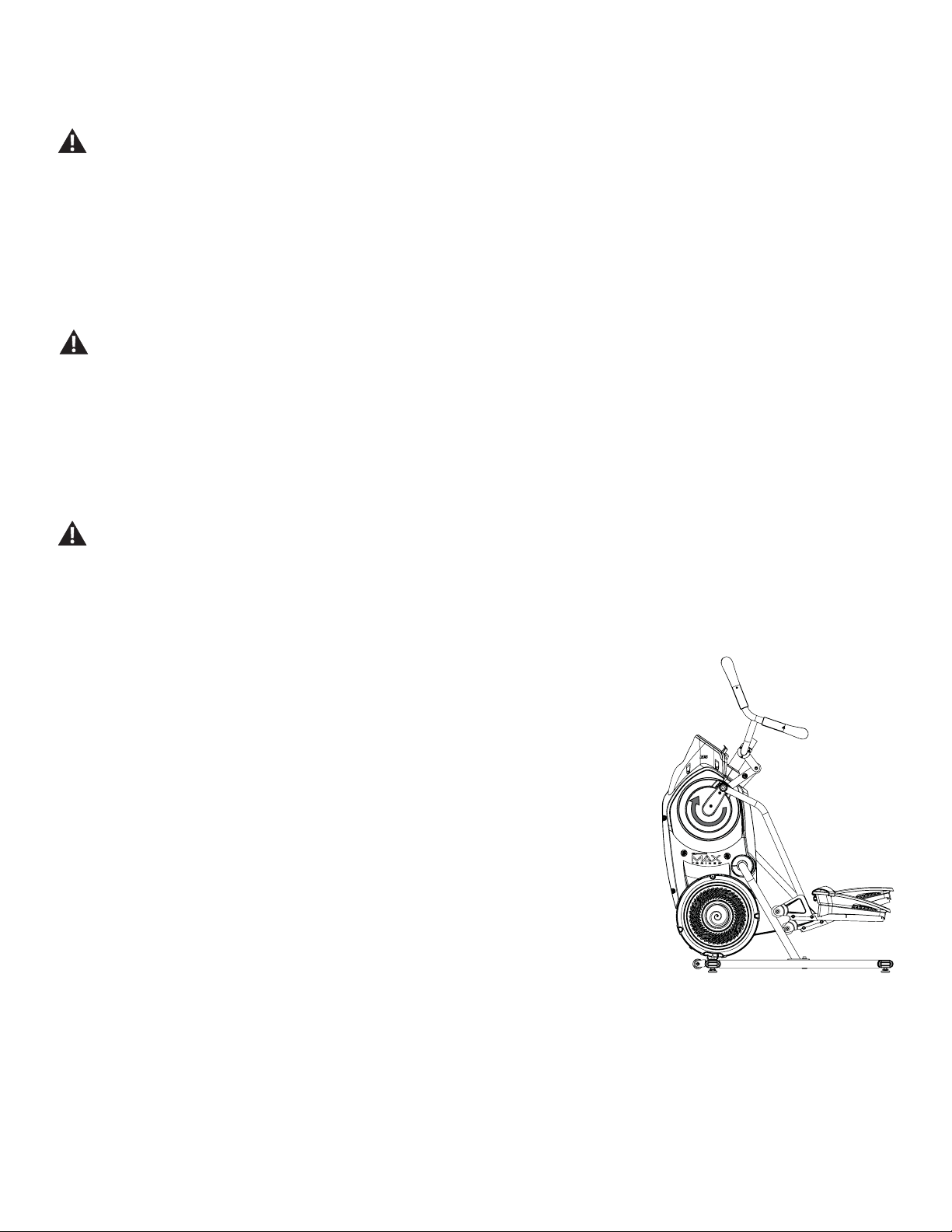
Mounting and Dismounting Your Machine
Care should be used when mounting or dismounting the machine.
Be aware that the Pedals and the Handlebars are connected and when either of these parts move the other does as well. In order to
avoid possible serious injury, grasp the Static Handlebars to steady yourself.
Be sure there is nothing under the Pedals or in the Air Resistance Fan before moving anything on the machine.
7RPRXQW\RXU¿WQHVVPDFKLQH
1. Move the Pedals until the one nearest to you is in the lowest position.
2. Grasp the Static Handlebars under the Console Button Assembly.
3. Steadying yourself with the Static Handlebars, step up onto the lowest Pedal and place your other foot onto the opposite Pedal.
Note:%RWWRPHGRXW´LVZKHQWKH8VHULVXQDEOHWRVWDUWDZRUNRXWEHFDXVHWKH3HGDOVZLOOQRWPRYH,IWKLVRFFXUVVDIHO\JUDVSWKH6WDWLF
Handlebars and apply your weight to the heel of the higher foot. While still grasping the Static Handlebar, lean back slightly applying
more weight onto the heel. Once the Pedals begin to move, resume your intended workout.
Operations
Assembly / Owner’s Manual
32
7RGLVPRXQW\RXU¿WQHVVPDFKLQH
1. Move the Pedal you want to dismount from to the highest position, and bring the machine to a complete stop.
This machine is not equipped with a free-wheel. Pedal speed should be reduced in a controlled manner.
2. Grasp the Static Handlebars under the Console to steady yourself.
:LWK\RXUZHLJKWRQWKHORZHVWIRRWVZLQJWKHXSSHUIRRWRIIWKHPDFKLQHDQGGRZQRQWRWKHÀRRU.
4. Step off of the machine and release your grip from the Static Handlebars.
Getting Started
3ODFHWKH¿WQHVVPDFKLQHLQ\RXUZRUNRXWDUHD
Place the machine on a clean, hard, level surface, free from unwanted material or other objects that may hamper your ability to
PRYHIUHHO\$UXEEHUPDWFDQEHXVHGEHORZWKHPDFKLQHWRSUHYHQWWKHUHOHDVHRIVWDWLFHOHFWULFLW\DQGSURWHFW\RXUÁRRULQJ
The machine can be moved by one or more persons. Make sure that your own physical strength is capable of safely moving the
machine.
([DPLQHIRUDQ\REMHFWVEHORZWKH3HGDOVDQGLQWKH$LU5HVLVWDQFH)DQ%HVXUHLWLVFOHDU
3. Connect the power cord to the machine and into a grounded AC Wall Outlet.
4. If you use the Heart Rate Monitor, follow the Chest Strap directions.
5. To mount the machine, move the Pedals until the one nearest you is in the lowest position.
Care should be used when mounting or dismounting the machine.
Be aware that the Pedals and the Handlebars are connected and when either of these parts move the other does as well. In order to
avoid possible serious injury, grasp the Static Handlebars to steady yourself.
*UDVSWKH6WDWLF+DQGOHEDUVXQGHUWKH&RQVROH%XWWRQ$VVHPEO\
7. Steadying yourself with the Static Handlebars, step up onto the lowest Pedal and place your other foot onto the opposite Pedal.
Note:³%RWWRPHGRXW´LVZKHQWKH8VHULVXQDEOHWRVWDUWDZRUNRXWEHFDXVHWKH3HGDOVZLOOQRW
move. If this occurs, safely grasp the Static Handlebars and apply your weight to the heel
of the higher foot. While still grasping the Static Handlebar, lean back slightly applying more
weight onto the heel. Once the Pedals begin to move, resume your intended workout.
3XVKWKH86(5EXWWRQWRVHOHFWWKHGHVLUHG8VHU3UR¿OH
9. Push the START button to begin a Quick Start workout. Starting with a Quick Start workout will get
\RXIDPLOLDUZLWKKRZ\RXU%RZÀH[0D[7UDLQHU
®
machine operates and responds to adjustments of
Resistance Level and Burn Rate.
Note: :KHQRSHUDWLQJWKH%RZÀH[0D[7UDLQHU
®
machine, be sure the Legs are moving in the direc
tion as shown on the Crank Cover.
:KHQUHDG\IRUD%RZÀH[0D[7UDLQHU
®
ZRUNRXWEHVXUHWRSURJUDP\RXU8VHU3UR¿OHVHHWKH(GLWD
8VHU3UR¿OHVHFWLRQEHIRUHVWDUWLQJWKH0$;ZRUNRXW7KHVXJJHVWHG7DUJHW%XUQ5DWHVDUHEDVHGRQ
\RXU8VHU3UR¿OHVHWWLQJV
Power-Up / Idle Mode ( WELCOME screen )
The Console will enter 3RZHU8S / Idle Mode if it is plugged into a power source, any button is pushed, or if it receives a signal from the RPM sensor
as a result of pedaling the machine.
Auto Shut-Off (Sleep Mode)
,IWKH&RQVROHGRHVQRWUHFHLYHDQ\LQSXWLQDSSUR[LPDWHO\PLQXWHVLWZLOODXWRPDWLFDOO\VKXWRII7KH/&'GLVSOD\LVRIIZKLOHLQ6OHHS0RGH
Note: The Console does not have an On/Off switch.
Assembly / Owner’s Manual
33
USER
TOTAL
ACTIVE
REST
TOT AL
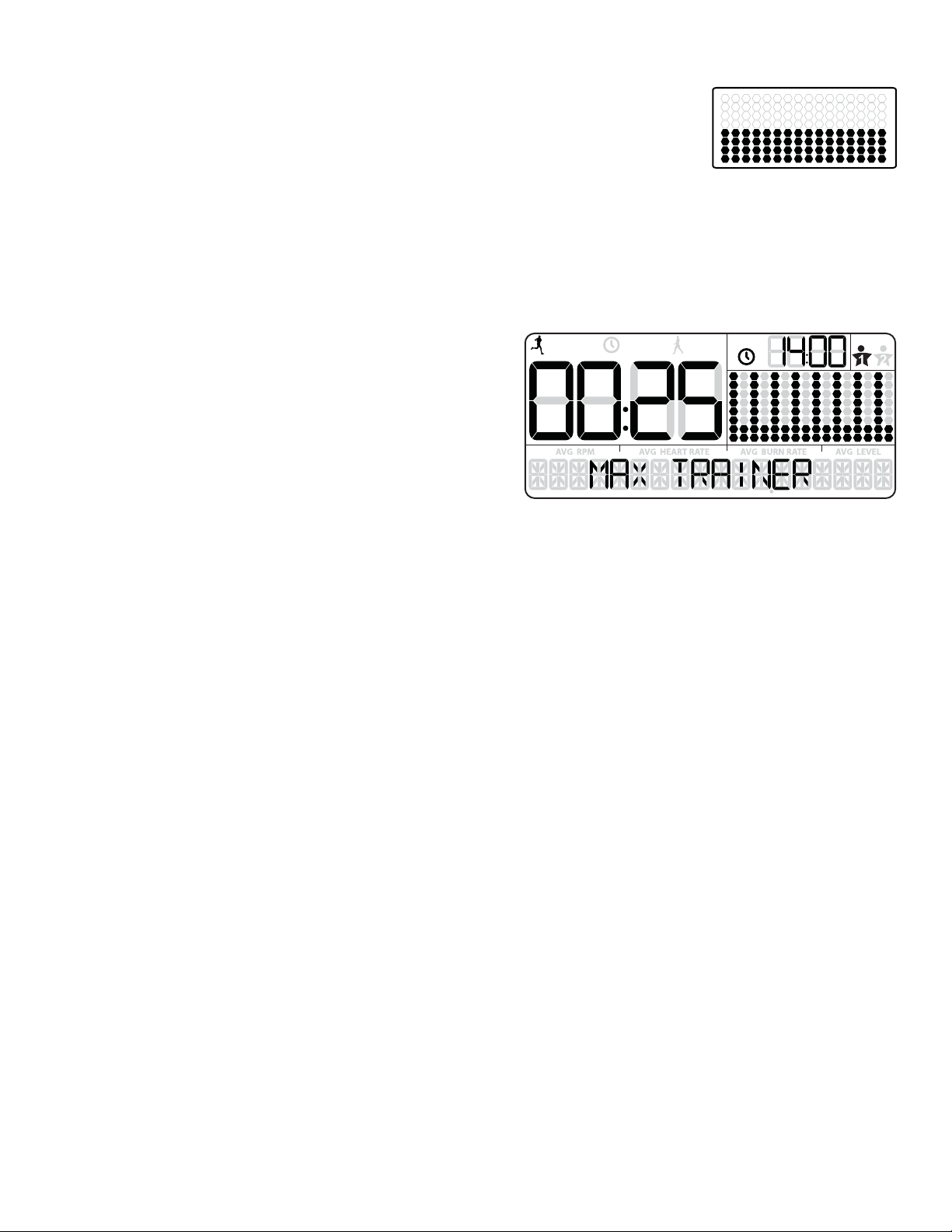
Manual ( Quick Start ) Program
7KH0DQXDOZRUNRXWSURJUDPLVDQRSHQHQGHGZRUNRXWWKDWWUDFNV\RXUWRWDOWLPHDOORZLQJ\RXWRWDOFRQWURO7KH
:RUNRXW3UR¿OH'LVSOD\VKRZVWKH7DUJHW%XUQ5DWHIRUWKH0DQXDOSURJUDP
1. Stand on the machine.
2. The Console will show the WELCOME screen. 3XVKWKH86(5EXWWRQWRVHOHFW\RXU8VHU3UR¿OH
Note: 'XULQJWKHZRUNRXWWKH&RQVROHZLOOVKRZWKH7DUJHW/('5DQJHEDVHGRQWKHVHOHFWHG8VHU3UR¿OHVHWWLQJV
3. Push the START/ENTER button to begin the Manual workout program.
4. When done with your workout, stop pedaling and push PAUSE/STOP to pause the workout. Push the PAUSE/STOP button again to end the
workout.
MAX Interval Workout Program
The MAX Interval Workout Program is a workout that alternates from intense
EXUVWVRIRXWSXW³$&7,9(´WRDVORZHUSDFHGµFDWFK\RXUEUHDWK¶WLPHSHULRG
³5(67´ERWKRIZKLFKDUHUHSHDWHGRYHUHLJKWF\FOHV7KH:RUNRXW3UR¿OH
Display shows the Target Burn Rate for the MAX Interval program.
1. Stand on the machine.
3XVKWKH86(5EXWWRQWRVHOHFW\RXU8VHU3UR¿OH
Note: During the workout, the Console will show the Target LED Range
EDVHGRQWKHVHOHFWHG8VHU3UR¿OHVHWWLQJV.
3. Push the MAX Interval button.
Note: 7KH:RUNRXW3UR¿OH'LVSOD\ZLOODGMXVWWKH%XUQ5DWHSUR¿OHWRWKHFXUUHQW8VHUVHWWLQJV
4. The workout will begin with an audible countdown as the Burn Rate display needle sweeps across the display and then settles on the current
Burn Rate. The Target Burn Rate LED’s will also activate and sweep up to the recommended Burn Rate.
7KH¿UVWZRUNRXWVHJPHQWLVDQ³$&7,9(´LQWHUYDOWKDWODVWVIRUDVKRUWHUSHULRGRIWLPH6DIHO\SXVK\RXUVHOIWRJHWWKH%XUQ5DWHGLVSOD\LQWR
the Target Burn Rate (red LED’s) and keep it in the range until the time reaches 00:00.
Note: The Target Burn Rate (LED) Range is provided only as a suggested target. The 5 LED range provides a lesser target, and allows a User
WRSURJUHVVWRWKHKLJKHU/('¶VLQWKHUDQJHDVWKHLU¿WQHVVOHYHOLQFUHDVHV7RFKDQJHWKH7DUJHW%XUQ5DWH/('5DQJHSXVKWKHDS
propriate Burn Rate button until the Target Range is near the desired value.
$WWKHODVWVHFRQGVRIWKH³$&7,9(´ZRUNRXWWKH&RQVROHZLOOEHJLQDQDXGLEOHFRXQWGRZQ
$VWKHLQWHUYDOWLPHUHDFKHV³´WKH&RQVROHZLOOPDNHWKHWKLUGDXGLEOHFRQ¿UPDWLRQDQGWKHQH[WVHJPHQWRIWKHZRUNRXWD³5(67´VHJ
ment, will begin.
The Target LED Range will shift from red to green and sweep to a reduced Burn Rate. During the REST Interval, continue to work out but at a
lower Intensity.
$WWKHODVWVHFRQGVRIWKH³5(67´ZRUNRXWWKH&RQVROHZLOOEHJLQDQDXGLEOHFRXQWGRZQ7KHLQWHUYDOLVDERXWWRVKLIWIURPD³5(67´WRDQ
³$&7,9(´LQWHUYDODJDLQ
$VWKHLQWHUYDOWLPHUHDFKHV³´WKH&RQVROHZLOOPDNHDQDXGLEOHFRQ¿UPDWLRQDQGVKLIWWRWKHQH[W³$&7,9(´VHJPHQW
7KHVKLIWIURP³$&7,9(´WR³5(67´VHJPHQWVZLOOUHSHDWIRUDWRWDORIF\FOHVRYHUWKHZRUNRXW
:KHQWKHODVW³5(67´VHJPHQWLVFRPSOHWHGWKH&RQVROHZLOOGLVSOD\´:25.287&203/(7(´DQGWKHQVKRZWKHZRUNRXWUHVXOWV7KH&RQ
VROHZLOOGLVSOD\WKHWRWDOWLPHRIWKH³$&7,9(´LQWHUYDOVDORQJZLWK727$/7,0(,IWKHUHLVQRLQSXWIRUPLQXWHVWKH&RQVROHZLOODXWRPDWLFDOO\
go into Sleep Mode.
Note: ,IDQ,QWHUYDOZRUNRXWLVHQGHGEHIRUHDOOVHJPHQWVKDYHEHHQFRPSOHWHGWKH&RQVROHZLOORQO\VKRZWKHODVWVHJPHQWFRPSOHWHGRQ
WKH3URJUDP3UR¿OH
Assembly / Owner’s Manual
34
Workout Programs
The Workout Programs are organized into two different styles of Workouts: Standard Workouts and SMART Workouts.
STANDARD WORKOUTS
Calorie Burn Stairs
)DW%XUQ
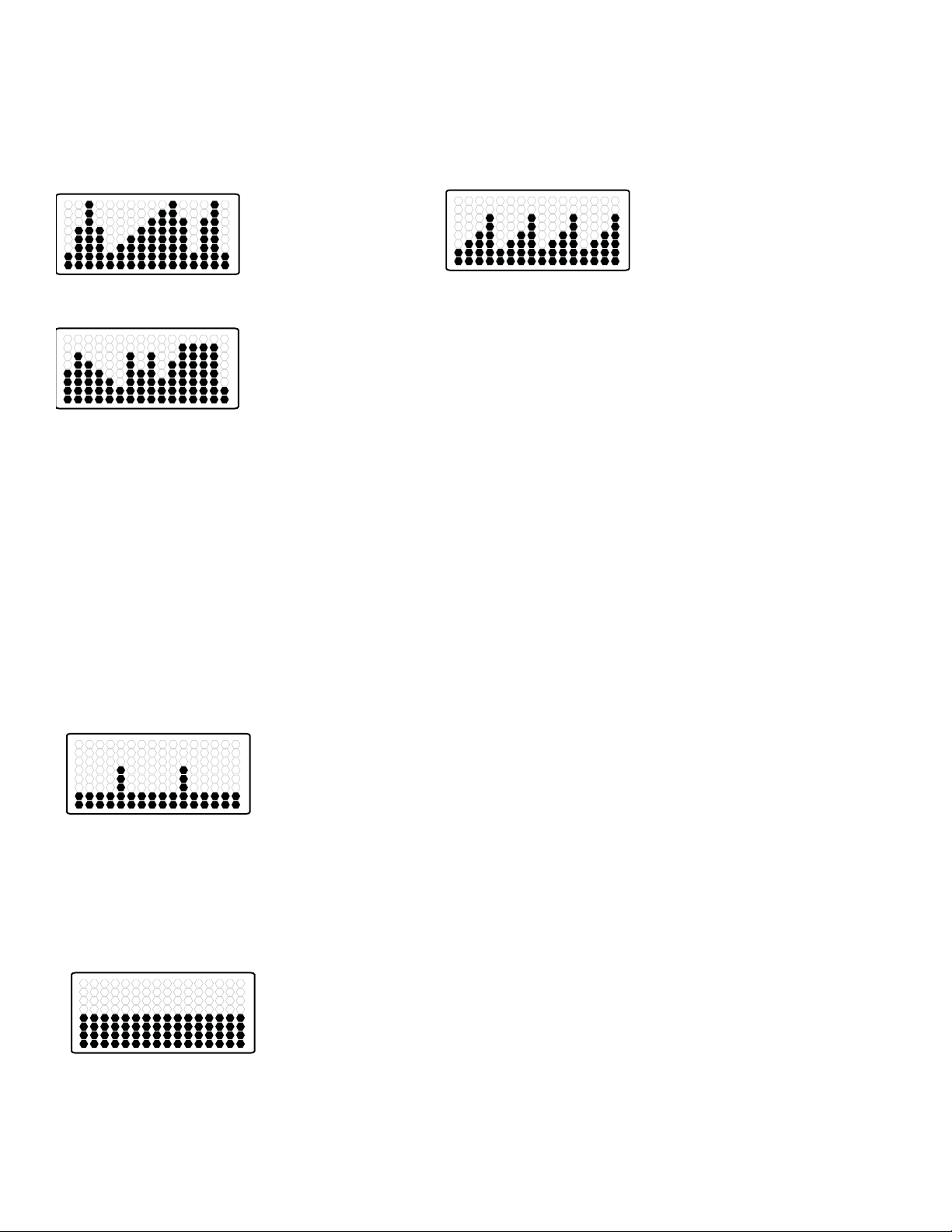
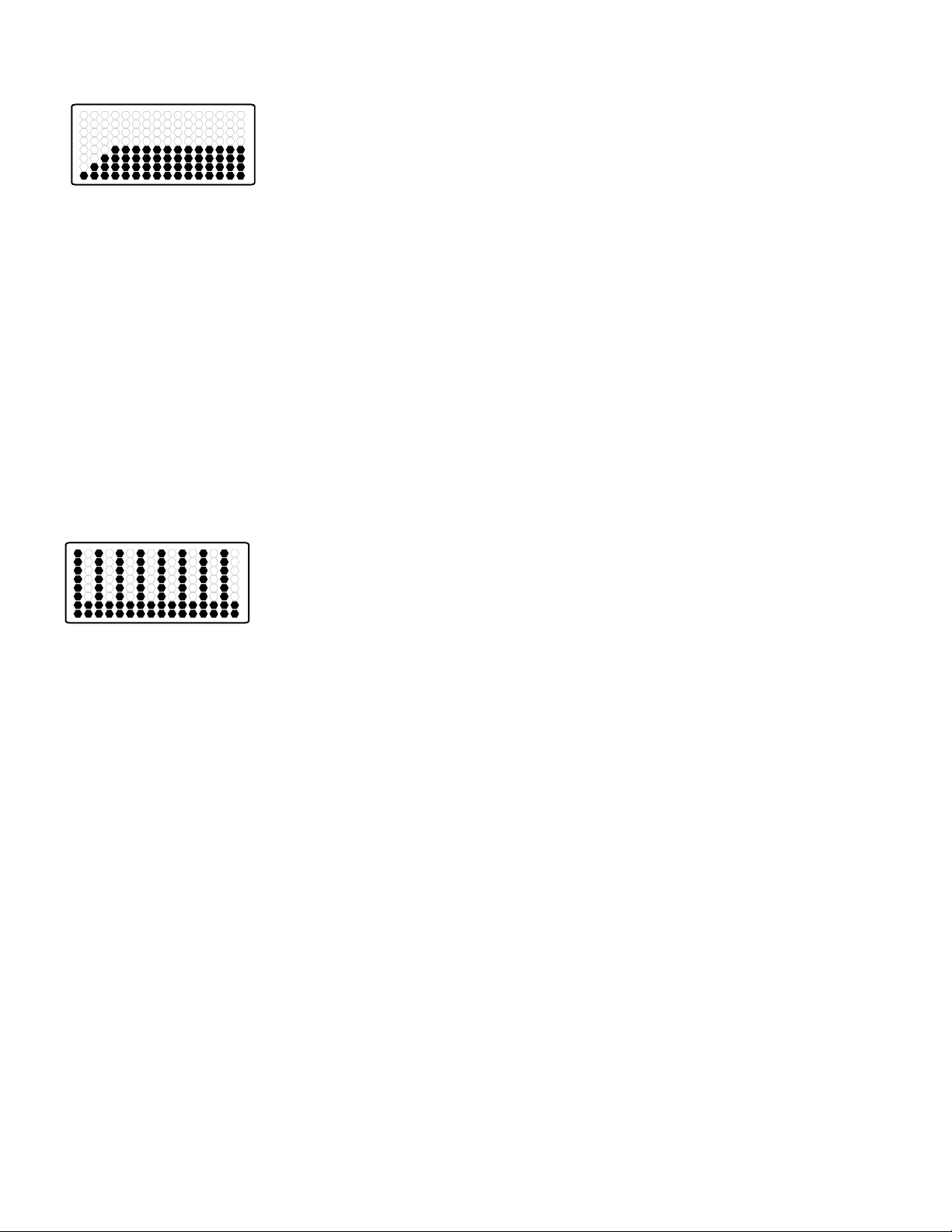
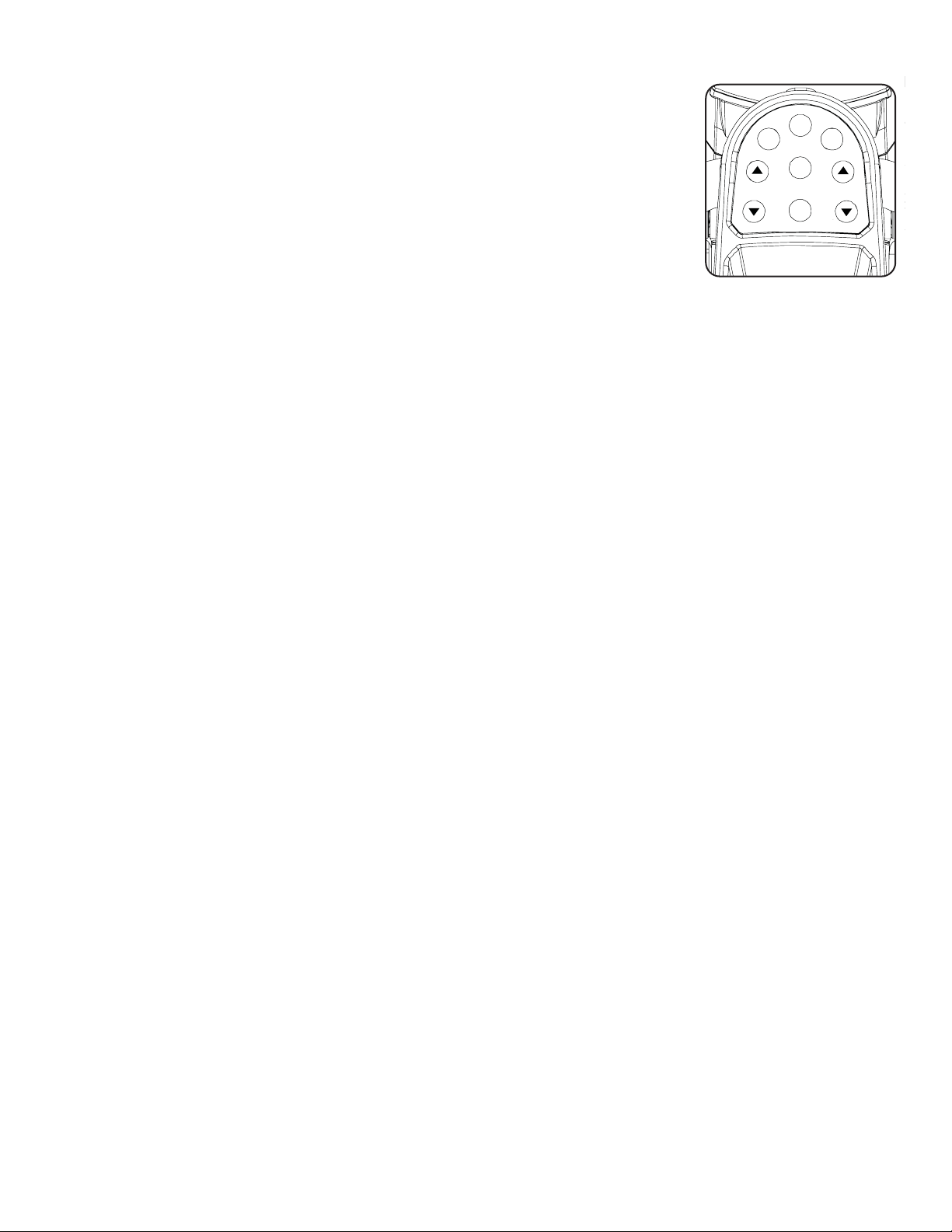
6WDQGDUG:RUNRXWVVKRZWKHFRXUVHSUR¿OHRI5HVLVWDQFH/HYHOVIRUWKHSURJUDP(DFKFROXPQLQWKHSUR¿OHVKRZVRQHZRUNRXWVHJPHQW7KH
KLJKHUWKHFROXPQWKHKLJKHUWKHUHVLVWDQFHOHYHO(DFKFROXPQRID6WDQGDUG:RUNRXWLVIRUPLQXWHPLQXWHZRUNRXW
7KHÀDVKLQJFROXPQVKRZV\RXUFXUUHQWLQWHUYDO7KH&RQVROHZLOODGMXVWWKH5HVLVWDQFH/HYHOWRWKH:RUNRXW3UR¿OH'LVSOD\
Note:,IWKH5HVLVWDQFH/HYHOLVFKDQJHGGXULQJDZRUNRXWWKHSUR¿OHRIWKH:RUNRXW3URJUDPZLOOFKDQJH
SMART WORKOUT PROGRAMS
60$57:RUNRXWVVKRZWKHFRXUVHSUR¿OHRI%XUQ5DWHIRUWKHSURJUDP(DFKFROXPQLQWKHSUR¿OHVKRZVRQHZRUNRXWVHJPHQW7KHKLJKHUWKH
column, the higher the Burn Rate. The Console will adjust the resistance level to assist the User to reach the Target Burn Rate.
Note:7KH:RUNRXW3UR¿OH'LVSOD\ZLOODGMXVWWKH%XUQ5DWHSUR¿OHWRWKHFXUUHQW8VHUVHWWLQJV
Calorie Goal
7KH&DORULH*RDOZRUNRXWLVEDVHGRQFDORULHVEXUQHGRYHUDZRUNRXW7KH&RQVROHDVVLJQVDFDORULHYDOXHWRHDFKRIWKHVHJPHQWVEDVHGRQWKH
Burn Rate of each segment. During a workout, when the User has burned the assigned calorie value for the current segment, the workout shifts to
WKHQH[WVHJPHQW$WWKHHQGRIWKHZRUNRXWWKHVHJPHQWVZLOOKDYHEHHQFRPSOHWHGDQGWKHWRWDOFDORULHVEXUQHGZLOOPDWFKWKHFDORULHJRDO
Note: If the Burn Rate is changed during a workout, the time of each remaining segment may adjust because of the new Burn Rate level.
Steady State
7KH6WHDG\6WDWHZRUNRXWSURJUDPLVDQRSHQHQGHGZRUNRXWWKDWWUDFNVWKHWRWDOZRUNRXWWLPH$V530PD\ÀXFWXDWHRYHUDZRUNRXWWKH&RQVROH
will adjust the Resistance Level to keep the User in the Target Burn Rate Range.
Note:%HFDXVHRIWKHRSHQHQGHGGHVLJQRIWKH6WHDG\6WDWHZRUNRXWLWLVRQO\DGMXVWDEOHGXULQJDZRUNRXW
Assembly / Owner’s Manual
35
)LWQHVV7HVW
7KH)LWQHVV7HVWPHDVXUHVWKHLPSURYHPHQWVRI\RXUSK\VLFDO¿WQHVVOHYHO7KHWHVWFRPSDUHV\RXUSRZHURXWSXWWR\RXUKHDUWUDWH$V\RXU¿WQHVV
level improves, your power output will increase at a given heart rate.
Note: The Console must be able to read the heart rate information from the Contact Heart Rate (CHR) sensors or Heart Rate Monitor (HRM) to
work correctly.
7KH&RQVROHZLOOXVHWKH$JHDQG:HLJKWYDOXHVIRUWKHVHOHFWHG8VHU3UR¿OHWRFDOFXODWHWKH)LWQHVV6FRUH
Start to work out and hold the Heart Rate Sensors. The workout starts with a Target Burn Rate that increases with each column. Safely keep your
current Burn Rate in the Target Burn Rate Range, increasing your heart rate. The Target Burn Rate continues to increase automatically until your
KHDUWUDWHUHDFKHVWKH³7HVW=RQH´7KLV]RQHLVLQGLYLGXDOO\FRPSXWHGWREHQHDUSHUFHQWRIWKHPD[LPXPKHDUWUDWHRI\RXU8VHU3UR¿OH:KHQ
you reach the Test Zone, the machine holds the Burn Rate steady for 3 minutes. This lets you reach a stable condition (where your heart rate
becomes steady). At the end of the 3 minutes, the Console measures your heart rate and the power output. These numbers, along with information
DERXW\RXUDJHDQGZHLJKWDUHFRPSXWHGWRSURGXFHD³)LWQHVV6FRUH´
Note:)LWQHVV7HVWVFRUHVVKRXOGRQO\EHFRPSDUHGWR\RXUSUHYLRXVVFRUHVDQGQRWWRRWKHU8VHU3UR¿OHV
Compare your Fitness Scores to see your improvement.
60$570$;,QWHUYDO
The SMART MAX Interval program is the MAX Interval Workout Program with the Console shifting the resistance level for the User. To get the User
into the Target Burn Rate Range, the Console will adjust the resistance level based on the current RPM.
During a workout, the Console attempts to coach the User into the selected Target Burn Rate range. If the User is above the Target Burn Rate, the
Console will decrease the Resistance Level. If the User is below the Target Burn Rate, the Console will increase the Resistance Level.
The Time Intervals and Burn Rate levels can be customized.
To start a Workout Program:
1. Stand on the machine.
2. Push the PROGRAMS button until you select the desired Workout Program.
3. Push the START/ENTER button to begin the selected Workout Program.
4. When done with your workout, stop pedaling and push PAUSE/END to pause the workout. Push the PAUSE/END button again to end the
workout.
Assembly / Owner’s Manual
36
Paused / Results Mode
To Pause a workout:
1. Stop pedaling and push the PAUSE/STOP button to pause your workout.
Note: The Console will automatically pause if there is no RPM signal for 5 seconds.
2. To continue your workout, push START/ENTER or start pedaling.
:KHQSDXVHGWKH&RQVROHGLVSOD\ZLOOVKRZ³:25.2873$86('´DQGWKHQÀDVKWKHZRUNRXWYDOXHV
If the workout does not resume or if the PAUSE/STOP button is pushed, the workout will display “WORKOUT
&203/(7(´DQGWKHUHVXOWYDOXHVDUHGLVSOD\HG7RWDO&DORULHV7RWDO7LPH$YHUDJH530$YHUDJH+HDUW
5DWH$YHUDJH%XUQ5DWHDQG$YHUDJH/HYHO,IWKHZRUNRXWZDVD0$;,QWHUYDOZRUNRXWWKH&RQVROHZLOODOVRGLVSOD\WKHWRWDO³$&7,9(´LQWHUYDO
time.
,IWKHUHLVQR530IRUPLQXWHVWKH&RQVROHDXWRPDWLFDOO\JRHVWRWKH3RZHU8S,GOH0RGH
(GLWD8VHU3URĆOH
)RUDPRUHDFFXUDWHFDORULHFRXQWDQG7DUJHW&DORULH%XUQD8VHU3UR¿OHVKRXOGEHFXVWRPL]HGWRWKH8VHU
3XVK86(5EXWWRQWRVHOHFW\RXU8VHU3UR¿OH8VHURU8VHU
2. Push and hold the USER button for 3 seconds to begin the Edit User mode.
7KH&RQVROHZLOOGLVSOD\WKH$*(SURPSWZLWKWKHGHIDXOWDJHYDOXH³´8VHWKH%XUQ5DWH,QFUHDVHRU%XUQ5DWH'HFUHDVHEXWWRQVWR
adjust the value, and push START/ENTER to set the value.
7KH&RQVROHZLOOGLVSOD\WKH*(1'(5SURPSWZLWKWKHGHIDXOWJHQGHUYDOXH³)(0$/(´8VHWKH%XUQ5DWH,QFUHDVHRU%XUQ5DWH'HFUHDVH
buttons to adjust the value, and push START/ENTER to set the value.
7KH&RQVROHZLOOGLVSOD\WKH81,76SURPSWZLWKWKHGHIDXOWXQLWVYDOXH³/%6´8VHWKH%XUQ5DWH,QFUHDVHRU%XUQ5DWH'HFUHDVHEXWWRQVWR
adjust the value, and push START/ENTER to set the value.
7KH&RQVROHZLOOGLVSOD\WKH:(,*+7SURPSWZLWKWKHGHIDXOWZHLJKWYDOXH³´8VHWKH%XUQ5DWH,QFUHDVHRU%XUQ5DWH'HFUHDVHEXW
tons to adjust the value, and push START/ENTER to set the value.
7KH&RQVROHZLOOGLVSOD\WKH+(,*+7SURPSWZLWKWKHGHIDXOWKHLJKWYDOXH³,1&+(6´8VHWKH%XUQ5DWH,QFUHDVHRU%XUQ5DWH'HFUHDVH
buttons to adjust the value, and push START/ENTER to set the value.
7KH&RQVROHZLOOGLVSOD\WKH5(6(76(77,1*6SURPSWZLWKWKHGHIDXOWYDOXH³12´8VHWKH%XUQ5DWH,QFUHDVHRU%XUQ5DWH'HFUHDVH
buttons to adjust the value, and push START/ENTER to accept the value. All Workout settings for the User will be reset to the default settings.
7KH&RQVROHZLOOGLVSOD\WKH5(6(786(5SURPSWZLWKWKHGHIDXOWYDOXH³12´8VHWKH%XUQ5DWH,QFUHDVHRU%XUQ5DWH'HFUHDVHEXWWRQV
to adjust the value, and push START/ENTER to accept the value. All Workout results and settings for the User will be erased with a reset.
7KH8VHU3UR¿OHUHYLHZLVFRPSOHWHDQGWKH&RQVROHZLOOGLVSOD\WKH:(/&20(VFUHHQ
2QWKHLQLWLDOHGLWRIHDFK8VHU3UR¿OHDOOVFUHHQVPXVWEHUHYLHZHGDQGDFFHSWHG$IWHUWKHLQLWLDOHGLWD8VHUFDQDGMXVWDYDOXHVHWLWDQGSXVK
3$86(6723WRH[LWWKH(GLW8VHUPRGH
Customize the MAX (and SMART MAX) Interval Program
The interval times and burn rate levels can be adjusted on the MAX Interval Program. The adjusted values will be set as the default settings for
future workouts.
1. Step up to the machine.
2. Push and hold down the MAX Interval button for 3 seconds.
7KH&RQVROHZLOOGLVSOD\WKH³$&7,9(´LQWHUYDOWLPHÀDVKLQJ7KH$&7,9(VHJPHQWVLQWKH3UR¿OHGLVSOD\ZLOODOVREHÀDVKLQJ3XVKWKH%XUQ
5DWH,QFUHDVHRU%XUQ5DWH'HFUHDVHEXWWRQVWRDGMXVWWKH³$&7,9(´LQWHUYDOWLPH
Note: ,QWHUYDOVDUHOLPLWHGWRDPD[LPXPRIIRUHDFKW\SH³$&7,9(´RU³5(67´DQGWKHHQWLUHZRUNRXWLVOLPLWHGWRDPD[LPXPRI
minutes.
PAUSE/END
START
/ENTER
MAX
Interval
PROGRAMS
USER
BURN
RATE
RESISTANCE
LEVEL

Assembly / Owner’s Manual
37
4. Push the START/ENTER button to set the displayed value.
7KH&RQVROHZLOOGLVSOD\WKH³$&7,9(´%XUQ5DWHDGMXVWHGWRWKH8VHUVHWWLQJVÀDVKLQJ3XVKWKH%XUQ5DWH,QFUHDVHRU%XUQ5DWH'HFUHDVH
EXWWRQVWRDGMXVWWKH³$&7,9(´%XUQ5DWHOHYHO
3XVKWKH67$57(17(5EXWWRQWRVHWWKHGLVSOD\HGYDOXH
7KH³5(67´LQWHUYDOWLPHLVQRZGLVSOD\HGÀDVKLQJDORQJZLWKWKHRWKHUVHJPHQWVRQWKH3UR¿OHGLVSOD\3XVKWKH%XUQ5DWH,QFUHDVHRU%XUQ
5DWH'HFUHDVHEXWWRQVWRDGMXVWWKH³5(67´LQWHUYDOWLPH
8. Push the START/ENTER button to set the displayed value.
7KH&RQVROHZLOOGLVSOD\WKH³5(67´%XUQ5DWHDGMXVWHGWRWKH8VHUVHWWLQJVÀDVKLQJ3XVKWKH%XUQ5DWH,QFUHDVHRU%XUQ5DWH'HFUHDVH
EXWWRQVWRDGMXVWWKH³5(67´%XUQ5DWHOHYHO
10. Push the START/ENTER button to set the displayed value.
Note:7KLVSURFHGXUHDOVRZRUNVZLWKWKH60$570$;,QWHUYDO3URJUDP7KH:RUNRXWGHIDXOWVFDQEHUHVHWLQWKH8VHU3UR¿OHVHWWLQJV
Customize the Workout Goals
The workout goals (time and calories) for the Standard and Calorie Goal Workouts can be adjusted. Once changed, the new values will be the
default for future workouts.
1. Step up to the machine.
2. Push the PROGRAMS button until the desired Program is selected.
3. Push and hold down the PROGRAMS button for 3 seconds.
4. Push the Burn Rate/Increase or Burn Rate/Decrease buttons to adjust the displayed value.
Default values:
&DORULH%XUQ)DW%XUQDQG6WDLUV PLQXWHV
Calorie Goal: 300 calories
5. Push START/ENTER to set the displayed value.
7KH&RQVROHZLOOGLVSOD\WKHVHOHFWHG3URJUDPZLWKWKHDGMXVWHG7RWDO7LPHRU&DORULHYDOXH
Note:7KH:RUNRXWGHIDXOWVFDQEHUHVHWIURPWKH8VHU3UR¿OHVHWWLQJV

Assembly / Owner’s Manual
38
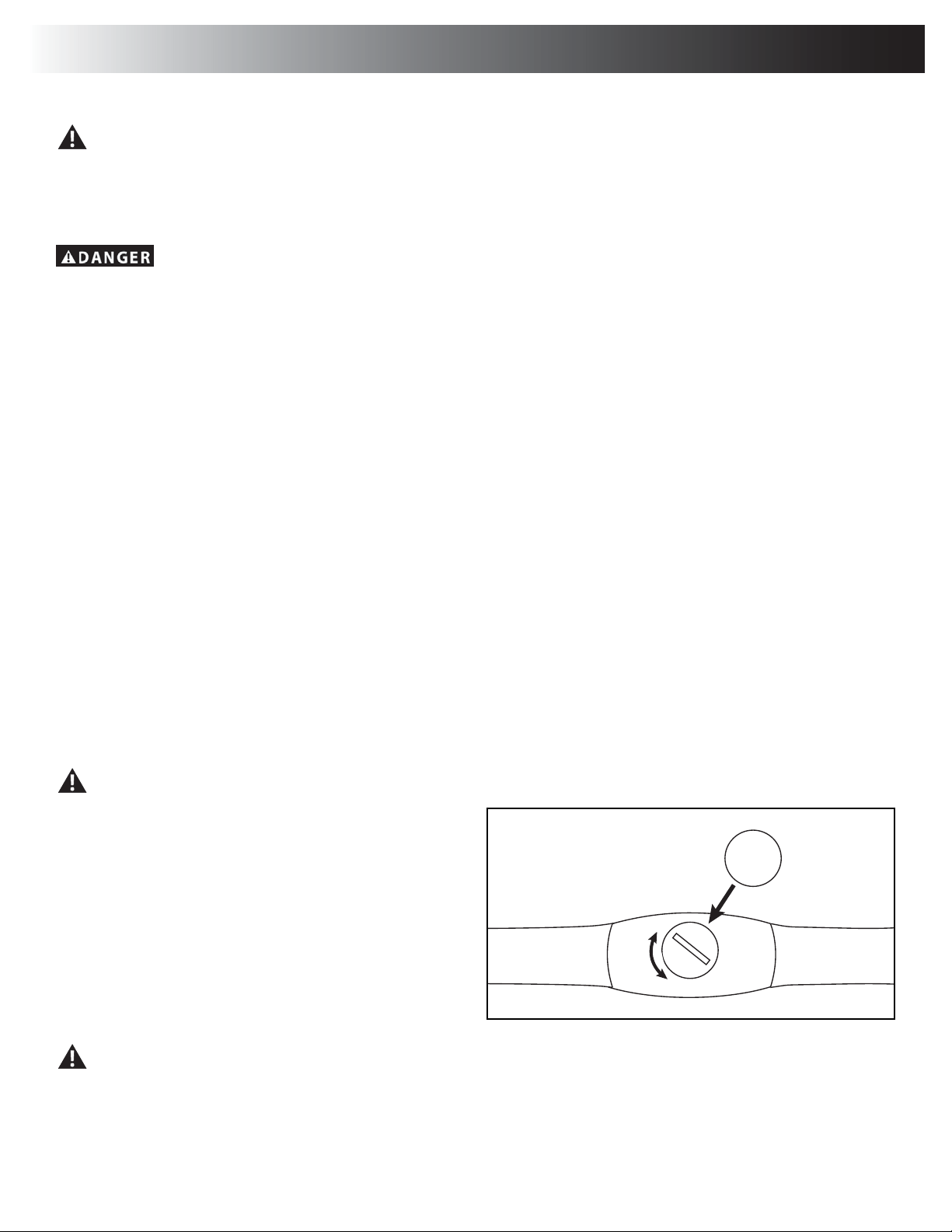
The Console Setup Mode lets you control the sound settings, or see maintenance statistics (Total Run Hours and Software Version).
3XVKDQGKROGGRZQWKH%XUQ5DWH,QFUHDVHDQG3$86((1'EXWWRQVIRUVHFRQGVZKLOHLQWKH3RZHU8S0RGHWRJRLQWRWKH&RQVROH6HWXS
Mode.
Note:3XVK3$86((1'WRH[LWWKH&RQVROH6HWXS0RGHDQGUHWXUQWRWKH3RZHU8S0RGHVFUHHQ
2. The Console display shows the Sound Settings prompt with the current setting. Push the Burn Rate/Increase or Burn Rate/Decrease buttons to
FKDQJHEHWZHHQWKHVHWWLQJVRI³2))´DQG³´WKURXJK³´$VHWWLQJRILVWKHORXGHVWVRXQGOHYHO
3. Push START/ENTER to set.
4. The Console display shows the TOTAL RUN HOURS for the machine.
)RUWKHQH[WSURPSWSXVKWKH67$57(17(5EXWWRQ
7KH&RQVROHGLVSOD\VKRZVWKH6RIWZDUH9HUVLRQSURPSW
3XVKWKH67$57(17(5EXWWRQWRH[LWWKH&RQVROH6HWXS0RGH
7KH&RQVROHZLOOGLVSOD\WKH3RZHU8S0RGHVFUHHQ
Console Setup Mode
Assembly / Owner’s Manual
39
Read all maintenance instructions fully before you start any repair work. In some conditions, an assistant is required to do the necessary tasks.
Equipment must be regularly examined for damage and repairs. The owner is responsible to make sure that regular maintenance is
done. Worn or damaged components must be repaired or replaced immediately. Only manufacturer supplied components can be
used to maintain and repair the equipment.
If at any time the Warning labels become loose, unreadable or dislodged, contact your local distributor for replacement labels.
To reduce the risk of electrical shock or usage of the equipment, always unplug the power cord from the wall outlet and
the machine and wait 5 minutes before cleaning, maintaining or repairing the machine. Place the power cord in a secure location.
Daily: %HIRUHHDFKXVHH[DPLQHWKHH[HUFLVHPDFKLQHIRUORRVHEURNHQGDPDJHGRUZRUQSDUWV'RQRWXVHLI
IRXQGLQWKLVFRQGLWLRQ5HSDLURUUHSODFHDOOSDUWVDWWKH¿UVWVLJQRIZHDURUGDPDJH$IWHUHDFKZRUNRXWXVH
a damp cloth to wipe your machine and Console free of sweat.
1RWH$YRLGH[FHVVLYHPRLVWXUHRQWKH&RQVROH
Weekly: Check for smooth roller operation. Wipe the machine to remove dust, dirt, or grime. Clean the rails and
surface of the rollers with a damp cloth.
Note: Do not use petroleum based products.
Monthly
or after 20
hours:
Make sure all bolts and screws are tight. Tighten as necessary.
NOTICE: Do not clean with a petroleum based solvent or an automotive cleaner. Be sure to keep the Console free of moisture.
Replace Batteries in Chest Strap
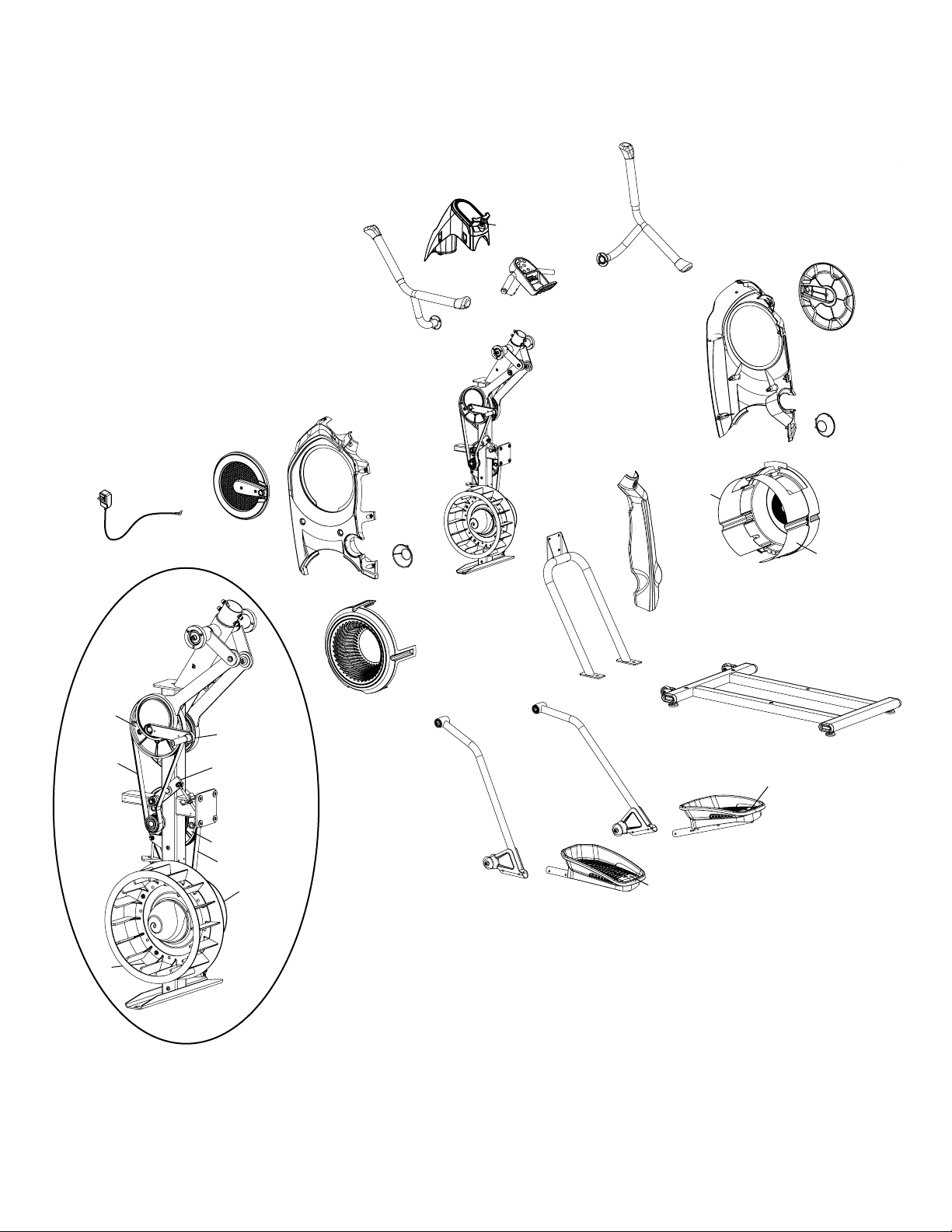
The heart rate (HR) chest strap uses a CR2032 battery.
Do not perform this procedure outdoors or in moist or wet locations.
1. Using a coin, loosen the slotted cover on the battery bay. Remove the
cover and battery.
2. When replacing the battery, insert it in the battery bay with the +
symbol facing up.
Note: The chest strap uses CR2032 size batteries.
3. Reinstall the cover on the strap.
4. Discard the old battery. Dispose of in accordance with local
regulations and/or at approved recycling centers.
5. Inspect your chest strap to ensure function.
Do not use until the equipment has been fully assembled and inspected for correct performance in accordance with the Owner’s
Manual.
Maintenance
CR2032
+
Assembly / Owner’s Manual
40
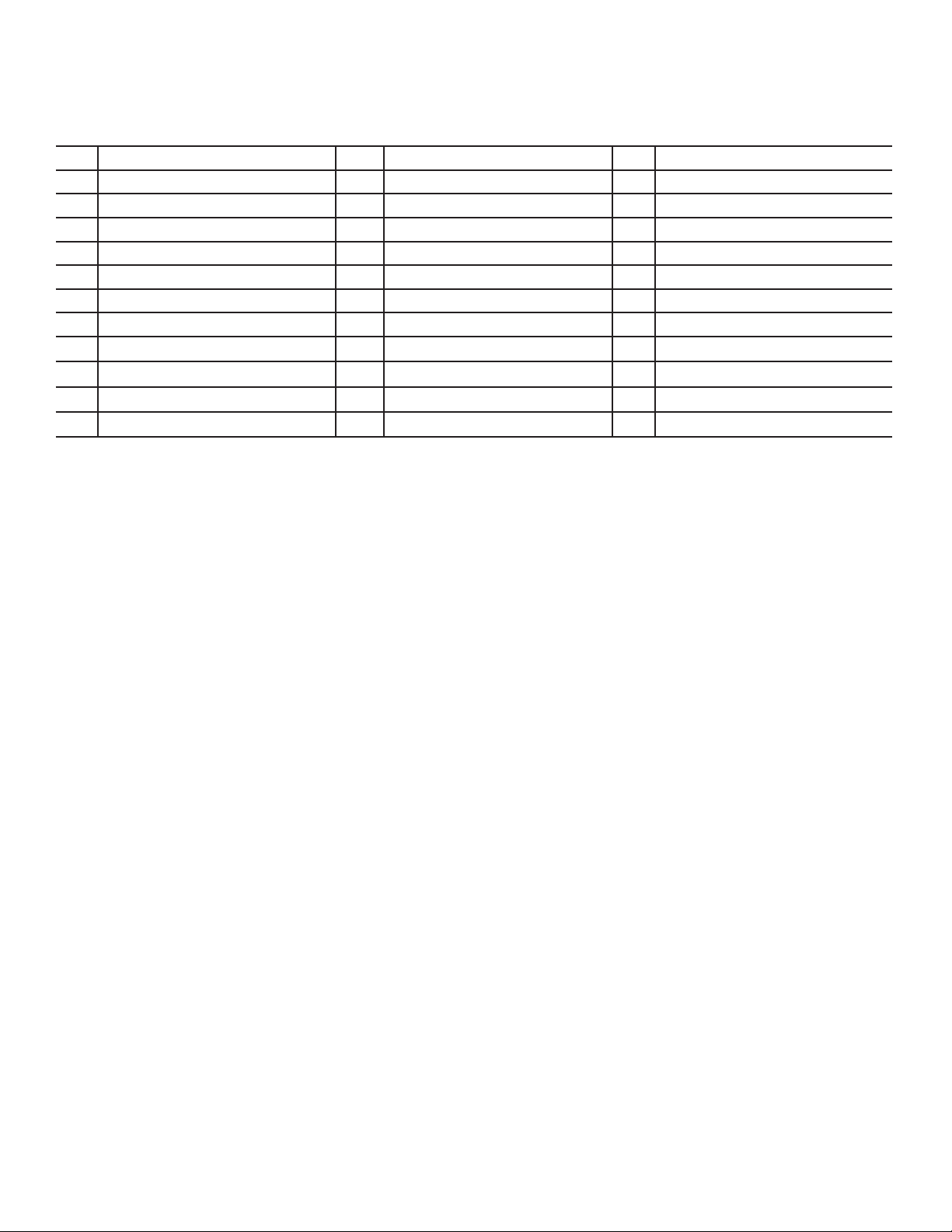
Maintenance Parts
D
E
F
C
A
B
G
H
A
C
I
L
K
J
N
M
O
S
Q
R
P
V
V
W
W
U
T
U
T
X
L
Z
K
Y
AA
EE
BB
DD
FF
CC
GG
HH
N
II
II
Assembly / Owner’s Manual
41
A Upper Handle Grip M Shroud, Right Fan Y Fan Assembly
B Handlebar, Left N Fan Assembly Inserts Z Shroud, Right
C Lower Handle Grip O Shroud, Rear AA Drive Pulley, Upper
D Console Shroud / Water Bottle Holder P Rail Assembly BB Arm Drive Assembly
E Console Assembly Q Transport Wheel CC Crank Arm
F Speaker R Stabilizer DD Tensioner
G Handlebar, Static S Leveler EE Drive Pulley, Lower
H Console Button Assembly T Foot Pad Insert FF Fan Back Plate
I Handlebar, Right U Foot Pad GG Speed Sensor (behind Fan)
J Shroud, Right V Roller HH Power Cord
K Crank Cover W Leg II Drive Belt
L Cap X Shroud, Left Fan

Assembly / Owner’s Manual
42
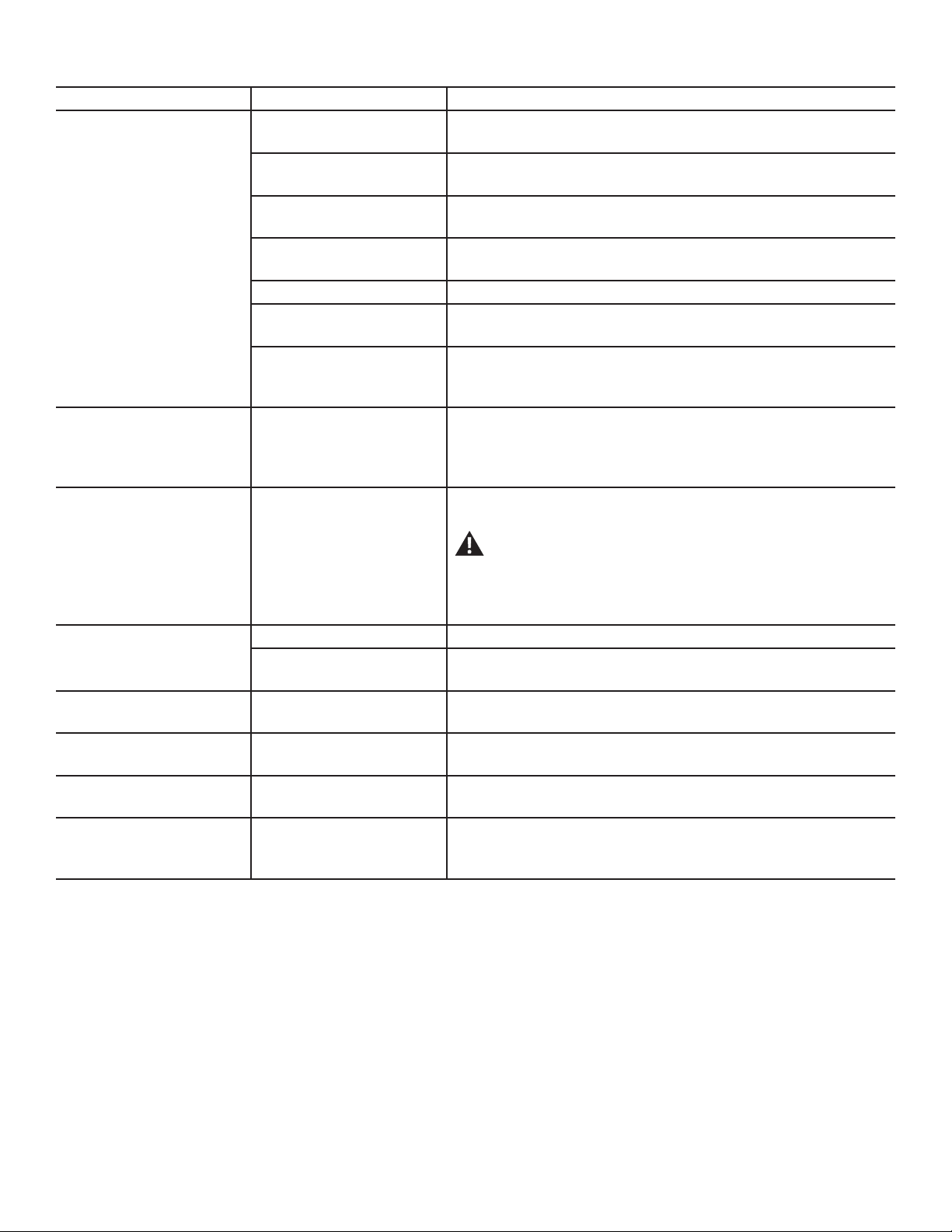
Condition/Problem Things to Check Solution
No display/partial display/unit
will not turn on
Check electrical (wall) outlet Make sure unit is plugged into a functioning wall outlet.
Check connection at front of unit Connection should be secure and undamaged. Replace adapter or connec
tion at unit if either are damaged.
Check data cable
connections/orientation
Be sure cable is connected securely and oriented properly. Small latch on
connector should line up and snap into place.
Check data cable integrity All wires in cable should be intact. If any are visibly crimped or cut, replace
cable.
Check console display for
damage
Check for visual sign that console display is cracked or otherwise damaged.
Replace Console if damaged.
AC Adapter Check for visual sign that AC Adapter is cracked or otherwise damaged.
Replace AC Adapter if damaged.
Console Display ,I&RQVROHRQO\KDVSDUWLDOGLVSOD\DQGDOOFRQQHFWLRQVDUH¿QHUHSODFHWKH
Console.
If the above steps do not resolve the problem, contact your local distributor
for further assistance.
No response on Console when
button is pushed
Console Button Assembly Try other buttons to get any response on the Console.
Check data cable integrity from
Console Button Assembly to
Console
All wires in cable should be intact. If any are visibly crimped or cut, replace
cable.
Check data cable
connections/orientation
Be sure cable is connected securely and oriented properly. Small latch on
connector should line up and snap into place.
Check console display for
damage
Check for visual sign that console display is cracked or otherwise damaged.
Replace Console if damaged.
Check Console Button As
sembly
Check for visual sign that the Console Button Assembly is otherwise dam
aged. Replace the Console Button Assembly if damaged.
If the above steps do not resolve the problem, contact your local distributor
for further assistance.
No speed/RPM reading Check data cable integrity All wires in cable should be intact. If any are cut or crimped, replace cable.
Check data cable
connections/orientation
Be sure cable is connected securely and oriented properly. Small latch on
connector should line up and snap into place.
Check magnet position (requires
shroud removal)
Magnet should be in place on pulley.
Check Speed Sensor (requires
shroud removal)
Speed sensor should be aligned with magnet and connected to data cable.
Realign sensor if necessary. Replace if there is any damage to the sensor or
the connecting wire.
Console Electronics If tests reveal no other issues, contact your local distributor for further as
sistance.
Unit operates but Telemetric HR
not displayed
Chest Strap Strap should be “POLAR
®
´FRPSDWLEOHDQGXQFRGHG0DNHVXUHVWUDSLV
directly against skin and contact area is wet.
Interference
Try moving unit away from sources of interference (TV, Microwave, etc).
Replace Chest Strap If interference is eliminated and HR does not function, replace strap.
Troubleshooting
Assembly / Owner’s Manual
43
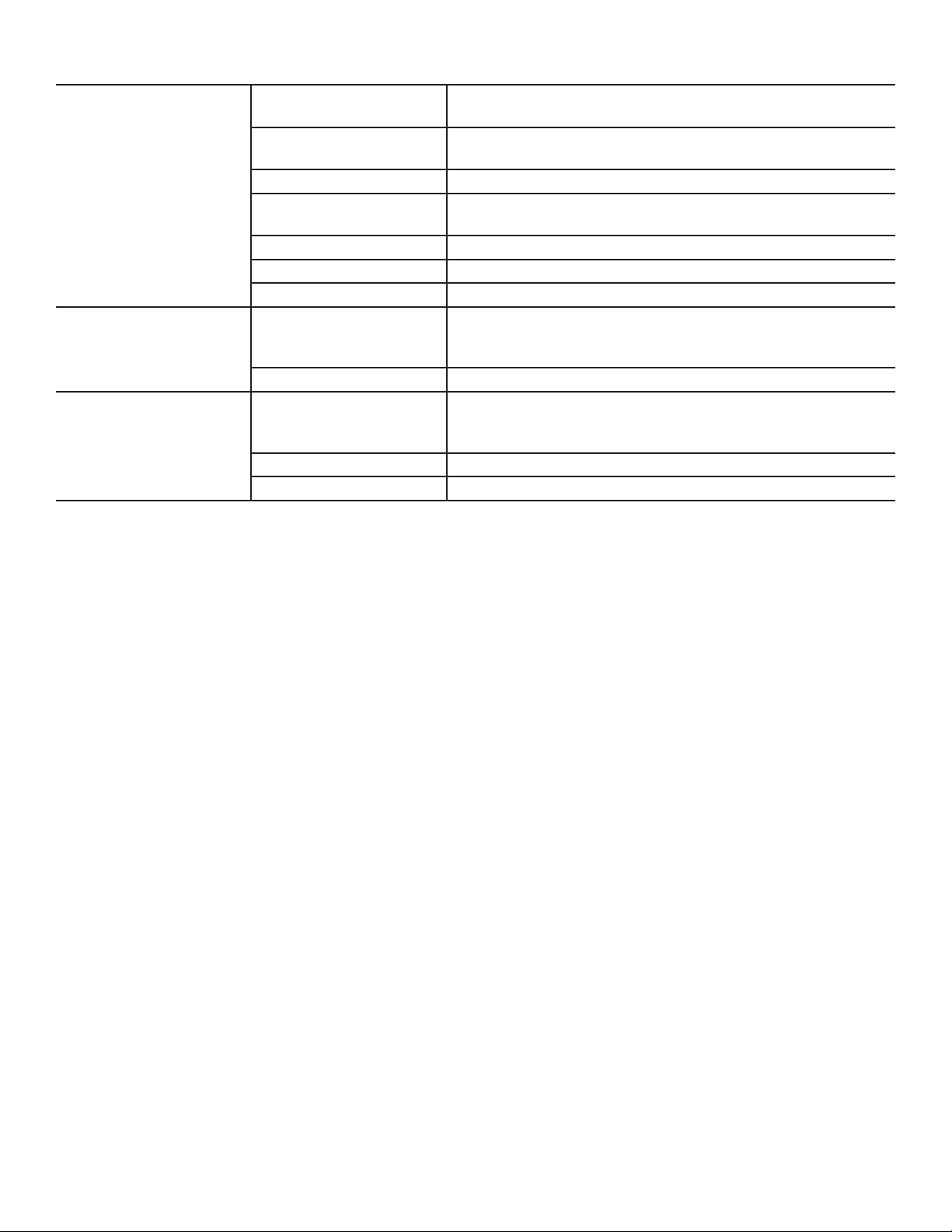
Condition/Problem Things to Check Solution
Console shuts off (enters sleep
mode) while in use
Check electrical (wall) outlet Make sure unit is plugged into a functioning wall outlet.
Check connection at front of unit Connection should be secure and undamaged. Replace adapter or connec
tion at unit if either are damaged.
Check data cable integrity All wires in the cable should be intact. If any are cut or crimped, replace
cable.
Check data cable
connections/orientation
Be sure cable is connected securely and oriented properly. Small latch on
connector should line up and snap into place.
Reset machine Unplug unit from electrical outlet for 5 minutes. Reconnect to outlet.
Check magnet position (requires
shroud removal)
Magnet should be in place on pulley.
Check Speed Sensor (requires
shroud removal)
Speed sensor should be aligned with magnet and connected to data cable.
Realign sensor if necessary. Replace if there is any damage to the sensor or
the connecting wire.
Pedals will not move Pedal locations 7KH3HGDOVPD\EH³ERWWRPHGRXW´6DIHO\JUDVSWKH6WDWLF
Handlebars and apply your weight to the heel of the higher foot. While still
grasping the Static Handlebar, lean back slightly applying more weight onto
the heel. Once the Pedals begin to move, resume your intended workout.
Fan will not turn Check for blockage of fan Remove material from fan. Be sure not to move the Handlebars, Legs or
Pedals.
Be aware that the Fan, Handlebars, Legs and Pedals are con-
nected and when either of these parts move the other does as
well.
If necessary, detach the Shrouds to help with removal. Do not operate ma
chine until Shrouds have been replaced.
Unit rocks/does not sit level Check leveler adjustment Adjust levelers until machine is level.
Check surface under unit $GMXVWPHQWPD\QRWEHDEOHWRFRPSHQVDWHIRUH[WUHPHO\XQHYHQVXUIDFHV
Move machine to level area.
)RRWSHGDOVORRVHXQLWGLI¿FXOW
to operate
Hardware Tightly secure all hardware on the Pedal Arms and Handlebar Arms.
Rubbing sound outside of
Shrouds during operation
Caps Slightly loosen Caps on Crank Arms
Metallic rubbing sound from
within Shrouds during operation
Brake bracket Brake bracket needs to be aligned. Contact your local distributor for further
assistance.
Machine seems to release
Pedals for a moment during
operation
Belt slip Contact your local distributor for further assistance.
Assembly / Owner’s Manual
44
Workout results will not sync
with Bluetooth
®
enabled device
Current console mode Machine must be in Idle Mode to sync. Push the PAUSE/STOP button until
the "WELCOME" screen is displayed.
Total time of workout A workout must be longer than 1 minute to be saved and posted by the
Console.
Fitness machine Unplug unit from electrical outlet for 5 minutes. Reconnect to outlet.
Bluetooth
®
enabled device Consult your device to be sure that the Bluetooth
®
wireless feature has been
enabled on it.
Fitness App 5HYLHZ6SHFL¿FDWLRQVRI)LWQHVV$SSDQGFRQ¿UP\RXUGHYLFHLVFRPSDWLEOH
Contact your local distributor for further assistance.
Sync fails Review account and password for MyFitnessPal
®
Workout results not posting to
%RZÀH[&RQQHFW
Fitness App on Bluetooth
®
enabled device
Workout results transfer from the machine to the App, and then post to the
%RZÀH[&RQQHFWZHEVLWH5HYLHZDFFRXQWDQGSDVVZRUGIRUWKH%RZÀH[
&RQQHFWZHEVLWH
Contact your local distributor for further assistance.
Workout results not posting
IURP%RZÀH[&RQQHFWWR
MyFitnessPal
®
account
Sync accounts )URPWKH0HQXLFRQRQWKH%RZÀH[&RQQHFWZHEVLWHVHOHFWWKH6\QFWR
MyFitnessPal
®
.
Sync fails Review account and password for MyFitnessPal
®
.
Contact your local distributor for further assistance.

Assembly / Owner’s Manual
45
Introduction and Overview
:HOFRPHWRWKH%RZÀH[%RG\:HLJKW/RVV*XLGH7KLVJXLGHLVGHVLJQHGWREHXVHGZLWK\RXU%RZÀH[
®
equipment and will help you:
• Lose weight and get lean
• Improve your health and wellness
• Increase your energy and vitality
Consult a physician before you start an exercise program or a new health and diet plan. Stop exercising if you feel pain or tightness
in your chest, become short of breath, or feel faint. Contact your doctor before you use the machine again. Use the values calcu-
lated or measured by the machine’s computer for reference purposes only. The heart rate displayed on the console is an approxi-
mation and should be used for reference only.
%\IRFXVLQJRQWKHPDLQWKUHHHOHPHQWVRIWKH%RZÀH[%RG\:HLJKW/RVV*XLGHTXDOLW\EDODQFHDQGFRQVLVWHQF\\RX¶OOEHDEOHWRUHDFKDQG
PDLQWDLQ\RXUZHLJKWORVVDQG¿WQHVVJRDOVIRUWKHQH[WVL[ZHHNVDQGEH\RQG
• Quality±7KHHPSKDVLVRIWKLVSODQLVRQHDWLQJPRUHZKROHIRRGVDQGJHWWLQJWKHPRVWQXWULHQWVIURP\RXUFDORULHVDVSRVVLEOH0DNLQJWKH
PDMRULW\RI\RXUGLHWIURPIRRGVWKDWKDYHDVLQJOHLQJUHGLHQWIRUH[DPSOHIUXLWVYHJHWDEOHV¿VKOHDQSURWHLQHJJVEHDQVQXWVDQGZKROH
JUDLQVSURYLGHVWKHYLWDPLQVPLQHUDOV¿EHUSURWHLQDQGKHDOWK\IDWV\RXUERG\QHHGV
• Balance±(DFKRIWKHPHDOVDQGVQDFNVLQWKLVJXLGHKDYHDVRXUFHRI¿EHURUVPDUWFDUERK\GUDWHSURWHLQDQGKHDOWK\IDWWRNHHS\RXU
energy levels consistent throughout the day to fuel your workouts. By having this balance you’ll feel fuller longer, which is critical to weight loss
success.
• Consistency±*HWWLQJDERXWWKHVDPHQXPEHURIFDORULHVHDFKGD\LVLPSRUWDQWIRU\RXUPHWDEROLVPDQG\RXUPLQGVHW,I\RXRYHUGRLWRQH
GD\GRQ¶WWU\WRPDNHXSIRULWWKHQH[WGD\E\QRWHDWLQJRUFXWWLQJ\RXUFDORULHVGUDVWLFDOO\*HWULJKWEDFNRQWUDFNE\IROORZLQJWKLVJXLGH
Results & Expectations
5HVXOWVZLOOYDU\GHSHQGLQJRQ\RXUDJHVWDUWLQJZHLJKWDQGH[HUFLVHOHYHO%\DGKHULQJWRDGLHWDQGH[HUFLVHURXWLQH\RXPD\ORVHOEVSHU
ZHHNDQGH[SHULHQFHLQFUHDVHGHQHUJ\OHYHOV
5 Tips for Long-Term Success
1. Keep a food logLQFOXGLQJKXQJHUOHYHOVDQGZDWHULQWDNH)UHHRQOLQHIRRGORJVDQGPRELOHDSSVDUHDYDLODEOHDWZZZP\¿WQHVVSDOFRPDQG
www.loseit.com
2. Weigh and/or take measurements weekly±QRPRUHDQGQROHVV:HLJKLQJZHHNO\UDWKHUWKDQGDLO\RUHYHU\RWKHUGD\LVEHVW<RX¶OOWUDFN
your progress and keep yourself in check without getting discouraged if the scale doesn’t move for a few days. And remember, weight is just
DQXPEHUDQGLW¶VLQÀXHQFHGE\PXVFOHJDLQDVZHOODVIDWORVV)HHOLQJKRZ\RXUFORWKHV¿WFDQRIWHQEHDEHWWHULQGLFDWRURISURJUHVVDV\RXU
ERG\DGDSWVWRH[HUFLVHDQGQXWULWLRQFKDQJHV
3. Measure portions±7RDYRLGSRUWLRQFUHHSXVHPHDVXULQJFXSVDQGVSRRQVIRUJUDLQVULFHSDVWDFHUHDOEHDQVQXWVRLOVDQGGDLU\8VH
the Portion Sizes Guide for other foods.
4. Plan ahead±0DNHDPHDOSODQIRUWKHZHHNRUORJ\RXUIRRGDGD\LQDGYDQFH3ODQQLQJVHWV\RXXSIRUVXFFHVVHVSHFLDOO\IRUVRFLDOHYHQWV
and eating out.
5. Practice your desired long-term habits±,W¶VHDV\WRMXVWLI\SRRUHDWLQJFKRLFHVZKHQ\RX¶UHRQO\IRFXVHGRQWKHVKRUWWHUP)RFXVRQWKH
ORQJWHUPVDWLVIDFWLRQRIDVOLPPHUKHDOWKLHU\RXUDWKHUWKDQWKHWHPSRUDU\JUDWL¿FDWLRQ\RX¶OOJHWIURPVSOXUJLQJ
How to Use this Guide
• Eat breakfast within 90 minutes of waking up and balance your meals and snacks throughout the day
±'RQ¶WJRORQJHUWKDQKRXUVZLWKRXWHDWLQJ
±,I\RX¶UHQRWXVHGWRHDWLQJEUHDNIDVWVWDUWRXWVPDOOZLWKDSLHFHRIIUXLWDQGKDYHVRPHWKLQJHOVHKRXUVODWHU<RXUERG\DGDSWVWR
not eating breakfast, but as soon as you start eating early in the day and cutting back on dinner portions you’ll notice your hunger will
increase. This is a good sign your metabolism is working!
• Mix and match meal options
±6HOHFWRSWLRQIURPWKHDSSURSULDWHPHDOSODQPDOHRUIHPDOHIRUEUHDNIDVWOXQFKDQGGLQQHUSD\LQJFORVHDWWHQWLRQWRSRUWLRQVL]HV
±6HOHFWVQDFNRSWLRQVSHUGD\
±<RXKDYHWKHRSWLRQWRVXEVWLWXWHRQHVQDFNIRURQHWUHDWXQGHUFDORULHV
±8VHWKHPHDOSODQVDPSOHRSWLRQVDQGJURFHU\OLVWWRFUHDWH\RXURZQPHDOVIRUPRUHYDULHW\
Bowflex
™
Body Weight Loss Guide

Assembly / Owner’s Manual
46
±<RXFDQVZDSRXWDQ\W\SHRISURWHLQYHJHWDEOHVRUVPDUWFDUEVIRUWKHVXJJHVWHGPHDORSWLRQV)RUH[DPSOH
• Turkey for tuna
• $Q\¿VKRUVHDIRRGIRUFKLFNHQ
• Cooked vegetables instead of salad
• Eat your calories
±&XWRXWKLJKFDORULHEHYHUDJHVOLNHVRGDMXLFHVFRIIHHGULQNVDQGDOFRKRO
±6WLFNZLWKZDWHUXQVZHHWHQHGWHDDQGFRIIHH$LPIRUDPLQLPXPRIOLWHUVR]RIZDWHUSHUGD\WRVWD\ZHOOK\GUDWHG
• If you’re still hungry after or in between meals:
±+DYHDJODVVRIZDWHUDQGZDLWPLQXWHV0DQ\WLPHVZHPLVWDNHWKLUVWRUHYHQERUHGRPIRUKXQJHU:DLWRXWWKHLQLWLDOXUJHWRHDW
and sometimes it will pass.
±,I\RX¶UHVWLOOKXQJU\DIWHUZDLWLQJPLQXWHVKDYHDVQDFNRUPLQLPHDOZLWKIUXLWYHJHWDEOHVDQGSURWHLQ
If your goal is muscle gain or strength:
• 8VHWKHVDPHPHDOSODQEXWLQFUHDVHSRUWLRQVL]HVLQWKHVDPHUDWLRVWRLQFUHDVHWKHWRWDOQXPEHURIFDORULHV\RXHDWHYHU\GD\)RUH[DPSOH
LQFUHDVHSRUWLRQVL]HVRISURWHLQDQGVPDUWFDUEVDWPHDOVE\$GGLQJDVQDFNLVDQRWKHURSWLRQWRPHHW\RXUERG\¶VLQFUHDVHGFDORULH
needs in order to gain muscle and strength.
• )RFXVRQSRVWZRUNRXWQXWULWLRQE\KDYLQJRQHRI\RXUVQDFNVZLWKLQPLQXWHVDIWHU\RXFRPSOHWH\RXUZRUNRXW0DNHVXUHWRKDYHDFRP
bination of carbohydrates such as fruit with protein (yogurt, milk, or protein powder) to promote muscle growth and recovery. Chocolate milk is
also a great option.
Meal Plan Overview
7KHIHPDOHPHDOSODQSURYLGHVDERXWFDORULHVDQGWKHPDOHSODQSURYLGHVDERXWFDORULHVRIKLJKTXDOLW\QXWULWLRQWRQRWRQO\KHOS\RX
ORVHZHLJKWDQGIHHOJUHDWEXWJHWWKHPRVWRXWRI\RXUFDORULHV7KHYLWDPLQVPLQHUDOVDQGDQWLR[LGDQWVIURPHDWLQJPRVWO\ZKROHIRRGVKHOSVXS
port optimal health. These calorie levels will result in healthy weight loss for the majority of people. Keep in mind that everyone’s metabolism is very
different depending on age, height, weight, activity level, and genetics. Pay close attention to your weight, hunger levels, and energy and adjust your
calories if needed.
Follow these guidelines if you’re over 55:
• If you’re over 55, you need fewer calories because your metabolism slows as you age. Stick with three meals with one optional snack per day.
Follow these guidelines if you’re under 25:
• ,I\RX¶UHXQGHU\RXPD\QHHGPRUHFDORULHV$GGDQRWKHUVQDFNLI\RXIHHOORZRQHQHUJ\RUDUHH[WUHPHO\KXQJU\
Breakfast
%UHDNIDVWLQFOXGHVDVPDUWFDUEIUXLWDQGDVRXUFHRISURWHLQZKLFKZLOODOVRKDYHIDW:LWKDEDODQFHRIFDUERK\GUDWHVDQG¿EHUIURPWKHVPDUWFDUE
and fruit combined with protein and fat, you’ll energize your day and help control hunger levels throughout the day.
Snacks
(DFKVQDFNLVDEDODQFHRIFDUERK\GUDWHVDQGSURWHLQWRNHHS\RXUEORRGVXJDUPRUHFRQVLVWHQWZKLFKPHDQV\RXZRQ¶WH[SHULHQFHKXQJHUDQG
energy level spikes and drops.
7KLVKDSSHQVZKHQ\RXKDYHDKLJKFDUERQO\VQDFNOLNHFKLSVFDQG\VRGDFUDFNHUVRUSUHW]HOV
Lunch and Dinner
/XQFKFRPELQHV¿OOLQJ¿EHUIURPYHJHWDEOHVDQGVPDUWFDUEVZLWKDOHDQRUORZIDWSURWHLQ7KHKHDOWK\IDWFDQFRPHHLWKHUIURPWKHSURWHLQDGGHG
during cooking (nuts on a salad) or as a dressing or sauce (such as oil and vinegar salad dressing).
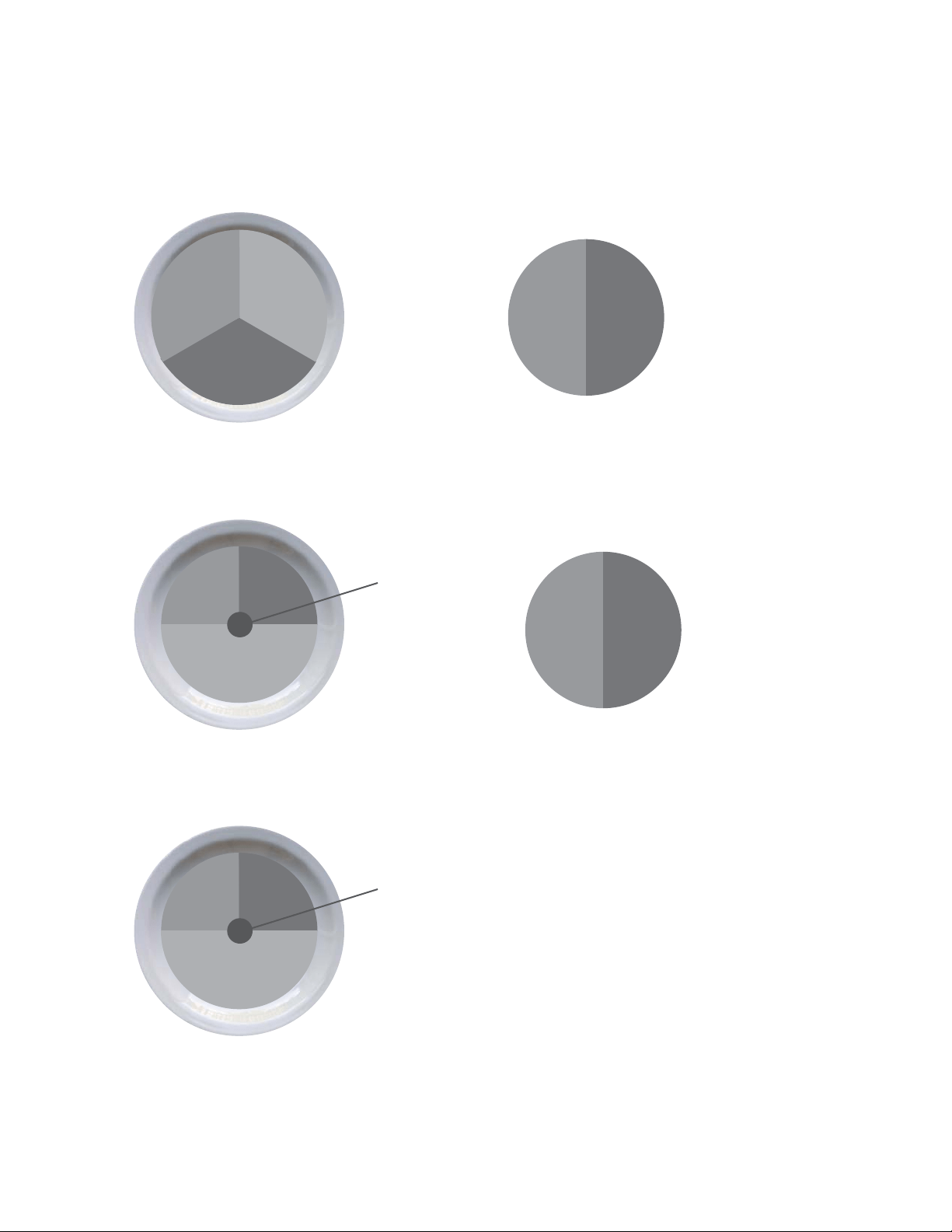
Assembly / Owner’s Manual
47
protein
veggies
rich
carbs
Here’s an overview of what an ideal day looks like:
(See Portion Size Guide for proper serving sizes)
smart
carb
protein/fat
Breakfast
Lunch
Dinner
Snack #1
Snack #2
fruit
smart
carb
protein
healthy
fat
smart
carb
protein
veggies
smart
carb
protein
healthy
fat
smart
carb
protein
veggies

Assembly / Owner’s Manual
48
Breakfast Options Fruit Smart Carb Protein/Fat
Fruit and Nut Oatmeal Cook
plain oats in water. Top with fruit,
nuts, milk, cinnamon, and honey.
Berries or banana Plain oats
5HJXODURUTXLFNFRRN
Nuts and milk
(JJ0XIÀQ Cook egg/s. Toast
bread and top with 1 slice of
cheese, 1 slice of ham, and
tomato.
Tomato (QJOLVKPXI¿QRUVDQGZLFKWKLQ Egg, ham, and cheese
Yogurt Power Parfait Top yogurt
with fruit. Sprinkle with 1 serving
RIQXWVPOWEVSZKHDW
JHUPRUJURXQGÀD[VHHGPO
tbsp) oats, and cinnamon.
Chopped fruit of your choice Oats, wheat germ, and ground
ÀD[VHHG
3ODLQQRQIDW*UHHN\RJXUWDQG
nuts
On the Go PB & Apple Sand-
wich Toast bread. Spread on
peanut butter, thin slices of ½ an
apple, and 5ml (1 teaspoon) of
honey.
Sliced apple Sandwich thin, bread, or bagel
thin
Peanut butter
Lunch & Dinner Options Lean Protein Smart Carb Veggies
Pork Loin, Sweet Potato &
Green Beans
Grilled or baked pork loin Baked Sweet Potato Green Beans
Chicken Stir Fry
Flavor with 30ml(2 tbsp) teriyaki
sauce
Chicken breast or boneless skin
less thigh
Brown or wild rice 0L[HGVWLUIU\YHJHWDEOHV
(fresh or frozen)
Steak Tacos with Side Salad (3
for males, 2 for females) Top with
salsa, coriander, and sprinkle of
shredded cheese
Sirloin steak Corn tortillas Salad
Whole Wheat Pasta with
Shrimp or White Beans & Mari-
nara Sauce
Shrimp (frozen or fresh) or can
nellini beans
Whole wheat pasta Steamed broccoli
Bunless Burgers with Oven
Fries, Corn, & Salad
Grill burgers. Bake sliced pota
toes on sprayed cookie sheet for
PLQXWHV#&)
).
OHDQJURXQGEHHIRUWXUNH\ Oven baked fries Corn on the cob + side salad
Tuna & Avocado Wrap with
Vegetable Soup
Use 85g (3oz) of tuna (1 can). Top
with lettuce, tomato, avocado, and
mustard.
Tuna +LJK¿EHUZUDS Vegetable soup
KRPHPDGHRUORZVRGLXP
canned)
Assembly / Owner’s Manual
49
Snack Options
Smart Carb Protein
1 medium apple DOPRQGV
Baby carrots 30ml (2 tbsp) hummus
1 serving of crackers* 1 string cheese
Energy or protein bar with <200 calories*
6HHZZZ%RZÀH[FRP5HVRXUFHVIRUEUDQGUHFRPPHQGDWLRQV
Optional Treats
<RXKDYHWKHFKRLFHRIUHSODFLQJ6QDFNZLWKDFDORULHWUHDW<RXFDQKDYHDQRSWLRQDOWUHDWHYHU\GD\EXWIRURSWLPDOKHDOWKLWLVUHFRP
PHQGHGWROLPLWVPDOOVSOXUJHVWRWLPHVSHUZHHN8VHWKHDSSURDFKWKDWZRUNVEHVWIRU\RX+HUHDUHDIHZH[DPSOHV
• 118ml (½ cup) lowfat ice cream
• 1 small bag of baked potato chips
• 118ml (4oz) of wine or 355ml (12oz) light beer
• POFXSVRIDLUSRSSHGRUOLJKWSRSFRUQ
Sample 3 Day Plan
Based on each of the meal options listed above, a typical 3 day plan could look like this:
Day 1 Day 2 Day 3
Breakfast (JJPXI¿Q Power yogurt parfait Fruit + nut oatmeal
Snack 1 Apple with almonds Nut Thins
®
+ string cheese Baby carrots and hummus
Lunch Tuna & avocado wrap with soup /HIWRYHUVIURPGLQQHUGD\ /HIWRYHUVIURPGLQQHUGD\
Optional Snack 2 or Treat 118 ml (½ cup) ice cream bar Energy bar 100 calorie bag of light popcorn
Dinner Shrimp pasta Chicken stir fry Bunless burgers
Assembly / Owner’s Manual
50
237ml (1 cup) = baseball
118ml (1/2 cup) = lightbulb
30ml (2 tblspn)
= golf ball
59ml (1/4 cup) nuts
= Altoids tin
85g (3oz) chicken or meat
= deck of cards
1 medium potato
= computer mouse
1 medium piece of fruit =
tennis ball
28g (1oz) cheese
= 3 dice
Portion Size Guide
Each of the items listed are for one serving
MALE FEMALE
PROTEIN
2 eggs
JR]FKLFNHQ¿VKOHDQPHDWRUWRIX
158ml (2/3 cup) beans or lentils*
237ml (1 cup) greek yogurt*
42.5g (1.5oz) cheese*
1 egg
JR]FKLFNHQ¿VKRUOHDQPHDW
118ml (1/2 cup) beans or lentils*
118ml (1/2 cup) greek yogurt*
42.5g (1.5oz) cheese*
HEALTHY FAT
30ml (2 tblspn) peanut or nut butter*
POWVSQROLYHÀD[RUZDOQXWRLO
59ml (1/4 cup) of nuts
1/3 medium avocado
15ml (1 tblspn) peanut or nut butter*
POWVSQROLYHÀD[RUZDOQXWRLO
POFXSRUPOWEOVSQRIQXWVDSSUR[
almonds)
1/4 medium avocado
SMART CARB
237ml (1 cup) cooked grains (59ml / 1/2 cup raw):
oats, brown rice, quinoa, pasta
1 medium sweet or regular potato
2 corn tortillas
1 slice of bread (or 2 light slices equaling 120 calories
or less)
HQJOLVKPXI¿QVDQGZLFKWKLQRUKLJK¿EHUZUDS
118ml (1/2 cup) cooked (59ml / 1/4 cup raw) grains
1/2 medium sweet potato or regular potato
2 corn tortillas
1 slice of bread (or 2 light slices equaling 120 calories or
less)
HQJOLVKPXI¿QVDQGZLFKWKLQRUKLJK¿EHUZUDS
FRUIT
1 medium apple, orange, or pear
1 small banana (length of your hand)
237ml (1 cup) berries or chopped fruit
59ml (1/4 cup) dried fruit (fresh or frozen is optimal)
9HJHWDEOHV<RXFDQKDYHXQOLPLWHGYHJHWDEOHVH[FHSWIRUSHDVDQGFRUQVWLFNZLWKPOFXSVHUYLQJ
473ml (2 cups) spinach or lettuce = 2 cupped hands
237ml (1 cup) raw vegetables
118ml (1/2 cup) cooked vegetables
POR]ORZVRGLXPYHJHWDEOHMXLFH
OPTIONAL TREATS
118ml (1/2 cup) lowfat ice cream
1 small bag of baked potato chips
28g (1oz) dark chocolate
118ml (4oz) of wine or 355ml (12oz) light beer
POFXSVDLUSRSSHGRUOLJKWSRSFRUQ
* some foods are a combination of protein and carbs or protein and fat
Assembly / Owner’s Manual
51
Grocery List
BREAD & GRAINS
ZKROHZKHDWEUHDG
Sprouted grain breads
/LJKWRUZKROHZKHDWHQJOLVKPXI¿QV
Sandwich or bagel thins
&RUQRUORZFDUEZKROHZKHDWWRUWLOODV
+LJK¿EHUZUDSV
Plain oats: 1 minute or old fashioned
Whole grains: brown rice, bulgar, barley, quinoa, couscous
7LSV/RRNIRUZKROHZKHDWDVWKH¿UVWLQJUHGLHQW/RRNIRUJRI
¿EHUSHUVOLFHRUJSHUVOLFHVRIOLJKWRUGLHWEUHDG$LPIRUEUHDGZLWK
less than 100 calories per slice.
DAIRY & DAIRY ALTERNATIVES
3ODLQQRQIDWJUHHN\RJXUW
.H¿U\RJXUWOLNHGULQN
2UJDQLFORZIDWPLON
Enriched almond or soy milk
Cheese: feta, parmesan, mozzarella, light havarti, provolone, swiss,
string cheese, or single serving packages
MEAT, FISH, POULTRY & PROTEIN
Wild game
Salmon, halibut, tuna, tilapia, shrimp,
FDW¿VKVFDOORSVRUFUDE
Pork loin, pork chops, or pork roast
Chicken or turkey breast or thighs (no skin)
(JJVDQGHJJZKLWHV
/HDQEHHIVLUORLQFKXFNURXQGWHQGHUORLQOHDQRUJDQLFDQG
grass fed is best)
Canned salmon or tuna (in water)
1LWUDWHIUHHUHGXFHGVRGLXPKDPWXUNH\FKLFNHQRUURDVWEHHIOXQFK
meat
$Q\W\SHRIEHDQGU\RUFDQQHGORZVRGLXPYDULHWLHV
Tofu and tempeh
7LSV/RRNIRU³&KRLFH´RU³6HOHFW´FXWVRIPHDWUDWKHUWKDQ³3ULPH´
Prime cuts are fattier. Limit intake of highly processed meat and
imitation meat products like sausage, bacon, pepperoni, and hot dogs to
once a week or less.
FROZEN FOODS
All vegetables without sauce
All fruit
Grains and grain medleys
CRACKERS, SNACKS & ENERGY BARS
Any unsalted nuts or seeds
$LUSRSSHGRUOLJKWSRSFRUQ
Edamame in the pod
Energy bars
Crackers
Hummus
7LSV/LPLWFUDFNHUVSUHW]HOVDQGFKLSVWRVHUYLQJVSHUZHHN
Always pair with protein such as hummus, cheese, or nuts. Look for
energy bars with less than 200 calories and 20g of sugar and at least 3g
RISURWHLQDQGJRI¿EHU/RRNIRUFUDFNHUVZLWKOHVVWKDQFDORULHV
and 4g or less of fat per serving.
FATS & OILS
Avocado
2OLYHJUDSHVHHGZDOQXWVHVDPHRUÀD[VHHGRLO
Butter/spreads: look for products free of trans fats and partially
hydrogenated oils on the ingredient list.
7LSV/LJKWROLYHRLOUHIHUVWRWKHÀDYRUQRWWKHFDORULHFRQWHQW$OZD\V
measure oil and butter. Even if a fat is considered healthy, it’s still very
high in calories and portions need to be controlled.
DRESSINGS, CONDIMENTS & SAUCES
Vinegars: rice, wine, balsamic
All fresh or dried herbs and spices
Mustard
Salsa and chili sauce
0DULQDUDVDXFHZLWKQRKLJKIUXFWRVHFRUQV\UXS
Lemon and lime juice
Bottled minced garlic and ginger
/RZVRGLXPVR\VDXFH
Tips: Look for products free of MSG, added colors, and high fructose
corn syrup. Look for sauces under 50 calories per serving. Avoid cream
based sauces and dressings like ranch, bleu cheese, and alfredo.
$OOIUXLWVDQGYHJHWDEOHVIUHVKDQGIUR]HQDUHJUHDWFKRLFHV6LQFHHYHU\PHDOKDVRQHRUERWK\RXUVKRSSLQJFDUWVKRXOGUHÀHFWWKLV

Assembly / Owner’s Manual
52
Keep It Going
Tips for continued weight loss and maintaining changes
• Keep weighing yourself weekly, even after you’ve reached your goal weight
• Continue keeping a food log.,I\RXKDYH\RXUPHDOSODQZHOOHVWDEOLVKHGORJ\RXUIRRGHYHU\RWKHUZHHNWRNHHS\RXUVHOIRQWUDFN'RQ¶W
feel like you have to do it every day.
• Prepare for plateaus.7KHVFDOHPLJKWQRWEXGJHIRUDIHZZHHNVRUHYHQPRQWKVDIWHUVRPHLQLWLDOZHLJKWORVV7KLVLVQRUPDODQGWREHH[
SHFWHG,W¶VWKHERG\¶VQDWXUDOSURFHVVIRUDGMXVWLQJWR\RXUQHZORZHUZHLJKW6WD\IRFXVHGRQ\RXUORQJWHUPJRDOFHOHEUDWH\RXUVXFFHVVHV
DQGFKDQJHVDQGPL[XS\RXUZRUNRXWVWRKHOSRYHUFRPHWKHSODWHDX
• Calorie adjustments for maintaining weight loss.2QFH\RX¶YHUHDFKHG\RXUJRDOZHLJKW\RXFDQLQFUHDVH\RXUFDORULHVSHUGD\
as long as your activity level stays the same
• Treat yourself.+DYHDQRQIRRGUHZDUGIRUHDFKJRDO\RXKLWVXFKDVDPDVVDJHDQHZRXW¿WRUDQRXWLQJZLWKIULHQGVDQGIDPLO\
• Use the resources belowWR¿QGQHZUHFLSHVJHWH[SHUWDGYLFHDQGVXSSRUWWRVWD\PRWLYDWHG
Resources
'RZQORDGDEOH5HVRXUFHVIURP%RZÁH[:HEVLWHZZZ%RZÀH[FRP5HVRXUFHV
• Grocery Shopping List for Fridge (Blank Form)
• 7 Day Meal Planning Form
• Additional Dinner Options
• Pre and Post Workout Fueling Guide
Questions & Support
• $VNTXHVWLRQVSRVWVXJJHVWLRQVDQGFRQQHFWZLWKRXURQOLQH%RZÀH[™'LHWLWLDQRQWKH%RZÀH[)DFHERRNSDJH
Recipes
• www.wholeliving.com
• www.eatingwell.com
• www.whfoods.org
• www.livebetteramerica.org
Online food logs
• ZZZP\¿WQHVVSDOFRP
• www.loseit.com

Assembly / Owner’s Manual
53

Assembly / Owner’s Manual
54

Assembly / Owner’s Manual
55
8006438.071518.E
EN