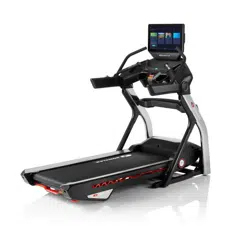
T9
OWNER’S MANUAL
Read the TREADMILL GUIDE before using this OWNER’S MANUAL.

3 ENGLISH
3
ASSEMBLY
There are several steps during the assembly process where special attention must be paid. It is very important to follow
the assembly instructions and to ensure the product is assembled correctly to reduce the risk of injury. Make sure all parts
are firmly tightened before using the treadmill to ensure that the treadmill is stable and structurally sound.
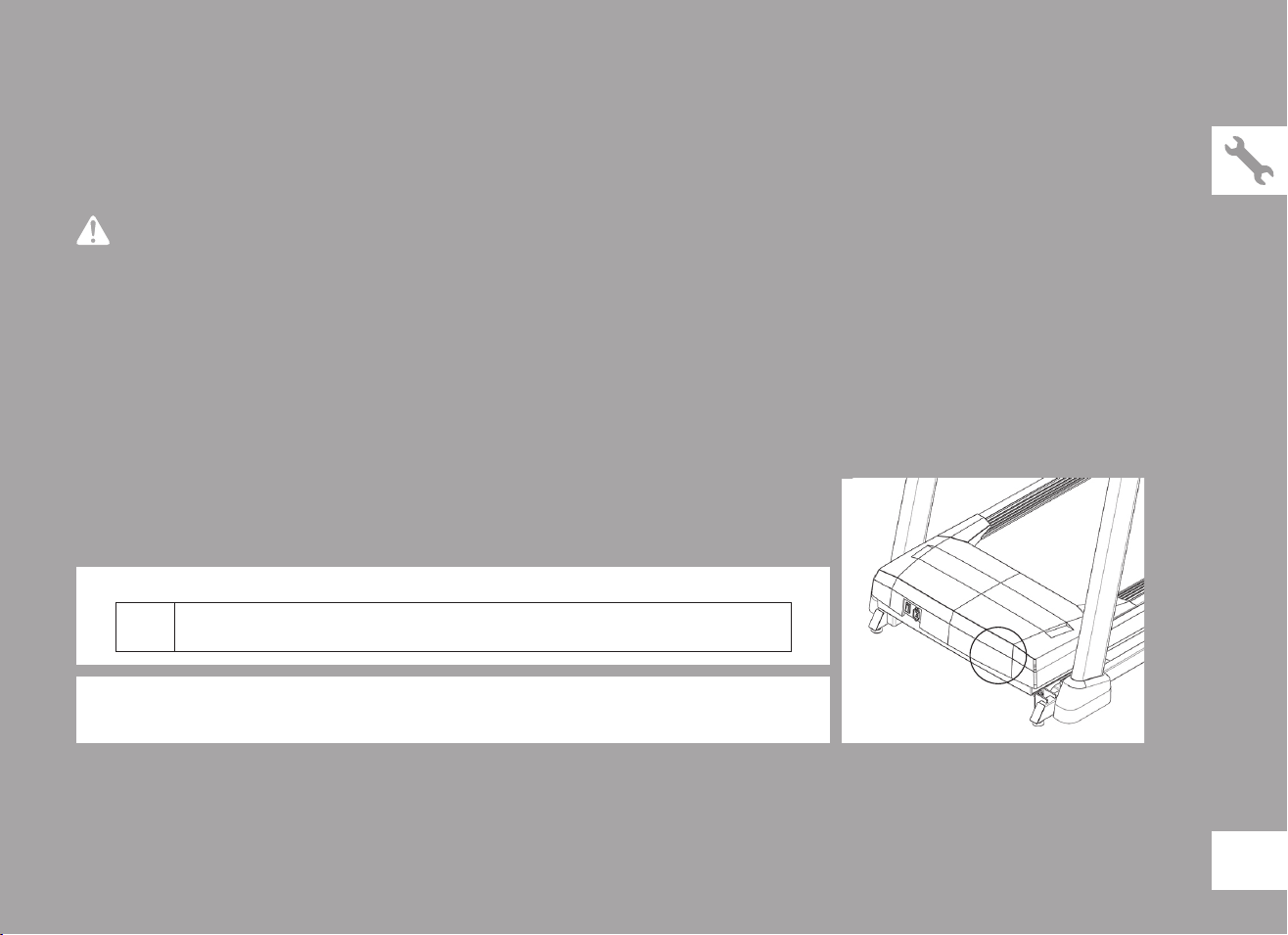
Before proceeding, find your treadmill’s serial number located on a white barcode sticker near
the on/off power switch and power cord and enter it in the space provided below.
ENTER YOUR SERIAL NUMBER AND MODEL NAME IN THE BOXES BELOW:
» Refer to the SERIAL NUMBER and MODEL NAME when calling for service.
SERIAL NUMBER:
TM
WARNING
SERIAL NUMBER LOCATION
MODEL NAME: BOWFLEX T9 TREADMILL
4
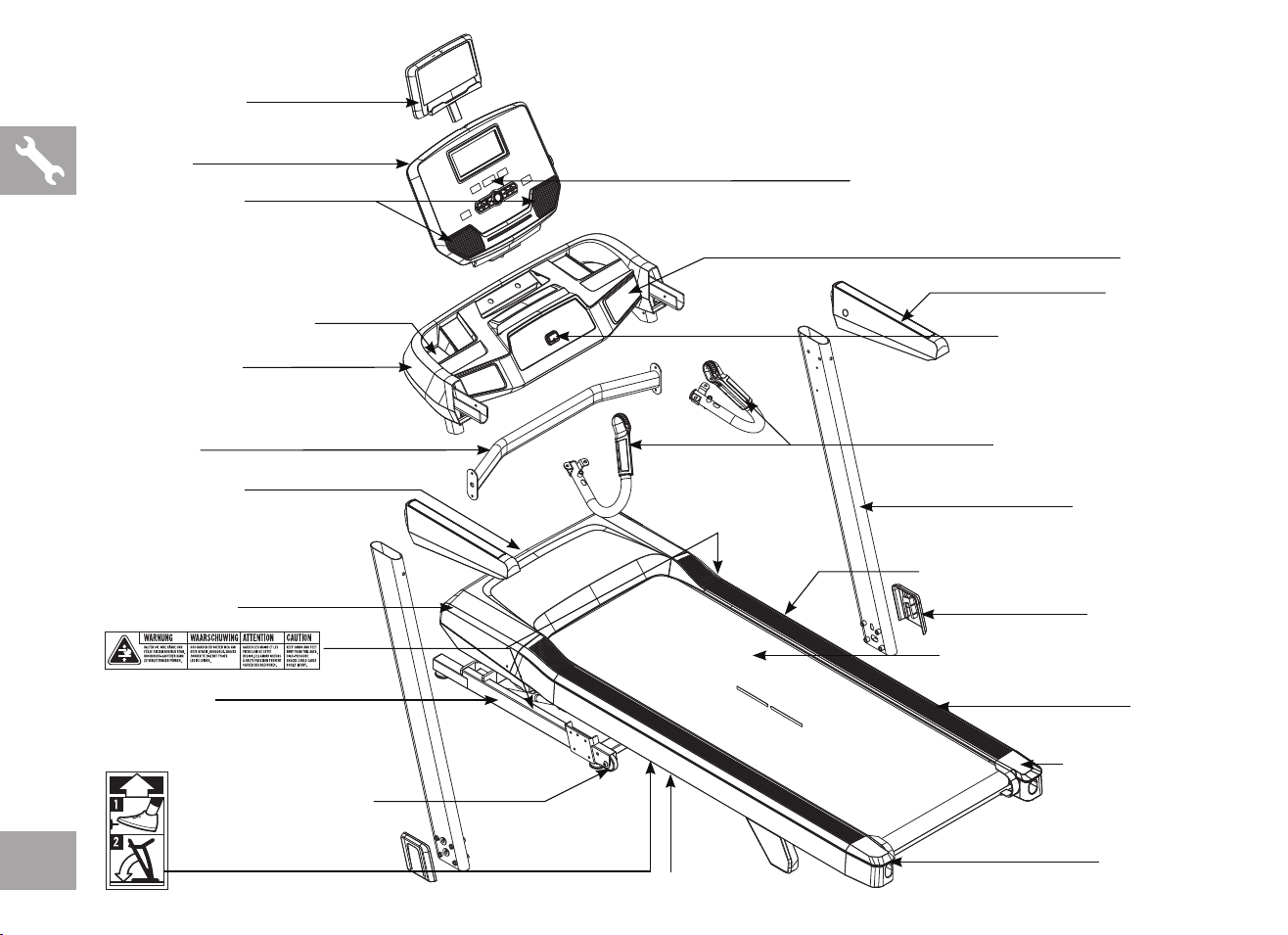
REAR ROLLER
TENSION/ALIGNMENT BOLTS
CONSOLE FANS
CONSOLE
SPEAKERS
WATER BOTTLE HOLDER
ON/OFF SWITCH
POWER CORD
RUNNING BELT/RUNNING DECK
TRANSPORT WHEEL
BASE FRAME
FOOT LOCK LATCH DECAL
(UNDERNEATH FOOT LATCH)
CONTROL PANEL AND DISPLAY WINDOWS
CONSOLE BASE
CROSSBAR
TABLET HOLDER
SAFETY KEY PLACEMENT
PULSE GRIP HANDLEBARS
CONSOLE MAST
HANDLEBAR
FOOT LATCH (UNDERNEATH DECK)
MOTOR COVER
SIDE RAIL
MAST COVERS
ROLLER END CAP
DECK FRAME
5
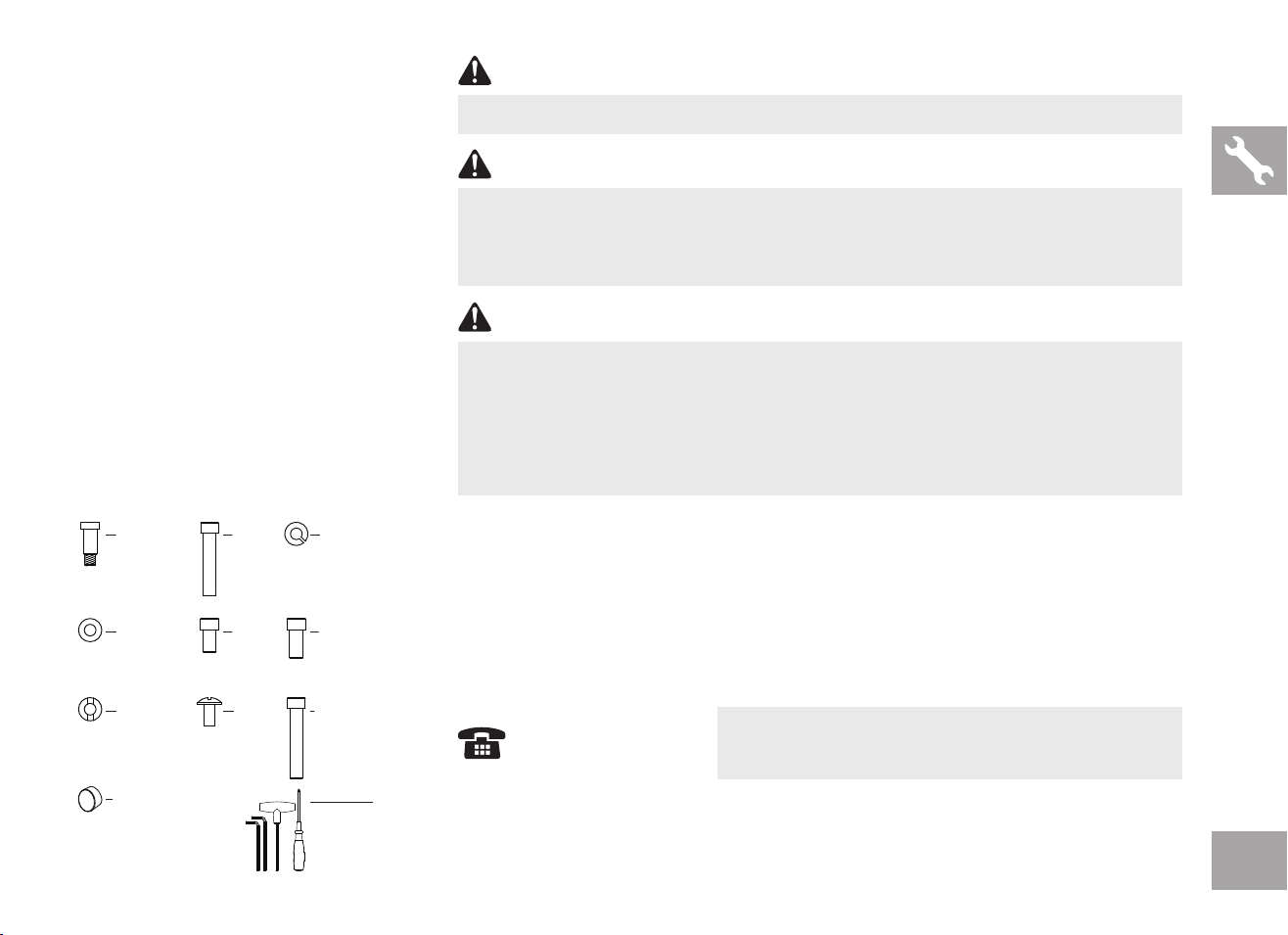
MAIN PARTS INCLUDED:
F 1 Main Frame
F 1 Console Base
F 1 Console
F 2 Console Masts
F 2 Console Mast Covers
F 1 Tablet Holder
F 1 Cross Bar
F 2 Handlebars
F 2 Pulse Grip Handlebars
F 1 Hardware/Tool Kit
F 1 Safety Key
F 1 Bottle of Silicone Lubricant
(for 2 applications)
HARDWARE KIT:
DO NOT ATTEMPT TO LIFT THE TREADMILL! Do not move or lift treadmill from
packaging until specified to do so in the assembly instructions. You may remove the
plastic wrap from console masts.
WARNING
WARNING
NOTE: Have 2 people available for assembly, this will make the assembly process easier.
NOTE: During each assembly step, ensure that ALL nuts and bolts are in place and partially
threaded in before completely tightening any ONE bolt.
NOTE: A light application of grease may aid in the installation of hardware. Any grease, such
as lithium bike grease is recommended.
FAILURE TO FOLLOW THESE INSTRUCTIONS COULD RESULT IN INJURY!
WARNING
Never open box when it is positioned upside-down or on its side.
Unpack and assemble the unit where it will be used.
The enclosed treadmill is equipped with high-pressure springs which can cause the
lower base frame to spring open if mishandled.
If you have questions or if there are any missing parts,
contact Customer Tech Support.
NEED HELP?
A
Guide Bolt
M8x28.5L
Qty: 2
B
Bolt
M8x70L
Qty: 8
C
Spring Washer
Ø
8x
Ø
13
Qty: 29
D
Flat Washer
Ø
8.2x
Ø
15
Qty: 23
E
Bolt
M6x15L
Qty: 4
F
Bolt
M8x15L
Qty: 19
G
Arc Washer
Ø
8.2x
Ø
18
Qty: 6
J
Bolt Cap
Qty: 2
I
Bolt
M8x60L
Qty: 2
H
Bolt
M4x10L
Qty: 3
Tool Kit
5mm L-Wrench
6mm L-Wrench
8mm T-Wrench
Screwdriver
6
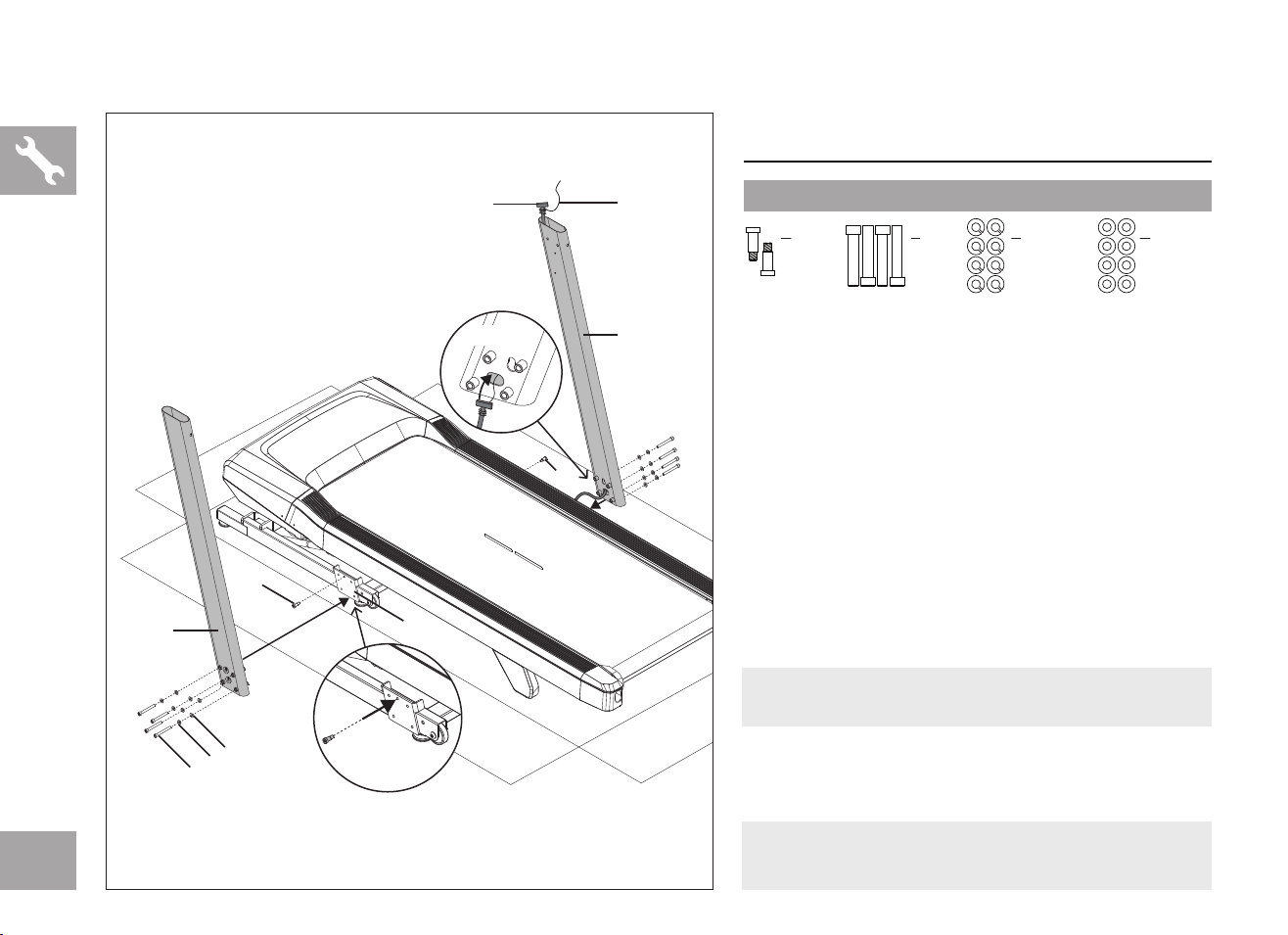
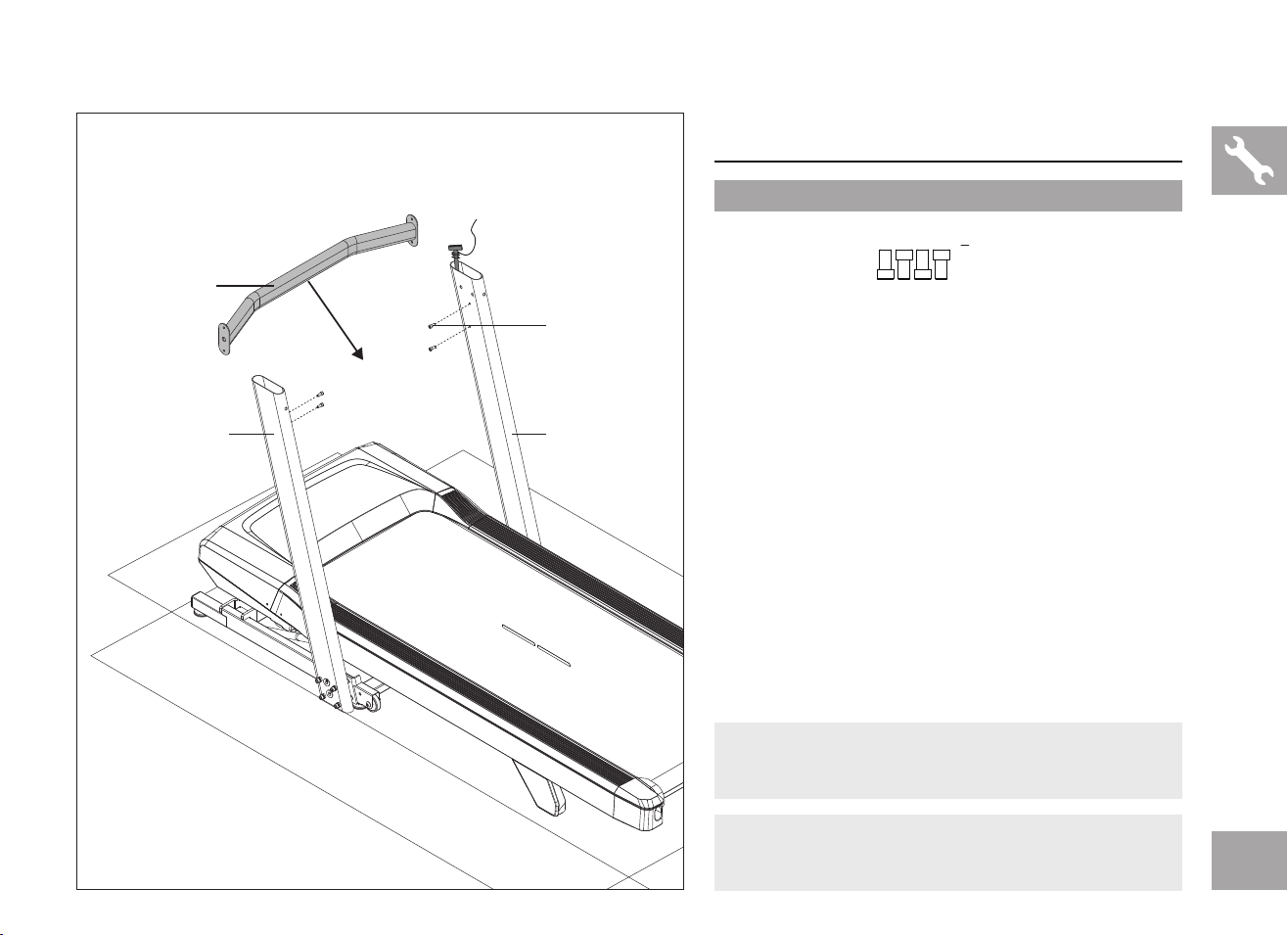
ASSEMBLY STEP 1
1.1 Open hardware for Step 1.
1.2 Insert 2 Guide Bolts (A) into the Base Frame
(11) using the 5mm L-Wrench. Tighten firmly.
1.3 Attach Lead Wire (12) to end of Console Cable
(13). Pull Lead Wire (12) and Console Cable
(13) through bottom hole on Right Console
Mast (14R). After pulling the Lead Wire (12)
through the mast, the top of the Console Cable
(13) should be located at the top of the Right
Console Mast (14R).
1.4 Attach Right Console Mast (14R) to Base
Frame (11) using 4 Bolts (B), 4 Spring Washers
(C) and 4 Flat Washers (D).
1.5 Repeat Step 1.4 for Left Console Mast (14L).
A
Guide Bolt
M8x28.5L
Qty: 2
B
Bolt
M8x70L
Qty: 8
C
Spring Washer
Ø8xØ13
Qty: 8
D
Flat Washer
Ø8.2xØ15
Qty: 8
STEP 1 HARDWARE :
NOTE: Be careful not to pinch any wires while
assembling the masts.
NOTE: Do not fully tighten bolts until the end of
STEP 3.
A
11
B
14R
12
13
STEP 1.3
STEP 1.2
14L
C
D
A
7
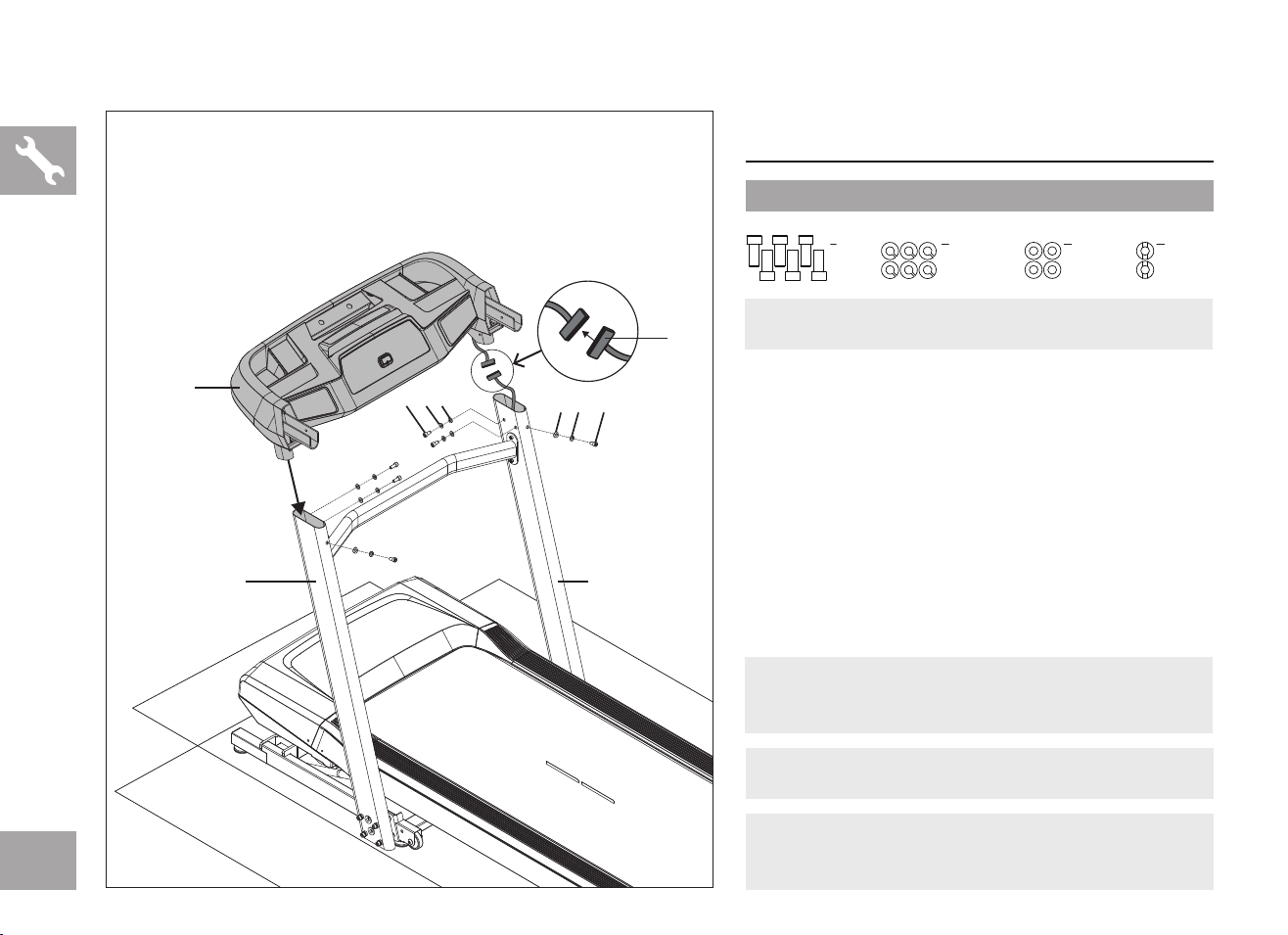
ASSEMBLY STEP 2
2.1 Open hardware for Step 2.
2.2 Attach Crossbar (15) to Left and Right Console
Masts (14L&R) using 4 Bolts (E).
E
Bolt
M6x15L
Qty: 4
STEP 2 HARDWARE :
NOTE: Do not fully tighten bolts until the end of
STEP 3.
NOTE: Be careful not to pinch any wires while
assembling the crossbar.
14R
E
14L
15
8
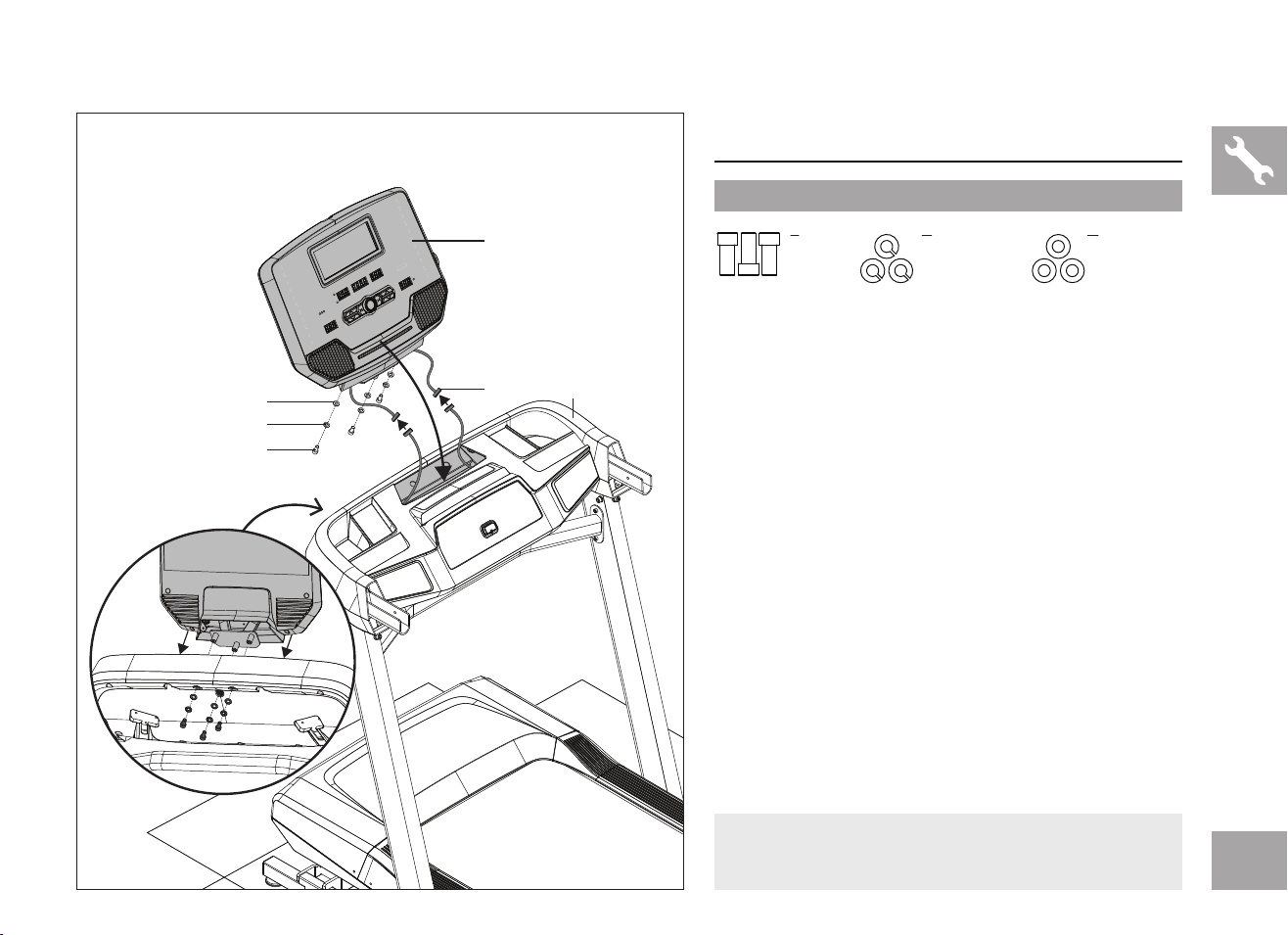
ASSEMBLY STEP 3
3.1 Open hardware for Step 3.
3.2 Carefully connect both ends of Console Cable
(13) and tuck extra cable into Right Console
Mast (14R).
3.3 Carefully place the Console Base (15) on the
Console Masts (14 L&R) and attach using 6
Bolts (F), 6 Spring Washers (C), 4 Flat Washers
(D) and 2 Arc Washers (G).
C
Spring Washer
Ø8xØ13
Qty: 6
D
Flat Washer
Ø8.2xØ15
Qty: 4
G
Arc Washer
Ø8.2xØ18
Qty: 2
F
Bolt
M8x15L
Qty: 6
STEP 3 HARDWARE :
NOTE: Fully tighten bolts from Steps 1-3.
NOTE: ASSEMBLY STEP 4 is not applicable to
markets outside of the U.S, Canada and Mexico.
NOTE: Be careful not to pinch any wires while
assembling the console.
NOTE: 2 people recommended for Step 3 assembly.
13
14R
F C D
FCG
14L
15
STEP 3.2
9
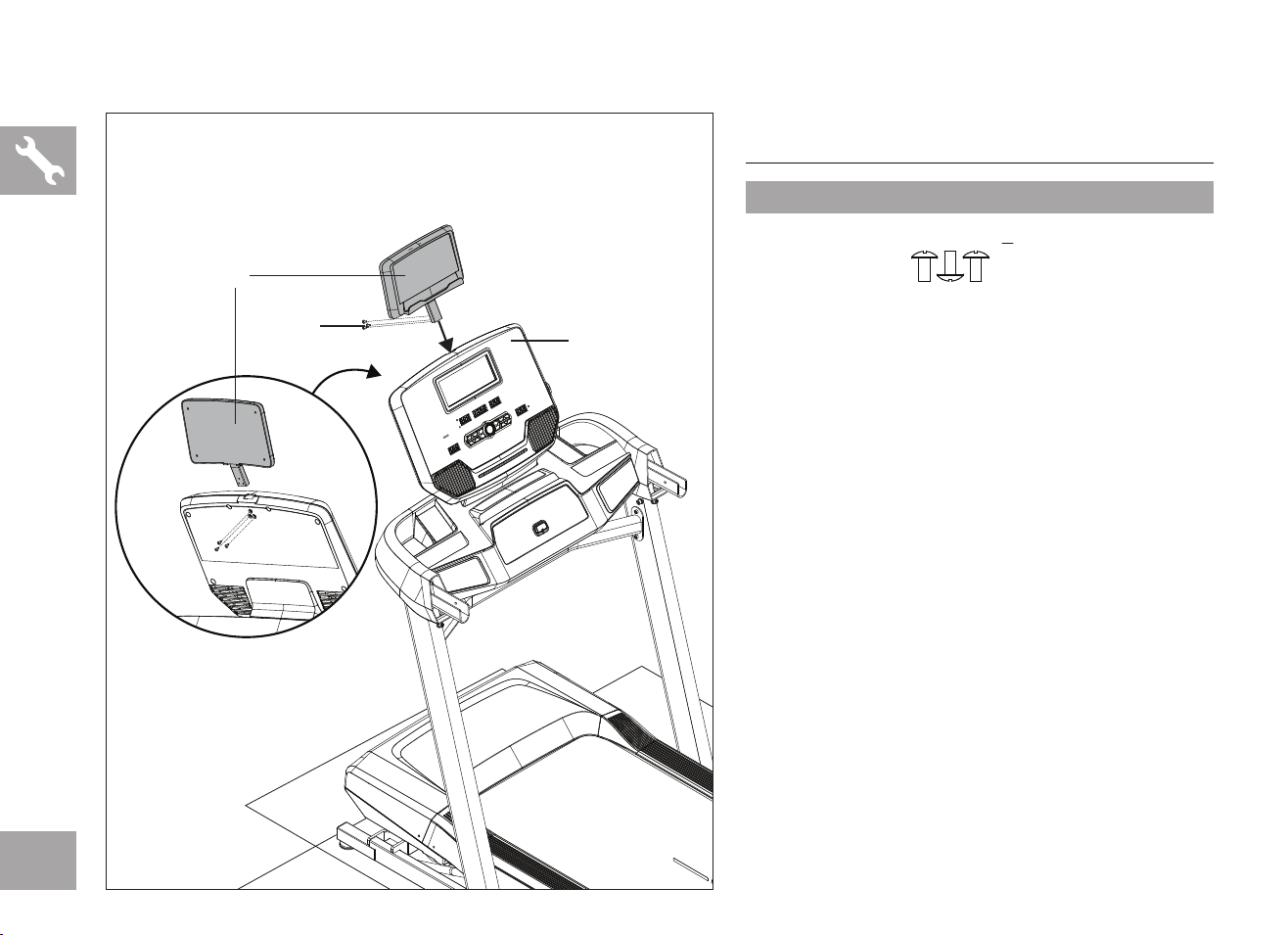
ASSEMBLY STEP 5
5.1 Open hardware for Step 5.
5.2 Fold up the treadmill deck. Make sure the deck
is securely latched.
5.3 Remove remaining parts boxes from under
treadmill deck and lower the deck down for the
remainder of assembly.
5.4 Carefully connect the Left and Right Console
Cables (13) and tuck extra cable into Console
Base (15).
5.5 Attach Console (16) to the Console Base (15)
using 3 Bolts (F), 3 Spring Washers (C) and 3
Flat Washers (D).
F
Bolt
M8x15L
Qty: 3
C
Spring Washer
Ø8xØ13
Qty: 3
D
Flat Washer
Ø8.2xØ15
Qty: 3
STEP 5 HARDWARE :
16
13 15
D
C
F
NOTE: Be careful not to pinch any wires while
assembling the Console.
10
ASSEMBLY STEP 6
6.1 Open hardware for Step 6.
6.2 Insert Tablet Holder (17) into opening on top of
Console (16) and secure with 3 Bolts (H).
H
Bolt
M4x10L
Qty: 3
STEP 6 HARDWARE :
H
16
17
11
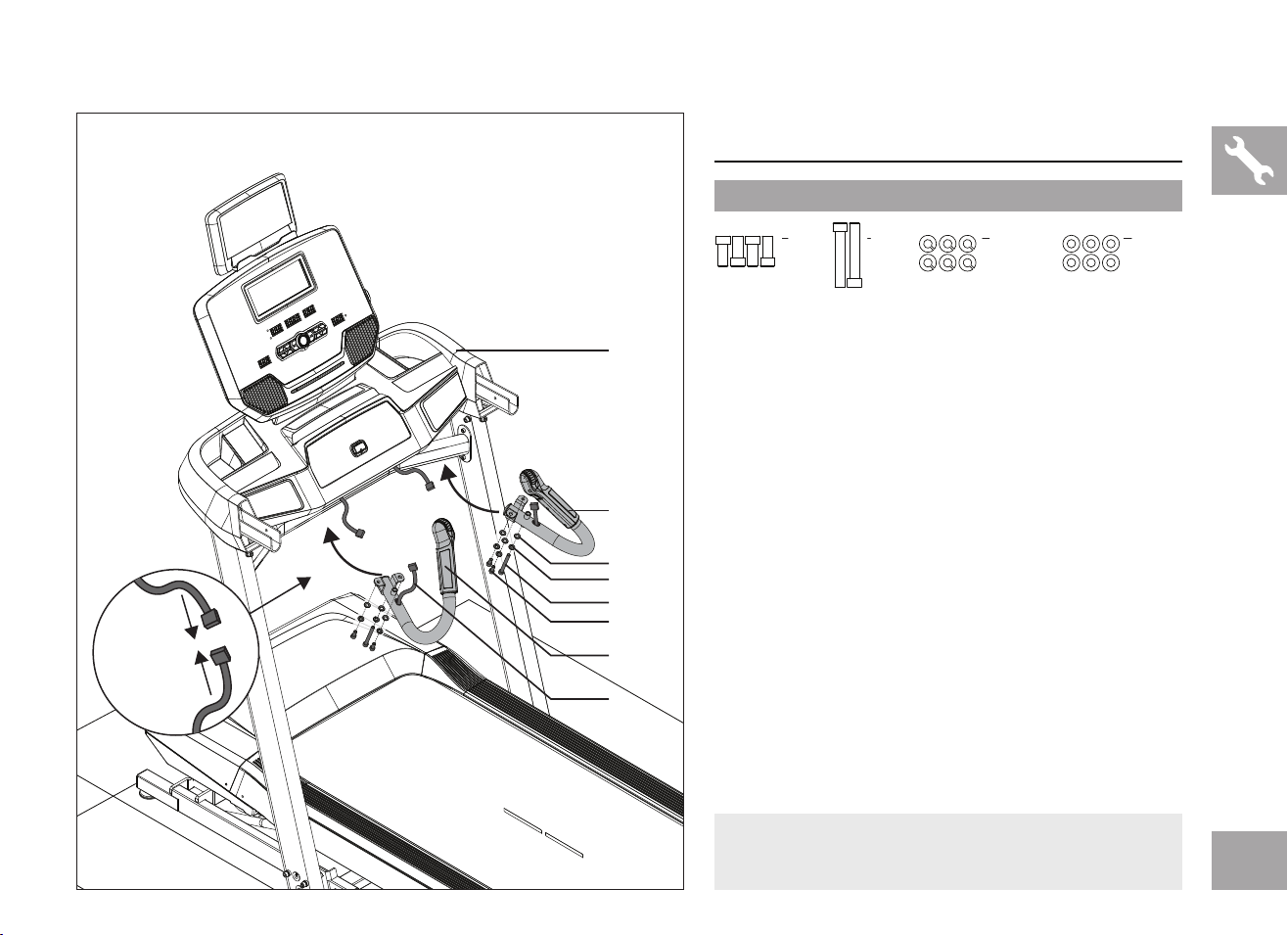
ASSEMBLY STEP 7
7.1 Open hardware for Step 7.
7.2 Connect Pulse Grip Cables (18) to Cables
on bottom side of Console Base (15) and
tuck excess cable into console base to avoid
damage.
7.3 Secure Pulse Grip Handlebars (19L & 19R) to
Console Base (15) using 4 Short Bolts (F), 2
Long Bolts (I), 6 Spring Washers (C) and 6 Flat
Washers (D).
F
Bolt
M8x15L
Qty: 4
C
Spring Washer
Ø8xØ13
Qty: 6
D
Flat Washer
Ø8.2xØ15
Qty: 6
I
Bolt
M8x60L
Qty: 2
STEP 7 HARDWARE :
I
C
19R
15
D
F
19L
18
NOTE: Be careful not to pinch any wires while
assembling the Pulse Grip Handlebars.
STEP 7. 2
12
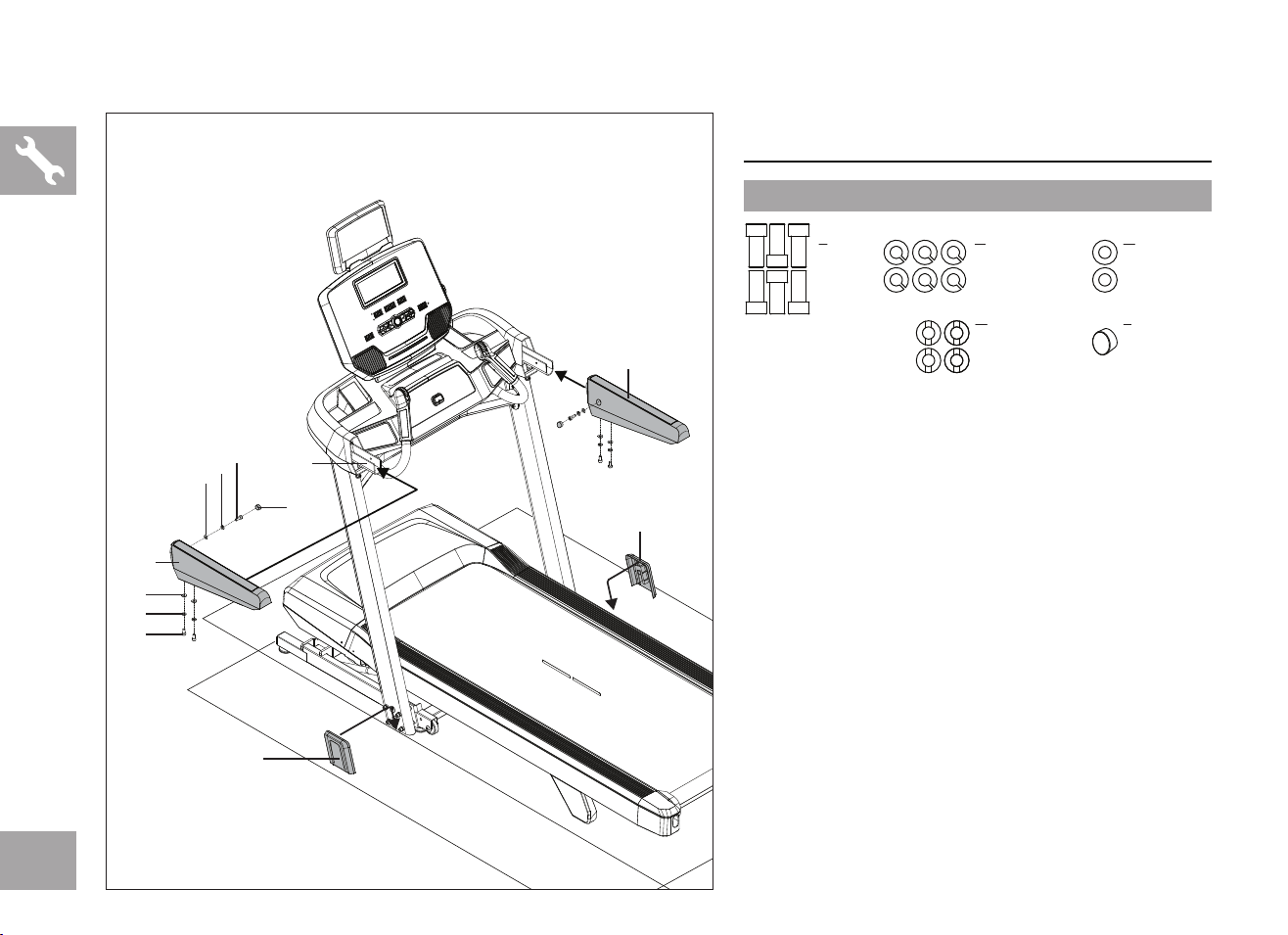
ASSEMBLY STEP 8
8.1 Open hardware for Step 8.
8.2 Slide Left Handlebar (20L) onto Console
Bracket (21) and secure side with 1 Bolt (F), 1
Spring Washer (C) and 1 Flat Washer (D).
8.3 Secure bottom of Left Handlebar (20L) with
2 Bolts (F), 2 Spring Washers (C) and 2 Arc
Washers (G).
8.4 Repeat Steps 7.2 & 7.3 with Right Handlebar
(20R) and fully tighten all bolts.
8.5 Insert Bolt Cap (J) to cover bolt holes on
Handlebars (20L & 20R).
8.6 Slide Mast Covers (23L & 23R) over mast bolts.
F
Bolt
M8x15L
Qty: 6
C
Spring Washer
Ø8xØ13
Qty: 6
D
Flat Washer
Ø8.2xØ15
Qty: 2
G
Arc Washer
Ø8.2xØ18
Qty: 4
J
Bolt Cap
Qty: 2
STEP 8 HARDWARE :
J
20R
23R
21
20L
G
C
F
23L
F
C
D
13
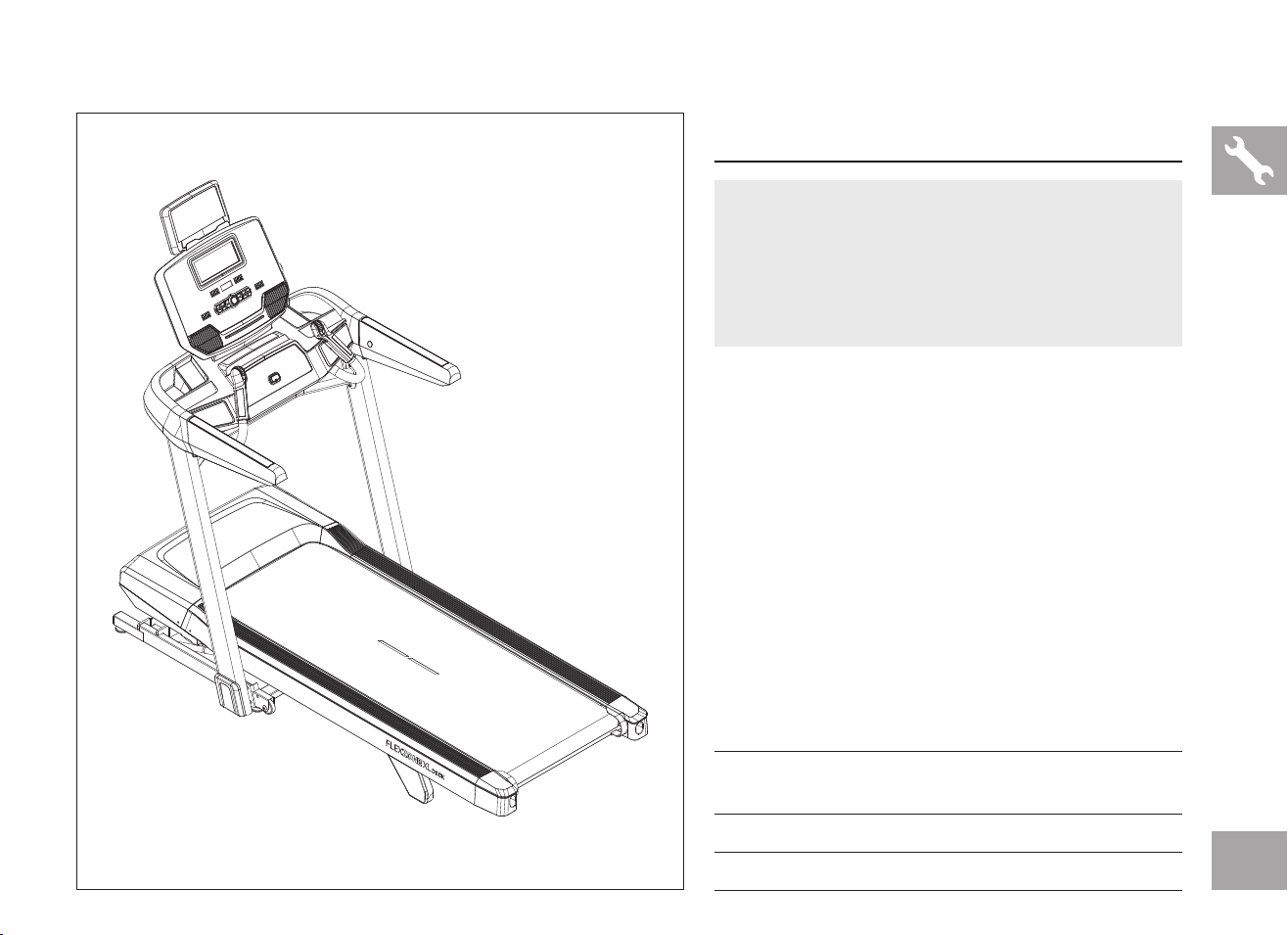
ASSEMBLY STEP 9
ASSEMBLY COMPLETE!
Before the first use, lubricate the treadmill
deck by following the instructions in the
MAINTENANCE section in the
TREADMILL GUIDE.
TECH SPECS
Assembled Dimensions
(L x W x H)
198 x 94 x 171 cm /
78" x 37" x 67"
Product Weight 128 kg / 282.2 lbs.
Max User Weight 159 kg / 350 lbs.

14

15
TREADMILL OPERATION
This section explains how to use your treadmill’s console and programming.
The BASIC OPERATION section in the TREADMILL GUIDE has instructions for the following:
• LOCATION OF THE TREADMILL
• USING THE SAFETY KEY
• FOLDING THE TREADMILL
• MOVING THE TREADMILL
• LEVELING THE TREADMILL
• TENSIONING THE RUNNING BELT
• CENTERING THE RUNNING BELT
• USING THE HEART RATE FUNCTION
16
WARNING: To reduce risk of serious injury, stand on foot rails before starting treadmill, read and understand the user’s manual, all instructions, and the warnings before use. Keep children away. IMPORTANT: Incline must
be set at zero before folding treadmill into storage position. WARNING: Heart rate monitoring systems may be inaccurate. Overexercising may result in serious injury or death. If you feel faint, stop exercising immediately.
FTMS
4
6
7
8
9
10
12
16
18
2015
12
10
8
7
6
5
4
3
2
0 2
KCAL
%
KM/H
A
N
O
D
B
L
B
K
M
R
E
U
Q
C
I
S
P
F W G VV
H
T
J
T

17
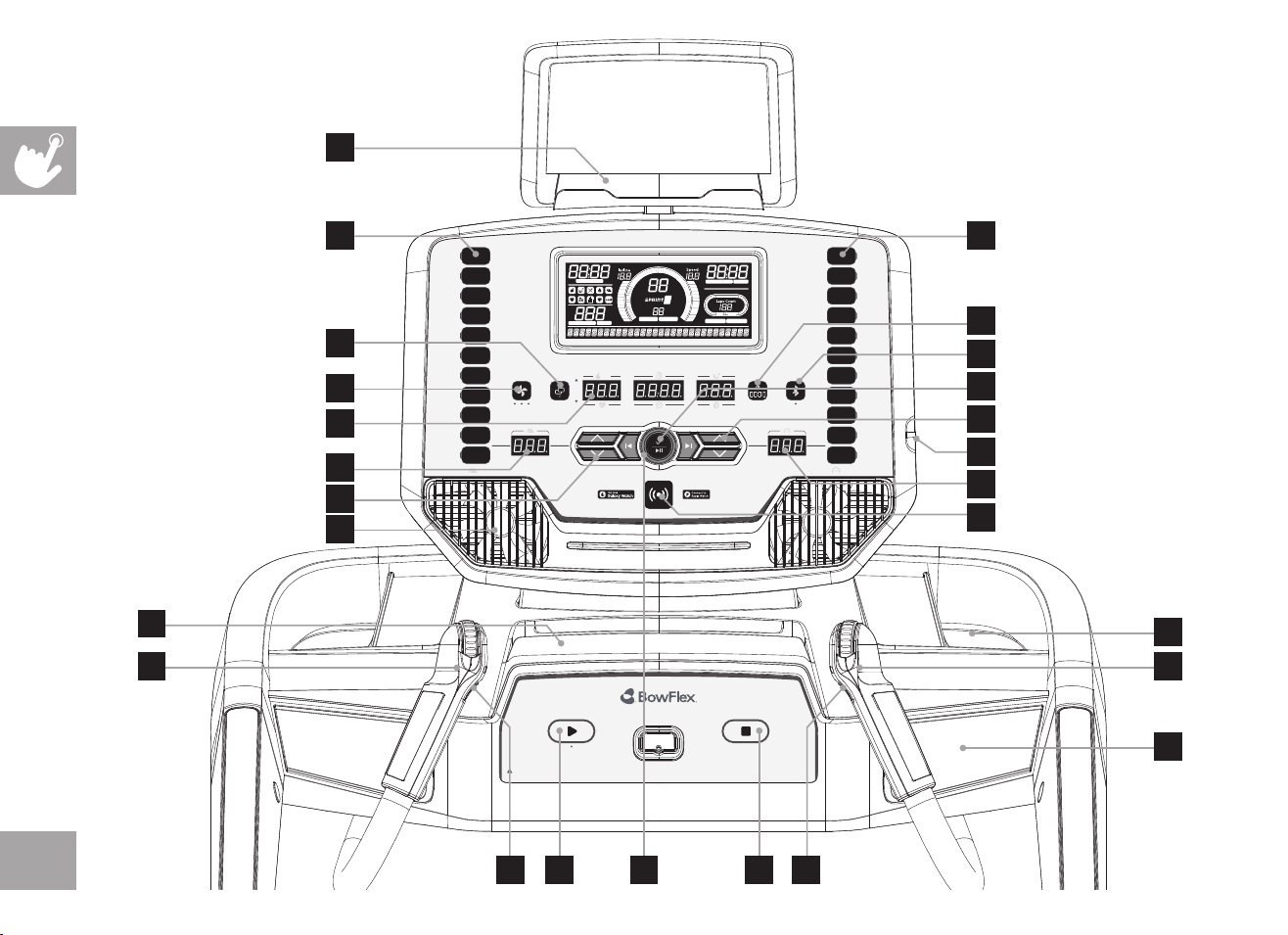
CONSOLE OPERATION
Note: There is a thin protective sheet of clear plastic on the overlay of the console that should be removed before use.
A) LED DISPLAY: Calories, Split Time, Distance, Heart Rate, Total Time and Pace.
B) SPEED & INCLINE DISPLAYS: Indicates what speed and incline is selected.
C) SMART WATCH READER: Tap Apple Watch or Samsung Galaxy Watch to sync workout with treadmill.
D) CHANGE DISPLAY: Toggles LED display between CALORIES/HEART RATE, SPLIT TIME/TOTAL TIME and DISTANCE/PACE.
E) SPLIT KEY: Press to reset SPLIT TIME LED.
F) START: Press to START workout.
G) STOP: Press to pause your workout. Hold for 3 seconds to end your workout and reset the console.
H) INCLINE QUICKDIAL: Used to adjust incline in small increments (.5%).
I) SPEED QUICKDIAL: Used to adjust speed in small increments (.1 km/h).
J) INCLINE QUICK KEYS: Used to reach desired incline more quickly. LEDs on keys show current incline.
K) SPEED QUICK KEYS: Used to reach desired speed more quickly. LEDs on keys show current speed.
L) INCLINE +/- KEYS: Used to adjust incline in small increments (.5%).
M) SPEED +/- KEYS: Used to adjust speed in small increments (.1 km/h).
N) FAN KEY: Press to change fan level.
O) FANS: Personal workout fans.
P) SPEAKERS: Music and audio feedback plays through the speakers.
Q) USB PORT: Used to charge most devices up to 1.0 amps and to install software updates.
R) BLUETOOTH KEY: Used to switch between Bluetooth Tablet and Heart Rate mode. LED will illuminate when a bluetooth
device is connected.
S) WATER BOTTLE POCKETS: Water bottle and other personal item storage.
T) TABLET/READING RACKS: Holds tablet or reading material.
U) SELECT/PLAY PAUSE BUTTON: Press to confirm selection or play/pause audio.
V) INTERVAL BUTTONS: These are programmable keys. When an user is selected, they can be programmed to a desired
speed and incline setting.
W) WORKOUT KNOB: Used for workout selection and volume control.
18
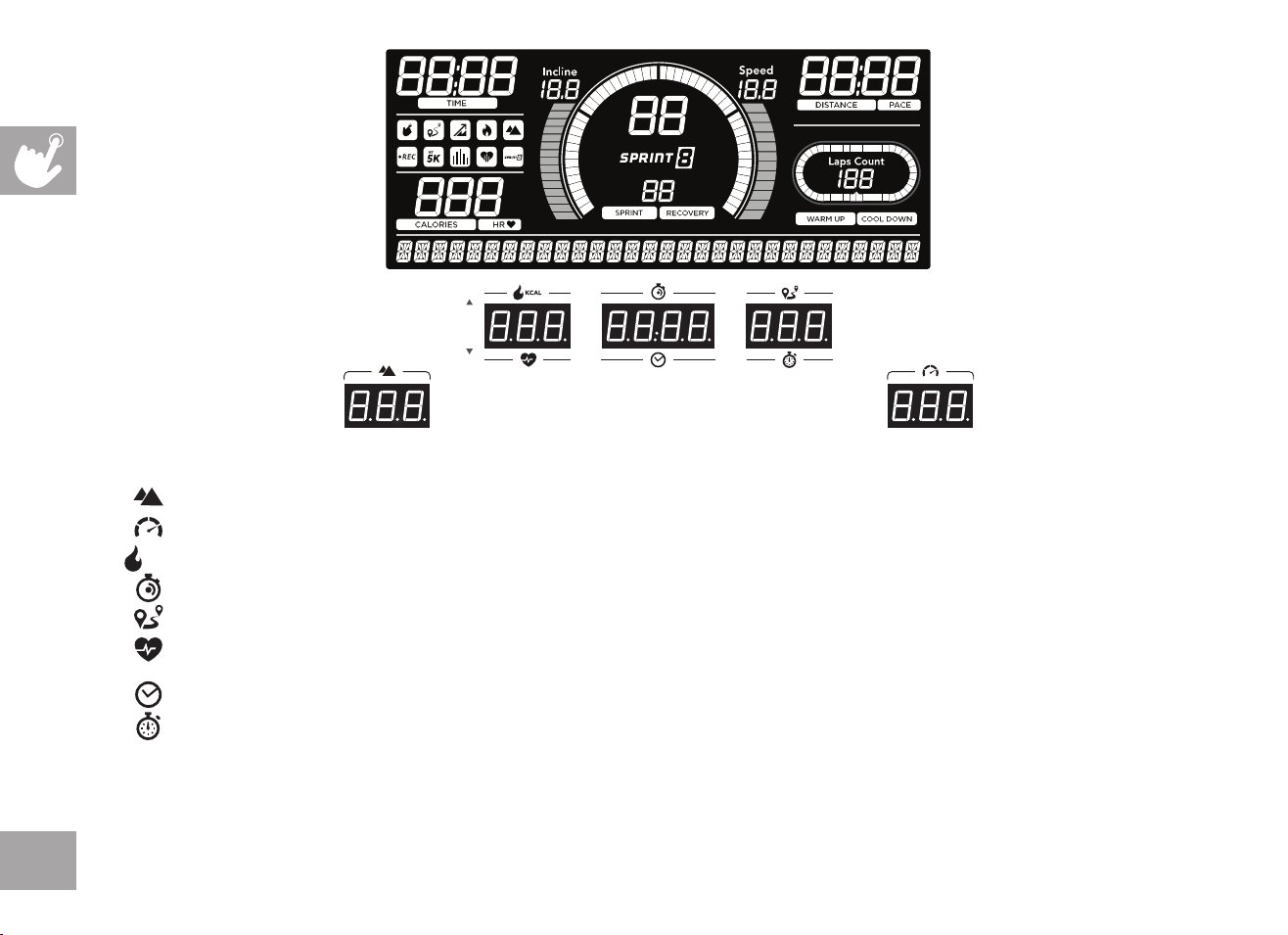
DISPLAY WINDOWS
• INCLINE: Shown as percent. Indicates the incline of your walking or running surface.
• SPEED: Shown as km/h. Indicates how fast your walking or running surface is moving.
• CALORIES: Total calories burned during your workout.
• SPLIT TIME: Time elapsed since the SPLIT key was last pressed.
• DISTANCE: Shown as kilometers. Indicates distance traveled during your workout.
• HEART RATE: Shown as BPM (beats per minute). Used to monitor your heart rate (displayed when contact is made with both
pulse grips).
• TOTAL TIME: Shows either the total time elapsed or remaining; depending on the workout selected.
• PACE: Indicates how many minutes it takes to complete a kilometer while running or walking at your current speed.
• LAPS: Graphic showing laps around a track. One lap is 400 meters (1/4 mile).
• GRAPH: Counts up to 60 seconds and repeats. In the Sprint 8 program the graph counts to 30, 60 and 90 seconds.
• PROGRAM ICONS: Shows the selected workout program. Definition of workout programs on pages 21-27.
KCAL

19
GETTING STARTED
1) Check to make sure no objects are placed on the belt that will hinder the movement of the treadmill.
2) Plug in the power cord and turn the treadmill ON. (The ON/OFF switch is next to the power cord.)
3) Stand on the side rails of the treadmill.
4) Attach the safety key clip to part of your clothing making sure that it is secure and will not become detached during operation.
5) Insert the safety key into the safety keyhole in the console.
6) You have two options to start your workout:
A) QUICK START UP
Simply press the START key to begin working out.
Time, distance, and calories will all count up from zero. OR...
B) SELECT A WORKOUT OR TARGET
1) Select your USER by turning the workout knob and then pressing select when your desired USER is displayed.
2) Select your WEIGHT by turning the workout knob and then pressing select when your desired WEIGHT is displayed.
3) Select your PROGRAM by turning the workout knob and then pressing select when your desired PROGRAM is displayed.
4) Adjust the SETTING by turning the workout knob and then pressing select when your desired SETTING is displayed.
5) Press START to begin.
20
HOW TO PROGRAM AND USE CUSTOM INTERVAL BUTTONS
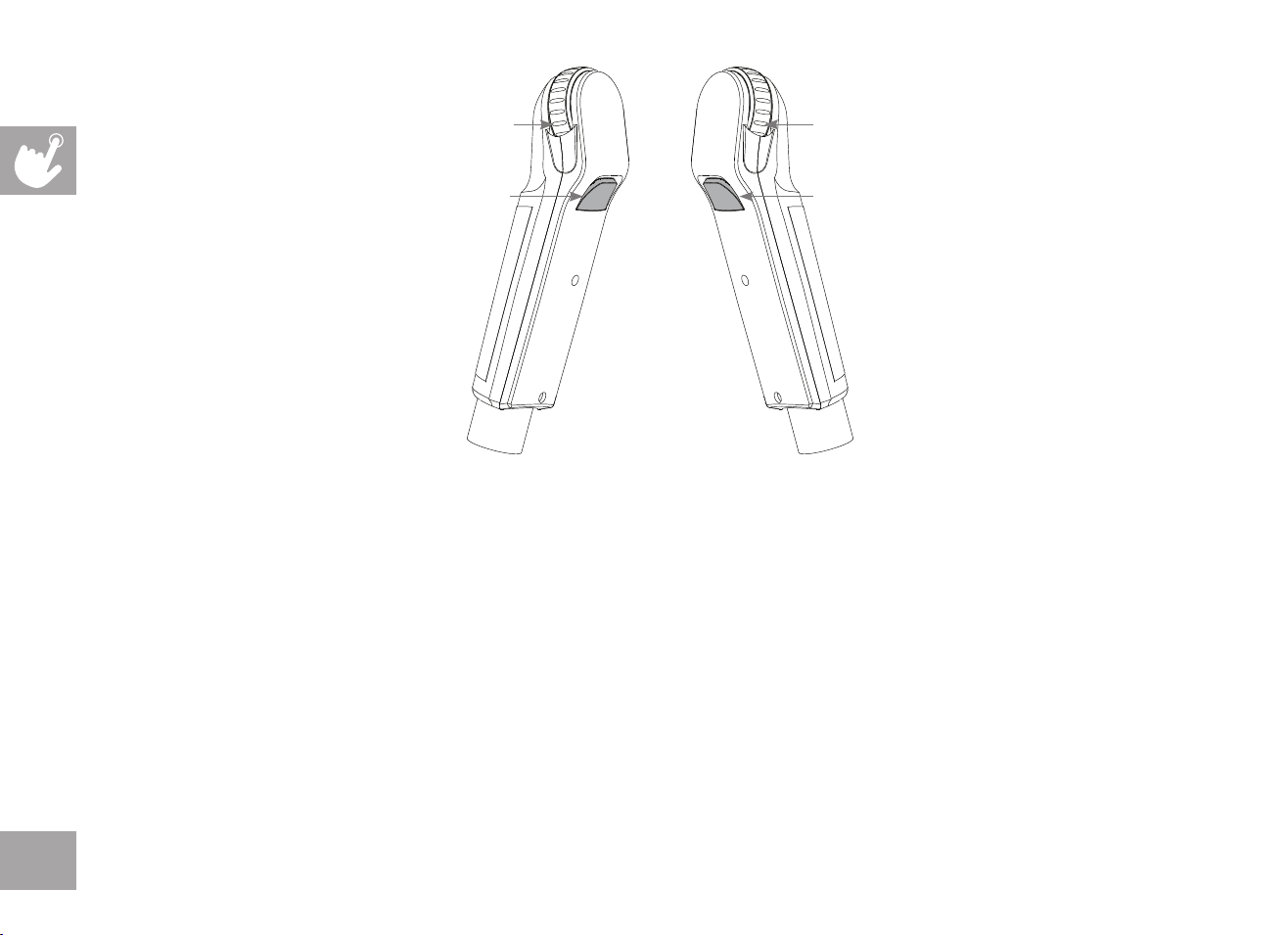
The programmable interval buttons located on the pulse rate grips are designed to help you customize this machine to match whatever
workout you like to do the most.
The LEFT and RIGHT INTERVAL BUTTONS are programmable for speed and incline.
To program the INTERVAL button, you must select a user, start the machine, set the desired speed and incline, press and hold the
desired INTERVAL button for three seconds until the treadmill beeps. Now the INTERVAL button is programmed to your settings. After
programming the INTERVAL button, it will remember the setting for that user until reprogrammed.
Now when the INTERVAL button is pressed, the treadmill speed and incline will change to the settings you programmed for that button.
The most common type of workout these keys will help with is interval training. We suggest programming one of the INTERVAL buttons to
your high intensity segments and the other to your recovery segments.
Another common use is to set one INTERVAL button to your warm up and cool down settings and the other to your desired workout
settings.
These buttons should allow you to customize the settings of your treadmill to quickly fit the type of workout you enjoy most.
INTERVAL BUTTON 1 INTERVAL BUTTON 2
SPEED SCROLL WHEEL
Roll forward/backward to increase/decrease speed
INCLINE SCROLL WHEEL
Roll forward/backward to increase/decrease incline.
21
MANUAL: Control everything about your workout – from start to finish. This program is a basic workout with no pre-defined
settings, allowing you to manually adjust the machine at any time. It begins with an incline at 0 and speed at 0.8 km/h.
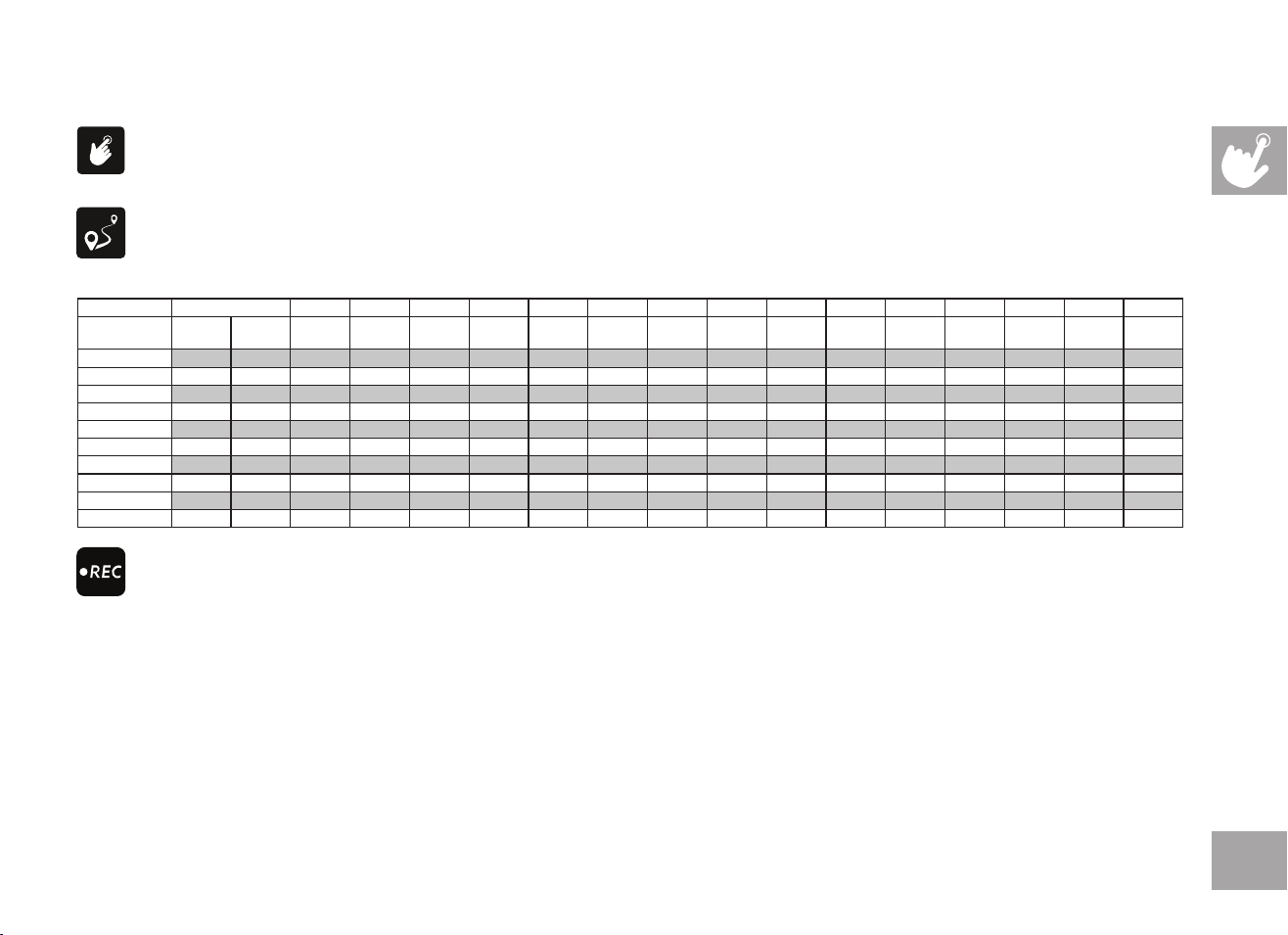
DISTANCE: Push yourself and go further during your workout with 13 distance workouts. Choose from 1 mile, 2 miles, 5k, 5 miles,
10k, 8 miles, 15k, 10 miles, 20k, half marathon, 15 miles, 20 miles, and marathon goals. You set your level.
Incline changes and all segments are 0.16 km.
WORKOUT PROFILES
RECORD: This program allows you to perform and save your perfect workout with specic speed, incline and duration settings.
Once your workout is saved, you can run the exact same workout again or modify it for future use. The Record program is
unavailable as a GUEST user and must be between 2 and 90 minutes in length.
New Workout Recording:
• Start recording a new workout by selecting NO when asked “RUN PREVIOUS WORKOUT”. Time will count up from 0:00,
speed will start at 0.8 km/h, and incline will start at 0%. All speed and incline changes will be recorded.
• Finish your workout by pressing STOP, the workout will be saved for future use.
Run Previous Recorded Workout:
• Press YES when asked “RUN PREVIOUS WORKOUT.”
• You will be asked if you want to “MODIFY WORKOUT,” if you select NO the workout will run the same as
previously recorded and no changes made during the workout will be saved.
• If you select YES to “MODIFY WORKOUT” your recorded workout will run, and any changes you make during
the workout will be overwritten and saved.
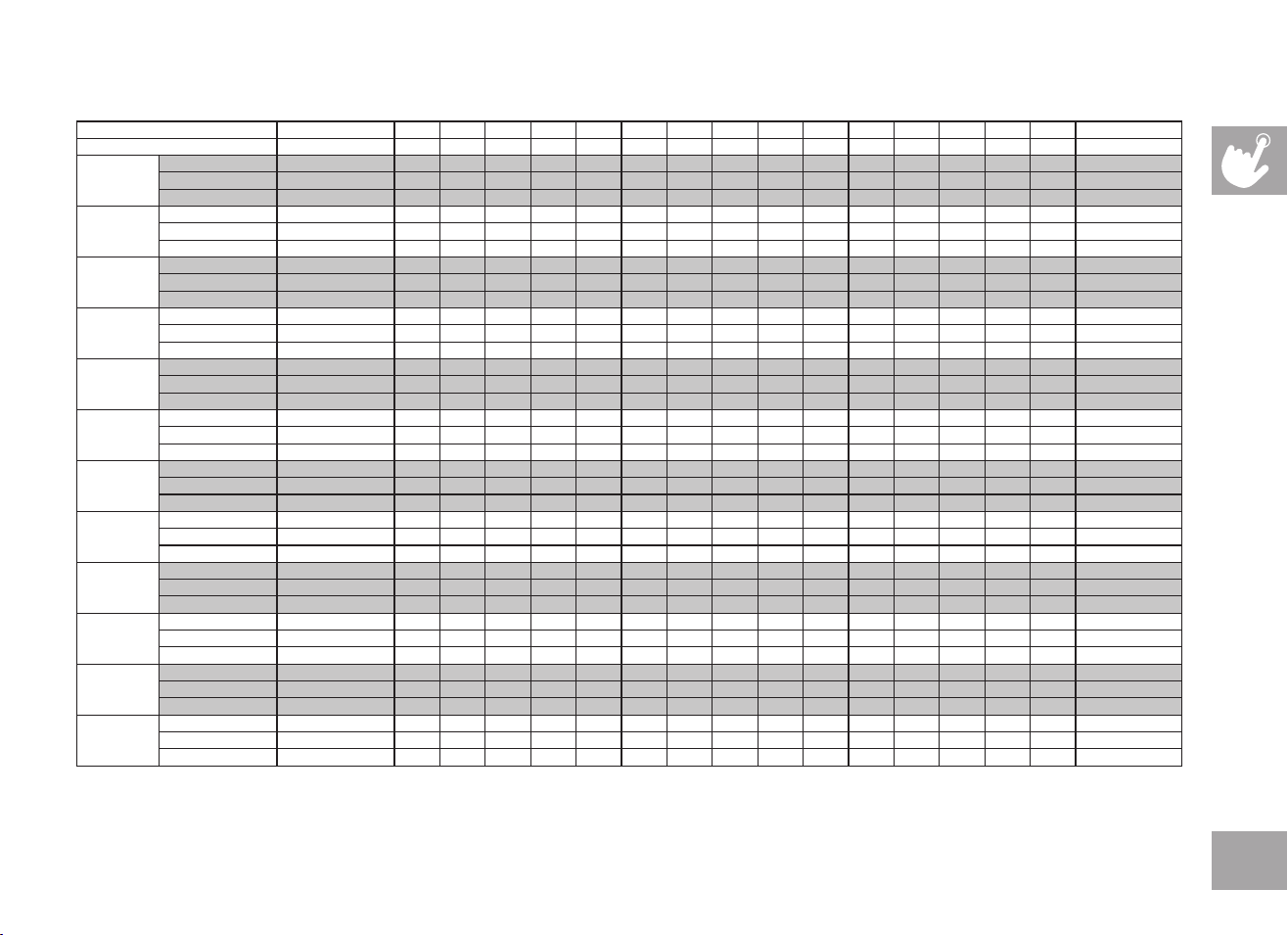
Segment Warm Up 1 2 3 4 5 6 7 8 9 10 11 12 13 14 15
Distance 0.16
km
0.16
km
0.16
km
0.16
km
0.16
km
0.16
km
0.16
km
0.16
km
0.16
km
0.16
km
0.16
km
0.16
km
0.16
km
0.16
km
0.16
km
0.16
km
0.16
km
Level 1 0 0 0 0 0 0 0 0 0 0 0 0 0 0 0 0 0
Level 2 0 0.5 1 3 2 3 2 3 2.5 3.5 2.5 3 2 3 2 3 1
Level 3 0.5 1 1.5 3.5 1.5 3.5 2.5 3.5 2.5 4 2.5 3.5 2.5 3.5 1.5 3.5 1.5
Level 4 0.5 1 1.5 3.5 2.5 3.5 2.5 3.5 3 4 3 3.5 2.5 3.5 2.5 3.5 1.5
Level 5 1 1.5 2 4 2 4 3 4 3 4.5 3 4 3 4 2 4 2
Level 6 1 1.5 2 4 3 4 3 4 3.5 4.5 3.5 4 3 4 3 4 2
Level 7 1.5 2 2.5 4.5 2.5 4.5 3.5 4.5 3.5 5 3.5 4.5 3.5 4.5 2.5 4.5 2.5
Level 8 1.5 2 2.5 4.5 3.5 4.5 3.5 4.5 4 5 4 4.5 3.5 4.5 3.5 4.5 2.5
Level 9 2 2.5 3 5 3 5 4 5 4 5.5 4 5 4 5 3 5 3
Level 10 2 2.5 3 5 4 5 4 5 4.5 5.5 4.5 5 4 5 4 5 3
22
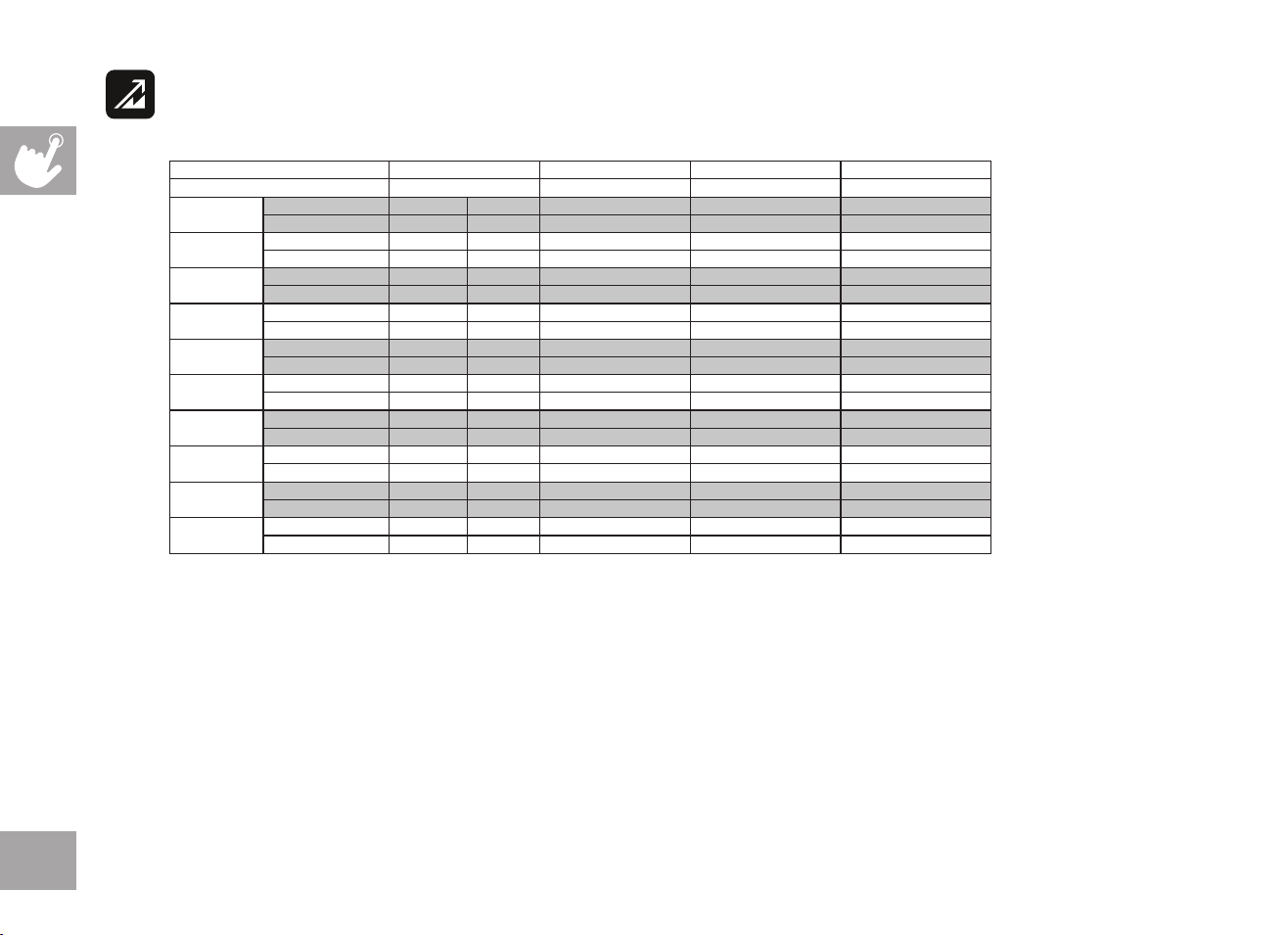
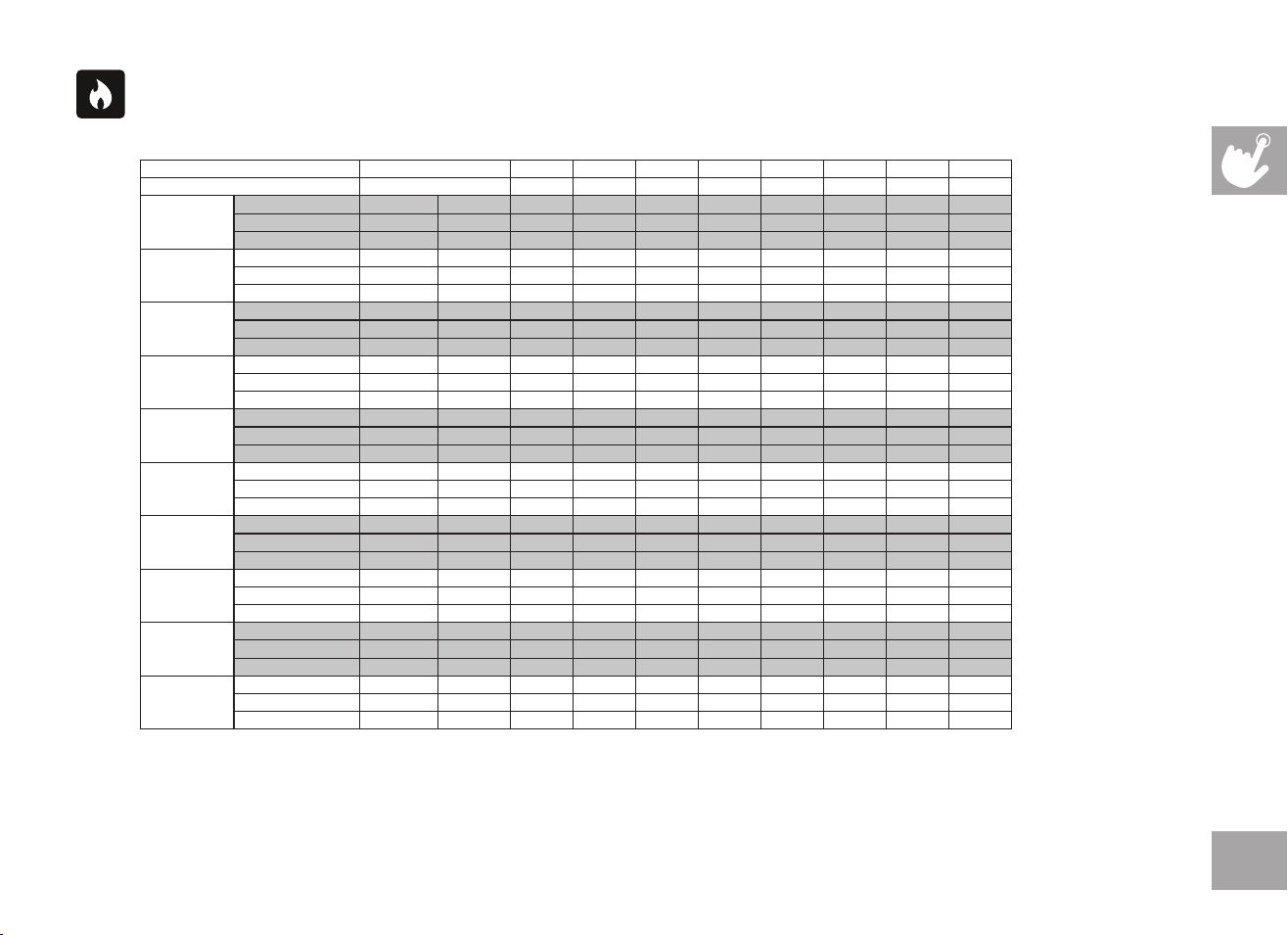
HILL SPRINT: A 20 minute program that allows you to select a level of difficulty from 1 - 10. After a 3 minute warm-up, the program
repeats sprint & recovery segments 10 times. The program finishes with a 2 minute cool down.
Total workout (Warmup + 10x segments + Cool Down)= 20 minutes
Segment Warm Up Sprint Speed Recover Speed Cool Down
Time 90s 90s 30 sec 60 sec
Level 1
Incline 0 0.5 3 0 0
Speed (km/h) 0.8 2.4 4.0 3.2 0.8
Level 2
Incline 0 0.5 3.5 0 0
Speed (km/h) 0.8 3.2 4.8 4.0 0.8
Level 3
Incline 1 1 4 2 1
Speed 1.6 4.0 5.6 4.8 1.6
Level 4
Incline 1 1 4.5 2 1
Speed (km/h) 3.2 4.0 6.4 4.8 3.2
Level 5
Incline 1 1.5 5 2 1
Speed (km/h) 3.2 4.8 8.0 4.8 3.2
Level 6
Incline 2 1.5 6 3 2
Speed (km/h) 3.2 5.6 9.6 4.8 3.2
Level 7
Incline 2 2 7 3 2
Speed (km/h) 4.0 6.4 9.6 6.4 4.0
Level 8
Incline 2 2 8 4 2
Speed (km/h) 4.0 6.4 9.6 6.4 4.0
Level 9
Incline 2 2.5 9 4 2
Speed (km/h) 4.8 7.2 14.4 6.4 4.8
Level 10
Incline 2 2.5 10 4 2
Speed (km/h) 4.8 8.0 16.0 8.0 4.8
23
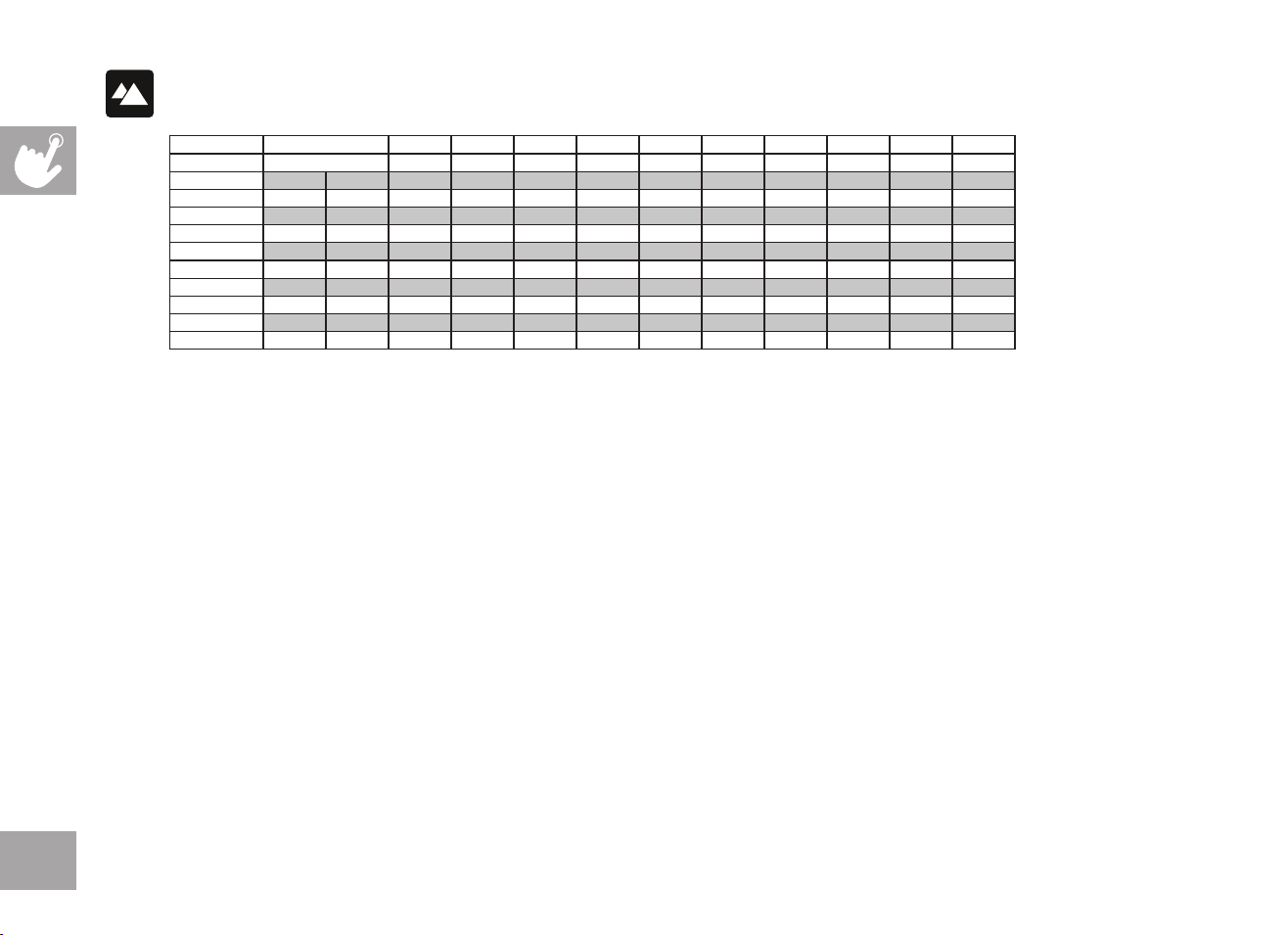
FAT BURN: Relatively slow and steady is the name of the game to maximize your weight-loss goals. Promotes weight loss by
increasing and decreasing the speed and incline, while keeping you in your fat burning zone.
Speed and Incline changes, segments repeat every 30 seconds.
Segment Warm Up 1 2 3 4 5 6 7 8
Time 4:00 Mins 30 Sec 30 Sec 30 Sec 30 Sec 30 Sec 30 Sec 30 Sec 30 Sec
Level 1
Incline 0 0.5 1.5 1.5 1 0.5 0.5 0.5 1 1.5
Speed (mph) 0.5 1.5 2 2.5 3 3.5 4 3.5 3 2.5
Speed (km/h) 0.8 2.4 3.2 4.0 4.8 5.6 6.4 5.6 4.8 4.0
Level 2
Incline 0 0.5 1.5 1.5 1 0.5 1 0.5 1 1.5
Speed (mph) 0.5 1.9 2.5 3 3.5 4 4.5 4 3.5 3
Speed (km/h) 0.8 3.0 4.0 4.8 5.6 6.4 7.2 6.4 5.6 4.8
Level 3
Incline 0.5 1 2 2 1.5 1 1 1 1.5 2
Speed (mph) 0.5 2.3 3 3.5 4 4.5 5 4.5 4 3.5
Speed (km/h) 0.8 3.7 4.8 5.6 6.4 7.2 8.0 7.2 6.4 5.6
Level 4
Incline 0.5 1 2 2 1.5 1 1 1 1.5 2
Speed (mph) 1 2.6 3.5 4 4.5 5 5.5 5 4.5 4
Speed (km/h) 1.6 4.2 5.6 6.4 7.2 8.0 8.8 8.0 7.2 6.4
Level 5
Incline 1 1.5 2.5 2.5 2 1.5 1.5 1.5 2 2.5
Speed (mph) 1 3 4 4.5 5 5.5 6 5.5 5 4.5
Speed (km/h) 1.6 4.8 6.4 7.2 8.0 8.8 9.6 8.8 8.0 7.2
Level 6
Incline 1 1.5 2.5 2.5 2 1.5 1.5 1.5 2 2.5
Speed (mph) 1 3.4 4.5 5 5.5 6 6.5 6 5.5 5
Speed (km/h) 1.6 5.4 7.2 8.0 8.8 9.6 10.4 9.6 8.8 8.0
Level 7
Incline 1.5 2 3 3 2.5 2 2 2 2.5 3
Speed (mph) 1.4 3.8 5 5.5 6 6.5 7 6.5 6 5.5
Speed (km/h) 2.2 6.1 8.0 8.8 9.6 10.4 11.2 10.4 9.6 8.8
Level 8
Incline 1.5 2 3 3 2.5 2 2 2 2.5 3
Speed (mph) 1.4 4.1 5.5 6 6.5 7 7.5 7 6.5 6
Speed (km/h) 2.2 6.6 8.8 9.6 10.4 11.2 12.0 11.2 10.4 9.6
Level 9
Incline 2 2.5 3.5 3.5 3 2.5 2.5 2.5 3 3.5
Speed (mph) 1.4 4.5 6 6.5 7 7.5 8 7.5 7 6.5
Speed (km/h) 2.2 7.2 9.6 10.4 11.2 12.0 12.8 12.0 11.2 10.4
Level 10
Incline 2 2.5 3.5 3.5 3 2.5 2.5 2.5 3 3.5
Speed (mph) 1.4 4.9 6.5 7 7.5 8 8.5 8 7.5 7
Speed (km/h) 2.2 7.8 10.4 11.2 12.0 12.8 13.6 12.8 12.0 11.2
24
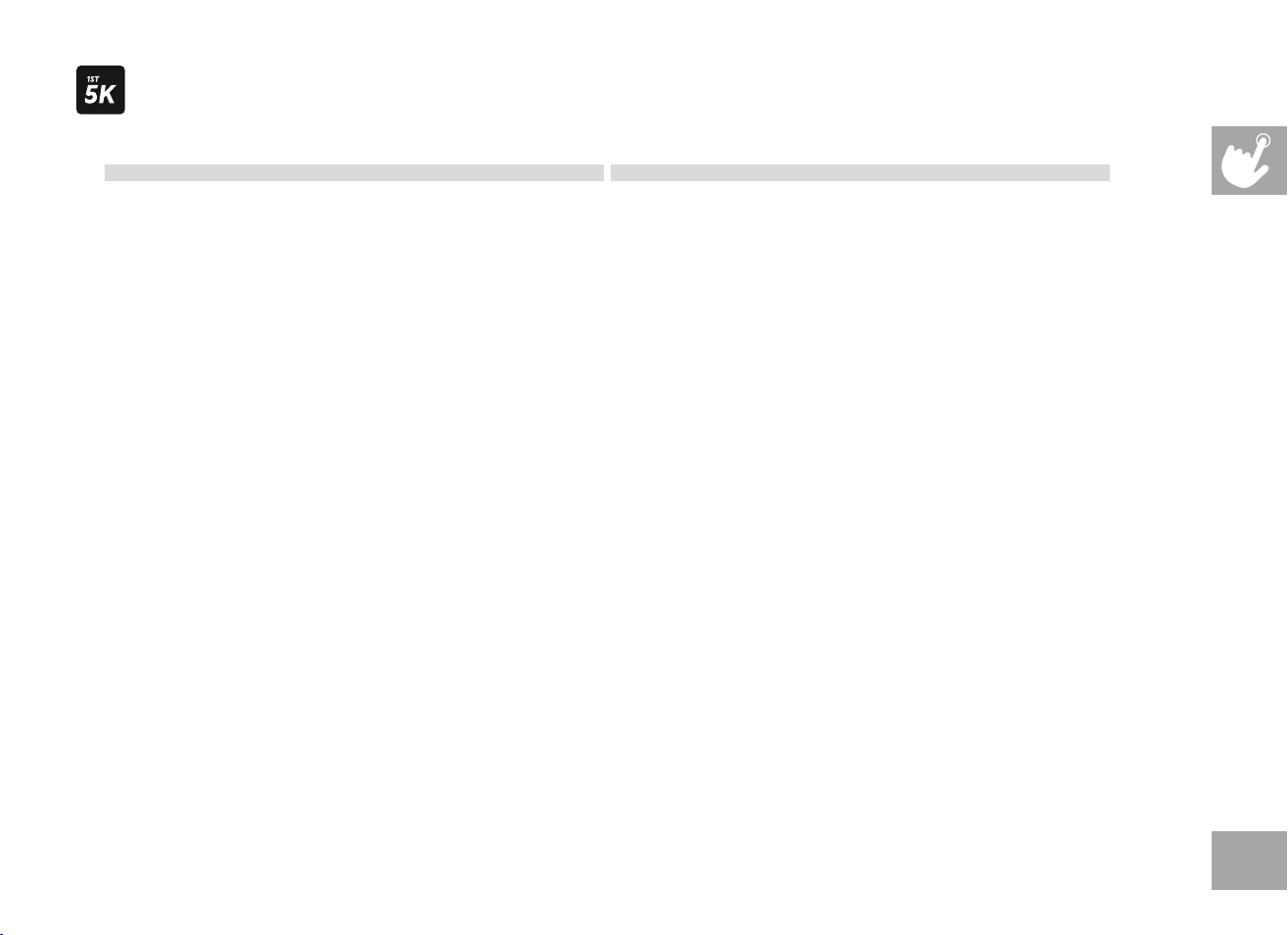
HILL CLIMB: Simulates a hill ascent and descent. This program helps tone muscle and improve cardiovascular ability.
Incline changes and segments repeat every 30 seconds.
Segment Warm Up 1 2 3 4 5 6 7 8 9 10
Time 4:00 Mins 30 sec 30 sec 30 sec 30 sec 30 sec 30 sec 30 sec 30 sec 30 sec 30 sec
Level 1 0 0 1 1.5 2 2.5 3 3 2.5 2 1.5 1
Level 2 0 0 1.5 2 2.5 3 3.5 3.5 3 2.5 2 1.5
Level 3 0 1 2 2.5 3 3.5 4 4 3.5 3 2.5 2
Level 4 0 1.5 2.5 3 3.5 4 4.5 4.5 4 3.5 3 2.5
Level 5 0 1.5 3 3.5 4 4.5 5 5 4.5 4 3.5 3
Level 6 0 1.5 3.5 4 4.5 5 5.5 5.5 5 4.5 4 3.5
Level 7 0 1.5 4 4.5 5 5.5 6 6 5.5 5 4.5 4
Level 8 0 2 4.5 5 5.5 6 6.5 6.5 6 5.5 5 4.5
Level 9 0 2 5 5.5 6 6.5 7 7 6.5 6 5.5 5
Level 10 0 2 5.5 6 6.5 7 7.5 7.5 7 6.5 6 5.5
25
Week Workout#1 Workout#2 Workout#3
1
5minutewarmup 5minutewarmup 5minutewarmup
1minjog 1minjog 1minjog
1.5minwalk 1.5minwalk 1.5minwalk
1minjog 1minjog 1minjog
1.5minwalk 1.5minwalk 1.5minwalk
1minjog 1minjog 1minjog
1.5minwalk 1.5minwalk 1.5minwalk
1minjog 1minjog 1minjog
1.5minwalk 1.5minwalk 1.5minwalk
1minjog 1minjog 1minjog
1.5minwalk 1.5minwalk 1.5minwalk
1minjog 1minjog 1minjog
1.5minwalk 1.5minwalk 1.5minwalk
1minjog 1minjog 1minjog
1.5minwalk 1.5minwalk 1.5minwalk
1minjog 1minjog 1minjog
1.5minwalk 1.5minwalk 1.5minwalk
5minutecooldown 5minutecooldown 5minutecooldown
2
5minutewarmup 5minutewarmup 5minutewarmup
1.5minutejog 1.5minutejog 1.5minutejog
2minutewalk 2minutewalk 2minutewalk
1.5minutejog 1.5minutejog 1.5minutejog
2minutewalk 2minutewalk 2minutewalk
1.5minutejog 1.5minutejog 1.5minutejog
2minutewalk 2minutewalk 2minutewalk
1.5minutejog 1.5minutejog 1.5minutejog
2minutewalk 2minutewalk 2minutewalk
1.5minutejog 1.5minutejog 1.5minutejog
2minutewalk 2minutewalk 2minutewalk
1.5minutejog 1.5minutejog 1.5minutejog
2minutewalk 2minutewalk 2minutewalk
5minutecooldown 5minutecooldown 5minutecooldown
3
5minutewarmup 5minutewarmup 5minutewarmup
1.5minutejog 1.5minutejog 1.5minutejog
1.5minutewalk 1.5minutewalk 1.5minutewalk
3minutejog 3minutejog 3minutejog
3minutewalk 3minutewalk 3minutewalk
1.5minutejog 1.5minutejog 1.5minutejog
1.5minutewalk 1.5minutewalk 1.5minutewalk
3minutejog 3minutejog 3minutejog
3minutewalk 3minutewalk 3minutewalk
5minutecooldown 5minutecooldown 5minutecooldown
Warmupandcooldownspeeds1.0mphor75%ofwalkspeed,whicheverisgreater
Week Workout#1 Workout#2 Workout#3
4
5minutewarmup 5minutewarmup 5minutewarmup
3minutejog 3minutejog 3minutejog
1.5minutewalk 1.5minutewalk 1.5minutewalk
5minutejog 5minutejog 5minutejog
2.5minutewalk 2.5minutewalk 2.5minutewalk
3minutejog 3minutejog 3minutejog
1.5minutewalk 1.5minutewalk 1.5minutewalk
5minutejog 5minutejog 5minutejog
5minutecooldown 5minutecooldown 5minutecooldown
5
5minutewarmup 5minutewarmup 5minutewarmup
5minutejog 5minutejog 5minutejog
3minutewalk 3minutewalk 3minutewalk
5minutejog 5minutejog 5minutejog
3minutewalk 3minutewalk 3minutewalk
5minutejog 5minutejog 5minutejog
5minutecooldown 5minutecooldown 5minutecooldown
6
5minutewarmup 5minutewarmup 5minutewarmup
5minutejog 10minutejog 25minutejog
3minutewalk 3minutewalk 5minutecooldown
8minutejog 10minutejog
3minutewalk 5minutecooldown
5minutejog
5minutecooldown
7
5minutewarmup 5minutewarmup 5minutewarmup
25minutejog 25minutejog 25minutejog
5minutecooldown 5minutecooldown 5minutecooldown
8
5minutewarmup 5minutewarmup 5minutewarmup
28minutejog 28minutejog 28minutejog
5minutecooldown 5minutecooldown 5minutecooldown
9
5minutewarmup 5minutewarmup 5minutewarmup
30minutejog 30minutejog 30minutejog
5minutecooldown 5minutecooldown 5minutecooldown
Warmupandcooldownspeeds1.0mphor75%ofwalkspeed,whicheverisgreater
MY FIRST 5K: This 9-week program is intended for inexperienced runners looking to run their first 5k or simply begin an exercise
routine. It is designed specifically to keep you motivated and engaged, gradually building your strength, increasing your stamina
and giving you the confidence it takes to complete your first 5k.
26
CUSTOM: Allows you to create and reuse your perfect workout with a combination of a specific speed, incline and time or
distance. The ultimate in personal programming. This is a time or distance based goal program.
CUSTOM HEART RATE: This program allows you to set your Heart Rate for a specified time. The program will adjust incline
to keep your Heart Rate in your target zone. Build multiple Heart Rate targets into a full program to help you reach your
cardiovascular goals. The program total time includes a 4 minute warm up and 4 minute cool down time. Your selected custom
heart rates will repeat after the warm up until 4 minutes before the total time expires.
SPRINT 8: A time based program that allows you to select a level. After warm up, the program will give you 30 seconds at a high
speed and intensity, alternating with 90 seconds at a lower recovery speed. Increasing levels will allow you to keep your calorie
burn high and increase your overall running speed.
Speed changes and segments repeat 90 and 30 seconds.
Segment Warm Up 1 2 3 4 5 6 7 8 9 10 11 12 13 14 15 Cool Down
Time (Sec) 3:00 Mins 30 90 30 90 30 90 30 90 30 90 30 90 30 90 30 150
Level 1
Incline 0 3 0 3 0 3 0 3 0 3 0 3 0 3 0 3 0
Speed (mph) 1.5 3.2 1.5 3.2 1.5 3.2 1.5 3.2 1.5 3.2 1.5 3.2 1.5 3.2 1.5 3.2 1.5
Speed (km/h) 2.4 5.1 2.4 5.1 2.4 5.1 2.4 5.1 2.4 5.1 2.4 5.1 2.4 5.1 2.4 5.1 2.4
Level 2
Incline 0 3 0 3 0 3 0 3 0 3 0 3 0 3 0 3 0
Speed (mph) 1.5 3.7 1.5 3.7 1.5 4 1.5 4 1.5 4.2 1.5 4.2 1.5 4.2 1.5 4.2 1.5
Speed (km/h) 2.4 5.9 2.4 5.9 2.4 6.4 2.4 6.4 2.4 6.7 2.4 6.7 2.4 6.7 2.4 6.7 2.4
Level 3
Incline 0 3 0 3 0 3 0 3 0 3 0 3 0 3 0 3 0
Speed (mph) 1.5 4.2 1.5 4.2 1.5 4.4 1.5 4.4 1.5 4.6 1.5 4.6 1.5 4.6 1.5 4.6 1.5
Speed (km/h) 2.4 6.7 2.4 6.7 2.4 7.0 2.4 7.0 2.4 7.4 2.4 7.4 2.4 7.4 2.4 7.4 2.4
Level 4
Incline 0 3 0 3 0 3 0 3 0 3 0 3 0 3 0 3 0
Speed (mph) 1.5 4.6 1.5 4.6 1.5 4.8 1.5 4.8 1.5 5 1.5 5 1.5 5 1.5 5 1.5
Speed (km/h) 2.4 7.4 2.4 7.4 2.4 7.7 2.4 7.7 2.4 8.0 2.4 8.0 2.4 8.0 2.4 8.0 2.4
Level 5
Incline 0 3 0 3 0 3 0 3 0 3 0 3 0 3 0 3 0
Speed (mph) 1.5 4.9 1.5 4.9 1.5 5.1 1.5 5.1 1.5 5.3 1.5 5.3 1.5 5.3 1.5 5.3 1.5
Speed (km/h) 2.4 7.8 2.4 7.8 2.4 8.2 2.4 8.2 2.4 8.5 2.4 8.5 2.4 8.5 2.4 8.5 2.4
Level 6
Incline 0 4 0 4 0 4 0 4 0 4 0 4 0 4 0 4 0
Speed (mph) 2 5 2 5 2 5.2 2 5.2 2 5.5 2 5.5 2 5.5 2 5.5 2
Speed (km/h) 3.2 8 3.2 8 3.2 8.3 3.2 8.3 3.2 8.8 3.2 8.8 3.2 8.8 3.2 8.8 3.2
Level 7
Incline 0 4 0 4 0 4 0 4 0 4 0 4 0 4 0 4 0
Speed (mph) 2 5.3 2 5.3 2 5.5 2 5.5 2 5.8 2 5.8 2 5.8
2 5.8 2
Speed (km/h) 3.2 8.5 3.2 8.5 3.2 8.8 3.2 8.8 3.2 9.3 3.2 9.3 3.2 9.3 3.2 9.3 3.2
Level 8
Incline 0 4 0 4 0 4 0 4 0 4 0 4 0 4 0 4 0
Speed (mph) 2 5.8 2 5.8 2 6 2 6 2 6.3 2 6.3 2 6.3 2 6.3 2
Speed (km/h) 3.2 9.3 3.2 9.3 3.2 9.6 3.2 9.6 3.2 10.1 3.2 10.1 3.2 10.1 3.2 10.1 3.2
27
TREADMILL SPRINT 8 CHART
Speed changes and segments repeat 90 and 30 seconds.
Segment Warm Up 1 2 3 4 5 6 7 8 9 10 11 12 13 14 15 Cool Down
Time (Sec) 3:00 Mins 30 90 30 90 30 90 30 90 30 90 30 90 30 90 30 150
Level 9
Incline 0 4 0 4 0 4 0 4 0 4 0 4 0 4 0 4 0
Speed (mph) 2 6 2 6 2 6.3 2 6.3 2 6.5 2 6.5 2 6.5 2 6.5 2
Speed (km/h) 3.2 9.6 3.2 9.6 3.2 10.1 3.2 10.1 3.2 10.4 3.2 10.4 3.2 10.4 3.2 10.4 3.2
Level 10
Incline 0 4 0 4 0 4 0 4 0 4 0 4 0 4 0 4 0
Speed (mph) 2 6.5 2 6.5 2 6.7 2 6.7 2 7 2 7 2 7 2 7 2
Speed (km/h) 3.2 10.4 3.2 10.4 3.2 10.7 3.2 10.7 3.2 11.2 3.2 11.2 3.2 11.2 3.2 11.2 3.2
Level 11
Incline 0 5 0 5 0 5 0 5 0 5 0 5 0 5 0 5 0
Speed (mph) 2.5 7 2.5 7 2.5 7.2 2.5 7.2 2.5 7.5 2.5 7.5 2.5 7.5 2.5 7.5 2.5
Speed (km/h) 4 11.2 4.0 11.2 4.0 11.5 4.0 11.5 4.0 12.0 4.0 12.0 4.0 12.0 4.0 12.0 4.0
Level 12
Incline 0 5 0 5 0 5 0 5 0 5 0 5 0 5 0 5 0
Speed (mph) 2.5 7.5 2.5 7.5 2.5 7.7 2.5 7.7 2.5 8 2.5 8 2.5 8 2.5 8 2.5
Speed (km/h) 4 12.0 4.0 12.0 4.0 12.3 4.0 12.3 4.0 12.8 4.0 12.8 4.0 12.8 4.0 12.8 4.0
Level 13
Incline 0 5 0 5 0 5 0 5 0 5 0 5 0 5 0 5 0
Speed (mph) 2.5 8 2.5 8 2.5 8.2 2.5 8.2 2.5 8.5 2.5 8.5 2.5 8.5 2.5 8.5 2.5
Speed (km/h) 4 12.8 4.0 12.8 4.0 13.1 4.0 13.1 4.0 13.6 4.0 13.6 4.0 13.6 4.0 13.6 4.0
Level 14
Incline 0 5 0 5 0 5 0 5 0 5 0 5 0 5 0 5 0
Speed (mph) 2.5 8.5 2.5 8.5 2.5 8.7 2.5 8.7 2.5 9 2.5 9 2.5 9 2.5 9 2.5
Speed (km/h) 4 13.6 4 13.6 4 14.0 4 14.0 4 14.4 4 14.4 4 14.4 4 14.4 4
Level 15
Incline 0 5 0 5 0 5 0 5 0 5 0 5 0 5 0 5 0
Speed (mph) 2.5 9 2.5 9 2.5 9.2 2.5 9.2 2.5 9.5 2.5 9.5 2.5 9.5
2.5 9.5 2.5
Speed (km/h) 4 14.4 4.0 14.4 4.0 14.8 4.0 14.8 4.0 15.2 4.0 15.2 4.0 15.2 4.0 15.2 4.0
Level 16
Incline 1 6 1 6 1 6 1 6 1 6 1 6 1 6 1 6 1
Speed (mph) 3 9.5 3 9.5 3 9.7 3 9.7 3 10 3 10 3 10 3 10 3
Speed (km/h) 4.8 15.2 4.8 15.2 4.8 15.6 4.8 15.6 4.8 16.0 4.8 16.0 4.8 16.0 4.8 16.0 4.8
Level 17
Incline 1 6 1 6 1 6 1 6 1 6 1 6 1 6 1 6 1
Speed (mph) 3 10 3 10 3 10.2 3 10.2 3 10.5 3 10.5 3 10.5 3 10.5 3
Speed (km/h) 4.8 16.0 4.8 16.0 4.8 16.4 4.8 16.4 4.8 16.9 4.8 16.9 4.8 16.9 4.8 16.9 4.8
Level 18
Incline 1 6 1 6 1 6 1 6 1 6 1 6 1 6 1 6 1
Speed (mph) 3 10.5 3 10.5 3 10.7 3 10.7 3 11 3 11 3 11 3 11 3
Speed (km/h) 4.8 16.9 4.8 16.9 4.8 17.2 4.8 17.2 4.8 17.7 4.8 17.7 4.8 17.7 4.8 17.7 4.8
Level 19
Incline 2 6 2 6 2 6 2 6 2 6 2 6 2 6 2 6 2
Speed (mph) 3 11 3 11 3 11.2 3 11.2 3 11.5 3 11.5 3 11.5 3 11.5 3
Speed (km/h) 4.8 17.7 4.8 17.7 4.8 18.0 4.8 18.0 4.8 18.5 4.8 18.5 4.8 18.5 4.8 18.5 4.8
Level 20
Incline 2 6 2 6 2 6 2 6 2 6 2 6 2 6 2 6 2
Speed (mph) 6 11.5 6 11.5 6 11.7 6 11.7 6 12 6 12 6 12 6 12 6
Speed (km/h) 9.6 18.5 9.6 18.5 9.6 18.8 9.6 18.8 9.6 19.3 9.6 19.3 9.6 19.3 9.6 19.3 9.6
28
TO RESET THE CONSOLE
Hold STOP key for 3 seconds.
FINISHING YOUR WORKOUT
When your workout is complete, the unit will beep. Your workout information will stay displayed on the console for 60 seconds and then
reset.
BLUETOOTH HEART RATE MONITORING
This machine is equipped with multi-channel Bluetooth which enables you to wirelessly connect compatible Bluetooth heart rate monitoring
devices. You will need to ensure that your wireless heart rate monitoring device is Bluetooth 4.0 compatible and is also “open” to sharing
data. Non-“open” or “closed” devices typically only share data with their proprietary apps. This machine needs an “open” device to receive
data from the device. You may need to consult with your device’s owner’s manual or the manufacturer to confirm if it is an “open” device.
To use the Bluetooth HR monitor without a tablet, press and hold the Bluetooth button to enable the console to communicate with the
receiver. When paired with the Bluetooth HR monitor the console will not pair with a tablet/mobile phone. To enable tablet mode press
and hold the Bluetooth button for 5 seconds or reset power.
USING YOUR MUSIC DEVICE
The machine will connect and stream music form your compatible music device. This includes many smart phones and traditional mp3
players.
Your machine comes equipped with Bluetooth speakers. Bluetooth compatible devices can stream music wirelessly from your device to the
speakers. You can also connect your music device via an audio cable and stream music through the speakers. Instructions for both types of
audio connection are detailed below.
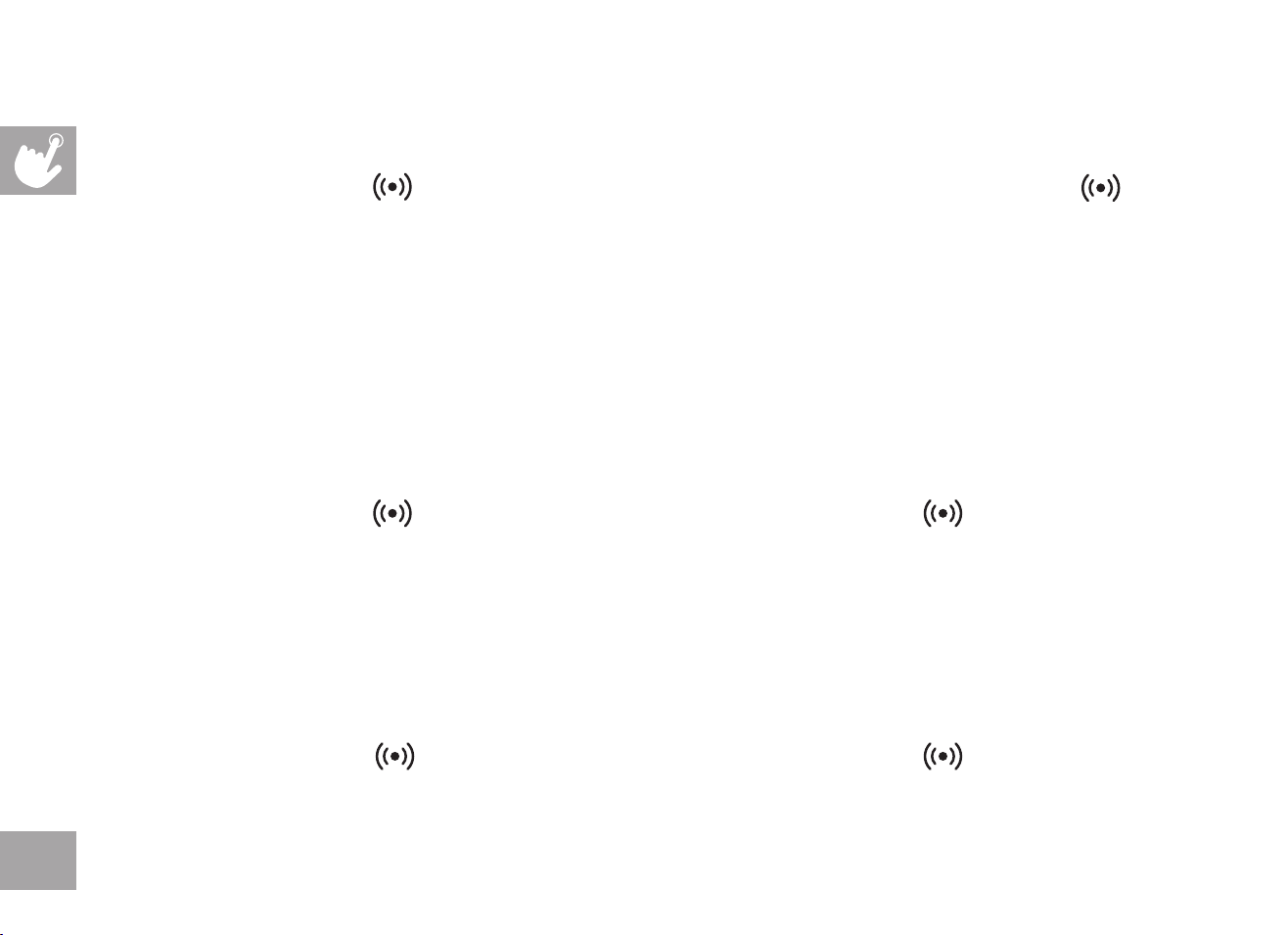
CONSOLE AUDIO CONTROLS
A) MEDIA SKIP BUTTONS: Used to skip to previous or next audio
track.
B) SELECT/PLAY/PAUSE BUTTON: Used to make selection or pause/
play media.
C) WORKOUT KNOB: controls speaker volume during workout.
Ensure your device volume is turned up.
A A
B C

29
CONNECTING VIA BLUETOOTH 4.0LE
1) Check to ensure that your music device is Bluetooth 4.0 compatible
2) Go into your device’s Bluetooth settings and scan for devices.
3) On your music device, locate the Bluetooth device list. Select your machine’s model number that appears on this list.
Wait for your music device to finish pairing with the unit.
4) You will know when pairing is successful when your music device shows the machine’s model number as now being a paired device.
WHEN UNIT IS POWERED OFF THEN BACK ON
If you turn your unit off, or if it goes into sleep mode, the next time it is powered on the unit will look to pair with the last music device with which it
was paired. It will automatically pair at this time.
RE-PAIRING MUSIC DEVICES
In the event that the unit cannot find the last paired music device (for example, the music device is off or not being used) then the unit will stop
looking to pair with the music device. If this happens, and if you wish to use your music device again, then you will need to go through the pairing
process listed above and re-pair through your music device’s settings.
USING MULTIPLE MUSIC DEVICES
If multiple devices are being paired with the unit (i.e.: multiple users are using the unit and pairing their music devices with it) then the unit will look to
pair with the last device used and “forget” other devices. If you wish to re-pair a “forgotten” music device, then you will need to un-pair the current
paired device and then re-pair your device through the pairing procedure noted above.
30
CONNECT APPLE WATCH TO YOUR TREADMILL
1) Make sure your watch is set to detect gym equipment - open the Settings app on your Apple Watch, tap Workout, then turn on “Detect
Gym Equipment.”
2) Hold your Apple Watch on the icon on the console for about 5 seconds. (NOTE: The watch face must be facing the to
connect). Wait for the beep and the bluetooth CONNECTED light to illuminate on the console. You may also feel a tap from your Apple
Watch with haptic feedback.
3) Select one of the workout types on your Apple Watch.
4) Wait for your Apple Watch to read “start treadmill.”
5) On the treadmill, select user and setup your program or simply press START.
RUN A FITNESS+ WORKOUT WITH APPLE WATCH AND YOUR TREADMILL
1) Open the Fitness+ app on your device and select a treadmill workout.
2) Select run or walk in the Fitness+ workout.
3) Hold your Apple Watch on the for about 5 seconds. (NOTE: The watch face must be facing the to connect. Wait for the beep
and the bluetooth CONNECTED light to illuminate on the console. You may also feel a tap from your Apple Watch with haptic feedback.
4) Press OK on your Apple Watch.
5) Press START on the treadmill to begin your workout.
CONNECT SAMSUNG GALAXY WATCH TO YOUR TREADMILL
1) Make sure your Samsung Galaxy Watch is set to detect gym - open the Settings app on your Galaxy Watch, tap Connections, tap NFC
then tap NFC switch to turn on NFC.
2) Hold your Galaxy Watch on the for about 5 seconds. (NOTE: The watch face must be facing the to connect). Wait for the beep
and the bluetooth CONNECTED light to illuminate on the console. You may also feel a tap from your Galaxy Watch with haptic feedback.
“Time to get started!” will appear on your Galaxy Watch.
• You might first need to accept some terms and conditions on your Galaxy Watch before seeing “Time to get started!”
3) On the treadmill, select user and setup your program or simply press START.


©2024 BowFlex
BowFlex T9
|
T9-21 Rev. 1.0 E
|
1000517945