Redking Video Camera Stabilizer
(FLCM-RK)
I NSTR U C T I ON M A N UA L
All rights reserved
No part of this document may be reproduced, stored in a retrieval system, or transmied by any form or by any
means, electronic, mechanical, photocopying, recording, or otherwise, except as may be expressly permied
by the applicable copyright statutes or in wring by the publisher.
FLYCAM REDKING VIDEO CAMERA STABILIZER 2
I N T R O D U C T I O N
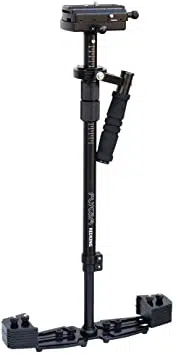
Flycam introduces its professional and rugged RedKing handheld video stabilizer with
tremendous features which transforms shaky handheld footage into smooth, graceful shots. Its
precision camera mounng plaorm includes sliding dovetail quick release plate that oers quick
mounng and dismounng of your camera. The ne-tuning control knobs enable accurate
front-to-back and side-to-side adjustments for horizontal balancing. It has a lightweight and
sturdy telescopic centre post with guide scale marking for adjustable three axis gimbal to setup
low mode operaon rapidly. Telescopic post oers a safety knob to avoid the base from
detaching from the centre post. The dynamic base plaorm supports included counterweights
which can easily be expanded or contracted allowing you to adjust the balance and rotaonal
pan inera of the system. All you need is your imaginaon and you are ready to portray it with
our state-of-art handheld camera stabilizer.
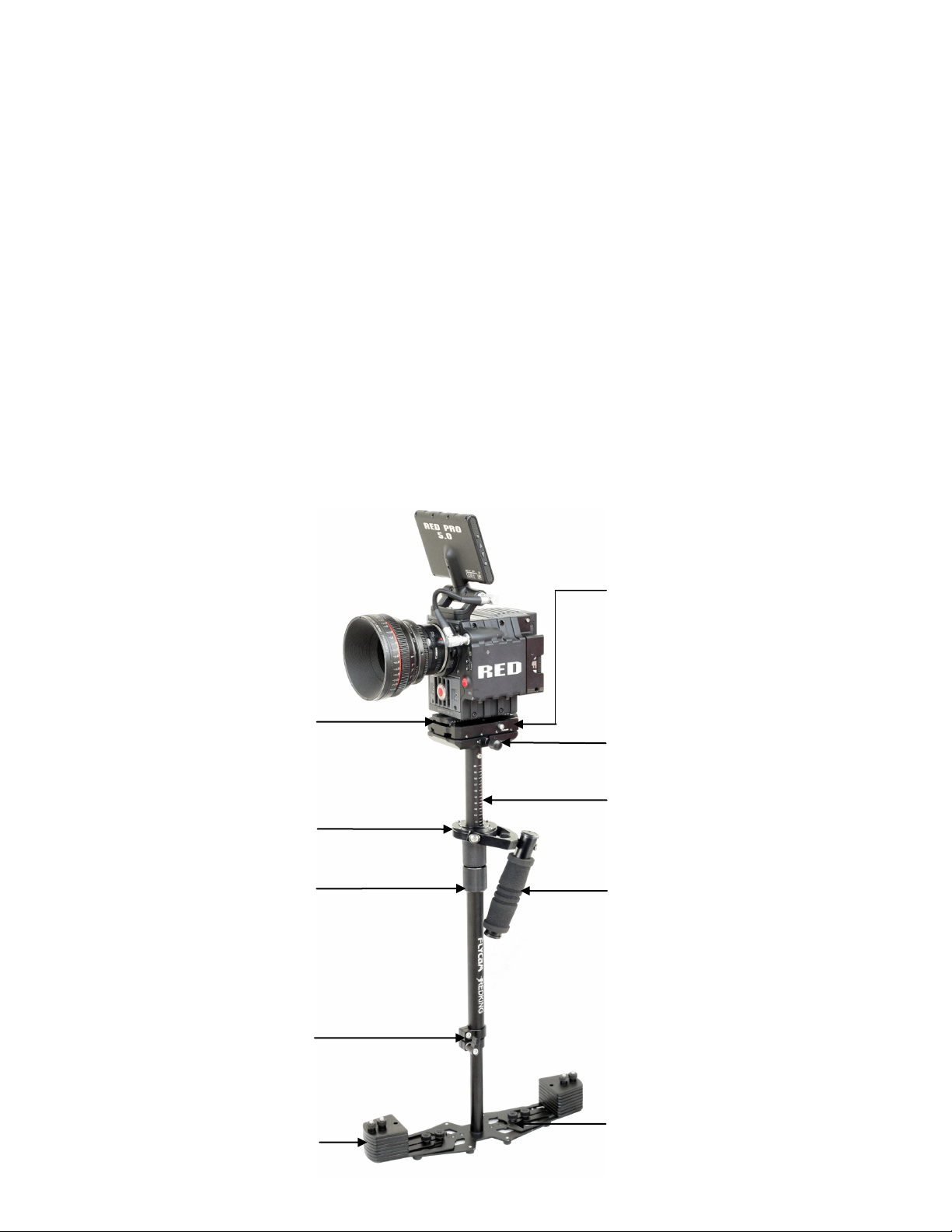
Camera Balance Plaorm
Laser Engraved Central Post
Guide-Scale Markings
Foam Handle Grip
Dynamic Base Plateform
Dovetail Quick Release
Plate
Counter Weight
No-Tools Telescopic
Central Post
Precision Three Axis
Gimbal
No-Tools Posionable,
Knurled Gimbal Handle
Horizontal Axis Adjustment
Knob
F O R L O W P R O F I L E C A M E R A S
W E I G H I N H 2 - 1 2 L B S .
I N T H E B OX
Please inspect the contents of your shipped package to ensure you have received all that is
pictured and listed below.
FLYCAM REDKING VIDEO CAMERA STABILIZER 3
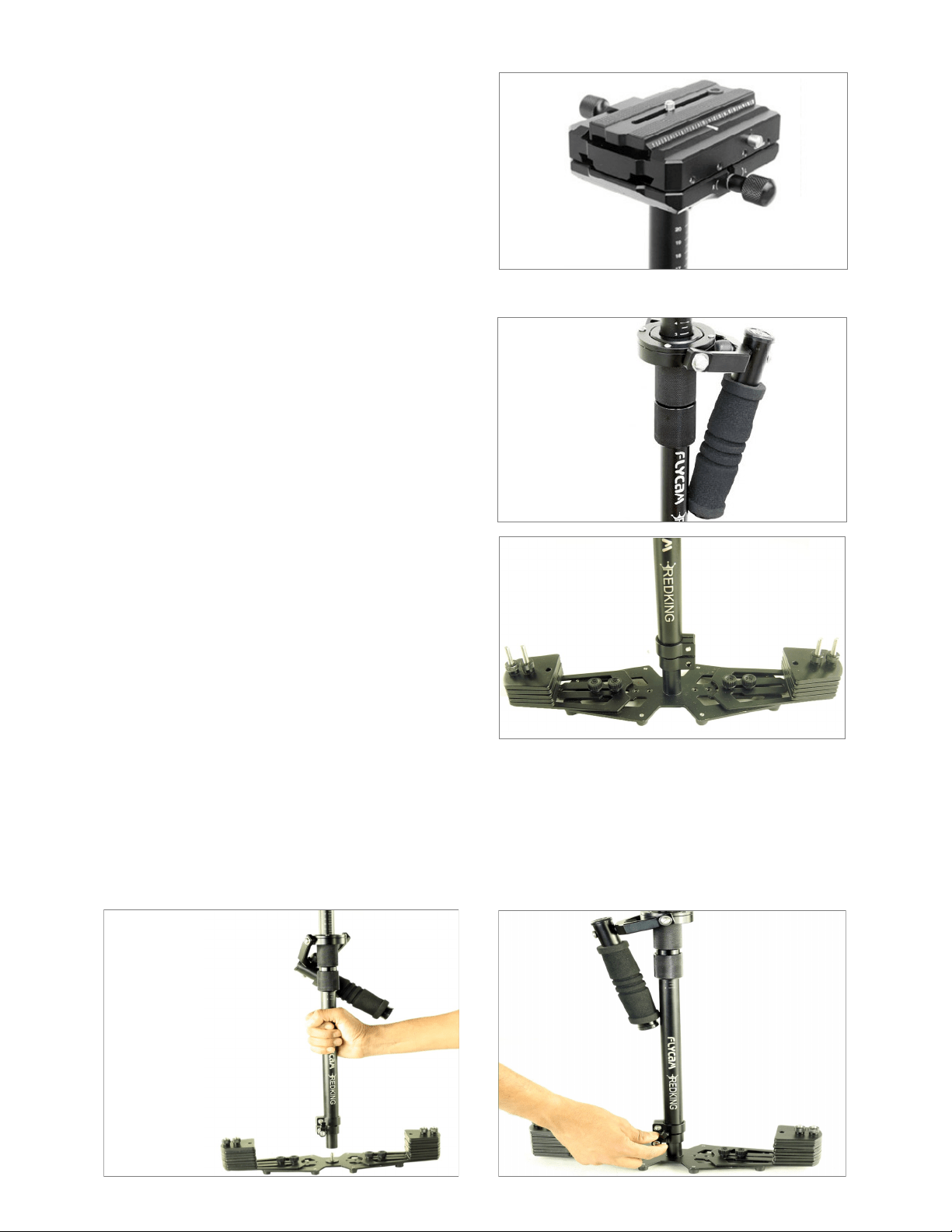
C A M E R A B A L A N C E P L A T F O R M
W I T H D O V E T A I L Q U I C K R E L E A S E
P L A T E
This is the camera mounng plaorm
with front-to-back and side-to-side
movement adjustment knobs.
NOTE: It is important not to over ghten the adjustable gimbal as it can cause stripping.
Note: The threaded stud is located in the center of the base plate for aach it with central post.
Securely ghten the adjustment knob on the telescoping clamp by rotang the knob clockwise.
NOTE: The adjustment knob should only be ghtened by hand.
WARNING: Do not over ghten the adjustment knob as it could cause thread stripping.
A S S E M B L I G YO U R F LYC A M R E D K I N G H A N D H E L D S T E A DYC A M
P R E C I S I O N G I M B A L W I T H H A N D L E
This is the adjustable gimbal assembly
with handle for quick balancing.
B A S E P L A T F O R M
This is the base plaorm.
FLYCAM REDKING VIDEO CAMERA STABILIZER 4
Note: The threaded stud is located in the center of the base plate for aach it with central post.
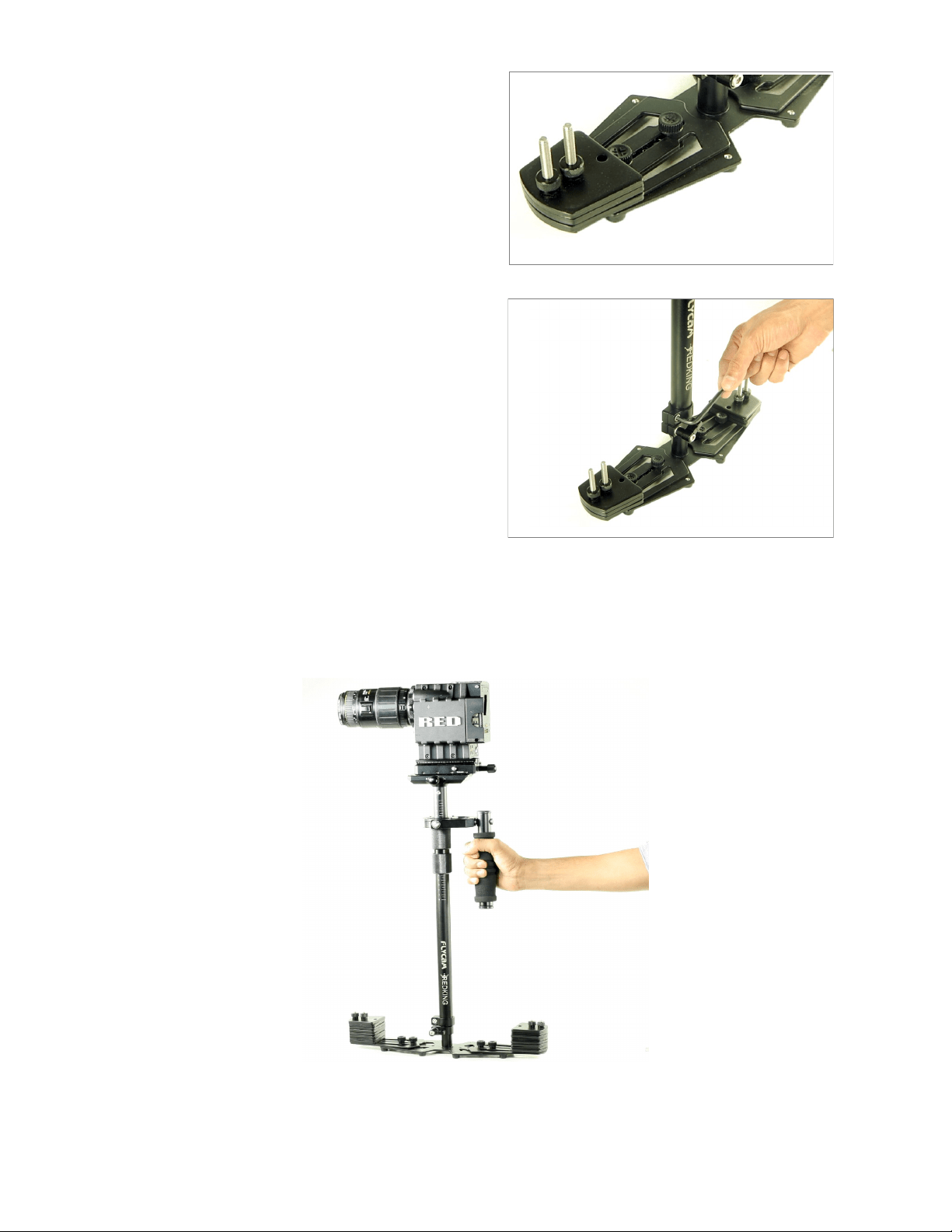
Horizontal adjustment on the base plaorm is made by loosening the retaining screws and
moving the mounted cups closer to or further away from the stalk and then reghtening. You will
probably need to adjust and re adjust the horizontal posion to achieve opmum performance/
personal preference.
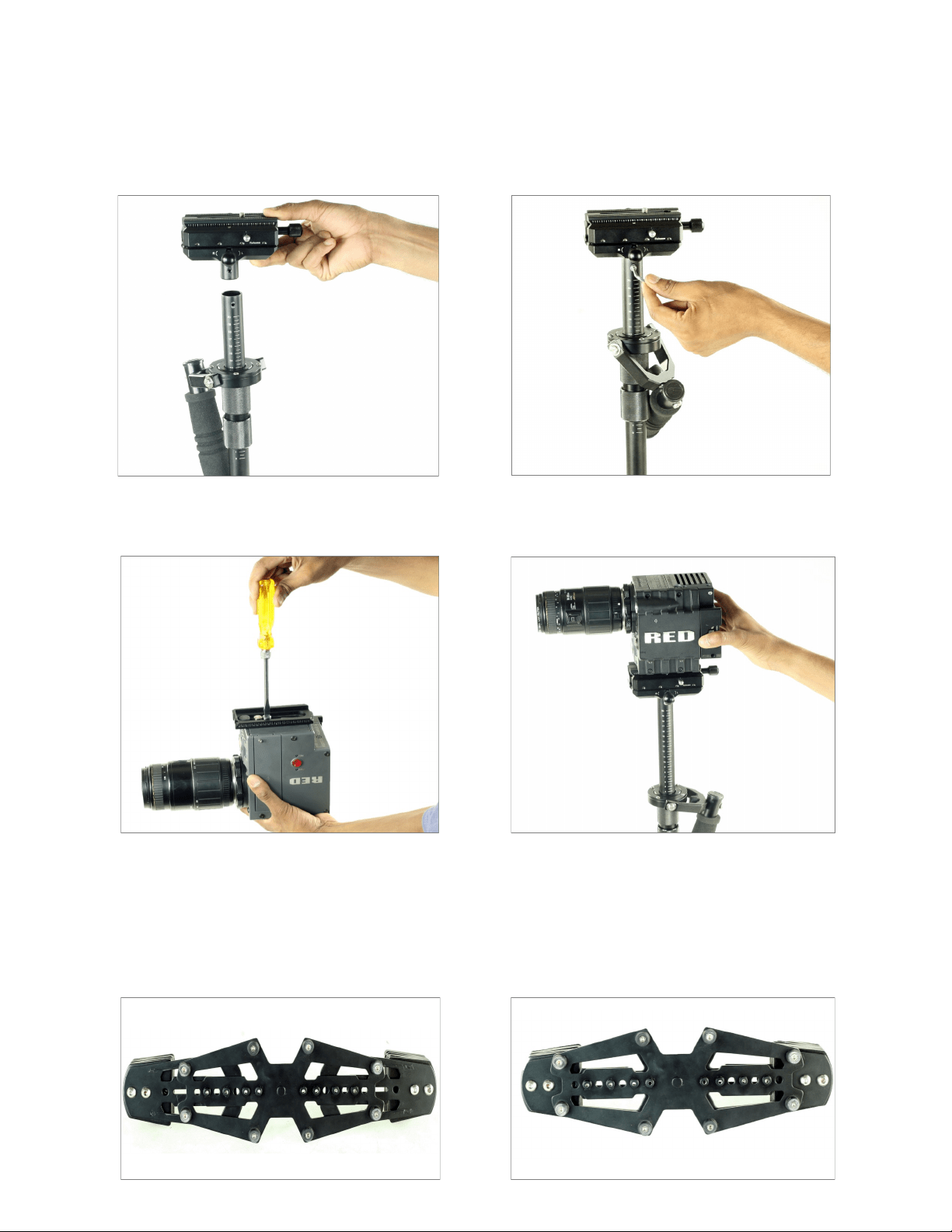
Aach the quick release plate to the camera base. Slide the release lever to insert the
camera set up into quick release adapter. Return the lever to its original locked posion.
AT TA C H I N G T H E H E A D P L AT E A S S E M B LY TO T H E C E N T R A L P O S T
Loosen the 2x allen bolts at the boom of camera plate, align the holes with the top of the
central post & reghten the allen bolts securing the head to the stalk.
FLYCAM REDKING VIDEO CAMERA STABILIZER 5
YO U R F LYCAM R E D K ING VID EO C A MER A S TA B I L IZE R
FUL LY A SS E M B LE D
There are two ways to create this correct
alignment. The rst and easiest is to loosen
the adjustment knob on the telescoping
clamp and rotate the parts unl correctly
aligned, then simply reghten the
adjustment knob.
NOTE: Remember to leave at least one inch
of the telescoping post showing below the
telescoping clamp.
Secure the counter weight plate by using
the Black thumb nuts to prevent weight
movement.
The second method to correctly align the parts is to use an allen wrench to loosen the
“Screw” on the top part of the telescoping clamp unl you can rotate the parts so they are
correctly aligned, then simply reghten the screw.
FLYCAM REDKING VIDEO CAMERA STABILIZER 6
NOTE: The second method of alignment is
beer because it keeps the telescoping clamp
adjustment knob aligned correctly. Having
the telescoping clamp adjustment knob
aligned correctly, although not technically
needed to make your Stabilizer funcon
correctly, does make it easier to reach the
telescoping clamp adjustment knob later
when in use.
Now that your Flycam Redking Video Camera
Stabilizer is setup and assembled properly,
you can test and setup the horizontal balance
of the system. The objecve in achieving
correct horizontal balance for the Stabilizer is
to allow the camera to remain level during
operaon, given that you are not applying
either a pan, lt, or roll type hand pressure
to the Stabilizer. In other words, if the
Stabilizer is horizontally balanced correctly,
then the camera will remain level, and the
central post will remain vercal, unless you
intenonally posion Stabilizer otherwise.
Also, if the Stabilizer is horizontally balanced
correctly it will always return to a level and
vercal posion aer you release any pan,
lt, or roll pressure on the central post.
B A L A N C I N G T H E H O R I ZO N TA L A X I S
When tesng for correct horizontal balance you need to make sure that you pick up your
Stabilizer from a at surface (a table for example) and that you let the Stabilizer hang freely as
you hold it. If the Stabilizer is balanced correctly, on it’s horizontal axis, then it will be level with
the central post in a virtually perfect vercal posion.
Most likely your Stabilizer will not be balanced and so you will have to adjust it unl it is balanced.
WARNING: If you do not have enough counter weight on the base plaorm at this me, the
enre Stabilizer will ip completely upside down. If this happens add more counter weight below
unl during this test the Stabilizer remains right side up.
FLYCAM REDKING VIDEO CAMERA STABILIZER 7
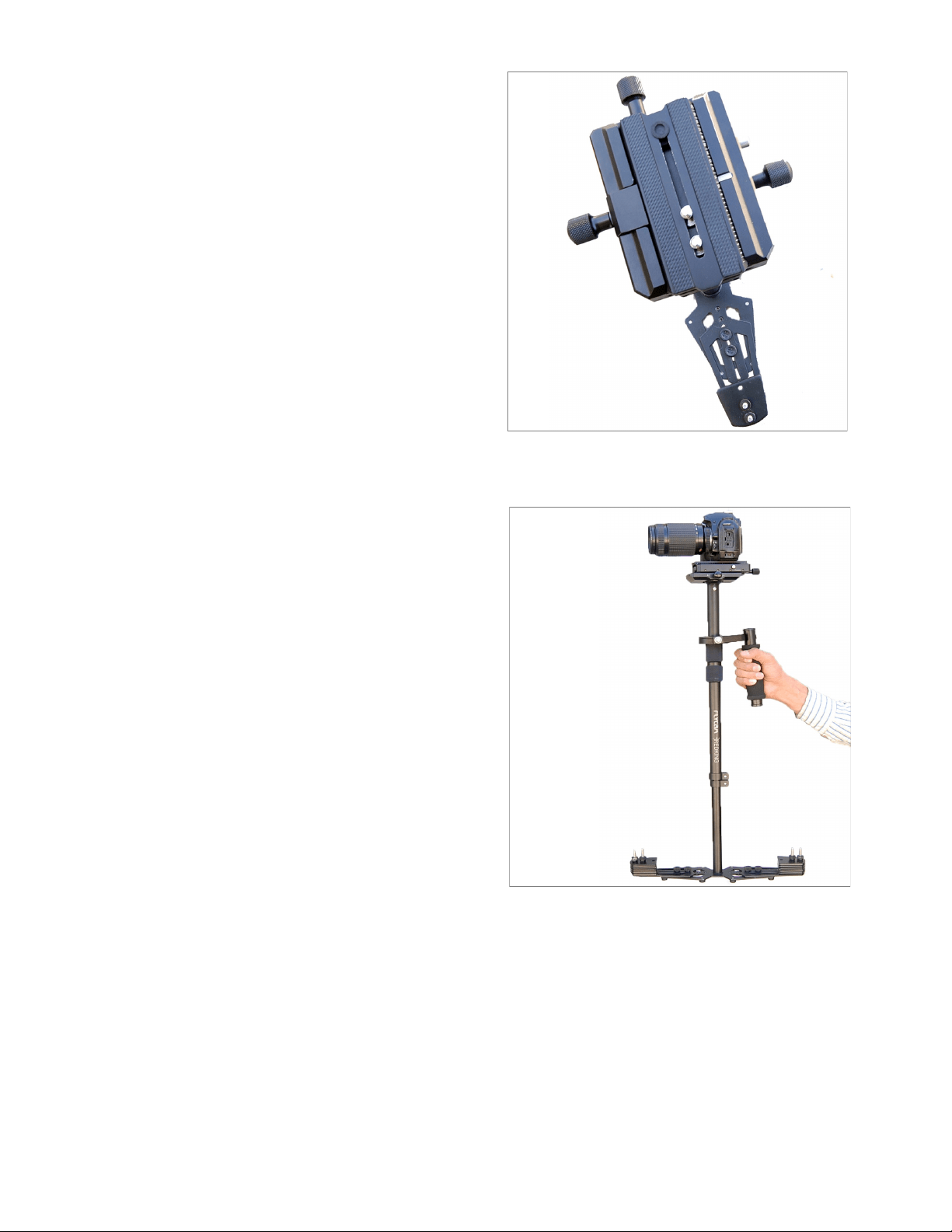
If the Stabilizer lts to the front, then you
will have to turn the adjustment knob
counter clockwise. If the Stabilizer sll
lts to the front, then move the dovetail
quick release plate more to the back by
turning the adjustment knob. If the Stabi-
lizer is lng to the back, then move the
dovetail quick release plate to the front by
turning the adjustment knob clockwise.
Always secure the dovetail quick release
plate lock aer any adjustments. If you
cannot get the front to back axis balanced
with this method then try remounng your
camera to a dierent posion on the
dovetail quick release plate.
Balancing the vercal axis now that your Stabilizer is horizontally balanced, it’s vercal axis can
now be tested and properly balanced. The objecve in obtaining correct vercal balance of the
Stabilizer is to allow the camera and Stabilizer to remain level during operaon, given you are
not applying either a pan, lt, or roll type of hand pressure to the Stabilizer, and most
importantly, that the Stabilizer remains vercal, even if you are walking, running, or turning,
while the Stabilizer is in operaon. In other words, if the Stabilizer is vercally balanced
correctly, then the camera will remain level, and the central post will remain vercal, unless you
intenonally posion the Stabilizer otherwise. If the Stabilizer is not vercally balanced properly,
then it will swing about and pendulum when you walk, run, or turn.
B A L A N C I N G T H E H O R I ZO N TA L A X I S
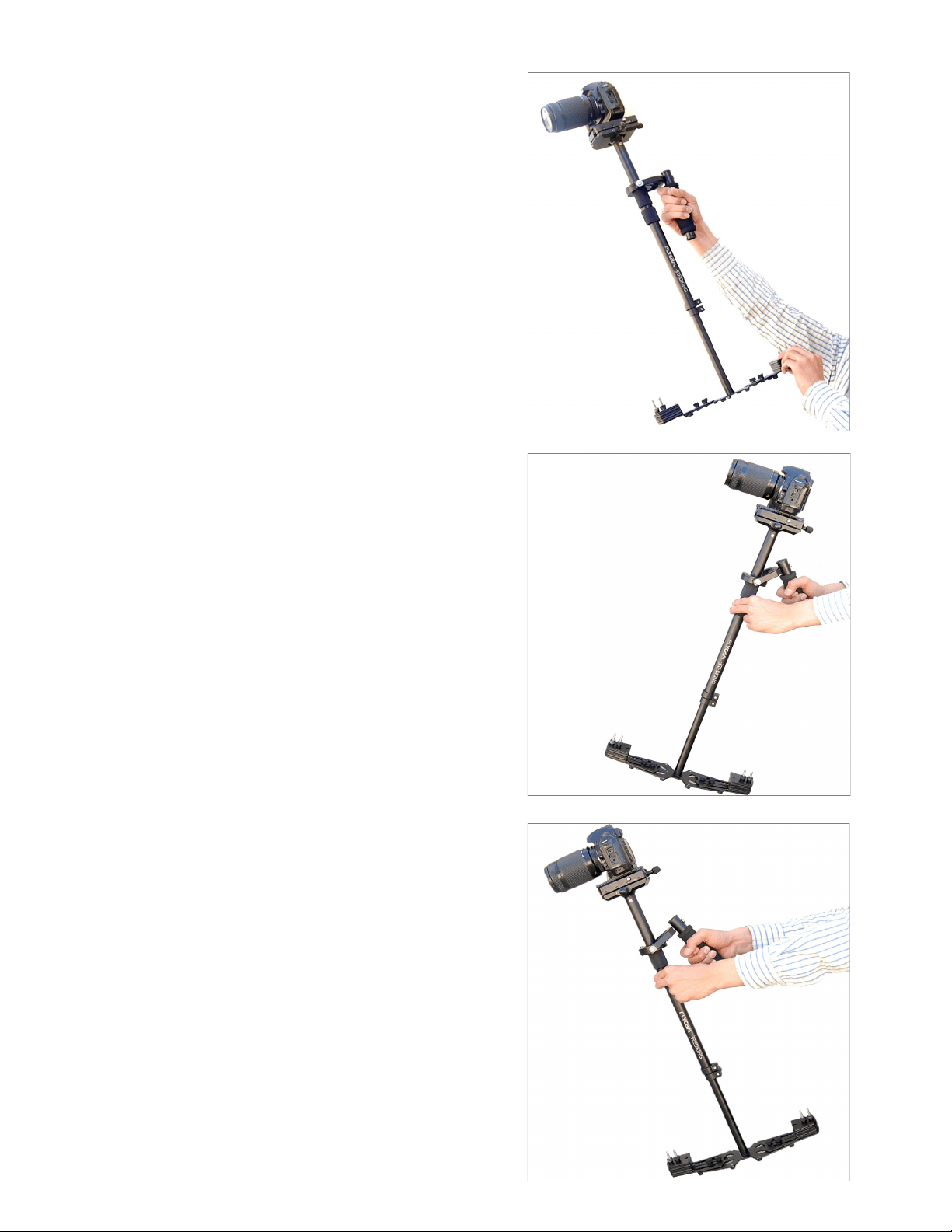
HOLDING YOUR FLYCAM STABILIZER
When handling your Flycam HD-5000 Handheld Stabilizer one hand holds onto the handle while
the other is used to gently guide the camera in the direcon you wish to shoot and frame the
shot. For normal shoong, hold the handle in the middle.
FLYCAM REDKING VIDEO CAMERA STABILIZER 8
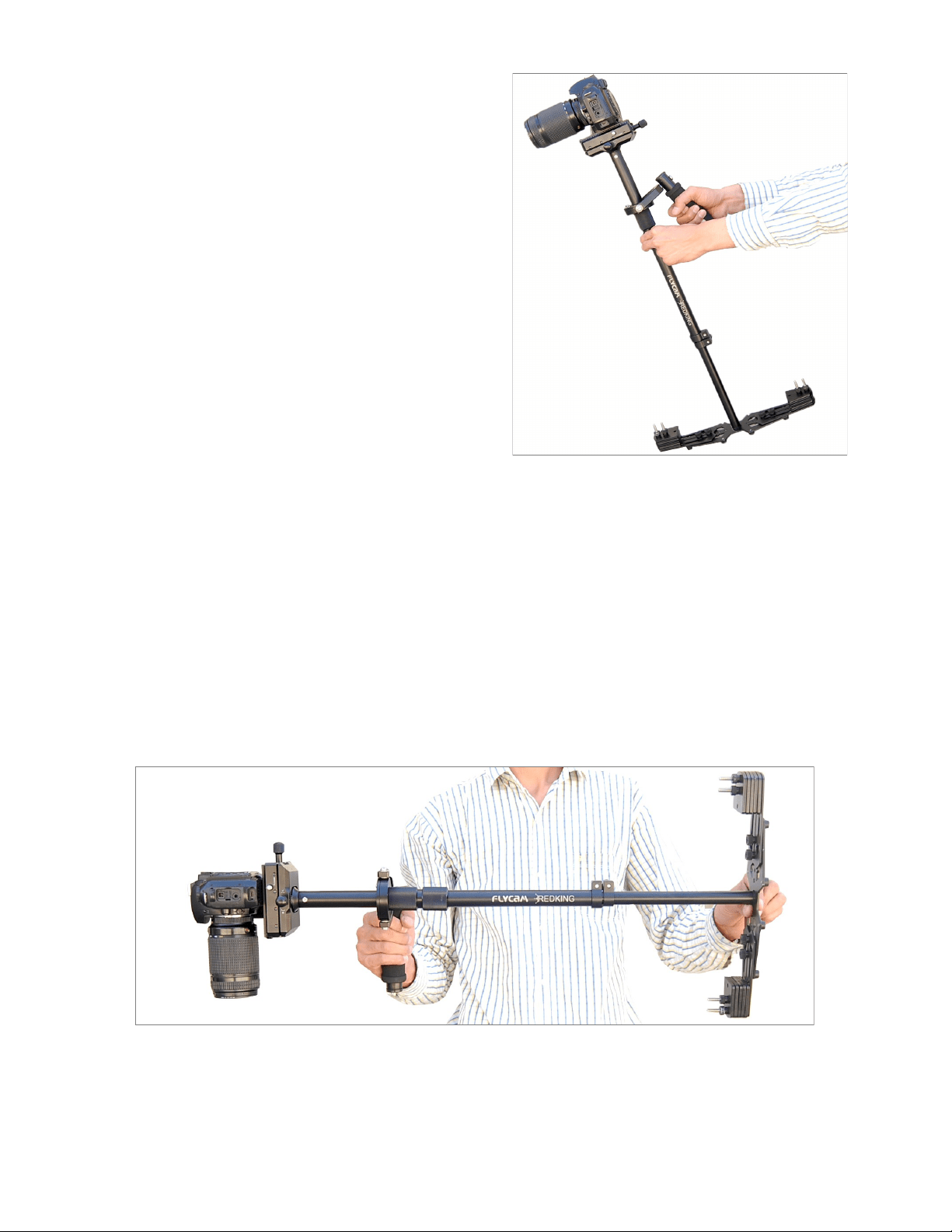
NOTE: Make sure that your “GUIDING
HAND” and “HOLDING HAND” do not touch
either the bearing assembly or the “YOKE”
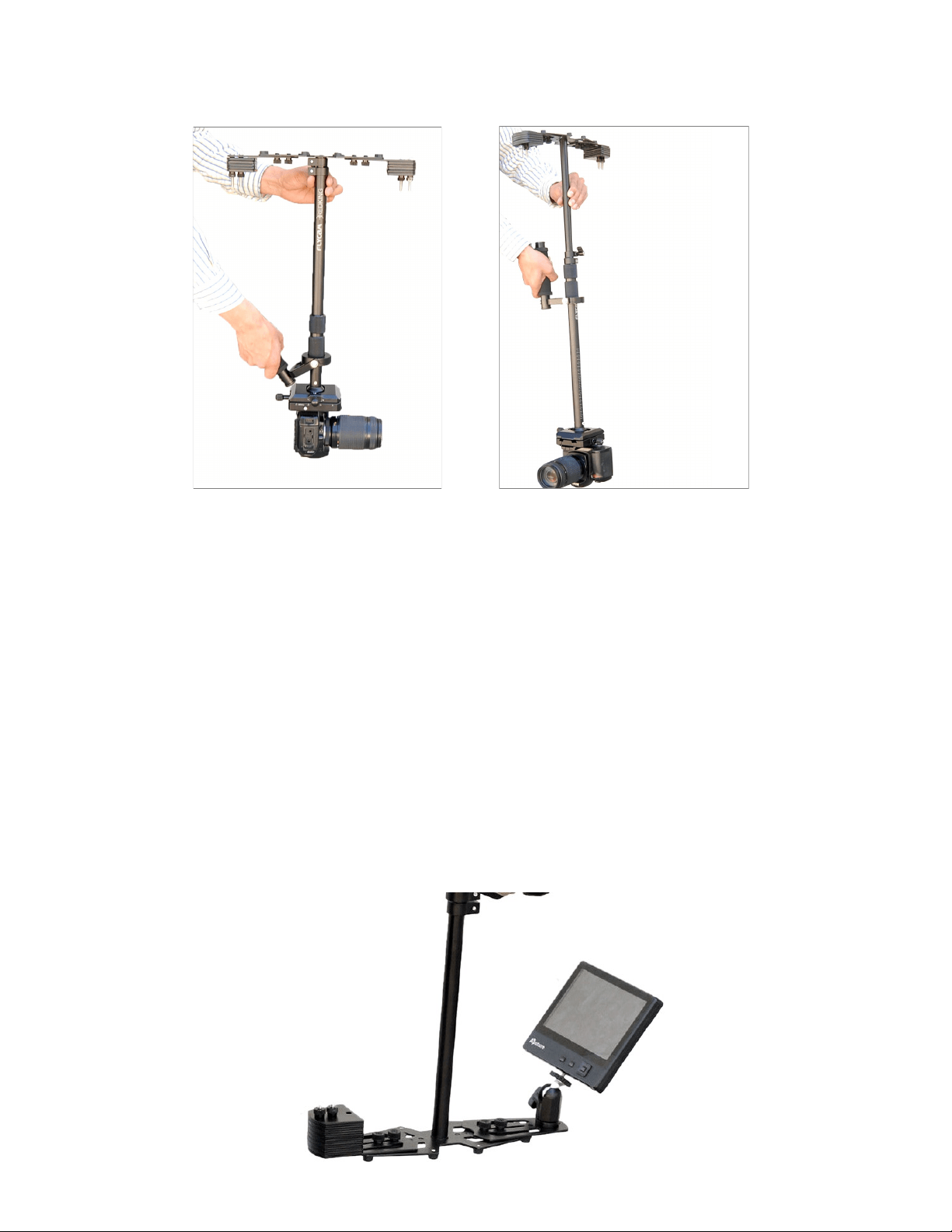
during shoong. For unconvenonal shots,
like ones that require aiming the camera
either straight up or down, or sideways, hold
onto the Stabilizer on the lower part of the
post, or down near the weight. This will
allow your “GUIDING HAND” to have a
greater degree of control over the Stabilizer
while shoong errac shots.
NOTE: The Flycam Redking Video Camera
Stabilizer being used in dierent ways.
Operang your Stabilizer for extended
periods of me can easily re your “HOLDING
HAND”. If fague sets in while shoong, you
can try operang the Stabilizer with your
other hand. You can also rest for a while by
placing the unit upright on a level surface,
docking the sled (if using the HD Series
Docking Bracket), or by laying it down on the
ground.
When handling and operang your Flycam
Redking Video Camera Stabilizer, always
avoid violent, jerking arm, and/or body
movements. Doing so could cause damage to
the unit, or cause your camera to pull loose
from the dovetail quick release plate.
The Flycam Redking Video Camera Stabilizer
is water resistant. The Flycam Redking Video
Camera Stabilizer does not work underwater,
nor is it waterproof (meaning the bearings
and of course your camera), so avoid direct
exposure to rain or water spray. Also, the
bearings are not sand proof, so avoid geng
dirt or sand into them.
For shots that require framing the camera
up, down or sideways, hold the handle rmly
at the boom.
FLYCAM REDKING VIDEO CAMERA STABILIZER 9
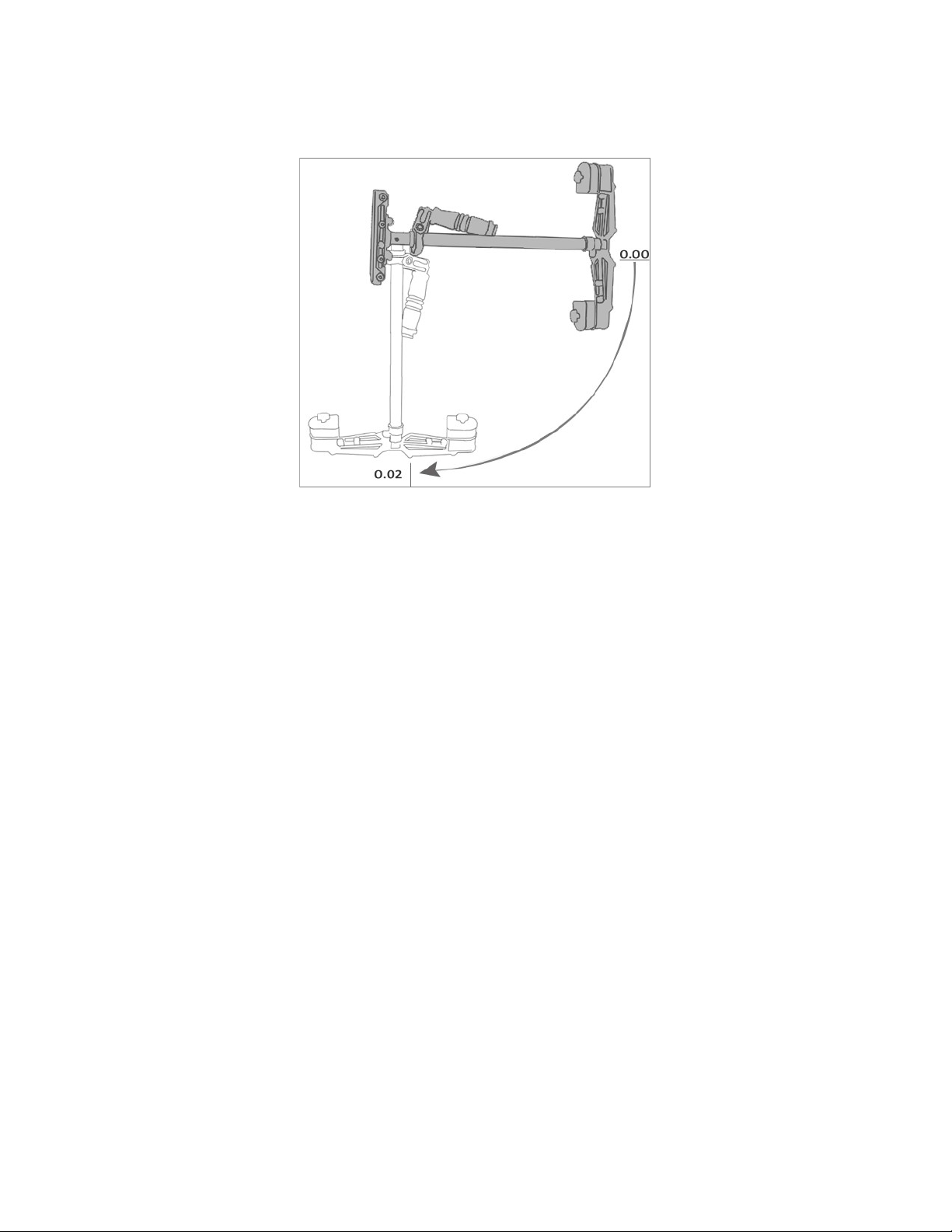
When operang the Flycam Redking Video Camera Stabilizer you will not be able to put your eye
right up to the eyecup on the viewnder. For doing so will cause the unit to be restricted in it’s
ability to stabilize and eliminate camera shake. Even though you cannot place your eye directly
up to the camera viewnder, you can either use the Camera’s built-in LCD MONITOR or aach an
external LCD MONITOR (not included) directly to the base plaorm of the Stabilizer. A 1/4”
Monitor “MOUNTING HOLE” is located at both the front and back edges of the base plaorm.
NOTE: You can also aach an external LCD MONITOR (not included) to the accessory shoe on the
top of your Camcorder. We believe that beer results are obtained when you aach the monitor
to the Flycam Redking Video Camera Stabilizer’s base, because this way you generally have to
look slightly down to see the Monitor. In doing so, your feet are more visible to your peripheral
vision. This makes negoang obstacles with the Stabilizer safer.
NOTE: The Flycam Redking Video Camera Stabilizer being used in low mode operaon.
FLYCAM REDKING VIDEO CAMERA STABILIZER 10
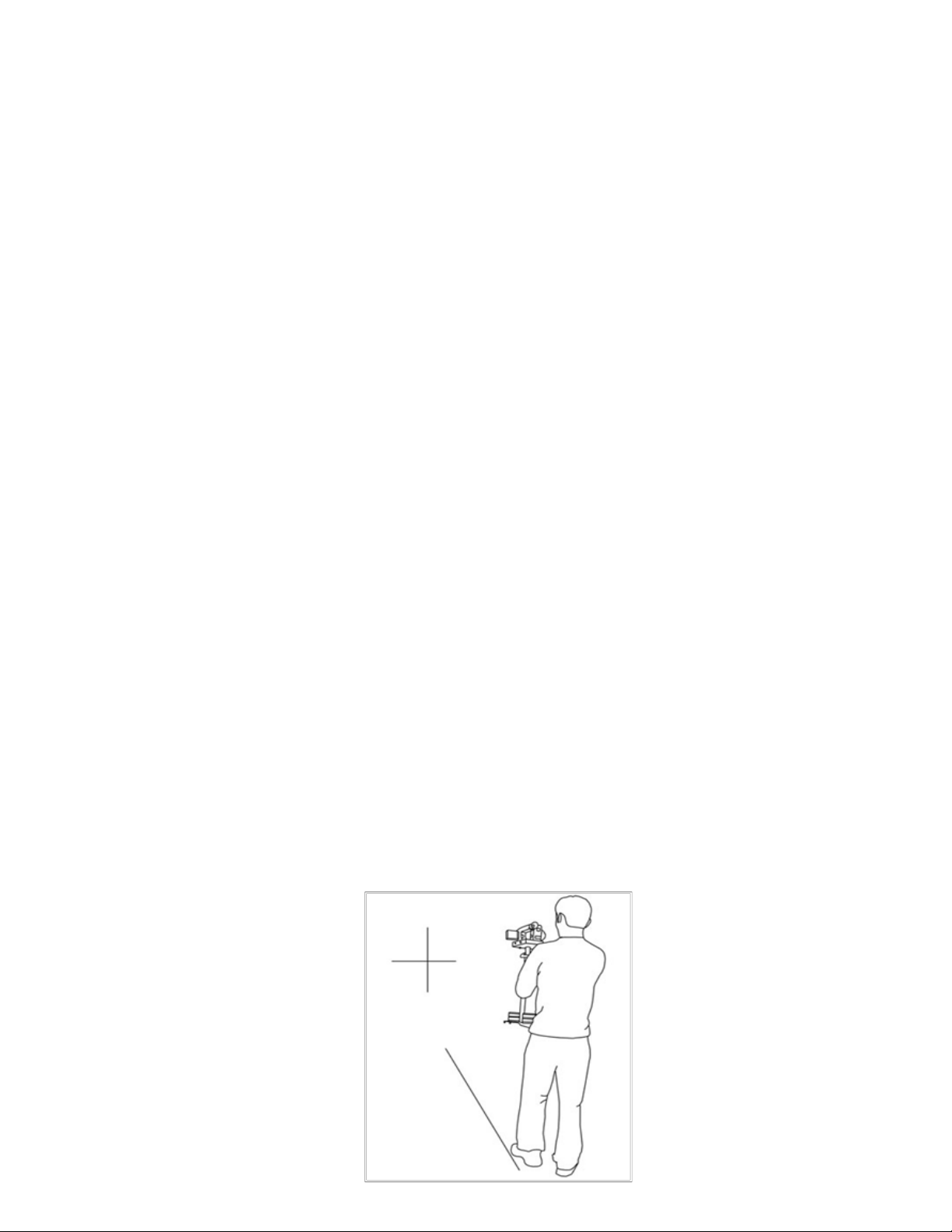
Slightly boom heavy, it will be both stable and easier to control.
Check the vercal balance by using this drop me test.
Make sure that everything is ght and posion yourself behind the stand.
Grasp the center post near the base and move the center post from vercal to horizontal.
Hold it there. Be sure that it will not hit the stand when you drop the center post and put
your free hand to catch the center post when it drops.
Count how many seconds it will take to fall to vercal. Try using a stopwatch.
If the drop me is less then 2 seconds, it is too boom heavy. You need to move the
boom mass closer to the post.
If the drop me is more than two seconds, it is top heavy.
A DROP TIME OF 2 - 2.5 SECONDS IS PREFERRED.
Note: Recheck the balance by looking at the sled. If necessary, use side screws and boom plate
screws to make required adjustments.
BALANCING REVIEW
Proper system balance can only be achieved once your camera is set up with appropriate
accessories ready for shoong. This means baeries, lenses, media cards, LCD viewnder/
monitor, quick release plate, on-cam lights, and all the gear you will use for your recording ses-
sion.
Remove top plate of FLYCAM and line up your camera so that its center of gravity is as close
to the center of the plate as possible (basically hold the camera in your hand unl it feels
balanced both le and right as well as forward and back).

FLYCAM REDKING VIDEO CAMERA STABILIZER 11
Find hole in the plate that is as close to threaded tripod mount on your camera as possible
(while you are sll holding your camera's center of gravity to the center of the plate).
Aach your camera (or quick release mount if you have one). Tighten it down so it won't
accidentally rotate.
Re-aach top plate to the FLYCAM . Center it, but don't worry about geng it absolutely
perfect yet.
Remove most of the weights from Base Plaorm, but leave one on each side.
Insert the center post as far as it will go and ghten so it won't slide out.
Hold the handle normally and turn the FLYCAM so that it is horizontal to the ground. Let go
of the stalk while keeping a rm grip on the handle and count how long it takes to return to
vercal again. You should be able to count a good, "One-one thousand, two-one
thousand", before it rights itself. With only two lile weights it might take considerably
longer.
Add one pair of weights at a me and repeat the "horizontal to vercal" test unl it falls at
the correct rate. It will probably not be perfect.
You'll get one that's too slow and then you'll add a pair and it will fall too fast. When that
happens, take o the last pair of weights that you added.
Tighten down the weights so they don't slide around.
To get count perfect, slightly lower the center post that aaches the Base Plaorm with
the weights unl you get the "one-one thousand, two one thousand" count to the vercal
posion.
Fine-tune the le-right, forward-backward balance. You will have to go back and forth
between the two direcons to get the balance just right. Loosen the screw sets that allow
the sled to move le and right. Adjust the top plate so that it is centered and ghten down
the screws like you would a re slowly and alternang side to side.
Repeat for "forward-backward" balancing.
Check to see if your camera is sing level. If not, repeat the necessary steps unl it does.
Pracce walking/movements ensuring your body moon is not transmied to your
hands and then the FLYCAM and camera.
MAINTENANCE
Bearing Maintenance
The main Bearing on your Flycam Handheld Stabilizer is aached to the Central Post about two
inches from the top. It is of metal construcon and parally enclosed by the Bearing assembly.
FLYCAM REDKING VIDEO CAMERA STABILIZER 12
If aer a period of me your bearings don’t turn smoothly, lubricate with a minimum of light
machine oil. Light lubricang oil can also be used on the Yoke and Handle Bearings.
Be sure to keep oil away from your camera, & clean up any over spill.
Cleaning
Do not use solvents or harsh cleaners of any kind on your Flycam Hand held stabilizer. If the unit
becomes dirty, use a damp so cloth or sponge and a mild detergent to gently clean external
parts.
Storage
Should you need to store your Flycam Hand held stabilizer for a long period of me then place
the unit upright in a dry or low to normal humidity area whenever possible. If you are unable to
nd this kind of environment then we suggest you store the unit in an airght plasc container or
bag. Standing the unit upright is preferred as it alleviates stress on the system.
NOTE: Flycam Handheld Stabilizer doesn’t work under water, nor is it waterproof. Avoid direct
exposure to rain, water spray or any harsh environment. The bearings are not sand proof. Avoid
geng dirt or sand in them.
PRACTICE MAKES PERFECT - WALKING THE LINE
Pracce this simple exercise to master your Flycam Hand held stabilizer with professional
results.
Using masking or gaers tape, create a cross mark on a at and even wall. The mark becomes
your framing center. On the oor leading up to the cross mark, lay a straight tape line of about 20
feet. Pracce walking the line, while keeping the cross mark center framed and in focus. With a
bit of eort, dramac uid like movements will become second nature and provide producon
value to all your set ups.

FLYCAM REDKING VIDEO CAMERA STABILIZER 13
W A R R A N T Y
We oer a limited me warranty for our products. For Mechanical products we provide a 6
month warranty & for electronic products we provide a 3 month warranty from the date of
purchase.
We will repair or replace your product, free of charge, in the event of a defect in materials or
crasmanship obtained during normal use or handling based on the user manual. Please note
that we will not cover any shipping costs for returning the product to us. If any VAT or import
dues are applied to the return, we will also charge these costs to the customer.
The warranty does not include, by the way of example, damage caused by products that we do
not supply or from mishandling in transit, accident, misuse, neglect, lack of care of the product ,
or service by anyone other than our company.
We are not liable for incidental or consequenal damages resulng from the use of the unit or
occurring due to any breach of this warranty.
Replacement parts of the product will be provided at nominal cost (covering the cost price of the
replacement parts only) to the customers aer the Warranty Period has expired. We will cover
the complete cost of sending replacement parts within the warranty period. Aer that, Nominal
cost of the product & Actual shipping cost will be charged.
Do not send the unit to us without rst geng a response and geng the approval to send back
the item.
In case of any kind of dissasfacon, we urge you to Contact us immediately and we shall do our
best to help you out.
For any other assistance you can reach us via email.