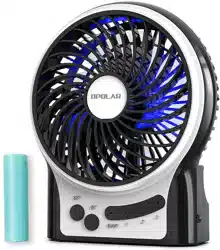
OPOLAR F20 Mini Portable Battery Operated Desk Fan with 4-15 Hours Battery Life

Product's Documents

Below are documents related to this product, you can read online or download:
F20  photo

User Manual Portable Rechargeable Fan

Operating Instruction

1. Button OFF:

Power on immediately

2. Button ON:

  • Turn on / Adjust the speed / Control the side light and inside light
  • Press once to change a speed, and the fan goes from “speed 1 --> speed 2 --> speed 3 --> side light”
  • Turn on blue lights inside:Holding down the “on” button for a couple seconds when the fan is running on any of it’s speeds.

3. Charging Indicator:

Red - charging Green - fully charged

4. Charge the fan or battery through the included USB cable

5. When power by USB, speed 2 & speed 3 almost have no dierence .

Specifications

Model

F20

Speed Mode

Low/ Medium/ High

Output Power (MAX)

3.76W

Battery Working Time (H)

1.5 - 6

Battery Specification

18650 Lithium (Capacity: 2200mAh)

Battery Installation

Removable

Charging Time (H)

About 5

Dimension (mm)

124*45*148

N.W.(g) (including battery)

About 221

Note

  1. The working station indicator washes while in low battery. The fan will automatic shut down to protect the device when the power exhausted.
  2. Please do not put any foreign matter into the fan
  3. If the fan would not be used for a long time, please fully charge the battery and store it in a cool and dry place.
  4. It is strictly PROHIBITED to use the battery at an ambient temperature over 140°F.
  5. Please DO NOT extrude or disassemble the battery, which might lead to environmental pollution or explosion.

What’s in the Box

  1. Fan (F20) 1 pc
  2. Lithium Battery 1 pc
  3. Charge Cable 1 pc
  4. User Manual 1 pc

Reference file: OPOLAR F20 Mini Portable Battery Operated Desk Fan with 4-15 Hours Battery Life

Series: F20 SERIES
Additionally, the document applies to other OPOLAR models: F201, F202, F203, F204, F208

Specifications

Indexed Terms: Portable Fan

OPOLAR F20 Questions and Answers

  • Total questions: 3
  • Questions unAnswered : 3

Q: I had by cable connected overnight, but no power Reply

Q: How do I turn the light off? Reply

Q: Opolar 9 inch desk fan with rechargeable battery and usb plug operation. My question is will the fan run properly if I just want to use the usb cable to power it, or do I have to use the battery and recharge it for the fan to work? Reply

Questions and Answers

Related Products