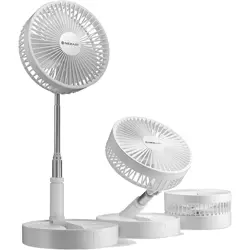
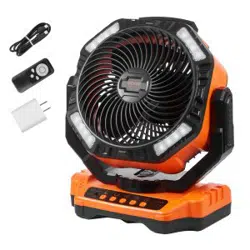
The NEXAIR Premium Foldable Fan is a portable, rechargeable fan designed for home, office, and travel use. It features an adjustable height, four speed settings, and a foldable design for storage and portability.
Features and Specifications
Physical Specifications
Brand: NEXAIR
Color: White
Model Number: NF002-WH
Product Dimensions (Folded): 7.5"D x 7.5"W x 4"H
Folded Size: Approximately 4" x 8"
Item Weight: 1.9 Pounds (30 oz)
Blade Length: 360 Millimeters
Number of Blades: 3
Material: Plastic
Performance Specifications
Power Source: Rechargeable Battery & USB
Voltage: 3.7V
Wattage: 26.64 watts
Number of Speeds: 4
Air Flow Capacity: 8000 Cubic Feet Per Minute
Battery Life: Up to 24 hours (varies by speed setting)
Noise Level: Quiet operation
Key Features
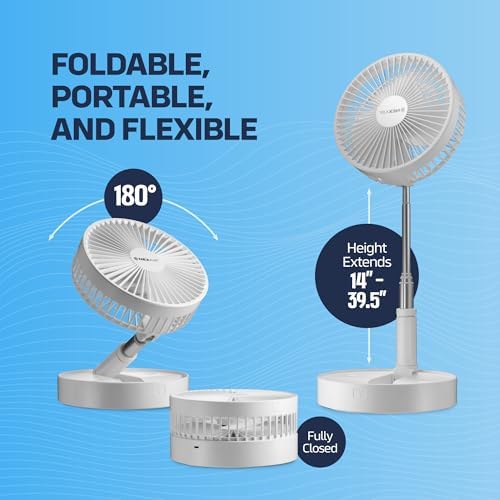
Adjustable Height: Extends from 14 inches to 39.5 inches.
Adjustable Angle: The stem pivots up to 180°.
Foldable Design: Collapses for compact storage and travel.
Portable & Wireless: Rechargeable battery allows for cordless use.
Non-Slip Base: Rubberized base for stability on various surfaces.
Controller Type: Button Control
What's Included
NEXAIR Premium Foldable Fan
USB Charging Cable
Use Guide
Initial Setup and Charging
Unfold the fan to your desired height by extending the telescoping stem.
Adjust the fan head to your preferred angle.
For first use, fully charge the fan using the included USB cable and a standard USB power adapter (not included) or a computer USB port.
Operating the Fan
Power On/Off & Speed Control: Press the power button to turn the fan on. Repeatedly press the same button to cycle through the four speed settings (Low, Medium, High, Turbo). Press and hold the button to turn the fan off.
Height Adjustment: Gently extend or retract the central stem to set the fan between 14" and 39.5". Ensure it is locked into place.
Angle Adjustment: Tilt the fan head up or down to direct airflow as needed.
Charging the Battery
Connect the included USB cable to the charging port on the fan.
Connect the other end to a USB power source.
The fan can be used while charging.
Folding for Storage or Travel
Turn the fan off.
Fully retract the stem to its lowest height.
Fold the fan blades and head down towards the base. The unit will collapse to approximately 4 inches in height.
Care and Maintenance
Use a soft, dry cloth to wipe the exterior of the fan clean.
Do not immerse the fan in water or any other liquid.
Ensure the fan is turned off and disconnected from power before cleaning.
To clean the blades, use a soft brush or cloth to gently remove dust. Do not bend the blades.
Store the fan in a cool, dry place when not in use for extended periods.
Troubleshooting
Fan does not turn on: Ensure the battery is charged. Connect the USB cable to a power source. The fan may be in battery protection mode; connect to power to reset.
Weak airflow: Check for obstructions near the blades. Ensure you have selected a higher speed setting.
Fan is unstable: Ensure the fan is on a flat, stable surface and the non-slip base is clean. Fully extend the legs of the base.
Battery does not hold charge: After prolonged storage, the battery may need a full recharge cycle. If the problem persists, the battery may be at the end of its lifespan.
Safety Information
This is an indoor use product.
Keep away from water and moisture to prevent electric shock or damage.
Do not operate the fan if the cord or plug is damaged.
Do not insert fingers or objects into the grille while the fan is operating.
Place the fan on a stable, level surface to prevent it from falling.
This product contains a rechargeable battery. Do not disassemble, short-circuit, or expose to high heat or fire.
Use only the included USB cable or a certified replacement for charging.