Contents
English
English
English
English
English
English
English
01
01
01
01
01
01
01
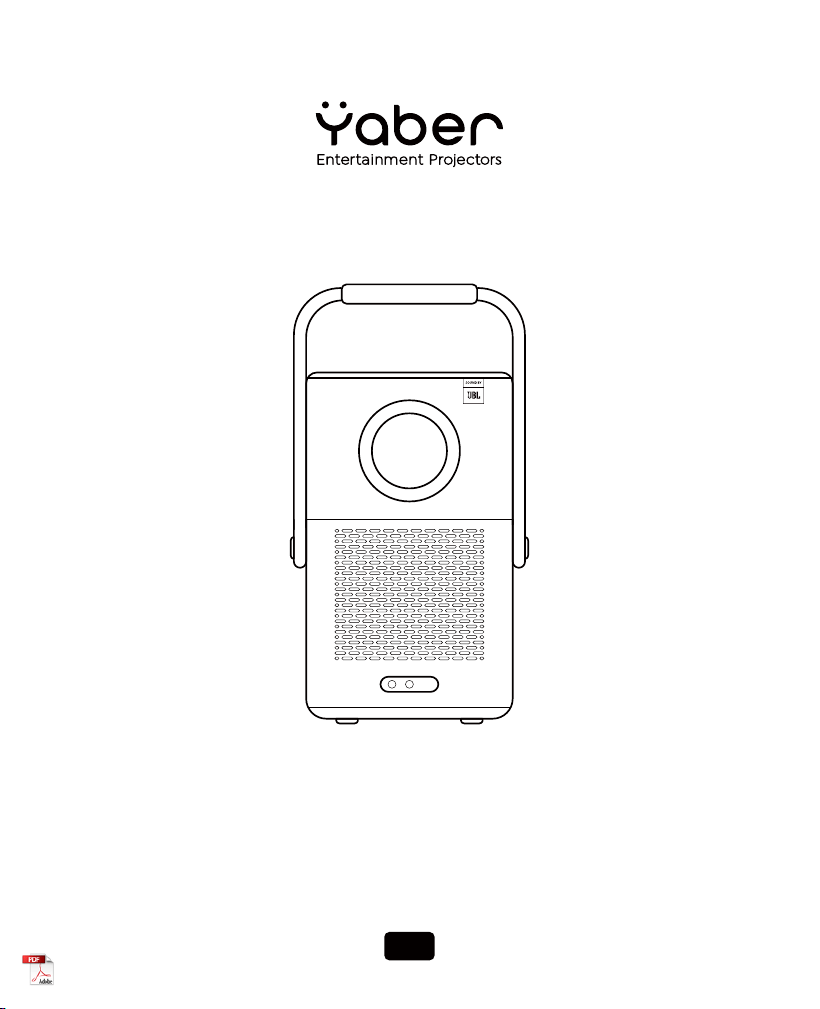
Dear customer,
Thank you for choosing Yaber Projector. Please kindly read this QSG carefully before using the projector.
ScantheQRcodeonthenextpagetogetthedetailedproductusermanualandvideoguideline.
We understand that using a projector can sometimes be confusing, however, leaving a review on the
product page doesn't help for your perfect experience :( Please let us help you! We really hope to get your
kind feedback, and we'll surely serve you with a quick & satisfying solution as soon as possible!
Many common problems canusuallybesolvedwithappropriatesettingadjustments. suchasbattery
issues,instabilityofauto focusorkeystone,Dolbysoundissues,WiFiorBluetoothconnection.
If you have any questions, please send your order No. and problem in mail subject, e.g.[US+Model No.
+000-0000000-0000000+your problem] to our mailbox,faster solved if you kindly send videos or pictures
in the same time. Ourserviceteamwillserve youwithin 24 hours as soon as possible.
:[email protected](BuyfromAmazon)
:[email protected](Buy from Otherauthorizedpartners)
Our R&D Team dedicating themselves to bringing you a wonderful & warm watching experience with your
families & friends. Our QC Team set a strict full inspection process and well package before shipment to
ensure good quality and functionality for every Yaber Projector.
If you encounter any problems, please give us a chance to serve you and know more about YABER
Projector. :)
We're committing to provide you with the most satisfactory solution. Thanks for your kind understanding
and patience in advance.
YABER Projector Consumer Service Team
PDF user manual
Scan and download
Video Guideline
Scan to learn more
[email protected]Purchased from Amazon :
Purchased from other Authorized Partners :
@yaber.projector@yaberofficial
www.yaber.com
Where to Get More Help
The terms HDMI, HDMI High-Definition Multimedia Interface, HDMI trade
dress and the HDMI Logos are trademarks or registered trademarks of
HDMI Licensing Administrator, Inc.
01
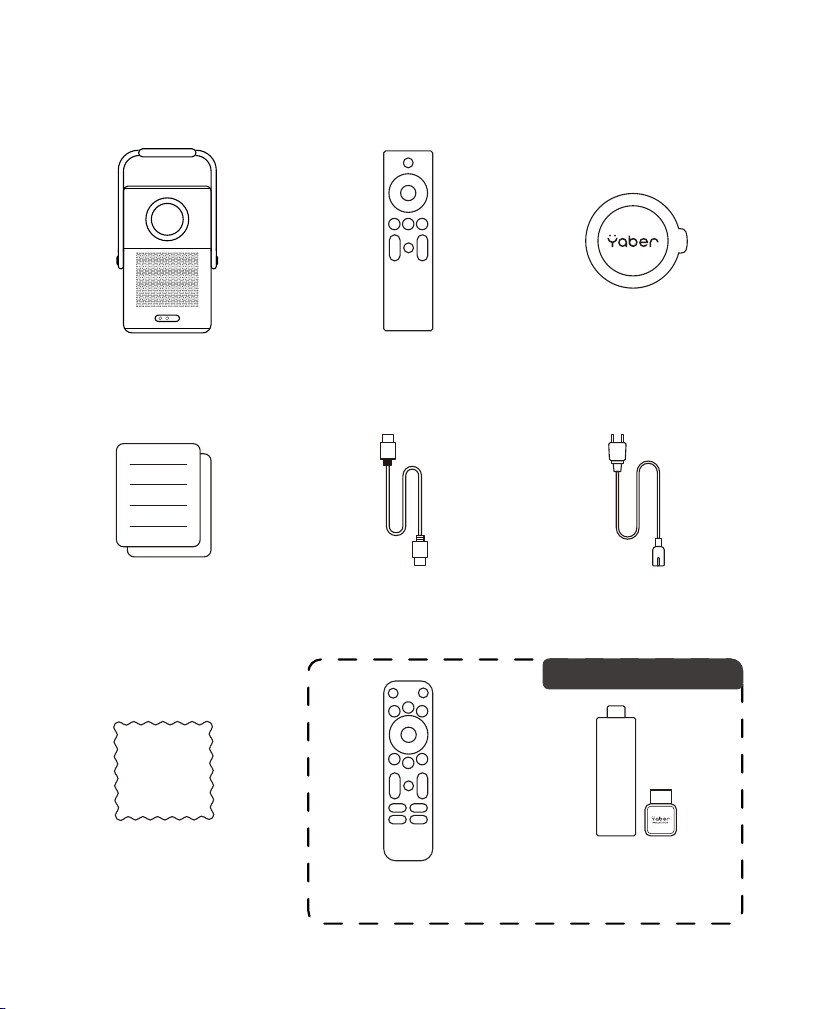
Package Contents
HDMI Cable Power CordQSG & FAQ
Cleaning Cloth Remote Control
(For T2 Plus)
TV Dongle
Projector Lens CoverRemote Control
(For T2)
02
Special for T2 Plus
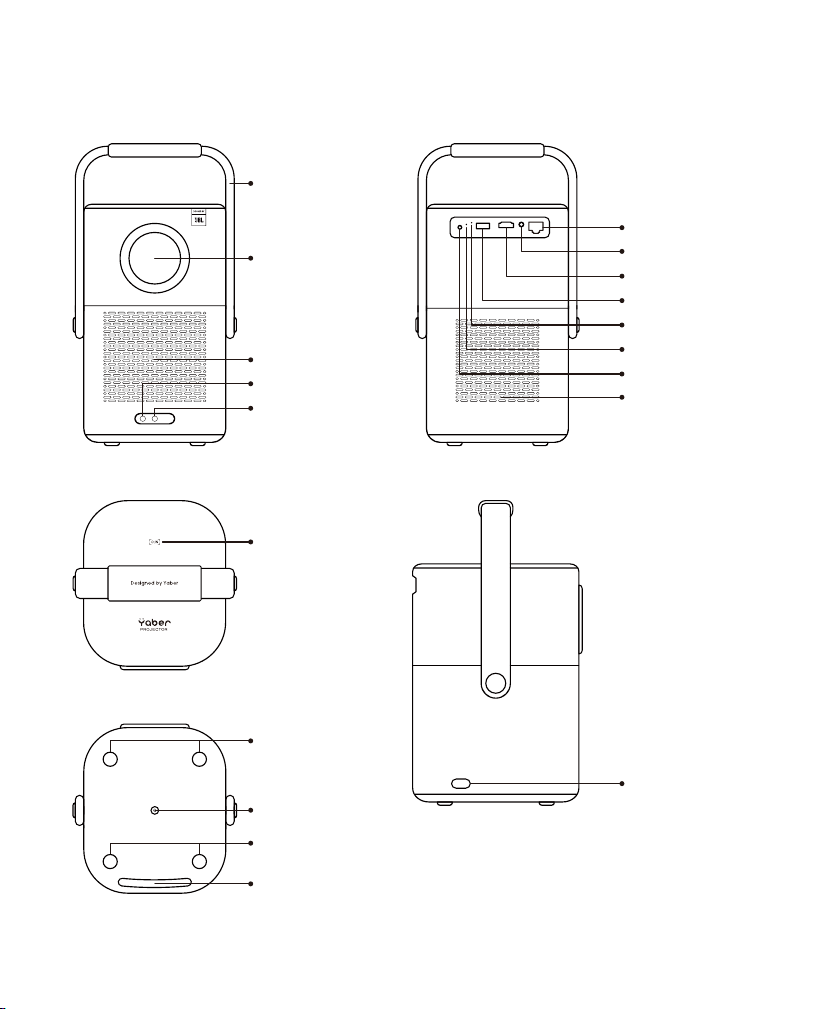
Product Overview
Rotatable Handle
Audio Out
Lan Port
HDMI
IR
Power Light
Reset
USB
Air Outlet
Rubber Pad
Rubber Pad
Rubber Pad
Mount Hole
Lens
Air inlet
IR
Focus Receiver
Power Port
NFC Area
03
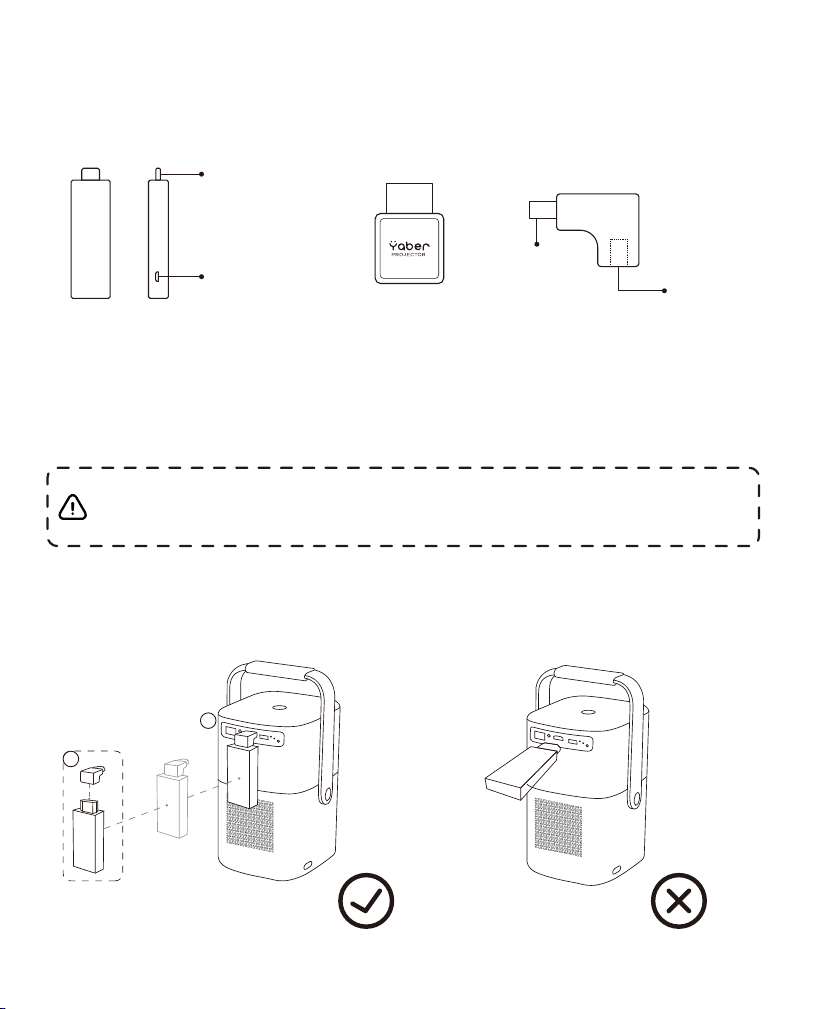
TV Dongle Overview (Special for T2 Plus)
TV Dongle Adapter(Power in + Video Source)
04
Tv Dongle Installation
Step1: Connect the dongle with the adapter
Step2: Connect the adapter with the HDMI port of the projector
HDMI Output
Power in
HDMI Output
HDMI Input
Notice: When using Dongle on the T2/T2 Plus, it must be connected via
the Yaber Adapter. The Yaber adapter combines power and video source
function .
1
2
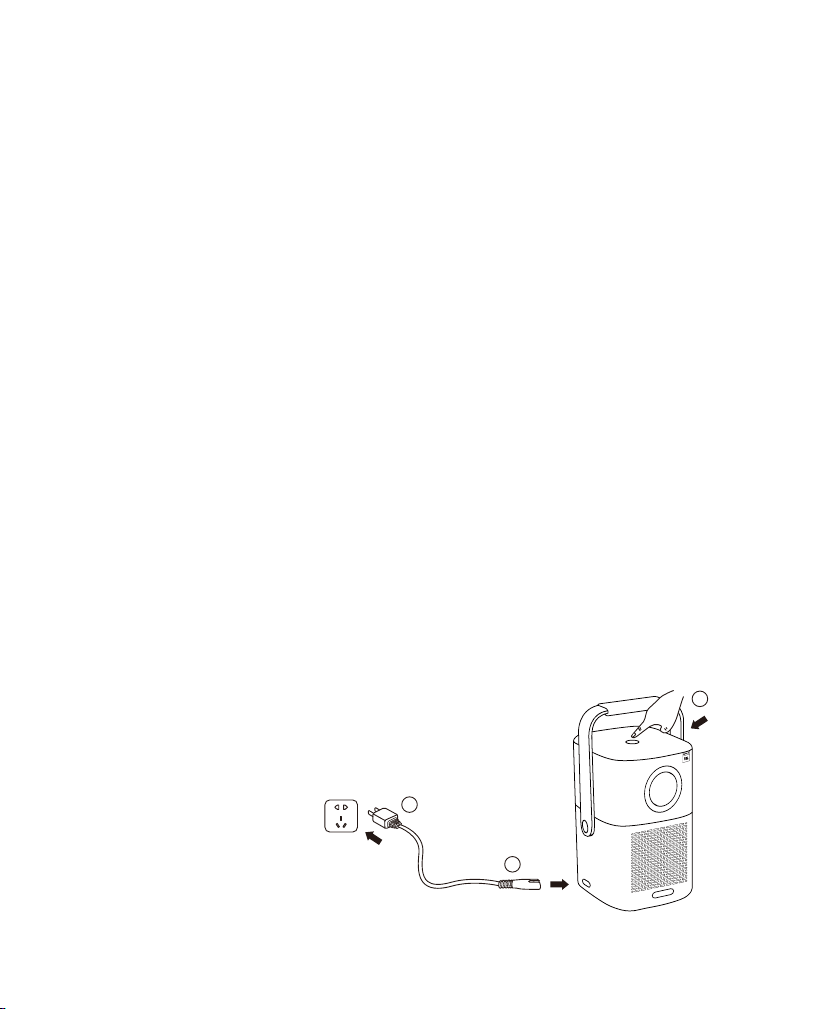
Getting Started
Powering on
Attentions for battery
1. Please make sure to use the projector’s power cord for charging.
2. Due to long-time transportation, the battery may lost, and show not fully
charged when you turn on the projector for the first time. It's normal and
workable.
3. When the battery is lower than 20%, the system will prompt you to
charge. The projector is still allowed to be used, however we recommend
that you turn it off and charge it to extend battery life.
4. In battery mode, the picture brightness will be reduced to extend the
usage time.
5. The battery is not removable, please do not disassemble the machine
without authorization. if you encounter any problems, please feel free to
contact us.
7. The projector does not support external charging.
6. When the projector is completely run out of power, please turn it on
again after charging for 15 minutes.
1. Connect the power cord to the Yaber T2/T2 Plus.
2. Connect the power cord to the power socket.
3. Click the power button to turn on the device.
05
1
2
3
Projector turned off
Projector turned on
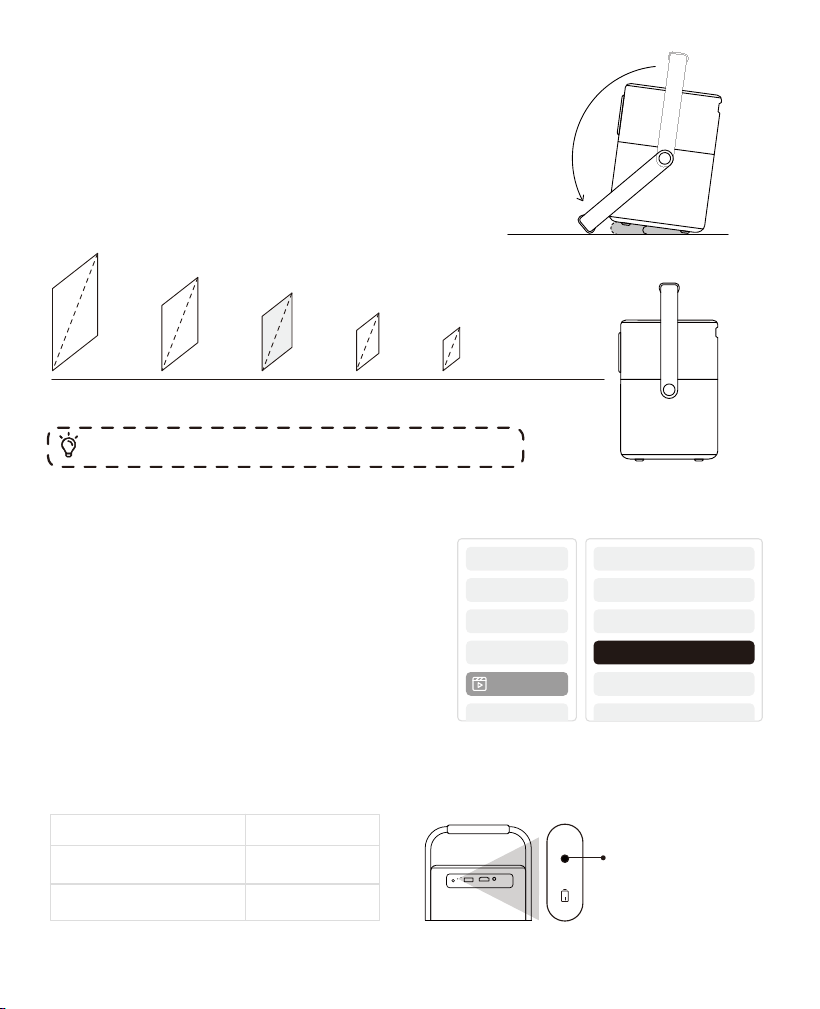
From 0% ~ 100%
BatteryMode
Charging Time Charging Indicator Light
1. 2.5 Hours of use in battery mode.
2. The brightness will be reduced to
extending battery's endurance time.
3. You can also adjust the brightness by
adjusting the settings; However, battery's
endurance time will decrease.
Blue: Fully charged.
Red : Charging.
06
Brightness Setting
Image q...
Placement
For a better image, please try to place the projector
on a stable, flat surface.
If you need to adjust the screen at a larger angle, you
can rotate the carrying handle to the bottom and it
will provide you with support under 15°.
15°
Meters0.801.602.133.204.00
150"
120"
80"
30"
60"
2.625.256.9910.5013.12 feet
Tip: The recommended Screen size is 80 inches.
3 Hours
10 Hours
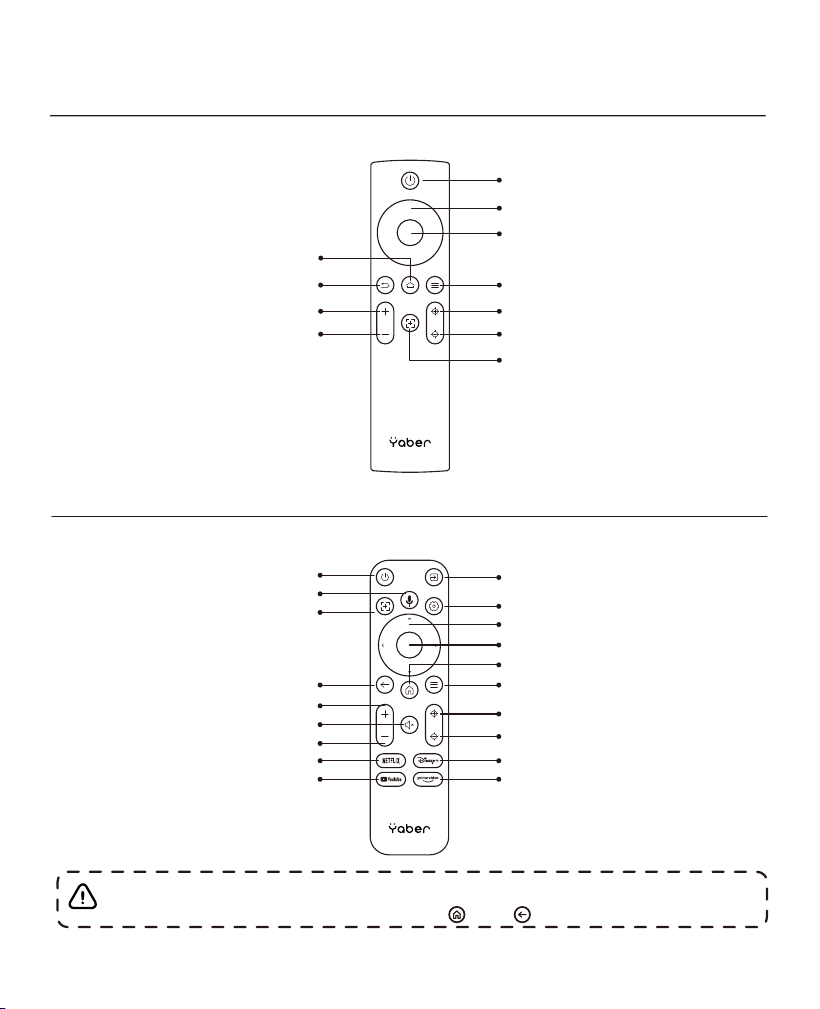
Remote Control
07
Only for T2
Power
Confirm
Menu
Focus +
Focus -
Auto Focus
Home
Back
Volume UP
Volume Down
Arrow Key
Only for T2 Plus
Video Source
Arrow Key
Confirm
Home
Menu
Focus +
Focus -
Disney+
prime video
Power
Voice Search
Auto Focus
Back
Volume UP
Mute
Volume Down
Netflix
YouTube
Settings
Notice: When using Google TV for the first time, you will need to
follow the guidelines and long press and to pair with.
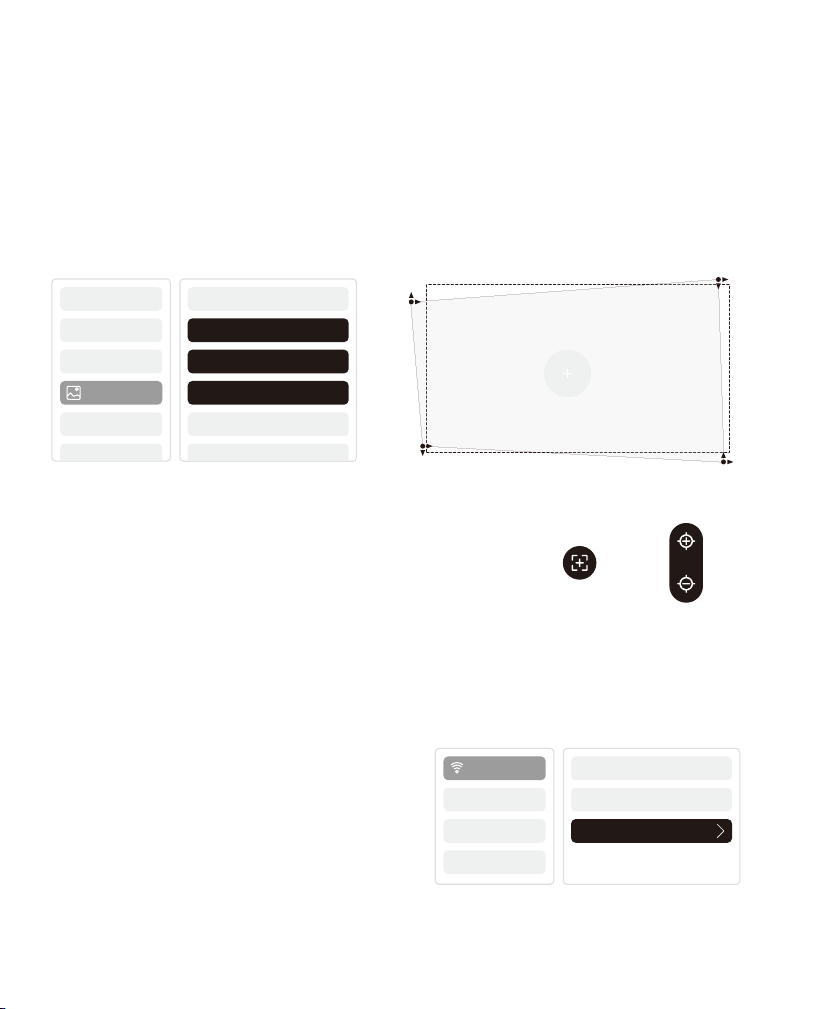
ImageAdjustment
08
Connectivity
Auto Focus
Manual Focus
Keystone Correction:
Auto Keystone Correction is on by default. If you need to turn it off, you can turn
it off from [Settings]-[Projection Mode]-[Auto Keystone].
Manual Keystone Correction:
If you need to further adjust the screen, you can select [Manual Keystone
Correction] in the settings and adjust the screen by dragging the arrows.
Wi-Fi
If you are meet problems with network,
please check your Wi-Fi signal via
[Settings]-[Connected Wi-Fi]-[RSSI].
Auto Focus:
You can also adjust the focus by clicking on the
buttons on the remote control to get your desired
picture.
Projecti..
Projection Mode
Manual Keystone
Projection Zoom
Auto Keystone
WiFi Switch
WiFi RSSI
Wi-Fi
Network
Auto focus will be activated after each shift.
ScreenShare
You can download the Yaber App from the Google Play Store or Apple App
store for better screen casting!
BluetoothSpeakerMode
You can connect your phone to the projector via Bluetooth and enter Bluetooth
audio mode anytime after confirmation.
In Bluetooth audio mode, you can also turn off the screen and turn the T2 into
an outdoor stereo.
Notice: If another device is connecting to the projector's Bluetooth,
please disconnect from it first, and then connect Bluetooth with the
device you expect.
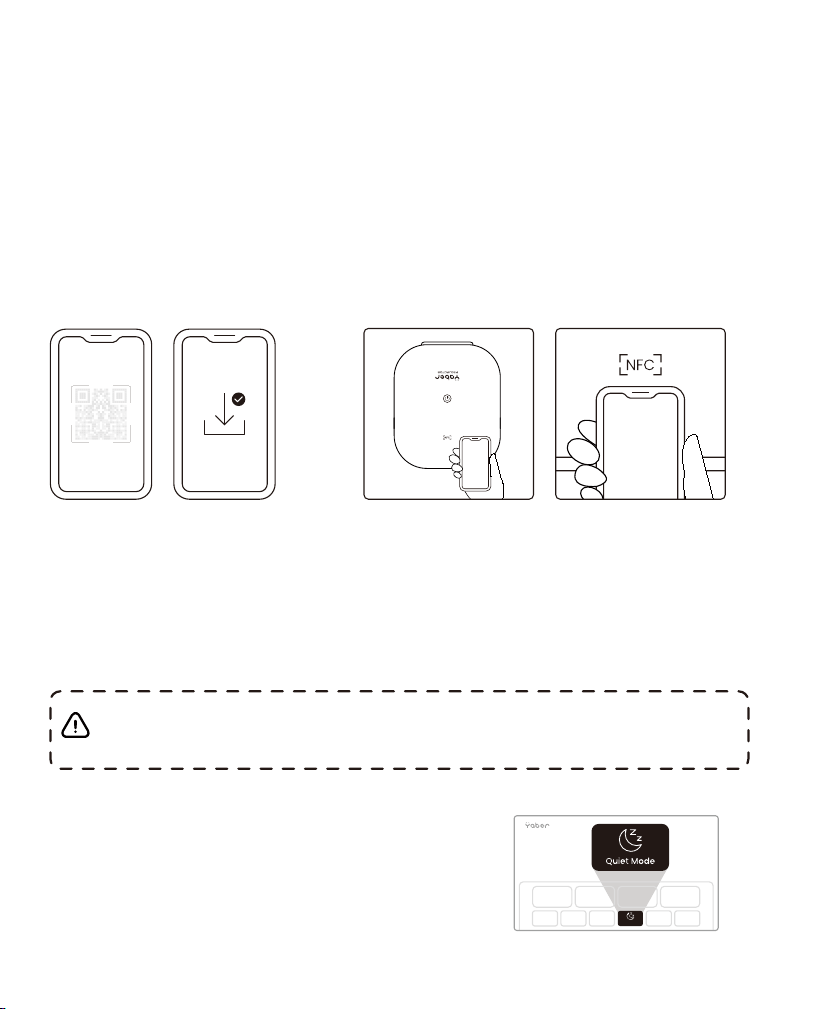
QuietMode
You can turn on Quiet Mode from the main
page, which will provide you with a quieter
and more subdued picture by reducing
brightness and fan speed.
NFCSettings
1. Download and install Yaber App by scaning QR code or searching “Yaber” on
Apple App Store/Google Play Store
2. Make sure your phone and projector are connected to same Wi-Fi.
3. Tap your phone closely on the NFC area while the projector is powered on.
09
Quiet Mode

10
Important Precautions
Please use the device correctly:
• Do not face the lens into eyes because the strong projector light may cause
injury to the eyes.
• Do not block the air inlet / outlet of the device to avoid damage to internal
electronic devices arising from normal heat dissipation failure.
• Do not wipe the lens directly with cleaning tools including paper and cloth to
avoid damage to the lens, please clean up the dust on the lens through clean air
blowing.
• Do not wash the deuce with chemicals, detergents, or any liquid to prevent the
circuit board from being corroded by rainwater, or moisture mineral-containing
liquids.
• Keep the device’s components and accessories out of reach of children.
• Make sure that the device is used in a dry and ventilated environment.
• Do not store the device in overheated or overcooled places, because extreme
temperatures will shorten the life of electronic devices. Place and use the device
in an environment of 0°C-40°C
• Do not put the device into any heating equipment (such as a dryer and
microwave oven) for drying.
• Do not firmly extrude the device or place barriers on it or its back to avoid
damage to the device.
• Do not throw, strike, or sharply vibrate the device to avoid damage to the
internal circuit board
• Do not try to disassemble and assemble the device yourself. If any issue occurs,
please contact the after sales service of Yaber.
Manufactured under license from Dolby Laboratories. Dolby, Dolby Audio, and the double-D
symbol are trademarks of Dolby Laboratories Licensing Corporation.
· DOLBY
Warranty
The terms HDMI, HDMI High-Definition Multimedia Interface, HDMI trade dress and the HDMI
Logos are trademarks or registered trademarks of HDMI Licensing Administrator, Inc.
· HDMI

FCC STATEMENT :
This device complies with Part 15 of the FCC Rules. Operation is subject to the following two
conditions:
(1) This device may not cause harmful interference, and
(2) This device must accept any interference received, including interference that may cause
undesired operation.
Warning: Changes or modifications not expressly approved by the party responsible for
compliance could void the user's authority to operate the equipment.
NOTE: This equipment has been tested and found to comply with the limits for a Class B
digital device, pursuant to Part 15 of the FCC Rules. These limits are designed to provide
reasonable protection against harmful interference in a residential installation. This
equipment generates uses and can radiate radio frequency energy and, if not installed
and used in accordance with the instructions, may cause harmful interference to radio
communications. However, there is no guarantee that interference will not occur in a
particular installation. If this equipment does cause harmful interference to radio or television
reception, which can be determined by turning the equipment off and on, the user is
encouraged to try to correct the interference by one or more of the following measures:
Reorient or relocate the receiving antenna.Increase the separation between the equipment
and receiver.Connect the equipment into an outlet on a circuit different from that to which
the receiver is connected.
Consult the dealer or an experienced radio/TV technician for help.
FCC Radiation Exposure Statement:
This equipment complies with FCC radiation exposure limits set forth for an uncontrolled
environment. This equipment should be installed and operated with minimum distance
20cm between the radiator & your body.
Correct Disposal of this product
This marking indicates that this product should not be disposed with other
household wastes throughout the EU. To prevent possible harm to the
environment or human health from uncontrolled waste disposal, recycle it
responsibly to promote the sustainable reuse of material resources. To return
your used device, please use the return and collection systems or contact
the retailer where the product was purchased. They can take this product for
environmental safe recycling.