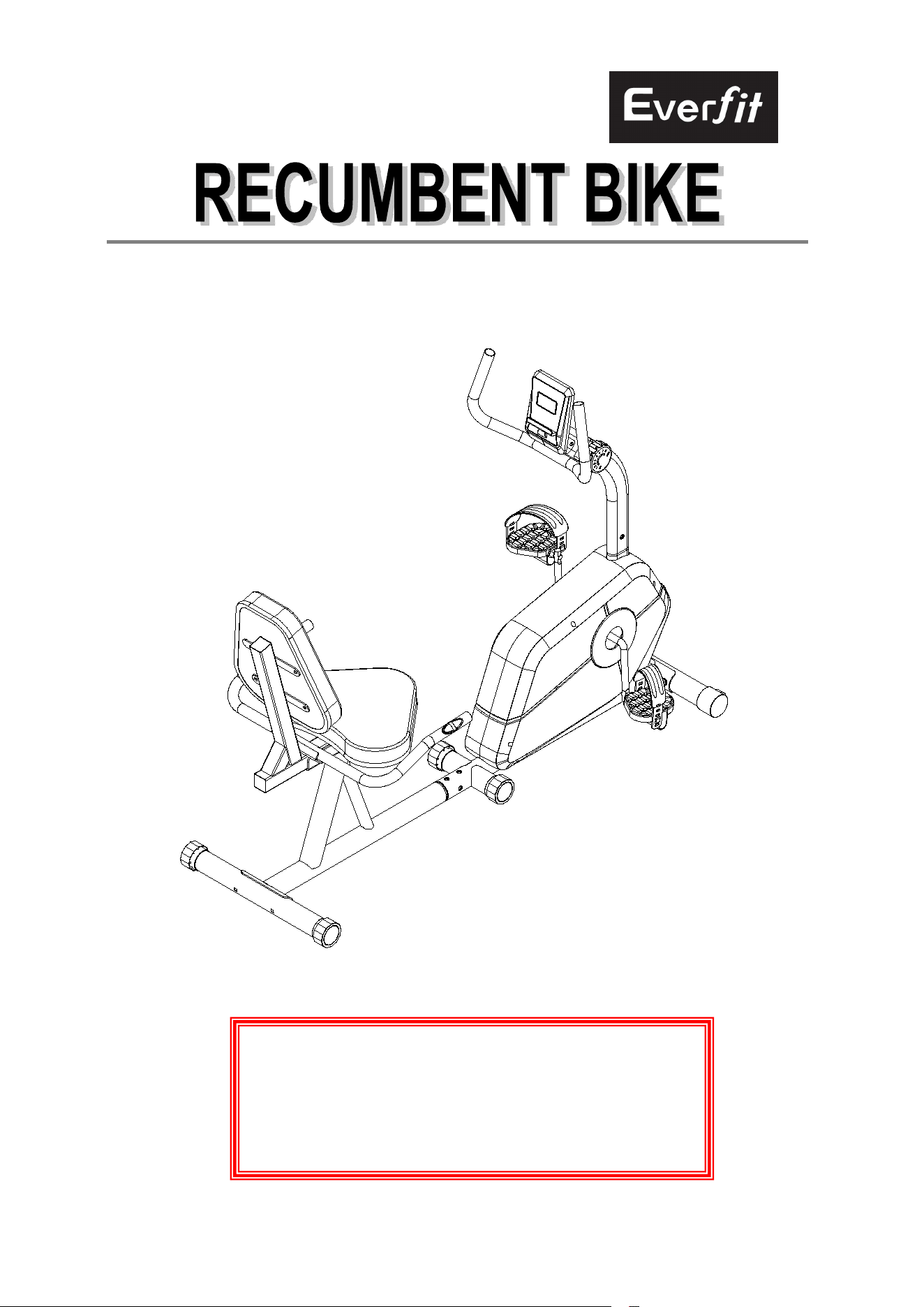
1
OWNER’S MANUAL
IMPORTANT SAFETY NOTICE 2
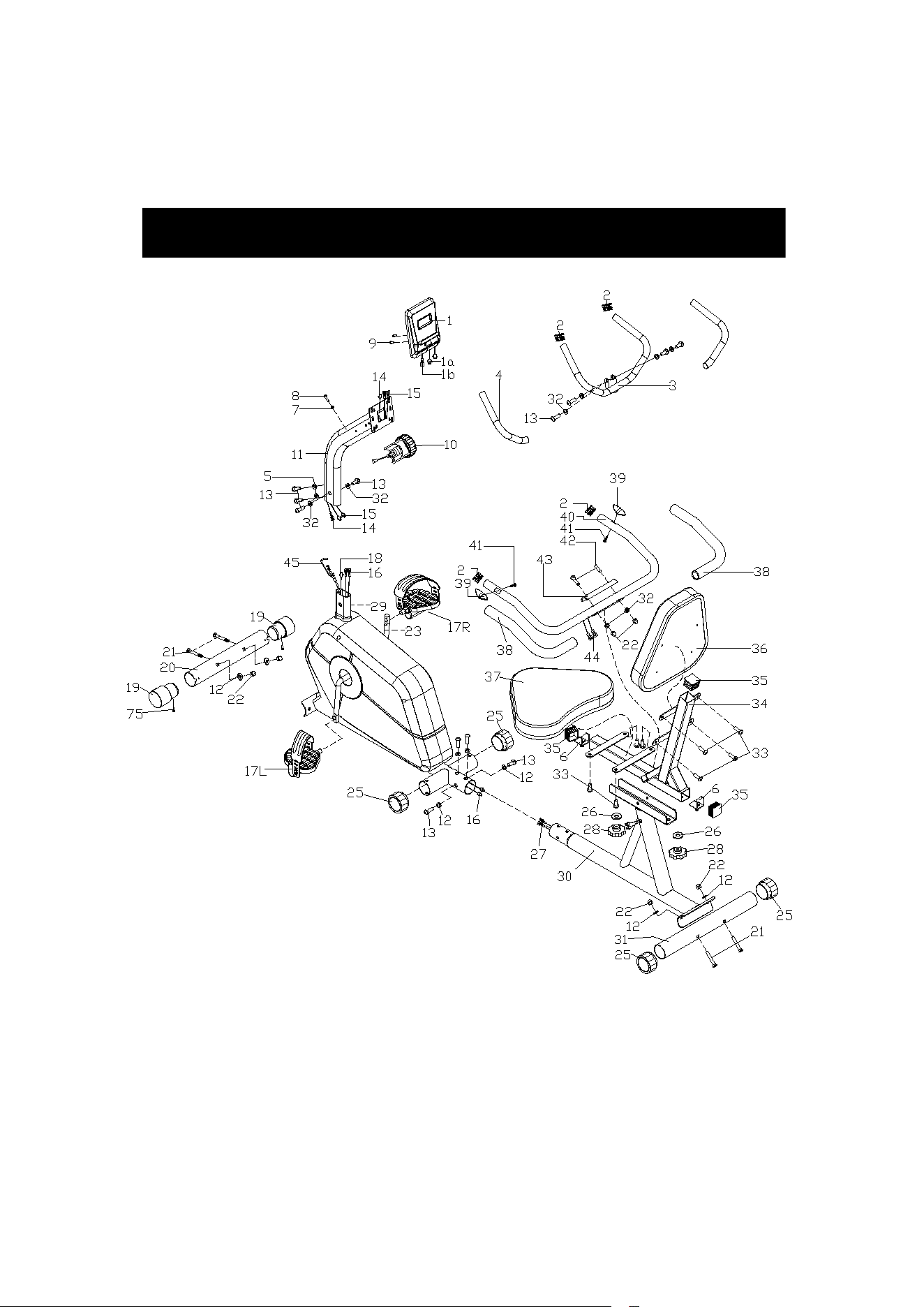
EXPLODED-VIEW & PARTS LIST 3-5
ASSEMBLY INSTRUCTION 6-8
EXERCISE INSTRUCTIONS 9-10
EXERCISE MONITOR 11

2
Dear Customer,
Please read this instruction very carefully before using this item. You will
find important information regarding safety of your magnetic bike.
IMPORTANT SAFETY NOTICE::
Note the following precaution before assembling or operating the machine
★ The maximum weight capacity of this training bike is 120kg; person whose body weight
exceeds this limit should not use this machine.
★ Locate a comfortable work site, assemble your training bike in an open space with
adequate ventilation and lighting.
★ Keep children and pets away from the training bike, do not leave unattached children in
the same room with the machine.
★ Position the machine on a clear, level surface. Do not use near the water or outdoors.
★ Always wear appropriate workout clothing when exercising, running or aerobic shoes are
also required.
★ Use the training bike only for its intended use as described in this manual. Do not use any
other accessories not recommended by the manufacturer.
★ Do not place any sharp objects around this machine.
★ Always inspect your machine to make sure the bolts, screw, nuts and other parts are in
safe and stability situation.
★ Before exercising, always do warning-up exercises first.
★ If the user experiences dizziness, nausea, chest pain or any other abnormal symptoms,
stop the workout at once, and consult your physician immediately if necessary.
★ Handicapped or disabled persons should not use the training bike without the presence of
a qualified health professional of physician.
★ Never operate this machine if it is not functioning properly.
★ When the user don’t need to operate this machine, make the tension control to lowest
load.
★
Keep children and pets away from the machine, because they maybe get
injured without properly fitted guarded.
WARNING:
BEFORE BEGINNING THIS OR ANY EXERCISE PROGRAM. CONSULT YOUR
PHYSICIAN FIRST, THIS IS ESPECIALLY IMPORTANT FOR THE INDIVIDUAL OVER THE
3
EXPLODED-VIEW & PARTS LIST:
AGE OF 35 OR PERSONS WITH PRE-EXISTING HEALTH PROBLEMS, READ ALL
INSTRUCTIONS BEFORE USING.
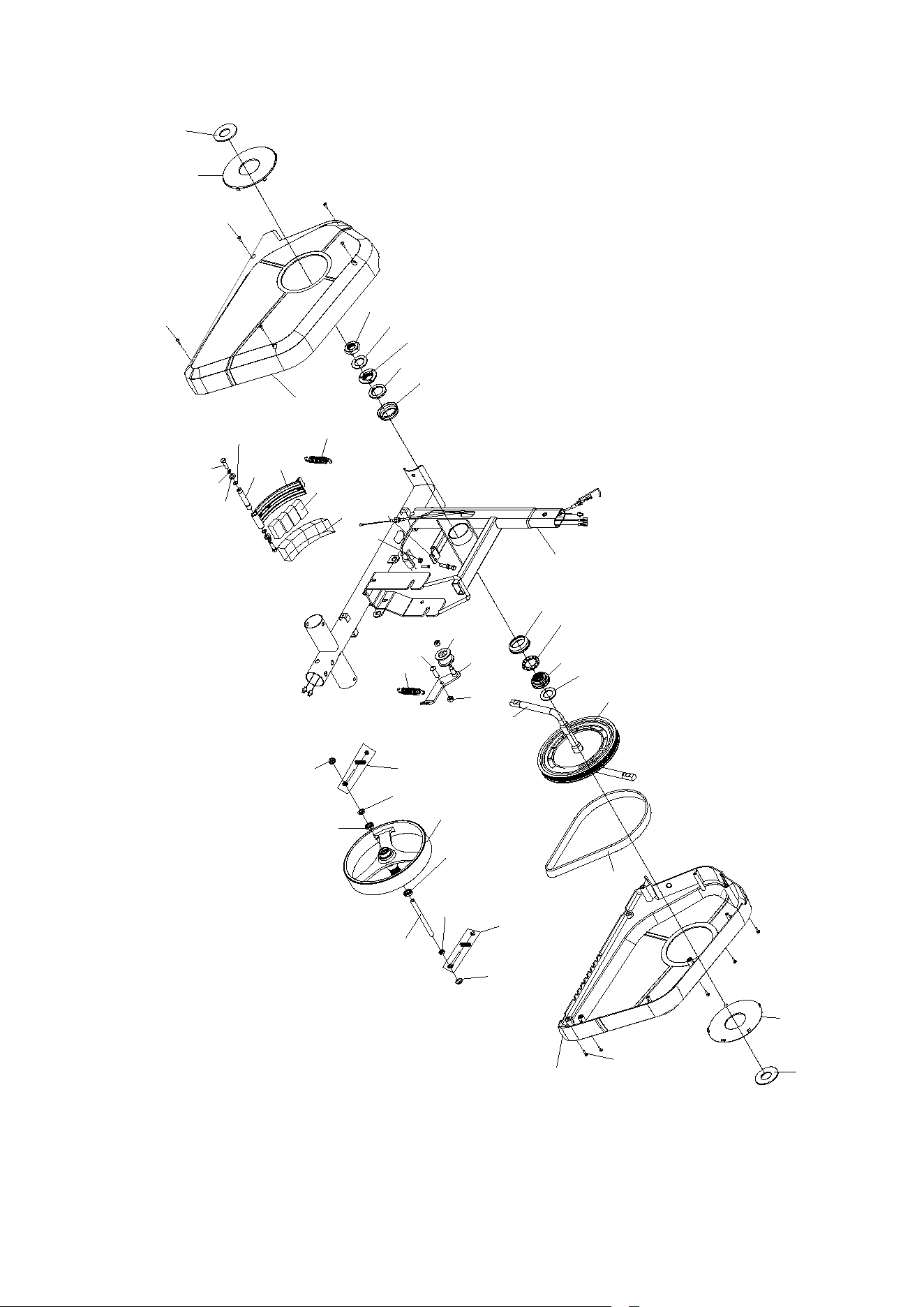
4
23
52
51
53
54
55
46
29
77
76
48
49
50
51
52
47
46
75
75
24L
73
72
63
73
72
61
62
62
64
61
71
70
69
68
67
74
65
66
56
57 58
59
60
79
24R
75
47
78
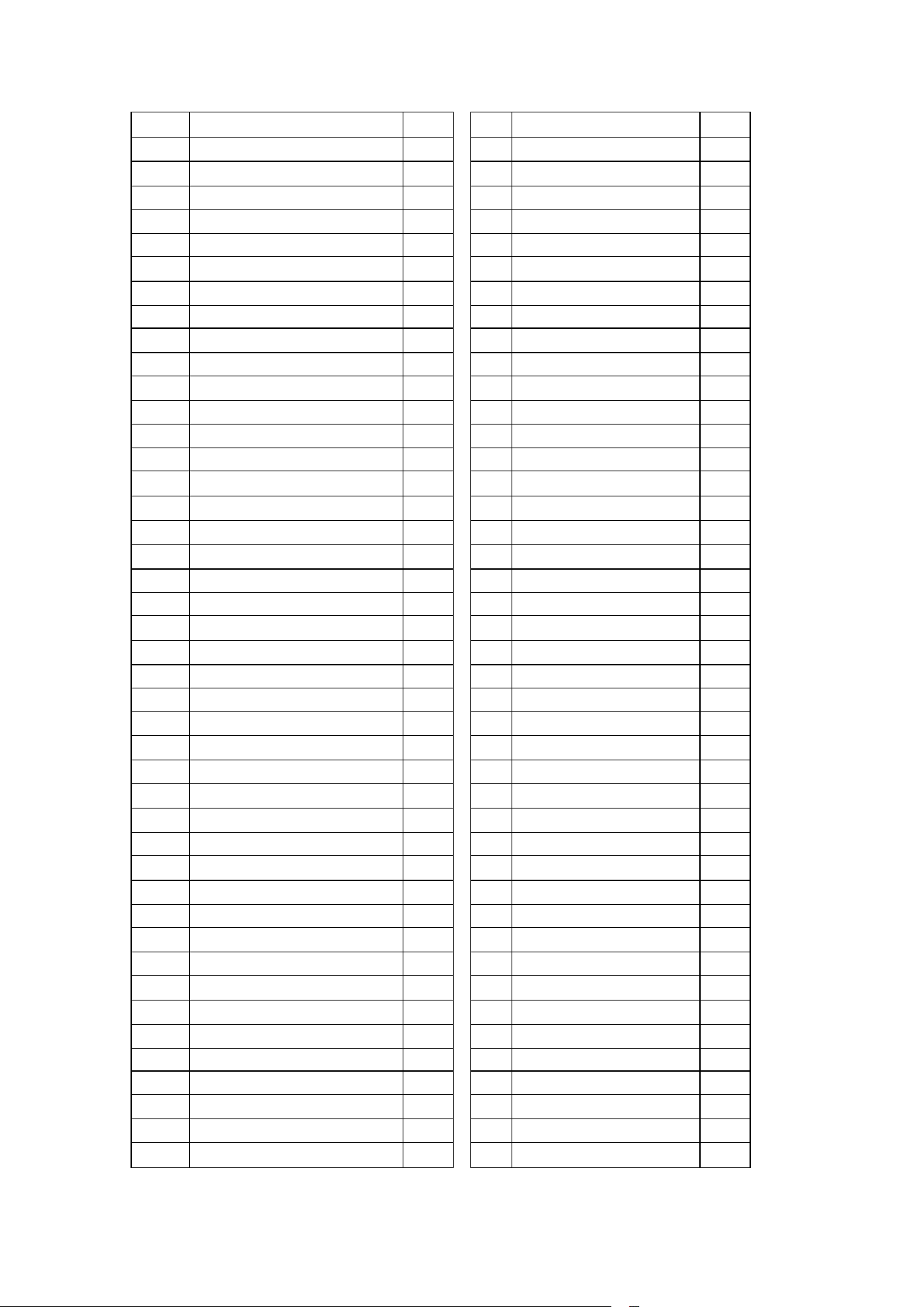
5
NO
DESCRIPTION
QTY
NO
DESCRIPTION
QTY
1
computer
1
44
Sensor line
2
2
Plug Φ25
4
45
Tension Line
1
3
Handlebar
1
46
Stopper
2
4
Foam
2
47
Plastic ring
2
5
Arc washer d8*Φ16*1.5*R15
2
48
Nut
1
6
U bracket
2
49
Washer
1
7
Spring washer D5
1
50
Left collar housing
1
8
Screw M5*25
1
51
Collar ball
2
9
Screw M5*10
2
52
Collar housing
2
10
Tension knob
1
53
Right collar housing
1
11
Suppost tube
1
54
Washer
1
12
Arc washer d8*Φ20*1.5*R30
8
55
Belt pulley
1
13
Bolt M8X16
12
56
Pinch roller
1
14
Line of induction
1
57
U board
1
15
Sensor line
2
58
Nylon nut M8
2
16
Tension line
2
59
Bolt
1
17L/R
pedal
2
60
Tension spring
1
18
Sensor line
1
61
Hex thin nut
2
19
End capΦ50
2
62
Bearing
2
20
Front stabilizer
1
63
Flywheel
1
21
Carriage bolt M8X62
4
64
Axle
1
22
Cap nut M8
6
65
Spring washer D6
2
23
Crank
1
66
Washer
2
24LR
Chain cover
2
67
Snap spring
2
25
end cap
4
68
Axle
1
26
Washer D10xΦ25x2
2
69
Magnetic board
1
27
Sensor line
2
70
Magnet
4
28
Knob M10
2
71
Plastic lattice
1
29
Main frame
1
72
Nut
2
30
Back bracket
1
73
Screw group
2
31
Rear stabilizer
1
74
Bolt M6*15
2
32
Washer D8xΦ16x1.5
8
75
Tapping screw
13
33
Screw M6x16
8
76
Nut M6
2
34
Seat tube
1
77
Bolt M6*35
1
35
End cap F38X38
3
78
Belt
1
36
Back cushion
1
79
Tension spring
1
37
Seat
1
38
Foam grip
2
39
Pulse Φ25
2
40
Handlebar
1
41
Fixing screw ST4.2X16
2
42
Carriage Bolt M8x45
4
Cross wrench S13-14-15
1
43
cover plate
1
Allen wrench S6
1
6
ASSEMBLY INSTRUCTION:
1.PREPARATION:
A. Before assembling make sure that you will have enough space around the item.
B. Use the present tooling for assembling.
C. Before assembling please check whether all needed parts are available (at the above
of this instruction sheet you will find an explosion drawing with all single parts (marked
with numbers) which this item consists of.
2.ASSEMBLY INSTRUCTION:
:
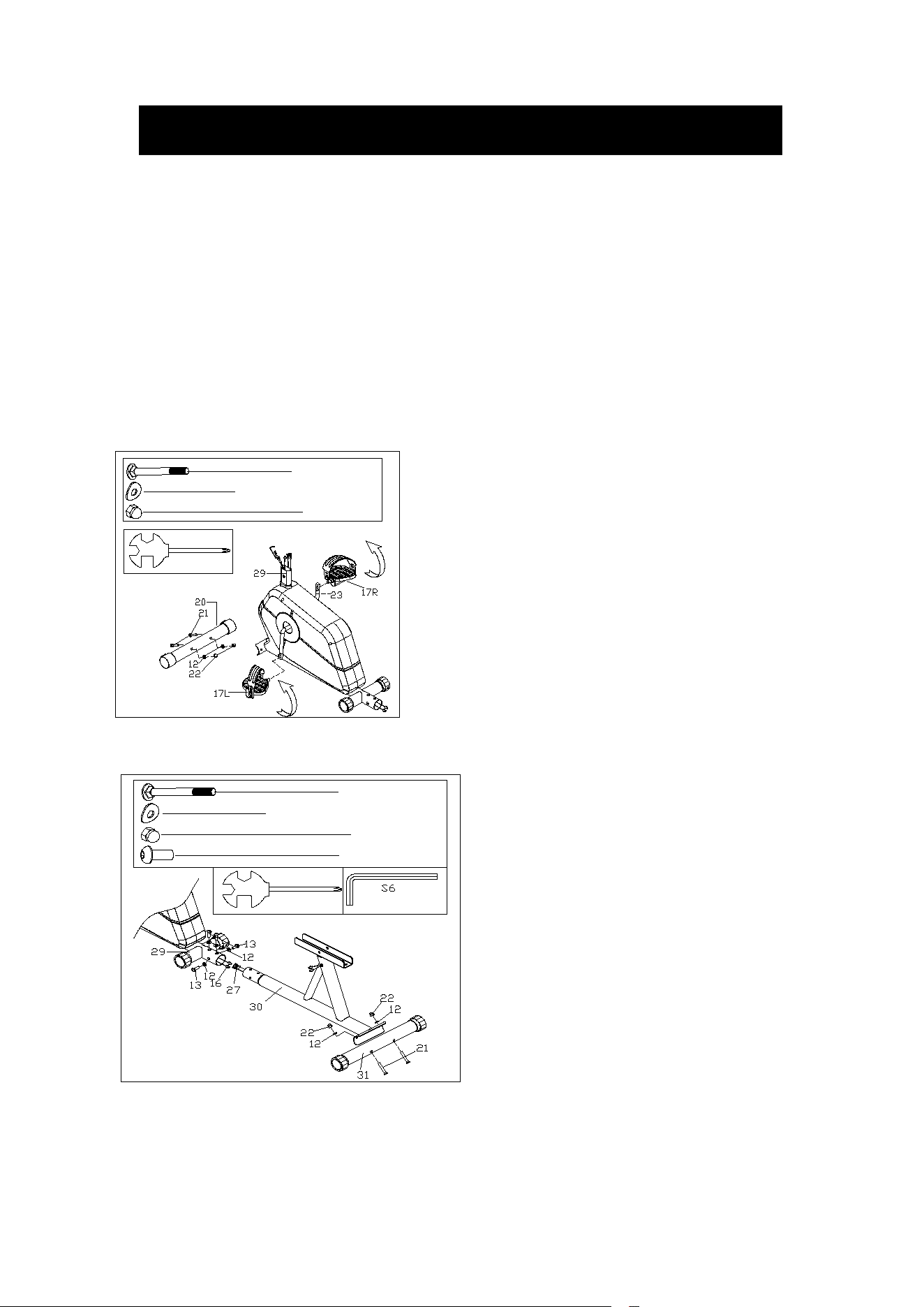
FIG.2: Attach the rear stabilizer (31) to the
back bracket (30) with carriage bolt (21),
domed nut (22) and arc
washer(12).connect the sensor 16 & 27,
then insert the back bracket (30) to the
main frame (29) with screw(13) and arc
washer(12).
#21 M8*62 2PCS
#12 d8*Φ 20*1.5*R30 6PCS
#22 M8 2PCS
S13
#13 M8*16 4PCS
FIG.1
FIG.1: Attach the front stabilizer (20) to the
main frame (29) with carriage bolt (21),
domed nut (22) and arc washer (12)。
Install left & right pedal (17L/R) to crank.
Then, lock the left pedal (17L) tightly in
counterclockwise direction. In addition, lock
the right pedal (17R) tightly in clockwise
direction.
#21 M8*62 2PCS
#12 d8*Φ20*1.5*R30 2PCS
#22 M8 2PCS
S13
S15
7
#33 M6*16 8PCS
#28 M10 2PCS
#26 d10* 25*2 2P CS
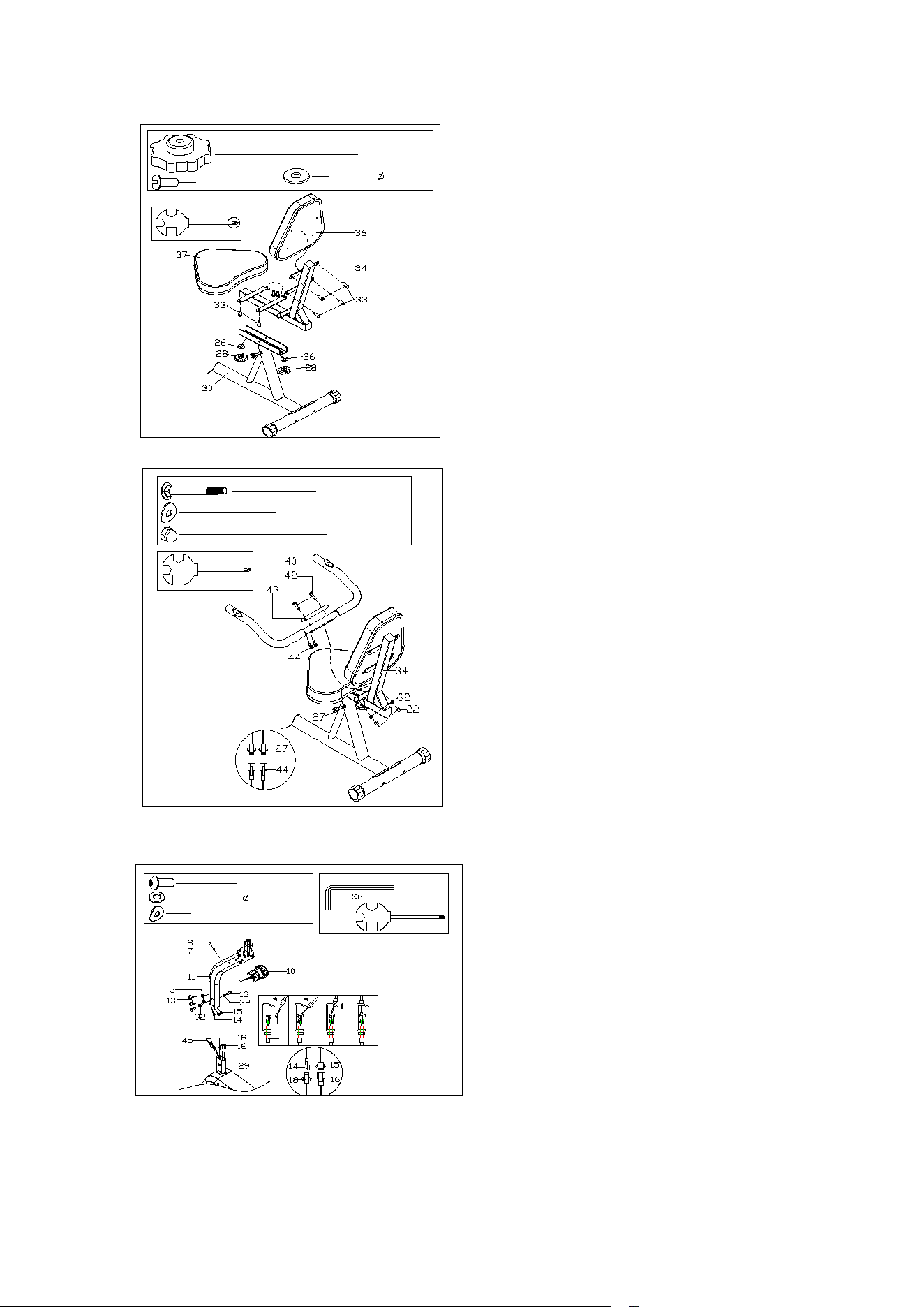
FIG.3:
Attach the cushion post (34) to the back
bracket (30) with the flat washer (26) and
knob (28)
Attach the back cushion (36) and the
cushion (37) to the cushion post (34) with
the screw (33).
FIG.3
S13
#42 M8*45 2PCS
#32 d8*Φ16*1.5 2PCS
#22 M8 2PCS
FIG.4:
connect handle wire (27) with pulse wire
(44). Then, fix cover plate(43) and
handlebar (40) onto seat tube (34) with
carriage bolt (42), flat washer (32) and
nut(22).
10
45
#9 M8*16 4PCS
#5 d8*Φ 16*1.5*R15 2PCS
#32 d8* 16*1.5 2PCS
FIG.5:
Connect tension control wire(10&45) and
sensor line(14&18 15&16);then install
support tube(11) to main frame(29) with bolt
(13), arc washer (5) ,washer (32). Attached
the tension knob(10) to the support tube(11)
with washer(7) and bolt(8).
8
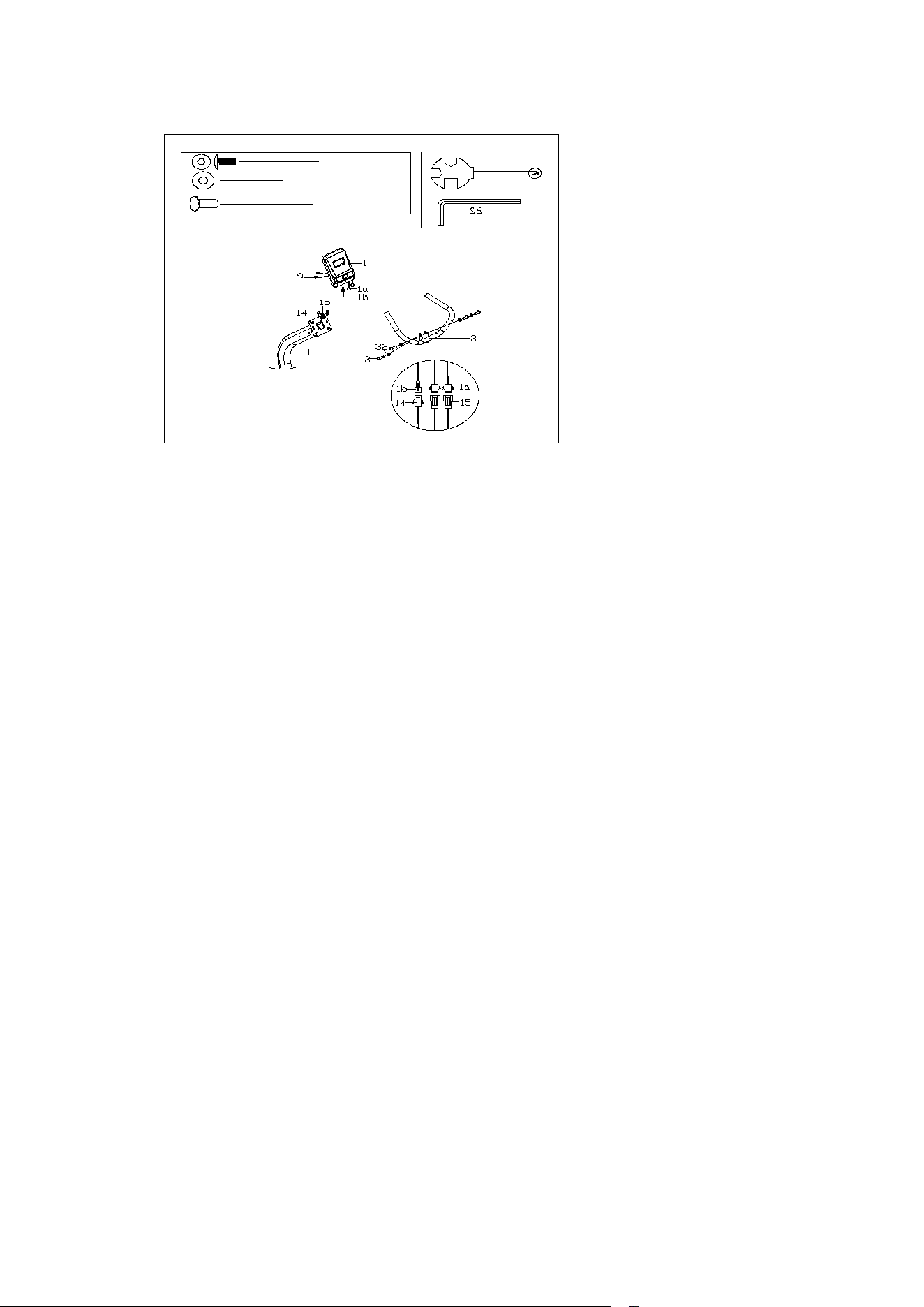
FIG.6:
Attached the handlebar(3)
to the support tube (11)
with washer (32) and bolt
(13) . Connect the
sensor(1a&15;1b&14) as
shown in FIG.6, Attach the
computer (1) to the support
tube (11) with the
screws(9).
1 3 # M 8 * 1 6 4 P C S
# 2 M 5 * 1 0 2 P C S
3 2 # d 8 * Φ 16 * 1 . 5 4 P C S
9
EXERCISE INSTRUCTIONS
Using your Recumbent BIKE provides you with several benefits, it will improve
your physical fitness, tone muscle and in conjunction with calorie controlled diet help
you lose weight.
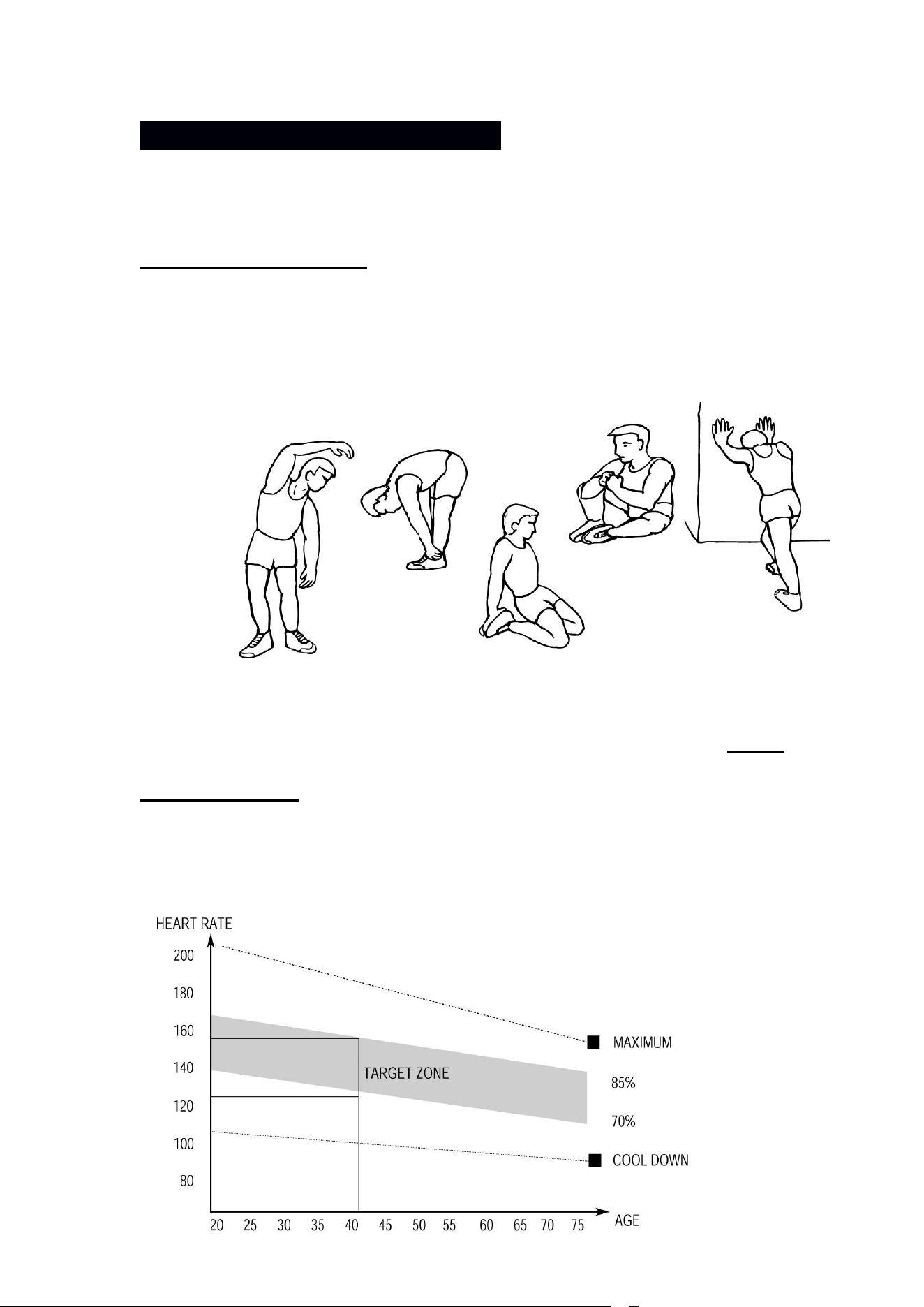
1.The Warm Up Phase
This stage helps get the blood flowing around the body and the muscles
working properly. It will also reduce the risk of cramp and muscle injury. It is advisable
to do a few stretching exercises as shown below. Each stretch should be held for
approximately 30 seconds, do not force or jerk your muscles into a stretch - if it hurts,
STOP.
2.The
Exercise Phase
This is the stage where you put the effort in. After regular use , the muscles in
your legs will become Stronger. Work to your but it is very important to maintain a
steady tempo throughout. The rate of work should be sufficient to raise your heart
beat into the target zone shown on the graph below.
SIDE BENDS OUTER THIGH
INNER THIGH
FORWARD
BENDS
CALF / ACHILLES
10
3. The Cool Down Phase
This stage is to let your Cardio-vascular System and muscles wind down. This is
a repeat of the warm up exercise e.g. reduce your tempo, continue for approximately
5 minutes. The stretching exercises should now be repeated, again remembering not
to force or jerk your muscles into the stretch.
As you get fitter you may need to train longer and harder. It is advisable to train at
least three times a week, and if possible space your workouts evenly throughout the
week.
MUSCLE TONING
To tone muscle while on your ELLIPTICAL BIKE you will need to have the
resistance set quite high. This will put more strain on our leg muscles and may mean
you cannot train for as long as you would like. If you are also trying to improve your
fitness you need to alter your training program. You should train as normal during the
warm up and cool down phases, but towards the end of the exercise phase you
should increase resistance, making your legs work harden than normal. You may
have to reduce your speed to keep your heart rate in the target zone.
WEIGHT LOSS
The important factor here is the amount of effort you put in. The harder and
longer you work the more calories you will burn. Effectively this is the same as if you
were training to improve your fitness, the difference is the goal.
USE
The tension control knob allows you to alter the resistance of the pedals. A high
resistance makes it more difficult to pedal, a low resistance makes it easier. For the
best results set the tension while the bike is in use.
This stage should last for a minimum of 12 minutes though most people
start at about 15-20 minutes

11
EXERCISE MONITOR INSTRUCTION MANUAL
SPECIFICATIONS:
TIME……………………………………………………….………..00:00-99:59
SPEED(SPD)..……………………………………………0.0-99.9KM/H (ML/H)
DISTANCE(DIST)……………………………………….....0.00-999.9KM (ML)
CALORIE(CAL)……………………………………………......0.00-9999KCAL
※ODOMETER(ODO)…………………………..…………..….0.0-9999KM (ML)
※PULSE (PUL) ……......................................................................0,40~240BPM
KEY FUNCTIONS:
MODE(SELECT/RESET): This key lets you to select and lock on to a particular function you want.
OPERATION PROCEDURES:
1. AUTO ON/OFF
The system turns on when any key is pressed or when it sensor an input from the speed sensor.
The system turns off automatically when the speed has no signal input or no key are pressed for
approximately 4 minutes.
2. RESET
The unit can be reset by either changing battery or pressing the MODE key for
3 seconds.
3. MODE
To choose the SCAN or LOCK if you do not want the scan mode, press the
MODE key when the pointer on the function you want which begins blinking.
FUNCTIONS:
1. TIME: Press the MODE key until pointer lock on to TIME. The total working time will be shown when
starting exercise.
2. SPEED: Press the MODE key until the pointer advance to SPEED. The current speed will be shown.
3. DISTANCE: Press the MODE key until the pointer advance to DISTANCE. The distance of each workout
will be displayed.
4. CALORIE: Press the MODE key until pointer lock on to CALORIE. The calorie burned will be displayed
when starting exercise.
5. ODOMETER (IF HAVE): Press the MODE key until the pointer advance to
ODEMETER. The total accumulated distance will be shown.
6. PULSE (IF HAVE): Press the MODE key until the pointer advance to PULSE .User’s current heart rate
will be displayed in beats per minute. Place the palms of your hands on both of the contact pads(or put
ear-clip to ear),and wait for 30 seconds for the most accurate reading.
SCAN: Automatically display changes every 4 seconds.
BATTERY:
If improper display on monitor, please reinstall the batteries to have a good result.