BG-AVTPG-KIT
BG-AVTPG-4K and BG-AVTPG-MINI Professional Installer Kit
User Manual

BZBGEAR BG-AVTPG-KIT PRODUCT MANUAL
Address: 830 National Drive #140, Sacramento, CA 95834, USA · Tel: +1(888)499-9906 · Email: support@bzbgear.com 2

BZBGEAR BG-AVTPG-KIT PRODUCT MANUAL
TABLE OF CONTENTS
Statement 4
Safety Precaution 4
Introduction 5
Features 6
Packing List 6
Technical Specifications 7
Operation Controls and Functions 9
Menu Operation 11
Operation Approach BG-AVTPG-4K 13
Operation Approach BG-AVTPG-4K 18
Ethernet Control (TCP/IP) 22
Upgrade BG-AVTPG-4K 26
Eye PATTERN 29
Application Example 32
Tech Support 33
Limited Product Warranty Terms 33
Mission Statement 34
Copyright 34
Address: 830 National Drive #140, Sacramento, CA 95834, USA · Tel: +1(888)499-9906 · Email: support@bzbgear.com 3

BZBGEAR BG-AVTPG-KIT PRODUCT MANUAL
Statement
Please read these instructions carefully before connecting, operating, or configuring this
product. Please save this manual for future reference.
Safety Precaution
● To prevent damaging this product, avoid heavy pressure, strong vibration, or immersion
during transportation, storage, and installation.
● The housing of this product is made of organic materials. Do not expose to any liquid,
gas, or solids which may corrode the shell.
● Do not expose the product to rain or moisture.
● To prevent the risk of electric shock, do not open the case. Installation and maintenance
should only be carried out by qualified technicians.
● Do not use the product beyond the specified temperature, humidity, or power supply
specifications.
● This product does not contain parts that can be maintained or repaired by users.
Damage caused by dismantling the product without authorization from BZBGEAR is not
covered under the warranty policy.
● Installation and use of this product must strictly comply with local electrical safety
standards.
Address: 830 National Drive #140, Sacramento, CA 95834, USA · Tel: +1(888)499-9906 · Email: support@bzbgear.com 4

BZBGEAR BG-AVTPG-KIT PRODUCT MANUAL
Introduction
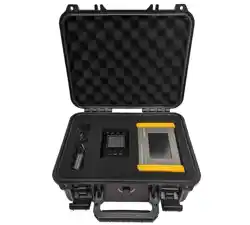
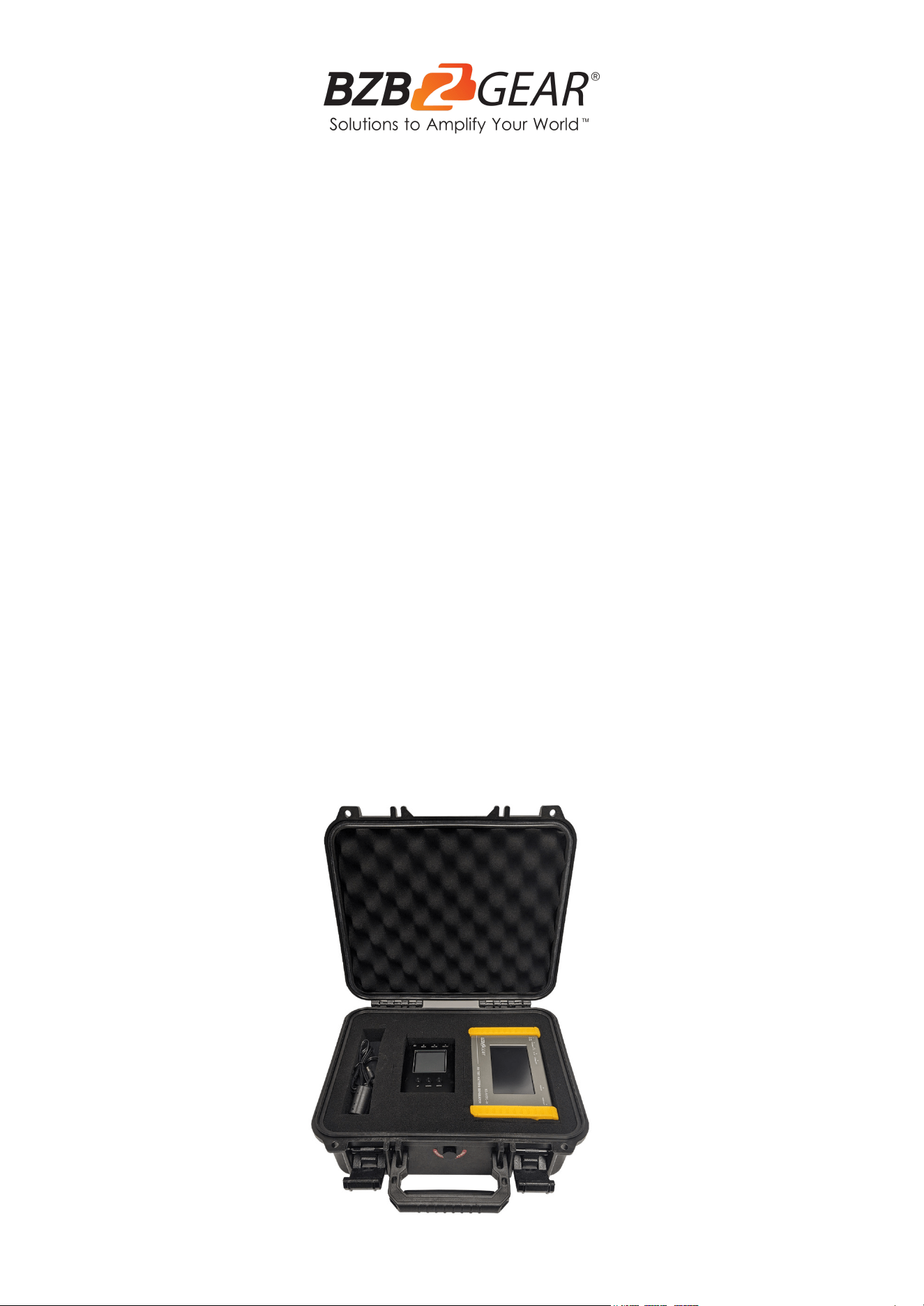
The BG-AVTPG-KIT combines 2 of our best selling HDMI testers/analyzers for a
comprehensive toolkit that should be a part of every professional installer’s arsenal. The kit
includes 1x BG-AVTPG-4K and 1x BG-AVTPG-MINI in a foam-lined protective case built to
withstand years of job site abuse. The kit allows for full end-to-end testing of all
HDMI-related cabling and gear allowing installers to quickly identify and correct issues that
would otherwise complicate and delay progress.
The BG-AVTPG-4K HDMI 2.0 Generator and Analyzer is a versatile and compact test set
designed for A/V Professionals. The set allows the user to conduct verification and
diagnostic tests of HDMI cables, A/V components, and video distribution networks with
confidence. Its protective rubberized edges and rechargeable battery make it well-suited for
on-site testing virtually anywhere. With the advanced touch panel and USB connection
mouse control you can easily access options for video patterns, audio signals, HDCP
analyzer, and loop signal testing. The unit supports 8 channel LPCM with selectable
sampling rate making it perfect for testing multi-channel audio systems. The BG-AVTPG-4K
is a must-have for all AV System Integrators and Technicians.
The BG-AVTPG-MINI HDMI 2.0a tester/analyzer is a mobile, hand-held device which can
help installers test cable quality by generating HDMI signals and detecting important HDMI
features quickly. With this handy and portable tool users will appreciate the built-in 3 hour
chargeable battery, video patterns, and other features. It features adjustable color depth so
installers can instantly test the connected display’s capability. Getting important pieces of
information makes troubleshooting a breeze and helps installers take the guesswork out of
HDMI compatibility issues. With the device’s response time, you will have the answer to a
potential problem in less than a minute! The BG-AVTPG-MINI, with its cost and features, is
the ideal testing unit for custom and commercial integrators!
Address: 830 National Drive #140, Sacramento, CA 95834, USA · Tel: +1(888)499-9906 · Email: support@bzbgear.com 5

BZBGEAR BG-AVTPG-KIT PRODUCT MANUAL
Features
BG-AVTPG-4K:
● 4K2K60 4:4:4 8bit, 4K2K60 4:2:0 16 bit HDR pattern generator
● 4.3” touch panel
● Mouse control
● User control through Ethernet
● Firmware updateable through USB Flash Drive
● User defined patterns up to 2GB
● Embedded LINUX KERNAL system with limitless extensions
● Scrambler supported for videos over 340MHz output wise
● Loop test capability to provide statistical analysis for connection stability
● HDMI loop through function
● HDCP test allow users to verify HDCP of HDMI sources and transmit HDCP
encrypted video
● Qualified physical layer performance to ensure the best compatibility
● Rechargeable battery portability for up to 4 hours
● Supports voltage measurement on +5V from HDMI source and hot plug from display
BG-AVTPG-MINI:
● Video resolution up to 4K2K@60 4:4:4 8bit, HDR 10 bits, 12 bits, 16 bits
● Built-in 3 video patterns
● Both HDMI input and output support up to HDMI 2.0
● HDMI feature analysis up to 4K2K@60 4:4:4 8bit HDMI 2.0 input
● HDCP 1.4 & 2.2 compliant
● Tests cable quality
● Provides statistical analysis for cable quality or connection stability
● Hand-held pocket size
● Rechargeable battery for portability for up to 3 hours
Address: 830 National Drive #140, Sacramento, CA 95834, USA · Tel: +1(888)499-9906 · Email: support@bzbgear.com 6
BZBGEAR BG-AVTPG-KIT PRODUCT MANUAL
Packing List
● 1x BG-AVTPG-4K
● 1x BG-AVTPG-MINI
● 1x Power Supply
● 1x Case
● 1x User Manual
● 1х Quick Start Guide
Technical Specifications
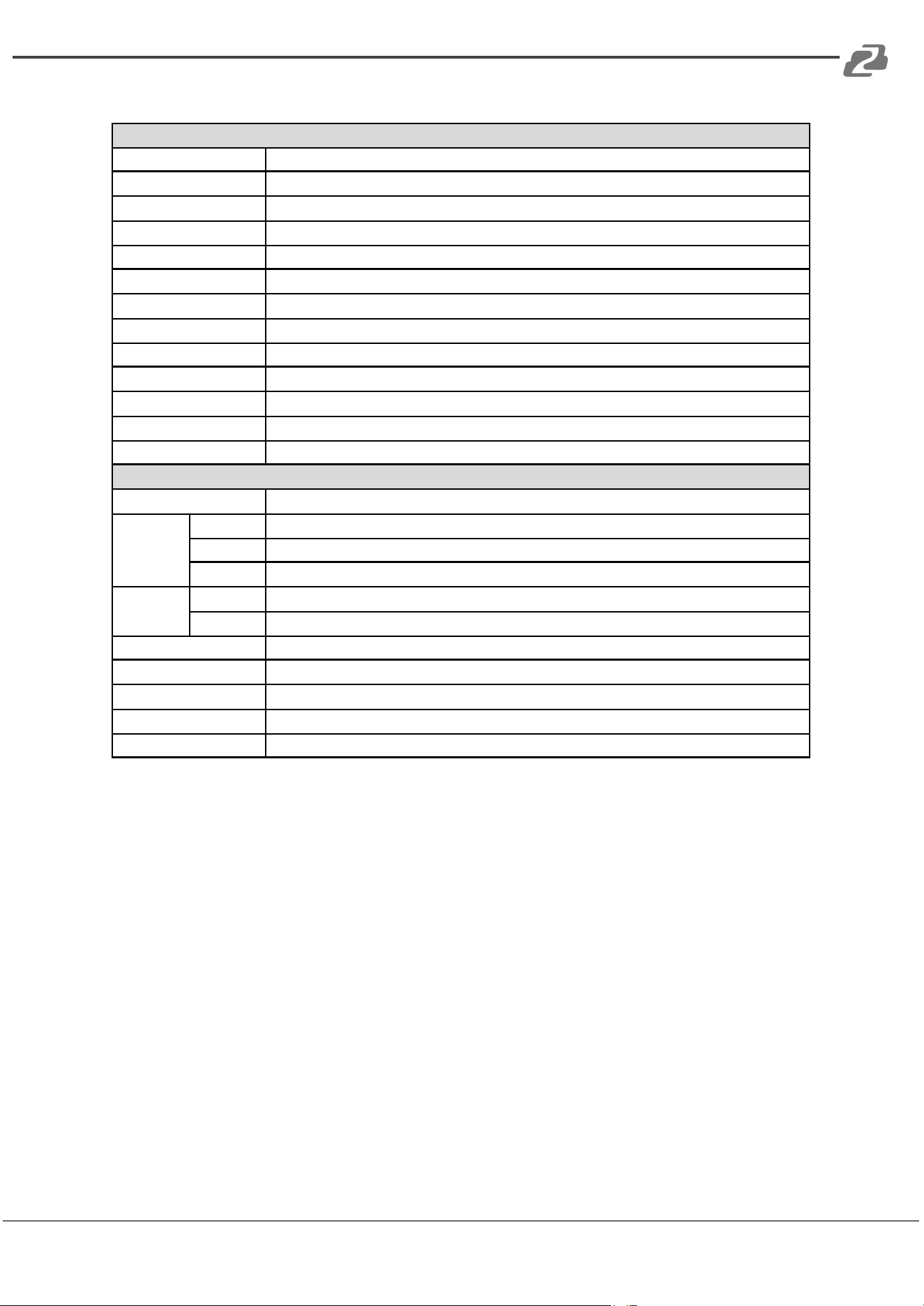
BG-AVTPG-4K:
Technical Specifications
Role of usage
Generator / Analyzer
Video bandwidth
Single link 600MHz (18Gbps)
HDMI compliance
HDMI 2.0 and below
HDCP compliance
HDCP 2.2 and below
Video Support
Up to 4K2K@60 4:4:4 8bit, 4K2K@60 4:2:0 16bit (HDR)
Video Format Support
HDMI
Audio support
8ch LPCM up to 192K
Control
USB mouse / touch panel / Ethernet
ESD protection
Human body model ±15kV [air-gap discharge] & ±8kV [contact discharge]
Input
1x HDMI + 1x USB + 1x RJ-45(Ethernet)
Output
1x HDMI + 1x 3.5mm (Stereo)
USB Support
USB 2.0
HDMI connector
Type A (19-pin female)
USB Connector
Type A
RJ-45 connector
WE/SS 8P8C with 2 LED indicators
Mechanical
Housing
Metal enclosure
Dimensions
(L x W x H)
Model
4.1" x 6.6" x 1.7" [105 x 166 x 42mm]
Package
1'5" x 6.7" x 3" [371 x 170 x 77mm]
Carton
1'3" x 1'4" x 1'5" [410 x 368 x 393mm]
Weight
Model
27 oz [765g]
Package
2.8 lbs [1294g]
Power supply
12V 5A DC / Battery
Power Consumption
15 Watts
Operation temperature
32~104°F / 0~40°C
Storage temperature
-4~140°F / -20~60°C
Relative humidity
20-90% RH [no condensation]
Address: 830 National Drive #140, Sacramento, CA 95834, USA · Tel: +1(888)499-9906 · Email: support@bzbgear.com 7
BZBGEAR BG-AVTPG-KIT PRODUCT MANUAL
BG-AVTPG-MINI:
Technical Specifications
Role of usage
HDMI 2.0a Installation Gear
Video bandwidth
Single link 600MHz [18Gbps]
HDMI compliance
HDMI 2.0 and below
HDCP compliance
HDCP 2.2 and below
Video Support
up to 4K@60 4:4:4 8bit, 4K2K@60 4:2:0 16bit (HDR)
ESD protection
Human body model — ±15kV [air-gap discharge] & ±8kV [contact discharge]
Video Format Support
HDMI
Input
1x HDMI
Output
1x HDMI
Control
Push Button
HDMI connector
Type A [19-pin female]
USB Support
Firmware update / Recharge
USB connector
Micro-USB (Type B)
Mechanical
Enclosure
Metal case
Dimensions
(L x W x H)
Model
5.1" x 3.5" x 0.6" [130 x 89 x 14mm]
Package
7.8" x 5.4" x 2.9" [198 x 137 x 74mm]
Carton
1'4"x 1'3" x 11.8" [420 x 400 x 300mm]
Weight
Model
7.8oz [220g]
Package
11.3oz [320g]
Power supply
Micro-USB / Battery
Power Consumption
5W [MAX]
Operation temperature
32~104°F / 0~40°C
Storage temperature
-4~140°F / -20~60°C
Relative humidity
20~90% RH [no condensation]
Address: 830 National Drive #140, Sacramento, CA 95834, USA · Tel: +1(888)499-9906 · Email: support@bzbgear.com 8
BZBGEAR BG-AVTPG-KIT PRODUCT MANUAL
Operation Controls and Functions
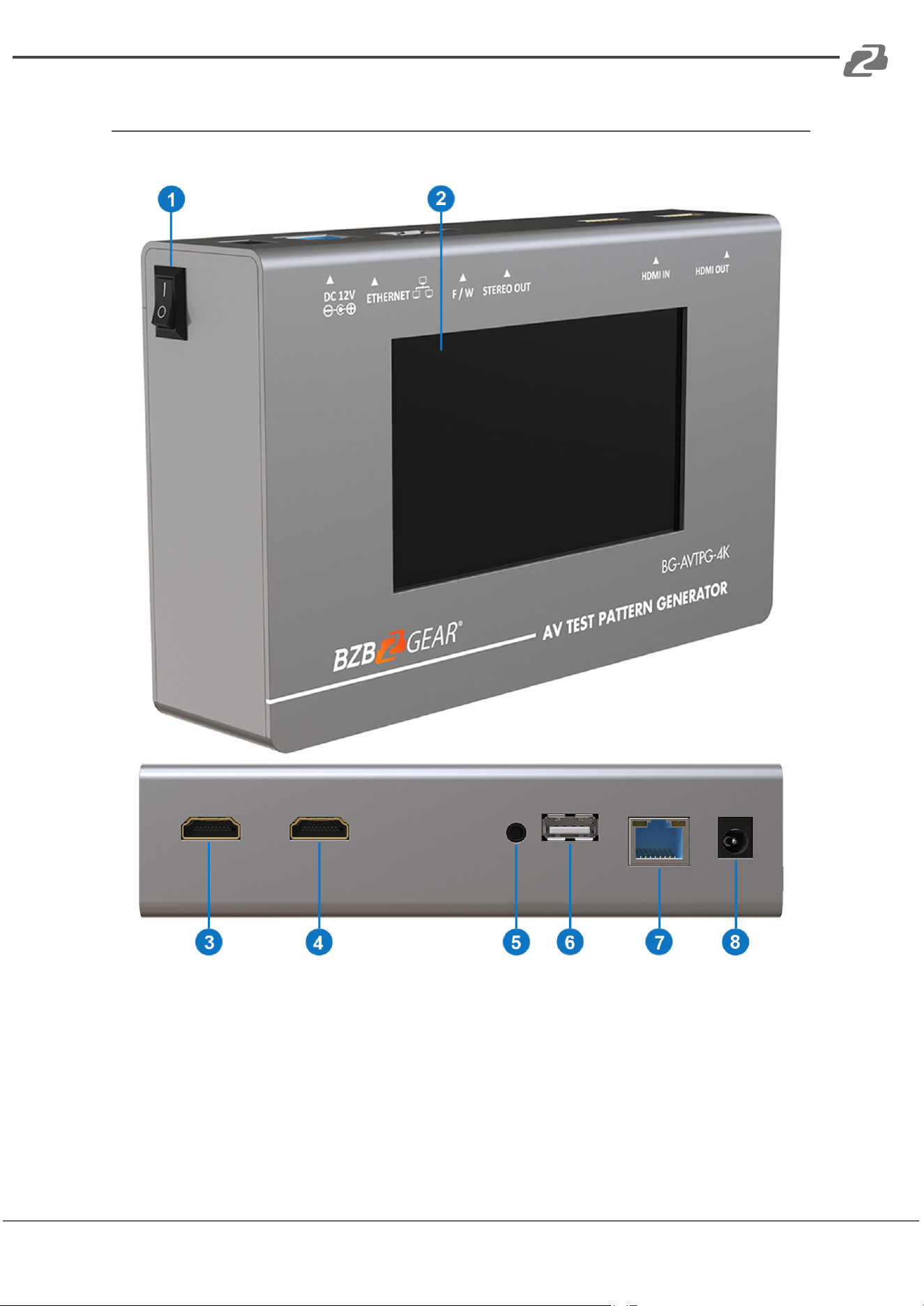
BG-AVTPG-4K:
1. Power Switch: Power ON/OFF switch
2. Touch Panel: Touch screen for control
3. OUTPUT: HDMI output. Crystal clear image with resolutions up to 4K2K@60Hz
4. INPUT: HDMI input. Crystal clear image with resolutions up to 4K2K@60Hz
5. Stereo Out: Stereo analog audio output for connecting to local audio system
6. USB: Connect to USB 2.0 device for control or firmware update
7. Ethernet: Network Control Connection
8. +12V DC: 12V 5A DC power jack. Use supplied Power Adapter
Address: 830 National Drive #140, Sacramento, CA 95834, USA · Tel: +1(888)499-9906 · Email: support@bzbgear.com 9
BZBGEAR BG-AVTPG-KIT PRODUCT MANUAL
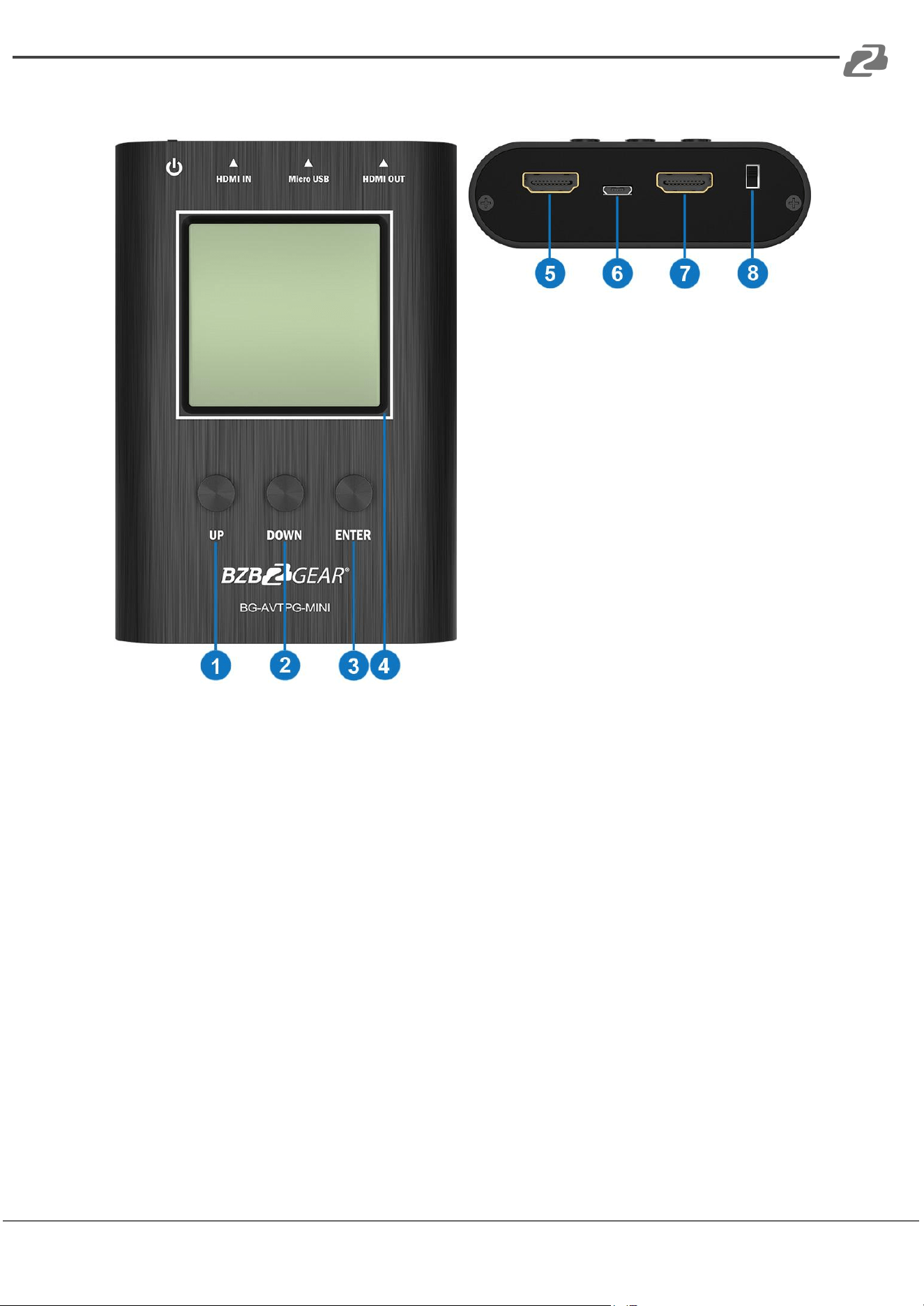
BG-AVTPG-MINI:
1. Button (UP)
2. Button (ENTER)
3. Button (DOWN)
4. LCD Display: the measured data is
shown here
5. OUTPUT: HDMI output
6. Micro-USB: Firmware update /
Recharge
7. INPUT: HDMI input
8. Power Switch: Power ON/OFF Switch
BG-AVTPG-MINI will automatically enter battery saving mode after 1 minute of idle. During
battery saving mode, if the user would like to wake the BG-AVTPG-MINI, press any button.
When plugging in an active HDMI input the BG-AVTPG-MINI will NOT enter battery saving
mode.
Address: 830 National Drive #140, Sacramento, CA 95834, USA · Tel: +1(888)499-9906 · Email: support@bzbgear.com 10
BZBGEAR BG-AVTPG-KIT PRODUCT MANUAL
Menu Operation
BG-AVTPG-4K
The major functions of the device are listed below
● HDMI Generator
● HDMI Receiver
● HDCP Test
● EDID Test
● Loop Test
Please refer to the table below and the following section to know how to operate these
functions.
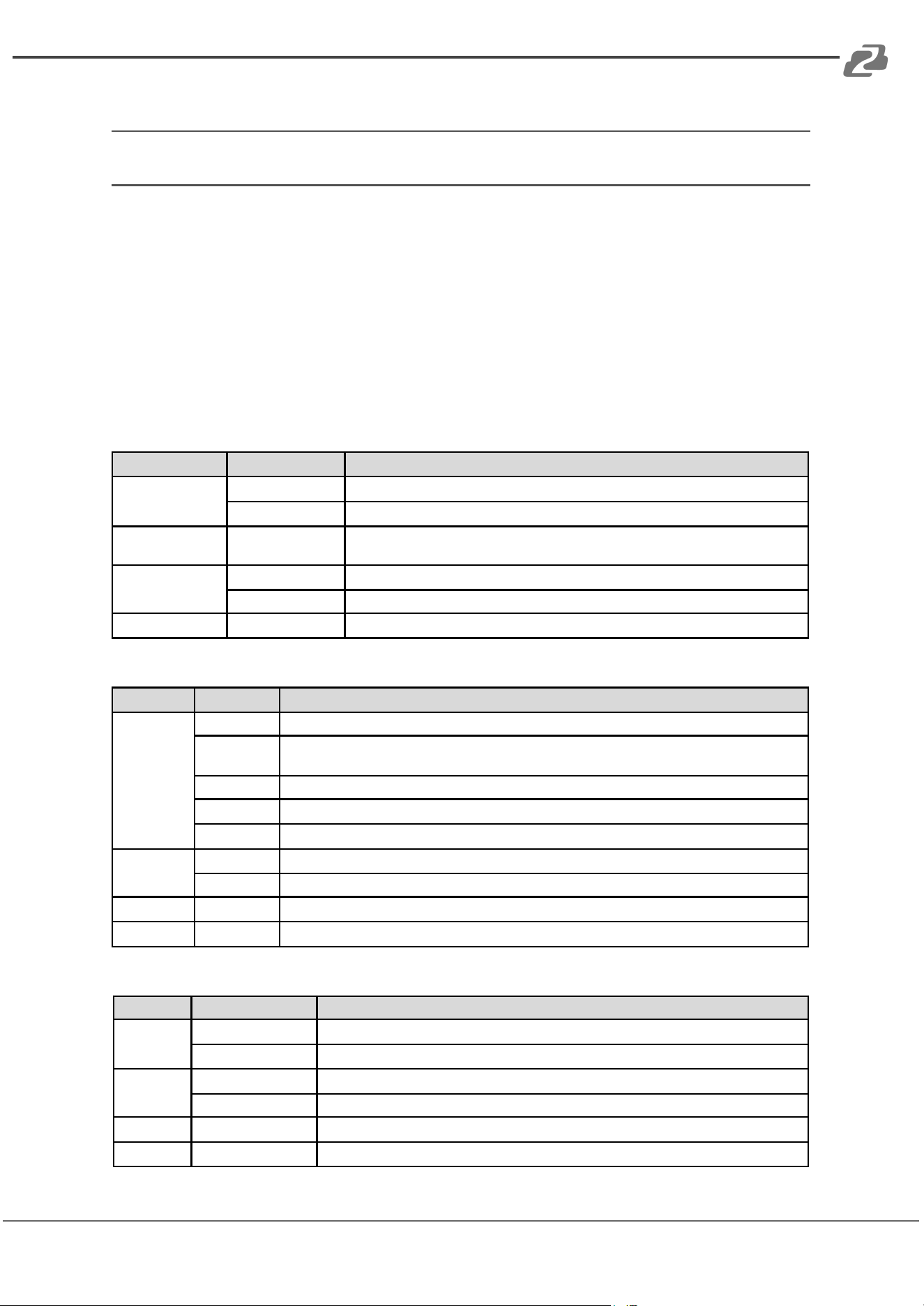
Output Settings
Menu
Items
Remark
Signal Format
TYPE
select the HDMI/DVI signal type information (color space and color depth)
RESOLUTION
setting the TV/PC resolution and frequency
VIDEO Pattern
DEFAULT ALBUM
multiple patterns to test HDMI device, it also provides user to set the timer and
moving squares
PCM Audio Tone
MUTE
mute / unmute the PCM audio
TONE
tor user setting the audio information to test audio on HDTV or other A/V receivers
Setting
SCRAMBLER
tor user to understand the signal encode a message situation
Test Setting
Menu
Items
Remark
Source
Format
read format information from source
Video
provide small screen tor user to check the video information and also provide video pass
through to the display
Audio
read audio information
Packet
read packet
HDCP
enable HDCP function (1.4/2.0)
Sink
EDID
EDID analyzer or learn EDID from RX
HDCP
HDCP test
Loop
evaluate the quality of cables or EUT
Measure
REFRESH
voltage measurement on +5V from HDMI source and hotplug from display
System Setting
Menu
Items
Remark
Preference
Screen Brightness
adjust the screen brightness
BEEP
ON/OFF system sound
Ethernet
DHCP
Static IP
Firmware
upgrade the firmware
Battery
battery status
Address: 830 National Drive #140, Sacramento, CA 95834, USA · Tel: +1(888)499-9906 · Email: support@bzbgear.com 11
BZBGEAR BG-AVTPG-KIT PRODUCT MANUAL
BG-AVTPG-MINI:
Menu
Display Items
Remark
SOURCE MODE
Resolution
Color space
Color depth
HDCP
Pattern
provide three test patterns for user to
use (Ramp, Toggle, Color Bar)
SINK MODE
Resolution
read the HDMI information from input
source
Color space
Color depth
HDCP
AUDIO
EDID
CABLE MODE
CED
link quality estimator ‘please refer to
cable mode section
CEC
HE AC
+5V
HPD
DDC
Address: 830 National Drive #140, Sacramento, CA 95834, USA · Tel: +1(888)499-9906 · Email: support@bzbgear.com 12
BZBGEAR BG-AVTPG-KIT PRODUCT MANUAL
Operation Approach BG-AVTPG-4K
Generator
BG-AVTPG-4K as HDMI Generator
After making the physical connections between BG-AVTPG-4K and the display device.
Users can select different generator functions to display on the sink device under test.
1. Selecting the Signal Format. BG-AVTPG-4K provides different signal resolutions
and signal types for users to select. Users can touch the Signal Format Tab to select
the signal type (HDMI / DVI) and signal resolution (HDTV / PC). The HDTV resolution
is up to 4K2K 60Hz and PC resolution is up to 1920x1200 60Hz.
2. Rendering Test Patterns on an HDTV. BG-AVTPG-4K provides multiple test
patterns for the user to test HDTV. Users can select the desired test pattern from the
video pattern menu.
3. User Defined Pattern. Besides the embedded test patterns, BG-AVTPG-4K also
allows users to use custom test images. For more details please see the Upgrade
BG-AVTPG-4K section.
4. Testing Digital Audio on an HDTV or A/V Receiver. The PCM Audio Tone menu
provides users with tools to test audio on HDTV or other A/V receivers. In the PCM
SINE WAVE menu, users can set up the bits per sample, sample rate, level, and
audio channel.
Address: 830 National Drive #140, Sacramento, CA 95834, USA · Tel: +1(888)499-9906 · Email: support@bzbgear.com 13
BZBGEAR BG-AVTPG-KIT PRODUCT MANUAL
1. Testing HDCP on an HDMI TV or HDMI device. BG-AVTPG-4K provides a tool to
test HDCP on an HDMI equipped HDTV. For more details please see the HDCP test
section.
Receiver
BG-AVTPG-4K as HDMI Analyzer
1. Source Information from the HDMI source. In the Test/Source menu, users can
touch the read/refresh button to get the video format, source audio, and packet
information from the HDMI source device.
2. Testing the Video from the HDMI source. BG-AVTPG-4K supports the incoming
video from the HDMI source/device to ensure the user is receiving valid video
signals by displaying the information of the incoming signal. The video information
also will inform users whether the HDCP is encrypted or not. Return to the Video
menu by touching the touch panel (please stay at least 5 seconds).
Address: 830 National Drive #140, Sacramento, CA 95834, USA · Tel: +1(888)499-9906 · Email: support@bzbgear.com 14
BZBGEAR BG-AVTPG-KIT PRODUCT MANUAL
HDCP Test
BG-AVTPG-4K as HDCP Receiver
When BG-AVTPG-4K set as receiver it can verify HDCP of the video player or other device
under test. BG-AVTPG-4K provides three options HDCP 1.4 / HDCP 2.2 / no HDCP for
users to select and confirm the HDCP authentication of the device under test.
BG-AVTPG-4K as HDCP Transmitter
Address: 830 National Drive #140, Sacramento, CA 95834, USA · Tel: +1(888)499-9906 · Email: support@bzbgear.com 15
BZBGEAR BG-AVTPG-KIT PRODUCT MANUAL
When BG-AVTO-4K is set as a transmitter, it can transmit HDCP encrypted video. It also
provides three modes (HDCP 1.4 / HDCP 2.2 / no HDCP) and if the user wants to transmit
HDCP encrypted video again, simply select the Auto-Restart button.
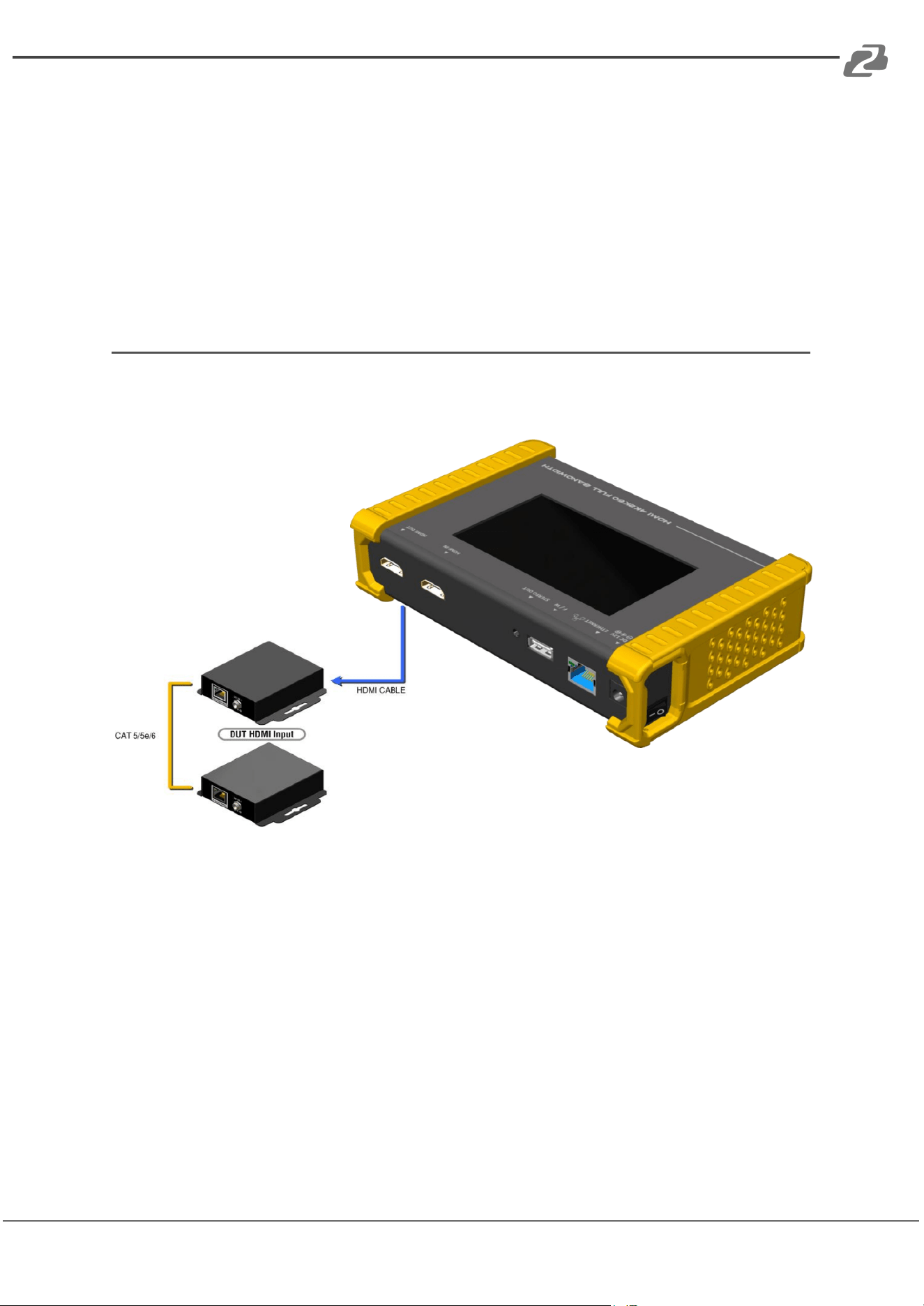
Procedure for Testing HDCP:
● Connect the BG-AVTPG-4K HDMI output port and the display.
● Select HDCP Test from the Sink Test Menu.
● Touch Enable HDCP 1.4 or Enable HDCP 2.2 button.
EDID analysis
BG-AVTPG-4K offers the most convenient way for user to analyze the EDID. You can verify,
view and learn the EDID of an HDMI HDTV or other devices.
Procedure of EDID Analyze:
● Ensure the connections between the BG-AVTPG-4K HDMI output port and the
device are secure.
● Select EDID Analyze from the Sink Test Menu.
● Touch the Read button to get the EDID information of DUT.
Procedure of learning EDID from RX:
● Ensure the connections between the BG-AVTPG-4K HDMI output port and the
device are secure.
● Select EDID Analyze from the Sink Test Menu.
● Touch the Learn from RX button to learn the EDID. The EDID will be saved in the
BG-AVTPG-4K input port.
Address: 830 National Drive #140, Sacramento, CA 95834, USA · Tel: +1(888)499-9906 · Email: support@bzbgear.com 16
BZBGEAR BG-AVTPG-KIT PRODUCT MANUAL
Loop Test
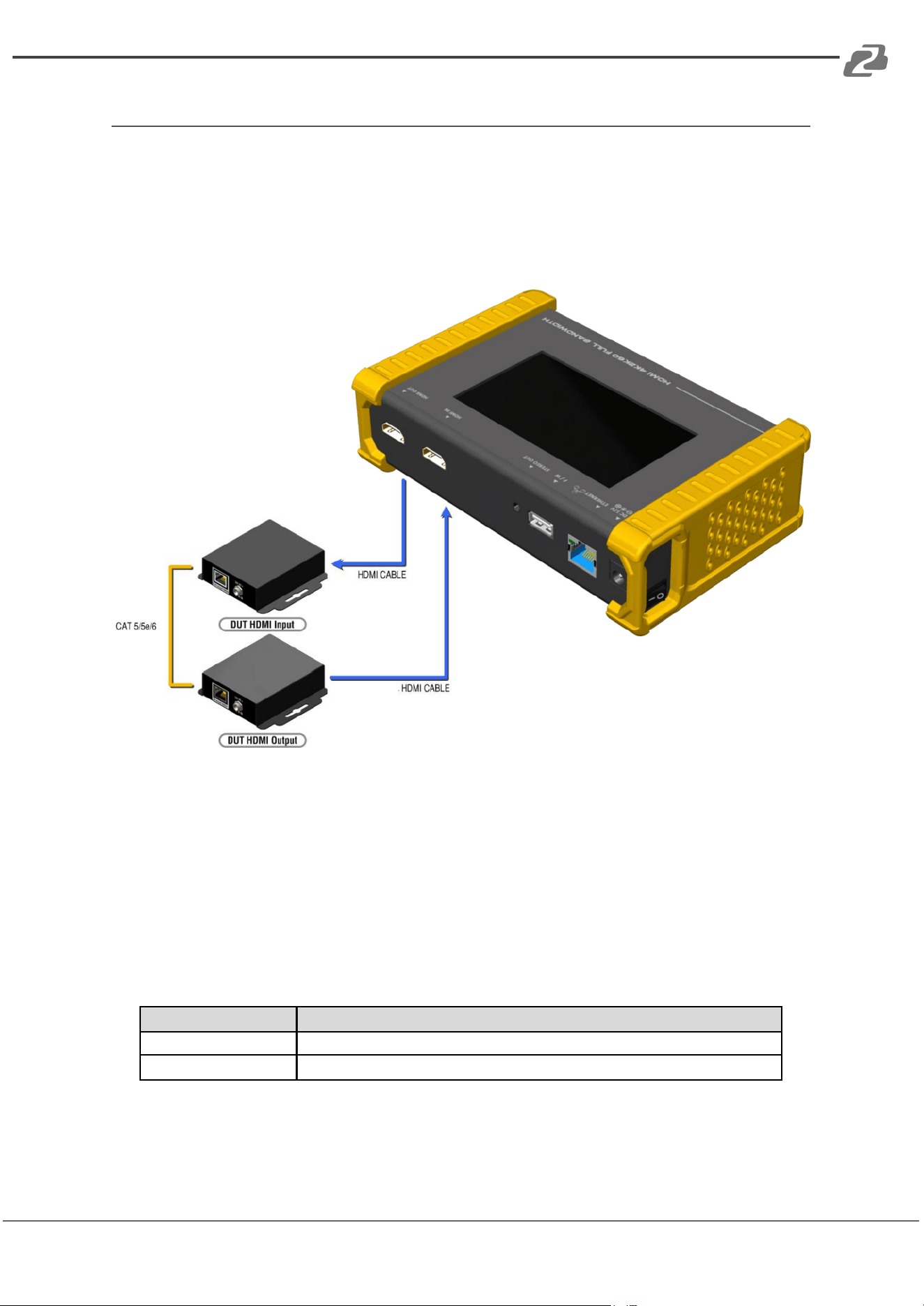
BG-AVTPG-4K offers a unique estimator for evaluating the quality of cables or devices
under test. Users can simply connect the cable or device under test to BG-AVTPG-4K to
form a loop, the monitor will examine the HDMI bitstream pixel by pixel. The measurement
statistics will be displayed on screen and offer useful information for building a robust A/V
system.
Procedure of Loop Test: *only support 1080p@60, 4K2K 30Hz and 4K2K 60Hz resolutions
● Ensure the connection between the BG-AVTPG-4K and the device under test or
cables are fully connected.
● Select Loop Test from the Loop Test Menu.
● Set the test time and touch the START button. The BG-AVTPG-4K will capture the
signal from its transmitter through the loop and evaluate the transmission quality.
● The user interface of BG-AVTPG-4K will be locked until testing is terminated.
● Judgement criteria:
Test Result
Definition
Pass
The value of Bit Error Rate is less than 1
Fail
The Bit Error Rate is more than 1
*Plugging an HDMI cable will influence the testing result, so please settle down the
connection.
Address: 830 National Drive #140, Sacramento, CA 95834, USA · Tel: +1(888)499-9906 · Email: support@bzbgear.com 17
BZBGEAR BG-AVTPG-KIT PRODUCT MANUAL
Operation Approach BG-AVTPG-4K
Source Mode
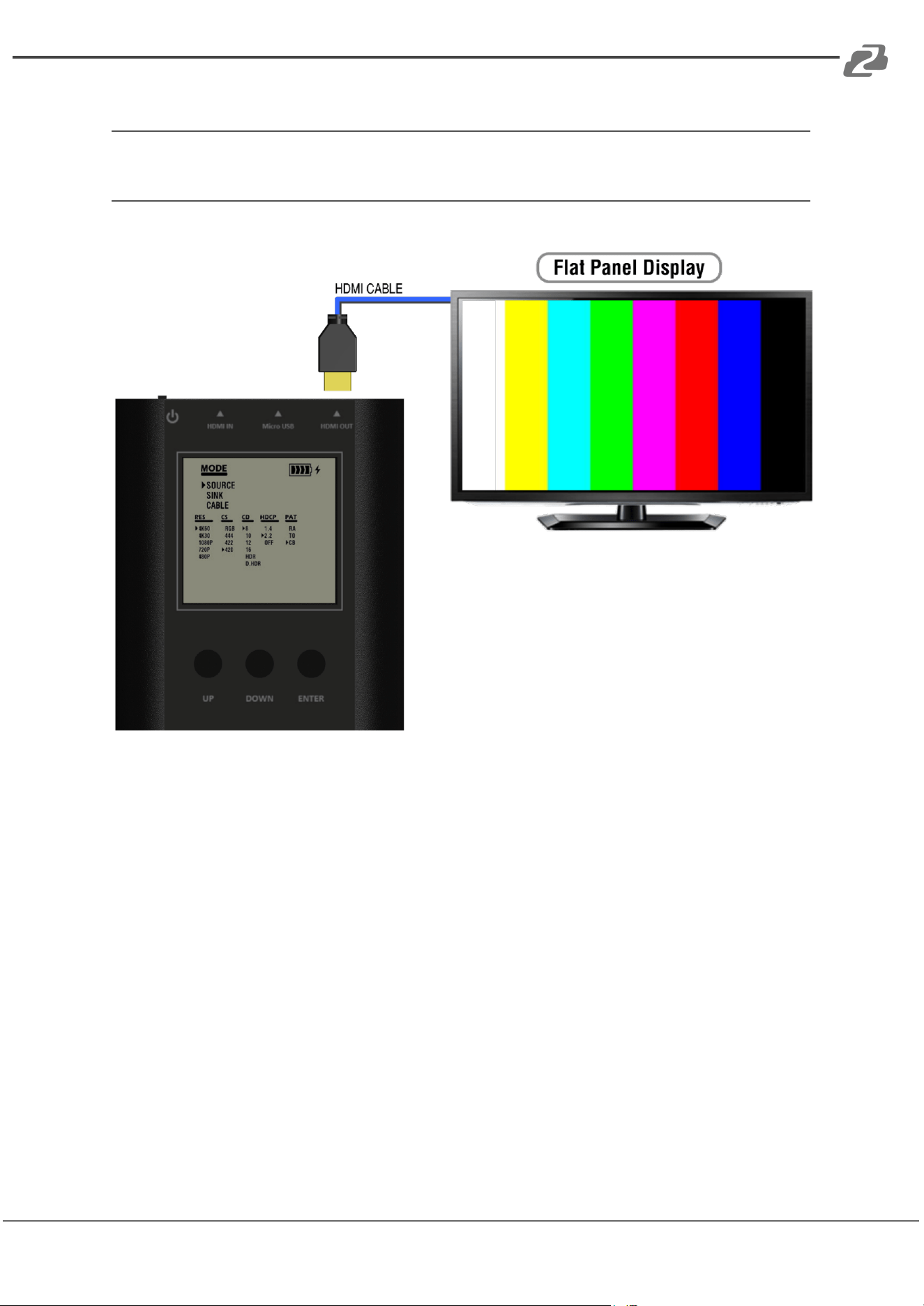
How to run Source Mode:
● Make sure to connect the BG-AVTPG-MINI HDMI output port and the display.
● Use buttons to select MODE category and enter SOURCE mode.
● Use buttons to set up the output signal format and video testing pattern.
Address: 830 National Drive #140, Sacramento, CA 95834, USA · Tel: +1(888)499-9906 · Email: support@bzbgear.com 18
BZBGEAR BG-AVTPG-KIT PRODUCT MANUAL
Sink Mode
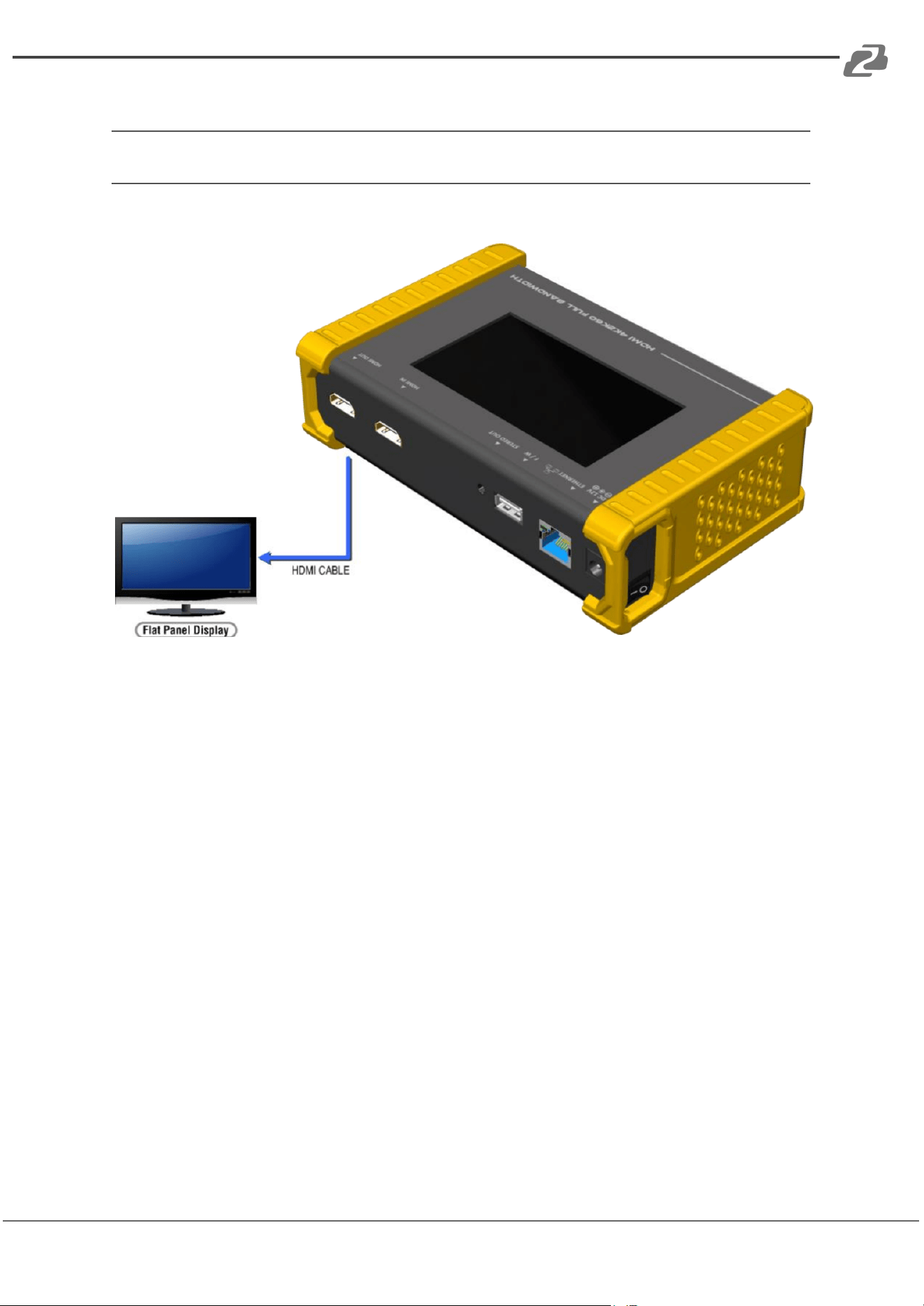
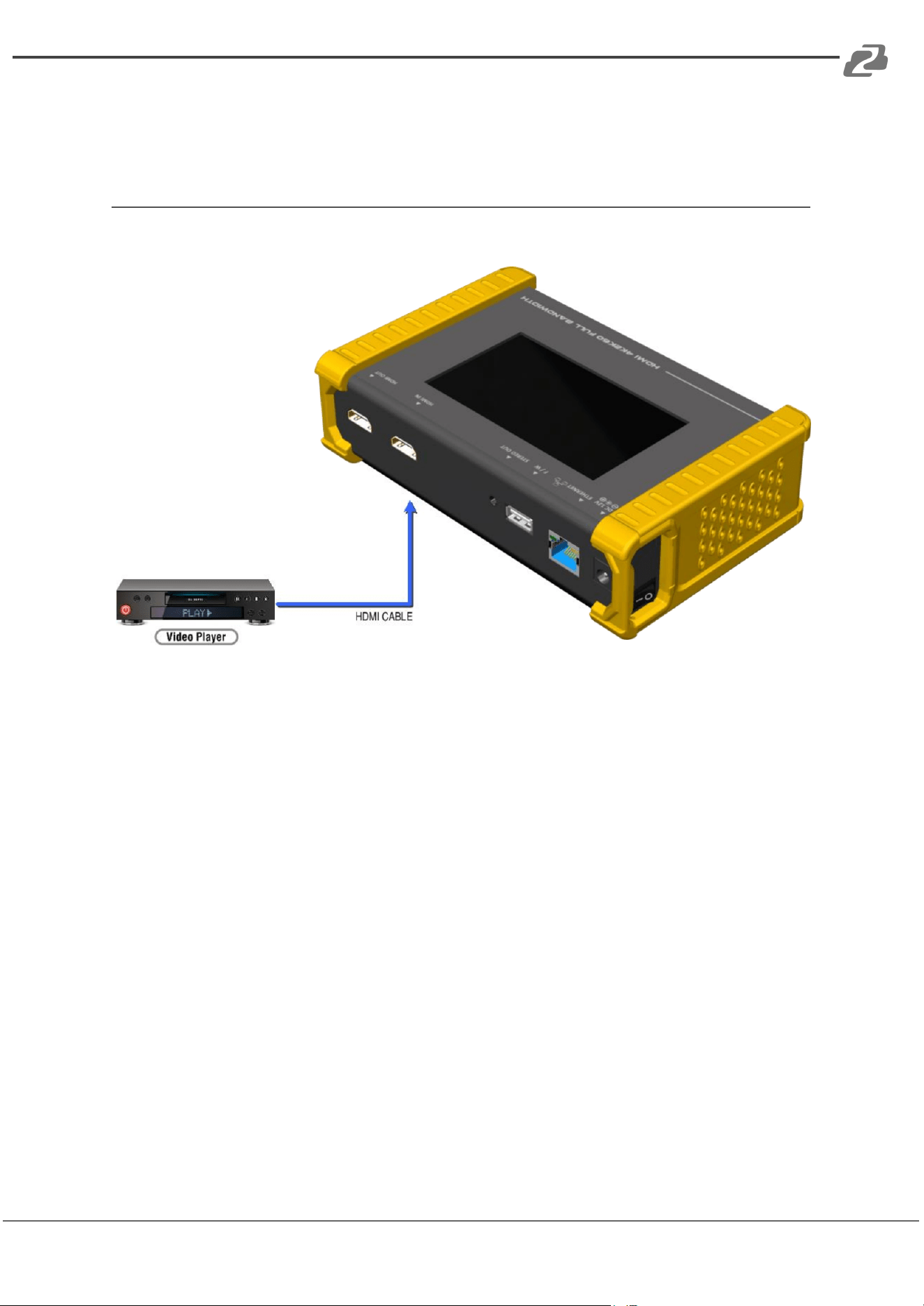
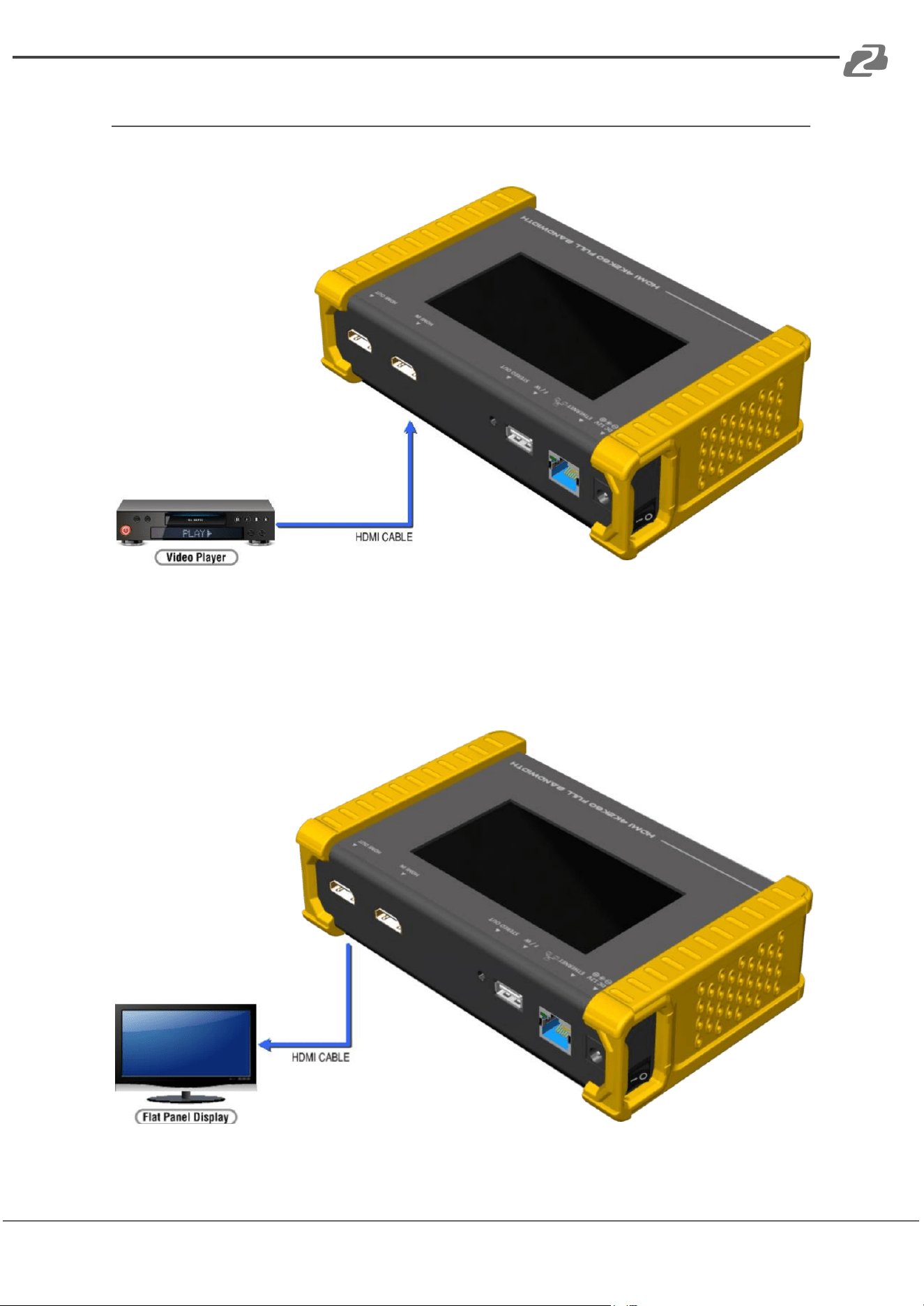
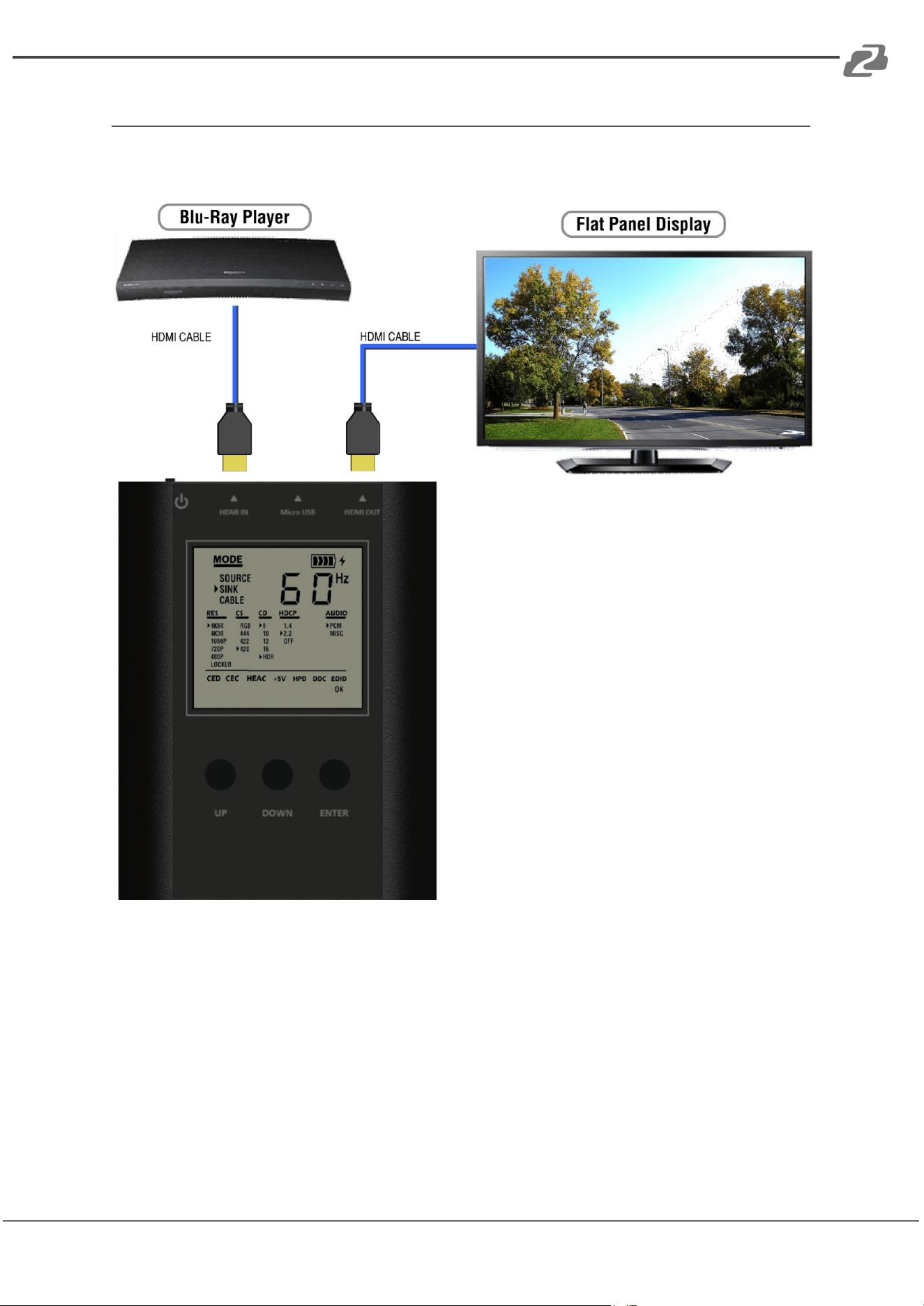
When BG-AVTPG-MINI is in sink mode, it can read the HDMI source’s information and the
input HDMI can be passed through to an HDMI capable display if needed (as shown below).
How to run Sink Mode:
● Connect the BG-AVTPG-MINI between HDMI source and HDMI display.
● Use buttons to select MODE category and select SINK mode.
● The source information will be present on the LCD. The process of acquiring HDMI
information will take about 3~5 seconds.
Address: 830 National Drive #140, Sacramento, CA 95834, USA · Tel: +1(888)499-9906 · Email: support@bzbgear.com 19
BZBGEAR BG-AVTPG-KIT PRODUCT MANUAL
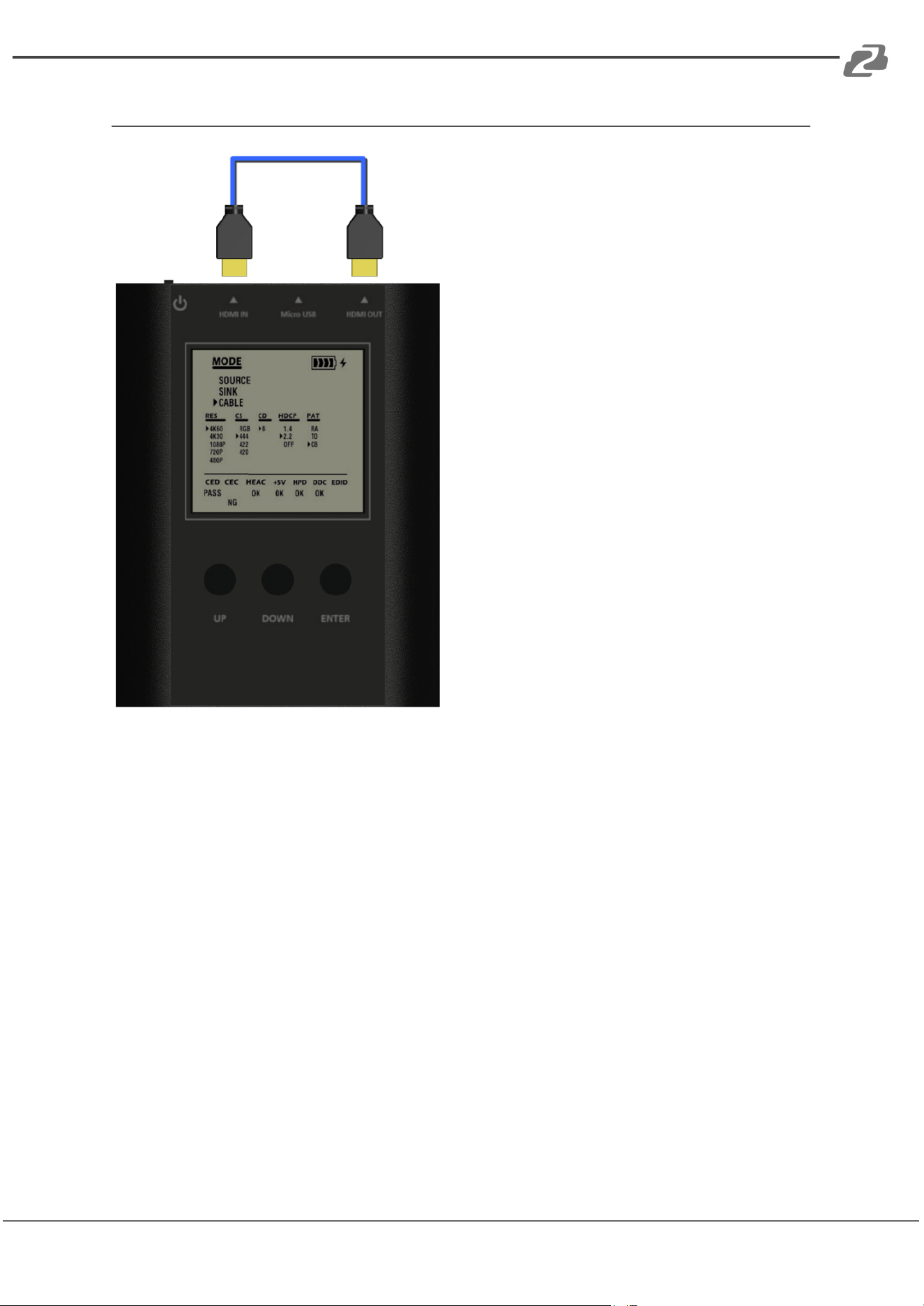
Cable Mode
In this mode, BG-AVTPG-MINI offers a link
quality estimator using a Character Error
Detection mechanism to HDMI 2.0
specifications. The estimator can provide a
basic link quality evaluation regarding the
cable or any other HDMI link connected to
BG-AVTPG-MINI.
Please note that the evaluation result can
provide an insight into the link quality under
testing but it does not always reflect the real
robustness of an HDMI 2.0 full bandwidth
connection.
The stability of the full bandwidth of an HDMI
2.0 connection is affected not only by the
cable or link quality but many other factors
such as the signal integrity of the source, the
ambient temperature, the reception of the
display, and so on. Therefore the testing
results are just for reference.
How to run Cable Mode:
● Ensure a tight connection between the BG-AVTPG-MINI and the cable.
● Use the buttons to select the MODE category and enter CABLE mode.
● Keep pressing ENTER button for about 5 seconds to start the link test. The
BG-AVTPG-MINI will evaluate the HDMI signal quality based on HDMI 2.0
specifications and provide a result, PASS or NG. Please note that during testing the
BG-AVTPG-MINI will NOT take any commands from the buttons except ENTER.
Pressing ENTER continuously for 5 seconds will terminate the evaluation process.
Address: 830 National Drive #140, Sacramento, CA 95834, USA · Tel: +1(888)499-9906 · Email: support@bzbgear.com 20

BZBGEAR BG-AVTPG-KIT PRODUCT MANUAL
● Performance Criteria:
According to HDMI 2.0 specification, the performance criteria is shown in the
following table.
Test Result
Requirement
PASS
The error counts of signal are less than signal clock x 10-6
NG
The error counts of signal are more than signal clock x 10-6
Please be advised that the test result is based on the cable connection and the signal
integrity of both input and output from BG-AVTPG-MINI. The indicator is usually a good
reference for cable quality, but any other source or display in consideration plays an
important role in the final stability of the HDMI 2.0 connection.
Address: 830 National Drive #140, Sacramento, CA 95834, USA · Tel: +1(888)499-9906 · Email: support@bzbgear.com 21

BZBGEAR BG-AVTPG-KIT PRODUCT MANUAL
Ethernet Control (TCP/IP)
BG-AVTPG-4K also provides user control through Ethernet. The Ethernet control includes
many major functions, it can offer user develop software to do advance setting. (TCP Port:
6133)
Reply Format:
● Received = ACK + Feedback Date
● ACK: 0xaa 0xbb 0xcc
● Feedback Date: Data0 Data1 Data2….
Command Set:
*Bold word part please refer to corresponding table
COMMAND
ACTION
REMARK
0x4d 0x53 0x5 0x0 0x0 0x5 0x1 Res
Set output resolution
Hexadecimal
0x4d 0x53 0x5 0x0 0x0 0x5 0x2
Get output resolution
0x4d 0x53 0x5 0x0 0x0 0x5 0x3 Mode
Set output mode
0x4d 0x53 0x5 0x0 0x0 0x5 0x4
Get output mode
0x4d 0x53 0x5 0x0 0x0 0x5 0x5 Depth
Set output color depth
0x4d 0x53 0x5 0x0 0x0 0x5 0x6
Get output color depth
0x4d 0x53 0x5 0x0 0x0 0x5 0x7 Pattern
Set default pattern
Hexadecimal
0x4d 0x53 0x5 0x0 0x0 0x5 0x8 Pattern
Set user pattern
Hexadecimal
0x4d 0x53 0x5 0x0 0x0 0x5 0x9 Mute
Set audio mute
0x4d 0x53 0x5 0x0 0x0 0x5 Oxa
Get audio mute status
0x4d 0x53 0x5 0x0 0x0 0x5 Oxb Length
Set audio length
0x4d 0x53 0x5 0x0 0x0 0x5 Oxc
Get audio length
0x4d 0x53 0x5 0x0 0x0 0x5 Oxd Level
Set audio level
0x4d 0x53 0x5 0x0 0x0 0x5 Oxe
Get audio level
0x4d 0x53 0x5 0x0 0x0 0x5 Oxf Rate
Set audio sample rate
0x4d 0x53 0x5 0x0 0x0 0x5 0x10
Get audio sample rate
0x4d 0x53 0x5 0x0 0x0 0x5 0x11 Number
Set audio channel number
0x4d 0x53 0x5 0x0 0x0 0x5 0x12
Get audio channel number
0x4d 0x53 0x5 0x0 0x0 0x5 0x13 HDCP
Set TX HDCP on/off
0x4d 0x53 0x5 0x0 0x0 0x5 0x14
Get TX HDCP on/off
0x4d 0x53 0x5 0x0 0x0 0x5 0x15 HDCP
Set RX HDCP on/off
0x4d 0x53 0x5 0x0 0x0 0x5 0x16
Get RX HDCP on/off
Address: 830 National Drive #140, Sacramento, CA 95834, USA · Tel: +1(888)499-9906 · Email: support@bzbgear.com 22
BZBGEAR BG-AVTPG-KIT PRODUCT MANUAL
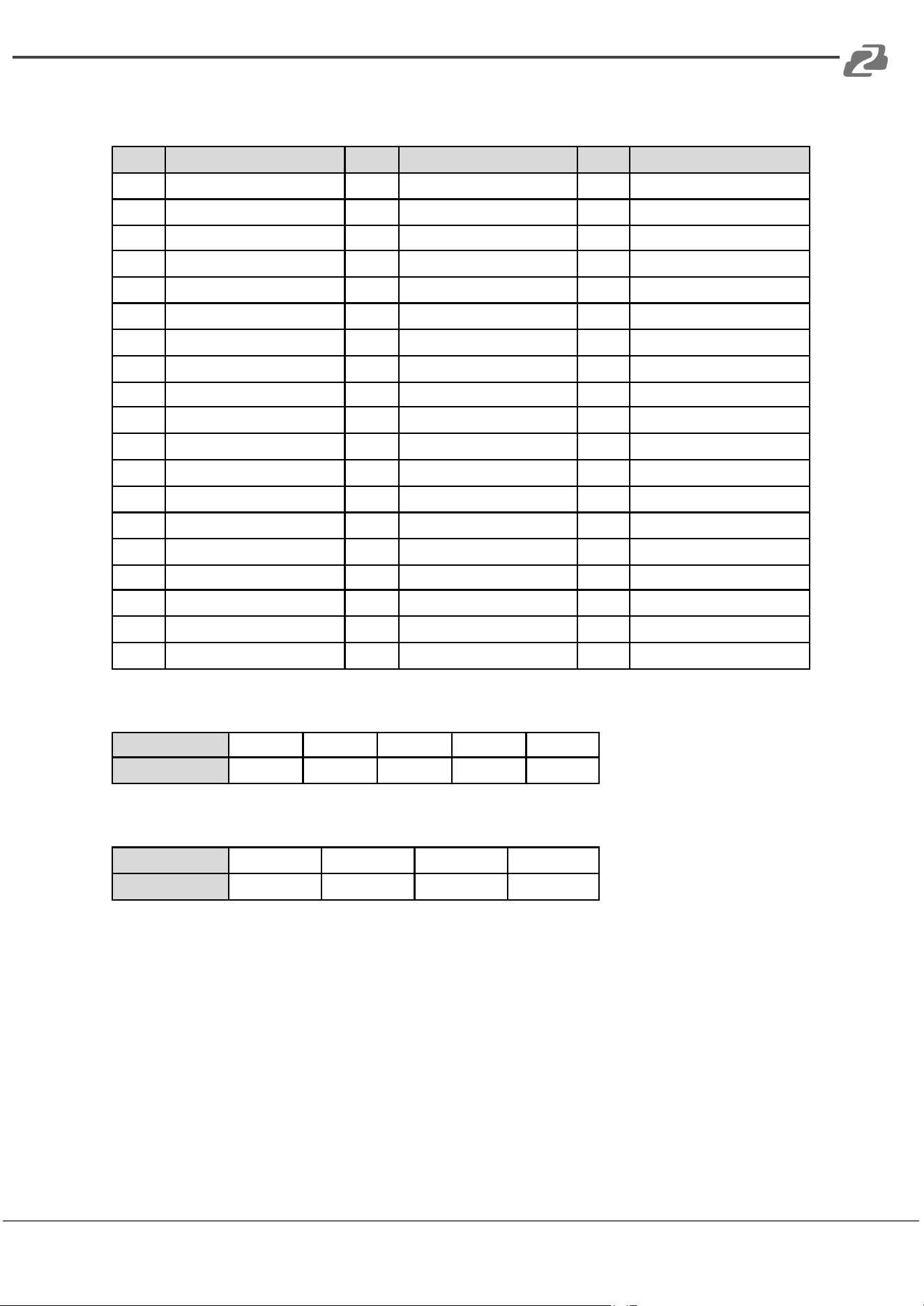
Resolution:
Index
Resolution
Index
Resolution
Index
Resolution
0x0
720x480i@60
0x13
1920x1080p@24
0x26
1920xl200pRB
0x1
720x576i@50
0x14
0x27
3840x2160p@60
0x2
720x480p@60
0x15
640x480p@60
0x28
0x3
720x576p@50
0x16
640x480p@75
0x29
3840x2160p@50
0x4
1280x720p@60
0x17
800x600p@60
0x2a
3840x2160p@30
0x5
1280x720p @59.94
0x18
800x600p@75
0x2b
0x6
1280x720p@50
0x19
1024x768p@60
0x2c
3840x2160p@25
0x7
1280x720p@30
0x1a
1024x768p@75
0x2d
3840x2160p@24
0x8
1280x720p @29.97
0x1b
1280x1024p@60
0x2e
0x9
1280x720p@25
0x1c
1280x1024p@75
0x2f
1920x1080p@60
0xa
1920x1080i@60
0x1d
1360x768p@60
0x30
4096x2160p@60
0xb
1920x1080i @59.94
0x1e
1366x768p@60
0x31
0xc
1920x1080i@50
0x1f
1400x1050p@60
0x32
4096x2160p@50
0xd
N/a
0x20
1600xl200p@60
0x33
4096x2160p@30
0xe
0x21
1440x900p@60
0x34
0xf
1920x1080p@50
0x22
1440x900p@75
0x35
4096x2160p@25
0x10
1920x1080p@30
0x23
1680x1050p@60
0x36
4096x2160p@24
0x11
0x24
1680x1050pRB
0x37
0x12
1920x1080p@25
0x25
1920x1080pRB
Mode:
Index
0x0
0x1
0x2
0x3
0x4
Mode
DVI
RGB
YCbCr444
YCbCr422
YCbCr420
Depth:
Index
0x0
0x1
0x2
0x3
Depth
8 Bit
10 Bit
12 Bit
16 Bit
Address: 830 National Drive #140, Sacramento, CA 95834, USA · Tel: +1(888)499-9906 · Email: support@bzbgear.com 23
BZBGEAR BG-AVTPG-KIT PRODUCT MANUAL
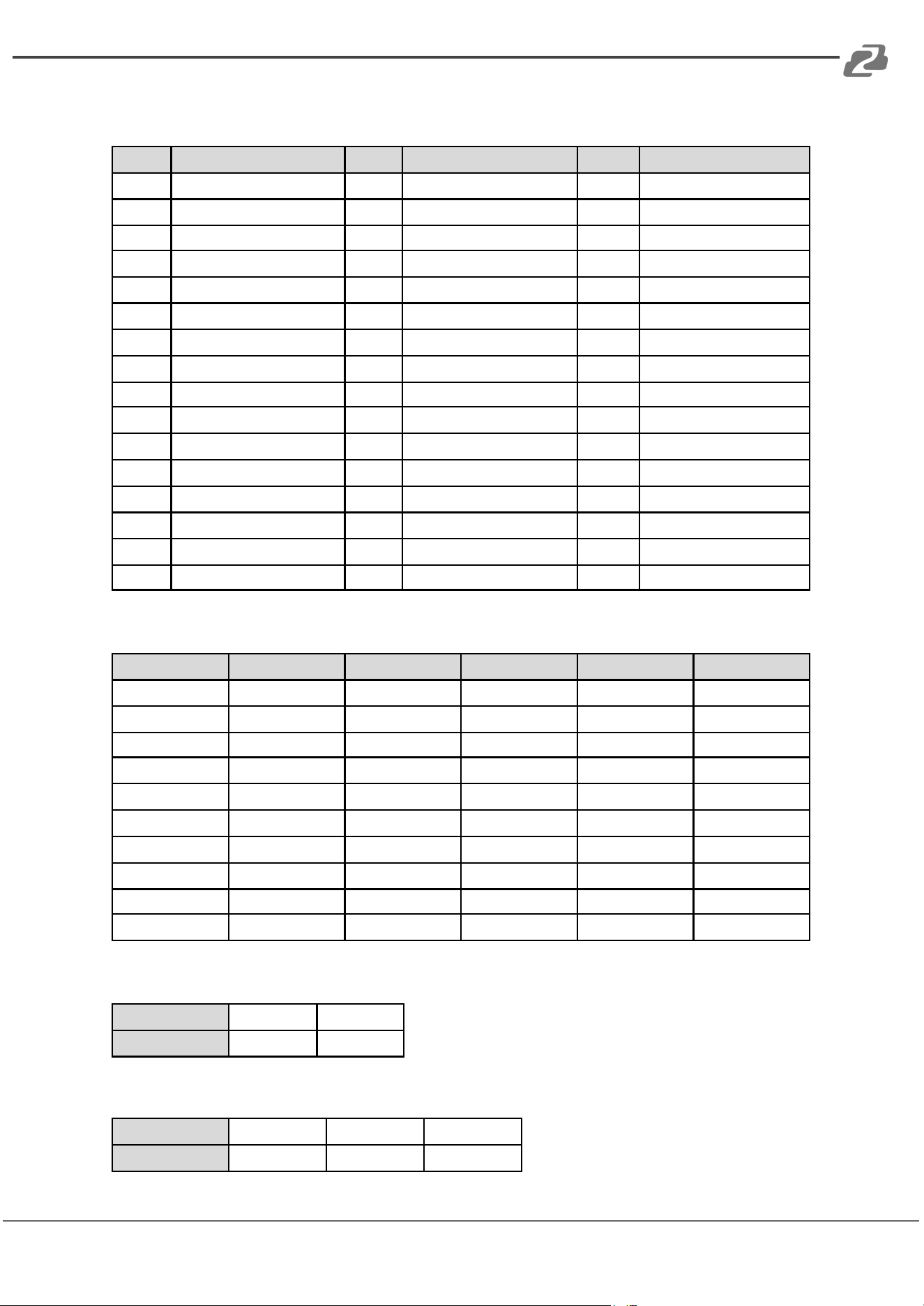
Default Pattern:
Index
Default Pattern
Index
Default Pattern
Index
Default Pattern
0x0
SMPTE BAR
0x10
Ramp Green V 2
0x20
Black
0x1
TV Bar 100%
0x11
Ramp Blue V 2
0x21
Noise
0x2
TV Bar 75%
0x12
Stair Red 1
0x22
Circle 1
0x3
Checkfield
0x13
Stair Red 2
0x23
Circle 2
0x4
EQ
0x14
Stair Green 1
0x24
Moire
0x5
PLL
0x15
Stair Green 2
0x25
V Stripe Red
0x6
Ramp Red H 1
0x16
Stair Blue 1
0x26
V Stripe Green
0x7
Ramp Green H 1
0x17
Stair Blue 2
0x27
V Stripe Blue
0x8
Ramp Blue H 1
0x18
Stair White 1
0x28
H Stripe Red
0x9
Ramp Red H 2
0x19
Stair White 2
0x29
H Stripe Green
0xa
Ramp Green H 2
0x1a
Red 100
0x2a
H Stripe Blue
0xb
Ramp Blue H 2
0x1b
Green 100
0x2b
Chess 1
0xc
Ramp Black to Red V
0x1c
Blue 100
0x2c
Chess 2
0xd
Ramp Green V 1
0x1d
White 100
0x2d
Multi Burst
0xe
Ramp Blue V 1
0x1e
Gray 70
0x2e
CZP
0xf
Ramp Red V 2
0x1f
Gray 40
0x2f
Overscan
User Pattern:
Index
User Pattern
Index
User Pattern
Index
User Pattern
0x0
Philips
0xa
Ramp W-4
0x14
Graybar64 G-l
0x1
Checker 3x3
0xb
Graybar32 R-l
0x15
Graybar64 B-l
0x2
Checker 6x6-1
0xc
Graybar32 G-l
0x16
Graybar64 W-l
0x3
Checker 6x6-2
0xd
Graybar32 B-l
0x17
Graybar64 R-2
0x4
White 75
0xe
Graybar32 W-l
0x18
Graybar64 G-2
0x5
White 50
0xf
Graybar32 R-2
0x19
Graybar64 B-2
0x6
White 25
0x10
Graybar32 G-2
0x1a
Graybar64 W-2
0x7
Ramp W-l
0x11
Graybar32 B-2
0x1b
User Add..
0x8
Ramp W-2
0x12
Graybar32 W-2
0x1c
User Add..
0x9
Ramp W-3
0x13
Graybar64 R-l
0x1d
....
Mute:
Index
0X0
0X1
Mute
OFF
ON
Length:
Index
0x0
0x1
0x2
Length
24 bits
20 bits
16 bits
Address: 830 National Drive #140, Sacramento, CA 95834, USA · Tel: +1(888)499-9906 · Email: support@bzbgear.com 24
BZBGEAR BG-AVTPG-KIT PRODUCT MANUAL
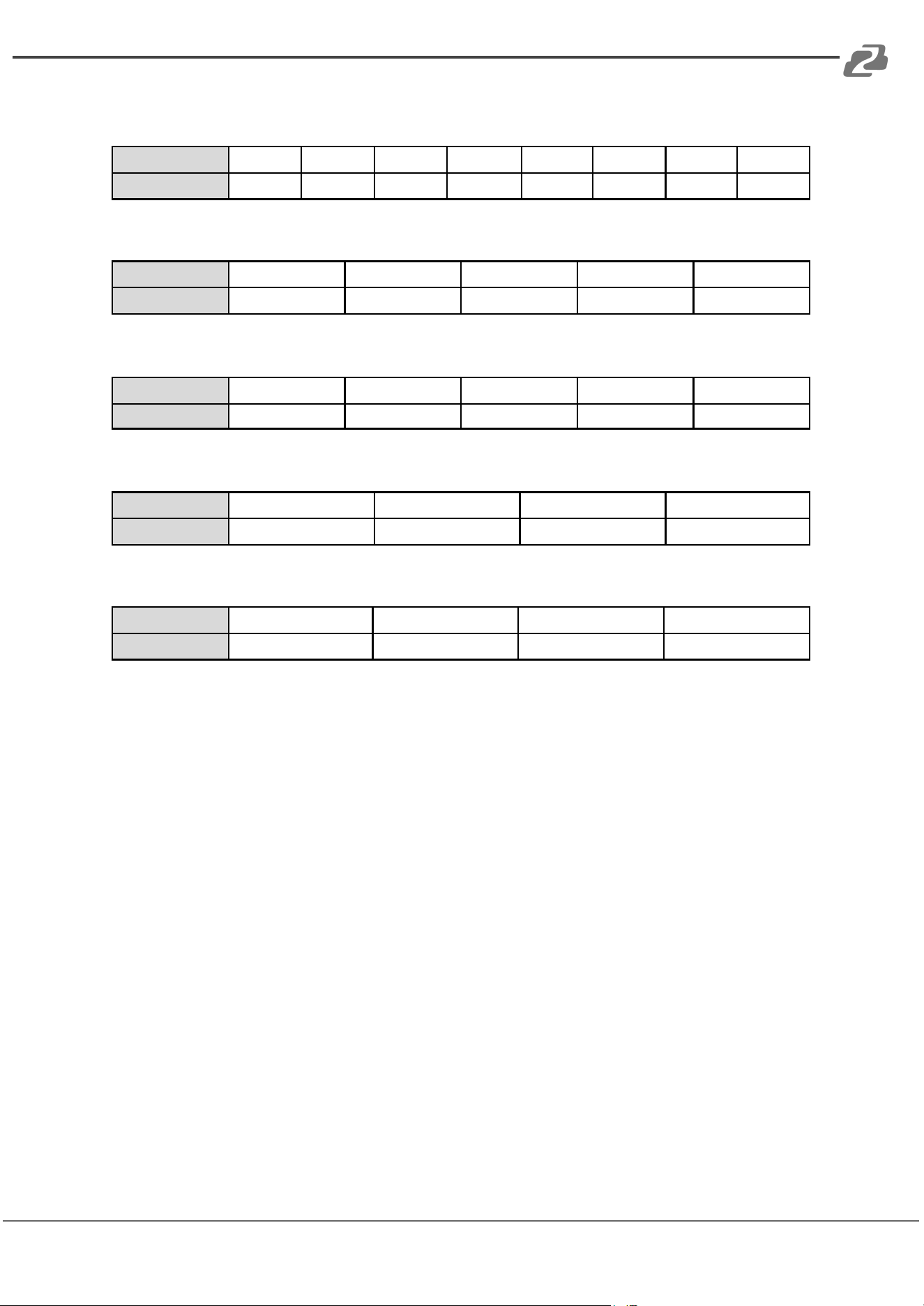
Level:
Index
0x0
0x1
0x2
0x3
0x4
0x5
0x6
0x7
Level
Level 0
Level 1
Level 2
Level 3
Level 4
Level 5
Level 6
Level 7
Rate:
Index
0x0
0x1
0x2
0x3
0x4
Rate
48 KHz
96 KHz
192 KHz
32 KHz
44.1 KHz
Number:
Index
0x0
0x1
0x2
0x3
0x4
Number
2 Ch
2.1 Ch
5.1 Ch
6.1 Ch
7.1 Ch
TX HDCP:
Index
0x0
0x1
0x2
0x3
TX HDCP
off
HDCP 1.4
HDCP 2.2 TypeO
HDCP 2.2 Type 1
RX HDCP:
Index
0x0
0x1
0x2
0x3
RX HDCP
off
HDCP 1.4
HDCP 2.2
HDCP 1.4 & HDCP 2.2
Address: 830 National Drive #140, Sacramento, CA 95834, USA · Tel: +1(888)499-9906 · Email: support@bzbgear.com 25
BZBGEAR BG-AVTPG-KIT PRODUCT MANUAL
Upgrade BG-AVTPG-4K
User can upgrade the firmware and pattern on the BG-AVTPG-4K through the USB
interface. If users encounter a problem with the upgrade, please contact the supplier of
BG-AVTPG-4K.
Procedure for Firmware Upgrade:
*Before updating the firmware of BG-AVTPG-4K, please ensure that the new firmware files
are in the root directory of USB Flash Drive. The file suffix is .dat.
● System
➢ Ensure the gui.dat and sysyem.dat files are in the root directory of USB.
➢ Connect the USB Flash Drive on BG-AVTPG-4K USB interface.
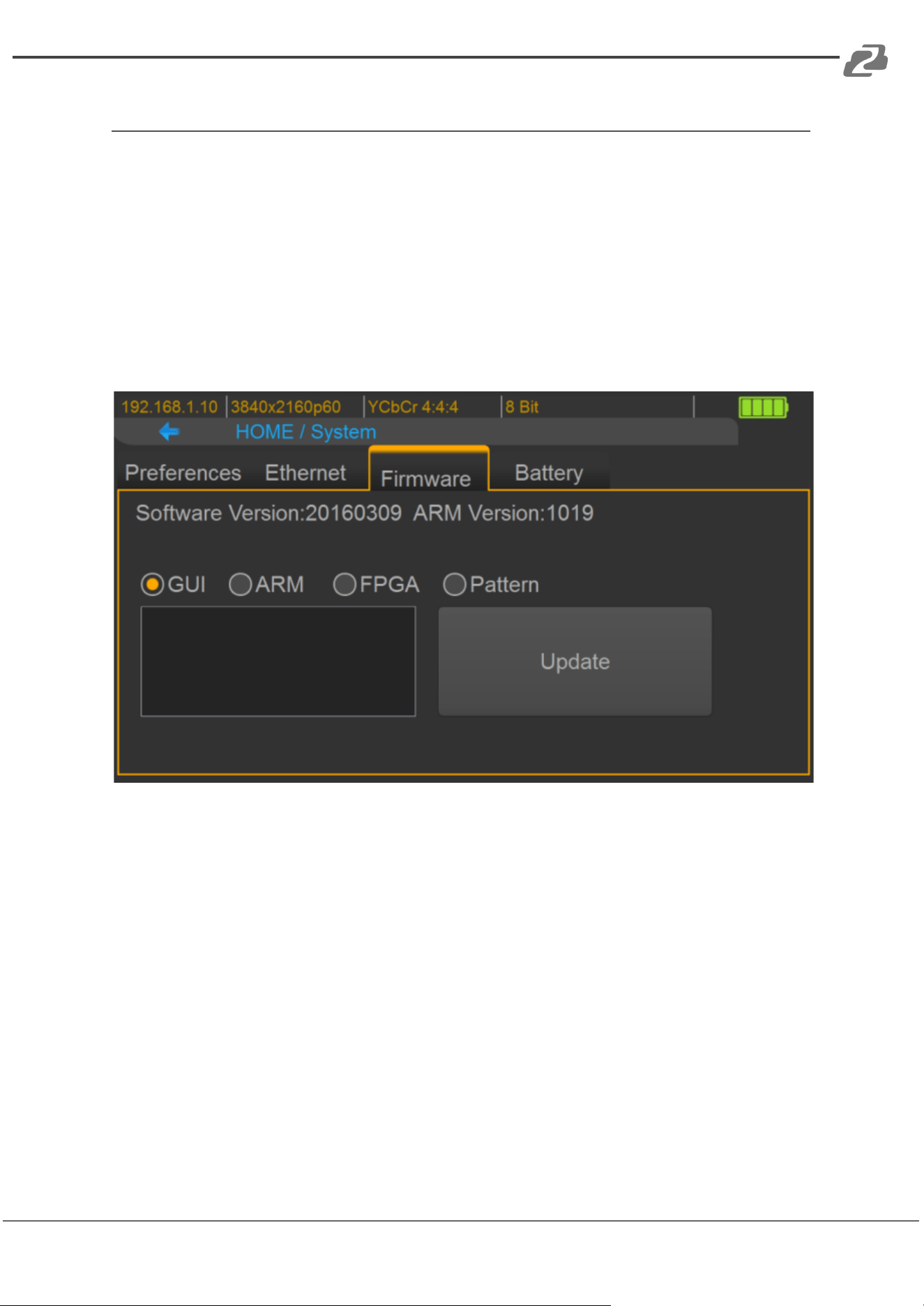
➢ Select the Firmware tab from the System Menu and choose the GUI button.
➢ Touch the Update button to perform the firmware update. The process of
firmware update will take about 3~5 seconds.
➢ While updating, please do not remove the USB Flash Drive.
➢ After completing the firmware update, please reboot the BG-AVTPG-4K.
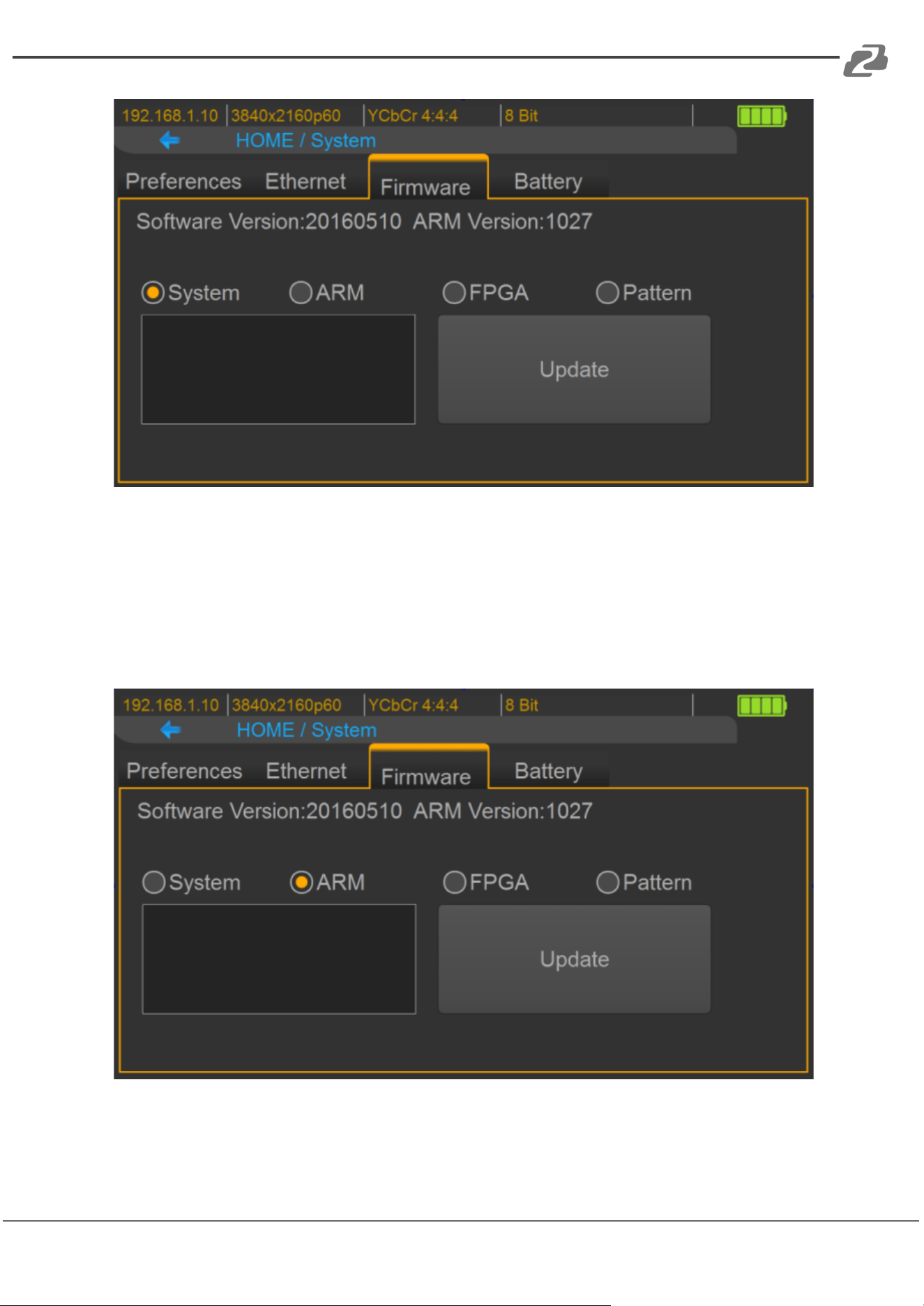
➢ Select Firmware from the system Menu and choose the System button.
Address: 830 National Drive #140, Sacramento, CA 95834, USA · Tel: +1(888)499-9906 · Email: support@bzbgear.com 26
BZBGEAR BG-AVTPG-KIT PRODUCT MANUAL
➢ Touch the Update button to do firmware update. The process of firmware
update will take about 3~5 seconds. While updating, please do not remove
the USB Flash Drive.
➢ After completing the firmware update, please reboot the BG-AVTPG-4K
● ARM
➢ Make sure the arm.dat file is in the root directory of USB.
➢ Connect the USB Flash Drive on BG-AVTPG-4K USB interface.
Address: 830 National Drive #140, Sacramento, CA 95834, USA · Tel: +1(888)499-9906 · Email: support@bzbgear.com 27
BZBGEAR BG-AVTPG-KIT PRODUCT MANUAL
➢ Select Firmware from the System Menu and choose the ARM button.
➢ Touch the Update button to do firmware update. The process of firmware
update will take about
➢ 5~10 seconds. While updating, please do not remove the USB Flash Drive.
● FPGA
➢ Ensure the fpga.dat file is in the root directory of USB.
➢ Connect the USB Flash Drive on BG-AVTPG-4K USB interface.
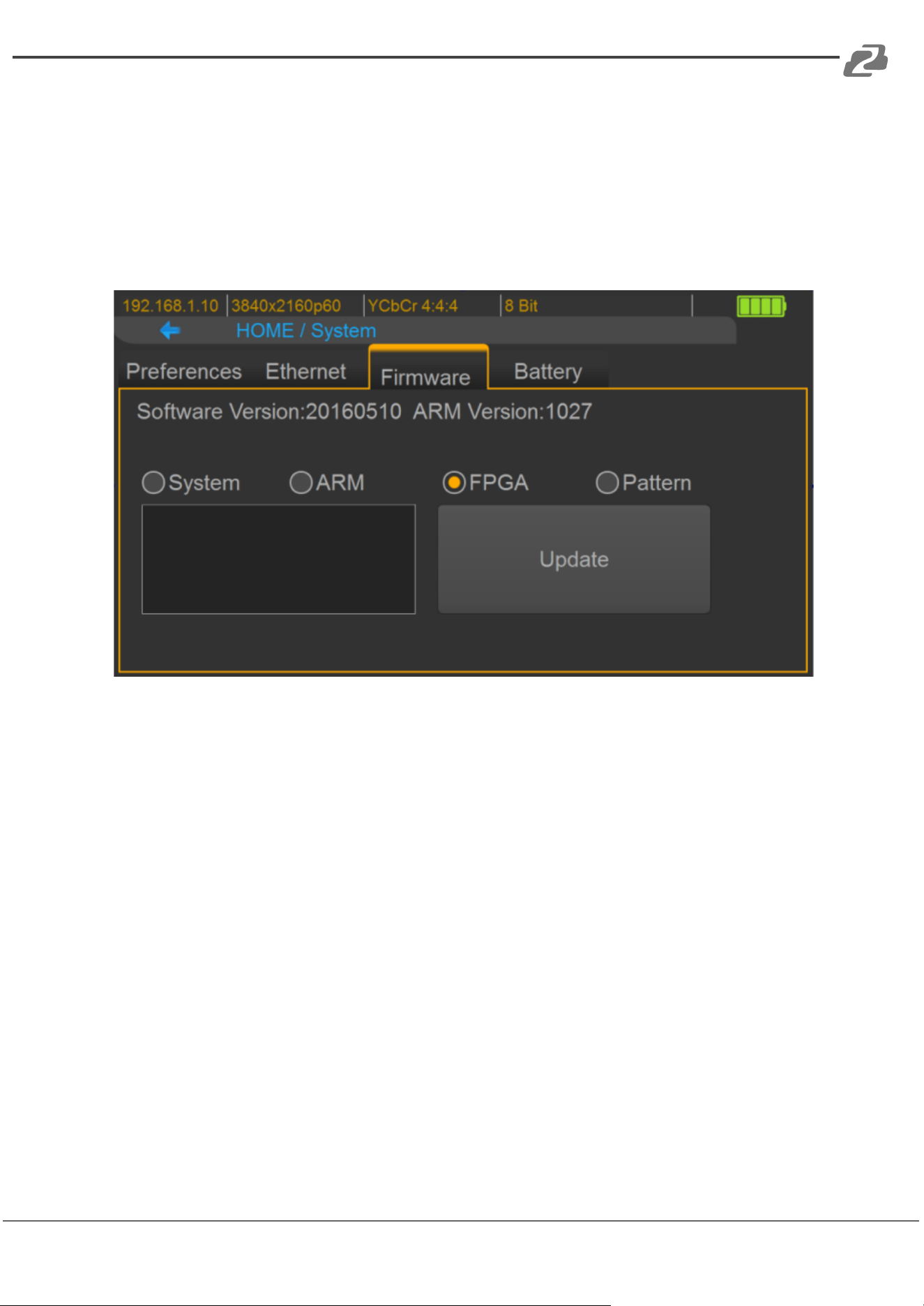
➢ Select Firmware from the System Menu and choose the FPGA button.
➢ Touch the Update button to do firmware update. The process of firmware
update will take about 5~10 seconds. While updating, please do not remove
the USB Flash Drive.
Address: 830 National Drive #140, Sacramento, CA 95834, USA · Tel: +1(888)499-9906 · Email: support@bzbgear.com 28
BZBGEAR BG-AVTPG-KIT PRODUCT MANUAL
● Pattern
➢ Create a folder named “usr_pic” on USB Flash Drive.
➢ Ensure the file of pattern which user desires to update on the BG-AVTPG-4K
is in the usr_pic directory of USB Flash Drive. The file suffix is .jpg.
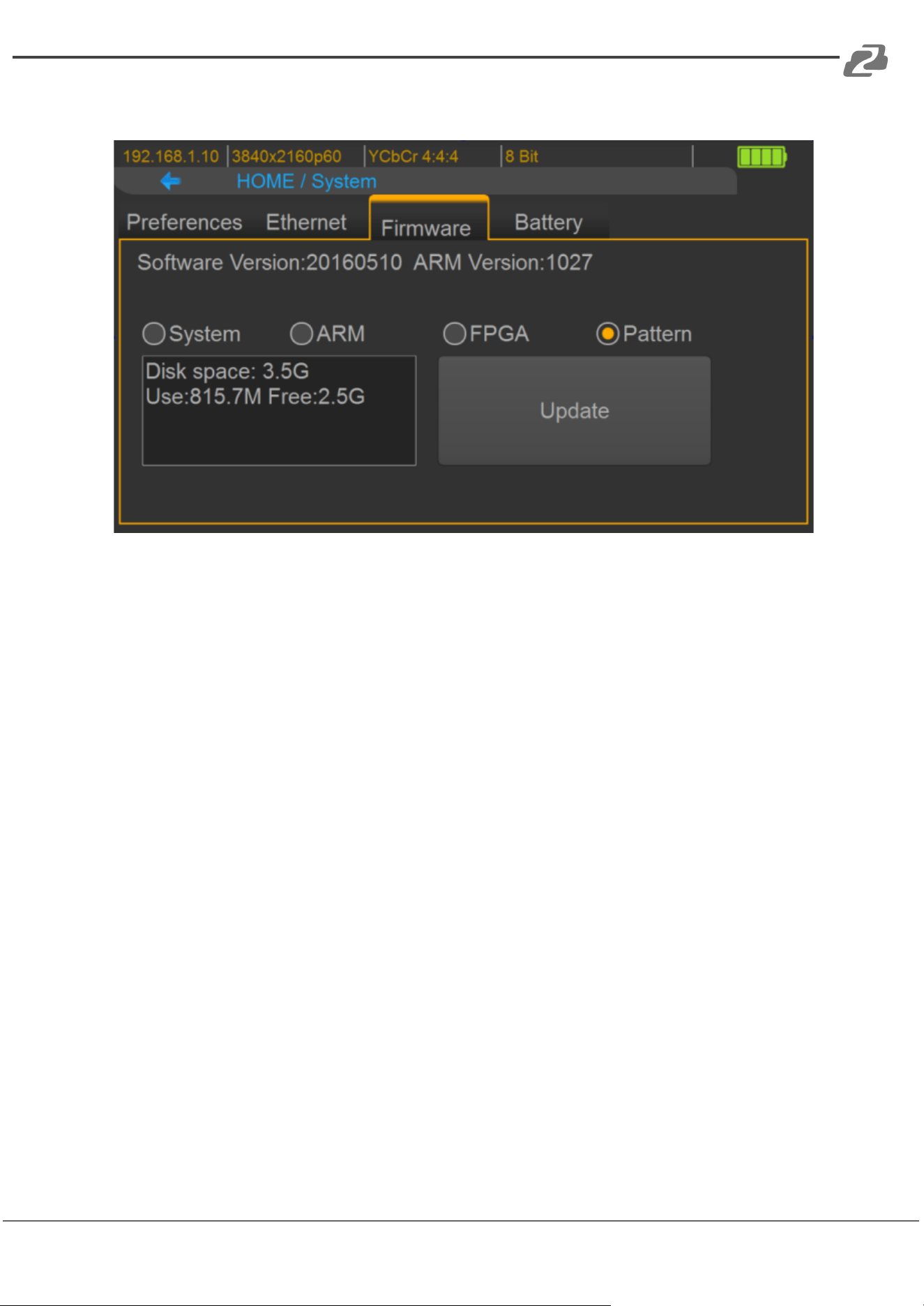
➢ Before updating the user defined pattern, please confirm the capacity of the
BG-AVTPG-4K.
➢ Select Firmware from the System Menu and choose the Pattern button.
➢ Touch the Update button to upgrade the user defined pattern. The process
running time will depend on the file size, please wait patiently.
Address: 830 National Drive #140, Sacramento, CA 95834, USA · Tel: +1(888)499-9906 · Email: support@bzbgear.com 29
BZBGEAR BG-AVTPG-KIT PRODUCT MANUAL
Eye Pattern
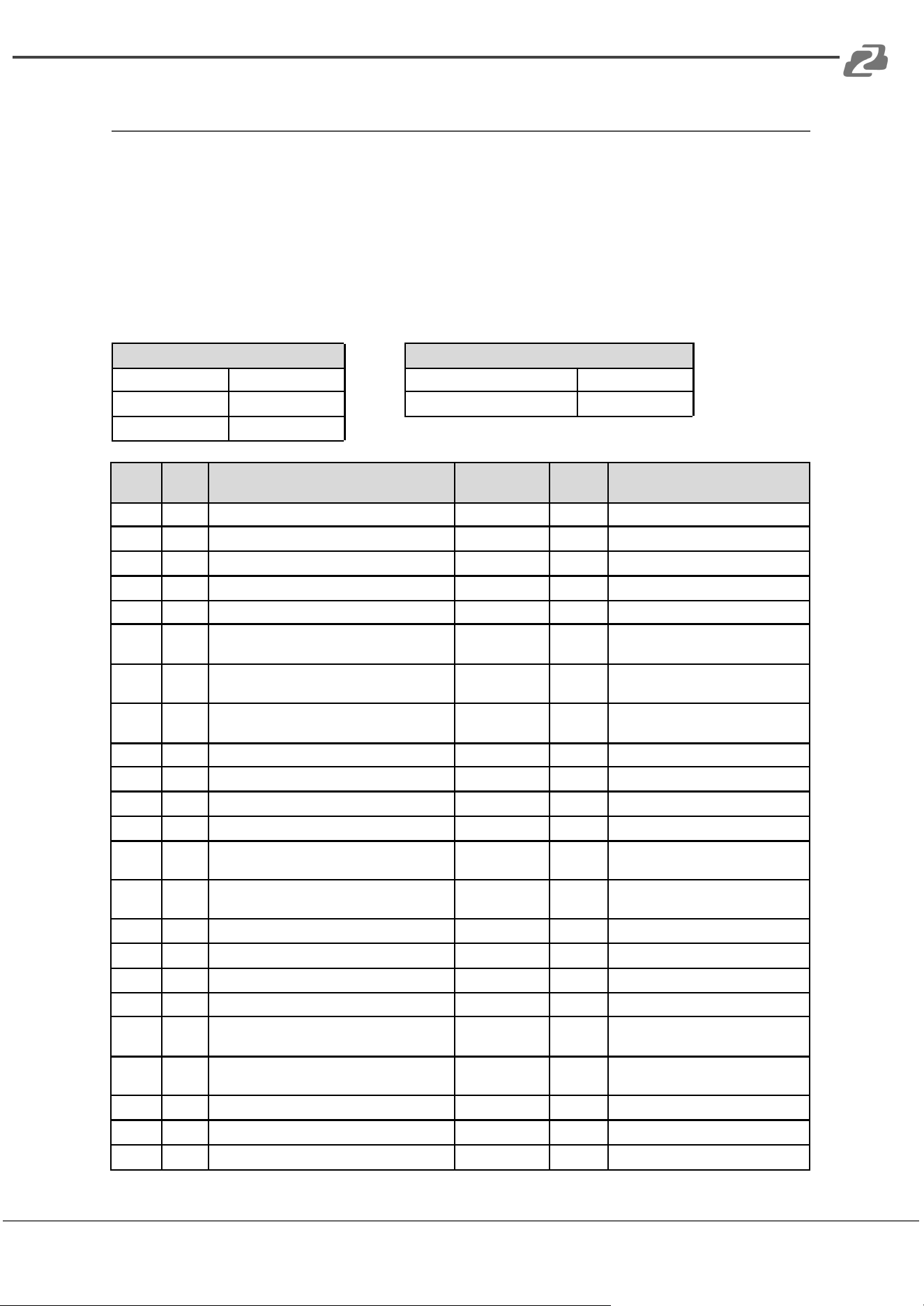
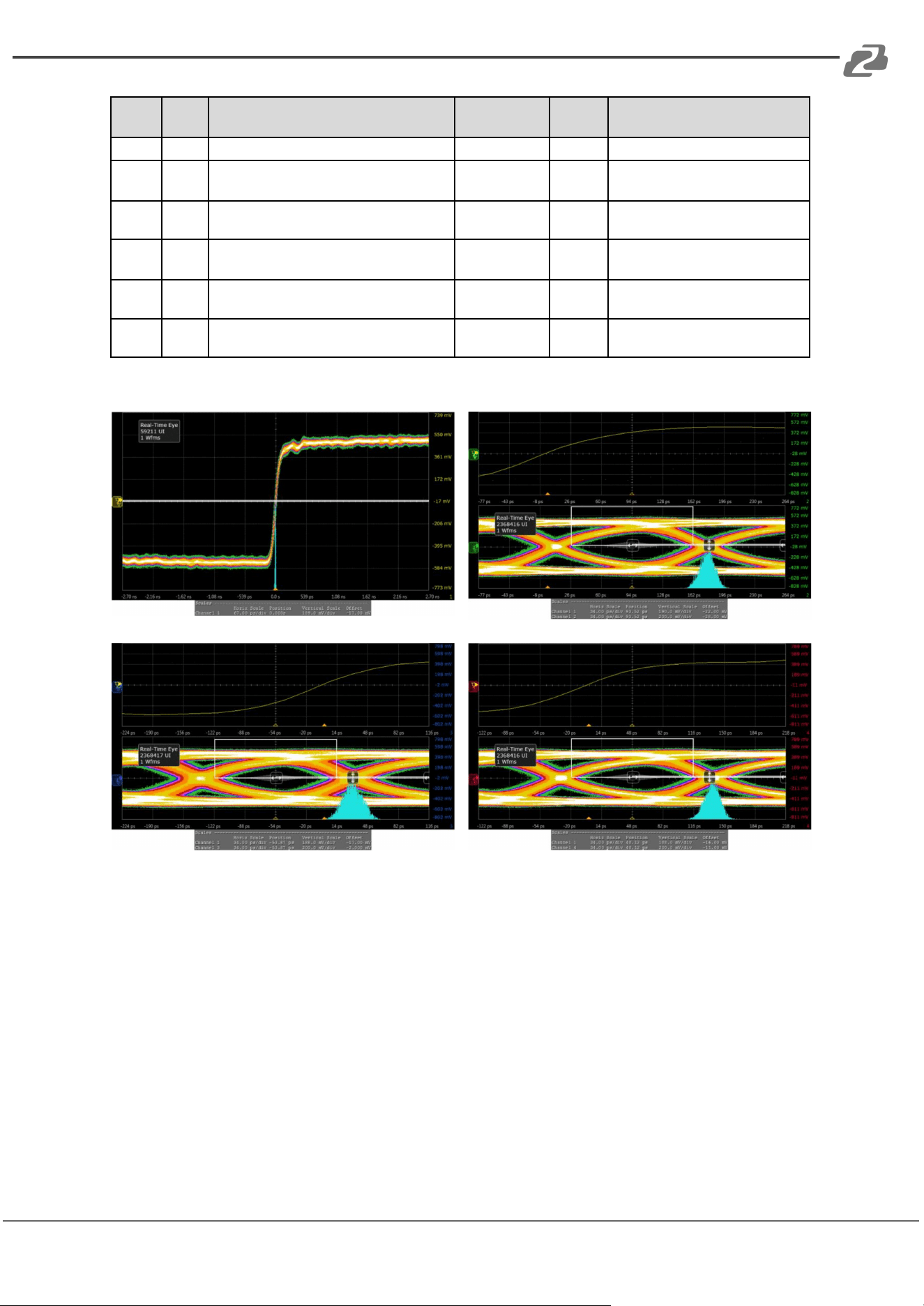
The device has been approved and supports a high performance oscilloscope
(MSOX92004A) to ensure quality. The test result of this device (with Simplo battery) is
shown as below:
*This result is representative of the BG-AVTPG-4K. Each BG-AVTPG-4K’s performance is
close to these results but not exactly the same.
Summary of Results:
Test Statistics
Margin Thresholds
Failed
0
Warning
<2%
Passed
29
Critical
<0%
Total
29
#
Failed
#
Trials
Test Name
Actual Value
Margin
Pass Limits
0
1
HF1-2: Clock Rise Time
105.981 ps
41.3%
VALUE >= 75.000 ps
0
1
HF1-2: Clock Fall Time
98.823 ps
31.8%
VALUE >= 75.000 ps
0
1
HF1-6: Clock Duty Cycle (Minimum)
49.870
24.7%
>=40%
0
1
HF1-6: Clock Duty Cycle (Maximum)
50.300
162%
<=60%
0
1
HF1-6: Clock Rate
148.42720 MHz
2.4%
85.000000000
0
1
HF1-7: Differential Clock Voltage Swina. Vs
(TP1)
1.023 V
22.1 %
400 mV < VALUE < 1200 V
0
1
HF1-7: Clock Jitter (TP2 EQ with Worst
Case Positive Skew^
175 mTbit
41.7%
VALUE <= 300 mTbit
0
1
HF1-7: Clock Jitter (TP2 EQ with Worst
Case Negative Skew)
200 mTbit
33.3%
VALUE <= 300 mTbit
0
1
HF1-5: DO Maximum Differential Voltage
558 m
28.5%
VALUE <= 780 m
0
1
HF1-5: DO Minimum Differential Voltage
-623 m
20.1 %
VALUE >= -780 m
0
1
HF1-2: DO Rise Time
91.503 ps
115.3 %
VALUE >= 42.500 ps
0
1
HF1-2: DO Fall Time
92.436 ps
117.5 %
VALUE >=42.500 ps
0
1
HF1-8: DO Mask Test (TP2 EQ with Worst
Case Positive Skew 1
0.000
50.0%
No Mask Failures
0
1
HF1-8: DO Mask Test fTP2 EQ with Worst
Case Negative Skew)
0.000
50.0%
No Mask Failures
0
1
HF1-5: D1 Maximum Differential Voltage
593 m
24.0%
VALUE <= 780 m
0
1
HF1-5: D1 Minimum Differential Voltage
-597 m
23.5%
VALUE >= -780 m
0
1
HF1-2: D1 Rise Time
102.347 ps
140.8 %
VALUE >= 42.500 ps
0
1
HF1-2: D1 Fall Time
100.664 ps
136.9 %
VALUE >=42.500 ps
0
1
HF1-8: D1 Mask Test fTP2 EQ with Worst
Case Positive Skew)
0.000
50.0%
No Mask Failures
0
1
HF1-8: D1 Mask Test (TP2 EQ with Worst
Case Negative Skew)
0.000
50.0%
No Mask Failures
0
1
HF1-5: D2 Maximum Differential Voltage
586 m
24.9%
VALUE <= 780 m
0
1
HF1-5: D2 Minimum Differential Voltage
-603 m
22.7%
VALUE >= -780 m
0
1
HF1-2: D2 Rise Time
93.095 ps
119.0 %
VALUE >= 42.500 ps
Address: 830 National Drive #140, Sacramento, CA 95834, USA · Tel: +1(888)499-9906 · Email: support@bzbgear.com 30
BZBGEAR BG-AVTPG-KIT PRODUCT MANUAL
#
Failed
#
Trials
Test Name
Actual Value
Margin
Pass Limits
0
1
HF1-2:D2 Fall Time
92.460 ps
117.6 %
VALUE >=42.500 ps
0
1
HF1-8: D2 Mask Test (TP2 EQ with Worst
Case Positive Skew)
0.000
50.0%
No Mask Failures
0
1
HF1-8: D2 Mask Test (TP2 EQ with Worst
Case Negative Skew)
0.000
50.0%
No Mask Failures
0
1
HF1-3: Inter-Pair Skew - D0/D1
1 mTpixel
49.8%
-200 mTpixel <= VALUE <= 200
mTpixel
0
1
HF1-3: Inter-Pair Skew - DM22
31 mTpixel
42.3%
-200 mTpixel <= VALUE <= 200
mTpixel
0
1
HF1-3: Inter-Pair Skew - D0/D2
28 mTpixel
43.0%
-200 mTpixel <= VALUE <= 200
mTpixel
Clock Jitter and eye pattern:
Address: 830 National Drive #140, Sacramento, CA 95834, USA · Tel: +1(888)499-9906 · Email: support@bzbgear.com 31
BZBGEAR BG-AVTPG-KIT PRODUCT MANUAL
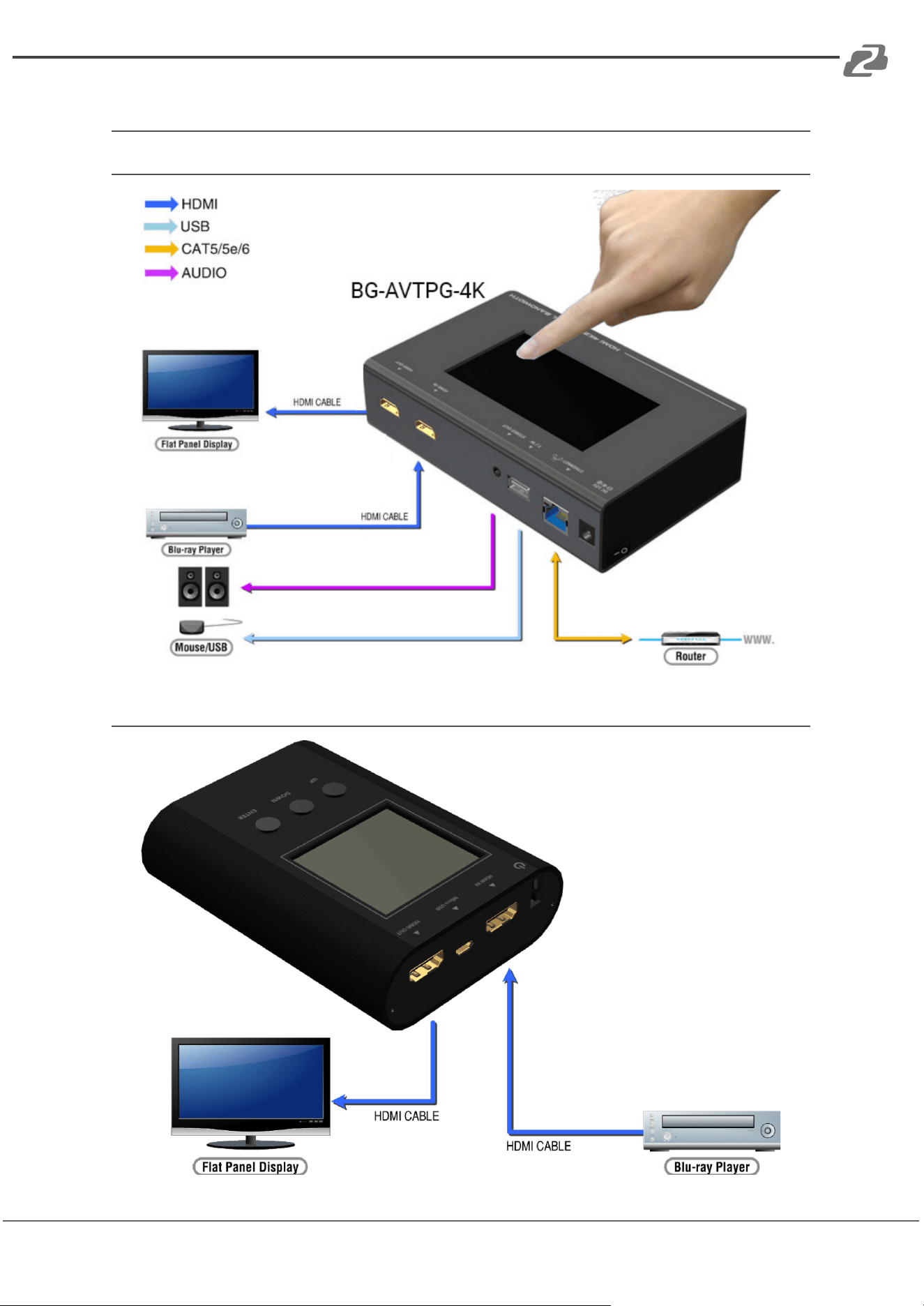
Application Example
BG-AVTPG-4K:
BG-AVTPG-MINI:
Address: 830 National Drive #140, Sacramento, CA 95834, USA · Tel: +1(888)499-9906 · Email: support@bzbgear.com 32

BZBGEAR BG-AVTPG-KIT PRODUCT MANUAL
Tech Support
Have technical questions? We may have answered them already!
Please visit BZBGEAR’s support page (bzbgear.com/support) for helpful information and
tips regarding our products. Here you will find our Knowledge Base
(bzbgear.com/knowledge-base) with detailed tutorials, quick start guides, and step-by-step
troubleshooting instructions. Or explore our YouTube channel, BZB TV
(youtube.com/c/BZBTVchannel), for help setting up, configuring, and other helpful how-to
videos about our gear.
Need more in-depth support? Connect with one of our technical specialists directly:
Phone
1.888.499.9906
Email
support@bzbgear.com
Live Chat
bzbgear.com
Limited Product Warranty Terms
Pro Line: 5-year warranty from the date of purchase for AV/Broadcasting products bought
on or after August 1, 2024.
Essential Line: 3-year warranty from the date of purchase for AV/Broadcasting products
bought on or after August 1, 2024.
Cables: Lifetime Limited Product Warranty.
For complete warranty information, please visit bzbgear.com/warranty.
For questions, please call 1.888.499.9906 or email support@bzbgear.com.
Address: 830 National Drive #140, Sacramento, CA 95834, USA · Tel: +1(888)499-9906 · Email: support@bzbgear.com 33

BZBGEAR BG-AVTPG-KIT PRODUCT MANUAL
Mission Statement
BZBGEAR is a breakthrough manufacturer of high-quality, innovative audiovisual equipment
ranging from AVoIP, professional broadcasting, conferencing, home theater, to live
streaming solutions. We pride ourselves on unparalleled customer support and services.
Our team offers system design consultation, and highly reviewed technical support for all
the products in our catalog. BZBGEAR delivers quality products designed with users in
mind.
Copyright
All the contents in this manual and its copyright are owned by BZBGEAR. No one is allowed
to imitate, copy, or translate this manual without BZBGEAR’s permission. This manual
contains no guarantee, standpoint expression or other implies in any form. Product
specification and information in this manual is for reference only and subject to change
without notice.
All rights reserved. No reproducing is allowed without acknowledgement.
Address: 830 National Drive #140, Sacramento, CA 95834, USA · Tel: +1(888)499-9906 · Email: support@bzbgear.com 34