User Manual ZBBridge-PR2 (EN)
Introduction
Specifications
Download the eWeLink App
Power On
Add Device
Add Zigbee Sub-devices
Matter User Guide
Factory Reset
FCC compliance statement
EU Declaration of Conformity
For CE frequency
WEEE Disposal and Recycling Information
WARNING
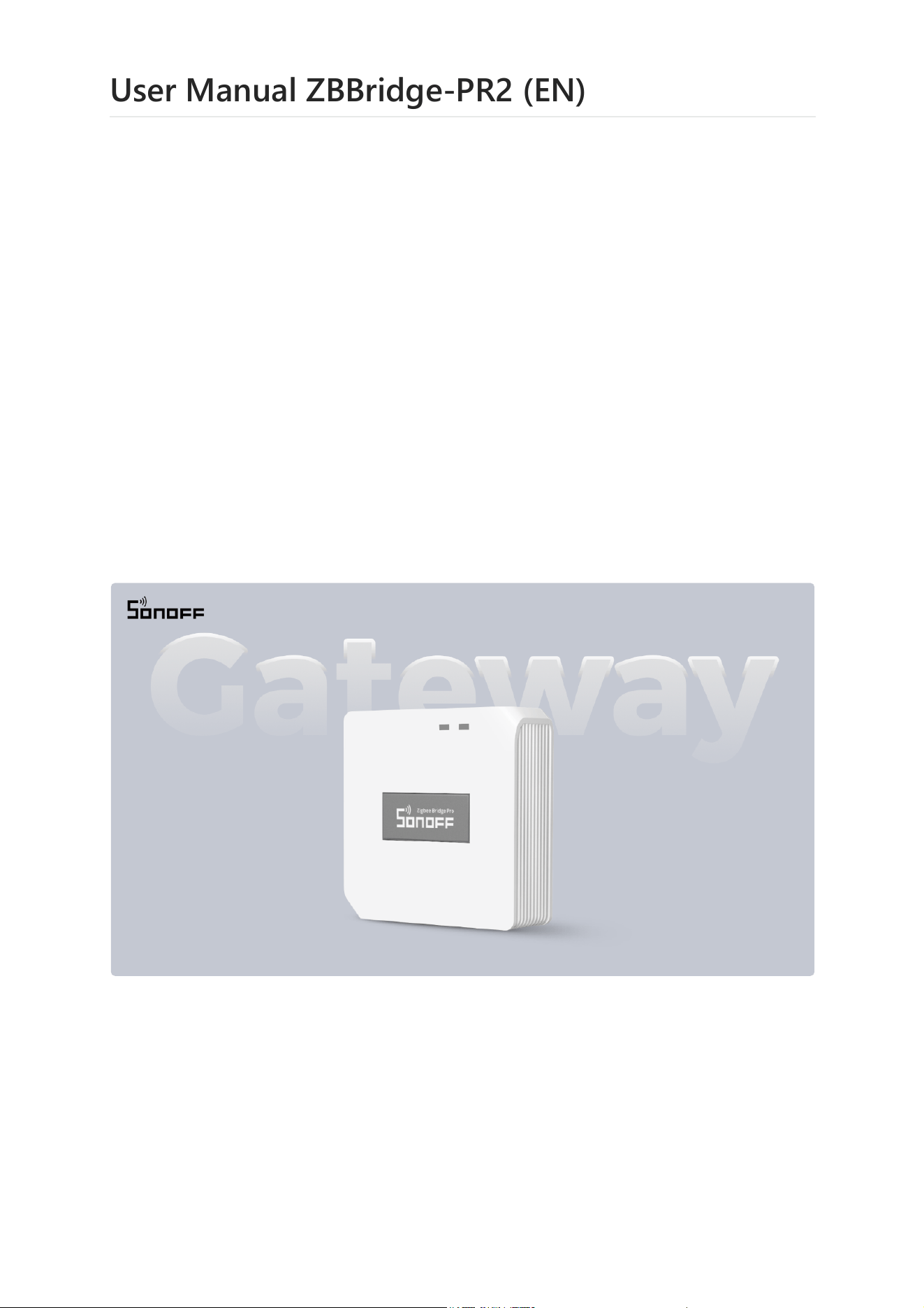
ZBBridge-PR2 is a smart home gateway based on the Zigbee 3.0 protocol. It supports the
connection of up to 128 Zigbee sub-devices and features Matter Bridge functionality,
allowing connected Zigbee sub-devices to be synchronized to Matter platforms for
interoperability with Matter ecosystems such as Apple Home, Google Home, Amazon
Alexa, and Samsung SmartThings.
Introduction
Smart Home Gateway User Manual V1.0
2026/10/10 10:02
User Manual ZBBridge-PR2 (EN) · ITEAD
https://itead.yuque.com/scy29x/uaxoer/zrpemi7r9rkx4rsi/pdf#print
1/9
ZBBridge-PR2 also supports smart security and audible alarms to provide timely alerts
for abnormal situations and enhance home security. It supports local scene automation,
allowing automations to continue running reliably even when the network is unavailable,
providing a more reliable and convenient smart home experience.
Specifications
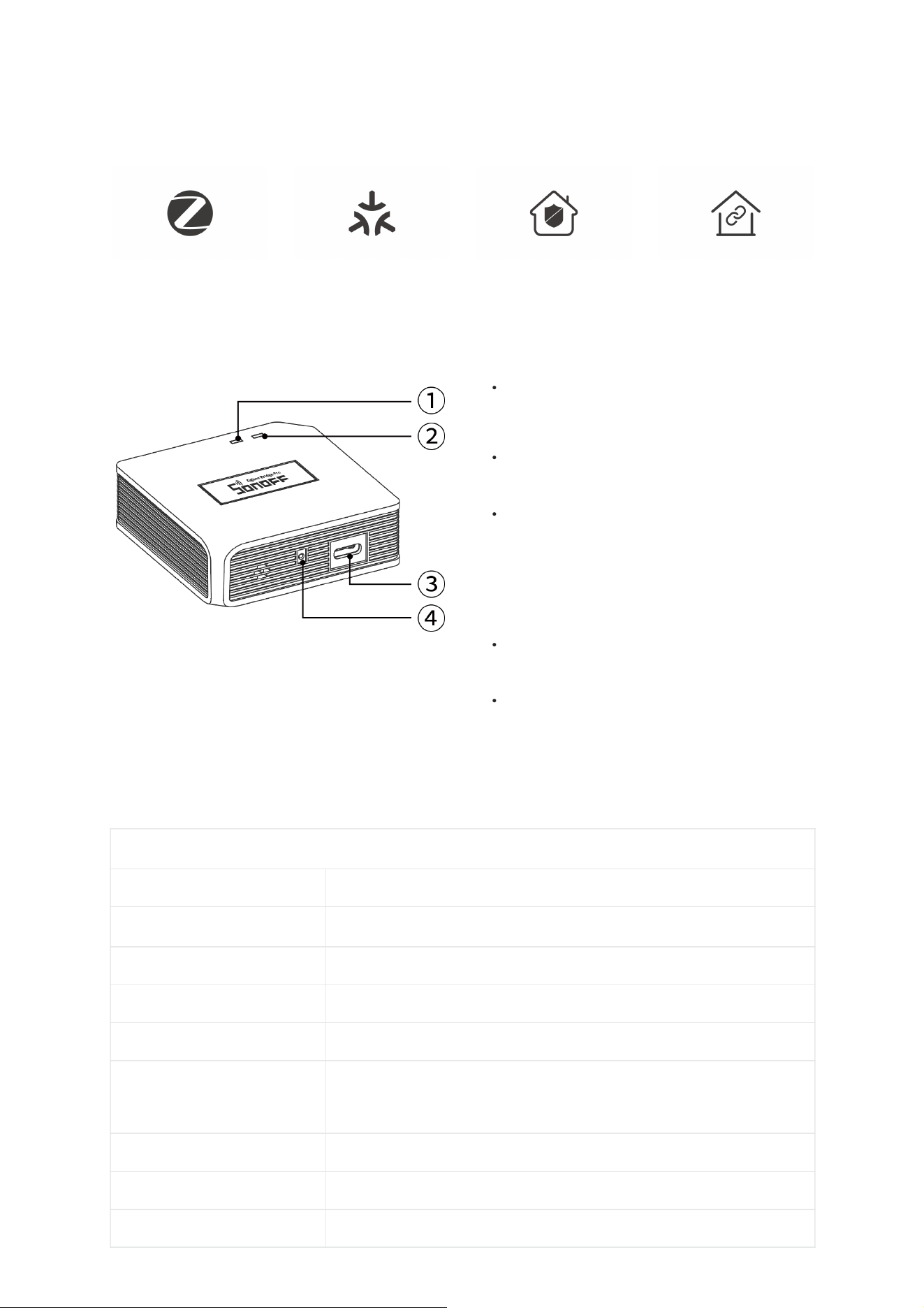
Zigbee 3.0 Matter Bridge Smart Security Local Scenes
① Zigbee Indicator (Green)
Slow flashing: Pairing Zigbee sub-devices
② Wi-Fi Indicator (Blue)
Two short flashes followed by one long
flash: Pairing mode
Solid on: Successfully paired with
eWeLink
③ Power Port (Type C)
④ Button
Press and hold for 5 seconds to enter
pairing mode
Press and hold for 10 seconds to delete
all sub-devices
●
●
●
●
●
Zigbee Bridge Pro Gen2
Product Series Bridge Series
Product Name
Smart Home Bridge
Model ZBBridge-PR2
MCU ESP32-S3 + ESP32-H2
Input 5V ⎓ 1A
Wireless Connection
Zigbee 3.0: IEEE802.15.4
WiFi: IEEE 802.11 b/g/n 2.4GHz
Power Interface Type Type C
Color White
Dimensions 62×62×20mm
2026/10/10 10:02
User Manual ZBBridge-PR2 (EN) · ITEAD
https://itead.yuque.com/scy29x/uaxoer/zrpemi7r9rkx4rsi/pdf#print
2/9
Go to the App Store, Google Play Store, or Apple App Store and search for "eWeLink"
to download the app.
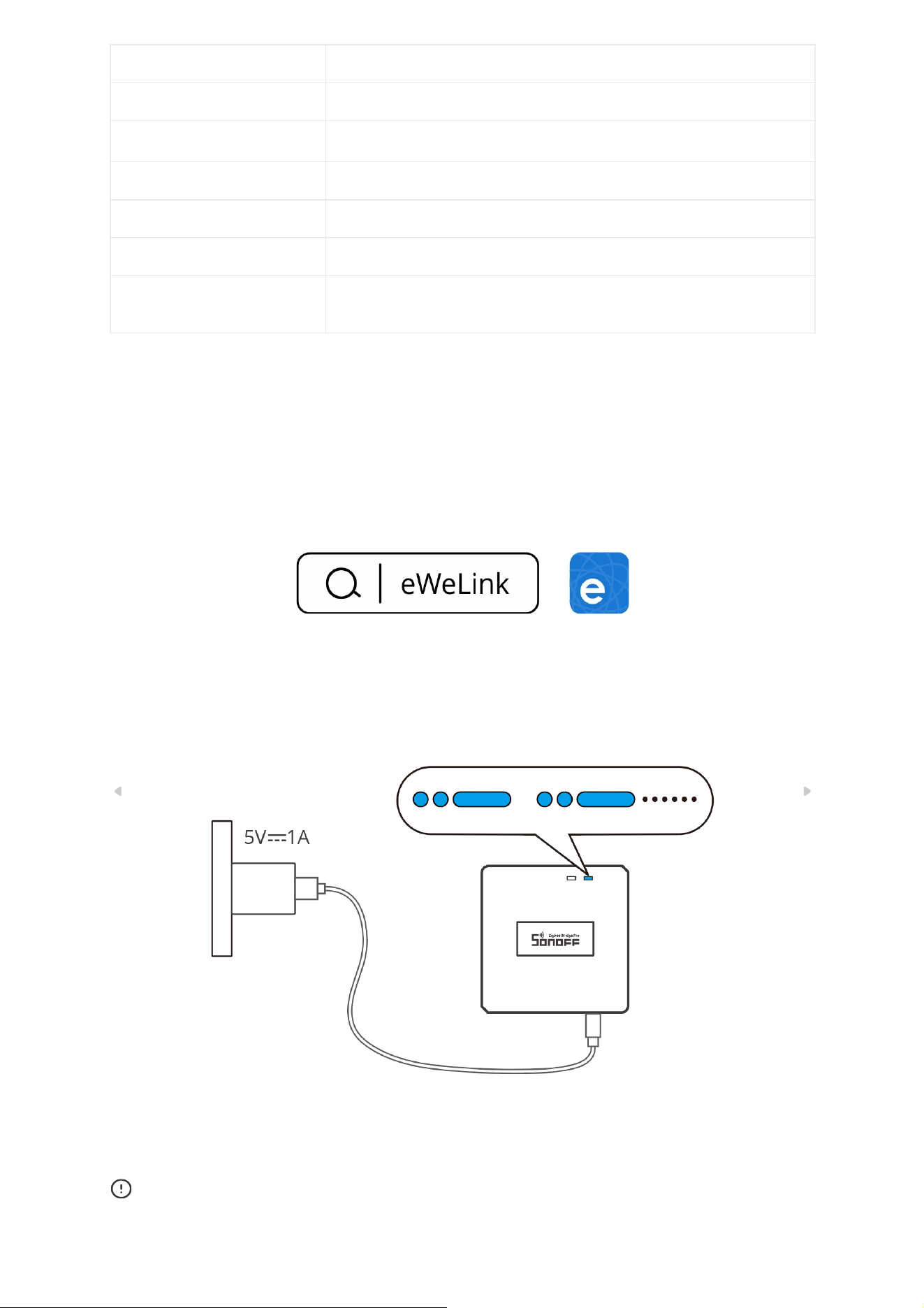
When powered on for the first time, the device automatically enters pairing mode, and
the Wi-Fi indicator flashes two short times followed by one long flash.
If the device is not added to the network within 10 minutes, it will exit pairing mode.
To enter pairing mode again, press and hold the device button for 5 seconds until the Wi-
Fi indicator flashes two short times followed by one long flash.
Download the eWeLink App
Power On
Net Weight 37.5g
Housing Material PC
Applicable Place Indoor
Operating Temperature -10℃~40℃
Operating Humidity 0~90%RH,non-condensing
FCC ID 2APN5-ZBBRIDGEPR2
Certifications CE/FCC/RoHS
2026/10/10 10:02
User Manual ZBBridge-PR2 (EN) · ITEAD
https://itead.yuque.com/scy29x/uaxoer/zrpemi7r9rkx4rsi/pdf#print
3/9
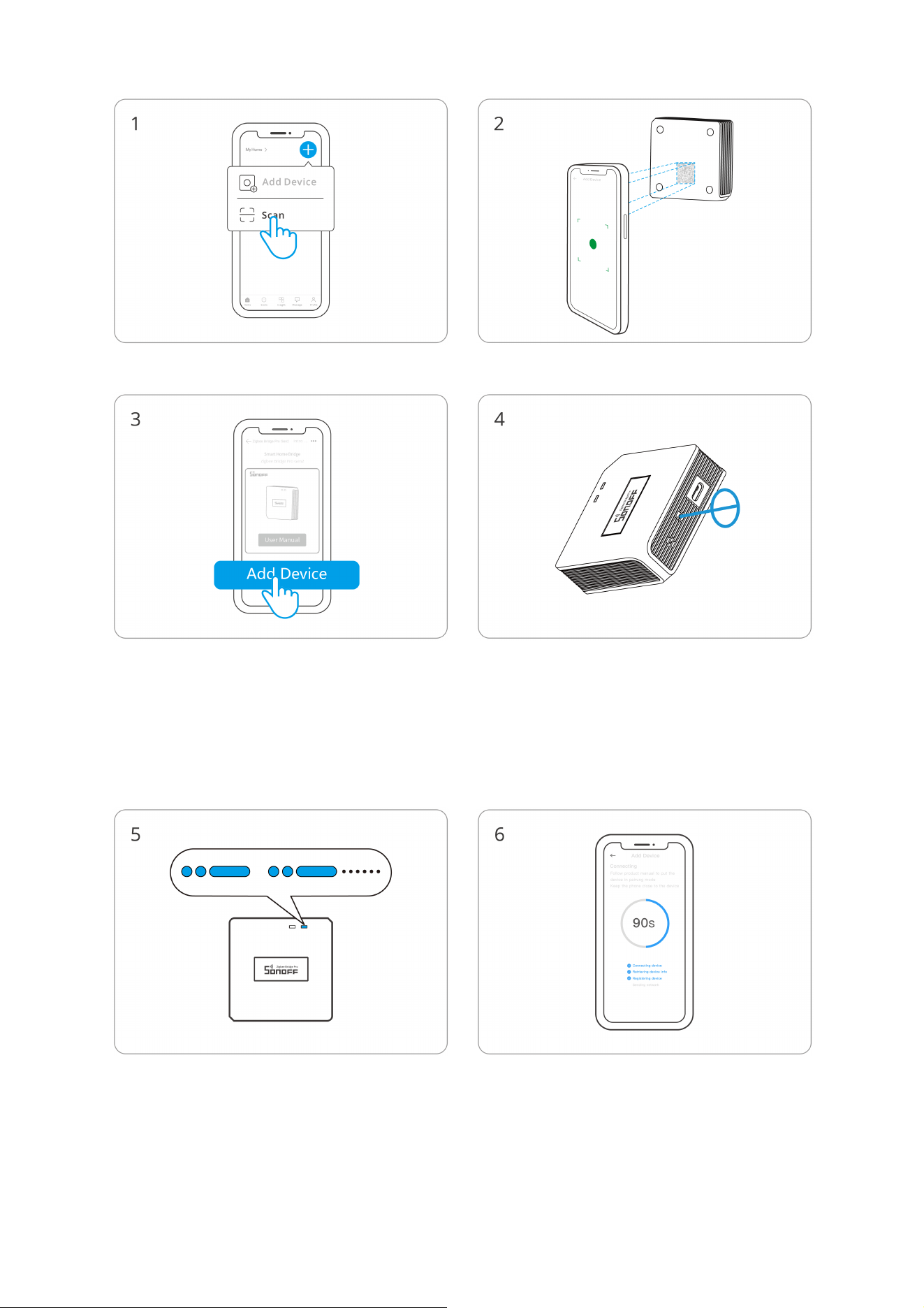
Add Device
Select "Scan" Scan the QR code on the device
Select "Add Device"
(If the device has exited pairing mode)
Press and hold the device button for 5
seconds
Check the LED indicator status (two short
flashes followed by one long flash)
Connecting to Device
2026/10/10 10:02
User Manual ZBBridge-PR2 (EN) · ITEAD
https://itead.yuque.com/scy29x/uaxoer/zrpemi7r9rkx4rsi/pdf#print
4/9
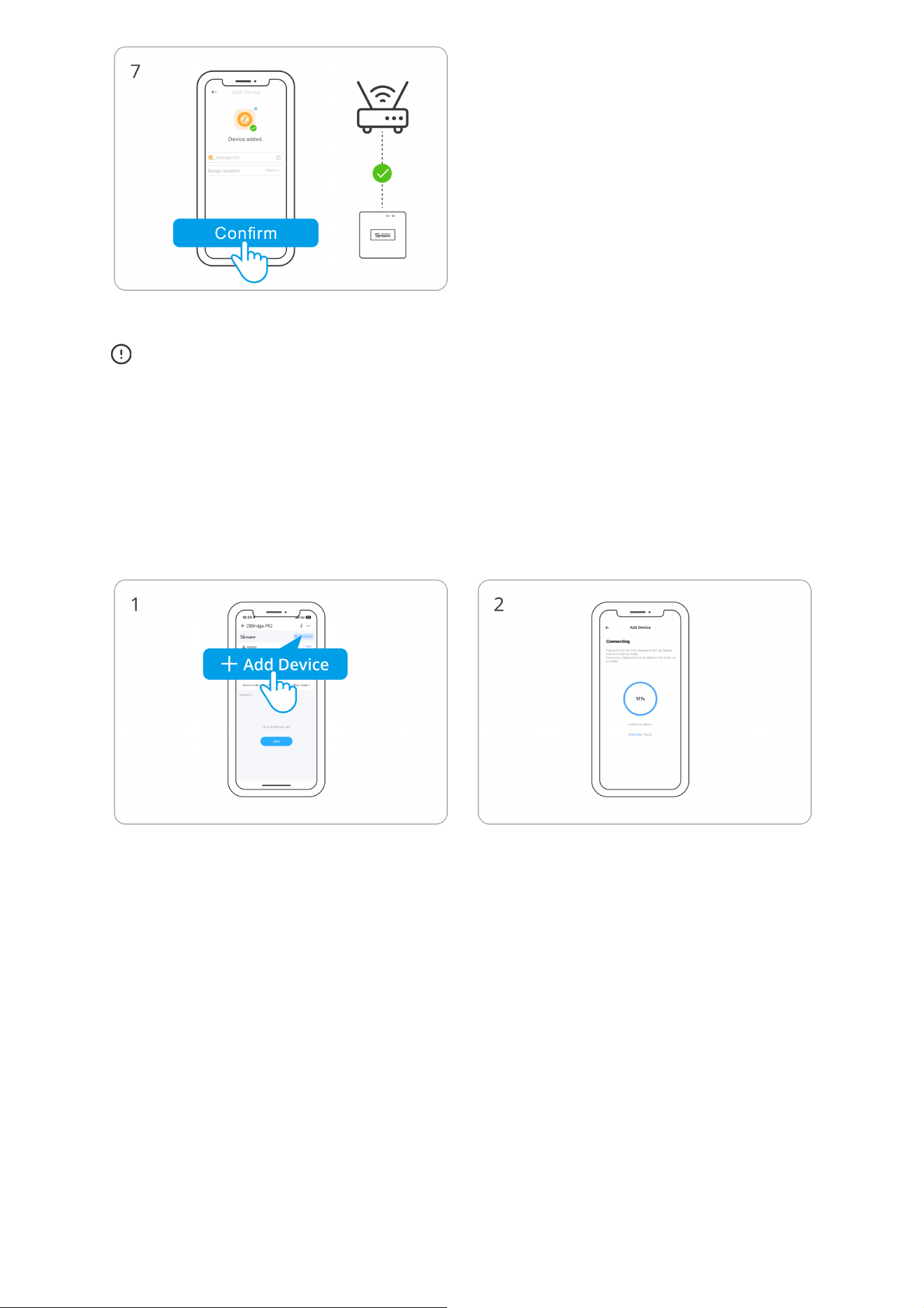
The ZBBridge-PR2 connects to the network through an existing Wi-Fi router. During
setup, your mobile phone should also be connected to the same router's Wi-Fi network.
The ZBBridge-PR2 does not provide a Wi-Fi hotspot.
First, put the sub-device into pairing mode, then tap "Add" on the gateway interface and
wait for the search to complete and the sub-device to be added.
Add Zigbee Sub-devices
Matter User Guide
Click to confirm
2026/10/10 10:02
User Manual ZBBridge-PR2 (EN) · ITEAD
https://itead.yuque.com/scy29x/uaxoer/zrpemi7r9rkx4rsi/pdf#print
5/9
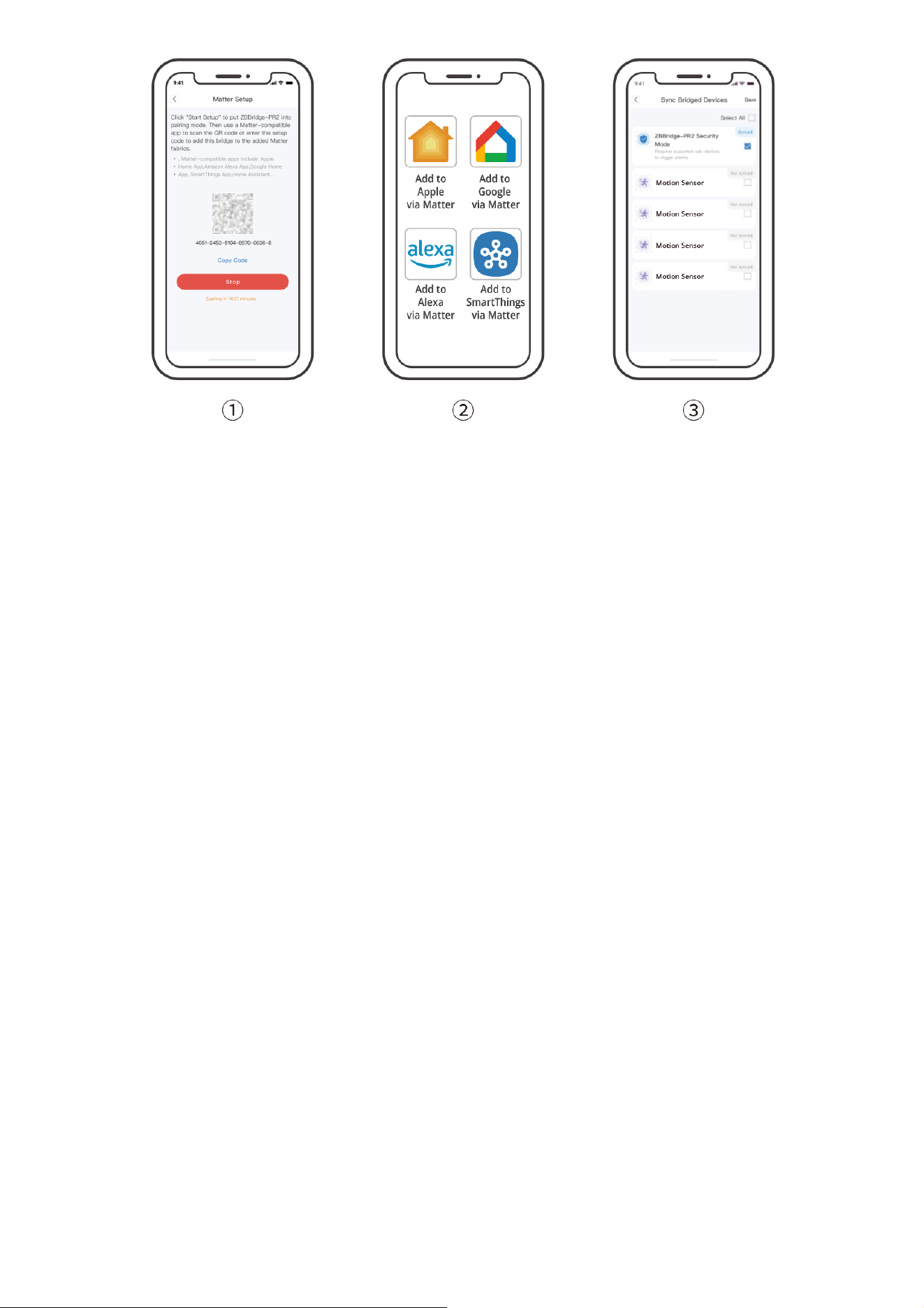
① Open Device Setting - Matter - Matter Setup, then tap Start Setup to enable Matter
pairing mode.
② Open a Matter-compatible app and scan the QR code or paste the setup code to add
the device.
③ Open Device Setting - Matter - Sync Bridged Devices to manage the sub-devices
synchronized to Matter.
Press and hold the device pairing button for 10 seconds to clear all sub-devices.
Responsible Party Name: SONOFF TECHNOLOGY LLC
Address: 14777 NE 40th St, Suite 201 Bellevue, WA 98007
Email Address: usr[email protected] FCC ID: 2APN5-ZBBRIDGEPR2
1. This device complies with part 15 of the FCC Rules. Operation is subject to the
following two conditions:
(1) This device may not cause harmful interference, and
(2) This device must accept any interference received, including interference that may
cause undesired operation.
2. Changes or modifications not expressly approved by the party responsible for
compliance could void the user's authority to operate the equipment.
Factory Reset
FCC compliance statement
2026/10/10 10:02
User Manual ZBBridge-PR2 (EN) · ITEAD
https://itead.yuque.com/scy29x/uaxoer/zrpemi7r9rkx4rsi/pdf#print
6/9

Note: This equipment has been tested and found to comply with the limits for a Class B
digital device, pursuant to part 15 of the FCC Rules. These limits are designed to provide
reasonable protection against harmful interference in a residential installation. This
equipment generates, uses and can radiate radio frequency energy and, if not installed
and used in accordance with the instructions, may cause harmful interference to radio
communications. However, there is no guarantee that interference will not occur in a
particular installation. If this equipment does cause harmful interference to radio or
television reception, which can be determined by turning the equipment off and on, the
user is encouraged to try to correct the interference by one or more of the following
measures:
—Reorient or relocate the receiving antenna.
—Increase the separation between the equipment and receiver.
—Connect the equipment into an outlet on a circuit different from that to which the
receiver is connected.
—Consult the dealer or an experienced radio/TV technician for help.
FCC Radiation Exposure statement:
This equipment complies with FCC radiation exposure limits set forth for an uncontrolled
environment.
This equipment should be installed and operated with a minimum distance of 20 cm
between the radiator and your body.
This transmitter must not be co-located or operating in conjunction with any other
antenna or transmitter.
Hereby, Shenzhen Sonoff Technologies Co., Ltd. declares that the radio equipment type
ZBBridge-PR2 is in compliance with Directive 2014/53/EU. The full text of the EU
declaration of conformity is available at the following internet address:
https://sonoff.tech/pages/compliance/
EU Operating Frequency Range:
Wi-Fi:802.11 b/g/n20 2412–2472 MHz, 802.11 n40 2422-2462 MHz
BLE: 2402–2480 MHz
Zigbee : 2405–2480 MHz
EU Output Power:
Wi-Fi 2.4G≤20dBm
EU Declaration of Conformity
For CE frequency
2026/10/10 10:02
User Manual ZBBridge-PR2 (EN) · ITEAD
https://itead.yuque.com/scy29x/uaxoer/zrpemi7r9rkx4rsi/pdf#print
7/9
BLE≤10dBm
Zigbee≤10dBm
Under normal use of condition, this equipment should be kept at a separation distance
of at least 20 cm between the antenna and the body of the user.
1. This product is not a toy and not intended for use by children. For adult use only.
2. The appliance is suitable for moderate climates only.
3. The ventilation must not be impaired by covering the appliance with items such as
newspapers, table cloths, curtains, etc.
4. Naked flame sources, such as candles, must not be placed on the appliance.
5. This product should be powered by a direct current power supply that complies with
the EN IEC 62368-1 standard, with an output range of PS2 or LPS.
WEEE Disposal and Recycling Information
WARNING
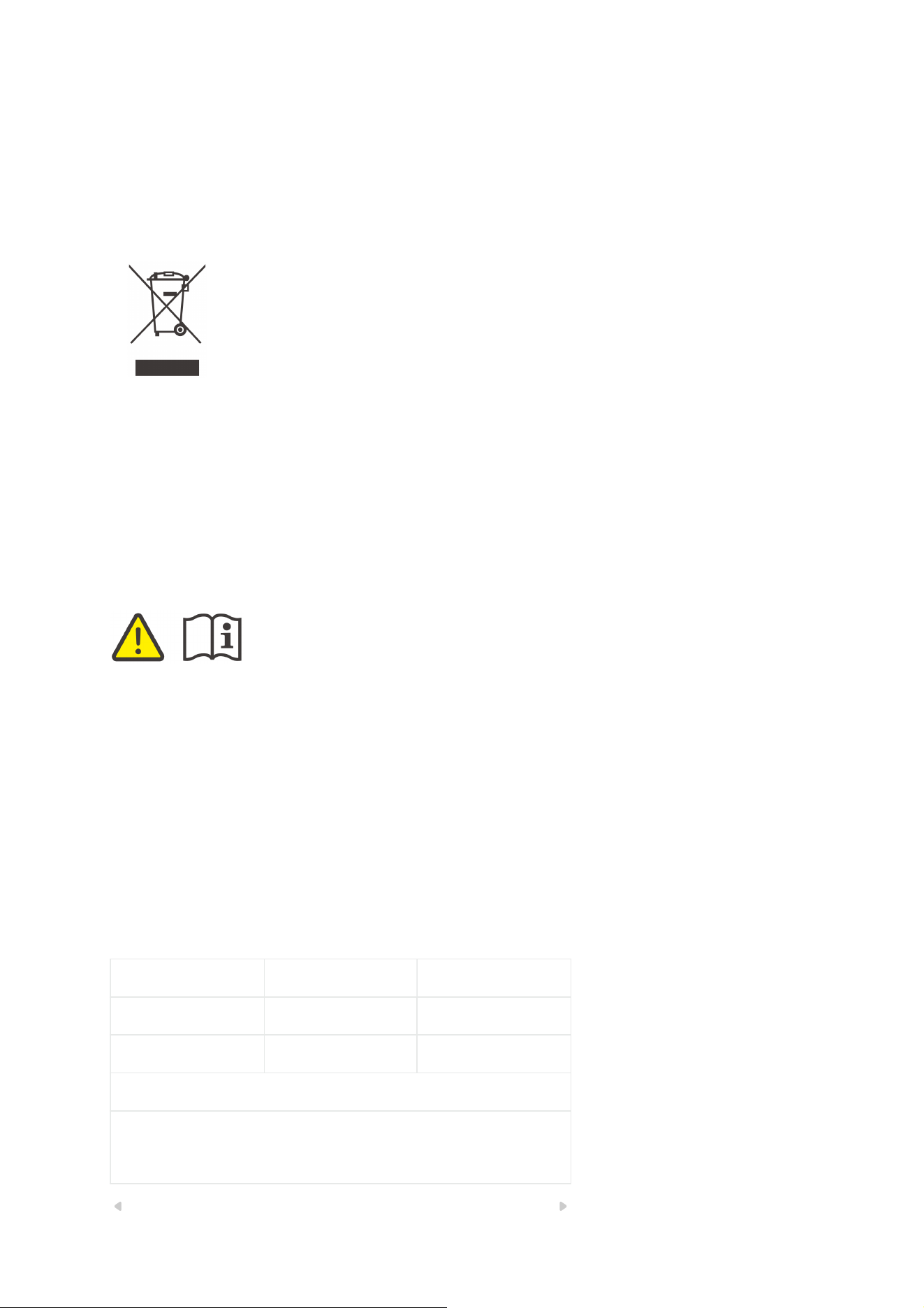
WEEE Disposal and Recycling Information All products bearing this
symbol are waste electrical and electronic equipment (WEEE as in
directive 2012/19/EU) which should not be mixed with unsorted
household waste. Instead, you should protect human health and the
environment by handing over your waste equipment to a designated
collection point for the recycling of waste electrical and electronic
equipment, appointed by the government or local authorities. Correct
disposal and recycling will help prevent potential negative
consequences to the environment and human health. Please contact
the installer or local authorities for more information about the
location as well as terms and conditions of such collection points.
Scatola Manuale Pellicola
PAP 21 PAP 22 LDPE 4
Carta Carta Plastica
RACCOLTA DIFFERENZIATA
Verifica le disposizioni del tuo Comune.
Separa le componenti e conferiscile in modo corretto.
2026/10/10 10:02
User Manual ZBBridge-PR2 (EN) · ITEAD
https://itead.yuque.com/scy29x/uaxoer/zrpemi7r9rkx4rsi/pdf#print
8/9
Manufacturer: Shenzhen Sonoff Technologies Co., Ltd.
Address: 3F & 6F, Bldg A, No. 663, Bulong Rd, Shenzhen, Guangdong, 518000, China
Service email: suppor[email protected] Website: sonoff.tech
Made in China
2026/10/10 10:02
User Manual ZBBridge-PR2 (EN) · ITEAD
https://itead.yuque.com/scy29x/uaxoer/zrpemi7r9rkx4rsi/pdf#print
9/9